Wireless Audio - Multiroom
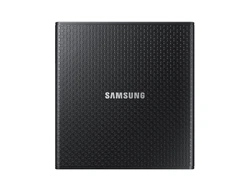
HUB
Quick Setup Guide
A
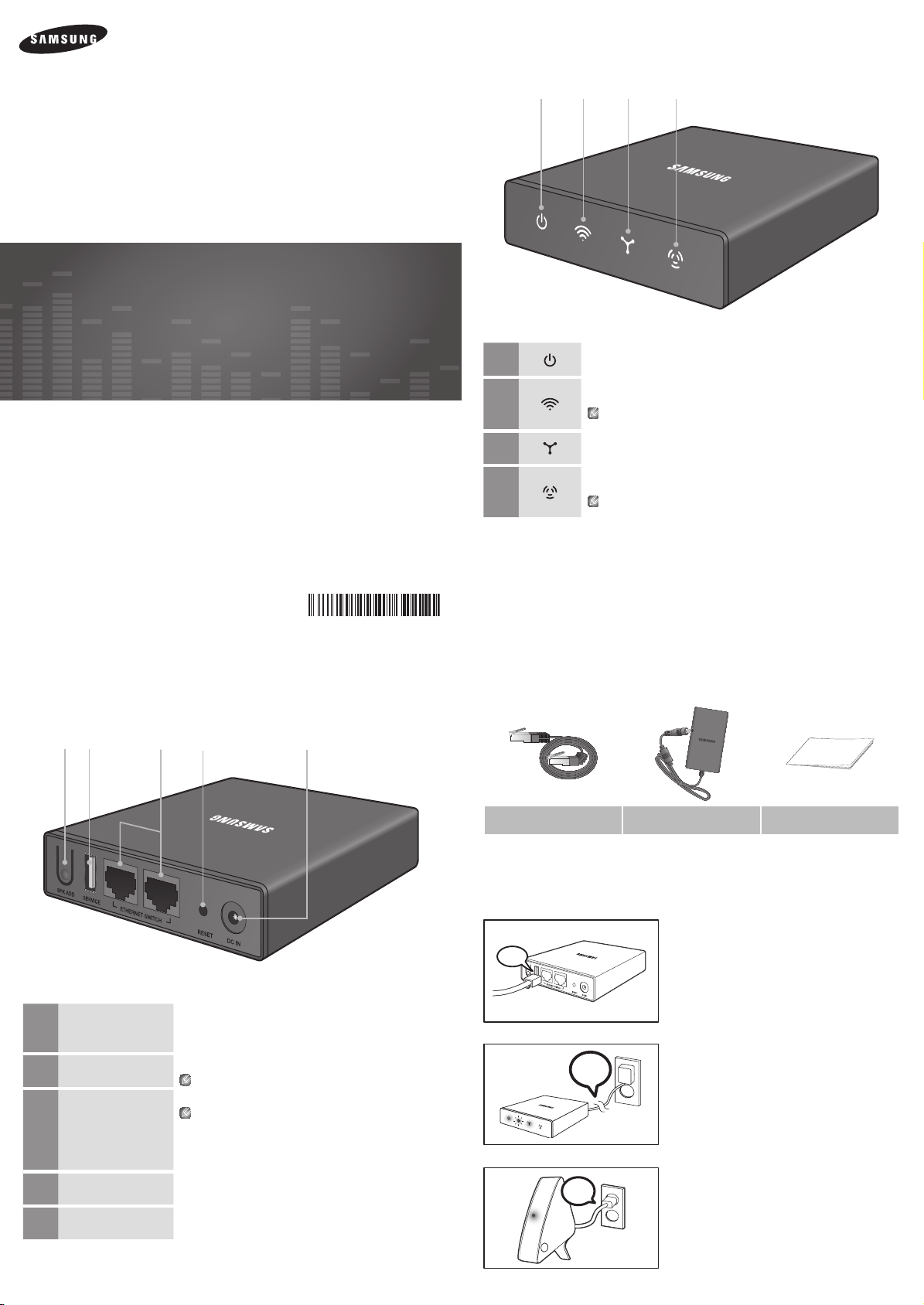
Front Panel
1
This indicator turns on when power is supplied to the HUB.
2
This indicator blinks when the HUB is in pairing mode.
After pairing is complete, this indicator stops flashing and operates in normal mode.
Pairing mode continues for a set time period. The indicator may keep blinking after pairing is
completed.
3
This indicator turns on when the HUB is connected to a wireless router with an Ethernet cable.
4
This indicator turns on when the HUB is set to Repeater mode and used to expand wireless Wi-Fi
coverage in a network that includes another HUB and a wireless router.
If you have trouble connecting the HUB and M7 because the signal is blocked or the distance
between them is too great, add a new HUB in Repeater mode to expand wireless coverage.
A
What’s included
LAN cable
(AK39-00176A)
Power Adaptor
(BN44-00673A)
Quick Guide
(AH68-02665J)
A
Connecting the HUB to Your Wi-Fi Network
•M7scanbeusedanywhereyourWi-Fisignalreaches.
➜ ➜
LAN
1 ConnecttheHUBtoyourrouterormodemusinga
LANcable.
Plug
In
2 Plugtheincludedpowercableintothebackof
theHUB,andthenplugthepowercordintoawall
socket.
Plug
In
3
AfterthePairingIndicatorontheHUBlights,plugintheM7.
(Formoreinformation,seetheM7QuickSetupGuide.)
q w e r
A
Rear Panel
1
SPK ADD
Press this button to set the HUB to Pairing mode when adding an additional M7 or
to switch the HUB to Repeater mode.
(Press and hold for 1 second to switch to Pairing mode. Press and hold for 10
seconds to switch to Repeater mode.)
2
SERVICE
Used to update the firmware.
The SERVICE port is only for updating.
3
ETHERNET SWITCH
Used to connect a LAN cable.
If you want to connect another wired device to the router that the HUB is
connected to, and all the router’s wired ports are occupied, you can connect it
to an unoccupied LAN port on the HUB.
Connecting to the HUB provides the same functionality as being connected to the
router. However, the link to the router will be lost if you power off (unplug) the HUB.
Note : The HUB and the router must have a hard-wired connection.
4
RESET
Press the RESET button with a pen tip for 5 seconds to reset the HUB.
5
DC IN
Connector for the power cable.
wq e r t
WAM250
AH68-02665J-00
AH68-02665J
02665J-00-WAM250-QG-ZA.indd 1 2013-09-06 오전 10:28:46
LIMITED WARRANTY TO ORIGINAL PURCHASER
ThisSAMSUNGbrandproduct,assuppliedanddistributedbySAMSUNGanddeliverednew,intheoriginalcartontotheoriginalconsumerpurchaser,is
warrantedbySAMSUNGagainstmanufacturingdefectsinmaterialsandworkmanshipforalimitedwarrantyperiodof:
One (1) Year Parts and Labor*
(*90 Days Parts and Labor for Commercial Use)
Thislimitedwarrantybeginsontheoriginaldateofpurchase,andisvalidonlyonproductspurchasedandusedintheUnitedStates.Toreceivewarranty
service,thepurchasermustcontactSAMSUNGforproblemdeterminationandserviceprocedures.WarrantyservicecanonlybeperformedbyaSAMSUNG
authorizedservicecenter.TheoriginaldatedbillofsalemustbepresenteduponrequestasproofofpurchasetoSAMSUNGorSAMSUNG'sauthorized
servicecenter.Transportationoftheproducttoandfromtheservicecenteristheresponsibilityofthepurchaser.
SAMSUNGwillrepairorreplacethisproduct,atouroptionandatnochargeasstipulatedherein,withneworreconditionedpartsorproductsiffoundtobe
defectiveduringthelimitedwarrantyperiodspecifiedabove.AllreplacedpartsandproductsbecomethepropertyofSAMSUNGandmustbereturnedto
SAMSUNG.Replacementpartsandproductsassumetheremainingoriginalwarranty,orninety(90)days,whicheverislonger.
SAMSUNG'sobligationswithrespecttosoftwareproductsdistributedbySAMSUNGundertheSAMSUNGbrandnamearesetforthintheapplicableend
userlicenseagreement.Non-SAMSUNGhardwareandsoftwareproducts,ifprovided,areonan"ASIS"basis.
Non-SAMSUNGmanufacturers,suppliers,publishers,andserviceprovidersmayprovidetheirownwarranties.
Thislimitedwarrantycoversmanufacturingdefectsinmaterialsandworkmanshipencounteredinnormal,andexcepttotheextentotherwiseexpressly
providedforinthisstatement,noncommercialuseofthisproduct,andshallnotapplytothefollowing,including,butnotlimitedto:damagewhichoccursin
shipment;deliveryandinstallation;applicationsandusesforwhichthisproductwasnotintended;alteredproductorserialnumbers;cosmeticdamageor
exteriorfinish;accidents,abuse,neglect,fire,water,lightningorotheractsofnature;useofproducts,equipment,systems,utilities,services,parts,supplies,
accessories,applications,installations,repairs,externalwiringorconnectorsnotsuppliedandauthorizedbySAMSUNG,orwhichdamagethisproduct
orresultinserviceproblems;incorrectelectricallinevoltage,fluctuationsandsurges;customeradjustmentsandfailuretofollowoperatinginstructions,
cleaning,maintenanceandenvironmentalinstructionsthatarecoveredandprescribedintheinstructionbook;productremovalorreinstallation;reception
problemsanddistortionrelatedtonoise,echo,interferenceorothersignaltransmissionanddeliveryproblems.SAMSUNGdoesnotwarrantuninterruptedor
error-freeoperationoftheproduct.
THEREARENOEXPRESSWARRANTIESOTHERTHANTHOSELISTEDANDDESCRIBEDABOVE,ANDNOWARRANTIESWHETHEREXPRESSOR
IMPLIED,INCLUDING,BUTNOTLIMITEDTO,ANYIMPLIEDWARRANTIESOFMERCHANTABILITYORFITNESSFORAPARTICULARPURPOSE,SHALL
APPLYAFTERTHEEXPRESSWARRANTYPERIODSSTATEDABOVE,ANDNOOTHEREXPRESSWARRANTYORGUARANTYGIVENBYANYPERSON,
FIRMORCORPORATIONWITHRESPECTTOTHISPRODUCTSHALLBEBINDINGONSAMSUNG.SAMSUNGSHALLNOTBELIABLEFORLOSSOF
REVENUEORPROFITS,FAILURETOREALIZESAVINGSOROTHERBENEFITS,ORANYOTHERSPECIAL,INCIDENTALORCONSEQUENTIALDAMAGES
CAUSEDBYTHEUSE,MISUSEORINABILITYTOUSETHISPRODUCT,REGARDLESSOFTHELEGALTHEORYONWHICHTHECLAIMISBASED,
ANDEVENIFSAMSUNGHASBEENADVISEDOFTHEPOSSIBILITYOFSUCHDAMAGES.NORSHALLRECOVERYOFANYKINDAGAINSTSAMSUNG
BEGREATERINAMOUNTTHANTHEPURCHASEPRICEOFTHEPRODUCTSOLDBYSAMSUNGANDCAUSINGTHEALLEGEDDAMAGE.WITHOUT
LIMITINGTHEFOREGOING,PURCHASERASSUMESALLRISKANDLIABILITYFORLOSS,DAMAGEORINJURYTOPURCHASERANDPURCHASER'S
PROPERTYANDTOOTHERSANDTHEIRPROPERTYARISINGOUTOFTHEUSE,MISUSEORINABILITYTOUSETHISPRODUCTSOLDBYSAMSUNG
NOTCAUSEDDIRECTLYBYTHENEGLIGENCEOFSAMSUNG.THISLIMITEDWARRANTYSHALLNOTEXTENDTOANYONEOTHERTHANTHE
ORIGINALPURCHASEROFTHISPRODUCT,ISNONTRANSFERABLEANDSTATESYOUREXCLUSIVEREMEDY.
Somestatesdonotallowlimitationsonhowlonganimpliedwarrantylasts,ortheexclusionorlimitationofincidentalorconsequentialdamages,sothe
abovelimitationsorexclusionsmaynotapplytoyou.Thiswarrantygivesyouspecificlegalrights,andyoumayalsohaveotherrightswhichvaryfromstate
tostate.
Toobtainwarrantyservice,pleasecontactSAMSUNGcustomercarecenter.
A
Regulatory Compliance Statements
CAUTION
RISK OF ELECTRIC SHOCK
DO NOT OPEN
The lighting flash and arrowhead within the triangle is a
warning sign alerting you to dangerous voltage inside the
product.
CAUTION:
TO REDUCE THE RISK OF ELECTRIC SHOCK, DO NOT
REMOVE THE COVER (OR BACK). NO USER SERVICEABLE PARTS
INSIDE. REFER SERVICING TO QUALIFIED SERVICE PERSONNEL.
The explanation point within the triangle is a warning sign
alerting you to important instructions accompanying the
product.
❚
Warning
• Toreducetheriskoffireorelectricshock,donotexposethisapplianceto
rainormoisture.
• Donotexposethisapparatustodrippingorsplashing.
Donotputobjectsfilledwithliquids,suchasvasesontheapparatus.
• Toturnthisapparatusoffcompletely,youmustpullthepowerplugoutof
thewallsocket.Consequently,thepowerplugmustbeeasilyandreadily
accessibleatalltimes.
❚
FCC Statement: (for U.S.A)
Federal Communication Commission Interference Statement
Thisequipmenthasbeentestedandfoundtocomplywiththelimitsfora
ClassBdigitaldevice,pursuanttoPart15oftheFCCRules.Theselimits
aredesignedtoprovidereasonableprotectionagainstharmfulinterference
inaresidentialinstallation.Thisequipmentgenerates,usesandcanradiate
radiofrequencyenergyand,ifnotinstalledandusedinaccordancewiththe
instructions,maycauseharmfulinterferencetoradiocommunications.However,
thereisnoguaranteethatinterferencewillnotoccurinaparticularinstallation.If
thisequipmentdoescauseharmfulinterferencetoradioortelevisionreception,
whichcanbedeterminedbyturningtheequipmentoffandon,theuseris
encouragedtotrytocorrecttheinterferencebyoneofthefollowingmeasures:
• Reorientorrelocatethereceivingantenna.
• Increasetheseparationbetweentheequipmentandreceiver.
• Connecttheequipmenttoanoutletthatisonadifferentcircuitthanthe
outletthereceiverisconnectedto.
•
Consultthedealeroranexperiencedradio/TVtechnicianforhelp.
FCCCaution:Anychangesormodificationsnotexpresslyapprovedbythe
partyresponsibleforcompliancecouldvoidtheuser’sauthoritytooperatethis
equipment.
ThisdevicecomplieswithPart15oftheFCCRules.Operationissubjecttothe
followingtwoconditions:(1)Thisdevicemaynotcauseharmfulinterference,
and(2)thisdevicemustacceptanyinterferencereceived,includinginterference
thatmaycauseundesiredoperation.
ForproductsavailableintheUSandCanadianmarkets,onlychannels1~11are
available.Youcannotselectotherchannels.
Thisdeviceandit’santennasmustnotbeco-locatedoroperatedinconjunction
withanyotherantennaortransmitterexceptinaccordancewithFCCmulti-
transmitterproductprocedures.
Thisdeviceoperatesinthe5.15~5.25GHzfrequencyrange.Itisrestrictedto
indoorenvironmentsonly.
IMPORTANT NOTE
FCC Radiation Exposure Statement
ThisequipmentcomplieswithFCCradiationexposurelimitssetforthforan
uncontrolledenvironment.Thisequipmentshouldbeinstalledandoperatedso
thereisatleast8inches(20cm)betweentheradiatorandyourbody.
❚
IC Statement: (for Canada)
CANICES-3(B)/NMB-3(B)
ThisdevicecomplieswithIndustryCanadalicense-exemptRSSstandard(s).
Operationissubjecttothefollowingtwoconditions:(1)thisdevicemaynotcause
interference,and(2)thisdevicemustacceptanyinterference,includinginterference
thatmaycauseundesiredoperationofthedevice.
ForproductsavailableintheUSandCanadianmarkets,onlychannels1~11are
available.Youcannotselectotherchannels.
Thisdeviceandit’santennasmustnotbeco-locatedoroperatedinconjunction
withanyotherantennaortransmitterexceptinaccordancewithICmulti-
transmitterproductprocedures.
Thisdevicemayautomaticallydiscontinuetransmissionifthereisnoinformation
totransmit,oranoperationalfailure.Notethatthisisnotintendedtoprohibit
thetransmissionofcontrolorsignalinginformationortheuseofrepetitivecodes
whererequiredbythetechnology.
Toreducepotentialforharmfulinterferencetoco-channelmobilesatellitesystems,
thisdeviceoperatesinthe5150-5250MHzband,andisforindooruseonly.
IMPORTANT NOTE:
IC Radiation Exposure Statement:
ThisequipmentcomplieswithICRSS-102radiationexposurelimitssetforthfor
anuncontrolledenvironment.Thisequipmentshouldbeinstalledandoperatedso
thereisatleast8inches(20cm)betweentheradiatorandyourbody.
❚
Important Safety Instructions
Readtheseoperatinginstructionscarefullybeforeusingtheunit.Followallthe
safetyinstructionslistedbelow.
Keeptheseoperatinginstructionshandyforfuturereference.
1 Readtheseinstructions.
2 Keeptheseinstructions.
3 Heedallwarnings.
4 Followallinstructions.
5 Donotusethisapparatusnearwater.
6 Cleanonlywithadrycloth.
7 Donotblockanyventilationopenings.Installinaccordancewiththe
manufacturer’sinstructions.
8 Donotinstallnearanyheatsourcessuchasradiators,heatregisters,
stoves,orotherapparatus(includingAVreceivers)thatproduceheat.
9 Donotdefeatthesafetypurposeofthepolarizedorgrounding-type
plug.Apolarizedplughastwobladeswithonewiderthantheother.A
groundingtypeplughastwobladesandathirdgroundingprong.The
widebladeorthethirdprongareprovidedforyoursafety.Iftheprovided
plugdoesnotfitintoyouroutlet,consultanelectricianforreplacementof
theobsoleteoutlet.
10 Protectthepowercordfrombeingwalkedonorpinchedparticularly
atplugs,conveniencereceptacles,andthepointwhereitexitsthe
apparatus.
11
Onlyuseattachments/accessoriesspecifiedbythemanufacturer.
12 Useonlywiththecart,stand,tripod,bracket,or
tablespecifiedbythemanufacturer,orsoldwiththe
apparatus.Whenacartisused,usecautionwhen
movingthecart/apparatuscombinationtoavoid
injuryfromtip-over.
13 Unplugthisapparatusduringlightningstormsor
whenunusedforlongperiodsoftime.
14 Referallservicingtoqualifiedservicepersonnel.Servicingisrequired
whentheapparatushasbeendamagedinanyway,suchaswhenthe
power-supplycordorplugisdamaged,liquidhasbeenspilledorobjects
havefallenintotheapparatus,theapparatushasbeenexposedtorainor
moisture,doesnotoperatenormally,orhasbeendropped.
A
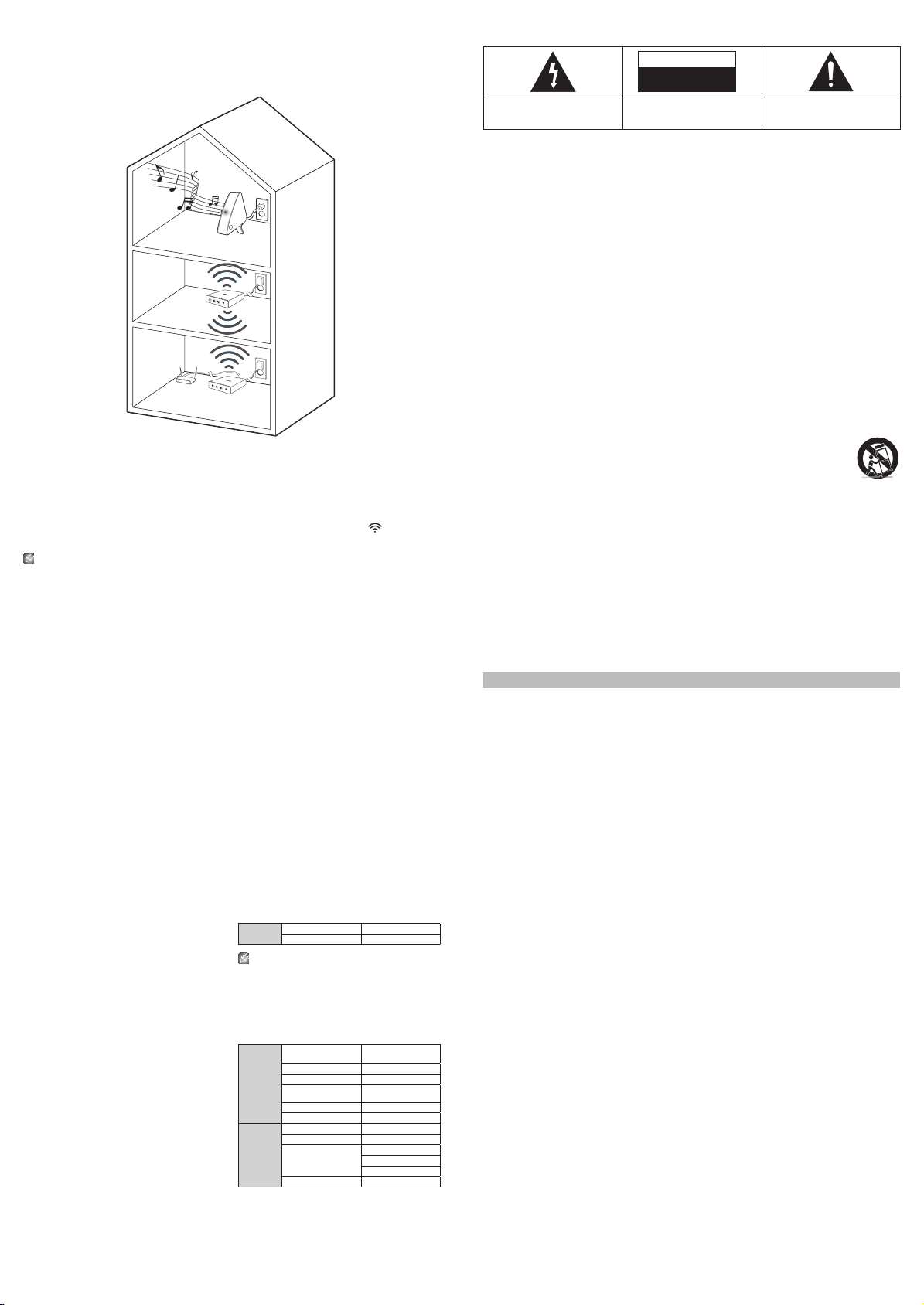
Adding a HUB
AnM7andaHUBmaynotpairsuccessfulllyiftheM7andHUBaretoofarapartorareondifferentfloors.
Insuchcases,youcanlinktwoHUBstogetherbysettingthesecondHUBtoRepeatermode.Theadditional
HUBamplifiesthesignalandletsyoupairtheM7totheclosestHUB.
1 SettheHUBthatisconnectedtothewirelessroutertoPairingmodebypressingitsSPK ADDbuttonfor
1second.
2 PluginthenewHUByouareusingasanextender,andthenpressitsSPK ADDbuttonfor10seconds.
3 ThenewlyaddedHUB’sLEDindicatorsturnoffandon,anditswitchestoRepeatermode.
4 OncetheconnectionbetweenthetwoHUBshasbeenestablished,theaddedHUB’s(
)indicator
stopsblinking.
`
If your smart device is not connected to the wireless router with a Wi-Fi connection, the M7 will not appear on the Samsung
Multiroom app.
`
Place the HUB in Repeater mode in an appropriate location between the M7 and the HUB that is connected to the wireless
router.
`
You can set only one HUB to Repeater mode.
A
Safety precautions
❚
Power Supply Precautions
• Donotoverloadoutletsorextensioncords.
- Thismayresultinabnormalheatorfire.
• Donotpluginorunplugthepowercordwithwethands.
• Donotplacetheproductnearheatingequipment.
• Tocleanthepowerplugblades,removetheplugfromthewalloutletand
wipethebladeswithadryclothonly.
• Donotbendthepowercordorpullitforcefully.
• Donotputheavyobjectsonthepowercord.
• Donotplugthepowercordintoalooseordamagedoutlet.
• Fullyinsertthepowercord’splugintothethewalloutletsothattheplugis
firmlyattachedtotheoutlet.
- Iftheconnectionisunstable,thereisariskoffire.
❚
Installation Precautions
• Donotinstalltheproductnearequipmentorobjectsthatgenerateheator
producefire(candles,mosquitocoils,heaters,radiators,etc.).Donotinstall
indirectsunlight.
• Whenmovingtheproduct,turnoffthepoweranddisconnectallcords(include
thepowercord)fromtheunit.
- Adamagedcordmaycauseafireandposesariskofelectricshock.
• Installingtheproductinenvironmentswithhighheatorhumidity,dust,
orextremecold,canleadtoqualityproblemsorcausetheproductto
malfunction.Beforeyouinstalltheproductinanenvironmentthatis
outsidethenorm,pleasecontactaSamsungservicecenterforadditional
information.
• Whenplacingtheproductonashelf,cabinet,ordesk,makesurethetop
panelfacesupwards.
• Donotplacetheproductonanunstablesurface(e.g.ashakyshelf,atilted
desk,etc.).
- Droppingtheproductcancauseittomalfunctionandposesarisk
ofinjury.Severevibrationorimpactcanalsocausetheproductto
malfunctionandleadtoafirehazard.
•
Installyourproductwithenoughspacearounditforventilation.
- Leaveatleast4inches(10cm)attherearoftheproductandmorethan
2inches(5cm)oneachsideoftheproduct.
• Keeptheplasticpackingmaterialsoutofreachofyourchildren.
- Childrenplayingwiththeplasticpackingmaterialsruntheriskof
suffication.
❚
Usage Precautions
• Usingforanextendedtimeathighvolumemaycauseseriousdamageto
yourhearing.
- Ifyouareexposedtosoundlouderthan85dbforanextendedtime,you
mayadverselyaffectyourhearing.Thelouderthesoundis,themore
seriouslydamagedyourhearingmaybecome.Notethatanordinary
conversationisbetween50to60dbandroadnoiseisapproximately80
db.
• Thisproductcontainsdangeroushighvoltage.Donotattemptto
disassemble,repair,ormodifyityourself.
- ContactaSamsungservicecenterwhenyourproductisinneedofrepair.
•
Donotplaceanycontainerthatcontainsliquidontheproduct(e.g.avase,
beverages,cosmetics,chemicals,etc.).Dodonotallowanymetalobjects(e.g.
coins,hairclips,etc.)orflammablematerial(e.g.paper,matches,etc.)toenter
theproduct(throughtheairvents,I/Oports,etc.).
- Ifanyharmfulmaterialorliquidenterstheproduct,turnofftheproduct
immediately,unplugthepowercord,andthencontactaSamsungservice
center.
• Donotdroptheproduct.Incaseofamechanicalbreakdown,disconnect
thepowercordandcontactaSamsungservicecenter.
- Thereisariskoffireorelectricshock.
• Donotholdorpulltheproductbythepowercordorthesignalcable.
- Adamagedcablecancausetheproducttomalfunction,causeafire,and
posesariskofelectricshock.
• Donotuseorkeepflammablematerialsneartheproduct.
•
Iftheproductemitsanabnormalsoundoraburntsmellorsmokes,unplugthe
power-cordimmediatelyandcontactaSamsungservicecenter.
• Ifyousmellgas,ventilatetheroomimmediately.Donottouchthepowerplug
oftheproduct.Donotturntheproductofforon.
• Donotstrikeorsubjecttheproducttoasuddenshock.Donotpiercethe
productwithasharpobject.
❚
Cleaning Precautions
• Neverusealcohol,solvents,waxes,benzene,thinners,airfreshener,or
lubricantstocleantheproduct,orsprayinsecticideontheproduct.
- Usinganyofthesematerialscandiscolortheexteriorcoatingorcauseit
tosplitorpeeloff,orremovethelabellingontheproduct.
• Tocleantheproduct,unplugthepowercord,andthenwipetheproductwith
aclean,dry,softcloth(Microfiber,cotton).
- Avoidleavingdustontheproduct.Dustcanscratchitsthesurface.
A
About the Network Connection
• Dependingonthewirelessrouterused,somenetworkoperationsmay
performdifferently.
• Fordetailedinformationonnetworkingwithawirelessrouterormodem,refer
totherouter’sormodem’sdocumentation.
• Selectonewirelesschannelthatisnotusedcurrently.Iftheselectedchannel
isusedbyanothercommunicationdevicenearby,radiointerferencemay
resultincommunicationfailure.
• IncompliancewiththenewestWi-Ficertificationspecifications,theHUB
doesnotsupportWEP,TKIP,orTKIP-AES(WPA2Mixed)securityencryption
innetworksrunninginthe802.11nmode.
• Byitsnature,wirelessLANmayexperienceradiointerferencedependingon
theenvironmentalconditions(suchaswirelessrouterperformance,distance,
obstruction,interferencewithotherwirelessdevices,etc.)
• WEPencryptiondoesnotworkwithWPS(PBC)/WPS(PIN).
• ConnectingtheHUBtoanAPwhoseIPaddressis10.0.0.xmaynotbe
successful.
A
Compatible products
Mobile
iOS 4.3 or above
Android 2.3.3(Gingerbread) or above
Somedevicesmaynotbecompatiblewiththeproduct.
A
Copyright
©2013SamsungElectronicsCo.,Ltd.
Allrightsreserved;Nopartorwholeofthisuser’smanualmaybereproducedor
copiedwithoutthepriorwrittenpermissionofSamsungElectronicsCo.,Ltd.
A
Specifications
General
Power Requirements
Input : AC 100-240V 50/60 Hz
Output : DC 14.0 V
Power Consumption 4 W
Weight 0.4 Kg (0.9 Ibs)
Dimensions
100 (W) x 106 (D) x 25 (H) mm
(3.9 (W) X 4.1 (D) X 1 (H) inches)
Operating Temperature Range +41°F to +95°F (+5°C to +35°C)
Operating Humidity Range 10 % to 75 %
Network
Ethernet 100BASE - TX Terminal
Wireless LAN Built-in
Security
WEP (OPEN/SHARED)
WPA-PSK (TKIP/AES)
WPA2-PSK (TKIP/AES)
WPS(PBC) Supported
- Networkspeedsequaltoorbelow10Mbpsarenotsupported.
- Designandspecificationsaresubjecttochangewithoutpriornotice.
- Weightanddimensionsareapproximate.
- Disposeunwantedelectronicsthroughanapprovedrecycler.
Tofindthenearestrecyclinglocation,gotoourwebsite:www.samsung.com/
recyclingdirectorcall,(877)278-0799.
- ThisQuickSetupGuideisbasedontheproductusingtheAndroidoperating
system.
- Forfurtherdetailsonusingtheproduct,visitwww.samsung.com
M7
HUB
Used as a
extender
02665J-00-WAM250-QG-ZA.indd 2 2013-09-06 오전 10:28:47
