imagine the possibilities
Thank you for purchasing this Samsung product.
To receive more complete service,
please register your product at
www.samsung.com/register
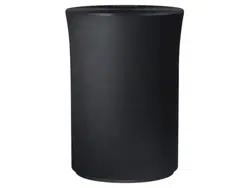
Wireless Audio Radiant - 360
R5/R3/R1
WAM5500/WAM3500/WAM1500
User Manual
A
Regulatory Compliance Statements
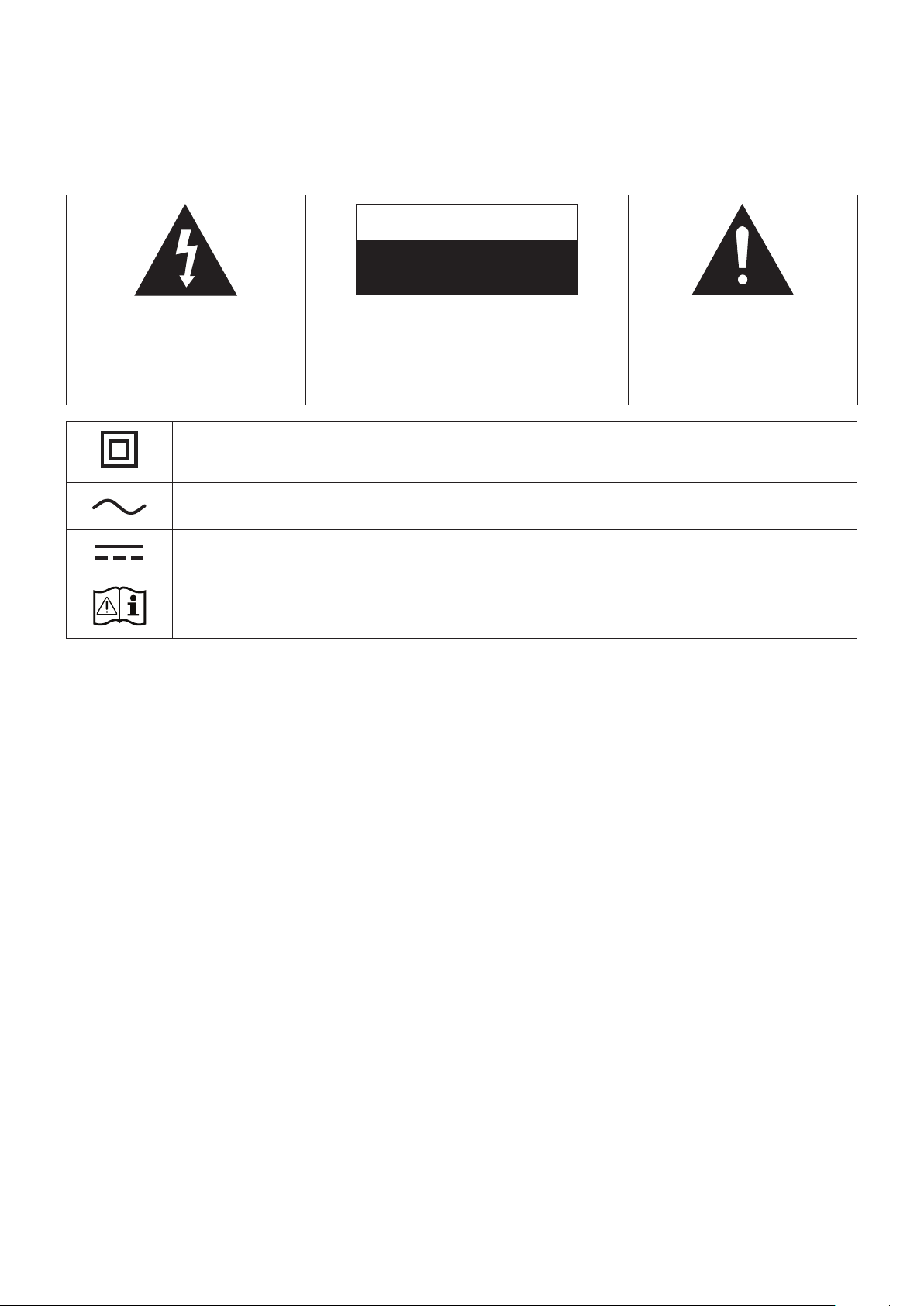
CAUTION
RISK OF ELECTRIC SHOCK
DO NOT OPEN
The lighting flash and arrowhead
within the triangle is a warning
sign alerting you to dangerous
voltage inside the product.
CAUTION: TO REDUCE THE RISK OF ELECTRIC
SHOCK, DO NOT REMOVE THE COVER (OR BACK).
NO USER SERVICEABLE PARTS INSIDE. REFER
SERVICING TO QUALIFIED SERVICE PERSONNEL.
The explanation point within the
triangle is a warning sign alerting
you to important instructions
accompanying the product.
Class II product : This symbol indicates that a safety connection to electrical
earth (ground) is not required.
AC voltage : Rated voltage marked with this symbol is AC voltage
DC voltage : Rated voltage marked with this symbol is DC voltage.
Caution. Consult instructions for use : This symbol instructs the user to consult
the user manual for further safety related information.
❚
Warning
• This product contains chemicals known to the State of California to cause cancer, birth
defects, or other reproductive harm.
• To reduce the risk of fire or electric shock, do not expose this appliance to rain or moisture.
• Do not expose this apparatus to dripping or splashing.
Do not put objects filled with liquids, such as vases, on the apparatus.
• To turn this apparatus off completely, you must pull the power plug out of the wall socket.
Consequently, the power plug must be easily and readily accessible at all times.
❚
FCC Statement: (for U.S.A)
Federal Communication Commission Interference Statement
This equipment has been tested and found to comply with the limits for a Class B digital
device, pursuant to Part 15 of the FCC Rules. These limits are designed to provide reasonable
protection against harmful interference in a residential installation. This equipment generates,
uses and can radiate radio frequency energy and, if not installed and used in accordance with
the instructions, may cause harmful interference to radio communications. However, there is
no guarantee that interference will not occur in a particular installation. If this equipment does
cause harmful interference to radio or television reception, which can be determined by turning
the equipment off and on, the user is encouraged to try to correct the interference by one of the
following measures:
• Reorienting or relocating the receiving antenna.
Safety Information
2
4

• Increasing the separation between the equipment and receiver.
• Connecting the equipment to an outlet that is on a different circuit than the radio or TV.
• Consulting the dealer or an experienced radio/TV technician for help.
FCC Caution: Any changes or modifications not expressly approved by the party responsible for
compliance could void the user's authority to operate this equipment.
This device complies with Part 15 of the FCC Rules. Operation is subject to the following two
conditions: (1) This device may not cause harmful interference, and (2) this device must accept
any interference received, including interference that may cause undesired operation.
For products available in the US and Canadian markets, only channels 1~11 are available. You
cannot select other channels.
This device and it's antennas must not be co-located or operated in conjunction with any other
antenna or transmitter except in accordance with FCC multi-transmitter product procedures.
This device operates in the 5.15~5.25GHz frequency range. It is restricted to indoor
environments only.
IMPORTANT NOTE
FCC Radiation Exposure Statement
This equipment complies with FCC radiation exposure limits set forth for an uncontrolled
environment. This equipment should be installed and operated so there is at least 8 inches (20cm)
between the radiator and your body.
❚
IC Statement: (for Canada)
CAN ICES-3 (B)/NMB-3(B)
This device complies with Industry Canada license-exempt RSS standard(s). Operation is
subject to the following two conditions: (1) this device may not cause interference, and (2) this
device must accept any interference, including interference that may cause undesired operation
of the device.
For products available in the US and Canadian markets, only channels 1~11 are available. You
cannot select other channels.
This device and it's antennas must not be co-located or operated in conjunction with any other
antenna or transmitter except in accordance with IC multi-transmitter product procedures.
This device may automatically discontinue transmission if there is no information to transmit,
or an operational failure. Note that this is not intended to prohibit the transmission of control or
signaling information or the use of repetitive codes where required by the technology.
To reduce potential for harmful interference to co-channel mobile satellite systems, this device
operates in the 5150-5250 MHz band, and is for indoor use only.
IMPORTANT NOTE:
IC Radiation Exposure Statement:
This equipment complies with IC RSS-102 radiation exposure limits set forth for an uncontrolled
environment. This equipment should be installed and operated so there is at least 8 inches (20cm)
between the radiator and your body.
3
4

❚
Important Safety Instructions
Read these operating instructions carefully before using the unit. Follow all the safety instructions
listed below.
Keep these operating instructions handy for future reference.
1 Read these instructions.
2 Keep these instructions.
3 Heed all warnings.
4 Follow all instructions.
5 Do not use this apparatus near water.
6 Clean only with a dry cloth.
7 Do not block any ventilation openings. Install in accordance with the manufacturer's
instructions.
8 Do not install near any heat sources such as radiators, heat registers, stoves, or other
apparatus (including AV receivers) that produce heat.
9 Do not defeat the safety purpose of the polarized or grounding-type plug. A polarized plug
has two blades with one wider than the other. A grounding type plug has two blades and
a third grounding prong. The wide blade or the third prong are provided for your safety. If
the provided plug does not fit into your outlet, consult an electrician for replacement of the
obsolete outlet.
10 Protect the power cord from being walked on or pinched particularly at plugs, convenience
receptacles, and the point where it exits the apparatus.
11 Only use attachments/accessories specified by the manufacturer.
12 Use only with the cart, stand, tripod, bracket, or table specified by the
manufacturer, or sold with the apparatus. When a cart is used, use caution
when moving the cart/apparatus combination to avoid injury from tip-over.
13 Unplug this apparatus during lightning storms or when unused for long periods
of time.
14 Refer all servicing to qualified service personnel. Servicing is required when the apparatus
has been damaged in any way, such as when the power-supply cord or plug is damaged,
liquid has been spilled or objects have fallen into the apparatus, the apparatus has been
exposed to rain or moisture, does not operate normally, or has been dropped.
4
4

A
Safety precautions
❚
Power Supply Precautions
• Do not overload outlets or extension cords.
- This may result in abnormal heat or fire.
• Do not plug in or unplug the power cord with wet hands.
• Do not place the product near heating equipment.
• To clean the power plug blades, remove the plug from the wall outlet and wipe the blades with
a dry cloth only.
• Do not bend the power cord or pull it forcefully.
• Do not put heavy objects on the power cord.
• Do not plug the power cord into a loose or damaged outlet.
• Fully insert the power cord's plug into the wall outlet so that the plug is firmly attached to the
outlet.
- If the connection is unstable, there is a risk of fire.
❚
Installation Precautions
• Do not install the product near equipment or objects that generate heat or produce fire
(candles, mosquito coils, heaters, radiators, etc.). Do not install in direct sunlight.
• When moving the product, turn off the power and disconnect all cords (include the power
cord) from the unit.
- A damaged cord may cause a fire and poses a risk of electric shock.
• Installing the product in environments with high heat or humidity, dust, or extreme cold, can
lead to quality problems or cause the product to malfunction. Before you install the product
in an environment that is outside the norm, please contact a Samsung service center for
additional information.
• When placing the product on a shelf, cabinet, or desk, make sure the top panel faces
upwards.
• Do not place the product on an unstable surface (e.g. a shaky shelf, a tilted desk, etc.).
- Dropping the product can cause it to malfunction and poses a risk of injury. Severe vibration or
impact can also cause the product to malfunction and lead to a fire hazard.
• Install your product with enough space around it for ventilation.
- Leave at least 4 inches (10cm) at the rear of the product and more than 2 inches (5cm) on
each side of the product.
• Keep the plastic packing materials out of reach of your children.
- Children playing with the plastic packing materials run the risk of suffication.
5
4

❚
Usage Precautions
• Using for an extended time at high volume may cause serious damage to your hearing.
- If you are exposed to sound louder than 85db for an extended time, you may adversely affect
your hearing. The louder the sound is, the more seriously damaged your hearing may become.
Note that an ordinary conversation is between 50 to 60 db and road noise is approximately 80
db.
• This product contains dangerous high voltage. Do not attempt to disassemble, repair, or
modify it yourself.
- Contact a Samsung service center when your product is in need of repair.
• Do not place any container that contains liquid on the product (e.g. a vase, beverages,
cosmetics, chemicals, etc.). Do do not allow any metal objects (e.g. coins, hair clips, etc.) or
flammable material (e.g. paper, matches, etc.) to enter the product (through the air vents, I/O
ports, etc.).
- If any harmful material or liquid enters the product, turn off the product immediately, unplug
the power cord, and then contact a Samsung service center.
• Do not drop the product. In case of a mechanical breakdown, disconnect the power cord and
contact a Samsung service center.
- There is a risk of fire or electric shock.
• Do not hold or pull the product by the power cord or the signal cable.
- A damaged cable can cause the product to malfunction, cause a fire, and poses a risk of
electric shock.
• Do not use or keep flammable materials near the product.
• If the product emits an abnormal sound or a burnt smell or smokes, unplug the power-cord
immediately and contact a Samsung service center.
• If you smell gas, ventilate the room immediately. Do not touch the power plug of the product.
Do not turn the product off or on.
• Do not strike or subject the product to a sudden shock. Do not pierce the product with a
sharp object.
• This product can be moved and placed indoors only.
• This product is not waterproof or dustproof.
• Be careful when moving the product to avoid dropping it and possibly damaging it.
❚
Cleaning Precautions
• Never use alcohol, solvents, waxes, benzene, thinners, air freshener, or lubricants to clean the
product, or spray insecticide on the product.
- Using any of these materials can discolor the exterior coating or cause it to split or peel off,
or remove the labelling on the product.
• To clean the product, unplug the power cord, and then wipe the product with a clean, dry,
soft cloth (Microfiber, cotton).
- Avoid leaving dust on the product. Dust can scratch its surface.
6
4

Contents
SAFETY INFORMATION
Regulatory Compliance Statements .. 2
Warning ................................................. 2
FCC Statement: (for U.S.A) .................... 2
IC Statement: (for Canada) ..................... 3
Important Safety Instructions ................. 4
Safety precautions ............................ 5
Power Supply Precautions ..................... 5
Installation Precautions .......................... 5
Usage Precautions ................................. 6
Cleaning Precautions ............................. 6
GETTING STARTED
Accessories ...................................... 8
Speaker Top ..................................... 8
Operation Terminology ........................... 8
OLED Display and LED Indicator
Descriptions ......................................... 10
Speaker Bottom ............................. 11
Connecting the Power Cord ................. 12
Installing on a wall .......................... 13
CONNECTING TO A WI-FI
NETWORK
Connecting to Bluetooth Devices ... 14
Connecting a Samsung TV to the
speaker .......................................... 16
Connecting to a Samsung TV via
bluetooth (TV SoundConnect) .............. 16
APPENDIX
Troubleshooting .............................. 17
Open Source License Notice .......... 19
Licenses ......................................... 19
Specifications ................................. 19
Additional Information ..................... 20
About the Network Connection ............ 20
Works with SmartThings™ ................... 20
Copyright ....................................... 20
7
4
Getting Started
A
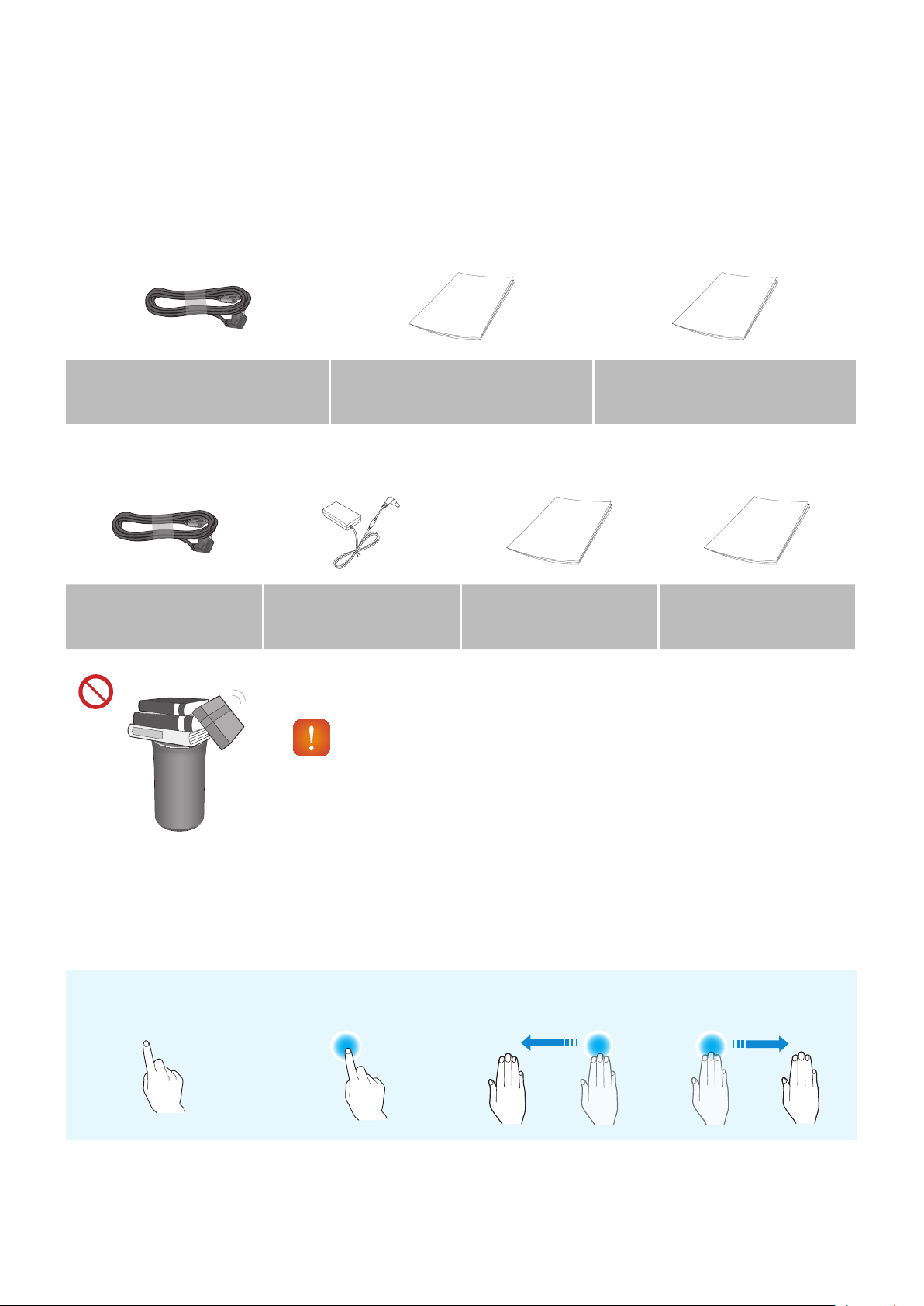
Accessories
Confirm you have the supplied accessories shown below.
• WAM5500/WAM3500
Power Cord
(3903-001056)
Quick Setup Guide
(AH68-02895A)
Regulatory Guide
(AH68-02881A)
• WAM1500
Power Cord
(3903-001056)
Power Adapter
(BN44-00835A)
Quick Setup Guide
(AH68-02894A)
Regulatory Guide
(AH68-02881A)
MODE
CAUTION
9
Do not place any items on top off or sit on the main unit.
A
Speaker Top
❚
Operation Terminology
Touch/Tap Touch and Hold Swipe
8
4
< WAM5500/WAM3500 >
< WAM1500 >
MODE
VOL
c
a
MODE
VOL
c
b d
a
db
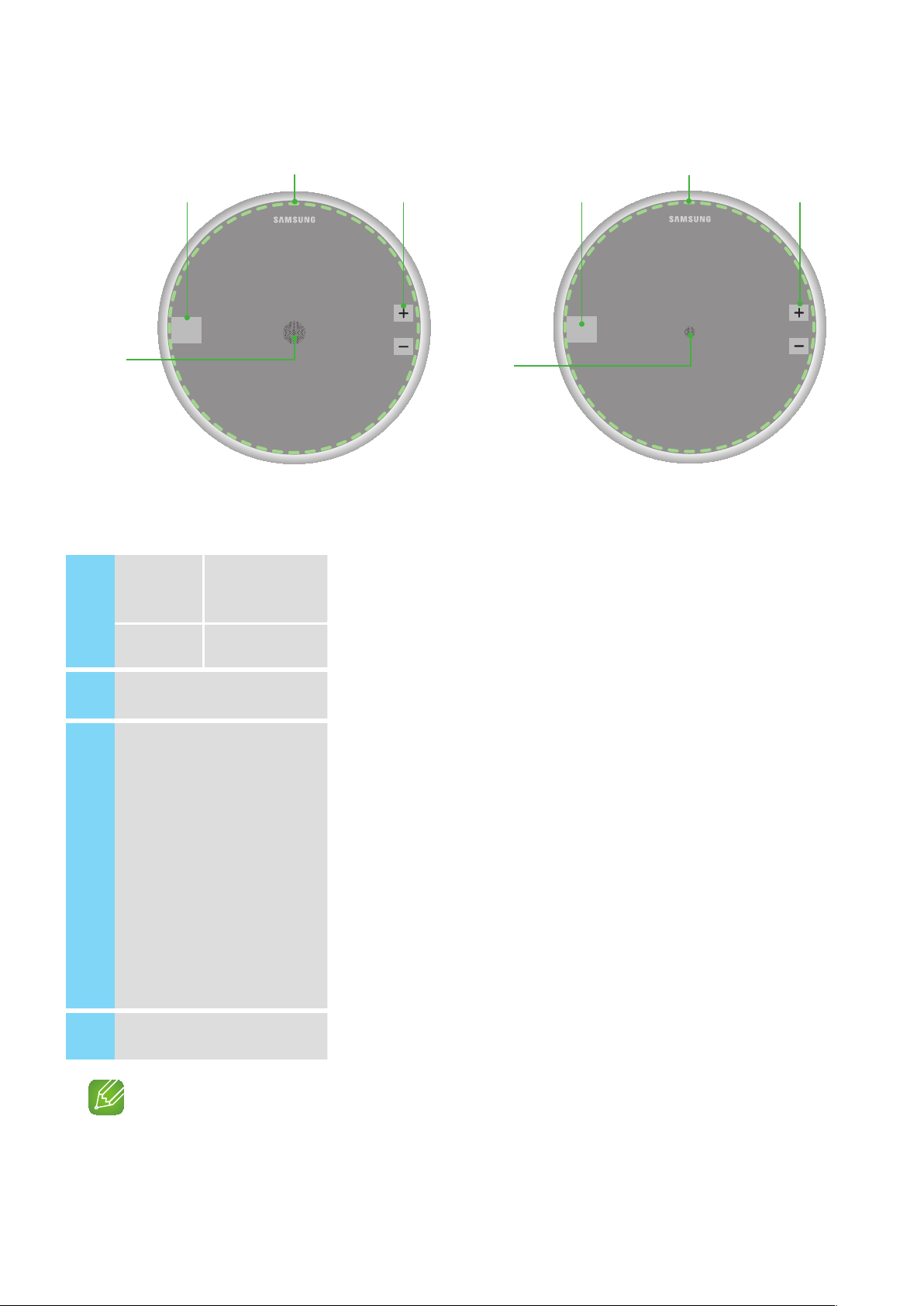
1
Display
WAM5500/
WAM3500
Displays the current status.
Indicator WAM1500 Flashes, glows, or changes color depending on the speaker's status.
2
MODE Button Toggle among the TV SoundConnect, Bluetooth and Wi-Fi modes.
3
Touch Area
Tap in the Touch Area to play music or to pause playback.
Tap to mute the sound if the TV SoundConnect function is enabled.
•Play/Pause : Tap the Touch Area to toggle between playback and pause.
•Mute : If TV SoundConnect is enabled, tap the Touch Area to mute or unmute
the sound.
•Previous/Next Song : Swipe LEFT TO RIGHT to play the next song.
Swipe RIGHT TO LEFT to play the previous song.
•Standby mode : Touch and hold anywhere in the Touch Area for 5 seconds.
Touch the touch area to wake the speaker up.
•Power Off : Touch and hold anywhere in the Touch Area for 10 seconds.
Touch the touch area to turn the speaker back on.
4
Volume +,- Button To adjust the volume rapidly, touch and hold + or - key.
NOTE
9
To reset the speaker, touch and hold the Volume (-,+) button at the same time for 5 seconds.
9
4
❚
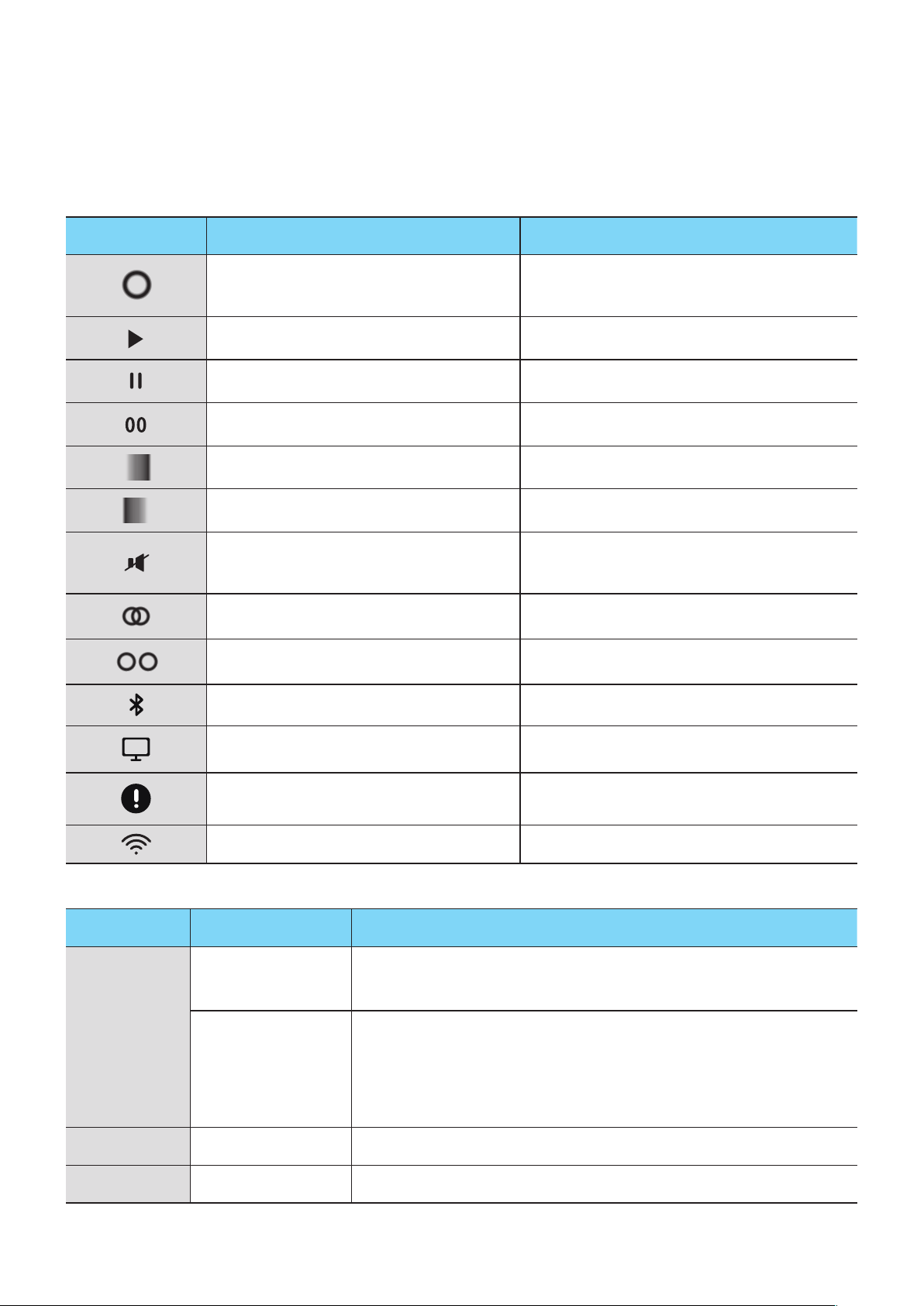
OLED Display and LED Indicator Descriptions
<R3/R5 OLED indicator>
OLED Display Description Indicated Action
Circle size increases or decreases, then
fades out
Power on / Wake-up / Power off
Play icon Play
Pause icon Pause
Volume status Volume up or down
Wave moves to the right Next song
Wave moves to the left Previous song
Mute icon
Mute (from the App or by tapping in the Touch
Area when TV SoundConnect is active.)
Group icon (Two circles partially overlapped) Group/Surround mode
Ungroup icon (Two circles separated) Un-Group/Release Surround mode
Bluetooth icon (blinking) Bluetooth Pairing
TV icon (blinking) TV SoundConnect Pairing
Exclamation icon Wireless router disconnected
Wi-Fi Pairing Wi-Fi mode
<R1 LED indicator>
LED Color Description Indicated Action
White
ON
1) Power On
2) Volume max/min
Flashing
1) Touch control
2) Wake up
3) Any connecting or group action
4) StandBy Mode (fade in/out repeatedly then after a few hours, auto off)
Red Flashing (6 seconds) Wireless router disconnected
Off All off Power Off
10
44
A
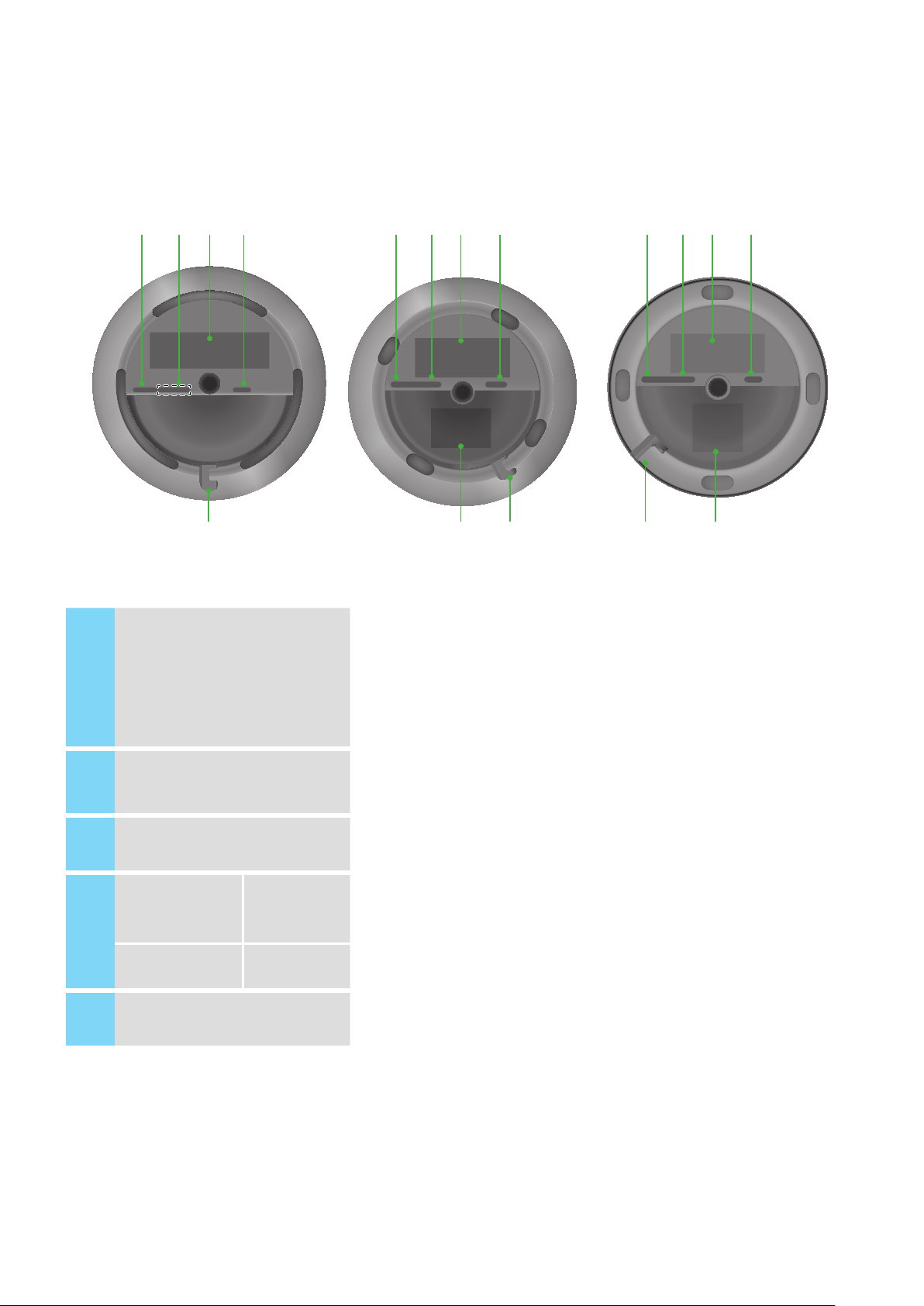
Speaker Bottom
< WAM5500 > < WAM1500 >< WAM3500 >
a b dc
MODE
SPK ADD/Wi-Fi SETUP SERVICE
DC 19V
a b dc
c
MODE
SPK ADD/Wi-Fi SETUP SERVICE
POWER
a b dc
MODE
MODE
MODE
SPK ADD/Wi-Fi SETUP
SERVICE1 SERVICE2
POWER
c
e e e
1
SPK ADD/Wi-Fi SETUP
• Press this button to pair your speaker with a HUB (Not Included) or add
another speaker.
• Press and hold this button for more than 5 seconds when connecting
the speaker to your network using the Wi-Fi Setup method. (Requires
a smart device and the Samsung Multiroom app.)
2
SERVICE For service only.
3
Label -
4
POWER
WAM5500/
WAM3500
Connection for the speaker's power cord.
DC 19V WAM1500
5
Notch for Power Cable -
11
44
❚
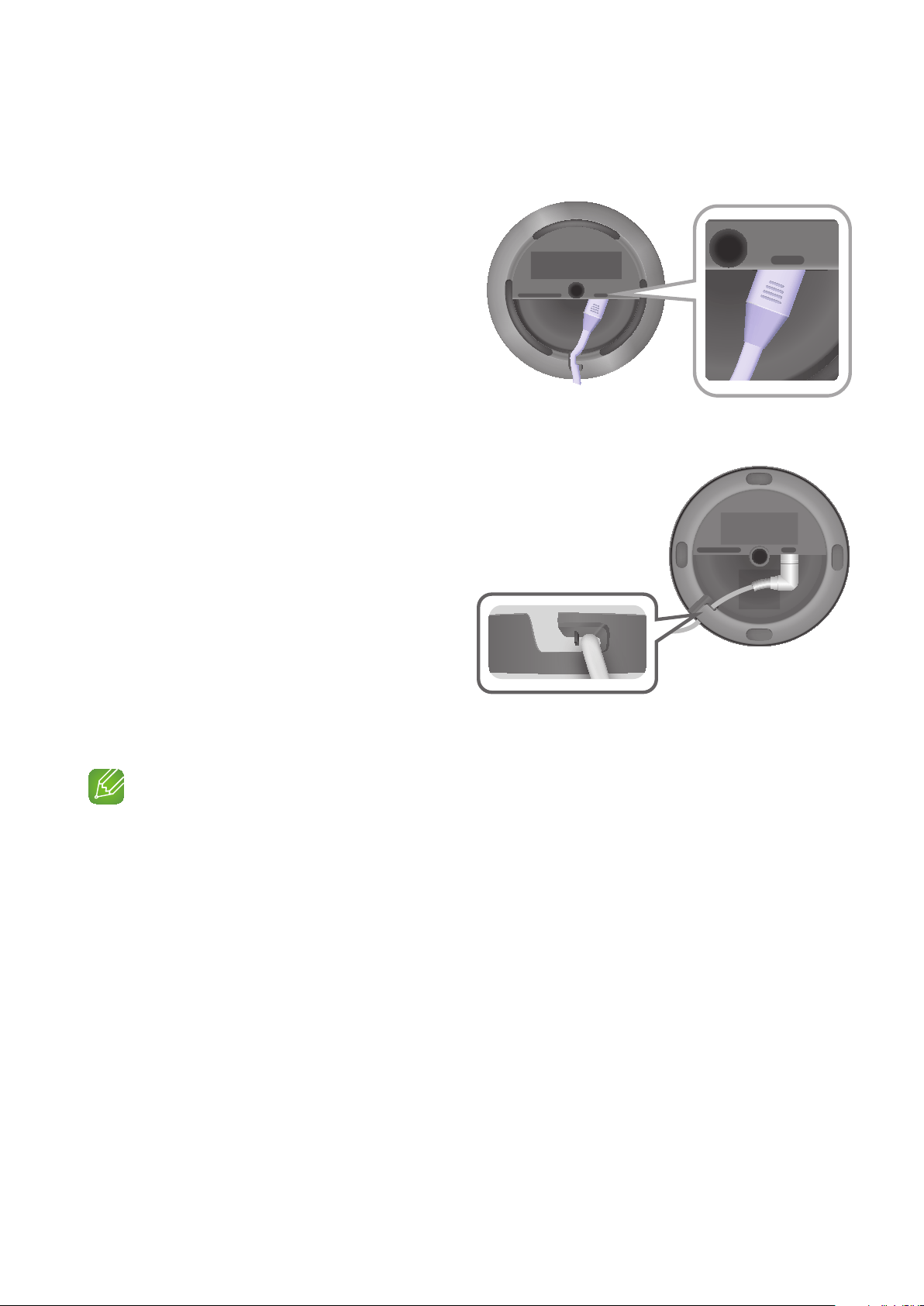
Connecting the Power Cord
<WAM5500, WAM3500 Only>
1 Connect the power cord of your speaker
as shown. It will connect at an angle.
2 Push the power cord into the notch at the
edge of the speaker bottom. This lets the
speaker rest flat when you stand it up.
<WAM1500 Only>
1 Connect the adaptor’s input power
cord to the adaptor.
2 Connect the adaptor’s output power
cord (with the round plug) to the DC
19V jack on the speaker.
3 Push the power cord into the notch at
the edge of the speaker bottom. This
lets the speaker rest flat when you
stand it up.
NOTE
9
Make sure to rest the AC/DC Adapter flat on a table or the floor. If you place the AC/DC Adapter so that
it is hanging with the AC cord input facing upwards, water or other foreign substances could enter the
Adapter and cause the Adapter to malfunction.
SPK ADD/Wi-Fi SETUP
SERVICE1 SERVICE2
POWER
ADD SPK/Wi-Fi SETUP
SERVICE1 SERVICE2
POWER
SPK ADD/Wi-Fi SETUP SERVICE
DC 19V
12
44

A
Installing on a wall
You can purchase a wall mount separately to install the speaker on a wall if you want.
`
Considerations for purchasing
- Endurable load : WAM5500 : Above 23.8 Ibs (10.8 Kg)
WAM3500 : Above 17.6 Ibs (8.0 Kg)
WAM1500 : Above 12.3 Ibs (5.6 Kg)
- Hole size : 1/4 - 20 threaded insert
NOTES
9
Since Wall-mount installation is optional, you must purchase the corresponding accessories separately.
9
Please have a qualified installer install the Wall Mount Bracket.
9
Ask a professional installation company to mount your product on the wall.
9
Check the strength of the wall before you install the Wall Mount Bracket. If the strength is
insufficient,make sure to reinforce the wall before installing the Wall Mount Bracket and the speaker on
the wall.
9
For more information, please refer to the Wall Mount's manual.
9
Samsung Electronics is not liable for any damage to the product due to the product being installed
inappropriately.
9
Please beware not to install the speaker being laid down or turned upside down.
13
44
Connecting to a Wi-Fi network
A
Connecting to Bluetooth Devices
You can connect the WAM speaker to a Bluetooth device and listen to the music stored on the
device.
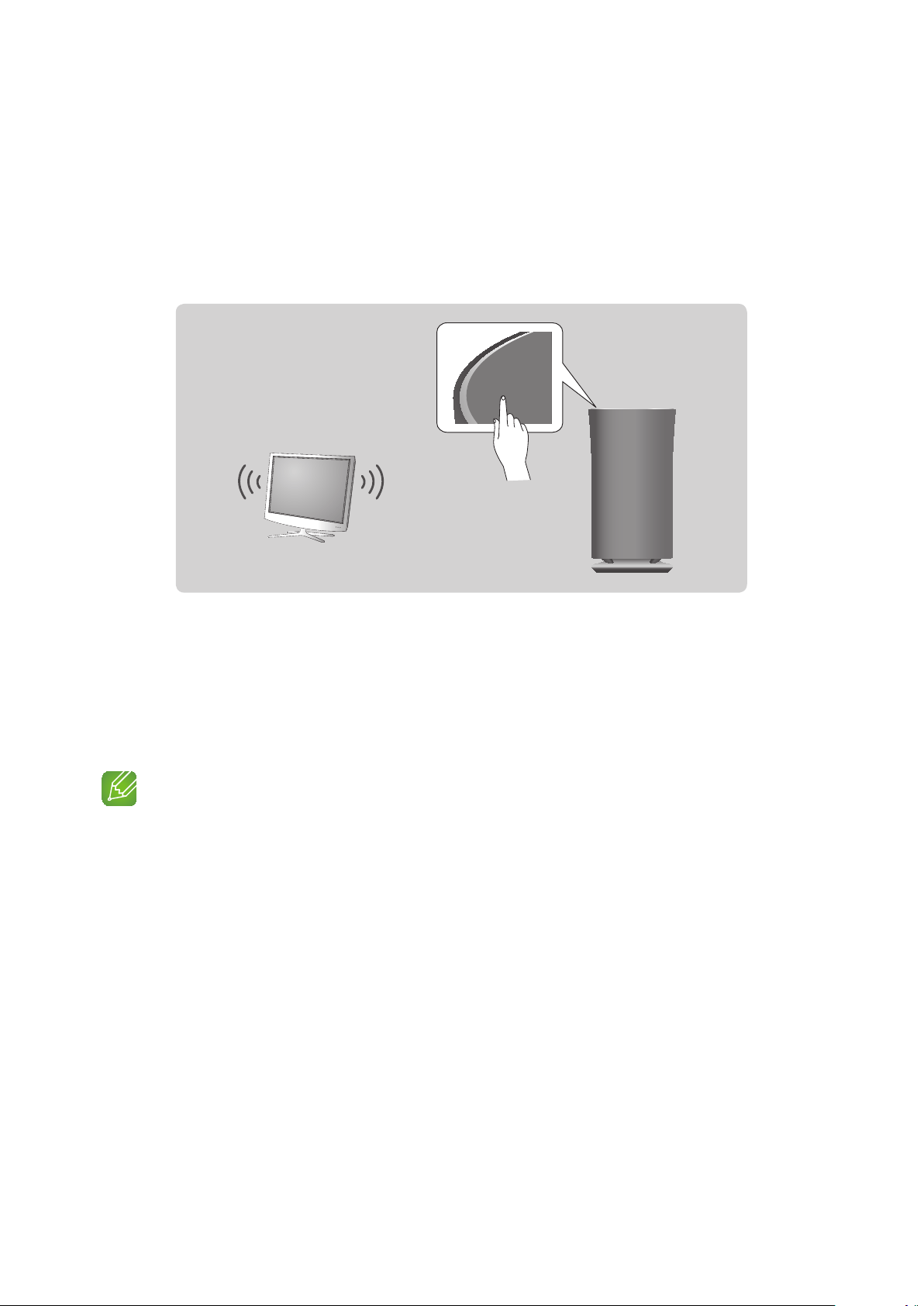
1 Touch the MODE button on top of the speaker one or more times until you hear
“Bluetooth is ready.”
MODE
TV
2 Turn on the Bluetooth function of your smart device, and then select Search.
3 Select the [Samsung] R5, [Samsung] R3 or [Samsung] R1.
The Bluetooth connection between the smart device and the WAM speaker is made.
4 Without connection with Samsung Multiroom app, you might see Samsung Wireless
Audio on the Bluetooth device list. Select it.
NOTES
9
A Bluetooth device may cause noise or malfunction, depending on usage, if:
- A part of your body is in contact with the receiving/transmitting system of the Bluetooth device or
the speaker.
- It is subject to electrical variation from obstructions caused by a wall, corner, or by office
partitioning.
- It is exposed to electrical interference from same frequency-band devices including medical
equipment, microwave ovens, and wireless LANs.
9
Pair the speaker with the Bluetooth device while they are close together.
9
The Bluetooth connection will be lost if the distance between the speaker and the Bluetooth device
exceeds 32 feet (10 m). Even within range, the sound quality may be degraded by obstacles such as
walls or doors.
14
44

9
This speaker may cause electric interference during its operation.
9
The speaker supports SBC data (44.1kHz, 48kHz).
9
In Bluetooth mode, the Play/Pause/Next/Prev functions are available in Bluetooth devices supporting
AVRCP.
9
Connect only to a Bluetooth device that supports the A2DP (AV) function.
9
You cannot connect to a Bluetooth device that supports only the HF (Hands Free) function.
9
Only one Bluetooth device can be paired at a time.
9
If you unplug the speaker, the Bluetooth connection is terminated. To re-establish the connection, plug
the speaker into an outlet, and then reset the Bluetooth connection.
15
44
A
Connecting a Samsung TV to the speaker
❚
Connecting to a Samsung TV via bluetooth (TV SoundConnect)
The TV SoundConnect function lets you conveniently connect a Samsung TV to an external
speaker wirelessly and listen to the TV's sound through the speaker.
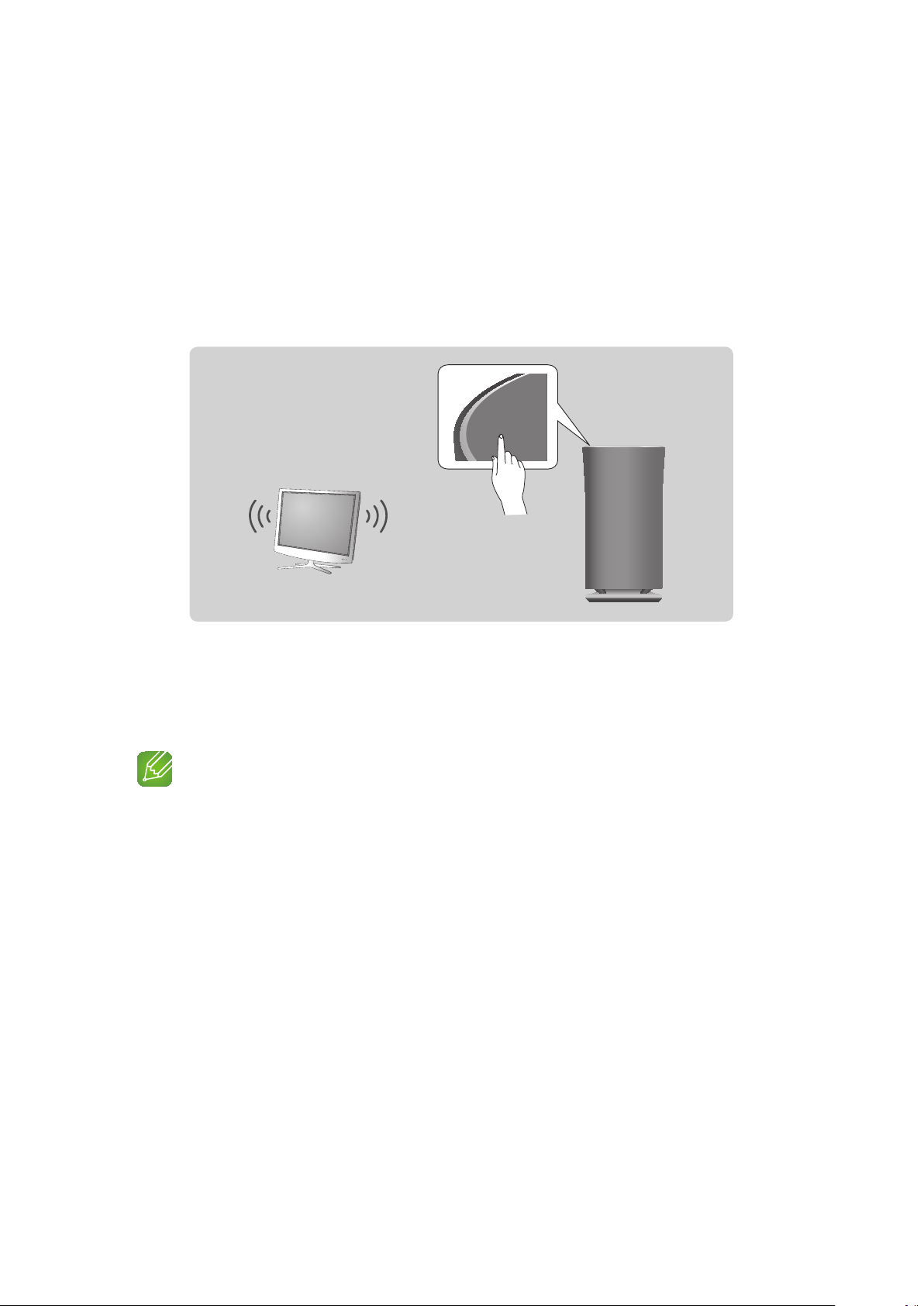
1 Plug the WAM speaker into an outlet, and then touch the MODE button on its top one
or more times until you hear “TV SoundConnect is ready.”
MODE
TV
2 Touch and hold the MODE button for more than 5 seconds to reset TV SoundConnect.
3 A pop-up appears on the TV asking you to approve the connection.
Approve to continue.
NOTES
9
Optimal pairing distance is 6.5 feet (2m) or less.
9
If you unplug the WAM speaker, the TV SoundConnect connection is terminated. To re-establish the
connection, plug the speaker into an outlet, and then touch the MODE button one or more times until
you hear "TV SoundConnect is ready.". Then skip number 2 and 3 step. Speaker will output TV sound
automatically.
9
When the speaker is in Standby mode, the TV SoundConnect connection is not terminated.
To connect new TV, follow above 1, 2, 3 steps.
9
Operational range of TV SoundConnect
- Recommended pairing range: up to 6.5 feet (2 m).
- Recommended operating range: up to 32 feet (10 m).
- The connection may be lost or sound may stutter if the distance between the TV and the speaker
exceeds 32 feet (10 m).
9
The SoundConnect feature is available on some Samsung TVs released since 2012. Check whether
your TV supports the SoundShare or SoundConnect function.
(For further details, refer to the TV's user's manual.)
9
Instability in the network environment may cause the connection to be lost or sound to stutter.
16
44
Appendix
A
Troubleshooting
Refer to the table below when this product does not function properly. If the problem you are
experiencing is not listed below or if the instructions below do not help, turn off the product,
disconnect the power cord, and contact Samsung Electronics at 1-800-SAMSUNG (1-800-726-
7864).
Symptom Check Remedy
The unit will not turn on.
• Is the power cord plugged into the
outlet?
• Connect the power cord to the
outlet.
My HUB and WAM speaker won't
pair.
• When the Hub is plugged in, do
the HUB's front indicators show
it's operating properly?
• Is the LAN cable connected to
the wireless router and the HUB
properly?
• Reset the HUB. (Refer to the HUB's
user manual for details.)
Unplug the HUB and plug it in
again. Check whether the pairing
indicator on the front of the HUB is
blinking or not.
• Reset the WAM speaker. (see page
4)
Click here.
Unplug the WAM speaker and plug
it in again.
A function does not work when
the button is pressed.
• Is there static electricity in the air? • Disconnect the power plug and
connect it again.
No sound.
• Is the volume set to minimum? • Connect the speaker correctly.
• Adjust the volume.
The TV SoundConnect (TV pairing)
failed.
• Does your TV support TV
SoundConnect?
• Is your TV firmware the latest
version?
• Does an error occur when
connecting?
• TV SoundConnect is supported by
some Samsung TVs released after
2012. Check your TV to see if it
supports TV SoundConnect.
• Confirm TV SoundConnect is set to
On in your TV's menu.
• Update your TV with the latest
firmware.
• Contact the Samsung Call Center.
• Touch and hold the MODE button
for more than 5 seconds to reset
TV SoundConnect and connect a
new TV.
17
44
Symptom Check Remedy
The HUB doesn't work properly.
• Is the HUB plugged in?
• Is the LAN cable connected to
the wireless router and the HUB
properly?
• When the Hub is plugged in, do
the HUB's front indicators show
it's operating properly?
• Plug in the HUB.
• Connect a LAN cable to an
ETHERNET SWITCH port on
the back of the HUB and to your
wireless router.
• Reset the HUB. (Refer to the HUB's
user manual for details.)
• If you experience problems
connecting the HUB and WAM
speaker, try relocating the WAM
speaker so that it is closer to the
wireless router or HUB.
The WAM speaker doesn't work
properly.
• Is the speaker plugged in? • Plug in the speaker.
• Unplug the speaker, plug it back
in, and then reconnect it to the
router.
• Reset the WAM speaker. (see page
4)
Click here.
• If used with a HUB
- Make sure your smart device
and the HUB are connected to
the same Wi-Fi network.
- Make sure the HUB's indicator
LED's show that it is working
correctly.
- If the problem persists, reset the
HUB. (Refer to the HUB's user
manual for details.)
- Unplug, then plug in the HUB.
Then, unplug and plug in the
WAM speaker.
- If you experience problems
connecting the HUB and WAM
speaker, try relocating the
speaker so that it is closer to
the wireless router or HUB.
NOTE
9
If the problem persists, contact the Samsung Call Center for troubleshooting.
18
44
A
Open Source License Notice
• For further information on Open Sources used in this product, please visit the website:
http://opensource.samsung.com
A
Licenses
• The Spotify Software is subject to third party licenses found here :
www.spotify.com/connect/third-party-licenses.
• For more information about Spotify Connect, please visit www.spotify.com/connect
A
Specifications
General
Weight
R5 (WAM5500) 6.0 Ibs (2.7 Kg)
R3 (WAM3500) 4.4 Ibs (2.0 Kg)
R1 (WAM1500) 3.1 Ibs (1.4 Kg)
Dimensions
R5 (WAM5500) Φ6.5 X 12.3 (H) inches (Φ166.0 X 313.0 (H) mm)
R3 (WAM3500) Φ5.7 X 10.8 (H) inches (Φ144.0 X 273.0 (H) mm)
R1 (WAM1500) Φ4.8 X 9.2 (H) inches (Φ123.0 X 234.0 (H) mm)
Operating Temperature Range +41°F to +95°F
Operating Humidity Range 10 % to 75 %
Network
Wireless LAN Built-in
Security
WEP (OPEN/SHARED)
WPA-PSK (TKIP/AES)
WPA2-PSK (TKIP/AES)
- Network speeds equal to or below 10Mbps are not supported.
- Design and specifications are subject to change without prior notice.
- For power supply and power consumption information, refer to the label attached to the
product.
- See the speaker's bottom for important safety information.
- Weight and dimensions are approximate.
- Dispose unwanted electronics through an approved recycler.
To find the nearest recycling location, go to our website: www.samsung.com/recyclingdirect
or call, (877) 278 - 0799.
- For further details on using the speaker, visit www.samsung.com.
19
44

A
Additional Information
❚
About the Network Connection
• Depending on the wireless router used, some network operations may perform differently.
• For detailed information on networking with a wireless router or modem, refer to the router's
or modem's documentation.
• Select one wireless channel that is not used currently. If the selected channel is used by
another communication device nearby, radio interference may result in communication failure.
• In compliance with the newest Wi-Fi certification specifications, the HUB does not support
WEP, TKIP, or TKIP-AES (WPA2 Mixed) security encryption in networks running in the 802.11n
mode.
• By its nature, wireless LAN may experience radio interference depending on the environmental
conditions (such as wireless router performance, distance, obstruction, interference with other
wireless devices, etc.)
• WEP encryption does not work with WPS (PBC) / WPS (PIN).
❚
Works with SmartThings™
• This product is compatible with SmartThings.
• SmartThings service varies from country to country.
• For more information, visit http://www.smartthings.com
A
Copyright
© 2015 Samsung Electronics Co.,Ltd.
All rights reserved; No part or whole of this user's manual may be reproduced or copied without
the prior written permission of Samsung Electronics Co.,Ltd.
20
44

LIMITED WARRANTY TO ORIGINAL PURCHASER
This SAMSUNG brand product, as supplied and distributed by SAMSUNG and delivered new, in the original carton to the original
consumer purchaser, is warranted by SAMSUNG against manufacturing defects in materials and workmanship for a limited
warranty period of:
One (1) Year Parts and Labor*
(*90 Days Parts and Labor for Commercial Use)
This limited warranty begins on the original date of purchase, and is valid only on products purchased and used in the United
States. To receive warranty service, the purchaser must contact SAMSUNG for problem determination and service procedures.
Warranty service can only be performed by a SAMSUNG authorized service center. The original dated bill of sale must be
presented upon request as proof of purchase to SAMSUNG or SAMSUNG's authorized service center. Transportation of the
product to and from the service center is the responsibility of the purchaser.
SAMSUNG will repair or replace this product, at our option and at no charge as stipulated herein, with new or reconditioned parts
or products if found to be defective during the limited warranty period specified above. All replaced parts and products become
the property of SAMSUNG and must be returned to SAMSUNG. Replacement parts and products assume the remaining original
warranty, or ninety (90) days, whichever is longer.
SAMSUNG's obligations with respect to software products distributed by SAMSUNG under the SAMSUNG brand name are set
forth in the applicable end user license agreement. Non-SAMSUNG hardware and software products, if provided, are on an "AS
IS" basis.
Non-SAMSUNG manufacturers, suppliers, publishers, and service providers may provide their own warranties.
This limited warranty covers manufacturing defects in materials and workmanship encountered in normal, and except to the
extent otherwise expressly provided for in this statement, noncommercial use of this product, and shall not apply to the following,
including, but not limited to: damage which occurs in shipment; delivery and installation; applications and uses for which this
product was not intended; altered product or serial numbers; cosmetic damage or exterior finish; accidents, abuse, neglect,
fire, water, lightning or other acts of nature; use of products, equipment, systems, utilities, services, parts, supplies, accessories,
applications, installations, repairs, external wiring or connectors not supplied and authorized by SAMSUNG, or which damage this
product or result in service problems; incorrect electrical line voltage, fluctuations and surges; customer adjustments and failure
to follow operating instructions, cleaning, maintenance and environmental instructions that are covered and prescribed in the
instruction book; product removal or reinstallation; reception problems and distortion related to noise, echo, interference or other
signal transmission and delivery problems. SAMSUNG does not warrant uninterrupted or error-free operation of the product.
THERE ARE NO EXPRESS WARRANTIES OTHER THAN THOSE LISTED AND DESCRIBED ABOVE, AND NO WARRANTIES
WHETHER EXPRESS OR IMPLIED, INCLUDING, BUT NOT LIMITED TO, ANY IMPLIED WARRANTIES OF MERCHANTABILITY
OR FITNESS FOR A PARTICULAR PURPOSE, SHALL APPLY AFTER THE EXPRESS WARRANTY PERIODS STATED
ABOVE, AND NO OTHER EXPRESS WARRANTY OR GUARANTY GIVEN BY ANY PERSON, FIRM OR CORPORATION WITH
RESPECT TO THIS PRODUCT SHALL BE BINDING ON SAMSUNG. SAMSUNG SHALL NOT BE LIABLE FOR LOSS OF
REVENUE OR PROFITS, FAILURE TO REALIZE SAVINGS OR OTHER BENEFITS, OR ANY OTHER SPECIAL, INCIDENTAL OR
CONSEQUENTIAL DAMAGES CAUSED BY THE USE, MISUSE OR INABILITY TO USE THIS PRODUCT, REGARDLESS OF
THE LEGAL THEORY ON WHICH THE CLAIM IS BASED, AND EVEN IF SAMSUNG HAS BEEN ADVISED OF THE POSSIBILITY
OF SUCH DAMAGES. NOR SHALL RECOVERY OF ANY KIND AGAINST SAMSUNG BE GREATER IN AMOUNT THAN THE
PURCHASE PRICE OF THE PRODUCT SOLD BY SAMSUNG AND CAUSING THE ALLEGED DAMAGE. WITHOUT LIMITING
THE FOREGOING, PURCHASER ASSUMES ALL RISK AND LIABILITY FOR LOSS, DAMAGE OR INJURY TO PURCHASER AND
PURCHASER'S PROPERTY AND TO OTHERS AND THEIR PROPERTY ARISING OUT OF THE USE, MISUSE OR INABILITY
TO USE THIS PRODUCT SOLD BY SAMSUNG NOT CAUSED DIRECTLY BY THE NEGLIGENCE OF SAMSUNG. THIS
LIMITED WARRANTY SHALL NOT EXTEND TO ANYONE OTHER THAN THE ORIGINAL PURCHASER OF THIS PRODUCT, IS
NONTRANSFERABLE AND STATES YOUR EXCLUSIVE REMEDY.
Some states do not allow limitations on how long an implied warranty lasts, or the exclusion or limitation of incidental or
consequential damages, so the above limitations or exclusions may not apply to you. This warranty gives you specific legal rights,
and you may also have other rights which vary from state to state.
To obtain warranty service, please contact SAMSUNG customer care center.
The benefits of this Limited Warranty extend only to the original purchaser of Samsung products from an authorized Samsung
reseller.
THIS LIMITED WARRANTY SHALL NOT APPLY TO ANY SAMSUNG PRODUCTS PURCHASED FROM UNAUTHORIZED
RESELLERS OR RETAILERS, EXCEPT IN STATES WHERE SUCH RESTRICTION MAY BE PROHIBITED.
For a list of Samsung authorized retailers, please go to: http://www.samsung.com/us/peaceofmind/authorized_resellers.html.
Country Contact Center
Web Site
North America
U.S.A 1-800-SAMSUNG (726-7864) www.samsung.com/us/support
CANADA 1-800-SAMSUNG (726-7864)
www.samsung.com/ca/support (English)
www.samsung.com/ca_fr/support (French)
Latin America
MEXICO 01-800-SAMSUNG (726-7864) www.samsung.com/mx/support
BRAZIL
0800-124-421 (Demais cidades e regiões)
4004-0000 (Capitais e grandes centros)
www.samsung.com/br/support
COSTA RICA
0-800-507-7267
00-800-1-SAMSUNG (726-7864)
www.samsung.com/latin/support (Spanish)
www.samsung.com/latin_en/support (English)
DOMINICAN
REPUBLIC
1-800-751-2676
www.samsung.com/latin/support (Spanish)
www.samsung.com/latin_en/support (English)
ECUADOR
1-800-10-7267
1-800-SAMSUNG (72-6786)
www.samsung.com/latin/support (Spanish)
www.samsung.com/latin_en/support (English)
EL SALVADOR
800-6225
800-0726-7864
www.samsung.com/latin/support (Spanish)
www.samsung.com/latin_en/support (English)
GUATEMALA
1-800-299-0013
1-800-299-0033
www.samsung.com/latin/support (Spanish)
www.samsung.com/latin_en/support (English)
HONDURAS
800-2791-9267
800-2791-9111
www.samsung.com/latin/support (Spanish)
www.samsung.com/latin_en/support (English)
JAMAICA
1-800-234-7267
1-800-SAMSUNG (726-7864)
www.samsung.com/latin_en/support (English)
NICARAGUA 001-800-5077267
www.samsung.com/latin/support (Spanish)
www.samsung.com/latin_en/support (English)
PANAMA
800-7267
800-0101
www.samsung.com/latin/support (Spanish)
www.samsung.com/latin_en/support (English)
PUERTO RICO 1-800-682-3180
www.samsung.com/latin/support (Spanish)
www.samsung.com/latin_en/support (English)
TRINIDAD &
TOBAGO
1-800-SAMSUNG(726-7864)
www.samsung.com/latin/support (Spanish)
www.samsung.com/latin_en/support (English)
VENEZUELA 0-800-SAMSUNG (726-7864) www.samsung.com/ve/support
COLOMBIA
Bogotá 600 12 72
Gratis desde cualquier parte del país 01 8000 112
112
www.samsung.com/co/support
CHILE 800-SAMSUNG(726-7864) www.samsung.com/cl/support
BOLIVIA 800-10-7260 www.samsung.com/cl/support
PERU 0800-777-08 www.samsung.com/pe/support
ARGENTINE 0800-555-SAMSUNG (0800-555-7267) www.samsung.com/ar/support
URUGUAY 000-405-437-33
www.samsung.com/latin/support (Spanish)
www.samsung.com/latin_en/support (English)
PARAGUAY 009-800-542-0001
www.samsung.com/latin/support (Spanish)
www.samsung.com/latin_en/support (English)
Europe
UK 0330 SAMSUNG (7267864) www.samsung.com/uk/support
EIRE 0818 717100 www.samsung.com/ie/support
GERMANY
0180 6 SAMSUNG bzw.
0180 6 7267864*
(*0,20 €/Anruf aus dem dt. Festnetz, aus dem Mobil-
funk max. 0,60 €/Anruf)
www.samsung.com/de/support
FRANCE 01 48 63 00 00 www.samsung.com/fr/support
ITALIA 800-SAMSUNG (800.7267864) www.samsung.com/it/support
SPAIN 0034902172678 www.samsung.com/es/support
PORTUGAL 808 20 7267 www.samsung.com/pt/support
Contact SAMSUNG WORLD WIDE
If you have any questions or comments relating to Samsung products, please contact the
SAMSUNG customer care center listed for your country.
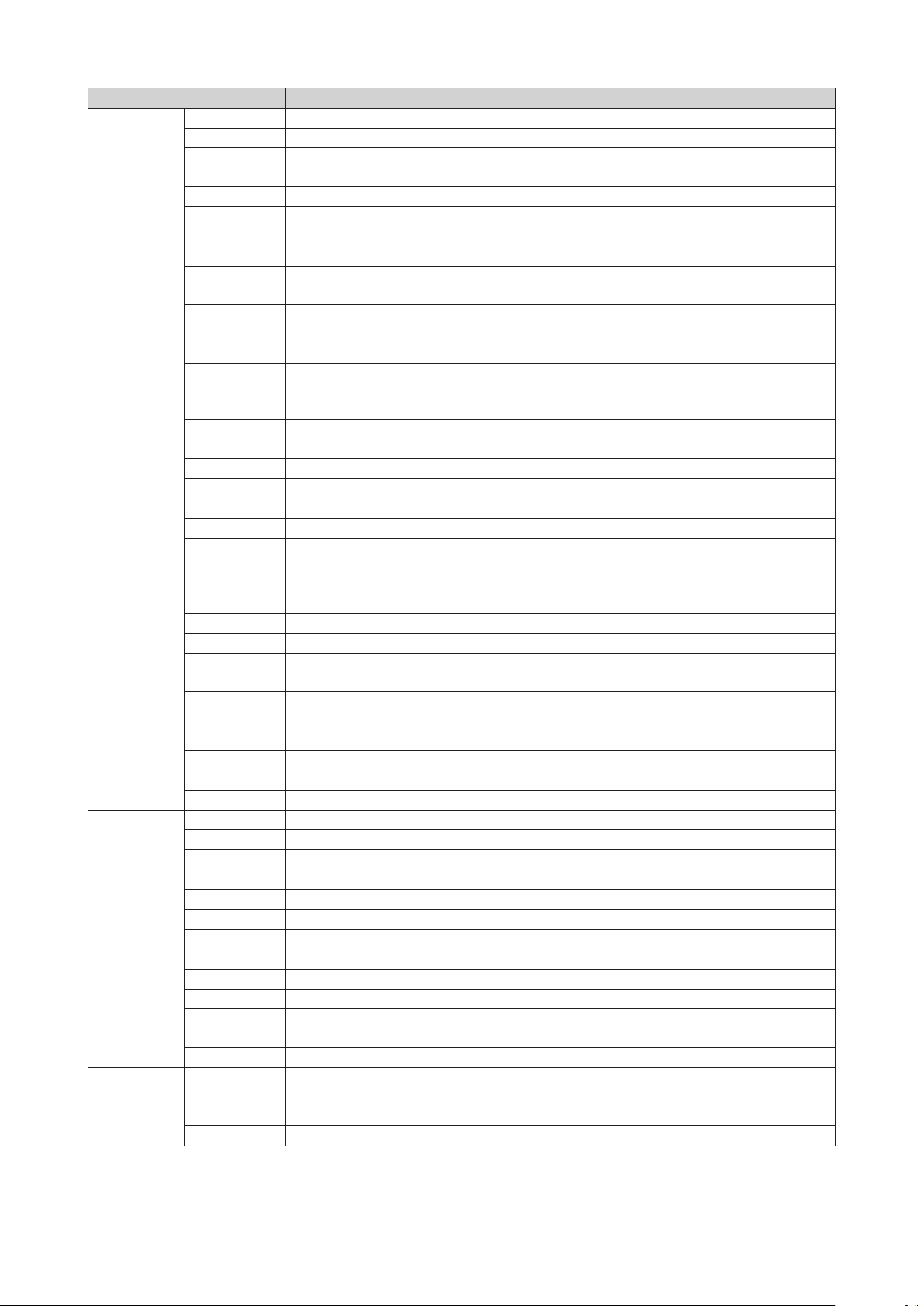
Country Contact Center
Web Site
Europe
LUXEMBURG 261 03 710 www.samsung.com/support
NETHERLANDS 0900-SAMSUNG (0900-7267864) (€ 0,10/Min) www.samsung.com/nl/support
BELGIUM 02-201-24-18
www.samsung.com/be/support (Dutch)
www.samsung.com/be_fr/support (French)
NORWAY 815 56480 www.samsung.com/no/support
DENMARK 70 70 19 70 www.samsung.com/dk/support
FINLAND 030-6227 515 www.samsung.com/fi/support
SWEDEN 0771 726 7864 (0771-SAMSUNG) www.samsung.com/se/support
POLAND
801-172-678* lub +48 22 607-93-33 *
* (koszt połączenia według taryfy operatora)
www.samsung.com/pl/support
HUNGARY
0680SAMSUNG (0680-726-786)
0680PREMIUM (0680-773-648)
www.samsung.com/hu/support
SLOVAKIA 0800 - SAMSUNG (0800-726 786) www.samsung.com/sk/support
AUSTRIA
0800-SAMSUNG (0800-7267864)
[Only for Premium HA] 0800-366661
[Only for Dealers] 0810-112233
www.samsung.com/at/support
SWITZERLAND 0800 726 78 64 (0800-SAMSUNG)
www.samsung.com/ch/support (German)
www.samsung.com/ch_fr/support (French)
CZECH 800 - SAMSUNG (800-726786) www.samsung.com/cz/support
CROATIA 072 726 786 www.samsung.com/hr/support
BOSNIA 055 233 999 www.samsung.com/support
MONTENEGRO 020 405 888 www.samsung.com/support
SLOVENIA
080 697 267 (brezplačna številka)
090 726 786 (0,39 EUR/min)
klicni center vam je na voljo od ponedeljka do petka
od 9. do 18. ure.
www.samsung.com/si
SERBIA 011 321 6899 www.samsung.com/rs/support
BULGARIA 800 111 31, Безплатна телефонна линия www.samsung.com/bg/support
ROMANIA
08008 726 78 64 (08008 SAMSUNG )
Apel GRATUIT
www.samsung.com/ro/support
CYPRUS 8009 4000 only from landline, toll free
www.samsung.com/gr/support
GREECE
80111-SAMSUNG (80111 726 7864) only from land
line
LITHUANIA 8-800-77777 www.samsung.com/lt/support
LATVIA 8000-7267 www.samsung.com/lv/support
ESTONIA 800-7267 www.samsung.com/ee/support
CIS
RUSSIA 8-800-555-55-55 (VIP care 8-800-555-55-88) www.samsung.com/ru/support
BELARUS 810-800-500-55-500 www.samsung.com/support
GEORGIA 0-800-555-555 www.samsung.com/support
ARMENIA 0-800-05-555 www.samsung.com/support
AZERBAIJAN 0-88-555-55-55 www.samsung.com/support
KAZAKHSTAN 8-10-800-500-55-500 (GSM: 7799, VIP care 7700) www.samsung.com/support
UZBEKISTAN 8-10-800-500-55-500 (GSM: 7799) www.samsung.com/support
KYRGYZSTAN 00-800-500-55-500 www.samsung.com/kz_ru/support
TAJIKISTAN 8-10-800-500-55-500 www.samsung.com/support
MONGOLIA +7-495-363-17-00 www.samsung.com/support
UKRAINE 0-800-502-000
www.samsung.com/ua/support (Ukrainian)
www.samsung.com/ua_ru/support (Russian)
MOLDOVA 0-800-614-40 www.samsung.com/support
China
CHINA 400-810-5858 www.samsung.com/cn/support
HONG KONG (852) 3698 4698
www.samsung.com/hk/support (Chinese)
www.samsung.com/hk_en/support (English)
MACAU 0800 333 www.samsung.com/support
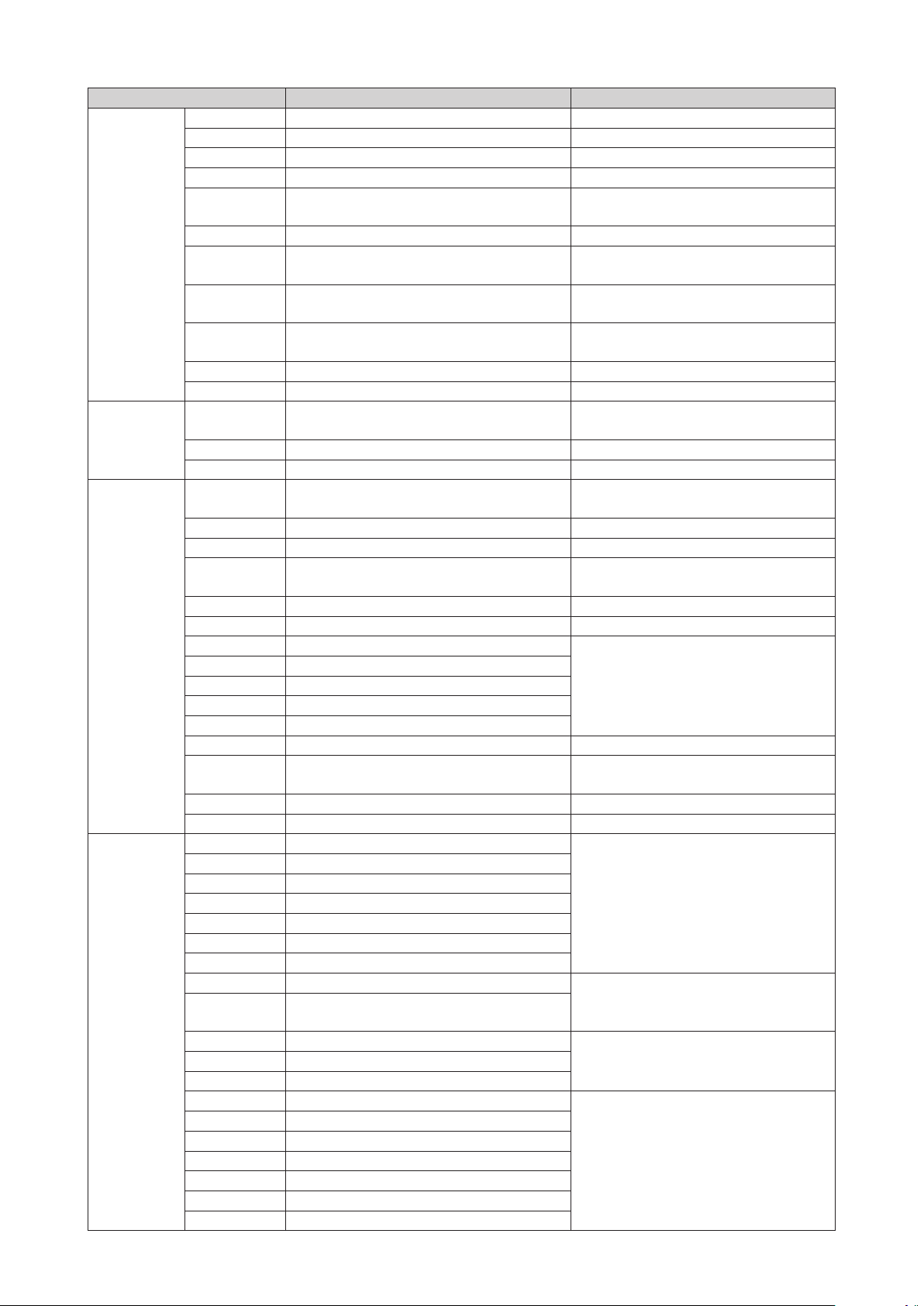
Country Contact Center
Web Site
S.E.A
SINGAPORE 1800-SAMSUNG(726-7864) www.samsung.com/sg/support
AUSTRALIA 1300 362 603 www.samsung.com/au/support
NEW ZEALAND 0800 726 786 www.samsung.com/nz/support
VIETNAM 1800 588 889 www.samsung.com/vn/support
THAILAND
0-2689-3232,
1800-29-3232
www.samsung.com/th/support
MYANMAR +95-01-2399-888 www.samsung.com/support
MALAYSIA
1800-88-9999
603-77137477 (Overseas contact)
www.samsung.com/my/support
INDONESIA
021-56997777
08001128888
www.samsung.com/id/support
PHILIPPINES
1-800-10-7267864 [PLDT]
02-4222111 [Other landline]
www.samsung.com/ph/support
TAIWAN 0800-329999 www.samsung.com/tw/support
JAPAN 0120-363-905 www.samsung.com/jp/support
S.W.A
INDIA
1800 3000 8282 - Toll Free
1800 266 8282 - Toll Free
www.samsung.com/in/support
BANGLADESH 09612300300 www.samsung.com/in/support
SRI LANKA 94117540540 www.samsung.com/support
MENA
EGYPT
08000-7267864
16580
www.samsung.com/eg/support
ALGERIA 021 36 11 00 www.samsung.com/n_africa/support
IRAN 021-8255 [CE] www.samsung.com/iran/support
SAUDI ARABIA 8002474357
www.samsung.com/sa/support
www.samsung.com/sa_en/support (English)
PAKISTAN 0800-Samsung (72678) www.samsung.com/pk/support
TUNISIA 80-1000-12 www.samsung.com/n_africa/support
U.A.E 800-SAMSUNG (800 - 726 7864)
www.samsung.com/ae/support (English)
www.samsung.com/ae_ar/support (Arabic)
OMAN 800-SAMSUNG (800 - 726 7864)
KUWAIT 183-CALL (183-2255)
BAHRAIN 8000-GSAM (8000-4726)
QATAR 800-CALL (800-2255)
TURKEY 444 77 11 www.samsung.com/tr/support
JORDAN
0800-22273
06 5777444
www.samsung.com/Levant/support (English)
SYRIA 18252273 www.samsung.com/Levant/support (English)
MOROCCO 080 100 22 55 www.samsung.com/n_africa/support
Africa
SOUTH AFRICA 0860 SAMSUNG (726 7864)
www.samsung.com/support
BOTSWANA 8007260000
NAMIBIA 08 197 267 864
ZAMBIA 0211 350370
MAURITIUS 23052574020
REUNION 262508869
MOZAMBIQUE 847267864 / 827267864
NIGERIA 0800-726-7864
www.samsung.com/africa_en/support
Ghana
0800-10077
0302-200077
Cote D'Ivoire 8000 0077
www.samsung.com/africa_fr/supportSENEGAL 800-00-0077
CAMEROON 7095-0077
KENYA 0800 545 545
www.samsung.com/support
UGANDA 0800 300 300
TANZANIA 0800 755 755 / 0685 889 900
RWANDA 9999
BURUNDI 200
DRC 499999
SUDAN 1969
QUESTIONS OR COMMENTS?
AREA CALL OR VISIT US ONLINE AT WRITE
IN THE US
1-800-SAMSUNG
(726-7864)
www.samsung.com/us/
support
Samsung Electronics America, Inc.
85 Challenger Road
Ridgefield Park, NJ 07660
© 2015 Samsung Electronics Co., Ltd. All rights reserved.