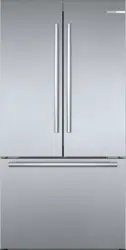
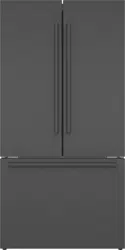
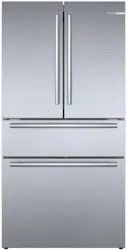
Press the power button. The appliance begins to cool. The warning sound, the flashing freezer compartment temperature display and the illuminated alarm off button indicate that the freezer compartment is still too warm.
Press the alarm off button. The warning sound switches off.
Set the required temperature.
Operating tips
When the appliance has been switched on, it may take several hours until the set temperatures have been reached. Do not put in any food until the selected temperature has been reached.
The fully automatic NoFrost system ensures that the appliance remains frost-free. Defrosting is not required.
The front sides of the housing are partly heated slightly. This prevents condensation in the area of the door seal.
Switching off and disconnecting the appliance
Switching off the appliance
Press power button. The appliance is no longer cooling
Disconnecting the appliance
If you do not use the appliance for a prolonged period:
Turn off the water supply to the appliance.
Remove groceries.
Press the power button.
Pull out the power plug or switch off the fuse. The appliance is no longer cooling.
Remove the water filter, empty the ice cube bin and clean the appliance.
Leave the doors and drawers of the appliance open.
Setting the temperature unit
You can choose between the units °C and °F:
Press menu button.
Press °C/°F button.
Press Settings button until settings display shows °C or °F.
Press menu button. The setting is saved
Setting the temperature
Recommended temperature
Refrigerator compartment: 37 °F (3 °C)
Cool-fresh compartment: 32 °F (0 °C)
Freezer compartment: 0 °F (–18 °C)
Cooling compartment
Keep pressing the button until the display indicates the required temperature.
Freezer compartment
Keep pressing button until the display indicates the required temperature
Setting cool-fresh compartment
You can set the temperature and humidity of the cool-fresh bin using pre-defined storage settings:
Open refrigerator compartment doors.
Press any button of the cool-fresh compartment controls.
Press and hold the unlock cool-fresh compartment button until the light bar is fully illuminated.
Press the required storage setting button.
Close refrigerator compartment doors. The setting is saved.
Super cooling
Super cooling cools the refrigerator compartment as cold as possible.
Switch on super cooling, e.g.:
Before placing large quantities of food into the compartment .
For cooling drinks quickly
Note: When super cooling is switched on, increased operating noises may occur.
After approx. 6 hours, the appliance switches to normal operation.
Switch super cooling on/off:
Press super button refrigerator compartment. When super cooling is switched on, the button lights up.
Super freezing
With super freezing, the freezer compartment cools down to the coldest temperature setting of the freezer compartment.
Switch on super freezing, e.g.:
To quickly freeze food all the way to the center
1 ... 2 hours before freezing food weighing 4.5 lbs (2 kg) or more
To increase ice cube production
Note: When super freezing is switched on, increased operating noise may occur.
After approx. 8 hours, the appliance automatically returns to normal operation.
Switching super freezing on/off:
Press super button. When super freezing is switched on, the button is lit.
Energy saving mode
You can set the appliance to save energy with energy-saving mode.
The appliance automatically sets the following temperatures:
Refrigerator compartment: 43 °F (6 °C)
Cool-fresh compartment: 32 °F (0 °C)
Freezer compartment: 6 °F (–14 °C)
Switch energy-saving mode on or off:
Press eco button. The temperature is changed, and the display shows the new temperature. When energy-saving mode is switched off, the last temperature displayed is set.
Freshness mode
Food stays fresh for even longer with freshness mode.
The appliance automatically sets the following temperatures:
Refrigerator compartment: 36 °F (2 °C)
Cool-fresh compartment: 32 °F (0 °C)
The temperature in the freezer compartment remains unchanged.
Switch freshness mode on or off:
Press the fresh button. The temperature is changed, and the display shows the new temperature. When freshness mode is switched off, the recommended temperature is set.
Vacation mode
If leaving the appliance for a long period, you can switch it to energy-saving vacation mode.
The appliance automatically sets the following temperatures:
Refrigerator compartment: 43 °F (6 °C)
Cool-fresh compartment: 40 °F (4 °C)
The temperature in the freezer compartment remains unchanged.
Switching on vacation mode:
Press vacation button. \The temperature is changed, and the display shows the new temperature. Switching off vacation mode:
Press vacation button. The last temperature displayed is set. For hygiene reasons, dispense water for 5 minutes and discard.
Sabbath mode
All non-essential functions are switched off so you can also use the appliance on the Sabbath.
The appliance switches off the following:
Super cooling and super freezing
Audible signals
Interior light
Messages on the control panel
Water dispenser
Ice maker
Note: Background illumination of display is reduced in Sabbath mode. Switching on Sabbath mode:
Press the vacation button for 10 seconds and hold it until an audible signal sounds. When Sabbath mode is switched on, the alarm off display illuminates.
Switching Sabbath mode off:
Press the alarm off display for 5 seconds and hold it until an audible signal sounds.
Note: After approx. 72 hours, the appliance automatically returns to normal operation.
Setting the light
You can adjust the brightness levels of the interior lighting from 0 ... 5:
Note:
0 = lighting off
1 = minimum brightness
5 = maximum brightness
Press the menu button.
Press the light settings button. The submenu display shows In.
Press Settings button repeatedly until the settings display shows the desired brightness level.
Press the menu button. The setting is saved.
Change filter alarm
The change filter alarm switches on every 6 months, the change filter button lights up.
Switching off the change filter alarm:
Change water filter or replace with bypass filter. ~ "Water filter"
Press and hold the change filter button for 3 seconds. The change filter alarm switches off, the change filter button is no longer illuminated. The water filter timer is reset automatically.
If you replace the water filter before 6 months, reset the water filter timer manually:
Note:
1 = water filter timer running
0 = reset water filter timer
Press the menu button.
Press the change filter button.
Press Settings button until settings display shows 0.
Press the menu button. The setting is saved.
Odors
Odor s If you notice any unpleasant odors:
Switch off the appliance with the on/off ÿ power button.
Take all food out of the appliance.
Clean the inside.
Clean all packaging.
Seal strong-smelling food in order to prevent odors from forming.
Switch the appliance on again.
Arrange food in the appliance.
After 24 hours, check whether odors are building up again.
Lighting
Your appliance features a maintenance-free LED light.
Only customer service or authorized technicians may repair the light.
Noises
Normal noises
Droning: A motor is running, e.g. refrigerating unit, ventilator, water valve is venting.
Bubbling, buzzing, or gurgling: Refrigerant is flowing through the tubes.
Clicking: Motor, switch, solenoid valves or water valve are switching on or off.
Cracking: Automatic defrosting is running.
Cleaning
CAUTION
AVOID DAMAGING THE APPLIANCE AND THE EQUIPMENT.
Do not use abrasive, chloride-based or acidic cleaning agents or solvents.
Do not use stainless steel cleanser for the outside of the appliance.
Do not use scouring or abrasive sponges. The metallic surfaces may corrode.
Never clean the shelves or bins in the dishwasher. The parts may become deformed
Cleaning the appliance interior
Proceed as follows:
1. Press power button.
2. Take out food and store in a cool location. Place ice pack (if available) on the food.
3. Clean the appliance with a soft cloth, lukewarm water and a little pH-neutral washing-up liquid.
CAUTION
The rinsing water must not run into the light.
4. Wipe door seal with clean water and dry thoroughly with a cloth.
5. Switch appliance back on and put in food.
Cleaning the fittings
To clean, take the variable parts out of the appliance.
-→ “Equipment”
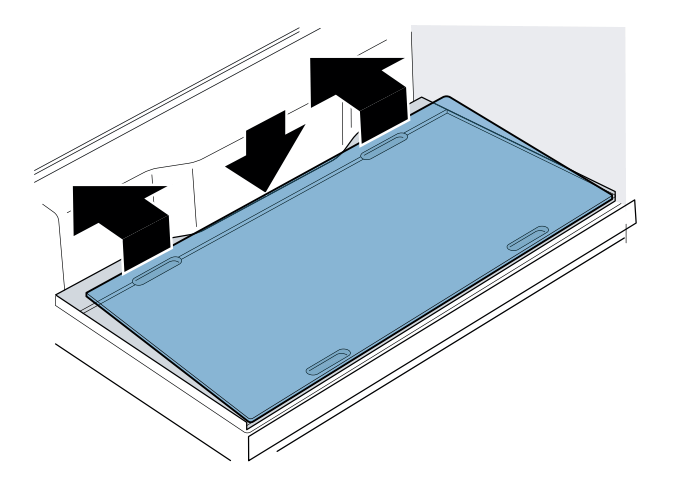
Glass plate partition
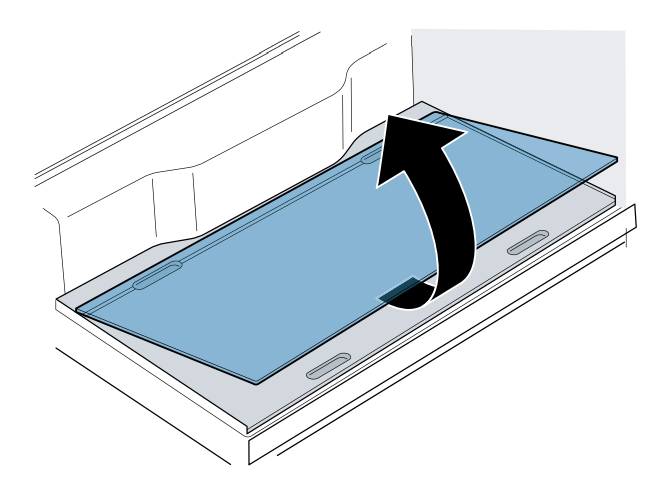
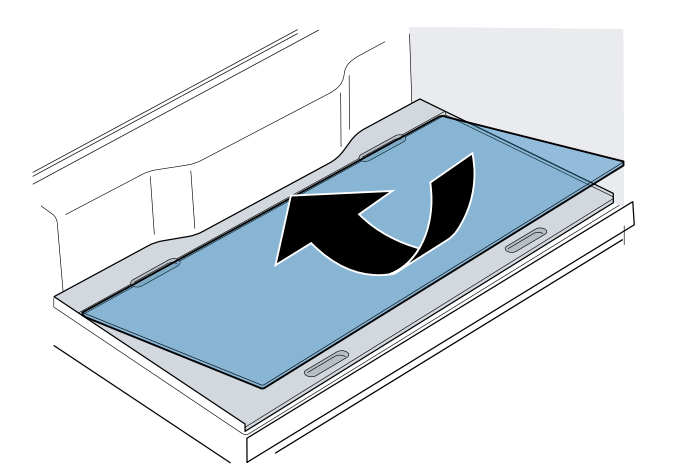
Remove the glass plate:
Reach into the back of the recess, lift the glass plate and push right back.
Reach into the front of the recess, lift the glass plate at the front and remove.
Install the glass plate:
Place the glass plate on the partition and push right to the front.
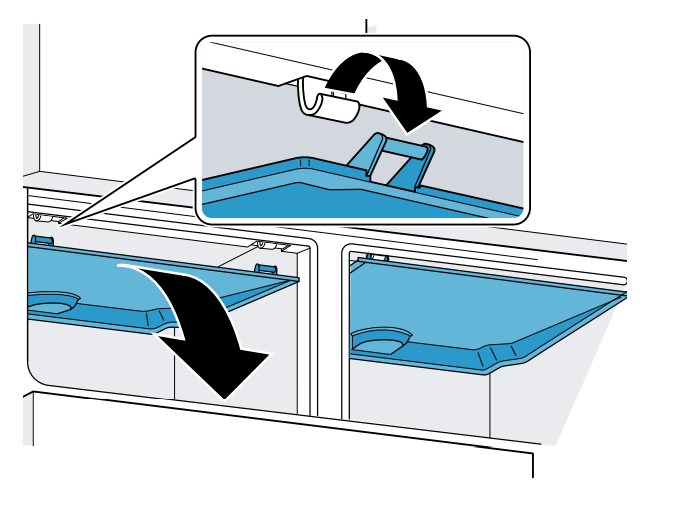
Cool-fresh bin cover
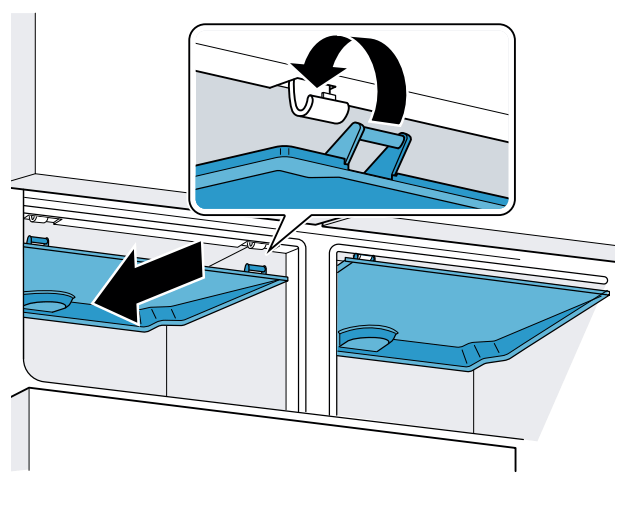
Remove the cover:
Open the refrigerator compartment doors and take out the cool-fresh bin.
In the cool-fresh compartment, lift the upper cover at the front and remove.
Install the cover:
Slide the cover symmetrically backwards in the cool-fresh compartment at the top and hook into place.
Push the cover up and engage.
Telescopic rails
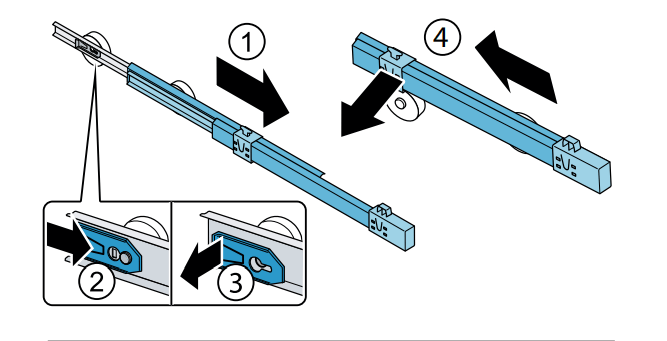
Removing telescopic rails
Pull out telescopic rail.
Push lock in the direction of the arrow.
Detach telescopic rail from the rear pin.
Push telescopic rail together, push backwards above the rear pin, and disengage.
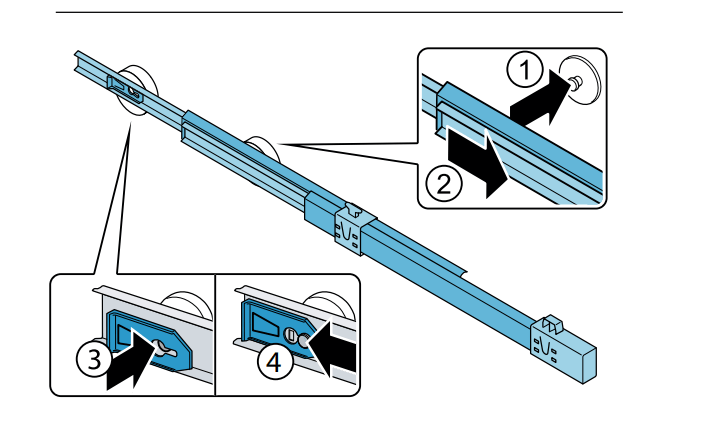
Installing telescopic rails
Place the extended telescopic rail on the front pin.
Pull the telescopic rail forwards slightly until it engages.
Insert telescopic rail on the rear pin.
Push lock backwards.
Faults – what to do?
Before you call customer service, use this table to check whether you can rectify the fault yourself.
Appliance
Temperature differs greatly from the set value.
Switch off appliance for 5 minutes.
→ "Switching off and disconnecting the appliance" If the temperature is too warm, check temperature again after a couple of hours.
If the temperature is too cold, check temperature again on the following day
Displays do not light up.
The power plug has not been inserted properly.
Connect the power plug.
The fuse has tripped.
Check the fuses.
The power has failed
Check whether the power is on.
Display indicates E….
The electronics have detected an error.
Please contact customer service.
The alarm off button flashes and a warning signal sounds.
Press alarm off button. Alarm is switched off.
Refrigerator compartment, cool-fresh compartment or freezer compartment is open.
Close the appliance.
Ventilation openings have been covered
Clear the ventilation openings
The temperature in the refrigerator compartment, cool-fresh compartment or freezer compartment is too warm.
Press alarm off button. After the alarm off button is pressed, the warmest temperature reached in the freezer compartment is displayed for 5 seconds. The display stops flashing.
Appliance is not cooling, display and lighting are lit.
Showroom mode switched on
Start the appliance self-test.
→ "Appliance self-test" When the program has ended, the appliance switches over to normal operation.
Water dispenser
The water dispenser is not functioning
No water supply
Check water connection and contact technician if necessary.
Low water pressure.
Only connect appliance to lines with sufficient water pressure.
Kink in water hose.
Turn off water supply, straighten out kink. Replace water hose, if necessary
The water filter is blocked or needs to be replaced
Replace water filter
Water is leaking out of the appliance.
Water connection is not tight.
Check if the connections are fastened firmly and the water hose is undamaged. If the water hose is damaged, contact customer service and have it replaced. Replacement must be performed by customer service or a similarly qualified person only.Use original parts supplied by the manufacturer only.
Ice maker
The ice maker is not functioning.
Ice cube production has been switched off
Switch on ice cube production.
Freezer compartment is too warm.
Set the temperature lower. → "Operating the appliance"
The water filter is blocked or needs to be replaced.
Replace water filter.
No water supply.
Check water connection and contact technician if necessary.
Ice maker without powe
Please contact customer service.
Ice cube production is low or misshapen.
After switching on or removing many ice cubes, there will be too few in the ice cube bin.
It takes around 48 hours for an empty ice cube bin to fill up.
Ice cube production stops even though the ice cube bin is not yet full.
Do not store the ice scoop on the ice in the ice cube bin. Otherwise the sensor will not detect the actual fill level of the bin.
Freezer compartment is too warm
Set the temperature lower.
→ "Operating the appliance"
Low water pressure.
Only connect appliance to lines with sufficient water pressure.
 power button. The appliance begins to cool. The warning sound, the flashing freezer compartment temperature display and the illuminated alarm off button indicate that the freezer compartment is still too warm.
 power button. The appliance is no longer cooling
 power button.
 Settings button until settings display shows °C or °F.
 button until the display indicates the required temperature.
 button until the display indicates the required temperature
 super button refrigerator compartment. When super cooling is switched on, the button lights up.
 super button. When super freezing is switched on, the button is lit.
 Settings button repeatedly until the settings display shows the desired brightness level.