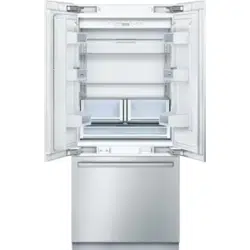
These operating instructions refer to several models. The diagrams may differ.
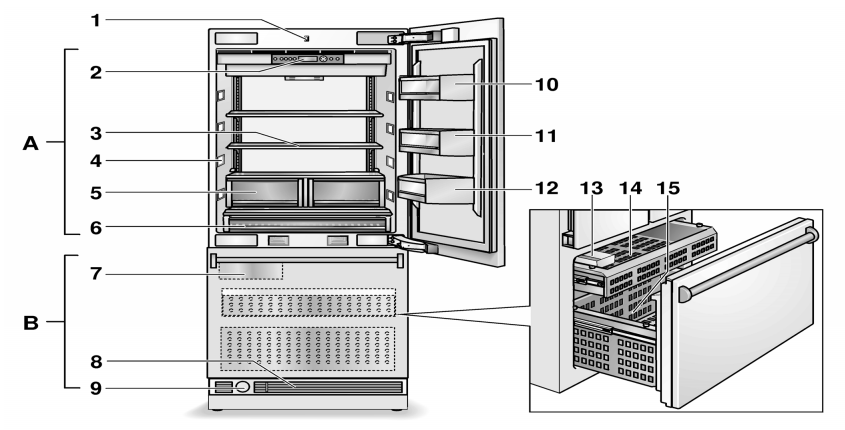
A. Refrigerator compartment
B. Freezer compartment
Light switch
Controls
Glass shelf
Light (LED)
Fruit and vegetable container
"Cool-fresh” container
Ice maker
Ventilation
Water filter
Butter and cheese compartment
Door shelf
Storage compartments for large bottles
Ice cube container
Drawer
Door drawer
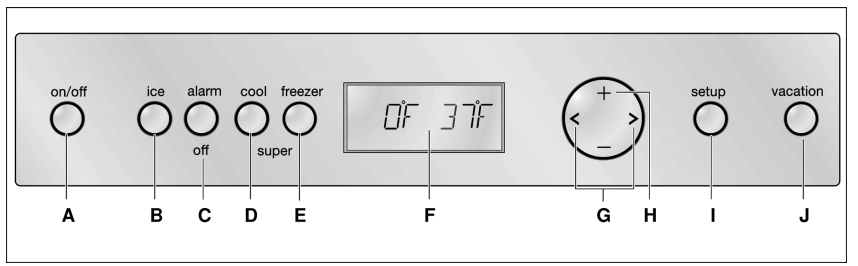
Controls
A. On/Off button
Serves to switch the whole appliance on and off.
B. Ice maker button
Serves to switch the ice maker on and off, see chapter Ice maker.
C. Alarm button
Used to switch off the warning signal, see chapter “Alarm function”.
D. “super” button (refrigerator compartment)
Switches super cooling on and off.
E. “super” button (freezer compartment)
Switches super freezing on and off.
F. Display panel
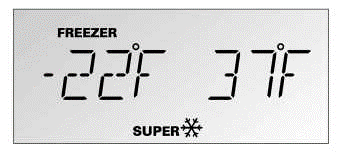
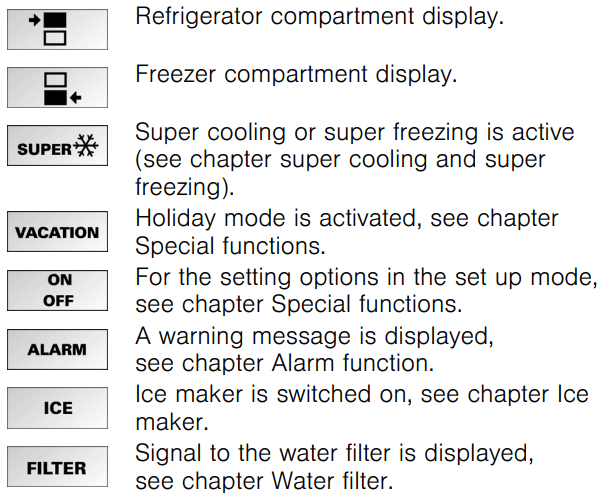
The temperatures in the refrigerator compartment and in the freezer compartment are shown in the display panel. Activated special functions are shown via “symbol”.
The menus and setting options which are available are represented on the display panel in the setup mode, see chapter “Special functions”.
G. Selection buttons
The temperature setting is activated using the selection buttons, see chapter “Setting the temperature”.
For selecting a menu in the setup mode, see chapter “Special functions”.
H. Setting buttons
The temperature can be changed using the setting buttons, see chapter “Setting the temperature”. More settings can be selected in the setup mode, see chapter “Special functions”.
I. “setup” button
This button starts and ends the setup mode.
If the setup mode is ended using the setup button, the changes which have been made are stored.
J. Vacation button
Is used to switch vacation mode on and off, see chapter “Special functions”, section “Vacation mode”.
Note:
A sound can be heard every time a button is actuated if this function is activated in the sound menu during the setup mode.
Symbols in the display field
Switching the appliance on
Switch on the appliance with the On/Off button.
The appliance begins to cool. Light is switched on when the door is open. The factory has recommended the following temperatures:
Refrigerator compartment: +37 °F
Freezer compartment: 0 °F
Operating tips
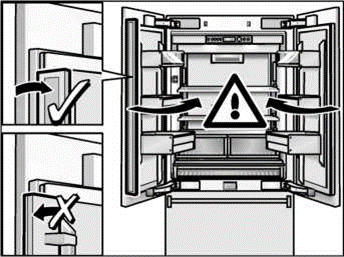
The appliance features a rail which is fitted to the left door.
The door of the refrigerator compartment can be opened without having to first open the right door.
A heating element is integrated into the bar in order to avoid condensation. This can be switched on and off.
CAUTION:
To prevent damage to the appliance or the furniture fronts, fold the rail when closing the door.
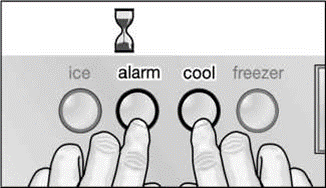
Switching heating on and off
Simultaneously hold down the alarm button and the refrigerator compartment super button for 3 seconds.
When the heating element is activated, the following message lights up in the display panel:
Set the language
The display languages can be changed according to the table in the chapter Setup mode.
In order to change the display language:
1. Press setup button.
2. Press the < or > setting button, until the set language is displayed.
3. Press the + or - setting button, until the desired language is displayed.
4. Press the setup button, in order to store the settings. The set temperature is displayed again in the fascia.
Setting the temperature unit
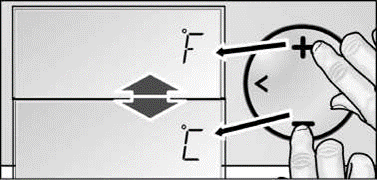
The temperature can be displayed in degrees Celsius (°C) or degrees Fahrenheit (°F).
1. Press setup button.
The first menu (temperature unit) is displayed.
2. Press the + or - setting button in order to switch between degrees Fahrenheit (°F) and degrees Celsius (°C).
3. Press the setup button, in order to store the settings. The set temperature is displayed again in the fascia.
Setting the temperature
Refrigerator compartment
(can be selected from +35 °F to +46 °F)
We recommend a setting of +37 °F.
Perishable food should not be stored above +37 °F.
Activate the setup mode with the selection button >.
Set the temperature with the + (warmer) or -(cooler) selection buttons.
Freezer compartment
(can be selected from +7 °F to -9 °F)
We recommend a setting of 0 °F
Activate the setup mode with the selection button <. The symbol is displayed.
Set the temperature with the + (warmer) or -(cooler) selection buttons.
Special functions
The following special functions can be selected or displayed:
Setup mode
In Setup mode you can make your personal settings.
Switching on
Press setup button.
The first menu (temperature unit) is displayed in the fascia.
Making settings
1. Switch on setup mode.
2. Press the selection button < or >.
The next menu is displayed and its current setting (mostly ON or OFF).
3. Press the setting button + or —.
The setting is stored, if the next menu is selected using < or >.
Switching off
Press setup button. All of the changed settings are stored.
Note:
If no button is selected within 20 seconds, the setup mode ends automatically. All of the changed settings are stored. The set temperature is displayed again in the fascia.
Menus in the setup mode
The following settings can be made.
Vacation mode
If leaving the appliance for a long period of time, you can switch the appliance over to the energy-saving vacation mode.
When Vacation mode is switched on, the following settings are made:
The appliance works in energy saving mode.
The illumination is switched off.
Super cooling or super freezing is then ended (if activated).
Switching on
Press Vacation button. VACATION is displayed in the fascia.
Switching off
Press Vacation button.
The previous settings and temperature values are once again activated.
Sabbath mode
When Sabbath mode is switched on, the following settings are switched off:
Super cooling
Super freezing
Acoustic signal when a button is pressed
Interior light
Background illumination of the fascia
Switching on
1. Press and hold down the “super” button on refrigerator compartment.
2. Press Vacation button.
3. Press “super” button and hold down for a further 3 seconds.
The VACATION symbol flashes on the display panel and SABBATH is displayed.
Switching off
Press Vacation button.
The previous settings and temperature values are once again activated.
Energy saving mode
If the energy saving function (eco function) is activated, the appliance switches to energy saving operation. This energy saving function is preset at the factory in order to reduce energy consumption. The background illumination of the fascia is likewise reduced.
Switching on
1. Press setup button.
2. Press the selection button >, until ECO MODE and the current setting (OFF) is displayed.
3. Press the setting button +, in order to reset the setting.
4. Press the setup button, in order to store the setting. ECOis displayed in the fascia.
Switching off
1. Press setup button.
2. Press the selection button >, until ECO MODE and the current setting (ON) is displayed.
3. Press the setting button —, in order to reset the setting.
4. Press the setup button, in order to store the setting.
Alarm function
Note:
As long as a warning is displayed, no buttons can be pressed.
Cause
One door of the appliance has not been closed correctly or has been open too long.
Remedial action
Press the alarm button and close the door. The display goes out.
Refrigerator compartment
The refrigerator compartment is the ideal storage location for ready meals, cakes and pastries, preserved food, condensed milk, hard cheese, fruit and vegetables sensitive to cold as well as tropical fruit.
When purchasing food, please note:
The “purchase freshness” is important for the shelf-life of your food.
In principle, the fresher the produce when placed in the “cool-fresh” compartment, the longer it stays fresh.
Therefore, when buying food, always pay attention to the degree of freshness.
Observe the best-before date specified by the manufacturer for ready products and bottled products.
Arranging food in the appliance
Wrap or cover food before placing in the appliance. This will retain the aroma, colour and freshness of the food. In addition, flavours will not be transferred between foods and the plastic parts will not become discoloured.
Allow warm food and drinks to cool down before placing in the appliance.
Do not block air outlet openings with food in the refrigerator compartment, otherwise the air circulation will be impaired. Food which is stored directly in front of the air outlet openings may be frozen by the cold air flowing out.
Avoid contact of oil and fat with the plastic parts and door seal.
Super cooling
Super cooling cools the refrigerator compartment as cold as possible for approx. 6 hours. Then the appliance automatically switches to the temperature set prior to super cooling mode.
Switch on super cooling mode, e.g.:
Before placing large quantities of food in the refrigerator compartment
For fast cooling drinks
Switching on
Press super cooling button.
The display panel indicates the symbol SUPER#- and the compartment for which the function was switched on.
Switching off
Press super cooling button.
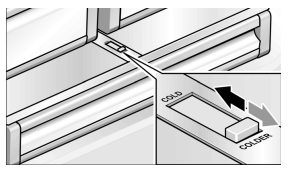
“cool-fresh” drawer
The “cool-fresh” drawer has a temperature of almost 32 °F. Ideal for storing fish, meat, sausage, cheese and milk.
The temperature in the “cool-fresh” drawer can be reduced slightly with the slide control.
We recommend the following controller position:
COLD: Meat, sausage and poultry
COLDER: Fish
Freezer compartment
CAUTION: Do not refreeze thawing or thawed food. Before freezing the food, first boil or fry it. Never keep frozen food longer than the maximum storage duration.
Using the freezer compartment
To store deep-frozen food.
To make ice cubes.
To freeze food.
Note:
Ensure that the freezer compartment door has been closed properly. If the door is open, the frozen food will thaw. The freezer compartment will become covered in thick ice. Also: waste of energy due to high power consumption!
Freezing and storing food
Purchasing frozen food
Packaging must not be damaged.
Use by the “use by” date.
Temperature in the supermarket freezer must be 0 °F or lower.
If possible, transport deep-frozen food in an insulated bag and place quickly in the freezer compartment.
Freezing fresh food
Freeze fresh and undamaged food only.
To retain the best possible nutritional value, flavour and colour, vegetables should be blanched before freezing. Aubergines, peppers, zucchini and asparagus do not require blanching.
Literature on freezing and blanching can be found in bookshops.
Note:
Keep food which is to be frozen away from food which is already frozen.
The following foods are suitable for freezing: Cakes and pastries, fish and seafood, meat, game, poultry, vegetables, fruit, herbs, eggs without shells, dairy products such as cheese, butter and quark, ready meals and leftovers such as soups, stews, cooked meat and fish, potato dishes, souffles and desserts.
The following foods are not suitable for freezing: Types of vegetables, which are usually consumed raw, such as lettuce or radishes, eggs in shells, grapes, whole apples, pears and peaches, hard-boiled eggs, yoghurt, soured milk, sour cream, creme fraTche and mayonnaise.
Packing frozen food
To prevent food from losing its flavour or drying out, place in airtight containers.
Place food in packaging.
Remove air.
Seal the wrapping.
Label packaging with contents and date of freezing.
Suitable packaging:
Cling wrap, tubular film made of polyethylene, aluminum foil, freezer containers.
These products are available from specialist outlets.
Unsuitable packaging:
Wrapping paper, greaseproof paper, cellophane, bin liners and used shopping bags.
Items suitable for sealing packaged food:
Rubber bands, plastic clips, string, cold-resistant adhesive tape, etc.
Bags and tubular film made of polyethylene can be sealed with a film heat sealer.
Shelf life of frozen food
Depends on the type of food.
At a temperature of 0 °F:
Fish, sausage, ready meals and cakes and pastries: up to 6 months
Cheese, poultry and meat: up to 8 months
Vegetables and fruit: up to 12 months
Super freezing
Food should be frozen solid as quickly as possible in order to retain vitamins, nutritional value, appearance and flavor.
To prevent an undesirable temperature rise when placing fresh food in the freezer compartment, switch on super freezing several hours beforehand. As a rule, 4-6 hours is adequate. 24 hours are necessary when using the maximum freezer capacity fully.
After 2 days the temperature set before super freezing is automatically restored.
Switching on
Press super freezing button.
The display panel indicates the symbol SUPER and the compartment for which the function was switched on.
Switching off
Press super freezing button.
Thawing frozen food
Depending on the type and application, select one of the following options:
at room temperature,
in the refrigerator,
in an electric oven, with/without fan assisted hot-air,
in the microwave.
Note:
Do not refreeze thawing or thawed food. Only ready meals (boiled or fried) may be refrozen.
No longer store the frozen produce for the max. storage period.
Ice maker
The ice maker makes ice cubes.
The ice maker starts to make ice cubes as soon as the appliance has reached the set temperature. If the ice cube container is full, the ice maker automatically switches off.
The ice maker can make approx. 100 ice cubes within 24 hours.
Switching on
Note:
If the ice maker is used for the first time and/or a long period of not being used, do not use the ice which is produced in the first day for hygiene reasons. Throw the ice cubes away and clean the container!
Make sure that ice maker container is its place and locked into position.
Press ice maker button . The symbol ICE is lit on the display panel.
Make sure that ice maker container is its place and locked into position.
Press ice maker button . The symbol ICE is lit on the display panel.
Switching off
Note:
Before switching off the ice maker, it is most important that you switch the water supply to the appliance off for a few hours.
Press ice maker button.
Water filter
Exchanging the filter cartridge
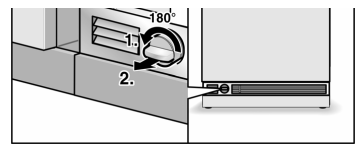
1. Turn the filter cap on the base of the appliance by 90–180° anti-clockwise.
2. Pull out the filter cartridge
3. Take a new filter cartridge from the packet and remove the protective cap.
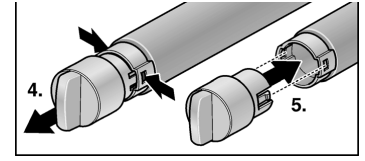
4. Take the filter cap off of the used filter cartridge.
5. Place the filter cap on the fresh filter cartridge.
6. With the filter cap in a horizontal position, feed the filter cartridge into the opening on the appliance base as far as it will go.
7. Turn the filter cartridge 90–180° in a clockwise direction.
8. Pour water out of the used filter cartridge. The filter cartridge can be disposed of in the household rubbish.
Note: The appliance could be used without a water filter. If you select this option, replace the water filter with a particle cartridge. In this case the filter display can be deactivated to prevent the filter change display. To purchase a water filter replacement cartridge, contact your local dealer or call 1-800-578-6890.
Cleaning the appliance
Proceed as follows:
Before cleaning: Switch the appliance off.
Pull out the mains plug or switch off the fuse.
Take out the frozen food and store in a cool location. Place the ice pack (if enclosed) on the food.
Clean the appliance with a soft cloth, lukewarm water and a little pH neutral washing-up liquid. The rinsing water must not run into the light.
Wipe the door seal with clear water only and then wipe dry thoroughly.
After cleaning reconnect and switch the appliance back on.
Put the frozen food back in the freezer compartment.
Interior fittings
To clean the equipment, all variable parts of the appliance can be taken out (see chapter Variable interior design).
Cleaning the ice cube container
If ice cubes have not been dispensed for a prolonged period, they will shrink, have a stale taste and stick together. Therefore, the ice cube container should be cleaned regularly.
CAUTION:
A full ice cube container is heavy.
Remove the ice cube container.
Pull out the container, empty and clean with lukewarm water.
Thoroughly dry the container to prevent new ice cubes from sticking.
Insert the ice cube container.
Ice cube production continues.
Odours
If you experience unpleasant odours:
Switch the appliance off.
Take all food out of the appliance.
Clean the interior. See chapter “Cleaning the appliance”.
Clean all packages.
Seal strong smelling food in order to avoid odours from forming.
Switch the appliance on again.
Store food in the appliance.
Check whether the formation of odours is still occuring after 24 hours.
Exchange the odour filter. See chapter “Exchange the odour filter”.
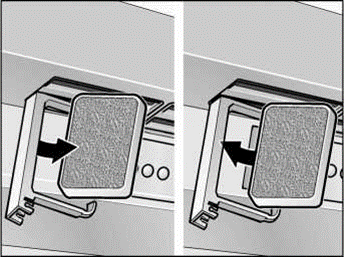
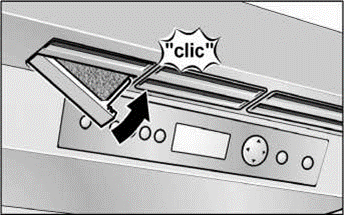
Exchange the odour filter
Spare filters are available from your dealer.
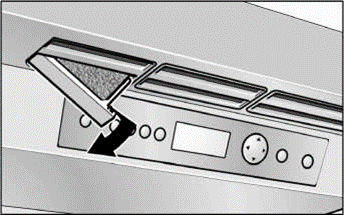
1. Opening the filter holder.
2. Remove the used odour filter and replace with a new odour filter.
3. Opening the filter holder.
Light (LED)
Your appliance features a maintenance-free LED light. These lights may be repaired by customer service or authorized technicians only.
Tips for saving energy
Install the appliance in a dry, well ventilated room! The appliance should not be installed in direct sunlight or near a heat source (e.g. radiator, cooker). If required, use an insulating plate.
Do not block the ventilation openings in the appliance.
Allow warm food and drinks to cool down before placing in the appliance!
When thawing frozen products, place them in the refrigerator. Use the coldness of the frozen food to cool food.
Open the appliance as briefly as possible!
Operating noises
Quite normal noises
Droning
Motors are running (e.g. refrigeration units, fan).
Bubbling, humming or gurgling noises
Refrigerant is flowing through the tubing.
Clicking
Motor, switches or solenoid valves are switching On/ Off.
Preventing noises
The appliance is not level
Please align the appliance with a spirit level. Use the height-adjustable feet or place packing underneath them.
The appliance is not free-standing
Please move the appliance away from adjacent units or appliances.
Containers or storage areas wobble or stick
Please check the removable parts and re-insert them correctly, if required.
Bottles or receptacles are touching each other
Move the bottles or receptacles slightly away from each other.
Eliminating minor faults yourself
Before you call customer service: Please check whether you can eliminate the fault yourself based on the following information. Customer service will charge you for advice even if the appliance is still under guarantee!
Appliance
Fault
Possible cause
Remedial action
Appliance has no refrigeration
Appliance has been switched off.
Press the On/Off button.
capacity.
Power failure.
Check whether the power is on.
The light does not work.
The fuse has been switched off.
Check the fuse.
The display does not illuminate.
The mains plug has not been inserted properly.
Check whether the mains plug is secure.
The refrigeration unit is switch-
Appliance opened frequently.
Do not open the appliance unnecessarily.
ing on more frequently and for longer.
The ventilation openings have been covered.
Remove obstacles.
Large quantities of fresh food are placed in the freezer.
Activate “super” cooling and/or “super” freezing.
The temperature in the refrigerator compartment or freezer compartment is too cold.
Temperature has been set too low.
Increase the temperature (see chapter Selecting the temperature).
The light (LED) does not work.
The LED lamp is defective.
Call customer service.
Light switch is jammed.
Check whether it can be moved.
You experience unpleasant odours.
Strongly smelling food is not sealed.
Clean the appliance. Seal strongly smelling food (see chapter “Odours”).
Display indicates “E..”.
Electronics have detected a fault.
Call customer service.
Display indicates “LOW-POWER”.
The mains voltage falls below the permitted limiting value.
When the mains voltage reaches the stipulated value again, the warning message goes out. If the warning message lasts for longer, inform the energy supply company.
Condensation forms on the rail on the left door.
Condensation of warm air.
Switch on heater in the rail, see chapter Switching the appliance on.
The ice maker doesn’t work.
Ice maker is not connected to the mains supply.
Call customer service.
Ice maker does not contain any fresh water.
Ensure that the water is properly connected.
The freezer compartment temperature is too warm.
Check freezer compartment temperature and, if required, set slightly colder.
The ice maker does not make
The appliance or ice maker has only
Approx. 24 hours is needed until ice pro-
enough ice or the ice is
just been switched on.
duction starts.
deformed.
A lot of ice has been taken.
Approx. 24 hours is needed until the ice cube container is filled again.
Low water pressure.
Connect the appliance to the stipulated water pressure only (see chapter Connecting appliance, section Water connection).
The water filter is bunged up or used.
Change the water filter.
The ice maker does not make
The ice maker is switched off.
Switch the ice maker on at the control
any ice.
panel.
The appliance is not supplied with
Contact the installer or the water supply
water.
company.
Water supply has kinks.
Turn off the water supply at the shut-off tap. Smoothen out the kinks, exchange where necessary.
Low water pressure.
Connect the appliance to the stipulated water pressure only (see chapter Connecting appliance, section Water connection).
Temperature in the freezer space is
Set temperature slightly colder in the freezer
too warm.
compartment.
Ice cube container is not properly
Check the position, re-insert where neces-
inserted.
sary.
Incorrect shut-off tap installed.
Incorrect taps can cause low water pressure and damage to the appliance.
Ice forms in the inflow hose to the ice maker.
Low water pressure.
Connect the appliance to the stipulated water pressure only (see chapter Connecting appliance, section Water connection).
Shut off tap incorrectly opened.
Open shut off tap fully.
Temperature in the freezer space is
Set temperature slightly colder in the freezer
too warm.
compartment.
Water runs from the appliance.
The water connection hose is not
Replace the hose with a manufacturer’s
properly sealed.
original part.
Incorrect shut-off tap installed.
Incorrect taps can cause low water pressure and damage to the appliance.
The water pressure is less than usual.
Low water pressure.
Connect the appliance to the stipulated water pressure only (see chapter Connecting appliance, section Water connection).
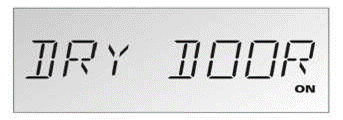
 is displayed.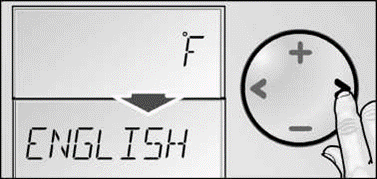

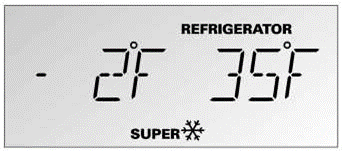
 and the compartment for which the function was switched on.