Please read this manual carefully before TV operation.
Retain it for future reference.
Quick Start Guide
TC-LE32K-AN2401
TC-LE43K-AN2401
SMART TV
1
PREFACE
1. Read this Quick Start Guide before starting Set-up.
2. Then, carefully follow the Instructions, heeding all Warnings.
3. Do Not remove the TV back cover or block the TV ventilation openings.
4. Do Not use the TV near water or a heat Source.
5. Do not pinch or cut the Power Cord.
Note:
The product and illustrations in this user's manual is only for explanation purposes and may vary
depending on model.
What You Will Need for Set-up (Not Included)
• Philips Head Screwdriver
• Internet Connection (Needed for Smart TV Streaming)
• Wireless Router (Needed for Smart TV Streaming)
• Computer, Tablet or Smart Phone (Needed for Smart TV Set-Up)
• Tournevis à tête Philips
• Connexion Internet (nécessaire pour la diffusion en continu de smart TV)
• Routeur sans fil (nécessaire pour la diffusion en continu de Smart TV)
• Ordinateur, tablette ou téléphone intelligent (nécessaire pour la configuration de smart TV)
Safety information
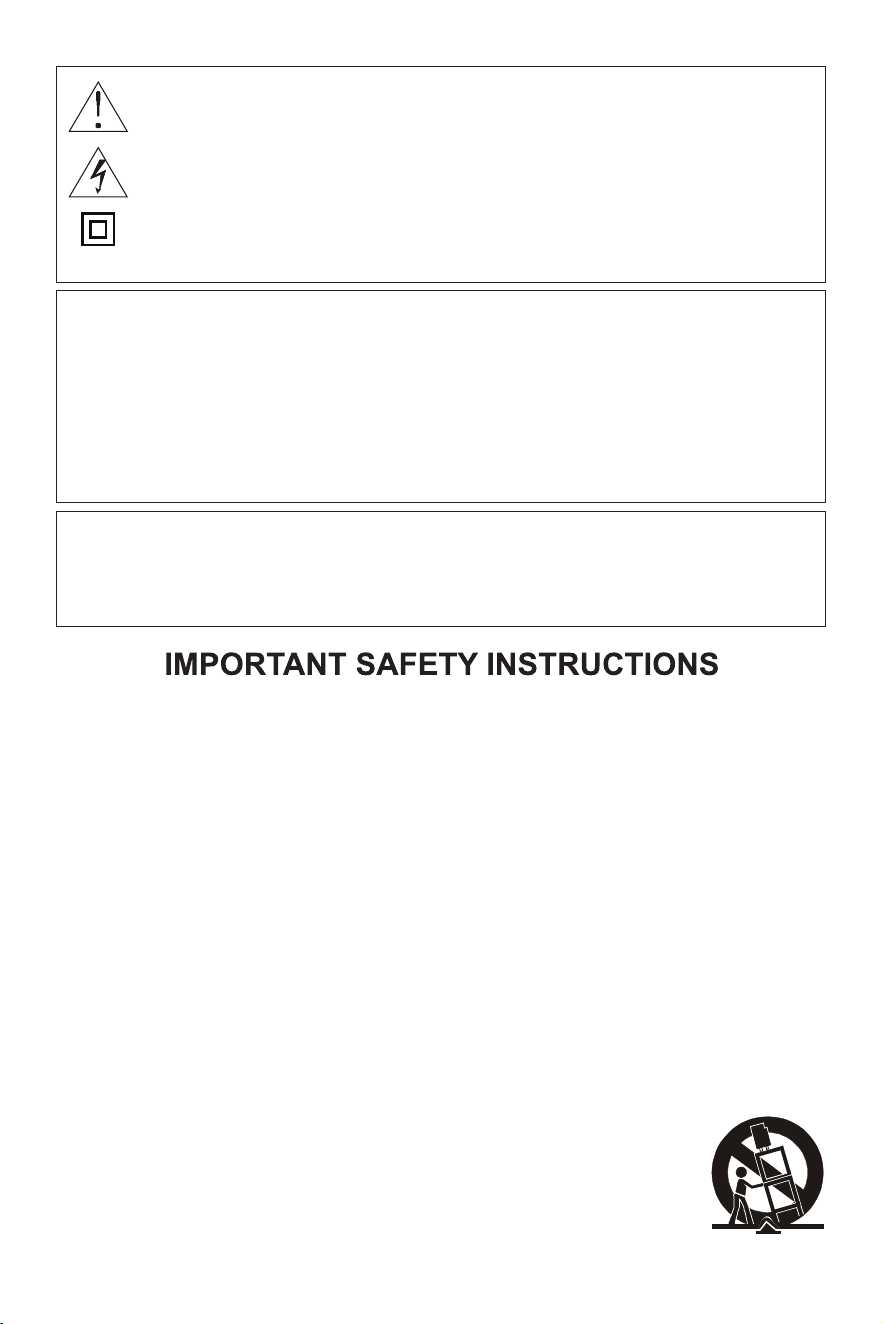
- This lightning flash with arrowhead symbol within an equilateral triangle is intended to alert the
user to the presence of non-insulated “dangerous voltage” within the product’s enclosure that
may be of sufficient magnitude to constitute a risk of electric shock.
- Cet éclair avec symbole de pointe de flèche dans un triangle équilatéral est destiné à alerter le
à la présence d’une “ tension dangereuse” non isolée dans l’enceinte du produit qui: peut être
d’une ampleur suffisante pour constituer un risque de choc électrique.
- WARNING: To reduce the risk of electric shock, do not remove cover (or back). No user
service - able parts inside. Refer servicing to qualified service personnel.
- AVERTISSEMENT: Pour réduire le risque de choc électrique, ne retirez pas le couvercle
(ou le dos). Pas de service d’utilisation-pièces capables à l’intérieur. Diriger les services de
service vers du personnel de service qualifié.
- The exclamation point within an equilateral triangle is intended to alert the user to the presence
of important operating and maintenance instructions in the literature accompanying the
appliance.
- Le point d’exclamation à l’intérieur d’un triangle équilatéral est destiné à alerter l’utilisateur de l'
présence d’instructions d’exploitation et d’entretien importantes dans la documentation qui
l’accompagne l’appareil.
WARNING
RISK OF ELECTRIC SHOCK
CO NOT OPEN
AVERTISSEMENT
RISQUE DE CHOC
ELECTRIQUE-NE PAS OUVRIR
2
This symbol indicates important
instructions accompanying the
product.
WARNING
To reduce the risk of fire or electric shock, do not expose this product to rain or moisture.
The apparatus must not be exposed to dripping or splashing. Objects filled with liquids, such
vases or drinking glasses, must never be placed on the apparatus.
AVERTISSEMENT
Pour réduire le risque d’incendie ou de choc électrique, n’exposez pas ce produit à la pluie ou
à l’humidité. L’appareil ne doit pas être exposé à des gouttes ou à des éclaboussures. Les
objets remplis de liquides, tels que vases ou verres à boire, ne doivent jamais être placés sur
l’appareil.
This symbol indicates "dangerous voltage"
inside the product that presents a risk of
electric shock or personal injury.
This equipment is a Class II or double insulated
device. It has been designed so that it does not
require safety ground connection.
Ce symbole indique important
les instructions accompagnant l'
produit.
Ce symbole indique « tension dangereuse »
à l’intérieur du produit qui présente un risque de
choc électrique ou blessures corporelles.
Cet engin est de classe II ou à double isolation
appareil. Il a été conçu de manière à ce qu’il ne
le soit pas exiger un raccordement au sol de
sécurité.
Operating ambient temperature: 0 - 40°C;
Storage and transportation ambient temperature: -10 - 50°C;
Température ambiante de fonctionnement: 0 - 40 ° C;
Température ambiante de stockage et de transport: - 10 - 50°C;
1. Read these instructions.
2. Keep these instructions.
3. Heed all warnings.
4. Follow all instructions.
5. Do not use this apparatus near water.
6. Clean only with dry cloth.
7. Do not block any ventilation openings. Install in accordance with the manufacturer's instructions.
8. Do not install near any heat sources such as radiators, heat registers, stoves, or other apparatus
(including amplifiers) that produce heat.
9. Do not defeat the safety purpose of the polarized or grounding-type plug. A polarized plug has
two blades with one wider than the other. A grounding type plug has two blades and a third
grounding prong. The wide blade or the third prong is provided for your safety. If the provided
plug does not fit into your outlet, consult an electrician for replacement of the obsolete outlet.
10. Protect the power cord from being walked on or pinched particularly at plugs, convenience
receptacles, and the point where they exit from the apparatus.
11. Only use attachments/accessories specified by the manufacturer.
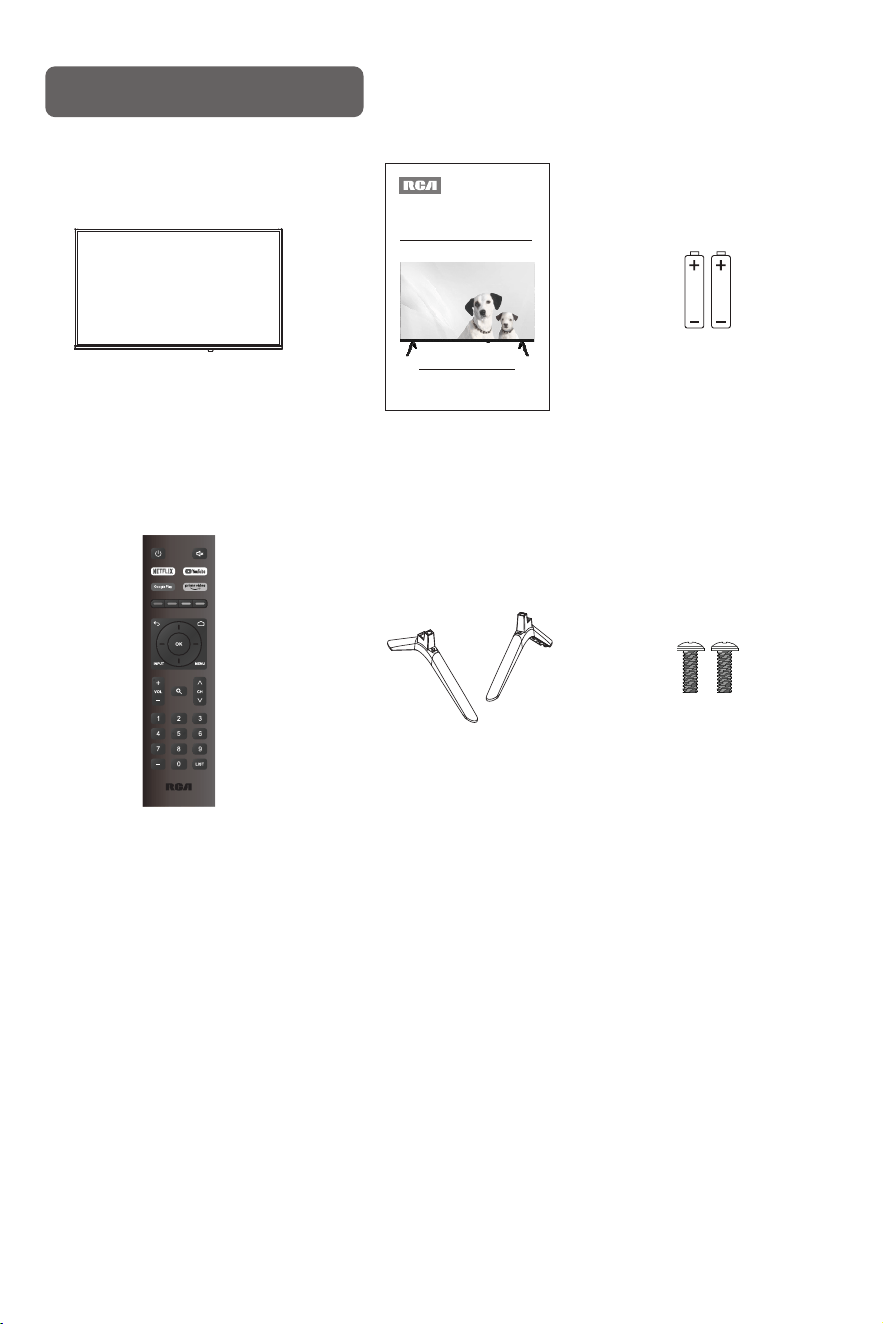
12. Use only with the cart, stand, tripod, bracket, or table specified by the manufacturer, or sold with
the apparatus. When a cart is used, use caution when moving the cart/apparatus combination
to avoid injury from tip-over.
13. Unplug this apparatus during lightning storms or when unused for long periods of time.
14. Refer all servicing to qualified service personnel.
Servicing is required when the apparatus has been damaged in any way,
such as power-supply cord or plug is damaged, liquid has been spilled or
objects have fallen into the apparatus, the apparatus has been exposed
to rain or moisture, does not operate normally, or has been dropped.
15. This product may contain lead and mercury. Disposal of these materials
may be regulated due to environmental considerations. For disposal or
recycling information, please contact your local authorities or the Electronic
Industries Alliance (www.eiae.org).

3
16. Minimum 5cm around the apparatus for sufficient ventilation;
17. Battery should be recycled or disposed as per state and local guidelines;
The batteries (battery pack or batteries installed) shall not be exposed to excessive heat such
as sunshine, fire or the like.
18. The ventilation should not be impeded by covering the ventilation openings with items, such
as newspapers, table-cloths, curtains, etc.;
19. No naked flame sources, such as lighted candles, should be placed on the apparatus.
20. The plug or appliance coupler is used as the disconnect device, the disconnect device shall
remain readily operable.
Instructional safeguard for Stability of equipment
WARNING:
Stability Hazard
The television set may fall, causing serious personal injury or death.
A television set may fall, causing serious personal injury or death. Many injuries, particularly to children,
can be avoided by taking simple precautions such as:
- ALWAYS use cabinets or stands or mounting methods recommended by the manufacturer of the
television set.
- ALWAYS use furniture that can safely support the television set.
- ALWAYS ensure the television set is not overhanging the edge of the supporting furniture.
- ALWAYS educate children about the dangers of climbing on furniture to reach the television set or its
controls.
- ALWAYS route cords and cables connected to your television so they cannot be tripped over, pulled
or grabbed.
- NEVER place a television set in an unstable location.
- NEVER place the television set on tall furniture (for example, cupboards or bookcases) without
anchoring both the furniture and the television set to a suitable support.
- NEVER place the television set on cloth or other materials that may be located between the television
set and supporting furniture.
- NEVER place items that might tempt children to climb, such as toys and remote controls, on the top
of the television or furniture on which the television is placed.
If the existing television set is going to be retained and relocated, the same considerations as above
should be applied.
Garantie guidée de la stabilité de l'équipement
Avertissement:
Danger de stabilité
Le téléviseur peut tomber, causant des blessures graves ou la mort.
Le téléviseur peut tomber, causant des blessures graves ou la mort. De nombreuses blessures, en
particulier chez les enfants, peuvent être évitées en prenant des précautions simples, telles que:
- Utilisez toujours une armoire ou un support ou une méthode de montage recommandée par le
fabricant du téléviseur.
- Utilisez toujours des meubles qui peuvent soutenir votre téléviseur en toute sécurité.
- Assurez - vous toujours que le téléviseur ne surplombe pas les bords qui soutiennent les meubles.
- Toujours éduquer les enfants sur les dangers de l’escalade des meubles pour atteindre le téléviseur
ou ses commandes.
- Assurez - vous de câbler les fils et les câbles connectés à votre téléviseur afin qu’ils ne puissent pas
trébucher, tirer ou attraper.
- Ne placez jamais votre téléviseur dans un endroit instable.
- Ne placez jamais votre téléviseur sur un meuble surélevé (par exemple, une armoire ou une
bibliothèque) sans fixer les meubles et le téléviseur sur un support approprié.
- Ne placez jamais votre téléviseur sur un chiffon ou un autre matériau qui pourrait se trouver entre le
téléviseur et le meuble correspondant.
- Ne placez jamais d’objets tels que des jouets et des télécommandes qui pourraient inciter les enfants
à grimper sur le téléviseur ou les meubles sur lesquels le téléviseur est placé.
Si un téléviseur existant doit être conservé et déplacé, les mêmes considérations que ci - dessus
doivent être appliquées.

4
FCC STATEMENT
1. This device complies with Part 15 of the FCC Rules. Operation is subject to the following two
conditions:
(1) This device may not cause harmful interference, and (2) This device must accept any
interference received, including interference that may cause undesired operation.
2. any Changes or modifications not expressly approved by the party responsible for compliance
could void the user's authority to operate the equipment.
NOTE: This equipment has been tested and found to comply with the limits for a Class B digital
device, pursuant to Part 15 of the FCC Rules.
These limits are designed to provide reasonable protection against harmful interference in a
residential installation.
This equipment generates uses and can radiate radio frequency energy and, if not installed and
used in accordance with the instructions, may cause harmful interference to radio communications.
However, there is no guarantee that interference will not occur in a particular installation.
If this equipment does cause harmful interference to radio or television reception, which can be
determined by turning the equipment off and on, the user is encouraged to try to correct the
interference by one or more of the following measures:
Reorient or relocate the receiving antenna. Increase the separation between the equipment and
receiver. Connect the equipment into an outlet on a circuit different from that to which the receiver
is connected. Consult the dealer or an experienced radio/TV technician for help.
FCC Radiation Exposure Statement
This equipment complies with FCC radiation exposure limits set forth for an uncontrolled
environment. This equipment should be installed and operated with minimum distance 20cm
between the radiator & your body.
DÉCLARATION DE LA FCC
1. Cet appareil est conforme à la partie 15 des règles de la FCC. L’exploitation est soumise aux deux
conditions suivantes :
(1) Cet appareil ne peut pas causer d’interférences nuisibles, et (2) Cet appareil doit accepter tout
le brouillage reçu, y compris le brouillage qui peut causer un fonctionnement indésirable.
2. Tout changement ou modification non expressément approuvé par la partie responsable de la
conformité pourrait annuler le pouvoir de l’utilisateur d’utiliser l’équipement.
REMARQUE : Cet équipement a été testé et déclaré conforme aux limites d’un numérique de classe
B conformément à la partie 15 des règles de la FCC.
Ces limites sont conçues pour fournir une protection raisonnable contre les interférences préjudiciables
dans un installation résidentielle.
Cet équipement génère, utilise et peut émettre de l’énergie radiofréquence et, s’il n’est pas installé et
utilisé conformément aux instructions, peut provoquer des interférences nuisibles aux communications
radio.
Cependant, il n’y a aucune garantie que des interférences ne se produiront pas dans une installation
particulière.
Si cet équipement provoque des interférences nuisibles à la réception de la radio ou de la télévision,
ce qui peut être déterminé en éteignant et en rallumant l’équipement, l’utilisateur est encouragé à
essayer de corriger le l’interférence d’une ou de plusieurs des mesures suivantes :
Réorientez ou déplacez l’antenne de réception. Augmenter la distance entre l’équipement et récepteur.
Branchez l’équipement sur une prise sur un circuit différent de celui auquel le récepteur est connectée.
Consultez le revendeur ou un technicien radio/TV expérimenté pour obtenir de l’aide.
Déclaration d’exposition aux rayonnements de la FCC
Cet équipement est conforme aux limites d’exposition aux rayonnements de la FCC établies pour un
environnement. Cet équipement doit être installé et utilisé avec une distance minimale de 20 cm
entre le radiateur et votre corps.
5
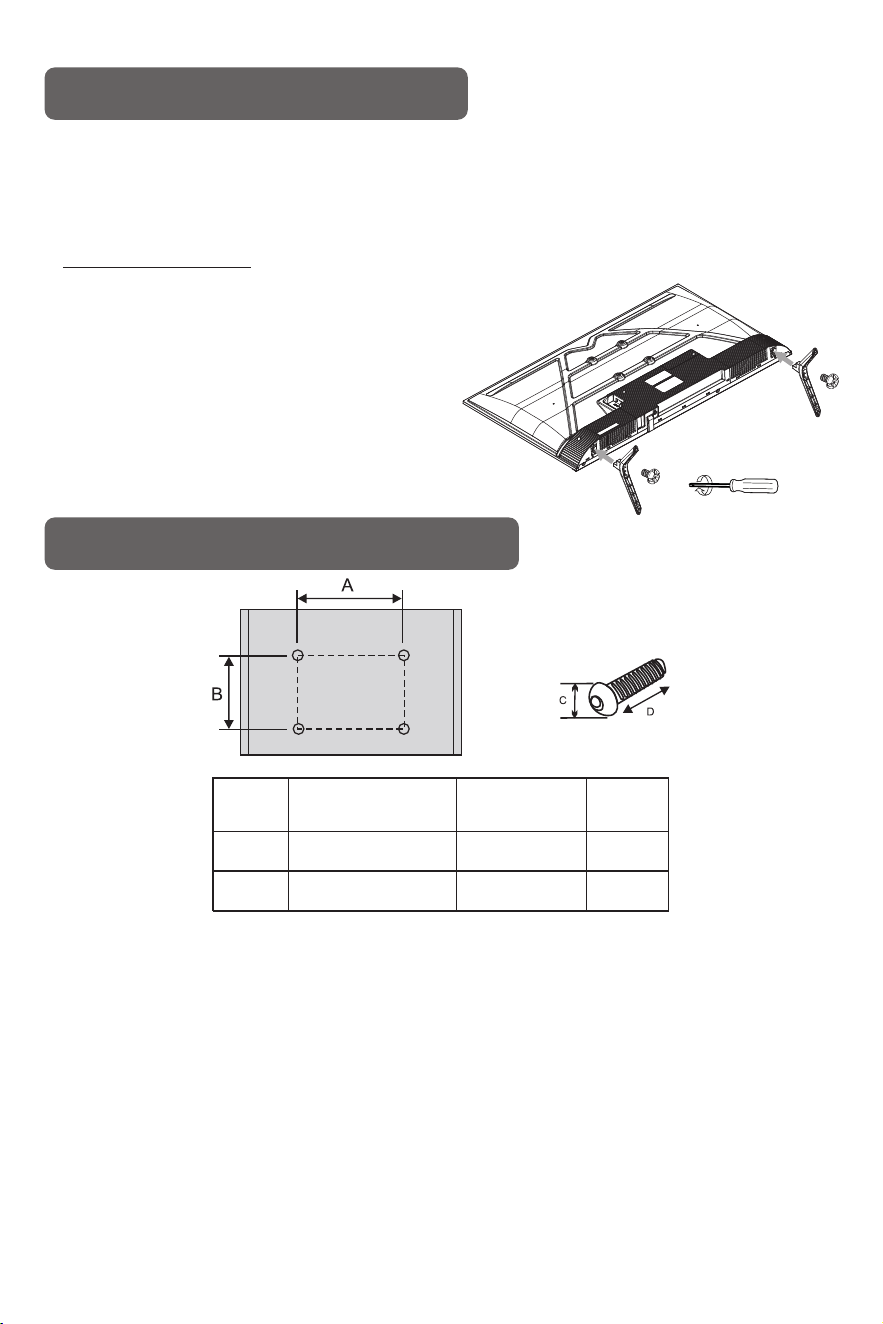
Package Contents
TV x 1pcs
Quick Start Guide x 1pcs
AAA Batteries for
Remote x 2 pcs
Remote Control x 1pcs Table Stands x 2 pcs Screws for Table Stands
Please read this manual carefully before TV operation.
Retain it for future reference.
Quick Start Guide
TC-LE32K-AN2401
TC-LE43K-AN2401
SMART TV
6
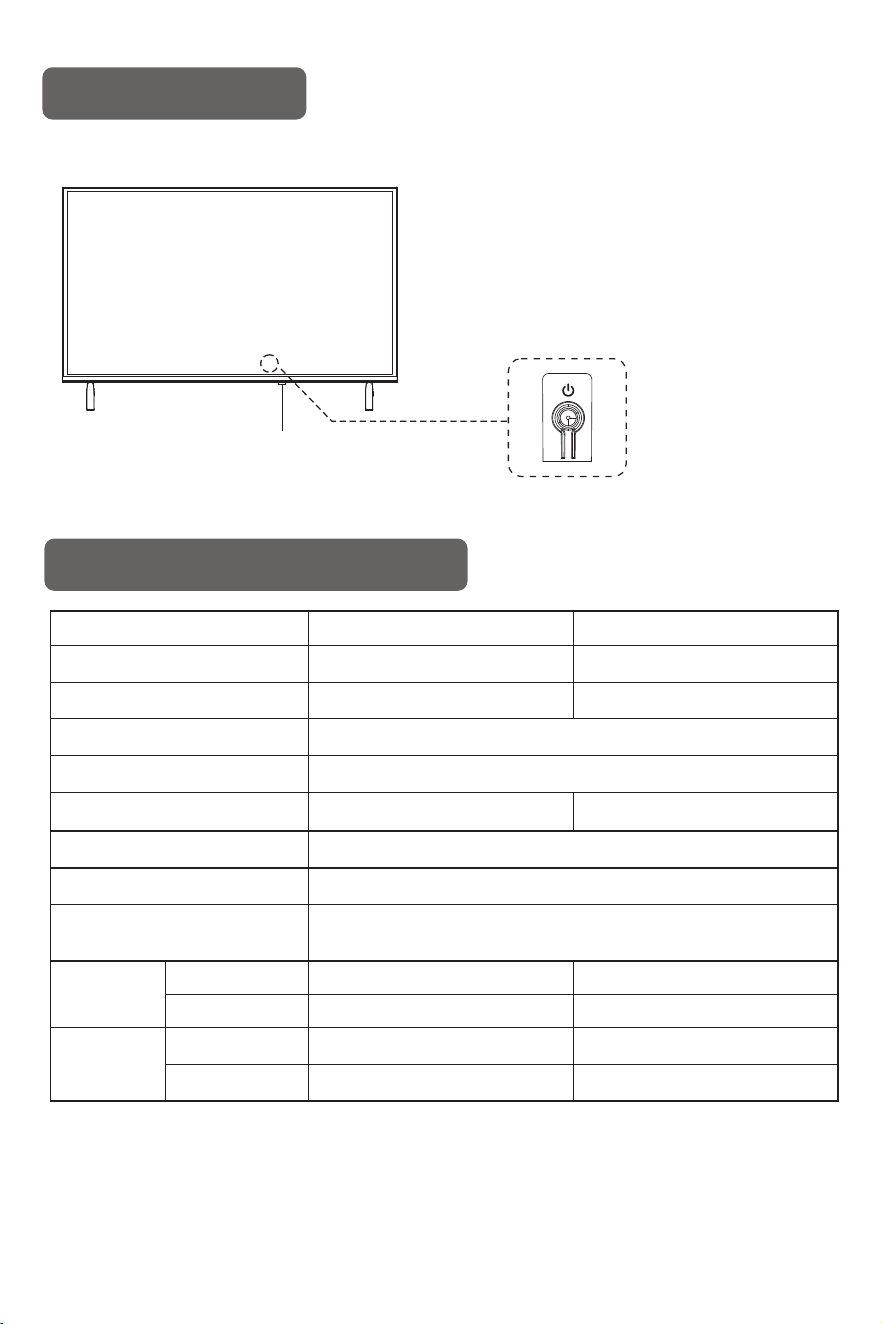
Attach the Table Stands
How to assemble the stand
If you need to remove or assemble the stand please read the following instructions.
- Before attaching/detaching the stand, make sure to turn off the TV.
- Before performing work, spread cushioning over the base area to lay the LED TV on.
This will prevent it from being damaged.
Assembling instruction:
Put the television on the table, fix the stands with screws given in the carton.
Step1: Fasten the base assembly with screws
given in the carton.
Step2: Insert the assembled base into the hole,
take out screws provided with TV set
and tighten them into screw holes.
- To disconnect the stand from the TV, perform
the above steps in reverse order.
Wallmounting Installation (Optional)
Note: "D" is the effective length of the screw in the mounting hole.
Before installing the wall-mounted bracket, please screw the 4 wall-mounted adapter studs into
the 4 wall-mounted nuts of the metal back.
The figures and illustrations in this manual are provided for reference only and may differ from
their actual appearance. The product design and specifications may change without notice.
Note:
1.The bracket fixed on the wall is an optional part.
2. When assembling the TV, there should be no other articles around it and please keep it distant
from other articles.
3. When assembling the TV, please ask the professional worker to fix it in order to avoid danger.
4. The fixing picture is only for reference.
5. Please follow the user's manual about bracket assemble to fix the TV.
6. Attach the mounting bracket with the VESA compatible wall mounting kit.
Inches
32"
43"
Specifications VESA
(A*B)
Standard screw
(C*D)
Quantity
100 x 100 mm
4
4
200 x 200 mm
M6*L10
M6*L10
7
NOTES:
• Design and specifications are subject to change without notice.
• Weight and Dimension shown are approximate.
Specifications
TC-LE43K-AN2401
TV with stand
TV without stand
TV with stand
TV without stand
Standby comsumption
Weight
(Net weight)
Dimensions
(LxWxH)
Model
LED panel resolution
Speaker output power
Power supply
Power consumption
Controller power
Display size
Antenna input
≤1W
≥5Wx2
DC 3V
(Two AAA size batteries)
75 ohms
100-240V~, 50/60Hz
1366x768
32" Diagonal (max.)
TC-LE32K-AN2401
50W
718x61x418mm
718x205x479mm
2.9kg
2.85kg
955x74x558mm
955x215x611mm
5.3kg
5.25kg
43" Diagonal (max.)
1920x1080
75W
Front panel
Remote control sensor / Power indicator
POWER(In the standby mode, press to turn on the TV.
In the boot state, short press to shut down.)
The buttons on the lower panel control your TV’s basic features, including the on-screen menu.
To use the more advanced features, you must use the remote control.
8
1. Insert the female end of the Power Cord into the back of the TV.
Then carefully plug the standard AC plug end into a 100-240V AC outlet.
2. If you are connecting other devices to the TV, utilize the appropriate optional cables and
connect to the appropriate ports on the back or side of the TV.
Connect The TV
Note:
The product and illustrations in this user's manual is only for explanation purposes
and may vary depending on model.
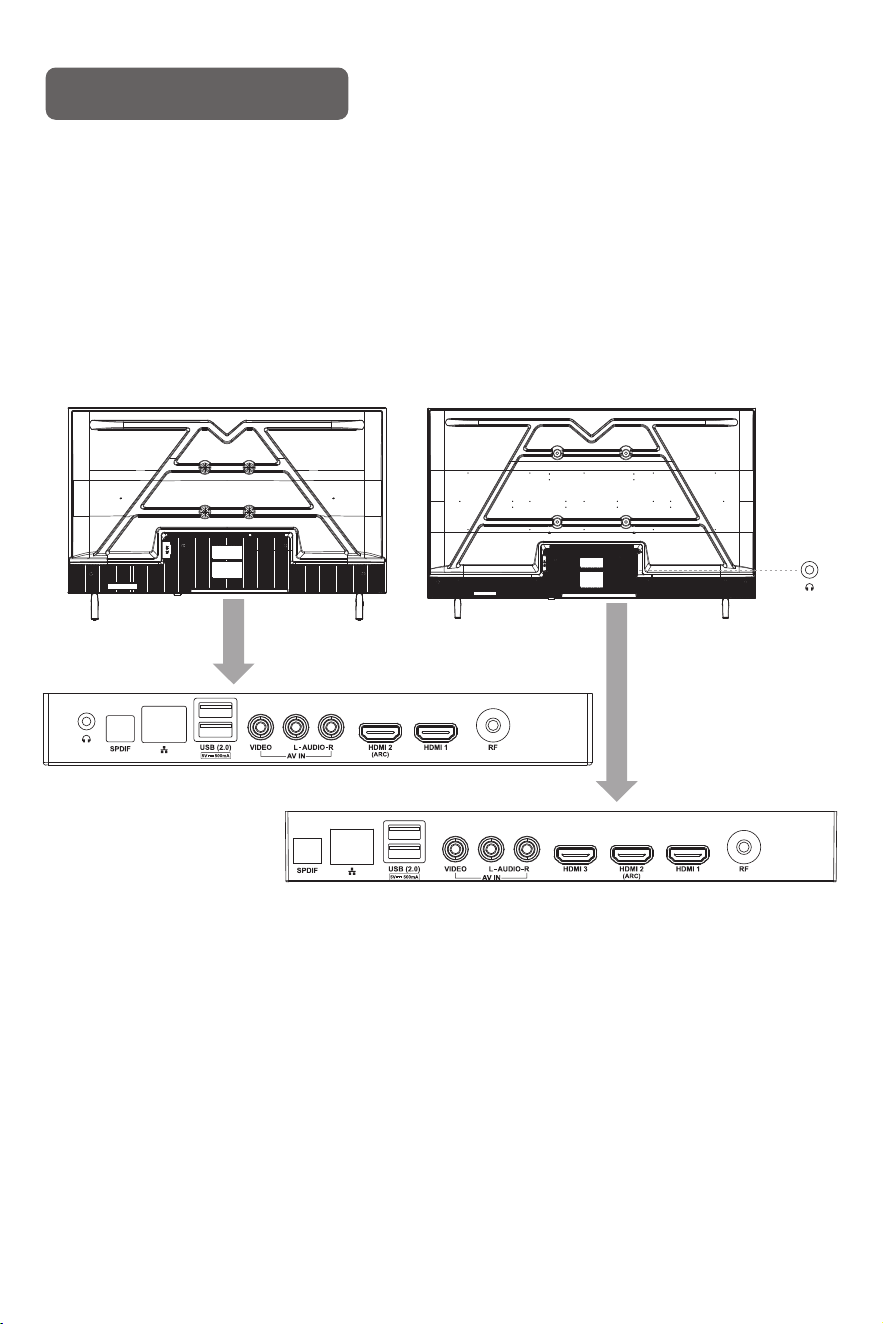
Location of Connections
Back View of the TV
TV Bottom View
32" 43"
Back View of the TV
9
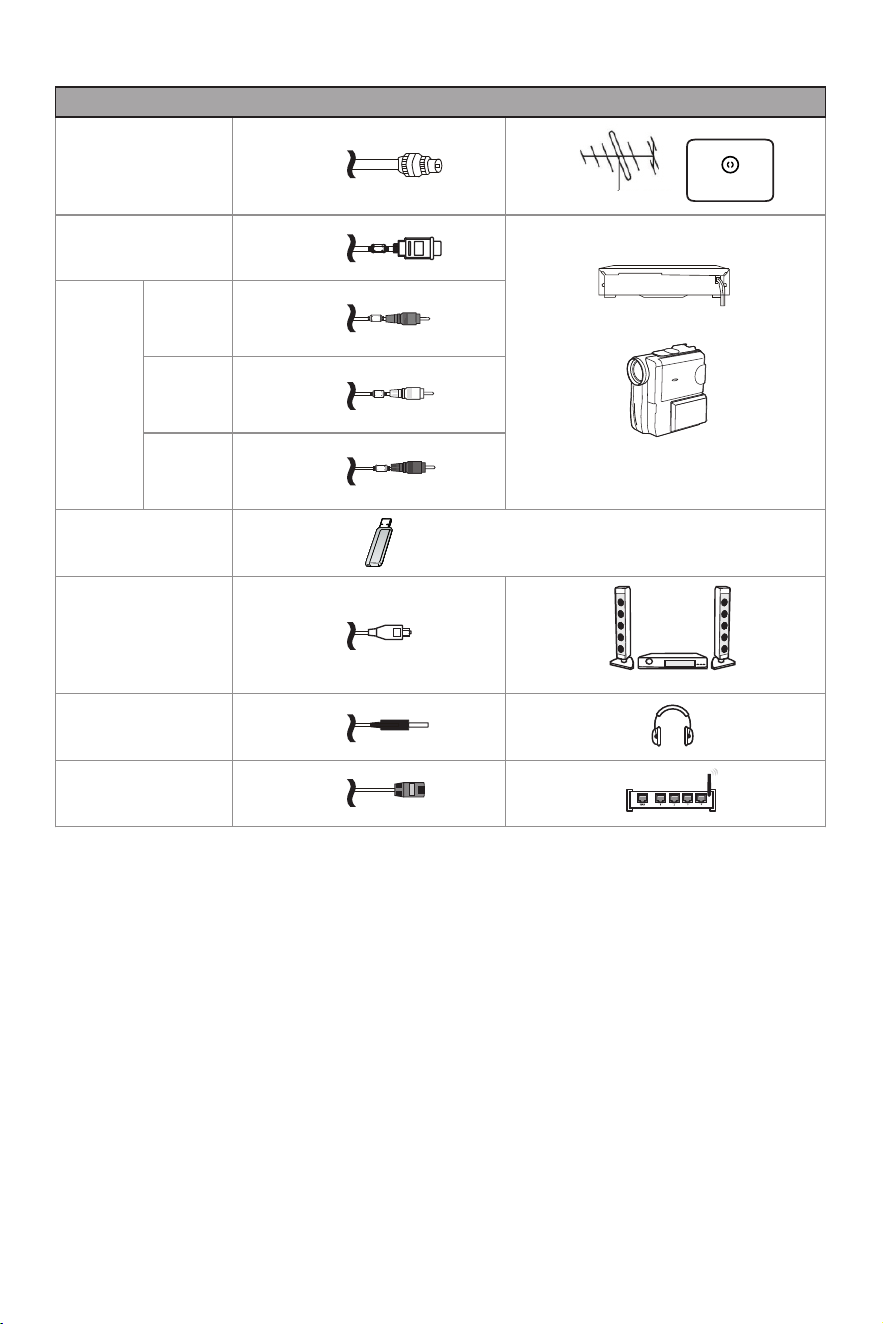
The TV can be connected to the following devices: Cable Box, Satellite Box, Antenna, Video Game,
Stereo System, Sound Bar, Headphones, Blu-ray Player, DVD Player, VCR, Streaming Box or Stick,
Camcorder, etc.
TV label
Cable
External Equipment
ANT/CABLE
HDMI
AV IN
VIDEO
L
R
Yellow
White
Red
Antenna
VHF/UHF Antenna
Cable
ANT OUT
VIDEO EQUIPMENT
Camcorder
Audio Receiver
USB
SPDIF
HEADPHONE
LAN
Note:
1) Batteries should last approximately one year under normal use (actual use will vary).
2) If the TV will remain inactive for an extended period of time, remove the batteries from the remote
control to avoid possible damage due to leakage.
3) Do not mix old and new batteries or different types of batteries.
4) Do not throw batteries into fire or water.
5) The batteries (battery pack or batteries installed) should not be exposed to excessive heat such
as sunshine, fire or the like.
WARNING:
- Replacement of a battery with an incorrect type may defeat a safeguard;
- Disposal of a battery into fire or a hot oven, or mechanically crushing or cutting of a battery, may
result in an explosion;
- Leaving a battery in an extremely high temperature surrounding environment, such as sunshine,
fire, or hot surface may result in an explosion or the leakage of flammable liquid or gas;
- A battery subjected to extremely low air pressure may result in an explosion or the leakage of
flammable liquid or gas.
Avertissement:
- Le remplacement de la batterie par un type incorrect peut compromettre les mesures de sécurité;
- Mettre les piles au feu ou les manipuler dans un four chaud, ou les écraser ou les couper
mécaniquement, éventuellement Provoquer une explosion;
- Laisser la batterie dans un environnement avec des températures extrêmement élevées telles que
la lumière du soleil, Un incendie ou une surface chaude peut provoquer une explosion ou une fuite
de liquide ou de gaz inflammables;
- L'exposition de la batterie à une pression d'air extrêmement faible peut provoquer une explosion ou
une fuite Liquides ou gaz inflammables.
CAUTION
Risk of fire or explosion if the battery is replaced by an incorrect type!
ATTENTION
Si le type de batterie remplacée est incorrect, il y a un risque d'incendie ou d'explosion!
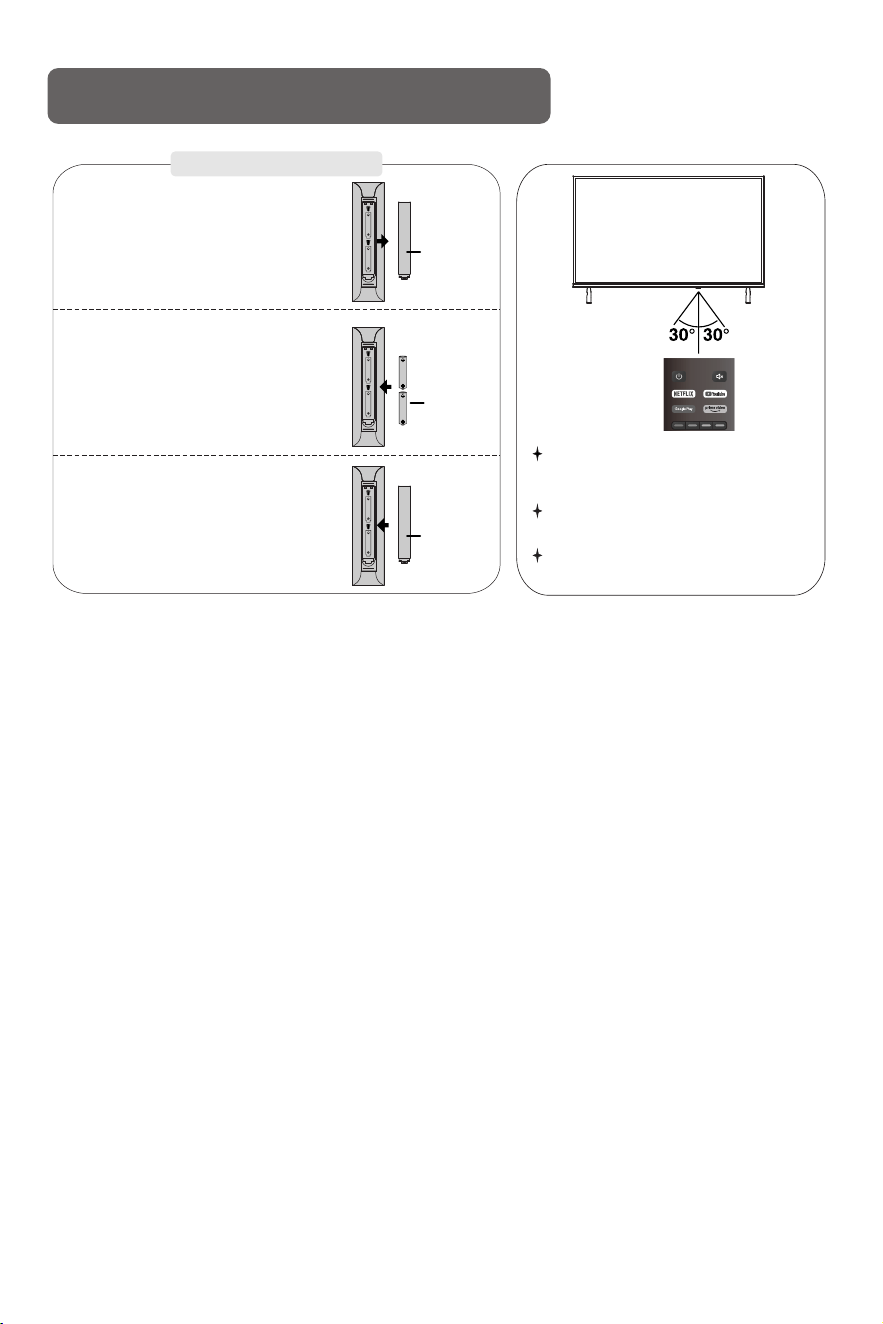
Remove the battery cover and insert the provided batteries. Then replace the battery cover.
Prepare The Remote Control
Installing Batteries
1
Open the battery compartment
cover on the back side.
2
Insert two 1.5V AAA size batteries
in correct polarity. Don´t mix old or
used batteries with new ones.
3
The remote control needs to be used within a
range of 8 meters in a straight line and 6 meters
in a controlled angle.
Put the used batteries into the recycling bin
since they can negatively affect the environment.
Closed the cover.
Battery
Cover
2 x size
AAA 1.5V
Battery
Cover
Do not place anything(such as soundbar) near
remote sensor to avoid interference.
10
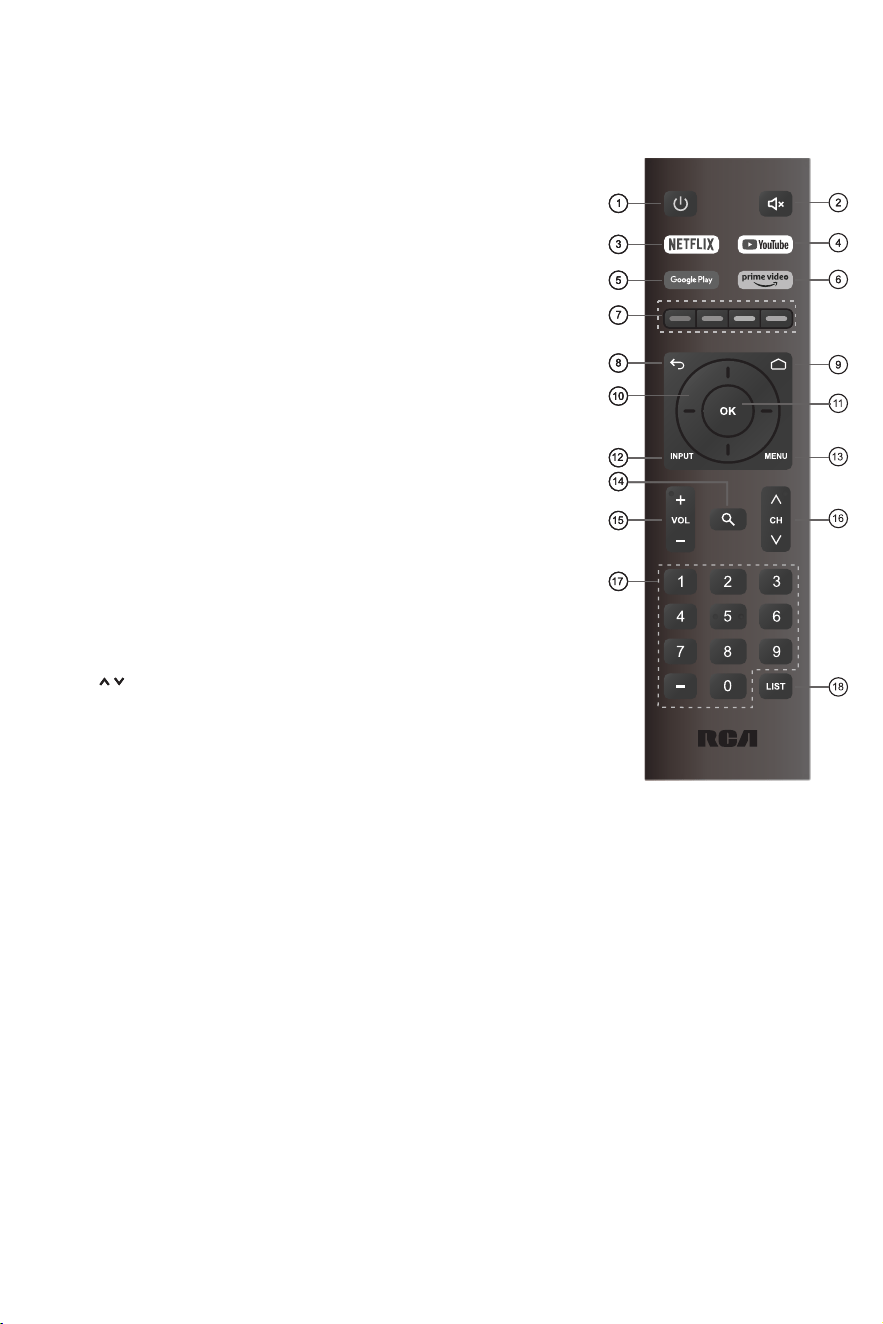
1. POWER: Turn the TV on and off.
2. MUTE: Press this button to cut off the sound of the TV set
temporarily, press again to resume.
3. NETFLIX: If network connects, press this key to view NETFLIX
directly.
4. YouTube: If network connects, press this key to view YouTube.
5. Google Play: If network connects, press this key to view
Google Play.
6. Prime Video: If network connects, press this key to view Prime
Video.
7. COLOR It's used in the APPS. BUTTONS:
8. BACK: Return to the previous menu.
9. HOME: Display the HOME page.
10. Arrow button : Use to select on-screen menu items s pqtu
and change menu values.
11. OK: Confirms selection.
12. INPUT: Press to open the input source list.
13. MENU: Display the main menu or exit the current menu.
14. Search: Search information.
15. VOL - : Press these buttons to adjust the volume.+/
16. CH / : Press these buttons to change channel upward or downward.
17. Digital Buttons(0-9, - ): Directly select channel with digital buttons.
18. LIST: Press to display the channel list.
11
Remote Buttons

12
SET-UP THE TV (Using the Remote Control)
Initial Setup
1. Press the Power Button at the Top of the Remote.
Note: TV Controls on the TV are located on the bottom or on the side of the TV.
(If the TV is in Boot State, a long press on the Power Button under the TV might be necessary.)
2. Press ▲/▼ to select the system language and press to confirm the language.OK
3. Connect your Android phone to your TV, select Continue to continue the connection, and " "
choose Skip to skip this step. " "
4. Press ▲/▼ to select the WIFI to connect, press and enter the password to confirm the OK
connection is successful.
5. By accepting the Google Terms of Service to improve the product experience, select Accept " "
to accept this condition.
6. Agree to Google to get the location information of your device to get more features, choose
" "YES to accept.
7. By agreeing to automatically send diagnostic information to Google to improve discriminative
power, choose YES to accept." "
8. Your device is powered by Android TV and press the ► button to select the browsing feature.
You can get more apps from Google Play and press the ► button to go to the next screen.
Transfer photos and other content to the TV via the built-in chromecast, press to complete OK
the browsing.
Press▲/▼ to select the country of your device and press to confirm. OK
9. Once the Set-up is finished, to exit Android TV and access another component such as a
Cable Box, press the Input button.
Navigating the ON-SCREEN MENU
In the HOME page, press the key to select the icon of the circular settings menu, ▲/▼/◄/►
and press OK to adjust.
After finishing your adjustment, press BACK button to return to the previous menu.
13
Trouble Shooting
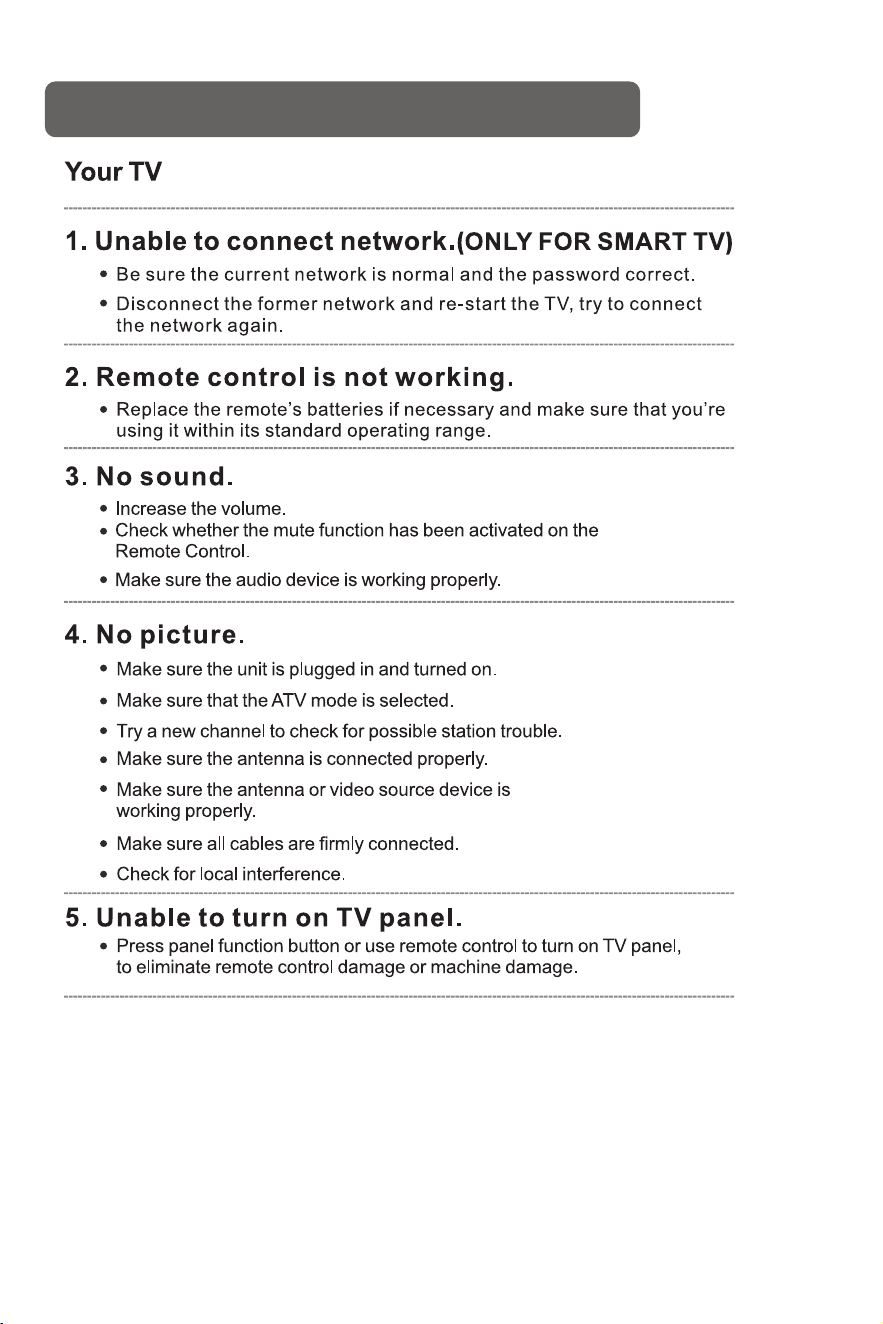
Having trouble?
Don’t worry, it’s usually an easy fix.
Check your area is covered by Digital Video Broadcasts.
Try re-tuning or manually tuning missing channels.
Check that you are using the correct antenna type.
After Auto Tuning only
some channels are
available
Check if the channel has been blocked in the main menu
settings.
Channel cannot be
selected
Please check connecting USB cable and power supply is connected.
Hard drive has not been formatted. Please make sure USB disk is
compatible and the multimedia data formats are supported.
USB not playing
Compression of video contents may cause distortion especially on
fast moving pictures such as sports and action movies.
Picture is distorted,
macroblock, small block,
dots, pixelization, etc
Noise from speaker
Check cable connections, make sure a video cable is not connected
to an audio input.
Low signal level may cause sound distortion.
TV turns off automatically
Check if the Off Timer is set to On in the Setup menu.
Sleep Timer may have been enabled.
If there is no signal for about 10 minutes from an input, the TV will
turn off.
TV turns on
automatically
Check if the On Timer is set to On in the Setup menu.
Black bars on each side will be shown on HD channels when
displaying SD (4:3) contents.
Black bars on Top & Bottom will be shown on movies that have
aspect ratios different from your TV.
Adjust picture size option on your external device or TV to full screen.
Picture is not shown in
full screen
14
TroubleShooting Tips

This product has been sold under the responsibility of Treasure Creek Limited. RCA, the RCA logo and the two dogs (Nipper and
Chipper) logo are trademarks used under license by Treasure Creek Limited- further information at www.rca-brand.com.
All other products, services, companies, trademarks, trade or product names and logos referenced herein are the property of their
respective owner.
