Model: YK-BPA2
Arm Type Blood Pressure Monitor
Revision: V1.9NGUK
Eective: 2025.03.11
Preface
1
2 3 4
65 8
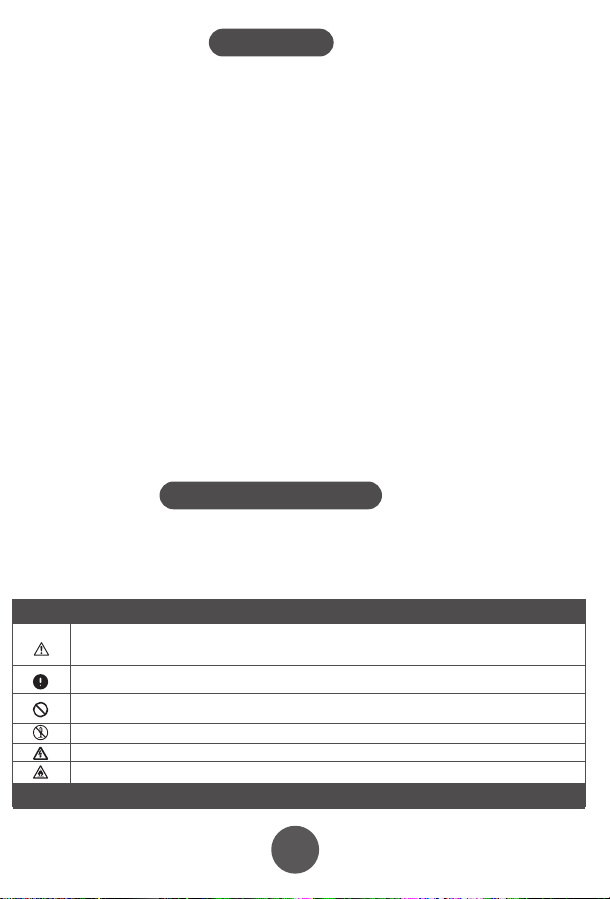
Warnings and graphic symbols in the user’s manual are aimed at enabling users
to use the product safely and correctly. Specific meanings are as follows:
Safety Precautions
Warning: to remind you that misuse of the product may cause personnel damage,
measurement failure and article damage. (Article damage includes damage to housing,
property, pets and livestock.)
Enforcement:to represent compulsory behavior, namely matters must to be observed when
using the product
Prohibition: to stand for prohibited contents, namely matters not allowed to do when using the
product
Prohibition of Disassembly
Caution of electric current
Caution of re
1. Product Introduction
3. Initial Setup
2. Installing batteries / AC adapter use
3.1 Setting the User
3.2 Setting the Time
1.5 Functional Description
1.3 Diagram of the machine
• Patients with arrhythmia, diabetes, poor blood circulation, or a history of stroke should
use this product only under a doctor's supervision.
• Self-diagnosis and self-treatment based on measurement results can be dangerous.
Always follow your doctor's guidance, as incorrect self-assessment may worsen your
condition.
• Over-ination of the cu may cause risks such as numbness or pain in the arm.
• Do not apply the cu over a wound, as this may lead to further injury.
• For safety reasons, keep this product out of the reach of children.
• Avoid using the cu on a limb with intravascular access, ongoing therapy, or an
arteriovenous (A-V) shunt, as temporary interference with blood ow could result in
injury.
• Pressurizing the cu may temporarily aect the function of other monitoring devices
used on the same limb.
• Ensure that using the blood pressure monitor does not lead to prolonged impairment
of blood circulation.
• Excessively long cables and hoses pose a strangulation hazard and should be kept out
of children's reach.
• This product should not be used by infants or children who cannot express their needs,
as it may lead to accidents or disputes.
• Use this device only for blood pressure measurement. Using it for other purposes may
result in accidents or disputes.
• Do not clean this product with chemical agents such as thinner, alcohol, or gasoline.
• Avoid dropping or striking the product forcefully.
• Always use the designated arm cu for this device; otherwise, accurate measurements
cannot be ensured.
• Keep mobile phones away from the device, as they may cause it to malfunction.
This device can automatically memorise 99 results from 2 different users and
calculate the average value of latest three results. It will save the time and date
against each record, if the time, date and user settings are set correctly.
If you wish to use this user specific memory functionality, please ensure you
follow the setup steps carefully before use.
3.3 Sound Settings
3.4 Setting the Blood Pressure Unit of Measure
This model does not have sound features. When "SP OFF" is displayed on screen
click the Memory key once again to proceed to setting the unit of measure.
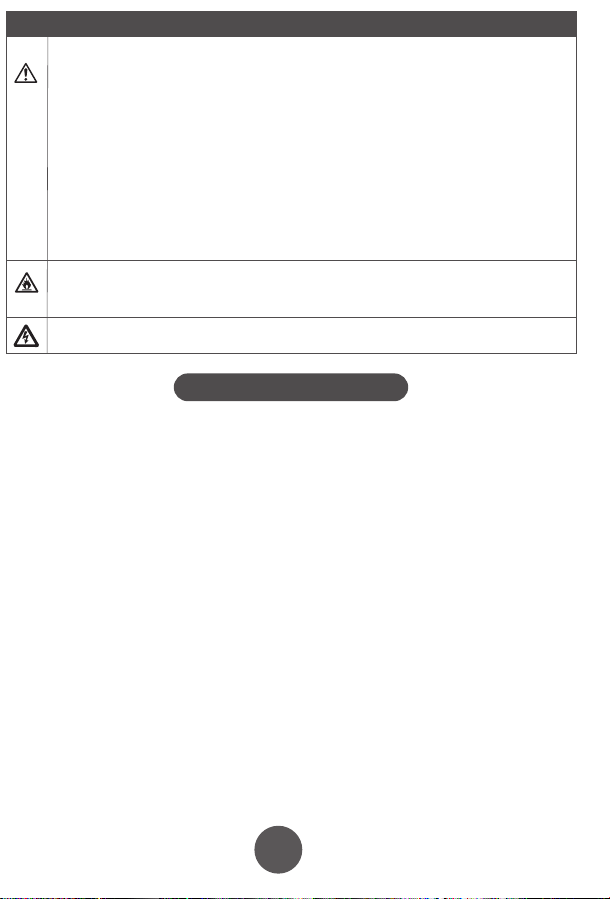
Please be sure to use the correct AC power supply for this product, otherwise it may cause re
or electric shock.
• Do not forcibly bend the arm cu or air tube, as this may restrict blood ow and cause
injury.
• When removing the air tube, grip and pull it from the front end.
• Do not apply pressure to the device before securing the arm cu around the arm.
• Battery leakage can damage the product, so please follow these precautions:
▪ If the device will not be used for more than three months, remove the batteries.
▪ Replace depleted batteries immediately after use.
▪ Do not mix old and new batteries.
▪ Ensure correct placement of batteries, matching the positive and negative
terminals.
▪ Do not mix dierent types of batteries.
• Do not modify this equipment without the manufacturer’s authorization.
• The blood pressure monitor should not be serviced or maintained while in use on a
patient.
Disassembly, repair or rebuild the machine and/or the arm cu will aect the accuracy of
the device.
Do not use the device or the AC adapter with wet hands as this could cause electric shock.
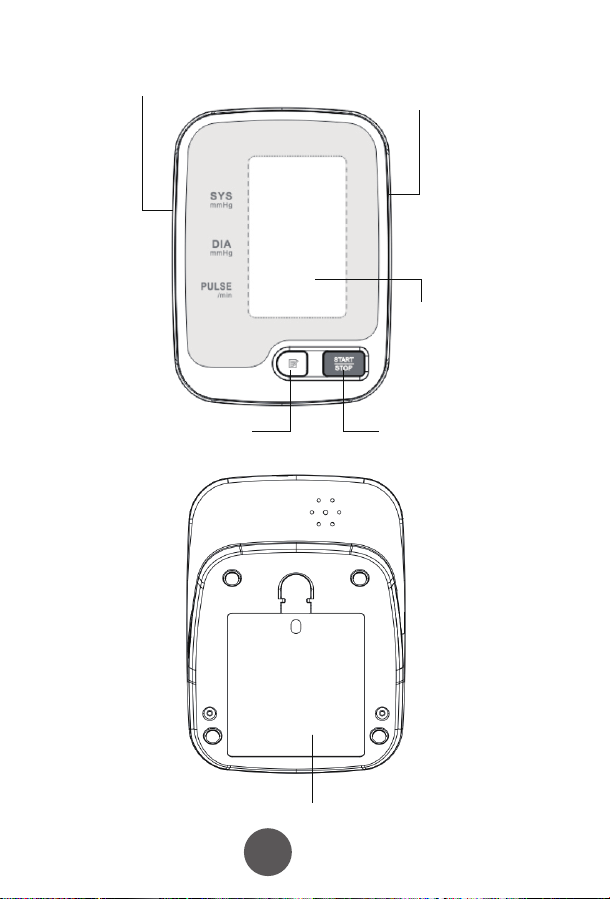
Air tube interface
Display
The AC power
adapter interface
Memory
Key
Start/Stop
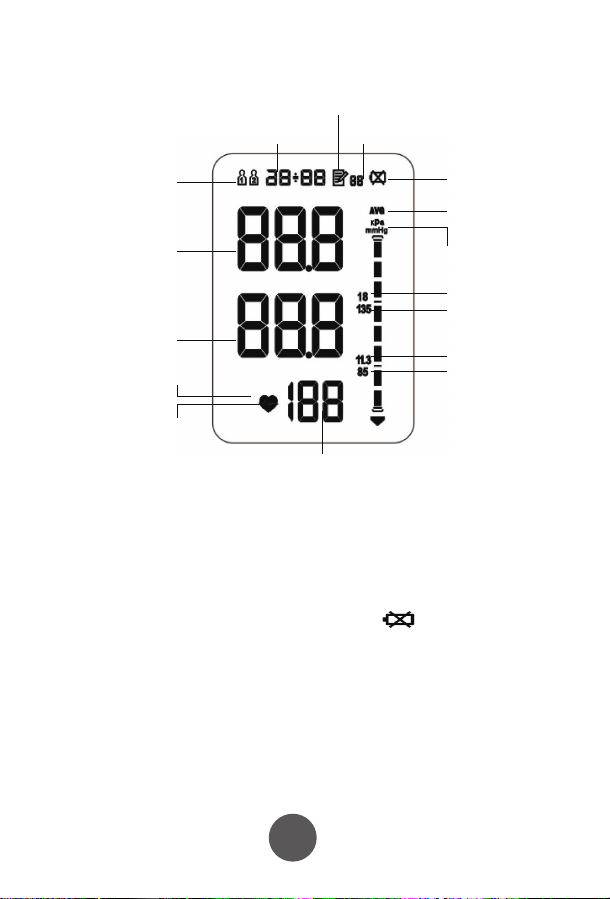
1.4 Display Screen
Pulse rate
recorded
Date/Time displayed
User symbols
Mnemonic symbol
Number of memory groups
Low power symbol
Average symbol
kPa upper limit
kPa Lower limit
mmHg Lower limit
mmHg upper limit
Blood pressure unit symbols
SYS High pressure
(Systolic pressure)
DIA Low pressure
(Diastolic pressure)
Heart rate fluctuations
Heart rate
symbol
1) Measurement: Oscillographic measurement;
2) The results show: high pressure / low pressure / pulse;
3) Unit Conversion: blood pressure units kPa / mmHg conversion (default mmHg);
4) Memory: 99 measurements
5) Clock function: Set of year, month, day, hour, minute;
6) Low power detected when on, the display shows
7) Blood pressure classification indicator: see Appendix Table Ⅱ;
8) Error: See Appendix Table Ⅲ;
9) Over pressure protection function: pressure over 295 mmHg (20ms) is
automatically detected and depressurised;
10) Auto power off function after 2 minutes of inactivity.
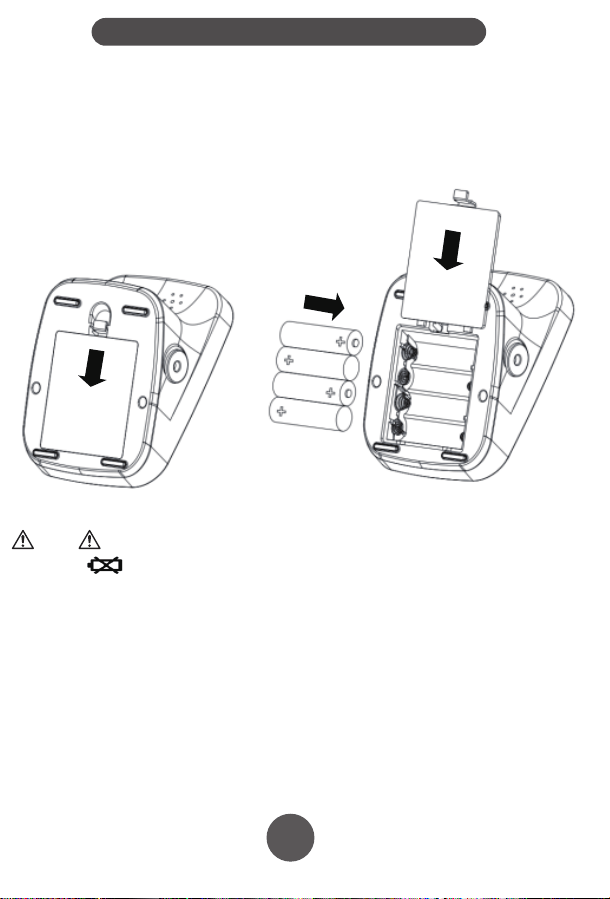
2.1 Installing the batteries
1) Remove the battery cover in the direction of the arrow;
2) Put in four AA batteries; do not mix old and new batteries. Only use high quality, new
batteries
3) Close the battery cover.
2.2 Using the AC Adapter (Optional)
PLEASE NOTE: The AC Adapter is not supplied with the product, but is
available as an accessory.
Connect the AC Adapter to the blood pressure monitor in the appropriate socket and
plug it into an electrical outlet.
● When turning off the blood pressure machine, also turn the power off at the wall
socket.
● Be sure to use the correct AC adapter.
● When the power supply is used, power is not consumed from the batteries.
● Please make sure the blood pressure monitor is turned off before connecting the AC
adapter.
● If using the AC adapter without batteries in the device, the clock will reset when the
AC adapter is disconnected from a power source.
This product can be used with either batteries or an AC adapter.
Note
• The icon " " indicates that the battery is about to run out. Please replace the
batteries with four new high-quality, branded AA batteries.
• Turn off the device before replacing the battery.
• After replacing the battery, you may need to reset the time. Please refer to the
relevant section of this manual.
• Used batteries should be disposed of in accordance with local environmental
regulations.
• Note: Battery life may vary depending on usage and environmental conditions.
Note
The default set unit of measure is mmHg.
To change to kPa, follow the steps above to get to the Sound Setting, then press the
memry key, "mmHg" or "kPa" will be flashing on the right of the screen.
1) To change the unit of measure, press and hold the memory key until the chosen
unit of measure is displayed on screen.
2) Once the chosen unit of measure is displayed on screen, click the memory key
once to confirm your selection.
Congratulations! Setup is now complete.
Press and hold
“MEMORY ” key
to scroll through
the values,
Click
“MEMORY”key
to conrm.
IP21
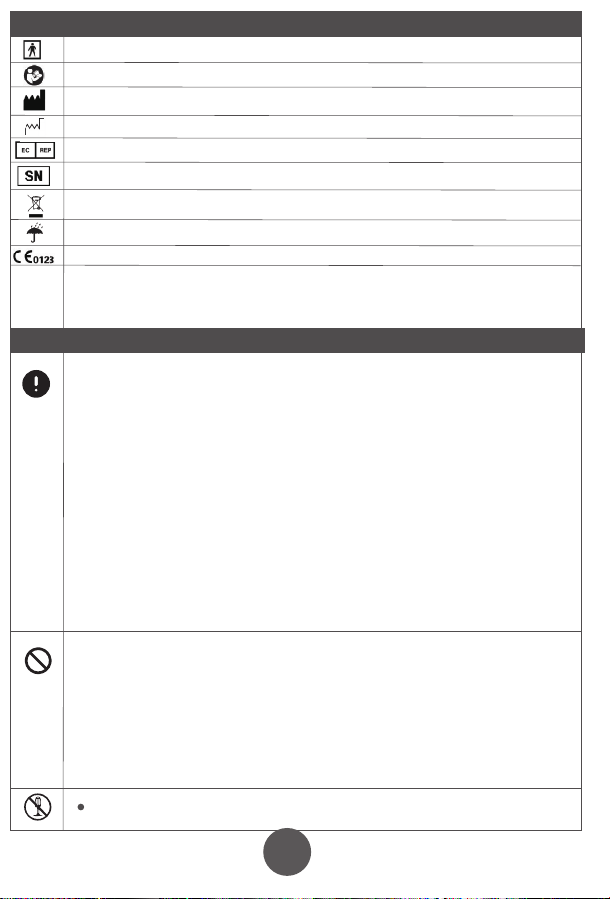
BF type applied part
Refer to operation manual
Manufacturer
Date of manufacture
European union representative
Serial number
Separate collection
Keep dry
Product certication
First characteristic numeral 2:
Against ingress of solid foreign objects:≥12.5mm diameter
Second characteristic numeral 1
Against ingress of water with harmful eects: vertically dripping
MEDICAL PRODUCTS
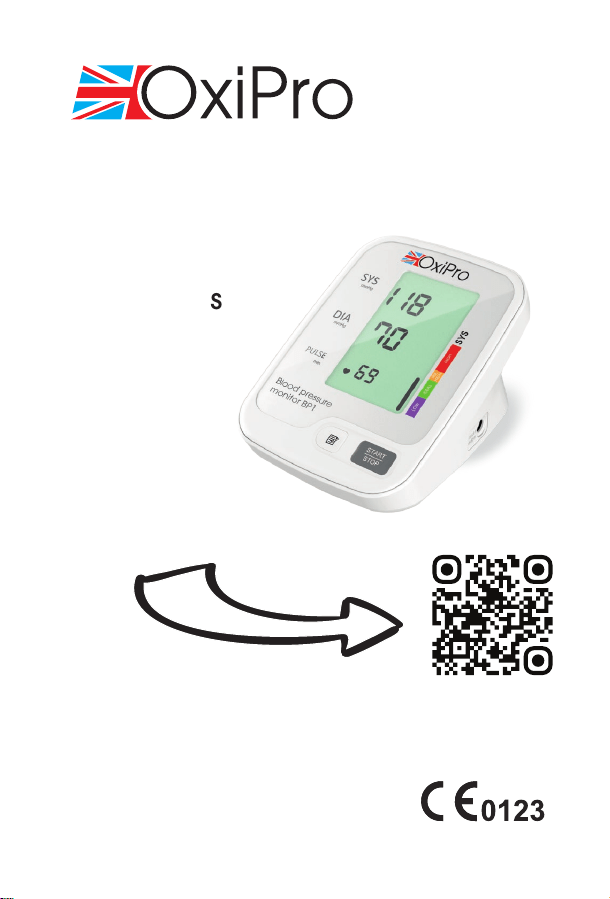
BP1 ARM BLOOD PRESSURE
MONITOR
Instructions
for Use
Dear User,
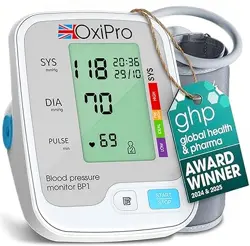
Thank you for choosing the OxiPro BP1 arm-type blood pressure monitor. Before
using this device, please carefully read and follow the instructions in this manual.
Keep this manual handy for future reference.
This product is versatile and can be used in hospitals, homes, schools, and medical
centers. It is designed for adult use only and is not suitable for children.
Introduction
The arm-type blood pressure monitor comprises the main unit and an arm cuff,
designed to measure human blood pressure and pulse.
The monitor utilizes an intelligent pressure system, which automatically measures
your blood pressure to a suitable value based on your individual readings. This
reduces the discomfort caused by overinflated cuffs, shortens the measurement time,
and prolongs the cuff's service life.
Additionally, the blood pressure monitor features a power adapter socket for optional
mains adapter use. It also has a memory function that stores up to 99 readings and
includes blood pressure classification, enabling you to determine whether your blood
pressure falls within the normal range.
Front
Rear
Battery cover
1. With the device turned OFF, press and hold the Memory button until the user
symbol flashes.
2. Press the Memory button to toggle between users.
3. Press the Start/Stop button to confirm.
Air tube interface
The AC power
adapter interface
Memory
Key
Start/Stop
Memory Key
Location of Memory and Start/Stop Keys
1) With the device turned OFF, press and hold the MEMORY key until the user
flashes.
2) Click the memory key once more until the year is displayed. To change the year
press and hold the memory key until the desired year is shown. If you miss your
chosen year, just keep hold of the memory key and it will loop from 201 to 2035, and
back to 2016 again.
3) Once the correct year is displayed on screen, press the memory key once to go to
the next step to set the day. Press and hold the memory key until the correct day is
displayed.
4) Once the correct day is displayed, click the memory key again to move to setting
the day of the month. Press and hold the memory key to choose the month, and
when the correct month is displayed click the memory key once again to confirm the
selection.
5) The time will now be displayed using a 24-hour clock format. Follow the same
process of holding the memory key to scroll through the values, and clicking the
memory key to save the value.
6) Once done, the screen will move on to setting the sounds. See the next section
below.
The flow through the date and time setting screens is shown below:
Press and hold
“MEMORY ” key
to scroll through
the values,
Click
“MEMORY”key
to conrm.
Date
Time
Press and hold “MEMORY ” key to
scroll through the values,
Click “MEMORY”key to conrm.
User symbol shown on screen
1
2
3
4
5 6
7 8
9
1.1 Intended Use
This product is designed for measuring blood pressure and pulse rate. It is suitable for
use in hospitals, homes, schools, and medical centers.
User Group: Adults who need to monitor their blood pressure.
1.2 Contraindications
• Patients with serious arrhythmia, diabetes, poor blood circulation, or stroke
should use this device under medical supervision.
• Self-diagnosis and self-treatment based on the readings can be dangerous.
Always consult a doctor.
• Do not use the cuff on a wounded limb as it may cause further injury.
• Keep the device out of reach of children to prevent accidental use.
• The cuff should not be applied to a limb where intravenous therapy or an
arterio-venous (A-V) shunt is present, as it may interfere with blood flow.
• Avoid excessive cable lengths, which may pose a strangulation hazard.
Scan here for the
VIDEO Quick Start
Guide!
or visit www.oxipro.io/bp1support
Model: YK-BPA2
Arm Type Blood Pressure Monitor
Revision: V1.9NGUK
Eective: 2025.03.11
Preface
1
2 3 4
65 8
Warnings and graphic symbols in the user’s manual are aimed at enabling users
to use the product safely and correctly. Specific meanings are as follows:
Safety Precautions
Warning: to remind you that misuse of the product may cause personnel damage,
measurement failure and article damage. (Article damage includes damage to housing,
property, pets and livestock.)
Enforcement:to represent compulsory behavior, namely matters must to be observed when
using the product
Prohibition: to stand for prohibited contents, namely matters not allowed to do when using the
product
Prohibition of Disassembly
Caution of electric current
Caution of re
1. Product Introduction
3. Initial Setup
2. Installing batteries / AC adapter use
3.1 Setting the User
3.2 Setting the Time
1.5 Functional Description
1.3 Diagram of the machine
• Patients with arrhythmia, diabetes, poor blood circulation, or a history of stroke should
use this product only under a doctor's supervision.
• Self-diagnosis and self-treatment based on measurement results can be dangerous.
Always follow your doctor's guidance, as incorrect self-assessment may worsen your
condition.
• Over-ination of the cu may cause risks such as numbness or pain in the arm.
• Do not apply the cu over a wound, as this may lead to further injury.
• For safety reasons, keep this product out of the reach of children.
• Avoid using the cu on a limb with intravascular access, ongoing therapy, or an
arteriovenous (A-V) shunt, as temporary interference with blood ow could result in
injury.
• Pressurizing the cu may temporarily aect the function of other monitoring devices
used on the same limb.
• Ensure that using the blood pressure monitor does not lead to prolonged impairment
of blood circulation.
• Excessively long cables and hoses pose a strangulation hazard and should be kept out
of children's reach.
• This product should not be used by infants or children who cannot express their needs,
as it may lead to accidents or disputes.
• Use this device only for blood pressure measurement. Using it for other purposes may
result in accidents or disputes.
• Do not clean this product with chemical agents such as thinner, alcohol, or gasoline.
• Avoid dropping or striking the product forcefully.
• Always use the designated arm cu for this device; otherwise, accurate measurements
cannot be ensured.
• Keep mobile phones away from the device, as they may cause it to malfunction.
This device can automatically memorise 99 results from 2 different users and
calculate the average value of latest three results. It will save the time and date
against each record, if the time, date and user settings are set correctly.
If you wish to use this user specific memory functionality, please ensure you
follow the setup steps carefully before use.
3.3 Sound Settings
3.4 Setting the Blood Pressure Unit of Measure
This model does not have sound features. When "SP OFF" is displayed on screen
click the Memory key once again to proceed to setting the unit of measure.
Please be sure to use the correct AC power supply for this product, otherwise it may cause re
or electric shock.
• Do not forcibly bend the arm cu or air tube, as this may restrict blood ow and cause
injury.
• When removing the air tube, grip and pull it from the front end.
• Do not apply pressure to the device before securing the arm cu around the arm.
• Battery leakage can damage the product, so please follow these precautions:
▪ If the device will not be used for more than three months, remove the batteries.
▪ Replace depleted batteries immediately after use.
▪ Do not mix old and new batteries.
▪ Ensure correct placement of batteries, matching the positive and negative
terminals.
▪ Do not mix dierent types of batteries.
• Do not modify this equipment without the manufacturer’s authorization.
• The blood pressure monitor should not be serviced or maintained while in use on a
patient.
Disassembly, repair or rebuild the machine and/or the arm cu will aect the accuracy of
the device.
Do not use the device or the AC adapter with wet hands as this could cause electric shock.
Air tube interface
Display
The AC power
adapter interface
Memory
Key
Start/Stop
1.4 Display Screen
Pulse rate
recorded
Date/Time displayed
User symbols
Mnemonic symbol
Number of memory groups
Low power symbol
Average symbol
kPa upper limit
kPa Lower limit
mmHg Lower limit
mmHg upper limit
Blood pressure unit symbols
SYS High pressure
(Systolic pressure)
DIA Low pressure
(Diastolic pressure)
Heart rate fluctuations
Heart rate
symbol
1) Measurement: Oscillographic measurement;
2) The results show: high pressure / low pressure / pulse;
3) Unit Conversion: blood pressure units kPa / mmHg conversion (default mmHg);
4) Memory: 99 measurements
5) Clock function: Set of year, month, day, hour, minute;
6) Low power detected when on, the display shows
7) Blood pressure classification indicator: see Appendix Table Ⅱ;
8) Error: See Appendix Table Ⅲ;
9) Over pressure protection function: pressure over 295 mmHg (20ms) is
automatically detected and depressurised;
10) Auto power off function after 2 minutes of inactivity.
2.1 Installing the batteries
1) Remove the battery cover in the direction of the arrow;
2) Put in four AA batteries; do not mix old and new batteries. Only use high quality, new
batteries
3) Close the battery cover.
2.2 Using the AC Adapter (Optional)
PLEASE NOTE: The AC Adapter is not supplied with the product, but is
available as an accessory.
Connect the AC Adapter to the blood pressure monitor in the appropriate socket and
plug it into an electrical outlet.
● When turning off the blood pressure machine, also turn the power off at the wall
socket.
● Be sure to use the correct AC adapter.
● When the power supply is used, power is not consumed from the batteries.
● Please make sure the blood pressure monitor is turned off before connecting the AC
adapter.
● If using the AC adapter without batteries in the device, the clock will reset when the
AC adapter is disconnected from a power source.
This product can be used with either batteries or an AC adapter.
Note
• The icon " " indicates that the battery is about to run out. Please replace the
batteries with four new high-quality, branded AA batteries.
• Turn off the device before replacing the battery.
• After replacing the battery, you may need to reset the time. Please refer to the
relevant section of this manual.
• Used batteries should be disposed of in accordance with local environmental
regulations.
• Note: Battery life may vary depending on usage and environmental conditions.
Note
The default set unit of measure is mmHg.
To change to kPa, follow the steps above to get to the Sound Setting, then press the
memry key, "mmHg" or "kPa" will be flashing on the right of the screen.
1) To change the unit of measure, press and hold the memory key until the chosen
unit of measure is displayed on screen.
2) Once the chosen unit of measure is displayed on screen, click the memory key
once to confirm your selection.
Congratulations! Setup is now complete.
Press and hold
“MEMORY ” key
to scroll through
the values,
Click
“MEMORY”key
to conrm.
IP21
BF type applied part
Refer to operation manual
Manufacturer
Date of manufacture
European union representative
Serial number
Separate collection
Keep dry
Product certication
First characteristic numeral 2:
Against ingress of solid foreign objects:≥12.5mm diameter
Second characteristic numeral 1
Against ingress of water with harmful eects: vertically dripping
MEDICAL PRODUCTS
BP1 ARM BLOOD PRESSURE
MONITOR
Instructions
for Use
Dear User,
Thank you for choosing the OxiPro BP1 arm-type blood pressure monitor. Before
using this device, please carefully read and follow the instructions in this manual.
Keep this manual handy for future reference.
This product is versatile and can be used in hospitals, homes, schools, and medical
centers. It is designed for adult use only and is not suitable for children.
Introduction
The arm-type blood pressure monitor comprises the main unit and an arm cuff,
designed to measure human blood pressure and pulse.
The monitor utilizes an intelligent pressure system, which automatically measures
your blood pressure to a suitable value based on your individual readings. This
reduces the discomfort caused by overinflated cuffs, shortens the measurement time,
and prolongs the cuff's service life.
Additionally, the blood pressure monitor features a power adapter socket for optional
mains adapter use. It also has a memory function that stores up to 99 readings and
includes blood pressure classification, enabling you to determine whether your blood
pressure falls within the normal range.
Front
Rear
Battery cover
1. With the device turned OFF, press and hold the Memory button until the user
symbol flashes.
2. Press the Memory button to toggle between users.
3. Press the Start/Stop button to confirm.
Air tube interface
The AC power
adapter interface
Memory
Key
Start/Stop
Memory Key
Location of Memory and Start/Stop Keys
1) With the device turned OFF, press and hold the MEMORY key until the user
flashes.
2) Click the memory key once more until the year is displayed. To change the year
press and hold the memory key until the desired year is shown. If you miss your
chosen year, just keep hold of the memory key and it will loop from 201 to 2035, and
back to 2016 again.
3) Once the correct year is displayed on screen, press the memory key once to go to
the next step to set the day. Press and hold the memory key until the correct day is
displayed.
4) Once the correct day is displayed, click the memory key again to move to setting
the day of the month. Press and hold the memory key to choose the month, and
when the correct month is displayed click the memory key once again to confirm the
selection.
5) The time will now be displayed using a 24-hour clock format. Follow the same
process of holding the memory key to scroll through the values, and clicking the
memory key to save the value.
6) Once done, the screen will move on to setting the sounds. See the next section
below.
The flow through the date and time setting screens is shown below:
Press and hold
“MEMORY ” key
to scroll through
the values,
Click
“MEMORY”key
to conrm.
Date
Time
Press and hold “MEMORY ” key to
scroll through the values,
Click “MEMORY”key to conrm.
User symbol shown on screen
1
2
3
4
5 6
7 8
9
1.1 Intended Use
This product is designed for measuring blood pressure and pulse rate. It is suitable for
use in hospitals, homes, schools, and medical centers.
User Group: Adults who need to monitor their blood pressure.
1.2 Contraindications
• Patients with serious arrhythmia, diabetes, poor blood circulation, or stroke
should use this device under medical supervision.
• Self-diagnosis and self-treatment based on the readings can be dangerous.
Always consult a doctor.
• Do not use the cuff on a wounded limb as it may cause further injury.
• Keep the device out of reach of children to prevent accidental use.
• The cuff should not be applied to a limb where intravenous therapy or an
arterio-venous (A-V) shunt is present, as it may interfere with blood flow.
• Avoid excessive cable lengths, which may pose a strangulation hazard.
Scan here for the
VIDEO Quick Start
Guide!
or visit www.oxipro.io/bp1support
Model: YK-BPA2
Arm Type Blood Pressure Monitor
Revision: V1.9NGUK
Eective: 2025.03.11
Preface
1
2 3 4
65 8
Warnings and graphic symbols in the user’s manual are aimed at enabling users
to use the product safely and correctly. Specific meanings are as follows:
Safety Precautions
Warning: to remind you that misuse of the product may cause personnel damage,
measurement failure and article damage. (Article damage includes damage to housing,
property, pets and livestock.)
Enforcement:to represent compulsory behavior, namely matters must to be observed when
using the product
Prohibition: to stand for prohibited contents, namely matters not allowed to do when using the
product
Prohibition of Disassembly
Caution of electric current
Caution of re
1. Product Introduction
3. Initial Setup
2. Installing batteries / AC adapter use
3.1 Setting the User
3.2 Setting the Time
1.5 Functional Description
1.3 Diagram of the machine
• Patients with arrhythmia, diabetes, poor blood circulation, or a history of stroke should
use this product only under a doctor's supervision.
• Self-diagnosis and self-treatment based on measurement results can be dangerous.
Always follow your doctor's guidance, as incorrect self-assessment may worsen your
condition.
• Over-ination of the cu may cause risks such as numbness or pain in the arm.
• Do not apply the cu over a wound, as this may lead to further injury.
• For safety reasons, keep this product out of the reach of children.
• Avoid using the cu on a limb with intravascular access, ongoing therapy, or an
arteriovenous (A-V) shunt, as temporary interference with blood ow could result in
injury.
• Pressurizing the cu may temporarily aect the function of other monitoring devices
used on the same limb.
• Ensure that using the blood pressure monitor does not lead to prolonged impairment
of blood circulation.
• Excessively long cables and hoses pose a strangulation hazard and should be kept out
of children's reach.
• This product should not be used by infants or children who cannot express their needs,
as it may lead to accidents or disputes.
• Use this device only for blood pressure measurement. Using it for other purposes may
result in accidents or disputes.
• Do not clean this product with chemical agents such as thinner, alcohol, or gasoline.
• Avoid dropping or striking the product forcefully.
• Always use the designated arm cu for this device; otherwise, accurate measurements
cannot be ensured.
• Keep mobile phones away from the device, as they may cause it to malfunction.
This device can automatically memorise 99 results from 2 different users and
calculate the average value of latest three results. It will save the time and date
against each record, if the time, date and user settings are set correctly.
If you wish to use this user specific memory functionality, please ensure you
follow the setup steps carefully before use.
3.3 Sound Settings
3.4 Setting the Blood Pressure Unit of Measure
This model does not have sound features. When "SP OFF" is displayed on screen
click the Memory key once again to proceed to setting the unit of measure.
Please be sure to use the correct AC power supply for this product, otherwise it may cause re
or electric shock.
• Do not forcibly bend the arm cu or air tube, as this may restrict blood ow and cause
injury.
• When removing the air tube, grip and pull it from the front end.
• Do not apply pressure to the device before securing the arm cu around the arm.
• Battery leakage can damage the product, so please follow these precautions:
▪ If the device will not be used for more than three months, remove the batteries.
▪ Replace depleted batteries immediately after use.
▪ Do not mix old and new batteries.
▪ Ensure correct placement of batteries, matching the positive and negative
terminals.
▪ Do not mix dierent types of batteries.
• Do not modify this equipment without the manufacturer’s authorization.
• The blood pressure monitor should not be serviced or maintained while in use on a
patient.
Disassembly, repair or rebuild the machine and/or the arm cu will aect the accuracy of
the device.
Do not use the device or the AC adapter with wet hands as this could cause electric shock.
Air tube interface
Display
The AC power
adapter interface
Memory
Key
Start/Stop
1.4 Display Screen
Pulse rate
recorded
Date/Time displayed
User symbols
Mnemonic symbol
Number of memory groups
Low power symbol
Average symbol
kPa upper limit
kPa Lower limit
mmHg Lower limit
mmHg upper limit
Blood pressure unit symbols
SYS High pressure
(Systolic pressure)
DIA Low pressure
(Diastolic pressure)
Heart rate fluctuations
Heart rate
symbol
1) Measurement: Oscillographic measurement;
2) The results show: high pressure / low pressure / pulse;
3) Unit Conversion: blood pressure units kPa / mmHg conversion (default mmHg);
4) Memory: 99 measurements
5) Clock function: Set of year, month, day, hour, minute;
6) Low power detected when on, the display shows
7) Blood pressure classification indicator: see Appendix Table Ⅱ;
8) Error: See Appendix Table Ⅲ;
9) Over pressure protection function: pressure over 295 mmHg (20ms) is
automatically detected and depressurised;
10) Auto power off function after 2 minutes of inactivity.
2.1 Installing the batteries
1) Remove the battery cover in the direction of the arrow;
2) Put in four AA batteries; do not mix old and new batteries. Only use high quality, new
batteries
3) Close the battery cover.
2.2 Using the AC Adapter (Optional)
PLEASE NOTE: The AC Adapter is not supplied with the product, but is
available as an accessory.
Connect the AC Adapter to the blood pressure monitor in the appropriate socket and
plug it into an electrical outlet.
● When turning off the blood pressure machine, also turn the power off at the wall
socket.
● Be sure to use the correct AC adapter.
● When the power supply is used, power is not consumed from the batteries.
● Please make sure the blood pressure monitor is turned off before connecting the AC
adapter.
● If using the AC adapter without batteries in the device, the clock will reset when the
AC adapter is disconnected from a power source.
This product can be used with either batteries or an AC adapter.
Note
• The icon " " indicates that the battery is about to run out. Please replace the
batteries with four new high-quality, branded AA batteries.
• Turn off the device before replacing the battery.
• After replacing the battery, you may need to reset the time. Please refer to the
relevant section of this manual.
• Used batteries should be disposed of in accordance with local environmental
regulations.
• Note: Battery life may vary depending on usage and environmental conditions.
Note
The default set unit of measure is mmHg.
To change to kPa, follow the steps above to get to the Sound Setting, then press the
memry key, "mmHg" or "kPa" will be flashing on the right of the screen.
1) To change the unit of measure, press and hold the memory key until the chosen
unit of measure is displayed on screen.
2) Once the chosen unit of measure is displayed on screen, click the memory key
once to confirm your selection.
Congratulations! Setup is now complete.
Press and hold
“MEMORY ” key
to scroll through
the values,
Click
“MEMORY”key
to conrm.
IP21
BF type applied part
Refer to operation manual
Manufacturer
Date of manufacture
European union representative
Serial number
Separate collection
Keep dry
Product certication
First characteristic numeral 2:
Against ingress of solid foreign objects:≥12.5mm diameter
Second characteristic numeral 1
Against ingress of water with harmful eects: vertically dripping
MEDICAL PRODUCTS
BP1 ARM BLOOD PRESSURE
MONITOR
Instructions
for Use
Dear User,
Thank you for choosing the OxiPro BP1 arm-type blood pressure monitor. Before
using this device, please carefully read and follow the instructions in this manual.
Keep this manual handy for future reference.
This product is versatile and can be used in hospitals, homes, schools, and medical
centers. It is designed for adult use only and is not suitable for children.
Introduction
The arm-type blood pressure monitor comprises the main unit and an arm cuff,
designed to measure human blood pressure and pulse.
The monitor utilizes an intelligent pressure system, which automatically measures
your blood pressure to a suitable value based on your individual readings. This
reduces the discomfort caused by overinflated cuffs, shortens the measurement time,
and prolongs the cuff's service life.
Additionally, the blood pressure monitor features a power adapter socket for optional
mains adapter use. It also has a memory function that stores up to 99 readings and
includes blood pressure classification, enabling you to determine whether your blood
pressure falls within the normal range.
Front
Rear
Battery cover
1. With the device turned OFF, press and hold the Memory button until the user
symbol flashes.
2. Press the Memory button to toggle between users.
3. Press the Start/Stop button to confirm.
Air tube interface
The AC power
adapter interface
Memory
Key
Start/Stop
Memory Key
Location of Memory and Start/Stop Keys
1) With the device turned OFF, press and hold the MEMORY key until the user
flashes.
2) Click the memory key once more until the year is displayed. To change the year
press and hold the memory key until the desired year is shown. If you miss your
chosen year, just keep hold of the memory key and it will loop from 201 to 2035, and
back to 2016 again.
3) Once the correct year is displayed on screen, press the memory key once to go to
the next step to set the day. Press and hold the memory key until the correct day is
displayed.
4) Once the correct day is displayed, click the memory key again to move to setting
the day of the month. Press and hold the memory key to choose the month, and
when the correct month is displayed click the memory key once again to confirm the
selection.
5) The time will now be displayed using a 24-hour clock format. Follow the same
process of holding the memory key to scroll through the values, and clicking the
memory key to save the value.
6) Once done, the screen will move on to setting the sounds. See the next section
below.
The flow through the date and time setting screens is shown below:
Press and hold
“MEMORY ” key
to scroll through
the values,
Click
“MEMORY”key
to conrm.
Date
Time
Press and hold “MEMORY ” key to
scroll through the values,
Click “MEMORY”key to conrm.
User symbol shown on screen
1
2
3
4
5 6
7 8
9
1.1 Intended Use
This product is designed for measuring blood pressure and pulse rate. It is suitable for
use in hospitals, homes, schools, and medical centers.
User Group: Adults who need to monitor their blood pressure.
1.2 Contraindications
• Patients with serious arrhythmia, diabetes, poor blood circulation, or stroke
should use this device under medical supervision.
• Self-diagnosis and self-treatment based on the readings can be dangerous.
Always consult a doctor.
• Do not use the cuff on a wounded limb as it may cause further injury.
• Keep the device out of reach of children to prevent accidental use.
• The cuff should not be applied to a limb where intravenous therapy or an
arterio-venous (A-V) shunt is present, as it may interfere with blood flow.
• Avoid excessive cable lengths, which may pose a strangulation hazard.
Scan here for the
VIDEO Quick Start
Guide!
or visit www.oxipro.io/bp1support
Model: YK-BPA2
Arm Type Blood Pressure Monitor
Revision: V1.9NGUK
Eective: 2025.03.11
Preface
1
2 3 4
65 8
Warnings and graphic symbols in the user’s manual are aimed at enabling users
to use the product safely and correctly. Specific meanings are as follows:
Safety Precautions
Warning: to remind you that misuse of the product may cause personnel damage,
measurement failure and article damage. (Article damage includes damage to housing,
property, pets and livestock.)
Enforcement:to represent compulsory behavior, namely matters must to be observed when
using the product
Prohibition: to stand for prohibited contents, namely matters not allowed to do when using the
product
Prohibition of Disassembly
Caution of electric current
Caution of re
1. Product Introduction
3. Initial Setup
2. Installing batteries / AC adapter use
3.1 Setting the User
3.2 Setting the Time
1.5 Functional Description
1.3 Diagram of the machine
• Patients with arrhythmia, diabetes, poor blood circulation, or a history of stroke should
use this product only under a doctor's supervision.
• Self-diagnosis and self-treatment based on measurement results can be dangerous.
Always follow your doctor's guidance, as incorrect self-assessment may worsen your
condition.
• Over-ination of the cu may cause risks such as numbness or pain in the arm.
• Do not apply the cu over a wound, as this may lead to further injury.
• For safety reasons, keep this product out of the reach of children.
• Avoid using the cu on a limb with intravascular access, ongoing therapy, or an
arteriovenous (A-V) shunt, as temporary interference with blood ow could result in
injury.
• Pressurizing the cu may temporarily aect the function of other monitoring devices
used on the same limb.
• Ensure that using the blood pressure monitor does not lead to prolonged impairment
of blood circulation.
• Excessively long cables and hoses pose a strangulation hazard and should be kept out
of children's reach.
• This product should not be used by infants or children who cannot express their needs,
as it may lead to accidents or disputes.
• Use this device only for blood pressure measurement. Using it for other purposes may
result in accidents or disputes.
• Do not clean this product with chemical agents such as thinner, alcohol, or gasoline.
• Avoid dropping or striking the product forcefully.
• Always use the designated arm cu for this device; otherwise, accurate measurements
cannot be ensured.
• Keep mobile phones away from the device, as they may cause it to malfunction.
This device can automatically memorise 99 results from 2 different users and
calculate the average value of latest three results. It will save the time and date
against each record, if the time, date and user settings are set correctly.
If you wish to use this user specific memory functionality, please ensure you
follow the setup steps carefully before use.
3.3 Sound Settings
3.4 Setting the Blood Pressure Unit of Measure
This model does not have sound features. When "SP OFF" is displayed on screen
click the Memory key once again to proceed to setting the unit of measure.
Please be sure to use the correct AC power supply for this product, otherwise it may cause re
or electric shock.
• Do not forcibly bend the arm cu or air tube, as this may restrict blood ow and cause
injury.
• When removing the air tube, grip and pull it from the front end.
• Do not apply pressure to the device before securing the arm cu around the arm.
• Battery leakage can damage the product, so please follow these precautions:
▪ If the device will not be used for more than three months, remove the batteries.
▪ Replace depleted batteries immediately after use.
▪ Do not mix old and new batteries.
▪ Ensure correct placement of batteries, matching the positive and negative
terminals.
▪ Do not mix dierent types of batteries.
• Do not modify this equipment without the manufacturer’s authorization.
• The blood pressure monitor should not be serviced or maintained while in use on a
patient.
Disassembly, repair or rebuild the machine and/or the arm cu will aect the accuracy of
the device.
Do not use the device or the AC adapter with wet hands as this could cause electric shock.
Air tube interface
Display
The AC power
adapter interface
Memory
Key
Start/Stop
1.4 Display Screen
Pulse rate
recorded
Date/Time displayed
User symbols
Mnemonic symbol
Number of memory groups
Low power symbol
Average symbol
kPa upper limit
kPa Lower limit
mmHg Lower limit
mmHg upper limit
Blood pressure unit symbols
SYS High pressure
(Systolic pressure)
DIA Low pressure
(Diastolic pressure)
Heart rate fluctuations
Heart rate
symbol
1) Measurement: Oscillographic measurement;
2) The results show: high pressure / low pressure / pulse;
3) Unit Conversion: blood pressure units kPa / mmHg conversion (default mmHg);
4) Memory: 99 measurements
5) Clock function: Set of year, month, day, hour, minute;
6) Low power detected when on, the display shows
7) Blood pressure classification indicator: see Appendix Table Ⅱ;
8) Error: See Appendix Table Ⅲ;
9) Over pressure protection function: pressure over 295 mmHg (20ms) is
automatically detected and depressurised;
10) Auto power off function after 2 minutes of inactivity.
2.1 Installing the batteries
1) Remove the battery cover in the direction of the arrow;
2) Put in four AA batteries; do not mix old and new batteries. Only use high quality, new
batteries
3) Close the battery cover.
2.2 Using the AC Adapter (Optional)
PLEASE NOTE: The AC Adapter is not supplied with the product, but is
available as an accessory.
Connect the AC Adapter to the blood pressure monitor in the appropriate socket and
plug it into an electrical outlet.
● When turning off the blood pressure machine, also turn the power off at the wall
socket.
● Be sure to use the correct AC adapter.
● When the power supply is used, power is not consumed from the batteries.
● Please make sure the blood pressure monitor is turned off before connecting the AC
adapter.
● If using the AC adapter without batteries in the device, the clock will reset when the
AC adapter is disconnected from a power source.
This product can be used with either batteries or an AC adapter.
Note
• The icon " " indicates that the battery is about to run out. Please replace the
batteries with four new high-quality, branded AA batteries.
• Turn off the device before replacing the battery.
• After replacing the battery, you may need to reset the time. Please refer to the
relevant section of this manual.
• Used batteries should be disposed of in accordance with local environmental
regulations.
• Note: Battery life may vary depending on usage and environmental conditions.
Note
The default set unit of measure is mmHg.
To change to kPa, follow the steps above to get to the Sound Setting, then press the
memry key, "mmHg" or "kPa" will be flashing on the right of the screen.
1) To change the unit of measure, press and hold the memory key until the chosen
unit of measure is displayed on screen.
2) Once the chosen unit of measure is displayed on screen, click the memory key
once to confirm your selection.
Congratulations! Setup is now complete.
Press and hold
“MEMORY ” key
to scroll through
the values,
Click
“MEMORY”key
to conrm.
IP21
BF type applied part
Refer to operation manual
Manufacturer
Date of manufacture
European union representative
Serial number
Separate collection
Keep dry
Product certication
First characteristic numeral 2:
Against ingress of solid foreign objects:≥12.5mm diameter
Second characteristic numeral 1
Against ingress of water with harmful eects: vertically dripping
MEDICAL PRODUCTS
BP1 ARM BLOOD PRESSURE
MONITOR
Instructions
for Use
Dear User,
Thank you for choosing the OxiPro BP1 arm-type blood pressure monitor. Before
using this device, please carefully read and follow the instructions in this manual.
Keep this manual handy for future reference.
This product is versatile and can be used in hospitals, homes, schools, and medical
centers. It is designed for adult use only and is not suitable for children.
Introduction
The arm-type blood pressure monitor comprises the main unit and an arm cuff,
designed to measure human blood pressure and pulse.
The monitor utilizes an intelligent pressure system, which automatically measures
your blood pressure to a suitable value based on your individual readings. This
reduces the discomfort caused by overinflated cuffs, shortens the measurement time,
and prolongs the cuff's service life.
Additionally, the blood pressure monitor features a power adapter socket for optional
mains adapter use. It also has a memory function that stores up to 99 readings and
includes blood pressure classification, enabling you to determine whether your blood
pressure falls within the normal range.
Front
Rear
Battery cover
1. With the device turned OFF, press and hold the Memory button until the user
symbol flashes.
2. Press the Memory button to toggle between users.
3. Press the Start/Stop button to confirm.
Air tube interface
The AC power
adapter interface
Memory
Key
Start/Stop
Memory Key
Location of Memory and Start/Stop Keys
1) With the device turned OFF, press and hold the MEMORY key until the user
flashes.
2) Click the memory key once more until the year is displayed. To change the year
press and hold the memory key until the desired year is shown. If you miss your
chosen year, just keep hold of the memory key and it will loop from 201 to 2035, and
back to 2016 again.
3) Once the correct year is displayed on screen, press the memory key once to go to
the next step to set the day. Press and hold the memory key until the correct day is
displayed.
4) Once the correct day is displayed, click the memory key again to move to setting
the day of the month. Press and hold the memory key to choose the month, and
when the correct month is displayed click the memory key once again to confirm the
selection.
5) The time will now be displayed using a 24-hour clock format. Follow the same
process of holding the memory key to scroll through the values, and clicking the
memory key to save the value.
6) Once done, the screen will move on to setting the sounds. See the next section
below.
The flow through the date and time setting screens is shown below:
Press and hold
“MEMORY ” key
to scroll through
the values,
Click
“MEMORY”key
to conrm.
Date
Time
Press and hold “MEMORY ” key to
scroll through the values,
Click “MEMORY”key to conrm.
User symbol shown on screen
1
2
3
4
5 6
7 8
9
1.1 Intended Use
This product is designed for measuring blood pressure and pulse rate. It is suitable for
use in hospitals, homes, schools, and medical centers.
User Group: Adults who need to monitor their blood pressure.
1.2 Contraindications
• Patients with serious arrhythmia, diabetes, poor blood circulation, or stroke
should use this device under medical supervision.
• Self-diagnosis and self-treatment based on the readings can be dangerous.
Always consult a doctor.
• Do not use the cuff on a wounded limb as it may cause further injury.
• Keep the device out of reach of children to prevent accidental use.
• The cuff should not be applied to a limb where intravenous therapy or an
arterio-venous (A-V) shunt is present, as it may interfere with blood flow.
• Avoid excessive cable lengths, which may pose a strangulation hazard.
Scan here for the
VIDEO Quick Start
Guide!
or visit www.oxipro.io/bp1support
Model: YK-BPA2
Arm Type Blood Pressure Monitor
Revision: V1.9NGUK
Eective: 2025.03.11
Preface
1
2 3 4
65 8
Warnings and graphic symbols in the user’s manual are aimed at enabling users
to use the product safely and correctly. Specific meanings are as follows:
Safety Precautions
Warning: to remind you that misuse of the product may cause personnel damage,
measurement failure and article damage. (Article damage includes damage to housing,
property, pets and livestock.)
Enforcement:to represent compulsory behavior, namely matters must to be observed when
using the product
Prohibition: to stand for prohibited contents, namely matters not allowed to do when using the
product
Prohibition of Disassembly
Caution of electric current
Caution of re
1. Product Introduction
3. Initial Setup
2. Installing batteries / AC adapter use
3.1 Setting the User
3.2 Setting the Time
1.5 Functional Description
1.3 Diagram of the machine
• Patients with arrhythmia, diabetes, poor blood circulation, or a history of stroke should
use this product only under a doctor's supervision.
• Self-diagnosis and self-treatment based on measurement results can be dangerous.
Always follow your doctor's guidance, as incorrect self-assessment may worsen your
condition.
• Over-ination of the cu may cause risks such as numbness or pain in the arm.
• Do not apply the cu over a wound, as this may lead to further injury.
• For safety reasons, keep this product out of the reach of children.
• Avoid using the cu on a limb with intravascular access, ongoing therapy, or an
arteriovenous (A-V) shunt, as temporary interference with blood ow could result in
injury.
• Pressurizing the cu may temporarily aect the function of other monitoring devices
used on the same limb.
• Ensure that using the blood pressure monitor does not lead to prolonged impairment
of blood circulation.
• Excessively long cables and hoses pose a strangulation hazard and should be kept out
of children's reach.
• This product should not be used by infants or children who cannot express their needs,
as it may lead to accidents or disputes.
• Use this device only for blood pressure measurement. Using it for other purposes may
result in accidents or disputes.
• Do not clean this product with chemical agents such as thinner, alcohol, or gasoline.
• Avoid dropping or striking the product forcefully.
• Always use the designated arm cu for this device; otherwise, accurate measurements
cannot be ensured.
• Keep mobile phones away from the device, as they may cause it to malfunction.
This device can automatically memorise 99 results from 2 different users and
calculate the average value of latest three results. It will save the time and date
against each record, if the time, date and user settings are set correctly.
If you wish to use this user specific memory functionality, please ensure you
follow the setup steps carefully before use.
3.3 Sound Settings
3.4 Setting the Blood Pressure Unit of Measure
This model does not have sound features. When "SP OFF" is displayed on screen
click the Memory key once again to proceed to setting the unit of measure.
Please be sure to use the correct AC power supply for this product, otherwise it may cause re
or electric shock.
• Do not forcibly bend the arm cu or air tube, as this may restrict blood ow and cause
injury.
• When removing the air tube, grip and pull it from the front end.
• Do not apply pressure to the device before securing the arm cu around the arm.
• Battery leakage can damage the product, so please follow these precautions:
▪ If the device will not be used for more than three months, remove the batteries.
▪ Replace depleted batteries immediately after use.
▪ Do not mix old and new batteries.
▪ Ensure correct placement of batteries, matching the positive and negative
terminals.
▪ Do not mix dierent types of batteries.
• Do not modify this equipment without the manufacturer’s authorization.
• The blood pressure monitor should not be serviced or maintained while in use on a
patient.
Disassembly, repair or rebuild the machine and/or the arm cu will aect the accuracy of
the device.
Do not use the device or the AC adapter with wet hands as this could cause electric shock.
Air tube interface
Display
The AC power
adapter interface
Memory
Key
Start/Stop
1.4 Display Screen
Pulse rate
recorded
Date/Time displayed
User symbols
Mnemonic symbol
Number of memory groups
Low power symbol
Average symbol
kPa upper limit
kPa Lower limit
mmHg Lower limit
mmHg upper limit
Blood pressure unit symbols
SYS High pressure
(Systolic pressure)
DIA Low pressure
(Diastolic pressure)
Heart rate fluctuations
Heart rate
symbol
1) Measurement: Oscillographic measurement;
2) The results show: high pressure / low pressure / pulse;
3) Unit Conversion: blood pressure units kPa / mmHg conversion (default mmHg);
4) Memory: 99 measurements
5) Clock function: Set of year, month, day, hour, minute;
6) Low power detected when on, the display shows
7) Blood pressure classification indicator: see Appendix Table Ⅱ;
8) Error: See Appendix Table Ⅲ;
9) Over pressure protection function: pressure over 295 mmHg (20ms) is
automatically detected and depressurised;
10) Auto power off function after 2 minutes of inactivity.
2.1 Installing the batteries
1) Remove the battery cover in the direction of the arrow;
2) Put in four AA batteries; do not mix old and new batteries. Only use high quality, new
batteries
3) Close the battery cover.
2.2 Using the AC Adapter (Optional)
PLEASE NOTE: The AC Adapter is not supplied with the product, but is
available as an accessory.
Connect the AC Adapter to the blood pressure monitor in the appropriate socket and
plug it into an electrical outlet.
● When turning off the blood pressure machine, also turn the power off at the wall
socket.
● Be sure to use the correct AC adapter.
● When the power supply is used, power is not consumed from the batteries.
● Please make sure the blood pressure monitor is turned off before connecting the AC
adapter.
● If using the AC adapter without batteries in the device, the clock will reset when the
AC adapter is disconnected from a power source.
This product can be used with either batteries or an AC adapter.
Note
• The icon " " indicates that the battery is about to run out. Please replace the
batteries with four new high-quality, branded AA batteries.
• Turn off the device before replacing the battery.
• After replacing the battery, you may need to reset the time. Please refer to the
relevant section of this manual.
• Used batteries should be disposed of in accordance with local environmental
regulations.
• Note: Battery life may vary depending on usage and environmental conditions.
Note
The default set unit of measure is mmHg.
To change to kPa, follow the steps above to get to the Sound Setting, then press the
memry key, "mmHg" or "kPa" will be flashing on the right of the screen.
1) To change the unit of measure, press and hold the memory key until the chosen
unit of measure is displayed on screen.
2) Once the chosen unit of measure is displayed on screen, click the memory key
once to confirm your selection.
Congratulations! Setup is now complete.
Press and hold
“MEMORY ” key
to scroll through
the values,
Click
“MEMORY”key
to conrm.
IP21
BF type applied part
Refer to operation manual
Manufacturer
Date of manufacture
European union representative
Serial number
Separate collection
Keep dry
Product certication
First characteristic numeral 2:
Against ingress of solid foreign objects:≥12.5mm diameter
Second characteristic numeral 1
Against ingress of water with harmful eects: vertically dripping
MEDICAL PRODUCTS
BP1 ARM BLOOD PRESSURE
MONITOR
Instructions
for Use
Dear User,
Thank you for choosing the OxiPro BP1 arm-type blood pressure monitor. Before
using this device, please carefully read and follow the instructions in this manual.
Keep this manual handy for future reference.
This product is versatile and can be used in hospitals, homes, schools, and medical
centers. It is designed for adult use only and is not suitable for children.
Introduction
The arm-type blood pressure monitor comprises the main unit and an arm cuff,
designed to measure human blood pressure and pulse.
The monitor utilizes an intelligent pressure system, which automatically measures
your blood pressure to a suitable value based on your individual readings. This
reduces the discomfort caused by overinflated cuffs, shortens the measurement time,
and prolongs the cuff's service life.
Additionally, the blood pressure monitor features a power adapter socket for optional
mains adapter use. It also has a memory function that stores up to 99 readings and
includes blood pressure classification, enabling you to determine whether your blood
pressure falls within the normal range.
Front
Rear
Battery cover
1. With the device turned OFF, press and hold the Memory button until the user
symbol flashes.
2. Press the Memory button to toggle between users.
3. Press the Start/Stop button to confirm.
Air tube interface
The AC power
adapter interface
Memory
Key
Start/Stop
Memory Key
Location of Memory and Start/Stop Keys
1) With the device turned OFF, press and hold the MEMORY key until the user
flashes.
2) Click the memory key once more until the year is displayed. To change the year
press and hold the memory key until the desired year is shown. If you miss your
chosen year, just keep hold of the memory key and it will loop from 201 to 2035, and
back to 2016 again.
3) Once the correct year is displayed on screen, press the memory key once to go to
the next step to set the day. Press and hold the memory key until the correct day is
displayed.
4) Once the correct day is displayed, click the memory key again to move to setting
the day of the month. Press and hold the memory key to choose the month, and
when the correct month is displayed click the memory key once again to confirm the
selection.
5) The time will now be displayed using a 24-hour clock format. Follow the same
process of holding the memory key to scroll through the values, and clicking the
memory key to save the value.
6) Once done, the screen will move on to setting the sounds. See the next section
below.
The flow through the date and time setting screens is shown below:
Press and hold
“MEMORY ” key
to scroll through
the values,
Click
“MEMORY”key
to conrm.
Date
Time
Press and hold “MEMORY ” key to
scroll through the values,
Click “MEMORY”key to conrm.
User symbol shown on screen
1
2
3
4
5 6
7 8
9
1.1 Intended Use
This product is designed for measuring blood pressure and pulse rate. It is suitable for
use in hospitals, homes, schools, and medical centers.
User Group: Adults who need to monitor their blood pressure.
1.2 Contraindications
• Patients with serious arrhythmia, diabetes, poor blood circulation, or stroke
should use this device under medical supervision.
• Self-diagnosis and self-treatment based on the readings can be dangerous.
Always consult a doctor.
• Do not use the cuff on a wounded limb as it may cause further injury.
• Keep the device out of reach of children to prevent accidental use.
• The cuff should not be applied to a limb where intravenous therapy or an
arterio-venous (A-V) shunt is present, as it may interfere with blood flow.
• Avoid excessive cable lengths, which may pose a strangulation hazard.
Scan here for the
VIDEO Quick Start
Guide!
or visit www.oxipro.io/bp1support
Model: YK-BPA2
Arm Type Blood Pressure Monitor
Revision: V1.9NGUK
Eective: 2025.03.11
Preface
1
2 3 4
65 8
Warnings and graphic symbols in the user’s manual are aimed at enabling users
to use the product safely and correctly. Specific meanings are as follows:
Safety Precautions
Warning: to remind you that misuse of the product may cause personnel damage,
measurement failure and article damage. (Article damage includes damage to housing,
property, pets and livestock.)
Enforcement:to represent compulsory behavior, namely matters must to be observed when
using the product
Prohibition: to stand for prohibited contents, namely matters not allowed to do when using the
product
Prohibition of Disassembly
Caution of electric current
Caution of re
1. Product Introduction
3. Initial Setup
2. Installing batteries / AC adapter use
3.1 Setting the User
3.2 Setting the Time
1.5 Functional Description
1.3 Diagram of the machine
• Patients with arrhythmia, diabetes, poor blood circulation, or a history of stroke should
use this product only under a doctor's supervision.
• Self-diagnosis and self-treatment based on measurement results can be dangerous.
Always follow your doctor's guidance, as incorrect self-assessment may worsen your
condition.
• Over-ination of the cu may cause risks such as numbness or pain in the arm.
• Do not apply the cu over a wound, as this may lead to further injury.
• For safety reasons, keep this product out of the reach of children.
• Avoid using the cu on a limb with intravascular access, ongoing therapy, or an
arteriovenous (A-V) shunt, as temporary interference with blood ow could result in
injury.
• Pressurizing the cu may temporarily aect the function of other monitoring devices
used on the same limb.
• Ensure that using the blood pressure monitor does not lead to prolonged impairment
of blood circulation.
• Excessively long cables and hoses pose a strangulation hazard and should be kept out
of children's reach.
• This product should not be used by infants or children who cannot express their needs,
as it may lead to accidents or disputes.
• Use this device only for blood pressure measurement. Using it for other purposes may
result in accidents or disputes.
• Do not clean this product with chemical agents such as thinner, alcohol, or gasoline.
• Avoid dropping or striking the product forcefully.
• Always use the designated arm cu for this device; otherwise, accurate measurements
cannot be ensured.
• Keep mobile phones away from the device, as they may cause it to malfunction.
This device can automatically memorise 99 results from 2 different users and
calculate the average value of latest three results. It will save the time and date
against each record, if the time, date and user settings are set correctly.
If you wish to use this user specific memory functionality, please ensure you
follow the setup steps carefully before use.
3.3 Sound Settings
3.4 Setting the Blood Pressure Unit of Measure
This model does not have sound features. When "SP OFF" is displayed on screen
click the Memory key once again to proceed to setting the unit of measure.
Please be sure to use the correct AC power supply for this product, otherwise it may cause re
or electric shock.
• Do not forcibly bend the arm cu or air tube, as this may restrict blood ow and cause
injury.
• When removing the air tube, grip and pull it from the front end.
• Do not apply pressure to the device before securing the arm cu around the arm.
• Battery leakage can damage the product, so please follow these precautions:
▪ If the device will not be used for more than three months, remove the batteries.
▪ Replace depleted batteries immediately after use.
▪ Do not mix old and new batteries.
▪ Ensure correct placement of batteries, matching the positive and negative
terminals.
▪ Do not mix dierent types of batteries.
• Do not modify this equipment without the manufacturer’s authorization.
• The blood pressure monitor should not be serviced or maintained while in use on a
patient.
Disassembly, repair or rebuild the machine and/or the arm cu will aect the accuracy of
the device.
Do not use the device or the AC adapter with wet hands as this could cause electric shock.
Air tube interface
Display
The AC power
adapter interface
Memory
Key
Start/Stop
1.4 Display Screen
Pulse rate
recorded
Date/Time displayed
User symbols
Mnemonic symbol
Number of memory groups
Low power symbol
Average symbol
kPa upper limit
kPa Lower limit
mmHg Lower limit
mmHg upper limit
Blood pressure unit symbols
SYS High pressure
(Systolic pressure)
DIA Low pressure
(Diastolic pressure)
Heart rate fluctuations
Heart rate
symbol
1) Measurement: Oscillographic measurement;
2) The results show: high pressure / low pressure / pulse;
3) Unit Conversion: blood pressure units kPa / mmHg conversion (default mmHg);
4) Memory: 99 measurements
5) Clock function: Set of year, month, day, hour, minute;
6) Low power detected when on, the display shows
7) Blood pressure classification indicator: see Appendix Table Ⅱ;
8) Error: See Appendix Table Ⅲ;
9) Over pressure protection function: pressure over 295 mmHg (20ms) is
automatically detected and depressurised;
10) Auto power off function after 2 minutes of inactivity.
2.1 Installing the batteries
1) Remove the battery cover in the direction of the arrow;
2) Put in four AA batteries; do not mix old and new batteries. Only use high quality, new
batteries
3) Close the battery cover.
2.2 Using the AC Adapter (Optional)
PLEASE NOTE: The AC Adapter is not supplied with the product, but is
available as an accessory.
Connect the AC Adapter to the blood pressure monitor in the appropriate socket and
plug it into an electrical outlet.
● When turning off the blood pressure machine, also turn the power off at the wall
socket.
● Be sure to use the correct AC adapter.
● When the power supply is used, power is not consumed from the batteries.
● Please make sure the blood pressure monitor is turned off before connecting the AC
adapter.
● If using the AC adapter without batteries in the device, the clock will reset when the
AC adapter is disconnected from a power source.
This product can be used with either batteries or an AC adapter.
Note
• The icon " " indicates that the battery is about to run out. Please replace the
batteries with four new high-quality, branded AA batteries.
• Turn off the device before replacing the battery.
• After replacing the battery, you may need to reset the time. Please refer to the
relevant section of this manual.
• Used batteries should be disposed of in accordance with local environmental
regulations.
• Note: Battery life may vary depending on usage and environmental conditions.
Note
The default set unit of measure is mmHg.
To change to kPa, follow the steps above to get to the Sound Setting, then press the
memry key, "mmHg" or "kPa" will be flashing on the right of the screen.
1) To change the unit of measure, press and hold the memory key until the chosen
unit of measure is displayed on screen.
2) Once the chosen unit of measure is displayed on screen, click the memory key
once to confirm your selection.
Congratulations! Setup is now complete.
Press and hold
“MEMORY ” key
to scroll through
the values,
Click
“MEMORY”key
to conrm.
IP21
BF type applied part
Refer to operation manual
Manufacturer
Date of manufacture
European union representative
Serial number
Separate collection
Keep dry
Product certication
First characteristic numeral 2:
Against ingress of solid foreign objects:≥12.5mm diameter
Second characteristic numeral 1
Against ingress of water with harmful eects: vertically dripping
MEDICAL PRODUCTS
BP1 ARM BLOOD PRESSURE
MONITOR
Instructions
for Use
Dear User,
Thank you for choosing the OxiPro BP1 arm-type blood pressure monitor. Before
using this device, please carefully read and follow the instructions in this manual.
Keep this manual handy for future reference.
This product is versatile and can be used in hospitals, homes, schools, and medical
centers. It is designed for adult use only and is not suitable for children.
Introduction
The arm-type blood pressure monitor comprises the main unit and an arm cuff,
designed to measure human blood pressure and pulse.
The monitor utilizes an intelligent pressure system, which automatically measures
your blood pressure to a suitable value based on your individual readings. This
reduces the discomfort caused by overinflated cuffs, shortens the measurement time,
and prolongs the cuff's service life.
Additionally, the blood pressure monitor features a power adapter socket for optional
mains adapter use. It also has a memory function that stores up to 99 readings and
includes blood pressure classification, enabling you to determine whether your blood
pressure falls within the normal range.
Front
Rear
Battery cover
1. With the device turned OFF, press and hold the Memory button until the user
symbol flashes.
2. Press the Memory button to toggle between users.
3. Press the Start/Stop button to confirm.
Air tube interface
The AC power
adapter interface
Memory
Key
Start/Stop
Memory Key
Location of Memory and Start/Stop Keys
1) With the device turned OFF, press and hold the MEMORY key until the user
flashes.
2) Click the memory key once more until the year is displayed. To change the year
press and hold the memory key until the desired year is shown. If you miss your
chosen year, just keep hold of the memory key and it will loop from 201 to 2035, and
back to 2016 again.
3) Once the correct year is displayed on screen, press the memory key once to go to
the next step to set the day. Press and hold the memory key until the correct day is
displayed.
4) Once the correct day is displayed, click the memory key again to move to setting
the day of the month. Press and hold the memory key to choose the month, and
when the correct month is displayed click the memory key once again to confirm the
selection.
5) The time will now be displayed using a 24-hour clock format. Follow the same
process of holding the memory key to scroll through the values, and clicking the
memory key to save the value.
6) Once done, the screen will move on to setting the sounds. See the next section
below.
The flow through the date and time setting screens is shown below:
Press and hold
“MEMORY ” key
to scroll through
the values,
Click
“MEMORY”key
to conrm.
Date
Time
Press and hold “MEMORY ” key to
scroll through the values,
Click “MEMORY”key to conrm.
User symbol shown on screen
1
2
3
4
5 6
7 8
9
1.1 Intended Use
This product is designed for measuring blood pressure and pulse rate. It is suitable for
use in hospitals, homes, schools, and medical centers.
User Group: Adults who need to monitor their blood pressure.
1.2 Contraindications
• Patients with serious arrhythmia, diabetes, poor blood circulation, or stroke
should use this device under medical supervision.
• Self-diagnosis and self-treatment based on the readings can be dangerous.
Always consult a doctor.
• Do not use the cuff on a wounded limb as it may cause further injury.
• Keep the device out of reach of children to prevent accidental use.
• The cuff should not be applied to a limb where intravenous therapy or an
arterio-venous (A-V) shunt is present, as it may interfere with blood flow.
• Avoid excessive cable lengths, which may pose a strangulation hazard.
Scan here for the
VIDEO Quick Start
Guide!
or visit www.oxipro.io/bp1support
Model: YK-BPA2
Arm Type Blood Pressure Monitor
Revision: V1.9NGUK
Eective: 2025.03.11
Preface
1
2 3 4
65 8
Warnings and graphic symbols in the user’s manual are aimed at enabling users
to use the product safely and correctly. Specific meanings are as follows:
Safety Precautions
Warning: to remind you that misuse of the product may cause personnel damage,
measurement failure and article damage. (Article damage includes damage to housing,
property, pets and livestock.)
Enforcement:to represent compulsory behavior, namely matters must to be observed when
using the product
Prohibition: to stand for prohibited contents, namely matters not allowed to do when using the
product
Prohibition of Disassembly
Caution of electric current
Caution of re
1. Product Introduction
3. Initial Setup
2. Installing batteries / AC adapter use
3.1 Setting the User
3.2 Setting the Time
1.5 Functional Description
1.3 Diagram of the machine
• Patients with arrhythmia, diabetes, poor blood circulation, or a history of stroke should
use this product only under a doctor's supervision.
• Self-diagnosis and self-treatment based on measurement results can be dangerous.
Always follow your doctor's guidance, as incorrect self-assessment may worsen your
condition.
• Over-ination of the cu may cause risks such as numbness or pain in the arm.
• Do not apply the cu over a wound, as this may lead to further injury.
• For safety reasons, keep this product out of the reach of children.
• Avoid using the cu on a limb with intravascular access, ongoing therapy, or an
arteriovenous (A-V) shunt, as temporary interference with blood ow could result in
injury.
• Pressurizing the cu may temporarily aect the function of other monitoring devices
used on the same limb.
• Ensure that using the blood pressure monitor does not lead to prolonged impairment
of blood circulation.
• Excessively long cables and hoses pose a strangulation hazard and should be kept out
of children's reach.
• This product should not be used by infants or children who cannot express their needs,
as it may lead to accidents or disputes.
• Use this device only for blood pressure measurement. Using it for other purposes may
result in accidents or disputes.
• Do not clean this product with chemical agents such as thinner, alcohol, or gasoline.
• Avoid dropping or striking the product forcefully.
• Always use the designated arm cu for this device; otherwise, accurate measurements
cannot be ensured.
• Keep mobile phones away from the device, as they may cause it to malfunction.
This device can automatically memorise 99 results from 2 different users and
calculate the average value of latest three results. It will save the time and date
against each record, if the time, date and user settings are set correctly.
If you wish to use this user specific memory functionality, please ensure you
follow the setup steps carefully before use.
3.3 Sound Settings
3.4 Setting the Blood Pressure Unit of Measure
This model does not have sound features. When "SP OFF" is displayed on screen
click the Memory key once again to proceed to setting the unit of measure.
Please be sure to use the correct AC power supply for this product, otherwise it may cause re
or electric shock.
• Do not forcibly bend the arm cu or air tube, as this may restrict blood ow and cause
injury.
• When removing the air tube, grip and pull it from the front end.
• Do not apply pressure to the device before securing the arm cu around the arm.
• Battery leakage can damage the product, so please follow these precautions:
▪ If the device will not be used for more than three months, remove the batteries.
▪ Replace depleted batteries immediately after use.
▪ Do not mix old and new batteries.
▪ Ensure correct placement of batteries, matching the positive and negative
terminals.
▪ Do not mix dierent types of batteries.
• Do not modify this equipment without the manufacturer’s authorization.
• The blood pressure monitor should not be serviced or maintained while in use on a
patient.
Disassembly, repair or rebuild the machine and/or the arm cu will aect the accuracy of
the device.
Do not use the device or the AC adapter with wet hands as this could cause electric shock.
Air tube interface
Display
The AC power
adapter interface
Memory
Key
Start/Stop
1.4 Display Screen
Pulse rate
recorded
Date/Time displayed
User symbols
Mnemonic symbol
Number of memory groups
Low power symbol
Average symbol
kPa upper limit
kPa Lower limit
mmHg Lower limit
mmHg upper limit
Blood pressure unit symbols
SYS High pressure
(Systolic pressure)
DIA Low pressure
(Diastolic pressure)
Heart rate fluctuations
Heart rate
symbol
1) Measurement: Oscillographic measurement;
2) The results show: high pressure / low pressure / pulse;
3) Unit Conversion: blood pressure units kPa / mmHg conversion (default mmHg);
4) Memory: 99 measurements
5) Clock function: Set of year, month, day, hour, minute;
6) Low power detected when on, the display shows
7) Blood pressure classification indicator: see Appendix Table Ⅱ;
8) Error: See Appendix Table Ⅲ;
9) Over pressure protection function: pressure over 295 mmHg (20ms) is
automatically detected and depressurised;
10) Auto power off function after 2 minutes of inactivity.
2.1 Installing the batteries
1) Remove the battery cover in the direction of the arrow;
2) Put in four AA batteries; do not mix old and new batteries. Only use high quality, new
batteries
3) Close the battery cover.
2.2 Using the AC Adapter (Optional)
PLEASE NOTE: The AC Adapter is not supplied with the product, but is
available as an accessory.
Connect the AC Adapter to the blood pressure monitor in the appropriate socket and
plug it into an electrical outlet.
● When turning off the blood pressure machine, also turn the power off at the wall
socket.
● Be sure to use the correct AC adapter.
● When the power supply is used, power is not consumed from the batteries.
● Please make sure the blood pressure monitor is turned off before connecting the AC
adapter.
● If using the AC adapter without batteries in the device, the clock will reset when the
AC adapter is disconnected from a power source.
This product can be used with either batteries or an AC adapter.
Note
• The icon " " indicates that the battery is about to run out. Please replace the
batteries with four new high-quality, branded AA batteries.
• Turn off the device before replacing the battery.
• After replacing the battery, you may need to reset the time. Please refer to the
relevant section of this manual.
• Used batteries should be disposed of in accordance with local environmental
regulations.
• Note: Battery life may vary depending on usage and environmental conditions.
Note
The default set unit of measure is mmHg.
To change to kPa, follow the steps above to get to the Sound Setting, then press the
memry key, "mmHg" or "kPa" will be flashing on the right of the screen.
1) To change the unit of measure, press and hold the memory key until the chosen
unit of measure is displayed on screen.
2) Once the chosen unit of measure is displayed on screen, click the memory key
once to confirm your selection.
Congratulations! Setup is now complete.
Press and hold
“MEMORY ” key
to scroll through
the values,
Click
“MEMORY”key
to conrm.
IP21
BF type applied part
Refer to operation manual
Manufacturer
Date of manufacture
European union representative
Serial number
Separate collection
Keep dry
Product certication
First characteristic numeral 2:
Against ingress of solid foreign objects:≥12.5mm diameter
Second characteristic numeral 1
Against ingress of water with harmful eects: vertically dripping
MEDICAL PRODUCTS
BP1 ARM BLOOD PRESSURE
MONITOR
Instructions
for Use
Dear User,
Thank you for choosing the OxiPro BP1 arm-type blood pressure monitor. Before
using this device, please carefully read and follow the instructions in this manual.
Keep this manual handy for future reference.
This product is versatile and can be used in hospitals, homes, schools, and medical
centers. It is designed for adult use only and is not suitable for children.
Introduction
The arm-type blood pressure monitor comprises the main unit and an arm cuff,
designed to measure human blood pressure and pulse.
The monitor utilizes an intelligent pressure system, which automatically measures
your blood pressure to a suitable value based on your individual readings. This
reduces the discomfort caused by overinflated cuffs, shortens the measurement time,
and prolongs the cuff's service life.
Additionally, the blood pressure monitor features a power adapter socket for optional
mains adapter use. It also has a memory function that stores up to 99 readings and
includes blood pressure classification, enabling you to determine whether your blood
pressure falls within the normal range.
Front
Rear
Battery cover
1. With the device turned OFF, press and hold the Memory button until the user
symbol flashes.
2. Press the Memory button to toggle between users.
3. Press the Start/Stop button to confirm.
Air tube interface
The AC power
adapter interface
Memory
Key
Start/Stop
Memory Key
Location of Memory and Start/Stop Keys
1) With the device turned OFF, press and hold the MEMORY key until the user
flashes.
2) Click the memory key once more until the year is displayed. To change the year
press and hold the memory key until the desired year is shown. If you miss your
chosen year, just keep hold of the memory key and it will loop from 201 to 2035, and
back to 2016 again.
3) Once the correct year is displayed on screen, press the memory key once to go to
the next step to set the day. Press and hold the memory key until the correct day is
displayed.
4) Once the correct day is displayed, click the memory key again to move to setting
the day of the month. Press and hold the memory key to choose the month, and
when the correct month is displayed click the memory key once again to confirm the
selection.
5) The time will now be displayed using a 24-hour clock format. Follow the same
process of holding the memory key to scroll through the values, and clicking the
memory key to save the value.
6) Once done, the screen will move on to setting the sounds. See the next section
below.
The flow through the date and time setting screens is shown below:
Press and hold
“MEMORY ” key
to scroll through
the values,
Click
“MEMORY”key
to conrm.
Date
Time
Press and hold “MEMORY ” key to
scroll through the values,
Click “MEMORY”key to conrm.
User symbol shown on screen
1
2
3
4
5 6
7 8
9
1.1 Intended Use
This product is designed for measuring blood pressure and pulse rate. It is suitable for
use in hospitals, homes, schools, and medical centers.
User Group: Adults who need to monitor their blood pressure.
1.2 Contraindications
• Patients with serious arrhythmia, diabetes, poor blood circulation, or stroke
should use this device under medical supervision.
• Self-diagnosis and self-treatment based on the readings can be dangerous.
Always consult a doctor.
• Do not use the cuff on a wounded limb as it may cause further injury.
• Keep the device out of reach of children to prevent accidental use.
• The cuff should not be applied to a limb where intravenous therapy or an
arterio-venous (A-V) shunt is present, as it may interfere with blood flow.
• Avoid excessive cable lengths, which may pose a strangulation hazard.
Scan here for the
VIDEO Quick Start
Guide!
or visit www.oxipro.io/bp1support

Model: YK-BPA2
Arm Type Blood Pressure Monitor
Revision: V1.9NGUK
Eective: 2025.03.11
Preface
1
2 3 4
65 8
Warnings and graphic symbols in the user’s manual are aimed at enabling users
to use the product safely and correctly. Specific meanings are as follows:
Safety Precautions
Warning: to remind you that misuse of the product may cause personnel damage,
measurement failure and article damage. (Article damage includes damage to housing,
property, pets and livestock.)
Enforcement:to represent compulsory behavior, namely matters must to be observed when
using the product
Prohibition: to stand for prohibited contents, namely matters not allowed to do when using the
product
Prohibition of Disassembly
Caution of electric current
Caution of re
1. Product Introduction
3. Initial Setup
2. Installing batteries / AC adapter use
3.1 Setting the User
3.2 Setting the Time
1.5 Functional Description
1.3 Diagram of the machine
• Patients with arrhythmia, diabetes, poor blood circulation, or a history of stroke should
use this product only under a doctor's supervision.
• Self-diagnosis and self-treatment based on measurement results can be dangerous.
Always follow your doctor's guidance, as incorrect self-assessment may worsen your
condition.
• Over-ination of the cu may cause risks such as numbness or pain in the arm.
• Do not apply the cu over a wound, as this may lead to further injury.
• For safety reasons, keep this product out of the reach of children.
• Avoid using the cu on a limb with intravascular access, ongoing therapy, or an
arteriovenous (A-V) shunt, as temporary interference with blood ow could result in
injury.
• Pressurizing the cu may temporarily aect the function of other monitoring devices
used on the same limb.
• Ensure that using the blood pressure monitor does not lead to prolonged impairment
of blood circulation.
• Excessively long cables and hoses pose a strangulation hazard and should be kept out
of children's reach.
• This product should not be used by infants or children who cannot express their needs,
as it may lead to accidents or disputes.
• Use this device only for blood pressure measurement. Using it for other purposes may
result in accidents or disputes.
• Do not clean this product with chemical agents such as thinner, alcohol, or gasoline.
• Avoid dropping or striking the product forcefully.
• Always use the designated arm cu for this device; otherwise, accurate measurements
cannot be ensured.
• Keep mobile phones away from the device, as they may cause it to malfunction.
This device can automatically memorise 99 results from 2 different users and
calculate the average value of latest three results. It will save the time and date
against each record, if the time, date and user settings are set correctly.
If you wish to use this user specific memory functionality, please ensure you
follow the setup steps carefully before use.
3.3 Sound Settings
3.4 Setting the Blood Pressure Unit of Measure
This model does not have sound features. When "SP OFF" is displayed on screen
click the Memory key once again to proceed to setting the unit of measure.
Please be sure to use the correct AC power supply for this product, otherwise it may cause re
or electric shock.
• Do not forcibly bend the arm cu or air tube, as this may restrict blood ow and cause
injury.
• When removing the air tube, grip and pull it from the front end.
• Do not apply pressure to the device before securing the arm cu around the arm.
• Battery leakage can damage the product, so please follow these precautions:
▪ If the device will not be used for more than three months, remove the batteries.
▪ Replace depleted batteries immediately after use.
▪ Do not mix old and new batteries.
▪ Ensure correct placement of batteries, matching the positive and negative
terminals.
▪ Do not mix dierent types of batteries.
• Do not modify this equipment without the manufacturer’s authorization.
• The blood pressure monitor should not be serviced or maintained while in use on a
patient.
Disassembly, repair or rebuild the machine and/or the arm cu will aect the accuracy of
the device.
Do not use the device or the AC adapter with wet hands as this could cause electric shock.
Air tube interface
Display
The AC power
adapter interface
Memory
Key
Start/Stop
1.4 Display Screen
Pulse rate
recorded
Date/Time displayed
User symbols
Mnemonic symbol
Number of memory groups
Low power symbol
Average symbol
kPa upper limit
kPa Lower limit
mmHg Lower limit
mmHg upper limit
Blood pressure unit symbols
SYS High pressure
(Systolic pressure)
DIA Low pressure
(Diastolic pressure)
Heart rate fluctuations
Heart rate
symbol
1) Measurement: Oscillographic measurement;
2) The results show: high pressure / low pressure / pulse;
3) Unit Conversion: blood pressure units kPa / mmHg conversion (default mmHg);
4) Memory: 99 measurements
5) Clock function: Set of year, month, day, hour, minute;
6) Low power detected when on, the display shows
7) Blood pressure classification indicator: see Appendix Table Ⅱ;
8) Error: See Appendix Table Ⅲ;
9) Over pressure protection function: pressure over 295 mmHg (20ms) is
automatically detected and depressurised;
10) Auto power off function after 2 minutes of inactivity.
2.1 Installing the batteries
1) Remove the battery cover in the direction of the arrow;
2) Put in four AA batteries; do not mix old and new batteries. Only use high quality, new
batteries
3) Close the battery cover.
2.2 Using the AC Adapter (Optional)
PLEASE NOTE: The AC Adapter is not supplied with the product, but is
available as an accessory.
Connect the AC Adapter to the blood pressure monitor in the appropriate socket and
plug it into an electrical outlet.
● When turning off the blood pressure machine, also turn the power off at the wall
socket.
● Be sure to use the correct AC adapter.
● When the power supply is used, power is not consumed from the batteries.
● Please make sure the blood pressure monitor is turned off before connecting the AC
adapter.
● If using the AC adapter without batteries in the device, the clock will reset when the
AC adapter is disconnected from a power source.
This product can be used with either batteries or an AC adapter.
Note
• The icon " " indicates that the battery is about to run out. Please replace the
batteries with four new high-quality, branded AA batteries.
• Turn off the device before replacing the battery.
• After replacing the battery, you may need to reset the time. Please refer to the
relevant section of this manual.
• Used batteries should be disposed of in accordance with local environmental
regulations.
• Note: Battery life may vary depending on usage and environmental conditions.
Note
The default set unit of measure is mmHg.
To change to kPa, follow the steps above to get to the Sound Setting, then press the
memry key, "mmHg" or "kPa" will be flashing on the right of the screen.
1) To change the unit of measure, press and hold the memory key until the chosen
unit of measure is displayed on screen.
2) Once the chosen unit of measure is displayed on screen, click the memory key
once to confirm your selection.
Congratulations! Setup is now complete.
Press and hold
“MEMORY ” key
to scroll through
the values,
Click
“MEMORY”key
to conrm.
IP21
BF type applied part
Refer to operation manual
Manufacturer
Date of manufacture
European union representative
Serial number
Separate collection
Keep dry
Product certication
First characteristic numeral 2:
Against ingress of solid foreign objects:≥12.5mm diameter
Second characteristic numeral 1
Against ingress of water with harmful eects: vertically dripping
MEDICAL PRODUCTS
BP1 ARM BLOOD PRESSURE
MONITOR
Instructions
for Use
Dear User,
Thank you for choosing the OxiPro BP1 arm-type blood pressure monitor. Before
using this device, please carefully read and follow the instructions in this manual.
Keep this manual handy for future reference.
This product is versatile and can be used in hospitals, homes, schools, and medical
centers. It is designed for adult use only and is not suitable for children.
Introduction
The arm-type blood pressure monitor comprises the main unit and an arm cuff,
designed to measure human blood pressure and pulse.
The monitor utilizes an intelligent pressure system, which automatically measures
your blood pressure to a suitable value based on your individual readings. This
reduces the discomfort caused by overinflated cuffs, shortens the measurement time,
and prolongs the cuff's service life.
Additionally, the blood pressure monitor features a power adapter socket for optional
mains adapter use. It also has a memory function that stores up to 99 readings and
includes blood pressure classification, enabling you to determine whether your blood
pressure falls within the normal range.
Front
Rear
Battery cover
1. With the device turned OFF, press and hold the Memory button until the user
symbol flashes.
2. Press the Memory button to toggle between users.
3. Press the Start/Stop button to confirm.
Air tube interface
The AC power
adapter interface
Memory
Key
Start/Stop
Memory Key
Location of Memory and Start/Stop Keys
1) With the device turned OFF, press and hold the MEMORY key until the user
flashes.
2) Click the memory key once more until the year is displayed. To change the year
press and hold the memory key until the desired year is shown. If you miss your
chosen year, just keep hold of the memory key and it will loop from 201 to 2035, and
back to 2016 again.
3) Once the correct year is displayed on screen, press the memory key once to go to
the next step to set the day. Press and hold the memory key until the correct day is
displayed.
4) Once the correct day is displayed, click the memory key again to move to setting
the day of the month. Press and hold the memory key to choose the month, and
when the correct month is displayed click the memory key once again to confirm the
selection.
5) The time will now be displayed using a 24-hour clock format. Follow the same
process of holding the memory key to scroll through the values, and clicking the
memory key to save the value.
6) Once done, the screen will move on to setting the sounds. See the next section
below.
The flow through the date and time setting screens is shown below:
Press and hold
“MEMORY ” key
to scroll through
the values,
Click
“MEMORY”key
to conrm.
Date
Time
Press and hold “MEMORY ” key to
scroll through the values,
Click “MEMORY”key to conrm.
User symbol shown on screen
1
2
3
4
5 6
7 8
9
1.1 Intended Use
This product is designed for measuring blood pressure and pulse rate. It is suitable for
use in hospitals, homes, schools, and medical centers.
User Group: Adults who need to monitor their blood pressure.
1.2 Contraindications
• Patients with serious arrhythmia, diabetes, poor blood circulation, or stroke
should use this device under medical supervision.
• Self-diagnosis and self-treatment based on the readings can be dangerous.
Always consult a doctor.
• Do not use the cuff on a wounded limb as it may cause further injury.
• Keep the device out of reach of children to prevent accidental use.
• The cuff should not be applied to a limb where intravenous therapy or an
arterio-venous (A-V) shunt is present, as it may interfere with blood flow.
• Avoid excessive cable lengths, which may pose a strangulation hazard.
Scan here for the
VIDEO Quick Start
Guide!
or visit www.oxipro.io/bp1support
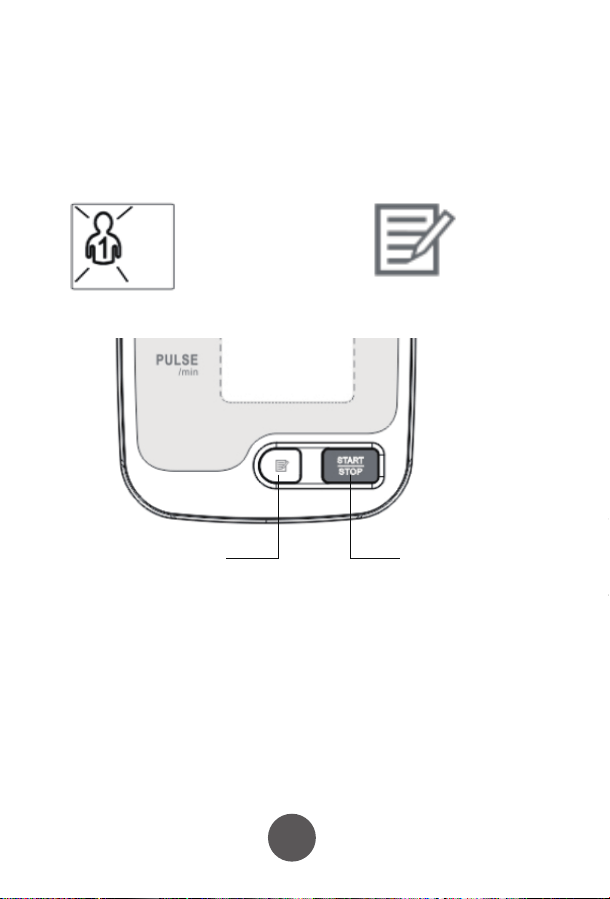
Model: YK-BPA2
Arm Type Blood Pressure Monitor
Revision: V1.9NGUK
Eective: 2025.03.11
Preface
1
2 3 4
65 8
Warnings and graphic symbols in the user’s manual are aimed at enabling users
to use the product safely and correctly. Specific meanings are as follows:
Safety Precautions
Warning: to remind you that misuse of the product may cause personnel damage,
measurement failure and article damage. (Article damage includes damage to housing,
property, pets and livestock.)
Enforcement:to represent compulsory behavior, namely matters must to be observed when
using the product
Prohibition: to stand for prohibited contents, namely matters not allowed to do when using the
product
Prohibition of Disassembly
Caution of electric current
Caution of re
1. Product Introduction
3. Initial Setup
2. Installing batteries / AC adapter use
3.1 Setting the User
3.2 Setting the Time
1.5 Functional Description
1.3 Diagram of the machine
• Patients with arrhythmia, diabetes, poor blood circulation, or a history of stroke should
use this product only under a doctor's supervision.
• Self-diagnosis and self-treatment based on measurement results can be dangerous.
Always follow your doctor's guidance, as incorrect self-assessment may worsen your
condition.
• Over-ination of the cu may cause risks such as numbness or pain in the arm.
• Do not apply the cu over a wound, as this may lead to further injury.
• For safety reasons, keep this product out of the reach of children.
• Avoid using the cu on a limb with intravascular access, ongoing therapy, or an
arteriovenous (A-V) shunt, as temporary interference with blood ow could result in
injury.
• Pressurizing the cu may temporarily aect the function of other monitoring devices
used on the same limb.
• Ensure that using the blood pressure monitor does not lead to prolonged impairment
of blood circulation.
• Excessively long cables and hoses pose a strangulation hazard and should be kept out
of children's reach.
• This product should not be used by infants or children who cannot express their needs,
as it may lead to accidents or disputes.
• Use this device only for blood pressure measurement. Using it for other purposes may
result in accidents or disputes.
• Do not clean this product with chemical agents such as thinner, alcohol, or gasoline.
• Avoid dropping or striking the product forcefully.
• Always use the designated arm cu for this device; otherwise, accurate measurements
cannot be ensured.
• Keep mobile phones away from the device, as they may cause it to malfunction.
This device can automatically memorise 99 results from 2 different users and
calculate the average value of latest three results. It will save the time and date
against each record, if the time, date and user settings are set correctly.
If you wish to use this user specific memory functionality, please ensure you
follow the setup steps carefully before use.
3.3 Sound Settings
3.4 Setting the Blood Pressure Unit of Measure
This model does not have sound features. When "SP OFF" is displayed on screen
click the Memory key once again to proceed to setting the unit of measure.
Please be sure to use the correct AC power supply for this product, otherwise it may cause re
or electric shock.
• Do not forcibly bend the arm cu or air tube, as this may restrict blood ow and cause
injury.
• When removing the air tube, grip and pull it from the front end.
• Do not apply pressure to the device before securing the arm cu around the arm.
• Battery leakage can damage the product, so please follow these precautions:
▪ If the device will not be used for more than three months, remove the batteries.
▪ Replace depleted batteries immediately after use.
▪ Do not mix old and new batteries.
▪ Ensure correct placement of batteries, matching the positive and negative
terminals.
▪ Do not mix dierent types of batteries.
• Do not modify this equipment without the manufacturer’s authorization.
• The blood pressure monitor should not be serviced or maintained while in use on a
patient.
Disassembly, repair or rebuild the machine and/or the arm cu will aect the accuracy of
the device.
Do not use the device or the AC adapter with wet hands as this could cause electric shock.
Air tube interface
Display
The AC power
adapter interface
Memory
Key
Start/Stop
1.4 Display Screen
Pulse rate
recorded
Date/Time displayed
User symbols
Mnemonic symbol
Number of memory groups
Low power symbol
Average symbol
kPa upper limit
kPa Lower limit
mmHg Lower limit
mmHg upper limit
Blood pressure unit symbols
SYS High pressure
(Systolic pressure)
DIA Low pressure
(Diastolic pressure)
Heart rate fluctuations
Heart rate
symbol
1) Measurement: Oscillographic measurement;
2) The results show: high pressure / low pressure / pulse;
3) Unit Conversion: blood pressure units kPa / mmHg conversion (default mmHg);
4) Memory: 99 measurements
5) Clock function: Set of year, month, day, hour, minute;
6) Low power detected when on, the display shows
7) Blood pressure classification indicator: see Appendix Table Ⅱ;
8) Error: See Appendix Table Ⅲ;
9) Over pressure protection function: pressure over 295 mmHg (20ms) is
automatically detected and depressurised;
10) Auto power off function after 2 minutes of inactivity.
2.1 Installing the batteries
1) Remove the battery cover in the direction of the arrow;
2) Put in four AA batteries; do not mix old and new batteries. Only use high quality, new
batteries
3) Close the battery cover.
2.2 Using the AC Adapter (Optional)
PLEASE NOTE: The AC Adapter is not supplied with the product, but is
available as an accessory.
Connect the AC Adapter to the blood pressure monitor in the appropriate socket and
plug it into an electrical outlet.
● When turning off the blood pressure machine, also turn the power off at the wall
socket.
● Be sure to use the correct AC adapter.
● When the power supply is used, power is not consumed from the batteries.
● Please make sure the blood pressure monitor is turned off before connecting the AC
adapter.
● If using the AC adapter without batteries in the device, the clock will reset when the
AC adapter is disconnected from a power source.
This product can be used with either batteries or an AC adapter.
Note
• The icon " " indicates that the battery is about to run out. Please replace the
batteries with four new high-quality, branded AA batteries.
• Turn off the device before replacing the battery.
• After replacing the battery, you may need to reset the time. Please refer to the
relevant section of this manual.
• Used batteries should be disposed of in accordance with local environmental
regulations.
• Note: Battery life may vary depending on usage and environmental conditions.
Note
The default set unit of measure is mmHg.
To change to kPa, follow the steps above to get to the Sound Setting, then press the
memry key, "mmHg" or "kPa" will be flashing on the right of the screen.
1) To change the unit of measure, press and hold the memory key until the chosen
unit of measure is displayed on screen.
2) Once the chosen unit of measure is displayed on screen, click the memory key
once to confirm your selection.
Congratulations! Setup is now complete.
Press and hold
“MEMORY ” key
to scroll through
the values,
Click
“MEMORY”key
to conrm.
IP21
BF type applied part
Refer to operation manual
Manufacturer
Date of manufacture
European union representative
Serial number
Separate collection
Keep dry
Product certication
First characteristic numeral 2:
Against ingress of solid foreign objects:≥12.5mm diameter
Second characteristic numeral 1
Against ingress of water with harmful eects: vertically dripping
MEDICAL PRODUCTS
BP1 ARM BLOOD PRESSURE
MONITOR
Instructions
for Use
Dear User,
Thank you for choosing the OxiPro BP1 arm-type blood pressure monitor. Before
using this device, please carefully read and follow the instructions in this manual.
Keep this manual handy for future reference.
This product is versatile and can be used in hospitals, homes, schools, and medical
centers. It is designed for adult use only and is not suitable for children.
Introduction
The arm-type blood pressure monitor comprises the main unit and an arm cuff,
designed to measure human blood pressure and pulse.
The monitor utilizes an intelligent pressure system, which automatically measures
your blood pressure to a suitable value based on your individual readings. This
reduces the discomfort caused by overinflated cuffs, shortens the measurement time,
and prolongs the cuff's service life.
Additionally, the blood pressure monitor features a power adapter socket for optional
mains adapter use. It also has a memory function that stores up to 99 readings and
includes blood pressure classification, enabling you to determine whether your blood
pressure falls within the normal range.
Front
Rear
Battery cover
1. With the device turned OFF, press and hold the Memory button until the user
symbol flashes.
2. Press the Memory button to toggle between users.
3. Press the Start/Stop button to confirm.
Air tube interface
The AC power
adapter interface
Memory
Key
Start/Stop
Memory Key
Location of Memory and Start/Stop Keys
1) With the device turned OFF, press and hold the MEMORY key until the user
flashes.
2) Click the memory key once more until the year is displayed. To change the year
press and hold the memory key until the desired year is shown. If you miss your
chosen year, just keep hold of the memory key and it will loop from 201 to 2035, and
back to 2016 again.
3) Once the correct year is displayed on screen, press the memory key once to go to
the next step to set the day. Press and hold the memory key until the correct day is
displayed.
4) Once the correct day is displayed, click the memory key again to move to setting
the day of the month. Press and hold the memory key to choose the month, and
when the correct month is displayed click the memory key once again to confirm the
selection.
5) The time will now be displayed using a 24-hour clock format. Follow the same
process of holding the memory key to scroll through the values, and clicking the
memory key to save the value.
6) Once done, the screen will move on to setting the sounds. See the next section
below.
The flow through the date and time setting screens is shown below:
Press and hold
“MEMORY ” key
to scroll through
the values,
Click
“MEMORY”key
to conrm.
Date
Time
Press and hold “MEMORY ” key to
scroll through the values,
Click “MEMORY”key to conrm.
User symbol shown on screen
1
2
3
4
5 6
7 8
9
1.1 Intended Use
This product is designed for measuring blood pressure and pulse rate. It is suitable for
use in hospitals, homes, schools, and medical centers.
User Group: Adults who need to monitor their blood pressure.
1.2 Contraindications
• Patients with serious arrhythmia, diabetes, poor blood circulation, or stroke
should use this device under medical supervision.
• Self-diagnosis and self-treatment based on the readings can be dangerous.
Always consult a doctor.
• Do not use the cuff on a wounded limb as it may cause further injury.
• Keep the device out of reach of children to prevent accidental use.
• The cuff should not be applied to a limb where intravenous therapy or an
arterio-venous (A-V) shunt is present, as it may interfere with blood flow.
• Avoid excessive cable lengths, which may pose a strangulation hazard.
Scan here for the
VIDEO Quick Start
Guide!
or visit www.oxipro.io/bp1support
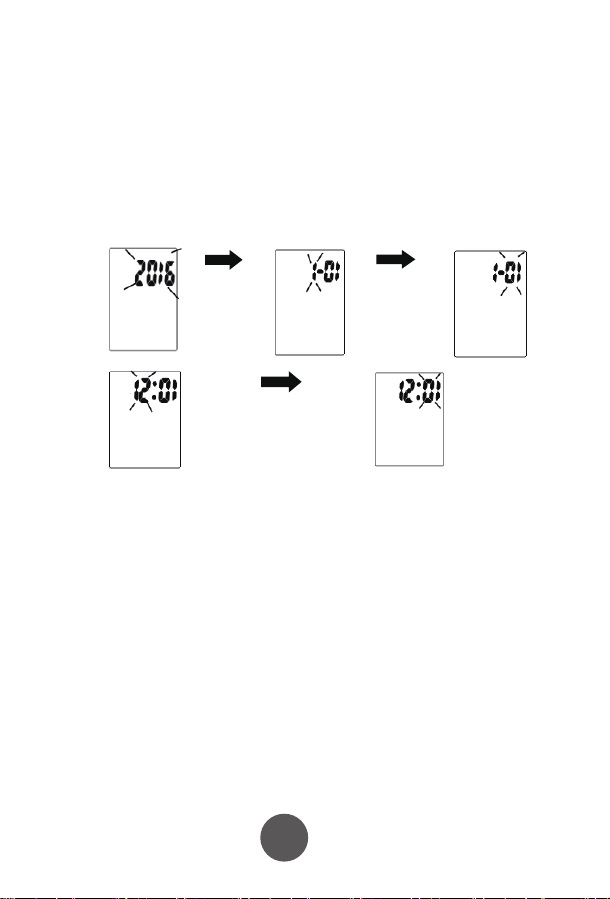
Model: YK-BPA2
Arm Type Blood Pressure Monitor
Revision: V1.9NGUK
Eective: 2025.03.11
Preface
1
2 3 4
65 8
Warnings and graphic symbols in the user’s manual are aimed at enabling users
to use the product safely and correctly. Specific meanings are as follows:
Safety Precautions
Warning: to remind you that misuse of the product may cause personnel damage,
measurement failure and article damage. (Article damage includes damage to housing,
property, pets and livestock.)
Enforcement:to represent compulsory behavior, namely matters must to be observed when
using the product
Prohibition: to stand for prohibited contents, namely matters not allowed to do when using the
product
Prohibition of Disassembly
Caution of electric current
Caution of re
1. Product Introduction
3. Initial Setup
2. Installing batteries / AC adapter use
3.1 Setting the User
3.2 Setting the Time
1.5 Functional Description
1.3 Diagram of the machine
• Patients with arrhythmia, diabetes, poor blood circulation, or a history of stroke should
use this product only under a doctor's supervision.
• Self-diagnosis and self-treatment based on measurement results can be dangerous.
Always follow your doctor's guidance, as incorrect self-assessment may worsen your
condition.
• Over-ination of the cu may cause risks such as numbness or pain in the arm.
• Do not apply the cu over a wound, as this may lead to further injury.
• For safety reasons, keep this product out of the reach of children.
• Avoid using the cu on a limb with intravascular access, ongoing therapy, or an
arteriovenous (A-V) shunt, as temporary interference with blood ow could result in
injury.
• Pressurizing the cu may temporarily aect the function of other monitoring devices
used on the same limb.
• Ensure that using the blood pressure monitor does not lead to prolonged impairment
of blood circulation.
• Excessively long cables and hoses pose a strangulation hazard and should be kept out
of children's reach.
• This product should not be used by infants or children who cannot express their needs,
as it may lead to accidents or disputes.
• Use this device only for blood pressure measurement. Using it for other purposes may
result in accidents or disputes.
• Do not clean this product with chemical agents such as thinner, alcohol, or gasoline.
• Avoid dropping or striking the product forcefully.
• Always use the designated arm cu for this device; otherwise, accurate measurements
cannot be ensured.
• Keep mobile phones away from the device, as they may cause it to malfunction.
This device can automatically memorise 99 results from 2 different users and
calculate the average value of latest three results. It will save the time and date
against each record, if the time, date and user settings are set correctly.
If you wish to use this user specific memory functionality, please ensure you
follow the setup steps carefully before use.
3.3 Sound Settings
3.4 Setting the Blood Pressure Unit of Measure
This model does not have sound features. When "SP OFF" is displayed on screen
click the Memory key once again to proceed to setting the unit of measure.
Please be sure to use the correct AC power supply for this product, otherwise it may cause re
or electric shock.
• Do not forcibly bend the arm cu or air tube, as this may restrict blood ow and cause
injury.
• When removing the air tube, grip and pull it from the front end.
• Do not apply pressure to the device before securing the arm cu around the arm.
• Battery leakage can damage the product, so please follow these precautions:
▪ If the device will not be used for more than three months, remove the batteries.
▪ Replace depleted batteries immediately after use.
▪ Do not mix old and new batteries.
▪ Ensure correct placement of batteries, matching the positive and negative
terminals.
▪ Do not mix dierent types of batteries.
• Do not modify this equipment without the manufacturer’s authorization.
• The blood pressure monitor should not be serviced or maintained while in use on a
patient.
Disassembly, repair or rebuild the machine and/or the arm cu will aect the accuracy of
the device.
Do not use the device or the AC adapter with wet hands as this could cause electric shock.
Air tube interface
Display
The AC power
adapter interface
Memory
Key
Start/Stop
1.4 Display Screen
Pulse rate
recorded
Date/Time displayed
User symbols
Mnemonic symbol
Number of memory groups
Low power symbol
Average symbol
kPa upper limit
kPa Lower limit
mmHg Lower limit
mmHg upper limit
Blood pressure unit symbols
SYS High pressure
(Systolic pressure)
DIA Low pressure
(Diastolic pressure)
Heart rate fluctuations
Heart rate
symbol
1) Measurement: Oscillographic measurement;
2) The results show: high pressure / low pressure / pulse;
3) Unit Conversion: blood pressure units kPa / mmHg conversion (default mmHg);
4) Memory: 99 measurements
5) Clock function: Set of year, month, day, hour, minute;
6) Low power detected when on, the display shows
7) Blood pressure classification indicator: see Appendix Table Ⅱ;
8) Error: See Appendix Table Ⅲ;
9) Over pressure protection function: pressure over 295 mmHg (20ms) is
automatically detected and depressurised;
10) Auto power off function after 2 minutes of inactivity.
2.1 Installing the batteries
1) Remove the battery cover in the direction of the arrow;
2) Put in four AA batteries; do not mix old and new batteries. Only use high quality, new
batteries
3) Close the battery cover.
2.2 Using the AC Adapter (Optional)
PLEASE NOTE: The AC Adapter is not supplied with the product, but is
available as an accessory.
Connect the AC Adapter to the blood pressure monitor in the appropriate socket and
plug it into an electrical outlet.
● When turning off the blood pressure machine, also turn the power off at the wall
socket.
● Be sure to use the correct AC adapter.
● When the power supply is used, power is not consumed from the batteries.
● Please make sure the blood pressure monitor is turned off before connecting the AC
adapter.
● If using the AC adapter without batteries in the device, the clock will reset when the
AC adapter is disconnected from a power source.
This product can be used with either batteries or an AC adapter.
Note
• The icon " " indicates that the battery is about to run out. Please replace the
batteries with four new high-quality, branded AA batteries.
• Turn off the device before replacing the battery.
• After replacing the battery, you may need to reset the time. Please refer to the
relevant section of this manual.
• Used batteries should be disposed of in accordance with local environmental
regulations.
• Note: Battery life may vary depending on usage and environmental conditions.
Note
The default set unit of measure is mmHg.
To change to kPa, follow the steps above to get to the Sound Setting, then press the
memry key, "mmHg" or "kPa" will be flashing on the right of the screen.
1) To change the unit of measure, press and hold the memory key until the chosen
unit of measure is displayed on screen.
2) Once the chosen unit of measure is displayed on screen, click the memory key
once to confirm your selection.
Congratulations! Setup is now complete.
Press and hold
“MEMORY ” key
to scroll through
the values,
Click
“MEMORY”key
to conrm.
IP21
BF type applied part
Refer to operation manual
Manufacturer
Date of manufacture
European union representative
Serial number
Separate collection
Keep dry
Product certication
First characteristic numeral 2:
Against ingress of solid foreign objects:≥12.5mm diameter
Second characteristic numeral 1
Against ingress of water with harmful eects: vertically dripping
MEDICAL PRODUCTS
BP1 ARM BLOOD PRESSURE
MONITOR
Instructions
for Use
Dear User,
Thank you for choosing the OxiPro BP1 arm-type blood pressure monitor. Before
using this device, please carefully read and follow the instructions in this manual.
Keep this manual handy for future reference.
This product is versatile and can be used in hospitals, homes, schools, and medical
centers. It is designed for adult use only and is not suitable for children.
Introduction
The arm-type blood pressure monitor comprises the main unit and an arm cuff,
designed to measure human blood pressure and pulse.
The monitor utilizes an intelligent pressure system, which automatically measures
your blood pressure to a suitable value based on your individual readings. This
reduces the discomfort caused by overinflated cuffs, shortens the measurement time,
and prolongs the cuff's service life.
Additionally, the blood pressure monitor features a power adapter socket for optional
mains adapter use. It also has a memory function that stores up to 99 readings and
includes blood pressure classification, enabling you to determine whether your blood
pressure falls within the normal range.
Front
Rear
Battery cover
1. With the device turned OFF, press and hold the Memory button until the user
symbol flashes.
2. Press the Memory button to toggle between users.
3. Press the Start/Stop button to confirm.
Air tube interface
The AC power
adapter interface
Memory
Key
Start/Stop
Memory Key
Location of Memory and Start/Stop Keys
1) With the device turned OFF, press and hold the MEMORY key until the user
flashes.
2) Click the memory key once more until the year is displayed. To change the year
press and hold the memory key until the desired year is shown. If you miss your
chosen year, just keep hold of the memory key and it will loop from 201 to 2035, and
back to 2016 again.
3) Once the correct year is displayed on screen, press the memory key once to go to
the next step to set the day. Press and hold the memory key until the correct day is
displayed.
4) Once the correct day is displayed, click the memory key again to move to setting
the day of the month. Press and hold the memory key to choose the month, and
when the correct month is displayed click the memory key once again to confirm the
selection.
5) The time will now be displayed using a 24-hour clock format. Follow the same
process of holding the memory key to scroll through the values, and clicking the
memory key to save the value.
6) Once done, the screen will move on to setting the sounds. See the next section
below.
The flow through the date and time setting screens is shown below:
Press and hold
“MEMORY ” key
to scroll through
the values,
Click
“MEMORY”key
to conrm.
Date
Time
Press and hold “MEMORY ” key to
scroll through the values,
Click “MEMORY”key to conrm.
User symbol shown on screen
1
2
3
4
5 6
7 8
9
1.1 Intended Use
This product is designed for measuring blood pressure and pulse rate. It is suitable for
use in hospitals, homes, schools, and medical centers.
User Group: Adults who need to monitor their blood pressure.
1.2 Contraindications
• Patients with serious arrhythmia, diabetes, poor blood circulation, or stroke
should use this device under medical supervision.
• Self-diagnosis and self-treatment based on the readings can be dangerous.
Always consult a doctor.
• Do not use the cuff on a wounded limb as it may cause further injury.
• Keep the device out of reach of children to prevent accidental use.
• The cuff should not be applied to a limb where intravenous therapy or an
arterio-venous (A-V) shunt is present, as it may interfere with blood flow.
• Avoid excessive cable lengths, which may pose a strangulation hazard.
Scan here for the
VIDEO Quick Start
Guide!
or visit www.oxipro.io/bp1support
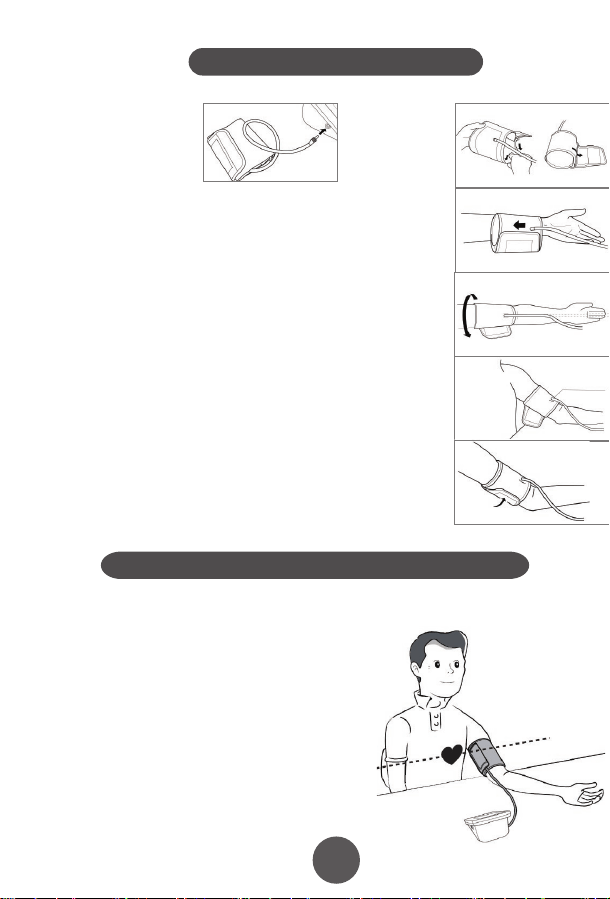
10
11
12
13
15
16 17
17
4. Fitting the NIBP Arm Cuff
7. Maintenance and Storage
8. Manufacturer’s EUT Declaration
Precautions for use
Service
Appendix . Product Specifications
5. Performing a blood pressure measurement
6. Memory function
7.1 Cleaning frequency
7.5 Waste disposal
7.2 Cleaning method
7.3 Storage
7.4 Notes
5.1 Preparing for measuring you blood pressure
How to interrupt the measurement
6.1 Viewing previous results
6.1.1 Recall the average of the last three results
6.1.2 Recall previous results
6.2 Clear the result memory
Ⅱ. Blood pressure classication instructions
Ⅲ. LCD Error message and the cause of error correspondence table
5.2 Operational steps to perform a blood pressure measurement
1)Insert the
connector on the cuff
tube into BLUE inlet on
the blood pressure
monitor
2)Open the
cuff enough to
put your arm
through.
3)Insert your arm into the cuff, with the tube closest to
your wrist.
Keep the instructions and other documents for future reference. Failure to follow the
instructions may result in inaccurate readings, product failure or damage or injury
which the importer and manufacturer will not accept liability for
If the blood pressure monitor becomes dirty, please clean the item using the instruction
in section 8.2. The cuff should be lightly cleaned before and after each use. If used by
multiple people, use a disposable tissue between the skin and the cuff.
Blood Pressure Monitor: Clean the blood pressure monitor using a soft dry cloth
for light cleaning. If heavier cleaning is required use a wet soft cloth with water or
neutral detergent, wring out excess water before cleaning the blood pressure
monitor.
Cuff: Wipe with 75% cleaning alcohol, and leave to dry.
When used in hospital, the blood pressure monitor and cuff should be wiped clean
with 75% alcohol after each use, dried and then disinfected by ultraviolet radiation.
Statement:
●The Arm type Blood Pressure Monitor should use the product in the electromagnetic environment
specied in the following table, otherwise it may cause abnormal operation of the product.
●The internal structure of the Arm type Blood Pressure Monitor adds magnetic rings, magnetic beads, and
conductive cloth and conductive spray paint to avoid electromagnetic interference, so as to prevent
adverse events to patients and operators due to electromagnetic interference.
●The arm type Blood Pressure Monitor is a table-top device,it is suitable for medical unit and home use.
●Warning: Use of the Arm type Blood Pressure Monitor adjacent to or stacked with other equipment
should be avoided because it could result in improper measurement.
●Warning:Use of accessories, transducers and cables other than those specied or provided by the
manufacturer of this equipment could result in increased electromagnetic emissions or decreased
electromagnetic immunity of this equipment and result in improper operation.
●Warning:Portable RF communications equipment (including peripherals such as antenna cables and
external antennas) should be used no closer than 30cm (12 inches) to any part of the Arm type blood
pressure monitor, including cables specied by the manufacturer. Otherwise, degradation of the
performance of this arm type blood pressure monitor may result.
This product can NOT be disposed of in normal household
waste. Please follow local regulations and guidance in to
disposal and recycling of this product, packaging and batteries.
The blood pressure monitor should be disposed of a waste
electrical material. Please recycle if you can.
Please prevent water or other liquids from entering the blood pressure
monitor. Do not use solvents to clean the blood pressure monitor.
Do not wet the cuff or clean the cuff with water.
Do not store the blood pressure monitor in the following places:
• Near water or in a moist environment, or near chemicals.
• In direct sunlight, high temperatures, dust or near corrosive gases
• Store flat where it will not experience vibration or shock.
• If stored for longer than 3 months, remove the battery to reduce the likelihood of
damage due to battery leakage.
●Do not store higher than 2m.
●Recalibration of the arm type blood pressure monitor is recommended once a year,
by the manufacturer or importer. Please contact us for details.
● If the performance is inconsistent with the description, stop using immediately and
contact us.
● Do not use this product if you are allergic to ABS.
● If used in an area with electromagnetic interference (e.g. near a mobile phone,
phone mast or electrical pylon) this may affect its accuracy.
● The product is suitable for professional use or domestic use.
● The correct use method is the key to the accuracy of measurement. Operators
should have certain knowledge of blood pressure. The operating environment shall
be in accordance with the instructions.
● Frequent and/or repeated measurements can cause injury to the patient due to
restricted blood flow.
● The effects of degraded sensors and electrodes, or loosened electrodes, can
degrade performance or cause other problems over time.
● Keep out of the reach of children and pets to avoid damage to the device.
● Do not use beyond the service life of the product, otherwise the accuracy of the
instrument will be affected
● The blood pressure monitor cannot be serviced and maintained by the user, please
contact us for this service.
● For service and support, please contact us.
4)Move the cuff up your arm until the ARTERY MARK is
located in the middle of your inner elbow, in line with your
middle finger .
5)The bottom of the cuff should be located 2cm-3cm from
above the fold of the inside of your elbow.
6)Adjust the tightness of the cuff around your arm and
secure using the Velcro. It should fit snugly, without
feeling tight.
1) You can measure blood pressure in either
arm, although left is normally used.
2) Remove thick clothing from around the arm,
rather than rolling it up.
3) Ideally sit at a table to measure your blood
pressure with your feet on the floor and elbow
and lower arm supported on the table.
4) Rest for a few minutes before taking a
measurement.
5) The height of the cuff should be in-line
with the heart.
6) The palm should be facing upwards, relaxed.
Measurements can be recorded in either mmHg and kPa, this example is in mmHg
which is the default setting.
● For the best results, measure in the same position, at the same time of day and with
the same arm.
● The location of the cuff will cause changes of measurement results
● Don't touch the machine, cuff or air tube during measurement.
● The body should be in a state of relaxation for 5 minutes before measurement and
relaxed during measurement
● Don't talk or move when you are measuring.
● Wait 2-3 minutes between measurements.
● Do not use mobile phones and other mobile devices in the vicinity of the machine.
1)Press the "START / STOP" key to
start a measurement. The machine
will automatically return to zero and
the arm cuff will start to inflate. Stay
still and relaxed.
2)The cuff will reach a stable
pressure and stop inflating. Air will
gradually be released from the cuff
and the pressure will decrease on
the screen and the heart icon will
start to flash. Stay still and relaxed.
3)After the measurement is complete, the cuff will deflate
completely and your blood pressure and heart rate readings will
be displayed on screen.
NOTE: your results will automatically be saved.
If you need to interrupt the measurement (for example, you feel uncomfortable) at any
time, press the "START / STOP" key, the machine will automatically deflate the cuff.
The blood pressure monitor will store 99 records for each of the two users. When 99
records have been stored, the oldest record will be overwritten. You can also see the
average of the last three results.
Taking additional measurements
5.3 Measurement troubleshooting
For the same user, please wait at least 2-3 minutes between measurements. This
allows the artery to restore to its normal state.
Anomalies Cause Correction
A high (low)
anomaly blood
pressure
measurements
No ination
Cu deates too
quickly
The cu is leaking Contact us for a new cu
The cu is not properly connected
to the machine
The cu is too lose round the arm
Machine does start after pressing Start / Stop button Check batteries / power connection and try again
Please connect correctly
Ret the cu according to the instructions
Cu may be incorrectly tted Ret the cu according to the instructions
Talking or moving during
measurement
Tight clothing could be
interrupting signal
Clear the arm of clothing and try again
Relax, stay still and don’t talk
Powers down during
measurement
Does not power up
Other anomalies
Batteries may be exhausted Change to new batteries
Check the batteries are in the right way
Batteries may be inserted the wrong way
Check the batteries
Change to new batteries
Please contact us
Please ensure you select the right user before
measurement to ensure the measurement is
saved to the correct user.
Click the memory button. The result shown is the average of
the last three results, indicated by “AVG” being shown in the
top-right corner of the screen.
When the average result is being displayed, click the
MEMORY key again. You will now see the latest result, click
again and it will show the next oldest result etc.
PLEASE NOTE: This deletes all results in the memory.
While in the memory recall mode, press and hold the
memory key for 5 seconds.
Guidance and manufacturer´s declaration – electromagnetic emission – for all
EQUIPMENT AND SYSTEMS
Guidance and manufacturer's declaration – electromagnetic immunity –
For all EQUIPMENT and SYSTEMS
Table 9 - Test specications for enclosure port immunity to RF wireless
communications equipment
Guidance and manufacturer´s declaration – electromagnetic immunity –
for EQUIPMENT and SYSTEM that are not LIFE-SUPPORTING
Guidance and manufacturer´s declaration – electromagnetic emission
The Arm type Blood Pressure Monitor is intended for use in the electromagnetic environment
specied below. The customer or the user of Arm type Blood Pressure Monitor should assure that it is
used in such an environment.
1
2
3
4
5
6
7
Emissions test Compliance
RF emissions CISPR 11
RF emissions CISPR 11
Harmonic emissions IEC 61000-3-2
Voltage uctuations / icker emissions IEC 61000-3-3
Group 1
Class B
N/A
N/A
Guidance and manufacturer’s declaration – electromagnetic immunity
The arm type blood pressure monitor is intended for use in the electromagnetic environment specied below.
The customer or the user of the arm type blood pressure monitor should assure that it is used in such an
environment.
Immunity test
Electrostatic
discharge (ESD)
IEC 61000-4-2
EN 60601
test level
Compliance level
Guidance and manufacturer´s declaration – electromagnetic immunity
The arm type blood pressure monitor is intended for use in the electromagnetic environment specied
below. The customer or the user of the arm type blood pressure monitor should assure that it is used in
such an environment.
Immunity test EN 60601 test level Compliance level
Conducted RF
IEC 61000-4-6
3 V
0, 15 MHz -80 MHz
6 V in ISM and amateur radio bands
Between 0, 15 MHz and 80 MHz
80 % AM at 1 kHz
3 V
0, 15 MHz -80 MHz
6 V in ISM and amateur radio bands
between 0, 15 MHz and 80 MHz
80 % AM at 1 kHz
Test frequency
(MHz)
Band
a)
(MHz)
Service
a)
Modulation
b)
Maximum
power
(W)
Distance
(m)
Immunity
TEST LEVEL
(V/m)
385 380 -390 TETRA 400
Pulse
modulation
b)
18 Hz
1,8 0.3 27
450 430 - 470
GMRS 460,
FRS 460
FMc) ± 5 kHz
deviation
2 0.3 28
710
745
780
810
870
930
1 720
1 845
1 970
5 240
5 500
5 785
2 450
704 - 787
800 - 960
1 700-1 990
2 400-9 570
5 100-5 800
Name Arm-type Blood Pressure Monitor
Model
Measurement Upper Arm
Static pressure measurement range:0-280 mmHg
Dynamic pressure measuring range:
systolic blood pressure :40-250mmHg
diastolicbloodpressure :30-200mmHg
NIBP
PR
NIBP
40-199 bpm
Accuracy
Power
Electrical parameters
Size
N.W.
Working Condition
Transport and storage
Condition
Temperature
+5ºC~40 ºC
Humidity 15%RH~85%RH
Atmospheric 86kPa~105kPa
Temperature -20ºC~+55ºC
Humidity
10%RH~95%RH
Atmospheric
Security Type
Duration of use
Internallypowered(When using an adapter, it belongs to class II,
Internal power supply), BF type application equipment
5 Years
About 30min
About 30min
Accessories
Adult armband: for arm circumference range: 22-32cm
Operator’s Manual
4 AA alkaline batteries(optional)
Adapter(optional) :
Input AC 100-240V 50/60Hz
Output DC6.0V. Adapter is part of blood pressure monitor
50kPa~105kPa
≤±3mm Hg(±0.4kPa)
PR
Working Voltage
Low electrical
parameters
Auto power-o
YK-BPA1:130.9*96.1*63.1mm
YK-BPA2:130.9*96.1*63.4mm
YK-BPA1:237g
YK-BPA2:238g
4 AA alkaline batteries, DC6.0V
±5%
6V
4.4V±0.2V showing low power
Power o automatically within 2 minutes without any operation
Measurement Range
YK-BPA1 、YK-BPA2
Display Segment LCD Display
Prevent into the liquid level
LTE Band 13,
17
GSM 800/900.
TETRA 800,
iDEN 820,
CDMA 850,
LTE Band 5
GSM 1800;
CDMA 1900;
GSM 1900;
DECT;
LTE Band 1, 3
4, 25; UMTS
Bluetooth,
WLAN,
802.11 b/g/n,
RFID 2450,
LTE Band 7
WLAN 802.11 a/n
Pulse
modulation
b)
217 Hz
Pulse
modulation
b)
18 Hz
Pulse modulation
b)
217 Hz
Pulse modulation
b)
217 Hz
Pulse
modulation
b)
217 Hz
0,2 0.3 9
2 0.3 28
2 0.3 28
2 0.3 28
0,2 0.3 9
Radiated RF
EM elds
IEC 61000-4-3
10 V/m
80 MHz -2,7 GHz
80 % AM at 1 kHz
10 V/m
80 MHz -2,7 GHz
80 % AM at 1 kHz
LCD High pressure Low pressure
Serious ≥180 ≥110
Moderate 160~179 100~109
Mild 140~159 90~99
little higher 130~139 85~89
Normal 120~129 80~84
Most suitable ≤119 ≤79
LCD Error message the cause of error
“E0 1”
“E0 2”
“E0 3”
“E0 4”
± 8 kV contact
± 15 kV air
± 8 kV contact
± 15kV air
Electrostatic
transient / burst
IEC 61000-4-4
± 2 kV for power
supply lines
± 1 kV for input/output
lines
± 2 kV for power supply lines
Surge
IEC 61000-4-5
± 1 kV dierential
mode
± 2 kV common mode
< 5 % UT
(>95 % dip in UT )
for 0.5 cycle
40 % UT
(60 % dip in UT )
for 5 cycles
70 % UT
(30 % dip in UT )
for 25 cycles
< 5 % UT
(>95 % dip in UT )
for 5 sec
±1kV dierential mode
Power frequency
(50/60 Hz)
magnetic eld
IEC 61000-4-8
30 A/m 30A/m
Voltage dips, short
interruptions and
voltage variations
on power supply
input lines
IEC 61000-4-11
< 5 % UT
(>95 % dip in UT )
for 0.5 cycle
40 % UT
(60 % dip in UT )
for 5 cycles
70 % UT
(30 % dip in UT )
for 25 cycles
< 5 % UT
(>95 % dip in UT )
for 5 sec
NOTE UT is the a. c. mains voltage prior to application of the test level.
NOTE:
If necessary to achieve the immunity test level, the distance between the transmitting antenna and the me
equipment or me system may be reduced to 1 m. The 1 m test distance is permitted by IEC 61000-4-3.
a) For some services, only the uplink frequencies are included.
b) The carrier shall be modulated using a 50 % duty cycle square wave signal.
c) As an alternative to FM modulation, 50 % pulse modulation at 18 Hz may be used because while it does not represent
actual modulation, it would be worst case.
In accordance with IEC 60601-1-2:2014, the blood pressure monitor complies with all relevant electromagnetic
compatibility (EMC) requirements. However, if the instructions are not followed, it may cause harmful interference
with other devices. While following the instructions should minimise the risk of interference, it cannot guarantee that
no interference will occur. If interference does occur, you can try the following methods to resolve it:
1) Increase the distance between this device and the other device.
2) Plug the two devices into separate power outlets.
Essential performance and basic safety tests should be conducted every two years. If your device requires testing,
please contact your provider or us. Testing should only be performed by an authorised provider.
1. One year free warranty period will be provided from the date of purchase from an authorised retailer.
2. Faults due to misuse or damage will xed for a reasonable fee, including but not limited to:
1)Malfunction caused by disassemble or modication of the product other than by an authorised repair centre.
2)Malfunction caused by dropping.
3)Malfunction caused by improper use or lack of reasonable care.
4)Malfunction caused by not following the operator’s manual.
5)Malfunction caused by natural disasters or war, such as ooding , re.
3. Please show your valid proof of purchase to use the warranty.
4. You will be responsible for the cost of sending your product our repair centre.
Table 1 Blood pressure classication instructions
Table 1 LCD Error message and the cause of error correspondence table
IP21
First characteristic numeral 2:
Against ingress of solid foreign objects:≥12.5mm diameter
Second characteristic numeral 1 Against ingress of water with harmful
eects: vertically dripping
If stored or used outside the
specied temperature and humidity
range, blood pressure will not work
properly.
Avoiding strong impact, direct
impact, exposure or rain when
Transporting.
Packed blood pressure monitor
should be stored in the condition
met the humidity and atmospheric
requirements,and non-corrosive
gases and ventilated room.
the time required for me
equipment to warm from
the minimum storage
temperature between uses
until it is ready for intended
use; and
the time required for me
equipment to cool from the
maximum storage
temperature between uses
until it is ready for intended
use
Pollution degree 2:Micro-environment with non-conductive pollution,expect
occasional conductivity caused by condensation
Cu
Class Ⅱ
Applied parts specied
Pollution degree
Over-voltage category
classication
Use specication
The RATED range of
CUFF pressure
0-300mmHg
≤±3 mmHg
≤3mmHg
1、Expected medical instructions:
The blood pressure monitor is used for measuring blood pressure and pulse
rate.
2、Expected patient population:
- Age: adult
-People who need to have their blood pressure measured
-The patient is an intended operator
3、Expected use or interaction with body parts tissue type:
Upper Arm
4、Expected user profile:
People who need blood pressure measurement , doctors, etc
5、Application environment:
Avoid electromagnetic interference
Extreme temperature
Avoid pollution and dust
Avoid direct sunlight, etc
6、Operating principle:
Using the oscillometric method of measurement, the blood pressure monitor
uses an air pump to inflate and pressurize the cuff, and use the inflatable cuff to
compress the arteries to make the arteries in a state of complete obstruction, and
then open the deflation valve to slowly decrease the pressure in the cuff .
Prolinx GmbH
Brehmstr. 56, 40239 Düsseldorf
Germany
The authorized representative of European Union:
Due to the arm or body movement, the high pressure value can not be
measured. Please tie the cu and measure it once
Due to the arm or body movement, the low pressure value can not be
measured. Please tie the cu and measure it once
The test result is abnormal, please measure again
Because the air leakage rate is too fast or the pulse signal is too weak, please
check the cu and measure it again after binding
Over the temperature
range of 10℃ C to 40℃
and the relative humidity
range of 15% to 85%
(non-condensing), the
maximum error for the
measurement of the CUFF
pressure at any point of the
NOMINAL measurement
range
When the SUPPLY MAINS to
the blood pressure monitor
is interrupted
The laboratory
reproducibility of the BLOOD
PRESSURE DETERMINATION
of the AUTOMATED
SPHYGMOMANOMETER
The blood pressure monitor meets isolation from the
supply mains requirements when in use and when o
Adapter as disconnecting device from supply mains,
please keep convenient position to operate.
the CUFF shall deate within 30 s to the values indicated in ≤15 mmHg, and any
indication of BLOOD PRESSURE shall be canceled
Note
If you move during measurement, your reading will be
inaccurate. Repeat the measurement after 2-3 minutes.
5.2 Arrhythmia detection
If an Irregular Heart Beat (IHB) from common arrhythmia is
detected during blood pressure measurement, the symbol to
the right will be displayed. The blood pressure monitor will
continue to function, but the results may not be accurate.
Please contact your physician as soon as possible.
If there are less than three results stored in the
memory then the average result will be calculated
from the results stored.
OxiPro Medical Ltd
Unit 3 Maidenhead Enterprise
Centre, Cordwallis Street,
Maidenhead, SL6 7BE. UK
Tel: 01628 290244
www.oxipro.io
UK & IE
Distributor
10
11
12
12
13
12
14
12
15
12
16
12
17
12
18
19
Xuzhou Yongkang Electronic Science Technology Co. Ltd,
1st & 2ndFloor, 6#01, 6#02, No. 6 Building 1st Phase Economic Development
Manufacturing Zone, LIANDO U Valley, No. 6 Leye Road, Xuzhou ETDZ,
221000 Xuzhou, P.R. China
TEL: +86-516-87892766 FAX: +86-516-87892766-606
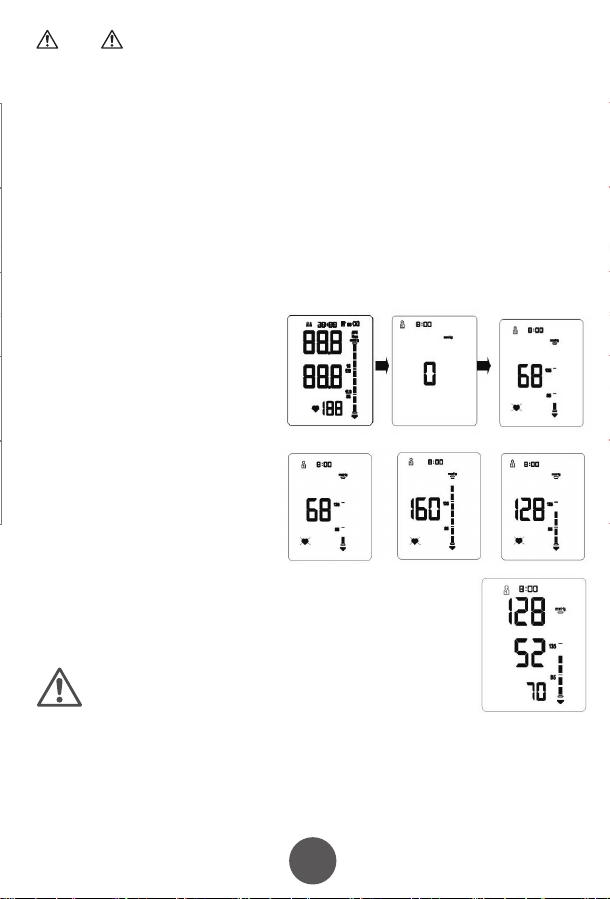
10
11
12
13
15
16 17
17
4. Fitting the NIBP Arm Cuff
7. Maintenance and Storage
8. Manufacturer’s EUT Declaration
Precautions for use
Service
Appendix . Product Specifications
5. Performing a blood pressure measurement
6. Memory function
7.1 Cleaning frequency
7.5 Waste disposal
7.2 Cleaning method
7.3 Storage
7.4 Notes
5.1 Preparing for measuring you blood pressure
How to interrupt the measurement
6.1 Viewing previous results
6.1.1 Recall the average of the last three results
6.1.2 Recall previous results
6.2 Clear the result memory
Ⅱ. Blood pressure classication instructions
Ⅲ. LCD Error message and the cause of error correspondence table
5.2 Operational steps to perform a blood pressure measurement
1)Insert the
connector on the cuff
tube into BLUE inlet on
the blood pressure
monitor
2)Open the
cuff enough to
put your arm
through.
3)Insert your arm into the cuff, with the tube closest to
your wrist.
Keep the instructions and other documents for future reference. Failure to follow the
instructions may result in inaccurate readings, product failure or damage or injury
which the importer and manufacturer will not accept liability for
If the blood pressure monitor becomes dirty, please clean the item using the instruction
in section 8.2. The cuff should be lightly cleaned before and after each use. If used by
multiple people, use a disposable tissue between the skin and the cuff.
Blood Pressure Monitor: Clean the blood pressure monitor using a soft dry cloth
for light cleaning. If heavier cleaning is required use a wet soft cloth with water or
neutral detergent, wring out excess water before cleaning the blood pressure
monitor.
Cuff: Wipe with 75% cleaning alcohol, and leave to dry.
When used in hospital, the blood pressure monitor and cuff should be wiped clean
with 75% alcohol after each use, dried and then disinfected by ultraviolet radiation.
Statement:
●The Arm type Blood Pressure Monitor should use the product in the electromagnetic environment
specied in the following table, otherwise it may cause abnormal operation of the product.
●The internal structure of the Arm type Blood Pressure Monitor adds magnetic rings, magnetic beads, and
conductive cloth and conductive spray paint to avoid electromagnetic interference, so as to prevent
adverse events to patients and operators due to electromagnetic interference.
●The arm type Blood Pressure Monitor is a table-top device,it is suitable for medical unit and home use.
●Warning: Use of the Arm type Blood Pressure Monitor adjacent to or stacked with other equipment
should be avoided because it could result in improper measurement.
●Warning:Use of accessories, transducers and cables other than those specied or provided by the
manufacturer of this equipment could result in increased electromagnetic emissions or decreased
electromagnetic immunity of this equipment and result in improper operation.
●Warning:Portable RF communications equipment (including peripherals such as antenna cables and
external antennas) should be used no closer than 30cm (12 inches) to any part of the Arm type blood
pressure monitor, including cables specied by the manufacturer. Otherwise, degradation of the
performance of this arm type blood pressure monitor may result.
This product can NOT be disposed of in normal household
waste. Please follow local regulations and guidance in to
disposal and recycling of this product, packaging and batteries.
The blood pressure monitor should be disposed of a waste
electrical material. Please recycle if you can.
Please prevent water or other liquids from entering the blood pressure
monitor. Do not use solvents to clean the blood pressure monitor.
Do not wet the cuff or clean the cuff with water.
Do not store the blood pressure monitor in the following places:
• Near water or in a moist environment, or near chemicals.
• In direct sunlight, high temperatures, dust or near corrosive gases
• Store flat where it will not experience vibration or shock.
• If stored for longer than 3 months, remove the battery to reduce the likelihood of
damage due to battery leakage.
●Do not store higher than 2m.
●Recalibration of the arm type blood pressure monitor is recommended once a year,
by the manufacturer or importer. Please contact us for details.
● If the performance is inconsistent with the description, stop using immediately and
contact us.
● Do not use this product if you are allergic to ABS.
● If used in an area with electromagnetic interference (e.g. near a mobile phone,
phone mast or electrical pylon) this may affect its accuracy.
● The product is suitable for professional use or domestic use.
● The correct use method is the key to the accuracy of measurement. Operators
should have certain knowledge of blood pressure. The operating environment shall
be in accordance with the instructions.
● Frequent and/or repeated measurements can cause injury to the patient due to
restricted blood flow.
● The effects of degraded sensors and electrodes, or loosened electrodes, can
degrade performance or cause other problems over time.
● Keep out of the reach of children and pets to avoid damage to the device.
● Do not use beyond the service life of the product, otherwise the accuracy of the
instrument will be affected
● The blood pressure monitor cannot be serviced and maintained by the user, please
contact us for this service.
● For service and support, please contact us.
4)Move the cuff up your arm until the ARTERY MARK is
located in the middle of your inner elbow, in line with your
middle finger .
5)The bottom of the cuff should be located 2cm-3cm from
above the fold of the inside of your elbow.
6)Adjust the tightness of the cuff around your arm and
secure using the Velcro. It should fit snugly, without
feeling tight.
1) You can measure blood pressure in either
arm, although left is normally used.
2) Remove thick clothing from around the arm,
rather than rolling it up.
3) Ideally sit at a table to measure your blood
pressure with your feet on the floor and elbow
and lower arm supported on the table.
4) Rest for a few minutes before taking a
measurement.
5) The height of the cuff should be in-line
with the heart.
6) The palm should be facing upwards, relaxed.
Measurements can be recorded in either mmHg and kPa, this example is in mmHg
which is the default setting.
● For the best results, measure in the same position, at the same time of day and with
the same arm.
● The location of the cuff will cause changes of measurement results
● Don't touch the machine, cuff or air tube during measurement.
● The body should be in a state of relaxation for 5 minutes before measurement and
relaxed during measurement
● Don't talk or move when you are measuring.
● Wait 2-3 minutes between measurements.
● Do not use mobile phones and other mobile devices in the vicinity of the machine.
1)Press the "START / STOP" key to
start a measurement. The machine
will automatically return to zero and
the arm cuff will start to inflate. Stay
still and relaxed.
2)The cuff will reach a stable
pressure and stop inflating. Air will
gradually be released from the cuff
and the pressure will decrease on
the screen and the heart icon will
start to flash. Stay still and relaxed.
3)After the measurement is complete, the cuff will deflate
completely and your blood pressure and heart rate readings will
be displayed on screen.
NOTE: your results will automatically be saved.
If you need to interrupt the measurement (for example, you feel uncomfortable) at any
time, press the "START / STOP" key, the machine will automatically deflate the cuff.
The blood pressure monitor will store 99 records for each of the two users. When 99
records have been stored, the oldest record will be overwritten. You can also see the
average of the last three results.
Taking additional measurements
5.3 Measurement troubleshooting
For the same user, please wait at least 2-3 minutes between measurements. This
allows the artery to restore to its normal state.
Anomalies Cause Correction
A high (low)
anomaly blood
pressure
measurements
No ination
Cu deates too
quickly
The cu is leaking Contact us for a new cu
The cu is not properly connected
to the machine
The cu is too lose round the arm
Machine does start after pressing Start / Stop button Check batteries / power connection and try again
Please connect correctly
Ret the cu according to the instructions
Cu may be incorrectly tted Ret the cu according to the instructions
Talking or moving during
measurement
Tight clothing could be
interrupting signal
Clear the arm of clothing and try again
Relax, stay still and don’t talk
Powers down during
measurement
Does not power up
Other anomalies
Batteries may be exhausted Change to new batteries
Check the batteries are in the right way
Batteries may be inserted the wrong way
Check the batteries
Change to new batteries
Please contact us
Please ensure you select the right user before
measurement to ensure the measurement is
saved to the correct user.
Click the memory button. The result shown is the average of
the last three results, indicated by “AVG” being shown in the
top-right corner of the screen.
When the average result is being displayed, click the
MEMORY key again. You will now see the latest result, click
again and it will show the next oldest result etc.
PLEASE NOTE: This deletes all results in the memory.
While in the memory recall mode, press and hold the
memory key for 5 seconds.
Guidance and manufacturer´s declaration – electromagnetic emission – for all
EQUIPMENT AND SYSTEMS
Guidance and manufacturer's declaration – electromagnetic immunity –
For all EQUIPMENT and SYSTEMS
Table 9 - Test specications for enclosure port immunity to RF wireless
communications equipment
Guidance and manufacturer´s declaration – electromagnetic immunity –
for EQUIPMENT and SYSTEM that are not LIFE-SUPPORTING
Guidance and manufacturer´s declaration – electromagnetic emission
The Arm type Blood Pressure Monitor is intended for use in the electromagnetic environment
specied below. The customer or the user of Arm type Blood Pressure Monitor should assure that it is
used in such an environment.
1
2
3
4
5
6
7
Emissions test Compliance
RF emissions CISPR 11
RF emissions CISPR 11
Harmonic emissions IEC 61000-3-2
Voltage uctuations / icker emissions IEC 61000-3-3
Group 1
Class B
N/A
N/A
Guidance and manufacturer’s declaration – electromagnetic immunity
The arm type blood pressure monitor is intended for use in the electromagnetic environment specied below.
The customer or the user of the arm type blood pressure monitor should assure that it is used in such an
environment.
Immunity test
Electrostatic
discharge (ESD)
IEC 61000-4-2
EN 60601
test level
Compliance level
Guidance and manufacturer´s declaration – electromagnetic immunity
The arm type blood pressure monitor is intended for use in the electromagnetic environment specied
below. The customer or the user of the arm type blood pressure monitor should assure that it is used in
such an environment.
Immunity test EN 60601 test level Compliance level
Conducted RF
IEC 61000-4-6
3 V
0, 15 MHz -80 MHz
6 V in ISM and amateur radio bands
Between 0, 15 MHz and 80 MHz
80 % AM at 1 kHz
3 V
0, 15 MHz -80 MHz
6 V in ISM and amateur radio bands
between 0, 15 MHz and 80 MHz
80 % AM at 1 kHz
Test frequency
(MHz)
Band
a)
(MHz)
Service
a)
Modulation
b)
Maximum
power
(W)
Distance
(m)
Immunity
TEST LEVEL
(V/m)
385 380 -390 TETRA 400
Pulse
modulation
b)
18 Hz
1,8 0.3 27
450 430 - 470
GMRS 460,
FRS 460
FMc) ± 5 kHz
deviation
2 0.3 28
710
745
780
810
870
930
1 720
1 845
1 970
5 240
5 500
5 785
2 450
704 - 787
800 - 960
1 700-1 990
2 400-9 570
5 100-5 800
Name Arm-type Blood Pressure Monitor
Model
Measurement Upper Arm
Static pressure measurement range:0-280 mmHg
Dynamic pressure measuring range:
systolic blood pressure :40-250mmHg
diastolicbloodpressure :30-200mmHg
NIBP
PR
NIBP
40-199 bpm
Accuracy
Power
Electrical parameters
Size
N.W.
Working Condition
Transport and storage
Condition
Temperature
+5ºC~40 ºC
Humidity 15%RH~85%RH
Atmospheric 86kPa~105kPa
Temperature -20ºC~+55ºC
Humidity
10%RH~95%RH
Atmospheric
Security Type
Duration of use
Internallypowered(When using an adapter, it belongs to class II,
Internal power supply), BF type application equipment
5 Years
About 30min
About 30min
Accessories
Adult armband: for arm circumference range: 22-32cm
Operator’s Manual
4 AA alkaline batteries(optional)
Adapter(optional) :
Input AC 100-240V 50/60Hz
Output DC6.0V. Adapter is part of blood pressure monitor
50kPa~105kPa
≤±3mm Hg(±0.4kPa)
PR
Working Voltage
Low electrical
parameters
Auto power-o
YK-BPA1:130.9*96.1*63.1mm
YK-BPA2:130.9*96.1*63.4mm
YK-BPA1:237g
YK-BPA2:238g
4 AA alkaline batteries, DC6.0V
±5%
6V
4.4V±0.2V showing low power
Power o automatically within 2 minutes without any operation
Measurement Range
YK-BPA1 、YK-BPA2
Display Segment LCD Display
Prevent into the liquid level
LTE Band 13,
17
GSM 800/900.
TETRA 800,
iDEN 820,
CDMA 850,
LTE Band 5
GSM 1800;
CDMA 1900;
GSM 1900;
DECT;
LTE Band 1, 3
4, 25; UMTS
Bluetooth,
WLAN,
802.11 b/g/n,
RFID 2450,
LTE Band 7
WLAN 802.11 a/n
Pulse
modulation
b)
217 Hz
Pulse
modulation
b)
18 Hz
Pulse modulation
b)
217 Hz
Pulse modulation
b)
217 Hz
Pulse
modulation
b)
217 Hz
0,2 0.3 9
2 0.3 28
2 0.3 28
2 0.3 28
0,2 0.3 9
Radiated RF
EM elds
IEC 61000-4-3
10 V/m
80 MHz -2,7 GHz
80 % AM at 1 kHz
10 V/m
80 MHz -2,7 GHz
80 % AM at 1 kHz
LCD High pressure Low pressure
Serious ≥180 ≥110
Moderate 160~179 100~109
Mild 140~159 90~99
little higher 130~139 85~89
Normal 120~129 80~84
Most suitable ≤119 ≤79
LCD Error message the cause of error
“E0 1”
“E0 2”
“E0 3”
“E0 4”
± 8 kV contact
± 15 kV air
± 8 kV contact
± 15kV air
Electrostatic
transient / burst
IEC 61000-4-4
± 2 kV for power
supply lines
± 1 kV for input/output
lines
± 2 kV for power supply lines
Surge
IEC 61000-4-5
± 1 kV dierential
mode
± 2 kV common mode
< 5 % UT
(>95 % dip in UT )
for 0.5 cycle
40 % UT
(60 % dip in UT )
for 5 cycles
70 % UT
(30 % dip in UT )
for 25 cycles
< 5 % UT
(>95 % dip in UT )
for 5 sec
±1kV dierential mode
Power frequency
(50/60 Hz)
magnetic eld
IEC 61000-4-8
30 A/m 30A/m
Voltage dips, short
interruptions and
voltage variations
on power supply
input lines
IEC 61000-4-11
< 5 % UT
(>95 % dip in UT )
for 0.5 cycle
40 % UT
(60 % dip in UT )
for 5 cycles
70 % UT
(30 % dip in UT )
for 25 cycles
< 5 % UT
(>95 % dip in UT )
for 5 sec
NOTE UT is the a. c. mains voltage prior to application of the test level.
NOTE:
If necessary to achieve the immunity test level, the distance between the transmitting antenna and the me
equipment or me system may be reduced to 1 m. The 1 m test distance is permitted by IEC 61000-4-3.
a) For some services, only the uplink frequencies are included.
b) The carrier shall be modulated using a 50 % duty cycle square wave signal.
c) As an alternative to FM modulation, 50 % pulse modulation at 18 Hz may be used because while it does not represent
actual modulation, it would be worst case.
In accordance with IEC 60601-1-2:2014, the blood pressure monitor complies with all relevant electromagnetic
compatibility (EMC) requirements. However, if the instructions are not followed, it may cause harmful interference
with other devices. While following the instructions should minimise the risk of interference, it cannot guarantee that
no interference will occur. If interference does occur, you can try the following methods to resolve it:
1) Increase the distance between this device and the other device.
2) Plug the two devices into separate power outlets.
Essential performance and basic safety tests should be conducted every two years. If your device requires testing,
please contact your provider or us. Testing should only be performed by an authorised provider.
1. One year free warranty period will be provided from the date of purchase from an authorised retailer.
2. Faults due to misuse or damage will xed for a reasonable fee, including but not limited to:
1)Malfunction caused by disassemble or modication of the product other than by an authorised repair centre.
2)Malfunction caused by dropping.
3)Malfunction caused by improper use or lack of reasonable care.
4)Malfunction caused by not following the operator’s manual.
5)Malfunction caused by natural disasters or war, such as ooding , re.
3. Please show your valid proof of purchase to use the warranty.
4. You will be responsible for the cost of sending your product our repair centre.
Table 1 Blood pressure classication instructions
Table 1 LCD Error message and the cause of error correspondence table
IP21
First characteristic numeral 2:
Against ingress of solid foreign objects:≥12.5mm diameter
Second characteristic numeral 1 Against ingress of water with harmful
eects: vertically dripping
If stored or used outside the
specied temperature and humidity
range, blood pressure will not work
properly.
Avoiding strong impact, direct
impact, exposure or rain when
Transporting.
Packed blood pressure monitor
should be stored in the condition
met the humidity and atmospheric
requirements,and non-corrosive
gases and ventilated room.
the time required for me
equipment to warm from
the minimum storage
temperature between uses
until it is ready for intended
use; and
the time required for me
equipment to cool from the
maximum storage
temperature between uses
until it is ready for intended
use
Pollution degree 2:Micro-environment with non-conductive pollution,expect
occasional conductivity caused by condensation
Cu
Class Ⅱ
Applied parts specied
Pollution degree
Over-voltage category
classication
Use specication
The RATED range of
CUFF pressure
0-300mmHg
≤±3 mmHg
≤3mmHg
1、Expected medical instructions:
The blood pressure monitor is used for measuring blood pressure and pulse
rate.
2、Expected patient population:
- Age: adult
-People who need to have their blood pressure measured
-The patient is an intended operator
3、Expected use or interaction with body parts tissue type:
Upper Arm
4、Expected user profile:
People who need blood pressure measurement , doctors, etc
5、Application environment:
Avoid electromagnetic interference
Extreme temperature
Avoid pollution and dust
Avoid direct sunlight, etc
6、Operating principle:
Using the oscillometric method of measurement, the blood pressure monitor
uses an air pump to inflate and pressurize the cuff, and use the inflatable cuff to
compress the arteries to make the arteries in a state of complete obstruction, and
then open the deflation valve to slowly decrease the pressure in the cuff .
Prolinx GmbH
Brehmstr. 56, 40239 Düsseldorf
Germany
The authorized representative of European Union:
Due to the arm or body movement, the high pressure value can not be
measured. Please tie the cu and measure it once
Due to the arm or body movement, the low pressure value can not be
measured. Please tie the cu and measure it once
The test result is abnormal, please measure again
Because the air leakage rate is too fast or the pulse signal is too weak, please
check the cu and measure it again after binding
Over the temperature
range of 10℃ C to 40℃
and the relative humidity
range of 15% to 85%
(non-condensing), the
maximum error for the
measurement of the CUFF
pressure at any point of the
NOMINAL measurement
range
When the SUPPLY MAINS to
the blood pressure monitor
is interrupted
The laboratory
reproducibility of the BLOOD
PRESSURE DETERMINATION
of the AUTOMATED
SPHYGMOMANOMETER
The blood pressure monitor meets isolation from the
supply mains requirements when in use and when o
Adapter as disconnecting device from supply mains,
please keep convenient position to operate.
the CUFF shall deate within 30 s to the values indicated in ≤15 mmHg, and any
indication of BLOOD PRESSURE shall be canceled
Note
If you move during measurement, your reading will be
inaccurate. Repeat the measurement after 2-3 minutes.
5.2 Arrhythmia detection
If an Irregular Heart Beat (IHB) from common arrhythmia is
detected during blood pressure measurement, the symbol to
the right will be displayed. The blood pressure monitor will
continue to function, but the results may not be accurate.
Please contact your physician as soon as possible.
If there are less than three results stored in the
memory then the average result will be calculated
from the results stored.
OxiPro Medical Ltd
Unit 3 Maidenhead Enterprise
Centre, Cordwallis Street,
Maidenhead, SL6 7BE. UK
Tel: 01628 290244
www.oxipro.io
UK & IE
Distributor
10
11
12
12
13
12
14
12
15
12
16
12
17
12
18
19
Xuzhou Yongkang Electronic Science Technology Co. Ltd,
1st & 2ndFloor, 6#01, 6#02, No. 6 Building 1st Phase Economic Development
Manufacturing Zone, LIANDO U Valley, No. 6 Leye Road, Xuzhou ETDZ,
221000 Xuzhou, P.R. China
TEL: +86-516-87892766 FAX: +86-516-87892766-606
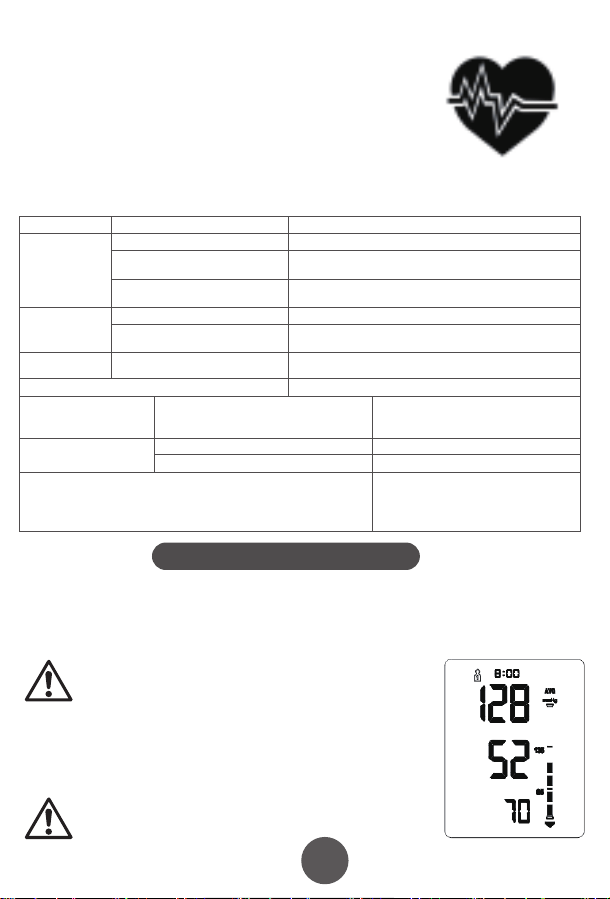
10
11
12
13
15
16 17
17
4. Fitting the NIBP Arm Cuff
7. Maintenance and Storage
8. Manufacturer’s EUT Declaration
Precautions for use
Service
Appendix . Product Specifications
5. Performing a blood pressure measurement
6. Memory function
7.1 Cleaning frequency
7.5 Waste disposal
7.2 Cleaning method
7.3 Storage
7.4 Notes
5.1 Preparing for measuring you blood pressure
How to interrupt the measurement
6.1 Viewing previous results
6.1.1 Recall the average of the last three results
6.1.2 Recall previous results
6.2 Clear the result memory
Ⅱ. Blood pressure classication instructions
Ⅲ. LCD Error message and the cause of error correspondence table
5.2 Operational steps to perform a blood pressure measurement
1)Insert the
connector on the cuff
tube into BLUE inlet on
the blood pressure
monitor
2)Open the
cuff enough to
put your arm
through.
3)Insert your arm into the cuff, with the tube closest to
your wrist.
Keep the instructions and other documents for future reference. Failure to follow the
instructions may result in inaccurate readings, product failure or damage or injury
which the importer and manufacturer will not accept liability for
If the blood pressure monitor becomes dirty, please clean the item using the instruction
in section 8.2. The cuff should be lightly cleaned before and after each use. If used by
multiple people, use a disposable tissue between the skin and the cuff.
Blood Pressure Monitor: Clean the blood pressure monitor using a soft dry cloth
for light cleaning. If heavier cleaning is required use a wet soft cloth with water or
neutral detergent, wring out excess water before cleaning the blood pressure
monitor.
Cuff: Wipe with 75% cleaning alcohol, and leave to dry.
When used in hospital, the blood pressure monitor and cuff should be wiped clean
with 75% alcohol after each use, dried and then disinfected by ultraviolet radiation.
Statement:
●The Arm type Blood Pressure Monitor should use the product in the electromagnetic environment
specied in the following table, otherwise it may cause abnormal operation of the product.
●The internal structure of the Arm type Blood Pressure Monitor adds magnetic rings, magnetic beads, and
conductive cloth and conductive spray paint to avoid electromagnetic interference, so as to prevent
adverse events to patients and operators due to electromagnetic interference.
●The arm type Blood Pressure Monitor is a table-top device,it is suitable for medical unit and home use.
●Warning: Use of the Arm type Blood Pressure Monitor adjacent to or stacked with other equipment
should be avoided because it could result in improper measurement.
●Warning:Use of accessories, transducers and cables other than those specied or provided by the
manufacturer of this equipment could result in increased electromagnetic emissions or decreased
electromagnetic immunity of this equipment and result in improper operation.
●Warning:Portable RF communications equipment (including peripherals such as antenna cables and
external antennas) should be used no closer than 30cm (12 inches) to any part of the Arm type blood
pressure monitor, including cables specied by the manufacturer. Otherwise, degradation of the
performance of this arm type blood pressure monitor may result.
This product can NOT be disposed of in normal household
waste. Please follow local regulations and guidance in to
disposal and recycling of this product, packaging and batteries.
The blood pressure monitor should be disposed of a waste
electrical material. Please recycle if you can.
Please prevent water or other liquids from entering the blood pressure
monitor. Do not use solvents to clean the blood pressure monitor.
Do not wet the cuff or clean the cuff with water.
Do not store the blood pressure monitor in the following places:
• Near water or in a moist environment, or near chemicals.
• In direct sunlight, high temperatures, dust or near corrosive gases
• Store flat where it will not experience vibration or shock.
• If stored for longer than 3 months, remove the battery to reduce the likelihood of
damage due to battery leakage.
●Do not store higher than 2m.
●Recalibration of the arm type blood pressure monitor is recommended once a year,
by the manufacturer or importer. Please contact us for details.
● If the performance is inconsistent with the description, stop using immediately and
contact us.
● Do not use this product if you are allergic to ABS.
● If used in an area with electromagnetic interference (e.g. near a mobile phone,
phone mast or electrical pylon) this may affect its accuracy.
● The product is suitable for professional use or domestic use.
● The correct use method is the key to the accuracy of measurement. Operators
should have certain knowledge of blood pressure. The operating environment shall
be in accordance with the instructions.
● Frequent and/or repeated measurements can cause injury to the patient due to
restricted blood flow.
● The effects of degraded sensors and electrodes, or loosened electrodes, can
degrade performance or cause other problems over time.
● Keep out of the reach of children and pets to avoid damage to the device.
● Do not use beyond the service life of the product, otherwise the accuracy of the
instrument will be affected
● The blood pressure monitor cannot be serviced and maintained by the user, please
contact us for this service.
● For service and support, please contact us.
4)Move the cuff up your arm until the ARTERY MARK is
located in the middle of your inner elbow, in line with your
middle finger .
5)The bottom of the cuff should be located 2cm-3cm from
above the fold of the inside of your elbow.
6)Adjust the tightness of the cuff around your arm and
secure using the Velcro. It should fit snugly, without
feeling tight.
1) You can measure blood pressure in either
arm, although left is normally used.
2) Remove thick clothing from around the arm,
rather than rolling it up.
3) Ideally sit at a table to measure your blood
pressure with your feet on the floor and elbow
and lower arm supported on the table.
4) Rest for a few minutes before taking a
measurement.
5) The height of the cuff should be in-line
with the heart.
6) The palm should be facing upwards, relaxed.
Measurements can be recorded in either mmHg and kPa, this example is in mmHg
which is the default setting.
● For the best results, measure in the same position, at the same time of day and with
the same arm.
● The location of the cuff will cause changes of measurement results
● Don't touch the machine, cuff or air tube during measurement.
● The body should be in a state of relaxation for 5 minutes before measurement and
relaxed during measurement
● Don't talk or move when you are measuring.
● Wait 2-3 minutes between measurements.
● Do not use mobile phones and other mobile devices in the vicinity of the machine.
1)Press the "START / STOP" key to
start a measurement. The machine
will automatically return to zero and
the arm cuff will start to inflate. Stay
still and relaxed.
2)The cuff will reach a stable
pressure and stop inflating. Air will
gradually be released from the cuff
and the pressure will decrease on
the screen and the heart icon will
start to flash. Stay still and relaxed.
3)After the measurement is complete, the cuff will deflate
completely and your blood pressure and heart rate readings will
be displayed on screen.
NOTE: your results will automatically be saved.
If you need to interrupt the measurement (for example, you feel uncomfortable) at any
time, press the "START / STOP" key, the machine will automatically deflate the cuff.
The blood pressure monitor will store 99 records for each of the two users. When 99
records have been stored, the oldest record will be overwritten. You can also see the
average of the last three results.
Taking additional measurements
5.3 Measurement troubleshooting
For the same user, please wait at least 2-3 minutes between measurements. This
allows the artery to restore to its normal state.
Anomalies Cause Correction
A high (low)
anomaly blood
pressure
measurements
No ination
Cu deates too
quickly
The cu is leaking Contact us for a new cu
The cu is not properly connected
to the machine
The cu is too lose round the arm
Machine does start after pressing Start / Stop button Check batteries / power connection and try again
Please connect correctly
Ret the cu according to the instructions
Cu may be incorrectly tted Ret the cu according to the instructions
Talking or moving during
measurement
Tight clothing could be
interrupting signal
Clear the arm of clothing and try again
Relax, stay still and don’t talk
Powers down during
measurement
Does not power up
Other anomalies
Batteries may be exhausted Change to new batteries
Check the batteries are in the right way
Batteries may be inserted the wrong way
Check the batteries
Change to new batteries
Please contact us
Please ensure you select the right user before
measurement to ensure the measurement is
saved to the correct user.
Click the memory button. The result shown is the average of
the last three results, indicated by “AVG” being shown in the
top-right corner of the screen.
When the average result is being displayed, click the
MEMORY key again. You will now see the latest result, click
again and it will show the next oldest result etc.
PLEASE NOTE: This deletes all results in the memory.
While in the memory recall mode, press and hold the
memory key for 5 seconds.
Guidance and manufacturer´s declaration – electromagnetic emission – for all
EQUIPMENT AND SYSTEMS
Guidance and manufacturer's declaration – electromagnetic immunity –
For all EQUIPMENT and SYSTEMS
Table 9 - Test specications for enclosure port immunity to RF wireless
communications equipment
Guidance and manufacturer´s declaration – electromagnetic immunity –
for EQUIPMENT and SYSTEM that are not LIFE-SUPPORTING
Guidance and manufacturer´s declaration – electromagnetic emission
The Arm type Blood Pressure Monitor is intended for use in the electromagnetic environment
specied below. The customer or the user of Arm type Blood Pressure Monitor should assure that it is
used in such an environment.
1
2
3
4
5
6
7
Emissions test Compliance
RF emissions CISPR 11
RF emissions CISPR 11
Harmonic emissions IEC 61000-3-2
Voltage uctuations / icker emissions IEC 61000-3-3
Group 1
Class B
N/A
N/A
Guidance and manufacturer’s declaration – electromagnetic immunity
The arm type blood pressure monitor is intended for use in the electromagnetic environment specied below.
The customer or the user of the arm type blood pressure monitor should assure that it is used in such an
environment.
Immunity test
Electrostatic
discharge (ESD)
IEC 61000-4-2
EN 60601
test level
Compliance level
Guidance and manufacturer´s declaration – electromagnetic immunity
The arm type blood pressure monitor is intended for use in the electromagnetic environment specied
below. The customer or the user of the arm type blood pressure monitor should assure that it is used in
such an environment.
Immunity test EN 60601 test level Compliance level
Conducted RF
IEC 61000-4-6
3 V
0, 15 MHz -80 MHz
6 V in ISM and amateur radio bands
Between 0, 15 MHz and 80 MHz
80 % AM at 1 kHz
3 V
0, 15 MHz -80 MHz
6 V in ISM and amateur radio bands
between 0, 15 MHz and 80 MHz
80 % AM at 1 kHz
Test frequency
(MHz)
Band
a)
(MHz)
Service
a)
Modulation
b)
Maximum
power
(W)
Distance
(m)
Immunity
TEST LEVEL
(V/m)
385 380 -390 TETRA 400
Pulse
modulation
b)
18 Hz
1,8 0.3 27
450 430 - 470
GMRS 460,
FRS 460
FMc) ± 5 kHz
deviation
2 0.3 28
710
745
780
810
870
930
1 720
1 845
1 970
5 240
5 500
5 785
2 450
704 - 787
800 - 960
1 700-1 990
2 400-9 570
5 100-5 800
Name Arm-type Blood Pressure Monitor
Model
Measurement Upper Arm
Static pressure measurement range:0-280 mmHg
Dynamic pressure measuring range:
systolic blood pressure :40-250mmHg
diastolicbloodpressure :30-200mmHg
NIBP
PR
NIBP
40-199 bpm
Accuracy
Power
Electrical parameters
Size
N.W.
Working Condition
Transport and storage
Condition
Temperature
+5ºC~40 ºC
Humidity 15%RH~85%RH
Atmospheric 86kPa~105kPa
Temperature -20ºC~+55ºC
Humidity
10%RH~95%RH
Atmospheric
Security Type
Duration of use
Internallypowered(When using an adapter, it belongs to class II,
Internal power supply), BF type application equipment
5 Years
About 30min
About 30min
Accessories
Adult armband: for arm circumference range: 22-32cm
Operator’s Manual
4 AA alkaline batteries(optional)
Adapter(optional) :
Input AC 100-240V 50/60Hz
Output DC6.0V. Adapter is part of blood pressure monitor
50kPa~105kPa
≤±3mm Hg(±0.4kPa)
PR
Working Voltage
Low electrical
parameters
Auto power-o
YK-BPA1:130.9*96.1*63.1mm
YK-BPA2:130.9*96.1*63.4mm
YK-BPA1:237g
YK-BPA2:238g
4 AA alkaline batteries, DC6.0V
±5%
6V
4.4V±0.2V showing low power
Power o automatically within 2 minutes without any operation
Measurement Range
YK-BPA1 、YK-BPA2
Display Segment LCD Display
Prevent into the liquid level
LTE Band 13,
17
GSM 800/900.
TETRA 800,
iDEN 820,
CDMA 850,
LTE Band 5
GSM 1800;
CDMA 1900;
GSM 1900;
DECT;
LTE Band 1, 3
4, 25; UMTS
Bluetooth,
WLAN,
802.11 b/g/n,
RFID 2450,
LTE Band 7
WLAN 802.11 a/n
Pulse
modulation
b)
217 Hz
Pulse
modulation
b)
18 Hz
Pulse modulation
b)
217 Hz
Pulse modulation
b)
217 Hz
Pulse
modulation
b)
217 Hz
0,2 0.3 9
2 0.3 28
2 0.3 28
2 0.3 28
0,2 0.3 9
Radiated RF
EM elds
IEC 61000-4-3
10 V/m
80 MHz -2,7 GHz
80 % AM at 1 kHz
10 V/m
80 MHz -2,7 GHz
80 % AM at 1 kHz
LCD High pressure Low pressure
Serious ≥180 ≥110
Moderate 160~179 100~109
Mild 140~159 90~99
little higher 130~139 85~89
Normal 120~129 80~84
Most suitable ≤119 ≤79
LCD Error message the cause of error
“E0 1”
“E0 2”
“E0 3”
“E0 4”
± 8 kV contact
± 15 kV air
± 8 kV contact
± 15kV air
Electrostatic
transient / burst
IEC 61000-4-4
± 2 kV for power
supply lines
± 1 kV for input/output
lines
± 2 kV for power supply lines
Surge
IEC 61000-4-5
± 1 kV dierential
mode
± 2 kV common mode
< 5 % UT
(>95 % dip in UT )
for 0.5 cycle
40 % UT
(60 % dip in UT )
for 5 cycles
70 % UT
(30 % dip in UT )
for 25 cycles
< 5 % UT
(>95 % dip in UT )
for 5 sec
±1kV dierential mode
Power frequency
(50/60 Hz)
magnetic eld
IEC 61000-4-8
30 A/m 30A/m
Voltage dips, short
interruptions and
voltage variations
on power supply
input lines
IEC 61000-4-11
< 5 % UT
(>95 % dip in UT )
for 0.5 cycle
40 % UT
(60 % dip in UT )
for 5 cycles
70 % UT
(30 % dip in UT )
for 25 cycles
< 5 % UT
(>95 % dip in UT )
for 5 sec
NOTE UT is the a. c. mains voltage prior to application of the test level.
NOTE:
If necessary to achieve the immunity test level, the distance between the transmitting antenna and the me
equipment or me system may be reduced to 1 m. The 1 m test distance is permitted by IEC 61000-4-3.
a) For some services, only the uplink frequencies are included.
b) The carrier shall be modulated using a 50 % duty cycle square wave signal.
c) As an alternative to FM modulation, 50 % pulse modulation at 18 Hz may be used because while it does not represent
actual modulation, it would be worst case.
In accordance with IEC 60601-1-2:2014, the blood pressure monitor complies with all relevant electromagnetic
compatibility (EMC) requirements. However, if the instructions are not followed, it may cause harmful interference
with other devices. While following the instructions should minimise the risk of interference, it cannot guarantee that
no interference will occur. If interference does occur, you can try the following methods to resolve it:
1) Increase the distance between this device and the other device.
2) Plug the two devices into separate power outlets.
Essential performance and basic safety tests should be conducted every two years. If your device requires testing,
please contact your provider or us. Testing should only be performed by an authorised provider.
1. One year free warranty period will be provided from the date of purchase from an authorised retailer.
2. Faults due to misuse or damage will xed for a reasonable fee, including but not limited to:
1)Malfunction caused by disassemble or modication of the product other than by an authorised repair centre.
2)Malfunction caused by dropping.
3)Malfunction caused by improper use or lack of reasonable care.
4)Malfunction caused by not following the operator’s manual.
5)Malfunction caused by natural disasters or war, such as ooding , re.
3. Please show your valid proof of purchase to use the warranty.
4. You will be responsible for the cost of sending your product our repair centre.
Table 1 Blood pressure classication instructions
Table 1 LCD Error message and the cause of error correspondence table
IP21
First characteristic numeral 2:
Against ingress of solid foreign objects:≥12.5mm diameter
Second characteristic numeral 1 Against ingress of water with harmful
eects: vertically dripping
If stored or used outside the
specied temperature and humidity
range, blood pressure will not work
properly.
Avoiding strong impact, direct
impact, exposure or rain when
Transporting.
Packed blood pressure monitor
should be stored in the condition
met the humidity and atmospheric
requirements,and non-corrosive
gases and ventilated room.
the time required for me
equipment to warm from
the minimum storage
temperature between uses
until it is ready for intended
use; and
the time required for me
equipment to cool from the
maximum storage
temperature between uses
until it is ready for intended
use
Pollution degree 2:Micro-environment with non-conductive pollution,expect
occasional conductivity caused by condensation
Cu
Class Ⅱ
Applied parts specied
Pollution degree
Over-voltage category
classication
Use specication
The RATED range of
CUFF pressure
0-300mmHg
≤±3 mmHg
≤3mmHg
1、Expected medical instructions:
The blood pressure monitor is used for measuring blood pressure and pulse
rate.
2、Expected patient population:
- Age: adult
-People who need to have their blood pressure measured
-The patient is an intended operator
3、Expected use or interaction with body parts tissue type:
Upper Arm
4、Expected user profile:
People who need blood pressure measurement , doctors, etc
5、Application environment:
Avoid electromagnetic interference
Extreme temperature
Avoid pollution and dust
Avoid direct sunlight, etc
6、Operating principle:
Using the oscillometric method of measurement, the blood pressure monitor
uses an air pump to inflate and pressurize the cuff, and use the inflatable cuff to
compress the arteries to make the arteries in a state of complete obstruction, and
then open the deflation valve to slowly decrease the pressure in the cuff .
Prolinx GmbH
Brehmstr. 56, 40239 Düsseldorf
Germany
The authorized representative of European Union:
Due to the arm or body movement, the high pressure value can not be
measured. Please tie the cu and measure it once
Due to the arm or body movement, the low pressure value can not be
measured. Please tie the cu and measure it once
The test result is abnormal, please measure again
Because the air leakage rate is too fast or the pulse signal is too weak, please
check the cu and measure it again after binding
Over the temperature
range of 10℃ C to 40℃
and the relative humidity
range of 15% to 85%
(non-condensing), the
maximum error for the
measurement of the CUFF
pressure at any point of the
NOMINAL measurement
range
When the SUPPLY MAINS to
the blood pressure monitor
is interrupted
The laboratory
reproducibility of the BLOOD
PRESSURE DETERMINATION
of the AUTOMATED
SPHYGMOMANOMETER
The blood pressure monitor meets isolation from the
supply mains requirements when in use and when o
Adapter as disconnecting device from supply mains,
please keep convenient position to operate.
the CUFF shall deate within 30 s to the values indicated in ≤15 mmHg, and any
indication of BLOOD PRESSURE shall be canceled
Note
If you move during measurement, your reading will be
inaccurate. Repeat the measurement after 2-3 minutes.
5.2 Arrhythmia detection
If an Irregular Heart Beat (IHB) from common arrhythmia is
detected during blood pressure measurement, the symbol to
the right will be displayed. The blood pressure monitor will
continue to function, but the results may not be accurate.
Please contact your physician as soon as possible.
If there are less than three results stored in the
memory then the average result will be calculated
from the results stored.
OxiPro Medical Ltd
Unit 3 Maidenhead Enterprise
Centre, Cordwallis Street,
Maidenhead, SL6 7BE. UK
Tel: 01628 290244
www.oxipro.io
UK & IE
Distributor
10
11
12
12
13
12
14
12
15
12
16
12
17
12
18
19
Xuzhou Yongkang Electronic Science Technology Co. Ltd,
1st & 2ndFloor, 6#01, 6#02, No. 6 Building 1st Phase Economic Development
Manufacturing Zone, LIANDO U Valley, No. 6 Leye Road, Xuzhou ETDZ,
221000 Xuzhou, P.R. China
TEL: +86-516-87892766 FAX: +86-516-87892766-606
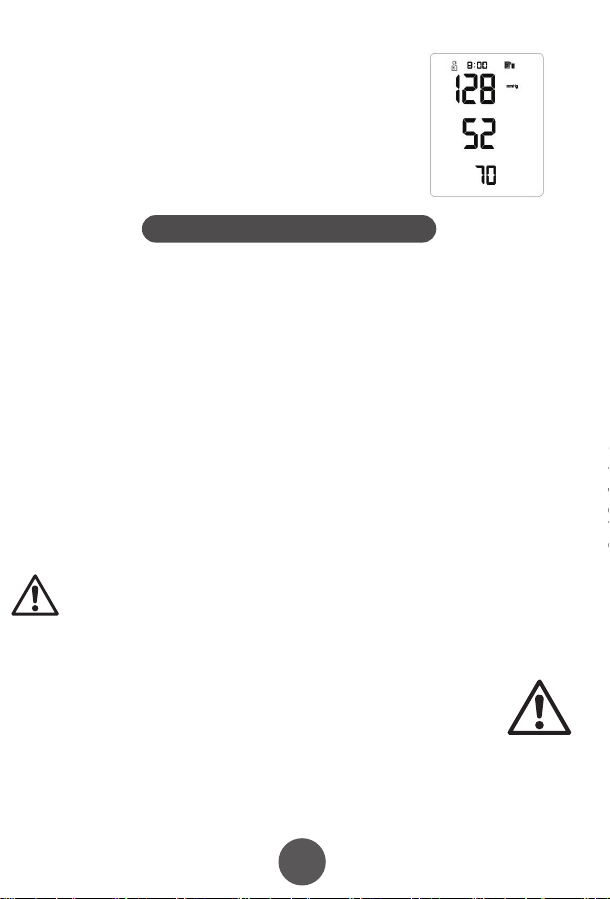
10
11
12
13
15
16 17
17
4. Fitting the NIBP Arm Cuff
7. Maintenance and Storage
8. Manufacturer’s EUT Declaration
Precautions for use
Service
Appendix . Product Specifications
5. Performing a blood pressure measurement
6. Memory function
7.1 Cleaning frequency
7.5 Waste disposal
7.2 Cleaning method
7.3 Storage
7.4 Notes
5.1 Preparing for measuring you blood pressure
How to interrupt the measurement
6.1 Viewing previous results
6.1.1 Recall the average of the last three results
6.1.2 Recall previous results
6.2 Clear the result memory
Ⅱ. Blood pressure classication instructions
Ⅲ. LCD Error message and the cause of error correspondence table
5.2 Operational steps to perform a blood pressure measurement
1)Insert the
connector on the cuff
tube into BLUE inlet on
the blood pressure
monitor
2)Open the
cuff enough to
put your arm
through.
3)Insert your arm into the cuff, with the tube closest to
your wrist.
Keep the instructions and other documents for future reference. Failure to follow the
instructions may result in inaccurate readings, product failure or damage or injury
which the importer and manufacturer will not accept liability for
If the blood pressure monitor becomes dirty, please clean the item using the instruction
in section 8.2. The cuff should be lightly cleaned before and after each use. If used by
multiple people, use a disposable tissue between the skin and the cuff.
Blood Pressure Monitor: Clean the blood pressure monitor using a soft dry cloth
for light cleaning. If heavier cleaning is required use a wet soft cloth with water or
neutral detergent, wring out excess water before cleaning the blood pressure
monitor.
Cuff: Wipe with 75% cleaning alcohol, and leave to dry.
When used in hospital, the blood pressure monitor and cuff should be wiped clean
with 75% alcohol after each use, dried and then disinfected by ultraviolet radiation.
Statement:
●The Arm type Blood Pressure Monitor should use the product in the electromagnetic environment
specied in the following table, otherwise it may cause abnormal operation of the product.
●The internal structure of the Arm type Blood Pressure Monitor adds magnetic rings, magnetic beads, and
conductive cloth and conductive spray paint to avoid electromagnetic interference, so as to prevent
adverse events to patients and operators due to electromagnetic interference.
●The arm type Blood Pressure Monitor is a table-top device,it is suitable for medical unit and home use.
●Warning: Use of the Arm type Blood Pressure Monitor adjacent to or stacked with other equipment
should be avoided because it could result in improper measurement.
●Warning:Use of accessories, transducers and cables other than those specied or provided by the
manufacturer of this equipment could result in increased electromagnetic emissions or decreased
electromagnetic immunity of this equipment and result in improper operation.
●Warning:Portable RF communications equipment (including peripherals such as antenna cables and
external antennas) should be used no closer than 30cm (12 inches) to any part of the Arm type blood
pressure monitor, including cables specied by the manufacturer. Otherwise, degradation of the
performance of this arm type blood pressure monitor may result.
This product can NOT be disposed of in normal household
waste. Please follow local regulations and guidance in to
disposal and recycling of this product, packaging and batteries.
The blood pressure monitor should be disposed of a waste
electrical material. Please recycle if you can.
Please prevent water or other liquids from entering the blood pressure
monitor. Do not use solvents to clean the blood pressure monitor.
Do not wet the cuff or clean the cuff with water.
Do not store the blood pressure monitor in the following places:
• Near water or in a moist environment, or near chemicals.
• In direct sunlight, high temperatures, dust or near corrosive gases
• Store flat where it will not experience vibration or shock.
• If stored for longer than 3 months, remove the battery to reduce the likelihood of
damage due to battery leakage.
●Do not store higher than 2m.
●Recalibration of the arm type blood pressure monitor is recommended once a year,
by the manufacturer or importer. Please contact us for details.
● If the performance is inconsistent with the description, stop using immediately and
contact us.
● Do not use this product if you are allergic to ABS.
● If used in an area with electromagnetic interference (e.g. near a mobile phone,
phone mast or electrical pylon) this may affect its accuracy.
● The product is suitable for professional use or domestic use.
● The correct use method is the key to the accuracy of measurement. Operators
should have certain knowledge of blood pressure. The operating environment shall
be in accordance with the instructions.
● Frequent and/or repeated measurements can cause injury to the patient due to
restricted blood flow.
● The effects of degraded sensors and electrodes, or loosened electrodes, can
degrade performance or cause other problems over time.
● Keep out of the reach of children and pets to avoid damage to the device.
● Do not use beyond the service life of the product, otherwise the accuracy of the
instrument will be affected
● The blood pressure monitor cannot be serviced and maintained by the user, please
contact us for this service.
● For service and support, please contact us.
4)Move the cuff up your arm until the ARTERY MARK is
located in the middle of your inner elbow, in line with your
middle finger .
5)The bottom of the cuff should be located 2cm-3cm from
above the fold of the inside of your elbow.
6)Adjust the tightness of the cuff around your arm and
secure using the Velcro. It should fit snugly, without
feeling tight.
1) You can measure blood pressure in either
arm, although left is normally used.
2) Remove thick clothing from around the arm,
rather than rolling it up.
3) Ideally sit at a table to measure your blood
pressure with your feet on the floor and elbow
and lower arm supported on the table.
4) Rest for a few minutes before taking a
measurement.
5) The height of the cuff should be in-line
with the heart.
6) The palm should be facing upwards, relaxed.
Measurements can be recorded in either mmHg and kPa, this example is in mmHg
which is the default setting.
● For the best results, measure in the same position, at the same time of day and with
the same arm.
● The location of the cuff will cause changes of measurement results
● Don't touch the machine, cuff or air tube during measurement.
● The body should be in a state of relaxation for 5 minutes before measurement and
relaxed during measurement
● Don't talk or move when you are measuring.
● Wait 2-3 minutes between measurements.
● Do not use mobile phones and other mobile devices in the vicinity of the machine.
1)Press the "START / STOP" key to
start a measurement. The machine
will automatically return to zero and
the arm cuff will start to inflate. Stay
still and relaxed.
2)The cuff will reach a stable
pressure and stop inflating. Air will
gradually be released from the cuff
and the pressure will decrease on
the screen and the heart icon will
start to flash. Stay still and relaxed.
3)After the measurement is complete, the cuff will deflate
completely and your blood pressure and heart rate readings will
be displayed on screen.
NOTE: your results will automatically be saved.
If you need to interrupt the measurement (for example, you feel uncomfortable) at any
time, press the "START / STOP" key, the machine will automatically deflate the cuff.
The blood pressure monitor will store 99 records for each of the two users. When 99
records have been stored, the oldest record will be overwritten. You can also see the
average of the last three results.
Taking additional measurements
5.3 Measurement troubleshooting
For the same user, please wait at least 2-3 minutes between measurements. This
allows the artery to restore to its normal state.
Anomalies Cause Correction
A high (low)
anomaly blood
pressure
measurements
No ination
Cu deates too
quickly
The cu is leaking Contact us for a new cu
The cu is not properly connected
to the machine
The cu is too lose round the arm
Machine does start after pressing Start / Stop button Check batteries / power connection and try again
Please connect correctly
Ret the cu according to the instructions
Cu may be incorrectly tted Ret the cu according to the instructions
Talking or moving during
measurement
Tight clothing could be
interrupting signal
Clear the arm of clothing and try again
Relax, stay still and don’t talk
Powers down during
measurement
Does not power up
Other anomalies
Batteries may be exhausted Change to new batteries
Check the batteries are in the right way
Batteries may be inserted the wrong way
Check the batteries
Change to new batteries
Please contact us
Please ensure you select the right user before
measurement to ensure the measurement is
saved to the correct user.
Click the memory button. The result shown is the average of
the last three results, indicated by “AVG” being shown in the
top-right corner of the screen.
When the average result is being displayed, click the
MEMORY key again. You will now see the latest result, click
again and it will show the next oldest result etc.
PLEASE NOTE: This deletes all results in the memory.
While in the memory recall mode, press and hold the
memory key for 5 seconds.
Guidance and manufacturer´s declaration – electromagnetic emission – for all
EQUIPMENT AND SYSTEMS
Guidance and manufacturer's declaration – electromagnetic immunity –
For all EQUIPMENT and SYSTEMS
Table 9 - Test specications for enclosure port immunity to RF wireless
communications equipment
Guidance and manufacturer´s declaration – electromagnetic immunity –
for EQUIPMENT and SYSTEM that are not LIFE-SUPPORTING
Guidance and manufacturer´s declaration – electromagnetic emission
The Arm type Blood Pressure Monitor is intended for use in the electromagnetic environment
specied below. The customer or the user of Arm type Blood Pressure Monitor should assure that it is
used in such an environment.
1
2
3
4
5
6
7
Emissions test Compliance
RF emissions CISPR 11
RF emissions CISPR 11
Harmonic emissions IEC 61000-3-2
Voltage uctuations / icker emissions IEC 61000-3-3
Group 1
Class B
N/A
N/A
Guidance and manufacturer’s declaration – electromagnetic immunity
The arm type blood pressure monitor is intended for use in the electromagnetic environment specied below.
The customer or the user of the arm type blood pressure monitor should assure that it is used in such an
environment.
Immunity test
Electrostatic
discharge (ESD)
IEC 61000-4-2
EN 60601
test level
Compliance level
Guidance and manufacturer´s declaration – electromagnetic immunity
The arm type blood pressure monitor is intended for use in the electromagnetic environment specied
below. The customer or the user of the arm type blood pressure monitor should assure that it is used in
such an environment.
Immunity test EN 60601 test level Compliance level
Conducted RF
IEC 61000-4-6
3 V
0, 15 MHz -80 MHz
6 V in ISM and amateur radio bands
Between 0, 15 MHz and 80 MHz
80 % AM at 1 kHz
3 V
0, 15 MHz -80 MHz
6 V in ISM and amateur radio bands
between 0, 15 MHz and 80 MHz
80 % AM at 1 kHz
Test frequency
(MHz)
Band
a)
(MHz)
Service
a)
Modulation
b)
Maximum
power
(W)
Distance
(m)
Immunity
TEST LEVEL
(V/m)
385 380 -390 TETRA 400
Pulse
modulation
b)
18 Hz
1,8 0.3 27
450 430 - 470
GMRS 460,
FRS 460
FMc) ± 5 kHz
deviation
2 0.3 28
710
745
780
810
870
930
1 720
1 845
1 970
5 240
5 500
5 785
2 450
704 - 787
800 - 960
1 700-1 990
2 400-9 570
5 100-5 800
Name Arm-type Blood Pressure Monitor
Model
Measurement Upper Arm
Static pressure measurement range:0-280 mmHg
Dynamic pressure measuring range:
systolic blood pressure :40-250mmHg
diastolicbloodpressure :30-200mmHg
NIBP
PR
NIBP
40-199 bpm
Accuracy
Power
Electrical parameters
Size
N.W.
Working Condition
Transport and storage
Condition
Temperature
+5ºC~40 ºC
Humidity 15%RH~85%RH
Atmospheric 86kPa~105kPa
Temperature -20ºC~+55ºC
Humidity
10%RH~95%RH
Atmospheric
Security Type
Duration of use
Internallypowered(When using an adapter, it belongs to class II,
Internal power supply), BF type application equipment
5 Years
About 30min
About 30min
Accessories
Adult armband: for arm circumference range: 22-32cm
Operator’s Manual
4 AA alkaline batteries(optional)
Adapter(optional) :
Input AC 100-240V 50/60Hz
Output DC6.0V. Adapter is part of blood pressure monitor
50kPa~105kPa
≤±3mm Hg(±0.4kPa)
PR
Working Voltage
Low electrical
parameters
Auto power-o
YK-BPA1:130.9*96.1*63.1mm
YK-BPA2:130.9*96.1*63.4mm
YK-BPA1:237g
YK-BPA2:238g
4 AA alkaline batteries, DC6.0V
±5%
6V
4.4V±0.2V showing low power
Power o automatically within 2 minutes without any operation
Measurement Range
YK-BPA1 、YK-BPA2
Display Segment LCD Display
Prevent into the liquid level
LTE Band 13,
17
GSM 800/900.
TETRA 800,
iDEN 820,
CDMA 850,
LTE Band 5
GSM 1800;
CDMA 1900;
GSM 1900;
DECT;
LTE Band 1, 3
4, 25; UMTS
Bluetooth,
WLAN,
802.11 b/g/n,
RFID 2450,
LTE Band 7
WLAN 802.11 a/n
Pulse
modulation
b)
217 Hz
Pulse
modulation
b)
18 Hz
Pulse modulation
b)
217 Hz
Pulse modulation
b)
217 Hz
Pulse
modulation
b)
217 Hz
0,2 0.3 9
2 0.3 28
2 0.3 28
2 0.3 28
0,2 0.3 9
Radiated RF
EM elds
IEC 61000-4-3
10 V/m
80 MHz -2,7 GHz
80 % AM at 1 kHz
10 V/m
80 MHz -2,7 GHz
80 % AM at 1 kHz
LCD High pressure Low pressure
Serious ≥180 ≥110
Moderate 160~179 100~109
Mild 140~159 90~99
little higher 130~139 85~89
Normal 120~129 80~84
Most suitable ≤119 ≤79
LCD Error message the cause of error
“E0 1”
“E0 2”
“E0 3”
“E0 4”
± 8 kV contact
± 15 kV air
± 8 kV contact
± 15kV air
Electrostatic
transient / burst
IEC 61000-4-4
± 2 kV for power
supply lines
± 1 kV for input/output
lines
± 2 kV for power supply lines
Surge
IEC 61000-4-5
± 1 kV dierential
mode
± 2 kV common mode
< 5 % UT
(>95 % dip in UT )
for 0.5 cycle
40 % UT
(60 % dip in UT )
for 5 cycles
70 % UT
(30 % dip in UT )
for 25 cycles
< 5 % UT
(>95 % dip in UT )
for 5 sec
±1kV dierential mode
Power frequency
(50/60 Hz)
magnetic eld
IEC 61000-4-8
30 A/m 30A/m
Voltage dips, short
interruptions and
voltage variations
on power supply
input lines
IEC 61000-4-11
< 5 % UT
(>95 % dip in UT )
for 0.5 cycle
40 % UT
(60 % dip in UT )
for 5 cycles
70 % UT
(30 % dip in UT )
for 25 cycles
< 5 % UT
(>95 % dip in UT )
for 5 sec
NOTE UT is the a. c. mains voltage prior to application of the test level.
NOTE:
If necessary to achieve the immunity test level, the distance between the transmitting antenna and the me
equipment or me system may be reduced to 1 m. The 1 m test distance is permitted by IEC 61000-4-3.
a) For some services, only the uplink frequencies are included.
b) The carrier shall be modulated using a 50 % duty cycle square wave signal.
c) As an alternative to FM modulation, 50 % pulse modulation at 18 Hz may be used because while it does not represent
actual modulation, it would be worst case.
In accordance with IEC 60601-1-2:2014, the blood pressure monitor complies with all relevant electromagnetic
compatibility (EMC) requirements. However, if the instructions are not followed, it may cause harmful interference
with other devices. While following the instructions should minimise the risk of interference, it cannot guarantee that
no interference will occur. If interference does occur, you can try the following methods to resolve it:
1) Increase the distance between this device and the other device.
2) Plug the two devices into separate power outlets.
Essential performance and basic safety tests should be conducted every two years. If your device requires testing,
please contact your provider or us. Testing should only be performed by an authorised provider.
1. One year free warranty period will be provided from the date of purchase from an authorised retailer.
2. Faults due to misuse or damage will xed for a reasonable fee, including but not limited to:
1)Malfunction caused by disassemble or modication of the product other than by an authorised repair centre.
2)Malfunction caused by dropping.
3)Malfunction caused by improper use or lack of reasonable care.
4)Malfunction caused by not following the operator’s manual.
5)Malfunction caused by natural disasters or war, such as ooding , re.
3. Please show your valid proof of purchase to use the warranty.
4. You will be responsible for the cost of sending your product our repair centre.
Table 1 Blood pressure classication instructions
Table 1 LCD Error message and the cause of error correspondence table
IP21
First characteristic numeral 2:
Against ingress of solid foreign objects:≥12.5mm diameter
Second characteristic numeral 1 Against ingress of water with harmful
eects: vertically dripping
If stored or used outside the
specied temperature and humidity
range, blood pressure will not work
properly.
Avoiding strong impact, direct
impact, exposure or rain when
Transporting.
Packed blood pressure monitor
should be stored in the condition
met the humidity and atmospheric
requirements,and non-corrosive
gases and ventilated room.
the time required for me
equipment to warm from
the minimum storage
temperature between uses
until it is ready for intended
use; and
the time required for me
equipment to cool from the
maximum storage
temperature between uses
until it is ready for intended
use
Pollution degree 2:Micro-environment with non-conductive pollution,expect
occasional conductivity caused by condensation
Cu
Class Ⅱ
Applied parts specied
Pollution degree
Over-voltage category
classication
Use specication
The RATED range of
CUFF pressure
0-300mmHg
≤±3 mmHg
≤3mmHg
1、Expected medical instructions:
The blood pressure monitor is used for measuring blood pressure and pulse
rate.
2、Expected patient population:
- Age: adult
-People who need to have their blood pressure measured
-The patient is an intended operator
3、Expected use or interaction with body parts tissue type:
Upper Arm
4、Expected user profile:
People who need blood pressure measurement , doctors, etc
5、Application environment:
Avoid electromagnetic interference
Extreme temperature
Avoid pollution and dust
Avoid direct sunlight, etc
6、Operating principle:
Using the oscillometric method of measurement, the blood pressure monitor
uses an air pump to inflate and pressurize the cuff, and use the inflatable cuff to
compress the arteries to make the arteries in a state of complete obstruction, and
then open the deflation valve to slowly decrease the pressure in the cuff .
Prolinx GmbH
Brehmstr. 56, 40239 Düsseldorf
Germany
The authorized representative of European Union:
Due to the arm or body movement, the high pressure value can not be
measured. Please tie the cu and measure it once
Due to the arm or body movement, the low pressure value can not be
measured. Please tie the cu and measure it once
The test result is abnormal, please measure again
Because the air leakage rate is too fast or the pulse signal is too weak, please
check the cu and measure it again after binding
Over the temperature
range of 10℃ C to 40℃
and the relative humidity
range of 15% to 85%
(non-condensing), the
maximum error for the
measurement of the CUFF
pressure at any point of the
NOMINAL measurement
range
When the SUPPLY MAINS to
the blood pressure monitor
is interrupted
The laboratory
reproducibility of the BLOOD
PRESSURE DETERMINATION
of the AUTOMATED
SPHYGMOMANOMETER
The blood pressure monitor meets isolation from the
supply mains requirements when in use and when o
Adapter as disconnecting device from supply mains,
please keep convenient position to operate.
the CUFF shall deate within 30 s to the values indicated in ≤15 mmHg, and any
indication of BLOOD PRESSURE shall be canceled
Note
If you move during measurement, your reading will be
inaccurate. Repeat the measurement after 2-3 minutes.
5.2 Arrhythmia detection
If an Irregular Heart Beat (IHB) from common arrhythmia is
detected during blood pressure measurement, the symbol to
the right will be displayed. The blood pressure monitor will
continue to function, but the results may not be accurate.
Please contact your physician as soon as possible.
If there are less than three results stored in the
memory then the average result will be calculated
from the results stored.
OxiPro Medical Ltd
Unit 3 Maidenhead Enterprise
Centre, Cordwallis Street,
Maidenhead, SL6 7BE. UK
Tel: 01628 290244
www.oxipro.io
UK & IE
Distributor
10
11
12
12
13
12
14
12
15
12
16
12
17
12
18
19
Xuzhou Yongkang Electronic Science Technology Co. Ltd,
1st & 2ndFloor, 6#01, 6#02, No. 6 Building 1st Phase Economic Development
Manufacturing Zone, LIANDO U Valley, No. 6 Leye Road, Xuzhou ETDZ,
221000 Xuzhou, P.R. China
TEL: +86-516-87892766 FAX: +86-516-87892766-606
10
11
12
13
15
16 17
17
4. Fitting the NIBP Arm Cuff
7. Maintenance and Storage
8. Manufacturer’s EUT Declaration
Precautions for use
Service
Appendix . Product Specifications
5. Performing a blood pressure measurement
6. Memory function
7.1 Cleaning frequency
7.5 Waste disposal
7.2 Cleaning method
7.3 Storage
7.4 Notes
5.1 Preparing for measuring you blood pressure
How to interrupt the measurement
6.1 Viewing previous results
6.1.1 Recall the average of the last three results
6.1.2 Recall previous results
6.2 Clear the result memory
Ⅱ. Blood pressure classication instructions
Ⅲ. LCD Error message and the cause of error correspondence table
5.2 Operational steps to perform a blood pressure measurement
1)Insert the
connector on the cuff
tube into BLUE inlet on
the blood pressure
monitor
2)Open the
cuff enough to
put your arm
through.
3)Insert your arm into the cuff, with the tube closest to
your wrist.
Keep the instructions and other documents for future reference. Failure to follow the
instructions may result in inaccurate readings, product failure or damage or injury
which the importer and manufacturer will not accept liability for
If the blood pressure monitor becomes dirty, please clean the item using the instruction
in section 8.2. The cuff should be lightly cleaned before and after each use. If used by
multiple people, use a disposable tissue between the skin and the cuff.
Blood Pressure Monitor: Clean the blood pressure monitor using a soft dry cloth
for light cleaning. If heavier cleaning is required use a wet soft cloth with water or
neutral detergent, wring out excess water before cleaning the blood pressure
monitor.
Cuff: Wipe with 75% cleaning alcohol, and leave to dry.
When used in hospital, the blood pressure monitor and cuff should be wiped clean
with 75% alcohol after each use, dried and then disinfected by ultraviolet radiation.
Statement:
●The Arm type Blood Pressure Monitor should use the product in the electromagnetic environment
specied in the following table, otherwise it may cause abnormal operation of the product.
●The internal structure of the Arm type Blood Pressure Monitor adds magnetic rings, magnetic beads, and
conductive cloth and conductive spray paint to avoid electromagnetic interference, so as to prevent
adverse events to patients and operators due to electromagnetic interference.
●The arm type Blood Pressure Monitor is a table-top device,it is suitable for medical unit and home use.
●Warning: Use of the Arm type Blood Pressure Monitor adjacent to or stacked with other equipment
should be avoided because it could result in improper measurement.
●Warning:Use of accessories, transducers and cables other than those specied or provided by the
manufacturer of this equipment could result in increased electromagnetic emissions or decreased
electromagnetic immunity of this equipment and result in improper operation.
●Warning:Portable RF communications equipment (including peripherals such as antenna cables and
external antennas) should be used no closer than 30cm (12 inches) to any part of the Arm type blood
pressure monitor, including cables specied by the manufacturer. Otherwise, degradation of the
performance of this arm type blood pressure monitor may result.
This product can NOT be disposed of in normal household
waste. Please follow local regulations and guidance in to
disposal and recycling of this product, packaging and batteries.
The blood pressure monitor should be disposed of a waste
electrical material. Please recycle if you can.
Please prevent water or other liquids from entering the blood pressure
monitor. Do not use solvents to clean the blood pressure monitor.
Do not wet the cuff or clean the cuff with water.
Do not store the blood pressure monitor in the following places:
• Near water or in a moist environment, or near chemicals.
• In direct sunlight, high temperatures, dust or near corrosive gases
• Store flat where it will not experience vibration or shock.
• If stored for longer than 3 months, remove the battery to reduce the likelihood of
damage due to battery leakage.
●Do not store higher than 2m.
●Recalibration of the arm type blood pressure monitor is recommended once a year,
by the manufacturer or importer. Please contact us for details.
● If the performance is inconsistent with the description, stop using immediately and
contact us.
● Do not use this product if you are allergic to ABS.
● If used in an area with electromagnetic interference (e.g. near a mobile phone,
phone mast or electrical pylon) this may affect its accuracy.
● The product is suitable for professional use or domestic use.
● The correct use method is the key to the accuracy of measurement. Operators
should have certain knowledge of blood pressure. The operating environment shall
be in accordance with the instructions.
● Frequent and/or repeated measurements can cause injury to the patient due to
restricted blood flow.
● The effects of degraded sensors and electrodes, or loosened electrodes, can
degrade performance or cause other problems over time.
● Keep out of the reach of children and pets to avoid damage to the device.
● Do not use beyond the service life of the product, otherwise the accuracy of the
instrument will be affected
● The blood pressure monitor cannot be serviced and maintained by the user, please
contact us for this service.
● For service and support, please contact us.
4)Move the cuff up your arm until the ARTERY MARK is
located in the middle of your inner elbow, in line with your
middle finger .
5)The bottom of the cuff should be located 2cm-3cm from
above the fold of the inside of your elbow.
6)Adjust the tightness of the cuff around your arm and
secure using the Velcro. It should fit snugly, without
feeling tight.
1) You can measure blood pressure in either
arm, although left is normally used.
2) Remove thick clothing from around the arm,
rather than rolling it up.
3) Ideally sit at a table to measure your blood
pressure with your feet on the floor and elbow
and lower arm supported on the table.
4) Rest for a few minutes before taking a
measurement.
5) The height of the cuff should be in-line
with the heart.
6) The palm should be facing upwards, relaxed.
Measurements can be recorded in either mmHg and kPa, this example is in mmHg
which is the default setting.
● For the best results, measure in the same position, at the same time of day and with
the same arm.
● The location of the cuff will cause changes of measurement results
● Don't touch the machine, cuff or air tube during measurement.
● The body should be in a state of relaxation for 5 minutes before measurement and
relaxed during measurement
● Don't talk or move when you are measuring.
● Wait 2-3 minutes between measurements.
● Do not use mobile phones and other mobile devices in the vicinity of the machine.
1)Press the "START / STOP" key to
start a measurement. The machine
will automatically return to zero and
the arm cuff will start to inflate. Stay
still and relaxed.
2)The cuff will reach a stable
pressure and stop inflating. Air will
gradually be released from the cuff
and the pressure will decrease on
the screen and the heart icon will
start to flash. Stay still and relaxed.
3)After the measurement is complete, the cuff will deflate
completely and your blood pressure and heart rate readings will
be displayed on screen.
NOTE: your results will automatically be saved.
If you need to interrupt the measurement (for example, you feel uncomfortable) at any
time, press the "START / STOP" key, the machine will automatically deflate the cuff.
The blood pressure monitor will store 99 records for each of the two users. When 99
records have been stored, the oldest record will be overwritten. You can also see the
average of the last three results.
Taking additional measurements
5.3 Measurement troubleshooting
For the same user, please wait at least 2-3 minutes between measurements. This
allows the artery to restore to its normal state.
Anomalies Cause Correction
A high (low)
anomaly blood
pressure
measurements
No ination
Cu deates too
quickly
The cu is leaking Contact us for a new cu
The cu is not properly connected
to the machine
The cu is too lose round the arm
Machine does start after pressing Start / Stop button Check batteries / power connection and try again
Please connect correctly
Ret the cu according to the instructions
Cu may be incorrectly tted Ret the cu according to the instructions
Talking or moving during
measurement
Tight clothing could be
interrupting signal
Clear the arm of clothing and try again
Relax, stay still and don’t talk
Powers down during
measurement
Does not power up
Other anomalies
Batteries may be exhausted Change to new batteries
Check the batteries are in the right way
Batteries may be inserted the wrong way
Check the batteries
Change to new batteries
Please contact us
Please ensure you select the right user before
measurement to ensure the measurement is
saved to the correct user.
Click the memory button. The result shown is the average of
the last three results, indicated by “AVG” being shown in the
top-right corner of the screen.
When the average result is being displayed, click the
MEMORY key again. You will now see the latest result, click
again and it will show the next oldest result etc.
PLEASE NOTE: This deletes all results in the memory.
While in the memory recall mode, press and hold the
memory key for 5 seconds.
Guidance and manufacturer´s declaration – electromagnetic emission – for all
EQUIPMENT AND SYSTEMS
Guidance and manufacturer's declaration – electromagnetic immunity –
For all EQUIPMENT and SYSTEMS
Table 9 - Test specications for enclosure port immunity to RF wireless
communications equipment
Guidance and manufacturer´s declaration – electromagnetic immunity –
for EQUIPMENT and SYSTEM that are not LIFE-SUPPORTING
Guidance and manufacturer´s declaration – electromagnetic emission
The Arm type Blood Pressure Monitor is intended for use in the electromagnetic environment
specied below. The customer or the user of Arm type Blood Pressure Monitor should assure that it is
used in such an environment.
1
2
3
4
5
6
7
Emissions test Compliance
RF emissions CISPR 11
RF emissions CISPR 11
Harmonic emissions IEC 61000-3-2
Voltage uctuations / icker emissions IEC 61000-3-3
Group 1
Class B
N/A
N/A
Guidance and manufacturer’s declaration – electromagnetic immunity
The arm type blood pressure monitor is intended for use in the electromagnetic environment specied below.
The customer or the user of the arm type blood pressure monitor should assure that it is used in such an
environment.
Immunity test
Electrostatic
discharge (ESD)
IEC 61000-4-2
EN 60601
test level
Compliance level
Guidance and manufacturer´s declaration – electromagnetic immunity
The arm type blood pressure monitor is intended for use in the electromagnetic environment specied
below. The customer or the user of the arm type blood pressure monitor should assure that it is used in
such an environment.
Immunity test EN 60601 test level Compliance level
Conducted RF
IEC 61000-4-6
3 V
0, 15 MHz -80 MHz
6 V in ISM and amateur radio bands
Between 0, 15 MHz and 80 MHz
80 % AM at 1 kHz
3 V
0, 15 MHz -80 MHz
6 V in ISM and amateur radio bands
between 0, 15 MHz and 80 MHz
80 % AM at 1 kHz
Test frequency
(MHz)
Band
a)
(MHz)
Service
a)
Modulation
b)
Maximum
power
(W)
Distance
(m)
Immunity
TEST LEVEL
(V/m)
385 380 -390 TETRA 400
Pulse
modulation
b)
18 Hz
1,8 0.3 27
450 430 - 470
GMRS 460,
FRS 460
FMc) ± 5 kHz
deviation
2 0.3 28
710
745
780
810
870
930
1 720
1 845
1 970
5 240
5 500
5 785
2 450
704 - 787
800 - 960
1 700-1 990
2 400-9 570
5 100-5 800
Name Arm-type Blood Pressure Monitor
Model
Measurement Upper Arm
Static pressure measurement range:0-280 mmHg
Dynamic pressure measuring range:
systolic blood pressure :40-250mmHg
diastolicbloodpressure :30-200mmHg
NIBP
PR
NIBP
40-199 bpm
Accuracy
Power
Electrical parameters
Size
N.W.
Working Condition
Transport and storage
Condition
Temperature
+5ºC~40 ºC
Humidity 15%RH~85%RH
Atmospheric 86kPa~105kPa
Temperature -20ºC~+55ºC
Humidity
10%RH~95%RH
Atmospheric
Security Type
Duration of use
Internallypowered(When using an adapter, it belongs to class II,
Internal power supply), BF type application equipment
5 Years
About 30min
About 30min
Accessories
Adult armband: for arm circumference range: 22-32cm
Operator’s Manual
4 AA alkaline batteries(optional)
Adapter(optional) :
Input AC 100-240V 50/60Hz
Output DC6.0V. Adapter is part of blood pressure monitor
50kPa~105kPa
≤±3mm Hg(±0.4kPa)
PR
Working Voltage
Low electrical
parameters
Auto power-o
YK-BPA1:130.9*96.1*63.1mm
YK-BPA2:130.9*96.1*63.4mm
YK-BPA1:237g
YK-BPA2:238g
4 AA alkaline batteries, DC6.0V
±5%
6V
4.4V±0.2V showing low power
Power o automatically within 2 minutes without any operation
Measurement Range
YK-BPA1 、YK-BPA2
Display Segment LCD Display
Prevent into the liquid level
LTE Band 13,
17
GSM 800/900.
TETRA 800,
iDEN 820,
CDMA 850,
LTE Band 5
GSM 1800;
CDMA 1900;
GSM 1900;
DECT;
LTE Band 1, 3
4, 25; UMTS
Bluetooth,
WLAN,
802.11 b/g/n,
RFID 2450,
LTE Band 7
WLAN 802.11 a/n
Pulse
modulation
b)
217 Hz
Pulse
modulation
b)
18 Hz
Pulse modulation
b)
217 Hz
Pulse modulation
b)
217 Hz
Pulse
modulation
b)
217 Hz
0,2 0.3 9
2 0.3 28
2 0.3 28
2 0.3 28
0,2 0.3 9
Radiated RF
EM elds
IEC 61000-4-3
10 V/m
80 MHz -2,7 GHz
80 % AM at 1 kHz
10 V/m
80 MHz -2,7 GHz
80 % AM at 1 kHz
LCD High pressure Low pressure
Serious ≥180 ≥110
Moderate 160~179 100~109
Mild 140~159 90~99
little higher 130~139 85~89
Normal 120~129 80~84
Most suitable ≤119 ≤79
LCD Error message the cause of error
“E0 1”
“E0 2”
“E0 3”
“E0 4”
± 8 kV contact
± 15 kV air
± 8 kV contact
± 15kV air
Electrostatic
transient / burst
IEC 61000-4-4
± 2 kV for power
supply lines
± 1 kV for input/output
lines
± 2 kV for power supply lines
Surge
IEC 61000-4-5
± 1 kV dierential
mode
± 2 kV common mode
< 5 % UT
(>95 % dip in UT )
for 0.5 cycle
40 % UT
(60 % dip in UT )
for 5 cycles
70 % UT
(30 % dip in UT )
for 25 cycles
< 5 % UT
(>95 % dip in UT )
for 5 sec
±1kV dierential mode
Power frequency
(50/60 Hz)
magnetic eld
IEC 61000-4-8
30 A/m 30A/m
Voltage dips, short
interruptions and
voltage variations
on power supply
input lines
IEC 61000-4-11
< 5 % UT
(>95 % dip in UT )
for 0.5 cycle
40 % UT
(60 % dip in UT )
for 5 cycles
70 % UT
(30 % dip in UT )
for 25 cycles
< 5 % UT
(>95 % dip in UT )
for 5 sec
NOTE UT is the a. c. mains voltage prior to application of the test level.
NOTE:
If necessary to achieve the immunity test level, the distance between the transmitting antenna and the me
equipment or me system may be reduced to 1 m. The 1 m test distance is permitted by IEC 61000-4-3.
a) For some services, only the uplink frequencies are included.
b) The carrier shall be modulated using a 50 % duty cycle square wave signal.
c) As an alternative to FM modulation, 50 % pulse modulation at 18 Hz may be used because while it does not represent
actual modulation, it would be worst case.
In accordance with IEC 60601-1-2:2014, the blood pressure monitor complies with all relevant electromagnetic
compatibility (EMC) requirements. However, if the instructions are not followed, it may cause harmful interference
with other devices. While following the instructions should minimise the risk of interference, it cannot guarantee that
no interference will occur. If interference does occur, you can try the following methods to resolve it:
1) Increase the distance between this device and the other device.
2) Plug the two devices into separate power outlets.
Essential performance and basic safety tests should be conducted every two years. If your device requires testing,
please contact your provider or us. Testing should only be performed by an authorised provider.
1. One year free warranty period will be provided from the date of purchase from an authorised retailer.
2. Faults due to misuse or damage will xed for a reasonable fee, including but not limited to:
1)Malfunction caused by disassemble or modication of the product other than by an authorised repair centre.
2)Malfunction caused by dropping.
3)Malfunction caused by improper use or lack of reasonable care.
4)Malfunction caused by not following the operator’s manual.
5)Malfunction caused by natural disasters or war, such as ooding , re.
3. Please show your valid proof of purchase to use the warranty.
4. You will be responsible for the cost of sending your product our repair centre.
Table 1 Blood pressure classication instructions
Table 1 LCD Error message and the cause of error correspondence table
IP21
First characteristic numeral 2:
Against ingress of solid foreign objects:≥12.5mm diameter
Second characteristic numeral 1 Against ingress of water with harmful
eects: vertically dripping
If stored or used outside the
specied temperature and humidity
range, blood pressure will not work
properly.
Avoiding strong impact, direct
impact, exposure or rain when
Transporting.
Packed blood pressure monitor
should be stored in the condition
met the humidity and atmospheric
requirements,and non-corrosive
gases and ventilated room.
the time required for me
equipment to warm from
the minimum storage
temperature between uses
until it is ready for intended
use; and
the time required for me
equipment to cool from the
maximum storage
temperature between uses
until it is ready for intended
use
Pollution degree 2:Micro-environment with non-conductive pollution,expect
occasional conductivity caused by condensation
Cu
Class Ⅱ
Applied parts specied
Pollution degree
Over-voltage category
classication
Use specication
The RATED range of
CUFF pressure
0-300mmHg
≤±3 mmHg
≤3mmHg
1、Expected medical instructions:
The blood pressure monitor is used for measuring blood pressure and pulse
rate.
2、Expected patient population:
- Age: adult
-People who need to have their blood pressure measured
-The patient is an intended operator
3、Expected use or interaction with body parts tissue type:
Upper Arm
4、Expected user profile:
People who need blood pressure measurement , doctors, etc
5、Application environment:
Avoid electromagnetic interference
Extreme temperature
Avoid pollution and dust
Avoid direct sunlight, etc
6、Operating principle:
Using the oscillometric method of measurement, the blood pressure monitor
uses an air pump to inflate and pressurize the cuff, and use the inflatable cuff to
compress the arteries to make the arteries in a state of complete obstruction, and
then open the deflation valve to slowly decrease the pressure in the cuff .
Prolinx GmbH
Brehmstr. 56, 40239 Düsseldorf
Germany
The authorized representative of European Union:
Due to the arm or body movement, the high pressure value can not be
measured. Please tie the cu and measure it once
Due to the arm or body movement, the low pressure value can not be
measured. Please tie the cu and measure it once
The test result is abnormal, please measure again
Because the air leakage rate is too fast or the pulse signal is too weak, please
check the cu and measure it again after binding
Over the temperature
range of 10℃ C to 40℃
and the relative humidity
range of 15% to 85%
(non-condensing), the
maximum error for the
measurement of the CUFF
pressure at any point of the
NOMINAL measurement
range
When the SUPPLY MAINS to
the blood pressure monitor
is interrupted
The laboratory
reproducibility of the BLOOD
PRESSURE DETERMINATION
of the AUTOMATED
SPHYGMOMANOMETER
The blood pressure monitor meets isolation from the
supply mains requirements when in use and when o
Adapter as disconnecting device from supply mains,
please keep convenient position to operate.
the CUFF shall deate within 30 s to the values indicated in ≤15 mmHg, and any
indication of BLOOD PRESSURE shall be canceled
Note
If you move during measurement, your reading will be
inaccurate. Repeat the measurement after 2-3 minutes.
5.2 Arrhythmia detection
If an Irregular Heart Beat (IHB) from common arrhythmia is
detected during blood pressure measurement, the symbol to
the right will be displayed. The blood pressure monitor will
continue to function, but the results may not be accurate.
Please contact your physician as soon as possible.
If there are less than three results stored in the
memory then the average result will be calculated
from the results stored.
OxiPro Medical Ltd
Unit 3 Maidenhead Enterprise
Centre, Cordwallis Street,
Maidenhead, SL6 7BE. UK
Tel: 01628 290244
www.oxipro.io
UK & IE
Distributor
10
11
12
12
13
12
14
12
15
12
16
12
17
12
18
19
Xuzhou Yongkang Electronic Science Technology Co. Ltd,
1st & 2ndFloor, 6#01, 6#02, No. 6 Building 1st Phase Economic Development
Manufacturing Zone, LIANDO U Valley, No. 6 Leye Road, Xuzhou ETDZ,
221000 Xuzhou, P.R. China
TEL: +86-516-87892766 FAX: +86-516-87892766-606
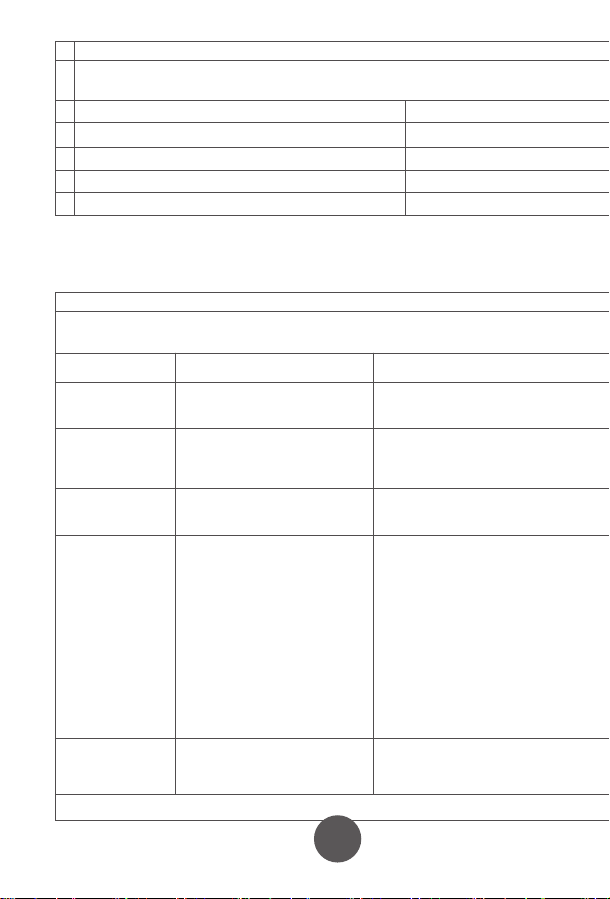
10
11
12
13
15
16 17
17
4. Fitting the NIBP Arm Cuff
7. Maintenance and Storage
8. Manufacturer’s EUT Declaration
Precautions for use
Service
Appendix . Product Specifications
5. Performing a blood pressure measurement
6. Memory function
7.1 Cleaning frequency
7.5 Waste disposal
7.2 Cleaning method
7.3 Storage
7.4 Notes
5.1 Preparing for measuring you blood pressure
How to interrupt the measurement
6.1 Viewing previous results
6.1.1 Recall the average of the last three results
6.1.2 Recall previous results
6.2 Clear the result memory
Ⅱ. Blood pressure classication instructions
Ⅲ. LCD Error message and the cause of error correspondence table
5.2 Operational steps to perform a blood pressure measurement
1)Insert the
connector on the cuff
tube into BLUE inlet on
the blood pressure
monitor
2)Open the
cuff enough to
put your arm
through.
3)Insert your arm into the cuff, with the tube closest to
your wrist.
Keep the instructions and other documents for future reference. Failure to follow the
instructions may result in inaccurate readings, product failure or damage or injury
which the importer and manufacturer will not accept liability for
If the blood pressure monitor becomes dirty, please clean the item using the instruction
in section 8.2. The cuff should be lightly cleaned before and after each use. If used by
multiple people, use a disposable tissue between the skin and the cuff.
Blood Pressure Monitor: Clean the blood pressure monitor using a soft dry cloth
for light cleaning. If heavier cleaning is required use a wet soft cloth with water or
neutral detergent, wring out excess water before cleaning the blood pressure
monitor.
Cuff: Wipe with 75% cleaning alcohol, and leave to dry.
When used in hospital, the blood pressure monitor and cuff should be wiped clean
with 75% alcohol after each use, dried and then disinfected by ultraviolet radiation.
Statement:
●The Arm type Blood Pressure Monitor should use the product in the electromagnetic environment
specied in the following table, otherwise it may cause abnormal operation of the product.
●The internal structure of the Arm type Blood Pressure Monitor adds magnetic rings, magnetic beads, and
conductive cloth and conductive spray paint to avoid electromagnetic interference, so as to prevent
adverse events to patients and operators due to electromagnetic interference.
●The arm type Blood Pressure Monitor is a table-top device,it is suitable for medical unit and home use.
●Warning: Use of the Arm type Blood Pressure Monitor adjacent to or stacked with other equipment
should be avoided because it could result in improper measurement.
●Warning:Use of accessories, transducers and cables other than those specied or provided by the
manufacturer of this equipment could result in increased electromagnetic emissions or decreased
electromagnetic immunity of this equipment and result in improper operation.
●Warning:Portable RF communications equipment (including peripherals such as antenna cables and
external antennas) should be used no closer than 30cm (12 inches) to any part of the Arm type blood
pressure monitor, including cables specied by the manufacturer. Otherwise, degradation of the
performance of this arm type blood pressure monitor may result.
This product can NOT be disposed of in normal household
waste. Please follow local regulations and guidance in to
disposal and recycling of this product, packaging and batteries.
The blood pressure monitor should be disposed of a waste
electrical material. Please recycle if you can.
Please prevent water or other liquids from entering the blood pressure
monitor. Do not use solvents to clean the blood pressure monitor.
Do not wet the cuff or clean the cuff with water.
Do not store the blood pressure monitor in the following places:
• Near water or in a moist environment, or near chemicals.
• In direct sunlight, high temperatures, dust or near corrosive gases
• Store flat where it will not experience vibration or shock.
• If stored for longer than 3 months, remove the battery to reduce the likelihood of
damage due to battery leakage.
●Do not store higher than 2m.
●Recalibration of the arm type blood pressure monitor is recommended once a year,
by the manufacturer or importer. Please contact us for details.
● If the performance is inconsistent with the description, stop using immediately and
contact us.
● Do not use this product if you are allergic to ABS.
● If used in an area with electromagnetic interference (e.g. near a mobile phone,
phone mast or electrical pylon) this may affect its accuracy.
● The product is suitable for professional use or domestic use.
● The correct use method is the key to the accuracy of measurement. Operators
should have certain knowledge of blood pressure. The operating environment shall
be in accordance with the instructions.
● Frequent and/or repeated measurements can cause injury to the patient due to
restricted blood flow.
● The effects of degraded sensors and electrodes, or loosened electrodes, can
degrade performance or cause other problems over time.
● Keep out of the reach of children and pets to avoid damage to the device.
● Do not use beyond the service life of the product, otherwise the accuracy of the
instrument will be affected
● The blood pressure monitor cannot be serviced and maintained by the user, please
contact us for this service.
● For service and support, please contact us.
4)Move the cuff up your arm until the ARTERY MARK is
located in the middle of your inner elbow, in line with your
middle finger .
5)The bottom of the cuff should be located 2cm-3cm from
above the fold of the inside of your elbow.
6)Adjust the tightness of the cuff around your arm and
secure using the Velcro. It should fit snugly, without
feeling tight.
1) You can measure blood pressure in either
arm, although left is normally used.
2) Remove thick clothing from around the arm,
rather than rolling it up.
3) Ideally sit at a table to measure your blood
pressure with your feet on the floor and elbow
and lower arm supported on the table.
4) Rest for a few minutes before taking a
measurement.
5) The height of the cuff should be in-line
with the heart.
6) The palm should be facing upwards, relaxed.
Measurements can be recorded in either mmHg and kPa, this example is in mmHg
which is the default setting.
● For the best results, measure in the same position, at the same time of day and with
the same arm.
● The location of the cuff will cause changes of measurement results
● Don't touch the machine, cuff or air tube during measurement.
● The body should be in a state of relaxation for 5 minutes before measurement and
relaxed during measurement
● Don't talk or move when you are measuring.
● Wait 2-3 minutes between measurements.
● Do not use mobile phones and other mobile devices in the vicinity of the machine.
1)Press the "START / STOP" key to
start a measurement. The machine
will automatically return to zero and
the arm cuff will start to inflate. Stay
still and relaxed.
2)The cuff will reach a stable
pressure and stop inflating. Air will
gradually be released from the cuff
and the pressure will decrease on
the screen and the heart icon will
start to flash. Stay still and relaxed.
3)After the measurement is complete, the cuff will deflate
completely and your blood pressure and heart rate readings will
be displayed on screen.
NOTE: your results will automatically be saved.
If you need to interrupt the measurement (for example, you feel uncomfortable) at any
time, press the "START / STOP" key, the machine will automatically deflate the cuff.
The blood pressure monitor will store 99 records for each of the two users. When 99
records have been stored, the oldest record will be overwritten. You can also see the
average of the last three results.
Taking additional measurements
5.3 Measurement troubleshooting
For the same user, please wait at least 2-3 minutes between measurements. This
allows the artery to restore to its normal state.
Anomalies Cause Correction
A high (low)
anomaly blood
pressure
measurements
No ination
Cu deates too
quickly
The cu is leaking Contact us for a new cu
The cu is not properly connected
to the machine
The cu is too lose round the arm
Machine does start after pressing Start / Stop button Check batteries / power connection and try again
Please connect correctly
Ret the cu according to the instructions
Cu may be incorrectly tted Ret the cu according to the instructions
Talking or moving during
measurement
Tight clothing could be
interrupting signal
Clear the arm of clothing and try again
Relax, stay still and don’t talk
Powers down during
measurement
Does not power up
Other anomalies
Batteries may be exhausted Change to new batteries
Check the batteries are in the right way
Batteries may be inserted the wrong way
Check the batteries
Change to new batteries
Please contact us
Please ensure you select the right user before
measurement to ensure the measurement is
saved to the correct user.
Click the memory button. The result shown is the average of
the last three results, indicated by “AVG” being shown in the
top-right corner of the screen.
When the average result is being displayed, click the
MEMORY key again. You will now see the latest result, click
again and it will show the next oldest result etc.
PLEASE NOTE: This deletes all results in the memory.
While in the memory recall mode, press and hold the
memory key for 5 seconds.
Guidance and manufacturer´s declaration – electromagnetic emission – for all
EQUIPMENT AND SYSTEMS
Guidance and manufacturer's declaration – electromagnetic immunity –
For all EQUIPMENT and SYSTEMS
Table 9 - Test specications for enclosure port immunity to RF wireless
communications equipment
Guidance and manufacturer´s declaration – electromagnetic immunity –
for EQUIPMENT and SYSTEM that are not LIFE-SUPPORTING
Guidance and manufacturer´s declaration – electromagnetic emission
The Arm type Blood Pressure Monitor is intended for use in the electromagnetic environment
specied below. The customer or the user of Arm type Blood Pressure Monitor should assure that it is
used in such an environment.
1
2
3
4
5
6
7
Emissions test Compliance
RF emissions CISPR 11
RF emissions CISPR 11
Harmonic emissions IEC 61000-3-2
Voltage uctuations / icker emissions IEC 61000-3-3
Group 1
Class B
N/A
N/A
Guidance and manufacturer’s declaration – electromagnetic immunity
The arm type blood pressure monitor is intended for use in the electromagnetic environment specied below.
The customer or the user of the arm type blood pressure monitor should assure that it is used in such an
environment.
Immunity test
Electrostatic
discharge (ESD)
IEC 61000-4-2
EN 60601
test level
Compliance level
Guidance and manufacturer´s declaration – electromagnetic immunity
The arm type blood pressure monitor is intended for use in the electromagnetic environment specied
below. The customer or the user of the arm type blood pressure monitor should assure that it is used in
such an environment.
Immunity test EN 60601 test level Compliance level
Conducted RF
IEC 61000-4-6
3 V
0, 15 MHz -80 MHz
6 V in ISM and amateur radio bands
Between 0, 15 MHz and 80 MHz
80 % AM at 1 kHz
3 V
0, 15 MHz -80 MHz
6 V in ISM and amateur radio bands
between 0, 15 MHz and 80 MHz
80 % AM at 1 kHz
Test frequency
(MHz)
Band
a)
(MHz)
Service
a)
Modulation
b)
Maximum
power
(W)
Distance
(m)
Immunity
TEST LEVEL
(V/m)
385 380 -390 TETRA 400
Pulse
modulation
b)
18 Hz
1,8 0.3 27
450 430 - 470
GMRS 460,
FRS 460
FMc) ± 5 kHz
deviation
2 0.3 28
710
745
780
810
870
930
1 720
1 845
1 970
5 240
5 500
5 785
2 450
704 - 787
800 - 960
1 700-1 990
2 400-9 570
5 100-5 800
Name Arm-type Blood Pressure Monitor
Model
Measurement Upper Arm
Static pressure measurement range:0-280 mmHg
Dynamic pressure measuring range:
systolic blood pressure :40-250mmHg
diastolicbloodpressure :30-200mmHg
NIBP
PR
NIBP
40-199 bpm
Accuracy
Power
Electrical parameters
Size
N.W.
Working Condition
Transport and storage
Condition
Temperature
+5ºC~40 ºC
Humidity 15%RH~85%RH
Atmospheric 86kPa~105kPa
Temperature -20ºC~+55ºC
Humidity
10%RH~95%RH
Atmospheric
Security Type
Duration of use
Internallypowered(When using an adapter, it belongs to class II,
Internal power supply), BF type application equipment
5 Years
About 30min
About 30min
Accessories
Adult armband: for arm circumference range: 22-32cm
Operator’s Manual
4 AA alkaline batteries(optional)
Adapter(optional) :
Input AC 100-240V 50/60Hz
Output DC6.0V. Adapter is part of blood pressure monitor
50kPa~105kPa
≤±3mm Hg(±0.4kPa)
PR
Working Voltage
Low electrical
parameters
Auto power-o
YK-BPA1:130.9*96.1*63.1mm
YK-BPA2:130.9*96.1*63.4mm
YK-BPA1:237g
YK-BPA2:238g
4 AA alkaline batteries, DC6.0V
±5%
6V
4.4V±0.2V showing low power
Power o automatically within 2 minutes without any operation
Measurement Range
YK-BPA1 、YK-BPA2
Display Segment LCD Display
Prevent into the liquid level
LTE Band 13,
17
GSM 800/900.
TETRA 800,
iDEN 820,
CDMA 850,
LTE Band 5
GSM 1800;
CDMA 1900;
GSM 1900;
DECT;
LTE Band 1, 3
4, 25; UMTS
Bluetooth,
WLAN,
802.11 b/g/n,
RFID 2450,
LTE Band 7
WLAN 802.11 a/n
Pulse
modulation
b)
217 Hz
Pulse
modulation
b)
18 Hz
Pulse modulation
b)
217 Hz
Pulse modulation
b)
217 Hz
Pulse
modulation
b)
217 Hz
0,2 0.3 9
2 0.3 28
2 0.3 28
2 0.3 28
0,2 0.3 9
Radiated RF
EM elds
IEC 61000-4-3
10 V/m
80 MHz -2,7 GHz
80 % AM at 1 kHz
10 V/m
80 MHz -2,7 GHz
80 % AM at 1 kHz
LCD High pressure Low pressure
Serious ≥180 ≥110
Moderate 160~179 100~109
Mild 140~159 90~99
little higher 130~139 85~89
Normal 120~129 80~84
Most suitable ≤119 ≤79
LCD Error message the cause of error
“E0 1”
“E0 2”
“E0 3”
“E0 4”
± 8 kV contact
± 15 kV air
± 8 kV contact
± 15kV air
Electrostatic
transient / burst
IEC 61000-4-4
± 2 kV for power
supply lines
± 1 kV for input/output
lines
± 2 kV for power supply lines
Surge
IEC 61000-4-5
± 1 kV dierential
mode
± 2 kV common mode
< 5 % UT
(>95 % dip in UT )
for 0.5 cycle
40 % UT
(60 % dip in UT )
for 5 cycles
70 % UT
(30 % dip in UT )
for 25 cycles
< 5 % UT
(>95 % dip in UT )
for 5 sec
±1kV dierential mode
Power frequency
(50/60 Hz)
magnetic eld
IEC 61000-4-8
30 A/m 30A/m
Voltage dips, short
interruptions and
voltage variations
on power supply
input lines
IEC 61000-4-11
< 5 % UT
(>95 % dip in UT )
for 0.5 cycle
40 % UT
(60 % dip in UT )
for 5 cycles
70 % UT
(30 % dip in UT )
for 25 cycles
< 5 % UT
(>95 % dip in UT )
for 5 sec
NOTE UT is the a. c. mains voltage prior to application of the test level.
NOTE:
If necessary to achieve the immunity test level, the distance between the transmitting antenna and the me
equipment or me system may be reduced to 1 m. The 1 m test distance is permitted by IEC 61000-4-3.
a) For some services, only the uplink frequencies are included.
b) The carrier shall be modulated using a 50 % duty cycle square wave signal.
c) As an alternative to FM modulation, 50 % pulse modulation at 18 Hz may be used because while it does not represent
actual modulation, it would be worst case.
In accordance with IEC 60601-1-2:2014, the blood pressure monitor complies with all relevant electromagnetic
compatibility (EMC) requirements. However, if the instructions are not followed, it may cause harmful interference
with other devices. While following the instructions should minimise the risk of interference, it cannot guarantee that
no interference will occur. If interference does occur, you can try the following methods to resolve it:
1) Increase the distance between this device and the other device.
2) Plug the two devices into separate power outlets.
Essential performance and basic safety tests should be conducted every two years. If your device requires testing,
please contact your provider or us. Testing should only be performed by an authorised provider.
1. One year free warranty period will be provided from the date of purchase from an authorised retailer.
2. Faults due to misuse or damage will xed for a reasonable fee, including but not limited to:
1)Malfunction caused by disassemble or modication of the product other than by an authorised repair centre.
2)Malfunction caused by dropping.
3)Malfunction caused by improper use or lack of reasonable care.
4)Malfunction caused by not following the operator’s manual.
5)Malfunction caused by natural disasters or war, such as ooding , re.
3. Please show your valid proof of purchase to use the warranty.
4. You will be responsible for the cost of sending your product our repair centre.
Table 1 Blood pressure classication instructions
Table 1 LCD Error message and the cause of error correspondence table
IP21
First characteristic numeral 2:
Against ingress of solid foreign objects:≥12.5mm diameter
Second characteristic numeral 1 Against ingress of water with harmful
eects: vertically dripping
If stored or used outside the
specied temperature and humidity
range, blood pressure will not work
properly.
Avoiding strong impact, direct
impact, exposure or rain when
Transporting.
Packed blood pressure monitor
should be stored in the condition
met the humidity and atmospheric
requirements,and non-corrosive
gases and ventilated room.
the time required for me
equipment to warm from
the minimum storage
temperature between uses
until it is ready for intended
use; and
the time required for me
equipment to cool from the
maximum storage
temperature between uses
until it is ready for intended
use
Pollution degree 2:Micro-environment with non-conductive pollution,expect
occasional conductivity caused by condensation
Cu
Class Ⅱ
Applied parts specied
Pollution degree
Over-voltage category
classication
Use specication
The RATED range of
CUFF pressure
0-300mmHg
≤±3 mmHg
≤3mmHg
1、Expected medical instructions:
The blood pressure monitor is used for measuring blood pressure and pulse
rate.
2、Expected patient population:
- Age: adult
-People who need to have their blood pressure measured
-The patient is an intended operator
3、Expected use or interaction with body parts tissue type:
Upper Arm
4、Expected user profile:
People who need blood pressure measurement , doctors, etc
5、Application environment:
Avoid electromagnetic interference
Extreme temperature
Avoid pollution and dust
Avoid direct sunlight, etc
6、Operating principle:
Using the oscillometric method of measurement, the blood pressure monitor
uses an air pump to inflate and pressurize the cuff, and use the inflatable cuff to
compress the arteries to make the arteries in a state of complete obstruction, and
then open the deflation valve to slowly decrease the pressure in the cuff .
Prolinx GmbH
Brehmstr. 56, 40239 Düsseldorf
Germany
The authorized representative of European Union:
Due to the arm or body movement, the high pressure value can not be
measured. Please tie the cu and measure it once
Due to the arm or body movement, the low pressure value can not be
measured. Please tie the cu and measure it once
The test result is abnormal, please measure again
Because the air leakage rate is too fast or the pulse signal is too weak, please
check the cu and measure it again after binding
Over the temperature
range of 10℃ C to 40℃
and the relative humidity
range of 15% to 85%
(non-condensing), the
maximum error for the
measurement of the CUFF
pressure at any point of the
NOMINAL measurement
range
When the SUPPLY MAINS to
the blood pressure monitor
is interrupted
The laboratory
reproducibility of the BLOOD
PRESSURE DETERMINATION
of the AUTOMATED
SPHYGMOMANOMETER
The blood pressure monitor meets isolation from the
supply mains requirements when in use and when o
Adapter as disconnecting device from supply mains,
please keep convenient position to operate.
the CUFF shall deate within 30 s to the values indicated in ≤15 mmHg, and any
indication of BLOOD PRESSURE shall be canceled
Note
If you move during measurement, your reading will be
inaccurate. Repeat the measurement after 2-3 minutes.
5.2 Arrhythmia detection
If an Irregular Heart Beat (IHB) from common arrhythmia is
detected during blood pressure measurement, the symbol to
the right will be displayed. The blood pressure monitor will
continue to function, but the results may not be accurate.
Please contact your physician as soon as possible.
If there are less than three results stored in the
memory then the average result will be calculated
from the results stored.
OxiPro Medical Ltd
Unit 3 Maidenhead Enterprise
Centre, Cordwallis Street,
Maidenhead, SL6 7BE. UK
Tel: 01628 290244
www.oxipro.io
UK & IE
Distributor
10
11
12
12
13
12
14
12
15
12
16
12
17
12
18
19
Xuzhou Yongkang Electronic Science Technology Co. Ltd,
1st & 2ndFloor, 6#01, 6#02, No. 6 Building 1st Phase Economic Development
Manufacturing Zone, LIANDO U Valley, No. 6 Leye Road, Xuzhou ETDZ,
221000 Xuzhou, P.R. China
TEL: +86-516-87892766 FAX: +86-516-87892766-606
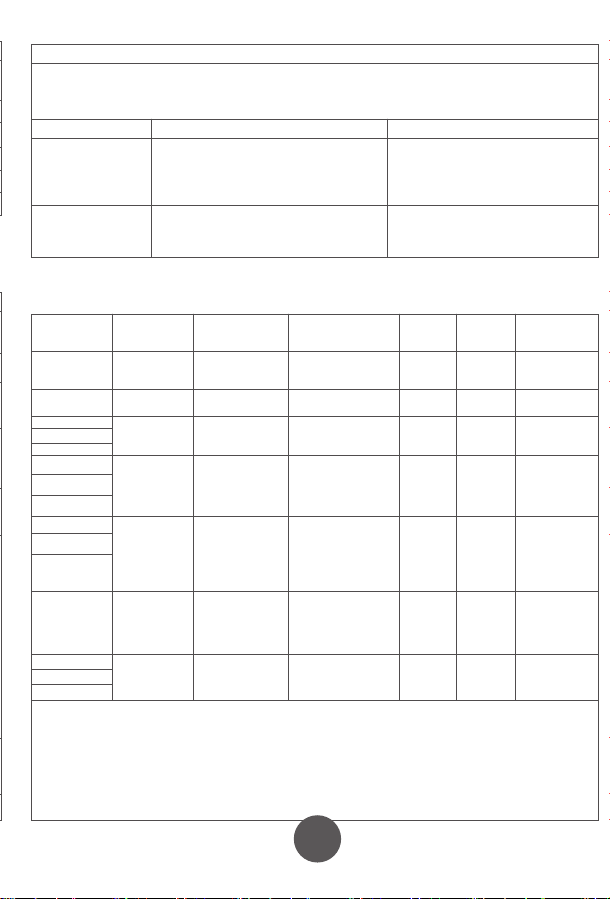
10
11
12
13
15
16 17
17
4. Fitting the NIBP Arm Cuff
7. Maintenance and Storage
8. Manufacturer’s EUT Declaration
Precautions for use
Service
Appendix . Product Specifications
5. Performing a blood pressure measurement
6. Memory function
7.1 Cleaning frequency
7.5 Waste disposal
7.2 Cleaning method
7.3 Storage
7.4 Notes
5.1 Preparing for measuring you blood pressure
How to interrupt the measurement
6.1 Viewing previous results
6.1.1 Recall the average of the last three results
6.1.2 Recall previous results
6.2 Clear the result memory
Ⅱ. Blood pressure classication instructions
Ⅲ. LCD Error message and the cause of error correspondence table
5.2 Operational steps to perform a blood pressure measurement
1)Insert the
connector on the cuff
tube into BLUE inlet on
the blood pressure
monitor
2)Open the
cuff enough to
put your arm
through.
3)Insert your arm into the cuff, with the tube closest to
your wrist.
Keep the instructions and other documents for future reference. Failure to follow the
instructions may result in inaccurate readings, product failure or damage or injury
which the importer and manufacturer will not accept liability for
If the blood pressure monitor becomes dirty, please clean the item using the instruction
in section 8.2. The cuff should be lightly cleaned before and after each use. If used by
multiple people, use a disposable tissue between the skin and the cuff.
Blood Pressure Monitor: Clean the blood pressure monitor using a soft dry cloth
for light cleaning. If heavier cleaning is required use a wet soft cloth with water or
neutral detergent, wring out excess water before cleaning the blood pressure
monitor.
Cuff: Wipe with 75% cleaning alcohol, and leave to dry.
When used in hospital, the blood pressure monitor and cuff should be wiped clean
with 75% alcohol after each use, dried and then disinfected by ultraviolet radiation.
Statement:
●The Arm type Blood Pressure Monitor should use the product in the electromagnetic environment
specied in the following table, otherwise it may cause abnormal operation of the product.
●The internal structure of the Arm type Blood Pressure Monitor adds magnetic rings, magnetic beads, and
conductive cloth and conductive spray paint to avoid electromagnetic interference, so as to prevent
adverse events to patients and operators due to electromagnetic interference.
●The arm type Blood Pressure Monitor is a table-top device,it is suitable for medical unit and home use.
●Warning: Use of the Arm type Blood Pressure Monitor adjacent to or stacked with other equipment
should be avoided because it could result in improper measurement.
●Warning:Use of accessories, transducers and cables other than those specied or provided by the
manufacturer of this equipment could result in increased electromagnetic emissions or decreased
electromagnetic immunity of this equipment and result in improper operation.
●Warning:Portable RF communications equipment (including peripherals such as antenna cables and
external antennas) should be used no closer than 30cm (12 inches) to any part of the Arm type blood
pressure monitor, including cables specied by the manufacturer. Otherwise, degradation of the
performance of this arm type blood pressure monitor may result.
This product can NOT be disposed of in normal household
waste. Please follow local regulations and guidance in to
disposal and recycling of this product, packaging and batteries.
The blood pressure monitor should be disposed of a waste
electrical material. Please recycle if you can.
Please prevent water or other liquids from entering the blood pressure
monitor. Do not use solvents to clean the blood pressure monitor.
Do not wet the cuff or clean the cuff with water.
Do not store the blood pressure monitor in the following places:
• Near water or in a moist environment, or near chemicals.
• In direct sunlight, high temperatures, dust or near corrosive gases
• Store flat where it will not experience vibration or shock.
• If stored for longer than 3 months, remove the battery to reduce the likelihood of
damage due to battery leakage.
●Do not store higher than 2m.
●Recalibration of the arm type blood pressure monitor is recommended once a year,
by the manufacturer or importer. Please contact us for details.
● If the performance is inconsistent with the description, stop using immediately and
contact us.
● Do not use this product if you are allergic to ABS.
● If used in an area with electromagnetic interference (e.g. near a mobile phone,
phone mast or electrical pylon) this may affect its accuracy.
● The product is suitable for professional use or domestic use.
● The correct use method is the key to the accuracy of measurement. Operators
should have certain knowledge of blood pressure. The operating environment shall
be in accordance with the instructions.
● Frequent and/or repeated measurements can cause injury to the patient due to
restricted blood flow.
● The effects of degraded sensors and electrodes, or loosened electrodes, can
degrade performance or cause other problems over time.
● Keep out of the reach of children and pets to avoid damage to the device.
● Do not use beyond the service life of the product, otherwise the accuracy of the
instrument will be affected
● The blood pressure monitor cannot be serviced and maintained by the user, please
contact us for this service.
● For service and support, please contact us.
4)Move the cuff up your arm until the ARTERY MARK is
located in the middle of your inner elbow, in line with your
middle finger .
5)The bottom of the cuff should be located 2cm-3cm from
above the fold of the inside of your elbow.
6)Adjust the tightness of the cuff around your arm and
secure using the Velcro. It should fit snugly, without
feeling tight.
1) You can measure blood pressure in either
arm, although left is normally used.
2) Remove thick clothing from around the arm,
rather than rolling it up.
3) Ideally sit at a table to measure your blood
pressure with your feet on the floor and elbow
and lower arm supported on the table.
4) Rest for a few minutes before taking a
measurement.
5) The height of the cuff should be in-line
with the heart.
6) The palm should be facing upwards, relaxed.
Measurements can be recorded in either mmHg and kPa, this example is in mmHg
which is the default setting.
● For the best results, measure in the same position, at the same time of day and with
the same arm.
● The location of the cuff will cause changes of measurement results
● Don't touch the machine, cuff or air tube during measurement.
● The body should be in a state of relaxation for 5 minutes before measurement and
relaxed during measurement
● Don't talk or move when you are measuring.
● Wait 2-3 minutes between measurements.
● Do not use mobile phones and other mobile devices in the vicinity of the machine.
1)Press the "START / STOP" key to
start a measurement. The machine
will automatically return to zero and
the arm cuff will start to inflate. Stay
still and relaxed.
2)The cuff will reach a stable
pressure and stop inflating. Air will
gradually be released from the cuff
and the pressure will decrease on
the screen and the heart icon will
start to flash. Stay still and relaxed.
3)After the measurement is complete, the cuff will deflate
completely and your blood pressure and heart rate readings will
be displayed on screen.
NOTE: your results will automatically be saved.
If you need to interrupt the measurement (for example, you feel uncomfortable) at any
time, press the "START / STOP" key, the machine will automatically deflate the cuff.
The blood pressure monitor will store 99 records for each of the two users. When 99
records have been stored, the oldest record will be overwritten. You can also see the
average of the last three results.
Taking additional measurements
5.3 Measurement troubleshooting
For the same user, please wait at least 2-3 minutes between measurements. This
allows the artery to restore to its normal state.
Anomalies Cause Correction
A high (low)
anomaly blood
pressure
measurements
No ination
Cu deates too
quickly
The cu is leaking Contact us for a new cu
The cu is not properly connected
to the machine
The cu is too lose round the arm
Machine does start after pressing Start / Stop button Check batteries / power connection and try again
Please connect correctly
Ret the cu according to the instructions
Cu may be incorrectly tted Ret the cu according to the instructions
Talking or moving during
measurement
Tight clothing could be
interrupting signal
Clear the arm of clothing and try again
Relax, stay still and don’t talk
Powers down during
measurement
Does not power up
Other anomalies
Batteries may be exhausted Change to new batteries
Check the batteries are in the right way
Batteries may be inserted the wrong way
Check the batteries
Change to new batteries
Please contact us
Please ensure you select the right user before
measurement to ensure the measurement is
saved to the correct user.
Click the memory button. The result shown is the average of
the last three results, indicated by “AVG” being shown in the
top-right corner of the screen.
When the average result is being displayed, click the
MEMORY key again. You will now see the latest result, click
again and it will show the next oldest result etc.
PLEASE NOTE: This deletes all results in the memory.
While in the memory recall mode, press and hold the
memory key for 5 seconds.
Guidance and manufacturer´s declaration – electromagnetic emission – for all
EQUIPMENT AND SYSTEMS
Guidance and manufacturer's declaration – electromagnetic immunity –
For all EQUIPMENT and SYSTEMS
Table 9 - Test specications for enclosure port immunity to RF wireless
communications equipment
Guidance and manufacturer´s declaration – electromagnetic immunity –
for EQUIPMENT and SYSTEM that are not LIFE-SUPPORTING
Guidance and manufacturer´s declaration – electromagnetic emission
The Arm type Blood Pressure Monitor is intended for use in the electromagnetic environment
specied below. The customer or the user of Arm type Blood Pressure Monitor should assure that it is
used in such an environment.
1
2
3
4
5
6
7
Emissions test Compliance
RF emissions CISPR 11
RF emissions CISPR 11
Harmonic emissions IEC 61000-3-2
Voltage uctuations / icker emissions IEC 61000-3-3
Group 1
Class B
N/A
N/A
Guidance and manufacturer’s declaration – electromagnetic immunity
The arm type blood pressure monitor is intended for use in the electromagnetic environment specied below.
The customer or the user of the arm type blood pressure monitor should assure that it is used in such an
environment.
Immunity test
Electrostatic
discharge (ESD)
IEC 61000-4-2
EN 60601
test level
Compliance level
Guidance and manufacturer´s declaration – electromagnetic immunity
The arm type blood pressure monitor is intended for use in the electromagnetic environment specied
below. The customer or the user of the arm type blood pressure monitor should assure that it is used in
such an environment.
Immunity test EN 60601 test level Compliance level
Conducted RF
IEC 61000-4-6
3 V
0, 15 MHz -80 MHz
6 V in ISM and amateur radio bands
Between 0, 15 MHz and 80 MHz
80 % AM at 1 kHz
3 V
0, 15 MHz -80 MHz
6 V in ISM and amateur radio bands
between 0, 15 MHz and 80 MHz
80 % AM at 1 kHz
Test frequency
(MHz)
Band
a)
(MHz)
Service
a)
Modulation
b)
Maximum
power
(W)
Distance
(m)
Immunity
TEST LEVEL
(V/m)
385 380 -390 TETRA 400
Pulse
modulation
b)
18 Hz
1,8 0.3 27
450 430 - 470
GMRS 460,
FRS 460
FMc) ± 5 kHz
deviation
2 0.3 28
710
745
780
810
870
930
1 720
1 845
1 970
5 240
5 500
5 785
2 450
704 - 787
800 - 960
1 700-1 990
2 400-9 570
5 100-5 800
Name Arm-type Blood Pressure Monitor
Model
Measurement Upper Arm
Static pressure measurement range:0-280 mmHg
Dynamic pressure measuring range:
systolic blood pressure :40-250mmHg
diastolicbloodpressure :30-200mmHg
NIBP
PR
NIBP
40-199 bpm
Accuracy
Power
Electrical parameters
Size
N.W.
Working Condition
Transport and storage
Condition
Temperature
+5ºC~40 ºC
Humidity 15%RH~85%RH
Atmospheric 86kPa~105kPa
Temperature -20ºC~+55ºC
Humidity
10%RH~95%RH
Atmospheric
Security Type
Duration of use
Internallypowered(When using an adapter, it belongs to class II,
Internal power supply), BF type application equipment
5 Years
About 30min
About 30min
Accessories
Adult armband: for arm circumference range: 22-32cm
Operator’s Manual
4 AA alkaline batteries(optional)
Adapter(optional) :
Input AC 100-240V 50/60Hz
Output DC6.0V. Adapter is part of blood pressure monitor
50kPa~105kPa
≤±3mm Hg(±0.4kPa)
PR
Working Voltage
Low electrical
parameters
Auto power-o
YK-BPA1:130.9*96.1*63.1mm
YK-BPA2:130.9*96.1*63.4mm
YK-BPA1:237g
YK-BPA2:238g
4 AA alkaline batteries, DC6.0V
±5%
6V
4.4V±0.2V showing low power
Power o automatically within 2 minutes without any operation
Measurement Range
YK-BPA1 、YK-BPA2
Display Segment LCD Display
Prevent into the liquid level
LTE Band 13,
17
GSM 800/900.
TETRA 800,
iDEN 820,
CDMA 850,
LTE Band 5
GSM 1800;
CDMA 1900;
GSM 1900;
DECT;
LTE Band 1, 3
4, 25; UMTS
Bluetooth,
WLAN,
802.11 b/g/n,
RFID 2450,
LTE Band 7
WLAN 802.11 a/n
Pulse
modulation
b)
217 Hz
Pulse
modulation
b)
18 Hz
Pulse modulation
b)
217 Hz
Pulse modulation
b)
217 Hz
Pulse
modulation
b)
217 Hz
0,2 0.3 9
2 0.3 28
2 0.3 28
2 0.3 28
0,2 0.3 9
Radiated RF
EM elds
IEC 61000-4-3
10 V/m
80 MHz -2,7 GHz
80 % AM at 1 kHz
10 V/m
80 MHz -2,7 GHz
80 % AM at 1 kHz
LCD High pressure Low pressure
Serious ≥180 ≥110
Moderate 160~179 100~109
Mild 140~159 90~99
little higher 130~139 85~89
Normal 120~129 80~84
Most suitable ≤119 ≤79
LCD Error message the cause of error
“E0 1”
“E0 2”
“E0 3”
“E0 4”
± 8 kV contact
± 15 kV air
± 8 kV contact
± 15kV air
Electrostatic
transient / burst
IEC 61000-4-4
± 2 kV for power
supply lines
± 1 kV for input/output
lines
± 2 kV for power supply lines
Surge
IEC 61000-4-5
± 1 kV dierential
mode
± 2 kV common mode
< 5 % UT
(>95 % dip in UT )
for 0.5 cycle
40 % UT
(60 % dip in UT )
for 5 cycles
70 % UT
(30 % dip in UT )
for 25 cycles
< 5 % UT
(>95 % dip in UT )
for 5 sec
±1kV dierential mode
Power frequency
(50/60 Hz)
magnetic eld
IEC 61000-4-8
30 A/m 30A/m
Voltage dips, short
interruptions and
voltage variations
on power supply
input lines
IEC 61000-4-11
< 5 % UT
(>95 % dip in UT )
for 0.5 cycle
40 % UT
(60 % dip in UT )
for 5 cycles
70 % UT
(30 % dip in UT )
for 25 cycles
< 5 % UT
(>95 % dip in UT )
for 5 sec
NOTE UT is the a. c. mains voltage prior to application of the test level.
NOTE:
If necessary to achieve the immunity test level, the distance between the transmitting antenna and the me
equipment or me system may be reduced to 1 m. The 1 m test distance is permitted by IEC 61000-4-3.
a) For some services, only the uplink frequencies are included.
b) The carrier shall be modulated using a 50 % duty cycle square wave signal.
c) As an alternative to FM modulation, 50 % pulse modulation at 18 Hz may be used because while it does not represent
actual modulation, it would be worst case.
In accordance with IEC 60601-1-2:2014, the blood pressure monitor complies with all relevant electromagnetic
compatibility (EMC) requirements. However, if the instructions are not followed, it may cause harmful interference
with other devices. While following the instructions should minimise the risk of interference, it cannot guarantee that
no interference will occur. If interference does occur, you can try the following methods to resolve it:
1) Increase the distance between this device and the other device.
2) Plug the two devices into separate power outlets.
Essential performance and basic safety tests should be conducted every two years. If your device requires testing,
please contact your provider or us. Testing should only be performed by an authorised provider.
1. One year free warranty period will be provided from the date of purchase from an authorised retailer.
2. Faults due to misuse or damage will xed for a reasonable fee, including but not limited to:
1)Malfunction caused by disassemble or modication of the product other than by an authorised repair centre.
2)Malfunction caused by dropping.
3)Malfunction caused by improper use or lack of reasonable care.
4)Malfunction caused by not following the operator’s manual.
5)Malfunction caused by natural disasters or war, such as ooding , re.
3. Please show your valid proof of purchase to use the warranty.
4. You will be responsible for the cost of sending your product our repair centre.
Table 1 Blood pressure classication instructions
Table 1 LCD Error message and the cause of error correspondence table
IP21
First characteristic numeral 2:
Against ingress of solid foreign objects:≥12.5mm diameter
Second characteristic numeral 1 Against ingress of water with harmful
eects: vertically dripping
If stored or used outside the
specied temperature and humidity
range, blood pressure will not work
properly.
Avoiding strong impact, direct
impact, exposure or rain when
Transporting.
Packed blood pressure monitor
should be stored in the condition
met the humidity and atmospheric
requirements,and non-corrosive
gases and ventilated room.
the time required for me
equipment to warm from
the minimum storage
temperature between uses
until it is ready for intended
use; and
the time required for me
equipment to cool from the
maximum storage
temperature between uses
until it is ready for intended
use
Pollution degree 2:Micro-environment with non-conductive pollution,expect
occasional conductivity caused by condensation
Cu
Class Ⅱ
Applied parts specied
Pollution degree
Over-voltage category
classication
Use specication
The RATED range of
CUFF pressure
0-300mmHg
≤±3 mmHg
≤3mmHg
1、Expected medical instructions:
The blood pressure monitor is used for measuring blood pressure and pulse
rate.
2、Expected patient population:
- Age: adult
-People who need to have their blood pressure measured
-The patient is an intended operator
3、Expected use or interaction with body parts tissue type:
Upper Arm
4、Expected user profile:
People who need blood pressure measurement , doctors, etc
5、Application environment:
Avoid electromagnetic interference
Extreme temperature
Avoid pollution and dust
Avoid direct sunlight, etc
6、Operating principle:
Using the oscillometric method of measurement, the blood pressure monitor
uses an air pump to inflate and pressurize the cuff, and use the inflatable cuff to
compress the arteries to make the arteries in a state of complete obstruction, and
then open the deflation valve to slowly decrease the pressure in the cuff .
Prolinx GmbH
Brehmstr. 56, 40239 Düsseldorf
Germany
The authorized representative of European Union:
Due to the arm or body movement, the high pressure value can not be
measured. Please tie the cu and measure it once
Due to the arm or body movement, the low pressure value can not be
measured. Please tie the cu and measure it once
The test result is abnormal, please measure again
Because the air leakage rate is too fast or the pulse signal is too weak, please
check the cu and measure it again after binding
Over the temperature
range of 10℃ C to 40℃
and the relative humidity
range of 15% to 85%
(non-condensing), the
maximum error for the
measurement of the CUFF
pressure at any point of the
NOMINAL measurement
range
When the SUPPLY MAINS to
the blood pressure monitor
is interrupted
The laboratory
reproducibility of the BLOOD
PRESSURE DETERMINATION
of the AUTOMATED
SPHYGMOMANOMETER
The blood pressure monitor meets isolation from the
supply mains requirements when in use and when o
Adapter as disconnecting device from supply mains,
please keep convenient position to operate.
the CUFF shall deate within 30 s to the values indicated in ≤15 mmHg, and any
indication of BLOOD PRESSURE shall be canceled
Note
If you move during measurement, your reading will be
inaccurate. Repeat the measurement after 2-3 minutes.
5.2 Arrhythmia detection
If an Irregular Heart Beat (IHB) from common arrhythmia is
detected during blood pressure measurement, the symbol to
the right will be displayed. The blood pressure monitor will
continue to function, but the results may not be accurate.
Please contact your physician as soon as possible.
If there are less than three results stored in the
memory then the average result will be calculated
from the results stored.
OxiPro Medical Ltd
Unit 3 Maidenhead Enterprise
Centre, Cordwallis Street,
Maidenhead, SL6 7BE. UK
Tel: 01628 290244
www.oxipro.io
UK & IE
Distributor
10
11
12
12
13
12
14
12
15
12
16
12
17
12
18
19
Xuzhou Yongkang Electronic Science Technology Co. Ltd,
1st & 2ndFloor, 6#01, 6#02, No. 6 Building 1st Phase Economic Development
Manufacturing Zone, LIANDO U Valley, No. 6 Leye Road, Xuzhou ETDZ,
221000 Xuzhou, P.R. China
TEL: +86-516-87892766 FAX: +86-516-87892766-606
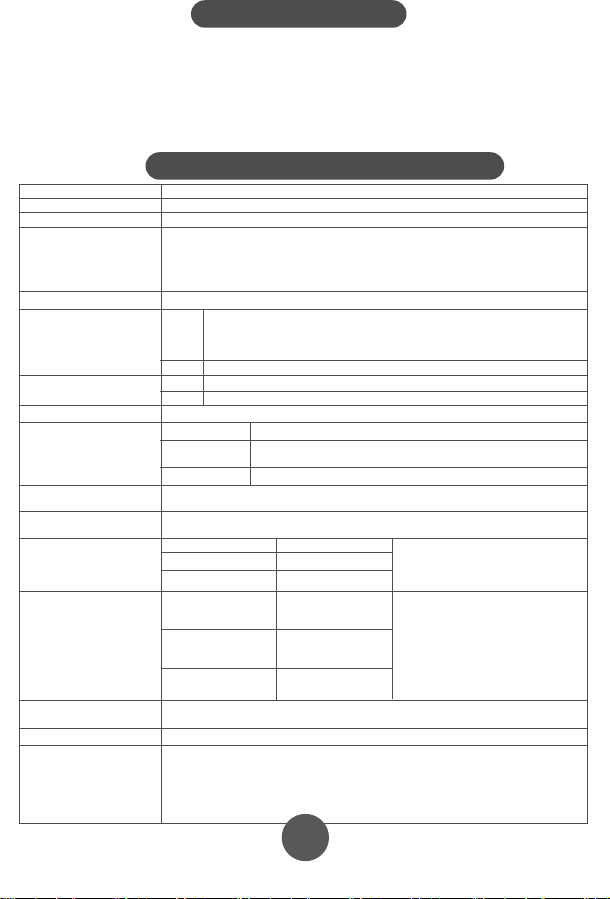
10
11
12
13
15
16 17
17
4. Fitting the NIBP Arm Cuff
7. Maintenance and Storage
8. Manufacturer’s EUT Declaration
Precautions for use
Service
Appendix . Product Specifications
5. Performing a blood pressure measurement
6. Memory function
7.1 Cleaning frequency
7.5 Waste disposal
7.2 Cleaning method
7.3 Storage
7.4 Notes
5.1 Preparing for measuring you blood pressure
How to interrupt the measurement
6.1 Viewing previous results
6.1.1 Recall the average of the last three results
6.1.2 Recall previous results
6.2 Clear the result memory
Ⅱ. Blood pressure classication instructions
Ⅲ. LCD Error message and the cause of error correspondence table
5.2 Operational steps to perform a blood pressure measurement
1)Insert the
connector on the cuff
tube into BLUE inlet on
the blood pressure
monitor
2)Open the
cuff enough to
put your arm
through.
3)Insert your arm into the cuff, with the tube closest to
your wrist.
Keep the instructions and other documents for future reference. Failure to follow the
instructions may result in inaccurate readings, product failure or damage or injury
which the importer and manufacturer will not accept liability for
If the blood pressure monitor becomes dirty, please clean the item using the instruction
in section 8.2. The cuff should be lightly cleaned before and after each use. If used by
multiple people, use a disposable tissue between the skin and the cuff.
Blood Pressure Monitor: Clean the blood pressure monitor using a soft dry cloth
for light cleaning. If heavier cleaning is required use a wet soft cloth with water or
neutral detergent, wring out excess water before cleaning the blood pressure
monitor.
Cuff: Wipe with 75% cleaning alcohol, and leave to dry.
When used in hospital, the blood pressure monitor and cuff should be wiped clean
with 75% alcohol after each use, dried and then disinfected by ultraviolet radiation.
Statement:
●The Arm type Blood Pressure Monitor should use the product in the electromagnetic environment
specied in the following table, otherwise it may cause abnormal operation of the product.
●The internal structure of the Arm type Blood Pressure Monitor adds magnetic rings, magnetic beads, and
conductive cloth and conductive spray paint to avoid electromagnetic interference, so as to prevent
adverse events to patients and operators due to electromagnetic interference.
●The arm type Blood Pressure Monitor is a table-top device,it is suitable for medical unit and home use.
●Warning: Use of the Arm type Blood Pressure Monitor adjacent to or stacked with other equipment
should be avoided because it could result in improper measurement.
●Warning:Use of accessories, transducers and cables other than those specied or provided by the
manufacturer of this equipment could result in increased electromagnetic emissions or decreased
electromagnetic immunity of this equipment and result in improper operation.
●Warning:Portable RF communications equipment (including peripherals such as antenna cables and
external antennas) should be used no closer than 30cm (12 inches) to any part of the Arm type blood
pressure monitor, including cables specied by the manufacturer. Otherwise, degradation of the
performance of this arm type blood pressure monitor may result.
This product can NOT be disposed of in normal household
waste. Please follow local regulations and guidance in to
disposal and recycling of this product, packaging and batteries.
The blood pressure monitor should be disposed of a waste
electrical material. Please recycle if you can.
Please prevent water or other liquids from entering the blood pressure
monitor. Do not use solvents to clean the blood pressure monitor.
Do not wet the cuff or clean the cuff with water.
Do not store the blood pressure monitor in the following places:
• Near water or in a moist environment, or near chemicals.
• In direct sunlight, high temperatures, dust or near corrosive gases
• Store flat where it will not experience vibration or shock.
• If stored for longer than 3 months, remove the battery to reduce the likelihood of
damage due to battery leakage.
●Do not store higher than 2m.
●Recalibration of the arm type blood pressure monitor is recommended once a year,
by the manufacturer or importer. Please contact us for details.
● If the performance is inconsistent with the description, stop using immediately and
contact us.
● Do not use this product if you are allergic to ABS.
● If used in an area with electromagnetic interference (e.g. near a mobile phone,
phone mast or electrical pylon) this may affect its accuracy.
● The product is suitable for professional use or domestic use.
● The correct use method is the key to the accuracy of measurement. Operators
should have certain knowledge of blood pressure. The operating environment shall
be in accordance with the instructions.
● Frequent and/or repeated measurements can cause injury to the patient due to
restricted blood flow.
● The effects of degraded sensors and electrodes, or loosened electrodes, can
degrade performance or cause other problems over time.
● Keep out of the reach of children and pets to avoid damage to the device.
● Do not use beyond the service life of the product, otherwise the accuracy of the
instrument will be affected
● The blood pressure monitor cannot be serviced and maintained by the user, please
contact us for this service.
● For service and support, please contact us.
4)Move the cuff up your arm until the ARTERY MARK is
located in the middle of your inner elbow, in line with your
middle finger .
5)The bottom of the cuff should be located 2cm-3cm from
above the fold of the inside of your elbow.
6)Adjust the tightness of the cuff around your arm and
secure using the Velcro. It should fit snugly, without
feeling tight.
1) You can measure blood pressure in either
arm, although left is normally used.
2) Remove thick clothing from around the arm,
rather than rolling it up.
3) Ideally sit at a table to measure your blood
pressure with your feet on the floor and elbow
and lower arm supported on the table.
4) Rest for a few minutes before taking a
measurement.
5) The height of the cuff should be in-line
with the heart.
6) The palm should be facing upwards, relaxed.
Measurements can be recorded in either mmHg and kPa, this example is in mmHg
which is the default setting.
● For the best results, measure in the same position, at the same time of day and with
the same arm.
● The location of the cuff will cause changes of measurement results
● Don't touch the machine, cuff or air tube during measurement.
● The body should be in a state of relaxation for 5 minutes before measurement and
relaxed during measurement
● Don't talk or move when you are measuring.
● Wait 2-3 minutes between measurements.
● Do not use mobile phones and other mobile devices in the vicinity of the machine.
1)Press the "START / STOP" key to
start a measurement. The machine
will automatically return to zero and
the arm cuff will start to inflate. Stay
still and relaxed.
2)The cuff will reach a stable
pressure and stop inflating. Air will
gradually be released from the cuff
and the pressure will decrease on
the screen and the heart icon will
start to flash. Stay still and relaxed.
3)After the measurement is complete, the cuff will deflate
completely and your blood pressure and heart rate readings will
be displayed on screen.
NOTE: your results will automatically be saved.
If you need to interrupt the measurement (for example, you feel uncomfortable) at any
time, press the "START / STOP" key, the machine will automatically deflate the cuff.
The blood pressure monitor will store 99 records for each of the two users. When 99
records have been stored, the oldest record will be overwritten. You can also see the
average of the last three results.
Taking additional measurements
5.3 Measurement troubleshooting
For the same user, please wait at least 2-3 minutes between measurements. This
allows the artery to restore to its normal state.
Anomalies Cause Correction
A high (low)
anomaly blood
pressure
measurements
No ination
Cu deates too
quickly
The cu is leaking Contact us for a new cu
The cu is not properly connected
to the machine
The cu is too lose round the arm
Machine does start after pressing Start / Stop button Check batteries / power connection and try again
Please connect correctly
Ret the cu according to the instructions
Cu may be incorrectly tted Ret the cu according to the instructions
Talking or moving during
measurement
Tight clothing could be
interrupting signal
Clear the arm of clothing and try again
Relax, stay still and don’t talk
Powers down during
measurement
Does not power up
Other anomalies
Batteries may be exhausted Change to new batteries
Check the batteries are in the right way
Batteries may be inserted the wrong way
Check the batteries
Change to new batteries
Please contact us
Please ensure you select the right user before
measurement to ensure the measurement is
saved to the correct user.
Click the memory button. The result shown is the average of
the last three results, indicated by “AVG” being shown in the
top-right corner of the screen.
When the average result is being displayed, click the
MEMORY key again. You will now see the latest result, click
again and it will show the next oldest result etc.
PLEASE NOTE: This deletes all results in the memory.
While in the memory recall mode, press and hold the
memory key for 5 seconds.
Guidance and manufacturer´s declaration – electromagnetic emission – for all
EQUIPMENT AND SYSTEMS
Guidance and manufacturer's declaration – electromagnetic immunity –
For all EQUIPMENT and SYSTEMS
Table 9 - Test specications for enclosure port immunity to RF wireless
communications equipment
Guidance and manufacturer´s declaration – electromagnetic immunity –
for EQUIPMENT and SYSTEM that are not LIFE-SUPPORTING
Guidance and manufacturer´s declaration – electromagnetic emission
The Arm type Blood Pressure Monitor is intended for use in the electromagnetic environment
specied below. The customer or the user of Arm type Blood Pressure Monitor should assure that it is
used in such an environment.
1
2
3
4
5
6
7
Emissions test Compliance
RF emissions CISPR 11
RF emissions CISPR 11
Harmonic emissions IEC 61000-3-2
Voltage uctuations / icker emissions IEC 61000-3-3
Group 1
Class B
N/A
N/A
Guidance and manufacturer’s declaration – electromagnetic immunity
The arm type blood pressure monitor is intended for use in the electromagnetic environment specied below.
The customer or the user of the arm type blood pressure monitor should assure that it is used in such an
environment.
Immunity test
Electrostatic
discharge (ESD)
IEC 61000-4-2
EN 60601
test level
Compliance level
Guidance and manufacturer´s declaration – electromagnetic immunity
The arm type blood pressure monitor is intended for use in the electromagnetic environment specied
below. The customer or the user of the arm type blood pressure monitor should assure that it is used in
such an environment.
Immunity test EN 60601 test level Compliance level
Conducted RF
IEC 61000-4-6
3 V
0, 15 MHz -80 MHz
6 V in ISM and amateur radio bands
Between 0, 15 MHz and 80 MHz
80 % AM at 1 kHz
3 V
0, 15 MHz -80 MHz
6 V in ISM and amateur radio bands
between 0, 15 MHz and 80 MHz
80 % AM at 1 kHz
Test frequency
(MHz)
Band
a)
(MHz)
Service
a)
Modulation
b)
Maximum
power
(W)
Distance
(m)
Immunity
TEST LEVEL
(V/m)
385 380 -390 TETRA 400
Pulse
modulation
b)
18 Hz
1,8 0.3 27
450 430 - 470
GMRS 460,
FRS 460
FMc) ± 5 kHz
deviation
2 0.3 28
710
745
780
810
870
930
1 720
1 845
1 970
5 240
5 500
5 785
2 450
704 - 787
800 - 960
1 700-1 990
2 400-9 570
5 100-5 800
Name Arm-type Blood Pressure Monitor
Model
Measurement Upper Arm
Static pressure measurement range:0-280 mmHg
Dynamic pressure measuring range:
systolic blood pressure :40-250mmHg
diastolicbloodpressure :30-200mmHg
NIBP
PR
NIBP
40-199 bpm
Accuracy
Power
Electrical parameters
Size
N.W.
Working Condition
Transport and storage
Condition
Temperature
+5ºC~40 ºC
Humidity 15%RH~85%RH
Atmospheric 86kPa~105kPa
Temperature -20ºC~+55ºC
Humidity
10%RH~95%RH
Atmospheric
Security Type
Duration of use
Internallypowered(When using an adapter, it belongs to class II,
Internal power supply), BF type application equipment
5 Years
About 30min
About 30min
Accessories
Adult armband: for arm circumference range: 22-32cm
Operator’s Manual
4 AA alkaline batteries(optional)
Adapter(optional) :
Input AC 100-240V 50/60Hz
Output DC6.0V. Adapter is part of blood pressure monitor
50kPa~105kPa
≤±3mm Hg(±0.4kPa)
PR
Working Voltage
Low electrical
parameters
Auto power-o
YK-BPA1:130.9*96.1*63.1mm
YK-BPA2:130.9*96.1*63.4mm
YK-BPA1:237g
YK-BPA2:238g
4 AA alkaline batteries, DC6.0V
±5%
6V
4.4V±0.2V showing low power
Power o automatically within 2 minutes without any operation
Measurement Range
YK-BPA1 、YK-BPA2
Display Segment LCD Display
Prevent into the liquid level
LTE Band 13,
17
GSM 800/900.
TETRA 800,
iDEN 820,
CDMA 850,
LTE Band 5
GSM 1800;
CDMA 1900;
GSM 1900;
DECT;
LTE Band 1, 3
4, 25; UMTS
Bluetooth,
WLAN,
802.11 b/g/n,
RFID 2450,
LTE Band 7
WLAN 802.11 a/n
Pulse
modulation
b)
217 Hz
Pulse
modulation
b)
18 Hz
Pulse modulation
b)
217 Hz
Pulse modulation
b)
217 Hz
Pulse
modulation
b)
217 Hz
0,2 0.3 9
2 0.3 28
2 0.3 28
2 0.3 28
0,2 0.3 9
Radiated RF
EM elds
IEC 61000-4-3
10 V/m
80 MHz -2,7 GHz
80 % AM at 1 kHz
10 V/m
80 MHz -2,7 GHz
80 % AM at 1 kHz
LCD High pressure Low pressure
Serious ≥180 ≥110
Moderate 160~179 100~109
Mild 140~159 90~99
little higher 130~139 85~89
Normal 120~129 80~84
Most suitable ≤119 ≤79
LCD Error message the cause of error
“E0 1”
“E0 2”
“E0 3”
“E0 4”
± 8 kV contact
± 15 kV air
± 8 kV contact
± 15kV air
Electrostatic
transient / burst
IEC 61000-4-4
± 2 kV for power
supply lines
± 1 kV for input/output
lines
± 2 kV for power supply lines
Surge
IEC 61000-4-5
± 1 kV dierential
mode
± 2 kV common mode
< 5 % UT
(>95 % dip in UT )
for 0.5 cycle
40 % UT
(60 % dip in UT )
for 5 cycles
70 % UT
(30 % dip in UT )
for 25 cycles
< 5 % UT
(>95 % dip in UT )
for 5 sec
±1kV dierential mode
Power frequency
(50/60 Hz)
magnetic eld
IEC 61000-4-8
30 A/m 30A/m
Voltage dips, short
interruptions and
voltage variations
on power supply
input lines
IEC 61000-4-11
< 5 % UT
(>95 % dip in UT )
for 0.5 cycle
40 % UT
(60 % dip in UT )
for 5 cycles
70 % UT
(30 % dip in UT )
for 25 cycles
< 5 % UT
(>95 % dip in UT )
for 5 sec
NOTE UT is the a. c. mains voltage prior to application of the test level.
NOTE:
If necessary to achieve the immunity test level, the distance between the transmitting antenna and the me
equipment or me system may be reduced to 1 m. The 1 m test distance is permitted by IEC 61000-4-3.
a) For some services, only the uplink frequencies are included.
b) The carrier shall be modulated using a 50 % duty cycle square wave signal.
c) As an alternative to FM modulation, 50 % pulse modulation at 18 Hz may be used because while it does not represent
actual modulation, it would be worst case.
In accordance with IEC 60601-1-2:2014, the blood pressure monitor complies with all relevant electromagnetic
compatibility (EMC) requirements. However, if the instructions are not followed, it may cause harmful interference
with other devices. While following the instructions should minimise the risk of interference, it cannot guarantee that
no interference will occur. If interference does occur, you can try the following methods to resolve it:
1) Increase the distance between this device and the other device.
2) Plug the two devices into separate power outlets.
Essential performance and basic safety tests should be conducted every two years. If your device requires testing,
please contact your provider or us. Testing should only be performed by an authorised provider.
1. One year free warranty period will be provided from the date of purchase from an authorised retailer.
2. Faults due to misuse or damage will xed for a reasonable fee, including but not limited to:
1)Malfunction caused by disassemble or modication of the product other than by an authorised repair centre.
2)Malfunction caused by dropping.
3)Malfunction caused by improper use or lack of reasonable care.
4)Malfunction caused by not following the operator’s manual.
5)Malfunction caused by natural disasters or war, such as ooding , re.
3. Please show your valid proof of purchase to use the warranty.
4. You will be responsible for the cost of sending your product our repair centre.
Table 1 Blood pressure classication instructions
Table 1 LCD Error message and the cause of error correspondence table
IP21
First characteristic numeral 2:
Against ingress of solid foreign objects:≥12.5mm diameter
Second characteristic numeral 1 Against ingress of water with harmful
eects: vertically dripping
If stored or used outside the
specied temperature and humidity
range, blood pressure will not work
properly.
Avoiding strong impact, direct
impact, exposure or rain when
Transporting.
Packed blood pressure monitor
should be stored in the condition
met the humidity and atmospheric
requirements,and non-corrosive
gases and ventilated room.
the time required for me
equipment to warm from
the minimum storage
temperature between uses
until it is ready for intended
use; and
the time required for me
equipment to cool from the
maximum storage
temperature between uses
until it is ready for intended
use
Pollution degree 2:Micro-environment with non-conductive pollution,expect
occasional conductivity caused by condensation
Cu
Class Ⅱ
Applied parts specied
Pollution degree
Over-voltage category
classication
Use specication
The RATED range of
CUFF pressure
0-300mmHg
≤±3 mmHg
≤3mmHg
1、Expected medical instructions:
The blood pressure monitor is used for measuring blood pressure and pulse
rate.
2、Expected patient population:
- Age: adult
-People who need to have their blood pressure measured
-The patient is an intended operator
3、Expected use or interaction with body parts tissue type:
Upper Arm
4、Expected user profile:
People who need blood pressure measurement , doctors, etc
5、Application environment:
Avoid electromagnetic interference
Extreme temperature
Avoid pollution and dust
Avoid direct sunlight, etc
6、Operating principle:
Using the oscillometric method of measurement, the blood pressure monitor
uses an air pump to inflate and pressurize the cuff, and use the inflatable cuff to
compress the arteries to make the arteries in a state of complete obstruction, and
then open the deflation valve to slowly decrease the pressure in the cuff .
Prolinx GmbH
Brehmstr. 56, 40239 Düsseldorf
Germany
The authorized representative of European Union:
Due to the arm or body movement, the high pressure value can not be
measured. Please tie the cu and measure it once
Due to the arm or body movement, the low pressure value can not be
measured. Please tie the cu and measure it once
The test result is abnormal, please measure again
Because the air leakage rate is too fast or the pulse signal is too weak, please
check the cu and measure it again after binding
Over the temperature
range of 10℃ C to 40℃
and the relative humidity
range of 15% to 85%
(non-condensing), the
maximum error for the
measurement of the CUFF
pressure at any point of the
NOMINAL measurement
range
When the SUPPLY MAINS to
the blood pressure monitor
is interrupted
The laboratory
reproducibility of the BLOOD
PRESSURE DETERMINATION
of the AUTOMATED
SPHYGMOMANOMETER
The blood pressure monitor meets isolation from the
supply mains requirements when in use and when o
Adapter as disconnecting device from supply mains,
please keep convenient position to operate.
the CUFF shall deate within 30 s to the values indicated in ≤15 mmHg, and any
indication of BLOOD PRESSURE shall be canceled
Note
If you move during measurement, your reading will be
inaccurate. Repeat the measurement after 2-3 minutes.
5.2 Arrhythmia detection
If an Irregular Heart Beat (IHB) from common arrhythmia is
detected during blood pressure measurement, the symbol to
the right will be displayed. The blood pressure monitor will
continue to function, but the results may not be accurate.
Please contact your physician as soon as possible.
If there are less than three results stored in the
memory then the average result will be calculated
from the results stored.
OxiPro Medical Ltd
Unit 3 Maidenhead Enterprise
Centre, Cordwallis Street,
Maidenhead, SL6 7BE. UK
Tel: 01628 290244
www.oxipro.io
UK & IE
Distributor
10
11
12
12
13
12
14
12
15
12
16
12
17
12
18
19
Xuzhou Yongkang Electronic Science Technology Co. Ltd,
1st & 2ndFloor, 6#01, 6#02, No. 6 Building 1st Phase Economic Development
Manufacturing Zone, LIANDO U Valley, No. 6 Leye Road, Xuzhou ETDZ,
221000 Xuzhou, P.R. China
TEL: +86-516-87892766 FAX: +86-516-87892766-606
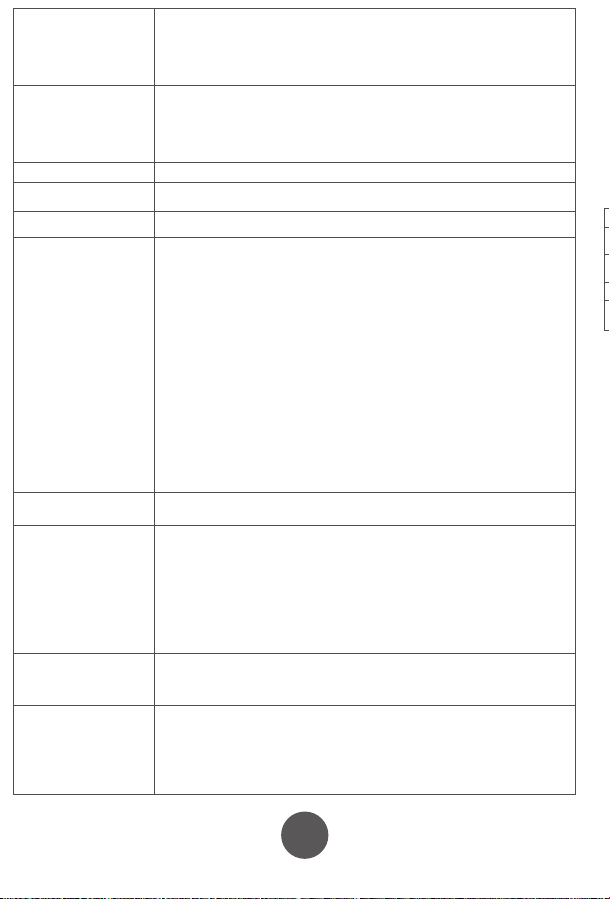
10
11
12
13
15
16 17
17
4. Fitting the NIBP Arm Cuff
7. Maintenance and Storage
8. Manufacturer’s EUT Declaration
Precautions for use
Service
Appendix . Product Specifications
5. Performing a blood pressure measurement
6. Memory function
7.1 Cleaning frequency
7.5 Waste disposal
7.2 Cleaning method
7.3 Storage
7.4 Notes
5.1 Preparing for measuring you blood pressure
How to interrupt the measurement
6.1 Viewing previous results
6.1.1 Recall the average of the last three results
6.1.2 Recall previous results
6.2 Clear the result memory
Ⅱ. Blood pressure classication instructions
Ⅲ. LCD Error message and the cause of error correspondence table
5.2 Operational steps to perform a blood pressure measurement
1)Insert the
connector on the cuff
tube into BLUE inlet on
the blood pressure
monitor
2)Open the
cuff enough to
put your arm
through.
3)Insert your arm into the cuff, with the tube closest to
your wrist.
Keep the instructions and other documents for future reference. Failure to follow the
instructions may result in inaccurate readings, product failure or damage or injury
which the importer and manufacturer will not accept liability for
If the blood pressure monitor becomes dirty, please clean the item using the instruction
in section 8.2. The cuff should be lightly cleaned before and after each use. If used by
multiple people, use a disposable tissue between the skin and the cuff.
Blood Pressure Monitor: Clean the blood pressure monitor using a soft dry cloth
for light cleaning. If heavier cleaning is required use a wet soft cloth with water or
neutral detergent, wring out excess water before cleaning the blood pressure
monitor.
Cuff: Wipe with 75% cleaning alcohol, and leave to dry.
When used in hospital, the blood pressure monitor and cuff should be wiped clean
with 75% alcohol after each use, dried and then disinfected by ultraviolet radiation.
Statement:
●The Arm type Blood Pressure Monitor should use the product in the electromagnetic environment
specied in the following table, otherwise it may cause abnormal operation of the product.
●The internal structure of the Arm type Blood Pressure Monitor adds magnetic rings, magnetic beads, and
conductive cloth and conductive spray paint to avoid electromagnetic interference, so as to prevent
adverse events to patients and operators due to electromagnetic interference.
●The arm type Blood Pressure Monitor is a table-top device,it is suitable for medical unit and home use.
●Warning: Use of the Arm type Blood Pressure Monitor adjacent to or stacked with other equipment
should be avoided because it could result in improper measurement.
●Warning:Use of accessories, transducers and cables other than those specied or provided by the
manufacturer of this equipment could result in increased electromagnetic emissions or decreased
electromagnetic immunity of this equipment and result in improper operation.
●Warning:Portable RF communications equipment (including peripherals such as antenna cables and
external antennas) should be used no closer than 30cm (12 inches) to any part of the Arm type blood
pressure monitor, including cables specied by the manufacturer. Otherwise, degradation of the
performance of this arm type blood pressure monitor may result.
This product can NOT be disposed of in normal household
waste. Please follow local regulations and guidance in to
disposal and recycling of this product, packaging and batteries.
The blood pressure monitor should be disposed of a waste
electrical material. Please recycle if you can.
Please prevent water or other liquids from entering the blood pressure
monitor. Do not use solvents to clean the blood pressure monitor.
Do not wet the cuff or clean the cuff with water.
Do not store the blood pressure monitor in the following places:
• Near water or in a moist environment, or near chemicals.
• In direct sunlight, high temperatures, dust or near corrosive gases
• Store flat where it will not experience vibration or shock.
• If stored for longer than 3 months, remove the battery to reduce the likelihood of
damage due to battery leakage.
●Do not store higher than 2m.
●Recalibration of the arm type blood pressure monitor is recommended once a year,
by the manufacturer or importer. Please contact us for details.
● If the performance is inconsistent with the description, stop using immediately and
contact us.
● Do not use this product if you are allergic to ABS.
● If used in an area with electromagnetic interference (e.g. near a mobile phone,
phone mast or electrical pylon) this may affect its accuracy.
● The product is suitable for professional use or domestic use.
● The correct use method is the key to the accuracy of measurement. Operators
should have certain knowledge of blood pressure. The operating environment shall
be in accordance with the instructions.
● Frequent and/or repeated measurements can cause injury to the patient due to
restricted blood flow.
● The effects of degraded sensors and electrodes, or loosened electrodes, can
degrade performance or cause other problems over time.
● Keep out of the reach of children and pets to avoid damage to the device.
● Do not use beyond the service life of the product, otherwise the accuracy of the
instrument will be affected
● The blood pressure monitor cannot be serviced and maintained by the user, please
contact us for this service.
● For service and support, please contact us.
4)Move the cuff up your arm until the ARTERY MARK is
located in the middle of your inner elbow, in line with your
middle finger .
5)The bottom of the cuff should be located 2cm-3cm from
above the fold of the inside of your elbow.
6)Adjust the tightness of the cuff around your arm and
secure using the Velcro. It should fit snugly, without
feeling tight.
1) You can measure blood pressure in either
arm, although left is normally used.
2) Remove thick clothing from around the arm,
rather than rolling it up.
3) Ideally sit at a table to measure your blood
pressure with your feet on the floor and elbow
and lower arm supported on the table.
4) Rest for a few minutes before taking a
measurement.
5) The height of the cuff should be in-line
with the heart.
6) The palm should be facing upwards, relaxed.
Measurements can be recorded in either mmHg and kPa, this example is in mmHg
which is the default setting.
● For the best results, measure in the same position, at the same time of day and with
the same arm.
● The location of the cuff will cause changes of measurement results
● Don't touch the machine, cuff or air tube during measurement.
● The body should be in a state of relaxation for 5 minutes before measurement and
relaxed during measurement
● Don't talk or move when you are measuring.
● Wait 2-3 minutes between measurements.
● Do not use mobile phones and other mobile devices in the vicinity of the machine.
1)Press the "START / STOP" key to
start a measurement. The machine
will automatically return to zero and
the arm cuff will start to inflate. Stay
still and relaxed.
2)The cuff will reach a stable
pressure and stop inflating. Air will
gradually be released from the cuff
and the pressure will decrease on
the screen and the heart icon will
start to flash. Stay still and relaxed.
3)After the measurement is complete, the cuff will deflate
completely and your blood pressure and heart rate readings will
be displayed on screen.
NOTE: your results will automatically be saved.
If you need to interrupt the measurement (for example, you feel uncomfortable) at any
time, press the "START / STOP" key, the machine will automatically deflate the cuff.
The blood pressure monitor will store 99 records for each of the two users. When 99
records have been stored, the oldest record will be overwritten. You can also see the
average of the last three results.
Taking additional measurements
5.3 Measurement troubleshooting
For the same user, please wait at least 2-3 minutes between measurements. This
allows the artery to restore to its normal state.
Anomalies Cause Correction
A high (low)
anomaly blood
pressure
measurements
No ination
Cu deates too
quickly
The cu is leaking Contact us for a new cu
The cu is not properly connected
to the machine
The cu is too lose round the arm
Machine does start after pressing Start / Stop button Check batteries / power connection and try again
Please connect correctly
Ret the cu according to the instructions
Cu may be incorrectly tted Ret the cu according to the instructions
Talking or moving during
measurement
Tight clothing could be
interrupting signal
Clear the arm of clothing and try again
Relax, stay still and don’t talk
Powers down during
measurement
Does not power up
Other anomalies
Batteries may be exhausted Change to new batteries
Check the batteries are in the right way
Batteries may be inserted the wrong way
Check the batteries
Change to new batteries
Please contact us
Please ensure you select the right user before
measurement to ensure the measurement is
saved to the correct user.
Click the memory button. The result shown is the average of
the last three results, indicated by “AVG” being shown in the
top-right corner of the screen.
When the average result is being displayed, click the
MEMORY key again. You will now see the latest result, click
again and it will show the next oldest result etc.
PLEASE NOTE: This deletes all results in the memory.
While in the memory recall mode, press and hold the
memory key for 5 seconds.
Guidance and manufacturer´s declaration – electromagnetic emission – for all
EQUIPMENT AND SYSTEMS
Guidance and manufacturer's declaration – electromagnetic immunity –
For all EQUIPMENT and SYSTEMS
Table 9 - Test specications for enclosure port immunity to RF wireless
communications equipment
Guidance and manufacturer´s declaration – electromagnetic immunity –
for EQUIPMENT and SYSTEM that are not LIFE-SUPPORTING
Guidance and manufacturer´s declaration – electromagnetic emission
The Arm type Blood Pressure Monitor is intended for use in the electromagnetic environment
specied below. The customer or the user of Arm type Blood Pressure Monitor should assure that it is
used in such an environment.
1
2
3
4
5
6
7
Emissions test Compliance
RF emissions CISPR 11
RF emissions CISPR 11
Harmonic emissions IEC 61000-3-2
Voltage uctuations / icker emissions IEC 61000-3-3
Group 1
Class B
N/A
N/A
Guidance and manufacturer’s declaration – electromagnetic immunity
The arm type blood pressure monitor is intended for use in the electromagnetic environment specied below.
The customer or the user of the arm type blood pressure monitor should assure that it is used in such an
environment.
Immunity test
Electrostatic
discharge (ESD)
IEC 61000-4-2
EN 60601
test level
Compliance level
Guidance and manufacturer´s declaration – electromagnetic immunity
The arm type blood pressure monitor is intended for use in the electromagnetic environment specied
below. The customer or the user of the arm type blood pressure monitor should assure that it is used in
such an environment.
Immunity test EN 60601 test level Compliance level
Conducted RF
IEC 61000-4-6
3 V
0, 15 MHz -80 MHz
6 V in ISM and amateur radio bands
Between 0, 15 MHz and 80 MHz
80 % AM at 1 kHz
3 V
0, 15 MHz -80 MHz
6 V in ISM and amateur radio bands
between 0, 15 MHz and 80 MHz
80 % AM at 1 kHz
Test frequency
(MHz)
Band
a)
(MHz)
Service
a)
Modulation
b)
Maximum
power
(W)
Distance
(m)
Immunity
TEST LEVEL
(V/m)
385 380 -390 TETRA 400
Pulse
modulation
b)
18 Hz
1,8 0.3 27
450 430 - 470
GMRS 460,
FRS 460
FMc) ± 5 kHz
deviation
2 0.3 28
710
745
780
810
870
930
1 720
1 845
1 970
5 240
5 500
5 785
2 450
704 - 787
800 - 960
1 700-1 990
2 400-9 570
5 100-5 800
Name Arm-type Blood Pressure Monitor
Model
Measurement Upper Arm
Static pressure measurement range:0-280 mmHg
Dynamic pressure measuring range:
systolic blood pressure :40-250mmHg
diastolicbloodpressure :30-200mmHg
NIBP
PR
NIBP
40-199 bpm
Accuracy
Power
Electrical parameters
Size
N.W.
Working Condition
Transport and storage
Condition
Temperature
+5ºC~40 ºC
Humidity 15%RH~85%RH
Atmospheric 86kPa~105kPa
Temperature -20ºC~+55ºC
Humidity
10%RH~95%RH
Atmospheric
Security Type
Duration of use
Internallypowered(When using an adapter, it belongs to class II,
Internal power supply), BF type application equipment
5 Years
About 30min
About 30min
Accessories
Adult armband: for arm circumference range: 22-32cm
Operator’s Manual
4 AA alkaline batteries(optional)
Adapter(optional) :
Input AC 100-240V 50/60Hz
Output DC6.0V. Adapter is part of blood pressure monitor
50kPa~105kPa
≤±3mm Hg(±0.4kPa)
PR
Working Voltage
Low electrical
parameters
Auto power-o
YK-BPA1:130.9*96.1*63.1mm
YK-BPA2:130.9*96.1*63.4mm
YK-BPA1:237g
YK-BPA2:238g
4 AA alkaline batteries, DC6.0V
±5%
6V
4.4V±0.2V showing low power
Power o automatically within 2 minutes without any operation
Measurement Range
YK-BPA1 、YK-BPA2
Display Segment LCD Display
Prevent into the liquid level
LTE Band 13,
17
GSM 800/900.
TETRA 800,
iDEN 820,
CDMA 850,
LTE Band 5
GSM 1800;
CDMA 1900;
GSM 1900;
DECT;
LTE Band 1, 3
4, 25; UMTS
Bluetooth,
WLAN,
802.11 b/g/n,
RFID 2450,
LTE Band 7
WLAN 802.11 a/n
Pulse
modulation
b)
217 Hz
Pulse
modulation
b)
18 Hz
Pulse modulation
b)
217 Hz
Pulse modulation
b)
217 Hz
Pulse
modulation
b)
217 Hz
0,2 0.3 9
2 0.3 28
2 0.3 28
2 0.3 28
0,2 0.3 9
Radiated RF
EM elds
IEC 61000-4-3
10 V/m
80 MHz -2,7 GHz
80 % AM at 1 kHz
10 V/m
80 MHz -2,7 GHz
80 % AM at 1 kHz
LCD High pressure Low pressure
Serious ≥180 ≥110
Moderate 160~179 100~109
Mild 140~159 90~99
little higher 130~139 85~89
Normal 120~129 80~84
Most suitable ≤119 ≤79
LCD Error message the cause of error
“E0 1”
“E0 2”
“E0 3”
“E0 4”
± 8 kV contact
± 15 kV air
± 8 kV contact
± 15kV air
Electrostatic
transient / burst
IEC 61000-4-4
± 2 kV for power
supply lines
± 1 kV for input/output
lines
± 2 kV for power supply lines
Surge
IEC 61000-4-5
± 1 kV dierential
mode
± 2 kV common mode
< 5 % UT
(>95 % dip in UT )
for 0.5 cycle
40 % UT
(60 % dip in UT )
for 5 cycles
70 % UT
(30 % dip in UT )
for 25 cycles
< 5 % UT
(>95 % dip in UT )
for 5 sec
±1kV dierential mode
Power frequency
(50/60 Hz)
magnetic eld
IEC 61000-4-8
30 A/m 30A/m
Voltage dips, short
interruptions and
voltage variations
on power supply
input lines
IEC 61000-4-11
< 5 % UT
(>95 % dip in UT )
for 0.5 cycle
40 % UT
(60 % dip in UT )
for 5 cycles
70 % UT
(30 % dip in UT )
for 25 cycles
< 5 % UT
(>95 % dip in UT )
for 5 sec
NOTE UT is the a. c. mains voltage prior to application of the test level.
NOTE:
If necessary to achieve the immunity test level, the distance between the transmitting antenna and the me
equipment or me system may be reduced to 1 m. The 1 m test distance is permitted by IEC 61000-4-3.
a) For some services, only the uplink frequencies are included.
b) The carrier shall be modulated using a 50 % duty cycle square wave signal.
c) As an alternative to FM modulation, 50 % pulse modulation at 18 Hz may be used because while it does not represent
actual modulation, it would be worst case.
In accordance with IEC 60601-1-2:2014, the blood pressure monitor complies with all relevant electromagnetic
compatibility (EMC) requirements. However, if the instructions are not followed, it may cause harmful interference
with other devices. While following the instructions should minimise the risk of interference, it cannot guarantee that
no interference will occur. If interference does occur, you can try the following methods to resolve it:
1) Increase the distance between this device and the other device.
2) Plug the two devices into separate power outlets.
Essential performance and basic safety tests should be conducted every two years. If your device requires testing,
please contact your provider or us. Testing should only be performed by an authorised provider.
1. One year free warranty period will be provided from the date of purchase from an authorised retailer.
2. Faults due to misuse or damage will xed for a reasonable fee, including but not limited to:
1)Malfunction caused by disassemble or modication of the product other than by an authorised repair centre.
2)Malfunction caused by dropping.
3)Malfunction caused by improper use or lack of reasonable care.
4)Malfunction caused by not following the operator’s manual.
5)Malfunction caused by natural disasters or war, such as ooding , re.
3. Please show your valid proof of purchase to use the warranty.
4. You will be responsible for the cost of sending your product our repair centre.
Table 1 Blood pressure classication instructions
Table 1 LCD Error message and the cause of error correspondence table
IP21
First characteristic numeral 2:
Against ingress of solid foreign objects:≥12.5mm diameter
Second characteristic numeral 1 Against ingress of water with harmful
eects: vertically dripping
If stored or used outside the
specied temperature and humidity
range, blood pressure will not work
properly.
Avoiding strong impact, direct
impact, exposure or rain when
Transporting.
Packed blood pressure monitor
should be stored in the condition
met the humidity and atmospheric
requirements,and non-corrosive
gases and ventilated room.
the time required for me
equipment to warm from
the minimum storage
temperature between uses
until it is ready for intended
use; and
the time required for me
equipment to cool from the
maximum storage
temperature between uses
until it is ready for intended
use
Pollution degree 2:Micro-environment with non-conductive pollution,expect
occasional conductivity caused by condensation
Cu
Class Ⅱ
Applied parts specied
Pollution degree
Over-voltage category
classication
Use specication
The RATED range of
CUFF pressure
0-300mmHg
≤±3 mmHg
≤3mmHg
1、Expected medical instructions:
The blood pressure monitor is used for measuring blood pressure and pulse
rate.
2、Expected patient population:
- Age: adult
-People who need to have their blood pressure measured
-The patient is an intended operator
3、Expected use or interaction with body parts tissue type:
Upper Arm
4、Expected user profile:
People who need blood pressure measurement , doctors, etc
5、Application environment:
Avoid electromagnetic interference
Extreme temperature
Avoid pollution and dust
Avoid direct sunlight, etc
6、Operating principle:
Using the oscillometric method of measurement, the blood pressure monitor
uses an air pump to inflate and pressurize the cuff, and use the inflatable cuff to
compress the arteries to make the arteries in a state of complete obstruction, and
then open the deflation valve to slowly decrease the pressure in the cuff .
Prolinx GmbH
Brehmstr. 56, 40239 Düsseldorf
Germany
The authorized representative of European Union:
Due to the arm or body movement, the high pressure value can not be
measured. Please tie the cu and measure it once
Due to the arm or body movement, the low pressure value can not be
measured. Please tie the cu and measure it once
The test result is abnormal, please measure again
Because the air leakage rate is too fast or the pulse signal is too weak, please
check the cu and measure it again after binding
Over the temperature
range of 10℃ C to 40℃
and the relative humidity
range of 15% to 85%
(non-condensing), the
maximum error for the
measurement of the CUFF
pressure at any point of the
NOMINAL measurement
range
When the SUPPLY MAINS to
the blood pressure monitor
is interrupted
The laboratory
reproducibility of the BLOOD
PRESSURE DETERMINATION
of the AUTOMATED
SPHYGMOMANOMETER
The blood pressure monitor meets isolation from the
supply mains requirements when in use and when o
Adapter as disconnecting device from supply mains,
please keep convenient position to operate.
the CUFF shall deate within 30 s to the values indicated in ≤15 mmHg, and any
indication of BLOOD PRESSURE shall be canceled
Note
If you move during measurement, your reading will be
inaccurate. Repeat the measurement after 2-3 minutes.
5.2 Arrhythmia detection
If an Irregular Heart Beat (IHB) from common arrhythmia is
detected during blood pressure measurement, the symbol to
the right will be displayed. The blood pressure monitor will
continue to function, but the results may not be accurate.
Please contact your physician as soon as possible.
If there are less than three results stored in the
memory then the average result will be calculated
from the results stored.
OxiPro Medical Ltd
Unit 3 Maidenhead Enterprise
Centre, Cordwallis Street,
Maidenhead, SL6 7BE. UK
Tel: 01628 290244
www.oxipro.io
UK & IE
Distributor
10
11
12
12
13
12
14
12
15
12
16
12
17
12
18
19
Xuzhou Yongkang Electronic Science Technology Co. Ltd,
1st & 2ndFloor, 6#01, 6#02, No. 6 Building 1st Phase Economic Development
Manufacturing Zone, LIANDO U Valley, No. 6 Leye Road, Xuzhou ETDZ,
221000 Xuzhou, P.R. China
TEL: +86-516-87892766 FAX: +86-516-87892766-606
10
11
12
13
15
16 17
17
4. Fitting the NIBP Arm Cuff
7. Maintenance and Storage
8. Manufacturer’s EUT Declaration
Precautions for use
Service
Appendix . Product Specifications
5. Performing a blood pressure measurement
6. Memory function
7.1 Cleaning frequency
7.5 Waste disposal
7.2 Cleaning method
7.3 Storage
7.4 Notes
5.1 Preparing for measuring you blood pressure
How to interrupt the measurement
6.1 Viewing previous results
6.1.1 Recall the average of the last three results
6.1.2 Recall previous results
6.2 Clear the result memory
Ⅱ. Blood pressure classication instructions
Ⅲ. LCD Error message and the cause of error correspondence table
5.2 Operational steps to perform a blood pressure measurement
1)Insert the
connector on the cuff
tube into BLUE inlet on
the blood pressure
monitor
2)Open the
cuff enough to
put your arm
through.
3)Insert your arm into the cuff, with the tube closest to
your wrist.
Keep the instructions and other documents for future reference. Failure to follow the
instructions may result in inaccurate readings, product failure or damage or injury
which the importer and manufacturer will not accept liability for
If the blood pressure monitor becomes dirty, please clean the item using the instruction
in section 8.2. The cuff should be lightly cleaned before and after each use. If used by
multiple people, use a disposable tissue between the skin and the cuff.
Blood Pressure Monitor: Clean the blood pressure monitor using a soft dry cloth
for light cleaning. If heavier cleaning is required use a wet soft cloth with water or
neutral detergent, wring out excess water before cleaning the blood pressure
monitor.
Cuff: Wipe with 75% cleaning alcohol, and leave to dry.
When used in hospital, the blood pressure monitor and cuff should be wiped clean
with 75% alcohol after each use, dried and then disinfected by ultraviolet radiation.
Statement:
●The Arm type Blood Pressure Monitor should use the product in the electromagnetic environment
specied in the following table, otherwise it may cause abnormal operation of the product.
●The internal structure of the Arm type Blood Pressure Monitor adds magnetic rings, magnetic beads, and
conductive cloth and conductive spray paint to avoid electromagnetic interference, so as to prevent
adverse events to patients and operators due to electromagnetic interference.
●The arm type Blood Pressure Monitor is a table-top device,it is suitable for medical unit and home use.
●Warning: Use of the Arm type Blood Pressure Monitor adjacent to or stacked with other equipment
should be avoided because it could result in improper measurement.
●Warning:Use of accessories, transducers and cables other than those specied or provided by the
manufacturer of this equipment could result in increased electromagnetic emissions or decreased
electromagnetic immunity of this equipment and result in improper operation.
●Warning:Portable RF communications equipment (including peripherals such as antenna cables and
external antennas) should be used no closer than 30cm (12 inches) to any part of the Arm type blood
pressure monitor, including cables specied by the manufacturer. Otherwise, degradation of the
performance of this arm type blood pressure monitor may result.
This product can NOT be disposed of in normal household
waste. Please follow local regulations and guidance in to
disposal and recycling of this product, packaging and batteries.
The blood pressure monitor should be disposed of a waste
electrical material. Please recycle if you can.
Please prevent water or other liquids from entering the blood pressure
monitor. Do not use solvents to clean the blood pressure monitor.
Do not wet the cuff or clean the cuff with water.
Do not store the blood pressure monitor in the following places:
• Near water or in a moist environment, or near chemicals.
• In direct sunlight, high temperatures, dust or near corrosive gases
• Store flat where it will not experience vibration or shock.
• If stored for longer than 3 months, remove the battery to reduce the likelihood of
damage due to battery leakage.
●Do not store higher than 2m.
●Recalibration of the arm type blood pressure monitor is recommended once a year,
by the manufacturer or importer. Please contact us for details.
● If the performance is inconsistent with the description, stop using immediately and
contact us.
● Do not use this product if you are allergic to ABS.
● If used in an area with electromagnetic interference (e.g. near a mobile phone,
phone mast or electrical pylon) this may affect its accuracy.
● The product is suitable for professional use or domestic use.
● The correct use method is the key to the accuracy of measurement. Operators
should have certain knowledge of blood pressure. The operating environment shall
be in accordance with the instructions.
● Frequent and/or repeated measurements can cause injury to the patient due to
restricted blood flow.
● The effects of degraded sensors and electrodes, or loosened electrodes, can
degrade performance or cause other problems over time.
● Keep out of the reach of children and pets to avoid damage to the device.
● Do not use beyond the service life of the product, otherwise the accuracy of the
instrument will be affected
● The blood pressure monitor cannot be serviced and maintained by the user, please
contact us for this service.
● For service and support, please contact us.
4)Move the cuff up your arm until the ARTERY MARK is
located in the middle of your inner elbow, in line with your
middle finger .
5)The bottom of the cuff should be located 2cm-3cm from
above the fold of the inside of your elbow.
6)Adjust the tightness of the cuff around your arm and
secure using the Velcro. It should fit snugly, without
feeling tight.
1) You can measure blood pressure in either
arm, although left is normally used.
2) Remove thick clothing from around the arm,
rather than rolling it up.
3) Ideally sit at a table to measure your blood
pressure with your feet on the floor and elbow
and lower arm supported on the table.
4) Rest for a few minutes before taking a
measurement.
5) The height of the cuff should be in-line
with the heart.
6) The palm should be facing upwards, relaxed.
Measurements can be recorded in either mmHg and kPa, this example is in mmHg
which is the default setting.
● For the best results, measure in the same position, at the same time of day and with
the same arm.
● The location of the cuff will cause changes of measurement results
● Don't touch the machine, cuff or air tube during measurement.
● The body should be in a state of relaxation for 5 minutes before measurement and
relaxed during measurement
● Don't talk or move when you are measuring.
● Wait 2-3 minutes between measurements.
● Do not use mobile phones and other mobile devices in the vicinity of the machine.
1)Press the "START / STOP" key to
start a measurement. The machine
will automatically return to zero and
the arm cuff will start to inflate. Stay
still and relaxed.
2)The cuff will reach a stable
pressure and stop inflating. Air will
gradually be released from the cuff
and the pressure will decrease on
the screen and the heart icon will
start to flash. Stay still and relaxed.
3)After the measurement is complete, the cuff will deflate
completely and your blood pressure and heart rate readings will
be displayed on screen.
NOTE: your results will automatically be saved.
If you need to interrupt the measurement (for example, you feel uncomfortable) at any
time, press the "START / STOP" key, the machine will automatically deflate the cuff.
The blood pressure monitor will store 99 records for each of the two users. When 99
records have been stored, the oldest record will be overwritten. You can also see the
average of the last three results.
Taking additional measurements
5.3 Measurement troubleshooting
For the same user, please wait at least 2-3 minutes between measurements. This
allows the artery to restore to its normal state.
Anomalies Cause Correction
A high (low)
anomaly blood
pressure
measurements
No ination
Cu deates too
quickly
The cu is leaking Contact us for a new cu
The cu is not properly connected
to the machine
The cu is too lose round the arm
Machine does start after pressing Start / Stop button Check batteries / power connection and try again
Please connect correctly
Ret the cu according to the instructions
Cu may be incorrectly tted Ret the cu according to the instructions
Talking or moving during
measurement
Tight clothing could be
interrupting signal
Clear the arm of clothing and try again
Relax, stay still and don’t talk
Powers down during
measurement
Does not power up
Other anomalies
Batteries may be exhausted Change to new batteries
Check the batteries are in the right way
Batteries may be inserted the wrong way
Check the batteries
Change to new batteries
Please contact us
Please ensure you select the right user before
measurement to ensure the measurement is
saved to the correct user.
Click the memory button. The result shown is the average of
the last three results, indicated by “AVG” being shown in the
top-right corner of the screen.
When the average result is being displayed, click the
MEMORY key again. You will now see the latest result, click
again and it will show the next oldest result etc.
PLEASE NOTE: This deletes all results in the memory.
While in the memory recall mode, press and hold the
memory key for 5 seconds.
Guidance and manufacturer´s declaration – electromagnetic emission – for all
EQUIPMENT AND SYSTEMS
Guidance and manufacturer's declaration – electromagnetic immunity –
For all EQUIPMENT and SYSTEMS
Table 9 - Test specications for enclosure port immunity to RF wireless
communications equipment
Guidance and manufacturer´s declaration – electromagnetic immunity –
for EQUIPMENT and SYSTEM that are not LIFE-SUPPORTING
Guidance and manufacturer´s declaration – electromagnetic emission
The Arm type Blood Pressure Monitor is intended for use in the electromagnetic environment
specied below. The customer or the user of Arm type Blood Pressure Monitor should assure that it is
used in such an environment.
1
2
3
4
5
6
7
Emissions test Compliance
RF emissions CISPR 11
RF emissions CISPR 11
Harmonic emissions IEC 61000-3-2
Voltage uctuations / icker emissions IEC 61000-3-3
Group 1
Class B
N/A
N/A
Guidance and manufacturer’s declaration – electromagnetic immunity
The arm type blood pressure monitor is intended for use in the electromagnetic environment specied below.
The customer or the user of the arm type blood pressure monitor should assure that it is used in such an
environment.
Immunity test
Electrostatic
discharge (ESD)
IEC 61000-4-2
EN 60601
test level
Compliance level
Guidance and manufacturer´s declaration – electromagnetic immunity
The arm type blood pressure monitor is intended for use in the electromagnetic environment specied
below. The customer or the user of the arm type blood pressure monitor should assure that it is used in
such an environment.
Immunity test EN 60601 test level Compliance level
Conducted RF
IEC 61000-4-6
3 V
0, 15 MHz -80 MHz
6 V in ISM and amateur radio bands
Between 0, 15 MHz and 80 MHz
80 % AM at 1 kHz
3 V
0, 15 MHz -80 MHz
6 V in ISM and amateur radio bands
between 0, 15 MHz and 80 MHz
80 % AM at 1 kHz
Test frequency
(MHz)
Band
a)
(MHz)
Service
a)
Modulation
b)
Maximum
power
(W)
Distance
(m)
Immunity
TEST LEVEL
(V/m)
385 380 -390 TETRA 400
Pulse
modulation
b)
18 Hz
1,8 0.3 27
450 430 - 470
GMRS 460,
FRS 460
FMc) ± 5 kHz
deviation
2 0.3 28
710
745
780
810
870
930
1 720
1 845
1 970
5 240
5 500
5 785
2 450
704 - 787
800 - 960
1 700-1 990
2 400-9 570
5 100-5 800
Name Arm-type Blood Pressure Monitor
Model
Measurement Upper Arm
Static pressure measurement range:0-280 mmHg
Dynamic pressure measuring range:
systolic blood pressure :40-250mmHg
diastolicbloodpressure :30-200mmHg
NIBP
PR
NIBP
40-199 bpm
Accuracy
Power
Electrical parameters
Size
N.W.
Working Condition
Transport and storage
Condition
Temperature
+5ºC~40 ºC
Humidity 15%RH~85%RH
Atmospheric 86kPa~105kPa
Temperature -20ºC~+55ºC
Humidity
10%RH~95%RH
Atmospheric
Security Type
Duration of use
Internallypowered(When using an adapter, it belongs to class II,
Internal power supply), BF type application equipment
5 Years
About 30min
About 30min
Accessories
Adult armband: for arm circumference range: 22-32cm
Operator’s Manual
4 AA alkaline batteries(optional)
Adapter(optional) :
Input AC 100-240V 50/60Hz
Output DC6.0V. Adapter is part of blood pressure monitor
50kPa~105kPa
≤±3mm Hg(±0.4kPa)
PR
Working Voltage
Low electrical
parameters
Auto power-o
YK-BPA1:130.9*96.1*63.1mm
YK-BPA2:130.9*96.1*63.4mm
YK-BPA1:237g
YK-BPA2:238g
4 AA alkaline batteries, DC6.0V
±5%
6V
4.4V±0.2V showing low power
Power o automatically within 2 minutes without any operation
Measurement Range
YK-BPA1 、YK-BPA2
Display Segment LCD Display
Prevent into the liquid level
LTE Band 13,
17
GSM 800/900.
TETRA 800,
iDEN 820,
CDMA 850,
LTE Band 5
GSM 1800;
CDMA 1900;
GSM 1900;
DECT;
LTE Band 1, 3
4, 25; UMTS
Bluetooth,
WLAN,
802.11 b/g/n,
RFID 2450,
LTE Band 7
WLAN 802.11 a/n
Pulse
modulation
b)
217 Hz
Pulse
modulation
b)
18 Hz
Pulse modulation
b)
217 Hz
Pulse modulation
b)
217 Hz
Pulse
modulation
b)
217 Hz
0,2 0.3 9
2 0.3 28
2 0.3 28
2 0.3 28
0,2 0.3 9
Radiated RF
EM elds
IEC 61000-4-3
10 V/m
80 MHz -2,7 GHz
80 % AM at 1 kHz
10 V/m
80 MHz -2,7 GHz
80 % AM at 1 kHz
LCD High pressure Low pressure
Serious ≥180 ≥110
Moderate 160~179 100~109
Mild 140~159 90~99
little higher 130~139 85~89
Normal 120~129 80~84
Most suitable ≤119 ≤79
LCD Error message the cause of error
“E0 1”
“E0 2”
“E0 3”
“E0 4”
± 8 kV contact
± 15 kV air
± 8 kV contact
± 15kV air
Electrostatic
transient / burst
IEC 61000-4-4
± 2 kV for power
supply lines
± 1 kV for input/output
lines
± 2 kV for power supply lines
Surge
IEC 61000-4-5
± 1 kV dierential
mode
± 2 kV common mode
< 5 % UT
(>95 % dip in UT )
for 0.5 cycle
40 % UT
(60 % dip in UT )
for 5 cycles
70 % UT
(30 % dip in UT )
for 25 cycles
< 5 % UT
(>95 % dip in UT )
for 5 sec
±1kV dierential mode
Power frequency
(50/60 Hz)
magnetic eld
IEC 61000-4-8
30 A/m 30A/m
Voltage dips, short
interruptions and
voltage variations
on power supply
input lines
IEC 61000-4-11
< 5 % UT
(>95 % dip in UT )
for 0.5 cycle
40 % UT
(60 % dip in UT )
for 5 cycles
70 % UT
(30 % dip in UT )
for 25 cycles
< 5 % UT
(>95 % dip in UT )
for 5 sec
NOTE UT is the a. c. mains voltage prior to application of the test level.
NOTE:
If necessary to achieve the immunity test level, the distance between the transmitting antenna and the me
equipment or me system may be reduced to 1 m. The 1 m test distance is permitted by IEC 61000-4-3.
a) For some services, only the uplink frequencies are included.
b) The carrier shall be modulated using a 50 % duty cycle square wave signal.
c) As an alternative to FM modulation, 50 % pulse modulation at 18 Hz may be used because while it does not represent
actual modulation, it would be worst case.
In accordance with IEC 60601-1-2:2014, the blood pressure monitor complies with all relevant electromagnetic
compatibility (EMC) requirements. However, if the instructions are not followed, it may cause harmful interference
with other devices. While following the instructions should minimise the risk of interference, it cannot guarantee that
no interference will occur. If interference does occur, you can try the following methods to resolve it:
1) Increase the distance between this device and the other device.
2) Plug the two devices into separate power outlets.
Essential performance and basic safety tests should be conducted every two years. If your device requires testing,
please contact your provider or us. Testing should only be performed by an authorised provider.
1. One year free warranty period will be provided from the date of purchase from an authorised retailer.
2. Faults due to misuse or damage will xed for a reasonable fee, including but not limited to:
1)Malfunction caused by disassemble or modication of the product other than by an authorised repair centre.
2)Malfunction caused by dropping.
3)Malfunction caused by improper use or lack of reasonable care.
4)Malfunction caused by not following the operator’s manual.
5)Malfunction caused by natural disasters or war, such as ooding , re.
3. Please show your valid proof of purchase to use the warranty.
4. You will be responsible for the cost of sending your product our repair centre.
Table 1 Blood pressure classication instructions
Table 1 LCD Error message and the cause of error correspondence table
IP21
First characteristic numeral 2:
Against ingress of solid foreign objects:≥12.5mm diameter
Second characteristic numeral 1 Against ingress of water with harmful
eects: vertically dripping
If stored or used outside the
specied temperature and humidity
range, blood pressure will not work
properly.
Avoiding strong impact, direct
impact, exposure or rain when
Transporting.
Packed blood pressure monitor
should be stored in the condition
met the humidity and atmospheric
requirements,and non-corrosive
gases and ventilated room.
the time required for me
equipment to warm from
the minimum storage
temperature between uses
until it is ready for intended
use; and
the time required for me
equipment to cool from the
maximum storage
temperature between uses
until it is ready for intended
use
Pollution degree 2:Micro-environment with non-conductive pollution,expect
occasional conductivity caused by condensation
Cu
Class Ⅱ
Applied parts specied
Pollution degree
Over-voltage category
classication
Use specication
The RATED range of
CUFF pressure
0-300mmHg
≤±3 mmHg
≤3mmHg
1、Expected medical instructions:
The blood pressure monitor is used for measuring blood pressure and pulse
rate.
2、Expected patient population:
- Age: adult
-People who need to have their blood pressure measured
-The patient is an intended operator
3、Expected use or interaction with body parts tissue type:
Upper Arm
4、Expected user profile:
People who need blood pressure measurement , doctors, etc
5、Application environment:
Avoid electromagnetic interference
Extreme temperature
Avoid pollution and dust
Avoid direct sunlight, etc
6、Operating principle:
Using the oscillometric method of measurement, the blood pressure monitor
uses an air pump to inflate and pressurize the cuff, and use the inflatable cuff to
compress the arteries to make the arteries in a state of complete obstruction, and
then open the deflation valve to slowly decrease the pressure in the cuff .
Prolinx GmbH
Brehmstr. 56, 40239 Düsseldorf
Germany
The authorized representative of European Union:
Due to the arm or body movement, the high pressure value can not be
measured. Please tie the cu and measure it once
Due to the arm or body movement, the low pressure value can not be
measured. Please tie the cu and measure it once
The test result is abnormal, please measure again
Because the air leakage rate is too fast or the pulse signal is too weak, please
check the cu and measure it again after binding
Over the temperature
range of 10℃ C to 40℃
and the relative humidity
range of 15% to 85%
(non-condensing), the
maximum error for the
measurement of the CUFF
pressure at any point of the
NOMINAL measurement
range
When the SUPPLY MAINS to
the blood pressure monitor
is interrupted
The laboratory
reproducibility of the BLOOD
PRESSURE DETERMINATION
of the AUTOMATED
SPHYGMOMANOMETER
The blood pressure monitor meets isolation from the
supply mains requirements when in use and when o
Adapter as disconnecting device from supply mains,
please keep convenient position to operate.
the CUFF shall deate within 30 s to the values indicated in ≤15 mmHg, and any
indication of BLOOD PRESSURE shall be canceled
Note
If you move during measurement, your reading will be
inaccurate. Repeat the measurement after 2-3 minutes.
5.2 Arrhythmia detection
If an Irregular Heart Beat (IHB) from common arrhythmia is
detected during blood pressure measurement, the symbol to
the right will be displayed. The blood pressure monitor will
continue to function, but the results may not be accurate.
Please contact your physician as soon as possible.
If there are less than three results stored in the
memory then the average result will be calculated
from the results stored.
OxiPro Medical Ltd
Unit 3 Maidenhead Enterprise
Centre, Cordwallis Street,
Maidenhead, SL6 7BE. UK
Tel: 01628 290244
www.oxipro.io
UK & IE
Distributor
10
11
12
12
13
12
14
12
15
12
16
12
17
12
18
19
Xuzhou Yongkang Electronic Science Technology Co. Ltd,
1st & 2ndFloor, 6#01, 6#02, No. 6 Building 1st Phase Economic Development
Manufacturing Zone, LIANDO U Valley, No. 6 Leye Road, Xuzhou ETDZ,
221000 Xuzhou, P.R. China
TEL: +86-516-87892766 FAX: +86-516-87892766-606