Bluetooth Camera
Controller
Mounting Groove
Compass
Anti-slip Silicone
Vent Hole
Camera window
Maximum diving depth with this case is 15 meters.
Ensure the case-release latch is securely fastened
and the seal is tightly closed before diving.
If the camera window is fogged up,keep the
desiccant inside the case at least for 10 minutes
before putting the case into the water.
Do not dump this product and its accessories as daily
trash.
1.Long press around 3 seconds to open the Bluetooth
of controller before using, open the Bluetooth of phone
test whether the controller function is in normal use.
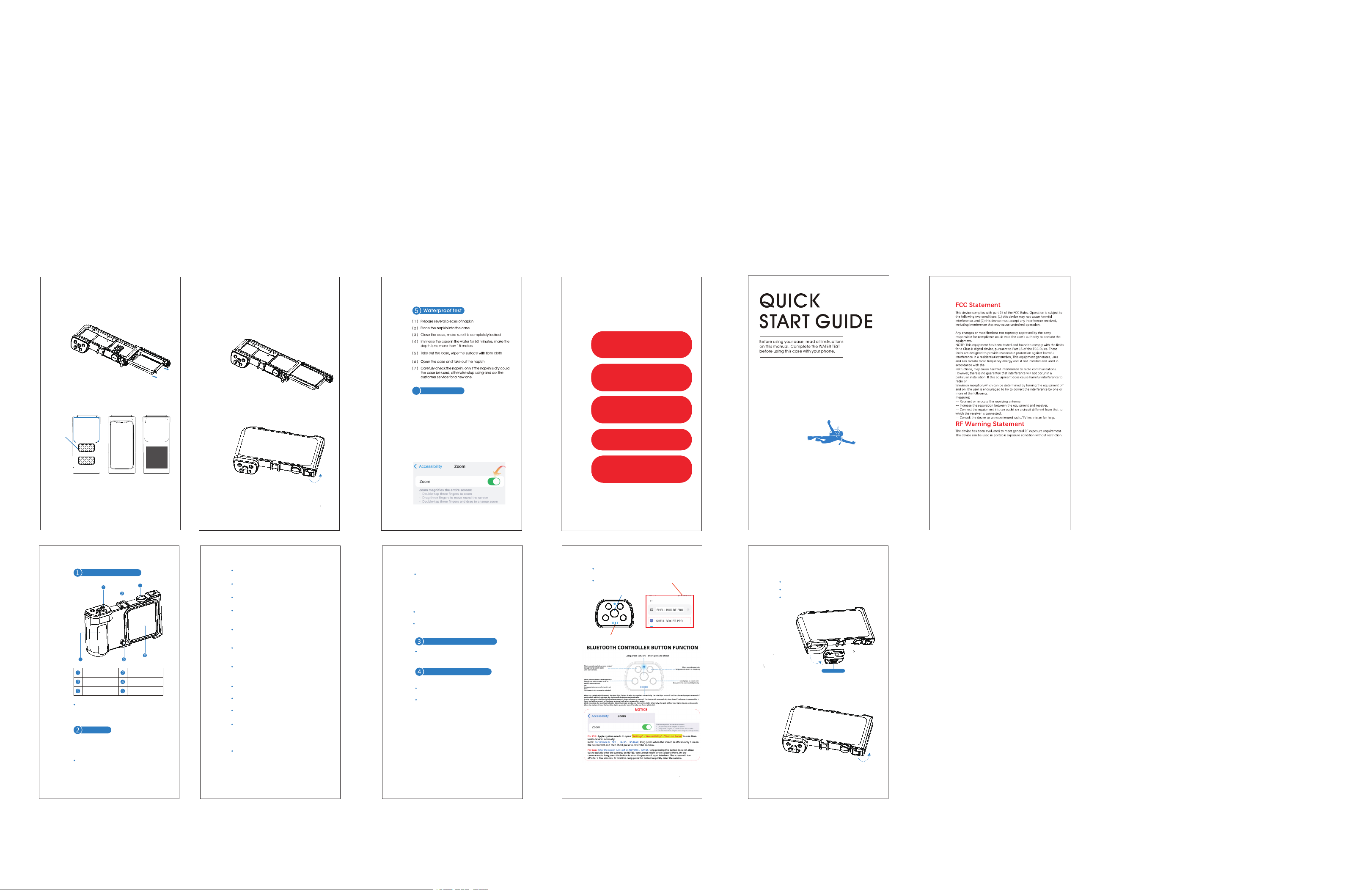
1.Twist the screw and open the side Airtight cap
2.Pull out the tray using the handle.
4.Place the tray together with the phone into the
diving case.
5.Close the side sealing cover and fasten the case-release
latch. Installation is complete.
3.Put the phone into inner plate and use the suction cup
to suck the back of the phone to prevent the phone
from loosening. The position of the mobile phone
camera must be aligned with the camera window.
Newly upgraded design, compatible with most mobile
phone models such as iPhone and Samsung, with a
compatibility rate of over 98%.
Please follow your local rules to handle and recycle.
After every-time using,immerse the completely locked
case in fresh water for 20 minutes,then wipe the case
with soft fibre cloth and keep in a dry place.
Do not expose the case under the high temperature
environment or beside heating equipments,e.g.hot
sunshine,oven,or water heater.
Do not use the case in sulfur-bearing hot spring.
Do not take the case apart or outfit,privately,otherwise
the waterproof function may be descended.
it is not suggested you rent or lend this case to others
in case of any disputes.
This product is not a toy, adults must have custody
of the children.
Please do waterproof test to this case before installing
your phone.
Tear off any protective tempered glass or film from the
phone screen and wipe the phone screen with fibre
cloth,make sure the screen is clean before installing
the phone into the case.
Conduct waterproof test before diving.
Test the camera shutter button after every-time
installation,make sure it is able to rebound after
pressing.
Maximum diving depth is 15meters,over 15 meters
is not guaranteed.
Stop using this case if the sealing ring is damaged
or deformed.
Only the self-contained or manufacturer approved
accessories could be used, other accessories may
violate the local rules and possible safety issue may
occur. Please contact customer service if you need
approved accessories.
Operation and maintenance
Keep away from Children.
Installation premise
Accessories
Installation steps
Environment protection
Please read the below instructions carefully before
using this case.
Strictly follow the installation & disassembly
instructions every time when using.
Product appearance
Attention
Compatible Phone Model
Reminder
Installation instructions
Power button
Shutter
6
Charging time:Standard charging approx 2 hours
Battery capacity:3.7V 110mAh
Signal distance: Signal propagation range on land 18m
Bluetooth remote control has limited signal underwater;
cannot be used separately from the diving housing.
Bluetooth device
Lower left button: Long press this button when the phone screen is
off to directly activate the camera function.
During charging, the four blue lights at the bottom will illuminate
progressively. When fully charged, these four blue lights will
remain steadily lit. When the battery is low, the four blue lights at
the bottom will turn off. During power-on pairing, the blue light at
the top will flash; once pairing is successful, the light will turn off.
Each press of the button will trigger a single flash of the top blue
light.
The Bluetooth controller will automatically power off after 1 hour
of inactivity and disconnect from the phone. Long press the power
button to turn it on, and it will automatically reconnect to the
phone upon startup.
PRECAUTIONS FOR USE
1.After installing the diving case, the phone's
touch functionality will be disabled, rendering
the screen unusable.
2.The mobile phone needs to complete Bluetooth
connecting with the case before diving;
3.If the mobile phone is set with the rest screen
function, the rest screen function needs to be
turned off before diving in order to take pictures/
photography functions underwater at any time,
4.The Bluetooth remote control has limited
signal under water and cannot be separated
from the diving case underwater.
5.Note: The IOS system needs to be turned on
"Settings" - "Accessibility" - "Turn on zoom"
(Double-tap three fingers to restore to original
size after turn on zoom)
Press and hold the shooting button for 3 seconds to power on, and the
blue light will flash continuously. Press and hold for 3 seconds again to
power off.
Select SHELL BOX-BT-PRO to pair your phone and then can
be used normally.
1 2
3
4
6
5
7 8
9
Grip Position
4
3
Type-C Charging Port
吸盘
相机窗口
The foam area is located
at the lower part of the
tray's back.
Foam Zone
The foam is designed to hold the phone in place, enabling unobstructed screen operation.
The default configuration is thick foam.
If the phone fits tightly when placed, you may opt for the complimentary thin foam provided separately.
The device shall not be operated normally during charging.
Fasten the USB plug securely
prior to water exposure.
RD
Stylish Model
3
Mode d'emploi
Gebrauchsanweisung
Gebruiksaanwijzing
Instrucciones de uso
Istruzioni per l'uso