119*116
Wireless Dual-Mode Amplifier Speaker
XHJ
User Manual
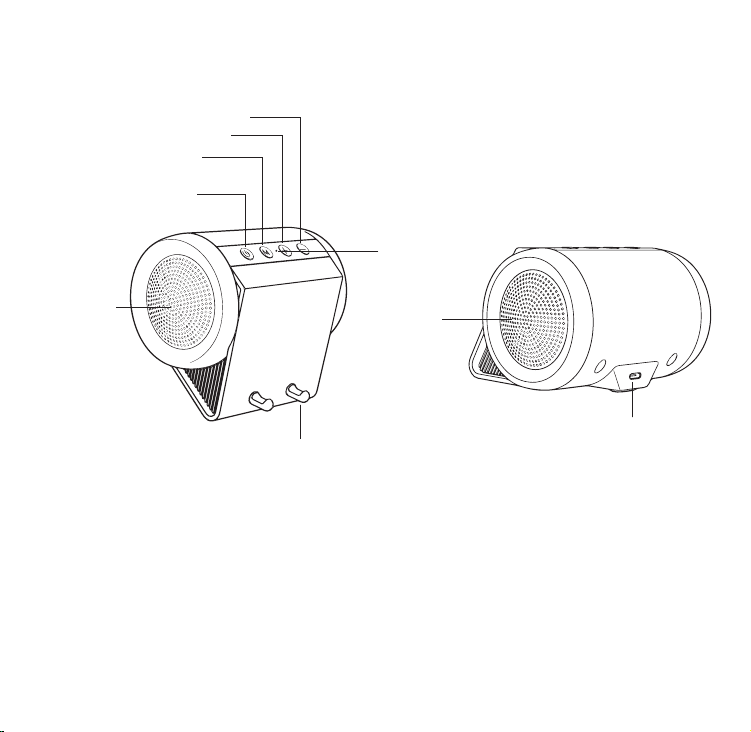
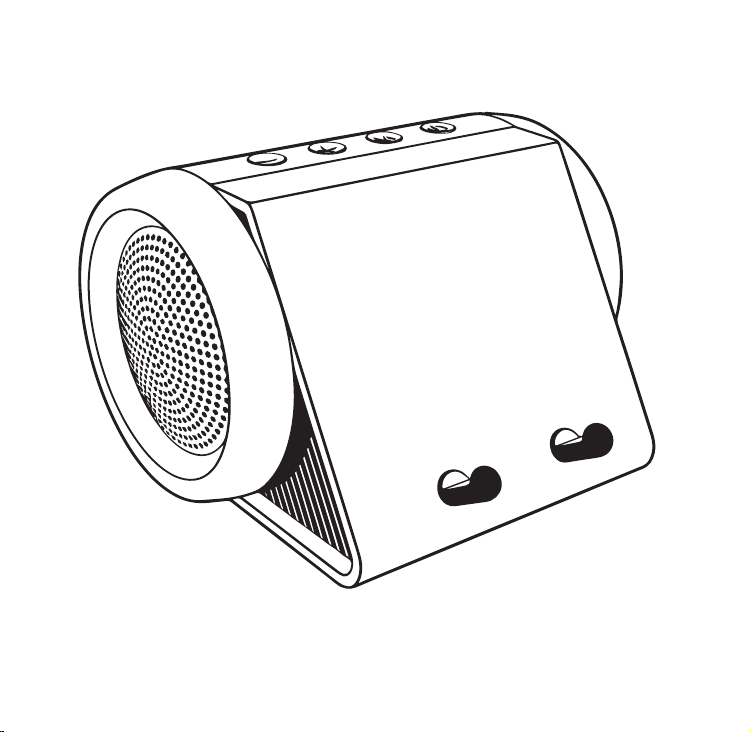
Power Button
LED Indicator
Mode Button
Volume +
Volume -
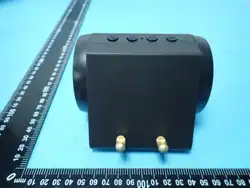
Phone stand
Passive Radiator
Full-range speaker
USB-C Charging Port
Product Overview
• Output Power: 5W • Frequency Response: 70Hz - 20kHz
• Bluetooth Version: V5.2 • Bluetooth Protocol: A2DP/AVCTP/AVRCP
• Battery: 3.7V Lithium-ion, 1200mAh • Charging Time: Approx. 3 hours
• Input: DC 5V/1A (USB-C) • Protection Rating: Splash-proof
• Effective Distance: Approx. 10 meters (Bluetooth mode/obstacle-free)

Safety Information & Precautions
WARNING: To reduce the risk of fire, electric shock, or personal injury, please observe
the following basic precautions:
Battery Safety
The product contains a sealed lithium-ion battery.DO NOTdisassemble, crush, puncture,
short-circuit the battery, or dispose of it in fire.DO NOTuse or store in high temperature
(e.g., inside a car under direct sunlight) or extremely low-temperature environments.
Operating Environment
Do not use near heat sources or in damp locations. Keep in a well-ventilated area.
Water & Dust Resistance
This product has an IPX4 waterproof rating and cannot be submerged or rinsed.
Cleaning
Disconnect from power before cleaning. Wipe with a soft, dry cloth. Do not use abrasive or
corrosive chemicals.
Disposal
The product and battery should be disposed of in accordance with local laws and regulations,
not as household waste. The “crossed-out wheelie bin” symbol on the packaging indicates this.
Technical Specifications
• Output Power: 5W
• Frequency Response: 70Hz - 20kHz
• Bluetooth Version: V5.2
• Bluetooth Protocol: A2DP/AVCTP/AVRCP
• Effective Distance: Approx. 10 meters (Bluetooth mode/obstacle-free)
• Battery: 3.7V Lithium-ion, 1200mAh
• Charging Time: Approx. 3 hours

Wireless Dual-mode
switching and connection
Power on
Press and hold the power button for about 2 seconds. You will hear a power-on prompt tone,
and the LED indicator (blue) will remain constant. Then, a voice prompt will tell you whether to
use Bluetooth mode or induction mode.
After powering on, press the mode switch key (M) to switch to induction mode, then open a
music (such as Spotify) or video (such as YouTube, Netflix) app on your phone to start playing.
Next, point the phone's speaker at the sensor stand, and the audio content will play through
the speaker.
Bluetooth Mode
Bluetooth Pairing: After powering on, press the mode switch button (M) to switch the speaker
to Bluetooth mode for pairing. On your phone, tablet, or computer, open Bluetooth settings
and select the device named "XHJ-Baby snail". After opening the audio/video file, the audio
content will be played through the speaker.
Next Use: The speaker will automatically reconnect to the last paired device when powered
on again.
Induction Mode
• Input: DC 5V/1A (USB-C)
• Protection Rating: Splash-proof
• Sound System: Virtual Stereo
• Speaker: Φ57mm/4Ω 5W+ Diaphragm
• Product Dimensions: 4.5’*4.45’*3.22’inch
• Product Net Weight:
1lb/450g

Charging
Function Operations
Power On/Off:
Briefly press the power button to turn the device on or off.
Mode Switching:
Briefly press the mode switch button to switch between induction mode and Bluetooth mode.
ZA sound will indicate a successful switch.
Please connect the speaker to a 5V/1A USB power adapter or a computer USB port using a
USB-C cable.
The indicator light on the TEPDEC port will remain solid red while the speaker is charging;
it will turn off when fully charged.
Care & Cleaning
Avoid splashing liquid into openings.
Clean the surface with a soft, dry microfiber cloth.
Battery life:
Approximately 2.5 hours (medium volume).
Volume Adjustment:
Press and hold the volume +/- buttons. A voice prompt will indicate the ‘maximum volume’.
Battery life:
Approximately 2.5 hours (medium volume).

Compliance Statements
FCC Compliance Statement:
This device complies with Part 15 of the FCC Rules. Operation is subject to the following two conditions: (1) this device may not
cause harmful interference, and (2) this device must accept any interference received, including interference that may cause
undesired operation.
Changes or modifications to this unit not expressly approved by the party responsible for compliance could void the user’s
authority to operate the equipment.
NOTE: This equipment has been tested and found to comply with the limits for a Class B digital device, pursuant to Part 15 of the
FCC Rules. These limits are designed to provide reasonable protection against harmful interference in a residential installation.
This equipment generates uses and can radiate radio frequency energy and, if not installed and used in accordance with the
instructions, may cause harmful interference to radio communications. However, there is no guarantee that interference will not
occur in a particular installation. If this equipment does cause harmful interference to radio or television reception, which can be
determined by turning the equipment off and on, the user is encouraged to try to correct the interference by one or more of the
following measures:
-- Reorient or relocate the receiving antenna.
-- Increase the separation between the equipment and receiver.
-- Connect the equipment into an outlet on a circuit different from that to which the receiver is connected.
-- Consult the dealer or an experienced radio/TV technician for help.
This device and its antenna(s) must not be co-located or operation in conjunction with any other antenna or transmitter.
Radiation Exposure Statement
The device has been evaluated to meet general RF exposure requirement in portable exposure condition without restriction.
Thank you for choosing our product!
Limited Warranty
[XHJ] warrants this product against defects in materials and workmanship under normal use for
a period of Twelve (12) months from the date of original retail purchase.
(1) California Prop 65 Warning:
This product may contain chemicals known to the State of California to cause cancer, birth defects,
or other reproductive harm.