NA-A00
Website: https://global.dreametech.com
Manufactured by: Dreame Trading (Tianjin) Co.,Ltd.
Made in China
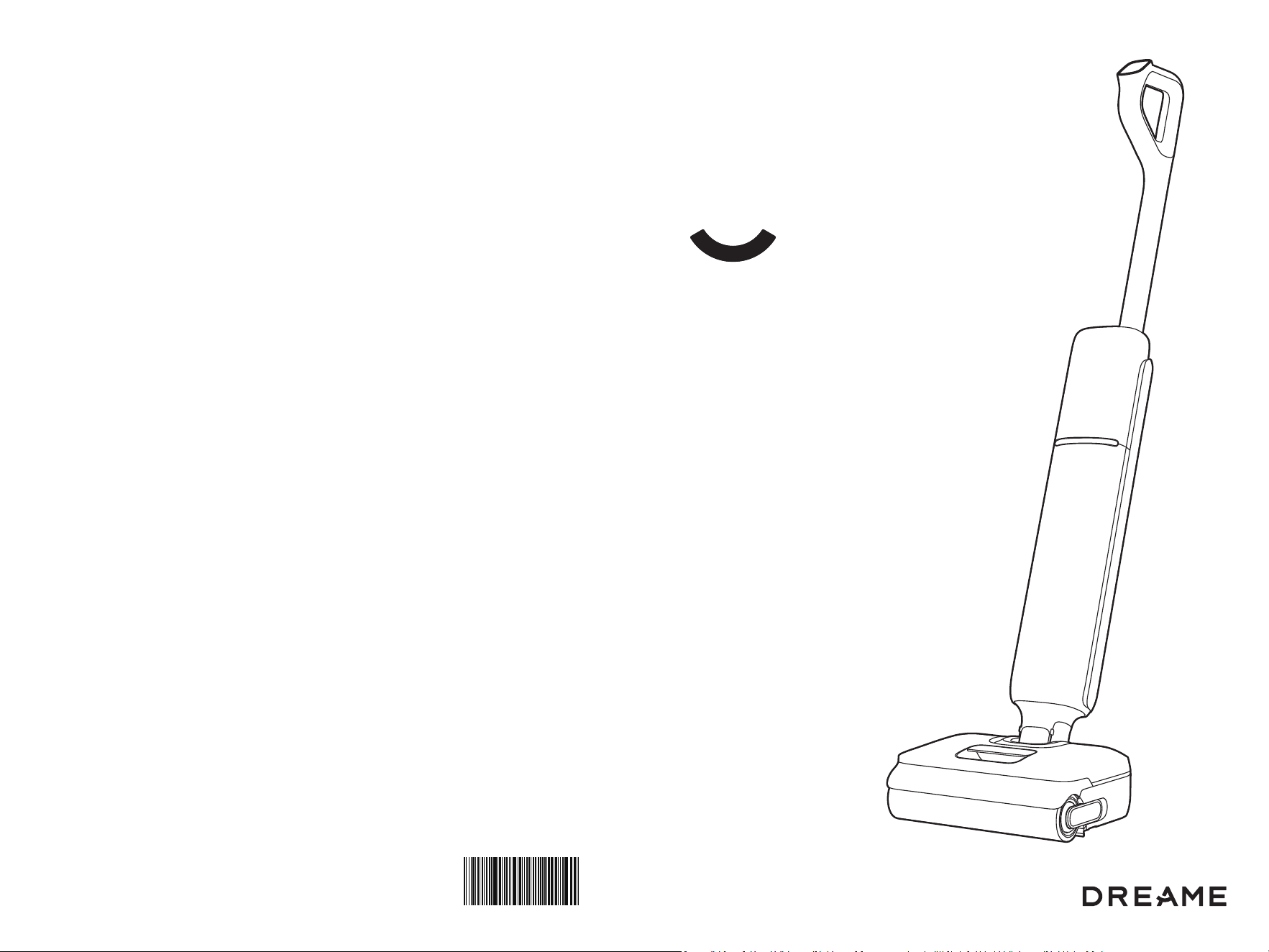
Aero
Cordless Floor Washer
User Manual
The illustrations in this manual are for reference only.
Please refer to the actual product.
Contents
THANK YOU
FOR PURCHASING THIS DREAME
WET AND DRY VACUUM
EN
FR
AES
User Manual
Mode d'emploi
Manual del usuario
01
16
30
Scan for Quick Start
Scan the QR code to access the video tutorial and
the user manual.
Register your Dreame account to receive special
offers and updates.
Contact Us for Support
Your satisfaction is our priority. Before co nsidering a return, please reach out to
our friendly support team. We are ready to help troubleshoot and find a solution,
ensuring you get the most out of your product.
Customer Service: +1 (866) 977-5177
(Mon.to Sat.9:00-21:00, Sun.9:00-12:00 Eastern Time)
support.na@dreame.tech
1 21 2
EN EN
Important Safety Instructions Important Safety Instructions
When using an electrical appliance, basic precautions should always be followed,
including the following:
READ ALL INSTRUCTIONS BEFORE USING (THIS APPLIANCE). Failure to follow
the warnings and instructions may result in electric shock, fire and/or serious injury.
To r ed uc e th e r is k o f fi re , el e ct ri c s ho ck , o r i nj ur y :
WARNING-
• Do not use outdoors. Do not use on wet surfaces during charging.
• Do not allow to be used as a toy. Close attention is necessary when used by or
near children, pets or plants.
• Use only as described in this manual. Use only manufacturer’s recommended
attachments.
• Do not use with damaged cord or plug. If appliance is not working as it should,
has been dropped, damaged, left outdoors, or dropped into water, return it to a
service center.
• Do not pull or carry by cord, use cord as a handle, close a door on cord, or pull
cord around sharp edges or corners. Do not run appliance over cord. Keep cord
away from heated surfaces.
• Do not unplug by pulling on cord. To unplug, grasp the plug, not the cord.
• Do not handle charging base, including charging base plug, and charging base
terminals with wet hands.
• Do not put any object into openings. Do not use with any opening blocked; keep
free of dust, lint, hair, and anything that may reduce air flow.
• Keep hair, loose clothing, fingers, and all parts of body away from openings and
moving parts.
• Use extra care when cleaning on stairs.
• Do not use to pick up flammable or combustible liquids, such as gasoline, or use
in areas where they may be present.
• Do not pick up anything that is burning or smoking, such as cigarettes, matches,
or hot ashes.
• To r e duc e t he r i s k of f ir e , do n ot use a f l am mab le o r co m b ust ib le l i qui d to c le an a f lo or.
• Do not use without water tank and/or filter in place.
• Prevent unintentional starting. Ensure the switch is in the off-position before
picking up or carrying the appliance. Carrying the appliance with your finger on the
switch or energizing appliance that has the switch on invites accidents.
• Recharge only with the charger specified by the manufacturer. A charger that
is suitable for one type of battery pack may create a risk of fire when used with
another battery pack.
• Use appliances only with specifically designated battery packs. Use of any other
battery packs may create a risk of injury and fire.
• When battery pack is not in use, keep it away from other metal objects, like
paper clips, coins, keys, nails, screws or other small metal objects, that can
make a connection from one terminal to another. Shorting the battery terminals
together may cause burns or a fire.
• Under abusive conditions, liquid may be ejected from the battery; avoid
contact. If contact accidentally occurs, flush with water. If liquid contacts eyes,
additionally seek medical help. Liquid ejected from the battery may cause
irritation or burns.
• Do not use a battery pack or appliance that is damaged or modified. Damaged
or modified battery packs may exhibit unpredictable behavior resulting in fire,
explosion or risk of injury.
• Do not expose a battery pack or appliance to fire or excessive temperature.
Exposure to fire or temperature above 130° C/266° F may cause explosion.
• Follow all charging instructions and do not charge the battery pack or appliance
outside of the temperature range specified in the instructions. Charging
improperly or at temperatures outside of the specified range may damage the
battery and increase the risk of fire.
• Have servicing performed by a qualified repair person using only identical
replacement parts.This will ensure that the safety of the appliance is
maintained.
• Do not modify or attempt to repair the appliance or the battery pack except as
indicated in the instructions for use and care.
• Always turn off this appliance before connecting or disconnecting motorized
nozzle.
• Risk of injury. Brush may start unexpectedly. Keep the switch in off position
before cleaning or servicing.
• Turn off all controls before unplugging.
• The appliance should be stored, used and charged only in the temperature
range of 4° C/39.2° F~40° C/104° F.
• This appliance contains batteries that are non-replaceable.
• To r ed uce t he ris k of f ire a nd ele ct ri c sh oc k d ue t o int er na l co mp on ent d am ag e,
use only dreame cleaning fluid intended for use with this appliance.See the
Cleaning Fluid section of this manual.
SAVE THESE INSTRUCTIONS
Household use only.
To r ed u ce t h e ri sk of e le c tr ic s h oc k , t he a pp l ia nce ha s a po la ri ze d pl ug (o ne -b l ad e i s
wider than the other). This-plug will fit in a polarized outlet-only one-way. If the plug
does not fit fully in the outlet, reverse the plug. If it still does not fit, contact a qualified
electrician-to install the proper outlet. Do not change the plug in any way.
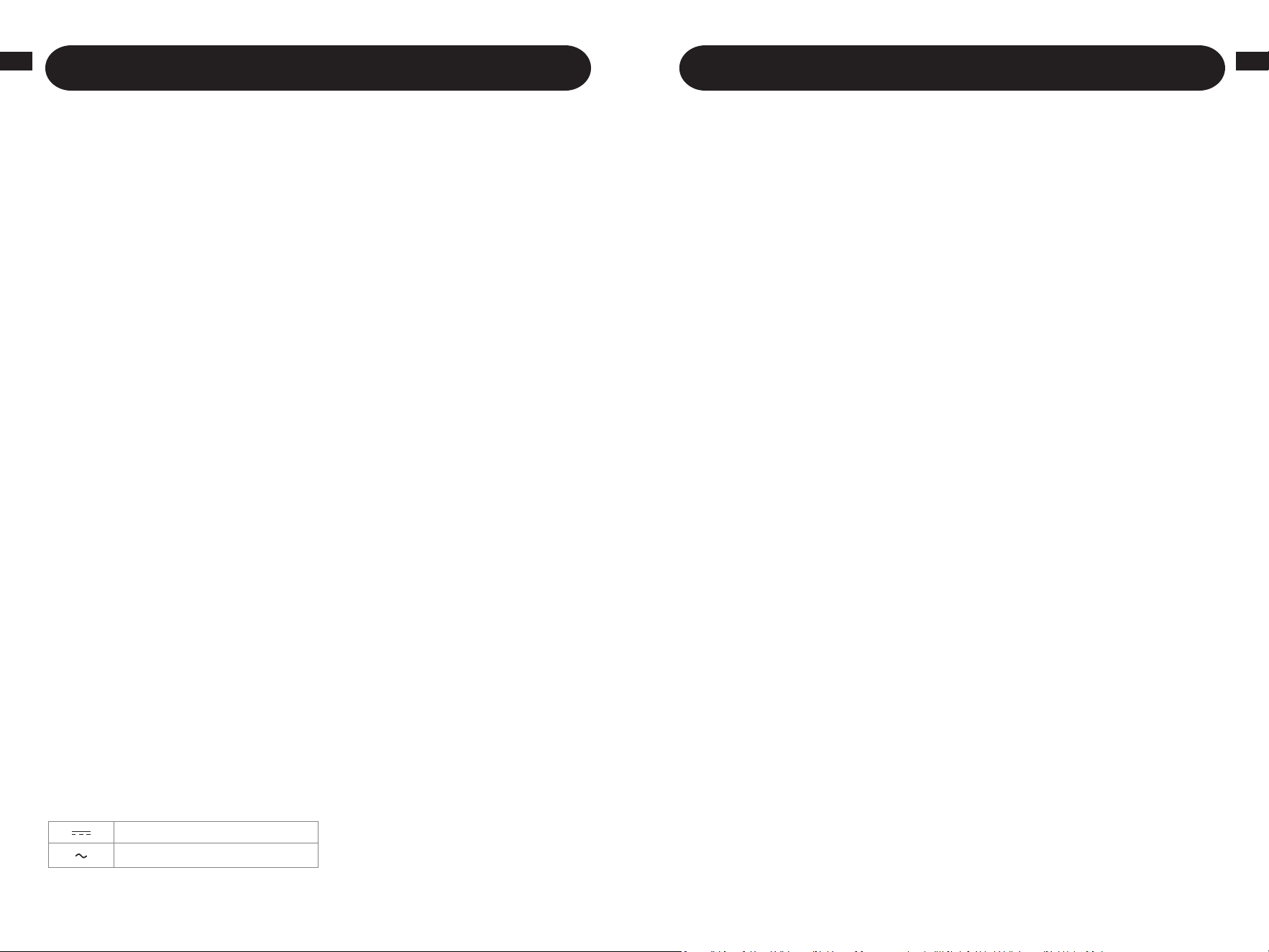
Direct current
Alternating current
3 43 4
EN EN
Packing List
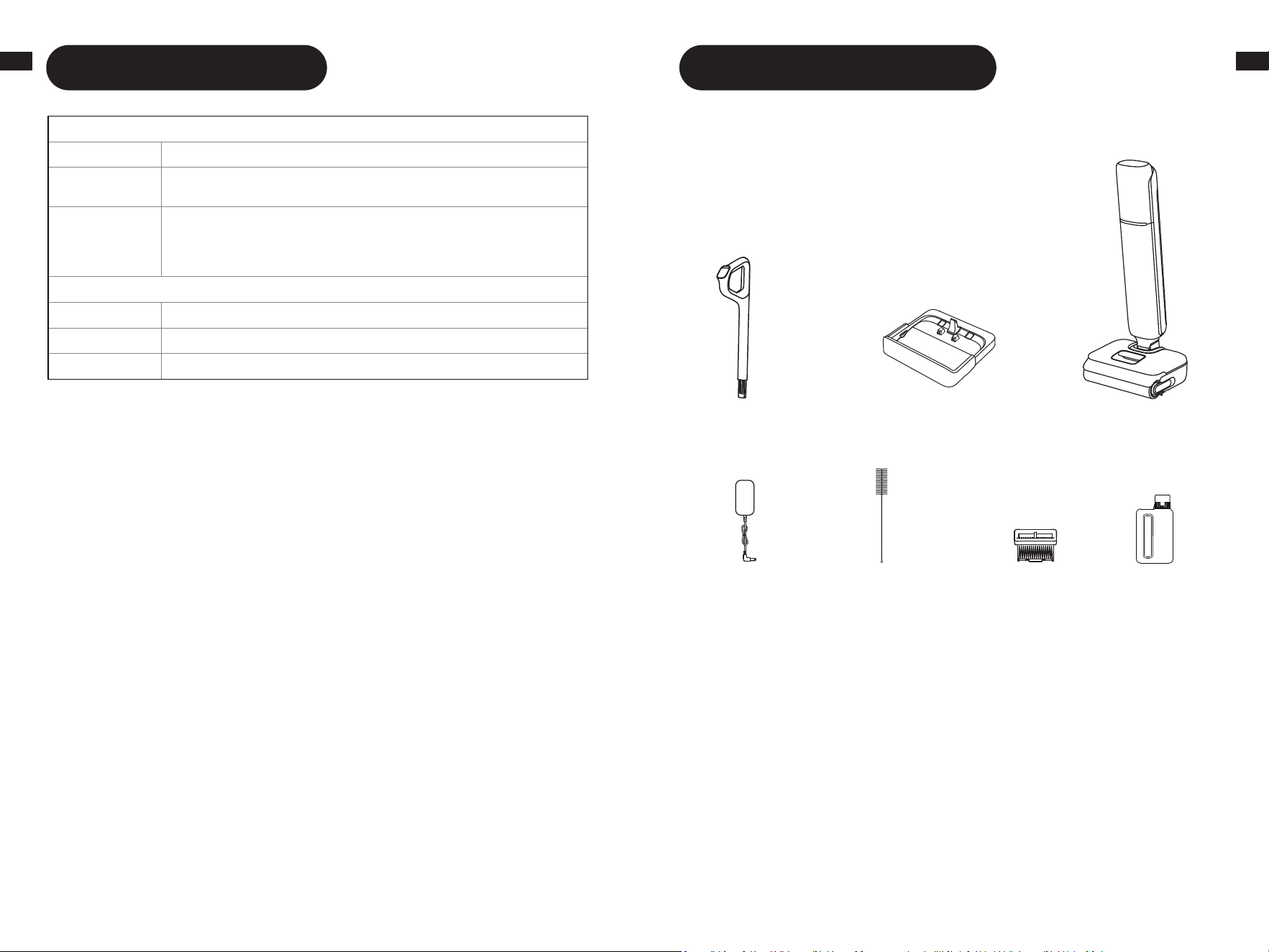
Main
Body
Charging
Base
Cleaning
Brush
Filter Cleaner
Handle
Product Overview
Power
Adapter
Caution:
This device complies with Part 15 of the FCC Rules / Innovation, Science and Economic
Development Canada’s licence-exempt RSS(s). Operation is subject to the following two
conditions: (1) this device may not cause harmful interference. (2) this device must accept any
interference received, including interference that may cause undesired operation.
Changes or modifications not expressly approved by the party responsible for compliance could
void the user's authority to operate the equipment.
This equipment has been tested and found to comply with the limits for a Class B digital device,
pursuant to part 15 of the FCC Rules. These limits are designed to provide reasonable protection
against harmful interference in a residential installation. This equipment generates uses and can
radiate radio frequency energy and, if not installed and used in accordance with the instructions,
may cause harmful interference to radio communications. However, there is no guarantee that
interference will not occur in a particular installation. If this equipment does cause harmful
interference to radio or television reception, which can be determined by turning the equipment
off and on, the user is encouraged to try to correct the interference by one or more of the
following measures:
—Reorient or relocate the receiving antenna.
—Increase the separation between the equipment and receiver.
—Connect the equipment into an outlet on a circuit different from that to which the receiver is
connected.
—Consult the dealer or an experienced radio/TV technician for help.
Compliance Information
Product Name Cordless Floor Washer with Power Adapter
Produce Model
Cordless Floor Washer Model: HHR32A
Power Adapter Model: YLS0251B-T260090 / XHD024-260090USV
Compliance
Statement
This device complies with part 15 of the FCC Rules. Operation is subject
to the following two conditions: (1) This device may not cause harmful
interference, and (2) this device must accept any interference received,
including interference that may cause undesired operation.
Correspondence of the responsible party in USA
Company DREAME TECHNOLOGY USA INC
Address 16192 Coastal Highway, Lewes, Delaware 19958, County of Sussex
Email support.us@dreame.tech
FCC Information
5 65 6
EN EN
Product Overview
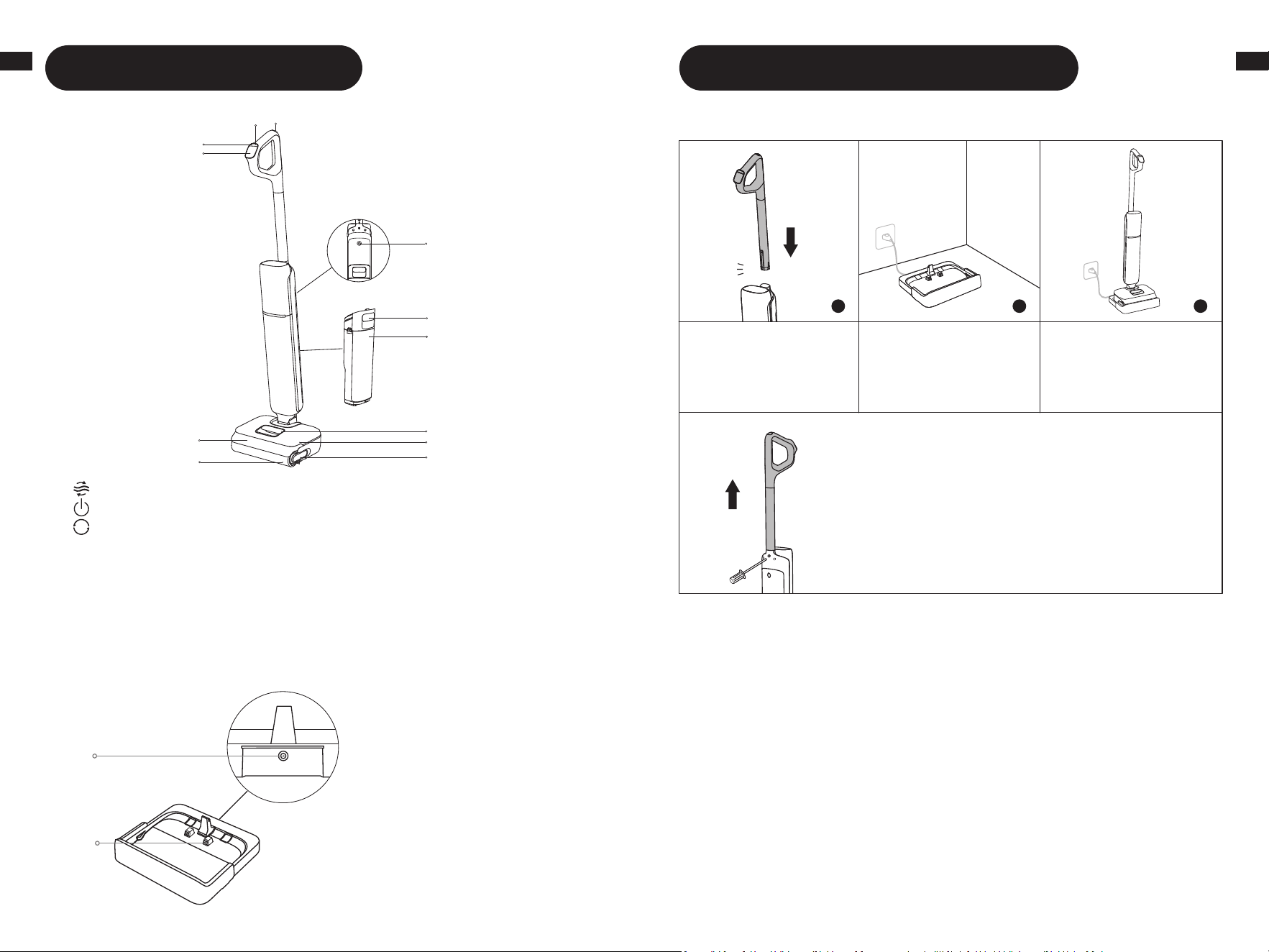
Vacuum
Self-Cleaning Button
Power Switch
Display Screen
Roller Brush
Roller Brush Handle
Used Water Tank
Used Water Tank Handle
Omnidirectional Wheel
Roller Brush Cover
Clean Water Tank
Clean Water Tank Handle
Mode Switch
1
2
3
4
5
6
7
8
9
10
11
12
Charging Base
2
.
Charging Contacts
1
.
Charging Port
2
1
1
9
10
11
2
3
4
5
7
6
8
12
Installation & Charging
Fully charge the appliance before first use.
Note:
• If there is no operation within 10 minutes of being fully charged, the appliance will enter sleep
mode. Please restart the appliance if you need to use it.
• To e xt en d t he b at t er y l if e ti m e, th e b at te r y ke e ps c oo li n g do wn au to ma ti ca l ly a f te r y ou h av e
used the appliance for a long time.
1 2 3
1. Insert the end of the
handle vertically into the
port on the top of the
appliance until it clicks.
2. Place the charging
baseagainst a wallon
level ground and connect
it to a powersource.
* To disassemble, extend a hard object into the hole of
the appliance as indicated to press in the contacts and
pull the handle upwards at the same time.
3. Place the appliance on
the charging base. Fully
charge the appliance
before first use
.
click
7 87 8
EN EN
Note:
• Do not vacuum any foamy liquids.
• The appliance is suitable for cleaning floors, marble, tiles and other hard surfaces.
• When the appliance is in operation, do not lift it off the ground, move it or tilt it. Otherwise, the
used water may flow into the motor.
• When powered on for the first time, the device defaults to Smart Mode. For subsequent
use, it will automatically enter the last used mode upon startup.
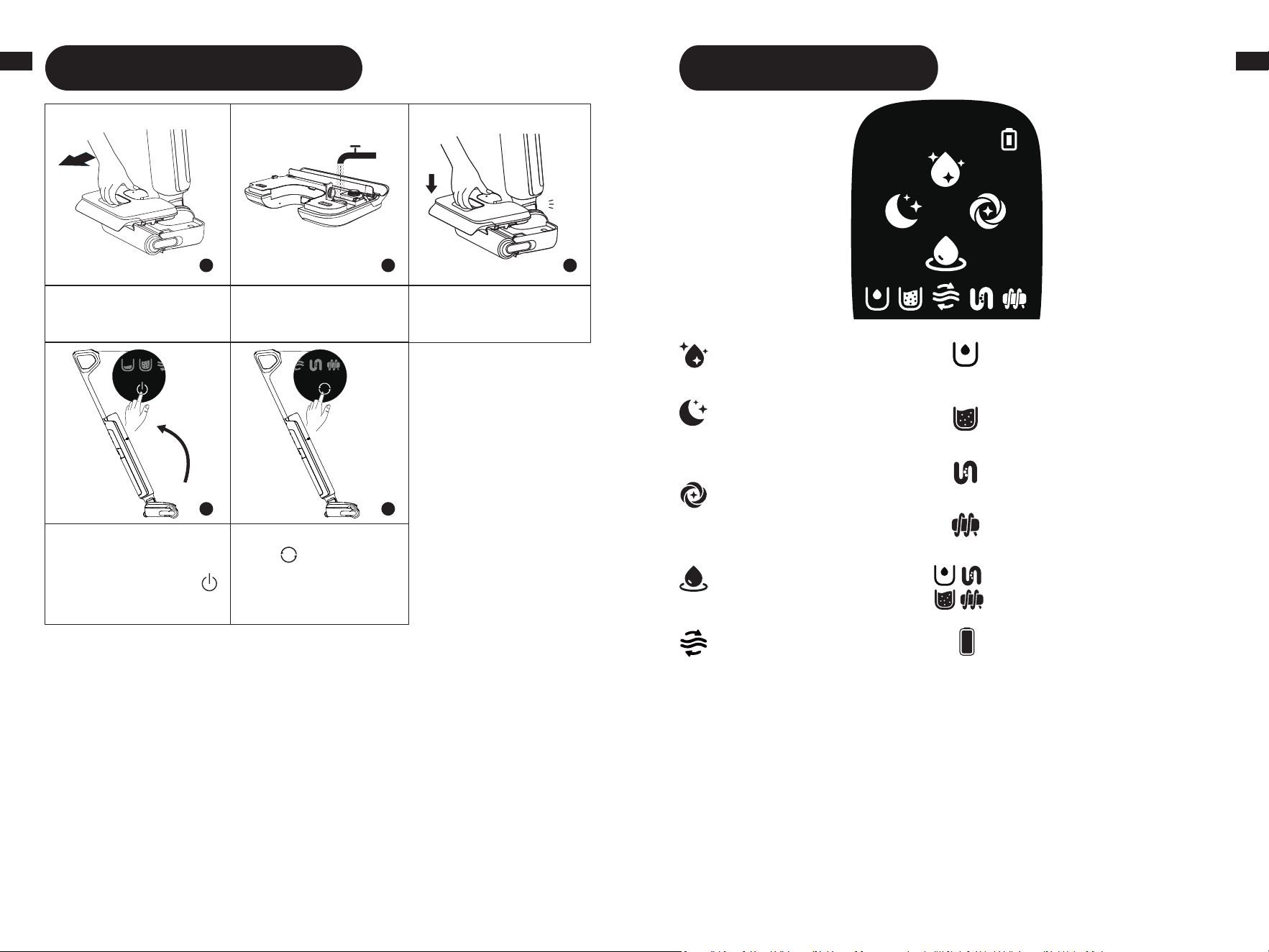
Starting Cleaning
1 2 3
4 5
2.
Open the tank cover
and fill the tank with clean
water.
5. Briefly press the mode
switch to switch modes
according to your needs.
1.
Remove the tank.
3.
Reinstall the clean water
tank until it clicks.
4. Gently step on the floor
brush and recline the
appliance backwards. Briefly
press the power switch
button to start/stop
operating.
Click
Display Screen
Standard Mode
Medium suction power and
water flow for routine cleaning.
Quiet Mode
The appliance will maintain
moderate suction power at a
low noise level.
Turbo Mode
Maximum suction power and
increased water flow for
stubborn stains on hard floors.
Suction Mode
Suck up a large amount of
water from the floor.
Self-Cleaning Mode
Insufficient water in the clean
water tank
The used water tank is full
Blocked tube
Roller brush stuck
Appliance malfunction
Battery Indicator
• Green: 50% < Battery level ≤ 100%
• Red: Battery level ≤ 20%
*Battery Indicator color cycles from
green to yellow, orange, and red as
charge decreases. Recharge when red.
Add Cleaning Fluid
1. Remove the seal before use.
2. Measure the floor cleaner with the bottle cap (*approximately 10 ml/0.34 fl oz per cap).
3. Pour it into the clean water tank and gently shake to mix it evenly before use.
To reduce the risk of fire and electric shock due to internal component damage, use only
Dreame Trading (Tianjin) Co., Ltd. AWH10 cleaning fluid intended for use with the appliance.
Note: Do not add any liquids other than the officially-approved cleaner. The cleaner can be
available on the official online store. Refer to the cleaning solution label for specific usage
instructions.
9 109 10
EN EN
Tips:
• Turn off the appliance before maintenance. Do not touch the power switch.
• Replace parts if needed. The parts must be replaced by those available from the
manufacturer or its service agent.
• If the appliance is not used for an extended period, fully charge it, unplug the power
plug, and store the appliance in a cool, low-humidity environment away from direct
sunlight. To avoid over-discharge of the battery, charge the appliance at least once
every 3 months.
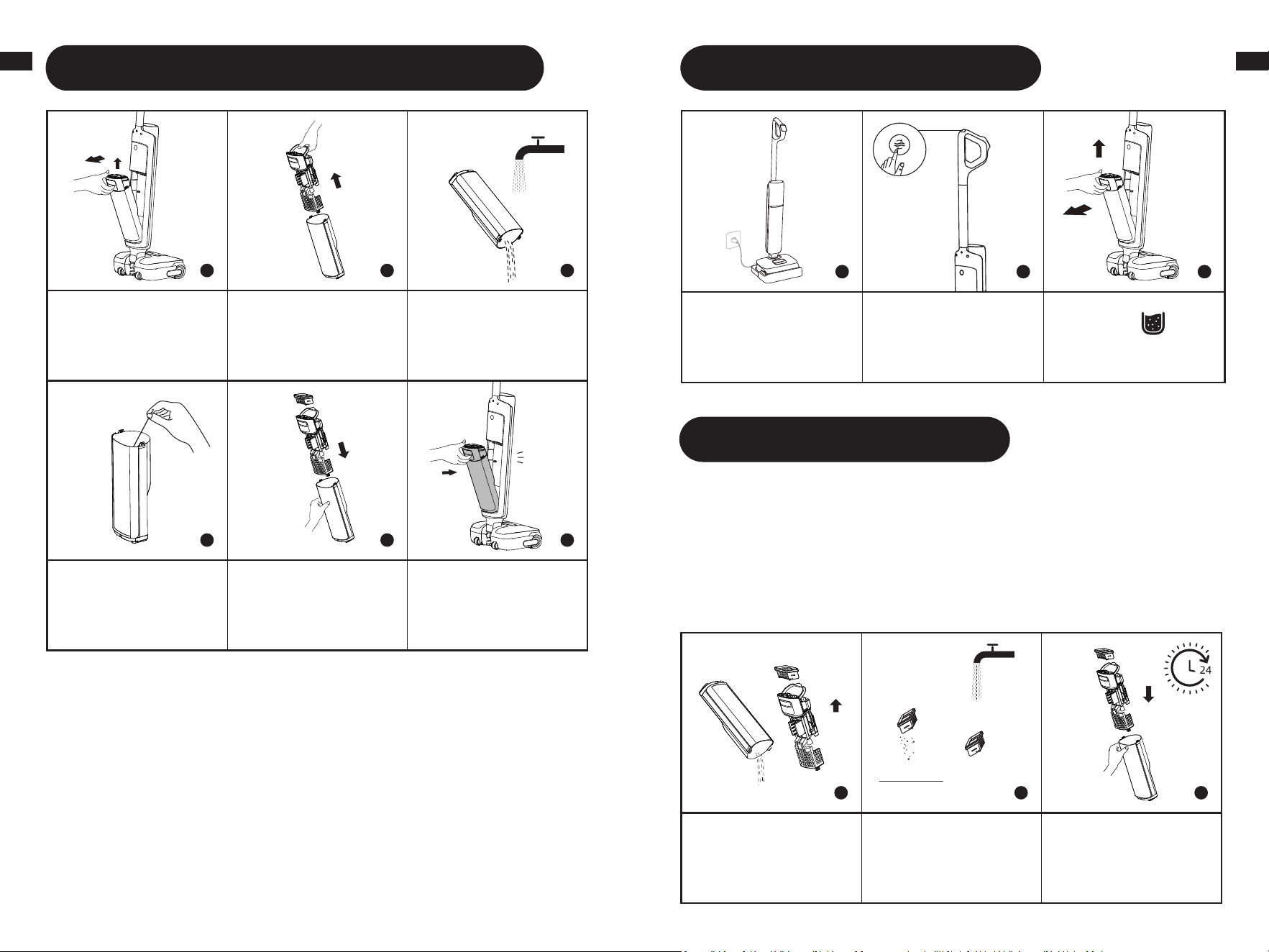
Care & Maintenance
1 2 3
1. Pour dirty water out,
remove the filter, and rinse
tank and tank cover with
clean water.
2. Gently knock off the
floating dust on the filter
surface. When the filter is
dirty and needs washing,
rinse it with water.
3. After fully drying the
filter, reinstall it into the
used water tank cover.
Insert used water tank
cover into the tank.
One-Press Self-Cleaning
1 2 3
1. Place the appliance back
onto the base. Ensure
that the water in the clean
water tank is sufficient for
self-cleaning.
2. Briefly press the
self-cleaning button on
the top of the handle to
start/stop self-cleaning
(Battery level ≥ 20%).
3. After self-cleaning is
complete, the will
light up. Empty the used
water tank promptly.
Emptying the Used Water Tank
1 2 3
4 5 6
1. Press the used water
tank release button to take
out the tank.
2. Hold the used water
tank cover and pull it out.
Hold the filter and pull up
to remove. Remove debris
from filter.
3. Pour dirty water out and
rinse tank with clean water.
4. Use the provided
cleaning brush to clean the
inner walls of the tank.
5. After cleaning, insert
filter into the used water
tank cover, and insert used
water tank cover into the
tank.
lick
6. Reinstall the Used Water
Ta nk u nt il y ou he ar a c li ck .
11 1211 12
EN EN
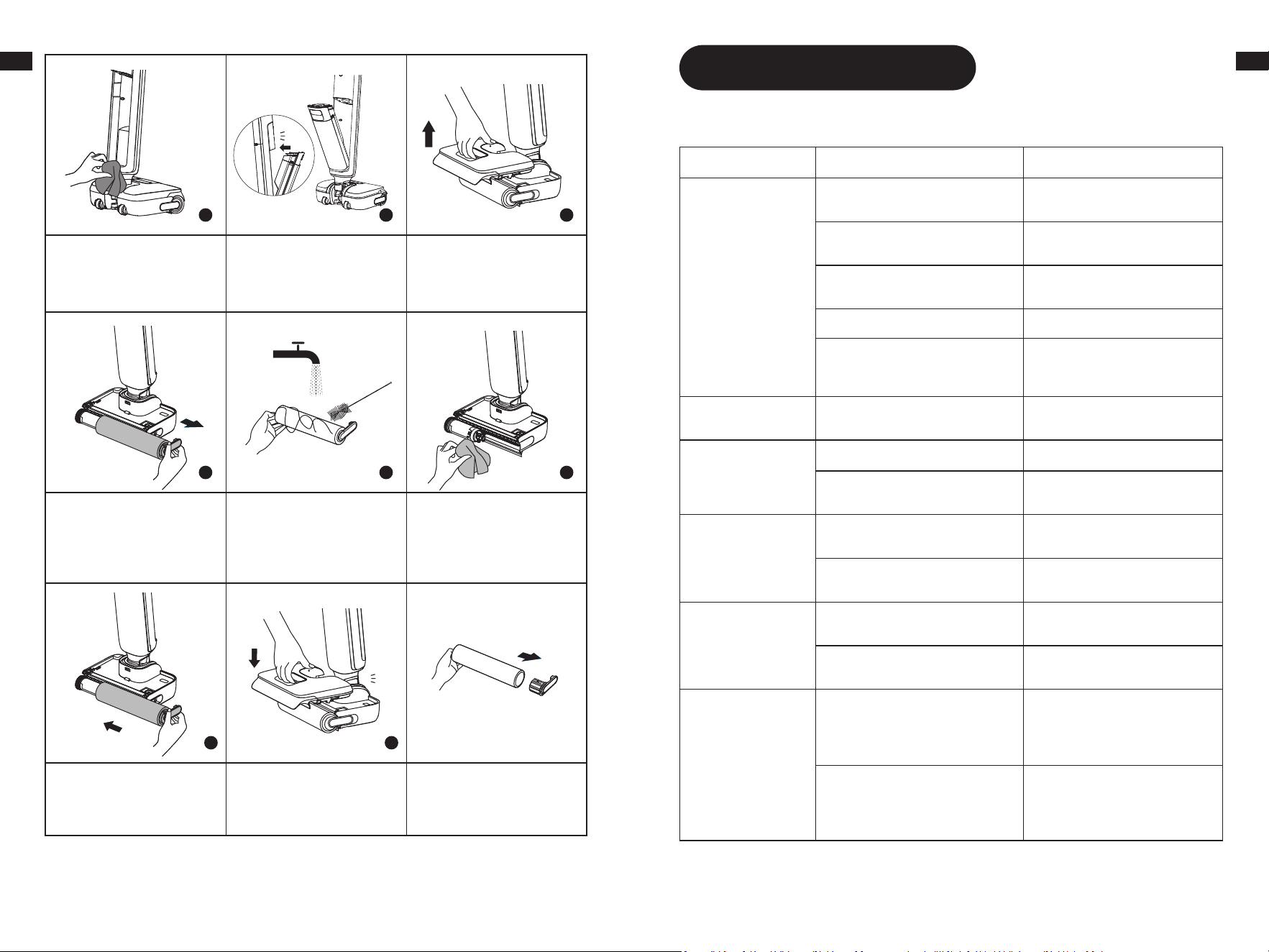
10 11
10. After fully drying the
roller brush, hold the roller
brush handle and reinstall it.
4 5 6
7 8 9
6.Remove the clean water
tank.
7. P u l l o u t t h e b r u s h h a n d l e
and remove the brush.
8. Remove hair or debris
tangled on the roller brush
with the provided cleaning
brush. Rinse the roller brush
with clean water.
9. Wip e t he sucti on inlet
with a dry cloth or wet
tissue. Do not rinse the
brush assembly with water.
4. Gently wipe the tube
with a wet cloth before
use. Do not rinse the tube.
5. Insert bottom of tank
into main body. Tilt tank
towards main body until it
clicks.
Click
11. Reinstall the clean water
tank until you hear a click.
* Remove the roller brush
handle to replace it with a
new roller brush, and press
it firmly into place.
Click
Note:
• Replacing the filter every 3 to 6 months is recommended.
• Clean as needed. Replacing the roller brush every 3 to 6 months is recommended.
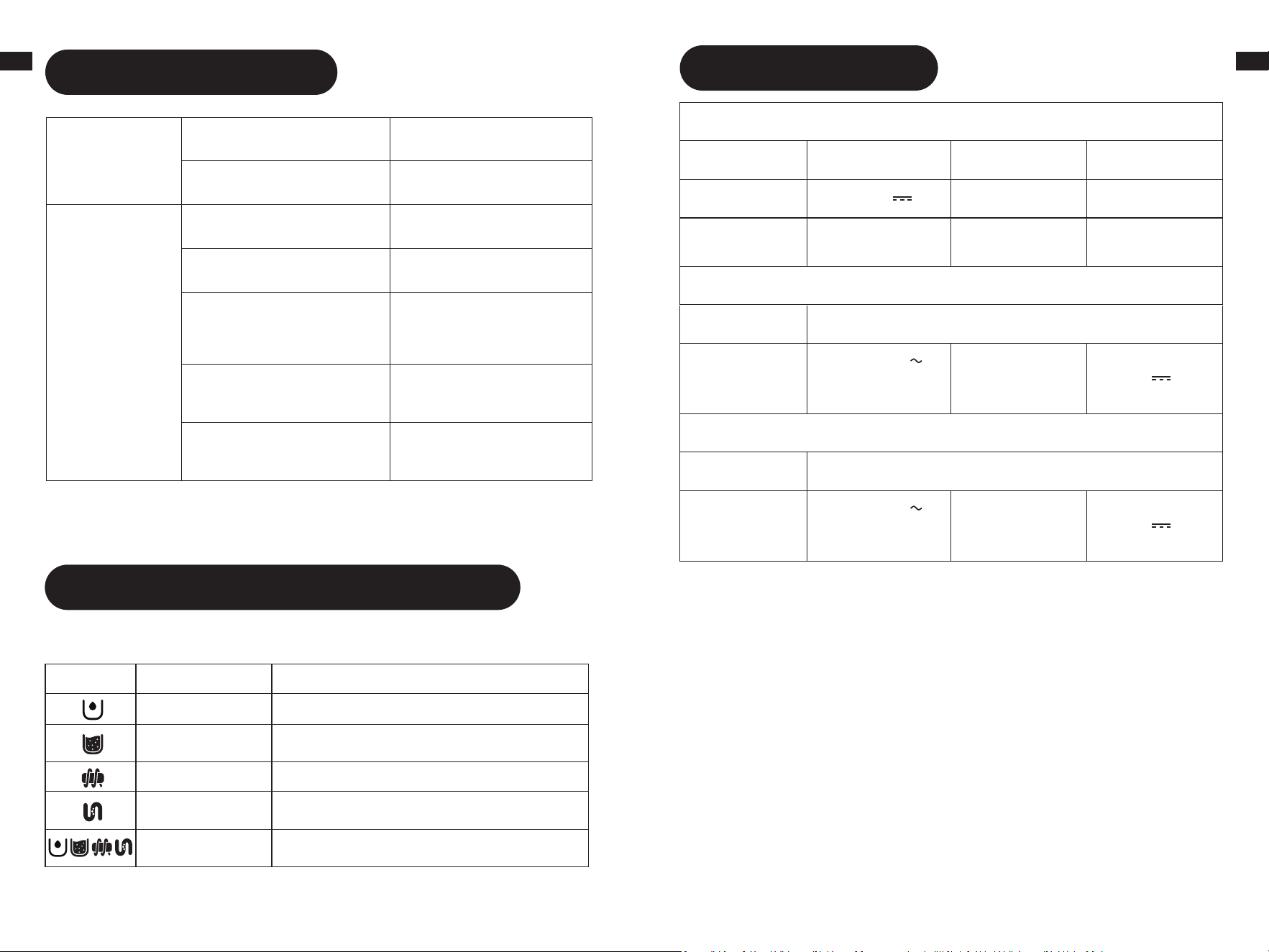
Troubleshooting
If an error occurs, the appliance will stop working. Please refer to the following table for
troubleshooting. If the problem persists, please contact customer service.
Error Possible Cause Solution
The appliance does
not work.
The appliance is out of battery or its
battery level is low.
Fully charge its battery before use.
The appliance is in the upright
position.
Recline the appliance backwards.
Blockage activated overheat
protection mode.
Clear the blockage and wait until
the temperature returns normal.
The Used Water Tank is full. Empty the Used Water Tank.
The handle, roller brush, or Used
Water Tank is not properly installed.
Ensure the handle, roller brush, or
Used Water Tank are all properly in
place.
The appliance charges
slowly.
The temperature of the battery is too
low or too high.
Wait until the battery's temperature
returns normal.
The suction power of
the appliance is weak.
The filter is clogged. Cleaning the filter.
The suction inlet or tube is blocked by
a foreign object.
Clean the tube and the suction inlet.
The motor is making a
strange noise.
There is too much used water in the
Used Water Tank.
Empty the Used Water Tank.
The suction inlet is blocked.
Clear any blockage in the suction
inlet.
The display screen
does not light up while
charging.
The charging base cable is not
plugged into the electrical outlet.
Make sure the charging base cable
is plugged in.
The appliance is not placed onto the
charging base properly.
Make sure the appliance is placed
onto the charging base properly.
No water is coming
out of the appliance.
The Clean Water Tank is not properly
installed in place, or the water in the
Clean Water Tank is insufficient.
Reinstall or fill the Clean Water
Ta nk .
It takes 30 seconds to dampen the
roller brush.
Turn on the appliance and check
again in 30 seconds.
13 1413 14
EN EN
For additional services, please contact us via https://global.dreametech.com/pages/contact-us
Website: https://global.dreametech.com
Troubleshooting
The vent leaks water.
A collision or a sharp pull causes
water to enter the motor.
Move the appliance gently back and
forth while it is turned on.
The filter is not completely dry after
being cleaned.
Dry the filter completely before use.
Self-cleaning fails.
The roller brush may be jammed by
large debris.
Open the roller brush cover to check
and clean the roller brush.
The appliance is not placed onto the
charging base properly.
Make sure the appliance is being
charged before self-cleaning.
Self-cleaning cannot be enabled if
the battery level is lower than 20%.
The self-cleaning function can only
be enabled when the appliance is
being charged and the battery level
is more than 20%.
The Used Water Tank is not installed
in place, or the Used Water Tank is
full.
Reinstall or empty the Used Water
Ta nk .
The Clean Water Tank is not installed
in place, or the water in the Clean
Water Tank is insufficient.
Reinstall or fill the Clean Water Tank.
If the appliance is not working properly, the screen display will show an error message. Please
refer to the troubleshooting table to find your solution.
Error Prompts and Solutions
Error Icon Possible Cause Solution
Insufficient water. Fill the clean water tank.
The Used Water
Tank is full.
Please clean the used water tank.
Roller brush stuck. Clean the roller brush.
Blocked tube.
Refer to the Care & Maintenance section to clean
the tube and dirt sensor.
Appliance malfunction
Restart the appliance for troubleshooting. If the
problem persists, please contact customer service.
Specifications
Cordless Floor Washer
Model HHR32A Charging Time ≤ 4 hours
Rated Voltage 21.6 V
Rated Power 315 W
Clean Water
Ta nk Ca pa ci ty
1000 mL
Used Water Tank
Capacity
500 mL
Power Adapter 1
Model YLS0251B-T260090
Rated Input
100-240 V
50/60 Hz
0.8 A Max
Rated Output 26.0 V
0.9 A
Power Adapter 2
Model XHD024-260090USV
Rated Input
100-240 V
50/60 Hz
0.8 A
Rated Output 26.0 V
0.9 A
1616
FR
1515
EN
The built-in lithium-ion battery contains substances that are hazardous to the environment.
Before disposing of the battery, make sure the battery is removed by qualified technicians and
discarded at an appropriate recycling facility.
– the battery must be removed from the appliance before it is scrapped;
– the appliance must be disconnected from the supply mains when removing the battery;
– the battery is to be disposed of safely.
Removal Guide
CAUTION:
•
Before removing the battery, disconnect the power and run out the battery as much as
possible.
•
Unneeded batteries should be discarded at an appropriate recycling facility.
•
Do not expose to high temperature environment to avoid risks of explosion.
•
Under abusive conditions, liquid may be ejected from the battery. If contact occurs, flush
with water and seek medical help.
1. Use tools to sequentially disassemble the main unit of the appliance and the power source
components.
2. Disconnect the terminal connecting the battery to the mainboard.
3. Use tools to sequentially remove the screws securing the battery bracket, then pry open the
bracket with a tool and remove the battery.
4. Disassembly should be performed by the manufacturer, an authorized service provider, or
qualified professionals.
1. Dreame is liable to the consumer for any lack of conformity in material or workmanship not
detectable at the time of the purchase.
2. Warranty period: please refer to the customer service office for more information. If the
territory where the consumer is located has different regulations, local regulations prevail.
3. The warranty will not be applicable in the following cases:
a) Issues due to carelessness, use, or installation that does not comply with the instructions
provided by Dreame.
b) Tam pe ri ng an d/ or m o di fi ca ti on s o f th e pr od uc t by en ti ti es or i nd iv i du al s no t ex pr es sl y
authorized by Dreame.
c) Damage due to accidental causes and/or negligence on the part of the consumer, with
particular reference to external parts.
d) Parts subject to wear that do not have manufacturing defects.
e) No valid purchasing document (receipt, invoice, or other) is provided to certify the date the
product was purchased.
f) The model and/or numbers of the product on the purchase certificate is not consistent with the
model and/or numbers shown on the product.
4. For more warranty information, please refer to the official Dreame website:
https://global.dreametech.com
Warranty
All products bearing this symbol are waste electrical and electronic equipment (WEEE as in
directive 2012/19/EU) which should not be mixed with unsorted household waste. Instead, you
should protect human health and the environment by handing over your waste equipment to
a designated collection point for the recycling of waste electrical and electronic equipment,
appointed by the government or local authorities. Correct disposal and recycling will help
prevent potential negative consequences to the environment and human health. Please contact
the installer or local authorities for more information about the location as well as terms and
conditions of such collection points.
WEEE Information
Instructions importantes de sécurité
Battery Disposal and Removal
Lors de l'utilisation d'un appareil électrique, des précautions de base doivent
toujours être prises, notamment les suivantes :
LISEZ TOUTES LES INSTRUCTIONS AVEC D’UTILISER (CET APPAREIL). Ces
messages d'avertissement et ces instructions doivent être suivis pour éviter les
risques d’électrocution, de départ de feu et d’éventuelles blessures.
Pour éviter les risques de départ de feu, de choc électrique
ou de blessures :
AVERTISSEMENT-
INSTRUCTIONS IMPORTANTES DE SÉCURITÉ
• N'utilisez pas l'appareil à l'extérieur. N'utilisez pas l'appareil sur des surfaces mouillées
pendant la charge.
• Ne le laissez pas être utilisé comme jouet. Une attention particulière est nécessaire en
cas d'utilisation par ou à proximité d'enfants, d'animaux de compagnie ou de plantes.
• Utilisez uniquement comme indiqué dans ce manuel. N'utilisez que les accessoires
recommandés par le fabricant.
• N'utilisez pas l'appareil avec un cordon ou une fiche endommagé(e). Si l'appareil ne
fonctionne pas comme il le devrait, s'il est tombé, s'il a été endommagé, s'il est resté à
l'extérieur ou s'il est tombé dans l'eau, retournez-le à un centre de service.
• Évitez de tirer ou de transporter par le cordon, d'utiliser le cordon comme une poignée,
de fermer une porte sur le cordon et de tirer le cordon autour de bords ou d'angles
tranchants. Ne faites pas passer l'appareil sur le cordon. Éloignez le cordon des
surfaces chauffées.
• Ne débranchez pas l'appareil en tirant sur le cordon. Pour débrancher l'appareil,
saisissez la fiche et non le cordon.
• Ne manipulez pas le socle de recharge, y compris la fiche du socle de recharge, et les
bornes du socle de recharge avec des mains mouillées.
• Ne mettez aucun objet dans les ouvertures. N'utilisez pas l'appareil si l'une de ses
ouvertures est obstruée ; gardez-le à l'abri de la poussière, des peluches, des cheveux
et de tout ce qui pourrait réduire le flux d'air.
• Éloignez les cheveux, les vêtements amples, les doigts et les autres parties du corps
des ouvertures et des pièces mobiles.
• Faites très attention lorsque vous nettoyez les escaliers.
• N'utilisez pas l'appareil pour aspirer des liquides inflammables ou combustibles, tels
que l'essence, ni dans des zones où ils peuvent être présents.
• N'aspirez rien qui brûle ou qui fume, comme des cigarettes, des allumettes ou des
cendres chaudes.
• Pour réduire le risque de départ de feu, n'utilisez pas de liquide inflammable ou
combustible pour nettoyer un sol.
• N'utilisez pas l'appareil sans le réservoir d'eau et/ou le filtre en place.
• Empêchez tout démarrage intempestif. Assurez-vous que l'interrupteur est en position
d'arrêt avant de prendre ou de transporter l'appareil. Le fait de porter l'appareil avec le
doigt sur l'interrupteur ou d'allumer l'appareil activé peut provoquer un accident.
• Rechargez uniquement avec le chargeur spécifié par le fabricant. Un chargeur adapté
à un type de batterie peut créer un risque de départ de feu s'il est utilisé avec une
autre batterie.
• N'utilisez les appareils qu'avec des batteries spécialement conçues à cet effet.
L'utilisation d'autres batteries peut entraîner des risques de blessures et de départ de
feu.
17 1817 18
FR FR
Instructions importantes de sécuritéInstructions importantes de sécurité
Attention :
Cet appareil est conforme à la partie 15 des Règles de la FCC/appareils radio
exempts de licence Innovation, Sciences et Economic Development Canada.
Le fonctionnement est soumis aux deux conditions suivantes : (1) Cet appareil
ne doit pas provoquer d'interférences nuisibles. (2) Cet appareil doit accepter
toute interférence reçue, y compris les interférences susceptibles de provoquer
un fonctionnement indésirable.
Toutes modification ou altération de cet appareil qui n’est pas expressément
approuvée par la partie responsable de la conformité peut entraîner une
interdiction de l'autorisation de l’utilisateur à faire fonctionner l’équipement.
Cet équipement a été testé et déclaré conforme aux limites d'un appareil
numérique de classe B, conformément à la partie 15 des règles de la FCC.
Ces limites sont conçues pour fournir une protection raisonnable contre les
interférences nuisibles dans une installation résidentielle. Cet équipement
génère, utilise et peut émettre de l’énergie par radio fréquence et s’il n’est
pas installé conformément à ces instructions, des interférences nuisibles aux
communications radio peuvent survenir. Cependant, il n'y a aucune garantie
que des interférences ne se produiront pas dans certaines installations. Si
cet équipement provoque des interférences nuisibles à la réception radio ou
télévision, ce qui peut être vérifié en mettant l’appareil hors et sous tension,
l’utilisateur doit essayer d’éliminer les interférences par l’une des méthodes
suivantes:
— Réorienter ou déplacer l'antenne de réception.
— Augmenter la distance entre l'équipement et le récepteur.
— Brancher l'équipement sur une prise de courant située sur un circuit
différent de celui sur lequel le récepteur est branché.
— Consulter le revendeur ou un technicien radio/TV expérimenté pour obtenir
de l'aide.
CONSERVEZ CES INSTRUCTIONS
Usage domestique uniquement.
Pour réduire le risque de choc électrique, l'appareil est équipé d'une fiche polarisée
(une lame est plus large que l'autre). Cette fiche ne s'adapte à une prise polarisée
que dans un sens. Si la fiche ne s'adapte pas complètement à la prise, inversez-la.
Si elle ne s'adapte toujours pas, contactez un électricien qualifié pour installer une
prise appropriée. Ne modifiez pas la fiche de quelque façon que ce soit.
Courant continu
Courant alternatif
• Lorsque la batterie n'est pas utilisée, tenez-la à l'écart d'autres objets métalliques,
comme des trombones, des pièces de monnaie, des clés, des clous, des vis ou d'autres
petits objets métalliques, qui peuvent connecter les bornes entre elles. La mise en
court-circuit des bornes de la batterie peut provoquer des brûlures ou un départ de
feu.
• En cas d'usage abusif, du liquide peut s'échapper de la batterie ; évitez tout contact.
En cas de contact accidentel, rincez à l'eau. En cas de contact du liquide avec les yeux,
consultez également un médecin. Le liquide éjecté de la batterie peut provoquer des
irritations ou des brûlures.
• N'utilisez pas une batterie ou un appareil endommagé ou modifié.
• Une batterie endommagée ou modifiée peut avoir un comportement imprévisible et
provoquer un incendie, une explosion ou un risque de blessure.
• N'exposez pas une batterie ou un appareil au feu ou à une température excessive.
L'exposition au feu ou à une température supérieure à 130 °C peut provoquer une
explosion.
• Suivez toutes les instructions de chargement et ne chargez pas la batterie ou l'appareil
en dehors de la plage de température spécifiée dans les instructions. Une mise
en charge incorrecte ou à des températures en dehors de la plage spécifiée peut
endommager la batterie et augmenter le risque de départ de feu.
• Confiez l'entretien de l'appareil à un réparateur qualifié qui n'utilisera que des pièces de
rechange identiques. Cela permet de garantir la sécurité de l'appareil.
• Ne modifiez pas ou n'essayez pas de réparer l'appareil ou la batterie sauf si cela est
indiqué dans les instructions d'utilisation et d'entretien.
• Éteignez toujours cet appareil avant de brancher ou de débrancher la buse motorisée.
• Risque de blessures. La brosse peut démarrer de façon inattendue. Gardez le
commutateur sur la position d'arrêt avant de nettoyer ou de réparer.
• Éteignez toutes les commandes avant de débrancher l'appareil.
• L'appareil doit être rangé, utilisé et chargé uniquement à une température comprise
entre 4 °C~40 °C.
• Cet appareil contient des batteries qui ne sont pas remplaçables.
• Pour éviter les risques de départ de feu et de choc électrique dus à la détérioration
des composants internes, n’utilisez que le liquide de nettoyage Dreame prévu pour
l’appareil. Reportez-vous à la section Liquide de nettoyage du présent manuel.