Copyright© 2026 WYBOTICS Co., Ltd. All Rights Reserved.
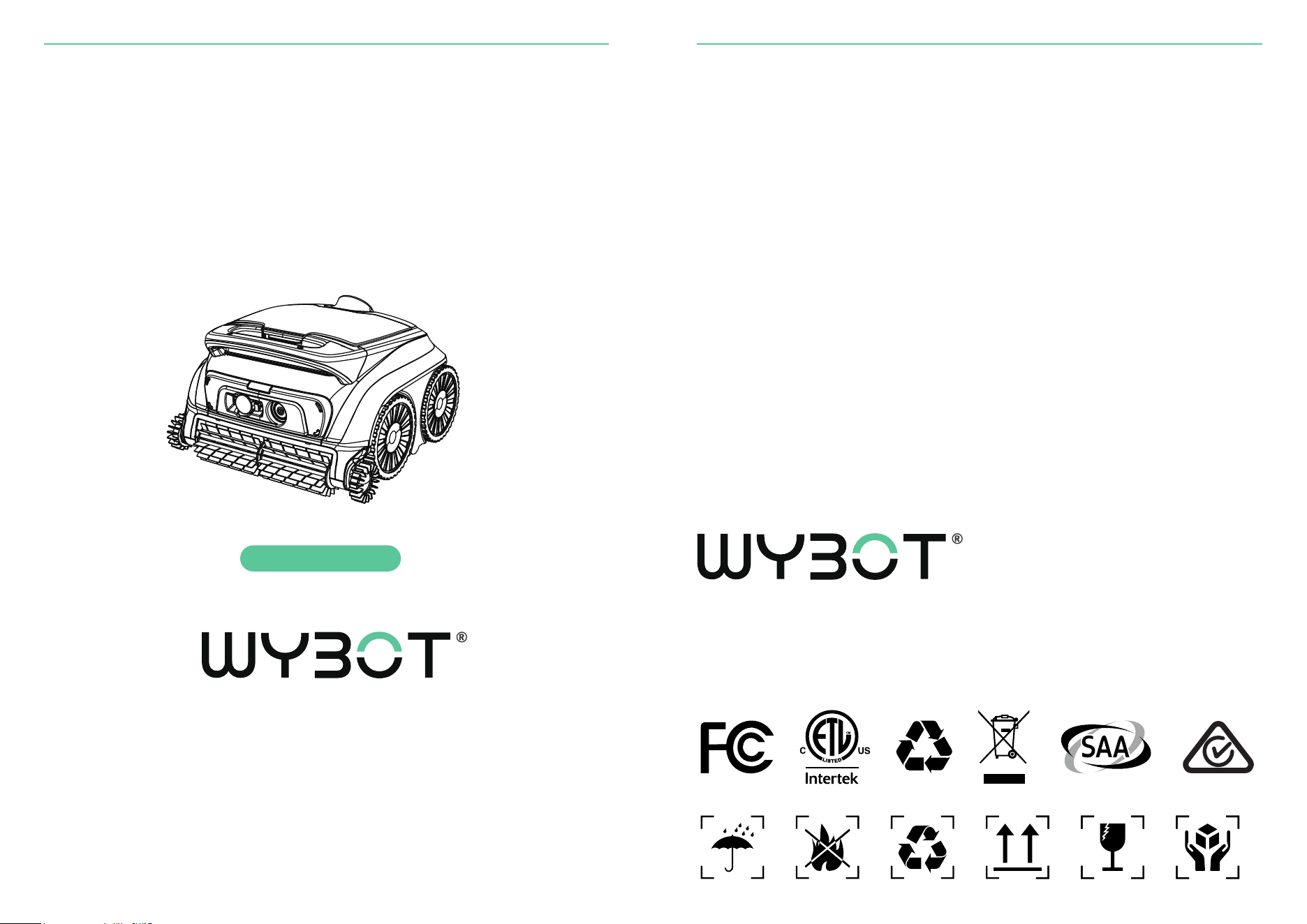
Robotic Pool Cleaner
User Manual
Read through the entire manual before running your new
robotic pool cleaner, and keep this manual handy
for your reference.
WYBOTICS CO.,LTD
No.30,Zhongnan 4th Street West Zone,TEDA Tianjin,China
All trade names are registered trademarks of respective manufacturers listed.
WYBOT B1
Dear Valued Customer,
Thank you for choosing WYBOT. We’re glad to be part of your pool care routine.
WYBOT robotic pool cleaners are built to make pool maintenance simple and
reliable. With smart navigation, powerful suction, effective scrubbing, and fine filtra-
tion, your robot is designed to deliver a thorough clean while using energy efficient-
ly. Advanced features like intelligent dirt detection and adaptive cleaning paths
help ensure consistent results across different pool shapes and surfaces.
At WYBOT, we focus on practical innovation. Technology that works quietly in the
background so you can spend less time maintaining your pool and more time enjoy-
ing it.
If you have questions or feedback, we’re here to help. Visit our website or contact
our support team anytime.
Enjoy a cleaner pool with WYBOT, where technology meets convenience.
Important Safety Instructions
Read this manual carefully before using the cleaner. Failure to follow these
instructions may result in serious injury, electric shock, or death.
Use and operate this product only as described in this manual. Improper use
may result in personal injury or property damage. WYBOTICS Co., Ltd. is not
held liable for any loss or injury caused by improper use.
General Safety
1.Use only accessories recommended or supplied by WYBOTICS Co., Ltd.
2.Use only the original, authorized charger provided with this product. Do not
use the charger with any other devices. Improper use may cause overheat-
ing, battery damage, or leakage.
3.Turn off the robot before performing any maintenance or removing it from
the pool.
4.Ensure the charging port is completely dry before connecting the charger.
5.The electrical outlet used for charging must be protected by a Ground
Fault Circuit Interrupter (GFCI) or Earth Leakage Interrupter (ELI).
6.Do not use the charger if the cord or plug is damaged. Doing so may result
in electric shock.
7.Do not use unauthorized extension cords or adapters with the charger.
8.Do not allow children to ride on the cleaner or use it as a toy.
9.Children must not operate or maintain the device or docking station.
10.Do not enter the pool while the robot is operating.
11.Do not expose the device or charger to flammable or explosive environ-
ments.
12.Sealed components may only be disassembled by licensed or qualified
service professionals.
13.Any servicing beyond routine user maintenance described in this manual
must be performed by a qualified professional.
14.Keep hands, fingers, hair, and objects away from moving parts during
operation. Moving parts can cause serious injury.
Wireless Communication Notice
15.This device contains Bluetooth modules operating at 2.4 GHz and
complies with applicable RF exposure standards. To reduce exposure, oper-
ate the device as instructed and avoid prolonged close contact with commu-
nication modules.
Warning
Safety Instructions
Cautions
Safety Instructions
Failure to follow these cautions may result in damage to the device or reduced
product performance.
1.Fully charge the cleaner before first use.
2.Do not overcharge the cleaner. Overcharging may reduce battery lifespan.
3.Before long-term storage of six months or more, fully charge the cleaner to
help maintain optimal battery health.
4.Do not operate the cleaner while the pool filtration system is running.
5.Rinse and clean the filter basket and ultra-fine filter after each use.
6.Store the cleaner in a cool, well-ventilated location away from direct sunlight
or heat sources.
7.Operate the pool cleaner only in water conditions specified in this manual.
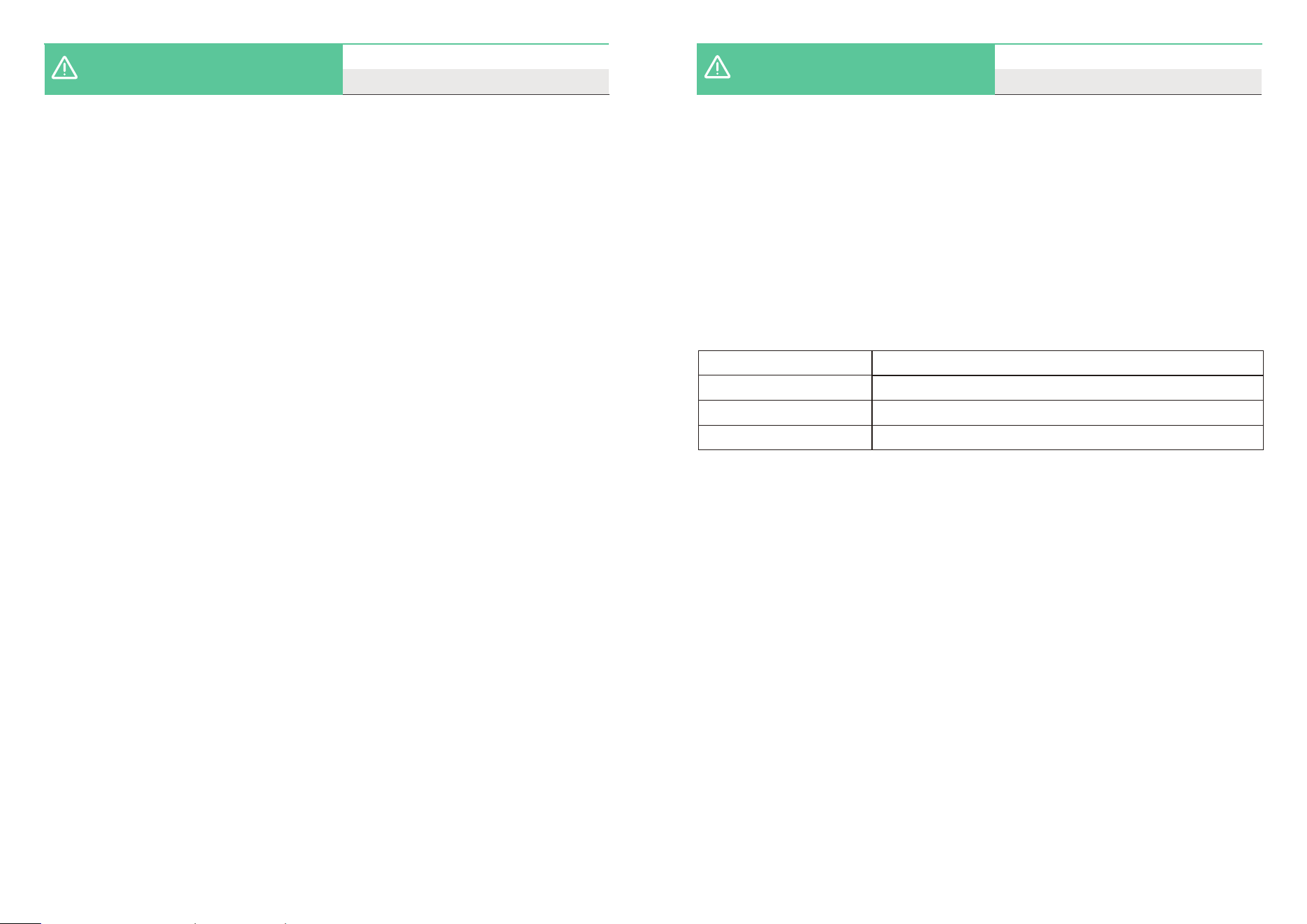
Max 4 mg/L
7.0 - 7.8
41 - 95 ℉ (5 - 35 ℃)
Maximum 5000 PPM
Chlorine
pH
Temperature
NaCl
8.Before starting the robot, carefully inspect the pool liner. Do not use the
cleaner if the liner is loose, damaged, folded, corroded, or if foreign objects such
as stones are present. The liner must be repaired or replaced by a qualified
professional before operation. Damage resulting from use in an unsuitable pool
environment is not covered.
01
01
02
03
04
04
06
06
07
08
10
11
12
12
13
15
16
CONTENTS
01 / WYBOT AT A GLANCE
Product External Overview
Product Internal Overview
Packing List
02 / GET STARTED
Charge your new WYBOT
Setup your new WYBOT
Connect to your App
Customize your pool cleaning
Run your new WYBOT
03 / DO A FILTER CLEANING
04 / DEVICE SPECIFICATION
05 / LIMITED WARRANTY
06 / HOW TO MAINTAIN YOUR DEVICE
07 / FAQ & TROUBLE SHOOTING
08 / CERTIFICATION
09 / WYBOT CUSTOMER CARE
a
b
01 / WYBOT AT A GLANCE
c
d
e
Product External Overview
c
d
h
a
b
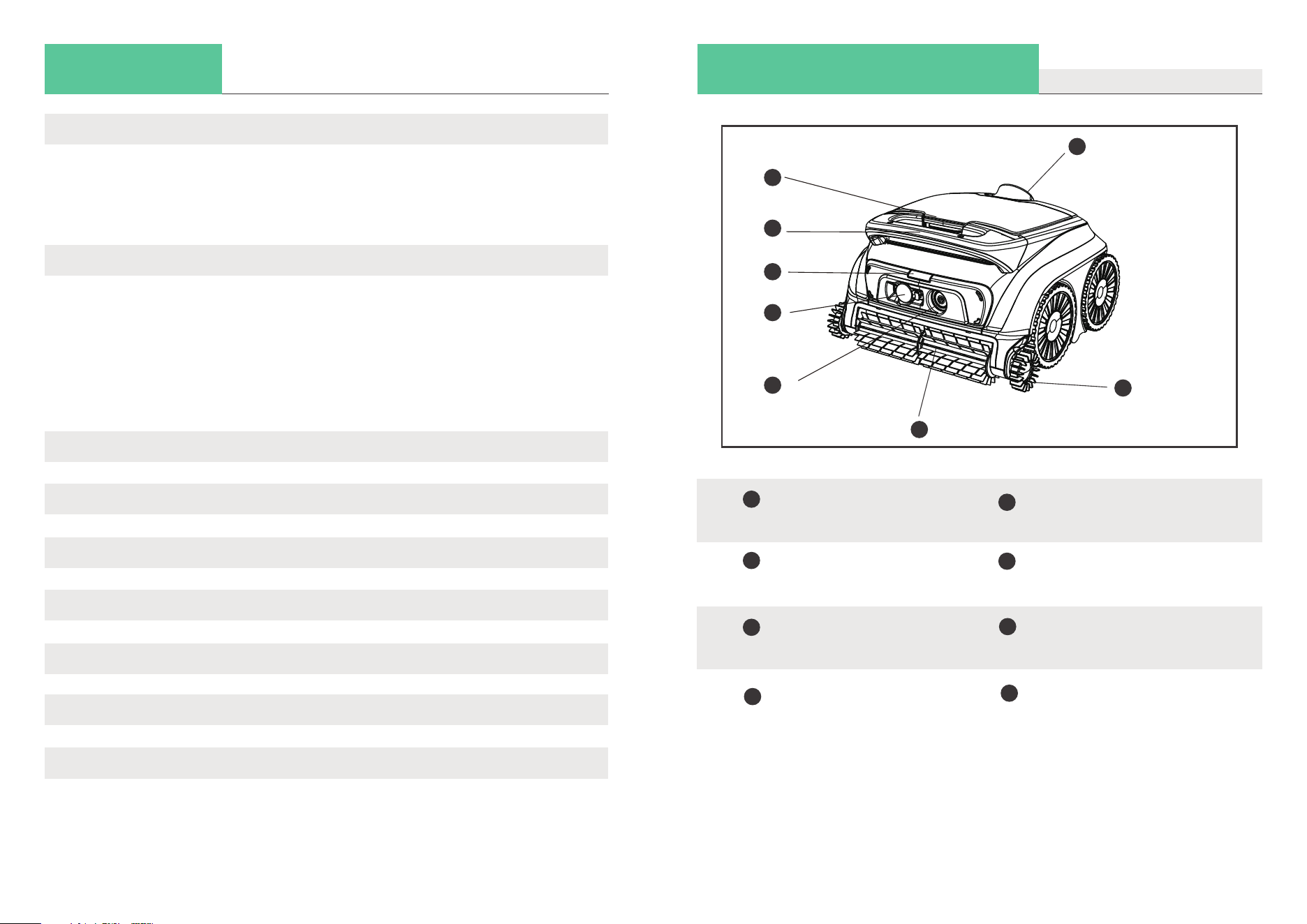
Handle
Used to lift, carry, and remove
the cleaner from the pool.
Pump
Discharges water from the
unit during operation.
01
Lid Open Button
Hold to open the top cover and access
the filter assembly.
Edge Scrubbing Brush
Cleans pool edges and corners during
operation.
Charging Port
Connect the charger to recharge
the cleaner battery.
Power (On/Off) Button
Turns the device on or off.
LED Status Indicator
Displays operating, charging, and error
status using different light colors.
e
f
g
Front Scrubbing Brush
Loosens debris and directs dirt
into the cleaner for collection.
f
g
h
Product Internal Overview
01 / WYBOT AT A GLANCE
Packing List
01 / WYBOT AT A GLANCE
Device x 1
User Manual x 1
Filters x 1
Charger x 1
Quick Start Guide x 1
02
03
j
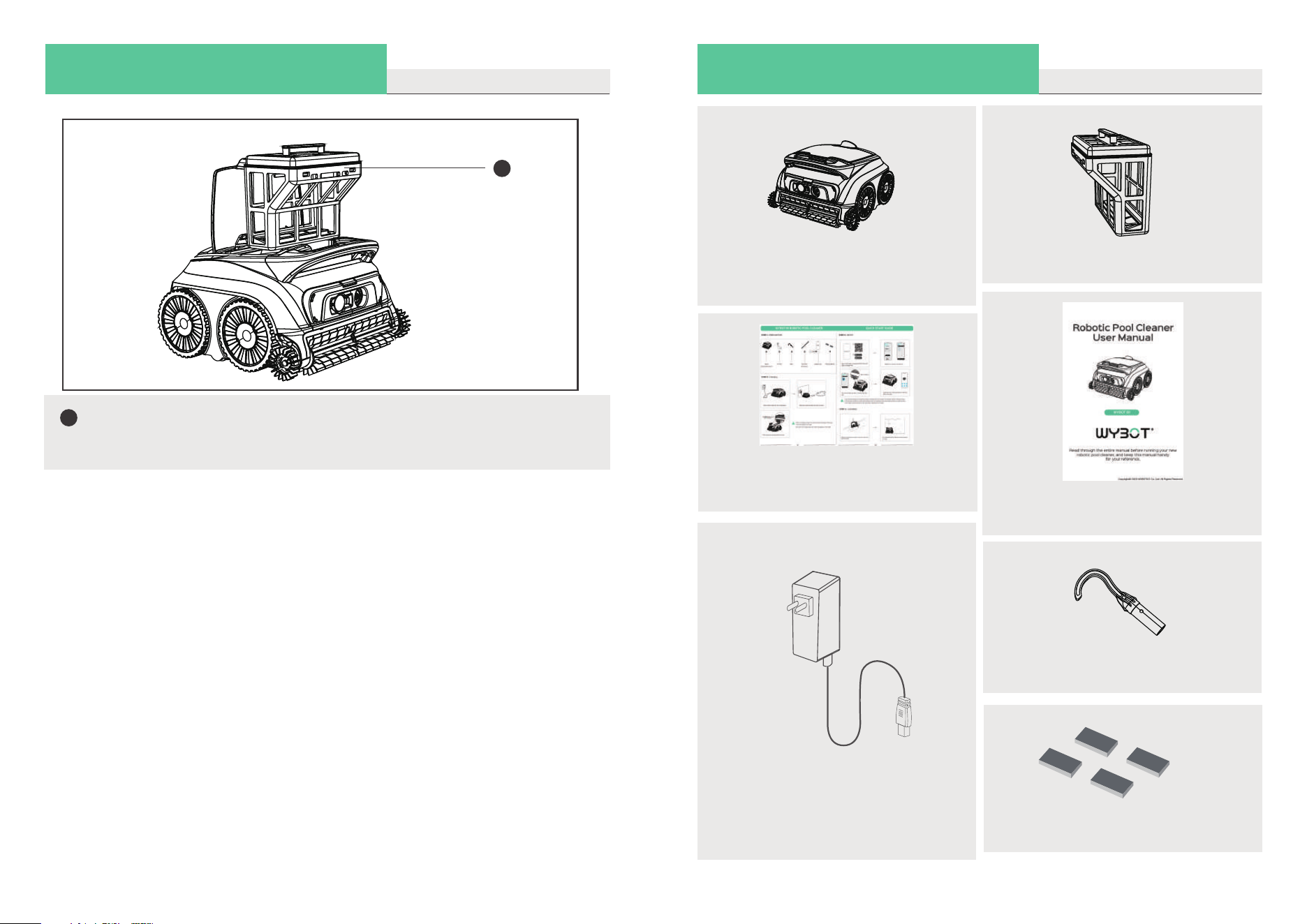
Filter Basket
Store collected dirt and debris,
remember to install it before start
cleaning, and wash it after each use.
j
Hook x 1
Floating Blocks
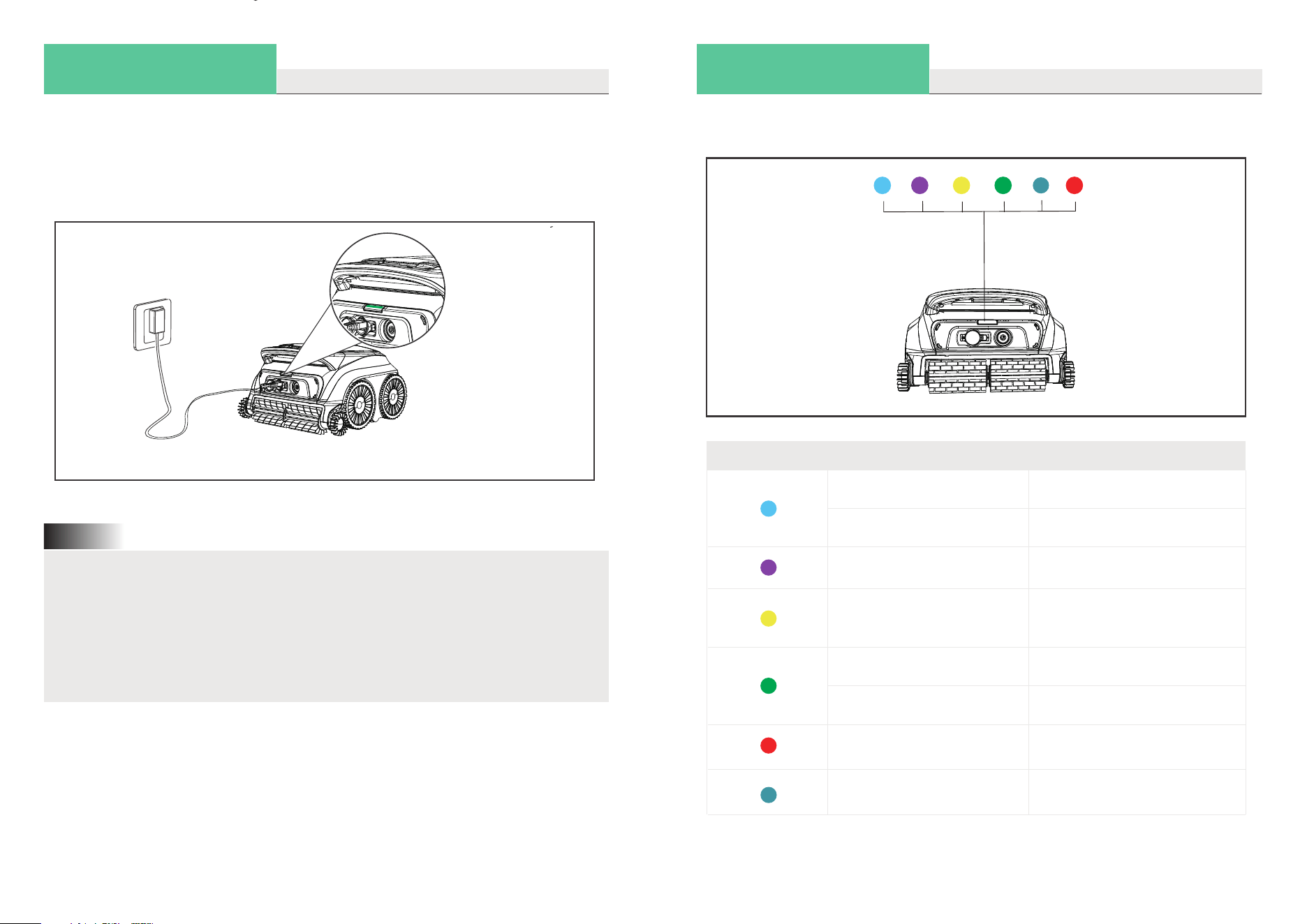
Charge your new WYBOT
02 / GET STARTED
This device is powered by a built-in lithium-ion rechargeable battery. Fully charge the
battery before first use and whenever the battery level is low.
Connect the cleaner to a wall outlet using the supplied charging cable and power
adapter.
1.When charging, place the cleaner at least 3 m (10 ft) away from the pool edge.
2.To reduce the risk of fire or electric shock, keep the cleaner and power
adapter away from water, moisture, and direct sunlight while charging.
3.Before charging, ensure the cleaner is powered off and the charging port is
completely dry.
4.Charge the cleaner in an environment with an ambient temperature between
32°F and 95°F (0°C to 35°C) and relative humidity between 5% and 95%.
Note:
Charge your new WYBOT
02 / GET STARTED
Fully Charged!
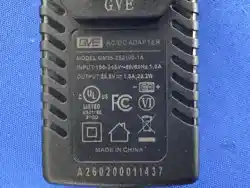
The power adapter is equipped with an indicator light that displays a solid blue light
when power is supplied.
The LED indicator on the top of the cleaner will turn solid green when the battery is
fully charged.
Refer to the table below for LED status indications.
LED Light Indication
Solid
Flashing
Solid
Flashing
Solid or flashing
Status
Power On
Cleaning
Connecting to App
Low battery or
self-parking in pool
Fault detected
Flashing
Solid
Charging in progress
Fully charged
Flashing
Firmware upgrading
04
05
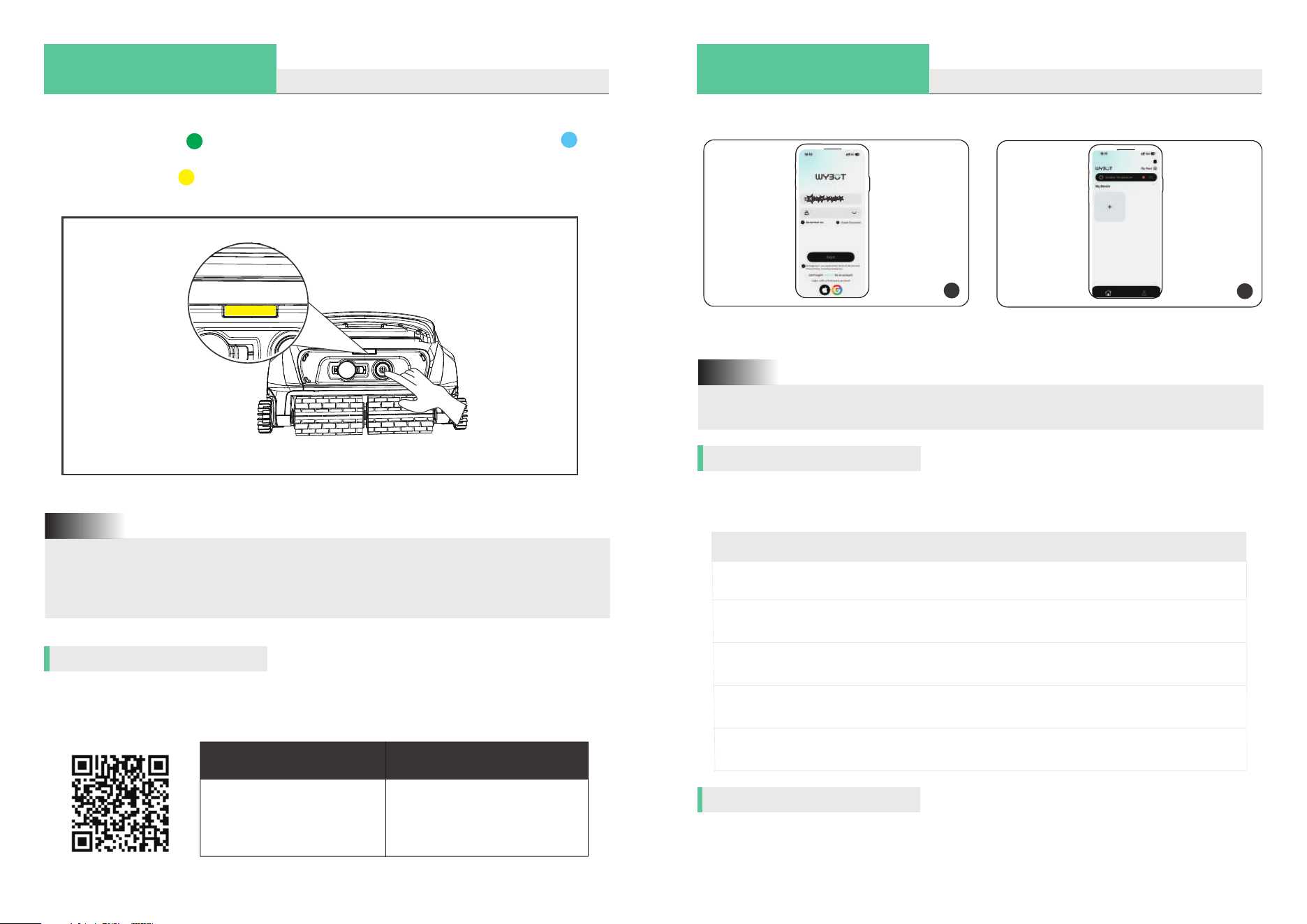
Setup your new WYBOT
02 / GET STARTED
02 / GET STARTED
1. When yellow light flashes, you should charge the device immediately.
2. If red LED light is on, you can find solution from trouble shooting in this manual
or call for service.
Note:
Download the WYBOT App to your smartphone by scanning the QR code provided or
by searching for WYBOT in the App Store or Google Play.
Connect to your App
iOS
iOS 17.0 or later
Android 8.0 or later
Android
Choose your cleaning mode
Select a cleaning mode based on your pool type and cleaning needs:
Setup your new WYBOT
Turn on the device by pressing the on/off button. The LED indicator on the top will
display a solid green to display current battery level and then a solid blue
when the device is on. If the battery level is too low to start cleaning, the LED lights
will show a flashing .
Low battery!
Cleaning Mode
Standard full pool
Floor only
Wall only
Wall then floor (Combo)
Cleaning Coverage
Wall+ Floor+Waterline
(Complex pool shape)
Pool floors
Pool walls
Wall *1+ Floor *1 (Default)
Waterline only
Pool waterline
Choose your cleaning time
You may customize cleaning duration via the app by choosing ‘Quick cleaning mode’.
In Quick Clean mode, the robot runs for about 1 hour, ideal for daily maintenance of
smaller pools.
You may follow the steps below to customize your cleaning from the APP.
1
Sign up an account and log in.
2
Enter the home page and tap ‘+’ to find
the robot.
The robot can only connect to your mobile phone when it is out of water.
Note:
06
07
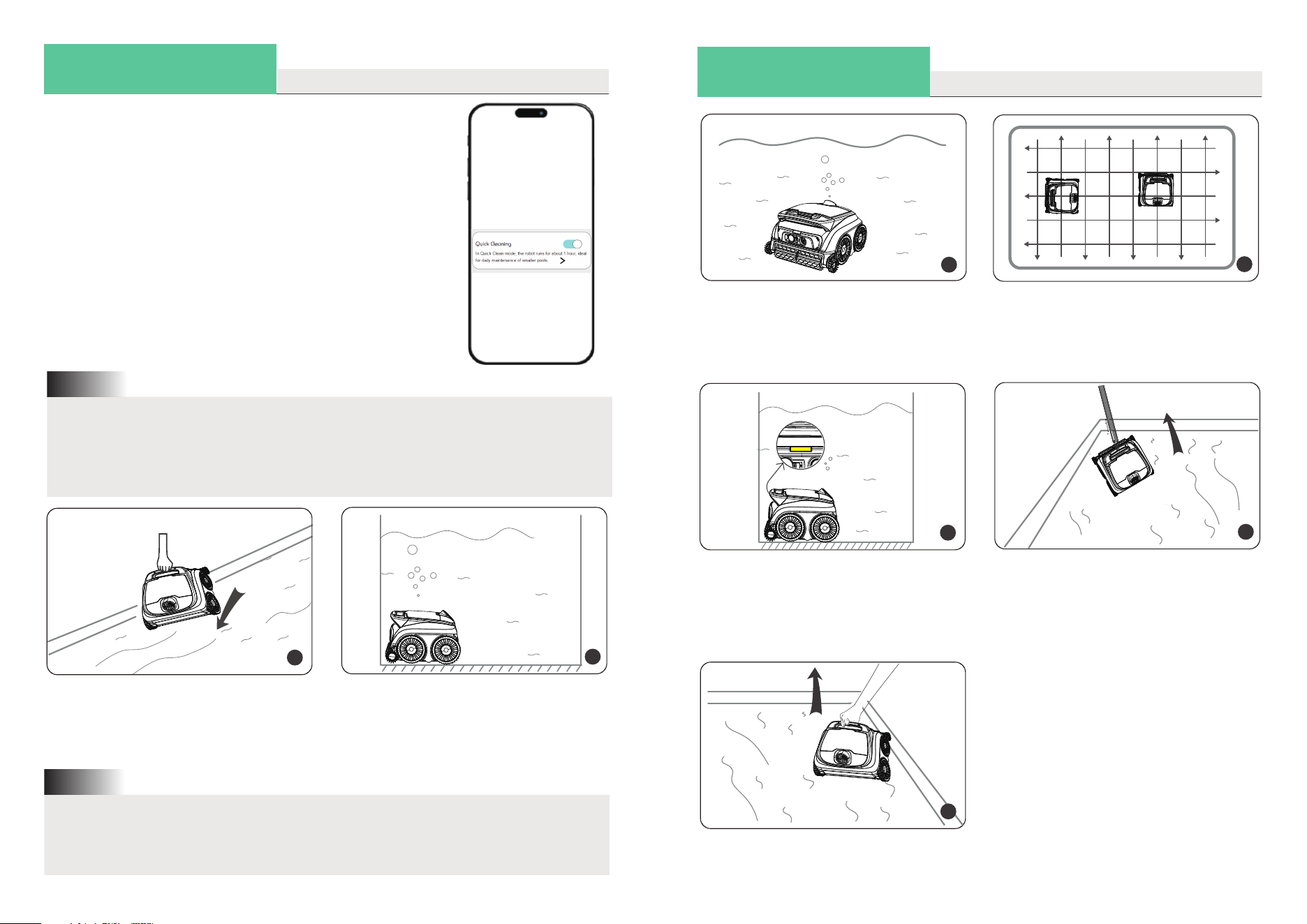
02 / GET STARTED
Run your new WYBOT
1
Hold the handle of the robot, and put it
into the pool vertically.
2
Let it sink down to the floor to empty tra-
pped air inside.
For best cleaning performance, the water level should be at least 15.75 in
(40 cm) above the top of the device.
Note:
1. You should modify your cleaning modes via App when out of pool. The default
mode is Wall then floor
2. If the device restarts, it will automatically enter the cleaning mode you set
last time.
Note:
About 20 seconds of self-calibration,
the indicator light will turn to be a flashing
blue. The cleaner is ready to clean.
3
4
The cleaner begins to clean walls, floor
and waterline as default or your set
through App.
02 / GET STARTED
Run your new WYBOT
5
The device will automatically move to
stop by the edge of wall when finishing
cleaning or battery low.
6
Insert the included hook into a pool
pole and lift the cleaner out of the pool.
Take the cleaner out of the pool verti-
cally to drain inside water out quickly.
7
Please ensure the battery level is above 50% before starting.
Low battery may reduce cleaning duration and coverage.
08
09
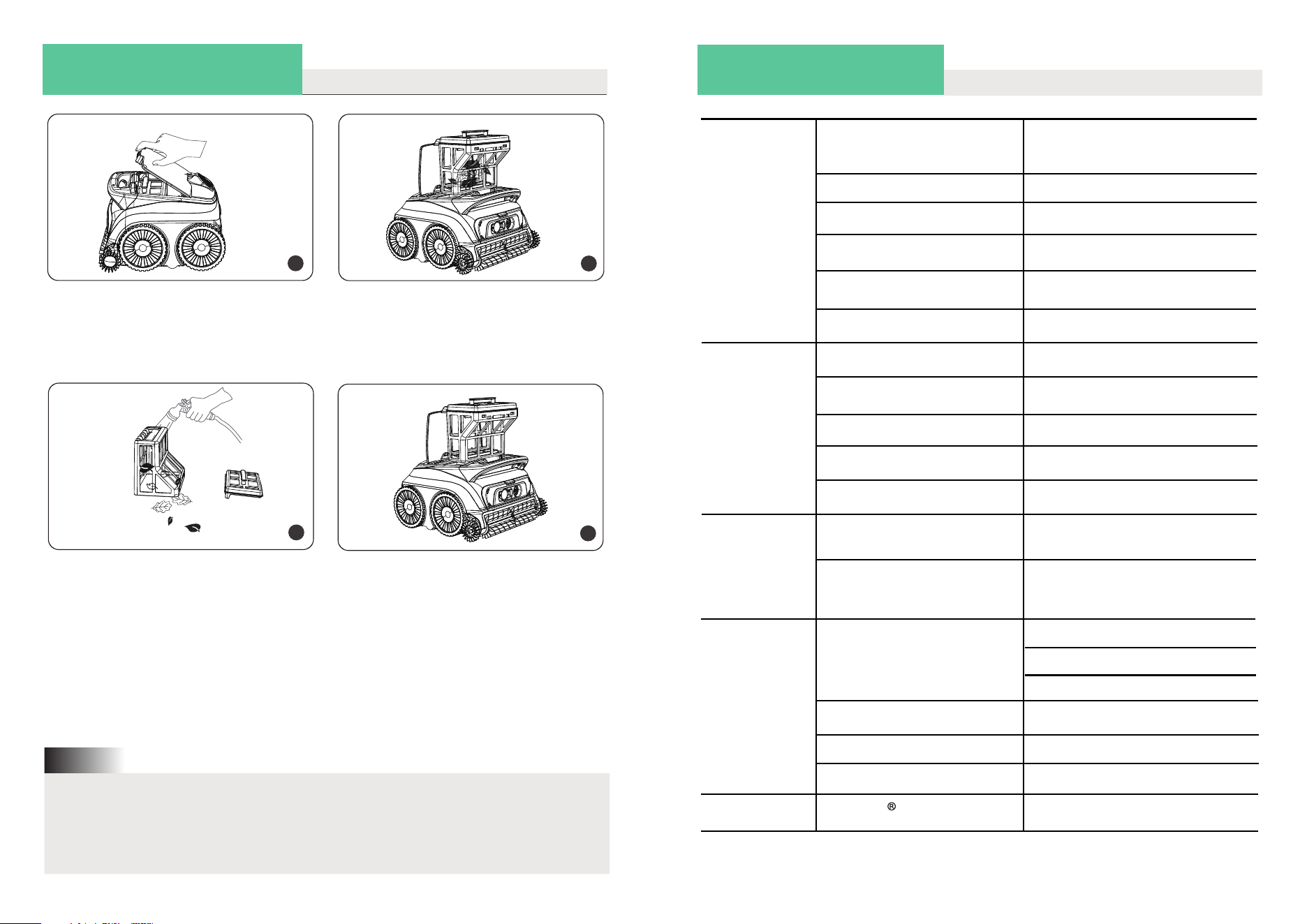
03 / DO A FILTER CLEANING
1
Hold the lid open button up to open the
cover.
2
Take out the filter basket.
3
Empty all debris and rinse it with clean
water.
4
After rinsing, put the filter basket into the
cleaner and close the cover.
1.The cleaner contains electrical components. Store it in a cool, ventilated place,
away from direct sunlight or heat sources.
2.If storing the cleaner for long periods (over 6 months), charge it beforehand to
maintain optimal battery life.
Note:
04 / DEVICE SPECIFICATION
Model
Min Water Depth
Max Water Depth
Power
Battery Capacity
Filtration
Charging Environment
Storage Environment
(off season)
Product Name
Net Weight
Basic
Information
Running Time Per Full Charge
Charging Time (DC charger)
6.5kg
Robot
Configuration
Environment
Requirements
Supply Unit Model
Input Voltage
Output Voltage
Output Current
DC Power
Supply
WYBOT B1
OS600
Max 100m
2
40cm
3m
100min~120min
3 hours
35W
2600mAh
180µm
0 ℃ -35℃ (32℉ -95℉) (5%-75%)RH
Away from direct sunlight
5 ℃ -45℃ (41℉ -117℉)
(5%-75%)RH
cool and ventilated place
100~240V AC
25.2V DC
1.0A
GM25-252100-1A (US)
GM25-252100-2A (EU)
GM25-252100-4A (AU)
Pool Size
Connectivity
Bluetooth Range Frequency
2412~2472MHz
10
11
05 / LIMITED WARRANTY
1. All WYBOT pool cleaners in the market have been inspected and licensed to
be sold as per local laws.
2. The warranty applies only to original buyers, and not valid to resale and any
other kinds of transfer.
3. Any damages to the unit caused by improper use, unauthorized repair or
disassembly are not covered by WYBOTICS Co., Ltd.’s warranty.
4. The order number or record must be presented for any claim or repair within
the warranty period.
06 / HOW TO MAINTAIN YOUR DEVICE
You should follow the steps to store your cleaner to maintain good performance.
a) Make sure the device is powered off.
b) Dry the cleaner and filter basket thoroughly.
c) Fully charge the battery before storage.
d) Store the cleaner in a cool, ventilated place, away from direct sunlight, heat
sources, frost, or heavy pressure. Ideal ambient temperature is 5℃ / 41℉ to 45℃ /
113℉.
e) Recharge the battery every three months to maintain optimal battery life.
If your device fails to operate after long periods of low battery or inactivity,
contact Customer Care. Do not attempt to disassemble the device yourself for
safety reasons.
Note:
07 / FAQ & TROUBLE SHOOTING
Q: What pool shapes and construction materials is the cleaner suitable for?
A: The machine can be applied to rectangle, oval, or irregular shapes of in-ground
swimming pools. Applicable construction materials include PVC, gunite, tile and
other materials. (Slippery materials such as tiles, mosaics, and acrylic may
not work well, and you need to do some modification.)
Q: Will obstacles such as steps, shallow water areas, drains, slopes etc. in the swim-
ming pool affect the running?
A: The machine can climb steps, drains, and shallow water areas. The above obstacl-
es may influence its cleaning path, but will not affect the operation of the machine.
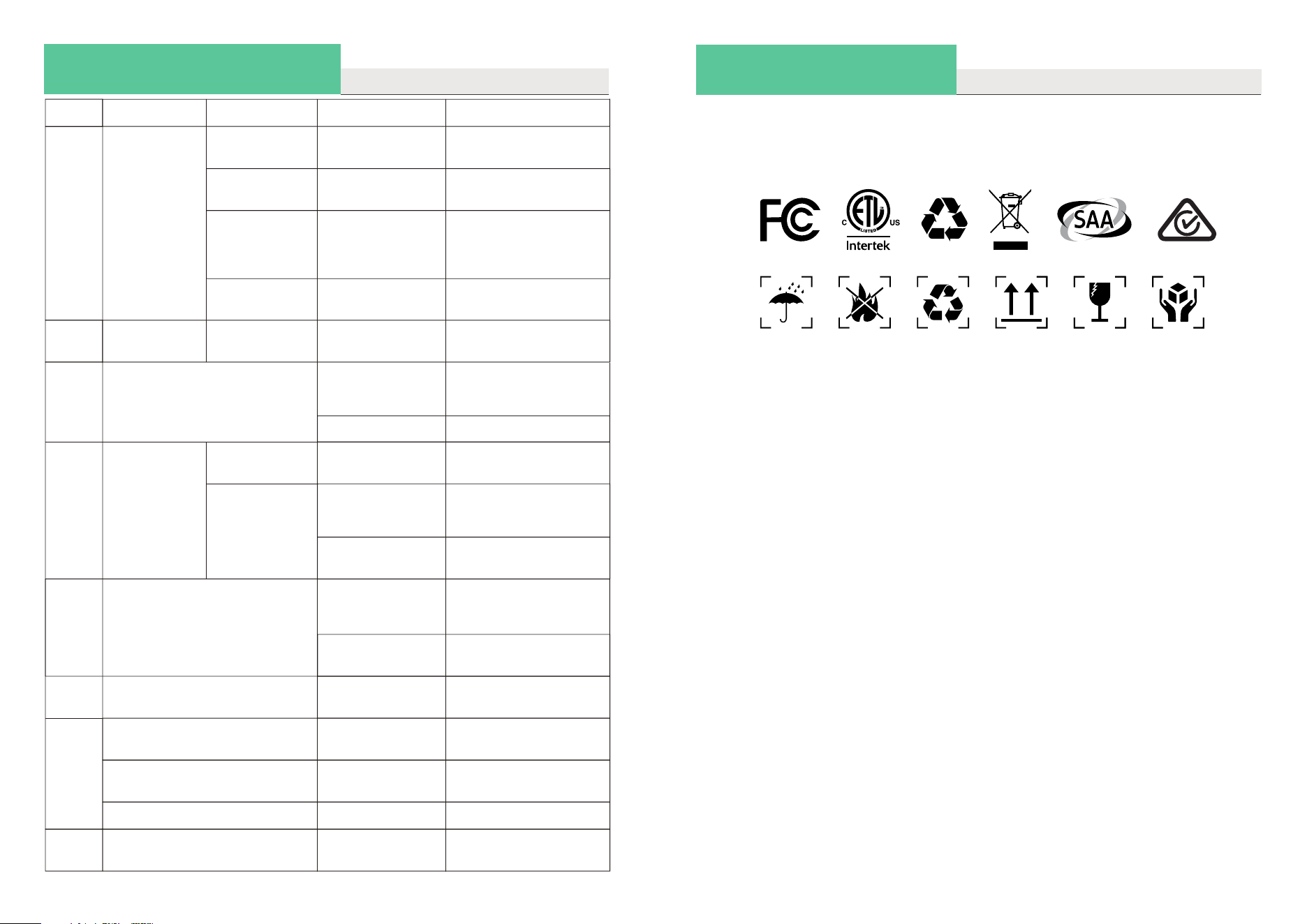
If you encounter issues while using the cleaner, refer to the troubleshooting
table to solve them.
If the solution isn’t listed, please contact Customer Care for assistance.
Note:
Scan the QR code for the warranty policy.
12
13
08 / CERTIFICATION
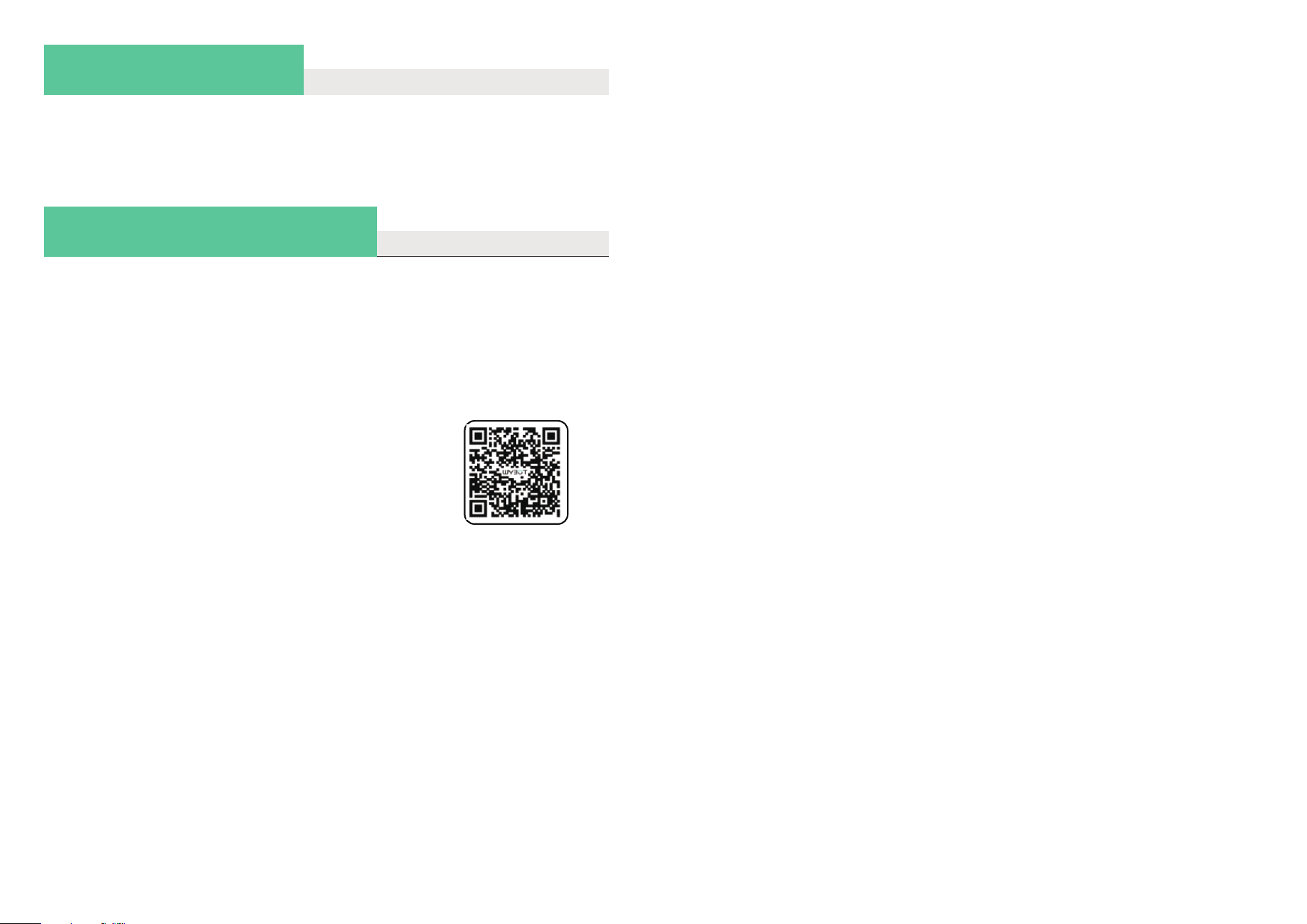
WYBOT robotic pool cleaners have passed all performance and reliability tests and
have obtained the relevant certifications in the countries where they are sold. You
can use your cleaner with confidence.
No.
1
2
Issues
Device does
not work
A flashing red
light
A flashing red
light
A breathing yel-
low light
Battery low Fully charge the device
and restart
Charger light
flashes
Unable to ch-
arge
Poor contact Re-plug the charger
3
4
5
6
Do not climb walls
Abnormal wall
climbing
only clean part area and cannot
clean the entire pool
Climbing slowly
Sinking down
away from wall
or floating on
the water
Filter basket blo-
cked
Filter basket blo-
cked
Filter basket blo-
cked
front side up when on the floor
Encounter Obst-
acles
Drain height is
over 3cm
The APP cannot be connected
when the device is in the pool
Wrong cleaning
mode
Firmware not la-
test
Connect to the App and
update the firmware
Clean the filter basket
7
8
Do not clean as set cleaning
path
stuck at water drains
Clean the filter basket
Help the machine away
from the obstacle
Device power off
Not available
Unable to connect to the App Restart
Connect the device
on the shore
Connect to the App
and re-choose a suit-
able cleaning mode
Clean the filter basket
Intake air Stick adhesive blocks
(Contact after-sale team
for instruction)
Clean the filter basket
Slippery constru-
ction materials
Stick adhesive blocks
(Contact after-sale team
for instruction)
Too dirty water Clean the filter basket
Possible Causes
A solid red light
Motor protection
Not put the device
into the water or
the pool water is
too shallow
Restart and put it into
the pool immediately.
Be sure the water dep-
th is over 0.4m.
Restart
Impeller is stuck
Suggested Solution
Check the impeller
and clean foreign
Details
07 / FAQ & TROUBLE SHOOTING
14
15
FCC Statement
This equipment has been tested and found to comply with the limits for a Class B
digital device, pursuant to part 15 of the FCC Rules. These limits are designed to
provide reasonable protection against harmful interference in a residential installa-
tion. This equipment generates, uses and can radiate radio frequency energy and,
if not installed and used in accordance with the instructions, may cause harmful
interference to radio communications. However, there is no guarantee that inter-
ference will not occur in a particular installation. If this equipment does cause harm-
ful interference to radio or television reception, which can be determined by
turning the equipment off and on, the user is encouraged to try to correct the inter-
ference by one or more of the following measures:
• Reorient or relocate the receiving antenna.
• Increase the separation between the equipment and receiver.
• Connect the equipment into an outlet on a circuit different from that to which
the receiver is connected.
• Consult the dealer or an experienced radio/TV technician for help.
Caution: Any changes or modifications to this device not explicitly approved by
manufacturer could void your authority to operate this equipment.
This device complies with part 15 of the FCC Rules. Operation is subject to the
following two conditions: (1) This device may not cause harmful interference, and (2)
this device must accept any interference received, including interference that may
cause undesired operation.
16
09 / WYBOT CUSTOMER CARE
WYBOTICS Co., Ltd. continuously improves its products. Specifications in this
manual may differ slightly from the actual product, and WYBOTICS Co., Ltd.
reserves the right to make updates.
If you encounter any problems during use, please contact after-sale team.
For more details, please contact WYBOT website www.wybotpool.com (US),
www.au.wybotpool.com (AU).
Wybot Customer Service:
Email: [email protected] (US)
[email protected] (Canada)
[email protected] (Australia)
Facebook: @WybotPool
Tel: 1-866-777-6655
Scan the QR code for the e-Manual.
RF Exposure Information
This equipment complies with FCC radiation exposure limits set forth for an
uncontrolled environment. This equipment should be installed and operated
with minimum distance 20cm between the radiator and your body.
08 / CERTIFICATION