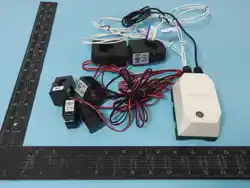

R900NA Series
Wireless Current Sensor
R900NA Series User Manual
Copyright©Netvox Technology Co., Ltd.
This document contains proprietary technical information which is the property of NETVOX Technology. It shall be maintained
in strict confidence and shall not be disclosed to other parties, in whole or in part, without written permission of NETVOX
Technology. The specifications are subject to change without prior notice.

Contents
1. Introduction............................................................................................................................................................................ 1
2. Appearance ............................................................................................................................................................................. 2
3. Features .................................................................................................................................................................................. 4
4. Setup Instructions...................................................................................................................................................................5
5. Data Report ............................................................................................................................................................................ 7
5.1 Example of ReportDataCmd ..................................................................................................................................................... 8
5.2 Example of ConfigureCmd ..................................................................................................................................................... 10
5.3 Example of SetSensorAlarmThresholdCmd ...........................................................................................................................13
5.4 Example of GlobalCalibrateCmd ............................................................................................................................................15
5.5 Example of NetvoxLoRaWANRejoin .....................................................................................................................................16
5.6 Example for MinTime/MaxTime logic...................................................................................................................................18
6. NFC App ...............................................................................................................................................................................20
7. Installation ............................................................................................................................................................................23
8. Battery Passivation...............................................................................................................................................................29
9. Important Maintenance Instructions.................................................................................................................................... 29

1
1. Introduction
A wireless current sensor in R900NA series can support up to 6 detachable or non-detachable current transformers (CT), 4
point-contact NTC thermistors, 1 digital output/input, 1 light sensor, and a built-in vibration sensor. In addition to these
powerful functions, the R900NAB series supports configuration and firmware upgrade through Netvox NFC App. The devices
integrate built-in vibration sensors for tamper detection and support one output/input signal, enabling threshold-alarm-triggered
control of third-party devices.
LoRa Wireless Technology
LoRa is a wireless communication technology famous for its long-distance transmission and low power consumption.
Compared with other communication methods, LoRa spread spectrum modulation technique greatly extends the
communication distance. It can be widely used in any case that requires long-distance and low-data wireless communications.
For example, automatic meter reading, building automation equipment, wireless security systems, and industrial monitoring. It
has features like small size, low power consumption, long transmission distance, strong anti-interference ability, and so on.
LoRaWAN
LoRaWAN uses LoRa technology to define end-to-end standard specifications to ensure interoperability between devices and
gateways from different manufacturers.
2
2. Appearance
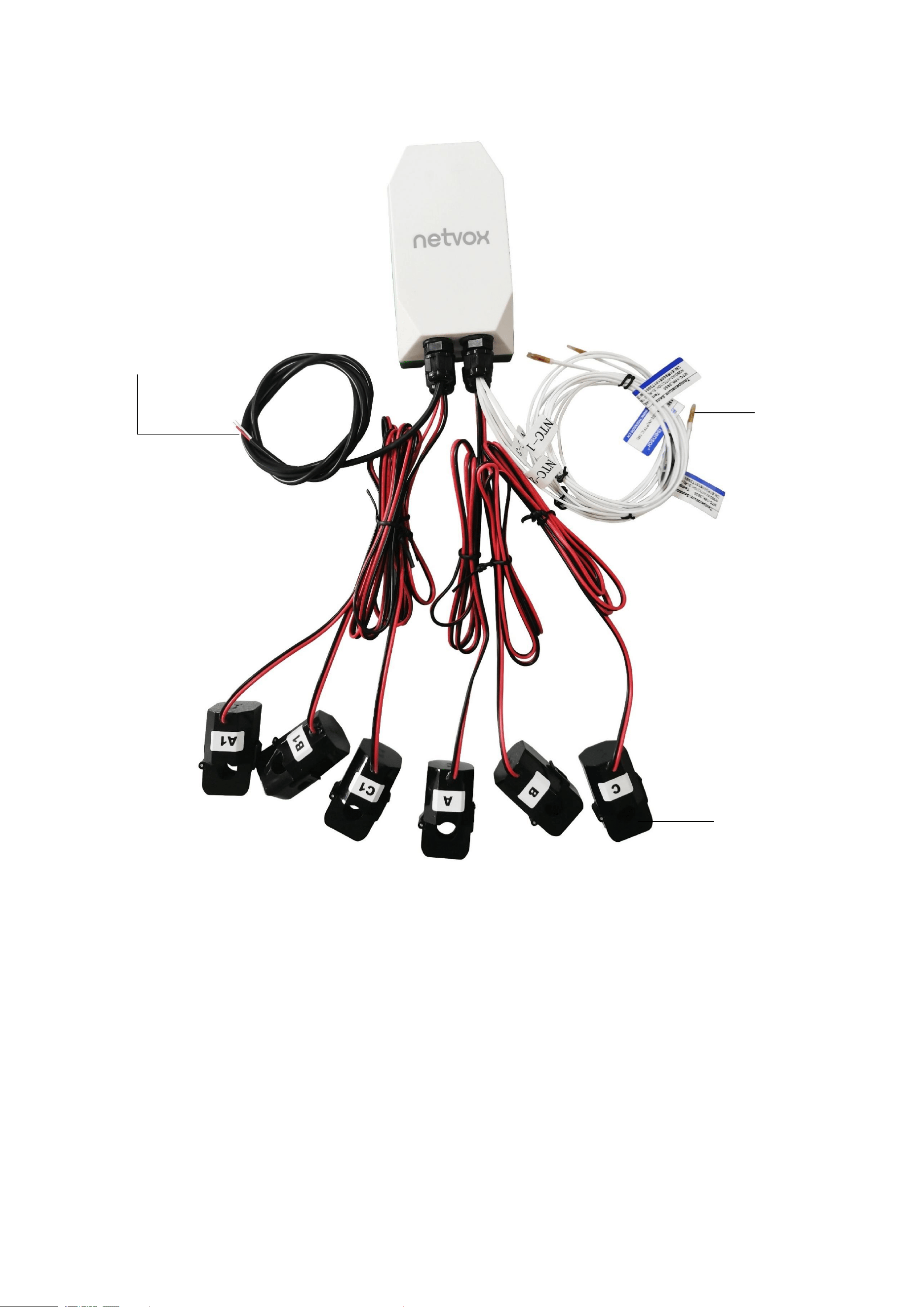
R900NAB607T4 for example:
NTC
Clamp-on
Current Transformer
Digital Output
Red: 3.3V (+) White: (-)
3
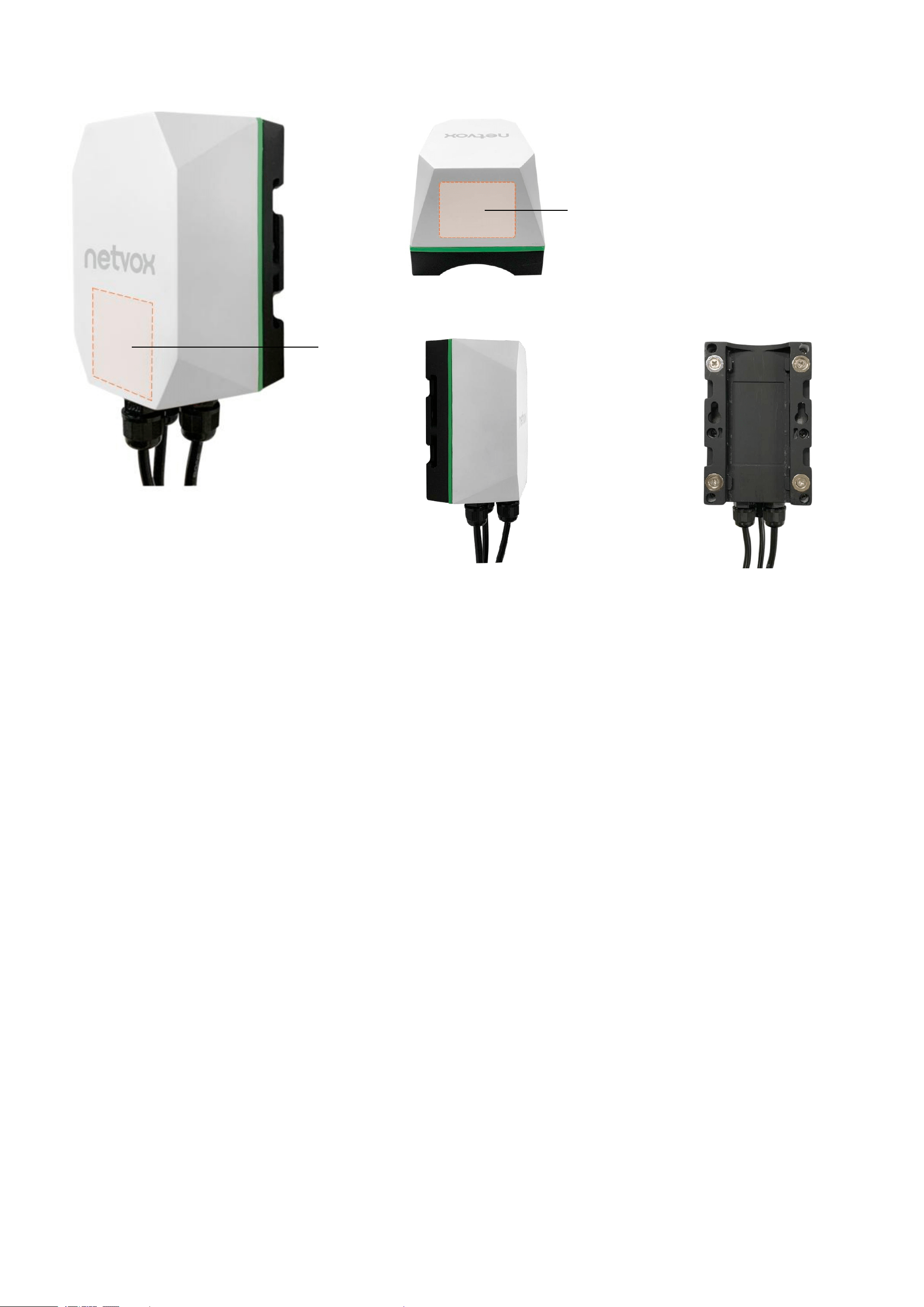
Top
Left Side
Back
NFC
Magnetic
switch

4
3. Features
Equipped with multiple kinds of sensors
(Up to 6* clamp-on CTs + up to 4* NTC thermistor + 1* digital output + 1* light sensor +1* built-in vibration sensor)
CT cable (detachable/undetachable), measurement range (75/150/250A…), phase (single / 3-phase) can be personalized based on
user’s need
For AC detection
Support NFC. Configure and upgrade firmware on Netvox NFC app
Store up to 10000 data
Report when device disconnects from the network
Output digital signal based on the threshold of current and temperature
Support magnetic switch to turn on/off and factory reset device
Powered by 2* 3.6V ER18505 batteries (also support ER14505 batteries with battery converter case), or DC 12V
Up to 7 installation methods for different kinds of scenarios
Main unit: IP53; Sensor: IP30
LoRaWAN
TM
Class A compatible
Frequency hopping spread spectrum
Applicable to the third-party platforms: Actility/ThingPark, TTN, MyDevices/Cayenne
Low power consumption and longer battery life
5
4. Setup Instructions
On / Off
Power on
Insert 2* 3.6V ER18505 batteries or connect a DC adapter
Power off
Remove the batteries / DC adapter.
Function key
Turn on
Press and hold the function key for 3 seconds until the green indicator flashes once.
Turn off
Step 1. Press and hold the function key for 5 seconds until the green indicator flashes
once.
Step 2. Release the function key and short press it in 5 seconds.
Step 3. The green indicator flashes 5 times. R900 turns off.
Factory reset
Step 1. Press and hold the function key for 10 seconds. The green indicator flashes once
every 5 seconds.
Step 2. Release the function key and short press it in 5 seconds.
Step 3. The green indicator flashes 20 times. R900 is factory reset and off.
Magnetic switch
Turn on
Hold a magnet near R900 for 3 seconds until the green indicator flashes once.
Turn off
Step 1. Hold a magnet close to R900 for 5 seconds. The green indicator flashes once.
Step 2. Remove the magnet and get close to R900 in 5 seconds.
Step 3. The green indicator flashes 5 times. R900 turns off.
Factory reset
Step 1. Hold a magnet close to R900 for 10 seconds. The green indicator flashes once
every 5 seconds.
Step 2. Remove the magnet and get close to R900 in 5 seconds.
Step 3. The green indicator flashes 20 times. R900 is factory reset and off.
Note:
a. Remove and insert the battery; the device is off by default.
b. 5 seconds after powering on, the device will be in engineering test mode.
c. The on/off interval should be about 10 seconds to avoid the interference of capacitor inductance and other energy storage
components.
d. After the batteries are removed, the device can still operate for a while until the power supported by the supercapacitor runs out.
6
Join a Network
First time joining the network
Turn on the device to search the network.
The green indicator stays on for 5 seconds: Success
The green indicator remains off: Fail
Had joined the network before
(Device is not factory reset.)
Turn on the device to search the network.
The green indicator stays on for 5 seconds: Success
The green indicator remains off: Fail
Fail to join the network
(1) Please turn off the device and remove the batteries to save power.
(2) Please check the device verification information on the gateway or consult your
platform server provider.
Function key
Short press
Device is in the network
The green indicator flashes once. 6 seconds after sampling is completed, the device
reports a data packet.
Device is not in the network
The green indicator remains off.
Note: The function key does not work during sampling.
Magnetic switch
Move magnet close to the switch
and remove it
Device is in the network
The green indicator flashes once. 6 seconds after sampling is completed, the device
reports a data packet.
Device is not in the network
The green indicator remains off.
Sleep Mode
The device is on
and in the network.
Sleeping period: Min Interval.
When the reportchange exceeds the setting value or the state changes: send a data
report based on the Min Interval.
Low Voltage Alarm
Low voltage
3.3V
Note: To ensure the accuracy of data, please replace the battery when it drops to low voltage.
7
5. Data Report
35 seconds after the device is powered on, it will send a version packet and data including CT’s current (mA) and NTC’s
temperature (0.1°C).
Default setting:
Min Interval = 0x0E10 (3600s)
Max Interval = 0x0E10 (3600s) // should not be less than 30 seconds
CurrentChange= 0x0064 (100 mA)
TemperatureChange = 0x001E (3°C)
Current Transformer Measurement Range and Accuracy:
75A
150A
250A
630A
1000A
3000A
Measurement
Range
100mA – 75A
1A – 150A
1A – 250A
5A – 630A
10A – 1000A
150A – 3000A
Accuracy
±1%
(300mA–75A)
±1%
Note: a. Current transformer reports 0A when the current < 1A.
b. If no configuration is done, the device sends data based on the default settings.
c. Please refer to Netvox LoRaWAN Application Command document and Netvox Lora Command Resolver
http://www.netvox.com.cn:8888/cmddoc to resolve uplink data.
Data report configuration and sending period are as follows:
Min Interval
(unit: second)
Max Interval
(unit: second)
Reportable Change
Current Change ≥
Reportable Change
Current Change<
Reportable Change
Any number between
30 to 65535
Any number between
Min time to 65535
Cannot be 0
Report
per Min Interval
Report
per Max Interval

8
5.1 Example of ReportDataCmd
FPort: 0x16
(The above is in hexadecimal. To use decimal, please convert it to port 22.)
Bytes
1
2
1
Var
(length according to the payload)
Version
DeviceType
ReportType
NetvoxPayLoadData
Version – 1 bytes – 0x03——the Version of NetvoxLoRaWAN Application Command Version
DeviceType – 2 bytes – Device Type of Device
The devicetype is listed in Netvox LoRaWAN Application Devicetype V3.0.doc
ReportType
–
1 byte
–
the presentation of the NetvoxPayLoadData according to the devicetype
NetvoxPayLoadData – Var bytes (length according to the payload)
Tips
1. Battery Voltage
The voltage value is bit 0 – bit 6, bit 7=0 is normal voltage, and bit 7=1 is low voltage.
Battery=0xA1, binary= 1010 0001, if bit 7= 1, it means low voltage.
The actual voltage is 0010 0001 = 0x21 = 33, 33*0.1v =3.3v.
2. Version Packet
When Report Type = 0x00 is the version packet, such as 030105000A0320250115, the firmware version is 2025.01.15.
3. Data Packet
When Report Type=0x01 is the data packet.
4. Signed Value
When the temperature is negative, 2's complement should be calculated.

9
Device
Device
Type
Report
Type
NetvoxPayLoadData
R900NAB
6T4
R900NAB
6T4O
R900NAB
6T1O
R900NAB
3T1O
0x0104
0x0105
0x010C
0x010D
0x01
Battery
(1 Byte,
unit:
0.1v)
Current1
(3 Bytes,
unit:
mA)
Current2
(3 Bytes,
unit:
mA)
Current3
(3 Bytes,
unit:
mA)
Current4
(3 Bytes,
unit:
mA)
Current5
(3 Bytes,
unit:
mA)
Current6
(3 Bytes,
unit:
mA)
Temperature
1
(Signed 2
Bytes,
unit: 0.1℃)
Temperature
2
(Signed 2
Bytes,
unit: 0.1℃)
Temperature
3
(Signed 2
Bytes,
unit: 0.1℃)
Temperature
4
(Signed 2
Bytes,
unit: 0.1℃)
ThresholdAlarm
(3 Bytes)
Bit0:LowCurrent1Alarm
Bit1:HighCurrent1Alarm
Bit2:LowCurrent2Alarm
Bit3:HighCurrent2Alarm
Bit4:LowCurrent3Alarm
Bit5:HighCurrent3Alarm
Bit6:LowCurrent4Alarm
Bit7:HighCurrent4Alarm
Bit8:LowCurrent5Alarm
Bit9:HighCurrent5Alarm
Bit10:LowCurrent6Alarm
Bit11:HighCurrent6Alarm
Bit12:LowTemp1Alarm
Bit13:HightTemp1Alarm
Bit14:LowTemp2Alarm
Bit15:HightTemp2Alarm
Bit16:LowTemp3Alarm
Bit17:HightTemp3Alarm
Bit18:LowTemp4Alarm
Bit19:HightTemp4Alarm
Bit20_23: Reserved
ShockTamper
Alarm
(1 Byte,
0x00_NoAlarm,
0x01_Alarm)
Example of Uplink: 0301050122001D4C 001D55 001C99 03D090 03D870 03D070 00DC00DC00DD00DF00000801
1
st
Byte (03): Version
2
nd
3
rd
Byte (0105): DeviceType- R900NAB6T4O
4
th
(01): ReportType
5
th
Byte (22): Battery
-
3.4V 22 (Hex) = 34 (Dec), 34* 0.1v = 3.4V
6
th
– 8
th
Byte (001D4C): Current1
-
7500mA 1D4C (Hex) = 7500 (Dec), 7500* 1mA = 7500mA
9
th
– 11
th
Byte (001D55): Current2
-
7509mA 1D55 (Hex) = 7509 (Dec), 7509* 1mA = 7509mA
12
th
– 14
th
Byte (001C99): Current3
-
7321mA 1C99 (Hex) = 7321 (Dec), 7321* 1mA = 7321mA
15
th
– 17
th
Byte (03D090): Current4
-
250000mA 3D090 (Hex) = 250000, 250000* 1mA = 250000mA
18
th
– 20
th
Byte (03D870): Current5-252016mA 3D870 (Hex) = 252016 (Dec), 252016* 1mA = 252016mA
21
th
– 23
th
Byte (03D070): Current6-249968mA 000000 (Hex) = 249968 (Dec), 249968* 1mA = 249968mA
24
th
– 25
th
Byte (00DC): Temperature1
-
22.0°C 00DC (Hex) = 220 (Dec), 220* 0.1°C = 22.0°C
26
th
– 27
th
Byte (00DC): Temperature2
-
22.0°C 00DC (Hex) = 220 (Dec), 220* 0.1°C = 22.0°C
28
th
– 29
th
Byte (00DD): Temperature3-22.1°C 00DD (Hex) = 221 (Dec), 221* 0.1°C = 22.1°C
30
th
– 31
th
Byte (00DF): Temperature4-22.3°C 00DF (Hex) = 223 (Dec), 223* 0.1°C = 22.3°C
32
th
– 34
th
Byte (000008): Threshold Alarm-High Current2 Alarm
35
th
Byte (01): ShockTamperAlarm -Alarm
Note: Current and Temperature reports 0xFFFFFF or 0xFFFF when no sensor is connected. For example, Current4, 5, and 6 report
0xFFFFFF when R900 only has 3 CTs connected.
10
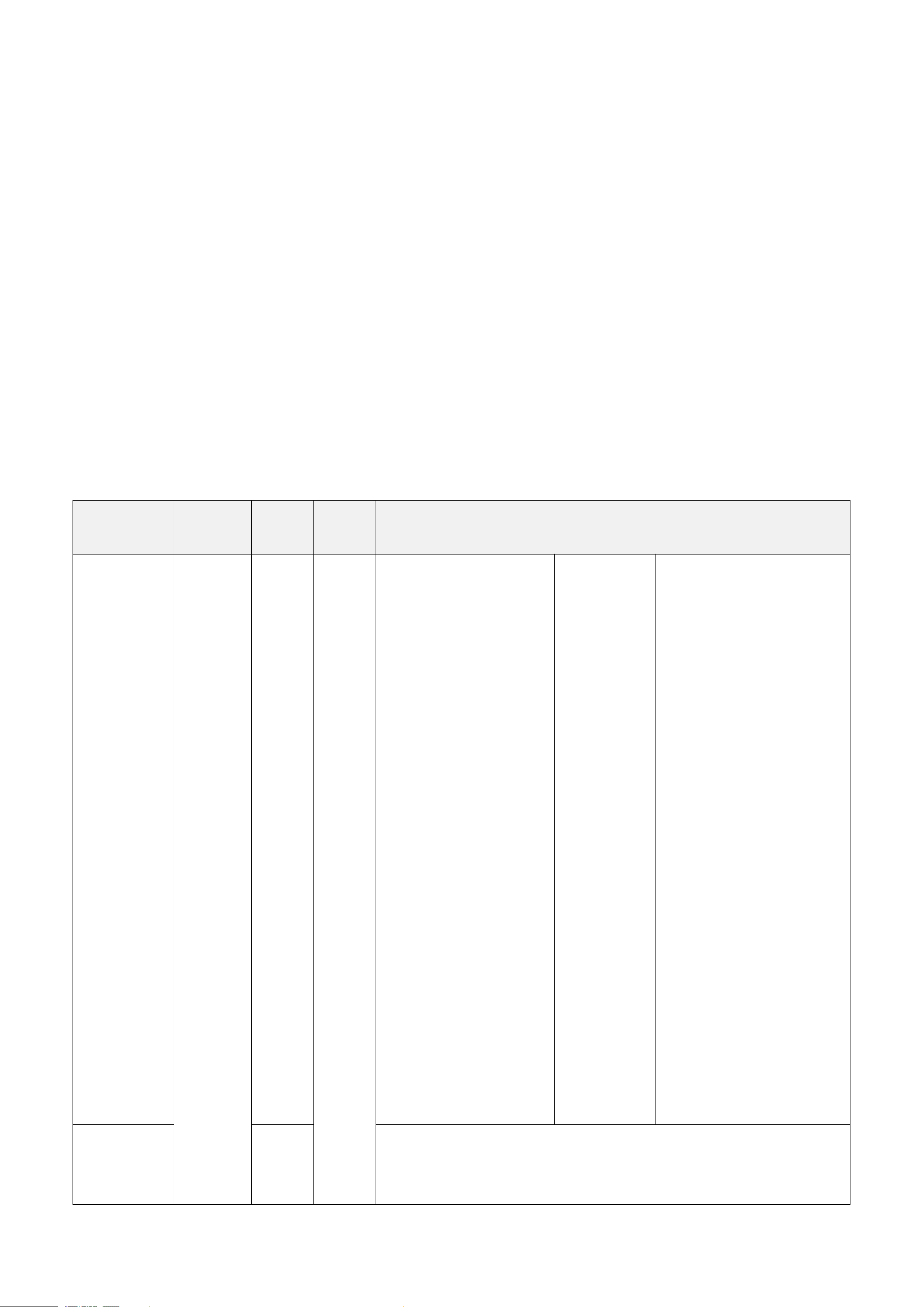
5.2 Example of ConfigureCmd
FPort: 0x17
(The above is in hexadecimal. To use decimal, please convert it to port 23.)
Bytes
1
2
Var (length according to the payload)
CmdID
DeviceType
NetvoxPayLoadData
CmdID – 1 byte
DeviceType – 2 bytes – Device Type of Device
The devicetype is listed in Netvox LoRaWAN Application Devicetype3.0.doc
NetvoxPayLoadData– var bytes Var bytes (length according to the payload)
Description
Device
CmdID
Device
Type
NetvoxPayLoadData
ConfigReport
Req
R900NAB
6T4
R900NAB
6T4O
R900NAB
6T1O
R900NAB
3T1O
0x01
0x0104
0x0105
0x010C
0x010D
MinTime
(2 Bytes,
unit: s)
MaxTime
(2 Bytes,
unit: s)
Current
Change
(2 Bytes,
unit: 1mA)
Temperature
Change
(2 Bytes,
unit: 0.1°C)
ConfigReport
Rsp
0x81
Status (0x00_success)
ReadConfig
ReportReq
0x02
ReadConfig
ReportRsp
0x82
MinTime
(2 Bytes,
unit: s)
MaxTime
(2 Bytes,
unit: s)
Current
Change
(2 Bytes,
unit: 1mA)
Temperature
Change
(2 Bytes,
unit: 0.1°C)
SetShockSens
orSensitivity
Req
0x03
ShockSensorSensitivity (1 Byte)
SetShockSens
orSensitivity
Rsp
0x83
Status (0x00_success)
GetShockSen
sorSensitivity
Req
0x04
GetShockSen
sorSensitivity
Rsp
0x84
ShockSensorSensitivity (1 Byte)
(1) Configure device parameters
MinTime = 0x003C (60s), MaxTime = 0x003C (60s),
CurrentChange = 0x0064 (100mA), TemperatureChange = 0x001E (3°C)
Downlink: 010105003C003C0064001E
Response: 81010500 (configuration success)
81010501 (configuration fail)
11
Read device parameters
Downlink: 020105
Response: 820105003C003C0064001E
(2) Configure ShockSensorSensitivity = 0x14 (20)
Downlink: 03010514
Response: 83010500 (configuration success)
83010501 (configuration fail)
Note: ShockSensorSensitivity range = 0x01 to 0x14
0xFF (disables vibration sensor)
Read ShockSensorSensitivity
Downlink: 040105
Response: 84010514 (device’s current parameters)
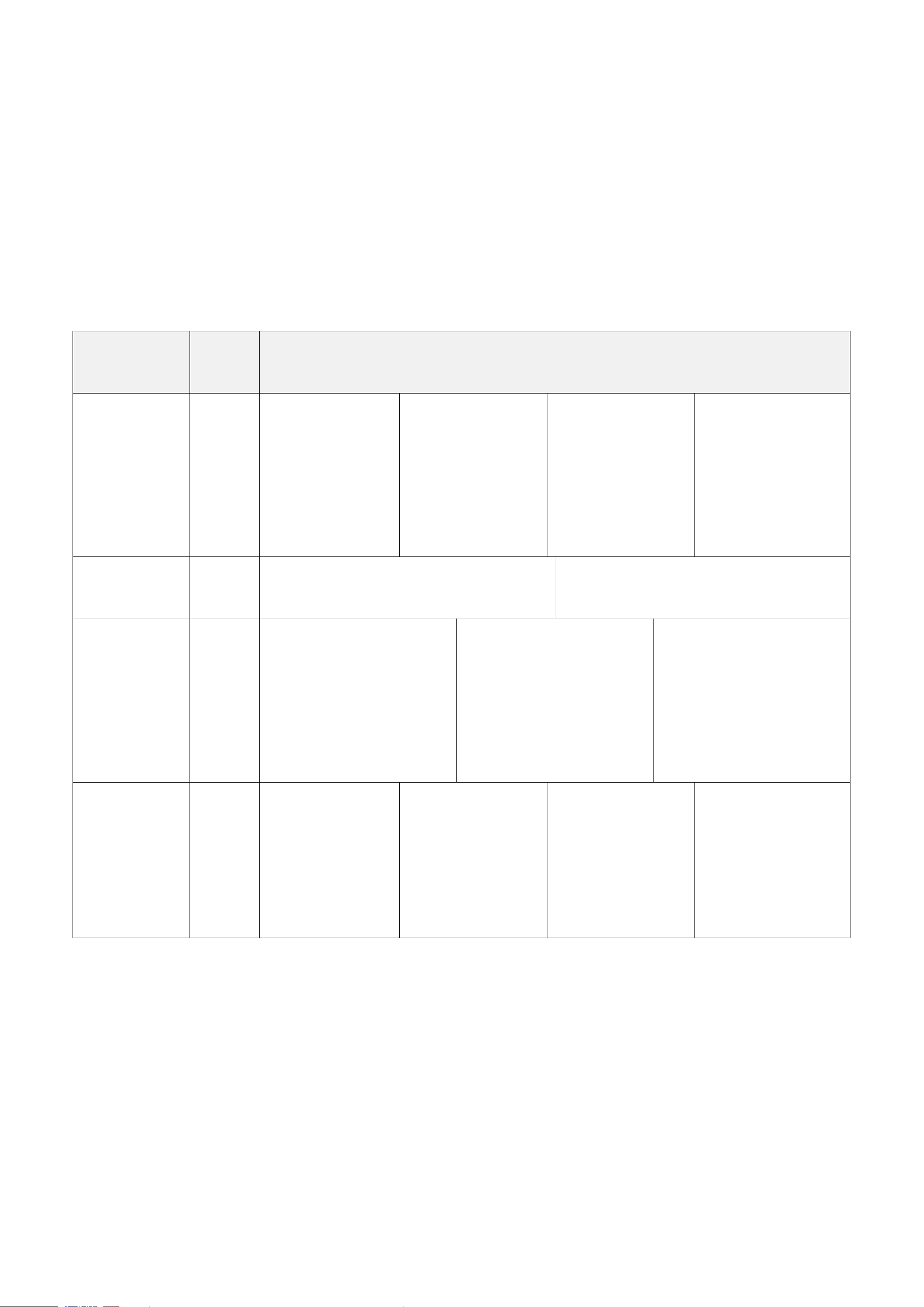
Description
Device
CmdID
Device
Type
NetvoxPayLoadData
Config
DigitalOutput
Req
R900NAB
6T4O
R900NAB
6T1O
R900NAB
3T1O
0x05
0x0105
0x010C
0x010D
DigitalOutPutType
(1 Byte)
0x00_NormallyLowLevel,
0x01_NormallyHighLevel
OutPulseTime
(1 Byte,
unit: s)
BindAlarmSource
(3 Bytes)
Bit0_LowCurrent1Alarm,
Bit1_High Current1Alarm,
Bit2_LowCurrent2Alarm,
Bit3_High Current2Alarm,
Bit4_LowCurrent3Alarm,
Bit5_High Current3Alarm,
Bit6_LowCurrent4Alarm,
Bit7_High Current4Alarm,
Bit8_LowCurrent5Alarm,
Bit9_High Current5Alarm,
Bit10_LowCurrent6Alarm,
Bit11_High Current6Alarm,
Bit12_LowTemp1Alarm,
Bit13_HightTemp1Alarm,
Bit14_LowTemp2Alarm,
Bit15_HightTemp2Alarm,
Bit16_LowTemp3Alarm,
Bit17_HightTemp3Alarm,
Bit18_LowTemp4Alarm,
Bit19_HightTemp4Alarm,
Bit20-23: Reserved
Config
DigitalOutput
Rsp
0x85
Status (0x00_success)

12
Read Config
DigitalOutput
Req
0x06
Read Config
DigitalOutput
Rsp
0x86
DigitalOutPutType
(1 Byte)
0x00_NormallyLowLevel,
0x01_NormallyHighLevel
OutPulseTime
(1 Byte,
unit: s)
BindAlarmSource
(3 Bytes)
Bit0_LowCurrent1Alarm,
Bit1_High Current1Alarm,
Bit2_LowCurrent2Alarm,
Bit3_High Current2Alarm,
Bit4_LowCurrent3Alarm,
Bit5_High Current3Alarm,
Bit6_LowCurrent4Alarm,
Bit7_High Current4Alarm,
Bit8_LowCurrent5Alarm,
Bit9_High Current5Alarm,
Bit10_LowCurrent6Alarm,
Bit11_High Current6Alarm,
Bit12_LowTemp1Alarm,
Bit13_HightTemp1Alarm,
Bit14_LowTemp2Alarm,
Bit15_HightTemp2Alarm,
Bit16_LowTemp3Alarm,
Bit17_HightTemp3Alarm,
Bit18_LowTemp4Alarm,
Bit19_HightTemp4Alarm,
Bit20-23: Reserved)
TriggerDigital
OutputReq
0x07
OutPulseTime (1 Byte, unit: s)
TriggerDigital
OutputRsp
0x87
Status (0x00_success)
(3) Configure DigitalOutPutType = 0x00 (NormallyLowLevel),
OutPulseTime = 0xFF
(disable pulse duration),
BindAlarmSource = 0x002000 (HightTemp1Alarm = 1)
( 0010 0000 0000 0000 (BIN) // When HightTemp1Alarm is triggered, digital outputs signals.
Downlink: 05010500FF002000
Response: 85010500 (configuration success)
85010501 (configuration fail)
Read DO parameters
Downlink: 060105
Response: 86010500FF002000
13
Configure OutPulseTime = 0x0A (10 seconds)
Downlink: 0701050A00
Response: 87010500 (configuration success)
5.3 Example of SetSensorAlarmThresholdCmd
FPort: 0x10
(The above is in hexadecimal. To use decimal, please convert it to port 16.)
CmdDescriptor
CmdID
(1 Byte)
Payload (10 Bytes)
SetSensorAlarm
ThresholdReq
0x01
Channel
(1 Byte)
0x00_Channel1,
0x01_Chanel2,
0x02_Channel3, etc.
SensorType
(1 Byte)
0x00_Disable ALL
0x01_Temperature
0x27_ Current
SensorHighThreshold
(4 Bytes)
unit: Current – 1mA
Temperature – 0.1°C
SensorLowThreshold
(4 Bytes)
unit: Current – 1mA
Temperature – 0.1°C
SetSensorAlarm
ThresholdRsp
0x81
Status (0x00_success)
Reserved (9 Bytes, Fixed 0x00)
GetSensorAlarm
ThresholdReq
0x02
Channel
(1 Byte)
0x00_Channel1,
0x01_Chanel2,
0x02_Channel3, etc.
SensorType
(1 Byte)
0x00_Disable ALL
0x01_Temperature
0x27_ Current
Reserved
(8 Bytes, Fixed 0x00)
GetSensorAlarm
ThresholdRsp
0x82
Channel
(1Byte)
0x00_Channel1,
0x01_Chanel2,
0x02_Channel3, etc.
SensorType
(1 Byte)
0x00_Disable ALL
0x01_Temperature
0x27_ Current
SensorHighThreshold
(4 Bytes)
unit: Current – 1mA
Temperature – 0.1°C
SensorLowThreshold
(4 Bytes)
unit: Current – 1mA
Temperature – 0.1°C
Note:
a. Current Channel: 0x00 – 0x05; SensorType: 0x27
Temperature Channel: 0x00 – 0x03; SensorType: 0x01
b. Set SensorHigh/LowThreshold as 0xFFFFFFFF to disable threshold.
c. The last configuration will be saved when the device is reset to factory setting.

14
(1) Configure parameters
Channel = 0x00, SensorType = 0x27 (Current),
SensorHighThreshold = 0x000003E8 (1000mA), SensorLowThreshold = 0x00000064 (100mA)
Downlink: 010027000003E800000064
Response: 8100000000000000000000 (configuration success)
8101000000000000000000 (configuration fail)
(2) Read parameters
Downlink: 0200270000000000000000
Response: 820027000003E800000064 (device’s current parameters)
(3) Configure parameters
Channel = 0x00, SensorType = 0x01 (Temperature),
SensorHighThreshold = 0x000003E8 (100°C), SensorLowThreshold = 0x00000064 (10°C)
Downlink: 010027000003E800000064
Response: 8100000000000000000000 (configuration success)
8101000000000000000000 (configuration fail)
(4) Read parameters
Downlink: 0200010000000000000000
Response: 820001000003E800000064 (device’s current parameters)

15
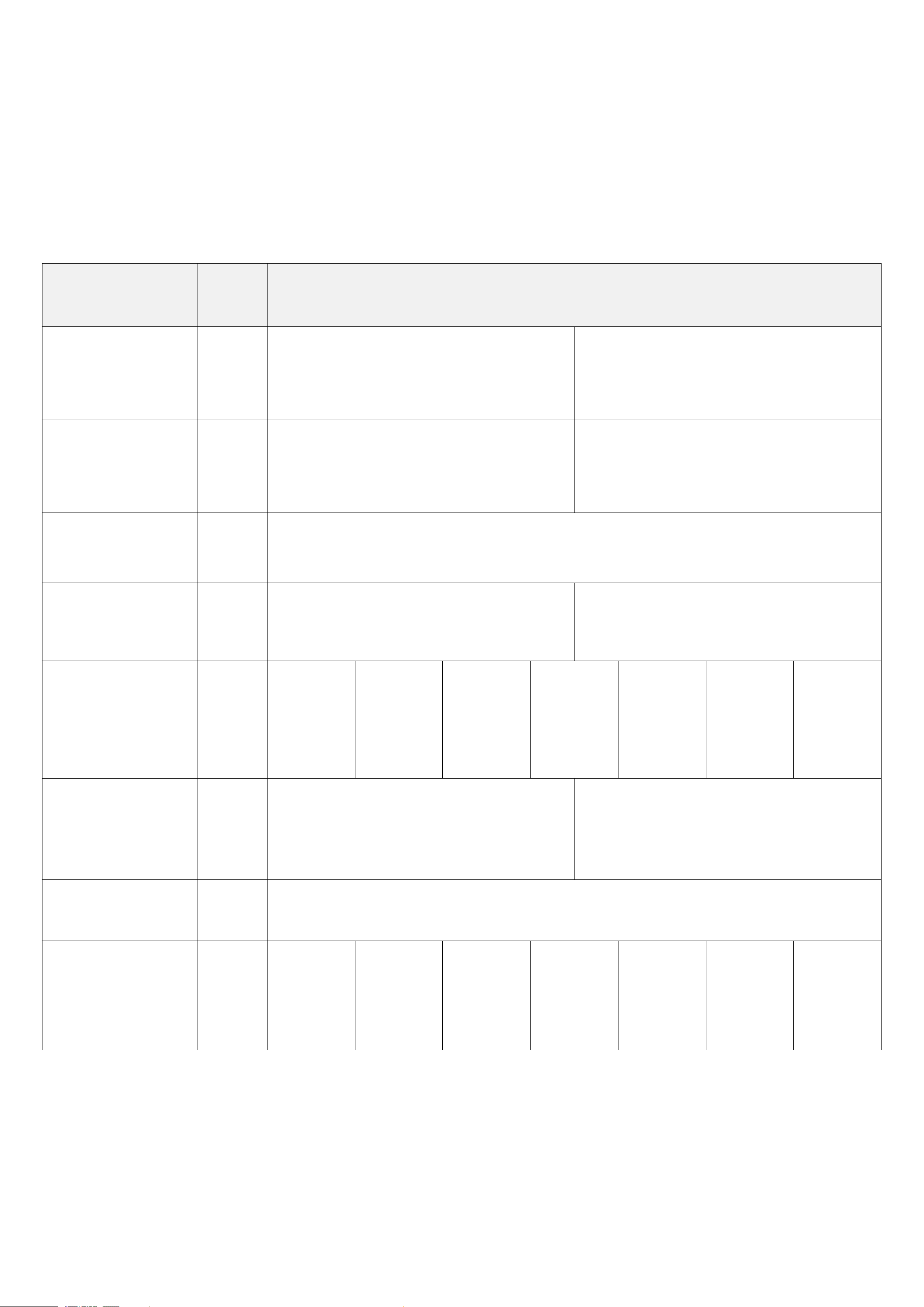
5.4 Example of GlobalCalibrateCmd
Fport: 0x0E
Description
Cmd
ID
SensorType
PayLoad (Fix = 9 Bytes)
SetGlobalCalibrate
Req
0x01
0x01_Temperature
Sensor
Channel
(1 Byte)
0_Channel1
1_Channel2,
etc.
Multiplier
(2 Bytes,
Unsigned)
Divisor
(2 Bytes,
Unsigned)
DeltValue
(2 Bytes,
Signed)
Reserved
(2 Bytes,
Fixed 0x00)
SetGlobalCalibrate
Rsp
0x81
Channel
(1 Byte)
0_Channel1
1_Channel2, etc.
Status
(1 Byte)
0x00_success)
Reserved
(7 Bytes, Fixed 0x00)
GetGlobalCalibrate
Req
0x02
Channel
(1 Byte)
0_Channel1
1_Channel2, etc.
Reserved
(8 Bytes, Fixed 0x00)
GetGlobalCalibrate
Rsp
0x82
Channel
(1 Byte)
0_Channel1
1_Channel2,
etc.
Multiplier
(2 Bytes,
Unsigned)
Divisor
(2 Bytes,
Unsigned)
DeltValue
(2 Bytes,
Signed)
Reserved
(2 Bytes,
Fixed 0x00)
ClearGlobalCalibrate
Req
0x03
Reserved (10 Bytes, Fixed 0x00)
ClearGlobalCalibrate
Rsp
0x83
Status
(1 Byte,
0x00_success)
Reserved
(9 Bytes, Fixed 0x00)
SensorType: 0x01_Temperature Sensor; Channel: 0x00 – 0x03
※ " Current " does not support calibration.
(1) SetGlobalCalibrateReq
Calibrate temperature sensor by increasing 10°C
Channel: 0x00 (channel1); Multiplier: 0x0001 (1); Divisor: 0x0001 (1); DeltValue: 0x0064 (100)
Downlink: 0101000001000000640000
Response: 8101000000000000000000 (configuration success)
8101000100000000000000 (configuration fail)
(2) Read parameters
Downlink: 0201000000000000000000
Response: 8201000001000000640000 (configuration success)
16
(3) ClearGlobalCalibrateReq
Downlink: 0300000000000000000000
Response: 8300000000000000000000
5.5 Example of NetvoxLoRaWANRejoin
Fport:0x20
(The above is in hexadecimal. To use decimal, please convert it to port 32.)
Check if the device is connected to the network during RejoinCheckPeriod. If the device does not respond within the RejoinThreshold, it
will be rejoied back to the network automatically.
CmdDescriptor
CmdID
(1 Byte)
Payload (Var Bytes)
SetNetvoxLoRaWAN
RejoinReq
0x01
RejoinCheckPeriod
(4 Bytes, unit: 1s)
RejoinThreshold
(1 Byte)
SetNetvoxLoRaWAN
RejoinRsp
0x81
Status
(1 Byte)
0x00_success
Reserved (4 Bytes, Fixed 0x00)
GetNetvoxLoRaWAN
RejoinReq
0x02
Reserved (5 Bytes, Fixed 0x00)
GetNetvoxLoRaWAN
RejoinRsp
0x82
RejoinCheckPeriod (4 Bytes, unit: 1s)
RejoinThreshold
(1 Byte)
SetNetvoxLoRaWAN
RejoinTimeReq
0x03
1
st
Rejoin
Time
(2 Bytes,
unit:1 min)
2
nd
Rejoin
Time
(2 Bytes,
unit: 1 min)
3
rd
Rejoin
Time
(2 Bytes,
unit: 1 min)
4
th
Rejoin
Time
(2 Bytes,
unit: 1 min)
5
th
Rejoin
Time
(2 Bytes,
unit: 1 min)
6
th
Rejoin
Time
(2 Bytes,
unit: 1 min)
7
th
Rejoin
Time
(2 Bytes,
unit: 1 min)
SetNetvoxLoRaWAN
RejoinTimeRsp
0x83
Status
(1 Byte)
0x00_success
Reserved
(13 Bytes, Fixed 0x00)
GetNetvoxLoRaWAN
RejoinTimeReq
0x04
Reserved (15 Bytes, Fixed 0x00)
GetNetvoxLoRaWAN
RejoinTimeRsp
0x84
1
st
Rejoin
Time
(2 Bytes,
unit:1 min)
2
nd
Rejoin
Time
(2 Bytes,
unit: 1 min)
3
rd
Rejoin
Time
(2 Bytes,
unit: 1 min)
4
th
Rejoin
Time
(2 Bytes,
unit: 1 min)
5
th
Rejoin
Time
(2 Bytes,
unit: 1 min)
6
th
Rejoin
Time
(2 Bytes,
unit: 1 min)
7
th
Rejoin
Time
(2 Bytes,
unit: 1 min)

17
Note:
a. Set RejoinCheckThreshold as 0xFFFFFFFF to stop the device from rejoining the network.
b. The last configuration would be kept when the device is factory reset.
c. Default setting:
RejoinCheckPeriod = 2 (hr) and RejoinThreshold = 3 (times)
1
st
Rejoin Time = 0x0001 (1 min), 2
nd
Rejoin Time = 0x0002 (2 mins), 3
rd
Rejoin Time = 0x0003 (3 mins),
4
th
Rejoin Time = 0x0004 (4 mins), 5
th
Rejoin Time = 0x003C (60 mins), 6
th
Rejoin Time = 0x0168 (360 mins),
7
th
Rejoin Time = 0x05A0 (1440 mins)
d. If device loses connection from network before data are reported, the data will be saved and reported every 30 seconds after the device is
reconnected. Data will be reported based on the format of Payload + Unix timestamp. After all data are reported, the report time will be back
to the normal setting.
(1) Command Configuration
Set RejoinCheckPeriod = 0x00000E10 (3600s), RejoinThreshold = 0x03 (3 times)
Downlink: 0100000E1003
Response: 810000000000 (Configuration success)
810100000000 (Configuration failure)
(2) Read RejoinCheckPeriod and RejoinThreshold
Downlink: 020000000000
Response: 8200000E1003
(3) Configure Rejoin Time
1
st
Rejoin Time = 0x0001 (1 min), 2
nd
Rejoin Time = 0x0002 (2 mins), 3
rd
Rejoin Time = 0x0003 (3 mins),
4
th
Rejoin Time = 0x0004 (4 mins), 5
th
Rejoin Time = 0x0005 (5 mins), 6
th
Rejoin Time = 0x0006 (6 mins),
7
th
Rejoin Time = 0x0007 (7 mins)
Downlink: 030001000200030004000500060007
Response: 830000000000000000000000000000 (Configuration success)
830100000000000000000000000000 (Configuration failure)
(4) Read Rejoin Time parameter
Downlink: 040000000000000000000000000000
Response: 840001000200030004000500060007
18
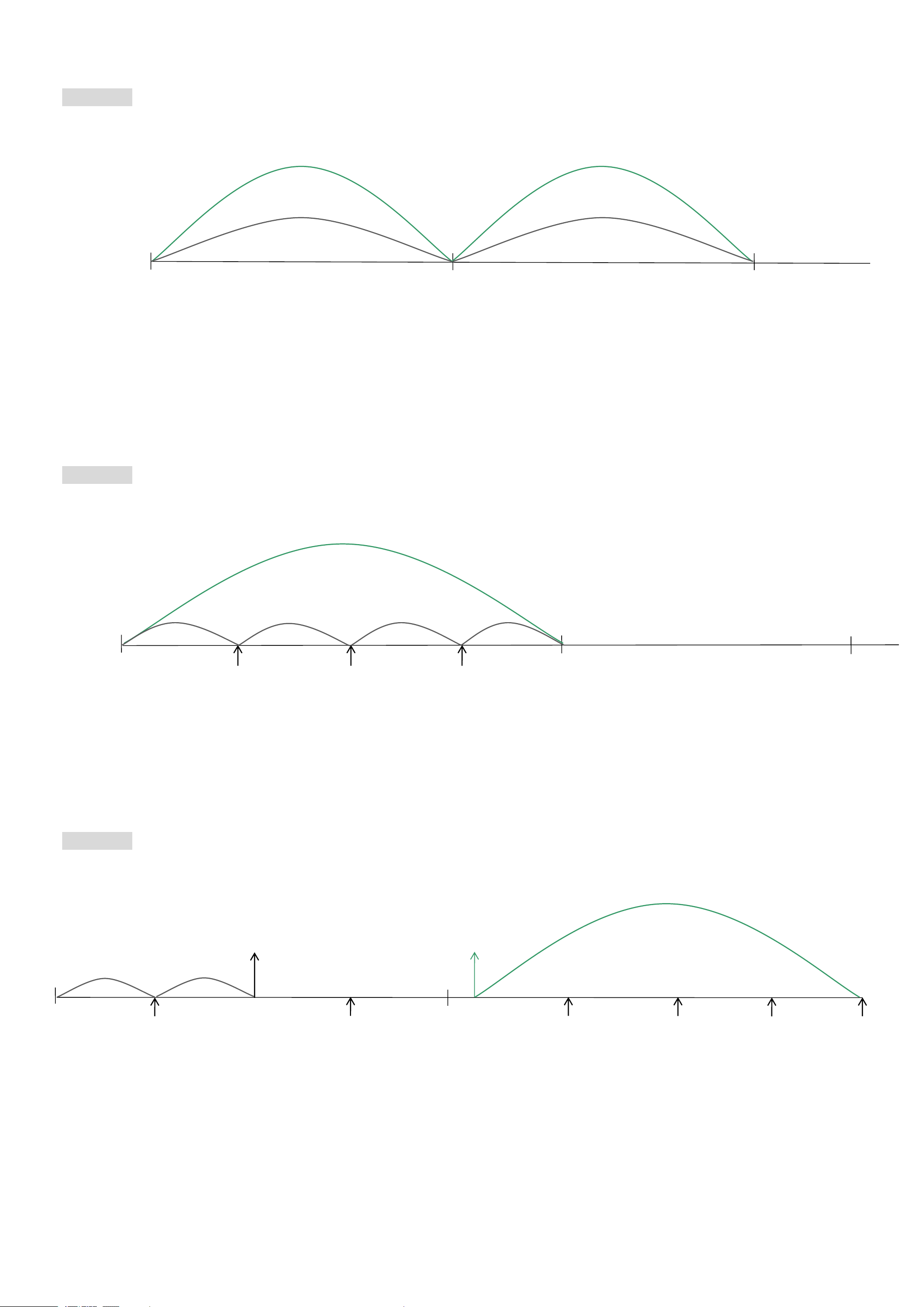
5.6 Example for MinTime/MaxTime logic
Example#1 based on MinTime = 1 hour, MaxTime = 1 hour, Reportable Change i.e. BatteryVoltageChange = 0.1V
Note: MaxTime = MinTime. Data will only be reported according to MaxTime (MinTime) duration regardless BatteryVoltageChange
value.
Example#2 based on MinTime = 15 minutes, MaxTime = 1 hour, Reportable Change i.e. BatteryVoltageChange = 0.1V.
Example#3 based on MinTime = 15 minutes, MaxTime = 1 hour, Reportable Change i.e. BatteryVoltageChange = 0.1V.
sleeping (MinTime)
sleeping (MinTime)
MaxTime
MaxTime
Wake up and collect data
REPORTS 3.6V
Wakes up and collect data
REPORTS 3.5V
Wakes up and collect data
REPORTS 3.6V
Wakes up and collects data
3.6V
Does not report
Wakes up and collects data
REPORTS 3.6V
Wakes up and collects data
REPORT 3.6V
sleeping
sleeping
sleeping
sleeping (MinTime)
MaxTime
0H
1H
15
th
M
30
th
M
45
th
M
2H
MaxTime
sleeping
sleeping
0H
30
th
M
2H 10
th
M
15
th
M
45
th
M
1H
1H 25
th
M
1H 40
th
M
1H 55
th
M
1H 10
th
M
Wakes up and
collects data
REPORTS 3.6V
Wakes up and collects data
3.5V |3.5-3.6|=0.1
REPORTS 3.5V
Wakes up and
collects data
3.5V
Does not report
Wakes up and
collects data
3.5V
Does not report
Wakes up and
collects data
3.5V
Does not report
Wakes up and collects data
3.5V Does not report
Wakes up and
collects data
3.5V
Does not report
Wakes up and
collects data
REPORTS 3.5V
Wakes up and
collects data
3.6V
Does not report
Users push the button,
REPORTS 3.5V.
Recalculate MaxTime.

19
Notes:
a. The device only wakes up and performs data sampling according to MinTime Interval. When it is sleeping, it does not collect data.
b. The data collected is compared with the last data reported. If the data variation is greater than the ReportableChange value, the device
reports according to MinTime interval. If the data variation is not greater than the last data reported, the device reports according to
MaxTime interval.
c. We do not recommend setting the MinTime Interval value too low. If the MinTime Interval is too low, the device wakes up frequently
and the battery will be drained soon.
d. Whenever the device sends a report, no matter resulting from data variation, button pushed or MaxTime interval, another cycle of
MinTime/MaxTime calculation is started.
20
6. NFC App
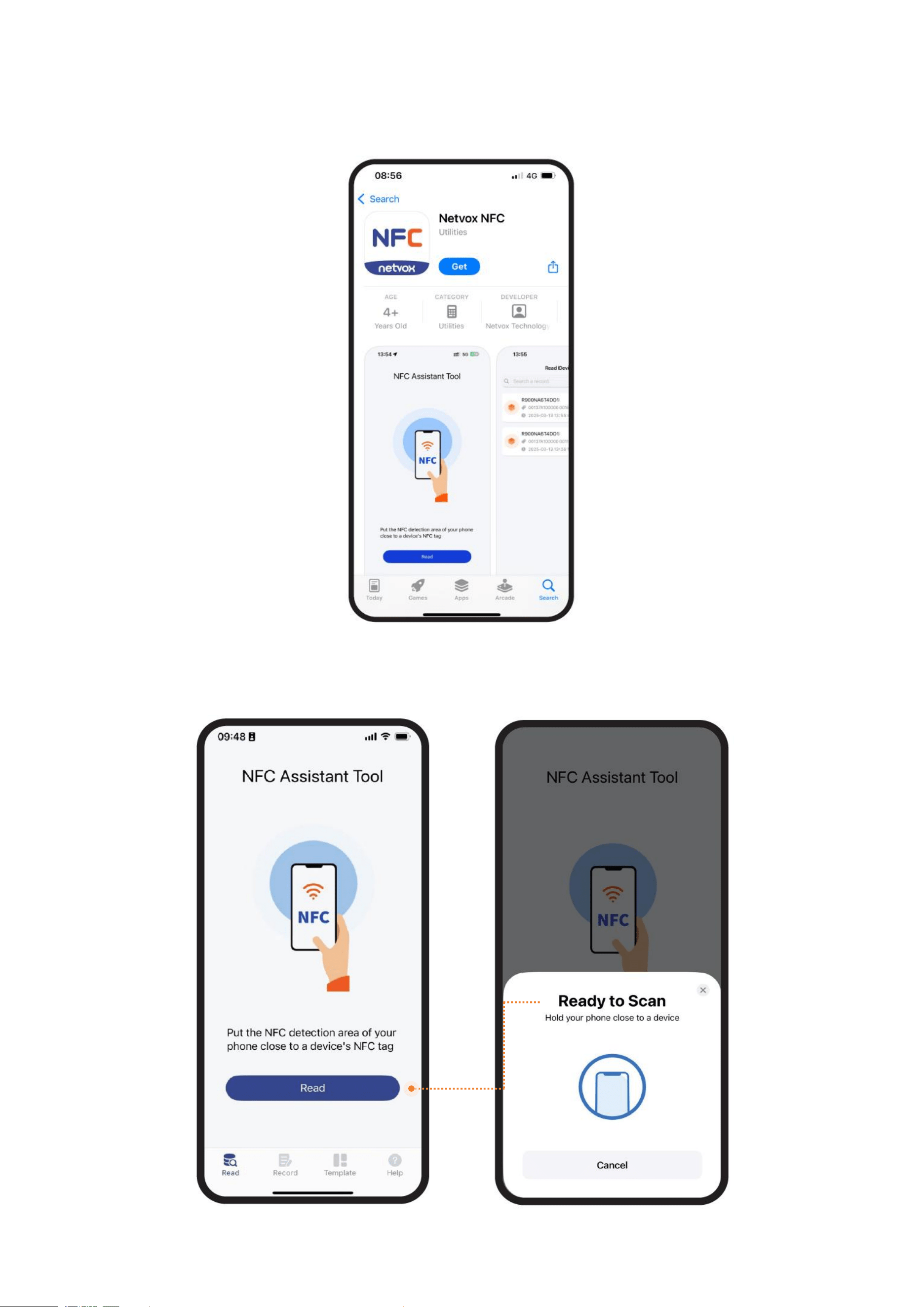
(1) Download Netvox NFC app.
Please make sure your phone supports NFC.
(2) Enable NFC in Settings and find your phone’s NFC area.
Open the app and click Read.
21
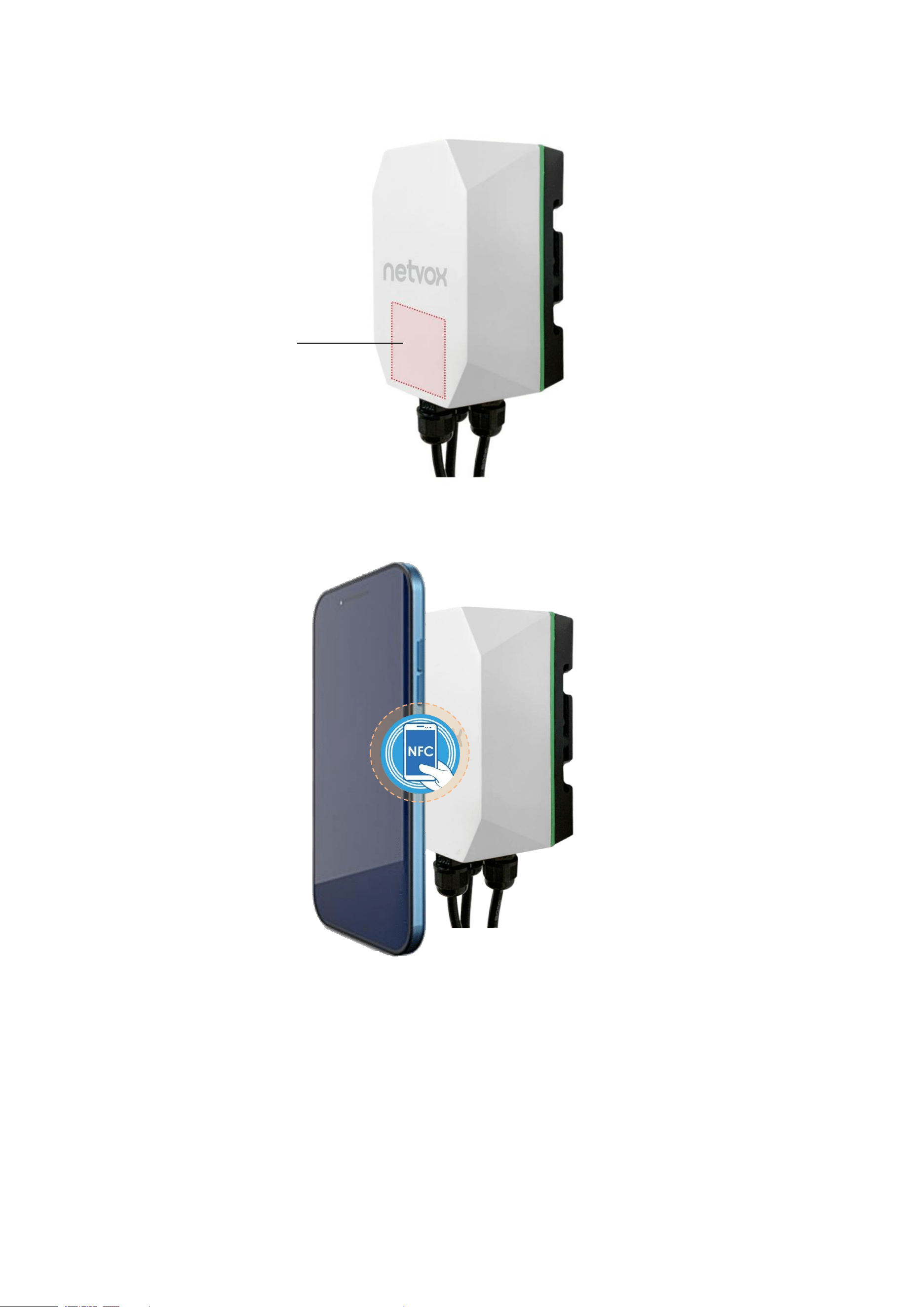
(3) Hold your phone near R900’s NFC tag.
NFC area
22
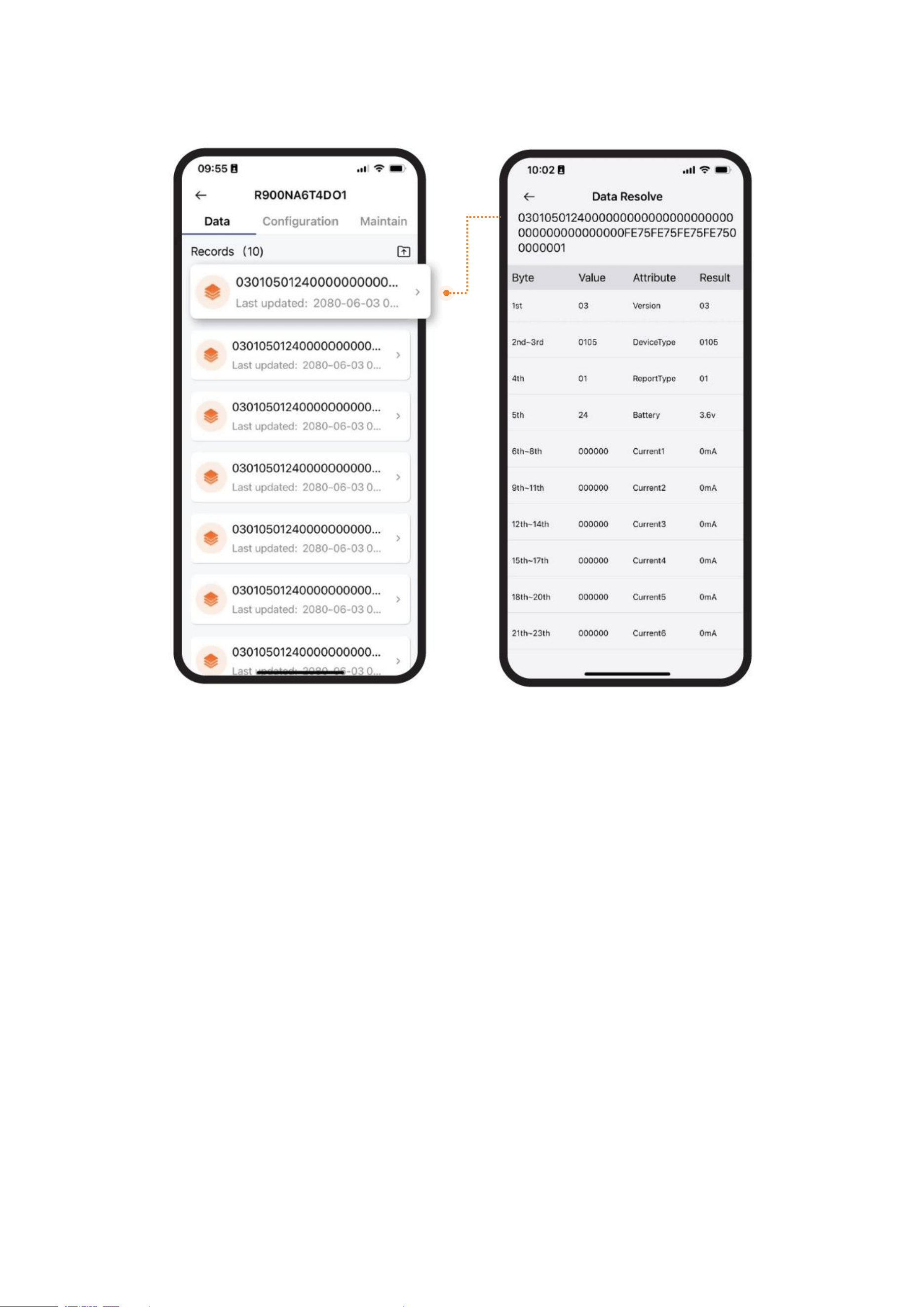
(4) After R900 is successfully read, the latest 10 data will be displayed.
Select a data and go to the Data processing.
23
7. Installation
R900
Standard
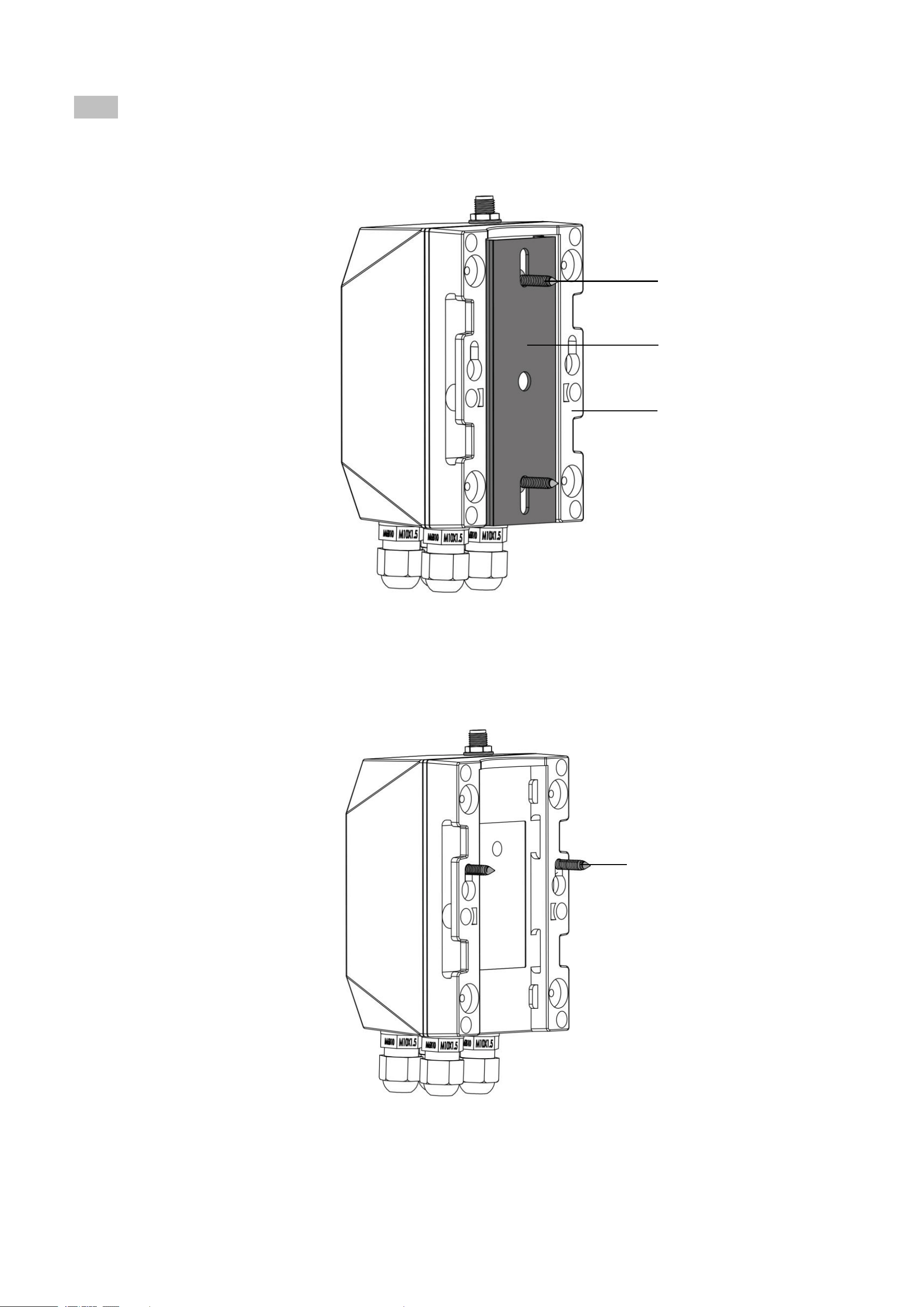
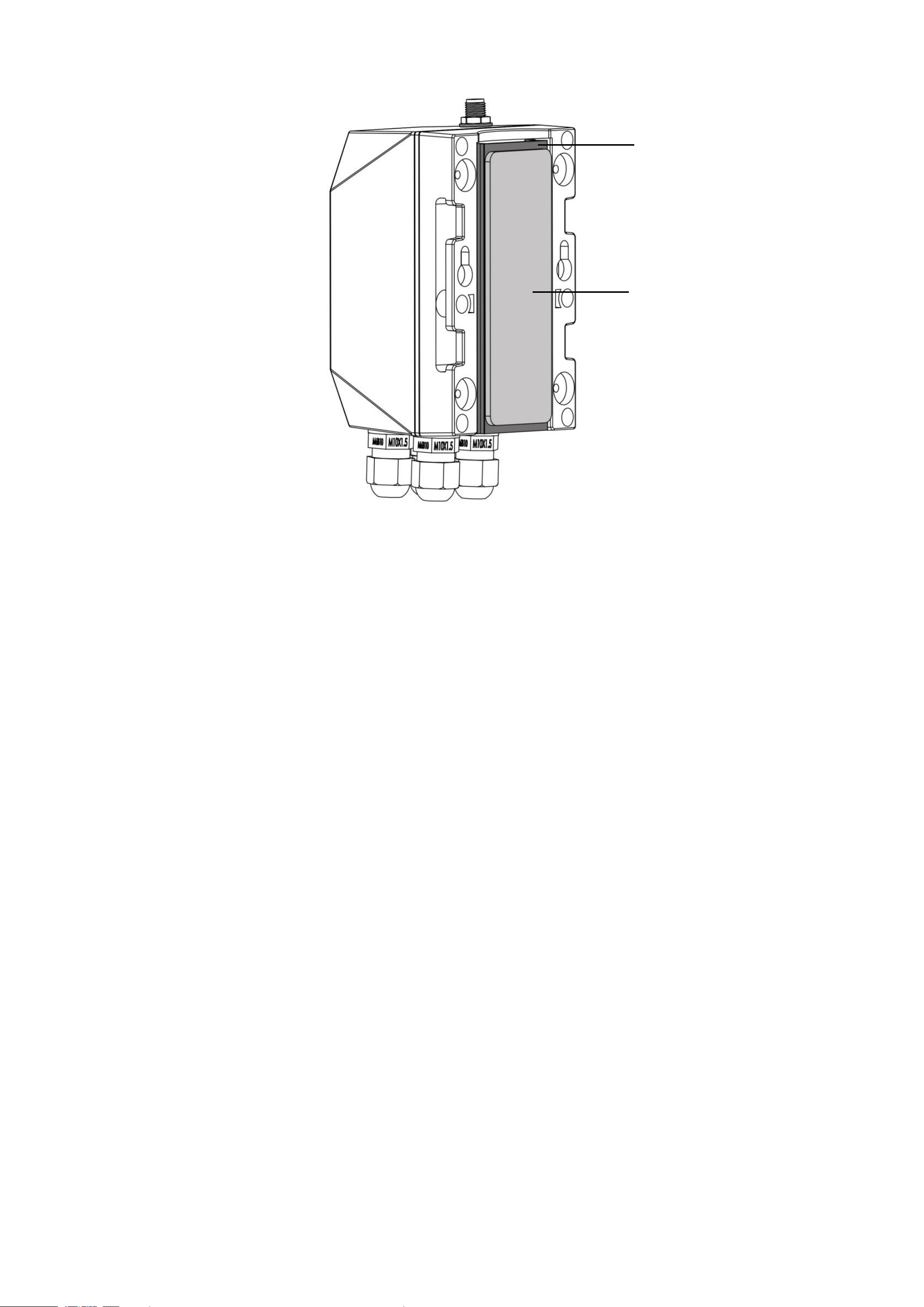
(1) Screws + Bracket
❶ Mount the bracket on a surface with 2 counter self-tapping screws.
❷ Hold R900 and slide down to connect the base and bracket.
(2) Screws
❶ Mount 2 countersunk self-tapping screws or expansion bolts on the wall.
The distance between the two screws should be 48.5mm. The gap between the bottom of the screw head and the wall should be 3mm.
❷ After the screws are mounted, align the holes of the base with the screws.
❸ Move R900 down to clamp it.
Bracket
Base
Countersunk self-tapping screw
(diameter = 4mm)
Countersunk self-tapping screw
(Thread diameter 3mm; Head diameter < 7mm)
24
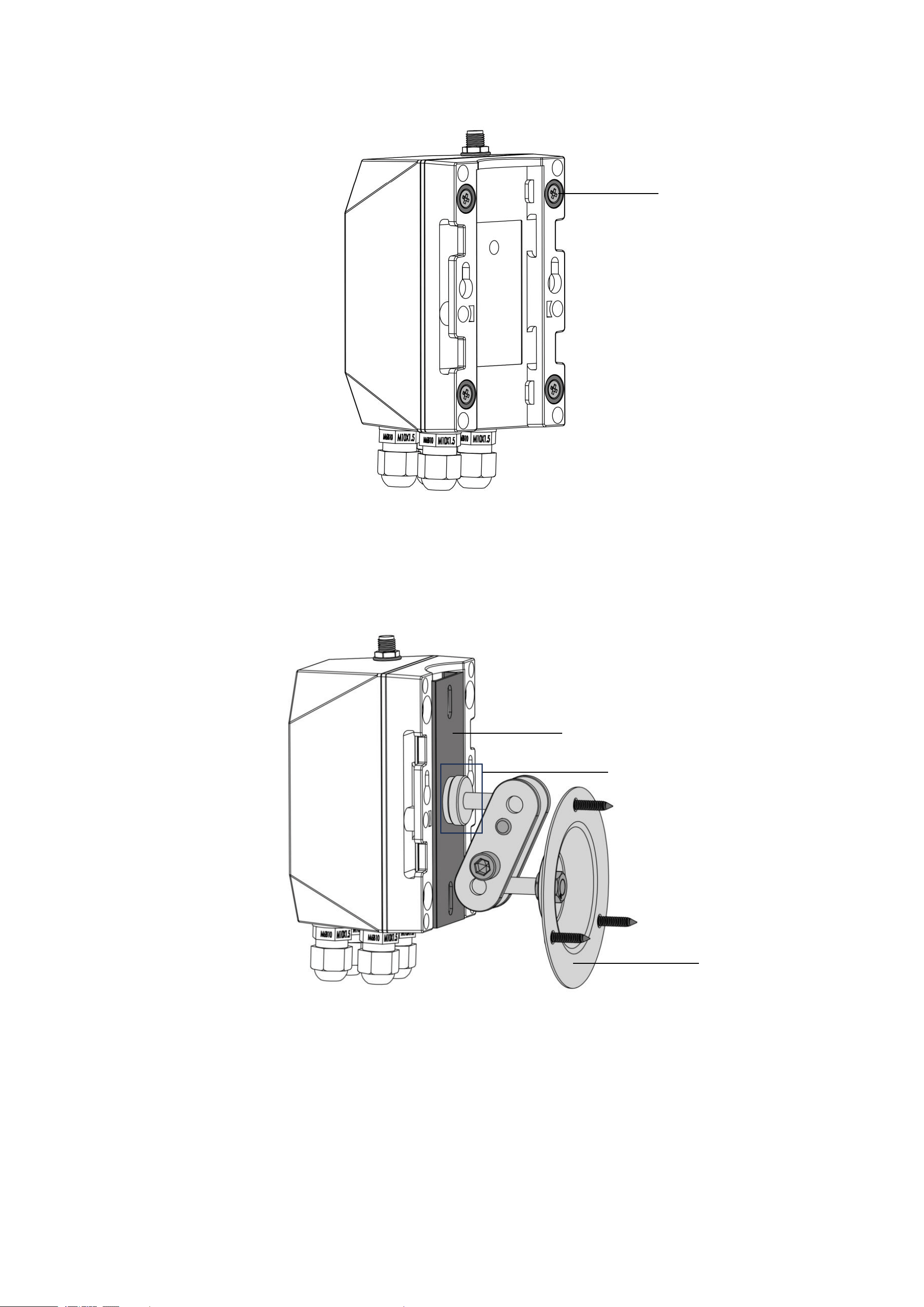
(3) Double-Sided Tape
❶ Stick the double-sided tape on the bracket.
❷ Peel the liner and fix R900 on the surface.
❸ Press to ensure R900 is firmly installed.
Note: Please make sure the surface is clean and dry before applying double-sided tape.
Double-sided tape
Bracket
25
Optional
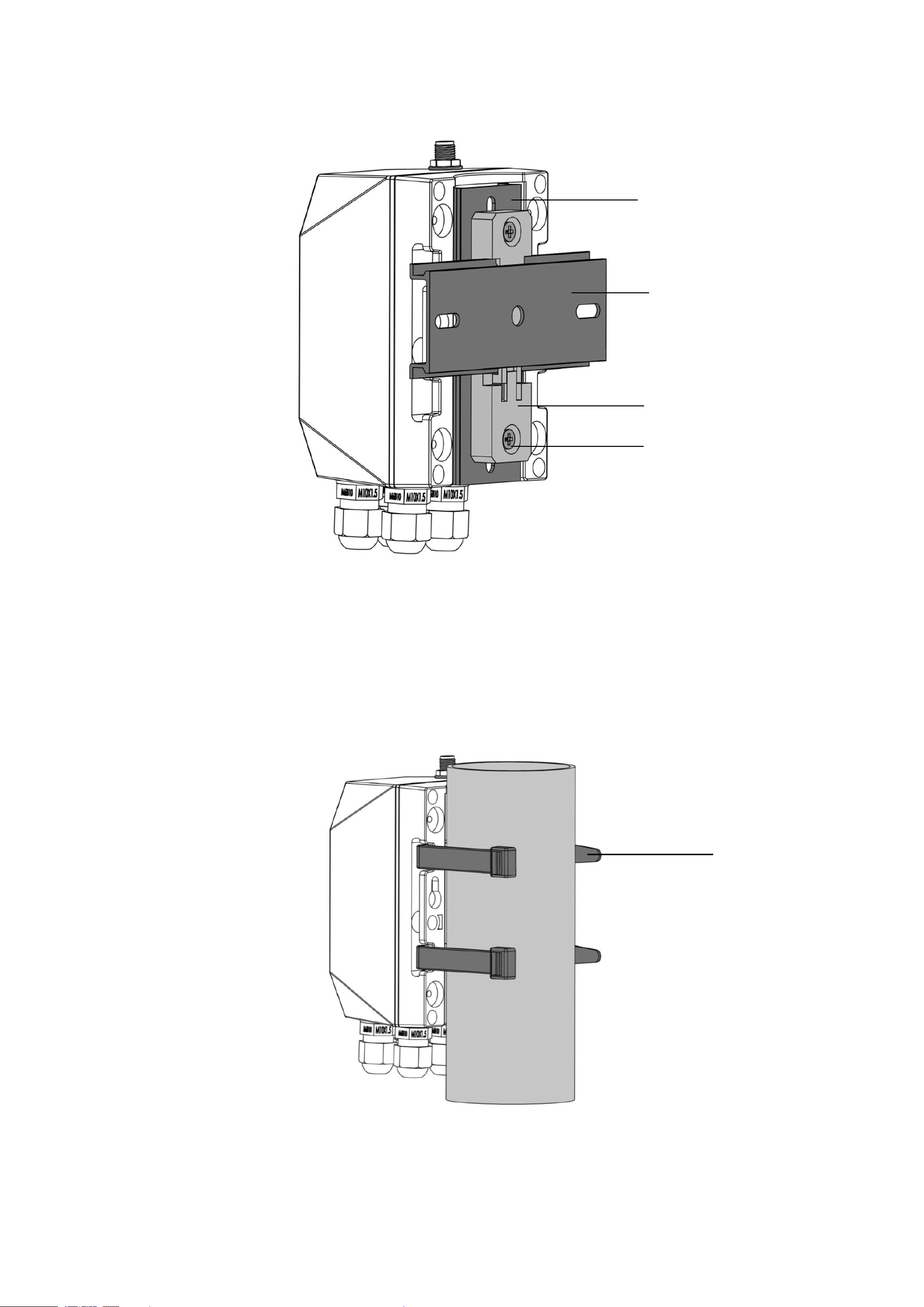
(1) Magnet
❶ Fix the R900 on a metal surface.
(2) Swivel Bracket
❶ Insert a 1/4-inch screw thread into the hole of the bracket.
❷ Tighten the thread with a nut.
❸ Mount the swivel bracket with self-tapping screws and expansion bolts.
❹ Hold R900 and slide down to connect the base and bracket.
Magnet
Bracket
1/4-inch screw thread and nut
swivel bracket
26
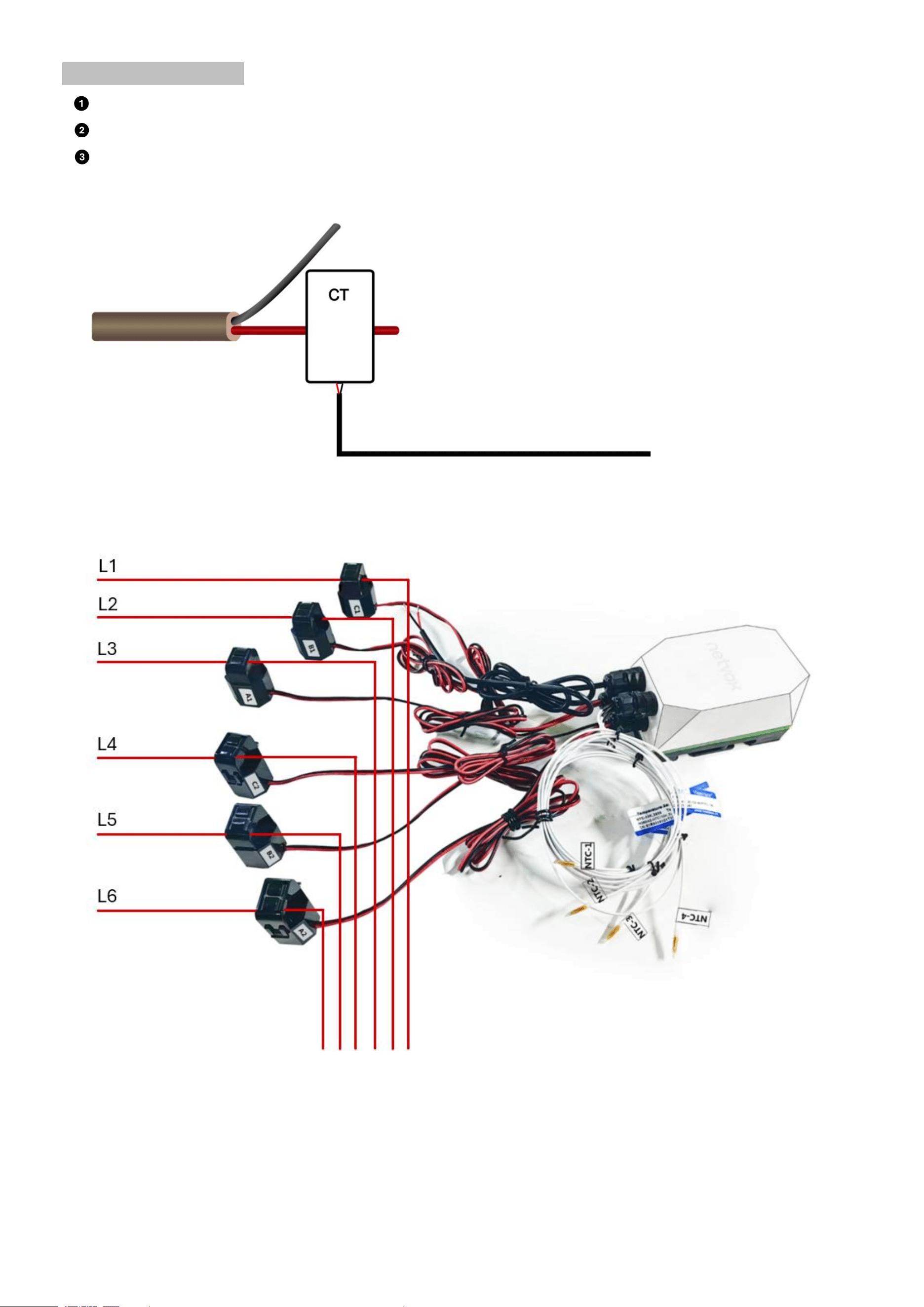
(3) DIN Rail
❶ Mount the rail buckle onto R900’s bracket with countersunk head machine screws and nuts.
❷ Snap the buckle onto the DIN rail.
❸ Hold R900 and slide down to connect the base and bracket.
Prepared by customers
(1) Cable Tie
❶ Insert cable ties through the holes of the base.
❷ Insert the pointed end through the slot.
❸ Tighten the cable ties and make sure R900 is fixed firmly around a column.
Bracket
C45 DIN rail
Buckle
Countersunk head machine
screw and nut
Cable tie
27
Current Transformer
Open the clip of a current transformer.
Separate live and neutral wires.
Put a live wire in a clip and close it.
L ← K
Neutral wire
Live wire
28
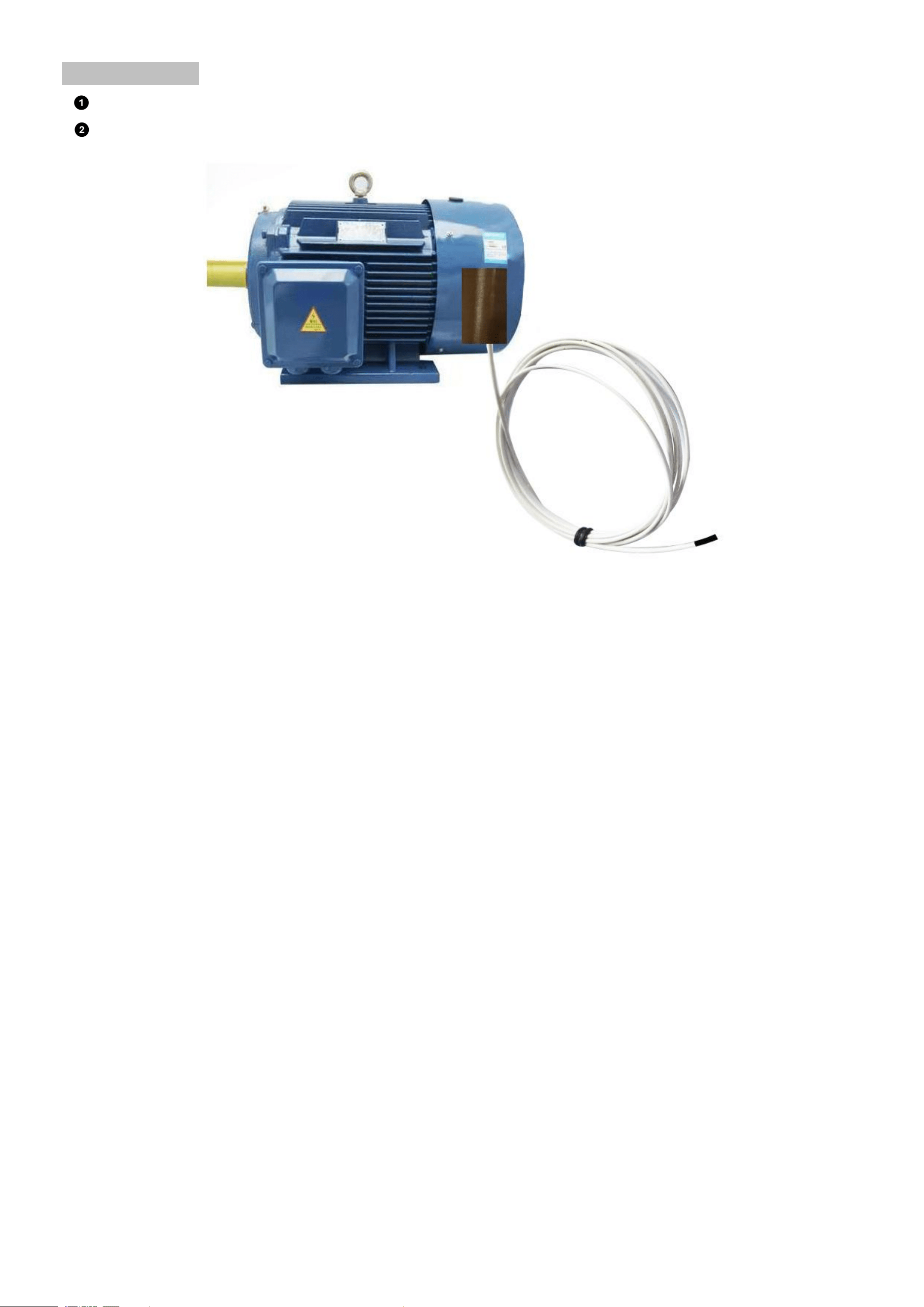
NTC thermistor
Put the probe on the surface of a motor or any electrical device.
Fix the probe with PTFE tape.

29
8. Battery Passivation
Many Netvox devices are powered by 3.6V ER14505 / ER18505 Li-SOCl2 (lithium-thionyl chloride) batteries that offer many
advantages including low self-discharge rate and high energy density. However, primary lithium batteries like Li-SOCl2
batteries will form a passivation layer as a reaction between the lithium anode and thionyl chloride if they are in storage for a
long time or if the storage temperature is too high. This lithium chloride layer prevents rapid self-discharge caused by
continuous reactions between lithium and thionyl chloride, but battery passivation may also lead to voltage delay when the
batteries are put into operation, and our devices may not work correctly in this situation.
As a result, please make sure to purchase batteries from reliable vendors, and it is suggested that if the storage period is more
than one month from the date of battery production, all the batteries should be activated. If encountering the situation of battery
passivation, please activate the battery with 68Ω load resistance for 1 minute to eliminate hysteresis in batteries.
9. Important Maintenance Instructions
Kindly pay attention to the following to achieve the best maintenance of the product:
• Keep the device dry. Rain, moisture, or any liquid might contain minerals and thus corrode electronic circuits. If the device
gets wet, please dry it completely.
•
Do not use or store the device in a dusty or dirty environment. It might damage its detachable parts and electronic
components.
• Do not store the device under extremely hot conditions. High temperatures can shorten the life of electronic devices, destroy
batteries, and deform or melt some plastic parts.
•
Do not store the device in places that are too cold. Otherwise, when the temperature rises, moisture that forms inside the
device will damage the board.
• Do not throw, knock, or shake the device. Rough handling of equipment can destroy internal circuit boards and delicate
structures.
•
Do not clean the device with strong chemicals, detergents, or strong detergents.
•
Do not apply the device with paint. Smudges might block the device and affect the operation.
•
Do not throw the battery into the fire, or the battery will explode. Damaged batteries may also explode.
All of the above applies to your device, battery, and accessories. If any device is not operating properly, please take it to the
nearest authorized service facility for repair
10. FCC Statement:
This device complies with part 15 of the FCC Rules. Operation is subject to the following two conditions: (1) This device may
not cause harmful interference, and (2) this device must accept any interference received, including interference that may
cause undesired operation.This equipment has been tested and found to comply with the limits for a Class B digital device,
pursuant to part 15 of the FCC Rules. These limits are designed to provide reasonable protection against harmful
interference in a residential installation. This Equipment generates,uses and can radiate radio frequency energy and,if not
installed and used in accordance with the instructions,may cause harmful interference to radio
communications.However,there is no guarantee that interference will not occur in a Particular installation.If thise quipment
does cause harmful interference to radio or television reception, which can be determined by turning the equipment off and
on, the user is encouraged to try to correct the interference by one or more of the following measures:

30
—Reorient or relocate the receiving antenna.
—
Increase the separation between the equipment and receiver.
—
Connect the equipment into an outlet on a circuit different from that to which the receiver is connected.
—
Consult the dealer or an experienced radio/TV technician for help.
Caution: Any changes or modifications not expressly approved by the party responsible for compliance could void the user's
authority to operate the equipment.
This equipment complies with FCC radiation exposure limits set forth for an uncontrolled environment. This transmitter must
not be co-located or operating in conjunction with any other antenna or transmitter.