

User Manual

Read all instructions before you use this device. Do not make any
changes or create settings that are not described in this manual.
If physical damage, loss of data or damage is caused by failure to
follow instructions, the warranty does not apply.
1. To reduce the risk of fire or electric shock, do not expose the
device to rain or moisture. Objects filled with liquids, such as vases,
should not be placed on this device.
2. Do not place this device on soft surfaces such as tablecloths or
carpets, otherwise the device could be a fire hazard.
3. Do not place this device in areas susceptible to excessive dust
and dirt or near any appliance generating a strong magnetic field.
4. To prevent overheating, do not block or clog the ventilation holes.
5. Never place this device in a confined space. Always leave enough
space around this device for ventilation.
6. Protect this device from overexposure to direct sunlight, heat,
large temperature fluctuations and moisture. Avoid extreme
temperatures.
7. When this device is running for a long period of time, the surface
may become hot. Shut it down immediately and unplug the charger.
Resume operation after this device has cooled down.
8. Always handle this device with care. Avoid touching the lens.
Do not allow children to handle the device without supervision.
9. Use attachments or accessories specified by the manufacturer
only.
10. Avoid extreme vibration as it may damage the internal
components.
Safety Instructions
Tips:
Blurry Image
Go to Settings - Display - Auto Keystone Correction - Turn on the
Auto Keystone Correction or enter Manual Keystone to adjust the
image.
Press the focus button on remote control to get the best clarity.
Overview
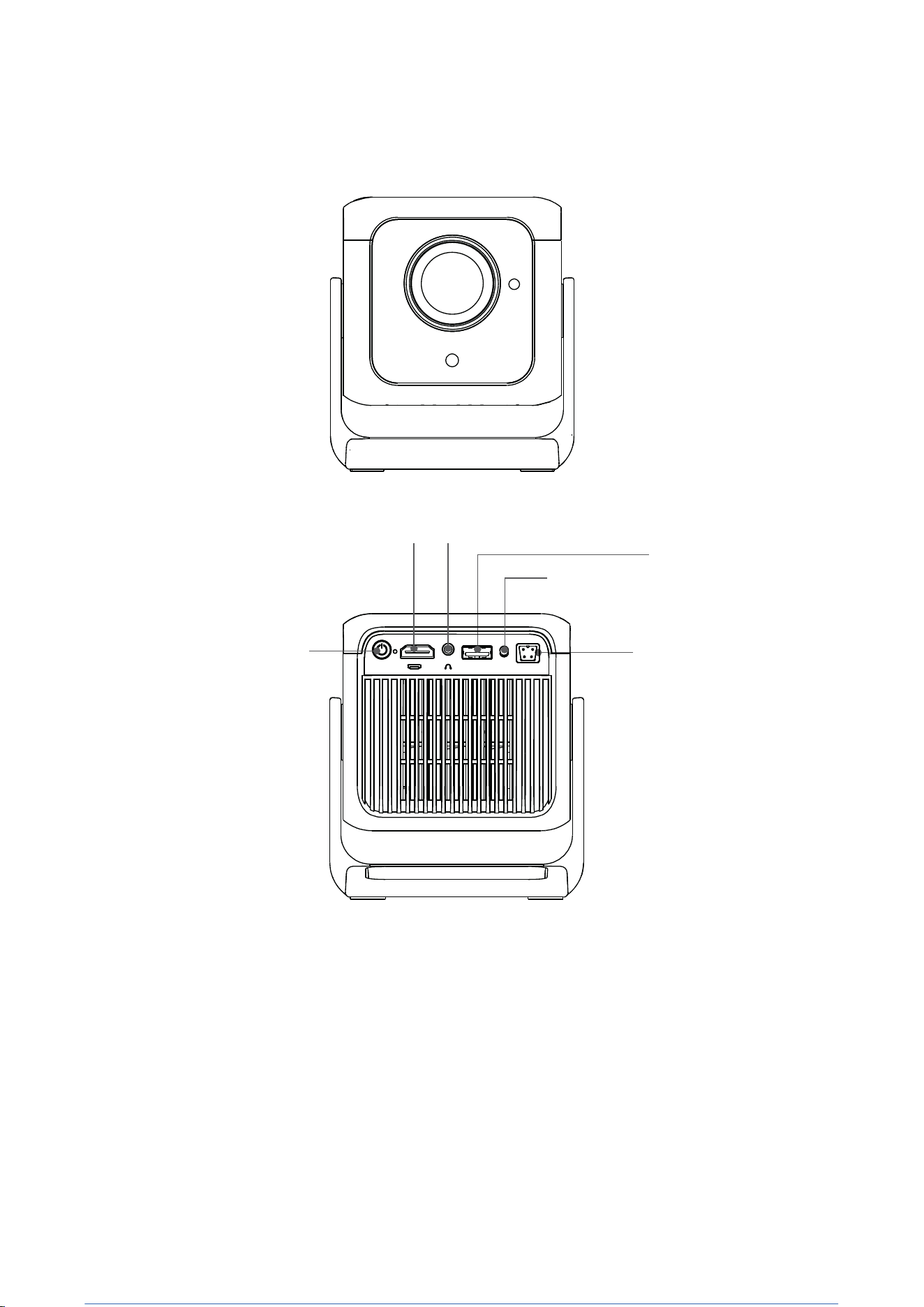
On / Off
35mmStereoJack
USB Input
IR receiver
HDMl lnput
Power Socket
TM
USB
IR DC-IN
Remote Control
Attention:
1. Do not submerge the remote control in the water.
2. Do not put the remote control near fire or in wet or hot places.
3. Do not use old and new batteries together in the remote
control.
4. Please take the batteries out if not using the remote control for
a long time to avoid battery leakage.
5. Please point the remote control toward the IR receiver.
6. Please use the remote control within 6 meters distance and 30
degree angle.
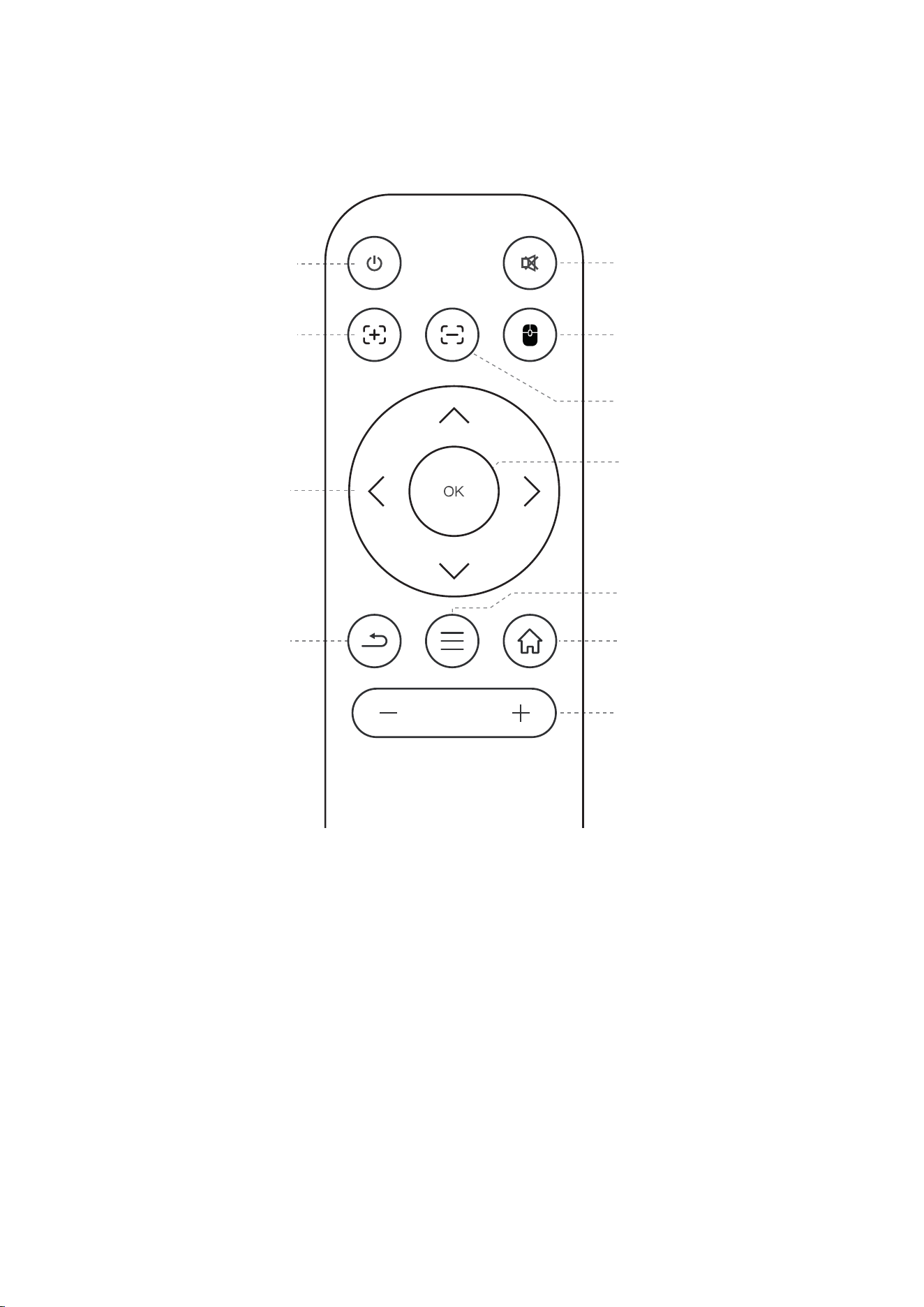
Power On/Off
Mute
Far Focus
Switch Mouse Control
Near Focus
Arrow Keys
Confirm Key
Return
Menu
Home
Volume adjustment
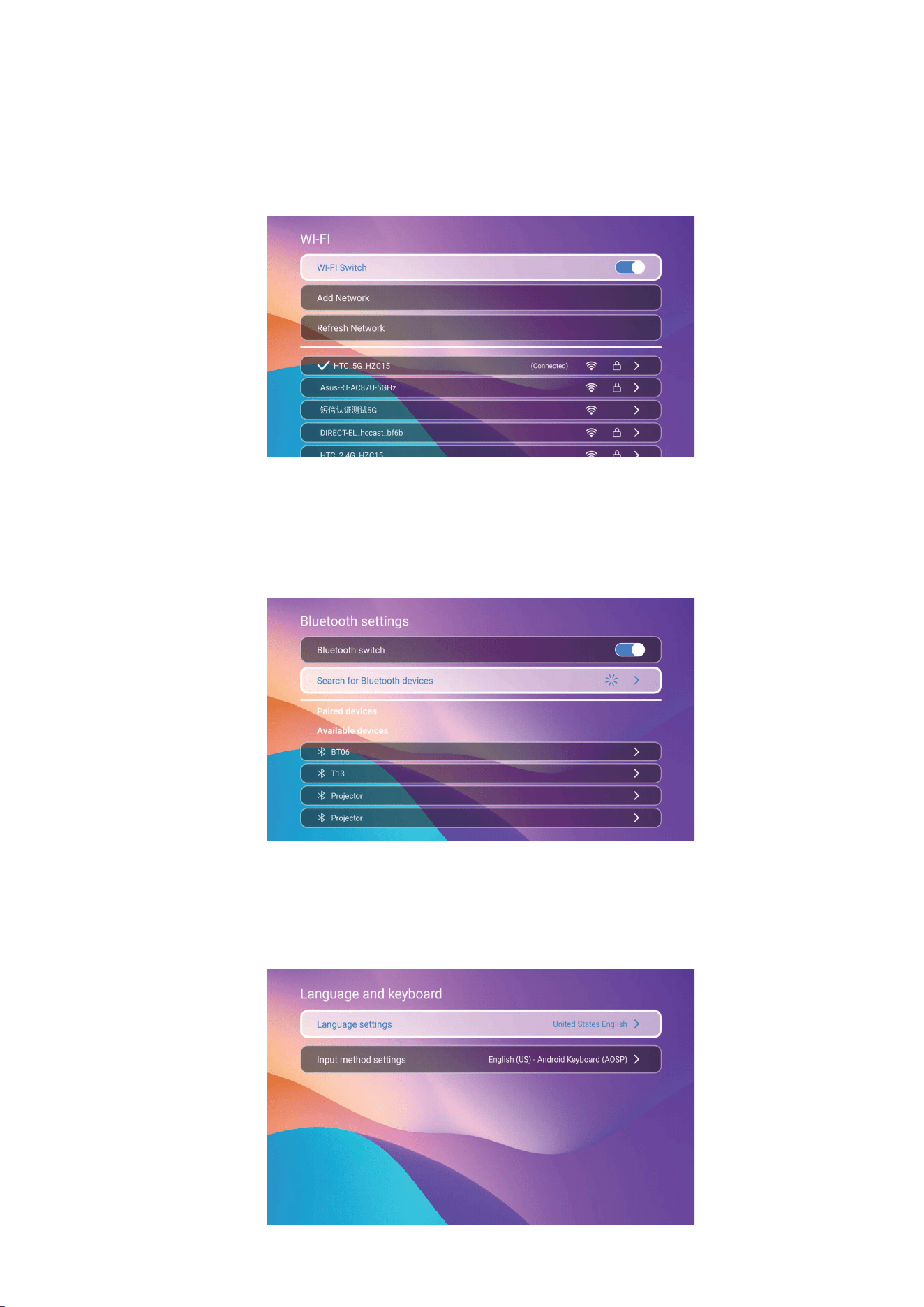
Language and keyboard
Go to Settings - Language and keyboard enter to setup
language and select input method
Networking Setting
Go to Settings - Network Settings- Wireless Network/Hotspot
settings.
Bluetooth Setting
Go to Settings - Bluetooth Settings - Bluetooth Switch to
search and pair the device that you want to connect to.
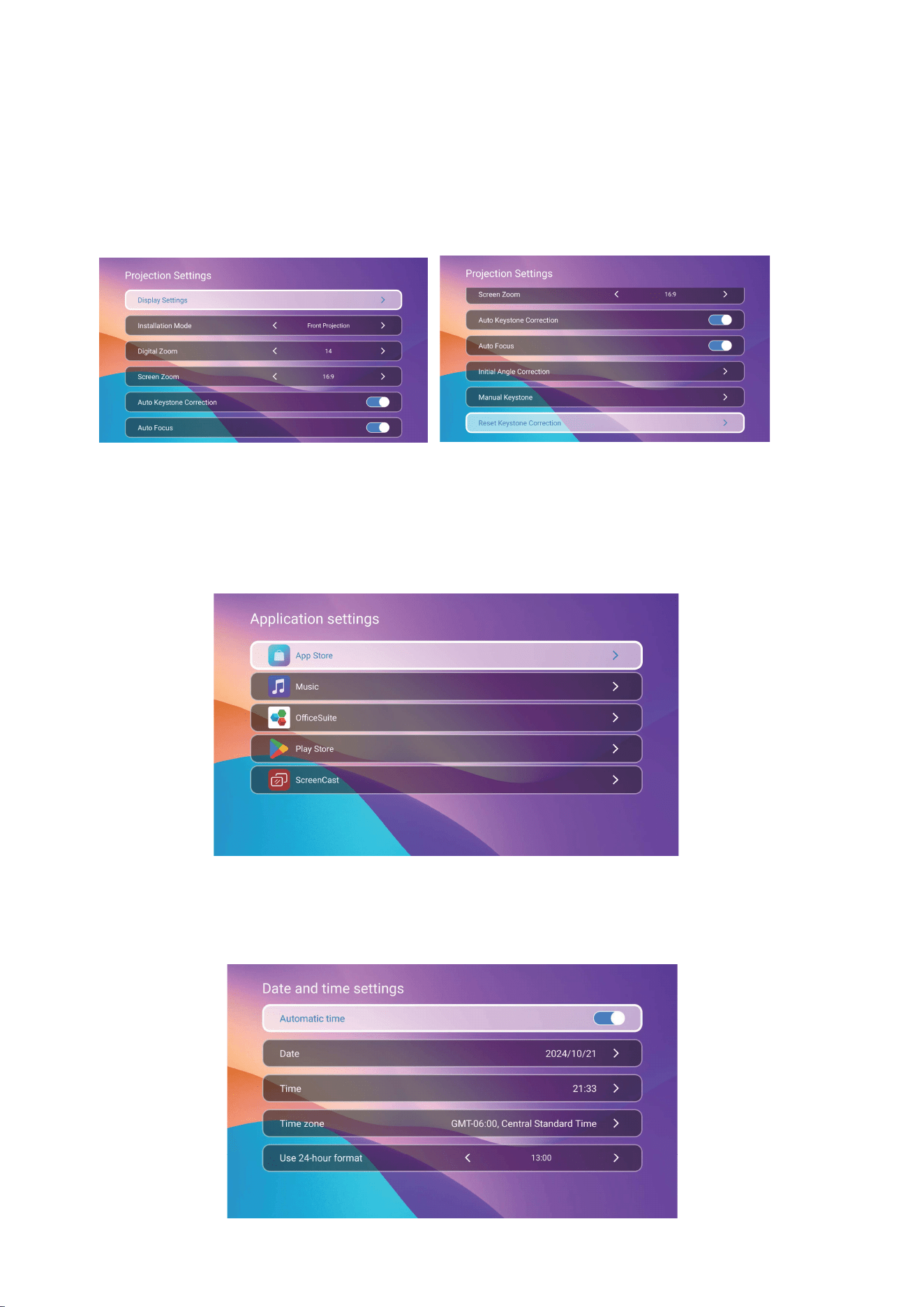
Projection Settings
Go to Settings - Projector setting, enter to Display Settings,Installation
Mode,Digital Zoom,Screen Zoom, Auto Keystone Correction,Auto Focus,
Initial Angle Correction,Manual Keystone,Reset Keystone Correction
Application Settings
Go to Settings - All applications, enter to App Store,Music ,
Play Store, Screen Cast, and Office Suite
Date and time settings
Go to Setting - Date and time settings,enter to Automatic time,
Date,Time, Time zone,Use 24-hour format
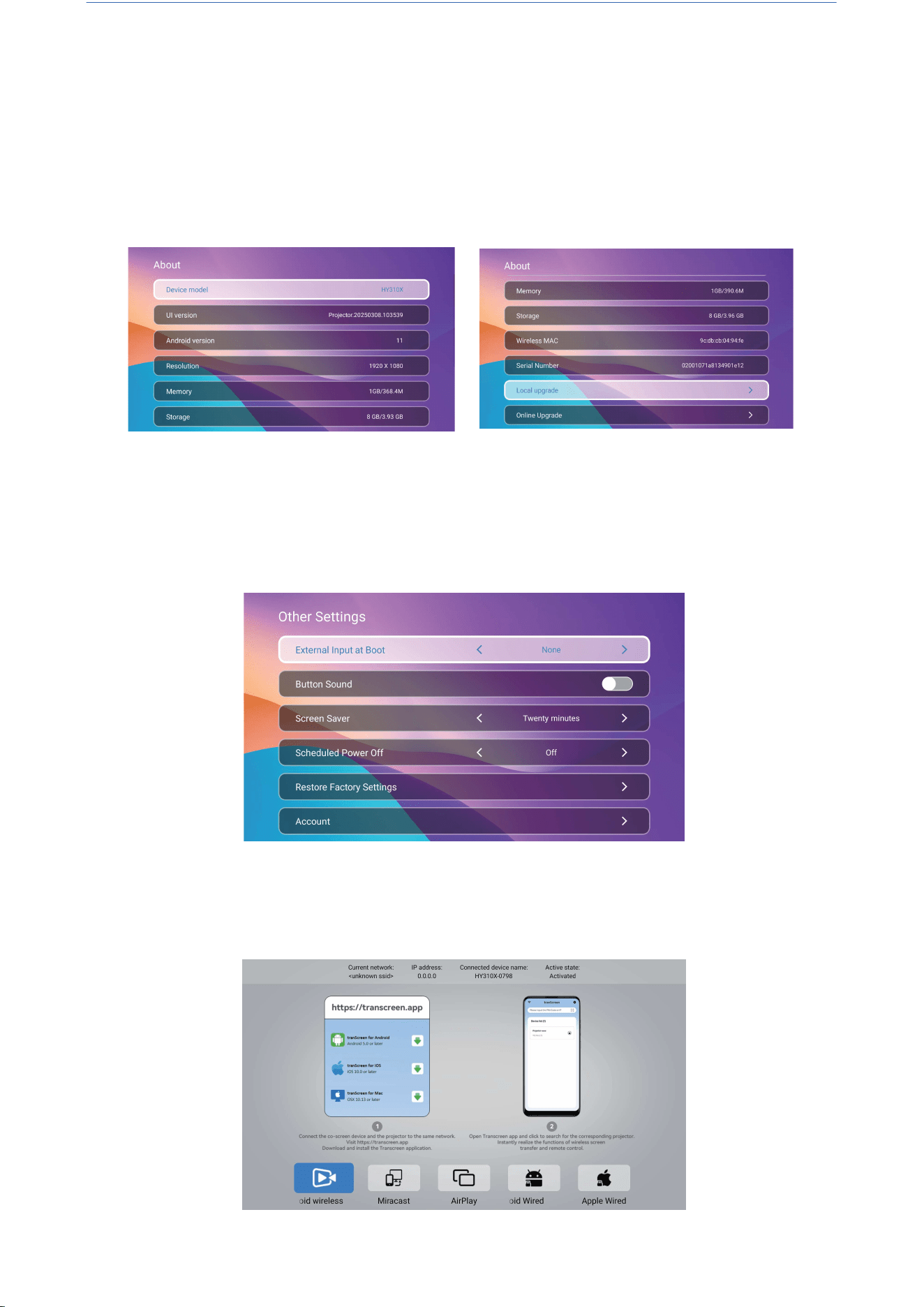
Screen Csat
Settings- Application Settings-Screen Cast-Open Screen Cast
service-Turn on the phone mirroring-Connection
About
Go to Setting - About enter to Device model, UI version, Android
version, Resolution, Memory, Storage,Wireless MAC, Serial Number,
Local upgrade, Online Upgrade
Other Settings
Go to Setting - Other Setting, enter to External Input at Boot,
ButtonSound,ScreenSaver,ScheduledPowerOff,Restore
Factory Settings,Account.

This device complies with Part 15 of the FCC Rules. Operation is subject to the following two
conditions:
(1) This device may not cause harmful interference, and
(2) This device must accept any interference received, including interference that may cause
undesired operation.
Warning: Changes or modifications not expressly approved by the party responsible for compliance
could void the user's authority to operate the equipment.
NOTE: This equipment has been tested and found to comply with the limits for a Class B digital
device, pursuant to Part 15 of the FCC Rules. These limits are designed to provide reasonable
protection against harmful interference in a residential installation. This equipment generates uses
and can radiate radio frequency energy and, if not installed and used in accordance with the
instructions, may cause harmful interference to radio communications. However, there is no
guarantee that interference will not occur in a particular installation. If this equipment does cause
harmful interference to radio or television reception, which can be determined by turning the
equipment off and on, the user is encouraged to try to correct the interference by one or more of
the following measures:
Reorient or relocate the receiving antenna.
Increase the separation between the equipment and receiver.
Connect the equipment into an outlet on a circuit different from that to which the receiver is
connected.
Consult the dealer or an experienced radio/TV technician for help.
FCC Radiation Exposure Statement:
This equipment complies with FCC radiation exposure limits set forth for an uncontrolled
environment. This equipment should be installed and operated with minimum distance 20cm
between the radiator & your body.
FCC STATEMENT:
ISED Statement
English:Thisdevicecontainslicenceexempttransmitter(s)/receiver(s)thatcomplywithInnovation.Scienceand
EconomicDevelopmentCanada'slicenceexemptRSS(s).Operationissubjecttothefollowingtwoconditions:
(1)This device may not cause interference.
(2) This device must accept any interference, including interference that may cause undesiredoperation of the
device.
The digital apparatus complies with Canadian CAN ICES-3 (B)/NMB-3(B).French: Cet appareil contient des
émetteurs/récepteurs exempts de licence qui sont conformes auxRSS exemptés de licence d'lnnovation,
Sciences et Développement économique Canada.Lexploitation est soumise aux deux conditions suivantes :
(1)Cet appareil ne doit pas provoquer d'interférences.(2) Cet appareil doit accepter toute interférence, y
compris les interferences susceptibles de provoquerun fonctionnement indésirable de l'appareil.l'appareil
numérique du ciem conforme canadien peut - 3 (b)/nmb - 3 (b)
Thisdevicemeetstheexemptionfromtheroutineevaluationlimitsinsection25ofRSS102andcompliance
with RSS 102 RF exposure, users can obtain Canadian nformation on RF exposure andcompliance.cet appareil
estconformeàl'exemptiondeslimitesd'évaluationcourantedanslasection25ducnr-102etconformitéavec
rss 102 de l'exposition aux rf, les utilisateurs peuvent obtenir des donnéescanadiennes sur l'exposition aux
champs rf et la conformité.
This equipment complies with Canada radiation exposure limits set forth for an uncontrolledenvironment.Cet
équipement est conforme aux limites d'exposition aux rayonnements du Canada établies pour unenvironnement
non contrólé.
This equipment should be installed and operated with minimum distance 20cm between the radiator &
your body.
Cet équipement doit être installé et utilisé à une distance minimale de 20 cm entre le radiateur et votre
corps.

Thanks for purchasing!
Need help?
Please send email inclose item name to our Brand
Support Team (support@magcubic.com), in order to get
better experience, prompt reply and further assistance.
