1-year awrranty
本产品售后服务承诺:严格依据《中华人民共和国消费者权益法》、
《中华人民共和国产品质量法》实行售后三包服务,服务内容如下:
在三包有效期内,您可依照本规定享受修理、更换、退货的
权利,修理、换货、退货应当凭发票办理。
1.自您签收次日起7日内,本产品出现包修条例所述故障情况
经由售后服务中心检测确定,依据您的选择,免费办理退换货
或者修理等服务;
3.自您签收次日起12个月内,本产品出现包修条例所述故障情
况经由售后服务中心检测确定,依据您的选择,免费进行修理
(运费自理)。
2.自您签收次日起8天-15天内,本产品出现保修条例所述故障
情况,经由售后服务中心检测确定,依据您的选择,免费办理
换货或者修理等服务;
Product
warranty card
Warranty item
Buyer
information
Certificate of Conformity
Do not use the device near heat sources such as
radiators, heaters, open flames, or in extremely high or
low temperatures.
This product contains a built-in, non-removable battery.
Improper replacement may result in explosion. Do not
attempt to disassemble the device.
Do not disassemble, strike, crush, or cut the battery, as
it may explode. Do not expose the battery to direct
sunlight, fire, or other sources of excessive heat.
Do not subject the battery to extremely low air pressure,
which may cause it to explode or leak flammable
substances.
Stop using the battery immediately if it becomes severely
swollen.
If you suspect the battery has been swallowed or inserted
into the body, seek medical help immediately.
Do not dispose of the battery with household waste.
Follow local regulations for safe disposal.
The parts of the glasses in contact with the skin are made
from skin-friendly materials. However, if you experience
discomfort or allergic reactions, discontinue use and
consult a doctor.
Use the device within a temperature range of 0°C to
45°C and store it within -20°C to 45°C. Exposure
to extreme temperatures may cause deformation or
malfunction.
���×��mm ���g白纸折页
使用说明书
AI智能翻译眼镜
声明
产品介紹
首先对您使用本公司的产品表示感谢!在使用之前请先阅读
此说明书正确使用此产品。为了更好的服务,本用户手册的
内容可能变更。因为产品的性能和功能而发生的变更,将不
做另行通知。
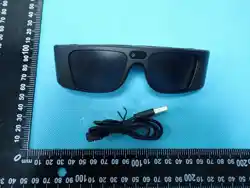
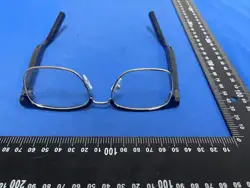
本智能眼镜为磁吸插拔款,分为智能镜腿和光学镜架两部分,
购买时,光学镜架可按个人喜好选配其它款式。
产品规格
使用操作
•
•
•
•
•
•
•
•
•
•
•
备注
开机状态且无蓝牙联接的状态下单腿按键连续
单击6次,单次第7次时长按关机,恢复出厂、
清除手机配对信息。(左右需全部清除配对信息,
方可再次配对)
为了防止可能的听力损伤,请勿长时间使用高音量
PAC负氧离子
释放高浓度负氧离子,营造清新自然的呼吸环境,
仿佛置身森林深处。
原创疗愈音乐
针对不同人群(老年、中年、青少年、孕妇、助眠)
的生理心理需求,融合中国“五音疗愈”理念与现代
和弦技术,结合阿尔法脑波,帮助放松身心,缓解
眼部疲劳。
微循环技术
采用9.34微米波长与33.3Hz太赫兹,构建复合能
量场,辅助神经系统舒缓及微循环改善。
注:本产品为健康辅助工具,非医疗器械,不具备
疾病治疗功能。
•
•
•
•
请勿将电池置于极低气压下,否则可能导致电池
爆炸或泄漏可燃液体和气体
若电池出现严重膨胀,请勿继续使用
注意事项
AI健康功能说明
进行剧烈运动时,请勿使用本产品,以免因意外带
来人身伤害
遵守所在地区或国家的相关规定,驾车时请谨慎使
用本设备
•
本产品使用是 防蓝光零度数平光镜片,有效过滤
有害蓝光,缓解长时间使用数码屏幕带来的眼干、
眼涩与视觉疲劳。镜片可轻松取下,方便您携带
至眼镜店,作为验光配镜时最直观的尺寸、形状
参考
如需更换镜片,建议到专业的眼镜店进行更换,如
自行拆装镜片可能由于操作不当导致设备损坏
如需调整鼻托,请到专业眼镜店进行调整,不当调
整鼻托可能造成鼻托的损坏
请勿用温热水清洁镜片
请避免和易造成刮磨的金属用品一起存放
塑料材质及镜片不耐热,请避免在高温处使用(如
桑拿房等)或存放(如车辆的仪表盘上等),以免
引起变形或开裂
请勿在散热器、加热器、火焰或其他发热设备等热
源附近或温度过高、过低的环境下使用
请在温度0℃~45℃范围内使用本设备,并在温度
-20℃~45℃范围内存放设备及配件。当环境温度过
高或过低时,可能会引起镜框变形、眼镜故障
请勿堵塞出声孔和麦克风孔,按照使用说明进行
使用
•
•
•
请勿擅自拆卸、改装设备(含更换内置电池)及配
件,否则该设备及配件将不在本公司保修范围之内,
设备发生故障时请联系本公司售后服务
本产品配有内置电池且不可拆卸,电池更换当不会
有爆炸危险,请勿自行拆卸设备
请勿拆解、撞击、挤压或切割电池,否则可能导致
爆炸;电池不得暴露在如日照、火烤或类似的过热
环境中
如果你认为电池可能已被吞食或放置在身体的任何
部位内,立即寻求医疗救助
请不要将电池扔进生活垃圾进行处理,请遵守国家
相应的规定安全处置用完的电池
•
•
眼镜贴合皮肤位置采用专业健康材质,用户可放心
佩戴,如因个体差异原因,佩戴时感到皮肤不适或
出现过敏反应,请立即停止佩戴并咨询医生
请勿使用其他化学溶剂或清洁剂清洁本产品;本
产品不附送电源适配器,请使用符合CCC认证的
5V 1A电源适配器
• 功能并非永久有效,可能会随着日常使用的磨损
而下降,请避免设备及配件淋雨或受潮
•
•
•
本设备及其配件如不慎沾水,请尽快擦拭后放置于
通风阴凉处等待干燥。未完全干燥之前,请勿再次
使用或充电;充电线不防水,充电前请注意清洁镜
腿充电触点与充电线金属头,如有水分残留请及时
擦拭,以免造成短路
产品及其配件可能包含小零件,为了避免儿童窒息
或其他危险或损坏,请将产品及配件放在儿童接触
不到的地方
本设备不支持冲洗,请勿直接冲洗镜腿或进行超声
波清洗等
免责条款
用户凭保修凭证及有效发票可享受当地法律法规
所赋予的消费者权益。以下不属于免费维修范围:
1.不能出示有效的保修凭证及发票。
2.保修凭证有涂改痕迹或与产品不符。
3.消耗材料的自然消耗、磨损及老化。
4.雷击或用电系统原因造成的损坏。
5.因用户使用不当造成的损坏。
6.自行拆动、改装、维修过的产品。
7.超过保修期,或未按产品使用说明的要求使用、
维护、保管而造成的损坏。
8.除主机以外的赠品和包装盒。
有害物质
三包凭证
产品中有害物质名称及含量
部件名称
印刷电路组件
外壳等小结构件
本表格依据SJ/T11364的规定编制
本表格依据SJ/T11364的规定编制
印刷电路板组件*:包括印刷电路板及其零部件、电子元器件等。
根据产品型号不同,您所购买的产品可能不会含有以上所有部件。
O:表示该有害物质在该部件所有均质材料中的含量均在
GB/T26572规定的限量要求以下。
X:表示该有害物质至少在该部件的某一均质材料中的含量
超出GB/T26572规定的限量要求。
在中华人民共和国境内销售的电子电气产品必须
标识此标志,标志内的数字代表在正常使用状态
下的产品的环保使用期限。
1.本产品自购买日期起,整机保修一年。
2.保修服务只限于一般正常使用下有效,不依照说明使用非经
本公司认可的维修与改装,错误使用或疏忽而造成的损坏或因
天灾造成损坏等,则不在本品牌产品保修范围内。
3.维修时请携带此卡原件,并随产品一起提供给销售商。否则将
不能获得保修服务。
4.保修卡若经修改,将不能获得保修服务。
5.产品外观存在较严重的破损、涂券、严重刮花划痕、存在一定
质量问题导致的功能故障只能修,不能换新、不能退。
6.对不依照上述保修条例办理的用户,本公司对上述条例负有解
释权。
保修条例
产品保修卡
合格证
GB4943.1-2022
保修事项
购买者信息
购买日期:
产品型号:
7天退换
联系人:
联系地址:
电话:
15天内换货
1年保修
Purchase date:
AI翻译功能
一、AI对话
基于先进大模型,支持语音与文字双模式互动,
理解上下文,智能生成回应。学习、工作、生活中
的贴心对话伙伴。
APP软件扫描二维码下载安装,连接AI智能
翻译眼镜
使用流程
1.进入「AI对话」页面
2.点击麦克风语音输入,或直接输入文字发起对话
3.AI即时回复,支持语音播报与文本查看,可点击
喇叭重播
五、同声传译
适用于会议、讲座、学习等需高效记录与翻译
的场景。
使用流程
1.选择源语言与目标语言(如中文→英文)
2.开始说话,系统自动识别:原文显示在上方,
译文同步显示在下方,并通过耳机播报
3.点击屏幕空白处,可切换为"专注模式",仅
保留原文与译文
六、AI秘书
AI智能秘书,一键生成精准转录、专业总结与结构化
思维导图,让会议记录高效智能成稿
使用流程
1.进入「AI秘书」页面
2.点击右下角麦克风按钮,选择录音语言
3.输入标题(非必填,系统默认以时间命名),点击
「确定」开始录音4.单条录音支持3小时时长,结束即
保存并进入详情页
5.点击[立即生成」,选择模板(会议纪要/采访/演讲)
和转录语言,AI自动生成处理
6.生成中(3小时音频约4分钟完成文本、AI总结、
思维导图),离开当前页不影响自动生成显示结果
AI总结:AI智能提取核心要点,适配模板生成专业
文档,支持双击富文本编辑
思维导图:AI智能分析转化为结构化思维导图,清
晰呈现观点分支
说明
支持重新生成,可重新选择模板和转录语言
支持一键复制转写或总结文本
支持导出转写TXT格式;支持导出总结TXT和
MARKDOWN格式;支持导出思维导图JPGE和
MARKDOWN格式;支持导出音频MP3格式
所有录音文件均可在录音列表左滑重新命名或删除
控制操作
喇叭:开启/关闭耳机译文语音播放。
暂停:暂停录音与翻译。
离开:结束会话并清空记录。
二、翻译机
手机外放,无需眼镜,适合公共场所或与陌生人
简单交流。
使用流程
1.选择双方语言(如中文-英文)
2.点击对应语言按钮(如“英文”),提示“请讲
English”
3.系统仅识别该语言,翻译为对方语言
4.译文通过手机扬声器外放,也可点击喇叭重播
三、眼镜+手机模式
一人戴智能眼镜听译,一人用手机说话。适合与
陌生人临时对话场景,如在国外餐厅点单、问路、
购物等。
语音转录:精准逐句转录语音,支持段落播放与
双击编辑,对话逻辑一目了然
User Manual
Smart Translation Glasses
Product Introduction
Statement:
Thank you for choosing our product!
Please read this manual carefully before using the device to
ensure proper operation.To provide better service, the contents
of this user manual may be subject to change.Changes resulting
from updates in product performance and functionality may be
made without prior notice.
These smart glasses feature a magnetic plug-in designand are
divided into two parts: the smart temple and theoptical frame.
When purchasing, the optical frame can bechosen in other styles
according to personal preference.
Product Specifications
Operation Instructions
Note
When the device is powered on and there is no
Bluetoothconnection, press the single-leg button 6
timesconsecutively, and on the 7th press, long press
to poweroff to restore factory settings and clear phone
pairinginformation. (All pairing information on both sides
needsto be cleared before pairing again)
Scan the QR code with the App to download, install,
and connect to the AI Smart Translation Glasses.
Precautions
Avoid prolonged use at high volume to prevent hearing
damage.
Comply with local laws; use cautiously while driving.
Replace with prescription or plano lenses as needed.
Lens replacement and nose pad adjustment should be
done by professionals to avoid damage.
Do not clean lenses with warm or hot water.
Aoid exposure to high temperatures (e.g., saunas, car
dashboards) to prevent deformation or cracking.
Do not block the speaker or microphone openings; use
the device as instructed.
Do not disassemble or modify the device or its
accessories (including battery replacement).
Such actions will void the warranty. For repairs, contact
our customer service.
Do not use during vigorous exercise to prevent injury.
Keep away from metal objects that may scratch lenses.
The product features blue light filtering plano lenses
(non-prescription) that effectively block harmful blue
light, helping to alleviate dryness, irritation, and eye
strain caused by prolonged use of digital screens.
The lenses can be easily removed, allowing you to
bring them to an optical store for an intuitive reference
in terms of size and shape during your eye exam and
glasses fitting.
Do not use chemical solvents or cleaners on this product.
Power adapter is not included; please use a 5V 1A adapter
certified with CCC. Device performance may decline over
time due to normal wear.
Keep the device and accessories away from rain and
moisture. If the device or accessories come into contact
with water, wipe them dry immediately and leave them in
a well-ventilated, cool area to dry completely. Do not use
or charge the device before it is fully dry. The charging cable
is not waterproof. Before charging, ensure the charging
contacts on the temple and the metal tips of the cable are
clean and dry to avoid short circuits.
This device is not waterproof and should not be rinsed.
Do not wash the temples directly or use ultrasonic cleaning.
The product and accessories may contain small parts. To
avoid choking or injury, keep them out of reach of children.
Disclaimer
Consumers are entitled to rights under local laws
and regulations with valid warranty proof and
invoice. The following are not covered under free
repair services:
1. Failure to provide valid warranty proof and i
nvoice.
2. Warranty proof is altered or inconsistent with
the product.
Hazardous substances
Three Guarantees
Certi cate
After-sales Service Commitment for this product:
We strictly adhere to the "Consumer Rights and
Interests Protection Law of the People's Republic
of China" and the "Product Quality Law of the
People's Republic of China" to implement the after
-sales three guarantees service. The service content
is as follows:During the warranty period, you have the
right to enjoy repair, replacement, or return services
as per the regulations. Repair, replacement, or return
procedures should be accompanied by presenting the
invoice.
5. For products with signicant external damage,
tampering, severe scratches, or certain
functional malfunctions due to certain quality
issues, repairs are available, but replacements
or refunds are not provided.
6. For users who do not comply with the above
warranty policy, our company reserves the right
to interpret the provisions of this policy.
7-day return and erplacement
15-day erplacement
Contact person:
Telephone:
Contact:
Certi cate of qualication
Inspector:
Product model:
Implementation guidelines:
Test results:
Qualied
QC
PASS
01
IEC62368
Al Translation Function
I . Al Dialogue
Based on advanced large models, supporting dual-mode
interaction of voice and text, understanding context, and
intelligently generating responses. A thoughtful dialogue
partner in learing, work, and life.
Usage Process
1. Enter the "Al Dialogue" page
2. Click the microphone for voice input, or directly input text to
initiate a dialogue
3. Al replies in real-time, supporting voice playback and text
viewing, with the option to click the speaker to replay
ll. Translator
Mobile speaker, no glasses needed, suitable for public places
or sirple cormunication with strangers.
Usage process
1. Choose both languages (e.g. Chinese - English)
2. Click the coresponding language button (e.g. "English"),
prompt "Please speak English"
3. The system only recognizes that language, translates to the
other party's language
4. The translation is played through the phone's speaker,
andyou can also click the speaker to replay
Glasses + Mobile Mode
One person wears smart glasses for interpretation, and
another speaks using a mobile phone . Suitable for temporary
conversations with strangers, such as ordering in a restaurant
abroad, asking for directions, shopping, etc.
V. Simultaneous Interpretation
Applicable to scenarios such as meetings, lectures, and learning
that require efhcient recording and translation.
Usage process
Usage process
1. Select source language and target language (e.g., Chinese
English)
2. Starl speaking, the system automatically recognizes: the
original text displays above, and the translation displays
synchronously below, and is broadcast through headphones
3. Click on the blank area of the screen to switch to "Focus
Mode",keeping only the original text and translation
Control operations
Speaker: Tur on/off headphone translation voice playback.
Pause: Pause recording and translation.
Leave: End session and clear records.
Vl. AI Secretary
Vl. Offline Translation
The AI intelligent secretary enables one-tap generation of
accurate transcripts, professional summaries, and structured
mind maps, making meeting minutes drafting efficient and
intelligent.
1.Enter the "AI Secretary" page.
2.Tap the microphone icon in the bottom-right corner and select
the recording language.
3.Enter a title (optional; the system will default to naming by
time), then tap "Confirm" to start recording.
4.Single recordings support a maximum duration of 3 hours. After
stopping, the recording will be saved automatically and you will
be directed to the details page.
5.Tap "Generate Now", select a template (Meeting Minutes /
Interview / Speech) and the transcription language, and the AI
will automatically process the content.
6.During generation (a 3-hour audio file takes approximately 4
minutes to complete text transcription, AI summary, and mind
map creation), leaving the current page will not affect the
automatic generation and display of results.
四、拍照翻译
一拍即译,相簿导入也支持,原图与译文自由切换。
使用流程
1.首页进入「拍照翻译」
2.拍照或从相簿选图
3.系统自动识别并翻译
4.点击屏幕切换查看原图或译文
Instant translation, album import is also supported, freely
switch between the original image and translation.
Usage process
1. From the homepage enter "Photo Translation"
2. Take a photo or select an image from the album
3. The system automatically recognizes and translates
4. Click the screen to switch between viewing the original
image or translation
IV. Photo Translation
Description
1. Support regeneration, can re-select template and transcription
language
2. Support one click copy of transcription or summary text
3. Support exporting transcription in TxT format,
support exporting summary in TXT and MARKDOWN formats;
support exporting mind map in JPGE and MARKDOWN formats;
support exporting audio in MP3 format
4. All recording fles can be renamed or deleted by swiping left in
the recording list
3.眼镜端操作:通过敲击眼镜触控区或按键唤醒眼
镜端录音(具体唤醒快捷操作与眼镜预设播放/
暂停快捷设定一致)
4.双方原文与译文即时显示:
我方戴眼镜说中文→手机外放翻译后的英文
对方用手机说英文→眼镜播放翻译后的中文
App download
Usage Process
Usage Process
1. Set language direction: the left side is for the mobile
language, the right side is for the glasses language
2. Mobile side: Click the voice button, prompting
"Please speak XXX on the mobile side"
3. Tap the touch area or button on the glasses to activate
recording on the glasses (the specifc quick-action wake-up
method matches the glasses' default play/pause quick-action
settings).
4. Both original text and translation are displayed in real-time:
Our side wearing glasses speaks Chinese - Mobile plays the
translated English.
The other side speaks English using a mobile phone ->
Glasses play the translated Chinese.
2. From 8 to 15 days after you receive the product,
if the product experiences any malfunctions as
described in the warranty policy and is conrmed by the
after-sales service center, you can choose to get a free
replacement or repair service.
3. With in 12 months from the day after you
receive the product, if the product experiences
any malfunctions as described in the warranty
policy and is conrmed by the after-sales service
center, you can choose to get free repair
service (shipping cost borne by the customer).
4. Any modications to the warranty card will
render it invalid for warranty service.
3. Natural wear, tear, and aging of consumable
materials.
4. Damage caused by lightning or electrical system
issues.
5. Damage resulting from improper use by the user.
6. Products disassembled, modified, or repaired by
unauthorized personnel.
7. Damage caused by exceeding the warranty period
or failure to follow product instructions for use,
maintenance, or storage.
8. Gifts and packaging boxes except the main device.
Voice transcription: Accurate sentence-by-sentence transcription
of speech,supports paragraph playback and double-click editing,
with clear dialogue logic
Al summary: Al intelligently extracts core points, adapts templates
to generate professional documents, supports double-click rich
text editing
Mind map: Al intelligently analyzes and converts into structured
mind maps,clearly presenting viewpoint branches
Works without internet! Download language packs in advance for
worry-free communication while traveling, flying, or in remote
areas.
1.On the home page, tap the "Offline" toggle switch next to the
translation function.
产品名称:AI智能翻译眼镜
电池容量:100mAh*2
播放声道:双喇叭、立体声
连接距离:约10M
蓝牙版本:5.4
播放时间:约8小时(50%音量)
充电时间:约1~1.5小时
充电电压:DC5V
Product Name: Smart Translation Glasses
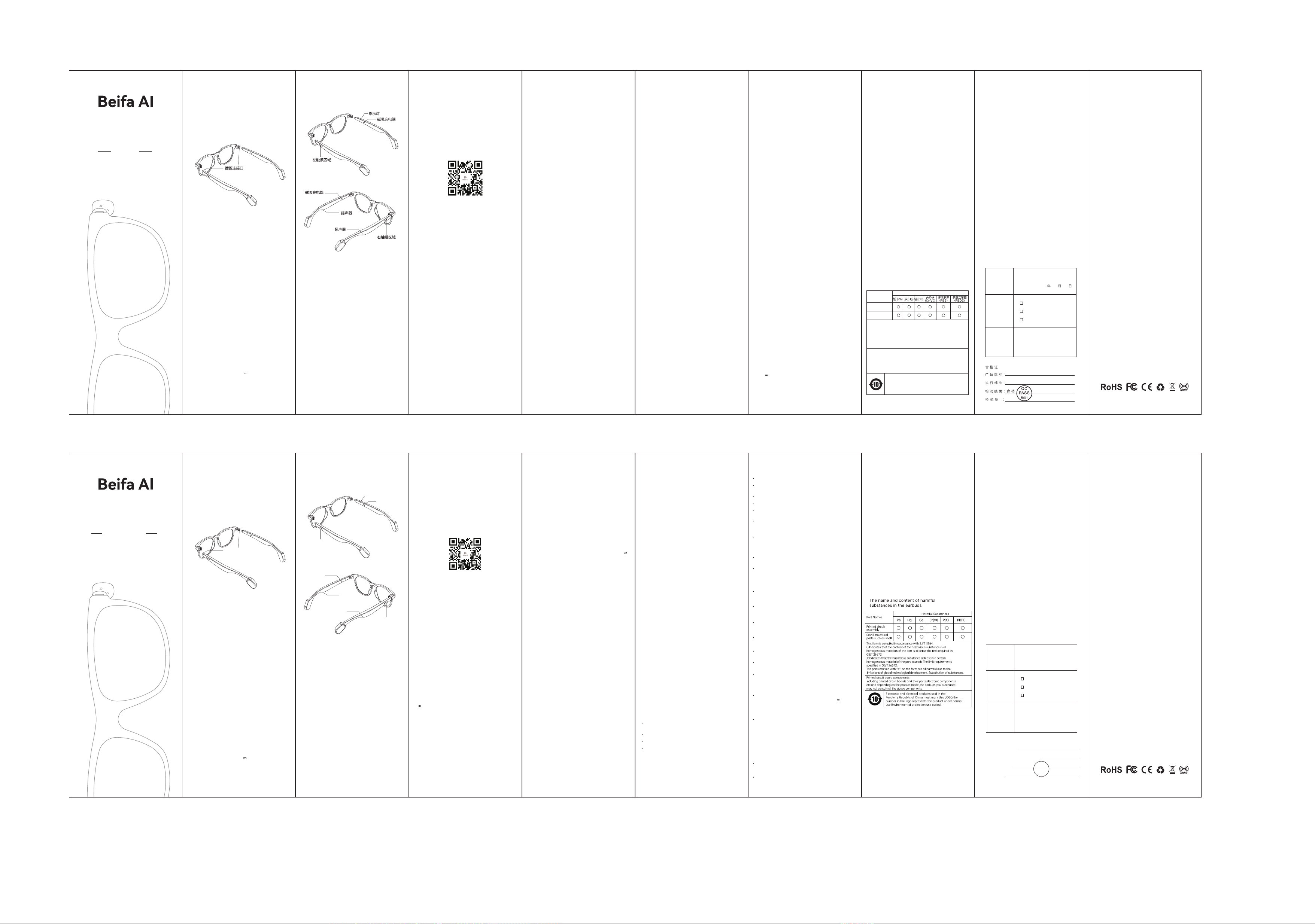
Plug and unplug
the connector
Left touch area
Right touch area
Magnetic
charging
Speaker
Speaker
Indicator light
Magnetic
charging
Bluetooth Version: 5.4
Playback Time: Approximately 8 hours
(50% volume)
Charging Time: Approximately 1 to 1.5 hours
Battery Capacity: 100mAh × 2
Audio Output: Dual speakers, stereo sound
Connection Range: Approximately10 meters
Charging Voltage: DC 5V 100mA × 2
1、开机:戴上眼镜2秒自动开机
2、关机:取下眼镜,60秒后自动关机。或长按主板
触摸5秒关机。
3、配对:开机后进入配对状态,主(红蓝灯交替闪)
副机红灯5S闪一下。手机蓝牙搜索到蓝牙
名“Beifa AI-GE01(型号对应名称)”点击连接。
4、无连接关机:开机后3分钟没连接蓝牙设备自动关机。
6、来电状态
接听/挂断电话:触摸双击(L/R都可以)
拒接电话:来电时触摸长按2秒(L/R都可以)
7、语音助手:
启用/关闭siri语音:触摸三击(L/R都可以)
8、充电:
充电时红灯常亮,满电蓝灯常亮。
5、播放音乐:
上一曲:L长按触摸1.5秒
下一曲:R长按触摸1.5秒
暂停/播放:触摸双击(L/R都可以)
音量加:触摸单击R
音量减:触摸单击L
100mA
1. Power On: Auto on after wearing for 2 seconds.
2. Power Off: Auto off 60 seconds after removing,
or long press touchpad for 5 seconds.
3. Pairing: Power on to enter pairing mode (main:
red/blue flash alternately; secondary: red flash
every 5s) and connect to "Beifa AI-GE01 (model
-specific name)" via phone Bluetooth.
4. Auto Off (No Connection): Shuts down after 3
minutes without Bluetooth connection.
5. Music Playback:
Previous Track: Long press left touch (1.5s)
Next Track: Long press right touch (1.5s)
Play/Pause: Double tap (L/R)
Volume Up: Single tap R touch
Volume Down: Single tap L touch
6. Incoming Call:
Answer/Hang Up: Double tap (L/R)
7.Voice Assistant:
Activate/Deactivate Siri: Triple tap (L/R)
8. Charging:
Red light stays on during charging;
blue light stays on when fully charged.
AI Health Function
Description
Release high-concentration negative ions to create a fresh
and natural breathing environment, making you feel as if you
are deep in a forest.
PAC Negative Ions
Tailored to the physical and psychological needs of different
groups of people (the elderly, middle-aged people, adolescents,
pregnant women, and those in need of sleep aid), it integrates
the Chinese concept of Five-Note Healing with modern chord
technology and combines alpha brain waves to help relax the
body and mind and relieve eye fatigue.
Original Healing Music
A composite energy field is constructed by adopting terahertz
waves with a wavelength of 9.34 μm and a frequency of 33.3 Hz,
to assist in the relaxation of the nervous system and the
improvement of microcirculation.
Note: This product is a health auxiliary tool, not a medical
device, and does not possess the function of treating diseases.
Microcirculation Technology
1. Within 7 days from the day after you receive the
product, if the product experiences any malfunctions
as described in the warranty policy and is conrmed by
the after-sales service center, you can choose to get
a free replacement or repair service.
APP扫码下载
七、离线翻译
无网络也能用!提前下载语言包,旅行、飞行、偏远
地区沟通无忧。
使用流程
1.首页点击翻译功能右侧的「离线」开关
2.若未下载,提示“未下载语言包”,点击「去下载」
3.选择所需语言包下载(默认优先下载基础包,支持
多语言同时下载)
4.下载完成后,返回首页重新开启离线开关,即可
使用
注意:仅“对话翻译”支持离线翻译。如需使用在线
功能,请先关闭离线模式。
使用流程
1.设置语言方向:左侧为手机端语言,右侧为眼镜
端语言
2.手机端操作:点击语音按钮,提示"手机端请讲
XXX"
2.If no language pack is downloaded, the prompt "Language
pack not downloaded" will appear. Tap "Go to Download".
3.Select the required language packs to download (the basic
pack is downloaded by default first; multiple languages can
be downloaded simultaneously).
4.After the download is complete, return to the home page
and re-enable the offline switch to start using the feature.
Only "Conversation Translation" supports offline
translation. To use online functions, please turn off
offline mode first.
Note:

This device complies with part 15 of the FCC Rules. Operation is subject to the
following two conditions: (1) This device may not cause harmful interference, and (2)
this device must accept any interference received, including interference that may cause
undesired operation.
Any Changes or modifications not expressly approved by the party responsible for
compliance could void the user's authority to operate the equipment.
Note: This equipment has been tested and found to comply with the limits for a Class B
digital device, pursuant to part 15 of the FCC Rules. These limits are designed to
provide reasonable protection against harmful interference in a residential installation.
This equipment generates uses and can radiate radio frequency energy and, if not
installed and used in accordance with the instructions, may cause harmful interference
to radio communications. However, there is no guarantee that interference will not
occur in a particular installation. If this equipment does cause harmful interference to
radio or television reception, which can be determined by turning the equipment off and
on, the user is encouraged to try to correct the interference by one or more of the
following measures:
-Reorient or relocate the receiving antenna.
-Increase the separation between the equipment and receiver.
-Connect the equipment into an outlet on a circuit different from that to which the
receiver is connected.
-Consult the dealer or an experienced radio/TV technician for help.
FCC Radiation Exposure statement
The device has been evaluatec to meel general RF exposure requirement. The device
can be used in portable exposure condition without restriction.