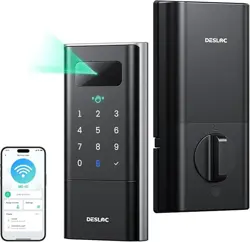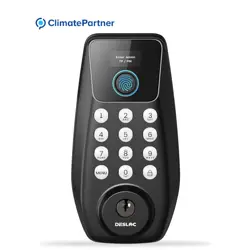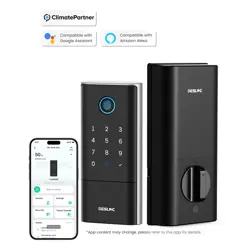
S150 Max
AL-POWERED
DUAL
CAMERA
SMART LOCK
User Manual

English
01
1. Product Parameters.............................................................................01
2. App Network Configuration..........................................................02
3. Instructions for Use............................................................................08
4. Cautions and Statements..............................................................15
1. Paramètres du produit...................................................................16
2. Configuration réseau via l’appli mobile...............................17
3. Instructions d’utilisation.................................................................23
4. Avertissements et déclarations...............................................30
1. Parámetros del producto...............................................................31
2. Configuración de red de la aplicación.................................32
3. Instrucciones de uso.........................................................................38
4. Precauciones y declaraciones..................................................45
Français
16
Español
31

<01>
1. Product Parameters
15,000mAh lithium battery
(Actual capacity may vary from 14,400-15,000 mAh due to lithium
battery characteristics.)
3D facial recognition, password, fingerprint
recognition, app, mechanical key
50 entries
Battery
Specifications
Unlocking
Methods
Fingerprint
Entries
50 entries
Face Entries
100 entries
Password Entries
<02>
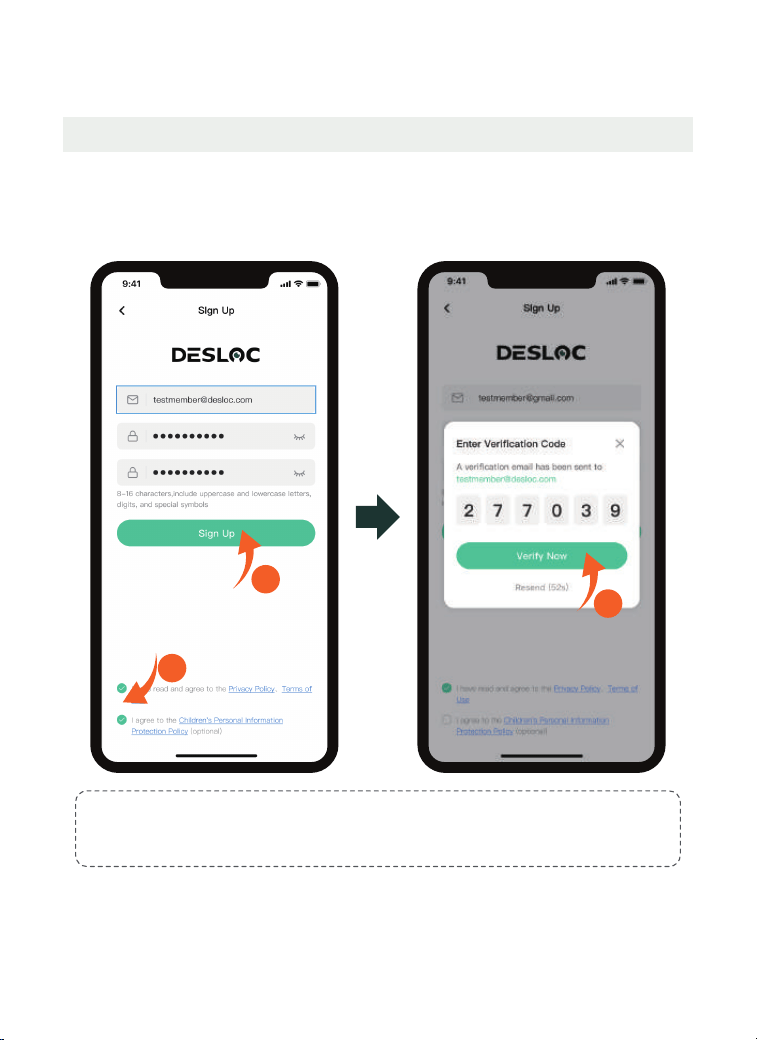
2. App Network Configuration
2.1 Owner Account Registration
Note:
8-16 characters, include uppercase and lowercase letters, digits, and special symbols.
Example: Asdf120!
Please download the DESLOC app before use
2
1
3
<03>
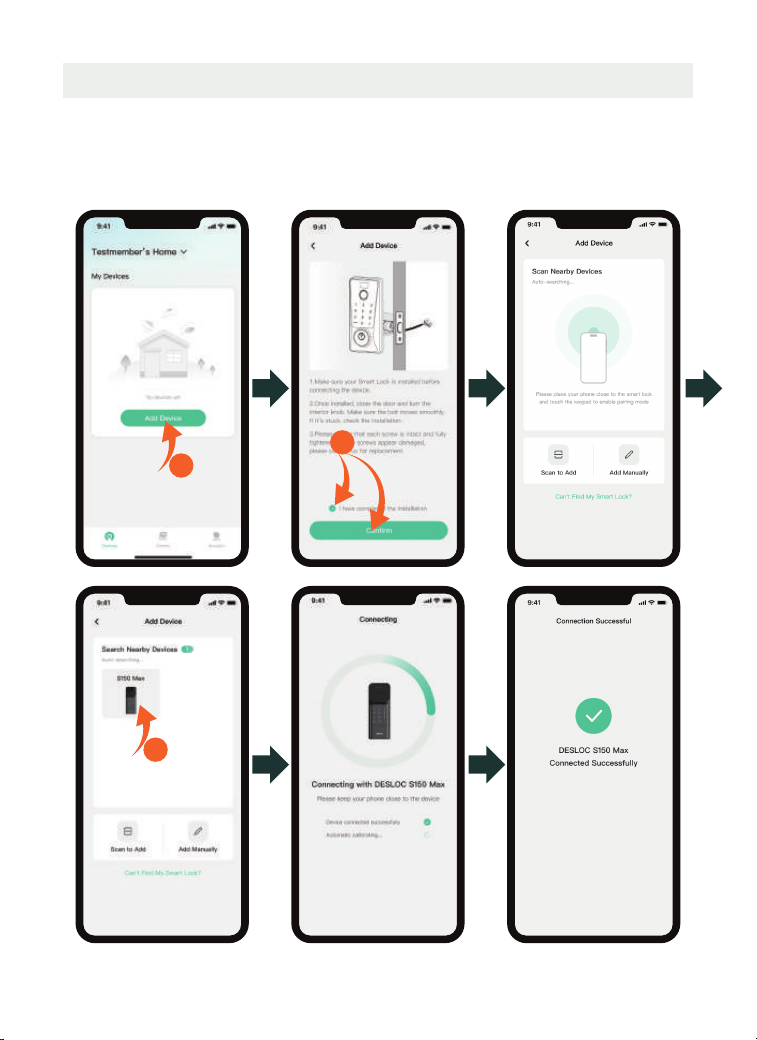
2.2 Add Device
There are three ways to add the device. Before connecting, activate the touch
keypad.
Method 1: Bluetooth Connection
Make sure Bluetooth is enabled and your phone is close to the device.
1
3
2
<04>
Method 3: Add Manually
Click "Add Manually"> manually enter the SN code indicated on the inner side
of the battery cover or on the packing box until "Connected Successfully" is
prompted.
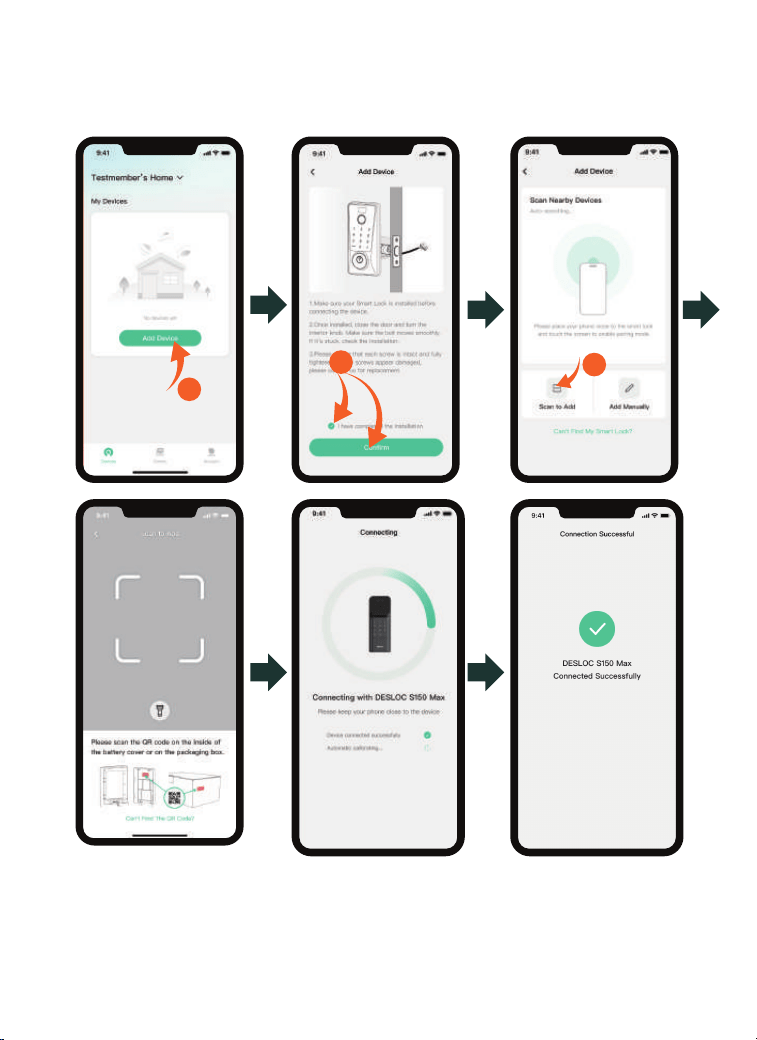
Method 2: Scan to Add
Please scan the QR code on the inside of the battery cover or on the
packaging box to add.
1
3
2
<05>
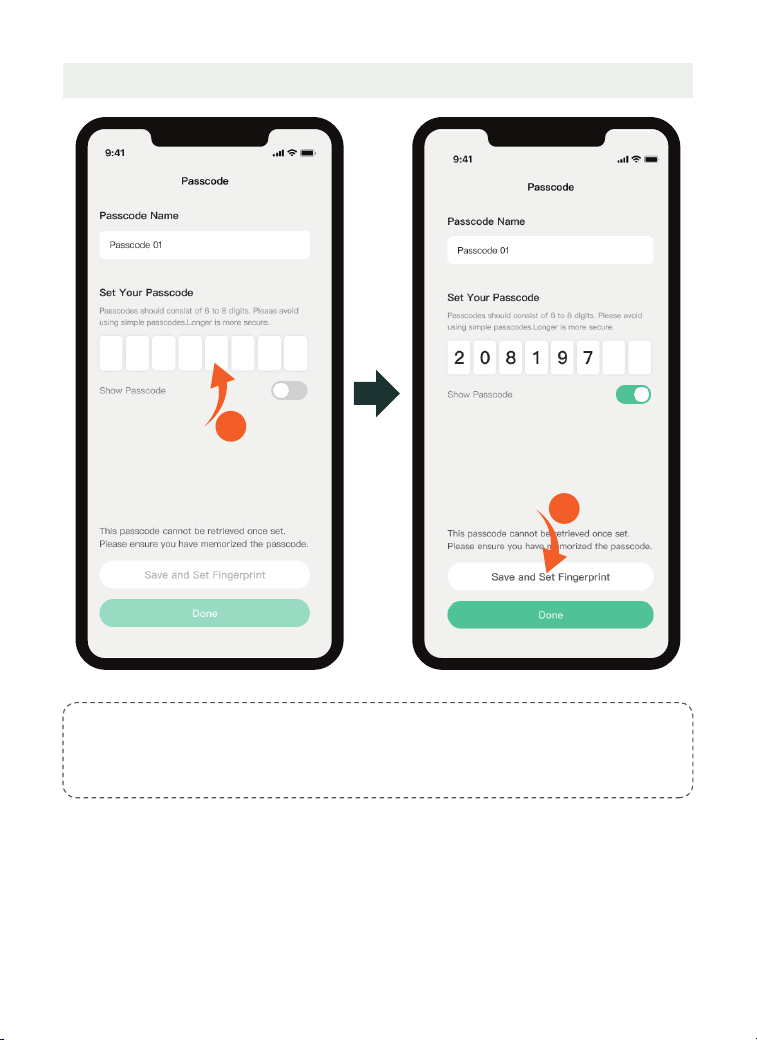
2.3 Owner Passcode Setting
Note
:
Passcodes should consist of 6 to 8 digits. Please avoid using simple passcodes. Longer
passcodes are more secure.
1
2
<06>
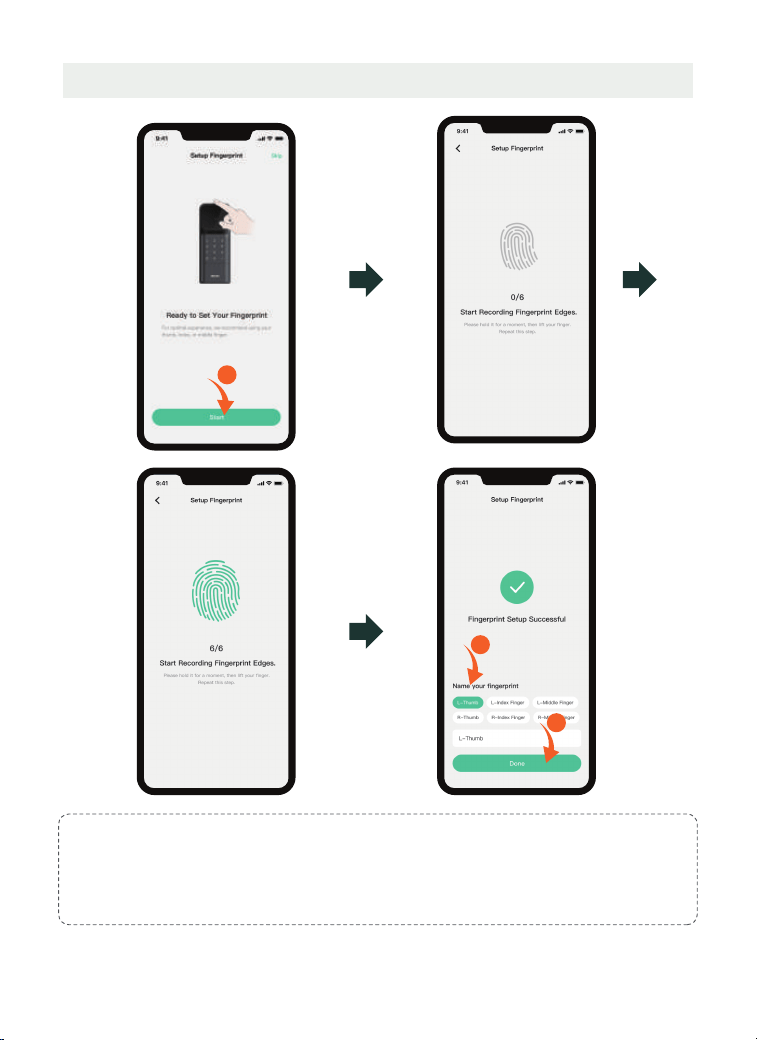
2.4 Owner Fingerprint Setting
1
4
3
Note
:
1. Wipe off the water stains and dust on the finger before entering the fingerprint, and it is
recommended to give priority to the thumb, index finger or middle finger.
2. You can also tap "Skip", and then set the fingerprint in "Devices >Access > Owner > Add
Fingerprint".
<07>
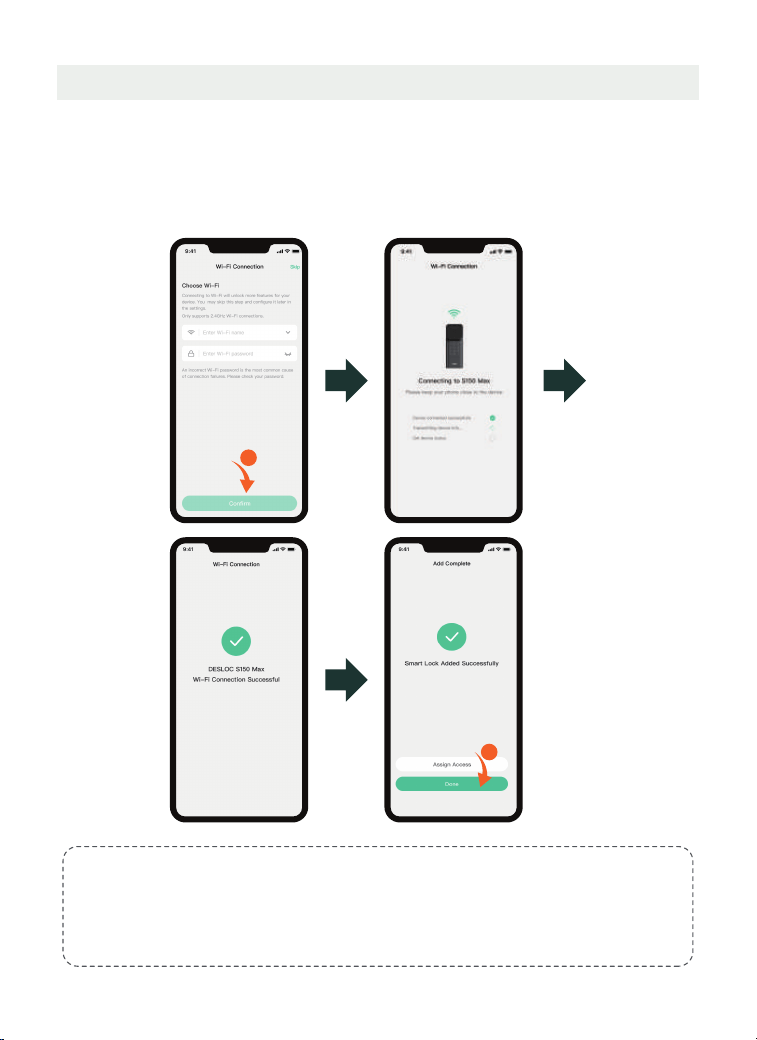
2.3 Wi-Fi Configuration2.4 Wi-Fi Configuration2.5 Wi-Fi Configuration
For iOS: The Wi-Fi name will be detected automatically (location authorization
required).
For Android: Choose the Wi-Fi name from the drop-down list(location authoriza-
tion required).
For both systems: Manual Wi-Fi name entry is also supported (no location
authorization required).
Note:
1. Ensure that it is 2.4GHz Wi-Fi.
2. Please enable Location Services in 'Settings-Privacy-Location Services' and allow DESLOC
access.
3. You can also tap "Skip", and then configure Wi-Fi in the "Devices > Settings > General > Wi-Fi
> Choose Wi-Fi" after selection.
1
2
<08>
3. Instructions for Use
3.2 Emergency Charging Method
3.1 Battery Charging Reminder
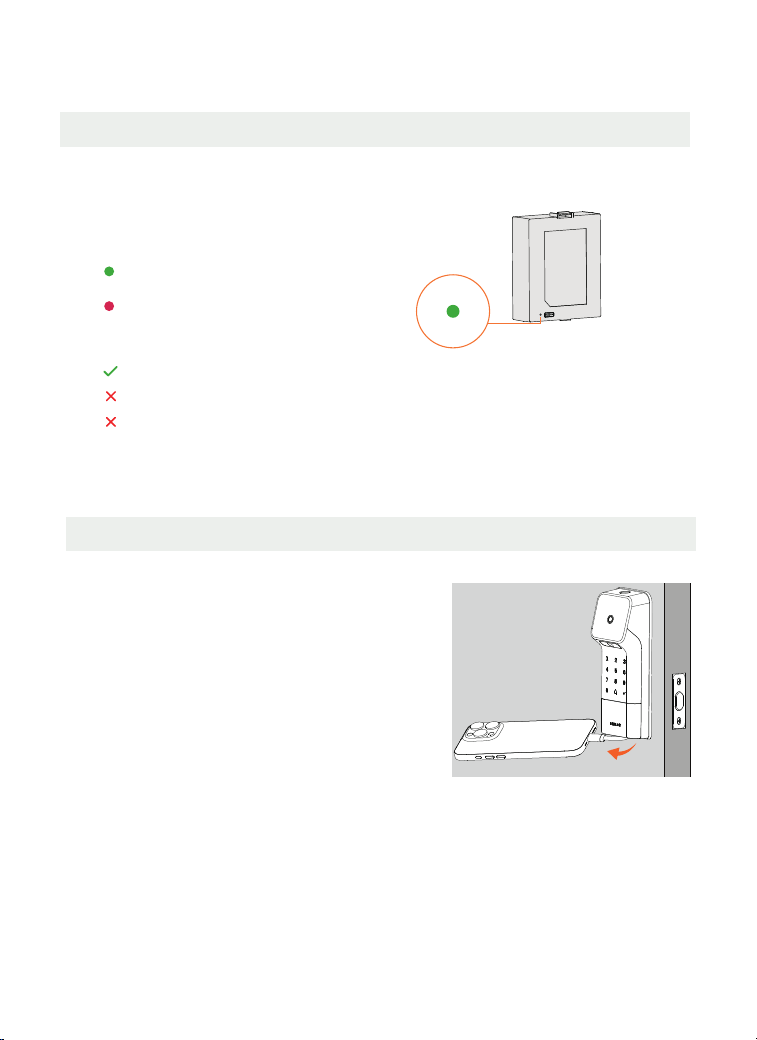
The lithium battery is not fully charged; please fully charge it before use (Use Type-C
chargers only).
The battery itself has an indicator that shows the
following colors (indicated only during charging):
Green light: Fully charged
Red light: Charging in progress
Optimal Charger:
RECOMMENDED 5V/2A(8-10 hours)
NOT RECOMMENDED 5V/1A(>10 hours)
Fast Charge: Not Supported
Outside
Pull out the emergency charging
cable from the bottom of the
exterior lock and plug it into a
smartphone or power bank to
perform emergency charging for
the lock.
<09>
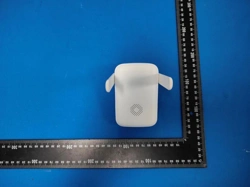
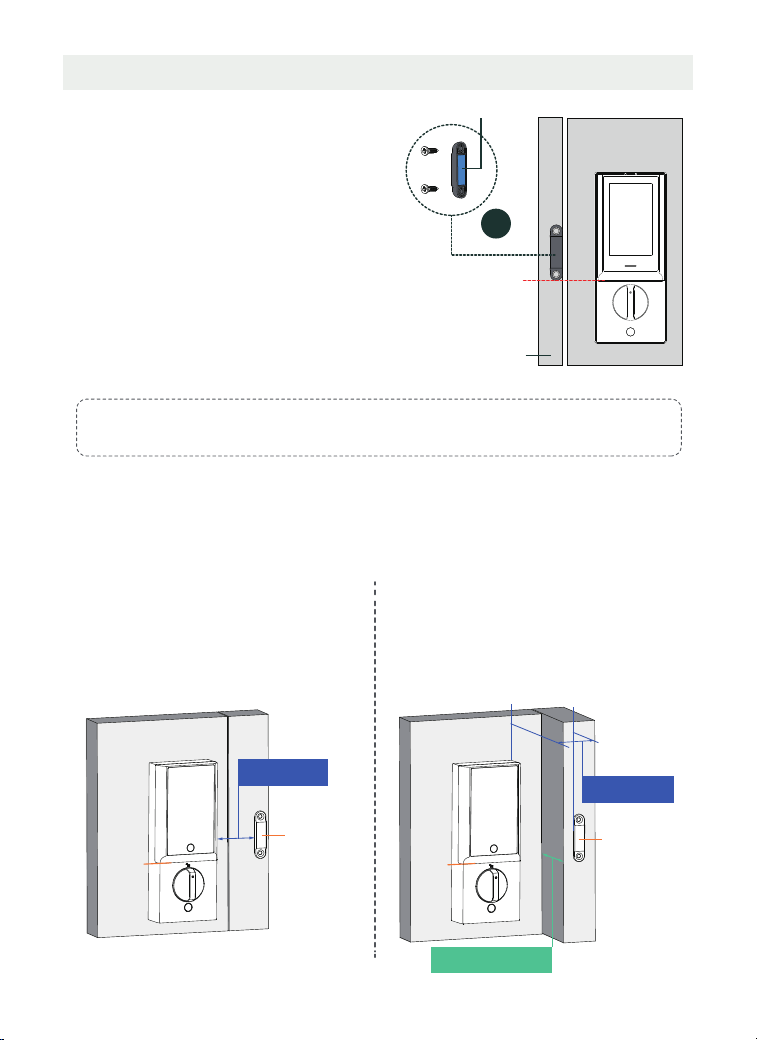
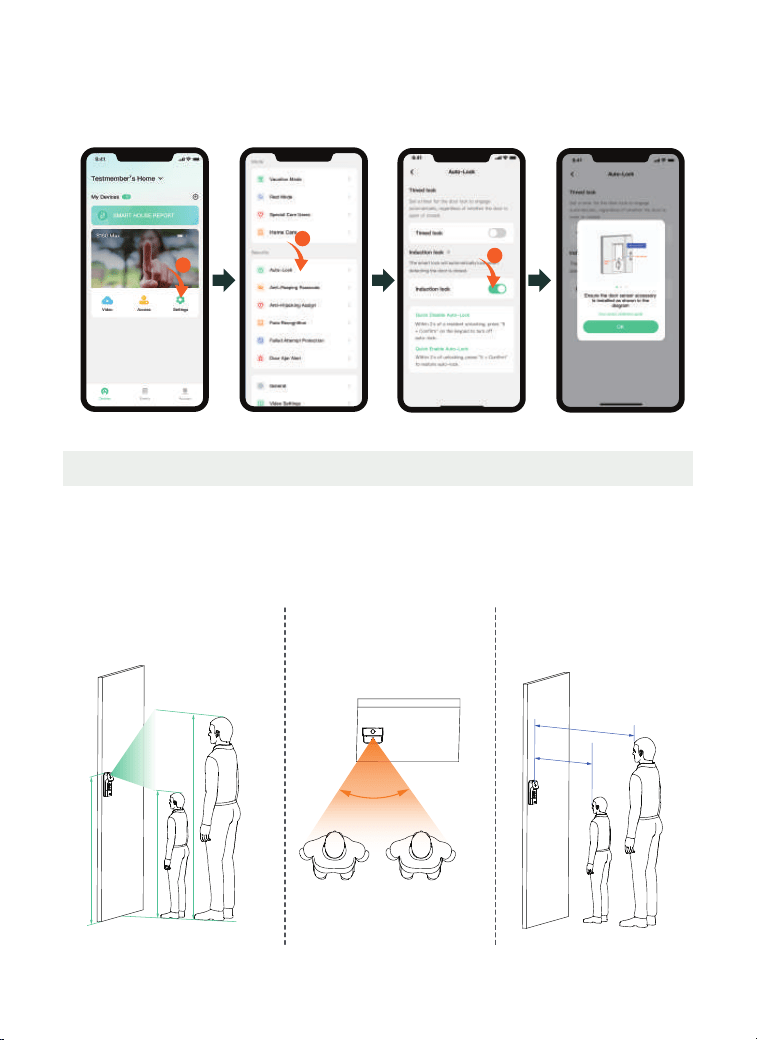
3.3 Installing the Door Sensor
Illustration A
Illustration B
If the above illustrations do not match your door type, you can try adjusting according to the
following two scenarios:
In all scenarios, during installation, ensure the center of the door sensor is approximately
aligned vertically with the lower seam line of the battery cover.
Scenario A: The horizontal gap between the
door sensor and the interior lock is ≤ 1" (25
mm), as shown in illustration A.
Scenario B: The horizontal gap between the
door sensor and the interior lock is ≤ 1" (25
mm), and the interior/exterior depth offset is
≤ 13/16" (20 mm), as shown in illustration B.
Door sensor
≤ 1” (25 mm)
Door sensor
≤ 1” (25 mm)
Step 1: Determine the horizontal
installation position. The door sensor
should be flush with the edge of the door
frame.
Step 2:
Determine the vertical installation
position.The bottomedgeof the door
sensor
should be flush with the seam line
between the battery cover and the
interior lock
(as shown by the red dashed line
in the illustration below).
Step 3: Once the position is determined
,
peel off the adhesive backing of the door
sensor
and stick it. If it does not adhere,
you may choose to secure it with screws.
J
Inside
Door sensor
Door frame
Adhesive backing
Seam line
Note:
The door sensor does not need to be installed if the auto-lock function is not used.
Seam
line
Seam
line
≤ 13/16" (20 mm )
<10>
2
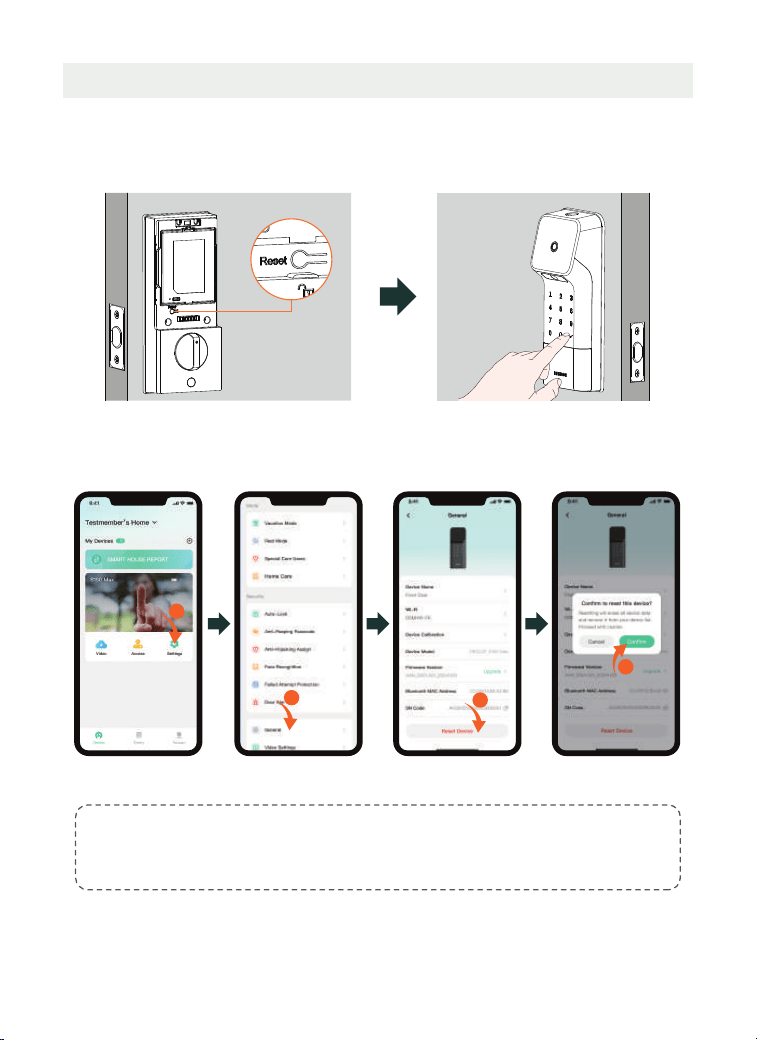
3.4 Unlocking Methods
Method 1: 3D Face Unlocking
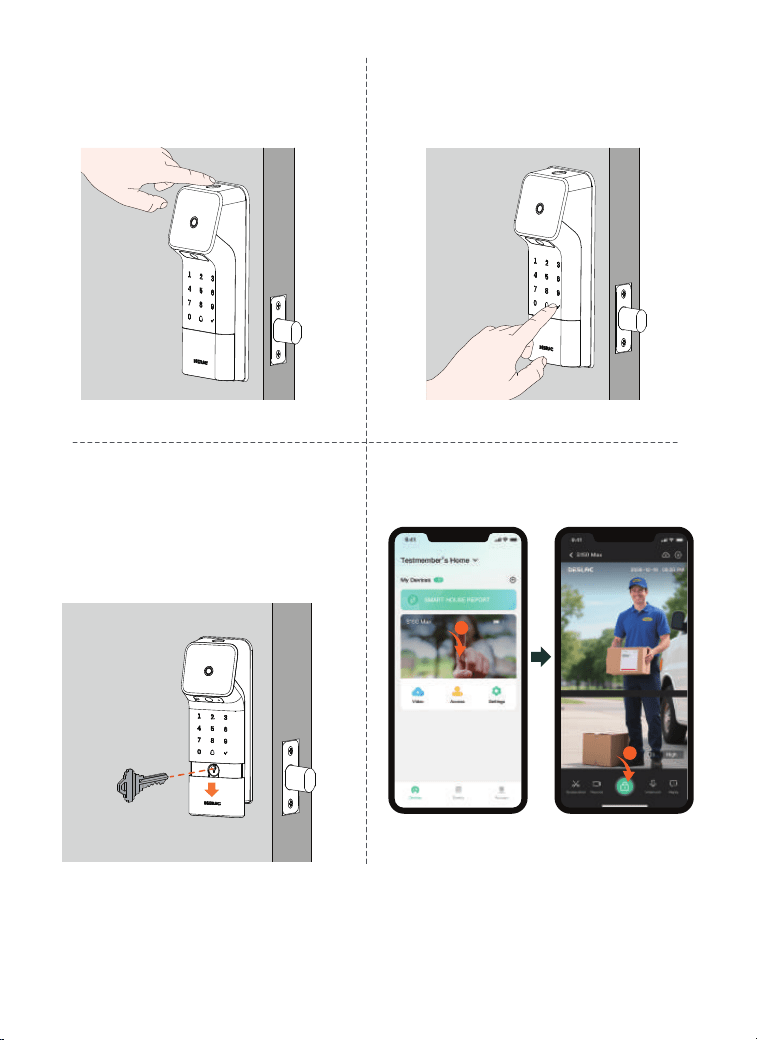
Face unlocking require the following three conditions to be met simultaneously:
1. Vertical effective recognition range: 45.28"-90.55" (1.15 m–2.3 m).
2. Horizontal effective recognition angle: ≤ 60°.
3. Effective recognition distance range: 15.748"-39.37" (0.4 m-1 m).
1
3
After installation, please navigate to the Auto-Lock settings in the app and enable
the Induction Lock option. Next, perform a test by unlocking, opening, and closing
the door to observe whether the smart lock engages automatically and confirm
the setup is operational.
90.55"
(2.3 m)
1. Vertical effective recognition
range: 45.28"-90.55" (1.15 m–2.3 m).
3. Effective recognition
distance range: 15.748"-39.37"
(0.4 m-1 m).
2. Horizontal effective
recognition angle: ≤ 60°
60°
45.28"
(1.15 m)
Installation
height:
47.24"
(1.2 m)
39.37" (1 m)
15.748"
(0.4 m)
<11>
Outside
Outside
Method 5: App Unlocking
Method 2: FingerprintUnlocking
Place the enrolled finger on the fingerprint
recognition area to unlock.
Method 4: Mechanical Key Unlocking
Slide down the decorative panel at
the bottom of the exterior lock. Insert
the mechanical key into the lock
cylinder and turn it left or right to
unlock.
1
2
Method 3: Password Unlocking
Wake the keypad, enter the preset
password, then press the “√” key to confirm.
A voice will announce “Unlock” to indicate a
successful unlocking.
Outside
Outside
<12>
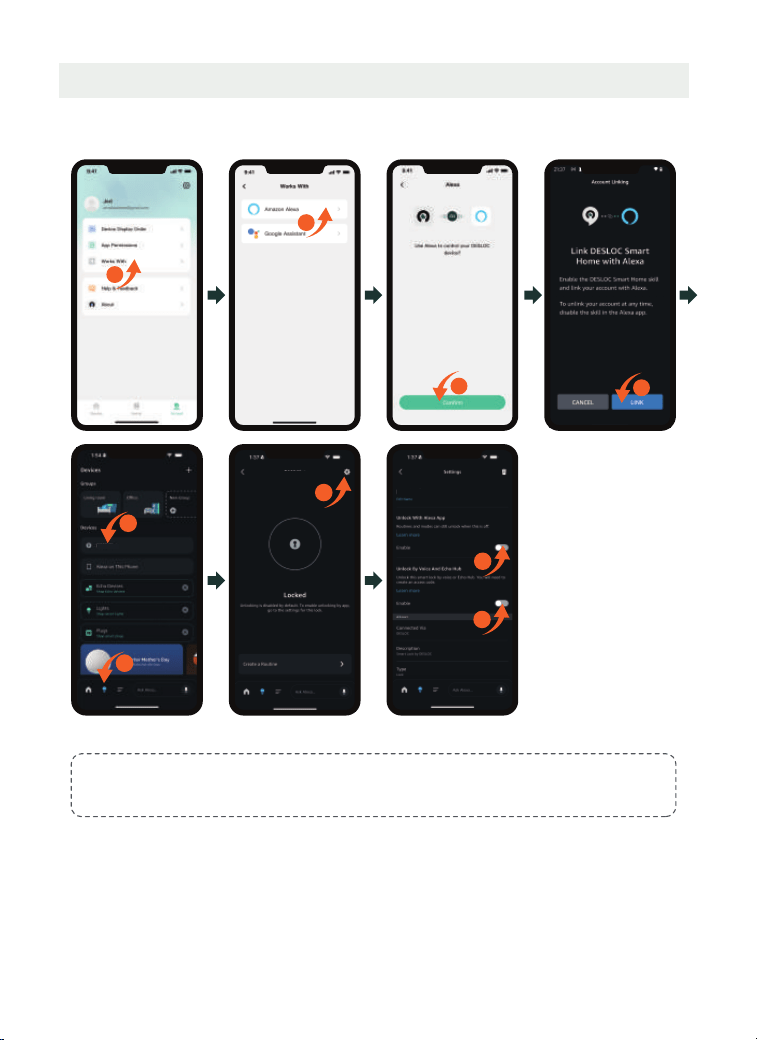
3.5 Factory Reset
Method 2:
Tap Settings > General > Reset Device > Confirm.
Inside
Reset button
1
2
3
4
Outside
Method 1:
Remove the battery cover, then press and hold the “Reset” button on the interior
lock for 3 seconds. Confirm by pressing the “√” key on the exterior lock keypad.
Note:
When restoring factory settings via the app, you need to be near the lock and maintain a
Bluetooth connection. Otherwise, the lock may still be usable.
<13>
3.6 Third-party App Binding
a. How to connect the Amazon Alexa:
Note
:
Ensure the Wi-Fi feature is enabled in this App (if not, the device will not support Alexa).
1
5
6
S150 Max
8
9
S150 Max
2
3
4
7
S150 Max
<14>
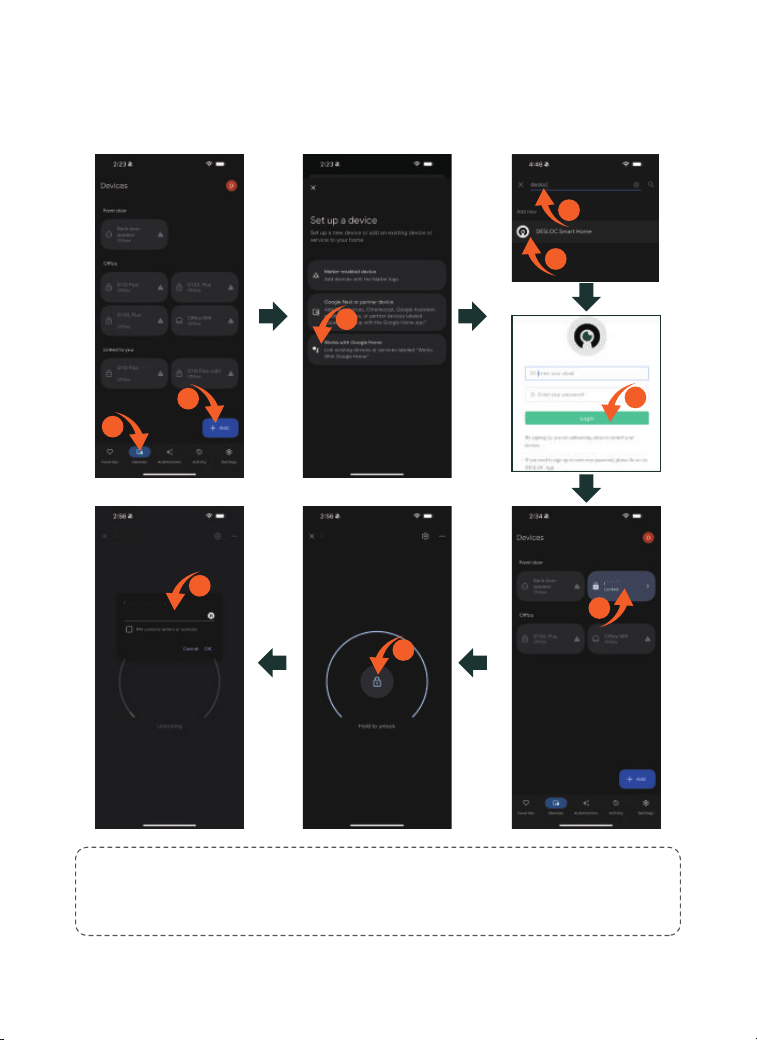
b. How to connect the Google Assistant:
STEP 1: Install the Google Home app, tap "+" ;
STEP 2: Search for DESLOC and authorize it using your App account and password;
STEP 3: Set a security code in this App to use it for unlocking via Google Home.
Notes:
1. Ensure the Wi-Fi feature is enabled in this App (if not, the device will not support Google
Assistant).
2. Initial passcode is 123456.
3
2
1
4
5
7
9
8
6
......
V150 Plus
S150 Max
S150 Max
Verify S150 Max

<15>
4. Cautions and Statements
4.3 Copyright Notice
4.4 Trademark Notice
are trademarks or registered trademarks of Zhejiang Desman Intelligent Technology Co., LTD. and Hangzhou Key to the Future Technology Co., LTD.
All other trademarks and company names mentioned in this document are the property of their respective owners.
4.5 About This Document
2025 Zhejiang Desman Intelligent Technology Co., LTD. All rights reserved.
No part of this document may be reproduced, transmitted, distributed, or stored in any form or by any means without the prior written consent of Zhejiang Desman Intelligent Technology
Co., LTD. (hereinafter referred to as ‘Desman’). The products described herein may include software copyrighted by Desman and/or third parties. Unless explicitly authorized by the relevant
rights holders, no individual or entity may reproduce, distribute, modify, extract, decompile, disassemble, decrypt, reverse engineer, rent, transfer, sublicense, or otherwise infringe upon
the copyrights of any such software.
This device complies with part 15 of the FCC Rules. Operation is subject to the following two conditions: (1) This device should not create harmful interference, and (2) this device must
be able to handle any interference it receives, even if it disrupts its operation.
Any changes or modifications not expressly approved by the party responsible for compliance could void the user's authority to operate the equipment.
NOTE:
This device has been tested and found to comply with the limits for a Class B digital device, pursuant to part 15 of the FCC Rules. These limits are designed to provide reasonable
protection against harmful interference in a residential installation. This device produces and emits radio frequency energy, and if not installed and operated as instructed, it could
disrupt radio communications. However, there is no guarantee that interference will not occur in a particular installation. If this device result in interference to radio or television
reception, which can be identified by power cycling the equipment, the user is advised to attempt to resolve the interference using the following steps:
-Reorient or relocate the receiving antenna.
-Increase the distance between the equipment and receiver.
-Connect the device to a circuit that is different from the one the receiver is using.
-Contact the dealer or an experienced radio/TV technician for help.
This device complies with FCC radiation exposure limits set forth for an uncontrolled environment. This device should be installed and operated with a minimum distance of 20 cm
between the radiator and your body.
4.1 FCC Caution
4.2 ISED Statement
The device contains licence-exempt transmitter(s)/receiver(s) that comply with Innovation, Science and Economic Development Canada’s licence-exempt RSS(s). Operation is subject to
the following two conditions:
(1) This device may not cause interference.
(2) This device must accept any interference, including interference that may cause undesired operation of the device.
This equipment complies with IC RSS-102 radiation exposure limits set forth for an uncontrolled environment.
The equipment complies with IC Radiation exposure limit set forth for uncontrolled environment. This equipment should be installed and operated with minimum distance 20cm between
the radiator and your body.
This document applies to multiple product models. Please refer to the actual item for the appearance and functionality.
The user shall bear any loss resulting from failure to follow the instructions in this document.
This document will be updated as needed in accordance with the laws and regulations of the relevant regions. For details, please refer to the product's printed materials, digital copy,
QR code, or official website. In case of any discrepancy between the printed and electronic versions, the electronic version shall prevail.
Our company reserves the right to modify any information in this document at any time. All changes will be incorporated into the latest version without prior notice.
This document may contain technical inaccuracies, inconsistencies with product features or operation, or printing errors. The company's final interpretation shall apply.
If the downloaded PDF file cannot be opened, please use the latest version of a commonly used PDF reader.
We (DESLOC) will not be liable for any of the following actions or circumstances.
The touch screen of this product is made of glass. If this product is dropped on a hard surface or subjected to a serious collision, the glass may break. To reduce the risk of being cut
by glass fragments or cracks, do not touch or attempt to remove broken glass.
This product contains small parts that may pose a choking hazard to children under the age of 3. Please keep children away from these small parts.
The product may not work normally due to your own behavior or the malicious act of a third party or a low probability of quality problems. Do not attempt to gain access to the house
through the window or break the door violently, which may lead to property damage or even personal damage. If you find this kind of situation, please put safety first and contact
DESLOC after-sales team at support@desloc.com or its designated staff through other channels in time. DESLOC will offer technical support for you as soon as possible and provide
you with a replacement if the lock cannot be repaired in time.
4.6 Product Disclaimer

<16>
4.7 Notice
Unless expressly stated in this User Guide, do not operate the product outside the recommended temperature range.
Unless expressly stated in this User Guide, avoid exposing the product to direct sunlight, excessive moisture, or other harsh environmental conditions.
The recommended operating temperature range is:
• Interior Assembly: -10°C to 50°C (14°F to 122°F)
• Exterior Assembly: -30°C to 70°C (-22°F to 158°F)
For optimal performance, install and operate the product in a well-ventilated environment.
This equipment is intended for installation at a height not exceeding 2 m (6.6 ft).
To reduce the risk of personal injury or property damage, use this product only as described in this User Guide.
Users are responsible for complying with all applicable laws and regulations in the country or region where the product is installed and used. This product must not be used for any
unlawful purpose. DESLOC shall not be liable for any legal consequences resulting from improper, unauthorized, or unlawful use of the product.
Rechargeable Lithium Battery Safety
• This product is powered by a rechargeable lithium battery pack.• Use only a rechargeable lithium battery pack with specifications matching those required for this product.• Do not
disassemble, modify, puncture, crush, or damage the battery pack.• Do not expose the battery pack to fire, excessive heat, or direct sunlight.• Do not short-circuit the battery
terminals.
• Charge the battery only using the charging cable and power source specified in this User Guide.
• If the battery pack becomes swollen, leaks, emits an unusual odor, overheats, or appears damaged, discontinue use immediately and contact customer support.
• Keep the battery pack out of reach of children.
WARNING
• Replacement of the battery with an incorrect type may result in fire, explosion, or other hazards.
• Do not dispose of the battery in fire, hot ovens, or other sources of excessive heat.
• Do not crush, puncture, cut, or mechanically damage the battery.
• Exposure to extremely high temperatures may result in an explosion or leakage of flammable liquid or gas.
• Exposure to extremely low air pressure may result in an explosion or leakage of flammable liquid or gas.
CAUTION!
RISK OF FIRE OR EXPLOSION IF THE BATTERY IS REPLACED BY AN INCORRECT TYPE.
DISPOSE OF USED BATTERIES IN ACCORDANCE WITH LOCAL REGULATIONS AND APPLICABLE RECYCLING REQUIREMENTS.