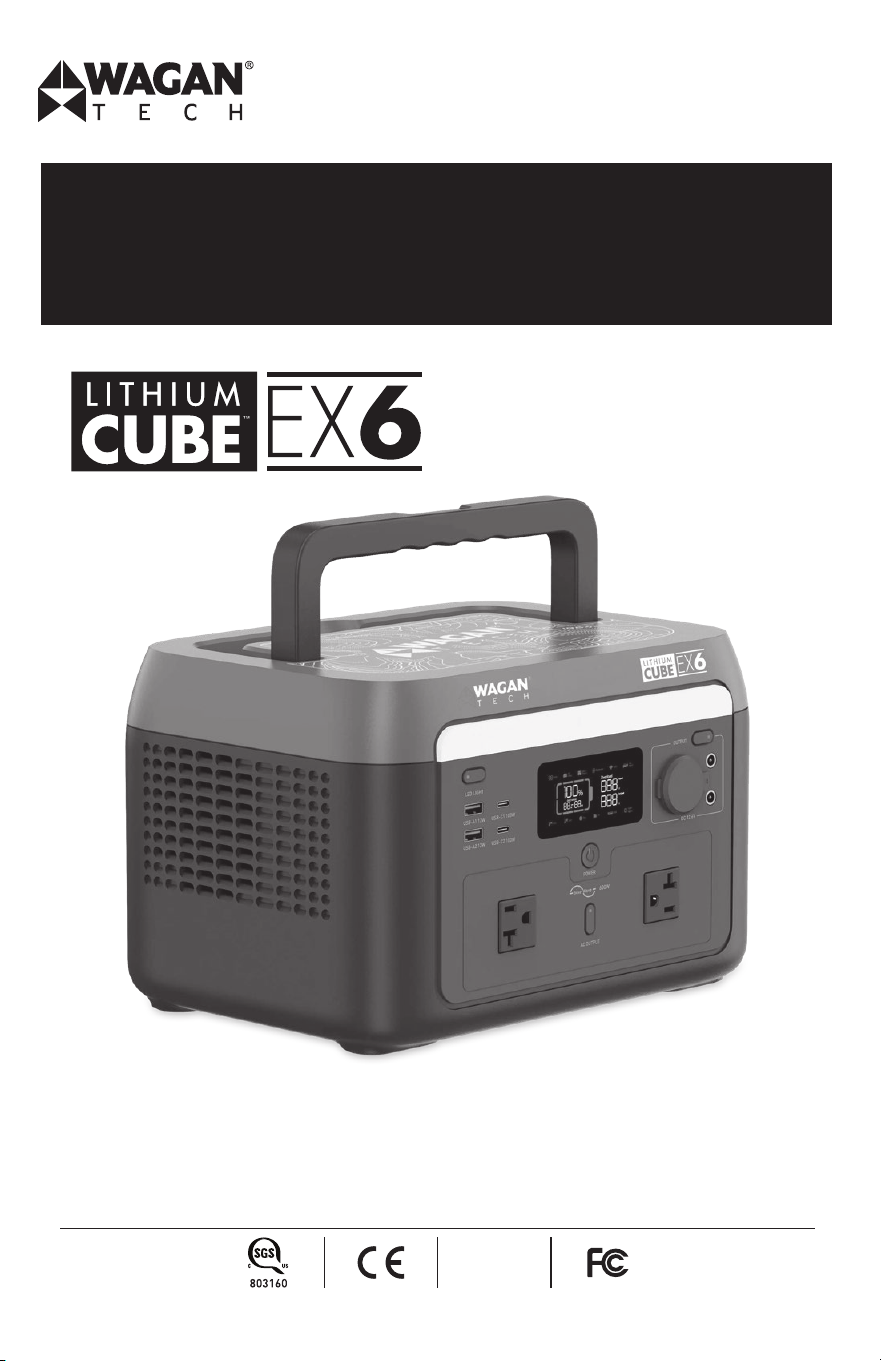
Item No. : 8838 (110V)
8838-7 (220V)
User’s Manual
We are constantly improving our products so specifications are subject to change without notice. Visit our website for the latest product
information.
RoHS
compliant
PORTABLE POWER STATION
Lithium Cube™ EX6 by Wagan Tech
®
www.wagan.com
2
1. INTRODUCTION
Congratulations on your purchase of Wagan Tech
®
’s Lithium Cube
TM
EX6. The Lithium Cube
is an advanced electrical system that can power AC appliances and charge a variety of
communication and entertainment devices. In an emergency it can power home appliances. On
the job site it can power tools where no power lines or generators exist. At night it can power a
variety of light sources from DC spotlights to AC floodlights. At the campground it can power a
microwave oven, water pump, and entertainment equipment.
Read and understand all warnings, cautions and notes included in this manual before using
the Lithium Cube. Follow instructions provided by your vehicle and other device manufacturers
intended to be used with the Lithium Cube.
Keep these instructions for future reference.
Fully charge the Lithium Cube before first use.
2. IMPORTANT SAFETY INSTRUCTION
READ AND SAVE THIS OWNER’S GUIDE FOR FUTURE REFERENCE.
This guide contains important safety instructions that must be followed during installation, opera-
tion, maintenance, and troubleshoooting.
Read these instructions carefully and look at the equipment to become familiar with the device
before installing, operating, configuring, maintaining, and troubleshooting it. The following
special messages may appear throughout this documentation or on the equipment to warn of
potential hazards or to call attention to information that clarifies or simplifies a procedure.
This is a safety alert symbol. It is used to alert you to potential personal injury haz-
ards. Obey all safety messages that follow this symbol to avoid possible injury or
death.
� DANGER
DANGER indicates a hazardous situation which, if not avoided, will result in death or serious
injury.
� WARNING
WARNING indicates a hazardous situation which, if not avoided, could result in death or seri-
ous injury.
� CAUTION
CAUTION indicates a hazardous situation which, if not avoided, could result in minor or
moderate injury.
�

User’s Manual—Read before using this equipment
© 2025 Wagan Corporation. All Rights Reserved
Wagan Tech and wagan.com are trademarks of Wagan Corporation
3
NOTICE
NOTICE is used to address practices not related to physical injury.
3. PRODUCT SAFETY INFORMATION
� WARNING
Shock or fire hazard—The Power Cube generates the same potentially lethal AC power
as a normal household wall outlet. Treat it with the same respect that you would any AC
outlet.
Explosion Hazard—Do not use this product around flammable fumes or gasses, such as in
the bilge of a gasoline powered boat, or near a propane tank. Do not use the Power Cube
in an enclosure containing automotive-type lead-acid batteries. These batteries, unlike
the sealed battery pack in the Power Cube, vent explosive hydrogen gas, which can be
ignited by sparks from electrical connections or disconnections.
When working on electrical equipment, always make sure that someone is nearby to help
you in an emergency.
Limitations on Use—The Power Cube has not been tested for use with life support systems
or other medical equipment or devices. The user assumes all risk if medical devices are
used with this product.
Unit is Not Waterproof—Do not expose this unit to rain or heavy moisture.
Do not disassemble the product in any way or pierce the product with sharp objects.
During thunderstorms or stormy weather, please disconnect the AC charging or solar
charging. If the product is struck by lightning, it may cause electric shock, fire, and other
accidents.
Failure to follow these instructions can result in death, serious injury, or equipment damage.

Lithium Cube™ EX6 by Wagan Tech
®
www.wagan.com
4
� CAUTION
Liquids should be avoided. Avoid immersing the product in water or getting it wet. The
product should not be used in humid or rainy environments. In the event that the product
falls into the water during use, please place it in a safe open area and do not operate
until it is completely dry.
If the product catches fire, it is recommended to use dry powder and carbon dioxide fire
extinguishers.
Do not block, obstruct, or impede the fan’s flow. Do not use or place this product in an
unventilated or dusty area. Do not block vent holes on side of unit.
Rest the product on a flat surface to prevent damage from falling over. In the event that the
product is severely damaged, turn it off immediately and stop using the product, place it
in an open area, keep it away from combustible materials and people, and dispose of it in
accordance with local laws and regulations.
Do not move the product during use. Movements may lead to poor contact with output
ports of the product.
If the product input or output ports are dirty or if it needs to be cleaned, please wipe the
product with a dry, soft, clean cloth or paper towel after it has been turned off.
Be sure to check the product’s integrity and the integrity of the accessories before each
use. If the product or the accessories are damaged or broken, do not use them.
Ensure that the product is kept out of reach of children and pets.
When the power supply is connected to the refrigerator load in the conventional mode,
the power fluctuation property of the refrigerator may cause the power supply to shut
down automatically. It is recommended that the refrigerators storing medicines, vaccines
or other high-value items, when connecting to the power supply product, please long press
and hold the light button to turn on the “NEVER OFF” state to ensure continuous power
supply, and the user should pay attention to the status of the power supply power loss.
Do not insert an automotive cigarette lighter into the socket. There is no pop-out feature
and excessive heat may damage the socket.
Failure to follow these instructions can result in injury, or equipment damage.
4. PRODUCT DETAILS
MAJOR FEATURES
• 600 watt pure sine wave inverter (1,000 watts peak)
• Two AC outlets
• One 12 volt automotive socket for powering DC appliances (up to 10 amps)
• Four USB power ports for charging/operating cell phones and tablets
• DC charging cable (fused)
User’s Manual—Read before using this equipment
© 2025 Wagan Corporation. All Rights Reserved
Wagan Tech and wagan.com are trademarks of Wagan Corporation
5
• Comprehensive display shows charge status and power consumption
• LED light, reading light and SOS mode
• DC port to connect solar panels to the internal solar charge controller
• Flat-fold handle for easy lifting
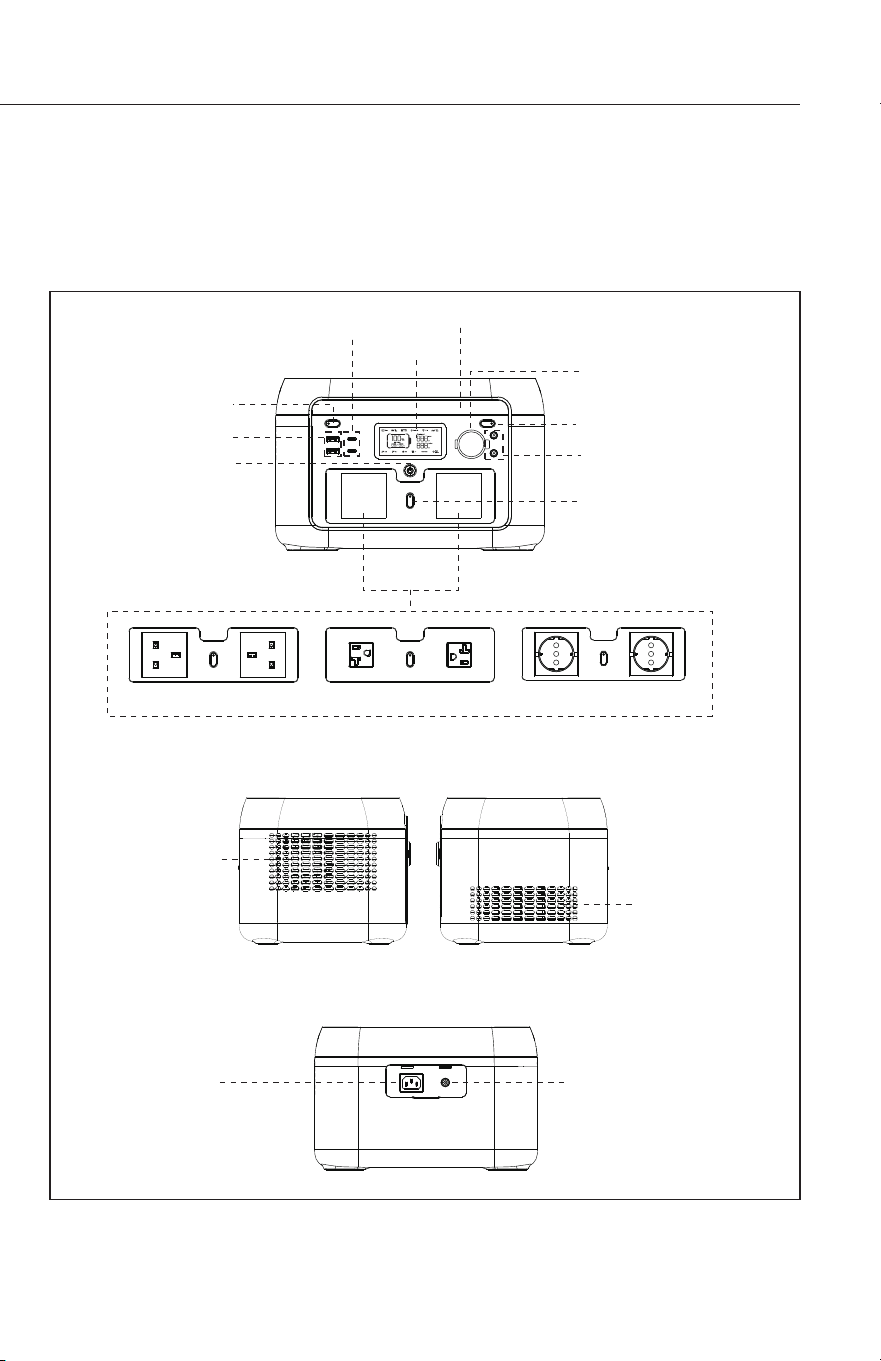
DC 7909 Input Socket
(Solar/Car Charge)
Ventilation Hole
AC Output Socket
LED Light
12V DC Output
DC Output ON/OFF Button
DC5521 Plug ×2
AC Output ON/OFF Button
LCD
USB-C Output Port ×2
LED Light Power Button
USB-A Output Port ×2
Power ON/OFF Button
UK Plug US Plug EU Plug
Ventilation Hole
AC Input Socket
Lithium Cube™ EX6 by Wagan Tech
®
www.wagan.com
6
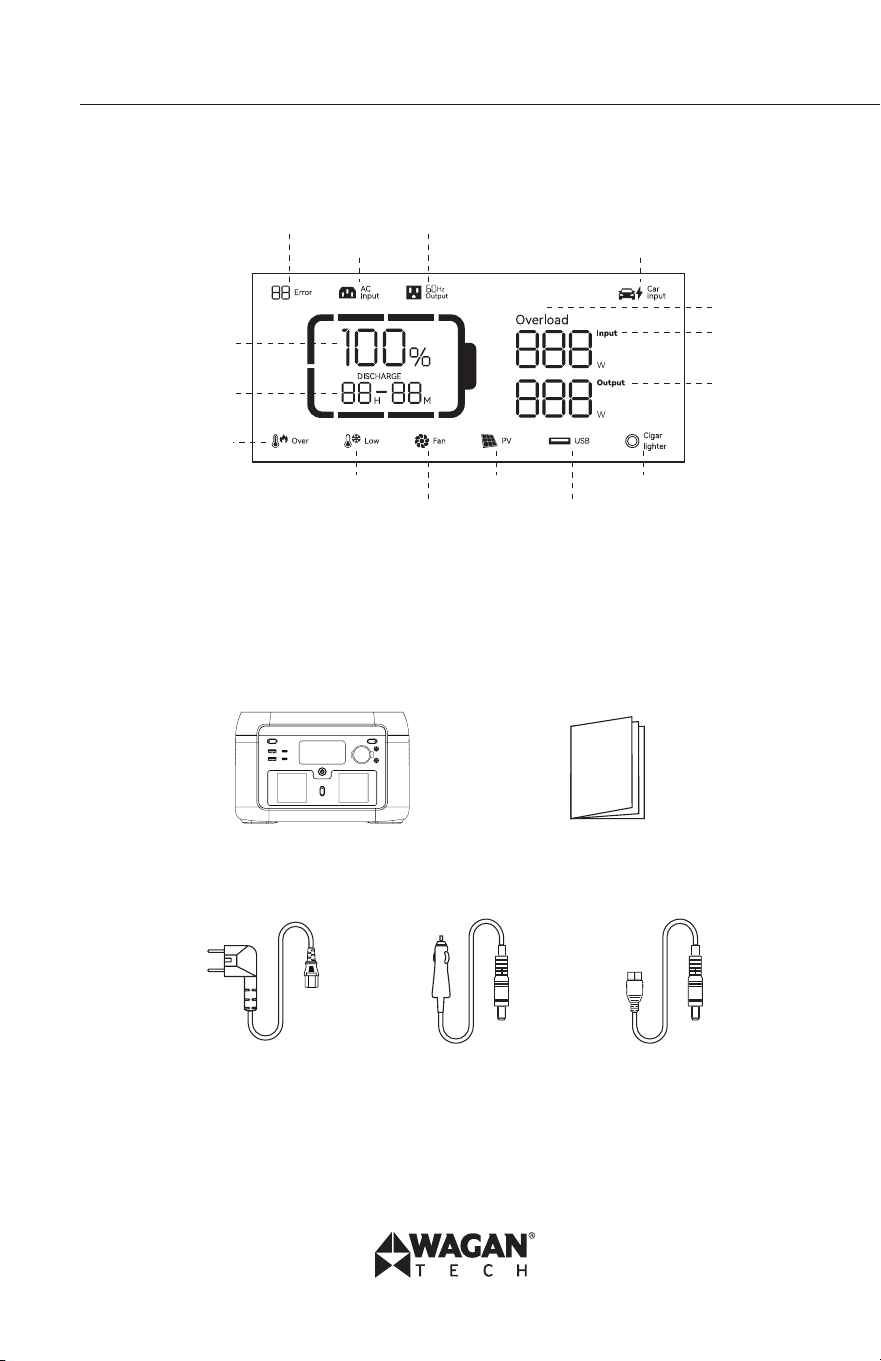
LCD DISPLAY
* Battery capacity: When power station is being charged, SOC (remaining battery
capacity) icon will flicker.
* Please refer to clause 8 for more details regarding error message.
WHAT’S INCLUDED?
Lithium Cube User’s Manual
AC Charging Cable DC Charging Cable Solar Charging Cable
Error Code AC Output
AC Input Car Charge
Overload
Input Power
Output Power
Remaining
Battery Percentage
Remaining Charge/
Discharge Time
Over Temperature
Warning
Low Temperature Warning
Fan Status
PV Charge
USB Output
Cigarette Lighter
User’s Manual—Read before using this equipment
© 2025 Wagan Corporation. All Rights Reserved
Wagan Tech and wagan.com are trademarks of Wagan Corporation
7
5. PRODUCT OPERATION
CHARGING THE CUBE
AC Charging
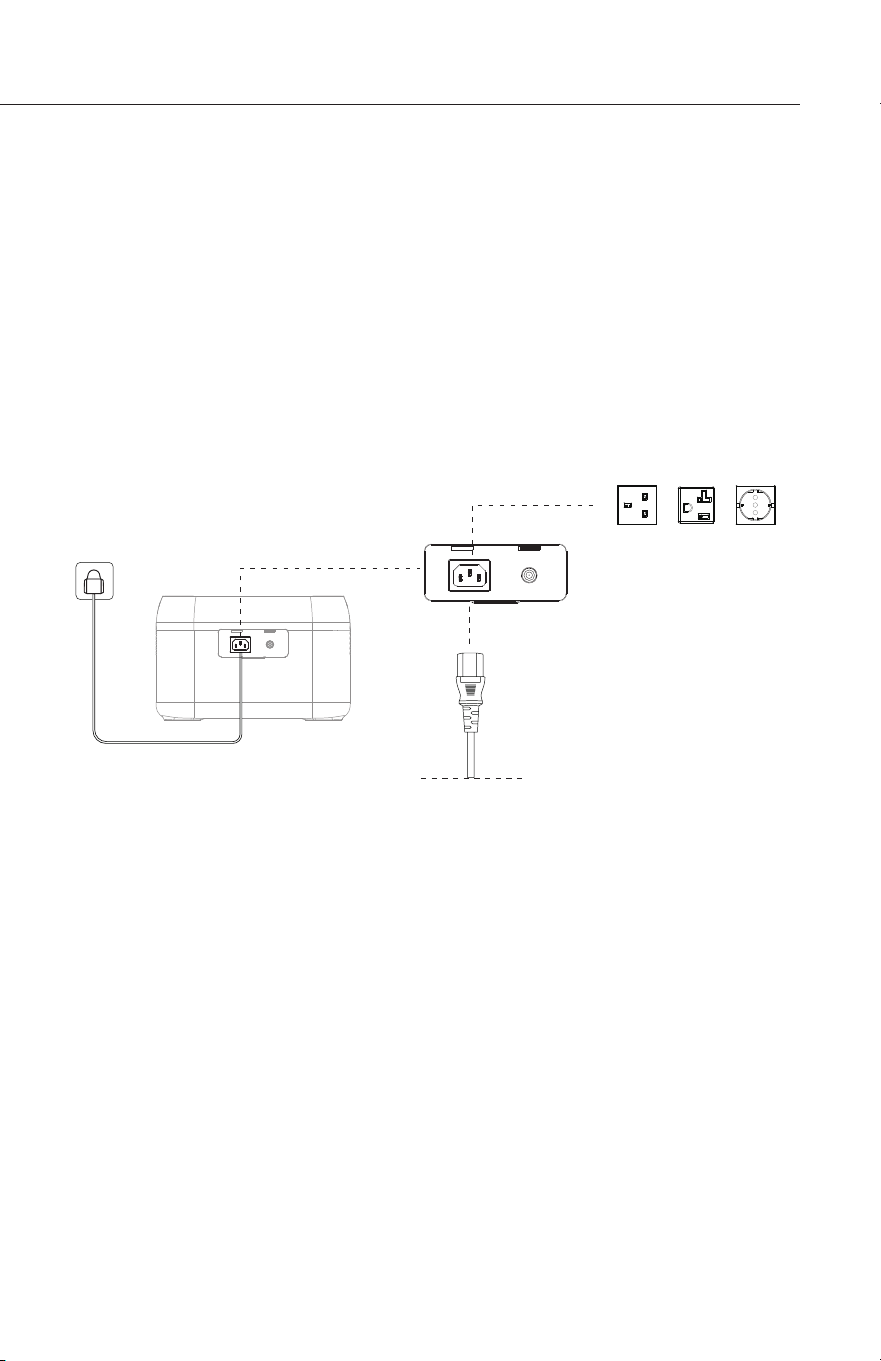
The intelligent fast-charging technology of Wagan supports an AC input power of 600W. Fast
charging from 0%−100% in 1.5 hours. When the product is turned on, the default fast charging
mode is working.
Please use the official Wagan cable for AC charging. Using the supplied AC Charging Cable,
plug one end of the cable into the AC Charging input port on the back of the Lithium Cube, then
plug the other end of the cable into an AC Wall outlet that supports a current of 10A or greater.
Wagan is not responsible for any damage caused by using an unofficial charging cable or
operating the product outside of specifications.
DC Charging
The DC Charging cable is fused at 15 amps to prevent damage if there is an inadvertent short.
Users can charge the product through the cigarette lighter port. Be sure to start the vehicle
before using the DC Charging Cable to reduce the risk of depleting your vehicle’s battery.
In fast charging mode,
it takes about 1.5 hours
to fully charge.
AC Wire
Lithium Cube™ EX6 by Wagan Tech
®
www.wagan.com
8
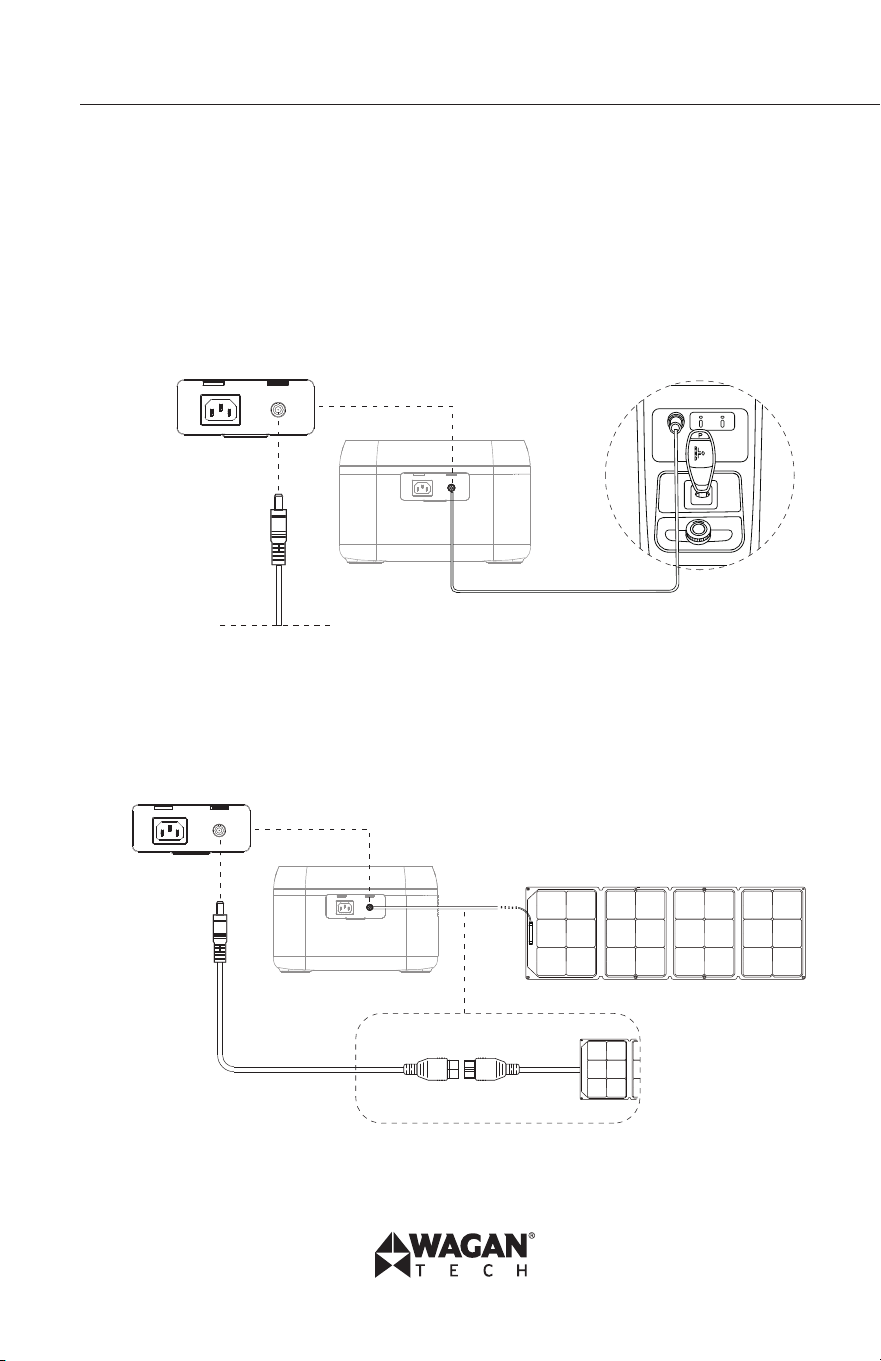
ONLY USE THE DC CHARGING CABLE SUPPLIED WITH THIS UNIT.
1. Note that the engine must be running while charging the Lithium Cube to avoid
discharging the vehicle’s battery.
2. Plug the DC7909 charging cable into the Lithium Cube’s DC input port.
3. Only support 12V car charger. It take about 6.5 hours to full charge.
4. Plug the other end of the DC charging cable into the vehicle’s accessory socket
(cigarette lighter socket).
Solar Charging
The Lithium Cube comes with a built-in 10A MPPT solar controller capable of charging up to
200W. It take about 3 hours to full charge with 200W PV solar panel. Do not use solar panels
with their own built-in solar controller. Wagan is not responsible for any damage caused by
using an unofficial charging cable.
DC7909 Plug
DC7909 Plug
DC7909 to Anderson Port Wire
User’s Manual—Read before using this equipment
© 2025 Wagan Corporation. All Rights Reserved
Wagan Tech and wagan.com are trademarks of Wagan Corporation
9
6. OUTPUT POWER
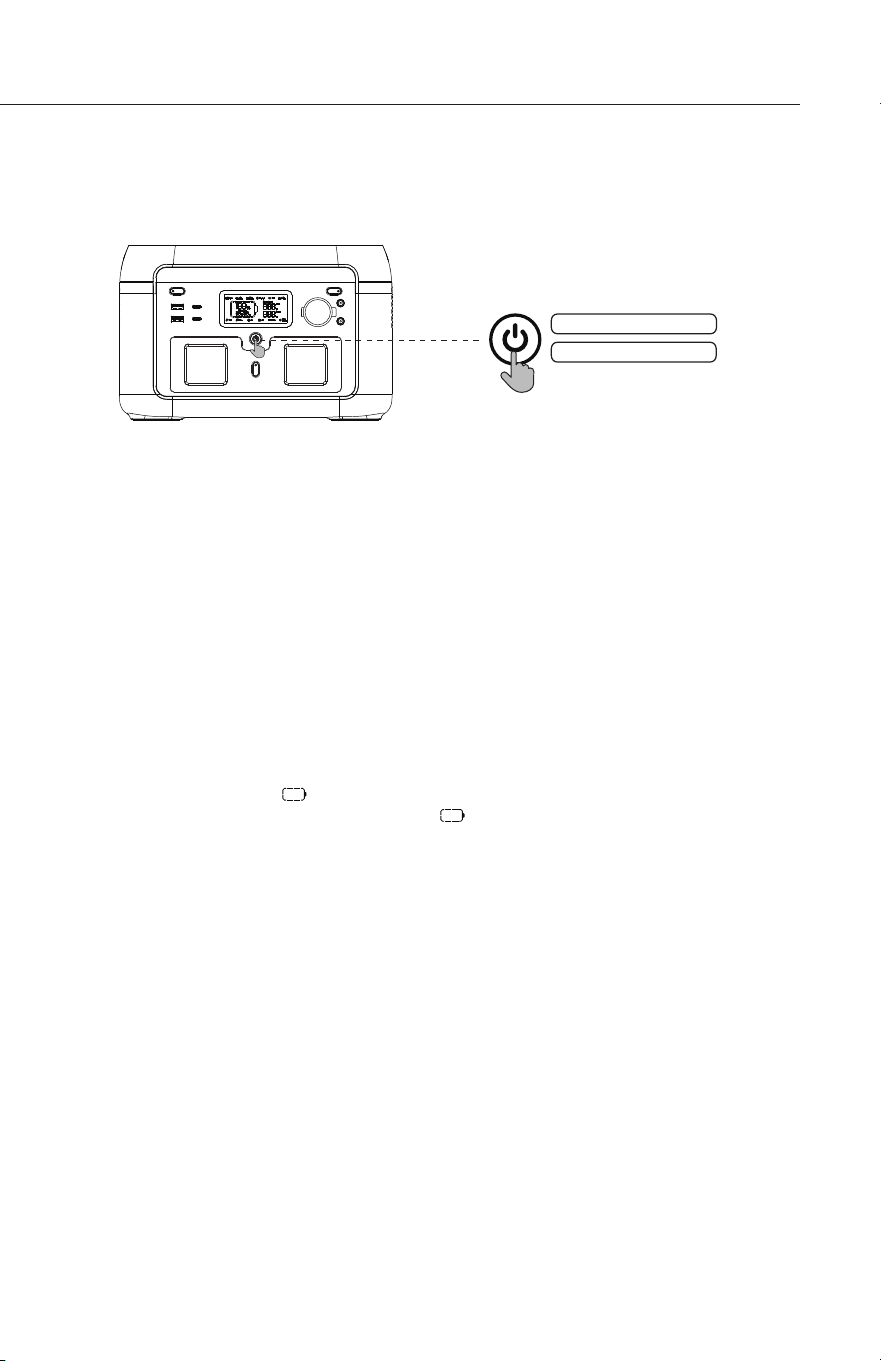
Before using the Lithium Cube, please make sure the main power has been turned on.
1. Press the main power switch to turn on the device, then the screen will be lit and the
main power indicator will enter the breathing light mode.
2. If no operation is performed to power station for 5 minutes, power station will enter
hibernation state and the LCD will automatically turn off. When there is load change
or operation to power station, the LCD screen will be automatically lit. Press the main
power to turn on or turn off the LCD.
3. Press and hold the main power switch will turn off power station.
4. In the normal mode (the power is above 5%), the default standby time of this product
is 2 hours; when the AC output switch is not turned on, and there is no charge or
discharge for 2 hours, the product will automatically shut down; when the power is 5%
or below, the product will be forced to enter the low power mode. In the case of no
charge or discharge, the product will adjust the standby time according to the power
and automatically shut down.
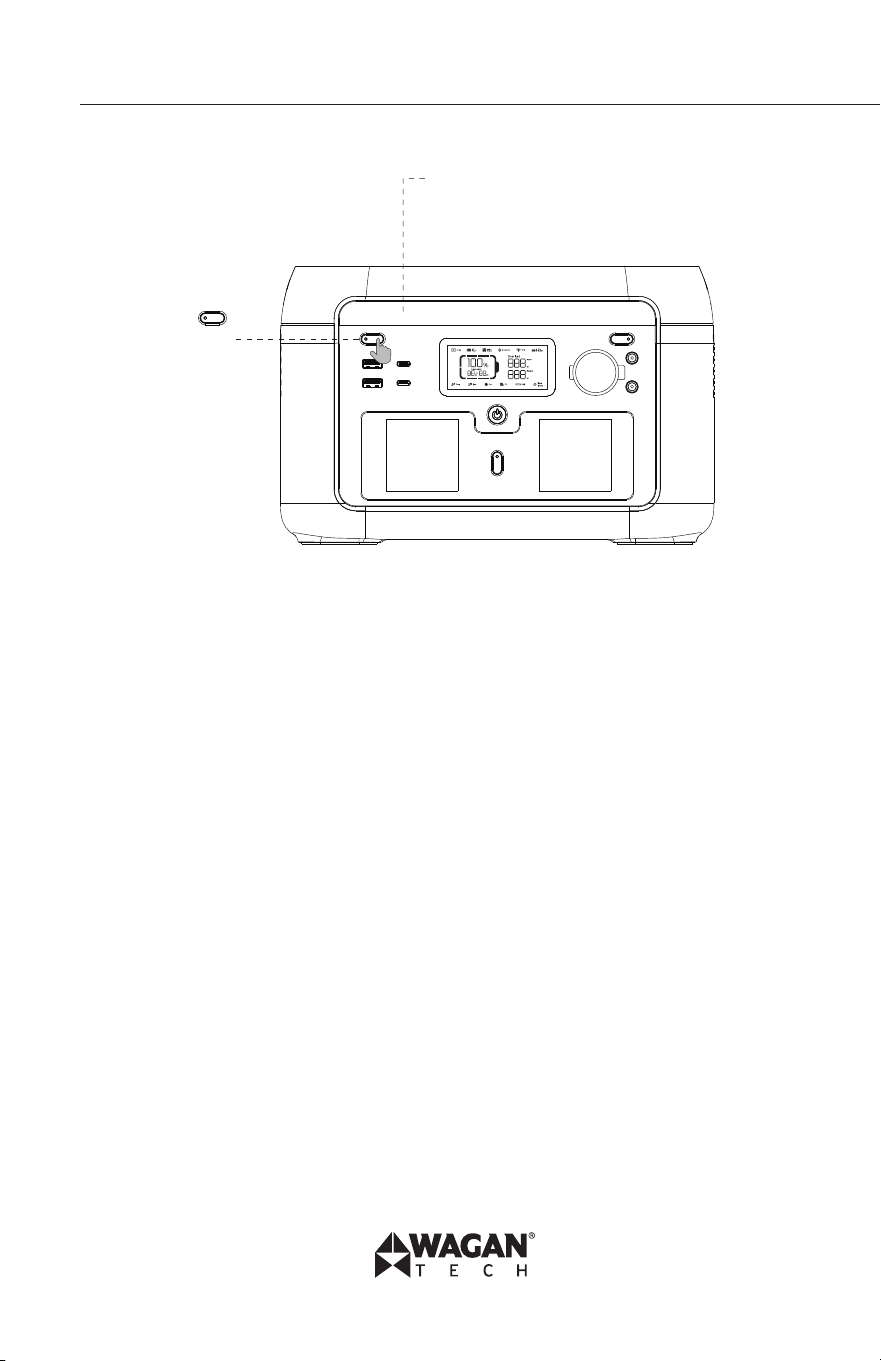
5. In normal mode, long press the LED light button to exit the automatic shutdown setting,
and the battery icon on the screen will flash. Long press again to enter the automat-
ic shutdown setting, and the battery icon does not flash. (The automatic shutdown
setting is to protect the battery from low power, exiting this setting may damage the
battery life, please use it with caution.)
Short press to turn on
Long press to turn off
Lithium Cube™ EX6 by Wagan Tech
®
www.wagan.com
10
Short press
LED light button
LED Lights
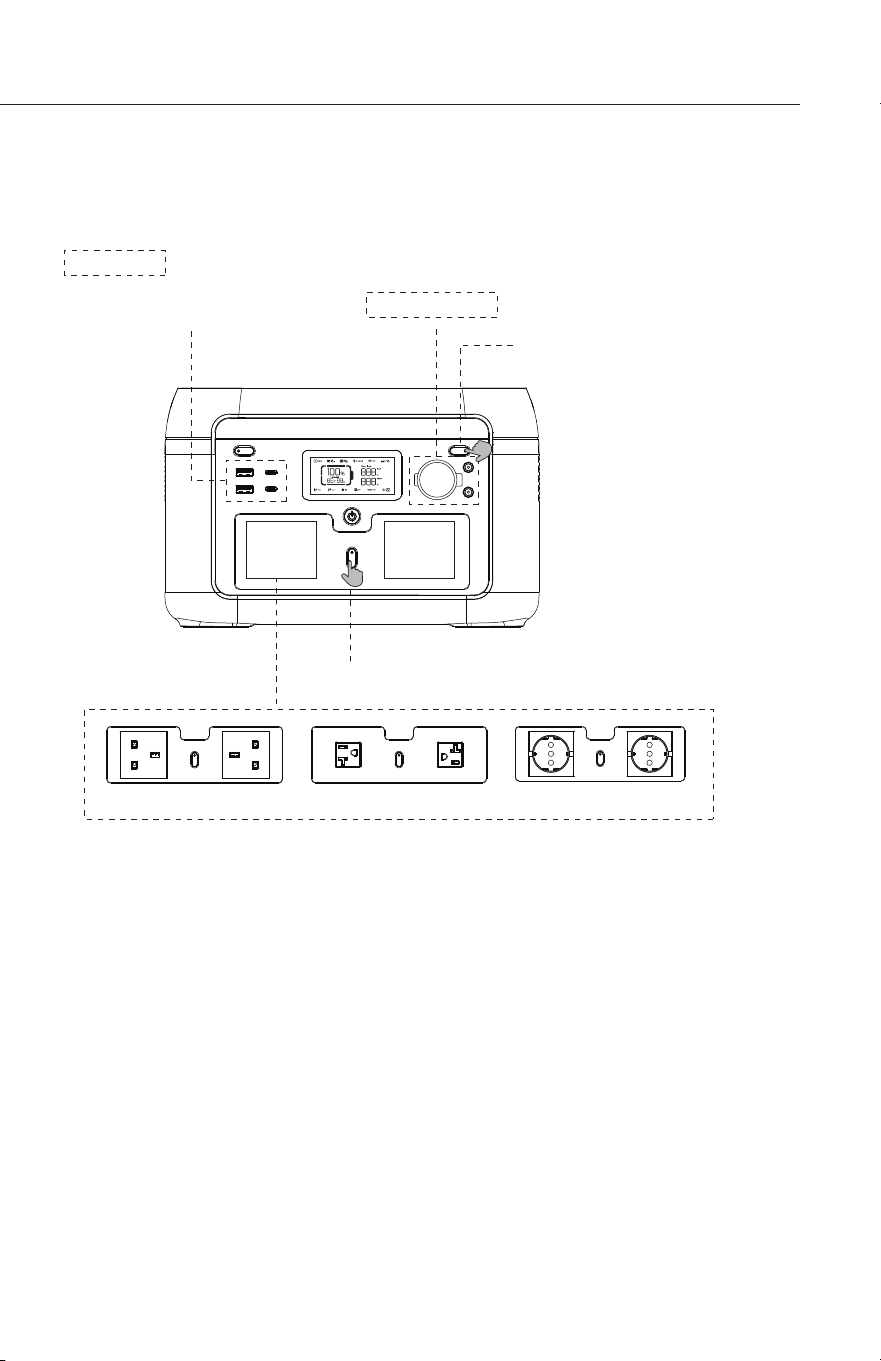
Short press the LED light button to switch four gears,
which are low light, medium light, high light, SOS mode
and light off.
Note: When no AC input, long press the above AC output button, you can switch the AC off-grid
output frequency (50Hz/60Hz), long press 2s to switch, the AC output icon will flash 3 times
after successful switching.
UK Plug US Plug EU Plug
Short press AC output power switch
Short press
12V DC output power switch
USB output is enabled by default
after main power switch is turned on
• After the main power switch is turned on, press the 12V DC
power switch to enable the DC output port.
• Press the 12V DC output power switch again to turn it off.
• When the 12V DC output power switch is turned on,
power station does not shut down automatically.
12V DC Output
USB Output
User’s Manual—Read before using this equipment
© 2025 Wagan Corporation. All Rights Reserved
Wagan Tech and wagan.com are trademarks of Wagan Corporation
11
AC OUTPUT
The Lithium Cube’s inverter can operate most AC Appliances or a combination of appliances
up to 600 watts. Operating time (run time) is dependent on the AC load (watts) and the charge
and condition of the Lithium Cube’s internal battery. Be sure to turn off or disconnect any AC
appliance not in use.
Converting DC battery power to AC generates heat. To minimize heat buildup and possible
thermal shutdown, remove obstacles blocking or hindering airflow between the intake and
exhaust sides of the Lithium Cube. Ambient temperatures above 77 ºF (25 ºC) will reduce the
Inverter’s ability to cool effectively, thus affecting operating times.
This inverter produces Pure Sine Wave (PSW) AC, which mimics the same power coming from
your wall outlets at home.
• After ensuring that the main power is turned on, short press the AC output power switch
to turn on the AC output. Short press the AC output power switch again to turn it off.
Short press
LED light button
LED Lights
Short press the LED light button to switch four gears,
which are low light, medium light, high light, SOS mode
and light off.
Note: When no AC input, long press the above AC output button, you can switch the AC off-grid
output frequency (50Hz/60Hz), long press 2s to switch, the AC output icon will flash 3 times
after successful switching.
UK Plug US Plug EU Plug
Short press AC output power switch
Short press
12V DC output power switch
USB output is enabled by default
after main power switch is turned on
• After the main power switch is turned on, press the 12V DC
power switch to enable the DC output port.
• Press the 12V DC output power switch again to turn it off.
• When the 12V DC output power switch is turned on,
power station does not shut down automatically.
12V DC Output
USB Output

Lithium Cube™ EX6 by Wagan Tech
®
www.wagan.com
12
• The default standby time of the AC output port is 1 hour. After 1 hour without any load
on the AC output port of this product, the AC output power will be automatically turned
off. In normal mode, long press the LED light button, the AC output power switch can
exit the automatic shutdown setting, and the battery icon Don the screen will flash.
Long press again, the AC output power switch enters the automatic shutdown setting,
and the battery icon does not flash.
• Long press the LED light button to exit the AC automatic shutdown setting: it is
applicable to AC equipment below 10W and pulse working equipment.
• When the AC output is not in use, turn it off to save power consumption.
To use the AC Power Inverter:
1. Connect the AC appliance or appliances to any AC Outlet.
2. Turn the power inverter ON by pressing the AC power button.
3. Turn on one AC appliance and observe the power indicator.
4. After appliance use, turn OFF the AC power button.
5. Remove AC appliance plug(s) from the AC outlets on the Lithium Cube.
6. Recharge the Lithium Cube as soon as convenient.
DC OUTPUT
The Lithium Cube is equipped with 12V DC output ports to power various DC appliances via a
standard DC socket or DC5521 plug power port (10A max shared).
When the 12V DC output power switch is turned on, power station does not shut down
automatically.
Overloading the DC port will trip a safety circuit. Remove the overload to restore power to the
DC output ports.
To use an accessory outlet:
1. Insert the 12V DC accessory plug into either the DC port or 5521 DC port.
2. Press the DC power button. DC symbol should show on display.
3. Operate the appliance as usual, press the 12V DC output power switch again to turn it
off.
4. After use, disconnect the accessory plug and store the accessory.
5. Recharge the Lithium Cube as soon as convenient.
User’s Manual—Read before using this equipment
© 2025 Wagan Corporation. All Rights Reserved
Wagan Tech and wagan.com are trademarks of Wagan Corporation
13
USB OUTPUT
With 2x 12W USB-A ports and 2x 100W USB-C PD charging ports, the product supports most
fast-charging protocols.
Note: When the USB output exceeds 3W, the USB output wattage will be displayed on the
screen.
How to use the USB ports:
1. Press the power button. The screen will indicate that the USB output is enabled.
2. Insert USB cable into port.
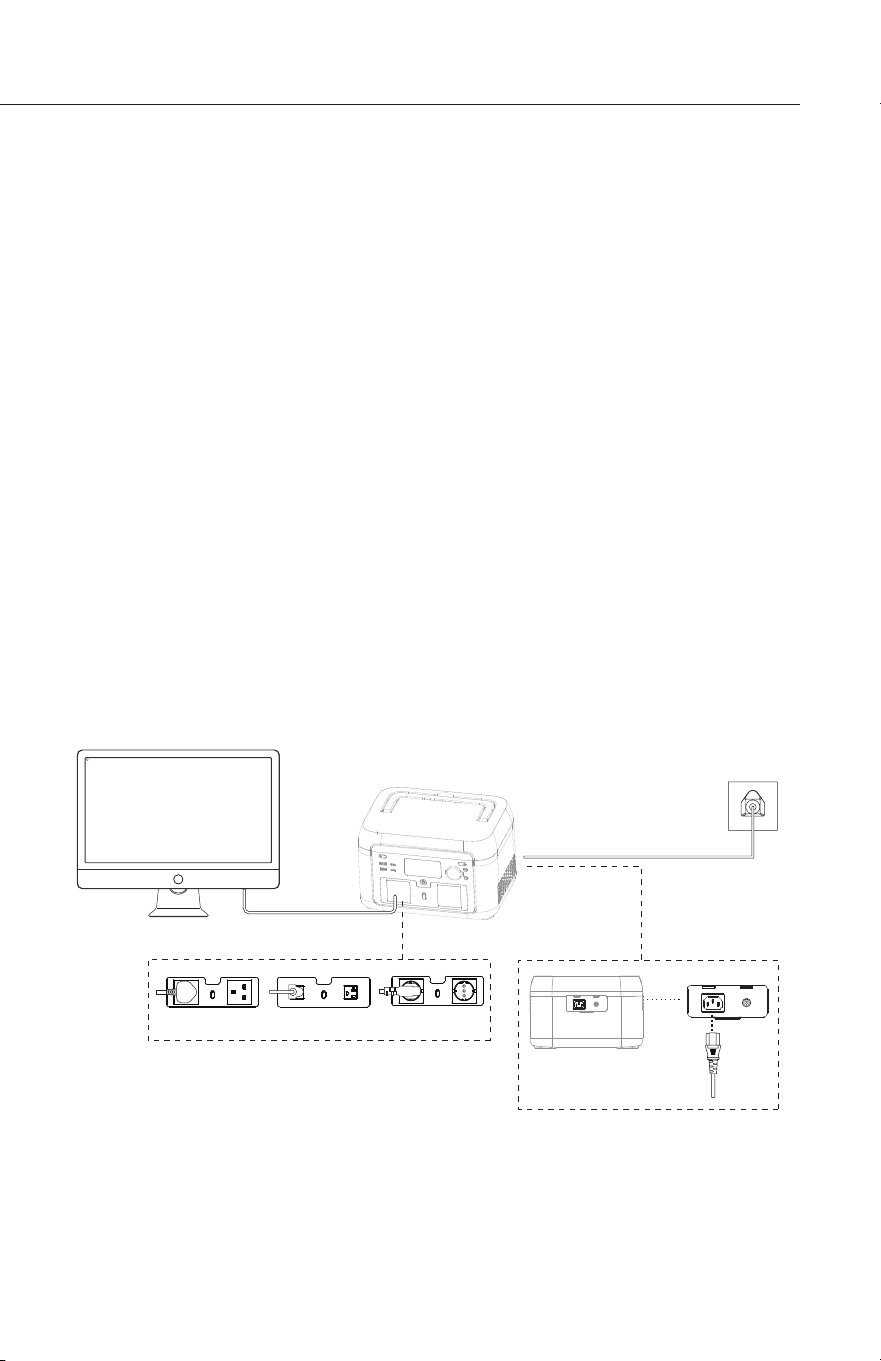
EPS FUNCTION
EPS Authenticated by UL and UPS functionable.
This product supports the EPS (emergency backup power) function. You connect the power grid
and the AC input port of this product through the AC charging cable; Bypass mode (AC power
comes from the grid, not the battery); when the grid suddenly loses power, the product can
automatically switch to battery power supply mode within 10mS, at this time it is the inverter
mode (AC power comes from the battery, not the grid). This function does not support 0mS
switching. Please do not connect it to devices that require high uninterrupted power supply, such
as data servers and workstations, or use it after multiple tests to confirm whether it is compatible,
and it is recommended to use only one device during use, and do not use multiple devices at the
same time to avoid overload protection of the product. If the device does not operate normally
or data is lost due to failure to follow the instructions, our company will not bear the
correspending responsibility.
UK Plug
Electrical Appliance
Socket
US Plug EU Plug
Lithium Cube™ EX6 by Wagan Tech
®
www.wagan.com
14
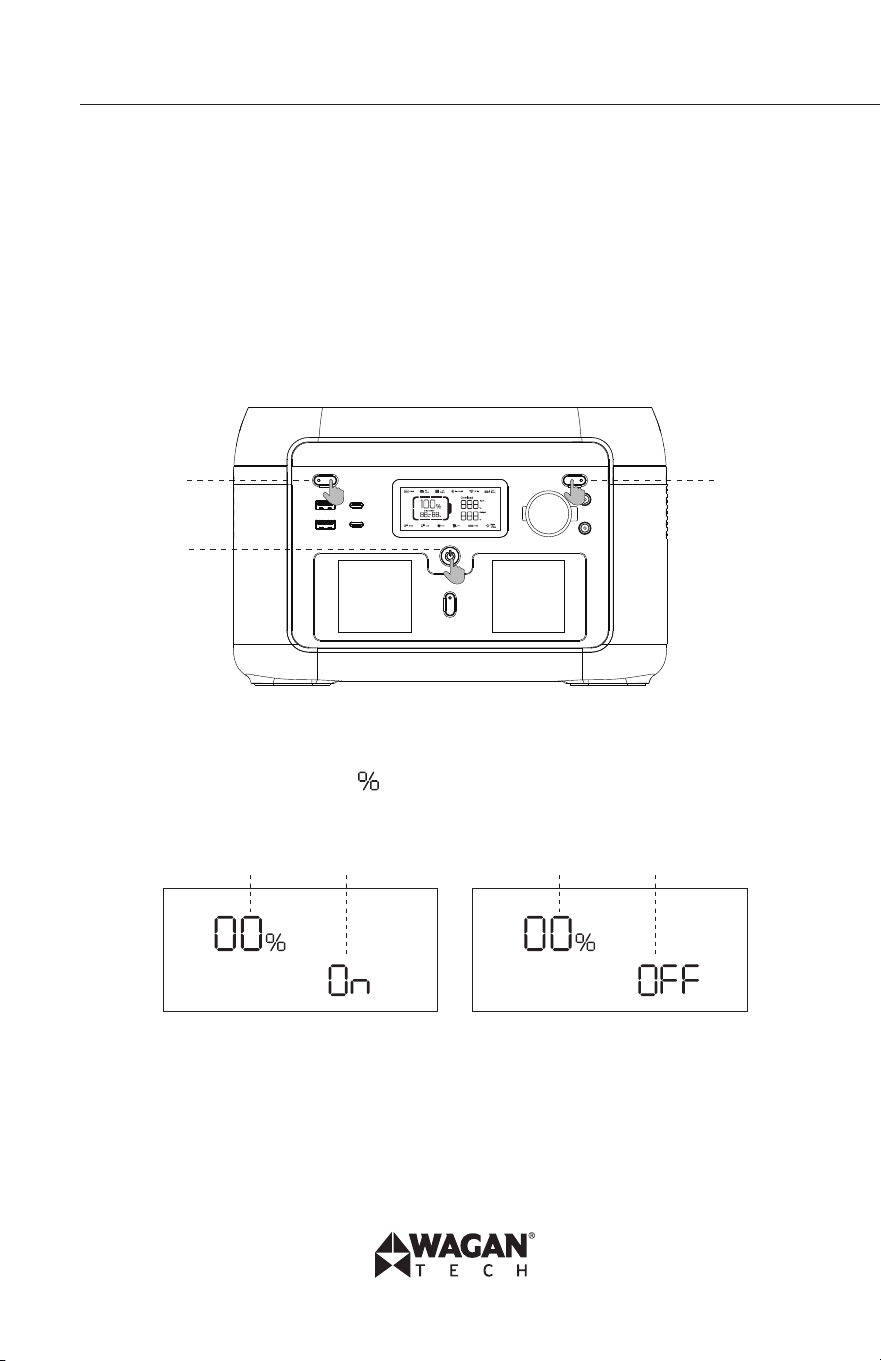
CONSTANT POWER
With the constant power output function, you can use the product to power appliances that
exceed the rated power of the device without disruption caused by overload protection. When
the power supply needs to drive high-power electrical appliances, the inverter will intelligently
regulate the output power of the power supply to maintain a constant actual output power,
ensuring that the electrical appliances can still operate reliably.
Enter/exit the constant power output function setting interface:
Short press the (2) LED light button and (3) DC output button at the same time to enter the setting
interface, and short press the (1) POWER button to cycle through the pages.
Page 0 can set the constant power mode On and OFF.
In this page, short press the (2) LED button to enter the modification state which is indicated by
the flashing power percentage icon . Short press the (1) POWER button to set the constant
power mode on or off in the modification state. Press the (2) LED light button again to save the
modified setting and exit the modification state.
In the setting interface, short press the (1) POWER button to Page 1 to set the Restore Factory
Setting, the default display is 0. Short press the (2) LED light button to enter the modification
state, which is indicated by the flashing power percentage icon. In the modification state, short
press the (1) POWER button to switch 0/1. When the displayed value is 1, press the (2) LED light
button to exit the modification state and perform the operation of restoring the factory settings.
On completion of this, the displayed value will jump to 0.
(2) (3)
(1)
Page Constant power on Page Constant power off
Page Setting item Page Setting item

User’s Manual—Read before using this equipment
© 2025 Wagan Corporation. All Rights Reserved
Wagan Tech and wagan.com are trademarks of Wagan Corporation
15
Please take note of the following when using the constant power output function:
1. The constant power output function is not enabled by default.
2. In the following cases, constant power output function is not enabled:
i. AC output is turned on in charging status (bypass mode).
ii. Constant power output function is turned off.
3. When using an appliance that exceeds rated power of the device, please connect only
one appliance. When connecting more than one electrical appliance, the change of
voltage may affect the usage of other electrical appliances.
4. Constant power output function is more suitable for heater and motor instead of all
electrical equipment. It is not suitable for some electrical appliances with voltage
protection (such as precision instruments). Constant power output function application is
subject to actual testing.
7. OPERATING TIMES
Below are typical products that can be operated by the Lithium Cube with estimated operating
times. The operating times will vary depending on the internal battery charge level, ambient
temperature and the actual AC or DC powered product being operated. The Lithium Cube will
not continuously operate AC appliances rated at more than 600 watts, such as air conditioners
or motors over 12 amps. 12V DC output is limited to 120W through the cigarette lighter or 5521
port connector. Operating times can be extended if charging cable is connected to the Lithium
Cube.
CONSTANT POWER
With the constant power output function, you can use the product to power appliances that
exceed the rated power of the device without disruption caused by overload protection. When
the power supply needs to drive high-power electrical appliances, the inverter will intelligently
regulate the output power of the power supply to maintain a constant actual output power,
ensuring that the electrical appliances can still operate reliably.
Enter/exit the constant power output function setting interface:
Short press the (2) LED light button and (3) DC output button at the same time to enter the setting
interface, and short press the (1) POWER button to cycle through the pages.
Page 0 can set the constant power mode On and OFF.
In this page, short press the (2) LED button to enter the modification state which is indicated by
the flashing power percentage icon . Short press the (1) POWER button to set the constant
power mode on or off in the modification state. Press the (2) LED light button again to save the
modified setting and exit the modification state.
In the setting interface, short press the (1) POWER button to Page 1 to set the Restore Factory
Setting, the default display is 0. Short press the (2) LED light button to enter the modification
state, which is indicated by the flashing power percentage icon. In the modification state, short
press the (1) POWER button to switch 0/1. When the displayed value is 1, press the (2) LED light
button to exit the modification state and perform the operation of restoring the factory settings.
On completion of this, the displayed value will jump to 0.
(2) (3)
(1)
Page Constant power on Page Constant power off
Page Setting item Page Setting item
Lithium Cube™ EX6 by Wagan Tech
®
www.wagan.com
16
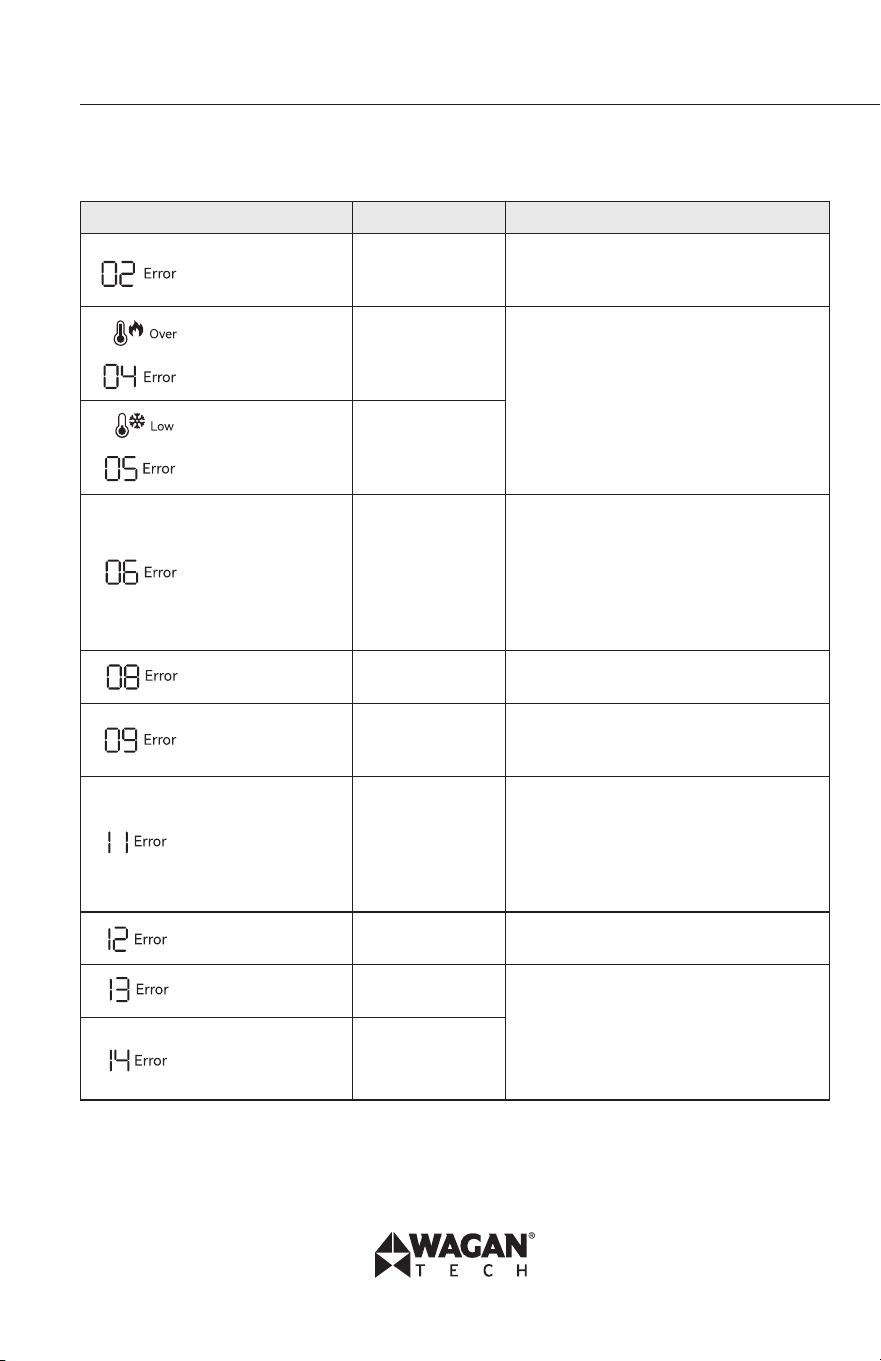
AC OPERATING TIME
AC Powered Products* Watts Estimated Run time
1
LED Light 5 26.4 hours
Camera 16 15.7 hours
Fan 45 7.6 hours
Drone 60 6 hours
Refrigerator (AC ) 40% duty 80 4.7 hours
CPAP w/ Humidifier 90 4.2 hours
Projector 100 3.9 hours
TV 110 3.5 hours
Playstation
®
5 160 2.5 hours
Slow Cooker 200 2 hours
Wall Breaking Machine 250 1.6 hours
Drill 600 0.8 hours
• *Power usages listed are averages. Check your appliance rating for more accurate time
estimates.
1. Operating times assume a fully charged battery and ambient temperature of 77 ºF
(25ºC). Actual results may vary based on model/brand used.
Assumes continuous operation
DC OPERATING TIME
DC Powered Products* Watts Estimated Run time
1
Dometic
™
CFX3 (DC) 30% Duty 30 12.8 hours
Thermoelectric Cooler 48 8.3 hours
Starlink© 75 5.5 hours
Vacuum (handheld) 100 4.1 hours
* Power usages listed are averages. Check your appliance rating for more accurate time
estimates.
1. Operating times assume a fully charged battery and ambient temperature of 77 ºF
(25ºC). Actual results may vary based on model/brand used.
Assumes continuous operation

User’s Manual—Read before using this equipment
© 2025 Wagan Corporation. All Rights Reserved
Wagan Tech and wagan.com are trademarks of Wagan Corporation
17
8. USER MAINTENANCE
• Please use or store the product in an environment with a temperature between 68°F
(20°C) to 86°F (30°C), away from water, intense heat, and other sharp objects.
• If the remaining battery is less than 1% after you finish using the product, please re-
charge it to at least 60% before storing it. If the product is left idle for a long time with
a severely low battery, irreversible damages may be caused to the battery cell and the
product’s service life will be shortened.
• For long-term storage, please check the battery level of the product every three months.
Discharge to 0% then charge to 100% and then discharge to 48%−52%.
• If the Lithium Cube has been idle for too long and the battery is severely low, it will
enter hibernation mode. In such case, please recharge before use.
• After charging or discharging this product, you must wait for more than 30 minutes
before using it.
• For safety, do not store power station with temperature above 113°F (45°C) or below
14°F (-10°C).
• Recharge unit every 3 months.
• Make sure vents are clean.
• Keep unit dry.
• For battery replacement, contact www.wagan.com
9. FAQs (Frequently Asked Questions)
1. What kind of battery is used?
Lithium iron phosphate battery (LiFePO4).
2. What equipment can be connected to the AC output ports?
The AC output has high rating power and maximum power, which enables it to supply
power to most household appliances. Suggest check the equipment power prior to
connecting and make sure power of all equipment lower than rated power.
3. How to know the supply time?
Time shows in the LCD, which can be referred to for estimation for equipment with
stable power consumption.
4. How to know it is charging?
When in charge, the LCD shows remaining charging time. The SOC flickers, and input
power is shown.
5. How to clean the unit?
Clean the unit with a dry, soft and clean cloth or tissue
6. How to store the unit?
Turn it off, and keep it in a dry and ventilated place. Do not expose it close to water.
For long-term storage, charge and discharge every 3 months, i.e. discharge to 0% then
charge to 100%, and then discharge to 48%~52%.
7. Can it be taken on board?
No.
Lithium Cube™ EX6 by Wagan Tech
®
www.wagan.com
18
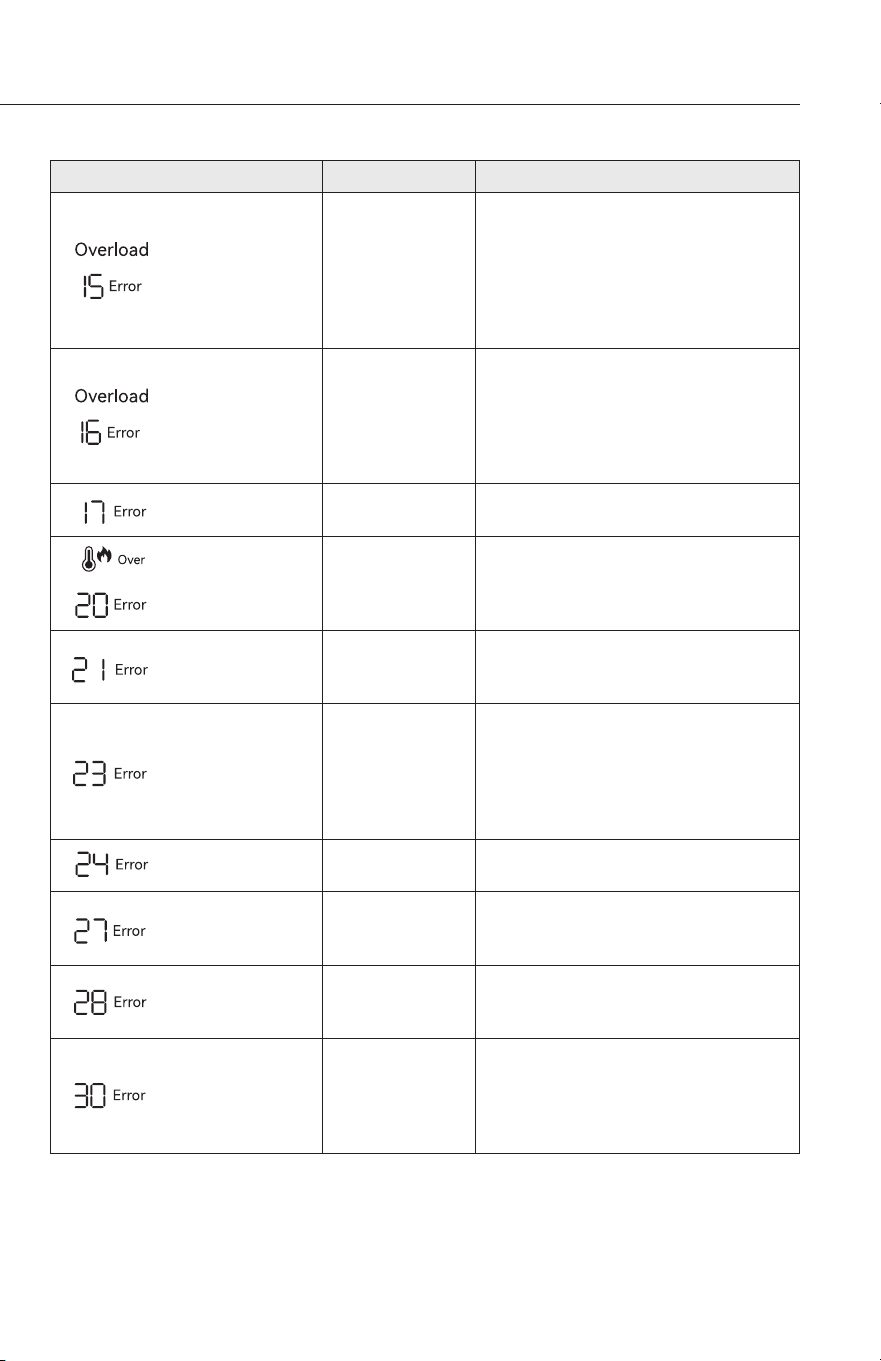
10. TROUBLESHOOTING
Indicator/Content Problem Solution
Error code always
on
Pressure differ-
ence is too large
Automatic recovery after fault cleanin;
3 consecutive locks within a certain
period of time, longer recover time.
High temperature
icon flickers
Error code always
on
Battery OTP
(over temperature
protection) fault
Automatic shutdown, fault cleared after
temperature recovery.
Low temperature
icon flickers
Error code always
on
Battery UTP (un-
der temperature
protection) fault
Error code always
on
OCP (Over Cur-
rent Protection)
fault
Remove the over-power device, and it
will automatically recover after the fault
is cleared; if it is triggered continuously
for 3 times whithin 1 minute, it will be
locked, and the recovery time will be
prolonged, and it can be recovered by
powering on and off again.
Error code always
on
Abnormal pre-
charge
Power on and off again to clear the
fault.
Error code always
on
Battery under
voltage fault
Charging process, repeated charging
failures or failure to charge, please
contact customer service.
Error code always
on
Abnormal INV
battery voltage
Automatic recovery after the fault is
cleared; if it is triggered 3 times within
1 minute, it will be locked, and the
recovery time will be extended, and it
can be recovered by powering on and
off again.
Error code always
on
Grid voltage or
frequency fault
The fault is cleared when the grid return
to normal
Error code always
on
Abnormal INV
BUS voltage
Automatic recovery after the fault
is cleared; if it is trieggered 3 times
within minute, it will be locked, and the
recovery time will be extended, and it
can be recovered by powering on and
off again.
Error code always
on
Abnormal INV
output
User’s Manual—Read before using this equipment
© 2025 Wagan Corporation. All Rights Reserved
Wagan Tech and wagan.com are trademarks of Wagan Corporation
19
Indicator/Content Problem Solution
Overload icon
always on
Error code always
on
INV discharge
overload
Remove the over-power device, and it
will automatically recover after the fault
is cleared; if it is triggered continuously
for 3 time within 1 minute, it will be
locked, and the recovery time will be
prolonged, and it can be recovered by
powering on and off again.
Overload icon
always on
Error code always
on
Charge overload
Automatic recovery after the fault is
cleared; if it is triggered 3 times wihtin
1 minute, it will be locked, and the
recovery time will be extended, and it
can be recovered by powering on and
off again.
Error code always
on
INV Tz Auto recover after fault is cleared.
HIgh temperature
icon flickers
Error code always
on
MOSFET OTP
fault
After removing the device and restart-
ing, the fault is cleared.
Error code always
on
Fan stop
Exclude the fan abnormality, turn on
and off, contact after sales if still not
fixed.
Error code always
on
Charge soft start
fault
Automatic recovery after the fault
is cleared; if it is triggered 3 times
within minute, it will be locked, and the
recovery time will be extended, and it
can be recovered by powering on and
off again.
Error code always
on
MOSFET UTP
fault.
Automatic recovery after the product
heats up.
Error code always
on
DC input hard-
ware overcurrent
protection
Remove DC charge, auto recover after
connecting DC and turn on.
Error code always
on
DC input soft-
ware overcurrent
protection
DC charging stops and will automati-
cally resume after the fault is eliminated.
Error code always
on
Car charger
output/DC5521
output
Over current
protection
Turn off ouput, manual recover after
fault is cleared.
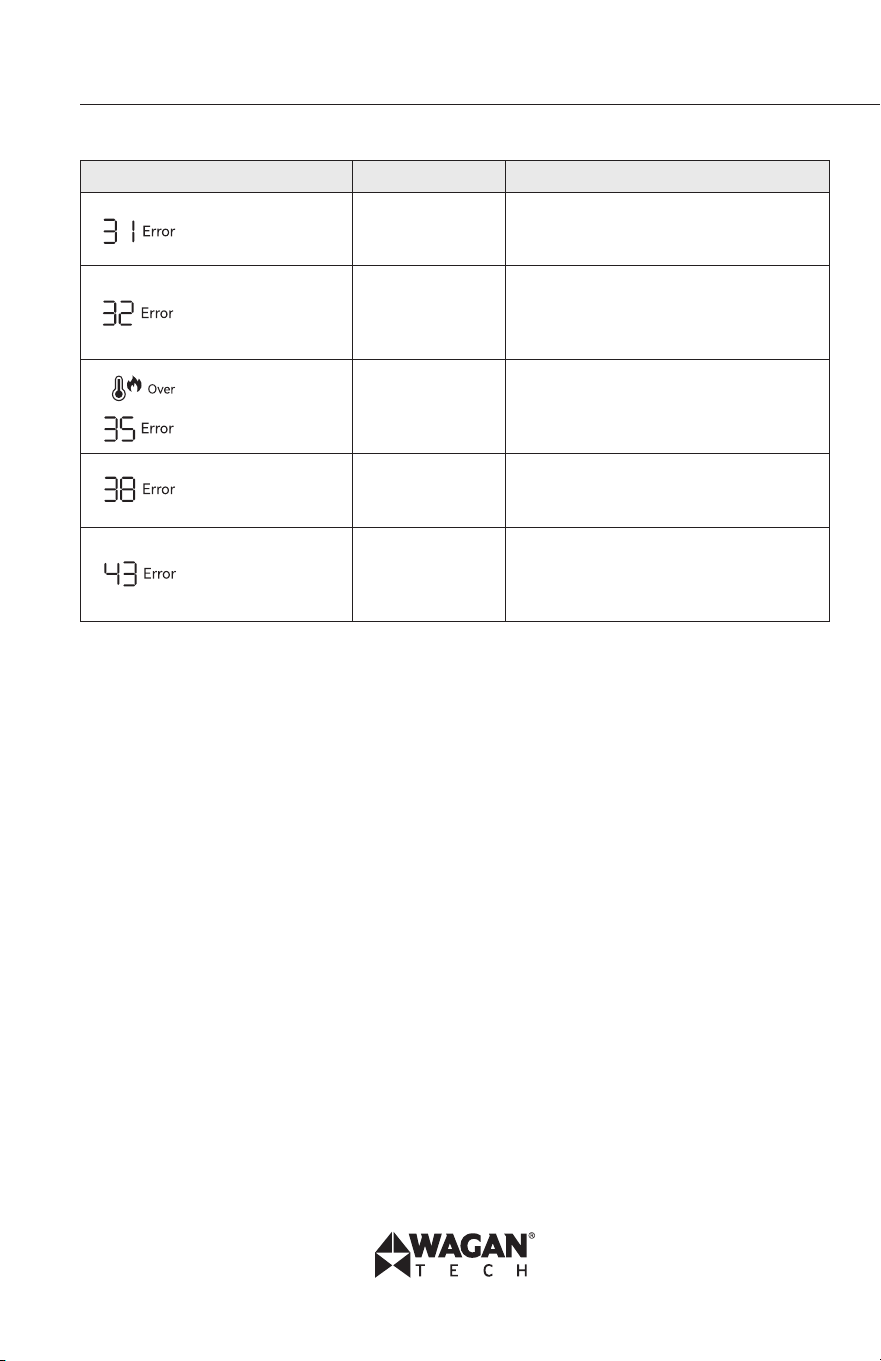
Lithium Cube™ EX6 by Wagan Tech
®
www.wagan.com
20
Indicator/Content Problem Solution
Error code always
on
PV output OVP
(over voltage
protection) fault
Removing the PV charging interface will
automatically restore it after a certain
period of time.
Error code always
on
DC input voltage
overvoltage
protection
Remove the DC charging interface for a
certain period of time to automatically
recover or check whether the DC output
fuse is disconnected.
High temperature
icon flickers
Error code always
on
DC input over
temperature
protection
Stop DC, Auto recover after fault is
cleared.
Error code always
on
Abnormal com-
munication
Turn on and off, or change operation
environment. Contact after sales if still
not fixed.
Error code always
on
The battery volt-
age is too low.
The battery is
broken.
Contact after-sales processing.
• If there is a warning occurs during the use of this product, and the warning icon still
does not disappear after restarting the device, please stop using it immediately (do not
try to charge or discharge).
• If none of the above information can solve problem you encounter, please contact the
customer service for consultation.
11. RECYCLING/DISPOSAL
If conditions permit, make sure that the battery is fully discharged before disposing of it in
a designated battery recycling bin. The product contains batteries with potentially harmful
chemicals, it is strictly prohibited to dispose of it in ordinary trash cans. For more details, please
follow the local laws and regulations on battery recycling and disposal.
If the battery cannot be fully discharged due to a product failure, please do not dispose of the
battery directly in the battery recycling bin. In such a case, you should contact a professional
battery recycling organization for further processing.
The Lithium Cube contains materials that are prohibited from being placed in landfills and
require recycling. These include batteries, and some components in the inverter. Contact local
authorities for disposal/recycling instructions.
User’s Manual—Read before using this equipment
© 2025 Wagan Corporation. All Rights Reserved
Wagan Tech and wagan.com are trademarks of Wagan Corporation
21
12. SPECIFICATIONS
Specifications are subject to change without notice.
General Information
Net Weight 15.5 lbs (7 kg)
Dimensions 11.9 × 9 × 7.6 in. (301 × 227 × 193 mm)
Battery Capacity 512Wh, 25.6V DC, 20Ah
Output Ports
AC US Socket ×2 (Inverter Mode) Pure Sine Wave, total 600W (peak 1000W),
100-120V (60Hz), 6A
AC US Socket (Bypass Mode) 100-120V (60Hz) 600W Max., 6A
AC UK/EU Socket ×2 (Inverter Mode) Pure Sine Wave, total 600W (peak 1000W),
220-240V (50/60Hz), 3A
AC UK/EU Socket (Bypass Mode) 220-240V (50/60Hz) 600W Max., 3A
USB-A (×2) 5V, 2.4A (12W) Max.
USB-C (×2) 5V/9V/12/15V DC 3A, 20V DC 5A, 100W Max.
Car Charger 12.6V DC 10A, 126W Max.
DC 5521 output (×2) 12.6V 3A
* Car charge and DC5521 share power, 126W max.
* Inverter mode: the output AC power comes from the battery, not the grid.
* Bypass mode: the output AC power comes from the grid, not the battery.
Input Ports
AC Charge 1200W M ax.
US Plug: 50/60Hz, 100V−120V, 10A
UK/EU Plug: 50/60Hz, 220V−240V, 6A
Solar Input 12~20V 10A, 200W, DC 10A Max.
Solar/Car Input Port Type DC 7909
Car Charger 12V battery supported, 8A by default
Lithium Cube™ EX6 by Wagan Tech
®
www.wagan.com
22
Input Charging
PV/Car Charging Power 200W Max.
AC Charging Power 600W Max.
AC + PV Charging Power 600W Max.
Battery
Cell Type lithium iron phosphate battery (LiFePO4)
Life Cycle remaining capacity still over 80% after 3,000
cycles
Protection Type Over temperature protection, low temperature
protection, over discharge protection, over charge
protection, overload protection, short circuit pro-
tection, over current protection.
Charge Temperature 32°F − 113°F (0°C − 45°C)
Discharge Temperature -4°F − 113°F (-20°C − 45°C)
* Test conditions: 95% DOD, 0.5C charge & 1.0C discharge at 25+3°C
Operating Temperature
Optimal Operating Temperature 68°F − 86°F (20°C − 30°C)
Discharge Temperature Range -4°F − 113°F (-20°C − 45°C)
Charge Temperature Range 32°F − 113°F (0°C − 45°C)
Storage Ambient Temperature -4°F − 113°F (-20°C − 45°C),
68°F − 86°F (20°C − 30°C) preferred
* Whether the product can be charged or discharged is subject to the actual battery pack
temperature.

User’s Manual—Read before using this equipment
© 2025 Wagan Corporation. All Rights Reserved
Wagan Tech and wagan.com are trademarks of Wagan Corporation
23
FCC Statement
This device complies with Part 15 of the FCC Rules. Operation is subject to the following two
conditions:
1. This device may not cause harmful interference.
2. This device must accept any interference received, including interference that may
cause undesired operation.
3. Changes or modifications not expressly approved by the party responsible for
compliance could void the user’s authority to operate the equipment.
Note: This equipment has been tested and found to comply with the limits for a class B digital
device,pursuant to Part 15 of the FCC Rules. These limits are designed to provide reasonable
protection against harmful interference in a residential installation.
This equipment generates uses and can radiate radio frequence energy and, if not installed
and used in accordance with the instructions, may cause harmful interference to radio
communications. However, there is no guarantee that interference will not occur in a particular
installation. If this equipmemt does cause harmful interference to radio or television reception,
which can be determined by turning the equipment off and on, the user is encouraged to try to
correct the interference by one or more of the following measures:
• Reorient or relocate the receiving antenna.
• Increase the separation between the equipment and receiver.
• Connect the equipment into an autlet on a circuit different from that to which the
receiver is connected.
• Consult the dealer or an experienced radio/TV technician for help.
The device has been evaluated to meet general RF exposure requirement, This equipment should
be installed and operated with a minumum distance of 20 cm between the radiator and your
body.
ISED Statement
This device contains licence-exempt transmitter(s)/receiver(s) that comply with Innovation,
Science and Economic Development Canada’s licence-exempt RSS(s). Operation is subject to the
following two conditions:
• This device may not cause interference.
• This device must accept any interference, including interference that may cause
undesired operation of the device.
• This equipment should be installed and operated with a minimum distance of 20 cm
between the radiator and your body.

WAGAN Corp. Limited Warranty
Warranty Duration:
Product is warranted to the original purchaser for a period of two (2) years from the
original purchase date, to be free of defects in material and workmanship. WAGAN
Corporation disclaims any liability for consequential damages. In no event will WAGAN
Corporation be responsible for any amount of damages beyond the amount paid for the
product at retail.
Warranty Performance:
During the warranty period, a product with a defect will be replaced with a comparable
model when the product is returned to WAGAN Corporation with an original store
receipt. WAGAN Corporation will, at its discretion, replace or repair the defective part.
The replacement product will be warranted for the balance of the original warranty
period. This warranty does not extend to any units which have been used in violation of
written instructions furnished.
Warranty Disclaimers:
This warranty is in lieu of all warranties expressed or implied and no representative
or person is authorized to assume any other liability in connection with the sale of our
products. There shall be no claims for defects or failure of performance or product
failure under any theory of tort, contract or commercial law including,but not limited to
negligence, gross negligence, strict liability, breach of warranty, and breach of contract.
Returns:
WAGAN Corporation is not responsible for any item(s) returned without an official Return
Authorization number (RA#). Please contact our customer service team by phone or
email to obtain an RA#. You can also visit our website and chat with our team during our
normal business hours. For more details and instructions on how to process a warranty
claim, please read the “Returns” section under the “Contact” page on our website.
WAGAN Corporation is not responsible for any shipping charges incurred in returning
the item(s) back to the company for repair or replacement.
Register your product online at http://tinyurl.com/wagan-registration to be added to our
email list. You will receive previews on our upcoming products, promotions, and events.
©2024



www.wagan.com
customerservice@wagan.com
13073 166
th
Street
Cerritos, CA 90703, U.S.A.
Tel: +1.888.714.9316
©2025 Wagan Corporation. All Rights Reserved
Wagan Tech and wagan.com are trademarks of Wagan Corporation
REV20250114