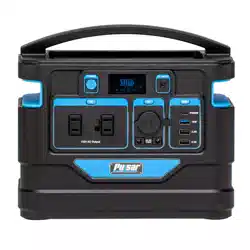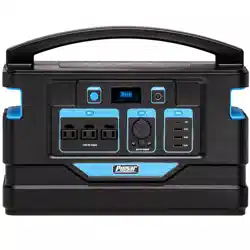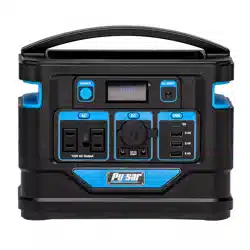
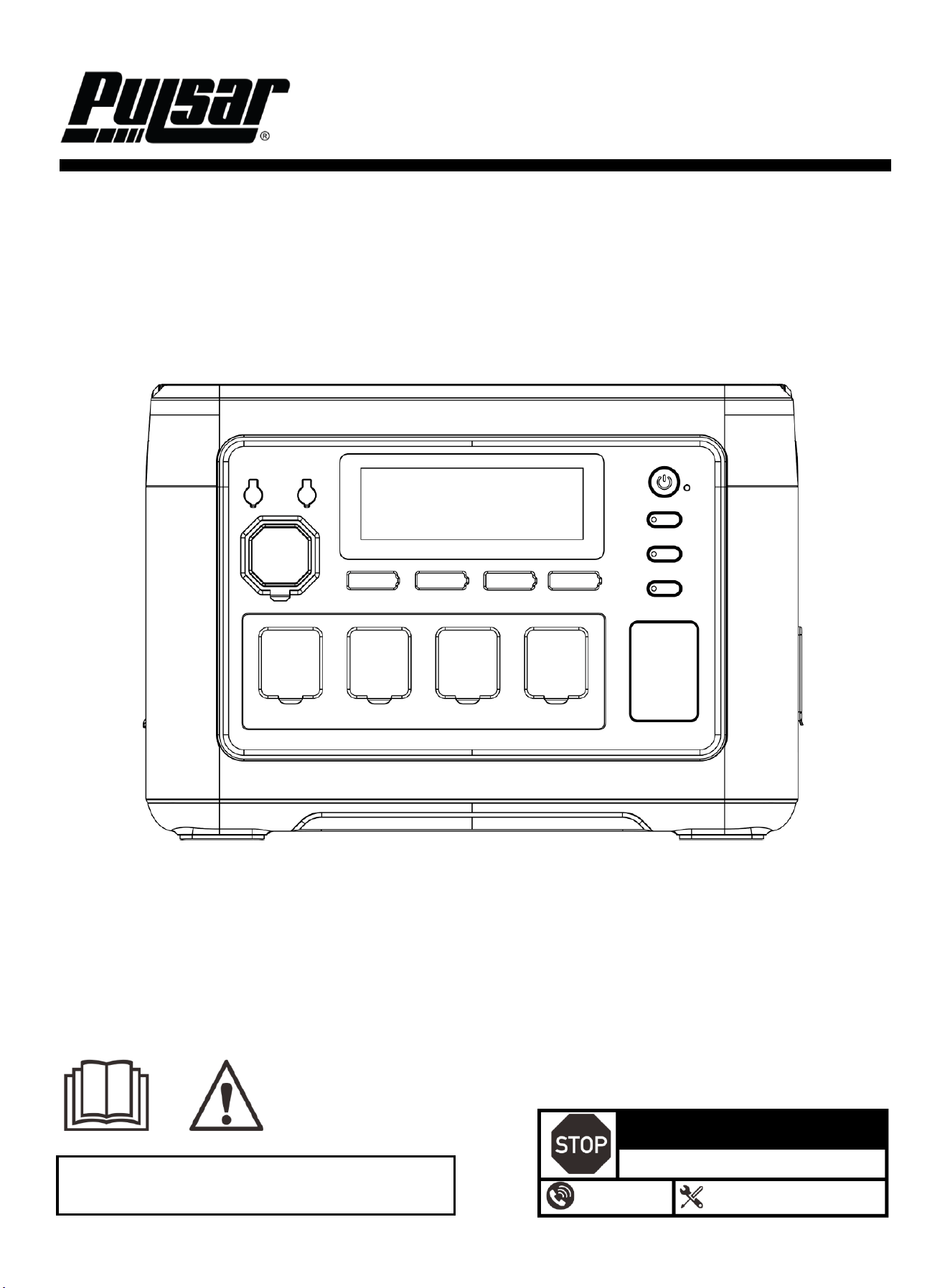
1800W Portable Power Station
OPERATOR'S MANUAL
Warning: This product can expose you to chemicals including lead,
which is known to the State of California to cause cancer and birth defects
or other reproductive harm. For more information, go to www.P65Warnings.ca.gov.
DO NOT RETURN TO STORE!
HAVE QUESTIONS OR NEED SERVICE?
1-866-591-8921
support@pulsar-products.com
Model: PSSK1810H
Caution:
⚫ Before using your power station, please read this manual carefully to understand proper use.
⚫ Keep this manual with the power station.
1
Table of Contents
Table of Contents ………………………………….…...…..1
Instruction …………………………………………….……..1
Safety Warnings and Notices ………………………...….1
Safety Instructions …………………………………………2
Components…………………………………………………4
Control Panel ……………………………………………..…4
Operation………………………………………………………...7
Specifications ……………………….………………......……10
Troubleshooting Guide ……………….……………….….…11
Introduction
Thank you for choosing Pulsar Products!
This manual provides instructions on how to safely and
correctly operate your power station. Please read and fully
understand this manual before using your power station.
If you have any questions, contact us at 1-866.591.8921
before using your power station.
For transportation safety, the power station is shipped with
a low battery level (approximately 30%). It is recommended
to fully charge the unit before first use.
When charging the power station from a wall outlet, it is
recommended to connect the unit directly to the outlet
whenever possible. To reduce the risk of overheating or
electrical hazards, avoid using extension cords or power
strips, and do not share the same outlet with other high-
power electrical devices.
All details and images in this manual are believed to be
accurate at the time of publication. Pulsar Products
reserves the right to make updates to this manual at any
time. For the latest updates, please contact Pulsar Support
This manual is a permanent part of the power station. If the
power station is resold, please include this manual with it.
DANGER
!
DANGER indicates an imminently hazardous
situation which, if not avoided, will result in death
or serious injury.
WARNING
!
WARNING indicates a potentially hazardous
situation which, if not avoided, could result in
death or serious injury.
CAUTION
!
CAUTION indicates a potentially hazardous situation
which, if not avoided, may result in minor or moderate
injury. It may also be used to alert against unsafe
practices.
NOTICE
Failure to follow the instruction may result in the
damage to your power station and other property.
Safety Warnings and Notices
WARNING: Save This Manual
for Future Reference
This manual contains important information regarding
the safety, operation, maintenance, and storage of this
product. Before use, you must read and fully
understand all cautions, warnings, instructions, and
product labels. Failure to do so could result in serious
personal injury and/or property damage.
Safety Definitions
!
This safety alert symbol appears with most safety
statements. It means to pay attention and be alert, your
safety is involved! Please read and abide by the
message that follows the safety alerts symbol.
2
Safety Instructions
Safety Precautions
⚫ This product contains a lithium iron phosphate (LiFePO₄)
battery.
⚫ Do not disassemble, modify, or attempt to repair the
product.
⚫ Do not expose the product to fire, high heat, or direct
sunlight.
⚫ Do not use or store the product in wet or humid
environments.
⚫ Do not drop the product or subject it to strong impact.
⚫ Keep the product out of reach of children.
⚫ Ensure adequate ventilation during operation. Maintain at
least 30 cm (12 in.) of clearance around all air inlet and
outlet openings.
⚫ If abnormal conditions occur, including unusual noise,
odor, smoke, or overheating, stop using the product
immediately and contact customer service.
WARNING
!
Failure to follow these safety warnings may result
in serious injury, death, or property damage.
Electromagnetic fields generated during operation may
affect implanted medical devices.
Users with such devices should consult the device
manufacturer before use.
WARNING
!
General Use
CAUTION
!
Failure to follow these instructions may result in
minor or moderate injury or product damage.
⚫ Use the product only within the specified operating
temperature range.
⚫ Do not block ventilation openings.
⚫ Turn off the power station and disconnect all cables when
not in use.
Charging Safety
Improper charging may result in fire, electric shock,
or equipment damage.
WARNING
!
⚫ Use only manufacturer-approved charging cables.
⚫ When charging from a wall outlet, it is recommended to
connect the unit directly to the outlet whenever possible.
⚫ To reduce the risk of overheating or electrical hazards,
avoid using extension cords or power strips.
⚫ Do not share the same outlet with other high-power
electrical devices during charging.
3
Safety Instructions
WARNING
!
⚫ This product contains a high-capacity LiFePO₄
battery pack. Do not disassemble, crush, puncture,
or modify the battery.
⚫ Do not expose the battery to fire, high heat, or direct
sunlight for extended periods.
⚫ Do not immerse the product in water or allow liquid
to enter the battery compartment.
⚫ Do not use the product if the battery housing is
damaged, swollen, leaking, or emitting unusual odor
or heat.
⚫ Do not short-circuit the battery terminals.
⚫ Use only the charging methods specified in this
manual. Do not use incompatible chargers or
charging cables.
⚫ Stop using the product immediately if the battery
shows signs of abnormal operation, including
excessive heat, smoke, or noise.
LiFePO₄ Battery Safety
Improper handling of lithium iron phosphate (LiFePO₄)
batteries may result in fire, electric shock, serious
injury, or property damage.
CAUTION
!
Failure to follow these instructions may shorten battery
life or cause battery damage.
⚫ Operate and store the product within the specified
temperature range.
⚫ Avoid fully discharging the battery for long periods.
⚫ For long-term storage, maintain the battery at
approximately 50% charge and recharge every three
months.
⚫ Do not place heavy objects on the product or subject it
to strong mechanical impact.
LiFePO₄ Disposal and Recycling
NOTICE
This product contains a lithium iron phosphate
(LiFePO₄) battery and must be disposed of
or recycled properly.
⚫ Do not dispose of the battery or the product with
household waste.
⚫ Follow all applicable local, state, and federal
regulations regarding battery disposal and recycling.
⚫ Many communities offer battery recycling or household
hazardous waste collection programs.
⚫ Before disposal or recycling, ensure the product is
powered off and disconnected from all external power
sources.
⚫ If you are unsure how to properly dispose of or recycle
this product, contact your local waste management
authority for guidance.
Storage Safety
Improper storage may shorten battery life or
cause battery damage.
CAUTION
!
⚫ For long-term storage, recharge the battery to
approximately 50% every three months.
⚫ Avoid storing the product in vehicles or
environments subject to extreme
temperatures.
⚫ Do not store the product for extended periods
above 40°C (104°F) or below –10°C (14°F).
4
Components
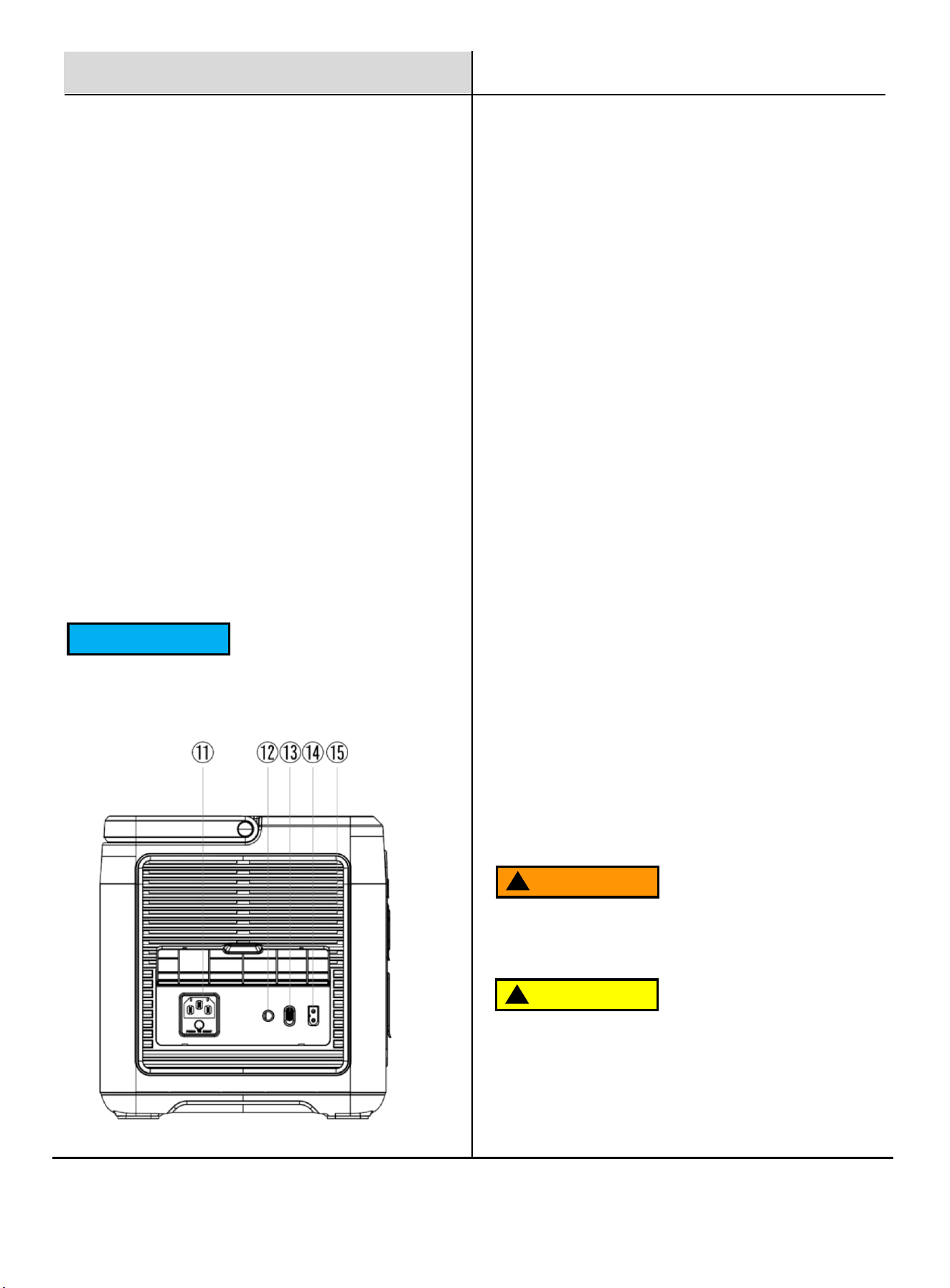
Packing List
PPSK1810H
Portable Power Station with Operator’s Manual
AC Power Cable
MC4 to XT60 Solar
Charging Cable
Control Panel
Front Panel
1. Power Switch: Press and hold the Power Switch for 3
seconds to turn the power station ON and activate the LCD
display.
Press and hold the switch again for 3 seconds to turn the
power station OFF.
2. DC Switch: When the power station is ON, short press the
DC Switch to turn ON the DC output ports. Short press the
switch again to turn OFF the DC output ports.
DC Output Ports Include:
Cigarette Lighter Output: 12V / 10A
DC5521 Output ×2: 12V / 3A
USB-A Output ×2: QC 3.0, up to 18W
USB-C Output ×1: PD 20W
USB-C Output ×1: PD 100W
3. AC Switch: When the power station is ON, short press the
AC Switch to turn ON the AC output ports.
Short press the switch again to turn OFF the AC output ports.
The power station is equipped with 4 AC output ports. The
total connected load must not exceed 1800W.
AC output voltage and frequency standards vary by
country. Verify that the connected equipment is compatible
with the AC voltage and frequency before use.
Press the AC Switch and LED Switch simultaneously for 3
seconds to switch the AC frequency between 50Hz and
60Hz.
Press the AC Switch 10 times consecutively to switch the
AC output voltage between 100V / 110V / 120V.
NOTICE
5
4. LED Light Switch
5. LED Light:
Short press the LED Switch to turn on Constant Light
Mode. Short press again to switch to SOS Mode. Short
press again to switch to Flashing Mode.
Long press the LED Switch to enable Silent Mode.
Long press again to disable Silent Mode.
6. LCD Display: Displays real-time operating information,
including battery capacity, input and output power,
operating modes, protection status.
7. DC5521 Output Ports (12V / 3A):
8. Cigarette Lighter Output (12V / 10A)
9. USB-A Ports (QC 3.0, up to 18W)
USB-C Ports (PD 20W / PD 100W)
10. AC Output Ports (120V, total 1800W, 50/60Hz)
Control Panel
This product is not grounded by default.
Grounding is optional and intended only for special
use scenarios.
NOTICE
Side Panel
11. AC Charging Port with Overload Protection Button:
Use the supplied AC charging cable to connect the power
station to a wall outlet for charging.
Before charging, ensure that the AC voltage and frequency of
the power source match the product specifications.
If the AC input voltage is unstable (such as during lightning or
power surges), the overload protection circuit breaker will
automatically activate and disconnect the AC input to protect
the unit.
To restore AC input function:
Turn OFF the power station and unplug all connected devices.
Confirm that there are no abnormalities with the unit or cables,
then turn the power station ON. Press the Overload Protection
Button and reconnect the AC charging cable.
12. External Grounding Terminal:If required, a grounding wire
may be connected to this port to ground the power station.
13. AC Fast / Slow Charging Adjustment Switch:
Fast Charging Mode:
When set to fast charging mode and the input voltage is
100–120V, the maximum AC charging power is 1200W.
Slow Charging Mode:
When set to slow charging mode and the input voltage is 100–
120V, the maximum AC charging power is 500W.
14. PV / Car Input Port:Use the standard PV / Car charging
cable to connect a solar panel or vehicle power source to
charge the power station.
Solar Charging Limits:
Maximum solar input power: 500W
Maximum input voltage: 50V
15. Cooling Air Inlet/Outlet: When the internal temperature
reaches a certain level, the cooling fan will automatically
activate.
CAUTION
!
Do not block the air inlet or outlet. Maintain at least 30
cm (12 in.) of clearance around the ventilation openings.
WARNING
!
Input voltage exceeding 50V may cause permanent
damage and is not covered by warranty.
6
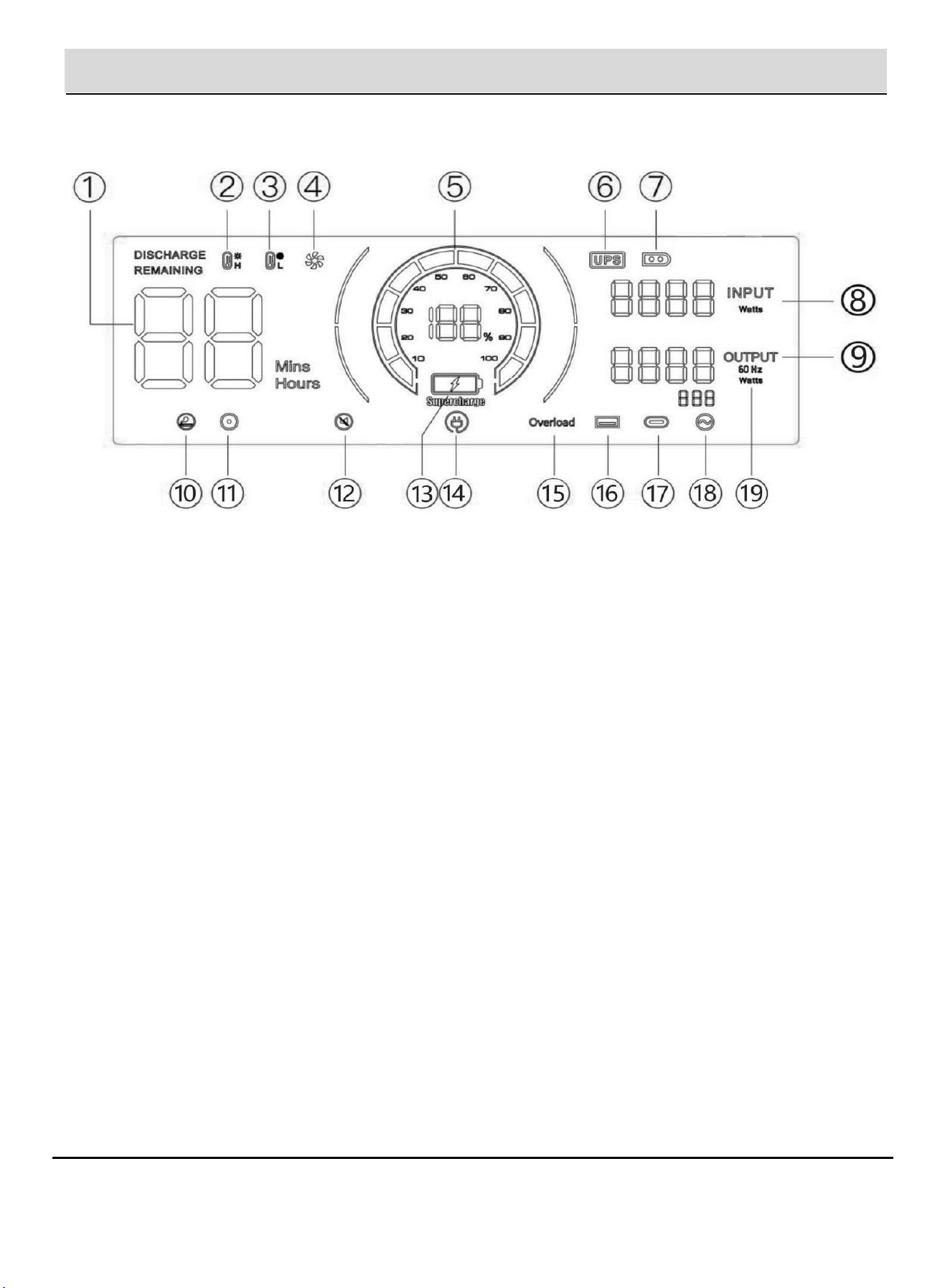
Control Panel
Display Interface
1. Using Time / Charging Time
Displays remaining usage time or estimated charging
time.
2. High Temperature Protection
Indicates high-temperature protection is active.
3. Low Temperature Protection
Indicates low-temperature protection is active.
4. Fan Status
Indicates cooling fan operation status.
5. Power Status
Displays battery capacity level.
6. Backup Mode
Indicates the unit is operating in backup mode.
7. PV Charging Mode
Indicates solar charging is active.
8. Total Input Power
Displays total input power in watts.
9. Total Output Power
Displays total output power in watts.
10. Cigarette Lighter (12V) Output
Indicates 12V car output is active.
11. DC (12V) Output
Indicates DC output is active.
12. Silent Mode
Indicates silent mode is enabled.
13. Fast Charging Mode
Indicates fast AC charging mode is active.
14. Slow Charging Mode
Indicates slow AC charging mode is active.
15. Overload Protection
Indicates overload protection is active.
16. USB Output
Indicates USB output is active.
17. PD Output
Indicates USB-C Power Delivery output is active.
18. AC Output
Indicates AC output is active.
19. Frequency Switching
Indicates AC frequency switching status.
7
Control Panel
Display Precautions
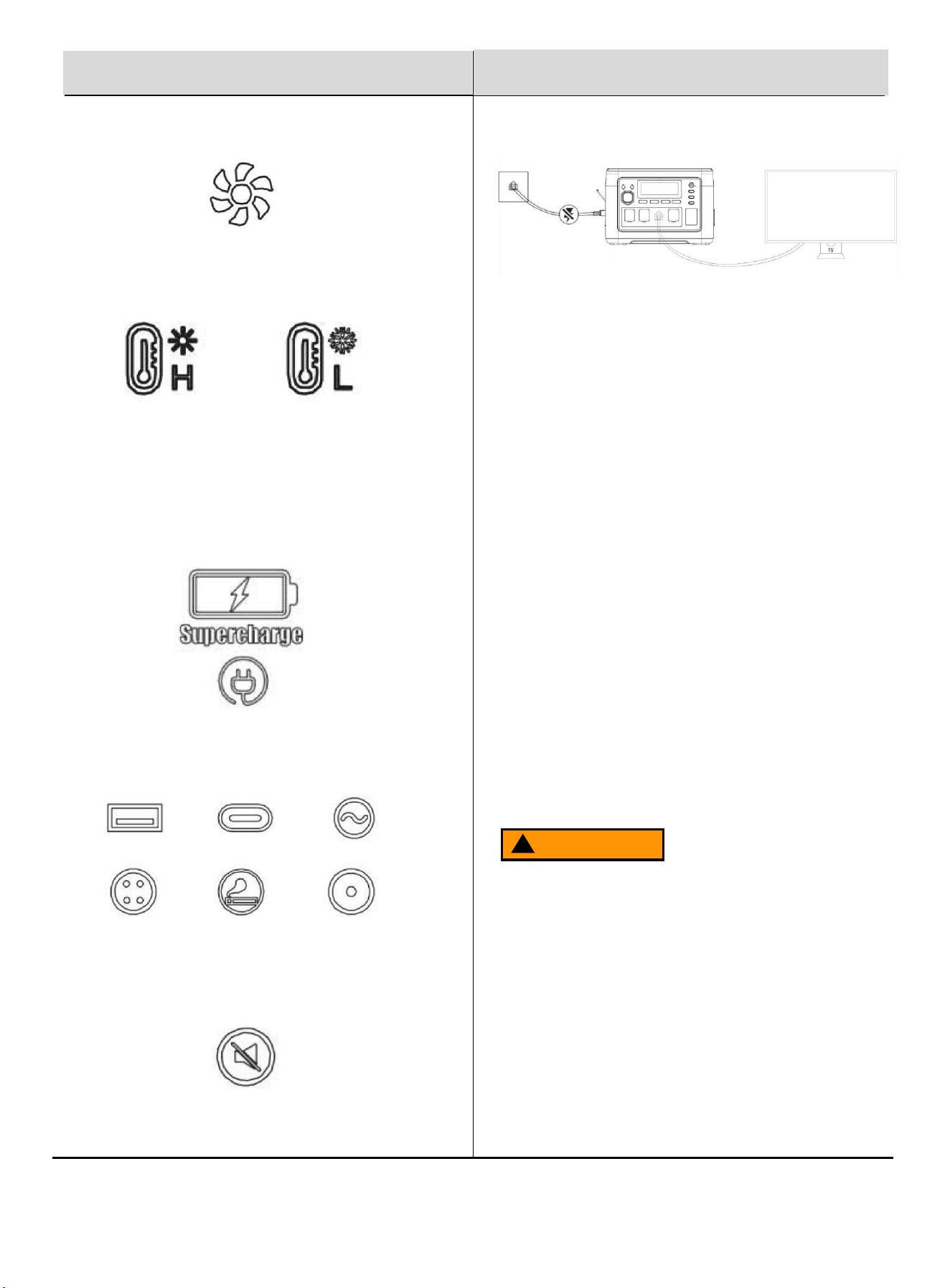
When the fan icon is displayed, ensure that the air inlet and air
outlet on both sides of the product are not blocked.
When the high-temperature or low-temperature indicator flashes,
the internal temperature of the unit is outside the normal
operating range.
The product will automatically activate its protection function and
stop operating. Allow the unit to return to a normal temperature
before restarting.
When this icon flashes, the product is charging at high power
(fast charging mode).
When an output port icon flashes, the corresponding port output
is abnormal. Check the connected load and ensure it is within
the rated power range.
When this icon flashes, the product has entered silent mode.
Operation
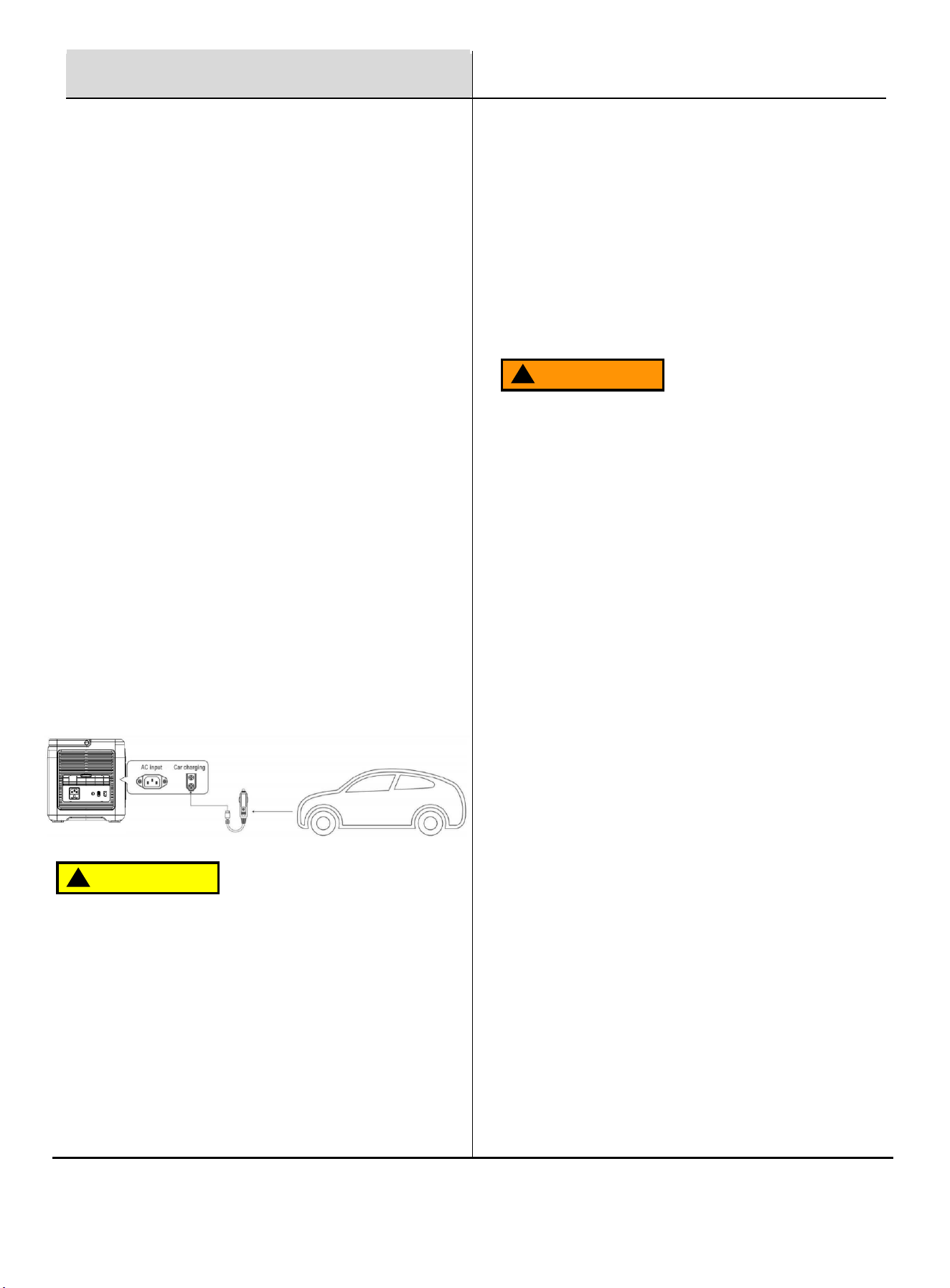
Backup Mode
Backup Mode allows the power station to provide backup
power support for connected AC devices when utility power is
available.
When utility AC power is present, the power station remains
on standby and supplies AC output power directly from the
utility power source through an internal bypass circuit.
⚫ When the battery is not fully charged and utility power is
present, the utility input power is shared between
battery charging and load output.
⚫ When the battery is fully charged and utility power is
present, the power station can supply the full rated AC
output power to the connected load through the bypass
circuit.
In Backup Mode, connect the power station between the wall
outlet and the electrical appliance and make sure the power
station is turned ON.
During normal operation with utility power present, the
connected appliance is powered directly by utility AC power.
If the utility AC input is interrupted, the power station will
automatically switch to battery-powered inverter output within
10 ms and continue supplying power to the connected load at
the rated AC output level.
WARNING
!
Exceeding the maximum backup output current may cause
overload and output interruption.
Maximum backup output current (U.S.): 14A
When the output current exceeds the maximum limit, the
backup indicator will flash, the AC output indicator will turn off,
and output will be interrupted.
8
Fuel And Chain Oil
Operation
AC Charging
Use the supplied AC charging cable to connect the power
station to a standard wall outlet.
Ensure the AC voltage and frequency of the power source
match the product specifications.
AC charging supports fast charging and slow charging
modes, selectable using the charging adjustment switch.
AC Charging Port (see control panel point 11.)
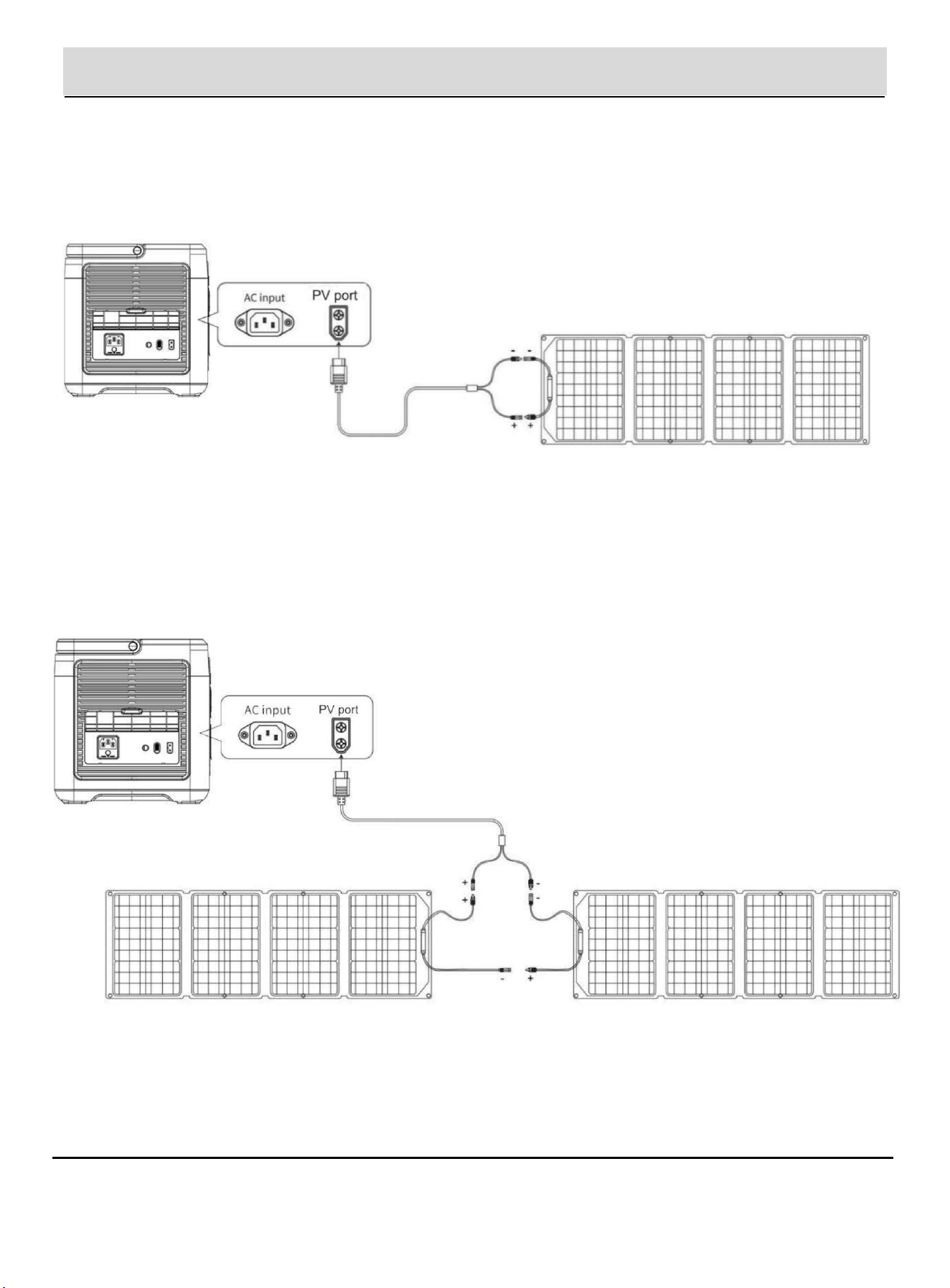
Car Charging
The power station can be charged using a vehicle’s 12V
cigarette lighter socket for mobile or emergency charging.
Charging Steps:
1. Turn the power station ON.
2. Connect the car charging cable to the vehicle’s cigarette
lighter socket.
3. Connect the other end of the cable to the PV / Car input
port on the power station.
4. Start the vehicle engine. The LCD screen will display
the input power.
CAUTION
!
Failure to start the vehicle engine during charging may
discharge the vehicle battery.
⚫ Typical car charging power: 90–240W
⚫ Charging time is longer compared to AC charging.
⚫ Car charging is intended for emergency or mobile use
only.
⚫ For faster charging, AC charging is recommended.
Car charging cable not included.
Solar Charging
The power station can be charged using compatible solar
panels.
Maximum solar input power: 500W
Input voltage range: 12–50V
Charging performance depends on sunlight intensity, weather
conditions, and panel configuration.
WARNING
!
Input voltage exceeding 50V may cause permanent damage
and is not covered by warranty.
Power Station Storage
⚫ Store and operate the product in an environment between
20°C and 30°C (68°F to 86°F).
⚫ Keep the product away from water, excessive heat, and
moisture.
⚫ For safety reasons, do not store the product for extended
periods in environments above 40°C (104°F) or below –
10°C (14°F).
⚫ If the product will not be used for an extended period,
charge the battery to approximately 50% before storage.
⚫ Storing the product with a severely depleted battery for a
long time may cause irreversible battery damage and
reduce battery cycle life.
9
Operation
Solar Panel Connection
Option 1:
Connect solar panels using the standard PV charging cable as shown in the diagram.
Option 2:
Connect multiple solar panels using appropriate series or parallel connections, ensuring the total input voltage does
not exceed 50V.
Solar panels and connection accessories not included.
10
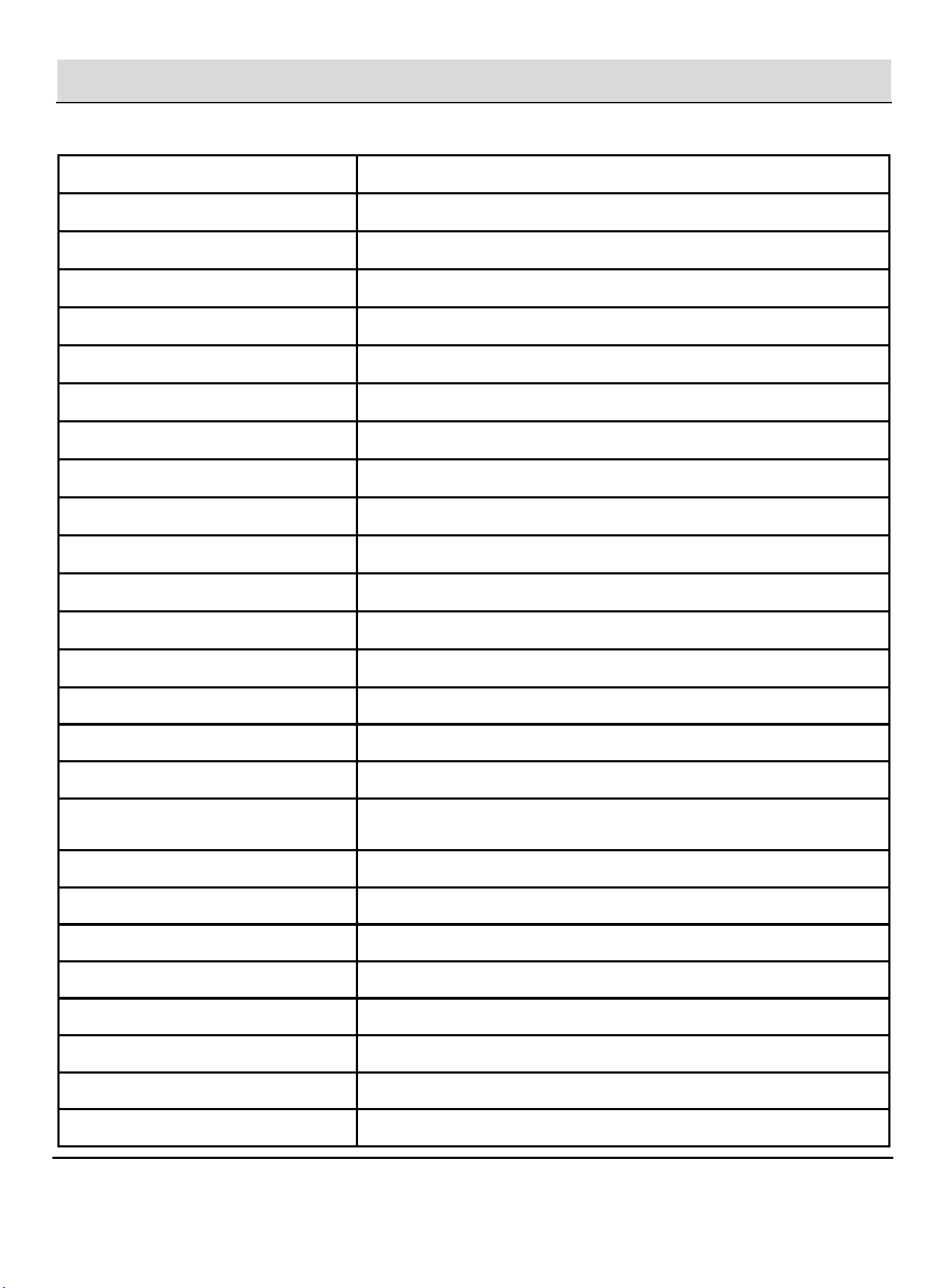
Item
Specification
Model
PPSK1810H
Battery Capacity
1024 Wh (51.2 V)
Battery Type
LiFePO₄
Cycle Life
4000 Cycles
Same Time Charge & Discharge
Supported
Rated Power
1800 W
Surge Power
3600 W
Backup Rated Power
100–120 V, 15 A Max
Backup Start Time
< 10 ms
Rated Frequency
50 Hz / 60 Hz
Inverter Efficiency
≥ 90%
Depth of Discharge
DOD ≥ 90%
Output Waveform
Pure Sine Wave
AC Charging
Fast Charging: Max 1200, Slow Charging: Max 500 W
Solar Panel Charging
1 × XT60 Port, 12–50 V / 11 A, MPPT Max 500 W
Car Charging Input
12 V / 8 A, 24 V / 10 A
Protection
Short-Circuit, Over-Current, Over-Voltage, Under-Voltage, Over-Load,
Over-Temperature, Over-Charge
Charging Temperature
0–40 °C (32–104 °F), Recommended: 20–30 °C
Discharging Temperature
–10–40 °C (14–104 °F), Recommended: 20–30 °C
Cooling Strategy
Dual Cooling Fans
Housing Material
ABS + PC, Fire Rating 94 V-0
Dimensions (L × W × H)
13.62 × 8.98 × 9.37 in
Net Weight
26 lb
Gross Weight
28 lb
Warranty
2 Years
Specifications
11
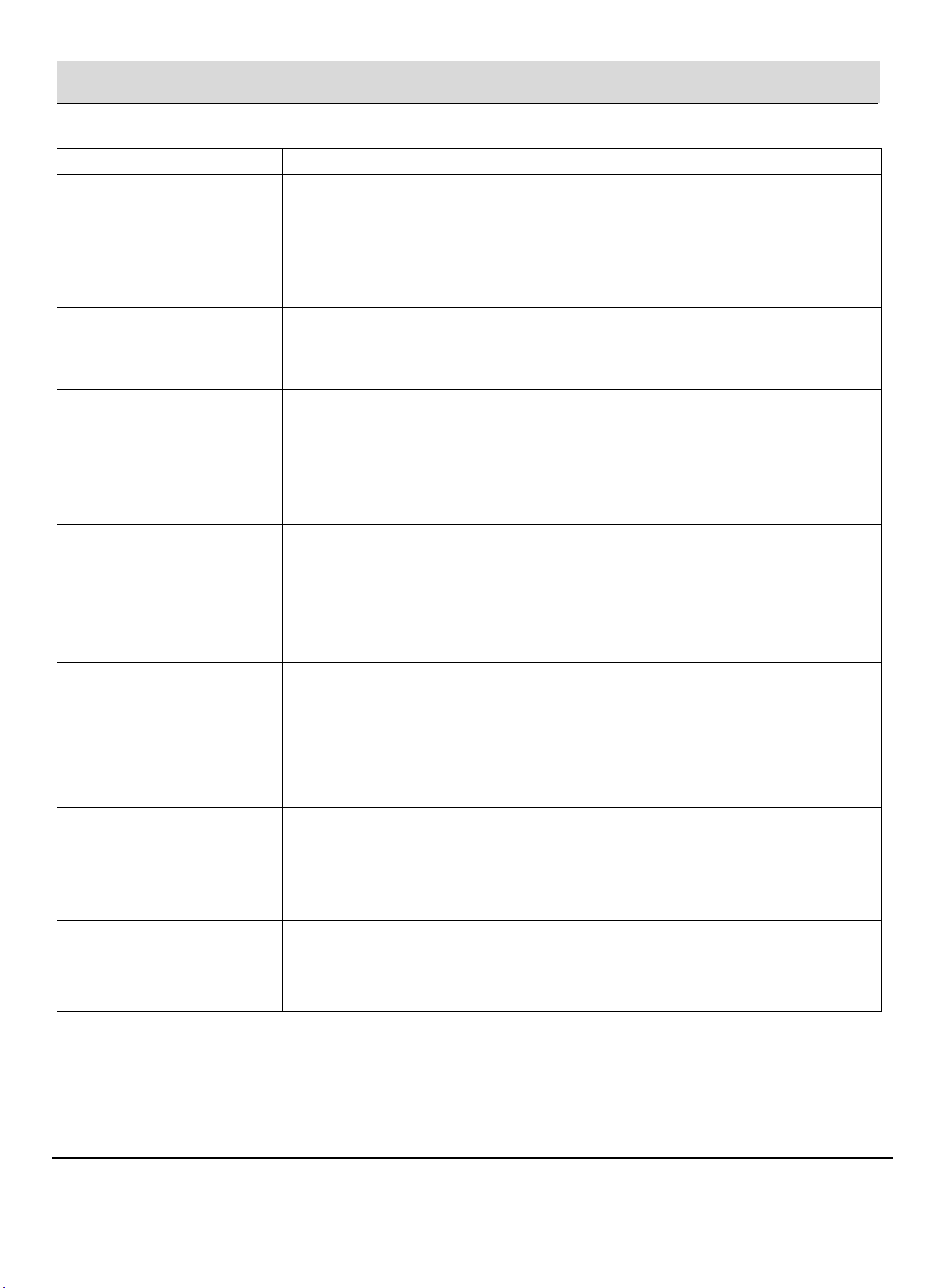
Problem
What to Do
Power station will not power
connected devices even though
the load is within the rated
power range
Check the battery level and recharge the unit if the battery is low. Some devices require a
higher startup (surge) power than their rated power. Disconnect the load and try a lower-
power device.
Power station produces
noticeable noise during
operation
This is normal. Cooling fans may operate during use or charging. Some connected
electrical devices may also generate operating noise.
Charging cable feels warm
during charging
This is normal during high-power charging. Ensure the charging cable is securely
connected and not covered or coiled tightly. Use only the supplied or approved charging
cables.
What type of battery does the
power station use?
The power station uses a lithium iron phosphate (LiFePO₄) battery, which meets applicable
safety standards.
AC output does not power
certain appliances
Ensure the total connected load does not exceed 1800 W. Check that the current draw of a
single AC outlet does not exceed its rated limit. Some appliances may have startup surges
that exceed the power station’s capability.
Unable to determine remaining
usage time
The LCD screen displays estimated remaining usage time during operation. Usage time
may change depending on load variation.
Unable to confirm whether the
unit is charging
When charging, the LCD screen displays input power. The charging indicator and AC or PV
charging icon will be displayed accordingly.
Troubleshooting Guide