OWNER’S MANUAL
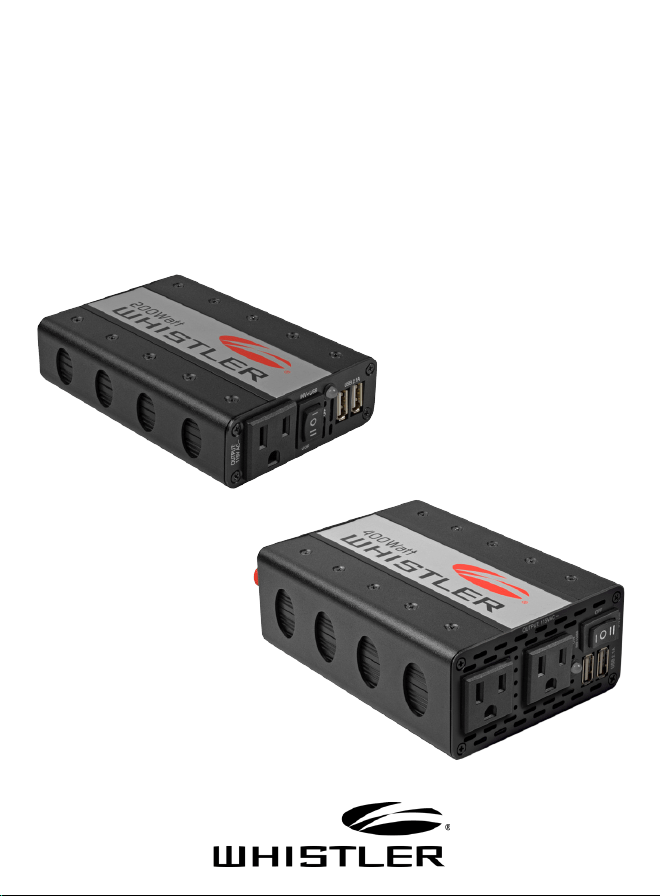
XP200i / XP400i
POWER INVERTER
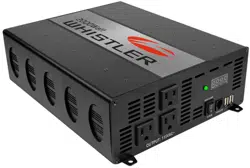
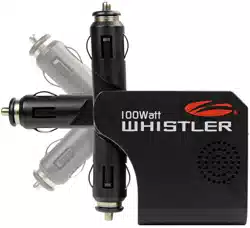
XP200i
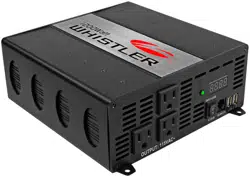
XP400i

If you have questions concerning the
operation of this Whistler product
please call customer service:
1-800-531-0004
Hours:
Monday - Friday
8:00 am - 5:00 pm CT
or visit www.whistlergroup.com
Please keep your purchase receipt in a
safe place. You may register your product
online at www.whistlergroup.com. If the
unit is returned without a dated proof
of purchase, an out of warranty service
charge applies. Note: Your warranty
period begins at the time of purchase. The
warranty is validated only by your receipt.

INTRODUCTION
Dear Whistler Customer,
For many of us, a vehicle is more than just transportation. It
can be a mobile office, communications or entertainment
center, or simply an expression of our personality.
Whistler products are designed to make the time you
spend in your vehicle more productive, more fulfilling,
safer, or just simply more fun. Our mission is to provide
products that improve your driving experience.
Whistler offers a complete line of DC to AC inverters ranging
in capacity from 100 Watts to 3000 Watts. These inverters
offer advanced technology, dependable operation and will
provide years of reliable service when used in accordance
with our operating instructions.
Your new Whistler power inverter allows you to run some AC
appliances right from your car, boat or RV. They’re great for
weekend use and life on the road. They’re also great for
power outages!
To fully acquaint yourself with the operation of this inverter
we recommend reading this entire manual.
Sincerely,
THE WHISTLER GROUP, INC

Features Description ............................................................... 3
Important Information ............................................................. 4
Inverter Basics ......................................................................... 5
• Getting Started
• Don’t Push It
Operation ............................................................................... 8
• Making the Connection
• Tips
• Recharging Equipment
• Changing the Fuse
• Power Source
Additional Safety Features .................................................... 13
• Auto Shut Down
• Thermal Cut Off
• Low Battery Protection
Care & Maintenance ............................................................. 14
Operating Principles ............................................................. 15
Operation Summary ............................................................. 17
Troubleshooting ................................................................... 19
Specifications ........................................................................ 21
Warranty Information ............................................................ 22
TABLE OF CONTENTS
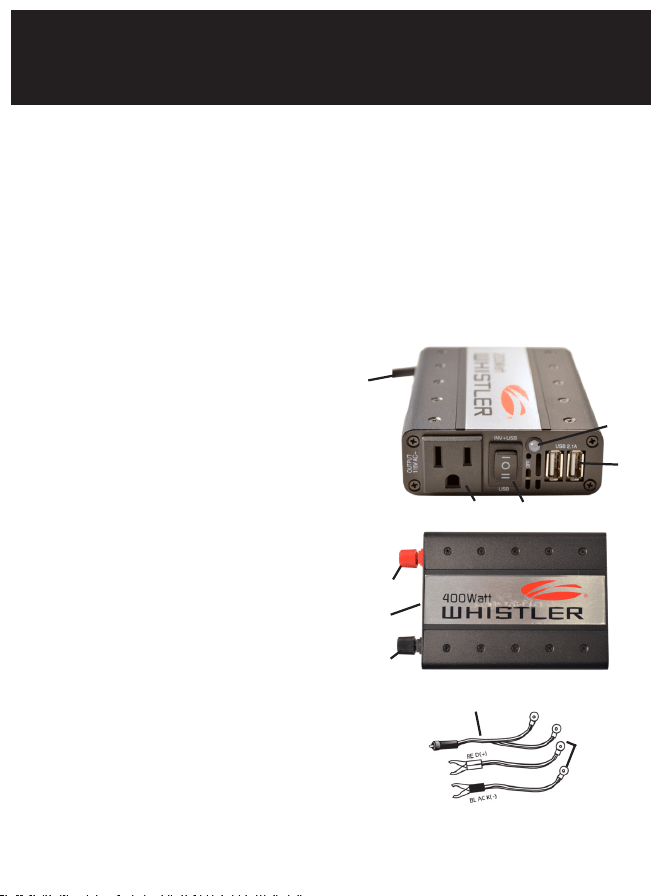
WHISTLER inverters convert low voltage, direct current (DC) to
115 volt alternating household current (AC). The AC output is
called “modified sine wave”. See “Operating Principles” section
for more information.
Depending on the model and its rated capacity, WHISTLER inverters
draw power either from standard 12 volt automobile and marine
batteries or from portable high power 12 volt sources.
1. AC Output Sockets
2. Inv+USB/Off/USB
3. USB Power Ports
4. Power On LED
5. Power Input
Terminal Black = Negative
6. High Speed Cooling Fan
7. Power Input
Terminal Red = Positive
8. Power Port Power Cord
(XP400i Only)
9. Battery Clamps
(XP400i Only)
10. Hardwired 12V Adapter Power Cord
(XP200i Only)
FEATURES DESCRIPTION
3
2
3
4
7
6
5
8
9
10
1

IMPORTANT INFORMATION
This manual will provide you with directions for the safe and efficient
operation of your WHISTLER inverter. Read the manual carefully
before using your new WHISTLER inverter and keep the manual on
file for future reference.
NOTE: Your WHISTLER inverter is designed to operate from a 12
volt power source only. Never attempt to connect your Whistler
inverter to any other power source, including any AC power source.
• The length of the supplied cables is matched for the current
needed by the inverter. Making this cable longer will make the
inverter less efficient and may cause the cables to heat up.
• Do not attempt to lengthen the supplied power cables.
• 115 volts can be lethal. Improper use of your WHISTLER inverter
may result in property damage, personal injury or loss of life.
• Not recommended for use with medical equipment. Check
with the appliance manufacturer for compatibility with
modified sine wave inverters. Some appliances may not work
well, not at all or be damaged. For more information on
compatibility issues, please visit our inverter FAQ page at
www.whistlergroup.com
4

INVERTER BASICS
Getting Started
Power equipment and appliances which operate with motors or tubes
require an initial surge of power to get them up and running. This
power surge is referred to as the “starting load” or “peak load.” (By
comparison, electrical devices such as standard light bulbs do not
require a large starting load). Once the equipment or appliance has
been powered up, it settles down to a slower pace and requires
far less electrical power to operate. This lower power requirement
is referred to as the “continuous load.” In order to ensure that the
capacity of your WHISTLER inverter is sufficient to meet the required
start up load, you must first determine the power consumption of the
equipment or appliance you plan to operate.
Power consumption is rated either in wattage or in amperes, and
information regarding the required “watts” or “amps” generally
is stamped or printed on most appliances and equipment. If this
information is not indicated on the appliance or equipment, check
the owner’s manual. Contact the appliance or equipment manu-
facturer to determine if the device you are using (TV’s, battery
re-charger, computer, medical equipment, etc.) is compatible
with a modified sine wave.
If the power consumption is rated in amps, multiply the number of
amps by 115 (AC voltage) to determine the comparable wattage
rating. Induction motors, as well as some televisions, may require 2
to 6 times their wattage rating for startup. For further information
on the fundamental operating principles of WHISTLER inverters
and related technical data, see “Operating Principles.”
5

Don’t Push It.
Although your WHISTLER inverter has the capacity to provide
power output (excess current) equal to approximately two times
its rated wattage capacity for a very brief period, it is designed
to operate equipment and appliances with start up load wattage
ratings no higher than its own maximum continuous wattage rating.
For example, the XP400i watt model has a maximum continuous
rating of 400 watts. Although this model has the capacity to briefly
provide more than its continuous power (that is, excess current),
it is designed to operate equipment and appliances with start up
load requirements of 400 watts or less.
Consequently, if the start up load rating of your equipment or
appliance is slightly higher than the maximum continuous rating
of the inverter, the inverter will attempt to start loads above the
continuous rating for several seconds.
The inverter is designed to shut down automatically in the event
of a power overload. Testing appliances and equipment with start
up load ratings comparable to your inverter wattage rating will not
damage the inverter. However, make sure the appliance you are
testing is compatible with modified sine wave inverters. See page
4 for more information.
INVERTER BASICS
6

INVERTER BASICS
7
If a piece of equipment or an appliance will not operate, first
confirm that the inverter has been properly connected to the 12
volt power source (See “Making The Connection”).
If all connections have been properly made, turn the inverter rocker
switch ON (l), OFF (O) and ON (l) again in quick succession. If
this procedure is unsuccessful, it is likely that the inverter does not
have the required start up capacity to operate the equipment or
appliance in question.
NOTE:
• Most heat generating appliances require start up loads in excess
of 1000 watts and this inverter will not operate such appliances
as coffee makers, irons, hair dryers or heaters.
• The inverter’s USB Ports do not support data communications.
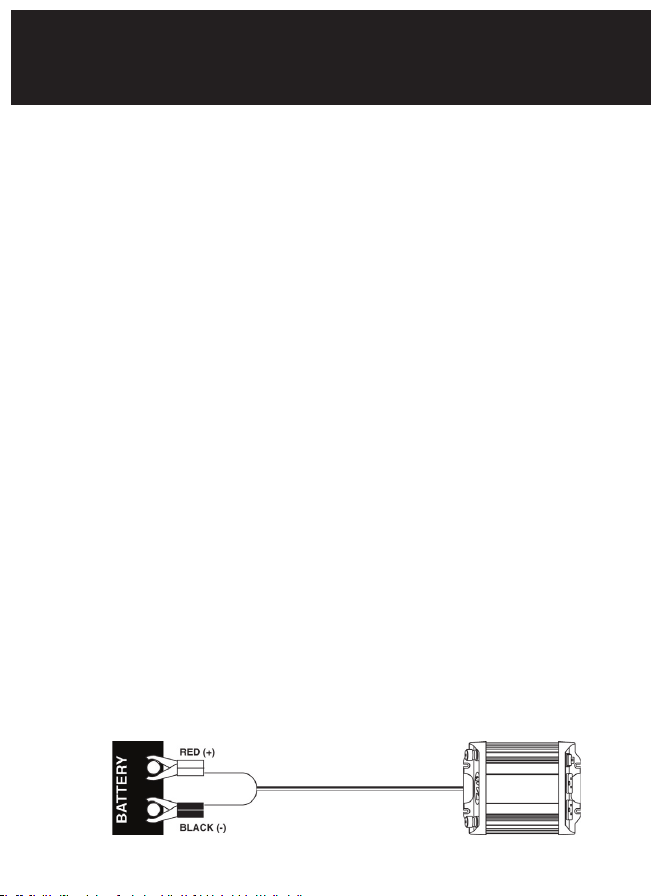
Making the Connection.
This inverter is designed to connect to your 12 volt battery using
the lighter socket plug or by the supplied battery cables (for
appliances over 150 watts, 400 watt model only).
1. Make certain that the inverter rocker switch is in the center
OFF (O) position.
2. Connect the cables to the power input terminals at the rear
of the inverter and tighten the screws to make a secure
connection. Do not use tools to tighten these screws.
Steps 3 - 5 are used when and appliance requires over
150 watts.* Step 6 is for appliances under 150 watts.*
3. Connect the cable from the (BLACK) Negative (-)
terminal on the inverter to the Negative (-) terminal on
the 12 volt power source. Make certain the connection
is secure.
4. Confirm that the cable you have just installed is properly
connected. Specifically, make certain that the cable is
connected to the Negative (-) terminals on both the
inverter and the 12 volt power source.
5. Connect the cable from the (RED) Positive (+) terminal
on the inverter to the Positive (+) terminal on the power
source.
6. Remove the lighter and push the adapter plug firmly
into the lighter socket.* (Make certain both the socket
and adapter plugs are clean.)
OPERATION
8

OPERATION
9
NOTE:
• If the equipment or appliance you intend to operate requires
more than 150 watts of continuous power, this inverter should be
connected directly to the power source using the Hard Wire Cables
(400 watt model). Failure to do so may result in serious damage to
the power cord or to the cigarette socket lighter wiring.
• Loose connections can result in a severe decrease in voltage
which may cause damage to the wires and insulation.
• Failure to make proper porlarity connection between the
inverter and the power source will result in reverse polarity.
Reverse polarity will blow the internal fuse(s) and may cause
permanent damage to the inverter. Damage caused by reverse
polarity is not covered under the WHISTLER warranty.
• Making the connection between the Positive terminals may
cause a spark as a result of current flowing to the capacitors in
the inverter. This is a normal occurrence. Due to the potential
for sparking, however, it is extremely important that both the
inverter and the 12 volt battery be well removed from any
possible source of flammable fumes or gases.
• Failure to heed this warning could result in fire or explosion.
*Some vehicle lighter sockets or power ports may only supply 10 amps or
approximately 100 watts. If so, use the hardwire cables. Check vehicle’s
owner’s manual for power source fuse rating.
• XP400i watt model - If the supplied cables are too short to
allow for placement of the inverter in a desired location, the
inverter may be connected to the power source using a #8 wire,
up to 12’. Use #4 wire for longer lengths. The steps outlined
for making the connection and the related safety precautions
remain unchanged.

7. Turn the inverter rocker switch to the Inv+USB (I) position.
The LED Indicator Light should glow GREEN confirming
that there is power running to the inverter.
8. Turn the inverter rocker switch to the center OFF (O)
position. (The GREEN LED Power Indicator light may
“blink” briefly and/or the internal audible alarm may make
a momentary “chirp”. This is normal).
9. Confirm that the equipment or appliance to be operated is
turned off. Plug the equipment or appliance into one of the
three AC receptacles on the front panel of the the inverter.
10. Turn the inverter to the Inv+USB (I) position. Turn on the
equipment or appliance.
11. The USB can be powered independently of the inverter
by turning the rocker switch to the USB (II) position.
NOTE: Indicator LED will not illuminate in this position.
NOTE:
• As indicated in Step 7 above, the audible alarm may make
a momentary “chirp” when the inverter is turned OFF (O).
The same alarm may also sound when the inverter is being
connected to or disconnected from the 12 volt power source.
• The use of an extension cord from the inverter to the appliance
or equipment being operated will decrease the power being
delievered to the load. For best operating results, the extension
cord should be no more than 50 feet long.
• Check frequently to ensure that the input and output
connections are secure. Loose connections may damage the
inverter or the power source or may generate excessive heat.
OPERATION
10

Important Information on Battery Chargers
Using your inverter with battery chargers for power tools, flashlights,
video cameras and laptop computers may cause damage to the
inverter or the charging unit. Check with the appliance manufacturer
for compatibility with modified sine wave inverters if you’re unsure.
Although we advise against it, if you attempt to use a charging unit,
monitor the temperature of the charging unit for approximately 10
minutes. If the charging unit becomes unusually warm, disconnect it
from the inverter immediately.
Don’t Blow A Fuse.
This inverter is equipped with an internal spade type fuse(s). With
reasonable care, it should not be necessary to replace the fuse(s) in
your inverter.
Most blown fuses are the result of reverse polarity or a short circuit
within the appliance or equipment being operated. If the fuse(s)
does blow, turn off and disconnect the appliance or equipment from
the inverter immediately, repair the related problem and replace the
fuse(s). The internal fuses are replaceable, however only electronically
knowledgeable people should attempt fuse replacement.
NOTE:
• Make certain to correct the source of the overload which
caused the blown fuse before turning your inverter back ON (l).
OPERATION
11

OPERATION
12
The Power Source.
When the engine is off, most batteries will provide an ample power
supply to the inverter for one to two hours. The actual length of
time is a function of several variables including the age and condition
of the battery and the power demand being placed on it by the
equipment being operated with the inverter.
If you are using the inverter while the engine is off, we recommend
you start the engine every hour and let it run for at least 10 minutes to
recharge the battery. We also recommend that the device plugged
into the inverter be turned off before turning over the engine.
Although it is not necessary to disconnect the inverter when turning
over the engine, the inverter may momentarily cease operation as the
battery voltage decreases. When the inverter is not supplying power,
and is turned on, it draws very low amperage from the battery
(<0.50 A ).

13
ADDITIONAL SAFETY FEATURES
Automatic Shut Down & Related Safety Features.
Each inverter has an unique LED indicator warning light system which
operates in conjunction with the automatic shut down feature.
These indicator lights operate as follows:
GREEN LED: System ready.
RED LED: System overload/automatic shut down.
Your inverter will shut down automatically when any of the
following problems occur:
1. The power input from the battery drops below 10 volts.
2. The power input from the battery exceeds 15 volts.
3. The continuous draw of the appliance or equipment being
operated exceeds the design parameters of the inverter.
The inverters are also equipped with the following additional
safety features:
1. Thermal Cut Off: Automatic shut down if internal temperature
exceeds safe design parameters.
2. Low Battery Voltage Alarm/Shutdown Protection:
a) When the input voltage from the 12 volt power source
drops below 11 volts, an audible tone will be heard.
This is the low battery voltage alarm.
b) The inverter will automatically shut down when the
input voltage drops below 10.5 volts. This protects the
battery from completely draining.
In the event of automatic shut down or continuous audible alarm,
turn the inverter rocker switch to the OFF (O) position until the source
of the related problem has been identified and resolved.

Some Powerful Advice.
When driving with the inverter in operation, make certain that
neither the inverter nor the power cords will impede safe
operation of your vehicle. Keep the unit and all cords clear of the
steering wheel, gas, brake and clutch pedals and gear shift.
To maintain your inverter in proper working condition, note the
following important safety precautions:
• MOISTURE. Keep the inverter dry. Do not expose it to moisture.
Do not operate the inverter if you, the inverter, the device being
operated or any other surfaces that may come in contact with
any power sources are wet. Water and many other liquids can
conduct electricity which may lead to serious injury or death.
• HEAT. For peak efficiency, the ambient air temperature should
be between 50° and 80° F. Avoid placing the inverter on or
near heating vents, radiators or other sources of heat. Do not
place the inverter in direct sunlight.
• VENTILATION. In order to disperse the heat generated while
the inverter is in operation, keep it well ventilated. While in use,
maintain several inches of clearance around the top and sides
of the inverter.
• FUMES & GASES. Avoid using the inverter near flammable
materials. Do not place the inverter in areas such as battery
compartments. Where fumes or gases may accumulate.
In Review.
• Never attempt to operate your WHISTLER inverter from any
power source other than a 12 volt battery or group of batteries
that total 12 volts.
14
CARE AND MAINTENANCE
15
OPERATING PRINCIPLES
For You Technical Types.
WHISTLER inverters work in two stages. During the first stage, the
DC to DC converter increases the DC input voltage from the power
source (e.g. a 12 volt battery) to 145 volts DC. In the second stage,
the high voltage DC is converted to 115 volts (60 Hz AC) using
advanced power MOSFET transistors in a full bridge configuration.
The result is excellent overload capability and the capacity to
operate difficult reactive loads. The output waveform resulting from
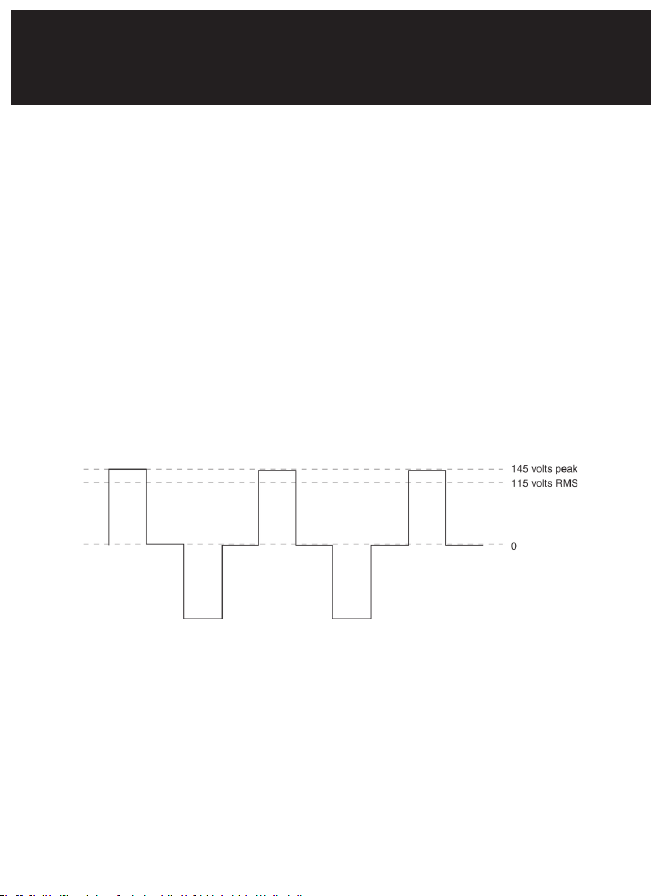
these conversions is a “quasi-sine wave” or a “modified sine wave”
as shown on below.
This stepped waveform is similar to the power generated by utilities
and has a broad range of applications.
The modified sine wave produced by the Inverter
The modified sine wave produced by your Whistler inverter has a
root mean square (RMS) voltage of 115 volts.
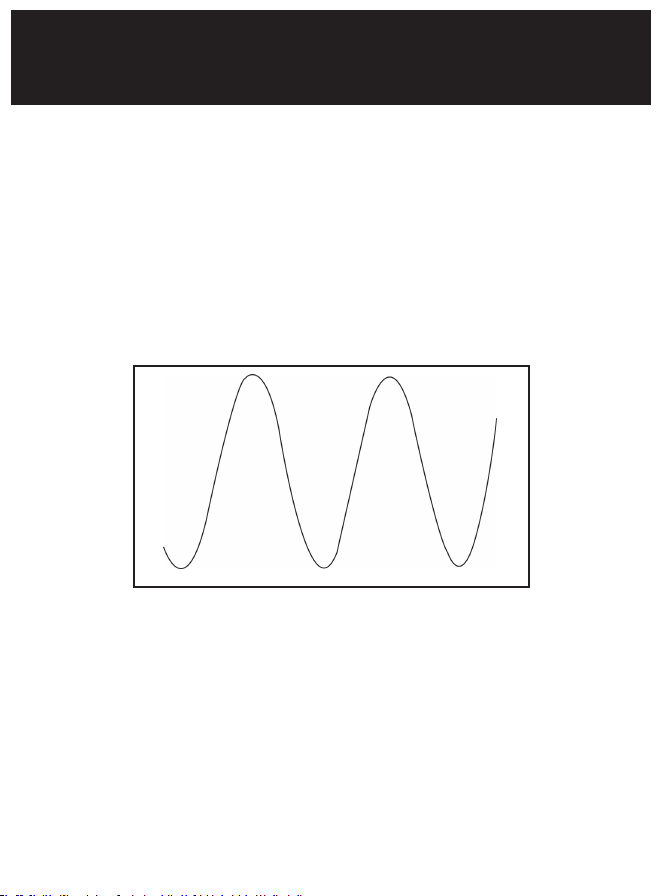
The majority of AC voltmeters measure RMS voltage and assume
that the measured waveform will be a pure sine wave.
16
OPERATING PRINCIPLES
Consequently, these meters will not read the RMS modified sine
wave voltage correctly and, when measuring your WHISTLER
inverter output, the meters will read about 20 to 30 volts too low.
To accurately measure the output voltage of your inverter, use
a true RMS reading voltmeter such as a Fluke 87, Fluke 8060A,
Beckman 4410, Triplett 4200 or any multimeter identified as
“True RMS.”
For more information on inverters see our Inverter FAQ page.
A true sine wave typical of home AC outlet.

OPERATION SUMMARY
17
• This inverter is designed to be connected to the power source
with the supplied cables or with #8 wire up to 12’ Use #4 wire
for longer length. When utilizing the supplied cables do not
attempt to modify or lengthen them.
• Always make certain that the power cable terminal connections
Negative (-) to Negative (-) and Positive (+) to Positive (+).
Check these connections frequently to ensure that they are
secure.
• Make certain the rated power consumption of the appliance or
equipment you wish to operate is compatible with the capacity
of your inverter.
• If the rated power consumption of the equipment is in the range
of the maximum specified wattage of your converter, test the
inverter to ensure that it will operate properly.
• This Inverter is not designed to operate heat generating
appliances such as coffee makers, irons, hair dryers, toasters and
heaters.
• Before attempting to use a battery charger see page 11.
• Before attempting to use medical equipment see page 4.
• Use only fuses which conform with the design specifications
outlined in this manual.

OPERATION SUMMARY
18
• When operating the inverter with the engine off, start the
engine every hour and let it run for at least 10 minutes to
recharge the battery.
• In the event of automatic shut down, turn the inverter OFF (O)
immediately. Do not restart the inverter until the source of the
problem has been identified and corrected.
• To avoid battery drain, always disconnect the inverter when not
in use.
• Do not expose the inverter to moisture.
• Avoid placing the inverter near sources of heat or in direct
sunlight.
• When in use, make certain that the inverter is properly
ventilated.
• Do not use the inverter near flammable materials, fumes or
gases.
• Always operate the inverter in accordance with the instructions
in this manual. Failure to do so may result in property damage,
personal injury or loss of life.
19
TROUBLESHOOTING
Please visit our Inverter FAQ page on our website
(www.whistlergroup.com), for more troubleshooting
information and FYI topics.
PROBLEM: TV Interference
Problem Solution
Electrical interference from inverter. Add a Ferrite data line filter on to the
TV power cord. This filter is available at
electronic part stores.
PROBLEM: Low or No Output Voltage
Problem Solution
Using incorrect type of voltmeter to test
output voltage.
Use a true RMS reading meter. See
“For You Technical Types” Section of
this manual.
PROBLEM: Low Battery Alarm On All The Time
Problem Solution
Input voltage below 11 volts. Keep input voltage above 11 volts to
maintain regulation.
Poor or weak battery condition. Replace battery.
Inadequate power being delivered to
the inverter or excessive voltage drop.
Use heavier gauge wire. (400 watt
model)
20
TROUBLESHOOTING
Red LED On
Problem Solution
Equipment has a high start up surge. Turn inverter power switch center OFF
(O) and then Inv+USB (l) again until the
inverter powers your appliance. Repeat
as necessary to get your appliance
“started”.
Battery voltage below 10 volts. Recharge or replace battery.
Inverter is too hot (thermal shutdown
mode).
Allow inverter to cool. Check for
adequate ventilation. Reduce the load
on the inverter to load on the inverter
to output.

SPECIFICATIONS
21
WHISTLER 200 WATT INVERTER SPECIFICATIONS
Maximum Continuous Power .................................... 200 Watts
Maximum Surge (Peak Power) ...................................... 400 Watts*
No Load Current Draw ................................................. <0.4 A
Waveform .................................................. Modied Sine Wave
Input Voltage ...................................................... 11– 15.5 +/- .5V
AC Receptacle ................................................. North American
Fuse ................................... One 25 Amp (Spade Type-Internal)
USB ...................................................................... 5V 2.1A Max
Approximate Dimensions ........... 5.30” L x 3.50” W x 1.30” H
Approximate Weight .................................................... .80 lbs
WHISTLER 400 WATT INVERTER SPECIFICATIONS
Maximum Continuous Power .................................. 400 Watts
Maximum Surge (Peak Power) .............................. 800 Watts*
No Load Current Draw ................................................ <0.5 A
Waveform ............................................... Modied Sine Wave
Input Voltage .................................................. 11 – 15.5 +/- .5V
AC Receptacle ........................................ Two North American
Fuses .................................. Two 25 Amp (Spade Type-Internal)
USB ....................................................................... 5V 2.1A Max
Approximate Dimensions ........... 6.50” L x 4.15” W x 2.00” H
Approximate Weight ................................................... 1.25 lbs
*Under certain conditions your inverter may provide up to 2 times
the continuous rating for a brief period.

WARRANTY
22
Consumer Warranty
This Whistler product is warranted to the original purchaser for a period of
two (2) years from the date of original purchase against all defects in materials
and workmanship, when purchased from an authorized Whistler retailer. This
limited warranty is void if the unit is abused, misused, modified, installed
improperly, or if the housing and/or serial numbers have been removed.
There are no express warranties covering this product other than those set
forth in this warranty. All express or implied warranties for this product are
limited to two (2) years. Whistler is not liable for damages arising from the use,
misuse, or operation of this product including but not limited to loss of time,
inconvenience, loss of use of your product or property damage caused by your
product or its failure to work, or any other incidental or consequential damages
including personal injury.
DO NOT RETURN ITEM TO STORE WHERE PURCHASED.
FOR WARRANTY INFORMATION, CONTACT WHISTLER
CUSTOMER SERVICE AT 1-800-531-0004.
Representatives are available to answer your questions
Monday – Friday
from 8:00 a.m. to 5:00 p.m. CT
Service Under Warranty
During the warranty period, defective units will be repaired or replaced
(with the same or a comparable model), at Whistler’s option, without charge
to the purchaser when returned prepaid, with dated proof of purchase to
the address below. Units returned without dated proof of purchase will be
considered out of warranty and therefore are not covered by the described
Limited Warranty. (Refer to Service Out of Warranty section.)
Due to the specialized equipment necessary for testing Whistler products,
there are no authorized service centers other than Whistler. When returning a
unit for service under warranty, please follow these instructions:

WARRANTY
23
1. Ship the unit in the original carton or in a suitable sturdy equivalent,
fully insured, with return receipt requested to:
Whistler Repair Dept.
1412 South 1st St.
Rogers, AR. 72756
Please allow 3 weeks turnaround time.
IMPORTANT: Whistler will not assume responsibility for loss or damage
incurred in shipping. Therefore, please ship your unit insured with return
receipt requested. CODs will not be accepted!
2. Include with your unit the following information, clearly printed:
• Your name and physical street address for shipping (no PO Boxes), a
daytime telephone number, and an email address (if applicable).
• A detailed description of the problem (e.g.,“device will not
Power ON”).
• A copy of your dated proof of purchase or bill of sale.
3. Be certain your unit is returned with its serial number. Units
without serial numbers are not covered under warranty.
IMPORTANT: To validate that your unit is within the warranty period,
make sure you keep a copy of your dated proof of purchase. For
warranty verification purposes, a copy of your dated store receipt must
accompany any Whistler product sent in for warranty work.

WARRANTY
24
Service Out Of Warranty
Units will be repaired at “out of warranty” service rates when:
• The unit’s original warranty has expired.
• A dated proof of purchase is not supplied.
• The unit has been returned without its serial number.
• The unit has been misused, abused, modified, installed improperly,
or had its housing removed.
The out of warranty service fee for these inverters are as follows:
XP200i inverter is $15.00 XP400i inverter is $25.00
If you require out of warranty service, please return your unit as outlined
in the section “Service Under Warranty” along with a cashier’s check or
money order in the amount specified for purchased inverter. Payment may
also be made by MasterCard, VISA or American Express. Personal checks
are not accepted.
In the event repairs cannot be covered by the minimum service fee, you
will be contacted by a Whistler technical service specialist who will outline
options available to you.
IMPORTANT: When returning your unit for service, be certain to include a
daytime telephone number and an email address (if applicable).
Customer Service
If you have questions concerning the operation of your Whistler
product, or require service during or after the warranty period,
please call Customer Service at 1-800-531-0004.
Representatives are available to answer your questions Monday -
Friday from 8:00 a.m. to 5:00 p.m. (CT) or visit the F.A.Q.’s at
www.whistlergroup.com.

CORPORATE HEADQUARTERS
1716 SW Commerce Dr. Ste. 8
PO Box 1760
Bentonville, AR 72712
Toll Free (800) 531-0004
TEL (479) 273-6012
FX (479) 273-2927
www.whistlergroup.com
CUSTOMER RETURN CENTER
1412 South 1st St.
Rogers, AR 72756
Customer Service Tel (800) 531-0004
Email: [email protected]
P/N 401562
Rev.2 © 05/2014 The Whistler Group, Inc.