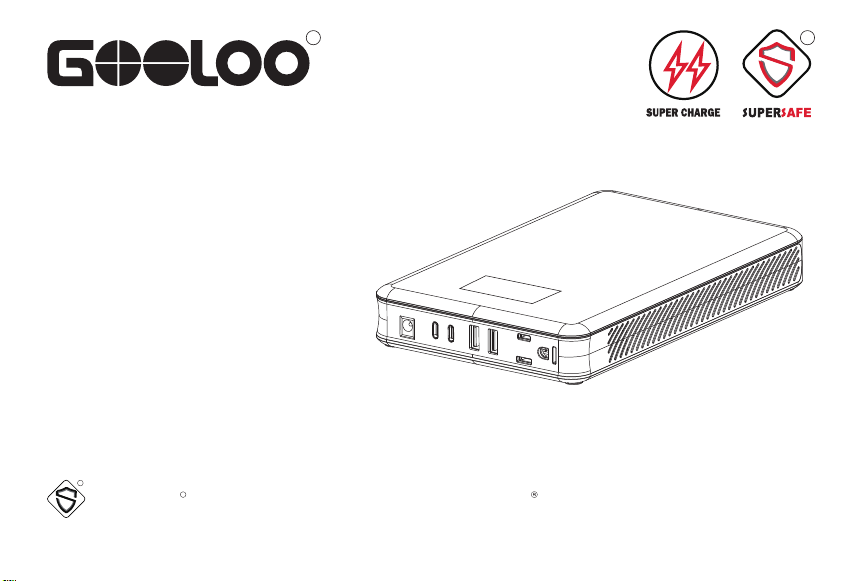
Model No.: PB-53
R R
R
R
User Manual
Discovery 100
Portable Power Station
Reg No. 5904374
SUPERSAFE is a safety protection technology by GOOLOO


Thank you for choosing the GOOLOO Discovery 100 portable power station. Please follow basic safety carefully all the
time. Please keep this instruction manual for easy reference precautions when using electrical appliances. Make sure to
read all instructions.
Portable Power Station Discovery 100
1.PRODUCT OVERVIEW
2.PACKAGE CONTENTS
3. LED DISPLAY DESCRIPTION
4. RECHARGING INSTRUCTION
5. ELECTRONIC DEVICES CHARGING INSTRUCTION
6. CHARGEABLE DEVICES
7. LED FLASH LIGHT
8. PRODUCT HIGHLIGHTS
9. SPECIFICATIONS
10. FAQ
11. TROUBLESHOOTING
12. SAFETY INSTRUCTIONS
13. WARRANTY
1
2
3
4
4
5
6
6
7
8
9
9
12
Contents
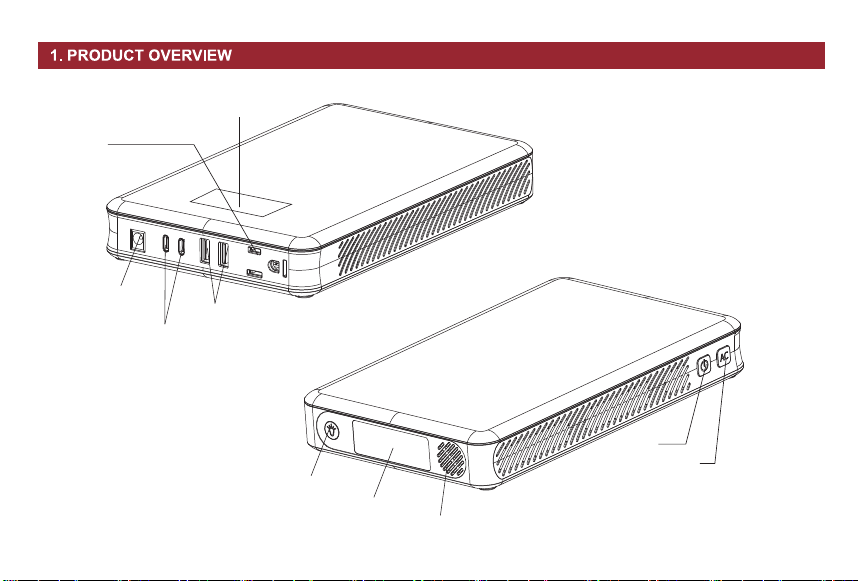
Switch
AC Switch
LED Switch
LED Flash Light
AC110V Output Port
USB1+2 QC3.0 Output
USB-C PD100W
Input/Output
DC12V10A
Output Port
Radiator
LED Display
1
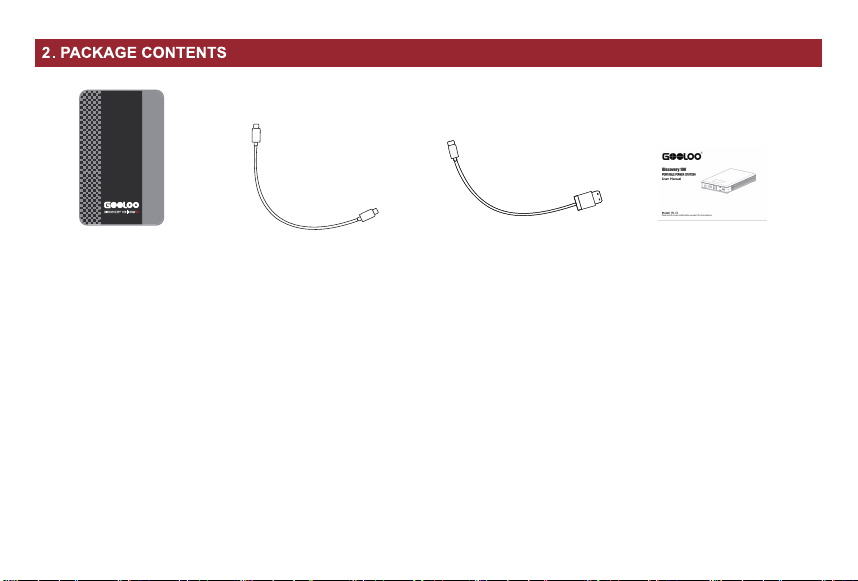
Discovery 100
Power Station X1
USB-C to USB-C Cable
USB-A to USB-C Cable User Manual X1
Please carefully check the package contents. If anything is missing or damaged, please feel free to contact GOOLOO customer
service at [email protected] for assistance.
2
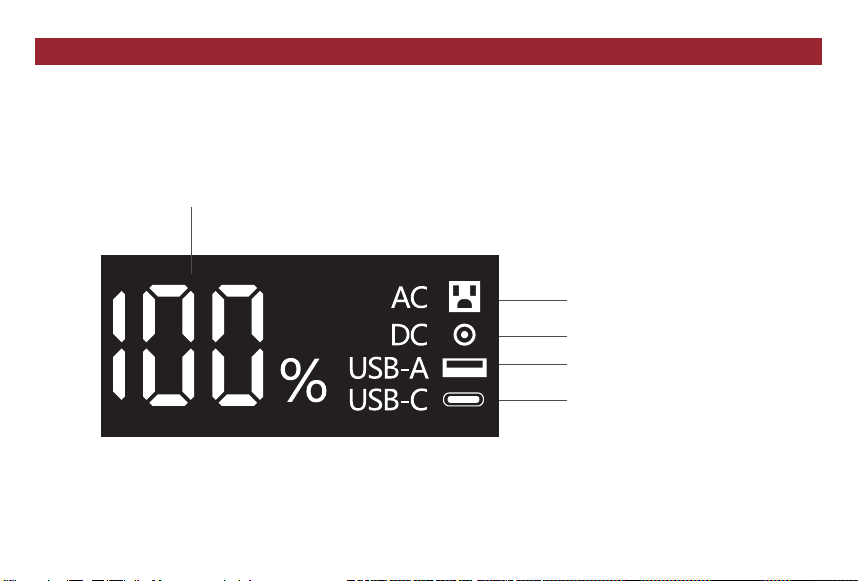
AC Output Indicator
TYPE-C Input/Output Indicator
12V DC Output Indicator
USB-A Output Indicator
Remaining Battery Percentage
1.Touch the on/off button, the display shows XX%, which means the portable power station has XX% charge.
2.The display shows 100%, indicating that the portable power station is fully charged.
3.When the display shows xx% number is rising, indicating that the portable power station is charging.
4.When the display shows "USB-C/USB-A/AC/DC", it means "USB-C/USB-A/AC/DC" port is being used for charging.
3. LED DISPLAY DESCRIPTION
3
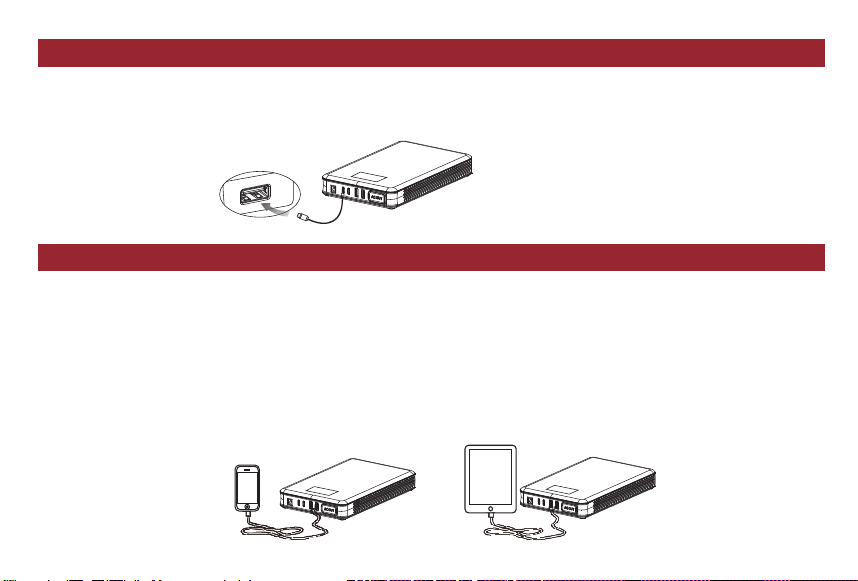
1.Plug the charging cable to output port.
2.Select appropriate connector and connect it to your electronic devices.
3.Press the switch button to charge.
Notice:
1.Click the AC switch button to turn on the output when the host is activated; and press and hold the AC switch button to
turn on the output when the host is not activated.
2.When the screen is off, the output cannot be automatically recognized if AC is plugged in. You must manually press the
AC button to turn it on.
3.When unplugging the AC, the output cannot be turned off automatically and must be turned off manually.
1.Connect the USB cable with the home adaptor and then plug the home adaptor into the universal socket.
2.Connect the USB-C connector to the power station.
Note: The charger is not included, you can use your own charger for charging.
4. RECHARGING INSTRUCTION
5. ELECTRONIC DEVICES CHARGING INSTRUCTION
4
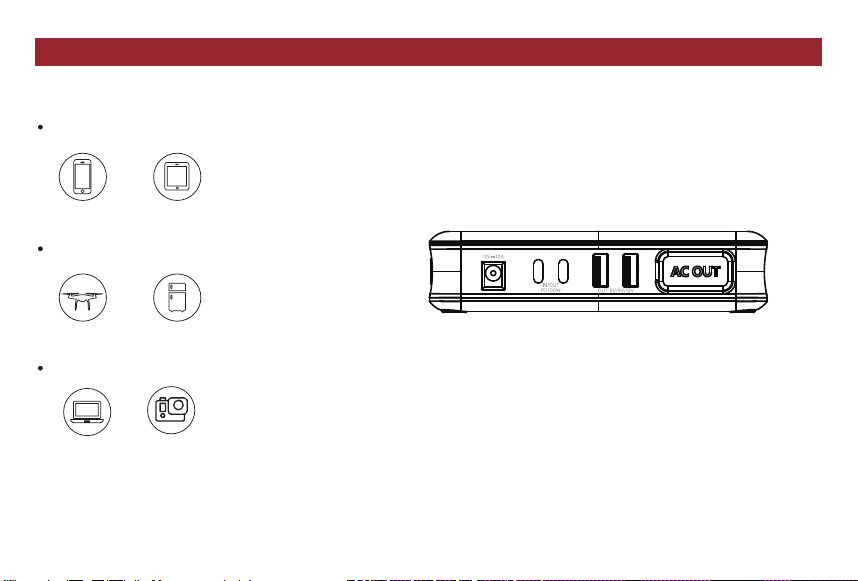
Discovery 100 is a versatile product with a wide variety of ports, and is compatible with a range of devices. Note that
supporting appliances rated over 100W is not allowed.
USB Output: Smartphones, tablets, smartwatches, e-readers, and more.
DC Output (12V): Drones, mini-fridges, and more.
AC Output: Laptops, digital cameras, and more.
Smartphones Tablets
Cameras
Laptops
Drones
Mini-fridges
6. CHARGEABLE DEVICES
5

Handheld Power: Boasting a compact design, the GOOLOO Discovery 100 portable power station packs a whopping
27000mAh (99.9Wh) capacity and an impressive 100W output. This powerful device offers lightning-fast charging for over
90% of digital devices. Possessing it, you can charge a smartphone over 6 times and a laptop computer up to 1.5 times.
Experience the ultimate in portable power with the Discovery 100!
Rapid Recharge: This portable power bank quickly charges from 0-100% in just 1 hour when connected to the USB-C port.
With 2*USB QC3.0 out ports, 1*DC out port (12V 10A), 2*USB-C out ports (PD100W), 1*AC out port (100W), this power
station can charge up to 6 devices simultaneously. It’s possible for you to experience ultra-fast recharging and multi-device
charging capabilities in one compact package.
1.Shortly press the power button for 2 seconds to activate the host.
2.Press the light switch button to turn on the always-on mode.
3.Press the light switch button again to turn on SOS mode.
4.Press the light switch button for the third time to turn on the strobe mode.
5.Press the light switch button for the fourth time to turn off the lighting mode.
7. LED FLASH LIGHT
8. PRODUCT HIGHLIGHTS
6

Product Name: Discovery 100 Portable Power Station
Model No.: PB-53
Battery Capacity: 99.9Wh
USB-C1 Input/Output: PD 100W
USB-C2 Input/Output: PD 100W
AC Output: 110V 60Hz 100W
USB QC3.0 Output1: 5V 3A,9V 2A,12V 1.5A
USB QC3.0 Output2: 5V 3A,9V 2A,12V 1.5A
DC Output: 12V 10A
9. SPECIFICATIONS
Travel-Ready Design: Weighing only 2.07 lbs and meeting UN38.3 shipping standards, the Discovery 100 is perfectly
suited for air and train travel, easily fitting into your carry-on luggage. It's the ultimate portable power source for a range of
situations, including camping, outdoor adventures, mobile workspace, business trips, and more, enabling you to enjoy the
convenience and the versatility of the Discovery 100 wherever you go.
Long-lasting Dependability: The GOOLOO Discovery 100 features a sturdy and resilient Ternary Lithium Battery that
retains 80% of its capacity even after an impressive 1,000 charge cycles. Even with daily charging, this power station ensures
long-term reliability. It is UL certified, providing impact and high-temperature resistance for enduring performance. You can
rely on the Discovery 100 for its dependable endurance.
Emergency LED Light: The portable power station equipped with 3 modes of LED work lights: Steady on, Strobe and SOS.
Press the LED flashlight switch to allow for the change of three modes. This power supply could be your perfect companion
during camping trips or when facing power outages.
Weight: 2.07lbs
Dimension: 8.5 x 5.32 x 1.27 inches
Full Charging Time: About 1 hour with the USB-C port
Lifetime: ≥1000 Cycles
Charging Temp: 0°C to 55°C (32°F-131°F)
Discharging Temp: -20°C to 55°C (-4°F-131°F)
7

Q. How to turn off this appliance?
A. USB-A/USB-C output port has an intelligent detection function, once there is no load, or the end of the electronic
product charging, the mobile power will automatically hibernate, AC output port need to manually shut down the output
Q. How long time to realize the full charging bythe Discovery 100 portable power station?
A. It takes about 1 hour for to be fully charged via USB-C input.
Q. How many times can this appliance charge for my cell phone?
A. Depend on the battery capacity of your cell phone. It can generally charge 5-6 times.
Q. What's the lifetime of Discovery 100 portable power station?
A. Usually 3-5 years in normal condition.
Q. How long the storage of battery will remain?
A. 6-12 months, however, we suggest to recharge it every 3 months.
10. FAQ
8
IMPORTANT
Failing to follow the advice below could result in serious injury or even death.
Before starting using our product, please read the instructions carefully.
Please do not contact with other electronic products which exceed the specifications' requirement in case of
getting electric shock or damage the product.
Please avoid using damaged or broken output cables and terminals with the product to prevent electric
shock and potential damage.
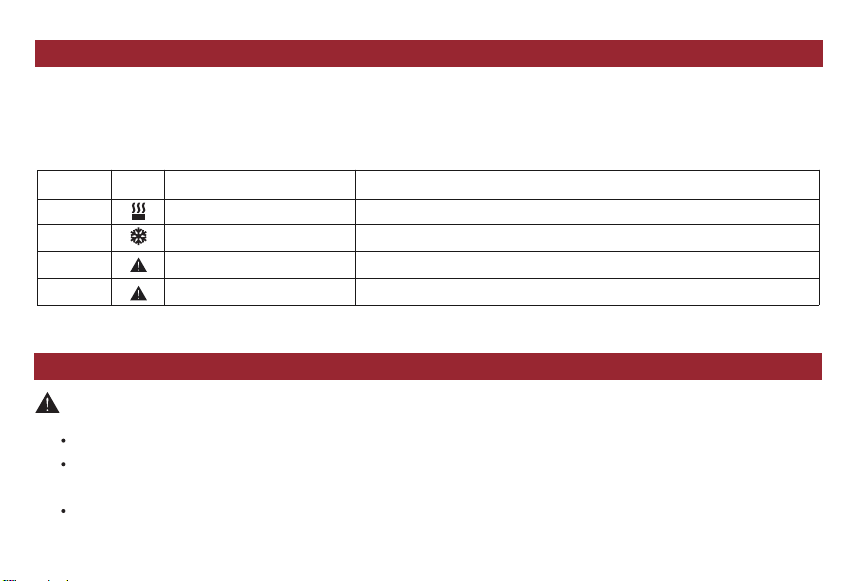
Error code
(Output)
E1
E2
E3
E4
Over-temperature protection
Low temperature protection
QC short
DC short
Error
icon
Cause Solution
Auto Recover/unplug all charging devices
Auto Recover/unplug all charging devices
Automatically shut down the output, press the power button to activate
Automatically shut down the output, press the power button to activate
If the product cannot charge or power other devices, please check through the following steps:
1. Make sure the power button is switched on.
2. Check the battery capacity. If it is lower than 10%, please charge the power station.
3. Make sure the connected power load does not exceed the limit of Discovery 100 Each port has its own limit.
11. TROUBLESHOOTING
12. SAFETY INSTRUCTIONS
9

Please keep the products dry, don’t get immersed in water or put on humid environment in case of getting electric
shock or damaging the product.
Please don't plug foreign object into input port or output port in case of damagingthe product.
Please use the product in a good ventilation environment.
Please avoid falling down from high place.
Please don't use the product under too high temperature or too low, or the product would not operate, face the
reduction of the life span or get damaged possibly.
Please don't expose the product into the fire or the temperature over 60 ℃, or it will cause the accidents such as fire
and explosion.
Please don't expose and use the product under bad environment such as rainy, frost and snowy weather or greasy
place, or it would make some function loss efficacy , shorten the life span or cause battery damage.
Please don't try to disassemble the product and only professional technical staffs are allowed to disassemble it. Or it
will cause electric shock, fire or explosion such unknown dangers.
After vacancy of a long time, please charge it every 3 months in case that it would not have enough electricity.
Please keep far away from children to avoid possible dangers.
Under extreme condition the battery would leak the liquid, if get touched by hands or other bare skin parts
accidentally, please wash it by soap and water; if get into eyes accidentally, immediately use the cold water to wash at
least 10 minutes thengo to hospital instantly.
Please handle the lithium products according to your local laws after its expiration of life span.
10

WARNING-RISK OF EXPLOSIVE GASES.
To reduce risk of battery explosion, it’s necessary to follow these instructions and those published by battery
manufacturer of any equipment you intend to use in vicinity of the battery.
Do not charge the unit via a power supply that is outside of 100 to 240V.
Do not place the unit on its side or upside down while in use or storage.
Do not use accessories for other uses.
If rust, unusual smells, overheating or other abnormal circumstances are observed, you should stop using the unit
immediately and contact the dealer or our customer support.
The unit complies with all legal requirements for the transport of dangerous goods.
Make sure that the unit is properly secured when transporting it in a motor vehicle.
You should only charge, use and store the unit within an ambient temperature of 0°C to 55°C (32°F-131°F).
Please don't plug in a laptop with power larger than 150W. If it exceeds 150W, our products cannot charge this device
and be protected.
Switch the unit off immediately if it has accidentally fallen, was dropped or was exposed to vibration.
Carefully read the instructions for the electric devices that you intend to connect to your power supply unit.
11

13.WARRANTY
GOOLOO warrants to the original consumer that GOOLOO products will be free from defects in workmanship and materials
under normal use during the applicable warranty period as determined in the "Warranty Period" section below, which is
subject to the "Exclusions" clause below.
Warranty Period
The warranty period of the GOOLOO portable power station is 18 months. Consumers need to provide a sales receipt for
the first purchase or other reasonable documentary proof to determine the start date of the warranty period. Under normal
circumstances, the warranty period is calculated from the date of purchase by the original consumer.
Exchange
If GOOLOO products cannot be operated due to defects in workmanship or materials during the applicable warranty
period, GOOLOO will provide free replacement, and GOOLOO will bear the freight. Moreover, the replacement product will
bear the remaining warranty period of the original product.
Refund
GOOLOO provides a 30-day money-back guarantee for products purchased directly from GOOLOO. If you are not satisfied
for any reason, just let us know within 30 days. Once we receive the product and confirm its validity, we will refund the full
amount to you. Please check before returning: (1) You purchased the product directly from GOOLOO ; (2) You should
contact GOOLOO and start the return process within 30 days of the original delivery date; (3) The product is returned in its
original packaging, including all materials, in a new or as-new state.
12
Exclusions
GOOLOO's warranty does not apply to:
1. Misuse, abuse, modification, accidental damage, or use for any other purpose other than those authorized in the
current product information of GOOLOO;
2. Attempt to repair by anyone outside the authorized organization;
3. Appearance damage due to using;
4. Non-original consumer purchasers;
5. The GOOLOO warranty does not apply to battery cells.
If you have any questions during using GOOLOO products, please feel free to contact with us at
Contact Us
華佳商事 株式会社
MADE IN CHINA