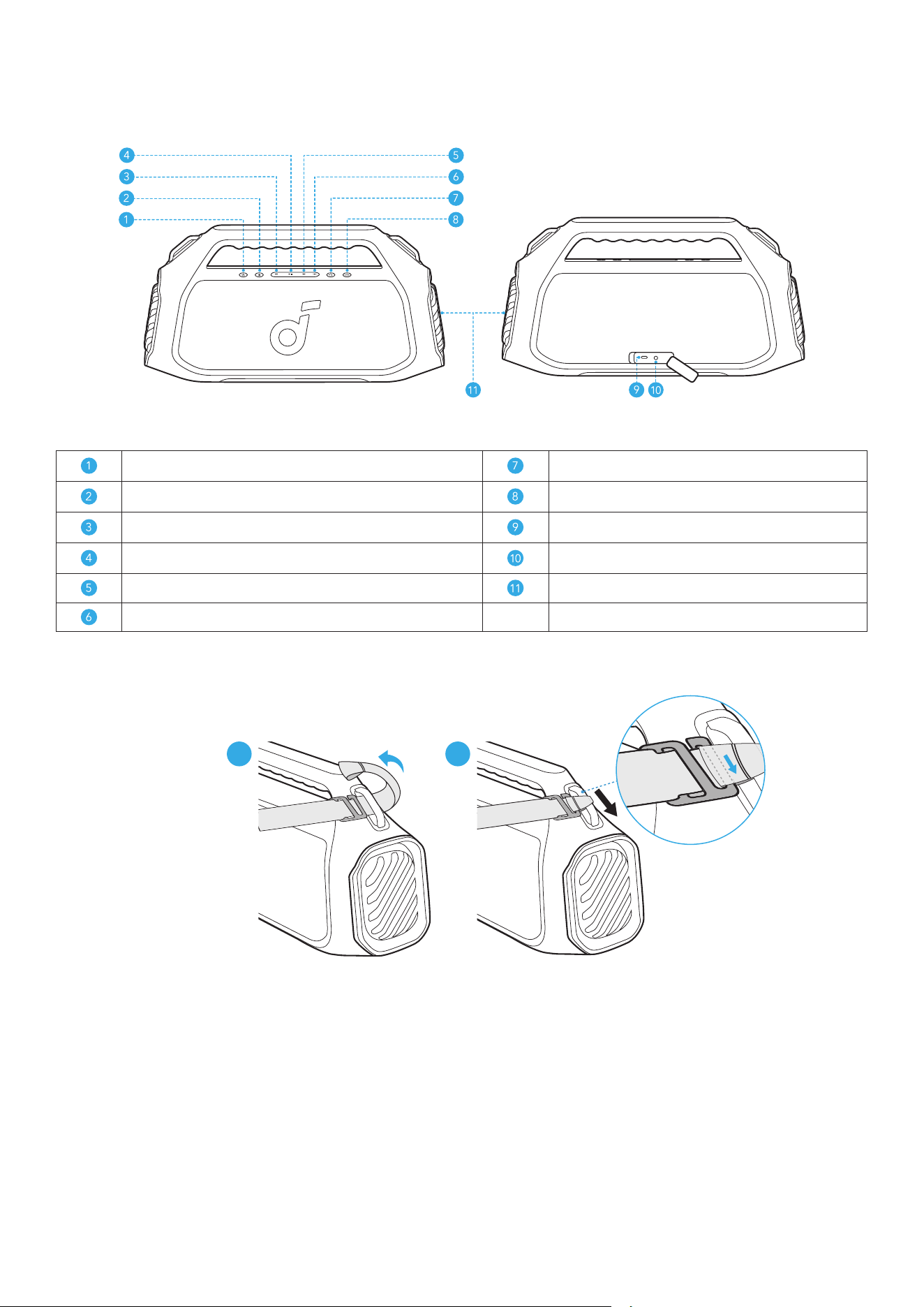
At a Glance
Power Button PartyCast Button
Bluetooth Button BassUp 2.0 Button
Volume Down Button Type-C Charging Port
Play/Pause Button AUX Input
Volume Up Button LED Light
LightShow Button
Installing the Strap
1 2
• Attach the strap to both sides of the handle.
Charging
Charging Your Speaker
• Use a certified C-C cable and charger to prevent any damage.
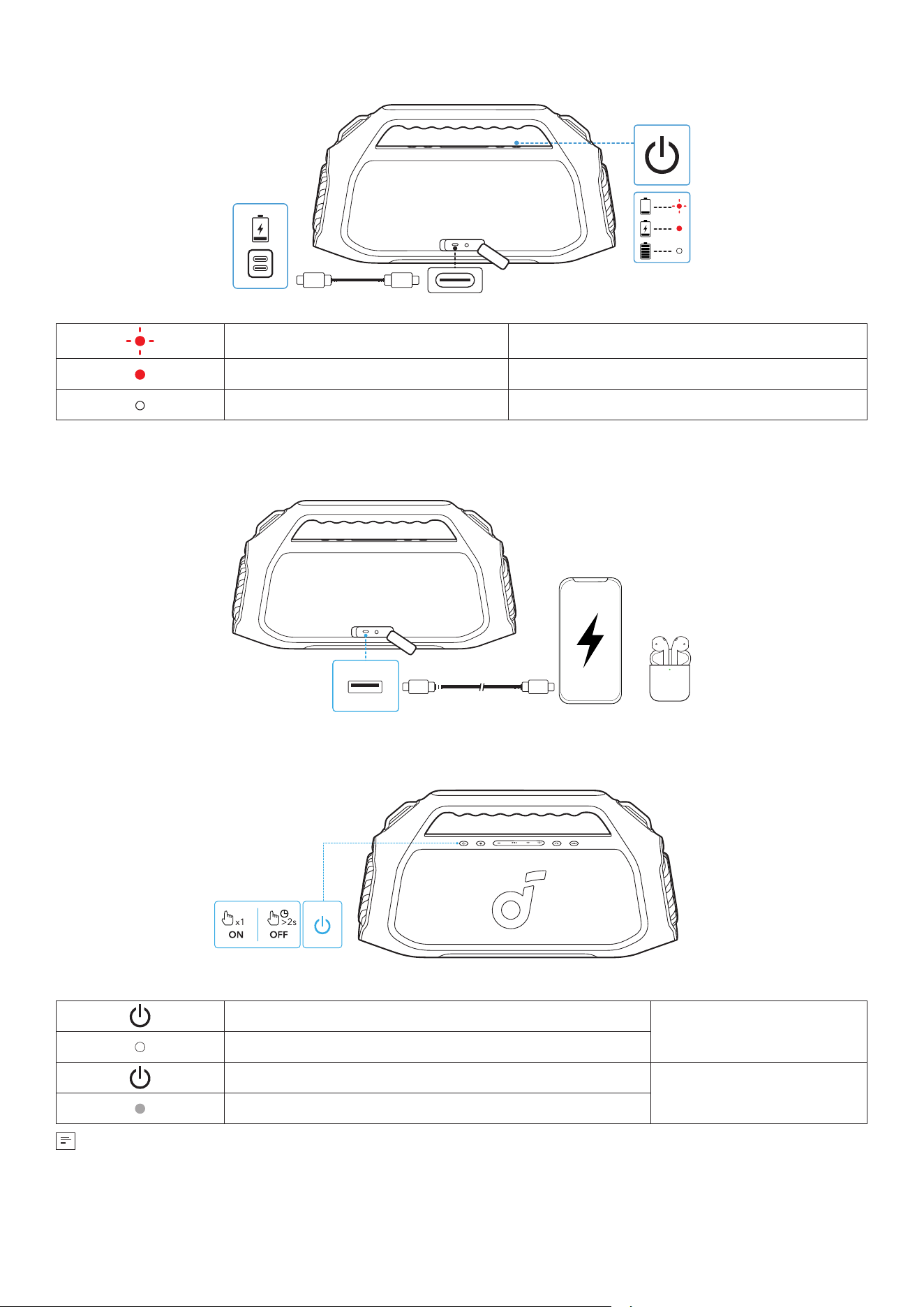
Flashing Red Low Battery
Steady Red Being Charged
Steady White Fully Charged
Charging External Devices
• Use this speaker as a power bank to charge your portable devices or accessories.
Powering On/Off
Press or Press and Hold for 2 Seconds
Power On
Steady White
Press and Hold for 2 Seconds
Power Off
Light Off
• This speaker will automatically power off after 20 minutes of no audio input.
• You can also set an auto-power-off time in the soundcore APP.
Using Your Speaker
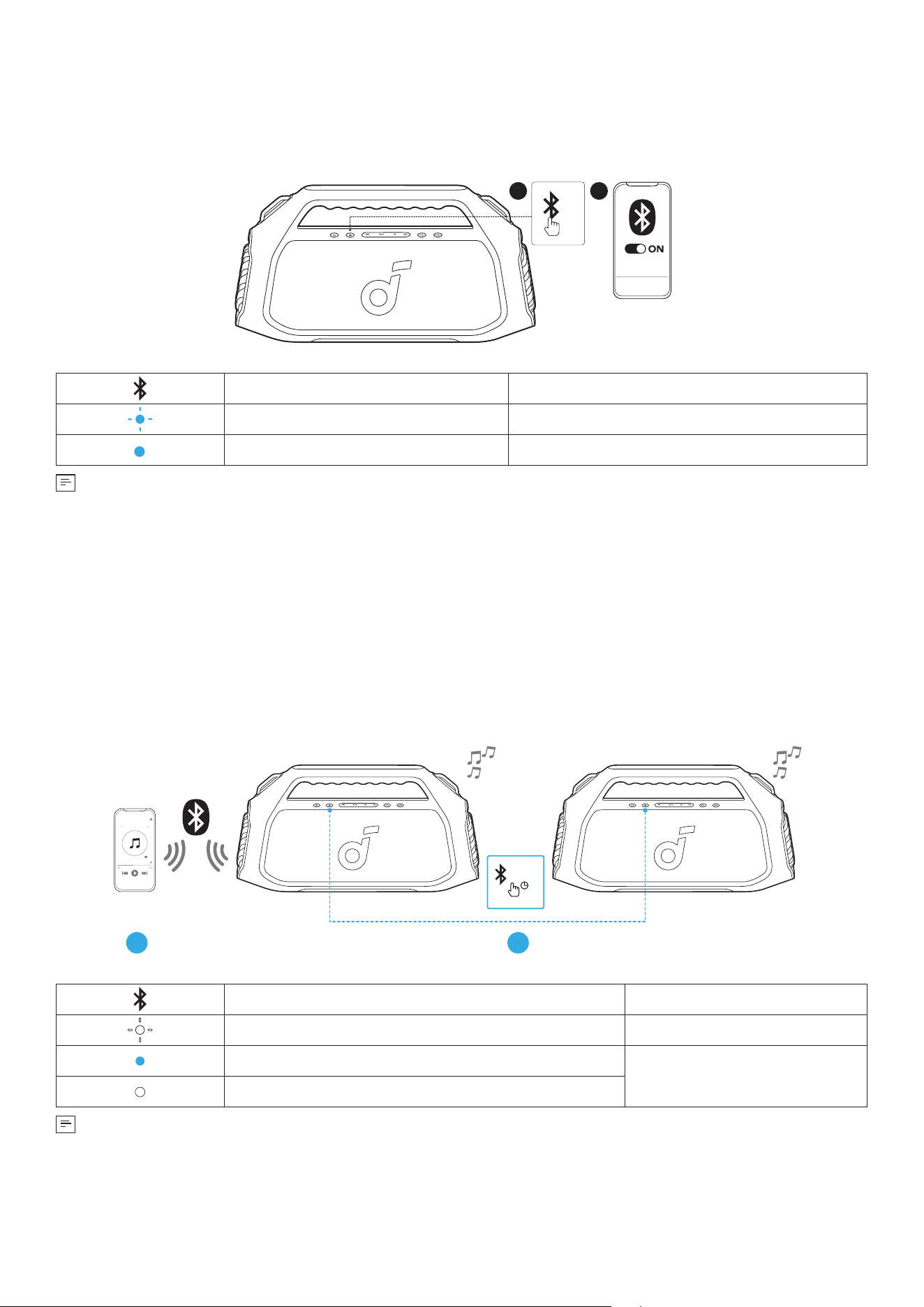
Bluetooth Mode
Press the Bluetooth button to enter Bluetooth pairing mode, then select "soundcore Boom 2 Plus" from the
Bluetooth list to connect.
1
x1
2
soundcore
Boom 2 Plus
Press Enter Bluetooth Pairing Mode
Flashing Blue Bluetooth Pairing
Steady Blue Bluetooth Connected
• To re-enter Bluetooth pairing mode, press the Bluetooth button once.
• This speaker can only play music on one mobile device at a time. To play from another connected device,
pause the device that's currently active first.
• Each time you power on your speaker, it will automatically connect to your last connected device if available
within the Bluetooth range. If not, press the Bluetooth button to enter Bluetooth pairing mode.
TWS (True Wireless Stereo) Mode
Two identical soundcore speakers can pair with each other for stereo sound. Both speakers can play the same
audio (one as the left channel and the other as the right channel).
With one speaker connected to a smartphone, press and hold the Bluetooth button for 2 seconds on two speakers
to enter TWS pairing mode.
1 2
>2s
Press and Hold for 2 Seconds Enter / Exit TWS Pairing Mode
Flashing White TWS Pairing
Steady Blue (Speaker 1)
TWS Connected
Steady White (Speaker 2)
To exit TWS mode, press and hold the Bluetooth button for at least 2 seconds.
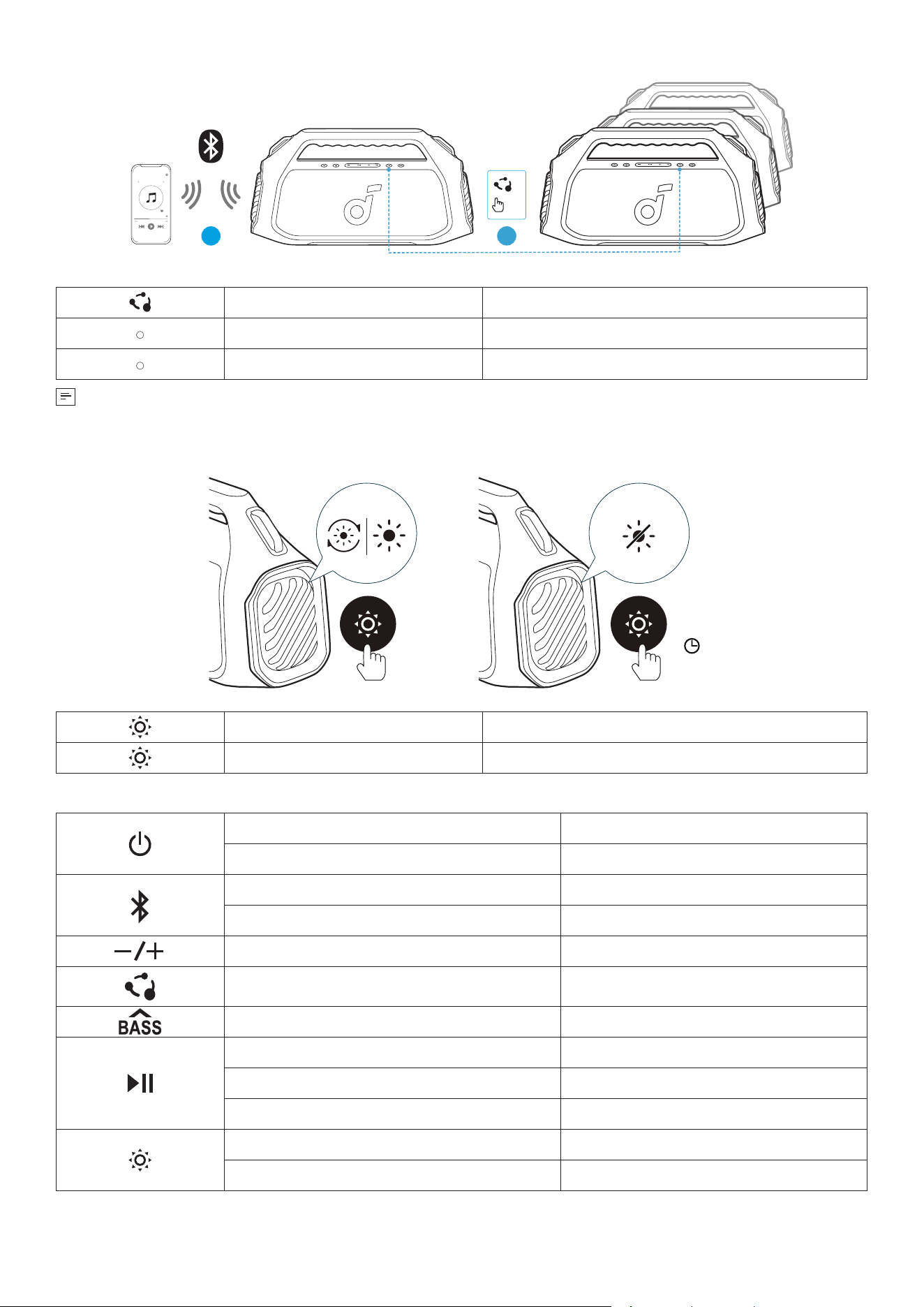
PartyCast Mode
With one speaker connected to a smartphone, press the PartyCast button on up to 100 soundcore speakers with
PartyCast function to synchronize audio and light.
×1
21
Press Enter / Exit PartyCast Pairing Mode
Steady White PartyCast Pairing
Steady White
PartyCast Connected
soundcore speakers with PartyCast function can also be connected with this speaker.
LightShow
>2s
×1
Press Once or Press Again Turn Light On/Switch Light Effects
Press and Hold for 2 Seconds
Turn Off
Button Controls
Press Power On
Press and Hold for 2 Seconds Power Off
Press Enter Bluetooth Pairing Mode
Press and Hold for 2 Seconds Enter / Exit TWS Pairing Mode
Press Volume Up / Down
Press Enter / Exit PartyCast Pairing Mode
Press Turn BassUp 2.0 On / Off
Press Play / Pause
Press Twice Next Track
Press Three Times Previous Track
Press Once or Press Again Turn Light On/Switch Light Effects
Press and Hold for 2 Seconds Turn Off
soundcore App
Download the soundcore app to enhance your experience.
soundcore
Apple and the Apple logo are trademarks of
Apple Inc.
Google Play and the Google Play
logo are
trademarks of Google Inc.
Product information: Check the product name and software version, or read the user manual.
Firmware update: You will be informed once a new version of firmware is detected when you connect the speaker
with the app.
Battery status: Indicates the remaining battery level of your speaker.
Volume control: Adjust the volume level via the app without pressing the buttons on the speaker.
EQ settings: There are various preset EQ settings you can choose from in the app to optimize your experience
while enjoying different music genres. soundcore Signature: Standard EQ mode optimized for well-balanced
sound.
• soundcore Signature: Standard EQ mode optimized for well-balanced sound.
• Voice: Voices stand out more clearly from other ambient sounds.
• Treble Boost: High frequencies are enhanced.
• Balance: No enhancement for high-frequency and low-frequency sounds.
Set auto-power-off time: Set an auto-power-off time. The speaker will automatically power off when the time is up.
Voice prompt: Mute or restore the voice prompt while powering on/off.
Reset
Press and hold the Bluetooth button and volume up button simultaneously for at least 4 seconds to reset the
speaker.
Specifications
Charge Input 5V
⎓
3A, 9V
⎓
3A, 15V
⎓
2A, 20V
⎓
1.5A
Charge Output 5V
⎓
2A
Battery Capacity 7500mAh/7.3V
Audio Output Power 100W, Up to 140W
Speaker Driver
Woofer: 4.5 inch x 2, 50W
Tweeter: 0.75 inch x 2, 20W
Frequency Response 40Hz-20kHz
Charging Time 3 hours (with 30W input)
Play Time (varies by volume level and music content) 20 hours
Waterproof Level IPX7
Bluetooth Version Bluetooth 5.3
Bluetooth Range 100m
Hereby, Anker Innovations Limited declares that this device is in compliance with The Product Security and
Telecommunications Infrastructure (Security Requirements for Relevant Connectable Products) Regulations 2023.
For the Statement of Compliance, visit the website:
https://uk.soundcore.com/pages/psti-related.