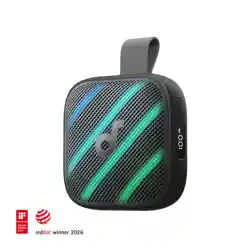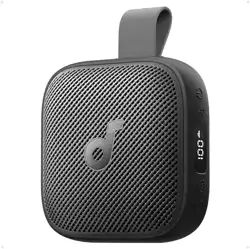
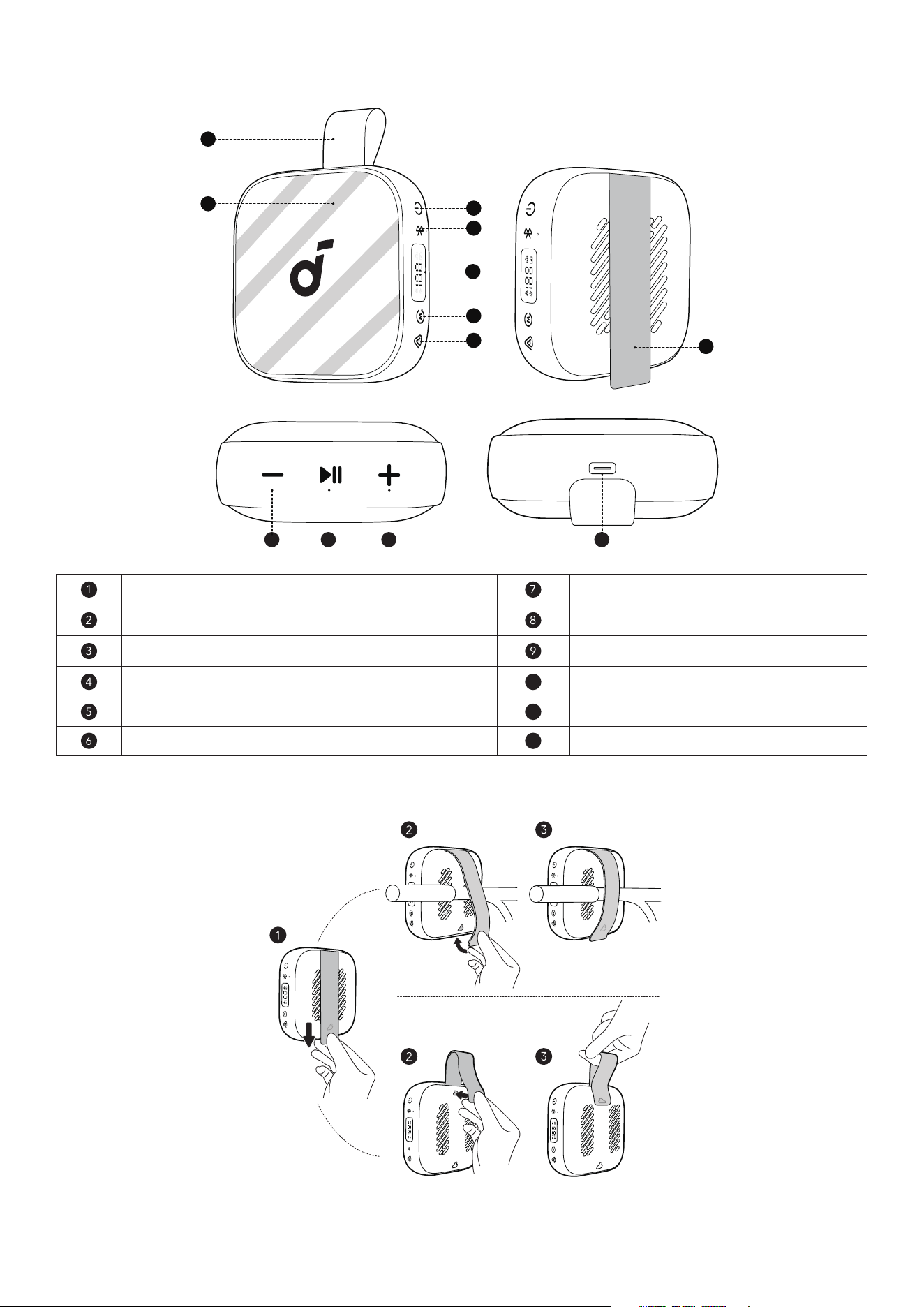
At a Glance
1
2
3
4
5
6
7
9 10 11
12
8
Carrying Handle (formed by the Mounting Strap) Auracast Button
LED Light Strip Mounting Strap
Power Button Volume Down Button
Bluetooth Button
10
Play / Pause Button
LED Power Display
11
Volume Up Button
Mode Button
12
USB-C Charging Port
Using the Mounting Strap
soundcore Boom Go 3i comes with a flexible Mounting Strap that makes it easy to carry or secure the
speaker to dierent objects, such as a bicycle handlebar, backpack strap, or tent pole.
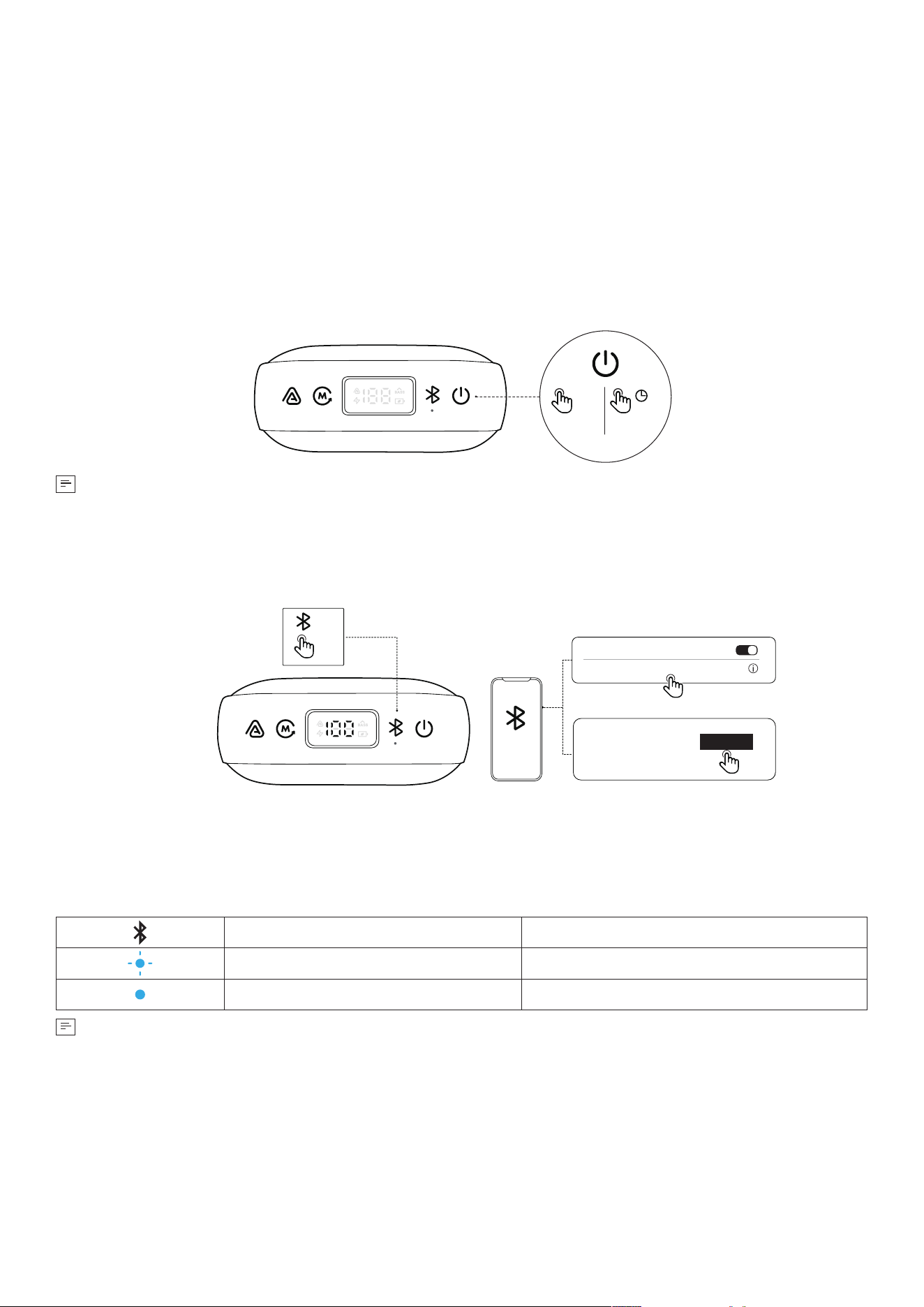
To attach the speaker:
1. Pull the strap down to release it from the latch.
2. Loop the strap around the desired object.
3. Pull the strap back up and fasten it firmly until it clicks into place. Make sure the strap fits snugly and
the speaker is stable.
To form a carrying handle:
1. Pull down the strap to release it from the latch.
2. Li the strap upward and attach it back into the latch to create a loop.
3. Ensure it is fully locked. The strap now functions as a carrying handle, allowing you to easily carry or
hang your speaker.
Powering On / O
ON OFF
x1
>2s
•
This speaker will power o automatically aer 20 minutes if no device is connected.
•
You can customize the auto power o time in the soundcore app.
Bluetooth Mode
×1
soundcore Boom Go 3i
Connected
Bluetooth
Android 6.0+ (Google Fast Pair)
TM
iOS & Others
soundcore Boom Go 3i
ON
Connect
Aer powering on the speaker, the speaker will automatically enter pairing mode. If the speaker cannot
be found on your mobile device, press the Bluetooth button to manually enter pairing mode, then select
"soundcore Boom Go 3i" from the Bluetooth list to connect.
Google Fast Pair Supported: Enjoy instant pairing with your Android smartphone (running Android 6.0 or
above) using Google Fast Pair. Please sign in to your Google account before using Google Fast Pair.
Press Once Enter / Exit Bluetooth Pairing Mode
Flashing Blue Bluetooth Pairing
Steady Blue Bluetooth Connected
•
If the speaker is not connected to a device within 3 minutes aer being powered on, it will
automatically exit Bluetooth pairing mode.
•
To re-enter Bluetooth pairing mode, press the Bluetooth button once.
•
This speaker can only play music on one mobile device at a time. If another connected device starts
playing music, the speaker will automatically take over and interrupt the current playback without
requiring the first device to pause.
•
Each time you power on your speaker, it will automatically connect to your last connected device
if available within the Bluetooth range. If not, press the Bluetooth button to enter Bluetooth pairing
mode.
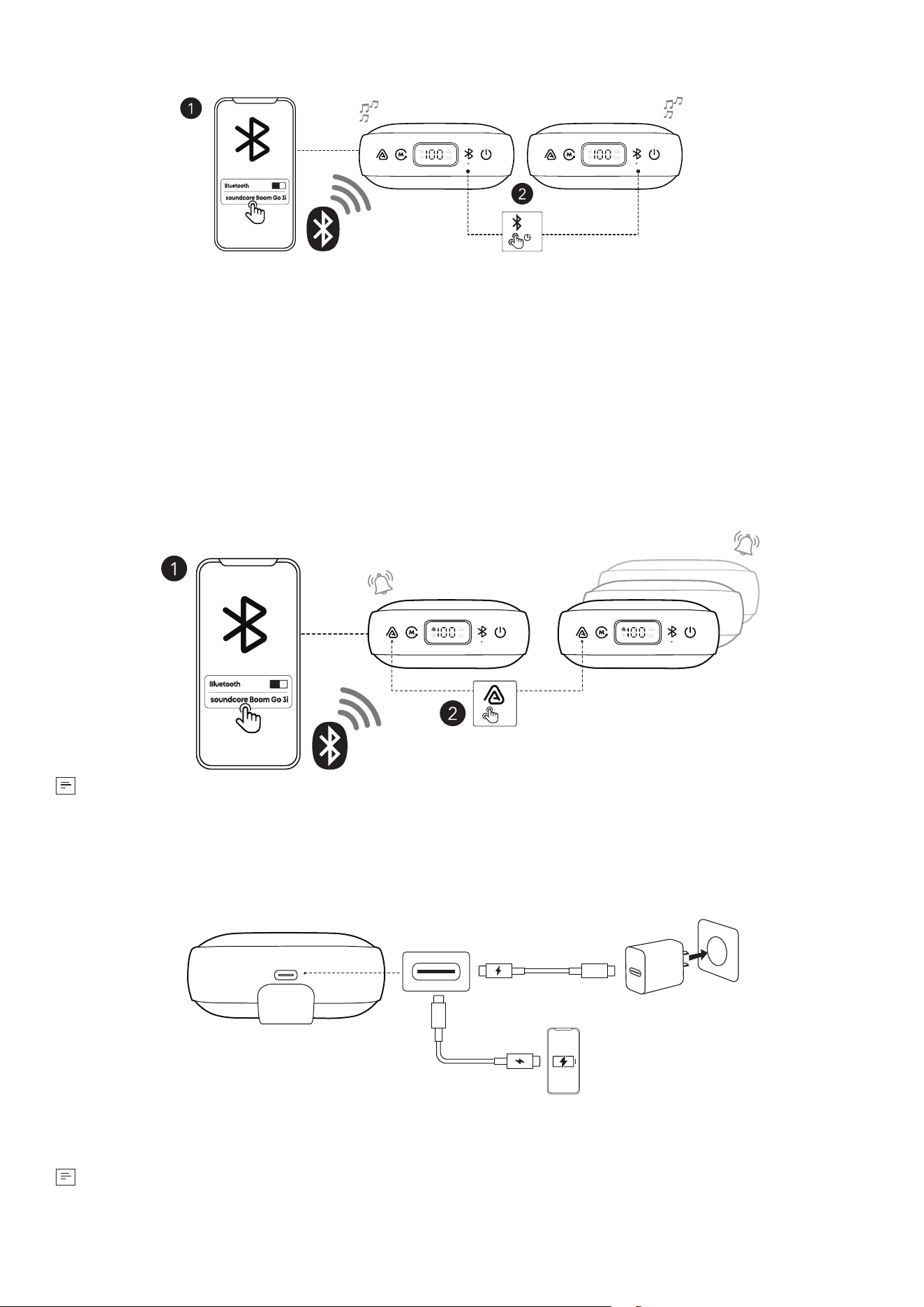
True Wireless Stereo (TWS) Mode
Speaker 1 Speaker 2
>2s
Two identical soundcore speakers can pair with each other for stereo sound. Both speakers can play
the same audio (one as the le channel and the other as the right channel).
With one speaker connected to a smartphone, press and hold the Bluetooth button for 2 seconds on
two speakers to enter TWS pairing mode.
In TWS pairing mode, double-press the Bluetooth button to switch between le and right stereo
channels.
Auracast Mode
With one speaker connected to a smartphone, simultaneously press the Auracast button on multiple
Boom Go 3i speakers to sync audio.
A prompt sound will play when you enable or disable Auracast mode, or when multiple speakers are
successfully linked together.
×1
•
To link three or more speakers, please use Auracast mode. With the upgraded Auracast feature,
your speaker can pair with soundcore devices using the same Auracast protocol. It is not
compatible with PartyCast-enabled devices.
Charging Your Speaker
0.05W-15W
Use the provided USB-C to USB-C cable to connect the speaker and a certified charger to a power source.
When charging, the LED Smart Display will show the battery level in real time.
•
Please use a charger with a power output of 0.05W to 15W to charge the speaker.
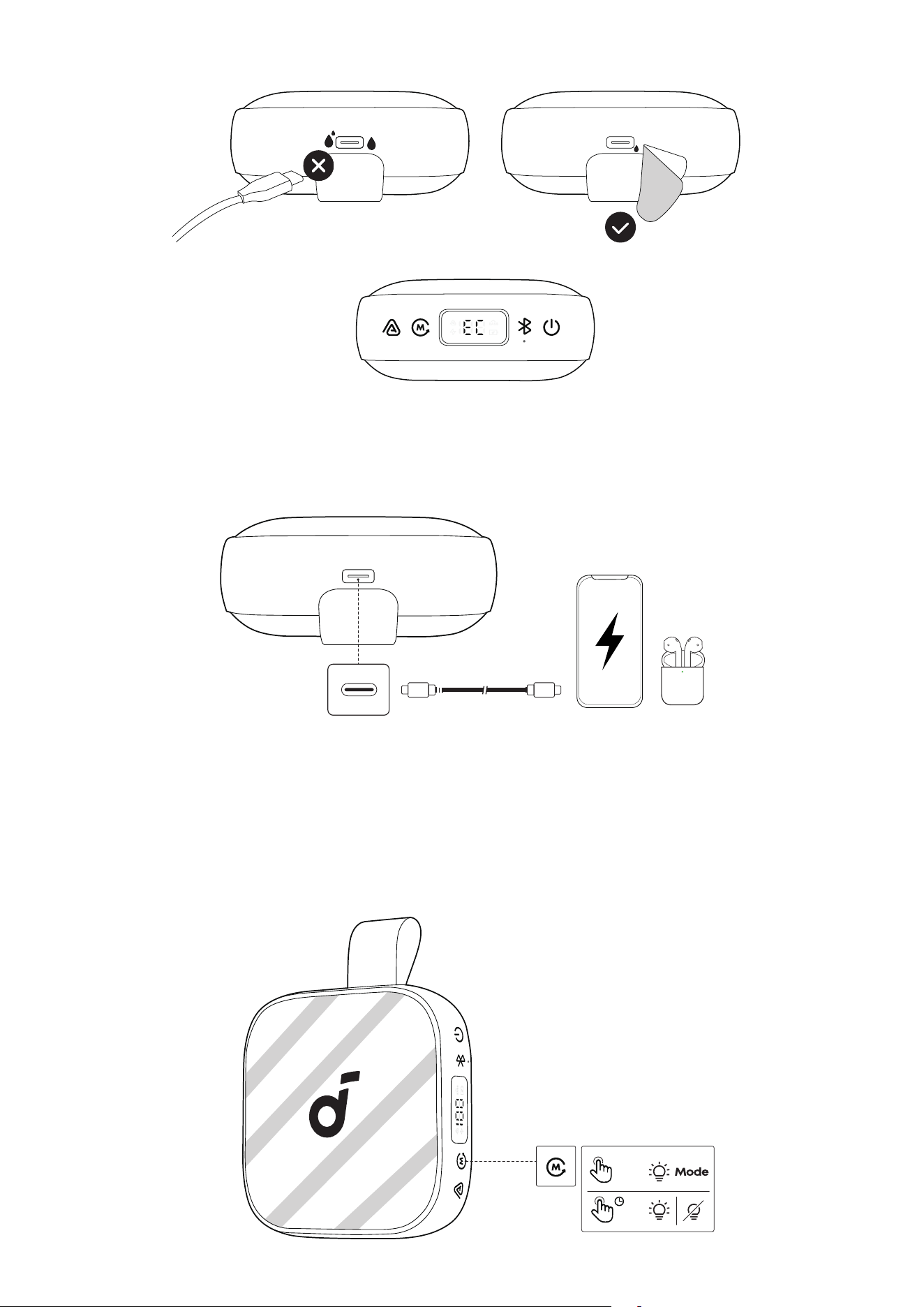
Charging Protection
“EC” means moisture detected in the charging port. In this case, unplug the cable immediately. Ensure
both the port and the cable are completely dry before charging again.
Charging Other Devices
Use this speaker as a power bank to charge your portable devices or accessories. Please note that
reverse charging is not available when the speaker's battery is below 10%.
Light Show
The LED light strips change with the rhythm of the music.
Press and hold the Mode button for 2 seconds to turn on or o the light eects. When the light is on, double-
press the Mode button to switch between dierent light eects.
×2
>2s
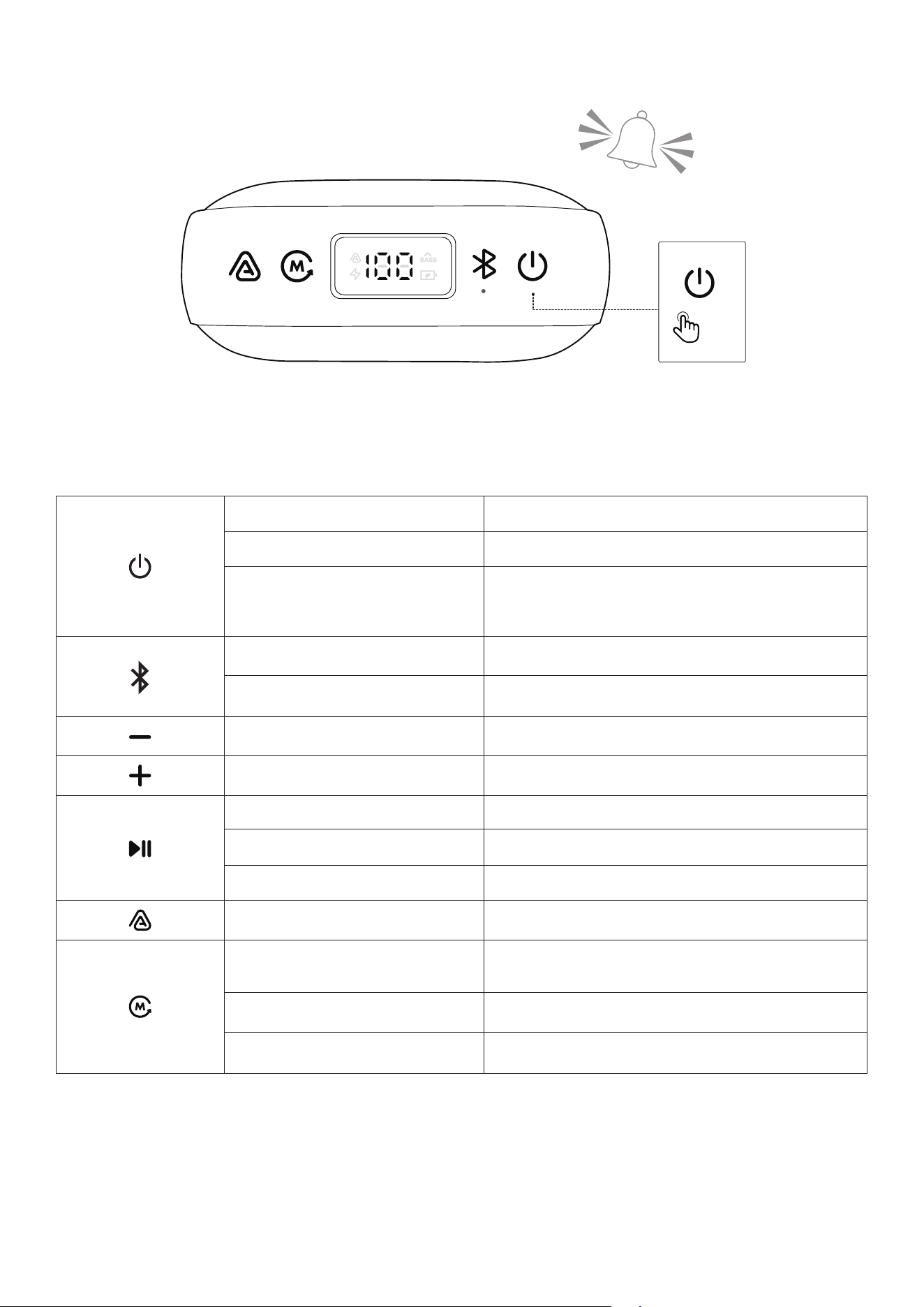
Emergency Alarm
×5
Press the power button 5 times to activate the Emergency Alarm. Press any button to turn it o.
Caution: The alarm is very loud. Use only in real emergencies.
Button Controls
Press Once Power On
Press and Hold for 2 Seconds Power O
Press 5 Times
Activate Emergency Alarm
*Press any button on the speaker to turn o the
alarm.
Press Once Enter Bluetooth Pairing Mode
Press and Hold for 2 Seconds Enter / Exit TWS Pairing Mode
Press Once Volume Down
Press Once Volume Up
Press Once Play / Pause
Press Twice Next Track
Press Three Times Previous Track
Press Once Enter / Exit Auracast Pairing Mode
Press Once
Select from 3 Sound Modes: BassUp / Normal /
Eco Mode
Press and Hold for 2 Seconds Turn On / O Light Eects
Press Twice Switch Light Eects
soundcore App
Download the soundcore app to enhance your experience.
soundcore
Apple and the Apple logo are trademarks of
Apple Inc.
Google Play and the Google Play
logo are
trademarks of Google Inc.
Product Information: Check the product name and soware version, or read the user manual.
Firmware Update: You will be informed once a new version of firmware is detected when you connect
the speaker with the app.
Battery Status: Indicates the remaining battery level of your speaker.
Volume Control: Adjust the volume level via the app without pressing the buttons on the speaker.
ECO Mode: Eco mode turns o lights and BassUp, switching to a power-saving mode for longer
playtime.
Equalizer: There are various preset EQ settings you can choose from in the app to optimize your
experience while enjoying dierent music genres.
•
soundcore Signature: Standard EQ mode optimized for well-balanced sound.
•
Treble Boost: High frequencies are enhanced.
•
Voice: Voices stand out more clearly from other ambient sounds.
•
Balanced: No enhancement for high-frequency and low-frequency sounds.
Voice Amplifier: Use the app's Voice Amplifier feature to speak directly through your phone, and your
voice will be amplified and played through the speaker.
White Noise: Use the recommended white noise in the app to create a soothing atmosphere for
relaxation or falling asleep.
Emergency Alarm: Quickly activates an alarm to draw attention in emergencies.
Set Auto-power O Time: The speaker will automatically power o when time is up.
Voice Prompt: Mute or restore the voice prompt while powering on/o.
Find Device: When the speaker is connected to the app, enable the speaker to play a sound to help
you locate it.
Resetting
Press and hold the Bluetooth button and Volume Up button simultaneously for at least 6 seconds to
reset the speaker.
Specifications
Power Input 5V 1.5A
Battery Capacity 4800 mAh
Audio Output Power 5V 3A
Speaker Driver 2.1 inches
Charging Time 4 Hours
Playtime (varies by volume level and music content) 24 Hours
Waterproof and Dustproof Rating IP68
Bluetooth Version 6.0
Bluetooth Range
30m
Compliance Information
Hereby, Anker Innovations Limited declares that this device is in compliance with The Product Security
and Telecommunications Infrastructure (Security Requirements for Relevant Connectable Products)
Regulations 2023. For the Statement of Compliance, visit the website: https://uk.soundcore.com/pages/
psti-related.
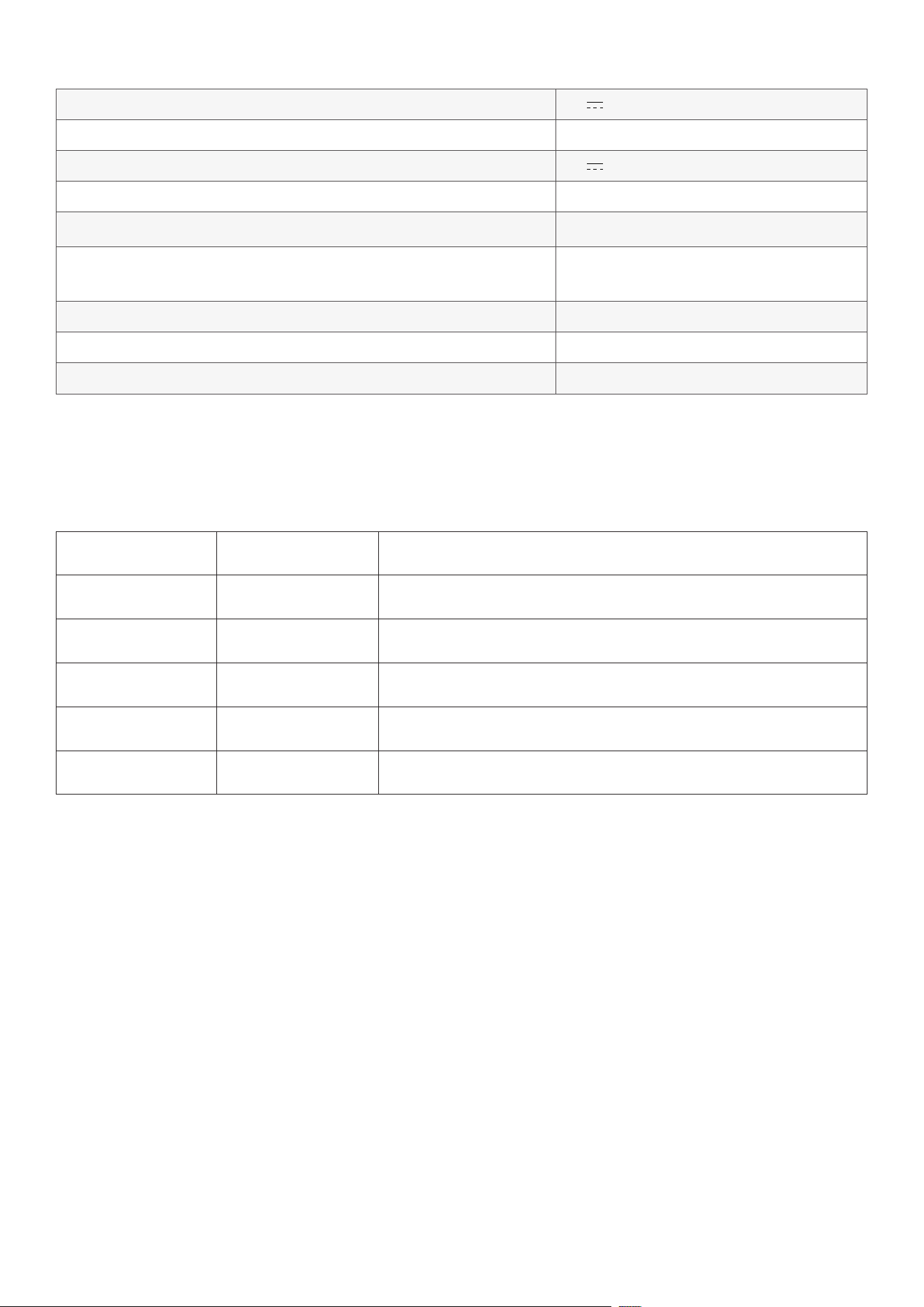
Note: The 'x' of SN Code: xxxxxxxxxxxxxxxx is a variable, see below table.
Variable 'x' Range of variable Content
Eighth 0-9 or A-F
Denotes the hardware version which is not eected on the
safety compliance.
Ninth 8,9,A,B,C...
Denotes the year, 8 means 2018, 9 means 2019, A means 2020,
B means 2021, C means 2022, and so on.
Tenth and Eleventh 01,02,03...
Denotes weeks, 01 means the first week in this year, 02 means
the secondary week in this year, and so on.
Twelh 1-7
Denotes date, 1 means Monday, 2 means Tuesday..., 7 means
Sunday and so on.
The last five 00001-99999
Denotes serial No.
Default Open Port: Classic Bluetooth + BLE (Bluetooth Low Energy)
Port Description: Aer the device is powered on, both Classic Bluetooth visibility (or pairing mode) and
BLE broadcasting are automatically enabled, providing Bluetooth pairing (or control) services. The
Bluetooth service is disabled when the device is powered o.