User Manual
Model No:
A17S = Single Front Dash Cam
A17D Dual Dash Cam Front and Rear =

Contents:
Safety Instructions
What’s In The Box
At A Glance
microSD Card
Use
Warranty & Support
1
2
3
8
4
5
6
9
/01
/02
/03
/12
/04
/05
/08
/19
/24
APP
FAQs
11
/25
Power Supply
Installation
7
/09
1.
2.
3.
4.
Heat
Shortcut Keys & LED Indicators
Voice Prompt
GPS
5. WiFi
6. HDR
7. Glare and Reflections
8. Tinted rear windshield
9. Parking monitor
10. Watch recordings via PC
11. Reset
12. Firmware Upgrading
10
1
Safety Instructions
Please read and understand all instructions hereunder before using this product. If
damage is caused by failure to follow the instructions, the warranty does not apply.
Page / 01
Set Time Zone correctly
2
Warranty & Support
Your opinion matters!
Support:
Item NOT as described?
Damaged or defective?
Missing items?
Any issues whatsoever?
Page / 02
Thanks for choosing COXPAL!
Contact us via before returning the item, we will help you resolve any issues
ASAP. Customer satisfaction is our eternal pursuit.
support@coxpal.com
Warranty:
From the date of purchase on, the product is warranted for 18 months. Meanwhile, COXPAL
offers lifetime technical support for all our users.
Product Registration Program:
COXPAL has Product Registration Program to help customers extend warranty by 6 months.
Visit and register your product to extend the warranty from 18 months to
24 months.
www.coxpal.com
Also find us here
User Manual
Model No:
A17S = Single Front Dash Cam
A17D Dual Dash Cam Front and Rear =
3
What’s In The Box
Page / 03
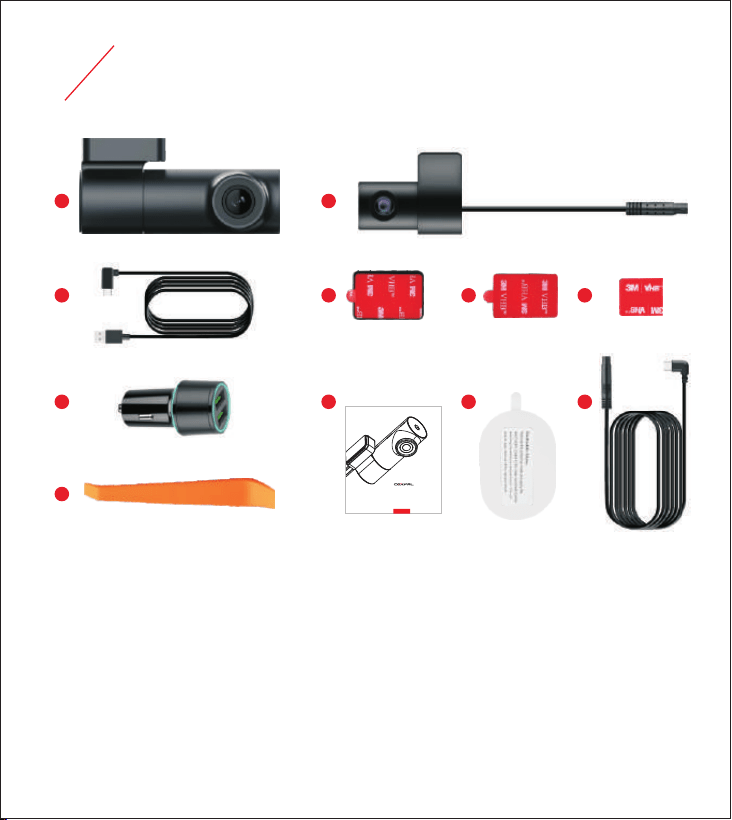
A. 1 * Main camera
B. 1 * USB power cable, length 3.5m (11feet)
C. 1 * Dual USB car charger, 5Vdc/3.1A
D. 1 * Crowbar
E. 1 * Rear cam with 0.5m (1.64feet) cable
F. 1 * Mount with 3M sticker
A
B
C
D
E
F H
J
G I K
G. 1 * User manual
H. 1 * Spare 3M sticker for the mount
I. 4 * Electrostatic sticker
J. 1 * Spare 3M sticker for rear cam
K. 1 * Rear cam cable, length 5.5m (18feet)
4
At A Glance
Page / 04
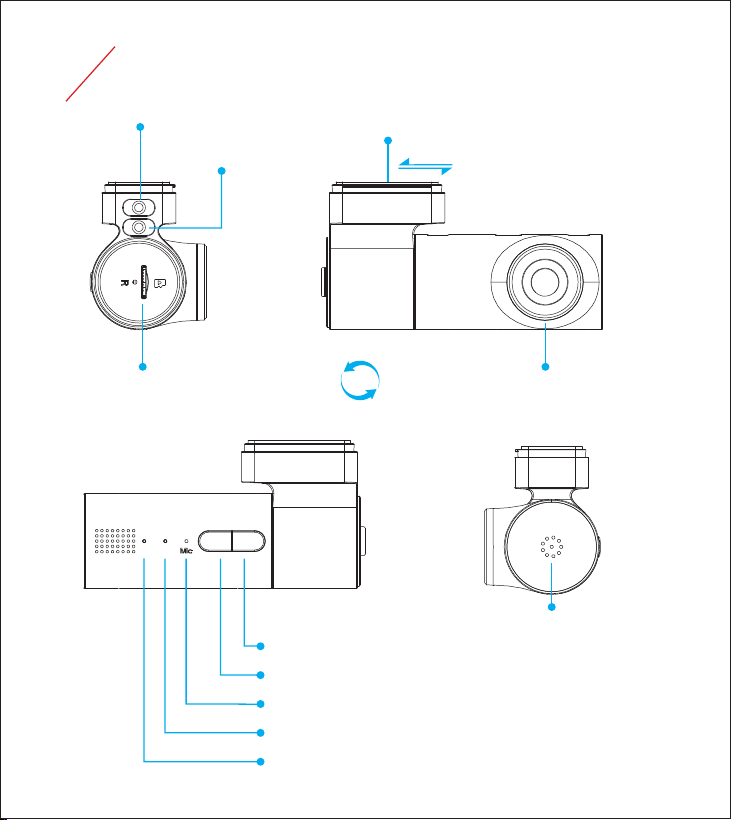
Mount with 3M sticker, detachable
Speaker
Card slot for microSD card
Front camera lens, 330 degree rotatable
USB-C 1: Power & Data sync
USB-C 2: Rear cam
Left LED indicator: To show WiFi & audio status
Right LED indicator: To show various video recording status
Microphone
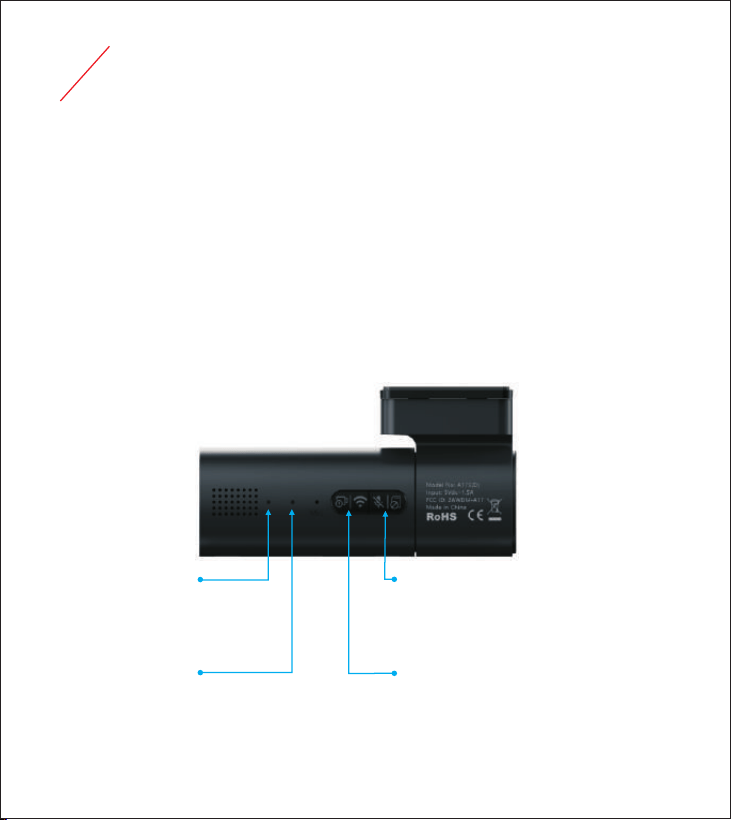
Left button: Video lock/unlock | WiFi on/off | Reset
Right button: Mute/Unmute | Activate format mode | Restart
330°

5
microSD Card
Capacity
128GB
256GB
512GB
4K@30 front + 2K@30 rear
Page / 05
This camera supports genuine microSD card up to 512GB with a speed rating of UHS-1 U3
or above.
For 64GB or 128GB or 256GB or 512GB new card, please beforehand format it to FAT32.
The card can be formatted by this camera:
Press and hold right button 3 seconds to activate formatting mode;
Press right button to confirm formatting.
To avoid triggering "card error", old card also needs to be formatted if:
There are other irrelevant files in it.
It is used with phone card reader, because the phone could possibly generate some
system files in it.
Critically important to use high quality microSD card:
SanDisk MAX Endurance Recommended.
SanDisk Extreme
SanDisk Extreme PRO
Samsung EVO Plus
Mainstream but small probability of
encountering card problem.
Samsung PRO Endurance
Samsung PRO Ultimate
Other cards
NOT recommended, although some of
them can work flawlessly.
●
●
●
●
Typical recording time in normal recording mode:
(Bitrate = Normal)
4K@30 front
(Bitrate = Normal)
2K@30 front
(Bitrate = Normal)
5.8H
11.6H
23.2H
8.9H
17.8H
35.6H
16.5H
33H
66H
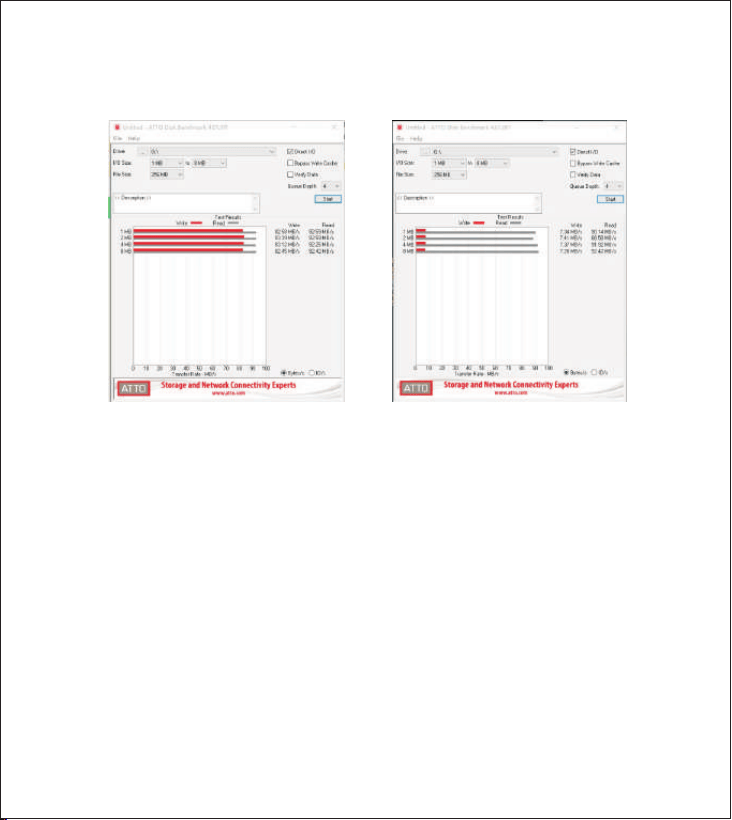
If card slow or card error : “ ” ” ”
It is 99.99% a card problem, you can use PC tools like “H2TESTW” or “ATTO Disk
Benchmark”to verify its actual writing speed.
If “card slow” or “card error” is low frequent: Please format microSD card and ignore it.
If “card slow” or “card error” is high frequent: Please replace it with a new microSD card.
2 tips:
Ideally have a spare microSD card for alternate use or emergency use.
Format the card every 2 weeks to ensure it works properly and stores the data securely,
meanwhile, empty “Event” folder to have more available storage space.
●
●
●
Page / 06
Normal read and write speed Normal read but abnormal write speed
According to our camera software working mechanism, “card slow” or “card error” only
appears when the camera detected the problem of microSD card.
There are usually 2
strategies to deal with card problem by dash cams, our camera adopts the 2nd:
1) No prompt: Bypass directly, the camera goes on recording, but the video clip at that
time can not be saved properly;
.
2) Give prompt: The problem needs to be addressed firstly, then the camera starts to
record again.
.
●
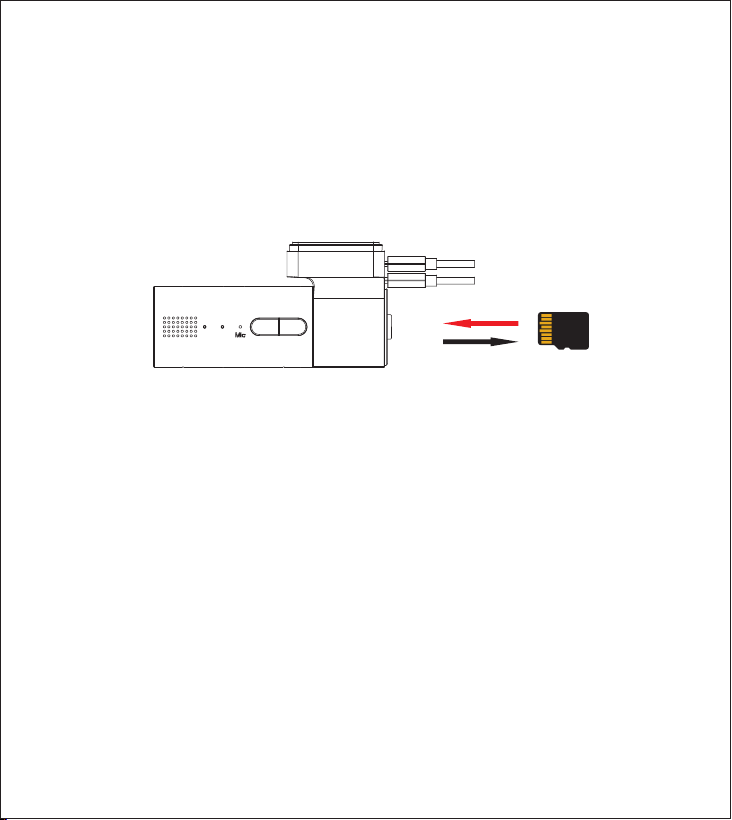
DO NOT remove, or insert the card when this camera is powered on which may cause
card corruption and data loss.
Insert the card with the gold contacts facing the back side of the camera, push the card
until it clicks into the place.
To remove the card, gently push its top edge inward until it clicks, then pull it out of the
card slot.
Insert microSD card:
Page / 07

Page / 08
Important to use qualified power supply to avoid camera randomly on/off:
6
Power Supply
Why original USB car charger is important ?
Original USB car charger + Original USB power cable
Non-original USB car charger + Original USB power cable
In-car USB port + Original USB power cable
Computer USB port + Power cable
Original 3-wire hardwire kit
Non-original 3-wire hardwire kit if USB Type-C connector ACC definition is A5/B5.
●
●
Actual output of original USB car charger is 5.1V-5.3V (5.2V ±0.1V).
Actual output of other USB car chargers or in-car USB ports is 4.75V-5.25V (5V ±5%).
Because of 11feet (3.5m) long power cable used by the dash cam, the voltage will drop a lot.
Hence, if the actual output voltage of other USB car chargers or in-car USB ports is for
example 5V or below, the dash cam will not receive 4.75V, then it will randomly turn on/off.
●
●
Because original USB power cable is qualified to pass 2A current, we are not sure if other
USB power cables are qualified to pass 2A current too.
Why original USB power cable is important ?
●
What do I do if original 3.5m(11feet) power cable is not long enough ?
●
Original 3.5m(11feet) power cable can be compatible with the overwhelming majority of
vehicles. However, we do believe that a few vehicles need a longer one. In this case, you
can add an extra cigarette lighter splitter to extend the length.
What do I do if my vehicle doesn't have cigarette lighter but only USB port ?
If our dash cam doesn't randomly turn off/on, it means the USB port can provide stable power
to our dash cam.
●
●
If our dash cam randomly turn off/on, it means the USB port can't provide stable power to our
dash cam. In this case, the ideal solution is get an extra COXPAL hardwire kit, to get power
from fuse box directly, it can not only free one USB port, but also realize parking monitor.
7
Installation
Page / 09
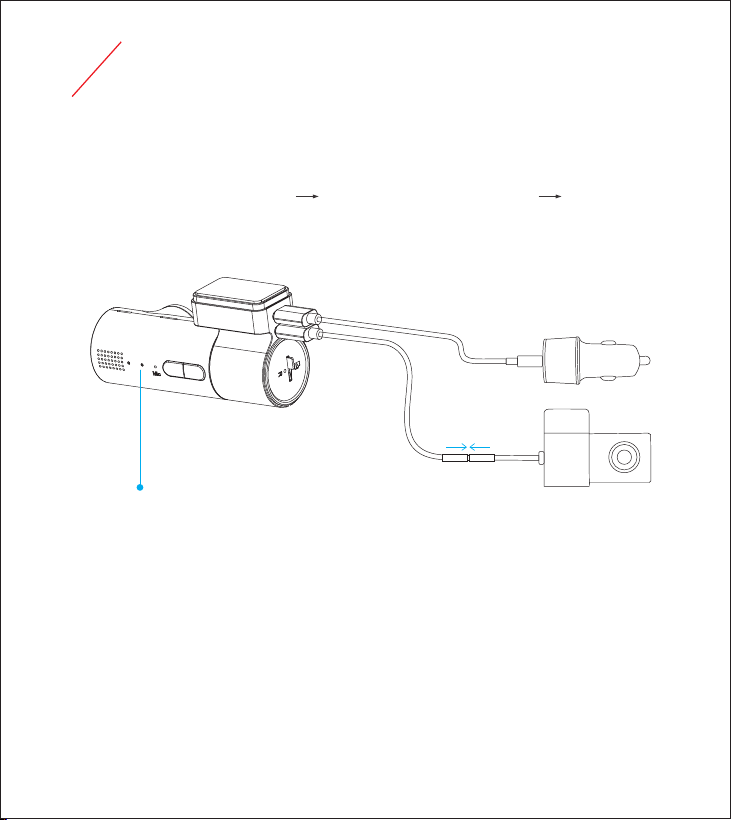
Before installation
Bench test is a must, implement the installation only if camera works normally.
Insert microSD card into the camera Connect rear cam with front cam Connect front cam to
cigarette lighter via COXPAL original USB car charger and USB power cable.
Format microSD card if it is new (Camera will give voice prompt).
Install front camera
DO NOT install the camera in a location where may obstruct driver’s view.
Ensure the camera lens is within the wiping range of the windscreen wiper to ensure a clear view
in all weather conditions.
Red flash = Front cam works normally.
Blue flash = Both front cam and rear cam work normally.
Select an ideal location, look at the camera’s video location by temporarily holding it on the
windshield and make sure you like the installation spot of your choice before proceeding.
Generally speaking, install the camera near the rear view mirror to obtain the best open-field
view.
Insert Firmly
Original Car Charger Only
Page / 10
Clean the selected location with clear water and wait until fully dry.
Remove the protective sheet of the electrostatic sticker, attach applicable side of the
electrostatic sticker onto the selected location. Important:
After peeling off the protective sheet, do NOT touch the applicable side of the electrostatic
sticker with fingers.
When applying the electrostatic sticker on car's windshield, avoid the dot matrix pattern.
Make sure no air bubbles between windshield and electrostatic sticker.
●
●
●
Remove the red protective film of the adhesive tape on the mount, firmly affix the mount onto
the electrostatic sticker, then install the front camera onto the mount.
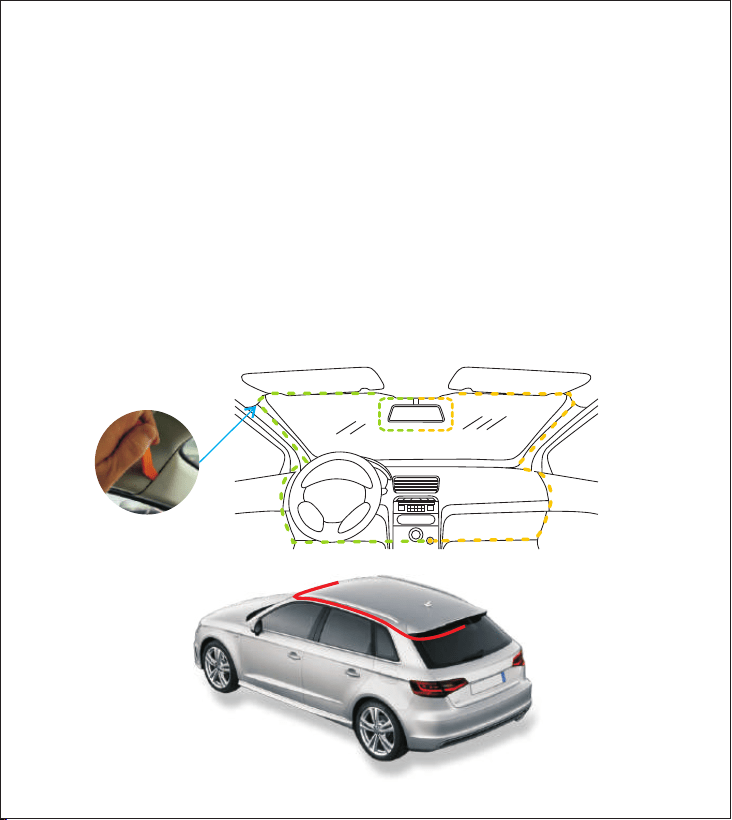
Route power cable and rear cam cable (If applicable)
Use the crowbar to hide power cable and rear cam cable under the trim and roof liner as
illustrated below:
Pry a bit out,
Tuck the cable in.
Just try it!
You can do it!

Install rear camera (If applicable)
After installation
Rear cam is NOT waterproof and can NOT be installed outside of the car.
Remove the protective sheet of the electrostatic sticker, attach applicable side of the electrostatic
sticker onto the selected location. Important:
After peeling off the protective sheet, do NOT touch the applicable side of the electrostatic
sticker with fingers.
Make sure no air bubbles between windshield and electrostatic sticker.
●
●
Remove the red protective film of the adhesive tape on rear cam, firmly affix the rear cam onto
the electrostatic sticker.
Remove the protective film on camera lens----be especially careful NOT to leave fingerprints.
Adjust the viewing angle of camera lens, ideally 50% road + 50% sky lens adjustment so the
camera's exposure can function properly.
Store spare electrostatic sticker and adhesive tape in case of future use.
Page / 11
Select an ideal location, look at the camera’s video location by temporarily holding it on the
windshield and make sure you like the installation spot of your choice before proceeding.
If you know how to let the rear cam cable go through the hose between the chassis and the
liftgate, congratulations! You definitely have a strong DIY ability, the rear cam installation will
look neat and professional.
If you just want a quick and simple installation to the rear cam, it is OK to let rear cam cable
dangling between the headliner and liftgate, but please note that plenty of slack will be needed
when the windshield is outstretched, or both the rear cam cable and the rear cam may potentially
be damaged.
If your vehicle is SUV/MPV/Van/Hatchback (No problem if Sedan), Important:
●
●
8
Use
1. Heat
Page / 12
Once installed properly, the camera will function without the need of maintenance.
It is normal that the surface of plastic housing is hot. Because the higher resolution video recorded,
the more heat generated by the main processor. Our camera has excellent heat dissipation design
which can effectively convey the heat of main processor to outside.
Please rest assured to use our camera:
The camera has passed rigorous burn-in test and it can work reliably.
Plastic housing will NOT be deformed or melted in normal use environment.
No fire risk.
●
●
●
2. Shortcut Keys & LED Indicators
Solid blue: Muted
Solid red: WiFi on
Solid red: Recording paused
Red flash: Single front recording
Blue flash: Dual channel recording
Red slow flash: Single front parking mode
Blue slow flash: Dual channel parking mode
Short press: Lock video/Unlock video
Press and hold 3 seconds: WiFi On/Off
Press and hold 8 seconds: Reset
Short press: Muted/Unmuted
Press and hold 3 seconds: Activate format mode
Press and hold 8 seconds: Power On/Off
Right Button
Left Button
Left LED indicator
Right LED indicator

中文
Set Time Zone correct is a must, then built-in GPS can automatically sync correct local time.
English
microSD card
Audio
WiFi
Emergency Video
GPS
请插卡
请长按右键3秒格式化卡
请短按右键确认格式化
格式化中,请不要断电或拔卡
格式化成功
卡速慢
卡错误
卡满
录音已关闭
录音已打开
打开热点
关闭热点
视频上锁
视频解锁
无GPS
Please insert microSD card
Please press and hold right button 3seconds
to format microSD card
Please press right button to confirm
formatting
Formatting, please don't power off or
remove microSD card
Formatting successfully
Card slow
Card error
Card is full
Muted
Unmuted
WiFi on
WiFi off
Video locked
Video unlocked
No GPS
3. Voice Prompt
4. GPS
Page / 13
Camera WiFi can be "Always on" or "Auto-off after 10 minutes". "Auto-off after 10 minutes" is
recommended because:
5. WiFi
To lower both power consumption and working temperature a bit, it is good for the lifespan of
the camera.
For most of the time, the camera does NOT need to be connected but just let record alone.
●
●
●
●
●
GPS positioning usually takes about 1-3 minutes, depends on signal strength.
No GPS signal if in underground parking, or tunnel etc.
The video(s) before GPS positioned don't have embedded GPS information.
Page / 14
They are normal optical phenomena but NOT a camera quality issue. The factors of causing glare and
reflections such as: The angle of the sun, the design of the dashboard, dirty or dusty windshields etc.
Lay a matte-finish dash mat, dash cover, or even a black towel on dashboard can be an ideal solution,
it is not only good for camera image, but also good for driver to enhance visibility, to have better driving
experience etc.
7. Glare and Reflections
6. HDR
1. Either HDR On or HDR Off has its merits and demerits.
2. Generally speaking, HDR On can harvest the best image in the vast majority of scenarios.
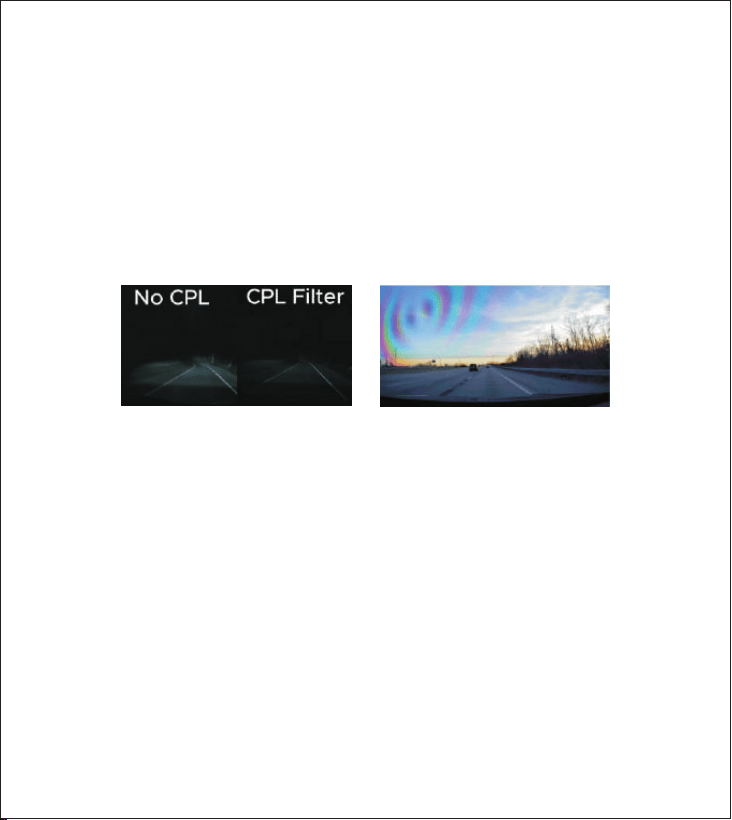
A CPL can effectively reduce glare and reflections, but 2 potential issues:
1. Lower image brightness at night.
2. Rainbow stripes may appear if the windshield is tinted.
8. Tinted rear windshield
It typically has a negligible impact during the day but can significantly degrade image quality at night.
Daytime: The dash cam automatically adjusts its exposure settings to compensate for the tint. The
footage remains clear, often with reduced glare from direct sunlight.
●
●
Nighttime: Tints drastically reduce the light reaching the sensor. This forces the camera to increase
its sensitivity, which leads to grainy, noisy footage. In poorly lit areas, identifying license plates
through the tint can become nearly impossible.
9. Parking monitor
Constant power required to realize parking monitor.

Why camera doesn't have built-in battery but super capacitor instead?
1. Limited by camera size, large capacity battery can't be applied inside.
2. Charge cycle of Li battery is shorter than super capacitor, i.e. Li battery fails much earlier than
super capacitor.
3. Working temperature range is not as wide as super capacitor.
4. Most importantly, Li battery poses fire risk, meanwhile, super capacitor is 100% safe to use.
Active cigarette lighter Still supply power after car engine is off.:
COXPAL 3-wire hardwire kit:
VCC = wire = constant 12V yellow output.
ACC = red wire = output 12V only when car engine is on.
Page / 15
Parking Mode
OFF
Time Lapse 1FPS
Low Resolution
FHD@30FPS
Shutdown after
15 minutes
off
off
off
off
General Cigarette Lighter
When car engine is off
Active Cigarette Lighter
Normal recording
Normal recording
Normal recording
Normal recording
If remain stationary for 15 minutes
COXPAL 3-wire hardwire kit
off
off
Time Lapse 1FPS
GPS off
WiFi off
Guard Time
Low Resolution FHD@30FPS
GPS off
WiFi off
Guard Time
off
off
Does parking monitor drain car battery?
The probability of car battery being drained by our dash cam is quite rare because there are
2 protections.
●
Guard Time by the camera, typical capacity of car battery is about 45-65AH (at 100% charge),
take max guard time 24H for example, the max power consumption of our dash cam in parking
mode as below:
Wakeup automatically
(if G-sensor triggered)
off
1. Car battery is old? i.e. It can be drained itself, even without any loading devices.
2. Car battery is poor quality?
3. Improper use pattern? For example, frequent short trips and idling which can cause car battery
not fully charged.
4. Other in-car electronics consume car battery power as well.
Page / 16
Dual Channel Real Cam Off
Time Lapse 1FPS
FHD@30FPS
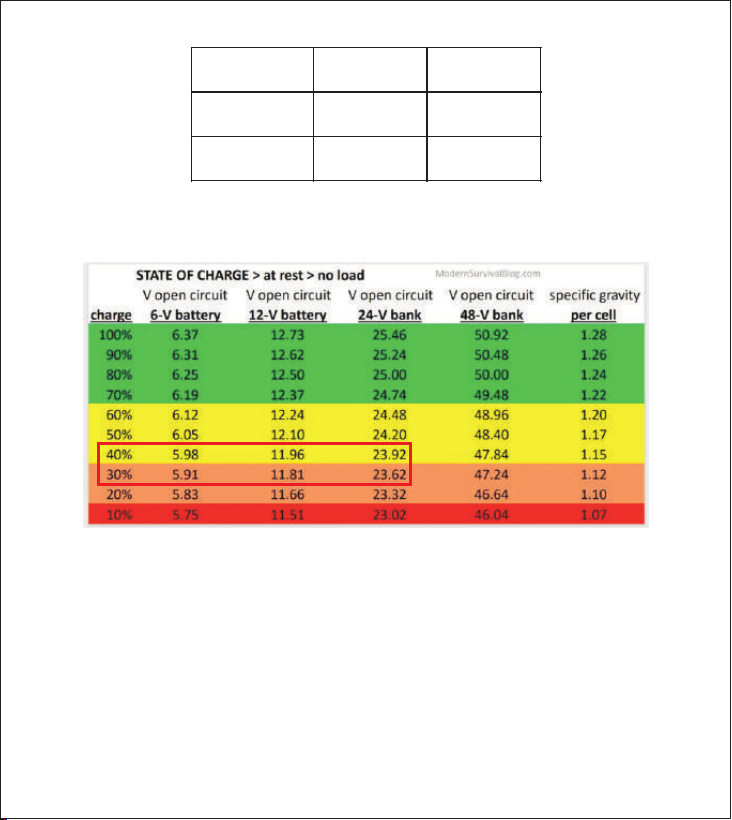
Auto Cut-off by the hardwire kit, it will automatically cut off power if it detects car battery voltage
lower than 11.9V/23.9V:
Source: https://modernsurvivalblog.com/alternative-energy/battery-state-of-charge-chart/
However, above 2 protections can't 100% protect car battery from draining because the battery can
be drained by other factors, for example:
●
10AH
9AH
6AH
5AH
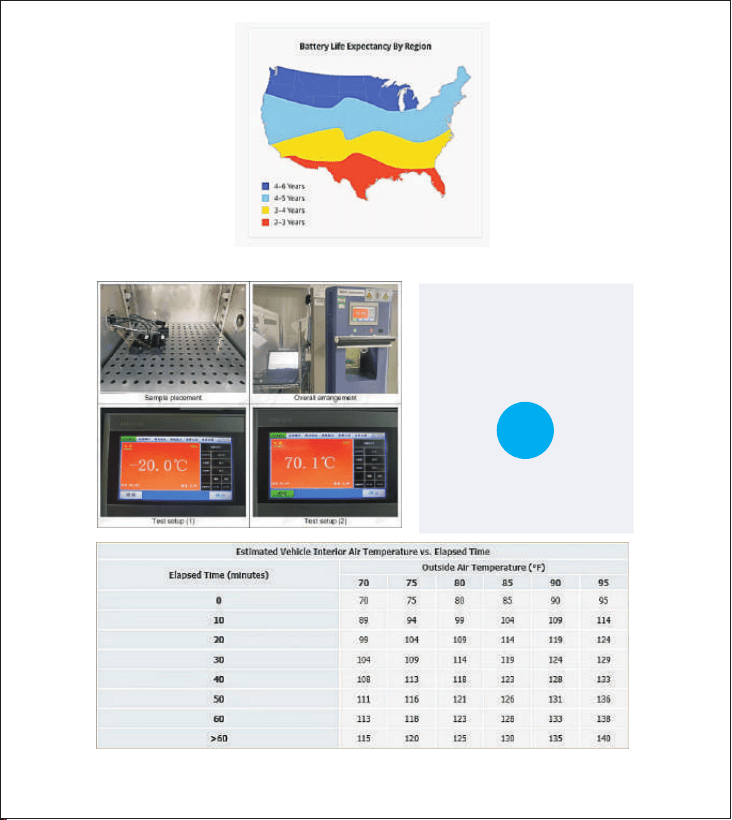
Source: https://goodcalculators.com/inside-car-temperature-calculator/
Please rest assured to use parking monitor:
Page / 17
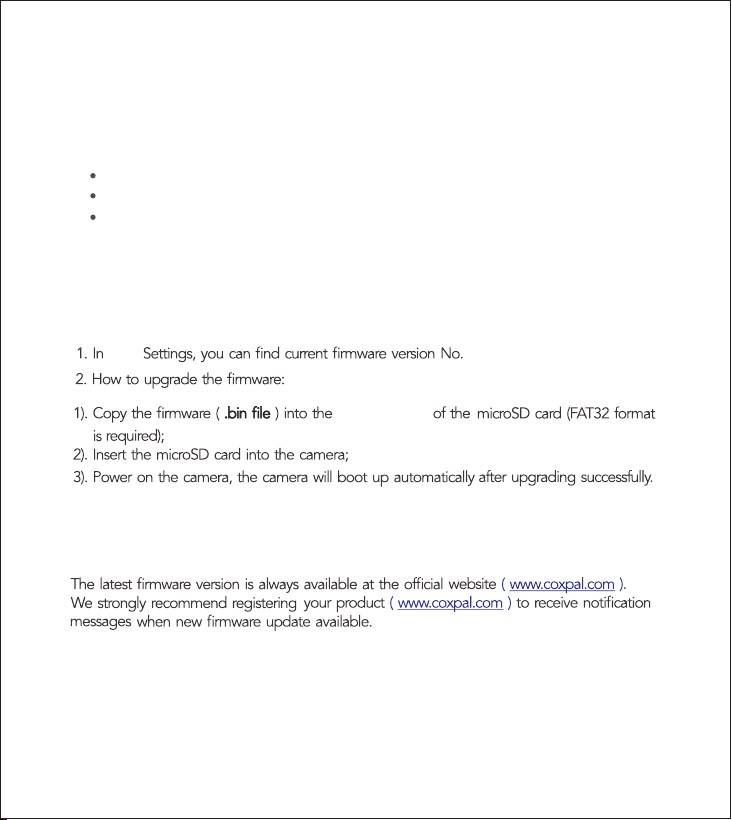
Source: Johnson Controls, Inc
Our In-lab temperature
testing is based on
ambient tempeture
-20℃ to 70℃
( -4°F to 158°F)
The actual inside
car temperature
vs
9. Watch recordings via PC
1. By directly reading the microSD card with a card reader.
3. Proprietary Mac & Windows COXPAL GPS media player is available, it is free of charge:
It supports play 2-channel simultaneously and it supports play GPS speed & trajectory.
The player can be downloaded from
Or simply message to , we share Player download link to you directly.
www.coxpal.com.
support@coxpal.com
Page / 18
3. Always stay up-to-date
Note: DO NOT cut off power during the upgrading which may cause camera failure.
root directory
10. Reset
Press left button and hold for 8 seconds and then the camera will start to reset automatically.
11. Firmware Upgrading
APP
2. By directly connecting the camera to the computer via USB data cable.

9
APP
We fully understand how important a usable APP is for you!
APP user experience is one of our most concerning parts, if you have any questions or problems
about using our APP, please feel free to contact us via , we can assist you to
solve the problem for sure, meanwhile, you can gain a chance to get a mysterious gift if you
helped find the bug.
support@coxpal.com
WiFi dash cam means direct connection between the camera and the phone, wirelessly, it can NOT
realize remote monitor and cloud storage, WiFi dash cam is different to IP camera and cloud dash
cam:
Page / 19
WiFi Dash Cam: No data cost
No internet, WiFi direct
IP camera: Fixed installation onlyRouter
Internet
Cloud Dash Cam ( with LTE ): Data cost
Internet
Some android phones don't support use WiFi and Mobile Data simul-
taneously, accordingly, the phone will have no internet access when dash cam is
connected. We understand it is a little frustrating but dash cam only needs to be
connected in a short period.
WiFi
WiFi
iPhone:
Android phone:
We take user privacy very seriously. COXPAL APP requires basic permissions only, please rest
assured to use it.
APP is NOT designed for all time connection, for most of the time, just let the camera record alone.
You only need to connect it when you need, for example, download a few important video clips to
the phone, in the car, directly and conveniently.
Although WiFi doesn't provide internet, Mobile Data can be simultaneously
used to provide internet.
1. Before connecting:
APP is NOT designed for bulk downloading. The ideal solution for bulk downloading is take out
microSD card from camera, download to the computer directly. APP is NOT user-friendly for bulk
downloading because:
It is comparatively time-consuming;
Phone storage space is another issue (a 5-minute 4K@30 video size is over 1GB).
●
●
Press left button and hold 3 seconds to turn on camera WiFi.
Page / 20
3. Take the phone near the camera, i.e. in camera's WiFi signal coverage.
4. Turn off CarPlay or Android Auto if it is connected. We fully understand that it is frustrating
that CarPlay or Android Auto has to be turned off firstly, because both dash cam and CarPlay
or Android Auto use WiFi protocol. Luckily dash cam WiFi doesn't need to be connected for
most of the time.
2. Connecting:
doourbest
Coxpal
green
It will
red
.
If default password modified:
Please "forget" camera's existing network name firstly, then input new password.
If forget password:
Please press and hold left button 8 seconds to reset camera, then input default password.
Yes, dash cam APP indeed runs slow if we compare it with other daily used APPs. Because dash
cam APP is a little different, it directly visits a large-capacity microSD card which with raw video files
inside, buffering is inevitable.
APP runs slow?
Meanwhile, we also tested many other dash cam APPs, we have made some targeted optimizations
to our APP, we are trying our best to make it more user-friendly as possible as we can.
1
2
COXPAL_A11T
COXPAL_A17_5G
COXPAL_A17_5G
or
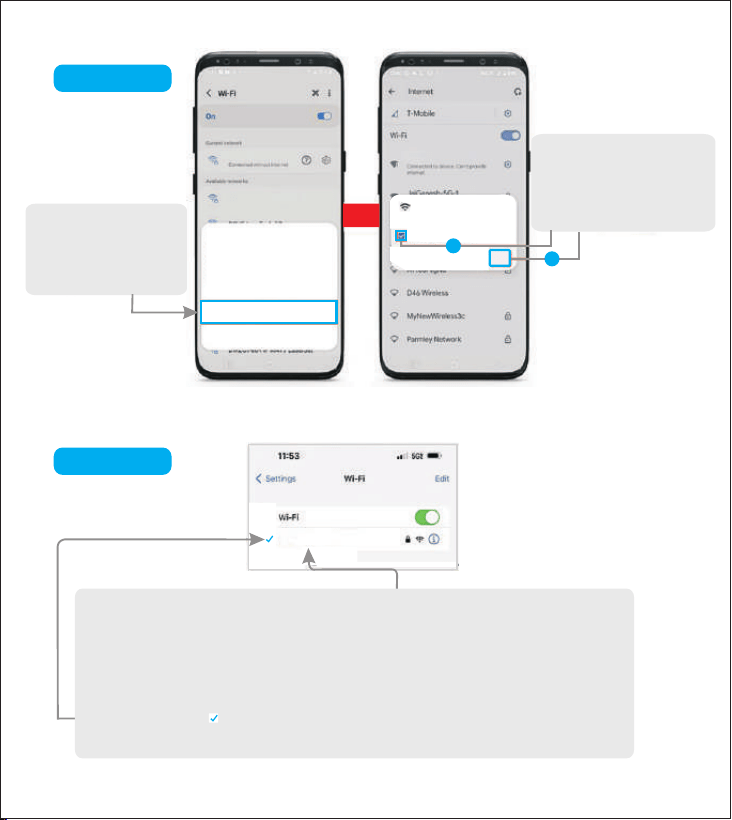
If this pop up shows up,
make sure to select
“Don’t ask again” and then
select “YES”
COXPAL_A17_5G
No Internet Connection
For Android
For iPhone
Yes
No
If this pop up shows up,
make sure to select
“Always Connect”
For iPhone, it will display or show “No Internet Connection”, which is normal and
you can ignore this message.
As COXPAL_A17_5G does NOT provide the internet, so the iPhone will show this
message. You are only making a connection between your iPhone and
COXPAL_A17_5G using the WiFi.
Once you see this Blue Check Mark, you are connected to the COXPAL_A17_5G.
You can simply proceed to launch COXPAL Dash Cam APP accordingly.
Internet may not be available
If you want to connect to this network
without internet access, you can connect
only this time or you can set your phone to
always connect to it even if internet isn't
available.
Connect only this time
Always connect
Disconnect
“COXPAL_A17_5G”
This network has no internet access. Stay
connected?
Don't ask again for this network
Page / 21

Disable Smart Network Switch or WLAN+ or Intelligent Network Switch or
other similar names on your android phone: Settings Wi-Fi Advanced or More
WLAN Settings.
Other
reasons
3. Use APP
1. Preview
To stream real-time video smoothly, the image in “Preview” is compressed but not
original resolution, watch original video in either “Playback” or “Album”.
2. Playback
If no live image in Preview: Please turn off Cellular Data (or Wireless Data, or Mobile Data),
or turn on Airplane Mode (Or Flight Mode) directly and then try again.
If 4K video play is not smooth in Playback: Playing 4K video on a phone without lagging can
be challenging due to the high resolution and bitrate requirements. The key factors enabling
smooth 4K video playback are the advanced processors, ample RAM of the phone. Generally
speaking, not too old iPhones and flagship android phones are capable of playing 4K video
smoothly.
Page / 22
Android
1. APP permissions are all enabled? If no, please enable all permissions then try again.
Disable Wi-Fi Assist Settings on your iPhone: Settings Cellular Wi-Fi Assist.
This is a feature that automatically use Mobile Data when it detects current Wi-Fi
connectivity is poor.
iPhone
If can't connect:
This is a feature that detects whether current Wi-Fi connection is stable or without
internet connection. Once the smartphone identifies that current Wi-Fi network is
unstable or does not have internet, it will automatically switch to Mobile Data.
2. Firewall/Antivirus programme is installed that blocked the connection? If yes,
please temporarily disable it and then try again.
3. VPN is being used? If yes, please temporarily disable it and then try again.
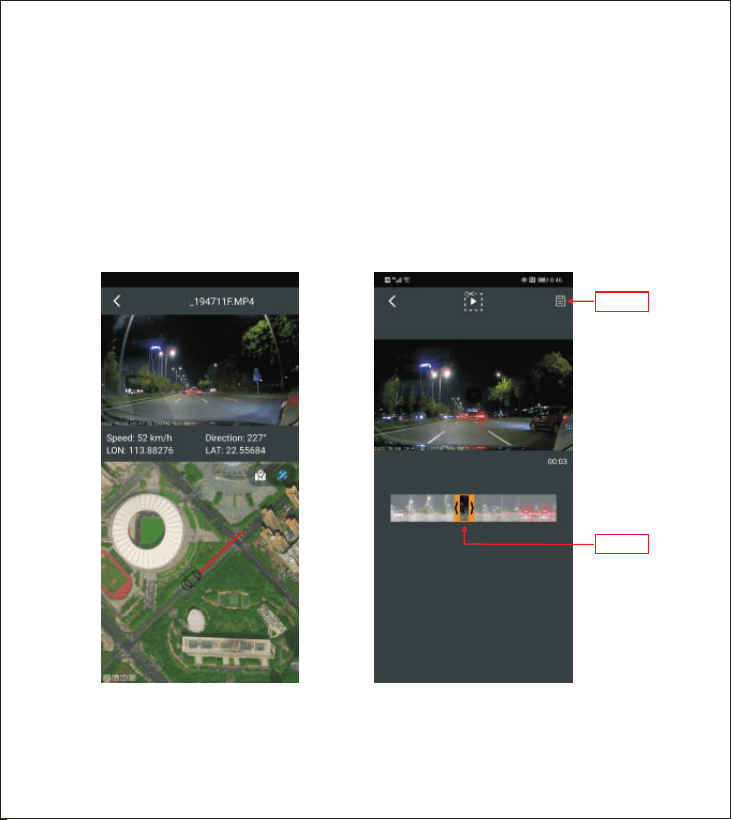
This icon at the top right corner means Disconnect WiFi Connection.
Video clip which is downloaded from “Playback” will be automatically saved into APP’s “Album”.
Page / 23
To view the speed and the
trajectory conveniently.
To cut video to any shorter lengths
and then share it to your social
networks conveniently.
GPS Viewer Video Crop
20260902
drag
save
3. Album
If can’t download in Playback:
•Please check if COXPAL APP permissions are all enabled?
•Please check if the phone has available storage space to store the target download video file?
If blank in Playback: Possibly there are other files in microSD card or changed the default file
folder structure that APP can’t visit microSD card successfully, please format microSD card and
then try again.
To play video files with GPS information, disconnect with the camera and connect with
internet is required. There are 2 useful functions in “Album”:
10
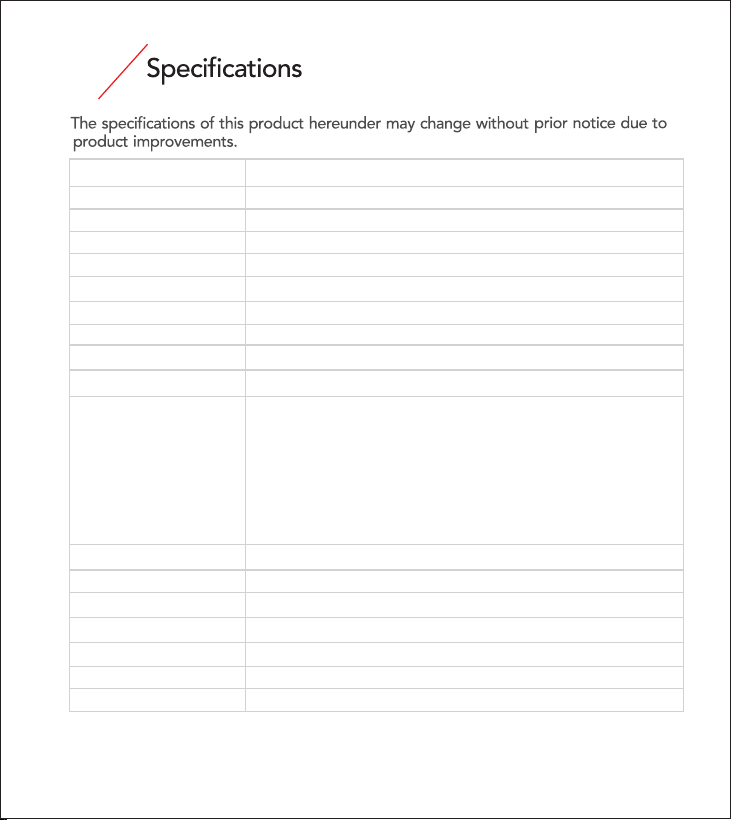
Model No
COXPAL A17S D)(
Main Processor
Novatek NT98529
Front Image Sensor
Sony IMX678 Starvis 2.0 8-mega pixel CMOS
Front Lens
G-sensor
Built-in 3-axis sensitivity 3-level adjustable; ;
System Language
English/Español/Deutsch/Русский/简体中文/日本語
Video
(.mp4 format)
Audio
Built-in microphone & speaker
By external SDHC microSD Up to 512GB ; ;
UHS-1 U3 in FAT32;
Storage
No, but built-in 85°C 5.5V 2*7F supercapacitor
Battery
5Vdc/2A
Power Input
USB Type-C
Power Interface
Working Temperature
-4° to 158°F (-20° to 70°C)
Storage Temperature
-4° to 176°F (-20° to 80°C)
GPS
WiFi
Built-in
2.4G & 5.0GHz Dual BandHz
Rear Lens
Rear Image Sensor
Galaxycore GC4653 4-mega pixel CMOS
F1.8 140° FOV 6-glass 1 infrared filter; ; ;
F1.8; 140° FOV 7-glass 1 infrared filter; ;
Page / 24
4K@30 front + 2K@30 rear
2K@30 front + 2K@30 rear
4K@30 front
2K@30 front
6. Q: Which one is better? Suction cup mount or adhesive mount?
7. Q: Do we need to worry the safety of the camera especially when it gets hot?
A: Each has its pros and cons, but judged from the perspective of getting better image
adhesive mount is undoubtedly the better choice because it can minimize the
unnecessary shaking.
,
11
FAQs
Page / 25
1. Q: Why my SD card doesn’t work with this camera but it works with other cameras?
2. Q: Why my Mac computer can’t format SD card to FAT32 or can’t read FAT32?
3. Q: Why can’t make out license plate?
4. Q: Which one is better? With display screen or without display screen?
A: FAT32 is an universal format that is compatible with Mac, Windows, Linux and DOS,
you could search "Format SD card to FAT32 with a Mac" or "convert Mac hard drive
to FAT32 by using Disk Utilities" to learn how to do it.
A: Different cameras or different applications requires different writing speed, the better
image quality recorded, the faster writing speed required.
5. Q: The wider viewing angle of the camera. the better?
A: Each has its pros and cons. The advantages of “no display screen” are: 1). Not obstructive; 2).
Can be well hidden behind the rearview mirror; 3). Lower camera power consumption a bit
which is good for camera's lifespan.
This product complies with the radio interference requirements of the European
Community. Operating Frequency Range: 2400-2483.5 MHz; Max Output Power: 15
dBm
This product is designed and manufactured with high quality materials and
components, which can be recycled and reused.
This symbol means the product must not be discarded as household waste, and
should be delivered to an appropriate collection facility for recycling. Follow local
rules and never dispose of the product and rechargeable batteries with norma
household waste.
Page / 26
Page / 27

www.coxpal.com
Made in China