
Attention
Please read this manual carefully before use and keep it for
future reference.
Personalized Main Interface:
Based on regional, country, and account differences, Google
provides a customized main interface tailored to individual
user preferences. These personalization settings will remain
unchanged unless modified by the user.
1.The projector is non dustproof or waterproof.
2.In order to reduce the risk of fire and electric shock, do
not expose the projector to rain and fog.
3.Please use the original power cord. The projector should
work under specified rated power supply.
4.When projector is working, please do not look directly
into the lens, the strong light will flash your eyes and cause
slight pain. Children should use the projector under the
supervision of adults.
5.Do not cover the vents of projector. Heating will reduce
the life of projector and cause danger.
6.Regularly clean projector vents, or dust may cause
cooling malfunction.
7.Do not use the projector in greasy, damp, dusty or smoky
environment. Oil or chemicals will cause malfunction.
8.Please handle with care during daily use.
9.Please cut off the power if the projector is out of use for
long time.
10.Non-professionals are forbidden to disassemble the
projector for testing and maintenance.
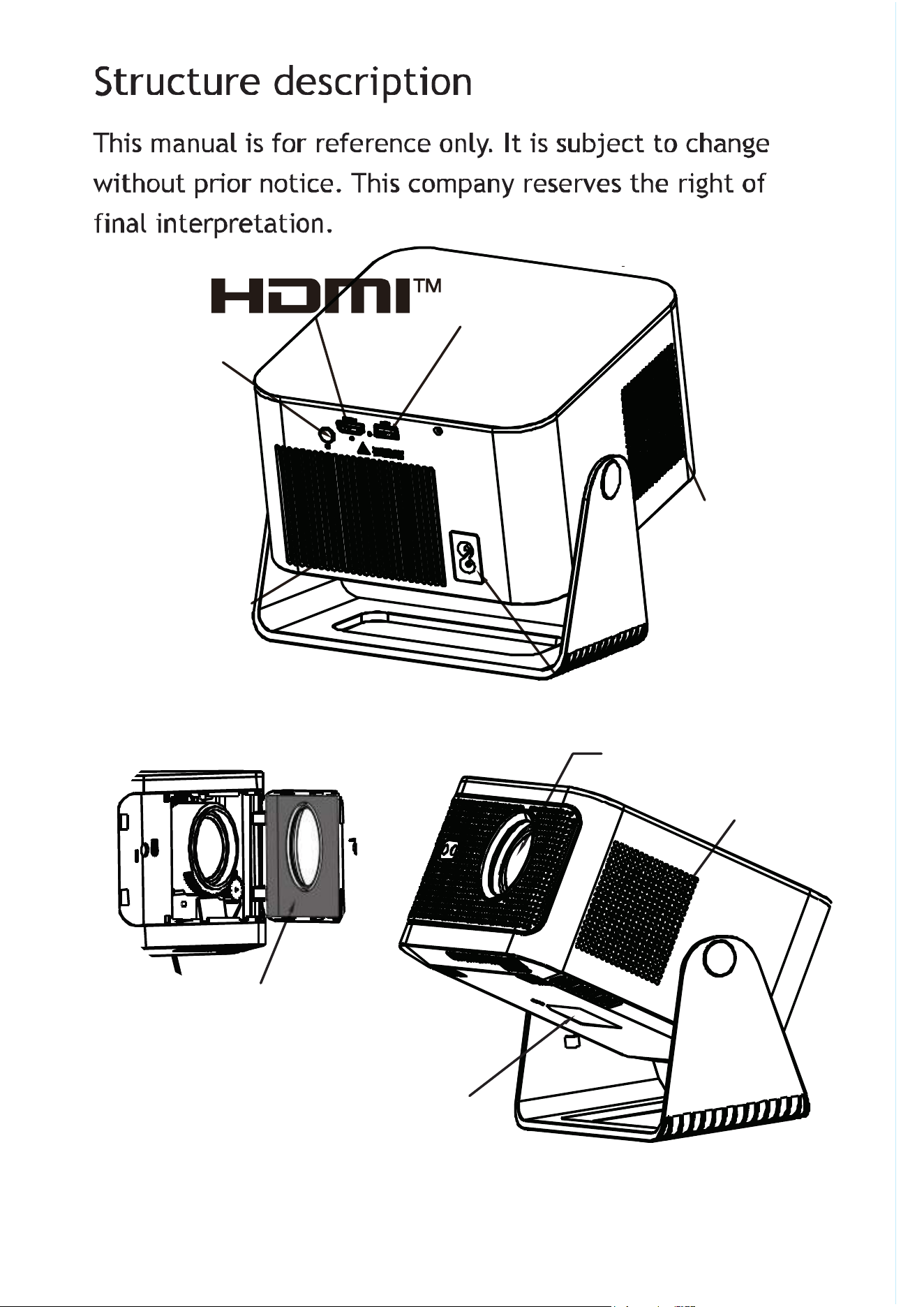
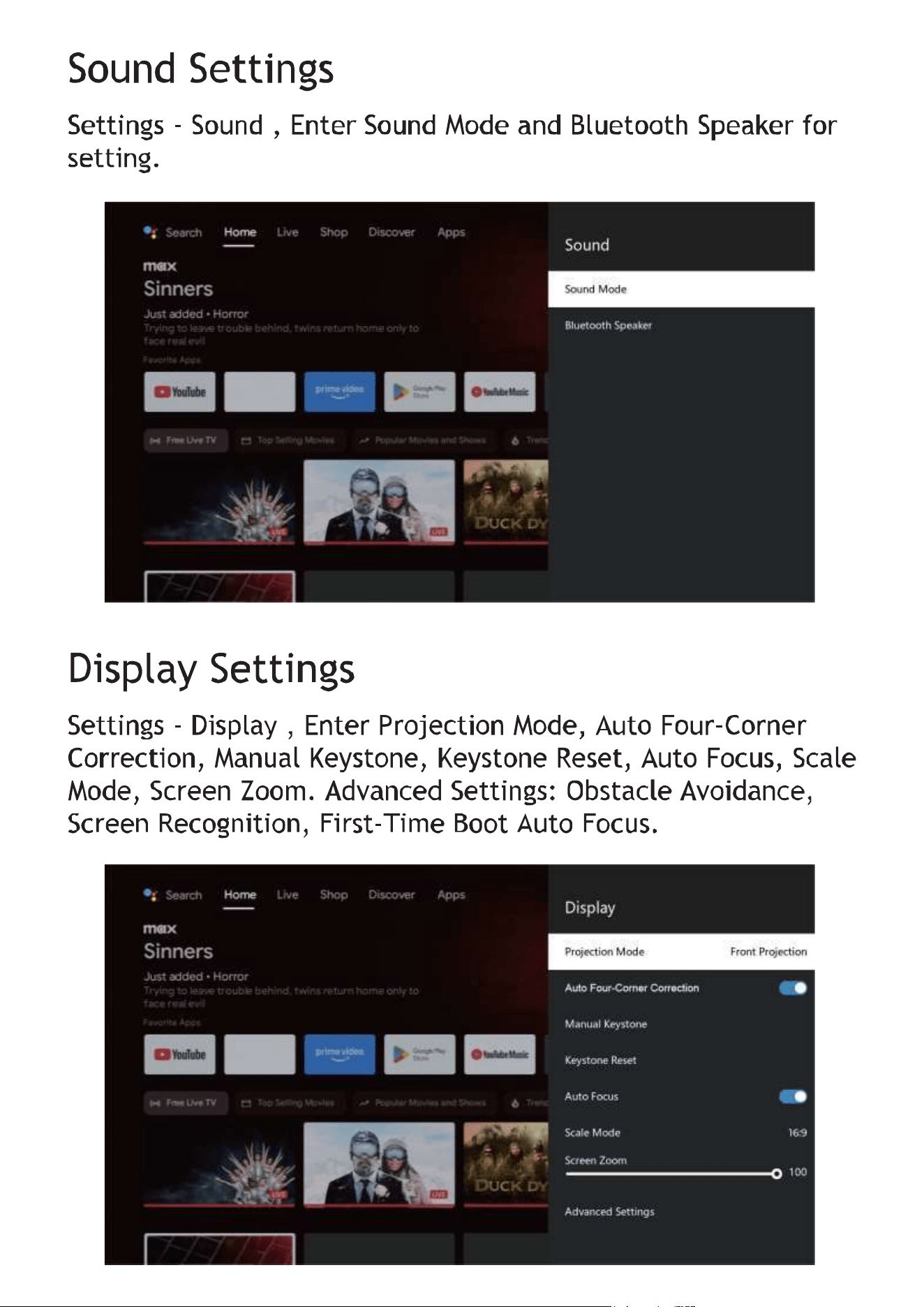
Vent
POWER
ON/OFF
USB
Air inlet
Speaker
Lens
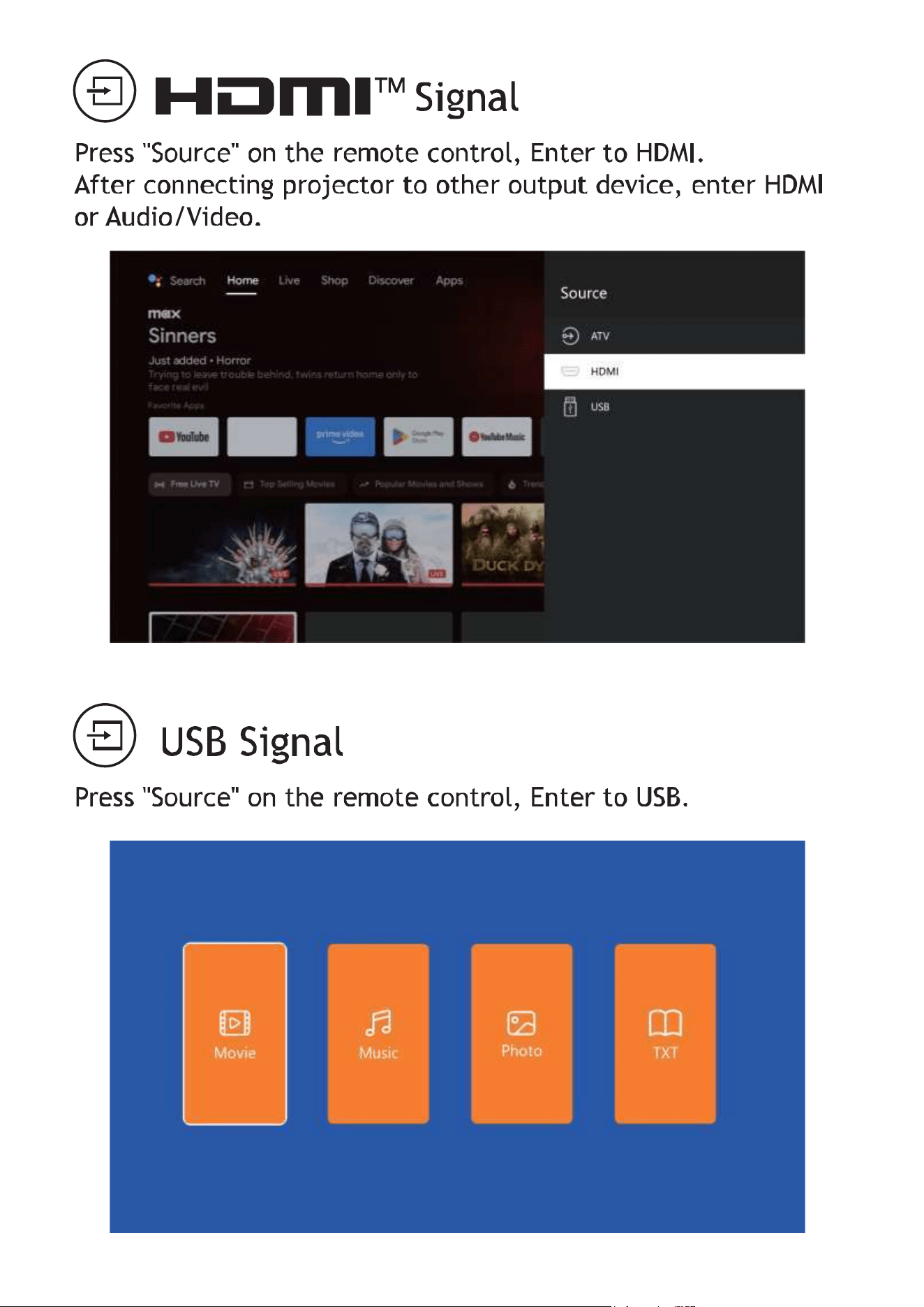
The nameplate is located
on the bottom of the product.
Input: 100–240V AC, 50/60Hz, 2A USB-A Output: 5V DC, 0.5A
Operating Temperature: 25°C Operating Altitude: Up to 2000 m
Open it from here and clean
the dust-proof net.Open the cover
from this side to clean the dust filter.

The terms HDMl, HDMl High-Definition Multimedia Interface,
HDMl trade dress and the HDMl Logos are trademarks or
registered trademarks of HDMl Licensing Administrator, Inc.
Safety instructions
Read Instructions
Read these instructions carefully before using the projector.
Following these guidelines helps ensure proper operation and
prevents potential damage.
Professional Service
Installation and repairs should only be performed by qualified
service personnel.
Do not use damaged power cords,accessories, or peripherals.
Environment
Keep the projector away from flammable or explosive materials
and strong sources of electromagnetic interference(such as radar
stations, power stations, or substations). Avoid strong ambient light
and direct sunlight.
Ventilation
Do not cover or block the projector's ventilation openings.
Power Adapter
Use only the original power adapter provided with the device.
Overheating Prevention
Ensure proper airflow around the projector. Keep all ventilation
openings unobstructed.
Eye Safety
Do not look directly into the lens while the projector isoperating.
The intense light may cause eye discomfort.
Do not bend, pull, or drag the power cord excessively.
Do not place the power cord under the projector or heavy objects.
Do not cover the power cord with rugs, blankets, or other soft
materials.
Keep the power cord away from heat sources.
Do not touch the power adapter or plug with wet hands.
Power Cord Safety
Moisture

FCC Statement
This equipment has been tested and found to comply with the
limits for a Class B digital device, pursuant to Part 15 of the
FCC Rules. These limits are designed to provide reasonable
protection against harmful interference in a residential
installation. This equipment generates uses and can radiate
radio frequency energy and, if not installed and used in
accordance with the instructions, may cause harmful
interference to radio communications. However, there is no
guarantee that interference will not occur in a particular
installation. If this equipment does cause harmful interference
to radio or television reception, which can be determined by
turning the equipment off and on, the user is encouraged to
try to correct the interference by one or more of the following
measures:
• Reorient or relocate the receiving antenna.
• Increase the separation between the equipment and receiver.
• Connect the equipment into an outlet on a circuit different
from that to which the receiver is connected.
• Consult the dealer or an experienced radio/TV technician
for help.
• This device complies with Part 15 of the FCC Rules.
Operation is subject to the following two conditions:
• This device may not cause harmful interference, and
• This device must accept any interference received,
Disclaim
This manual provides general information about the product.
The images and features described herein may differ from the
actual product.
We reserve the right to modify product features and
specifications without prior notice.
The manufacturer shall not be liable for any loss or damage
resulting from improper use, unauthorized repairs, or hardware
or software malfunctions.
Although this manual has been carefully reviewed, errors or
omissions may still occur.
All trademarks and brand names mentioned in this manual are
the property of their respective owners.

including interference that may cause undesired operation.
Warning: Changes or modifications not expressly approved by
the party responsible for compliance could void the user's
authority to operate the equipment.
FCC Radiation Exposure Statement:
This equipment complies with FCC radiation exposure limits
set forth for an uncontrolled environment. This equipment
should be installed and operated with minimum distance
20cm between the radiator & your body.
Operation of this device in the band 5150-5250 MHz is
restricted to indoor use only.
IC Statement
This device complies with Innovation, Science and Economic
Development Canada's licence-exempt RSS standard(s).
Operation is subject to the following two conditions:
(1) this device may not cause interference, and.
(2) this device must accept any interference, including
interference that may cause undesired operation of the
device.
- French:"Le présent appareil est conforme aux CNR
d’innovation, sciences et développement économique
Canada applicables aux appareils radio exempts de licence.
L'exploitation est autorisée aux deux conditions suivantes :
(1) l'appareil nedoit pas produire de brouillage, et.
(2) l'utilisateur de l'appareil doit accepter tout brouillage
radioélectrique subi, même si le brouillage est susceptible
d'en compromettre le fonctionnement."
IC Radiation Exposure Statement:
This equipment complies with IC radiation exposure limits
set forth for an uncontrolled environment. This equipment
should be installed and operated with minimum distance
20cm between the radiator & your body.
FCC Radiation Exposure Statement:
This equipment complies with FCC radiation exposure limits
set forth for an uncontrolled environment.
This equipment
should be installed and operated with minimum distance
20cm between the radiator & your body.
Declaration of exposure to radiation IC:
Cet équipement est conforme aux limites d'exposition aux
radiations IC établies pour un environnement non contrôlé.
Cet équipement doit être installé et utilisé avec une
distanceminimalede20cmentreleradiateuretvotre
corps.
Operation of this device in the band 5150-5250 MHz is
restricted to indoor use only.
Le fonctionnement de cet appareil dans la bande 5150-5250
MHz est limité à une utilisation en intérieur uniquement.