※Quick Installation Guide※
Attention
Please read this manual carefully before use and keep it for
future reference.
1.The projector is non dustproof or waterproof.
2.In order to reduce the risk of fire and electric shock, do
not expose the projector to rain and fog.
3.Please use the original power adapter. The projector
should work under specified rated power supply.
4.When projector is working, please do not look directly
into the lens, the strong light will flash your eyes and cause
slight pain. Children should use the projector under the
supervision of adults.
5.Do not cover the vents of projector. Heating will reduce
the life of projector and cause danger.
6.Regularly clean projector vents, or dust may cause
cooling malfunction.
7.Do not use the projector in greasy, damp, dusty or smoky
environment. Oil or chemicals will cause malfunction.
8.Please handle with care during daily use.
9.Please cut off the power if the projector is out of use for
long time.
10.Non-professionals are forbidden to disassemble the
projector for testing and maintenance.
Structure description
This manual is for reference only. It is subject to change
without prior notice. Hotack reserves the right of final
interpretation.
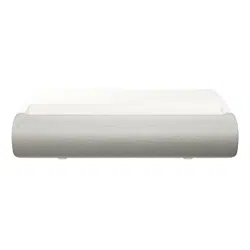
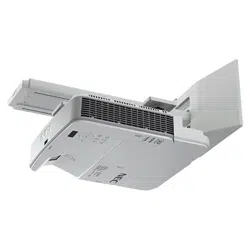
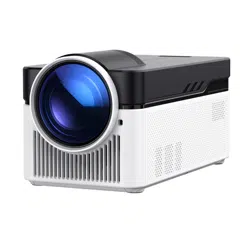
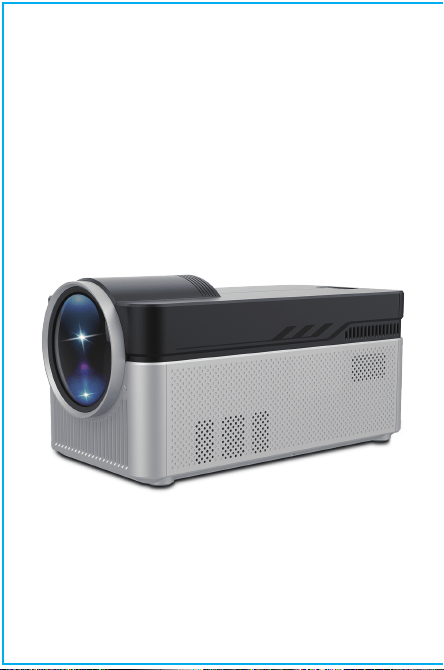
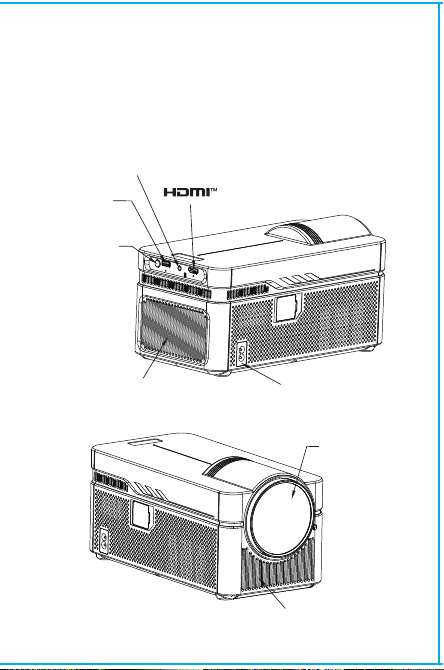
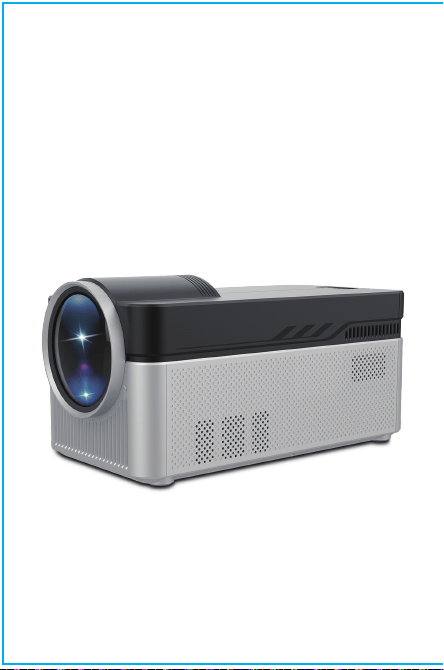
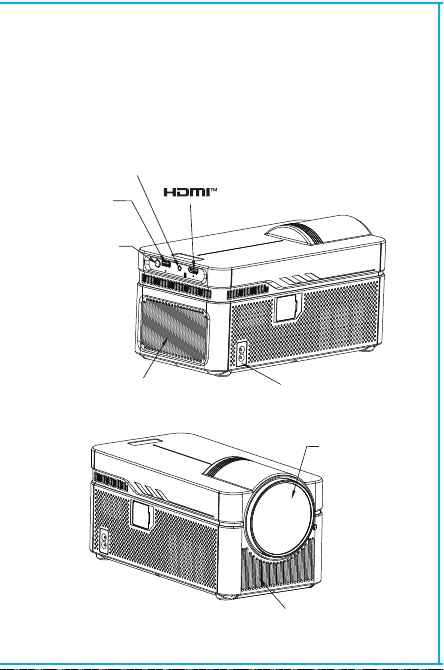
Smart Projector
Lens
Air inlet
ON/OFF
Vent
Headset jack
POWER
USB
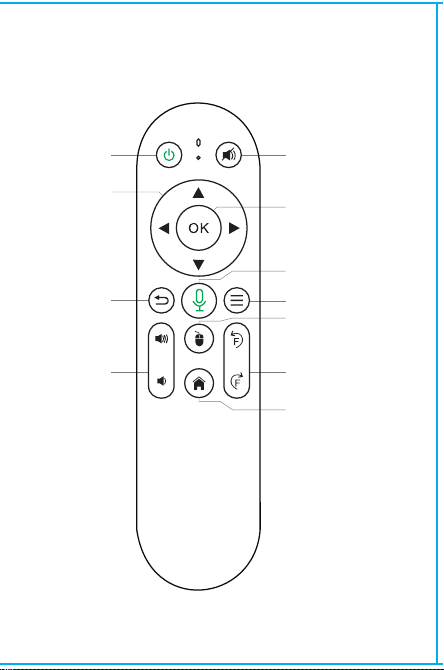
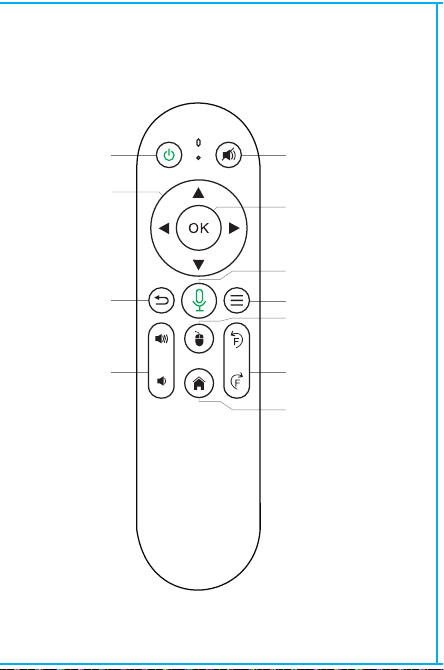
BT Air Remote
ON/OFF
DIRECTIONS
RETURN
VOL+/-
MUTE
OK
BT AIR
REMOTE
MENU
SWITCH TO
MOUSE CONTROL
EIECTRONIC
FOCUS
HOME
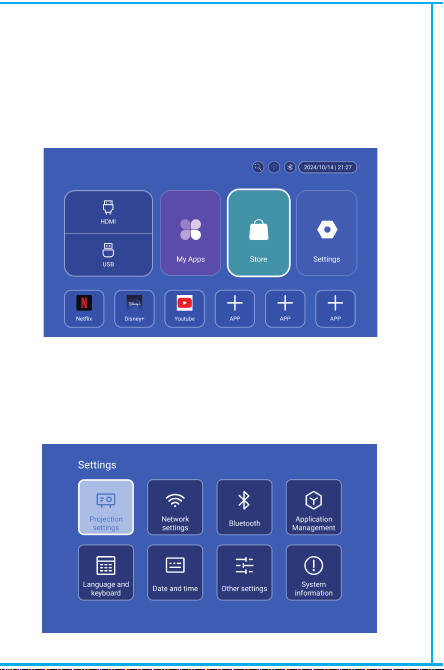
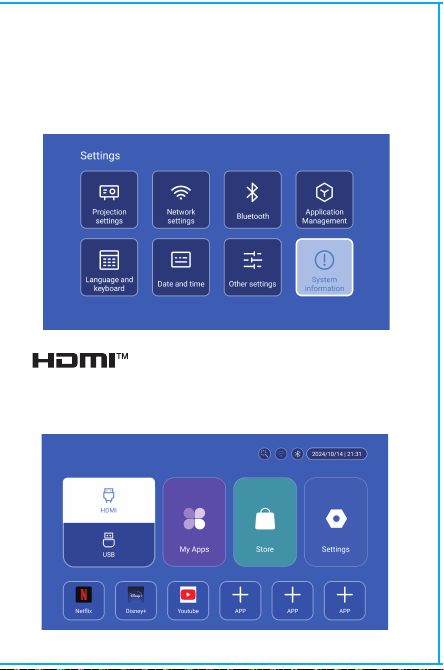
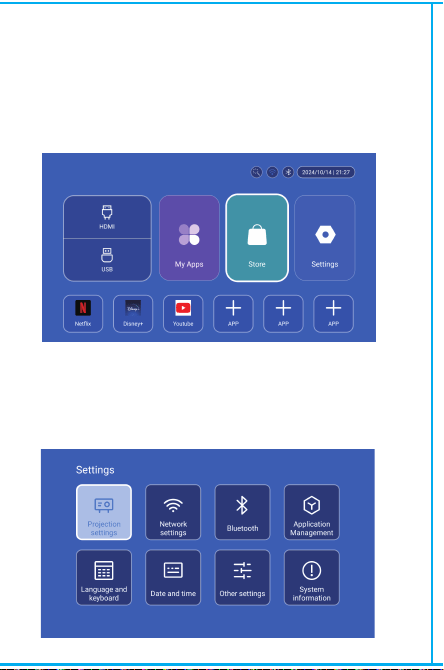
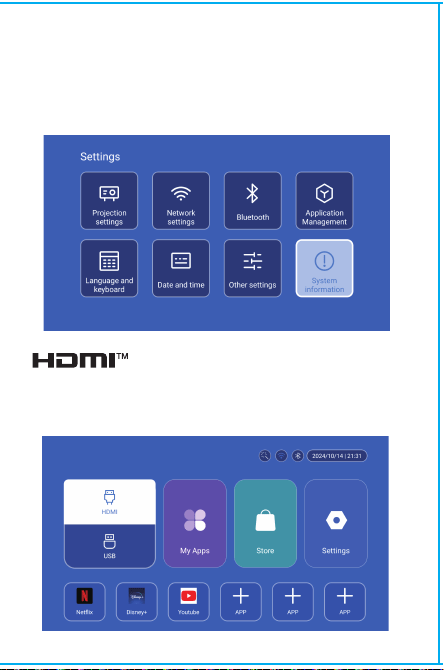
Settings
App Store
In the App Store, applications can be installed with one click,
and they can be used directly after installation. Our company
also brings the applications to the market, enabling users to
obtain and use them easily and conveniently.
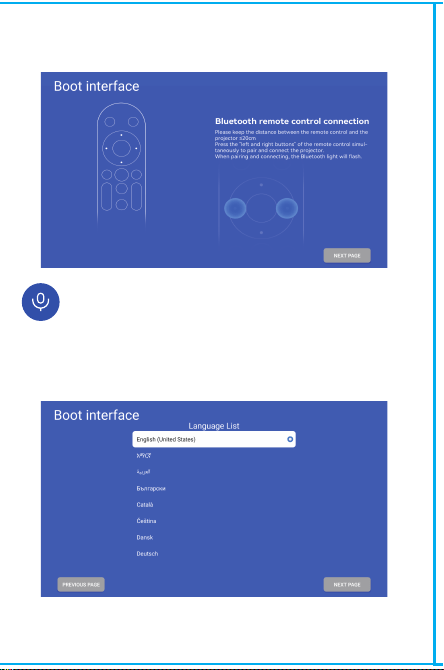
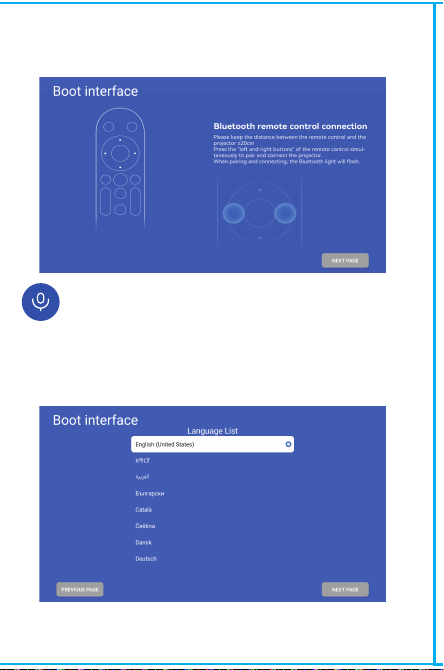
Note: the matching interface of Bluetooth remote control,
Press“Voice input” button to bring up the matching guide.
Bluetooth remote controller pairing
Select your Language
Enter to Projection settings, Network settings, Bluetooth,
Application Management, Language, Date and time, Other
Setting, System information.
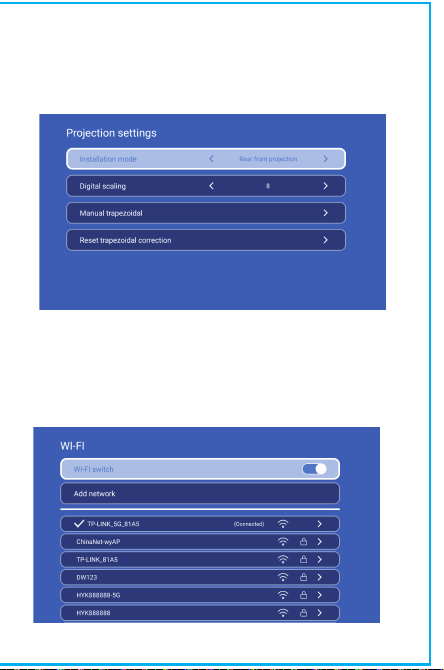
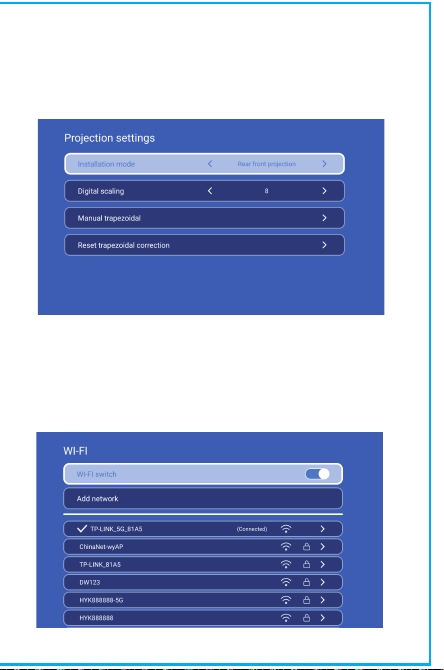
Projection Setting
Setting - Projector setting, enter to setup projection mode,
Installation mode, digital scaling, Manual trapezoidal.
Networking Setting
Settings - Networking Setting - WIFI setting, WIFI “ON”,select
objective WIFI ID and input password to connect internet.

※Quick Installation Guide※
Attention
Please read this manual carefully before use and keep it for
future reference.
1.The projector is non dustproof or waterproof.
2.In order to reduce the risk of fire and electric shock, do
not expose the projector to rain and fog.
3.Please use the original power adapter. The projector
should work under specified rated power supply.
4.When projector is working, please do not look directly
into the lens, the strong light will flash your eyes and cause
slight pain. Children should use the projector under the
supervision of adults.
5.Do not cover the vents of projector. Heating will reduce
the life of projector and cause danger.
6.Regularly clean projector vents, or dust may cause
cooling malfunction.
7.Do not use the projector in greasy, damp, dusty or smoky
environment. Oil or chemicals will cause malfunction.
8.Please handle with care during daily use.
9.Please cut off the power if the projector is out of use for
long time.
10.Non-professionals are forbidden to disassemble the
projector for testing and maintenance.
Structure description
This manual is for reference only. It is subject to change
without prior notice. Hotack reserves the right of final
interpretation.
Smart Projector
Lens
Air inlet
ON/OFF
Vent
Headset jack
POWER
USB
BT Air Remote
ON/OFF
DIRECTIONS
RETURN
VOL+/-
MUTE
OK
BT AIR
REMOTE
MENU
SWITCH TO
MOUSE CONTROL
EIECTRONIC
FOCUS
HOME
Settings
App Store
In the App Store, applications can be installed with one click,
and they can be used directly after installation. Our company
also brings the applications to the market, enabling users to
obtain and use them easily and conveniently.
Note: the matching interface of Bluetooth remote control,
Press“Voice input” button to bring up the matching guide.
Bluetooth remote controller pairing
Select your Language
Enter to Projection settings, Network settings, Bluetooth,
Application Management, Language, Date and time, Other
Setting, System information.
Projection Setting
Setting - Projector setting, enter to setup projection mode,
Installation mode, digital scaling, Manual trapezoidal.
Networking Setting
Settings - Networking Setting - WIFI setting, WIFI “ON”,select
objective WIFI ID and input password to connect internet.
※Quick Installation Guide※
Attention
Please read this manual carefully before use and keep it for
future reference.
1.The projector is non dustproof or waterproof.
2.In order to reduce the risk of fire and electric shock, do
not expose the projector to rain and fog.
3.Please use the original power adapter. The projector
should work under specified rated power supply.
4.When projector is working, please do not look directly
into the lens, the strong light will flash your eyes and cause
slight pain. Children should use the projector under the
supervision of adults.
5.Do not cover the vents of projector. Heating will reduce
the life of projector and cause danger.
6.Regularly clean projector vents, or dust may cause
cooling malfunction.
7.Do not use the projector in greasy, damp, dusty or smoky
environment. Oil or chemicals will cause malfunction.
8.Please handle with care during daily use.
9.Please cut off the power if the projector is out of use for
long time.
10.Non-professionals are forbidden to disassemble the
projector for testing and maintenance.
Structure description
This manual is for reference only. It is subject to change
without prior notice. Hotack reserves the right of final
interpretation.
Smart Projector
Lens
Air inlet
ON/OFF
Vent
Headset jack
POWER
USB
BT Air Remote
ON/OFF
DIRECTIONS
RETURN
VOL+/-
MUTE
OK
BT AIR
REMOTE
MENU
SWITCH TO
MOUSE CONTROL
EIECTRONIC
FOCUS
HOME
Settings
App Store
In the App Store, applications can be installed with one click,
and they can be used directly after installation. Our company
also brings the applications to the market, enabling users to
obtain and use them easily and conveniently.
Note: the matching interface of Bluetooth remote control,
Press“Voice input” button to bring up the matching guide.
Bluetooth remote controller pairing
Select your Language
Enter to Projection settings, Network settings, Bluetooth,
Application Management, Language, Date and time, Other
Setting, System information.
Projection Setting
Setting - Projector setting, enter to setup projection mode,
Installation mode, digital scaling, Manual trapezoidal.
Networking Setting
Settings - Networking Setting - WIFI setting, WIFI “ON”,select
objective WIFI ID and input password to connect internet.
※Quick Installation Guide※
Attention
Please read this manual carefully before use and keep it for
future reference.
1.The projector is non dustproof or waterproof.
2.In order to reduce the risk of fire and electric shock, do
not expose the projector to rain and fog.
3.Please use the original power adapter. The projector
should work under specified rated power supply.
4.When projector is working, please do not look directly
into the lens, the strong light will flash your eyes and cause
slight pain. Children should use the projector under the
supervision of adults.
5.Do not cover the vents of projector. Heating will reduce
the life of projector and cause danger.
6.Regularly clean projector vents, or dust may cause
cooling malfunction.
7.Do not use the projector in greasy, damp, dusty or smoky
environment. Oil or chemicals will cause malfunction.
8.Please handle with care during daily use.
9.Please cut off the power if the projector is out of use for
long time.
10.Non-professionals are forbidden to disassemble the
projector for testing and maintenance.
Structure description
This manual is for reference only. It is subject to change
without prior notice. Hotack reserves the right of final
interpretation.
Smart Projector
Lens
Air inlet
ON/OFF
Vent
Headset jack
POWER
USB
BT Air Remote
ON/OFF
DIRECTIONS
RETURN
VOL+/-
MUTE
OK
BT AIR
REMOTE
MENU
SWITCH TO
MOUSE CONTROL
EIECTRONIC
FOCUS
HOME
Settings
App Store
In the App Store, applications can be installed with one click,
and they can be used directly after installation. Our company
also brings the applications to the market, enabling users to
obtain and use them easily and conveniently.
Note: the matching interface of Bluetooth remote control,
Press“Voice input” button to bring up the matching guide.
Bluetooth remote controller pairing
Select your Language
Enter to Projection settings, Network settings, Bluetooth,
Application Management, Language, Date and time, Other
Setting, System information.
Projection Setting
Setting - Projector setting, enter to setup projection mode,
Installation mode, digital scaling, Manual trapezoidal.
Networking Setting
Settings - Networking Setting - WIFI setting, WIFI “ON”,select
objective WIFI ID and input password to connect internet.
※Quick Installation Guide※
Attention
Please read this manual carefully before use and keep it for
future reference.
1.The projector is non dustproof or waterproof.
2.In order to reduce the risk of fire and electric shock, do
not expose the projector to rain and fog.
3.Please use the original power adapter. The projector
should work under specified rated power supply.
4.When projector is working, please do not look directly
into the lens, the strong light will flash your eyes and cause
slight pain. Children should use the projector under the
supervision of adults.
5.Do not cover the vents of projector. Heating will reduce
the life of projector and cause danger.
6.Regularly clean projector vents, or dust may cause
cooling malfunction.
7.Do not use the projector in greasy, damp, dusty or smoky
environment. Oil or chemicals will cause malfunction.
8.Please handle with care during daily use.
9.Please cut off the power if the projector is out of use for
long time.
10.Non-professionals are forbidden to disassemble the
projector for testing and maintenance.
Structure description
This manual is for reference only. It is subject to change
without prior notice. Hotack reserves the right of final
interpretation.
Smart Projector
Lens
Air inlet
ON/OFF
Vent
Headset jack
POWER
USB
BT Air Remote
ON/OFF
DIRECTIONS
RETURN
VOL+/-
MUTE
OK
BT AIR
REMOTE
MENU
SWITCH TO
MOUSE CONTROL
EIECTRONIC
FOCUS
HOME
Settings
App Store
In the App Store, applications can be installed with one click,
and they can be used directly after installation. Our company
also brings the applications to the market, enabling users to
obtain and use them easily and conveniently.
Note: the matching interface of Bluetooth remote control,
Press“Voice input” button to bring up the matching guide.
Bluetooth remote controller pairing
Select your Language
Enter to Projection settings, Network settings, Bluetooth,
Application Management, Language, Date and time, Other
Setting, System information.
Projection Setting
Setting - Projector setting, enter to setup projection mode,
Installation mode, digital scaling, Manual trapezoidal.
Networking Setting
Settings - Networking Setting - WIFI setting, WIFI “ON”,select
objective WIFI ID and input password to connect internet.
※Quick Installation Guide※
Attention
Please read this manual carefully before use and keep it for
future reference.
1.The projector is non dustproof or waterproof.
2.In order to reduce the risk of fire and electric shock, do
not expose the projector to rain and fog.
3.Please use the original power adapter. The projector
should work under specified rated power supply.
4.When projector is working, please do not look directly
into the lens, the strong light will flash your eyes and cause
slight pain. Children should use the projector under the
supervision of adults.
5.Do not cover the vents of projector. Heating will reduce
the life of projector and cause danger.
6.Regularly clean projector vents, or dust may cause
cooling malfunction.
7.Do not use the projector in greasy, damp, dusty or smoky
environment. Oil or chemicals will cause malfunction.
8.Please handle with care during daily use.
9.Please cut off the power if the projector is out of use for
long time.
10.Non-professionals are forbidden to disassemble the
projector for testing and maintenance.
Structure description
This manual is for reference only. It is subject to change
without prior notice. Hotack reserves the right of final
interpretation.
Smart Projector
Lens
Air inlet
ON/OFF
Vent
Headset jack
POWER
USB
BT Air Remote
ON/OFF
DIRECTIONS
RETURN
VOL+/-
MUTE
OK
BT AIR
REMOTE
MENU
SWITCH TO
MOUSE CONTROL
EIECTRONIC
FOCUS
HOME
Settings
App Store
In the App Store, applications can be installed with one click,
and they can be used directly after installation. Our company
also brings the applications to the market, enabling users to
obtain and use them easily and conveniently.
Note: the matching interface of Bluetooth remote control,
Press“Voice input” button to bring up the matching guide.
Bluetooth remote controller pairing
Select your Language
Enter to Projection settings, Network settings, Bluetooth,
Application Management, Language, Date and time, Other
Setting, System information.
Projection Setting
Setting - Projector setting, enter to setup projection mode,
Installation mode, digital scaling, Manual trapezoidal.
Networking Setting
Settings - Networking Setting - WIFI setting, WIFI “ON”,select
objective WIFI ID and input password to connect internet.
※Quick Installation Guide※
Attention
Please read this manual carefully before use and keep it for
future reference.
1.The projector is non dustproof or waterproof.
2.In order to reduce the risk of fire and electric shock, do
not expose the projector to rain and fog.
3.Please use the original power adapter. The projector
should work under specified rated power supply.
4.When projector is working, please do not look directly
into the lens, the strong light will flash your eyes and cause
slight pain. Children should use the projector under the
supervision of adults.
5.Do not cover the vents of projector. Heating will reduce
the life of projector and cause danger.
6.Regularly clean projector vents, or dust may cause
cooling malfunction.
7.Do not use the projector in greasy, damp, dusty or smoky
environment. Oil or chemicals will cause malfunction.
8.Please handle with care during daily use.
9.Please cut off the power if the projector is out of use for
long time.
10.Non-professionals are forbidden to disassemble the
projector for testing and maintenance.
Structure description
This manual is for reference only. It is subject to change
without prior notice. Hotack reserves the right of final
interpretation.
Smart Projector
Lens
Air inlet
ON/OFF
Vent
Headset jack
POWER
USB
BT Air Remote
ON/OFF
DIRECTIONS
RETURN
VOL+/-
MUTE
OK
BT AIR
REMOTE
MENU
SWITCH TO
MOUSE CONTROL
EIECTRONIC
FOCUS
HOME
Settings
App Store
In the App Store, applications can be installed with one click,
and they can be used directly after installation. Our company
also brings the applications to the market, enabling users to
obtain and use them easily and conveniently.
Note: the matching interface of Bluetooth remote control,
Press“Voice input” button to bring up the matching guide.
Bluetooth remote controller pairing
Select your Language
Enter to Projection settings, Network settings, Bluetooth,
Application Management, Language, Date and time, Other
Setting, System information.
Projection Setting
Setting - Projector setting, enter to setup projection mode,
Installation mode, digital scaling, Manual trapezoidal.
Networking Setting
Settings - Networking Setting - WIFI setting, WIFI “ON”,select
objective WIFI ID and input password to connect internet.
Thanks for purchasing!
Need help?
Please send email inclose item name to our Brand
better experience, prompt reply and further assistance.
System information
Setting - System information, enter to UI version, resolution,
Running memory and Storage space.
Safety instructions
• Please pay attention to important information related to the
operation and maintenance of the projector. You should read
this information carefully to avoid problems. Following safety
instructions will increase the life of projector.
• Please consult the qualified personnel for installation and
repair services, and do not use damaged wires, accessories
and other peripherals.
• Projector should be kept away from flammable, explosive,
strong electromagnetic interference (large radar stations,
power stations, substations) ,etc. Strong ambient light (avoid
direct sunlight), etc.
• Do not cover projector vents.
• Please use the original power adapter.
• Keep adequate ventilation and make sure vents are not
covered to avoid projector overheating
• When projector is working, please do not look directly into
the lens, the strong light will flash your eyes and cause slight
pain.
• Do not bend or drag the power cord.
• Do not put power cord under projector or any heavy objects.
• Do not cover other soft materials on power cord.
• Do not heat the power cord.
• Avoid touching power adaptor with wet hands.
Disclaim
This manual is general instructions, The pictures and functions
in this manual should subject to the actual product. Our
company is devoting to improve product performance, we
reserve the right to modify product functions and interface
described in this manual without notice.
Please keep your device properly. We are not responsible for
any loss caused by wrong operation of software/hardware or
repairing or any other reasons. We are not responsible for any
loss of any third party claims.
This manual has been carefully checked by professional
engineer, please understand for any inevitable omissions.
Signal
After connecting projector to other output device, enter HDMI
or Audio/Video.
Attention:
( Z X - E N - H Y 45020241015)
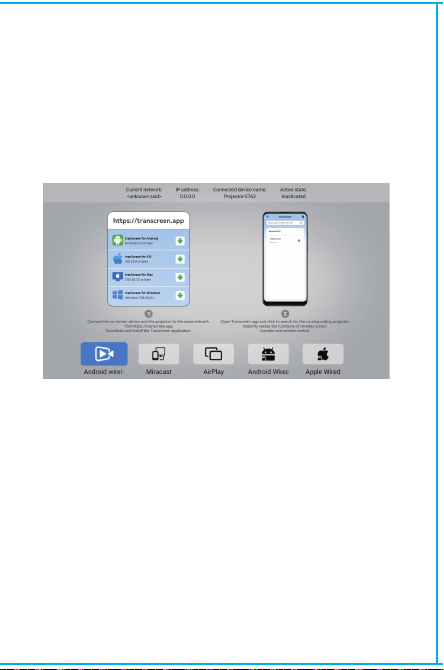
Wireless Screen
Ensure that Android devices(phone,pad,ect)are in the same
local wireless LAN with these devices
Operations on Devices:
Home Screen→My Apps→ScreenCast→Open ScreenCast service
→Turn on the phone mirroring→Connection.
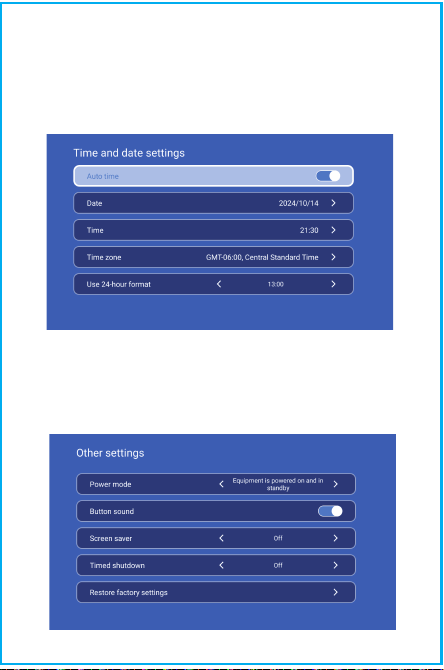
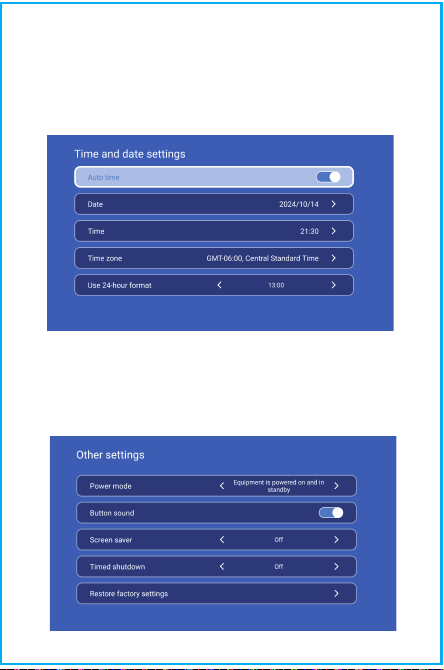
Date And Time Setting
Setting - Date And Time Setting, enter to Date, Time and Use
24-hour format.
Other Setting
Setting - Other Setting, enter to get Power mode, Timed
shutdown and Restore factory settings.
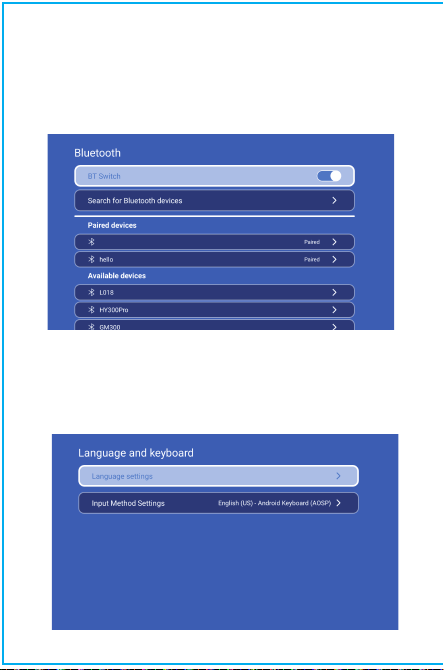
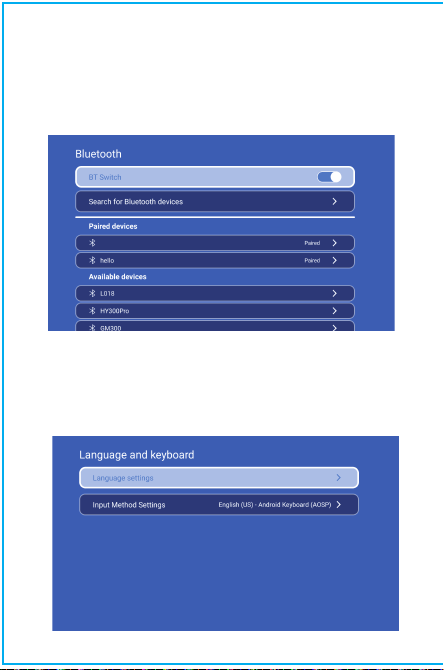
BT Setting
Settings - BT setting, BT “ON”, click Refresh Device and choose
objective device to pair.
Language Setting
Settings - Language Setting, enter to setup language and
select input method.
Thanks for purchasing!
Need help?
Please send email inclose item name to our Brand
better experience, prompt reply and further assistance.
System information
Setting - System information, enter to UI version, resolution,
Running memory and Storage space.
Safety instructions
• Please pay attention to important information related to the
operation and maintenance of the projector. You should read
this information carefully to avoid problems. Following safety
instructions will increase the life of projector.
• Please consult the qualified personnel for installation and
repair services, and do not use damaged wires, accessories
and other peripherals.
• Projector should be kept away from flammable, explosive,
strong electromagnetic interference (large radar stations,
power stations, substations) ,etc. Strong ambient light (avoid
direct sunlight), etc.
• Do not cover projector vents.
• Please use the original power adapter.
• Keep adequate ventilation and make sure vents are not
covered to avoid projector overheating
• When projector is working, please do not look directly into
the lens, the strong light will flash your eyes and cause slight
pain.
• Do not bend or drag the power cord.
• Do not put power cord under projector or any heavy objects.
• Do not cover other soft materials on power cord.
• Do not heat the power cord.
• Avoid touching power adaptor with wet hands.
Disclaim
This manual is general instructions, The pictures and functions
in this manual should subject to the actual product. Our
company is devoting to improve product performance, we
reserve the right to modify product functions and interface
described in this manual without notice.
Please keep your device properly. We are not responsible for
any loss caused by wrong operation of software/hardware or
repairing or any other reasons. We are not responsible for any
loss of any third party claims.
This manual has been carefully checked by professional
engineer, please understand for any inevitable omissions.
Signal
After connecting projector to other output device, enter HDMI
or Audio/Video.
Attention:
( Z X - E N - H Y 45020241015)
Wireless Screen
Ensure that Android devices(phone,pad,ect)are in the same
local wireless LAN with these devices
Operations on Devices:
Home Screen→My Apps→ScreenCast→Open ScreenCast service
→Turn on the phone mirroring→Connection.
Date And Time Setting
Setting - Date And Time Setting, enter to Date, Time and Use
24-hour format.
Other Setting
Setting - Other Setting, enter to get Power mode, Timed
shutdown and Restore factory settings.
BT Setting
Settings - BT setting, BT “ON”, click Refresh Device and choose
objective device to pair.
Language Setting
Settings - Language Setting, enter to setup language and
select input method.
Thanks for purchasing!
Need help?
Please send email inclose item name to our Brand
better experience, prompt reply and further assistance.
System information
Setting - System information, enter to UI version, resolution,
Running memory and Storage space.
Safety instructions
• Please pay attention to important information related to the
operation and maintenance of the projector. You should read
this information carefully to avoid problems. Following safety
instructions will increase the life of projector.
• Please consult the qualified personnel for installation and
repair services, and do not use damaged wires, accessories
and other peripherals.
• Projector should be kept away from flammable, explosive,
strong electromagnetic interference (large radar stations,
power stations, substations) ,etc. Strong ambient light (avoid
direct sunlight), etc.
• Do not cover projector vents.
• Please use the original power adapter.
• Keep adequate ventilation and make sure vents are not
covered to avoid projector overheating
• When projector is working, please do not look directly into
the lens, the strong light will flash your eyes and cause slight
pain.
• Do not bend or drag the power cord.
• Do not put power cord under projector or any heavy objects.
• Do not cover other soft materials on power cord.
• Do not heat the power cord.
• Avoid touching power adaptor with wet hands.
Disclaim
This manual is general instructions, The pictures and functions
in this manual should subject to the actual product. Our
company is devoting to improve product performance, we
reserve the right to modify product functions and interface
described in this manual without notice.
Please keep your device properly. We are not responsible for
any loss caused by wrong operation of software/hardware or
repairing or any other reasons. We are not responsible for any
loss of any third party claims.
This manual has been carefully checked by professional
engineer, please understand for any inevitable omissions.
Signal
After connecting projector to other output device, enter HDMI
or Audio/Video.
Attention:
( Z X - E N - H Y 45020241015)
Wireless Screen
Ensure that Android devices(phone,pad,ect)are in the same
local wireless LAN with these devices
Operations on Devices:
Home Screen→My Apps→ScreenCast→Open ScreenCast service
→Turn on the phone mirroring→Connection.
Date And Time Setting
Setting - Date And Time Setting, enter to Date, Time and Use
24-hour format.
Other Setting
Setting - Other Setting, enter to get Power mode, Timed
shutdown and Restore factory settings.
BT Setting
Settings - BT setting, BT “ON”, click Refresh Device and choose
objective device to pair.
Language Setting
Settings - Language Setting, enter to setup language and
select input method.
Thanks for purchasing!
Need help?
Please send email inclose item name to our Brand
better experience, prompt reply and further assistance.
System information
Setting - System information, enter to UI version, resolution,
Running memory and Storage space.
Safety instructions
• Please pay attention to important information related to the
operation and maintenance of the projector. You should read
this information carefully to avoid problems. Following safety
instructions will increase the life of projector.
• Please consult the qualified personnel for installation and
repair services, and do not use damaged wires, accessories
and other peripherals.
• Projector should be kept away from flammable, explosive,
strong electromagnetic interference (large radar stations,
power stations, substations) ,etc. Strong ambient light (avoid
direct sunlight), etc.
• Do not cover projector vents.
• Please use the original power adapter.
• Keep adequate ventilation and make sure vents are not
covered to avoid projector overheating
• When projector is working, please do not look directly into
the lens, the strong light will flash your eyes and cause slight
pain.
• Do not bend or drag the power cord.
• Do not put power cord under projector or any heavy objects.
• Do not cover other soft materials on power cord.
• Do not heat the power cord.
• Avoid touching power adaptor with wet hands.
Disclaim
This manual is general instructions, The pictures and functions
in this manual should subject to the actual product. Our
company is devoting to improve product performance, we
reserve the right to modify product functions and interface
described in this manual without notice.
Please keep your device properly. We are not responsible for
any loss caused by wrong operation of software/hardware or
repairing or any other reasons. We are not responsible for any
loss of any third party claims.
This manual has been carefully checked by professional
engineer, please understand for any inevitable omissions.
Signal
After connecting projector to other output device, enter HDMI
or Audio/Video.
Attention:
( Z X - E N - H Y 45020241015)
Wireless Screen
Ensure that Android devices(phone,pad,ect)are in the same
local wireless LAN with these devices
Operations on Devices:
Home Screen→My Apps→ScreenCast→Open ScreenCast service
→Turn on the phone mirroring→Connection.
Date And Time Setting
Setting - Date And Time Setting, enter to Date, Time and Use
24-hour format.
Other Setting
Setting - Other Setting, enter to get Power mode, Timed
shutdown and Restore factory settings.
BT Setting
Settings - BT setting, BT “ON”, click Refresh Device and choose
objective device to pair.
Language Setting
Settings - Language Setting, enter to setup language and
select input method.

Thanks for purchasing!
Need help?
Please send email inclose item name to our Brand
better experience, prompt reply and further assistance.
System information
Setting - System information, enter to UI version, resolution,
Running memory and Storage space.
Safety instructions
• Please pay attention to important information related to the
operation and maintenance of the projector. You should read
this information carefully to avoid problems. Following safety
instructions will increase the life of projector.
• Please consult the qualified personnel for installation and
repair services, and do not use damaged wires, accessories
and other peripherals.
• Projector should be kept away from flammable, explosive,
strong electromagnetic interference (large radar stations,
power stations, substations) ,etc. Strong ambient light (avoid
direct sunlight), etc.
• Do not cover projector vents.
• Please use the original power adapter.
• Keep adequate ventilation and make sure vents are not
covered to avoid projector overheating
• When projector is working, please do not look directly into
the lens, the strong light will flash your eyes and cause slight
pain.
• Do not bend or drag the power cord.
• Do not put power cord under projector or any heavy objects.
• Do not cover other soft materials on power cord.
• Do not heat the power cord.
• Avoid touching power adaptor with wet hands.
Disclaim
This manual is general instructions, The pictures and functions
in this manual should subject to the actual product. Our
company is devoting to improve product performance, we
reserve the right to modify product functions and interface
described in this manual without notice.
Please keep your device properly. We are not responsible for
any loss caused by wrong operation of software/hardware or
repairing or any other reasons. We are not responsible for any
loss of any third party claims.
This manual has been carefully checked by professional
engineer, please understand for any inevitable omissions.
Signal
After connecting projector to other output device, enter HDMI
or Audio/Video.
Attention:
( Z X - E N - H Y 45020241015)
Wireless Screen
Ensure that Android devices(phone,pad,ect)are in the same
local wireless LAN with these devices
Operations on Devices:
Home Screen→My Apps→ScreenCast→Open ScreenCast service
→Turn on the phone mirroring→Connection.
Date And Time Setting
Setting - Date And Time Setting, enter to Date, Time and Use
24-hour format.
Other Setting
Setting - Other Setting, enter to get Power mode, Timed
shutdown and Restore factory settings.
BT Setting
Settings - BT setting, BT “ON”, click Refresh Device and choose
objective device to pair.
Language Setting
Settings - Language Setting, enter to setup language and
select input method.

Thanks for purchasing!
Need help?
Please send email inclose item name to our Brand
better experience, prompt reply and further assistance.
System information
Setting - System information, enter to UI version, resolution,
Running memory and Storage space.
Safety instructions
• Please pay attention to important information related to the
operation and maintenance of the projector. You should read
this information carefully to avoid problems. Following safety
instructions will increase the life of projector.
• Please consult the qualified personnel for installation and
repair services, and do not use damaged wires, accessories
and other peripherals.
• Projector should be kept away from flammable, explosive,
strong electromagnetic interference (large radar stations,
power stations, substations) ,etc. Strong ambient light (avoid
direct sunlight), etc.
• Do not cover projector vents.
• Please use the original power adapter.
• Keep adequate ventilation and make sure vents are not
covered to avoid projector overheating
• When projector is working, please do not look directly into
the lens, the strong light will flash your eyes and cause slight
pain.
• Do not bend or drag the power cord.
• Do not put power cord under projector or any heavy objects.
• Do not cover other soft materials on power cord.
• Do not heat the power cord.
• Avoid touching power adaptor with wet hands.
Disclaim
This manual is general instructions, The pictures and functions
in this manual should subject to the actual product. Our
company is devoting to improve product performance, we
reserve the right to modify product functions and interface
described in this manual without notice.
Please keep your device properly. We are not responsible for
any loss caused by wrong operation of software/hardware or
repairing or any other reasons. We are not responsible for any
loss of any third party claims.
This manual has been carefully checked by professional
engineer, please understand for any inevitable omissions.
Signal
After connecting projector to other output device, enter HDMI
or Audio/Video.
Attention:
( Z X - E N - H Y 45020241015)
Wireless Screen
Ensure that Android devices(phone,pad,ect)are in the same
local wireless LAN with these devices
Operations on Devices:
Home Screen→My Apps→ScreenCast→Open ScreenCast service
→Turn on the phone mirroring→Connection.
Date And Time Setting
Setting - Date And Time Setting, enter to Date, Time and Use
24-hour format.
Other Setting
Setting - Other Setting, enter to get Power mode, Timed
shutdown and Restore factory settings.
BT Setting
Settings - BT setting, BT “ON”, click Refresh Device and choose
objective device to pair.
Language Setting
Settings - Language Setting, enter to setup language and
select input method.

Thanks for purchasing!
Need help?
Please send email inclose item name to our Brand
Support Team ([email protected]), in order to get
better experience, prompt reply and further assistance.
System information
Setting - System information, enter to UI version, resolution,
Running memory and Storage space.
Safety instructions
• Please pay attention to important information related to the
operation and maintenance of the projector. You should read
this information carefully to avoid problems. Following safety
instructions will increase the life of projector.
• Please consult the qualified personnel for installation and
repair services, and do not use damaged wires, accessories
and other peripherals.
• Projector should be kept away from flammable, explosive,
strong electromagnetic interference (large radar stations,
power stations, substations) ,etc. Strong ambient light (avoid
direct sunlight), etc.
• Do not cover projector vents.
• Please use the original power adapter.
• Keep adequate ventilation and make sure vents are not
covered to avoid projector overheating
• When projector is working, please do not look directly into
the lens, the strong light will flash your eyes and cause slight
pain.
• Do not bend or drag the power cord.
• Do not put power cord under projector or any heavy objects.
• Do not cover other soft materials on power cord.
• Do not heat the power cord.
• Avoid touching power adaptor with wet hands.
Disclaim
This manual is general instructions, The pictures and functions
in this manual should subject to the actual product. Our
company is devoting to improve product performance, we
reserve the right to modify product functions and interface
described in this manual without notice.
Please keep your device properly. We are not responsible for
any loss caused by wrong operation of software/hardware or
repairing or any other reasons. We are not responsible for any
loss of any third party claims.
This manual has been carefully checked by professional
engineer, please understand for any inevitable omissions.
Signal
After connecting projector to other output device, enter HDMI
or Audio/Video.
Attention:
( Z X - E N - H Y 45020241015)
Wireless Screen
Ensure that Android devices(phone,pad,ect)are in the same
local wireless LAN with these devices
Operations on Devices:
Home Screen→My Apps→ScreenCast→Open ScreenCast service
→Turn on the phone mirroring→Connection.
Date And Time Setting
Setting - Date And Time Setting, enter to Date, Time and Use
24-hour format.
Other Setting
Setting - Other Setting, enter to get Power mode, Timed
shutdown and Restore factory settings.
BT Setting
Settings - BT setting, BT “ON”, click Refresh Device and choose
objective device to pair.
Language Setting
Settings - Language Setting, enter to setup language and
select input method.
※クイック·インストール·ガイド※
ご注意ください 構成説明
この取扱説明書参考用です。予告なしに変更される場合があり
ます。Hotackは最終的な解釈の権利を留保します。
スマートプロジェクター
レンズ
空気吸入口
ON/OFF
通気口
ヘッドセットジャック
電源
USB
BTエアリモート
ON/OFF
INSTRUCCIONES
DEVOLVER
VOL+/-
SILENCIAR
OK
BT AIR
REMOTE
MENU
SWITCH TO
MOUSE CONTROL
ENFOQUE
ELECTRÓNICO
HOME
投影設定
設定 - プロジェクター設定、投影モード、設置モード、デジタ
ルスケーリング、手動台形の設定に入ります。
ネットワーク設定
設定 - ネットワーク設定 - WlFl 設定、WlFl「オン」、目的の
WlFl ID を選択し、パスワードを入力してインターネットに接
続します。
設定
投影設定、ネットワーク設定、Bluetooth、アプリケーション管理、
言語、日付と時刻、その他の設定、システム情報に進みます。
アプリストア
アプリストアでは、アプリケーションをワンクリックでインストー
ルでき、インストール後すぐに使用できます。当社もアプリケーシ
ョンを市場に提供し、ユーザーが簡単かつ便利に取得して使用でき
るようにしています。
注意:Bluetoothリモコンのペアリングインターフェースで、
「音声入力」ボタンを押すと、ペアリングガイドが表示さ
れます。
Bluetoothリモコンのペアリング
言語を選択してください
ご使用前にこの取扱説明書をよくお読みになり、万一の場合に
備えて大切に保管してください。
1.プロジェクターは防塵·防水仕様ではありません。
2.火災や感電の危険を減らすため、プロジェクターを雨や霧に
さらさないでください。
3.純正の電源アダプターをご使用ください。プロジェクターは
指定された定格電源のもとでご使用ください。
4.プロジェクターが動作しているとき、レンズを直接見ないで
ください。強い光は目に閃光を与え、軽い痛みを引き起こす可
能性があります。お子様がプロジェクターを使用する場合は、
大人の監督のもとで行ってください。
5.プロジェクターの通風孔を塞がないでください。加熱はプロ
ジェクターの寿命を縮め、危険の原因となります。
6.定期的にプロジェクターの通風孔を清掃してください。そう
しないと、ほこりが冷却不良の原因となることがあります。
7.プロジェクターは、油分の多い場所、湿気の多い場所、ほこ
りの多い場所、煙の多い場所では使用しないでください。油煙
や化学薬品は故障の原因となります。
8.日常的な取り扱いには十分ご注意ください。
9.プロジェクターを長期間使用しない場合は、電源を抜いてく
ださい。
専門家以外の人が、テストやメンテナンスのためにプロジェク
ターを分解することは禁止されています。

※クイック·インストール·ガイド※
ご注意ください 構成説明
この取扱説明書参考用です。予告なしに変更される場合があり
ます。Hotackは最終的な解釈の権利を留保します。
スマートプロジェクター
レンズ
空気吸入口
ON/OFF
通気口
ヘッドセットジャック
電源
USB
BTエアリモート
ON/OFF
INSTRUCCIONES
DEVOLVER
VOL+/-
SILENCIAR
OK
BT AIR
REMOTE
MENU
SWITCH TO
MOUSE CONTROL
ENFOQUE
ELECTRÓNICO
HOME
投影設定
設定 - プロジェクター設定、投影モード、設置モード、デジタ
ルスケーリング、手動台形の設定に入ります。
ネットワーク設定
設定 - ネットワーク設定 - WlFl 設定、WlFl「オン」、目的の
WlFl ID を選択し、パスワードを入力してインターネットに接
続します。
設定
投影設定、ネットワーク設定、Bluetooth、アプリケーション管理、
言語、日付と時刻、その他の設定、システム情報に進みます。
アプリストア
アプリストアでは、アプリケーションをワンクリックでインストー
ルでき、インストール後すぐに使用できます。当社もアプリケーシ
ョンを市場に提供し、ユーザーが簡単かつ便利に取得して使用でき
るようにしています。
注意:Bluetoothリモコンのペアリングインターフェースで、
「音声入力」ボタンを押すと、ペアリングガイドが表示さ
れます。
Bluetoothリモコンのペアリング
言語を選択してください
ご使用前にこの取扱説明書をよくお読みになり、万一の場合に
備えて大切に保管してください。
1.プロジェクターは防塵·防水仕様ではありません。
2.火災や感電の危険を減らすため、プロジェクターを雨や霧に
さらさないでください。
3.純正の電源アダプターをご使用ください。プロジェクターは
指定された定格電源のもとでご使用ください。
4.プロジェクターが動作しているとき、レンズを直接見ないで
ください。強い光は目に閃光を与え、軽い痛みを引き起こす可
能性があります。お子様がプロジェクターを使用する場合は、
大人の監督のもとで行ってください。
5.プロジェクターの通風孔を塞がないでください。加熱はプロ
ジェクターの寿命を縮め、危険の原因となります。
6.定期的にプロジェクターの通風孔を清掃してください。そう
しないと、ほこりが冷却不良の原因となることがあります。
7.プロジェクターは、油分の多い場所、湿気の多い場所、ほこ
りの多い場所、煙の多い場所では使用しないでください。油煙
や化学薬品は故障の原因となります。
8.日常的な取り扱いには十分ご注意ください。
9.プロジェクターを長期間使用しない場合は、電源を抜いてく
ださい。
専門家以外の人が、テストやメンテナンスのためにプロジェク
ターを分解することは禁止されています。
※クイック·インストール·ガイド※
ご注意ください 構成説明
この取扱説明書参考用です。予告なしに変更される場合があり
ます。Hotackは最終的な解釈の権利を留保します。
スマートプロジェクター
レンズ
空気吸入口
ON/OFF
通気口
ヘッドセットジャック
電源
USB
BTエアリモート
ON/OFF
INSTRUCCIONES
DEVOLVER
VOL+/-
SILENCIAR
OK
BT AIR
REMOTE
MENU
SWITCH TO
MOUSE CONTROL
ENFOQUE
ELECTRÓNICO
HOME
投影設定
設定 - プロジェクター設定、投影モード、設置モード、デジタ
ルスケーリング、手動台形の設定に入ります。
ネットワーク設定
設定 - ネットワーク設定 - WlFl 設定、WlFl「オン」、目的の
WlFl ID を選択し、パスワードを入力してインターネットに接
続します。
設定
投影設定、ネットワーク設定、Bluetooth、アプリケーション管理、
言語、日付と時刻、その他の設定、システム情報に進みます。
アプリストア
アプリストアでは、アプリケーションをワンクリックでインストー
ルでき、インストール後すぐに使用できます。当社もアプリケーシ
ョンを市場に提供し、ユーザーが簡単かつ便利に取得して使用でき
るようにしています。
注意:Bluetoothリモコンのペアリングインターフェースで、
「音声入力」ボタンを押すと、ペアリングガイドが表示さ
れます。
Bluetoothリモコンのペアリング
言語を選択してください
ご使用前にこの取扱説明書をよくお読みになり、万一の場合に
備えて大切に保管してください。
1.プロジェクターは防塵·防水仕様ではありません。
2.火災や感電の危険を減らすため、プロジェクターを雨や霧に
さらさないでください。
3.純正の電源アダプターをご使用ください。プロジェクターは
指定された定格電源のもとでご使用ください。
4.プロジェクターが動作しているとき、レンズを直接見ないで
ください。強い光は目に閃光を与え、軽い痛みを引き起こす可
能性があります。お子様がプロジェクターを使用する場合は、
大人の監督のもとで行ってください。
5.プロジェクターの通風孔を塞がないでください。加熱はプロ
ジェクターの寿命を縮め、危険の原因となります。
6.定期的にプロジェクターの通風孔を清掃してください。そう
しないと、ほこりが冷却不良の原因となることがあります。
7.プロジェクターは、油分の多い場所、湿気の多い場所、ほこ
りの多い場所、煙の多い場所では使用しないでください。油煙
や化学薬品は故障の原因となります。
8.日常的な取り扱いには十分ご注意ください。
9.プロジェクターを長期間使用しない場合は、電源を抜いてく
ださい。
専門家以外の人が、テストやメンテナンスのためにプロジェク
ターを分解することは禁止されています。
※クイック·インストール·ガイド※
ご注意ください 構成説明
この取扱説明書参考用です。予告なしに変更される場合があり
ます。Hotackは最終的な解釈の権利を留保します。
スマートプロジェクター
レンズ
空気吸入口
ON/OFF
通気口
ヘッドセットジャック
電源
USB
BTエアリモート
ON/OFF
INSTRUCCIONES
DEVOLVER
VOL+/-
SILENCIAR
OK
BT AIR
REMOTE
MENU
SWITCH TO
MOUSE CONTROL
ENFOQUE
ELECTRÓNICO
HOME
投影設定
設定 - プロジェクター設定、投影モード、設置モード、デジタ
ルスケーリング、手動台形の設定に入ります。
ネットワーク設定
設定 - ネットワーク設定 - WlFl 設定、WlFl「オン」、目的の
WlFl ID を選択し、パスワードを入力してインターネットに接
続します。
設定
投影設定、ネットワーク設定、Bluetooth、アプリケーション管理、
言語、日付と時刻、その他の設定、システム情報に進みます。
アプリストア
アプリストアでは、アプリケーションをワンクリックでインストー
ルでき、インストール後すぐに使用できます。当社もアプリケーシ
ョンを市場に提供し、ユーザーが簡単かつ便利に取得して使用でき
るようにしています。
注意:Bluetoothリモコンのペアリングインターフェースで、
「音声入力」ボタンを押すと、ペアリングガイドが表示さ
れます。
Bluetoothリモコンのペアリング
言語を選択してください
ご使用前にこの取扱説明書をよくお読みになり、万一の場合に
備えて大切に保管してください。
1.プロジェクターは防塵·防水仕様ではありません。
2.火災や感電の危険を減らすため、プロジェクターを雨や霧に
さらさないでください。
3.純正の電源アダプターをご使用ください。プロジェクターは
指定された定格電源のもとでご使用ください。
4.プロジェクターが動作しているとき、レンズを直接見ないで
ください。強い光は目に閃光を与え、軽い痛みを引き起こす可
能性があります。お子様がプロジェクターを使用する場合は、
大人の監督のもとで行ってください。
5.プロジェクターの通風孔を塞がないでください。加熱はプロ
ジェクターの寿命を縮め、危険の原因となります。
6.定期的にプロジェクターの通風孔を清掃してください。そう
しないと、ほこりが冷却不良の原因となることがあります。
7.プロジェクターは、油分の多い場所、湿気の多い場所、ほこ
りの多い場所、煙の多い場所では使用しないでください。油煙
や化学薬品は故障の原因となります。
8.日常的な取り扱いには十分ご注意ください。
9.プロジェクターを長期間使用しない場合は、電源を抜いてく
ださい。
専門家以外の人が、テストやメンテナンスのためにプロジェク
ターを分解することは禁止されています。
※クイック·インストール·ガイド※
ご注意ください 構成説明
この取扱説明書参考用です。予告なしに変更される場合があり
ます。Hotackは最終的な解釈の権利を留保します。
スマートプロジェクター
レンズ
空気吸入口
ON/OFF
通気口
ヘッドセットジャック
電源
USB
BTエアリモート
ON/OFF
INSTRUCCIONES
DEVOLVER
VOL+/-
SILENCIAR
OK
BT AIR
REMOTE
MENU
SWITCH TO
MOUSE CONTROL
ENFOQUE
ELECTRÓNICO
HOME
投影設定
設定 - プロジェクター設定、投影モード、設置モード、デジタ
ルスケーリング、手動台形の設定に入ります。
ネットワーク設定
設定 - ネットワーク設定 - WlFl 設定、WlFl「オン」、目的の
WlFl ID を選択し、パスワードを入力してインターネットに接
続します。
設定
投影設定、ネットワーク設定、Bluetooth、アプリケーション管理、
言語、日付と時刻、その他の設定、システム情報に進みます。
アプリストア
アプリストアでは、アプリケーションをワンクリックでインストー
ルでき、インストール後すぐに使用できます。当社もアプリケーシ
ョンを市場に提供し、ユーザーが簡単かつ便利に取得して使用でき
るようにしています。
注意:Bluetoothリモコンのペアリングインターフェースで、
「音声入力」ボタンを押すと、ペアリングガイドが表示さ
れます。
Bluetoothリモコンのペアリング
言語を選択してください
ご使用前にこの取扱説明書をよくお読みになり、万一の場合に
備えて大切に保管してください。
1.プロジェクターは防塵·防水仕様ではありません。
2.火災や感電の危険を減らすため、プロジェクターを雨や霧に
さらさないでください。
3.純正の電源アダプターをご使用ください。プロジェクターは
指定された定格電源のもとでご使用ください。
4.プロジェクターが動作しているとき、レンズを直接見ないで
ください。強い光は目に閃光を与え、軽い痛みを引き起こす可
能性があります。お子様がプロジェクターを使用する場合は、
大人の監督のもとで行ってください。
5.プロジェクターの通風孔を塞がないでください。加熱はプロ
ジェクターの寿命を縮め、危険の原因となります。
6.定期的にプロジェクターの通風孔を清掃してください。そう
しないと、ほこりが冷却不良の原因となることがあります。
7.プロジェクターは、油分の多い場所、湿気の多い場所、ほこ
りの多い場所、煙の多い場所では使用しないでください。油煙
や化学薬品は故障の原因となります。
8.日常的な取り扱いには十分ご注意ください。
9.プロジェクターを長期間使用しない場合は、電源を抜いてく
ださい。
専門家以外の人が、テストやメンテナンスのためにプロジェク
ターを分解することは禁止されています。
※クイック·インストール·ガイド※
ご注意ください 構成説明
この取扱説明書参考用です。予告なしに変更される場合があり
ます。Hotackは最終的な解釈の権利を留保します。
スマートプロジェクター
レンズ
空気吸入口
ON/OFF
通気口
ヘッドセットジャック
電源
USB
BTエアリモート
ON/OFF
INSTRUCCIONES
DEVOLVER
VOL+/-
SILENCIAR
OK
BT AIR
REMOTE
MENU
SWITCH TO
MOUSE CONTROL
ENFOQUE
ELECTRÓNICO
HOME
投影設定
設定 - プロジェクター設定、投影モード、設置モード、デジタ
ルスケーリング、手動台形の設定に入ります。
ネットワーク設定
設定 - ネットワーク設定 - WlFl 設定、WlFl「オン」、目的の
WlFl ID を選択し、パスワードを入力してインターネットに接
続します。
設定
投影設定、ネットワーク設定、Bluetooth、アプリケーション管理、
言語、日付と時刻、その他の設定、システム情報に進みます。
アプリストア
アプリストアでは、アプリケーションをワンクリックでインストー
ルでき、インストール後すぐに使用できます。当社もアプリケーシ
ョンを市場に提供し、ユーザーが簡単かつ便利に取得して使用でき
るようにしています。
注意:Bluetoothリモコンのペアリングインターフェースで、
「音声入力」ボタンを押すと、ペアリングガイドが表示さ
れます。
Bluetoothリモコンのペアリング
言語を選択してください
ご使用前にこの取扱説明書をよくお読みになり、万一の場合に
備えて大切に保管してください。
1.プロジェクターは防塵·防水仕様ではありません。
2.火災や感電の危険を減らすため、プロジェクターを雨や霧に
さらさないでください。
3.純正の電源アダプターをご使用ください。プロジェクターは
指定された定格電源のもとでご使用ください。
4.プロジェクターが動作しているとき、レンズを直接見ないで
ください。強い光は目に閃光を与え、軽い痛みを引き起こす可
能性があります。お子様がプロジェクターを使用する場合は、
大人の監督のもとで行ってください。
5.プロジェクターの通風孔を塞がないでください。加熱はプロ
ジェクターの寿命を縮め、危険の原因となります。
6.定期的にプロジェクターの通風孔を清掃してください。そう
しないと、ほこりが冷却不良の原因となることがあります。
7.プロジェクターは、油分の多い場所、湿気の多い場所、ほこ
りの多い場所、煙の多い場所では使用しないでください。油煙
や化学薬品は故障の原因となります。
8.日常的な取り扱いには十分ご注意ください。
9.プロジェクターを長期間使用しない場合は、電源を抜いてく
ださい。
専門家以外の人が、テストやメンテナンスのためにプロジェク
ターを分解することは禁止されています。
※クイック·インストール·ガイド※
ご注意ください 構成説明
この取扱説明書参考用です。予告なしに変更される場合があり
ます。Hotackは最終的な解釈の権利を留保します。
スマートプロジェクター
レンズ
空気吸入口
ON/OFF
通気口
ヘッドセットジャック
電源
USB
BTエアリモート
ON/OFF
INSTRUCCIONES
DEVOLVER
VOL+/-
SILENCIAR
OK
BT AIR
REMOTE
MENU
SWITCH TO
MOUSE CONTROL
ENFOQUE
ELECTRÓNICO
HOME
投影設定
設定 - プロジェクター設定、投影モード、設置モード、デジタ
ルスケーリング、手動台形の設定に入ります。
ネットワーク設定
設定 - ネットワーク設定 - WlFl 設定、WlFl「オン」、目的の
WlFl ID を選択し、パスワードを入力してインターネットに接
続します。
設定
投影設定、ネットワーク設定、Bluetooth、アプリケーション管理、
言語、日付と時刻、その他の設定、システム情報に進みます。
アプリストア
アプリストアでは、アプリケーションをワンクリックでインストー
ルでき、インストール後すぐに使用できます。当社もアプリケーシ
ョンを市場に提供し、ユーザーが簡単かつ便利に取得して使用でき
るようにしています。
注意:Bluetoothリモコンのペアリングインターフェースで、
「音声入力」ボタンを押すと、ペアリングガイドが表示さ
れます。
Bluetoothリモコンのペアリング
言語を選択してください
ご使用前にこの取扱説明書をよくお読みになり、万一の場合に
備えて大切に保管してください。
1.プロジェクターは防塵·防水仕様ではありません。
2.火災や感電の危険を減らすため、プロジェクターを雨や霧に
さらさないでください。
3.純正の電源アダプターをご使用ください。プロジェクターは
指定された定格電源のもとでご使用ください。
4.プロジェクターが動作しているとき、レンズを直接見ないで
ください。強い光は目に閃光を与え、軽い痛みを引き起こす可
能性があります。お子様がプロジェクターを使用する場合は、
大人の監督のもとで行ってください。
5.プロジェクターの通風孔を塞がないでください。加熱はプロ
ジェクターの寿命を縮め、危険の原因となります。
6.定期的にプロジェクターの通風孔を清掃してください。そう
しないと、ほこりが冷却不良の原因となることがあります。
7.プロジェクターは、油分の多い場所、湿気の多い場所、ほこ
りの多い場所、煙の多い場所では使用しないでください。油煙
や化学薬品は故障の原因となります。
8.日常的な取り扱いには十分ご注意ください。
9.プロジェクターを長期間使用しない場合は、電源を抜いてく
ださい。
専門家以外の人が、テストやメンテナンスのためにプロジェク
ターを分解することは禁止されています。
BT設定
設定 - BT 設定、BT「オン」、デバイスの更新をクリックし、
ペアリングする対象デバイスを選択します。
日付と時刻の設定
設定 - 日付と時刻の設定、日付、時刻を入力し、24 時間形式
を使用します。
システム情報
設定 - システム情報、Ulバージョン、解像度、実行メモリ、
ストレージ容量に入る。
セキュリティについて 免責事項
本取扱説明書は一般的な説明であり、取扱説明書の写真や機能は実
際の製品によって異なります。弊社は製品の性能向上に努めており、
取扱説明書に記載されている製品の機能やインターフェイスを事前
の通知なしに変更する権利を有します。
お使いのデバイスは大切に扱ってください。ソフトウェア/ハードウェ
アの誤用、修理、その他の理由による損害については、弊社では責任
を負いかねます。また、第三者からのクレームによる損害についても
責任を負いかねます。
本取扱説明書は専門エンジニアが入念にチェックしたものですが、ど
うしても抜けがあることをご了承ください。
「お買い上げありがとうございました!
お困りですか?
製品名を明記の上、弊社ブランドサポートチームまでメールをお送り
プロジェクターを他の出力デバイスに接続した後、HDMlまたは
オーディオ/ビデオに入ります。
言語設定
設定 - 言語設定、入力方法を選択して言語を設定します。
その他の設定
設定 - その他の設定、入力すると、電源モード、時間指定シ
ャットダウン、工場出荷時設定の復元が取得されます。
( Z X - E N - H Y 45020241012)
ワイヤレススクリーン
Androidデバイス(スマートフォン、タブレットなど)がこれらのデバ
イスと同じローカル無線LANに接続されていることを確認してくだ
さい。
デバイスでの操作:
ホーム画面 → アプリケーション → スクリーンキャスト → スクリ
ーンキャストサービスを開く → スマートフォンミラーリングをオン
にする → 接続する。
ご購入ありがとうございます!
お手伝いが必要ですか?
添えてメールを送信してください。より良い体験を得るために、
迅速な返信とさらなるサポートを提供します
·プロジェクターの操作とメンテナンスに関する重要な情報に
ご注意ください。問題を避けるために、この情報を注意深くお
読みください。安全に関する指示を守ることで、プロジェクタ
ーの寿命を延ばすことができます。
·設置やメンテナンスについては、資格者にご相談ください。
また、損傷したワイヤ、アクセサリ、その他の周辺機器を使用
しないでください。
·プロジェクターは、可燃性、爆発性、強い電磁干渉(大型レ
ーダー局、発電所、変電所)などから遠ざけてください。強い
環境光(直射日光を避ける)など。
·プロジェクターの通風孔を塞がないでください。
·純正の電源アダプターをご使用ください。
·プロジェクターが過熱を避けるため、十分な換気を維持し、通
気口が覆われていないことを確認してください。
·プロジェクターが作動している時、レンズを直視しないでくだ
さい。強い光が目に入り、軽い痛みを感じます。
·電源コードを折り曲げたり、引きずったりしないでください。
·電源コードをプロジェクターや重い物の下に置かないでください。
·電源コードを他の柔らかい素材で覆わないでください。
·電源コードを加熱しないでください。
·濡れた手で電源アダプターに触れないようにしてください。
Signal
BT設定
設定 - BT 設定、BT「オン」、デバイスの更新をクリックし、
ペアリングする対象デバイスを選択します。
日付と時刻の設定
設定 - 日付と時刻の設定、日付、時刻を入力し、24 時間形式
を使用します。
システム情報
設定 - システム情報、Ulバージョン、解像度、実行メモリ、
ストレージ容量に入る。
セキュリティについて 免責事項
本取扱説明書は一般的な説明であり、取扱説明書の写真や機能は実
際の製品によって異なります。弊社は製品の性能向上に努めており、
取扱説明書に記載されている製品の機能やインターフェイスを事前
の通知なしに変更する権利を有します。
お使いのデバイスは大切に扱ってください。ソフトウェア/ハードウェ
アの誤用、修理、その他の理由による損害については、弊社では責任
を負いかねます。また、第三者からのクレームによる損害についても
責任を負いかねます。
本取扱説明書は専門エンジニアが入念にチェックしたものですが、ど
うしても抜けがあることをご了承ください。
「お買い上げありがとうございました!
お困りですか?
製品名を明記の上、弊社ブランドサポートチームまでメールをお送り
プロジェクターを他の出力デバイスに接続した後、HDMlまたは
オーディオ/ビデオに入ります。
言語設定
設定 - 言語設定、入力方法を選択して言語を設定します。
その他の設定
設定 - その他の設定、入力すると、電源モード、時間指定シ
ャットダウン、工場出荷時設定の復元が取得されます。
( Z X - E N - H Y 45020241012)
ワイヤレススクリーン
Androidデバイス(スマートフォン、タブレットなど)がこれらのデバ
イスと同じローカル無線LANに接続されていることを確認してくだ
さい。
デバイスでの操作:
ホーム画面 → アプリケーション → スクリーンキャスト → スクリ
ーンキャストサービスを開く → スマートフォンミラーリングをオン
にする → 接続する。
ご購入ありがとうございます!
お手伝いが必要ですか?
添えてメールを送信してください。より良い体験を得るために、
迅速な返信とさらなるサポートを提供します
·プロジェクターの操作とメンテナンスに関する重要な情報に
ご注意ください。問題を避けるために、この情報を注意深くお
読みください。安全に関する指示を守ることで、プロジェクタ
ーの寿命を延ばすことができます。
·設置やメンテナンスについては、資格者にご相談ください。
また、損傷したワイヤ、アクセサリ、その他の周辺機器を使用
しないでください。
·プロジェクターは、可燃性、爆発性、強い電磁干渉(大型レ
ーダー局、発電所、変電所)などから遠ざけてください。強い
環境光(直射日光を避ける)など。
·プロジェクターの通風孔を塞がないでください。
·純正の電源アダプターをご使用ください。
·プロジェクターが過熱を避けるため、十分な換気を維持し、通
気口が覆われていないことを確認してください。
·プロジェクターが作動している時、レンズを直視しないでくだ
さい。強い光が目に入り、軽い痛みを感じます。
·電源コードを折り曲げたり、引きずったりしないでください。
·電源コードをプロジェクターや重い物の下に置かないでください。
·電源コードを他の柔らかい素材で覆わないでください。
·電源コードを加熱しないでください。
·濡れた手で電源アダプターに触れないようにしてください。
Signal
BT設定
設定 - BT 設定、BT「オン」、デバイスの更新をクリックし、
ペアリングする対象デバイスを選択します。
日付と時刻の設定
設定 - 日付と時刻の設定、日付、時刻を入力し、24 時間形式
を使用します。
システム情報
設定 - システム情報、Ulバージョン、解像度、実行メモリ、
ストレージ容量に入る。
セキュリティについて 免責事項
本取扱説明書は一般的な説明であり、取扱説明書の写真や機能は実
際の製品によって異なります。弊社は製品の性能向上に努めており、
取扱説明書に記載されている製品の機能やインターフェイスを事前
の通知なしに変更する権利を有します。
お使いのデバイスは大切に扱ってください。ソフトウェア/ハードウェ
アの誤用、修理、その他の理由による損害については、弊社では責任
を負いかねます。また、第三者からのクレームによる損害についても
責任を負いかねます。
本取扱説明書は専門エンジニアが入念にチェックしたものですが、ど
うしても抜けがあることをご了承ください。
「お買い上げありがとうございました!
お困りですか?
製品名を明記の上、弊社ブランドサポートチームまでメールをお送り
プロジェクターを他の出力デバイスに接続した後、HDMlまたは
オーディオ/ビデオに入ります。
言語設定
設定 - 言語設定、入力方法を選択して言語を設定します。
その他の設定
設定 - その他の設定、入力すると、電源モード、時間指定シ
ャットダウン、工場出荷時設定の復元が取得されます。
( Z X - E N - H Y 45020241012)
ワイヤレススクリーン
Androidデバイス(スマートフォン、タブレットなど)がこれらのデバ
イスと同じローカル無線LANに接続されていることを確認してくだ
さい。
デバイスでの操作:
ホーム画面 → アプリケーション → スクリーンキャスト → スクリ
ーンキャストサービスを開く → スマートフォンミラーリングをオン
にする → 接続する。
ご購入ありがとうございます!
お手伝いが必要ですか?
添えてメールを送信してください。より良い体験を得るために、
迅速な返信とさらなるサポートを提供します
·プロジェクターの操作とメンテナンスに関する重要な情報に
ご注意ください。問題を避けるために、この情報を注意深くお
読みください。安全に関する指示を守ることで、プロジェクタ
ーの寿命を延ばすことができます。
·設置やメンテナンスについては、資格者にご相談ください。
また、損傷したワイヤ、アクセサリ、その他の周辺機器を使用
しないでください。
·プロジェクターは、可燃性、爆発性、強い電磁干渉(大型レ
ーダー局、発電所、変電所)などから遠ざけてください。強い
環境光(直射日光を避ける)など。
·プロジェクターの通風孔を塞がないでください。
·純正の電源アダプターをご使用ください。
·プロジェクターが過熱を避けるため、十分な換気を維持し、通
気口が覆われていないことを確認してください。
·プロジェクターが作動している時、レンズを直視しないでくだ
さい。強い光が目に入り、軽い痛みを感じます。
·電源コードを折り曲げたり、引きずったりしないでください。
·電源コードをプロジェクターや重い物の下に置かないでください。
·電源コードを他の柔らかい素材で覆わないでください。
·電源コードを加熱しないでください。
·濡れた手で電源アダプターに触れないようにしてください。
Signal
BT設定
設定 - BT 設定、BT「オン」、デバイスの更新をクリックし、
ペアリングする対象デバイスを選択します。
日付と時刻の設定
設定 - 日付と時刻の設定、日付、時刻を入力し、24 時間形式
を使用します。
システム情報
設定 - システム情報、Ulバージョン、解像度、実行メモリ、
ストレージ容量に入る。
セキュリティについて 免責事項
本取扱説明書は一般的な説明であり、取扱説明書の写真や機能は実
際の製品によって異なります。弊社は製品の性能向上に努めており、
取扱説明書に記載されている製品の機能やインターフェイスを事前
の通知なしに変更する権利を有します。
お使いのデバイスは大切に扱ってください。ソフトウェア/ハードウェ
アの誤用、修理、その他の理由による損害については、弊社では責任
を負いかねます。また、第三者からのクレームによる損害についても
責任を負いかねます。
本取扱説明書は専門エンジニアが入念にチェックしたものですが、ど
うしても抜けがあることをご了承ください。
「お買い上げありがとうございました!
お困りですか?
製品名を明記の上、弊社ブランドサポートチームまでメールをお送り
プロジェクターを他の出力デバイスに接続した後、HDMlまたは
オーディオ/ビデオに入ります。
言語設定
設定 - 言語設定、入力方法を選択して言語を設定します。
その他の設定
設定 - その他の設定、入力すると、電源モード、時間指定シ
ャットダウン、工場出荷時設定の復元が取得されます。
( Z X - E N - H Y 45020241012)
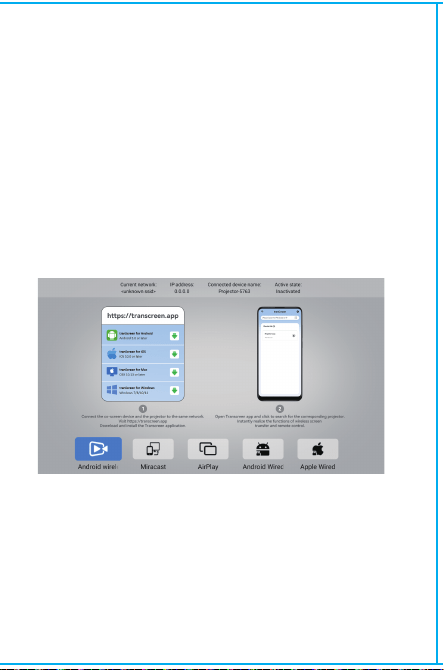
ワイヤレススクリーン
Androidデバイス(スマートフォン、タブレットなど)がこれらのデバ
イスと同じローカル無線LANに接続されていることを確認してくだ
さい。
デバイスでの操作:
ホーム画面 → アプリケーション → スクリーンキャスト → スクリ
ーンキャストサービスを開く → スマートフォンミラーリングをオン
にする → 接続する。
ご購入ありがとうございます!
お手伝いが必要ですか?
添えてメールを送信してください。より良い体験を得るために、
迅速な返信とさらなるサポートを提供します
·プロジェクターの操作とメンテナンスに関する重要な情報に
ご注意ください。問題を避けるために、この情報を注意深くお
読みください。安全に関する指示を守ることで、プロジェクタ
ーの寿命を延ばすことができます。
·設置やメンテナンスについては、資格者にご相談ください。
また、損傷したワイヤ、アクセサリ、その他の周辺機器を使用
しないでください。
·プロジェクターは、可燃性、爆発性、強い電磁干渉(大型レ
ーダー局、発電所、変電所)などから遠ざけてください。強い
環境光(直射日光を避ける)など。
·プロジェクターの通風孔を塞がないでください。
·純正の電源アダプターをご使用ください。
·プロジェクターが過熱を避けるため、十分な換気を維持し、通
気口が覆われていないことを確認してください。
·プロジェクターが作動している時、レンズを直視しないでくだ
さい。強い光が目に入り、軽い痛みを感じます。
·電源コードを折り曲げたり、引きずったりしないでください。
·電源コードをプロジェクターや重い物の下に置かないでください。
·電源コードを他の柔らかい素材で覆わないでください。
·電源コードを加熱しないでください。
·濡れた手で電源アダプターに触れないようにしてください。
Signal

BT設定
設定 - BT 設定、BT「オン」、デバイスの更新をクリックし、
ペアリングする対象デバイスを選択します。
日付と時刻の設定
設定 - 日付と時刻の設定、日付、時刻を入力し、24 時間形式
を使用します。
システム情報
設定 - システム情報、Ulバージョン、解像度、実行メモリ、
ストレージ容量に入る。
セキュリティについて 免責事項
本取扱説明書は一般的な説明であり、取扱説明書の写真や機能は実
際の製品によって異なります。弊社は製品の性能向上に努めており、
取扱説明書に記載されている製品の機能やインターフェイスを事前
の通知なしに変更する権利を有します。
お使いのデバイスは大切に扱ってください。ソフトウェア/ハードウェ
アの誤用、修理、その他の理由による損害については、弊社では責任
を負いかねます。また、第三者からのクレームによる損害についても
責任を負いかねます。
本取扱説明書は専門エンジニアが入念にチェックしたものですが、ど
うしても抜けがあることをご了承ください。
「お買い上げありがとうございました!
お困りですか?
製品名を明記の上、弊社ブランドサポートチームまでメールをお送り
プロジェクターを他の出力デバイスに接続した後、HDMlまたは
オーディオ/ビデオに入ります。
言語設定
設定 - 言語設定、入力方法を選択して言語を設定します。
その他の設定
設定 - その他の設定、入力すると、電源モード、時間指定シ
ャットダウン、工場出荷時設定の復元が取得されます。
( Z X - E N - H Y 45020241012)
ワイヤレススクリーン
Androidデバイス(スマートフォン、タブレットなど)がこれらのデバ
イスと同じローカル無線LANに接続されていることを確認してくだ
さい。
デバイスでの操作:
ホーム画面 → アプリケーション → スクリーンキャスト → スクリ
ーンキャストサービスを開く → スマートフォンミラーリングをオン
にする → 接続する。
ご購入ありがとうございます!
お手伝いが必要ですか?
添えてメールを送信してください。より良い体験を得るために、
迅速な返信とさらなるサポートを提供します
·プロジェクターの操作とメンテナンスに関する重要な情報に
ご注意ください。問題を避けるために、この情報を注意深くお
読みください。安全に関する指示を守ることで、プロジェクタ
ーの寿命を延ばすことができます。
·設置やメンテナンスについては、資格者にご相談ください。
また、損傷したワイヤ、アクセサリ、その他の周辺機器を使用
しないでください。
·プロジェクターは、可燃性、爆発性、強い電磁干渉(大型レ
ーダー局、発電所、変電所)などから遠ざけてください。強い
環境光(直射日光を避ける)など。
·プロジェクターの通風孔を塞がないでください。
·純正の電源アダプターをご使用ください。
·プロジェクターが過熱を避けるため、十分な換気を維持し、通
気口が覆われていないことを確認してください。
·プロジェクターが作動している時、レンズを直視しないでくだ
さい。強い光が目に入り、軽い痛みを感じます。
·電源コードを折り曲げたり、引きずったりしないでください。
·電源コードをプロジェクターや重い物の下に置かないでください。
·電源コードを他の柔らかい素材で覆わないでください。
·電源コードを加熱しないでください。
·濡れた手で電源アダプターに触れないようにしてください。
Signal

BT設定
設定 - BT 設定、BT「オン」、デバイスの更新をクリックし、
ペアリングする対象デバイスを選択します。
日付と時刻の設定
設定 - 日付と時刻の設定、日付、時刻を入力し、24 時間形式
を使用します。
システム情報
設定 - システム情報、Ulバージョン、解像度、実行メモリ、
ストレージ容量に入る。
セキュリティについて 免責事項
本取扱説明書は一般的な説明であり、取扱説明書の写真や機能は実
際の製品によって異なります。弊社は製品の性能向上に努めており、
取扱説明書に記載されている製品の機能やインターフェイスを事前
の通知なしに変更する権利を有します。
お使いのデバイスは大切に扱ってください。ソフトウェア/ハードウェ
アの誤用、修理、その他の理由による損害については、弊社では責任
を負いかねます。また、第三者からのクレームによる損害についても
責任を負いかねます。
本取扱説明書は専門エンジニアが入念にチェックしたものですが、ど
うしても抜けがあることをご了承ください。
「お買い上げありがとうございました!
お困りですか?
製品名を明記の上、弊社ブランドサポートチームまでメールをお送り
プロジェクターを他の出力デバイスに接続した後、HDMlまたは
オーディオ/ビデオに入ります。
言語設定
設定 - 言語設定、入力方法を選択して言語を設定します。
その他の設定
設定 - その他の設定、入力すると、電源モード、時間指定シ
ャットダウン、工場出荷時設定の復元が取得されます。
( Z X - E N - H Y 45020241012)
ワイヤレススクリーン
Androidデバイス(スマートフォン、タブレットなど)がこれらのデバ
イスと同じローカル無線LANに接続されていることを確認してくだ
さい。
デバイスでの操作:
ホーム画面 → アプリケーション → スクリーンキャスト → スクリ
ーンキャストサービスを開く → スマートフォンミラーリングをオン
にする → 接続する。
ご購入ありがとうございます!
お手伝いが必要ですか?
添えてメールを送信してください。より良い体験を得るために、
迅速な返信とさらなるサポートを提供します
·プロジェクターの操作とメンテナンスに関する重要な情報に
ご注意ください。問題を避けるために、この情報を注意深くお
読みください。安全に関する指示を守ることで、プロジェクタ
ーの寿命を延ばすことができます。
·設置やメンテナンスについては、資格者にご相談ください。
また、損傷したワイヤ、アクセサリ、その他の周辺機器を使用
しないでください。
·プロジェクターは、可燃性、爆発性、強い電磁干渉(大型レ
ーダー局、発電所、変電所)などから遠ざけてください。強い
環境光(直射日光を避ける)など。
·プロジェクターの通風孔を塞がないでください。
·純正の電源アダプターをご使用ください。
·プロジェクターが過熱を避けるため、十分な換気を維持し、通
気口が覆われていないことを確認してください。
·プロジェクターが作動している時、レンズを直視しないでくだ
さい。強い光が目に入り、軽い痛みを感じます。
·電源コードを折り曲げたり、引きずったりしないでください。
·電源コードをプロジェクターや重い物の下に置かないでください。
·電源コードを他の柔らかい素材で覆わないでください。
·電源コードを加熱しないでください。
·濡れた手で電源アダプターに触れないようにしてください。
Signal

BT設定
設定 - BT 設定、BT「オン」、デバイスの更新をクリックし、
ペアリングする対象デバイスを選択します。
日付と時刻の設定
設定 - 日付と時刻の設定、日付、時刻を入力し、24 時間形式
を使用します。
システム情報
設定 - システム情報、Ulバージョン、解像度、実行メモリ、
ストレージ容量に入る。
セキュリティについて 免責事項
本取扱説明書は一般的な説明であり、取扱説明書の写真や機能は実
際の製品によって異なります。弊社は製品の性能向上に努めており、
取扱説明書に記載されている製品の機能やインターフェイスを事前
の通知なしに変更する権利を有します。
お使いのデバイスは大切に扱ってください。ソフトウェア/ハードウェ
アの誤用、修理、その他の理由による損害については、弊社では責任
を負いかねます。また、第三者からのクレームによる損害についても
責任を負いかねます。
本取扱説明書は専門エンジニアが入念にチェックしたものですが、ど
うしても抜けがあることをご了承ください。
「お買い上げありがとうございました!
お困りですか?
製品名を明記の上、弊社ブランドサポートチームまでメールをお送り
プロジェクターを他の出力デバイスに接続した後、HDMlまたは
オーディオ/ビデオに入ります。
言語設定
設定 - 言語設定、入力方法を選択して言語を設定します。
その他の設定
設定 - その他の設定、入力すると、電源モード、時間指定シ
ャットダウン、工場出荷時設定の復元が取得されます。
( Z X - E N - H Y 45020241012)
ワイヤレススクリーン
Androidデバイス(スマートフォン、タブレットなど)がこれらのデバ
イスと同じローカル無線LANに接続されていることを確認してくだ
さい。
デバイスでの操作:
ホーム画面 → アプリケーション → スクリーンキャスト → スクリ
ーンキャストサービスを開く → スマートフォンミラーリングをオン
にする → 接続する。
ご購入ありがとうございます!
お手伝いが必要ですか?
ブランドサポートチーム([email protected])にアイテム名を
添えてメールを送信してください。より良い体験を得るために、
迅速な返信とさらなるサポートを提供します
·プロジェクターの操作とメンテナンスに関する重要な情報に
ご注意ください。問題を避けるために、この情報を注意深くお
読みください。安全に関する指示を守ることで、プロジェクタ
ーの寿命を延ばすことができます。
·設置やメンテナンスについては、資格者にご相談ください。
また、損傷したワイヤ、アクセサリ、その他の周辺機器を使用
しないでください。
·プロジェクターは、可燃性、爆発性、強い電磁干渉(大型レ
ーダー局、発電所、変電所)などから遠ざけてください。強い
環境光(直射日光を避ける)など。
·プロジェクターの通風孔を塞がないでください。
·純正の電源アダプターをご使用ください。
·プロジェクターが過熱を避けるため、十分な換気を維持し、通
気口が覆われていないことを確認してください。
·プロジェクターが作動している時、レンズを直視しないでくだ
さい。強い光が目に入り、軽い痛みを感じます。
·電源コードを折り曲げたり、引きずったりしないでください。
·電源コードをプロジェクターや重い物の下に置かないでください。
·電源コードを他の柔らかい素材で覆わないでください。
·電源コードを加熱しないでください。
·濡れた手で電源アダプターに触れないようにしてください。
Signal