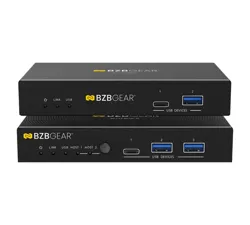
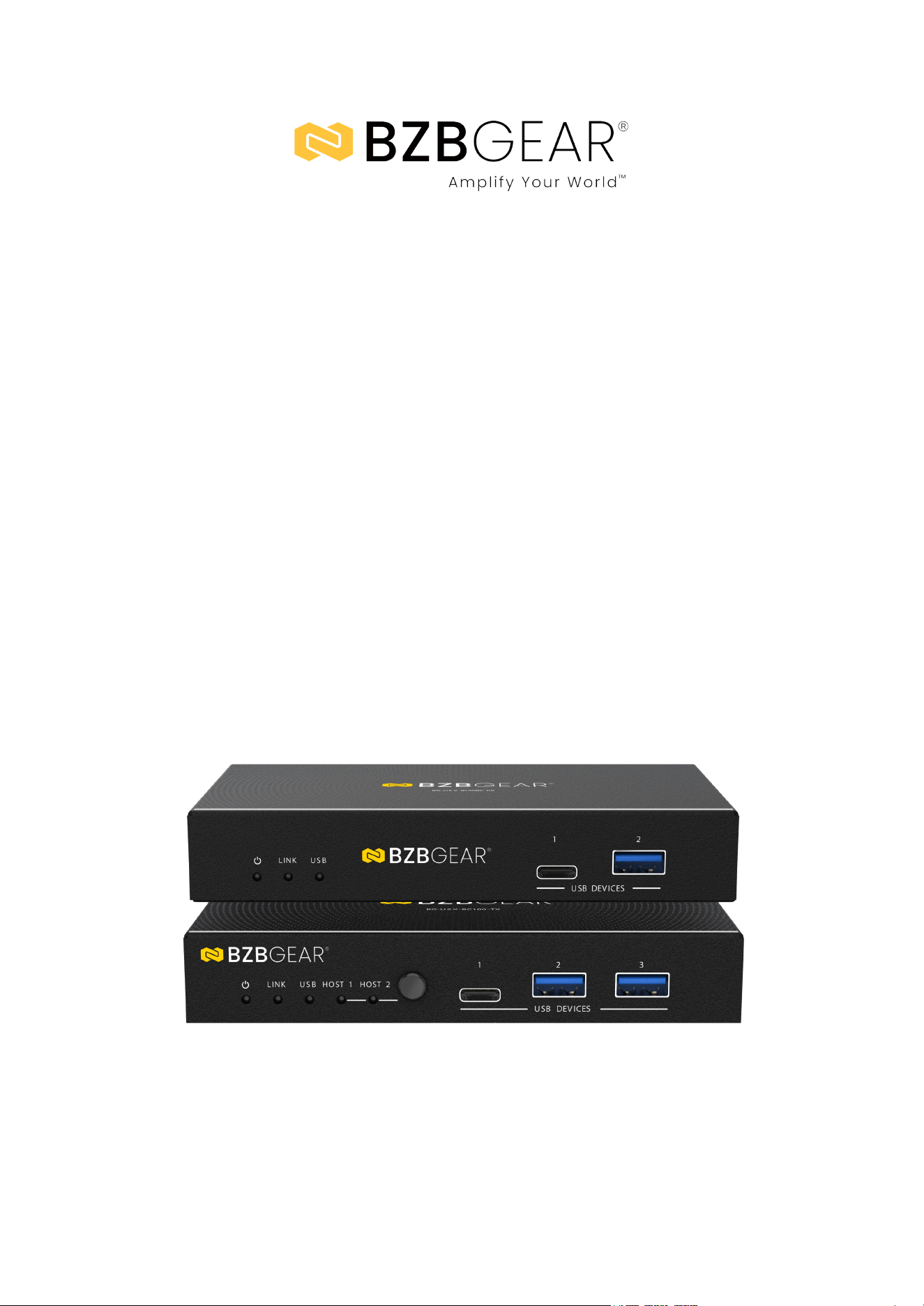
BG-USX-B100BC
Dual-Host USB 3.2 Type-A/B/C Switcher & HDBaseT 3.0 Extender Kit
with Bi-Directional PoC/RS-232 up to 328ft
User Manual

BZBGEAR BG-USX-B100BC PRODUCT MANUAL
Address: 830 National Drive #140, Sacramento, CA 95834, USA · Tel: +1(888)499-9906 · Email: support@bzbgear.com 2

BZBGEAR BG-USX-B100BC PRODUCT MANUAL
TABLE OF CONTENTS
Statement 4
Safety Precaution 4
Introduction 5
Features 5
Packing List 6
Specifications 7
Operation Controls and Functions 8
API Commands 11
Notes on Command Ranges (Reference) 12
Connection Diagram 13
Troubleshooting 14
Tech Support 15
Limited Product Warranty Terms 15
Mission Statement 16
Copyright 16
Address: 830 National Drive #140, Sacramento, CA 95834, USA · Tel: +1(888)499-9906 · Email: support@bzbgear.com 3

BZBGEAR BG-USX-B100BC PRODUCT MANUAL
Statement
Please read these instructions carefully before connecting, operating, or configuring this
product. Please save this manual for future reference.
Safety Precaution
● To prevent damaging this product, avoid heavy pressure, strong vibration, or immersion
during transportation, storage, and installation.
● The housing of this product is made of organic materials. Do not expose to any liquid,
gas, or solids which may corrode the shell.
● Do not expose the product to rain or moisture.
● To prevent the risk of electric shock, do not open the case. Installation and maintenance
should only be carried out by qualified technicians.
● Do not use the product beyond the specified temperature, humidity, or power supply
specifications.
● This product does not contain parts that can be maintained or repaired by users.
Damage caused by dismantling the product without authorization from BZBGEAR is not
covered under the warranty policy.
● Installation and use of this product must strictly comply with local electrical safety
standards.
Address: 830 National Drive #140, Sacramento, CA 95834, USA · Tel: +1(888)499-9906 · Email: support@bzbgear.com 4

BZBGEAR BG-USX-B100BC PRODUCT MANUAL
Introduction
The 2-Port USB 3.2 Gen 1 Extender Kit is designed to deliver reliable, high-speed
USB connectivity over long distances using a single CAT6a cable. Supporting USB
3.2 Gen 1 with data transfer rates up to 5Gbps, the system extends USB signals up
to 100 meters (328 feet) while remaining fully backward compatible with USB 2.0
and USB 1.1 devices. The transmitter provides dual selectable host inputs (USB-C
and USB-B), allowing flexible connection to different host systems, while the
receiver offers multiple USB device ports, including both USB-C and USB-A, to
support a wide range of peripherals.
Engineered for professional and industrial applications, the extender features
bi-directional 24V Power over Cable (PoC), enabling either the transmitter or receiver
to power the entire system and simplifying installation. Advanced hardware
acceleration ensures stable isochronous and bulk data transfers, making the
solution well-suited for bandwidth-sensitive devices such as PTZ cameras,
webcams, touch panels, and industrial cameras. Additional capabilities including
RS-232 pass-through, FSYNC GPIO signal transmission, API control, and firmware
upgrade support provide seamless integration into control systems and demanding
AV, broadcast, and automation environments.
Features
● Long-Distance USB Extension: Extends USB 3.2 Gen 1 signals up to 100m (328ft)
over a single CAT6a (F/FTP) cable.
● High-Speed Data Throughput: Supports USB 3.2 Gen 1 with data transfer rates up
to 5Gbps for bandwidth-intensive devices.
● Backward Compatibility: Fully compatible with USB 2.0 and USB 1.1 devices.
● Dual Host Inputs: Transmitter includes one USB-C and one USB-B selectable host
input for flexible system integration.
● Multi-Port Device Connectivity: Receiver provides one USB-C and three USB-A
device ports to support multiple peripherals simultaneously.
● Bi-Directional Power over Cable (PoC): 24V PoC allows either the transmitter or
receiver to power both units, reducing power supply requirements.
● Automatic and Manual Host Switching: Supports auto-switching via USB 5V
detection as well as manual host selection.
● Isochronous and Bulk Transfer Acceleration: Hardware acceleration ensures
stable performance for real-time and high-bandwidth USB devices.
● RS-232 Pass-Through and API Control: Enables remote control, monitoring, and
integration with third-party control systems.
● FSYNC GPIO Pass-Through: Supports FSYNC signal transmission for synchronized
industrial and machine-vision camera applications.
● Firmware Upgrade Support: Dedicated USB-C service port allows easy firmware
updates and maintenance.
Address: 830 National Drive #140, Sacramento, CA 95834, USA · Tel: +1(888)499-9906 · Email: support@bzbgear.com 5

BZBGEAR BG-USX-B100BC PRODUCT MANUAL
● Plug-and-Play Operation: No drivers or software required for quick and
straightforward deployment.
Packing List
● USB 3.2 Gen 1 Extender (Transmitter)
● USB 3.2 Gen 1 Extender (Receiver)
● 24V / 3.75A Locking Power Supply
● 4-Pin 3.5mm Phoenix Connector (Male) ×2
● Mounting Ears ×4
● Machine Screws (KM3×4) ×8
● User Manual
Address: 830 National Drive #140, Sacramento, CA 95834, USA · Tel: +1(888)499-9906 · Email: support@bzbgear.com 6
BZBGEAR BG-USX-B100BC PRODUCT MANUAL
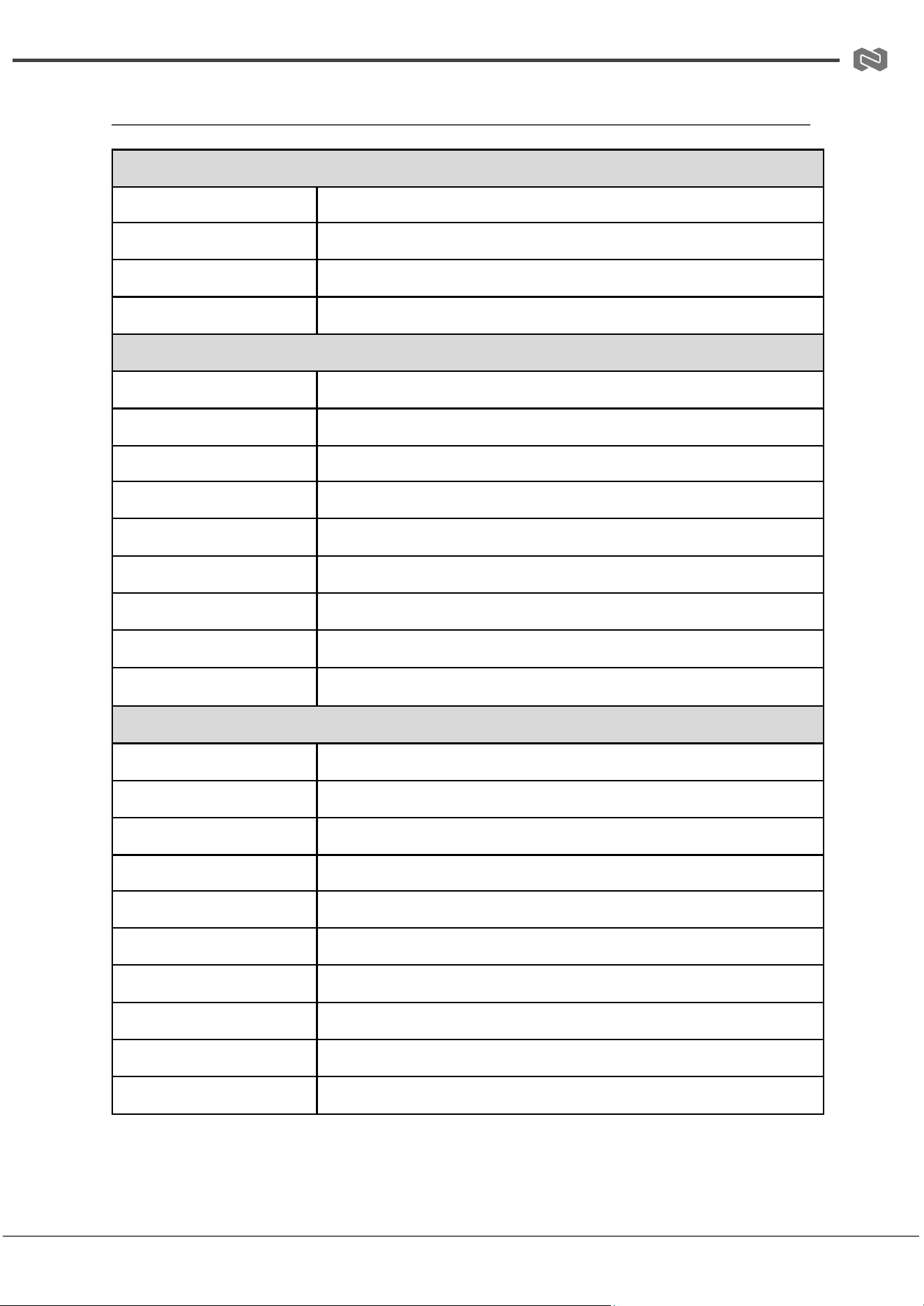
Specifications
Technical Specifications
USB Protocol
USB 3.2 Gen 1
Max Data Rate
Up to 5Gbps
Transmission Distance
Up to 100m / 328ft via CAT6a (F/FTP); up to 1.5m / 4.9ft via USB cable
ESD Protection
IEC 61000-4-2: ±8kV (air discharge), ±4kV (contact discharge)
Connections
Transmitter Host Inputs
1× USB-C (24-pin, female), 1× USB-B (9-pin, female)
Transmitter Device Outputs
1× USB-C (24-pin, female), 2× USB-A (9-pin, female)
Transmitter Extension Port
1× HDBT-USB3 (RJ45, 24V PoC)
Transmitter Control Ports
1× RS-232 (3-pin 3.5mm Phoenix), 1× FSYNC (1-pin 3.5mm Phoenix)
Transmitter Service Port
1× USB-C (firmware update)
Receiver Extension Input
1× HDBT-USB3 (RJ45, 24V PoC)
Receiver Device Outputs
1× USB-C (24-pin, female), 3× USB-A (9-pin, female)
Receiver Control Ports
1× RS-232 (3-pin 3.5mm Phoenix), 1× FSYNC (1-pin 3.5mm Phoenix)
Receiver Service Port
1× USB-C (firmware update)
Mechanical
Housing
Metal enclosure
Color
Black
Dimensions (W × D × H)
140 × 75 × 23 mm (Transmitter / Receiver)
Weight
Transmitter: 313 g; Receiver: 318 g
Power Supply
AC 100–240V, 50/60Hz; DC 24V / 3.75A output
Power Consumption
Transmitter: 23W (max); Receiver: 35W (max)
Operating Temperature
0°C to 40°C (32°F to 104°F)
Storage Temperature
−20°C to 60°C (−4°F to 140°F)
Operating Humidity
20%–80% RH, non-condensing
Storage Humidity
10%–90% RH, non-condensing
Address: 830 National Drive #140, Sacramento, CA 95834, USA · Tel: +1(888)499-9906 · Email: support@bzbgear.com 7
BZBGEAR BG-USX-B100BC PRODUCT MANUAL
Operation Controls and Functions
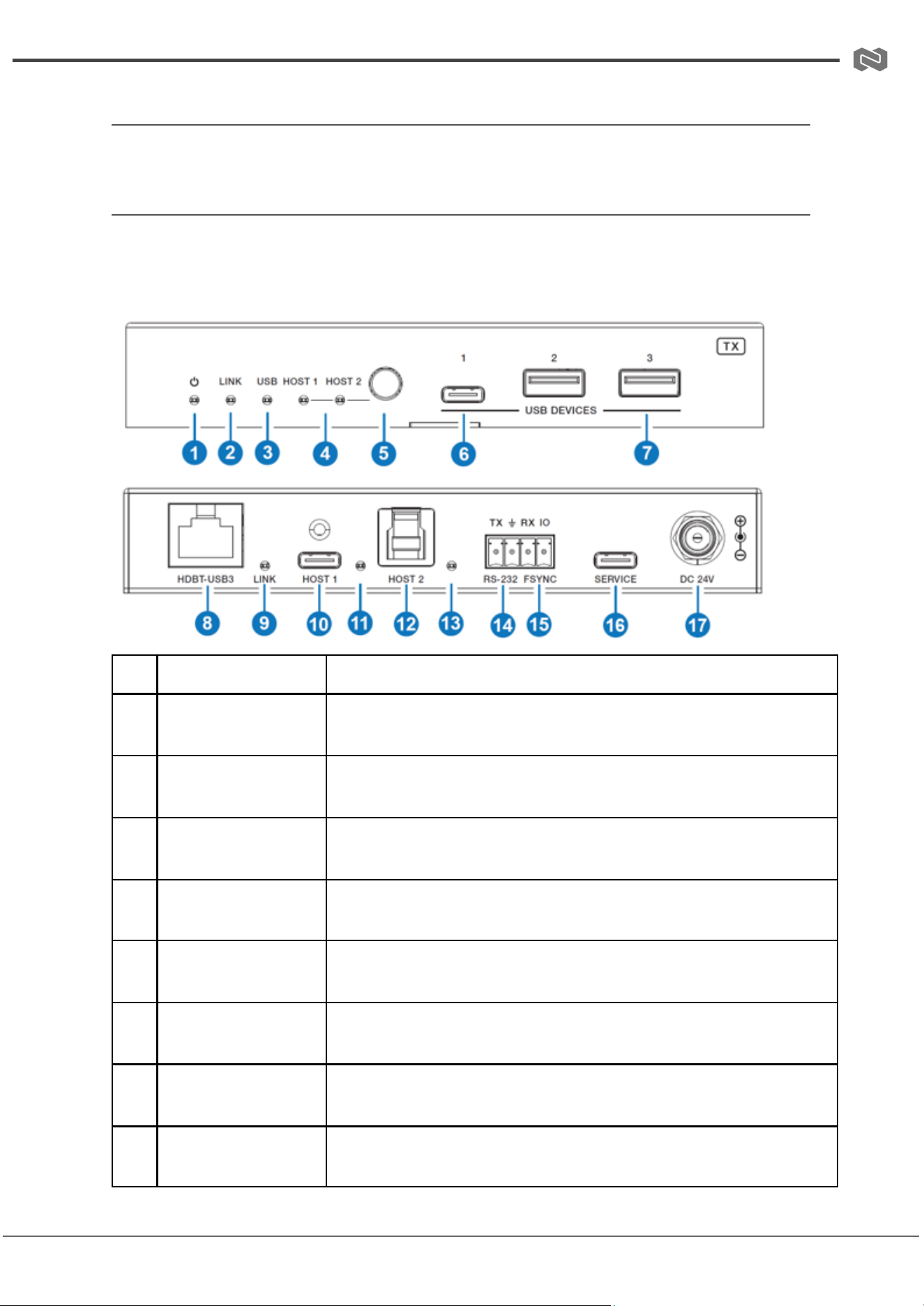
Front and Rear Panel
Transmitter Panel
No.
Name
Function Description
1
Power LED
Indicates power status. LED is ON when the transmitter is powered.
2
LINK LED (Top)
Indicates connection status between transmitter and receiver. ON: link
established; OFF: no link.
3
USB LED
Indicates USB signal status. ON: USB 3.0 detected; Blinking: USB 2.0
detected; OFF: no USB signal.
4
HOST (1~2) LED
Indicates which host input is currently selected (HOST 1 or HOST 2).
5
HOST Switch Button
Used to manually switch between HOST 1 (USB-C) and HOST 2
(USB-B).
6
USB DEVICE (USB-C)
Downstream USB-C port for connecting USB peripherals (up to 5V/1A).
7
USB DEVICE (USB-A
×2)
Downstream USB-A ports for connecting USB peripherals (up to 5V/1A
each).
8
HDBT-USB3 (RJ45)
Connects to the receiver via CAT6a cable for USB extension and PoC
power transmission.
Address: 830 National Drive #140, Sacramento, CA 95834, USA · Tel: +1(888)499-9906 · Email: support@bzbgear.com 8
BZBGEAR BG-USX-B100BC PRODUCT MANUAL
9
LINK LED (Bottom)
Secondary link indicator for HDBT-USB3 connection status. ON: linked;
OFF: no link.
10
HOST 1 (USB-C)
USB host input port (USB-C) for PC connection; also used for firmware
updates.
11
HOST 1 LED
Indicates USB signal activity on HOST 1. ON: active signal detected.
12
HOST 2 (USB-B)
USB host input port (USB-B) for PC connection; also used for firmware
updates.
13
HOST 2 LED
Indicates USB signal activity on HOST 2. ON: active signal detected.
14
RS-232
3-pin Phoenix connector for RS-232 pass-through communication with
control systems.
15
FSYNC
GPIO pass-through port (0–5V) for synchronization with external
devices.
16
SERVICE
USB-C service port used for firmware upgrades and maintenance.
17
DC 24V
24V DC power input (required if PoC is not used).
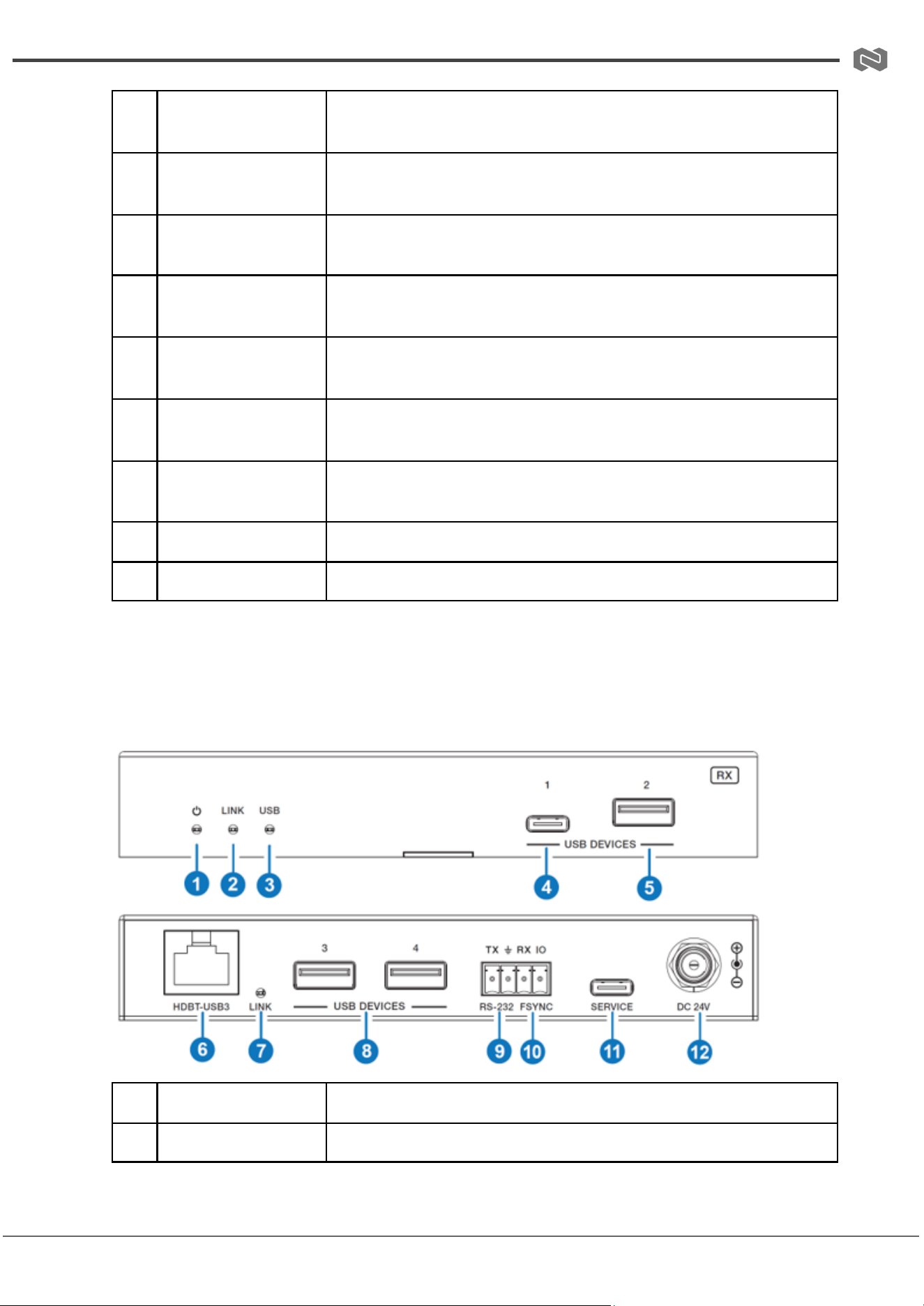
Receiver Panel
No.
Name
Function Description
1
Power LED
Indicates power status. LED is ON when the receiver is powered.
Address: 830 National Drive #140, Sacramento, CA 95834, USA · Tel: +1(888)499-9906 · Email: support@bzbgear.com 9

BZBGEAR BG-USX-B100BC PRODUCT MANUAL
2
LINK LED (Top)
Indicates link status with transmitter. ON: connected; OFF: no link.
3
USB LED
Indicates USB signal status. ON: USB 3.0 detected; Blinking: USB 2.0
detected; OFF: no USB signal.
4
USB DEVICE (USB-C)
Downstream USB-C port for peripherals (up to 5V/1A).
5
USB DEVICE (USB-A
1)
Downstream USB-A port for peripherals (up to 5V/1A).
6
HDBT-USB3 (RJ45)
Receives USB signal and PoC power from transmitter via CAT6a cable.
7
LINK LED (Bottom)
Secondary link indicator for connection status. ON: linked; OFF: no
link.
8
USB DEVICE (USB-A
×3)
Additional downstream USB-A ports for peripherals (up to 5V/1.5A
each).
9
RS-232
3-pin Phoenix connector for RS-232 pass-through communication.
10
FSYNC
GPIO pass-through port (0–5V) for synchronization with external
devices.
11
SERVICE
USB-C service port used for firmware upgrades and maintenance.
12
DC 24V
24V DC power input (optional when PoC is not used).
Address: 830 National Drive #140, Sacramento, CA 95834, USA · Tel: +1(888)499-9906 · Email: support@bzbgear.com 10

BZBGEAR BG-USX-B100BC PRODUCT MANUAL
API Commands
The device supports ASCII command control via the SERVICE (USB-C virtual COM) port or
RS-232 Phoenix port. All commands must end with
<CR><LF>.
Command
Function
Example
Feedback
Default
?
Get the list of all
commands
?
Command list
—
help
Get the list of all
commands
help
Command list
—
get fw version
Get firmware version
get fw version
1.0.0
1.0.0
set reboot
Reboot the device
set reboot
Reboot… / System
Initializing… FW: x.x.x
—
set reset
Reset to factory defaults
set reset
“Sure to RESET to default
settings? Type ‘Yes’…”
—
get status
Get system status
get status
System status report (see
note below)
—
set key on/off
Enable or disable front
panel keys
set key on / set
key off
Key On / Key Off
On
get key
Get front panel key status
get key
Key On
On
set baud x
Set RS-232 baud rate
(x=1~6)
set baud 6
Baud rate 115200
115200
get baud
Get RS-232 baud rate
get baud
Baud rate 115200
115200
set input x
Set USB host input
(x=1~2)
set input 1
Input USB Host 1
1
get input
Get USB host input port
get input
Input USB Host 1
1
get usb5v x
Get USB host 5V status
(x=0~2)
get usb5v 0
USB host power status
—
set autoswitch
x
Enable/disable
auto-switching
set autoswitch
on
on / off
on
get autoswitch
Get auto-switch status
get autoswitch
Autoswitch on
on
set tx usbd x
power y
Set TX USB device power
mode
set tx usbd 0
power 1
Follow USB host power
1
Address: 830 National Drive #140, Sacramento, CA 95834, USA · Tel: +1(888)499-9906 · Email: support@bzbgear.com 11

BZBGEAR BG-USX-B100BC PRODUCT MANUAL
get tx usbd x
power
Get TX USB device power
status
get tx usbd 0
power
Power mode status
Follow
set rx usbd x
power y
Set RX USB device power
mode
set rx usbd 0
power 1
Follow USB host power
1
get rx usbd x
power
Get RX USB device power
status
get rx usbd 0
power
Power mode status
Follow
set hdbt
update
Switch to HDBT UART
firmware update mode
set hdbt
update
Hdbt update
—
Notes on Command Ranges (Reference)
● set baud x
○ x=1: 4800
○ x=2: 9600
○ x=3: 19200
○ x=4: 38400
○ x=5: 57600
○ x=6: 115200
● set input x
○ x=1: USB-C Host
○ x=2: USB-B Host
● set/get usb5v x
○ x=0: All USB hosts
○ x=1: USB Host 1 (USB-C)
○ x=2: USB Host 2 (USB-B)
● USB Power Modes (TX/RX)
○ y=0: Force OFF
○ y=1: Follow USB host power
○ y=2: Force ON
● set/get tx/rx usbd x
○ x=0: All USB device ports
○ TX:
■ x=1 USB-C device
■ x=2 USB-A device 1
■ x=3 USB-A device 2
○ RX:
■ x=1 USB-C device
■ x=2 USB-A device 1
■ x=3 USB-A device 2
■ x=4 USB-A device 3
Address: 830 National Drive #140, Sacramento, CA 95834, USA · Tel: +1(888)499-9906 · Email: support@bzbgear.com 12
BZBGEAR BG-USX-B100BC PRODUCT MANUAL
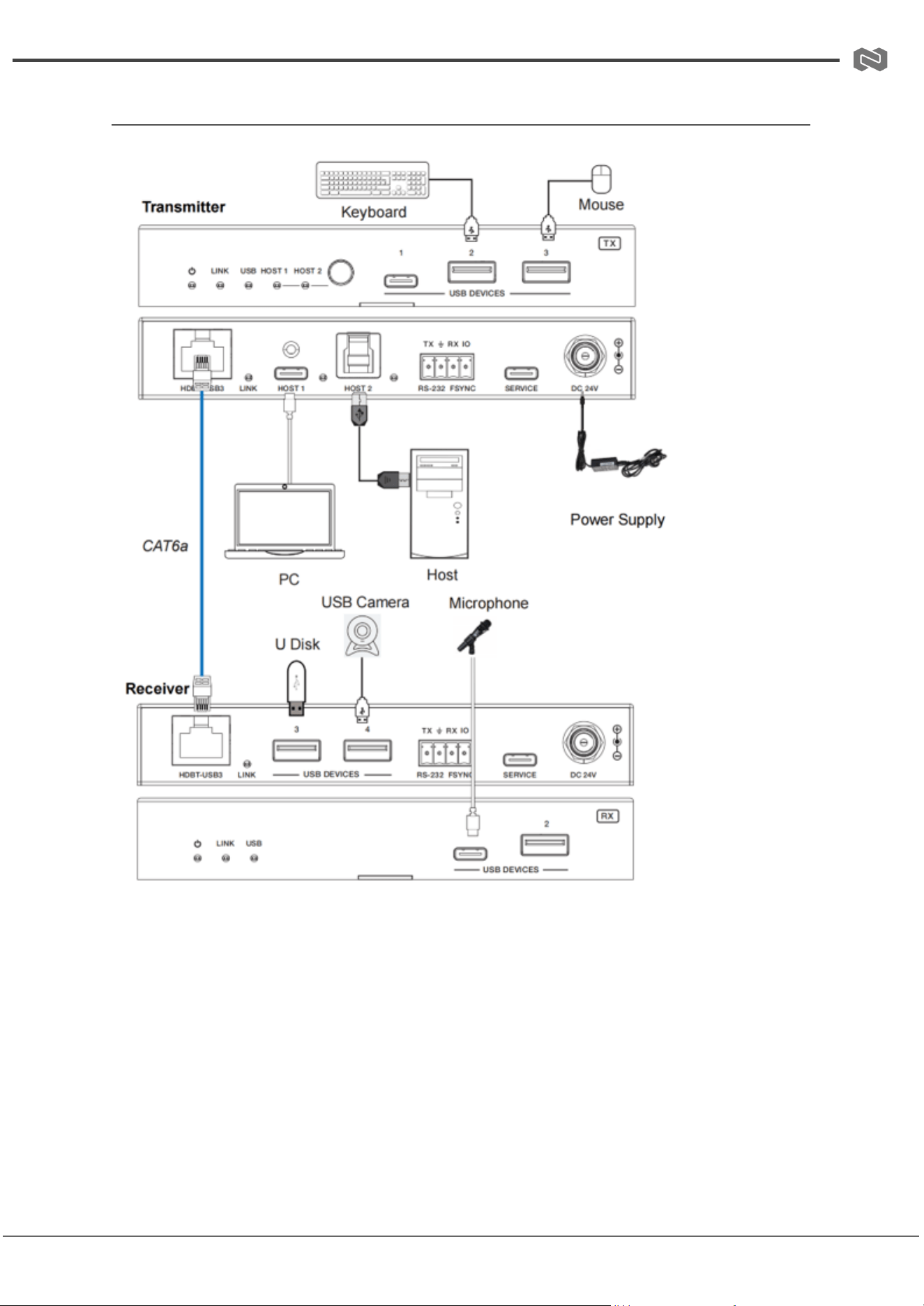
Connection Diagram
Address: 830 National Drive #140, Sacramento, CA 95834, USA · Tel: +1(888)499-9906 · Email: support@bzbgear.com 13

BZBGEAR BG-USX-B100BC PRODUCT MANUAL
Troubleshooting
Problems
Causes
Solutions
No Power / All LED off
Power supply not connected,
connected fully, or wrong power
supply.
Check if the power supply is
connected correctly and the
output voltage value is within
recommended specifications.
No sound or sound issues
The HDMI connection is faulty,
the audio format is not
supported by the displays, or
the source player is set to
another port for audio output
Check if the HDMI cables are
connected correctly.
Check if the audio format is
supported by the display and
that a user has not changed the
supported audio format on the
player`s audio output. Ensure
output settings from the HDMI
source device as set correctly.
No picture or picture flickers
The HDMI cable may be faulty
or the category cable quality is
faulty.
Check if the HDMI
and category cable connections
are correct and undamaged.
Change to another good
working HDMI cable or category
cable (CAT6 or better cable is
recommended).
Address: 830 National Drive #140, Sacramento, CA 95834, USA · Tel: +1(888)499-9906 · Email: support@bzbgear.com 14

BZBGEAR BG-USX-B100BC PRODUCT MANUAL
Tech Support
Have technical questions? We may have answered them already!
Please visit BZBGEAR’s support page (bzbgear.com/support) for helpful information and
tips regarding our products. Here you will find our Knowledge Base
(bzbgear.com/knowledge-base) with detailed tutorials, quick start guides, and step-by-step
troubleshooting instructions. Or explore our YouTube channel, BZB TV
(youtube.com/c/BZBTVchannel), for help setting up, configuring, and other helpful how-to
videos about our gear.
Need more in-depth support? Connect with one of our technical specialists directly:
Phone
1.888.499.9906
Email
support@bzbgear.com
Live Chat
bzbgear.com
Limited Product Warranty Terms
Pro Line: 5-year warranty from the date of purchase for AV/Broadcasting products bought
on or after August 1, 2024.
Essential Line: 3-year warranty from the date of purchase for AV/Broadcasting products
bought on or after August 1, 2024.
Cables: Lifetime Limited Product Warranty.
For complete warranty information, please visit bzbgear.com/warranty.
For questions, please call 1.888.499.9906 or email support@bzbgear.com.
Address: 830 National Drive #140, Sacramento, CA 95834, USA · Tel: +1(888)499-9906 · Email: support@bzbgear.com 15

BZBGEAR BG-USX-B100BC PRODUCT MANUAL
Mission Statement
BZBGEAR is a breakthrough manufacturer of high-quality, innovative audiovisual equipment
ranging from AVoIP, professional broadcasting, conferencing, home theater, to live
streaming solutions. We pride ourselves on unparalleled customer support and services.
Our team offers system design consultation, and highly reviewed technical support for all
the products in our catalog. BZBGEAR delivers quality products designed with users in
mind.
Copyright
All the contents in this manual and its copyright are owned by BZBGEAR. No one is allowed
to imitate, copy, or translate this manual without BZBGEAR’s permission. This manual
contains no guarantee, standpoint expression or other implies in any form. Product
specification and information in this manual is for reference only and subject to change
without notice.
All rights reserved. No reproducing is allowed without acknowledgement.
Address: 830 National Drive #140, Sacramento, CA 95834, USA · Tel: +1(888)499-9906 · Email: support@bzbgear.com 16