User Manual
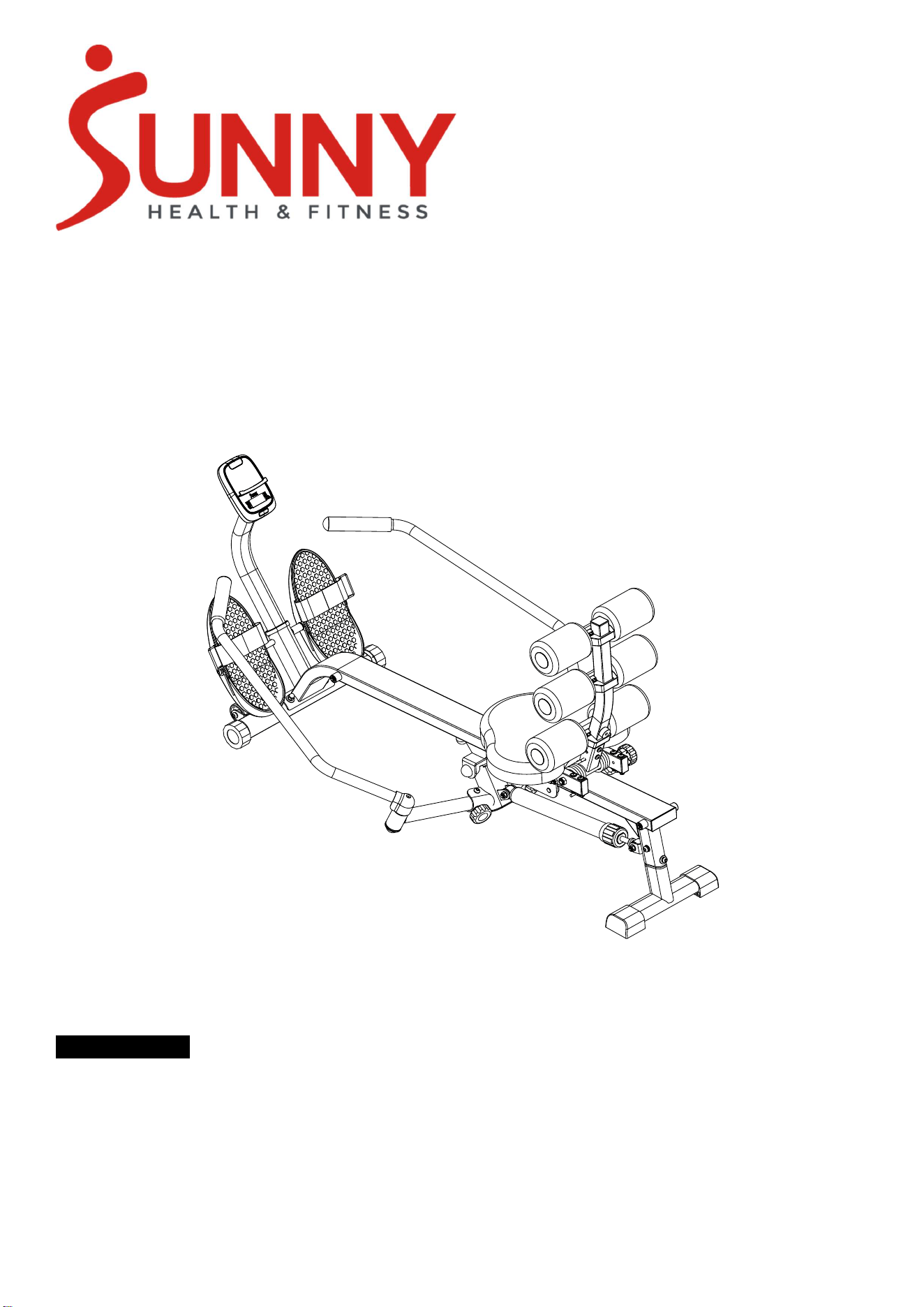
Full Motion Rower with Ab Trainer
SF-RW525023
EN
IMPORTANT! Please retain owner’s manual for maintenance and adjustment instructions. Your
satisfaction is very important to us, PLEASE DO NOT RETURN UNTIL YOU HAVE CONTACTED US.
1
Important Safety Information
We thank you for choosing our product. To ensure your safety and health, please use this equipment
correctly. It is important to read this entire manual before assembling and using the equipment. Safe
and effective use can only be achieved if the equipment is assembled, maintained, and used properly. It
is your responsibility to ensure that all users of the equipment are informed of all warnings and
precautions.
1. Before starting any exercise program, you should consult your physician to determine if you have
any medical or physical conditions that could put your health and safety at risk or prevent you from
using the equipment properly. Your physician’s advice is essential if you are taking medication that
affects your heart rate, blood pressure, or cholesterol level.
2. Be aware of your body’s signals. Incorrect or excessive exercise can damage your health. Stop
exercising if you experience any of the following symptoms: pain, tightness in your chest, irregular
heartbeat, shortness of breath, lightheadedness, dizziness, or feelings of nausea. If you do experience
any of these conditions, you should consult your physician before continuing with your exercise
program.
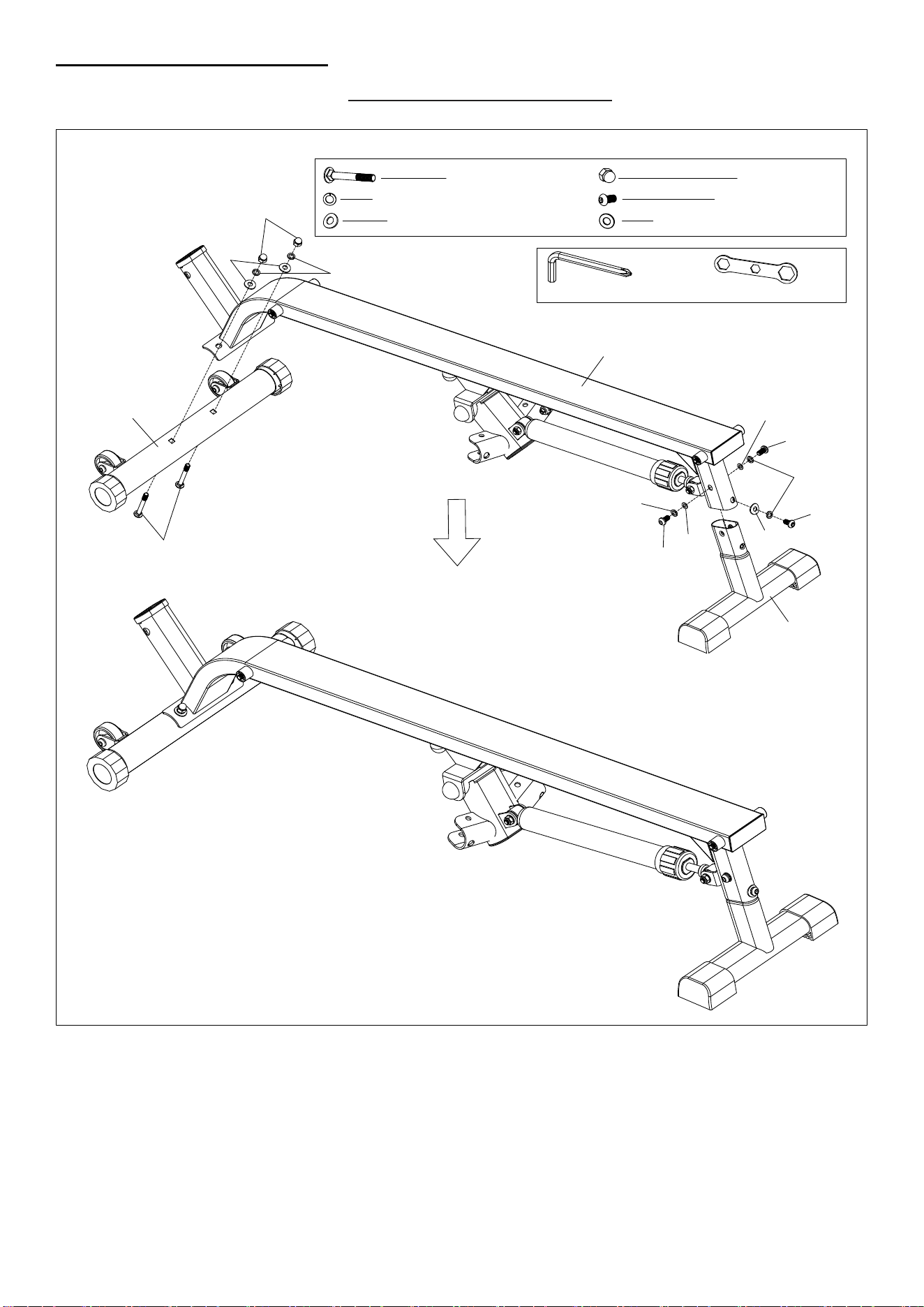
3. Keep children and pets away from the equipment.
4. Use the equipment on a solid, flat level surface with a protective cover for your floor or carpet. To
ensure safety, the equipment should have at least 2 feet (60 cm) of free space all around it.
5. Ensure that all nuts and bolts are securely tightened before using the equipment. The safety of the
equipment can only be maintained if it is regularly examined for damage and/or wear and tear.
6. Always use the equipment as indicated. If you find any defective components while assembling or
checking the equipment, or if you hear any unusual noises coming from the equipment during
exercise, discontinue use of the equipment immediately and do not use until the problem has been
rectified.
7. Wear suitable clothing while using the equipment. Avoid wearing loose clothing that may become
entangled in the equipment.
8. Do not place fingers or objects into the moving parts of the equipment.
9. The maximum weight capacity of this unit is 400 lbs (180 kg).
10. The equipment is not suitable for therapeutic use.
11. To avoid bodily injury and/or damage to the product or property, proper lifting and moving are
required.
12. Your product is intended for use in cool and dry conditions. You should avoid storage in extreme
cold, hot or damp areas as this may lead to corrosion and other related problems.
13. This equipment is designed for indoor and home use only, it is not intended for commercial use.
Statement Of Purpose
The rowing machine is designed to give a full-body workout by copying the motion of rowing a boat. It
helps improve heart health, build strength, and increase flexibility, all while being easy on the joints. It's a
great option for people of all fitness levels.
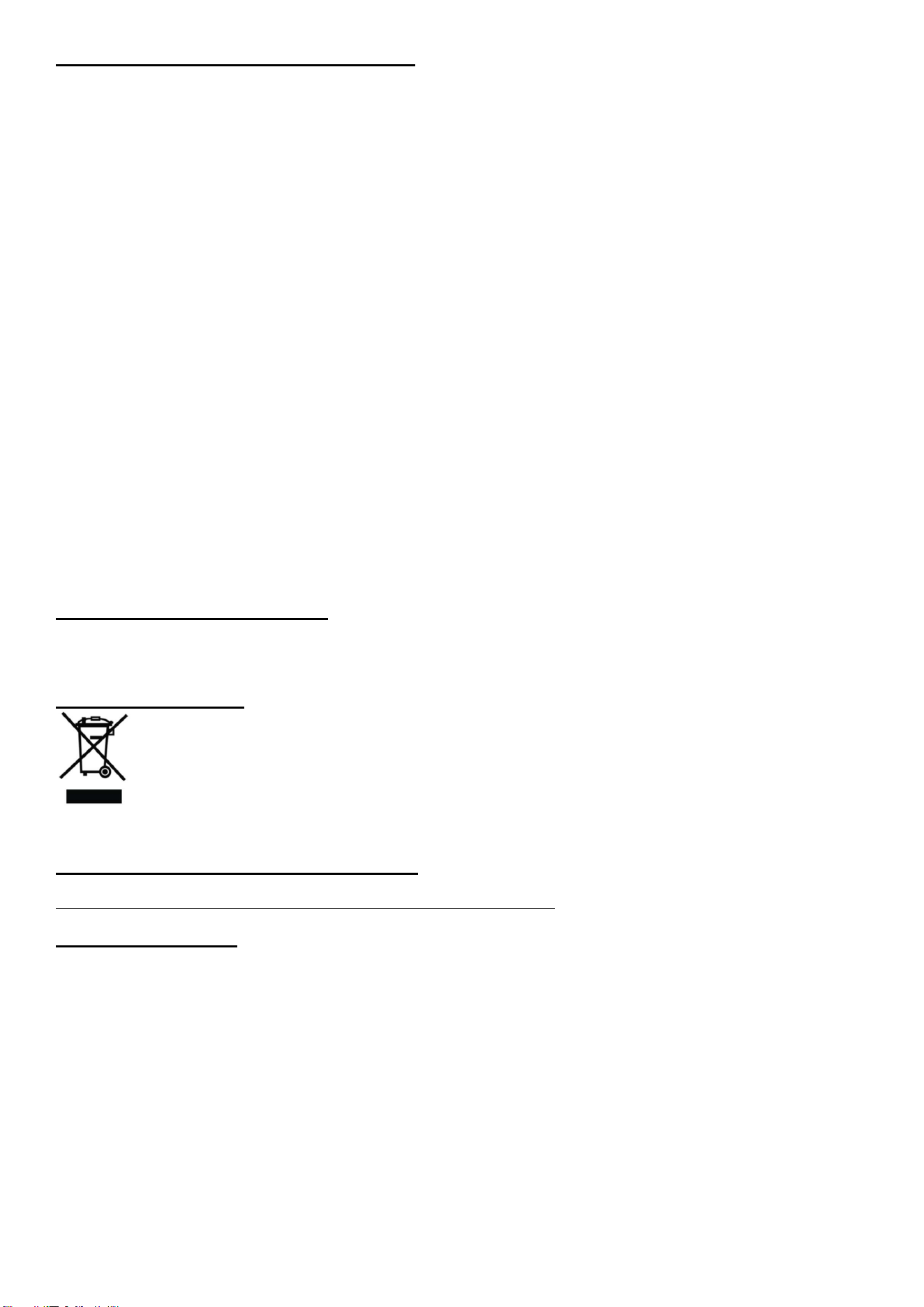
Waste Disposal
SUNNY HEALTH & FITNESS products are recyclable. At the end of its useful life please dispose of this
article correctly and safely (local refuse sites).
EU Declaration Of Conformity
You can find the declaration of conformity at the following link:
https://sunnyhealthfitness.com/pages/declaration-of-conformity
Technical Data
Connectivity: Bluetooth LE
Frequency Range: 2400~2483.5Mhz
Transmitting Power: 0dBm
2
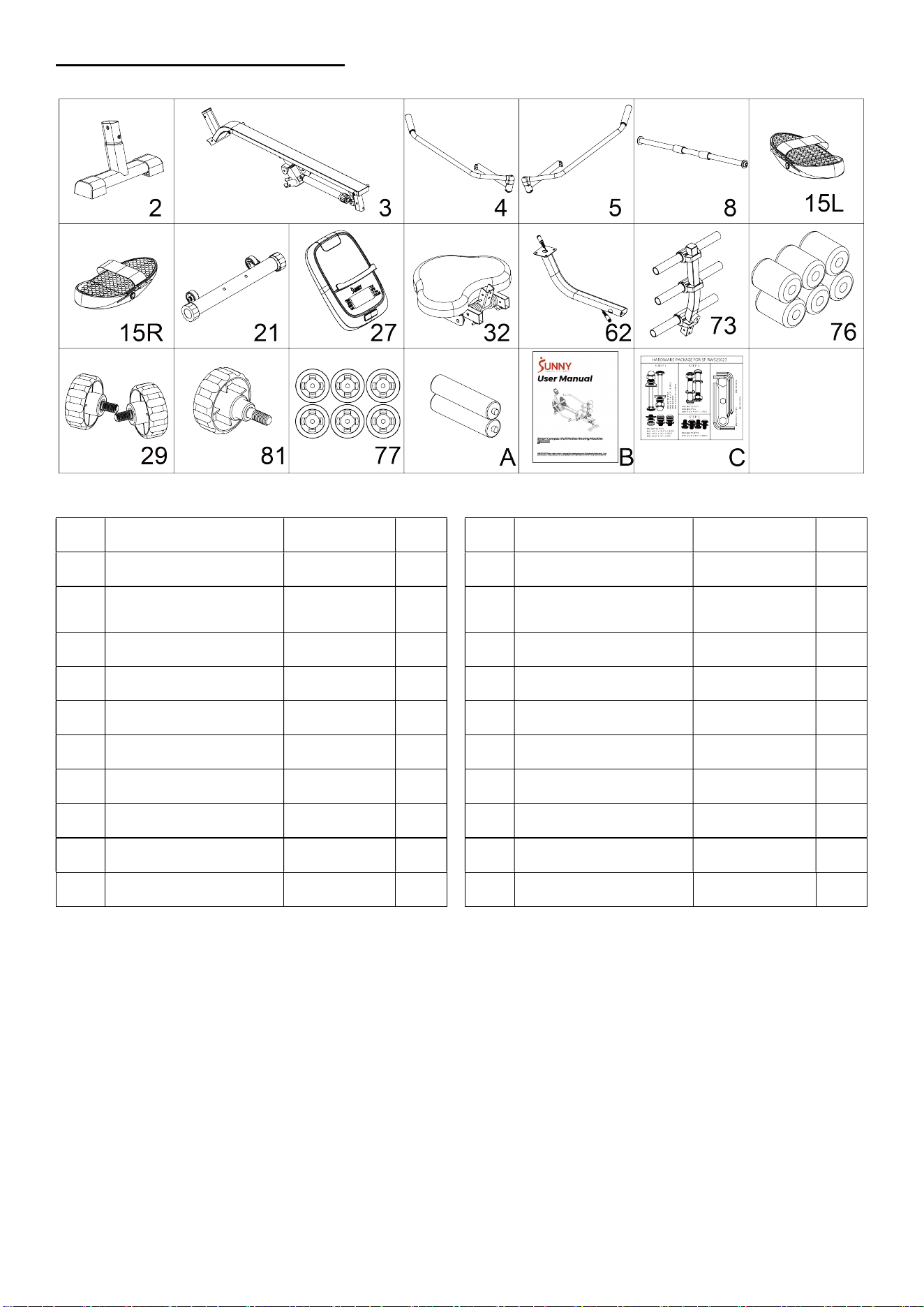
Pre-Assembly Checklist
When you open the carton, you will find the following parts:
No. Description Spec. Qty.
No. Description Spec. Qty.
2 Rear Stabilizer 1 62 Support Tube 1
3 Seat Rail 1 73
Backrest Frame
Assembly
1
4 Left Handlebar 1 76 Foam φ90*φ30*125 6
5 Right Handlebar 1 29 Knob M8*15 2
8 Long Shaft 1 81 Knob M8*30 1
15L Left Pedal 1 77 Plastic clasp 6
15R Right Pedal 1 A Battery AAA 2
21 Front Stabilizer 1 B User Manual 1
27 Meter DSC03676 1 C Hardware Package 1
32 Seat 380*296*50 1
3
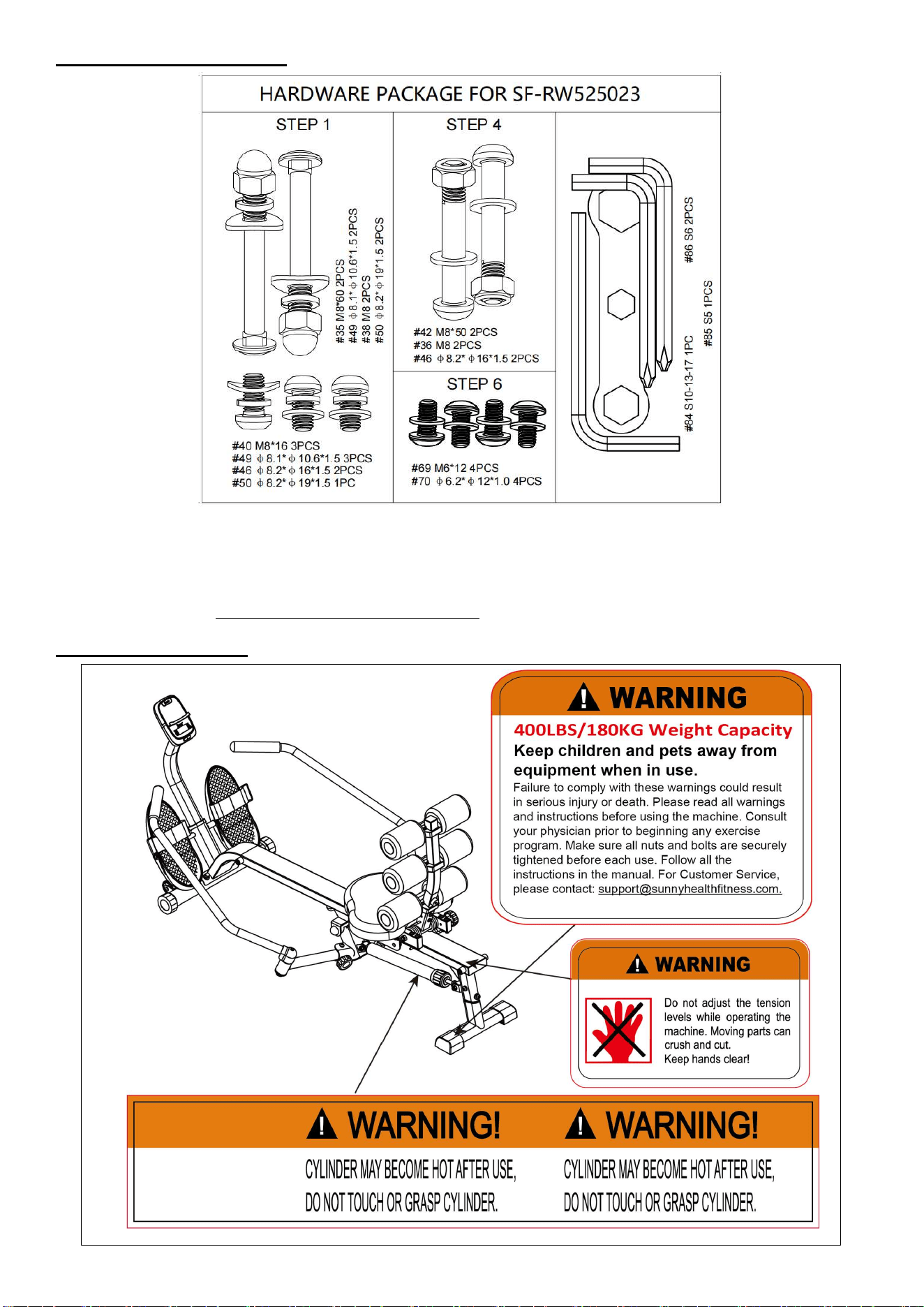
Hardware Package
Ordering Replacement Parts
Please provide the following information in order for us to accurately identify the part(s) needed:
The model number
The product name
The part number
Please contact us at support@sunnyhealthfitness.com or 1-877-90SUNNY (877-907-8669).
Warning Labels
4
Assembly Instructions
We value your experience using Sunny Health and Fitness products. For assistance with parts or
troubleshooting, please contact us at support@sunnyhealthfitness.com or 1-877-90SUNNY (877-907-
8669).
#35 M8*60 2PCS
#49 φ8.1*φ10.6*1.5 5PCS
#38 M8 2PCS
#40 M8*16 3PCS
#50 φ8.2*φ19*1.5 3PCS
#46 φ8.2*φ16*1.5 2PCS
#84 S10-S13-S17 1PC
#86 S6 1PC
S
13
S17
S1
0
38
49
50
35
3
40
40
49
50
46
46
40
49
2
21
①
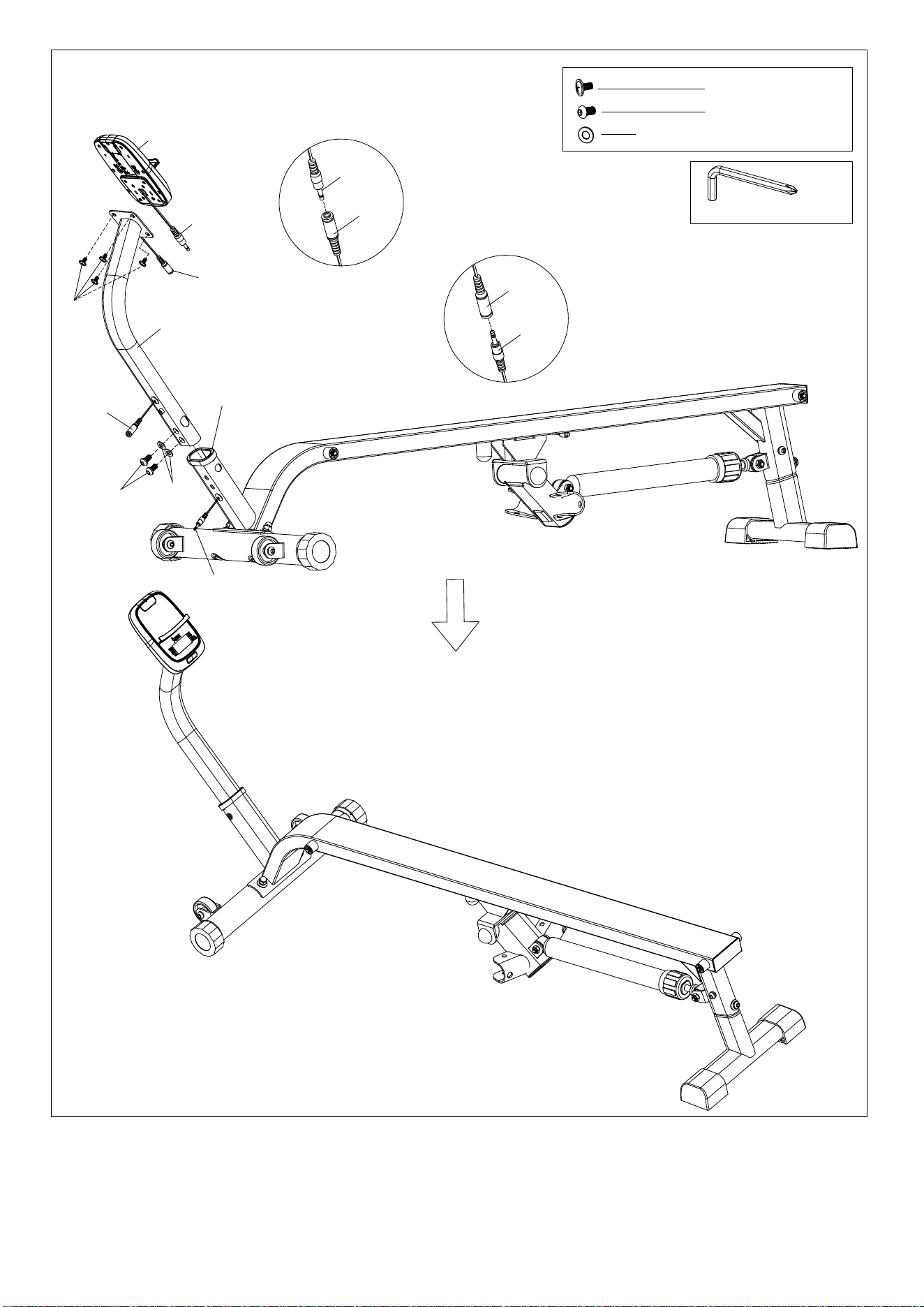
5
#86 S6 1PC
#64 M5*12 4PCS
#40 M8*16 2PCS
#46 φ8.2*φ16*1.5 2PCS
64
46
40
25
62
27
27a
65
65
27a
28a
65
28a
65
②
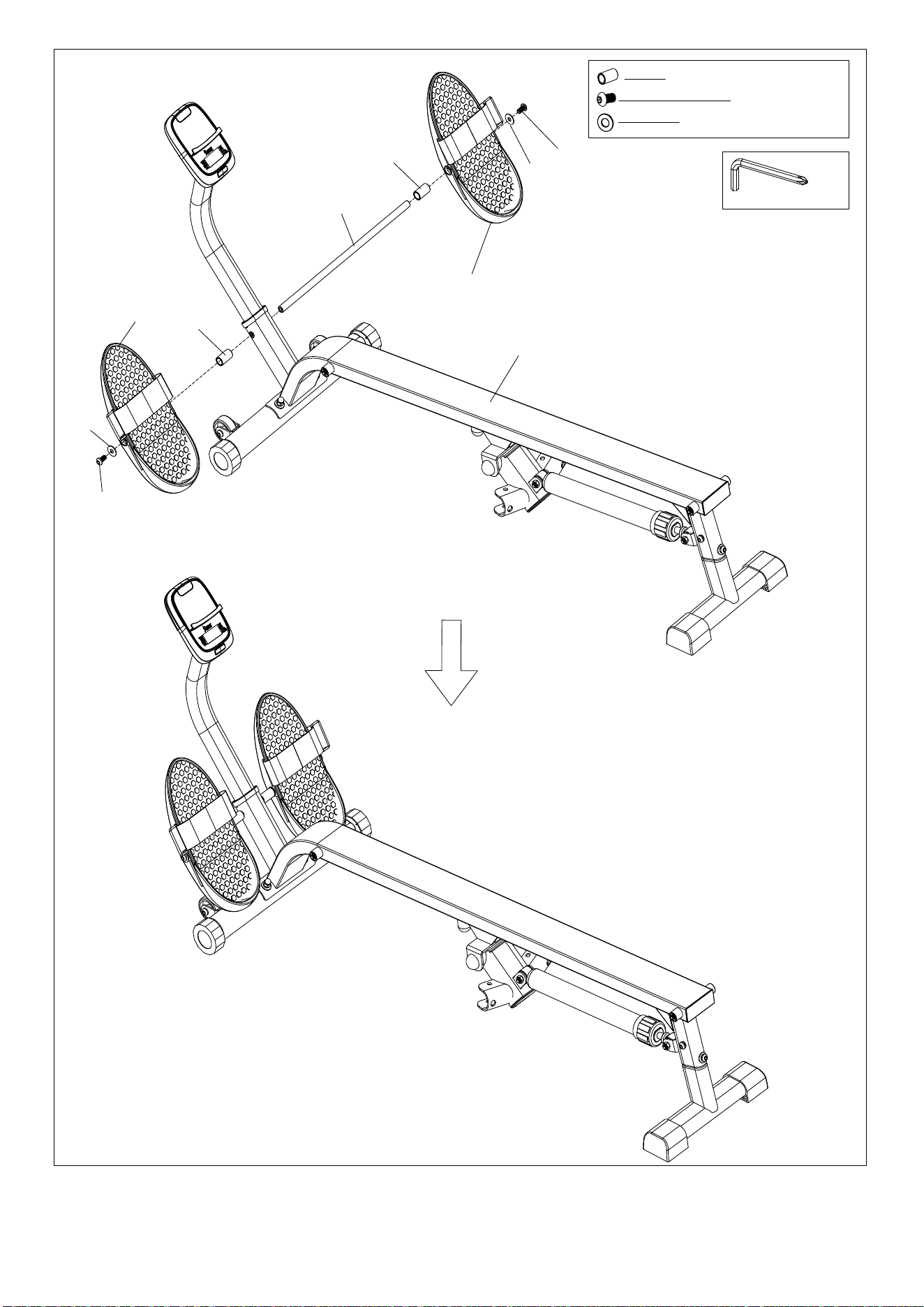
6
#86 S6 2PCS
#14 φ18*φ13.5*31.5 2PCS
#40 M8*16 2PCS
#43 φ8.2*φ22*1.5 2PCS
40
43
14
40
43
8
14
15L
15R
3
③
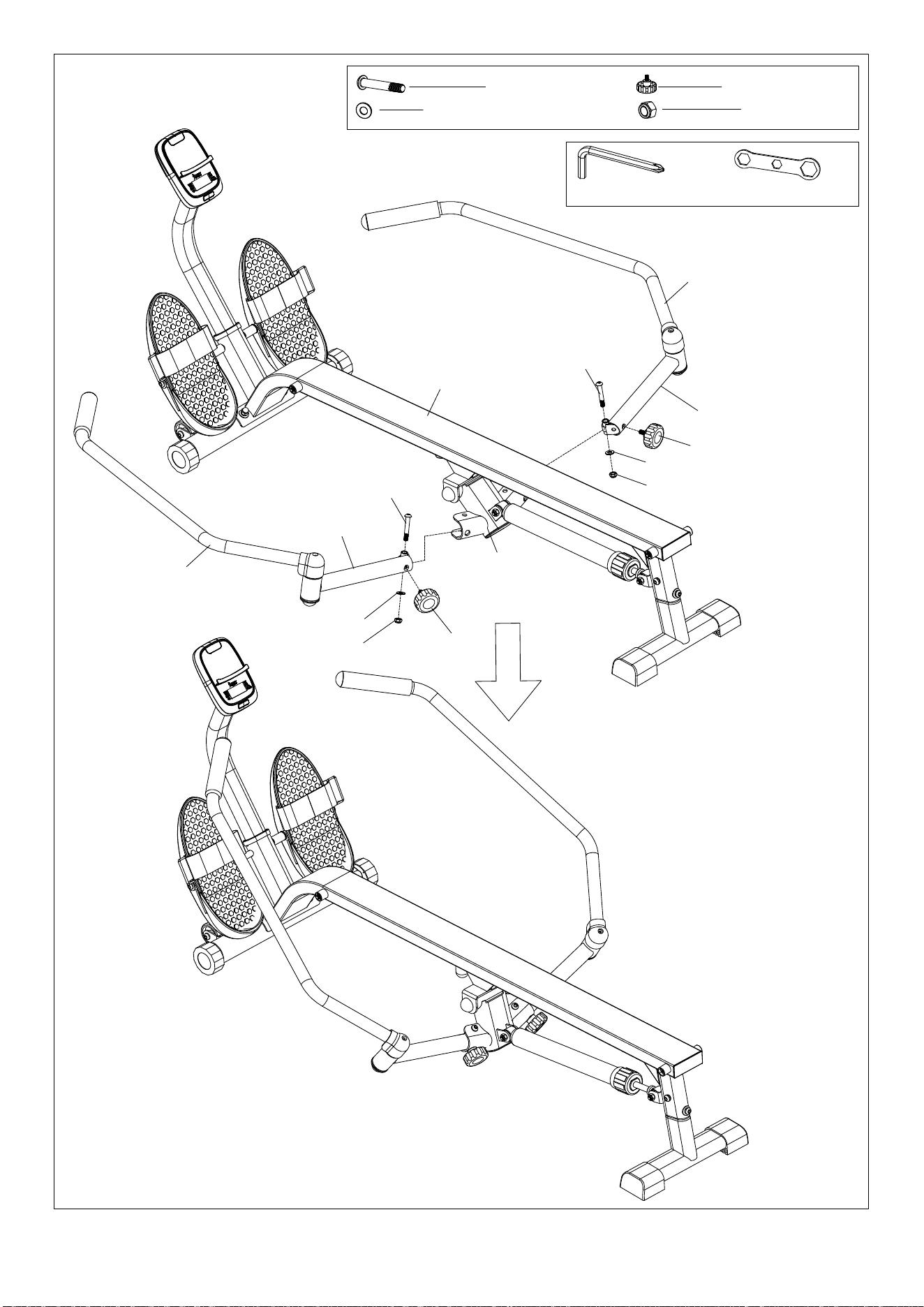
7
#42 M8*50 2PCS #29 M8*15 2PCS
#46 φ8.2*φ16*1.5 2PCS
#84 S10-S13-S17 1PC
#86 S6 1PC
#36 M8 2PCS
S13
S
17
S10
4
5
7
7
36
46
36
46
42
42
3
6
29
29
④
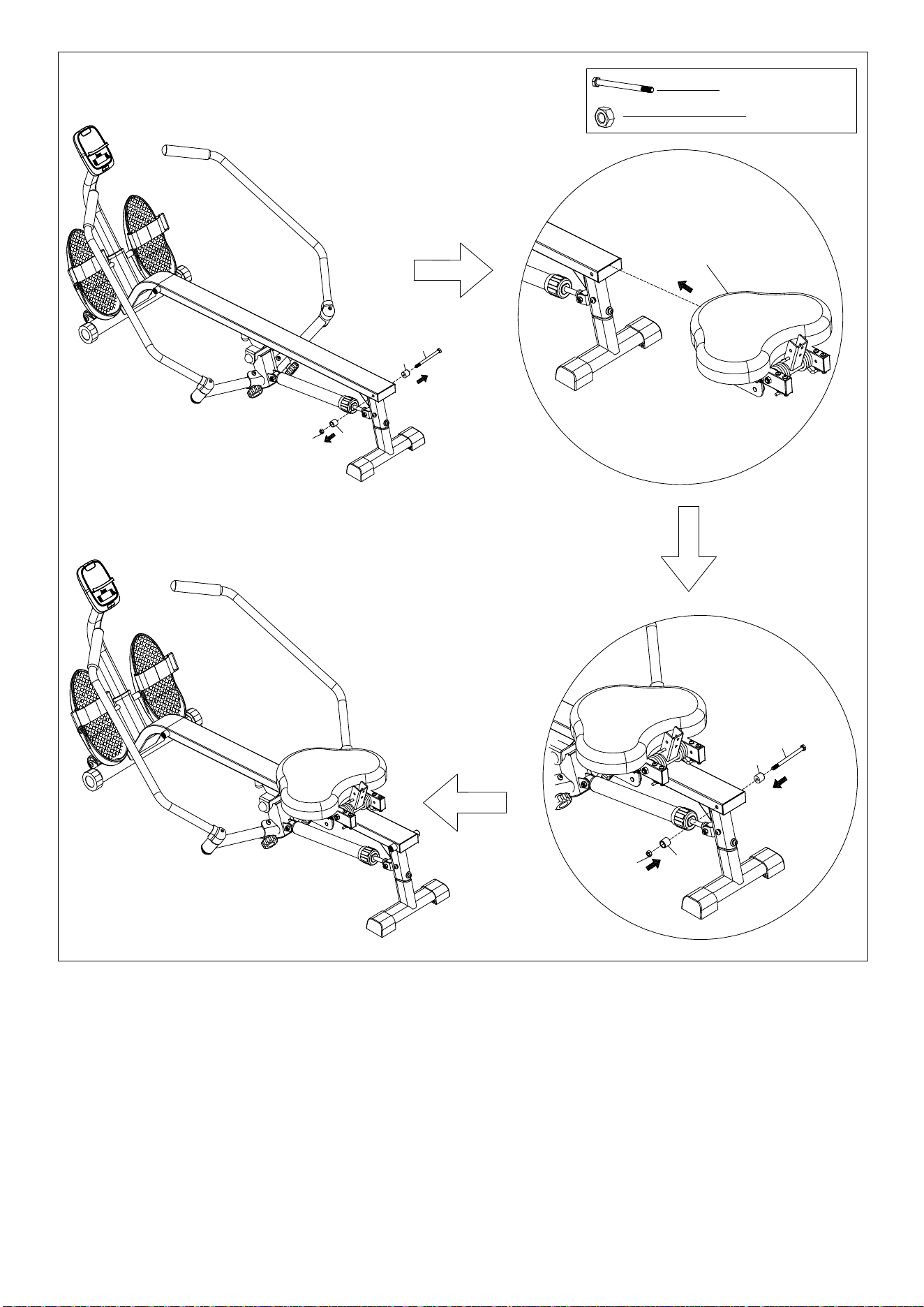
8
1
7
9
17
10
#9 M8*105 1PC
#10 M8 1PC
32
⑤
17
9
17
10
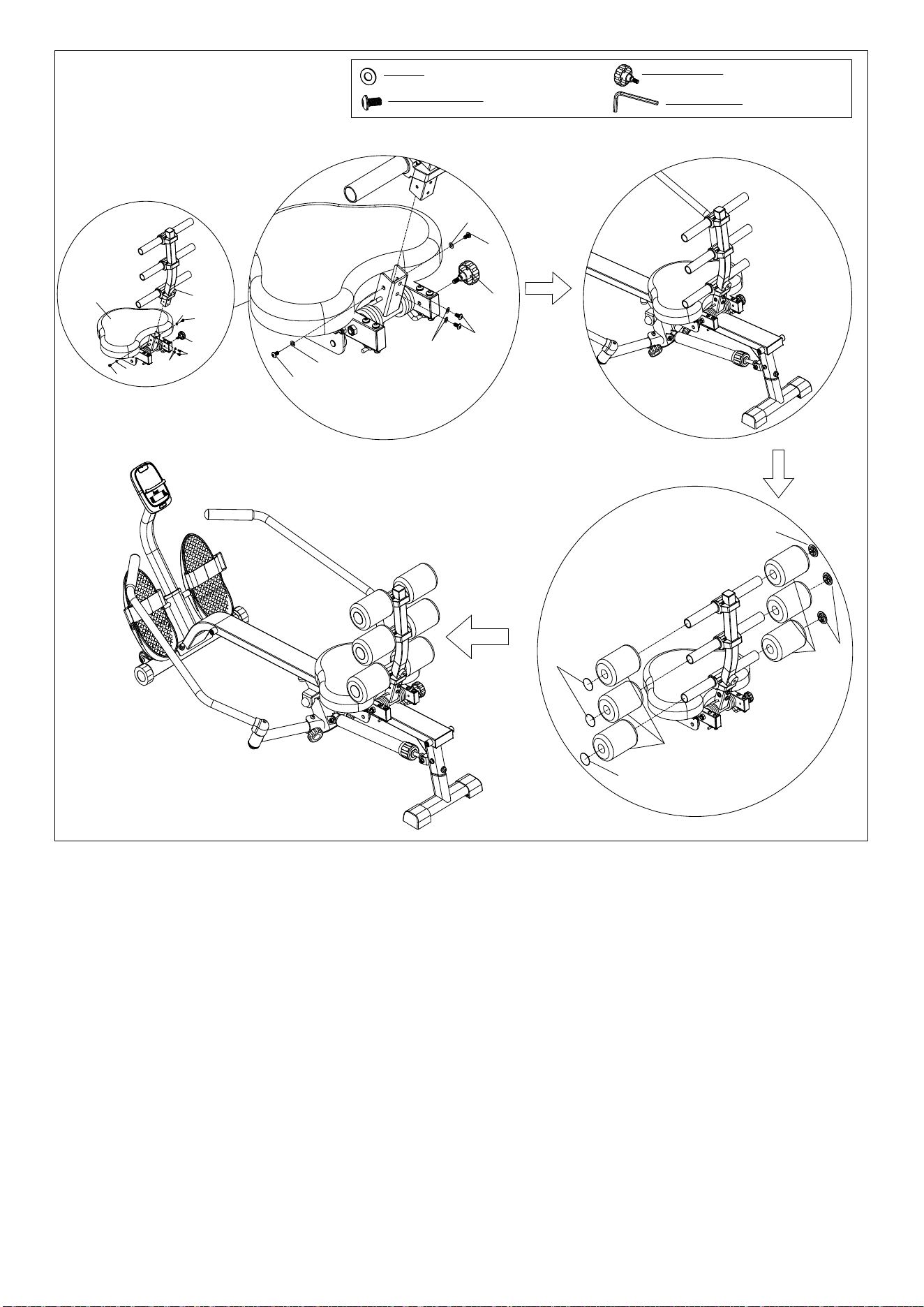
9
70
69
69
70
70
69
32
73
#70 φ6.2*φ12*1.0 4PCS
#69 M6*12 4PCS
#85 S5 1PCS
70
69
69
70
70
69
#81 M8*30 1PCS
81
81
⑥
77
77
76
77
77
76
10
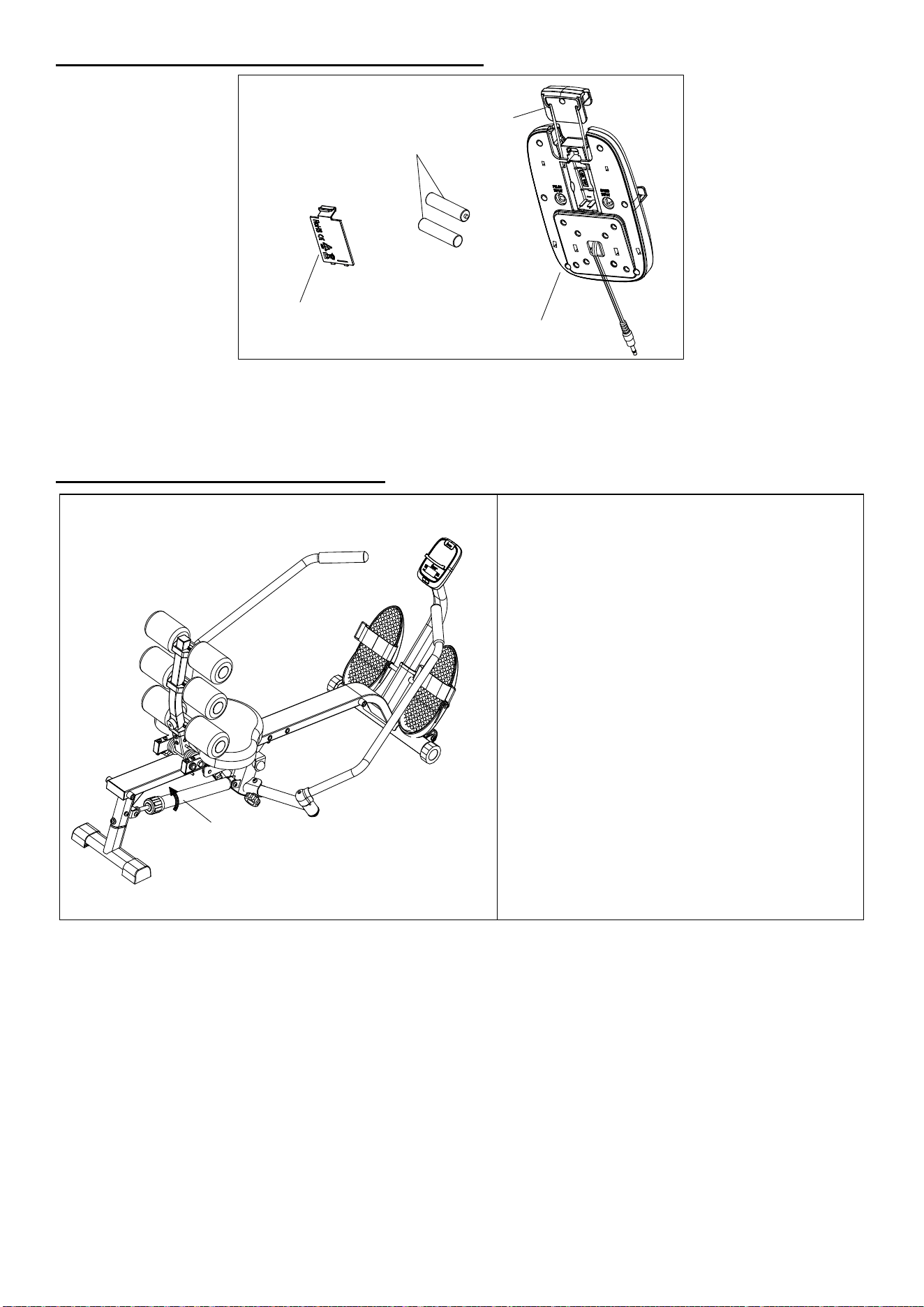
Battery Installation & Replacement
Always change both batteries at the same time. Do not mix battery types and do not mix old and new
batteries. Dispose batteries according to your state and regional guidelines.
Adjustment & Usage Guide
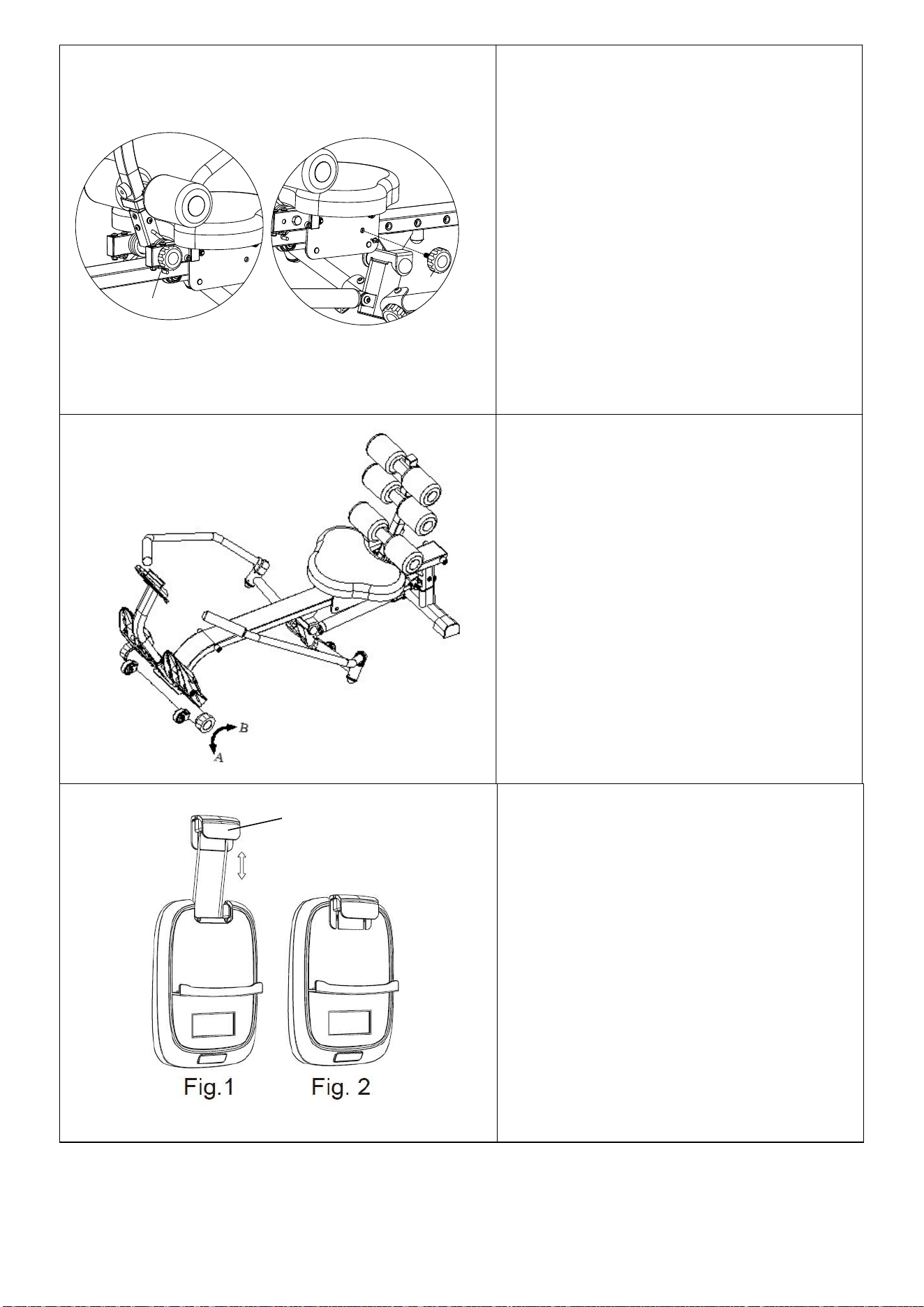
ADJUSTING THE RESISTANCE
This rowing machine is designed with 12
levels of resistance. Turn the upper ring on
the Hydraulic Cylinder (No. 30) so the arrow
points to the desired resistance level, as
shown on the drawing.
NOTE: Please do not adjust the resistance of
the Hydraulic Cylinder (No. 30) during
operation to avoid injury and damage to the
rowing machine.
CAUTION: The Hydraulic Cylinder (No. 30)
can generate excessive heat after long
periods of use, making it unsafe to touch.
Allow the Hydraulic Cylinder (No. 30) to
cool before moving the rowing machine.
Battery Cover
27
Battery
A
30
30
11
ADJUSTING THE SEAT
If you want to fix the Seat (No. 32) when
using the rowing machine. Using the Knob
(No. 81) to fix the Seat (No. 32) on the
location hole.
BALANCE ADJUSTMENT
Before using, check the balance of the
product to ensure it is safe for use. Put the
product on a flat, even surface. If the product
is slightly uneven, rotate the End Caps (No.
24) on the Front Stabilizer (No. 21) to
compensate for the uneven ground.
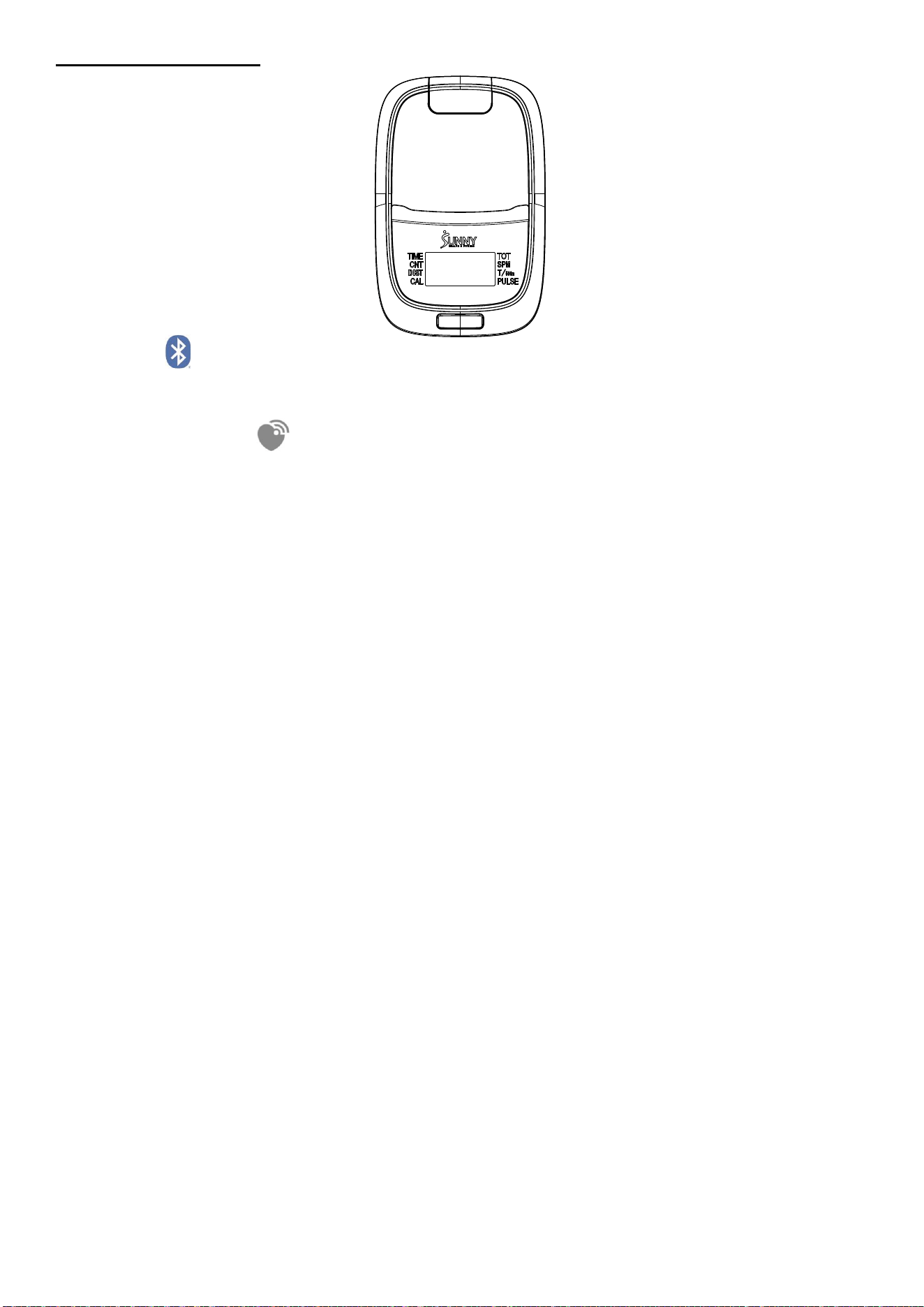
The insert (No. A) can be pulled upward to
secure the mobile device in place (as shown
in Fig. 1). When the mobile device is placed
horizontally, please move the SUNNY insert
(No. A) in front of the meter after it is pulled
out (as shown in Fig. 2) to avoid the insert
from returning back into the meter.
81
81
A
12
Exercise Monitor
BLUETOOTH :
1. The Bluetooth icon will flash when the meter is on or wakes from sleep mode. If no Bluetooth
connection is established within 3 minutes, the Bluetooth icon will turn off.
2. The Bluetooth icon will stay on when it is connected.
WIRELESS HEART RATE :
1. The wireless heart rate icon will flash when the meter is on. If the heart rate monitor is not connected
within 1 minute, the wireless heart rate icon will turn off.
2. After exercise resumes, the wireless heart rate icon will flash. If the heart rate monitor is not
connected within 1 minute, the wireless heart rate icon will turn off.
3. When the meter wakes from sleep mode, the wireless heart rate icon will flash. If the heart rate
monitor is not connected within 1 minute, the wireless heart rate icon will turn off.
4. The wireless heart rate icon will flash when the MODE key is pressed. If the heart rate monitor is not
connected within 1 minute, the wireless heart rate icon will turn off.
5. The wireless heart rate icon will stay on when the heart rate monitor is connected.
NOTE: The heart rate monitor is not included. Wireless heart rate function works with SunnyFit Heart
Rate Monitor HR200. HR200 can only connect to the computer when the wireless heart rate icon is
flashing.
FUNCTION BUTTON
MODE
Press the button to switch display or automatically display through each function value in sequence
every 6 seconds.
Hold the MODE key for 2 seconds to reset all values except TOT when Bluetooth is not connected.
Press and hold the MODE key for 6 seconds to disconnect from both the SunnyFit APP and the heart
rate monitor; then, the meter will enter sleep mode.
OPERATION
1. POWER ON
Installs 2 pieces of 1.5V AAA batteries. (Whenever batteries are removed, all the functions values will
be reset to zero.)
2. SLEEP MODE / WAKE UP
After entering speed signal, each function will skip to display. STOP will be displayed once no speed
signal detected for 10 seconds.
The meter will shut off automatically and disconnect the heart rate monitor if there is no activity for 4
minutes when Bluetooth is not connected.
SLEEP MODE:
A. No connection with Bluetooth module.
B. No speed signal and button operation input.
It will enter the sleep mode then the screen and broadcast will turn off and the pulse measurement
will stop if A and B exist simultaneously.
3. SCAN
After power on or press the mode button, automatically scan through each function value in sequence
every 6 seconds. SCAN-->TIME-->CNT-->DIST-->CAL-->TOT-->SPM-->T/500M-->PULSE-->SCAN
4. TIME: Accumulates total training time from 00:00 up to 999:59.
5. CNT: Display current training frequency from 0 up to 99999.
6. DIST: Accumulates training distance from 0 up to 99999 Meter.
7. CAL: Accumulates calories consumption during training from 0.0 up to 9999.9 kcal
NOTE: This data is a rough guide for comparison of different exercise sessions which cannot be
used in medical treatment.
8. TOT: Display the total counts from the battery has been installed, and the data will be re-counted
after replacing the battery.
13
9. SPM: Displays current stroke per minute.
10. T/500M: Displays Time for training of 500 Meter
11. PULSE: (Needs to pair with the Bluetooth device)
Display the user's heart rate from 30-240 upon pulse signal detected with pulse symbol glittering.
The pulse graphic will not glitter upon no pulse signal detected.
NOTE:
1. If the computer displays abnormally, please re-install the battery and try again.
2. Battery Spec: 1.5V or AAA (2PCS).
3. The batteries must be removed from the appliance before it is scrapped and that they are disposed of
safely.
4. The information displayed is an estimate only. Actual values may vary depending on factors such as
body weight, resistance level, workout intensity, and other individual conditions. This information is
provided for reference purposes only and should not be used for medical or dietary purposes.
APP Connection
Connect Smart Equipment to SunnyFit App:
1. Scan to download SunnyFit from the app store:
2. Ensure that the Bluetooth function is turned on from your mobile device.
3. If this is your first time using the SunnyFit app, follow the in-app instructions to register for your free
SunnyFit account and log in.
4. Begin any workout activity that matches your smart equipment, then follow the onscreen prompts to
search for and connect to your smart equipment.
5. When connected, your stats and records will be displayed at the end of your course/session, and
recorded in your account profile!
TROUBLESHOOTING
If you are having trouble connecting your smart equipment, visit www.sunnyfit.com/guide or scan
the QR code below:
If you require additional support, please contact suppo[email protected].
14
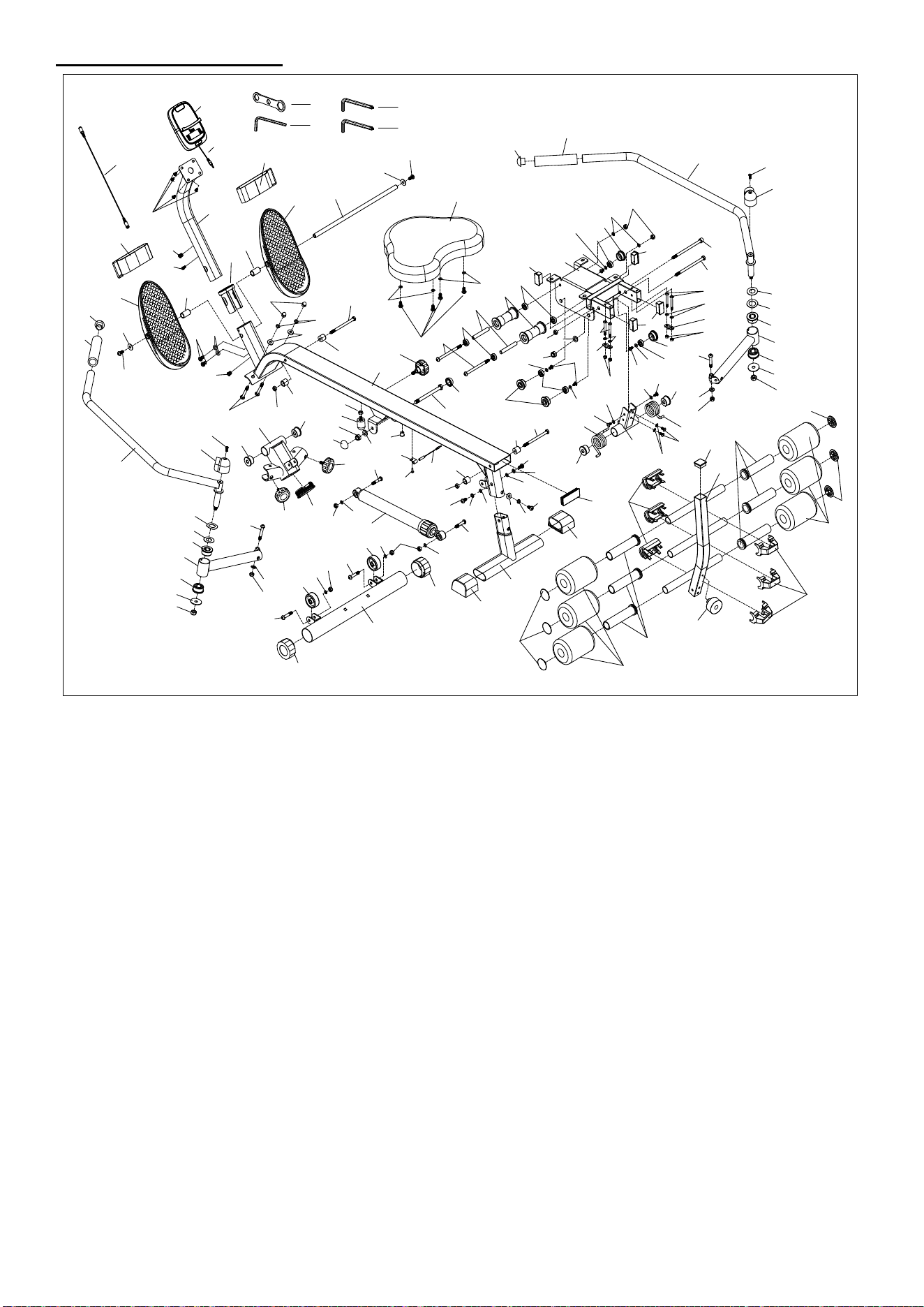
Parts List
No. Description Spec. Qty.
No. Description Spec. Qty.
1 Seat Bracket 1 43 Flat Washer Φ8.2*Φ22*1.5 2
2 Rear Stabilizer 1 44 Bearing 608ZZ 8
3 Seat Rail 1 45 Phillips Screw ST4.2*19.0 1
4 Left Handlebar 1 46 Flat Washer Φ8.2*Φ16*1.5 16
5 Right Handlebar 1 47 Flat Washer Φ10.3*Φ20*2.0
2
6 Connecting Joint 1 48 Flat Washer Φ10.5*Φ38*2.0
2
7 Junction Piece 2 49 Spring Washer Φ8.1*Φ10.6*1.5 5
8 Long Shaft φ13*398 1 50 Arc Washer Φ8.2*Φ19*1.5 3
9 Hex Bolt M8*105 2 51 Hex Bolt M10*120 1
10 Hexagon Nut M8 3 52 Screw M6*8 4
11 Handlebar Cover 2 53 Sleeve 2
12 Alloy Wrap Φ38*Φ19.2 4 54 Nylon Nut M6 4
13 Alloy Wrap Φ32*Φ10.2 4 55 Wheel 2
14 Spacer φ18*13.5*31.5 2 56 Bolt M8*110 2
15L Left Pedal 1 57 Fixed Plate 2
15R Right Pedal 1 58 Wave Washer Φ20*Φ27*0.3 2
16 Shaft Sleeve Φ26*51 1 59 Flat Washer Φ19.2*Φ38*1.0 2
17 Limit Mat φ20*18 4 60 Bolt M8*160 1
18 Tube Plug 1 61 Bolt M10*160 1
19 End Cap 2 62 Support Tube 1
20 Circle End Cap 2 63 Screw M6*12 1
21 Front Stabilizer 1 64 Screw M5*12 4
22 Hold Plug 3 65 Sensor Wire 1 400mm 1
23 Circle Cap 2 66 Transport Wheel ODΦ49 2
24 End Cap 2 67 Square Inner Plug 4
25 Bushing 1 68 Backrest Connect Plate
1
26 End Cap 1 69 Bolt M6*12 4
27 Meter DSC03676 1 70 Flat Washer φ6.2*φ12*1.0 12
27a
Meter Wire 1 71 Left Spring 1
28 Sensor 1 72 Bolt M8*40*15 ,S6 2
28a
Sensor Wire 1 73
Backrest
F
rame
Assembly
1
29 Knob M8*15 2 74 Square Plug 1
30 Hydraulic Cylinder 1 75 Foam Roller 6
31 Pedal Strap 2 76 Foam φ90*φ30*125 6
32 Seat 380*296*50 1 77 Plastic Clasp 6
33 Foam Grip 2 78 Upper Fastener 3
34 Bearing φ11*19.5 4 79 Down Fastener 3
35 Bolt M8*60 2 80 Bolt M6*50,S5 4
36 Non-Slip Nut M8 9 81 Knob M8*30 1
37 Nut M10 4 82 Cushion Plug φ25*11.5 1
38 Cap Nut M8 2 83 Right Spring 1
39 Phillips Screw M5*12 2 84 Spanner S10-S13-S17 1
40 Inner Hex Screw M8*16 11 85 Allen Wrench S5 1
41 Inner Hex Bolt M8*40 2 86 Allen Wrench S6 2
42 Inner Hex Bolt M8*50 2
15
Exploded Diagram
Version 1.0
2
1
3
4
5
6
8
7
7
9
10
11
12
12
13
14
14
15R
15L
16
17
17
9
17
17
13
12
12
18
19
19
10
20
20
21
22
23
23
24
24
25
26
27
28
29
29
30
31
31
32
33
33
34
34
34
35
36
36
36
37
38
37
37
39
39
40
40
40
41
41
40
40
42
42
43
43
44
44
45
46
46
46
46
47
46
46
40
36
46
36
46
46
48
48
49
49
49
50
40
46
11
50
49
51
36
52
52
52
53
54
54
55
56
57
57
58
58
59
59
36
60
61
62
63
22
64
65
37
67
67
68
69
70
71
83
13
13
69
69
70
70
66
72
72
73
74
75
75
76
76
77
82
78
79
66
27a
80
70
70
80
81
22
46
46
47
28a
44
44
44
67
77
77
85
84
86
86
10
70
70
70
70
Register
Register your product and verify warranty terms:
Sunnyhealthfitness.com/warranty
Download
Track your fitness progress & join FREE workout courses!
Download SunnyFit App today!
Follow
Find us on social media
Contact
Get in touch with us for any questions
1-877-90SUNNY (877-907-8669)
support@sunnyhealthfitness.com
www.sunnyhealthfitness.com