To reduce the risk of injury, the user must read and understand the Operator’s
Manual before using this product. Save these instructions for future reference.
1.1 Fire Safety
If your machine catches fire, turn o the electric supply. Using a dry powder or C02 fire
extinguisher, put out the fire. If the fire cannot be put out, keep away and call the fire
department. If you are in any doubt about the safety condition of your machine, please
consult TERN®.
2. OPERATING SAFETY
Familiarity and proper training are required for the safe operation of equipment!
Equipment operated improperly or by untrained personnel can be dangerous! Read
the operating instructions contained in both this manual and the engine manual and
familiarize yourself with the location and proper use of all controls. Inexperienced
operators should receive instruction from someone familiar with the equipment before
being allowed to operate the machine.
2.1 General Notes
2.1.1 DO NOT allow children to operate this appliance or use it as a toy.
2.1.2 DO NOT use for any purpose other than those described in this User's Guide.
2.1.3 DO NOT insert metal objects into lithium batteries. It can cause heat, rupture, fire,
liquid leakage, etc.
2.1.4 DO NOT use chargers without PSE certification.
2.1.5 Turn off the power when the battery becomes unusually hot. It may cause a
breakdown or an accident.
2.1.6 DO NOT modify, and never disassemble or repair. It may impair the performance or
safety of the battery. It may cause fire, electric shock, or injury.
2.1.7 Keep battery terminals away from metal objects to avoid trampling or strong impact.
2.1.8 DO NOT put it into fire or heat it, otherwise it will cause heat, burst, fire and liquid
leakage.
2.1.9 DO NOT use, charge, store or place in places with strong direct sunlight, high
temperature, high humidity, wading, inside the car under the hot sun, near the open flame
and other places; Can cause discoloration, deformation, electric shock, failure, etc.
2.1.10 The battery performance and service life will deteriorate. The plastic parts became
deformed and became the cause of the failure.
WARNING DO NOT wear it in an environment where the temperature exceeds
50 °C, such as sauna. It can cause burns.
WARNING DO NOT During maintenance, be sure to unplug the power plug
from the socket, and do not unplug it again with wet hands. You may get an
electric shock or get hurt.
WARNING DO NOT Please stop charging or using in rain, high humidity,
humid places and places with flammable liquids or gases.
WARNING DO NOT dip in water, seawater, etc., and don't splash water. May
cause short circuit, electric shock, fire, rust or failure.
2.1.11 Odor, fever, discoloration, deformation or other abnormalities are found during
use, charging and storage. Stop using it immediately. It can cause injuries, fever, rupture
and fire. Turn off and remove immediately. High chance of fire and rupture.
2.1.12 Stop using the battery immediately when it leaks or smells bad, and stay away from
open flames.
2.1.13 DO NOT use it for children, animals, etc. Accidents and injuries are the causes.
2.1.14 Cut off the power when using. Will have a negative impact on the battery.
2.1.15 DO NOT turn on the power except when wearing it. It may cause battery power loss.
2.1.16 When unplugging and plugging the battery again, grab a part of the connector or
plug. Can lead to failure and damage.
2.1.17 Wipe it clean if the spilled liquid gets on your skin or clothes. May get dermatitis,
etc.
2.2 Battery Safety
2.2.1 As it may cause heat or fire, please follow local ordinances when disposing.
2.2.2 DO NOT use it when the battery life is extremely short.
2.2.3 NEVER store or charge battery in wet conditions.
2.2.4 NEVER make any adjustments to the tool if battery is connected.
2.2.5 NEVER interfere with the batteries integrity as this can cause injury and void
warranty.
2.2.6 NEVER use or dispose battery in fire as this can cause it to explode. Check local
codes for more information on proper battery disposal.
2.2.7 NEVER use equipment if it has been damaged or modified as this can cause injury.
2.2.8 When not in use, ensure battery is stored in a dry place away from any flammable
objects.
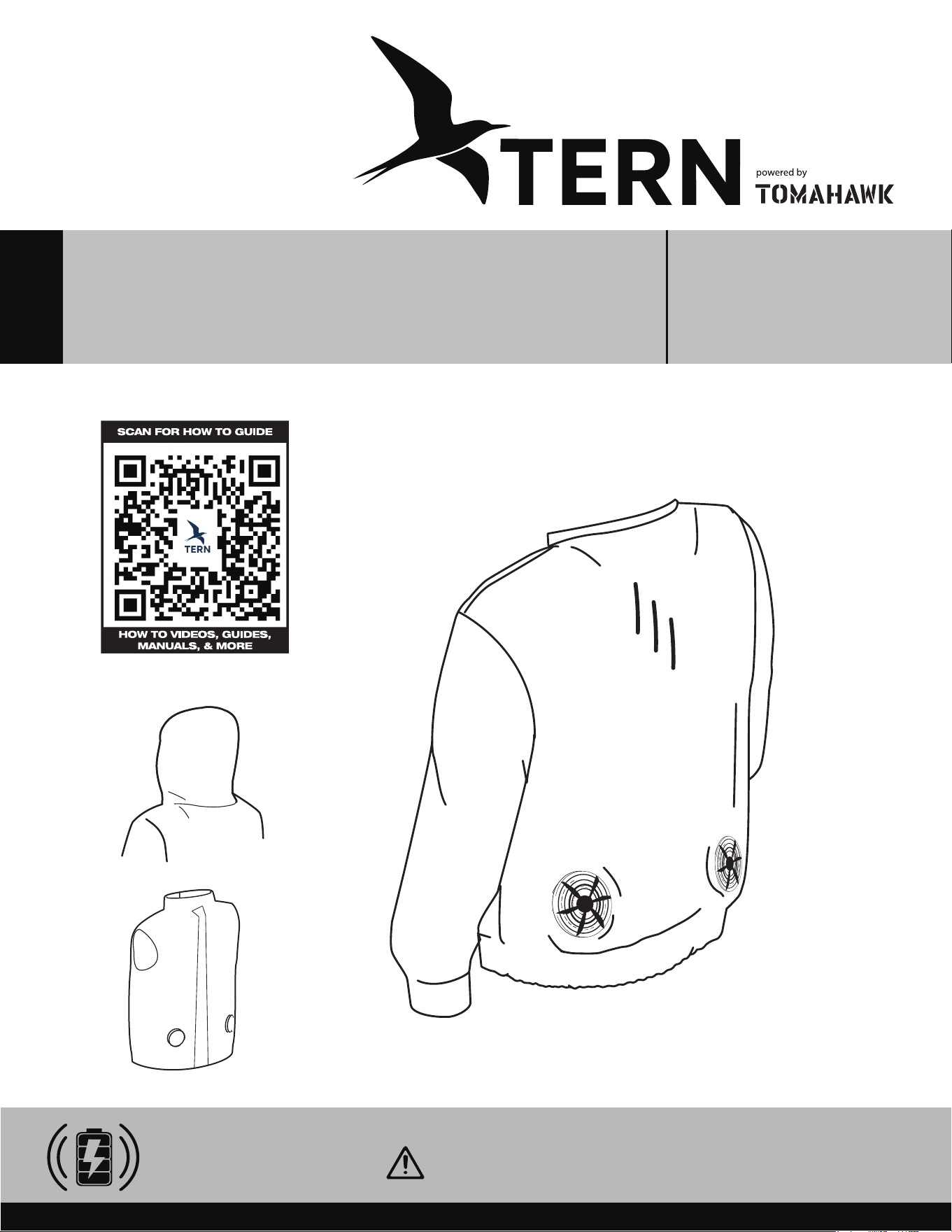
30V BATTERY-POWERED
FAN-COOLED VEST
Operations Manual
2.2.9 ALLOW battery to cool down aer each use to avoid burn injuries.
2.2.10 Only use the manufacturer’s designated battery with this machine.
Use of any other battery can damage unit and will void warranty.
2.2.11 Battery leakage may occur when operated in extreme temperature conditions.
WARNING If battery liquid contacts skin, wash immediately with water
and soap, following with white distilled vinegar or lemon juice to
neutralize. If the liquid comes in contact with eyes, flush out eyes with
water for 10 minutes and seek medical attention immediately.
2.2.12 Have all servicing done by an approved TERN® Technician or Service Center with
original replacement parts.
2.3 Fan Safety
2.3.1 NEVER put your finger in the fan. Keep away from children, and keep out of their
reach of their hands and fingers. There is risk of injury.
2.3.2 When the temperature of the fan motor becomes high, please stop using it. If the fan
is wet, the fan will fail.
2.3.3 DO NOT clean the fan with liquid, enter bodies of water, or remain in prolonged
rainy conditions.
2.3.4 DO NOT use a hair dryer to clean the fan. Fan blades may be deformed or damaged.
2.3.5 DO NOT exert too much force on the fan and wiring harness. It will lead to
disconnection and breakage.
2.3.6 DO NOT insert rods into the fan to stop the propeller. Be mindful of small projectiles
such as stones, this may cause the motor to stall and burn out and cause propeller
damage.
2.3.7 Be sure to hold the connector or plug part when plugging and unplugging
connectors and plugs.
2.3.8 DO NOT exert unreasonable force. It will lead to disconnection and breakage.
2.3.9 DO NOT use it in dusty places. It may be damaged aer inhaling dust.
3. EQUIPMENT PERFORMANCE
3.1 Fan Vest Design
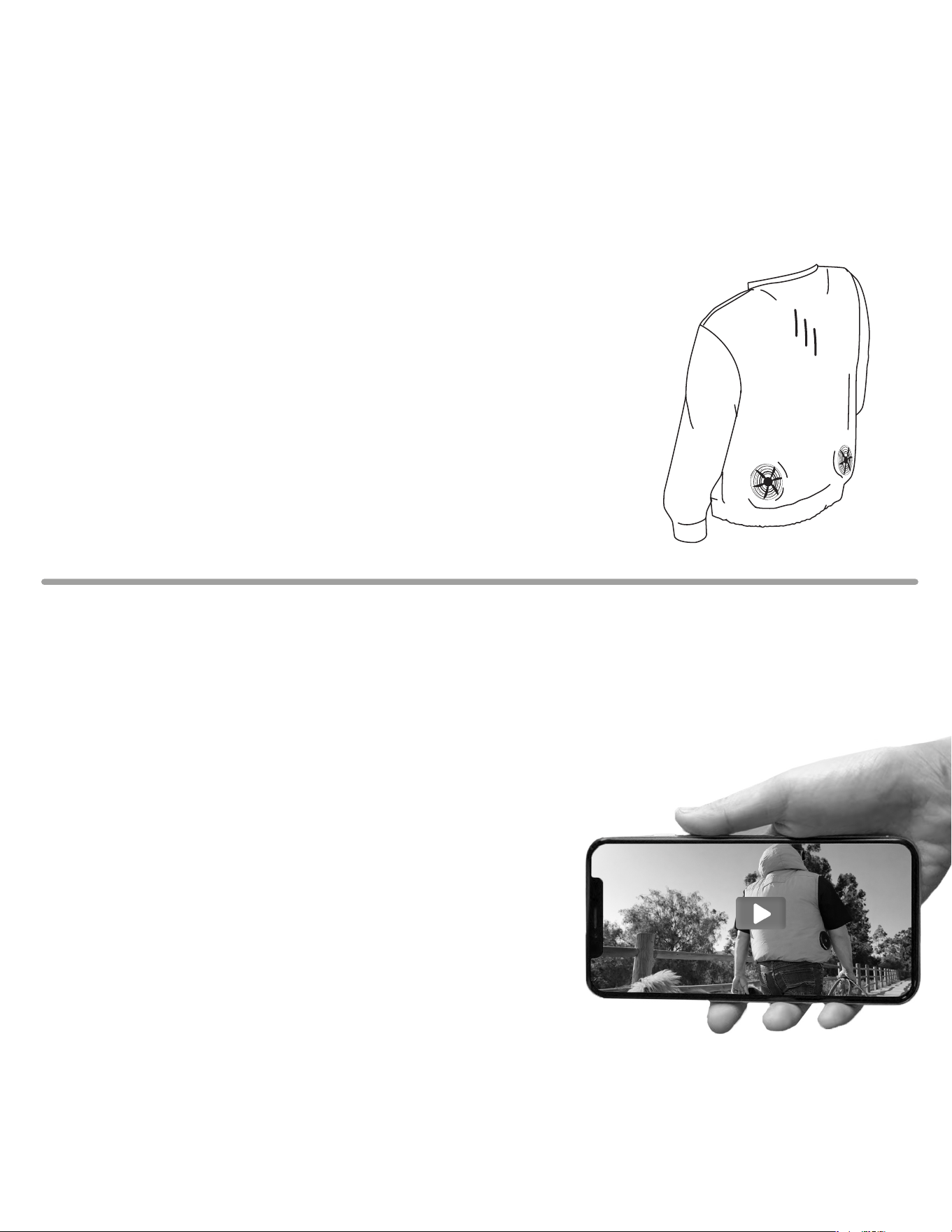
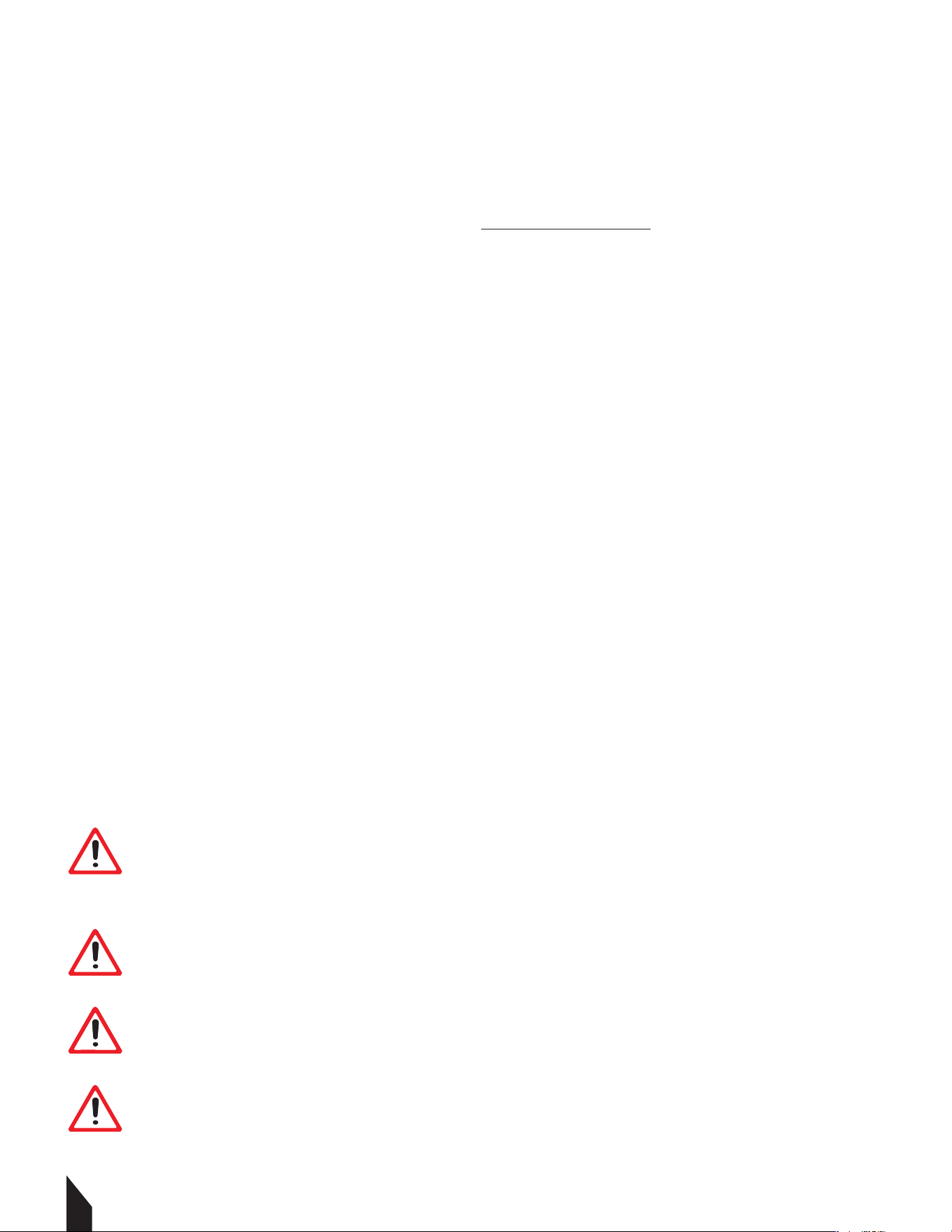
Beat the heat without sacrificing protection. Our Fan-Cooled Jackets/vests delivers
all-day airflow and full-arm coverage—perfect for blazing jobsites, sun-soaked trails, or
weekend adventures. Whether you’re grinding on the jobsite, hiking under record heat, or
running errands in sweltering weather, this jacket keeps you cool, dry, and focused. Pair it
with any outfit for a sleek, technical look that works from workday to weekend.

2
1.1 Fire Safety
If your machine catches fire, turn o the electric supply. Using a dry powder or C02 fire
extinguisher, put out the fire. If the fire cannot be put out, keep away and call the fire
department. If you are in any doubt about the safety condition of your machine, please
consult TERN®.
2. OPERATING SAFETY
Familiarity and proper training are required for the safe operation of equipment!
Equipment operated improperly or by untrained personnel can be dangerous! Read
the operating instructions contained in both this manual and the engine manual and
familiarize yourself with the location and proper use of all controls. Inexperienced
operators should receive instruction from someone familiar with the equipment before
being allowed to operate the machine.
2.1 General Notes
2.1.1 DO NOT allow children to operate this appliance or use it as a toy.
2.1.2 DO NOT use for any purpose other than those described in this User's Guide.
2.1.3 DO NOT insert metal objects into lithium batteries. It can cause heat, rupture, fire,
liquid leakage, etc.
2.1.4 DO NOT use chargers without PSE certification.
2.1.5 Turn off the power when the battery becomes unusually hot. It may cause a
breakdown or an accident.
2.1.6 DO NOT modify, and never disassemble or repair. It may impair the performance or
safety of the battery. It may cause fire, electric shock, or injury.
2.1.7 Keep battery terminals away from metal objects to avoid trampling or strong impact.
2.1.8 DO NOT put it into fire or heat it, otherwise it will cause heat, burst, fire and liquid
leakage.
2.1.9 DO NOT use, charge, store or place in places with strong direct sunlight, high
temperature, high humidity, wading, inside the car under the hot sun, near the open flame
and other places; Can cause discoloration, deformation, electric shock, failure, etc.
2.1.10 The battery performance and service life will deteriorate. The plastic parts became
deformed and became the cause of the failure.
WARNING DO NOT wear it in an environment where the temperature exceeds
50 °C, such as sauna. It can cause burns.
WARNING DO NOT During maintenance, be sure to unplug the power plug
from the socket, and do not unplug it again with wet hands. You may get an
electric shock or get hurt.
WARNING DO NOT Please stop charging or using in rain, high humidity,
humid places and places with flammable liquids or gases.
WARNING DO NOT dip in water, seawater, etc., and don't splash water. May
cause short circuit, electric shock, fire, rust or failure.
2.1.11 Odor, fever, discoloration, deformation or other abnormalities are found during
use, charging and storage. Stop using it immediately. It can cause injuries, fever, rupture
and fire. Turn off and remove immediately. High chance of fire and rupture.
2.1.12 Stop using the battery immediately when it leaks or smells bad, and stay away from
open flames.
2.1.13 DO NOT use it for children, animals, etc. Accidents and injuries are the causes.
2.1.14 Cut off the power when using. Will have a negative impact on the battery.
2.1.15 DO NOT turn on the power except when wearing it. It may cause battery power loss.
2.1.16 When unplugging and plugging the battery again, grab a part of the connector or
plug. Can lead to failure and damage.
2.1.17 Wipe it clean if the spilled liquid gets on your skin or clothes. May get dermatitis,
etc.
2.2 Battery Safety
2.2.1 As it may cause heat or fire, please follow local ordinances when disposing.
2.2.2 DO NOT use it when the battery life is extremely short.
2.2.3 NEVER store or charge battery in wet conditions.
2.2.4 NEVER make any adjustments to the tool if battery is connected.
2.2.5 NEVER interfere with the batteries integrity as this can cause injury and void
warranty.
2.2.6 NEVER use or dispose battery in fire as this can cause it to explode. Check local
codes for more information on proper battery disposal.
2.2.7 NEVER use equipment if it has been damaged or modified as this can cause injury.
2.2.8 When not in use, ensure battery is stored in a dry place away from any flammable
objects.
Table of Contents
1. SAFETY INFORMATION
1.1 Fire Safety
2. OPERATING SAFETY
2.1 General Safety
2.2 Battery Safety
2.3 Fan Safety
3. EQUIPMENT PERFORMANCE
3.1 Fan Vest Design
3.2 Specifications
3.3 Fan Vest Parts
4. BEFORE YOU START
4.1 Battery Charging
5. OPERATION
5.1 Fan Installation
5.2 Connecting the Battery
5.3 Powering & Adjusting the System
5.4 Turning Power ON
5.5 Adjusting Airflow
5.6 Turning Off
6. MAINTENANCE
6.1 Cleaning the Fans
6.2 Garment Washing Care
6.3 Maintenance Record
8. REPLACEMENT PARTS
7. TROUBLESHOOTING
9. WARRANTY
9.1 Warranty Claims
4
5
5
6
6
7
7
7
8
8
9
9
9
9
9
10
10
10
11
11
11
12
12
13
14
15
15
2.2.9 ALLOW battery to cool down aer each use to avoid burn injuries.
2.2.10 Only use the manufacturer’s designated battery with this machine.
Use of any other battery can damage unit and will void warranty.
2.2.11 Battery leakage may occur when operated in extreme temperature conditions.
WARNING If battery liquid contacts skin, wash immediately with water
and soap, following with white distilled vinegar or lemon juice to
neutralize. If the liquid comes in contact with eyes, flush out eyes with
water for 10 minutes and seek medical attention immediately.
2.2.12 Have all servicing done by an approved TERN® Technician or Service Center with
original replacement parts.
2.3 Fan Safety
2.3.1 NEVER put your finger in the fan. Keep away from children, and keep out of their
reach of their hands and fingers. There is risk of injury.
2.3.2 When the temperature of the fan motor becomes high, please stop using it. If the fan
is wet, the fan will fail.
2.3.3 DO NOT clean the fan with liquid, enter bodies of water, or remain in prolonged
rainy conditions.
2.3.4 DO NOT use a hair dryer to clean the fan. Fan blades may be deformed or damaged.
2.3.5 DO NOT exert too much force on the fan and wiring harness. It will lead to
disconnection and breakage.
2.3.6 DO NOT insert rods into the fan to stop the propeller. Be mindful of small projectiles
such as stones, this may cause the motor to stall and burn out and cause propeller
damage.
2.3.7 Be sure to hold the connector or plug part when plugging and unplugging
connectors and plugs.
2.3.8 DO NOT exert unreasonable force. It will lead to disconnection and breakage.
2.3.9 DO NOT use it in dusty places. It may be damaged aer inhaling dust.
3. EQUIPMENT PERFORMANCE
3.1 Fan Vest Design
Beat the heat without sacrificing protection. Our Fan-Cooled Jackets/vests delivers
all-day airflow and full-arm coverage—perfect for blazing jobsites, sun-soaked trails, or
weekend adventures. Whether you’re grinding on the jobsite, hiking under record heat, or
running errands in sweltering weather, this jacket keeps you cool, dry, and focused. Pair it
with any outfit for a sleek, technical look that works from workday to weekend.
3
1.1 Fire Safety
If your machine catches fire, turn o the electric supply. Using a dry powder or C02 fire
extinguisher, put out the fire. If the fire cannot be put out, keep away and call the fire
department. If you are in any doubt about the safety condition of your machine, please
consult TERN®.
2. OPERATING SAFETY
Familiarity and proper training are required for the safe operation of equipment!
Equipment operated improperly or by untrained personnel can be dangerous! Read
the operating instructions contained in both this manual and the engine manual and
familiarize yourself with the location and proper use of all controls. Inexperienced
operators should receive instruction from someone familiar with the equipment before
being allowed to operate the machine.
2.1 General Notes
2.1.1 DO NOT allow children to operate this appliance or use it as a toy.
2.1.2 DO NOT use for any purpose other than those described in this User's Guide.
2.1.3 DO NOT insert metal objects into lithium batteries. It can cause heat, rupture, fire,
liquid leakage, etc.
2.1.4 DO NOT use chargers without PSE certification.
2.1.5 Turn off the power when the battery becomes unusually hot. It may cause a
breakdown or an accident.
2.1.6 DO NOT modify, and never disassemble or repair. It may impair the performance or
safety of the battery. It may cause fire, electric shock, or injury.
2.1.7 Keep battery terminals away from metal objects to avoid trampling or strong impact.
2.1.8 DO NOT put it into fire or heat it, otherwise it will cause heat, burst, fire and liquid
leakage.
2.1.9 DO NOT use, charge, store or place in places with strong direct sunlight, high
temperature, high humidity, wading, inside the car under the hot sun, near the open flame
and other places; Can cause discoloration, deformation, electric shock, failure, etc.
2.1.10 The battery performance and service life will deteriorate. The plastic parts became
deformed and became the cause of the failure.
WARNING DO NOT wear it in an environment where the temperature exceeds
50 °C, such as sauna. It can cause burns.
WARNING DO NOT During maintenance, be sure to unplug the power plug
from the socket, and do not unplug it again with wet hands. You may get an
electric shock or get hurt.
WARNING DO NOT Please stop charging or using in rain, high humidity,
humid places and places with flammable liquids or gases.
WARNING DO NOT dip in water, seawater, etc., and don't splash water. May
cause short circuit, electric shock, fire, rust or failure.
2.1.11 Odor, fever, discoloration, deformation or other abnormalities are found during
use, charging and storage. Stop using it immediately. It can cause injuries, fever, rupture
and fire. Turn off and remove immediately. High chance of fire and rupture.
2.1.12 Stop using the battery immediately when it leaks or smells bad, and stay away from
open flames.
2.1.13 DO NOT use it for children, animals, etc. Accidents and injuries are the causes.
2.1.14 Cut off the power when using. Will have a negative impact on the battery.
2.1.15 DO NOT turn on the power except when wearing it. It may cause battery power loss.
2.1.16 When unplugging and plugging the battery again, grab a part of the connector or
plug. Can lead to failure and damage.
2.1.17 Wipe it clean if the spilled liquid gets on your skin or clothes. May get dermatitis,
etc.
2.2 Battery Safety
2.2.1 As it may cause heat or fire, please follow local ordinances when disposing.
2.2.2 DO NOT use it when the battery life is extremely short.
2.2.3 NEVER store or charge battery in wet conditions.
2.2.4 NEVER make any adjustments to the tool if battery is connected.
2.2.5 NEVER interfere with the batteries integrity as this can cause injury and void
warranty.
2.2.6 NEVER use or dispose battery in fire as this can cause it to explode. Check local
codes for more information on proper battery disposal.
2.2.7 NEVER use equipment if it has been damaged or modified as this can cause injury.
2.2.8 When not in use, ensure battery is stored in a dry place away from any flammable
objects.
Register Your Equipment
Thank you for purchasing TERN® equipment! Your product is covered by the TERN® Warranty
policy, but in order to activate your warranty, we need you to register your product. In
addition to activating your equipment warranty, product registration will grant you access to
important product updates, streamlined customer service and more.
INCLUDED WITH YOUR REGISTRATION
☑ Equipment Warranty Activation
☑ Product Updates
☑ Streamlined Customer Service
☑ Exclusive Discounts and Sales
STEPS TO REGISTER YOUR EQUIPMENT
1. Visit www.ternwear.com
2. Choose “Product Registration” at the bottom of the page
3. Enter your equipment’s serial number to get started
4. Provide all required information
5. Submit Registration
Equipment Resources
TERN® Customer Service doesn’t stop at checkout. We
understand the proper equipment, spare parts, instruction
manuals, and more are needed at the drop of a hat. Visit
www.ternwear.com to gain access to the incredible resources
below.
How To Video Library
More of a visual person? Visit our Video Library for equipment
assembly instructions, troubleshooting tips, and more!
Found at the TERN® Resource Center
Manual and Assembly Guide Library
Visit our Manual Library if you are looking for a lost
operations manual or a particular spare part?
Found on the TERN® Manuals Page
Service Requests
In need of a quick fix ? Submit a
Service Request and a TERN® Technician will respond
shortly to get you the help you need.
Choose “Service Request” at the bottom of www.ternwear.com
2.2.9 ALLOW battery to cool down aer each use to avoid burn injuries.
2.2.10 Only use the manufacturer’s designated battery with this machine.
Use of any other battery can damage unit and will void warranty.
2.2.11 Battery leakage may occur when operated in extreme temperature conditions.
WARNING If battery liquid contacts skin, wash immediately with water
and soap, following with white distilled vinegar or lemon juice to
neutralize. If the liquid comes in contact with eyes, flush out eyes with
water for 10 minutes and seek medical attention immediately.
2.2.12 Have all servicing done by an approved TERN® Technician or Service Center with
original replacement parts.
2.3 Fan Safety
2.3.1 NEVER put your finger in the fan. Keep away from children, and keep out of their
reach of their hands and fingers. There is risk of injury.
2.3.2 When the temperature of the fan motor becomes high, please stop using it. If the fan
is wet, the fan will fail.
2.3.3 DO NOT clean the fan with liquid, enter bodies of water, or remain in prolonged
rainy conditions.
2.3.4 DO NOT use a hair dryer to clean the fan. Fan blades may be deformed or damaged.
2.3.5 DO NOT exert too much force on the fan and wiring harness. It will lead to
disconnection and breakage.
2.3.6 DO NOT insert rods into the fan to stop the propeller. Be mindful of small projectiles
such as stones, this may cause the motor to stall and burn out and cause propeller
damage.
2.3.7 Be sure to hold the connector or plug part when plugging and unplugging
connectors and plugs.
2.3.8 DO NOT exert unreasonable force. It will lead to disconnection and breakage.
2.3.9 DO NOT use it in dusty places. It may be damaged aer inhaling dust.
3. EQUIPMENT PERFORMANCE
3.1 Fan Vest Design
Beat the heat without sacrificing protection. Our Fan-Cooled Jackets/vests delivers
all-day airflow and full-arm coverage—perfect for blazing jobsites, sun-soaked trails, or
weekend adventures. Whether you’re grinding on the jobsite, hiking under record heat, or
running errands in sweltering weather, this jacket keeps you cool, dry, and focused. Pair it
with any outfit for a sleek, technical look that works from workday to weekend.
This manual provides information and procedures to safely operate and maintain this
model. For your own safety and protection from injury, carefully read, understand and
observe the safety instructions described in this manual.
Keep this manual or a copy of it with the machine. If you lose this manual or need an
additional copy, please contact TERN® or visit www.tern-wear.com This machine is built with
user safety in mind; however, it can present hazards if improperly operated and serviced.
Follow operating instructions carefully. If you have questions about operating or servicing
this equipment, please contact TERN®.
The information contained in this manual is based on machines in production at the time of
publication. TERN® reserves the right to change any portion of this information without
notice.
No part of this publication may be reproduced in any form or by any means, electronic or
mechanical, including photocopying, without express written permission from TERN®.
Any type of reproduction or distribution not authorized by TERN® represents an
infringement of valid copyrights and will be prosecuted. We expressly reserve the right to
make technical modifications, even without due notice, which aim at improving our
machines or their safety standards.
1. SAFETY INFORMATION
This manual contains DANGER, WARNING, CAUTION, and NOTE callouts which must be
followed to reduce the possibility of personal injury, damage to the equipment, or improper
service.
This is the safety alert symbol. It is used to alert you to potential personal injury
hazards. Obey all safety messages that follow this symbol to avoid possible injury
or death.
DANGER indicates an imminently hazardous situation which, if not avoided, will
result in death or serious injury.
WARNING indicates a potentially hazardous situation which, if not avoided, could
result in death or serious injury.
CAUTION indicates a potentially hazardous situation which, if not avoided, may
result in minor or moderate injury.
DANGER
WARNING
CAUTION
4
1.1 Fire Safety
If your machine catches fire, turn o the electric supply. Using a dry powder or C02 fire
extinguisher, put out the fire. If the fire cannot be put out, keep away and call the fire
department. If you are in any doubt about the safety condition of your machine, please
consult TERN®.
2. OPERATING SAFETY
Familiarity and proper training are required for the safe operation of equipment!
Equipment operated improperly or by untrained personnel can be dangerous! Read
the operating instructions contained in both this manual and the engine manual and
familiarize yourself with the location and proper use of all controls. Inexperienced
operators should receive instruction from someone familiar with the equipment before
being allowed to operate the machine.
2.1 General Notes
2.1.1 DO NOT allow children to operate this appliance or use it as a toy.
2.1.2 DO NOT use for any purpose other than those described in this User's Guide.
2.1.3 DO NOT insert metal objects into lithium batteries. It can cause heat, rupture, fire,
liquid leakage, etc.
2.1.4 DO NOT use chargers without PSE certification.
2.1.5 Turn off the power when the battery becomes unusually hot. It may cause a
breakdown or an accident.
2.1.6 DO NOT modify, and never disassemble or repair. It may impair the performance or
safety of the battery. It may cause fire, electric shock, or injury.
2.1.7 Keep battery terminals away from metal objects to avoid trampling or strong impact.
2.1.8 DO NOT put it into fire or heat it, otherwise it will cause heat, burst, fire and liquid
leakage.
2.1.9 DO NOT use, charge, store or place in places with strong direct sunlight, high
temperature, high humidity, wading, inside the car under the hot sun, near the open flame
and other places; Can cause discoloration, deformation, electric shock, failure, etc.
2.1.10 The battery performance and service life will deteriorate. The plastic parts became
deformed and became the cause of the failure.
WARNING DO NOT wear it in an environment where the temperature exceeds
50 °C, such as sauna. It can cause burns.
WARNING DO NOT During maintenance, be sure to unplug the power plug
from the socket, and do not unplug it again with wet hands. You may get an
electric shock or get hurt.
WARNING DO NOT Please stop charging or using in rain, high humidity,
humid places and places with flammable liquids or gases.
WARNING DO NOT dip in water, seawater, etc., and don't splash water. May
cause short circuit, electric shock, fire, rust or failure.
2.1.11 Odor, fever, discoloration, deformation or other abnormalities are found during
use, charging and storage. Stop using it immediately. It can cause injuries, fever, rupture
and fire. Turn off and remove immediately. High chance of fire and rupture.
2.1.12 Stop using the battery immediately when it leaks or smells bad, and stay away from
open flames.
2.1.13 DO NOT use it for children, animals, etc. Accidents and injuries are the causes.
2.1.14 Cut off the power when using. Will have a negative impact on the battery.
2.1.15 DO NOT turn on the power except when wearing it. It may cause battery power loss.
2.1.16 When unplugging and plugging the battery again, grab a part of the connector or
plug. Can lead to failure and damage.
2.1.17 Wipe it clean if the spilled liquid gets on your skin or clothes. May get dermatitis,
etc.
2.2 Battery Safety
2.2.1 As it may cause heat or fire, please follow local ordinances when disposing.
2.2.2 DO NOT use it when the battery life is extremely short.
2.2.3 NEVER store or charge battery in wet conditions.
2.2.4 NEVER make any adjustments to the tool if battery is connected.
2.2.5 NEVER interfere with the batteries integrity as this can cause injury and void
warranty.
2.2.6 NEVER use or dispose battery in fire as this can cause it to explode. Check local
codes for more information on proper battery disposal.
2.2.7 NEVER use equipment if it has been damaged or modified as this can cause injury.
2.2.8 When not in use, ensure battery is stored in a dry place away from any flammable
objects.
2.2.9 ALLOW battery to cool down aer each use to avoid burn injuries.
2.2.10 Only use the manufacturer’s designated battery with this machine.
Use of any other battery can damage unit and will void warranty.
2.2.11 Battery leakage may occur when operated in extreme temperature conditions.
WARNING If battery liquid contacts skin, wash immediately with water
and soap, following with white distilled vinegar or lemon juice to
neutralize. If the liquid comes in contact with eyes, flush out eyes with
water for 10 minutes and seek medical attention immediately.
2.2.12 Have all servicing done by an approved TERN® Technician or Service Center with
original replacement parts.
2.3 Fan Safety
2.3.1 NEVER put your finger in the fan. Keep away from children, and keep out of their
reach of their hands and fingers. There is risk of injury.
2.3.2 When the temperature of the fan motor becomes high, please stop using it. If the fan
is wet, the fan will fail.
2.3.3 DO NOT clean the fan with liquid, enter bodies of water, or remain in prolonged
rainy conditions.
2.3.4 DO NOT use a hair dryer to clean the fan. Fan blades may be deformed or damaged.
2.3.5 DO NOT exert too much force on the fan and wiring harness. It will lead to
disconnection and breakage.
2.3.6 DO NOT insert rods into the fan to stop the propeller. Be mindful of small projectiles
such as stones, this may cause the motor to stall and burn out and cause propeller
damage.
2.3.7 Be sure to hold the connector or plug part when plugging and unplugging
connectors and plugs.
2.3.8 DO NOT exert unreasonable force. It will lead to disconnection and breakage.
2.3.9 DO NOT use it in dusty places. It may be damaged aer inhaling dust.
3. EQUIPMENT PERFORMANCE
3.1 Fan Vest Design
Beat the heat without sacrificing protection. Our Fan-Cooled Jackets/vests delivers
all-day airflow and full-arm coverage—perfect for blazing jobsites, sun-soaked trails, or
weekend adventures. Whether you’re grinding on the jobsite, hiking under record heat, or
running errands in sweltering weather, this jacket keeps you cool, dry, and focused. Pair it
with any outfit for a sleek, technical look that works from workday to weekend.
5
1.1 Fire Safety
If your machine catches fire, turn o the electric supply. Using a dry powder or C02 fire
extinguisher, put out the fire. If the fire cannot be put out, keep away and call the fire
department. If you are in any doubt about the safety condition of your machine, please
consult TERN®.
2. OPERATING SAFETY
Familiarity and proper training are required for the safe operation of equipment!
Equipment operated improperly or by untrained personnel can be dangerous! Read
the operating instructions contained in both this manual and the engine manual and
familiarize yourself with the location and proper use of all controls. Inexperienced
operators should receive instruction from someone familiar with the equipment before
being allowed to operate the machine.
2.1 General Notes
2.1.1 DO NOT allow children to operate this appliance or use it as a toy.
2.1.2 DO NOT use for any purpose other than those described in this User's Guide.
2.1.3 DO NOT insert metal objects into lithium batteries. It can cause heat, rupture, fire,
liquid leakage, etc.
2.1.4 DO NOT use chargers without PSE certification.
2.1.5 Turn off the power when the battery becomes unusually hot. It may cause a
breakdown or an accident.
2.1.6 DO NOT modify, and never disassemble or repair. It may impair the performance or
safety of the battery. It may cause fire, electric shock, or injury.
2.1.7 Keep battery terminals away from metal objects to avoid trampling or strong impact.
2.1.8 DO NOT put it into fire or heat it, otherwise it will cause heat, burst, fire and liquid
leakage.
2.1.9 DO NOT use, charge, store or place in places with strong direct sunlight, high
temperature, high humidity, wading, inside the car under the hot sun, near the open flame
and other places; Can cause discoloration, deformation, electric shock, failure, etc.
2.1.10 The battery performance and service life will deteriorate. The plastic parts became
deformed and became the cause of the failure.
WARNING DO NOT wear it in an environment where the temperature exceeds
50 °C, such as sauna. It can cause burns.
WARNING DO NOT During maintenance, be sure to unplug the power plug
from the socket, and do not unplug it again with wet hands. You may get an
electric shock or get hurt.
WARNING DO NOT Please stop charging or using in rain, high humidity,
humid places and places with flammable liquids or gases.
WARNING DO NOT dip in water, seawater, etc., and don't splash water. May
cause short circuit, electric shock, fire, rust or failure.
2.1.11 Odor, fever, discoloration, deformation or other abnormalities are found during
use, charging and storage. Stop using it immediately. It can cause injuries, fever, rupture
and fire. Turn off and remove immediately. High chance of fire and rupture.
2.1.12 Stop using the battery immediately when it leaks or smells bad, and stay away from
open flames.
2.1.13 DO NOT use it for children, animals, etc. Accidents and injuries are the causes.
2.1.14 Cut off the power when using. Will have a negative impact on the battery.
2.1.15 DO NOT turn on the power except when wearing it. It may cause battery power loss.
2.1.16 When unplugging and plugging the battery again, grab a part of the connector or
plug. Can lead to failure and damage.
2.1.17 Wipe it clean if the spilled liquid gets on your skin or clothes. May get dermatitis,
etc.
2.2 Battery Safety
2.2.1 As it may cause heat or fire, please follow local ordinances when disposing.
2.2.2 DO NOT use it when the battery life is extremely short.
2.2.3 NEVER store or charge battery in wet conditions.
2.2.4 NEVER make any adjustments to the tool if battery is connected.
2.2.5 NEVER interfere with the batteries integrity as this can cause injury and void
warranty.
2.2.6 NEVER use or dispose battery in fire as this can cause it to explode. Check local
codes for more information on proper battery disposal.
2.2.7 NEVER use equipment if it has been damaged or modified as this can cause injury.
2.2.8 When not in use, ensure battery is stored in a dry place away from any flammable
objects.
WARNING
WARNING
2.2.9 ALLOW battery to cool down aer each use to avoid burn injuries.
2.2.10 Only use the manufacturer’s designated battery with this machine.
Use of any other battery can damage unit and will void warranty.
2.2.11 Battery leakage may occur when operated in extreme temperature conditions.
WARNING If battery liquid contacts skin, wash immediately with water
and soap, following with white distilled vinegar or lemon juice to
neutralize. If the liquid comes in contact with eyes, flush out eyes with
water for 10 minutes and seek medical attention immediately.
2.2.12 Have all servicing done by an approved TERN® Technician or Service Center with
original replacement parts.
2.3 Fan Safety
2.3.1 NEVER put your finger in the fan. Keep away from children, and keep out of their
reach of their hands and fingers. There is risk of injury.
2.3.2 When the temperature of the fan motor becomes high, please stop using it. If the fan
is wet, the fan will fail.
2.3.3 DO NOT clean the fan with liquid, enter bodies of water, or remain in prolonged
rainy conditions.
2.3.4 DO NOT use a hair dryer to clean the fan. Fan blades may be deformed or damaged.
2.3.5 DO NOT exert too much force on the fan and wiring harness. It will lead to
disconnection and breakage.
2.3.6 DO NOT insert rods into the fan to stop the propeller. Be mindful of small projectiles
such as stones, this may cause the motor to stall and burn out and cause propeller
damage.
2.3.7 Be sure to hold the connector or plug part when plugging and unplugging
connectors and plugs.
2.3.8 DO NOT exert unreasonable force. It will lead to disconnection and breakage.
2.3.9 DO NOT use it in dusty places. It may be damaged aer inhaling dust.
3. EQUIPMENT PERFORMANCE
3.1 Fan Vest Design
Beat the heat without sacrificing protection. Our Fan-Cooled Jackets/vests delivers
all-day airflow and full-arm coverage—perfect for blazing jobsites, sun-soaked trails, or
weekend adventures. Whether you’re grinding on the jobsite, hiking under record heat, or
running errands in sweltering weather, this jacket keeps you cool, dry, and focused. Pair it
with any outfit for a sleek, technical look that works from workday to weekend.

5.6 Turning Off
5.6.1 Aer removing the garment, long press the battery to cut off the power to preserve
battery health and prevent overheating.
5.7 Usage Environment Limits
5.7.1 To maintain the integrity of the electronics, observe these environmental
constraints.
5.7.1 DO NOT operate the system in environments exceeding 50°C (122°F).
5.7.2 Stop using the device immediately in the event of rain or high humidity. Do not
operate with wet hands.
5.7.3 Ensure your outer clothing or equipment (like a backpack or additional coat) does
not block the fan intakes. Restricted airflow can cause the motor to stall or burn out.
6. MAINTENANCE
6.1 Cleaning the Fans
6.1.1 Never submerge the fans in water.
6.1.2 Do not use a hair dryer to clean or dry the fan units; heat can deform the blades.
DANGER ALWAYS hold the
plug head when inserting or
removing cables. Never pull on the wire
itself, as this leads to internal damage.
5.2 Connecting the Battery
5.2.1 Plug the main lead cable into the
battery pack. FIGURE 7.
5.2.3 Ensure the connection is firm and
seated fully. FIGURE 7.
5.2.4 Secure cables in place with chords.
5.2.5 Then place the battery pack within
the inside pocket .FIGURE 8.
5.3 Powering & Adjusting the System
NOTE: DO NOT turn the power on until
you have fully put on the garment. This
prevents unnecessary battery drain and
ensures the air flows correctly around
the body.
5.4 Turning Power ON
5.4.1 To start , press the battery button
for 3 seconds.
5.4.2 Once active, verify that both fans
are spinning.
5.5 Adjusting Airflow
5.5.1 Aer turning on the system, cycle
through the speed settings to reach your
desired comfort level, by pressing the power
button.
NOTE: Select the appropriate speed based
on your environment for continuous use.
1.1 Fire Safety
If your machine catches fire, turn o the electric supply. Using a dry powder or C02 fire
extinguisher, put out the fire. If the fire cannot be put out, keep away and call the fire
department. If you are in any doubt about the safety condition of your machine, please
consult TERN®.
2. OPERATING SAFETY
Familiarity and proper training are required for the safe operation of equipment!
Equipment operated improperly or by untrained personnel can be dangerous! Read
the operating instructions contained in both this manual and the engine manual and
familiarize yourself with the location and proper use of all controls. Inexperienced
operators should receive instruction from someone familiar with the equipment before
being allowed to operate the machine.
2.1 General Notes
2.1.1 DO NOT allow children to operate this appliance or use it as a toy.
2.1.2 DO NOT use for any purpose other than those described in this User's Guide.
2.1.3 DO NOT insert metal objects into lithium batteries. It can cause heat, rupture, fire,
liquid leakage, etc.
2.1.4 DO NOT use chargers without PSE certification.
2.1.5 Turn off the power when the battery becomes unusually hot. It may cause a
breakdown or an accident.
2.1.6 DO NOT modify, and never disassemble or repair. It may impair the performance or
safety of the battery. It may cause fire, electric shock, or injury.
2.1.7 Keep battery terminals away from metal objects to avoid trampling or strong impact.
2.1.8 DO NOT put it into fire or heat it, otherwise it will cause heat, burst, fire and liquid
leakage.
2.1.9 DO NOT use, charge, store or place in places with strong direct sunlight, high
temperature, high humidity, wading, inside the car under the hot sun, near the open flame
and other places; Can cause discoloration, deformation, electric shock, failure, etc.
2.1.10 The battery performance and service life will deteriorate. The plastic parts became
deformed and became the cause of the failure.
WARNING DO NOT wear it in an environment where the temperature exceeds
50 °C, such as sauna. It can cause burns.
WARNING DO NOT During maintenance, be sure to unplug the power plug
from the socket, and do not unplug it again with wet hands. You may get an
electric shock or get hurt.
WARNING DO NOT Please stop charging or using in rain, high humidity,
humid places and places with flammable liquids or gases.
WARNING DO NOT dip in water, seawater, etc., and don't splash water. May
cause short circuit, electric shock, fire, rust or failure.
2.1.11 Odor, fever, discoloration, deformation or other abnormalities are found during
use, charging and storage. Stop using it immediately. It can cause injuries, fever, rupture
and fire. Turn off and remove immediately. High chance of fire and rupture.
2.1.12 Stop using the battery immediately when it leaks or smells bad, and stay away from
open flames.
2.1.13 DO NOT use it for children, animals, etc. Accidents and injuries are the causes.
2.1.14 Cut off the power when using. Will have a negative impact on the battery.
2.1.15 DO NOT turn on the power except when wearing it. It may cause battery power loss.
2.1.16 When unplugging and plugging the battery again, grab a part of the connector or
plug. Can lead to failure and damage.
2.1.17 Wipe it clean if the spilled liquid gets on your skin or clothes. May get dermatitis,
etc.
2.2 Battery Safety
2.2.1 As it may cause heat or fire, please follow local ordinances when disposing.
2.2.2 DO NOT use it when the battery life is extremely short.
2.2.3 NEVER store or charge battery in wet conditions.
2.2.4 NEVER make any adjustments to the tool if battery is connected.
2.2.5 NEVER interfere with the batteries integrity as this can cause injury and void
warranty.
2.2.6 NEVER use or dispose battery in fire as this can cause it to explode. Check local
codes for more information on proper battery disposal.
2.2.7 NEVER use equipment if it has been damaged or modified as this can cause injury.
2.2.8 When not in use, ensure battery is stored in a dry place away from any flammable
objects.
6
2.2.9 ALLOW battery to cool down aer each use to avoid burn injuries.
2.2.10 Only use the manufacturer’s designated battery with this machine.
Use of any other battery can damage unit and will void warranty.
2.2.11 Battery leakage may occur when operated in extreme temperature conditions.
WARNING If battery liquid contacts skin, wash immediately with water
and soap, following with white distilled vinegar or lemon juice to
neutralize. If the liquid comes in contact with eyes, flush out eyes with
water for 10 minutes and seek medical attention immediately.
2.2.12 Have all servicing done by an approved TERN® Technician or Service Center with
original replacement parts.
2.3 Fan Safety
2.3.1 NEVER put your finger in the fan. Keep away from children, and keep out of their
reach of their hands and fingers. There is risk of injury.
2.3.2 When the temperature of the fan motor becomes high, please stop using it. If the fan
is wet, the fan will fail.
2.3.3 DO NOT clean the fan with liquid, enter bodies of water, or remain in prolonged
rainy conditions.
2.3.4 DO NOT use a hair dryer to clean the fan. Fan blades may be deformed or damaged.
2.3.5 DO NOT exert too much force on the fan and wiring harness. It will lead to
disconnection and breakage.
2.3.6 DO NOT insert rods into the fan to stop the propeller. Be mindful of small projectiles
such as stones, this may cause the motor to stall and burn out and cause propeller
damage.
2.3.7 Be sure to hold the connector or plug part when plugging and unplugging
connectors and plugs.
2.3.8 DO NOT exert unreasonable force. It will lead to disconnection and breakage.
2.3.9 DO NOT use it in dusty places. It may be damaged aer inhaling dust.
3. EQUIPMENT PERFORMANCE
3.1 Fan Vest Design
Beat the heat without sacrificing protection. Our Fan-Cooled Jackets/vests delivers
all-day airflow and full-arm coverage—perfect for blazing jobsites, sun-soaked trails, or
weekend adventures. Whether you’re grinding on the jobsite, hiking under record heat, or
running errands in sweltering weather, this jacket keeps you cool, dry, and focused. Pair it
with any outfit for a sleek, technical look that works from workday to weekend.
4. BEFORE YOU BEGIN
4.1 Confirm the battery casing is intact with
no swelling, cracks, or leaks.
4.2 Inspect the cables and plugs for frayed
wires or damaged pins.
4.3 Ensure the fan blades are clear of debris
and that the lid are securely fastened.
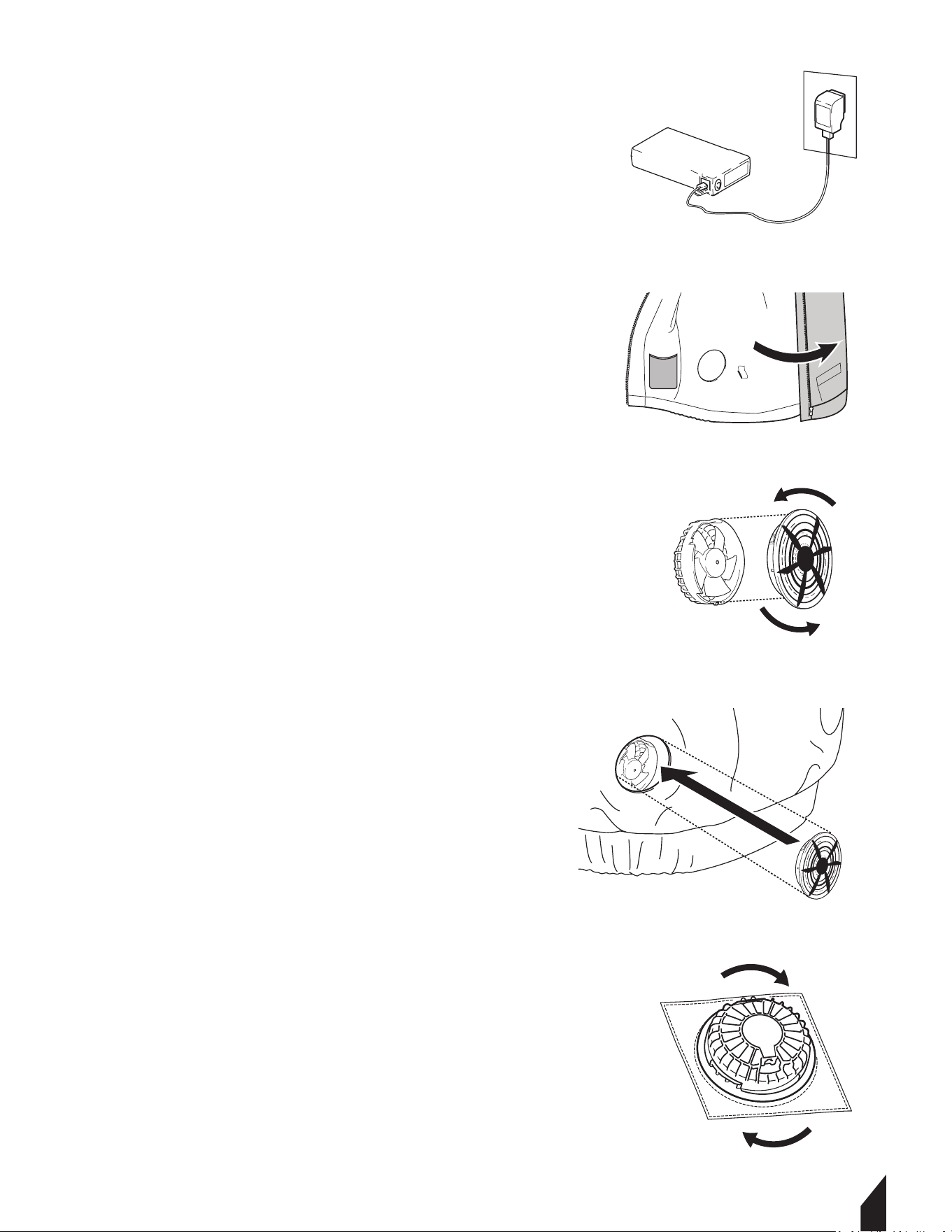
4.4 Charge battery to full power. FIGURE 1.
4.1 Battery Charging
4.1.2 Use only PSE-certified chargers.
4.1.3 Charge at room temperature. If the
battery is hot from use, allow it to cool
before plugging it into a charger.
4.1.4 Unplug the charger once the cycle
is complete; DO NOT leave the battery
connected to power indefinitely.
NOTE:The battery indicator will show you
the battery power level.
5. OPERATION
NOTE: Aer opening the box, carefully remove
the fans, batteries, and accesories.
5.1 Fan Installation
5.1.1 Turn nthe jacket inside out and locate
fan cutouts. FIGURE 2.
5.1.2 Hold the fan with both hands, placing
one hand on the top and the other on the
bottom of the unit.
5.1.3 Turn the top section of the fan
counterclockwise until it separates from the
base. FIGURE 3.
5.1.4 Insert the fan into the jacket’s fan cutout
with the fan cover facing outward. FIGURE 4.
5.1.5 From the inside of the jacket, attach the
bottom section of the fan and rotate it
clockwise until securely tightened. FIGURE 5.
5.1.6 Once both fans are installed, connect the
cables to each fan unit. FIGURE 6.
6.1.3 Keep the fan entrance clear of dust; if used in dusty areas, clean the grills regularly
to prevent motor damage.
6.2 Garment Washing Care
6.2.1 Remove the fan unit(s), battery, and battery holder from the jacket or vest before
washing.
6.2.2 Follow all care instructions provided on the garment label.
6.2.3 Cotton materials may shrink slightly aer washing.
6.2.4 Do not wash the jacket or vest with other garments, as this may cause color fading
or color transfer.
6.2.5 Use a laundry bag or laundry net when machine washing.
6.2.6 Do not use fabric soener.
6.2.7 Use only a mild, neutral detergent.
6.2.8 Remove the jacket or vest from the washing machine immediately aer the wash
cycle is complete.
6.2.9 Ensure all zippers are fully closed before washing.
6.3 Maintenance Record
TERN® vest are assembled with care and will provide years of service when properly
maintained. Preventative maintenance and routine service are essential to the long life of
your equipment. Adhere to reading through this manual thoroughly. You will find that you
can do some of the regular maintenance yourself. However, when in need of parts or major
service, be sure to contact a TERN® Technician. For your convenience we have provided this
space to record relevant data about your TERN® equipment.
WARNING
WARNING
WARNING
7. REPLACEMENT PARTS
7.1 For replacement parts and technical questions visit www.tern-wear.com
7.2 Not all equipment components are available for replacement. The illustrations
within this manual are a convenient reference to the location and position of parts in
the assembly sequence.
7.3 When ordering parts, the following will be required: equipment model number,
serial number/lot, date code, and description.
8. TROUBLESHOOTING

5.6 Turning Off
5.6.1 Aer removing the garment, long press the battery to cut off the power to preserve
battery health and prevent overheating.
5.7 Usage Environment Limits
5.7.1 To maintain the integrity of the electronics, observe these environmental
constraints.
5.7.1 DO NOT operate the system in environments exceeding 50°C (122°F).
5.7.2 Stop using the device immediately in the event of rain or high humidity. Do not
operate with wet hands.
5.7.3 Ensure your outer clothing or equipment (like a backpack or additional coat) does
not block the fan intakes. Restricted airflow can cause the motor to stall or burn out.
6. MAINTENANCE
6.1 Cleaning the Fans
6.1.1 Never submerge the fans in water.
6.1.2 Do not use a hair dryer to clean or dry the fan units; heat can deform the blades.
DANGER ALWAYS hold the
plug head when inserting or
removing cables. Never pull on the wire
itself, as this leads to internal damage.
5.2 Connecting the Battery
5.2.1 Plug the main lead cable into the
battery pack. FIGURE 7.
5.2.3 Ensure the connection is firm and
seated fully. FIGURE 7.
5.2.4 Secure cables in place with chords.
5.2.5 Then place the battery pack within
the inside pocket .FIGURE 8.
5.3 Powering & Adjusting the System
NOTE: DO NOT turn the power on until
you have fully put on the garment. This
prevents unnecessary battery drain and
ensures the air flows correctly around
the body.
5.4 Turning Power ON
5.4.1 To start , press the battery button
for 3 seconds.
5.4.2 Once active, verify that both fans
are spinning.
5.5 Adjusting Airflow
5.5.1 Aer turning on the system, cycle
through the speed settings to reach your
desired comfort level, by pressing the power
button.
NOTE: Select the appropriate speed based
on your environment for continuous use.
1.1 Fire Safety
If your machine catches fire, turn o the electric supply. Using a dry powder or C02 fire
extinguisher, put out the fire. If the fire cannot be put out, keep away and call the fire
department. If you are in any doubt about the safety condition of your machine, please
consult TERN®.
2. OPERATING SAFETY
Familiarity and proper training are required for the safe operation of equipment!
Equipment operated improperly or by untrained personnel can be dangerous! Read
the operating instructions contained in both this manual and the engine manual and
familiarize yourself with the location and proper use of all controls. Inexperienced
operators should receive instruction from someone familiar with the equipment before
being allowed to operate the machine.
2.1 General Notes
2.1.1 DO NOT allow children to operate this appliance or use it as a toy.
2.1.2 DO NOT use for any purpose other than those described in this User's Guide.
2.1.3 DO NOT insert metal objects into lithium batteries. It can cause heat, rupture, fire,
liquid leakage, etc.
2.1.4 DO NOT use chargers without PSE certification.
2.1.5 Turn off the power when the battery becomes unusually hot. It may cause a
breakdown or an accident.
2.1.6 DO NOT modify, and never disassemble or repair. It may impair the performance or
safety of the battery. It may cause fire, electric shock, or injury.
2.1.7 Keep battery terminals away from metal objects to avoid trampling or strong impact.
2.1.8 DO NOT put it into fire or heat it, otherwise it will cause heat, burst, fire and liquid
leakage.
2.1.9 DO NOT use, charge, store or place in places with strong direct sunlight, high
temperature, high humidity, wading, inside the car under the hot sun, near the open flame
and other places; Can cause discoloration, deformation, electric shock, failure, etc.
2.1.10 The battery performance and service life will deteriorate. The plastic parts became
deformed and became the cause of the failure.
WARNING DO NOT wear it in an environment where the temperature exceeds
50 °C, such as sauna. It can cause burns.
WARNING DO NOT During maintenance, be sure to unplug the power plug
from the socket, and do not unplug it again with wet hands. You may get an
electric shock or get hurt.
WARNING DO NOT Please stop charging or using in rain, high humidity,
humid places and places with flammable liquids or gases.
WARNING DO NOT dip in water, seawater, etc., and don't splash water. May
cause short circuit, electric shock, fire, rust or failure.
2.1.11 Odor, fever, discoloration, deformation or other abnormalities are found during
use, charging and storage. Stop using it immediately. It can cause injuries, fever, rupture
and fire. Turn off and remove immediately. High chance of fire and rupture.
2.1.12 Stop using the battery immediately when it leaks or smells bad, and stay away from
open flames.
2.1.13 DO NOT use it for children, animals, etc. Accidents and injuries are the causes.
2.1.14 Cut off the power when using. Will have a negative impact on the battery.
2.1.15 DO NOT turn on the power except when wearing it. It may cause battery power loss.
2.1.16 When unplugging and plugging the battery again, grab a part of the connector or
plug. Can lead to failure and damage.
2.1.17 Wipe it clean if the spilled liquid gets on your skin or clothes. May get dermatitis,
etc.
2.2 Battery Safety
2.2.1 As it may cause heat or fire, please follow local ordinances when disposing.
2.2.2 DO NOT use it when the battery life is extremely short.
2.2.3 NEVER store or charge battery in wet conditions.
2.2.4 NEVER make any adjustments to the tool if battery is connected.
2.2.5 NEVER interfere with the batteries integrity as this can cause injury and void
warranty.
2.2.6 NEVER use or dispose battery in fire as this can cause it to explode. Check local
codes for more information on proper battery disposal.
2.2.7 NEVER use equipment if it has been damaged or modified as this can cause injury.
2.2.8 When not in use, ensure battery is stored in a dry place away from any flammable
objects.
7
2.2.9 ALLOW battery to cool down aer each use to avoid burn injuries.
2.2.10 Only use the manufacturer’s designated battery with this machine.
Use of any other battery can damage unit and will void warranty.
2.2.11 Battery leakage may occur when operated in extreme temperature conditions.
WARNING If battery liquid contacts skin, wash immediately with water
and soap, following with white distilled vinegar or lemon juice to
neutralize. If the liquid comes in contact with eyes, flush out eyes with
water for 10 minutes and seek medical attention immediately.
2.2.12 Have all servicing done by an approved TERN® Technician or Service Center with
original replacement parts.
2.3 Fan Safety
2.3.1 NEVER put your finger in the fan. Keep away from children, and keep out of their
reach of their hands and fingers. There is risk of injury.
2.3.2 When the temperature of the fan motor becomes high, please stop using it. If the fan
is wet, the fan will fail.
2.3.3 DO NOT clean the fan with liquid, enter bodies of water, or remain in prolonged
rainy conditions.
2.3.4 DO NOT use a hair dryer to clean the fan. Fan blades may be deformed or damaged.
2.3.5 DO NOT exert too much force on the fan and wiring harness. It will lead to
disconnection and breakage.
2.3.6 DO NOT insert rods into the fan to stop the propeller. Be mindful of small projectiles
such as stones, this may cause the motor to stall and burn out and cause propeller
damage.
2.3.7 Be sure to hold the connector or plug part when plugging and unplugging
connectors and plugs.
2.3.8 DO NOT exert unreasonable force. It will lead to disconnection and breakage.
2.3.9 DO NOT use it in dusty places. It may be damaged aer inhaling dust.
3. EQUIPMENT PERFORMANCE
3.1 Fan Vest Design
Beat the heat without sacrificing protection. Our Fan-Cooled Jackets/vests delivers
all-day airflow and full-arm coverage—perfect for blazing jobsites, sun-soaked trails, or
weekend adventures. Whether you’re grinding on the jobsite, hiking under record heat, or
running errands in sweltering weather, this jacket keeps you cool, dry, and focused. Pair it
with any outfit for a sleek, technical look that works from workday to weekend.
4. BEFORE YOU BEGIN
4.1 Confirm the battery casing is intact with
no swelling, cracks, or leaks.
4.2 Inspect the cables and plugs for frayed
wires or damaged pins.
4.3 Ensure the fan blades are clear of debris
and that the lid are securely fastened.
4.4 Charge battery to full power. FIGURE 1.
4.1 Battery Charging
4.1.2 Use only PSE-certified chargers.
4.1.3 Charge at room temperature. If the
battery is hot from use, allow it to cool
before plugging it into a charger.
4.1.4 Unplug the charger once the cycle
is complete; DO NOT leave the battery
connected to power indefinitely.
NOTE:The battery indicator will show you
the battery power level.
5. OPERATION
NOTE: Aer opening the box, carefully remove
the fans, batteries, and accesories.
5.1 Fan Installation
5.1.1 Turn nthe jacket inside out and locate
fan cutouts. FIGURE 2.
5.1.2 Hold the fan with both hands, placing
one hand on the top and the other on the
bottom of the unit.
5.1.3 Turn the top section of the fan
counterclockwise until it separates from the
base. FIGURE 3.
5.1.4 Insert the fan into the jacket’s fan cutout
with the fan cover facing outward. FIGURE 4.
5.1.5 From the inside of the jacket, attach the
bottom section of the fan and rotate it
clockwise until securely tightened. FIGURE 5.
5.1.6 Once both fans are installed, connect the
cables to each fan unit. FIGURE 6.
6.1.3 Keep the fan entrance clear of dust; if used in dusty areas, clean the grills regularly
to prevent motor damage.
6.2 Garment Washing Care
6.2.1 Remove the fan unit(s), battery, and battery holder from the jacket or vest before
washing.
6.2.2 Follow all care instructions provided on the garment label.
6.2.3 Cotton materials may shrink slightly aer washing.
6.2.4 Do not wash the jacket or vest with other garments, as this may cause color fading
or color transfer.
6.2.5 Use a laundry bag or laundry net when machine washing.
6.2.6 Do not use fabric soener.
6.2.7 Use only a mild, neutral detergent.
6.2.8 Remove the jacket or vest from the washing machine immediately aer the wash
cycle is complete.
6.2.9 Ensure all zippers are fully closed before washing.
6.3 Maintenance Record
TERN® vest are assembled with care and will provide years of service when properly
maintained. Preventative maintenance and routine service are essential to the long life of
your equipment. Adhere to reading through this manual thoroughly. You will find that you
can do some of the regular maintenance yourself. However, when in need of parts or major
service, be sure to contact a TERN® Technician. For your convenience we have provided this
space to record relevant data about your TERN® equipment.
WARNING
7. REPLACEMENT PARTS
7.1 For replacement parts and technical questions visit www.tern-wear.com
7.2 Not all equipment components are available for replacement. The illustrations
within this manual are a convenient reference to the location and position of parts in
the assembly sequence.
7.3 When ordering parts, the following will be required: equipment model number,
serial number/lot, date code, and description.
8. TROUBLESHOOTING
5.6 Turning Off
5.6.1 Aer removing the garment, long press the battery to cut off the power to preserve
battery health and prevent overheating.
5.7 Usage Environment Limits
5.7.1 To maintain the integrity of the electronics, observe these environmental
constraints.
5.7.1 DO NOT operate the system in environments exceeding 50°C (122°F).
5.7.2 Stop using the device immediately in the event of rain or high humidity. Do not
operate with wet hands.
5.7.3 Ensure your outer clothing or equipment (like a backpack or additional coat) does
not block the fan intakes. Restricted airflow can cause the motor to stall or burn out.
6. MAINTENANCE
6.1 Cleaning the Fans
6.1.1 Never submerge the fans in water.
6.1.2 Do not use a hair dryer to clean or dry the fan units; heat can deform the blades.
DANGER ALWAYS hold the
plug head when inserting or
removing cables. Never pull on the wire
itself, as this leads to internal damage.
5.2 Connecting the Battery
5.2.1 Plug the main lead cable into the
battery pack. FIGURE 7.
5.2.3 Ensure the connection is firm and
seated fully. FIGURE 7.
5.2.4 Secure cables in place with chords.
5.2.5 Then place the battery pack within
the inside pocket .FIGURE 8.
5.3 Powering & Adjusting the System
NOTE: DO NOT turn the power on until
you have fully put on the garment. This
prevents unnecessary battery drain and
ensures the air flows correctly around
the body.
5.4 Turning Power ON
5.4.1 To start , press the battery button
for 3 seconds.
5.4.2 Once active, verify that both fans
are spinning.
5.5 Adjusting Airflow
5.5.1 Aer turning on the system, cycle
through the speed settings to reach your
desired comfort level, by pressing the power
button.
NOTE: Select the appropriate speed based
on your environment for continuous use.
1.1 Fire Safety
If your machine catches fire, turn o the electric supply. Using a dry powder or C02 fire
extinguisher, put out the fire. If the fire cannot be put out, keep away and call the fire
department. If you are in any doubt about the safety condition of your machine, please
consult TERN®.
2. OPERATING SAFETY
Familiarity and proper training are required for the safe operation of equipment!
Equipment operated improperly or by untrained personnel can be dangerous! Read
the operating instructions contained in both this manual and the engine manual and
familiarize yourself with the location and proper use of all controls. Inexperienced
operators should receive instruction from someone familiar with the equipment before
being allowed to operate the machine.
2.1 General Notes
2.1.1 DO NOT allow children to operate this appliance or use it as a toy.
2.1.2 DO NOT use for any purpose other than those described in this User's Guide.
2.1.3 DO NOT insert metal objects into lithium batteries. It can cause heat, rupture, fire,
liquid leakage, etc.
2.1.4 DO NOT use chargers without PSE certification.
2.1.5 Turn off the power when the battery becomes unusually hot. It may cause a
breakdown or an accident.
2.1.6 DO NOT modify, and never disassemble or repair. It may impair the performance or
safety of the battery. It may cause fire, electric shock, or injury.
2.1.7 Keep battery terminals away from metal objects to avoid trampling or strong impact.
2.1.8 DO NOT put it into fire or heat it, otherwise it will cause heat, burst, fire and liquid
leakage.
2.1.9 DO NOT use, charge, store or place in places with strong direct sunlight, high
temperature, high humidity, wading, inside the car under the hot sun, near the open flame
and other places; Can cause discoloration, deformation, electric shock, failure, etc.
2.1.10 The battery performance and service life will deteriorate. The plastic parts became
deformed and became the cause of the failure.
WARNING DO NOT wear it in an environment where the temperature exceeds
50 °C, such as sauna. It can cause burns.
WARNING DO NOT During maintenance, be sure to unplug the power plug
from the socket, and do not unplug it again with wet hands. You may get an
electric shock or get hurt.
WARNING DO NOT Please stop charging or using in rain, high humidity,
humid places and places with flammable liquids or gases.
WARNING DO NOT dip in water, seawater, etc., and don't splash water. May
cause short circuit, electric shock, fire, rust or failure.
2.1.11 Odor, fever, discoloration, deformation or other abnormalities are found during
use, charging and storage. Stop using it immediately. It can cause injuries, fever, rupture
and fire. Turn off and remove immediately. High chance of fire and rupture.
2.1.12 Stop using the battery immediately when it leaks or smells bad, and stay away from
open flames.
2.1.13 DO NOT use it for children, animals, etc. Accidents and injuries are the causes.
2.1.14 Cut off the power when using. Will have a negative impact on the battery.
2.1.15 DO NOT turn on the power except when wearing it. It may cause battery power loss.
2.1.16 When unplugging and plugging the battery again, grab a part of the connector or
plug. Can lead to failure and damage.
2.1.17 Wipe it clean if the spilled liquid gets on your skin or clothes. May get dermatitis,
etc.
2.2 Battery Safety
2.2.1 As it may cause heat or fire, please follow local ordinances when disposing.
2.2.2 DO NOT use it when the battery life is extremely short.
2.2.3 NEVER store or charge battery in wet conditions.
2.2.4 NEVER make any adjustments to the tool if battery is connected.
2.2.5 NEVER interfere with the batteries integrity as this can cause injury and void
warranty.
2.2.6 NEVER use or dispose battery in fire as this can cause it to explode. Check local
codes for more information on proper battery disposal.
2.2.7 NEVER use equipment if it has been damaged or modified as this can cause injury.
2.2.8 When not in use, ensure battery is stored in a dry place away from any flammable
objects.
8
2.2.9 ALLOW battery to cool down aer each use to avoid burn injuries.
2.2.10 Only use the manufacturer’s designated battery with this machine.
Use of any other battery can damage unit and will void warranty.
2.2.11 Battery leakage may occur when operated in extreme temperature conditions.
WARNING If battery liquid contacts skin, wash immediately with water
and soap, following with white distilled vinegar or lemon juice to
neutralize. If the liquid comes in contact with eyes, flush out eyes with
water for 10 minutes and seek medical attention immediately.
2.2.12 Have all servicing done by an approved TERN® Technician or Service Center with
original replacement parts.
2.3 Fan Safety
2.3.1 NEVER put your finger in the fan. Keep away from children, and keep out of their
reach of their hands and fingers. There is risk of injury.
2.3.2 When the temperature of the fan motor becomes high, please stop using it. If the fan
is wet, the fan will fail.
2.3.3 DO NOT clean the fan with liquid, enter bodies of water, or remain in prolonged
rainy conditions.
2.3.4 DO NOT use a hair dryer to clean the fan. Fan blades may be deformed or damaged.
2.3.5 DO NOT exert too much force on the fan and wiring harness. It will lead to
disconnection and breakage.
2.3.6 DO NOT insert rods into the fan to stop the propeller. Be mindful of small projectiles
such as stones, this may cause the motor to stall and burn out and cause propeller
damage.
2.3.7 Be sure to hold the connector or plug part when plugging and unplugging
connectors and plugs.
2.3.8 DO NOT exert unreasonable force. It will lead to disconnection and breakage.
2.3.9 DO NOT use it in dusty places. It may be damaged aer inhaling dust.
3. EQUIPMENT PERFORMANCE
3.1 Fan Vest Design
Beat the heat without sacrificing protection. Our Fan-Cooled Jackets/vests delivers
all-day airflow and full-arm coverage—perfect for blazing jobsites, sun-soaked trails, or
weekend adventures. Whether you’re grinding on the jobsite, hiking under record heat, or
running errands in sweltering weather, this jacket keeps you cool, dry, and focused. Pair it
with any outfit for a sleek, technical look that works from workday to weekend.
4. BEFORE YOU BEGIN
4.1 Confirm the battery casing is intact with
no swelling, cracks, or leaks.
4.2 Inspect the cables and plugs for frayed
wires or damaged pins.
4.3 Ensure the fan blades are clear of debris
and that the lid are securely fastened.
4.4 Charge battery to full power. FIGURE 1.
4.1 Battery Charging
4.1.2 Use only PSE-certified chargers.
4.1.3 Charge at room temperature. If the
battery is hot from use, allow it to cool
before plugging it into a charger.
4.1.4 Unplug the charger once the cycle
is complete; DO NOT leave the battery
connected to power indefinitely.
NOTE:The battery indicator will show you
the battery power level.
5. OPERATION
NOTE: Aer opening the box, carefully remove
the fans, batteries, and accesories.
5.1 Fan Installation
5.1.1 Turn nthe jacket inside out and locate
fan cutouts. FIGURE 2.
5.1.2 Hold the fan with both hands, placing
one hand on the top and the other on the
bottom of the unit.
5.1.3 Turn the top section of the fan
counterclockwise until it separates from the
base. FIGURE 3.
5.1.4 Insert the fan into the jacket’s fan cutout
with the fan cover facing outward. FIGURE 4.
5.1.5 From the inside of the jacket, attach the
bottom section of the fan and rotate it
clockwise until securely tightened. FIGURE 5.
5.1.6 Once both fans are installed, connect the
cables to each fan unit. FIGURE 6.
6.1.3 Keep the fan entrance clear of dust; if used in dusty areas, clean the grills regularly
to prevent motor damage.
6.2 Garment Washing Care
6.2.1 Remove the fan unit(s), battery, and battery holder from the jacket or vest before
washing.
6.2.2 Follow all care instructions provided on the garment label.
6.2.3 Cotton materials may shrink slightly aer washing.
6.2.4 Do not wash the jacket or vest with other garments, as this may cause color fading
or color transfer.
6.2.5 Use a laundry bag or laundry net when machine washing.
6.2.6 Do not use fabric soener.
6.2.7 Use only a mild, neutral detergent.
6.2.8 Remove the jacket or vest from the washing machine immediately aer the wash
cycle is complete.
6.2.9 Ensure all zippers are fully closed before washing.
6.3 Maintenance Record
TERN® vest are assembled with care and will provide years of service when properly
maintained. Preventative maintenance and routine service are essential to the long life of
your equipment. Adhere to reading through this manual thoroughly. You will find that you
can do some of the regular maintenance yourself. However, when in need of parts or major
service, be sure to contact a TERN® Technician. For your convenience we have provided this
space to record relevant data about your TERN® equipment.
FAN VEST
Power
Operaon Voltage 17-30 VDC
Start Voltage
17VDC
30 VDC
0.35A + 10%
Input Waage
Amperage
Speed
Air Pressure
Noise Level
Air Flow
10.5W + 10%
8000RPM + 10%
78.0+10% CFM (36.79L/)
23.3 + 10% mmH2O
<60 dB(A)
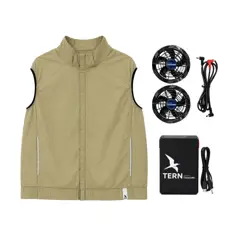
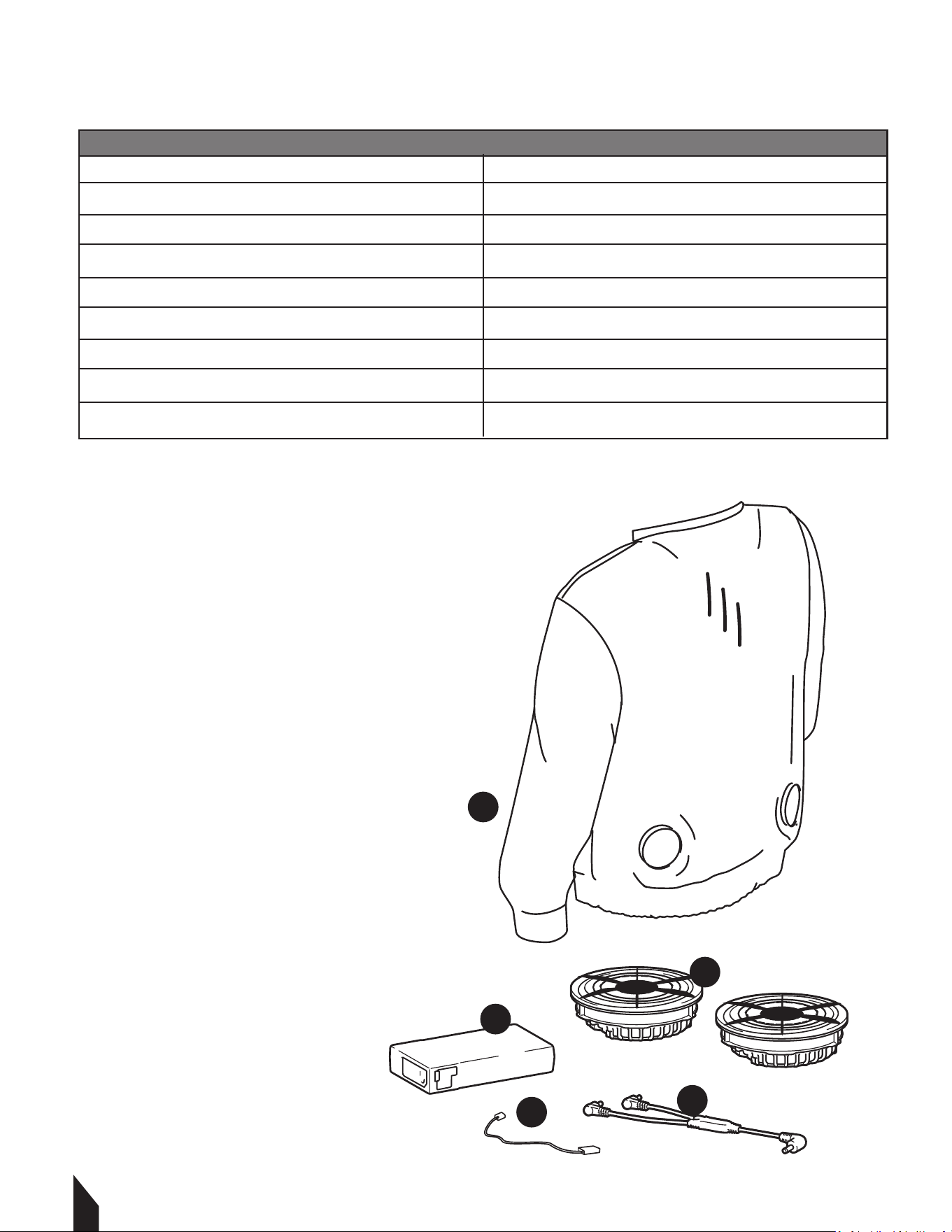
1. Outerwear
2. Connector Cable
3. Fans (X2)
4. Battery Box
5. Charging Cable
3.2 Specifications
3.3 Fan Vest Parts
1
4
4
5
3
2
7. REPLACEMENT PARTS
7.1 For replacement parts and technical questions visit www.tern-wear.com
7.2 Not all equipment components are available for replacement. The illustrations
within this manual are a convenient reference to the location and position of parts in
the assembly sequence.
7.3 When ordering parts, the following will be required: equipment model number,
serial number/lot, date code, and description.
8. TROUBLESHOOTING
5.6 Turning Off
5.6.1 Aer removing the garment, long press the battery to cut off the power to preserve
battery health and prevent overheating.
5.7 Usage Environment Limits
5.7.1 To maintain the integrity of the electronics, observe these environmental
constraints.
5.7.1 DO NOT operate the system in environments exceeding 50°C (122°F).
5.7.2 Stop using the device immediately in the event of rain or high humidity. Do not
operate with wet hands.
5.7.3 Ensure your outer clothing or equipment (like a backpack or additional coat) does
not block the fan intakes. Restricted airflow can cause the motor to stall or burn out.
6. MAINTENANCE
6.1 Cleaning the Fans
6.1.1 Never submerge the fans in water.
6.1.2 Do not use a hair dryer to clean or dry the fan units; heat can deform the blades.
DANGER ALWAYS hold the
plug head when inserting or
removing cables. Never pull on the wire
itself, as this leads to internal damage.
5.2 Connecting the Battery
5.2.1 Plug the main lead cable into the
battery pack. FIGURE 7.
5.2.3 Ensure the connection is firm and
seated fully. FIGURE 7.
5.2.4 Secure cables in place with chords.
5.2.5 Then place the battery pack within
the inside pocket .FIGURE 8.
5.3 Powering & Adjusting the System
NOTE: DO NOT turn the power on until
you have fully put on the garment. This
prevents unnecessary battery drain and
ensures the air flows correctly around
the body.
5.4 Turning Power ON
5.4.1 To start , press the battery button
for 3 seconds.
5.4.2 Once active, verify that both fans
are spinning.
5.5 Adjusting Airflow
5.5.1 Aer turning on the system, cycle
through the speed settings to reach your
desired comfort level, by pressing the power
button.
NOTE: Select the appropriate speed based
on your environment for continuous use.
1.1 Fire Safety
If your machine catches fire, turn o the electric supply. Using a dry powder or C02 fire
extinguisher, put out the fire. If the fire cannot be put out, keep away and call the fire
department. If you are in any doubt about the safety condition of your machine, please
consult TERN®.
2. OPERATING SAFETY
Familiarity and proper training are required for the safe operation of equipment!
Equipment operated improperly or by untrained personnel can be dangerous! Read
the operating instructions contained in both this manual and the engine manual and
familiarize yourself with the location and proper use of all controls. Inexperienced
operators should receive instruction from someone familiar with the equipment before
being allowed to operate the machine.
2.1 General Notes
2.1.1 DO NOT allow children to operate this appliance or use it as a toy.
2.1.2 DO NOT use for any purpose other than those described in this User's Guide.
2.1.3 DO NOT insert metal objects into lithium batteries. It can cause heat, rupture, fire,
liquid leakage, etc.
2.1.4 DO NOT use chargers without PSE certification.
2.1.5 Turn off the power when the battery becomes unusually hot. It may cause a
breakdown or an accident.
2.1.6 DO NOT modify, and never disassemble or repair. It may impair the performance or
safety of the battery. It may cause fire, electric shock, or injury.
2.1.7 Keep battery terminals away from metal objects to avoid trampling or strong impact.
2.1.8 DO NOT put it into fire or heat it, otherwise it will cause heat, burst, fire and liquid
leakage.
2.1.9 DO NOT use, charge, store or place in places with strong direct sunlight, high
temperature, high humidity, wading, inside the car under the hot sun, near the open flame
and other places; Can cause discoloration, deformation, electric shock, failure, etc.
2.1.10 The battery performance and service life will deteriorate. The plastic parts became
deformed and became the cause of the failure.
WARNING DO NOT wear it in an environment where the temperature exceeds
50 °C, such as sauna. It can cause burns.
WARNING DO NOT During maintenance, be sure to unplug the power plug
from the socket, and do not unplug it again with wet hands. You may get an
electric shock or get hurt.
WARNING DO NOT Please stop charging or using in rain, high humidity,
humid places and places with flammable liquids or gases.
WARNING DO NOT dip in water, seawater, etc., and don't splash water. May
cause short circuit, electric shock, fire, rust or failure.
2.1.11 Odor, fever, discoloration, deformation or other abnormalities are found during
use, charging and storage. Stop using it immediately. It can cause injuries, fever, rupture
and fire. Turn off and remove immediately. High chance of fire and rupture.
2.1.12 Stop using the battery immediately when it leaks or smells bad, and stay away from
open flames.
2.1.13 DO NOT use it for children, animals, etc. Accidents and injuries are the causes.
2.1.14 Cut off the power when using. Will have a negative impact on the battery.
2.1.15 DO NOT turn on the power except when wearing it. It may cause battery power loss.
2.1.16 When unplugging and plugging the battery again, grab a part of the connector or
plug. Can lead to failure and damage.
2.1.17 Wipe it clean if the spilled liquid gets on your skin or clothes. May get dermatitis,
etc.
2.2 Battery Safety
2.2.1 As it may cause heat or fire, please follow local ordinances when disposing.
2.2.2 DO NOT use it when the battery life is extremely short.
2.2.3 NEVER store or charge battery in wet conditions.
2.2.4 NEVER make any adjustments to the tool if battery is connected.
2.2.5 NEVER interfere with the batteries integrity as this can cause injury and void
warranty.
2.2.6 NEVER use or dispose battery in fire as this can cause it to explode. Check local
codes for more information on proper battery disposal.
2.2.7 NEVER use equipment if it has been damaged or modified as this can cause injury.
2.2.8 When not in use, ensure battery is stored in a dry place away from any flammable
objects.
9
2.2.9 ALLOW battery to cool down aer each use to avoid burn injuries.
2.2.10 Only use the manufacturer’s designated battery with this machine.
Use of any other battery can damage unit and will void warranty.
2.2.11 Battery leakage may occur when operated in extreme temperature conditions.
WARNING If battery liquid contacts skin, wash immediately with water
and soap, following with white distilled vinegar or lemon juice to
neutralize. If the liquid comes in contact with eyes, flush out eyes with
water for 10 minutes and seek medical attention immediately.
2.2.12 Have all servicing done by an approved TERN® Technician or Service Center with
original replacement parts.
2.3 Fan Safety
2.3.1 NEVER put your finger in the fan. Keep away from children, and keep out of their
reach of their hands and fingers. There is risk of injury.
2.3.2 When the temperature of the fan motor becomes high, please stop using it. If the fan
is wet, the fan will fail.
2.3.3 DO NOT clean the fan with liquid, enter bodies of water, or remain in prolonged
rainy conditions.
2.3.4 DO NOT use a hair dryer to clean the fan. Fan blades may be deformed or damaged.
2.3.5 DO NOT exert too much force on the fan and wiring harness. It will lead to
disconnection and breakage.
2.3.6 DO NOT insert rods into the fan to stop the propeller. Be mindful of small projectiles
such as stones, this may cause the motor to stall and burn out and cause propeller
damage.
2.3.7 Be sure to hold the connector or plug part when plugging and unplugging
connectors and plugs.
2.3.8 DO NOT exert unreasonable force. It will lead to disconnection and breakage.
2.3.9 DO NOT use it in dusty places. It may be damaged aer inhaling dust.
3. EQUIPMENT PERFORMANCE
3.1 Fan Vest Design
Beat the heat without sacrificing protection. Our Fan-Cooled Jackets/vests delivers
all-day airflow and full-arm coverage—perfect for blazing jobsites, sun-soaked trails, or
weekend adventures. Whether you’re grinding on the jobsite, hiking under record heat, or
running errands in sweltering weather, this jacket keeps you cool, dry, and focused. Pair it
with any outfit for a sleek, technical look that works from workday to weekend.
4. BEFORE YOU BEGIN
4.1 Confirm the battery casing is intact with
no swelling, cracks, or leaks.
4.2 Inspect the cables and plugs for frayed
wires or damaged pins.
4.3 Ensure the fan blades are clear of debris
and that the lid are securely fastened.
4.4 Charge battery to full power. FIGURE 1.
4.1 Battery Charging
4.1.2 Use only PSE-certified chargers.
4.1.3 Charge at room temperature. If the
battery is hot from use, allow it to cool
before plugging it into a charger.
4.1.4 Unplug the charger once the cycle
is complete; DO NOT leave the battery
connected to power indefinitely.
NOTE:The battery indicator will show you
the battery power level.
5. OPERATION
NOTE: Aer opening the box, carefully remove
the fans, batteries, and accesories.
5.1 Fan Installation
5.1.1 Turn nthe jacket inside out and locate
fan cutouts. FIGURE 2.
5.1.2 Hold the fan with both hands, placing
one hand on the top and the other on the
bottom of the unit.
5.1.3 Turn the top section of the fan
counterclockwise until it separates from the
base. FIGURE 3.
5.1.4 Insert the fan into the jacket’s fan cutout
with the fan cover facing outward. FIGURE 4.
5.1.5 From the inside of the jacket, attach the
bottom section of the fan and rotate it
clockwise until securely tightened. FIGURE 5.
5.1.6 Once both fans are installed, connect the
cables to each fan unit. FIGURE 6.
6.1.3 Keep the fan entrance clear of dust; if used in dusty areas, clean the grills regularly
to prevent motor damage.
6.2 Garment Washing Care
6.2.1 Remove the fan unit(s), battery, and battery holder from the jacket or vest before
washing.
6.2.2 Follow all care instructions provided on the garment label.
6.2.3 Cotton materials may shrink slightly aer washing.
6.2.4 Do not wash the jacket or vest with other garments, as this may cause color fading
or color transfer.
6.2.5 Use a laundry bag or laundry net when machine washing.
6.2.6 Do not use fabric soener.
6.2.7 Use only a mild, neutral detergent.
6.2.8 Remove the jacket or vest from the washing machine immediately aer the wash
cycle is complete.
6.2.9 Ensure all zippers are fully closed before washing.
6.3 Maintenance Record
TERN® vest are assembled with care and will provide years of service when properly
maintained. Preventative maintenance and routine service are essential to the long life of
your equipment. Adhere to reading through this manual thoroughly. You will find that you
can do some of the regular maintenance yourself. However, when in need of parts or major
service, be sure to contact a TERN® Technician. For your convenience we have provided this
space to record relevant data about your TERN® equipment.
FIGURE 1
FIGURE 2
FIGURE 3
FIGURE 4
FIGURE 5
7. REPLACEMENT PARTS
7.1 For replacement parts and technical questions visit www.tern-wear.com
7.2 Not all equipment components are available for replacement. The illustrations
within this manual are a convenient reference to the location and position of parts in
the assembly sequence.
7.3 When ordering parts, the following will be required: equipment model number,
serial number/lot, date code, and description.
8. TROUBLESHOOTING
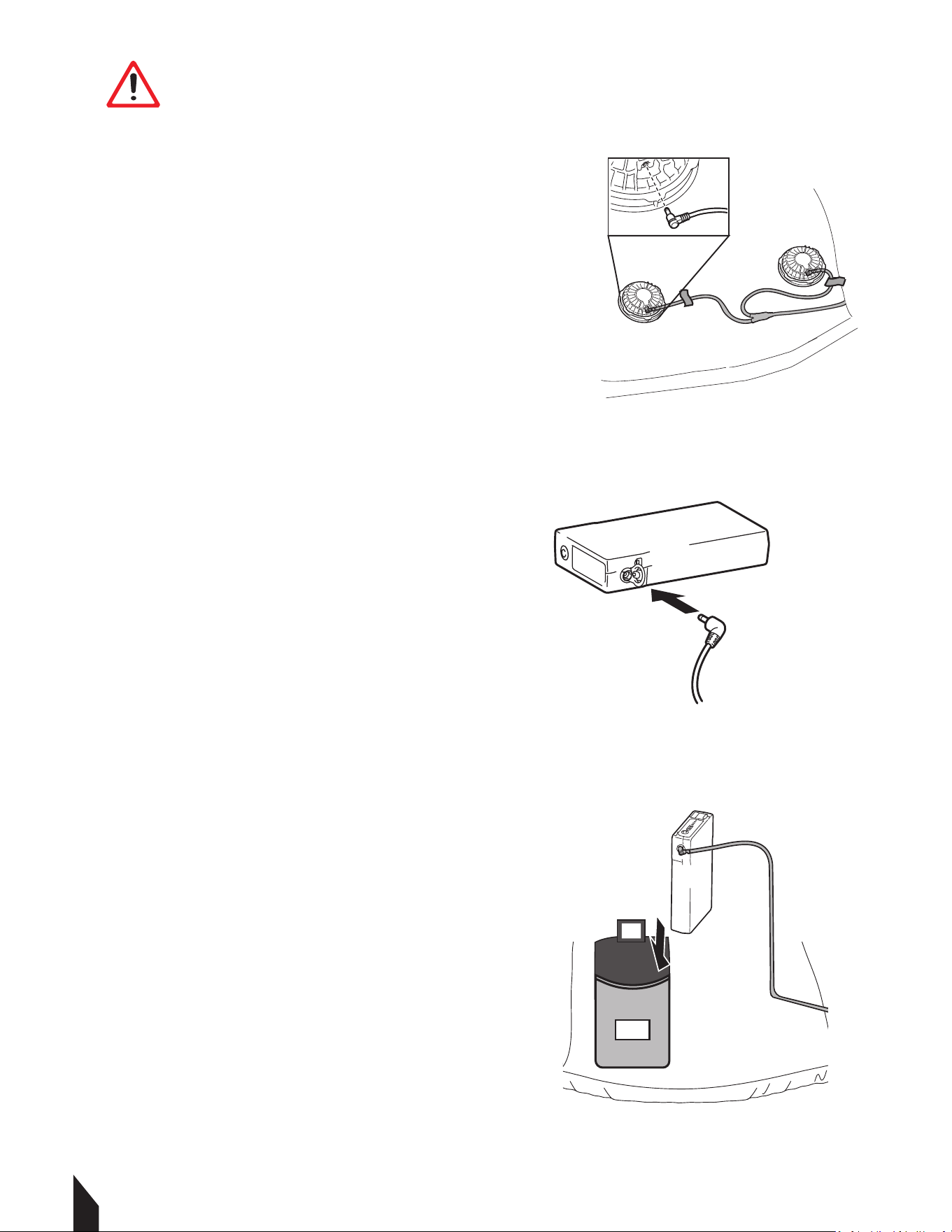
5.6 Turning Off
5.6.1 Aer removing the garment, long press the battery to cut off the power to preserve
battery health and prevent overheating.
5.7 Usage Environment Limits
5.7.1 To maintain the integrity of the electronics, observe these environmental
constraints.
5.7.1 DO NOT operate the system in environments exceeding 50°C (122°F).
5.7.2 Stop using the device immediately in the event of rain or high humidity. Do not
operate with wet hands.
5.7.3 Ensure your outer clothing or equipment (like a backpack or additional coat) does
not block the fan intakes. Restricted airflow can cause the motor to stall or burn out.
6. MAINTENANCE
6.1 Cleaning the Fans
6.1.1 Never submerge the fans in water.
6.1.2 Do not use a hair dryer to clean or dry the fan units; heat can deform the blades.
DANGER ALWAYS hold the
plug head when inserting or
removing cables. Never pull on the wire
itself, as this leads to internal damage.
5.2 Connecting the Battery
5.2.1 Plug the main lead cable into the
battery pack. FIGURE 7.
5.2.3 Ensure the connection is firm and
seated fully. FIGURE 7.
5.2.4 Secure cables in place with chords.
5.2.5 Then place the battery pack within
the inside pocket .FIGURE 8.
5.3 Powering & Adjusting the System
NOTE: DO NOT turn the power on until
you have fully put on the garment. This
prevents unnecessary battery drain and
ensures the air flows correctly around
the body.
5.4 Turning Power ON
5.4.1 To start , press the battery button
for 3 seconds.
5.4.2 Once active, verify that both fans
are spinning.
5.5 Adjusting Airflow
5.5.1 Aer turning on the system, cycle
through the speed settings to reach your
desired comfort level, by pressing the power
button.
NOTE: Select the appropriate speed based
on your environment for continuous use.
1.1 Fire Safety
If your machine catches fire, turn o the electric supply. Using a dry powder or C02 fire
extinguisher, put out the fire. If the fire cannot be put out, keep away and call the fire
department. If you are in any doubt about the safety condition of your machine, please
consult TERN®.
2. OPERATING SAFETY
Familiarity and proper training are required for the safe operation of equipment!
Equipment operated improperly or by untrained personnel can be dangerous! Read
the operating instructions contained in both this manual and the engine manual and
familiarize yourself with the location and proper use of all controls. Inexperienced
operators should receive instruction from someone familiar with the equipment before
being allowed to operate the machine.
2.1 General Notes
2.1.1 DO NOT allow children to operate this appliance or use it as a toy.
2.1.2 DO NOT use for any purpose other than those described in this User's Guide.
2.1.3 DO NOT insert metal objects into lithium batteries. It can cause heat, rupture, fire,
liquid leakage, etc.
2.1.4 DO NOT use chargers without PSE certification.
2.1.5 Turn off the power when the battery becomes unusually hot. It may cause a
breakdown or an accident.
2.1.6 DO NOT modify, and never disassemble or repair. It may impair the performance or
safety of the battery. It may cause fire, electric shock, or injury.
2.1.7 Keep battery terminals away from metal objects to avoid trampling or strong impact.
2.1.8 DO NOT put it into fire or heat it, otherwise it will cause heat, burst, fire and liquid
leakage.
2.1.9 DO NOT use, charge, store or place in places with strong direct sunlight, high
temperature, high humidity, wading, inside the car under the hot sun, near the open flame
and other places; Can cause discoloration, deformation, electric shock, failure, etc.
2.1.10 The battery performance and service life will deteriorate. The plastic parts became
deformed and became the cause of the failure.
WARNING DO NOT wear it in an environment where the temperature exceeds
50 °C, such as sauna. It can cause burns.
WARNING DO NOT During maintenance, be sure to unplug the power plug
from the socket, and do not unplug it again with wet hands. You may get an
electric shock or get hurt.
WARNING DO NOT Please stop charging or using in rain, high humidity,
humid places and places with flammable liquids or gases.
WARNING DO NOT dip in water, seawater, etc., and don't splash water. May
cause short circuit, electric shock, fire, rust or failure.
2.1.11 Odor, fever, discoloration, deformation or other abnormalities are found during
use, charging and storage. Stop using it immediately. It can cause injuries, fever, rupture
and fire. Turn off and remove immediately. High chance of fire and rupture.
2.1.12 Stop using the battery immediately when it leaks or smells bad, and stay away from
open flames.
2.1.13 DO NOT use it for children, animals, etc. Accidents and injuries are the causes.
2.1.14 Cut off the power when using. Will have a negative impact on the battery.
2.1.15 DO NOT turn on the power except when wearing it. It may cause battery power loss.
2.1.16 When unplugging and plugging the battery again, grab a part of the connector or
plug. Can lead to failure and damage.
2.1.17 Wipe it clean if the spilled liquid gets on your skin or clothes. May get dermatitis,
etc.
2.2 Battery Safety
2.2.1 As it may cause heat or fire, please follow local ordinances when disposing.
2.2.2 DO NOT use it when the battery life is extremely short.
2.2.3 NEVER store or charge battery in wet conditions.
2.2.4 NEVER make any adjustments to the tool if battery is connected.
2.2.5 NEVER interfere with the batteries integrity as this can cause injury and void
warranty.
2.2.6 NEVER use or dispose battery in fire as this can cause it to explode. Check local
codes for more information on proper battery disposal.
2.2.7 NEVER use equipment if it has been damaged or modified as this can cause injury.
2.2.8 When not in use, ensure battery is stored in a dry place away from any flammable
objects.
10
2.2.9 ALLOW battery to cool down aer each use to avoid burn injuries.
2.2.10 Only use the manufacturer’s designated battery with this machine.
Use of any other battery can damage unit and will void warranty.
2.2.11 Battery leakage may occur when operated in extreme temperature conditions.
WARNING If battery liquid contacts skin, wash immediately with water
and soap, following with white distilled vinegar or lemon juice to
neutralize. If the liquid comes in contact with eyes, flush out eyes with
water for 10 minutes and seek medical attention immediately.
2.2.12 Have all servicing done by an approved TERN® Technician or Service Center with
original replacement parts.
2.3 Fan Safety
2.3.1 NEVER put your finger in the fan. Keep away from children, and keep out of their
reach of their hands and fingers. There is risk of injury.
2.3.2 When the temperature of the fan motor becomes high, please stop using it. If the fan
is wet, the fan will fail.
2.3.3 DO NOT clean the fan with liquid, enter bodies of water, or remain in prolonged
rainy conditions.
2.3.4 DO NOT use a hair dryer to clean the fan. Fan blades may be deformed or damaged.
2.3.5 DO NOT exert too much force on the fan and wiring harness. It will lead to
disconnection and breakage.
2.3.6 DO NOT insert rods into the fan to stop the propeller. Be mindful of small projectiles
such as stones, this may cause the motor to stall and burn out and cause propeller
damage.
2.3.7 Be sure to hold the connector or plug part when plugging and unplugging
connectors and plugs.
2.3.8 DO NOT exert unreasonable force. It will lead to disconnection and breakage.
2.3.9 DO NOT use it in dusty places. It may be damaged aer inhaling dust.
3. EQUIPMENT PERFORMANCE
3.1 Fan Vest Design
Beat the heat without sacrificing protection. Our Fan-Cooled Jackets/vests delivers
all-day airflow and full-arm coverage—perfect for blazing jobsites, sun-soaked trails, or
weekend adventures. Whether you’re grinding on the jobsite, hiking under record heat, or
running errands in sweltering weather, this jacket keeps you cool, dry, and focused. Pair it
with any outfit for a sleek, technical look that works from workday to weekend.
4. BEFORE YOU BEGIN
4.1 Confirm the battery casing is intact with
no swelling, cracks, or leaks.
4.2 Inspect the cables and plugs for frayed
wires or damaged pins.
4.3 Ensure the fan blades are clear of debris
and that the lid are securely fastened.
4.4 Charge battery to full power. FIGURE 1.
4.1 Battery Charging
4.1.2 Use only PSE-certified chargers.
4.1.3 Charge at room temperature. If the
battery is hot from use, allow it to cool
before plugging it into a charger.
4.1.4 Unplug the charger once the cycle
is complete; DO NOT leave the battery
connected to power indefinitely.
NOTE:The battery indicator will show you
the battery power level.
5. OPERATION
NOTE: Aer opening the box, carefully remove
the fans, batteries, and accesories.
5.1 Fan Installation
5.1.1 Turn nthe jacket inside out and locate
fan cutouts. FIGURE 2.
5.1.2 Hold the fan with both hands, placing
one hand on the top and the other on the
bottom of the unit.
5.1.3 Turn the top section of the fan
counterclockwise until it separates from the
base. FIGURE 3.
5.1.4 Insert the fan into the jacket’s fan cutout
with the fan cover facing outward. FIGURE 4.
5.1.5 From the inside of the jacket, attach the
bottom section of the fan and rotate it
clockwise until securely tightened. FIGURE 5.
5.1.6 Once both fans are installed, connect the
cables to each fan unit. FIGURE 6.
6.1.3 Keep the fan entrance clear of dust; if used in dusty areas, clean the grills regularly
to prevent motor damage.
6.2 Garment Washing Care
6.2.1 Remove the fan unit(s), battery, and battery holder from the jacket or vest before
washing.
6.2.2 Follow all care instructions provided on the garment label.
6.2.3 Cotton materials may shrink slightly aer washing.
6.2.4 Do not wash the jacket or vest with other garments, as this may cause color fading
or color transfer.
6.2.5 Use a laundry bag or laundry net when machine washing.
6.2.6 Do not use fabric soener.
6.2.7 Use only a mild, neutral detergent.
6.2.8 Remove the jacket or vest from the washing machine immediately aer the wash
cycle is complete.
6.2.9 Ensure all zippers are fully closed before washing.
6.3 Maintenance Record
TERN® vest are assembled with care and will provide years of service when properly
maintained. Preventative maintenance and routine service are essential to the long life of
your equipment. Adhere to reading through this manual thoroughly. You will find that you
can do some of the regular maintenance yourself. However, when in need of parts or major
service, be sure to contact a TERN® Technician. For your convenience we have provided this
space to record relevant data about your TERN® equipment.
FIGURE 6
FIGURE 7
FIGURE 8
DANGER
7. REPLACEMENT PARTS
7.1 For replacement parts and technical questions visit www.tern-wear.com
7.2 Not all equipment components are available for replacement. The illustrations
within this manual are a convenient reference to the location and position of parts in
the assembly sequence.
7.3 When ordering parts, the following will be required: equipment model number,
serial number/lot, date code, and description.
8. TROUBLESHOOTING
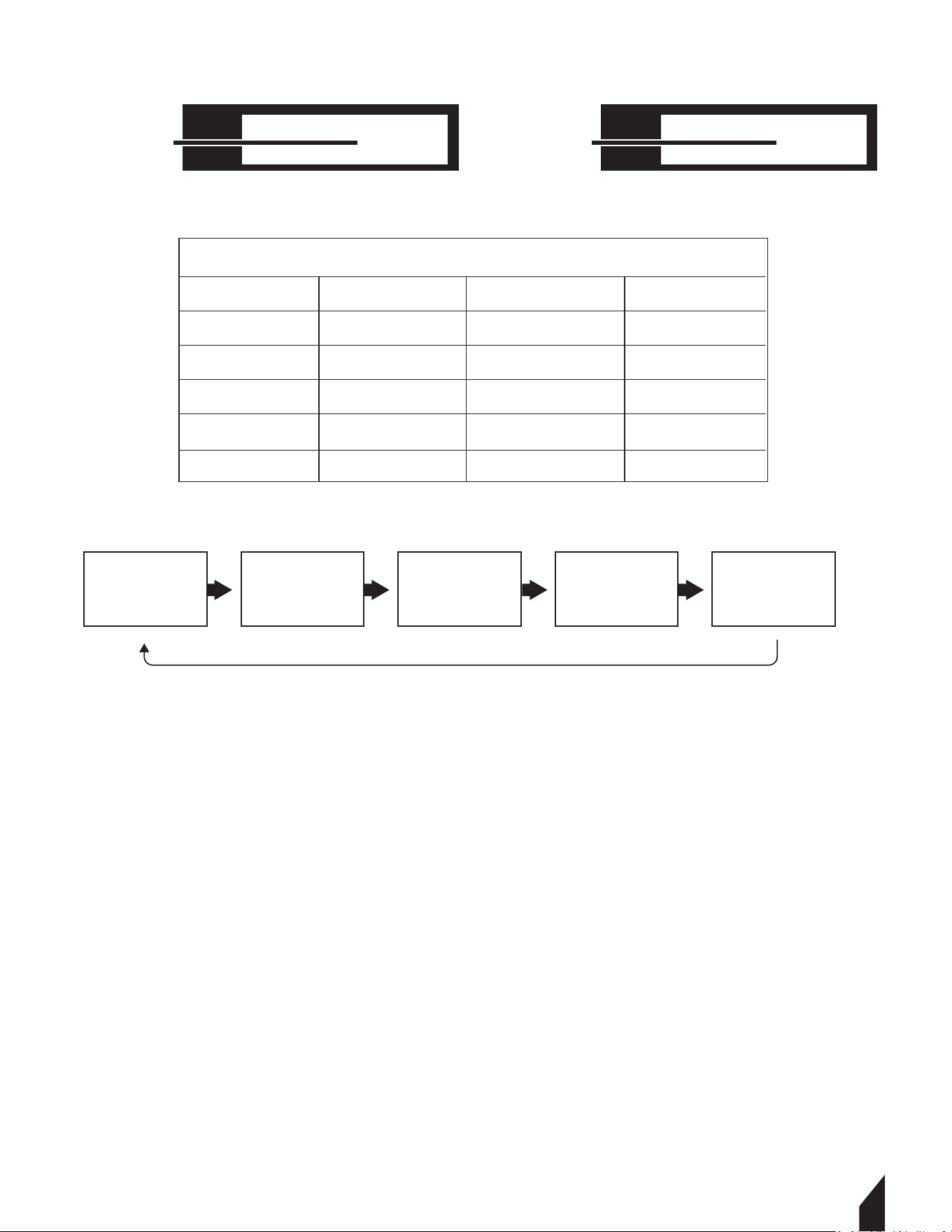
5.6 Turning Off
5.6.1 Aer removing the garment, long press the battery to cut off the power to preserve
battery health and prevent overheating.
5.7 Usage Environment Limits
5.7.1 To maintain the integrity of the electronics, observe these environmental
constraints.
5.7.1 DO NOT operate the system in environments exceeding 50°C (122°F).
5.7.2 Stop using the device immediately in the event of rain or high humidity. Do not
operate with wet hands.
5.7.3 Ensure your outer clothing or equipment (like a backpack or additional coat) does
not block the fan intakes. Restricted airflow can cause the motor to stall or burn out.
6. MAINTENANCE
6.1 Cleaning the Fans
6.1.1 Never submerge the fans in water.
6.1.2 Do not use a hair dryer to clean or dry the fan units; heat can deform the blades.
DANGER ALWAYS hold the
plug head when inserting or
removing cables. Never pull on the wire
itself, as this leads to internal damage.
5.2 Connecting the Battery
5.2.1 Plug the main lead cable into the
battery pack. FIGURE 7.
5.2.3 Ensure the connection is firm and
seated fully. FIGURE 7.
5.2.4 Secure cables in place with chords.
5.2.5 Then place the battery pack within
the inside pocket .FIGURE 8.
5.3 Powering & Adjusting the System
NOTE: DO NOT turn the power on until
you have fully put on the garment. This
prevents unnecessary battery drain and
ensures the air flows correctly around
the body.
5.4 Turning Power ON
5.4.1 To start , press the battery button
for 3 seconds.
5.4.2 Once active, verify that both fans
are spinning.
5.5 Adjusting Airflow
5.5.1 Aer turning on the system, cycle
through the speed settings to reach your
desired comfort level, by pressing the power
button.
NOTE: Select the appropriate speed based
on your environment for continuous use.
11
4. BEFORE YOU BEGIN
4.1 Confirm the battery casing is intact with
no swelling, cracks, or leaks.
4.2 Inspect the cables and plugs for frayed
wires or damaged pins.
4.3 Ensure the fan blades are clear of debris
and that the lid are securely fastened.
4.4 Charge battery to full power. FIGURE 1.
4.1 Battery Charging
4.1.2 Use only PSE-certified chargers.
4.1.3 Charge at room temperature. If the
battery is hot from use, allow it to cool
before plugging it into a charger.
4.1.4 Unplug the charger once the cycle
is complete; DO NOT leave the battery
connected to power indefinitely.
NOTE:The battery indicator will show you
the battery power level.
5. OPERATION
NOTE: Aer opening the box, carefully remove
the fans, batteries, and accesories.
5.1 Fan Installation
5.1.1 Turn nthe jacket inside out and locate
fan cutouts. FIGURE 2.
5.1.2 Hold the fan with both hands, placing
one hand on the top and the other on the
bottom of the unit.
5.1.3 Turn the top section of the fan
counterclockwise until it separates from the
base. FIGURE 3.
5.1.4 Insert the fan into the jacket’s fan cutout
with the fan cover facing outward. FIGURE 4.
5.1.5 From the inside of the jacket, attach the
bottom section of the fan and rotate it
clockwise until securely tightened. FIGURE 5.
5.1.6 Once both fans are installed, connect the
cables to each fan unit. FIGURE 6.
6.1.3 Keep the fan entrance clear of dust; if used in dusty areas, clean the grills regularly
to prevent motor damage.
6.2 Garment Washing Care
6.2.1 Remove the fan unit(s), battery, and battery holder from the jacket or vest before
washing.
6.2.2 Follow all care instructions provided on the garment label.
6.2.3 Cotton materials may shrink slightly aer washing.
6.2.4 Do not wash the jacket or vest with other garments, as this may cause color fading
or color transfer.
6.2.5 Use a laundry bag or laundry net when machine washing.
6.2.6 Do not use fabric soener.
6.2.7 Use only a mild, neutral detergent.
6.2.8 Remove the jacket or vest from the washing machine immediately aer the wash
cycle is complete.
6.2.9 Ensure all zippers are fully closed before washing.
6.3 Maintenance Record
TERN® vest are assembled with care and will provide years of service when properly
maintained. Preventative maintenance and routine service are essential to the long life of
your equipment. Adhere to reading through this manual thoroughly. You will find that you
can do some of the regular maintenance yourself. However, when in need of parts or major
service, be sure to contact a TERN® Technician. For your convenience we have provided this
space to record relevant data about your TERN® equipment.
100%
30v
Battery Life
Power Output
(30/26/26/20/17v)
Levels
Voltage
Battery Life CFM
1 30 Approx. 4 hrs
Approx. 5 hrs
Approx. 6 hrs
Approx. 9 hrs
Approx. 11 hrs
78.01
2
26
70.71
3
23
65.48
4
20
59.05
5 17 51.72
POWER CYCLE CHART
7. REPLACEMENT PARTS
7.1 For replacement parts and technical questions visit www.tern-wear.com
7.2 Not all equipment components are available for replacement. The illustrations
within this manual are a convenient reference to the location and position of parts in
the assembly sequence.
7.3 When ordering parts, the following will be required: equipment model number,
serial number/lot, date code, and description.
8. TROUBLESHOOTING
Level 1
30 V
Level 2
26 V
Level 3
23 V
Level 4
20 V
Level 5
17 V
POWER CYCLE CHART
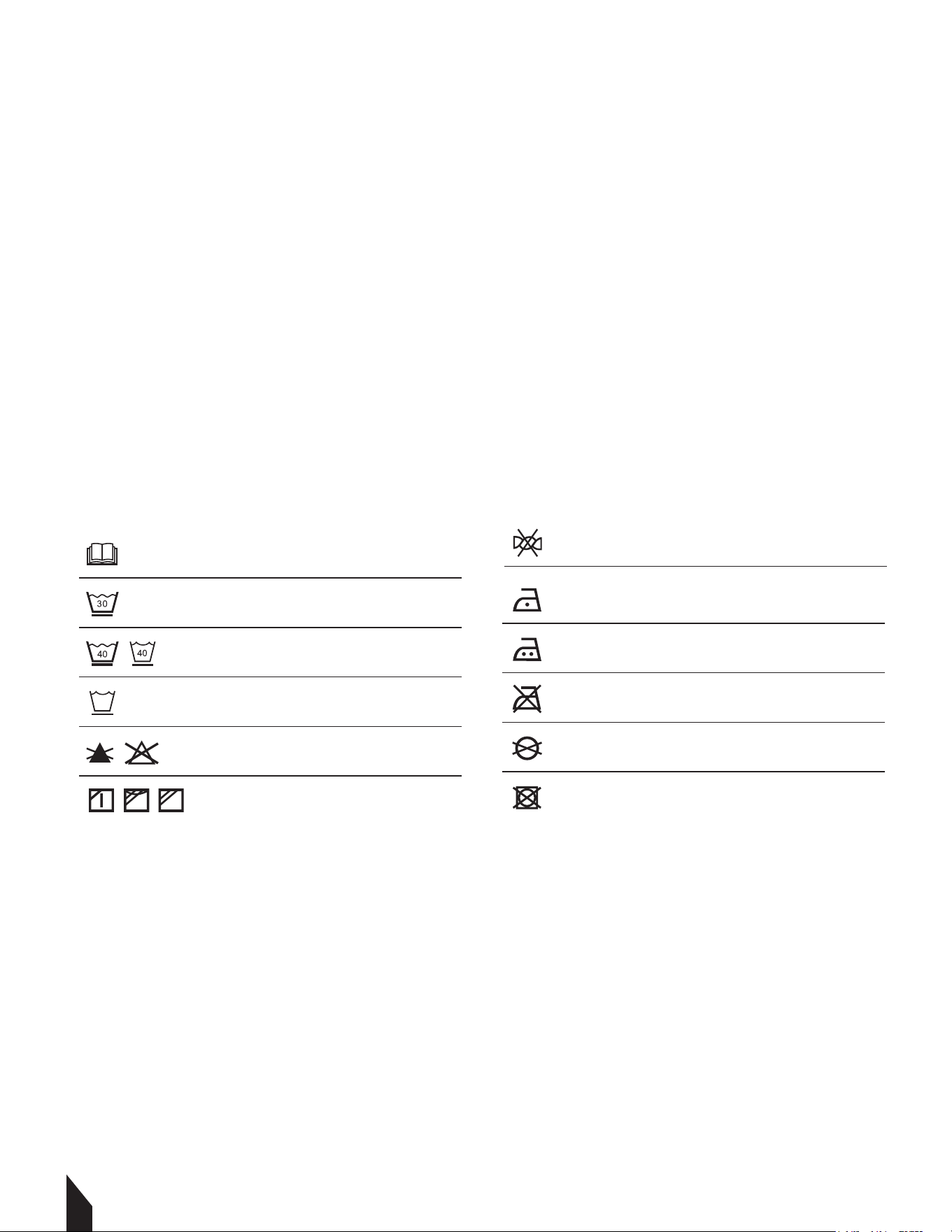
5.6 Turning Off
5.6.1 Aer removing the garment, long press the battery to cut off the power to preserve
battery health and prevent overheating.
5.7 Usage Environment Limits
5.7.1 To maintain the integrity of the electronics, observe these environmental
constraints.
5.7.1 DO NOT operate the system in environments exceeding 50°C (122°F).
5.7.2 Stop using the device immediately in the event of rain or high humidity. Do not
operate with wet hands.
5.7.3 Ensure your outer clothing or equipment (like a backpack or additional coat) does
not block the fan intakes. Restricted airflow can cause the motor to stall or burn out.
6. MAINTENANCE
6.1 Cleaning the Fans
6.1.1 Never submerge the fans in water.
6.1.2 Do not use a hair dryer to clean or dry the fan units; heat can deform the blades.
DANGER ALWAYS hold the
plug head when inserting or
removing cables. Never pull on the wire
itself, as this leads to internal damage.
5.2 Connecting the Battery
5.2.1 Plug the main lead cable into the
battery pack. FIGURE 7.
5.2.3 Ensure the connection is firm and
seated fully. FIGURE 7.
5.2.4 Secure cables in place with chords.
5.2.5 Then place the battery pack within
the inside pocket .FIGURE 8.
5.3 Powering & Adjusting the System
NOTE: DO NOT turn the power on until
you have fully put on the garment. This
prevents unnecessary battery drain and
ensures the air flows correctly around
the body.
5.4 Turning Power ON
5.4.1 To start , press the battery button
for 3 seconds.
5.4.2 Once active, verify that both fans
are spinning.
5.5 Adjusting Airflow
5.5.1 Aer turning on the system, cycle
through the speed settings to reach your
desired comfort level, by pressing the power
button.
NOTE: Select the appropriate speed based
on your environment for continuous use.
12
4. BEFORE YOU BEGIN
4.1 Confirm the battery casing is intact with
no swelling, cracks, or leaks.
4.2 Inspect the cables and plugs for frayed
wires or damaged pins.
4.3 Ensure the fan blades are clear of debris
and that the lid are securely fastened.
4.4 Charge battery to full power. FIGURE 1.
4.1 Battery Charging
4.1.2 Use only PSE-certified chargers.
4.1.3 Charge at room temperature. If the
battery is hot from use, allow it to cool
before plugging it into a charger.
4.1.4 Unplug the charger once the cycle
is complete; DO NOT leave the battery
connected to power indefinitely.
NOTE:The battery indicator will show you
the battery power level.
5. OPERATION
NOTE: Aer opening the box, carefully remove
the fans, batteries, and accesories.
5.1 Fan Installation
5.1.1 Turn nthe jacket inside out and locate
fan cutouts. FIGURE 2.
5.1.2 Hold the fan with both hands, placing
one hand on the top and the other on the
bottom of the unit.
5.1.3 Turn the top section of the fan
counterclockwise until it separates from the
base. FIGURE 3.
5.1.4 Insert the fan into the jacket’s fan cutout
with the fan cover facing outward. FIGURE 4.
5.1.5 From the inside of the jacket, attach the
bottom section of the fan and rotate it
clockwise until securely tightened. FIGURE 5.
5.1.6 Once both fans are installed, connect the
cables to each fan unit. FIGURE 6.
6.1.3 Keep the fan entrance clear of dust; if used in dusty areas, clean the grills regularly
to prevent motor damage.
6.2 Garment Washing Care
6.2.1 Remove the fan unit(s), battery, and battery holder from the jacket or vest before
washing.
6.2.2 Follow all care instructions provided on the garment label.
6.2.3 Cotton materials may shrink slightly aer washing.
6.2.4 Do not wash the jacket or vest with other garments, as this may cause color fading
or color transfer.
6.2.5 Use a laundry bag or laundry net when machine washing.
6.2.6 Do not use fabric soener.
6.2.7 Use only a mild, neutral detergent.
6.2.8 Remove the jacket or vest from the washing machine immediately aer the wash
cycle is complete.
6.2.9 Ensure all zippers are fully closed before washing.
6.3 Maintenance Record
TERN® vest are assembled with care and will provide years of service when properly
maintained. Preventative maintenance and routine service are essential to the long life of
your equipment. Adhere to reading through this manual thoroughly. You will find that you
can do some of the regular maintenance yourself. However, when in need of parts or major
service, be sure to contact a TERN® Technician. For your convenience we have provided this
space to record relevant data about your TERN® equipment.
Read the instruction manual.
Machine wash at below 30°C on the gentle
cycle.
Machine wash at below 40°C on the gentle
cycle.
Machine wash in domestic or commercial
machines on the gentle cycle.
Do not bleach.
Line dry in the shade.
Do not wring.
Iron at low temperatures (not exceeding
110°C).
Do not iron.
Iron at medium temperatures (not exceed
ing 150°C).
Do not dry clean.
Do not tumble dry.
7. REPLACEMENT PARTS
7.1 For replacement parts and technical questions visit www.tern-wear.com
7.2 Not all equipment components are available for replacement. The illustrations
within this manual are a convenient reference to the location and position of parts in
the assembly sequence.
7.3 When ordering parts, the following will be required: equipment model number,
serial number/lot, date code, and description.
8. TROUBLESHOOTING
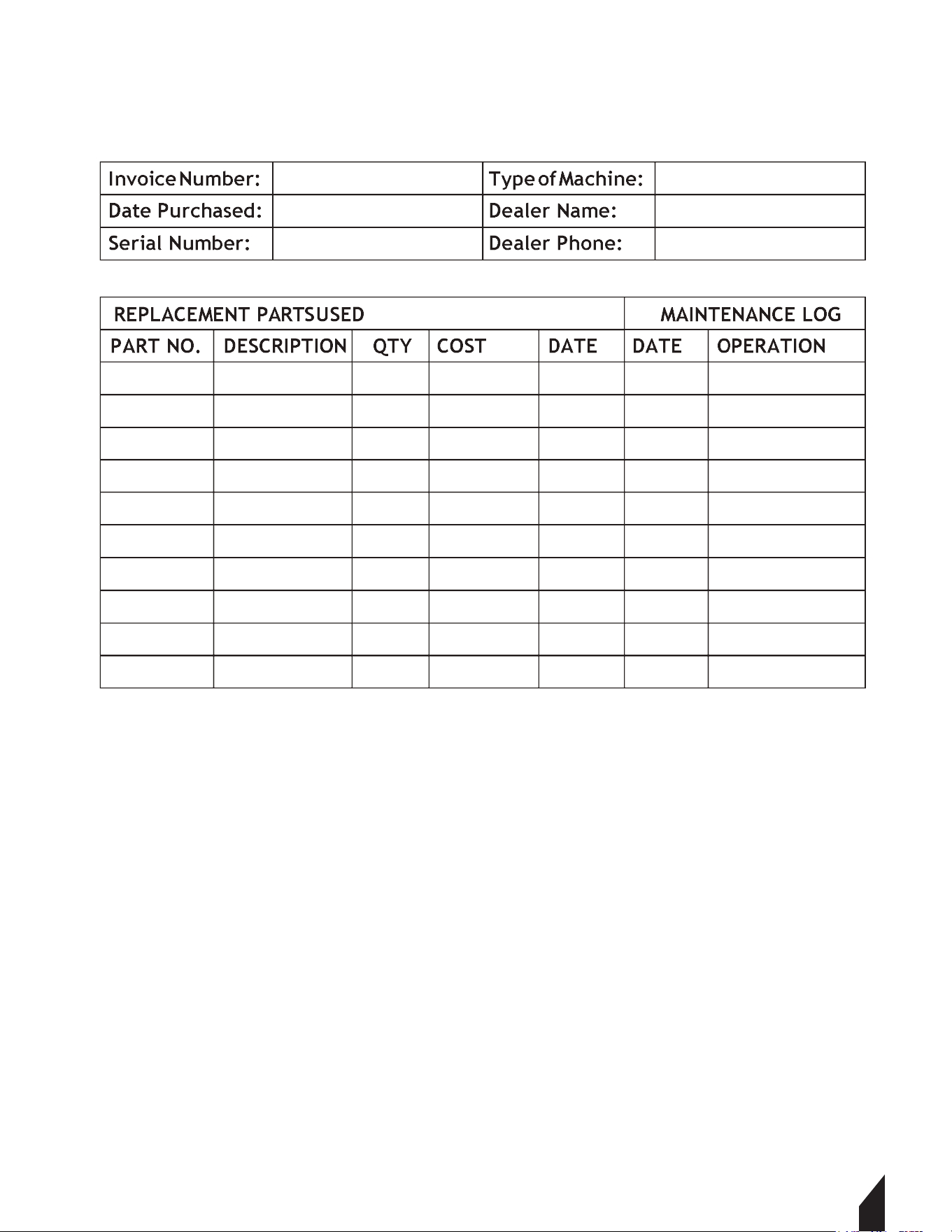
5.6 Turning Off
5.6.1 Aer removing the garment, long press the battery to cut off the power to preserve
battery health and prevent overheating.
5.7 Usage Environment Limits
5.7.1 To maintain the integrity of the electronics, observe these environmental
constraints.
5.7.1 DO NOT operate the system in environments exceeding 50°C (122°F).
5.7.2 Stop using the device immediately in the event of rain or high humidity. Do not
operate with wet hands.
5.7.3 Ensure your outer clothing or equipment (like a backpack or additional coat) does
not block the fan intakes. Restricted airflow can cause the motor to stall or burn out.
6. MAINTENANCE
6.1 Cleaning the Fans
6.1.1 Never submerge the fans in water.
6.1.2 Do not use a hair dryer to clean or dry the fan units; heat can deform the blades.
DANGER ALWAYS hold the
plug head when inserting or
removing cables. Never pull on the wire
itself, as this leads to internal damage.
5.2 Connecting the Battery
5.2.1 Plug the main lead cable into the
battery pack. FIGURE 7.
5.2.3 Ensure the connection is firm and
seated fully. FIGURE 7.
5.2.4 Secure cables in place with chords.
5.2.5 Then place the battery pack within
the inside pocket .FIGURE 8.
5.3 Powering & Adjusting the System
NOTE: DO NOT turn the power on until
you have fully put on the garment. This
prevents unnecessary battery drain and
ensures the air flows correctly around
the body.
5.4 Turning Power ON
5.4.1 To start , press the battery button
for 3 seconds.
5.4.2 Once active, verify that both fans
are spinning.
5.5 Adjusting Airflow
5.5.1 Aer turning on the system, cycle
through the speed settings to reach your
desired comfort level, by pressing the power
button.
NOTE: Select the appropriate speed based
on your environment for continuous use.
13
4. BEFORE YOU BEGIN
4.1 Confirm the battery casing is intact with
no swelling, cracks, or leaks.
4.2 Inspect the cables and plugs for frayed
wires or damaged pins.
4.3 Ensure the fan blades are clear of debris
and that the lid are securely fastened.
4.4 Charge battery to full power. FIGURE 1.
4.1 Battery Charging
4.1.2 Use only PSE-certified chargers.
4.1.3 Charge at room temperature. If the
battery is hot from use, allow it to cool
before plugging it into a charger.
4.1.4 Unplug the charger once the cycle
is complete; DO NOT leave the battery
connected to power indefinitely.
NOTE:The battery indicator will show you
the battery power level.
5. OPERATION
NOTE: Aer opening the box, carefully remove
the fans, batteries, and accesories.
5.1 Fan Installation
5.1.1 Turn nthe jacket inside out and locate
fan cutouts. FIGURE 2.
5.1.2 Hold the fan with both hands, placing
one hand on the top and the other on the
bottom of the unit.
5.1.3 Turn the top section of the fan
counterclockwise until it separates from the
base. FIGURE 3.
5.1.4 Insert the fan into the jacket’s fan cutout
with the fan cover facing outward. FIGURE 4.
5.1.5 From the inside of the jacket, attach the
bottom section of the fan and rotate it
clockwise until securely tightened. FIGURE 5.
5.1.6 Once both fans are installed, connect the
cables to each fan unit. FIGURE 6.
6.1.3 Keep the fan entrance clear of dust; if used in dusty areas, clean the grills regularly
to prevent motor damage.
6.2 Garment Washing Care
6.2.1 Remove the fan unit(s), battery, and battery holder from the jacket or vest before
washing.
6.2.2 Follow all care instructions provided on the garment label.
6.2.3 Cotton materials may shrink slightly aer washing.
6.2.4 Do not wash the jacket or vest with other garments, as this may cause color fading
or color transfer.
6.2.5 Use a laundry bag or laundry net when machine washing.
6.2.6 Do not use fabric soener.
6.2.7 Use only a mild, neutral detergent.
6.2.8 Remove the jacket or vest from the washing machine immediately aer the wash
cycle is complete.
6.2.9 Ensure all zippers are fully closed before washing.
6.3 Maintenance Record
TERN® vest are assembled with care and will provide years of service when properly
maintained. Preventative maintenance and routine service are essential to the long life of
your equipment. Adhere to reading through this manual thoroughly. You will find that you
can do some of the regular maintenance yourself. However, when in need of parts or major
service, be sure to contact a TERN® Technician. For your convenience we have provided this
space to record relevant data about your TERN® equipment.
7. REPLACEMENT PARTS
7.1 For replacement parts and technical questions visit www.tern-wear.com
7.2 Not all equipment components are available for replacement. The illustrations
within this manual are a convenient reference to the location and position of parts in
the assembly sequence.
7.3 When ordering parts, the following will be required: equipment model number,
serial number/lot, date code, and description.
8. TROUBLESHOOTING
5.6 Turning Off
5.6.1 Aer removing the garment, long press the battery to cut off the power to preserve
battery health and prevent overheating.
5.7 Usage Environment Limits
5.7.1 To maintain the integrity of the electronics, observe these environmental
constraints.
5.7.1 DO NOT operate the system in environments exceeding 50°C (122°F).
5.7.2 Stop using the device immediately in the event of rain or high humidity. Do not
operate with wet hands.
5.7.3 Ensure your outer clothing or equipment (like a backpack or additional coat) does
not block the fan intakes. Restricted airflow can cause the motor to stall or burn out.
6. MAINTENANCE
6.1 Cleaning the Fans
6.1.1 Never submerge the fans in water.
6.1.2 Do not use a hair dryer to clean or dry the fan units; heat can deform the blades.
DANGER ALWAYS hold the
plug head when inserting or
removing cables. Never pull on the wire
itself, as this leads to internal damage.
5.2 Connecting the Battery
5.2.1 Plug the main lead cable into the
battery pack. FIGURE 7.
5.2.3 Ensure the connection is firm and
seated fully. FIGURE 7.
5.2.4 Secure cables in place with chords.
5.2.5 Then place the battery pack within
the inside pocket .FIGURE 8.
5.3 Powering & Adjusting the System
NOTE: DO NOT turn the power on until
you have fully put on the garment. This
prevents unnecessary battery drain and
ensures the air flows correctly around
the body.
5.4 Turning Power ON
5.4.1 To start , press the battery button
for 3 seconds.
5.4.2 Once active, verify that both fans
are spinning.
5.5 Adjusting Airflow
5.5.1 Aer turning on the system, cycle
through the speed settings to reach your
desired comfort level, by pressing the power
button.
NOTE: Select the appropriate speed based
on your environment for continuous use.
4. BEFORE YOU BEGIN
4.1 Confirm the battery casing is intact with
no swelling, cracks, or leaks.
4.2 Inspect the cables and plugs for frayed
wires or damaged pins.
4.3 Ensure the fan blades are clear of debris
and that the lid are securely fastened.
4.4 Charge battery to full power. FIGURE 1.
4.1 Battery Charging
4.1.2 Use only PSE-certified chargers.
4.1.3 Charge at room temperature. If the
battery is hot from use, allow it to cool
before plugging it into a charger.
4.1.4 Unplug the charger once the cycle
is complete; DO NOT leave the battery
connected to power indefinitely.
NOTE:The battery indicator will show you
the battery power level.
5. OPERATION
NOTE: Aer opening the box, carefully remove
the fans, batteries, and accesories.
5.1 Fan Installation
5.1.1 Turn nthe jacket inside out and locate
fan cutouts. FIGURE 2.
5.1.2 Hold the fan with both hands, placing
one hand on the top and the other on the
bottom of the unit.
5.1.3 Turn the top section of the fan
counterclockwise until it separates from the
base. FIGURE 3.
5.1.4 Insert the fan into the jacket’s fan cutout
with the fan cover facing outward. FIGURE 4.
5.1.5 From the inside of the jacket, attach the
bottom section of the fan and rotate it
clockwise until securely tightened. FIGURE 5.
5.1.6 Once both fans are installed, connect the
cables to each fan unit. FIGURE 6.
6.1.3 Keep the fan entrance clear of dust; if used in dusty areas, clean the grills regularly
to prevent motor damage.
6.2 Garment Washing Care
6.2.1 Remove the fan unit(s), battery, and battery holder from the jacket or vest before
washing.
6.2.2 Follow all care instructions provided on the garment label.
6.2.3 Cotton materials may shrink slightly aer washing.
6.2.4 Do not wash the jacket or vest with other garments, as this may cause color fading
or color transfer.
6.2.5 Use a laundry bag or laundry net when machine washing.
6.2.6 Do not use fabric soener.
6.2.7 Use only a mild, neutral detergent.
6.2.8 Remove the jacket or vest from the washing machine immediately aer the wash
cycle is complete.
6.2.9 Ensure all zippers are fully closed before washing.
6.3 Maintenance Record
TERN® vest are assembled with care and will provide years of service when properly
maintained. Preventative maintenance and routine service are essential to the long life of
your equipment. Adhere to reading through this manual thoroughly. You will find that you
can do some of the regular maintenance yourself. However, when in need of parts or major
service, be sure to contact a TERN® Technician. For your convenience we have provided this
space to record relevant data about your TERN® equipment.
14
14
Category Observed Issue Potenal Cause Recommended Acon / Soluon
Power & Baery System fails to power on Baery is depleted Charge baery fully using a cerfied PSE charger.
Power & Baery Power cuts out during use Overheang protecon
Shut off power immediately. Allow baery to cool in a
shaded area.
Power & Baery Poor electrical co ntact Dirty terminals
Clean metal terminals on baery and connector with a
dry cloth.
Power & Baery System unresponsive Loose connecon
Ensure cable is fully seated in baery port; grip plug
head to insert.
Power & Baery Short baery life Baery health decline
Replace baery if runme is significantly shorter
despite full charge .
Power & Baery Unusual odor or deformaon Internal component failure
STOP USE IMMEDIATELY. Keep baery away from
flammable materials.
Fan & Airflow Weak or inconsistent airflow Intake obstrucon
Check if outer clothing, coats, or bags are blocking
exterior fan grills.
Fan & Airflow Weak airflow Dust or debris buildup
Inspect fan for dust/hair. Wipe clean with a dry cloth.
Do not submerge.
Fan & Airflow Grinding or raling noise Foreign object in housing
Check for stones/debris. Do not insert rods into moving
blades.
Fan & Airflow Fan stalls / refuses to spin Motor burnout or blockage Turn off instantly if stalled to prevent motor burnout.
Fan & Airflow Wet components Moisture / Rain
Stop use and air dry naturally. DO NOT use a hair d ryer
(warps blades).
General Safety Laundry Preparaon Electronics sll aached
Remove baery, both fan units, and all wiring before
washing garment.
General Safety Chemical Leakage Baery fluid contact
Wash skin/clothes immediately with water to prevent
dermas.
7. REPLACEMENT PARTS
7.1 For replacement parts and technical questions visit www.tern-wear.com
7.2 Not all equipment components are available for replacement. The illustrations
within this manual are a convenient reference to the location and position of parts in
the assembly sequence.
7.3 When ordering parts, the following will be required: equipment model number,
serial number/lot, date code, and description.
8. TROUBLESHOOTING
5.6 Turning Off
5.6.1 Aer removing the garment, long press the battery to cut off the power to preserve
battery health and prevent overheating.
5.7 Usage Environment Limits
5.7.1 To maintain the integrity of the electronics, observe these environmental
constraints.
5.7.1 DO NOT operate the system in environments exceeding 50°C (122°F).
5.7.2 Stop using the device immediately in the event of rain or high humidity. Do not
operate with wet hands.
5.7.3 Ensure your outer clothing or equipment (like a backpack or additional coat) does
not block the fan intakes. Restricted airflow can cause the motor to stall or burn out.
6. MAINTENANCE
6.1 Cleaning the Fans
6.1.1 Never submerge the fans in water.
6.1.2 Do not use a hair dryer to clean or dry the fan units; heat can deform the blades.
DANGER ALWAYS hold the
plug head when inserting or
removing cables. Never pull on the wire
itself, as this leads to internal damage.
5.2 Connecting the Battery
5.2.1 Plug the main lead cable into the
battery pack. FIGURE 7.
5.2.3 Ensure the connection is firm and
seated fully. FIGURE 7.
5.2.4 Secure cables in place with chords.
5.2.5 Then place the battery pack within
the inside pocket .FIGURE 8.
5.3 Powering & Adjusting the System
NOTE: DO NOT turn the power on until
you have fully put on the garment. This
prevents unnecessary battery drain and
ensures the air flows correctly around
the body.
5.4 Turning Power ON
5.4.1 To start , press the battery button
for 3 seconds.
5.4.2 Once active, verify that both fans
are spinning.
5.5 Adjusting Airflow
5.5.1 Aer turning on the system, cycle
through the speed settings to reach your
desired comfort level, by pressing the power
button.
NOTE: Select the appropriate speed based
on your environment for continuous use.
4. BEFORE YOU BEGIN
4.1 Confirm the battery casing is intact with
no swelling, cracks, or leaks.
4.2 Inspect the cables and plugs for frayed
wires or damaged pins.
4.3 Ensure the fan blades are clear of debris
and that the lid are securely fastened.
4.4 Charge battery to full power. FIGURE 1.
4.1 Battery Charging
4.1.2 Use only PSE-certified chargers.
4.1.3 Charge at room temperature. If the
battery is hot from use, allow it to cool
before plugging it into a charger.
4.1.4 Unplug the charger once the cycle
is complete; DO NOT leave the battery
connected to power indefinitely.
NOTE:The battery indicator will show you
the battery power level.
5. OPERATION
NOTE: Aer opening the box, carefully remove
the fans, batteries, and accesories.
5.1 Fan Installation
5.1.1 Turn nthe jacket inside out and locate
fan cutouts. FIGURE 2.
5.1.2 Hold the fan with both hands, placing
one hand on the top and the other on the
bottom of the unit.
5.1.3 Turn the top section of the fan
counterclockwise until it separates from the
base. FIGURE 3.
5.1.4 Insert the fan into the jacket’s fan cutout
with the fan cover facing outward. FIGURE 4.
5.1.5 From the inside of the jacket, attach the
bottom section of the fan and rotate it
clockwise until securely tightened. FIGURE 5.
5.1.6 Once both fans are installed, connect the
cables to each fan unit. FIGURE 6.
6.1.3 Keep the fan entrance clear of dust; if used in dusty areas, clean the grills regularly
to prevent motor damage.
6.2 Garment Washing Care
6.2.1 Remove the fan unit(s), battery, and battery holder from the jacket or vest before
washing.
6.2.2 Follow all care instructions provided on the garment label.
6.2.3 Cotton materials may shrink slightly aer washing.
6.2.4 Do not wash the jacket or vest with other garments, as this may cause color fading
or color transfer.
6.2.5 Use a laundry bag or laundry net when machine washing.
6.2.6 Do not use fabric soener.
6.2.7 Use only a mild, neutral detergent.
6.2.8 Remove the jacket or vest from the washing machine immediately aer the wash
cycle is complete.
6.2.9 Ensure all zippers are fully closed before washing.
6.3 Maintenance Record
TERN® vest are assembled with care and will provide years of service when properly
maintained. Preventative maintenance and routine service are essential to the long life of
your equipment. Adhere to reading through this manual thoroughly. You will find that you
can do some of the regular maintenance yourself. However, when in need of parts or major
service, be sure to contact a TERN® Technician. For your convenience we have provided this
space to record relevant data about your TERN® equipment.
9. EQUIPMENT WARRANTY
Your new TERN® equipment is warranted to the original purchaser for a period of two-year
(24 months) from the original date of purchase. The TERN® warranty is against defects in
design, materials and workmanship.
Any modifications made will void the manufacturer
warranty. Any Modification made to the unit will void manufacturer warranty.
The following are not covered under the warranty:
9.1.1 Damage caused by abuse, misuse, dropping or other similar damage caused by or as a
result of failure to follow assembly, operation or user maintenance instructions.
9.1.2 Alterations, additions or repairs carried out by persons other than TERN® or their
recognized agents.
9.1.3 Transportation or shipment costs to and from TERN® or their recognized agents, for
repair or assessment against a warranty claim, on any machine.
9.1.4 Materials and/or labor costs to renew, repair or replace components due to fair
wear and tear.
9.1.5 TERN® and/or their recognized agents, directors, employees or insurers will not be held
liable for consequential or other damages, losses or expenses in connection with or by
reason of or the inability to use the machine for any purpose.
9.2 Warranty Claims
Before submitting any warranty claim, you will need to register
your new TERN® equipment through www.ternwear.com.
Follow the steps on page 3 or scan this QR codes to complete the
equipment registration. Aer registration is complete, all
warranty claims should firstly be directed to TERN® through the
online Service Request form found at
www.ternwear.com/pages/contact.
For Service Call (866) 577- 4476
7. REPLACEMENT PARTS
7.1 For replacement parts and technical questions visit www.tern-wear.com
7.2 Not all equipment components are available for replacement. The illustrations
within this manual are a convenient reference to the location and position of parts in
the assembly sequence.
7.3 When ordering parts, the following will be required: equipment model number,
serial number/lot, date code, and description.
8. TROUBLESHOOTING

We’re a hybrid workwear + lifestyle brand born where real work happens and real life
is lived. Our gear blends industrial durability with everyday comfort so you don’t have
to change who you are—or what you’re doing—to feel ready. From jobsite to weekend,
we design apparel that moves with you and stands up to anything. Visit
www.tern-wear.com to get started today!
Cool Never Quits.
Sales Support
(866) 577-4476
Equipment Support
(866) 577-4476
TERN®, LLC
San Diego, CA
www.tern-wear.com
TIKTOK
@ternwear
INSTAGRAM
@ternwearofficial