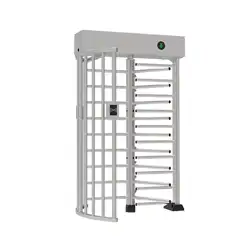
mTS1000 Series Tripod Turnstile User Manual
Page | 1 Copyright©2026 ZKTECO CO., LTD. All Rights Reserved.
User Manual
Saturn-H1300
Date: June 2026
Doc Version: 1.1
English

Saturn-H1300 User Manual
Page | 2 Copyright©2026 ZKTECO CO., LTD. All Rights Reserved.
Copyright © 2026 ZKTECO CO., LTD. All rights reserved.
Without the prior written consent of ZKTeco, no portion of this manual can be copied or forwarded in any
way or form. All parts of this manual belong to ZKTeco and its subsidiaries (hereinafter the "Company" or
"ZKTeco").
Trademark
is a registered trademark of ZKTeco. Other trademarks involved in this manual are owned by
their respective owners.
Disclaimer
This manual contains information on the operation and maintenance of the ZKTeco equipment. The
copyright in all the documents, drawings, etc. in relation to the ZKTeco supplied equipment vests in and is
the property of ZKTeco. The contents hereof should not be used or shared by the receiver with any third
party without express written permission of ZKTeco.
The contents of this manual must be read as a whole before starting the operation and maintenance of the
supplied equipment. If any of the content(s) of the manual seems unclear or incomplete, please contact
ZKTeco before starting the operation and maintenance of the said equipment.
It is an essential pre-requisite for the satisfactory operation and maintenance that the operating and
maintenance personnel are fully familiar with the design and that the said personnel have received
thorough training in operating and maintaining the machine/unit/equipment. It is further essential for the
safe operation of the machine/unit/equipment that personnel has read, understood and followed the
safety instructions contained in the manual.
In case of any conflict between terms and conditions of this manual and the contract specifications,
drawings, instruction sheets or any other contract-related documents, the contract conditions/documents
shall prevail. The contract specific conditions/documents shall apply in priority.
ZKTeco offers no warranty, guarantee or representation regarding the completeness of any information
contained in this manual or any of the amendments made thereto. ZKTeco does not extend the warranty
of any kind, including, without limitation, any warranty of design, merchantability or fitness for a particular
purpose.
ZKTeco does not assume responsibility for any errors or omissions in the information or documents which
are referenced by or linked to this manual. The entire risk as to the results and performance obtained from
using the information is assumed by the user.
ZKTeco in no event shall be liable to the user or any third party for any incidental, consequential, indirect,
special, or exemplary damages, including, without limitation, loss of business, loss of profits, business
interruption, loss of business information or any pecuniary loss, arising out of, in connection with, or

Saturn-H1300 User Manual
Page | 3 Copyright©2026 ZKTECO CO., LTD. All Rights Reserved.
relating to the use of the information contained in or referenced by this manual, even if ZKTeco has been
advised of the possibility of such damages.
This manual and the information contained therein may include technical, other inaccuracies or
typographical errors. ZKTeco periodically changes the information herein which will be incorporated into
new additions/amendments to the manual. ZKTeco reserves the right to add, delete, amend or modify the
information contained in the manual from time to time in the form of circulars, letters, notes, etc. for better
operation and safety of the machine/unit/equipment. The said additions or amendments are meant for
improvement /better operations of the machine/unit/equipment and such amendments shall not give any
right to claim any compensation or damages under any circumstances.
ZKTeco shall in no way be responsible (I) in case the machine/unit/equipment malfunctions due to any
non-compliance of the instructions contained in this manual (ii) in case of operation of the
machine/unit/equipment beyond the rate limits (iii) in case of operation of the machine and equipment in
conditions different from the prescribed conditions of the manual.
The product will be updated from time to time without prior notice. The latest operation procedures and
relevant documents are available on http://www.zkteco.com
If there is any issue related to the product, please contact us.
ZKTeco Headquarters
Address ZKTeco Industrial Park, No. 32, Industrial Road,
Tangxia Town, Dongguan, China.
Phone +86 769 - 82109991
Fax +86 755 - 89602394
For business-related queries, please write to us at: sales@zkteco.com.
To know more about our global branches, visit www.zkteco.com.

Saturn-H1300 User Manual
Page | 4 Copyright©2026 ZKTECO CO., LTD. All Rights Reserved.
About the Company
ZKTeco is one of the world’s largest manufacturer of RFID and Biometric (Fingerprint, Facial, Finger-vein)
readers. Product offerings include Access Control readers and panels, Near & Far-range Facial Recognition
Cameras, Elevator/floor access controllers, Turnstiles, License Plate Recognition (LPR) gate controllers and
Consumer products including battery-operated fingerprint and face-reader Door Locks. Our security
solutions are multi-lingual and localized in over 18 different languages. At the ZKTeco state-of-the-art
700,000 square foot ISO9001-certified manufacturing facility, we control manufacturing, product design,
component assembly, and logistics/shipping, all under one roof.
The founders of ZKTeco have been determined for independent research and development of biometric
verification procedures and the productization of biometric verification SDK, which was initially widely
applied in PC security and identity authentication fields. With the continuous enhancement of the
development and plenty of market applications, the team has gradually constructed an identity
authentication ecosystem and smart security ecosystem, which are based on biometric verification
techniques. With years of experience in the industrialization of biometric verifications, ZKTeco was
officially established in 2007 and now has been one of the globally leading enterprises in the biometric
verification industry owning various patents and being selected as the National High-tech Enterprise for 6
consecutive years. Its products are protected by intellectual property rights.
About the Manual
This manual introduces the operations of Saturn-H1300.
All figures displayed are for illustration purposes only. Figures in this manual may not be exactly consistent
with the actual products.
Features and parameters with ★ are not available in all devices.
Saturn-H1300 User Manual
Page | 5 Copyright©2026 ZKTECO CO., LTD. All Rights Reserved.
Safety Instruction
These instructions are intended to ensure that user can use the product correctly to avoid danger or
property loss.
The precaution measure is divided into Dangers and Cautions:
Dangers: Neglecting any of the warnings may cause serious injury or death.
Cautions: Neglecting any of the cautions may cause injury or equipment damage.
Symbols
Convention Description
Dangers: Follow these safeguards to prevent serious injury or death.
Cautions: Follow these precautions to prevent potential injury or material damage.
Dangers:
In the use of the product, you must be in strict compliance with the electrical safety regulations of the
nation and region.
The equipment must be connected to an earthed mains socket-outlet.
Shock hazard! Disconnect all power sources before maintenance.
Do not touch the bare metal contacts of the inlets after the circuit breaker is turned off. Electricity still
exists.
To prevent possible hearing damage, do not listen at high volume levels for long periods.
All the electronic operation should be strictly compliance with the electrical safety regulations, fire
prevention regulations and other related regulations in your local region.
Please use the power adapter, which is provided by normal company. The power consumption cannot
be less than the required value.
Do not connect several devices to one power adapter as adapter overload may cause over-heat or fire
hazard.
Please make sure that the power has been disconnected before you wire, install or dismantle the
device.
If the top caps should be open and the device should be powered on for maintenance, make sure:
1. Power off the fan to prevent the operator from getting injured accidentally.
2. Do not touch bare high-voltage components.
3. Make sure the switch's wiring sequence is correct after maintenance.
Please make sure that the power has been disconnected before you wire, install or dismantle the

Saturn-H1300 User Manual
Page | 6 Copyright©2026 ZKTECO CO., LTD. All Rights Reserved.
device.
If smoke, odors or noise rise from the device, turn off the power at once and unplug the power cable,
and then please contact the service center.
If the product does not work properly, please contact your dealer or the nearest service center. Never
attempt to disassemble the device yourself. (We shall not assume any responsibility for problems
caused by unauthorized repair or maintenance.)
The Terminal PE of the switch should be connected to a ground wire.
Cautions:
Instructions must be read before installation. Please follow these instructions carefully, incorrect
installation could affect gate operation.
When mounting and positioning this product please ensure the power cable is unplugged.
The motor cover will need to be removed to mount the motor to the mounting plate. Electrical-related
operation of the main unit can only be made by a licensed electrician.
To prevent injury, this equipment must be securely attached to the floor/base of the turnstile in
accordance with the installation instructions.
Keep straight down when moving or using the equipment.
Never place the equipment in an unstable location. The equipment may fall, causing serious personal
injury or death.
Stainless steel may be corroded in some circumstances. You need to clean and care the device by
using the stainless steel cleaner. It is suggested to clean the device every month.
Do not drop the device or subject it to physical shock, and do not expose it to high electromagnetism
radiation. Avoid the equipment installation on vibrations surface or places subject to shock (ignorance
can cause equipment damage).
Do not place the device in extremely hot (refer to the specification of the device for the detailed
operating temperature), cold, dusty or damp locations, and do not expose it to high electromagnetic
radiation.
The device cover for indoor use shall be kept from rain and moisture.
Exposing the equipment to direct sun light, low ventilation or heat source such as heater or radiator is
forbidden (ignorance can cause fire danger).
Do not aim the device at the sun or extra bright places. A blooming or smear may occur otherwise
(which is not a malfunction however), and affecting the endurance of sensor at the same time.
Please use the provided glove when open up the device cover, avoid direct contact with the device
cover, because the acidic sweat of the fingers may erode the surface coating of the device cover.
Please use a soft and dry cloth when clean inside and outside surfaces of the device cover, do not use
alkaline detergents.
Please keep all wrappers after unpack them for future use. In case of any failure occurred, you need to

Saturn-H1300 User Manual
Page | 7 Copyright©2026 ZKTECO CO., LTD. All Rights Reserved.
return the device to the factory with the original wrapper. Transportation without the original wrapper
may result in damage on the device and lead to additional costs.
Improper use or replacement of the battery may result in hazard of explosion. Replace with the same
or equivalent type only. Dispose of used batteries according to the instructions provided by the
battery manufacturer.
Biometric recognition products are not 100% applicable to anti-spoofing environments. If you require
a higher security level, use multiple authentication modes.
Do not stay in the lane when the device is rebooting.
RISK OF EXPLOSION IF BATTERY IS REPLACED BY AN INCORRECT TYPE. DISPOSE OF USED BATTERIES
ACCORDING TO THE INSTRUCTIONS.
SUITABLE FOR MOUNTING ON CONCRETE OR OTHER NON-COMBUSTIBLE SURFACE ONLY.
The instructions shall require connection of the equipment protective earthing conductor to the
installation protective earthing conductor.

Saturn-H1300 User Manual
Page | 8 Copyright©2026 ZKTECO CO., LTD. All Rights Reserved.
Table of Contents
1 OVERVIEW .......................................................................................................................................... 10
Features ...................................................................................................................................................... 10 1.1
Appearance and System Components .................................................................................................. 11 1.2
1.2.1
Appearance ............................................................................................................................................................................................... 11
1.2.2 System Components ........................................................................................................................................................................... 12
Mechanical System ................................................................................................................................... 12 1.3
Electronic Control System ....................................................................................................................... 13 1.4
Power-On Self-Test ................................................................................................................................... 13 1.5
Working Principle...................................................................................................................................... 14 1.6
Technical Specifications ........................................................................................................................... 15 1.7
2
FUNCTION INTRODUCTION .............................................................................................................. 17
Card Verification★ ................................................................................................................................... 17 2.1
QR Code Verification★ ............................................................................................................................ 17 2.2
Fingerprint Verification★ ....................................................................................................................... 18 2.3
Facial Verification★ ................................................................................................................................. 19 2.4
3
CONTROL SYSTEM INTRODUCTION ................................................................................................. 21
Wiring Diagram ......................................................................................................................................... 21 3.1
Turnstile Control Board ............................................................................................................................ 22 3.2
Access Control Board★ ........................................................................................................................... 24 3.3
DIP Switch Configuration ........................................................................................................................ 26 3.4
4
MAINTENANCE .................................................................................................................................. 28
Chassis Maintenance ................................................................................................................................ 28 4.1
Movement Maintenance .......................................................................................................................... 28 4.2
Power Supply Maintenance .................................................................................................................... 28 4.3
5
PACKING LIST .................................................................................................................................... 29

Saturn-H1300 User Manual
Page | 9 Copyright©2026 ZKTECO CO., LTD. All Rights Reserved.
Revision History
Revision Date Author Reviewer Description
V1.0 05/21/2026 Stella Xia Original Document.
V1.1 06/25/2026 Stella Xia
Modify the wiring diagram,
packing list and the DIP switch
configuration.

Saturn-H1300 User Manual
Page | 10 Copyright©2026 ZKTECO CO., LTD. All Rights Reserved.
1 Overview
The Saturn-H1300 Series integrates easily with fingerprint authentication, facial authentication, RFID
card and QR code verification, fitting smoothly into your existing access control setup. Its bi-
directional operation can be independently configured as controlled, locked, or free rotation,
ensuring adaptable security for any environment. Saturn-H1300 Series is equipped with red and
green LED indicators which provide clear visual guidance for users.
Also, the Saturn-H1300 is a high-security pedestrian access gate engineered for mobility - directly
overcoming the key limitation of traditional full-height turnstiles, which are fixed and difficult to
relocate. Designed for temporary access control, rapid deployment, and convenient transportation,
it can be quickly disassembled into compact modules and redeployed across multiple sites, making
it the practical choice wherever perimeter security needs change.
Features 1.1
Modular Design & Easy Mobility
Disassembles into 3–5 modules for easier transport, handling, and storage.
Net weight 152 kg (gross: 198 kg) — modular build enables relocation and redeployment by a
small crew, no heavy equipment needed.
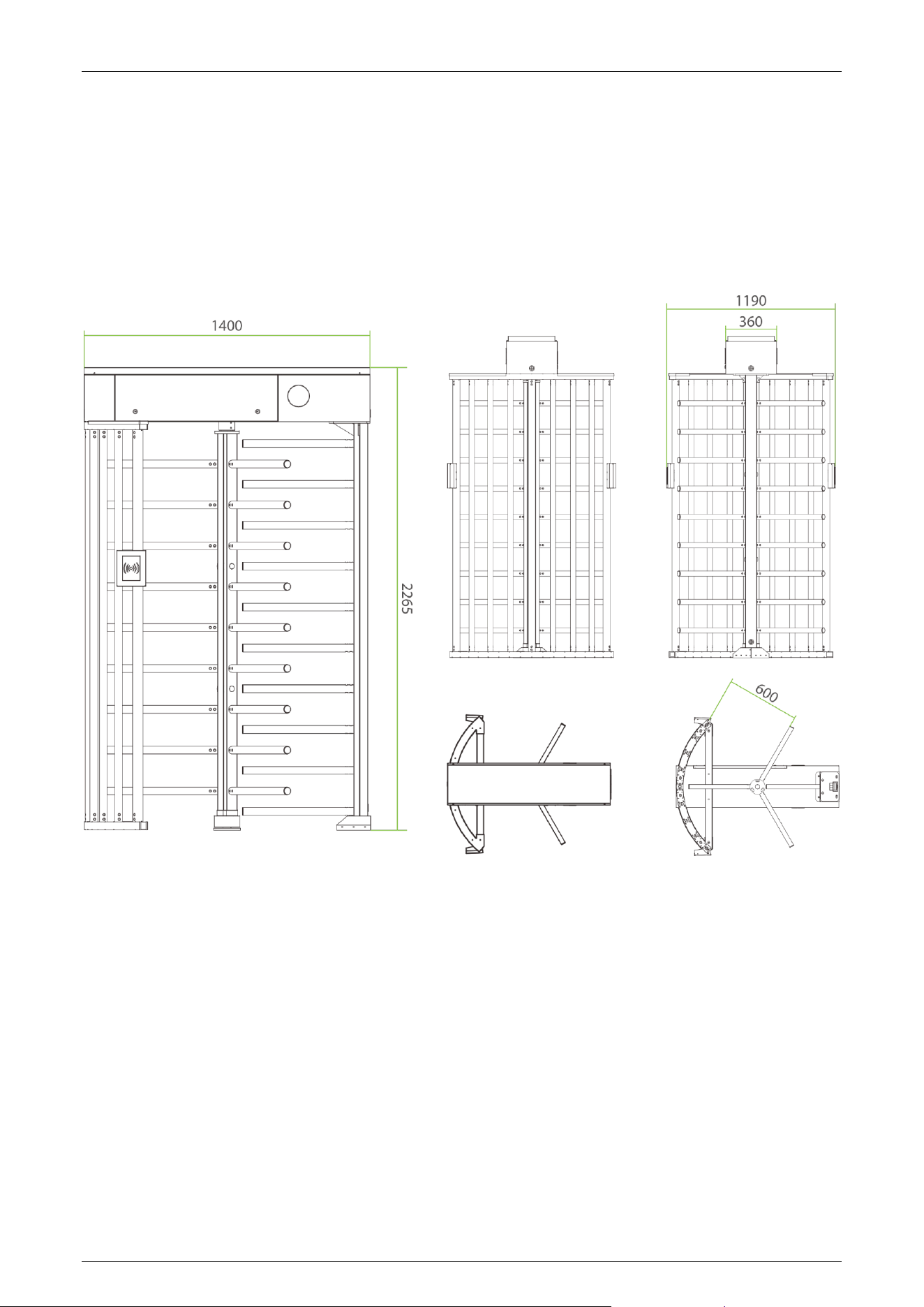
Standard size (single lane): approx. 1400 × 1190 × 2265 mm.
High-Level Security Performance
Full-height enclosure design that prevents climbing, vaulting, and crawling through.
Mechanical anti-tailgating: only one person allowed per authorized pass.
Anti-reverse entry (anti-passback), anti-collision.
Safety & Emergency Control
Allow free passage during power failure (fire safety mode).
Automatic locking when power is restored.
Unlocks immediately upon receiving a fire signal for emergency evacuation.
Reliable Operation
Silent and smooth operation.
Service life 2 million cycles.
Access Control Compatibility
Supports tech cards, QR codes, facial recognition, fingerprint.
Saturn-H1300 User Manual
Page | 11 Copyright©2026 ZKTECO CO., LTD. All Rights Reserved.
Appearance and System Components 1.2
1.2.1 Appearance
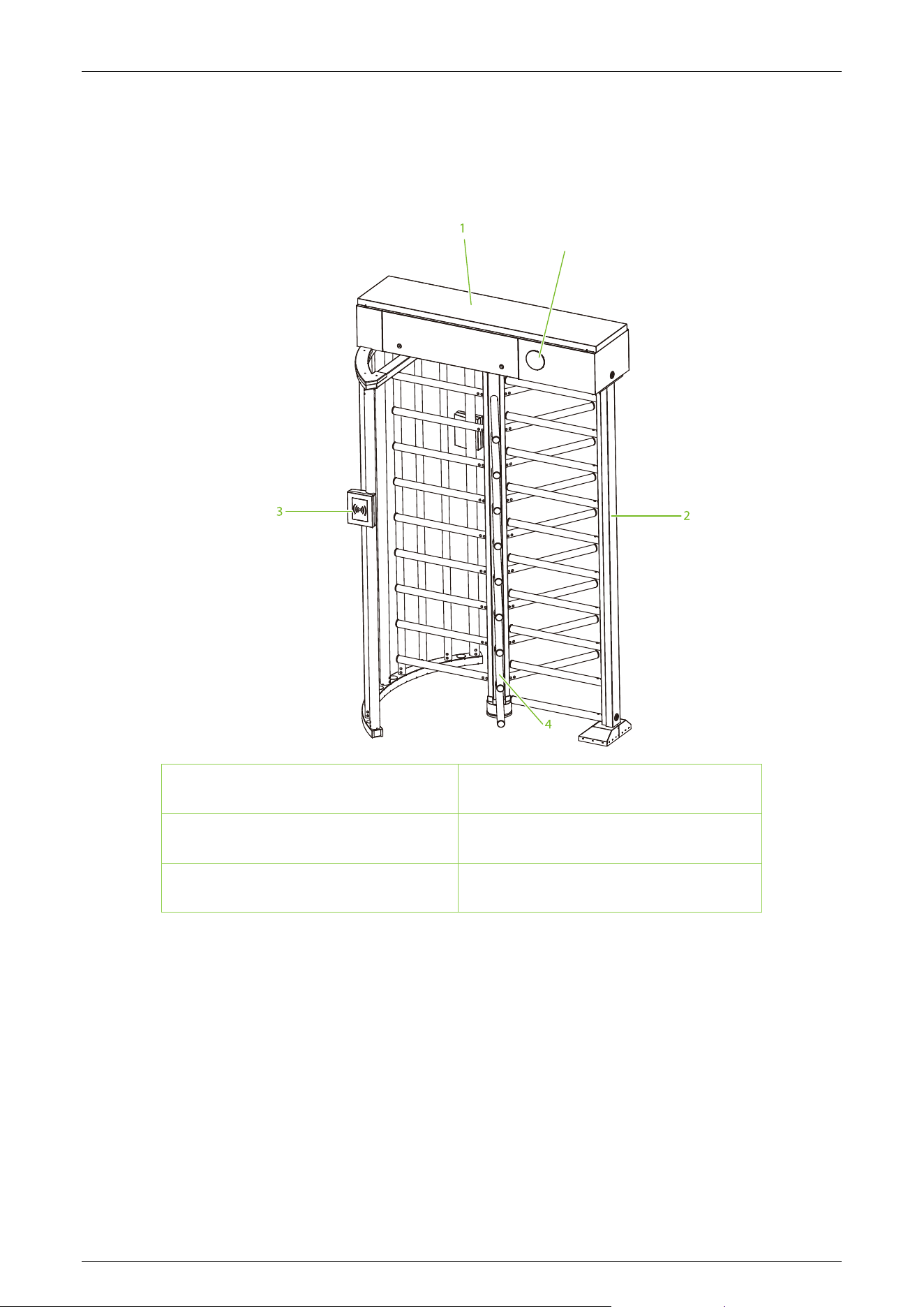
The appearance and dimensions of Saturn-H1300 are shown in the figure below (unit: mm):
Saturn-H1300 User Manual
Page | 12 Copyright©2026 ZKTECO CO., LTD. All Rights Reserved.
1.2.2 System Components
The system components of Saturn-H1300 are shown below:
5
1. Mainframe Box 2. Stator Bar Frame
3. Verification Units 4. Rotor Barrier
5. Traffic Indicator
Mechanical System 1.3
The mechanical system of the full height turnstile consists of a mainframe box and a frame.
The direction indicator, core, control panel, access controller and lock are installed in the mainframe
box. The core component mainly consists of two solenoids, a spring and a transmission mechanism.
The frame supports the entire mainframe box.
Saturn-H1300 User Manual
Page | 13 Copyright©2026 ZKTECO CO., LTD. All Rights Reserved.
Electronic Control System 1.4
The electronic control system of the full height turnstile is composed of the reader, control panel,
access controller, direction indicator, alarm, and transformer.
Reader★: The reader reads the data in the card and sends it to the Access Controller.
Turnstile Control Board: The turnstile control board serves as the control center of the system. It
receives signals from the reader and the dry contact, performs logical calculations and processing of
these signals, and sends executive commands to the barrier.
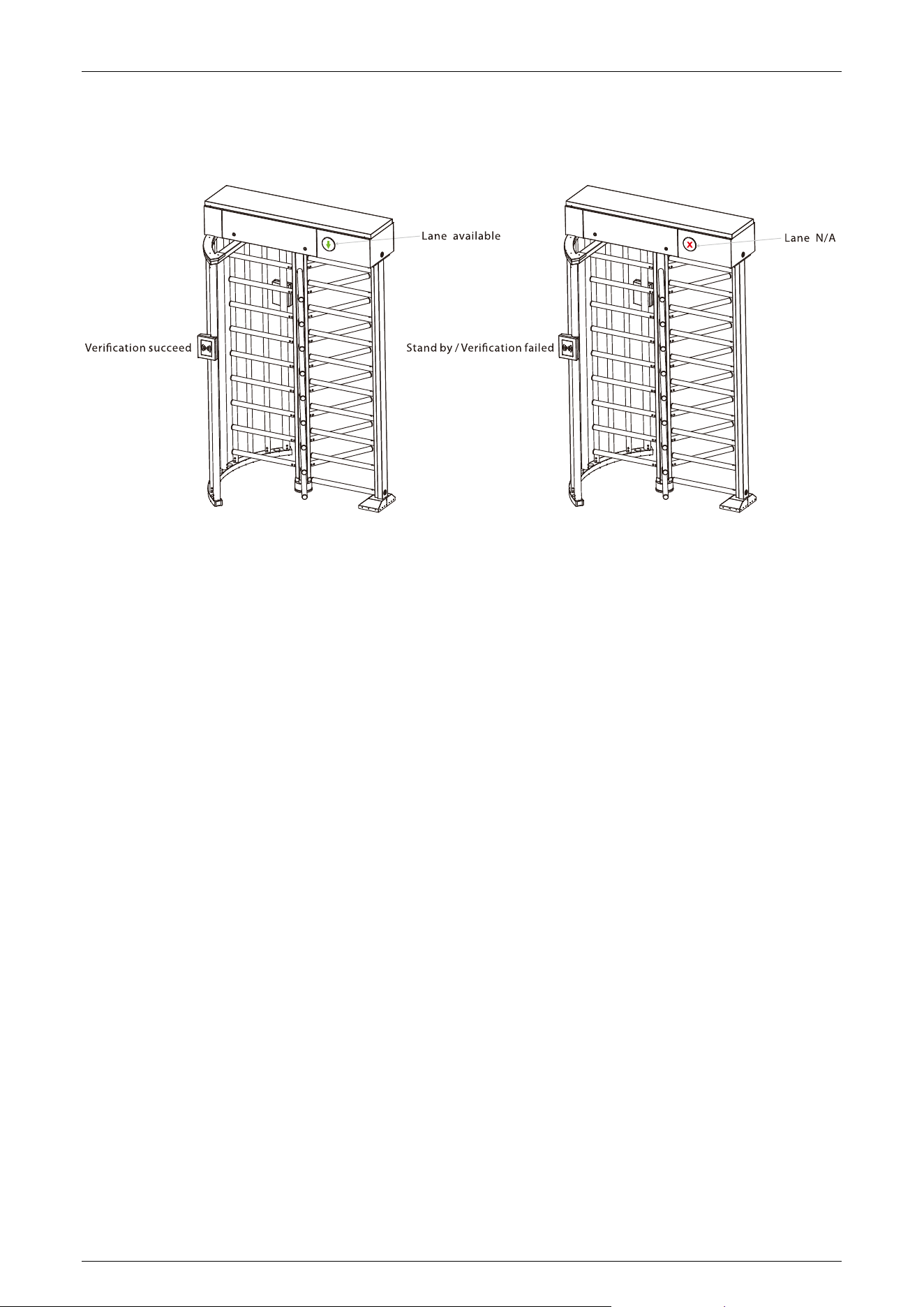
Traffic Indicator: The system will illuminate the red indicator when the gate is closed. When
someone passes the verification, the system will illuminate the green indicator.
Alarm: The alarm emits voice and light signals if the system detects any unauthorized entry to the
passage, false direction entry, anti-tailgate or other violations.
Power-On Self-Test 1.5
1. Please make sure that the power requirements are strictly met to avoid permanent damage to
the unit. Input voltage: AC 100 to 120V /200 to 240V. Note: The full height turnstile must be
connected to the ground (earth).
2. Power on the full height turnstile and wait for 30 seconds for it to complete the self-test
program.
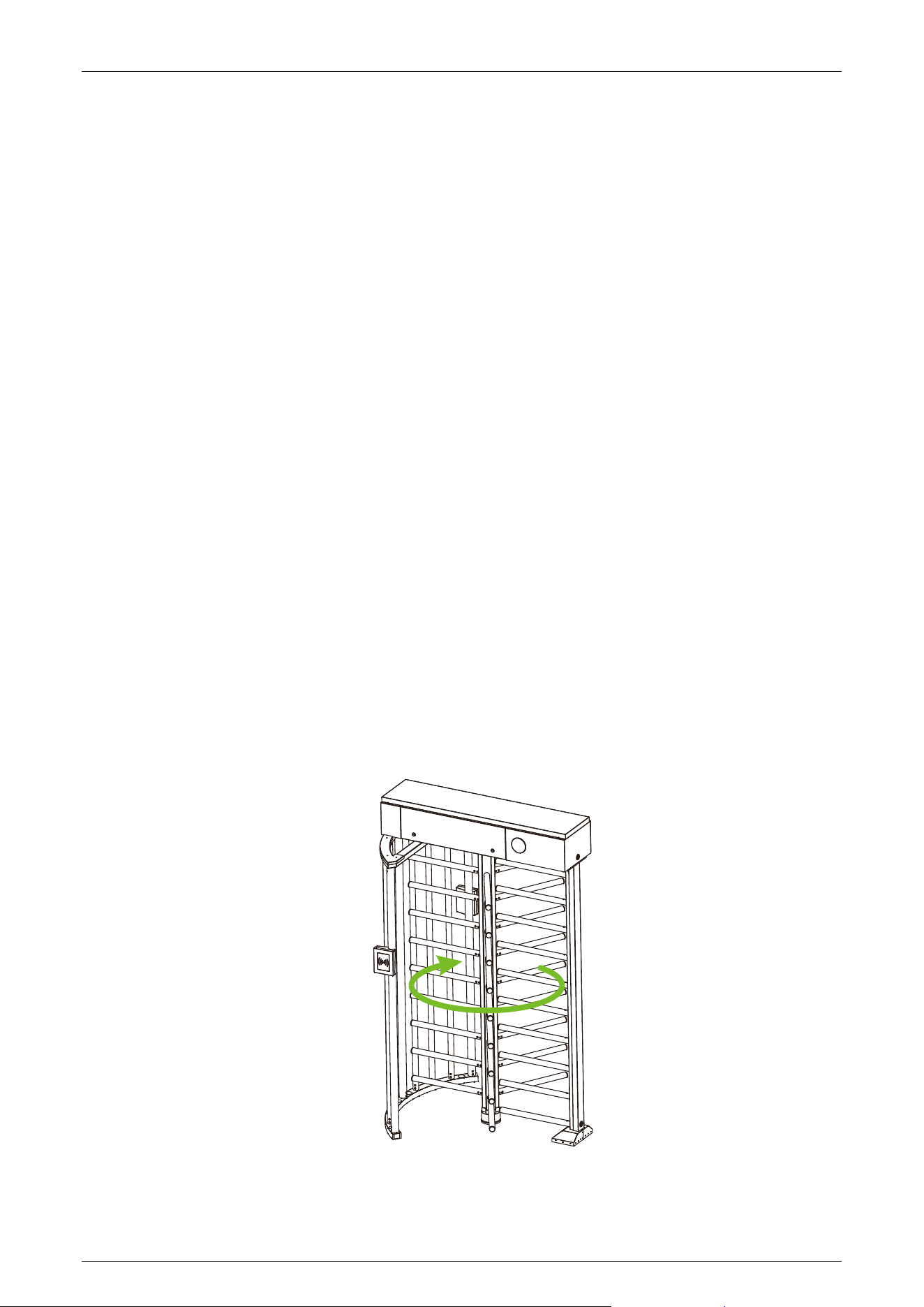
3. Manually rotate the rotor arms clockwise,, as shown in the diagram below:
Saturn-H1300 User Manual
Page | 14 Copyright©2026 ZKTECO CO., LTD. All Rights Reserved.
4. Check whether the full height turnstile and the LED indicator work properly. If there is any
problem, please contact the supplier for assistance.
Working Principle 1.6
1. When connecting the device to the power source, the system initiates a Power-On Self-Test. If
no issues are detected, the device will operate normally.
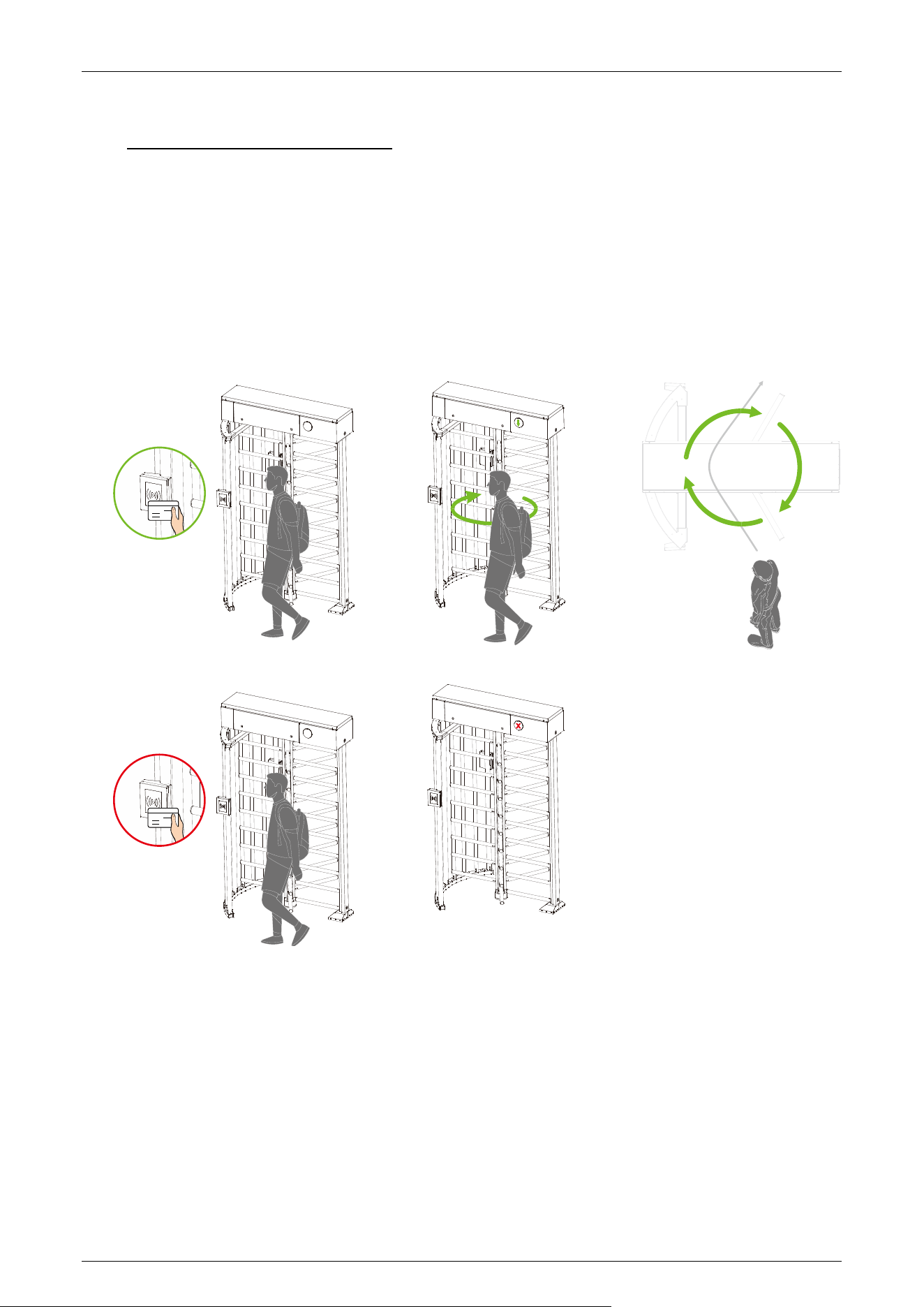
2. When a valid card is presented, the traffic indicator will send a green indicator to the pedestrian
to indicate that the verification is successful. Subsequently, the card reader sends signals to the
Access Controller, requesting permission to pass through the passage. The Access Controller, in
turn, sends the signal to the Turnstile Control Board.
3. After receiving the signal from the card, the Turnstile Control Board will transmit valid control
signals to the unlock solenoid driver. If the system is in the forbidden passing mode, the mode
indicator light will turn red, and the Turnstile Control Board will not accept any card signals.
4. Pedestrians should follow the traffic indicator and gently push the unlocked Rotor Barrier; the
Rotor Barrier will rotate till the pedestrian passes through the lane.
5. The pedestrian can only pass through the lane after a valid card has been successfully verified.
Note: Make sure that the ground wire of the system is reliably connected to avoid personal injuries
or other accidents.

Saturn-H1300 User Manual
Page | 15 Copyright©2026 ZKTECO CO., LTD. All Rights Reserved.
Technical Specifications 1.7
Feature Specification
Model Name
Saturn-H1300
Visual Indicator
LED visual indicators integrated into the vertical column
Red cross: passage denied
Green arrow: passage allowed
Lane Type
Single lane
Lane Width
600mm
Lane Height
2265
Footprint (L*W)
1400*1190
Rotor Movement Type
Full-height rotating turnstile
Rotor Diameter
38mm
Rotor Arm Configuration
3-blade rotor
Rotor Arms
9
Throughput Rate
Max. 20 to 25 people per minute
Rotor Arm Material
Stainless steel
Cabinet Material
SUS304 stainless steel (the housing features a precision 240# hairline finish)
/ (SUS316 stainless steel optional)
Lid Material
SUS304 stainless steel (the housing features a precision 240# hairline finish)
/ (SUS316 stainless steel optional)
Motherboard Function
System configuration, entry log memory, safety logic
Motherboard
Communication
Fire alarm port (Relay)*1
Controller
Standard full height turnstile controller
Credential Options
RFID reader: ProID10
Fingerprint reader: FR1500S or 3rd-party readers
QR Code reader: QR500
Compatible with ZKTeco and third-party facial recognition standalone
access control terminals
Flow Rate
RFID: 20 passengers per minute
Fingerprint: 15 passengers per minute
QR Code: 20 passengers per minute
Facial Authentication: 15 passengers per minute
Accessibility
600mm (23.62") standard lane for pedestrians
Power Supply
100-120VAC or 200-240VAC, 50/60Hz
Power Rating
40W
Noise Level
Less than 60 dB
MCBF
2 million
Weight
Net Weight: 152kg
Gross Weight: 198kg
Dimension (L*W*H)
1400*1190*2265mm

Saturn-H1300 User Manual
Page | 16 Copyright©2026 ZKTECO CO., LTD. All Rights Reserved.
Dimensions with Packing
(L*W*H)
2150*760*703mm
Operating Temperature
-28°C to 60°C
Operating Humidity
0% to 95% RH (non-condensing)
Certifications
CE, FCC (pending)
Ingress Protection Rating
IPX4
Supported Software
ZKBio CVSecurity (depends on the access controller installed)
Safety Features
Emergency escape function
Security Features
Anti-passback, Anti-tailgating
Product Delivery
Pre-assembled for easy installation
Application Environment
Indoor and Covered Outdoor
Site Preparation
Flat and level finished floor (optional base plate for unfinished floors)
Security Level
High
Emergency Mode
Rotor unlocks automatically during emergencies
Packing Material
Wooden Box
Warranty
1 year
Saturn-H1300 User Manual
Page | 17 Copyright©2026 ZKTECO CO., LTD. All Rights Reserved.
2 Function Introduction
Card Verification
★
2.1
The Card Verification mode compares the card number in the card induction area with all of the card
number data registered in the device and sends it to the Access Controller.
When a user presses his / her card on the card reading area, the device enters card authentication
mode.
QR Code Verification★ 2.2
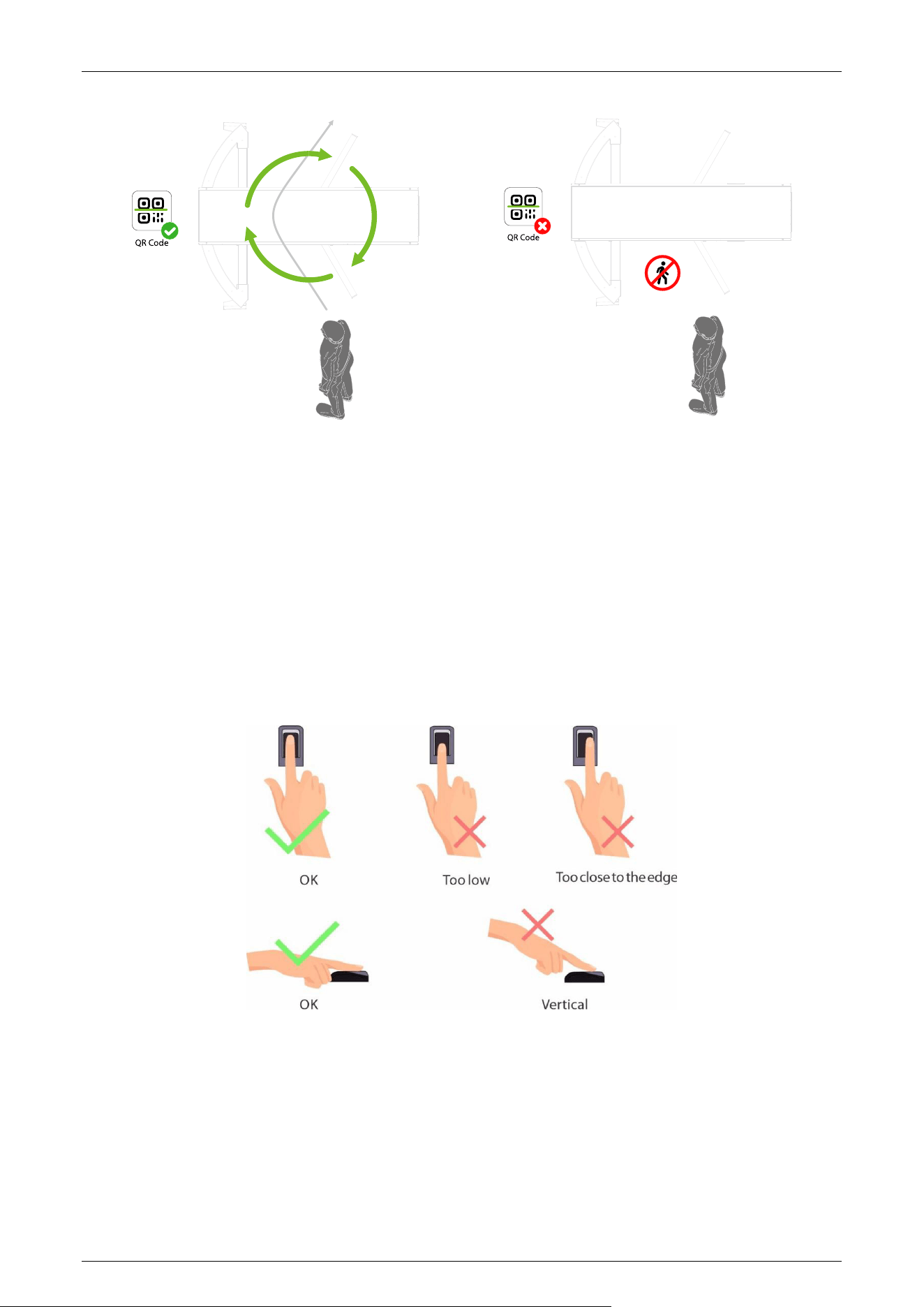
The QR code Verification mode is to scan the QR code on the user's mobile phone through the QR
code scanner and compare the data with the registered QR code, and then sends it to the Access
Controller.
When the user places the mobile phone displaying with the QR code on top of the QR code scanner,
the device enters the QR code authentication mode.
Saturn-H1300 User Manual
Page | 18 Copyright©2026 ZKTECO CO., LTD. All Rights Reserved.
NO ENTRY
Fingerprint Verification
★
2.3
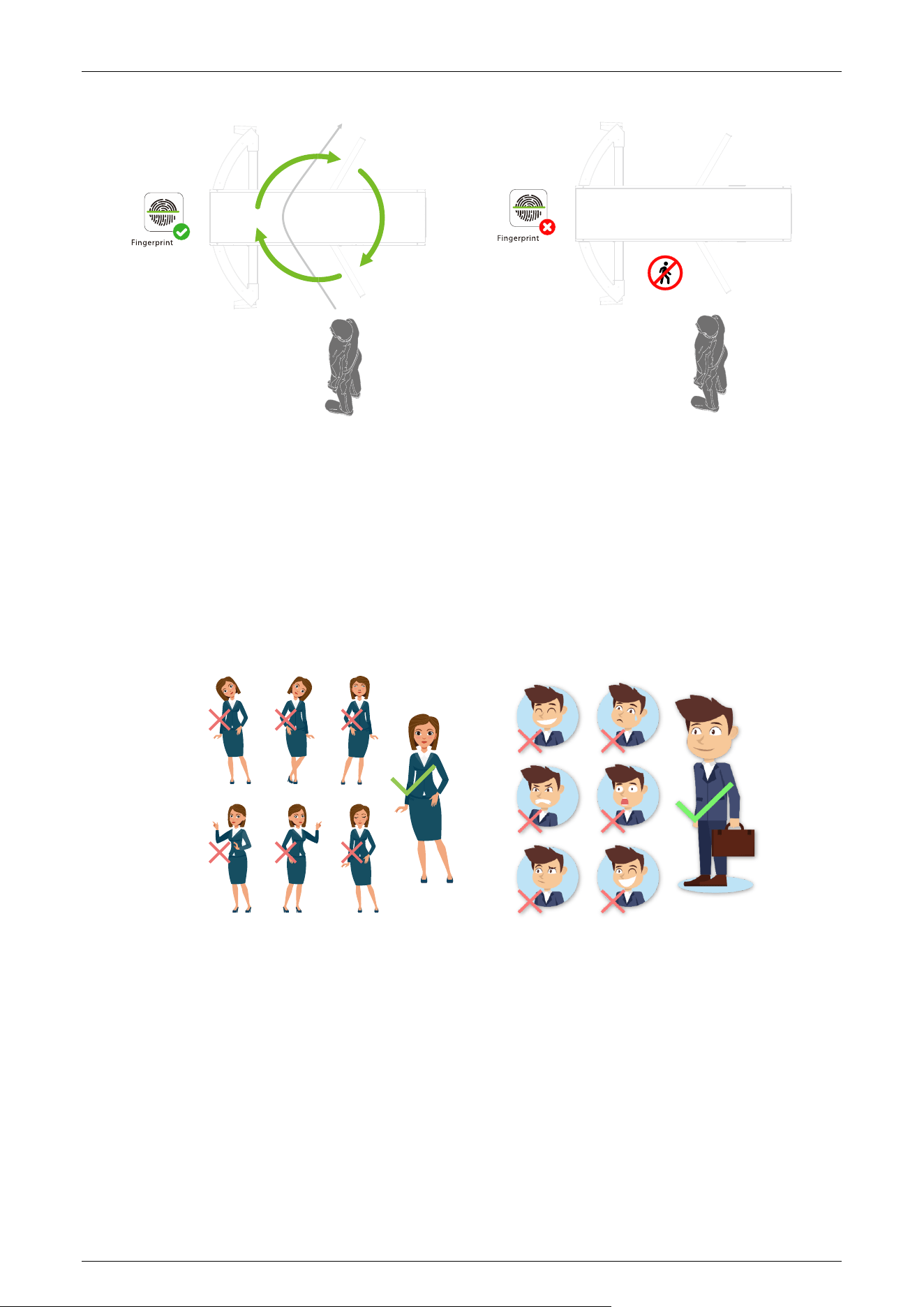
In this verification mode, the device compares the fingerprint that is being pressed onto the
fingerprint reader with all the fingerprint data sends it to the Access Controller.
The device enters the fingerprint authentication mode when a user presses his/her finger onto the
fingerprint scanner.
Recommended fingers: It is recommended to use index, middle, or ring finger for registration and
avoid using the thumb or little finger, as they are difficult to accurately press onto the fingerprint
reader.
Note: Please use the correct method when pressing your fingers onto the fingerprint reader for
registration and identification. Our company will assume no liability for recognition issues that may
result from incorrect usage of the product. We reserve the right of final interpretation and
modification concerning this point.
Saturn-H1300 User Manual
Page | 19 Copyright©2026 ZKTECO CO., LTD. All Rights Reserved.
NO ENTRY
Facial Verification
★
2.4
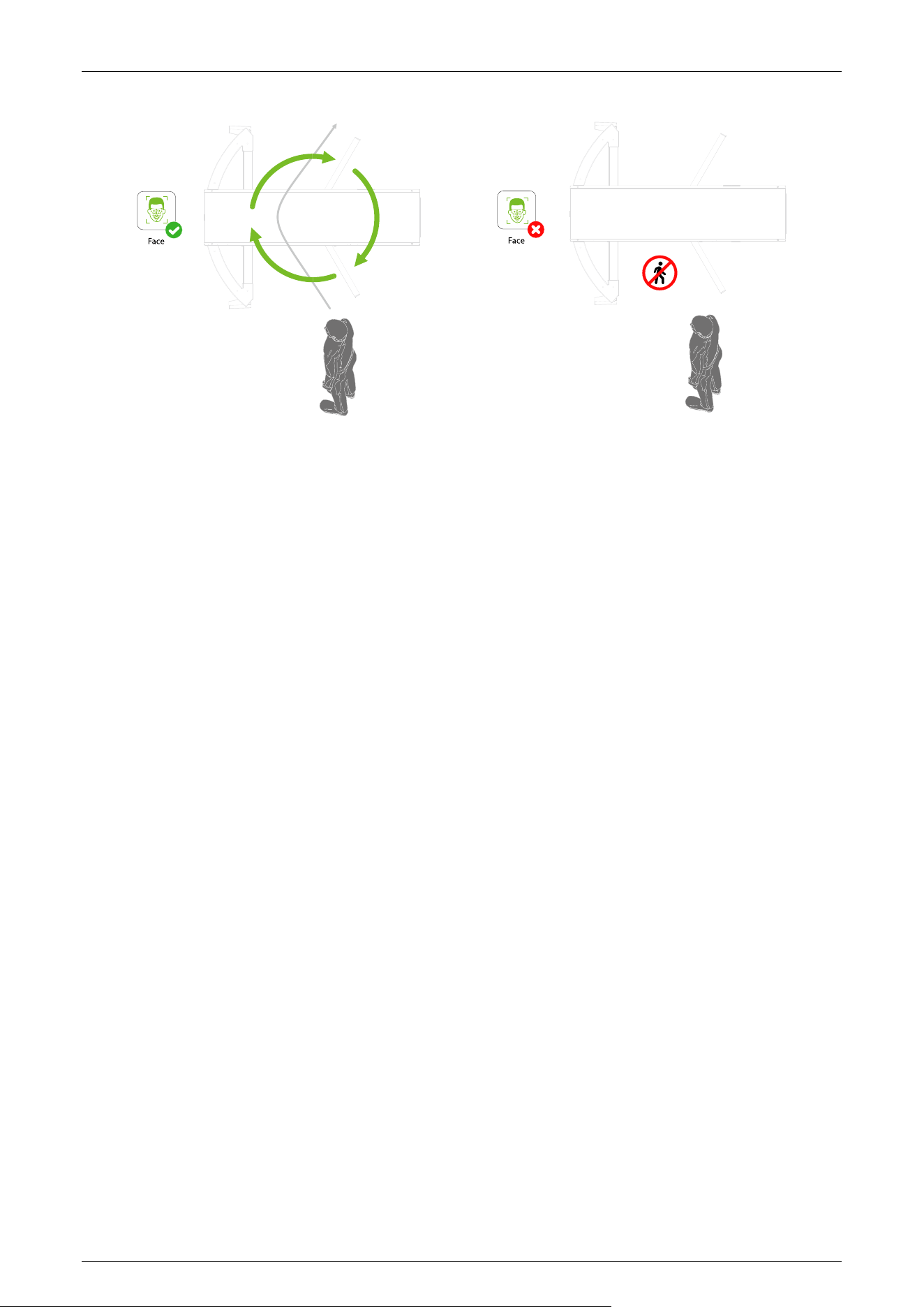
In this verification mode, the device compares the collected facial images with all face data
registered in the device and then sends it to the Access Controller.
Try to keep the face in the centre of the screen during authentication. Please face towards the
camera and stay still during face registration.
Recommended Standing Posture and Facial Expression:
Note: Please keep your facial expression and standing posture natural while enrollment or verification.
Saturn-H1300 User Manual
Page | 20 Copyright©2026 ZKTECO CO., LTD. All Rights Reserved.
NO ENTRY
Saturn-H1300 User Manual
Page | 21 Copyright©2026 ZKTECO CO., LTD. All Rights Reserved.
3 Control System Introduction
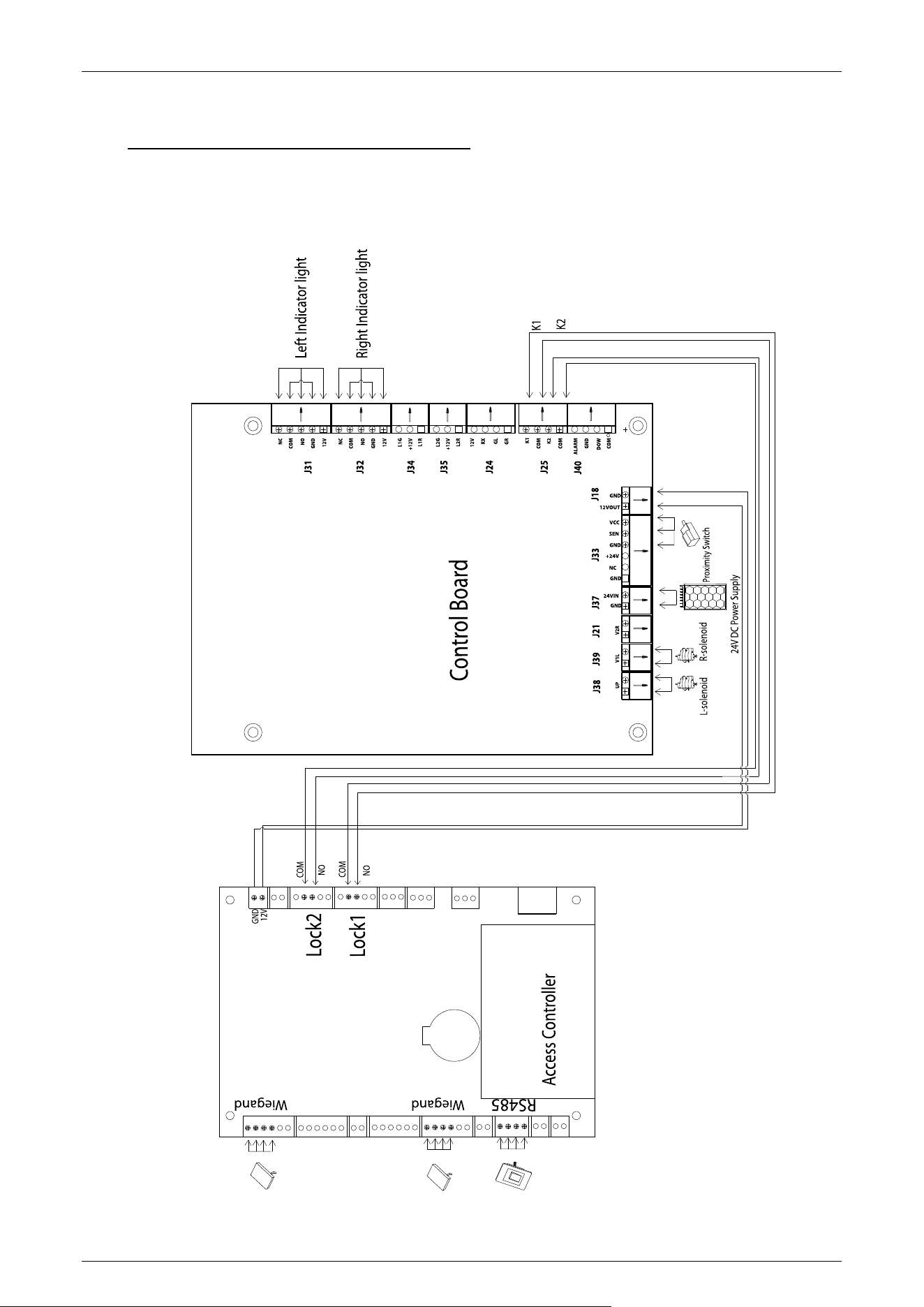
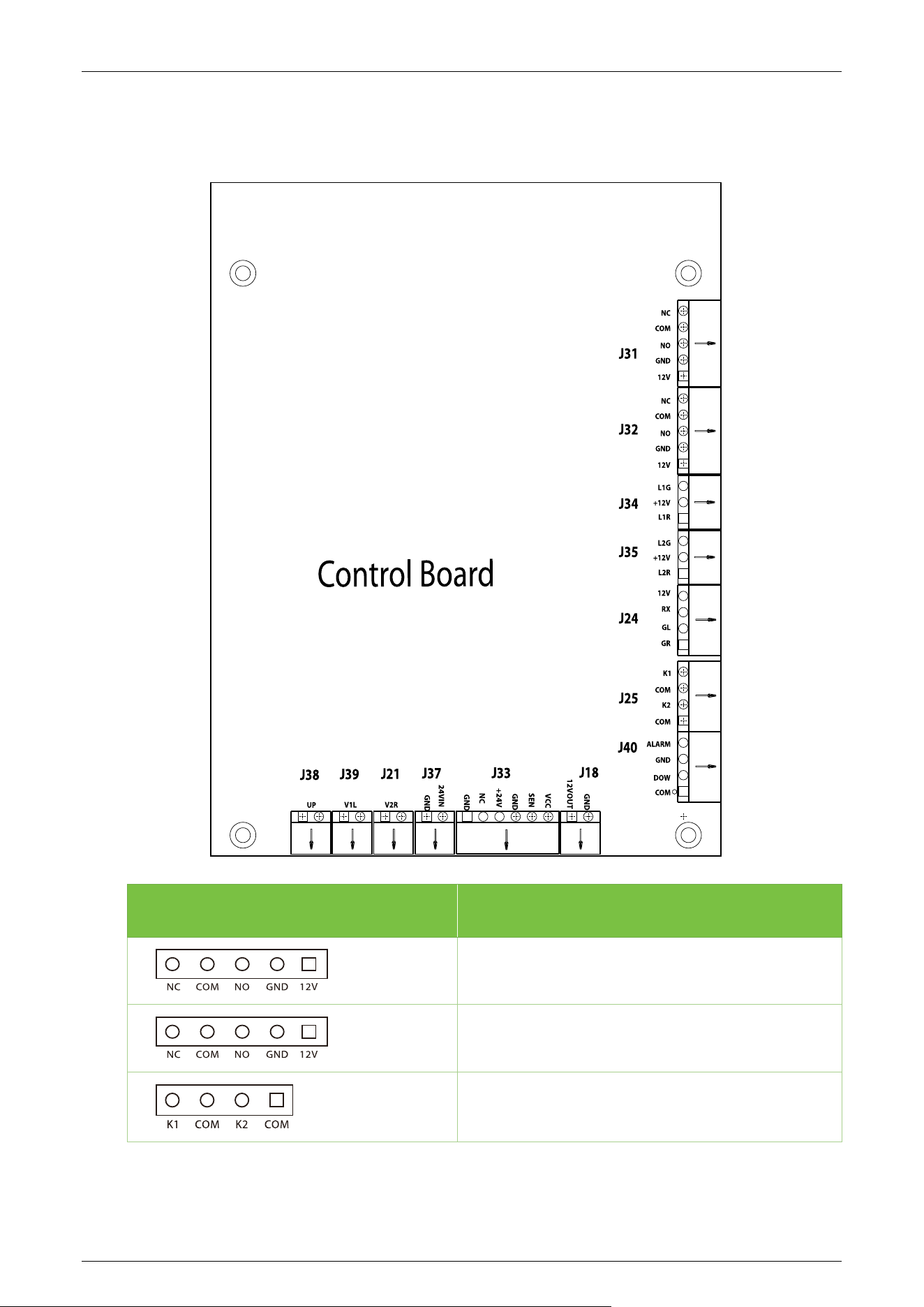
Wiring Diagram 3.1
Saturn-H1300 User Manual
Page | 22 Copyright©2026 ZKTECO CO., LTD. All Rights Reserved.
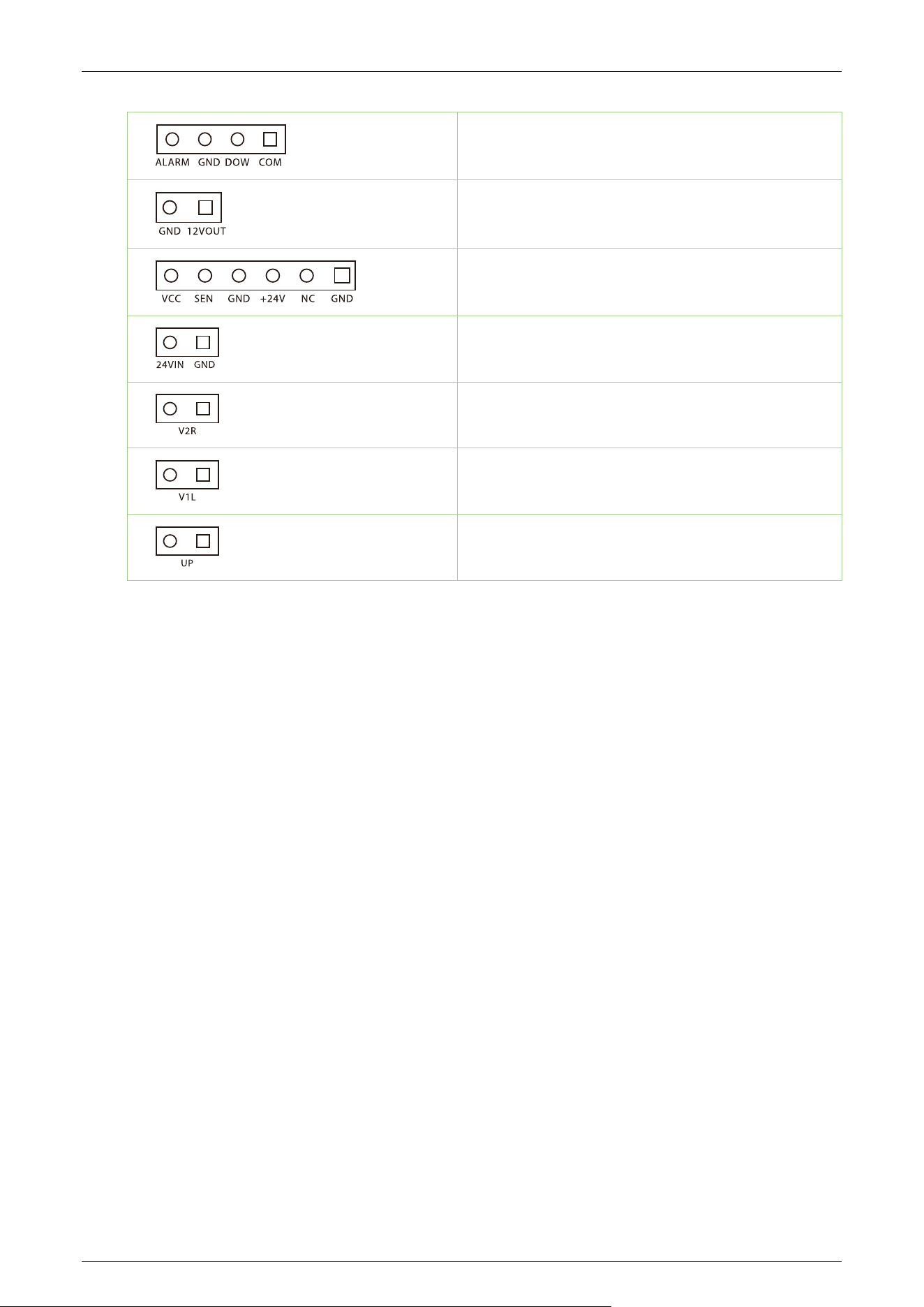
Turnstile Control Board 3.2
Terminal Description
Left Indicator Light
Right Indicator Light
Left/Right Open
Saturn-H1300 User Manual
Page | 23 Copyright©2026 ZKTECO CO., LTD. All Rights Reserved.
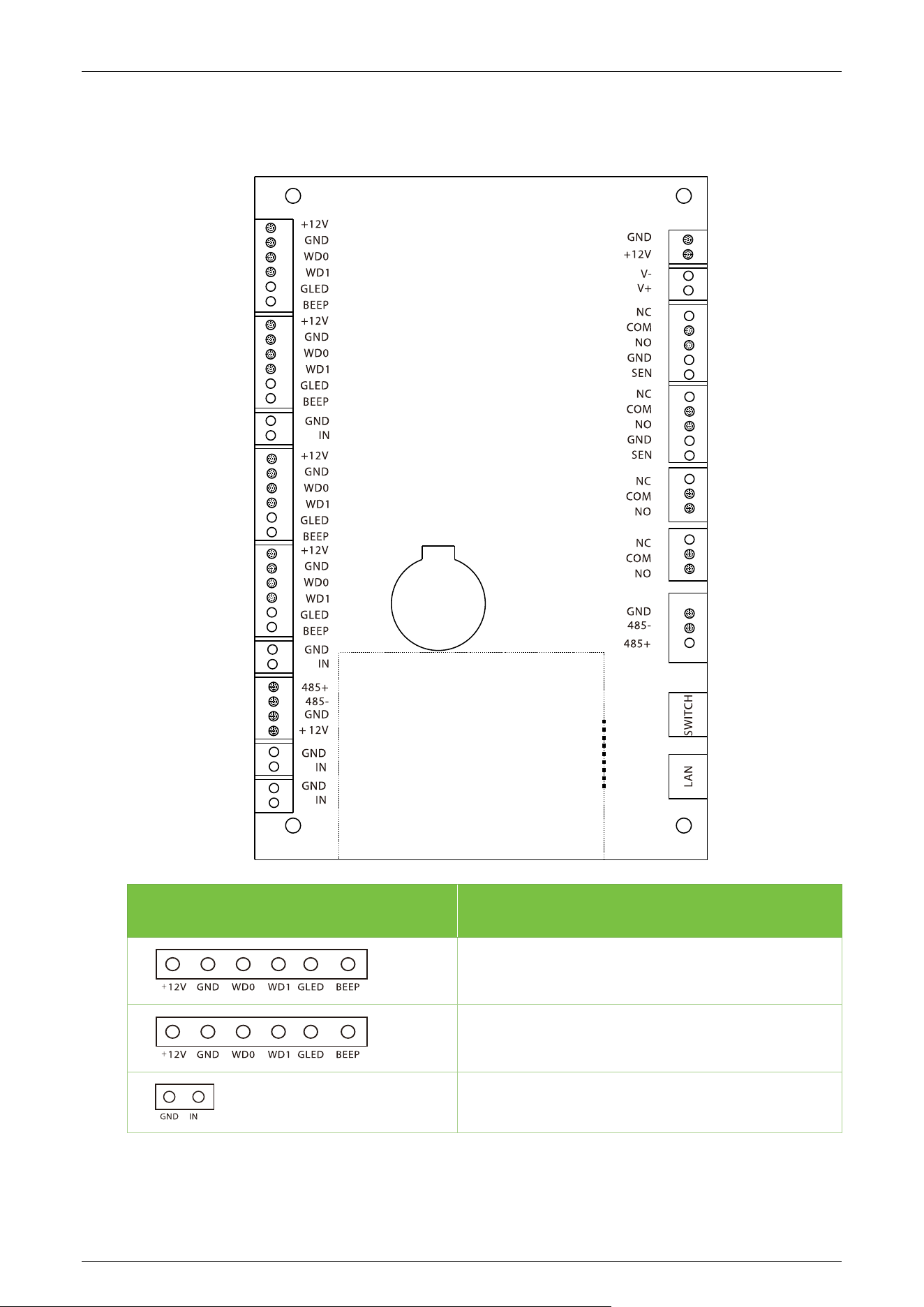
Alarm/ Fire Signal
12V Power Supply Output
Proximity Switch
24V Power Supply Input
Reserved
R-open Solenoid
L-Open Solenoid
Saturn-H1300 User Manual
Page | 24 Copyright©2026 ZKTECO CO., LTD. All Rights Reserved.
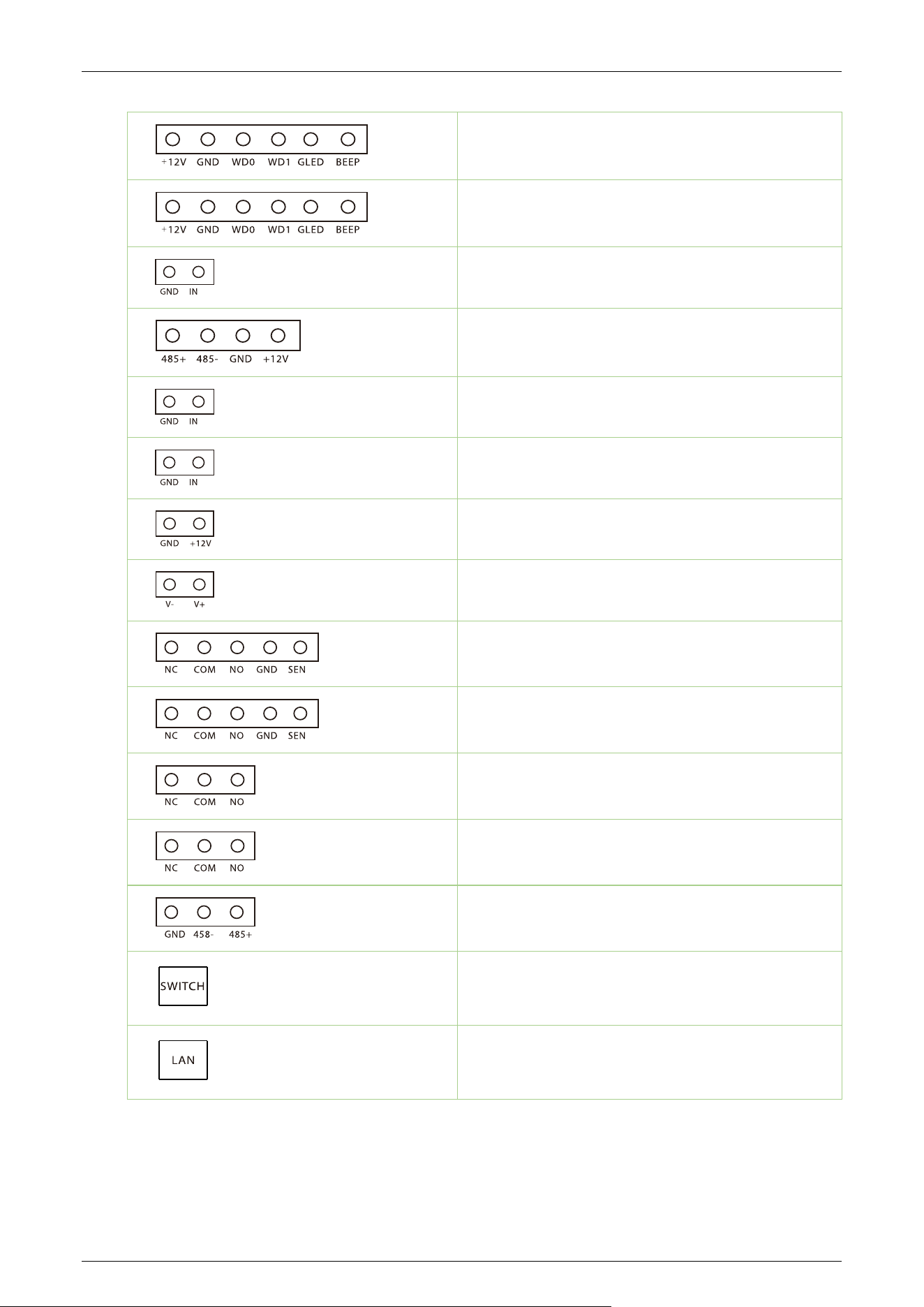
Access Control Board
★
3.3
Terminal Description
Reader
Reader
Button
Saturn-H1300 User Manual
Page | 25 Copyright©2026 ZKTECO CO., LTD. All Rights Reserved.
Reader
Reader
Button
RS485
Auxiliary Input
Auxiliary Input
Power In
Lock
Lock
Lock
Auxiliary Output
Auxiliary Output
485 Connections
Switch
Ethernet

Saturn-H1300 User Manual
Page | 26 Copyright©2026 ZKTECO CO., LTD. All Rights Reserved.
DIP Switch Configuration 3.4
1. The DIP switch consists of eight switches: KE-1 to KE-8. Up is ON, down is OFF.
2. Function setting notation: 1 = OFF, 0 = ON.
Function Item:
Unmanned passage time (KE-1, KE-2, KE-3):
Switch Status Time Period
111 (OFF OFF OFF)
5s (Default)
110 (OFF OFF ON)
10s
101 (OFF ON OFF)
15s
100 (OFF ON ON)
20s
011 (ON OFF OFF)
30s
010 (ON OFF ON)
40s
001 (ON OFF ON)
50s
000 (ON ON ON)
60s

Saturn-H1300 User Manual
Page | 27 Copyright©2026 ZKTECO CO., LTD. All Rights Reserved.
Passage Mode (KE-4, KE-5):
Switch Status Passage Mode
11 Passing is allowed in both directions (Default)
10 One way traffic, right passing is allowed
01 One way traffic, left passing is allowed
00 Both ways forbidden
Memory Swipe Mode (KE-6):
Set to 1 (OFF): Enable.
Set to 0 (ON): Disable.
Auto Test - solenoid automatically open and close (KE-8):
Set to 0 (ON): Enable.
Set to 1 (OFF): Disable.
Reserved Switch: KE-7

Saturn-H1300 User Manual
Page | 28 Copyright©2026 ZKTECO CO., LTD. All Rights Reserved.
4 Maintenance
Chassis Maintenance 4.1
The mainframe box is made of 304 stainless steel. So after a long period of operation, its surface may
have some stains. You can use a soft cotton-cloth to clean the mainframe box. In protect surface
lines, please wipe along the lines direction. It's best to polish and wax it.
Movement Maintenance 4.2
Before performing maintenance, turn off the power. Open the door, wipe off any surface dust, and
apply lubricant for smooth movement.
Power Supply Maintenance 4.3
Switch off the power supply before performing maintenance.
Check the power plug connection, if it is loose, properly fix it.
Do not change any connection position randomly.
Check the external power supply insulation periodically.
Do a periodic check for any kind of leakage.
Check if the technical parameters of interface are normal.
Check the service life of the electronic components and replace accordingly.
Caution: All the maintenance methods mentioned above for the Speed Gate R should be carried out
by a professional technician, particularly when it comes to the movement and electric control
components. To ensure operational safety, always switch off the power supply when the speed gate
is not in use.
Saturn-H1300 User Manual
Page | 29 Copyright©2026 ZKTECO CO., LTD. All Rights Reserved.
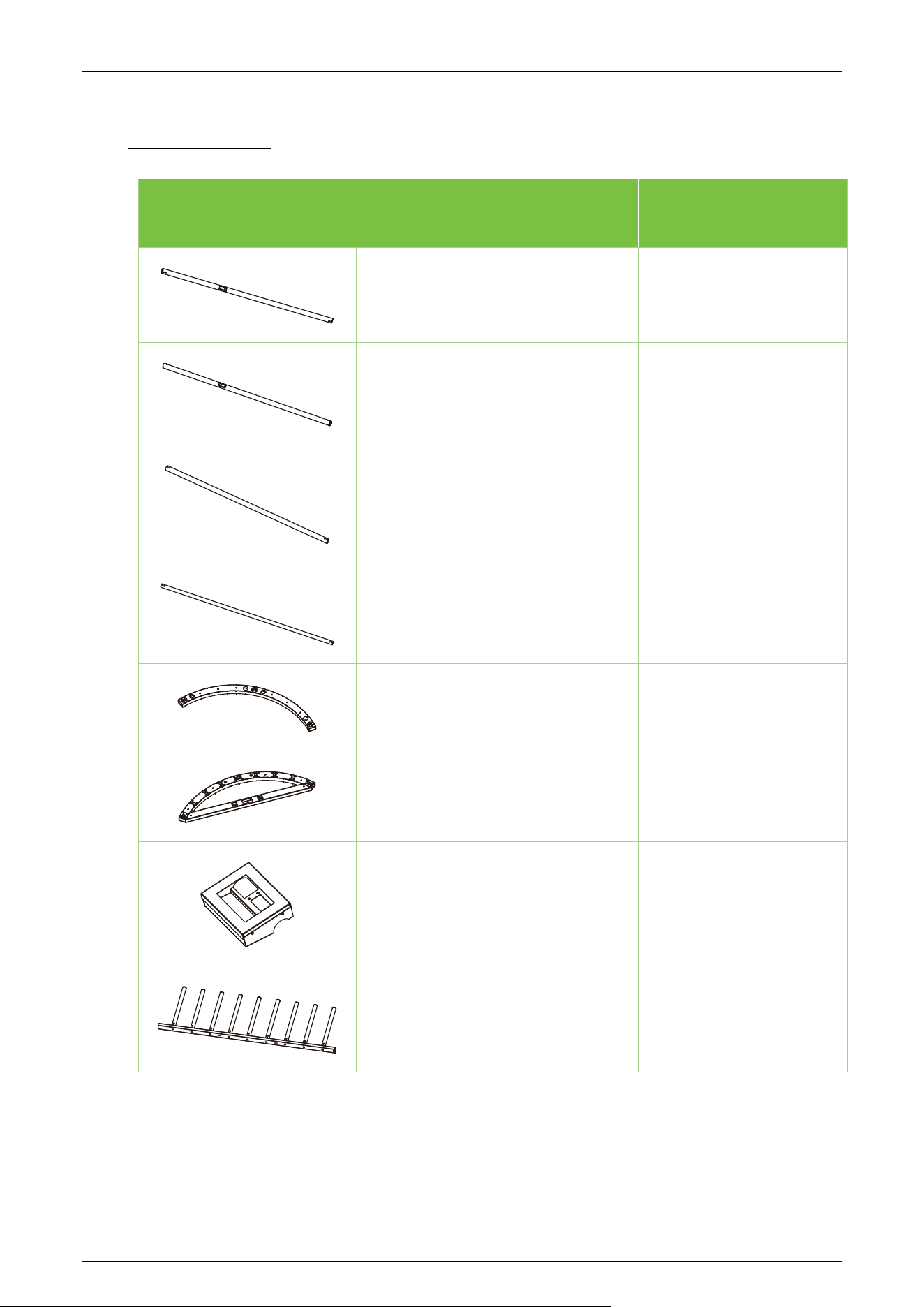
5 Packing List
Item Number
Remark
Left Side Welded Fence Assembly (51
Rods)
1
Right Side Welded Fence Assembly
(51 Rods)
1
Center Welded Fence Assembly (51
Rods)
1
38-Bar Fence Assembly
6
Fence Bottom Beam
1
Fence Top Beam
1
Authentication Box
2
Square Shaft with 9-Bar Rotor
Assembly
3
Saturn-H1300 User Manual
Page | 30 Copyright©2026 ZKTECO CO., LTD. All Rights Reserved.
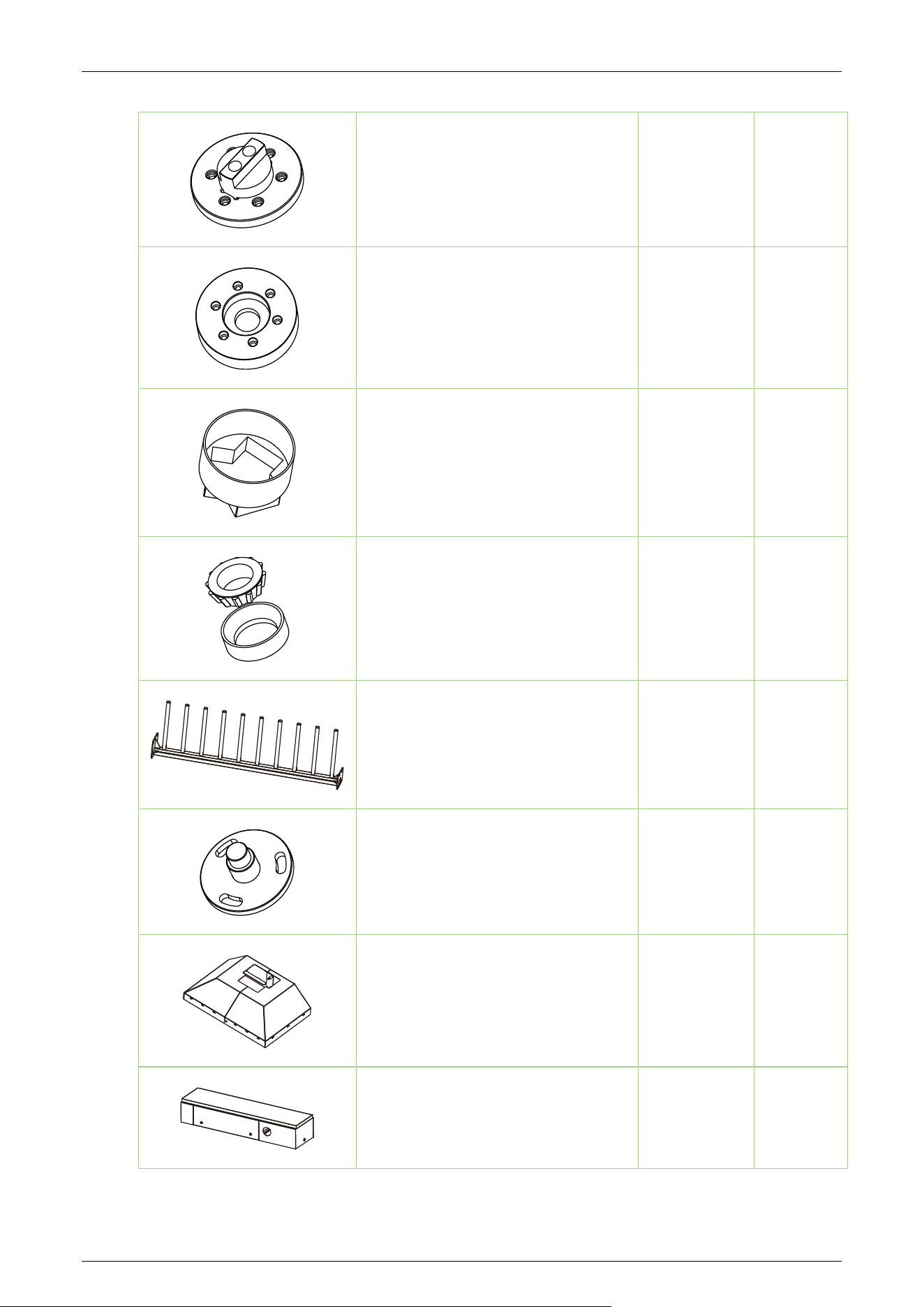
Shaft End Cap
1
Shaft Bottom Sleeve
1
Shaft Guard
1
Tapered Roller Bearing for Shaft
1
Square Tube Right Angle Bracket for
Fence Frame
1
Shaft Base
1
Base Box
1
Mechanism Housing
1
Saturn-H1300 User Manual
Page | 31 Copyright©2026 ZKTECO CO., LTD. All Rights Reserved.
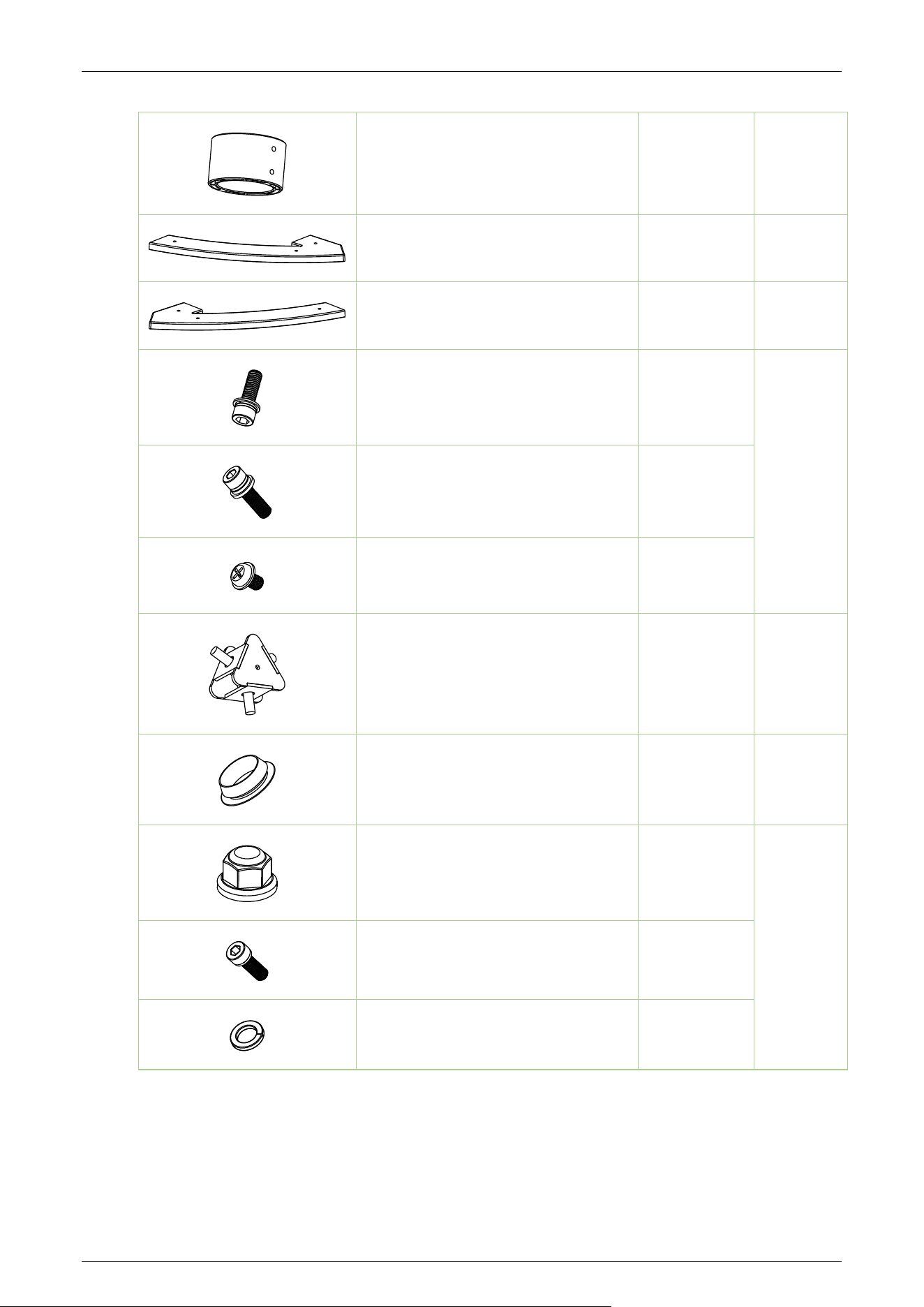
Mechanism Shaft Sleeve
1
Left Fence Guard
1
Right Fence Guard
1
Socket Head Cap Screw (M8x25mm)
24
Accessory
Bag 1
Socket Head Cap Screw (M6x16mm)
14
Pan Head Screw with Washer
(M3x8mm)
4
Shaft Fixing Block
2
Accessory
Bag 2
Hole Plug
12
Accessory
Bag 3
Lock Nut (M6)
8
Accessory
Bag 4
Socket Head Cap Screw (M6x20mm)
12
Spring Washer (M6xT1.6mm)
12
Saturn-H1300 User Manual
Page | 32 Copyright©2026 ZKTECO CO., LTD. All Rights Reserved.
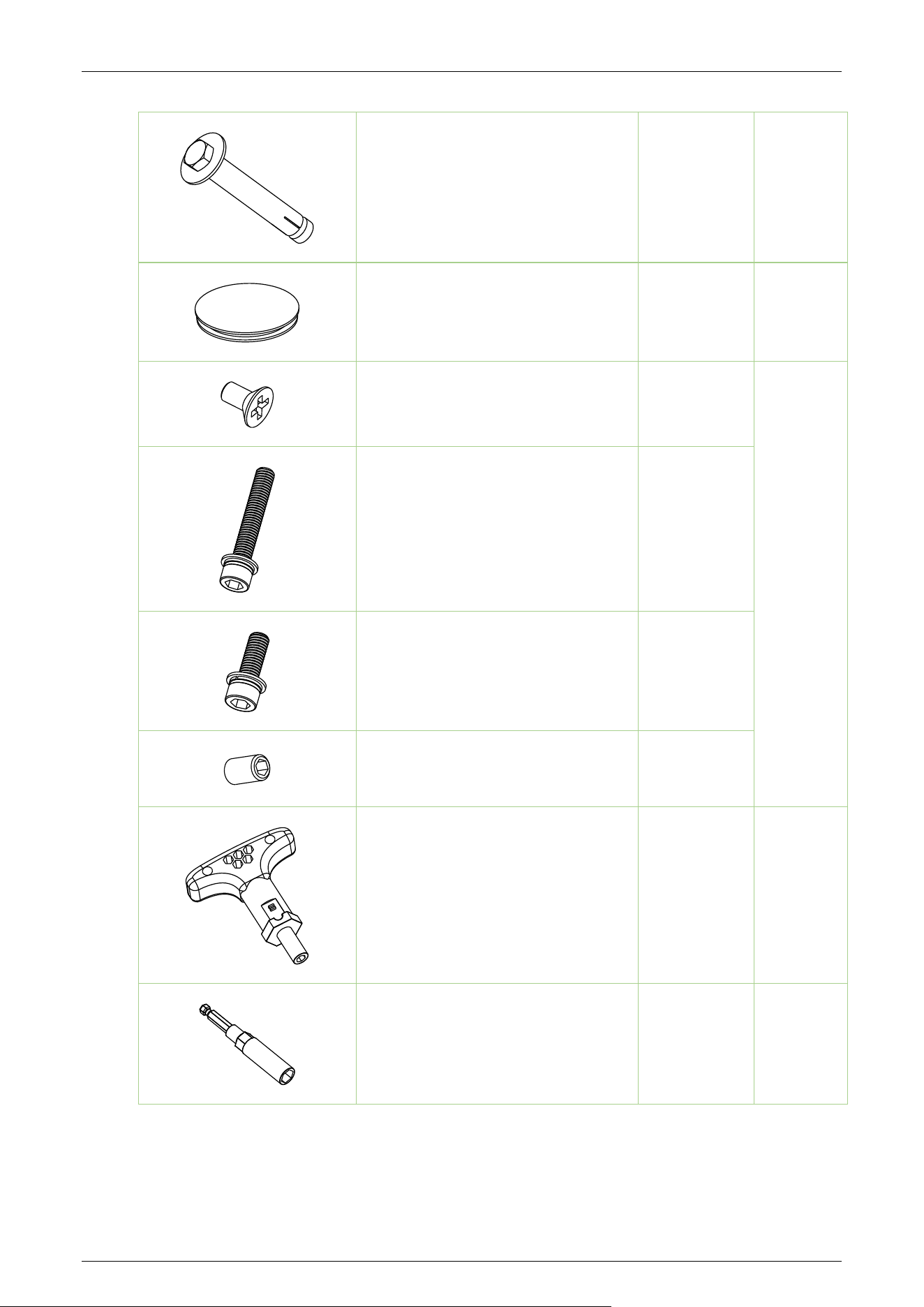
Internal Expansion Anchor
(100x16xM12mm)
11
Accessory
Bag 5/6
Ground Silicone Bumper
8
Accessory
Bag 7
Flat Head Phillips Screw (M4x8)
3
Accessory
Bag 8
Socket Head Cap Screw
(M10x60mm)
4
Socket Head Cap Screw
(M10x30mm)
4
Hex Socket Flat Point Set Screw
(M6x10)
2
T-Handle Ratchet Wrench
(100x83x6.35mm)
1
Magnetic Bit Holder (90x6.35mm)
1
Saturn-H1300 User Manual
Page | 33 Copyright©2026 ZKTECO CO., LTD. All Rights Reserved.
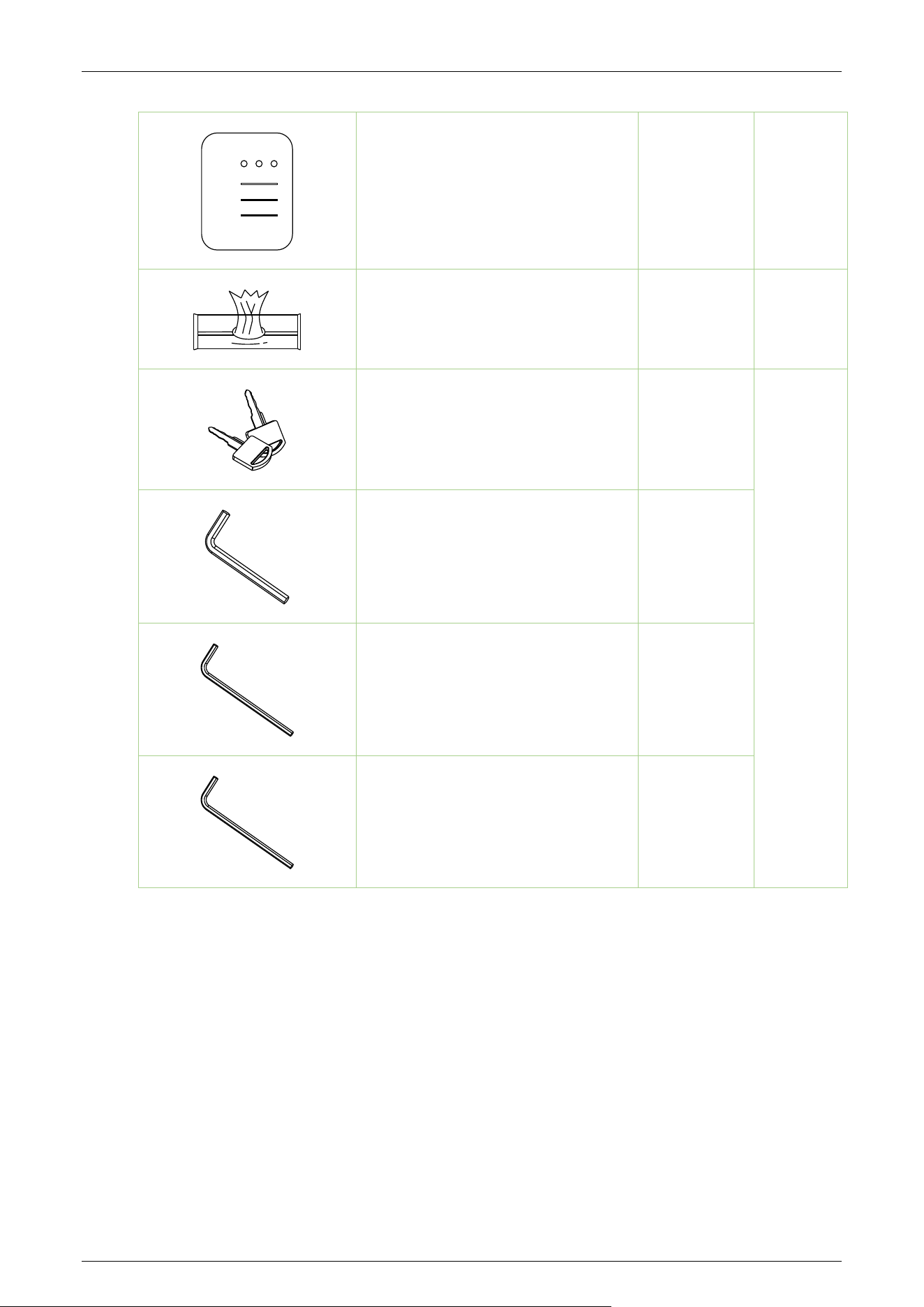
Maintenance Manual
1
Stainless Steel Cleaning Wipes
2
Keys
2
Accessory
Bag 9
Hex Key (H8x40x105mm)
1
Hex Key (H5x32.5x125mm)
1
Hex Key (H6x40x140mm)
1

Page | 34 Copyright©2026 ZKTECO CO., LTD. All Rights Reserved.
ZKTeco Industrial Park, No. 32, Industrial Road,
Tangxia Town, Dongguan, China.
Phone : +86 769 - 82109991
Fax : +86 755 - 89602394
www.zkteco.com
Copyright © 2026 ZKTECO CO., LTD. All Rights Reserved.