
mTS1000 Series Tripod Turnstile User Manual
Page | 1 Copyright©2026 ZKTECO CO., LTD. All Rights Reserved.
Thank you for choosing our product. Please read the instructions carefully
before operation. Follow these instructions to ensure that the product is
functioning properly. The images shown in this manual are for illustrative
purposes only.
For further details, please visit our Company’s website
www.zkteco.com
.
User Manual
TS1200 Pro Series Tripod Turnstile
Applicable Model(s): TS1200 Pro, TS1211 Pro, TS1222 Pro
Date: April 2026
Doc Version: 1.7
English

TS1200 Pro Series Tripod Turnstile User Manual
Page | 2 Copyright©2026 ZKTECO CO., LTD. All Rights Reserved.
Copyright © 2026 ZKTECO CO., LTD. All rights reserved.
Without the prior written consent of ZKTeco, no portion of this manual can be copied or forwarded in any
way or form. All parts of this manual belong to ZKTeco and its subsidiaries (hereinafter the "Company" or
"ZKTeco").
Trademark
is a registered trademark of ZKTeco. Other trademarks involved in this manual are owned by
their respective owners.
Disclaimer
This manual contains information on the operation and maintenance of the ZKTeco equipment. The
copyright in all the documents, drawings, etc. in relation to the ZKTeco supplied equipment vests in and is
the property of ZKTeco. The contents hereof should not be used or shared by the receiver with any third
party without express written permission of ZKTeco.
The contents of this manual must be read as a whole before starting the operation and maintenance of the
supplied equipment. If any of the content(s) of the manual seems unclear or incomplete, please contact
ZKTeco before starting the operation and maintenance of the said equipment.
It is an essential pre-requisite for the satisfactory operation and maintenance that the operating and
maintenance personnel are fully familiar with the design and that the said personnel have received
thorough training in operating and maintaining the machine/unit/equipment. It is further essential for the
safe operation of the machine/unit/equipment that personnel has read, understood and followed the
safety instructions contained in the manual.
In case of any conflict between terms and conditions of this manual and the contract specifications,
drawings, instruction sheets or any other contract-related documents, the contract conditions/documents
shall prevail. The contract specific conditions/documents shall apply in priority.
ZKTeco offers no warranty, guarantee or representation regarding the completeness of any information
contained in this manual or any of the amendments made thereto. ZKTeco does not extend the warranty
of any kind, including, without limitation, any warranty of design, merchantability or fitness for a particular
purpose.
ZKTeco does not assume responsibility for any errors or omissions in the information or documents which
are referenced by or linked to this manual. The entire risk as to the results and performance obtained from
using the information is assumed by the user.
ZKTeco in no event shall be liable to the user or any third party for any incidental, consequential, indirect,
special, or exemplary damages, including, without limitation, loss of business, loss of profits, business
interruption, loss of business information or any pecuniary loss, arising out of, in connection with, or

TS1200 Pro Series Tripod Turnstile User Manual
Page | 3 Copyright©2026 ZKTECO CO., LTD. All Rights Reserved.
relating to the use of the information contained in or referenced by this manual, even if ZKTeco has been
advised of the possibility of such damages.
This manual and the information contained therein may include technical, other inaccuracies or
typographical errors. ZKTeco periodically changes the information herein which will be incorporated into
new additions/amendments to the manual. ZKTeco reserves the right to add, delete, amend or modify the
information contained in the manual from time to time in the form of circulars, letters, notes, etc. for better
operation and safety of the machine/unit/equipment. The said additions or amendments are meant for
improvement /better operations of the machine/unit/equipment and such amendments shall not give any
right to claim any compensation or damages under any circumstances.
ZKTeco shall in no way be responsible (I) in case the machine/unit/equipment malfunctions due to any
non-compliance of the instructions contained in this manual (ii) in case of operation of the
machine/unit/equipment beyond the rate limits (iii) in case of operation of the machine and equipment in
conditions different from the prescribed conditions of the manual.
The product will be updated from time to time without prior notice. The latest operation procedures and
relevant documents are available on http://www.zkteco.com
If there is any issue related to the product, please contact us.
ZKTeco Headquarters
Address ZKTeco Industrial Park, No. 32, Industrial Road,
Tangxia Town, Dongguan, China.
Phone +86 769 - 82109991
Fax +86 755 - 89602394
For business-related queries, please write to us at: sales@zkteco.com
.
To know more about our global branches, visit www.zkteco.com.

TS1200 Pro Series Tripod Turnstile User Manual
Page | 4 Copyright©2026 ZKTECO CO., LTD. All Rights Reserved.
About the Company
ZKTeco is one of the world’s largest manufacturer of RFID and Biometric (Fingerprint, Facial, Finger-vein)
readers. Product offerings include Access Control readers and panels, Near & Far-range Facial Recognition
Cameras, Elevator/floor access controllers, Turnstiles, License Plate Recognition (LPR) gate controllers and
Consumer products including battery-operated fingerprint and face-reader Door Locks. Our security
solutions are multi-lingual and localized in over 18 different languages. At the ZKTeco state-of-the-art
700,000 square foot ISO9001-certified manufacturing facility, we control manufacturing, product design,
component assembly, and logistics/shipping, all under one roof.
The founders of ZKTeco have been determined for independent research and development of biometric
verification procedures and the productization of biometric verification SDK, which was initially widely
applied in PC security and identity authentication fields. With the continuous enhancement of the
development and plenty of market applications, the team has gradually constructed an identity
authentication ecosystem and smart security ecosystem, which are based on biometric verification
techniques.With years of experience in the industrialization of biometric verifications, ZKTeco was officially
established in 2007 and now has been one of the globally leading enterprises in the biometric verification
industry owning various patents and being selected as the National High-tech Enterprise for 6 consecutive
years. Its products are protected by intellectual property rights.
About the Manual
This manual introduces the operations of TS1200 Pro Series Tripod Turnstile.
All figures displayed are for illustration purposes only. Figures in this manual may not be exactly consistent
with the actual products.
Features and parameters with ★ are not available in all devices.

TS1200 Pro Series Tripod Turnstile User Manual
Page | 5 Copyright©2026 ZKTECO CO., LTD. All Rights Reserved.
Table of Contents
1 OVERVIEW ............................................................................................................................................ 6
Features ........................................................................................................................................................ 7 1.1
Appearance and System Components .................................................................................................... 7 1.2
1.2.1
Appearance ................................................................................................................................................................................................. 7
1.2.2 System Components ............................................................................................................................................................................. 8
Model Number and Access Control.......................................................................................................... 8 1.3
Mechanical System ..................................................................................................................................... 9 1.4
Electronic Control System ......................................................................................................................... 9 1.5
Power-On Self-Test ..................................................................................................................................... 9 1.6
Status of Traffic Indicator ........................................................................................................................ 10 1.7
Working Principle...................................................................................................................................... 10 1.8
Technical Specifications ........................................................................................................................... 11 1.9
2
FUNCTION INTRODUCTION .............................................................................................................. 13
Card Verification ★ .................................................................................................................................. 13 2.1
Fingerprint Verification★ ....................................................................................................................... 14 2.2
Wired Remote Control★ ......................................................................................................................... 15 2.3
Wireless Remote Control★ ..................................................................................................................... 18 2.4
3
CONTROL SYSTEM INTRODUCTION ................................................................................................. 20
Wiring Diagram ......................................................................................................................................... 20 3.1
Turnstile Control Board ............................................................................................................................ 21 3.2
Access Control Board ................................................................................................................................ 24 3.3
4
DEFAULT PARAMETERS .................................................................................................................... 27
5 TROUBLESHOOTING.......................................................................................................................... 28
6 PRECAUTION ...................................................................................................................................... 29
7 MAINTENANCE .................................................................................................................................. 31
Chassis Maintenance ................................................................................................................................ 31 7.1
Movement Maintenance .......................................................................................................................... 31 7.2
Power Supply Maintenance .................................................................................................................... 31 7.3
8
PACKING LIST .................................................................................................................................... 32
TS1200 Pro Series Tripod Turnstile User Manual
Page | 6 Copyright©2026 ZKTECO CO., LTD. All Rights Reserved.
1 Overview
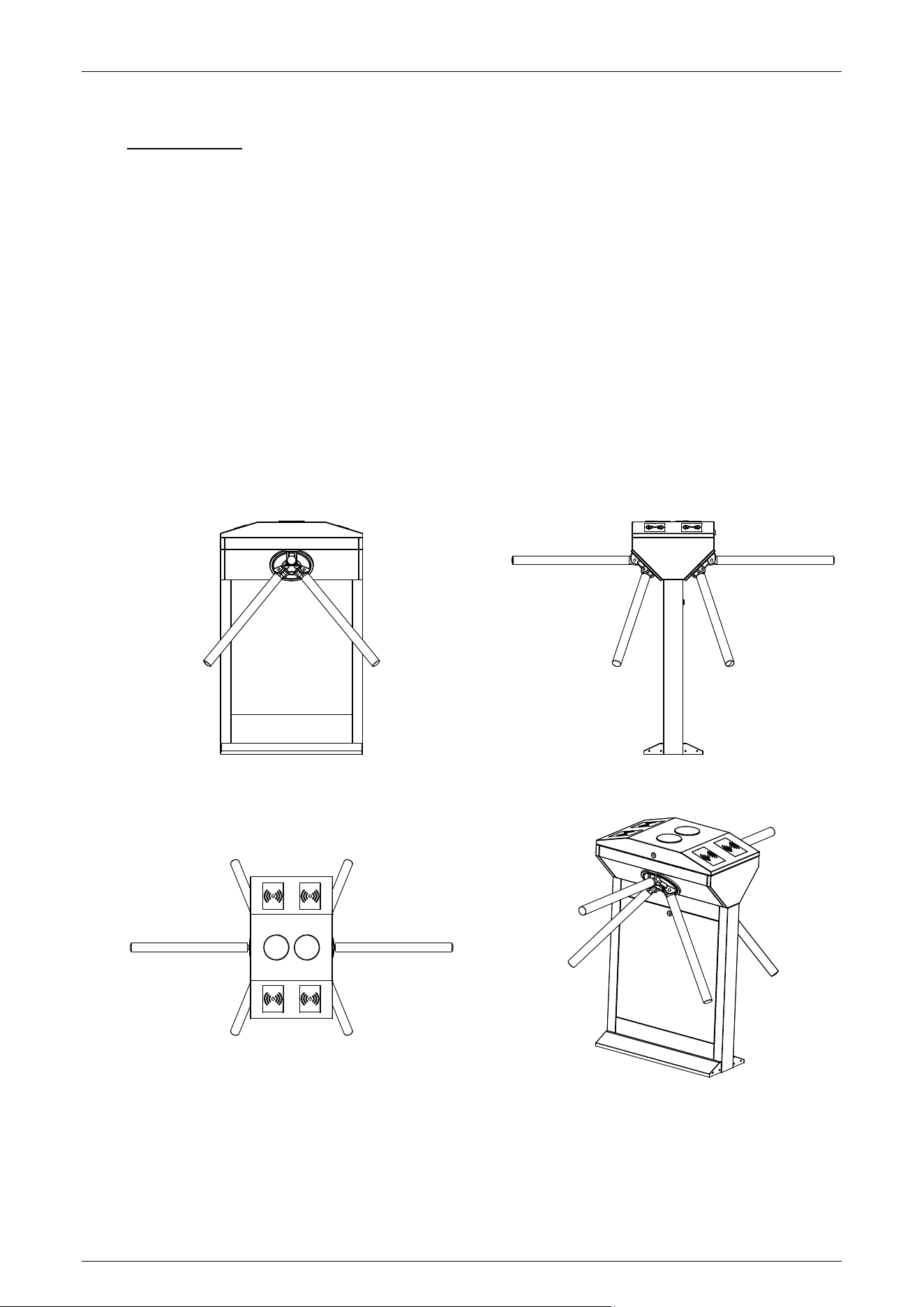
The TS1200 Pro series is part of an innovative semi-automatic tripod turnstile series. It features a
dual-core design, making it an affordable and practical product. The shell is made of high quality 304
stainless steel, and the parts are treated with anti-corrosion coating for enhances durability. The top
cover panel of the TS1200 Pro series, which integrated general access control, is customizable based
on different verification modes. It can support controller★, RFID reader★ or fingerprint reader★,
depending on the specific requirements. Additionally, thanks to its small and compact body design,
the TS1200 Pro series operates smoothly and quietly while consuming minimal power.
Our Pro series tripod turnstiles represent a classic and reliable solution for safeguarding your
premises. They are extensively utilized in a wide range of indoor environments due to their
versatility. These turnstiles are an ideal economical choice for office buildings and other similar
applications, seamlessly integrating into the overall setting.
TS1200 Pro Series Tripod Turnstile User Manual
Page | 7 Copyright©2026 ZKTECO CO., LTD. All Rights Reserved.
Features 1.1
Long service life, capable of opening and closing the gate more than 2 million times when
measured.
Drop arm automatically during power off.
Self-protection function to prevent strong intrusion, excessive current and other special
circumstances, such as damage to the product, death, etc.
Supports fire‑alarm linkage: the arm drops automatically when a fire signal is received,
accompanied by an emergency alarm.
SUS304 stainless steel housing.
LED pictograms for intuitive user experience and high throughput in both directions
High reliability with cost-effective design.
Low power consumption.
Easy and simple installation process.
Appearance and System Components 1.2
1.2.1 Appearance
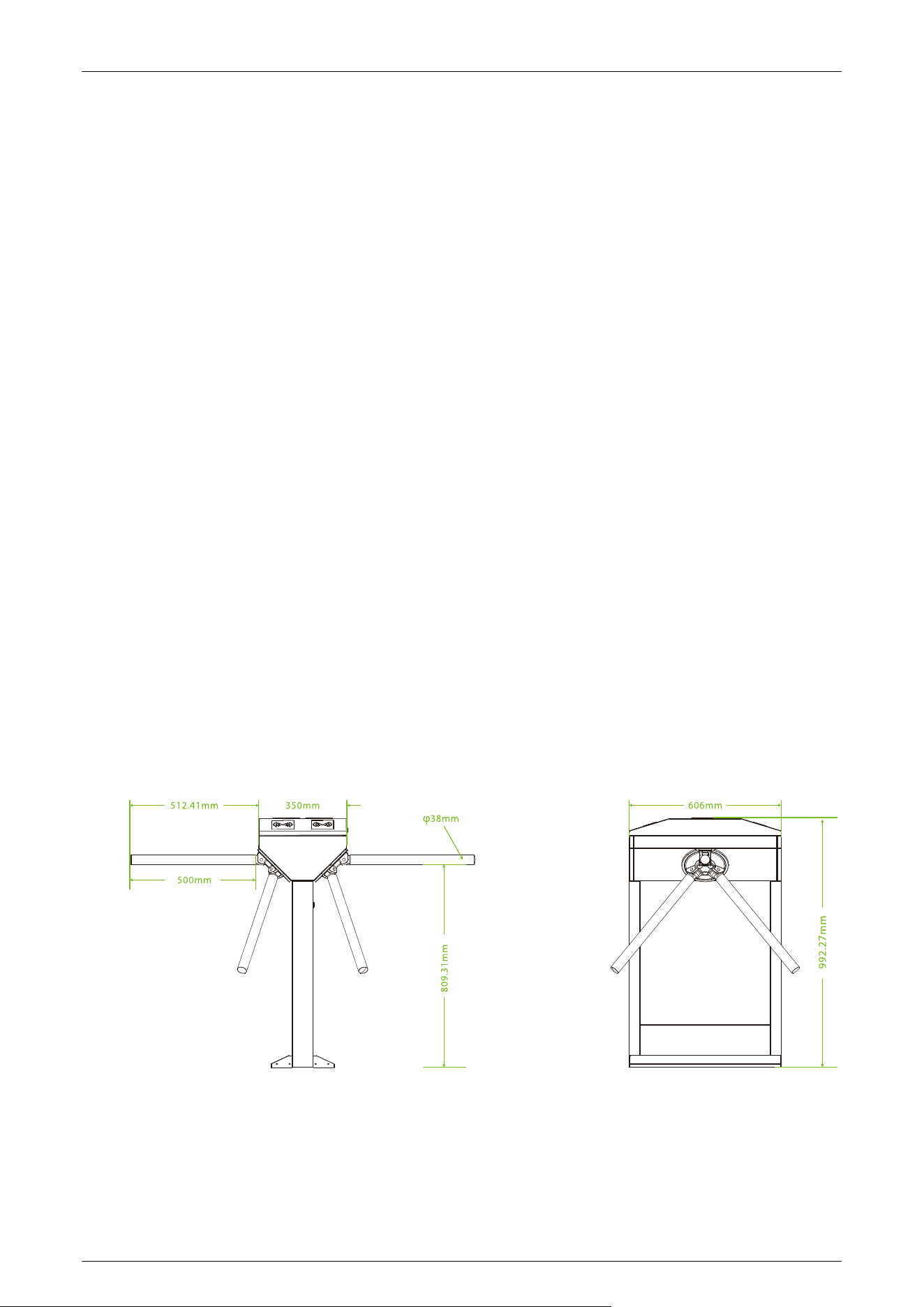
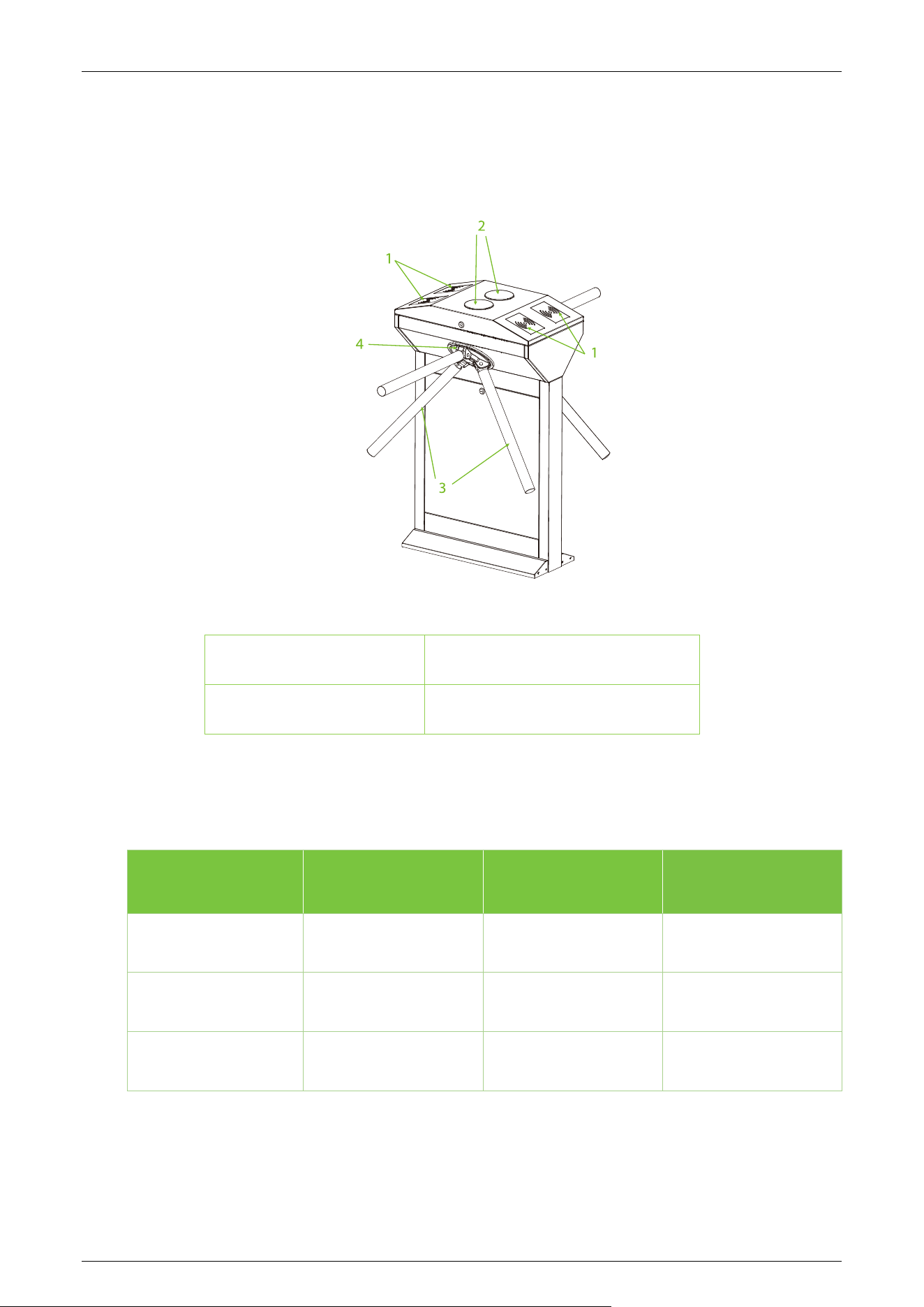
The appearance and dimensions of the TS1200 Pro series are shown in the figure below:
TS1200 Pro Series Tripod Turnstile User Manual
Page | 8 Copyright©2026 ZKTECO CO., LTD. All Rights Reserved.
1.2.2 System Components
The system components of the TS1200 Pro series are shown below:
1. Verification Units 2. Traffic Indicator
3. Arm 4. Disk Wheel
Model Number and Access Control 1.3
Model No. Controller RFID Reader Fingerprint Reader
TS1200 Pro
TS1211 Pro
√
√
TS1222 Pro
√ √ √

TS1200 Pro Series Tripod Turnstile User Manual
Page | 9 Copyright©2026 ZKTECO CO., LTD. All Rights Reserved.
Mechanical System 1.4
The mechanical system of the tripod turnstile consists of the chassis and the core components. The
chassis serves as a carrier for the installation of the Traffic Indicator, RFID Reader★, Fingerprint
Reader★ and Door lock.
Electronic Control System 1.5
The electronic control system of a tripod turnstile mainly consists of the RFID Reader★/Fingerprint
reader★, Turnstile control board and Traffic Indicator.
RFID Reader★: The reader reads the data on the card and transmits it to the Access Controller.
Fingerprint Reader★: The device compares the fingerprint being pressed onto the fingerprint
reader with the stored fingerprint data and transmits it to the Access Controller.
Turnstile Control Board: The turnstile control board serves as the control center of the system,
receiving signals from the reader and the dry contact. It performs logical calculations and processing
of these signals, and subsequently sends executive commands to the traffic indicator and the arm.
Traffic Indicator: The system will illuminate the red indicator when the gate is closed. When
someone passes the verification, the system will illuminate the green indicator.
Power-On Self-Test 1.6
1. Please make sure that the power requirements are strictly to avoid permanent damage to the
unit. Input voltage: AC 100 to 120V /200 to 240V. Note: The tripod turnstile must be connected
to the ground (earth).
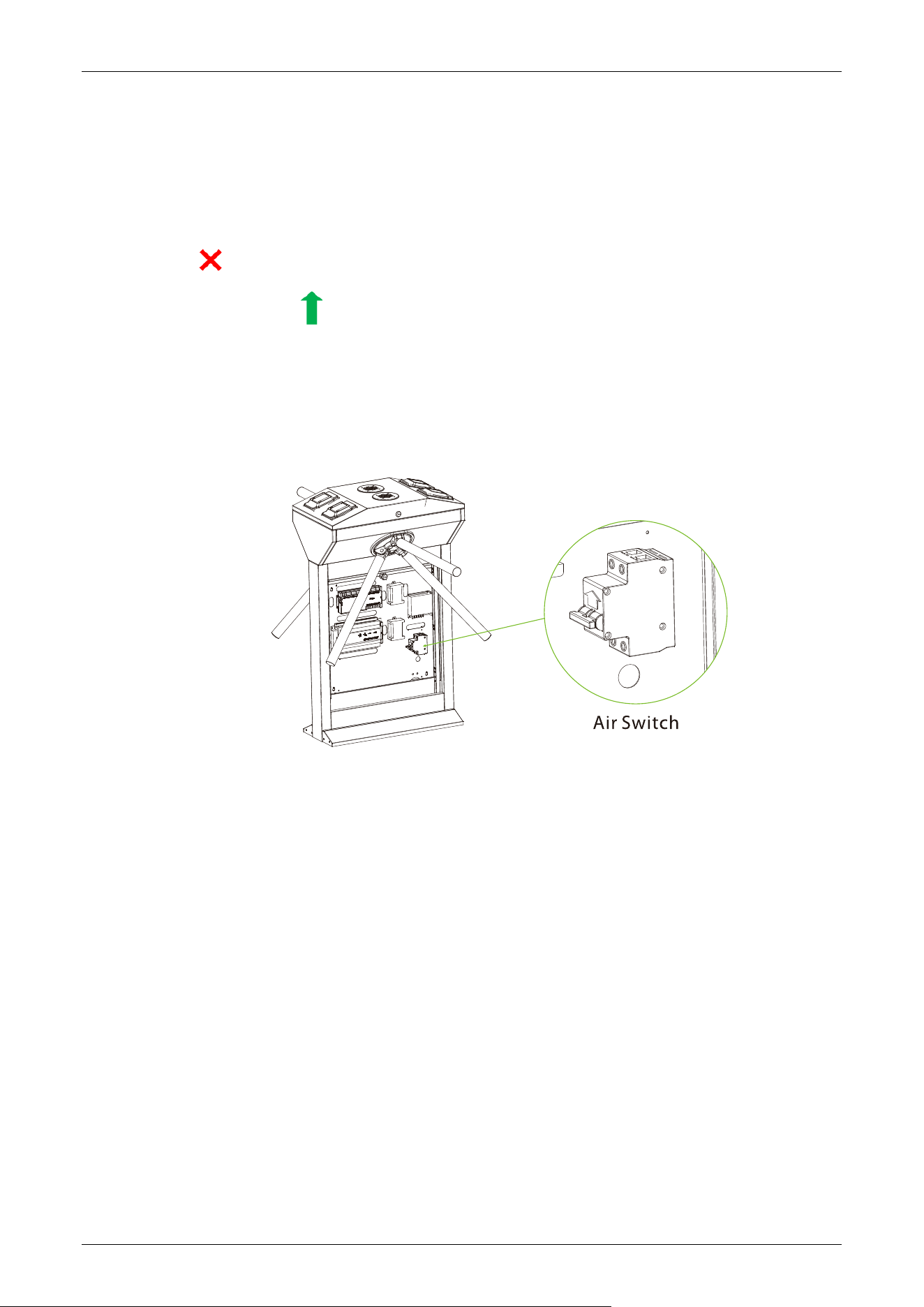
2. Power on the tripod turnstile and wait 30s to complete the self-check program.
3. Lift the arms manually, as shown in the diagram below:
4. Check whether the tripod turnstile and the traffic indicators work properly. If there is any
problem, please contact the supplier.
TS1200 Pro Series Tripod Turnstile User Manual
Page | 10 Copyright©2026 ZKTECO CO., LTD. All Rights Reserved.
Status of Traffic Indicator 1.7
The tripod turnstile is in working state after power-on self-test. The traffic indicator gives pedestrians
the corresponding indication of passage.
Standby:
Pass-through (In/Out):
Working Principle 1.8
1. When the device is connected to the power, the system performs the Power-On Self-Test. If no
issues are detected during this process, the device will operate normally
2. When a valid Card★/Fingerprint★ is detected, the traffic indicator will display a green light to
indicate successful verification to the pedestrian. And then, the reader sends signals to the
Access Controller to request permission to pass through the passage. The Access Controller will
send the signal to the mother control panel.
3. After receiving the signal from the Access Controller, the turnstile control board sends valid
control signals to the solenoid.
4. Pedestrians should follow the traffic indicator and gently push the unlocked arm; the arm will
automatically rotate till the pedestrian passes through the channel.
5. If a pedestrian enters the passage without successfully verifying their identification or if their
card★/fingerprint★ is invalid, the system will not grant passage. Only when a valid card★
/fingerprint★ is successfully confirmed, the pedestrian will be allowed to pass through the
passage.
Note: Make sure the ground wire of the system is reliably connected to avoid personal injuries or
other accidents.

TS1200 Pro Series Tripod Turnstile User Manual
Page | 11 Copyright©2026 ZKTECO CO., LTD. All Rights Reserved.
Technical Specifications 1.9
Model TS1200 Po Series
Visual Indicator
Steady green=Open
Steady red=Close
Audio Indicator
Internal buzzer
Lane Type
Dual lane (support bi-directional)
Lane Width
550mm
Barrier Movement Type
Rotating (tripod)
Tripod Length
500mm
Footprint
605*252mm
Lid Material
SU304 stainless steel
Lid Options
Streamlined (with mount options)
Authentication Methods
Fingerprint, RFID
Chassis Material
SU304 stainless steel (T=1.2mm)
Chassis Color
Silver/grey
Barrier Material
SUS304 stainless steel
Motherboard Function
Tripod (drop arm) duration; access mode configuration
Motherboard
Communication
Fire alarm port (relay)*1, RS485 port*1
Controller
C3-200 Plus (recommended); InBio 260 Pro Plus or third-party controller
subject to turnstile chassis space
Credential Options
Under Mount RFID Reader: ProID10/KR series
Under Mount Fingerprint Reader: FR1200/FR1500
Flow Rate
RFID: 25 passengers per minute
Fingerprint: 20 passengers per minute
Accessibility
Adult, Children (with care), Disability (with care)
Power Supply
110V / 220V AC ±10% 50/60Hz; DC 12V
Power Rating
10VA (Standby)
40VA (Operation)
Fire Signal
Input for voltage free contact
Noise Level
Less than 60dB
MTTR
Less than 60 minutes
MCBF
2 million

TS1200 Pro Series Tripod Turnstile User Manual
Page | 12 Copyright©2026 ZKTECO CO., LTD. All Rights Reserved.
Weight
Gross weight: 85kg
Net weight: 65kg
Dimension (L*W*H)
1374*606*992mm
Dimensions with Packing
(L*W*H)
470*750*1100mm
Operating Temperature
-20℃ to 70℃
Operating Humidity
0% to 80% RH (Non-condensing)
Certifications
CE, FCC
Ingress Protection Rating
Tested to IPX4-level water resistance (self-lab test result)
Supported Software
ZKBio CVAccess / ZKBio CVSecurity
(expands functionality for access control)
Safety Levels
Auto-locking tripod upon authentication failure; drop arm during power
off or power outage
Security Features
Anti-tailgating
Product Delivery
Pre-assembled
Application Environment
Indoor/Outdoor (if sheltered)
Site Preparation
Flat level finished floor
(base plate in options for unfinished floor)
Security Level
Medium
Emergency Mode
Support (drop arm)
Packing Material
Wooden box (standard)
TS1200 Pro Series Tripod Turnstile User Manual
Page | 13 Copyright©2026 ZKTECO CO., LTD. All Rights Reserved.
2 Function Introduction
Card Verification
★
2.1
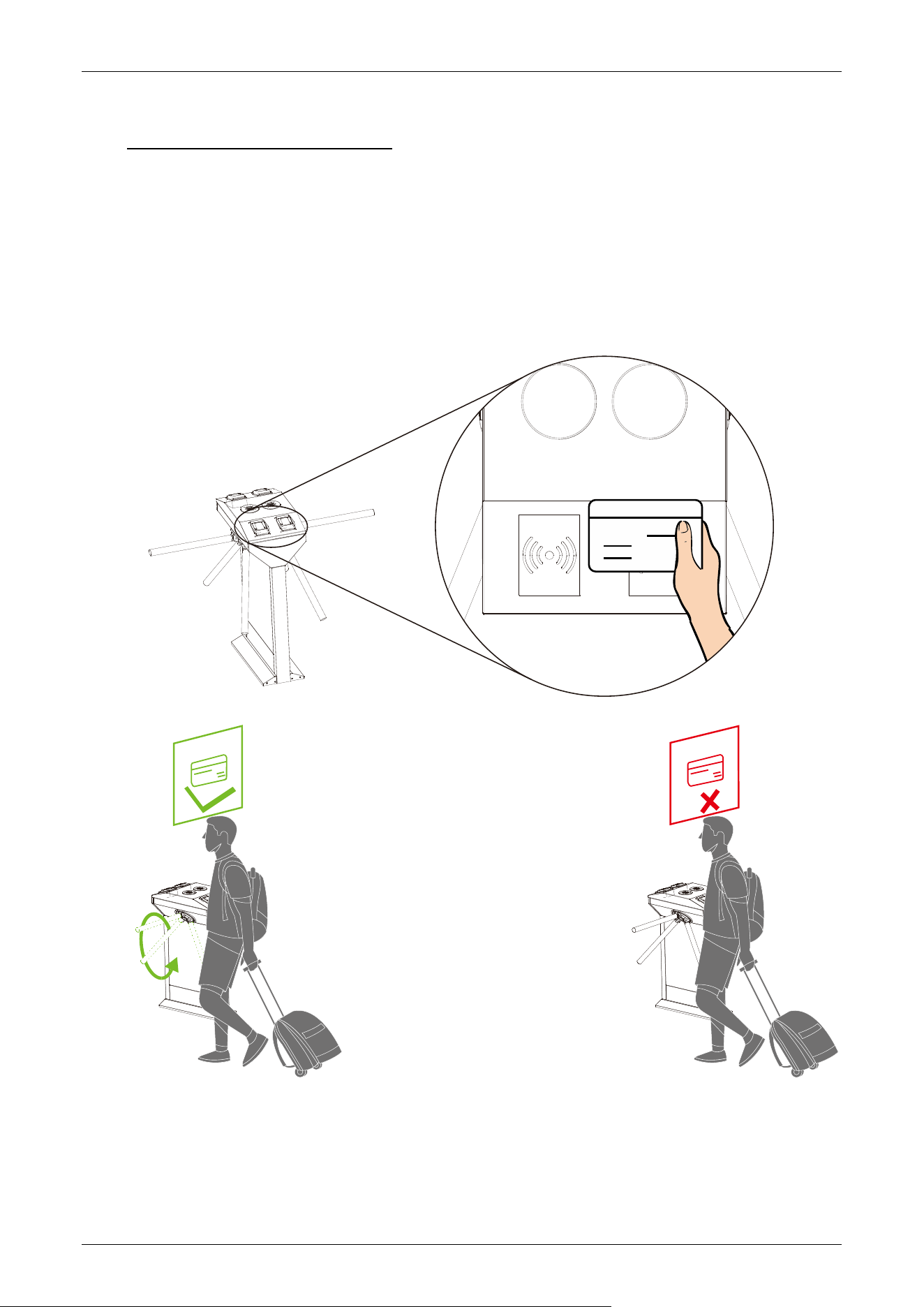
The Card Verification mode compares the card number in the card induction area with all the card
number data registered in the device and sends it to the Access Controller.
When a user places their card on the card reading area, the device enters card authentication mode.
TS1200 Pro Series Tripod Turnstile User Manual
Page | 14 Copyright©2026 ZKTECO CO., LTD. All Rights Reserved.
Fingerprint Verification
★
2.2
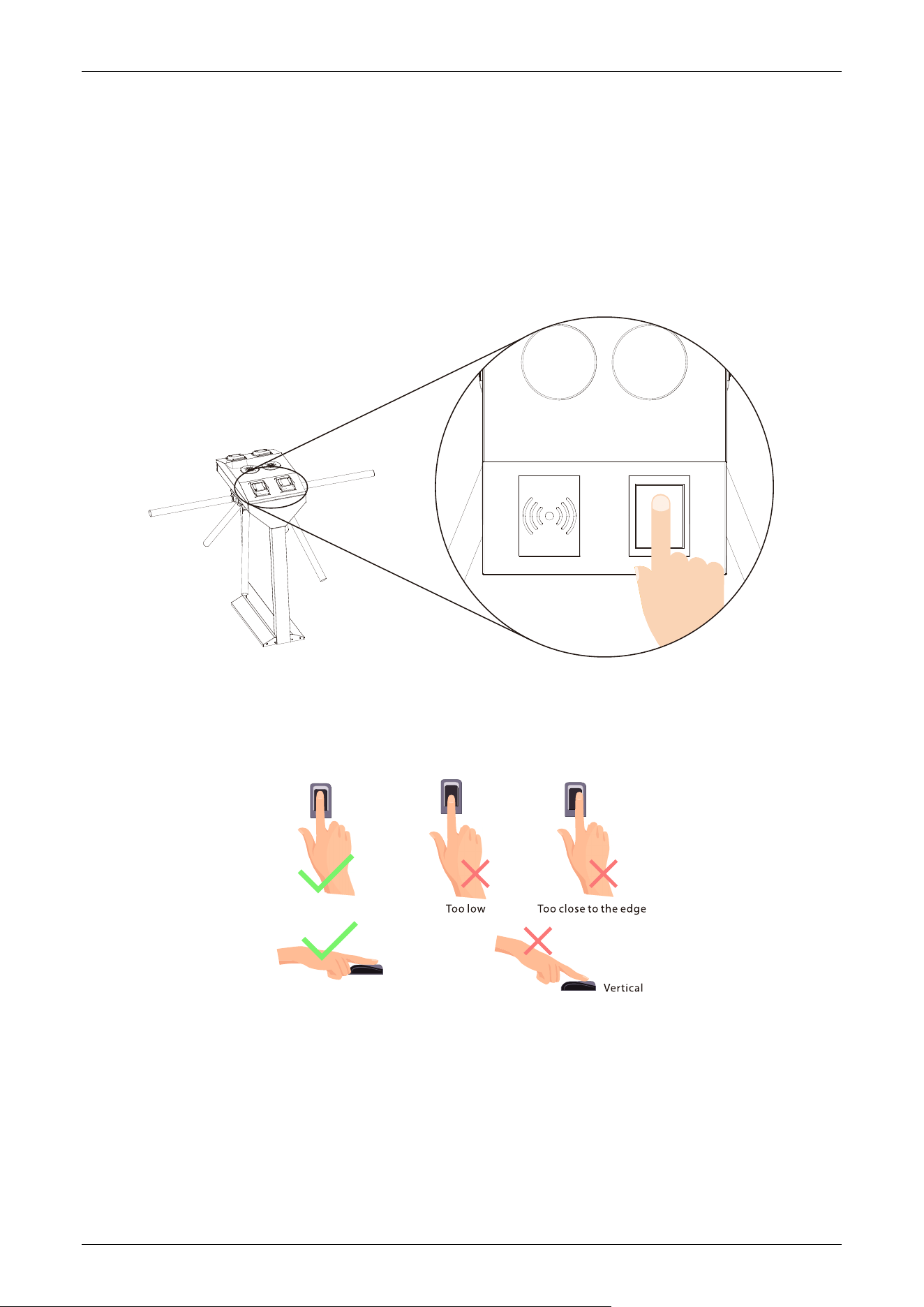
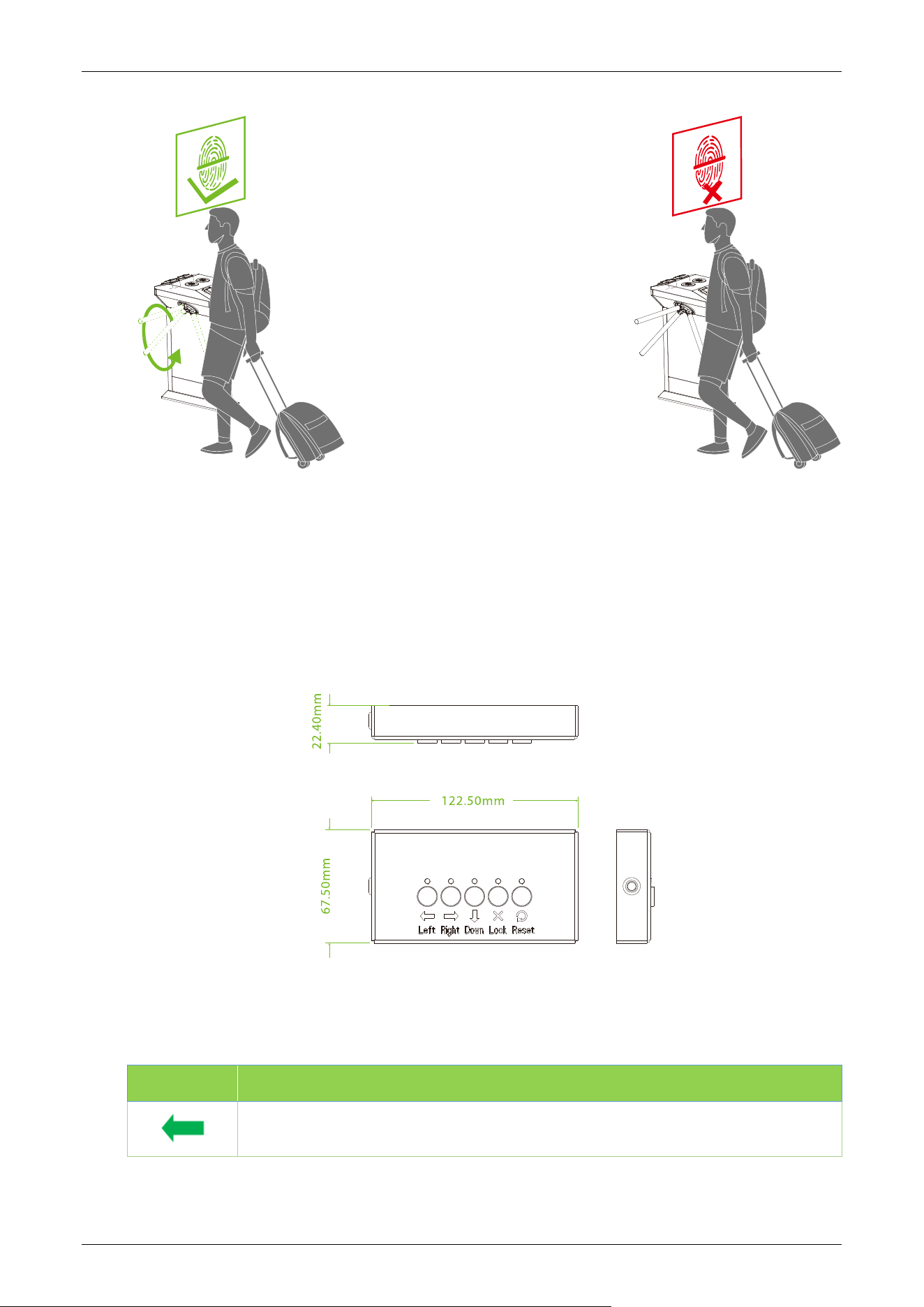
In this verification mode, the device compares the fingerprint that is being pressed onto the
fingerprint reader with all the fingerprint data sends it to the Access Controller.
When a user places their finger onto the fingerprint scanner, the device enters the fingerprint
authentication mode.
Recommended fingers: It is recommended to use index, middle, or ring finger for registration and
avoid using the thumb or little finger, as they are difficult to accurately press onto the fingerprint
reader.
Note: Please use the correct method when pressing your fingers onto the fingerprint reader for
registration and identification. Our company will assume no liability for recognition issues that may
result from incorrect usage of the product. We reserve the right of final interpretation and
modification concerning this point.
TS1200 Pro Series Tripod Turnstile User Manual
Page | 15 Copyright©2026 ZKTECO CO., LTD. All Rights Reserved.
Wired Remote Control
★
2.3
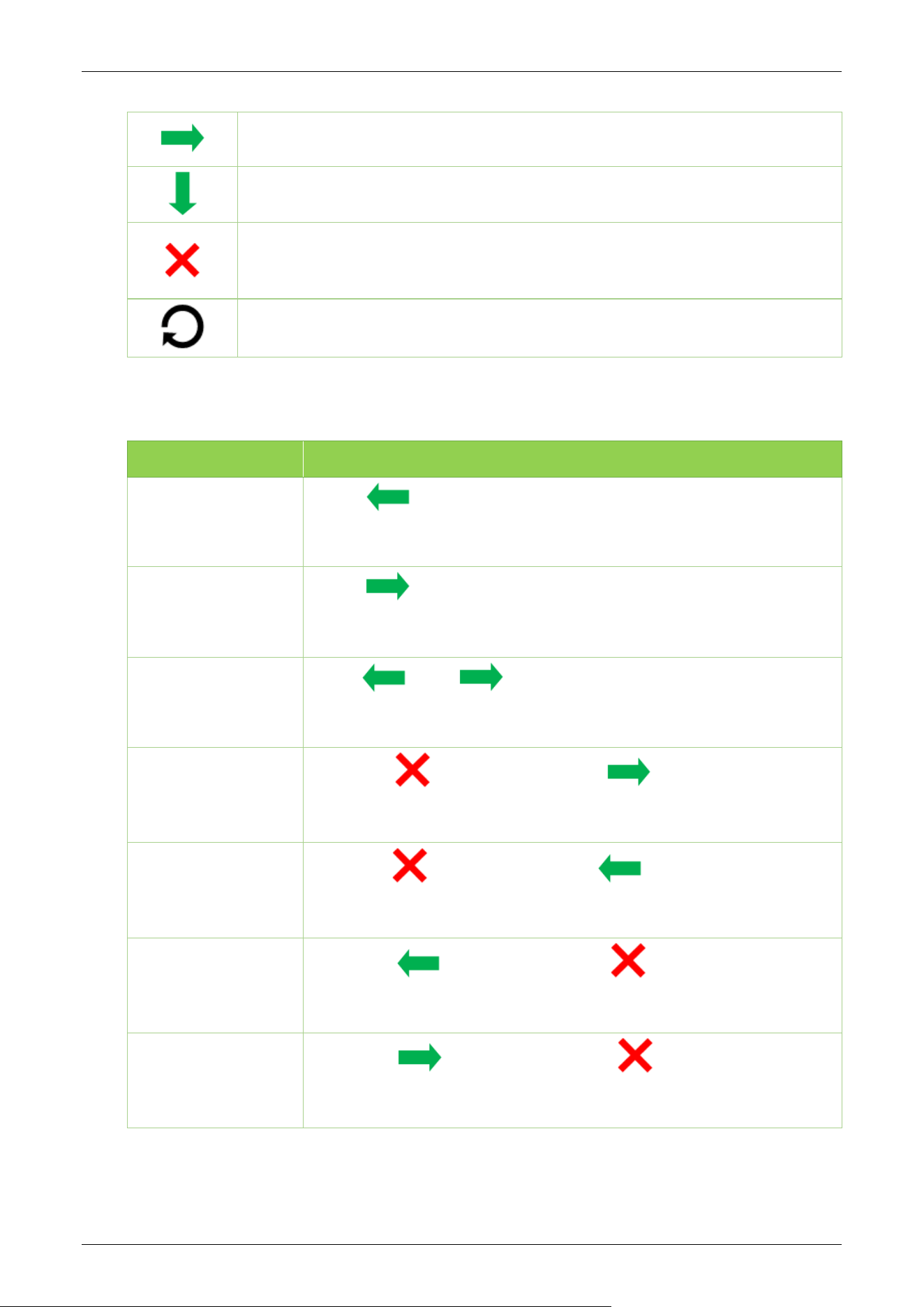
The wired remote control has five buttons: the Left button, Right button, Down button, Lock button,
and Reset button. These five independent buttons have individual functions as well as combined
functions. Pressing two buttons within the specified time interval can call up a predefined mode.
The following tables describe the modes of different button press actions:
1. Independent functions:
Button Description
Press the button once to open the tripod turnstile and can pass by identity
verification from the inbound.
TS1200 Pro Series Tripod Turnstile User Manual
Page | 16 Copyright©2026 ZKTECO CO., LTD. All Rights Reserved.
Press the button once to open the tripod turnstile and can pass by identity
verification from the outbound.
In emergency mode, press the button once to fall the arm lever. Then the inbound
and outbound sides get open and can pass freely without identity verification.
Press the button once to raise the arm lever. Then the inbound and outbound
sides are controlled by the tripod turnstile. The i
dentity verification becomes
invalid, and no pass is allowed.
Press a button once to restore the default inbound and outbound identity
verification pass mode of the arm.
2. Combined functions:
Status Description
Inbound free,
Outbound control
Press " " twice to open the tripod turnstile on both sides. The
inbound side is free to pass without identity verification and can pass by
identity verification from the outbound.
Inbound control,
Outbound free
Press " " twice to open the tripod turnstile on
both sides. The
outbound side is free to pass without identity verification and can pass by
identity verification from the inbound.
Inbound free,
Outbound free
Press " " and " " at the same time to open the tripod turnstile
on both sides and both inbound and outbound
sides can pass freely
without identity verification.
Inbound forbidden,
Outbound free
First press " " once, and then press " " once, then the inbound
side is forbidden to pass, and the outbound side is free to pass without
identity verification.
Inbound free,
Outbound forbidden
First press " " once, and then press " " once, then the outbound
side is forbidden to pass, and the inbound side is free to pass without
identity verification.
Inbound control,
Outbound forbidden
First press " " once, and then press " " once, then the outbound
side is forbidden to pass, and the inbound side needs to identity
verification to pass.
Inbound forbidden,
Outbound control
First press " " once, and then press " " once, then the inbound
side is forbidden to pass, and the outbound side needs to identity
verification to pass.

TS1200 Pro Series Tripod Turnstile User Manual
Page | 17 Copyright©2026 ZKTECO CO., LTD. All Rights Reserved.
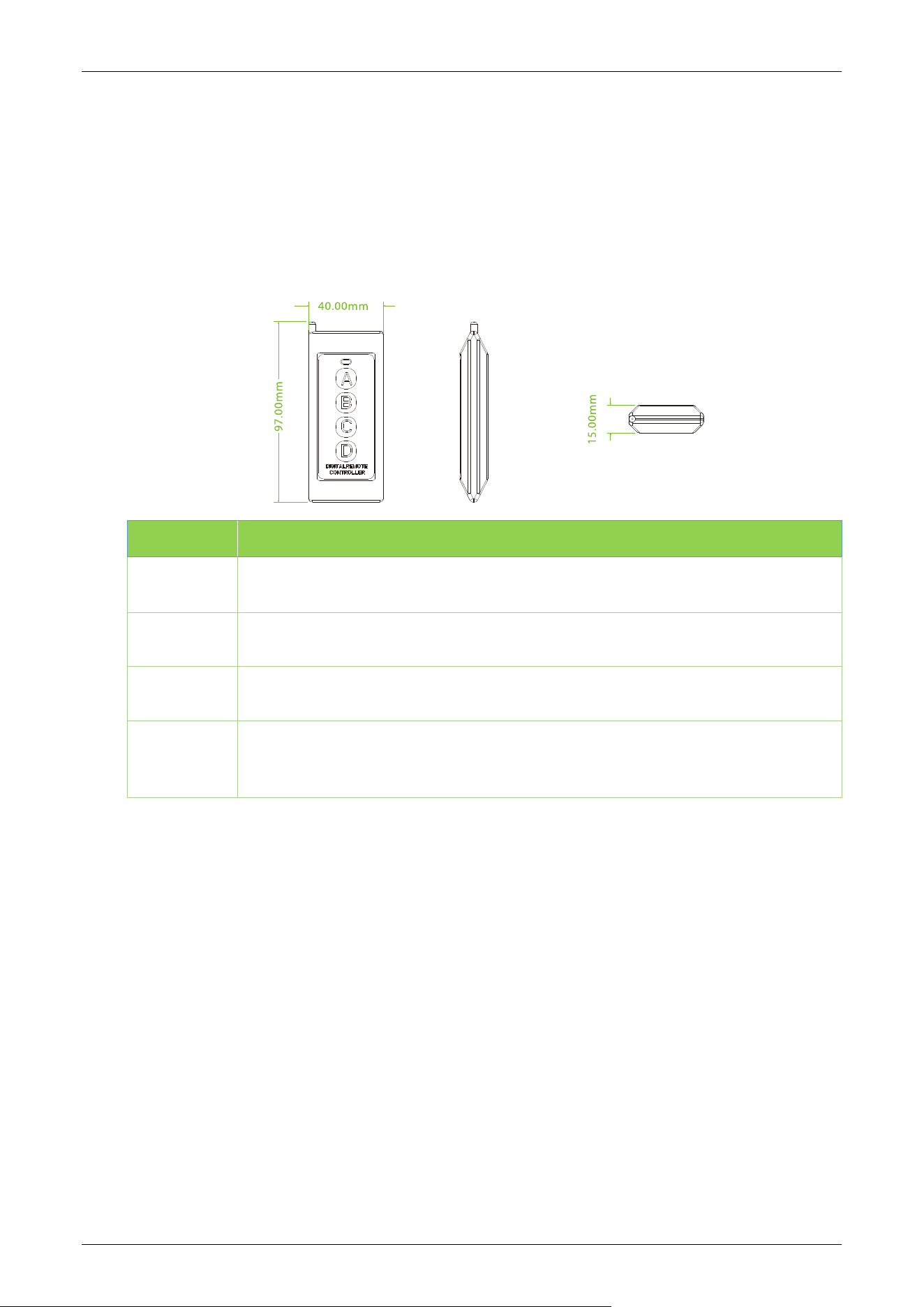
The wired remote control is connected to the controller, then set the controller's code pairing mode
to complete the wired remote control’s setup.
Dial code description:
The DIP switch is divided in eight dial codes from KE-1 to KE-8. Move the switch Up to turn ON and
down to turn OFF.
Description of Function Setting:
Dial 0 to turn OFF.
Dial 1 to turn ON.
Dial code function item:
Unmanned passage time (KE-1, KE-2, KE-3):
Dial code function item:
Switch Status Time Period
000 (OFF OFF OFF)
5s (Default)
001 (OFF OFF ON)
10s
010 (OFF ON OFF)
15s
011 (OFF ON ON)
20s
100 (ON OFF OFF)
30s
101 (ON OFF ON)
40s
110 (ON OFF ON)
50s
111 (ON ON ON)
60s
Memory Swipe Mode (KE-6):
Dial 1 (ON) to turn on.
Dial 0 (OFF) to turn off.
Turn on Alarm Mode (KE-8):
Dial 1 (ON) to turn on.
Dial 0 (OFF) to turn off.
TS1200 Pro Series Tripod Turnstile User Manual
Page | 18 Copyright©2026 ZKTECO CO., LTD. All Rights Reserved.
Wireless Remote Control
★
2.4
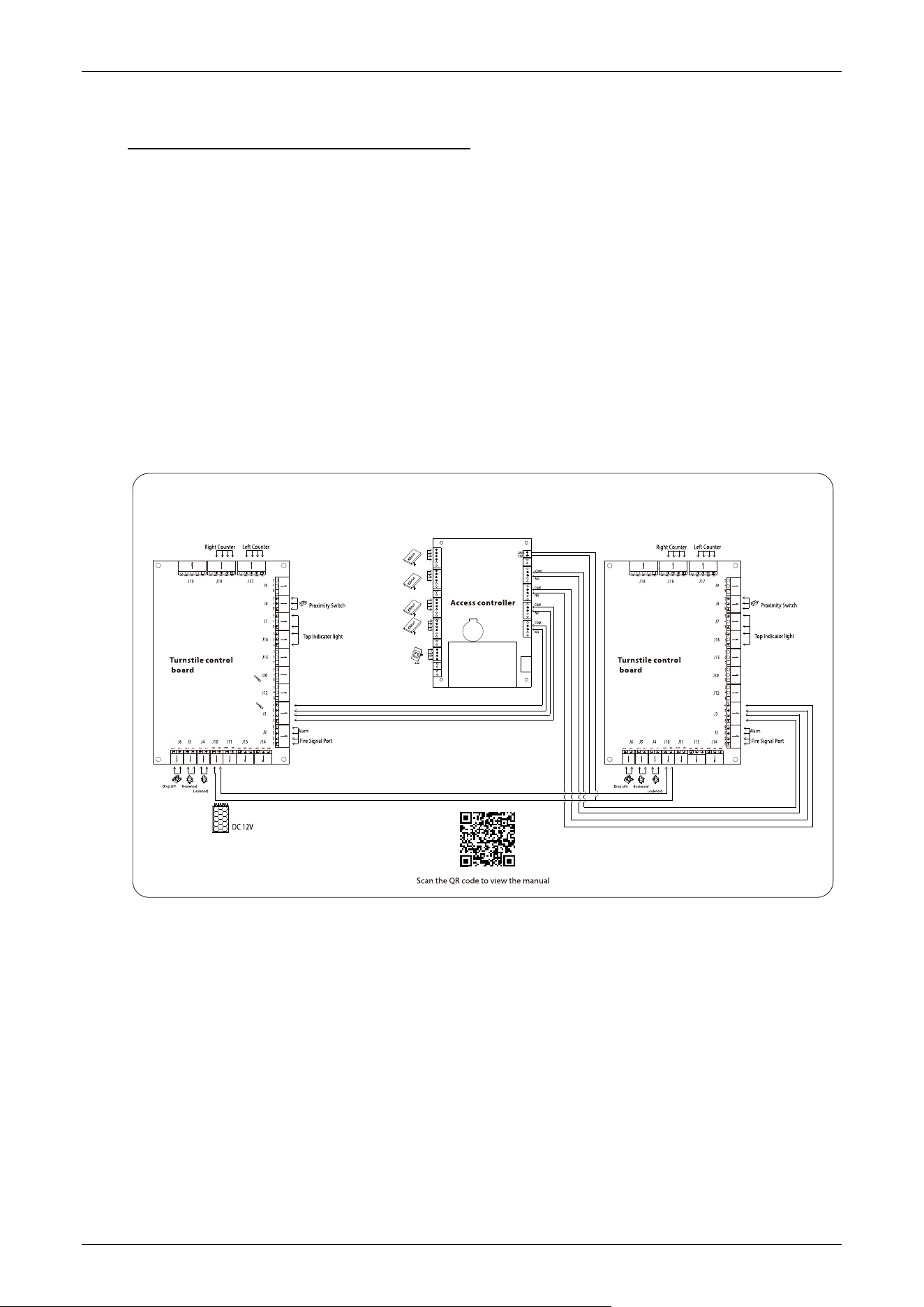
The tripod turnstile's wireless remote control is an intelligent device that remotely controls the
entrance and exit. It is designed for the administrator to control the tripod turnstile manually. The
wireless remote control contains four buttons: A, B, C, and D, which correspond to the options open
entrance gate, open exit gate, emergency mode open-bar pass, and alarm lock.
Buttons Description
A
Press the button once to open the tripod turnstile on the inbound and can pass by
identity verification from the inbound.
B
Press the button once to open the tripod turnstile on the outbound and can allow
people to pass after their identity verification from the outbound.
C
In emergency mode, press the button once to fall the arm lever. Then the inbound
and outbound sides get open and can pass freely without identity verification.
D
Press the button once to raise the arm lever. Then the inbound and outbound
sides are controlled by the tripod turnstile. The i
dentity verification becomes
invalid, and no pass is allowed.
The wireless remote control is not in communication with the controller when the controller is
turned on. Press and hold the controller's DIP switch to enter code pairing mode and operate the
remote control using the controller's eight DIP switch codes.
Pair code:
1. First, power the controller of the tripod turnstile.
2. Short press the learning button on the controller, and a light corresponding to the button will
flash slowly. Then press any switch on the remote control for acquiring the information. After
the successful operation, the light turns off.

TS1200 Pro Series Tripod Turnstile User Manual
Page | 19 Copyright©2026 ZKTECO CO., LTD. All Rights Reserved.
Clear code:
Long press the learning button on the three roller gate controller for 3 seconds. The learning light
stays on for a while then turns off indicating the code is cleared successfully. The original learning
remote control cannot be used again and can only be remote-controlled by the code again.
TS1200 Pro Series Tripod Turnstile User Manual
Page | 20 Copyright©2026 ZKTECO CO., LTD. All Rights Reserved.
3 Control System Introduction
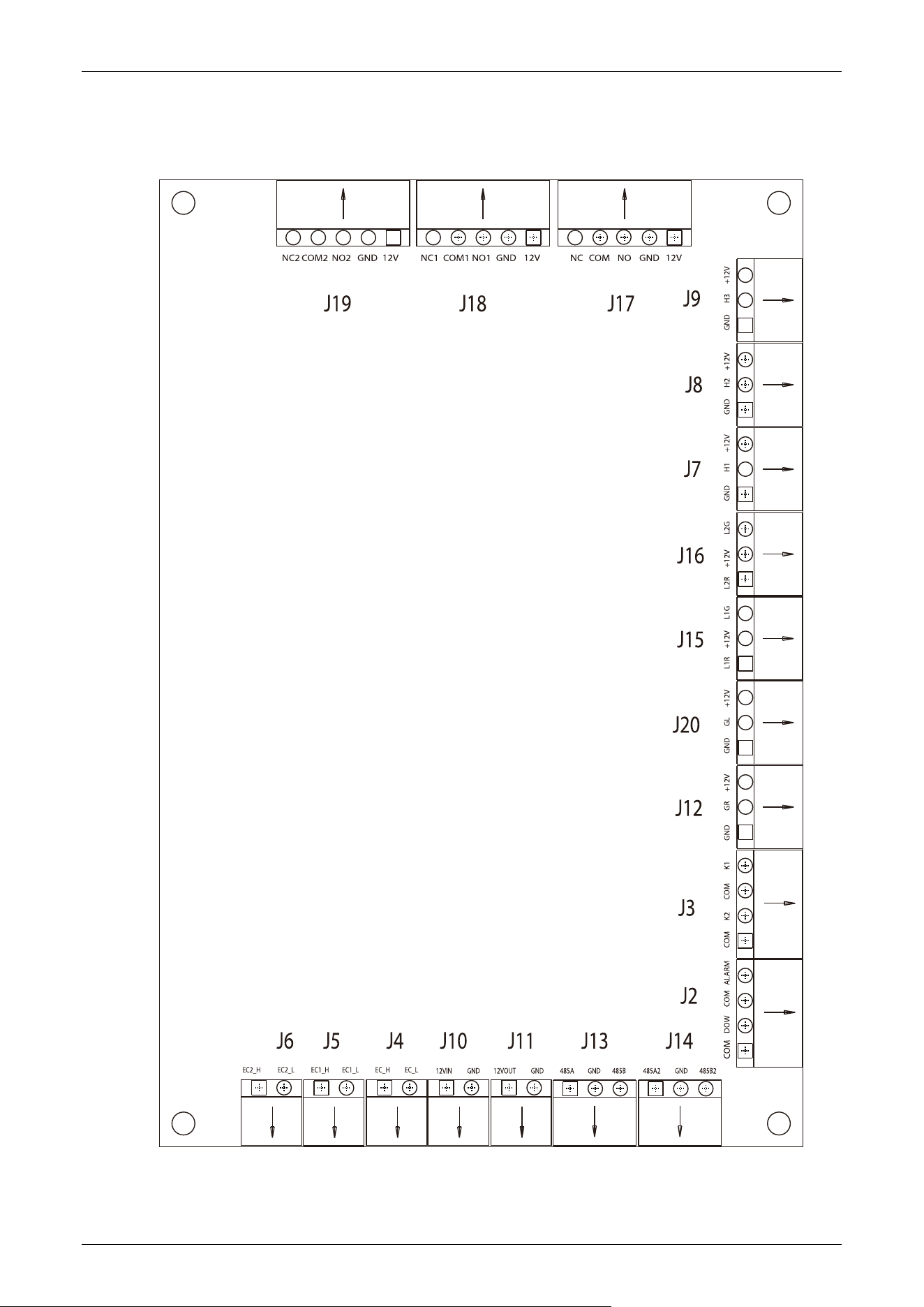
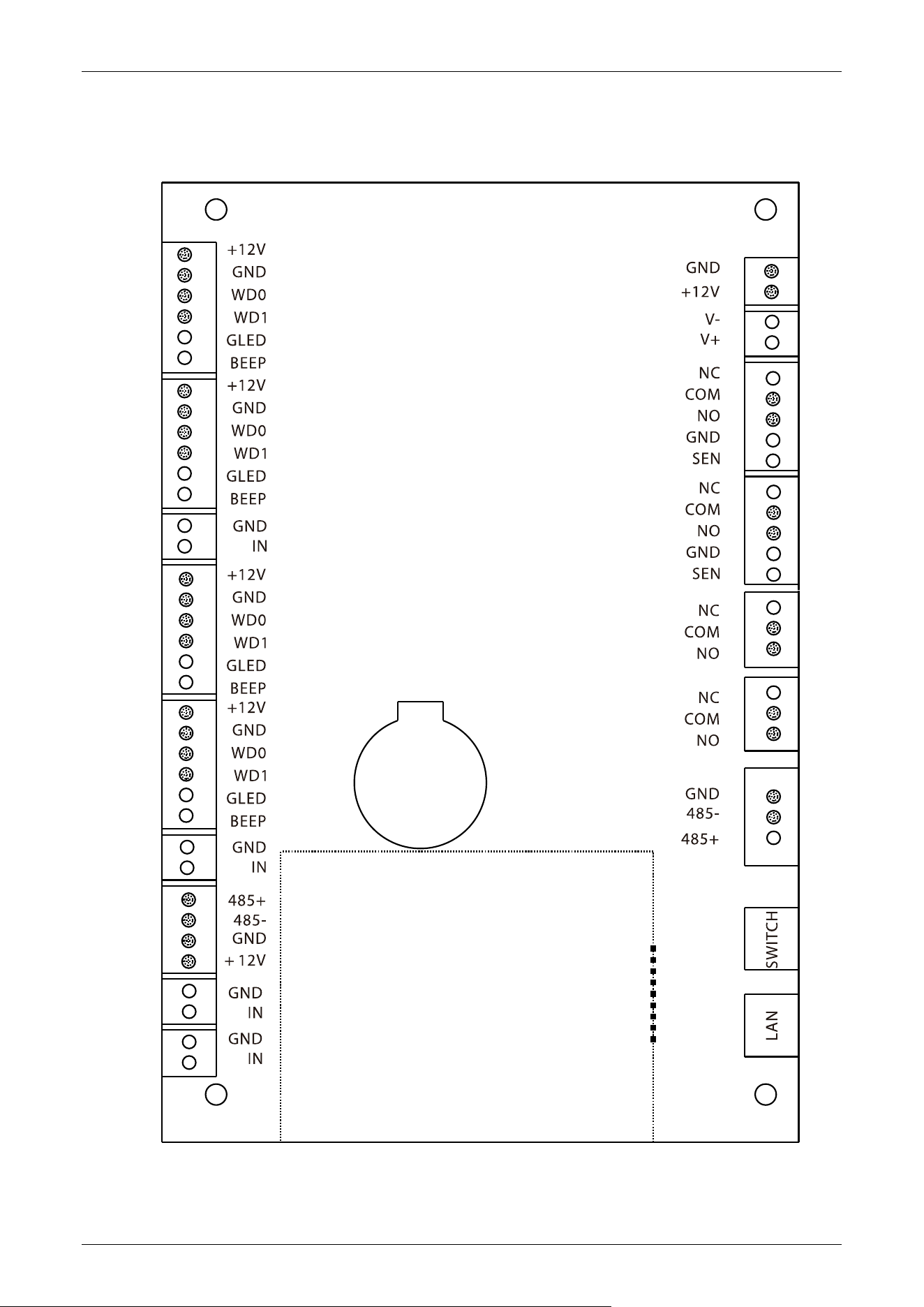
If you are using TS1211 Pro or TS1222 Pro models, all the connections between the access control
and turnstile control boards are already completed at the factory. Just plug in communication cable
to access controller and proceed with the necessary settings.
If you are using TS1200 Pro model, it is important to connect access control system to the control
board, please check the content in this chapter carefully.
Warning: The lock relay trigger time for the third-party access control system should be set to 1
second or less.
Wiring Diagram 3.1
TS1200 Pro Series Tripod Turnstile User Manual
Page | 21 Copyright©2026 ZKTECO CO., LTD. All Rights Reserved.
Turnstile Control Board 3.2

TS1200 Pro Series Tripod Turnstile User Manual
Page | 22 Copyright©2026 ZKTECO CO., LTD. All Rights Reserved.
Terminal Description
J19
Reserved
J18
Right Counter
J17
Left Counter
J9
Reserved
J8
Proximity Switch
J7 / J6
Top Indicator Light
J15
Reserved
J20
Reserved
J12
Reserved
J3
Right Open
J3
Left Open
J2
Alarm
J2
Fire Signal

TS1200 Pro Series Tripod Turnstile User Manual
Page | 23 Copyright©2026 ZKTECO CO., LTD. All Rights Reserved.
J14
RS485
J13
RS485
J11
12V Power Supply Output
J10
12V Power Supply Input
J4
L-solenoid
J5
R-solenoid
J6
Drop Arm
TS1200 Pro Series Tripod Turnstile User Manual
Page | 24 Copyright©2026 ZKTECO CO., LTD. All Rights Reserved.
Access Control Board 3.3

TS1200 Pro Series Tripod Turnstile User Manual
Page | 25 Copyright©2026 ZKTECO CO., LTD. All Rights Reserved.
Terminal Description
Reader
Reader
Button
Reader
Reader
Button
RS485
Auxiliary Input
Auxiliary Input
Power In
Lock
Lock
Lock
Auxiliary Output
Auxiliary Output
485 Connections

TS1200 Pro Series Tripod Turnstile User Manual
Page | 26 Copyright©2026 ZKTECO CO., LTD. All Rights Reserved.
Switch
Ethernet

TS1200 Pro Series Tripod Turnstile User Manual
Page | 27 Copyright©2026 ZKTECO CO., LTD. All Rights Reserved.
4 Default Parameters
No. Function Default
1
Lock Driving Duration
5s
2
Door Sensor None
3
Verification Interval
1s
4
Controller Communication TCP/IP: 192.168.1.201
5
Turnstile Opening Duration 5s
6
Passing Direction Indicator Passing is allowed in both directions
7
Continue Passing Function Disabled
8
Alarm Function Disabled
Note: The default Lock Driving Duration is set to 5 seconds. To adjust it to 1 second, please modify the
settings accordingly.

TS1200 Pro Series Tripod Turnstile User Manual
Page | 28 Copyright©2026 ZKTECO CO., LTD. All Rights Reserved.
5 Troubleshooting
Failure Description Solution
The indicator is not lighted
when the equipment is
powered on
It may be caused by the power supply or circuit.
Check whether the connection cable and power cable
between are damaged, or the wiring is loose.
The device can't be
manually lift arm after
powering on
Check whether the limit seat is properly aligned with the the
disk wheel when lifting the arm.
Check whether the arm drop magnet is working properly,
open the upper cover of the chassis, open the movement
cover with a hexagonal screwdriver and check the working
status of the electromagnet.
No gate opening after
authentication
Check whether the user has permission.
Please refer to the 3 wiring diagram to check the wiring.
After opening the gate, the
passage is not smooth, the
resistance of the push rod is
large, and the rotation
cannot be homed
The tension spring can be adjusted by adjusting the live joint
bolt at the tension spring.
Dropping the arm during
use
Check if the limit seat is properly aligned or if there is a gap.
Check whether the arm drop magnet is fully engaged. If it is
not fully engaged, please power off for 2 m
inutes and then
power on.
Continuous single-sided
passage during use, without
locking the lever.
Check if the gate opening magnet is working properly, open
the top cover of the device and open the movement cover
with a hexagonal screwdriver. Check if the
gate opening
magnet is stuck or the shrapnel is disconnected.
TS1200 Pro Series Tripod Turnstile User Manual
Page | 29 Copyright©2026 ZKTECO CO., LTD. All Rights Reserved.
6 Precaution
1. It is recommended to purchase optional accessories to use in outdoor environment.
a) Optional cooling fans should be installed for the equipment if the working temperature is
frequently above 50 °C.
b) It is equivalent to IPX4 waterproof under proper installation. However, it cannot work in the
region that may suffer typhoon.
c) If the temperature reaches -30 °C, it is recommended to install a heating plate. It might
need multiple times to power on while getting hot automatically through the self-check
program.
d) The service life of this equipment may be reduced if it is used outdoors in coastal areas or
regions prone to acid rain.
2. If the power and signal cables are connected properly, this equipment can be submerged in
water up to a depth of 250 mm, but it must not be powered on for operating when it is
submerged in water.
3. It is highly recommended that a card swiping warning line to set for prompting passers-by to
swipe cards properly and a reasonable passage width shall be set to prevent passers-by from
squeezing in illegally.
4. It is recommended that a warning sign is placed at a conspicuous position, and prompt: "Please
swipe your card outside the warning line and pass in order. Thank you!”
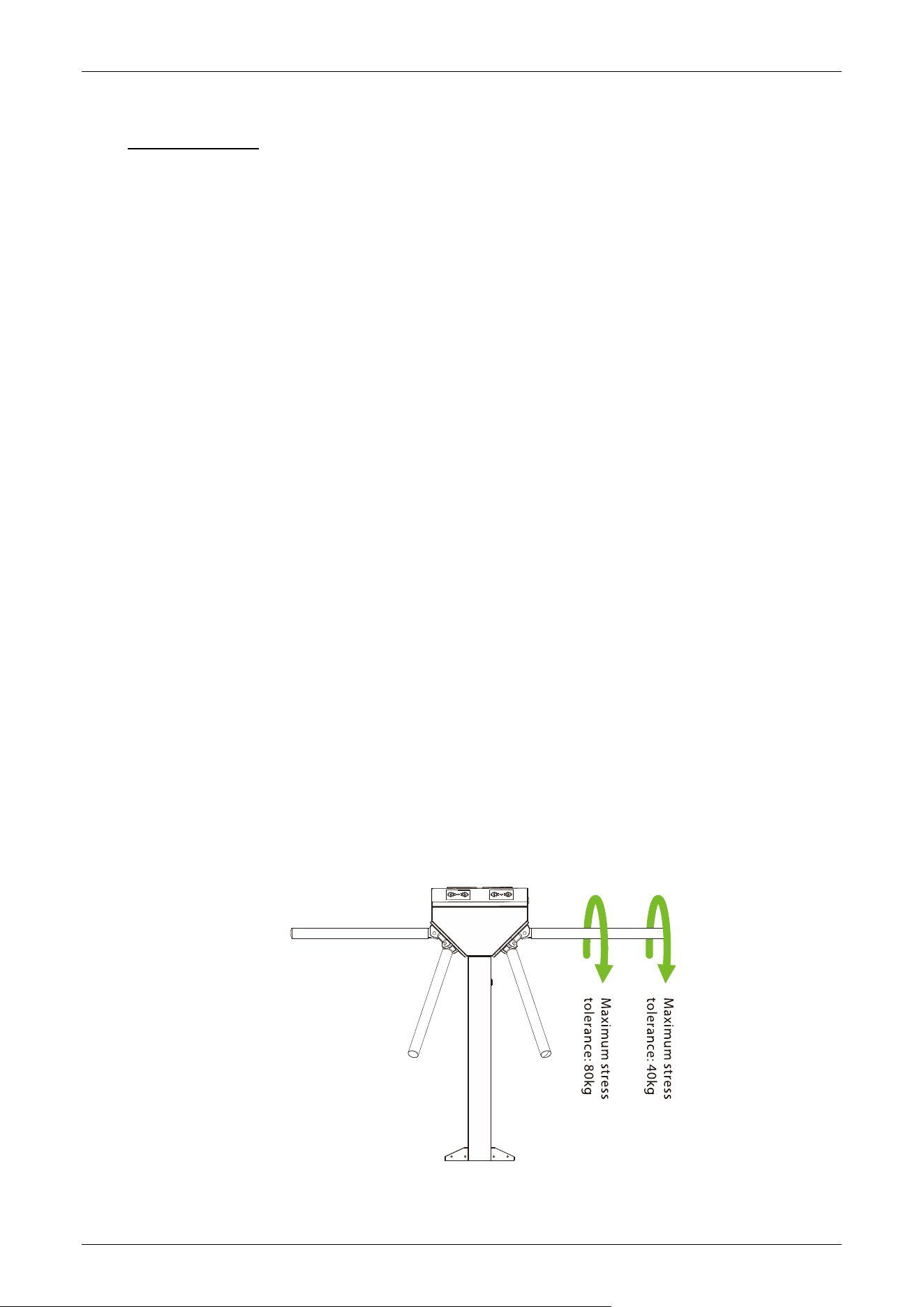
The maximum tolerance of the tripod turnstile's arms
Please note that the maximum stress tolerance at the center of the arm is 80kg and at the ends of
the arm is 40kg. When the impact force on the tripod turnstile reaches the designed limit, the arms
will break down first to prevent damage to the entire equipment and ensure the safety of passers-by.

TS1200 Pro Series Tripod Turnstile User Manual
Page | 30 Copyright©2026 ZKTECO CO., LTD. All Rights Reserved.
In case of emergencies
This equipment is designed to automatically lower the arms in the event of a power failure, allowing
the passage to be open for the public. Additionally, the turnstile control board provides an interface
to connect an emergency switch (Drop Arm), which keeps the tripod turnstile in an open position
during emergencies. Please note that after power is restored, it is important to wait for more than 6
seconds before lifting the arms manually.

TS1200 Pro Series Tripod Turnstile User Manual
Page | 31 Copyright©2026 ZKTECO CO., LTD. All Rights Reserved.
7 Maintenance
Chassis Maintenance 7.1
The chassis is made of SUS304 stainless steel or cold rolled sheet steel. If it has been used for a long
time, the surface may develop rust stains. It is recommended to clean the surface regularly with a
clean cloth. Additionally, apply a coat of anti-rut oil to the surface, ensuring not to cover the infrared
sensor.
Movement Maintenance 7.2
Before doing maintenance, turn off the power. Open the door, wipe the surface dust, and apply
lubricant for smooth movement.
Power Supply Maintenance 7.3
Switch off the power supply before maintenance.
Check the power plug connection, if found loose, fix it properly.
Do not change any connection position randomly.
Check the external power supply insulation periodically.
Do periodic check for any kind of leakage.
Check if the technical parameters of interface are normal.
Check the service life of the electronic components and replace accordingly.
Caution: All the maintenance methods mentioned above for swing barrier should be performed by
a professional technician, particularly when dealing with the movement and electric control
components. To ensure operational safety, it is crucial to switch off the power supply when the
barrier is not in use.
TS1200 Pro Series Tripod Turnstile User Manual
Page | 32 Copyright©2026 ZKTECO CO., LTD. All Rights Reserved.
8 Packing List
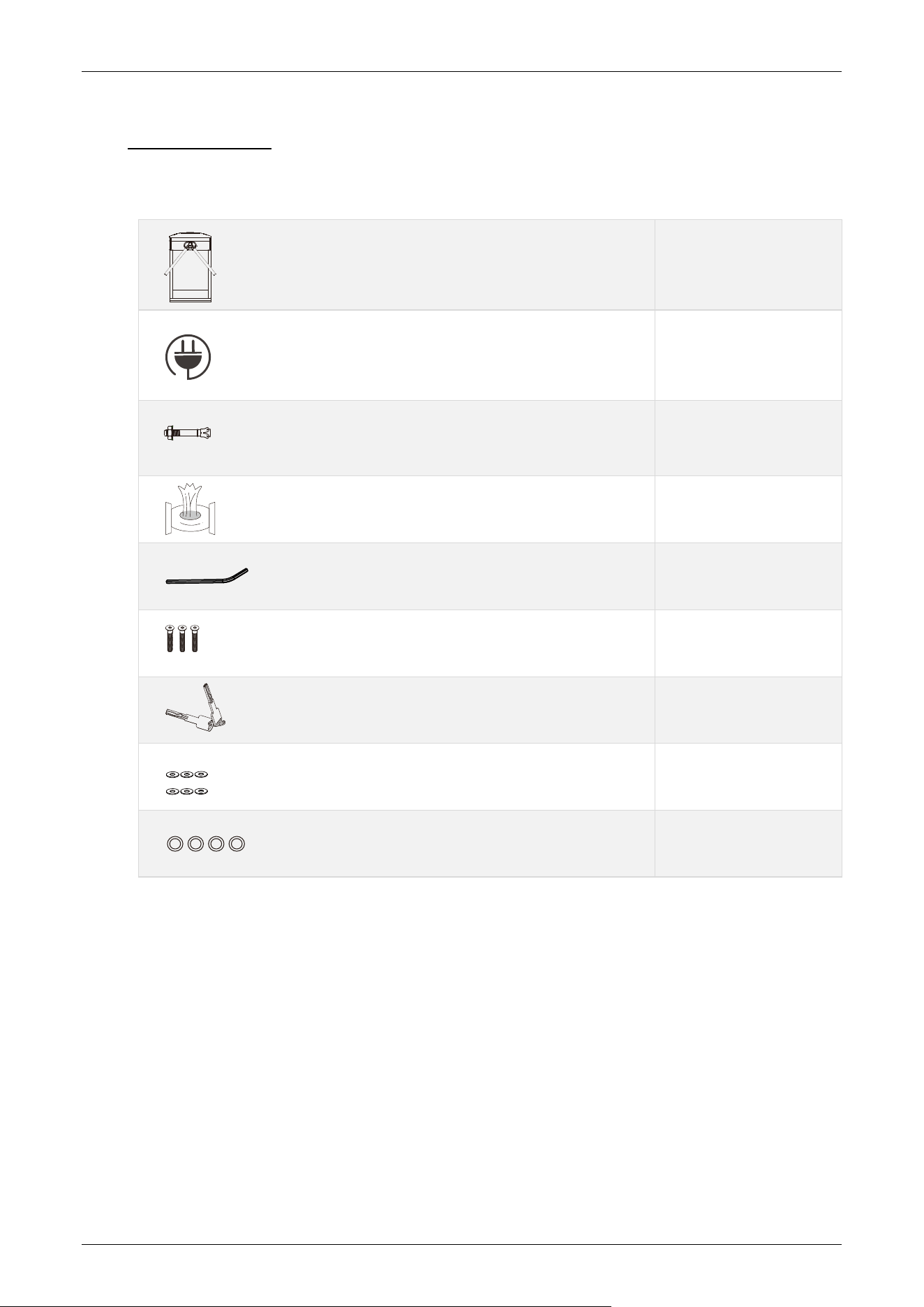
The package consists of the following items:
1
1
4
2
2
6
2
6
4
TS1200 Pro Series
Expansion Screw M12*100
Stainless Steel Maintenance Wipes
Hex Wrench
Key
Washer
Allen Screw
Power Cable
Expansion Screw Washers

Page | 33 Copyright©2026 ZKTECO CO., LTD. All Rights Reserved.
ZKTeco Industrial Park, No. 32, Industrial Road,
Tangxia Town, Dongguan, China.
Phone : +86 769 - 82109991
Fax : +86 755 - 89602394
www.zkteco.com
Copyright © 2026 ZKTECO CO., LTD. All Rights Reserved.