

3600W DUAL FUEL
INVERTER GENERATOR
Instruction Manual
IMPORTANT: Your new tool has been engineered and manufactured to WEN’s highest standards for dependability,
ease of operation, and operator safety. When properly cared for, this product will supply you years of rugged,
trouble-free performance. Pay close attention to the rules for safe operation, warnings, and cautions. If you use
your tool properly and for its intended purpose, you will enjoy years of safe, reliable service.
NEED HELP? CONTACT US!
Have product questions? Need technical support? Please feel free to contact us:
TECHSUPPOR[email protected]1-847-429-9263 (M-F 8AM-5PM CST)
For replacement parts and the most up-to-date instruction manuals, visit WENPRODUCTS.COM
MODEL DF360iX

2
CONTENTS
WELCOME 3
Specifications ................................................................................................... 3
Introduction ..................................................................................................... 4
SAFETY 5
Safety Information ........................................................................................... 5
Generator Safety Warnings .............................................................................. 6
9
Unpacking & Packing List ................................................................................ 9
Know Your Inverter Generator ........................................................................ 10
Preparation .................................................................................................... 12
BEFORE OPERATING
OPERATION & MAINTENANCE 13
Starting Your Generator ................................................................................. 15
Using Your Generator ..................................................................................... 18
Stopping Your Generator ............................................................................... 23
Maintenance ................................................................................................... 24
Transportation & Storage ............................................................................... 29
Troubleshooting Guide ................................................................................... 30
Wire Diagram ................................................................................................. 31
Exploded View & Parts List ............................................................................ 32
Warranty Statement ....................................................................................... 37
To purchase accessories for your tool, visit WENPRODUCTS.COM
Magnetic Oil Dipstick (Model No. 55201)
Weatherproof Generator Cover (Model No. 56200iC)
High-Altitude Kit (Part No. DF360iX-HA39)
WEN Parallel Connection Kit
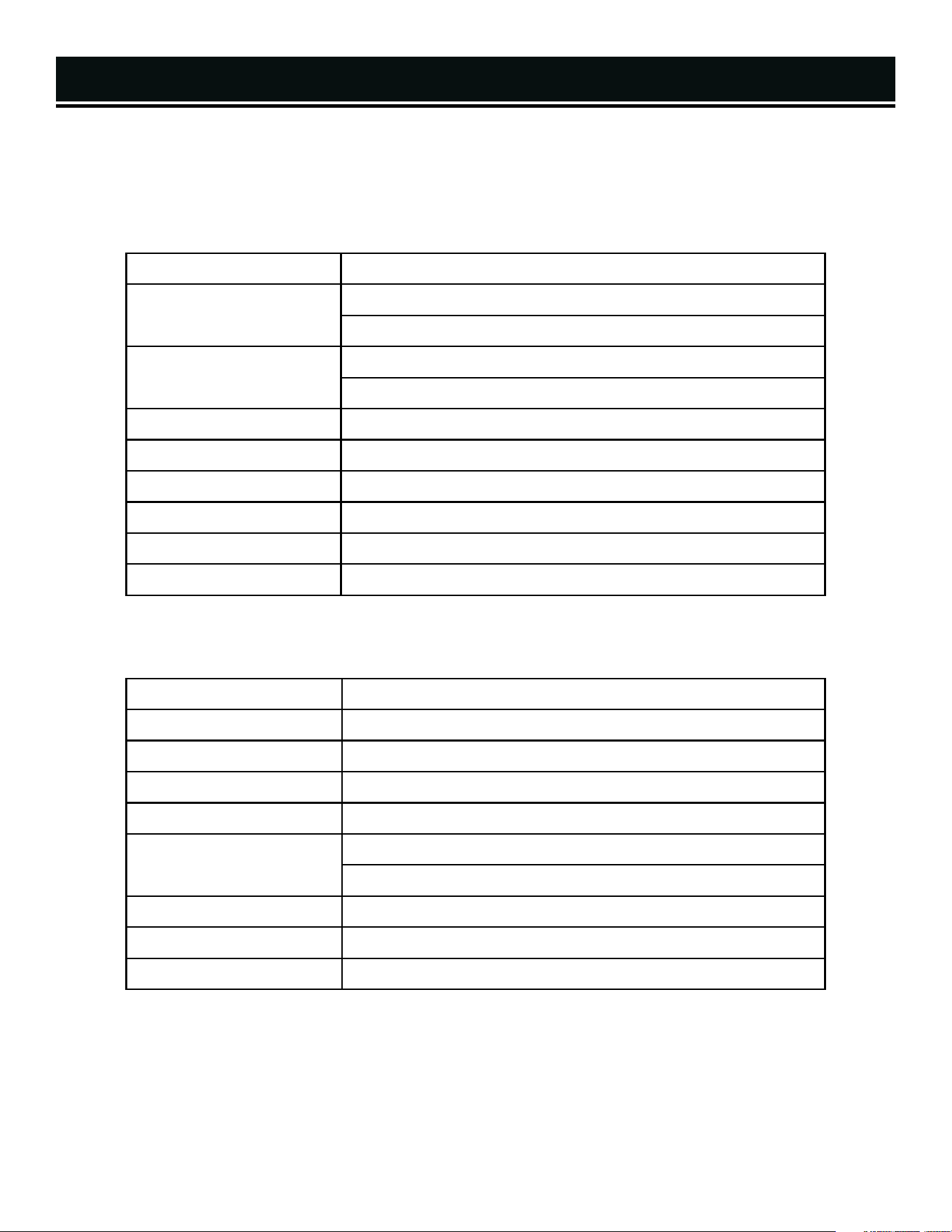
SPECIFICATIONS
Model Number DF360iX
Surge (Starting) Wattage
Gasoline: 3600W
LPG: 3500W
Rated (Running) Wattage
Gasoline: 2900W
LPG: 2600W
Rated Voltage 120V
Rated Amperage 24.1A
Phase Single
Frequency 60 Hz
Product Weight 49.60 Pounds (22.5 kg)
Product Dimensions 17.913 in. x 11.653 in. x 19.685 in.
GENERATOR
Engine Type 4 Stroke, OHV, Single Cylinder with Forced Air Cooling System
Engine Displacement 149cc
Engine Speed Eco-Mode: 3000 RPM Non Eco-Mode: 4000 RPM
Fuel Tank Capacity 1.53 Gallons (5.80 L)
Oil Capacity 16.9 fl. oz. (0.5 L)
Half-Load Run Time
Gasoline: 5 Hours
LPG: 14 Hours (20-lb Tank)
Spark Plug Type Torch E6RTC (NGK BPR6HS)
Spark Plug Gap 0.023 in. - 0.031 in. (0.6 - 0.8mm)
Spark Plug Torque 11.1 - 14.7 ft-lb (15 - 20 Nm)
ENGINE
3
INTRODUCTION
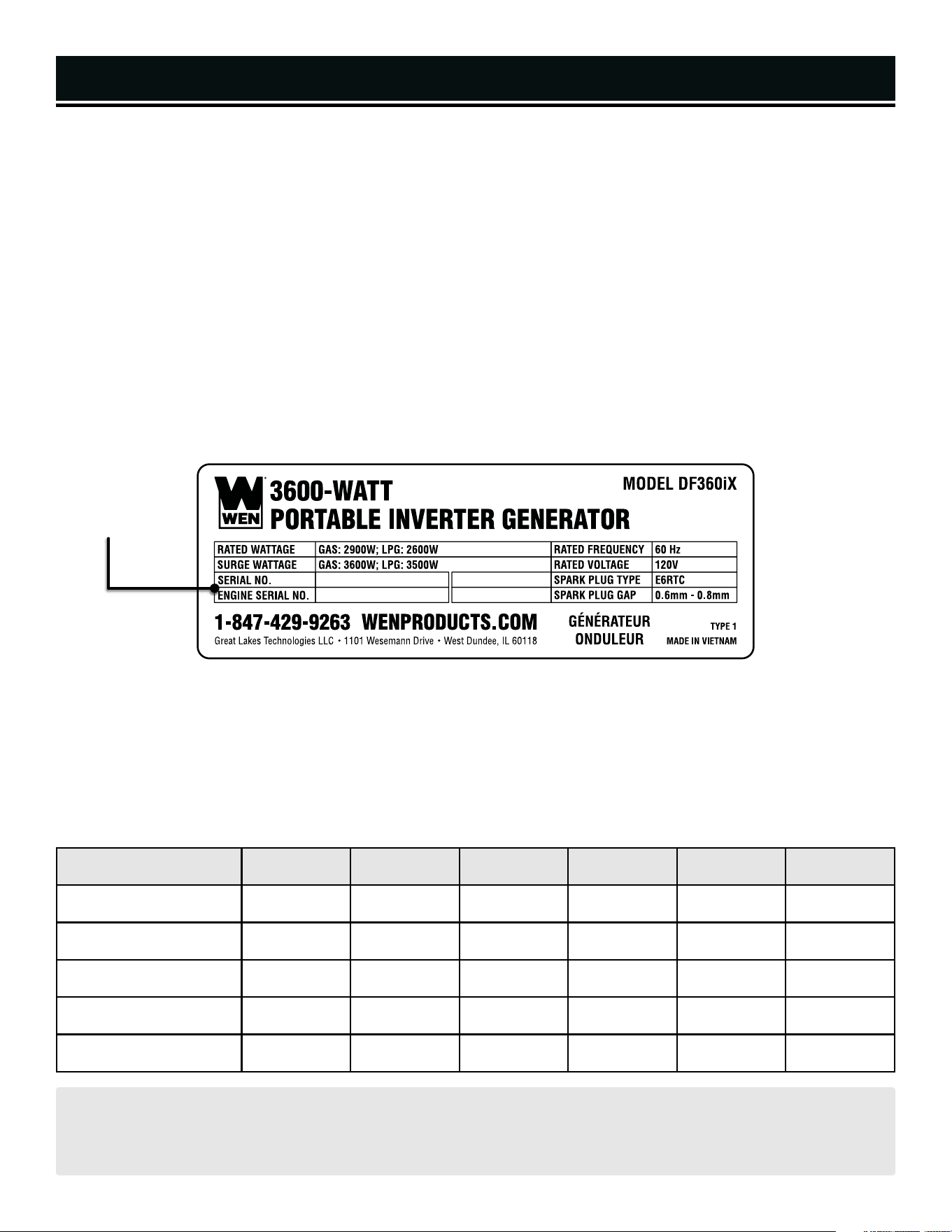
Thanks for purchasing the WEN 3600-Watt Dual Fuel Inverter Generator. Refer to the illustration below for the loca-
tion of the serial number on the specifications label. Record the generator information in the spaces provided below.
If assistance for information or service is required, please contact customer service by calling 1-847-429-9263, M-F
8-5 CST; you will be asked to provide the following generator information when calling.
Generator Model Number: DF360iX
Date of Purchase: _______________________________________________
Purchased From: ________________________________________________
Serial Number: _________________________________________________
TO MAXIMIZE THE LIFESPAN OF YOUR GENERATOR: We recommend running your generator at least once a
month for 20 to 30 minutes. Start the generator according to the instructions and plug a small load in to make
sure the outlet is producing electricity.
SERVICE RECORD
Record the service dates of your generator in the chart below. Please perform maintenance checks and operations
according to the “Maintenance” section of the manual.
Service Record Date Date Date Date Date Date
Change Oil
Change Spark Plug
Clean Fuel Tank
Clean Air Cleaner
Clean Spark Arrestor
4
Serial NumberSerial NumberSerial Number
SAFETY INFORMATION
SAFETY INTRODUCTION
Safety is a combination of common sense, staying alert, and knowing how your tool works. This manual contains
important information regarding the generator’s potential safety concerns, as well as preparation, operation, and
maintenance instructions. Before operating this generator, be sure to read and observe all warnings and instructions
both on the generator labels and in this instruction manual. Failure to follow all instructions listed below may result
in personal injury.
NOTE: The following safety information is not meant to cover all possible conditions and situations that may occur.
WEN reserves the right to change this product and specifications at any time without prior notice.
At WEN, we are continuously improving our products. If you find that your tool does not exactly match this manual,
please visit wenproducts.com for the most up-to-date manual or contact customer service at 1-847-429-9263, M-F
8-5 CST.
Keep this manual available to all users during the entire life of the tool and review it frequently to maximize
safety for both yourself and others.
SAVE THESE SAFETY INSTRUCTIONS.
SAFETY SYMBOLS
The purpose of following safety symbols is to attract your attention to possible dangers. The safety symbols, and
their explanations, deserve your careful attention and understanding. The safety warnings do not by themselves
eliminate any danger. The instructions or warnings they give are not substitutes for proper accident prevention
measures.
NOTICE REGARDING EMISSIONS
Engines that are certified to comply with U.S. EPA emission regulations for SORE (Small Off Road Equipment), are
certified to operate on regular unleaded gasoline, and may include the following emission control systems: (EM)
Engine Modifications and (TWC) Three-Way Catalyst (if so equipped).
QUESTIONS? PROBLEMS?
In order to answer questions and solve problems in the most efficient and speedy manner, contact customer
service at 1-847-429-9263, M-F 8-5 CST or email [email protected].
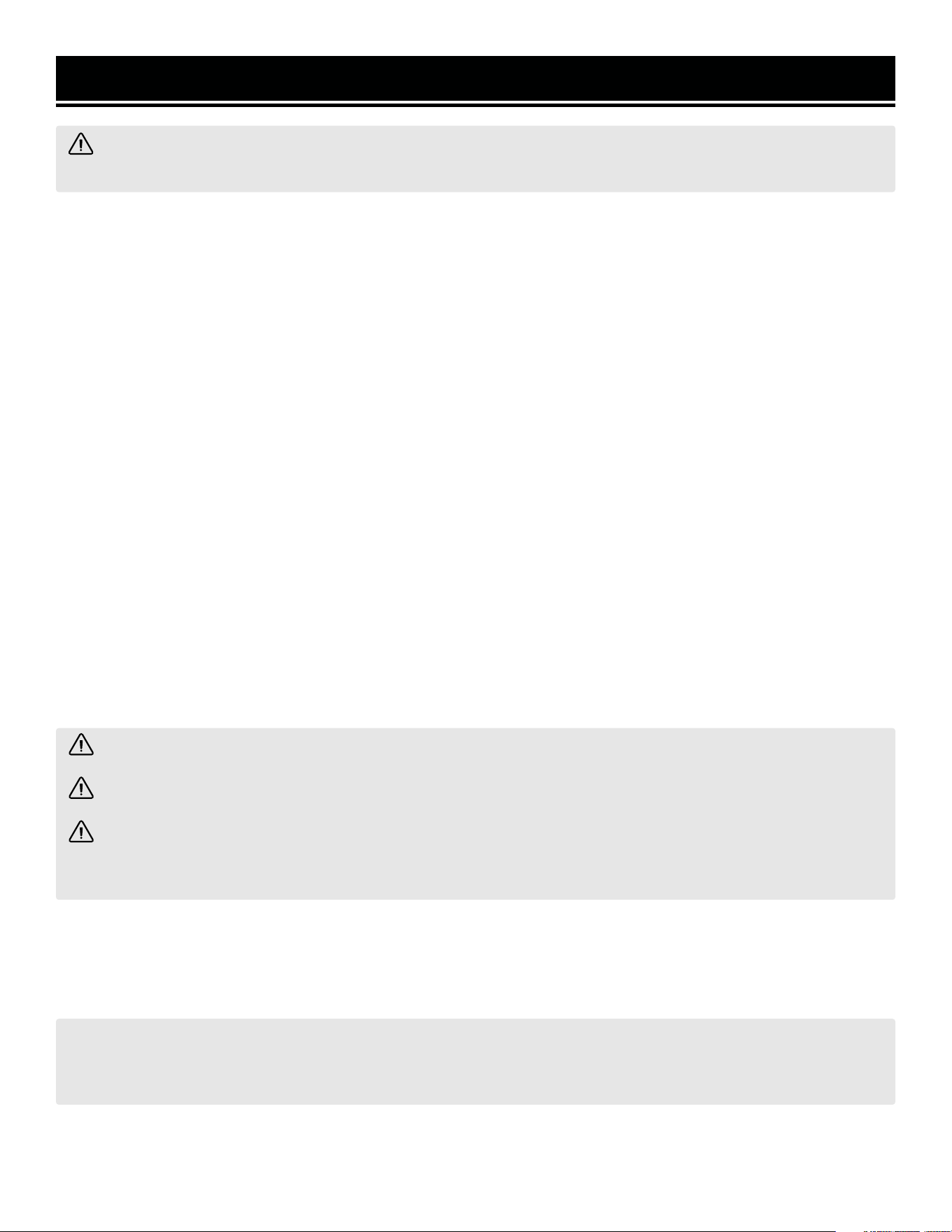
DANGER: indicates a hazard, which, if not avoided, will result in death or serious injury.
WARNING: indicates a hazard, which, if not avoided, could result in death or serious injury.
CAUTION: indicates a hazard, which, if not avoided, might result in minor or moderate injury.
CAUTION! when used without the alert symbol, indicates a situation that could result in damage to the machine.
WARNING! Before operating the generator, make sure to read all safety warnings and all instructions. Failure
to follow the warnings and instructions may result in electric shock, fire or serious injury.
5
6
GENERATOR SAFETY WARNINGS
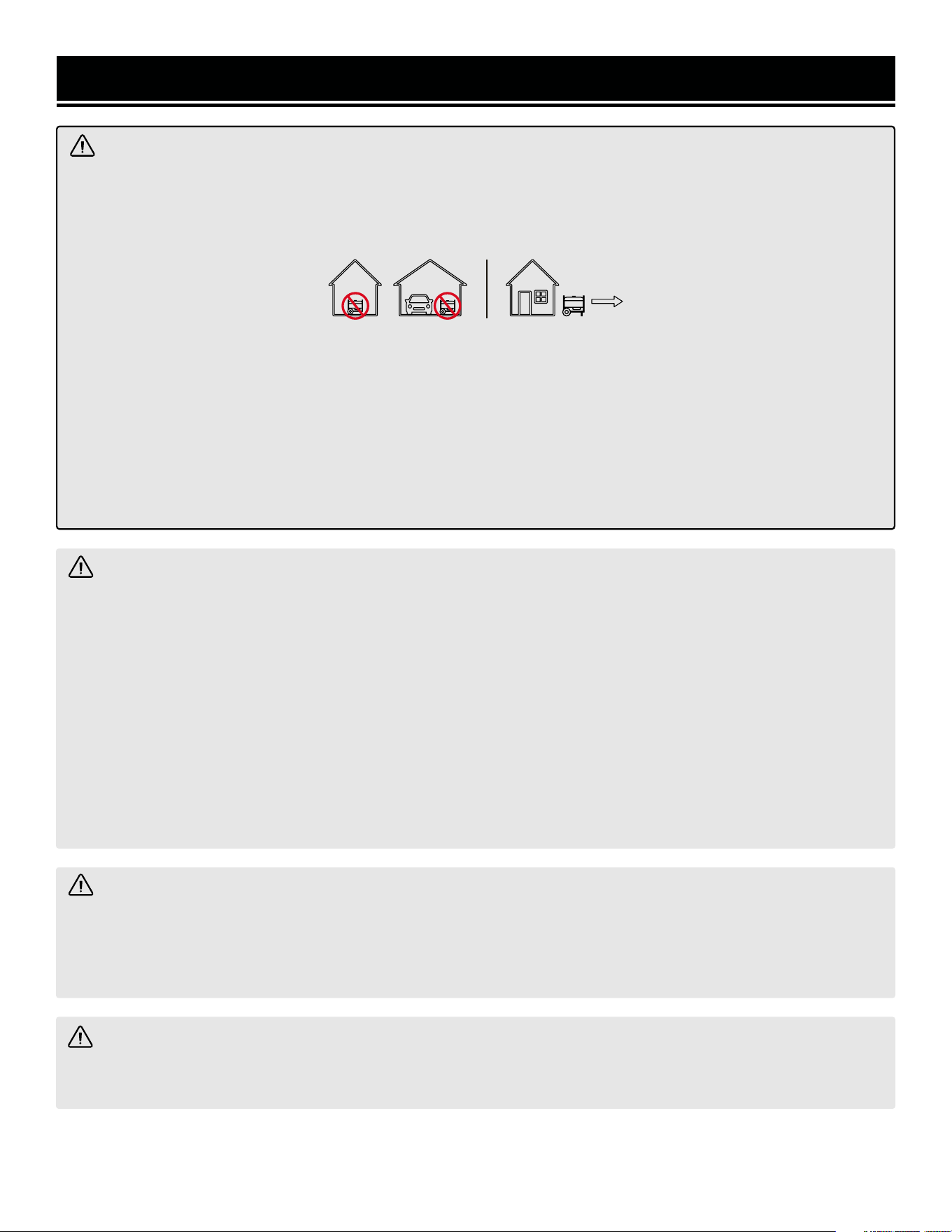
DANGER! CARBON MONOXIDE
Using a generator indoors CAN KILL YOU IN MINUTES. Generator exhaust contains carbon monoxide (CO). This
is a poison gas you cannot see or smell. If you can smell the generator exhaust, you are breathing CO. But even
if you cannot smell the exhaust, you could be breathing CO.
NEVER use a generator inside homes, garages, crawl spaces, or other partially enclosed areas. Deadly levels
of carbon monoxide can build up in these areas. Using a fan or opening windows and doors does NOT supply
enough fresh air. ONLY use a generator outside and far away from windows, doors, and vents. These openings
can pull in generator exhaust.
Even if you use a generator correctly, CO may leak into the home. ALWAYS use a battery-powered or battery-
backup CO alarm in the home. If you start to feel sick, dizzy, or weak after the generator has been running, move
to fresh air RIGHT AWAY. See a doctor. You may have carbon monoxide poisoning.
WARNING! RISK OF EXPLOSION. HIGHLY FLAMMABLE: This generator may emit highly flammable and
explosive gasoline vapors, which can cause severe burns or even death, if ignited. A nearby open flame can lead
to explosion even if not directly in contact with gasoline.
• Do not operate near open flame, heat, or any other ignition source. Do not smoke near the generator.
• Always operate on a firm, level surface.
• Always turn generator off before refueling. Allow generator to cool for at least 2 minutes before removing
fuel cap. Loosen cap slowly to relieve pressure in tank.
• Do not overfill fuel tank. Gasoline may expand during operation. Do not fill to the top of the tank. Allow for
expansion. Always check for spilled fuel before operating.
• If fuel spills, move the generator at least 30 feet away from the spill and wipe clean any spilled fuel before
starting the engine.
• Empty fuel tank before storing or transporting the generator.
WARNING! If this generator is used as a supply for a building’s wiring system, the generator must be in-
stalled by a qualified electrician and connected to a transfer switch as a separately derived system in accordance
with all applicable laws and electrical codes and the National Electrical Code, NFPA 70. The generator shall be
connected to a transfer switch that switches all conductors excluding the equipment grounding conductor. The
frame of the generator shall be connected to an approved grounding electrode.
WARNING! This product can expose you to chemicals including carbon monoxide and engine exhaust,
which are known to the State of California to cause cancer and birth defects or other reproductive harm. For
more information, go to www.P65Warnings.ca.gov.

7
GENERATOR SAFETY WARNINGS
OPERATING ENVIRONMENT
1. Using a generator indoors can kill you in minutes.
Only use a generator outside and far away from win-
dows, doors and vents.
2. Do not smoke near the generator.
3. Do not operate near open flame, heat, or flammable
materials. This generator may emit highly flammable
and explosive gasoline vapors, which can cause severe
burns or even death if ignited. A nearby open flame can
lead to an explosion even if it isn’t directly in contact with
gasoline.
4. Do not expose the generator to rainy or wet con-
ditions; doing so significantly increases the risk of
electrical shock. Never handle the generator, electronic
devices, or any cord while standing in water, while bare-
foot, or when hands or feet are wet.
5. Always operate the generator on a dry, firm, level
surface.
6. The generator should have at least 5 feet of clear-
ance from buildings or other equipment during opera-
tion.
7. Do not allow children or non-qualified persons to
operate the generator.
GENERATOR PREPARATION
1. Always ground the generator before using it to maxi-
mize safety (see “Ground the Generator” section).
2. Do not overfill fuel tank, as gasoline may expand
during operation. Do not fill to the very top of the tank.
Leave room for gasoline expansion. Always check for
spilled fuel before operating.
3. If any part of the generator, electrical device or pow-
er cord is broken, damaged, or defective, make sure
it is repaired or replaced before operation. Service
should only be performed by a qualified technician. Do
not use receptacles or cords that show signs of damage,
such as broken or cracked insulation.
4. Use a ground fault circuit interrupter (GFCI) in highly
conductive areas such as metal decking or steel work.
Extension cords with in-line GFCIs are recommended for
these operations to maximize safety.
5. If connecting the generator to a building’s electri-
cal system for standby power, you MUST consult a
qualified electrician and install a transfer switch. Such
connections must comply with local electrical laws and
codes. Failure to comply can create a back-feed, which
may result in serious injury or death to utility workers.
6. Never modify the generator in any way. Modifying
or using the machine for any other purpose for which it
is not designed may result in serious injuries, machine
damage and voiding of the warranty.
GENERATOR OPERATION
1. Only use the generator for its intended purposes.
Modifying or using the generator for operations for
which it was not designed may cause hazards and per-
sonal injury.
2. Do not touch bare wires or receptacles (outlets).
3. Do not exceed the wattage capacity of the generator
by plugging in more electrical devices than the unit
can handle. This could damage the generator and/or
connected electrical devices. Check the operating volt-
age and frequency requirements of all electrical devices
prior to plugging them into the generator.
Generator safety warnings continue on the next page.
WARNING! Do not let comfort or familiarity with the product replace strict adherence to product safety
rules. Failure to follow the safety instructions may result in serious personal injury.

GENERATOR SAFETY WARNINGS
WARNING! Do not let comfort or familiarity with the product replace strict adherence to product safety rules.
Failure to follow the safety instructions may result in serious personal injury.
4. Allow generator to run for several minutes before
connecting electrical devices. Do not start or stop en-
gine with electrical devices plugged in to the receptacles.
Failure to do so could damage the generator and/or con-
nected electrical devices.
5. Do not turn on electrical devices until after they are
connected to the generator.
6. Generators vibrate in normal use. During and after
the use of the generator, inspect both the generator as
well as extension and power supply cords for damage
resulting from vibration.
7. Do not touch hot parts. This generator produces heat
when running. Temperatures near exhaust can exceed
150ºF (65ºC). Allow generator to cool down after use be-
fore touching engine or areas of the generator that be-
come hot during use.
8. Turn off all connected electrical devices before stop-
ping the generator.
9. Always turn generator off before refueling. Allow
generator to cool for at least 2 minutes before removing
fuel cap. Loosen cap slowly to relieve pressure in tank.
10. Turn the engine switch to “OFF” position when the
engine is not running.
11. Empty fuel tank before storing or transporting the
generator. Do not store generator or gasoline near fur-
naces, water heaters, or any other appliances that pro-
duce heat or have automatic ignitions. Store the genera-
tor and fuel away from sparks, open flames, pilot lights,
heat and other sources of ignition.
12. Always wash hands after handling generator.
CAUTION: Misuse of this generator can damage it or
shorten its lifespan.
TO MAXIMIZE THE LIFESPAN OF YOUR GENERATOR: We recommend running your generator at least once a
month for 20 to 30 minutes. Start the generator according to the instructions and plug a small load in to make
sure the outlet is producing electricity. If you do not run it often, it will greatly shorten the generator’s lifespan
and void the warranty.
8
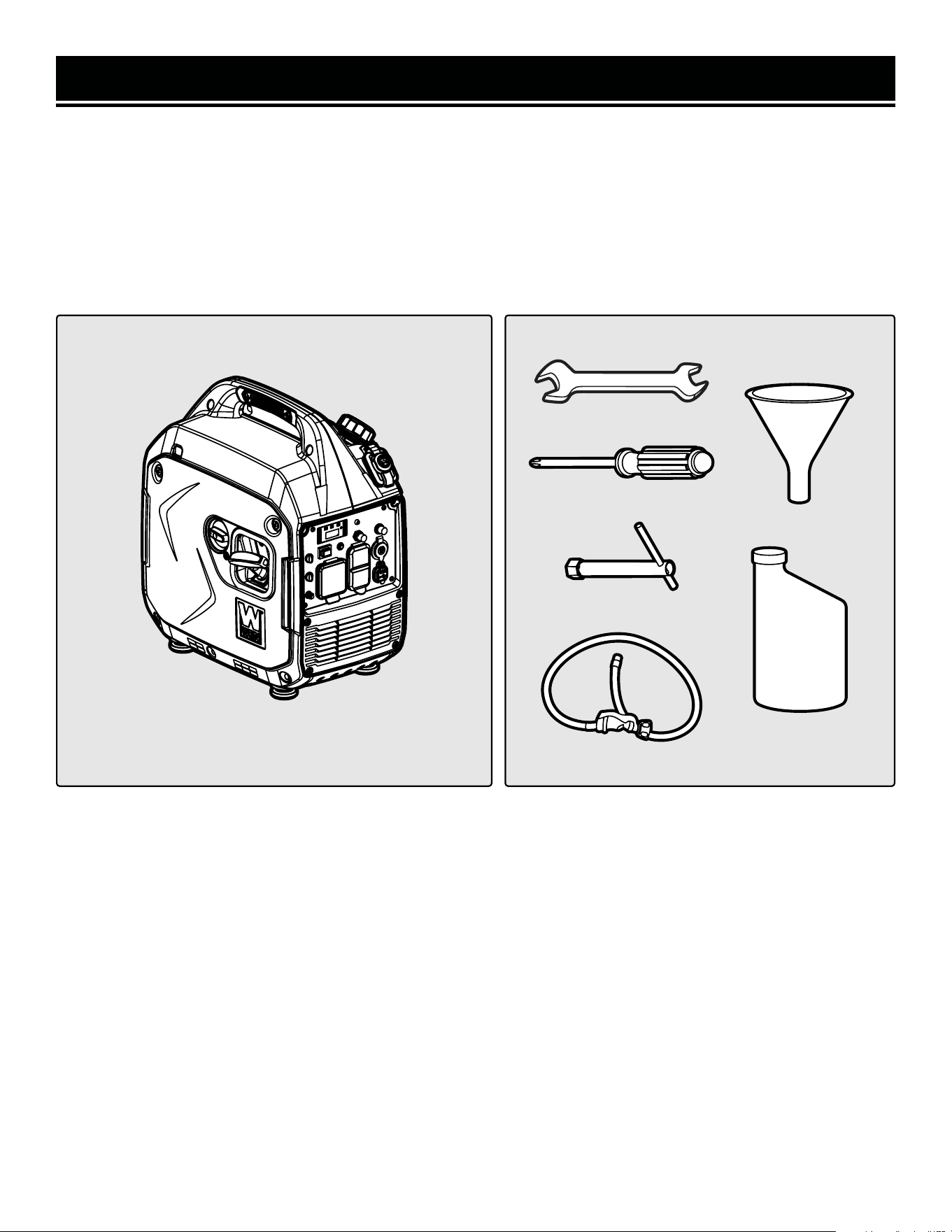
UNPACKING
With the help of a friend or trustworthy foe, such as one of your in-laws, carefully remove the generator from the
packaging and place it on a sturdy, flat surface. Make sure to take out all contents and accessories. Do not discard
the packaging until everything is removed. Check the packing list below to make sure you have all of the parts and
accessories. If any part is missing or broken, please contact customer service at 1-847-429-9263 (M-F 8-5 CST),
or email [email protected].
PACKING LIST
UNPACKING & PACKING LIST
Components Tools & Accessories
9
Generator
Funnel
Engine Oil (0.50 L)
8/10mm Wrench
Screwdriver
LPG Regulator Hose
Spark Plug Socket
KNOW YOUR INVERTER GENERATOR
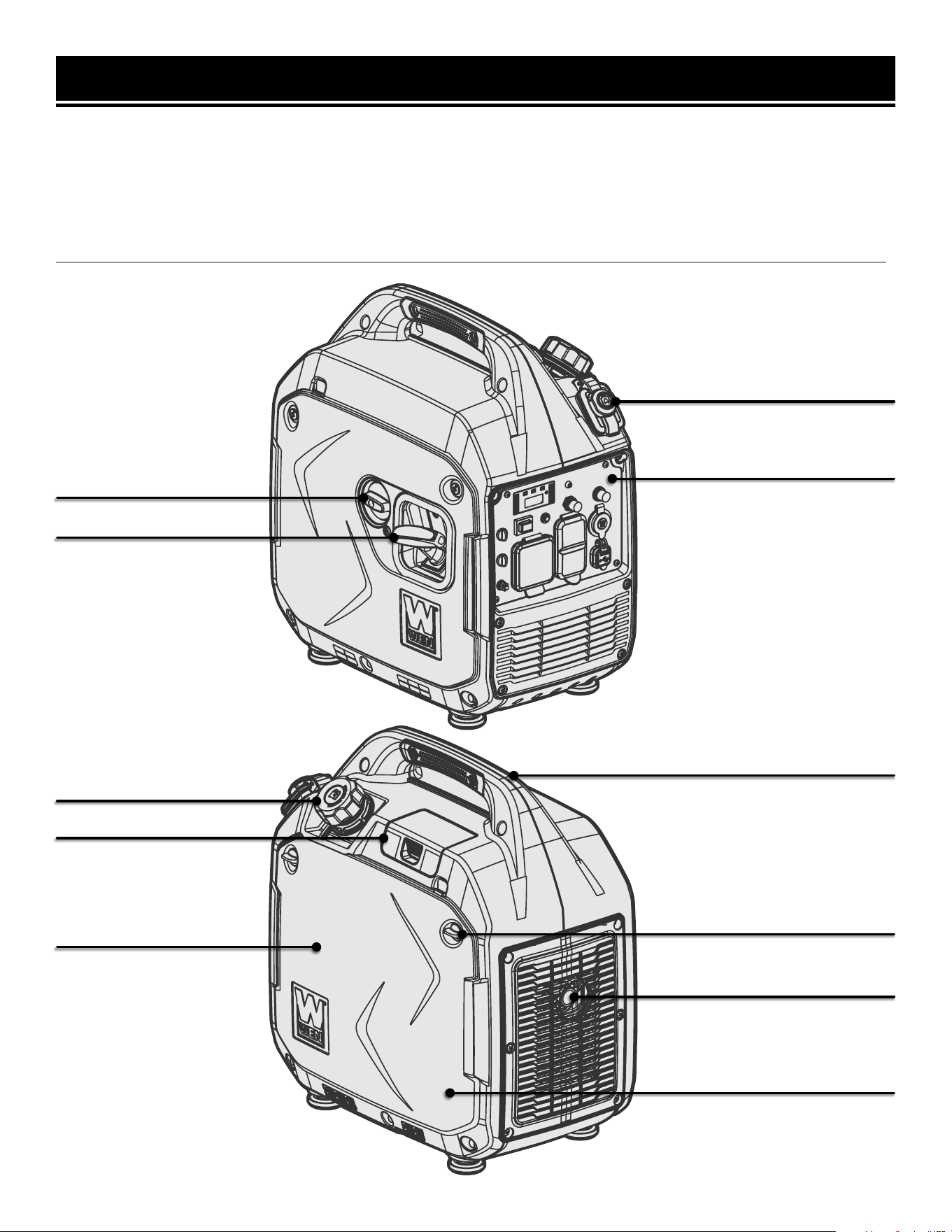
TOOL PURPOSE
Inverter Generators provide you with clean and quiet power, when and where you need it most. Refer to the fol-
lowing diagrams to become familiarized with all the parts and controls of your Generator. The components will be
referred to later in the manual for assembly and operation instructions.
GENERATOR
Spark Arrestor
Handle
Fuel Cap
Spark Plug Access Cover
Air Filter (Inside Panel)
Oil Fill Dipstick (Inside Panel)
Side Panel Access Knobs
Control Panel
4-in-1 Switch
Recoil Starter
10
LPG Inlet
KNOW YOUR INVERTER GENERATOR
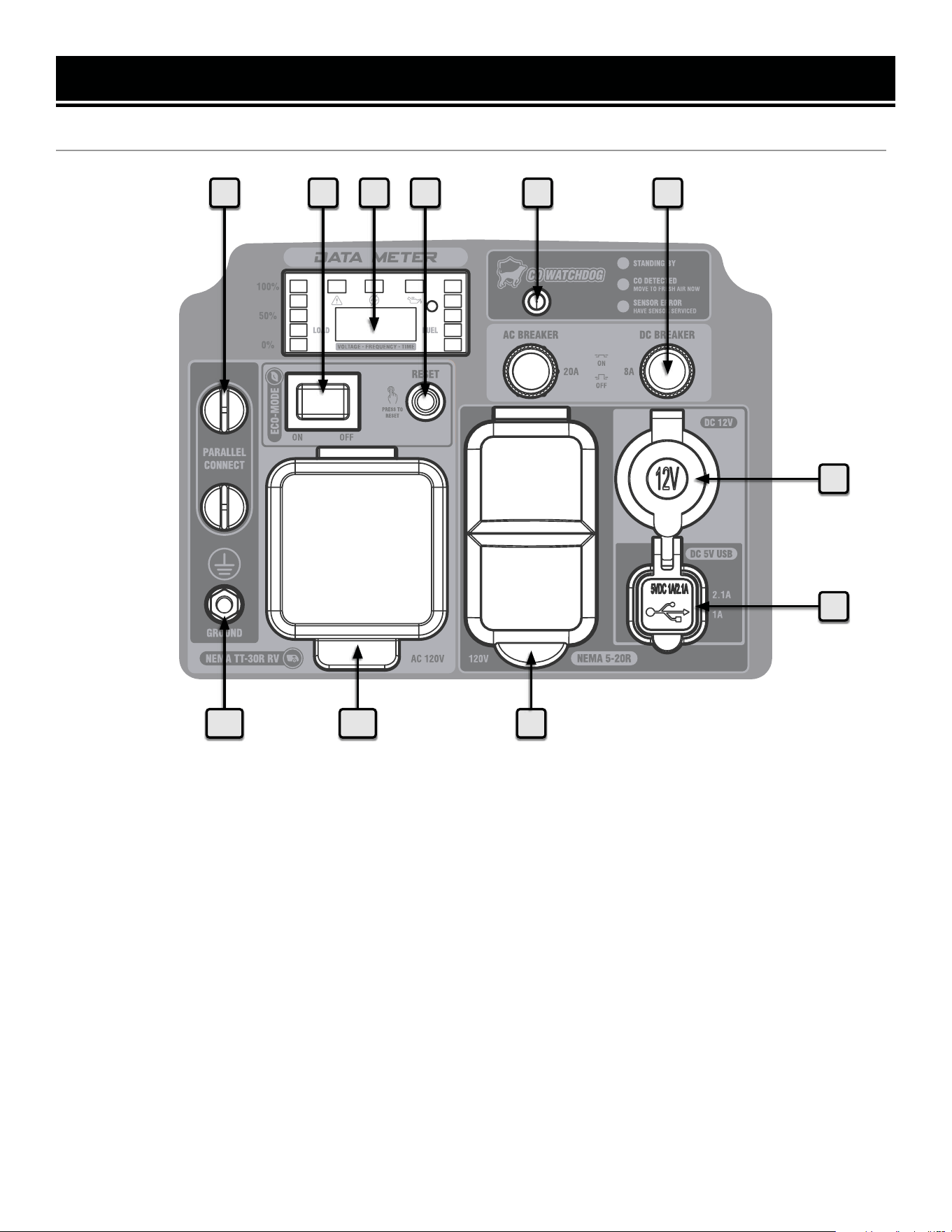
CONTROL PANEL
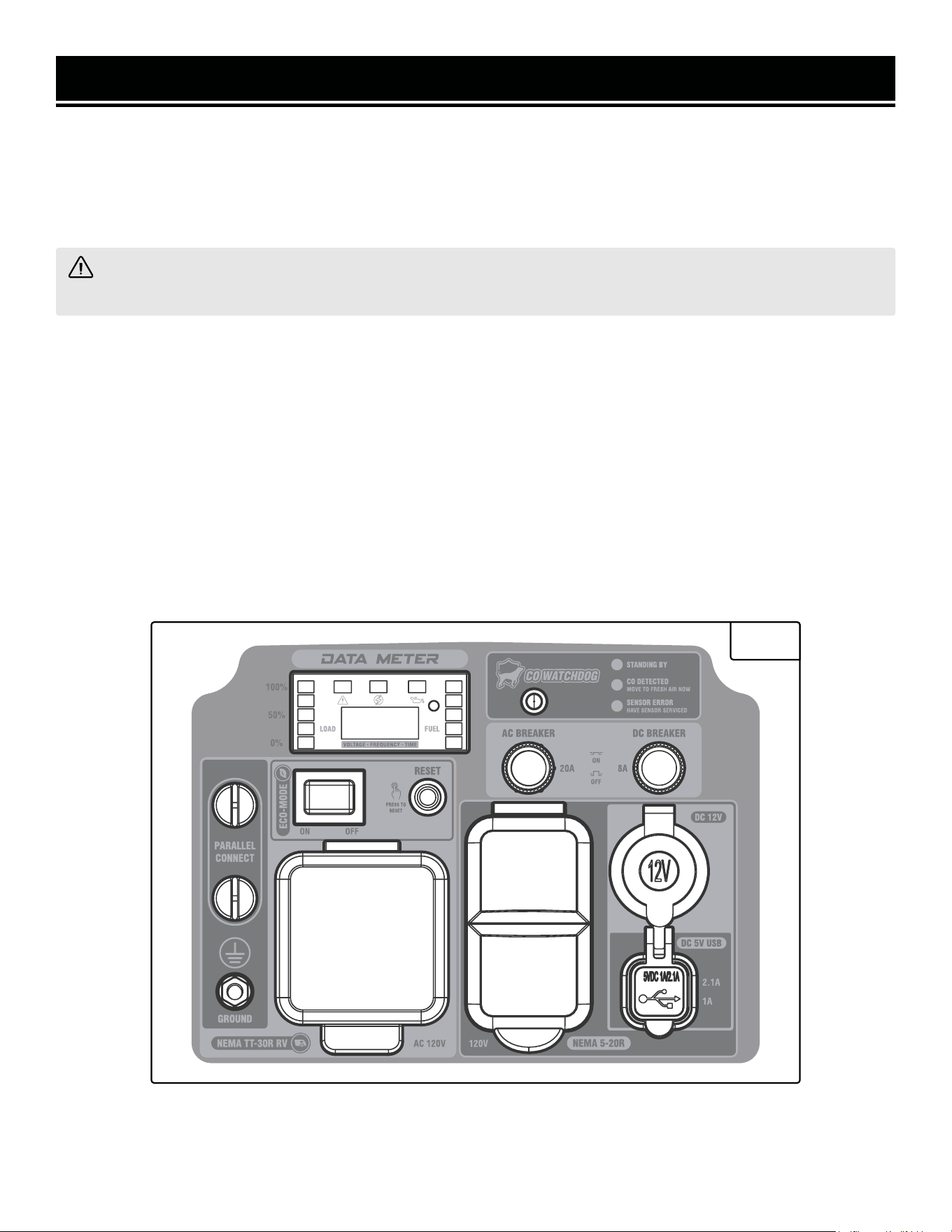
9
1 2 3 4 5 6
7
8
1011
1. Parallel Connection
Connect to share wattage between inverter generators.
2. Eco-Mode Switch
Maximizes fuel economy & run time.
3. Data Meter with Indicator Light
Displays load level (left), fuel level (right), voltage (e.g.
V120), frequency (e.g. F60.0), session runtime (e.g. A
0.0), and total runtime (e.g. 0.0). Press MODE to switch
between displays.
4. Reset Button
Press to reset the circuit in case of overload.
5. CO WATCHDOG Carbon Monoxide Monitor
Measures the accumulation of poisonous CO gas while
the generator is running. If the level of CO gas gets too
high, the CO Watchdog system will automatically shut
down the generator. See p. 25 for more information.
6. DC Circuit Breaker
Press to reset.
7. 12V DC Outlet
Cigarette-style outlet provides DC power.
8. 5V USB Port
1A & 2.1A for charging various electronic devices.
9. AC 120V NEMA 5-20R Duplex Receptacles
Standard household outlets provide 120V 60Hz power.
10. AC 120V NEMA TT-30R RV Receptacle
Standard RV connector.
11. Grounding Nut
Ground the generator to reduce the risk of electric shock.
11
12
PREPARATION
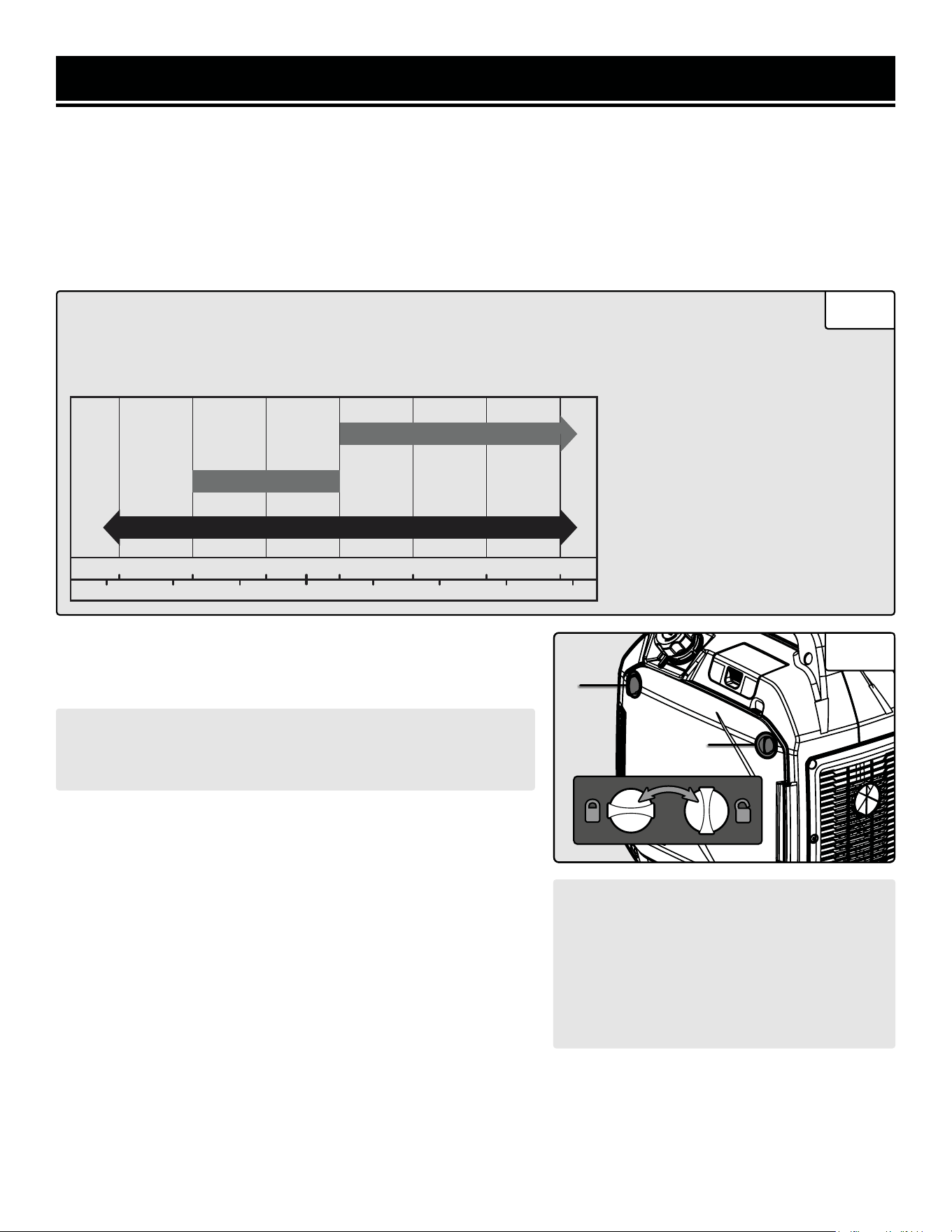
TO ADD OIL:
1. Place the generator on a level surface. Make sure the engine is
OFF before adding or checking oil.
The following section describes the necessary steps to prepare the generator for use. If you are unsure about how
to perform any of the steps please call 1-847-429-9263 M-F 8-5 CST for customer service. Failure to perform these
steps properly can damage the generator or shorten its life.
STEP 1 - ADD / CHECK OIL
The generator is shipped without oil. User must add the proper amount of oil before operating the generator for the
first time. The oil capacity of the engine crankcase is 16.9 fl. oz (0.5 L).
• 30W Engine Oil
Temperatures above 40°F
• 10W-30 Engine Oil
Temperatures between 0°F - 40°F
• Synthetic 5W-30 Engine Oil
All temperature ranges
ENGINE OIL RECOMMENDATIONS
Select good quality detergent oil bearing the American Petroleum Institute (API) service classifications
SJ, SL, or SM (synthetic oils may be used). Select the SAE viscosity grade of oil that matches the
expected operating temperature.
CAUTION! Keep the generator level. Tilting the generator to
assist in filling will cause oil to flow into the wrong areas of the
engine and cause damage.
1. Open the side panel (to the right of the control panel) by twist-
ing the side panel access knobs (Fig. 2 - 1). Remove and wipe
the oil dipstick with a clean rag. Insert the dipstick into the oil fill
opening without screwing it in.
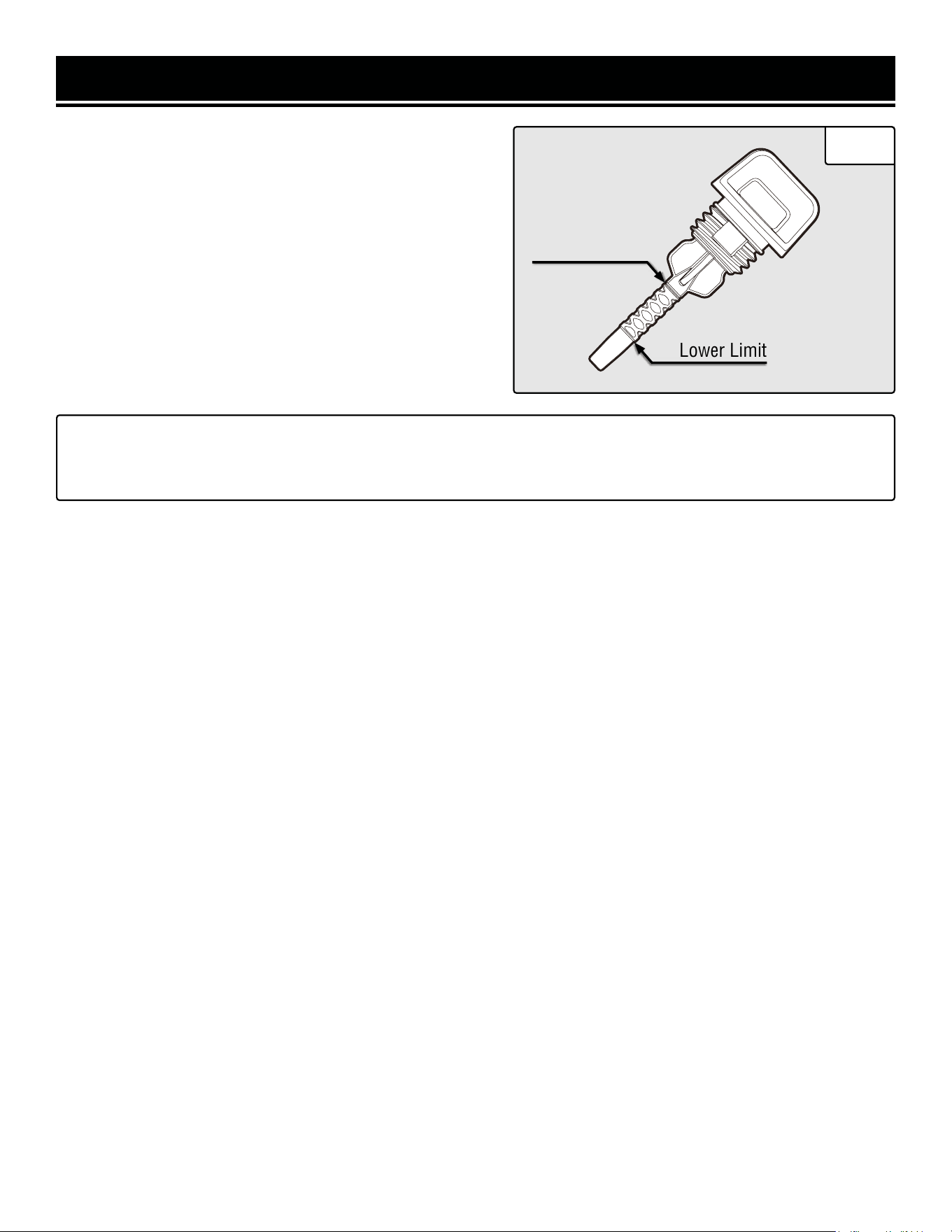
2. Remove the dipstick to check the oil mark on the dipstick (Fig.
3). Add oil if the oil mark covers less than one half of the dipstick.
3. Slowly add oil and repeat step 2 until the oil mark measures
between the upper limit mark and halfway mark of the dipstick. Do
not overfill the crankcase.
4. Wipe clean any oil leaks and firmly tighten the dipstick.
CAUTION! For subsequent operation, the oil
level should be checked before each use, or
after every 8 hours of operation. The gen-
erator is equipped with a low-oil sensor and
will not start without a sufficient amount of
oil. Follow the instructions on the next page
to check the oil level.
Fig. 1
Fig. 2
Synthetic 5W-30
30W
10W-30
°F
°C
-20 0 20 32 40 60 80 100
40200
-20
-10
10
-30 30
1
1
13
PREPARATION
Lower Limit
Upper Limit
TO CHECK OIL LEVEL (before every subsequent start):
1. Place the generator on a level surface. Make sure the en-
gine is OFF before adding or checking oil.
2. Remove and wipe the dipstick with a clean rag.
3. Insert the dipstick into the oil fill without screwing it in.
Remove the dipstick to check the oil mark.
4. If the oil mark covers less than one half of the dipstick,
slowly add oil until the oil mark measures between the up-
per limit mark and halfway mark of the dipstick. See Fig. 3.
TIP: Your WEN generator is compatible with the WEN 55201 Magnetic Oil Dipstick (not included), available for
purchase at wenproducts.com. The dipstick’s industrial-strength magnetic tip will collect metal shavings from
your generator’s oil tank to help preserve the engine and extend your generator’s lifespan.
Fig. 3
PREPARATION
Fig. 4
1
WARNING! RISK OF EXPLOSION. HIGHLY FLAMMABLE: This generator may emit highly flammable and
explosive gasoline vapors, which can cause severe burns or even death, if ignited. A nearby open flame can lead
to explosion even if not directly in contact with gasoline.
• Do not operate near open flame, heat, or any other ignition source. Do not smoke near the generator.
• Always operate on a firm, level surface.
• Always turn generator off before refueling. Allow generator to cool for at least 2 minutes before removing
fuel cap. Loosen cap slowly to relieve pressure in tank.
• Do not overfill fuel tank. Gasoline may expand during operation. Do not fill to the top of the tank. Allow for
expansion. Always check for spilled fuel before operating.
• If fuel spills, move the generator at least 30 feet away from the spill and wipe clean any spilled fuel before
starting the engine.
• Empty fuel tank before storing or transporting the generator.
STEP 2 - ADD / CHECK FUEL
ONLY use fresh (within 30 days from purchase), lead-free
gasoline with a minimum of 87 octane rating. The genera-
tor performs best with ethanol-free gasoline. DO NOT use
gasoline with over 10% ethanol.
The capacity of the fuel tank is 1.53 gallons (5.8 L). Do not
mix oil with gasoline.
TO ADD GASOLINE:
Use fresh (within 30 days from purchase), lead-free gaso-
line with a minimum of 87 octane rating. The generator per-
forms best with ethanol-free gasoline. DO NOT use gasoline
with over 10% ethanol. The capacity of the fuel tank is 1.53
gallons. Do not mix oil with gasoline.
1. Place the generator on a level surface. Make sure the
engine is off before adding or checking the fuel.
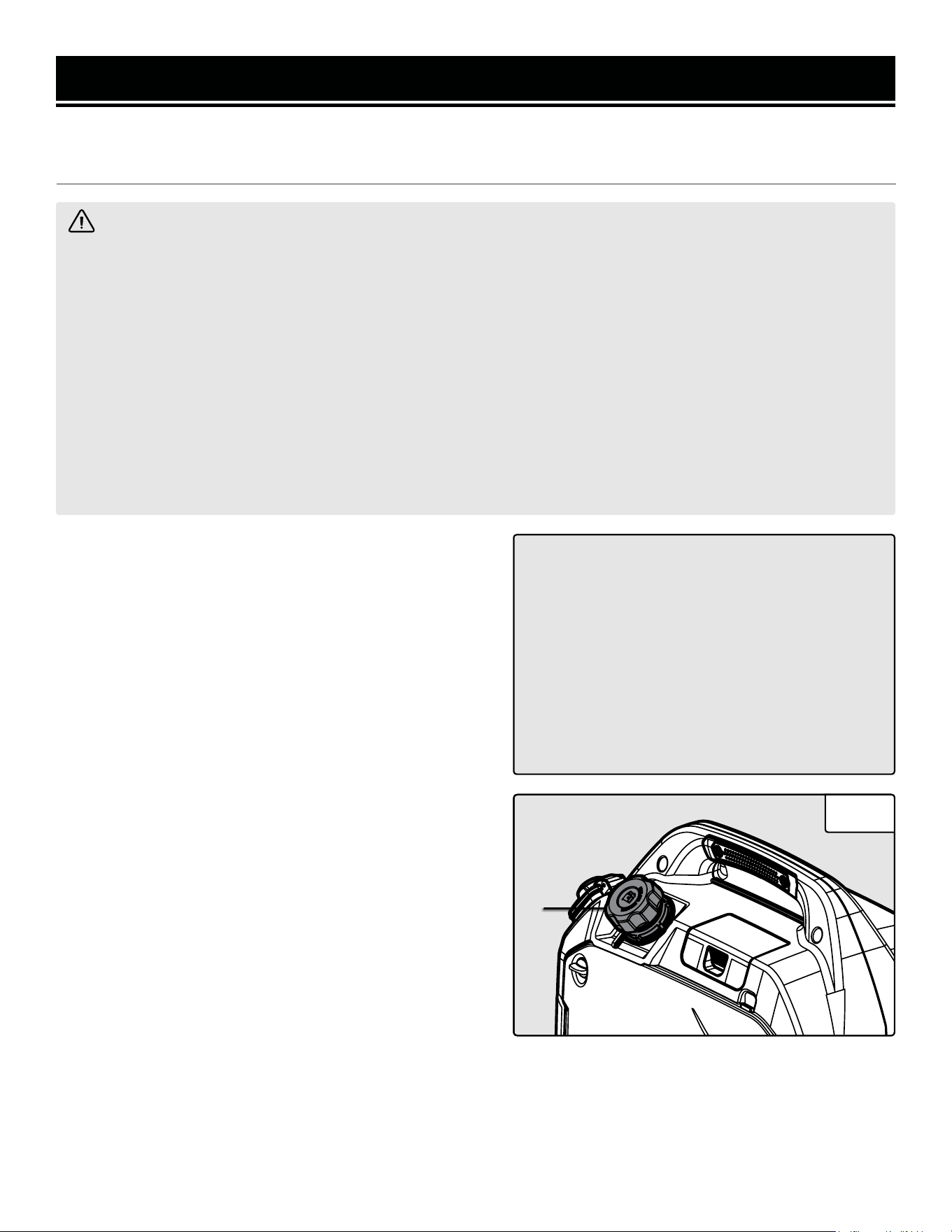
2. Unscrew the fuel cap (Fig. 4 - 1) and set it aside. The fuel
cap may be tight and hard to unscrew.
3. Slowly add unleaded gasoline to the fuel tank. Be careful
not to overfill. Reinstall fuel cap and wipe clean any spilled
gasoline with a dry cloth.
NOTE: Do not fill the fuel tank to the very top. If you do so,
gasoline will expand and spill during use, even with the fuel
cap in place.
4. Reinstall fuel cap and wipe clean any spilled gasoline
with a dry cloth.
IMPORTANT:
• Avoid getting dirt or water into the fuel tank.
• Keep gasoline away from sparks, open flames,
pilot lights, heat, and other sources of ignition.
• Gasoline can age in the tank and make starting
difficult. Never store the generator for more
than 2 months with fuel in the tank.
• Never use an oil/gasoline mixture.
• Never use old gasoline.
FUEL OPTION A: GASOLINE
14
FUEL OPTION B: LIQUID PETROLEUM GAS (LPG)
To connect your generator to an LPG cylinder:
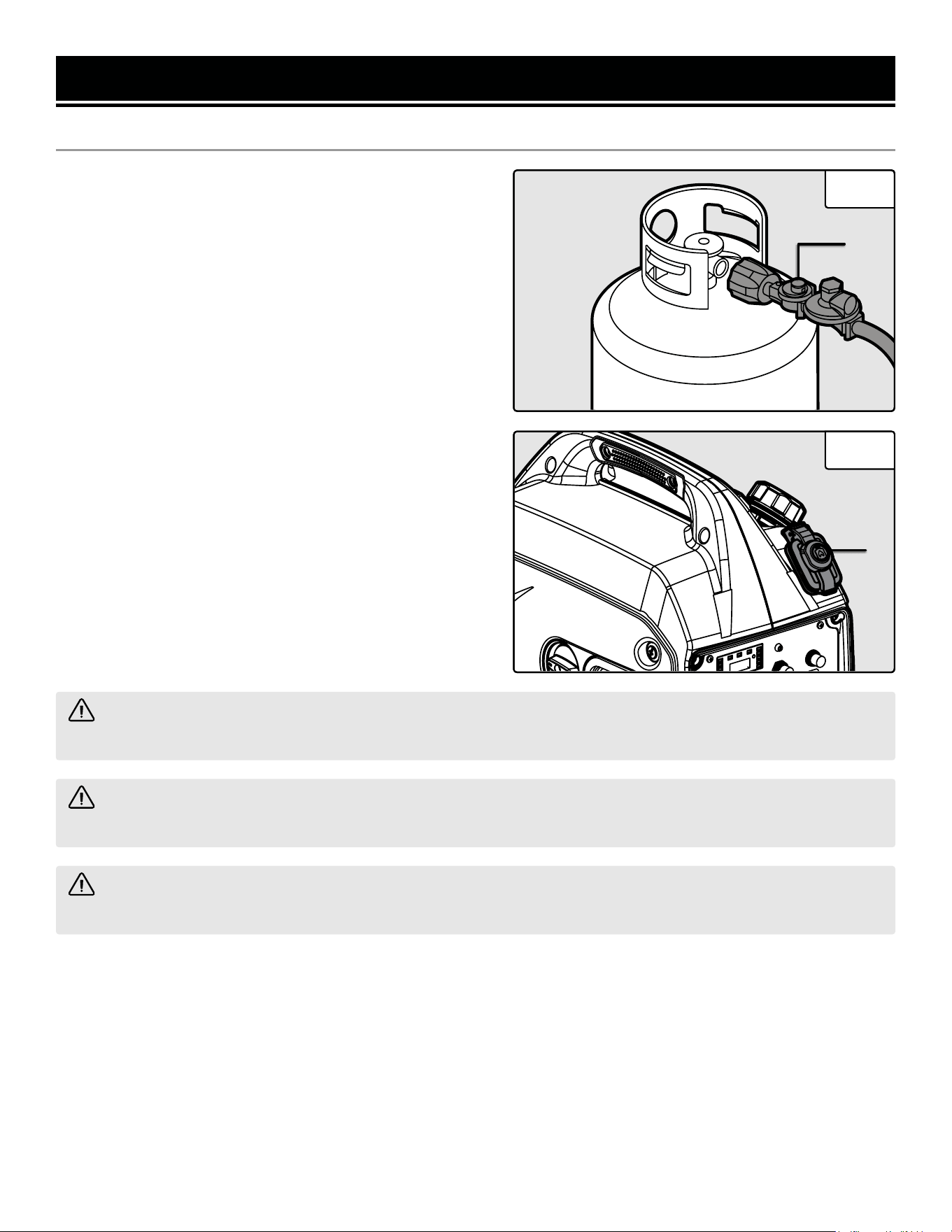
1. Take off the safety caps from the cylinder valve, genera-
tor mounted regulator, and regulator connecting hose ends.
2. With the LPG tank valve closed, attach the LPG regulator
connecting hose (Fig. 5 - 1) to the valve. Turn the plastic
coupling from the hose right (clockwise) to tighten hose
assembly onto the LPG tank.
3. Remove the protective cover from the LPG inlet (Fig. 6 -
1) on the generator. Push the connector on the other end of
the regulator hose into the LPG inlet until it clicks into place.
4. Turn the LPG tank valve ON and check for leaks by spray-
ing soapy water to check connections. If bubbles appear,
become larger in size, or increase in number, a leak exists.
This MUST be corrected before using generator. Contact
WEN customer service at 1-847-429-9263, M-F 8-5 CST, or
email [email protected] for assistance.
NOTE: If you would like to purchase other accessories for
your dual-fuel generator, consult your local dealer of pro-
pane and propane accessories, I tell you what.
Fig. 5
Fig. 6
1
1
CAUTION! Always position the LPG cylinder so the connection between the tank and LPG inlet won’t cause
sharp bends or kinks in the hose.
WARNING! Risk of burns. Contact with liquid contents of cylinder will cause freeze burns to the skin. If liquid
contents contacts skin or eyes, seek immediate medical attention.
WARNING! When transporting and storing, keep cylinder secured in an upright position with cylinder valve
turned off. Keep cylinders ventilated and away from heat when in a vehicle.
PREPARATION
15
PREPARATION
WARNING! Failure to properly ground the
generator increases your risk of electric shock.
WARNING! To prevent serious injury from
fire, follow the kit installation procedures in a
well-ventilated area away from ignition sources.
If the engine is hot from use, shut the engine off
and wait for it to cool before proceeding. Do not
smoke near the generator. Warranty will be void
if adjustments are not made for high altitude use.
CAUTION! UNINSTALL the high altitude kit when
operating at altitudes below 2000 feet.
NOTE: Grounding wire and grounding rods
are not included with the generator. A general-
ly acceptable grounding wire is a No. 12 AWG
(American Wire Gauge) stranded copper wire.
Grounding codes can vary by location. Contact a
local electrician to check the area codes.
Fig. 7
1
STEP 3 - GROUND THE GENERATOR
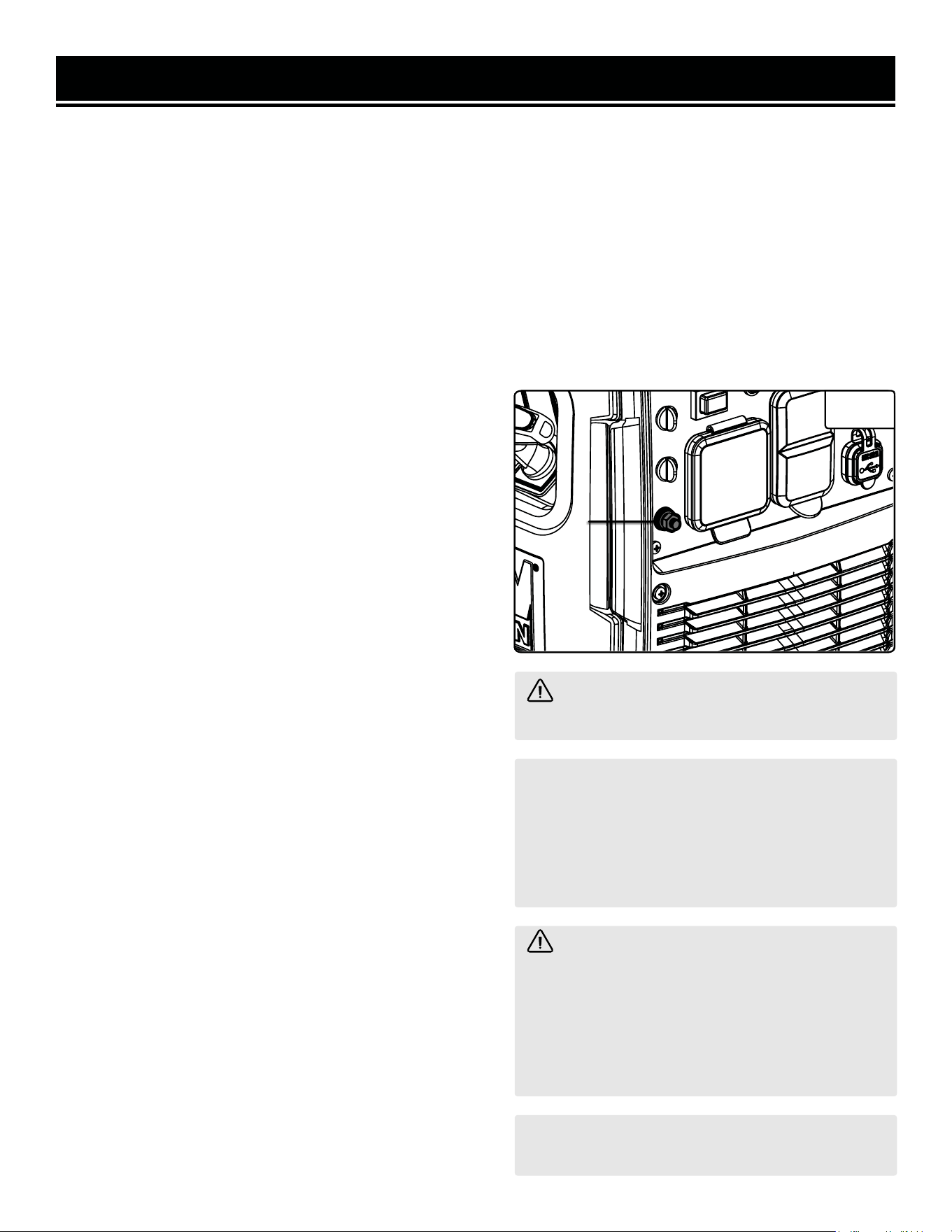
To reduce the risk of electric shock and to maximize safety,
the generator should be properly grounded.
1. Attach one end of the grounding wire to the grounding
nut (Fig. 7 - 1). Tighten the nut to secure the grounding
wire.
2. Connect the other end of the grounding wire to a copper,
brass, or steel-grounding rod that is driven into the earth.
HIGH ALTITUDE OPERATION ABOVE 2000 FEET
The fuel system on this generator may be affected by opera-
tion at high altitudes. Proper operation can be ensured by
installing an altitude kit at altitudes higher than 3000 feet
above sea level. At elevations above 9800 feet, the engine
may experience a decrease in performance, even with the
proper altitude kit. Operating this generator without said kit
may increase the engine’s emissions and decrease both fuel
economy and performance.
This kit should be installed by a qualified mechanic. You can
order the kit at wenproducts.com by searching part number
DF360iX-HA39. Refer to the instructions included with your
altitude kit for more information about installation.
AUTO FUEL SELECTION
Your generator is equipped with Auto Fuel Selection Technology. What this means is that the generator will auto-
matically select the fuel source (LPG or gasoline) depending on availability. LPG is prioritized; this means that if a
propane tank with enough LPG is connected, the generator will automatically use LPG. If no propane tank is con-
nected, the generator will use gasoline (if there is gasoline in the fuel tank). The LPG regulator hose must be discon-
nected for the generator to switch to gasoline. If the LPG regulator hose is connected and you run out of LPG, the
generator will not automatically switch to gasoline.
NOTE: Make sure the generator can handle the load(s) you plan to connect. The generator can provide more power
when running on gasoline than on LPG. Consult the specifications table on p. 3, as well as the “Calculating the Watt-
age of Your Device(s)” chart to ensure that your load(s) will not exceed the rated wattage for a particular fuel. See
also the “Switching Fuels” section for more information.
16
CAUTION!
Disconnect all electrical loads from the generator before attempting to start.
Before starting the generator, make sure you have read and performed the steps in the “Preparation” section of this
manual, pages 12-14. If you are unsure about how to perform any of the steps in this manual please call 1-847-
429-9263 M-F 8-5 CST for customer service.
To maximize safety, ALWAYS ground the generator before using it. See page 16, “GROUND THE GENERATOR”.
Use a ground fault circuit interrupter (GFCI) in highly conductive areas such as metal decking or steel work. GFCIs
are available in-line with some extension cords.
STARTING YOUR GENERATOR
DANGER! CARBON MONOXIDE
Using a generator indoors CAN KILL YOU IN MINUTES. Generator exhaust contains carbon monoxide (CO). This
is a poison gas you cannot see or smell. If you can smell the generator exhaust, you are breathing CO. But even
if you cannot smell the exhaust, you could be breathing CO.
NEVER use a generator inside homes, garages, crawl spaces, or other partially enclosed areas. Deadly levels
of carbon monoxide can build up in these areas. Using a fan or opening windows and doors does NOT supply
enough fresh air. ONLY use a generator outside and far away from windows, doors, and vents. These openings
can pull in generator exhaust.
Even if you use a generator correctly, CO may leak into the home. ALWAYS use a battery-powered or battery-
backup CO alarm in the home. If you start to feel sick, dizzy, or weak after the generator has been running, move
to fresh air RIGHT AWAY. See a doctor. You may have carbon monoxide poisoning.
WARNING! The exhaust from this product contains chemicals known to the State of California to cause
cancer, birth defects, or other reproductive harm.
WARNING! Do not operate generator near open flame or flammable materials This generator may emit
highly flammable and explosive gasoline vapors, which can cause severe burns or even death if ignited. A
nearby open flame can lead to explosion even if it isn’t directly in contact with gasoline. Do not smoke near the
generator.
WARNING! This generator produces powerful voltage, which can result in electrocution.
WARNING! Do not use in rainy or wet conditions. Do not touch bare wires or receptacles (outlets). Do not
allow children or non-qualified persons to operate.
WARNING! Generator should only be connected to electrical devices, either directly or with an extension
cord. NEVER connect to a building electrical system without a qualified electrician and connected to a transfer
switch as a separately derived system. Such connections must comply with local electrical laws and codes.
Failure to comply can create a back-feed, which may result in serious injury or death to utility workers.
Follow the instructions on the next page to start your generator.
17
STARTING YOUR GENERATOR
BEFORE STARTING THE GENERATOR
1. Verify that the generator is outside on a dry, level surface. Allow at
least two feet of clearance on all sides of the generator.
2. To maximize safety, check that the generator is properly grounded.
See page 16, “GROUND THE GENERATOR.”
3. Check that there is a sufficient level of oil in the crankcase. Add oil
if necessary. Refer to page 12, “STEP 1 - ADD / CHECK OIL.”
4. If using gasoline, make sure there is enough gasoline in the fuel
tank. Add fuel if necessary (see “ADD / CHECK FUEL”). If using LPG,
make sure there is enough propane in the tank, and that the tank and
regulator hose are properly connected.
5. Make sure all electrical devices are unplugged from the generator
during ignition. Otherwise it will be difficult for the engine to start.
STARTING THE GENERATOR (GASOLINE)
1. Place the generator outside on a dry, level surface. Allow at least
two feet of clearance on all sides of the generator.
2. Check there is sufficient level of oil in the crankcase. Add oil if
necessary (refer to “ADD / CHECK OIL” on page 12).
3. Check there is sufficient level of gasoline in the fuel tank. Add fuel
if necessary (refer to “ADD GASOLINE” on page 14).
4. To maximize safety, make sure the generator is properly grounded
(refer to “GROUND THE GENERATOR” on page 16).
5. Make sure all electrical devices are unplugged from the generator
during ignition. Otherwise it will be difficult for the engine to start.
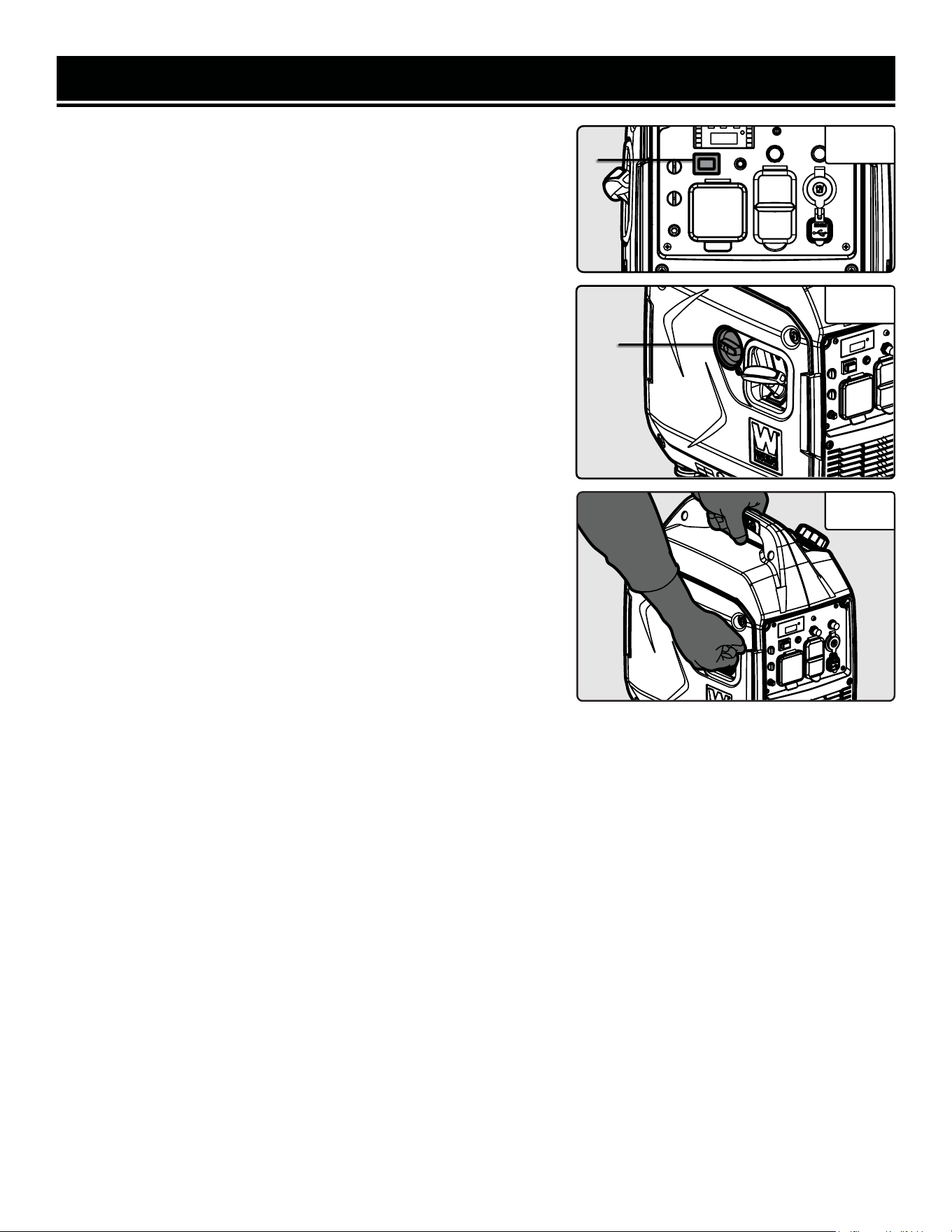
6. Turn the ECO-MODE switch to “OFF” during starting (Fig. 8 - 1).
7. Turn the 4-in-1 switch (Fig. 9 - 1) to the “CHOKE” position.
8. Pull on the recoil starter handle (Fig. 10) slowly until a slight resis-
tance is felt, then pull quickly to start the engine. Return cord gently
into the recoil starter. Never allow the cord to snap back.
9. Turn the 4-in-1 switch (Fig. 9 - 1) to the “RUN” position.
10. Allow the engine to run for several minutes before attempting to
connect any electrical devices. This allows the generator to stabilize
its speed and temperature.
Fig. 8
Fig. 9
1
1
Fig. 10
18

STARTING YOUR GENERATOR
STARTING THE GENERATOR (LPG)
1. Place the generator outside on a dry, level surface. Allow at least two feet of clearance on all sides of the generator.
2. Check there is sufficient level of oil in the crankcase. Add oil if necessary (refer to “ADD / CHECK OIL” on page
12).
3. Make sure that the LPG regulator hose is properly connected to the LPG tank and the inlet on the generator (refer
to “FUEL OPTION B: LIQUID PETROLEUM GAS (LPG)” on page 15).
4. To maximize safety, make sure the generator is properly grounded (refer to “GROUND THE GENERATOR” on page
16).
5. Make sure all electrical devices are unplugged from the generator during ignition. Otherwise it will be difficult for
the engine to start.
6. Turn the ECO-MODE switch to “OFF” during starting (Fig. 8 - 1).
7. Turn the 4-in-1 switch (Fig. 9 - 1) to the “CHOKE” position.
8. Gently pull the recoil starter handle (Fig. 10) 3 - 5 times to prime the engine.
9. Turn the 4-in-1 switch (Fig. 9 - 1) to the “RUN” position.
10. Quickly pull the recoil starter handle to start the engine. Return the cord gently into the recoil starter. Never allow
the cord to snap back.
11. Allow the engine to run for several minutes before attempting to connect any electrical devices. This allows the
generator to stabilize its speed and temperature.
19
STARTING YOUR GENERATOR
PARALLEL OPERATION
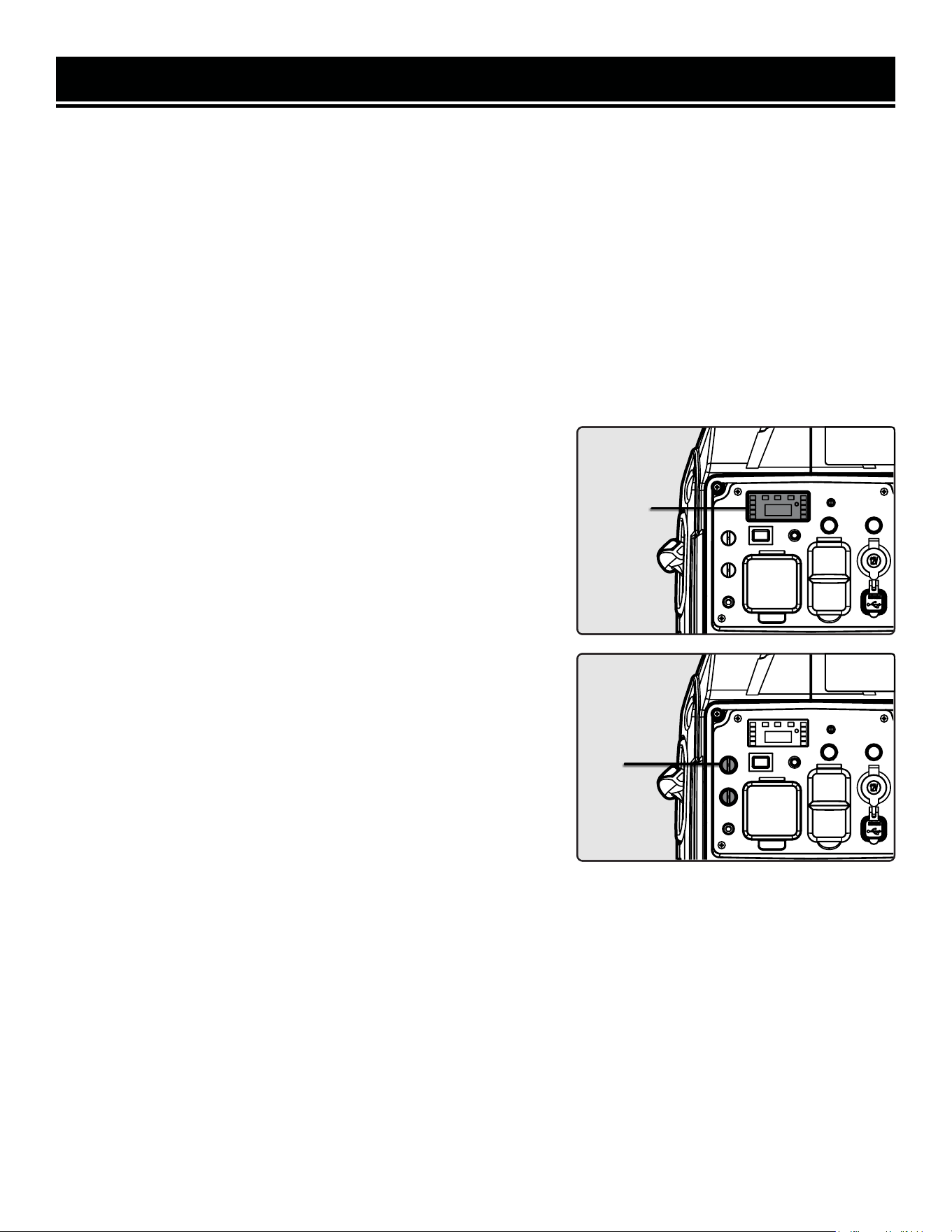
The parallel connection feature (Fig. 12 - 1) allows you to connect
two WEN generators to increase the total available electrical power.
The “Parallel Connection Kit” can be purchased from wenproducts.
com.
Follow the instructions included with your WEN parallel connection
kit for proper installation and operation.
ENGINE BREAK-IN PROCEDURE
The procedure below should be followed when you receive your gen-
erator in order to prolong the engine’s service life. This procedure
helps to seat the piston rings properly in the cylinder, and will reduce
overall wear on the engine.
For the first 8 hours of operation, vary the load, but keep it at or be-
low 50% of the generator’s rated wattage, if possible. If your genera-
tor is equipped with an Eco-mode switch (only applicable for certain
inverter generators), engage Eco-mode periodically during the first
8 hours. After the first 8 hours, change the oil, then change it again
after the first 25 hours. You may run the generator at full load af-
ter the 8-hour oil change. Refer to the Recommended Maintenance
Schedule in Table 4 for the full maintenance schedule.
ECO-MODE SWITCH
This generator is equipped with an Eco-Mode Idle Control Switch (Fig. 8 - 1). Engaging the switch automatically ad-
justs the engine to match the load. When the electrical load changes, the generator engine will automatically speed
up and slow down as needed. This reduces fuel consumption and noise levels.
Keep this switch engaged when the power load requirement is less than 2000W. Do not engage the Eco-Mode
Switch when the total load is more than 2000W. The generator engine must run at full speed to supply power for
anything over 2000W.
OIL LEVEL SHUTDOWN
The low oil indication light on the data meter (Fig. 11 - 1) will turn on to remind you that the engine oil level is low
and need to be refilled. The generator is equipped with a low oil pressure shutoff that will automatically stop the
engine when the oil level is too low to protect the unit from damage. The oil level of the engine should be checked
before each start to ensure that the engine crankcase contains sufficient lubricant.
1
1
Fig. 11
Fig. 12
20
USING YOUR GENERATOR
CALCULATING THE WATTAGE OF YOUR DEVICE(S)
Connect electrical devices running on AC current according to their wattage requirements. Calculate the total run-
ning wattage and starting wattage of the device(s) you wish to connect, and MAKE SURE that they are within the
capacity of your generator and the capacity of each individual outlet.
Generator
Wattage
Capacity
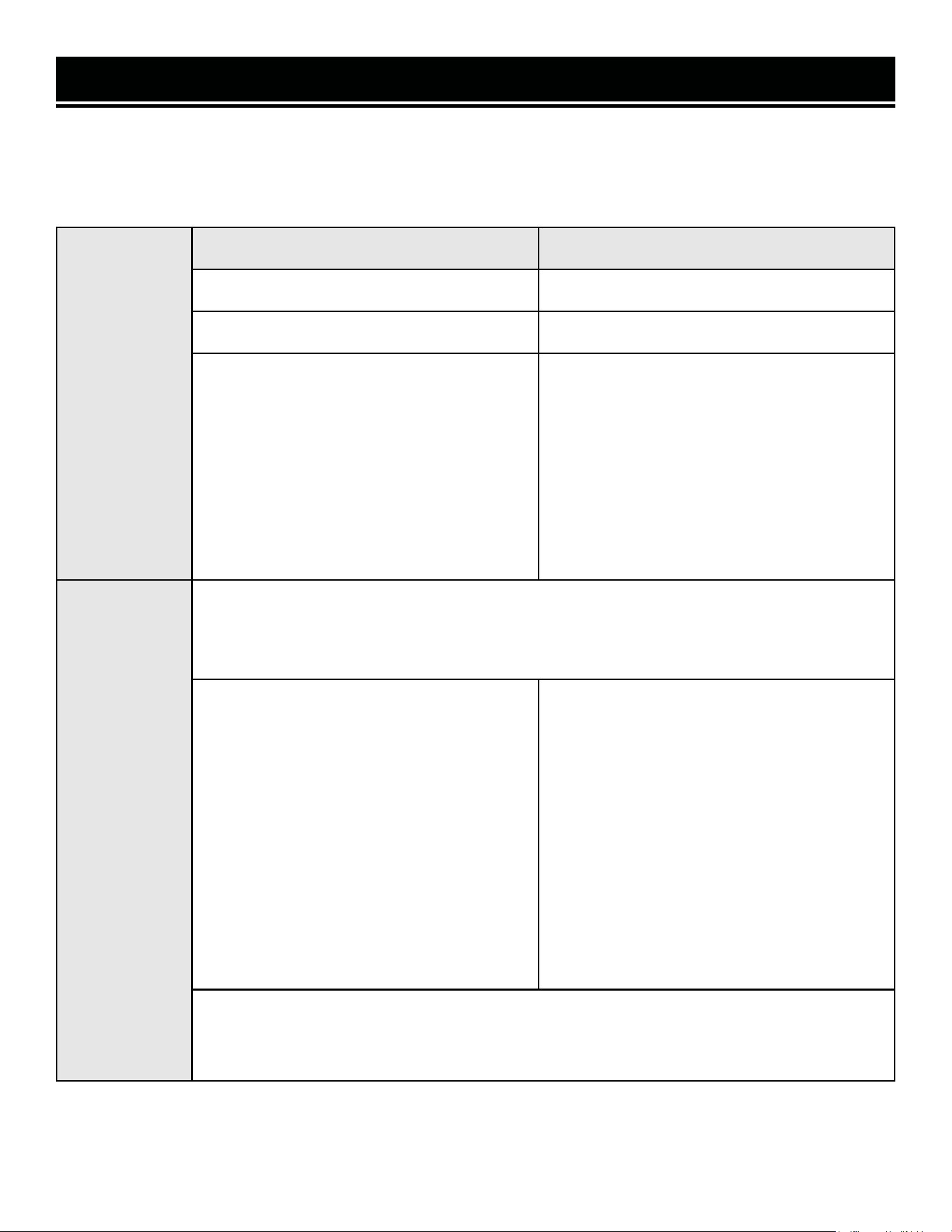
GENERATOR RUNNING (RATED) WATTS GENERATOR STARTING (SURGE) WATTS
Gasoline: 2900W Gasoline: 3600W
LPG: 2600W LPG: 3500W
What this means:
The generator can produce a maximum of
2900W / 2600W on a continuous basis to
supply ongoing power to your electronic de-
vices.
NOTE: Also check the rated amperage for
each outlet and make sure not to overload
the individual outlets.
What this means:
Some devices such as box fans require short
bursts of extra power in addition to the rated
wattage listed by the device to start their mo-
tors.
The generator can produce a maximum watt-
age of 3600W / 3500W for a short period of
time (seconds) to cover the extra starting
power required by your electronic devices.
Electronic
Device
Wattage
Calculation
Find the wattage information of each device you plan to connect. The information should be
listed on the device or in its instruction manual, or you may refer to page 22, Table 2.
The wattage can be calculated using this equation: Watts = Volts x Amperes
To calculate the total running watts of your
devices:
+ Add up the running wattages of all the
device(s) you plan to connect.
= The total running (rated) wattage.
This wattage should NOT exceed the run-
ning wattage of 2900W / 2600W.
It is recommended to maintain a load at or
below 2610W / 2340W (90% of the rated
output) to ensure steady voltage output and
to prolong the generator’s lifespan.
To calculate the total starting watts of your
devices:
+ Add up the total running wattage of all the
device(s) you plan to connect.
+ Add the single highest ADDITIONAL start-
ing wattage out of the device(s) you plan to
connect.
= The total starting (surge) wattage.
This wattage should NOT exceed the starting
wattage of 3600W / 3500W.
If any of either of the total calculated running watts or starting watts is higher than the capac-
ity of your generator, adjust the load until both wattage requirements are met. Otherwise you
will overload the generator, and cause damage to the engine and your electrical device(s).
Table 1 - How to Calculate Wattages
21
USING YOUR GENERATOR
CALCULATING THE WATTAGE OF YOUR DEVICE(S) - CONTINUED
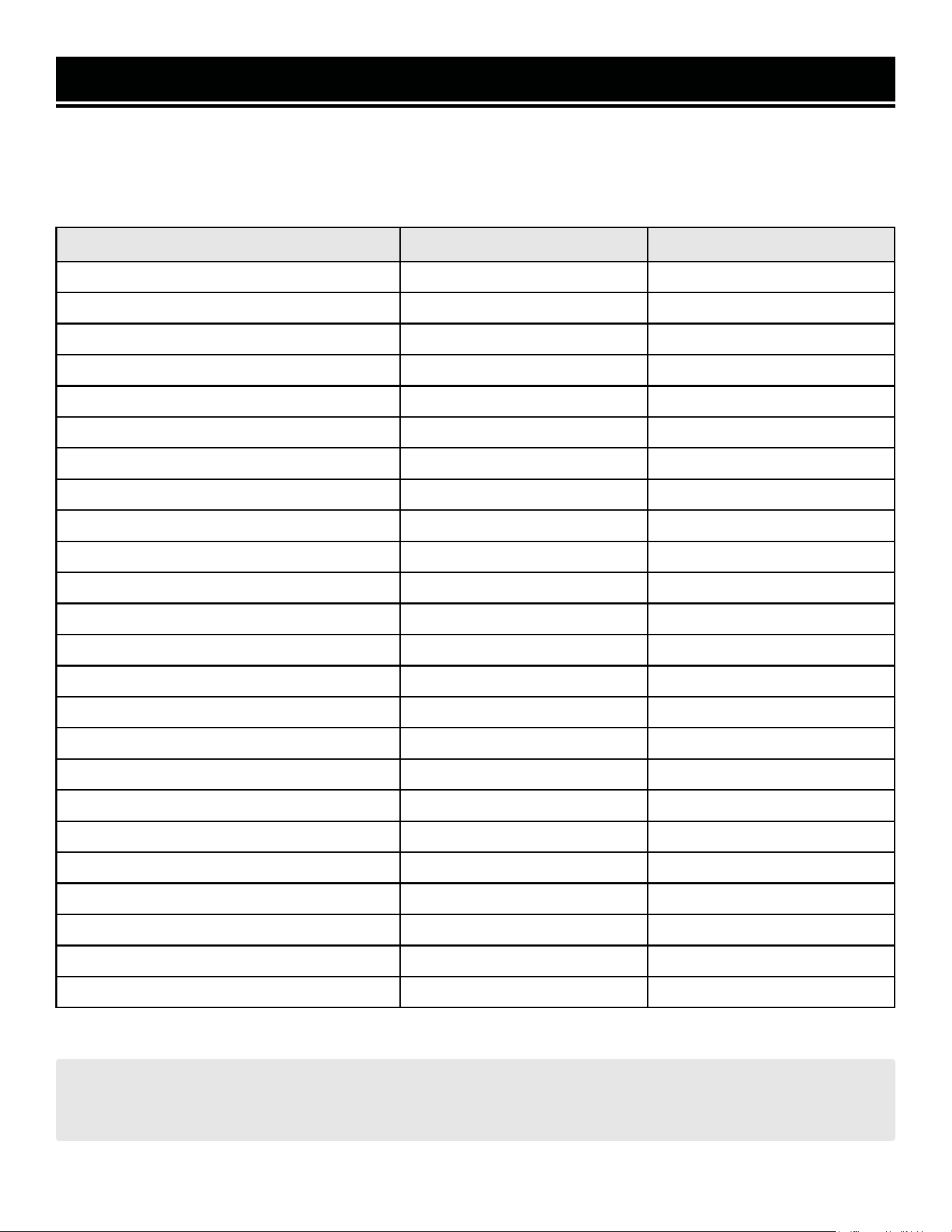
The chart below serves as a reference for the estimated wattage requirements of common electrical devices. How-
ever, do not solely rely on this chart - all electronics and appliances are built differently. Always check the wattage
listed on the electrical device before consulting this chart.
Tool or Appliance Rated (Running) Watts Surge (Starting) Watts
Electric Water Heater (40 Gal) 4000 0
Hot Plate 2500 0
Saw - Radial Arm 2000 2000
Electric Stove (Each Element) 1500-2800 0
Saw - Circular 1500 1500
Air Compressor (1 HP) 1500 3000
Window Air Conditioner 1200 1800
Saw - Miter 1200 1200
Microwave 1000 0
Well Water Pump 1000 1000
Sump Pump 800 1200
Refrigerator Freezer 800 1200
Furnace Blower 800 1300
Computer 800 0
Electric Drill 600 900
Television 500 0
Deep Freezer 500 500
Garage Door Opener 480 0
Stereo 400 0
Box Fan 300 600
Clock Radio 300 0
Security System 180 0
Dvd Player / VCR 100 0
Common Light Bulb 75 0
Table 2 - Estimated Wattages of Common Electrical Appliances
NOTE: Become familiar with the functions and capacity of each component on the control panel before con-
necting electrical devices. See page 11 for more information about the components of the control panel. Do not
overload generator or individual panel receptacles. Do not connect 50Hz or 3-phase loads to the generator.
22
USING YOUR GENERATOR
CONNECTING ELECTRICAL DEVICES
When the rated wattage requirement of each electrical device has been determined, add these numbers to find the
total rated wattage needed. If this number exceeds the rated wattage (2900W) of the generator, DO NOT connect all
these devices. Select a combination of electrical devices with a total rated wattage lower than or equal to the rated
wattage of the generator.
CAUTION! Become familiar with the markings on the control panel (Fig. 13) before connecting electrical
devices. Do not connect 50 Hz loads to the generator.
1. Before connecting electrical devices, allow the generator to run for a few minutes to stabilize the speed and volt-
age output.
2. Make sure that all devices are turned off. Start plugging in each electric device, from the highest wattage to the
lowest. Check the power indicator light (green) to ensure the generator is producing power.
3. Do not overload the generator or individual panel receptacles. If an overload occurs, the overload indication light
(red) will activate. If it is flashing, turn off and unplug one load. If it is solid (not flashing), the generator will cut
off power to protect itself. Unplug all electrical devices and then press the reset button to reset the entire circuit,
or press the circuit breaker to reset the DC circuit. Check the total wattage of the devices and reduce the load if it
exceeds the capacity of the generator. Then, plug the loads back in one by one.
NOTE: If the reset button or circuit breaker does not reset, wait several minutes and try again. If problem still per-
sists, please call 1-847-429-9263 M-F 8-5 CST.
Fig. 13
23
USING YOUR GENERATOR
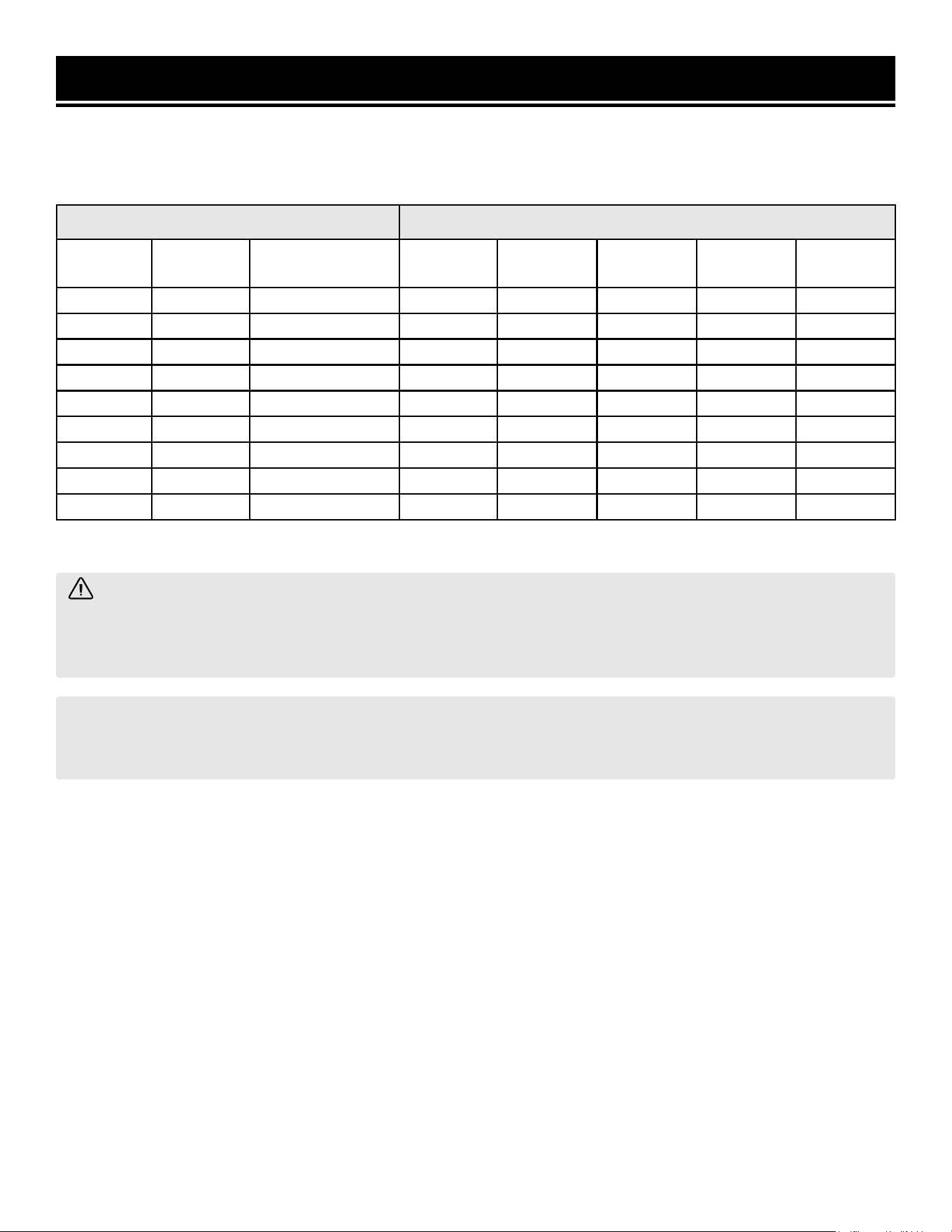
Table 3 - Power Cord Requirement Guide
SOME NOTES ABOUT POWER CORDS
Long or thin cords can drain the power provided to an electrical device by the generator. When using such cords,
allow for a slightly higher rated wattage requirement by the electrical device.
*NR = Not Recommended
Device Requirements Max. Cord Length (ft) by Wire Gauge
Amps Watts
(120V)
Watts (240V) #8 wire #10 wire #12 wire #14 wire #16 wire
2.5 300 600 NR NR NR 375 250
5 600 1200 NR NR 300 200 125
7.5 900 1800 NR 350 200 125 100
10 1200 2400 NR 250 150 100 50
15 1800 3600 NR 150 100 65 NR
20 2400 4800 175 125 75 50 NR
25 3000 6000 150 100 60 NR NR
30 3600 7200 125 65 NR NR NR
40 4800 9600 90 NR NR NR NR
WARNING! Generator should only be connected to electrical devices, either directly or with an extension
cord. NEVER CONNECT TO A BUILDING ELECTRICAL SYSTEM without a qualified electrician and connected to
a transfer switch as a separately derived system. Such connections must comply with local electrical laws and
codes. Failure to comply can create a back-feed, which may result in serious injury or death to utility workers.
NOTE: For power outages, permanently installed, stationary generators are better suited for providing backup
power to your home. Even a properly connected portable generator can become overloaded. This may result in
overheating or stressing the machine’s components, possibly leading to generator failure.
24
USING YOUR GENERATOR
CO SENSOR INFORMATION
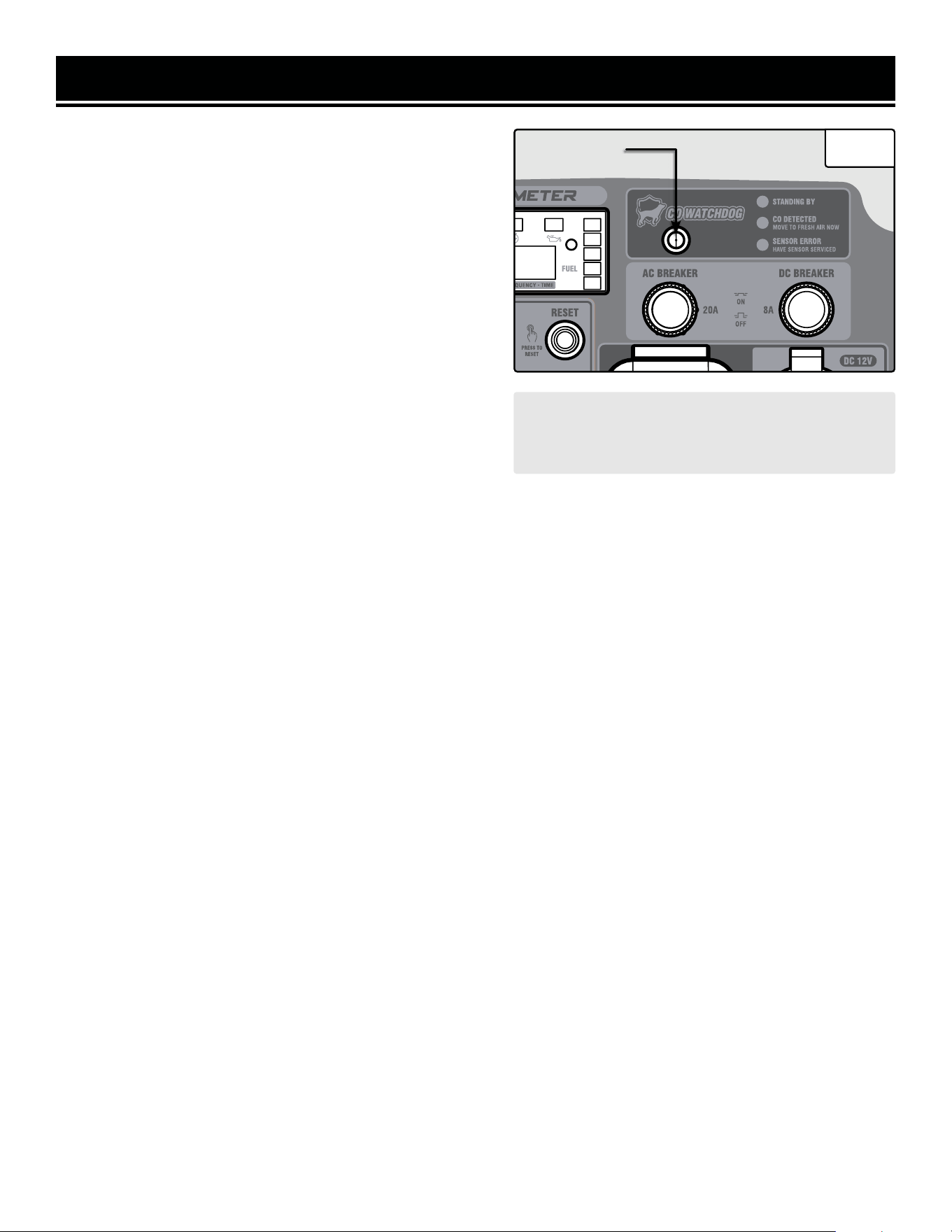
The CO Watchdog carbon monoxide monitoring system (Fig.
14 - 1) measures the accumulation of poisonous CO gas
while the generator is running. If the level of CO gas gets too
high, the CO Watchdog system will automatically shut down
the generator. This system is not a substitute for an indoor
CO alarm.
Whenever the CO Watchdog system shuts down the genera-
tor, the LED on the generator control panel (Fig. 14 - 1) will
blink red for at least 5 minutes after the generator is shut
down. If you notice that the LED is blinking red, vacate the
area immediately. Go to an open, outdoor area. Ventilate
the area around the generator thoroughly before returning.
Let the generator stay shut down for a few minutes before
restarting the engine. This should allow carbon monoxide to
dissipate from the area. If you restart the generator and the
CO Watchdog detects that CO levels are still too high, it will
shut down the generator again. If CO levels are low enough,
the generator will run normally.
1
Ensure that the generator is located in an open outdoor area, with the exhaust pointing away from occupied struc-
tures, and pointing away from the prevailing winds, such that those winds do not blow engine exhaust towards the
sensor module. If anyone experiences dizziness, headaches, nausea, fatigue, or other symptoms of CO poisoning,
get to fresh air immediately and seek the attention of a qualified medical professional. Follow all other directions in
this manual regarding the connection and disconnection of electrical devices when starting or shutting down the
generator.
When starting the generator, the CO Watchdog LED on the panel may flash. This indicates that the system is running
a self-test procedure, and does not indicate a problem.
If the CO Watchdog LED on the panel is yellow, a system error has occurred, or the CO sensor has reached the end
of its life. Contact WEN customer service (1-847-429-9263, M – F 8 – 5 CST, or [email protected])
for assistance.
When operating your generator, please note the following:
• The CO Watchdog does not discriminate in its input; any source of carbon monoxide in the area around the genera-
tor could cause it to activate. If the CO Watchdog LED is blinking red, safety measures should be taken immediately.
• Tampering with, disconnecting, or bypassing the CO sensor could cause hazardous conditions, including but not
necessarily limited to injury or death, and will void your warranty. The generator will not run with the CO sensor
disconnected or bypassed, or if the CO sensor indicates an error.
• The CO sensor has a lifetime of about 7 years, and is capable of monitoring its lifetime. If your generator shows
an error light several years after purchase, it may be time to replace the CO sensor. Contact WEN customer service
for assistance.
NOTE: if the generator is oriented so that the
engine exhaust is blown towards the CO sensor,
the generator may shut down.
Fig. 14
25
STOPPING YOUR GENERATOR
SHUTTING OFF THE GENERATOR
1. Turn off all electrical devices and then unplug the devices from the generator.
CAUTION! Unplugging running devices can cause damage to the generator. Never stop the engine with elec-
trical devices connected and running.
2. Allow generator to run at no load for a few minutes to stabilize
internal temperatures.
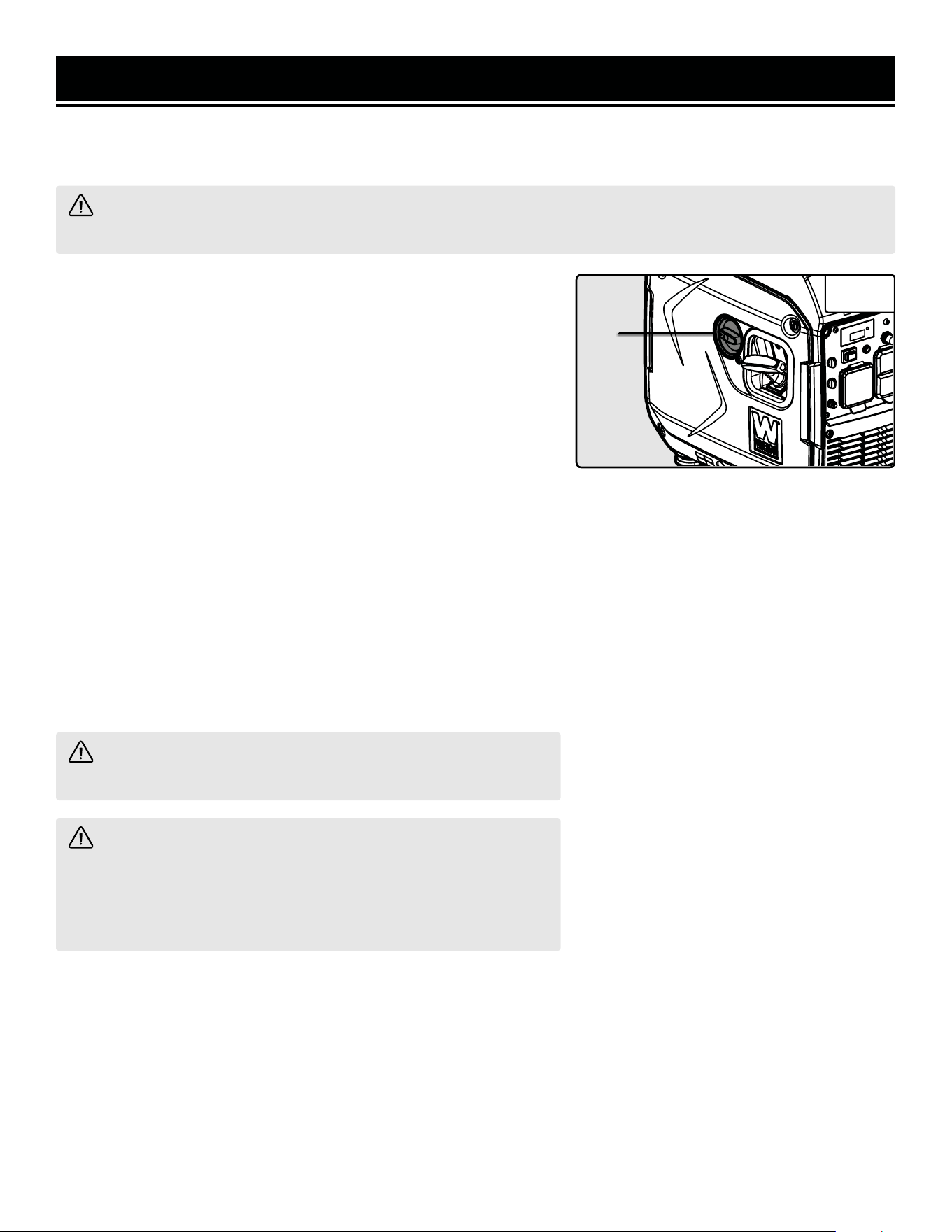
3. Turn the 4-in-1 switch (Fig. 13 - 1) to the “FUEL OFF” position.
4. If using LPG, turn the LPG tank valve OFF and remove the LPG
regulator hose from the tank and inlet on the generator. Push the
collar on the LPG quick-connector back to release the end of the
LPG regulator hose.
4. The engine will continue to run until the majority of the fuel in the
carburetor is consumed, which takes a few minutes. It will then shut
off automatically. This feature helps to prevent the carburetor from
being clogged by stale fuel, extending your generator’s lifespan.
5. In case you are in a hurry and do not want to wait for the generator
to automatically shut down, turn the 4-in-1 switch to the “ENGINE
OFF” position and the generator will shut off right away. However,
this method will leave stagnant fuel in the carburetor, possibly caus-
ing blockages, a shortened lifespan, and other maintenance issues. If
this approach is frequently taken, make sure to drain your carburetor
before any long storage periods.
WARNING! Allow the generator to cool for several minutes
before touching areas that become hot during use.
CAUTION! Allowing gasoline to sit in the fuel tank for long
periods of time can make it difficult to start the generator in the fu-
ture. Never store the generator for extended periods of time (over
2 months) with fuel in the fuel tank. Refer to “Storing the Genera-
tor” on page 28.
1
Fig. 15
26
MAINTENANCE
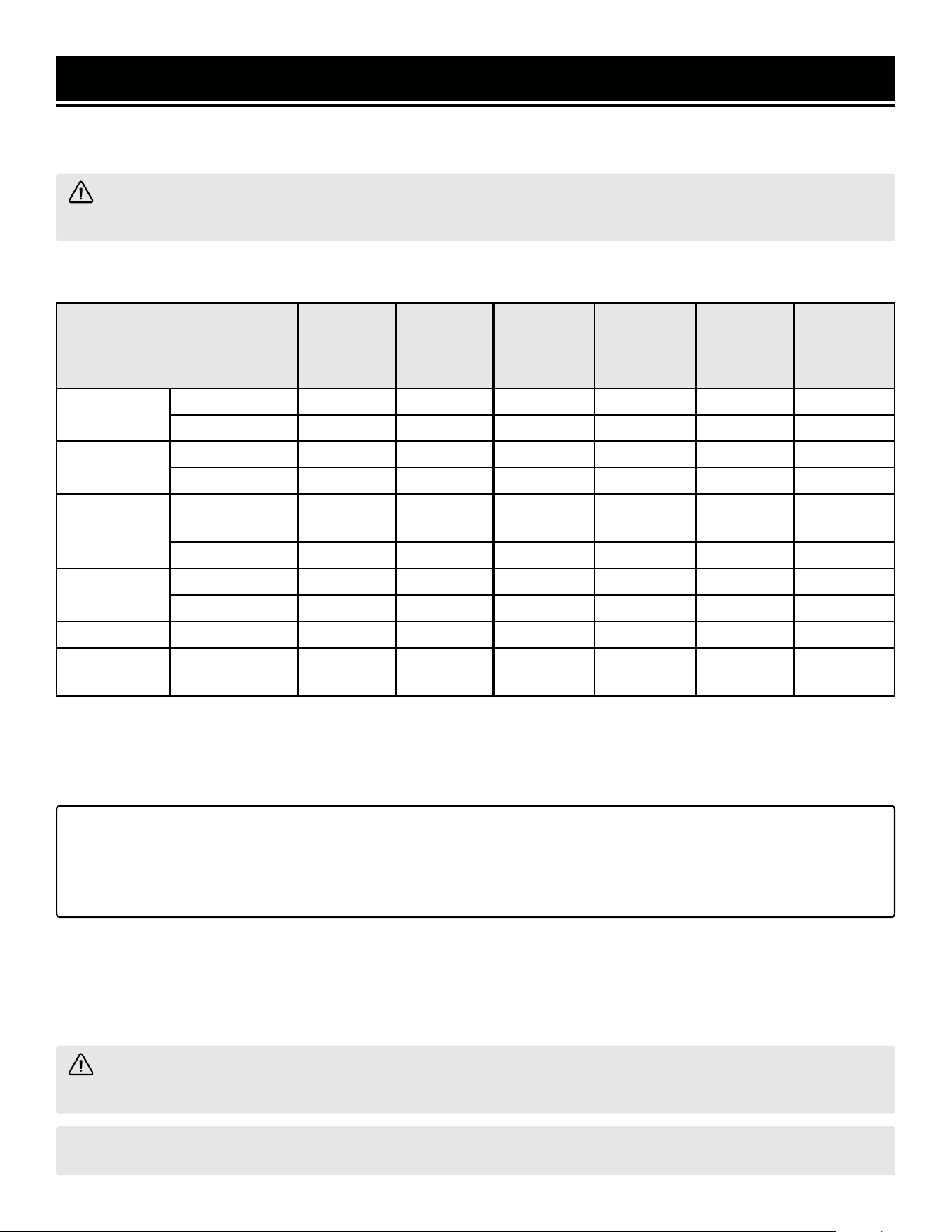
Proper routine maintenance of the generator will help prolong the life of the machine. Please perform maintenance
checks and operations according to the schedule in Table 4.
CAUTION! Never perform maintenance operations while the generator is running. Before maintaining or
servicing the generator, turn OFF the generator, disconnect all devices and allow the generator to cool down.
If there are any questions about the maintenance procedures listed in this manual, please call 1-847-429-9263 M-F
8-5 CST or email [email protected].
Recommended
Maintenance Schedule
Every 8
Hours or
Daily
Every 25
Hours
Every 3
Months or
50 Hours
Every 6
Months or
100 Hours
Before
Storage
As
Necessary
Engine Oil
Check Level x
Replace x** x** x* x
Air Filter
Check x*
Clean x*
Spark Plug
Check/Clean/
Regap
x
Change x x
Fuel
Check Level x
Drain x x
Carburetor Drain x x
Spark
Arrestor
Check/Clean x
Table 4 - Recommended Maintenance Schedule* Clean/change more often under dusty conditions or operating
under heavy load.
** Change the oil after the first 8 hours of operation, after the
first 25 hours of operation, and every 50 hours after that.
IMPORTANT GENERATOR MAINTENANCE TIPS:
• Drain your carburetor after each use and before storage to prevent it from clogging.
• Do not store the generator with fuel inside the tank for more than 2 months - the fuel will go bad.
• Run the generator for at least 20 minutes every month to maximize its lifespan.
CLEANING THE GENERATOR
Keep the generator clean to prevent improper operation or machine damage from dirt and debris. Inspect all venti-
lation openings on the generator. These openings must be kept clean and unobstructed. If the generator becomes
dirty, use a damp cloth to wipe exterior surfaces. Use a soft bristle brush to loosen dirt and oil and use a vacuum to
pick up loose dirt. Use low pressure air (not to exceed 25 PSI) to blow away dirt.
CAUTION! Never clean the generator when it is running! Never clean with a bucket of water or a hose. Water
can get inside the working parts of the generator and cause corrosion or a short circuit.
NOTE: Failure to properly maintain the generator will void the warranty.
27
MAINTENANCE
WARNING! Make sure generator is shut off before performing any inspection or maintenance procedures.
CHECKING / ADDING OIL
Check the oil level of the generator according to the Recommended Main-
tenance Schedule in Table 4. The oil level should be checked before each
use or every 8 hours of operation. The oil capacity of the generator engine
is 16.9 fl. oz. (0.5 L). Add oil when the oil level is low.
For proper type and weight of oil refer to “ADD / CHECK OIL” section. The
generator is equipped with an automatic shutoff to protect it from run-
ning on low oil. To check the oil level:
1. Make sure the generator is on a level surface. Do not tilt the generator
to assist in filling, as oil will flow into engine areas and cause damage.
Keep generator level!
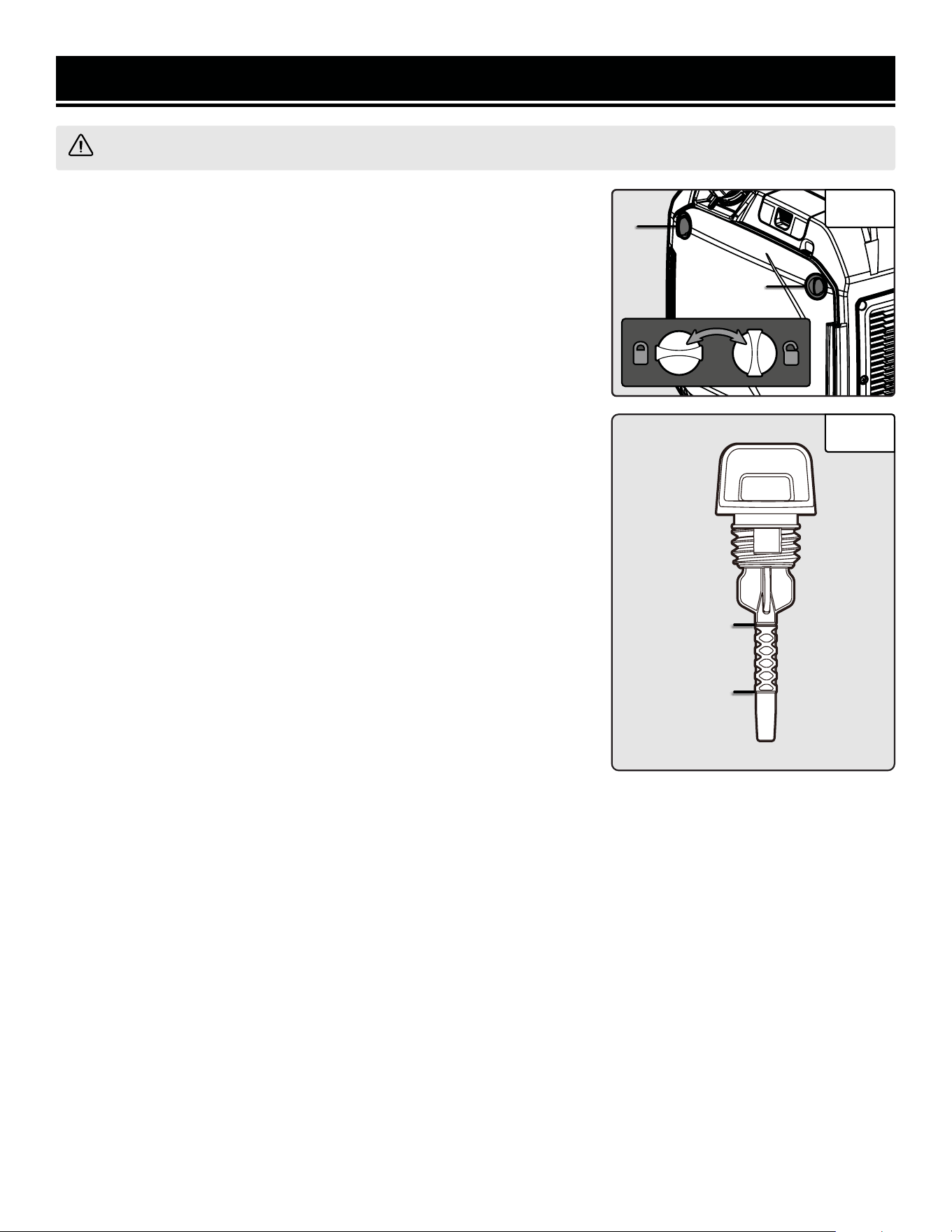
2. Open the side panel (to the right of the control panel) by twisting the
side panel access knobs (Fig. 16 - 1). Remove and wipe the oil dipstick
(Fig. 17) with a clean rag. Insert the dipstick into the oil fill opening with-
out screwing it in.
3. Insert the dipstick into the oil fill opening without screwing in. Remove
the dipstick to check the oil mark. Add oil if the oil mark covers less than
one half of the dipstick.
4. Using a funnel or appropriate dispenser, slowly add more oil. Repeat
step 3 until the oil mark measures between the upper limit mark and half-
way mark of the dipstick. Do not over fill the crankcase.
5. Reinstall dipstick and wipe clean any spilled oil with a rag.
DRAINING / CHANGING THE OIL
Change the oil according to the Recommended Maintenance Schedule in Table 4. Change the oil more often if oper-
ating under heavy load or high ambient temperatures. It is also necessary to drain the oil from the crankcase if it has
become contaminated with water or dirt. Changing the oil when the engine is warm allows for complete drainage.
Drain the oil from the generator according to the following steps.
1. Place generator on an elevated platform such as table or desk. Prepare a container underneath the oil fill to catch
the oil as it drains.
2. Open the side panel. Remove the dipstick and tilt the generator towards you to allow the oil to drain from the
engine completely.
3. Reinstall the oil dipstick and tighten it securely. Wipe clean any oil spillage and close the side panel.
NOTE: Do not dispose of used motor oil in the trash or down a drain. Please call a local recycling center or auto
garage to arrange proper oil disposal.
Upper Limit
Lower Limit
Fig. 16
Fig. 17
1
1
28
MAINTENANCE
SPARK PLUG MAINTENANCE
The spark plug is important for proper engine operation. A good
spark plug should be intact, free of deposits, and properly gapped.
Refer to Recommended Maintenance Schedule in Table 4 for in-
structions on maintaining. To inspect the spark plug:
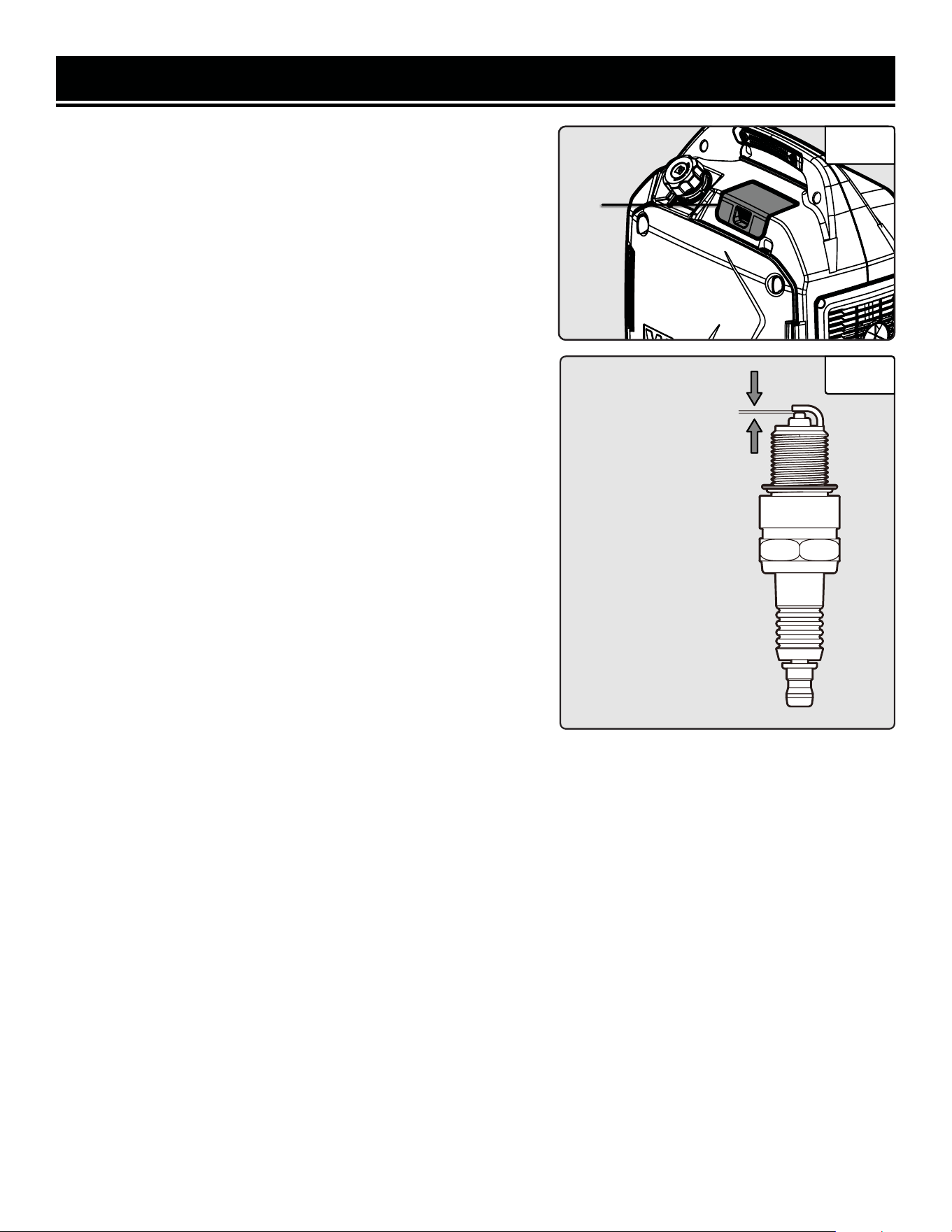
1. Open the spark plug access cover (Fig. 18 - 1).
2. Pull up to remove the black plastic spark plug boot. Be careful
not to tear any insulation or wire.
3. Use a spark plug wrench to unscrew and remove the spark plug
from the engine.
4. Visually inspect the spark plug for cracks or excessive electrode
wear. If the electrodes are worn or burned, or porcelain is cracked,
replace with a Torch E6RTC (NGK BPR6HS) spark plug (Part No.
56360iX-002), available at wenproducts.com.
5. If re-using the spark plug, use a wire brush to clean any dirt
from around the spark plug base then re-gap the spark plug.
6. Measure the plug gap with a wire gauge (Fig. 19). The gap
should be 0.023 - 0.031 in. (0.6 - 0.8 mm). Carefully adjust the
gap if necessary.
7. Screw the spark plug back into the spark plug hole by hand.
After the spark plug is properly seated, use the spark plug wrench
to tighten it.
NOTE: The recommended tightening of the spark plug is 1/2 to 3/4
of a turn after the spark plug gasket contacts the spark plug hole,
or 11.1-14.7 ft-lbs (15 - 20 Nm). Do not over-tighten the spark
plug.
8. Reinstall the spark plug boot over the spark plug.
9. Reinstall the spark plug access cover.
0.023 in. - 0.031 in.
(0.6mm - 0.8 mm)
Fig. 18
Fig. 19
1
29
MAINTENANCE
AIR FILTER MAINTENANCE
Routine maintenance of the air filter helps maintain proper airflow
to the carburetor. Occasionally check that the air filter is free of ex-
cessive dirt. The air filter should be checked every 50 hours of use.
Refer to Recommended Maintenance Schedule in Table 4.
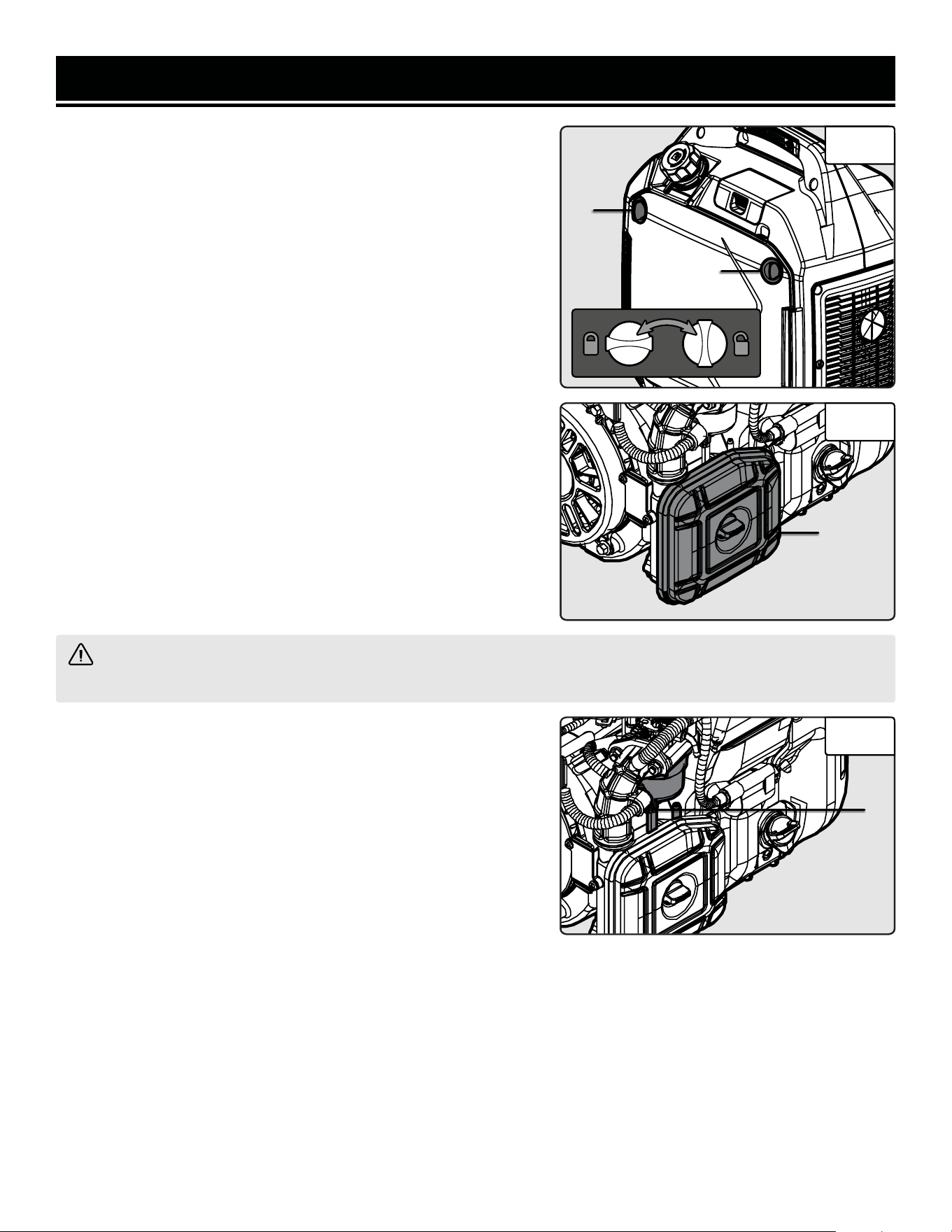
1. Open the side panel (to the right of the control panel) by twisting
the side panel access knobs (Fig. 20 - 1).
2. Open the air filter cover (Fig. 21 - 1), and remove the foam air
filter element from the casing.
3. Check and clean the foam air filter element. Wash the filter ele-
ment in warm soapy water. Squeeze it thoroughly dry in a clean
cloth. Saturate the element in clean engine oil and squeeze off ex-
cess oil in a clean absorbent cloth. A small amount of oil in the
element is normal and necessary for the engine to work properly.
If the element is damaged, replace it with a new one (part. no.
56360iX-063, available at wenproducts.com).
4. Reinstall the air filter element and close the air filter cover. Close
the air filter cover. Replace the side cover and secure it with the
screws. Reinstall the oil access panel.
CAUTION! Running the engine with a dirty, damaged, or missing air filter element will result in possible
danger and cause the engine to wear out prematurely.
DRAINING THE CARBURETOR
Drain the carburetor after every use and before storing the gen-
erator (refer to Table 4). Draining the carburetor can help prevent
build-up and blockages caused by stagnant fuel inside of the car-
buretor.
1. Prepare an approved gasoline storage container.
2. Open the side panel (to the right of the control panel) by twisting
the side panel access knobs (Fig. 20 - 1).
3. Open up the carburetor drain screw (Fig. 22 - 1) with a Phillips
screwdriver and drain out any gasoline that has built up inside the
carburetor.
4. Once the fuel has drained, tighten the drain screw with the
screwdriver.
NOTE: Make sure to drain your carburetor before storing the gen-
erator for long periods of time.
5. Close the side panel.
Fig. 20
Fig. 21
1
1
1
Fig. 22
1
30
MAINTENANCE
SPARK ARRESTOR MAINTENANCE
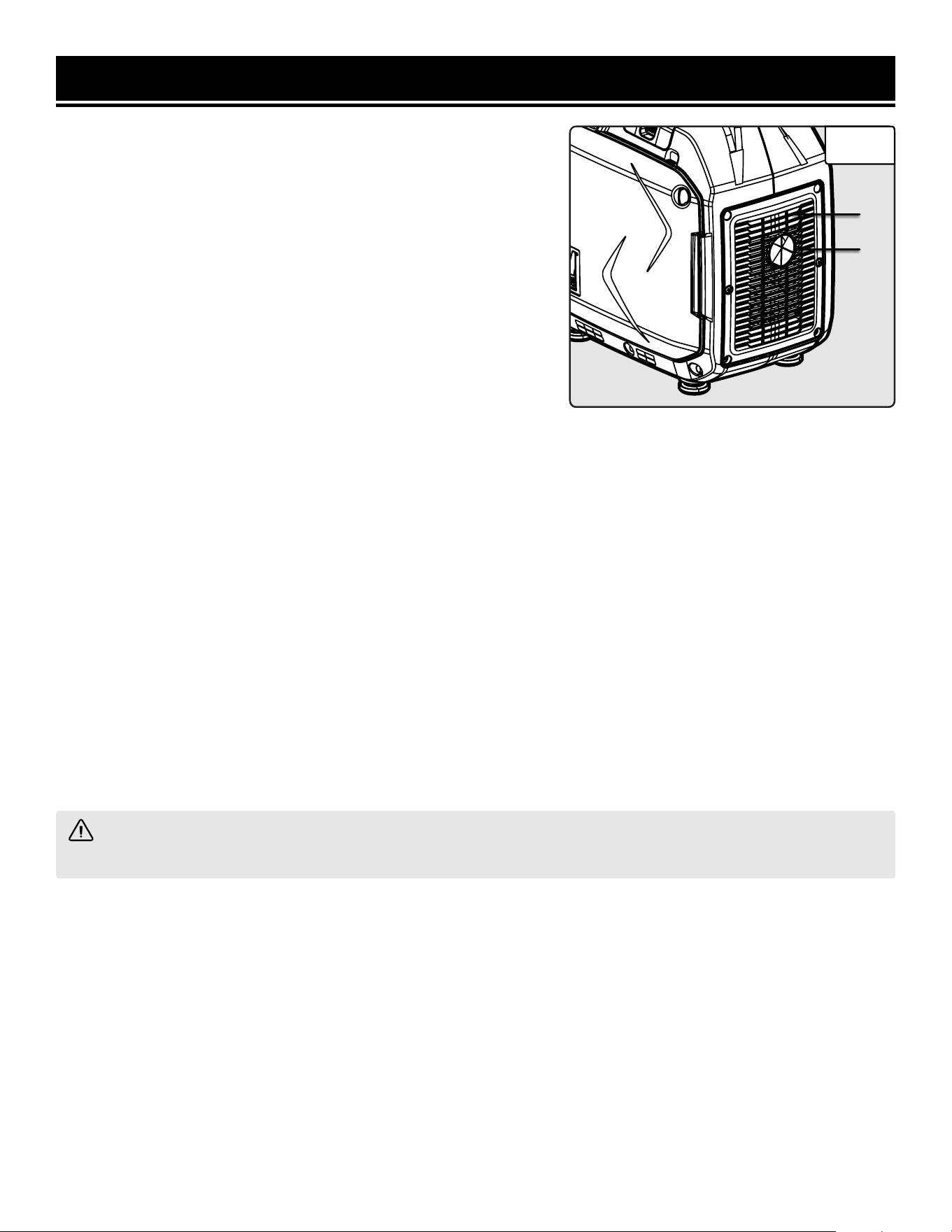
It is recommended to inspect and clean the spark arrestor (Fig. 23 -
1) every 100 hours of operation.
1. The spark arrestor is located outside the muffler, which gets very
hot during operation. Allow the engine to cool completely before ser-
vicing the spark arrestor.
2. Unscrew the six Phillips head screws and remove the muffler cov-
er (Fig. 23 - 2).
3. Remove the screw that holds spark arrestor to muffler.
4. Remove the spark arrestor screen.
5. Carefully clean and remove the carbon deposits from the spark
arrestor screen with a wire brush. Replace the spark arrestor if it is
damaged (part no. 56202i-039, available for purchase at wenprod-
ucts.com).
CAUTION! Running the engine with a dirty, damaged, or missing air filter will result in possible danger and
cause the engine to wear out prematurely.
2
Fig. 23
1
6. Reinstall the spark arrestor in the muffler and secure it in place with the screw.
7. Replace the muffler cover and secure it with the six screws.
DRAINING THE FUEL TANK
1. Prepare an approved gasoline-storage container. Make sure the engine switch is turned to OFF.
2. Open the right side panel to access the carburetor, as instructed on the previous page.
3. Open the carburetor drain screw and turn the 4-in-1 switch to “RUN”. This will allow gasoline to drain from the
gas tank through the carburetor.
NOTE: It may take a few hours for your tank to drain completely, depending on the amount of gasoline in the tank.
4. Once the gasoline has drained fully, close the carburetor drain screw, turn the engine switch to OFF, and close the
side panel.
31
TRANSPORTATION & STORAGE
WARNING! Avoid direct sunlight inside a vehicle. If the generator is left in an enclosed vehicle for many
hours, the high temperature could cause the fuel to vaporize and result in a possible explosion.
WARNING! Store the generator upright in a cool and dry location, away from sources of heat, open flames,
sparks or pilot lights.
TRANSPORTING THE GENERATOR
To prevent fuel spillage when transporting, be sure to perform the following:
1. Tighten the fuel cap.
2. Flip the 4-in-1 switch to the “ENGINE OFF” position.
3. Drain the fuel tank if possible. Refer to page 28, “Draining the Fuel Tank.”
4. Keep the generator upright. Never place the generator on its side or upside down - doing so could damage the
internal components of the generator and make it difficult to start.
STORING THE GENERATOR
Shut off the generator and allow the unit to cool to room temperature before storing it. NEVER place any type of
storage cover on the generator while it is still hot. Do not obstruct any ventilation openings.
Follow the procedures below for properly storing your generator. We highly recommend running your generator
once a month for 20 to 30 minutes. Plug in a small load in to ensure there is proper power output.
PRODUCT DISPOSAL
Do not dispose of a used generator or parts with your household waste. This product contains electrical or elec-
tronic components that should be recycled. Please take this product to your local recycling facility for responsible
disposal to minimize its environmental impact.
Do not dispose of used oil or fuel in the trash or down a drain. Please contact your local recycling center or auto
garage to arrange proper oil/fuel disposal.
For Short Periods (30 to 60 Days):
• Drain the carburetor. Refer to page 30, “DRAINING THE
CARBURETOR.”
• Add fuel stabilizer: Follow the suggested portions and
instructions of your preferred stabilizer. Run the engine for
15 to 20 minutes, allowing the fuel stabilizer to mix with the
gasoline and circulate through the carburetor, and then top
off with fuel. Filling the fuel tank full reduces the amount of
air in the tank and helps fight deterioration of fuel.
For Extended Periods (Over 60 Days):
• Drain the fuel tank and carburetor (see
“DRAINING THE FUEL TANK”). Never
store generator with fuel in the tank for
more than two months.
• Change the engine oil (see “CHANGING
OIL”).
Please recycle the packaging and electronic components where facilities exist. Please contact your
local auto garage or recycling facility to properly dispose of oil/fuel.
32
TROUBLESHOOTING GUIDE
WARNING! Stop using the generator immediately if any of the following problems occur or risk serious
personal injury. If you have any questions, please contact customer service at 1-847-429-9263 (M-F 8-5 CST),
or email [email protected].
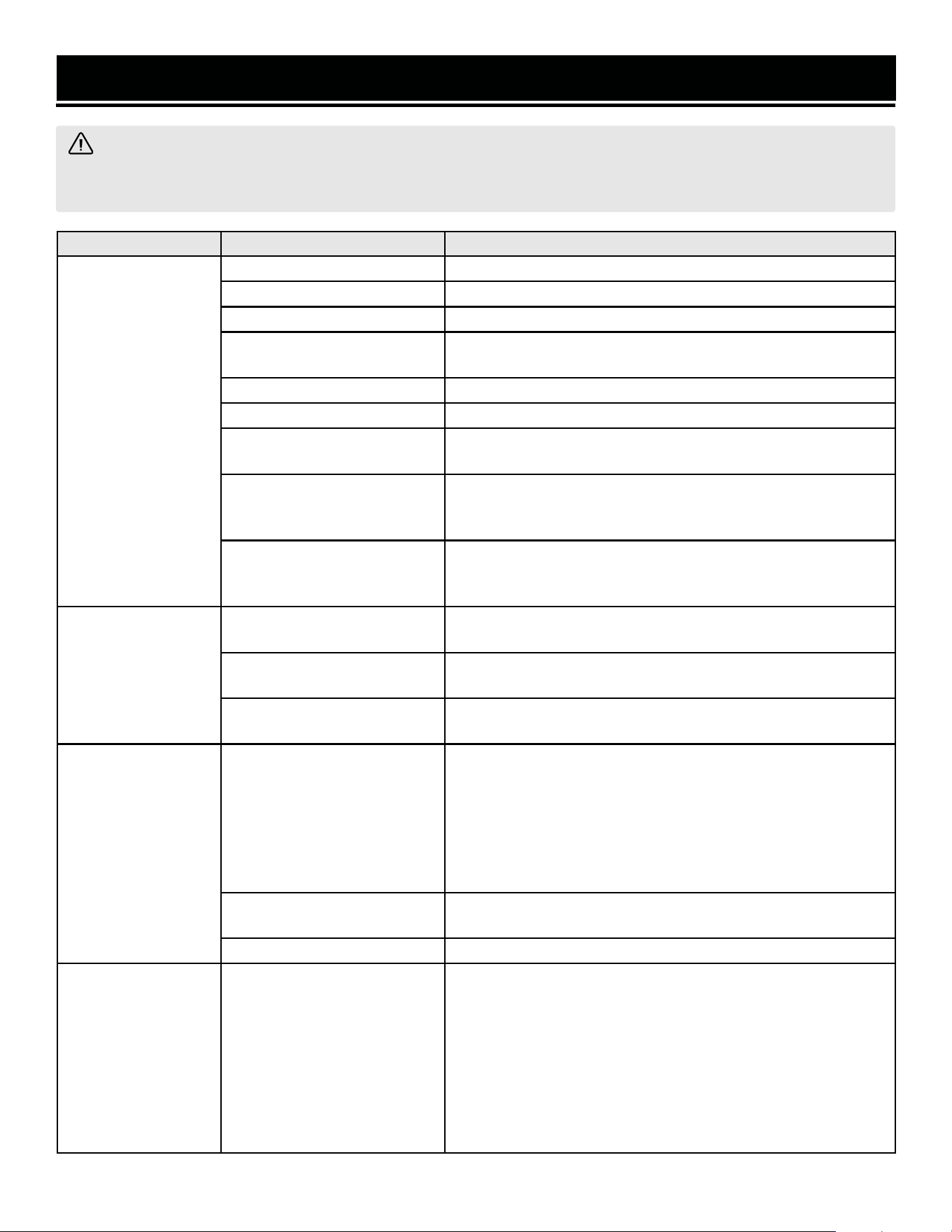
PROBLEM POSSIBLE CAUSE SOLUTION
Engine will not start.
Engine switch is set to OFF. Set engine switch to ON.
Choke is open. Close the choke.
Engine is out of fuel. Add fuel.
Engine is filled with contami-
nated or old fuel.
Drain the fuel in the tank. Fill with fresh fuel.
Spark plug is dirty. Clean the spark plug.
Spark plug is broken. Replace spark plug.
Oil level is low.
Add or replace oil. This generator is equipped with a low oil sen-
sor. The engine will not start unless the oil level is sufficient.
Carburetor is air locked.
Remove the nut from the bottom of the carburetor. Take off the
carburetor to allow it to reset. Place the carburetor back and re-
install the nut.
LPG cylinder is out of fuel, and
LPG regulator hose is con-
nected.
Disconnect LPG regulator hose from generator. Make sure there
is enough gasoline in the tank.
Engine runs but
there is no electrical
output.
Circuit breaker has been
tripped due to overload.
Disconnect all the loads. Wait for two minutes and push the circuit
breaker to the ON position to reset it.
Bad connecting cords/wires.
Check the power cords and extension cords. Do not use if any
cord is damaged. Replace damaged cords immediately.
Bad electrical device connected
to the generator.
Try connecting a different device.
Generator runs but
does not support all
electrical devices
connected.
Generator is overloaded.
Perform these steps:
1. Turn off all electrical devices.
2. Unplug all electrical devices.
3. Turn off generator.
4. Wait several minutes.
5. Restart generator.
6. Try connecting few electrical loads to the generator.
Short circuit in one of the
devices.
Try disconnecting any faulty or short-circuited electrical loads.
The air filter is dirty. Clean or replace the air filter element (see page 20).
Engine is “Hunting”
during Operation
(Engine RPM is
fluctuating).
1. The fuel isn’t running
through the fuel valve.
2. The air filter is clogged.
3. The muffler or spark arres-
tor is blocked
4. There is gunk in the carbu-
retor preventing a consistent
fuel/air mixture.
Turn off the generator and wait for it to cool down. Perform the
following steps:
1. Check if the fuel is properly and consistently going through the
fuel valve
2. Check for any blockage in the air filter. Check and clean the air
filter as necessary.
3. Check if the spark arrestor is blocked. Clean with metal brush
as necessary.
4. Use “Gunk remover” spray on the carburetor jets.
33
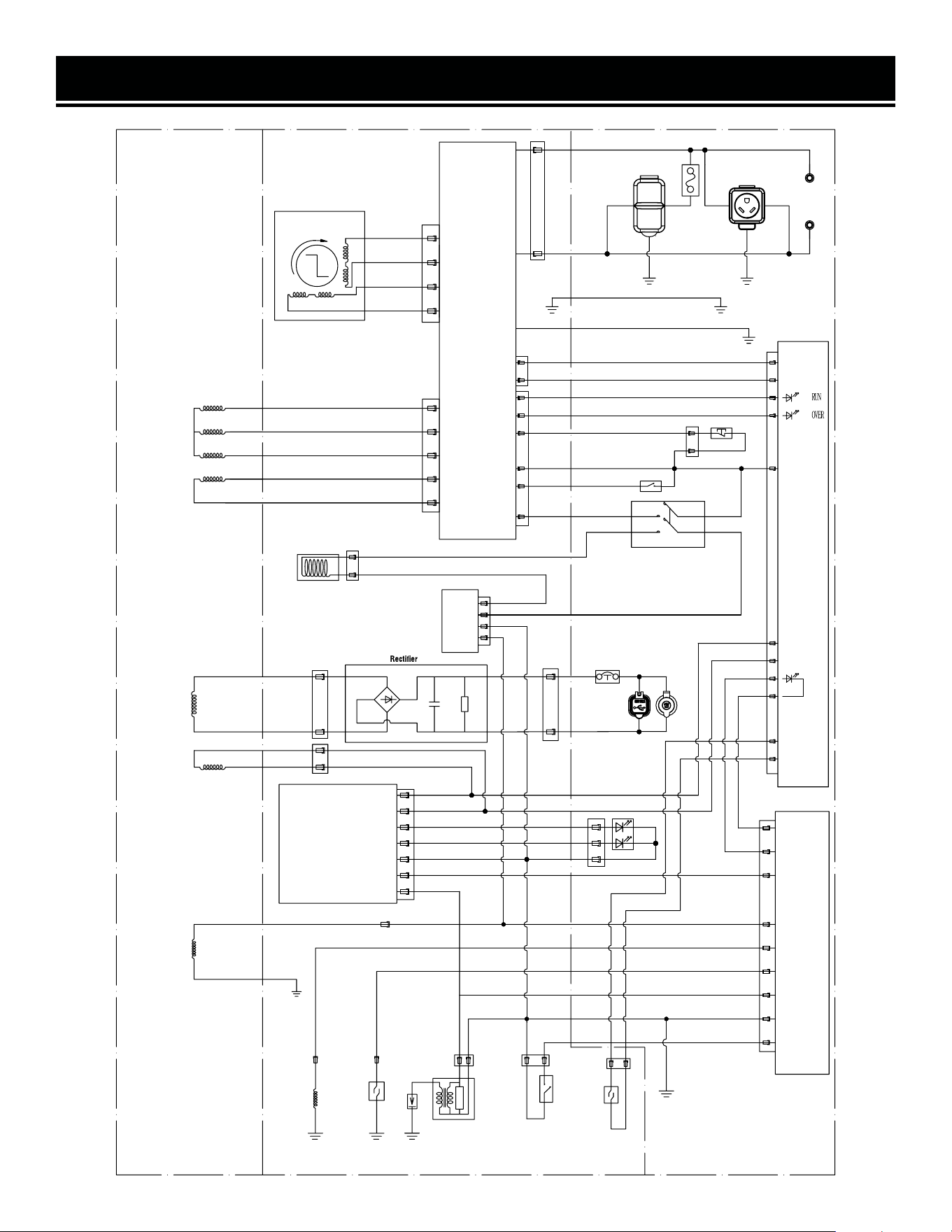
WIRING DIAGRAM
34
Red
White
Red
White
Inverter Unit
Black
Red
Motor section Power section
CW
Yellow
Blue
Orange
Pink
White
Yellow/Green
Yellow/Green
Yellow/Green
Red
Red
Panel section
Blue
Red
Blue/White
Black/White
Blue
Black
Green
Black
Yellow/Green
Digital Meter
OIL
+
-
Violet
Violet
Brown
Black/White
Blue
White
Red
Protector / 8A
TT-30R
Gas switch
Brown
Orange
Black
White
Orange
White
Red
Black
Gray
White
Blue/White
Orange
Violet
Black / Red
Blue
Violet
Violet
Pink
Gray
Brown
Black/Red
CO Alarm
CO
Blue
Violet
Violet
5-20R
Protector / 20A
Yellow
Green
Stepper Motor
Inverter
Unit Winding
Main
Winding
Fuel
Solenoid
Valve
DC
Winding
CO
Winding
Solenoid
Valve
Controller
ECO Switch
Reset Button
Parallel
Terminal
DC Socket
(12V DC / 8.3A)
USB
5V DC 1A / 1.2A
Digital
Igniter
Microswitch
Fuel Level Indicator
Pulser Coil
Oil Level
Switch
Spark
Plug
Ignition
Coil
Ignition
Winding
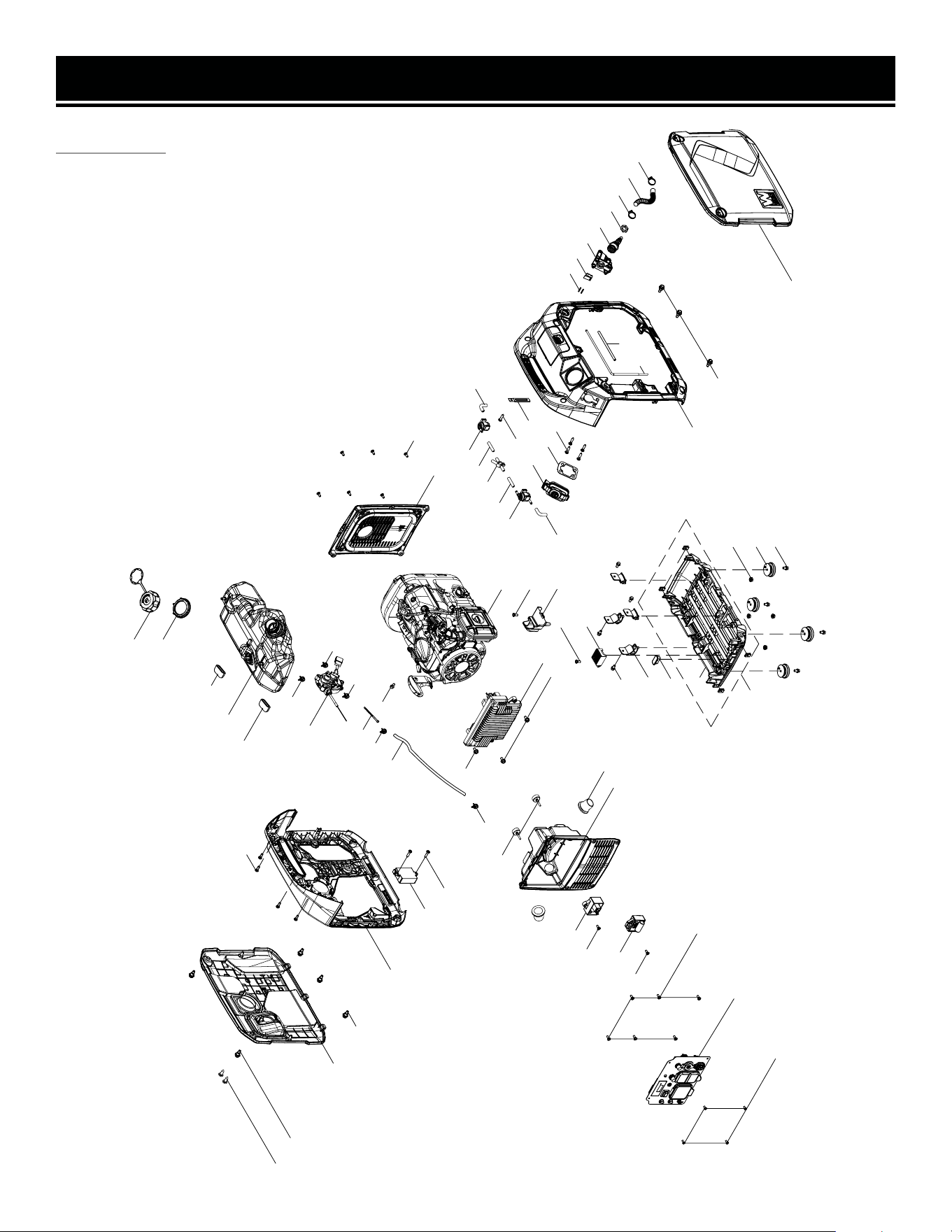
EXPLODED VIEW & PARTS LIST
GENERATOR
35
33
17
7
1
11
2
10
3
3
31
10
12
23
24
19
19
20
21
22
29
44
45
5
47
48
49
50
53
30
5
52
24
26
3
14
15
16
6
51
13
41
37
9
46
18
42
8
36
36
39
40
38
5
27
28
15
15
10
25
4
43
4
5
34
4
54
55
58
57
56
59
35
60
35
61
32
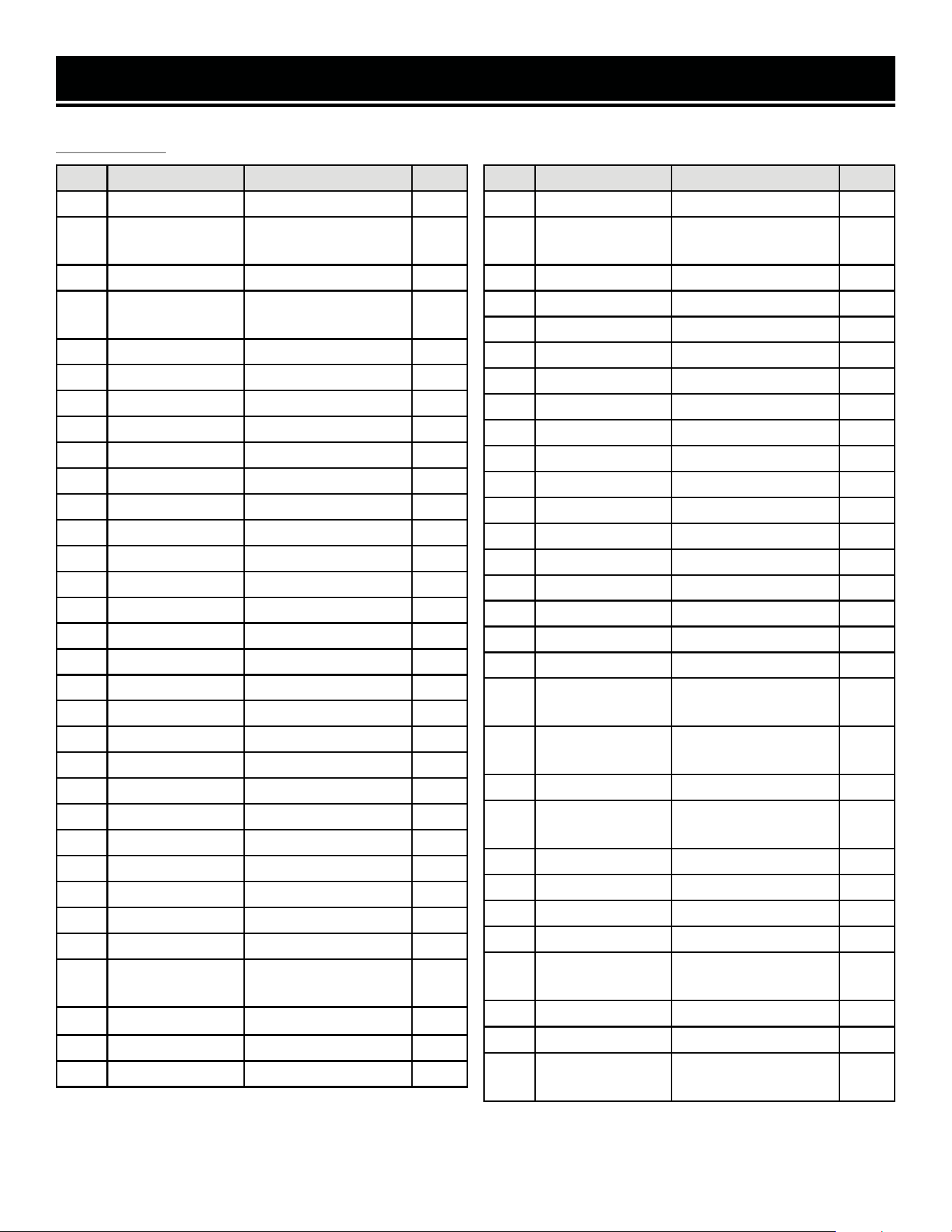
EXPLODED VIEW & PARTS LIST
NO. PART NO. DESCRIPTION QTY.
1 56202i-001 Screw, M4x10 4
2 DF360iX-002
Control Panel
Assembly
1
3 56202i-025 Screw, M5x16 19
4 56360iX-104
Self-tapping Screw,
ST4.2x19
7
5 56360iX-105 Screw, M4x16 4
6 56360iX-106 Ignition Module 1
7 56360iX-107 Front Panel 1
8 56360iX-108 Wire Jacket 2
9 56360iX-109 Bumper Pad 2
10 56202i-013 Bolt, M6x12 7
11 56360iX-111 Inverter 1
12 56360iX-112 Bolt, M5x8 1
13 56360iX-113 Clamp 1
14 56360iX-114 Fuel Hose 1
15 56360iX-115 Clamp 3
16 56360iX-116 Fuel Filter 1
17 56360iX-117 Switch Assembly 1
18 56360iX-118 Clamp 1
19 56202i-030 Damping Pad 2
20 56360iX-120 Fuel Tank 1
21 56202i-033 Fuel Tank Cap Nut 1
22 56360iX-122 Fuel Cap 1
23 56360iX-123 Left Hull Assembly 1
24 56202i-022 Alignment Bolt 6
25 56360iX-125 CO Alarm 1
26 DF360iX-026 Left Cover Panel 1
27 56360iX-127 Phillips Bolt 2
28 56360iX-128 Screw,ST4.2x13 2
29 56360iX-129
Service Window
Assembly
1
30 56360iX-154 Rubber Cap 4
31 56202i-051 Bolt, M6x12 4
32 DF360iX-032 Fuel Hose Jacket 1
GENERATOR
NO. PART NO. DESCRIPTION QTY.
33 DF360iX-033 Engine Assembly 1
34 DF360iX-034
Solenoid Valve
Controller
1
35 DF360iX-035 Fuel Hose Clamp 2
36 56360iX-136 Fuel Hose 2
37 56360iX-137 Roll Over Valve 1
38 56360iX-138 Fuel Hose 1
39 56360iX-139 Fuel Tee Pipe 1
40 56360iX-140 Fuel Hose 1
41 56360iX-141 Roll Over Valve 1
42 DF360iX-042 Fuel Hose 1
43 DF360iX-043 Clip 1
44 DF360iX-044 Right Hull Assembly 1
45 DF360iX-045 Right Cover Panel 1
46 56360iX-146 Shroud Cover 1
47 56360iX-147 Rectifier 1
48 56202i-053 Damping Pad 4
49 56202i-054 Damping Pad 1
50 56360iX-150 Switch Box Base 1
51 56360iX-151
Switch Box Base
Body
1
52 56202i-020
Fuel Tank Mount
Thread Tab
4
53 56202i-056 Nut, M6 4
54 DF360iX-054
Connector Guard
Assembly
1
55 DF360iX-055 Gasket 1
56 DF360iX-056 Connector Seat 1
57 DF360iX-057 Wire Harness 1
58 DF360iX-058 Pin, 2.3 x 17.5mm 2
59 DF360iX-059
LPG Quick-
Connector
1
60 DF360iX-060 LPG Hose 1
61 DF360iX-061 Nut
N.P. DF360iX-062
LPG Regulator Hose
Assembly
1
36
NOTE: Not all parts may be available for purchase. Parts and accessories that wear
down over the course of normal use are not covered under the warranty.
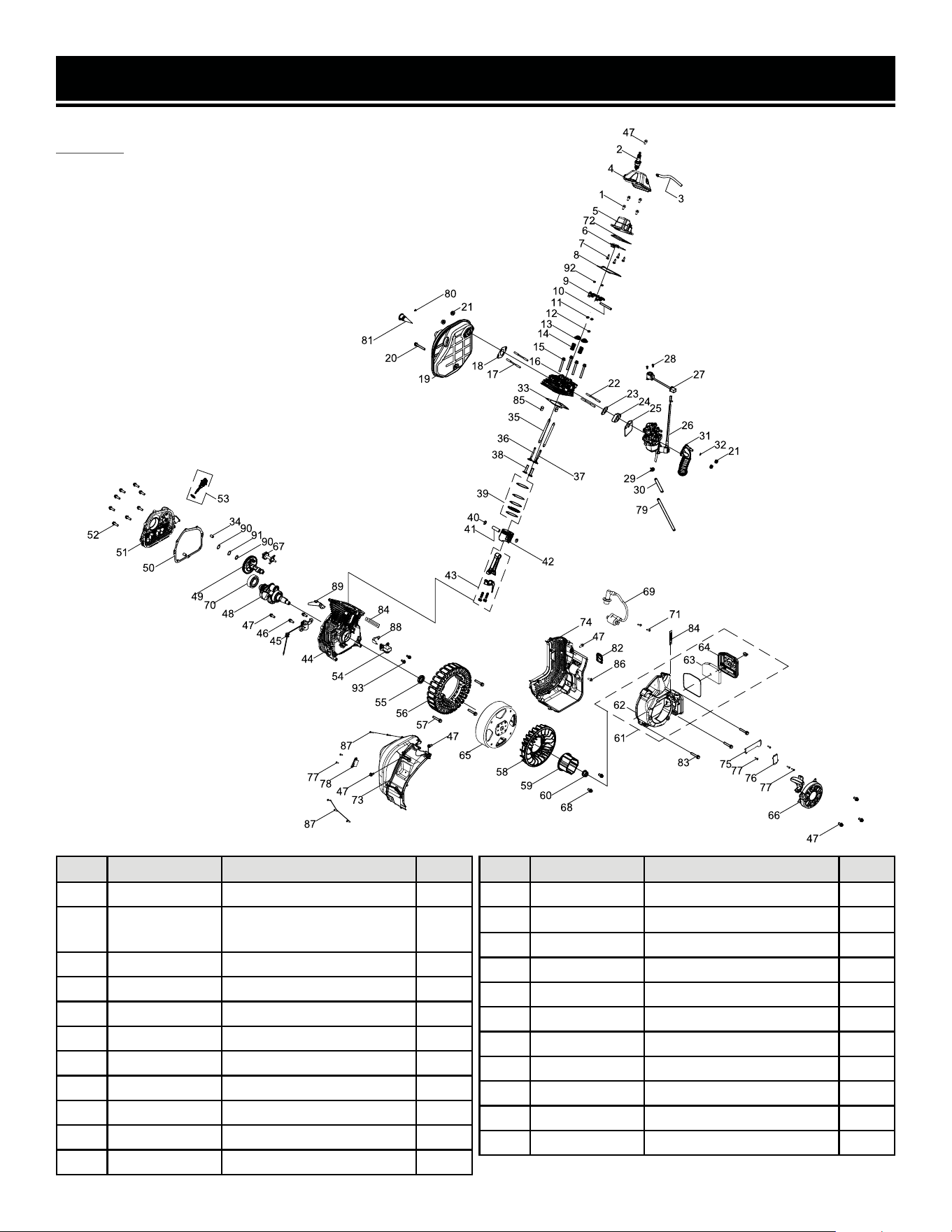
EXPLODED VIEW & PARTS LIST
ENGINE
NO. PART NO. DESCRIPTION QTY.
1 56202i-152 Bolt, M6x20 4
2 56360iX-002
Spark Plug, Torch E6RTC
(NGK BPR6HS)
1
3 56202i-103 Breather Hose 1
4 56360iX-004 Valve Cover 1
5 56360iX-005 Valve Cover Assembly 1
6 56360iX-006 Inner Cover, Valve Cover 1
7 56202i-107 Screw, M3x6 4
8 56360iX-008 Gasket, Valve Cover 1
9 56360iX-009 Rocker Arm Assembly 2
10 56360iX-010 Rocker Arm Coreshaft 1
11 56202i-111 Valve Locker 2
NO. PART NO. DESCRIPTION QTY.
12 56360iX-012 Intake Valve Seal 1
13 56202i-113 Valve Spring Seat 2
14 56360iX-014 Valve Spring 2
15 56360iX-015 Bolt, M8x60 4
16 DF360iX-116 Cylinder Head 1
17 56360iX-017 Stud, M6x82 2
18 56360iX-018 Gasket, Muffler 1
19 56360iX-019 Muffler 1
20 56360iX-020 Bolt, M6x75 1
21 56202i-121 Nut, M6 4
22 56202i-122 Stud, M6x87 2
37
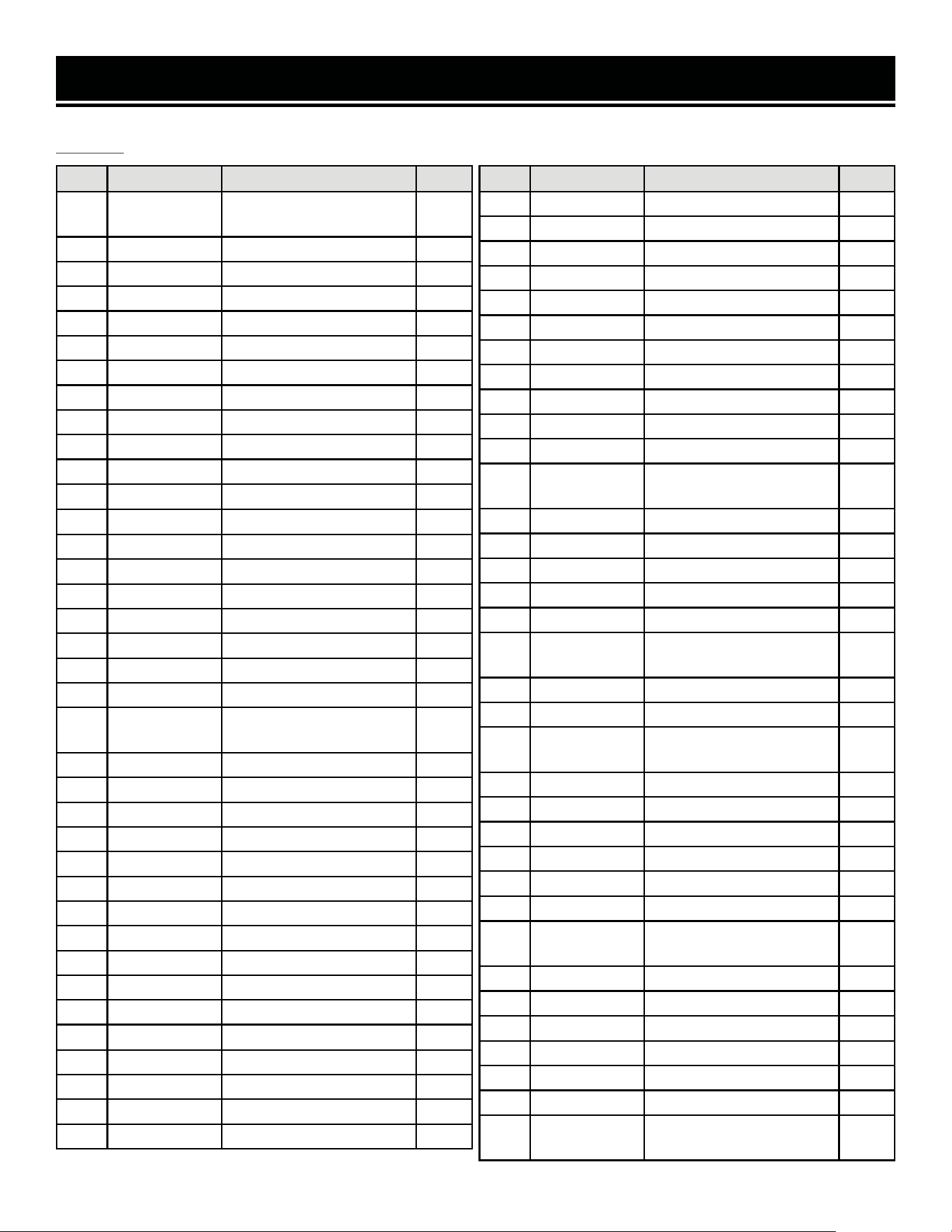
EXPLODED VIEW & PARTS LIST
NO. PART NO. DESCRIPTION QTY.
23 56360iX-023
Gasket, Carburetor
Insulator
1
24 56360iX-024 Insulator 1
25 56360iX-025 Gasket, Carburetor 1
26 DF360iX-127 Carburetor 1
27 56202i-127 Stepper Motor 1
28 56202i-128 Screw, M4x6 2
29 56360iX-029 Clamp 1
30 56360iX-030 Fuel Hose 1
31 56360iX-031 Intake Manifold 1
32 56202i-132 Clamp 1
33 56360iX-033 Gasket, Cylinder Head 1
34 56202i-134
Pin, ф8x12
2
35 56360iX-035 Push Rod 2
36 56360iX-036 Exhaust Valve 1
37 56360iX-037 Intake Valve 1
38 56360iX-038 Tappet 2
39 56360iX-039 Piston Ring Set 1
40 56360iX-040 Circlip 2
41 56360iX-041 Piston Pin 1
42 56360iX-042 Piston 1
43 56360iX-043
Connecting Rod
Assembly
1
44 56360iX-044 Crankcase 1
45 56360iX-045 Oil Sensor 1
46 56202i-146 Bolt, M6x16 2
47 56202i-147 Bolt, M6x12 9
48 56360iX-048 Crankshaft 1
49 56360iX-049 Camshaft 1
50 56360iX-050 Gasket, Cylinder Cover 1
51 56360iX-051 Crankcase Cover 1
52 56360iX-052 Bolt, M6x25 8
53 56202i-153 Dipstick 1
54 56360iX-054 Trigger 1
55 56360iX-055
Oil Seal, ф25xф41.25x6
1
56 56360iX-056 Stator Assembly 1
57 56360iX-057 Bolt, M6x38 3
58 56360iX-058 Cooling Fan 1
59 56360iX-059 Starter Cup 1
ENGINE
NO. PART NO. DESCRIPTION QTY.
60 56360iX-060 Nut, M14x1.5 1
61 56360iX-061 Recoil Starter 1
62 56360iX-062 Blower Housing 1
63 56360iX-063 Air Filter Element 1
64 56360iX-064 Air Filter Cover 1
65 56360iX-065 Rotor 1
66 56360iX-066 Recoil Starter 1
67 56360iX-067 Oil Thrower Gear 1
68 56202i-167 Bolt, M6x14 2
69 56360iX-069 Ignition Coil 1
70 56360iX-070 Bearing, 6205E 1
71 56360iX-071
Self-tapping Screw,
ST4.8x20
2
72 56360iX-072 Gasket, Cylinder Cover 1
73 56360iX-073 Cylinder Head Baffle 1
74 56360iX-074 Cylinder Head Baffle 1
75 56360iX-075 Clip Base 1
76 56360iX-076 Clip Base 1
77 56360iX-077
Self-tapping Screw,
ST4.2x16
6
78 56360iX-078 Idle Spring 1
79 56360iX-079 Fuel Hose Jacket 1
80 56202i-038
Self-tapping Screw,
ST4.2x9.5
1
81 56202i-039 Spark Arrestor 1
82 DF360iX-082 O-ring, Dipstick 1
83 56360iX-083 Bolt, M6x45 3
84 56360iX-084 Clip 2
85 56360iX-085
Pin,ф10x16
2
86 56360iX-086 Bolt, M6x45 1
87 56360iX-087
Self-tapping Screw,
ST4.2x25
5
88 56360iX-088 Wind Board 1
89 56360iX-089 Wind Board 1
90 56360iX-090
Washer, ф14.2x0.5xф21
2
91 56360iX-091 Corrugated Gasket 1
92 56360iX-092 Valve Adjust Cap, Exhaust 2
93 56360iX-093 Bolt, M6x12 2
N.P. DF360iX-HA39
High-Altitude Kit,
3000 - 9000 ft
1
38
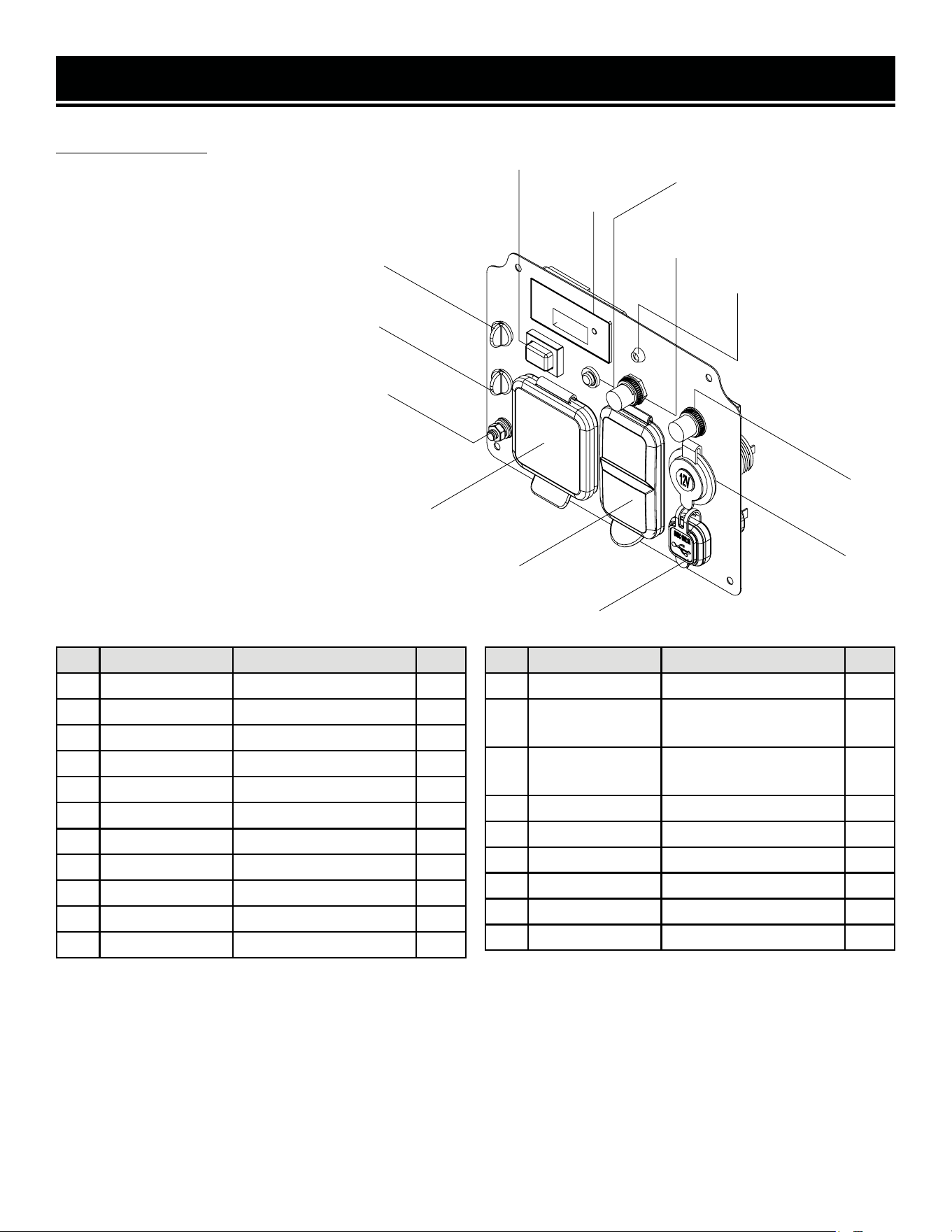
EXPLODED VIEW & PARTS LIST
CONTROL PANEL
NO. PART NO. DESCRIPTION QTY.
1 56203i-005.14B Parallel Outlet (Black) 1
2 56203i-005.14R Parallel Outlet (Red) 1
3 56360iX-159 Nut, M6 1
4 56203i-005.11 Washer, 6mm 1
5 56203i-005.12 Washer, 6mm 1
6 56360iX-162 Earth Stud 1
7 DF360iX-207 Washer, 6mm 1
8 56360iX-164 Washer, 5mm 1
9 56360iX-165 Washer, 5mm 1
10 56360iX-166 Nut, M5 1
11 DF360iX-211 Multi-meter 1
NO. PART NO. DESCRIPTION QTY.
12 56203i-005.4 Eco-mode Switch 1
13 DG4500iX-207
NEMA TT-30R 120V
30A AC Outlet
1
14 DG4500iX-208
NEMA 5-20R 120V
20A AC Duplex Outlet
1
15 56360iX-171 USB 1
16 56203i-005.2 DC 12V Outlet 1
17 56500-208 Breaker, AC 20A 1
18 56360iX-175 LED 1
19 56203i-005.5 Breaker, AC 8A 1
20 DF360iX-020 Reset Button 1
39
NOTE: Not all parts may be available for purchase. Parts and accessories that wear
down over the course of normal use are not covered under the warranty.
1
2
3 4 5 6 7 8 9 10
11
12
13
14
15
16
19
17
18
20

WARRANTY STATEMENT
WEN Products is committed to building tools that are dependable for years. Our warranties are consistent with this
commitment and our dedication to quality.
LIMITED WARRANTY OF WEN PRODUCTS FOR HOME USELIMITED WARRANTY OF WEN PRODUCTS FOR HOME USE
GREAT LAKES TECHNOLOGIES, LLC (“Seller”) warrants to the original purchaser only, that this WEN consumer prod
-
uct will be free from defects in material or workmanship during personal use for a period of three (3) years from date
of purchase or 500 hours of use; whichever comes first. Ninety days for all WEN products if the tool is used for profes
-
sional or commercial use. Purchaser has 30 days from the date of purchase to report missing or damaged parts. Parts
and labor are covered for one (1) year under this limited warranty; parts only are covered for three (3) years under this
limited warranty.
SELLER’S SOLE OBLIGATION AND YOUR EXCLUSIVE REMEDY under this Limited Warranty and, to the extent per
-
mitted by law, any warranty or condition implied by law, shall be the replacement of parts, without charge, which are
defective in material or workmanship and which have not been subjected to misuse, alteration, careless handling, mis
-
repair, abuse, neglect, normal wear and tear, improper maintenance, improper storage, incorrect lubricants / fuels, or
other conditions adversely affecting the Product or the component of the Product, whether by accident or intentionally,
by persons other than Seller. To make a claim under this Limited Warranty, you must make sure to keep a copy of your
proof of purchase that clearly defines the Date of Purchase (month and year) and the Place of Purchase. Place of Pur-
chase must be a direct vendor of Great Lakes Technologies, LLC. Purchasing through third party vendors, including but
not limited to garage sales, pawn shops, resale shops, or any other secondhand merchant, voids the warranty included
with this product. Contact [email protected] or 1-847-429-9263 with the following information to make
arrangements: your shipping address, phone number, serial number, required part numbers, and proof of purchase.
Damaged or defective parts and products may need to be sent to WEN before the replacements can be shipped out.
Upon the confirmation of a WEN representative, your product may qualify for repairs and service work. When returning
a product for warranty service, the shipping charges must be prepaid by the purchaser. The product must be shipped
in its original container (or an equivalent), properly packed to withstand the hazards of shipment. The product must be
fully insured with a copy of the proof of purchase enclosed. There must also be a description of the problem in order
to help our repairs department diagnose and fix the issue. Repairs will be made and the product will be returned and
shipped back to the purchaser at no charge for addresses within the contiguous United States.
THIS LIMITED WARRANTY DOES NOT APPLY TO ITEMS THAT WEAR OUT FROM REGULAR USAGE OVER TIME,
INCLUDING FILTERS, SPARK PLUGS, VOLTAGE REGULATORS, BRUSHES, GASKETS, O-RINGS, WHEEL KITS, BAT
-
TERIES, RECOIL STARTERS, HIGH PRESSURE HOSES, SPRAY GUNS, ETC. ANY IMPLIED WARRANTIES SHALL BE
LIMITED IN DURATION TO THREE (3) YEARS FROM DATE OF PURCHASE. SOME STATES IN THE U.S. AND SOME
CANADIAN PROVINCES DO NOT ALLOW LIMITATIONS ON HOW LONG AN IMPLIED WARRANTY LASTS, SO THE
ABOVE LIMITATION MAY NOT APPLY TO YOU.
IN NO EVENT SHALL SELLER BE LIABLE FOR ANY INCIDENTAL OR CONSEQUENTIAL DAMAGES (INCLUDING BUT
NOT LIMITED TO LIABILITY FOR LOSS OF PROFITS) ARISING FROM THE SALE OR USE OF THIS PRODUCT. SOME
STATES IN THE U.S. AND SOME CANADIAN PROVINCES DO NOT ALLOW THE EXCLUSION OR LIMITATION OF IN
-
CIDENTAL OR CONSEQUENTIAL DAMAGES, SO THE ABOVE LIMITATION OR EXCLUSION MAY NOT APPLY TO YOU.
THIS LIMITED WARRANTY GIVES YOU SPECIFIC LEGAL RIGHTS, AND YOU MAY ALSO HAVE OTHER RIGHTS WHICH
VARY FROM STATE TO STATE IN THE U.S., PROVINCE TO PROVINCE IN CANADA AND FROM COUNTRY TO COUNTRY.
THIS LIMITED WARRANTY APPLIES ONLY TO ITEMS SOLD WITHIN THE UNITED STATES OF AMERICA, CANADA
AND THE COMMONWEALTH OF PUERTO RICO. FOR WARRANTY COVERAGE WITHIN OTHER COUNTRIES, CONTACT
THE WEN CUSTOMER SUPPORT LINE. FOR WARRANTY PARTS OR PRODUCTS REPAIRED UNDER WARRANTY
SHIPPING TO ADDRESSES OUTSIDE OF THE CONTIGUOUS UNITED STATES, ADDITIONAL SHIPPING CHARGES MAY
APPLY.
V. 2024.02.19
40
