Pro 2 Portable
Projector
User Guide

Introduction
IVATION™ isn’t about products, it’s about passions and the people driven by them. In our world, trite is non-
existent because we believe our customers are insightful and will recognize and appreciate the authenticity of our
talent displayed in our products. We’re not about technical jargon or phrases, rather we’re about the products and
ideas which inspired people to create them. We take innovation into all of our designs; no existing word or phrase
can communicate the uniqueness of our products.
Your new Ivation Pro 2 Portable Projector is that rare commodity: a fun tool or perhaps, a useful toy. At home in
the office or the den, at parties and conferences, you will find hundreds of uses for your portable projector. Enjoy!
The guide introduces you to the projector, explains how to use it and supplies a few necessary saftey precautions.
Safety Information
• Your portable projector is hardy, but protect it from strong impacts such as drops.
• Do not use near liquids to avoid shock hazards to you or your projector.
• Keep your projector clean:
• Power down projector.
• Gently removing dust from intake vents with cloth.
• Wipe the housing with a non-abrasive cloth.
2

Features
Small package. Big picture.
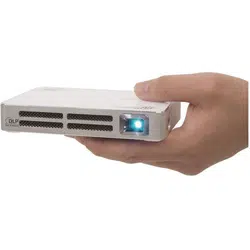
This quality mini projector can travel with you everywhere; if you have a pocket, you can take your projector
along. Sure the projector is small, but it produces big, clear images. With palm-sized dimensions and picture
capabilities of up to 80 inches, it will quickly become your de facto presentation and entertainment tool.
So bright, it leaves others in the shadows
With the Ivation Pro 2 Portable Projector you no long have to sacrifice picture brightness when you use a
compact projector. We designed this tiny tool with a brightness output of 100 lumens, a contrast of 1000:1,
resolution of 854x480 and a native screen aspect ratio of 16:9 providing full sized brightness in a tiny package.
Knows All the Ins & Outs
The signal input port accepts HDMI, MHL, PC, DVD/VCD video, Micro SD, USB/Mobile and Mobile charger. A DC
12V/1.5A power input lets you charge the built-in battery, which can power the projector for approximately two
hours; a 3.5mm audio jack pushes the sound out to your favorite headphones, earphones or speakers; and a 2V
USB output even allows you to supply a bit of extra juice to your smartphone or other mobile device. Last but not
least, two 1-watt speakers are built right in for an all-in-one projection system.
3

Highlights
• Project images from your phone, tablet, pc, SD card and other sources.
• A tiny projector that packs a big image.
• Carry in a pocket or purse with plenty of room left over.
• Included AC adapter ensures you will never run out of power in the midst of an important presentation.
• Appropriate for business and personal use; for office work and home enjoyment.
• Included Micro USB to HDML MHL cable and 5-pin to 11-pin USB adapter.
• Attractive styling.
• Ports included for almost any use.
This Box Contains:
• Ivation Pro 2 Portable Projector
• AC Power Adapter
• Micro USB Adapter
• User Guide
• Remote Control
• MHL Cable
4
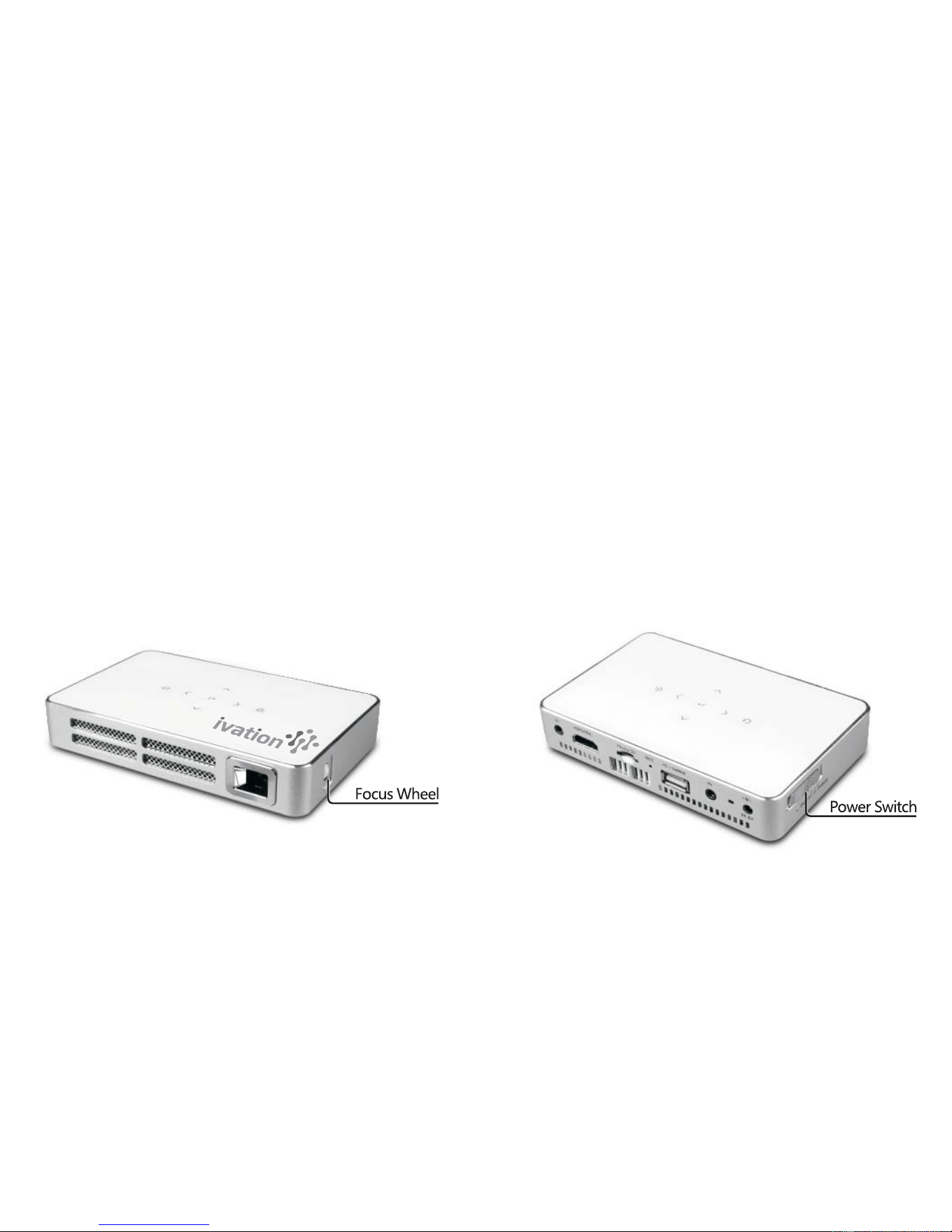
Parts of the Projector
Your Ivation Pro 2 Portable Projector has the following features:
1. Focus Wheel enables you to display crisp images.
2. Built-in ports:
- Audio
- Micro SD
- USB Drive/Mobile device charger
- Video
- PC
3. Power Switch.
4. Built-in image controls:
- Directional controls for easy option selection.
- Rotate images 360° and return to original position.
5. Lens – need lens details here
5

First Time Use
No special set-up or burn-in required! Just unpack, plug-in and start projecting!
Regular Use
• Store your projector carefully, protecting it from bumping and shocks as much as possible.
• If you elect to carry the unit in a pocket or bag, be sure to include the AC adapter and any other adapters or
cables you need.
• Keep your projector clean.
• Be careful not to scratch the lens.
Tips
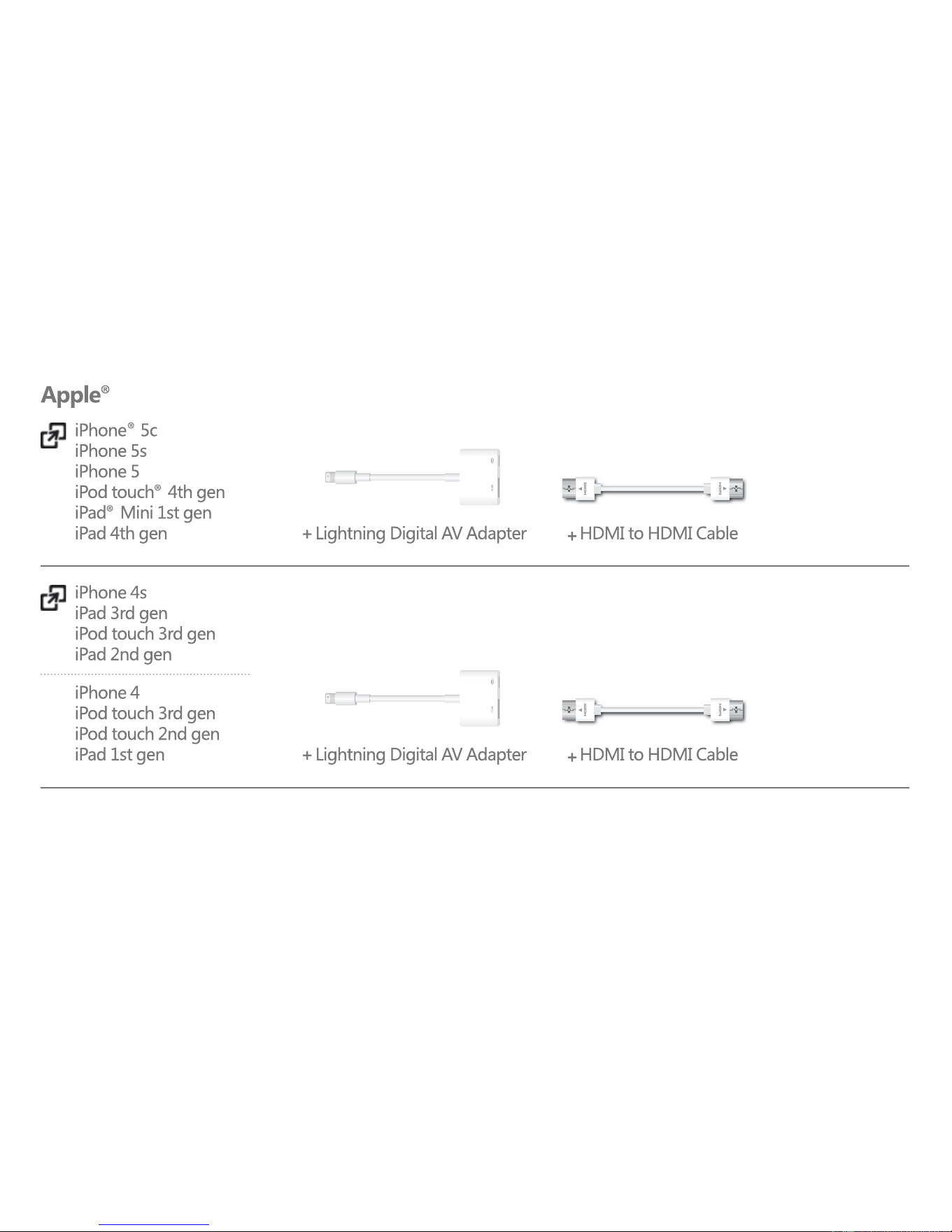
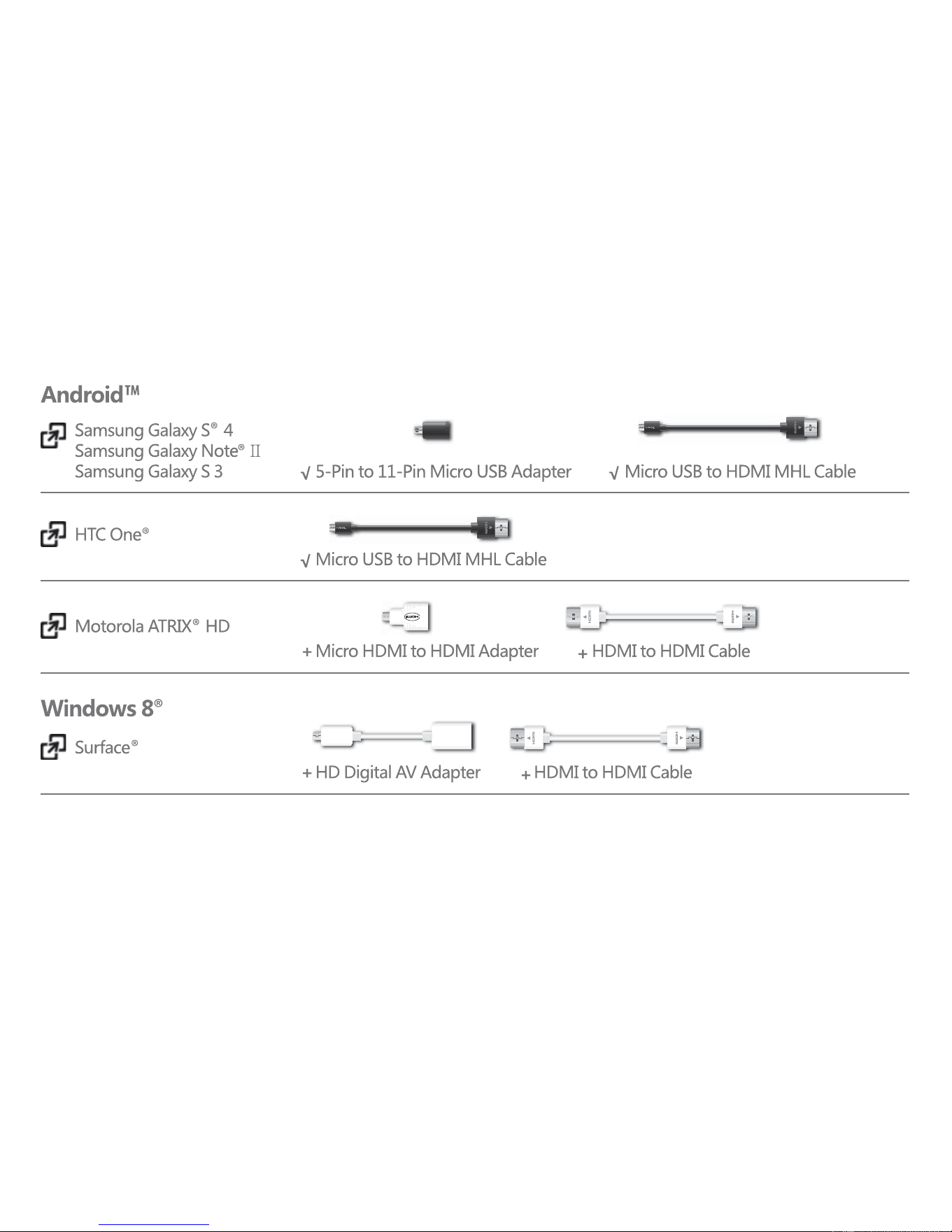
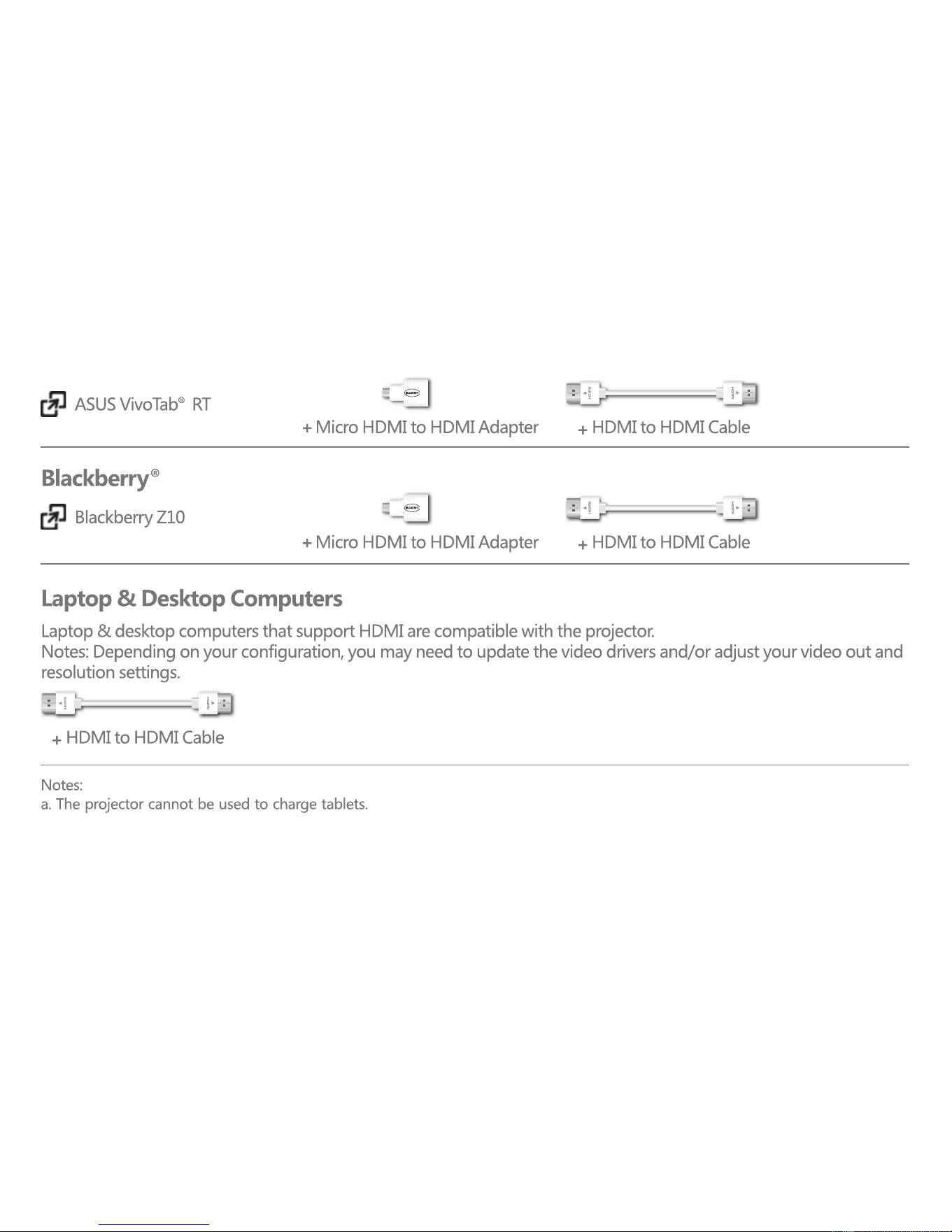
The following devices require the stated connectors to enable them to mirror on screen content to the projector:
• Lightning Digital AV Adapters and HDMI to HDMI cables (not included) enable you to connect your projector
to Apple® products.
• To connect Samsung Galaxy and HTC One® products, use the included 5-pin to 11-pin Micro USB Adapter and
the Micro USB to HDMI MHL cable.
• To connect a Motorola ATRIX® HD, use a Micro HDMI to HDMI adapter and HDMI to HDMI cable.
• For the Windows 8® Surface®, connect with a HD Digital AV Adapter and HDMI to HDMI cable.
• To connect ASUS VivoTab® RT to your projector, use Micro HDMI to HDMI adapter and a HDMI to HDMI cable.
• For Blackberry® Z10 connections, use a Micro HDMI to HDMI adapter and HDMI to HDMI cable.
• Devices that do not support mirroring can project using applications such as Netflix and You Tube that
support video out.
6

Specifications
Technology DLP
Light Source R/G/B LED
Brightness 100 lumens
Contrast ratio 1000:1
Resolution 845x480
Projection size 10-80 inch
Aspect ratio 16:9 / 4:3
Throw ratio 1.66:1
Color gamut > 110%
Focus Manual focus
Projection Mode Front/Back/Ceiling
Speaker 1W
Input/Output AV IN 1
USB 2.0 1
RESET 1
Micro SD 1
HDMI/MHL IN 1
3.5m earphone jack
Built-in battery 7.4V 2100mA/h
Power consumption 8W
Dimension (W H D) 135x85x23mm
Weight 240g
7
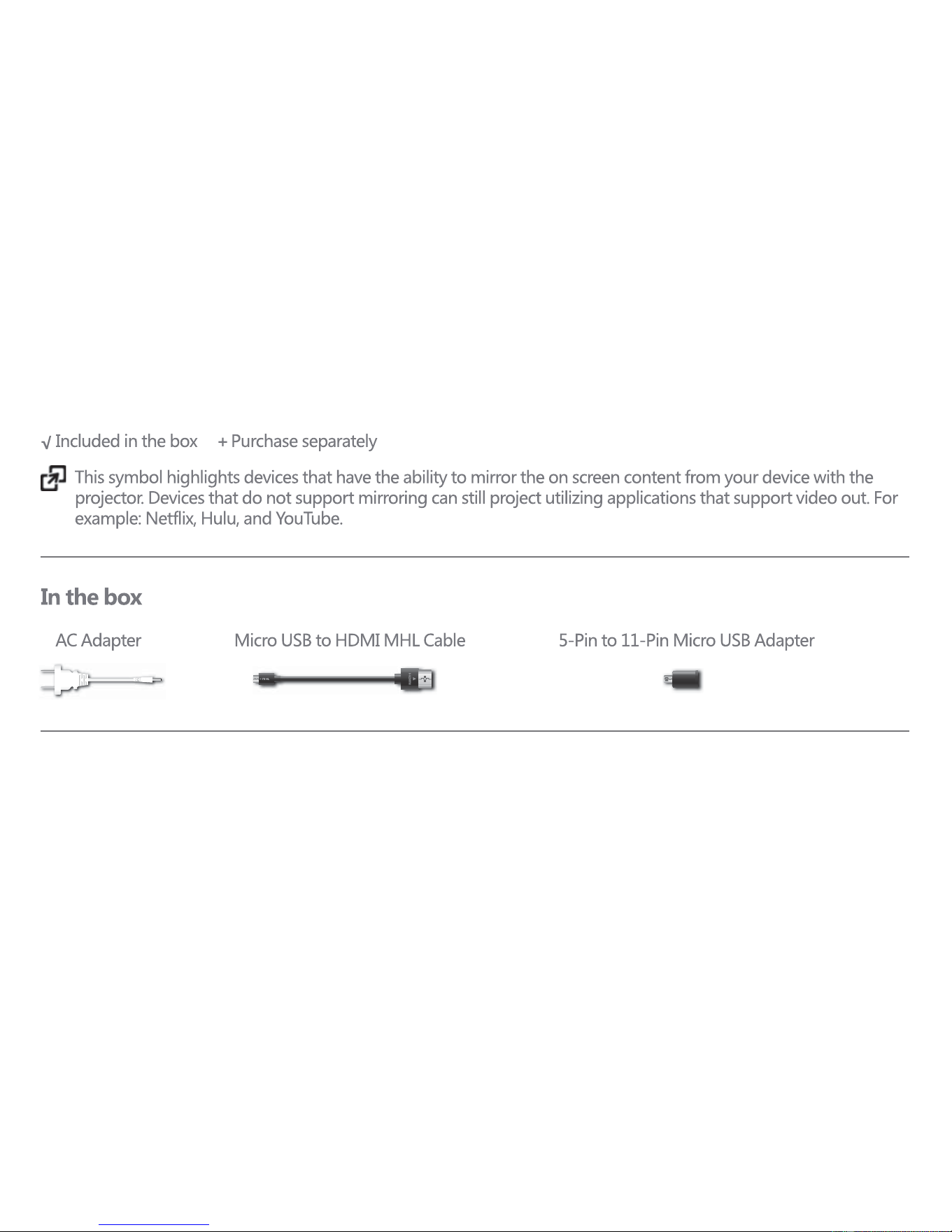
Compatibility Guide (MHL protocol)
8
9
10
Distributed by C & A Marketing
2 Bergen Turnpike, Ridgefield Park, NJ 07660
Made in China
ivation is a trademark of C&A IP Holdings, LLC
©2015 All right reserved
11