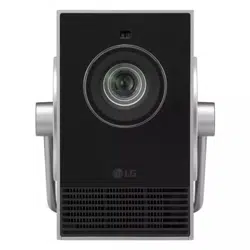
2
ENGLISH
CONTENTS
READ BEFORE USE
INSTALLATION
9 How to use the edge guards
10 Projection Distance per Screen Size
12 Adjusting the Position of the Projection Screen
13 Adjusting the Angle and Focus of the Projection Screen
14 Kensington Security System
USING REMOTE CONTROL
15 Replacing the Remote Control Battery
16 Viewing the Remote Control Features
CONNECTING DEVICES
18 Connecting with a HDMI Cable
20 Connecting with a USB-C Cable
SAFETY PRECAUTIONS
CHECKING BEFORE REPORTING MALFUNCTION
36 Projector Safety Check
37 Troubleshooting
CHECKING INFORMATION
39 Specifications
41 Licenses
42 Open Source Software Notice Information
43 Other specifications
44 Symbols
LIMITED WARRANTY (USA)
LIMITED WARRANTY (CANADA)
This manual is produced for public use and may contain images or contents
different from the product you purchased.
This manual is subject to change depending on the company’s circumstances.
3
ENGLISH
READ BEFORE USE
This product includes both a printed and an electronic user manual. All steps for
purchasing and installing the product can be found in the printed user manual, while
instructions for using various functions are provided in the electronic version.
User manual
Contains important safety precautions to follow when using the product, as well as
instructions for installing and connecting external devices.
Electronic User Manual
To use various functions, please refer to the electronic user manual stored in the
product. Using the remote control, please follow the steps below.
→ [ ] → [Support] → [User Guide]
• LG Electronics is not responsible for any product malfunction or personal injury
caused by the use of non-genuine or imitation products.
• Components are subject to change or addition without notice for performance
upgrades. Designs or model names are subject to change depending on the
manufacturer’s circumstances or policies.
• The images shown in this manual may differ from the actual product.
Check Optional Accessories
To purchase these optional accessories, please contact the place of purchase or the LG
Customer Service Center.
• Cables for connecting external devices must be purchased separately.
• Edge guards must be purchased separately if additional units are needed.
• To purchase the AI remote control, please contact the LG Customer Service
Center.
4
ENGLISH
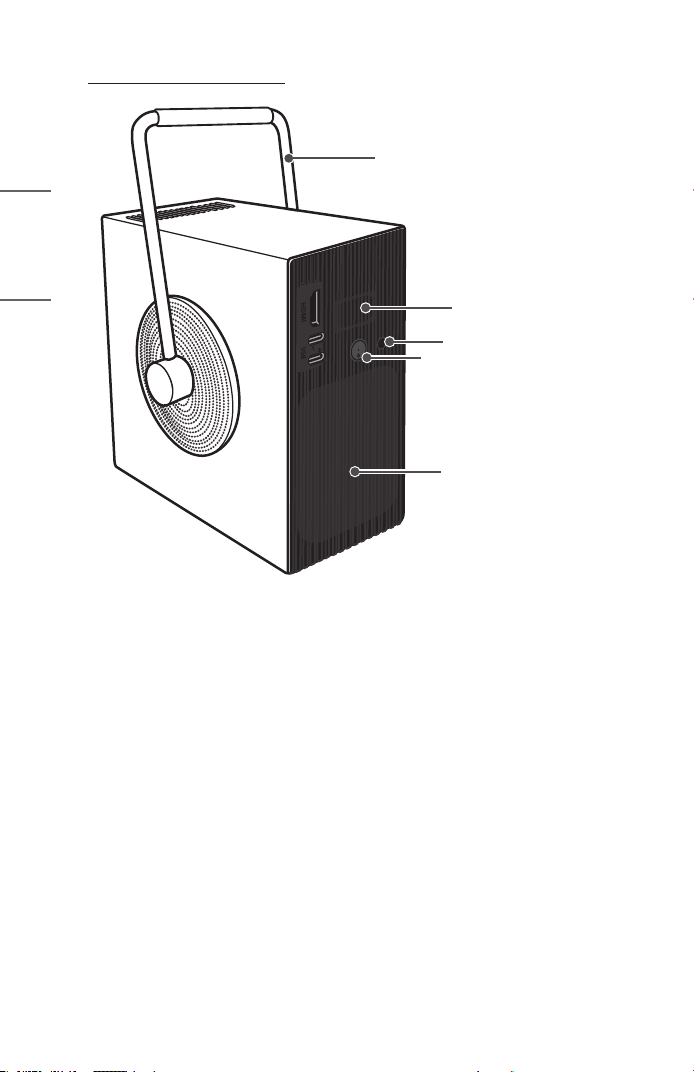
Parts and Components
Inlet Vent
Speaker
IR Receiver
Power button
Handle
5
ENGLISH
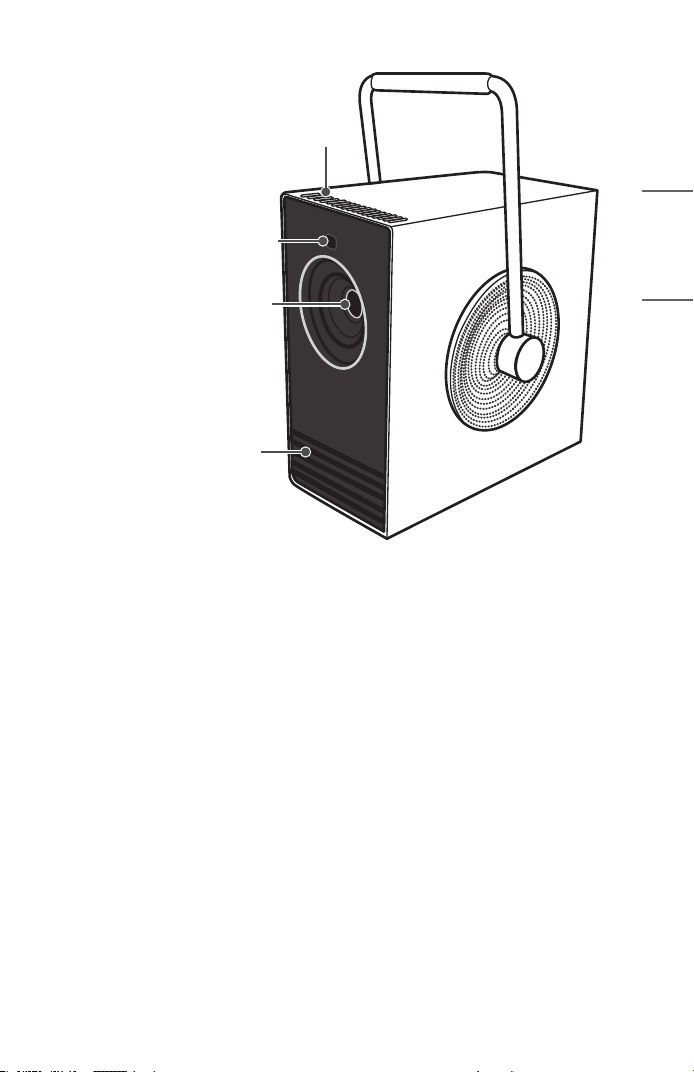
Lens
1)
Outlet Vent
2)
Outlet Vent
2)
Display Fit Sensor
1) Do not touch the lens when using the projector. The lens may be damaged. (Keep
lens away from sharp objects.)
2) Due to the high temperature of vent area, do not get close to the vent area.
6
ENGLISH
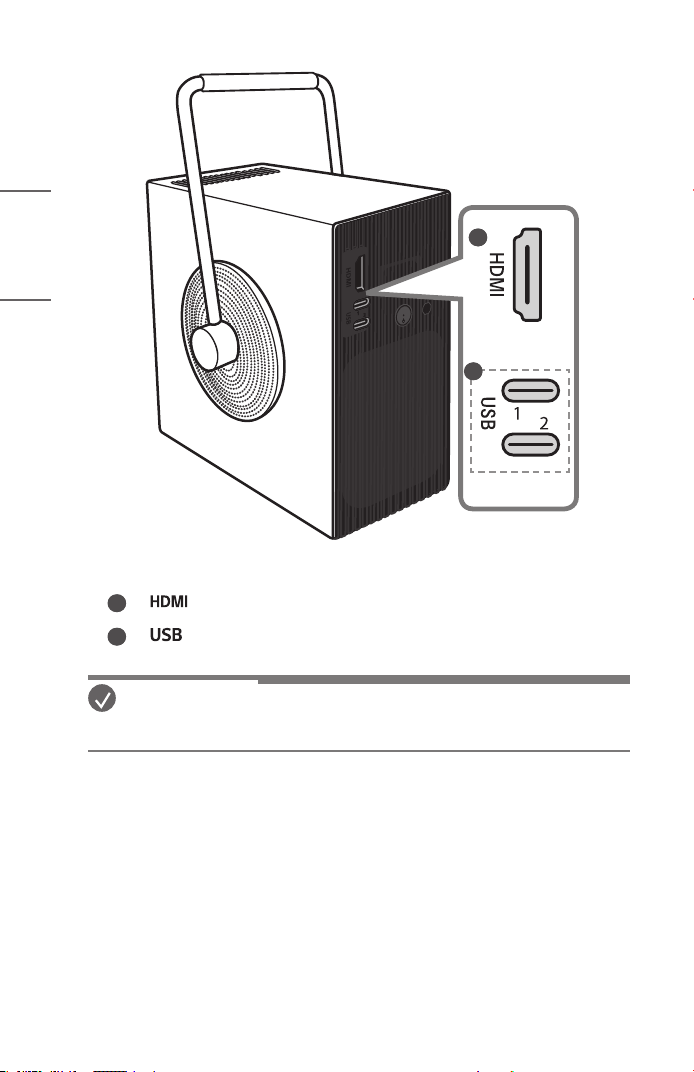
1
2
1
Port (HDMI IN)
2
Port (USB-C)
NOTE
• When turning the handle, ensure that the cable is not in the way.
7
ENGLISH
Using the Power Button
The projector can be turned on and off with the Power button on
the product.
— A short press turns it on, a long press turns off all functions
and the screen.
NOTE
• The shape and location of the power button may vary depending on the model
of the projector.
• When the power is turned on for the first time, the initialization of the projector
may take approximately one minute.
8
ENGLISH
Projector Status Indicators
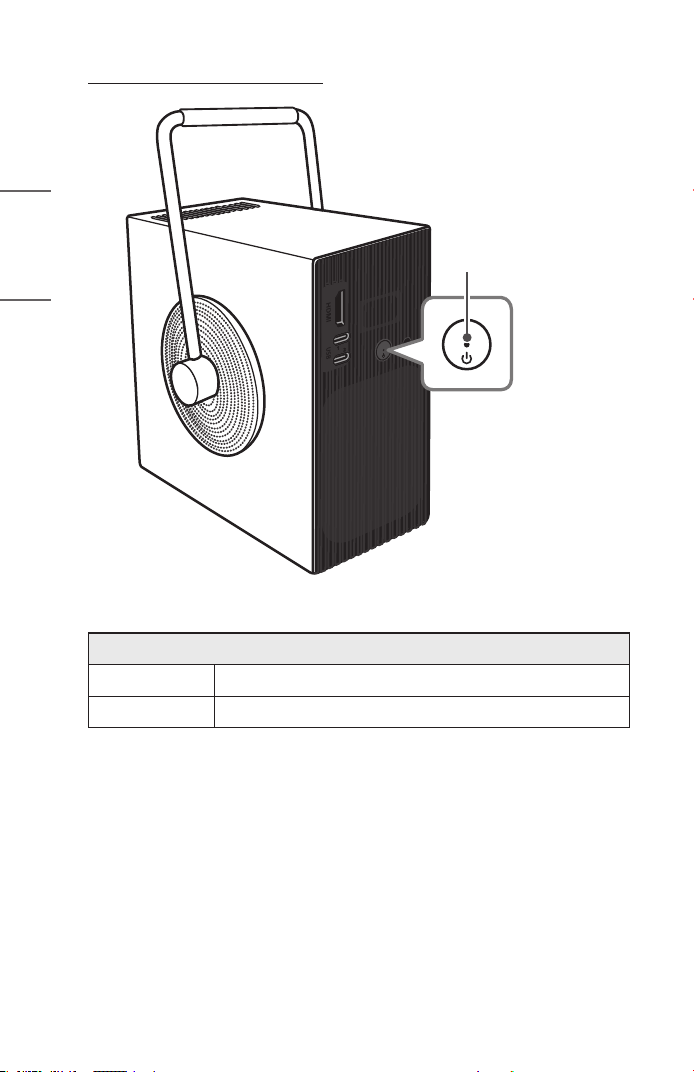
LED Power Indicator
LED Power Indicator
Red
Power standby state
Off
The projector is operating with the power on.
9
ENGLISH
INSTALLATION
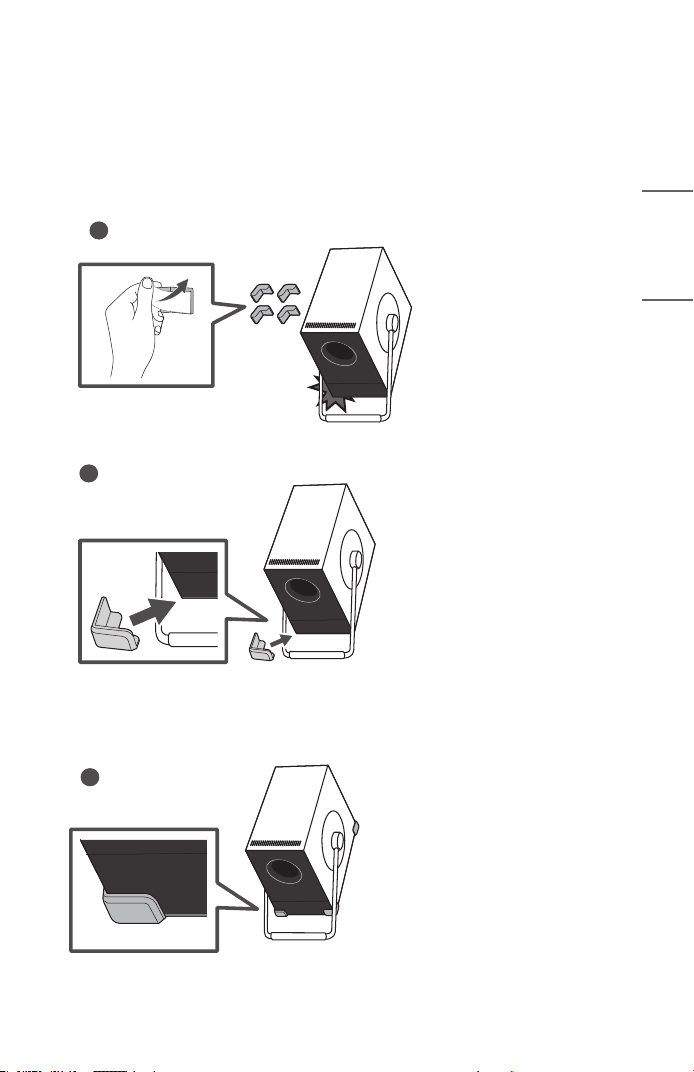
How to use the edge guards
It prevents any damage to the product and injury when being attached to sharp edges
of the product.
1
2
3
10
ENGLISH
Projection Distance per Screen Size
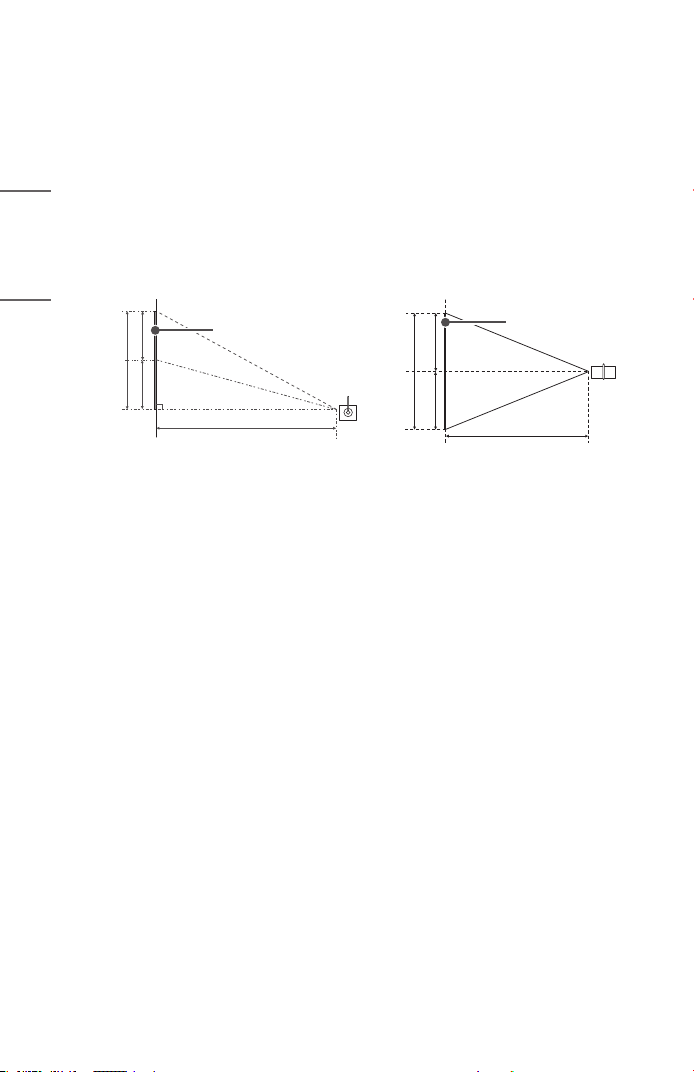
1 Place the projector on a sturdy, level surface, together with the PC or audio/
video source.
2 Place the projector an appropriate distance away from the screen. The distance
between the projector and the screen determines the actual size of the image.
3 Connect the power cord of the projector and the connected device to the wall
outlet.
Ratio of upward projection: 100 %
X/2 X/2
Projection Distance (D)
Screen Height (X)
Screen
Y/2 Y/2
Projection Distance (D)
Screen
Screen Width (Y)
11
ENGLISH
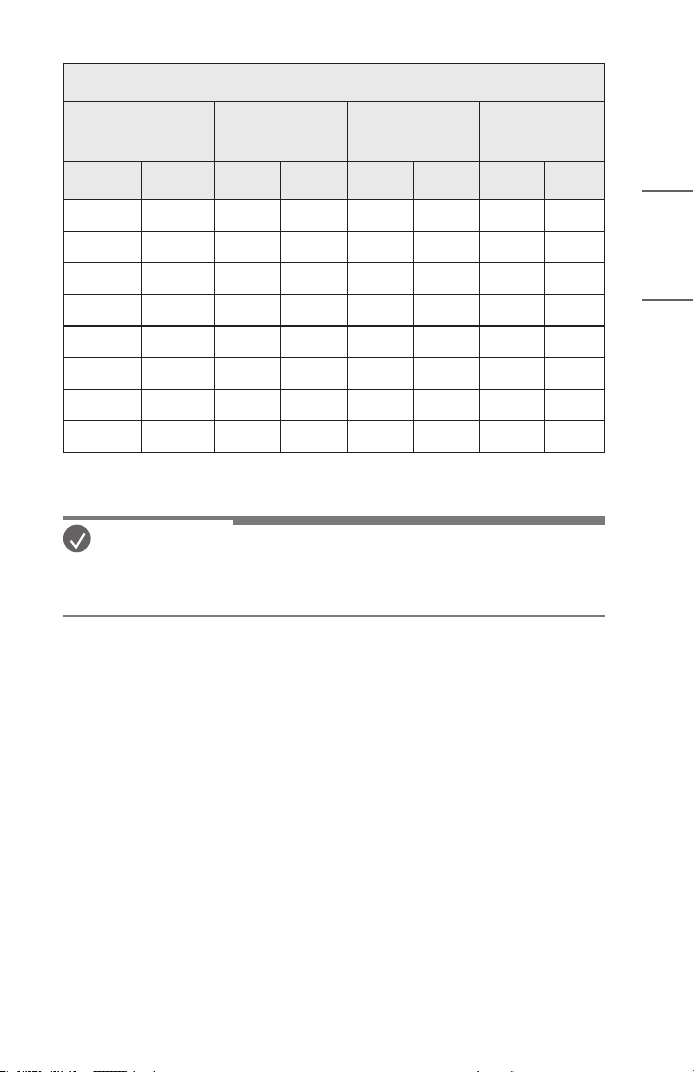
16:9 Aspect Ratio
Screen Size Screen Width (Y) Screen Height (X)
Projection
Distance (D)
inches mm inches mm inches mm inches mm
50 1270 43.5 1107 24.5 623 52.2 1328
60 1524 52.2 1328 29.4 747 62.7 1594
70 1778 61.0 1550 34.3 872 73.2 1860
80 2032 69.7 1771 39.2 996 83.6 2125
90 2286 78.4 1992 44.1 1121 94.1 2391
100 2540 87.1 2214 49.0 1245 104.6 2657
110 2794 95.8 2435 53.9 1370 115.0 2922
120 3048 104.6 2657 58.8 1494 125.5 3188
The projection distance may vary depending on the installation conditions.
NOTE
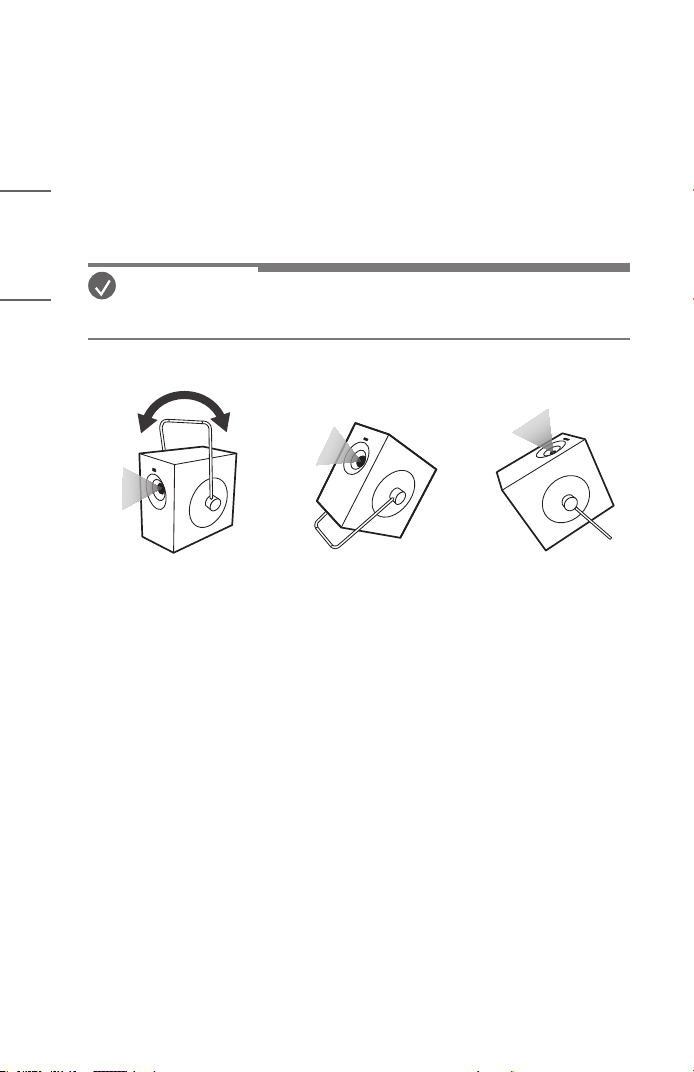
• If the projected image looks distorted or bent, check to see if the screen is
installed properly.
12
ENGLISH
Adjusting the Position of the Projection Screen
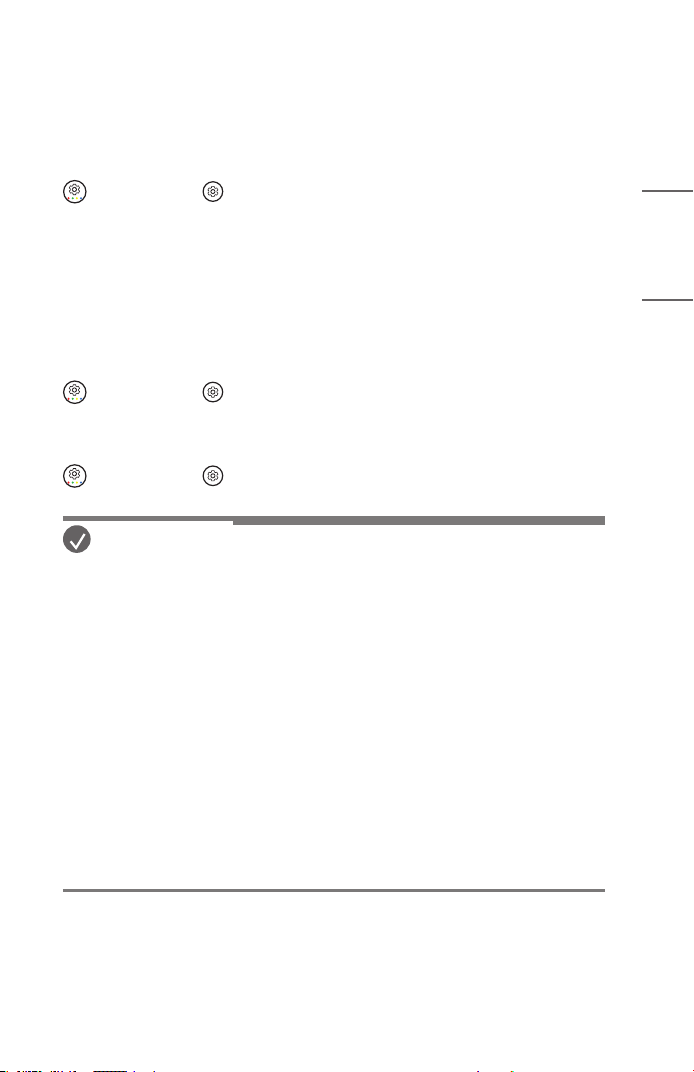
Adjust the angle of the projector to adjust the screen position.
• To adjust the angle of the projector, turn the handle to use it.
• When adjusting the angle of the projector, ensure that the projector does not
fall backwards. Otherwise, the product may be damaged.
• When adjusting the angle of the projector, be careful not to an excessive force
the projector. It may damage the projector.
NOTE
• Ensure that the handle does not cover the screen-customised sensor.
13
ENGLISH
Adjusting the Angle and Focus of the Projection
Screen
Be careful not to shake the product.
Automatically adjusts the angle and focus of the projection screen of the projector.
(Q. Settings) → [ ] → [General] → [Installation Wizard] → [Auto Screen
Adjustment]
When an image appears on the screen, check if it is in focus and ts the screen
properly. If the angle and focus of the projection screen are not adjusted automatically,
you can make detailed adjustments manually.
Adjusting the Angle Details of the Projection Screen
(Q. Settings) → [ ] → [General] → [Installation Wizard] → [Edge Adjustment]
/ [Keystone]
Adjusting the Focus Details of the Projection Screen
(Q. Settings) → [ ] → [General] → [Installation Wizard] → [Focus Adjustment]
NOTE
• After using the product at room temperature, turning on the power may blur the
focus if the inside temperature is low, but it will recover over time.
• This defocusing is a temporary phenomenon that occurs in low-temperature
environments, and this will not affect the product’s performance or lifespan.
• The automatic screen calibration feature may encounter an error when the
screen is projected onto an uneven surface or due to the material, color, and
surrounding environment.
• The automatic screen calibration feature may malfunction depending on the
screen or wall color when the screen mode is Wall Screen mode.
• Automatic screen correction may malfunction if the projection distance is 2
metres (6.56 feet) or longer or if the projection angle is 25 degrees or greater.
• If there is an object between the projector and the projected wall or dust or
foreign substance in the front (sensor part) of the product, automatic screen
correction will not function normally.
14
ENGLISH
Kensington Security System
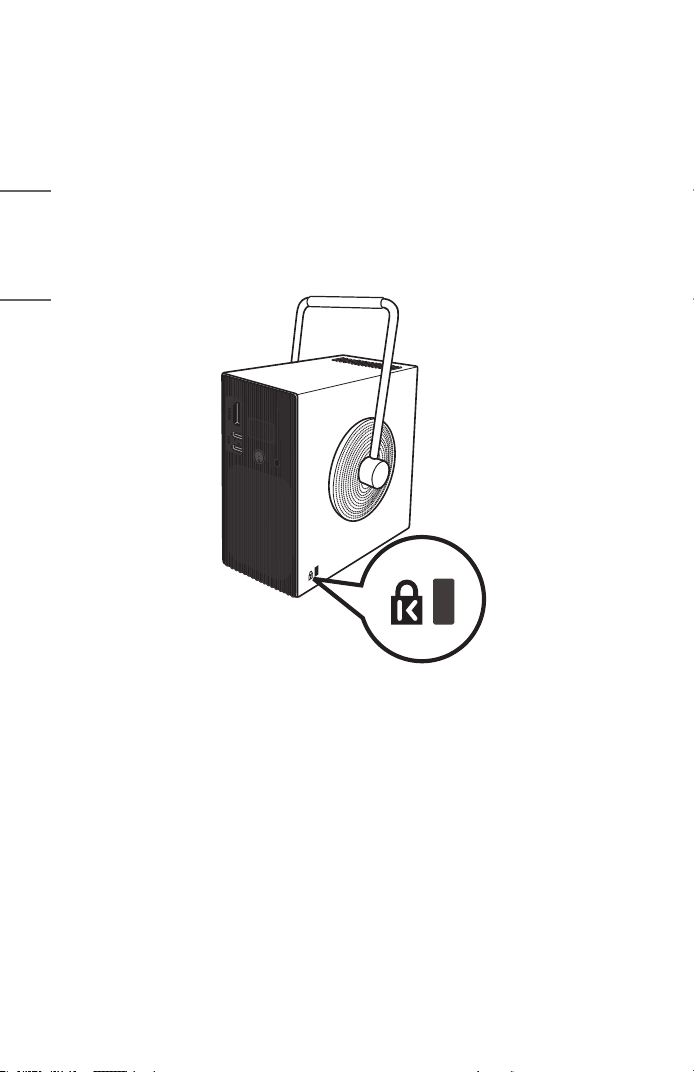
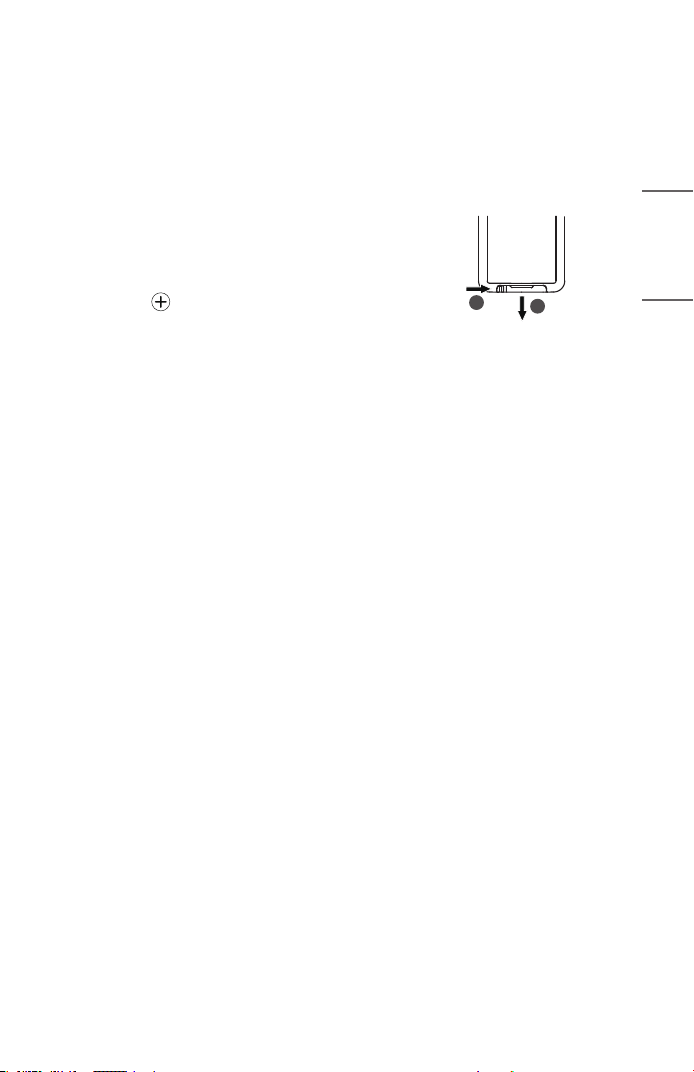
• This projector has a Kensington Security Standard connector as an anti-theft
mechanism. Connect a Kensington Security System cable as shown below.
• For more information on installation and use of the Kensington Security System,
refer to the user’s guide provided with the Kensington Security System.
• The Kensington Security System is an optional accessory.
• What is Kensington?
Kensington is a company that provides safety systems for laptops and other
electronic devices. Website: http://www.kensington.com
15
ENGLISH
USING REMOTE CONTROL
Replacing the Remote Control Battery
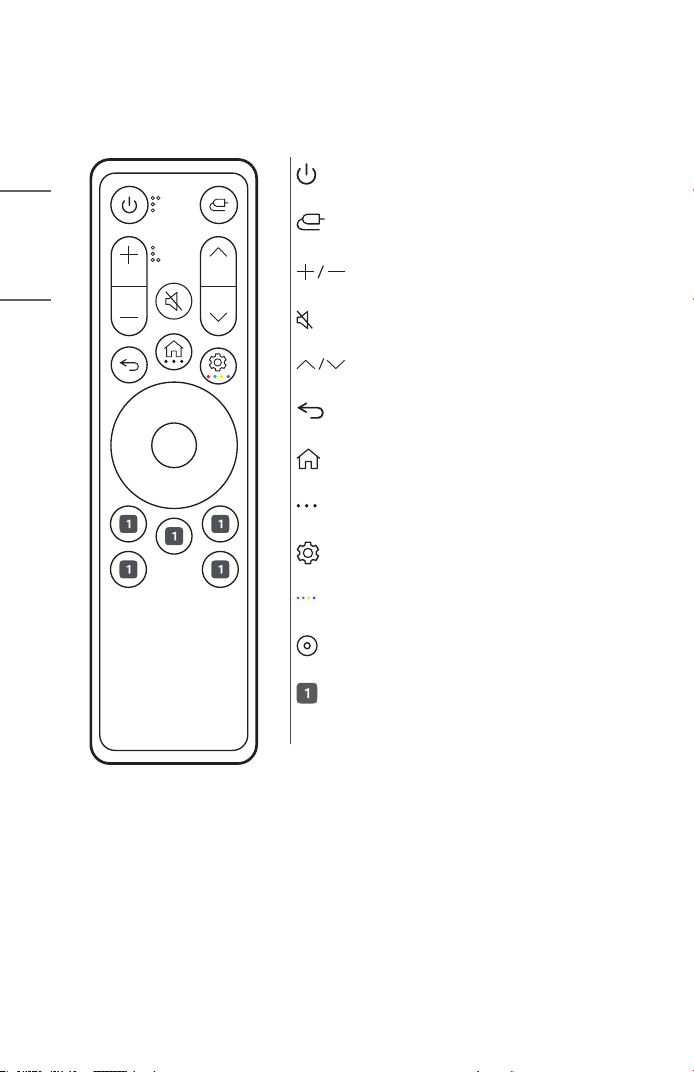
Use 3V, CR2025 button cell battery. Replace the battery with new one and insert it in
the battery tray as shown.
1 To separate the battery tray on the back of the
remote control, push the hook to the side and
then pull it.
2 Align the side of the replacement battery to
the battery tray label and insert them correctly.
3 Push the battery tray in until it clicks.
2
1
16
ENGLISH
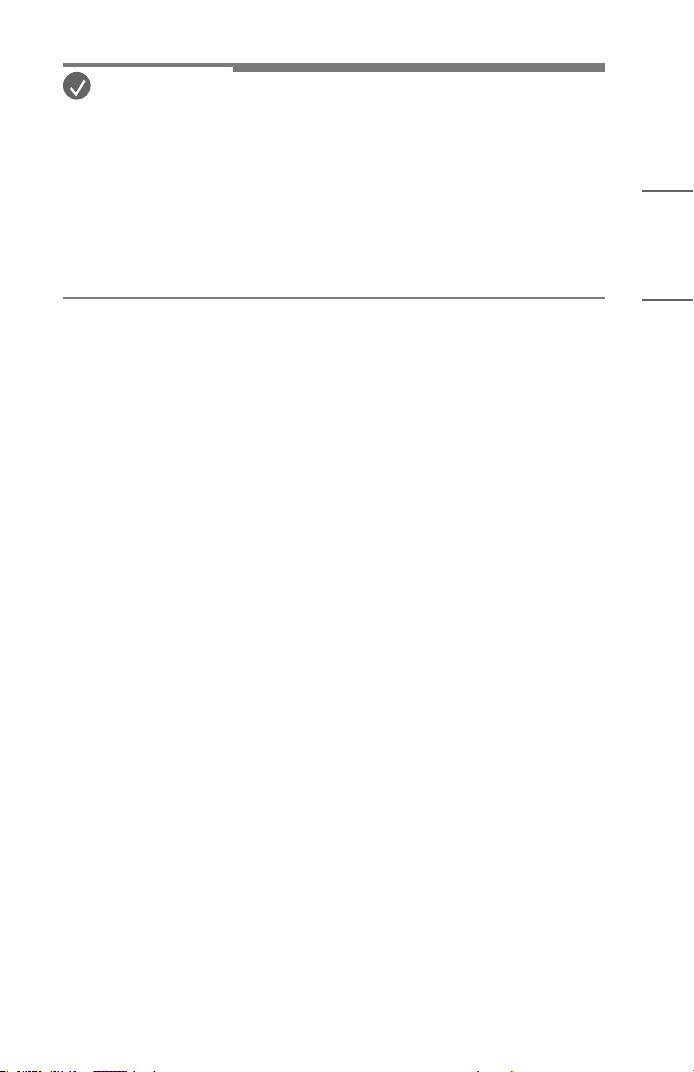
Viewing the Remote Control Features
• Some buttons and services may not be provided depending upon models or
regions.
(Power)
Turns the Projector on or off.
(Input)
Changes the input source.
(Volume Button)
Adjusts the volume level.
(Mute)
Mutes all sounds.
(Channel Button)
Enables users to change channels.
(Back)
Returns to the previous screen.
(Home)
Accesses the Home menu.
(More Actions)
Press and hold the button to view detailed options.
(Q. Settings)
Accesses the Quick Settings.
(Color Button)
Press and hold the button to access the four color buttons.
(Up, Down, Left, Right, OK)
Selects menus or options and conrms your input.
Various services button
Connects to various services such as streaming and voice
search.
17
ENGLISH
NOTE
• When using the remote control, the optimal operation range is 3meters
(9.8feet) or less (left/right) and within a 30 degree arc of the remote control
IR receiver.
• For seamless operation, do not block the IR receiver.
• When you carry the remote control in the portable bag, make sure that
the buttons on the remote control are not pressed by the projector, cables,
documents, or any other accessories in the bag. Otherwise, it may significantly
reduce the battery life.
18
ENGLISH
CONNECTING DEVICES
You can connect various external devices to the projector.
Connecting with a HDMI Cable
Connect an HD receiver, DVD, PC, Notebook, or external devices to the projector and
select an appropriate input mode.
With an HDMI cable, you can enjoy high quality picture and sound.
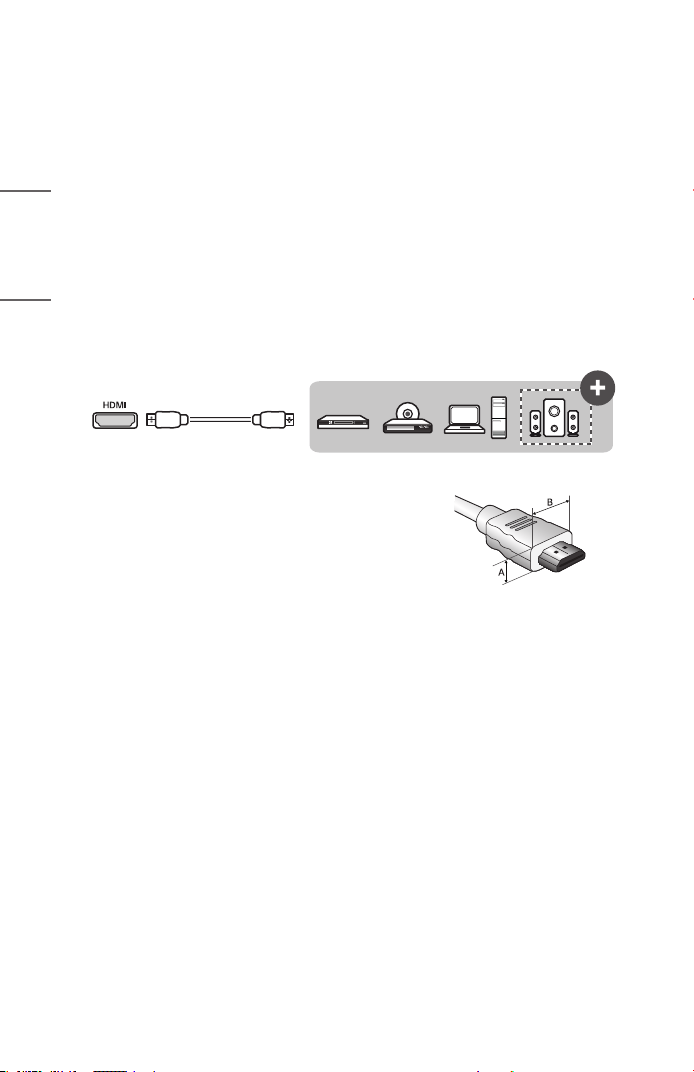
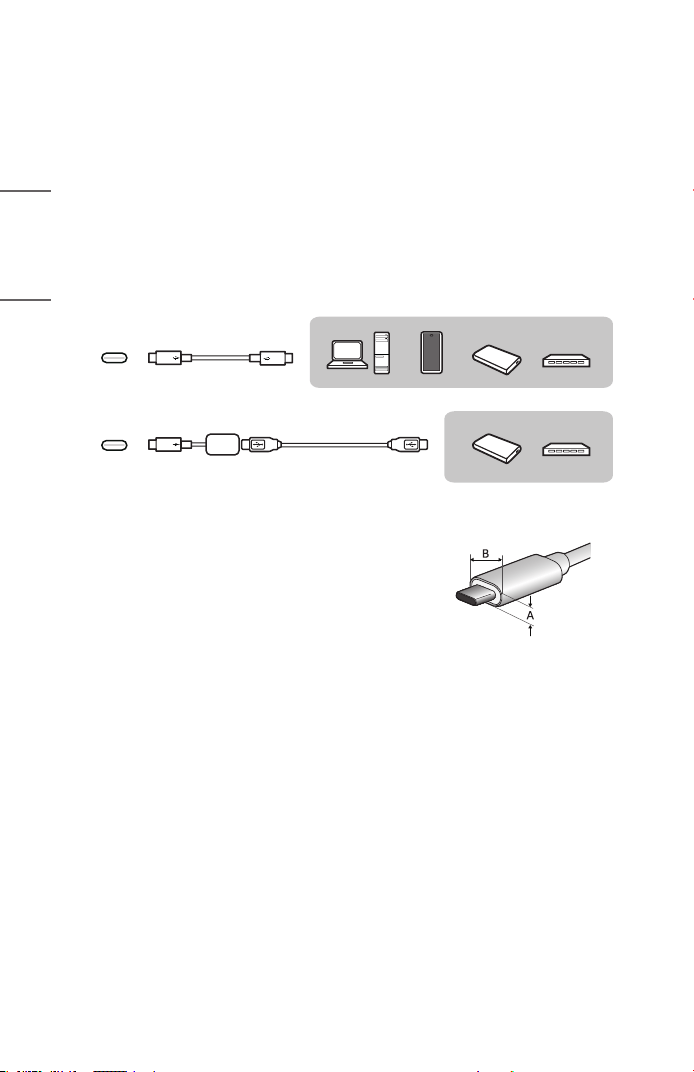
Using a HDMI cable, connect the HDMI port of the projector to the HDMI output port
of the device to connect. Both video and audio are output at the same time.
• To connect via HDMI, plug in the HDMI cable and select HDMI from the [Home
Hub].
USB
USB
Optional Extras
• When connecting the HDMI cable to the HDMI
input terminal, use a product with a maximum
width of 21mm (0.8inches) and height of
12mm (0.4inches).
• Use a certified cable with the HDMI logo
attached.
• If you do not use a certified HDMI cable, the
screen may not display or a connection error
may occur. (Recommended HDMI cable types)
— Ultra High Speed HDMI
®
/™ Cable (3m
(9.8feet) or less)
A ≤ 12mm (0.4inches)
B ≤ 21mm (0.8inches)
19
ENGLISH
NOTE
ARC (Audio Return Channel)
• External audio devices that support SIMPLINK and ARC must be connected
using port. ( )
• When connected with a Ultra High Speed HDMI
®
/™ Cable, external audio
devices that support ARC output or SPDIF work with the SIMPLINK function
without the need for an additional optical audio cable.
When connecting PC/laptop
• The projector supports Plug and Play. Your PC will automatically detect the
projector and requires no driver installation.
20
ENGLISH
Connecting with a USB-C Cable
Connect the USB-C terminal of the projector to the USB-C output terminal of a PC/
laptop or smartphone using a USB-C cable.
If the USB device is not recognized when using a USB hub, connect the USB directly to
the USB-C™ port.
Contact the manufacturer of your device to see if this feature is supported. Only the
smartphones that support USB-C will work.
• Use a certified USB-C™ cable. To connect via USB-C, plug in the USB-C cable
and select USB-C from the [Home Hub].
USB
USB
Optional Extras
Optional Extras
• When connecting the USB cable to the USB
input terminal, use a product with a maximum
width of 18mm (0.7inches) and height of
8mm (0.3inches).
• If the size of the USB cable or USB flash drive
does not fit the projector USB port, use an
extension cable that supports USB 2.0.
A ≤ 8mm (0.3inches)
B ≤ 18mm (0.7inches)
21
ENGLISH
NOTE
• PD (Power Delivery) and DP Alternate Mode are supported.
— A USB-C gender changer may be necessary depending on the cable used if
using PD (Power Delivery).
• To connect USB A Type products, you need a USB Type A to Type C adapter.
• The function may not operate properly depending on the connected device’s
specifications, USB-C cable status, or surroundings.
• The USB PD (for power supply) function may not operate according to the
specifications of the connected equipment.
• Check the resolution of the connected devices before using the DP Alternate
Mode function.
22
ENGLISH
Turning Power On with USB-C
To turn the power on using the USB-C input port, the external device (USB PD adapter,
charger, battery) must support USB Power Delivery 65 W (20 V/3.25 A) or higher
proles.
Purchase and use a USB-C AC adapter of 65 W (20 V/3.25 A) or higher certied by
USB PD through an e-commerce site.
NOTE
• Connecting an adapter with an output lower than the rated adapter may cause
the device not to turn on or to operate abnormally.
23
ENGLISH
SAFETY PRECAUTIONS
Please take note of the safety instructions to prevent any potential accident or misuse
of the projector.
Child injuries can be prevented by following these simple safety precautions.
The precautions should be followed in the same manner when you store or move your
existing projector.
• Safety precautions are given in two forms, i.e., WARNING and CAUTION as
detailed below.
WARNING: Failure to follow the instructions may cause serious injury and
even death.
CAUTION: Failure to follow the instructions may cause personal injury or
product damage.
• Read the owner’s manual carefully and keep it on hand.
WARNING/CAUTION
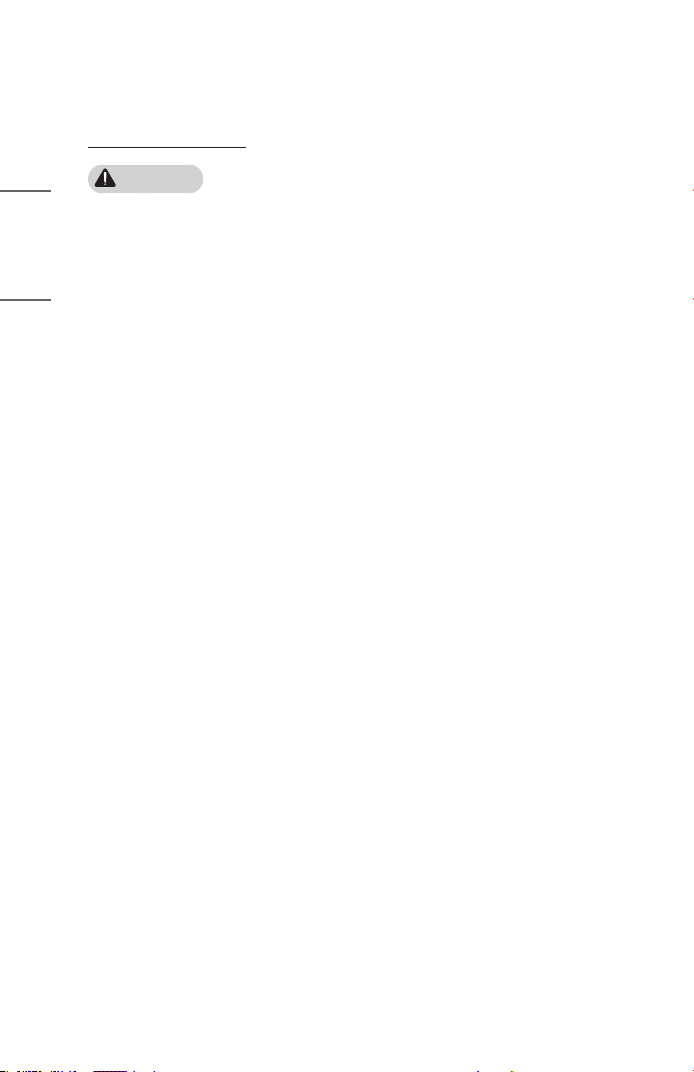
RISK OF ELECTRIC SHOCK
DO NOT OPEN
The lightning ash with arrowhead symbol, within an equilateral triangle,
is intended to alert the user to the presence of uninsulated dangerous
voltage within the product’s enclosure that may be of sufcient magnitude
to constitute a risk of electric shock to persons.
The exclamation point within an equilateral triangle is intended to alert the
user to the presence of important operating and maintenance (servicing)
instructions in the literature accompanying the device.
WARNING/CAUTION
— TO REDUCE THE RISK OF FIRE AND ELECTRIC SHOCK, DO NOT EXPOSE
THIS PRODUCT TO RAIN OR MOISTURE.
24
ENGLISH
Read these instructions. Keep these instructions.
Heed all warnings. Follow all instructions.
Indoor Installation
WARNING
Do not install products including projectors and remote controls in the
following places:
— Any place exposed to direct sunlight;
— Any humid place such as bathroom;
— Any place near hot objects such as ammables and stoves;
— Any place where oil, oil mist, and steam can reach such as a worktop or places
near a humidier;
— Any place where water can splash like a vase or the aquarium;
— Any place that is dusty or exposed to wind and rain;
— Any place that is under the air conditioner or is directly exposed to the wind
from the air conditioner;
— Any place near ammable materials such as ammable sprays, etc.; or
— Any cupboard, bookcase shelf or cabinet without a xture installed and any
place where a pet can access.
• It may cause an electric shock, fire, malfunction, deformation or falling.
Be careful not to drop the projector when connecting an external device.
• It may cause injury or damage to the product.

25
ENGLISH
Keep the following precautions in mind to prevent the temperature rise inside
the projector:
— Install the air vents at least 30cm (11.8inches) away from the wall.
— Do not install the product in a place where it cannot be ventilated, such as on a
bookcase or in a closet.
— Do not install the product on carpet or cushion.
— Make sure that the air vents are not blocked with tablecloths, curtains, etc.
• It may cause a fire.
For places where oil or oil mist can reach, do not install the product on a wall
or ceiling.
• The product may be damaged and fall.
Do not allow a child to hang or climb on the installed projector.
• The projector may fall and cause injury or death.

26
ENGLISH
CAUTION
When moving the projector, be sure to turn off the power switch and
disconnect the power plug, antenna cable and the connection cord between
the devices.
• A failure to do so may cause damage to the projector or the cord, resulting in a
fire or electric shock.
Do not install the projector on a shaky shelf, a slanted place, a place subject
to vibrations, a place where the projector is not fully supported or on a fabric
such as tablecloths.
• It may cause injury as the projector falls or tips over, or it may cause a
malfunction of the projector.
To prevent damage to the power cord or plug, do not install the projector
where the cord can be walked on.
• It may cause a fire or electric shock.
When installing the projector, do not install it too close to the wall.
• The cable connection may be deteriorated or the projector and its cables may be
damaged.
When installing the projector on a cabinet or a shelf, make sure that the front
end of the bottom of the projector does not come out.
• The projector may fall due to the unbalance of the center of gravity and cause
injury to people or a malfunction.
27
ENGLISH
When in Use
WARNING
When thunder or lightning strikes, unplug the power cord and do not touch
the antenna wire.
• It may cause an electric shock.
If there is a gas leak from the gas lines, do not touch the outlet and be sure to
vent by opening the window.
• Sparks may be caused and lead to a fire or burns.
When using the product with an external device connected such as a games
console, make sure the connection cable is long enough.
• The product may fall over and cause injury or product damage.
Do not scratch or give an impact on the projector with metallic materials or
objects.
• It may cause injury to people or damage to the product.
Do not insert metallic objects including coins, hairpins or a piece of iron or
ammableobjectssuchaspaperormatchesintotheprojector.
• It may cause a fire or electric shock.
Keep the plastic wrapping of the product out of the reach of children.
• If a child misuses it, it may suffocate the child.
Do not touch near the vents during the operation or immediately after the
power is turned off as they generate intense heat.
• The heat does not indicate a defect or a problem of the projector when it is
operating so use it with confidence.
Do not look into the front of the lens when the projector is operating. Strong
light is projected from the product which can cause injury to your eyes.
Never try to disassemble or modify the projector yourself. Always seek a
qualiedservicetechnicianorconsultyourdealerorlocalServiceCenterfor
inspection, adjustment or repairs.
• It may cause a fire or electric shock.

28
ENGLISH
CAUTION
Do not use any product that uses high voltage electricity near the projector.
(e.g.Anelectricyswatter)
• It may cause a malfunction.
Do not place any liquid containers such as a vase, pot, cup, cosmetics or
medicine, decorations such as candles or any heavy objects on top of the
projector.
• Doing so may cause a fire, electric shock and injury due to failing.
The surface of the AC adapter is hot, so be careful not to put the surface
against your skin or let the children touch the surface during use. (Except for
the models that do not use an adapter)
Do not hold or move the projector upside down by grabbing only the power
cord, signal cable, or projection mirror.
• Doing so may damage the product or cause an electric shock or fire.
Even if the projector is turned off with the remote control or the button, the
power is not completely cut off if the power cord is plugged in.
If you use headphones or earphones, do not use them at high volume or for a
long period of time. (It applies only to the models that support headphones
(earphones).)
• Doing so may damage your hearing.
Do not start the projector when the volume is high.
• A loud volume can cause hearing loss.
Do not use or store the projector outdoors for an extended period of time.
Do not touch the projector’s lens or give an impact on it.
• It may cause damage to the product.

29
ENGLISH
Do not block the light from the projector lens with a person, book or other
objects.
• If the light from the projector shines on an object for a long time, it can cause
fire due to the heat of such light. Also, the reflected light can heat the lens and
cause damage to the projector.
Supervise children and to never allow them to stare into the projector beam at
any distance from the projector.
Use caution when using the remote control for staring the projector while in
front of the projection lens.
The user to avoid the use of optical aids such as binoculars or telescopes inside
the beam.
Iftheambienttemperaturerisesabove30°C(86°F),thefanmayrunfaster
to protect the internal parts of the projector.
Iftheambienttemperatureexceeds35°C(95°F),thelightoutputmaybe
reduced to protect the projector.
This product features highly durable tempered glass; however, excessive
impact may cause the glass to become scratched or break. Please use with
care.
To avoid dropping the projector, always carry it with both hands instead of
one.
30
ENGLISH
Battery
WARNING
When replacing the batteries used for the remote control, be careful not to let
children eat them and keep the batteries out of reach of children.
• If a child swallows the battery, consult a doctor immediately.
When replacing the batteries, make sure that they are properly installed
according to the polarities (+, -).
• Battery rupture or leakage may lead to fire, explosion, injury or contamination
(damage) of the surrounding area.
Donotexposethebatteriestodirectsunlight,replace,electricheater,high
temperatureabove60°C(140°F),excessivelyhumidplacesorexcessiveheat.
• It can cause an explosion or fire.
Do not throw or disassemble the battery.
• It can cause a fire and explosion due to battery damage.
Do not carelessly throw away old batteries.
• It can cause an explosion or fire. The disposal method may vary by country and
region. Dispose of it in an appropriate manner.

31
ENGLISH
“Do not swallow the battery. There is a risk of chemical burns.”
• The remote control provided with this product contains a coin/button cell
battery. If swallowed, the coin/button cell battery can cause severe internal
burns and death within just two hours.
• Keep both new and used batteries out of reach of children.
• If the battery compartment does not close securely, stop using the product and
keep it out of reach of children.
• If you suspect that a battery has been swallowed or inserted into the body, seek
medical attention immediately.
Donotdisposeofthebatteryinareorahotoven,orcrushorcutit
mechanically. Doing so may cause it to explode.
The battery must not be exposed to excessive heat, such as direct sunlight or
re.
Riskofreorexplosionifthebatteryisreplacedbyanincorrecttype.

32
ENGLISH
Power
WARNING
Make sure the power plug is securely plugged in to prevent it from shaking.
• If the connection is unstable, it may cause a fire.
Do not plug too many devices into one multi-power outlet.
• This may result in fire due to the power outlet overheating.
Do not insert a metal object such as chopsticks into the other end of the
power plug while it is plugged into a wall outlet. Also, do not touch the power
plug immediately after unplugging it from the outlet.
• It can cause an electric shock.
Connect the power plug to a grounded outlet or multi-power outlet. (Except
for any device without ground connection)
• A failure to do so may cause an electric shock due to a malfunction or electrical
short.
Never touch the power plug with wet hands.
• It may cause an electric shock.
Disconnect the power plug from the outlet when you are not using the
projector for a long time or absent.
• Dust collects and may cause an electric shock and fire caused by a short circuit
due to heat, ignition and insulation/degradation.
The Power Plug is the disconnecting device. In case of an emergency, the
Power Plug must remain readily accessible.

33
ENGLISH
If any of the following occurs, it could be a malfunction of the product, so
you must immediately turn the projector off, unplug the power cord from the
outlet, and contact the service center:
— When the product is damaged;
— When the product fails;
— When there is a foreign substance inside the product; or
— When the product smokes or smells.
• It may cause a fire or electric shock.
CAUTION
Do not unplug or plug the power plug from/in the outlet while the power
switch is on. (Do not use the power plug as a switch.)
• It may cause a fire or malfunction.
When removing the AC adapter or power cord, be sure to hold the plug part.
• A failure to do so may cause a fire or damage to the product.
Do not damage the AC adapter, power cord or power plug, place heavy objects
on them or give an impact on them.
• It may cause a fire, electric shock or damage to the product.
Attach the power cord and AC adapter connected to the projector in a way
that they are fully seated.
• Poor contact can cause a malfunction of the product and fire.
If there is dust on the pin part of the power plug or the outlet, clean it
thoroughly.
• It may cause a fire.
Keep the power cord away from heat sources.
• The coating of the cord may melt and cause a fire or electric shock.
Use only the authorized power cord or AC adapter supplied by LG Electronics.
Do not use any other products.
• It may cause a malfunction of the product, fire or electric shock.
34
ENGLISH
Cleaning
WARNING
Do not spray water directly onto the projector when cleaning it.
• It may cause a fire or electric shock.
CAUTION
How to clean the projector
— Disconnect the plug from the outlet before cleaning.
— Do not wipe the optical system (the lens and mirror) immediately after the
power is turned off.
— Do not spray the water with a sprayer on the product or wipe the product with
a damp cloth.
— Wipe the product gently with a soft cloth.
— Do not use any detergents, automotive or industrial polishes, abrasives, waxes,
benzenes or alcohols.
• It may cause a fire, electric shock or damage to the projector (deformation,
corrosion, and breakage).
How to clean the lens
— Clean the lens if any dust or smudge appears on the surface of the lens.
— Clean the surface of the lens with an air sprayer or a soft, dry cloth.
— To remove dust or stains on the lens, use a compressed air duster, cotton swab,
or soft cloth to gently wipe the lens.
— Never clean the lens when the projector is operating or immediately after the
projector is turned off.
— Do not use any detergents, automotive or industrial polishes, abrasives, waxes,
benzenes, alcohols, water, etc. on the lens, as they will damage the projector.
Consult your dealer or the service center for cleaning the interior of the
product once a year.
• If you do not clean the interior of the projector for a long time while dust
collects, it may cause a fire or malfunction.
35
ENGLISH
Laser
WARNING
• You risk being exposed to laser radiation if you manipulate or alter the product
in a way not specified in the user manual.
• Be sure not to let infants or people with diseases directly watch the light source.
CAUTION
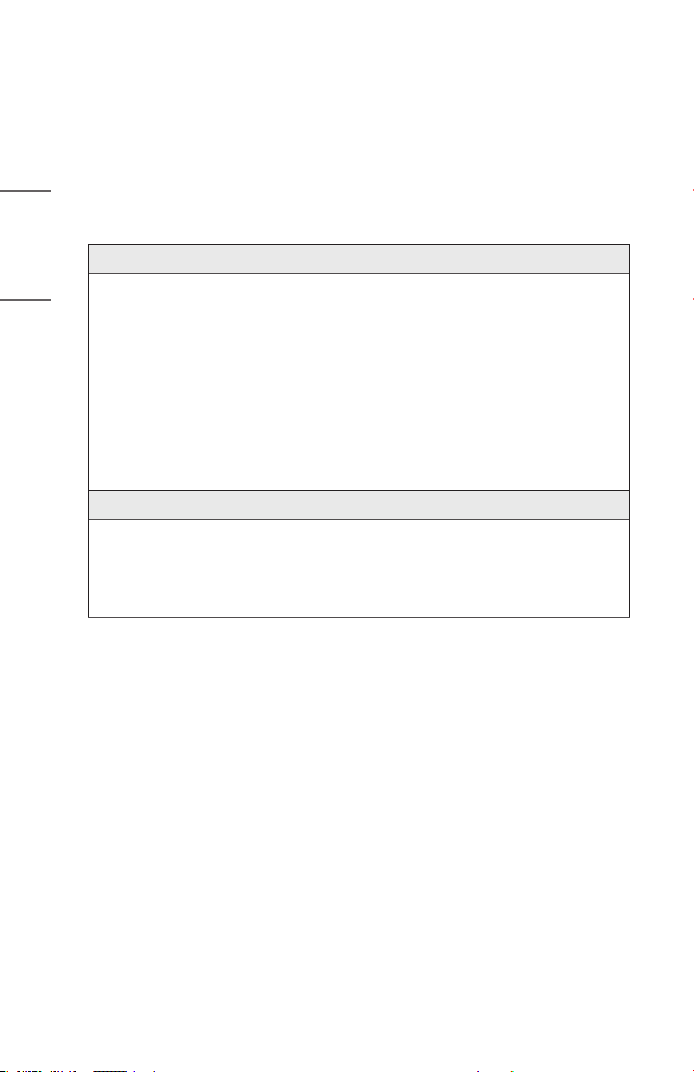
• This product is a class 1 laser device that meets IEC 60825-1.
Built-in laser standard (class 4 laser module)
• Blue
— Wavelength: 458 nm - 472 nm
— Light output: Approx. 10.4 W
• Green
— Wavelength: 519 nm - 531 nm
— Light output: Approx. 6.4 W
• Red
— Wavelength: 635 nm - 651 nm
— Light output: Approx. 11.0 W
Product Laser Class Label
The laser class label of product is attached to the bottom of the product.
Product labels are afxed to the underside of the product.
36
ENGLISH
CHECKING BEFORE REPORTING
MALFUNCTION
Please check the list below when you experience the following symptoms during use of
the product. It may not be a failure.
Projector Safety Check
Symptoms
• The projector does not display anything on the screen or output sound when
it is turned on.
• The product emits smoke or a burning smell.
• Water or foreign substances are present inside the product.
• Part of the projected image is cut out.
• A strange noise (crackling or sparking sound) regularly occurs from inside the
projector.
• The projector still displays the screen or outputs sound when it is turned off.
• There are other errors or failures.
Causes and Solutions
• For safety, turn off the power switch and remove the plug from the socket.
• Contact the place of purchase or authorized service center for product
inspection.
• Do not attempt to repair the product yourself.
37
ENGLISH
Troubleshooting
Symptoms Causes and Solutions
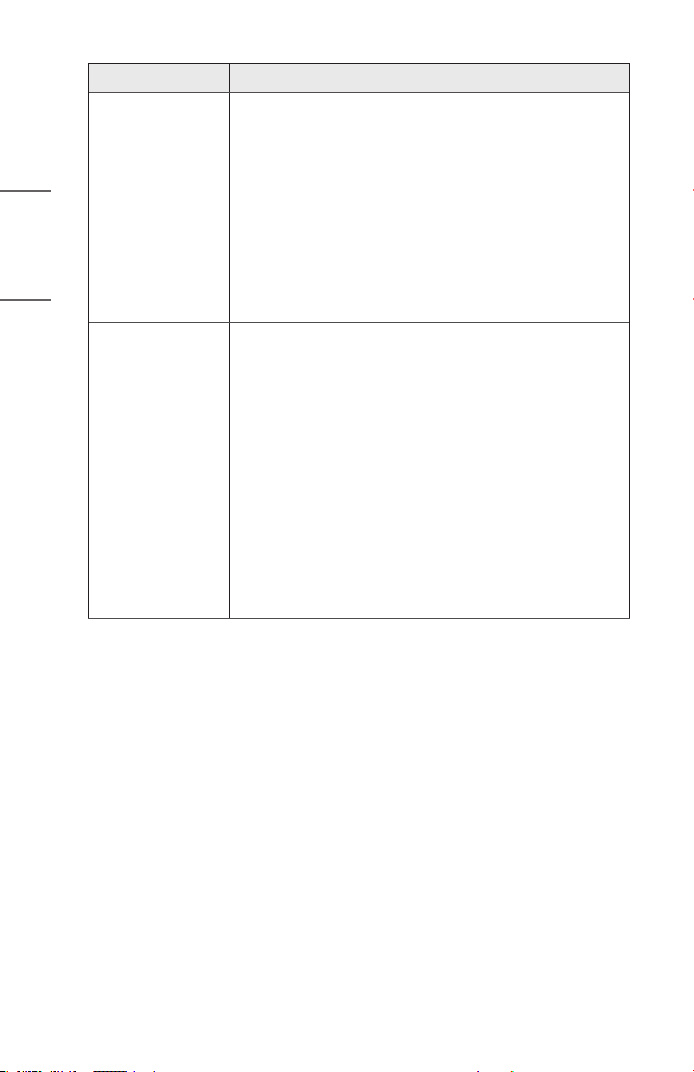
I cannot turn on
the Projector.
• Please make sure your projector power plug is correctly
connected to the outlet.
• There may be a problem with the outlet, so try plugging
the power cord of another product into the outlet
where the projector was plugged in.
Cannot control
the Projector
with the remote
control.
• The remote control may not work properly where a
lamp with electronic stabilizer or a three-wavelength
lamp is installed.
— In this case, replace the lamp with electronic
stabilizer or the three-wavelength lamp with
international standard products to ensure the
remote control works properly.
• Check if there is any obstacle between the product and
the remote control.
• When replacing the batteries, make sure that they are
properly installed according to the polarities (+, -).
• Replace both used batteries with new ones.
• For remote controls that use coin batteries, ensure the
insulation sheet between the battery and the terminal
has been removed.
The power turns
off suddenly.
• Check whether the [Sleep Timer], [Auto Off], or [Auto
Power Off] is set.
• See if the external devices are operating together.
• The auto-off function may have been activated. This
product is equipped with an auto-off function that
automatically turns the product off when no signal is
present and when the remote control has not been
pressed, depending on the settings for the auto-off
function.
38
ENGLISH
Symptoms Causes and Solutions
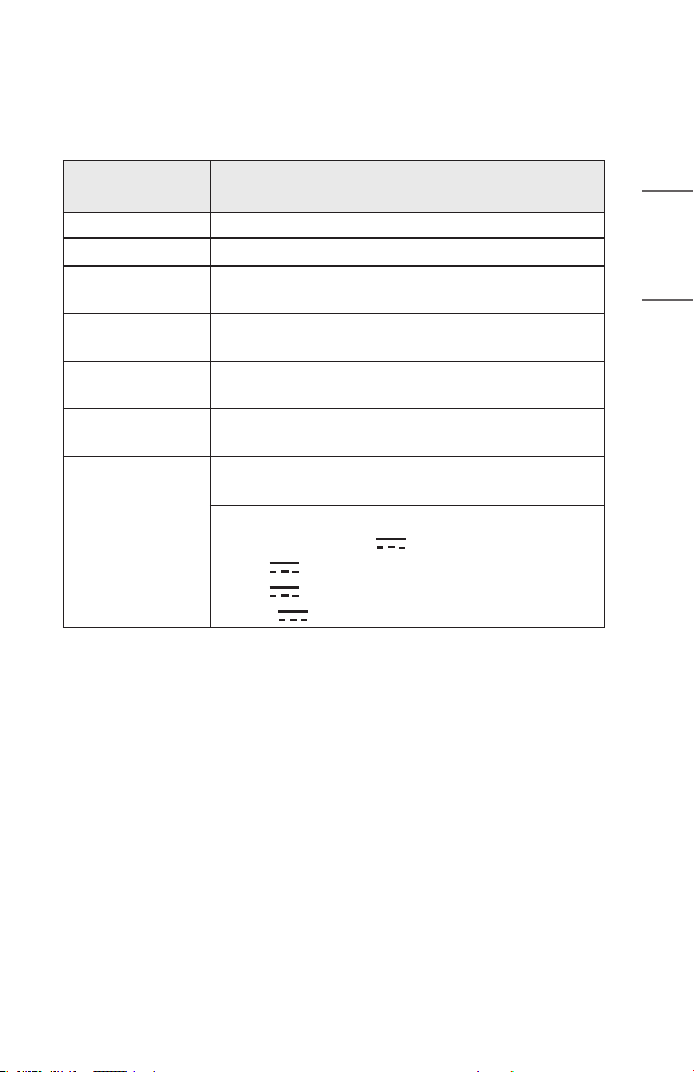
I see dots on the
screen.
• There is a colored dot (bright dots, dark dots, stationary
dots, and/or flickering dots) on the screen.
— This projector was produced with high precision
technology. However, a tiny dark or bright dot may
appear on the screen. This is a common occurrence
due to the production process, and it does not
indicate a functional failure.
* Bright spot: Brightly lit dots, Dark spot: Invisible or blurred
point of text or objects, Blinking: Flashing dots, Bright dot:
Glowing dots that are brighter than regular images
I hear a noise. • Electrical noise: This is a small sound generated from
the operation of the high-speed switching circuit that
supplies current to the projector, and the noise may
vary depending on the product. This noise is normal and
does not affect the projector’s functions. LG Electronics
manages the manufacturing of projectors according to
strict standards. A fixed level of noise does not indicate
a problem. Please understand that this does not allow
you to get an exchange or refund.
• Fan sound: To maintain the temperature inside the
projector at an appropriate level, the fan sound may
increase or decrease depending on the ambient
temperature.
39
ENGLISH
CHECKING INFORMATION
Specications
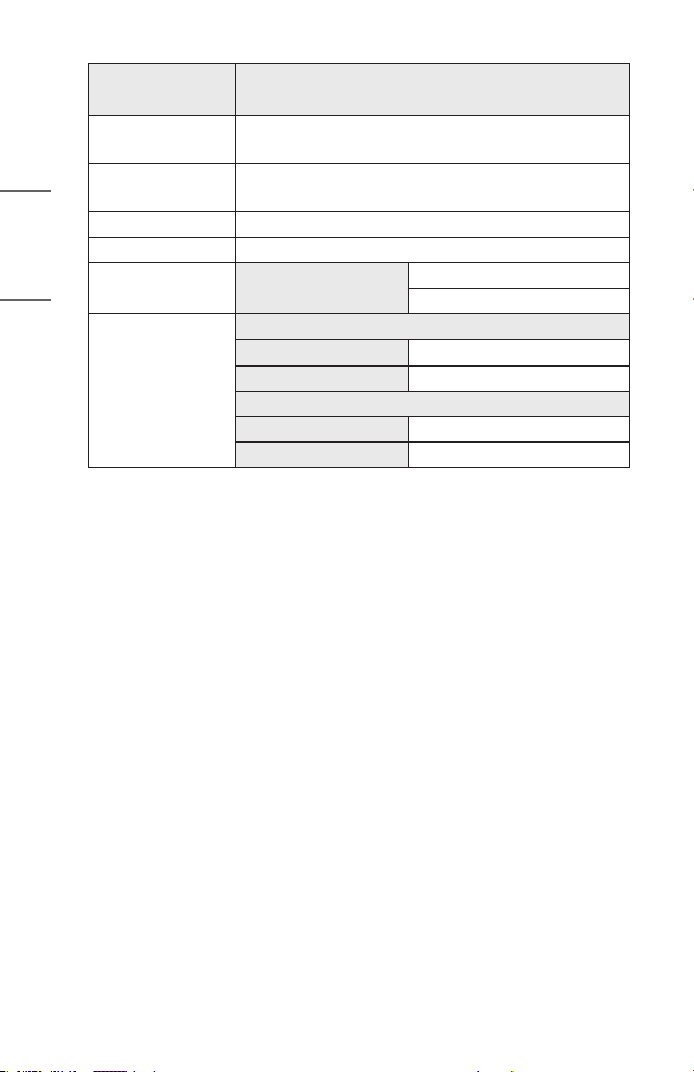
MODEL
PU600U
PU600U-GL
Resolution (Pixel)
3840 (Horizontal) x 2160 (Vertical)
1)
Aspect ratio
16:9 (Horizontal:Vertical)
Projection distance
— Screen size
1328mm to 3188mm (52.2 inches to 125.5 inches)
— 1270mm to 3048mm (50inches to 120inches)
Ratio of upward
projection
100 %
Working range of
the remote control
3 m (9.8 feet)
Power
consumption
65 W
2)
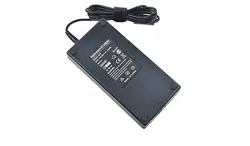
AC-DC Adaptor
Manufacturer: Honor
Model
: ADT-65AI-D00-3
Input: 100-240 V~ 50/60 Hz 1.6 A (Max.)
Output (USB-PD): 20.0 V 3.25 A 65.0 W (Max.)
or 5.0 V 3.0 A 15.0 W
or 9.0 V 3.0 A 27.0 W
or 15.0 V 3.0 A 45.0 W
1) 4K UHD resolution with 8.3 million discrete pixels projected by XPR (Extended
Pixel Resolution) video processing.
2) Power consumption levels may vary depending on the operating conditions
and projector settings. Power consumption is measured according to internal
standards (full white pattern, maximum resolution).
40
ENGLISH
MODEL
PU600U
PU600U-GL
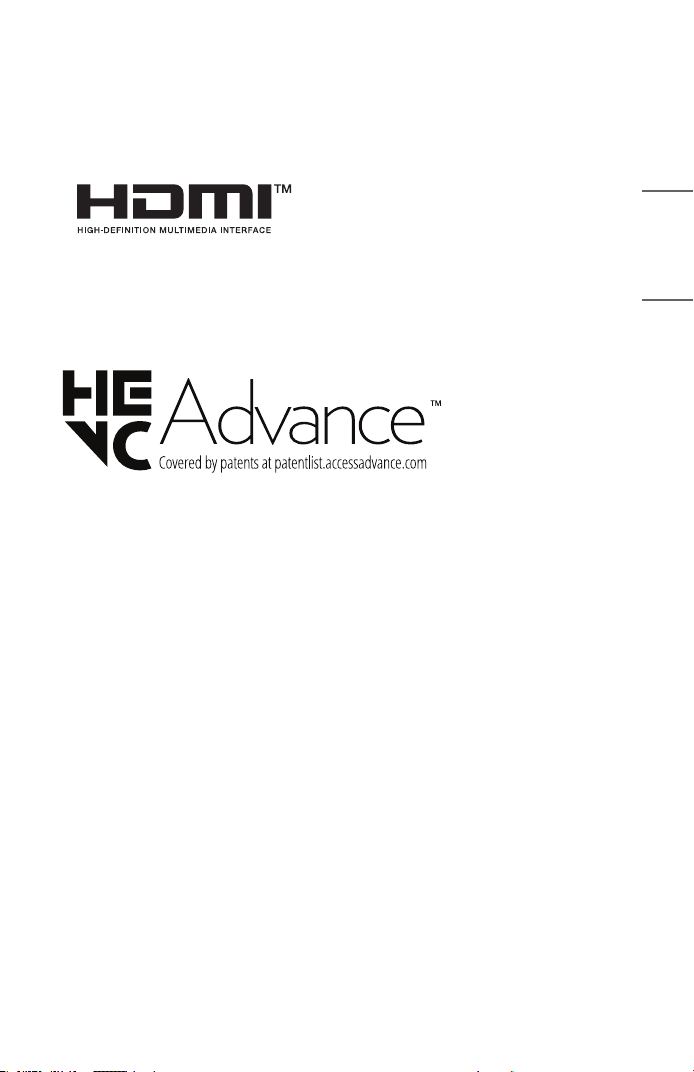
Height
135mm (5.3inches) (without foot), 136.5mm (5.3inches)
(with foot)
Width
80mm (3.1inches) (without handle cap), 107.8mm
(4.2inches) (with handle cap)
Depth
135 mm (5.3 inches)
Weight
1.49 kg (3.2 lbs)
USB Device USB Type-C
Output: 5 V, 1 A (Max.)
Input: 20 V, 3.25 A (Min.)
Environment
Condition
Temperature
Operation
0 °C to 40 °C (32 °F to 104 °F)
Storage
-20 °C to 60 °C (-4 °F to 140 °F)
Relative Humidity
Operation
0 % to 80 %
Storage
0 % to 85 %
• Use only power supplies listed in the user instructions.
• Contents in this manual may be changed without prior notice due to upgrade of
product functions.
41
ENGLISH
Licenses
Supported licenses may differ by model. For more information about licenses, visit
www.lg.com.
The terms HDMI, HDMI High-Denition
Multimedia Interface, HDMI trade dress
and the HDMI Logos are trademarks or
registered trademarks of HDMI Licensing
Administrator, Inc.
Manufactured under license from Dolby Laboratories. Dolby, Dolby Vision, Dolby Vision
IQ, Dolby Audio, Dolby Atmos, and the double-D symbol are trademarks of Dolby
Laboratories Licensing Corporation.
USB Type-C® and USB-C® are registered trademarks of USB Implementers Forum. USB
2.0 Type-C™ is a trademark of USB Implementers Forum.

42
ENGLISH
Open Source Software Notice Information
To obtain the source code that is contained in this product, under GPL, LGPL, MPL,
and other open source licenses that have the obligation to disclose source code, and
to access all referred license terms, copyright notices and other relevant documents,
please visit https://opensource.lge.com.
LG Electronics will also provide open source code to you on CD-ROM for a charge
covering the cost of performing such distribution (such as the cost of media, shipping,
and handling) upon email request to[email protected].
This offer is valid to anyone in receipt of this information for a period of three
yearsafter our last shipment of this product.
43
ENGLISH
Otherspecications
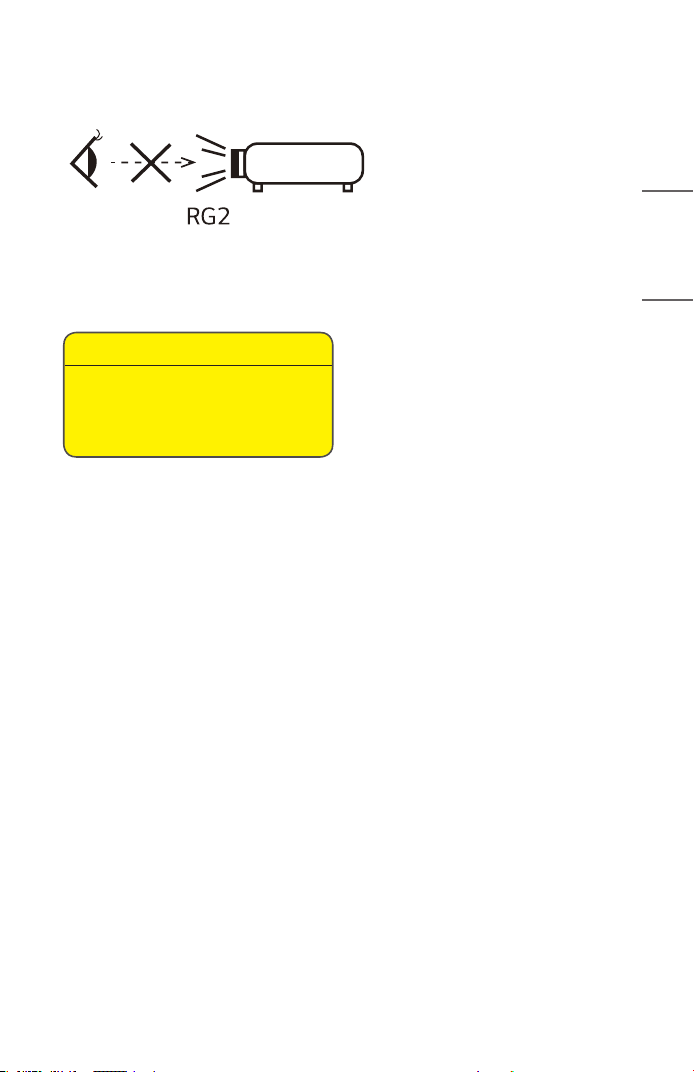
This label is attached to the bottom of the product and language may differ.
As with any bright light source, do not stare into the beam, RG2 IEC 62471-
5:2015.
Risk Group 2
CAUTION Possibly hazardous optical
radiation emitted from this product. Do not
stare at operating lamp. May be harmful to
the eye.
44
ENGLISH
Symbols
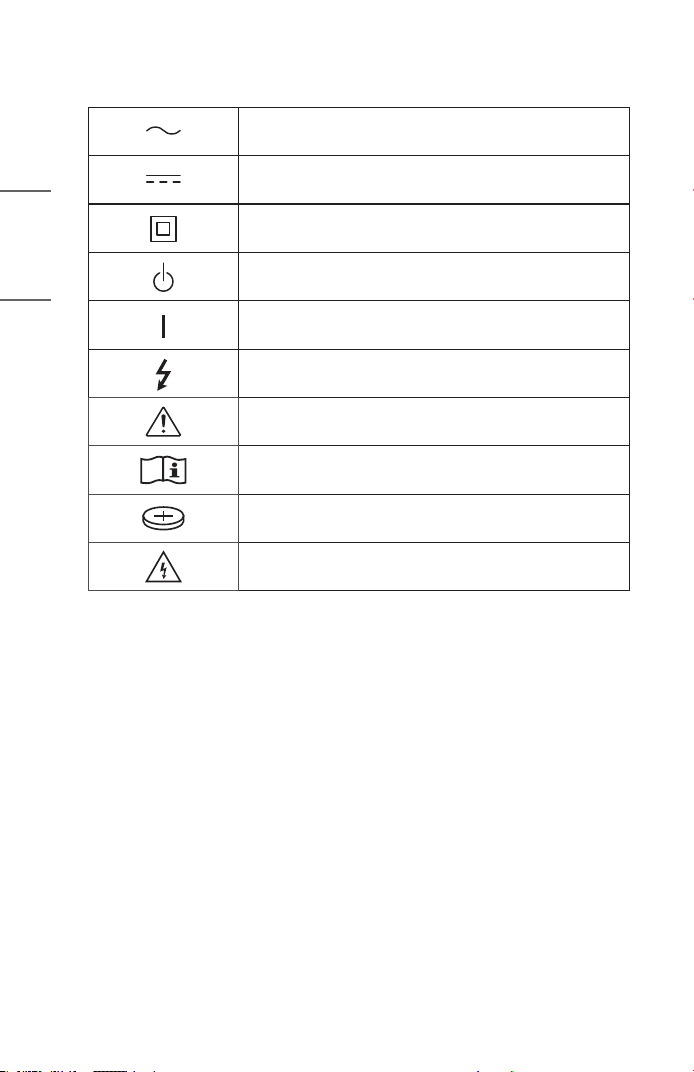
Refers to alternating current (AC).
Refers to direct current (DC).
Refers to class II equipment.
Refers to stand-by.
Refers to “ON” (power).
Refers to dangerous voltage.
CAUTION
Instructions
Coin / button cell battery
Caution, Shock hazard

45
ENGLISH
LIMITED WARRANTY (USA)
THE PRODUCT’S FULL LIMITED WARRANTY TERMS AND CONDITIONS ARE
AVAILABLE AT https://www.lg.com/us AND/OR YOUR WARRANTY.
ARBITRATION NOTICE: THIS LIMITED WARRANTY CONTAINS AN ARBITRATION
PROVISION THAT REQUIRES YOU AND LG ELECTRONICS (“LG”) TO RESOLVE
DISPUTES BY BINDING ARBITRATION INSTEAD OF IN COURT, UNLESS YOU
CHOOSE TO OPT OUT. IN ARBITRATION, CLASS ACTIONS AND JURY TRIALS ARE
NOT PERMITTED. PLEASE SEE THE SECTION TITLED “PROCEDURE FOR RESOLVING
DISPUTES” BELOW.
PROCEDURE FOR RESOLVING DISPUTES:
ALL DISPUTES BETWEEN YOU AND LG ARISING OUT OF OR RELATING IN ANY
WAY TO THIS LIMITED WARRANTY OR THE PRODUCT SHALL BE RESOLVED
EXCLUSIVELY THROUGH BINDING ARBITRATION, AND NOT IN A COURT OF
GENERAL JURISDICTION. BINDING ARBITRATION MEANS THAT YOU AND LG ARE
EACH WAIVING THE RIGHT TO A JURY TRIAL AND TO BRING OR PARTICIPATE IN A
CLASS ACTION.
Definitions. For the purposes of this section, references to “LG” mean LG Electronics
U.S.A., Inc., its parents, subsidiaries and afliates, and each of their ofcers, directors,
employees, agents, beneciaries, predecessors in interest, successors, assigns
and suppliers; references to “dispute” or “claim” shall include any dispute, claim
or controversy of any kind whatsoever (whether based in contract, tort, statute,
regulation, ordinance, fraud, misrepresentation or any other legal or equitable theory)
arising out of or relating in any way to the sale, condition or performance of the product
or this Limited Warranty.
Notice of Dispute. In the event you intend to commence an arbitration proceeding, you
must rst notify LG in writing at least 30 days in advance of initiating the arbitration by
sending a letter to LG at LG Electronics, USA, Inc. Attn: Legal Department- Arbitration
111 Sylvan Avenue, Englewood Cliffs, NJ 07632. You and LG agree to engage in good
faith discussions in an attempt to amicably resolve your claim. The notice must provide
your name, address, and telephone number; identify the product that is the subject of
the claim; and describe the nature of the claim and the relief being sought. If you and
LG are unable to resolve the dispute within 30 days, either party may proceed to le a
claim for arbitration.

46
ENGLISH
Agreement to Binding Arbitration and Class Action Waiver. Upon failure to resolve
the dispute during the 30 day period after sending written notice to LG, you and LG
agree to resolve any claims between us only by binding arbitration on an individual
basis, unless you opt out as provided below. Any dispute between you and LG shall not
be combined or consolidated with a dispute involving any other person’s or entity’s
product or claim. More specically, without limitation of the foregoing, any dispute
between you and LG shall not under any circumstances proceed as part of a class or
representative action. Instead of arbitration, either party may bring an individual action
in small claims court, but that small claims court action may not be brought on a class
or representative basis.
Arbitration Rules and Procedures. To begin arbitration of a claim, either you or LG
must make a written demand for arbitration. The arbitration will be administered by
the American Arbitration Association (“AAA”) and will be conducted before a single
arbitrator under the AAA’s Consumer Arbitration Rules that are in effect at the time
the arbitration is initiated (referred to as the “AAA Rules”) and under the procedures
set forth in this section. The AAA Rules are available online at www.adr.org/consumer.
Send a copy of your written demand for arbitration, as well as a copy of this provision,
to the AAA in the manner described in the AAA Rules. You must also send a copy
of your written demand to LG at LG Electronics, USA, Inc. Attn: Legal Department-
Arbitration 111 Sylvan Avenue, Englewood Cliffs, NJ 07632. If there is a conict
between the AAA Rules and the rules set forth in this section, the rules set forth in
this section will govern. This arbitration provision is governed by the Federal Arbitration
Act. Judgment may be entered on the arbitrator’s award in any court of competent
jurisdiction. All issues are for the arbitrator to decide, except that issues relating to
the scope and enforceability of the arbitration provision and to the arbitrability of
the dispute are for the court to decide. The arbitrator is bound by the terms of this
provision.
Governing Law. The law of the state of your residence shall govern this Limited
Warranty and any disputes between us except to the extent that such law is
preempted by or inconsistent with applicable federal law.

47
ENGLISH
Fees/Costs. You do not need to pay any fee to begin an arbitration. Upon receipt of
your written demand for arbitration, LG will promptly pay all arbitration ling fees to
the AAA unless you seek more than $25,000 in damages, in which case the payment
of these fees will be governed by the AAA Rules. Except as otherwise provided for
herein, LG will pay all AAA ling, administration and arbitrator fees for any arbitration
initiated in accordance with the AAA Rules and this arbitration provision. If you prevail
in the arbitration, LG will pay your attorneys’ fees and expenses as long as they are
reasonable, by considering factors including, but not limited to, the purchase amount
and claim amount. Notwithstanding the foregoing, if applicable law allows for an award
of reasonable attorneys’ fees and expenses, an arbitrator can award them to the same
extent that a court would. If the arbitrator nds either the substance of your claim or
the relief sought in the demand is frivolous or brought for an improper purpose (as
measured by the standards set forth in Federal Rule of Civil Procedure 11(b)), then the
payment of all arbitration fees will be governed by the AAA Rules. In such a situation,
you agree to reimburse LG for all monies previously disbursed by it that are otherwise
your obligation to pay under the AAA Rules. Except as otherwise provided for, LG
waives any rights it may have to seek attorneys’ fees and expenses from you if LG
prevails in the arbitration.
Hearings and Location. If your claim is for $25,000 or less, you may choose to
have the arbitration conducted solely on the basis of (1) documents submitted to
the arbitrator, (2) through a telephonic hearing, or (3) by an in-person hearing as
established by the AAA Rules. If your claim exceeds $25,000, the right to a hearing will
be determined by the AAA Rules. Any in-person arbitration hearings will be held at a
location within the federal judicial district in which you reside unless we both agree to
another location or we agree to a telephonic arbitration.

48
ENGLISH
Opt Out. You may opt out of this dispute resolution procedure. If you opt out, neither
you nor LG can require the other to participate in an arbitration proceeding. To opt
out, you must send notice to LG no later than 30 calendar days from the date of the
rst consumer purchaser’s purchase of the product by either: (i) sending an e-mail to
[email protected], with the subject line: “Arbitration Opt Out” or (ii) calling 1- 800-980-
2973. You must include in the opt out e-mail or provide by telephone: (a) your name
and address; (b) the date on which the product was purchased; (c) the product model
name or model number; and (d) the serial number (the serial number can be found (i) on
the product; or (ii) online by accessing https://www.lg.com/us/support and clicking on
“How do I nd my model number?”).
You may only opt out of the dispute resolution procedure in the manner described
above (that is, by e-mail or telephone); no other form of notice will be effective to opt
out of this dispute resolution procedure.
Opting out of this dispute resolution procedure will not affect the coverage of the
Limited Warranty in any way, and you will continue to enjoy the full benets of the
Limited Warranty. If you keep this product and do not opt out, then you accept all
terms and conditions of the arbitration provision described above.

49
ENGLISH
LIMITED WARRANTY (CANADA)
THE PRODUCT’S FULL LIMITED WARRANTY TERMS AND CONDITIONS ARE
AVAILABLE AT https://www.lg.com/ca_en/ AND/OR YOUR WARRANTY.
ARBITRATION NOTICE: THIS LIMITED WARRANTY CONTAINS AN ARBITRATION
PROVISION THAT REQUIRES YOU AND LG TO RESOLVE DISPUTES BY BINDING
ARBITRATION INSTEAD OF IN COURT, UNLESS THE LAWS OF YOUR PROVINCE OR
TERRITORY DO NOT PERMIT THAT, OR, IN OTHER JURISDICTIONS, IF YOU CHOOSE
TO OPT OUT. FOR FURTHER CLARITY, THIS ARBITRATION PROVISION IS NOT
APPLICABLE TO CONSUMERS RESIDING IN ONTARIO AND QUÉBEC. IN ARBITRATION,
CLASS ACTIONS AND JURY TRIALS ARE NOT PERMITTED. PLEASE SEE THE SECTION
TITLED “PROCEDURE FOR RESOLVING DISPUTES” BELOW.
• DISCLAIMER:
IF YOU ARE A CONSUMER SUBJECT TO QUÉBEC AND ONTARIO’S CONSUMER
PROTECTION ACT, THE EXCLUSION OF WARRANTIES CONTAINED IN THIS
SECTION DO NOT EXCLUDE OR LIMIT THE RIGHTS AND REMEDIES THAT YOU
MAY HAVE UNDER SUCH ACT, INCLUDING THE RIGHT TO MAKE A CLAIM
UNDER ANY OF THE STATUTORY WARRANTIES PROVIDED THEREUNDER.
PROCEDURE FOR RESOLVING DISPUTES:
EXCEPT WHERE PROHIBITED AT LAW (INCLUDING WITH RESPECT TO QUÉBEC AND
ONTARIO CONSUMERS), ALL DISPUTES BETWEEN YOU AND LG ARISING OUT OF OR
RELATING IN ANY WAY TO THIS LIMITED WARRANTY OR THE PRODUCT SHALL BE
RESOLVED EXCLUSIVELY THROUGH BINDING ARBITRATION, AND NOT IN A COURT
OF GENERAL JURISDICTION. EXCEPT WHERE PROHIBITED AT LAW (INCLUDING
WITH RESPECT TO QUÉBEC AND ONTARIO CONSUMERS), YOU AND LG BOTH
IRREVOCABLY AGREE TO WAIVE THE RIGHT TO A JURY TRIAL AND TO BRING OR
PARTICIPATE IN A CLASS ACTION.
Definitions. For the purposes of this section, references to “LG” mean LG Electronics
Canada, Inc., its parents, subsidiaries and afliates, and each of their ofcers, directors,
employees, agents, beneciaries, predecessors in interest, successors, assigns
and suppliers; references to “dispute” or “claim” shall include any dispute, claim
or controversy of any kind whatsoever (whether based in contract, tort, statute,
regulation, ordinance, fraud, misrepresentation or any other legal or equitable theory)
arising out of or relating in any way to the sale, condition or performance of the product
or this Limited Warranty.

50
ENGLISH
Notice of Dispute. In the event you intend to commence an arbitration proceeding, you
must rst notify LG in writing at least 30 days in advance of initiating the arbitration
by sending a letter to LGECI Legal Team at 20 Norelco Drive, North York, Ontario,
Canada M9L 2X6 (the “Notice of Dispute”). You and LG agree to engage in good faith
discussions in an attempt to amicably resolve your claim. The notice must provide your
name, address, and telephone number; identify the product that is the subject of the
claim; and describe the nature of the claim and the relief being sought. If you and LG are
unable to resolve the dispute within 30 days of LG’s receipt of the Notice of Dispute,
the dispute shall be resolved by binding arbitration in accordance with the procedure
set out herein. You and LG both agree that, during the arbitration proceeding, the terms
(including any amount) of any settlement offer made by either you or LG will not be
disclosed to the arbitrator until the arbitrator determines the dispute.
Agreement to Binding Arbitration and Class Action Waiver. Upon failure to resolve
the dispute during the 30 day period after LG’s receipt of the Notice of Dispute, you
and LG agree to resolve any claims between you and LG only by binding arbitration on
an individual basis, unless you opt out as provided below, or you reside in a jurisdiction
that prevents full application of this clause in the circumstances of the claims at issue
(in which case if you are a consumer, this clause will only apply if you expressly agree
to the arbitration). To the extent permitted by applicable law, any dispute between
you and LG shall not be combined or consolidated with a dispute involving any other
person’s or entity’s product or claim. More specically, without limitation of the
foregoing, except to the extent such a prohibition is not permitted at law, any dispute
between you and LG shall not under any circumstances proceed as part of a class or
representative action. Instead of arbitration, either party may bring an individual action
in small claims court, but that small claims court action may not be brought on a class
or representative basis except to the extent this prohibition is not permitted at law in
your province or territory of jurisdiction as it relates to the claims at issue between you
and LG. This does not apply to consumers in Ontario and Québec. In accordance with
provincial legislation, the consumer and LG may agree to resolve the dispute using any
procedure available, including commencing the action before the competent courts of
those provinces.

51
ENGLISH
Arbitration Rules and Procedures. To begin arbitration of a claim, either you or
LG must make a written demand for arbitration. The arbitration will be private and
condential, and conducted on a simplied and expedited basis before a single
arbitrator chosen by the parties under the provincial or territorial commercial
arbitration law and rules of the province or territory of your residence. You must
also send a copy of your written demand to LG at LG Electronics, Canada, Inc., Attn:
Legal Department- Arbitration, 20 Norelco Drive, North York, Ontario M9L 2X6. This
arbitration provision is governed by your applicable provincial or territorial commercial
arbitration legislation. For consumers in Ontario and Québec, the applicable arbitration
legislation only applies if consumers agree to submit the dispute to arbitration.
Judgment may be entered on the arbitrator’s award in any court of competent
jurisdiction. All issues are for the arbitrator to decide, except that, issues relating to
the scope and enforceability of the arbitration provision and to the arbitrability of
the dispute are for the court to decide. The arbitrator is bound by the terms of this
provision.
Governing Law. The law of the province or territory of your purchase shall govern this
Limited Warranty and any disputes between you and LG except to the extent that
such law is preempted by or inconsistent with applicable federal or provincial/territorial
law. Should arbitration not be permitted for any claim, action, dispute or controversy
between you and LG, you and LG attorn to the exclusive jurisdiction of the courts of the
province or territory of your purchase for the resolution of the claim, action, dispute or
controversy between you and LG.
Fees/Costs. You do not need to pay any fee to begin an arbitration. Upon receipt
of your written demand for arbitration, LG will promptly pay all arbitration ling fees
unless you seek more than $25,000 in damages, in which case the payment of these
fees will be governed by the applicable arbitration rules. Except as otherwise provided
for herein, LG will pay all ling, administration and arbitrator fees for any arbitration
initiated in accordance with the applicable arbitration rules and this arbitration
provision. If you prevail in the arbitration, LG will pay your attorneys’ fees and expenses
as long as they are reasonable, by considering factors including, but not limited to,
the purchase amount and claim amount. Notwithstanding the foregoing, if applicable
law allows for an award of reasonable attorneys’ fees and expenses, an arbitrator can
award them to the same extent that a court would. If the arbitrator nds either the
substance of your claim or the relief sought in the demand is frivolous or brought for
an improper purpose (as measured by the applicable laws), then the payment of all
arbitration fees will be governed by the applicable arbitration rules. In such a situation,
you agree to reimburse LG for all monies previously disbursed by it that are otherwise
your obligation to pay under the applicable arbitration rules. Except as otherwise
provided for, LG waives any rights it may have to seek attorneys’ fees and expenses
from you if LG prevails in the arbitration.

52
ENGLISH
Hearings and Location. If your claim is for $25,000 or less, you may choose to
have the arbitration conducted solely (1) on the basis of documents submitted to
the arbitrator, (2) through a telephonic hearing, or (3) by an in-person hearing as
established by the applicable arbitration rules. If your claim exceeds $25,000, the
right to a hearing will be determined by the applicable arbitration rules. Any in-person
arbitration hearings will be held at the nearest, most mutually-convenient arbitration
location available within the province or territory in which you reside unless you and LG
both agree to another location or agree to a telephonic arbitration.
Severability and Waiver. If any portion of this Limited Warranty (including these
arbitration procedures) is unenforceable, the remaining provisions will continue in full
force and effect to the maximum extent permitted by applicable law. Should LG fail to
enforce strict performance of any provision of this Limited Warranty (including these
arbitration procedures), it does not mean that LG intends to waive or has waived any
provision or part of this Limited Warranty.
Opt Out. The arbitration provision requires you and LG to resolve disputes by binding
arbitration instead of court, unless the laws of your province or territory do not permit
that, or, in other jurisdictions, if you choose to opt out. The arbitration provision does
not apply to consumers in Ontario and Québec.
For individuals that fall within the binding arbitration provisions, you may opt out of
this dispute resolution procedure. If you opt out, neither you nor LG can require the
other to participate in an arbitration proceeding. To opt out, you must send notice to
LG no later than 30 calendar days from the date of the rst consumer purchaser’s
purchase of the product by either (i) sending an e-mail to [email protected], with the
subject line: “Arbitration Opt Out;” or (ii) calling 1-800-980-2973. You must include in
the opt out e-mail or provide by telephone: (a) your name and address; (b) the date on
which the product was purchased; (c) the product model name or model number; and
(d) the serial number (the serial number can be found (i) on the product; or (ii) online by
accessing https://www.lg.com/ca_en/ndmodel_serial/ ).
In the event that you “Opt Out”, the law of the province or territory of your residence
shall govern this Limited Warranty and any disputes between you and LG except to
the extent that such law is preempted by or inconsistent with applicable federal or
provincial/territorial law. Should arbitration not be permitted for any claim, action,
dispute or controversy between you and LG, you and LG agree to attorn to the
exclusive jurisdiction of the courts of the province or territory of your residence for the
resolution of the claim, action, dispute or controversy between you and LG.

53
ENGLISH
You may only opt out of the dispute resolution procedure in the manner described
above (that is, by e-mail or telephone); no other form of notice will be effective to opt
out of this dispute resolution procedure. Opting out of this dispute resolution procedure
will not affect the coverage of the Limited Warranty in any way, and you will continue
to enjoy the full benets of the Limited Warranty. If you keep this product and do not
opt out, then you accept all terms and conditions of the arbitration provision described
above.
Conflict of Terms. In the event of a conict or inconsistency between the terms of this
Limited Warranty and the End User License Agreement (“EULA”) in regards to dispute
resolution, the terms of this Limited Warranty shall control and govern the rights and
obligations of the parties and shall take precedence over the EULA.