Overview
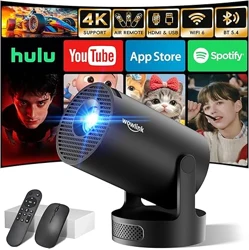
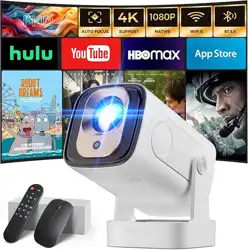
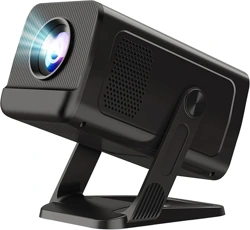
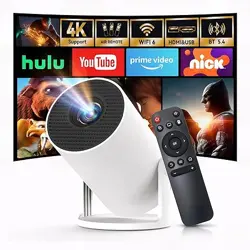
The Wowlink W210 is a portable mini projector designed for home cinema use. It features built-in apps, WiFi 6 and Bluetooth 5.4 connectivity, and supports 4K video playback at a native resolution of 1280 x 720 (720p). The projector includes an auto keystone correction function and a 180° rotatable body, allowing flexible placement on a tabletop, tripod, or ceiling mount.

Key specifications:
- Native resolution: 1280 x 720 (720p) – supports 4K HDR input (3840 x 2160)
- Brightness: 200 ANSI lumens
- Contrast ratio: 10000:1
- Display technology: LCD
- Connectivity: HDMI, dual-band WiFi 6 (2.4/5 GHz), Bluetooth 5.4
- Built-in speaker: Base-type stereo speaker
- Rotation: 180° freely rotatable
- Dimensions: 3.66 x 3.66 x 6.97 inches (L x W x H)
- Weight: 0.37 kg
Features
Built-in Apps and Air Remote
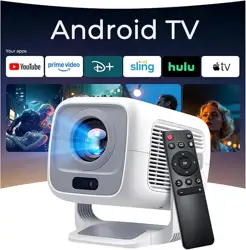
The projector comes with pre-installed applications compatible with Prime Video, YouTube, and D+ (Disney+). You can start streaming directly without connecting an external device.
The included remote control features an Air Remote function based on gyroscope technology. Shake your wrist to control the on-screen cursor – ideal for navigating apps and web browsing.

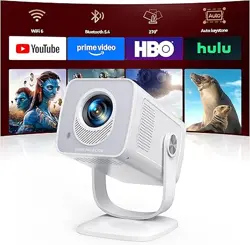
WiFi 6 and Bluetooth 5.4
Equipped with the latest dual-band WiFi 6 (802.11ax) technology, the projector supports both 2.4 GHz and 5 GHz networks for fast, stable wireless streaming. Bluetooth 5.4 allows you to connect wireless headphones or speakers for private listening.

Note: The image above illustrates wireless screen mirroring capability via WiFi 6.
180° Rotatable Design
The projector body can be rotated 180° freely, allowing you to project onto walls or ceilings at the optimal angle. A 0.25-inch screw hole at the bottom enables mounting on a tripod, ceiling bracket, or wall mount.

Auto Keystone Correction
The projector automatically adjusts the image shape (keystone correction) when placed at an angle, ensuring a rectangular picture without manual adjustment.
Base-type Stereo Speaker
Built-in immersive base-type stereo speakers provide detailed sound with clear highs and deep bass. No external speakers are required for casual viewing.
Multiple Device Connectivity
The projector supports connections via HDMI, USB (memory stick), and wireless screen mirroring. Compatible with gaming consoles, laptops, smartphones, TV sticks, and more.

Use Guide
Getting Started
- Place the projector on a stable, flat surface or mount it using the 0.25-inch screw hole.
- Connect the power cord to the projector and plug it into a wall outlet.
- Press the power button on the projector or remote to turn it on.
- Adjust the focus ring on the lens until the image is sharp.
- Use the auto keystone feature to correct image shape if the projector is angled.
Connecting to WiFi
- Navigate to the Settings menu using the remote.
- Select Network > WiFi.
- Choose your network (2.4 GHz or 5 GHz) and enter the password.
- Once connected, you can use built-in apps or screen mirroring.
Using the Air Remote
- Open Bluetooth on the projector (Settings > Bluetooth).
- Press and hold the Start button on the remote until the LED blinks.
- Press the OK button to pair.
- Shake the remote gently to activate the air mouse cursor.
- Move the remote to control the on-screen pointer.
Screen Mirroring (Wireless)
Compatible with Windows, Android, and iOS devices. Ensure both the projector and your device are on the same WiFi network.
- Android: Use the built-in screen cast or Smart View feature.
- iOS: Use AirPlay (if supported) or a third-party mirroring app.
- Windows: Press Win+K and select the projector.
Connecting External Devices
- HDMI: Connect a laptop, TV stick, or gaming console using the included HDMI cable.
- USB: Insert a memory stick with video files into the USB port.
- Bluetooth audio: Go to Settings > Bluetooth, pair your headphones or speaker.
Adjusting the Projection Angle
The projector can be rotated 180° vertically. Rotate the body gently to aim the image at the wall or ceiling. For ceiling mounting, use a standard tripod or ceiling mount with a 0.25-inch screw.
Tips for Best Image Quality
- Use the projector in a dark or dimly lit room for optimal brightness and contrast.
- For daytime use, consider a projector screen to improve image visibility.
- Keep the lens clean – wipe gently with a soft, dry cloth.
- Ensure the projector has adequate ventilation; do not block the air vents.
Note: The W210 is a mini projector designed for dark environments. For best results, use at night or in a blackout room.
Warranty and Support
The Wowlink W210 projector comes with a 2-year manufacturer warranty.
For support, please contact the manufacturer through your Amazon order page or refer to the user manual included in the box for detailed contact information.
Specific support contact details (phone, email, or website) are not provided in the product listing. Please refer to the documentation included with your device.