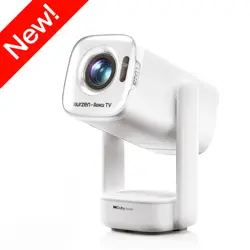
wowlink W206 Projector Auto Focus & 1080P Native & Bulit-in Apps Projector 4K Support Auto Correction WiFi 6 Bluetooth 5.4 Mini Portable Projector Compatible with HDMI/TV Stick/Memory Stick/Laptop
Product's Documents
Below are documents related to this product, you can read online or download:
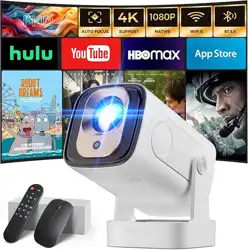
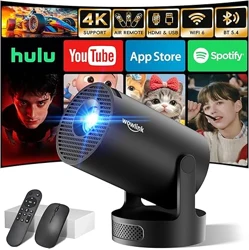
The Wowlink W206 is a portable mini projector with native 1080p resolution and support for 4K HDR content. It integrates auto focus, auto keystone correction, built-in apps, WiFi 6, Bluetooth 5.4, and a 180° rotatable body. The projector is designed for home cinema use and can be connected to HDMI devices, USB storage, TV sticks, laptops, and gaming consoles.
Model: W206 | Color: White | Dimensions: 7.68 × 3.54 × 3.94 inches | Weight: 0.6 kg
Features
Display & Image Quality
Native Resolution: 1920 × 1080 (Full HD)
4K HDR Support: Accepts and decodes 4K HDR video signals
Brightness: 280 ANSI lumens
Contrast Ratio: 12,000:1
Display Technology: LCD
Image Size: 40 to 130 inches (diagonal)
Throw Distance: 0.6 m (minimum) to 2.5 m (maximum)
Auto Focus & Auto Correction
AI Auto Focus: The projector automatically adjusts the lens to achieve the sharpest image.
Auto Keystone Correction: Automatically corrects trapezoidal distortion and aligns the image horizontally and vertically.
Built-in Apps & Air Remote
Pre-installed Apps: Prime Video, YouTube, D+ (Disney+) – accessible directly from the projector interface without external devices.
Air Remote Function: The remote control uses gyroscope technology; shake your wrist to control the on-screen cursor or navigate menus.
Connectivity
WiFi 6 (dual-band 2.4 GHz + 5 GHz) – faster, more stable wireless streaming and screen mirroring.
Bluetooth 5.4 – connect wireless headphones, speakers, or other audio devices.
HDMI – connect TV sticks, laptops, gaming consoles.
USB – play media directly from memory sticks.
Audio
Built-in Stereo Speakers: Base-type design delivers clear highs and deep bass.
Bluetooth Audio Output: Stream audio to external Bluetooth speakers or headphones.
Physical Design
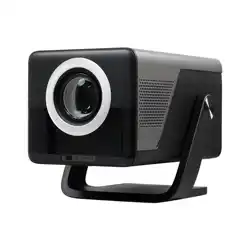
180° Rotation: The projector head can be rotated freely, allowing projection onto walls or ceilings.
Mounting: 0.25-inch screw hole at the bottom for tripod, ceiling, or wall mount.
Portable Form Factor: Compact and lightweight (0.6 kg).
Package Contents
Wowlink W206 Projector
Remote Control (with Air Remote function)
Power Adapter & Cable
HDMI Cable
User Manual
Use Guide
1. Setting Up the Projector
Place the projector on a stable, flat surface or mount it using the bottom screw hole.
Connect the power adapter and press the power button.
Rotate the projector head to the desired angle (0° to 180°).
2. Connecting to a Source
HDMI: Plug an HDMI cable from your device (laptop, TV stick, gaming console) into the HDMI port.
USB: Insert a USB drive containing video, photo, or music files.
Wireless: Use WiFi 6 for screen mirroring or streaming from apps. Use Bluetooth 5.4 to connect audio devices.
3. Using Auto Focus & Auto Correction
After powering on, the projector automatically activates auto focus and auto keystone correction.
Wait a few seconds for the image to become sharp and rectangular.
If needed, you can manually adjust focus using the remote control (see remote functions below).
4. Navigating Built-in Apps
On the home screen, use the remote to select an app (Prime Video, YouTube, D+).
Sign in to your account if required.
Browse and play content directly – no external device needed.
Note: Internet connection via WiFi is required for streaming apps.
5. Using the Air Remote
Shake the remote gently to activate the gyroscope cursor.
Move the remote to control the on-screen pointer.
Press the OK/Select button to confirm choices.
6. Adjusting Audio
Use the remote to control volume.
For private listening, pair Bluetooth headphones or speakers via the settings menu.
7. Mounting Options
Tabletop: Place on any flat surface.
Tripod: Attach a standard tripod (1/4-inch screw) to the bottom.
Ceiling/Wall: Use a compatible mount (not included) with the 0.25-inch screw hole.
Specifications
Attribute
Value
Brand
wowlink
Model
W206
Native Resolution
1920 × 1080 (Full HD)
Maximum Supported Resolution
4K HDR (3840 × 2160)
Display Technology
LCD
Brightness
280 ANSI lumens
Contrast Ratio
12,000:1
Image Size
40 – 130 inches
Throw Distance
0.6 – 2.5 m
Connectivity
WiFi 6 (2.4/5 GHz), Bluetooth 5.4, HDMI, USB
Built-in Apps
Prime Video, YouTube, D+
Audio
Built-in stereo speakers
Rotation
180°
Mounting
1/4-inch screw hole (tripod/ceiling/wall)
Dimensions (L×W×H)
7.68 × 3.54 × 3.94 in (195 × 90 × 100 mm)
Weight
0.6 kg (1.32 lbs)
Power
AC adapter (included)
Color
White
Troubleshooting
No image / black screen: Check power connection, ensure the lens cap is removed, and verify the input source is selected correctly.
Blurry image: Allow auto focus to complete. If still blurry, clean the lens with a soft cloth.
Keystone not correcting: Ensure the projector is placed on a relatively flat surface; auto correction works best within ±30° tilt.
WiFi not connecting: Verify your router is broadcasting on 2.4 GHz or 5 GHz. Restart the projector and router.
Remote not responding: Replace batteries. Ensure no obstructions between remote and projector.
No sound: Check volume level. If using Bluetooth audio, confirm pairing. For HDMI, ensure the source device is outputting audio.
Warranty & Support
Warranty: 2-year manufacturer warranty.
Support Contact: For assistance, refer to the contact information provided in the product packaging or visit the brand’s official support page. (Specific phone/email not listed in the provided materials.)