Expansion Cards
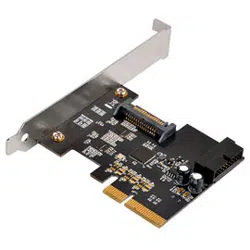
USB 3.1 PCI Express card with internal 19pin connector
ECU04-E
l
1
9p
in
c
on
ne
ct
or
E
CU0
4
-
E

The following manual and guides were carefully prepared by the SilverStone engineering team to
help you maximize the potential of your SilverStone product. Please keep this manual for future
reference when upgrading or performing maintenance on your system. A copy of this manual can also
be downloaded from our website at:
Installation and system optimization guide:
Product Overview
Installation Guide
Attention
P.1
P.2
P.6
Product Overview
Specifications
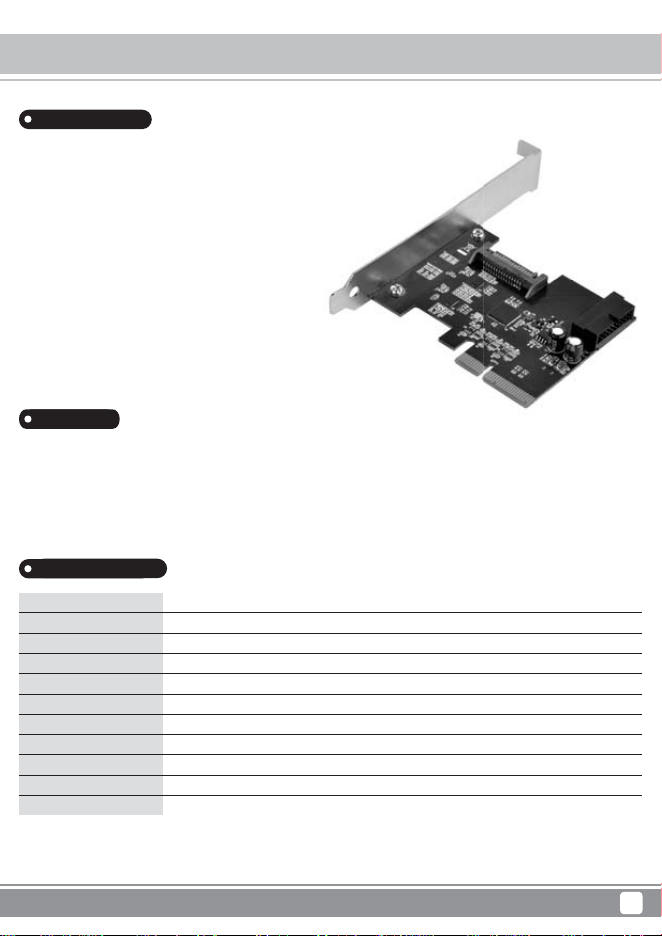
The SilverStone ECU04-E is a PCI-E Gen 2.0 x2 expansion card
with one internal 19pin USB 3.1 connector (supporting two ports).
It adds two redriver chips over the original ECU04 design for vastly
improved performance over longer cable connections. This ensures
dual 10Gbps bandwidth transfer rate can be maintained for up to
2 meters* compared with just 1 meter per USB 3.1’s specified
limitation. The ECU04-E is also backwards compatible with
USB 3.0/2.0/1.1 and supports UASP (USB Attached SCSI Protocol)
for enhanced performance. For operating systems with XHCI
(eXtensible Host Controller Interface), the ECU04-E will easily install
without the need for any drivers because it also supports XHCI.
For those looking to upgrade or add additional USB 3.1 ports or
devices to their computer, the ECU04-E is a great starting point.
Includes ReDriver ASIC chips for overcoming 1 meter cable length limitation*
Includes USB 3.1 internal 19pin connector
PCI-E Gen 2.0 x2, throughput up to 10Gbps
Compliant with eXtensible Host Controller Interface (XHCI) specification Revision 1.1
Compliant with USB Attached SCSI Protocol (UASP) Revision 1.0
Includes optional low profile slot cover for supporting low profile cases
Model No.
Power requirement
Form factor
USB 3.1 controller
ReDriver ASIC
USB ports
Transmitting speed
Operating system support
Power Management
Current protection
Extra
* Total cable length includes case internal cabling plus external cabling. Sub-par cable thickness/quality and external port design/quality may also reduce supported length required
for maximum performance.
** If your OS version is Windows 7 or earlier, please install driver (available from SilverStone website) prior to using the ECU04-E.
*** Windows 8, 8.1, or 10 supports ECU04-E automatically so you do not need to install additional driver for it.
**** User should check for XHCI function in Ubuntu/Linux or Mac OS, if computer system supports XHCI function then it can support ECU04-E automatically without additional driver
installation.
SST-ECU04-E
5V via SATA 15pin power connector
Low profile - PCI-E 2.0 x2 (10Gbps)
ASMedia ASM1142
Pericom PI3EQX1002B
Internal 19pin connector for dual USB 3.1 ports
USB 3.1 (10Gbps), USB 3.0 (5Gbps), USB 2.0 (480Mbps), USB 1.1 (12Mbps)
Windows 7 (32bit/64bit)**, 8/8.1/10 (32bit/64bit)***, Ubuntu/Linux/Mac OS****
Support USB 3.1 and USB 2.0 link power management
Support over current detection and protection
UASP function
Introduction
Features
1
Expansion Cards ECU04-E
Installation Guide
2
Expansion Cards ECU04-E
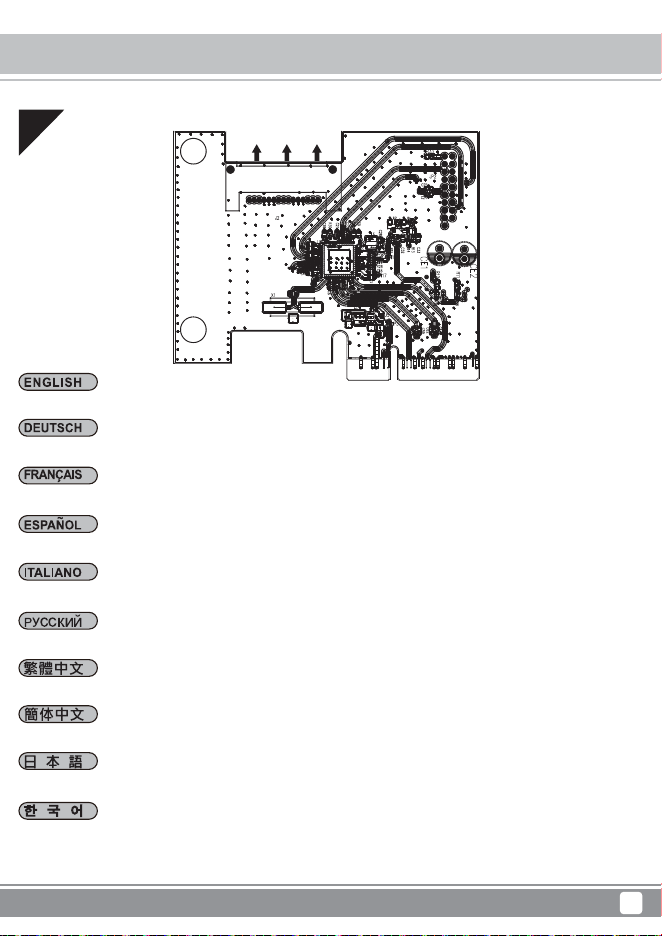
Installieren Sie die ECU04-E im PCI-E-Steckplatz am Motherboard
Instale el ECU04-E en el zócalo PCI-E de la placa base
Installare ECU04-E nell’alloggio PCI-E sulla scheda madre
Install ECU04-E into PCI-E slot on the motherboard
マザーボードのPCI-EスロットにECU04-Eをインストールします
Установите карту ECU04-E в слот PCI-E на системной плате
將ECU04-E安裝於主機板上的PCI-E插槽
将ECU04-E安装于主板上的PCI-E插槽
메인보드의 PCI-E 슬롯에 ECU04-E를 설치합니다
Installez l'ECU04-E dans l'emplacement PCI-E de la carte mère
01
Installation Guide
3
Expansion Cards ECU04-E
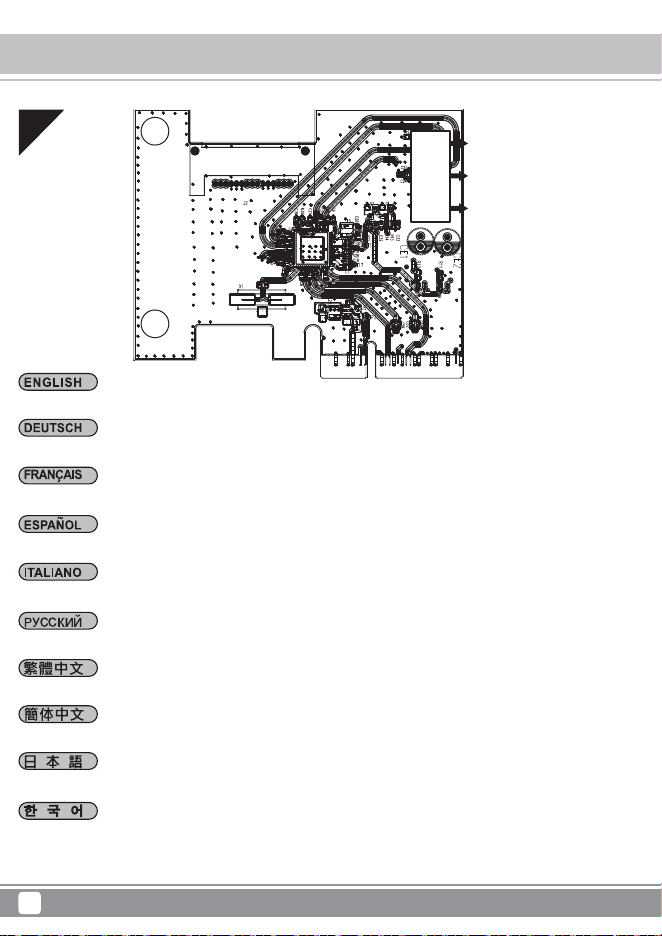
Mit einem 15-poligen SATA-Stromanschluss verbinden
Enchufe el conector de potencia SATA de 15 pines
Collegare al connettore di alimentazione SATA a 15 pin
Connect to 15pin SATA power connector
15ピンSATA電源コネクタに接続します
Подключите 15-контактный разъем питания SATA
將15pin SATA電源線接上
将15pin SATA电源线接上
15핀 SATA 전원 커넥터에 연결합니다
Connexion au connecteur d’alimentation SATA à 15 broches
02
15-pin SATA power
connector
Installation Guide
4
Expansion Cards ECU04-E
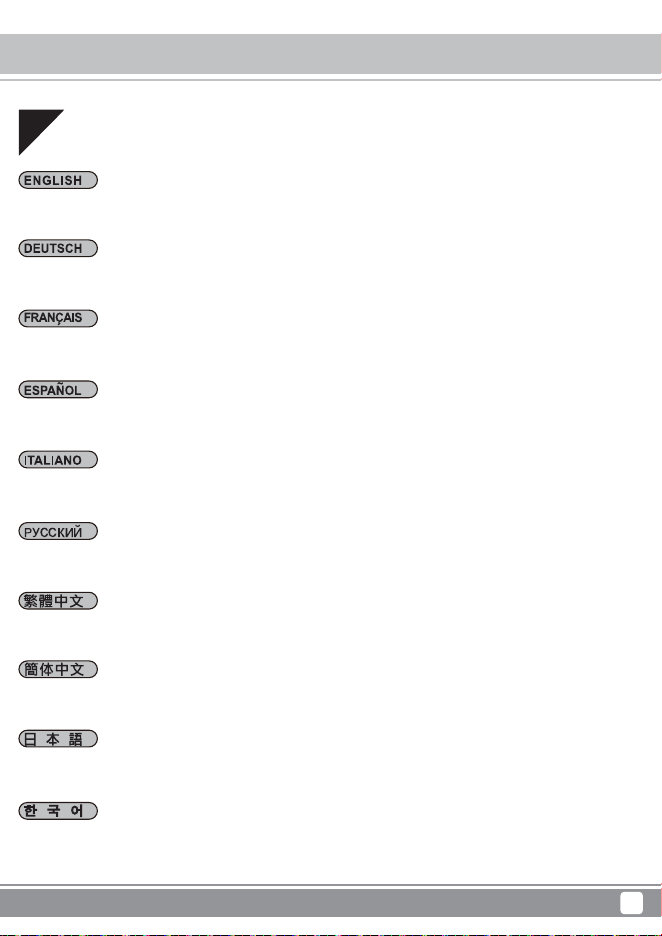
Mit internen 19-poligen USB 3.1-Anschlüssen verbinden (Vgl. Abbildung)
Enchufe los conectores internos USB 3.1 de 19 pines (consulte la ilustración)
Collegare ai connettori interni USB 3.1 a 19 pin (Fare riferimento all’illustrazione)
Connect to internal 19pin USB 3.1 connectors (refer to illustration)
内部19ピンUSB3.1コネクタに接続します(図を参照)
Подключите встроенные 19-контактные разъемы USB 3.1 (см. рисунок)
連接內接19pin USB 3.1線材(請參考圖示)
连接内接19pin USB 3.1线材(请参考图示)
내장형 19핀 USB 3.1 커넥터에 연결합니다 (그림 참조)
Connexion aux connecteurs internes USB 3.1 à 19 broches (voir l'illustration)
03
19-pin USB connector
Installation Guide
5
Expansion Cards ECU04-E
Schließen Sie Ihr USB 3.1-Gerät an und genießen die USB 3.1-Super-Speed-Übertragungsgeschwindigkeit von
10 Gbit/s
Conecte su dispositivo USB 3.1 y disfrute de la súper velocidad de transferencia de 10Gbit/s de USB 3.1
Collegare il dispositivo USB 3.1 per apprezzare la velocità di trasferimento Super Speed USB 3.1 10 Gbit/s
Plug in your USB 3.1 device and enjoy the 10Gbit/s USB 3.1 super speed transfer rate
デバイスを 接続して、USB3.1の超高速転送速度10Gbit/sを実感できます
Подключите устройство с интерфейсом USB 3.1 и передавайте данные со скоростью 10 Гбит/с через разъем
USB 3.1
連接USB 3.1裝置並開始享受高速傳輸速度
连接USB 3.1装置并开始享受高速传输速度
USB 3.1 장치를 연결하면 10Gbit/s USB 3.1 초고속 전송 속도를 이용할 수 있습니다
Branchez votre périphérique USB 3.1 et bénéficiez du taux de transfert de 10 Gbit/s de l'USB 3.1 SuperSpeed
04
Attention
6
Expansion Cards ECU04-E
Achtung
1. Unter Windows 7 oder älteren Versionen installieren Sie bitte den ASM1142-Treiber zur Realisierung von
USB 3.1-Super-Speed-Leistung.
2. Windows 8, 8.1 oder 10 unterstützen die ECU04-E automatisch, wodurch Sie keinen zusätzlichen Treiber
installieren müssen.
3. Nutzer sollten Ubuntu/Linux oder Mac OS auf XHCI-Funktion prüfen; falls das
Computersystem XHCI unterstützt, kann die ECU04-E automatisch ohne zusätzlichen Treiber genutzt werden.
Atención
1. En Windows 7 o versiones previas, por favor instale el controlador ASM1142 para activar el rendimiento de súper
velocidad de USB 3.1.
2. Windows 8, 8.1, u 10 acepta el ECU04-E automáticamente, por lo que no necesita instalar controladores adicionales.
3. El usuario debería comprobar la función XHCI en Ubuntu/Linux o Mac OS, si el sistema acepta la función XHCI,
entonces aceptará el ECU04-E automáticamente sin necesidad de instalar controladores adicionales.
Attenzione
1. Su Windows 7 o versione precedente, installare il driver ASM1142 per consentire le prestazioni USB 3.1 SuperSpeed.
2. Windows 8, 8.1, o 10 supporta automaticamente ECU04-E, quindi non è necessario installare alcun driver aggiuntivo.
3. È necessario verificare la funzione XHCI su Ubuntu/Linux o Mac OS; se il sistema del computer supporta la
funzione XHCI allora può supportare automaticamente ECU04-E senza installazione di driver aggiuntivi.
1. In windows 7 or previous version, please install the ASM1142 driver to enable SuperSpeed USB 3.1 performance.
2. Windows 8, 8.1, or 10 supports ECU04-E automatically so you do not need to install additional driver for it.
3. User should check for XHCI function in Ubuntu/Linux or Mac OS, if computer system supports XHCI function then
it can support ECU04-E automatically without additional driver installation.
Attention
1. Sur Windows 7 ou les versions précédentes, veuillez installer le pilote ASM1142 pour bénéficier des performances
de l'USB 3.1 SuperSpeed.
2. Windows 8, 8.1 et 10 prennent en charge automatiquement l'ECU04-E, vous ne devez donc pas installer de pilote
supplémentaire dédié.
3. L'utilisateur doit vérifier la présence de la fonction XHCI dans Ubuntu/Linux ou Mac OS ; si le système informatique
prend en charge la fonction XHCI il peut prendre en charge automatiquement l'ECU04-E sans installation de pilote
supplémentaire.
Installation Guide
7
Expansion Cards ECU04-E
注意
1.Windows7または以前のバージョンでは、SuperSpeedUSB3.1機能を有効にするにはASM1142ドライバをインスト
ールしてください。
2.Windows8、8.1および10では自動的にECU04-Eに対応するので、ドライバを別途インストールする必要はありません。
3.Ubuntu/LinuxまたはMacOSにおいてXHCI機能への対応の有無はユーザーによる確認が必要です。コンピューター
システムがXHCI機能に対応している場合は、ドライバの別途インストールは不要で自動的にECU04-Eに対応します。
注意事項
1. 若您使用Windows 7 或舊版作業程式,請先安裝ASM1142驅動程式,然後再開始享受高速傳輸速度的ECU04-E。
2. ECU04-E已經支援Windows 8, 8.1或10,所以當您使用ECU04-E時,不用安裝驅動程式就可使用。
3. 當您使用ECU04-E前,請確認您的Ubuntu/Linux或Mac作業系統是否支援XHCI功能,若已經支援XHCI功能,不用安
裝驅動程式就可使用。
注意事项
1. 若您使用Windows 7或旧版作业程序,请先安装ASM1142驱动程序,然后再开始享受高速传输速度的ECU04-E。
2. ECU04-E已经支持Windows 8, 8.1或10所以当您使用ECU04-E时,不用安装驱动程序就可使用。
3. 当您使用ECU04-E前,请确认您的Ubuntu/Linux或Mac操作系统是否支持XHCI功能,若已经支持XHCI功能,不用安
装驱动程序就可使用。
주의
1. Windows 7 이전 버전의 경우, SuperSpeed USB 3.1 성능을 사용하려면 ASM1142 드라이버를 설치하십시오.
2. Windows 8, 8.1또는10은 ECU04-E를 자동으로 지원하기 때문에 드라이버를 추가적으로 설치할 필요가 없습니다.
3. 사용자는 Ubuntu/Linux 또는 Mac OS에서 XHCI를 확인해야 하고, 컴퓨터 운영 체제가 XHCI 기능을 지원할 경우
드라이버의 추가 설치 없이 ECU04-E를 자동으로 지원할 수 있습니다.
Внимание
1. В ОС Windows 7 или предыдущих версиях установите драйвер ASM1142 для включения функции SuperSpeed
USB 3.1.
2. В ОС Windows 8, 8.1, или 10 карта ECU04-E поддерживается автоматически, поэтому установка дополнительного
драйвера не требуется.
3. Пользователь должен проверить наличие функции XHCI в ОС Ubuntu/Linux или Mac OS, если ОС компьютера
поддерживает функцию XHCI, то карта ECU04-E поддерживается автоматически без необходимости установки
дополнительного драйвера.

有毒有害物质/元素及其化学含量表
bracket(金属)
螺丝
ECU04-E PCBA
包材
部件名称
○:表示该有毒有害物质在该部件所有均质材料中的含量均在
SJ/T11363-2006标准规定的限量要求以下。
×:表示该有毒有害物质在该部件材料中的含量超出
SJ/T11363-2006标准规定的限量要求。
本表中有×的部件均符合欧盟RoHS法规,即欧盟第2002/95/EC号指令要求。
铅
Pb
○
○
○
○
汞
Hg
○
○
○
○
镉
Cd
○
○
○
○
六价铬
Cr(Ⅵ)
○
○
○
○
多溴联苯
PBB
○
○
○
○
多溴二苯醚
PBDE
○
○
○
○
产品合格证
检验员:检01
生产日期:见产品条码
制造商:东莞市银石贸易有限公司

Warranty
This product has a limited 1 year warranty in North America and Australia.
For information on warranty periods in other regions, please contact your reseller or SilverStone authorized distributor.
1. Product component defects or damages resulted from defective production is covered under warranty.
Defects or damages with the following conditions will be fixed or replaced under SilverStone Technology’s jurisdiction.
a) Usage in accordance with instructions provided in this manual, with no misuse, overuse, or other inappropriate actions.
b) Damage not caused by natural disaster (thunder, fire, earthquake, flood, salt, wind, insect, animals, etc…)
c) Product is not disassembled, modified, or fixed. Components not disassembled or replaced.
d) Warranty mark/stickers are not removed or broken.
Loss or damages resulted from conditions other than ones listed above are not covered under warranty.
2. Under warranty, SilverStone Technology’s maximum liability is limited to the current market value for the product (depreciated value, excluding
shipping, handling, and other fees). SilverStone Technology is not responsible for other damages or loss associated with the use of product.
3. Under warranty, SilverStone Technology is obligated to repair or replace its defective products. Under no circumstances will SilverStone
Technology be liable for damages in connection with the sale, purchase, or use including but not limited to loss of data, loss of business, loss of
profits, loss of use of the product or incidental or consequential damage whether or not foreseeable and whether or not based on breach of warranty,
contract or negligence, even if SilverStone Technology has been advised of the possibility of such damages.
4. Warranty covers only the original purchaser through authorized SilverStone distributors and resellers and is not transferable to a second hand
purchaser.
5. You must provide sales receipt or invoice with clear indication of purchase date to determine warranty eligibility.
6. If a problem develops during the warranty period, please contact your retailer/reseller/SilverStone authorized distributors or SilverStone
http://www.silverstonetek.com.
Please note that: (i) You must provide proof of original purchase of the product by a dated itemized receipt; (ii) You shall bear the cost of shipping
(or otherwise transporting) the product to SilverStone authorized distributors. SilverStone authorized distributors will bear the cost of shipping
(or otherwise transporting) the product back to you after completing the warranty service; (iii) Before you send the product, you must be issued a
Return Merchandise Authorization (“RMA”) number from SilverStone. Updated warranty information will be posted on SilverStone’s official website.
Please visit http://www.silverstonetek.com for the latest updates.
Warranty terms & conditions
Additional info & contacts
For North America ([email protected])
SilverStone Technology in North America may repair or replace defective product with refurbished product that is not new but has been
functionally tested.
Replacement product will be warranted for remainder of the warranty period or thirty days, whichever is longer. All products
should be sent back to the place of purchase if it is within 30 days of purchase, after 30 days, customers need to initiate RMA
procedure with SilverStone Technology in USA by first downloading the “USA RMA form for end-users” form from the below link
and follow its instructions.
http://silverstonetek.com/contactus.php
For Australia only ([email protected])
Our goods come with guarantees that cannot be excluded under the Australian Consumer Law.
You are entitled to a replacement or refund for a major failure and for compensation for any other reasonably foreseeable loss or
damage.
You are also entitled to have the goods repaired or replaced if the goods fail to be of acceptable quality and the failure does not
amount to a major failure.
Please refer to above “Warranty terms & conditions” for further warranty details.
SilverStone Technology Co., Ltd. 12F No. 168 Jiankang Rd., Zhonghe Dist.,
New Taipei City 235 Taiwan R.O.C. + 886-2-8228-1238
(standard international call charges apply)
For Europe ([email protected])
For all other regions ([email protected])

G11228520
