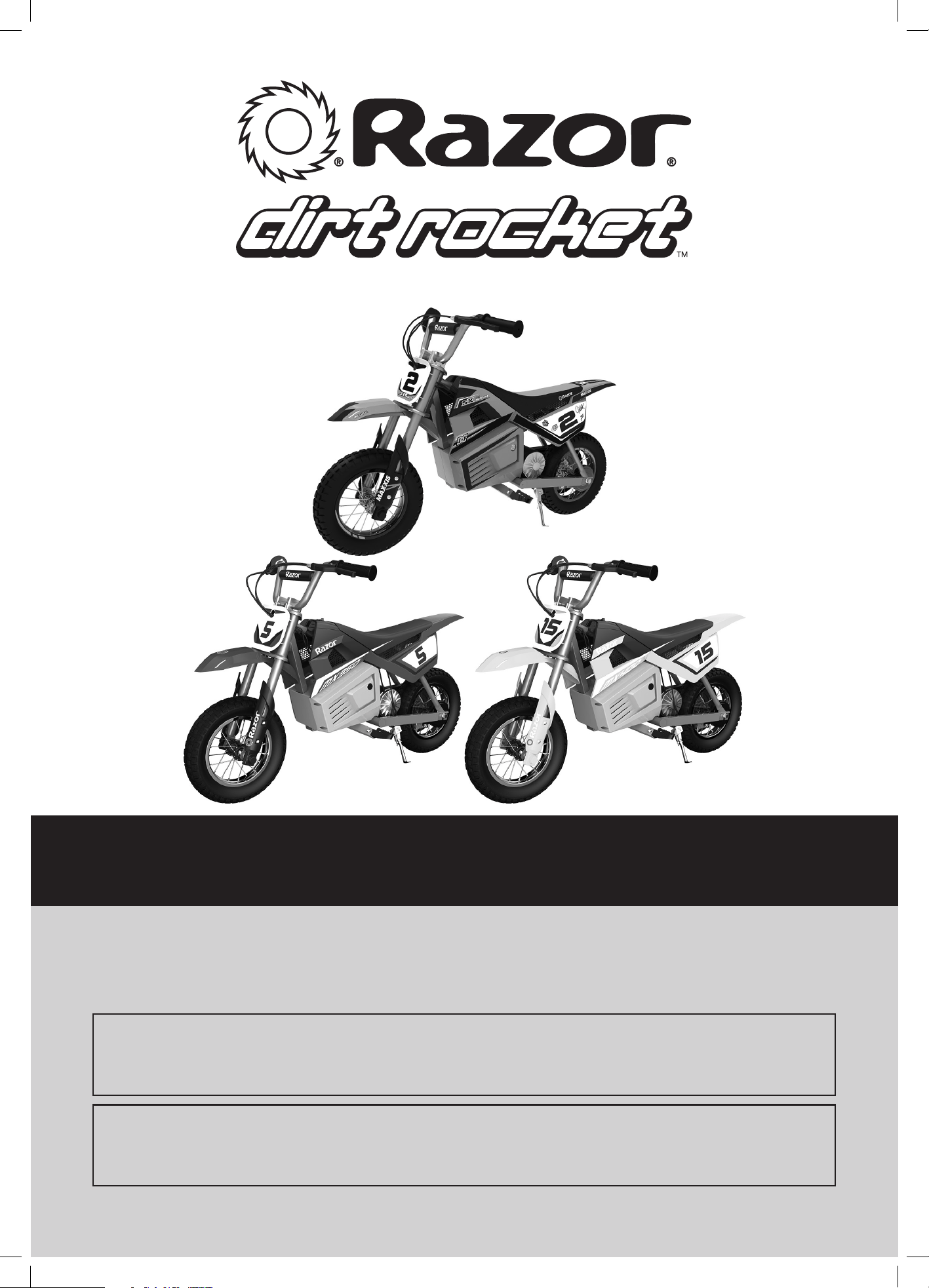
SX350, MX350 AND MX400
OWNER’S MANUAL
Read and understand this entire manual before allowing
child to use this product! For assistance contact Razor.
DO NOT RETURN TO STORE.
NOTE: Manual illustrations are for demonstration purposes only.
Illustrations may not reflect exact appearance of actual product.
Specifications subject to change without notice.
Please have your product along with the 19 character product I.D. code with you
before contacting Razor for warranty assistance and/or replacement parts.
Product I.D. Code: _____________ - ____________ - ____________
HEADLINE
11
CONTENTS
SAFETY WARNINGS
Safety Warnings ............................................................................................. 1-2
Before You Begin ...............................................................................................3
Assembly and Set-up .................................................................................... 4-5
Charging the Battery ......................................................................................... 6
Pre-Ride Checklist .............................................................................................6
Usage .................................................................................................................7
Repair and Maintenance ..............................................................................7-11
Troubleshooting Guide ....................................................................................12
SX350/MX350/MX400 Parts ......................................................................... 13
Warranty and Contact Information ................................................................15
WARNING: Riding an electric product does present potential risks
and caution is required. Like any riding product, the SX350/MX350/MX400
has inherent hazards associated with its use (for example, falling off or
riding it into a hazardous situation). Like any riding product, the SX350/
MX350/MX400 can and is intended to move and it is therefore, of course,
possible to lose control or otherwise get into dangerous situations. Both
children, and adults responsible for supervising them, must recognize that
if such things occur, a rider can be seriously injured or die even when using
safety equipment and other precautions. RIDE AT YOUR OWN RISK AND USE
COMMON SENSE.
WARNING:
PARENTAL AND ADULT RESPONSIBILITY
AND SUPERVISION IS NECESSARY:
This manual contains important safety information. It is your responsibility to
review this information and make sure that all riders understand all warnings,
cautions, instructions and safety topics, and assure that young riders are able
to safely and responsibly use these products. Razor recommends that you
periodically review and reinforce the information in this manual with younger
riders, and that you inspect and maintain your children’s product to ensure
their safety.
Because products, like the SX350/MX350/MX400, can and do present
potential hazards plainly associated with their use, it is well recognized
THE NEED FOR EXERCISE OF PARENTAL RESPONSIBILITY IN SELECTING
RIDING PRODUCTS APPROPRIATE TO THE AGE OF A CHILD, OR PARENTAL
SUPERVISION IN SITUATIONS IN WHICH CHILDREN OF VARIOUS AGES
MAY HAVE ACCESS TO THE SAME RIDING PRODUCTS, IS IMPORTANT.
Not every product is appropriate for every age or size of child, and different
age recommendations are found within this category of product which are
intended to reflect the nature of the hazards and the expected mental or
physical ability, or both, of a child to cope with the hazards.
Razor recommends that children under the age of 13 not be permitted to use
the SX350/MX350/MX400. This recommendation is based not just on age
or weight or height – it reflects consideration of expected maturity and skills
as well as physical size. The recommended rider age of 13 years or older
for SX350/MX350/MX400 is only an estimate and can be affected by the
rider’s size, weight or skills – not every child 13 years old will be suited to the
SX350/MX350/MX400.
The recommended minimum rider age is 13 and older. Any rider unable
to fit comfortably on the electric product should not attempt to ride it. A
parent’s decision to allow his or her child to ride this product should
be based on the child’s maturity, skill and ability to follow rules.
Razor emphasizes that adults are strongly advised not to disregard
Razor’s recommendations or permit younger children to ride the
SX350/MX350/MX400.
Keep this product away from small children and remember that it is
intended for use only by persons who are, at a minimum, completely
comfortable and competent while operating the product.
Persons with any mental or physical conditions that may make them
susceptible to injury, impair their physical dexterity or mental capabilities
to recognize, understand, and follow safety instructions and to be able
to understand the hazards inherent in product use, should not use or be
permitted to use products inappropriate for their abilities. Persons with
heart conditions, head, back or neck ailments (or prior surgeries to these
areas of the body), or pregnant women, should be cautioned not to operate
such products.
DO NOT EXCEED THE WEIGHT LIMIT OF 140 lb (64 kg). Rider weight
does not necessarily mean a person’s size is appropriate to fit or
maintain control of the product.
CHECK AND MAINTAIN PRODUCT CONDITIONS
Before use, check to confirm that any and all chain guards or other covers
and guards are in place and in serviceable condition. Check that the
brake is functioning properly, and that tires are inflated properly and have
sufficient tread remaining. The product should be maintained and repaired
in accordance with the manufacturer’s specifications, using only the
manufacturer’s authorized replacement parts, and should not be modified
from the manufacturer’s original design and configuration.
ACCEPTABLE RIDING PRACTICES AND CONDITIONS
Always check and obey any local laws or regulations, which may
affect the locations where the electric product may be used. Keep
safely away from cars and motor vehicle traffic at all times, and only
use where allowed and with caution.
Do not activate the speed control on the hand grip unless you are on the
product and in a safe, outdoor environment suitable for riding.
The normal powered top speed of the SX350/MX350/MX400 will be
approximately 14 mph (22 km/h), which can be affected by conditions,
such as rider weight, inclines, tire inflation and battery charge level. Avoid
excessive speeds that can be associated with downhill rides.
Maintain a hold on the handlebars at all times. Do not touch the brake or
motor on your product when in use or immediately after riding as these parts
can become very hot.
Ride defensively. Watch out for potential obstacles that could catch your
wheel or force you to swerve suddenly or lose control. Be careful to avoid
pedestrians, skaters, skateboards, scooters, bikes, children or animals who
may enter your path, and respect the rights and property of others.
The electric product is intended for use on flat, dry surfaces, such as
pavement or level ground, without loose debris, such as sand, leaves, rocks
or gravel. Wet, slick, bumpy, uneven or rough surfaces may impair traction
and contribute to possible accidents. Do not ride your electric product in mud,
ice, puddles or water. Watch out for potential obstacles that could catch your
wheel or force you to swerve suddenly or lose control. Avoid sharp bumps,
drainage grates, and sudden surface changes.
Do not attempt or do stunts or tricks on your electric product. The SX350/
MX350/MX400 is not made to withstand abuse from misuse, such as
jumping, curb grinding or any other type of stunts. Racing, stunt riding,
or other maneuvers also enhance risk of loss of control, or may cause
uncontrolled rider actions or reactions.
Never allow more than one person at a time to ride the electric product.
Do not ride at night or when visibility is limited.
Never use near steps or swimming pools.
Do not allow hands, feet, hair, body parts, clothing, or similar articles to
come in contact with moving parts, wheels, drivetrain, or chain while the
motor is running.
Never use headphones, a cell phone or text when riding.
Never hitch a ride with a vehicle.
HEADLINE
2
SAFETY WARNINGS
2
Do not ride your electric product in wet or icy weather and never immerse the
product in water, as the electrical and drive components could be damaged
by water or create other possibly unsafe conditions. Never risk damaging
surfaces, such as carpet or flooring, by use of an electric product indoors.
PROPER RIDING ATTIRE
Always wear proper protective equipment, such as an approved safety
helmet (with chin strap securely buckled), elbow pads and kneepads. A
helmet may be legally required by local law or regulation in your area. A
long-sleeved shirt, long pants, and gloves are recommended. Always wear
athletic shoes (lace-up shoes with rubber soles) and keep shoelaces tied and
out of the way of the wheels, motor and drive system. Never ride barefooted
or in sandals.
USING THE CHARGER
The charger supplied with the electric product should be regularly examined
for damage to the cord, plug, enclosure and other parts. In the event of such
damage, the product must not be charged until the charger has been repaired
or replaced.
Use only with the recommended charger.
Use caution when charging.
The charger is not a toy. Charger should be operated by an adult.
Do not operate charger near flammable materials.
Unplug charger and disconnect from product when not in use.
Always disconnect from the charger prior to wiping down and cleaning your
electric product with damp cloth.
FAILURE TO USE COMMON SENSE AND HEED THE ABOVE
WARNINGS FURTHER INCREASES RISK OF SERIOUS INJURY. USE
AT YOUR OWN RISK AND WITH APPROPRIATE AND SERIOUS
ATTENTION TO SAFE OPERATION. USE CAUTION.
HEADLINE
Need Help? Visit our website for replacement parts, product support, a list of authorized service centers in the US and customer service contact information
at www.razor.com. Please have the product I.D. code (located on the white label of your product) available for better assistance. Additional Customer
Service contact information is listed at the back of this manual.
3
BEFORE YOU BEGIN
Need Help? Visit our website for replacement parts, product support, a list of authorized service centers in the US and customer service contact information
at www.razor.com. Please have the product I.D. code (located on the white label of your product) available for better assistance. Additional Customer
Service contact information is listed at the back of this manual.
3
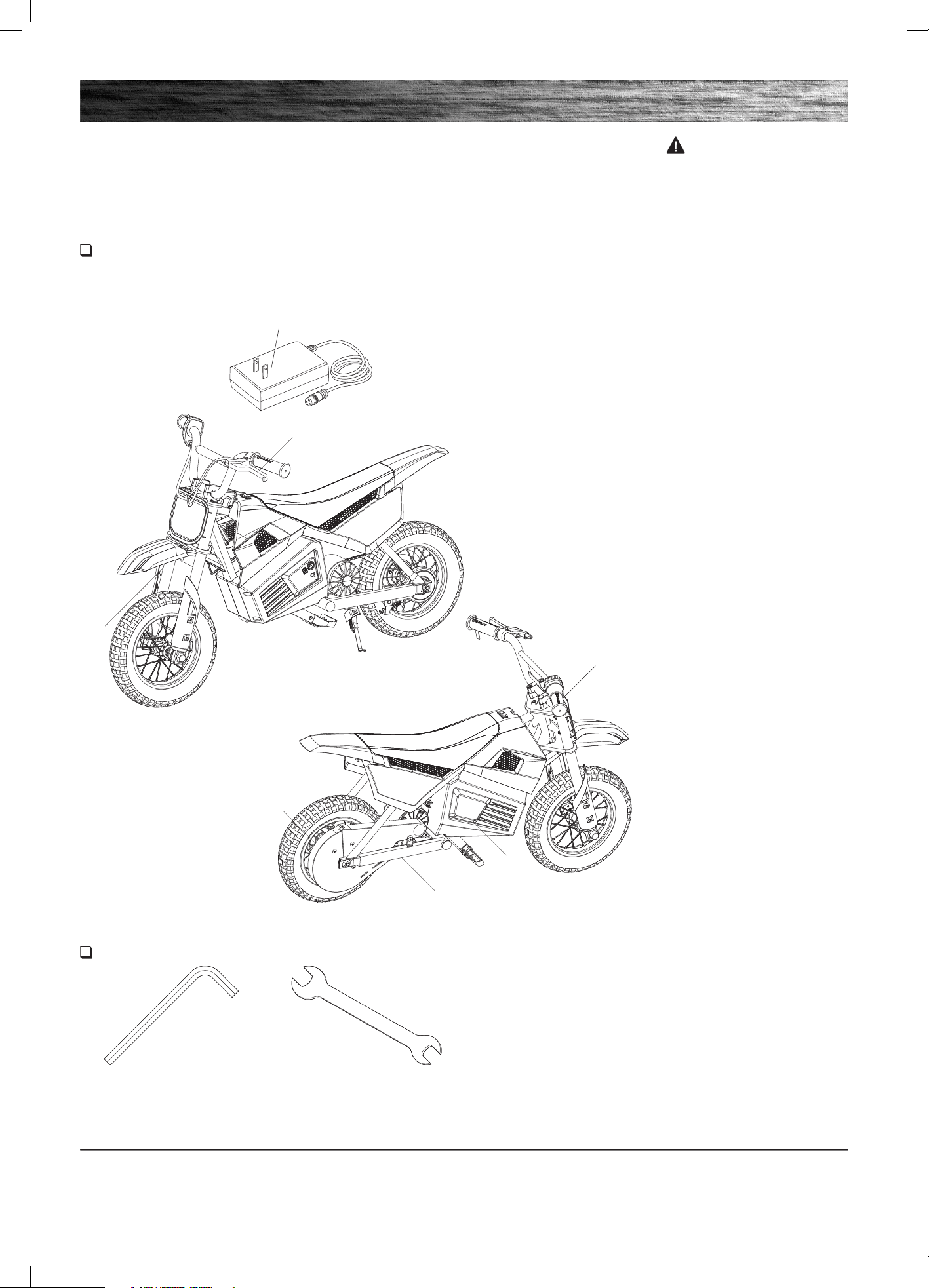
Remove contents from box. Remove the separators that protect the components from damage during shipping.
Inspect the contents of the box for scratches in the paint, dents or kinked cables that may have occurred during
shipping. Because the electric product is 95 percent assembled and packed at the factory, there should not be any
problems, even if the box has a few scars or dents.
MAKE SURE POWER SWITCH IS TURNED “OFF” BEFORE CONDUCTING ANY ASSEMBLY OR
MAINTENANCE PROCEDURES.
Estimated Assembly and Set-Up Time
Razor recommends assembly by an adult.
Allow up to 15 minutes for assembly.
Allow up to 12 hours for initial charge (see page 6 for charging information).
Charger
Note: Charger design may
vary from one shown
WARNING:DO NOT USE
NON-RAZOR PRODUCTS WITH
YOUR RAZOR ELECTRIC PRODUCT.
The electric product has been built to
certain Razor design specifications.
The original equipment supplied
at the time of sale was selected
on the basis of its compatibility
with the frame, fork and all other
parts. Certain aftermarket products
may not be compatible and will void
your warranty.
Product ID Locations:
(See locations to the left)
1. Underneath Frame
2. Charger
3. Battery Cover
4. UPC Side of Box (not shown)
Plastic Bag Contents:
• Charger
• Tools
• Handlebar Clamps
• Owner’s Manual
5 mm Allen Wrench and
6 mm Allen Wrench (included)
10 mm Wrench (included)
Required Tools
2.
Brake Lever
Fork
Chain Guard
1.
3.
Throttle
HEADLINE
4
ASSEMBLY AND SET-UP
4
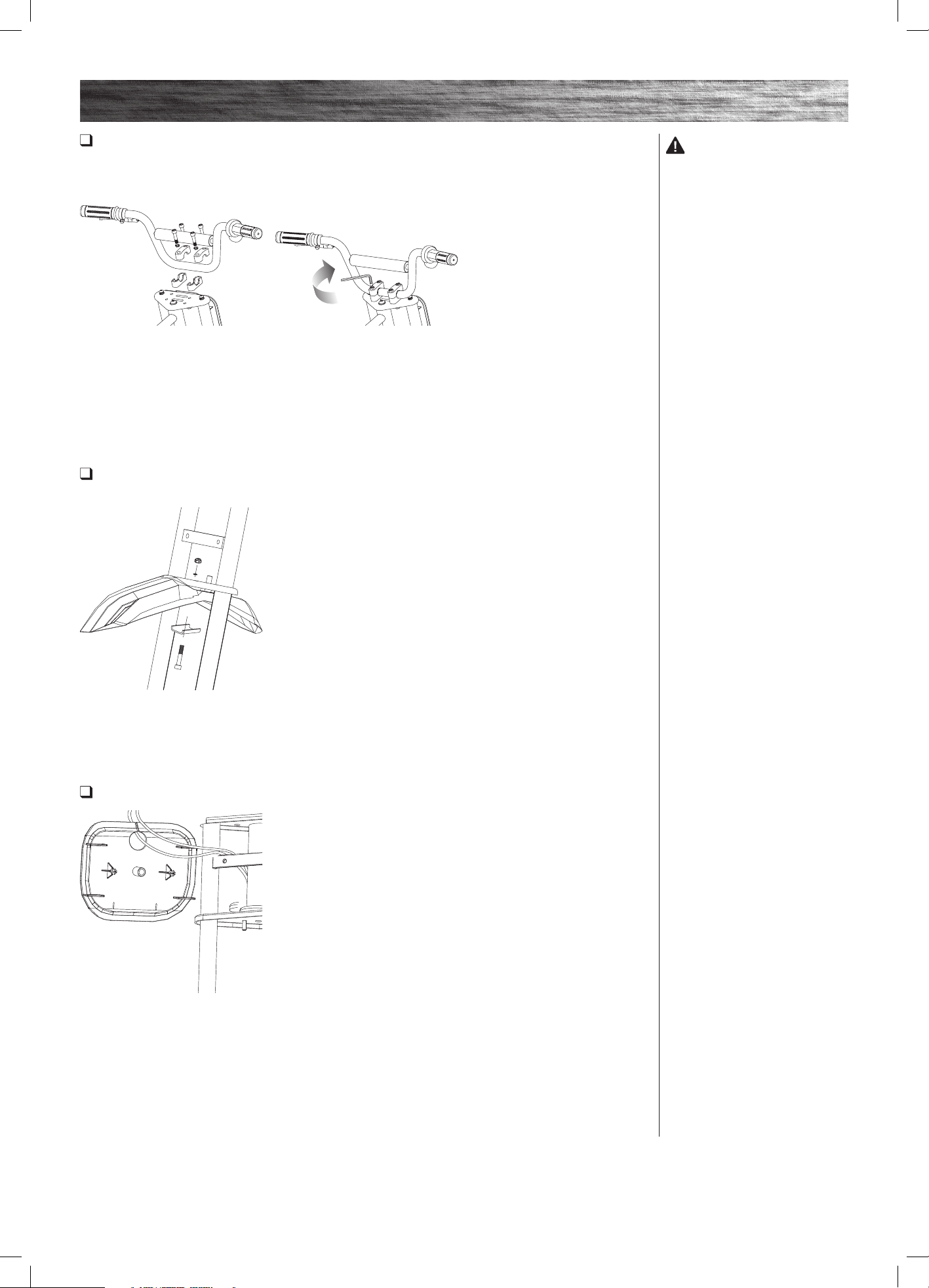
Attaching the Handlebars
Required Tool: 6 mm Allen Wrench (included)
Attaching the Front Fender
Required Tools: 5 mm Allen Wrench and 10 mm Wrench (included)
Attaching the Number Plate
1 Place the handlebars in the
handlebar clamps.
1 Align fender with the hole in the
fork and insert the bolt. Tighten
securely using a 10 mm wrench and
5 mm Allen wrench.
1 Slip the cables through the slit on
the top of the number plate. Align
the holes on the fork and snap on the
number plate.
2 Align parallel to the fork and
tighten the bolts using a 6 mm Allen
wrench. When properly tightened,
the handlebars should not move
forward or backward.
WARNING:
Failing to properly adjust and
tighten the bolts that affix the
handlebars can cause you to lose
control and crash.
HEADLINE
Need Help? Visit our website for replacement parts, product support, a list of authorized service centers in the US and customer service contact information
at www.razor.com. Please have the product I.D. code (located on the white label of your product) available for better assistance. Additional Customer
Service contact information is listed at the back of this manual.
5
ASSEMBLY AND SET-UP
Need Help? Visit our website for replacement parts, product support, a list of authorized service centers in the US and customer service contact information
at www.razor.com. Please have the product I.D. code (located on the white label of your product) available for better assistance. Additional Customer
Service contact information is listed at the back of this manual.
5
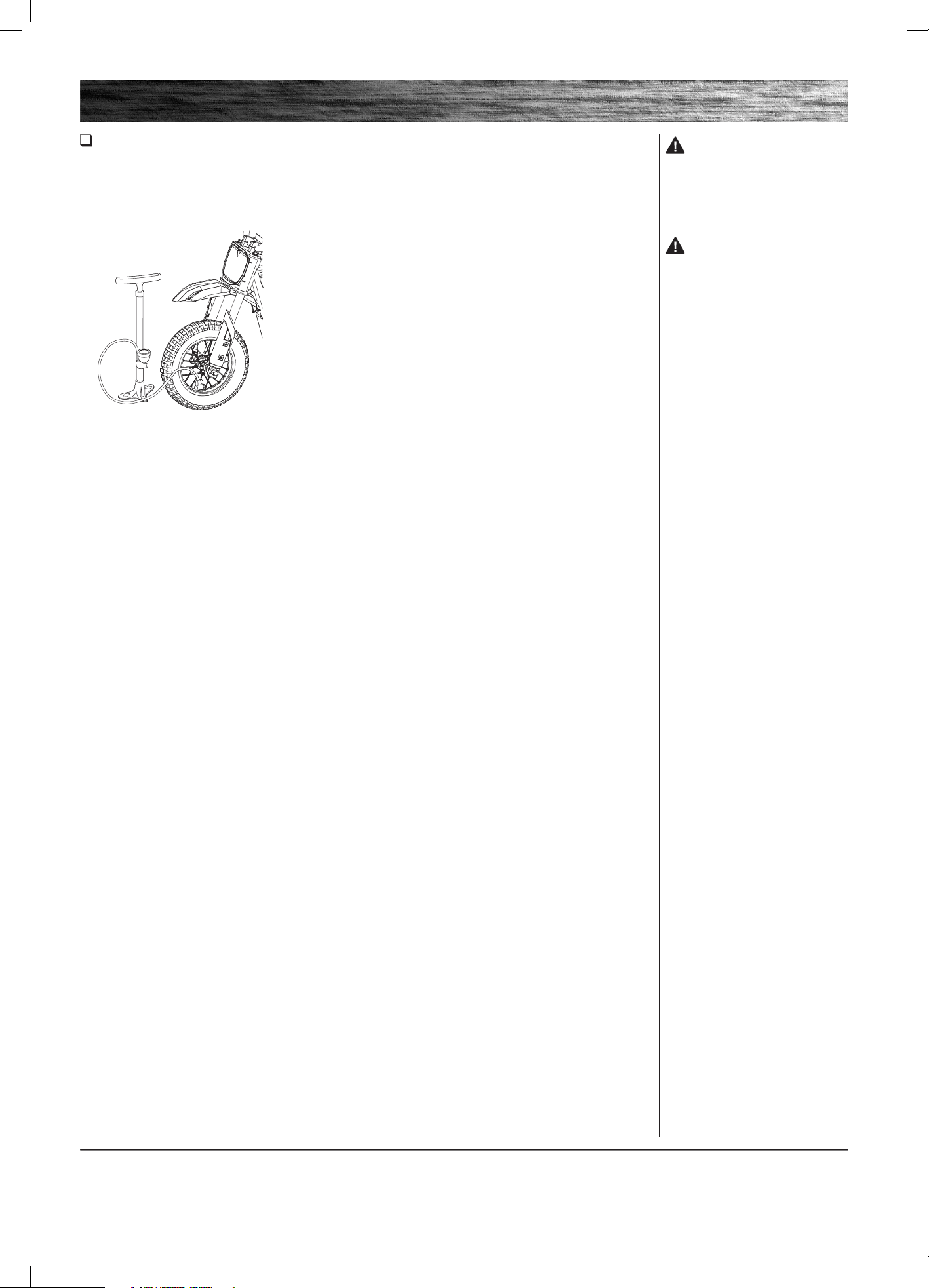
Inflating the Tires
Tires are inflated when shipped, but they invariably lose some pressure between the point of manufacturing and your
purchase. Inflate the tires to the correct PSI before first time use.
Lower air pressure can result in a shorter ride time.
Periodically check front tire. Reinflate when needed.
1 Using a bicycle style pump
equipped for a Schrader-type valve,
inflate both tires to the PSI indicated
on the sidewall of the tire.
WARNING:
Do not use the electric product for
the first time until you have inflated
the tires to the correct PSI. Failure
to do so may damage your motor
bike and void your warranty.
WARNING:
Do not overinflate, as this could
damage the tire or wheel.
Note: The pressurized air supplies
found at gasoline stations are
designed to inflate high-volume
automobile tires. If you decide to
use such an air supply to inflate
your tires, first make sure the
pressure gauge is working, then
use very short bursts to inflate to
the correct PSI. If you inadvertently
overinflate the tire, release the
excess pressure immediately.
HEADLINE
6
CHARGING THE BATTERY
PRE-RIDE CHECKLIST
6
• Initial charge time: 12 hours
• Recharge time: up to 12 hours, even if the light turns
green. Recommended maximum charging time is
24 hours.
• Always charge the battery immediately after riding.
• Fully charge battery before storing for extended
periods of time.
• Unplug charger from the wall outlet when not in use.
• Failure to recharge battery periodically may result in a
battery that will not accept a charge.
• Make sure the electric product’s power switch is
turned OFF when unit is not in use. If the power
switch is left on for an extended period of time, the
battery may reach a stage at which it will no longer
hold a charge.
• To ensure long battery life, never store the product in
freezing or below freezing temperatures! Freezing will
permanently damage the battery.
• Run time: Up to 30 minutes of continuous ride time.
Run time may vary depending on riding conditions,
climate and/or proper maintenance.
• Constant stopping and starting may shorten ride time.
• Battery life can vary depending on proper
maintenance and usage of the unit.
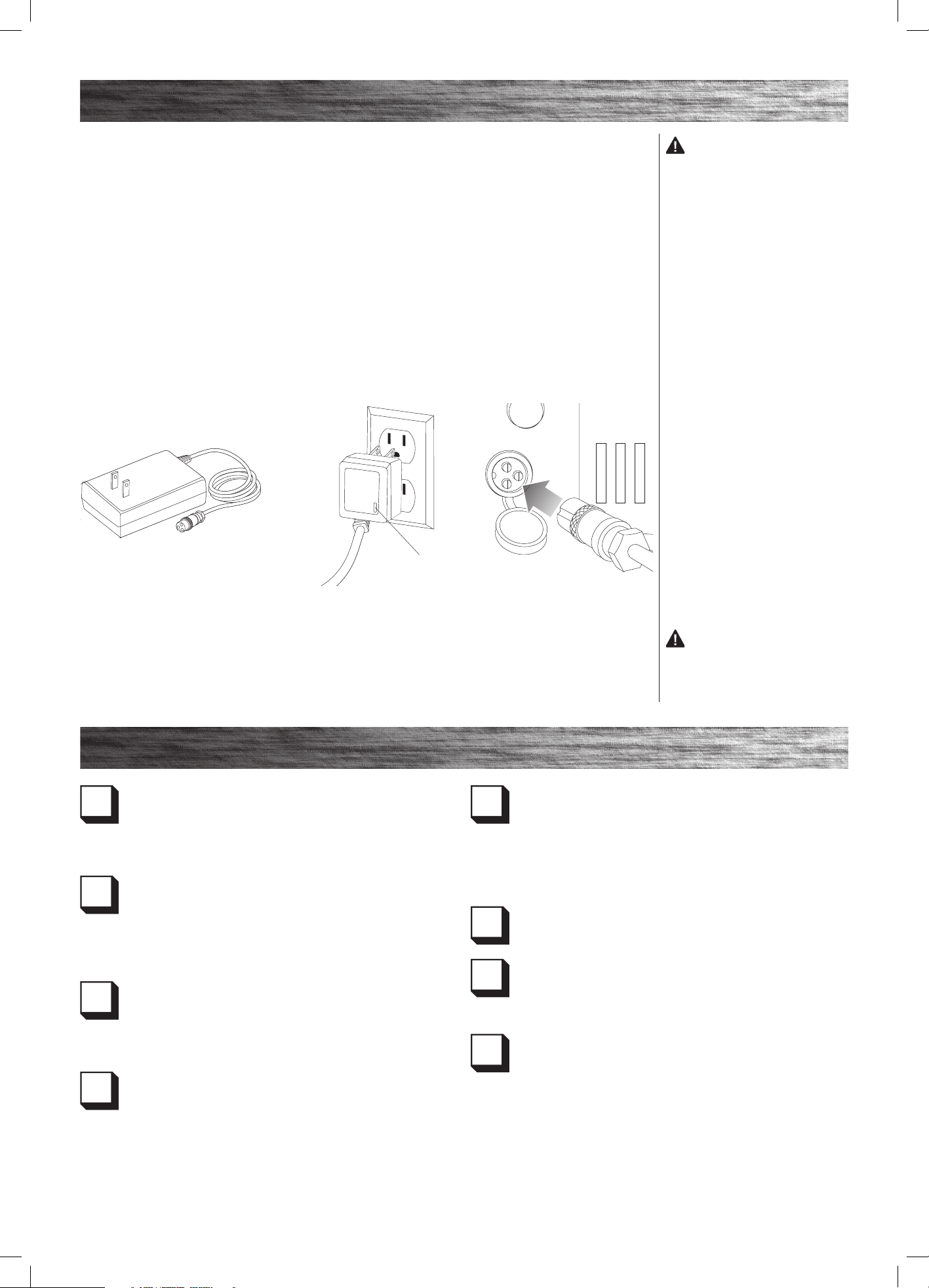
Your electric product may not have a fully charged battery; therefore you must charge the battery prior to use.
1 Plug the charger plug into a wall
outlet. The light on the charger
should be green.
Note: If green light (LED) does not
turn on, try a different outlet.
2 Make sure the power switch is
in the OFF position. Plug the charger
into the charger port on the product.
The light on the charger should
turn red during charging. The light
will turn green when the charging
is complete.
Note: Make sure power is turned
OFF when unit is not in use. If
the power switch is left on for an
extended period of time, the battery
may reach a stage at which it will no
longer hold a charge.
WARNING:
Use ONLY with the recommended
charger. Batteries are only to be
charged under adult supervision.
The charger is not a toy. Always
disconnect the charger before wiping
down and/or cleaning the electric
product with a damp cloth.
The charger supplied with the
electric product should be regularly
examined for damage to the cord,
plug, enclosure and other parts.
In the event of such damage, the
electric product must not be charged
until it has been repaired or replaced.
Chargers have built-in overcharge
protection to prevent battery from
being overcharged.
Note: If the charger gets warm
during regular use, this is a normal
response and is no cause for concern.
If your charger does not get warm
during use, it does not mean that it is
not working properly.
Wall outlet - Green (stand by)
Wall outlet and Unit - Red (Charging)
Charging complete - Green (Charged)
Note: Continue charging unit even if
light turns green prior to 12 hours.
WARNING: Failure to
recharge the battery at least once a
month may result in a battery that
will no longer accept a charge.
LEDCharger
Brake
Check the brake for proper function. When you squeeze the
brake lever, the brake should provide positive braking action.
When you apply the brake with the speed control on, the
brake cut-off switch will stop the motor.
Tires
Periodically inspect the tires for excess wear and replace
as needed. Regularly check the tire pressure and inflate as
needed. If you get a flat tire, the inner tube can be patched or
a new tube can be purchased from Razor or an authorized
repair center.
Frame, Fork and Handlebars
Check for cracks or broken connections. Although broken
frames are rare, it is possible for an aggressive rider to run
into a curb or object and wreck, bend or break the frame. Get
in the habit of inspecting your product on a regular basis.
Hardware/Loose Parts
Before every ride, check all parts, such as nuts, bolts, cables,
fasteners, etc., to ensure they are secure and assembled
correctly. There should not be any unusual rattles or sounds
from loose parts or broken components. If the unit is
damaged, do not ride. Reference “Safety Warnings” on
pages 1 and 2 of this manual.
Safety Gear
Always wear proper protective gear, such as an approved
safety helmet. Elbow pads, kneepads, pants and long sleeves
are recommended. Always wear closed toe shoes (lace-up with
rubber soles) and keep shoelaces tied and out of the way of the
wheels, motor and drive system. NEVER RIDE BAREFOOTED OR
IN SANDALS.
Laws and Regulations
Always check and obey any local laws or regulations.
Insurance
Do not assume that your existing insurance policies necessarily
provide coverage for electric product use. Check with your
insurance company for information regarding insurance.
Storage
Prolonged exposure to UV rays, rain and the elements may
damage the enclosure materials, store indoors when not in use.
HEADLINE
Need Help? Visit our website for replacement parts, product support, a list of authorized service centers in the US and customer service contact information
at www.razor.com. Please have the product I.D. code (located on the white label of your product) available for better assistance. Additional Customer
Service contact information is listed at the back of this manual.
7
USAGE
REPAIR AND MAINTENANCE
Need Help? Visit our website for replacement parts, product support, a list of authorized service centers in the US and customer service contact information
at www.razor.com. Please have the product I.D. code (located on the white label of your product) available for better assistance. Additional Customer
Service contact information is listed at the back of this manual.
7
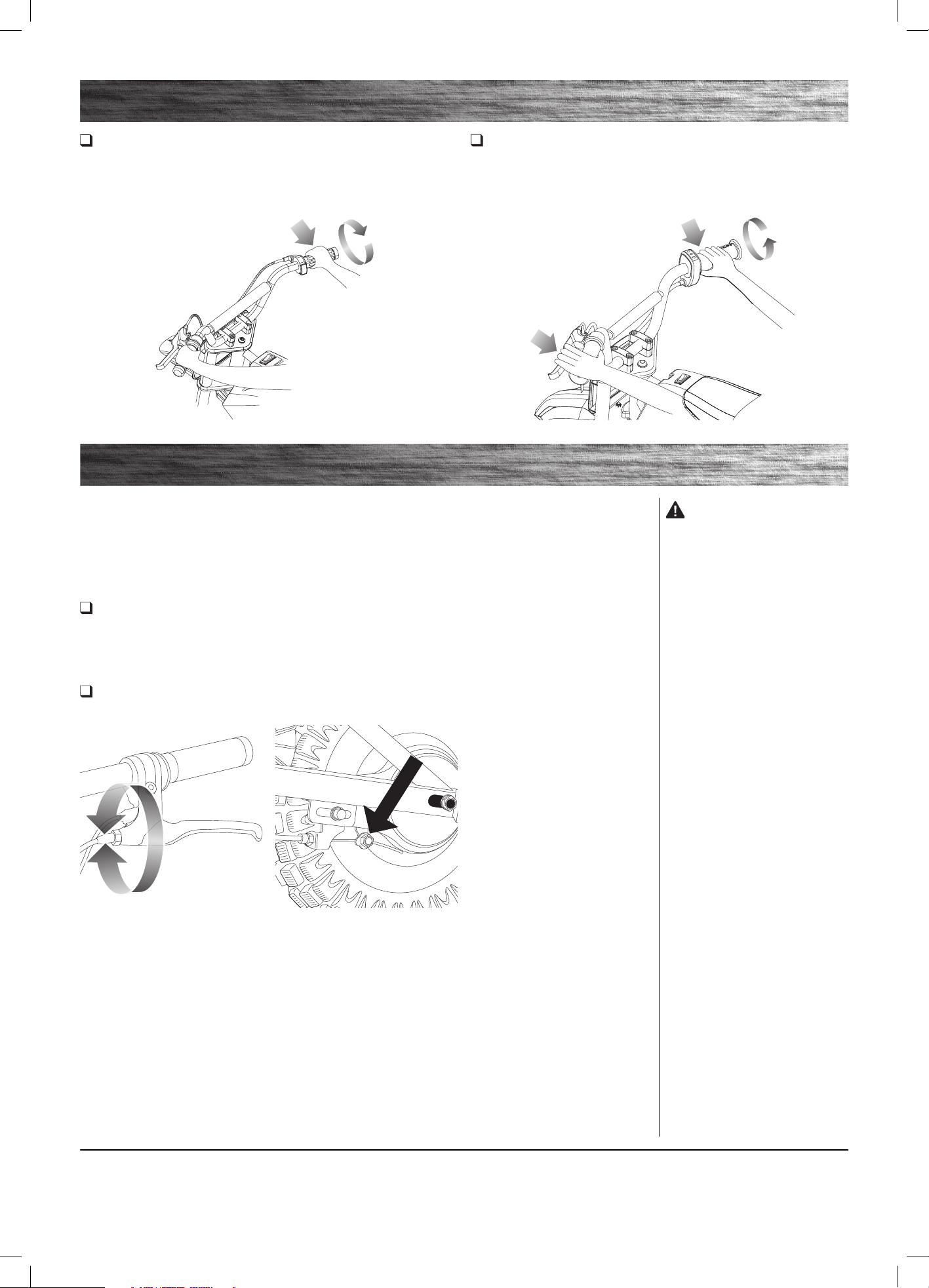
Starting the Electric Product
Place both hands on the handlebars. Slowly push forward with one foot and
apply the throttle (A).
Note: Keep both feet on the foot pegs when unit is in motion.
Testing the Brake
To use the brake, squeeze the brake lever to increase the pressure on the brake. The brake lever is fitted with a cable
adjuster to compensate for cable stretch and/or to fine-tune the lever movement to engage the brake. If brake is not
engaging properly, follow instructions for adjusting the brake outlined below.
Stopping the Electric Product
Release the throttle (A) and apply the brake, by squeezing brake lever (B).
Note: When coming to a complete stop, place both feet on the ground to
balance the unit.
Adjusting the Brake
Required Tool: 10 mm Wrench (included)
Turn power switch “OFF” before beginning repair or maintenance:
• Read the instructions
• Remove charger plug
• Turn the power switch off
• Secure the product under repair
• Exercise caution around
exposed parts
• Contact Razor customer service
if unsure about any repair or
maintenance
2 If the brake has too much slack,
use a 10 mm wrench to loosen the
brake anchor cable for additional
adjustment and retighten.
1 To adjust the tension, thread
the brake lever adjuster in or out
1/4 to 1/2 turn until the desired
brake adjustment is attained. Most
adjustments are complete at this
step. If brake still needs further
adjustment, proceed to step 2.
WARNING:
The brake is capable of causing
the electric product to skid the tire,
throwing an unsuspecting rider.
Practice in an open area free from
obstacles until you are familiar with
the brake function. Avoid skidding to
a stop as this can cause you to lose
control or damage the rear tire.
Note: The brake lever contains a
safety switch to cut power to the
motor when the brake is applied. In
an emergency, applying the brake
will always stop the product from
moving. Do not disable or replace
this lever with anything other than a
genuine Razor replacement part.
A
B
A
HEADLINE
8
REPAIR AND MAINTENANCE
8
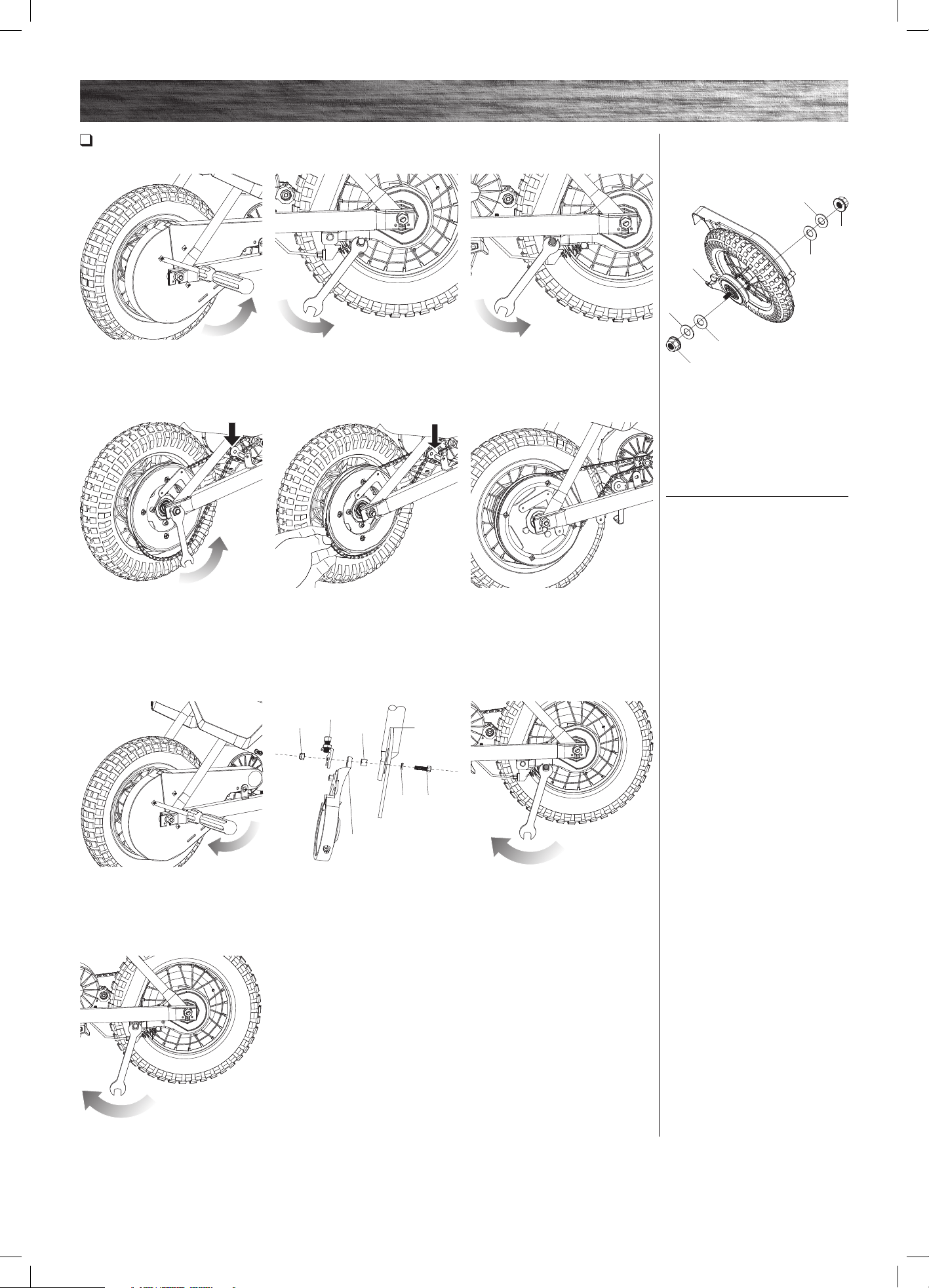
Chain and Rear Wheel Replacement
Required Tools: Phillips Screwdriver, 10 mm Wrench, Two (2) 8 mm Wrenches, and Two (2) 15 mm Wrenches.
2 With a 10 mm wrench, loosen
the brake cable anchor bolt and
disconnect the cable.
5 Install the chain onto the rear
wheel sprocket. Slip wheel axle
into the frame slots. Push the
chain tensioner down to create
slack in chain. Hand tighten rear
axle locknuts.
8 Install the cable guide bracket to
the frame and brake plate using bolt,
washers, and nut. Do not tighten.
3 With two (2) 8 mm wrenches
remove the cable guide bracket from
the frame and brake plate. Keep the
spacer and washers together.
6 Verify chain is properly installed
on each sprocket and tensioner is
correctly positioned at the bottom of
the chain.
9 Thread the brake cable through
the brake adjuster barrel, through
the large spring, and into the small
hole in the side of the anchor bolt.
Position the cable to the original
location (as indicated by the slight
cable kink) and tighten securely.
1 Using a Phillips screwdriver
remove the screws on chain guard
and remove.
4 With two (2) 15 mm wrenches,
loosen the axle. Push the chain
tensioner down to loosen the chain
and remove wheel.
7 Using a Phillips screwdriver screw
on chain guard back in place.
10 Tighten the cable guide bracket
bolt. Tighten the locknuts on the rear
axle. Test the brake to verify proper
function before riding. Readjust as
needed.
Note the hardware sequence (from
outside toward the center).
Left Side (Brake)
17-1 15 mm Flange Locknut
17-2 Flat Washer
Frame
17-2 Plate Cut Washer
17-3 Brake Plate
Right Side (Throttle)
17-1 15 mm Flange Locknut
17-2 Flat Washer
Frame
17-2 Flat Washer
Nut
Cable Guide
Bracket
Spacer
Frame
Brake
Plate
Washer Bolt
17-1
17-2
17-2
17-3
17-1
17-2
17-2
HEADLINE
Need Help? Visit our website for replacement parts, product support, a list of authorized service centers in the US and customer service contact information
at www.razor.com. Please have the product I.D. code (located on the white label of your product) available for better assistance. Additional Customer
Service contact information is listed at the back of this manual.
9
REPAIR AND MAINTENANCE
Need Help? Visit our website for replacement parts, product support, a list of authorized service centers in the US and customer service contact information
at www.razor.com. Please have the product I.D. code (located on the white label of your product) available for better assistance. Additional Customer
Service contact information is listed at the back of this manual.
9
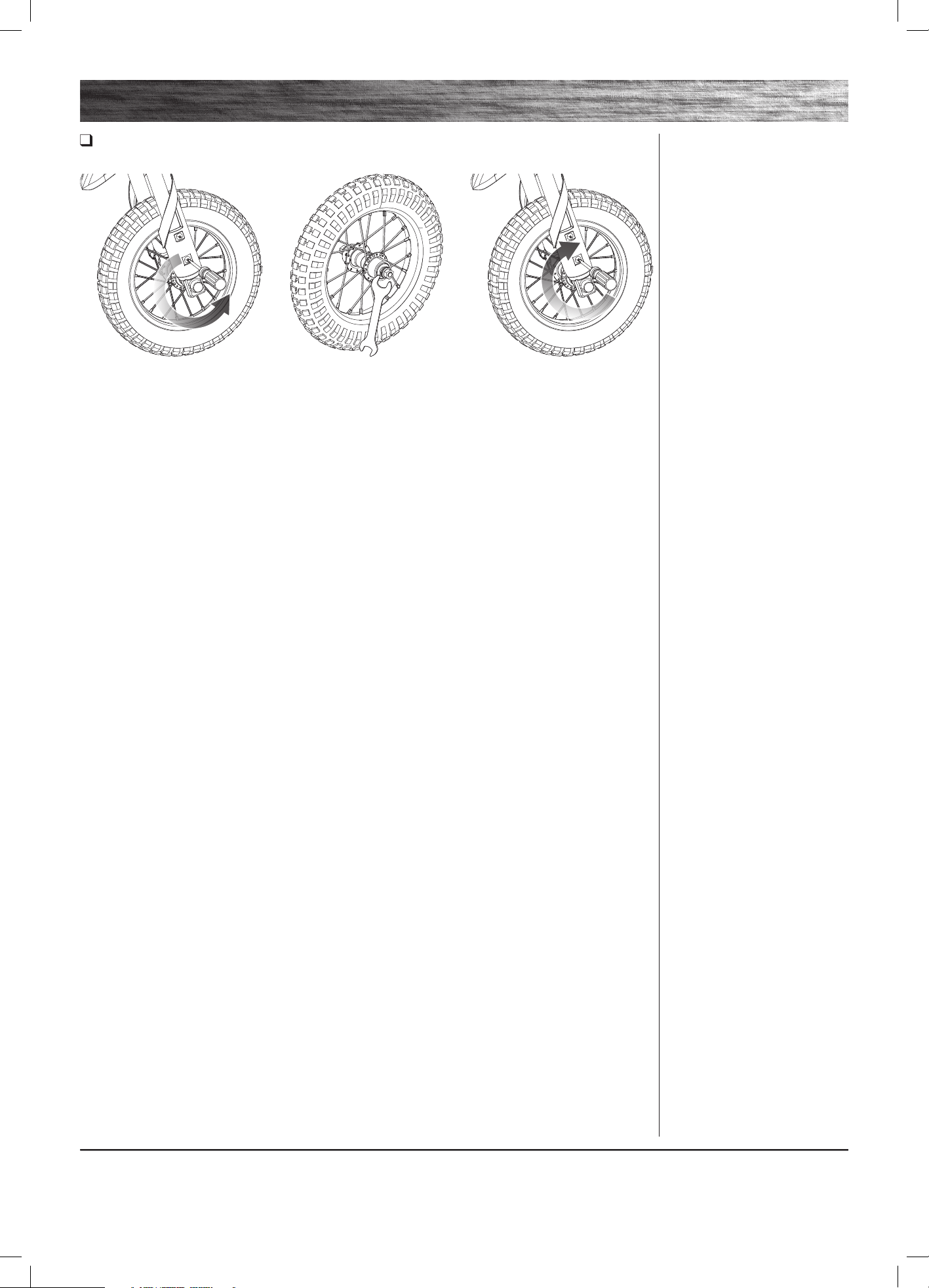
Front Wheel Replacement
Required Tools: Phillips Screwdriver and 15 mm Wrench (not included)
2 Remove the nuts on both sides of
the front axle using a 15 mm wrench
then remove the axle safety washers.
3 Remove front wheel and install
replacement wheel. Re-attach
fork covers.
1 Using a Phillips screwdriver,
loosen the two (2) screws on
the fork covers (2 per side) and
remove covers.
HEADLINE
10
REPAIR AND MAINTENANCE
10
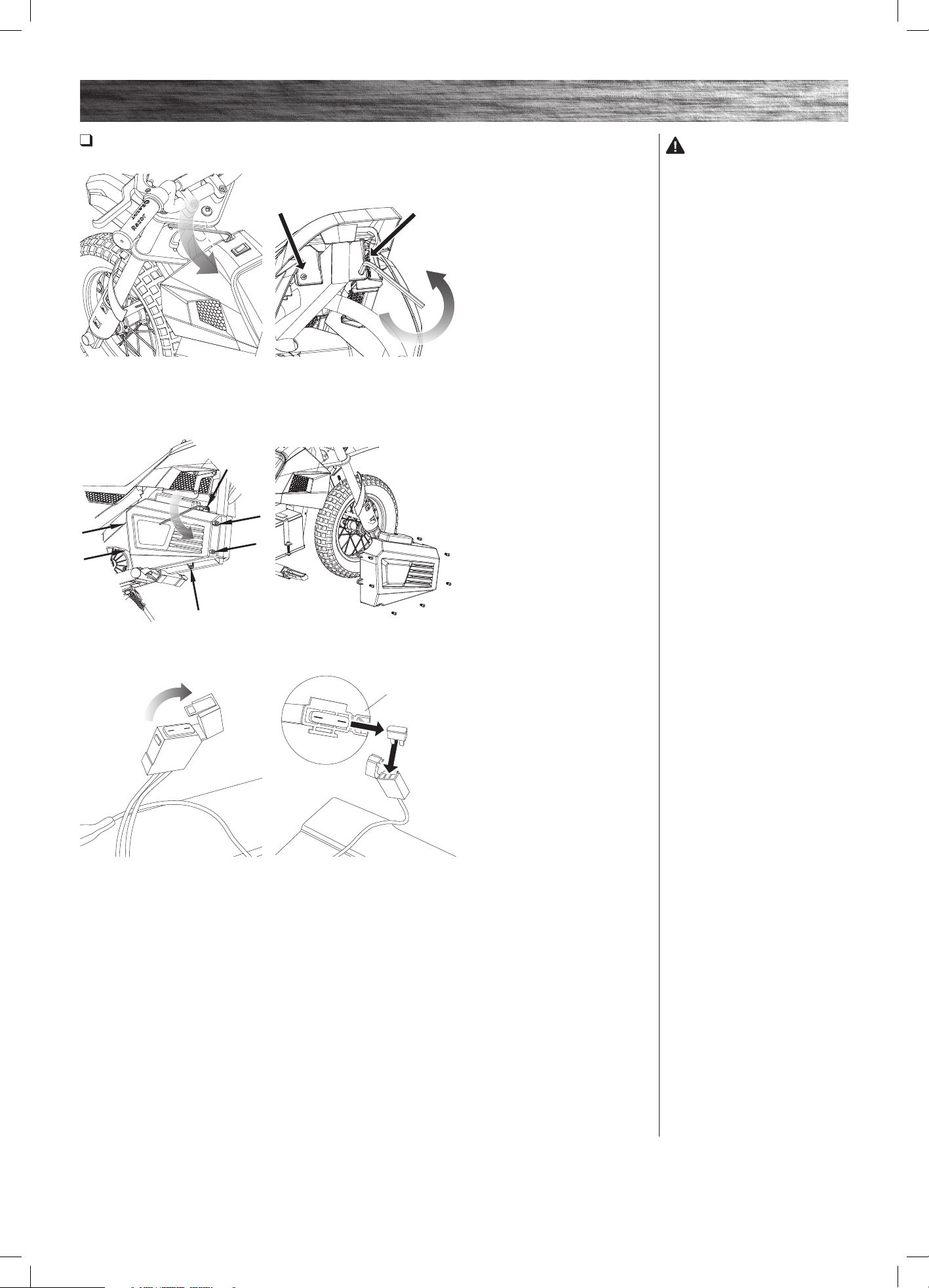
Replacing the Fuse
Required Tool: 5 mm Allen Wrench (included)
WARNING:
To prevent shock, please follow the
instructions accordingly and do not
skip or combine any steps.
2 Using a 5 mm Allen wrench,
loosen the two (2) bolts underneath
the rear of the seat and remove
the fairing.
5 Remove the fuse and replace
with a new one of equal amperage.
Close the fuse cover and reattach the
battery cover, fairing, and plastic cap.
3 On the opposite side of the charger port, locate and remove the seven (7)
bolts using a 5 mm Allen wrench. Separate and remove cover.
1 Using a 5 mm Allen wrench,
remove the bolt.
4 Locate the fuse box attached to
the batteries. Open the fuse cover to
expose the fuse.
30 Amp
HEADLINE
Need Help? Visit our website for replacement parts, product support, a list of authorized service centers in the US and customer service contact information
at www.razor.com. Please have the product I.D. code (located on the white label of your product) available for better assistance. Additional Customer
Service contact information is listed at the back of this manual.
11
REPAIR AND MAINTENANCE
Need Help? Visit our website for replacement parts, product support, a list of authorized service centers in the US and customer service contact information
at www.razor.com. Please have the product I.D. code (located on the white label of your product) available for better assistance. Additional Customer
Service contact information is listed at the back of this manual.
11
Battery Care and Disposal
Do not store in freezing or below freezing temperatures. To properly maintain your battery and ensure maximum
battery life, carefully read the “Charging the Battery” section on page 6 of this owner’s manual.
CONTAINS SEALED NON-SPILLABLE LEAD-ACID BATTERIES. BATTERIES MUST BE RECYCLED.
Disposal: Your Razor product uses sealed lead-acid batteries which must be recycled or disposed of in an
environmentally safe manner. Do not dispose of a lead-acid battery in a fire. The battery may explode or leak. Do
not dispose of a lead-acid battery in your regular household trash. The incineration, land filling or mixing of sealed
lead-acid batteries with household trash is prohibited by law in most areas. Return exhausted batteries to a federal or
state approved lead-acid battery recycler or a local seller of automotive batteries. If you live in Florida or Minnesota,
it is prohibited by law to throw away lead-acid batteries in the municipal waste stream.
Charger
The charger supplied with the product should be regularly examined for damage to the cord, plug, enclosure and other
parts and in the event of such damage, the product must not be charged until it has been repaired or replaced.
Use ONLY with the recommended charger.
Wheels
Wheels and drive system are subject to normal wear and tear. It is the responsibility of the user to periodically inspect
wheels for excess wear and adjust and replace drive train components as required.
Replacement Parts
The most frequently requested replacement parts are available for purchase at some Razor retail partners. For the
complete selection of replacement parts visit www.razor.com.
Authorized Service Centers
For a list of authorized Razor repair centers:
• Check online at www.razor.com.
• Additional Customer Service contact information is listed on the back of this manual.
In the US and Canada only:
For more information regarding
recycling of rechargeable batteries,
call toll free 1-800-822-8837, or visit
http://www.call2recycle.org
WARNING: If a battery leak
develops, avoid contact with the
leaking acid and place the damaged
battery in a plastic bag. Refer to the
disposal instructions at left. If acid
comes into contact with skin or eyes,
flush with cool water for at least 15
minutes and contact a physician.
WARNING: Battery posts,
terminals and related accessories
contain lead and lead compounds.
Wash your hands after handling.
HEADLINE
12
TROUBLESHOOTING GUIDE
12
Problem Possible Cause Solution
Electric product does not run Undercharged battery
Loose wires or connectors
Burned out Fuse
Charge the battery. A new battery should have been charged for
at least 12 hours before using the electric product for the first time
and up to 12 hours after each subsequent use.
Check all connectors. Make sure the charger connector is tightly
plugged into the charging port, and that the charger is plugged
into the wall.
Make sure power flow to the wall outlet is on.
Check all wires and connectors to make sure they are tight.
The fuse will burn out and automatically shut off the power if the
motor is overloaded.
Electric product was running but
suddenly stopped
Burned-out fuse An excessive overload, such as too heavy a rider or too steep a
hill, could cause the motor to overheat. Replace the fuse with a
new one of equal amperage. Correct the conditions that caused
the fuse to burn out and avoid repeatedly burning out fuse (Refer
to page 10 of this manual).
Contact your local Razor authorized service center for diagnosis
and repair.
Short run time (less than 15
minutes per charge)
Motor or electrical switch damage
Undercharged battery
Tires are not properly inflated
Battery is old and will not accept full charge
Brake is not adjusted properly
Charge the battery. A new battery should have been charged for
at least 12 hours before using the electric product for the first time
and up to 12 hours after each subsequent use.
Check all wires and connectors. Make sure the battery connector
is tightly plugged into the charger connector, and that the charger
is plugged into the wall.
The tires are inflated when shipped but they invariably will
lose some pressure between the point of manufacturing and
your purchase. Refer to instructions on page 5 of this manual to
properly inflate tires.
Even with proper care, a rechargeable battery does not last
forever. Average battery life is 1 to 2 years depending on product
use and conditions. Replace only with a Razor replacement
battery.
Refer to brake adjustment instructions on page 7 of this manual.
Electric product runs sluggishly Riding conditions are too stressful
Tires are not properly inflated
Electric product is overloaded
Use only on solid, flat, clean and dry surfaces, such as pavement
or level ground.
The tires are inflated when shipped, but they invariably will
lose some pressure between the point of manufacturing and
your purchase. Refer to instructions on page 5 of this manual to
properly inflate tires.
Make sure you do not overload the electric product by allowing
more than one rider at one time, exceeding the maximum weight
limit, going up too steep a hill or towing objects behind the
product.
Sometimes the product doesn’t run,
but other times it does.
Loose wires or connectors
Motor or electrical switch damage
Check all wires around the motor and all connectors to make sure
they are tight.
Contact your local Razor authorized service center for diagnosis
and repair.
Electric product does not stop when
applying the brake
Brake is not adjusted properly Refer to instructions on page 7 of this manual to properly adjust
brake.
Electric product makes loud noises
or grinding sounds
Chain is too dry. Apply a lubricant such as 3 in 1™ or Tri-Flow™ to the chain.
For more troubleshooting tips, a list of available replacement parts or to locate an authorized Service Center in your area,
visit our website at www.razor.com or call toll free +1 866 467 2967 to speak to a live Customer Service Representative
*Product(s) should be turned OFF and fully charged prior to doing any Troubleshooting.
NOTE: All troubleshooting steps should be performed by an adult only.
HEADLINE
Need Help? Visit our website for replacement parts, product support, a list of authorized service centers in the US and customer service contact information
at www.razor.com. Please have the product I.D. code (located on the white label of your product) available for better assistance. Additional Customer
Service contact information is listed at the back of this manual.
13
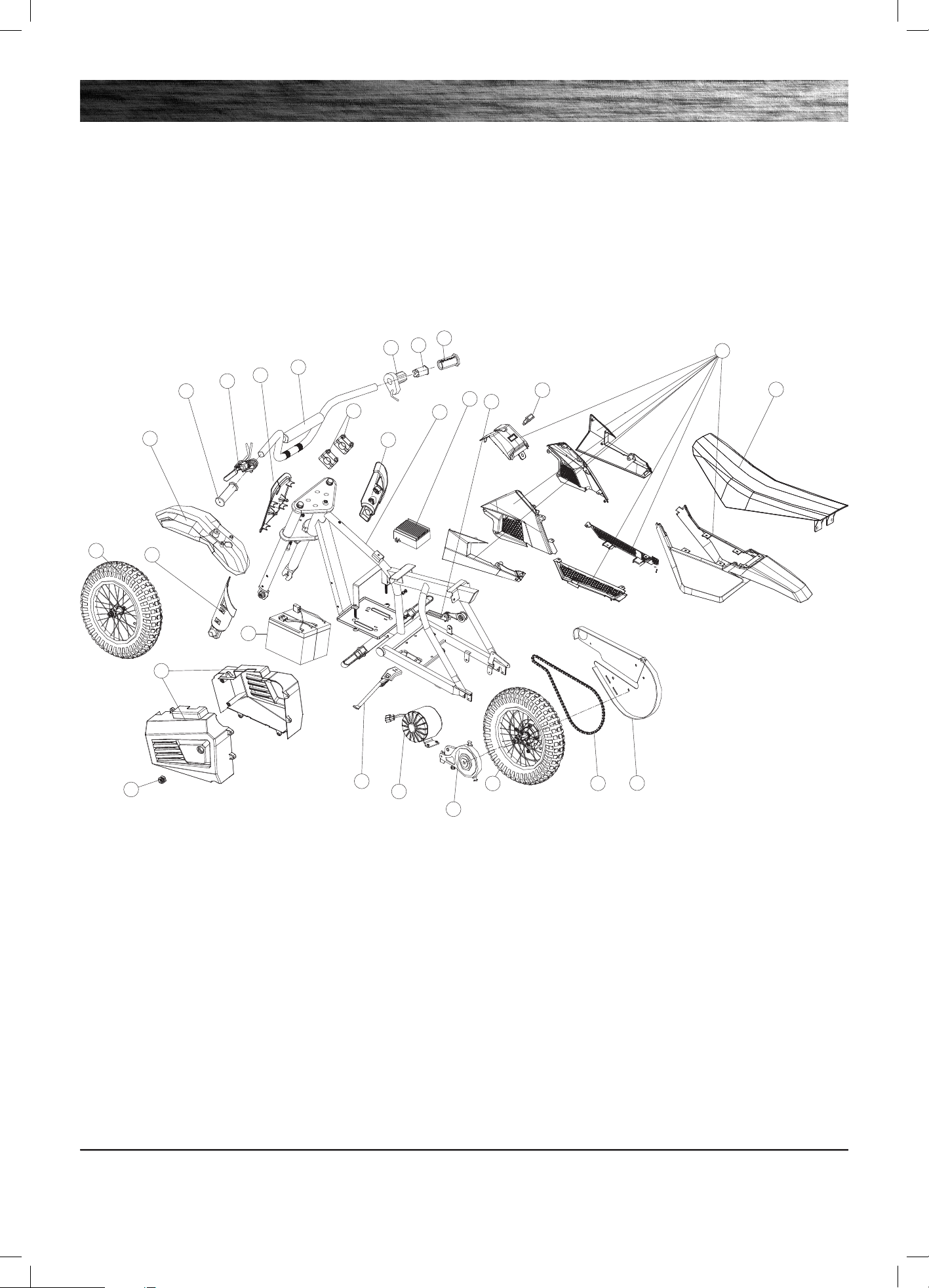
SX350/MX350/MX400 PARTS
Need Help? Visit our website for replacement parts, product support, a list of authorized service centers in the US and customer service contact information
at www.razor.com. Please have the product I.D. code (located on the white label of your product) available for better assistance. Additional Customer
Service contact information is listed at the back of this manual.
13
2-1
2
3
4
1
8
9
10
11
12
13
15
16
17
18
19
20
7
1
5
14
21
22
23
24
8
6
Keep your SX350/MX350/MX400 running for years with genuine Razor parts. Visit our website or e-mail us for more information on spare part availability.
(Specifications subject to change without notice.)
1. Handlebar Grip (Right/Left)
2. Single-Speed Twist-Grip Throttle
2-1 Sleeve
3. Handlebar
4. Number Plate
5. Brake Lever Assembly
6. Handlebar Clamp (Upper/Lower)
7. Front Fender
8. Fork Cover (Right/Left)
9. Front Wheel Complete
10. Battery Cover (Right/Left)
11. Charger Port
12. Battery
13. Kickstand
14. Motor
15. Brake
16. Rear Wheel Complete
17. Chain
18. Chain Guard
19. Seat
20. Plastic Housing
21. On/Off Switch
22. Chain Tensioner
23. Control Module
24. Frame

NOTICE: INSURANCE
YOUR INSURANCE POLICIES MAY NOT PROVIDE COVERAGE FOR
ACCIDENTS INVOLVING THE USE OF THIS SCOOTER/ELECTRIC
RIDE-ON PRODUCT. TO DETERMINE IF COVERAGE IS PROVIDED,
YOU SHOULD CONTACT YOUR INSURANCE COMPANY OR AGENT.
FCC COMPLIANCE
WARRANTY
This device complies with Part 15 of the FCC Rules. Operation is subject to the following two conditions: (1) This device may not cause harmful interference,
and (2) this device must accept any interference received, including interference that may cause undesired operation.
Note: This equipment has been tested and found to comply with the limits for a Class B digital device, pursuant to part 15 of the FCC Rules. These limits
are designed to provide reasonable protection against harmful interference in a residential installation. This equipment generates, uses and can radiate
radio frequency energy and, if not installed and used in accordance with the instructions, may cause harmful interference to radio communications.
However, there is no guarantee that interference will not occur in a particular installation. If this equipment does cause harmful interference to radio or
television reception, which can be determined by turning the equipment off and on, the user is encouraged to try to correct the interference by one or more
of the following measures:
- Reorient or relocate the receiving antenna.
- Increase the separation between the equipment and receiver.
- Connect the equipment into an outlet on a circuit different from that to which the receiver is connected.
- Consult the dealer or an experienced radio/TV technician for help.
WARNING: Changes or modifications to this unit not expressly approved by Razor USA, could void the user’s authority to operate the equipment.
Razor Limited Warranty
The manufacturer warranties this product to be free of manufacturing
defects for a period of 90 days from date of purchase. This Limited
Warranty does not cover normal wear and tear, tire, tube or cables, or
any damage, failure or loss caused by improper assembly, maintenance,
storage or use of the Razor SX350/MX350/MX400.
This Limited Warranty will be void if the product is ever:
• used in a manner other than for recreation or transportation;
• modified in any way;
• rented.
The manufacturer is not liable for incidental or consequential loss or damage
due directly or indirectly to the use of this product.
Razor does not offer an extended warranty. If you have purchased an
extended warranty, it must be honored by the store at which it was
purchased.
For your records, save your original sales receipt with this manual and write
the serial number below.
__________________________________________
CUSTOMER SERVICE CONTACT INFORMATION
Need Help? Visit our website for product support, a list of authorized service centers in the US and customer service contact information at
www.razor.com. Please have the product I.D. code (located on the white label of your product) available for better assistance. Additional
Customer Service contact information is listed below:
AMERICAS
Razor USA LLC
P.O. Box 3610
Cerritos, CA 90703
USA
+1 866 467 2967
Monday - Friday
8:00 AM - 5:00 PM Pacific Time
customersupport@razorusa.com
EUROPE, MIDDLE EAST, AFRICA
Razor USA LLC (Europe)
Handelsweg 2
2742 RD Waddinxveen
Netherlands
+44 (0) 120 267 2702
info@razoreu.com
ASIA
Razor USA LLC (Asia)
P.O. Box 3610
Cerritos, CA 90703
USA
+81 50 7579 6622
info@razor-asia.com
UNITED KINGDOM AND IRELAND
Razor USA LLC (UK)
Unit 20
Hartnoll Business Centre
Post Hill, Tiverton
Devon EX16 4NG
UK
+44 (0) 120 267 2702
info@razoreu.com
AUSTRALIA AND NEW ZEALAND
Razor USA LLC
P.O. Box 4280
Auburn South
VIC 3122
Australia
+1 800 954 354 (AU)
+0 800 003 221 (NZ)
info@razoranz.com
IMPORTED IN JAPAN BY B-PLUS ASIA
CORP.
Razor USA LLC
Kurokawa 3-1, Asaoku,
Kawasaki, Kanagawa
215-0035 JAPAN
+81 (0) 44 328 9057 Tel
+81 (0) 44 328 9067 Fax
info@razor-asia.com
Printed in China for Razor USA LLC.
Copyright ©2003-2021 Razor USA, LLC. All rights reserved. Razor® and the Razor logo design are among the registered trademarks of Razor USA LLC in the United States and/or select foreign countries. Dirt Rocket
™
and the
Dirt Rocket logo design are trademarks of Razor USA LLC.
US_210524