
FOR SUPPORT, VISIT ELEMENTELECTRONICS.COM/SUPPORT 1
USER
MANUAL
EPSBAE20
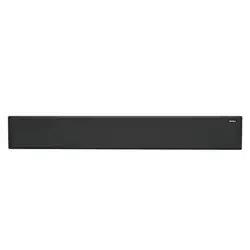
2.0 Outdoor Sound Bar
USER MANUAL2
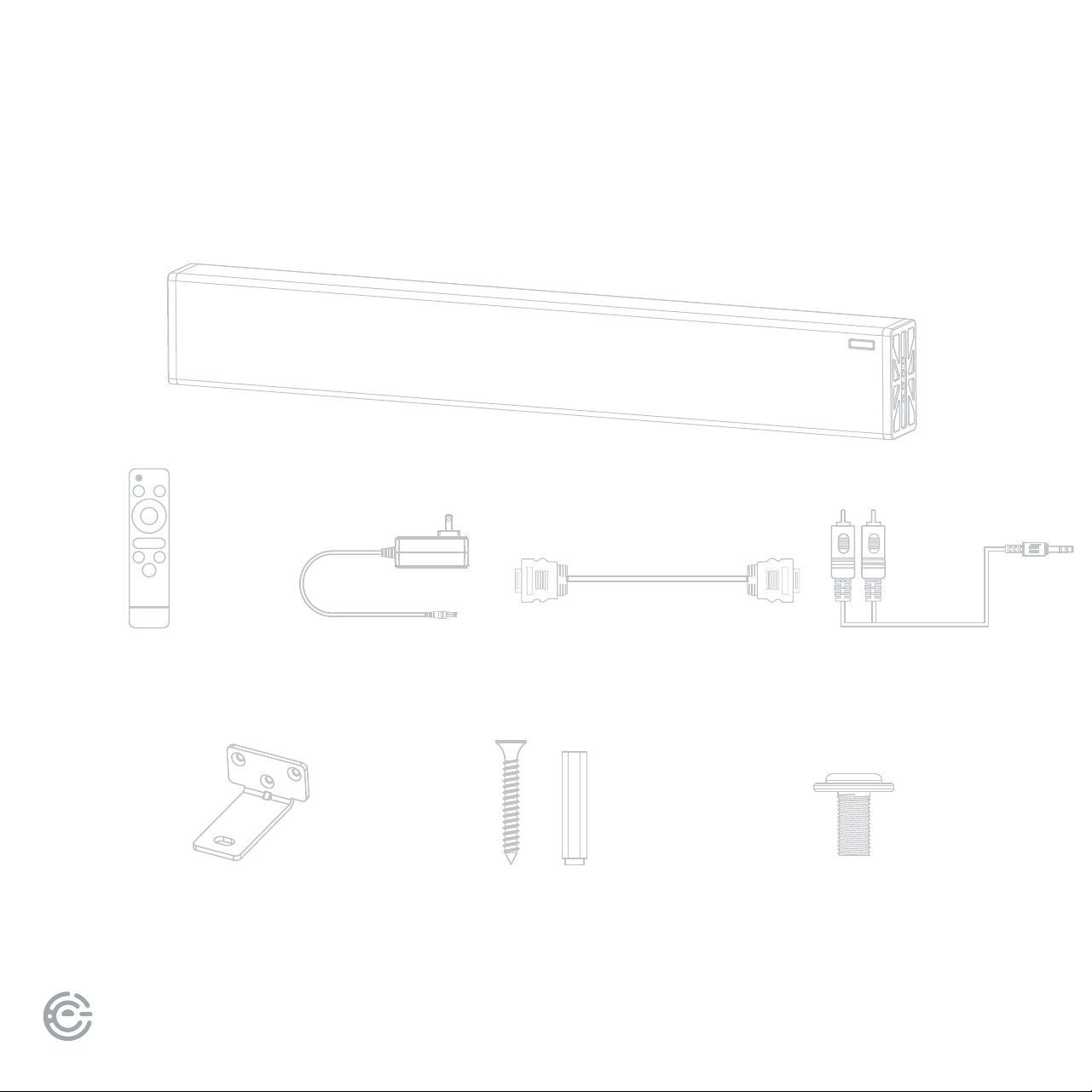
WHAT’S
INCLUDED
Your new sound bar!
Power adapter
2 Iron pendants
Remote control HDMI cable
2 mounting screws
and 2 expansion tubes
2 short screws
3.5 to RCA
FOR SUPPORT, VISIT ELEMENTELECTRONICS.COM/SUPPORT 3
FOR YOUR
ATTENTION
• Please read through this manual before making connections and operating your new sound bar.
Retain this manual for future reference.
• Do not open the cabinet of this unit; there are no user-serviceable parts inside.
Refer servicing to qualied personnel only.
• Switch o the unit when not in use. Switch o the unit and disconnect it from the AC power
supply when not in use for an extended period of time.
• Do not install the unit in direct sunlight but an area that is partially shaded. Choose a location
and position based on the time of day you use it most oen.
• Install the unit at least ve feet away from a pool, spa, or other body of water.
• e sound bar should not be exposed to dripping or splashing, and objects lled with liquids
should not be placed on top of the unit.
• Install the unit on a horizontal, at and rm surface with good ventilation. Never block the vents
which will cause malfunction, resulting from overheating.
• Use a so and clean rag to clean the outside of the unit. Never clean it with chemicals or detergent.
• is user manual is a guide for operation, not a criterion for conguration.
• Only use attachments/accessories specied by the manufacturer.
• Where the main plug is used as the disconnect device, the disconnect device shall remain readily operable.
WARNING: e batteries shall not be exposed to excessive heat such as sunshine, re or the like.
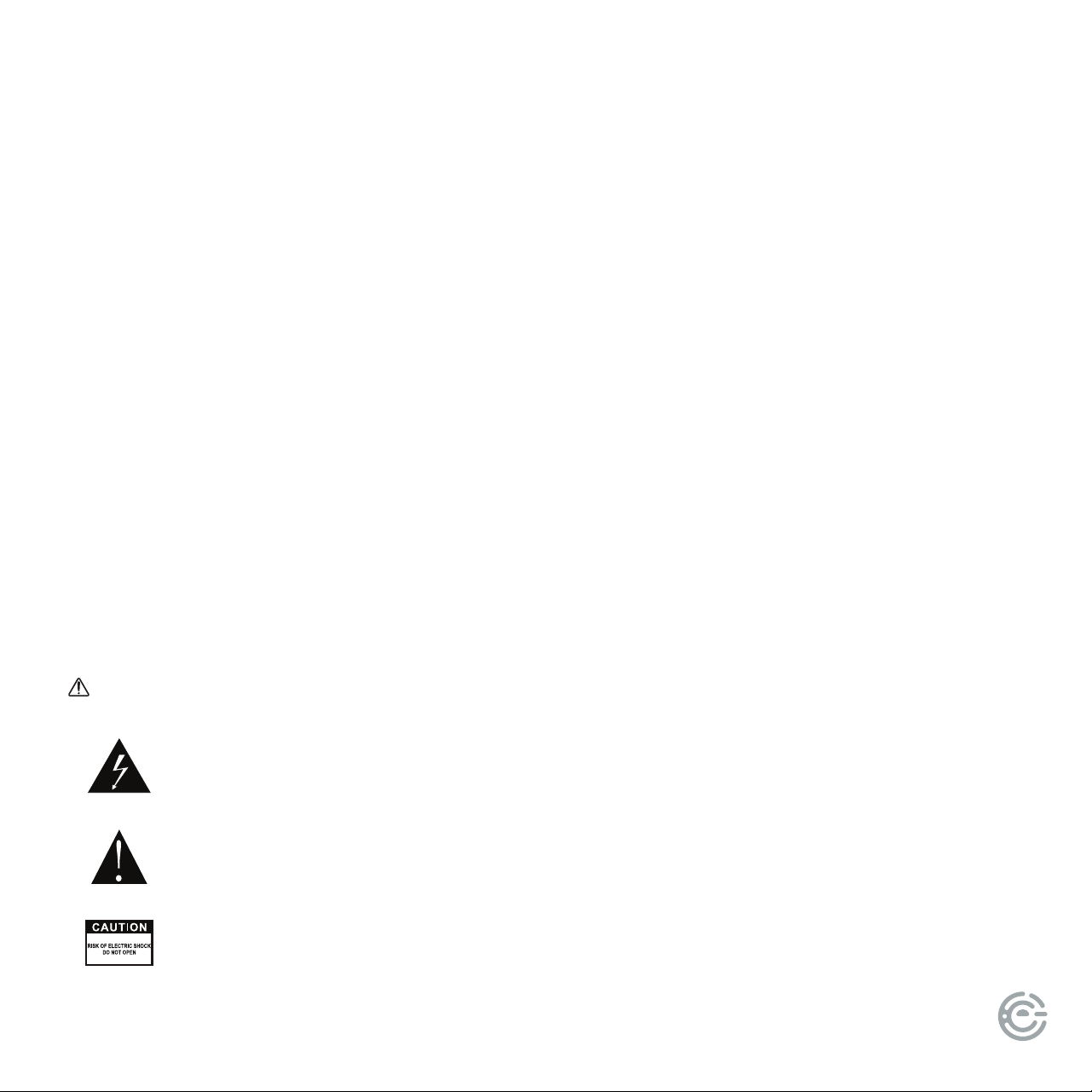
e lightning ash is intended to alert the user to the presence of dangerous voltage
within the product’s enclosure, and touching the internal components may result in a
risk of electric shock.
e exclamatory mark is intended to alert the user to the presence of important
operating instructions.
To reduce the risk of electric shock or re, do not open the cover. Refer servicing
to qualied service personnel.
3.5 to RCA

USER MANUAL4
MOUNTING YOUR
SOUND BAR
IMPORTANT: Choose a location for your sound bar where it will not be in direct
sunlight and is partially shaded (i.e. near trees, under structures, patio cover, etc.). Re-
member that the position of the sun changes throughout the day, so choose a location
and position based on the time of day you would use it most oen.
WARNING: e sound bar must be installed at least ve feet away from a pool, spa,
or other body of water.
FOR SUPPORT, VISIT ELEMENTELECTRONICS.COM/SUPPORT 5
MOUNTING YOUR
SOUND BAR
(continued)
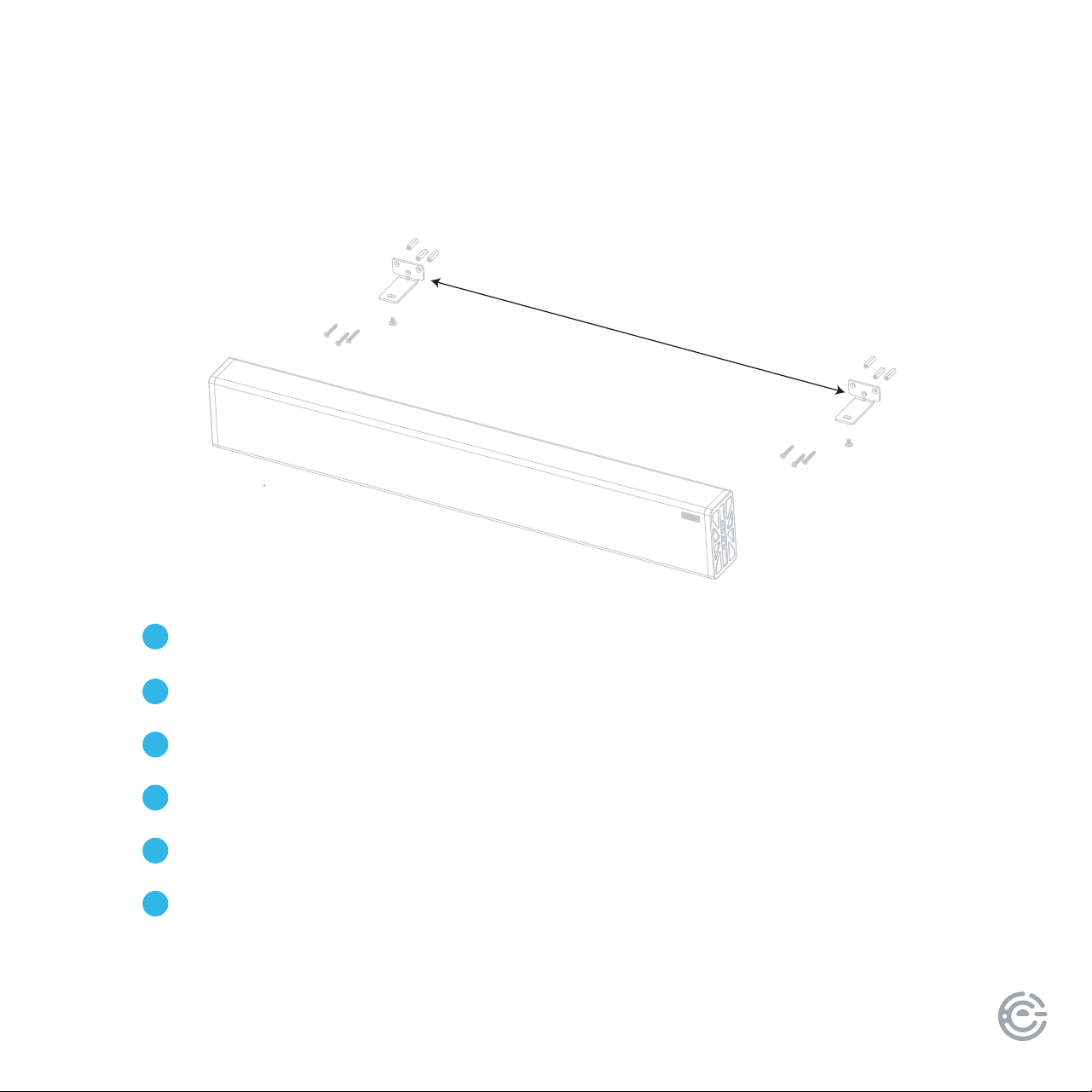
The center distance is 29.56in.
e center distance is 29.56 inches.
Mark the location of the screws on the wall.
Drill two holes in the wall with a powerful drill.
Fasten the screw expansion tube to the hole in the wall.
Fasten the iron bracket to the expansion tube of the wall with screws.
Install the speaker on the iron bracket to make it rm and stable.
1
2
3
4
5
6
USER MANUAL6
SOUND BAR
PANELS
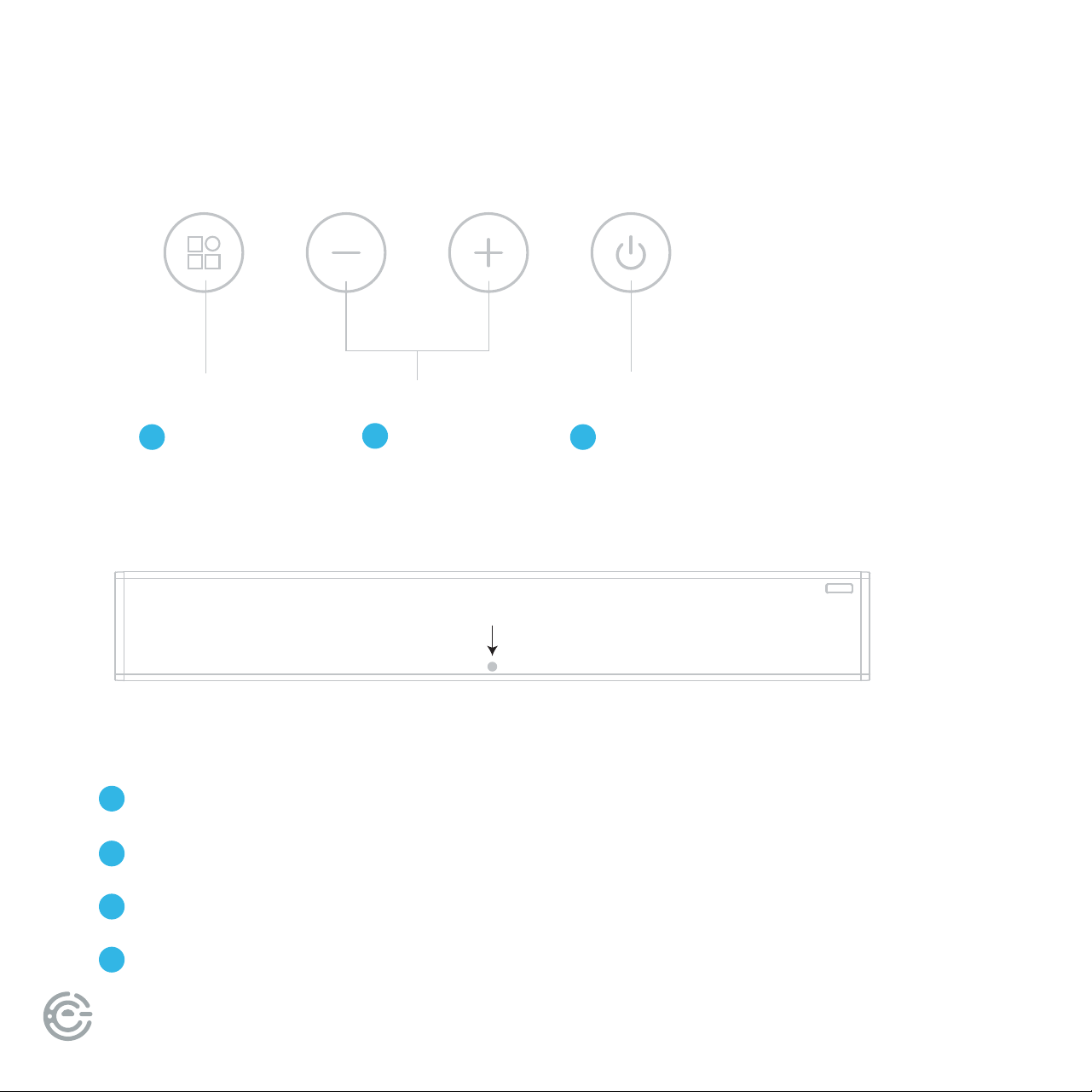
INDICATOR LIGHT DISPLAY:
Red light: Standby mode
Blue light: BT mode
Green light: ARC mode
White light: AUX mode
4
1
5
2
6
3
7
ON/OFF
Volume
Function
Switching
Indicator light
FOR SUPPORT, VISIT ELEMENTELECTRONICS.COM/SUPPORT 7
(continued)
SOUND BAR
PANELS
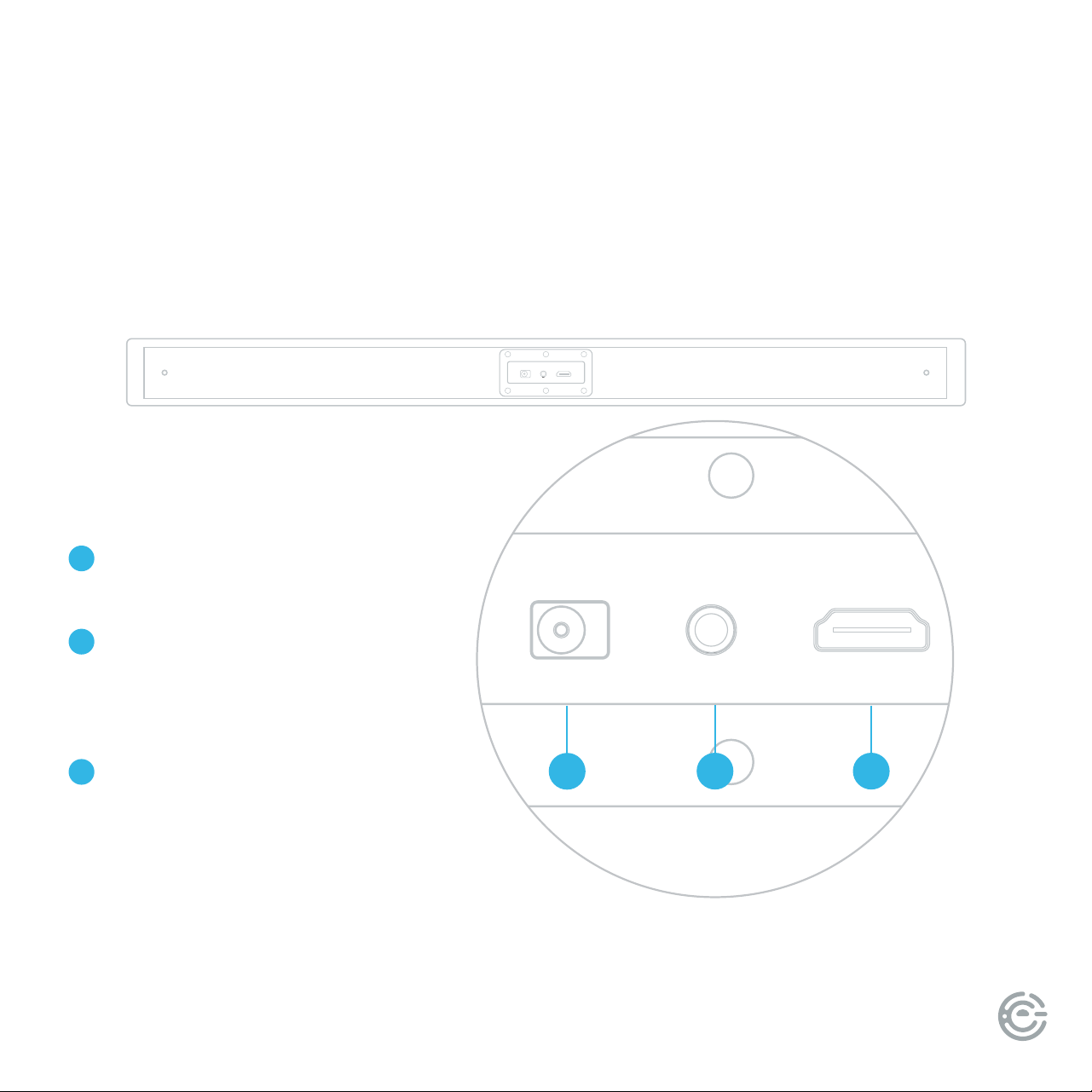
ARC input port: Connect to a TV
with HDMI ARC function.
AUX input port: Connect the AUX
one-to-two audio cable, connect
with the red/white output port
of the audio source device.
Power interface:
Connect the power adapter.
8
9
10
89
10
Back
ARC input portAUX input portPower interface
USER MANUAL8
CONNECT
TO YOUR TV
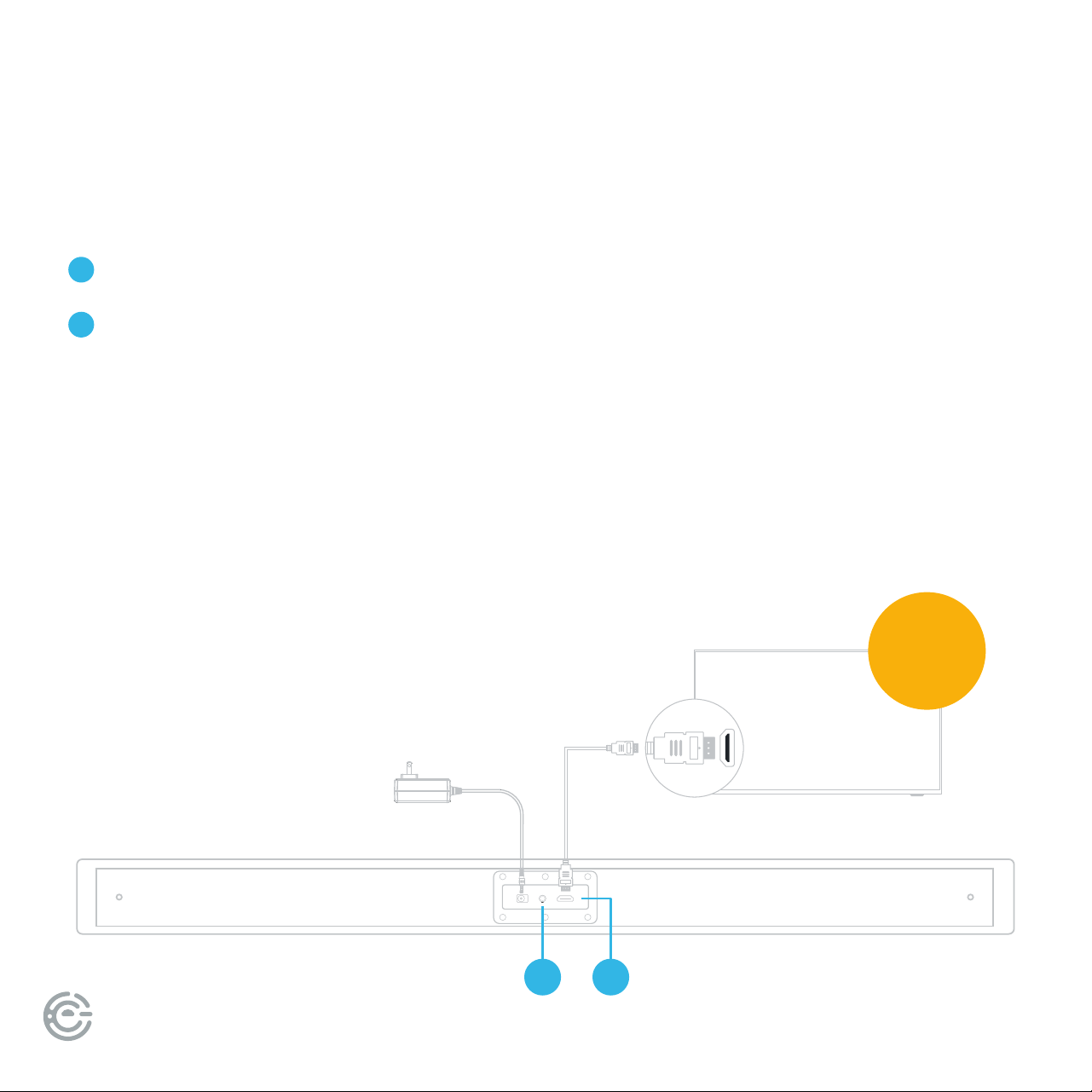
ere are 2 ways to connect your sound bar to the TV:
21
AUX Good Quality (cable not included)
ARC input port: Best Quality (cable included)
1
2
Ensure
HDMI CEC
is ON
If you choose the ARC connection, please make sure your TV or device supports the HDMI ARC
feature. ARC is an audio return channel function for digital audio. Use the supplied ARC cable to
connect to the HDMI ARC input of your sound bar and the HDMI ARC output on your TV or other
external device. Note that the external device audio output must be set to PCM manually.
See your TV user manual for details.
ARC (AUDIO RETURN CHANNEL)
Power adapter

FOR SUPPORT, VISIT ELEMENTELECTRONICS.COM/SUPPORT 9
CONNECTIONS
is sound bar has an extra group of audio input terminals.
Connect your sound bar to your TV or other external devices such as a CD, VCR, DVD
player, etc. by connecting an AUX input cable (cable not included) to your sound bar
and the AUX output of your external device.
Press button on the remote control to switch to the AUX input mode.
e word LINE will show on the display screen which means AUX mode is selected.
AUX
USER MANUAL10
+
_
+
_
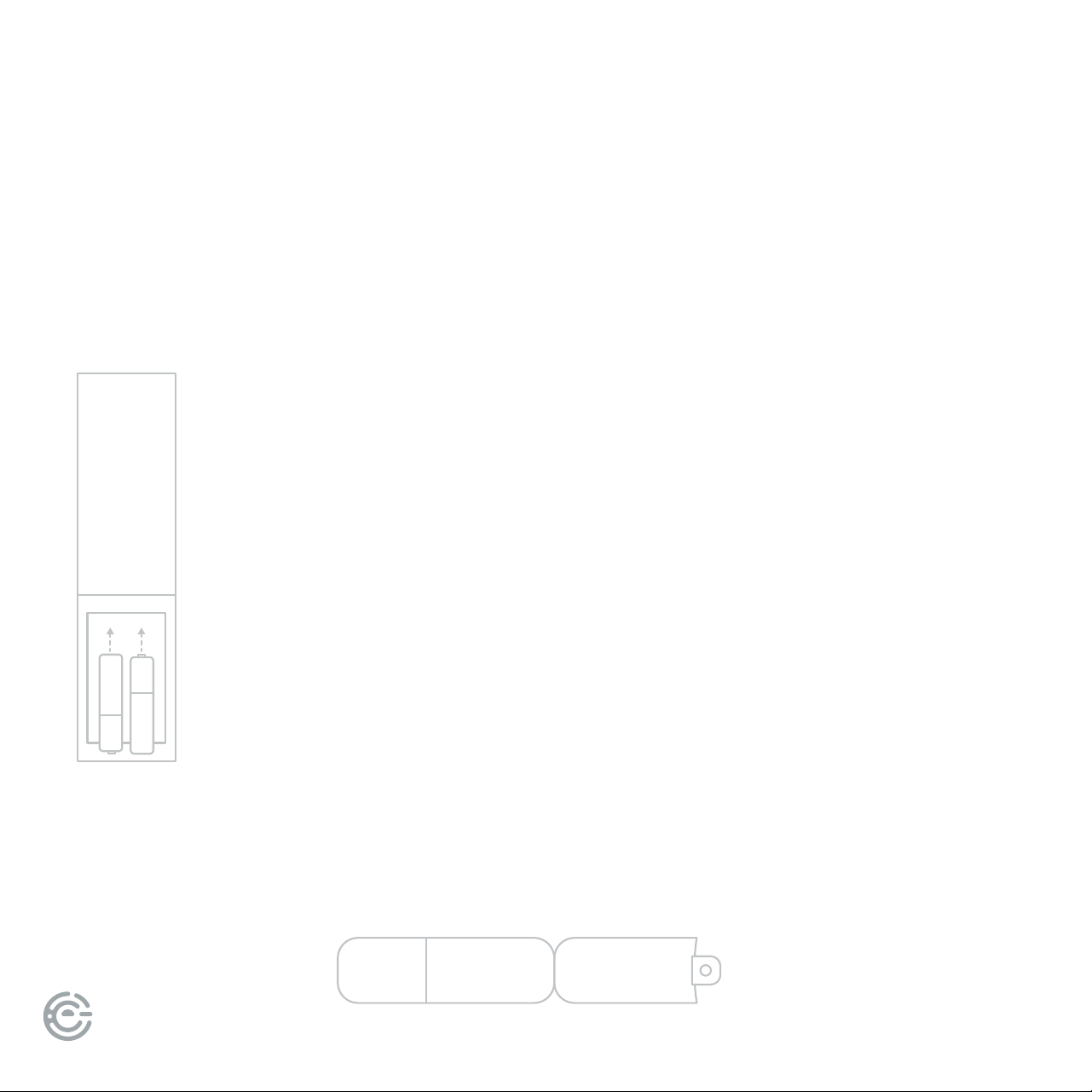
Remove the battery
compartment cover on
the back of the remote.
Load two AAA/1.5V batteries
into the battery compartment
making sure that the battery
has been inserted with the
correct polarities matching the
symbols +, - as indicated inside
the battery compartment.
Replace the cover.
Place remote inside protective sleeve for added protection against falls or
condensation. e protective sleeve is not weather-proof. Please properly store
your remote indoors when not in use.
Battery
installation
Protective
remote sleeve
REMOTE
CONTROL
Insert the batteries into the remote control. Point the remote control at
the remote sensor on the front panel. e remote control works within
a distance of about 8 meters from the sensor and within an angle of
about 30 degrees from the le and right side.
Remote control operation
NOTE:
• Remove the battery when you
do not intend to use the remote
control for a long time.
• Weak battery can leak and severely
damage the remote control.
• e battery must not be exposed to
excessive heat source, such as sunshine,
re or anything that would dramatically
raise the temperature of the battery.
• Be environmentally friendly and dispose
of batteries according to local
government regulations.
FOR SUPPORT, VISIT ELEMENTELECTRONICS.COM/SUPPORT 11
REMOTE
CONTROL
(continued)
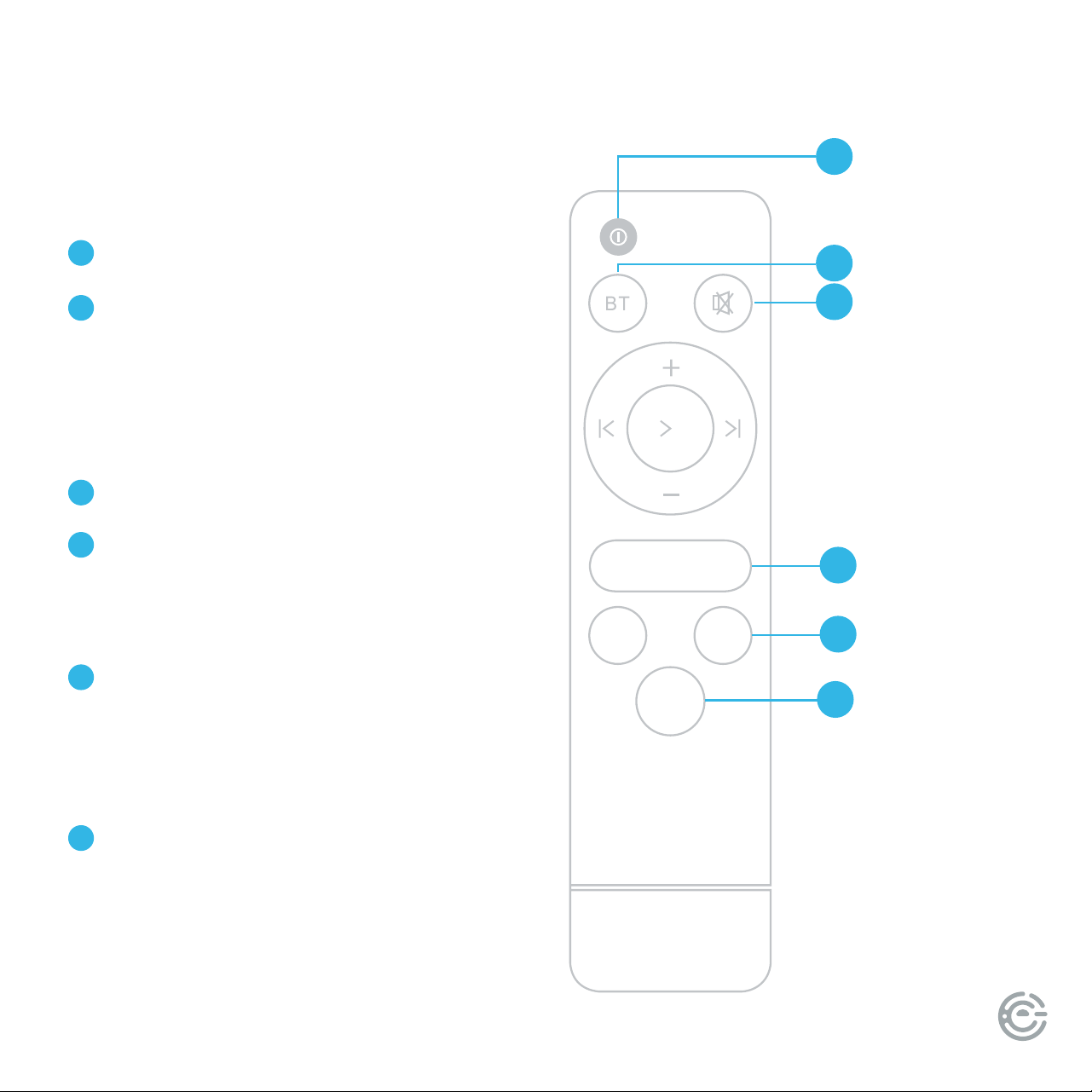
MOVIE MUSIC NEWS
AUX ARC
PAIR
POWER
BT
Remote control or host button to switch the
signal source to BT state, the blue indicator
will ash, the phone will turn on the Blue-
tooth, search for the device, and the connec-
tion and pairing are successful.
MUTE
SOUND EFFECTS
MOV: movie mode
MUS: music mode
NEWS: news mode
AUDIO SOURCE SELECTION
Sound source selection key, RGB light cor-
responding status “ARC,AUX” indicates that
the corresponding input soundsource on the
backplane has entered he working state.
PAIR
Tap to disconnect BT, then tap to link BT.
1
2
3
4
5
6
POWER
BT
MUTE
SOUND EFFECTS
AUDIO SOURCE
SELECTION
PAIR
1
2
3
4
5
6

USER MANUAL12
TROUBLESHOOTING
Use the chart below to troubleshoot any issues you may be having. If you do not see your issue listed
below, or the troubleshooting guide does not solve your issue, please contact Element customer support.
SYMPTOM CAUSE REMEDY
No Power • AC power cord is not connected to a power supply
securely
• Check that the AC power cord is
connected securely
ere is no sound or
the sound is distorted
• e audio cables aren’t connected securely
• e volume is set to the minimum level
• e sound is switched o
• Connect the audio cables securely.
• Turn up the volume
• Press [MUTE] on the remote control
to switch on the sound
• Press [PLAY/PAUSE]
e remote control
does not function
• ere is no battery in the remote control
• e battery is out of charge
• e remote control isn’t pointed to the remote sensor
• e remote control is out of its operating area
• e unit is shut down
• Install two AAA/1.5V batteries in it
• Replace the battery with new one
• Make sure that the remote control is
pointed to the remote control sensor
• Make sure the remote control is within
the operating area
• Switch o the unit and disconnect it
from the AC outlet, then power on
the unit again
FOR SUPPORT, VISIT ELEMENTELECTRONICS.COM/SUPPORT 13
SOUND BAR
SPECIFICATIONS
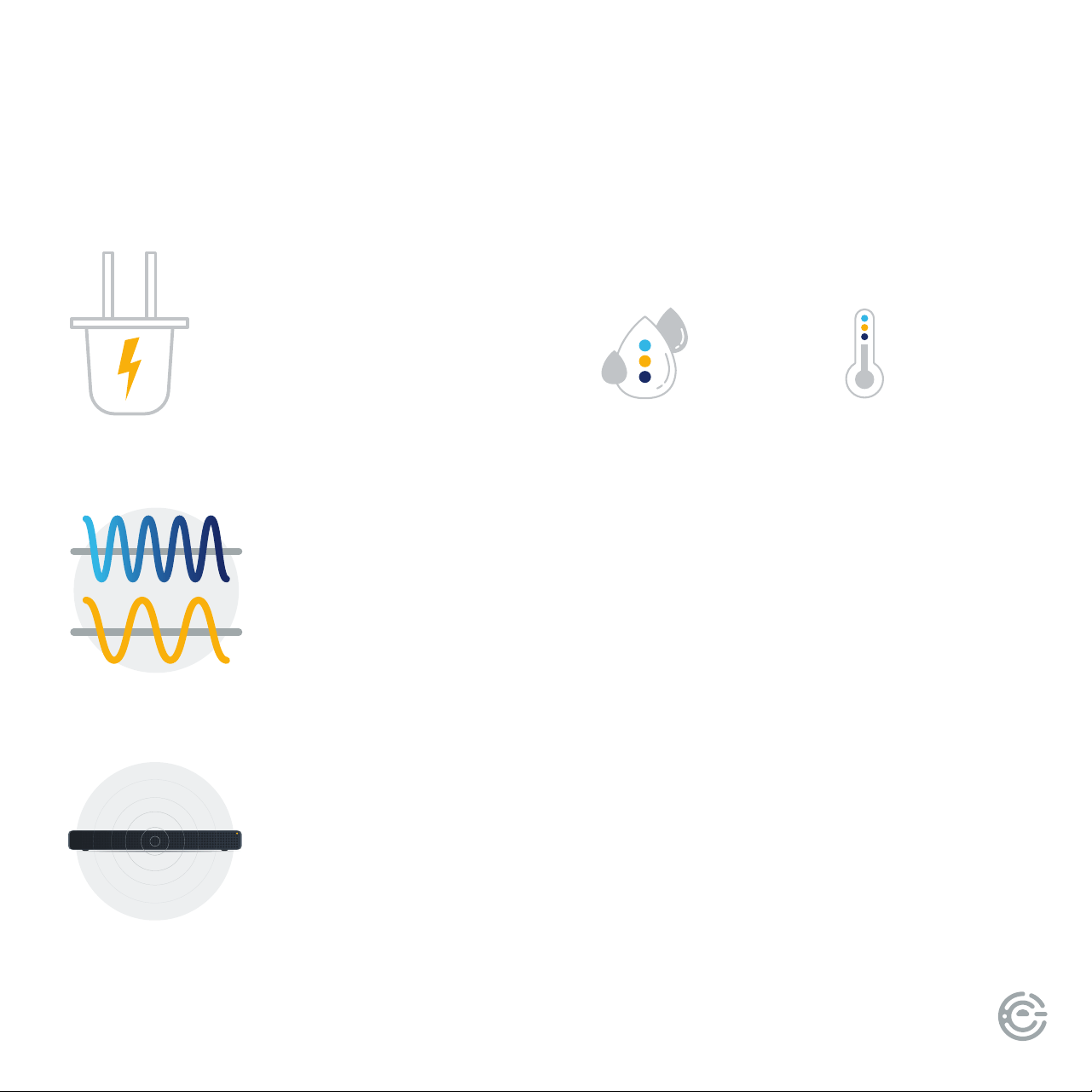
SOUND BAR
POWER
SUPPLY
AC ~100-240V, 50/60Hz
RELATIVE
HUMIDITY
5% ~ 90%
FREQUENCY
RESPONSE
60Hz~20kHz
TEMPERATURE
-4°F - 104°F
MAX POWER
OUTPUT
25W X 2
WORKING ENVIRONMENT

USER MANUAL14
REFERENCES
Element TV Company, LP. bears no responsibility for data and/or
information that is compromised during a wireless transmission.
Frequency band
• is system uses the 2.4 GHz frequency band.
Certication
• is system conforms to the frequency restrictions and has received certication based on frequency laws.
us, a wireless permit is not Necessary.
• e actions below are punishable by law in some countries:
- Taking apart or modifying the unit.
- Removing specication indications.
Restrictions of use
• Wireless transmission and/or usage with all Bluetooth equipped devices is not guaranteed.
• All devices must conform to standards set by the Bluetooth SIG, Inc.
• Depending on the specications and settings of a device, it can fail to connect or some operations can be dierent.
• is system supports Bluetooth security features. But depending on the operating environment and/or settings,
this security is possibly not sucient. Transmit data wirelessly to this system with caution.
• is system cannot transmit data to a Bluetooth device.
Range of use
• Use this device at a maximum range of 10 m.
• e range can decrease depending on the environment, obstacles or interference.
Interference from other devices
• is system may not function properly and troubles such as noise and sound jumps may arise due to radio wave interference if this
unit is located too close to other Bluetooth devices or the devices that use the 2.4 GHz band.
• is system may not function properly if radio waves from a nearby broadcasting station, etc. is too strong.
Intended usage
• is system is for normal, general use only.
• Do not use this system near equipment or in an environment that is sensitive to radio frequency interference
(example: airports, hospitals, laboratories, etc.).

FOR SUPPORT, VISIT ELEMENTELECTRONICS.COM/SUPPORT 15
LICENSE
FCC STATEMENT
1. is device complies with Part 15 of the FCC Rules. Operation is subject to the following two conditions:
(1) is device may not cause harmful interference, and
(2) is device must accept any interference received, including interference that may cause undesired operation.
2. Changes or modications not expressly approved by the party responsible for compliance could void the user’s
authority to operate the equipment.
NOTE: is equipment has been tested and found to comply with the limits for a Class B digital device, pursuant to Part 15 of
the FCC Rules. ese limits are designed to provide reasonable protection against harmful interference in a residential installation.
is equipment generates uses and can radiate radio frequency energy and, if not installed and used in accordance with the
instructions, may cause harmful interference to radio communications. However, there is no guarantee that interference will not
occur in a particular installation. If this equipment does cause harmful interference to radio or television reception, which can be
determined by turning the equipment o and on, the user is encouraged to try to correct the interference by one or more of the
following measures:
• Reorient or relocate the receiving antenna.
• Increase the separation between the equipment and receiver.
• Connect the equipment into an outlet on a circuit dierent from that to which the receiver is connected.
• Consult the dealer or an experienced radio/TV technician for help.
RADIATION EXPOSURE STATEMENT
is equipment complies with FCC/IC radiation exposure limits set forth for an uncontrolled environment.
is equipment should be installed and operated with minimum distance 20cm between the radiator & your body.

USER MANUAL16
LET’S REGISTER
YOUR PRODUCT
It’s super easy, just head on over to
elementelectronics.com/register
www
BENEFITS OF REGISTERING YOUR PRODUCT:
Support
Get assistance
quickly by
pre-registering
your product.
News & Oers
Take advantage
of the latest news
and special oers
from Element.
Updates
Stay current
with important
product updates
and notications.
2-YEAR
LIMITED WARRANTY*
Warranty
Receive a
2-year limited
warranty with
product registration.*
*1-year manufacturer’s limited warranty with purchase, or 2-year limited warranty with product registration within 90 days of purchase. See warranty card for details.
FOR SUPPORT, VISIT ELEMENTELECTRONICS.COM/SUPPORT 17
WE’RE HERE
TO HELP
elementelectronics.com
1.888.842.3577
customerservice@elementelectronics.com
Find resources and get help for product setup, connecting devices,
technical issues, downloading manuals and more!
We’re available 24 hours a day, 7 days a week
Element oers environmentally responsible options to recycle your unwanted consumer electronics
device. More information can be found by visiting: www.elementelectronics.com/sustainability

Element, the Element Logo, and Bring it home are trademarks of Element Brand Holding, LLC. All other trademarks are the property of the respective
owner who has not sponsored, endorsed, or approved this product. ©2024, Element Brand Holding, LLC, All Rights Reserved.
Bring it home.
®
