For more details, please
visit
www.iliferobot.com
User Manual
Cordless Stick Vacuum Cleaner
English
Русский
H50


Thank you for choosing ILIFE H50 Cordless stick vacuum cleaner !
You’ve joined millions of people to get the cleaning done in high
efficiency.
This manual helps you to keep your vacuum cleaner performing at its
best. Please take a few moments to read through it.
You may also connect with us on Facebook and Instagram to enjoy
exclusive benefits:
- Get model-specific customer support, including Q&A, maintenance
tips, demo videos, live chat and more;
- Get the most recent product updates including new product
launches, exclusive discounts and special promotions.
You may find us on:
Facebook: https://www.facebook.com/pg/ILIFEsea
Instagram: https://www.instagram.com/ilife_sea
If you have any questions, please contact our customer service for
assistance or visit www.iliferobot.com for more information.
Enjoy automated home cleaning performed by ILIFE H50.
ILIFE Innovation
ILIFE Customer Service
Email: suppor[email protected]

1. Important SafetyInstructions .........................................................1
2. Important Tips .............................................................................................5
2.1 Charge the Battery ........................................................................................5
2.2 Assembly and Storage .................................................................................6
3. Product Parts List .....................................................................................7
4. Product Parts Schematic ....................................................................8
5. Product Parameters ...............................................................................11
6. Product Introduction ............................................................................12
6.1 Aluminum-alloy Tube Installation ..........................................................12
6.2 Motorized Floor Head Installation ...........................................................12
6.3 2 in 1 Suction Nozzle Installation ..........................................................13
6.4 Operating .......................................................................................................13
7. Maintenance ................................................................................................14
7.1 Product Maintenance .................................................................................14
7.2 Signal Hints ...................................................................................................16
8. Trouble & Resolution ............................................................................17
9. Problem Self-checking Q&A ...........................................................18
10. Disposal Information .........................................................................20
Contents

For more details, please visit www.iliferobot.com 1
When using electrical appliances, basic safety precautions should always
be followed.
SAFETY INSTRUCTIONS
ImportantSafetyInstructions
This appliance can be used by children aged from 8 year and above and
persons with reduced physical, sensory or mental capabilities or lack of
experience and knowledge if they have been given supervision or instruction
concerning use of the appliance in a safe way and understand the hazards
involved.
This appliance is not a toy.
Children shall not play with the appliance, cleaning and user maintenance
shall not be made by children without supervision.
Unless they are older than 8 and under supervision, children should not use
or maintain the appliance.
Keep the appliance out of the reach of children when it is switched on or
cooling down.
Make sure that the input voltage of the vacuum cleaner’s adapter fits your
local voltage before connecting the appliance to the power for charging.
Dry your hands before operating the appliance.
Do not pull the cord to remove the adapter from the mains power supply,
unplug the appliance by hand.
Do not use the adapter to recharge non-rechargeable batteries.
Do not use any damaged accessories or adapters.
Do not use the appliance if it has been dropped or if there are visible signs
of damage.
Do not use the appliance for anything other than its intended use.
Do not use any parts/accessories or adapters other than those supplied
with this appliance, as this may cause damage.
Do not use this appliance outdoors.
Do not use this appliance if any of the openings are blocked.

Caution: The extension tube contains electrical connections.
Do not use to suck up water. Do not immerse in water for cleaning.
The extension tube should be checked regularly and must not be used
if damaged.
For more details, please visit www.iliferobot.com2
Do not use the appliance to pick up flammable liquid, matches, cigarette
ends, hot ashes or any hot, burning or smoking objects.
The hose should be checked regularly and must not be used if damaged.
Take care when equipping accessories with rotating parts as this could
cause entrapment.
Switch off the appliance and disconnect it from the mains power supply
before changing or fitting accessories.
Always ensure that the appliance has fully cooled before maintaining the
appliance or cleaning.
The use of an extension cord with the appliance is not recommended.
Only use the appliance with the power supply unit provided.
Do not operate this appliance by an external timer or separate remote
control system.
This appliance is intended for domestic use only. It should not be used for
commercial purposes.
Improper repairs may place the user at risk of harm.
This appliance contains no user-serviceable parts. If the power supply cord,
plug or any part of the appliance is malfunctioning or if it has been dropped
or damaged, only a qualified electrician should carry out repairs.
Keep the appliance away from heat or sharp edges that could cause
damage.
Keep the appliance away from other heat-emitting appliances.
Keep the appliance free from dust, lint, hair or anything that may reduce the
airflow of the appliance.
Do not immerse the appliance in water or any other liquid.
Do not expose the appliance to rain.
Do not store the appliance in direct sunlight or in high humidity conditions.
ImportantSafetyInstructions

For more details, please visit www.iliferobot.com 3
BATTERY SAFETY
ImportantSafetyInstructions
If the battery pack becomes exhausted quickly after fully charged, it should
be removed from the product to avoid leakage.
In the event of the battery pack leaking, do not allow any liquid to come into
contact with the skin or eyes.
If the contact has been made, wash the affected area with copious amounts
of water and seek medical advice.
Keep the battery pack out of the reach of children.
Do not leave battery packs on charge for prolonged periods of time.
Do not use any charger other than that specifically provided for use with
the product.
The supply terminals are not to be short-circuited.
Do not store above 60
o
C, avoid storing in direct sunlight.
Do not use any battery packs that are not designed for this product.
Do not dispose of the battery pack in a fire.
Do not crush, puncture, dismantle or otherwise damage the battery pack.
Do not dismantle, open or shred battery packs.
Do not expose the battery pack to heat or fire as it may explode.
Do not subject the battery pack to mechanical shock.
Do not dispose of the exhausted battery pack in household waste.
The plug must be removed from the socket-outlet before cleaning or
maintaining the appliance.
-the battery must be removed from the appliance before it is scrapped.
-the appliance must be disconnected from the supply mains when removing
the battery.
-the battery is no be disposed of safely.
To dispose of the exhausted battery pack, take it to a local recycling station,
contact the local government offices for further details, this appliance is
fitted with a 22.2V 2200mAh Li-ion rechargeable battery.

For more details, please visit www.iliferobot.com4
WARNING
ImportantSafetyInstructions
1. Prevent unintentional starting. Ensure the switch is in the off position before
connecting to the battery pack, picking up or carrying the appliance.
Carrying the appliance with your finger on the switch or energizing
appliance that have the switch on invites accidents.
2. Disconnect the battery pack from the appliance before making any
adjustments, changing accessories or storing the appliance. Such preventive
safety measures reduce the risk of starting the appliance accidentally.
3. Recharge only with the charger specified by the manufacturer. Chargers
that are suitable for other battery packs may cause risk when charging
this appliance.
4. Use the appliances only with specifically designated battery packs. The use
of any other battery packs may create a risk of injury and fire.
5. When the battery pack is not in use, keep it away from other metal objects,
like paper clips, coins, keys, nails, screws or other small metal objects, that
can make a connection from one terminal to another. Shorting the battery
terminals together may cause burns or a fire.
6. Under abusive conditions liquid may be ejected from the battery, avoid
contact. If contact accidentally occurs, flush with water. If liquid contacts
eyes, additionally seek medical help. Liquid ejected from the battery may
cause irritation or burns.
7. Do not use a battery pack or appliance that is damaged or modified.
Damaged or modified batteries may exhibit unpredictable behavior
resulting in fire, explosion or risk of injury.
8. Do not expose a battery pack or appliance to fire or excessive temperature.
Exposure to fire or temperature above 130
o
C (265
o
F) may cause an
explosion.
10. Have servicing performed by a qualified repair person using only identical
replacement parts. This will ensure that the safety of the product is
maintained.
11. Do not modify or attempt to repair the appliance or the battery pack
(as applicable) except as indicated in the instructions for use and care.
9. Follow all charging instructions and do not charge the battery pack or
appliance outside of the temperature range specified in the instructions.
Charging improperly or at temperatures outside of the specified range may
damage the battery and increase the risk of fire.
Read all safety warnings and instructions. Failure to follow the warnings
and instructions may result in electric shock, fire and/or serious injury.
Important Tips
Charge the Battery
For more details, please visit www.iliferobot.com 5
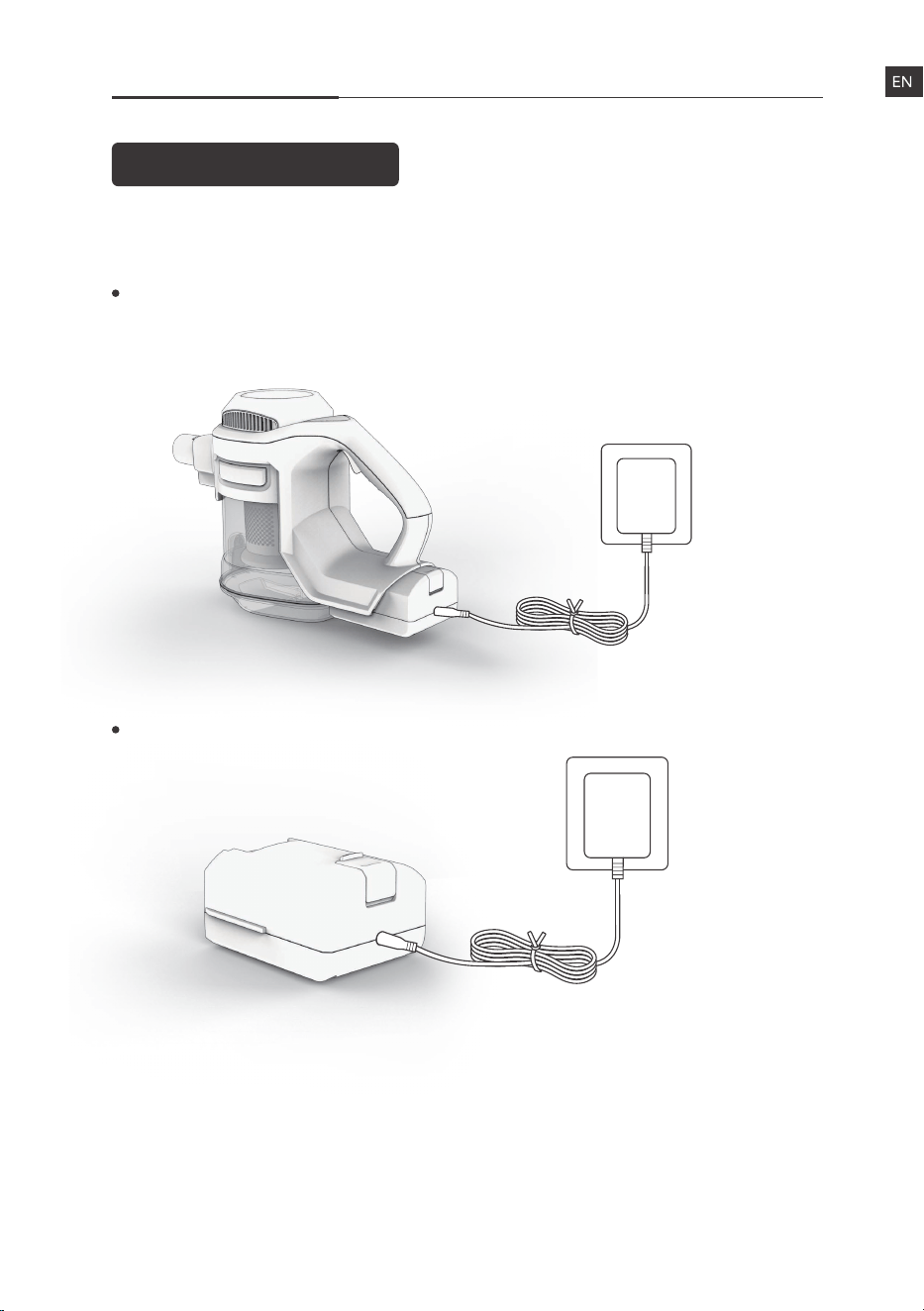
Charge the battery directly.
Charge the battery after putting it to the appliance.
(We recommend this charging way since the LED Indicator on the
appliance show charging status.)
2 ways to charge the battery
Assembly and Storage
Important Tips
For more details, please visit www.iliferobot.com6
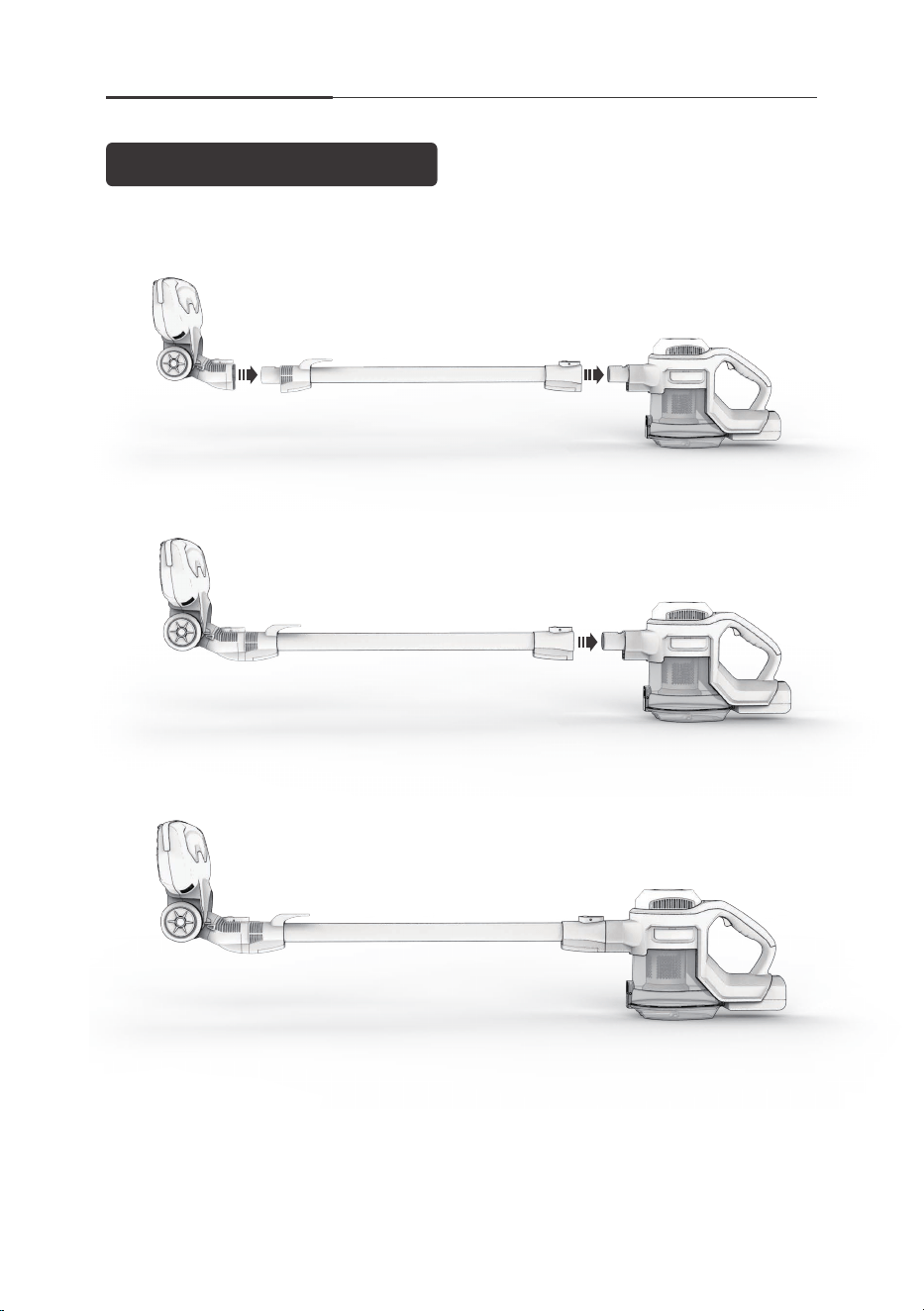
3 steps to assemble the stick vacuum cleaner:
1. Connect the motorized floor head to the end of aluminum alloy tube.
2. Connect the main body to the top of aluminum alloy tube.
3. Make sure there is no looseness at the connections and finish assembling.
Product Parts List
For more details, please visit www.iliferobot.com 7
What’s in the box?
Please check off all the accessories are in the package box.
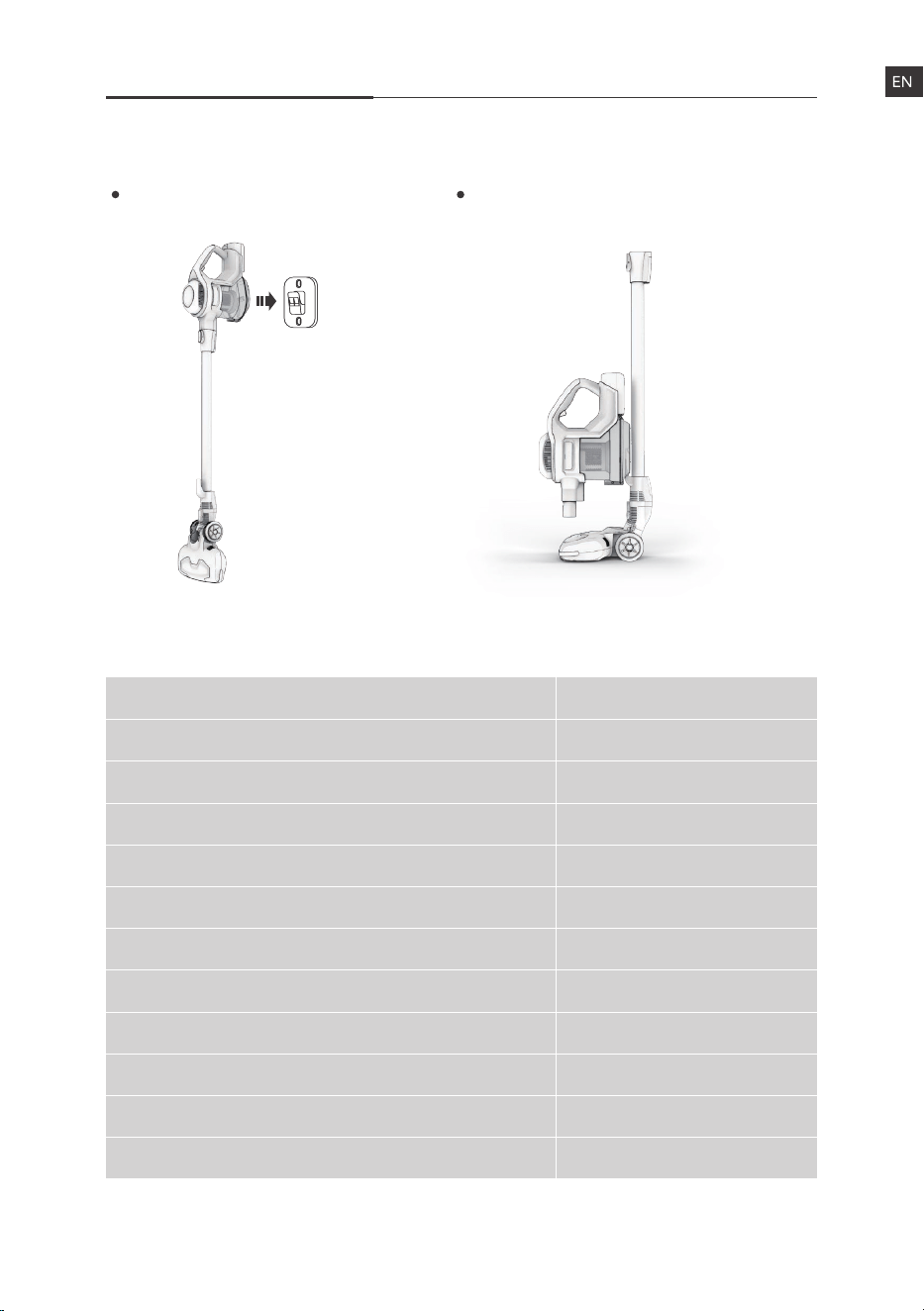
2 Ways to Store
Name
Main Body
Aluminum Alloy Tube
Motorized Floor Head
Power Adapter
Warranty Card
User Manual
Cleaning Brush
Wall Mounting Bracket
2 in 1 Suction Nozzle
Spare Filter
Spare Bristle Roller Brush
Quantity
1
1
1
1
1
1
1
1
1
1
1
Hang on the wall mounting
bracket.
Attach the main body to the stick to
stand on the floor.
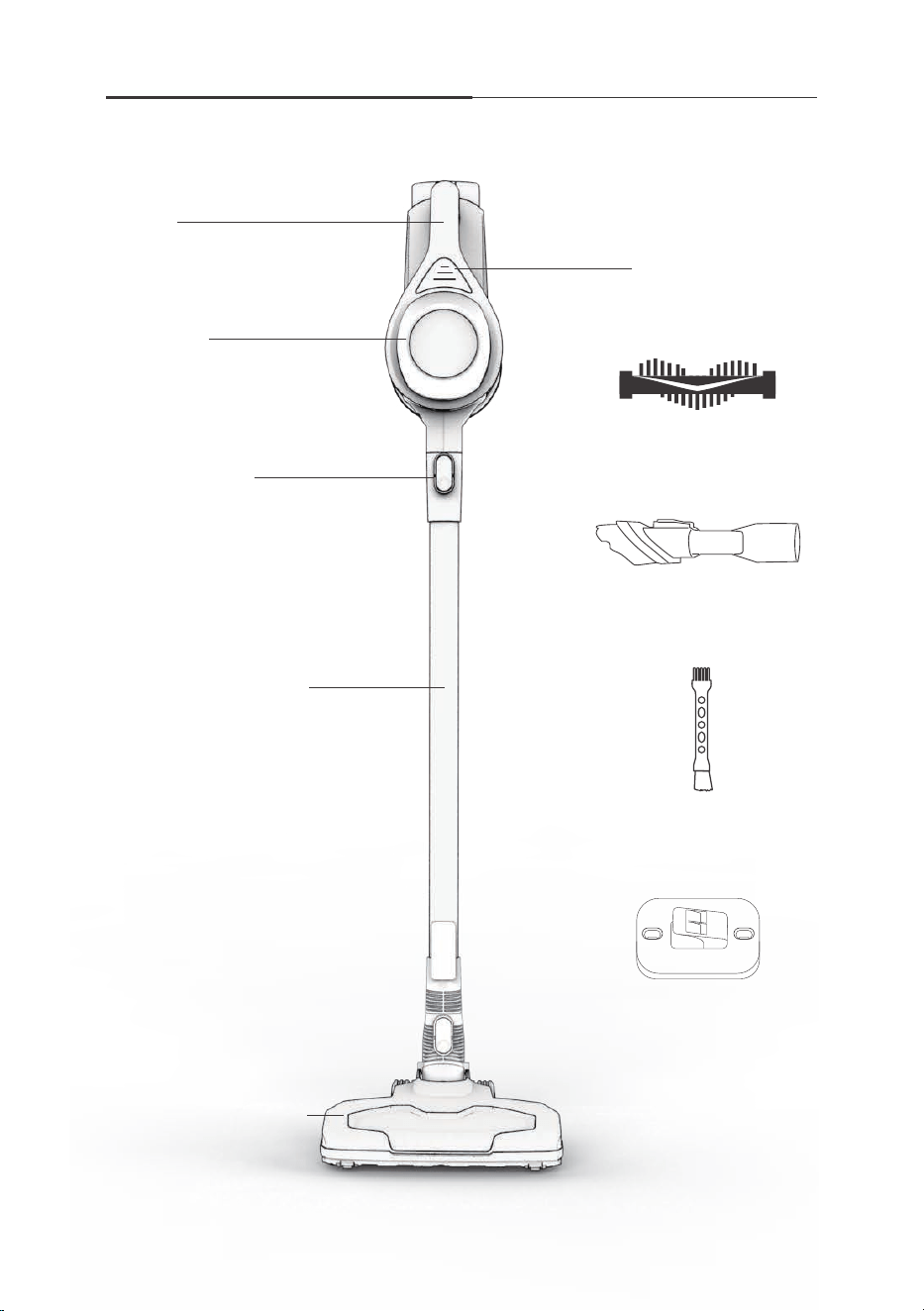
Product Parts Schematic
For more details, please visit www.iliferobot.com8
Handle
Main Body
Release Button
Aluminum Alloy Tube
Motorized Floor Head
Battery Indicator
2 in 1 Suction Nozzle
Wall Mounting Bracket
Cleaning Brush
Spare Bristle Roller Brush
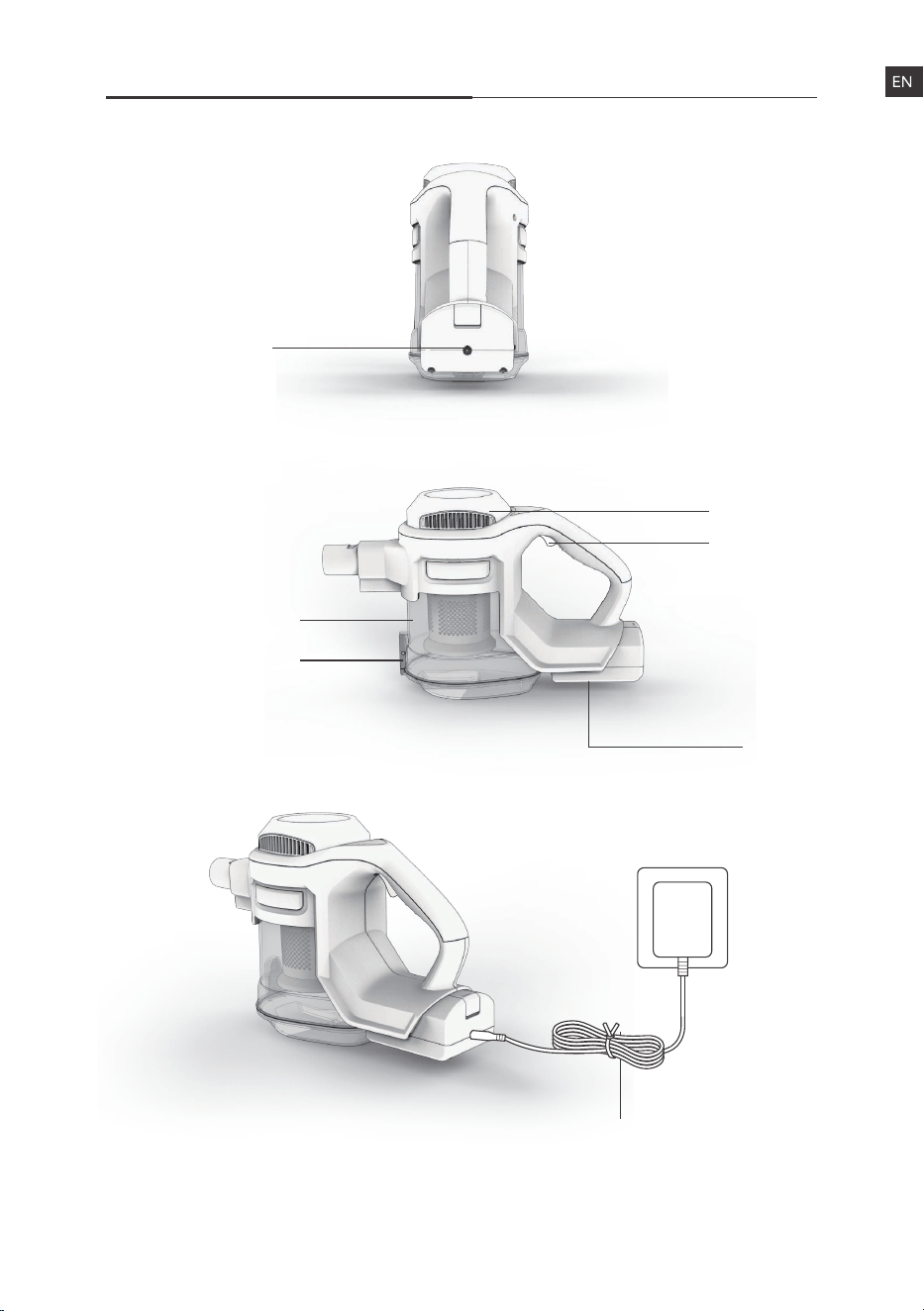
Product Parts Schematic
For more details, please visit www.iliferobot.com 9
Switch
Charging Jack
Dustcup
Air Vent
Battery
Power Adapter
Dustcup Lid
Release Button
For more details, please visit www.iliferobot.com10
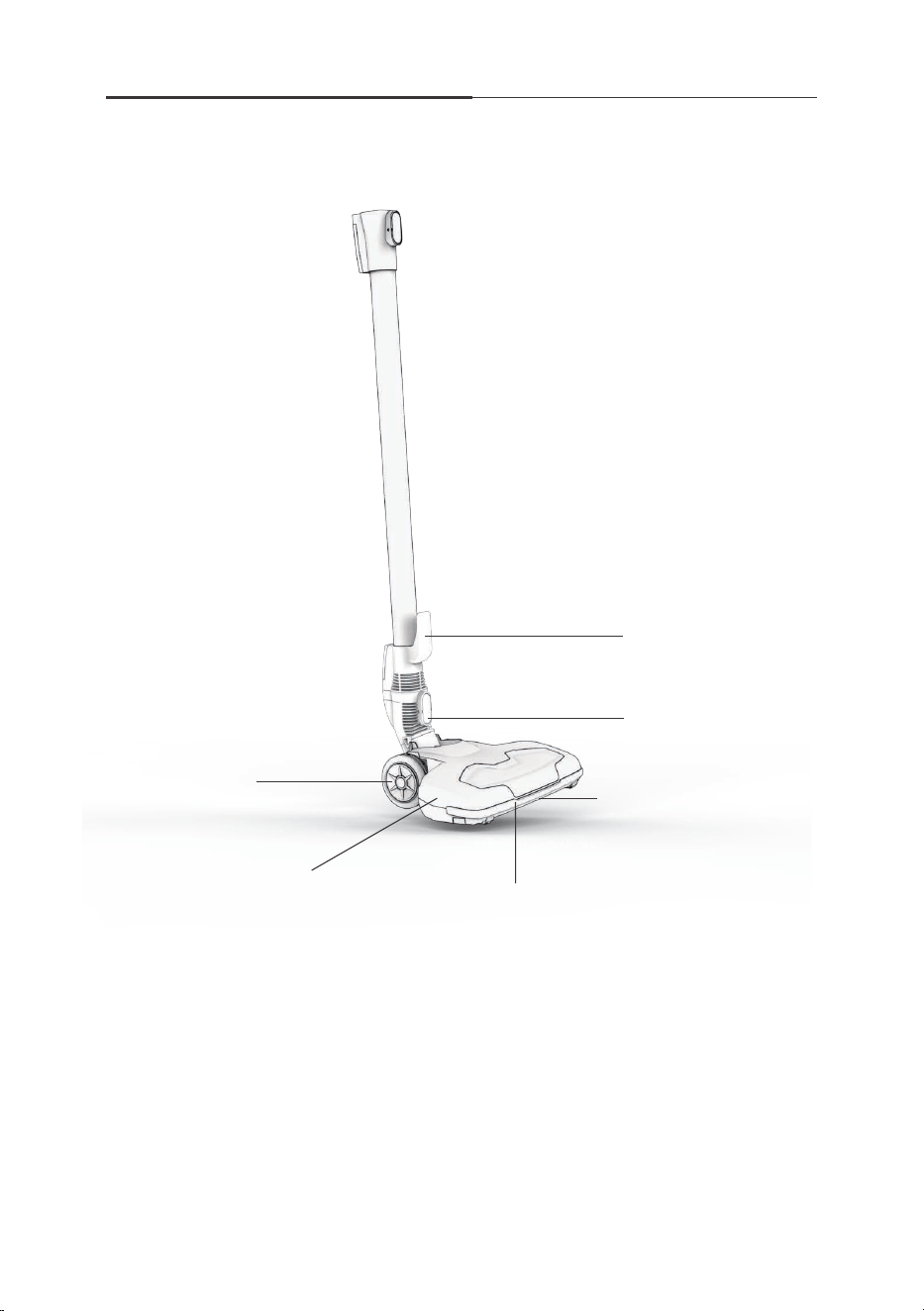
Product Parts Schematic
Hook for Main Body
Release Button
Detachable Fluff Brush
Built-in LED
Motorized Floor Head
Rotating Wheel
For more details, please visit www.iliferobot.com 11
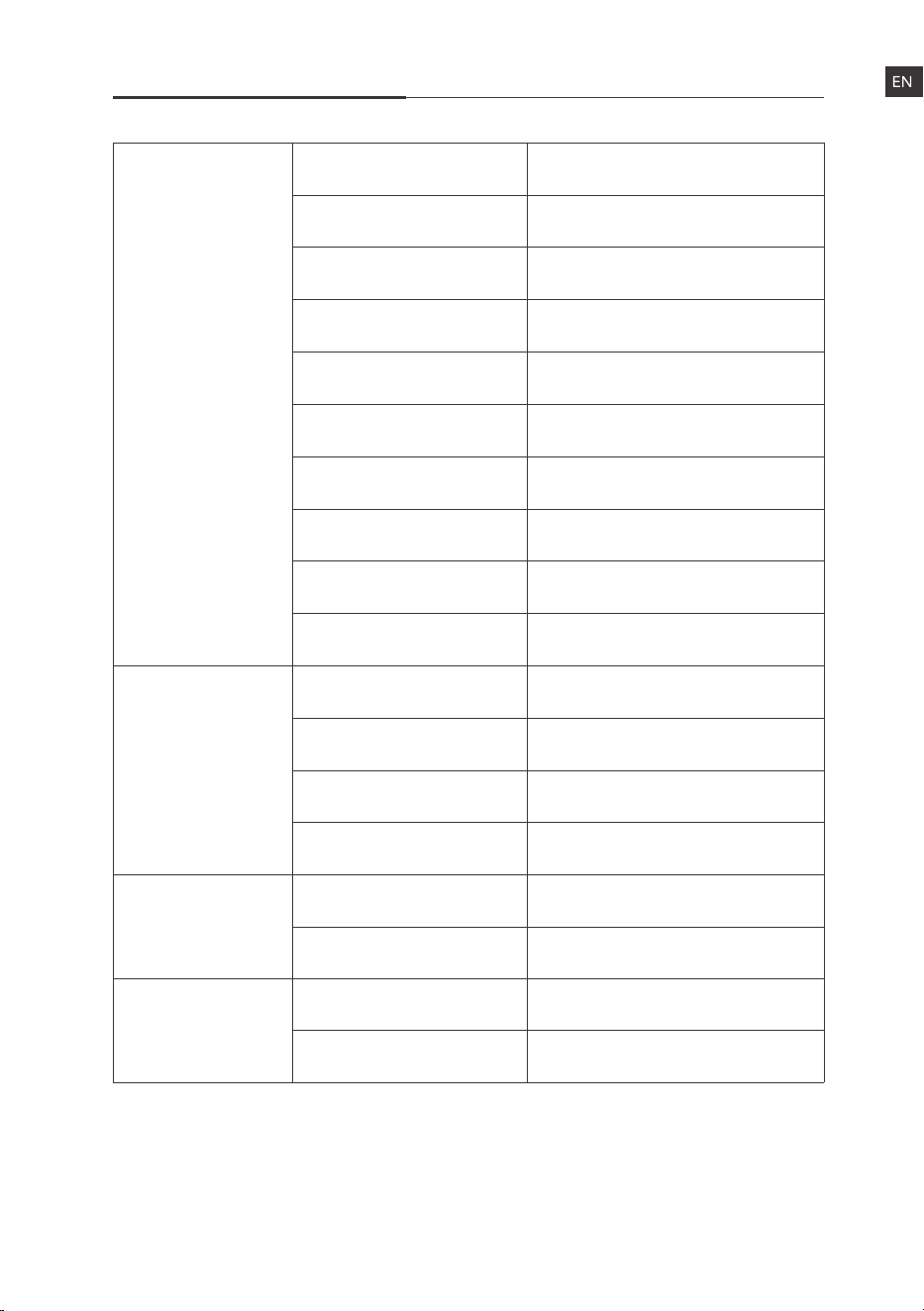
Product Parameters
Color
Dimension
Net weight
Gross weight
Rated voltage
Rated power
Dust cup capacity
Vacuum
Usage time
Noise
Battery capacity
Charging time
Battery voltage
Battery pack type
Power adapter input
Power adapter output
Rated voltage
Rated power
Gray
125*25*23.5 cm
2.4 kg
4.3 kg
22.2V
130W
1.2L
Min ~ 7Kpa Max ~ 10Kpa
20min ~ 40min
≤78dB. @1.5m
2200mAh
≤5Hrs
22.2V
26V DC 400mA
22.2V
15W
Vacuum cleaner
Battery
Adapter
Floor head
100-240V AC ~ 50/60Hz
600mA Max.
XL-618A/2.2(61CR18/65),
XL-618A/2.2
12
Product Introduction
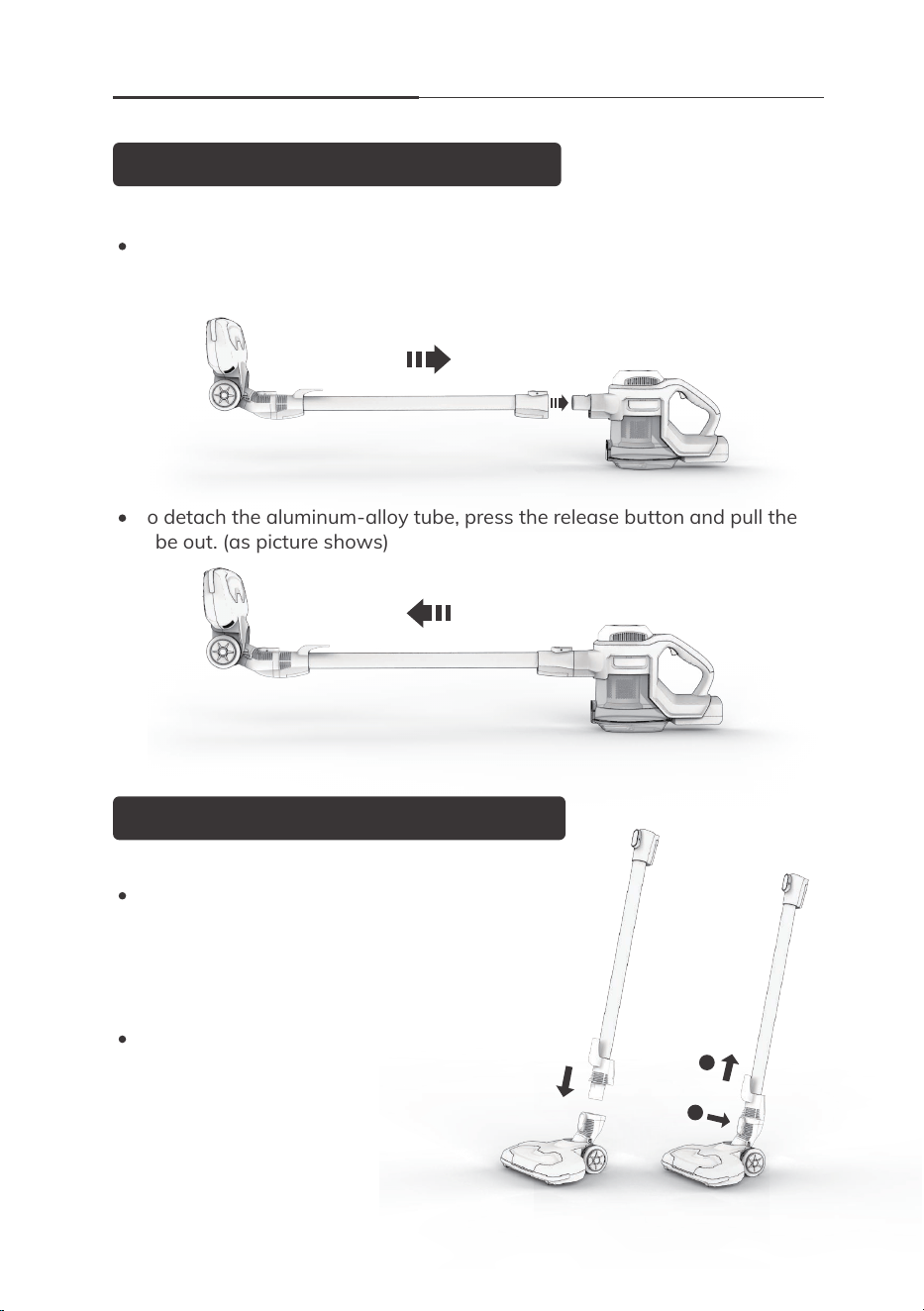
Aluminum-alloy Tube Installation
Motorized Floor Head Installation
Push the aluminum-alloy tube end into the suction port of the main body in
the horizontal direction. Make sure there is no looseness. The hearing of
“click” indicates a successful installation. (as picture shows)
To detach the aluminum-alloy tube, press the release button and pull the
tube out. (as picture shows)
1
2
For more details, please visit www.iliferobot.com
Push the motorized floor head into the snap-fit
joint of the aluminum-alloy tube. The sound of
“click” means right and successful installation.
(as picture 1 shows)
To detach the motorized floor head,
press the release button and pull the
tube out. (as picture 2 shows)
1 2
For more details, please visit www.iliferobot.com 13
Product Introduction
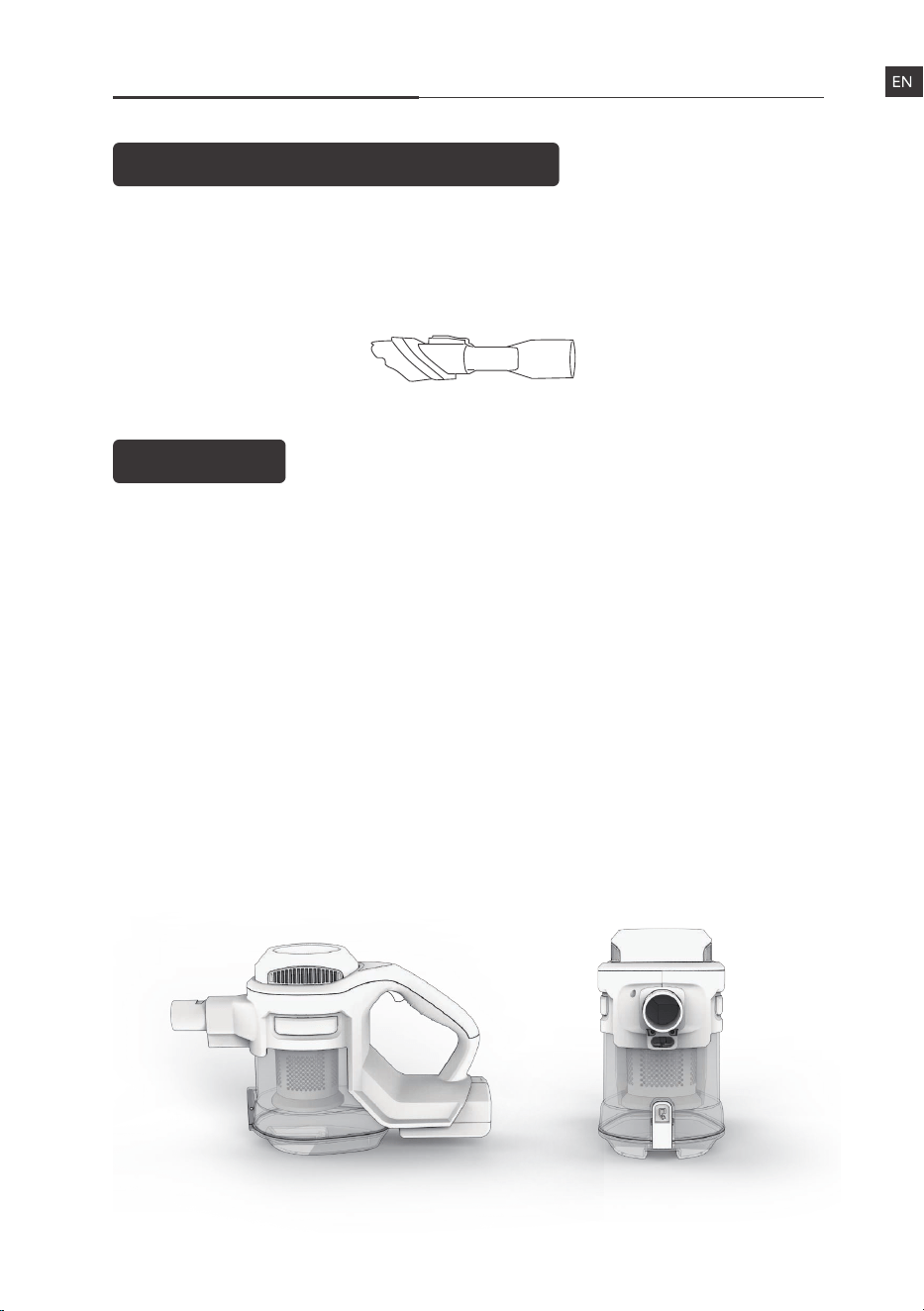
2 in 1 Suction Nozzle Installation
Operating
Step 1. Preparation
Please make sure the battery power is sufficient before using it.
It’s recommended to change for 6 hours before its first use.
Step 2. Operate
Choose the right accessory for a specific task. Adjustable two modes meet
different needs. Press the on/off switch to make the vacuum cleaner work
in normal mode. Press again to reach the max mode. The third press to
shut off the appliance.
Step 3. Empty the Dustcup and Clean the Filter Cover
It’s recommended to empty the dustcup after every use. The filter cover
inside is washable and recyclable. Just wash the filter cover under the
faucet and set it back when it’s air-dried.
Attach this tool to the end of aluminum-alloy tube or main body of vacuum
cleaner directly, so you can handle most of the cleaning tasks in house and
cars.

For more details, please visit www.iliferobot.com14
Maintenance
1
Main Body Maintenance (Handheld Part)
2
3
Dustcup Cleaning
Regular cleaning helps to ensure product performance. The sign reminds
emptying the dustcup. Please empty the dustcup promptly once the dust
approaches or arrives . Just press the button to open the bottom
cover of the dustcup.
Filter Cleaning
Regular cleaning helps to ensure product performance. Just take out the
filter cover from the dustcup and wash under the faucet. Please put it back
when it’s air-dried.
Product Maintenance
It’s suggested to do some maintenance to max its performance as well as
prolong its service life.
Please stop the appliance before cleaning it.
Scrub the appliance with water or neutral detergent. Make sure the cloth
is wrung before the scrubbing and prevent the water from flowing into
the inner machine.
For more details, please visit www.iliferobot.com 15
Maintenance
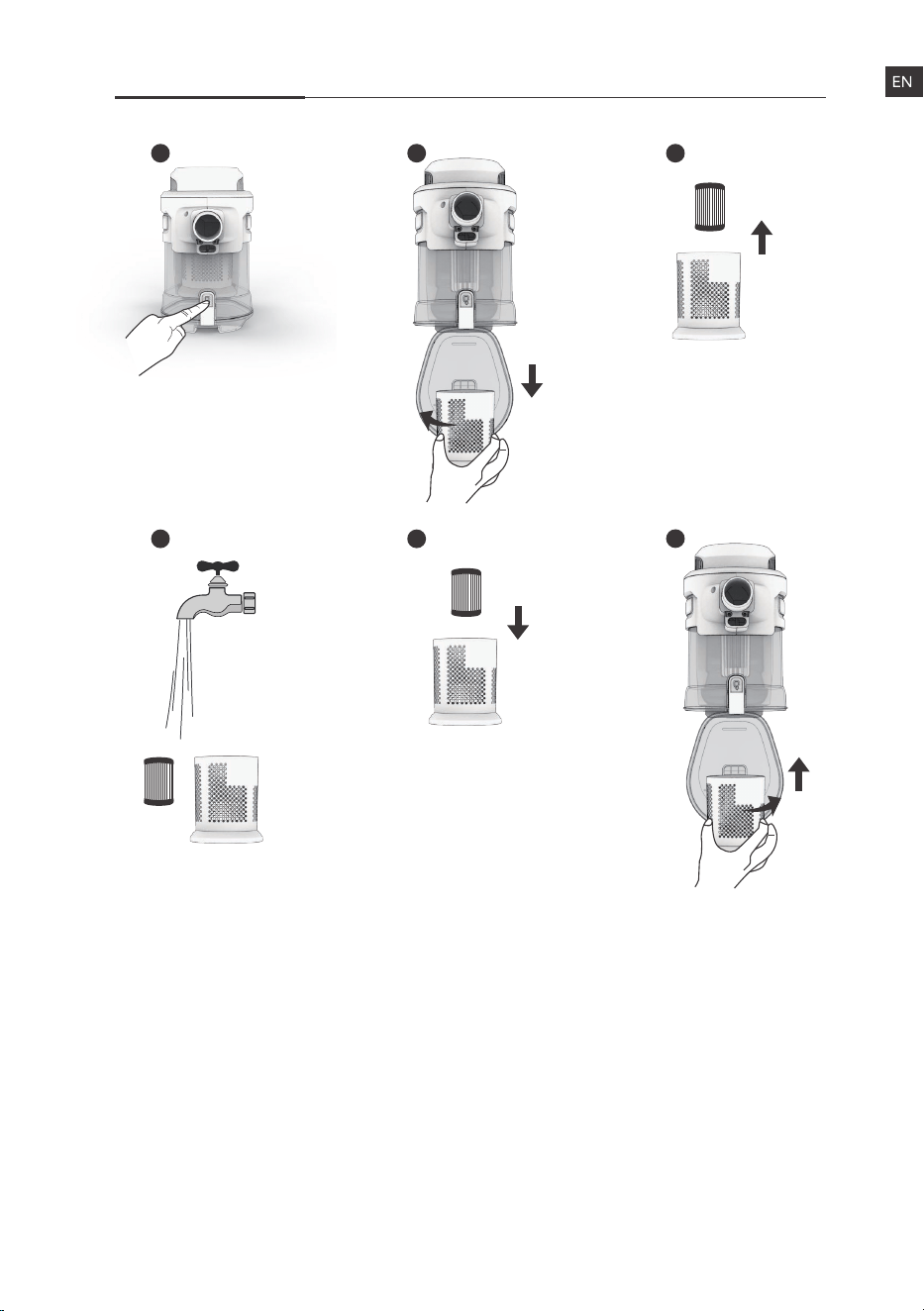
1 2 3
6
Tips: 6 steps to clean the filter kit
1. Press the release button to open the dustcup lid.
2. Rotate the filter cover anti-clockwise and take it out downwards, with the
filter element.
3. Take the filter element out of the filter cover.
4. Wash the filter cover and filter element under the faucet.
5. Place the filter element in the filter cover.
6. Align the notch at the bottom of the filter cover with the raised part in the
dust box, rotate the filter cover clockwise after being secured to fasten it on
the dust box. (Make sure the filter kit is air-dried before putting it back.)
54
For more details, please visit www.iliferobot.com16
Maintenance
5
Motorized Floor Head Cleaning
It is recommended to clean once after every 4 to 5 times the use of the
floor head.
Turn off the power switch.
Take off the Motorized Floor Head.
Take out the fluffy brush.
Signal Hints
The indicator shows the remaining battery once pressing the power-on
switch.
The indicator light flashes when the remaining power is lower than 5%.
Please charge it on time to avoid battery damage.
The indicator displays the power when the battery is charging after putting
in the appliance.
Do not operate the appliance when it’s charging.
Unplug the cover of the fluffy brush’s head, clean up the dirt and hair
on it.
Put the fluffy brush back into the floor head.
4
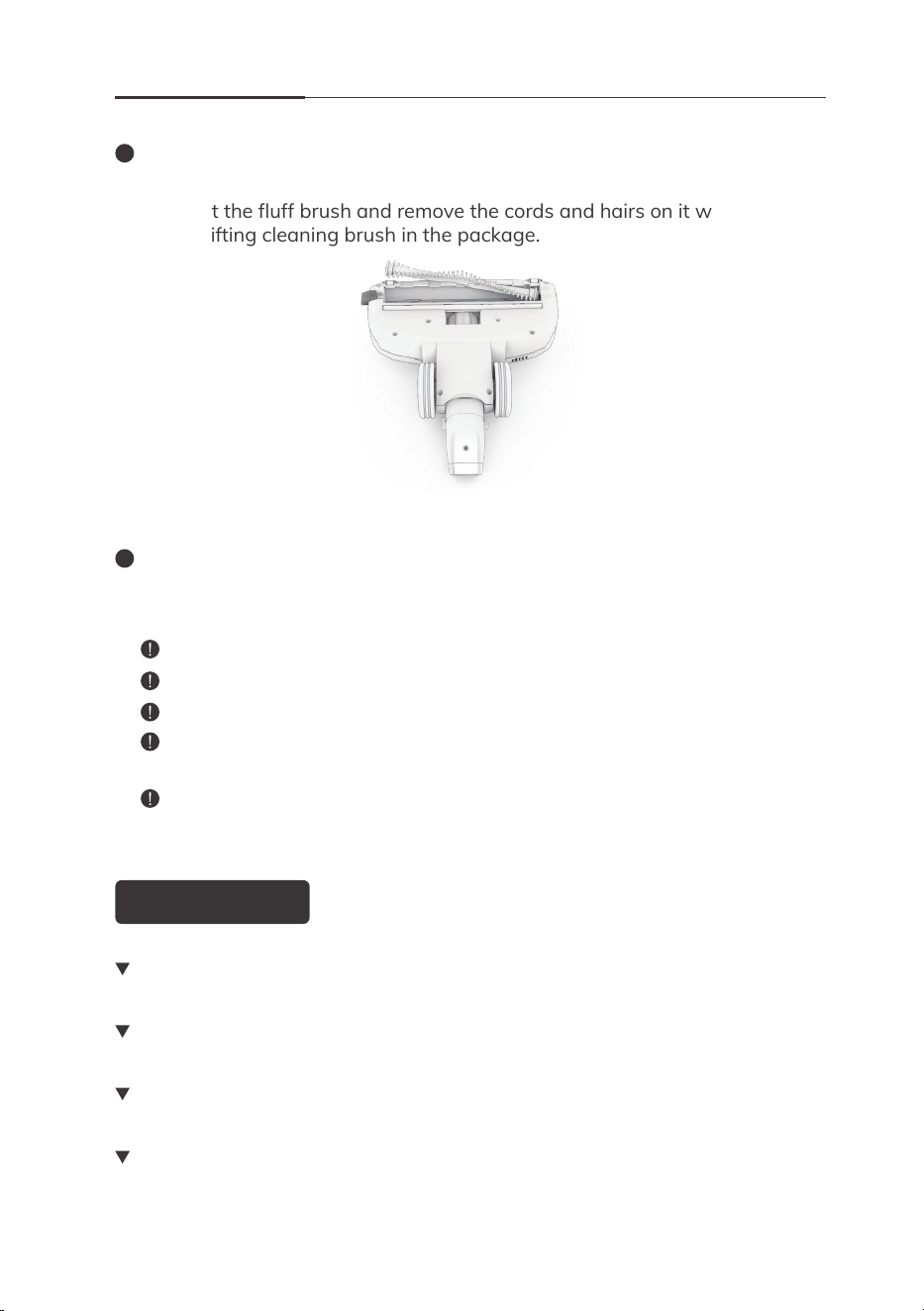
Detachable Fluff Brush Cleaning
Find the buckle on the left side of the floor head and open it up.
Take out the fluff brush and remove the cords and hairs on it with scissors
or the gifting cleaning brush in the package.

For more details, please visit www.iliferobot.com 17
Trouble & Resolution
Common Failure Analysis and Treatment
Vacuum cleanner
doesn’t work
1. Low battery
2. The main body's air
vent is blocked
1.Charge the battery
2.Clean up the suction inlet
Product suction
weakens
1. The dustcup and filter
components are dusty
2. The brush head was
blocked with hair
1. Clean up the dustcup and
filter components
2. Clean up the brush head
and other accessories
Motor has
strange sound
when working
Main suction mouth or
aluminum-alloy tube is
blocked.
1. Clean up the blockage
2. If it still doesn’t work,
please contact our
customer service team
Roller brush does
not rotate
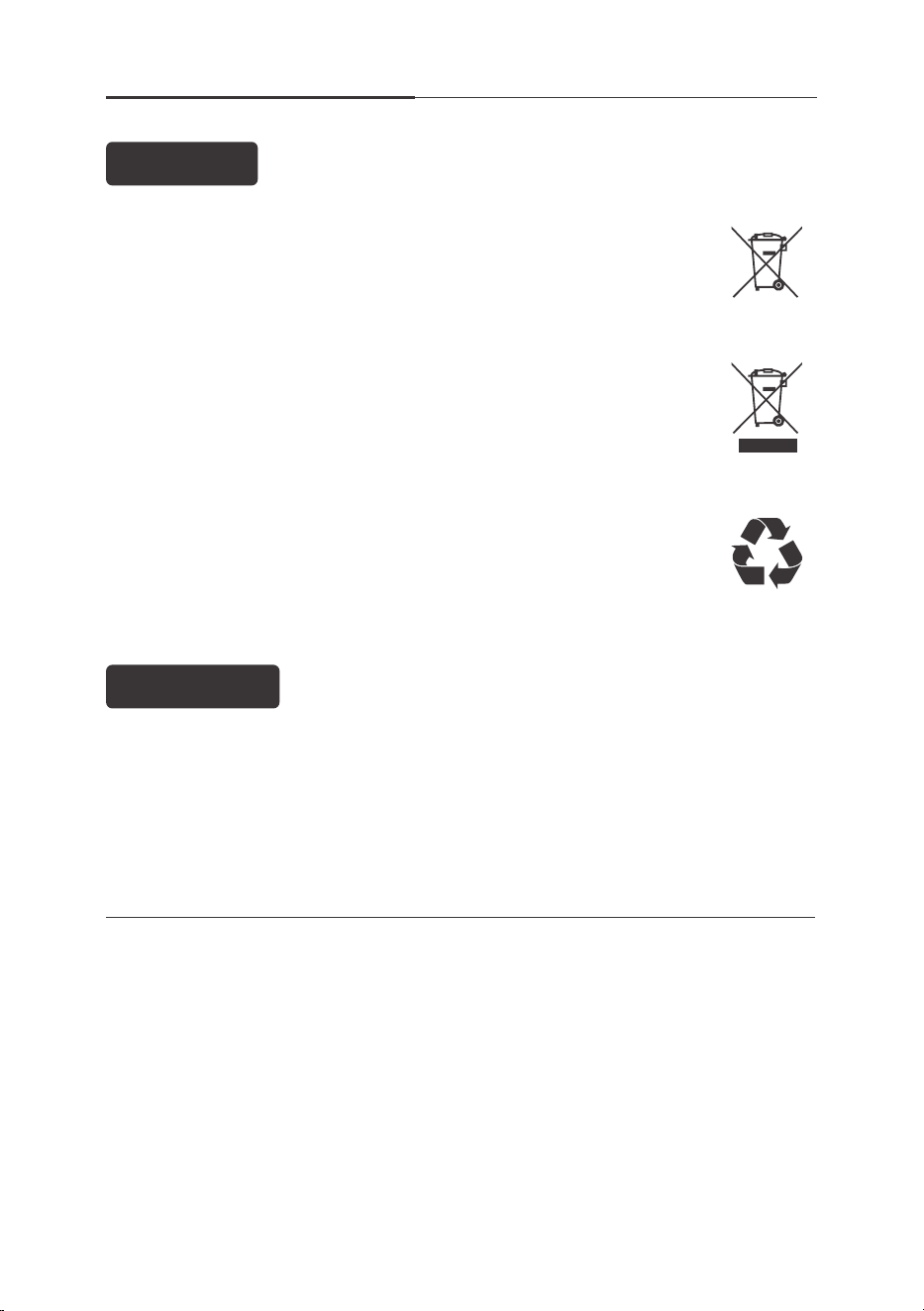
The crossed-out wheelie bin symbol on this item indicates that this appliance
needs to be disposed of in an environmentally friendly way when it becomes
of no further use or has worn out. Contact your local authority for details of
where to take the item for recycling.
The roller brush was
blocked with hair.
Clean up all hair on the
brush and unplug the cover
of the brush to remove the
hair on the roller
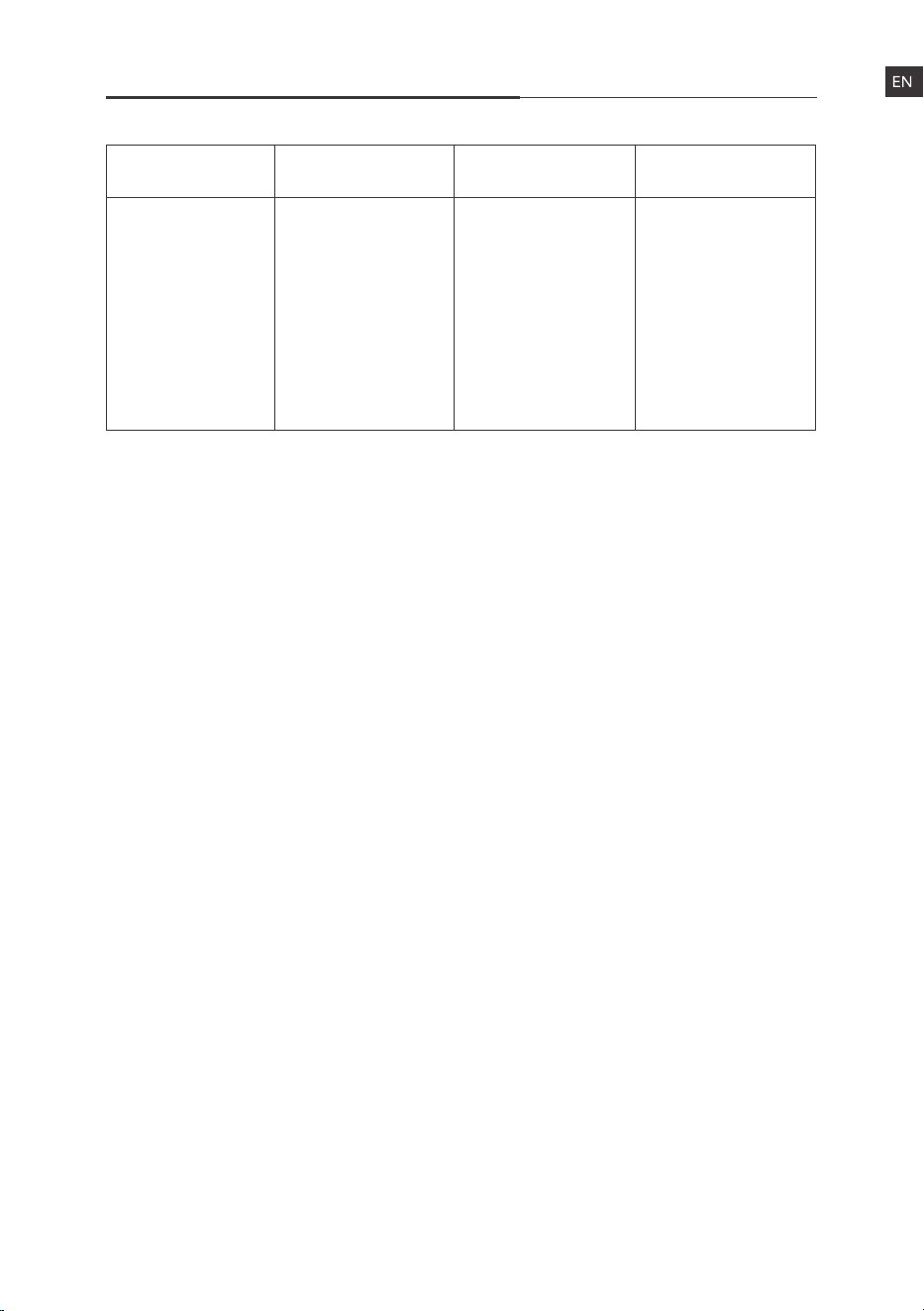
Symptom Possible Cause Solution

For more details, please visit www.iliferobot.com18
Problem Self-Checking Q&A
Weak Suction
“Check if the product
is assembled
correctly. (please
assemble the
product according
to the instructions)”
“Check for foreign
matter blockage?
(remove the foreign
body from the
aluminum-alloy tube
or floor head)”
“Is the filter kit too
dirty? (Take out the
filter kit and have a
check. Gently tap the
filter cover and filter
element to remove
dust and debris, and
wash it if it is still too
dirty for filtering.
Make sure the filter
kit is thoroughly
air-dried before
reassembling. It’s
recommended to
wash the filter kit at
least once per month
to keep good suction
and cleaning
performance.
Note: machine runs
with a wet filter kit
will damage the
product and reduce
suction)”
“Machine damaged.
(please contact
customer service
with video and text
description)”
“Carpet wool too
long? (when
cleaning carpets,
the long hairs tend
to stick on the
brush, causing
damage to the
brush.)”
“Can’t use it even
after fully charged?
(Check if the battery
is assembled
correctly. If you can’t
use it, please contact
customer service
with video and text
description)”
“Machine protection
triggered by
blocking (turn on
the machine again
after cleaning the
foreign matter
which blocks the
air inlet)
“Check for foreign
matter blockage
(remove hair,
foreign matter,
etc from both
sides of the brush)”
“No charger?
The adapter is out
of order. (please
contact customer
service with video
and text
description.)”
“Thermostat
protection triggered
by motor
overheating (cool
the appliance for
30 minutes and
then restart)”
“Check if the
product is
assembled
correctly. (please
assemble the
product according
to the requirements
of the manual)”
“Check if the product
is assembled
correctly. (Please
follow the
instructions to
install the battery
pack and the main
engine of the
machine. Ensure
that the battery pin
is fully integrated
with the motor.)”
Stop working
suddenly
Floor head
malfunction
Charging issues
For more details, please visit www.iliferobot.com 19
Weak Suction
“Is the battery
power enough?
(suction may be
influenced by the
insufficient battery
power, if the
suction decreased
obviously, please
recharge the
battery)
“Is the battery
power enough?
Please start it after
recharging.”
“The floor head turns
but the LED doesn’t
work? LED lights but
floor head don’t
work? (please
contact customer
service with video
and text
description)”
“Hot when charging
the battery?
(recharge it after
cooling. If there is no
improvement,
contact customer
service.)”
Stop working
suddenly
Floor head
malfunction
Charging issues
Problem Self-checking Q&A
For more details, please visit www.iliferobot.com20
Disposal Information
Distributor: Shen Zhen ZhiYi Technology Co., Ltd
3rd Floor, Bld B, Hytera Technology Park, No.3, 4th of Baolong Road, Longgang,
ShenZhen, China
When disposing of the packaging, make sure you comply with the environmental
regulations applicable in your country.
The battery used with this device must not be disposed of in
household waste.
The device and the battery must be disposed of properly.
The housing of the battery must never be opened, and must be
disposed of as a whole.
Disposal
Packaging
This recycling symbol marks e.g. an object or parts of the material as
valuable for recycling. Recycling helps to reduce the consumption of
raw materials and protect the environment.
This product is subject to the provisions of European Directive 2019/19/EC.
The symbol showing a wheelie bin crossed through indicates that the
product requires separate refuse collection in the European Union,
This applies to the product and all accessories marked with this symbol.
Products identified with this symbol may not be discarded with normal
household waste, but must be taken to a collection point for recycling
electric and electronic appliances.