Release Date
2022-12-13
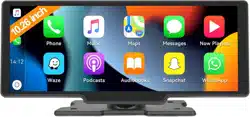
T86MP5 10.26 Inch Smart Screen Player
Document version
20221207
T86MP5 10.26 Inch Smart Screen Player
User Manual
Release Date
2022-12-13
T86MP5 10.26 Inch Smart Screen Player
Document version
20221207
············································································································ 3
································································································ 4
········································································································ 5
········································································································· 6
·········································································································7
···································································································· 8
A. Apple Carplay ·············································································································· 9
B. Android Auto ············································································································· 11
C. Bluetooth Music ········································································································· 12
D. Bluetooth ···················································································································13
E. Media Player ·············································································································· 14
F. FM Transmitter ············································································································15
G. Setting ······················································································································ 16
············································································································ 19
·······································································································22
Release Date
2022-12-13
T86MP5 10.26 Inch Smart Screen Player
Document version
20221207
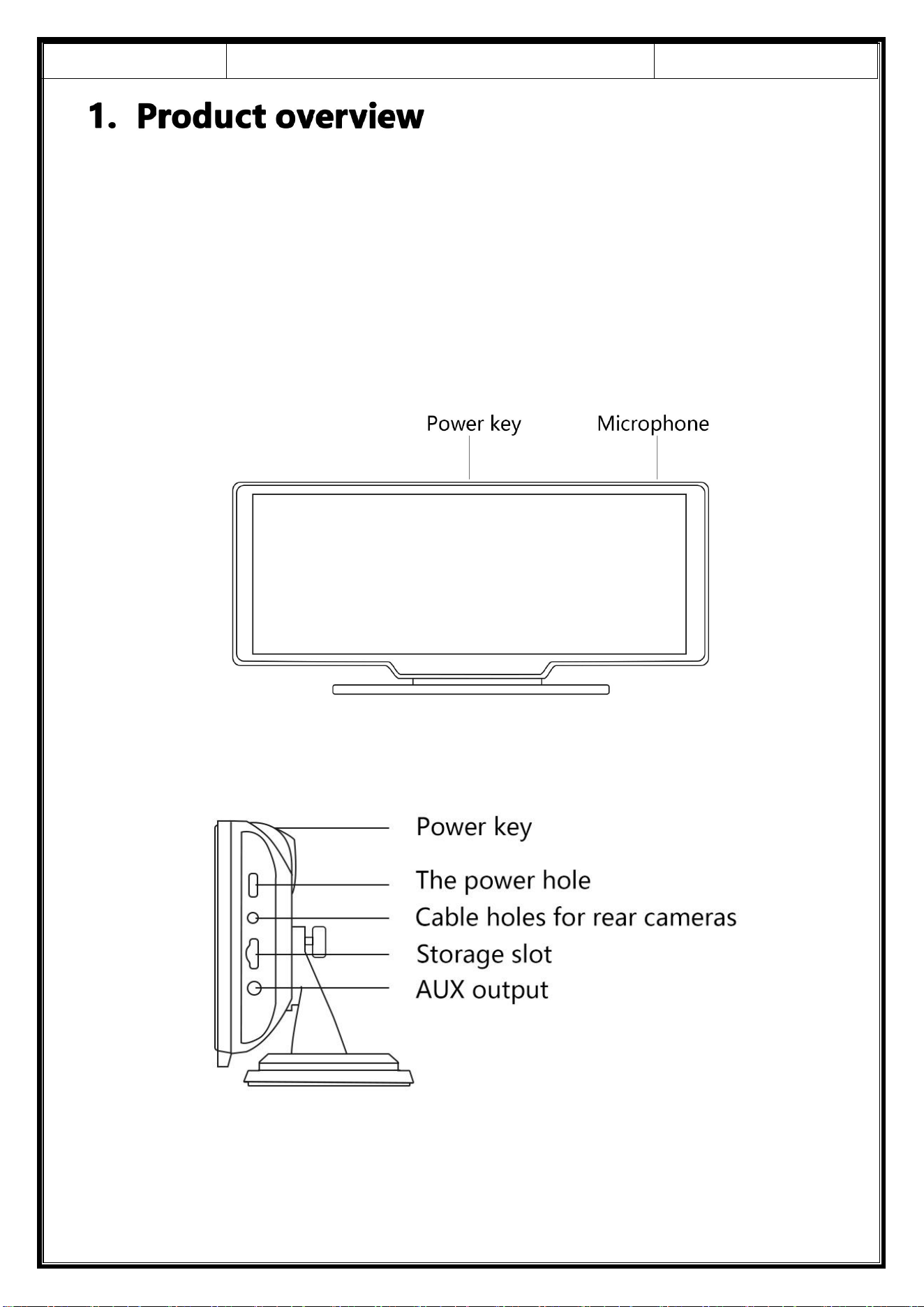
TheT86MP5 has a variety of mobile phone interconnection modes, which can also
be stored in SD card movies and music. You can watch movies and listen to music
with your family and friends at rest.
Release Date
2022-12-13
T86MP5 10.26 Inch Smart Screen Player
Document version
20221207
Name
Graphic
Instructions
Number
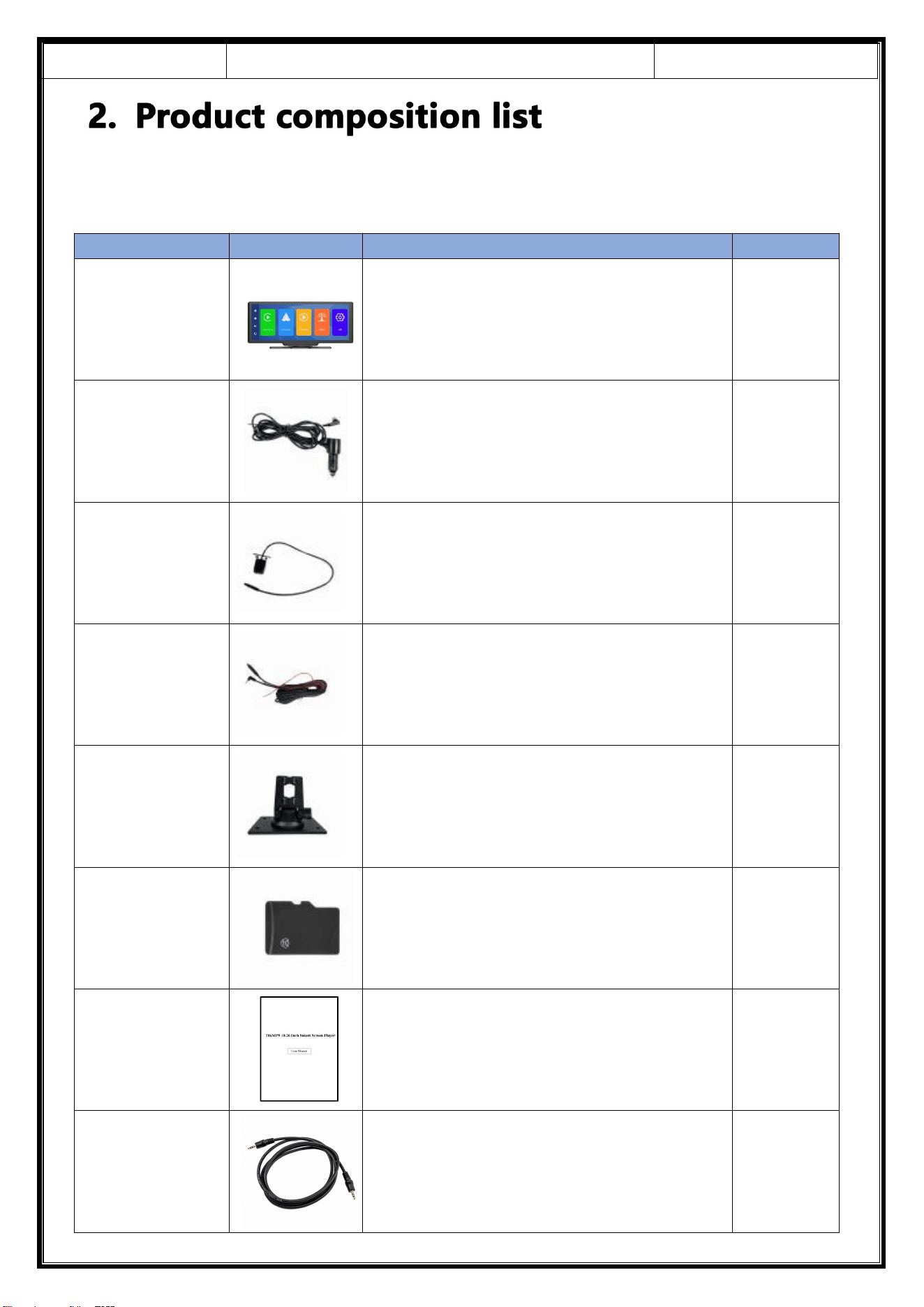
The host
10.26 - inch FHD display (1600*600) / touch control /
Bluetooth / Wi-Fi / FM Transmitter / SD card playing
music video / Type C interface power supply
1
The power cord
Type C power cord/ 7V~32V / 3A current / integrated
cable / cigar lighter to take power
1
Pull back camera
AHD FHD (1080P)/4PIN BMW head
Optional
Pull the
headphone
extension cord
Pull back headphone cable / 6m / 2.5mm headphone +
4PIN BMW head / double shield / with reverse cable
Optional
Monitor base
To support the display and fix it on the center console
1
SD card
Music/video can be played
Optional
User manual
User manual
1
AUX cable
Audio signal transmission cable/3.5mm jack
1
Release Date
2022-12-13
T86MP5 10.26 Inch Smart Screen Player
Document version
20221207
Project
Function
introduction
Performance indicators
System
Language
Simplified Chinese / Traditional Chinese / English / Russian /
Spanish / French / German / Japanese / Korean / Arabic / Italian /
Portuguese
Interface
Graphical menu operation
Mode of operation
Touch
Video display
Real-time display
10.26-inch High-Definition IPS screen, 1600 x 600
The screen saver
Screen savers can be set to: off / 10 seconds / 30 seconds / 1 minute
Reverse display
Reverse display
Automatically switches to the rear view
Astern line adjustment
Adjust the reversing line for various models
Smart +
connected
Wi-Fi
Supports Apple CarPlay and Android Auto
Bluetooth
Support Bluetooth music playback
FM
FM Transmitter support, connected to the car radio
Audio part
Voice control
Support voice control, menu can be set to turn off
Power part
The power input
The power input voltage drop line of the power supply part supports
7V~32V wide voltage, and has power protection circuits such as
surge protection and overload protection
Other
Working temperature
-4 ~149 ℉
camera mirroring
The camera supports mirror display,
and
the menu can be
set
Release Date
2022-12-13
T86MP5 10.26 Inch Smart Screen Player
Document version
20221207
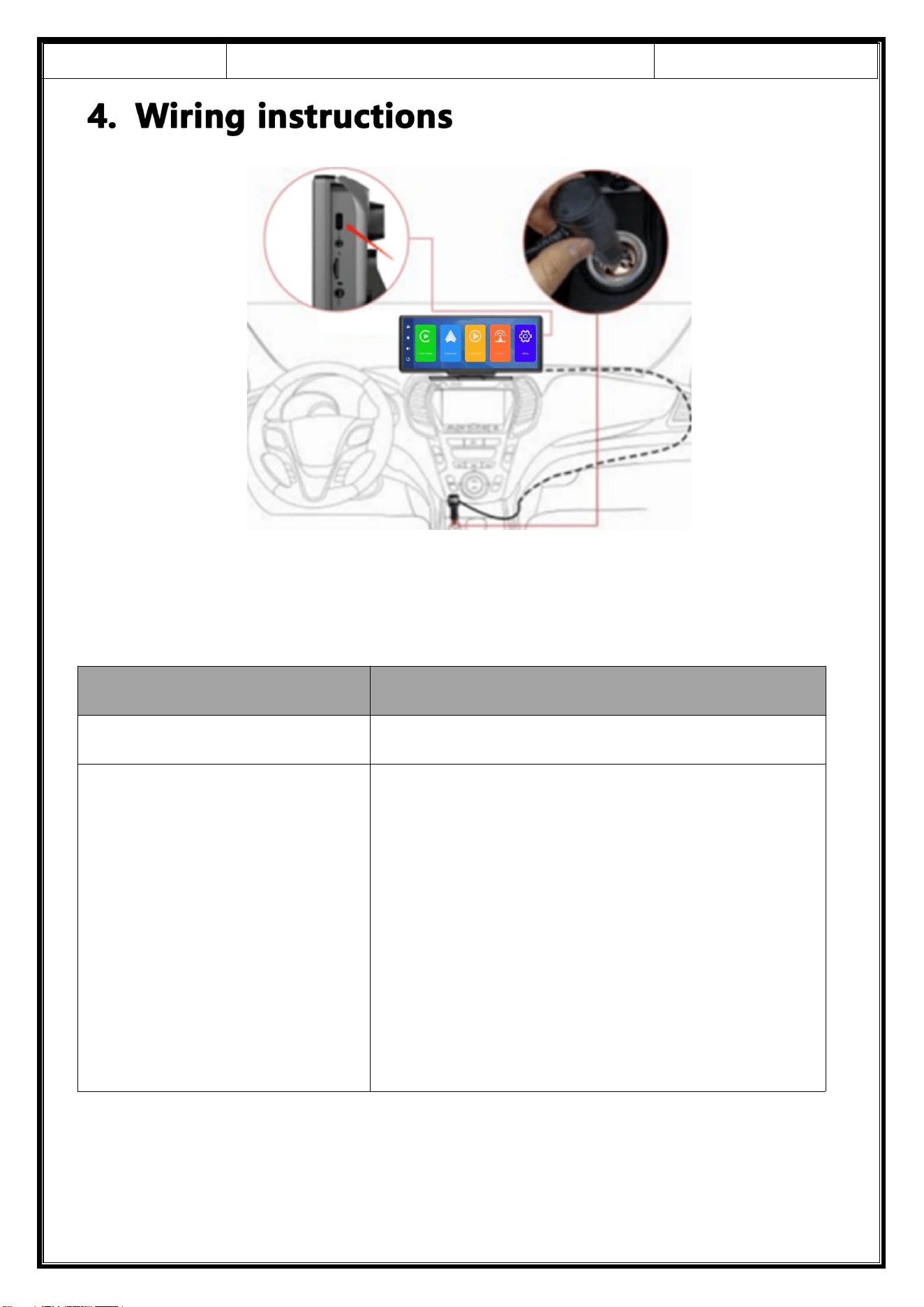
The details are as follows:
Port
Instructions
Type-C interface
Monitor power supply interface
Cigarette charger
The cigarette lighter takes power directly
Note: The product comes with a cigarette charger as
standard. If you do not use our original charger, you need
to buy a compliant high-quality cigarette charger,
otherwise it is easy to damage the machine or cause
other injuries due to insufficient voltage and heat.and FM
Transmitter function cannot work normally.
Release Date
2022-12-13
T86MP5 10.26 Inch Smart Screen Player
Document version
20221207
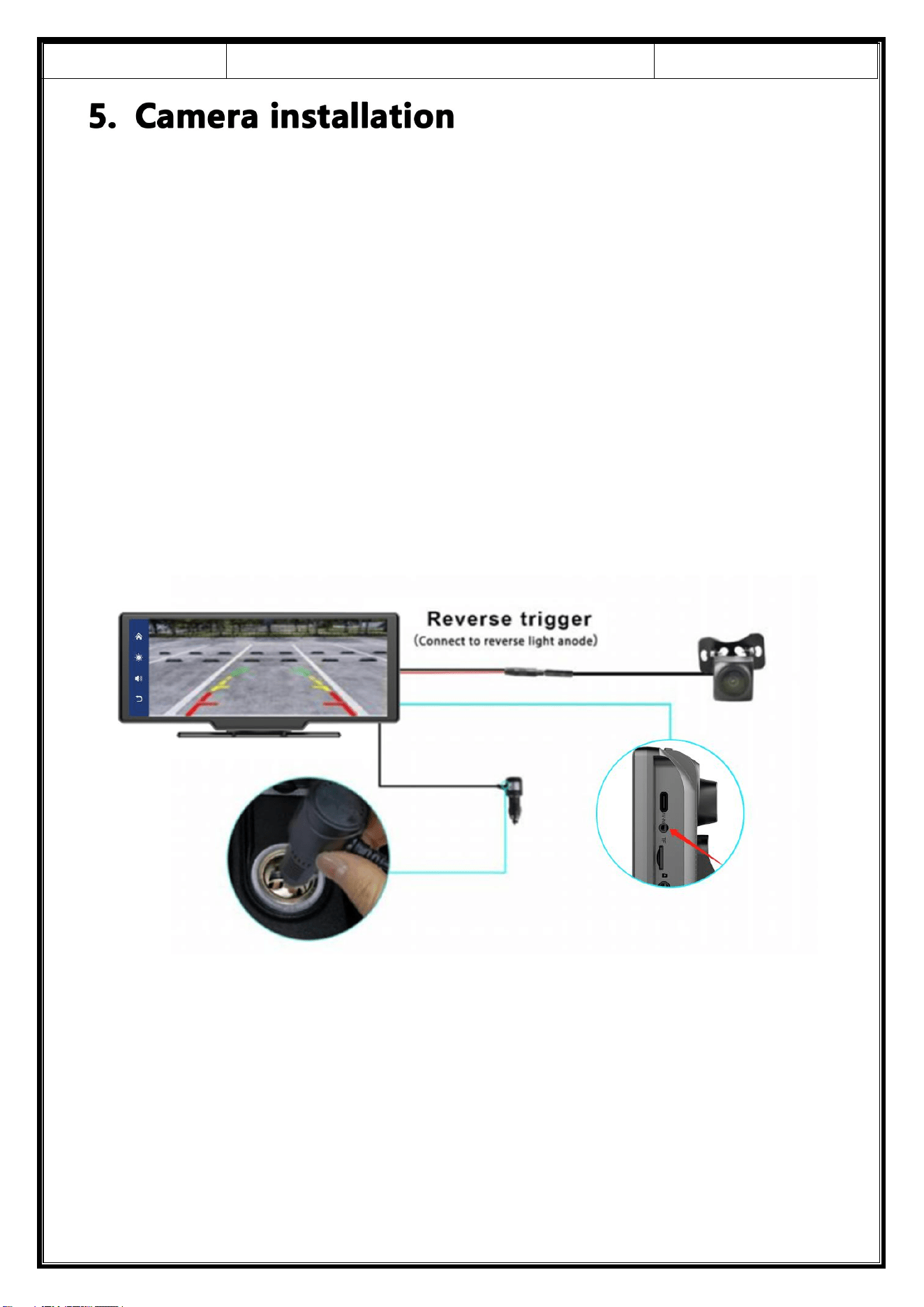
Locate the drilling hole, find the appropriate installation position in the license
plate attachment, mark it with a pen and then drill the appropriate size of the screw
hole. Fix the camera to the rear of the car with screws, the reversing trigger wire (red
thin wire) needs to be connected to the positive pole of the reversing light, and
finally use the camera extension cable to connect to the monitor.
(This is not necessary if you choose the version without the reversing camera.)
Release Date
2022-12-13
T86MP5 10.26 Inch Smart Screen Player
Document version
20221207
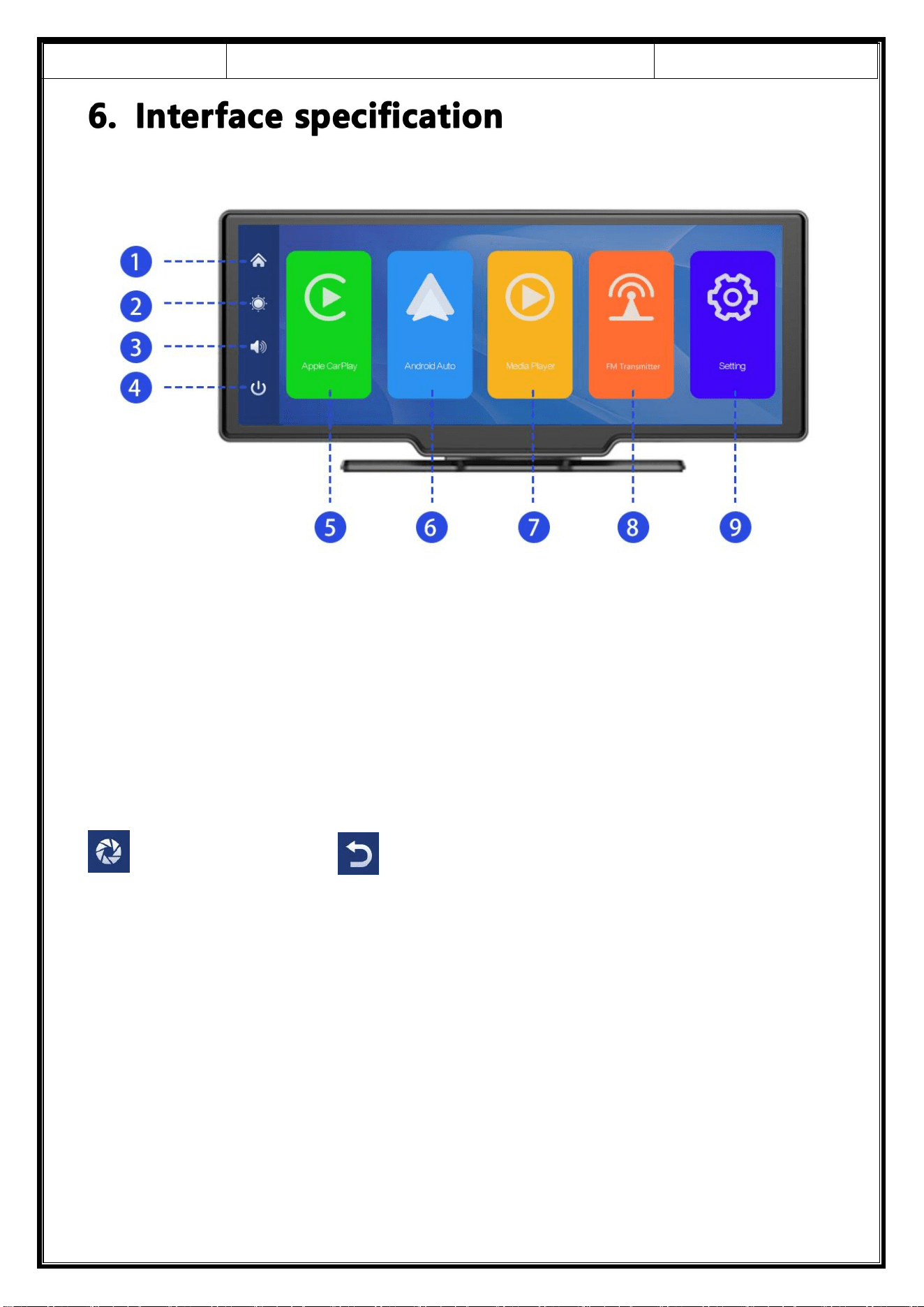
① Home button: Click to return to the homepage
② Brightness key: click to adjust the screen brightness
③ Volume key: Click to adjust the volume
④ Close screen button: Click to close the screen, and then click on any position to
wake up the screen
(Back video button) (Return button)
⑤ Apple Carplay: connection mode of projection screen of iPhone dedicated car
⑥ Andorid Auto: connection mode of projection screen of Andorid mobile phone
dedicated vehicle
⑦ Media player: click to enter the movie, music playback interface
⑧ FM Transmitter: When turning on, the device transmits the sound to the car.
⑨ Settings: Click to enter the function settings interface
Release Date
2022-12-13
T86MP5 10.26 Inch Smart Screen Player
Document version
20221207
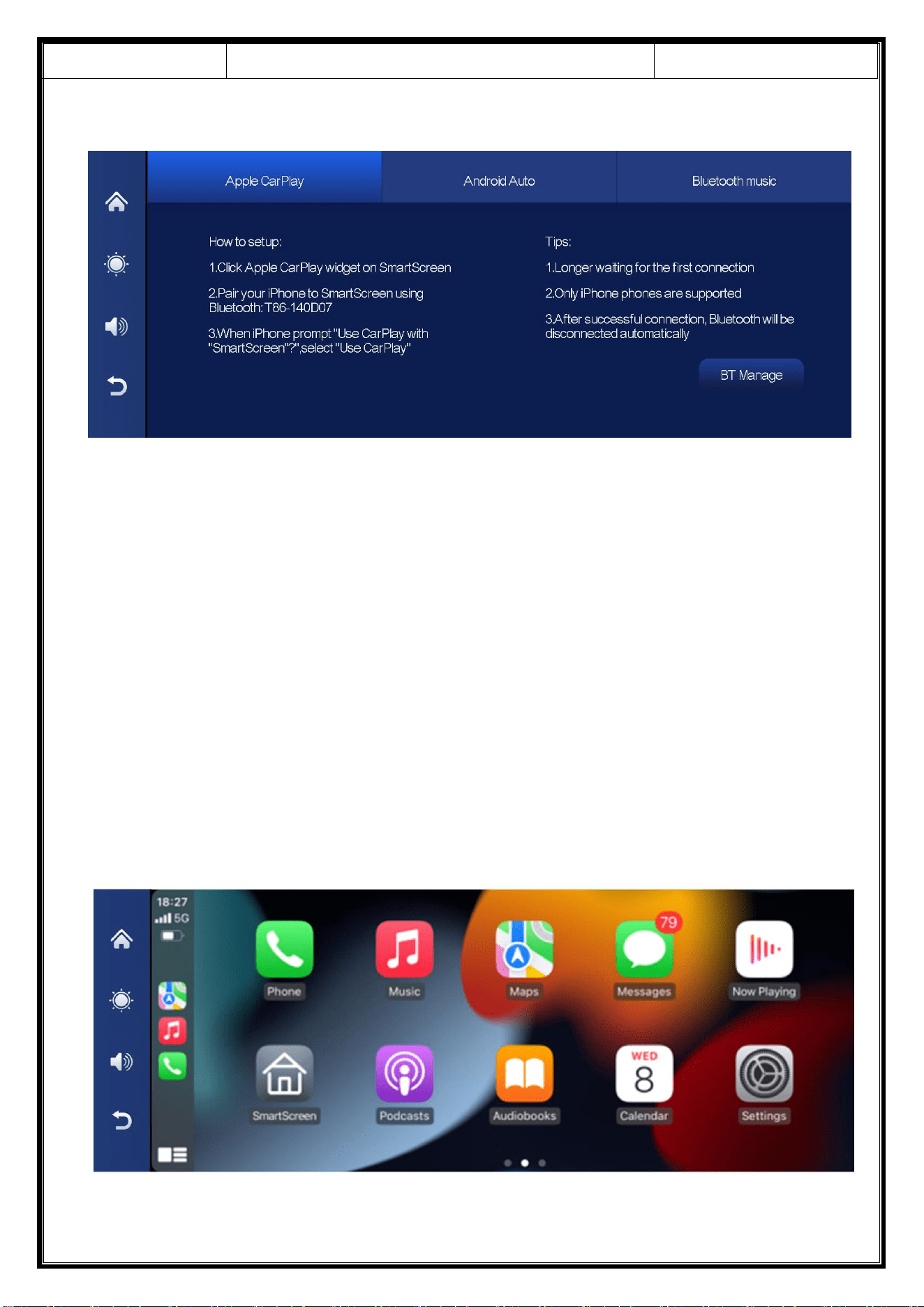
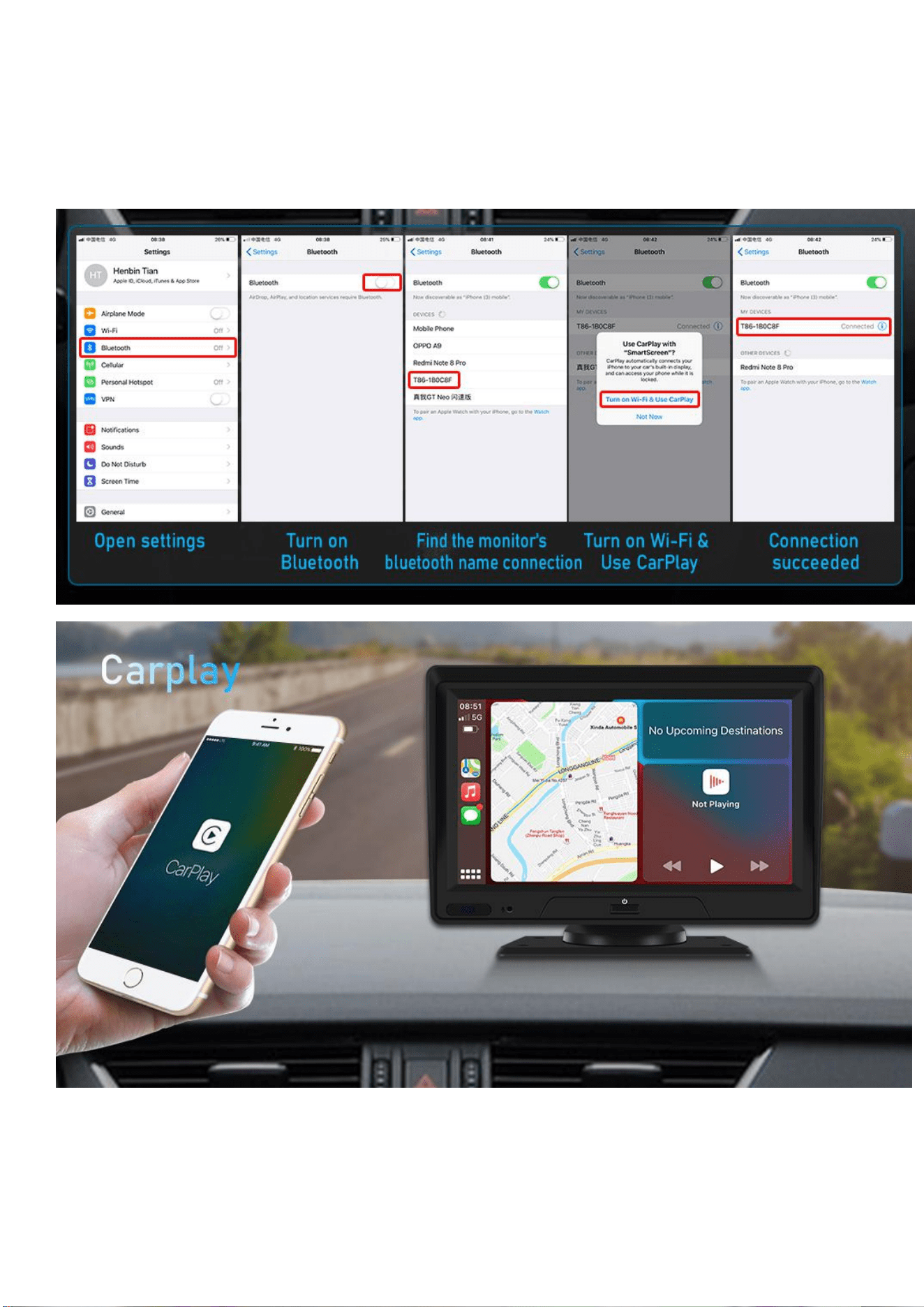
A. Apple Carplay
As shown in the figure, click the [Apple CarPlay] button to enter the Apple CarPlay.
Turn on the Wi-Fi and Bluetooth of the mobile phone first, then as shown in the
figure below, select the [Apple CarPlay] option, click the [ BT Manage] option of the
interface, connect Bluetooth with the phone, you can open the application. When
the machine is powered on, it will try to automatically connect to the last connected
phone.
(Turn off your phone's Wi-Fi and Bluetooth to disconnect, Apple CarPlay option
only supports iPhone phones, Android phone please select [Android auto] option)
Release Date
2022-12-13
T86MP5 10.26 Inch Smart Screen Player
Document version
20221207
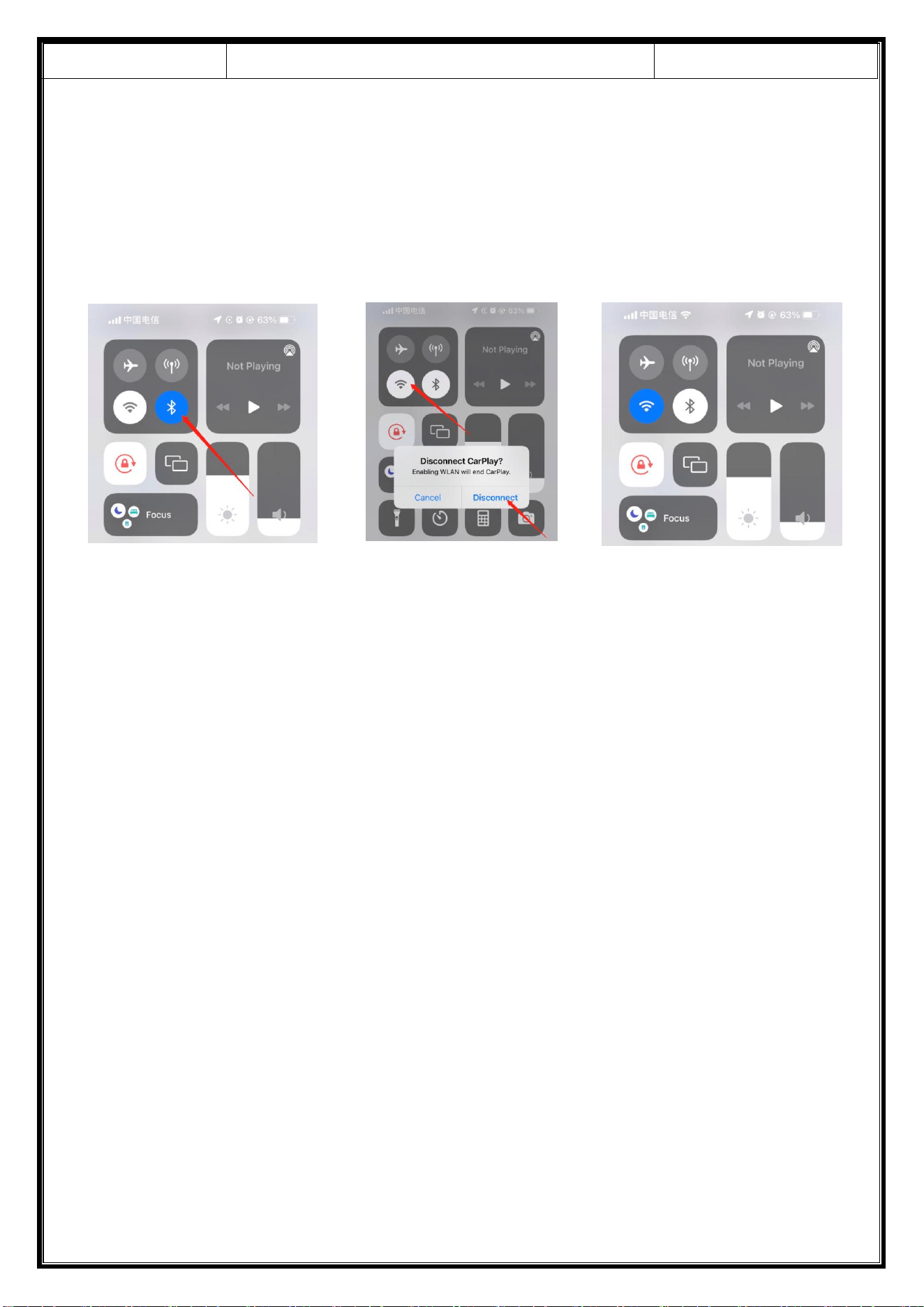
Note: In the drop-down menu of the mobile phone, you need to click to turn off
Bluetooth first, and then click the Turn off WiFi button to disconnect. Just turn off the
WiFi button alone, and the car will keep trying to reconnect.
① ② ③
Release Date
2022-12-13
T86MP5 10.26 Inch Smart Screen Player
Document version
20221207
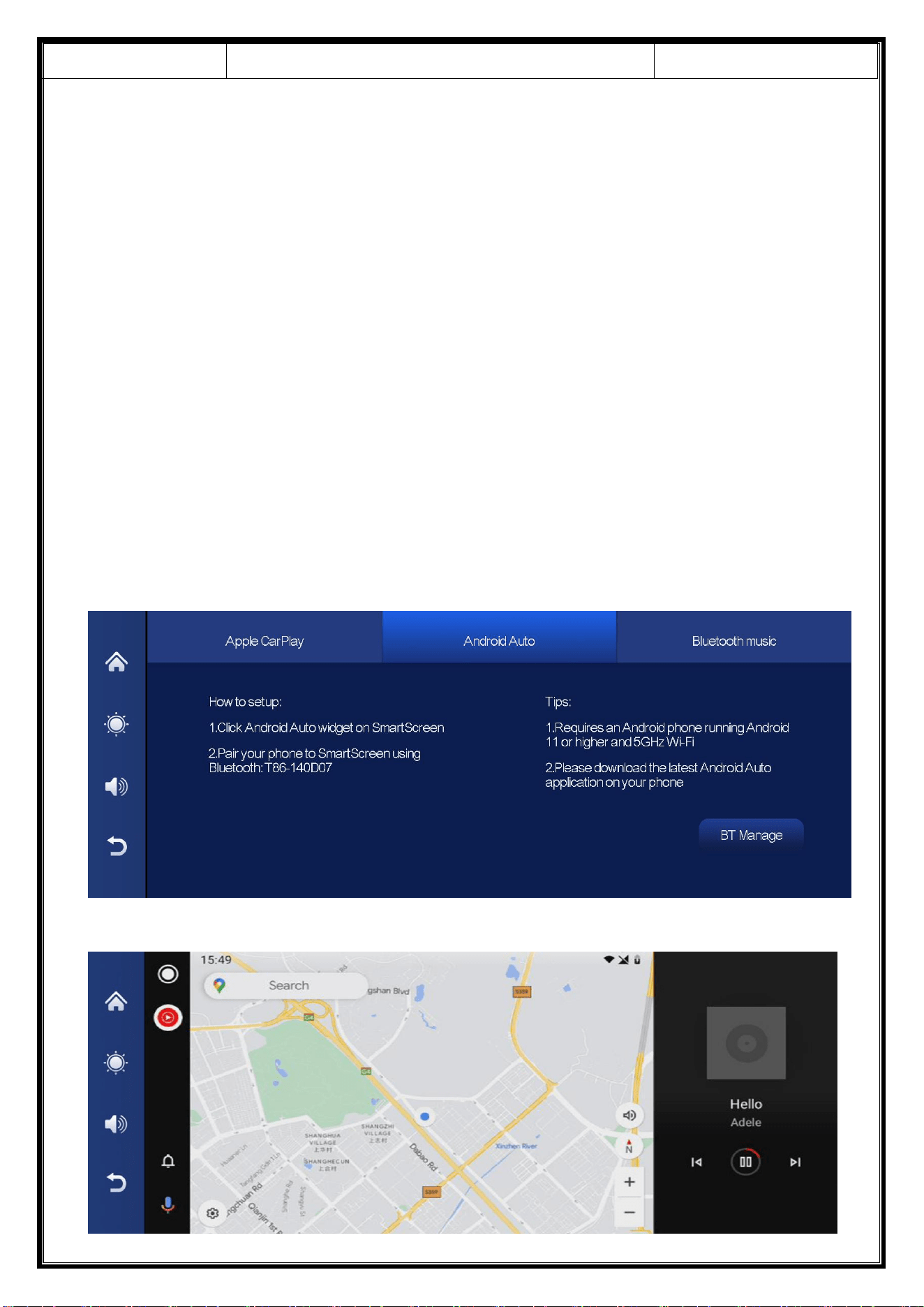
B. Android Auto
As shown in the figure, click the [Android Auto] button to enter the Android
auto. Turn on the Wi-Fi and Bluetooth of the mobile phone first, then as shown in
the figure below, select the [Android auto] option, click the [BT Manage ] option of
the interface, connect Bluetooth with the phone, you can open the application.
When the machine is powered on, it will try to automatically connect to the last
connected phone.
(Turn off your phone's Wi-Fi and Bluetooth to disconnect)
Release Date
2022-12-13
T86MP5 10.26 Inch Smart Screen Player
Document version
20221207
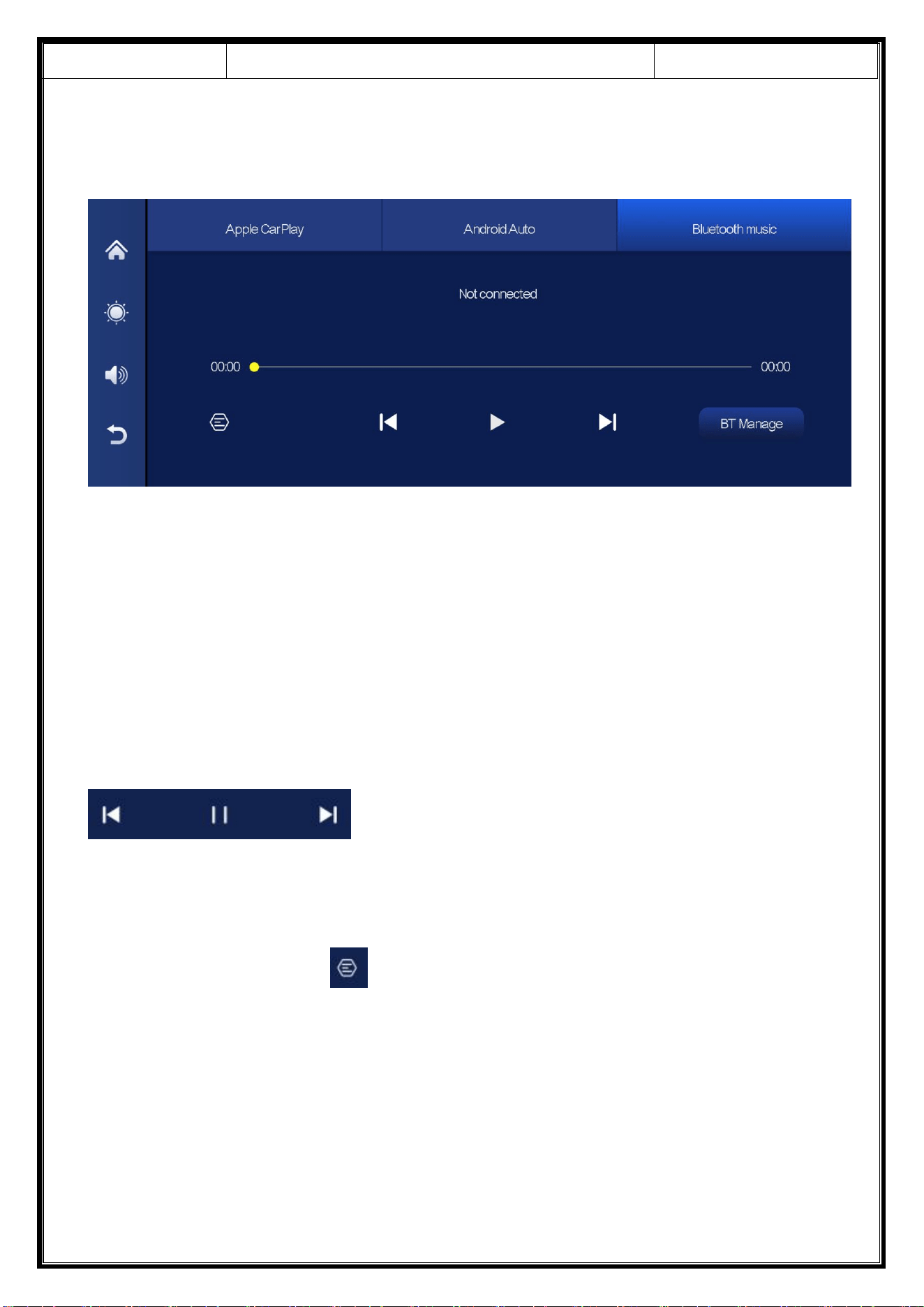
C. Bluetooth Music
You can find Bluetooth Music by clicking the button Apple CarPlay or Android
Auto. Turn on Bluetooth of the mobile phone first, and select [Bluetooth Music]
option. Click the [BT Manage] option on the interface to connect Bluetooth to the
mobile phone and start playing music.
The buttons correspond to Last, Play / Pause and Next, respectively.
Click on the Lyrics button [ ] to display the lyrics.
(Some mobile music player apps do not support displaying lyrics)
Release Date
2022-12-13
T86MP5 10.26 Inch Smart Screen Player
Document version
20221207
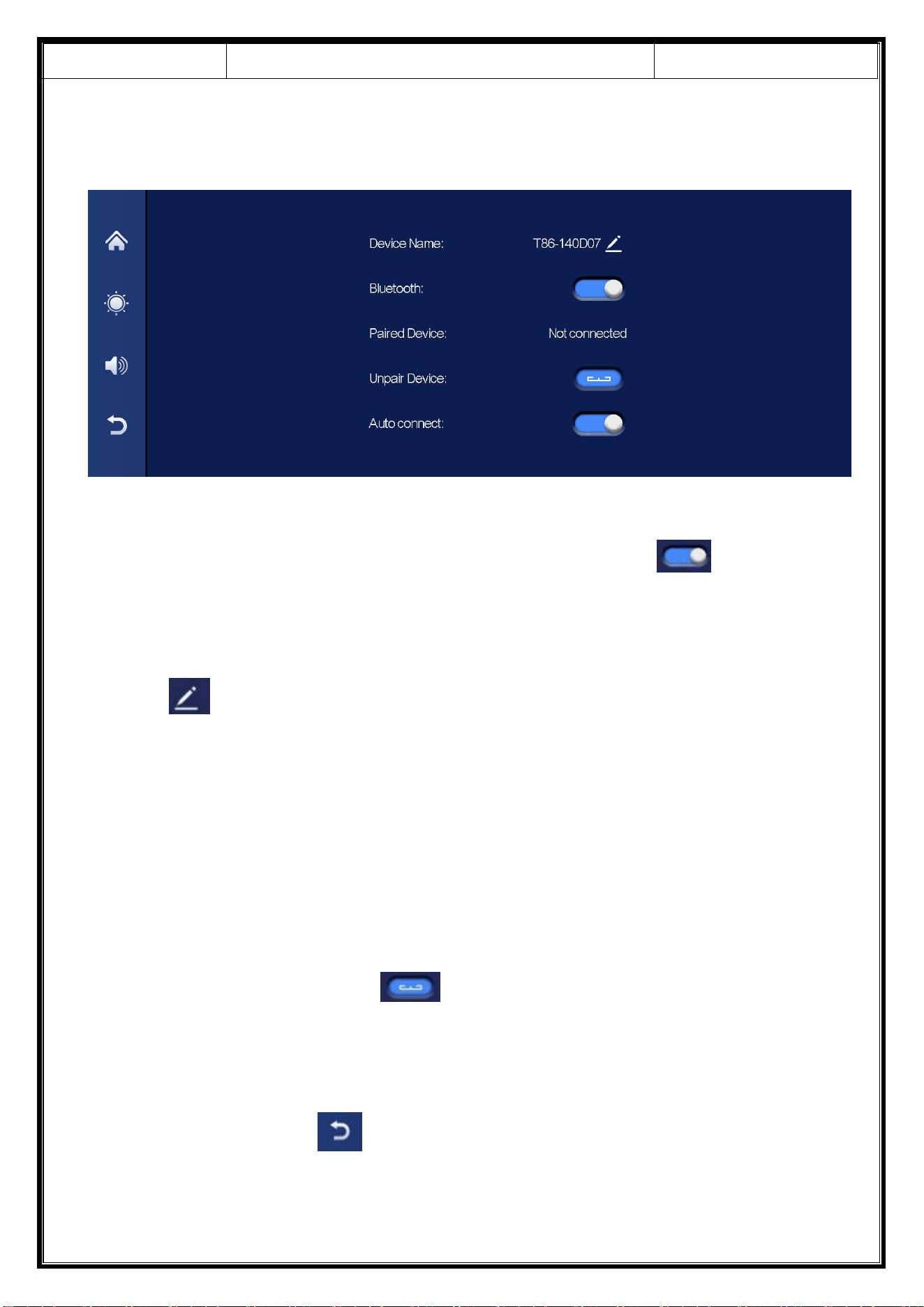
D. Bluetooth
As shown in the figure above, click the Bluetooth button [ ] to switch
on the device after entering the Bluetooth interface.
The page will display the device name, such as: T86-140D07, and click the Modify
button [ ] to modify the Bluetooth name of the device.
Select the device name with Bluetooth, and the remote device name of the phone
will appear after successfully connecting.
At this time, you can play mobile phone music and other functions. After
connecting to Bluetooth, you can use the call function:
Click the Disconnect button [ ] to actively disconnect the Bluetooth.
After turning on the "Auto Connect" button, even after the mobile phone is
disconnected, the machine will automatically try to connect to the phone.
Click the back button[ ] to return to the previous page.
Release Date
2022-12-13
T86MP5 10.26 Inch Smart Screen Player
Document version
20221207
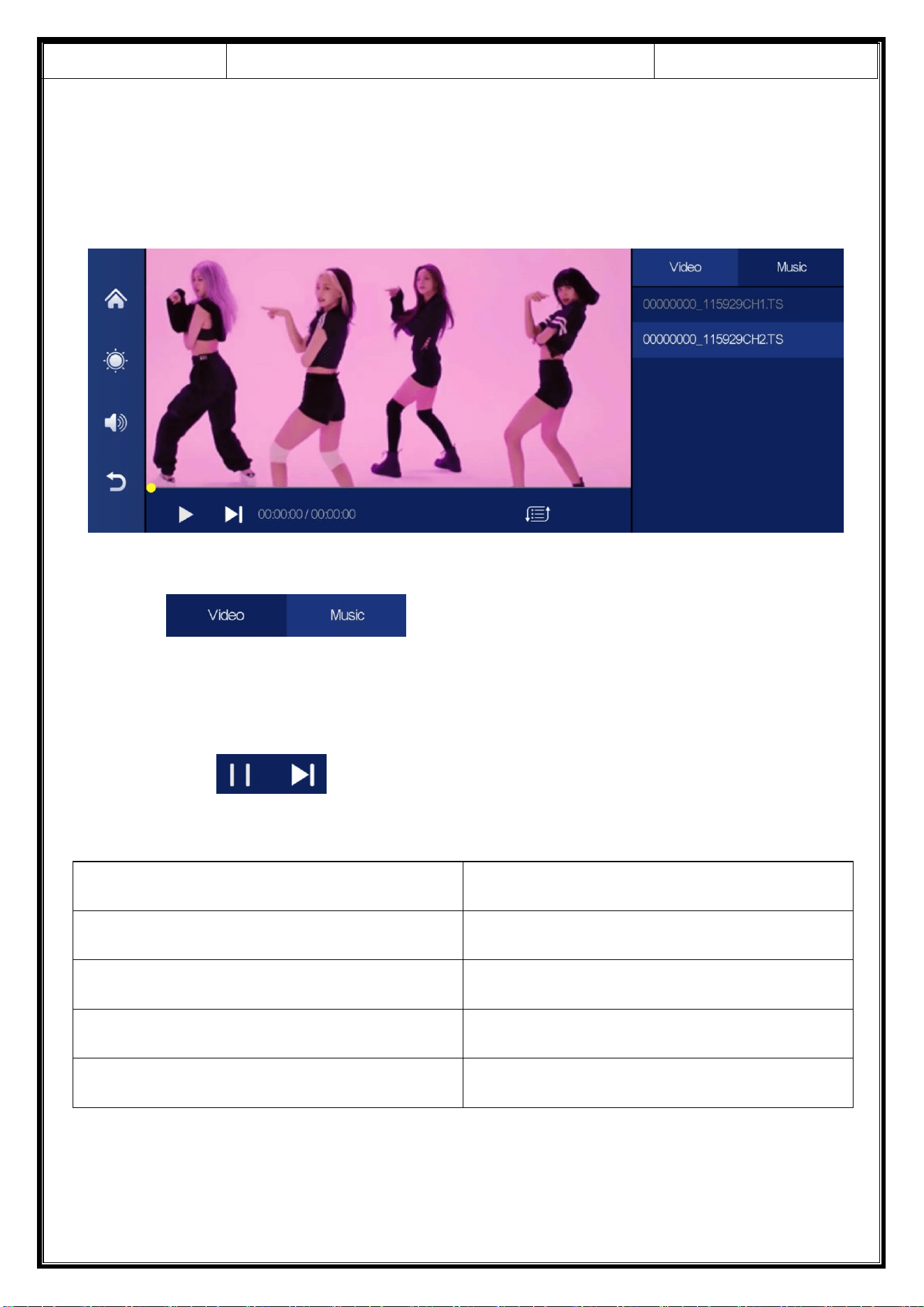
E. Media Player
As shown in the figure above, click the [media player] button to enter the movie
and music playing interface.
Click [ ] to play music or video.
The lower left corner buttons correspond to: "Play / Pause" and "Next paragraph"
respectively. [ ]
Audio format support: MP3 / WAV
Video support format
Coding format
F4V
AVC(H.264)
MOV
AVC(H.264)
MP4
AVC(H.264)
TS
AVC(H.264)
Release Date
2022-12-13
T86MP5 10.26 Inch Smart Screen Player
Document version
20221207
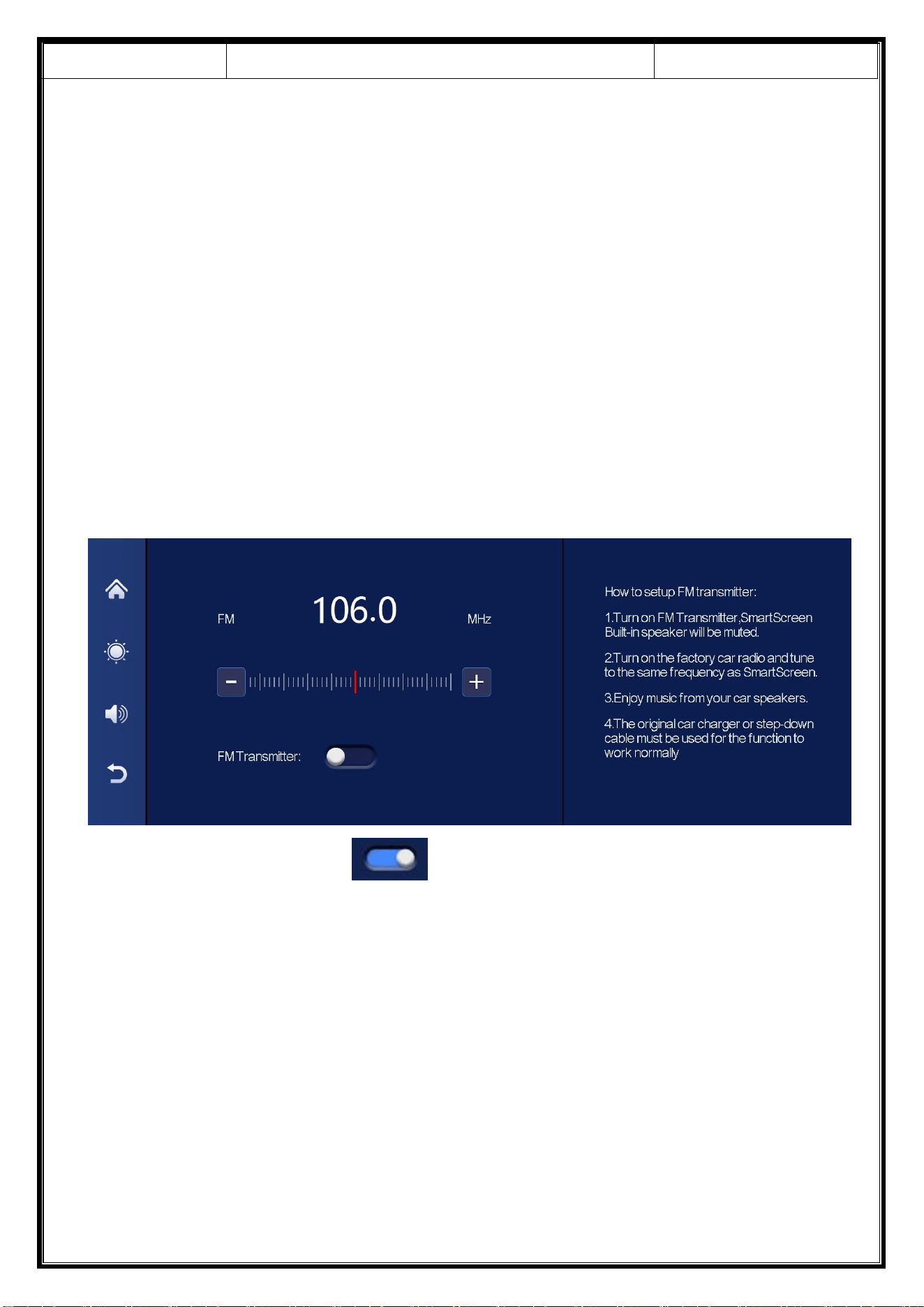
F. FM Transmitter
As shown in the figure, click the [FM Transmitter] button to enter the FM
Transmitter function: it can emit the sound of the equipment, receive it with the
original car radio, and play it through the original car horn, enjoying the original car
level. When you turn on the FM Transmitter option, the monitor will no longer emit
any sound. At this time, you need to turn off the FM Transmitter or match the sound
to the car's builtin stereo to have sound.(Not using the original power cord will
cause the FM Transmitter signal to deteriorate or the function cannot be used.)
① Click the Open device [ ] button.
② Selects the frequency band to be emitted, for example, the FM 106.0 MHZ.
③ Car radio also adjusts the acceptance band to FM 106.0 MHZ.
④ Car radio can connect to the FM Transmitter signal of the upper system.
After the FM launch connection is successful, all sounds will be sent to the
original car speaker for play.
Release Date
2022-12-13
T86MP5 10.26 Inch Smart Screen Player
Document version
20221207
G. Setting
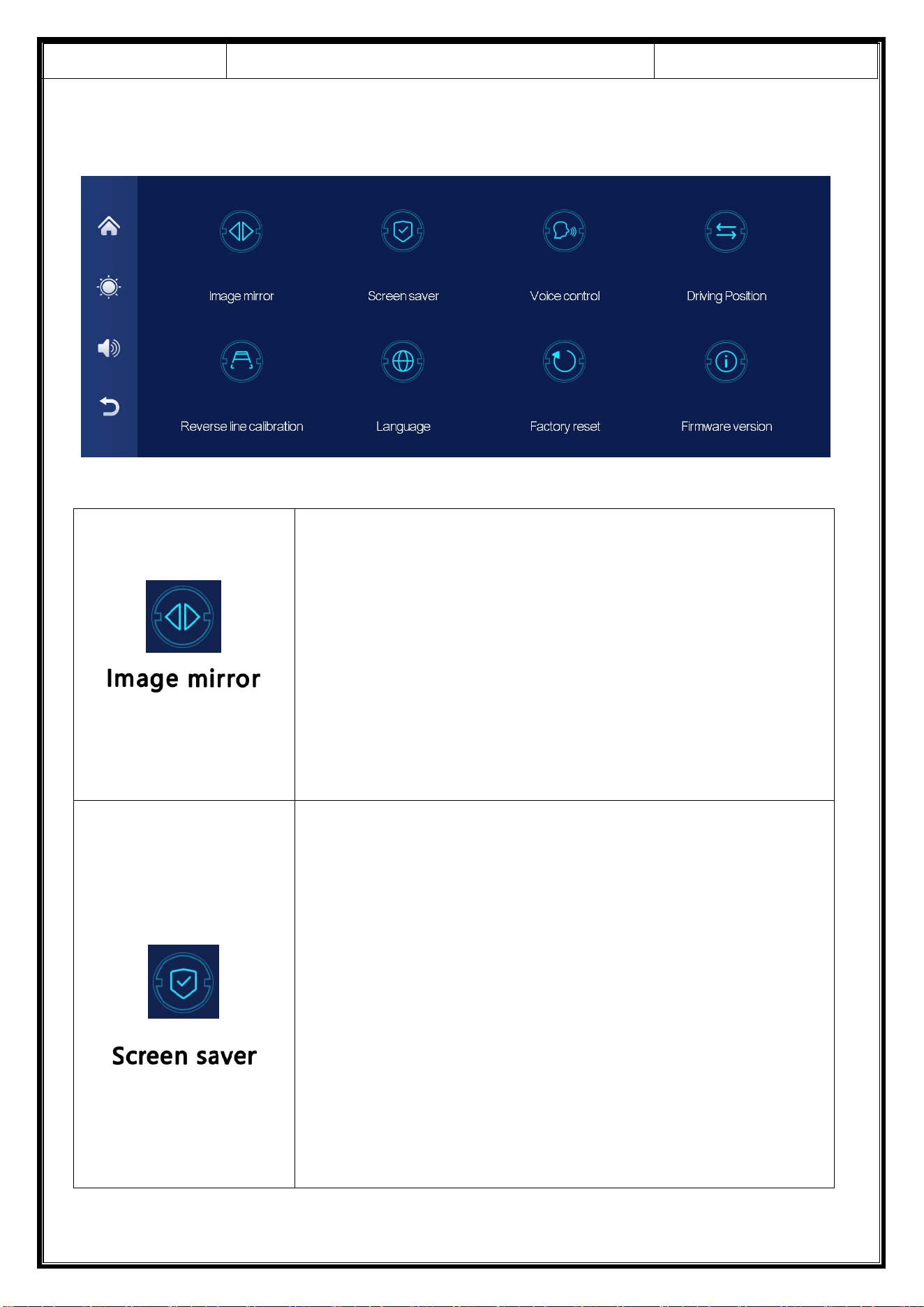
Click [Image mirror] to enter the settings: You can
choose to [Turn off] or [Turn on].
This option makes it easier for customers to install the
camera flexibly.
Click [Screen saver] to enter the settings:
Screen saver can be set to: off / 10 seconds / 30
seconds / 1 minute
Set 10 seconds, the system will run without
corresponding time, and the screen will automatically
turn off.
After entering the screen saver, press the power
button again to light up the screen.
Release Date
2022-12-13
T86MP5 10.26 Inch Smart Screen Player
Document version
20221207
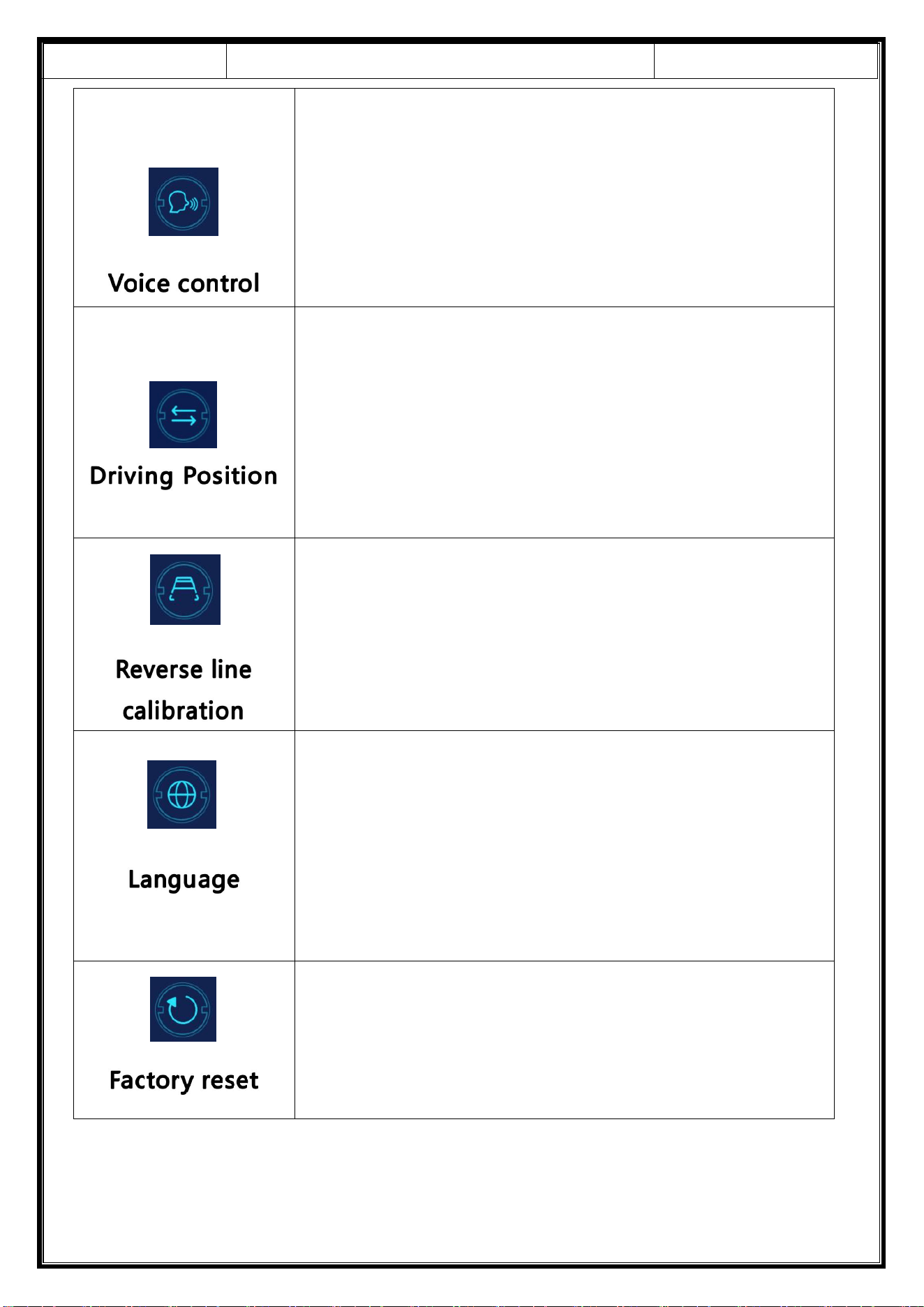
Click [Voice Control] to enter the settings:
Voice control commands are: Show rear camera /
Turn on display / Turn off display
Click [Driving Position] to enter the settings:
You can choose the left rudder or right rudder, the
shortcut menu bar in Apple Carplay, choose the left
rudder on the left, choose the right rudder on the
right.
See the instructions below.
Click [Language] to enter the settings:
Language can be set up: Simplified Chinese /
Traditional Chinese / English / Russian / Spanish /
French / German / Japanese / Korean / Arabic / Italian
/ Portuguese.
Click [Factory reset] to enter the Settings:
Restore the factory settings, and you restore all the
settings to the initial state.
Release Date
2022-12-13
T86MP5 10.26 Inch Smart Screen Player
Document version
20221207
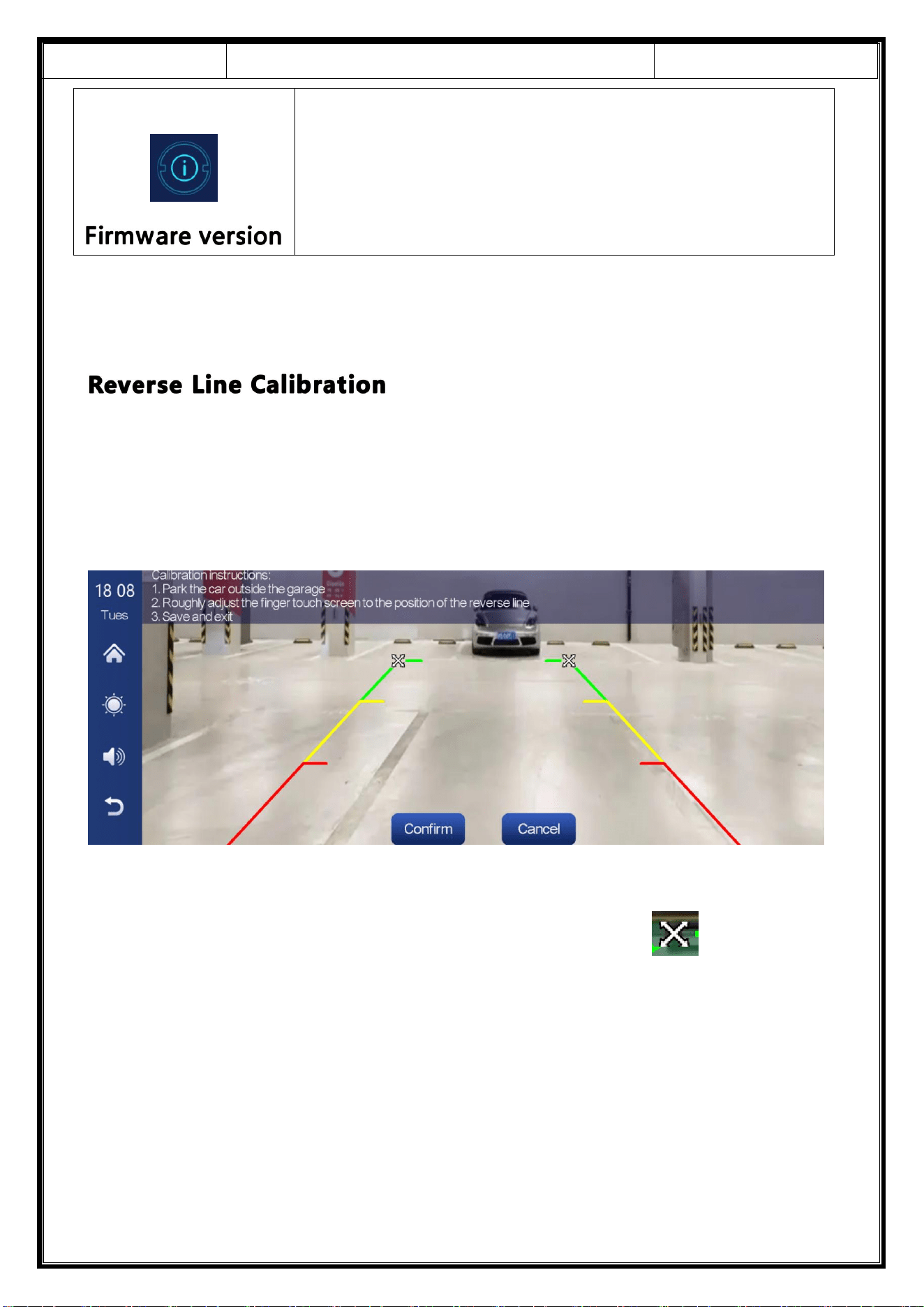
Click [Reverse Line Calibration] to enter the settings:
Park the car in the middle of the parking space, manually drag [ ], adjust the
position of the reversing auxiliary line up, down, left and right, so that the reversing
auxiliary line and the parking line are level with the ground.
After adjusting the reversing line, click [confirm] to confirm.
Click on [Firmware version] to enter the menu:
This option is available in the current basic version for
easy confirmation.
Release Date
2022-12-13
T86MP5 10.26 Inch Smart Screen Player
Document version
20221207
Release Date
2022-12-13
T86MP5 10.26 Inch Smart Screen Player
Document version
20221207
Release Date
2022-12-13
T86MP5 10.26 Inch Smart Screen Player
Document version
20221207
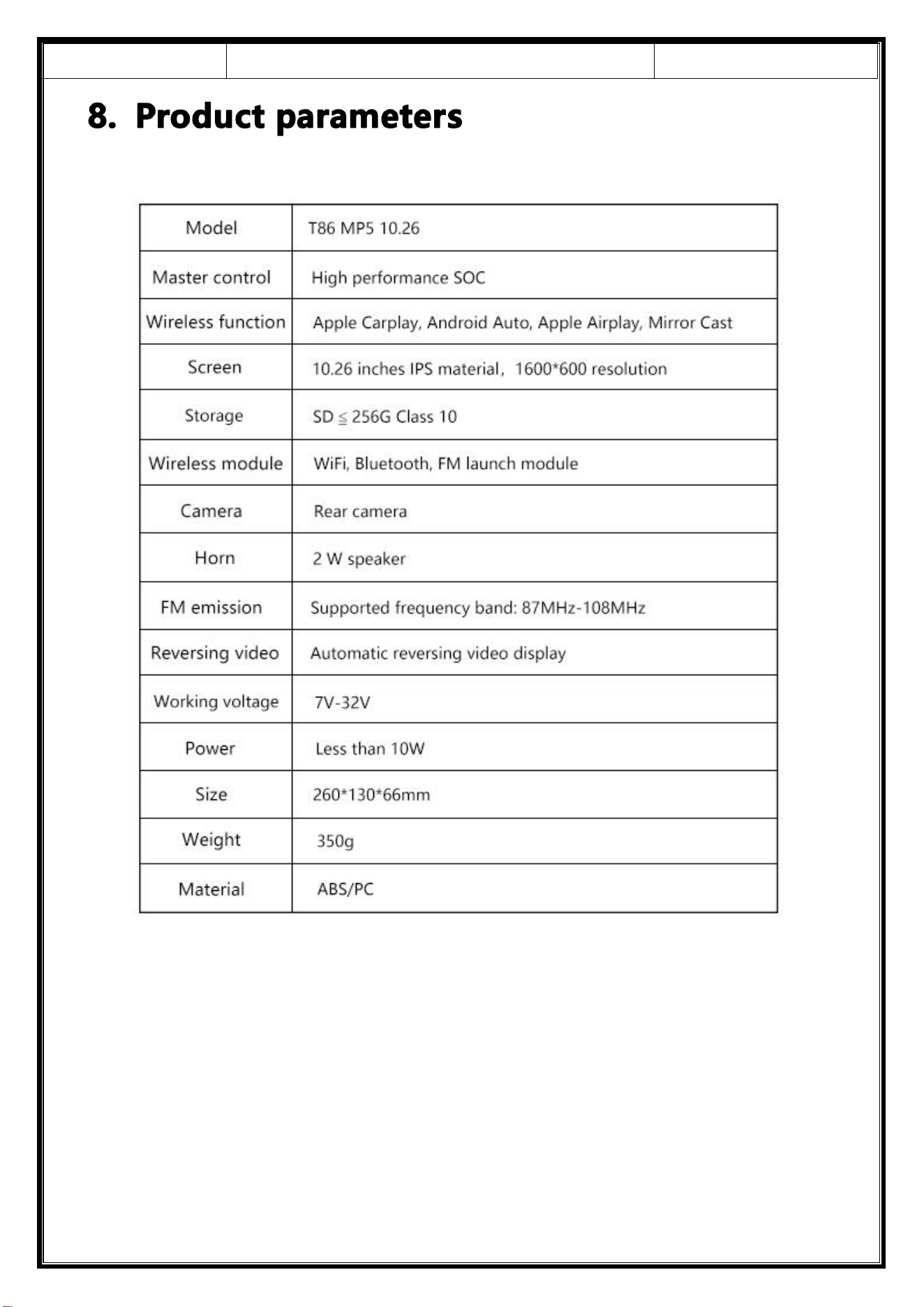
Reminder:
Please ensure that there is no obstruction between the mobile
phone and the device, and the Wi-Fi / Bluetooth signal communication is
smooth, otherwise the product functions cannot be used smoothly.
Release Date
2022-12-13
T86MP5 10.26 Inch Smart Screen Player
Document version
20221207
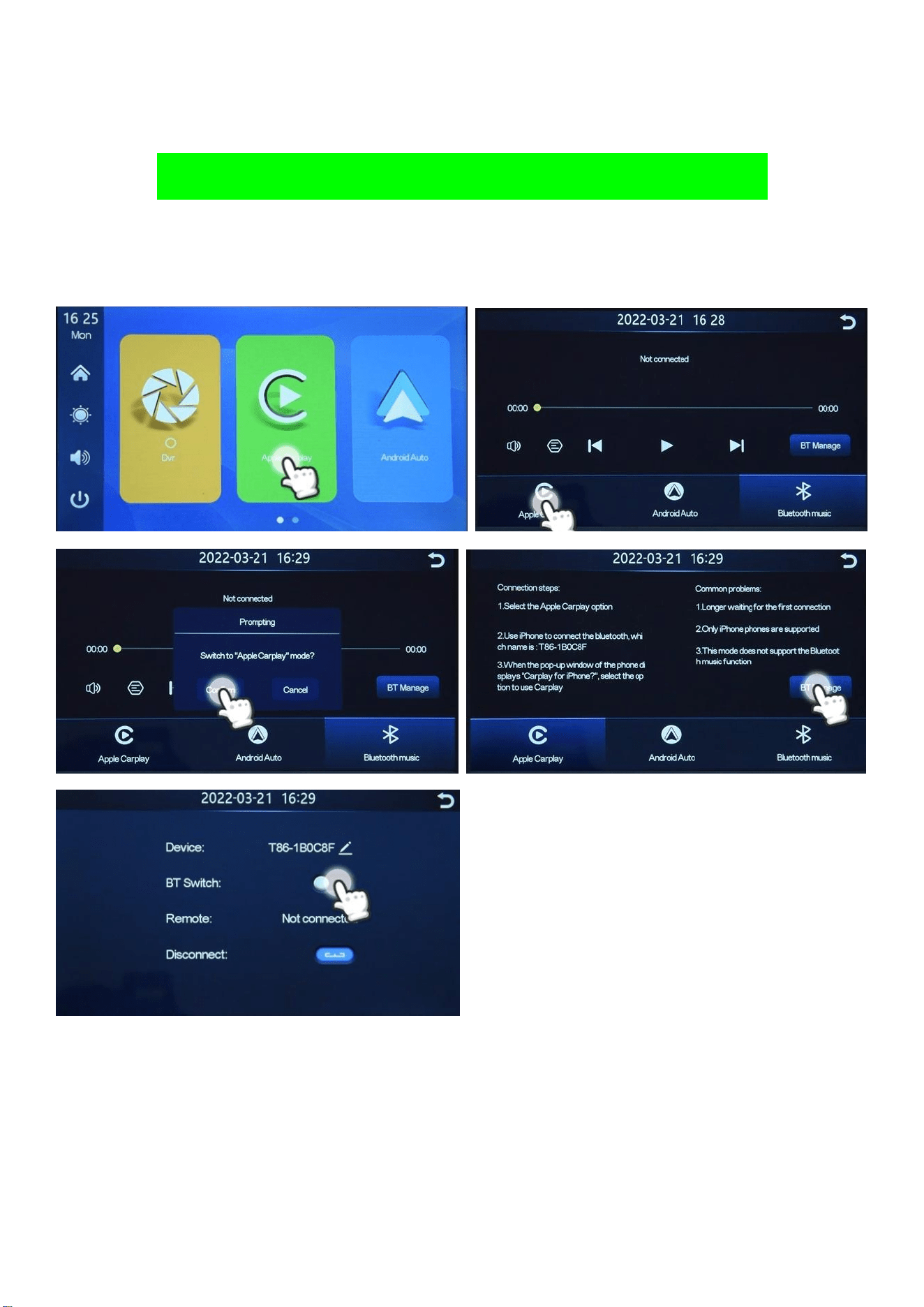
How to Connect Wireless Apple Carplay
1. Switch the car radio into Apple Carplay Mode and open Bluetooth
2. Connect you phone with the car radio Bluetooth
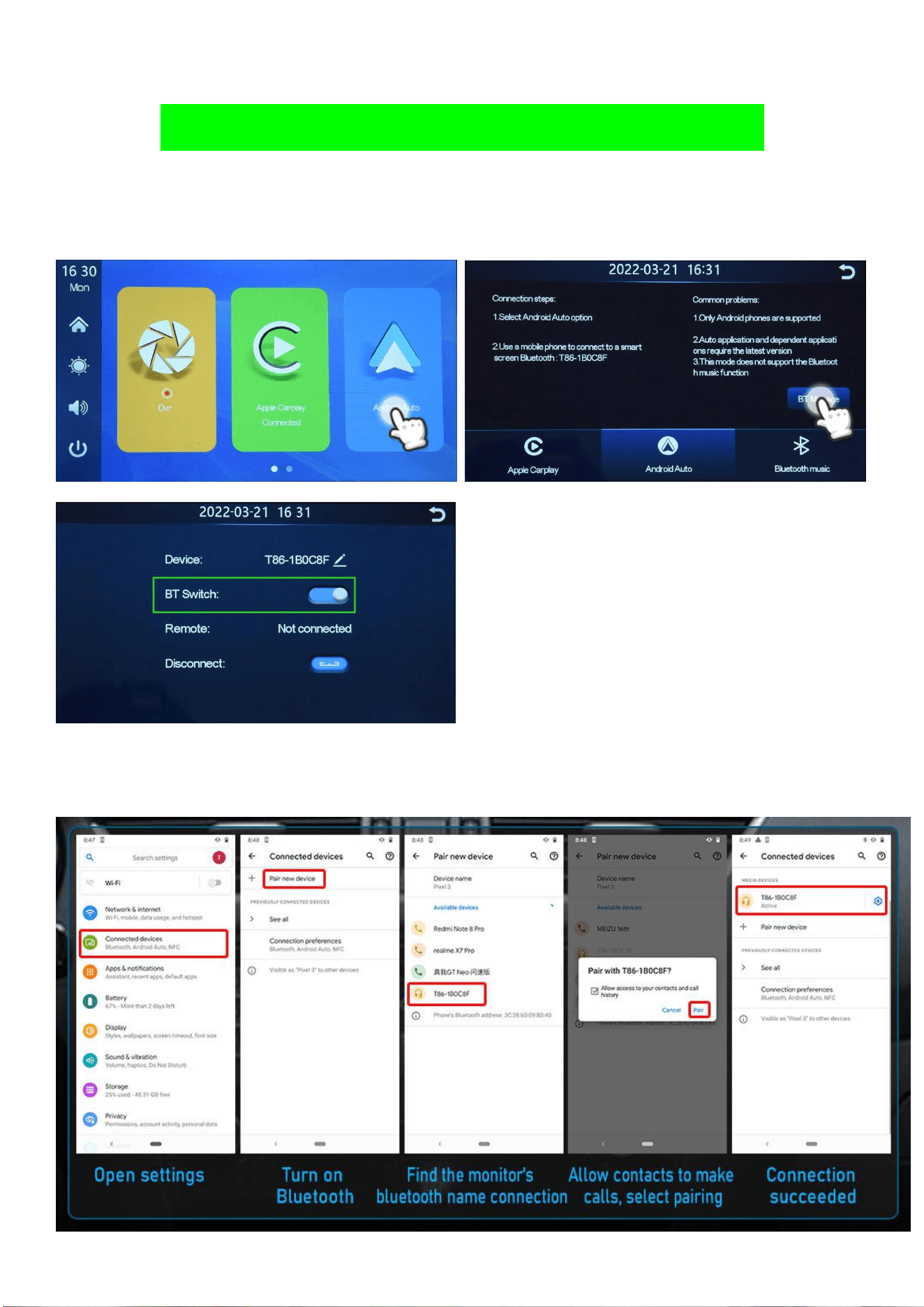
How to Connect Wireless Android Auto
1.Switch the car radio into Android Auto Mode and open Bluetooth
2.Connect you phone with the car radio Bluetooth
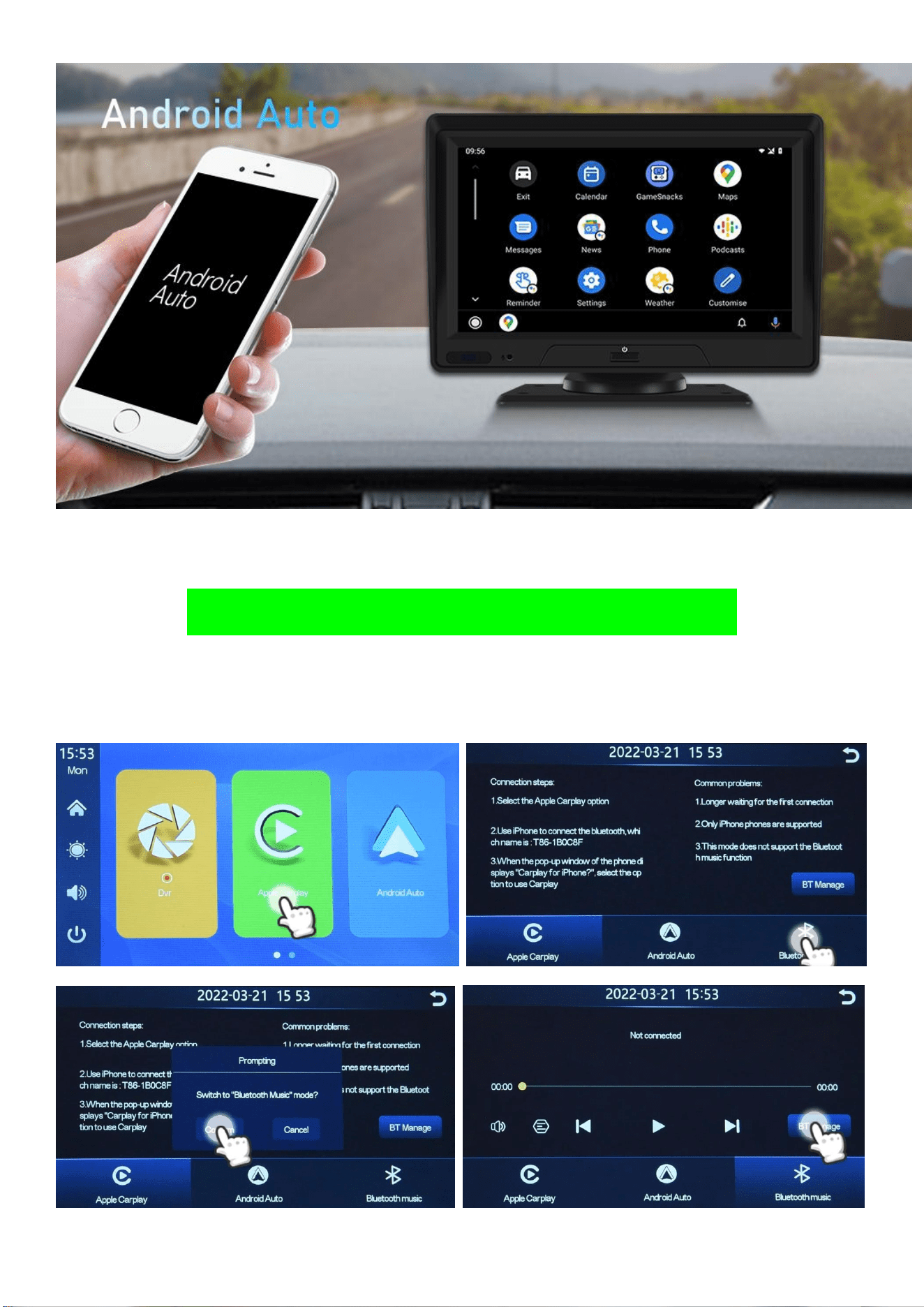
How to Connect Wireless Bluetooth
1.Switch the car radio into Bluetooth Mode and open Bluetooth
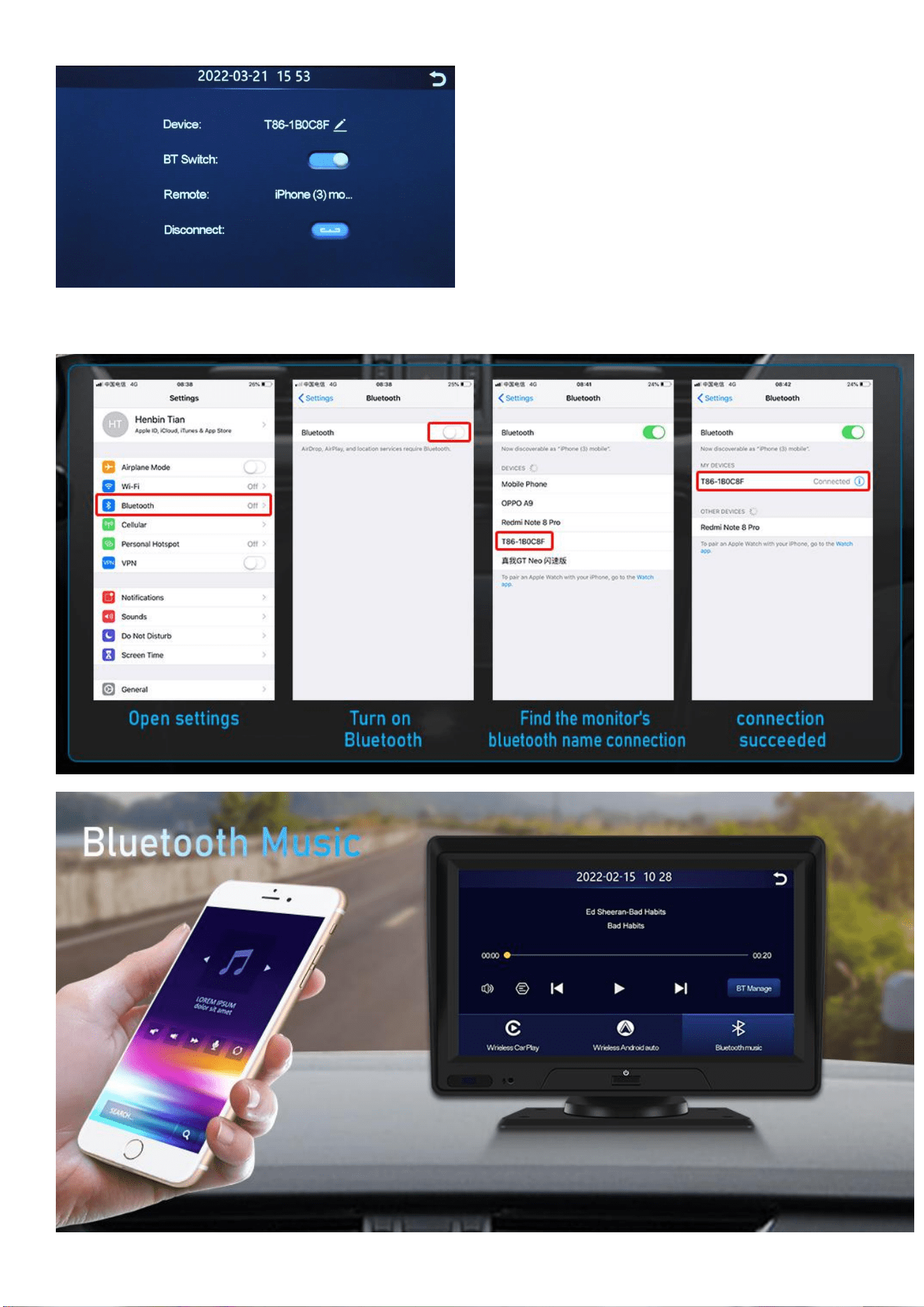
2.Connect you phone with the car radio Bluetooth
