
1
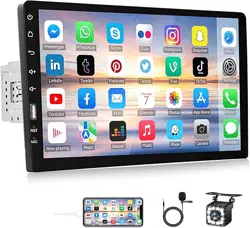
Single Din Car Stereo MP5 Instruction
(Picture for reference only)
Content
Content
...............................................................................................................................................................
1
[Customer]
..........................................................................................................................................................
2
[Instructions for use]
..........................................................................................................................................
2
1. Tips and warnings
...........................................................................................................................................
2
2. Safety Tips
......................................................................................................................................................
3
[Installation]
.......................................................................................................................................................
4
[Wiring]
...............................................................................................................................................................
5
1. Product Dimension
.........................................................................................................................................
6
2. Back interface diagram
...................................................................................................................................
5
3. Harness
...........................................................................................................................................................
6
4. Installation Steps
............................................................................................................................................
7
5. Schematic diagram of reversing camera wiring
.............................................................................................
9
6. Fixed machine
...............................................................................................................................................
11
7. General Features
..........................................................................................................................................
12
[Trouble Shooting]
............................................................................................................................................
16
Customer Service Contact:

2
[Customer]
Dear Customer:
Thanks for buy our car player, it is our honor and pleasure to server you to using our product. Before
using this product, please read this manual very carefully and keep it properly. Your kindly feedback and
support will prompt us to do the better. Thank you.
[Instructions for use]
For the sake of your safety, please don't watch the video while driving and operating a machine;
Please dispatch the volume to clearly while driving to the voice to the outside world. Before operation,
please read this manual and other manual system, understand the use of manual and machine related
safety tips and warning signs, after reading in a readily accessible place for ready reference.
1. Pay attention to traffic safety in the first place.
2. If you meet difficulty in operating the system, please again after he parked his car in a safe place.
3. Don't let children operate this machine, lest cause personal injury and damage to the machine.
4. Please follow the traffic rules when using satellite navigation function to drive.
5. Please do not ban the use of electronic equipment or it is forbidden to use open flame such as gas
stations, brewery, strong electromagnetic interference region, otherwise may cause danger.
6. Don't maintenance, installation of the machine itself. Under the condition of the plug do not
install or repair the machine, by not trained in electronic equipment or vehicles accessories installation
personnel or the lack of experience installation and maintenance of this machine is very dangerous.
7. Do not install the machine storage or in direct sunlight place, don't put it in other harmful
material environment, especially the LCD screen, if the installation of the LCD screen is in the air
conditioner near the air duct, please keep cool and hot air blows directly to the machine, otherwise it
may damage the machine, even on the bus or personal injury.
8. Please do not use some sharp objects painted screen, don't use hard objects to press the screen,
otherwise will cause damage to display or touch screen.
9. In order to guarantee the normal operation of the machine, and prevent the occurrence of fire or
get an electric shock, please don't expose machine in damp air, more can't liquid drying machine.
1. Tips and warnings
In order to emphasize the important information in the user manual, please pay special attention to
the label when you see. It indicates some important warning and prompt information.
3
Note: To prevent short circuit, please remember to turn off the car
and disconnect the ACC connected to B+ before installation.
2. Safety Tips
Please read all instructions before installation, and it is recommended that car audio professionals
install the machine.
This machine is suitable for vehicle-mounted 12V power supply system (there must be a
grounding wire), please do not install this machine in a 24V vehicle-mounted, otherwise it will damage
the machine.
Do not repair the power fuse without professional guidance. Improper use of the fuse will cause
damage to the machine and cause a fire.
In order to avoid violating traffic rules, drivers cannot watch videos while driving and operating
machines to avoid unnecessary accidents.
For safety and to ensure the normal use of the product, please invite professionals to install,
disassemble or repair the machine to avoid damage to the machine and accidents. For more information,
please contact your local professional car audio store.
Please avoid putting this product in humid environment and water to avoid fire caused by electric
shock or other unnecessary damage.
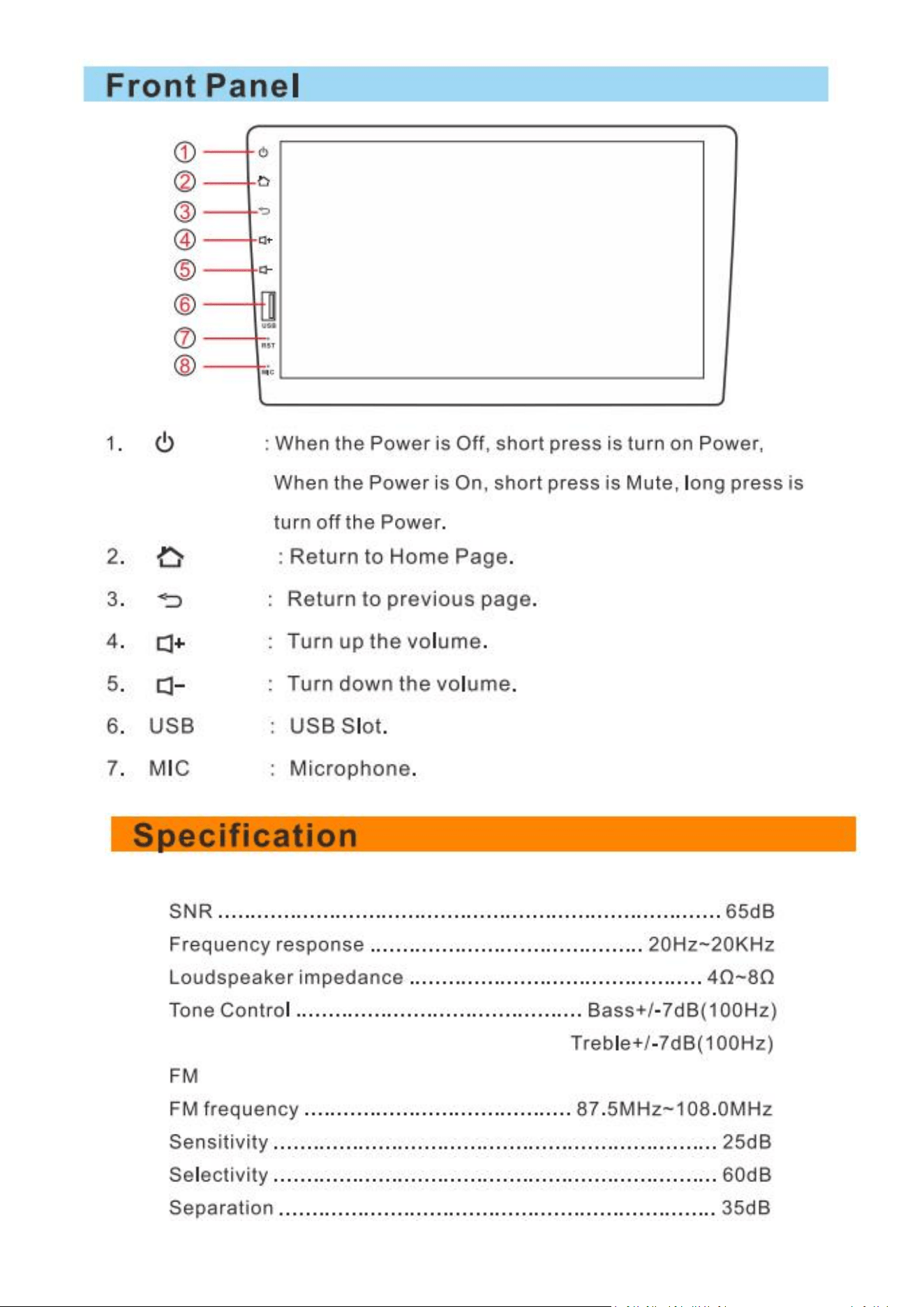
3. Machine Reset
1. The first use of the system before or after the replacement battery, the machine must be reset.
2. When the machine function is not normal, the machine must be reset.
3. Click restore factory settings in system settings interface, make the machine is in the initial state.
4. Use a pointed object, press the RESET button on the panel,or click the system RESET in the system
settings, the machine will be RESET to turn it off, back to the factory the initial state.
Note: press the RESET button and the system
initialization will lose time and set the value before.
4
[Installation]
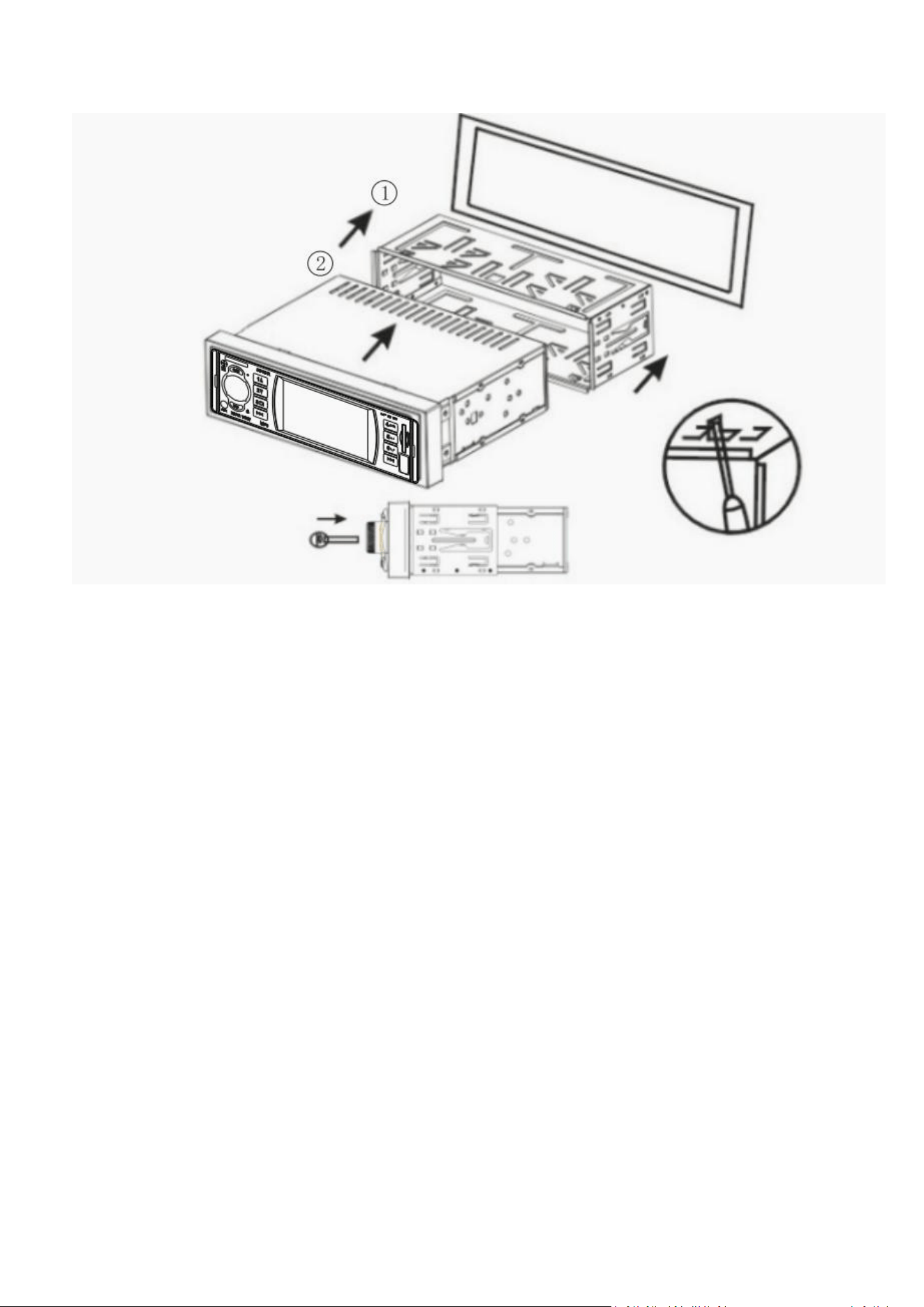
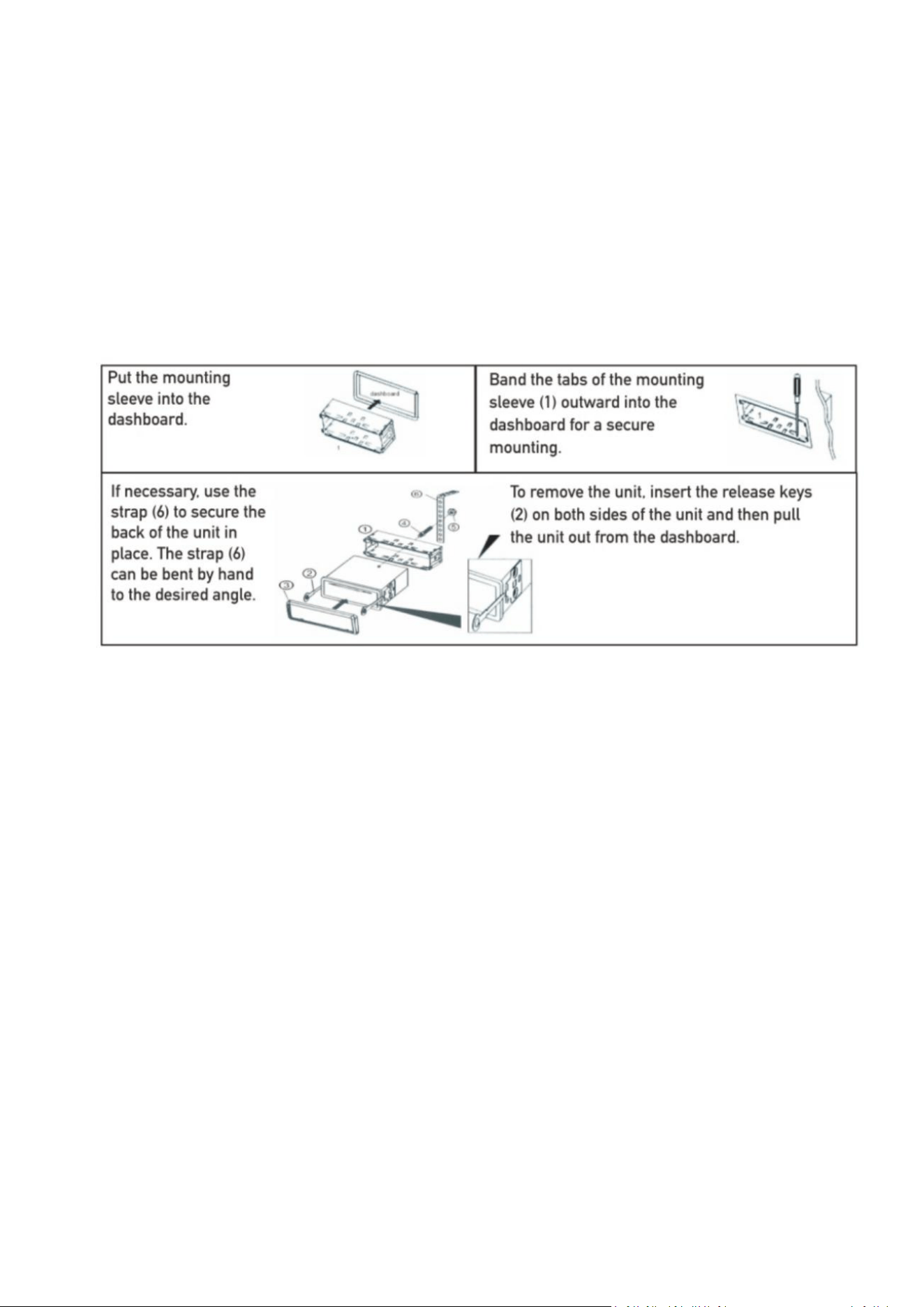
The unit installs for security, pls install it refer to the following diagram description:
1.Pls make the unit in proper place, connect the unit refer to the diagram, and test it works well or
not.
2.Pls wrapped the connection line with insulation tape to ensure complete wiring after testing well.
3.Pls bend the hook of metal 1,and insert the metal to instrument panel then fixed it.
4.Put the unit into metal hook until it lock.
Remove
Note:
1.Pls ensure install the unit in the positon that doesn't interfere with the normal operations of driver,
and no harm for emergency braking.
2.For exactly install, pls use the accessories provided by the unit only, otherwise it will cause
unnecessary damages. If more holes or other changes in facing or structures are needed, pls contact with
dealer nearby.
3.Installed after the first power test please press the reset button,then press the clock button to set
the clock,the unit can be used normally.
Dismantling:
The unit without key, you can pull out by your hand.
5
[Wiring]
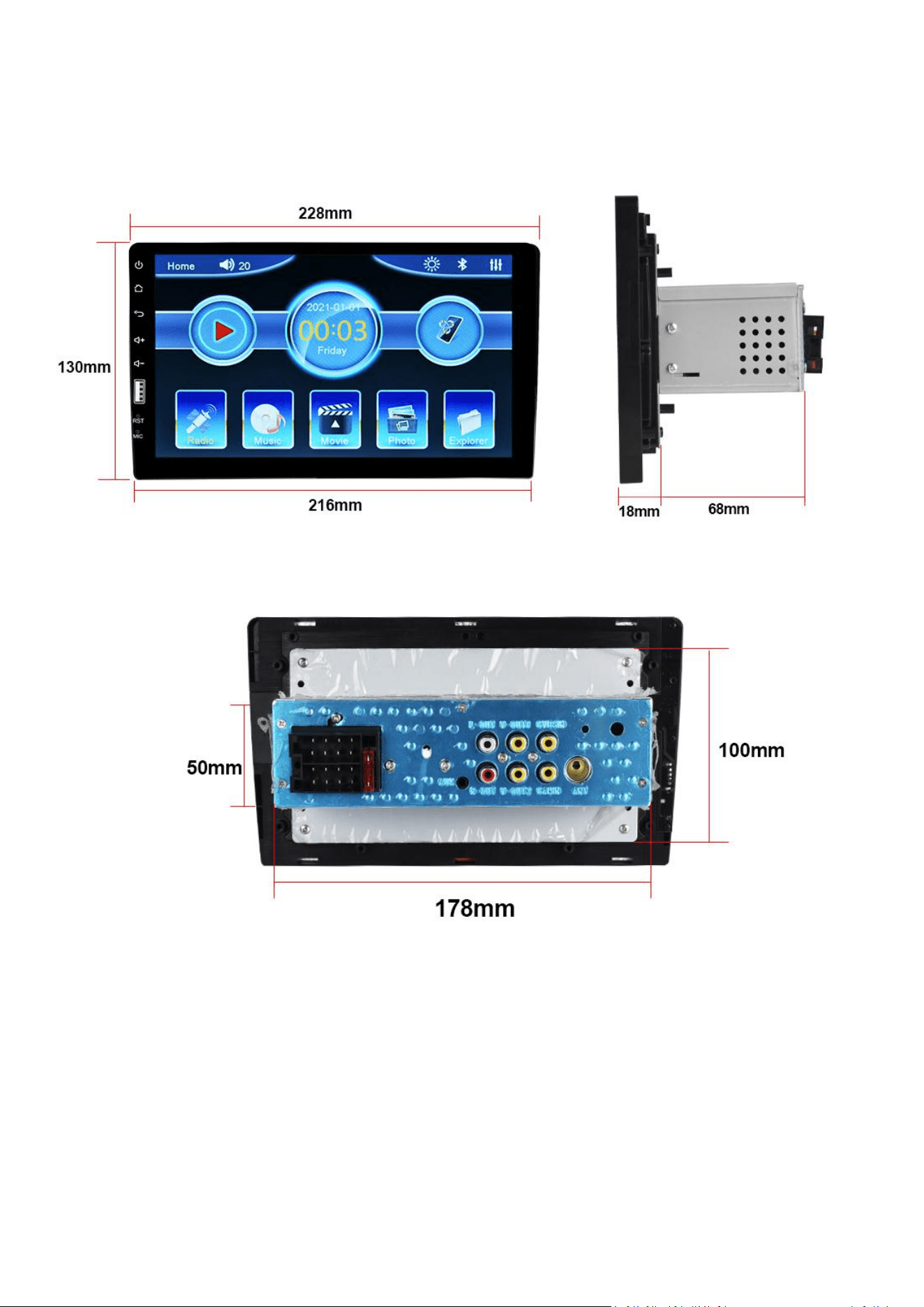
1. Product Dimension
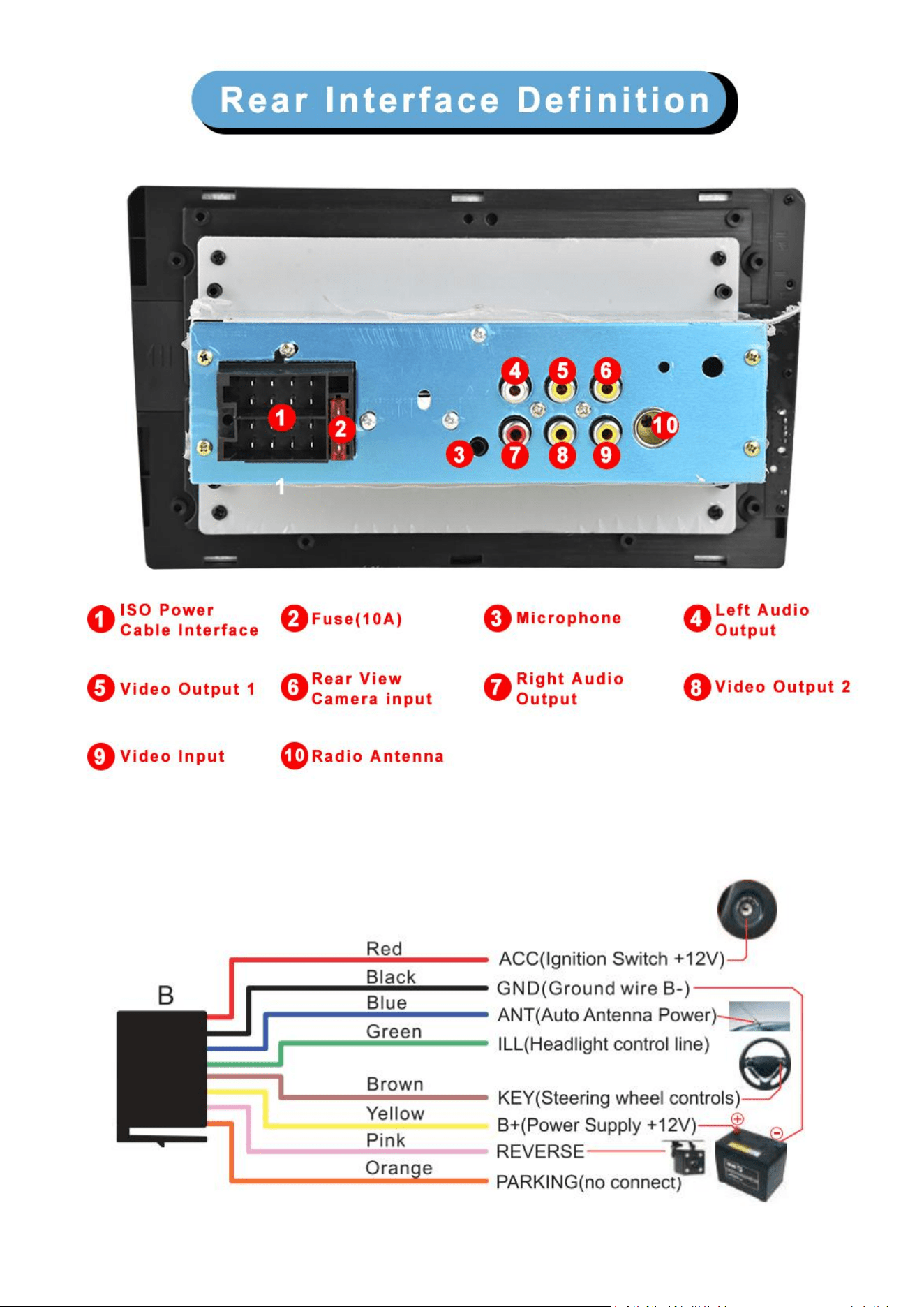
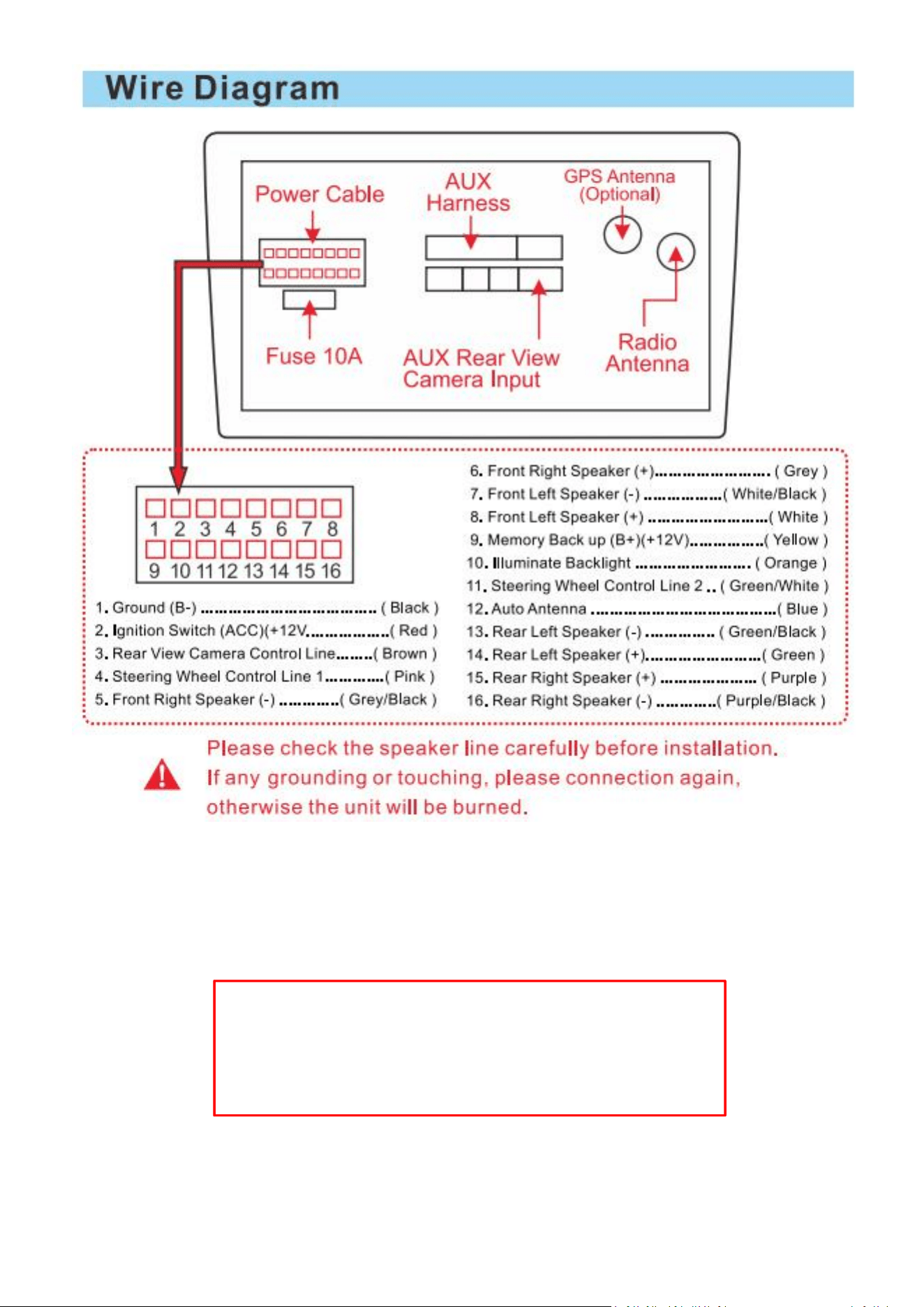
2. Back interface diagram
6
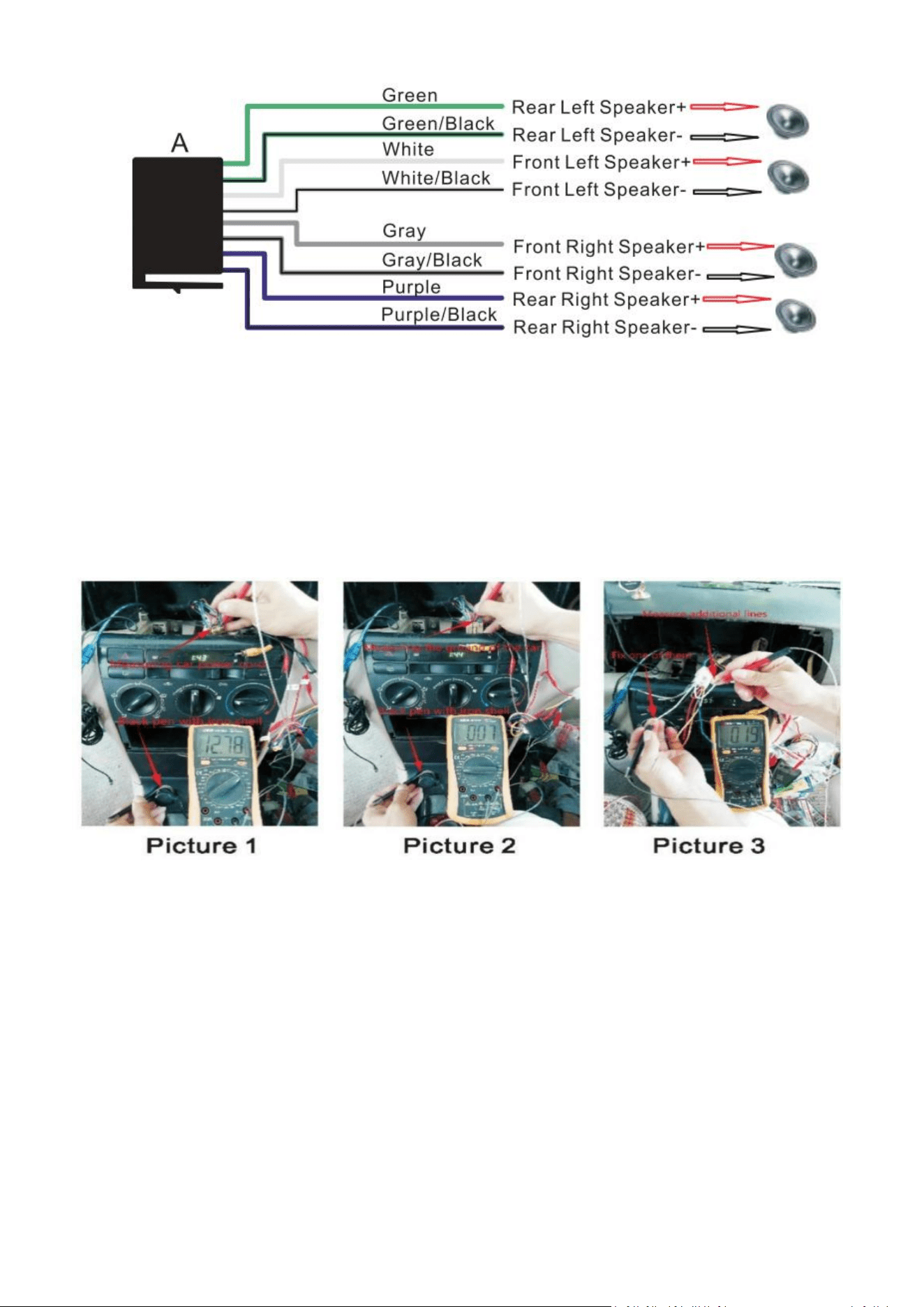
3. Harness
7
B= Power Cable
A= Horn Cable
4. Installation Steps
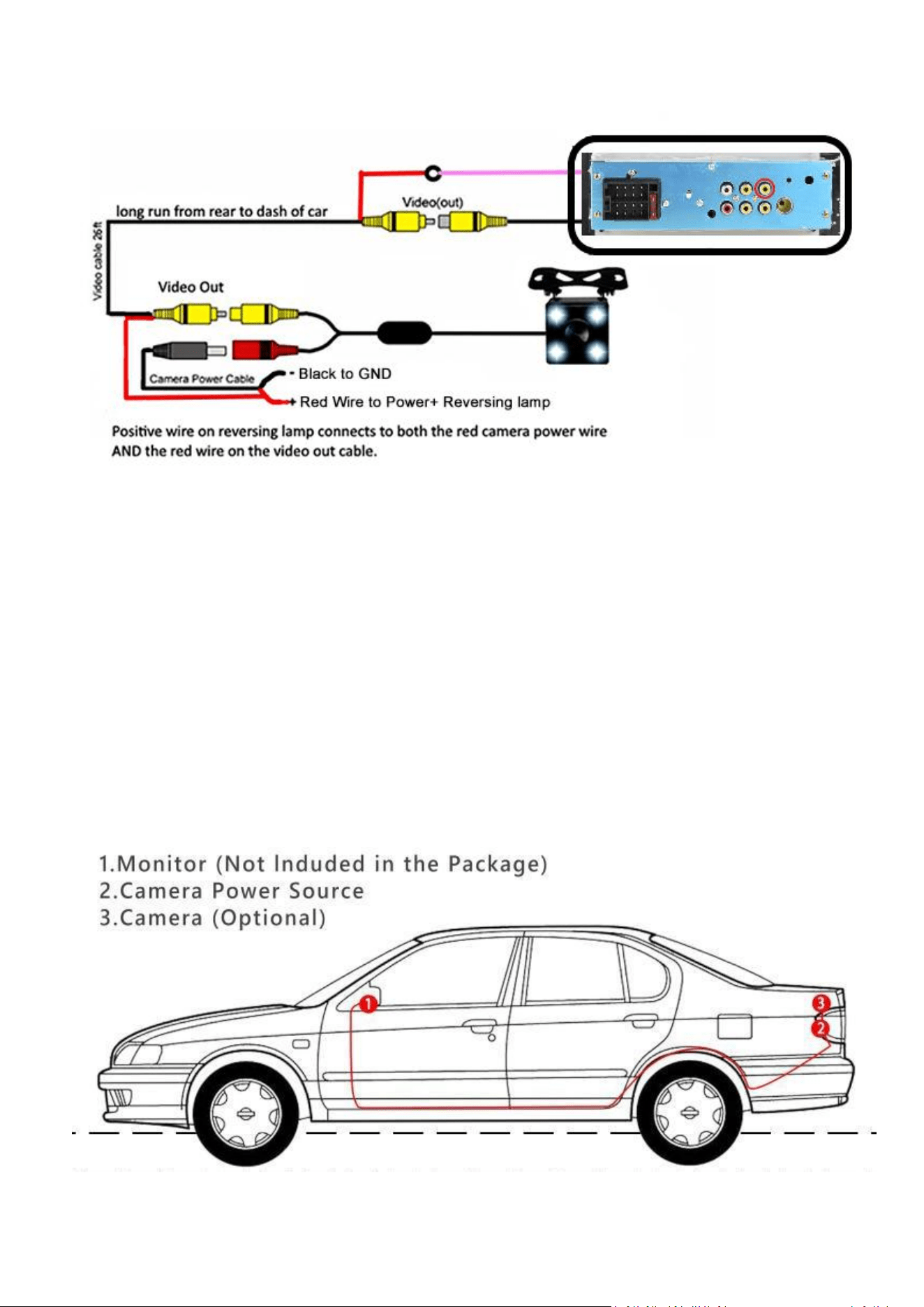
1>How to find the power cord of the car?
First turn the car key to the ACC state. Then regulate the Universal Watch to the 20V gear. Connect
the black stylus to the power ground (the outer ironclad of the cigar lighter) and use the red stylus to test
each wire of the car. Normally a car has two wires about 12V(some cars only have one). That is the
positive pole line. How to distinguish the ACC and memory line? Pull out the car key after you find the
two positive pole lines. The memory line is the electrically charged one after you nu plug the key. *(Look
the Picture 1)
2>How to find the ground wire of the car (negative pole)?
Turn the Universal Watch to the on/off beep gear. Then connect the black stylus to the power
ground (the outer ironclad of the cigar lighter) and use the red stylus to test each wire except the two
power lines. The energized one is the ground wire(negative pole). Some cars have two ground wires.
*(Look the Picture 2)
3>How to find the horn line of the car?

8
Turn the Universal Watch to the on/off beep gear. Connect the black stylus to any wire except the
power cord and ground wire. Then use the red stylus to test each remaining wire. The energized one is
the horn wire. Then use the same method to find out the other horn lines. *(Look the Picture 3)
4>How to test whether the unit work properly?
When you get the unit, you'd better test the unit with battery or power supply before installation.
Wire connection method: Twist the red wire and yellow wire together and then connect them to the
positive pole. Connect the black wire to the negative pole. Then press the switch to turn on the unit
and get a horn to connect to the horn wire. (Two wires connected to the horn are of the same color. The
white wire is supposed to be connected to the positive pole and the white one with black part connected
to the negative pole of the horn. You can make no distinction between the positive and negative poles of
the horn.) Then test the function of the unit.
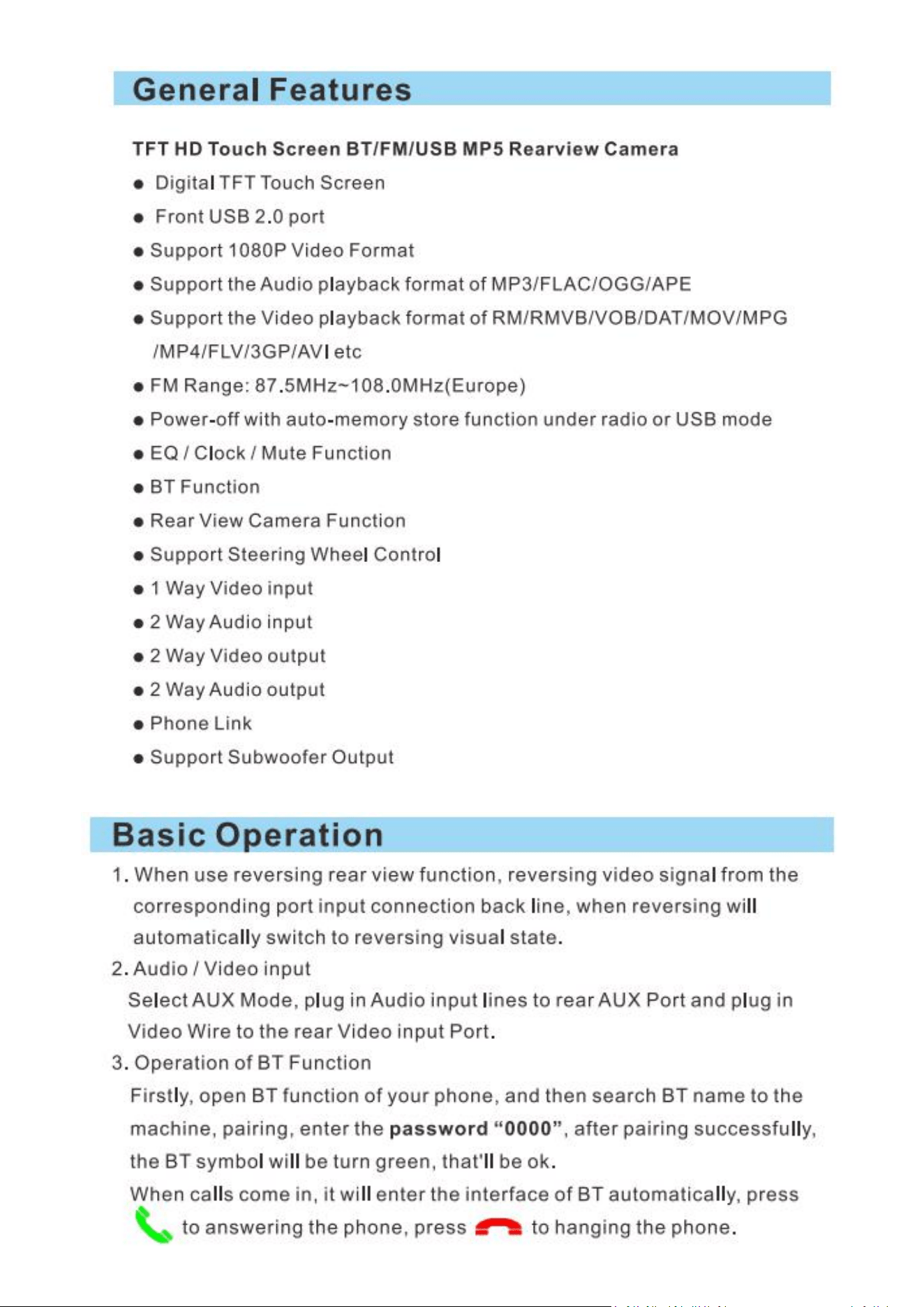
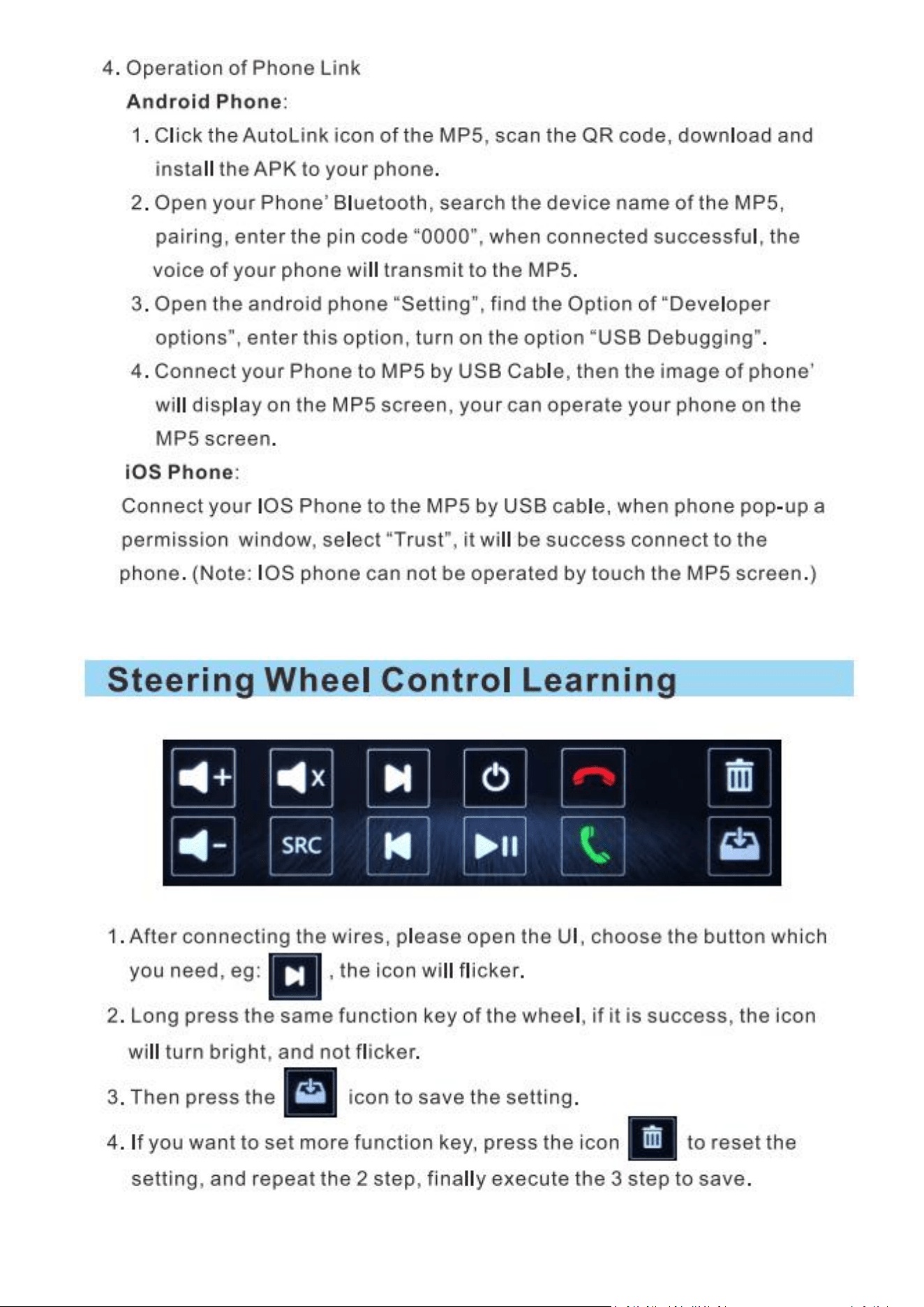
5>How to connect Bluetooth?
Turn on the unit and initiate Bluetooth function of phone, and then search for the user name of the
unit. Click the connect button and the phone will show it is connected. If you want to play music with
Bluetooth, press the function transition button to switch to Bluetooth mode and then click songs on your
phone. You can also dial numbers on your phone to make a phone call with Bluetooth.
6>How to fix the unit ?
Since each car has a different way of fixing the unit and the location of the screws are different,
there is no defined way to fix the unit. You may consult the fixing method of the original unit. If it was
fixed by tightening screws with the steel angle, you can unload the steel angle of the original unit to both
sides of our unit, then use the electrician tape to tight the steel angle (since screw hole size is probably
unmatched). If the original unit was fixed with iron frame, you can fix the iron frame of our unit in the car
first, and then push the unit to fasten it. If the size is not fit, you can wrap the unit with electrician tape to
increase the volume of the unit, and then put it in and fasten it. Or you can think of a better way to fix it,
but anyway, you can fix it.
7>The default Bluetooth Pin Code
Bluetooth Pin Code : 0000/1234
9
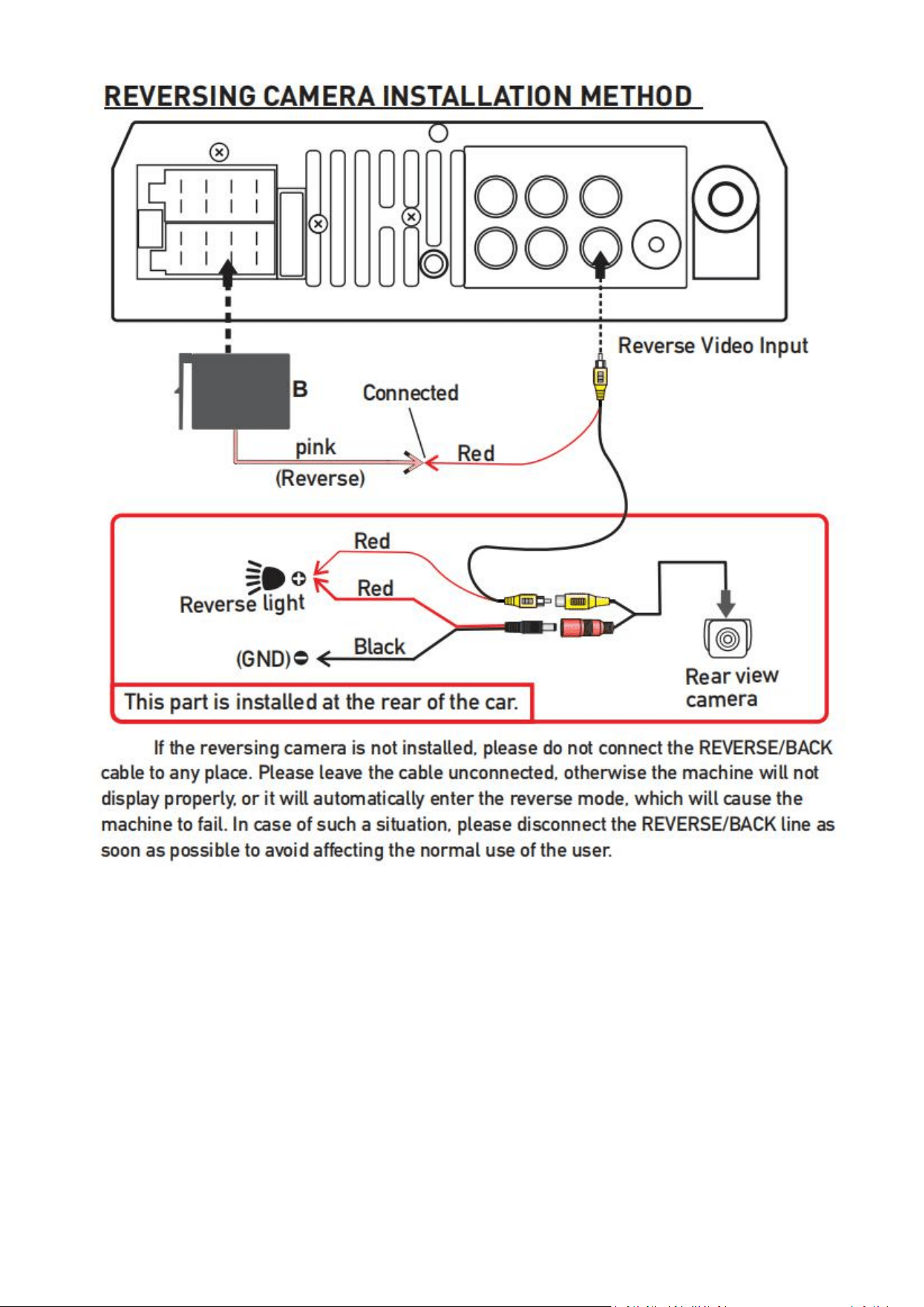
5. Schematic diagram of reversing camera wiring
Here's the complete steps of camera wiring:
1. Camera power cable: red and black.
--- Red connection to reverse the positive light, black to reverse the negative light.
2. Camera Extension Cable: yellow port.
---- Insert the extension cable of the camera to the radio rear port "CAMIN"/"RCAM"
3. Trigger Cable
There are two short red trigger cables on the camera's Extension Cable.
3.1 one near the radio -- connects to the power cable (pink wire with label "reverse / parking sensor control
/ back in")
3.2 another near the camera -- connects to car's rear light positive.
When you pull the rear gear, the device will automatically display the rear view image.
10
Wiring method:
Preparation tools: tape, screwdriver, wire cutters, plastic prying tool, traction wire .
Step 1: Insert the original accessory camera wire harness into the rear license plate light hole, and
then directly snap it in.
Step 2: Step 2: Remove the trunk lining, pull out the waterproof rubber ring, use the tow line to pull
the camera cable out of the suitcase, insert the camera wire harness and data connector into the hole of
the baffle, and finally rein stall the waterproof rubber ring.
Step 3: Remove the decorative lining board on the left side of the trunk, plug the data power
integrated extension cable with the camera harness, and lead out from the rear trim panel along the
original car harness.
Step 4: Peel off the sealing strip on the left side door of the rear seat, route the cable into the rear
cockpit, and pull out the data power integrated plug and the remaining extension cords.
11
Step 5: Recover the trunk, and insert the extension cord into the gap of the plastic panel along the
rubber strip on the door side, all the way to the cockpit door.
Step 6: Remove the storage box under the headlights, pass through the top of the OBD interface,
and then connect the wiring interface to the navigator interface.
6. Fixed machine
1.Fix the bracket on the left and right sides of the machine with screws, and adjust the position of
the bracket according to the actual installation.
2.Screw the machine in the mounting position of the central console of the car.
12
13
14
15
Thank you again for using our products. If you have other questions,
please contact our customer service staff. The product UI interface or
function may be modified and upgraded from time to time without
notice. If there are some differences in the manual, this is normal.

16
PROBLEMS, CAUSE & SOLUTIONS
[Simple Troubleshooting]
1> Unable to boot normally
-Reason for not booting
1."Yellow" "Red" "Black" this 3 lines only connected 2 line of them, so it will not start, it should be
that the yellow line is connected to the positive pole, red line to the key control line, black to the
negative pole, less connection or wrong connection does not boot.
2.The original car line and unit wiring can not be connected to the color, the color of the original car
line is not standard, if you connect like that it can not only be turned on but also may burn.
3.The original car plug can't be plugged directly into the new unit, even if it just plugs in, it can't be
used, otherwise it won't be turned on or burned.
4.The 3 wires are connected right, but it does not boot. Check if the fuse on the yellow line is broken.
If there is no problem with the fuse, twist the yellow and red wires together. Turn on the key and press
the unit's power button to see if it can be turned on.
5.Every time you change the fuse, it burns. Please don't change it again The reason is that when you
first connect the positive and negative poles, the protection circuit of the unit is short-circuited. The unit
can be repaired under the guidance of our master. No basis can only be returned to the after-sales or
new unit. If these are no problem, or also don't boot, please make the final step to confirm, find a 12V
battery or 12V power supply "yellow" and "red" twist together with the positive, black to the negative
pole, press the button check if it can boot or no, if you can boot, it showed that the original car line is not
right connect, or there is a problem with the car line. If it can't be boot, the unit is broken. Does not boot
unit, check the line carefully, do not blindly suspect the unit problem.
2> Automatic shut-down
-Automatic shutdown usually has these following conditions
1.The cable error connect:If the blue cable (automatic antenna power supply) is connected to the
power cable of the unit, an automatic shutdown will occur. Please follow the correct wiring method to
solve the problem.
2.The voltage is unstable: please find a 12V-5A which one is the power supply and re-tested to see if
it will automatically shut down or no. If it does not automatically shut down after the test, please replace
the power supply. If it will automatically shut down, it is problem with the unit.
3> Having noise
-The general situation of noise is caused by two reasons
1.The original speaker power is too small. When the volume of the unit is turned up,there will be
noise.

17
Solution: When replacing the speaker or listening to the song, the volume should not be too large.
2.The speaker cable is grounded.
Solution: Take the iron speaker cable. Directly connected to the speaker cable of the unit.
4> Remote control cannot be used
-Check if the battery of the remote control has power
Test method: Turn on the camera of the mobile phone and align the light of the remote control,
then press the button of the remote control to see if the phone will light up. If it is not lit, there will be no
power. Replace the battery; That is, there is electricity, which proves that there is no problem with the
remote control.
5> Settings con not be saved (no memory)
-There is no memory function, there is only 2 points in memory
1.The yellow line and the red line are connected together (separate yellow to positive, red to key
control)
2.Yellow and red are reversed Gust change position)
6> Car audio with Bluetooth but if can't work
-Check the phone to see if you can search for the unit code or no.
Operation steps: turn on the unit, use the phone Bluetooth search, search for CAR-MP5,then click
the connection, after connecting, you can answer the phone or Bluetooth to play the song.
PIN Code: 0000 /1234.
7>The product smoke has proved that the internal circuit has been burned and change
the insurance FUSE can not solve the problem
-In this case, the unit needs to be repaired.
8>How to adjust the sound, where is the equalizer set, the sound can not be adjusted
-Adjust the sound: please turn the volume to adjust.
-Equalizer settings: In general, press the volume knob to display the equalizer SEL, and rotate the
volume button to adjust each sound effect.
-The sound cannot be adjusted: 1.Please reset the unit or unplug the power cord and plug it in. 2.The
Volume knob is broken, and the knob can be replaced.
9>Support no image of reversing camera
-Generally two situations

18
1. Connect the wrong line or less wiring. Camera connection method:
a>The first step is to find accessories (accessory: one camera+ one
power cord+ one video cable).
b>The second step is to find the port of the wiring.First find the reversing control line on the power
line of the unit. The control line is a pink line or brown line, connect this line to the positive pole of 12V
and the screen will turn blue. Find the back of the unit the CAME video input interface, find the positive
and negative of the backup light.
C>The third step is to connect: there are two sockets on the camera, the red socket is connected to
the power cable, the yellow is inserted into the video cable, the red wire of the power cable and the wire
of the video cable are screwed together on the positive pole of the reverse lamp, and the black wire of
the power cable is not used, connected, the other end of the video cable is connected to the CAME video
input interface on the back of the unit. The red line coming out of the video line is connected to the
reversing control line of the power line.
2.The camera is broken. If the lamp that is properly wired to the camera is not lit, it will be broken
and replaced with a new one.
10> USB flash disk can not be played, the card with the map can not be recognized, the
card slot does not enter the card, the map card folder has no content?
-USB flash disk can not play:
Format the USB flash disk, and the file system is selected as: FAT32, re- download on or two songs
and try again. If it still doesn't work, please replace the USB flash drive.
-The map card cannot be recognized:
Insert the card into the computer to format, re-download the map or change the memory card to
download the map software.
-The card slot does not enter the card:
Check whether the memory card is inserted, the plug is broken.
-There is no content in the map card folder:
Insert the card into the computer to view it. If there is no content, you need to download it again.
11> FM does not receive the program
-Can not receive the station check the 2 points
1.The antenna plug is not fully inserted, the antenna is disconnect or the line is disconnect.
2.Search channel, hold AMS does not let go for 2 seconds The unit will automatically search or press
the up and down button to perform a channel search. Can't solve the above 2 points, Please unplug the
antenna plug and find a screwdriver or a metal strip to insert it instead of the antenna.
12>How to install
This depends on your personal hands-on skill. Most people can install it themselves. That is so good.

19
No worry about it, I will tell you how to do it. [Installation method]: Remove the original car radio, the
new unit can be installed back according to the installation method of the original car radio (that is, how
the original car unit is installed, you will install it back, you will do).
13>How to remove the original car's radio
The best way is to do it yourself. If it doesn't, you can ask the installer to help you.
14>Install it without reading the card or USB flash disk
-Before the unit is shipped, it is tested that the USB flash disk and the card are not read. Do not easily
suspect the unit.
First format that card or USB flash on the computer and download again, then try again. If not,
please change your card or USB flash disk to try it. If you still can't, please unplug the unit and plug it in
again. If you don't read it, it may be a unit problem, return to the new or after-sales.
15> Just installed no sound
-Dear customers, the unit has been tested before shipment. If there is no sound, it is usually a wiring
error or the original car speaker wire is short- circuited with iron. Please do not doubt the unit. According
to the steps to check it,
1.Check whether the speaker cable is short-circuited and connected. If there is a short circuit, please
reconnect it.
2.Check how many speaker cables according to the original speaker cable if there are only 2
speaker cables to prove that the original car line does not match our unit, you need to re-route the
original car line. One speaker must lead to 2 speaker wires. 2 speakers must be have 4 speaker cables to
available.
16> After a while there is no sound
-Disconnect all the speaker cable from the unit (do not remove all of them), and then find an
external speaker to receive the gray and purple of the tail line of the unit. Green any group, and then try
to see if there is any sound. If there is a sound, it is proved that the car's speaker line is short- circuited
with iron or the speaker is damaged. If there is no sound, the unit is broken.
17>Machine reset
1.The first use of the system before or after the replacement battery, the machine must be reset.
2.When the machine function is not normal, the machine must be reset.
3.Click restore factory settings in system settings interface, make the
machine is in the initial state.
4. Use a pointed object, press the RESET button on the panel, or click the system RESET in the system

20
settings, the machine will be RESET to turn it off, back to the factory the initial state.
Note: press the RESET button and the system initialization will lose time and set the value before.
18>The other party cannot hear the voice of the Bluetooth phone, or the voice of the
other party cannot be heard
1.When making a call, is the sound muted or vibrated
2.If the microphone head of the built-in microphone is loose or damaged, you can go to a
professional store for repair
19>The clock is still displayed after the product is turned off?
Sorry, the clock function is a fixed function of the product and cannot be deleted. In fact, the product
has been shut down, which does not consume the car’s power.
