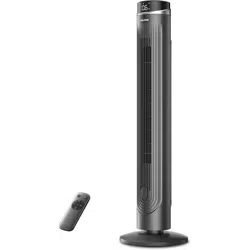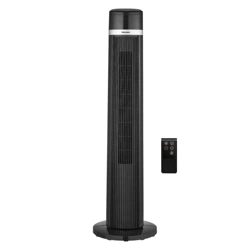
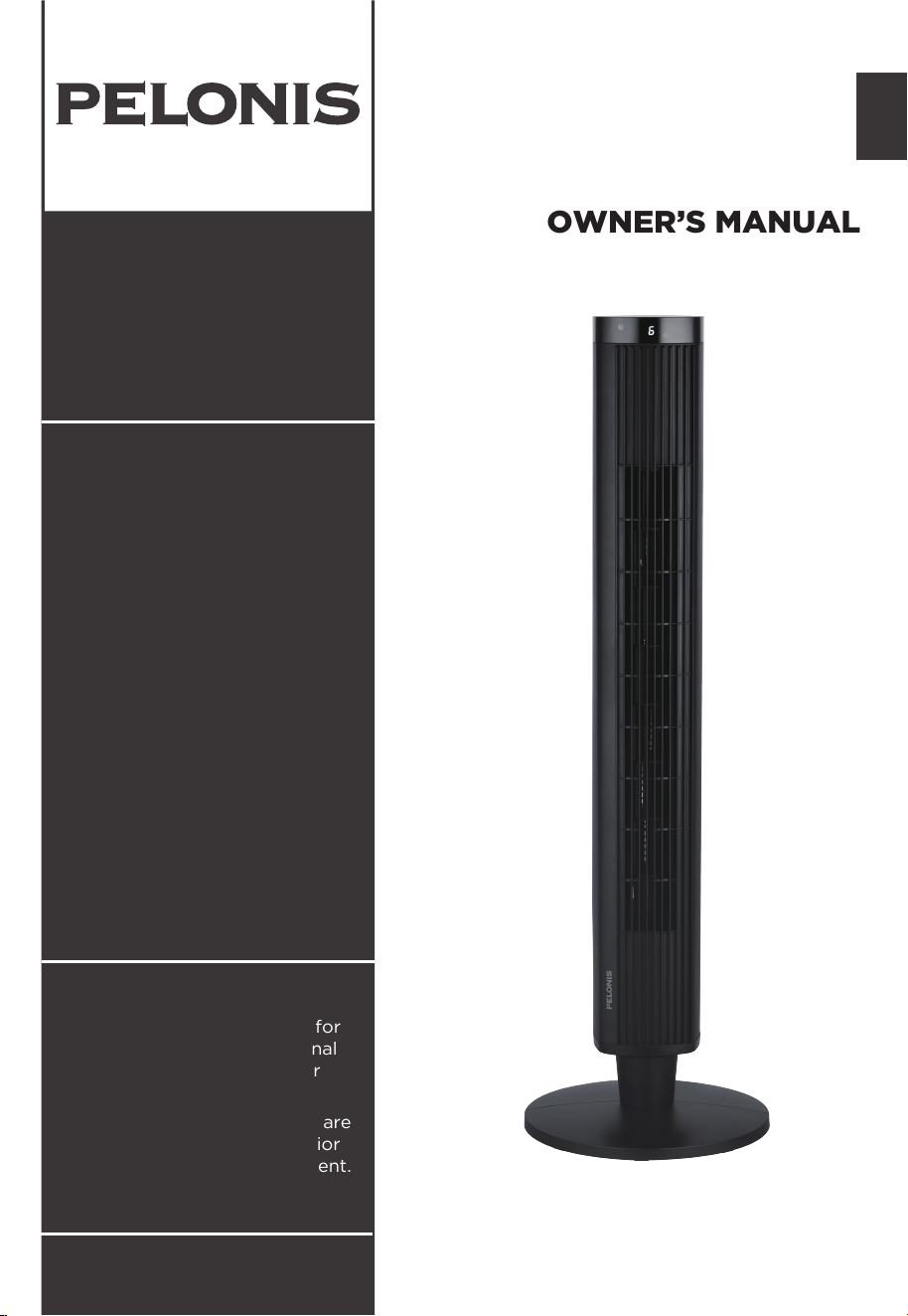
TOWER FAN
PFZ42R0APK
pelonis.com
OWNER’S MANUAL
EN
PFZ42R0APK
Warning Notice: Before using
this product, please read this
manual carefully and keep it for
future reference. For additional
support, please call customer
service at 1-866-646-4332.
The design and specifications are
subject to change without prior
notice for product improvement.
Consult with your dealer or
the manufacturer for details.

Read This Manual
SAFETY PRECAUTIONS
WARNING
CAUTION
NOTICE
OWNER’S MANUAL
SAFETY PRECAUTIONS
IMPORTANT INSTRUCTIONS
PART NAMES
SPECIFICATIONS
HOW TO ASSEMBLE
OPERATING INSTRUCTIONS
LED DISPLAY
............................................................................................. 1
.................................................................................... 2
................................................................................................................ 5
...........................................................................................................5
.................................................................................................... 6
..................................................................................... 8
............................................................................................................... 10
AUTOMATIC SHUTDOWN FUNCTION
.................................................................. 10
REMOTE CONTROL
..................................................................................................... 11
CLEANING MAINTENANCE
...................................................................................... 12
TROUBLESHOOTING
................................................................................................. 12
USER SERVICING INSTRUCTIONS
.......................................................................... 13
Page 1
Inside you’ll find many helpful hints on how to use and maintain your
appliance properly. Just a little preventive care on your part can save you
a great deal of time and money over the life of your appliance. You’ll find
many answers to common problems in the troubleshooting tips - you should
be able to fix most of them quickly before calling service. These instructions
may not cover every possible condition of use, so attention to safety details
is required when operating and maintaining this product.
To prevent injury to the user or other people and property damage, the
instructions shown here must be followed. Incorrect operation due to
ignoring of instructions may cause harm or damage. The different levels of
risk are shown by the following indications.
This symbol indicates a hazardous situation which, if
not avoided, could result in death or serious injury.
This symbol indicates a hazardous situation, which, if
not avoided, could result in minor or moderate injury.
This symbol addresses practices not related to
physical injury.

IMPORTANT INSTRUCTIONS
Page 2
1. This appliance is not intended for use by persons
(including children) with reduced physical, sensory
or mental capabilities, or lack of experience and
knowledge, unless they have been given supervision
or instruction concerning use of the appliance by a
person responsible for their safety. Children should
be supervised to ensure that they do not play with
the appliance.
2. Never insert fingers, pencils, or any other object
through the grille when the fan is running.
3. If the supply cord is damaged, it must be replaced
by manufacturer or its service agent or a similarly
qualified person in order to avoid a hazard.
4. Disconnect the fan when moving it from one
location to another.
5. Be sure the fan is on a stable surface when
operating to avoid overturning.
6. Do not use the fan by window. For rain may create
electrical hazard.
7. When the fan was assembled, the rotor blade guard
shall not be taken off anymore.
- Unplug the fan for prior cleaning.
- The rotor guard shall not be dissembled/opened
to clean the rotor blades.
- Wipe the fan enclosure and rotor blade guard with
a slightly damp cloth.
CAUTION
READ AND SAVE THESE
INSTRUCTIONS

IMPORTANT INSTRUCTIONS
(cont.)
Page 3
WARNING
1. If the supply cord is damaged, it must be replaced
by manufacturer or its service agent or a similarly
qualified person in order to avoid a hazard.
2.To protect against the risk of electrical shock, do not
immerse the unit, cord or plug in water or other
liquid.
3.When the appliance is not in use and before cleaning,
unplug the appliance from the outlet.
4.This appliance has a polarized plug (one blade is
wider than the other). To reduce the risk of electric
shock, this plug is intended to fit in a polarized outlet
only one way. If the plug does not fit fully in the
outlet, reverse the plug. If it still does not fit, contact
a qualified electrician. Do not attempt to defeat this
safety feature.
5.WARNING—To reduce the risk of fire or electric
shock, do not use this fan with any solid-state speed
control device.
6.This product employs overload protection (fuse).
A blown fuse indicates an overload or short-circuit
situation. If the fuse blows,unplug the product from
the outlet. Replace the fuse as per the user servicing
instructions (follow product marking for proper fuse
rating) and check the product. If the replacement
fuse blows, a short-circuit may be present and the
product should be discarded or returned to an
authorized service facility for examination and/or
repair.

Page 4
a) “Do not operate any fan with a damaged cord or
plug. Discard fan or return to an authorized service
facility for examination and/or repair.”
b) “Do not run cord under carpeting. Do not cover
cord with throw rugs, runners, or similar coverings.
Do not route cord under furniture or appliances.
Arrange cord away from traffic area and where it will
not be tripped over.”
7.Do not leave the fan running unattended.
8.To Reduce The Risk Of Fire, Electric Shock Or Injury
To Persons, Do Not Use Replacement Parts That
Have Not Been Recommended By The Manufacturer
(e.g.Parts Made At Home Using A 3D Printer).
9.Please note that any changes or modifications of
this product not expressly approved by the party
responsible for compliance could void the user's
authority to operate the equipment.
IMPORTANT INSTRUCTIONS
(cont.)
WARNING
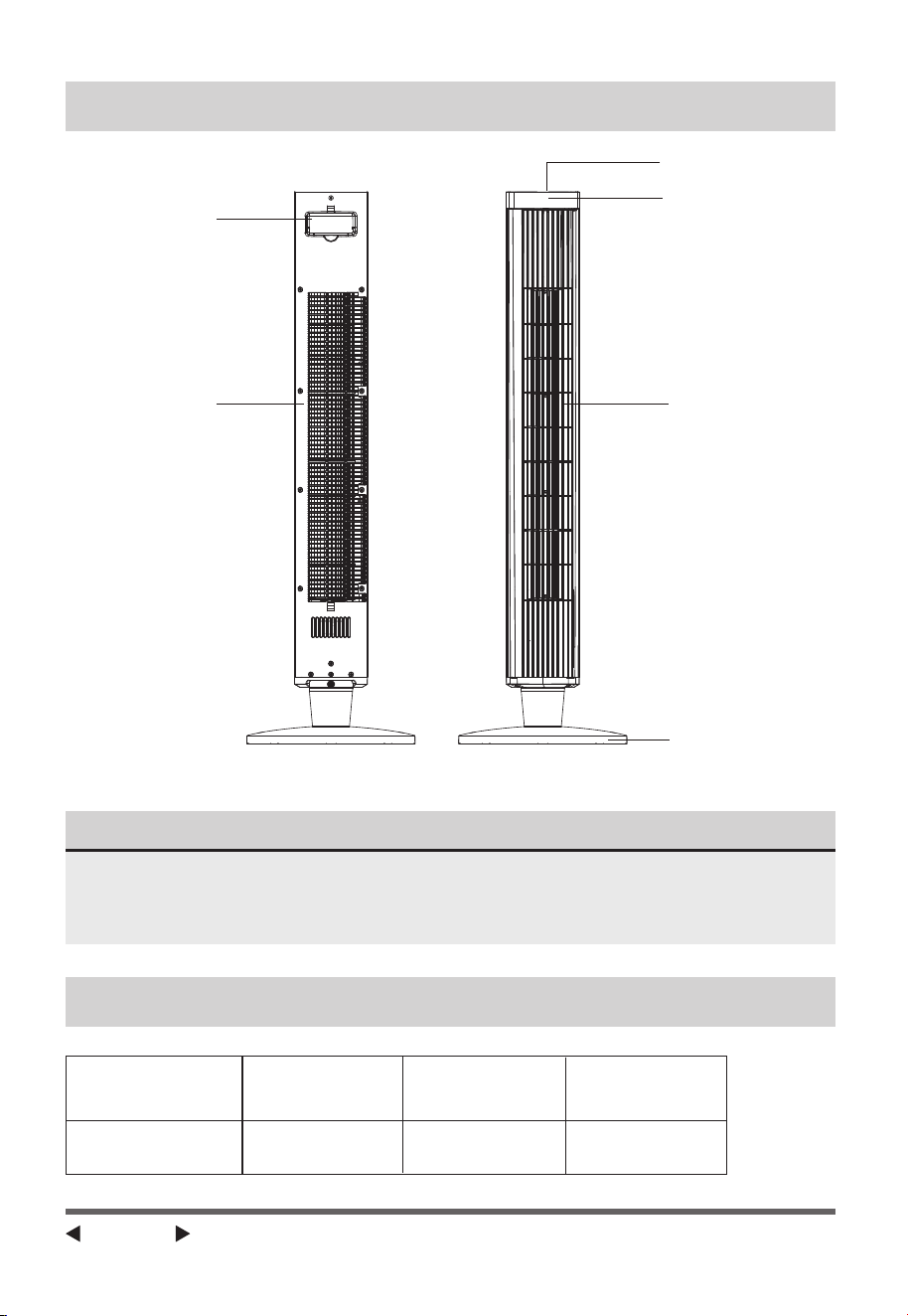
Carry Handle
Back Front
Air Inlet
Air Outlet
LED Display
Control Panel
Base
PART NAMES
NOTICE
All the pictures in this manual are for explanation purposes only.
Any discrepancy between the real object and the illustration in the
drawing shall be subject to the real model.
Page 5
SPECIFICATIONS
PFZ42R0APK 120V~ 60Hz 45W
MODEL Rated Voltage Frequency Power
Page 6
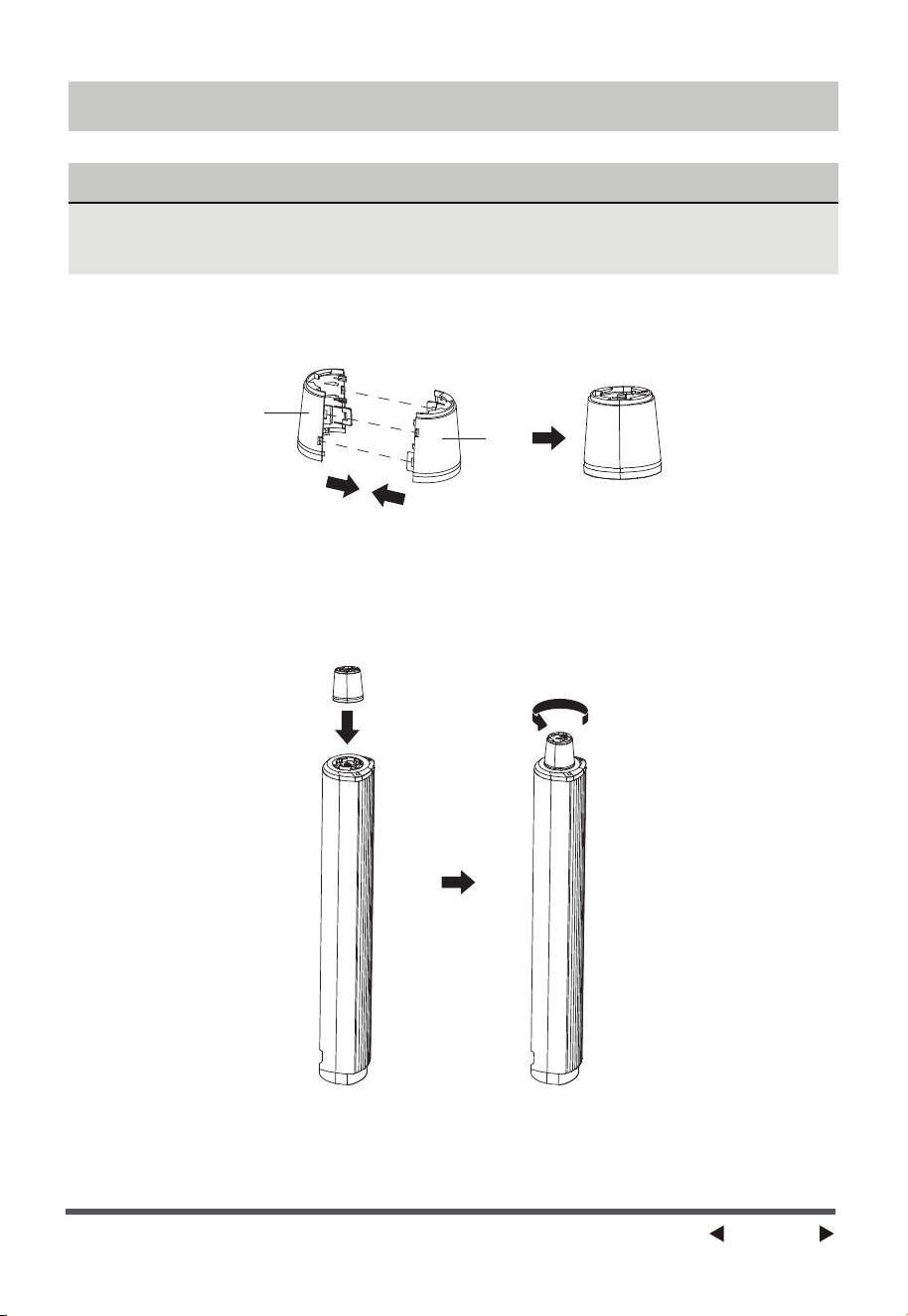
HOW TO ASSEMBLE
NOTICE
Please place the machine on the packing foam or other soft surfaces
and invert it to avoid scracthing a mark when install the base.
1. Take out the two parts of the pole from packing box. Assemble two parts
A and B of pole together as Fig 1.
2.Position the bigger end of pole at the bottom of tower fan body into the
groove, turn the pole counterclockwise until there is click voice as Fig 2.
Fig 1
Fig 2
A
B
Page 7
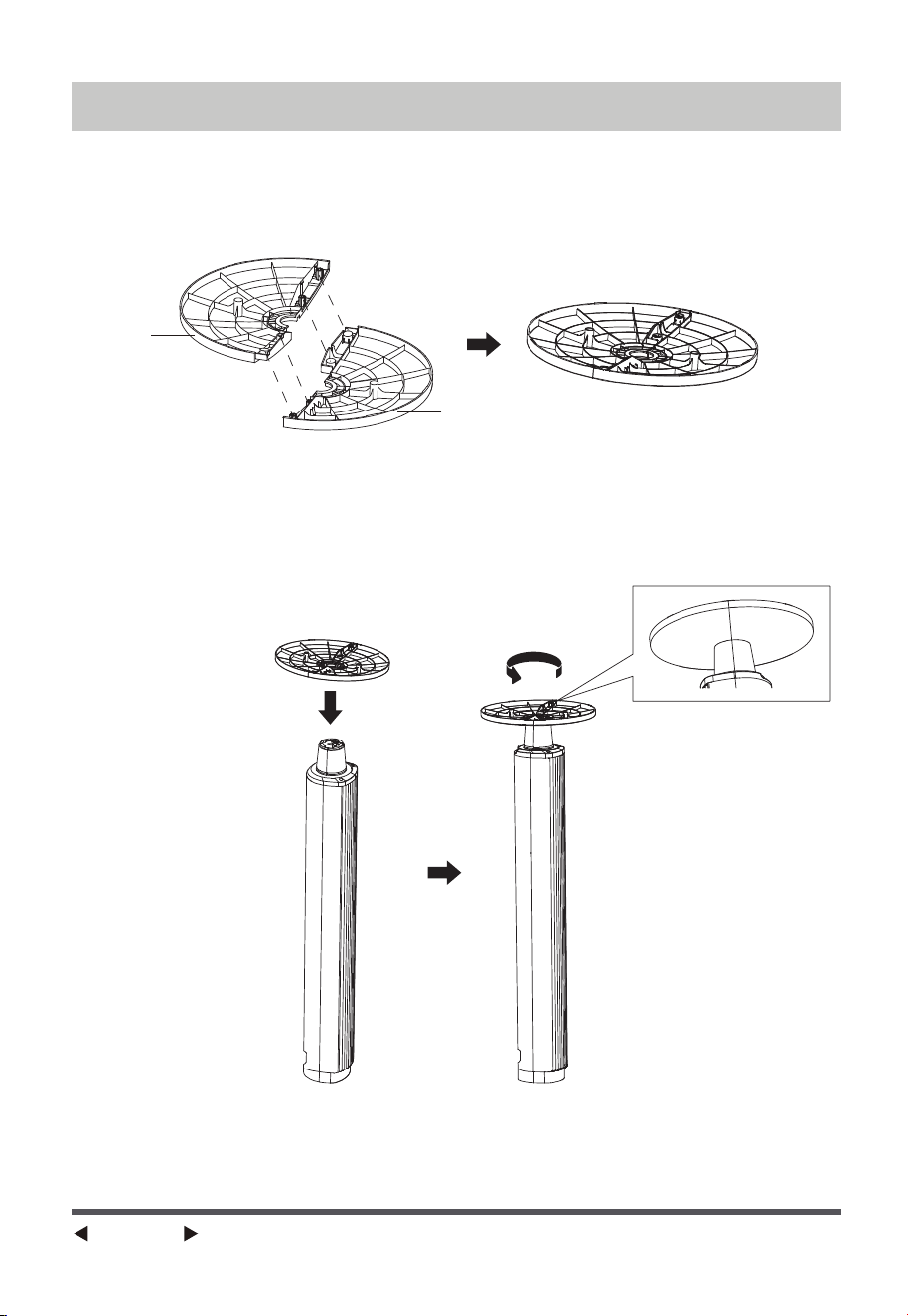
Fig 3
Fig 4
3.Take out the two parts of base from packing box. Insert the two poles of
part C into two holes of part D, and insert the two poles of part D into
two holes of part C to assemble the base as Fig 3.
4.Position base to the smaller end of pole, turn the base counterclockwise
until hearing a click voice and boundary of pole align with boundary of
base as Fig 4.
HOW TO ASSEMBLE
C
D
Page 8
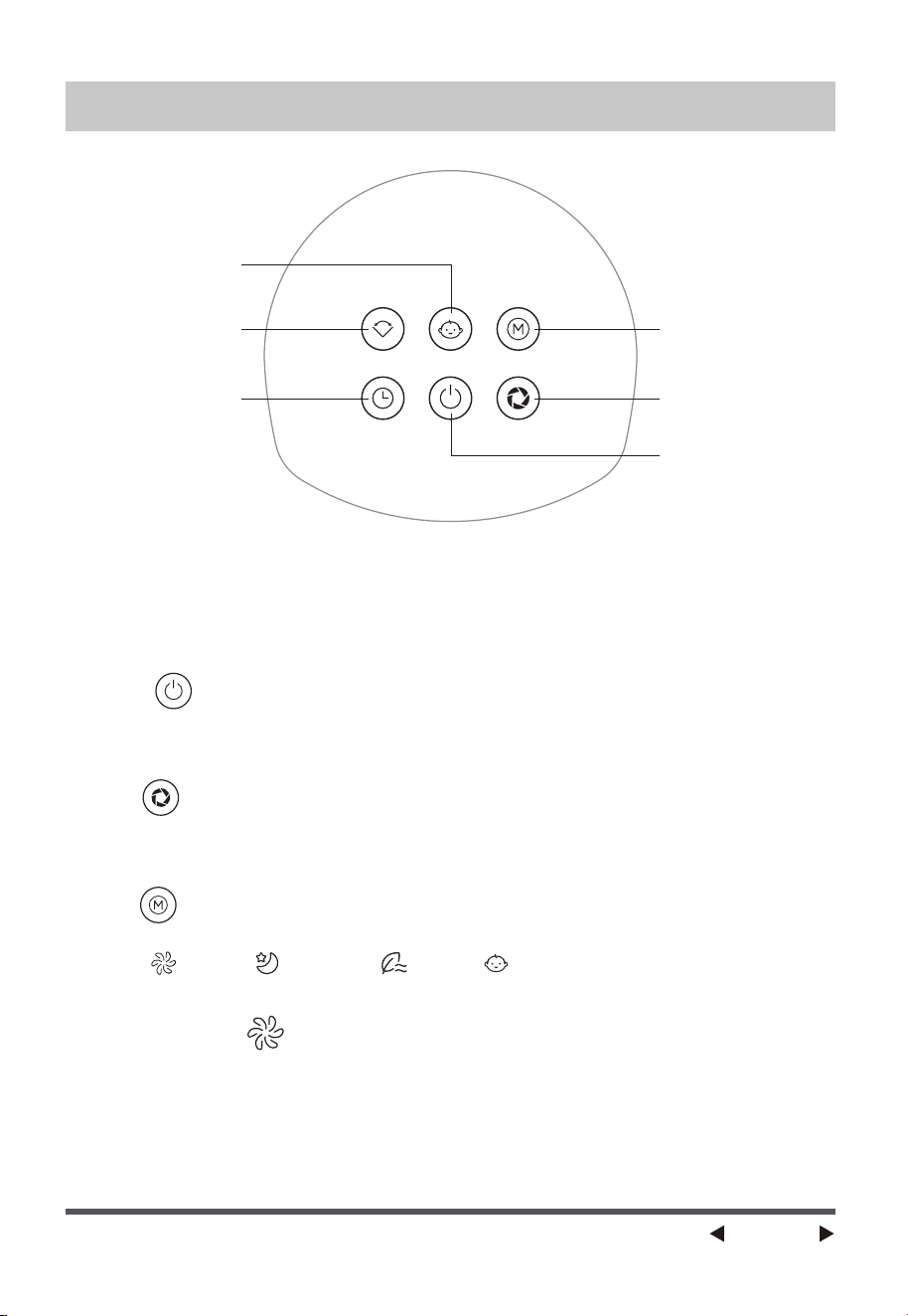
POWER
Touch the “POWER” key to turn on the fan in normal mode, and the LED
display will indicate the wind speeds. Touch it again to turn the fan off.
SPEED
When the fan is running, touch the “SPEED” key repeatedly to select different
speeds.
MODE
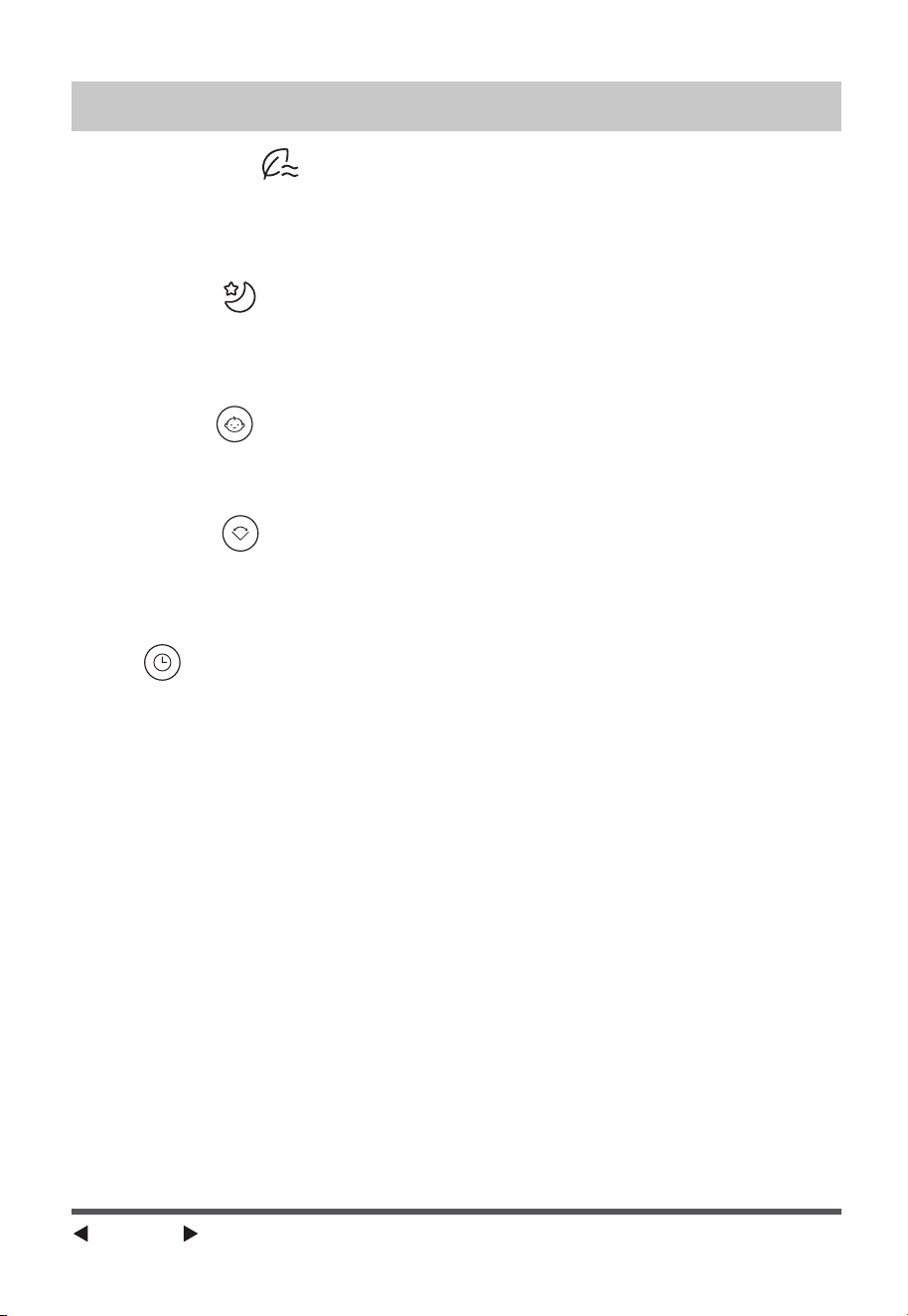
Tap the “MODE” key repeatedly to cycle through
“Normal - Sleep - Natural - Baby ”. The lights will indicate the
chosen mode.
-NORMAL MODE
In normal mode, choose from 6 wind speeds (1 to 6 from low to high). The fan
will run continuously at the selected speed, and the wind speed will not switch
automatically.
Please place the fan on a stable, flat surface. Plug the cord set into a 120V~
electrical outlet, then listen for a “beep” sound to confirm that the fan has
been successfully connected to the power supply.
OPERATING INSTRUCTIONS
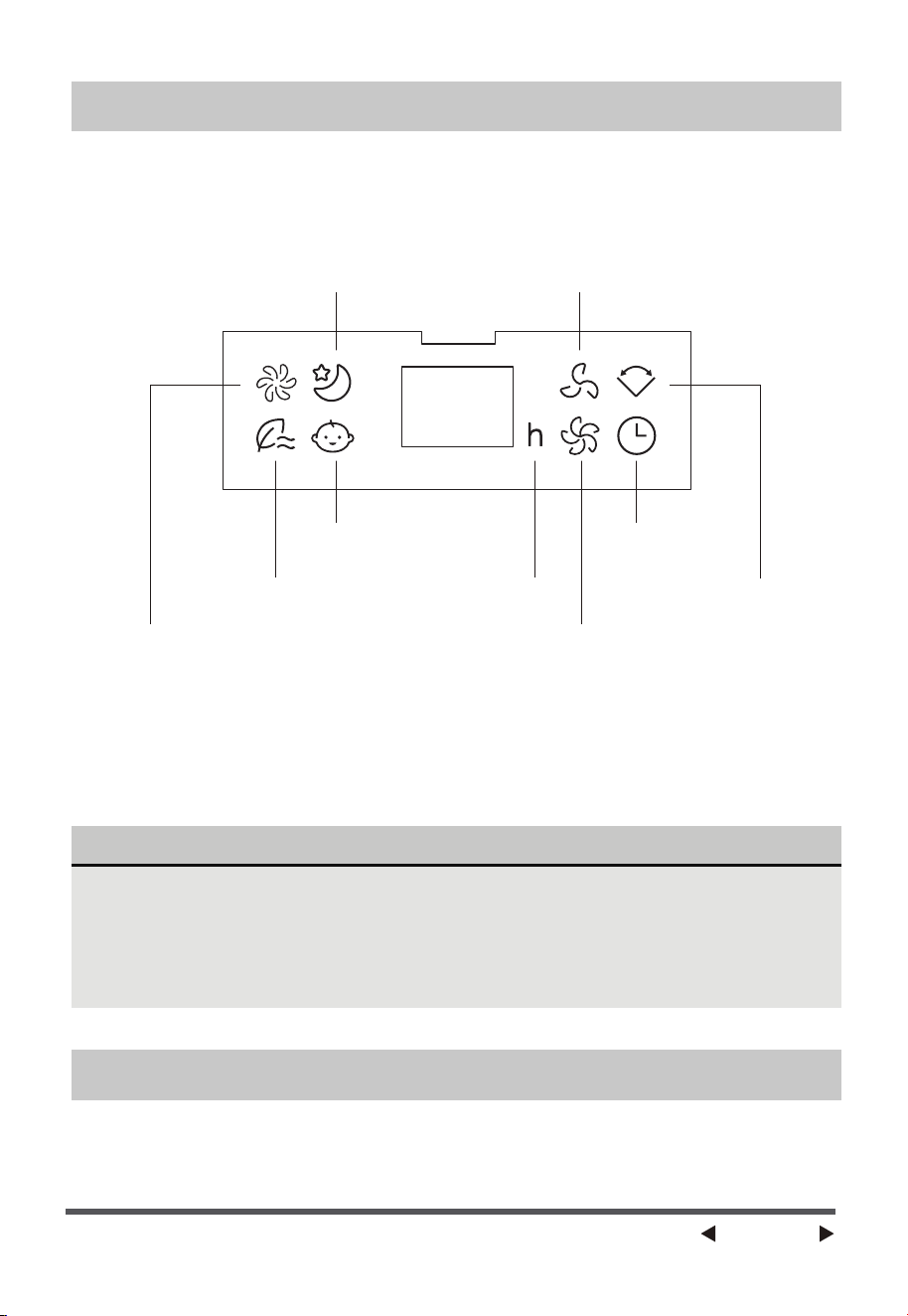
Oscillation
Timer
Baby Mode
Mode
Speed
Power
Page 9
-NATURAL MODE
The natural mode offers 6 wind speeds (1, 2, 3, 4, 5, 6). In natural mode, the
fan will automatically cycle through different circulations based on the wind
speed you select.
-SLEEP MODE
Sleep mode offers 6 wind speeds (1, 2, 3, 4, 5, 6). When in sleep mode, the fan
will gradually decrease speed every 30 minutes until it reaches speed 1,
providing a comfortable airflow during sleep.
-BABY MODE
Designed for babies, this mode offers 3 wind speeds (1, 2, 3) with gentle
airflow. Choose the desired wind speed based on the situation.
OSCILLATION
Touch the “OSC" key to start oscillating the fan, the oscillation symbol will be
displayed on the LED panel. Touching it again to stop the fan at the desired
direction.
TIMER
The fan is running, touch the “TIMER” key and set the timer to turn off the fan
automatically.
Touch it continuously to select time from 1 to 24 hours with an increment of
1 hour (The corresponding time-lights on the LED panel will light up). The fan
will automatically turn off after the set hours.
(PS: To cancel the timer setting, press the timer key to 0.)
OPERATING INSTRUCTIONS
Page 10
NOTICE
• Turn off the fan without unplugging the power supply, it will resume
operation in the mode it was in before when turn on again (Except
the timer function).
• If the fan is unplugged and then plugged in again, it will turn on in
the default setting: third speed in normal mode.
The display will automatically turn off after 30 seconds of no operation, the
display will light up again once any key is touched.
LED DISPLAY
Turn off the fan without unplugging the power supply, it will resume
operation in the mode it was in before when turn on again (Except the
timer function).
After start-up, the system will automatically shut down after 24 hours of
inactivity.
AUTOMATIC SHUTDOWN FUNCTION
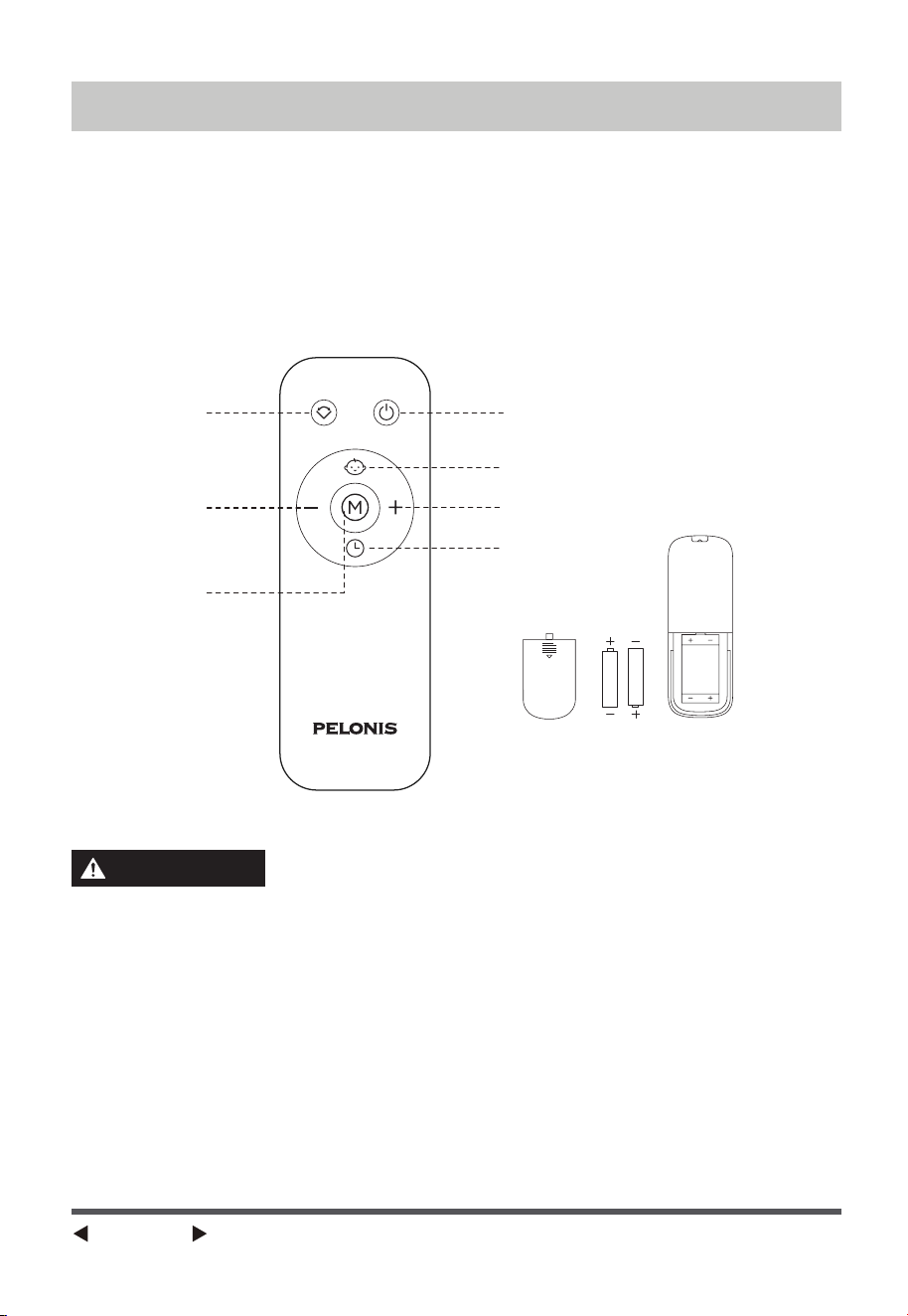
Normal Mode
Natural Mode
4/5/6 Wind Speeds
When the wind speed is set to 4/5/6,
this light will turn on.
Hour
Oscillation
Baby Mode Timer
1/2/3 Wind Speeds
When the wind speed is set to 1/2/3,
this light will turn on.
Sleep Mode
Page 11
REMOTE CONTROL
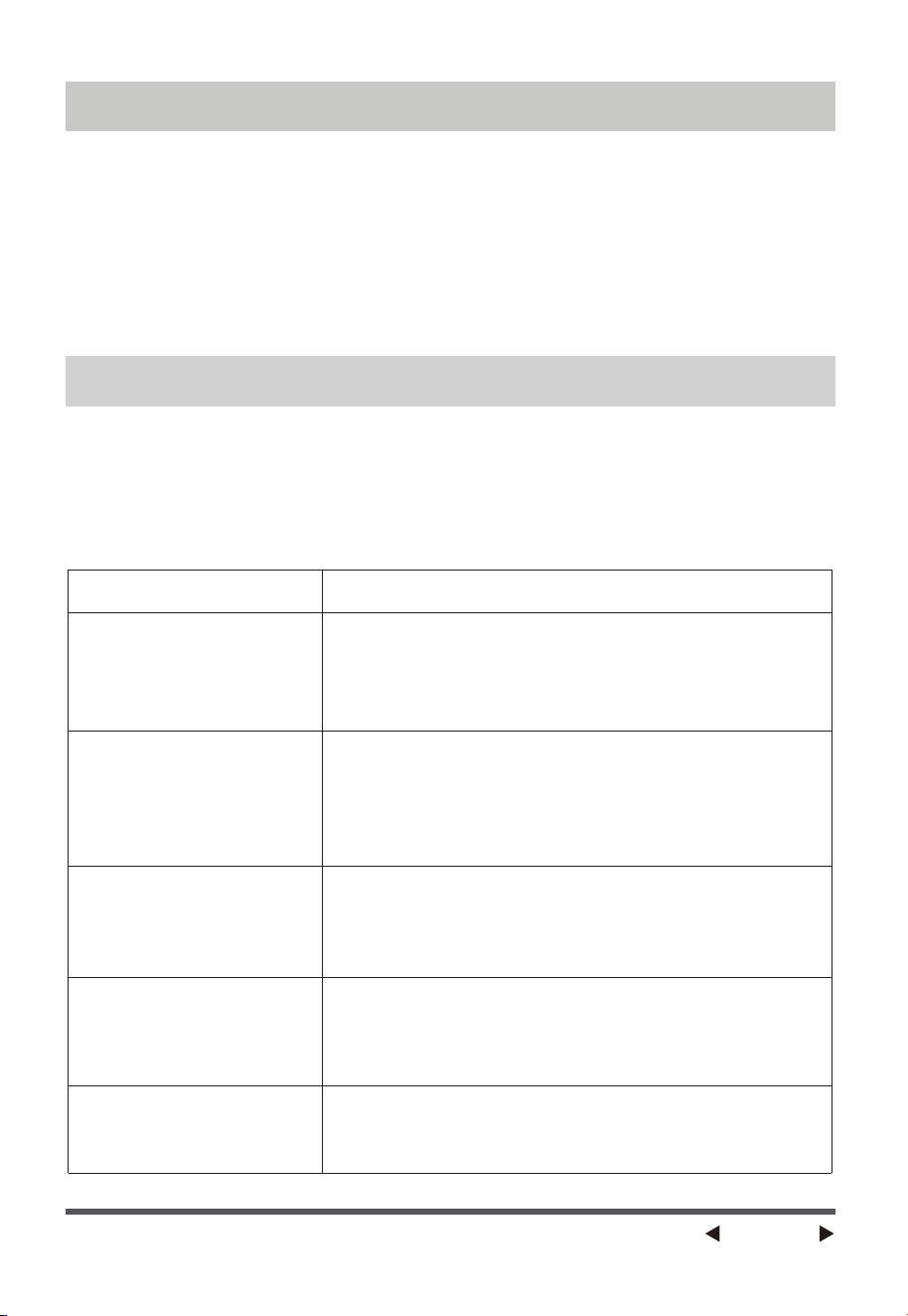
ON/OFFOscillation
Decrease
Mode
Baby mode
Increase
Timer
(AAA battery 1.5V)
Only use manganese or alkaline
AAA batteries that are recyclable.
WARNING
• The buttons on the remote controller such as OSCILLATION, ON/OFF,
BABY, DECREASE or INCREASE, TIMER, MODE, have identical functions to
their corresponding keys on the unit.
• The remote control operate effectivelywithin 16 feet in the front of the
product and within an angle of 30°.
• The battery contains heavy metals, acid and alkali substances, which
threaten human health; waste batteries should be sorted and recycled.
• Use standard or alkaline batteries of type “AAA”. DO NOT use rechargeable
batteries.
• Do not mix new batteries with old.
• Do not mix alkaline, standard (carbon-zinc) or rechargeable
(ni-cad, ni-mh, etc.) batteries.
Page 12
CLEANING MAINTENANCE
• Be sure to unplug from the electrical supply source before cleaning.
• Please use a damp cloth or sponge for general cleaning.
• To remove more persistent dirt with a cloth that dampened with warm
soapy water, and thoroughly to remove soap film with a damp cloth. Do not
use any solvents (such as thinners), as these may damage the plastic
casing.
• Be sure not to make water or other liquid enter inside of the motor.
If the product does not operate or does not operate properly, first check
according to the following list. If the reason the product does not operate or
does not operate properly is not included in the following list, the product
may have failed. At this time, it is recommended to send the product to the
dealer for repair.
TROUBLESHOOTING
Problem Solution
The tower fan does
not turn on
• Check whether the power outlet switch has
been turned on.
• Check whether the plug is connected to the
power outlet.
The remote control
doesn't work
• Check the battery state of the remote
control and, if required, replace batteries
with new ones.
• Check that the remote control is being used
within 16 feet of the unit.
Air flow is restricted
• Check whether the fan blades are dirty.
• Check whether the vents are clogged. You
can remove any dirt and unclog vents with
a dry cloth.
The buttons on the
control panel or the
remote control don't
work
The tower cooling fan
does not oscillate.
• Check whether the buttons are stuck.
• Clean the buttons with a damp cloth.
• Check that there are no obstructions to the
unit. If you have any further issues, contact
After Sales Support.
Page 13
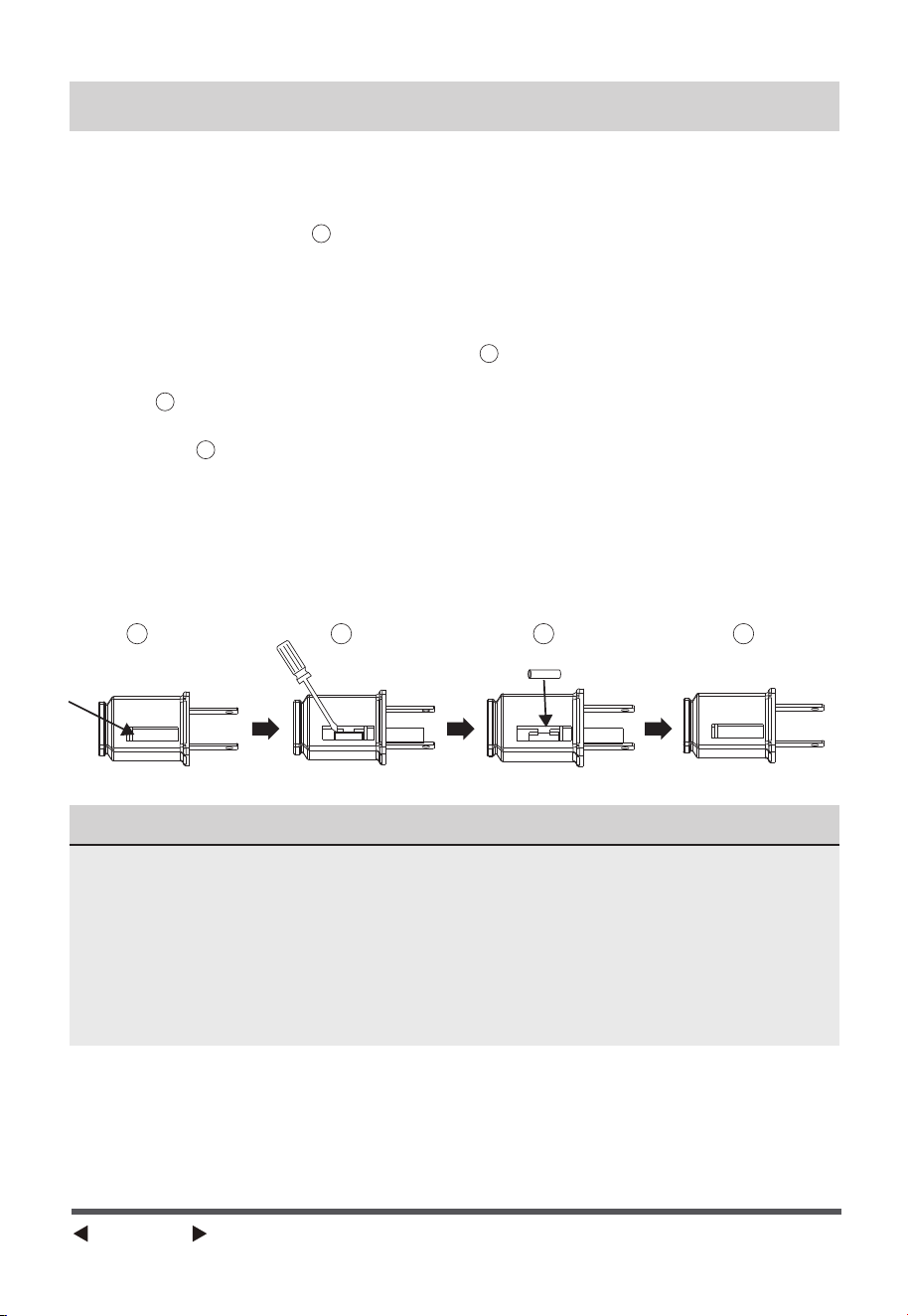
a)Grasp plug and remove from the receptacle or other outlet device. Do not
unplug by pulling on cord.
b)Open fuse cover. Slide open fuse access cover on top of attachment plug
towards blades.(Fig. )
c)Remove fuse carefully. Insert the tip of your tool into fuse slot(close with
the terminal), then pry the fuse gradually and slowly, but do not
overexert. If you feel resistance, you can try it at several times and pry
the fuse little by little. When one side of the fuse has been released, then
you can get the fuse out entirely.(Fig. )
d)Risk of fire (fix spacing). Replace fuse only with 2.5 Amp, 125 Volt fuse.
(Fig. )
e)Close fuse cover. Slide closed the fuse access cover on top of attachment
plug.(Fig. )
f )Risk of fire (fix spacing). Do not replace attachment plug. Contains a
safety device
(fuse)that should not be removed. Discard product if the attachment
plug is damaged.
g)If the fan suddenly does not work during normal operation, please check
whether it is a problem with the fuse.
2
3
41
1
2
3
4
USER SERVICING INSTRUCTIONS
NOTICE
• When you replace the fuse, please don’t operate suddenly or overexert, or
else the product will be damaged or cause accident.
• When you feel it hard to be operated, please make sure you have got the
right way.
• Risk of fire. Do not replace attachment plug. Contains a safety device
(fuse) that should not be removed. Discard product if the attachment plug
is damaged.

Page 14
Midea America Corp.
DATE OF PURCHASE:
PLACE OF PURCHASE:
(STAPLE SALES RECEIPT HERE)
NOTE: PROOF OF PURCHASE
IS REQUIRED FOR ALL WARRANTY CLAIMS
PRINTED IN CHINA
Parsippany, NJ 07054
Toll Free: 1-866-646-4332
Email us at: [email protected]
In the event of a warranty claim, questions, comments or if service is required for this
product, please contact us at the following:
For your records, staple your sales receipt to this manual and record the following:
SERVICE AND SUPPORT

Page 15
• Please read all instructions before attempting to use this product.
• Misuse, negligence, physical damage or accidents.
• Lack of maintenance (see instructions for proper maintenance).
• Repair by any unauthorized party during the warranty period.
• Damage caused by connection to an improper input voltage (see specification label on
your Fan).
Midea America Corporation warrants as limited herein to the original purchaser of retail
thateach new Fan, shall be free of defects in material and workmanship for aperiod of one (1)
year from the date of original purchase. This one (1) year warranty is limited to the Motor and
Electric Element.
In the event of malfunctions or failure of your Fan, simply deliver or send the Fan, postage
prepaid along with PROOF OF PURCHASE, within the warranty period of one (1) year, to
Midea America Corporation. Midea America Corporation reserves the right to inspect the
claimed defective part or parts to determine if the defect or malfunction complaint is covered
by this warranty. Midea America Corporation shall, within sixty(60)days after receipt of the
product, at its option, repair and/or replace the defective part or parts free of charge. This
warranty shall only cover defect arising from normal usage. Midea America Corporation
assumes no responsibility whatsoever if the Fan should fail during the warranty period by
reason of:
Midea America Corporation makes no further warranties or representations, express or
implied except those contained herein. No representative or dealer is authorized to assume
any other liability regarding the Fan. The duration of the implied warranty granted under
State law, including warranties of merchantability and fitness for particular purpose are
limited in duration should the duration of the express warranty grant it hereunder. Midea
America Corporation shall in no event be liable for direct, indirect, special or consequential
damages.
Some states do not allow limitations on how long an implied warranty lasts, and/or the above
limitations or exclusion may not apply to you. This warranty gives you specific legal rights
and you may have other rights which vary from state to state.
ONE (1) YEAR LIMITED WARRANTY




TM