USER MANUAL
en
PBF15T4AWW
Warning Notice: Before using
this product, please read this
manual carefully and keep it for
future reference. For additional
support, please call customer
service at 1-866-646-4332.
The design and specifications are
subject to change without prior
notice for product improvement.
Consult with your dealer or
the manufacturer for details.
Voltage: 120V~
Power: 33W
Frequency: 60Hz
pelonis.com
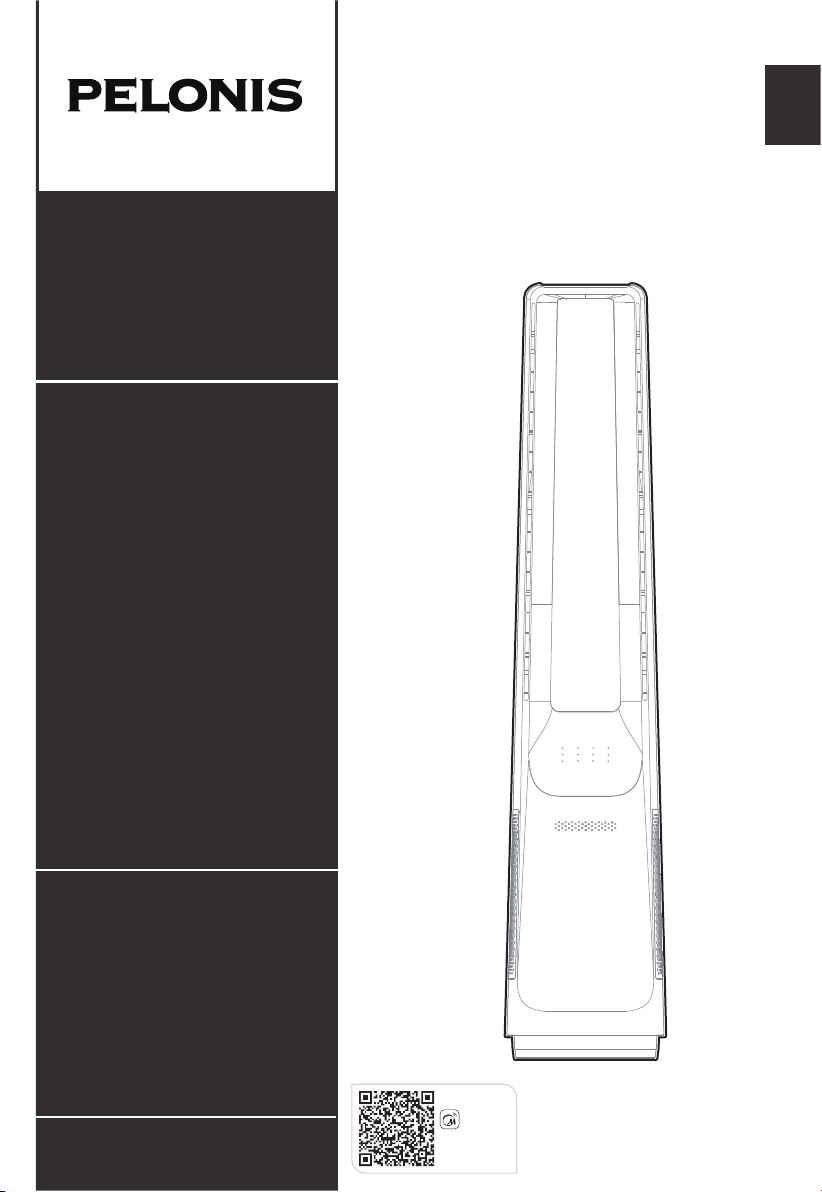
Smart Bladeless
Tower Fan
PBF15T4AWW
Download the app
& activate product
MSmartHome

CONTENTS
01
02
06
07
08
21
11
31
51
SAFETY INSTRUCTIONS
SPECIFICATIONS
PRODUCT OVERVIEW
OPERATION INSTRUCTIONS
APP SETUP AND OPERATION
CLEANING AND MAINTENANCE
USER SERVICING INSTRUCTIONS
41
TROUBLESHOOTING
1 YEAR LIMITED WARRANTY
61
SERVICE AND SUPPORT
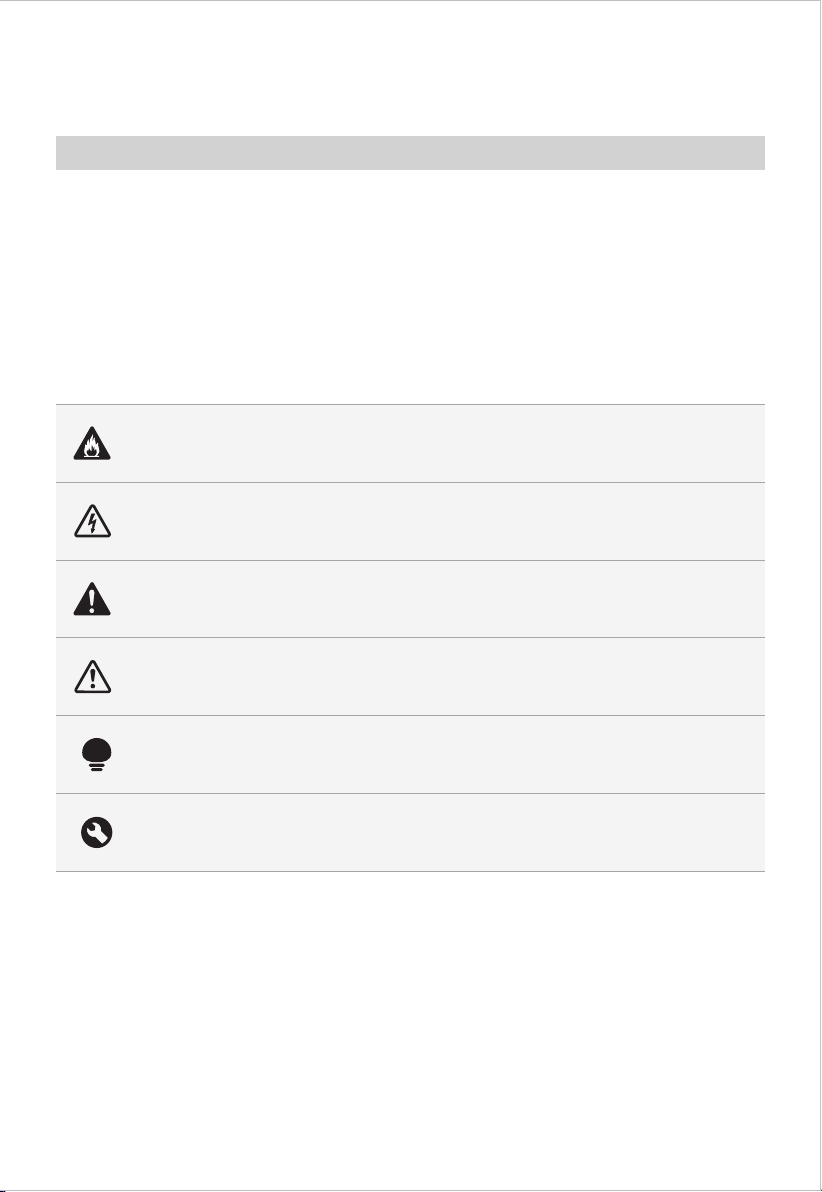
Danger
This symbol indicates that there are dangers to the life and health of
persons due to extremely flammable gas.
Warning of electrical voltage
This symbol indicates that there is a danger to life and health of
persons due to voltage.
Warning
The signal word indicates a hazard with a medium level of risk which, if
not avoided, may result in death or serious injury.
Caution
The signal word indicates a hazard with a low degree of risk which, if
not avoided, may result in minor or moderate injury.
Attention
The signal word indicates important information (e.g. damage to
property), but not danger.
Observe instructions
This symbol indicates that a service technician should only operate and
maintain this appliance in accordance with the operating instructions.
The following safety guidelines are intended to prevent unforeseen risks or damage from
unsafe or incorrect operation of the appliance. Please check the packaging and appliance
on arrival to make sure everything is intact to ensure safe operation. If you find any
damage, please contact the retailer or dealer. Please note modifications or alterations to
the appliance are not allowed for your safety concern. Unintended use may cause
hazards and loss of warranty claims.
Read these operating instructions carefully and attentively before using/commissioning the
unit and keep them in the immediate vicinity of the installation site or unit for later use!
Intended Use
Explanation of Symbols
SAFETY INSTRUCTIONS
02
• This appliance is not intended for use by persons
(including children) with reduced physical, sensory or
mental capabilities, or lack of experience and knowledge,
unless they have been given supervision or instruction
concerning use of the appliance by a person responsible
for their safety. Children should be supervised to ensure
that they do not play with the appliance.
Caution
• Unplug or disconnect the appliance from the power
supply before servicing.
• WARNING: To reduce the risk of fire or electric shock,
do not use this fan with any solid-state speed control
device.
• Do not operate any fan with a damaged cord or plug.
Discard fan or return to an authorized service facility for
examination and/or repair.
• Do not run cord under carpeting. Do not cover cord with
throw rugs, runners, or similar coverings. Do not route
cord under furniture or appliances. Arrange cord away
from traffic area and where it will not be tripped over.
• This appliance has a polarized plug (one blade is wider
than the other). To reduce the risk of electric shock, this
plug is intended to fit into a polarized outlet only one
way. If the plug does not fit fully into the outlet, reverse
the plug. If it still does not fit, contact a qualified
electrician. Do not attempt to defeat this safety feature.
Warning
• This product employs overload protection (fuse).
A blown fuse indicates an overload or short-circuit
03
IMPORTANT SAFEGUARDS

04
rating)and check the product. If the replacement fuse
blows, a short-circuit may be present and the product
should be discarded or returned to an authorized
service facility for examination and/or repair.
If the SUPPLYCORD is damaged, it must be replaced by
the manufacturer, its service agent or similarlyqualified
persons in order to avoid a hazard.
READ AND SAVE THESE
INSTRUCTIONS
This device complies with Part 15 of the FCC Rules.
Operation is subject to the following two conditions: (1)
this device may not cause harmful interference, and (2)
this device must accept any interference received,
including interference that may cause undesired
operation.
1) NOTE: This equipment has been tested and found to
comply with the limits for a Class B digital device,
pursuant to Part 15 of the FCC Rules. These limits are
designed to provide reasonable protection against
harmful interference in a residential installation. This
equipment generates uses and can radiate radio
frequency energy and, if not installed and used in
accordance with the instructions, may cause harmful
interference to radio communications. However, there
situation. If the fuse blows, unplug the product from the
outlet. Replace the fuse as per the user servicing
instructions (follow product marking for proper fuse
• WARNING: To Reduce The Risk Of Fire, Electric Shock
Or Injury To Persons, Do Not Use Replacement Parts
That Have Not Been Recommended By The
Manufacturer (e.g. Parts Made At Home Using A 3D
Printer).

05
is no guarantee that interference will not occur in a
particular installation.
2) Please note that any changes or modifications of this
product not expressly approved by the party
responsible for compliance could void the user's
authority to operate the equipment.
3) If this equipment does cause harmful interference to
radio or television reception, which can be
determined by turning the equipment off and on, the
user is encouraged to try to correct the interference
by one or more of the following measures:
--Reorient or relocate the receiving antenna.
--Increase the separation between the equipment and
receiver.
--Connect the equipment into an outlet on a circuit
different from that to which the receiver is
connected.
--Consult the dealer or an experienced radio/TV
technician for help.
This equipment complies with FCC’s and IC’s RF
radiation exposure limits set forth for an uncontrolled
environment. The antenna(s) used for this transmitter
must be installed and operated to provide a separation
distance of at least 20 cm from all persons and must not
be collocated or operating in conjunction with any other
antenna or transmitter. Installers must ensure that 20cm
separation distance will be maintained between the
device (excluding its handset) and users.

SPECIFICATIONS
PBF15T4AWWProduct Model
Voltage
Frequency
Power
Current
Noise
120V~
60Hz
33 W
500mA
≤59.7dB
06
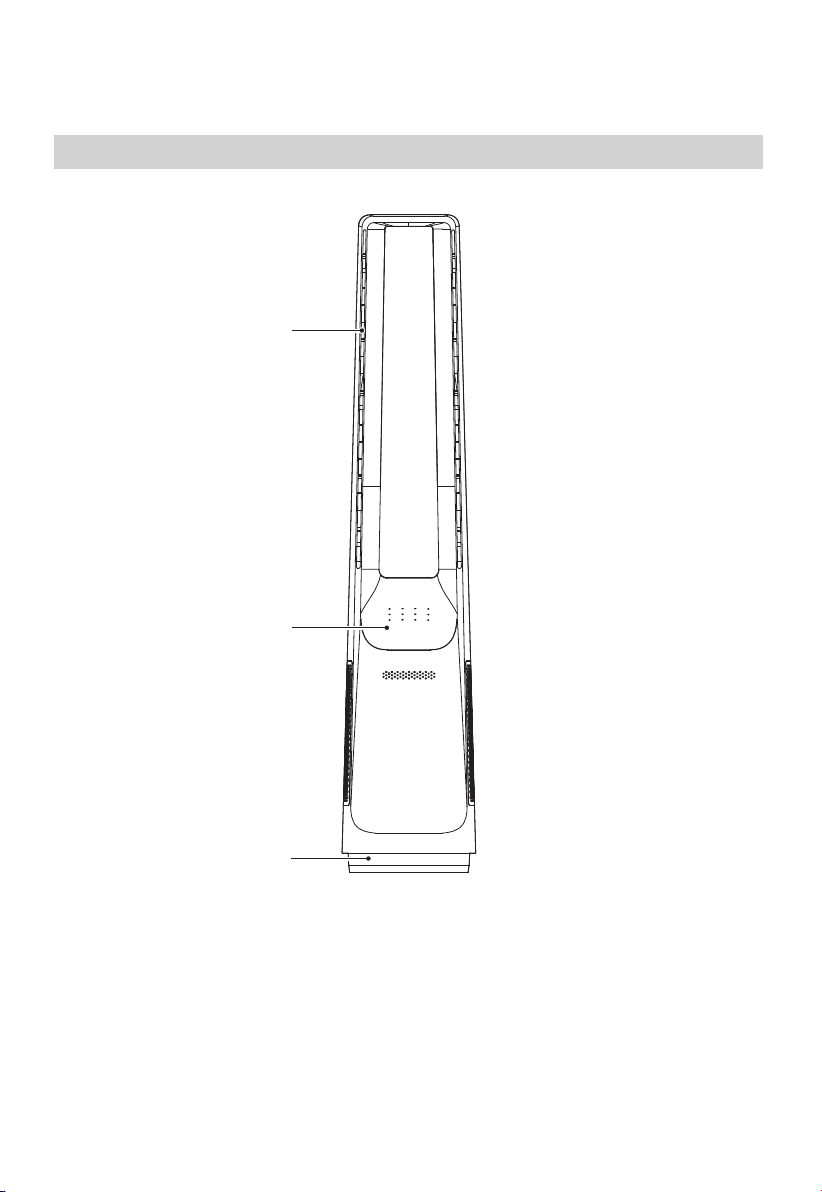
Parts Name
PRODUCT OVERVIEW
Control panel
Base
Air outlet
07
OPERATION INSTRUCTIONS
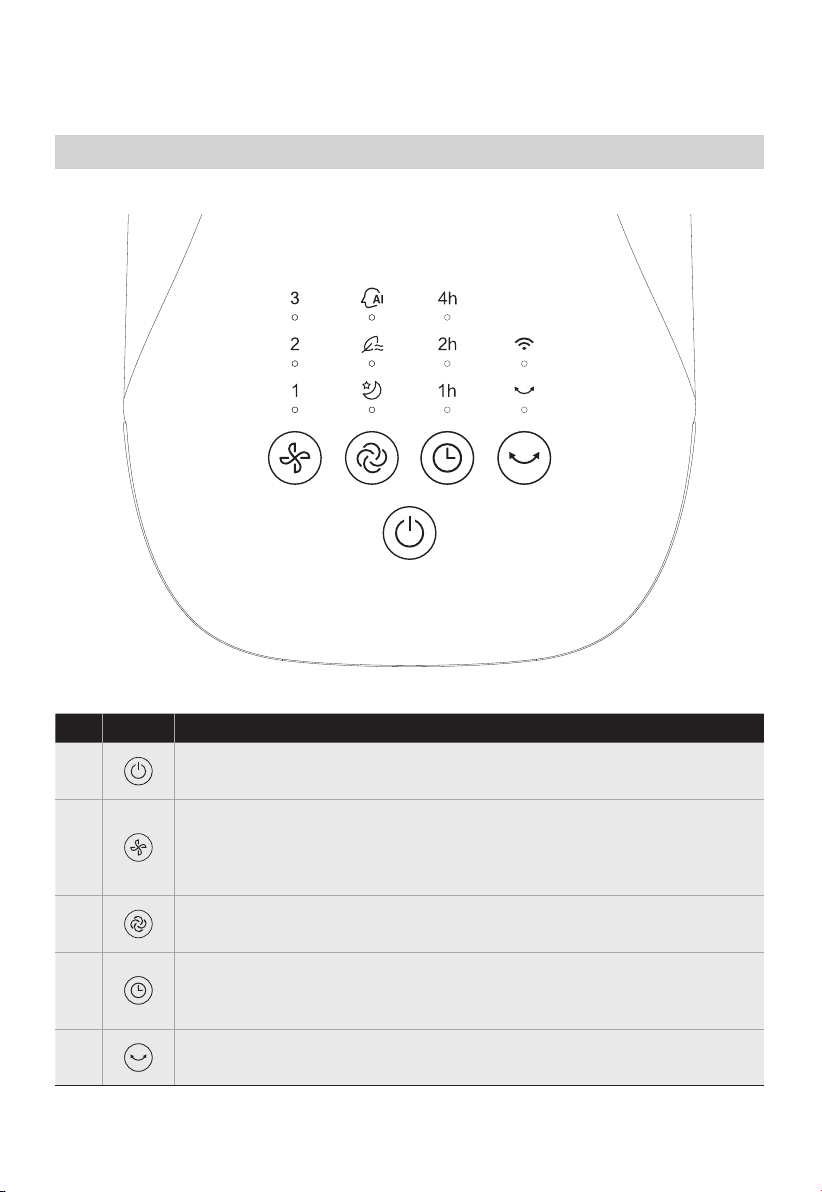
Press the on/standby button to turn on/off the fan.
●
●
●
Touch this button to switch the wind speed
(cycles among level 1-2-3-•••-6-1-2).
Long press this button for 3 seconds to start matching or
disconnect APP CONTROL.
Description
Touch this button to start/stop the swing.
●
●
Touch this button to switch the wind mode among sleep,nature,
intelligent wind (wind changing with temperature), and normal.
●
Schedule to shut down in the power-on state, and schedule to start up
in the standby state; Touch this button to set the timer (the display
cycles among 0-1-2-•••-7-0h); 0h means that the timer is canceled.
Button
Control Panel
No.1
No.2
No.3
No.4
No.5
08
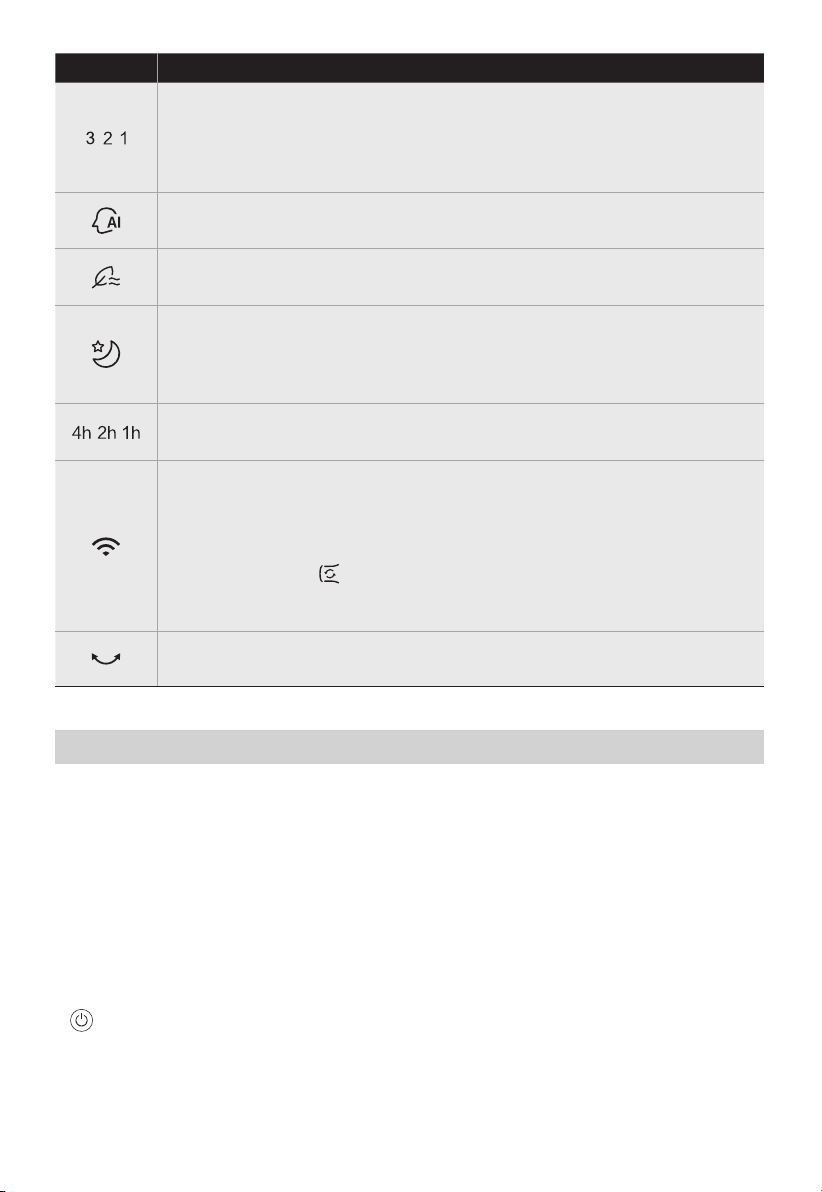
Display the swing.
●
Display the wind speed level.
Wind speed light 1 and 3 lights at the same time for 4 gear;
Wind speed light 2 and 3 lights at the same time for 5 gear;
Wind speed light 1, 2 and 3 lights at the same time for 6 gear.
●
This indicator light is on in intelligent wind mode.
●
This indicator lights up after setting the timer to show the timing
duration.
●
This indicator light is on in nature wind mode.
●
This indicator light is APP CONTROL.Long press the wind speed button
for 3 seconds to start matching or disconnect APP CONTROL.
The lights are on, APP CONTROL is connected.
The lights are blinking and the APP CONTROL is disconnected or being
connected.
Press this button on the APP to open the circulating wind mode.
In the circulating wind mode machine in the normal wind 6-speed
and swing state work.
●
This indicator light is on in sleep wind mode.
Start the sleep wind function, and the fan automatically adjusts the level
according to the program; there are three levels: 1, 2 and 3; you can
adjust the level of the sleep wind by pressing the wind speed button.
●
Description
Light
• Forced shutdown
There is no operation during the running of the fan, after 15 hours of continuous
operation, the fan will be forced to shut down automatically.
• Intelligent memory
When the fan is turned off or powered off, it will run in the state before turning off or
power off when the power is powered on again (the timing function is not
memorized).
• Screen-off function
In case of no operation for 60 seconds during normal operation, the indicator light on
the body will be automatically off, but the fan will continue to operate. Press the
button to turn off the fan when the screen is off, and press the other button
to restore display.
Additional Features
09
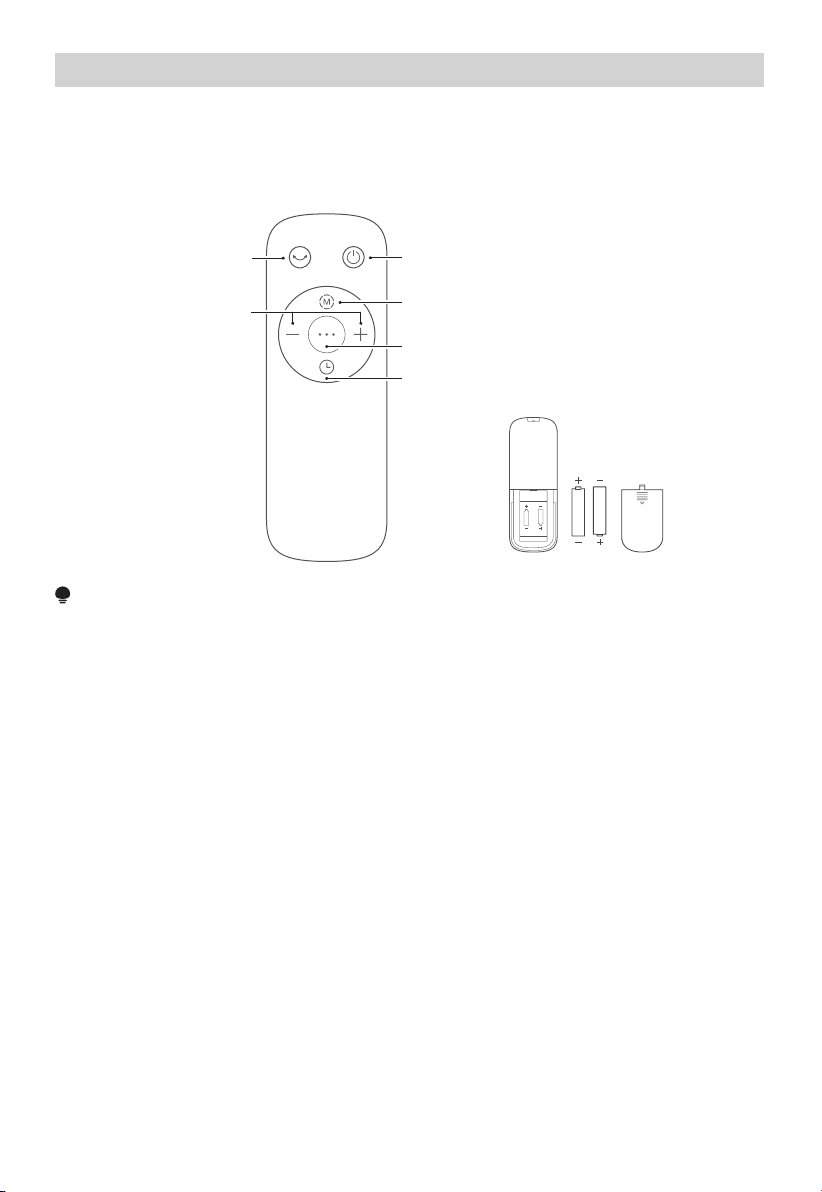
Remote Control
Use manganese or alkaline batteries of type "AAA”.
DO not use rechargeable batteries.
Startup/Standby
Press “+, -” to
set the wind speed
Start up or shut down
oscillating
Switch the wind type
Set the timed shutdown/ reserved startup
Start up or shut down intelligent wind mode
NOTE
• The remote control should be normally used within 5 meters of the front of the
product and 30 degrees of the deviation angle.
• The battery contains many heavy metals, acids and bases, etc., which may threaten
human's health; Waste batteries should be recycled separately.
AAA Battery, 1.5 V
Battery
10
APP SETUP AND OPERATION
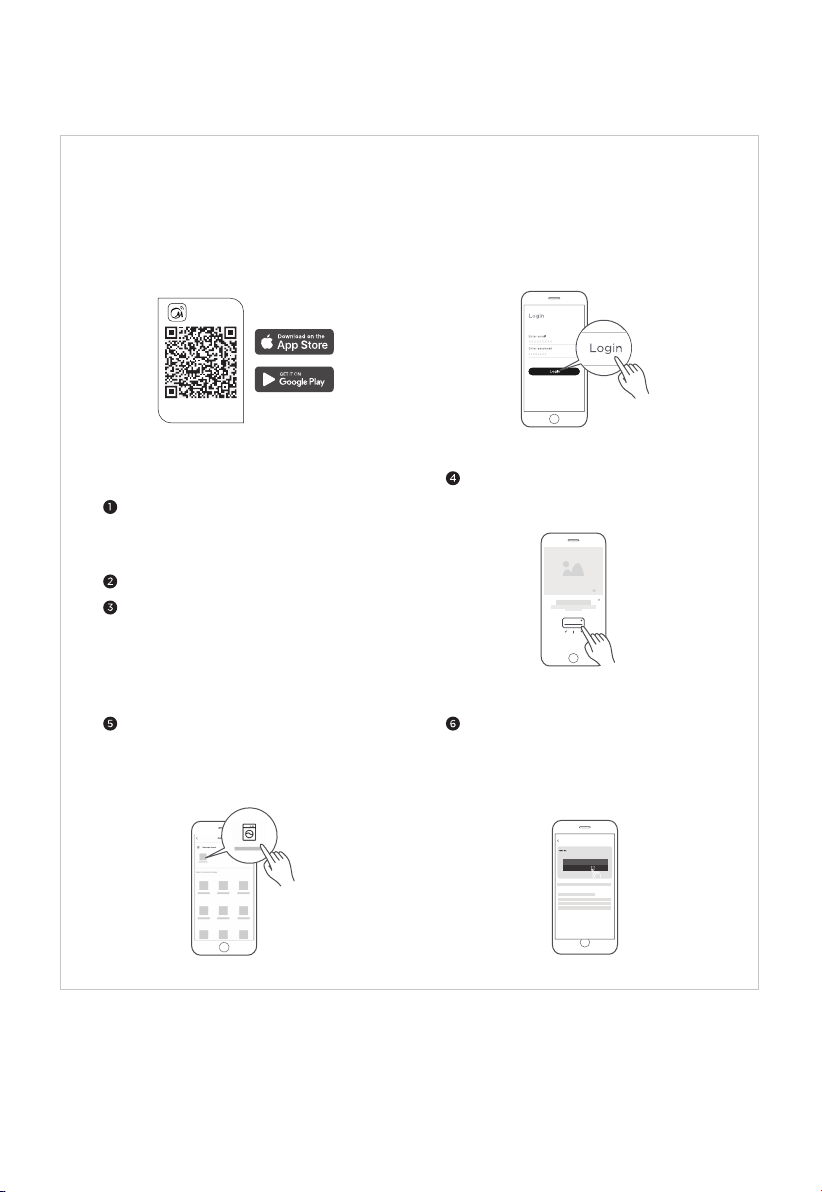
Connect your devices to MSmartHome
Add device
8:88
...
Download the app
& activate product
MSmartHome
Register and log inDownload the MSmartHome app
Connect your device to the wireless
network according to instructions on app.
If the connection fails, please follow the
instructions provided by the app to
continue with the operation.
On an app market (Google Play Store, Apple
App Store), search for "MSmartHome" and find
the MSmartHome app. Download and install it
on your phone. You can also download the app
by scanning the QR code below.
Open the MSmartHome app, and create a new
account to start (you can also register through
a third-party account). If you already have an
existing account, use the account to log in.
Please power on your devices.
Open MSmartHome app on your phone.
Please make sure your mobile phone is
connected to a wireless network. If it is
not, go to Settings and enable wireless
networks and Bluetooth.
If a message of "Smart devices discovered
nearby" appears, click to add.
If no message appears, select "+" on the
page and select your device in the list of
nearby devices available. If your device is
not listed, please add your device manually
by the device category and device model.
11

CLEANING AND MAINTENANCE
The fan requires minimal maintenance. Do not try to fix it by yourself. Refer it to
qualified service personnel if service is needed.
Before cleaning and assembling, unplug the fan power.
To ensure adequate air circulation to the motor, keep vents at the rear of the motor free
of dust. Do not disassemble the fan to remove dust.
Please wipe the exterior parts with a soft cloth soaking a mild detergent.
Do not use any abrasive detergent or solvents to avoid scratching the surface.
Do not use any of the following as a cleaner: gasoline, thinner.
Do not allow water or any other liquid entering into the motor housing or interior parts.
Be sure to unplug from the electrical supply source before cleaning.
Plastic parts should be cleaned with a soft cloth moisten with mild soap Thoroughly
remove soapsuds with dry cloth.
1.
2.
3.
4.
5.
6.
7.
12
• Make sure your devices are powered on.
• Keep your mobile phone close enough to your device when you are connecting network to your device.
• Connect your mobile phone to the wireless network at home, and make sure you know the password of the WiFi.
• Check if your router supports 2.4 GHz WiFi band and turn it on. If you are not sure whether the router supports
2.4 GHz band, please contact the router manufacturer.
• The device cannot connect to the WiFi that requires authentication, and it usually appears in public area such as
hotels, restaurants, etc. Please connect to a WiFi that does not require authentication.
• It is recommended to use a WiFi name that only contains letters and numbers. If your WiFi name contains
special characters, please modify it in the router.
• Turn off the WLAN+ (Android) or WLAN Assistant (iOS) function of your mobile phone when connecting
network to your devices.
• In the case that your device connected to WiFi before but it needs to reconnect, please click "+" on app Home
page, and add your device again by the device category and model according to the instructions on app.
NOTE
USER SERVICING INSTRUCTIONS
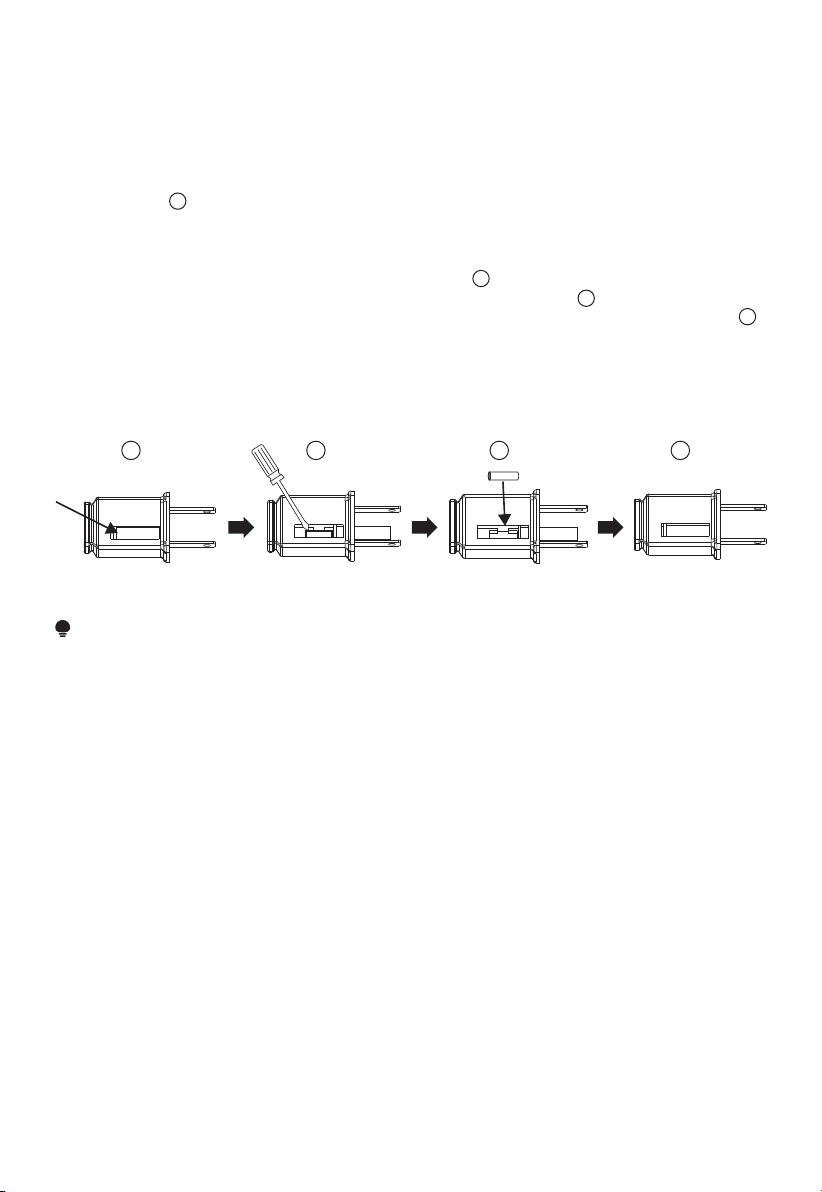
a)Grasp plug and remove from the receptacle or other outlet device. Do not unplug by
pulling on cord.
b)Open fuse cover. Slide open fuse access cover on top of attachment plug towards
blades.(Fig. )
c)Remove fuse carefully. Insert the tip of your tool into fuse slot(close with the terminal),
then prize the fuse gradually and slowly, but not overexert. If you feel tight, you can try
it at several times and prize the fuse little by little. When one side of the fuse has been
prized, then you can get the fuse out entirely.(Fig. )
d) Risk of f ire. Replace fuse only with 2.5 Amp, 125 Volt fuse.(Fig. )
e)Close fuse cover. Slide closed the fuse access cover on top of attachment plug.(Fig. )
f )Risk of f ire. Do not replace attachment plug. Contains a safety device(fuse)that should
not be removed. Discard product if the attachment plug is damaged.
g)When the fan suddenly does not work during normal operation, please check whether it
is a problem with the fuse.
NOTE
• When you replace the fuse, please don’t operate suddenly or overexert, or else the product will be
damage or cause accident.
• When you feel it hard to be operated, please make sure you have got the right way.
1
2
3
4
2
3
41
13
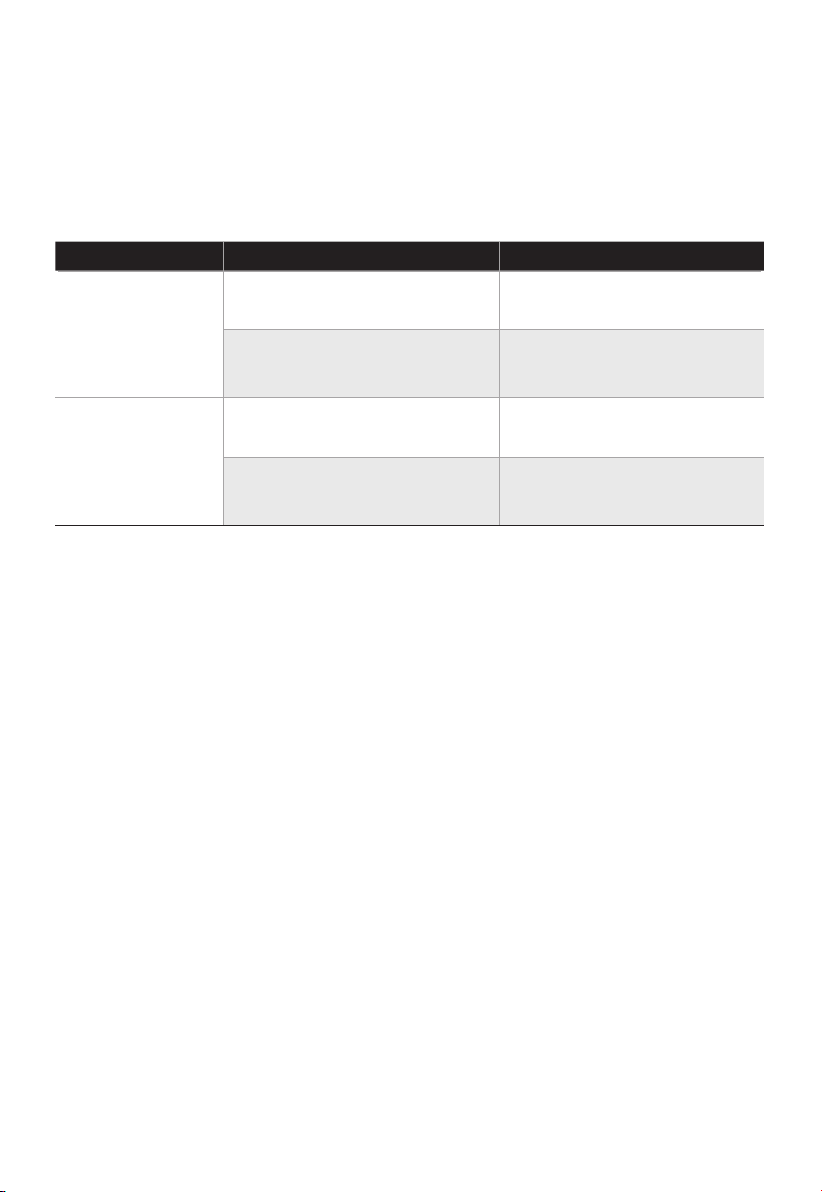
TROUBLESHOOTING
Solution
Operation of your appliance can lead to errors and malfunctions. The following tables
contain possible causes and notes for resolving an error message or malfunction. It is
recommended to read the table below carefully in order to save your time and money that
may cost for calling to the service center.
Cause SolutionProblem
The power cable is not
plugged in or has poor contact.
Make sure the plug is properly
inserted into the socket.
The switch on the body is
not turned on.
Turn on the switch on the
body.
The battery needs replacing. Replace the battery.
The remote is being used more
than 5m away from the fan.
●
●
●
●
The machine does
not work properly
after installed
The remote does
not work
Use the remote closer to the
fan and make sure it is pointing
directly at the display panel.
14

15
1 YEAR LIMITED WARRANTY
This is the only express warranty for this product and is in lieu of any other warranty or
condition.
This product is warranted to be free from defects in material and workmanship for a
period of one (1) year from the date of original purchase. During this period, your
exclusive remedy is repair or replacement of this product or any component found to be
defective, at our option; however, you are responsible for all costs associated with
returning the product to us and our returning the product or component under this
warranty to you. If the product or component is no longer available, we will replace with
a similar one of equal or greater value.
This warranty does not cover wear from normal use, and operation doesn't conformity
with the instruction manuals, or damages to the product resulting from accident,
alteration, abuse, or misuse. This warranty extends only to the original consumer
purchaser or gift recipient. Keep the original sales receipt, as proof of purchase is
required to make a warranty claim.This warranty is void if products is used for other than
single-family household use or subjected to any voltage and waveform other than as
specified on the label.
We exclude all claims for special, incidental, and consequential damages by breach of
express or implied warranty. All liability is limited to amount of the purchase price. Every
implied warranty, including any statutory warranty or condition of merchant-ability or
fitness for particular purpose, is disclaimed except to the extent prohibited by law, in
which case such warranty or condition is limited to the duration of this written warranty.
This warranty gives you specific legal rights. You may have other legal rights that vary
depending on where you live. Some states or provinces do not allow limitations on
implied warranties or special, incidental consequential damages, so the foregoing
limitations may not apply to you.
Please note that failure to complete and submit this form does not diminish your
warranty rights.
Customer Service:
Midea America Corp.
Parsippany, NJ 07054
Phone: 1-866-646-4332

16
SERVICE AND SUPPORT
In the event of a warranty claim or if service is required for this product, please contact
us at the following:
Toll Free: 1-866-646-4332
For questions or comments, please write to:
Midea America Corp
Parsippany, NJ 07054
Phone: 1-866-646-4332
For your records, staple your sales receipt to this manual and record the following:
DATE OF PURCHASE: ______________________________________________________
PLACE OF PURCHASE: _____________________________________________________
(STAPLE SALES RECEIPT HERE)
NOTE: PROOF OF PURCHASE IS REQUIRED FOR ALL
WARRANTY CLAIMS