
USER MANUAL
NEOMOW X
Before using the product, read the manual
carefully to understand the guidance.
Original Instructions
After unboxing, do not discard the packaging box and packaging materials, which can
be used for storage in winter or shipment for repair.
If you need a User Manual in other languages,please
scan the QR code below to download.
Get other language version

Thank you for choosing Neomow X!
Neomow X is an intelligent electric-driven lawn mower based on LiDAR SLAM naviga-
tion technology. The mower can automatically help you mow the lawn without any
perimeter line by merely installing an App and exibly using the functions on the App.
You can not only customize lawn care using Neomow X, but also remotely operate and
monitor mower operation conveniently through the App, enjoying the fun of carefree
mowing and lawn maintenance.
PREFACE


1. Safety Instructions
1.1 General Safety Rules
1.2 Precautions For Installation
1.3 Precautions For Use
1.4 Precautions For Storage
1.5 Precautions For Handling
CONTENT
1
3
3
4
5
1.6 Precautions For Transpoation 5
4. Using Neomow X
4.1 Getting the App 20
4.2 Adding Devices 20
4.3 Map Creation
21
4.4 Daily Mowing 32
38
4.6 Obstacle Avoidance
5. Acousto-optic Guidance
45
5.1 Lighting Guidance 46
5.2 Sound Reminder 48
4.5 Other Functions
6.1 Frequency Of Maintenance
6.2 Lawn Mower Cleaning
6.3 Replacement Of Consumables
49
50
51
7. Specications 56
8. Troubleshooting
60
6. Maintenance
3. Installing Neomow X
3.1 Preparation Before Installation
3.2 Installing Charging Station
3.3 Charging And Staing The Neomow X
12
15
18
2. Get To Know The Neomow X
2.1 System Introduction
2.2 Package List
2.3 Neomow X Oveiew
6
7
8
2.4 Symbols And Labels 10

(1)
(2)
(3)
(4)
(5)
(6)
(7)
(8)
(9)
(10)
Before using the lawn mower, read the manual carefully to understand the instructions. Please keep the manual properly for future
reference. The latest complete user manual is available on www.hookii.com.
Please note that you can reduce risks by following the instructions and warnings in the manual, but you cannot eliminate all risks.
The operator or user is responsible for any accidents or hazards that may occur to others and their propeies.
This lawn mower is not suitable for children, or individuals with poor physical or mental condition.
This lawn mower can only be used together with the devices recommended by HOOKII, and it is incorrect to operate the lawn
mower in an unauthorized manner. HOOKII does not guarantee the compatibility of the lawn mower with other wireless systems.
Do not use this lawn mower when there are children or animals in the work area of the mower.
Before using this lawn mower on a public lawn, it is required to provide warning signs around the mower’s work area, with text
reading: Warning, automatic lawn mower! Stay away from the machine and take care of your children.
Do not touch dangerous pas such as the blade disc and blades before the lawn mower comes to a complete stop.
If the lawn mower has to be ipped over manually, it must be powered o, and be placed on a soft and d mat or cloth to prevent
damage to components such as the LiDAR.
No extension cable or cables are allowed in the work area, as they may be damaged. If the extension cable is damaged, cut o the
power immediately and contact professional seice personnel for replacement and do not touch the cable.
The batte should be used correctly according to the recommended method in this manual. Only original batteries
recommended by HOOKII can be used, and we will not guarantee the safety of non-original batteries. Incorrect use may cause
electric shock, overheating, or leakage of corrosive liquid from the batte. If any corrosive liquid comes in contact with the eyes
or skin, seek medical attention immediately. The replacement of batte, if necessa, must be carried out in accordance with the
instructions and precautions in the manual.
1.1 General Safety
Rules
EN
SAFETY INSTRUCTIONS
1
1
STOP
(12)
1)
2)
(11)
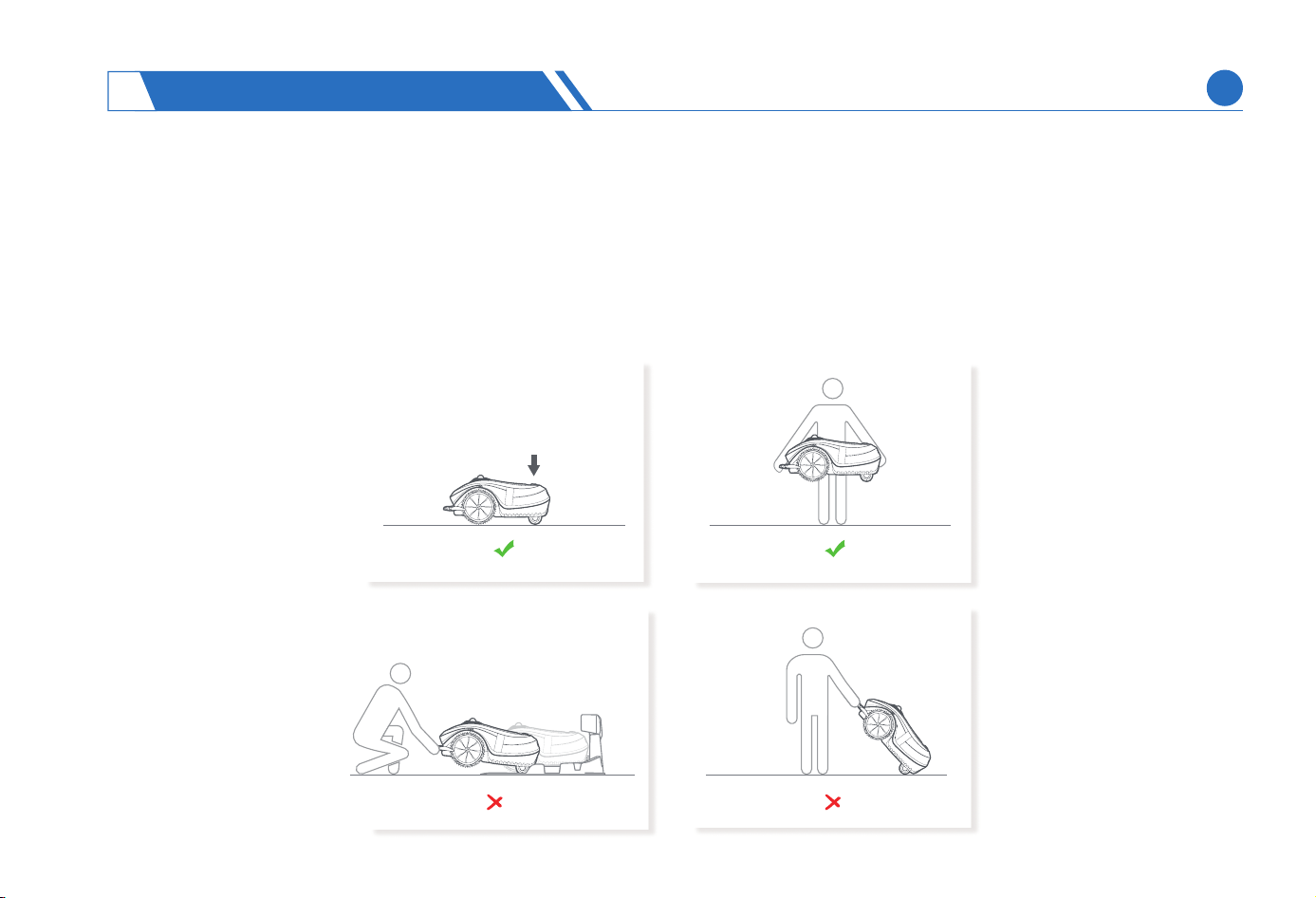
How to move the lawn mower
Press the STOP button on the mower.
Lift the mower with both hands from the front and back side. Do not directly raise the front bumper.
If the device placed outdoors is exposed to a thunderstorm, it is advisable to power o the device and charging station to
prevent device damage and accidents.
EN
SAFETY INSTRUCTIONS
1
2

(1)
(2)
(3)
(4)
(1)
(2)
(3)
(4)
(5)
(6)
(7)
1.2 Precautions For Installation
To avoid re risks, do not install the charging station and device, including all other accessories, within a distance of 1 meter from
combustible materials.
To reduce the risk of damage to the power adapter and avoid electric shocks, do not place the power supply on the ground or in
any other location that may be exposed to water.
To prevent damage to the power supply system and reduce the risk of electric shock due to condensation, the power supply
should be encapsulated.
To ensure electrical safety, the charging station must be supplied by household power instead of the industrial power.
1.3 Precautions For Use
When the lawn mower is working, keep people a ceain distance from the lawn mower and do not put the hands or feet near or below the lawn
mower.
When someone stays in the work area of the lawn mower, power o or stop the lawn mower. It is advisable to work when there are no people
or animals around.
To avoid interruptions due to water ingress in the lawn mower, it is not advisable to operate the lawn mower when the water sprinkler in the
work area is not working.
Ensure that there are no stones, branches, tools, or other large objects on the lawn, since collision with such objects may cause blade damage,
resulting in propey loss.
To avoid work interruption due to abnormal state, do not lift or ip the lawn mower when it is turned on.
If the red STOP button on the lawn mower does not work, do not use the device until the STOP button returns to normal.
The suitable operating temperature for the lawn mower and batte is 0°C-45℃ (32°F-113°F), respectively. Never operate in an environment
beyond the appropriate range.
EN
SAFETY INSTRUCTIONS
1
3
(1)
(1)
(2)
(2)
(3)
(4)
(5)
(6)
(7)
1.4 Precautions For Storage
Batte Storage :
Mower Storage :
The batte is preferably stored at -20℃-45℃ (-4°F-113° F), and must not be stored in an environment beyond the appropriate range.
The batte should be stored indoors in a cool and d place, because a humid environment will accelerate batte aging.
Before you decide to put away the lawn mower for a period of time, you need to fully charge the machine to avoid over-discharge,
and turn o the lawn mower. Remove the batte and store it separately.
If the lawn mower needs to be stored for a long time, the lawn mower should be fully charged once within six months.
During storage, the lawn mower should be placed at, with four wheels on the ground horizontally.
To store the charging station indoors, cut o the power supply and disconnect all connectors on the charging station.
The lawn mower should be preferably stored at -20℃-60℃(-4°F-140℉), and must not be stored in an environment beyond the
appropriate range.
The lawn mower should be stored indoors in a cool and d place, since exposure to sunlight and extreme temperature (including
high and low temperatures) will accelerate component aging and may cause permanent damage to the batte. During storage,
the components of lawn mower should be kept away from heat sources or chemicals.
To achieve optimal charging eciency and avoid charging inteerence after storage in the winter, it is required to power o, and
clean the charging contacts on the lawn mower and charging station with a cotton cloth.
SAFETY INSTRUCTIONS
1
EN
4

(1)
(1)
(2)
(2)
1.5 Precautions For Handling
Batte handling must comply with the recycling requirements
and relevant regulations in your region.
The batte shall be replaced according to the operating
instructions in this manual. Lithium batte may explode or
cause a re when it is disassembled, sho circuited, exposed to
water, re, or high temperature. The batte must be handled
with care, and must not be disassembled, opened, or used for
any other type of electrical/mechanical device. Prolonged
exposure to direct sunlight should be avoided.
1.6 Precautions For Transpoation
Comply with all applicable national regulations.
Comply with the special requirements of packaging
and labeling for commercial transpoation, including
transpoation by third paies and freight forwarders.
SAFETY INSTRUCTIONS
1
EN
5
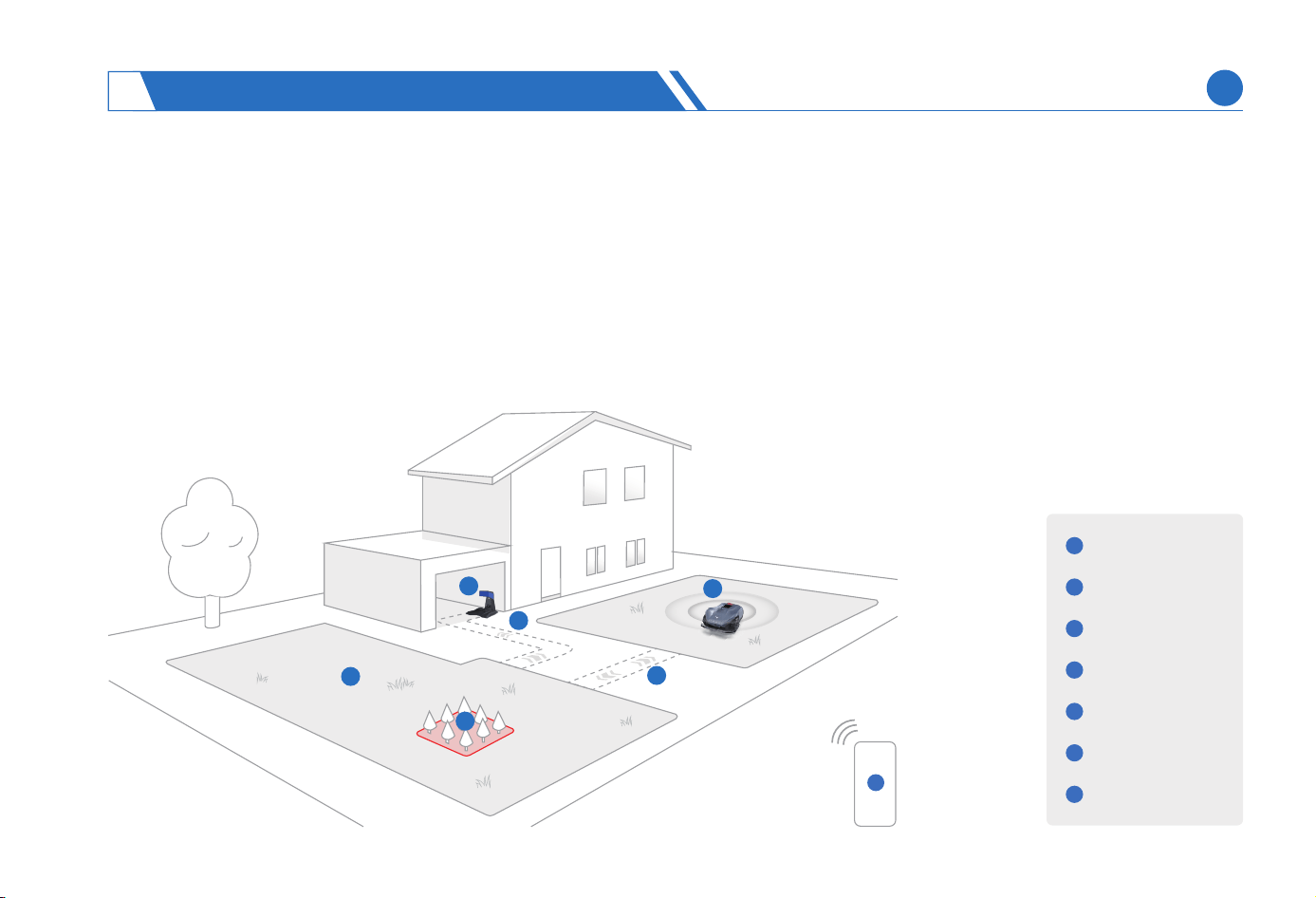
2.1 System Introduction
The system includes a lawn mower, a charging station, and an App. Based on LiDAR SLAM technology, the lawn mower realizes
autonomous navigation and positioning without bounda lines within the lawn. The lawn mower has to establish a map in advance,
and compare real-time environmental sensing data using LiDAR during operation, in order to calculate the precise position of the
lawn mower. The charging station is mainly used to power the lawn mower.
The lawn mower needs to be used in conjunction with the Neomow App which helps control the lawn mower to create information
about lawn bounda and assigns customized tasks to the lawn mower for independently mowing. Moreover, various mowing
parameters can be set to meet the personalized mowing needs of users.
Mowing Area
Neomow X
Charging Station
Neomow APP
No-Go Zone
Passage
Recharge Path
1
3
2
4
5
7
6
7
2
3
4
5
6
1
GET TO KNOW THE NEOMOW X
2
EN
6
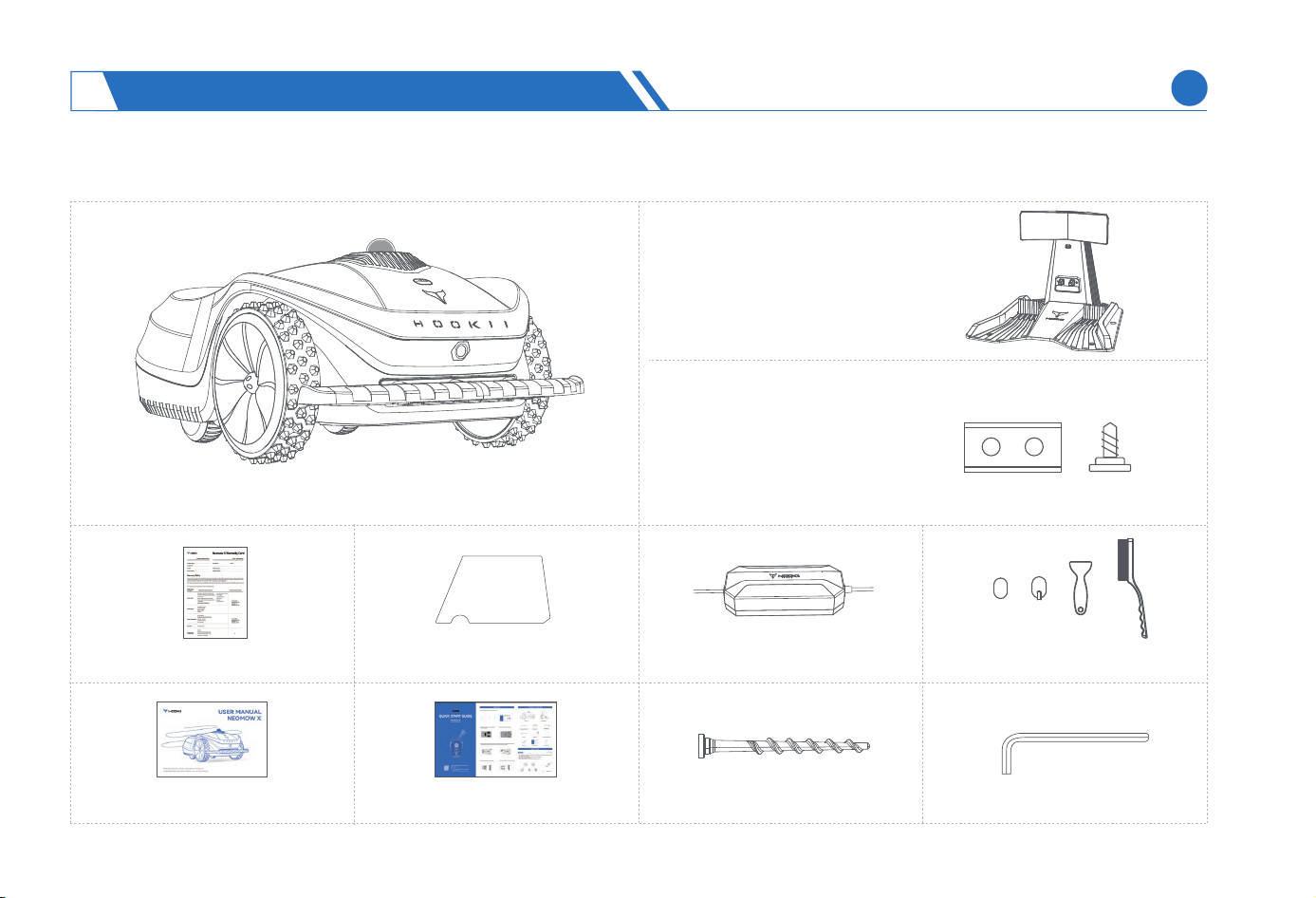
Neomow X *1
Charging Station * 1
Power Adapter * 1
User Manual * 1 Fixed Charging Station Nail * 12 Hex Key * 1
Spare Blade Kit * 2
(10 Screws+10 Blades)
Warranty Card * 1 Fixed Charging Station Tape * 4
Quick Sta Guide * 1
Cleaning Kit * 1
2.2 Package List
GET TO KNOW THE NEOMOW X
2
EN
7
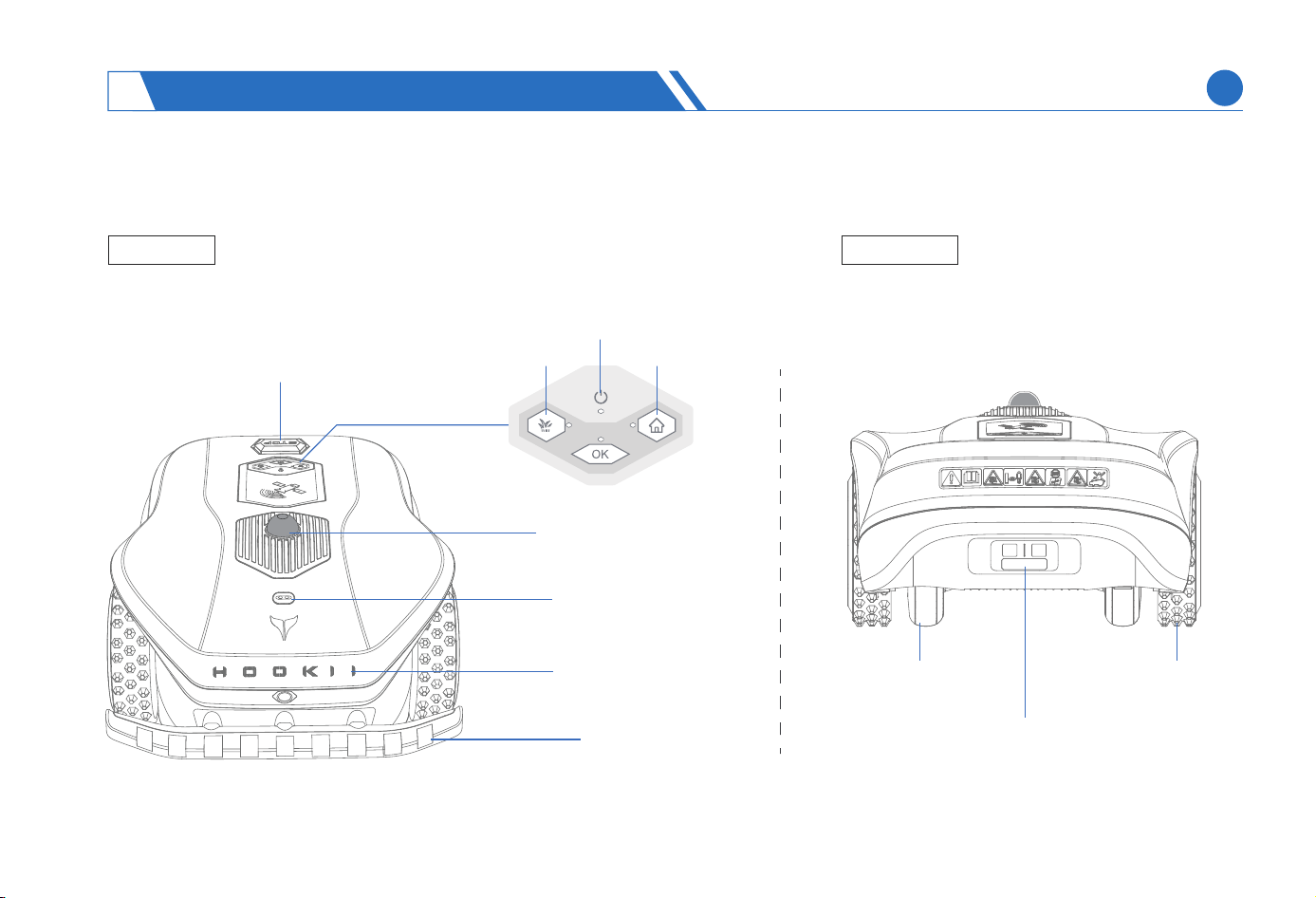
STOP Button
Bumper
LOGO Light
Rain Sensor
LiDAR Sensor
2.3 Neomow X Oveiew
Back ViewTop View
Charging Pad
Front-Wheel DriveOmni-
Directional Wheel
GET TO KNOW THE NEOMOW X
2
EN
MOW Button
HOME Button
ON/OFF Button
8
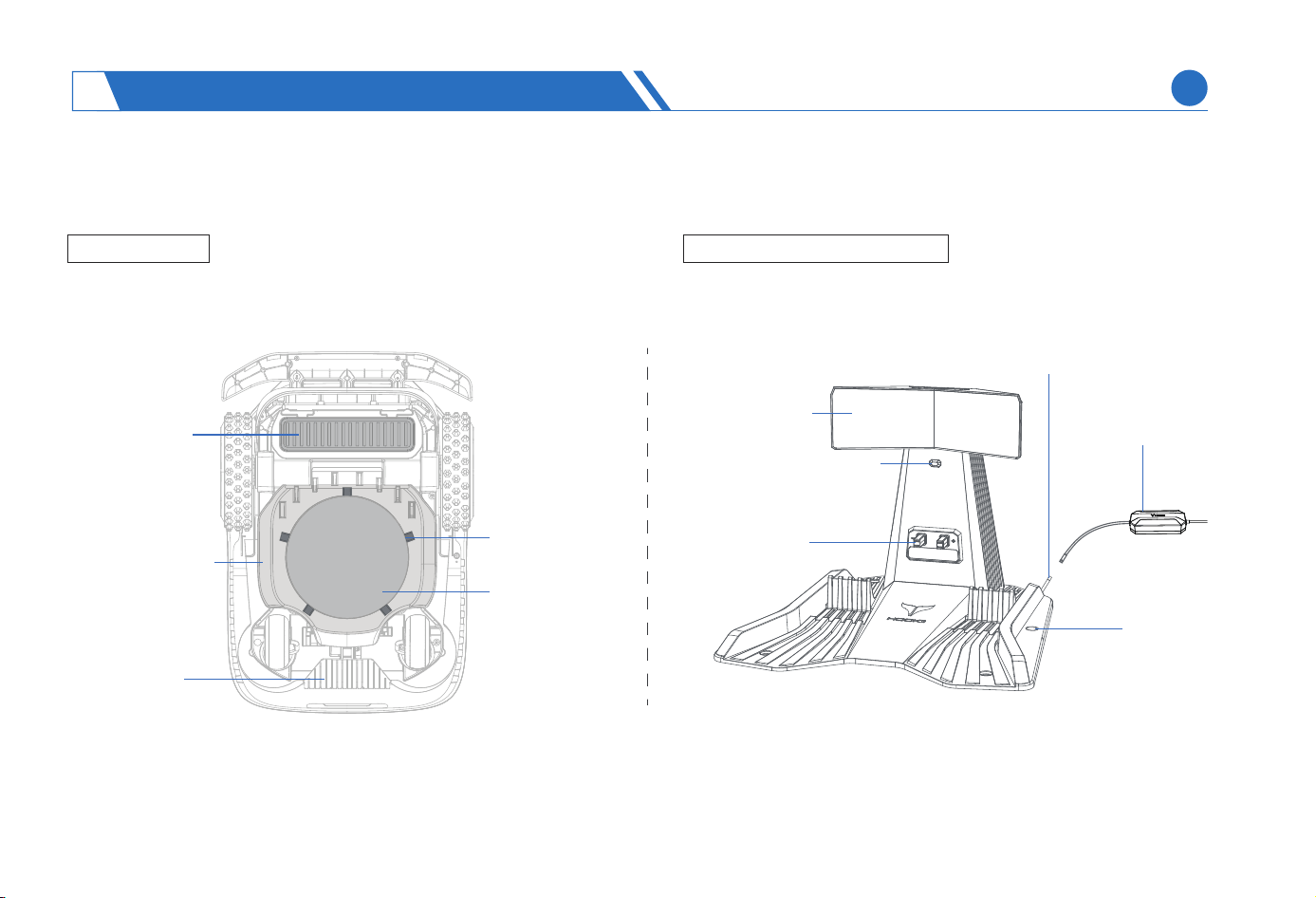
Charging Station Light
Feature Board
Bottom View
Charging Station Oveiew
Protective Cover
Batte
Compament
Comb Teeth
Power Adapter
Charging Po
Charging strip
Nail Hole
Anti-Clog Disc
Blade
GET TO KNOW THE NEOMOW X
2
EN
9
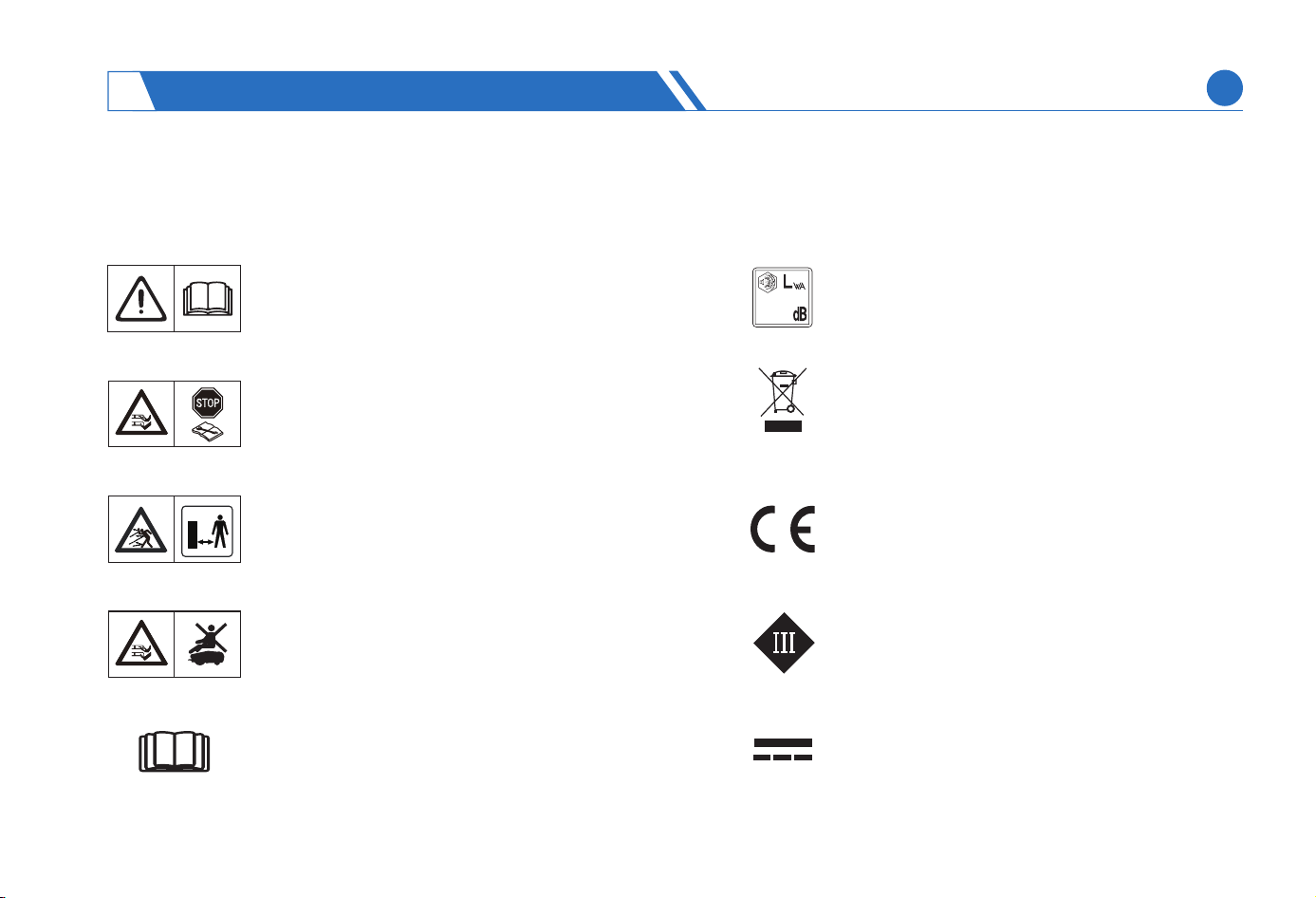
WARNING: Read the user manual before
operating the lawn mower.
WARNING: Keep a safe distance from the
machine when operating. Keep other
persons out of the danger area.
Use a detachable power supply as dened
on the rating label next to the symbol.
CE conformity mark.
WARNING: Do not ride on the machine.
WARNING: Disable the lawn mower
before working on or lifting the machine.
Never touch the rotating blade.
2.4 Symbols And Labels
Introduction To Lawn Mower Symbols/labels
Sound power level, determined by European
outdoor nose directive.
It is not permitted to dispose this lawn mower
as normal household waste. Ensure that the
lawn mower is recycled in accordance with
local legal requirements.
Class lll
DC
GET TO KNOW THE NEOMOW X
2
EN
60
10
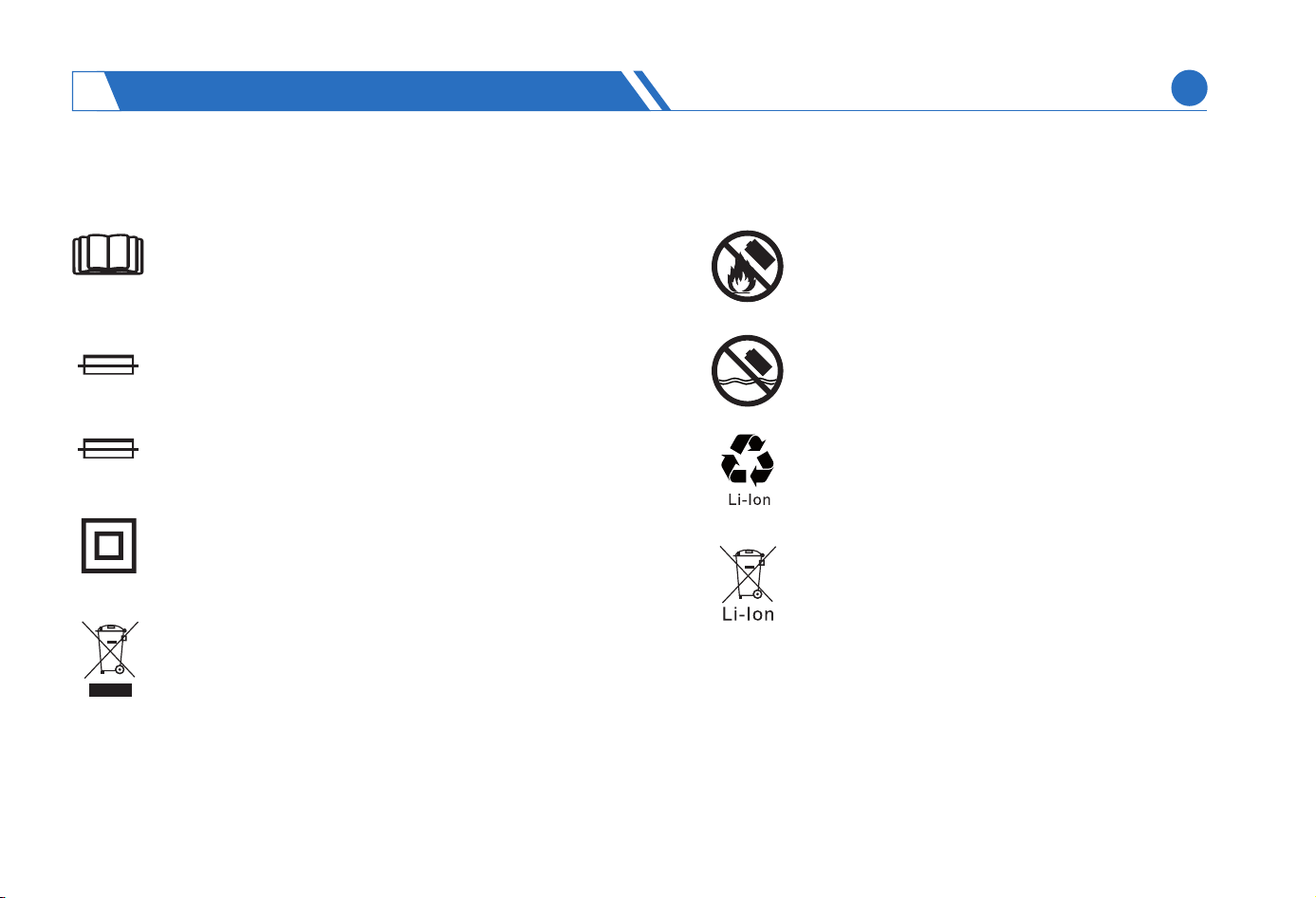
Read the user instructions.
Replace with fuse in
accordance with rating.
Do not discarded as unsoed waste but
must be sent to separate collection facilities
for recove and recycling in accordance
with local legal requirements.
Replace with fuse in
accordance with rating.
Do not discard the batte into re and do not
expose the batte to a heat source.
It is not permitted to dispose the batte pack
as normal household waste. Ensure that the
batte pack is recycled in accordance with
local legal requirements.
Do not immerse the batte into water.
Recyclable mark.
T3.15A
T2A
Introduction To Charging Station Symbols/labels Introduction To Batte Symbols/labels
Class ll construction.
GET TO KNOW THE NEOMOW X
2
EN
11
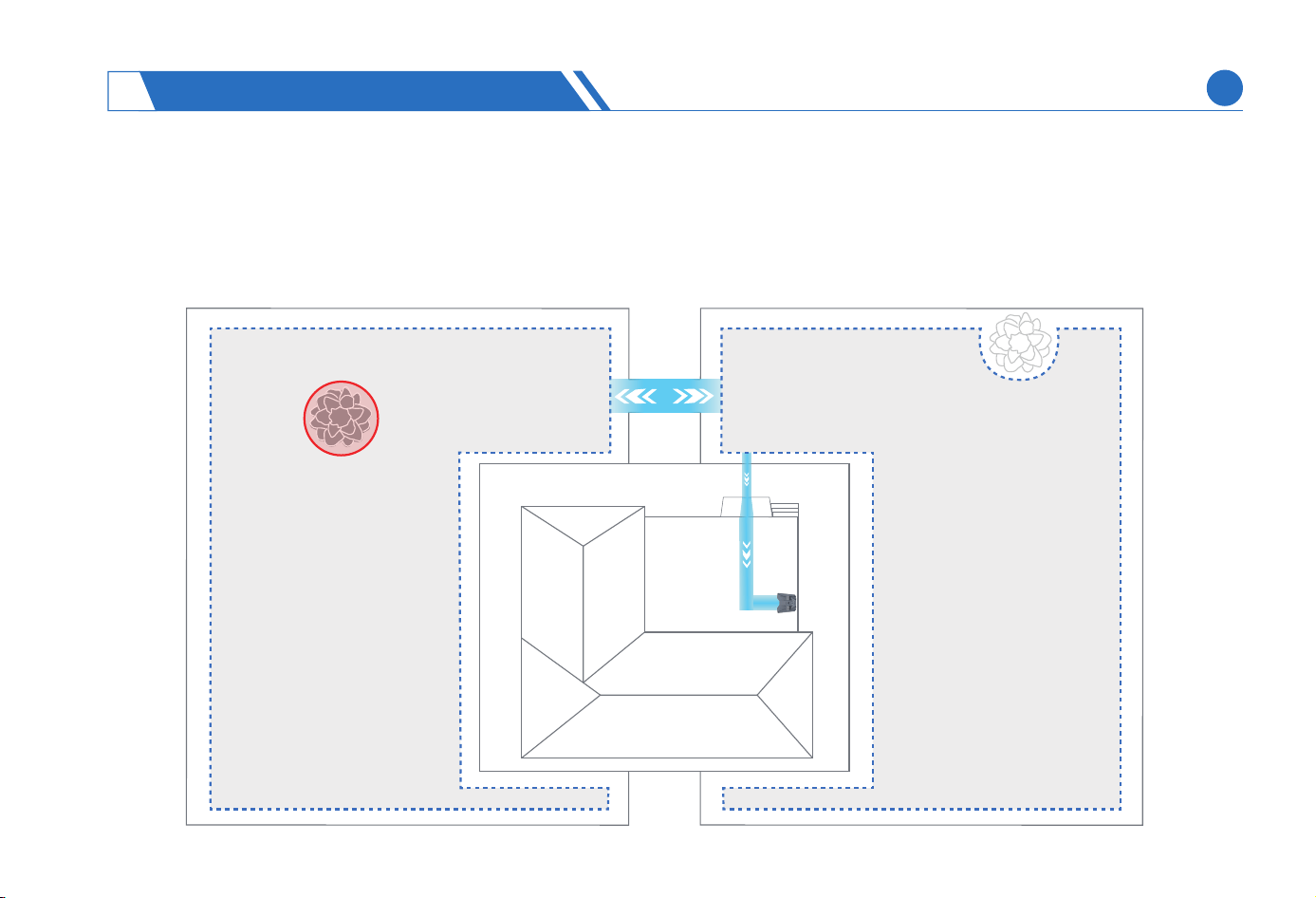
3.1 Preparation Before Installation
Lawn Pre-cleaning
First, draw a sketch of your couyard and mark the location of charging station, work area, passage, recharge path, and No-Go
zone on the sketch for future reference.
(1)
INSTALLING NEOMOW X
3
EN
12
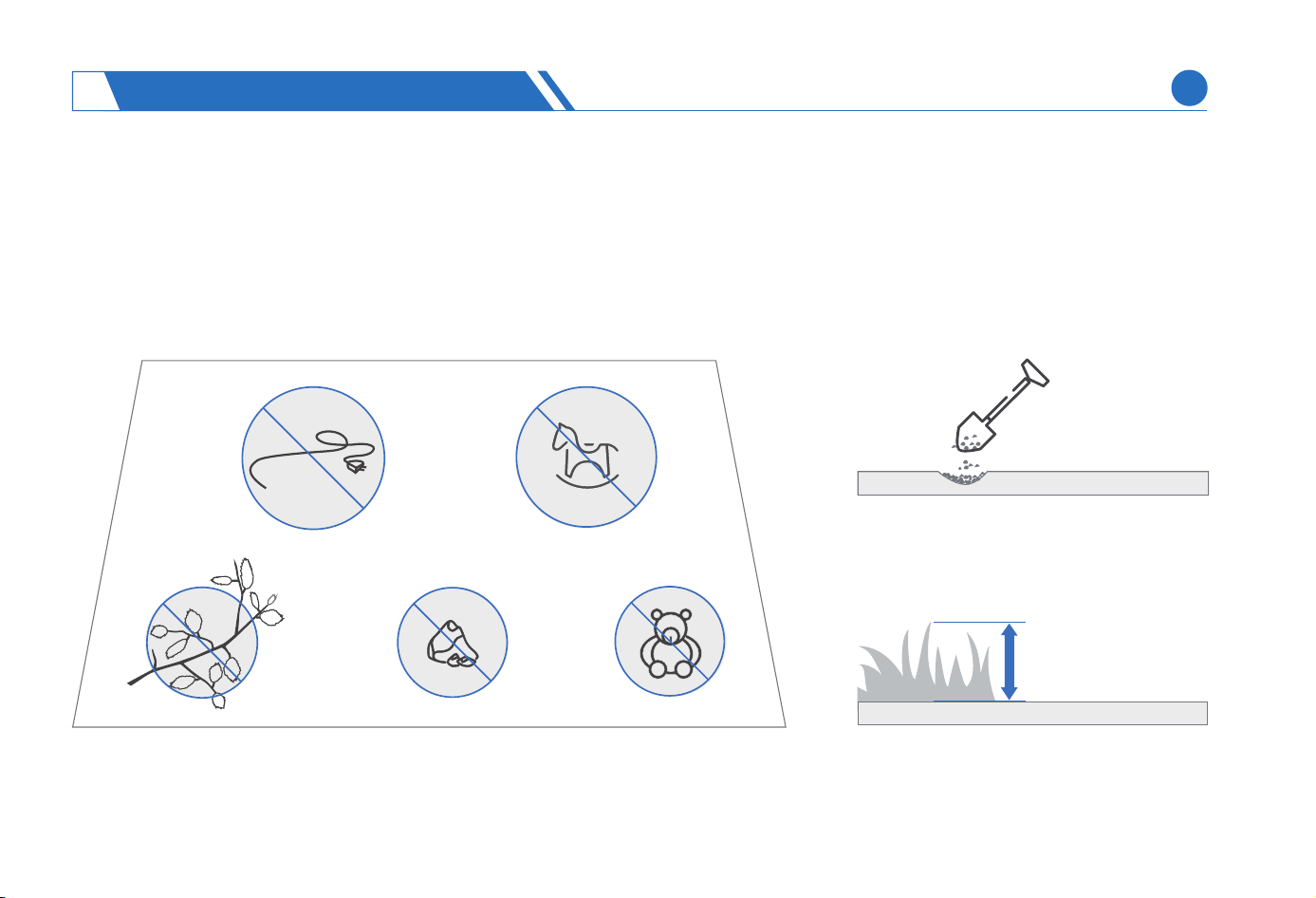
≤10 cm/4 in.
Clean up debris on the lawn, such as branches, toys, wires, stones, and other obstacles.
Fill in the pits on the lawn and level the lawn.
Before using the lawn mower, trim your lawn until the lawn height is ≤ 10 cm/4 in.
(2)
(3)
(4)
INSTALLING NEOMOW X
3
EN
13
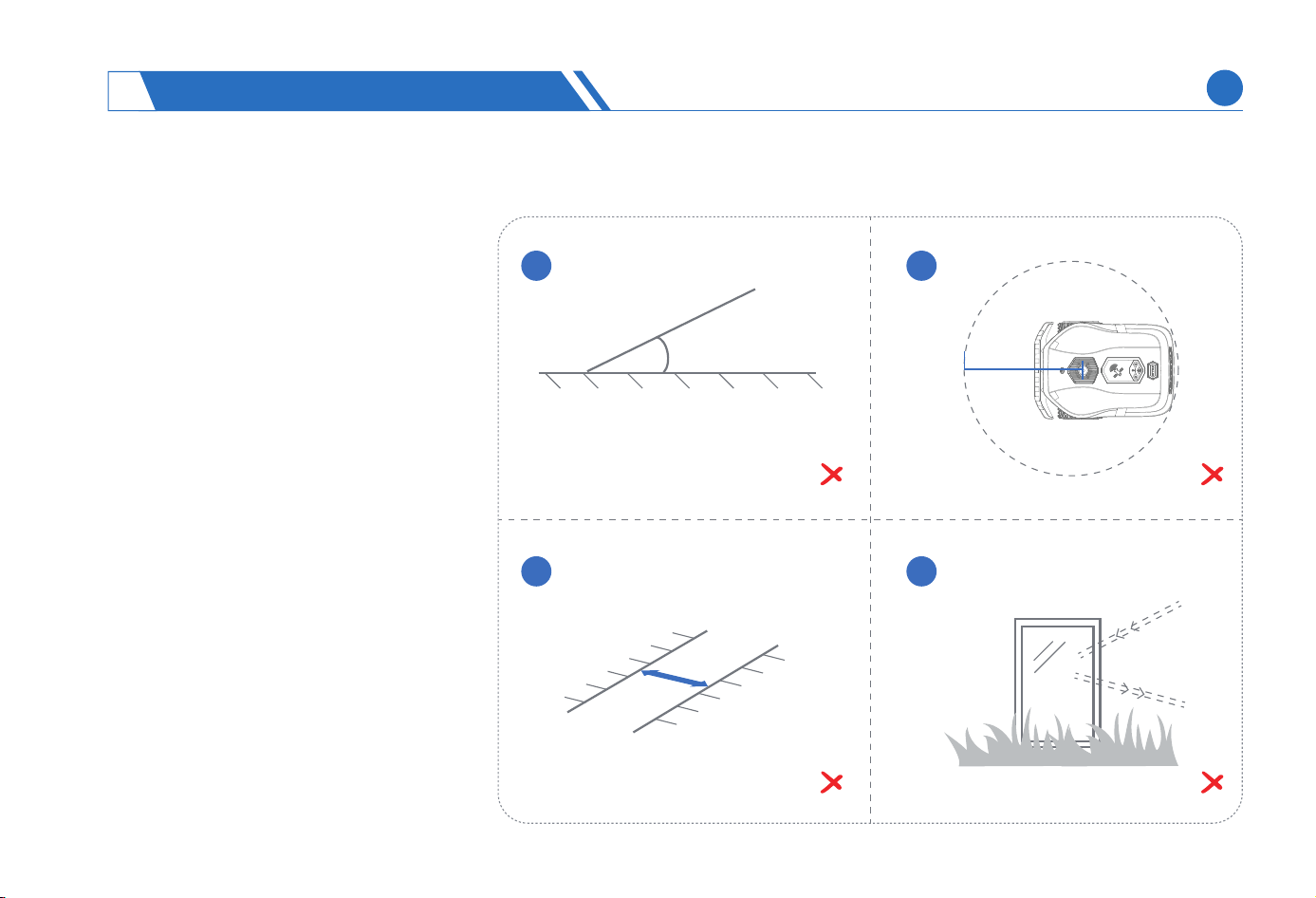
Inappropriate Working Scenarios:
Areas in the lawn with a slope great-
er than 45% (24°).
A scenario where the lawn is too
open and lacks any features (deni-
tion of an open space: there is no
any features in an area with a radius
of 25m centered on a LiDAR).
It is not advisable to delineate a
mowing area in any narrow area with
width less than 1.5m within the lawn.
The obstacles with reective materi-
als on the lawn, such as glass and
mirrors, will aect the operation of
the LiDAR. It is advisable to apply a
lm to the reective suace of the
obstacle that cannot be removed.
(1)
(2)
(3)
(4)
>45%(24°)
<1.5m
R25m
1 2
3 4
INSTALLING NEOMOW X
3
EN
14
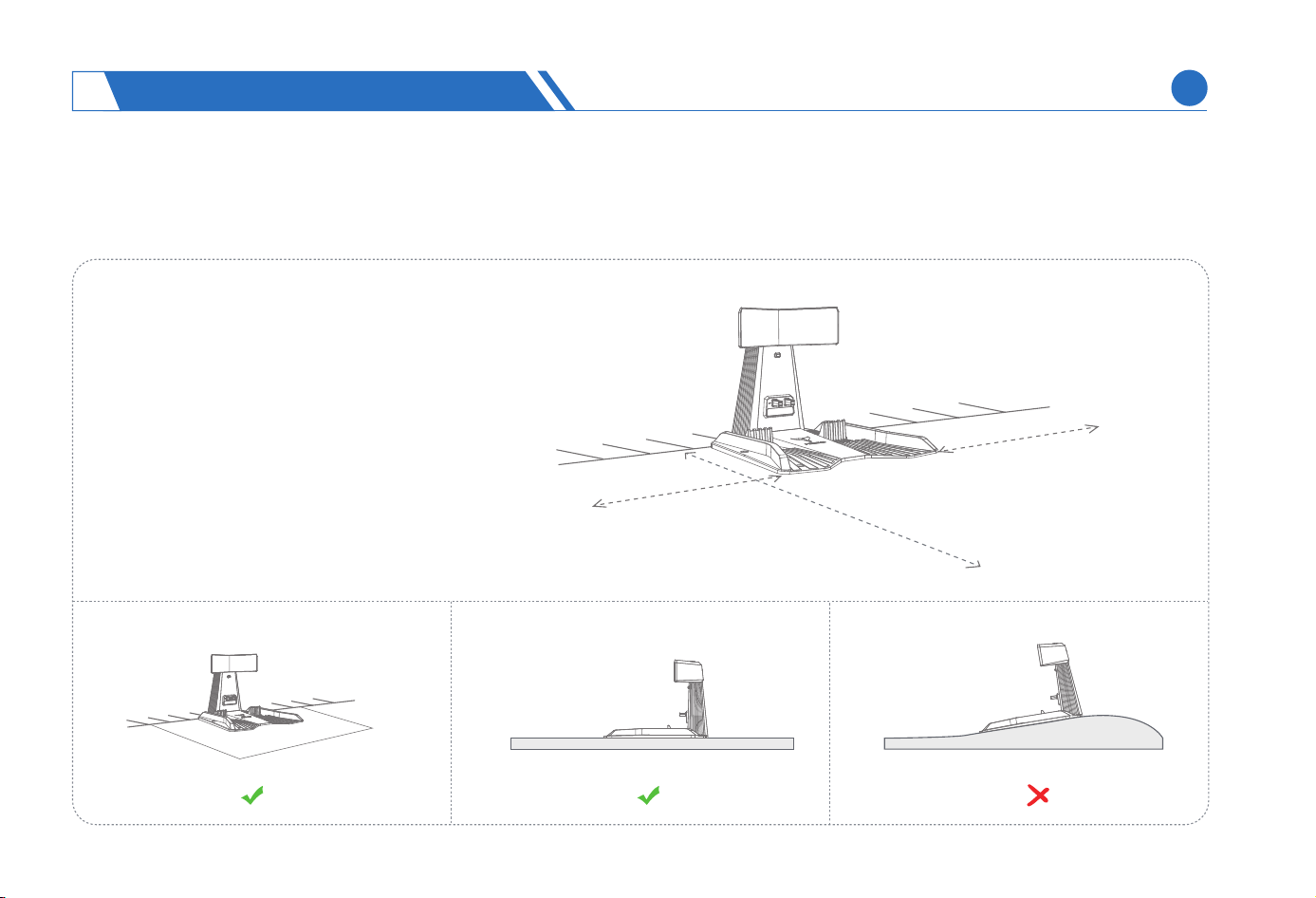
Ensure that the charging station, when
installed on a site, is provided with an
unobstructed space of 0.5m on both
sides and 2m in front, and the charging
station should also be provided with a
gentle space of 1.5m around and 2m in
front, with a tilt angle of less than 5 °.
(1)
1.5m
<5°
2m
0.5m
0.5m
2m
3.2 Installing Charging Station
Choose A Suitable Installation Location
INSTALLING NEOMOW X
3
EN
15
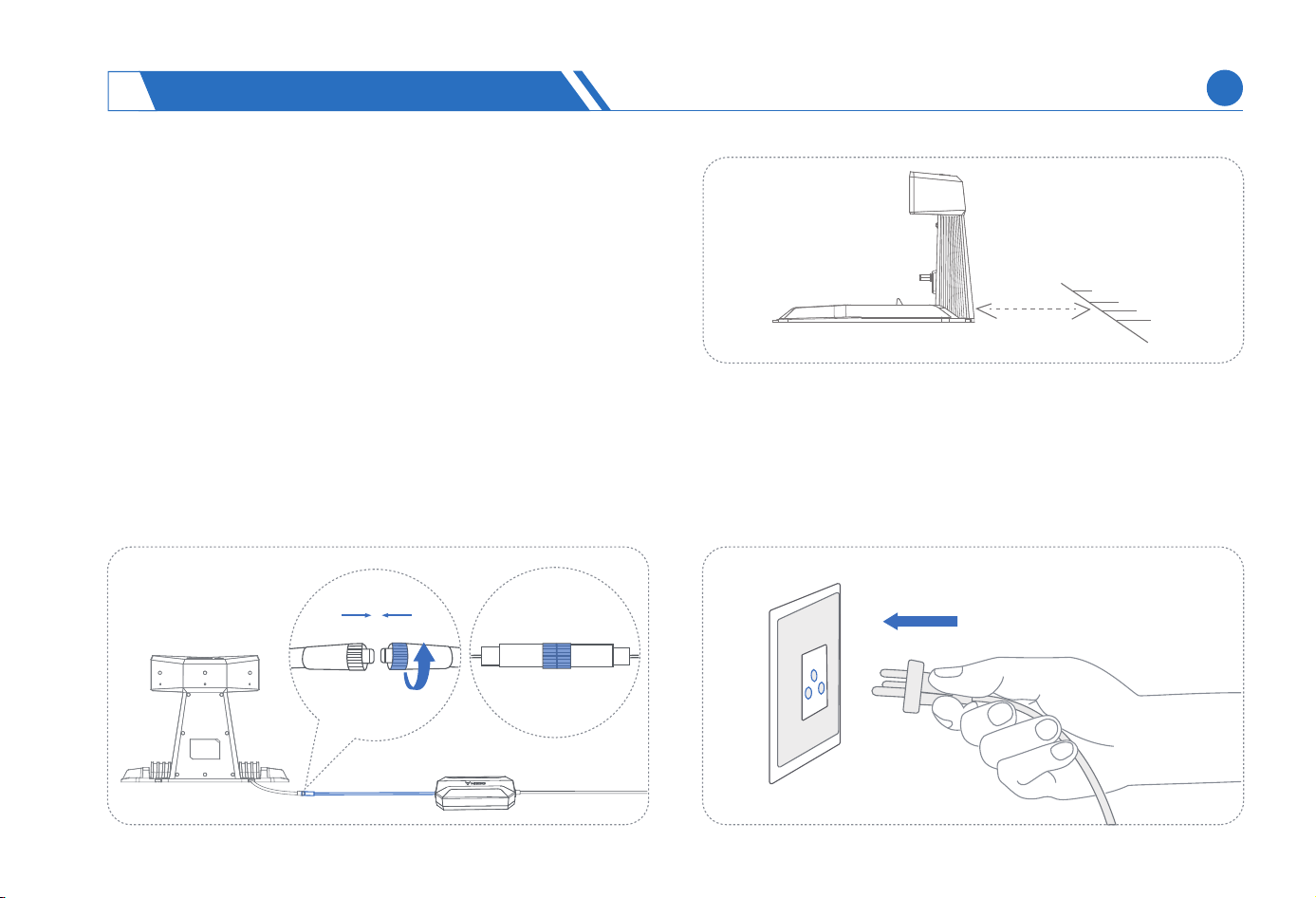
Inse power plug into a suitable power outlet, and then the
power indicator light on the charging station will light up.
(2)
Installing The Charging Station
Place the charging station in the selected installation
location and connect the power po of the charging
station to the power adapter cable. If it is necessa to
connect an extension cable, connect power po to the
extension cable rst, and then connect the power adapter.
(1)
It is necessa to maintain a distance of 20cm
between the charging station and the wall when
the charging station is installed against the wall.
(2)
20cm
INSTALLING NEOMOW X
3
EN
16
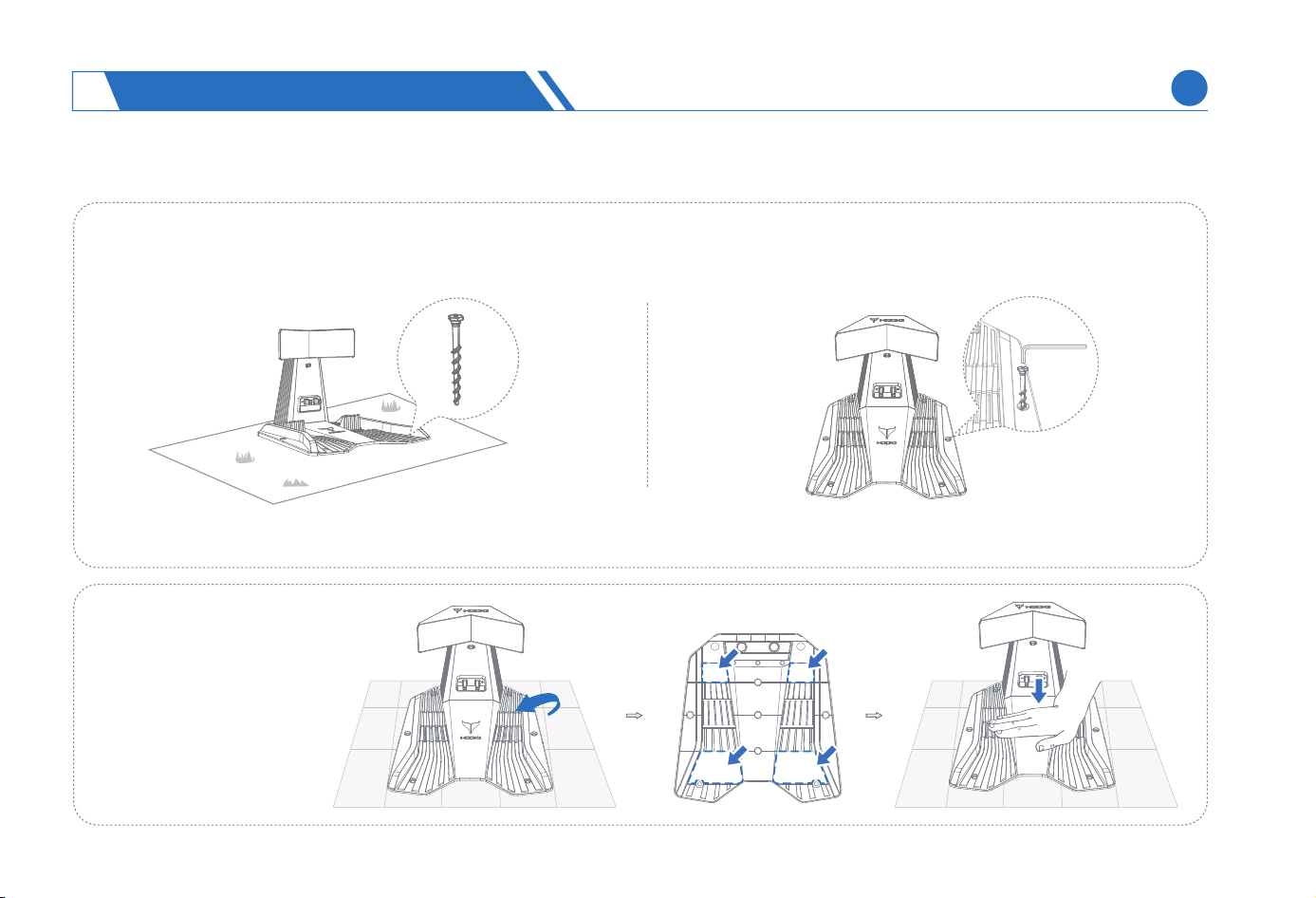
CAUTION: When xing the cable, straighten it directly along the ground.
Install Indoors
2)
Fix the charging station
on a at, clean and hard
indoor ground using
the tape provided in the
package, and then x
the cables.
Fix the charging station. The xing method may va since Neomow X can be installed on a variety of sites:
Install on a lawn
1)
Use the provided ground nails to secure the charging station and x the extension cable.
(3)
INSTALLING NEOMOW X
3
EN
17
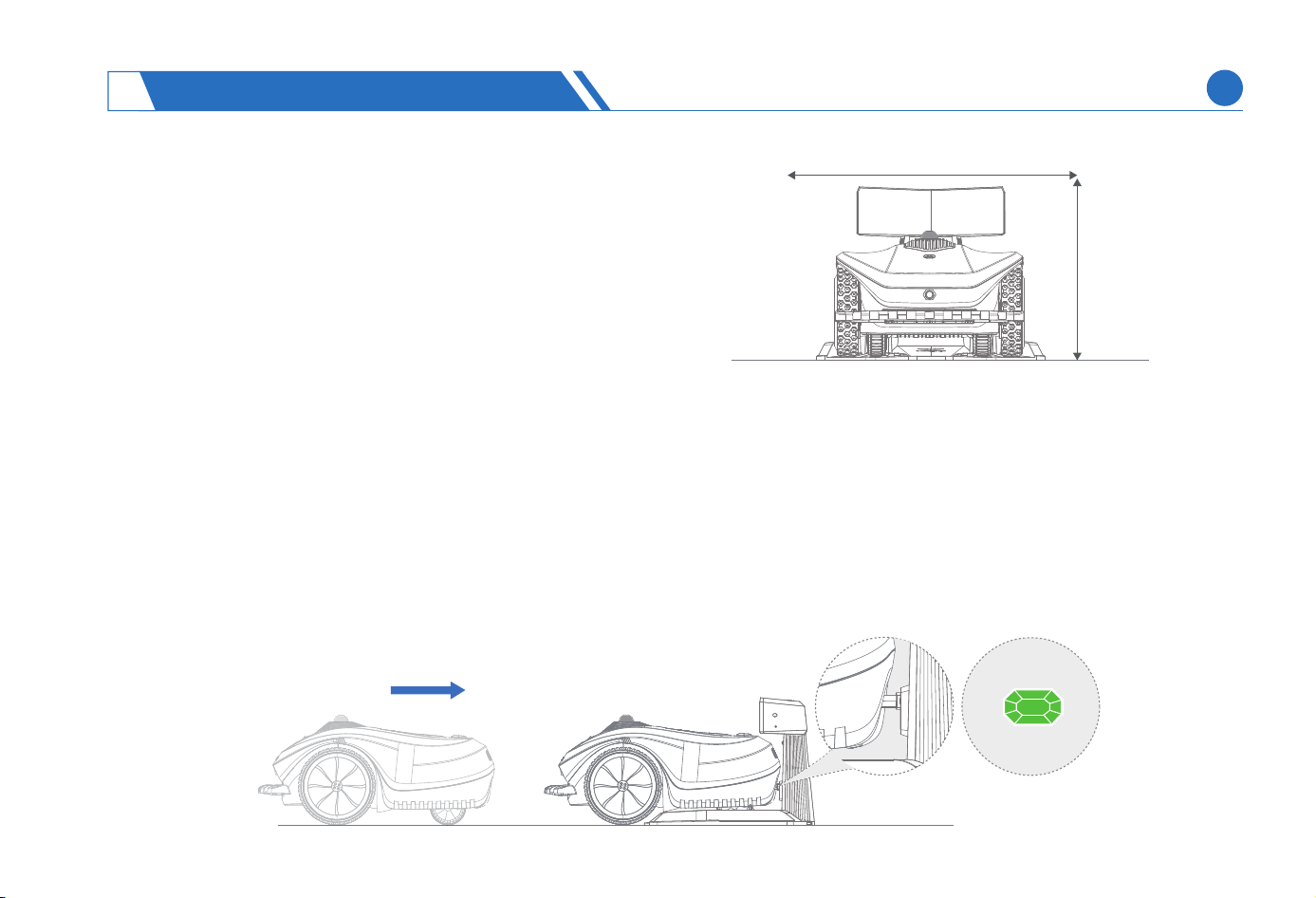
3.3 Charging And Staing The Neomow X
How To Charge ?
First Charging
The lawn mower may have a low batte level after a long-time storage, and should be fully charged before rst use. The lawn
mower should be placed into the charging station to ensure that the charging pad on the lawn mower is in good contact with the
charging strip on the charging station, and the charging indicator light on the charging station will light up.
(1)
CAUTION:
After the charging station is installed, do not move the
charging station beyond a range of 20cm.
If you need to add additional fender to the charging station,
note that the cover should be greater than 47cm in height and
77cm in width.
>47cm
>77cm
(1)
(2)
INSTALLING NEOMOW X
3
EN
18
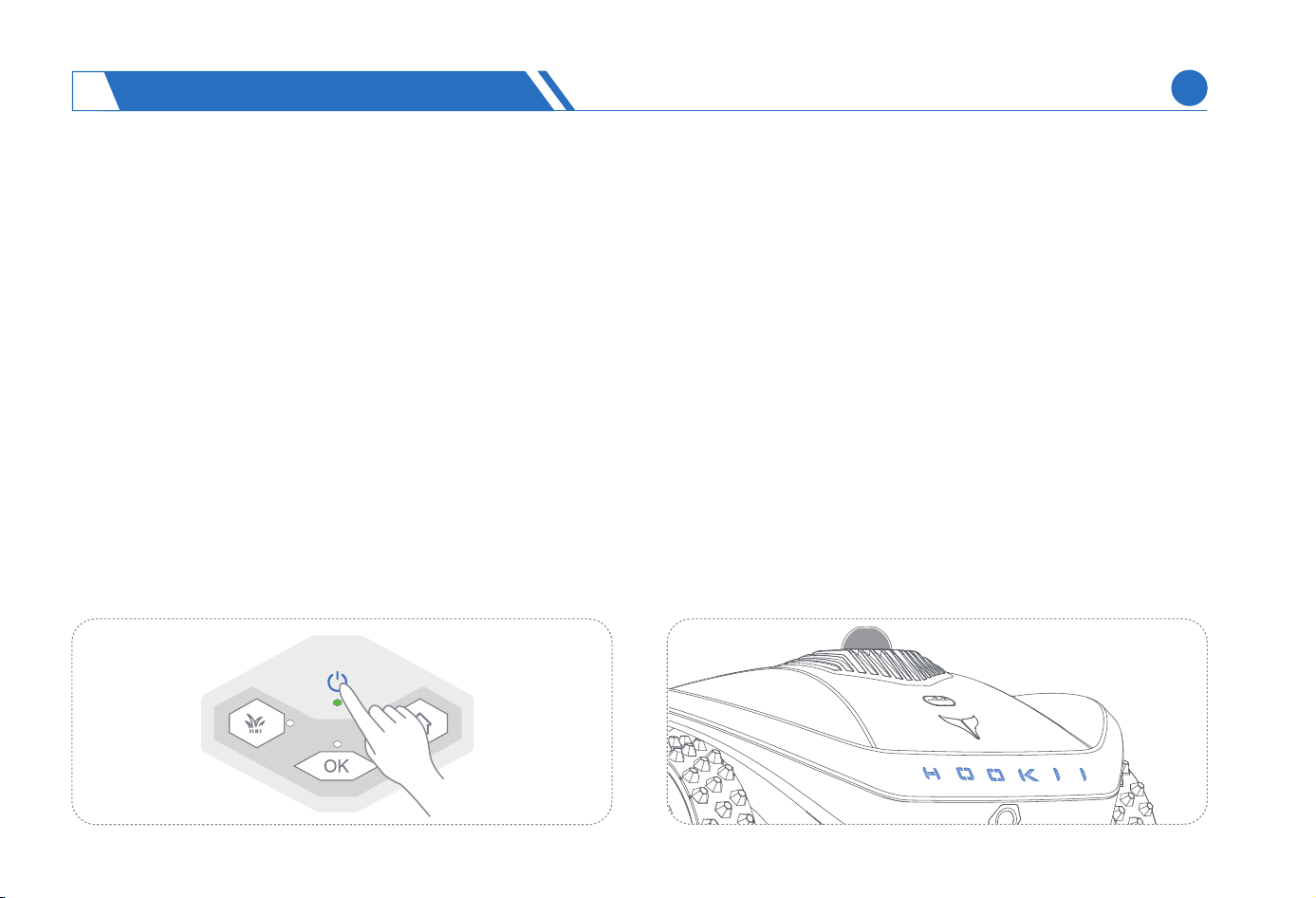
Press and hold the ON/OFF button on the lawn mower to automatically sta. The HOOKII light turns blue intermittently during sta-
up, and will remain blue after the staup is completed. The lawn mower then can be used normally.
Turn on Neomow X
WARNING:
Do not charge if the lawn mower, power supply, charging station, or power outlet is damaged.
Do not charge the lawn mower when the temperature is above 45°C(113℉) or below 0 ℃ (32 °F).
The batte has a temperature protection mechanism, so that if the batte’s internal temperature exceeds its allowed limit temperature
for charging, the lawn mower will return to the charging station and will not charge until the temperature drops to a safe threshold. If the
internal temperature of the batte exceeds the allowable discharge limit temperature, the batte will stop mowing and return to the
charging station until the temperature drops to a safe threshold.
In case of abnormal odor or sound, stop charging immediately and contact the after-sales seice depament.
Keep away from ammable and explosive materials during charging.
Automatic Charging
After a map is created on the App, if the lawn mower has the batte level below the set low batte threshold (<20%) during oper-
ation, it will automatically return to the charging station for charging.
You can also send a recharge task to the lawn mower by pressing the HOME+OK button on the body or the recharge button on the App.
(2)
(1)
(2)
(3)
(4)
(5)
INSTALLING NEOMOW X
3
EN
19
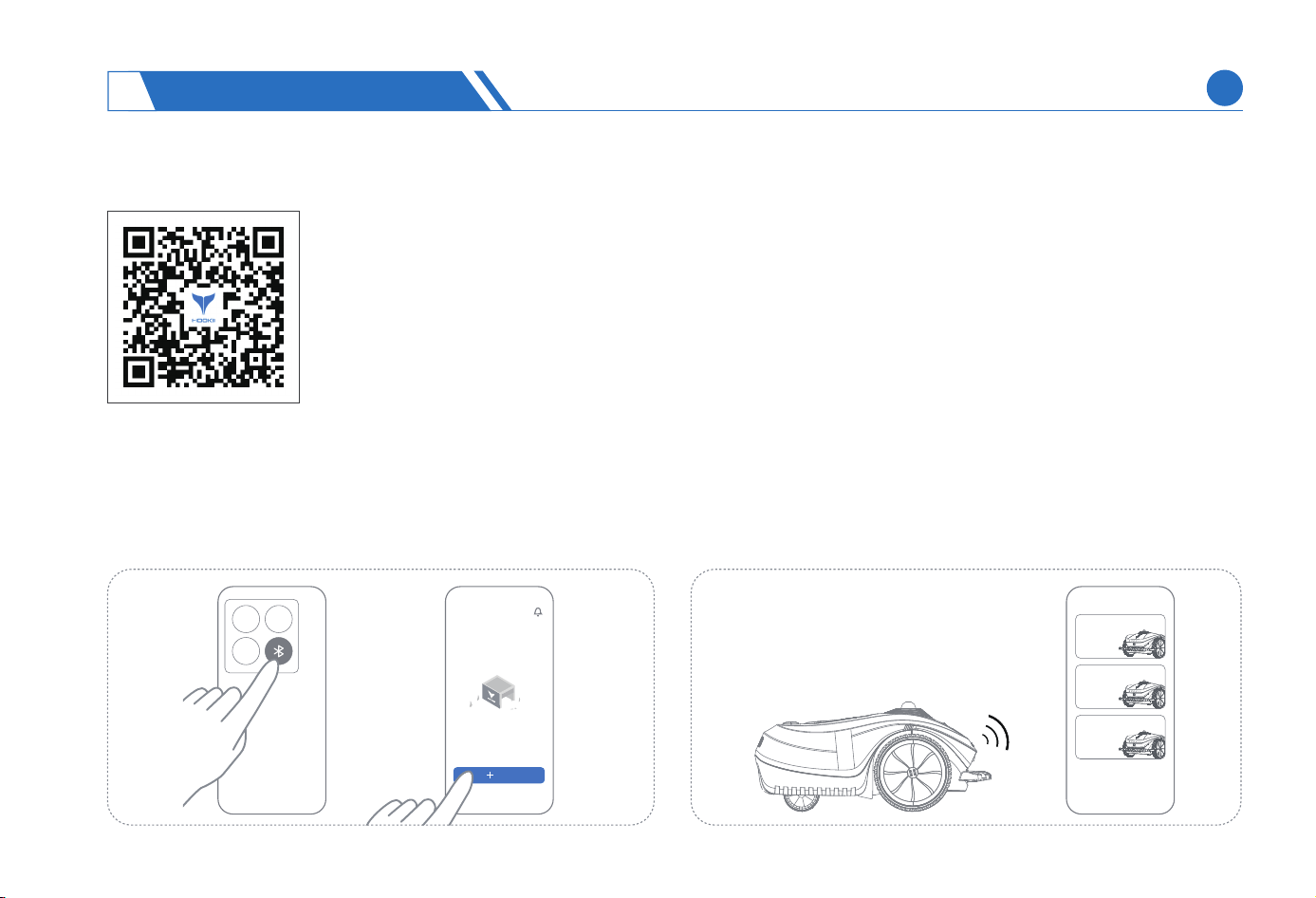
4.1 Getting the App
Note:
The App, an essential pa of a complete experience of lawn mower, should be installed before the use of
lawn mower. To ensure successful installation, please scan the QR code to enter the App market and
download Neomow App for installation. Register and log in after App installation.
During use, the App will, when necessa, use your Bluetooth, GPS positioning, and WiFi. To ensure normal use,
you are advised to allow the use of the above functions according to the App prompts.
The following diagram about the App is for illustration only, and the App page will change along with the
continual optimization of the software version.
(1)
(1)
(2)
(2)
4.2 Adding Devices
My Device
Open the App, add a device for the current account, and
enable Bluetooth and positioning on your phone.
Add devices via Bluetooth according to the App's instructions.
During device addition, keep your phone as close as possible
to successfully search for and add the lawn mower.
USING NEOMOW X
4
Add
HOOKll Neomow X
XXXXXX
HOOKll Neomow X
XXXXXX
HOOKll Neomow X
XXXXXX
EN
20
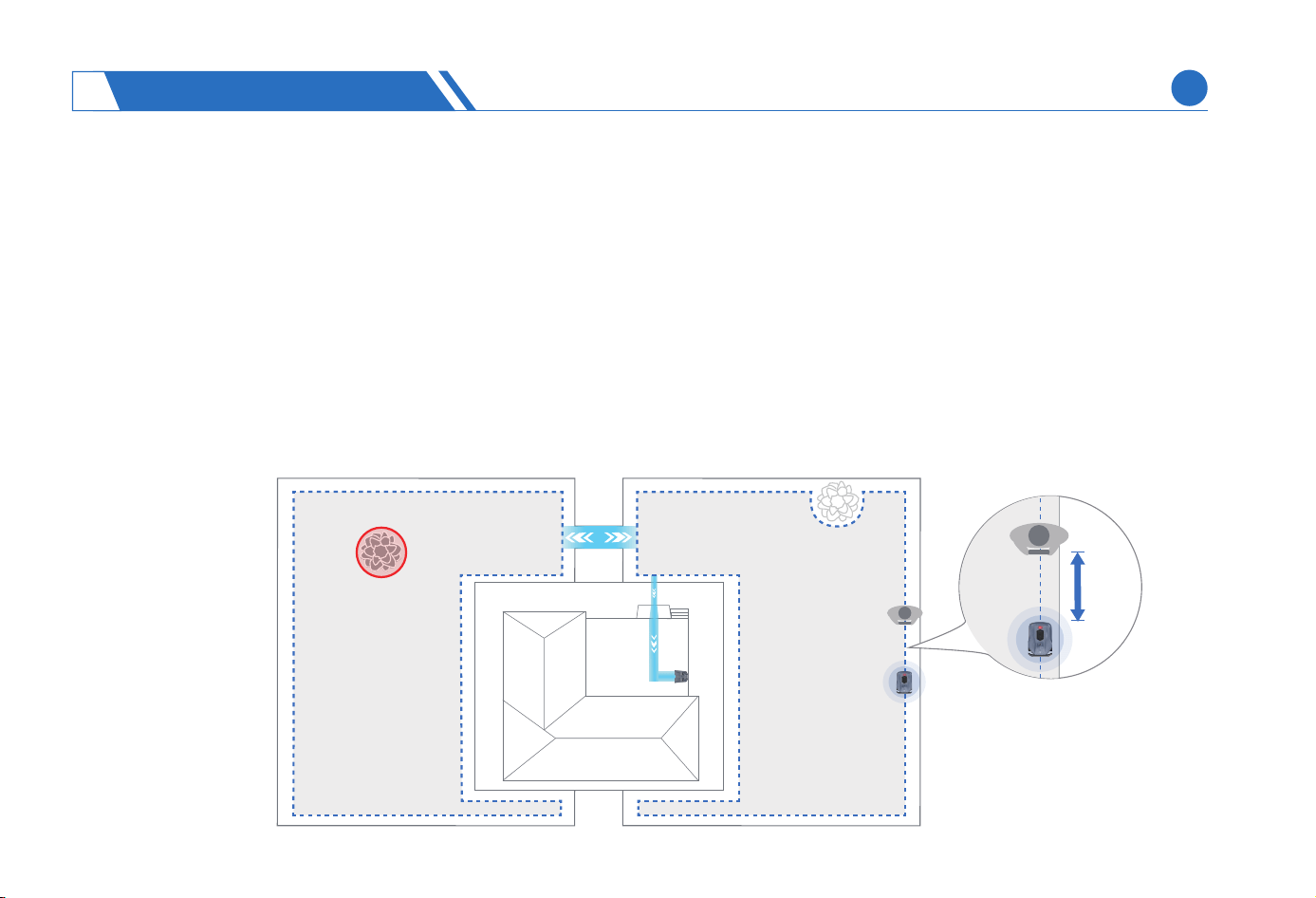
4.3 Map Creation
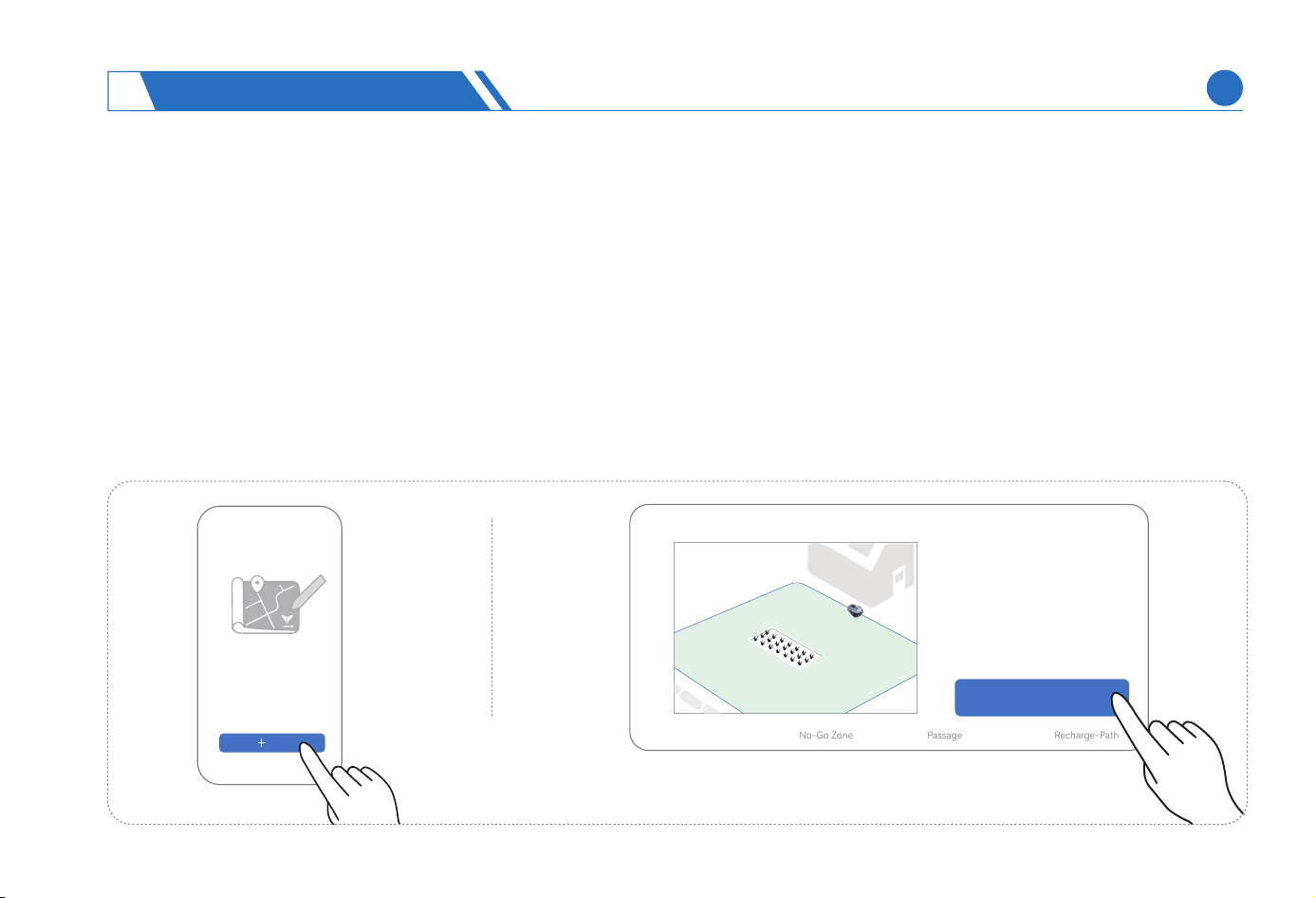
The map consists of four map elements: mowing area, passage, No-Go zone, and recharge path.
The mowing area is used to delineate the bounda of work area of lawn mower, the passage is used to connect two mowing
areas, and the No-Go zone is used to delineate inaccessible areas within the mowing area, for example, the obstacles such as
trees, xed tables and chairs. The recharge path is used to delineate a path for the lawn mower to return to the charging station
from the mowing area.
Select the connection method. The lawn mower can be connected by a phone in two ways: 4G connection and WiFi connection.
When the lawn mower is connected without setting up WiFi connection, 4G connection will be enabled by default. If you want to
connect the lawn mower via WiFi, you can set the WiFi name and password on the App to connect the lawn mower to your house-
hold WiFi. After setup is nished, the lawn mower will access the internet through WiFi by default.
(1)
(2)
(3)
<6m
USING NEOMOW X
4
EN
21
(1)
(2)
(3)
(4)
WARNING:
To ensure the mapping accuracy and security, Bluetooth connection is required during map creation and management. It is advisable that
the operator should be less than 6m away from the machine throughout the entire process.
Before mapping, charge in advance to ensure that your phone and lawn mower have sucient batte life.
During mapping, avoid Bluetooth disconnection because either the phone or machine is too close to large obstacles such as trees, high
walls, houses, etc.
It is not advisable to map on rainy days, as raindrops on the LiDAR may hinder its recognition of surrounding locations.
(1)
Creation And Limitation Of Mowing Area
The mowing area delineates the actual mowing area of the lawn mower.
Select mowing area on the Map Management page and sta mapping.
Mapping Mowing area
Mowing area
No-Go Zone
Passage
Recharge-Path
Add
USING NEOMOW X
4
EN
22
1)
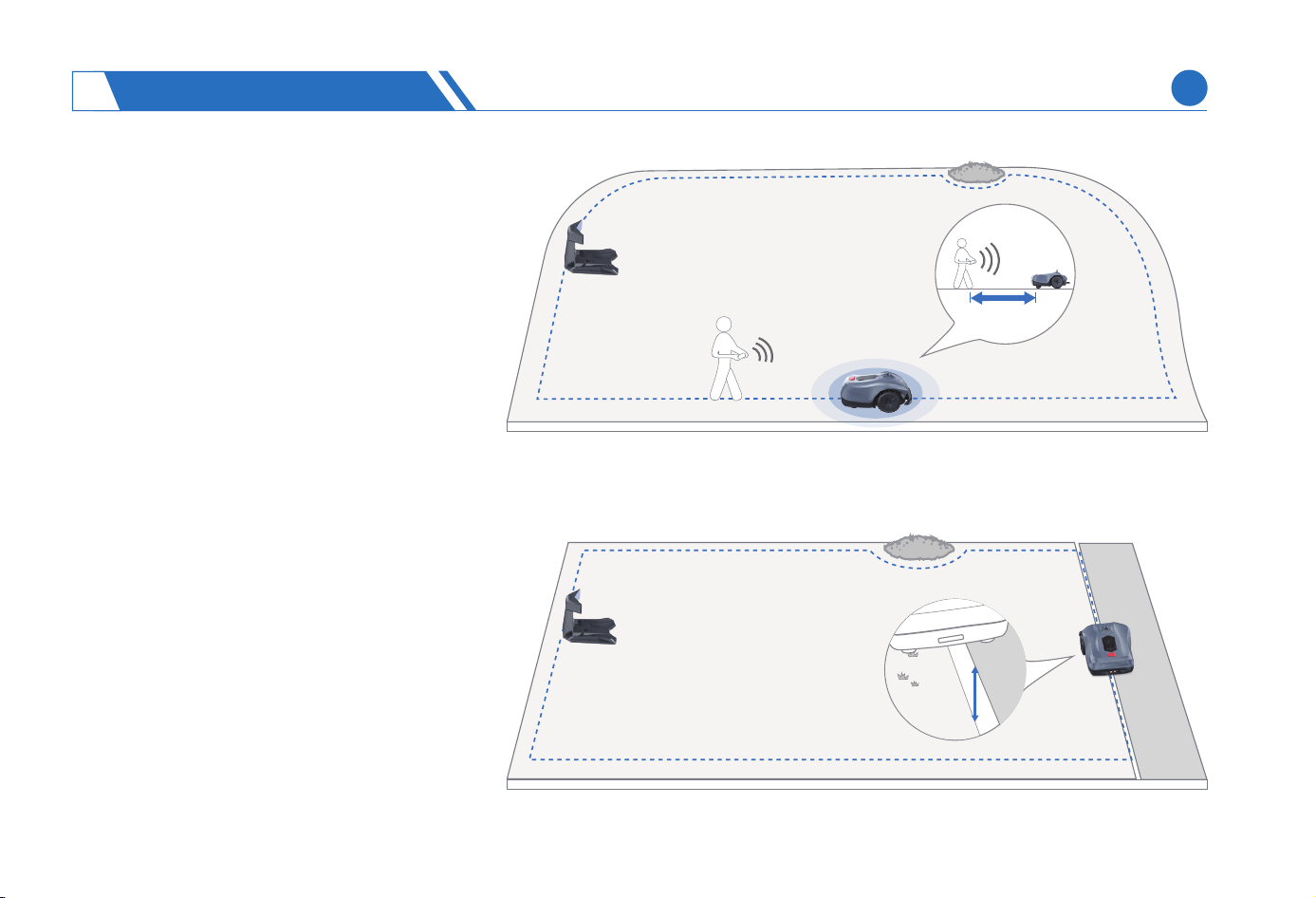
Find a suitable staing point at the edge
of the lawn, and during mapping, the dis-
tance between the person and lawn
mower should be less than 6m.
Remotely control the lawn mower, walk along
the bounda of mowing area and delineate
the bounda line based on the following
situations:
If the dierence in elevation between the
areas within and outside the lawn bounda
is less than or equal to 1 cm, it’s advisable to
maneuver the mower slightly beyond the
bounda to delineate a neat border, which
will facilitate a complete trimming along the
entire lawn bounda.
< 1cm
< 6m
(2)
(3)
USING NEOMOW X
4
EN
23
2)
3)
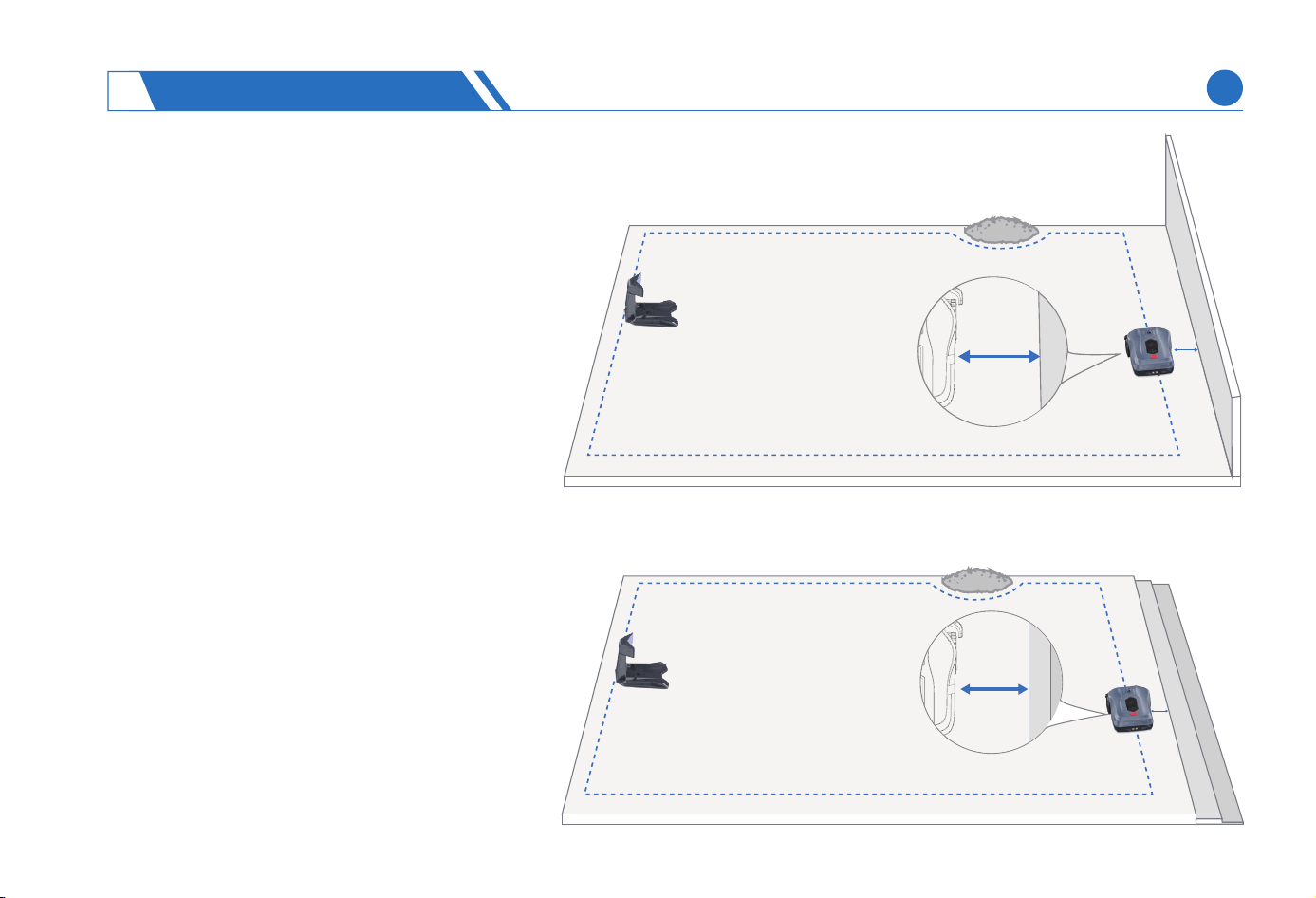
In the presence of obstacles such as a wall or
fence that notably varies in height from the
lawn level, it's advisable to keep the mower at
least 5 cm away from the lawn border while
dening the bounda. This practice minimizes
the risk of collision and potential damage to
the mower during turning maneuvers.
In instances where your lawn sits elevated
above the ground level with a signicant
drop-o at its bounda, it's recommended to
establish the border at a distance greater than
10 cm from the lawn bounda, thereby
prevent the mower from falling over the
bounda.
> 5cm
> 10cm
USING NEOMOW X
4
EN
24
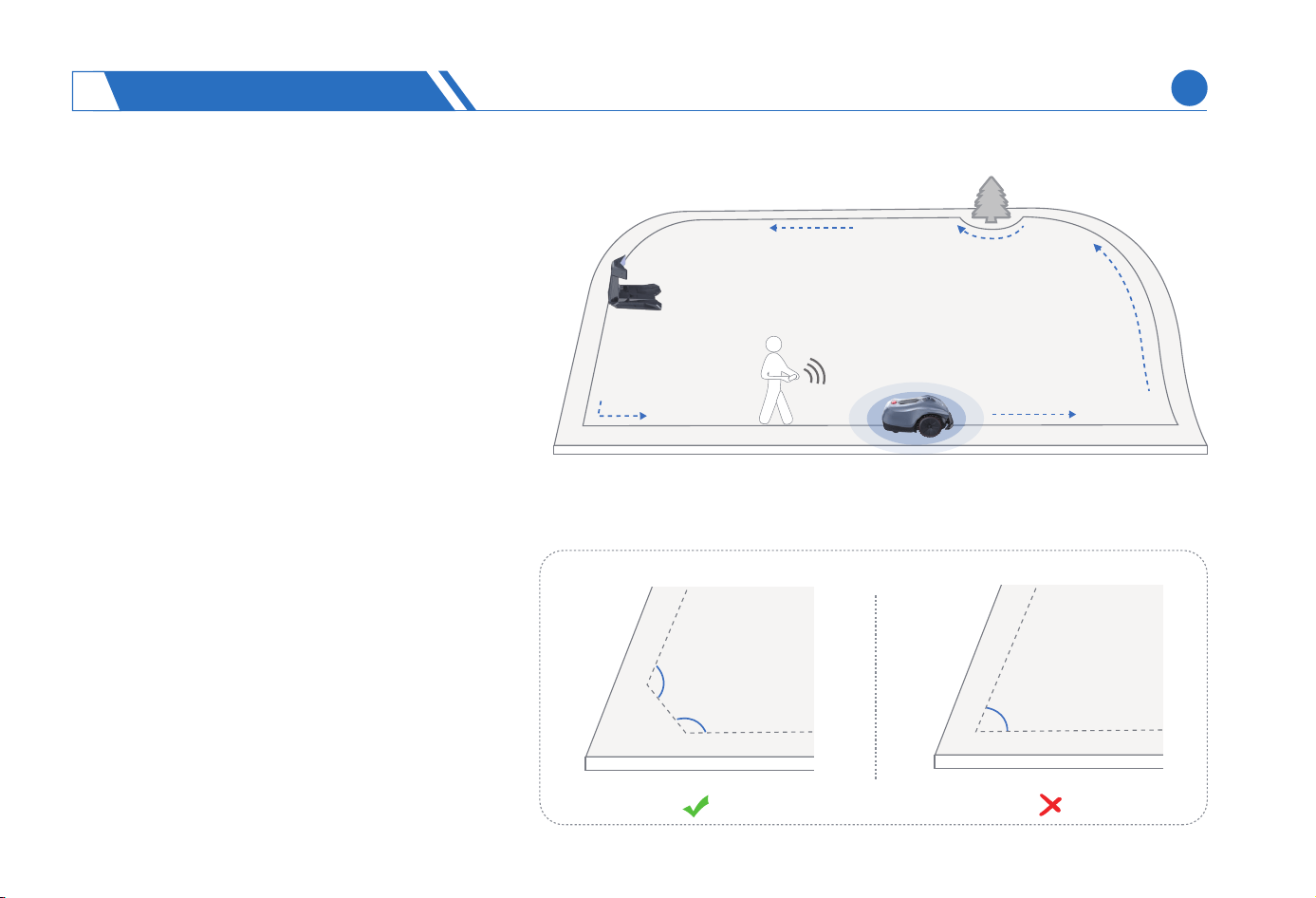
When you remotely control the lawn mower to a
place where turning is required, maintain the
lawn mower at a turning angle greater than 90 °.
When mapping a mowing area, maintain the
width of mowing area greater than 1.5m, and it is
not advisable to delineate a mowing area in a
lawn with a width below 1.5m, as the mower may
not run smoothly.
Remotely control the lawn mower to the
staing point and end the mapping. If you
have a number of separate lawns, repeat
this step.
< 90°
> 90°
> 90°
> 90°
(4)
(1)
(2)
CAUTION:
USING NEOMOW X
4
EN
25
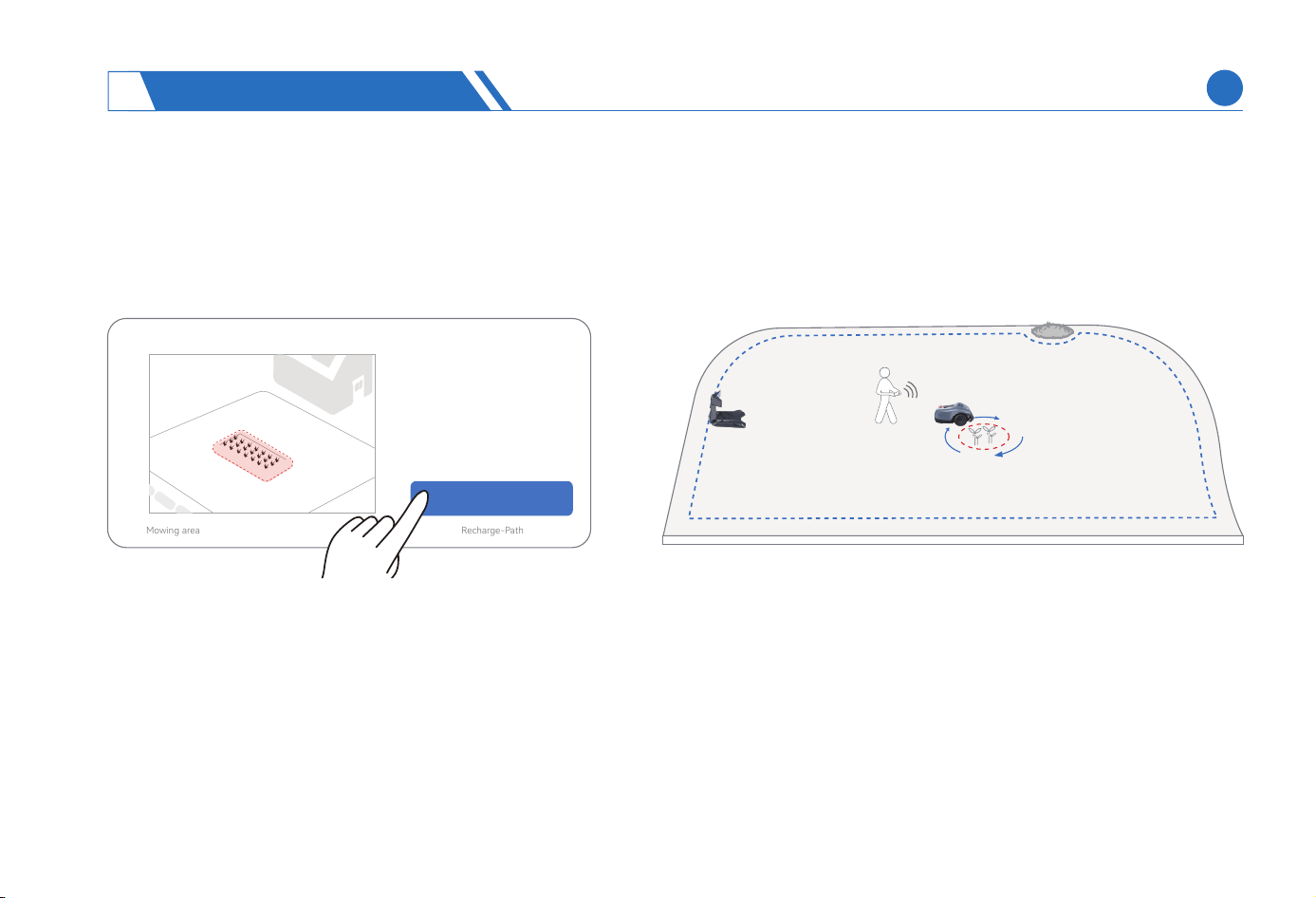
Creation And Limitation Of No-Go zones
When colliding with an obstacle, the lawn mower will move back appropriately and change direction to stay away from the obstacles.
We suggest dening a No-Go zone to protect existing objects in the mowing area that we don’t want the lawn mower to collide with,
such as trees, ower beds, lawn decorations, swimming pools, sprinklers, xed tables and chairs.
CAUTION:
It is advisable to prioritize the creation of No-Go zone prior to the passage and recharge path.
To ensure the smooth running of lawn mower, it is advisable to maintain a ceain distance between the No-Go zone and the passage or
recharge path. If the obstacles cannot be removed and the lawn mower is unable to pass due to the closeproximity of obstacleswith the
passage or recharge path, it is advisable to remap the recharge path or passage.
The No-Go zone on the App can be deleted when you remove xed obstacles on the lawn and no longer need the No-Go zone.
A distance of 5cm or more must always be maintained from the obstacles when a No-Go zone is mapped around obstacles.
We suggest delineating the two xed obstacles with a spacing less than 1m in the same No-Go zone.
Mapping No-Go zone
(1)
(2)
(3)
(4)
(5)
> 90°
> 90°
Mowing area
No-Go Zone Passage
Recharge-Path
USING NEOMOW X
4
EN
26
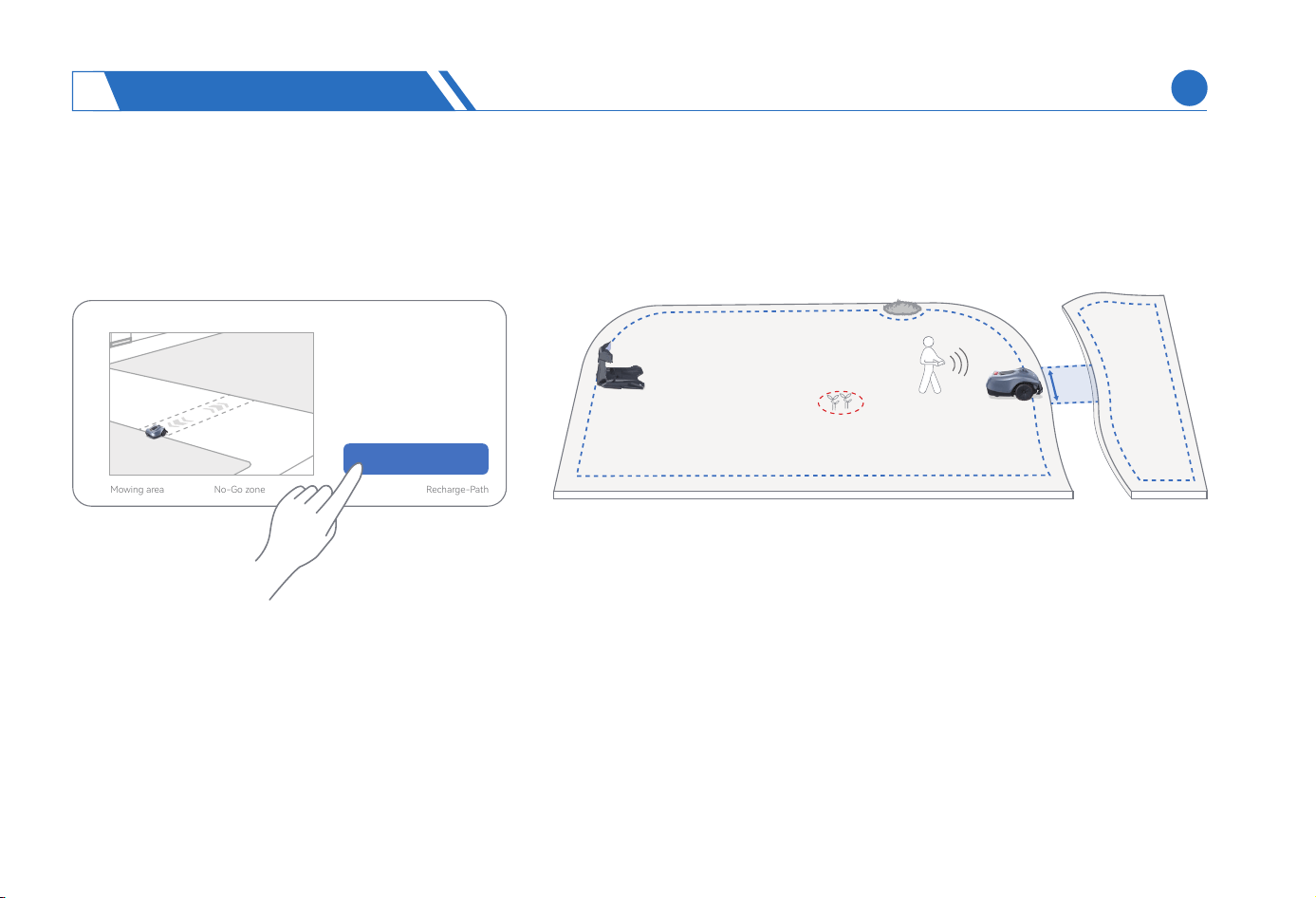
Creation And Limitation Of Passage
If at least two separate mowing areas are created in your yard and you want to set up a passage for the mower, you can create a
passage.
CAUTION:
We should choose a passage that allows the lawn mower to pass smoothly. When creating a passage, we should cause the lawn mower move
along the centerline of the passage as much as possible, avoiding deviation from the passage during subsequent operation.
The at and d ground should be selected as a passage, and the lawn mower can run and turn around smoothly in an unobstructed passage
with a minimum width of 77cm. In case there is a height dierence of more than 3cm along the entire route, we suggest choosing another
one as the passage to prevent the mower from getting stuck during operation.
The passage’s staing point must be located within or at the bounda of two mowing areas.
>77cm
(1)
(2)
(3)
Mapping Passage
Mowing area
No-Go zone
Passage
Recharge-Path
2
USING NEOMOW X
4
EN
27
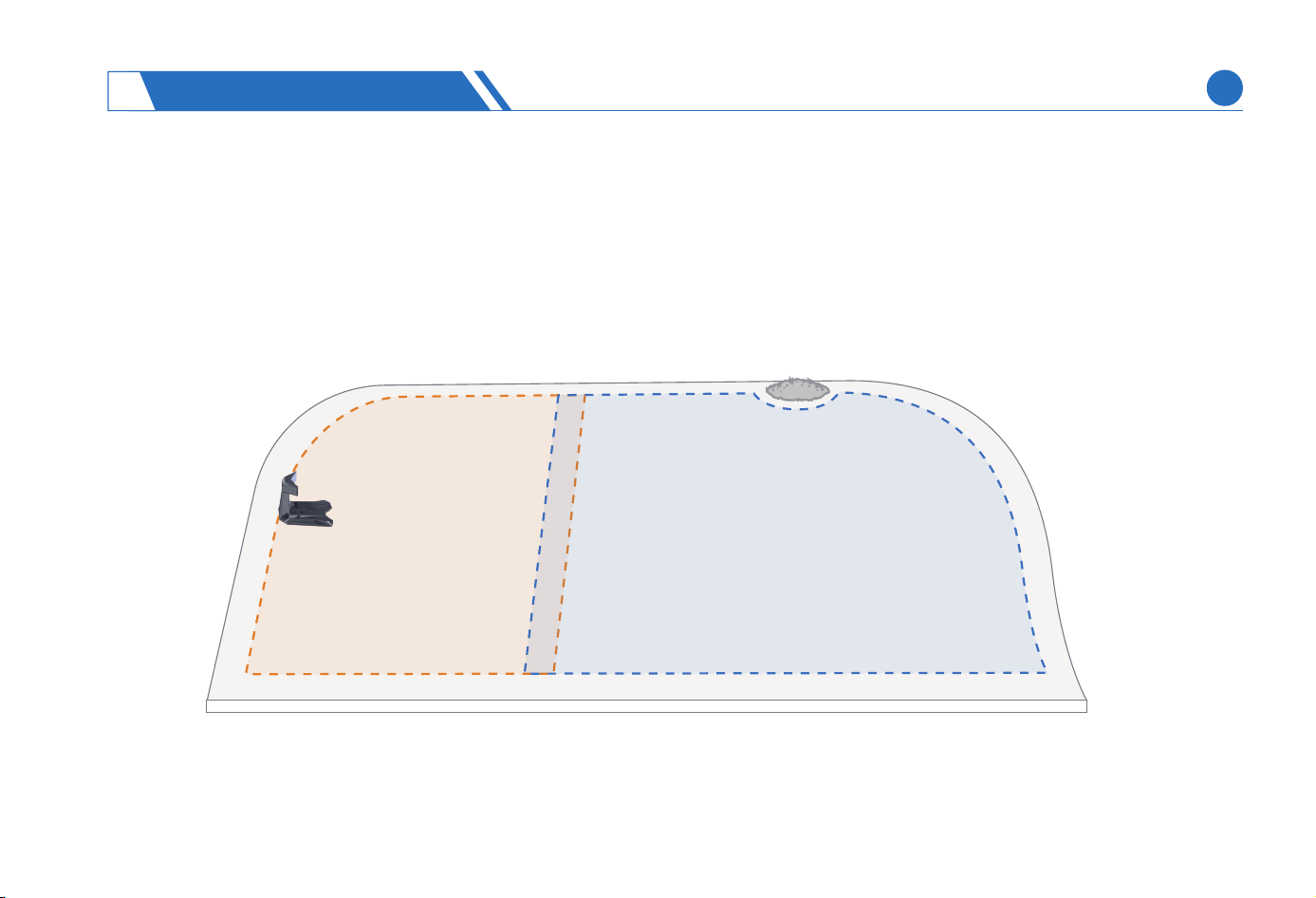
To ensure the smooth running of lawn mower, it is advisable to maintain a ceain distance between the No-Go zone and the
passage or recharge path. If the obstacles cannot be removed and the lawn mower is unable to pass due to the closeproximity of
obstacleswith the passage or recharge path, it is advisable to remap the recharge path or passage.
(4)
If separate mowing is required for the same lawn, for example, your lawn is divided into two areas of dierent grass species, it is
advisable that you dene two adjacent mowing areas in the same lawn without passage connection, and the two mowing areas
can be appropriately overlapped.
(5)
USING NEOMOW X
4
EN
28
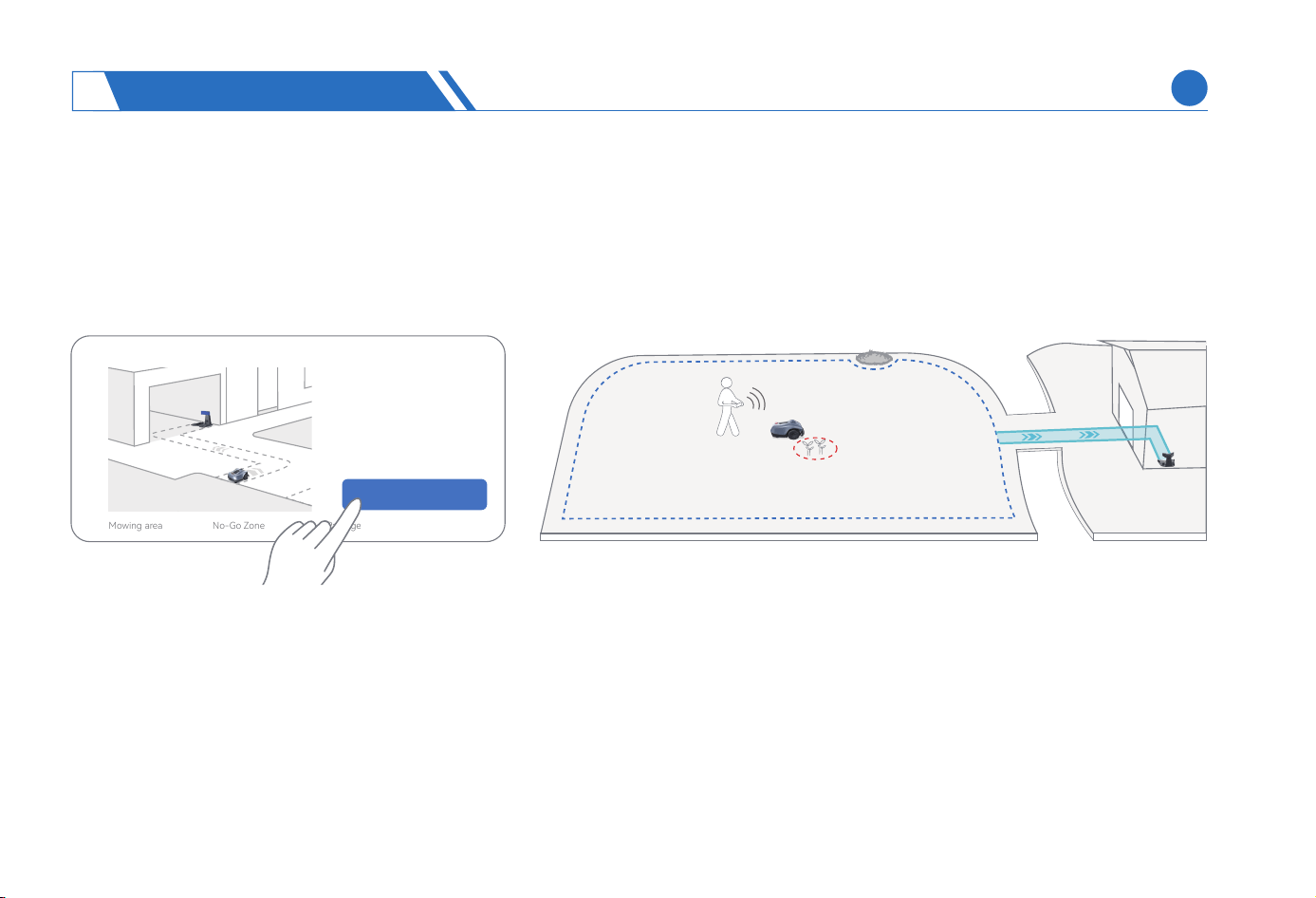
CAUTION:
This lawn mower’s charging station can be placed indoors to extend the seice life of the lawn mower and charging station. If the
lawn mower is not deployed within the bounda of mowing area, it is advisable to set a recharge path to help the lawn mower return
to the charging station accurately.
Creation And Limitation Of Recharge Path
It is advisable to map the recharge path from the bounda point of mowing area closest to the charging station, which can help the lawn
mower eectively return to the recharge station.
The lawn mower can smoothly enter and exit the charging station on an unobstructed recharge path with a minimum width of 77cm.
To ensure the smooth running of lawn mower, it is advisable to maintain a ceain distance between the No-Go zone and the passage or
recharge path. If the obstacles cannot be removed and the lawn mower is unable to pass due to the closeproximity of obstacleswith the
passage or recharge path, it is advisable to remap the recharge path or passage.
(1)
(2)
(3)
Mapping Recharge-Path
Mowing area
No-Go Zone
Passage
Recharge-Path
2
USING NEOMOW X
4
EN
29
(4)
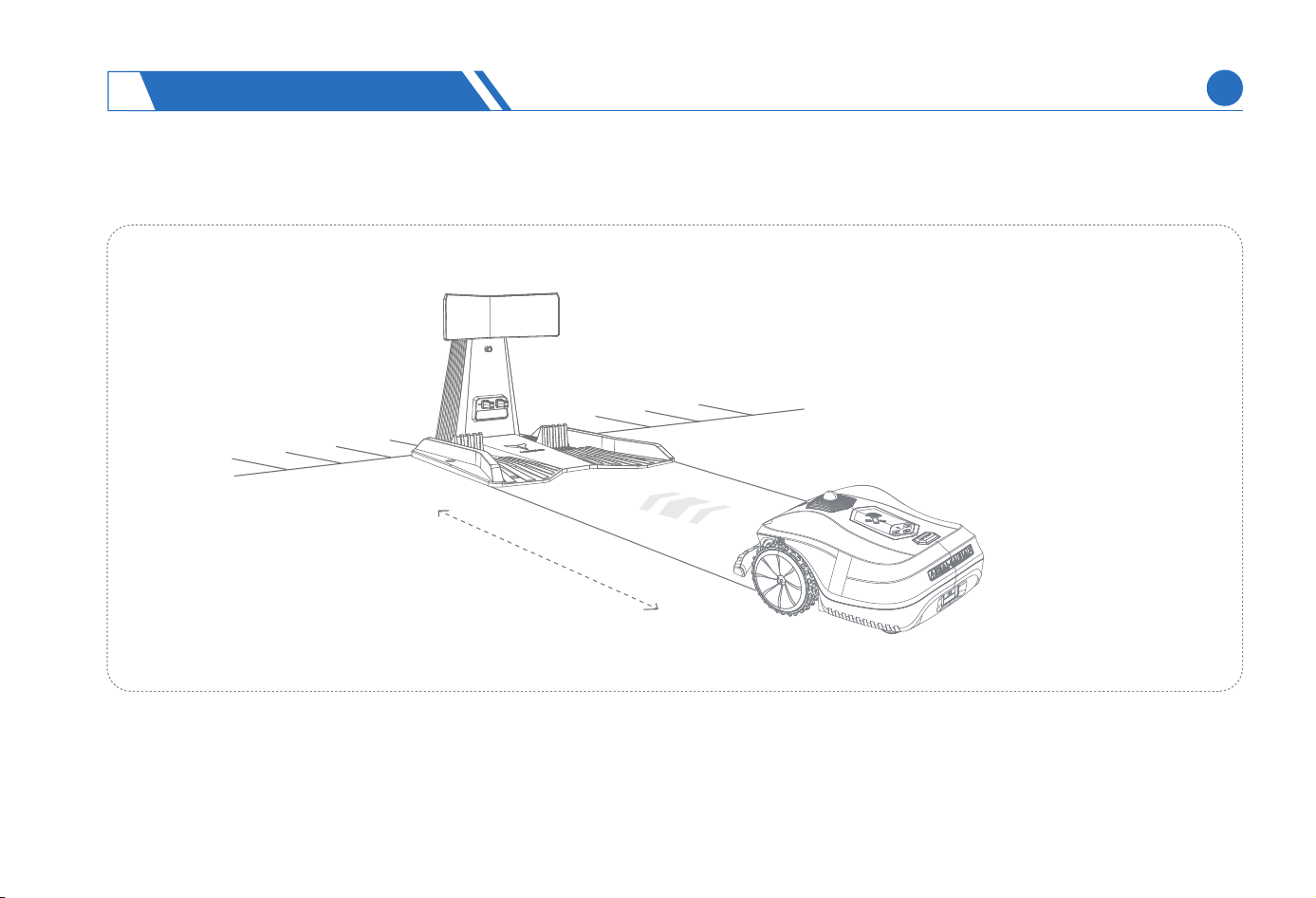
When mapping a recharge path, ensure the mower enter the charging station from 1m in front as much as possible.
1m
USING NEOMOW X
4
EN
30
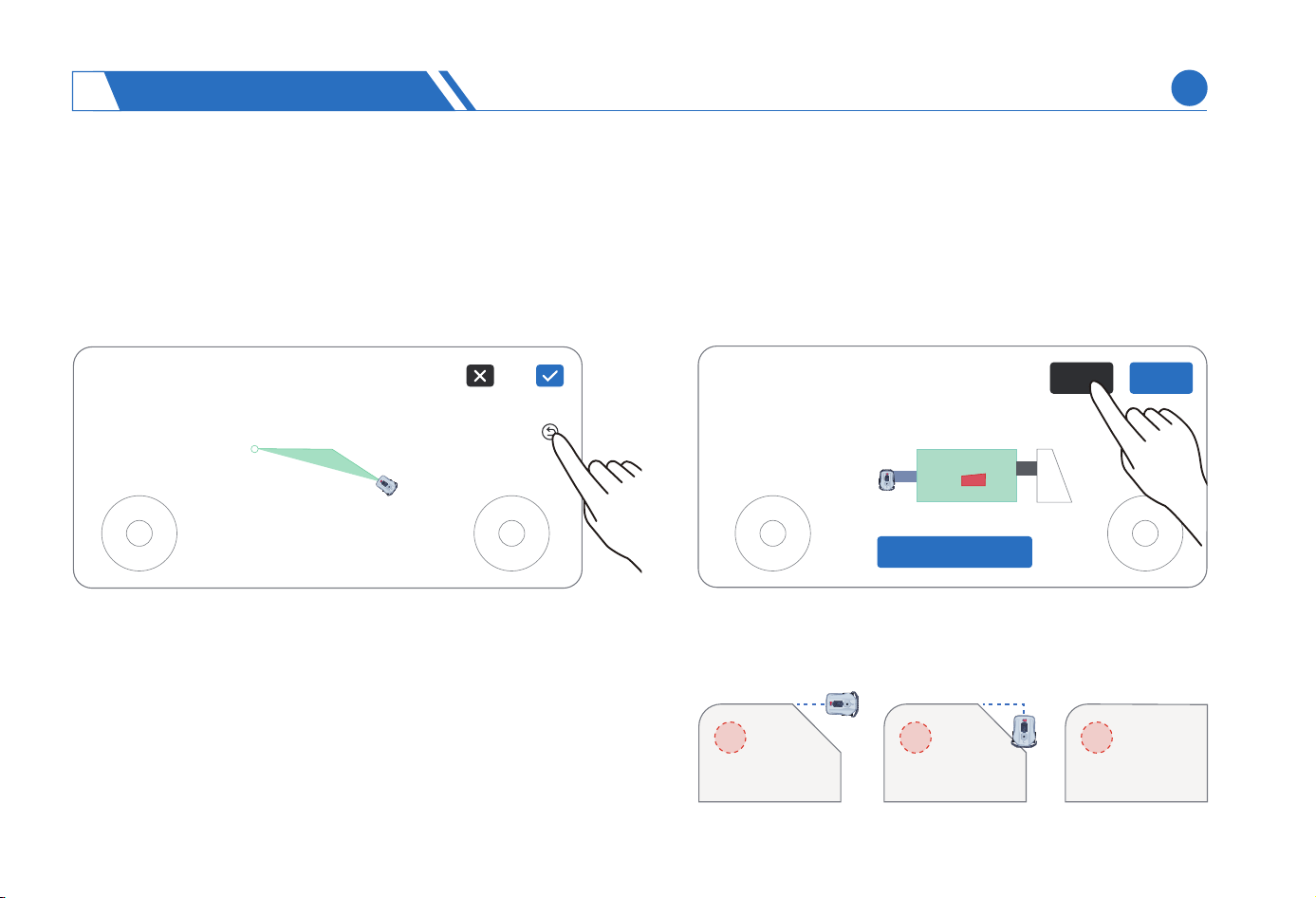
If the lawn mower takes a wrong path under remote control
when you are creating an area, it is advisable to erase the path
through undo operation when you attempt to erase the wrong
pa and map again.
Undo
If you attempt to make tiny bounda modication to a newly
created region, for example, increasing the area of your
lawn/No-Go zone, it is advisable to modify the bounda of
the region through map modication.
Map Modication
Add moreModify
Map modication is only applicable to tiny bounda
modication, and it is advisable to create the area again if a
major bounda modication is required.
The distance between the staing point and ending point of
the modied line segment should be greater than 1m.
(1)
(2)
CAUTION:
USING NEOMOW X
4
Finish Mapping
EN
31
(1)
(2)
CAUTION:
To peorm automatic mowing, work out a mowing map in advance on the App.
To peorm mowing at scheduled time, set a scheduled task for the lawn mower on the App.
This section mainly introduces how the lawn mower automatically mows and how to operate the lawn mower, for example, staing
and pausing mowing, returning to charging station, and resolving abnormalities.
The lawn mower with a low batte will stop mowing and automatically return to the charging station for charging and, after being fully
charged, will automatically return to the previous location for lawn mowing.
You can view in real time the mowing progress on the App.
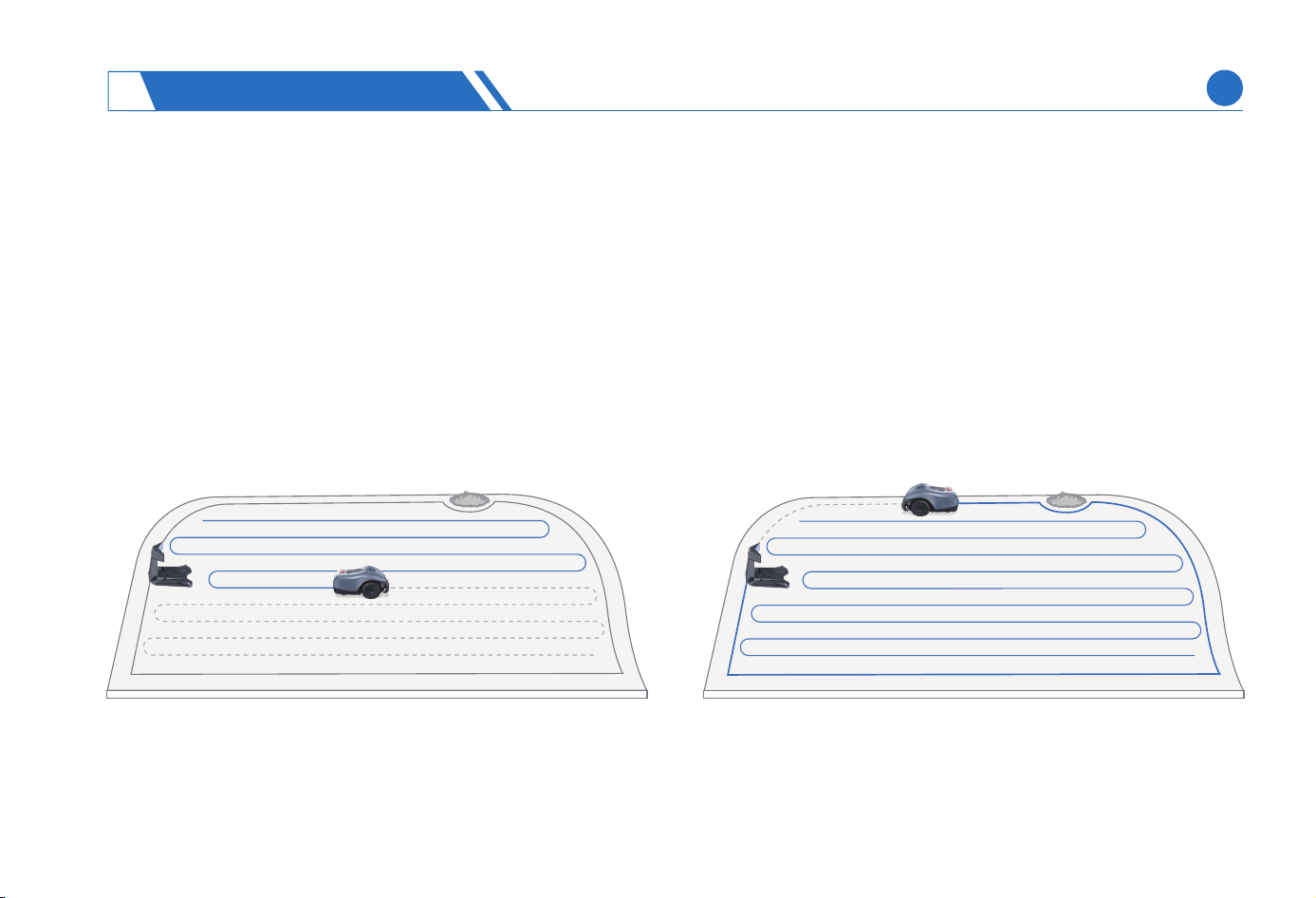
After mapping is nished, the lawn mower will automatically plan the most ecient mowing path, and sta ecient mowing along
the well-planned path. After mowing the grass inside the lawn, the lawn mower stas mowing along the bounda of the mowing
area, and returns to the charging station after nishing the operations in all mowing areas.
4.4 Daily Mowing
Introduction To Mowing Path
CAUTION:
(1)
(2)
USING NEOMOW X
4
EN
32
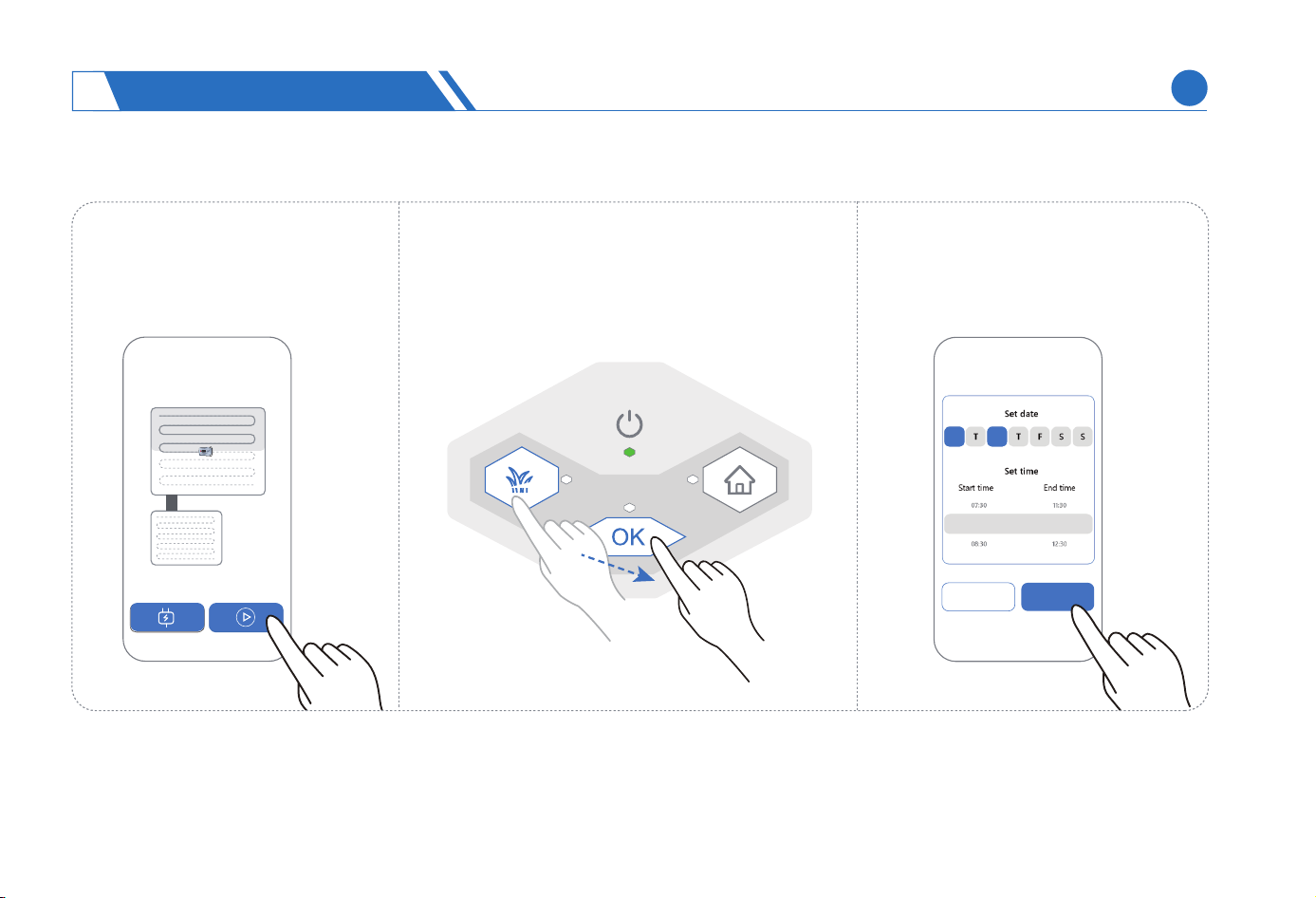
Sta Mowing
Click the Sta button on the App.
On the lawn mower’ s button panel, press
the Mow +OK button in sequence
If a mowing schedule is set in
advance, the lawn mower will
mow at the scheduled time.
Comrm
Cancel
08:00 12:00
M W
(2)
(1)
(3)
USING NEOMOW X
4
EN
33
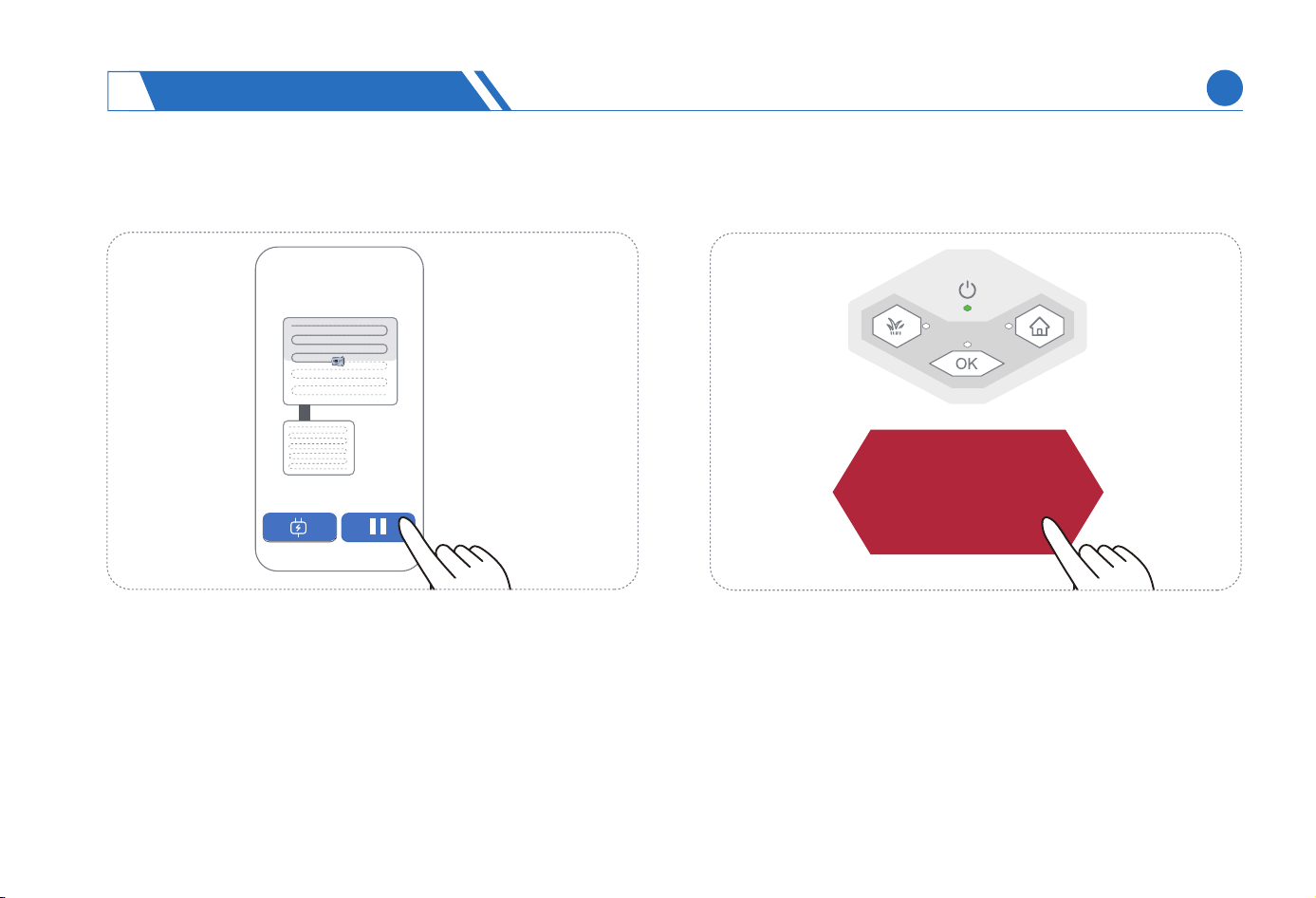
Press the red button STOP on the button panel of lawn mower, or click the Pause button on the App.
Pause Mowing
STOP
CAUTION:
It is required to peorm the following operations if you attempt to sta mowing immediately after pressing the STOP button on the lawn mower:
1) Sho press OK button to release the emergency stop state;
2) Click on Sta button on the App, or press Mow +OK on the mower in sequence.
It is required to peorm the following operations if you attempt to return the mower to the charging station immediately after pressing the
STOP button on the lawn mower:
1) Sho press OK button to release the emergency stop state;
2) Click Home button on the App, or press HOME+OK on the mower in sequence.
(1)
(2)
USING NEOMOW X
4
EN
34
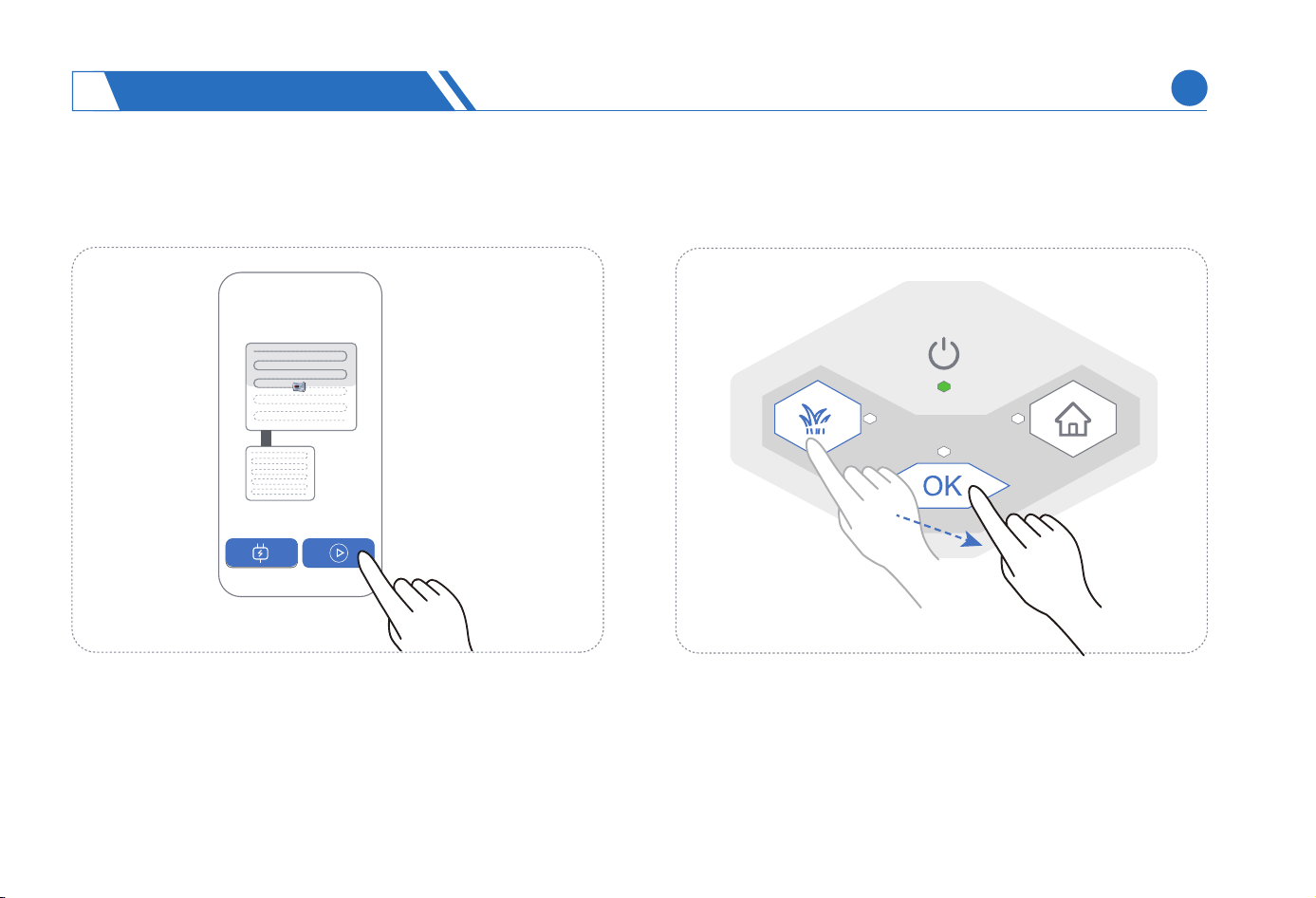
Press Mow+OK on the button panel of lawn mower, or click the Sta button on the App.
Continuing Mowing
USING NEOMOW X
4
EN
35
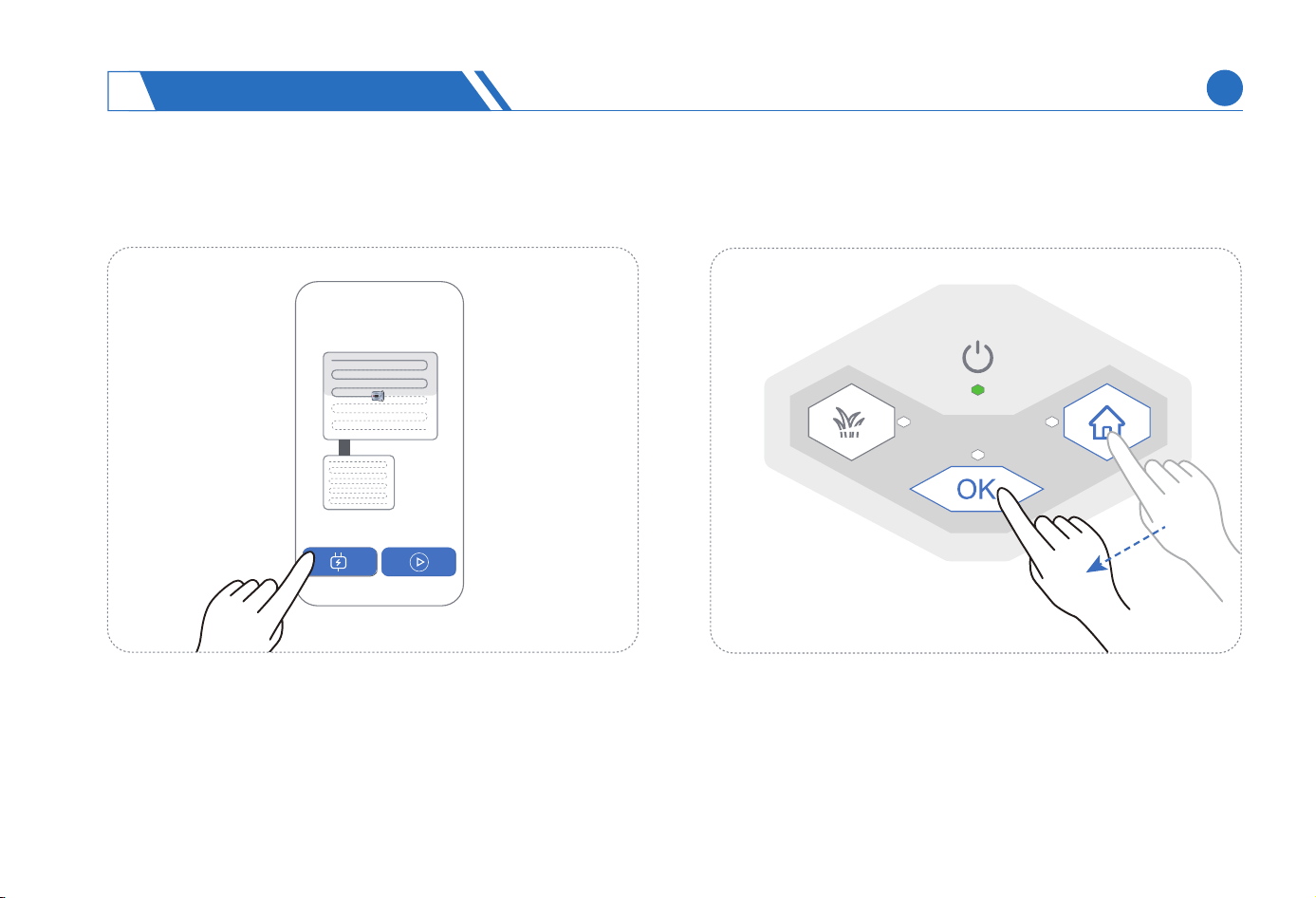
Press HOME+OK on the button panel of lawn mower in sequence, or click Home on the App.
Returning To The Charging Station
USING NEOMOW X
4
EN
36
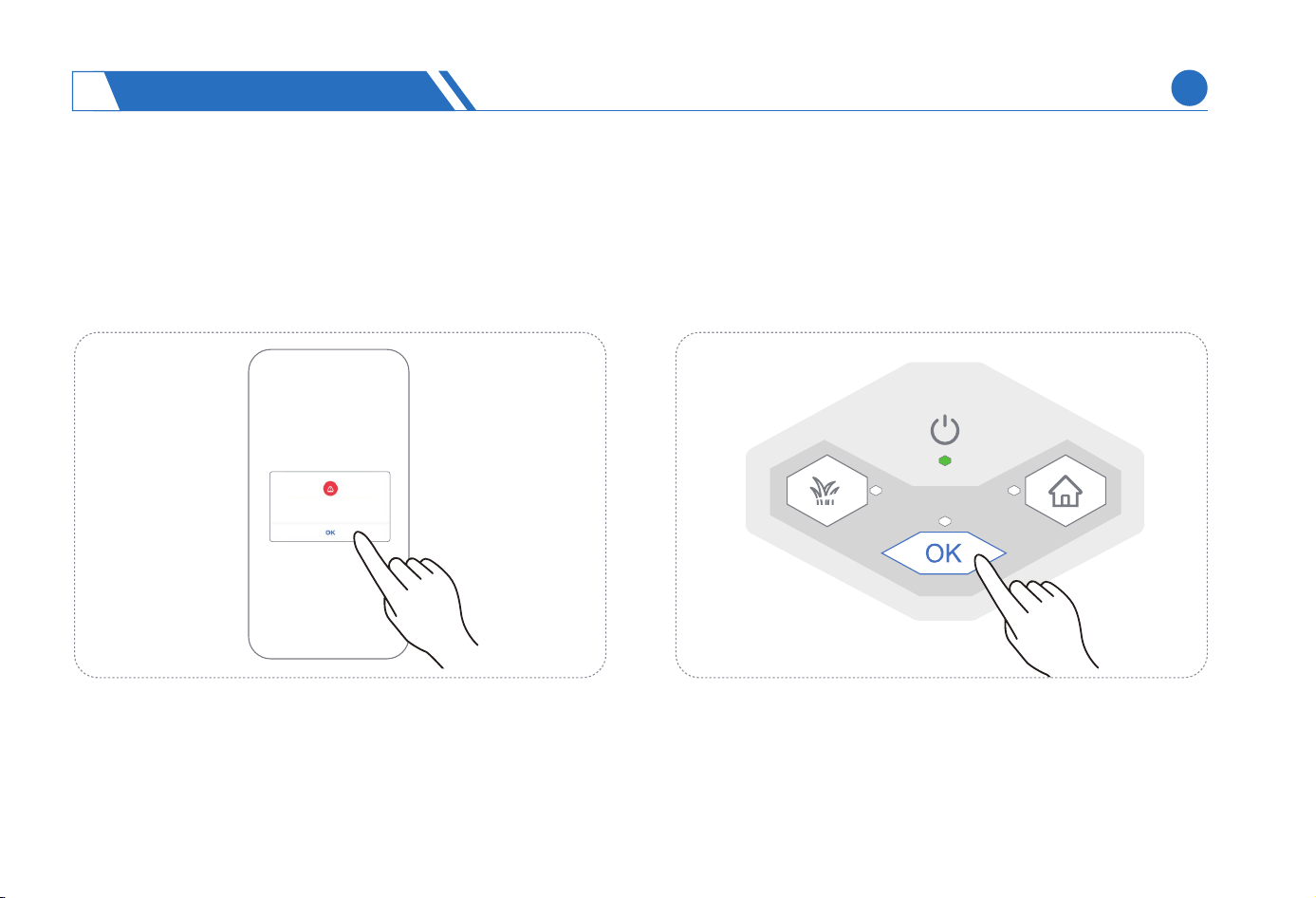
When some events that may aect the safety or mowing are detected, the lawn mower will be in an abnormal state, accompanied
by a red LOGO light, you then need to log in to the App to check the abnormalities on the mower. For the abnormalities that can be
manually restored, operate as follows: sho press OK button to release the abnormal state. The indicator light will not be red when
the abnormality is resolved.
Release The Abnormal State
CAUTION:
In addition to the recove methods indicated on the App for abnormal events that you can manually recover on your own, the button lights
on the button panel will also guide you to recover anomalies.
XXXXXXXX
USING NEOMOW X
4
EN
37
In addition to the App functions mentioned in the above chapters, including adding lawn mower, mapping, and viewing and
controlling mower operation, you can also:
View and change the work settings of lawn mower (map management, scheduled tasks, mowing parameter settings, etc.)
Activate the visual obstacle avoidance function so that the lawn mower can visually recognize and avoid obstacles during auto-
matic mowing.
Activate the patch mowing function, so that the lawn mower can record and peorm patch mowing in the areas where obstacle
avoidance function is activated during the automatic mowing process.
Complete conguration whether the lawn mower mows grass on rainy days.
Find the lost lawn mower.
Manage the permissions relating to the lawn mower.
View and upgrade the rmware of lawn mower.
Restore facto settings for the lawn mower.
4.5 Other Functions
(1)
(2)
(3)
(4)
(5)
(6)
(7)
(8)
USING NEOMOW X
4
EN
38
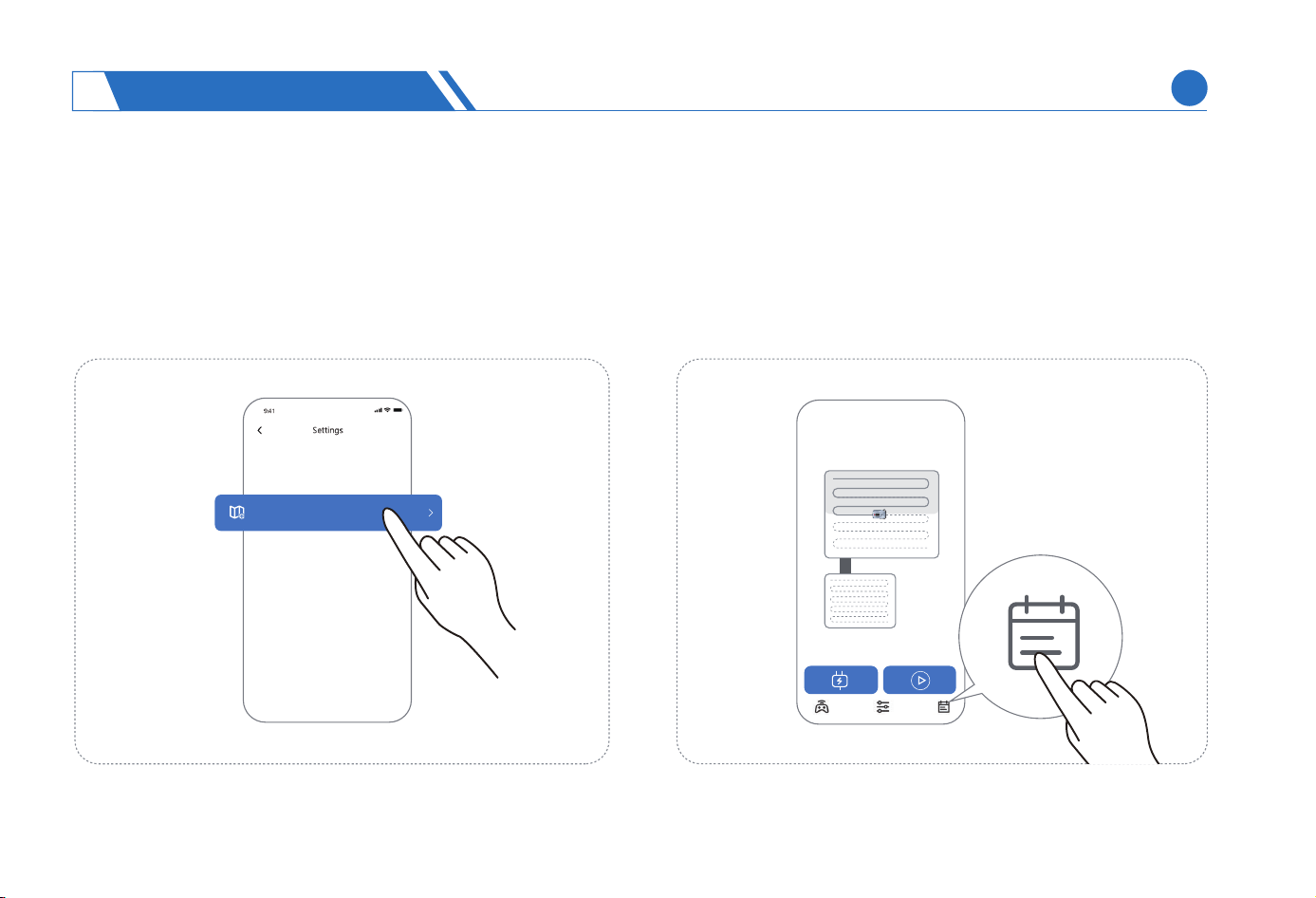
You can set a scheduled task for the lawn mower, and the
lawn mower will automatically mow according to the sched-
uled time.
Scheduled Task
In order to cope with possible future changes to your yard’s
lawn, we provide map management function. In addition to
creating a new map, you can also add, modify, and delete
areas on a created map.
Map Management
Map Mangement
USING NEOMOW X
4
EN
39
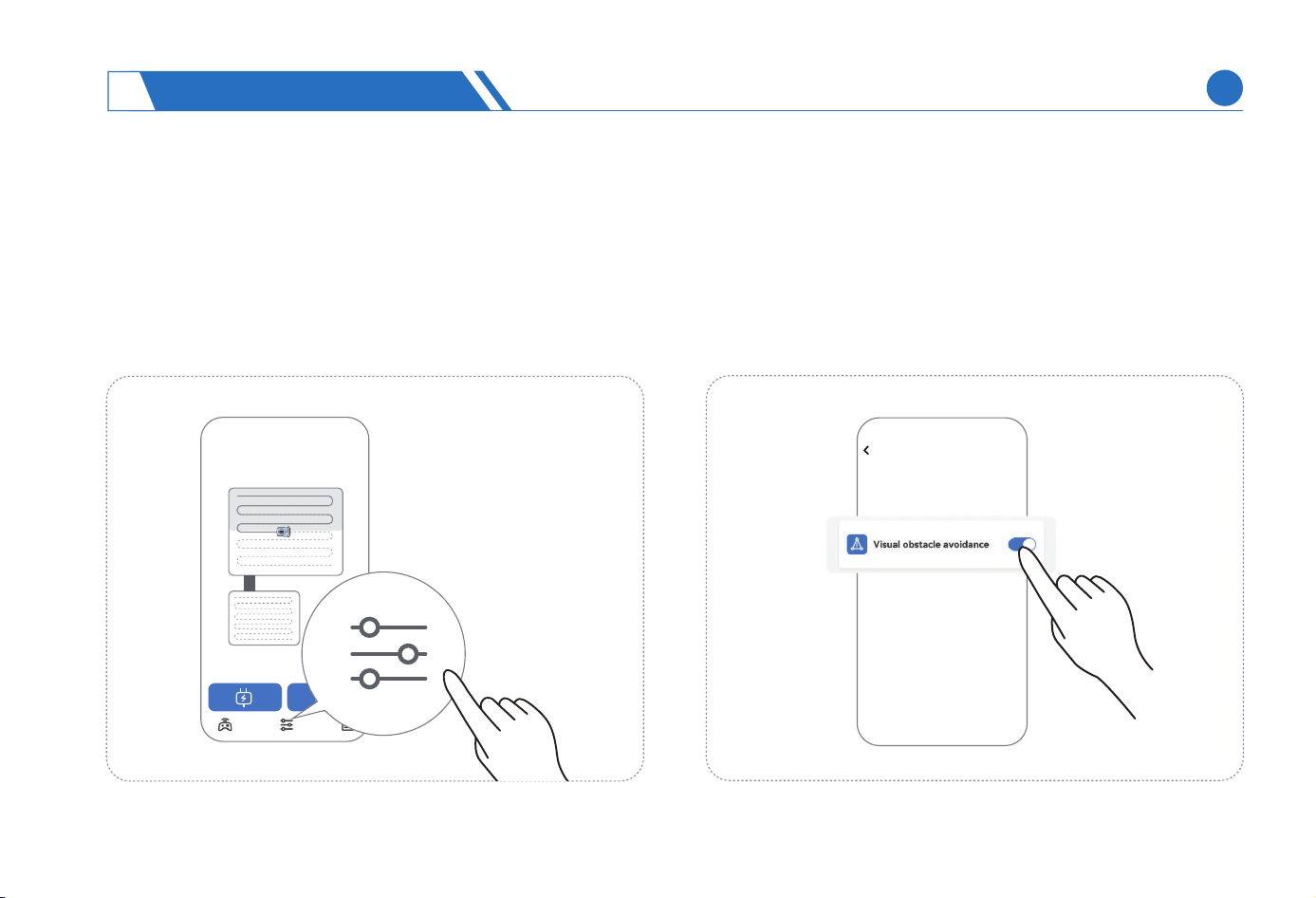
To ensure that you can exibly adjust the mowing eect of
lawn mower, you can set mowing related parameters on the
App, such as mowing height, mowing angle, preset mowing
mode, etc.
Mowing Parameter Settings
In order to provide precise obstacle avoidance so that the lawn
mower can accurately identify low obstacles in front during
automatic mowing, we have turned on the visual obstacle
avoidance switch, which can be turned on or o as needed. It
is advisable not to enable visual obstacle avoidance when
mowing at night, as this may lead to a poor visual recognition.
Visual Obstacle Avoidance
Mowing Setting
USING NEOMOW X
4
EN
40
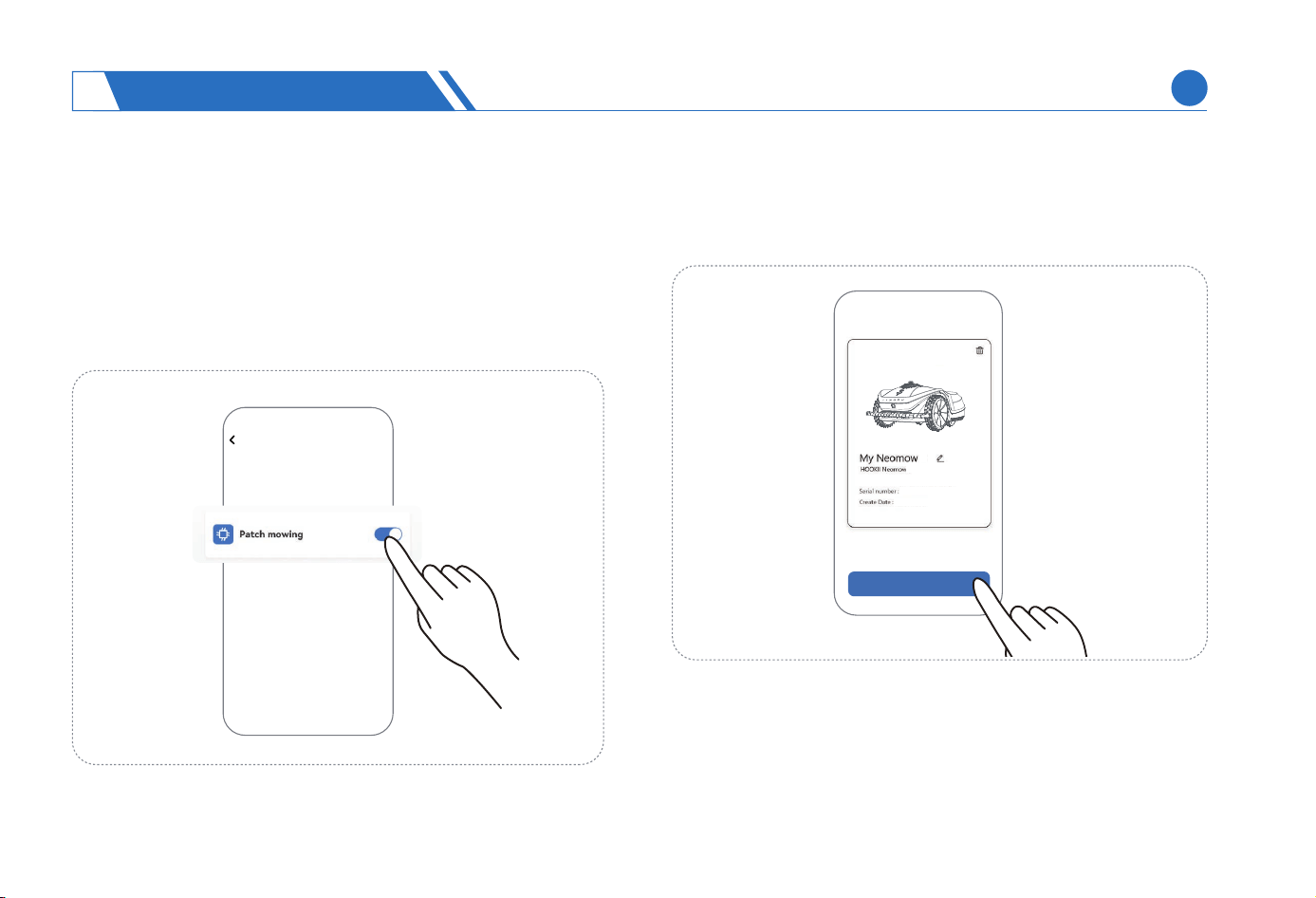
In order to reduce mowing omission and increase mowing
area during mowing process, we provide the patch mowing
function. In the case where the mower fails to mow the lawn
due to obstacle avoidance, the lawn mower will automatically
return to the omission area after mowing a ceain area as
long as the patch mowing function is enabled.
Patch Mowing
Mowing Setting
X
X
XXXXXXXXXXX
XXXX-XX-XX
Find The Device
You can nd the mower by this function when your mower is
lost.
CAUTION:
By default, the GPS function is disabled for the lawn mower. GPS
position information collection will only be enabled when you
manually turn on this function to nd a device, indicating that you
can enjoy carefree use experience since the position information of
the lawn mower normally will not be exposed.
Find My Mower
USING NEOMOW X
4
EN
41
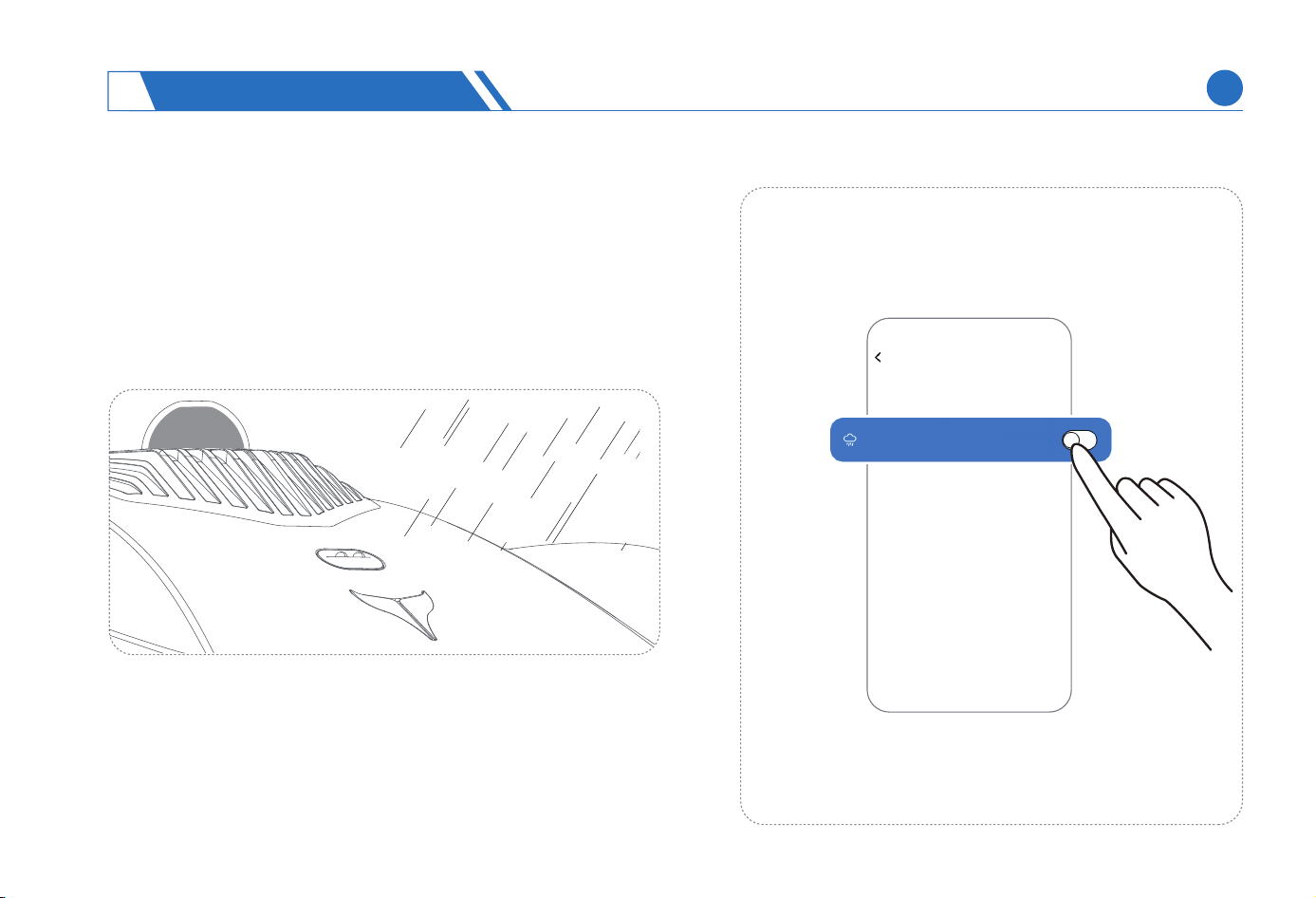
When working on a rainy day, the lawn mower will make judg-
ment through a rain sensor, determine whether to continue
mowing on the rainy day based on your settings on the App. By
default, the lawn mower will not work on rainy days and would
return to the charging station. The lawn mower, however, will
continue mowing in the next time period with scheduled tasks,
or after the user manually triggers the mowing operation.
Rainy Day Working
It is recommended to maintain the default option, that is, No Mowing
on Rainy Days, as mowing on rainy days will make it dicult to
remove the grass and soil sticking to the blade disc or tires, causing
the lawn mower to skid. Do not operate the lawn mower in harsh
weather such as thunderstorms.
CAUTION:
Mowing on rainy days
Mowing Setting
USING NEOMOW X
4
EN
42
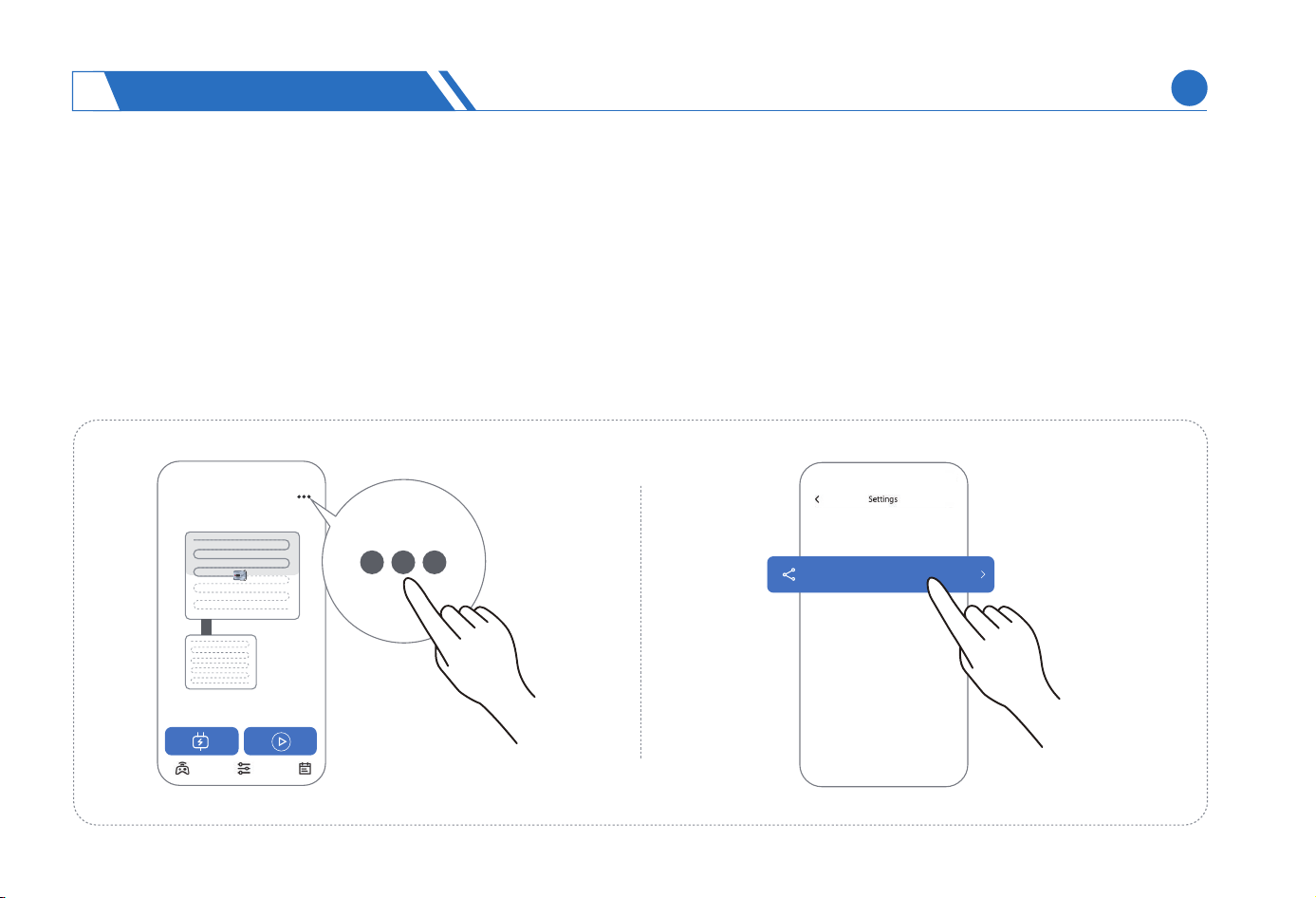
Device Sharing
To protect your lawn mower from unauthorized use and ensure the safety of your propey, we design permission function for the
lawn mower.
The account of initially bound device is the administrator of the lawn mower, who can share the device's usage permission with
other accounts, for example, your family members.
Other users without shared device usage permission cannot connect to the lawn mower and to view the operations.
The administrator can manage the permissions currently shared.
Device sharing
(1)
(2)
(3)
USING NEOMOW X
4
EN
43
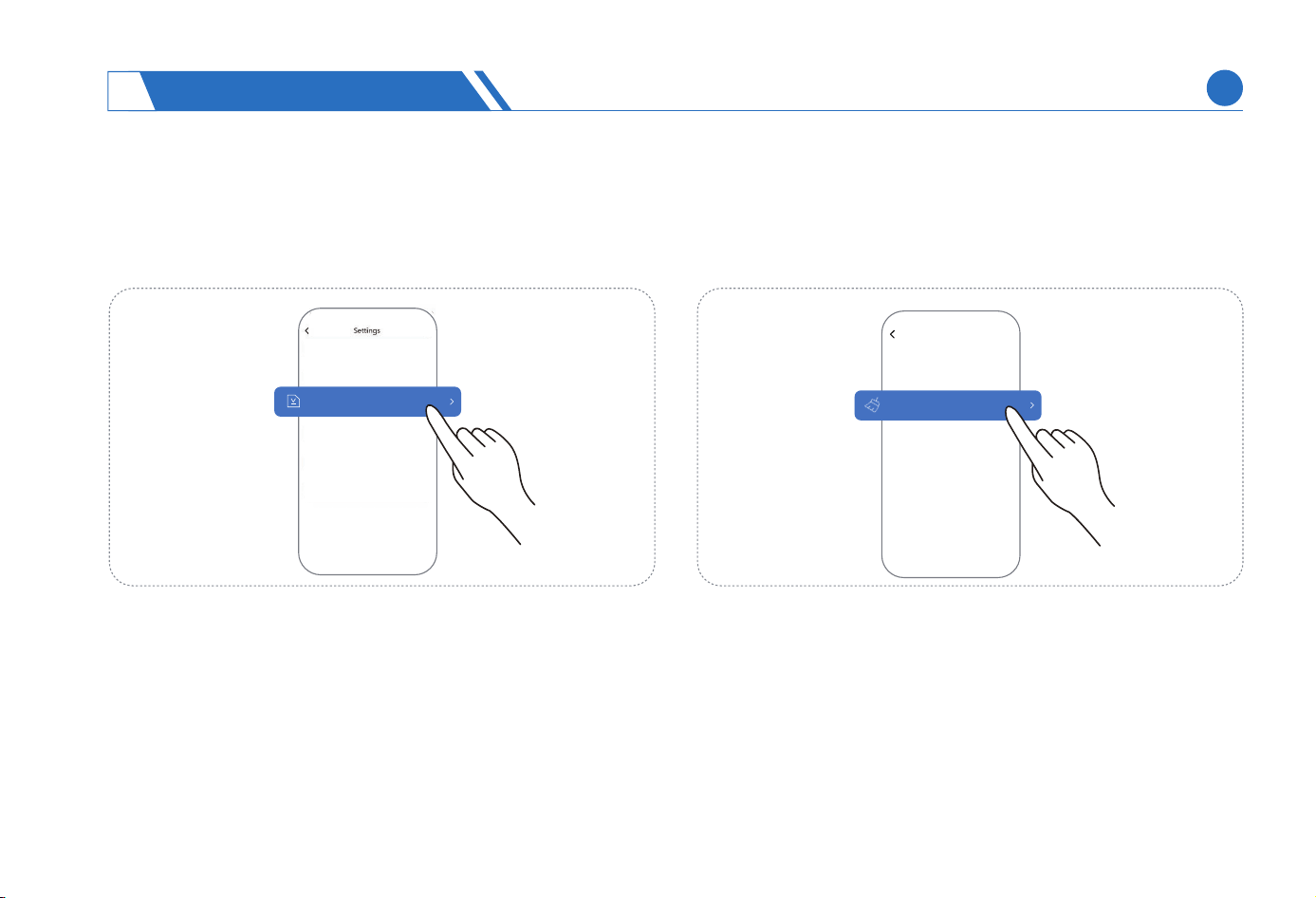
We will continue to update the features and rmware of Neomow
X. In order to enjoy a better experience of the features, we suggest
that you check for rmware updates regularly on the App, and we
will also inform you of any new rmware updates on the App.
Restore To Facto Settings
In order to help you restore the device's settings and data to
the default state, we provide the function of restoring to facto-
settings.
Restoring to facto settings will clear data such as maps,
mowing parameters, and scheduled tasks, other than permission
related data. The administrator and other shared users can still
bind the device.
Restoring to facto settings must be implemented at the
charging station. Prior to the operation, move your lawn mower
to the charging station.
Only the administrator has the authority to restore to facto
settings.
CAUTION:
Firmwarae Version
(1)
(2)
(3)
Firmware Version
Restore Facto
The following conditions must be met prior to rmware update:
The lawn mower is in a place with good WiFi networking condi-
tion and maintains a stable network connection.
The lawn mower has sucient batte life.
Do not shut down during upgrade.
The LOGO light on the lawn mower will ash white during
update, and you can check the update progress on the App.
(1)
(2)
CAUTION:
1)
2)
Settings
USING NEOMOW X
4
EN
44
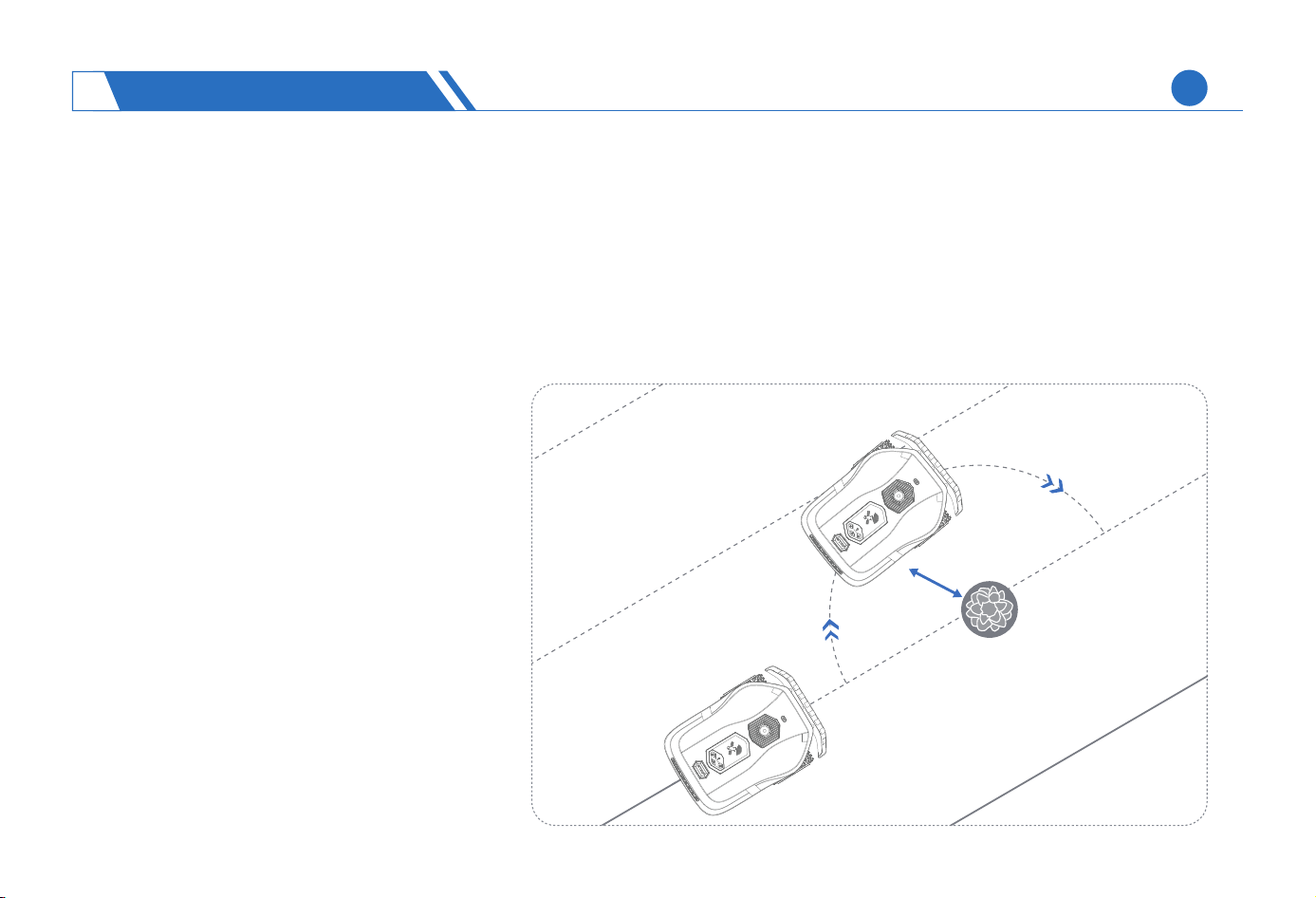
10cm
The Neomow X obstacle avoidance system, composed of three pas: obstacle avoidance by LiDAR, obstacle avoidance by visual
recognition, and collision avoidance by bumper, covers a detection range in multiple directions and large angle, and can develop
reasonable and ecient obstacle avoidance strategies to protect your propey and personal safety.
When detecting an obstacle in front during operation in the mowing area, the lawn mower will avoid the obstacle along a path at
least 10cm away, and then return to the original mowing track to continue working.
4.6 Obstacle Avoidance
(1)
When thelawn mowercannot pass through
thepassageorrechargepathduetoobsta-
cles, it will stay in place and wait for the
obstaclestoberemovedbeforemovementor
continue to work in the barrier-free zone,
dependingontheactualcondition.
CAUTION:
When working at night, turn o the visual obstacle
avoidance switch of the lawn mower, otherwise it
may cause visual recognition errors that aect the
normal operation.
(2)
USING NEOMOW X
4
EN
45
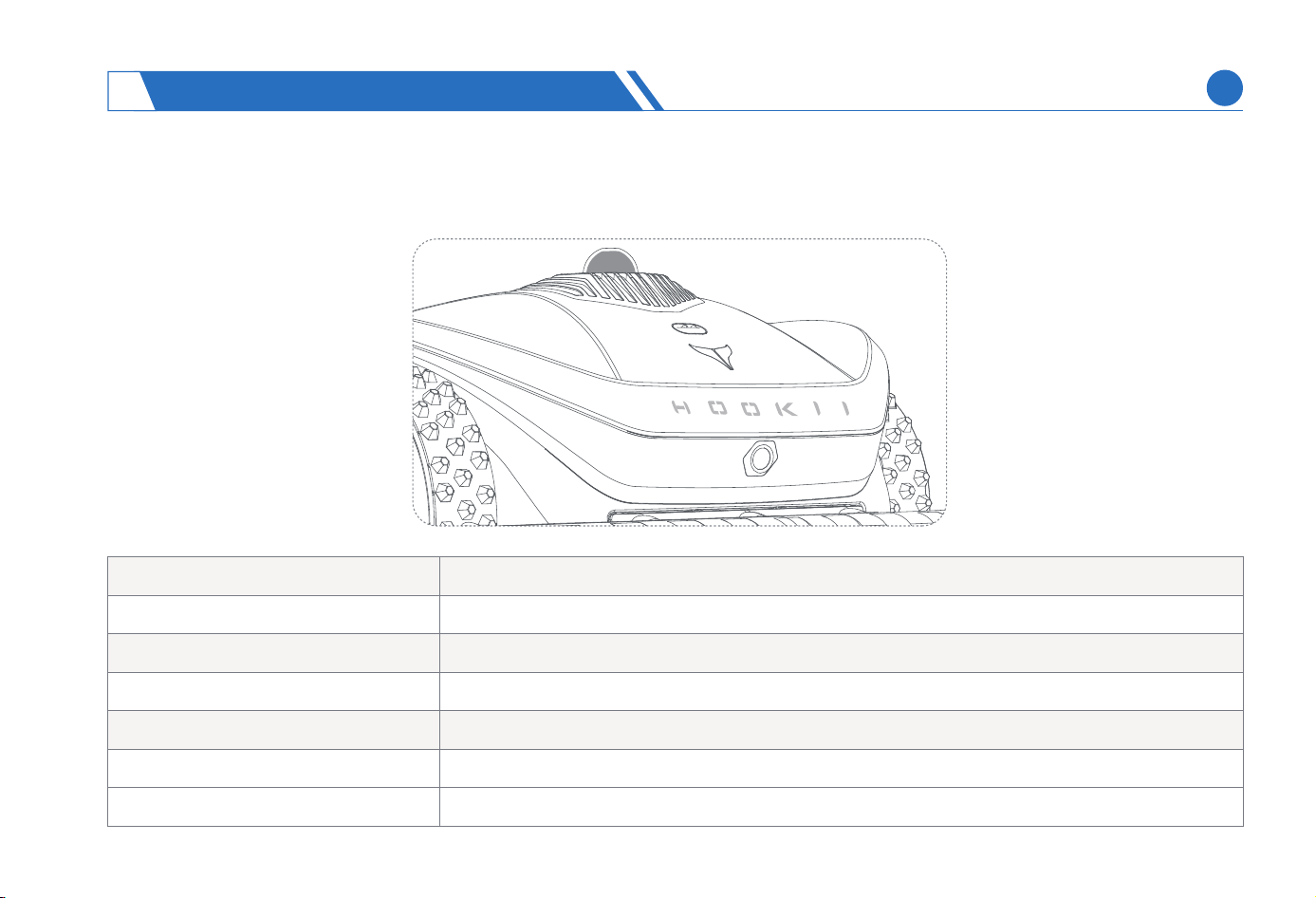
5.1 Lighting Guidance
HOOKII LOGO Light
Blue light breathing Staing up
Blue light always on Normal operating state or in sleep state
Green light breathing The mower is being charged at the charging station but not fully charged.
Green light always on The mower is fully charged on the charging station
Red light always on An abnormal event occurred with the mower
White light breathing The mower is being upgraded
White light always on The mower is being shut down
ACOUSTO-OPTIC GUIDANCE
5
EN
46
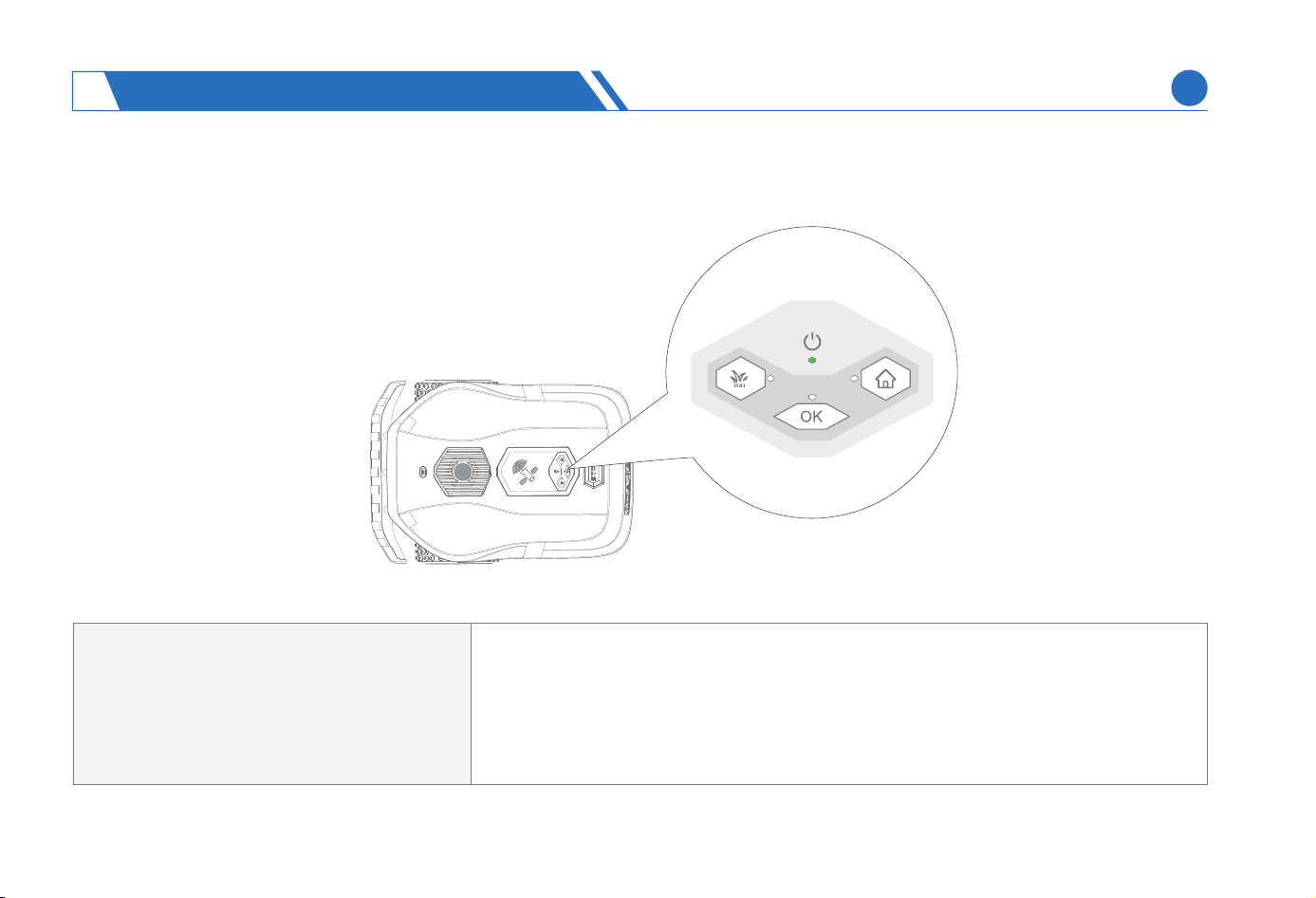
Lighting For The Button Panel
When you press Mow but not OK button
or press HOME but not OK button
or when an abnormal event that you can restore on your
own occurs on the lawn mower
OK indicator light ashes green
ACOUSTO-OPTIC GUIDANCE
5
EN
47
The lawn mower will provide sound reminder in case of any state change, and the lawn mower may have abnormalities when the
sound reminder continues. You should log in the App to view specic abnormality information and handling methods.
5.2 Sound Reminder
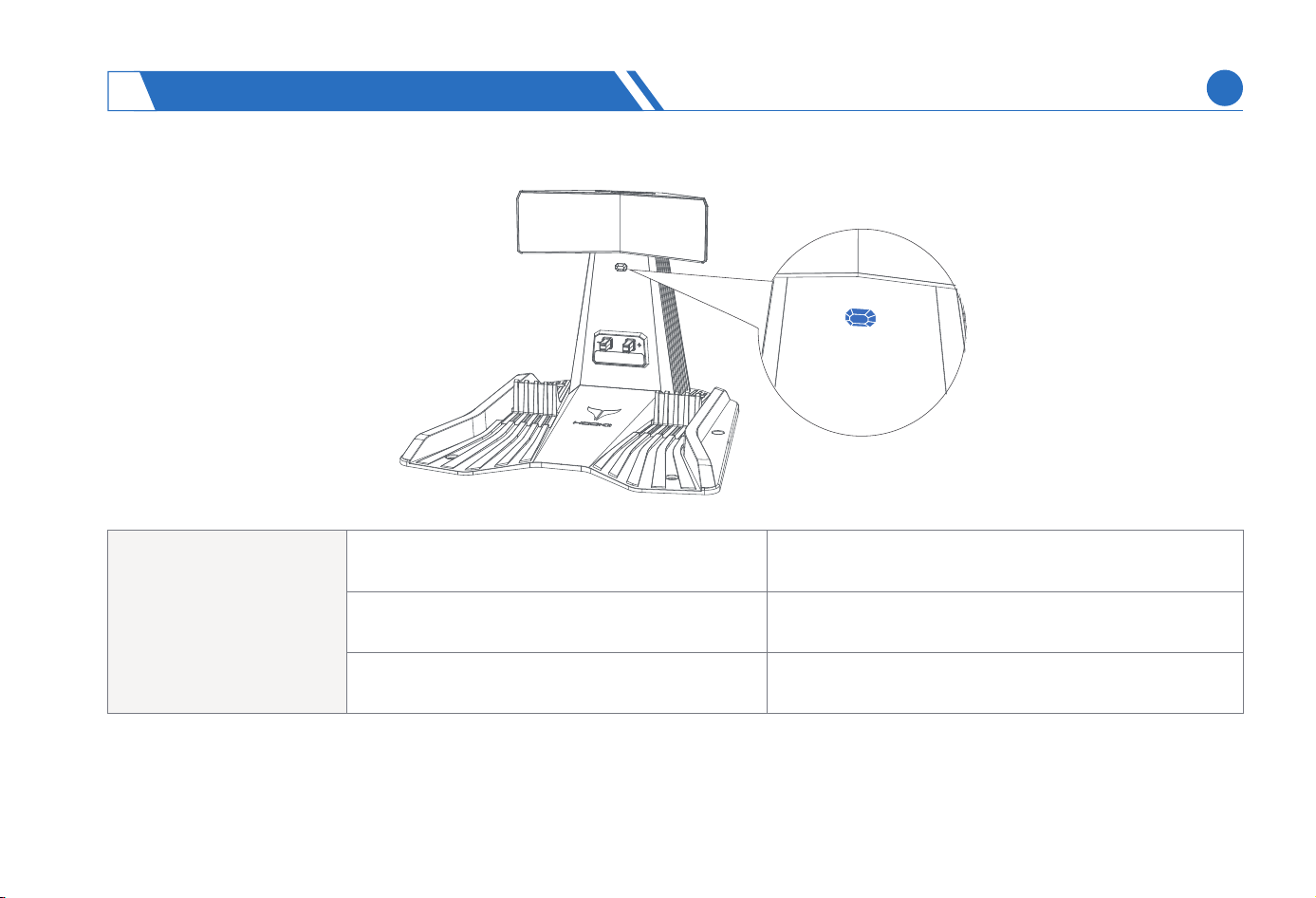
Lighting For The Charging Station
Indicator light for
the charging station
The charging station is electried but the lawn
mower is not being charged at the station
The charging station is electried and the lawn
mower is being charged at the station
OFF
Blue light always on
The charging station is neutral
Green light always on
ACOUSTO-OPTIC GUIDANCE
5
EN
48
The lawn mower must be shut down and powered o before any maintenance operations.
Regular lawn mower cleaning and replacement of worn pas are necessa in order to ensure lawn mower peormance and
extend lawn mower life. All cleaning and replacement operations must follow the maintenance recommendations provided by
HOOKII.
The smoothness of blade disc, and the damage degree and seice life of blades va greatly in dierent conditions, for example,
depending on the type of grass and season, the hardness of soil, and unexpected collision with other objects on the lawn. It is
advisable to check and clean the blade disc once a week since blunt blades have too poor mowing eciency to trim the grass
completely.
It is advisable to inspect and clean once a week the components such as blades, blade disc, wheels, LiDAR, camera, and rain
sensor. (Cleaning frequency should be increased in the case of rainy days or muddy ground).
To avoid work inteerence caused the LiDAR, in the case of humid weather, it is advisable to check the LiDAR for fog and stains
before daily mowing in the morning.
6.1 Frequency Of Maintenance
(1)
(2)
(3)
(4)
(5)
MAINTENANCE
6
EN
49
The lawn mower must be powered o before all maintenance operations in which the mower body needs to be raised and ipped over.
To prevent damage to electronic components, do not directly wash the lawn mower or charging station with a high-pressure water gun.
Housing of mower: Clean the exterior of lawn mower thoroughly with a soft brush or cloth. Alcohol, gasoline, acetone, or other
corrosive/volatile solvents cannot be used for cleaning, as these substances may damage the appearance and internal structure
of the lawn mower.
Charging station: Regular inspection on the charging station and removal of debris and soil are necessa for proper docking.
All extension cables of the charging station and connecting components of power supply must not be blocked. The charging
station must be powered o prior to the removal of di or other objects on the charging station.
Chassis and blade disc: The diy chassis and blade disc can be cleaned as follows:
1) Press and hold the ON/OFF button until the LOGO light goes out and the lawn mower is shut down.
2) You can see the chassis after ipping the lawn mower to one side. Place the mower on a soft cushion before ipping.
3) Wash the blade disc and chassis with a water pipe or brush them with a soft brush.
4) Check the blade disc for free rotation, while check the blades for free movement on the blade shaft and for obvious damages.
Wheels: Grass clippings and soil on the wheels will aect the climbing peormance of lawn mower. The soil, grass, or other ob-
jects trapped in the middle should be removed to ensure rm traction.
The LiDAR, camera, and rain sensor should be cleaned as follows:
1) Press and hold the ON/OFF button until the LOGO light goes out and the lawn mower is shut down.
Gently wipe the exposed pa of sensor or the lens suace of camera with a damp cloth or tissue until the sensor suace is
free of dust or other di.
3) After cleaning, wipe d the sensor and camera to remove water stains.
(3)
(4)
(5)
(6)
(7)
6.2 Lawn Mower Cleaning
(1)
(2)
2)
MAINTENANCE
6
EN
50
CAUTION:
Wear thick gloves when inspecting or repairing blades.
Replace only with the blades and screws recommended by HOOKII to prevent safety accidents caused by incompatibility. Personnel
involved in safety accidents due to the use of incompatible blades must bear the consequences themselves.
Do not reuse screws as aging screws may cause serious safety accidents.
It is advisable not to replace blades by using electric tools, such as electric screwdrivers, which may cause hand inju due to blade rotation.
(1)
(2)
(3)
(4)
To ensure safety and better mowing eciency, it is advisable to replace the blades and screws
once eve 3-6 weeks. All ve blades and their screws should be replaced simultaneously.
6.3 Replacement Of Consumables
Replacing The Blade
MAINTENANCE
6
EN
51
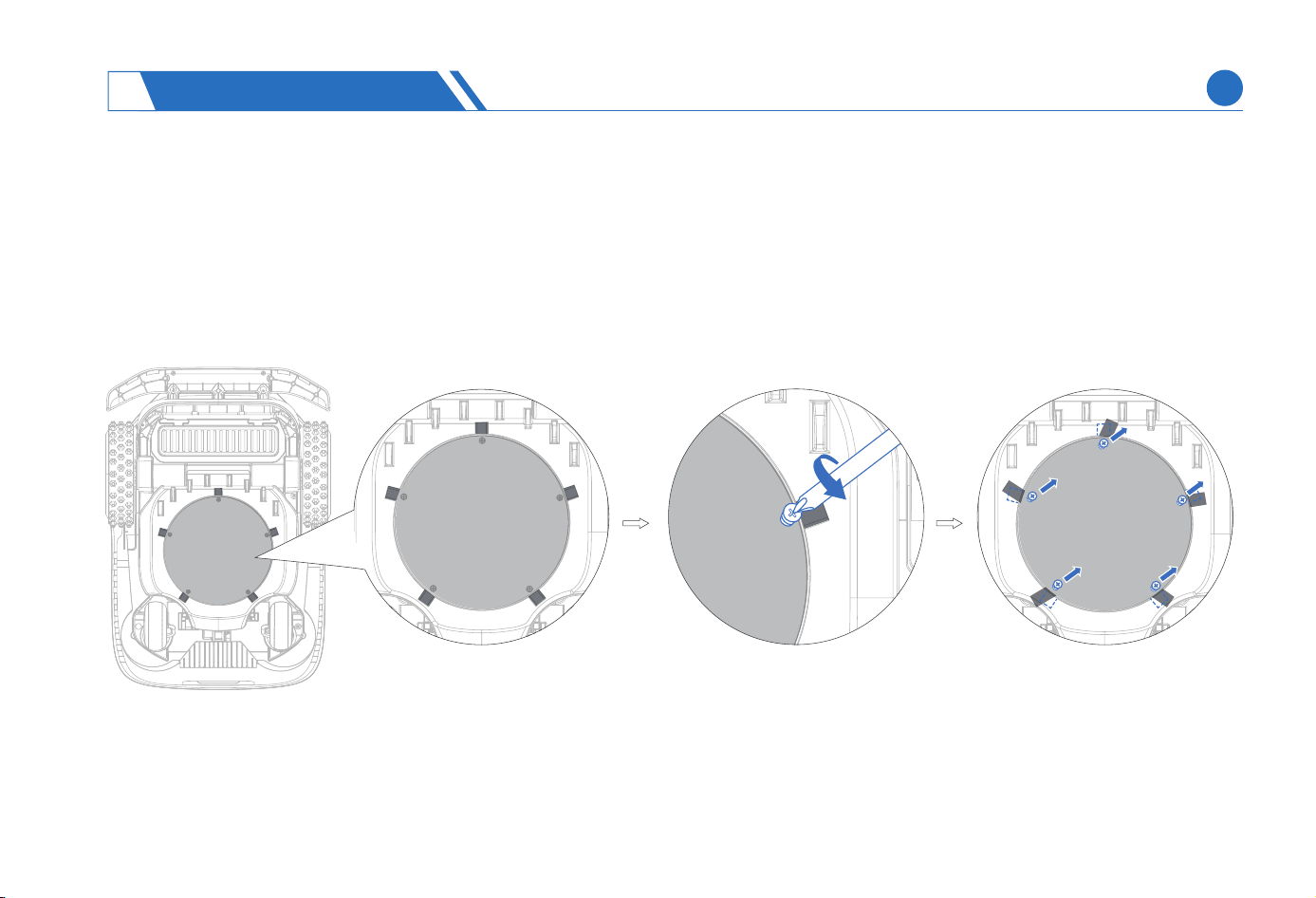
Press and hold the power on/o button until the LOGO light goes out and the lawn mower is shut down.
Flip over the mower and place it on a soft and clean suace to prevent suace scratch.
Loosen the ve screws using a Phillips screwdriver.
Remove screws and blades.
Method Of Replacing Blades
(3)
(4)
(1)
(2)
MAINTENANCE
6
EN
52
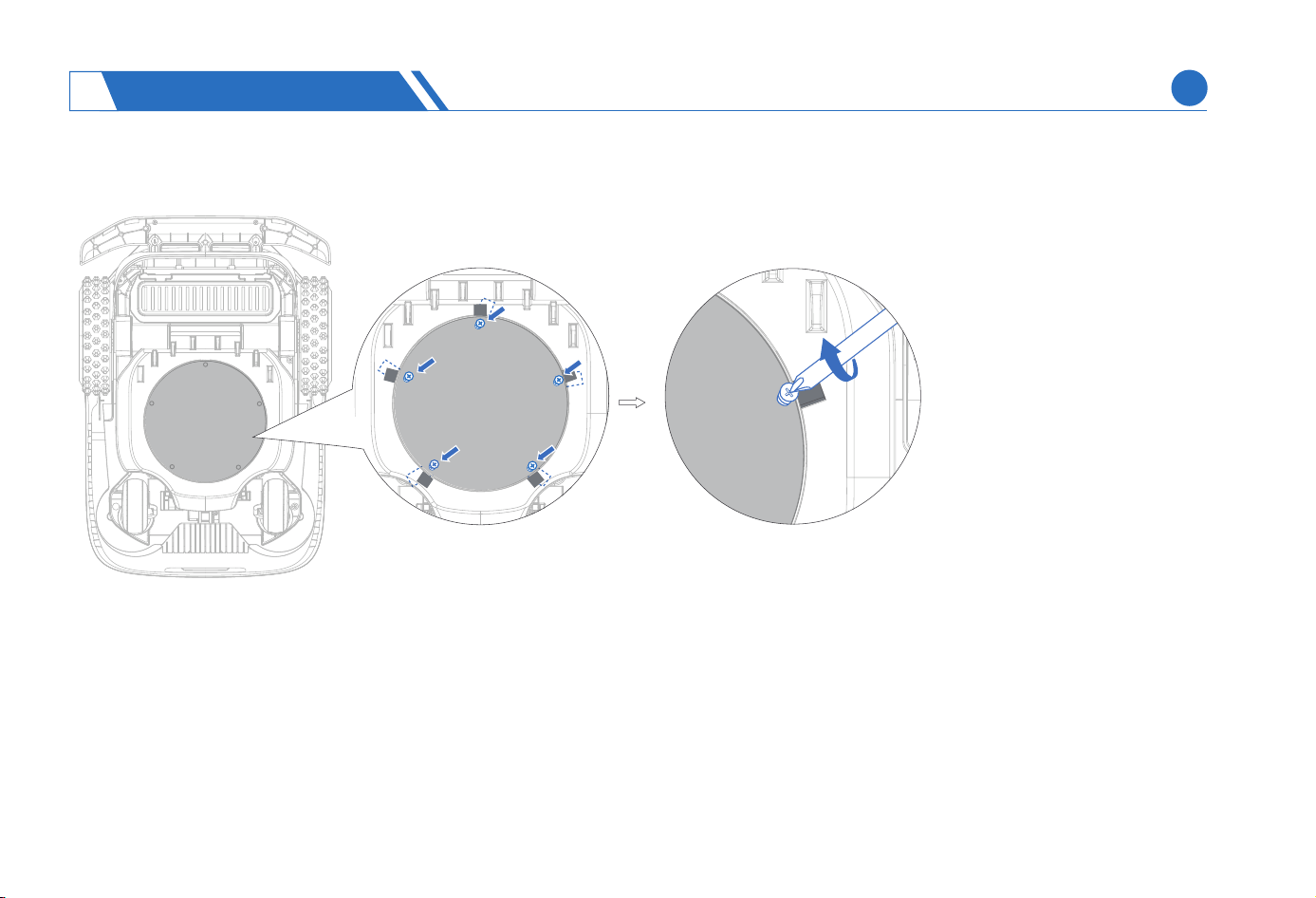
After tightening the screws, check and ensure that the blade can move back and foh exibly.
(5)
MAINTENANCE
6
EN
53
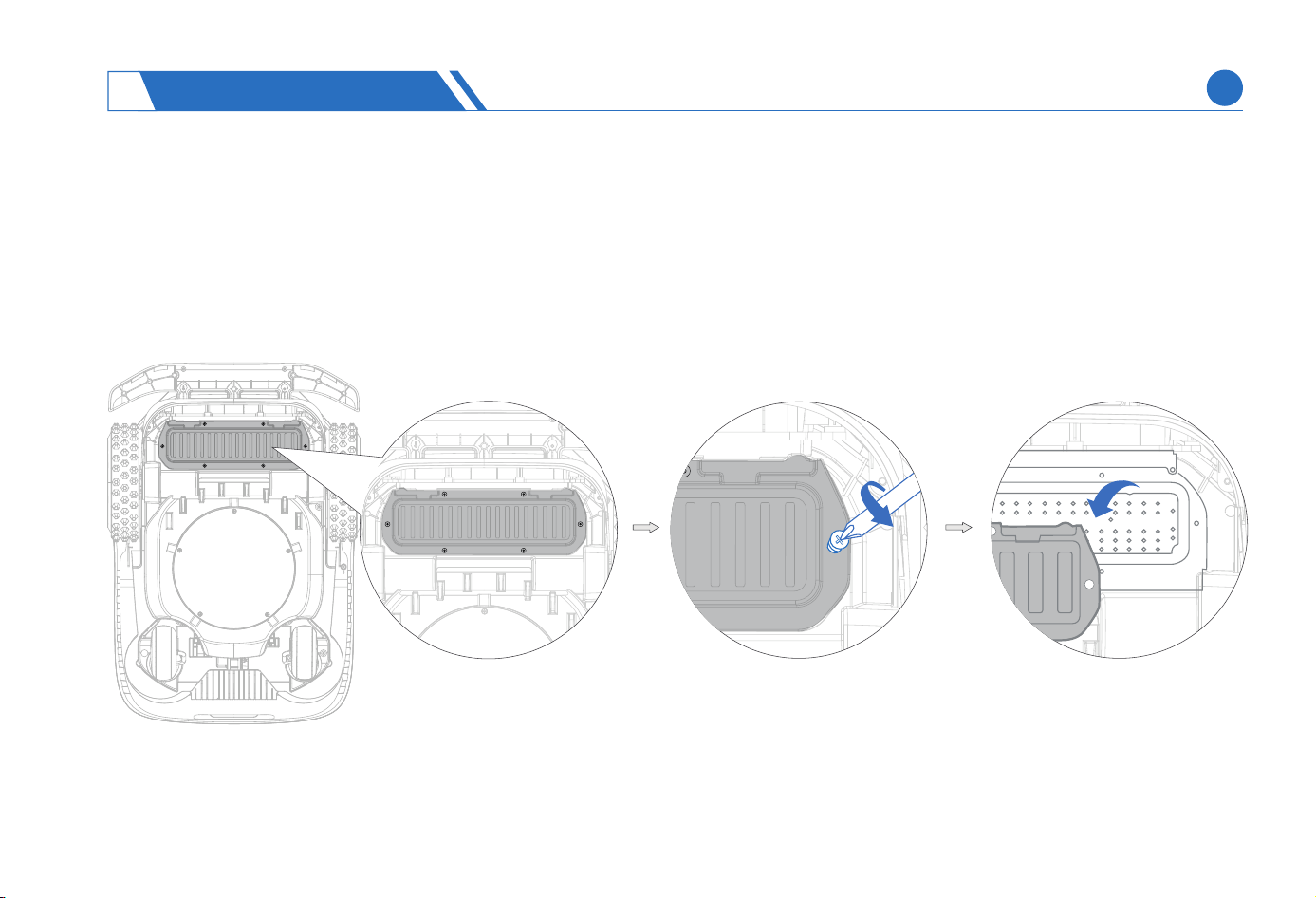
Press and hold the ON/OFF button until the logo light goes out and the lawn mower is shut down.
Inve the mower and place it on a soft and clean suace to prevent suace scratch.
Loosen the 6 screws on the batte compament using a Phillips screwdriver.
(1)
(2)
(3)
Replacing The Batte
MAINTENANCE
6
EN
54
Replace only with the batteries recommended by HOOKII to prevent safety accidents caused by mismatch. Personnel involved in safety
accidents due to the use of incompatible batteries must bear the consequences themselves.
It is advisable not open the batte compament frequently, which should be opened only when you need to replace the batte.
The batte life depends on the frequency of use and total working time of the lawn mower. The batte should be replaced if it has the
running time signicantly shoer than usual or the lawn is not properly trimmed when the batte is fully charged.
Warning: The original batte pack or the batte pack of same model specied by HOOKII must be used. Each lawn mower contains a batte
pack.
Do not dismantle or pierce the batte casing. Keep the batte away from metal objects to prevent sho circuits, and keep it away from re,
heat, and direct sunlight.
The batte pack contains electrolytes. If the leaked electrolyte comes into contact with your skin, wash with soap and water immediately;
in the case of eye contact that causes discomfo, seek medical assistance.
CAUTION:
(1)
(2)
(3)
(4)
(5)
(6)
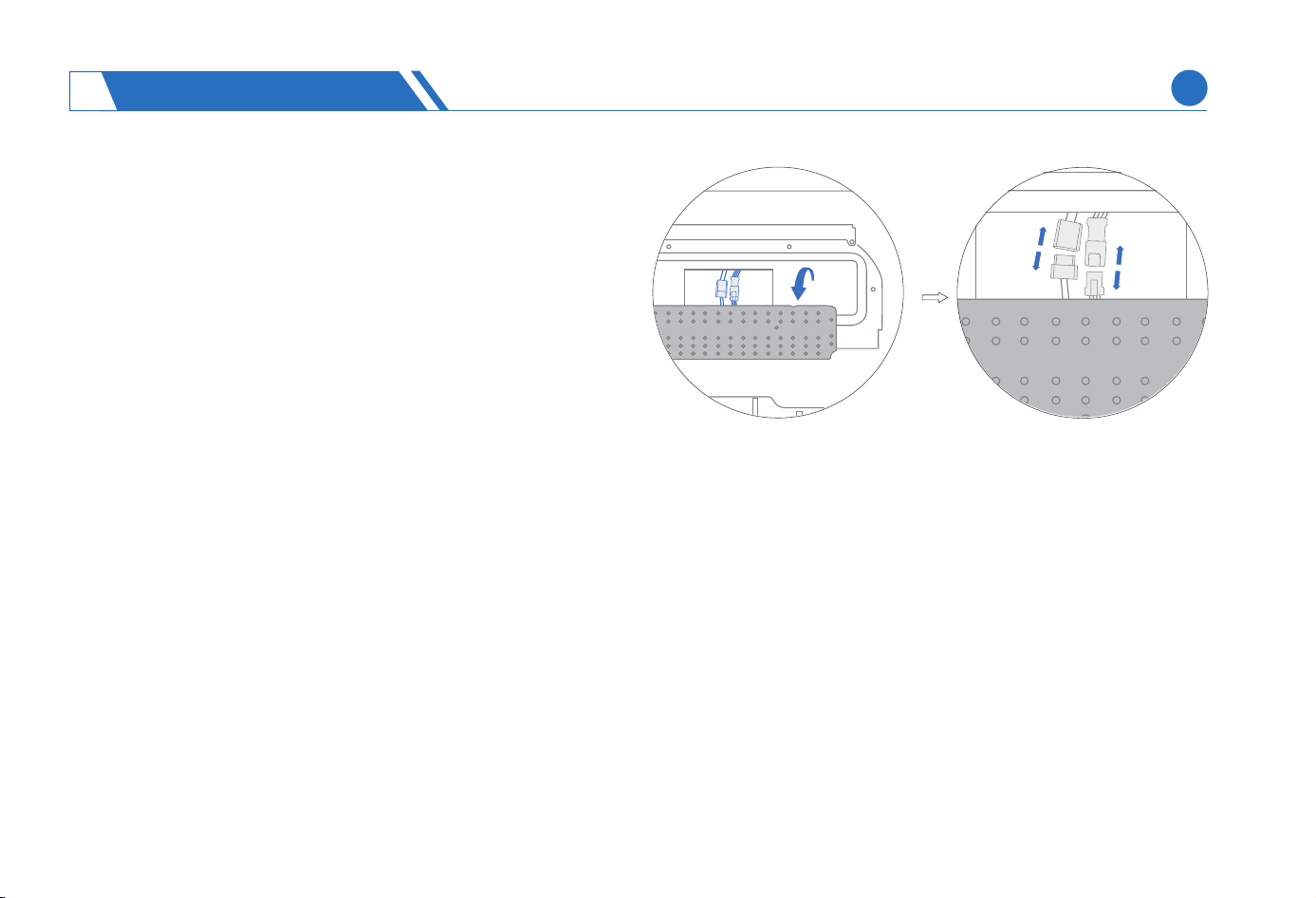
Take out the batte pack and replace with a new one.
Connect the plug and tighten all screws.
Disconnect the connection po.
(4)
(5)
(6)
MAINTENANCE
6
EN
55
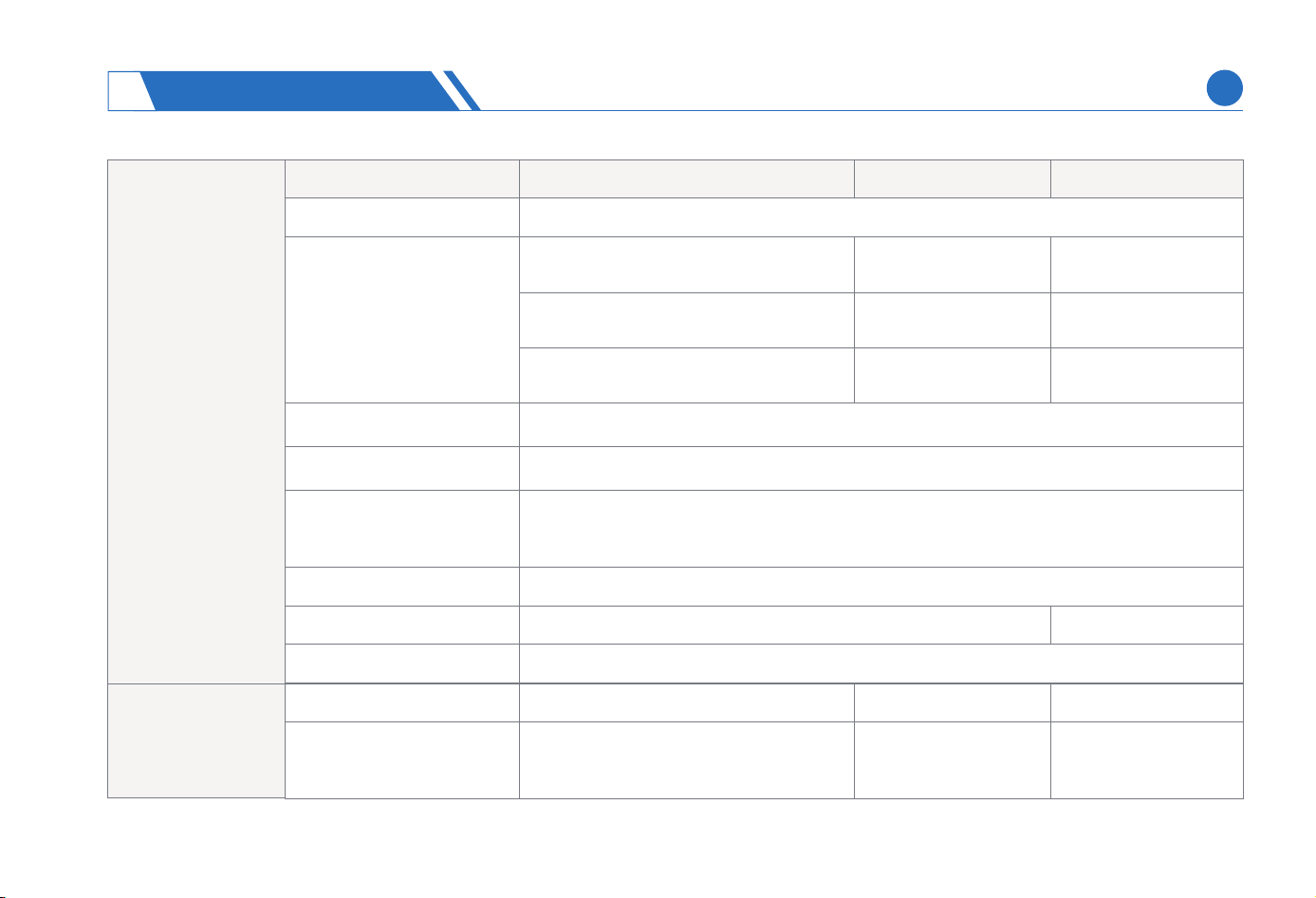
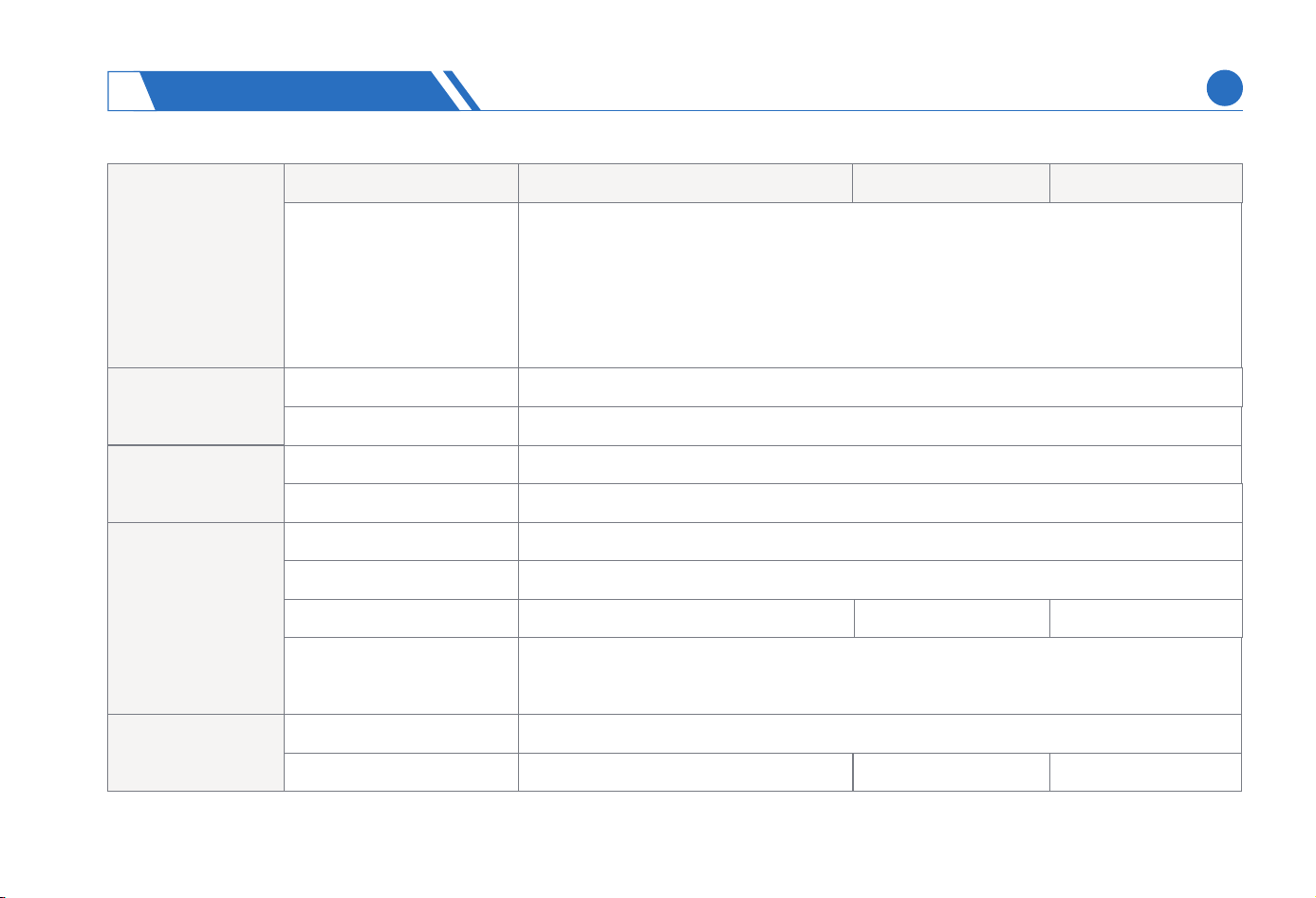
Basic Information
Name
Brand
Mower Dimensions
Mower Weight
Charging Station
Dimensions
Charging Station Weight
Package Weight
Materials Materials: Plastic and aluminum alloy
520.3*513.5*388.2mm
2.65kg
28.6kg 29kg
726.6*507.6*336mm
18.7kg
HOOKII
Neomow X Lite
Mowing Parameters
Working Capacity
Typical Mowing Time
Per Full Charge
120min
2000㎡ 4000㎡
120min 180min
6000㎡
Model
X-3EB10
X-1EB10 X-2EB10
X-3NB10
X-1NB10 X-2NB10
X-3AB10
X-1AB10 X-2AB10
SPECIFICATIONS
7
Neomow X Neomow X Pro
EN
56
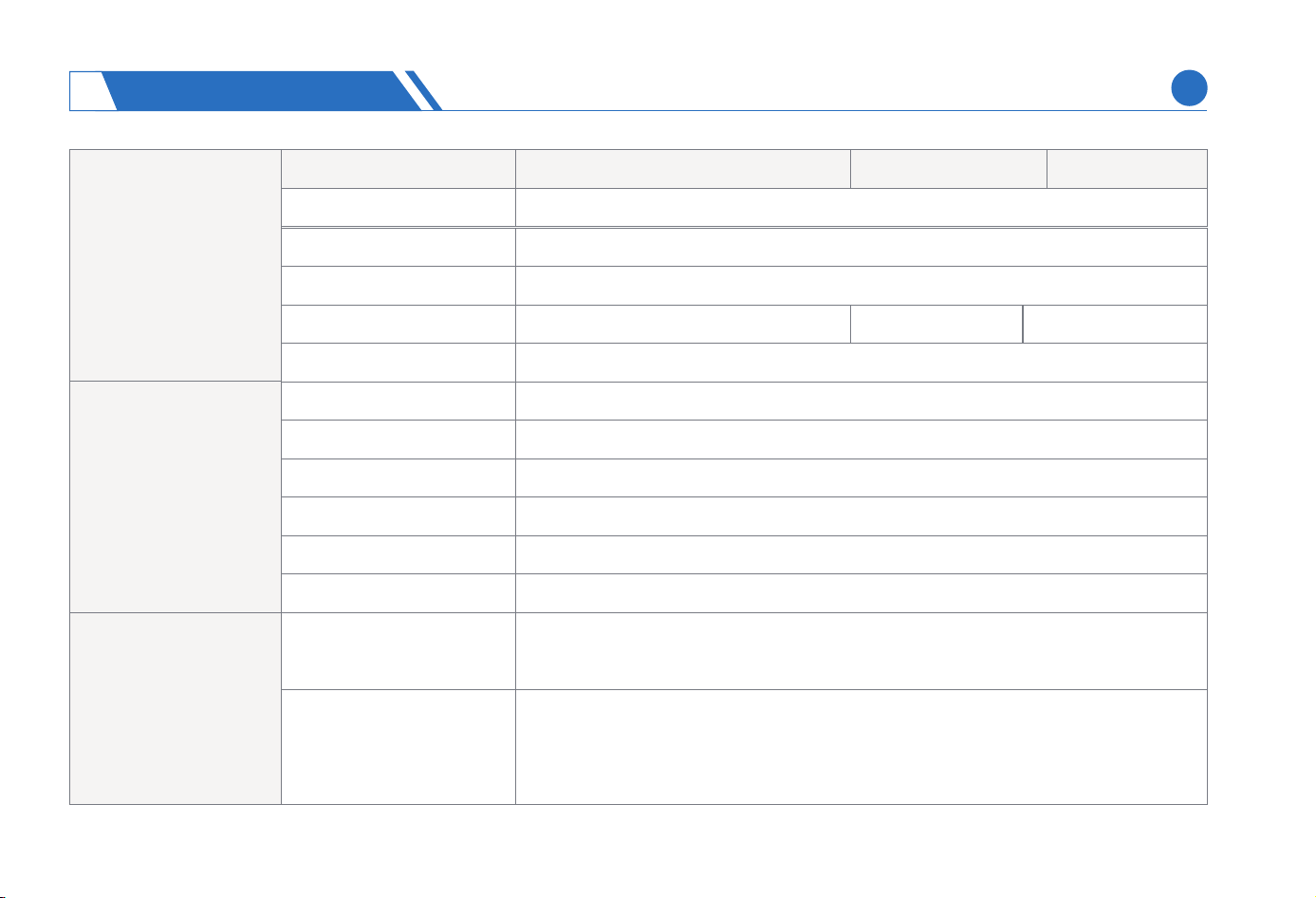
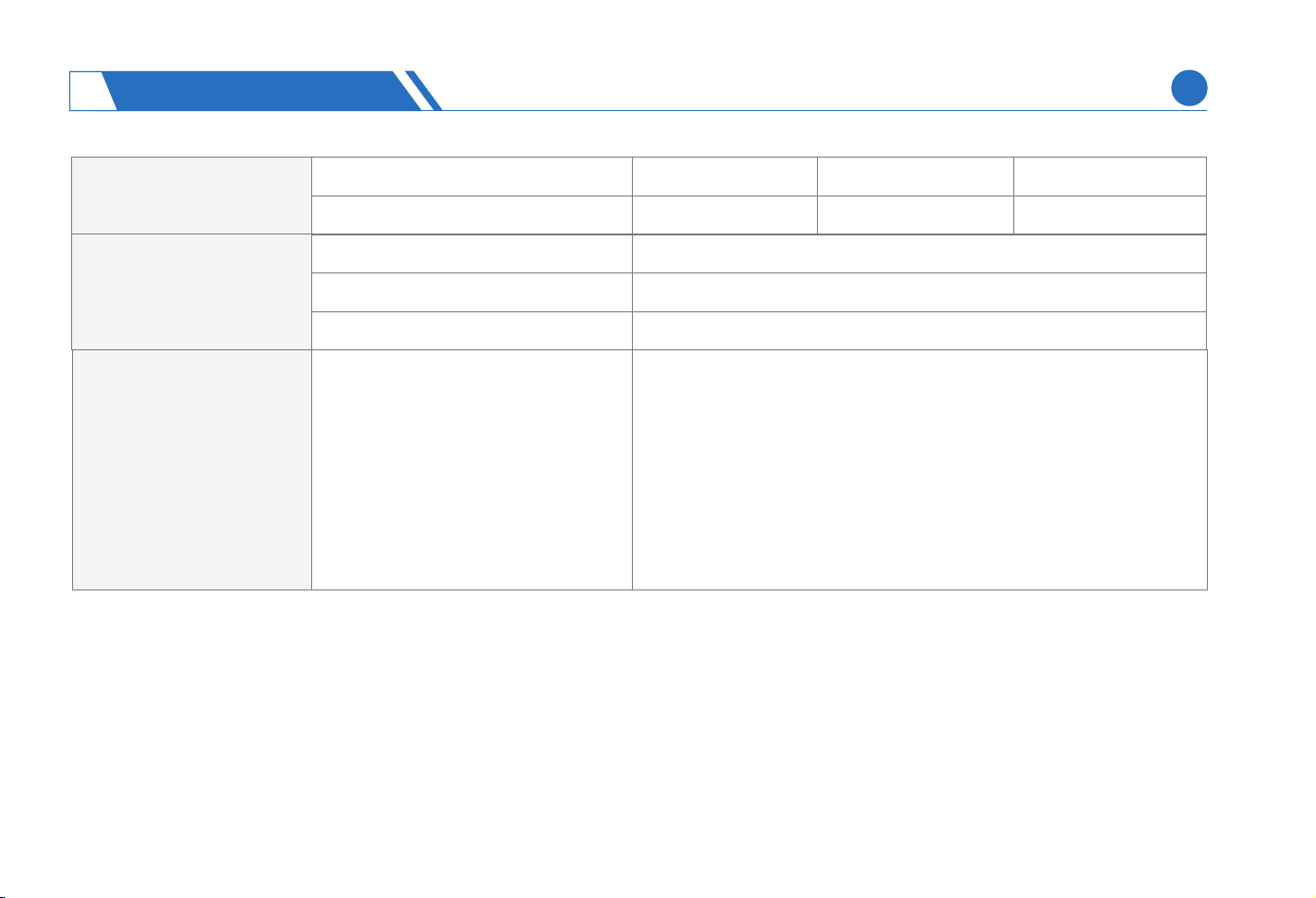
Area Capacity per Hour
Cutting Width
Cutting Height
Charging Time
Navigation Mode Lidar-SLAM+Camera
180min 180min
180min(Fast Charge)
30mm-85mm(1.2in.-3.3in.)
28cm (11in.)
300㎡/h
Working Conditions
Mowing Parameters
Working Temperature
Storage Temperature
Charging Temperature 0–45℃ , 10–35℃ recommended
Discharging Temperature
IP Rating Mower body and charging station IPX5;
Max. Incline 24°(45%)
Bluetooth®
Frequency Range
2402.0–2480 MHz
-20–60℃,-10–55℃ recommended
-20-60℃ ,0–25℃ recommended
0–45℃, 10–35℃ (50–95°F) recommended
Connectivity
WiFi Frequency Range
2.4G WiFi | 5G WiFi
IEEE Standards: IEEE 802.11a/b/g/n/ac
Operating Frequencies: 2.4~2.4835GHz and 5.15~5.85GHz
Name Neomow X Lite Neomow X Neomow X Pro
SPECIFICATIONS
7
EN
57
Cellular Network
America:
LTE FDD: B2/4/5/12/13/17/66
Europe:
LTE FDD: B1/3/5/7/8/20/28
LTE TDD: B38/40/41
Driving Motor
Connectivity
Blade Motor
Batte Pack
Name
Rated Speed
Motor Type
Rated Speed 2200/min
Motor Type
Batte Type Lithium-ion batte
Nominal Voltage
Nominal Capacity/Energy
Batte Management
System
Over-heating, sho circuit, over-current,
over voltage, and over-charge protection
18VDC
13Ah/234Wh
Input Voltage 100–240 VAC, 50~60Hz
Output Voltage/Current 21.5VDC/5A 21.5VDC/5A 21.5VDC/8A
13Ah/234Wh 17.5Ah/315Wh
Brushless motor
Brushless motor
4000/min
Neomow X Lite
Neomow X Neomow X Pro
Power Supply
SPECIFICATIONS
7
EN
58
HOOKII resees the right to make changes without prior notice. If you’d like to know the latest lawn mower information, visit our ocial
website at www.hookii.com.
Others Sensors
Lidar,
Camera,
IMU Sensor,
Blade Halt Sensor,
Bump Halt Sensor,
Wheel Halt Sensor,
Rain Sensor
NOTE:
The above parameter data based on the laborato are for reference only.
(1)
(2)
Input Voltage/Current
Output Voltage/Current
21.5VDC/5A 21.5VDC/5A 21.5VDC/8A
21.5VDC/5A 21.5VDC/5A 21.5VDC/8A
Charging Station
Noise Emissions 60 dB(A), K=3dB(A)
Front Wheel Rubber tyres with brushless motor
Rear Wheel Omni-directional wheel with built-in Hall sensor
Others
SPECIFICATIONS
7
EN
59
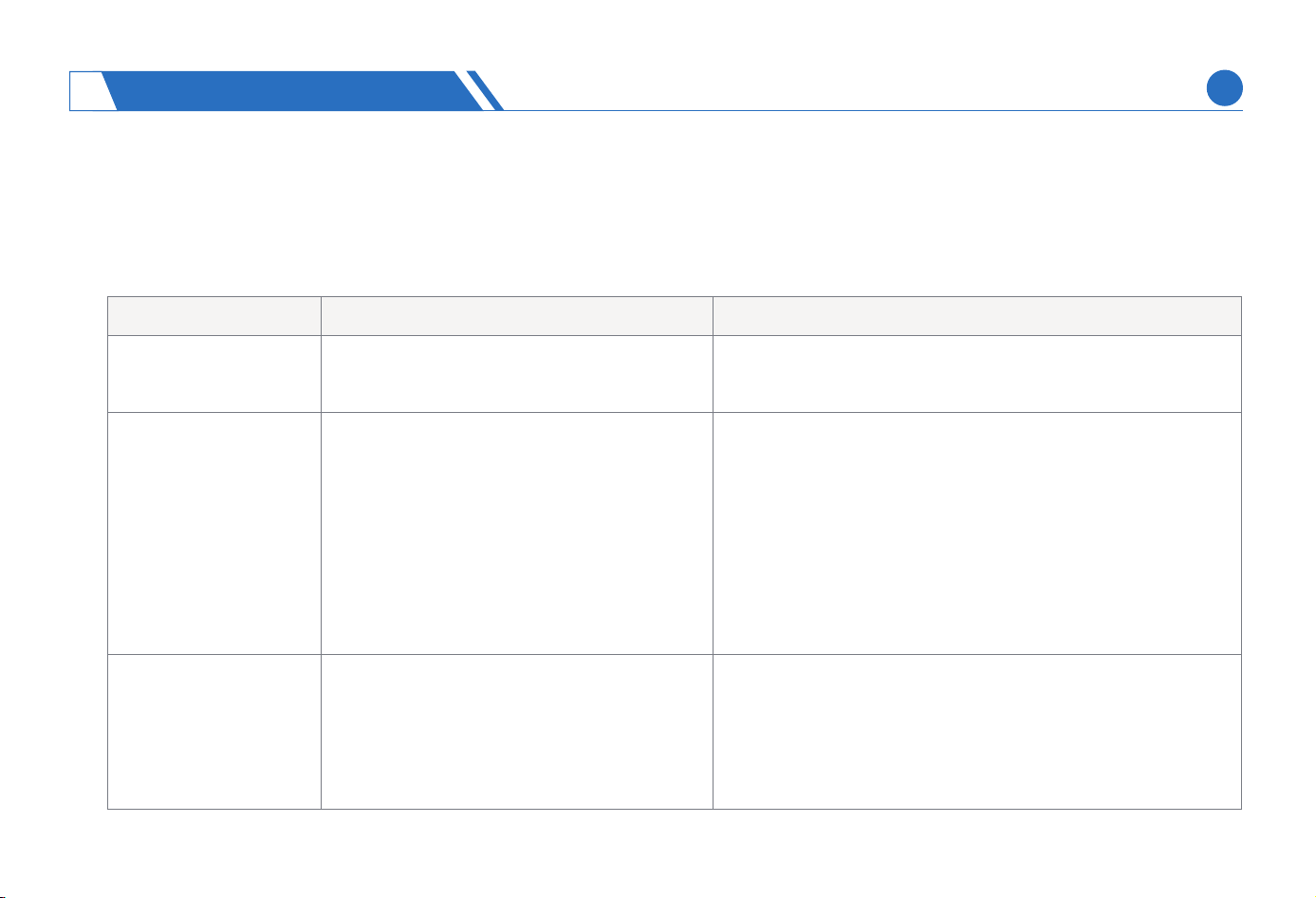
A quick search table for common problems with the lawn mower is presented below, which can help you identify problems. In the case of any
problems with the lawn mower, check the information in the table and t to solve them by yourself. If the problems are still not resolved, contact
HOOKII after-sales seice team via suppo@hookii.com.
Charge lawn mower on the charging station to charge, and
resta after it is fully charged.
The lawn mower is
not charged on the
charging station or
automatically shuts
down.
WiFi connection fails
for the lawn mower
The charging station is not properly
connected to the power supply
The stains at the charging pad of the lawn
mower connected to charging station
result in poor contact.
Too high/low batte temperature results
in batte protection
Batte over-discharge
.The lawn mower is too far from the router
The WiFi frequency band suppoed for
the lawn mower is inconsistent with that
used by the router
Keep the lawn mower near the router.
Check the WiFi frequency band parameters suppoed for the
lawn mower and match the router frequency band through
adjustment.
Connect the charging station to the power supply.
Check for di and clean the charge pad.
T charging again when the lawn mower returns to normal
temperature.
Contact HOOKII after-sales seice team.
Troubleshooting
Problem
The lawn mower fails
to sta up
Possible Cause
Low batte
Solution
(1)
(1)
(2)
(2)
(3)
(4)
(1)
(2)
(3)
(4)
(1)
(2)
TROUBLESHOOTING
8
EN
60
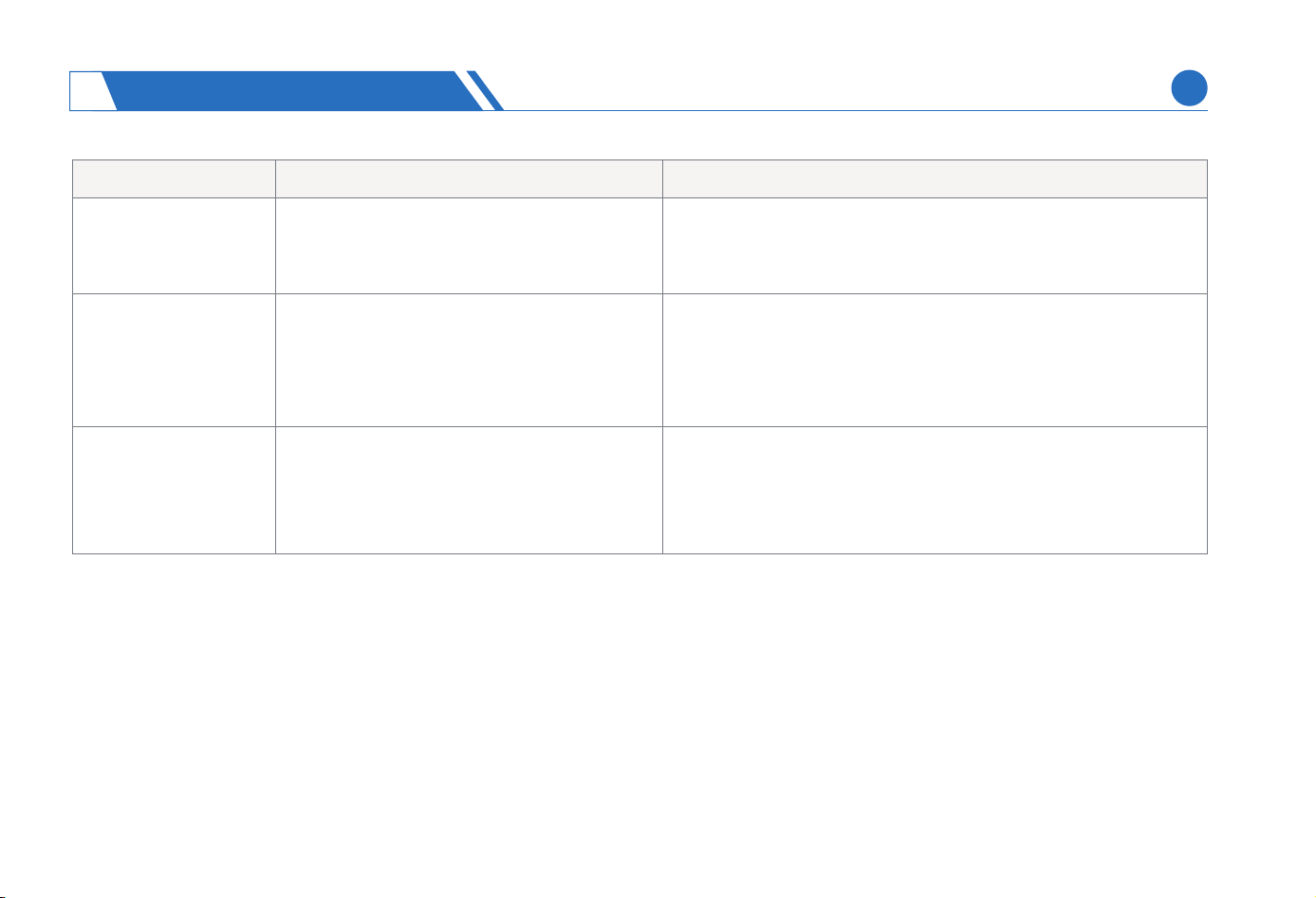
Keep the lawn mower in an area with good 4G network signal.
Top up data plan.
I can't bind this lawn
mower
My App can't
connect to the lawn
mower
You are not an administrator, and the
administrator does not share usage
permission with you
The place where the lawn mower is located
has poor 4G network signal
4G data plan has amount overdue
The lawn mower is shut down
The lawn mower shows network abnor-
mality
Sta lawn mower and reconnect it
Check the lawn mower for network connection, such as
whether 4G has amount overdue and whether the connected
WiFi is normal.
Contact the administrator to share usage permissions
Problem
Abnormal 4G network
for the lawn mower
Possible Cause Solution
(1)
(2)
(1)
(2)
(1)
(2)
(1)
(2)
TROUBLESHOOTING
8
EN
61
Keep close to the lawn mower within 6 meters as much as
possible.
To avoid bluetooth disconnection during mapping, keep the
phone and mower away from large obstacles, such as trees,
high walls, houses, etc.
The lawn mower
cannot return to or
exit the charging
station normally.
The lawn mower
remotely controlled
by the App doesn’t
respond during
mapping
The charging station deployed and the
created recharge path do not comply
with regulations.
There are obstacles on the charging
station or recharge path.
The emergency stop button is pressed
down, causing the failure of lawn mower
to be automatically recharged
Someone is standing in front of the
charging station when the mower is
leaving.
The mower is not well positioned
A too large distance from the lawn mower
results in unstable Bluetooth signal
There are large and high obstacles
between them during mapping process.
The charging station should be deployed with an unobstruct-
ed space of 0.5m on the left and right side, 2m in front. The
recharge path should have a minimum width of 77cm,
otherwise, the location of recharge path and charging station
should be changed.
Check for obstacles near the charging station and recharge
path and if any, remove them.
Release emergency stop state
There should be no obstacles and people in front when the
mower is leaving.
Move the lawn mower back to the charging station and
reposition it
Problem Possible Cause Solution
(1)
(2)
(3)
(4)
(5)
(1)
(2)
(1)
(2)
(3)
(4)
(5)
(1)
(2)
TROUBLESHOOTING
8
EN
62
The lawn mower fails
to accurately align
with the charging
station during ent
and exit
The location of charging station is
substantially moved after the map is
created.
Water droplets and di on the radar
sensor
Re-mapping is required if it is necessa to change the location
of the charging station.
Check the radar sensor for water droplets and obvious di and
if any, wipe clean timely.
The lawn mower
cannot automatically
mow the lawn
No mowing plan Develop a suitable mowing plan on the App.
Release emergency stop state
Charge the lawn mower to batte level larger than 80%.
The lawn mower will not go out to work by default as long as
the rain sensor is triggered. You can change the rules on the
App to enable mowing on rainy days.
There is a prompt for
obstacles when the
lawn mower is moving
on the passage
toward the next area.
The lawn mower fails
to peorm tasks
according to the set
schedule
The mower identies obstacles in the
passage
The passage does not comply with
rules
Emergency stop button is being pressed
Low batte
Rain sensor is being triggered
Check for obstacles near the charging station and recharge
path and, if any, remove them.
The passage should have the minimum width of 77cm and, if
not, the location of passage can be changed. If there is a wall
near the passage, the passage should not be directly
constructed against the wall.
Problem Possible Cause Solution
(1)
(2)
(1)
(1)
(2)
(2)
(3)
(1)
(2)
(1)
(1)
(2)
(2)
(3)
TROUBLESHOOTING
8
EN
63
The lawn mower
shows positioning
abnormality
Due to manual operation, the mower is
located outside the bounda and is not
on the mowing area or charging station.
The mower’s internal system shows a
brief abnormality.
The lawn is too open to have any object
of reference for the mower.
The mower can be transpoed to the interior of the
mowing area by manual remote control or kept stationa
on the charging station, and it will automatically restore
its positioning.
Neomow X relies on LiDAR to detect features within a
radius of 25m from the center of the mower to assist in
positioning. Check if the work area of the lawn mower
meets the condition, and if necessa, place features in an
excessively open yard to assist in positioning.
Problem Possible Cause Solution
The lawn mower has
an irregular moving
path in ceain areas
There are obstacles in the area, and the
lawn mower is steering clear of them.
The lawn mower will automatically adjust its movement
mode and return to normal state.
(1) (1&2)
(3)
(2)
(3)
The lawn is mowed
unevenly
The high and dense grass results in poor
mowing eciency.
The blades have become dull after a long
time of use.
The blade disc or blades cannot rotate
normally due to blockage.
Adjust the mowing height to a higher value, then gradually
lower it to the desired height and cut grass in sequence.
Replace the blades.
Check the state of blade disc and clean it.
(1)
(1)
(2)
(3)
(2)
(3)
TROUBLESHOOTING
8
EN
64
The lawn mower
cannot cut grass or
the blades stop
rotating during
mowing process
The lawn mower does not mow until it
reaches the mowing area.
The lawn mower does not cut grass on
the passage or recharge path.
Overcurrent protection for mower motor.
Other protective mechanisms are
triggered (such as lifting, tilting, etc.)
It is normal
It is normal
In the case of long and dense grass, the lawn mower motor
may have a too high current during operation or automati-
cally stop rotating for self-protection. It is advisable to
increase the mowing height or trim the lawn to below 10cm
using other mowing tools.
Check the alarm state of device and clear the alarm by
following the instructions.
Problem Possible Cause Solution
Some lawn areas are
not mowed
The obstacles in this area results in
mowing failure in pa of the area.
An abnormality occurs while the mower is
peorming tasks in the area, and the lawn
mower goes back for charging.
It is normal for the lawn mower to avoid obstacles during
mowing process, which will result in mowing failure in ceain
areas. The mower will peorm patch mowing afterwards.
Conrm the issue against the App and t to activate a new
mowing task again.
(1)
(1)
(2)
(1)
(2)
(1)
(2)
(3)
(4)
(2)
(3)
(4)
The lawn mower is
stuck
The lawn mower cannot move because its
wheels are stuck by long grass or mud.
The wheels are trapped in a deep pit on
the lawn.
The soil in the trapped area is soft and
the ground conditions are harsh
Check the wheels and remove any debris stuck on them.
Fill the pits on the lawn and keep the suace at.
No-Go zones can be designed in this type of area for avoid-
ance.
(1)
(1)
(2)
(3)
(2)
(3)
TROUBLESHOOTING
8
EN
65
The lawn mower is
stationa and the
buzzer is beeping
Abnormalities occur to the lawn mower View specic alarm information on the App and t to
resolve the alarms according to the guidance. If the
attempt fails, contact HOOKII's after-sales seice team.
Problem Possible Cause Solution
Abnormal noise occurs
during mowing process
Blade passivation leads to increased
cutting noise
Abnormal damage to the blade disc
Replace the blades.
Check the condition of blade disc, and contact a profes-
sional to replace the damage ones.
(1)
(2)
(3)
(1)
(2)
(1)
(2)
(1)
(2)
(1)
(2)
(3)
The lawn mower
shows abnormal night
working trajecto and
is unable to avoid
obstacles
Turn on visual obstacle avoidance
at night
When the lawn mower is working at night, the visual
obstacle avoidance switch should be turned o, otherwise
the visual recognition errors will aect the normal opera-
tion of the lawn mower.
The lawn mower has a
shoer endurance
Batte aging
Impact of the lawn (such as long and
dense grass, steep slopes, etc.)
Impact of dierent mowing modes
(such as using power mode, etc.)
Replace the batte
It is normal
It is normal
(1)
(2)
I have authorized the
lawn mower to upload
its GPS information, but
I did not see its location
on the map on the [Find
My Device] page
It takes some time for the lawn mower
has to upload GPS.
Network data is required for GPS
information uploading, and the lawn
mower shows network abnormality.
It is normal, and you can refresh the page
Check the lawn mower for network connection, such as
whether 4G is overdue and whether the connected WiFi is
normal.
EN
TROUBLESHOOTING
8
66

ORCA INNOVATION TECHNLOGY CO., LTD
https://hookii. com
info@hookii. com
A29(13-29)VankeCloudCityPhase4(ConcentratedCommercialProject),Dashi1stRoad,
XiliCommunity,XiliStreet,NanshanDistrict,Shenzhen,China
