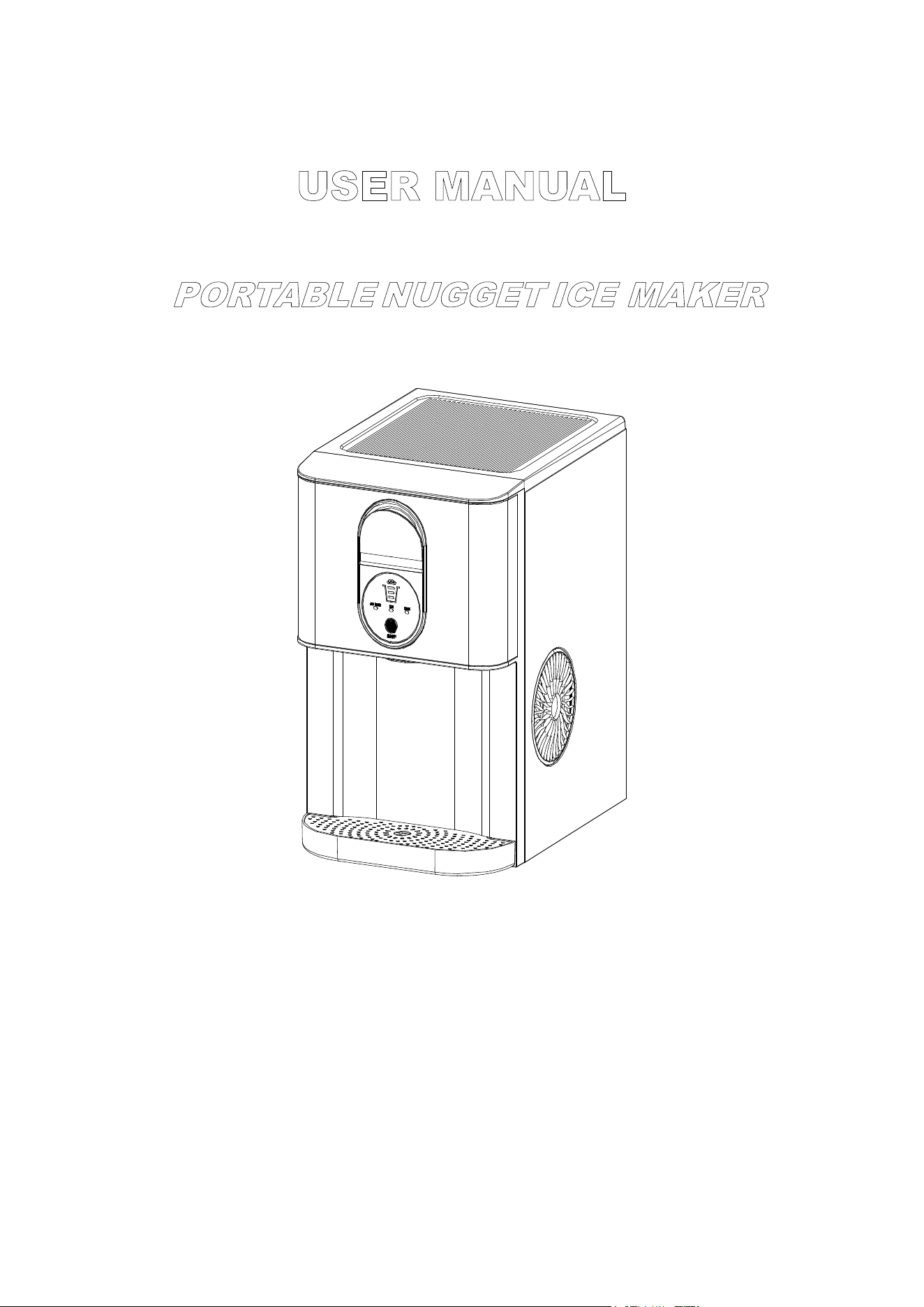
USER MANUAL
PORTABLE NUGGET ICE MAKER
Model No.: HZB-20DN
Thank you for purchasing this product! Please read the instructions carefully before using
your portable ice maker. If you have any questions about the product, please contact us via
Amazon Message or customer service number: 213-4467172 or 661-435 8826.
1
IMPORTANT SAFETY INSTRUCTIONS…………… ……………………………………2
PREPARING YOUR ICE MAKER FOR USE
IMPORTANT SAFETY TIPS………………………………… ………………………………….3
GETTING TO KNOW YOUR UNIT
………………………………………………………
………………………………………………………
..
..
4
4
OPERATING PROCEDURES & MAINTENANCE
UNPACKING YOUR ICE MAKER………………….…………………………………………...5
CONNECTING YOUR ICE MAKER……………….……….……………………………………………...5
CLEANING AND MAINTAINING YOUR ICE MAKER
….………………………………………..5
USING YOUR ICE MAKER……………
….……..………………………………………..6
TROUBLES H OOTING
……
……………………….………………………………………11
TECHNICA L PARAMETERS………….……………..….…………………..….……….12
DISPOSAL ………………… ……………………………………………………………… 12
TABLE OF CONTENTS
IMPORTANT SAFETY INSTRUCTIONS
2
IMPORTANT SAFETY INSTRUCTIONS
We have provided many important safety messages manual and your appliance.
Always read and obey all safety messages.
This is the safety alert symbol:
!
All safety messages will follow the safety alert symbol and the word “DANGER” or “WARNING”
.
These words mean:
You can be seriously injured if you don’t immediately
follow instructions.
All safety messages will tell you what the potential hazard is, tell you how to reduce the cha nce of injury,
and tell you what can happen if the instructions are not followed.
Your safety and the safety of others are very important.

3
When using electrical appliances, basic safety precautions should be followed to reduce the risk of fire,
electric shock, and injury to persons or property. Read all instructions before using any appliance.
Do not operate this,or any other appliance with a damaged cord.
If the supply cord is damaged, it must be replaced by the manufacturer or its service agent or a
similarly qualified person in order to avoid a hazard.
This ice-maker must be positioned so that the plug is accessible.
Connect to properly grounded outlets only. No other appliance should be plugged into the same
outlet. Be sure that the plug is fully inserted into the receptacle.
Do not run the power cord over carpeting or other heat insulators. Do not cover the cord. Keep cord
away from traffic areas, and do not submerge it in water.
We do not recommend the use of an extension cord, as it may overheat and become a risk of fire. If
you must use an extension cord, use No.14AWG minimum size and rated no less than 1875 watts.
Unplug the ice maker before cleaning or making any repairs or servicing.
Exercise caution and use reasonable supervision when appliance is used near children.
Do not use your ice-maker outdoors. Place the ice-maker away from direct sunlight and make sure
that there is at least 6 inches of space between the back of your unit and wall. Keep a minimum
distance of 6 inches on each side of your unit free.
Do not use other liquids to make the ice-cube other than water.
Do not clean your ice maker with flammable fluids. The fumes can create a fire hazard or explosion.
Do not tip over.
If the ice maker is brought in from outside in wintertime, give it a few hours to warm up to room
temperature before plugging it in.
WARNING: This appliance must be earthed.
IMPORTANT:
The wires in this mains lead are colored in accordance with the following code:
Green or Green with a strip of yellow: Grounding
White: Neutral
Black: Live
To avoid a hazard due to instability of the appliance, it must be placed at an even or flat surface.
PREPARING YOUR ICE MAKER FOR USE
4
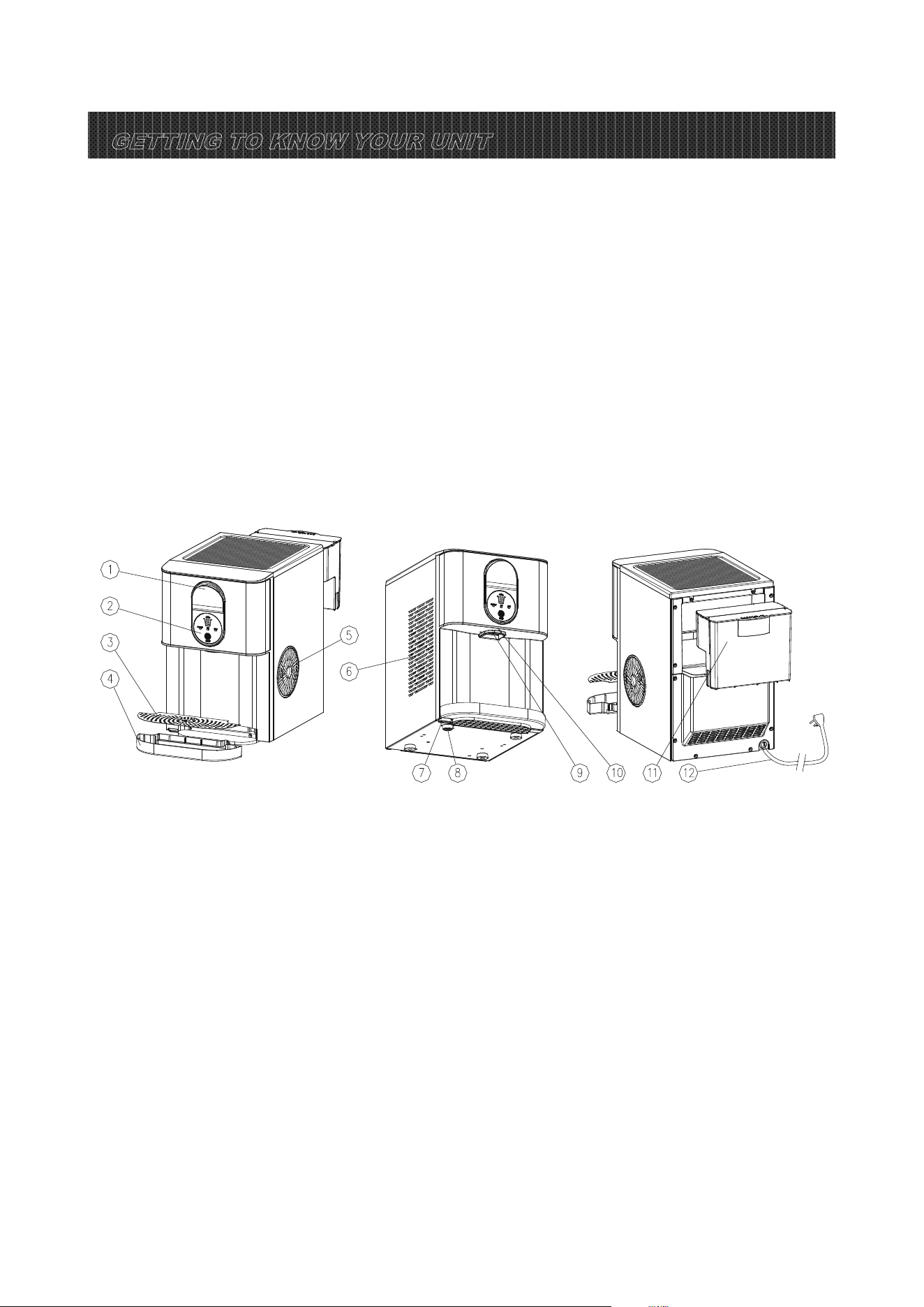
GETTING TO KNOW YOUR UNIT
1.Wrench for the door of ice exit passage.
2.Control Panel .
3.Cover for drip tray.
4.Drip tray.
5.Hot Air outlet
6.Metal shell.
7.Water drain cap 1: at the front btm side of the unit (Drain the water inside the machine).
8.Water drain cap 2: at the front btm side of the unit (Drain the water stored inside the machine due to
accidental overflow).
9.Ice outlet position.
10.Light.
11.Water reservoir.
12.Power cord.

5
DANGER
1. Remove the exterior and interior packaging, and then check all the accessories are included. If any
parts are missing, please contact our customer service.
2. Remove all the tapes on the unit; take out the accessory parts inside.
3. Clean the interior with lukewarm water and a soft cloth.
4. Locate your ice maker on a level counter table far from direct sunlight and other sources of heat (i.e.:
stove, furnace, and radiator). Make sure that there is at least 6 inches between the back and sides of
your ice maker with the wall.
5. Allow 2 hours for the refrigerant fluid to settle down before plugging your ice maker in.
6. The power plug must be accessible directly.
WARNING: Fill it with pure water only. Only use drinking water.
*Improper use of the grounded plug can result in the risk of electrical shock. If the power cord
is damaged, please call our customer service.
1. This unit should be properly grounded for your safety. The power cord of this appliance is equipped
with a grounding plug which mates with standard grounding wall outlets to minimize the possibility of
electric shock.
2. Plug your appliance into an exclusive, properly installed, grounding wall outlet. Do not under any
circumstances; damage the grounding means of the plug. Any questions concerning power and/or
grounding should be directed toward a certified electrician.
3. This appliance requires a standard 110-120Volt, 60Hz electrical outlet with good grounding means.
Before using your ice maker, it is strongly recommended to clean it thoroughly.
Unplug the unit before cleaning or making any maintenance.
1. Move the machine to the edge of the desktop, remove the drip tray, then put a container under the
desktop, unplug the water drain cap 1&2 to drain the water inside the unit.
2. Reinsert the water drain cap 1&2, turn the back of the unit toward you, take out the water reservoir.
3. Then use the water to rinse the inside parts, and drain out the water by unplugging the drain cap on
the front bottom side.
4. The outside of the ice maker should be cleaned regularly with a mild detergent solution and warm
water.
5. Dry the interior and exterior with a clean soft cloth.
6. When the machine is not to be used for a long time, drain water completely & dry the interior.
OPERATING PROCEDURES & MAINTENANCE
6
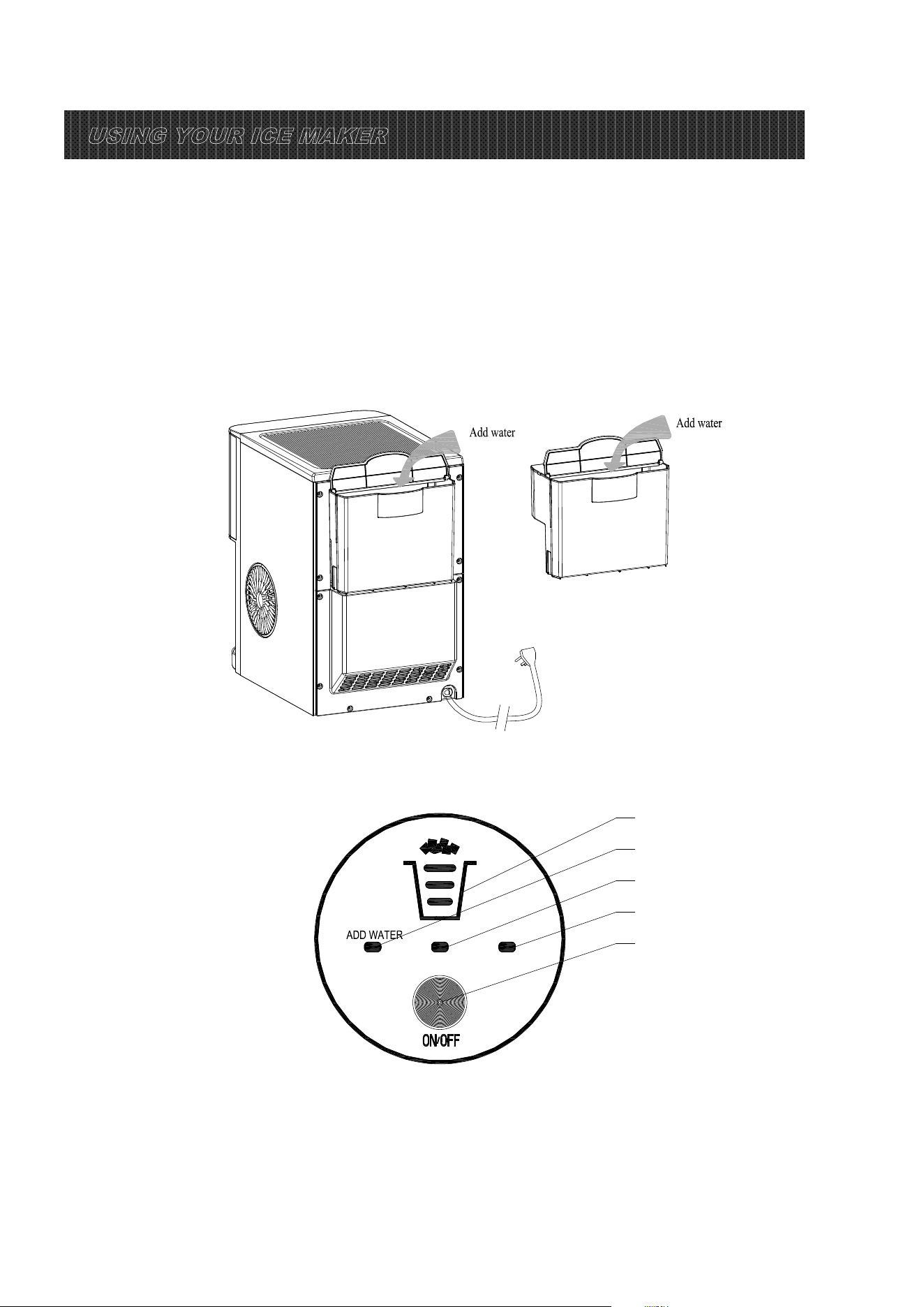
How to start the unit
1. Pour potable water into the water reservoir, 0.63 gallon (2.4 liters) of water at most at one time.
2. There are two ways to add water: Add water directly to the water reservoir at the back of the unit;
Take out the water reservoir to add water then put it back.
Note: Please make sure that the water tank is pushed in place, otherwise it may show water
shortage!
3. Plug in the power cord.
Operation and display areas
ICE CLEAN
A
B
C
D
E
A: Ice quantity indicator B: Add water indicator C: Ma king ice indicator
D: Cleaning indicator E: ON/OFF button
Plug in the power cord, the screen is on: you can operate this applia nce by touc hing the button on
the panel as shown above , and the main function includes: ice and clean.
USING YOUR ICE MAKER
7
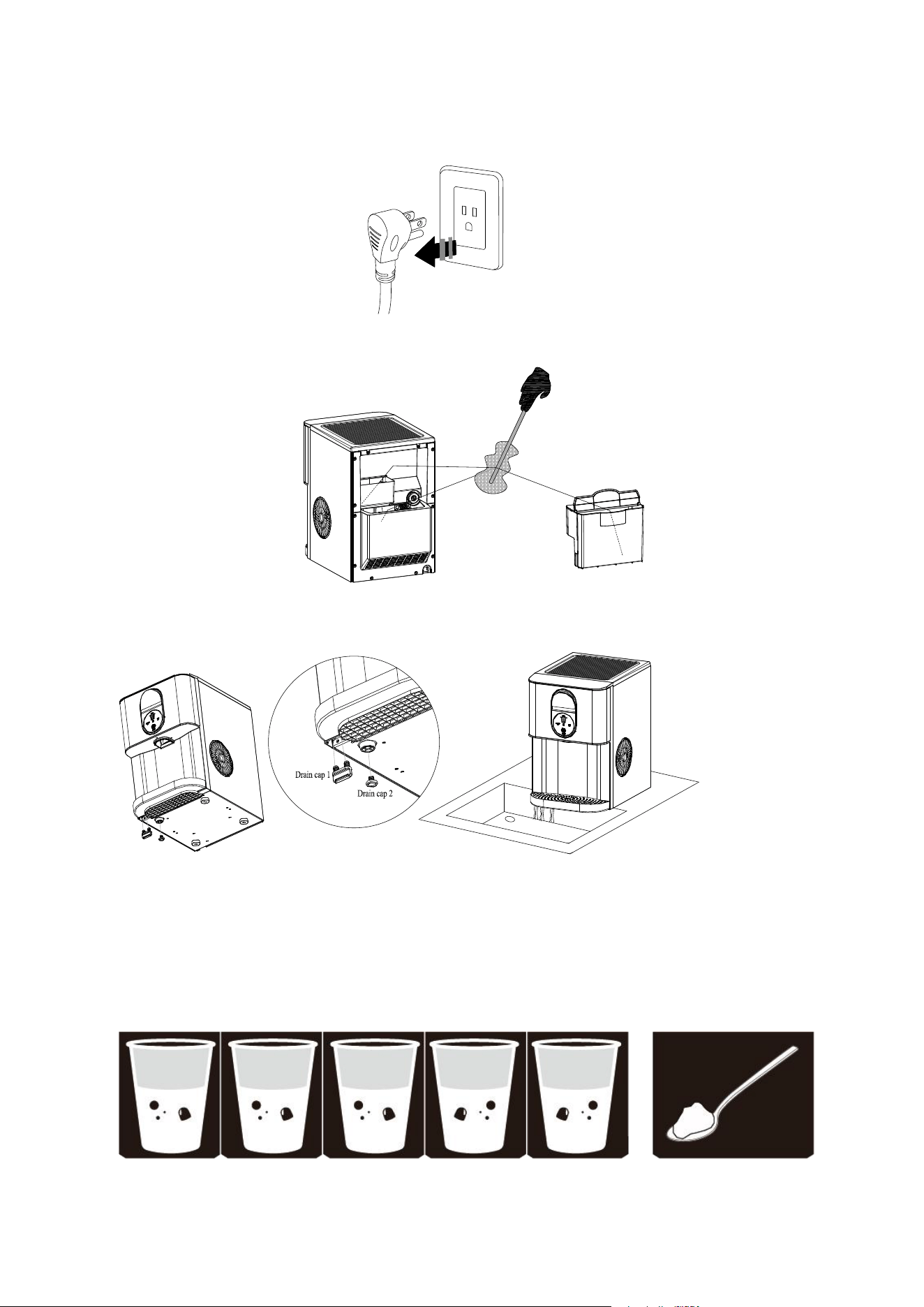
System Cleaning/Sanitizing Procedure
1.Unplug the nugget ice maker.
2.Clean the water reservoir and internal water tanks with a soft brush.
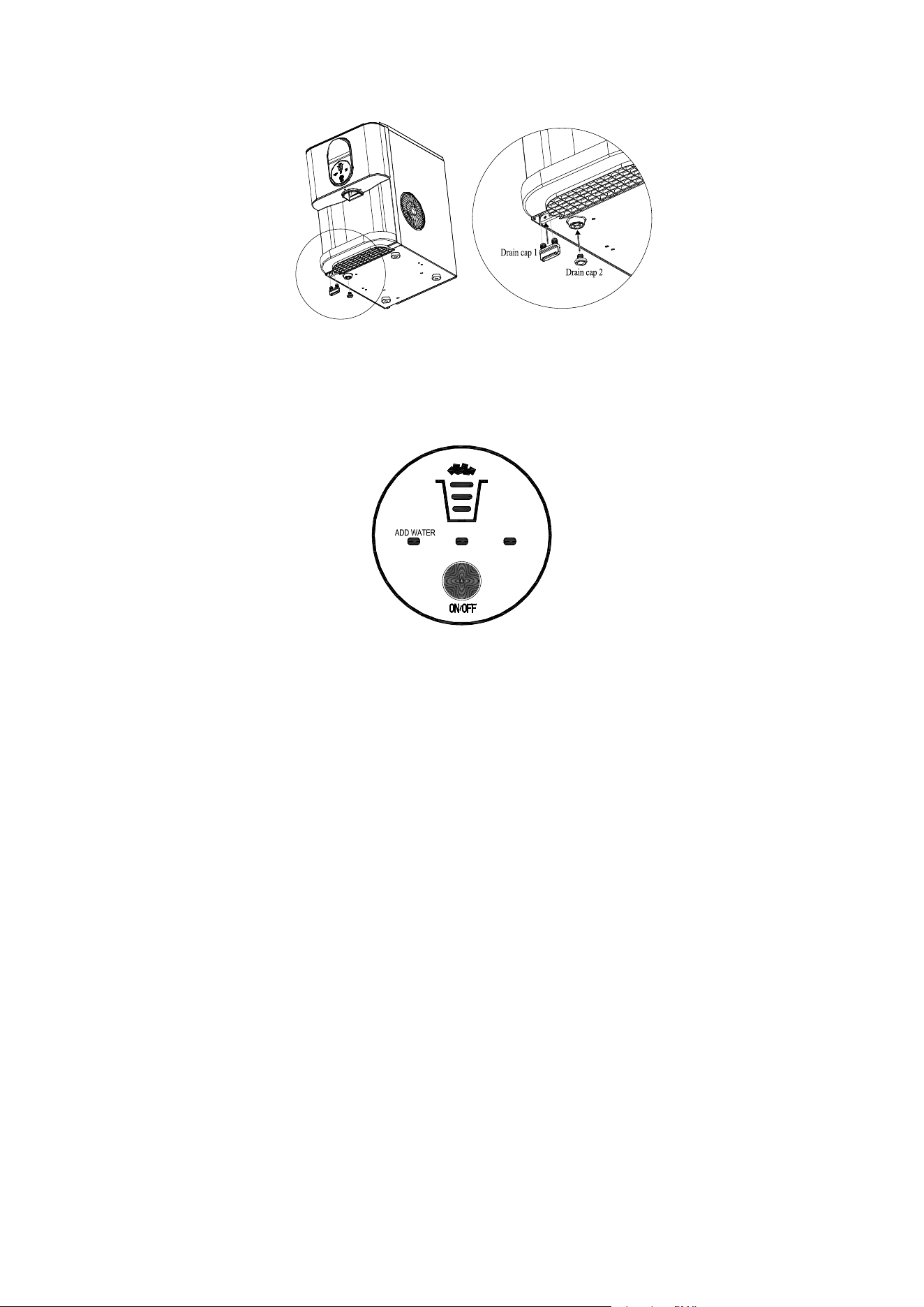
3.Take off the bottom drain cap 1&2 and drain out the water to a sink.
See the figure below.
4.Produce a solution by diluting one teaspoon of household bleach with five cups of water for daily
cleaning.
For monthly cleaning of removing mineral deposits, please use the white vinegar instead of the
above water solution (and then plug in to turn on the “cleaning function” for about 5 minutes. After
that, unplug it again to leave the white vinegar in the unit more than 12hours).
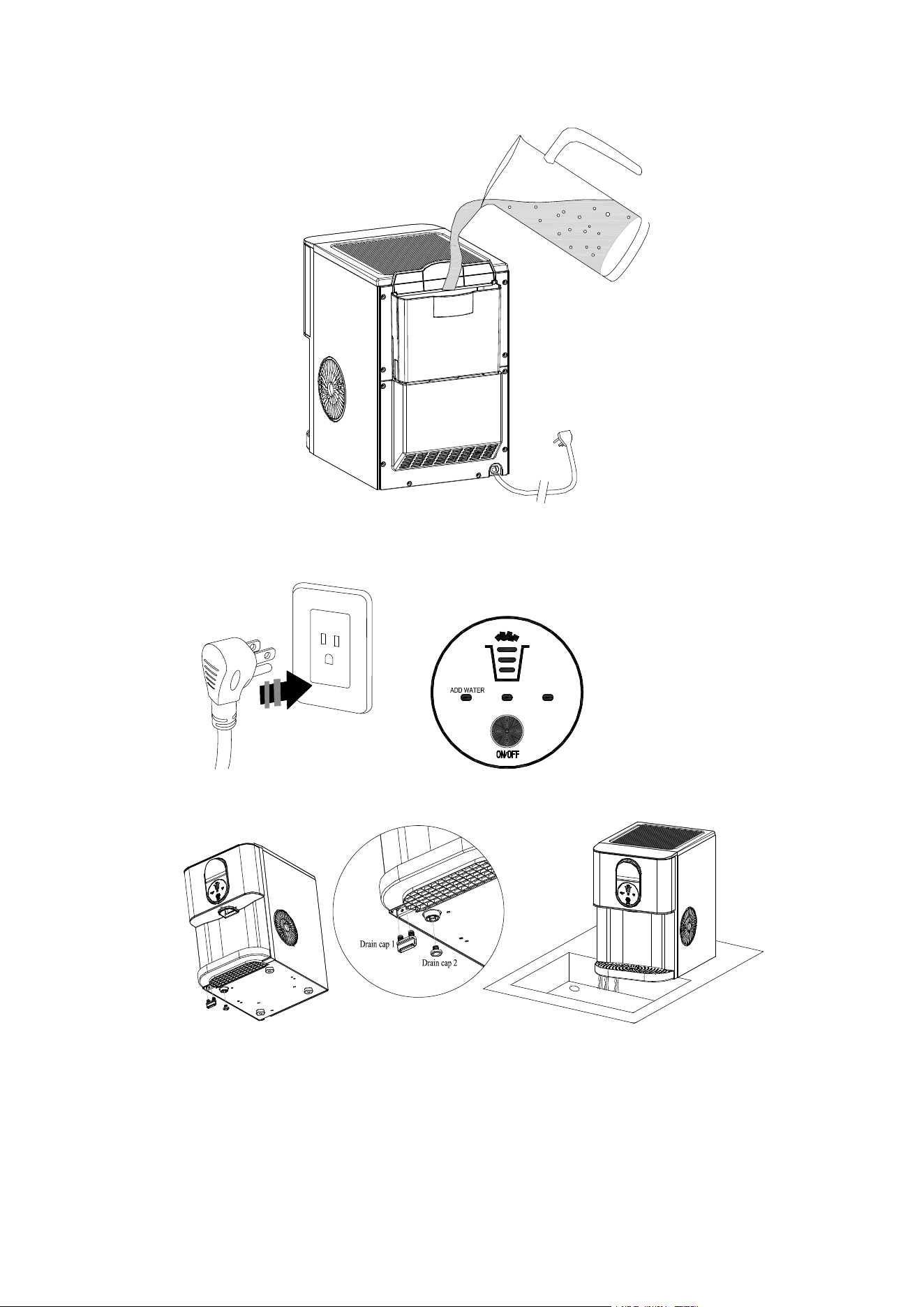
5.Pour the solution into the water reservoir (2 L at most). See the figure below.
8
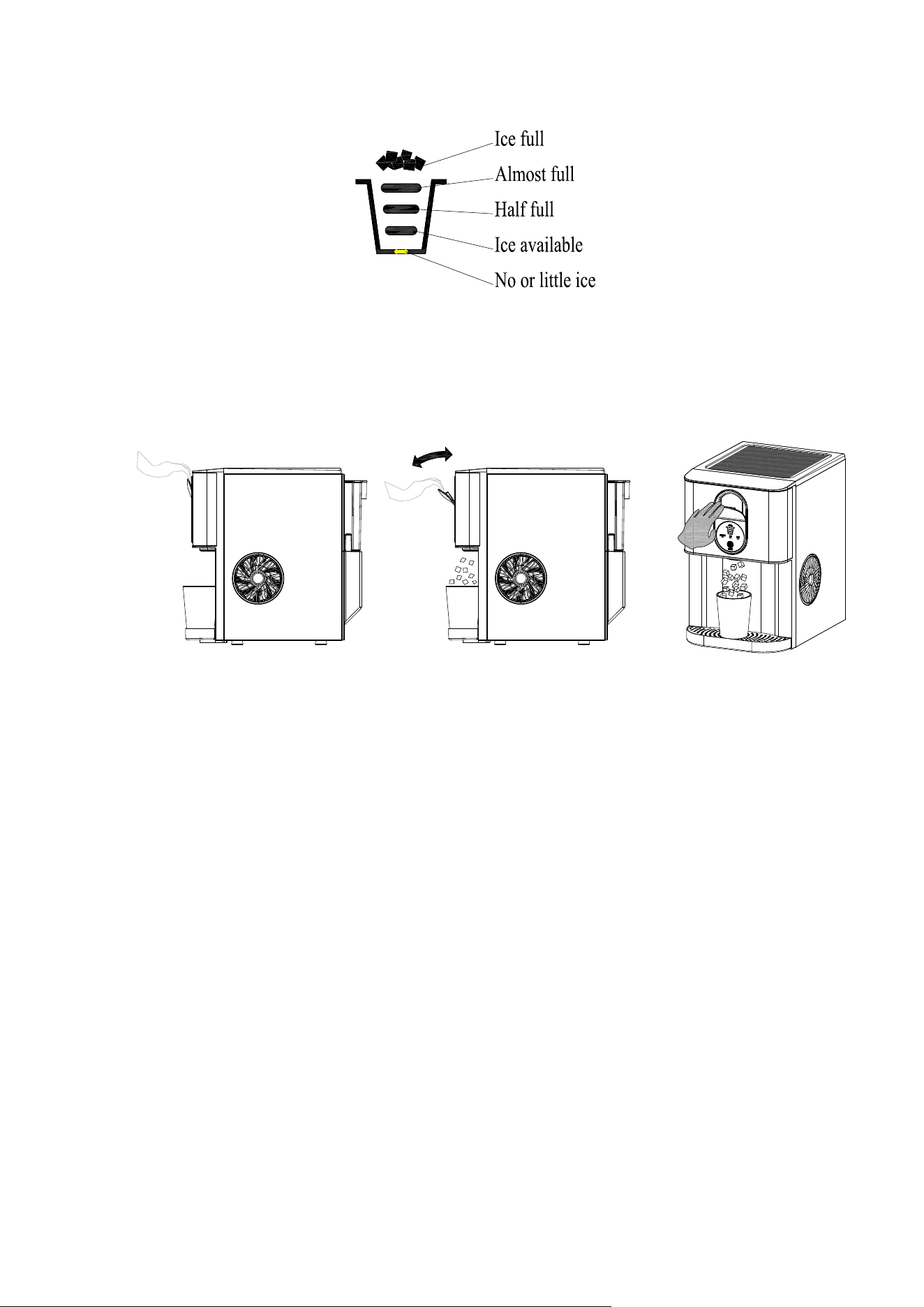
6. Plug in the Nugget ice maker, press the "ON/OFF" button for 5 secon ds to initiate the cleaning
process(10mins). See the figure below.
ICE CLEAN
7. When the "clean" indicator lights off, take off the drain cap 1 and drain out the water to a sink.
8. Repeat the step 5 to 7 with fresh water for two more cycles to rinse the inside.
9. Replace the drain cap. See the figure below.
9
10. When completed, fill the unit with fresh water and press the "ON/OFF" button to start ice making
process. See the figure below.
ICE CLEAN
Replace the water in the water reservoir every 24 hours to ensure a reasonable hygiene level. If the
unit isn’t to be used, drain all water & dry the water reservoir.
How to obtain the ice-cube
1. Before we start making ice, please make sure the water drain cap has been inserted into the
appliance; otherwise it will not work properly.
2. Press “ON/OFF” button, the “ICE” indicator will on, and it begins to work, press this button again, and
it will stop making ice.
TIPS: For the
first time, or if the appliance has not been used for a long time, it is recommended to
clean this applianc e before you start to make ice.
3. While the ice-maker is on, verify water level periodically. If water pump can ’t pump out water, the ice
maker will stop auto matically, and the “Add water” indicator will on, and the “ICE” indicator will flash.
Need to pour water into the water reservoi r.
10
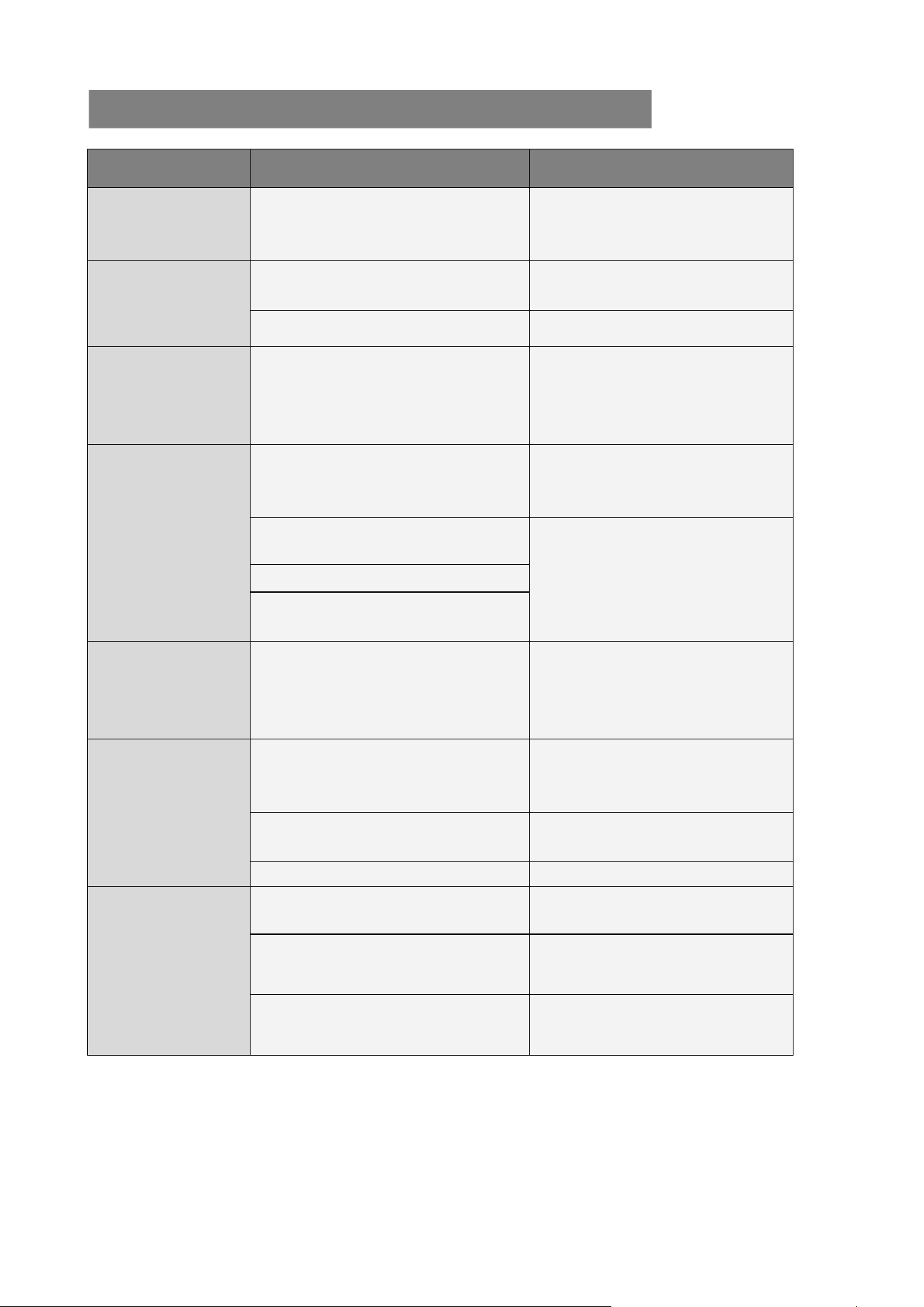
4. The approximate amount of ice will be displayed on the control panel. The ice maker automatically
stops working when the ice-cube is full inside and the “ice full” indicator will be on (as shown in the
figure above).
5. You can enjoy your ice cubs when the control panel show “Ice available”, “Half full”, “Almost full” or
“Ice full”. Pull the wrench above the control panel, the ice cubs will drop down.
TIPS:1.Please take out all the ice cubes inside the unit before you shutdown, in case that water may
overflow due to the ice melting.
2.Excessive water in the internal water tank will overflow to the drip tray, if there is too much
water in the drip tray, unplug the water drain cap 2 to drain the water ins ide the unit.
11
PROBLEM
POSSIBLE CAUSE
SOLUTION
“Add Water”
indicator lights up
Lack of Water.
Stop the ice maker, fill water, and
press “ON/OFF” button again to
restart the unit.
“Ice Full”
indicator lights up
or flash
There is too much ice.
Suggest you to obtain the
ice-cube.
(No ice cube inside).
Verify by a qualified technician.
“ Ice” indicator
lights flash
The system is under repair
It will automatically resume work.
When this problem occurs
frequently, please clean the
machine carefully.
“ Ice” indicator
lights flash and
button turn red
Ambient temperature or water
temperature in inner tank is too high.
Please run the ice maker below
90 Fahrenheit degree ambient
and pour colder water into tank.
Refrigerant liquid leakage.
Press the ICE button twice, restart
ice making program, if this
problem show up again, verify by
a qualified technician.
Cover motor is broken
Pipe in the cooling system is
blocked.
“ Ice” & “ Add
Water” indicator
lights flash and
button turn red
Water pump or float switch or water
valve doesn’t work
Verify it by a qualified technician.
Making Ice too
slowly
Hot Air outlet has been blocked by
something.
Hot Air outlet must be guaranteed
to have more than 15 CM of
ventilation distance.
Water temperature in inner tank is
too high.
Water temperature requirement
between 7℃-32℃.
Refrigeration system malfunctions.
Verify it by a qualified technician.
Water leakage
Drain plug not in place
Put the drain plug in place.
Pipe Joint in the appliance may be
loose
Verify it by a qualified technician.
The seal has reached service life
Verify it by a qualified technician.
TROUBLESHOOTING
12
Model
Model
HZB-
HZB-
20
20
D
D
N
N
Protection
Protection
Type
Type
I
I
Power
Power
115
115
V/
V/
6
6
0Hz
0Hz
Ice
Ice
Making
Making
Current
Current
2.
2.
7
7
A
A
Refrigerant
Refrigerant
R
R
600
600
a
a
/
/
30g
30g
Vesicant
Vesicant
C
C
5
5
H
H
10
10
Net
Net
Weight
Weight
1
1
5.25
5.25
Kg
Kg
Dimension
Dimension
2
2
70x430x415
70x430x415
mm
mm
Disposal
When the unit is not to be used again, disposal of this unit’s material shall be in accordance with
national regulations.
TECHNICAL PARAMETERS
TECHNICAL PARAMETERS
Disposal
V2
13
Thank you for purch asing this product! If you h ave any quest ions
about the product, such as missing pa rts, damaged products, product
assembling, and operation, please contact us via Ama zon Me ssage
or customer service number: 213-4467172 or 661-4358826.
IMPORTANT
Please call our cust omer service department for any co nsulting:
213-4467172
661-4358826
(8:30am - 5 :30pm P.S.T.)
DATED PROOF OF P URCHASE IS REQUIRED FOR WARRANTY
SERVICE.
AVIS
Veuillez appeler le service à la clientèle pour toutes questions a u:
213-4467172
661-4358826
(8:30am - 5 :30pm P.S.T.)
PREUVE D’ACHAT ORIGINALE REQUISE POUR SE RVICE DE
GARANTIE.
IMPORTANTE
Sólo hay que llamar nuestro departamento de servicio
al cliente en caso de tener preguntas o inquietudes:
213-4467172
661-4358826
(8:30am - 5 :30pm P.S.T.)
SE REQUIERE PRUEBA DE COMPRA CON FE CHA PARA
SERVICIO BAJO GARANTÍA.
Address: ROWAN ELECTRIC APPLIANCE LLC
28407 Ascent Way, Santa Clarita, CA 91350
Phone: 213-4467172 or 661-4358826
