
DIGITAL REVERBERATOR
Operation Manual
Manuel d’instructions
Bedienungsanleitung
Manual de Operación
DIGITAL REVERBERATOR
PEAK
LR
INPUT LEVEL
010
MIX BALANCE
DRY WET
DELAY
MIN MAX
DECAY
MIN MAX
LEVEL
MIN MAX
POWER
ON OFF
PROGRAM
MIDI
STORE
MIDI INT
PGM CHANGE
1
21
41
51
61
71
-20
-40
-50
-60
-70
-99
REVERB
STEREO REV
GATE REV
DELAY
DLY/REV
MOD/REV
IMPORTANT NOTICE FOR
THE UNITED KINGDOM
Connecting the Plug and Cord
WARNING: THIS APPARATUS MUST BE EARTHED
IMPORTANT: The wires in this mains lead are coloured in accordance with
the following code:
GREEN-AND-YELLOW : EARTH
BLUE : NEUTRAL
BROWN : LIVE
As the colours of the wires in the mains lead of this apparatus may not
correspond with the coloured markings idenlifying the terminals in your
plug, proceed as follows:
The wire which is coloured GREEN and YELLOW must be connected to the
terminal in the plug which is marked by the letter E or by the safety earth
symbol or coloured GREEN and YELLOW.
The wire which is coloured BLUE must be connected to the terminal which
is marked with the letter N or coloured BLACK.
The wire which is coloured BROWN must be connected to the terminal
which is marked with the letter L or coloured RED.
*
This applies only to products distributed by YAMAHA KEMBLE MUSIC (U.K.)
LTD.
FCC INFORMATION (U.S.A.)
1. IMPORTANT NOTICE: DO NOT MODIFY THIS UNIT!
This product, when installed as indicated in the instructions contained in this manual, meets FCC requirements. Modifications not expressly approved by
Yamaha may void your authority, granted by the FCC, to use the product.
2. IMPORTANT: When connecting this product to accessories and/or another product use only high quality shielded cables. Cable/s supplied with this product
MUST be used. Follow all installation instructions. Failure to follow instructions could void your FCC authorization to use this product in the USA.
3. NOTE: This product has been tested and found to comply with the requirements listed in FCC Regulations, Part 15 for Class “B” digital devices. Compliance
with these requirements provides a reasonable level of assurance that your use of this product in a residential environment will not result in harmful interference
with other electronic devices. This equipment generates/uses radio frequencies and, if not installed and used according to the instructions found in the users
manual, may cause interference harmful to the operation of other electronic devices. Compliance with FCC regulations does not guarantee that interference
will not occur in all installations. If this product is found to be the source of interference, which can be determined by turning the unit “OFF” and “ON”, please
try to eliminate the problem by using one of the following measures:
Relocate either this product or the device that is being affected by the interference
Utilize power outlets that are on different branch (circuit breaker of fuse) circuits or install AC line filter/s.
In the case of radio or TV interference, relocate/reorient the antenna. If the antenna lead-in is 300 ohm ribbon lead, change the lead-in to coaxial type cable.
If these corrective measures do not produce satisfactory results, please contact the local retailer authorized to distribute this type of product. If you can not locate
the appropriate retailer, please contact Yamaha Corporation of America. Electronic Service Division, 6600 Orangethorpe Ave, Buena Park, CA 90620
*
This applies only to products distributed by YAMAHA CORPORATION OF AMERICA
CANADA
THIS DIGITAL APPARATUS DOES NOT EXCEED THE “CLASS
B” LIMITS FOR RADIO NOISE EMISSIONS
FROM DIGITAL APPARATUS SET OUT IN THE RADIO INTER-
FERENCE REGULATION OF THE CANADIAN DEPARTMENT
OF COMMUNICATIONS.
LE PRESENT APPAREIL NUMERIQUE N’EMET PAS DE BRUITS
RADIOELECTRIQUES DEPASSANT LES LIMITES APPLICABLES
AUX APPAREILS NUMERIQUES DE LA “CLASSE B”
PRESCRITES DANS LE REGLEMENT SUR LE BROUILLAGE
RADIOELECTRIQUE EDICTE PAR LE MINISTERE DES COM-
MUNICATIONS DU CANADA.
*
This applies only to products distributed by YAMAHA CANADA
MUSIC LTD.
Dette apparat overholder det gaeldende EF-direktiv vedtrørende
radiostøj.
Cet appareil est conforme aux prescriptions de la directive
communautaire 87/308/CEE.
Diese Geräte entsprechen der EG-Richtlinie 82/499/EWG und/
oder 87/308/EWG.
This product complies with the radio frequency interference re-
quirements of the Council Directive 82/499/EEC and/or 87/308/
EEC.
Questo apparecchio è conforme al D.M.13 aprile 1989 (Direttiva
CEE/87/308) sulla soppressione dei radiodisturbi.
Este producto está de acuerdo con los requisitos sobre interferencias
de radio frequencia fijados por el Consejo Directivo 87/308/CEE.
YAMAHA CORPORATION
Litiumbatter!
Bör endast bytas av servicepersonal.
Explosionsfara vid felaktig hantering.
VAROITUS!
Lithiumparisto, Räjähdysvaara.
Pariston saa vaihtaa ainoastaan aian
ammattimies.
ADVARSELl!
Lithiumbatter!
Eksplosionsfare. Udskiftning må kun foretages
af en sagkyndig, –og som beskrevet i
servicemanualen.

Precautions
1. Location
Keep the unit away from locations where it is likely to be
exposed to high temperatures or humidity — such as near
radiators, stoves, etc. Also avoid locations which are sub-
ject to excessive dust accumulation or vibration which
could cause mechanical damage and locations subject to
strong electromagnetic fields, such as close to broadcast
equipment.
2. Avoid Physical Shocks
Strong physical shocks to the unit can cause damage. Han-
dle it with care.
3. Do Not Open the Case or Attempt Repairs or Modifi-
cations Yourself
This product contains no user-serviceable parts. Refer all
maintenance to qualified Yamaha service personnel.
Opening the case and/or tampering with the internal cir-
cuitry voids the warranty.
4. Always power off before making connections
Always turn the power OFF before connecting or discon-
necting cables. This is important to prevent damage to the
unit itself as well as other connected equipment.
5. Handle Cables Carefully
Always plug and unplug cables — including the AC power
cord — by gripping the connector, not the cord.
6. Clean With a Soft Dry Cloth
Never use solvents such as benzine or thinner to clean the
unit. Wipe clean with a soft, dry cloth.
7. Always Use the Correct Power Supply
The unit should only be powered using the supplied
Yamaha AC Adaptor. The use of other adaptors can cause
serious damage to the unit. Never use a cascade arrange-
ment for the power supply connection from other equip-
ment.

Introduction
The REV100 is a high-quality, inexpensive, and easy-to-use stereo Digital Reverberator. It can be used for home recording or
smaller sound reinforcement applications. It is a true stereo processor with two inputs and two outputs.
Along with a high-quality stereo reverb, the REV100 offers delay-plus-reverb and modulation-plus-reverb effects. The 16-bit A/D
and D/A converters provide superb sound quality and a wide frequency response due to the 44.1 kHz sampling rate.
The REV100 is simple to use, with rotary controls for setting levels and editing effect parameters. A MIDI IN connection is pro-
vided so that effects programs can also be selected using MIDI messages.
To take full advantage of your REV100, please read this manual thoroughly and keep it for future reference.
Contents
1. Controls . . . . . . . . . . . . . . . . . . . . . . 1
Front Panel . . . . . . . . . . . . . . . . . . . . . . . . . . . 1
Rear Panel . . . . . . . . . . . . . . . . . . . . . . . . . . . . 1
2. Operation . . . . . . . . . . . . . . . . . . . . 2
Installation and Connections . . . . . . . . . . . . . . 2
Changing Programs . . . . . . . . . . . . . . . . . . . . . 2
3. Edit Mode . . . . . . . . . . . . . . . . . . . . 6
Editing a Program . . . . . . . . . . . . . . . . . . . . . . 6
Storing a Program . . . . . . . . . . . . . . . . . . . . . . 6
Initializing the REV100 . . . . . . . . . . . . . . . . . 6
4. MIDI Mode . . . . . . . . . . . . . . . . . . 7
MIDI Program Change Table . . . . . . . . . . . . . 7
Setting the MIDI Program Change Table . . . . 7
Setting the MIDI Receive Channel . . . . . . . . . 8
Real-time Parameter Change . . . . . . . . . . . . . . 8
MIDI Data Format . . . . . . . . . . . . . . . . . . . . . . 9
5. Specifications . . . . . . . . . . . . . . . . 10
General specifications . . . . . . . . . . . . . . . . . . 10
Dimensions . . . . . . . . . . . . . . . . . . . . . . . . . . 10
MIDI Implementation Chart
Controls
1
1. Controls
Front Panel
DIGITAL REVERBERATOR
PEAK
LR
INPUT LEVEL
010
MIX BALANCE
DRY WET
DELAY
MIN MAX
DECAY
MIN MAX
LEVEL
MIN MAX
POWER
ON OFF
PROGRAM
MIDI
STORE
MIDI INT PGM CHANGE
1
21
41
51
61
71
-20
-40
-50
-60
-70
-99
REVERB
STEREO REV
GATE REV
DELAY
DLY/REV
MOD/REV
123 756
4
1
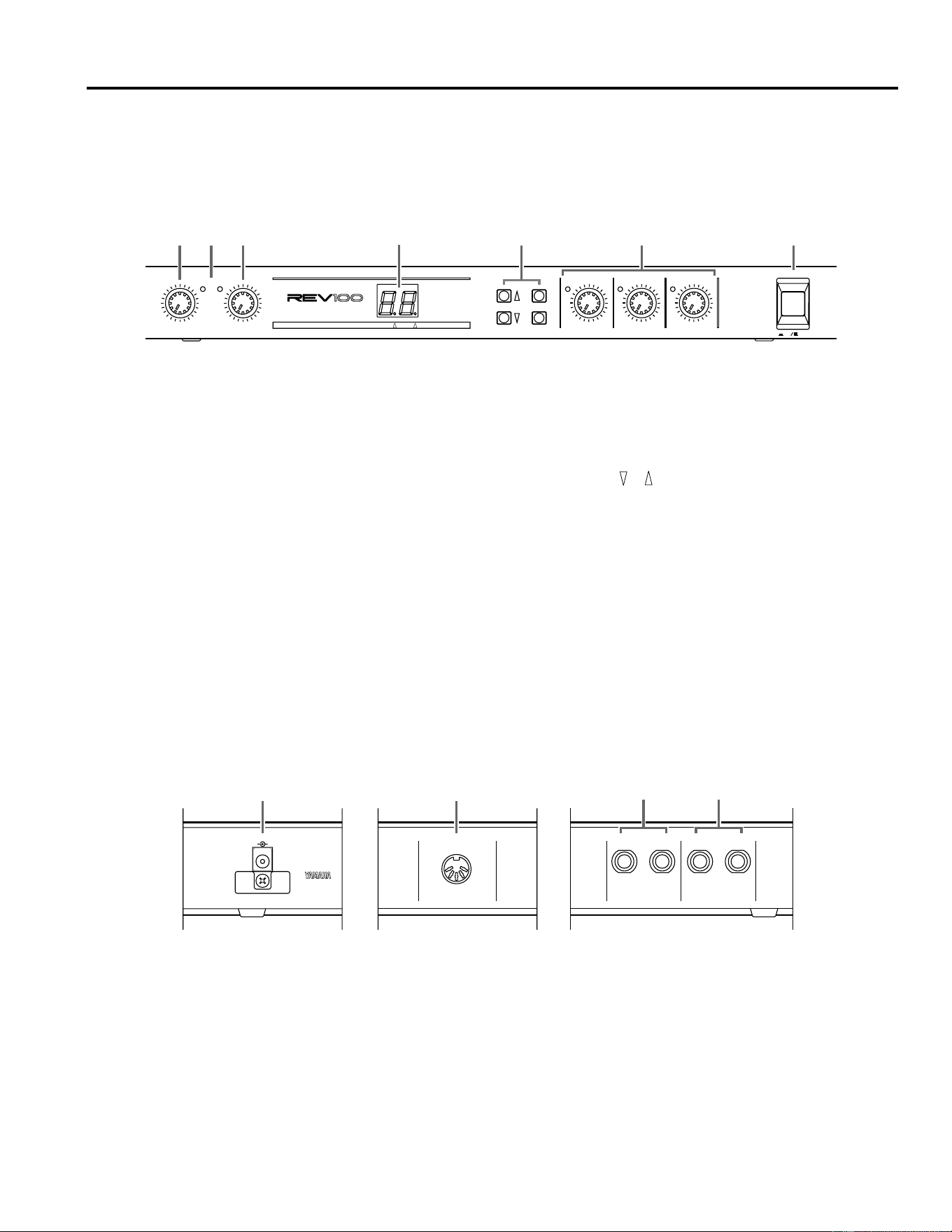
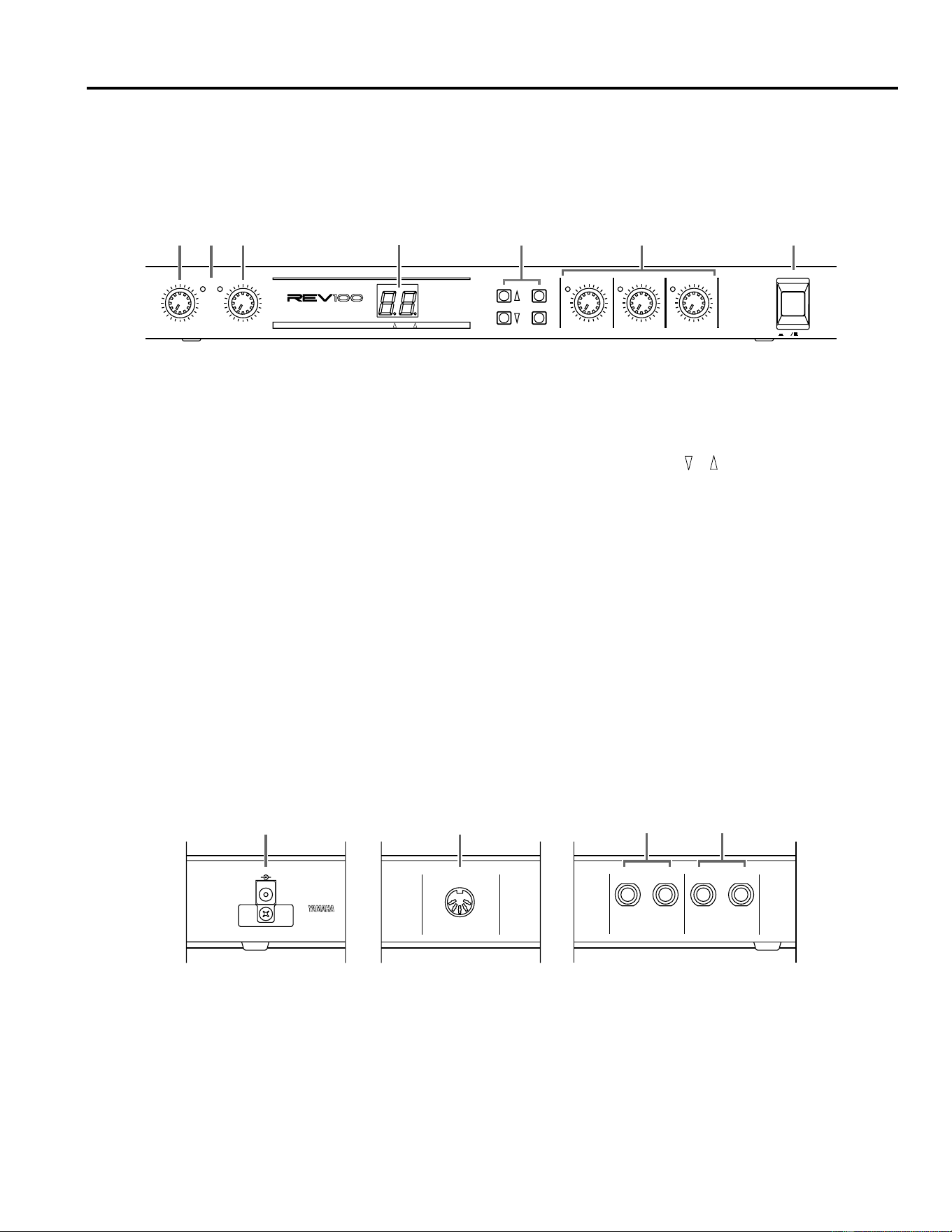
INPUT LEVEL control
This rotary control sets the input level. You should set the
level so that the PEAK (L/R) indicators only flash occasion-
ally.
2
PEAK (L/R) indicators
These LEDs will light when the REV100 is receiving a peak
level signal.
3
MIX BALANCE (DRY/WET) control
This rotary control sets the balance of wet (effect) and dry
(no effect) sounds.
4
LED display (7-segment LED, MIDI indicator, INT indi-
cator)
This 7-segment display indicates the current program in
Program Mode. It shows the value of parameters when the
REV100 is in Edit Mode and it shows MIDI program num-
bers. When you select the MIDI Program Change table, the
MIDI indicator will light, and when you select the internal
programs, the INT indicator will light. Refer to “Setting the
MIDI Program Change Table” on page 7.
5
PROGRAM ( , , MIDI, STORE) keys
These keys allow you to select the different programs, edit
the MIDI Program Change table, and store modified pro-
grams.
6
Edit (DELAY, DECAY, LEVEL) controls
These rotary controls edit the amount of parameters of the
current effect. When the edited value of a parameter is the
same as the currently saved value, the LED to the left of the
control will light. Refer to “Editing a Program” on page 6.
7
POWER switch
Press this switch ON to turn on the power.
Rear Panel
MIDI INDC 12V IN
R L(MONO)
OUTPUT
R L(MONO)
INPUT
2
1
34
1
DC 12V IN inlet
The supplied AC Adapter is plugged into this connector.
2
MIDI IN connector
The REV100 receives MIDI data via this connection.
3
OUTPUT connectors
These 1/4" phone connectors are used to output the pro-
cessed sound from the REV100. If you are using it mono-
phonically, plug a jack into the L-MONO connection only.
4
INPUT connectors
These 1/4" phone connectors are used to plug a sound source
into the REV100. If the source is monophonic, plug the jack
into the L-MONO connection only.
Operation
2
2. Operation
Installation and Connections
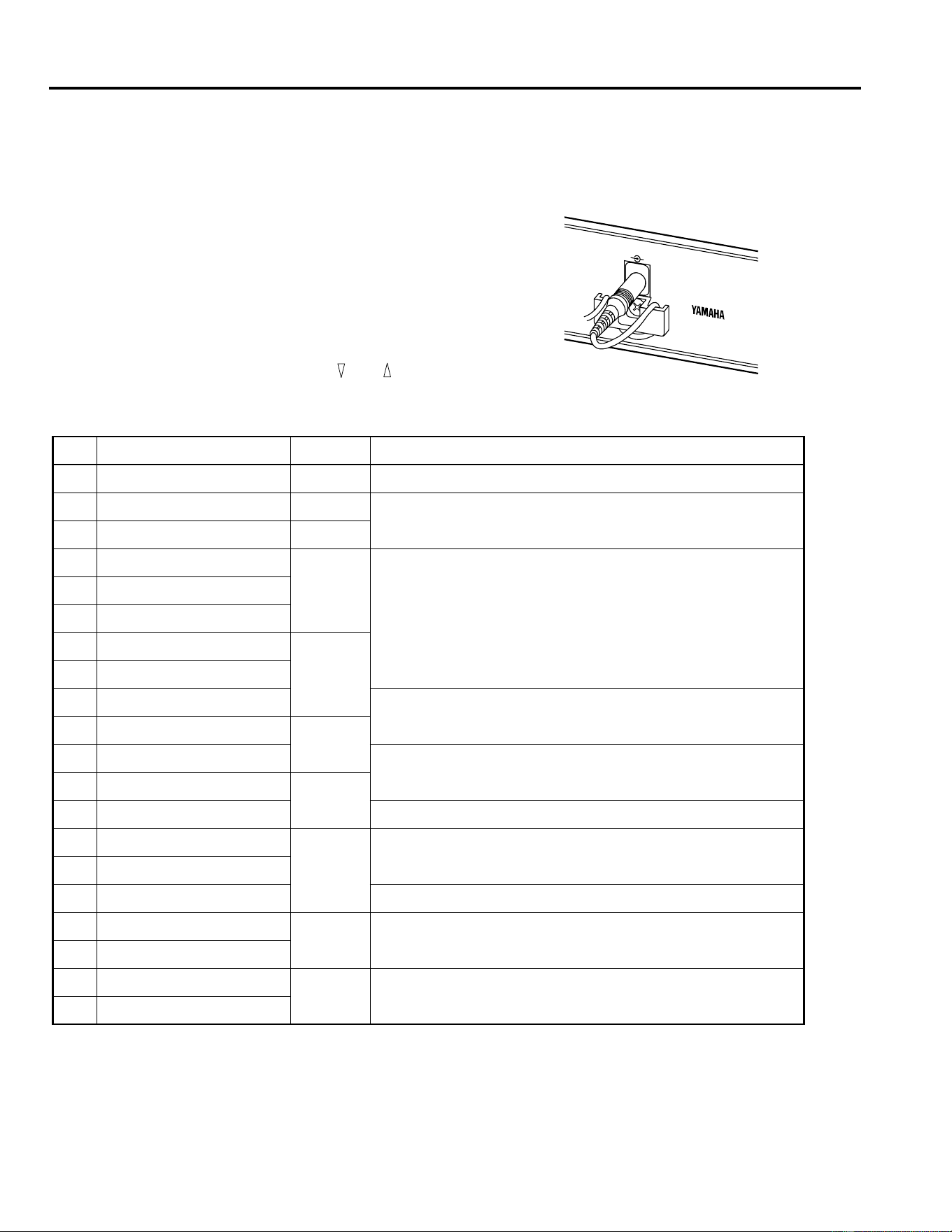
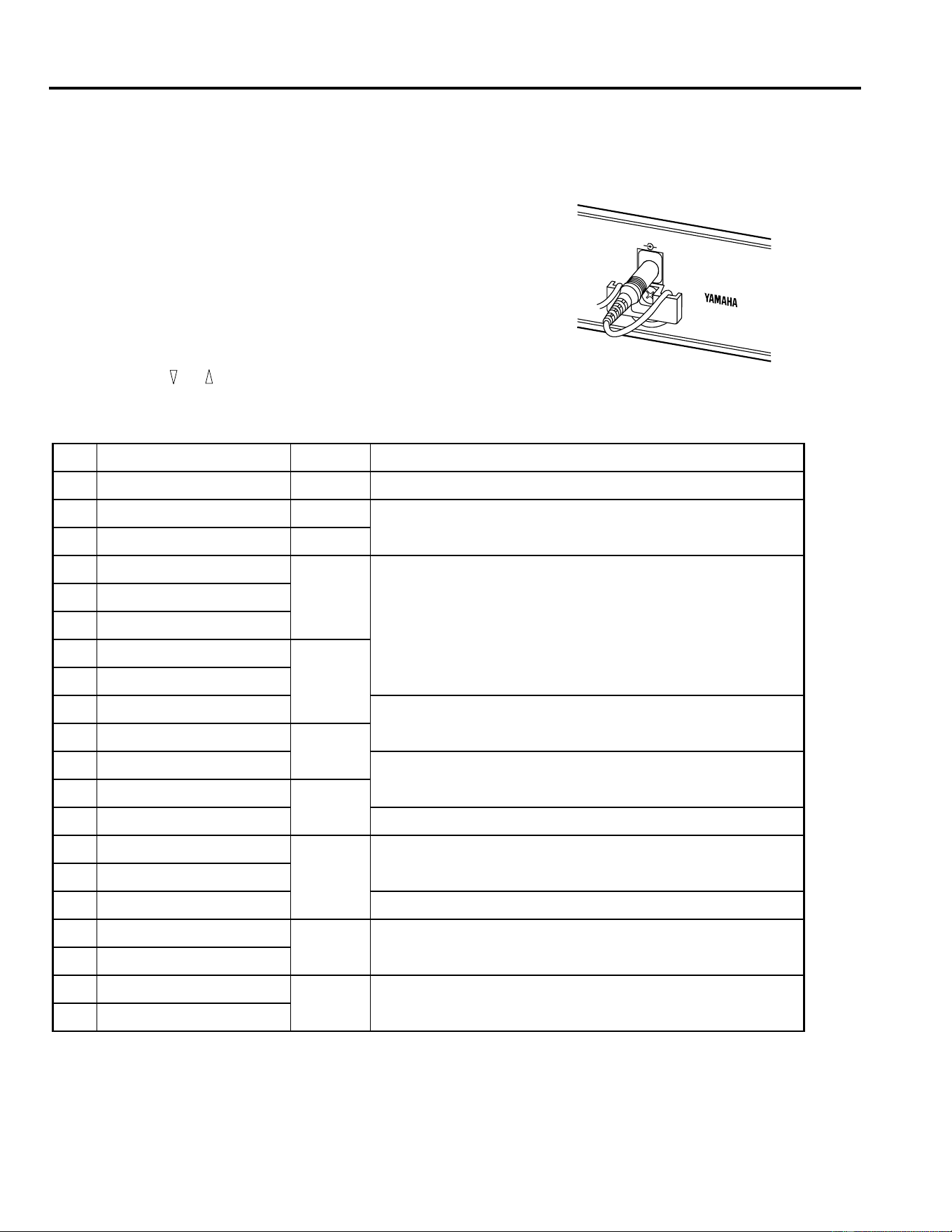
Install the REV100 in a rack or place it in a location where it is safe
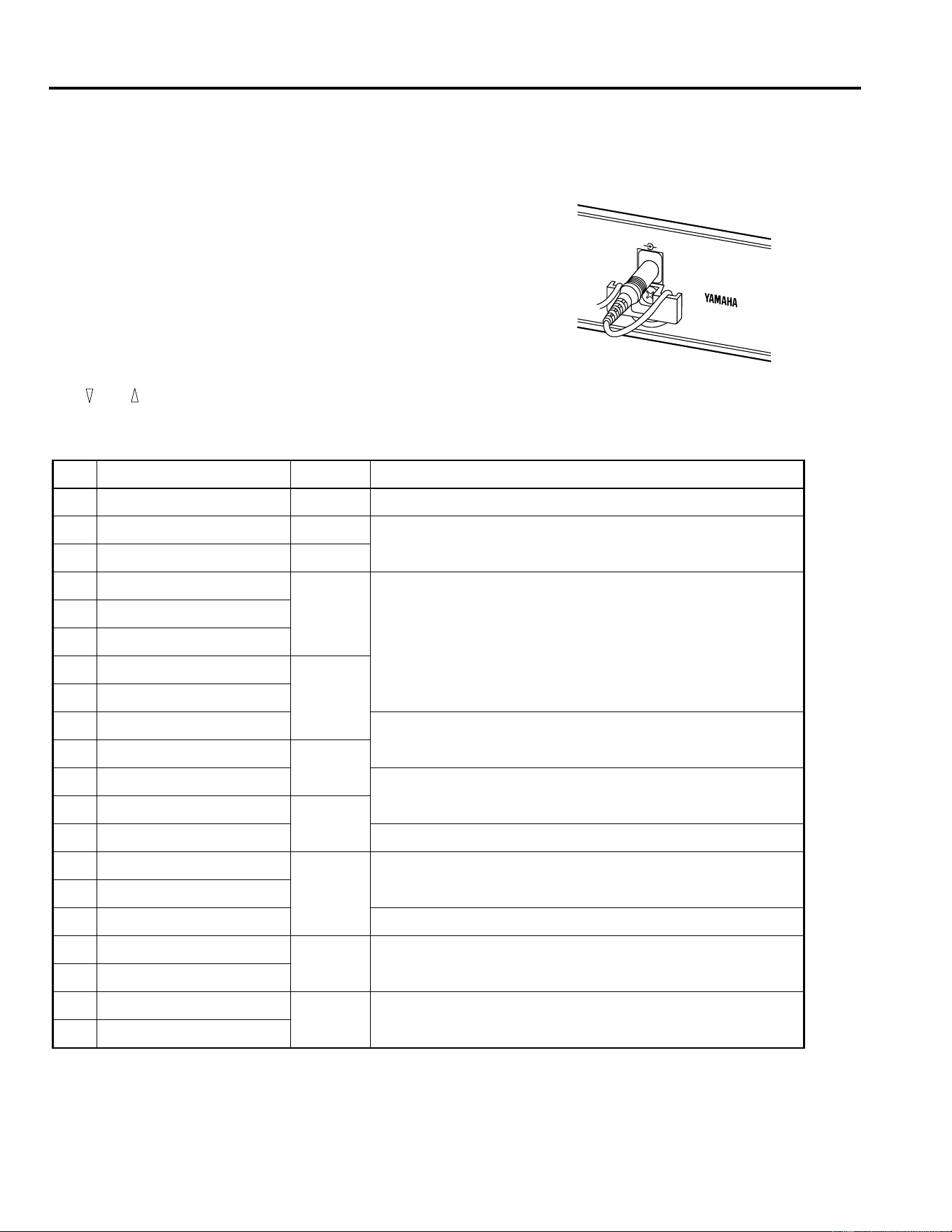
and stable. Connect the AC Adapter to the DC 12V IN inlet, then
plug the Adapter into a mains supply. To prevent the power from
being accidentally disconnected, hook the cable around the anchor.
Press the POWER switch to turn the REV100 on.
Changing Programs
Select the different programs by pressing the and keys. The
REV100 has 99 programs for you to select from.
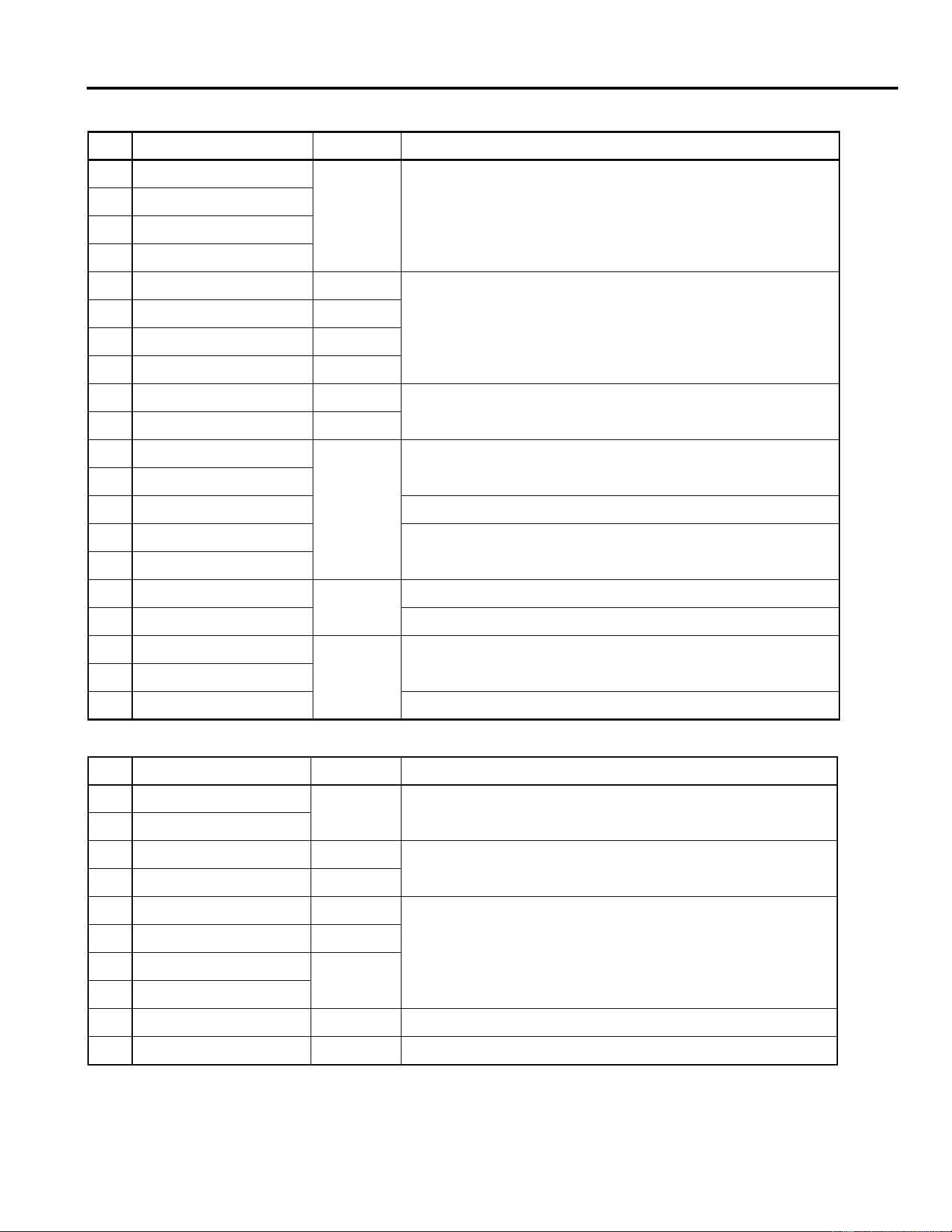
REVERB
No Name Type Description
1 Vocal Rev 1 Vocal Reverberation suitable for vocals
2 Vocal Rev 2 Hall
No.3 has a longer pre-delay and shorter reverb time
3 Vocal Rev 3 Vocal
4 Room Ambience 1
Plate
These are mainly for drums and percussions. You can use them for
the entire drum kit or a single drum sound such as snare, bass drum,
etc.
5 Room Ambience 2
6 Room Ambience 3
7 Wood Booth 1
Vocal8 Wood Booth 2
9 Acoustic Piano Plate
Reverberation for acoustic piano
10 Club Piano
Hall
11 Booming Kick 1
Reverberation for bass drum, with an emphasized low range
12 Booming Kick 2
Room
13 Loud Snare Reverberation for louder snare
14 Acoustic Steel Guitar 1
Plate
Reverberation for steel-string acoustic guitar
15 Acoustic Steel Guitar 2
16 String Plate Reverberation mainly used for strings
17 Acoustic Gut Guitar 1
Vocal Reverberation for nylon-string acoustic guitar
18 Acoustic Gut Guitar 2
19 Brass Room 1
Room Brighter and shorter reverb for brass section
20 Brass Room 2
DIGITAL
MODEL REV100
MADE IN JAPAN
DC 12V IN
Operation
3
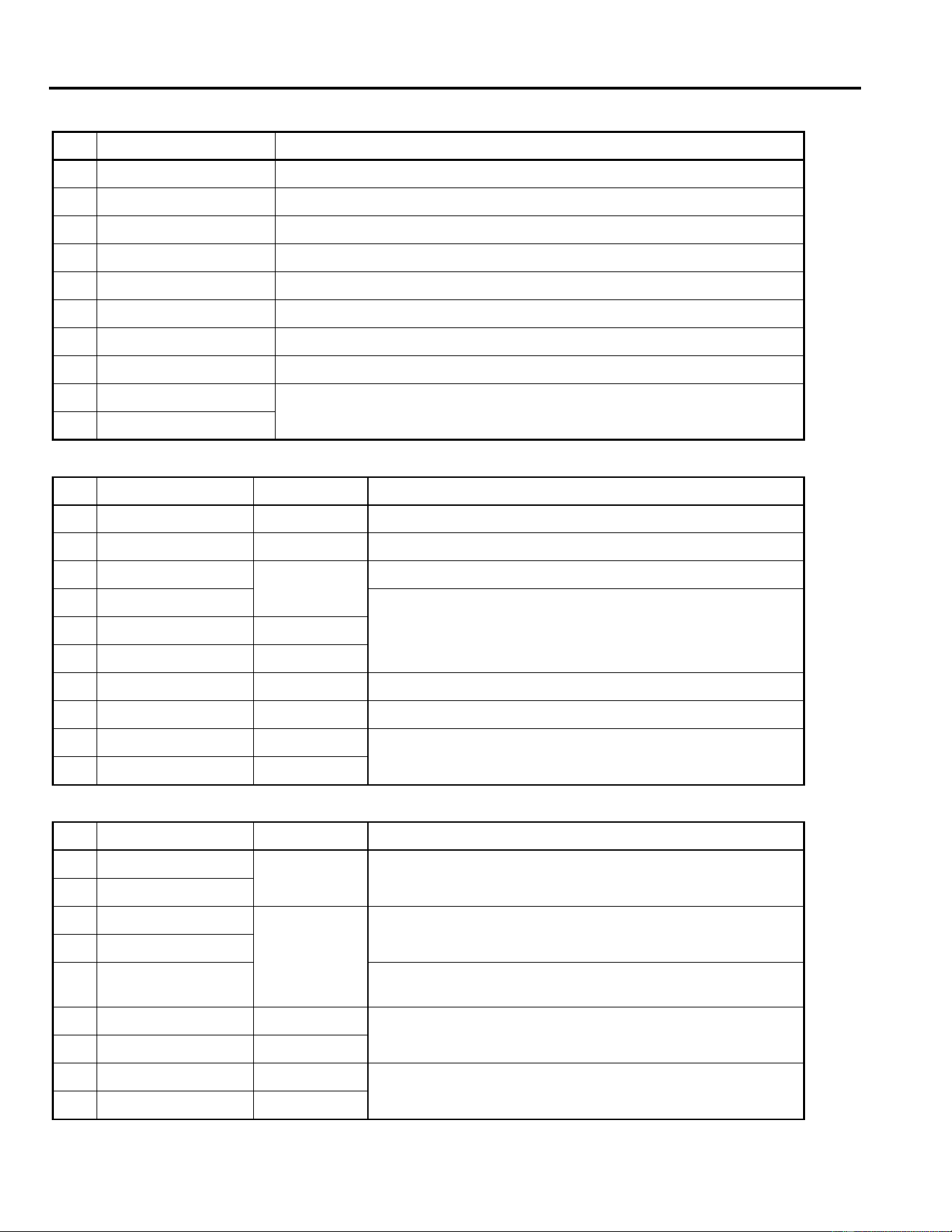
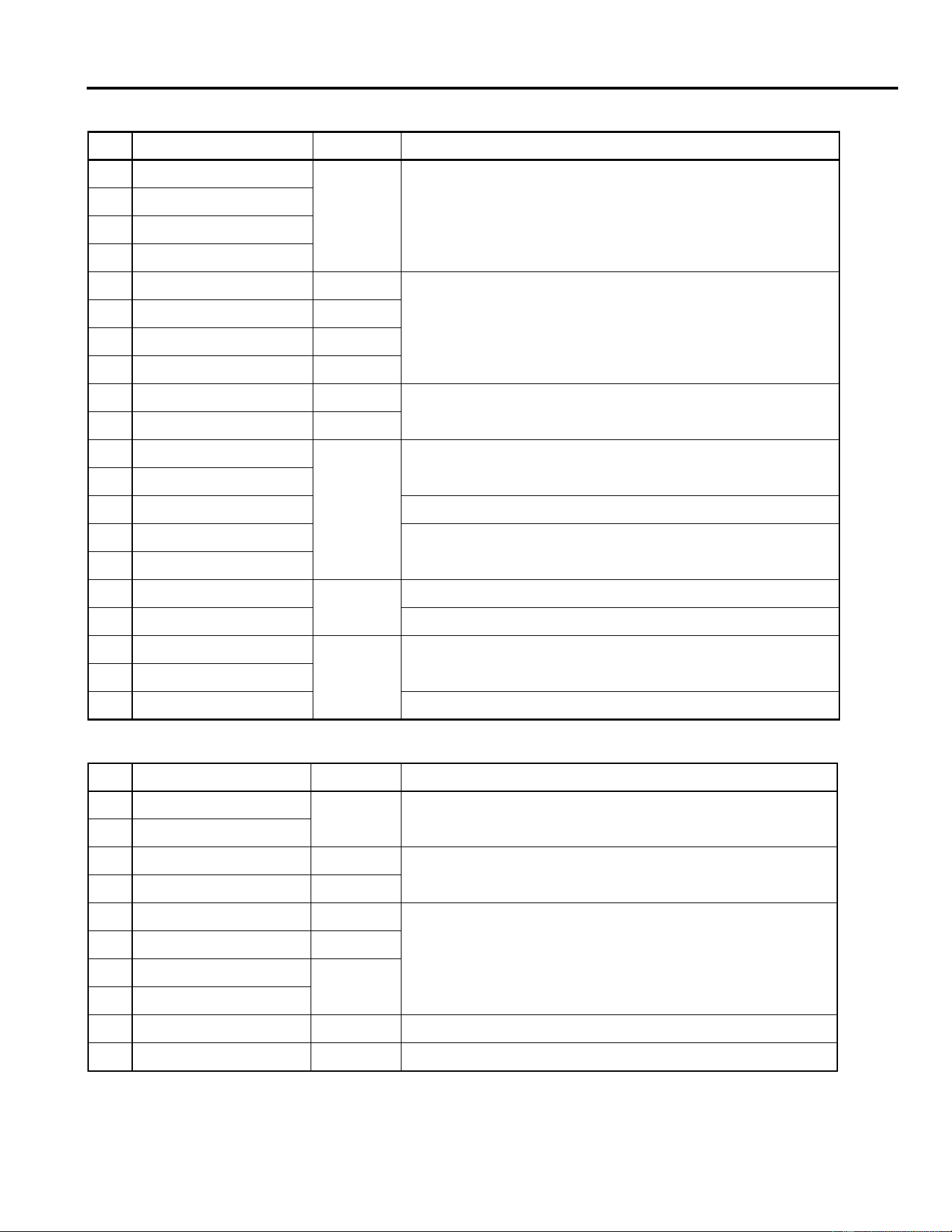
STEREO REVERB
No Name Type Description
21 Large Hall 1
Hall
These are hall-type reverb variations.”Stage” reverbs are brighter than
“Hall” reverbs
22 Large Hall 2
23 Stage 1
24 Stage 2
25 Chamber 1 Vocal
Image of a large chamber with a high ceiling
26 Chamber 2 Hall
27 Church 1 Room
28 Church 2 Hall
29 Old Tunnel Hall
Simulates sound inside a long tunnel. “Old” is dark and “New” is bright
30 New Tunnel Vocal
31 Large Room 1
Room
Room-type simulation. No.32 contains more low range than No.31
32 Large Room 2
33 Slide Reverb Reverb sound is panned to right
34 Huge Room 1
More dynamic than a room-type reverberation
35 Huge Room 2
36 Bathroom
Plate
Very short stereo reverb
37 String Ensemble Spacious reverb suitable for strings
38 Rude Reverb 1
Vocal
Rough reverberation
39 Rude Reverb 2
40 Concert Grand Piano Suitable for an acoustic piano
GATE REVERB
No Name Type Description
41 Small Ambience 1
Hall
Simulates a room with smaller reflections. No.42 has been made by
cutting the low range of No.41
42 Small Ambience 2
43 Tight Room 1 Room
Simulates a room smaller than “Small Ambience” reverbs
44 Tight Room 2 Hall
45 Gate Reverb 1 Plate
Gate reverb variations
46 Gate Reverb 2 Vocal
47 Gate Reverb 3
Hall
48 Gate Reverb 4
49 Stone Room Room Simulates a room made of stone
50 Big Curve Vocal The longest reverb in the gate reverbs
Operation
4
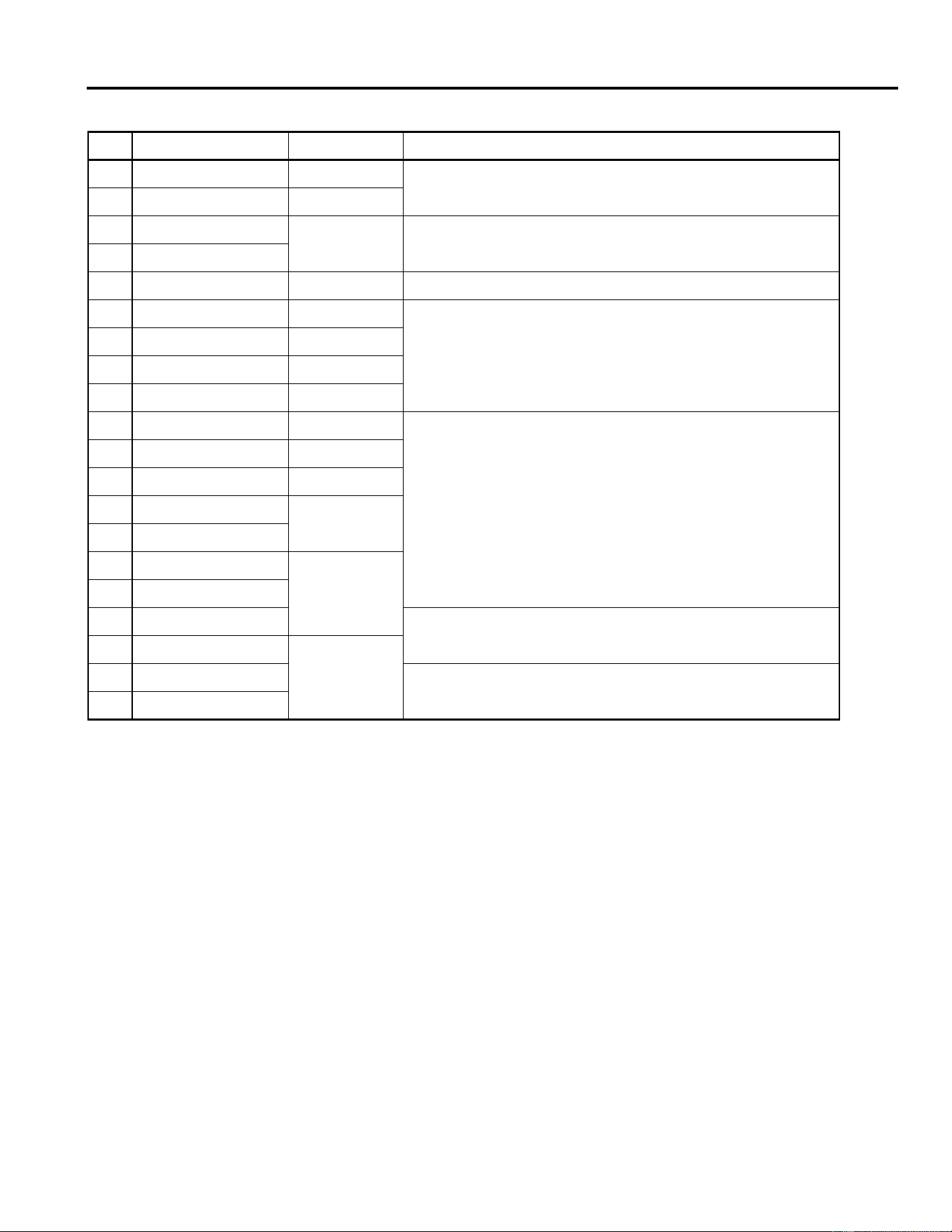
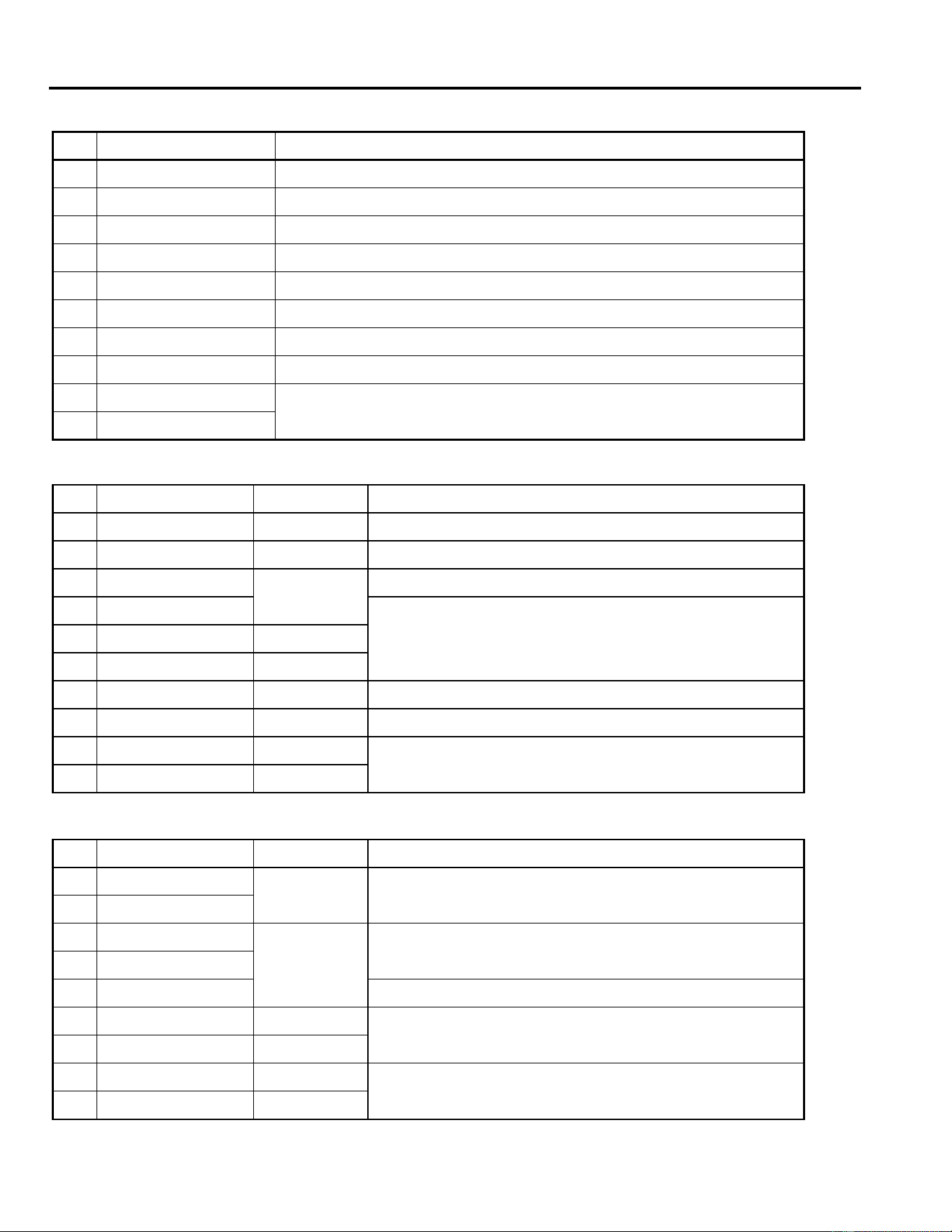
DELAY
No Name Description
51 Analog Delay 1 Soft delay sound
52 Ping Pong Delay Delay sound is panned between left and right
53 Eighth Note Triplet Ping-pong delay that sounds like eight note triplets
54 Karaoke Echo used for Karaoke
55 Short Delay Doubler Very short, one-time delay
56 Stereo Long Delay Stereo delay with the same length for the left and right channels
57 Stereo Medium Delay Stereo delay with different length channels
58 Stereo Short Delay Short delay with the same length channels
59 Mono Long Delay
Repeat delay with mono output
60 Mono Short Delay
DELAY/REVERB
No Name Type Description
61 Electric Piano DLY+Hall Mainly used for electric pianos
62 String Pad DLY
→
Hall Suitable for pad-type sound
63 Synth
DLY
→
Vocal
Suitable for pad strings
64 Vocal 1
Preset No.64 and No.65 are longer reverbs with a slight delay, suit-
able for vocal. Preset No.66 is a short reverb, with delay emphasized
65 Vocal 2 DLY
→
Hall
66 Vocal 3 DLY
+
Room
67 Bright Vocal DLY
→
Plate Bright reverb, with very subtle delay
68 Chorus DLY+Plate 50% of delay and 50% of reverb are combined
69 Drum Kit 1 DLY+Room
Ambience effect for drums and percussion
70 Drum Kit 2 DLY
→
Plate
REVERB/MODULATION
No Name Type Description
71 Soft Flange 1
Hall+
FLG
This effect combines thin flanging effect with a small pitch variation,
and reverberation, suitable for pad-type synth sounds
72 Soft Flange 2
73 Ambience Flange 1
Room
→
FLG
Flanging effect has been added to a short reverb
74 Ambience Flange 2
75 Short Reverb Flange
A very short reverb has been added to the flange effect with a larger
pitch variation
76 Organ Cabinet 1 Plate
→
FLG
Flange effect suitable for organ sounds
77 Organ Cabinet 2 Room
→
SYM
78 Symphonic Reverb 1 Hall+SYM
Elegant effect mainly based on reverberation
79 Symphonic Reverb 2 Vocal+SYM
Operation
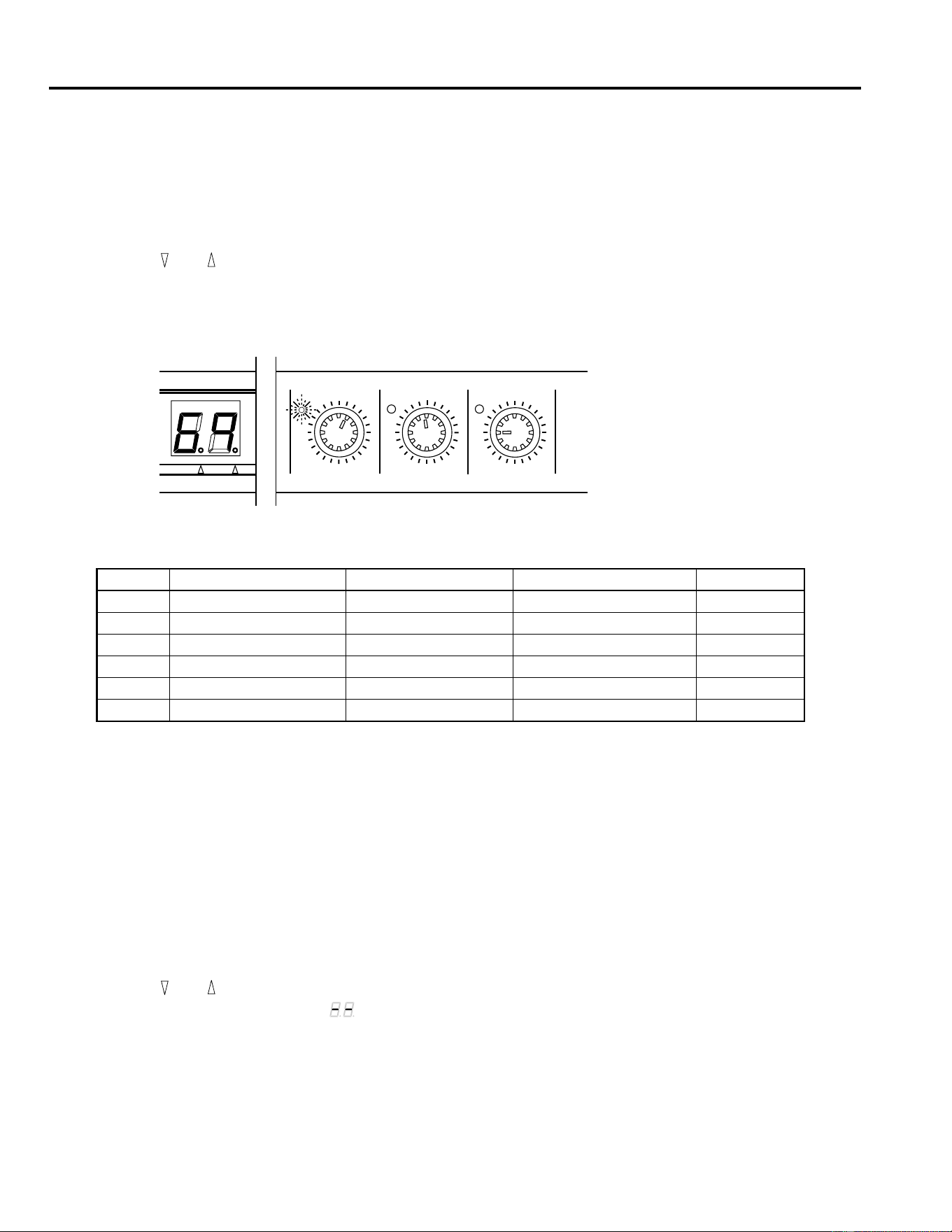
5
80 Flange Room 1 Vocal
→
FLG
Use these effects to make your drum or percussion sound very
unique and strange
81 Flange Room 2 Room+FLG
82 Rolling Flange 1
Plate+FLG
Use these effects to make your drum or percussion sound rather
strange
83 Rolling Flange 2
84 Big Flange Vocal
→
FLG Jet machine effects
85 Chorus Reverb 1 Hall+CHO
Preset No.85 and No.86 are normal chorus/reverb, and can be used
for many applications such as electric piano
86 Chorus Reverb 2 Plate+CHO
87 Chorus Reverb 3 Hall+CHO
88 Chorus Reverb 4 Vocal+CHO
89 Tremolo Reverb 1 Hall+TRM
Tremolo and Reverb variation that has a tremolo effect of panning
sound
90 Tremolo Reverb 2 Room
→
TRM
91 Tremolo Reverb 3 Plate+TRM
92 Tremolo Reverb 4
Vocal+TRM
93 Tremolo Reverb 5
94 Tremolo Reverb 6
Hall+TRM95 Tremolo Reverb 7
96 Ambient Slow Pan 1
Sound with a short reverb is panned between left and right
97 Ambient Slow Pan 2
Room+TRM98 Sequence Pan 1
You can add panning effects to a song with a tempo of around 120.
Adjust the speed according to the tempo
99 Sequence Pan 2
REVERB/MODULATION
No Name Type Description
Edit Mode
6
3. Edit Mode
Each of the effects in the REV100 has several parameters. Three of the most effective parameters can be edited using the rotary
controls for quick, versatile, and simple operation.
Editing a Program
1.
Press the and keys until the desired program number is displayed on the 7-segment LED.
2.
Select one of the Edit controls, for example, the DELAY rotary control.
3.
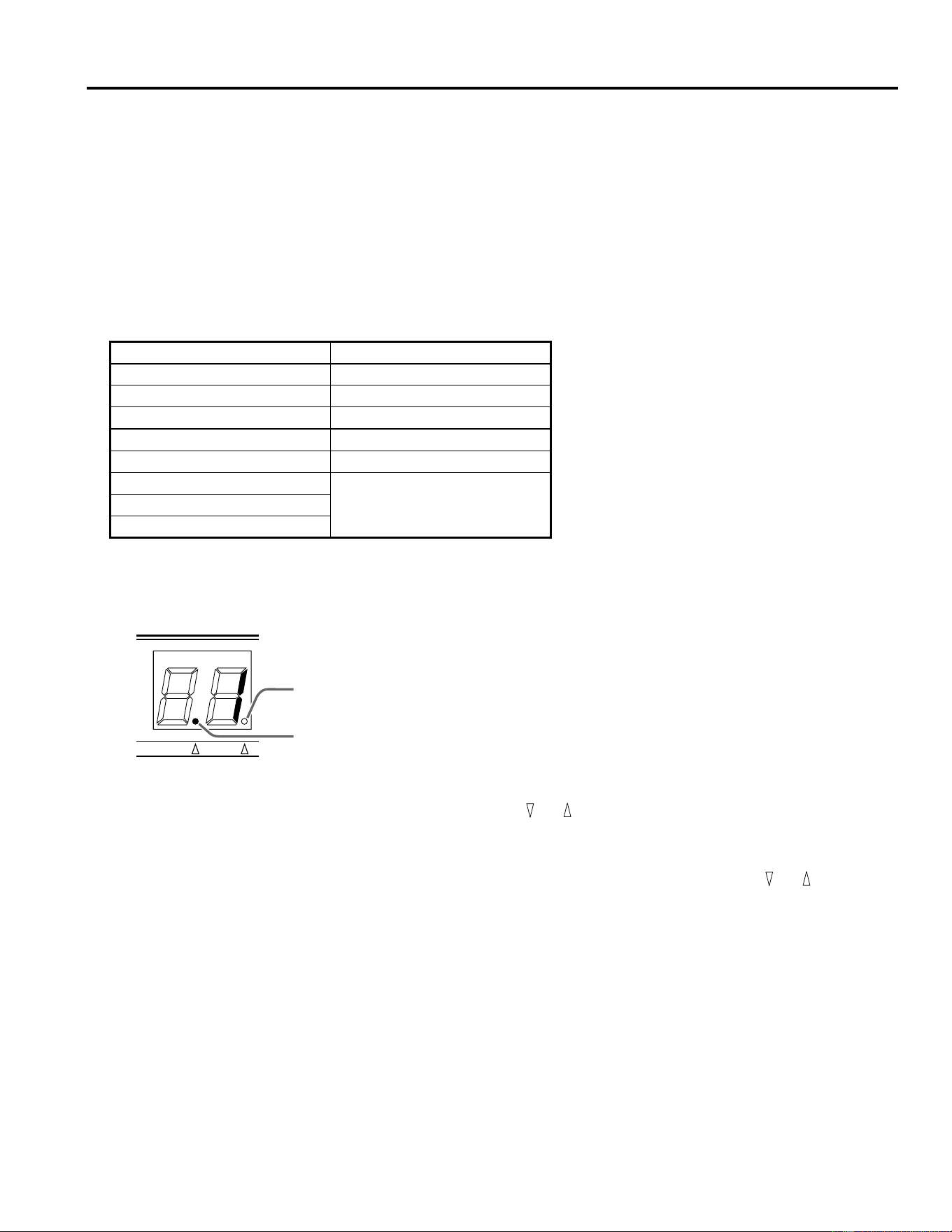
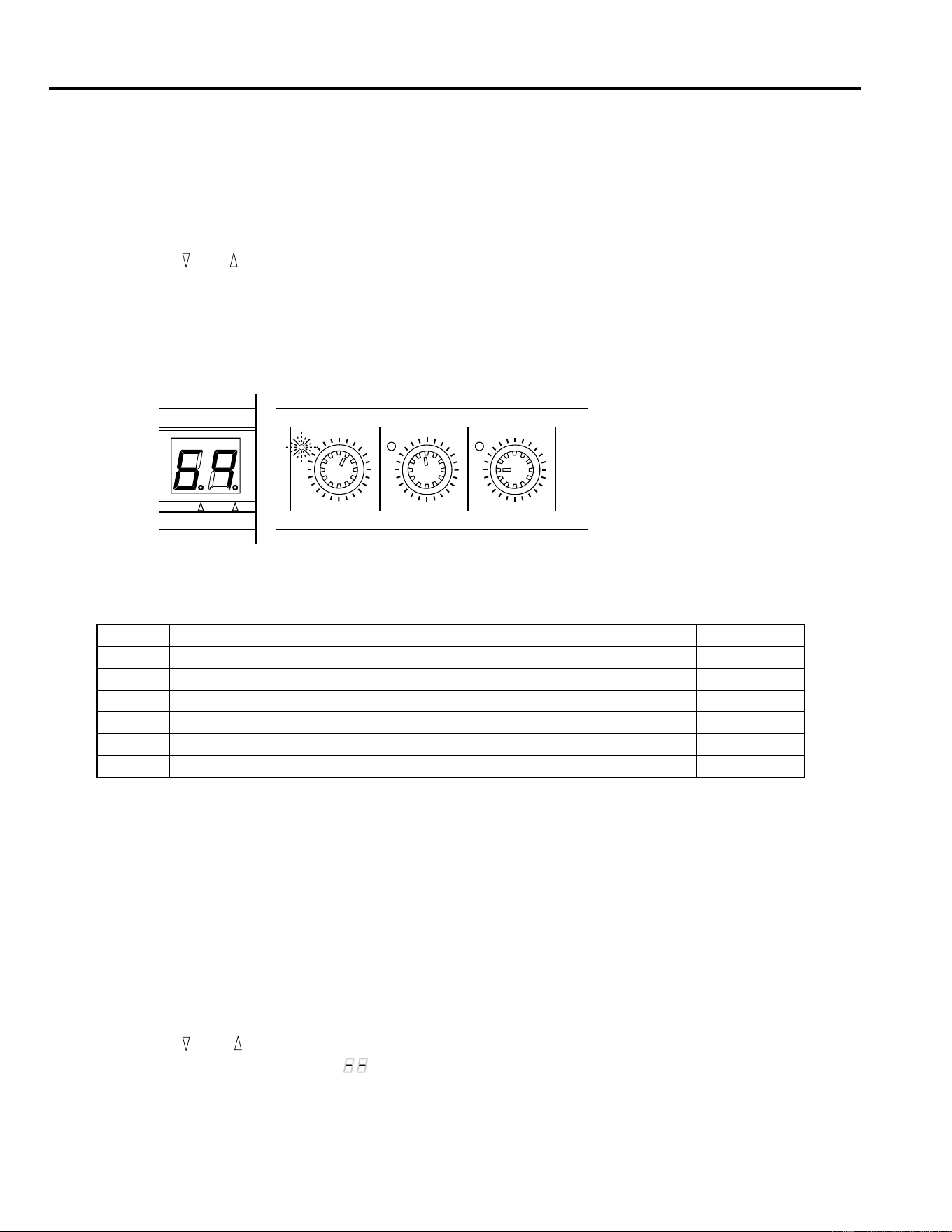
Rotate the control. The value on the 7-segment LED changes to reflect the adjustment you are making to the parameter.
When the parameter value you are editing matches the preset value, the LED beside the control lights up:
4.
Listen to the modified effect.
The following table lists the values that you can edit with the front panel controls:
Storing a Program
1.
Press the STORE key. The program number will flash on the 7-segment LED.
2.
Press the STORE key again to confirm the operation.
Note that you cannot select a different program number to store your changes in.
Initializing the REV100
The following procedure is used to initialize the programs 1 to 99 (one selected program or all the programs) to the factory default
condition:
1.
Turn on the power to the REV100 while holding down the STORE key.
2.
Press the and keys to select the program number you wish to initialize.
When the 7-segment LED displays “ ”, all the programs 1 to 99 will be initialized.
3.
Press the STORE key to execute the initialization.
No. Effect Type Delay Decay Level
1 - 20 REVERB Pre Delay (msec) Reverb Time (
×
0.1sec) Effect Level
21 - 40 STEREO REVERB Pre Delay (msec) Reverb Time (
×
0.1sec) Effect Level
41 - 50 GATE REVERB Pre Delay (msec) Noise Gate Level Effect Level
51 - 60 DELAY Delay Time (
×
10msec) Feedback Level Effect Level
61 - 70 DELAY/REVERB Delay Time (
×
10msec) Feedback Level Reverb Level
71 - 99 REVERB/MODULATION Modulation Depth Modulation Speed Reverb Level
DELAY
MIN MAX
DECAY
MIN MAX
LEVEL
MIN MAX
MIDI INT
MIDI Mode
7
4. MIDI Mode
A MIDI IN connection is provided so that the REV100 effects programs can be selected and modified using MIDI messages.
MIDI Program Change Table
The REV100 has a MIDI Program Change table in memory which you can edit to re-order the effects programs. You can create
a table of program numbers which correspond to MIDI Program Change numbers 1 to 99. When the REV100 receives a MIDI
Program Change message, it will select the internal program number that corresponds to the MIDI number in the message. The
REV100 will ignore MIDI Program Change numbers 100 or greater.
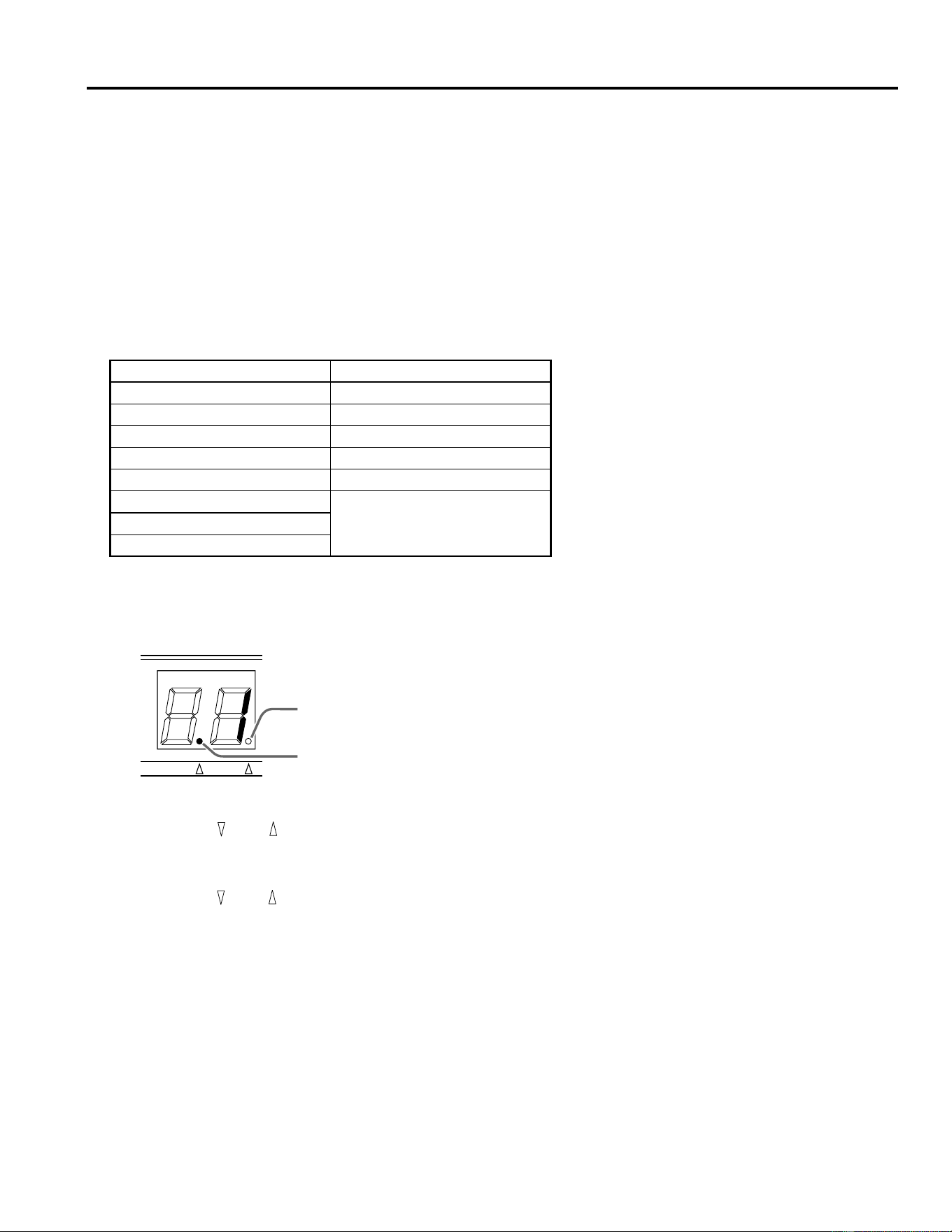
The following table illustrates the correspondence between the MIDI Program Change numbers and the internal program numbers:
Setting the MIDI Program Change Table
1.
Press the MIDI key. The MIDI indicator dot will light up on the 7-segment LED:
When the MIDI indicator is lit, the 7-segment LED displays the current MIDI Program Change number.
2.
Select another MIDI Program Change number by pressing the or keys.
3.
To select the internal program numbers, press the MIDI key again. The MIDI indicator dot is switched off and the INT
indicator dot will light up.
4.
Modify the internal program number for the selected MIDI Program Change number by pressing the or keys.
5.
To quit this mode, press and hold the MIDI key for approximately one second. The current indicator, either the MIDI indicator
or the INT indicator will switch off and the 7-segment LED will display the currently selected program number.
MIDI Program Number REV100 Program Number
110
25
322
... ...
99 1
100
ignored...
128
MIDI INT
MIDI indicator dot
INT indicator dot
MIDI Mode
8
Setting the MIDI Receive Channel
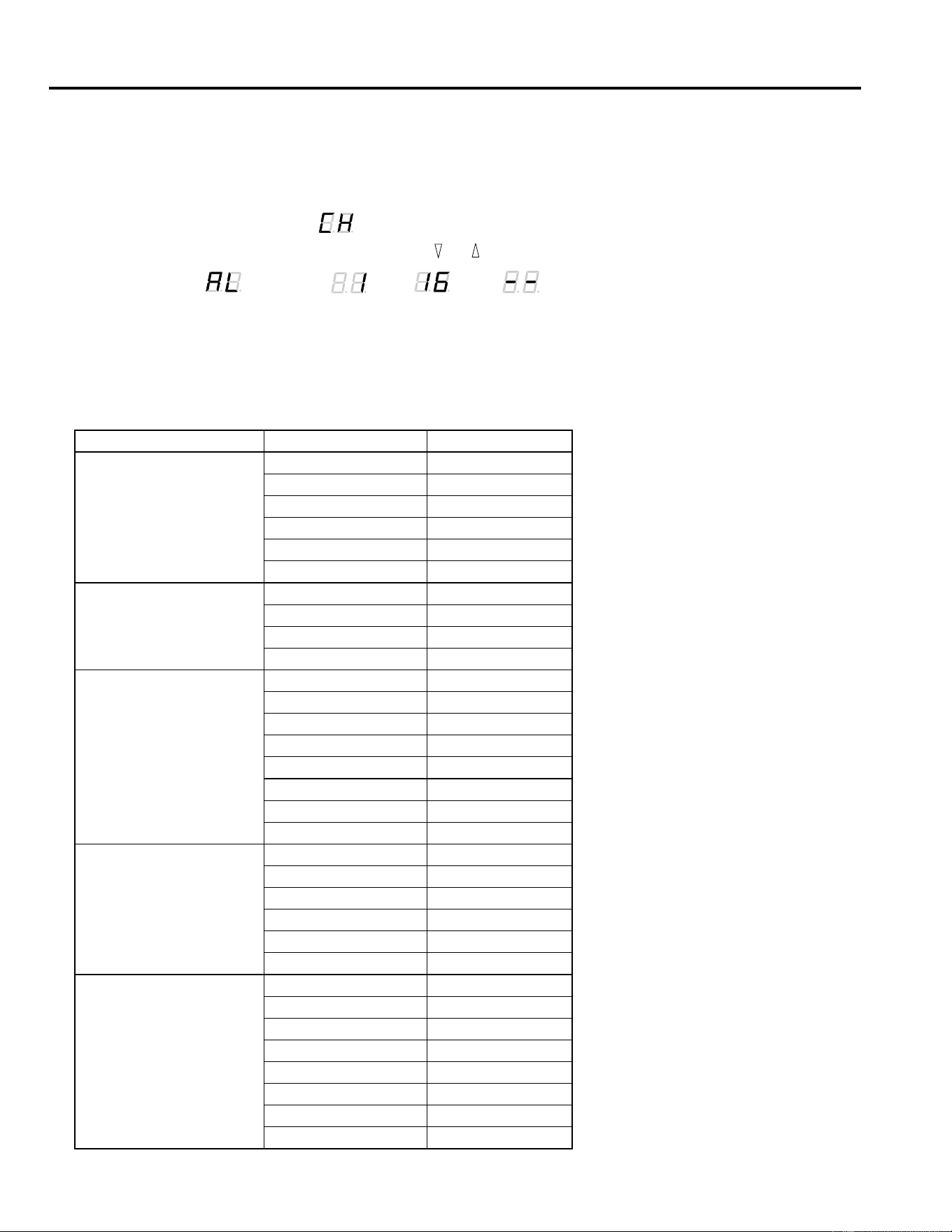
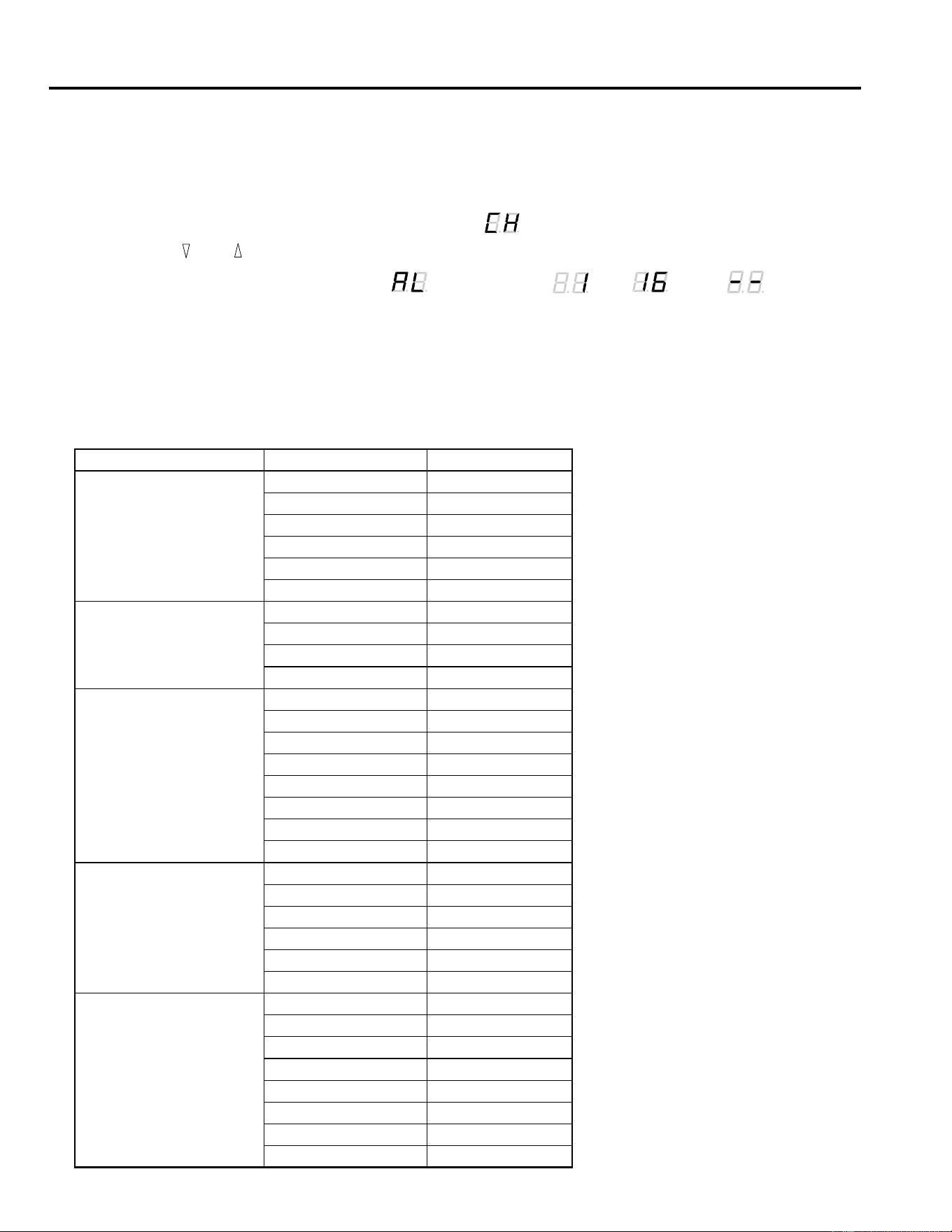
By default, the REV100 is set to receive MIDI on all channels (OMNI mode). You can change this default with the following pro-
cedure:
1.
Press and hold the MIDI key as you switch on the power to the REV100.
The 7-segment LED will display “ ” and the current MIDI channel number alternately.
2.
Select another MIDI channel number by pressing the or keys.
You can select “ ” (OMNI), “ ” to “ ”, or “ ” (OFF).
3.
Press the MIDI key again to return to normal operational mode.
Real-time Parameter Change
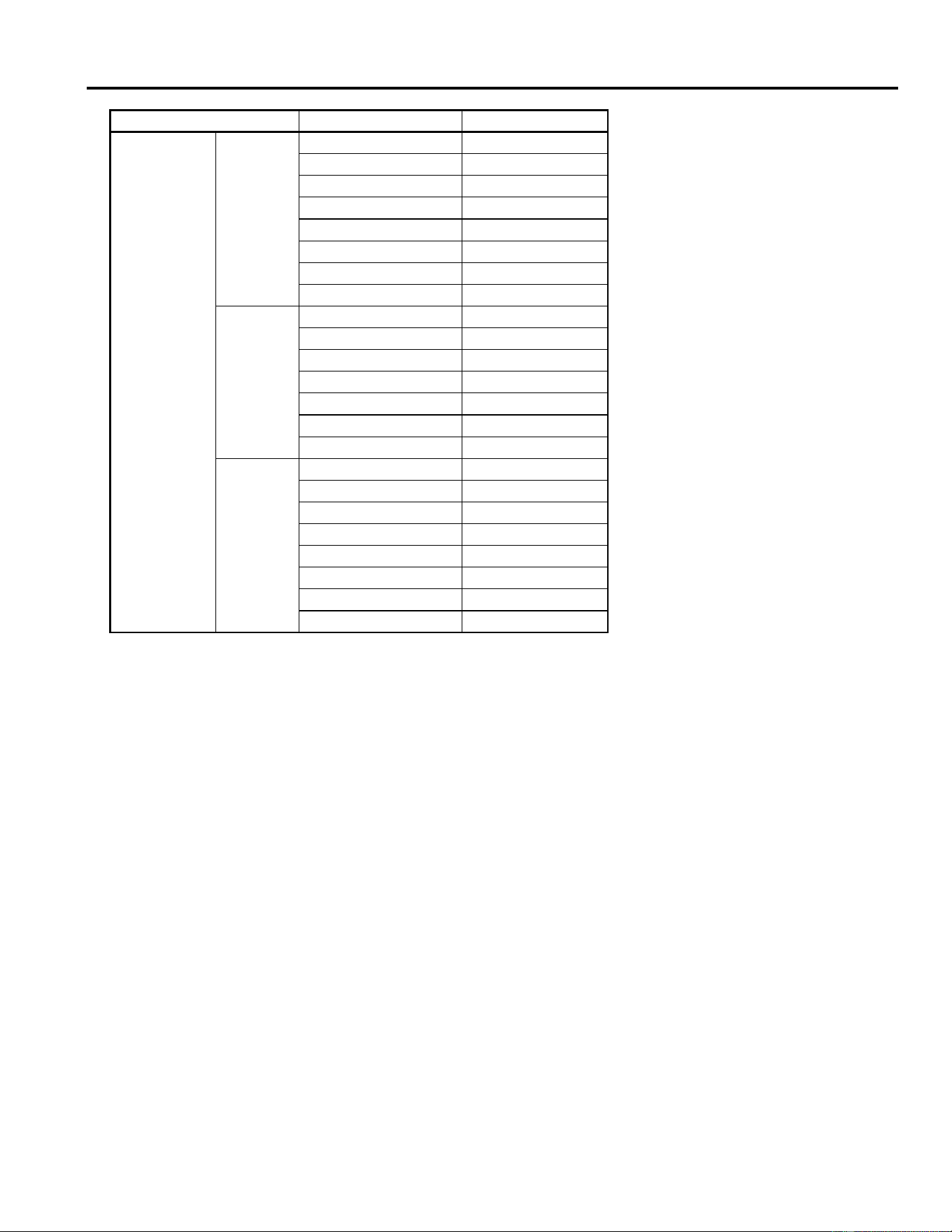
You can send MIDI Control Change messages to the REV100. Some of these messages perform the same function as the front
panel Edit controls, others allow you access to additional parameters:
Effect Type Parameter Name Controller Number
REVERB
Pre Delay 20
Reverb Time 21
Effect Level 22
High Damp 23
Filter Type (LPF/HPF) 24
Cut-off Frequency 25
STEREO REVERB
Pre Delay 20
Reverb Time 21
Effect Level 22
High Damp 23
GATE REVERB
Pre Delay 20
Gate Level 21
Effect Level 22
Reverb Time 23
High Damp 24
Release Time 25
Filter Type (LPF/HPF) 26
Cut-off Frequency 27
DELAY
Delay Time 20
Feedback Level 21
Effect Level 22
High Damp 23
Filter Type (LPF/HPF) 24
Cut-off Frequency 25
DELAY/REVERB
Delay Time 20
Feedback Level 21
Reverb Level 22
Reverb Time 23
Reverb High Damp 24
Delay High Damp 25
Filter Type (LPF/HPF) 26
Cut-off Frequency 27
MIDI Mode
9
Control Change Value 00H = MIN parameter value
Control Change Value 7FH = MAX parameter value
If you require the system exclusive message format for the REV100, please contact your local Yamaha Sales Centre.
REVERB/
MODULATION
Flanger
Modulation Depth 20
Modulation Speed 21
Reverb Level 22
Reverb Time 23
Reverb High Damp 24
Resonance 25
Filter Type (LPF/HPF) 26
Cut-off Frequency 27
Chorus
and
Symphonic
Modulation Depth 20
Modulation Speed 21
Reverb Level 22
Reverb Time 23
Reverb High Damp 24
Filter Type (LPF/HPF) 25
Cut-off Frequency 26
Tremolo
Modulation Depth 20
Modulation Speed 21
Reverb Level 22
Reverb Time 23
Reverb High Damp 24
Phase 25
Filter Type (LPF/HPF) 26
Cut-off Frequency 27
Effect Type Parameter Name Controller Number
MIDI Data Format
Reception format
Progaram Change
status 1100 nnnn(CnH)nnnn = channel No. *1
1st data 0ppp pppp ppppppp = program No. *2
Control Change
You can control the parameters using Control Change mes-
sages. Refer to page 8 “Real time parameter change” for the
Control numbers.
status 1011 nnnn(BnH) nnnn = channel No. *1
1st data 000c cccc ccccc = control No. *3
2nd data 0vvv vvvv vvvvvvv = control Value
*4
Parameter Change
status 1111 0000(Foh) System exclusive
ID No. 0100 0011(43h) YAMAHA
substatus 0001 nnnn nnnn = channel No.
*1
group No. 0001 1110(1Eh) PA group
device code 0000 0004(04h) REV100
parameter No. 0000 pppp parameter No. *5
0000 pppp
data 0000 aaaa 1st byte *6
0000 bbbb 2nd byte
EOX 1111 0111(F7h) End of exclusive
*1 nnnn = 0 (channel 1) –15 (channel 16)
*2 ppppppp = 0 (program 1) – 98 (program 99)
Program numbers after 99 will be ignored.
*3 ccccc = 20 – 27 Depends on the effect type. (See page 8)
*4 vvvvvvv = 0 – 127
*5, *6 Depends on the effect type and parameter.
(Please consult your local Yamaha Sales Centre.)
Specifications
10
5. Specifications
General specifications
ELECTRICAL CHARACTERISTICS
Frequency Response 20 Hz ~ 20 kHz
Dynamic Range 80 dB (typical)
Distortion less than 0.1% (1 kHz, max.
level)
INPUT
Number of Channels 2 (phone jack)
Nominal Level –10 dB
Impedance 20 kΩ (STEREO)
10 kΩ (L-MONO)
OUTPUT
Number of Channels 2 (phone jack)
Nominal Level –10 dB
Impedance 2 kΩ (STEREO)
1 kΩ (L-MONO)
AD / DA CONVERSION
AD Conversion 16 bit
DA Conversion 16 bit
Sampling Frequency 44.1 kHz
PROGRAM
Program Number 99
FRONT PANEL
Switches , , MIDI, STORE, POWER
Rotary Controls INPUT LEVEL, MIX BALANCE,
DELAY, DECAY, LEVEL
Display 7-segment LED × 2
PEAK L R
DELAY, DECAY, LEVEL
REAR PANEL
Jacks INPUT L (MONO), R
OUTPUT L (MONO), R
MIDI IN (DIN 5P), DC 12V IN
POWER SUPPLY DC 12V
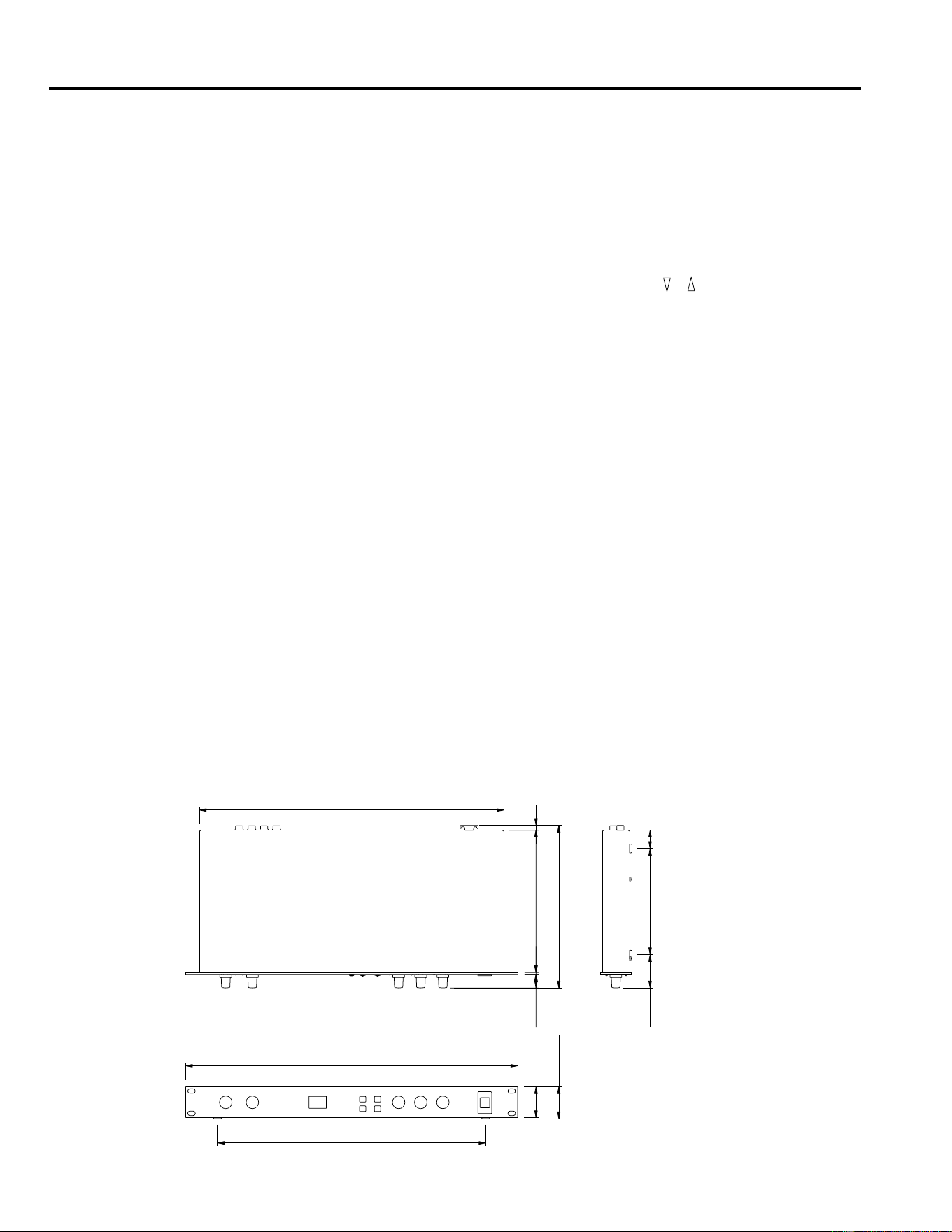
DIMENSIONS (W × H × D) 480 mm × 45 mm × 232 mm
WEIGHT 2.5 kg
ACCESSORY AC Adapter
* Dynamic range is measured with a 6 dB/octave LPF at 12.7 kHz — equivalent to a 20 kHz LPF with infinite dB/octave
attenuation.
* 0 dB = 0.775V RMS
* Specifications and appearance are subject to change without notice.
Dimensions
19.4 2.6 203
D: 232
7
440
26151.547.5
H:45
44
388
W:480

APPAREIL DE RÉVERBÉRATION NUMÉRIQUE
MANUEL D’INSTRUCTIONS
Français

Introduction
Le REV100 est un appareil de réverbération de qualité, abordable et simple à utiliser. Il vous rendra de grands services aussi bien
dans votre studio personnel qu’avec un petit système d’amplification. Il s’agit s’un véritable processeur stéréo doté de deux entrées
et deux sorties.
Outre une réverbération stéréo de haute qualité, le REV100 vous propose des effets de réverbération & delay ainsi que de modula-
tion & réverbération. Le convertisseur 16 bits A/N et N/A offre une qualité de son exceptionnelle ainsi qu’une large réponse en
fréquence grâce à la vitesse d’échantillonnage de 44,1kHz.
Le REV100 est un appareil facile à manier, pourvu de commandes rotatives pour régler les niveaux et éditer des paramètres. Une
connexion MIDI IN est comprise de sorte que les programmes d’effet peuvent également être sélectionnés au moyen de messages
MIDI.
Pour profiter au maximum des atouts que vous offre votre REV100, veuillez lire attentivement ce manuel et le ranger soigneuse-
ment afin de pouvoir le consulter ultérieurement.
Précautions
1. Emplacement
Ne placez pas l’appareil dans un endroit où il risque d’être
exposé à des températures élevées ou une forte humidité
(évitez la proximité de radiateurs, poêles, etc). Evitez
également les endroits poussiéreux ou soumis à des vibra-
tions qui peuvent être à l’origine de dommages méca-
niques ainsi que les endroits sujets à des champs magné-
tiques importants, tels que la proximité de matériel de
transmission.
2. Evitez tout choc
Un choc relativement important peut endommager l’appa-
reil. Maniez-le donc avec soin.
3. N’ouvrez pas le boîtier et n’essayez pas d’effectuer des
réparations vous-même
Cet appareil ne contient pas d’élément pouvant être réparé
par l’utilisateur. Veuillez donc confier toute réparation à
un technicien Yamaha qualifié. Toute tentative d’ouverture
du boîtier et de manipulation des circuits internes se sol-
dera par la perte du bénéfice de la garantie.
4. Coupez toujours l’alimentation avant de procéder à
des branchements
N’oubliez jamais de mettre les appareils hors tension avant
de brancher ou de débrancher des câbles afin de ne pas
endommager l’appareil lui-même ainsi que le matériel qui
y est branché.
5. Manipulez les câbles avec soin
Pour brancher et débrancher des câbles (y compris le câble
d’alimentation), prenez-le toujours par la prise et non par
le câble.
6. Nettoyez avec un chiffon doux et sec
N’utilisez jamais de solvants, tels que du benzène ou un
diluant pour nettoyer l’appareil. Prenez les poussières avec
un chiffon doux et sec.
7. Utilisez toujours une source d’alimentation adéquate
N’utilisez que l’adaptateur fourni par Yamaha pour mettre
l’appareil sous tension. Le recours à un autre adaptateur
risque d’endommager sérieusement l’appareil. Ne
branchez jamais l’appareil à un circuit de plusieurs appa-
reils branchés en cascade.
Table des matières
1. Commandes . . . . . . . . . . . . . . . . . 1
Panneau avant . . . . . . . . . . . . . . . . . . . . . . . . . 1
Panneau arrière . . . . . . . . . . . . . . . . . . . . . . . . . 1
2. Fonctionnement . . . . . . . . . . . . . . 2
Installation et connexions . . . . . . . . . . . . . . . . 2
Changement de programmes . . . . . . . . . . . . . . 2
3. Mode Edit . . . . . . . . . . . . . . . . . . . 6
Edition d’un programme . . . . . . . . . . . . . . . . . 6
Sauvegarde d’un programme . . . . . . . . . . . . . . 6
Initialisation du REV100 . . . . . . . . . . . . . . . . . 6
4. Mode MIDI . . . . . . . . . . . . . . . . . . 7
Tableau de changement de programme MIDI . 7
Réglage du tableau de changement de programme
MIDI . . . . . . . . . . . . . . . . . . . . . . . . . . . . . . . . 7
Réglage du canal de réception MIDI . . . . . . . . 8
Contrôle des paramètres en temps réel . . . . . . 8
MIDI Data Format . . . . . . . . . . . . . . . . . . . . . . 9
5. Fiche technique . . . . . . . . . . . . . . 10
Caractéristiques générales . . . . . . . . . . . . . . . 10
Dimensions . . . . . . . . . . . . . . . . . . . . . . . . . . 10
MIDI Implementation Chart
Commandes
1
1. Commandes
Panneau avant
Panneau arrière
DIGITAL REVERBERATOR
PEAK
LR
INPUT LEVEL
010
MIX BALANCE
DRY WET
DELAY
MIN MAX
DECAY
MIN MAX
LEVEL
MIN MAX
POWER
ON OFF
PROGRAM
MIDI
STORE
MIDI INT PGM CHANGE
1
21
41
51
61
71
-20
-40
-50
-60
-70
-99
REVERB
STEREO REV
GATE REV
DELAY
DLY/REV
MOD/REV
123 756
4
1 Commande INPUT LEVEL
Cette commande vous permet de régler le niveau d’entrée.
Vous devriez réglez le volume de telle façon que la diode
PEAK (L/R) ne clignote qu’occasionnellement.
2 Diodes PEAK (L/R)
Ces diodes s’allument lorsque le REV100 reçoit un signal
de niveau maximum.
3 Commande MIX BALANCE (DRY/WET)
Cette commande vous permet de régler la balance entre le
signal d’effet et le signal original.
4 Affichage à diodes (affichage à 7 segments, témoin
MIDI, témoin INT)
En mode Program, cet affichage à sept segments indique
le programme sélectionné. Il donne également la valeur
des paramètres lorsque le REV100 se trouve en mode Edit
et il donne les numéros de programme MIDI. Lorsque vous
choisissez le tableau des changements de programme
MIDI, le témoin MIDI s’allume tandis que lorsque vous
choisissez les programmes internes, le témoin INT
s’allume. Voyez “Réglage du tableau de changement de
programme MIDI” à la page 7.
5 Touches PROGRAM ( , , MIDI, STORE)
Ces touches vous permettent de sélectionner différents pro-
grammes, d’éditer le tableau de changement de programme
MIDI et de stocker les programmes modifiés.
6 Commandes Edit (DELAY, DECAY, LEVEL)
Ces commandes rotatives pilotent les paramètres de l’effet
choisi. Lorsque la valeur éditée d’un paramètre est la même
que celle qui est déjà sauvegardée, la diode située à gauche
de la commande s’allumera. Voyez “Edition d’un pro-
gramme” à la page 6.
7 Touche POWER
Appuyez sur cette touche pour mettre le REV100 sous ten-
sion.
MIDI INDC 12V IN
R L(MONO)
OUTPUT
R L(MONO)
INPUT
2
1
34
1 Connexion DC 12V IN
Branchez l’adpatateur fourni avec l’appareil ici.
2 Borne MIDI IN
Le REV100 reçoit des données MIDI via cette borne.
3 Bornes OUTPUT
Ces bornes 1/4" servent à envoyer le signal traité du
REV100. Si vous l’utilisez en mono, branchez une prise
jack à la borne L-MONO uniquement.
4 Bornes INPUT
Ces bornes 1/4" servent à recevoir le signal brut de la
source. Si la source est mono, branchez une prise jack à la
borne L-MONO uniquement.
Fonctionnement
2
2. Fonctionnement
REVERB
No Nom Type Description
1 Vocal Rev 1 Vocal Réverbération recommandée pour le chant.
2 Vocal Rev 2 Hall
Le No. 3 a un pré-delay plus long et un temps de réverbération plus
court.
3 Vocal Rev 3 Vocal
4 Room Ambience 1
Plate
Ces programmes sont principalement destinés à la batterie et per-
cussion. Vous pouvez les utiliser pour l’ensemble de percussion ou
juste pour quelques instruments tels que la caisse claire ou la grosse
caisse, par exemple.
5 Room Ambience 2
6 Room Ambience 3
7 Wood Booth 1
Vocal8 Wood Booth 2
9 Acoustic Piano Plate
Réverbération pour piano acoustique.
10 Club Piano
Hall
11 Booming Kick 1
Réverbération pour grosse caisse avec une plage grave soutenue.
12 Booming Kick 2
Room
13 Loud Snare Réverbération pour accentuer la caisse claire.
14 Acoustic Steel Guitar 1
Plate
Réverbération pour guitare acoustique avec cordes métalliques.
15 Acoustic Steel Guitar 2
16 String Plate Réverbération recommandée pour cordes.
17 Acoustic Gut Guitar 1
Vocal Réverbération pour guitares acoustiques avec cordes nylon.
18 Acoustic Gut Guitar 2
19 Brass Room 1
Room Réverbération plus courte et plus brillante pour cuivres.
20 Brass Room 2
Installation et connexions
Installez le REV100 dans un rack ou placez-le dans un endroit sûr
et stable. Branchez l’adaptateur à la borne DC 12 IN puis raccor-
dez-le à une prise secteur. Pour éviter que l’alimentation ne soit
accidentellement coupée, accrochez le câble à l’ancre.
Appuyez sur la touche POWER pour mettre le REV100 sous ten-
sion.
Changement de programmes
Avec les touches et vous pouvez choisir différents pro-
grammes. Le REV100 vous propose 99 programmes:
DIGITAL
MODEL REV100
MADE IN JAPAN
DC 12V IN
Fonctionnement
3
STEREO REVERB
No Nom Type Description
21 Large Hall 1
Hall
Vous trouverez ici des variations sur les réverbérations de type Hall.
Les réverbérations de type “Stage” sont plus brillantes que celles de
type “Hall”.
22 Large Hall 2
23 Stage 1
24 Stage 2
25 Chamber 1 Vocal
Image d’une grande pièce haute de plafond.
26 Chamber 2 Hall
27 Church 1 Room
28 Church 2 Hall
29 Old Tunnel Hall
Simule le son dans un long tunnel. “Old” est plus sombre et “New” est
plus brillant.
30 New Tunnel Vocal
31 Large Room 1
Room
Réverbération de chambre.Le No. 32 contient davantage de basses
fréquences que le No. 31.
32 Large Room 2
33 Slide Reverb La réverbération se déplace vers la droite.
34 Huge Room 1
Un peu plus dynamique qu’une réverbération de type “Room”.
35 Huge Room 2
36 Bathroom
Plate
Réverb stéréo très brève.
37 String Ensemble Réverb très spacieuse, idéale pour cordes.
38 Rude Reverb 1
Vocal
Réverbération grossière.
39 Rude Reverb 2
40 Concert Grand Piano Réverbération qui rend un son de grand piano encore plus beau.
GATE REVERB
No Nom Type Description
41 Small Ambience 1
Hall
Simule une pièce avec peu de réflexions. Le No. 42 a été créé en cou-
pant les basses fréquences du No. 41.
42 Small Ambience 2
43 Tight Room 1 Room
Simule une pièce plus petite que celle suggérée par “Small Ambien-
ce”.
44 Tight Room 2 Hall
45 Gate Reverb 1 Plate
Diverses réverbérations avec effet porte.
46 Gate Reverb 2 Vocal
47 Gate Reverb 3
Hall
48 Gate Reverb 4
49 Stone Room Room Simule une pièce faite en pierre.
50 Big Curve Vocal La plus longue version des réverbérations gate.
Fonctionnement
4
DELAY
No Nom Description
51 Analog Delay 1 Son Delay doux.
52 Ping Pong Delay Delay reproduit alternativement à droite et à gauche.
53 Eighth Note Triplet Delay Ping Pong, qui sonne comme des triolets de croches.
54 Karaoke Echo utilisé pour le karaoke.
55 Short Delay Doubler Delay très court avec une seule répétition.
56 Stereo Long Delay Delay stéréo avec la même longueur pour les canaux droit et gauche.
57 Stereo Medium Delay Delay stéréo avec des longueurs différentes pour les canaux.
58 Stereo Short Delay Delay stéréo court avec la même longueur pour les canaux droit et gauche.
59 Mono Long Delay
Delay répétitif avec sortie stéréo.
60 Mono Short Delay
DELAY/REVERB
No Nom Type Description
61 Electric Piano DLY+Hall Idéal pour pianos électriques.
62 String Pad DLY
→
Hall Parfait pour des accords.
63 Synth
DLY
→
Vocal
Recommandé pour des accords de violons.
64 Vocal 1
Les programmes no. 64 et 65 sont des réverbérations plus longues
avec une touche de delay et se destinent particulièrement au chant.
Le programme 66 est une courte réverbération avec un retard accen-
tué.
65 Vocal 2 DLY
→
Hall
66 Vocal 3 DLY
+
Room
67 Bright Vocal DLY
→
Plate Réverbération brillante avec un delay très subtil.
68 Chorus DLY+Plate Combinaison de 50% de delay et 50% de réverbération.
69 Drum Kit 1 DLY+Room
Effet ambiance pour batterie et percussion.
70 Drum Kit 2 DLY
→
Plate
REVERB/MODULATION
No Nom Type Description
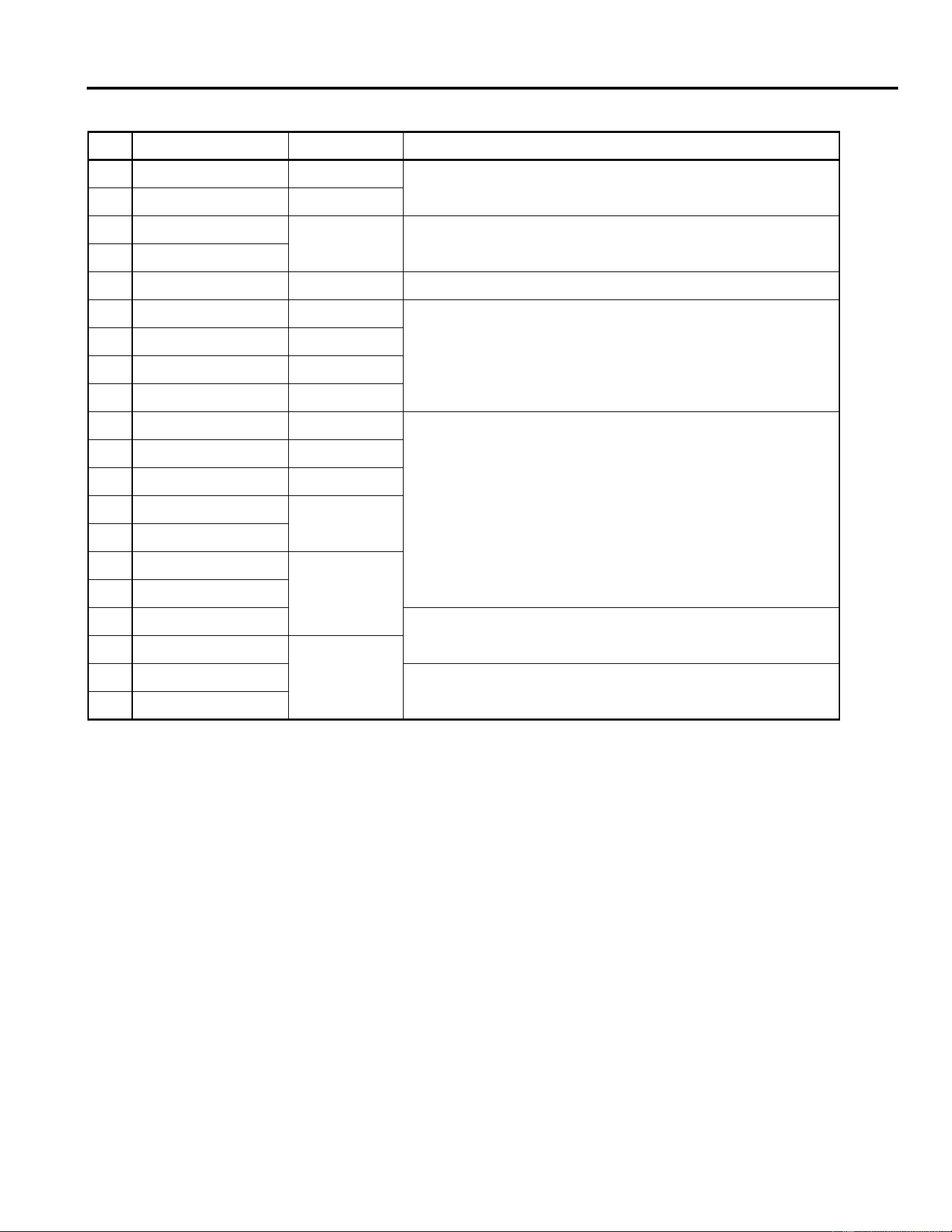
71 Soft Flange 1
Hall+
FLG
Léger flanger avec une petite variation de hauteur et réverbération;
idéal pour des sons de type “Pad”.
72 Soft Flange 2
73 Ambience Flange 1
Room
→
FLG
Effet de flanger ajouté à une courte réverbération.
74 Ambience Flange 2
75 Short Reverb Flange Réverb très courte ajoutée à l’effet de flanger.
76 Organ Cabinet 1 Plate
→
FLG
Effet flanger pour sons d’orgue.
77 Organ Cabinet 2 Room
→
SYM
78 Symphonic Reverb 1 Hall+SYM
Effet élégant, basé principalement sur la réverbération.
79 Symphonic Reverb 2 Vocal+SYM
Fonctionnement
5
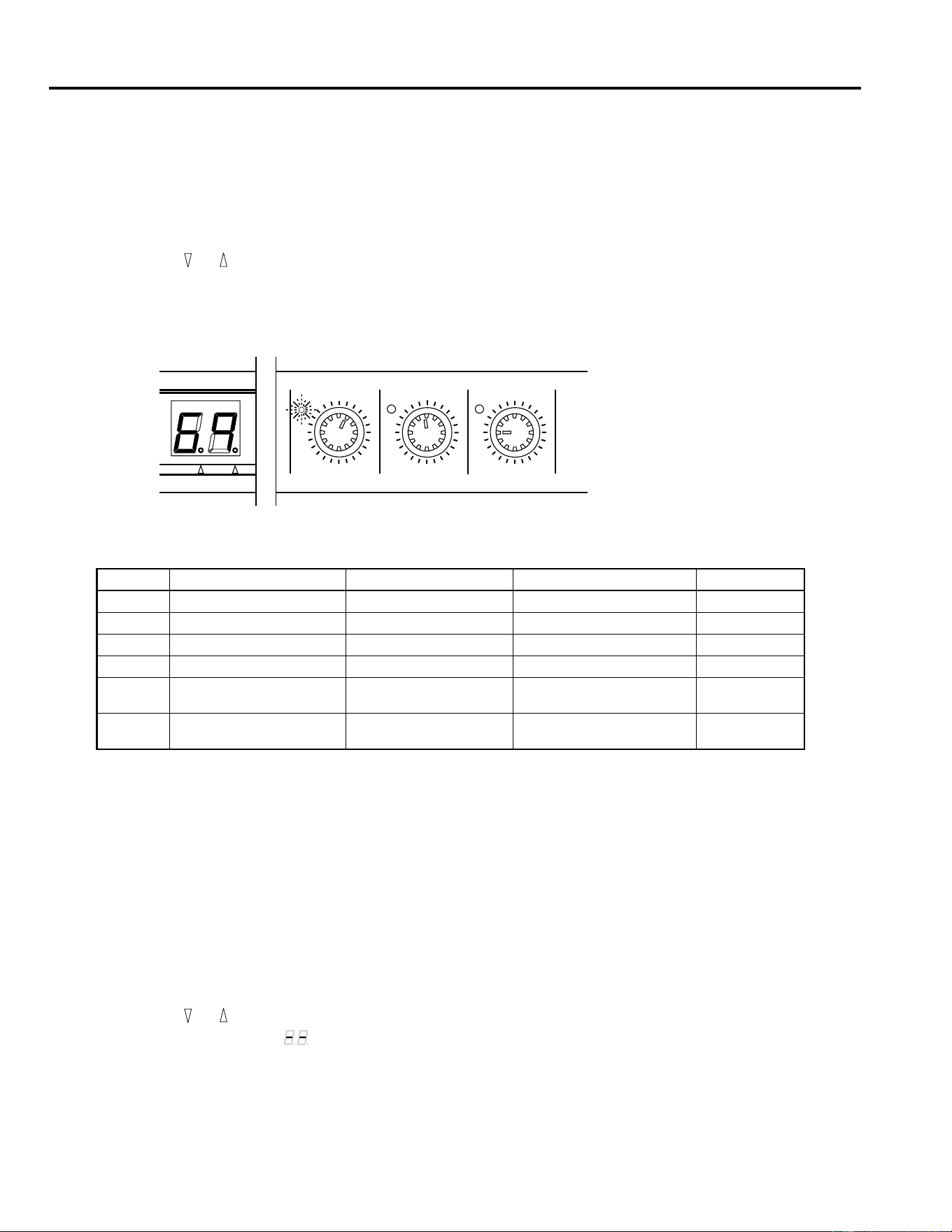
80 Flange Room 1 Vocal
→
FLG
Utilisez ces effets pour rendre votre batterie et percussion unique et
étrange.
81 Flange Room 2 Room+FLG
82 Rolling Flange 1
Plate+FLG
Utilisez ces effets pour rendre votre batterie et percussion inhabituel-
le.
83 Rolling Flange 2
84 Big Flange Vocal
→
FLG Le fameux effet d’avion à réaction.
85 Chorus Reverb 1 Hall+CHO
Les programmes 85 et 86 sont des combinaisons normales de cho-
rus/réverb et ont un champ d’application très large (essayez avec un
piano électrique!).
86 Chorus Reverb 2 Plate+CHO
87 Chorus Reverb 3 Hall+CHO
88 Chorus Reverb 4 Vocal+CHO
89 Tremolo Reverb 1 Hall+TRM
Variations trémolo & réverb doté d’un effet trémolo de son réparti en-
tre les deux canaux.
90 Tremolo Reverb 2 Room
→
TRM
91 Tremolo Reverb 3 Plate+TRM
92 Tremolo Reverb 4
Vocal+TRM
93 Tremolo Reverb 5
94 Tremolo Reverb 6
Hall+TRM95 Tremolo Reverb 7
96 Ambient Slow Pan 1
Le signal original est brièvement réverbéré et chassé de gauche à
droite.
97 Ambient Slow Pan 2
Room+TRM98 Sequence Pan 1
Vous pouvez utilisez ces effets panorama pour des morceaux relati-
vement rapides (
±
120 bpm). Réglez la vitesse en fonction du tempo.
99 Sequence Pan 2
REVERB/MODULATION
No Nom Type Description
Mode Edit
6
3. Mode Edit
Tout effet du REV100 a plusieurs paramètres. Trois des paramètres les plus importants sont directement accessibles: la commande
rotative permet de les éditer rapidement, aisément et avec souplesse.
Edition d’un programme
1.
Appuyez sur et , jusqu’à ce que le numéro du programme voulu apparaisse sur l’affichage.
2.
Choisissez ensuite une des commandes d’édition, par exemple, la commande DELAY.
3.
Tournez la commande. La valeur sur l’affichage change pour refléter les changements que vous faites.
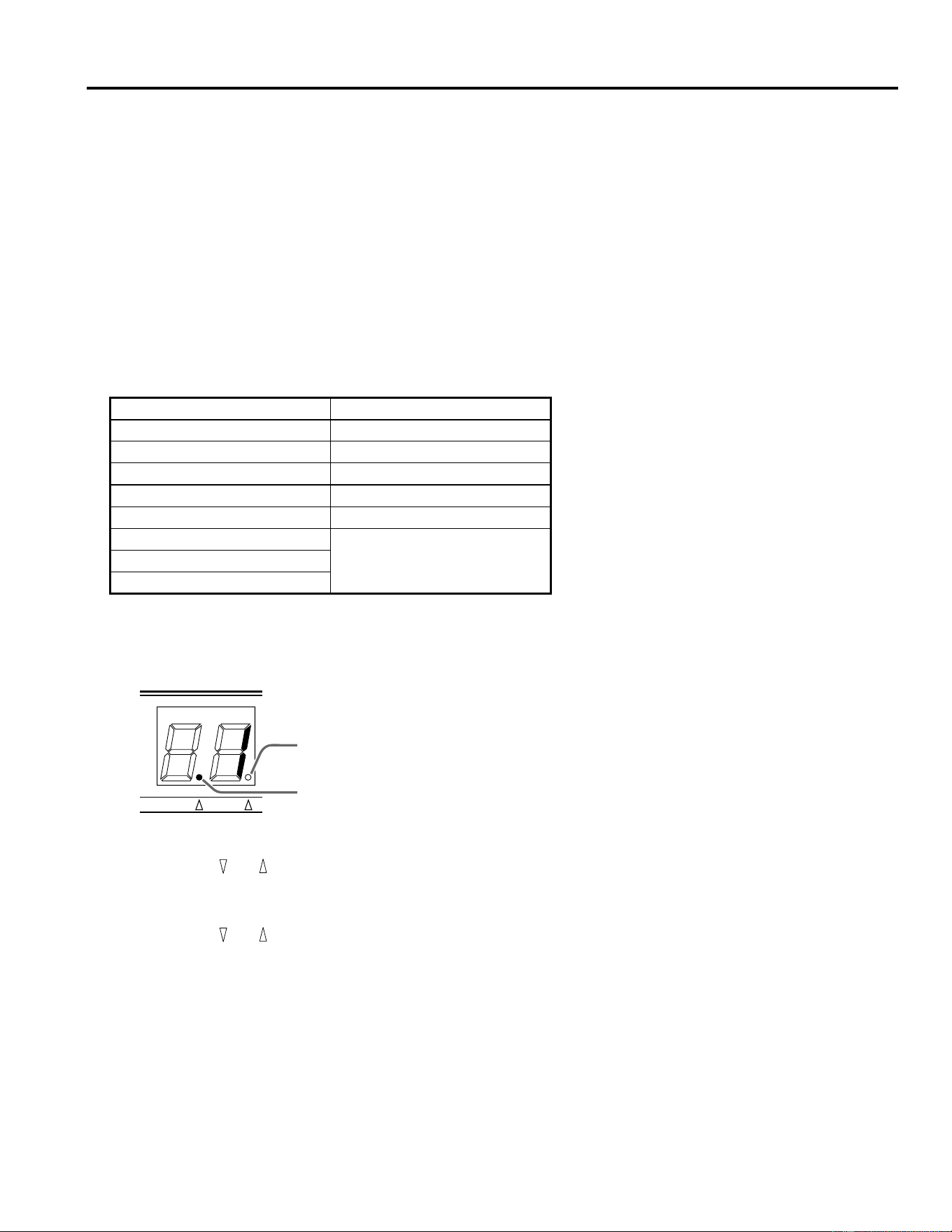
Lorsque la valeur que vous éditez correspond à la valeur préprogrammée, la diode à côté de la commande s’allume:
4.
Ecoutez l’effet modifié.
Le tableau suivant donne les valeurs que vous pouvez éditer au moyen des commandes du panneau avant:
Sauvegarde d’un programme
1.
Appuyez sur la touche STORE. Le numéro de programme clignotera sur l’affichage à 7 segments.
2.
Appuyez une fois de plus sur la touche STORE pour confirmer l’opération.
Notez que vous ne pouvez pas sauvegarder vos changements sous un numéro de programme différent.
Initialisation du REV100
Lorsque vous désirez initialiser les programmes 1~99 (un programme choisi ou tous les programmes) pour revenir aux réglages
usine, procédez comme suit:
1.
Mettez le REV100 sous tension tout en maintenant la touche STORE enfoncée.
2.
Appuyez sur et pour sélectionner le programme qui doit être initialisé.
Lorsque l’affichage indique “ ”, tous les programmes seront initialisés.
3.
Appuyez sur la touche STORE pour exécuter l’initialisation.
No Type d’effet Delay Decay Niveau
1 - 20 REVERB Pre Delay (msec) Reverb Time (
×
0.1sec) Niveau d’effet
21 - 40 STEREO REVERB Pre Delay (msec) Reverb Time (
×
0.1sec) Niveau d’effet
41 - 50 GATE REVERB Pre Delay (msec) Noise Gate Level Niveau d’effet
51 - 60 DELAY Delay Time (
×
10msec) Feedback Level Niveau d’effet
61 - 70 DELAY/REVERB Delay Time (
×
10msec) Feedback Level
Niveau de
réverbération
71 - 99 REVERB/MODULATION Modulation Depth Modulation Speed
Niveau de
réverbération
DELAY
MIN MAX
DECAY
MIN MAX
LEVEL
MIN MAX
MIDI INT
Mode MIDI
7
4. Mode MIDI
Le REV100 est pourvu d’une borne MIDI IN pour que vous puissiez sélectionner et modifier les programmes d’effets au moyen
de messages MIDI.
Tableau de changement de programme MIDI
Le REV100 dispose d’un tableau de changement de programme MIDI en mémoire que vous pouvez éditer afin de réagencer les
programmes d’effets. Vous pouvez créer un tableau de numéros de programmes qui correspond aux numéros de changements
de programme MIDI 1~99. Lorsque le REV100 reçoit un message de changement de programme MIDI, il sélectionnera le
programme interne qui a le numéro correspondant au numéro MIDI du message. Le REV100 ignore les numéros de changement
de programme MIDI de 100 et plus.
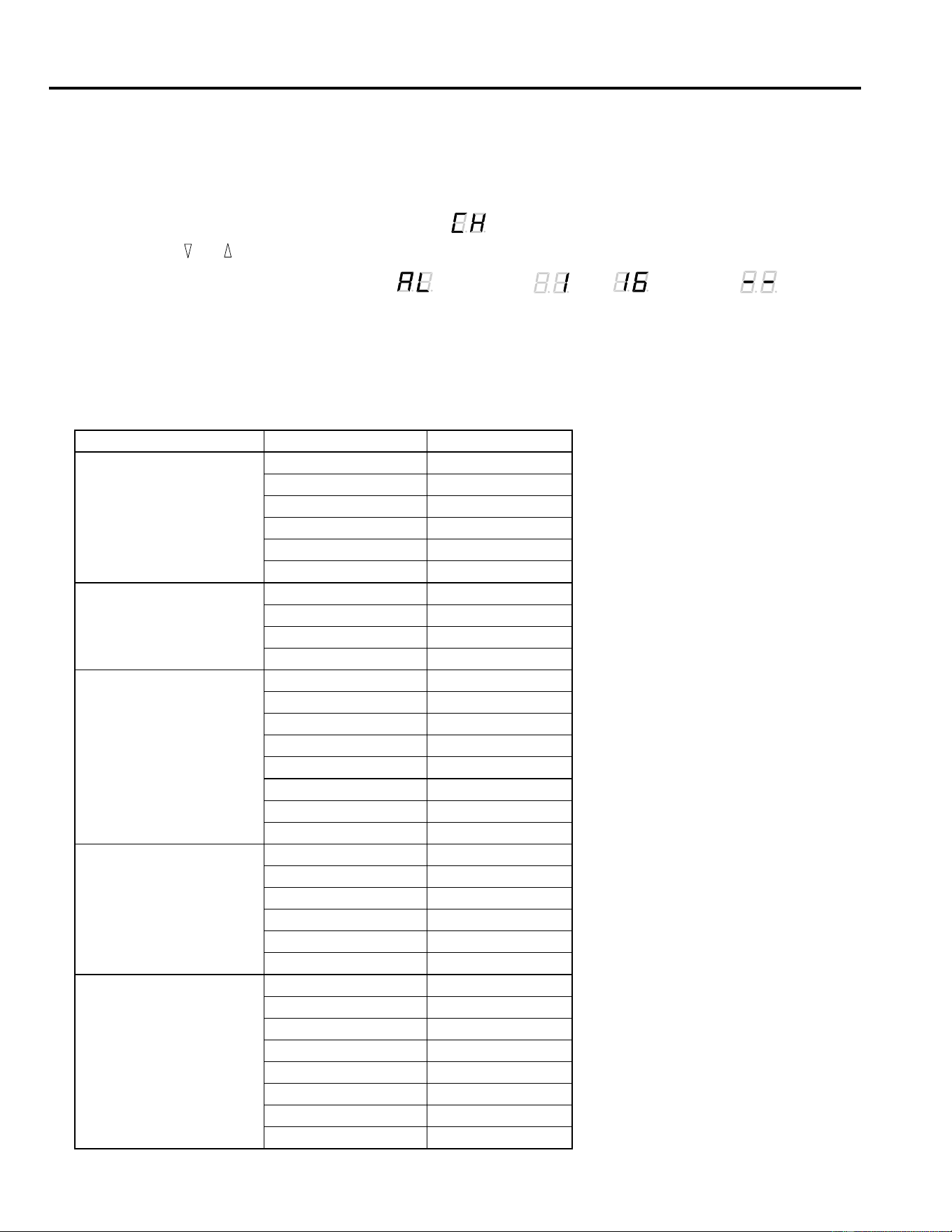
Le tableau suivant illustre la correspondance entre les numéros de changements de programme MIDI et les numéros de pro-
grammes internes:
Réglage du tableau de changement de programme MIDI
1.
Appuyez sur la touche MIDI. Le témoin MIDI s’allumera sur l’affichage à 7 segments:
Lorsque le témoin MIDI est allumée, l’affichage indique le numéro actuel de changement de programme MIDI.
2.
Appuyez sur ou , pour entrer un autre numéro de changement de programme.
3.
Pour choisir un numéro de programme interne, appuyez une fois de plus sur la touche MIDI. Le témoin MIDI s’éteint et le
témoin INT s’allume.
4.
Appuyez sur ou , pour affecter le numéro de changement de programme MIDI à un autre programme interne.
5.
Pour quitter ce mode, appuyez sur la touche MIDI et maintenez-la enfoncée pendant environ une seconde. Le témoin actuel-
lement allumé (MIDI ou INT) s’éteindra et l’affichage indiquera le numéro de programme sélectionné.
No. de programme MIDI No. de programme du REV100
110
25
322
... ...
99 1
100
ignoré...
128
MIDI INT
Témoin MIDI
Témoin INT
Mode MIDI
8
Réglage du canal de réception MIDI
A sa sortie d’usine, le REV100 est réglé pour recevoir MIDI sur tous les canaux (mode OMNI). Vous pouvez changer ce réglage
de la manière suivante:
1.
Maintenez la touche MIDI enfoncée tout en mettant le REV100 sous tension.
L’affichage indique alternativement le message suivant“ ” et le numéro de canal MIDI.
2.
Appuyez sur ou pour sélectionner un autre canal MIDI.
Vous avez le choix entre les option suivantes: “ ” (OMNI) et “ ” ~ “ ” ainsi que “ ” (OFF).
3.
Appuyez une fois de plus sur la touche MIDI pour revenir en mode de fonctionnement normal.
Contrôle des paramètres en temps réel
Vous pouvez envoyer des commandes de contrôle au REV100. Certains de ces messages ont la même fonction que les commandes
du panneau avant tandis que d’autres vous donnent accès à des paramètres supplémentaires:
Type d’effet Nom du paramètre Contrôle no.
REVERB
Pre Delay 20
Reverb Time 21
Effect Level 22
High Damp 23
Filter Type (LPF/HPF) 24
Cut-off Frequency 25
STEREO REVERB
Pre Delay 20
Reverb Time 21
Effect Level 22
High Damp 23
GATE REVERB
Pre Delay 20
Gate Level 21
Effect Level 22
Reverb Time 23
High Damp 24
Release Time 25
Filter Type (LPF/HPF) 26
Cut-off Frequency 27
DELAY
Delay Time 20
Feedback Level 21
Effect Level 22
High Damp 23
Filter Type (LPF/HPF) 24
Cut-off Frequency 25
DELAY/REVERB
Delay Time 20
Feedback Level 21
Reverb Level 22
Reverb Time 23
Reverb High Damp 24
Delay High Damp 25
Filter Type (LPF/HPF) 26
Cut-off Frequency 27
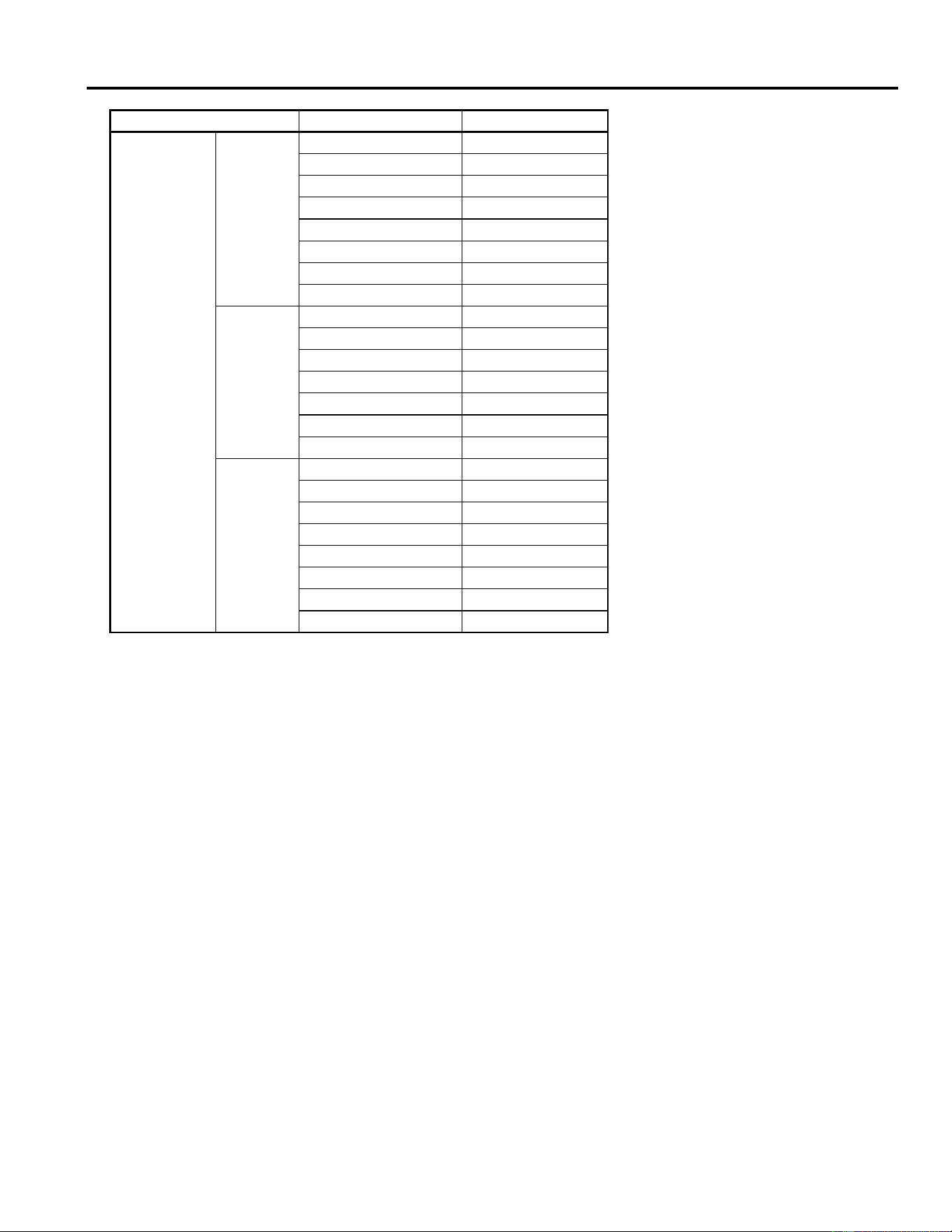
Mode MIDI
9
La valeur 00H de la commande de contrôle sélectionne chaque fois la valeur minimale du paramètre
La valeur 7FH de la commande de contrôle sélectionne chaque fois la valeur maximale du paramètre
Si vous désirez profiter du format des messages System Exclusive pour le REV100, veuillez contacter votre revendeur Yamaha.
REVERB/
MODULATION
Flanger
Modulation Depth 20
Modulation Speed 21
Reverb Level 22
Reverb Time 23
Reverb High Damp 24
Resonance 25
Filter Type (LPF/HPF) 26
Cut-off Frequency 27
Chorus +
Symphonic
Modulation Depth 20
Modulation Speed 21
Reverb Level 22
Reverb Time 23
Reverb High Damp 24
Filter Type (LPF/HPF) 25
Cut-off Frequency 26
Tremolo
Modulation Depth 20
Modulation Speed 21
Reverb Level 22
Reverb Time 23
Reverb High Damp 24
Phase 25
Filter Type (LPF/HPF) 26
Cut-off Frequency 27
Type d’effet Nom du paramètre Contrôle no.
MIDI Data Format
Reception format
Progaram Change
status 1100 nnnn(CnH)nnnn = channel No. *1
1st data 0ppp pppp ppppppp = program No. *2
Control Change
You can control the parameters using Control Change mes-
sages. Refer to page 8 “Real time parameter change” for the
Control numbers.
status 1011 nnnn(BnH) nnnn = channel No. *1
1st data 000c cccc ccccc = control No. *3
2nd data 0vvv vvvv vvvvvvv = control Value
*4
Parameter Change
status 1111 0000(Foh) System exclusive
ID No. 0100 0011(43h) YAMAHA
substatus 0001 nnnn nnnn = channel No.
*1
group No. 0001 1110(1Eh) PA group
device code 0000 0004(04h) REV100
parameter No. 0000 pppp parameter No. *5
0000 pppp
data 0000 aaaa 1st byte *6
0000 bbbb 2nd byte
EOX 1111 0111(F7h) End of exclusive
*1 nnnn = 0 (channel 1) –15 (channel 16)
*2 ppppppp = 0 (program 1) – 98 (program 99)
Program numbers after 99 will be ignored.
*3 ccccc = 20 – 27 Depends on the effect type. (See page 8)
*4 vvvvvvv = 0 – 127
*5, *6 Depends on the effect type and parameter.
(Please consult your local Yamaha Sales Centre.)
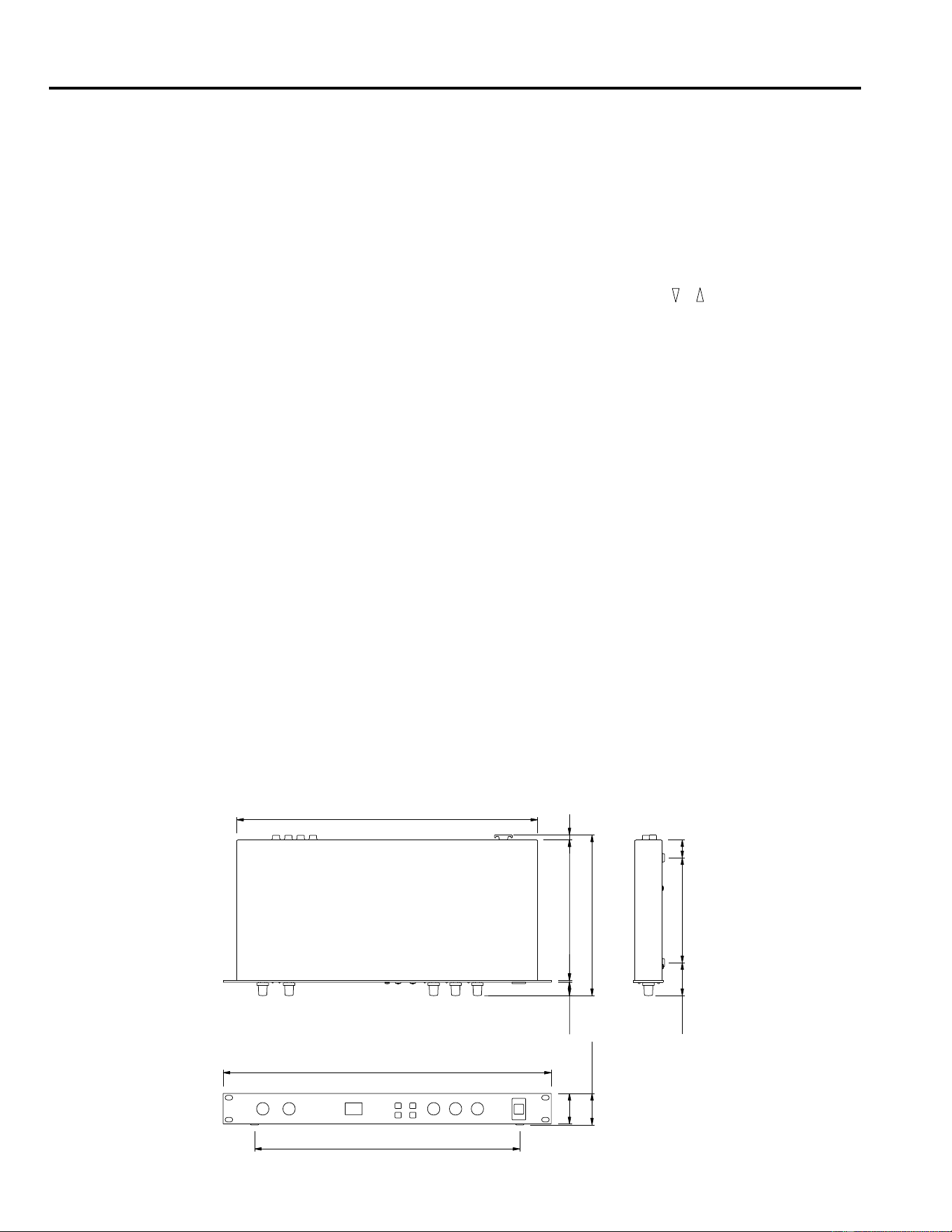
Fiche technique
10
5. Fiche technique
Caractéristiques générales
* La plage dynamique est mesurée avec un filtre passe-bas 6 dB/octave à 12.7 kHz — équivalant à un filtre passe-bas de
20 kHz avec une atténuation dB/octave infinie.
* 0 dB = 0.775V RMS
* Ces caractéristiques peuvent être modifiées sans avis préalable.
Dimensions
CARACTERISTIQUES ELECTRIQUES
Réponse en fréquence 20 Hz ~ 20 kHz
Plage dynamique 80 dB (typique)
Distorsion moins de 0.1% (1 kHz, niveau
max.)
ENTREE
Nombre de canaux 2 (phone jack)
Niveau nominal –10 dB
Impédance 20 kΩ (STEREO)
10 kΩ (L-MONO)
SORTIE
Nombre de canaux 2 (phone jack)
Niveau nominal –10 dB
Impédance 2 kΩ (STEREO)
1 kΩ (L-MONO)
CONVERSION AN / NA
Conversion AD 16 bit
Conversion DA 16 bit
Fréquence d’échantillonnage 44.1 kHz
PROGRAMMES
Nombre de programmes 99
PANNEAU AVANT
Touches , , MIDI, STORE,
POWER
Commandes rotatives INPUT LEVEL,
MIX BALANCE, DELAY,
DECAY, LEVEL
Affichage LED à 7 segments × 2
PEAK L R
DELAY, DECAY, LEVEL
PANNEAU ARRIERE
Bornes INPUT L (MONO), R
OUTPUT L (MONO), R
MIDI IN (DIN 5P), DC 12V IN
ALIMENTATION DC 12V
DIMENSIONS (L × H × P) 480 mm × 45 mm × 232 mm
POIDS 2.5 kg
ACCESSOIRE Adaptateur
19.4 2.6 203
P: 232
7
440
26151.547.5
H:45
44
388
L:480
DIGITAL-HALLGERÄT
BEDIENUNGSANLEITUNG
Deutsch
Bescheinigung des Importeurs
Hiermit wird bescheinigt, daß der/die/das
Digital Reverberator, Typ: REV100
(Gerät, Typ, Bezeichnung)
in Übereinstimmung mit den Bestimmungen der
VERFÜGUNG 1046/84
(Amtsblattverfügung)
funkentstört ist.
Der Deutschen Bundespost wurde das Inverkehrbringen
dieses Gerätes angezeigt und die Berechtigung zur
Überprüfung der Serie auf Einhaltung der Bestimmungen
eingeräumt.
Yamaha Europa GmbH
Name des Importeurs

Einleitung
Das REV100 ist ein hochwertiges und benutzerfreundliches Digital-Hallgerät, das man sowohl im Heimstudio als auch in kleineren
Beschallungsanlagen einsetzen kann. Bei diesem Gerät handelt es sich um einen echten Stereoprozessor mit zwei getrennten Ein-
und ebensovielen Ausgängen.
Außer hochqualitativem Stereo-Hall bietet das REV100 auch Delay + Reverb (Hall) sowie Modulation + Reverb Effekte. Dank der
16bit A/D- und D/A-Wandler ist das Ausgangssignal wirklich erfreulich gut. Auch der Frequenzgang kann sich –dank der 44,1kHz
Sampling-Frequenz– sehen lassen.
Wie bereits gesagt, ist das REV100 ein leicht zu bedienendes Gerät mit Drehreglern für die Pegel- sowie die Parameterwerteinstel-
lung. Darüber hinaus bietet das REV100 einen MIDI-Eingang, so daß man die Effektprogramme auch via MIDI aufrufen kann.
Bitte lesen Sie sich diese Bedienungsanleitung durch, bevor Sie das REV100 einsetzen. Sonst erfahren Sie u.U. nämlich nie, was
es alles kann.
Inhaltsverzeichnis
1. Bedienelemente . . . . . . . . . . . . . . . 1
Frontplatte . . . . . . . . . . . . . . . . . . . . . . . . . . . . 1
Rückseite . . . . . . . . . . . . . . . . . . . . . . . . . . . . . 1
2. Bedienung . . . . . . . . . . . . . . . . . . . . 2
Aufbau und Anschlüsse . . . . . . . . . . . . . . . . . . 2
Programmanwahl . . . . . . . . . . . . . . . . . . . . . . . 2
3. Edit-Betrieb . . . . . . . . . . . . . . . . . . 6
Editieren eines Programms . . . . . . . . . . . . . . . 6
Speichern eines Programms . . . . . . . . . . . . . . 6
Initialisieren des REV100 . . . . . . . . . . . . . . . . 6
4. MIDI-Betrieb . . . . . . . . . . . . . . . . . 7
MIDI-Programmwechseltabelle . . . . . . . . . . . 7
Einstellen der MIDI-Programmwechseltabelle 7
MIDI-Empfangskanal einstellen . . . . . . . . . . . 8
Echtzeitsteuerung der Parameter . . . . . . . . . . . 8
MIDI Data Format . . . . . . . . . . . . . . . . . . . . . . 9
5. Spezifikationen . . . . . . . . . . . . . . 10
Allgemeine Spezifikationen . . . . . . . . . . . . . . 10
Abmessungen . . . . . . . . . . . . . . . . . . . . . . . . 10
MIDI Implementation Chart
Vorsichtsmaßnahmen
1. Aufstellung
Stellen Sie das Pult niemals an einen extrem warme oder
feuchten Ort - also niemals in die Nähe eines Heizkörpers,
Ofens usw. Meiden Sie außerdem staubige Orte sowie
Orte, an denen das Pult starken Vibrationen ausgesetzt ist,
die zu mechanischen Schäden führen könnten. Stellen Sie
das Pult niemals an Orte, die starken elektromagnetischen
Strahlungen ausgesetzt sind, wie 2.B. Sendapparaten.
2. Umsichtig behandeln
Lassen Sie das Pult niemals fallen und behandeln Sie die
Bedienelemente mit der gebührenden Umsicht.
3. Öffnen Sie niemals das Gehäuse und versuchen Sie erst
recht nicht, das REV100 selbst zu reparieren
Dieses Pult enthält keinerlei Teile, die vom Anwender
selbst gewartet werden dürfen. Überlassen Sie alle War-
tungsarbeiten dem qualifizierten Yamaha-Kundendienst.
Bitte bedenken Sie, daß beim Öffnen des Gehäuses autom-
atisch der Garantieanspruch erlischt.
4. Schalten Sie das Pult aus, bevor Sie die Anschlüsse
vornehmen oder ändern
Schalten Sie das REV100 immer AUS, bevor Sie Kabel
anschließen oder abtrennen. Das ist sehr wichtig, damit
weder das Pult, noch die daran angeschlossenen Geräte
beschädigt werden.
5. Behandeln Sie die Kabel mit der gebotenen Umsicht
Daß man Kabelanschlüsse nur herstellen bzw. lösen darf,
indem man an dem Stecker statt an der Schnur zieht (was
auch für das Netzkabel gilt), wissen Sie bestimmt bereits.
6. Mit einem trockenen weichen Tuch abwischen
Verwenden Sie niemals Lösungsmittel oder Waschbenzin
zum Reinigen des Pults. Wischen Sie es ausschließlich mit
einem trockenen weichen Tuch ab.
7. Achten Sie auf die richtige Netzspannung
Das Gerät darf ausschließlich mit einem Netzteil von
Yamaha betrieben werden. Verwenden Sie niemals
Netzgeräte anderer Hersteller, da Sie das Gerät sonst bes-
chädigen können. Außerdem sollten Sie die Strom-
speisung niemals von einem anderen Gerät abzweigen.
Bedienelemente
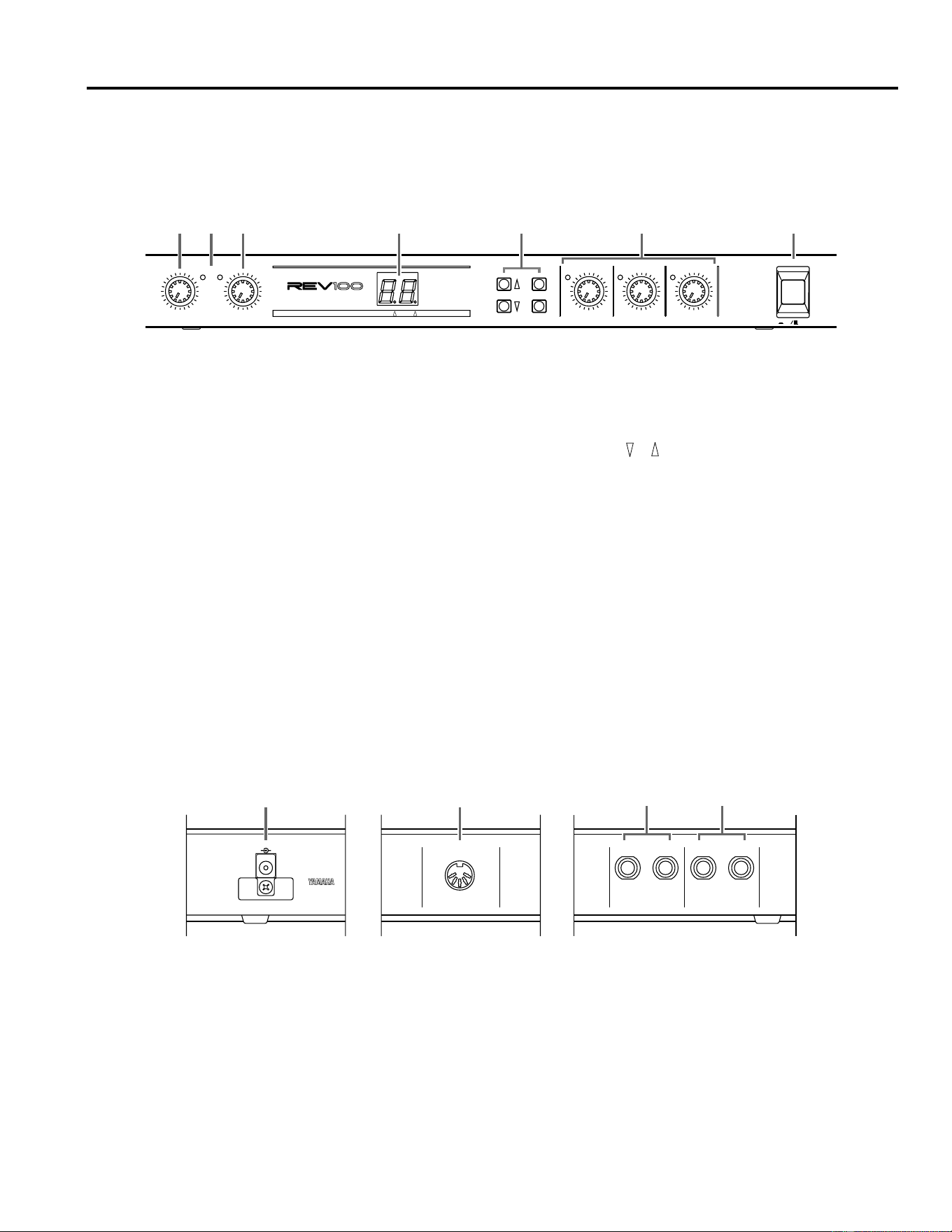
1
1. Bedienelemente
Frontplatte
Rückseite
DIGITAL REVERBERATOR
PEAK
LR
INPUT LEVEL
010
MIX BALANCE
DRY WET
DELAY
MIN MAX
DECAY
MIN MAX
LEVEL
MIN MAX
POWER
ON OFF
PROGRAM
MIDI
STORE
MIDI INT PGM CHANGE
1
21
41
51
61
71
-20
-40
-50
-60
-70
-99
REVERB
STEREO REV
GATE REV
DELAY
DLY/REV
MOD/REV
123 756
4
1 INPUT LEVEL Regler
Mit diesem Regler können Sie den Eingangspegel einstel-
len. Achten Sie dabei immer darauf, daß die PEAK (L/R)
Dioden lediglich bei Signalspitzen kurz aufblinken.
2 PEAK (L/R) Dioden
Diese LED-Dioden leuchten auf, sobald das REV100 ein
Signal empfängt, dessen Pegel sich an der Verzerrungs-
grenze befindet.
3 MIX BALANCE (DRY/WET) Regler
Mit diesem Regler können Sie die Balance zwischen dem
Original- und Effektsignal einstellen.
4 LED Display (7segmentige Anzeige, MIDI Diode, INT
Diode)
Im Programm-Betrieb zeigt dieses Display die Nummer
des angewählten Programms an. Im Edit-Betrieb hingegen
erscheint hier der Wert des aufgerufenen Parameters.
Außerdem werden hier die MIDI-Programmnummern
angezeigt. Wenn Sie die MIDI-Programmwechseltabelle
aufrufen, leuchtet die MIDI Diode. Wählen Sie ein internes
Programm an, so leuchtet die INT Diode. Siehe “Einstellen
der MIDI-Programmwechseltabelle” auf S. 7.
5 PROGRAM ( , , MIDI, STORE) Taster
Mit diesen Tastern können Sie die Programme anwählen,
die MIDI-Programmwechseltabelle editieren sowie edi-
tierte Programme speichern.
6 Edit (DELAY, DECAY, LEVEL) Regler
Mit diesen Drehreglern können Sie die Parameterwerte des
derzeit angewählten Effekts editieren. Entspricht der ein-
gestellte Wert dem programmierten, so leuchtet die Diode
links neben dem Regler. Siehe “Editieren eines Pro-
gramms” auf S. 6.
7 POWER Taster
Drücken Sie diesen Taster, um das REV100 einzuschalten.
MIDI INDC 12V IN
R L(MONO)
OUTPUT
R L(MONO)
INPUT
2
1
34
1 DC 12V IN Anschluß
Schließen Sie hier das beiliegende Netzteil an.
2 MIDI IN Buchse
Über diesen Eingang empfängt das REV100 MIDI-
Befehle von anderen Geräten.
3 OUTPUT Buchsen
An diesen 1/4" Buchsen liegt das Ausgangssignal des
REV100 an. Wenn Sie mit einem Mono-Verstärker arbei-
ten, sollten Sie ihn mit der L-MONO Buchse verbinden.
4 INPUT Buchsen
An diese Buchsen müssen Sie das Signal anlegen, das mit
dem REV100 bearbeitet (verhallt usw.) werden soll. Han-
delt es sich um eine Mono-Signalquelle, müssen Sie sie
mit der L-MONO Buchse verbinden.
Bedienung
2
2. Bedienung
REVERB
Nr. Name Typ Beschreibung
1 Vocal Rev 1 Vocal Hall, der sich besonders für Gesang eignet.
2 Vocal Rev 2 Hall
Nr. 3 hat eine längere Verzögerung und eine kürzere Halldauer.
3 Vocal Rev 3 Vocal
4 Room Ambience 1
Plate
Diese Programme eignen sich vor allem für Schlagzeug und Percus-
sion. Sie können sie sowohl für einzelne Instrumente (z.B. Snare,
Bass Drum usw.) als auch für das gesamte Schlagzeug verwenden.
5 Room Ambience 2
6 Room Ambience 3
7 Wood Booth 1
Vocal8 Wood Booth 2
9 Acoustic Piano Plate
Hall für ein akustisches Klavier.
10 Club Piano
Hall
11 Booming Kick 1
Hall für Bass Drum, mit extra Druck im unteren Frequenzbereich.
12 Booming Kick 2
Room
13 Loud Snare Hall, mit dem man eine Snare lauter macht.
14 Acoustic Steel Guitar 1
Plate
Hall für akustische Gitarren mit Stahlsaiten.
15 Acoustic Steel Guitar 2
16 String Plate Hall, der sich besonders für Streicher eignet.
17 Acoustic Gut Guitar 1
Vocal Hall für akustische Gitarren mit Nylonsaiten.
18 Acoustic Gut Guitar 2
19 Brass Room 1
Room Hellerer und kürzerer Hall für Blechbläser.
20 Brass Room 2
Aufbau und Anschlüsse
Schrauben Sie das REV100 in ein Rack oder stellen Sie es an
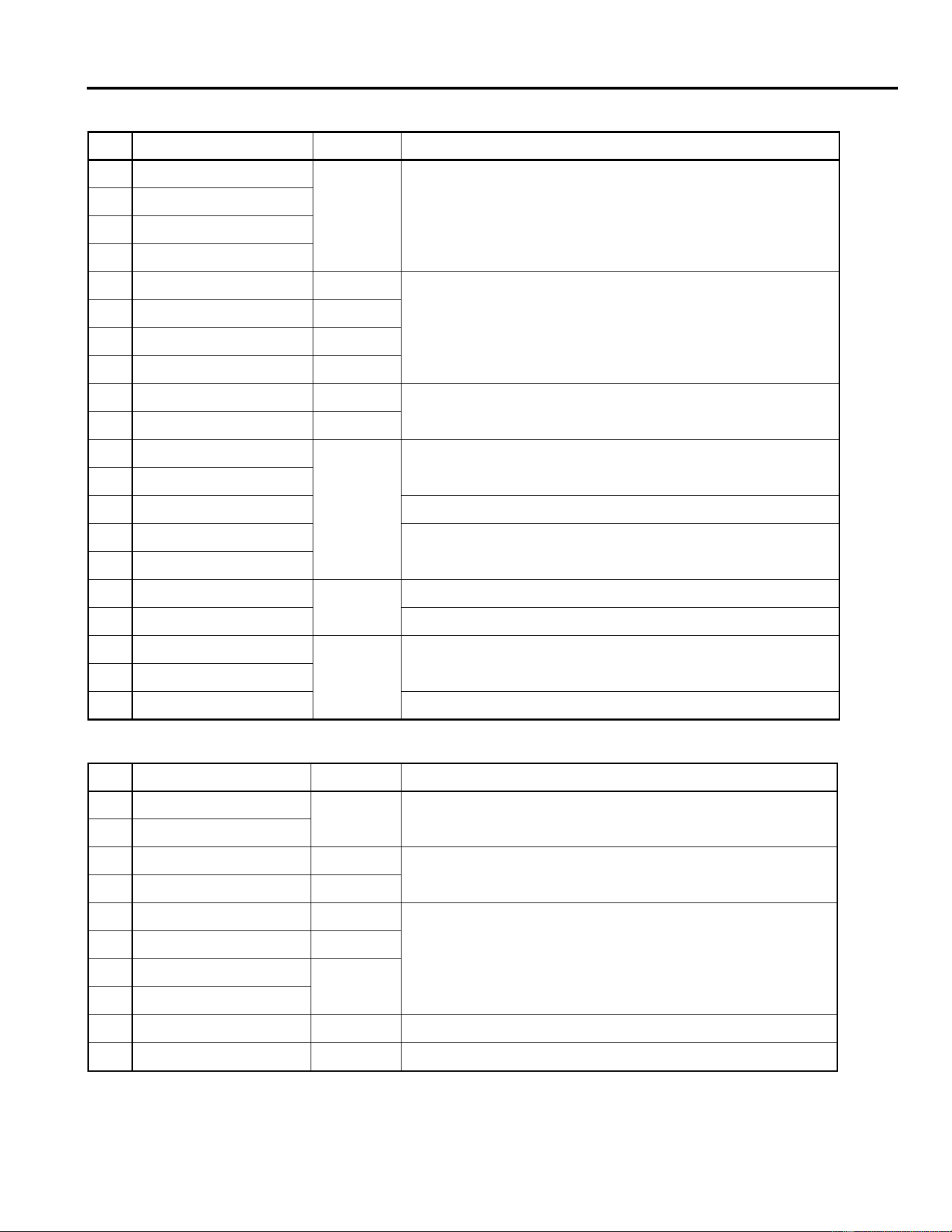
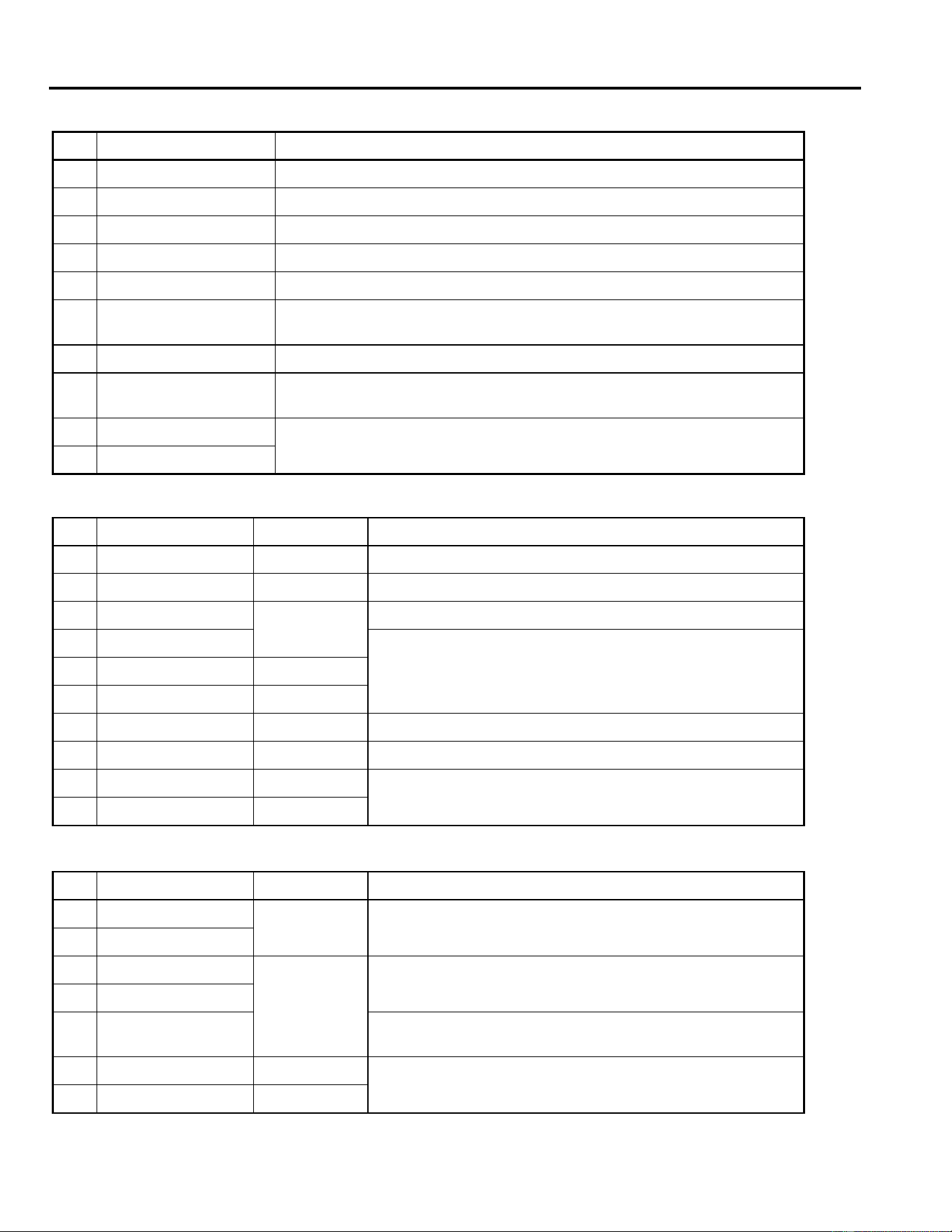
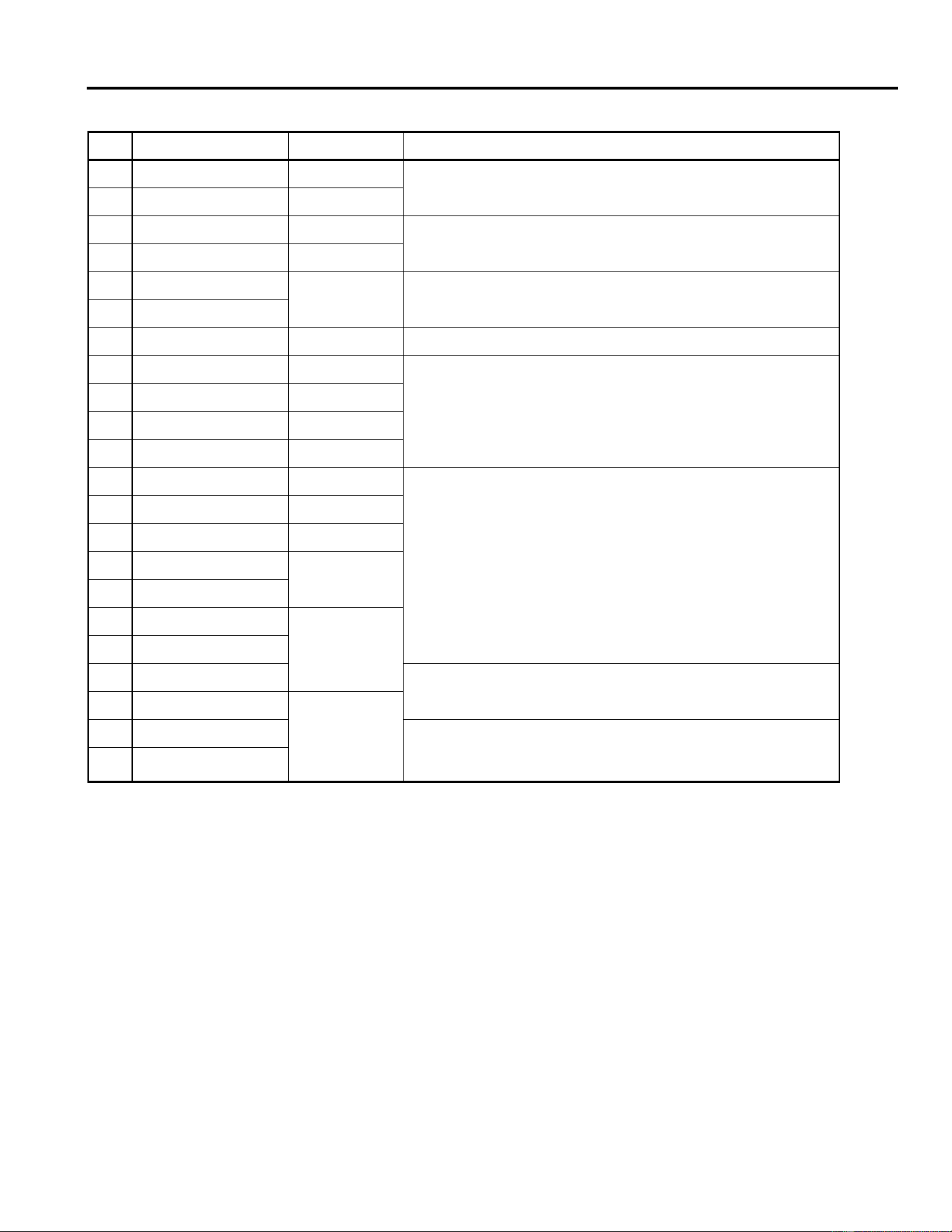
einen sicheren und stabilen Ort. Verbinden Sie das beiliegende
Netzteil mit der DC 12V IN Buchse und den Stecker des Netzteils
mit einer Steckdose. Am besten wickeln Sie die dünne Schnur um
den Haken, damit dem REV100 nicht aus Versehen der Saft aus-
geht.
Drücken Sie den POWER Taster, um das REV100 einzuschalten.
Programmanwahl
Mit und können Sie die Programme des REV100 anwählen.
Das REV100 bietet 99 Programme:
DIGITAL
MODEL REV100
MADE IN JAPAN
DC 12V IN
Bedienung
3
STEREO REVERB
Nr. Name Typ Beschreibung
21 Large Hall 1
Hall
Hier finden Sie Variation auf das Thema “Saalhall” (Hall). “Stage”-Pro-
gramme sind etwas heller als “Hall”-Programme.
22 Large Hall 2
23 Stage 1
24 Stage 2
25 Chamber 1 Vocal
Das Schallbild eines großen Raums mit sehr hoher Decke.
26 Chamber 2 Hall
27 Church 1 Room
28 Church 2 Hall
29 Old Tunnel Hall
Simuliert den Hall eines langen Tunnels. “Old” bedeutet hier
dunkler
,
während “New” gleichbedeutend ist mit
heller
.
30 New Tunnel Vocal
31 Large Room 1
Room
Zimmerhall. Nr. 32 enthält etwas mehr niedrige Frequenzen als Nr.
31.
32 Large Room 2
33 Slide Reverb Der Hall wandert nach rechts.
34 Huge Room 1
Etwas dynamischer als ein
Room
-Hall.
35 Huge Room 2
36 Bathroom
Plate
Sehr kurzer Stereo-Hall.
37 String Ensemble “Breiter” Hall, der sich besonders für Streicher eignet.
38 Rude Reverb 1
Vocal
Ein etwas kratzbürstiger Hall.
39 Rude Reverb 2
40 Concert Grand Piano Hall, der einen Flügel noch schöner macht.
GATE REVERB
Nr. Name Typ Beschreibung
41 Small Ambience 1
Hall
Simuliert einen Raum mit weniger Reflexionen. Nr. 42 ist eigentlich
eine Abwandlung von Nr. 41 mit weniger Tiefen.
42 Small Ambience 2
43 Tight Room 1 Room
Simuliert einen Raum, der noch kleiner ist als der Ausgangspunkt für
Small Ambience
.
44 Tight Room 2 Hall
45 Gate Reverb 1 Plate
Verschiedene Gate-Reverbs.
46 Gate Reverb 2 Vocal
47 Gate Reverb 3
Hall
48 Gate Reverb 4
49 Stone Room Room Simuliert einen Raum mit Backsteinwänden.
50 Big Curve Vocal Die längste Version der Gate-Halltypen.
Bedienung
4
DELAY
Nr. Name Beschreibung
51 Analog Delay 1 Sanfter Delay-Klang.
52 Ping Pong Delay Delay, das abwechselnd über den linken und rechten Kanal wiedergegeben wird.
53 Eighth Note Triplet Ping Pong-Delay, das wie Achteltriolen klingt.
54 Karaoke Das für Karaoke-Anlagen typische Echo.
55 Short Delay Doubler Sehr kurzes Delay mit nur einer Wiederholung.
56 Stereo Long Delay
Stereo-Delay, dessen Verzögerungszeit für den linken und rechten Kanal dieselbe
ist.
57 Stereo Medium Delay Stereo-Delay mit verschiedenen Verzögerungszeiten für links und rechts.
58 Stereo Short Delay
Kurzes Delay, dessen Verzögerungszeit für den linken und rechten Kanal dieselbe
ist.
59 Mono Long Delay
Öfter wiederholendes Delay mit Mono-Ausgabe.
60 Mono Short Delay
DELAY/REVERB
Nr. Name Typ Beschreibung
61 Electric Piano DLY+Hall Eignet sich vor allem für E-Pianos.
62 String Pad DLY
→
Hall Eignet sich vor allem für “Akkordteppiche”.
63 Synth
DLY
→
Vocal
Eignet sich vor allem für Streicherakkorde.
64 Vocal 1
Preset 64 und 65 sind längere Hallvarianten mit einem Hauch Delay,
mithin also ideal für Gesang. Preset 66 ist ein kurzer Hall mit etwas
deutlicherem Delay.
65 Vocal 2 DLY
→
Hall
66 Vocal 3 DLY
+
Room
67 Bright Vocal DLY
→
Plate Heller Hall mit subtilem Delay.
68 Chorus DLY+Plate Hier werden 50% des Delays und 50% des Hall zusammengefügt.
69 Drum Kit 1 DLY+Room
Ambience
-Effekt für Schlagzeug und Percussion.
70 Drum Kit 2 DLY
→
Plate
REVERB/MODULATION
Nr. Name Typ Beschreibung
71 Soft Flange 1
Hall+
FLG
Hier werden ein leichter Flanger mit dezenter Tonhöhenmodulation
und ein Hall miteinander kombiniert. Ideal für “Synthi-Teppiche”.
72 Soft Flange 2
73 Ambience Flange 1
Room
→
FLG
Kurzer Hall, der von einem Flanger bearbeitet wird.
74 Ambience Flange 2
75 Short Reverb Flange
Ausgesprochen kurzer Hall, der einem Flanger mit deutlicher Tonhö-
henmodulation beigegeben wird.
76 Organ Cabinet 1 Plate
→
FLG
Flanger-Effekt, der sich besonders für Orgeln eignet.
77 Organ Cabinet 2 Room
→
SYM
Bedienung
5
78 Symphonic Reverb 1 Hall+SYM
Eleganter Effekt, der vornehmlich auf Hall beruht.
79 Symphonic Reverb 2 Vocal+SYM
80 Flange Room 1 Vocal
→
FLG
Verwenden Sie diese Effekte, wenn das Schlagzeug oder die Percus-
sion einmal ungewöhnlich klingen soll.
81 Flange Room 2 Room+FLG
82 Rolling Flange 1
Plate+FLG
Verwenden Sie diese Effekte, wenn das Schlagzeug oder die Percus-
sion einmal ungewöhnlich klingen soll.
83 Rolling Flange 2
84 Big Flange Vocal
→
FLG Der allseits beliebte Düsenjägereffekt.
85 Chorus Reverb 1 Hall+CHO
Preset 85 und 86 sind normale Chorus/Reverb-Kombinationen, die
also vielseitig verwendet werden können (heißer Tip: E-Piano).
86 Chorus Reverb 2 Plate+CHO
87 Chorus Reverb 3 Hall+CHO
88 Chorus Reverb 4 Vocal+CHO
89 Tremolo Reverb 1 Hall+TRM
Tremolo + Reverb Variationen, wobei der Tremolo-Effekt die Stereo-
position regelt.
90 Tremolo Reverb 2 Room
→
TRM
91 Tremolo Reverb 3 Plate+TRM
92 Tremolo Reverb 4
Vocal+TRM
93 Tremolo Reverb 5
94 Tremolo Reverb 6
Hall+TRM95 Tremolo Reverb 7
96 Ambient Slow Pan 1
Das Originalsignal wird kurz verhallt und von links nach rechts gejagt.
97 Ambient Slow Pan 2
Room+TRM
98 Sequence Pan 1 Diese Panorama-Effekte können Sie für relativ schnelle (
±
120 bpm)
Stücke verwenden. Die “amtliche” Pan-Geschwindigkeit richtet sich
natürlich nach dem Tempo des betreffenden Stücks.
99 Sequence Pan 2
REVERB/MODULATION
Nr. Name Typ Beschreibung
Edit-Betrieb
6
3. Edit-Betrieb
Jeder Effekt des REV100 besteht aus mehreren Parametern. Die drei wichtigsten Parameter eines Programms kann man mit den
Drehreglern einstellen, was das Editieren vereinfacht.
Editieren eines Programms
1.
Drücken Sie und , bis die Nummer des gewünschten Programms im LED-Display erscheint.
2.
Wählen Sie eines der Edit-Bedienelemente, zum Beispiel den DELAY Regler.
3.
Drehen Sie an dem Regler. Der Wert im LED-Display bezieht sich jeweils auf den Parameterwert, den Sie mit dem betreffenden
Bedienelement eingestellt haben.
Wenn der eingestellte Parameterwert wieder dem programmierten Wert entspricht, leuchtet die Diode neben dem Bedienele-
ment auf:
4.
Hören Sie sich den Effekt beim Editieren genau an.
Bitte entnehmen Sie den Einstellbereich der Parameter, die Sie mit den Bedienelementen auf der Frontplatte editieren können,
nachstehender Tabelle:
Speichern eines Programms
1.
Drücken Sie den STORE Taster. Die Programmnummer im LED-Display blinkt nun.
2.
Drücken Sie den STORE Taster noch einmal, um diesen Befehl zu bestätigen.
Bitte beachten Sie, daß die Programme nicht in anderen Speichern untergebracht werden können.
Initialisieren des REV100
Wenn Sie die Programme 1~99 initialisieren möchten, müssen Sie folgendermaßen vorgehen (allerdings kann man die Werksein-
stellungen nur eines oder aller Programme aufrufen):
1.
Schalten Sie das REV100 ein, während Sie den STORE Taster gedrückt halten.
2.
Drücken Sie oder , um das Programm anzuwählen, das initialisiert werden soll.
Wenn das LED-Display die Meldung “ ” anzeigt, werden alle Programme (1~99) initialisiert.
3.
Drücken Sie den STORE Taster, um den Initialisierungsbefehl auszuführen.
Nr. Effekttyp Delay Decay Level
1 - 20 REVERB Pre Delay (msec) Reverb Time (
×
0.1sec) Effektpegel
21 - 40 STEREO REVERB Pre Delay (msec) Reverb Time (
×
0.1sec) Effektpegel
41 - 50 GATE REVERB Pre Delay (msec) Noise Gate Level Effektpegel
51 - 60 DELAY Delay Time (
×
10msec) Feedback Level Effektpegel
61 - 70 DELAY/REVERB Delay Time (
×
10msec) Feedback Level Hallpegel
71 - 99 REVERB/MODULATION Modulation Depth Modulation Speed Hallpegel
DELAY
MIN MAX
DECAY
MIN MAX
LEVEL
MIN MAX
MIDI INT
MIDI-Betrieb
7
4. MIDI-Betrieb
Das REV100 ist mit einer MIDI IN Buchse ausgestattet, die Sie mit einem MIDI-Ausgang verbinden können, so daß die Pro-
gramme des REV100 via MIDI aufgerufen werden.
MIDI-Programmwechseltabelle
Im Speicher des REV100 befindet sich eine MIDI-Programmwechseltabelle, die Sie editieren können, um eine optimale MIDI-
Steuerung der Programmanwahl zu erzielen. Die MIDI-Programmwechseltabelle bietet 99 Zuordnungsfelder. Sobald das
REV100 eine MIDI-Programmnummer empfängt, ruft es das Programm auf, das Sie dieser Nummer zugeordnet haben. Bitte
beachten Sie, daß das REV100 MIDI-Programmnummern ab 100 ignoriert.
Nachstehende Tabelle enthält ein Beispiel der Zuordnung der MIDI-Programmnummern zu den Speichern des REV100:
Einstellen der MIDI-Programmwechseltabelle
1.
Drücken Sie den MIDI Taster. Im LED-Display leuchtet nun die MIDI Diode:
Solange die MIDI-Diode leuchtet, vertritt die Zahl im LED-Display eine MIDI-Programmnummer.
2.
Drücken Sie oder , eine MIDI-Programmnummer einzustellen.
3.
Wenn Sie anschließend eine anderen Speicher des REV100 aufrufen möchten, müssen Sie noch einmal den MIDI Taster
drücken. Die MIDI Diode erlischt nun wieder und statt dessen leuchtet die INT Diode.
4.
Drücken Sie oder , um der soeben aufgerufenen MIDI-Programmnummer einen anderen Speicher des REV100 zuzu-
ordnen.
5.
Um diese Betriebsart wieder zu verlassen, müssen Sie den MIDI Taster ungefähr eine Sekunde lang gedrückt halten. Anschlie-
ßend erlischt entweder die MIDI oder die INT Diode. Die Zahl, die im LED-Display erscheint, bezieht sich dann wieder auf
das angewählte Programm.
MIDI -Programmnummer Programm des REV100
110
25
322
... ...
99 1
100
ignoriert...
128
MIDI INT
MIDI Diode
INT Diode
MIDI-Betrieb
8
MIDI-Empfangskanal einstellen
Ab Werk empfängt das REV100 auf allen MIDI-Kanälen (MIDI Omni). Da das längst nicht immer wünschenswert ist, können Sie
folgendermaßen einen Empfangskanal einstellen:
1.
Halten Sie MIDI gedrückt, während Sie das REV100 einschalten.
Im LED-Display erscheinen nun abwechselnd die Meldung “ ” und die MIDI-Kanalnummer.
2.
Drücken Sie oder , um einen anderen Empfangskanal einzustellen.
Es stehen folgende Möglichkeiten zur Wahl: “ ” (OMNI) sowie “ ” ~ “ ” und “ ” (aus).
3.
Drücken Sie den MIDI Taster noch einmal, um wieder in den Normalbetrieb zu wechseln.
Echtzeitsteuerung der Parameter
Die Parameterwerte des REV100 können mit MIDI-Steuerbefehlen editiert werden. Manche der hier aufgeführten Parameter
kann man jedoch auch mit den Bedienelementen auf der Frontplatte einstellen (weshalb also MIDI bemühen, wenn’s einfacher
geht). Andere Parameter hingegen sind keinem Bedienelement zugeordnet:
Effekttyp Parametername Steuerbefehl
REVERB
Pre Delay 20
Reverb Time 21
Effect Level 22
High Damp 23
Filter Type (LPF/HPF) 24
Cut-off Frequency 25
STEREO REVERB
Pre Delay 20
Reverb Time 21
Effect Level 22
High Damp 23
GATE REVERB
Pre Delay 20
Gate Level 21
Effect Level 22
Reverb Time 23
High Damp 24
Release Time 25
Filter Type (LPF/HPF) 26
Cut-off Frequency 27
DELAY
Delay Time 20
Feedback Level 21
Effect Level 22
High Damp 23
Filter Type (LPF/HPF) 24
Cut-off Frequency 25
DELAY/REVERB
Delay Time 20
Feedback Level 21
Reverb Level 22
Reverb Time 23
Reverb High Damp 24
Delay High Damp 25
Filter Type (LPF/HPF) 26
Cut-off Frequency 27
MIDI-Betrieb
9
Mit dem Wert 00H des jeweiligen Steuerbefehls stellen Sie den Mindestwert des Parameters ein
Mit dem Wert 7FH des jeweiligen Steuerbefehls stellen Sie den Höchstwert des Parameters ein
Wenn Sie mit das REV100 mit SysEx-Befehlen füttern möchten, wenden Sie sich bitte an Ihren Yamaha-Händler.
REVERB/
MODULATION
Flanger
Modulation Depth 20
Modulation Speed 21
Reverb Level 22
Reverb Time 23
Reverb High Damp 24
Resonance 25
Filter Type (LPF/HPF) 26
Cut-off Frequency 27
Chorus +
Symphonic
Modulation Depth 20
Modulation Speed 21
Reverb Level 22
Reverb Time 23
Reverb High Damp 24
Filter Type (LPF/HPF) 25
Cut-off Frequency 26
Tremolo
Modulation Depth 20
Modulation Speed 21
Reverb Level 22
Reverb Time 23
Reverb High Damp 24
Phase 25
Filter Type (LPF/HPF) 26
Cut-off Frequency 27
Effekttyp Parametername Steuerbefehl
MIDI Data Format
Reception format
Progaram Change
status 1100 nnnn(CnH)nnnn = channel No. *1
1st data 0ppp pppp ppppppp = program No. *2
Control Change
You can control the parameters using Control Change mes-
sages. Refer to page 8 “Real time parameter change” for the
Control numbers.
status 1011 nnnn(BnH) nnnn = channel No. *1
1st data 000c cccc ccccc = control No. *3
2nd data 0vvv vvvv vvvvvvv = control Value
*4
Parameter Change
status 1111 0000(Foh) System exclusive
ID No. 0100 0011(43h) YAMAHA
substatus 0001 nnnn nnnn = channel No.
*1
group No. 0001 1110(1Eh) PA group
device code 0000 0004(04h) REV100
parameter No. 0000 pppp parameter No. *5
0000 pppp
data 0000 aaaa 1st byte *6
0000 bbbb 2nd byte
EOX 1111 0111(F7h) End of exclusive
*1 nnnn = 0 (channel 1) –15 (channel 16)
*2 ppppppp = 0 (program 1) – 98 (program 99)
Program numbers after 99 will be ignored.
*3 ccccc = 20 – 27 Depends on the effect type. (See page 8)
*4 vvvvvvv = 0 – 127
*5, *6 Depends on the effect type and parameter.
(Please consult your local Yamaha Sales Centre.)
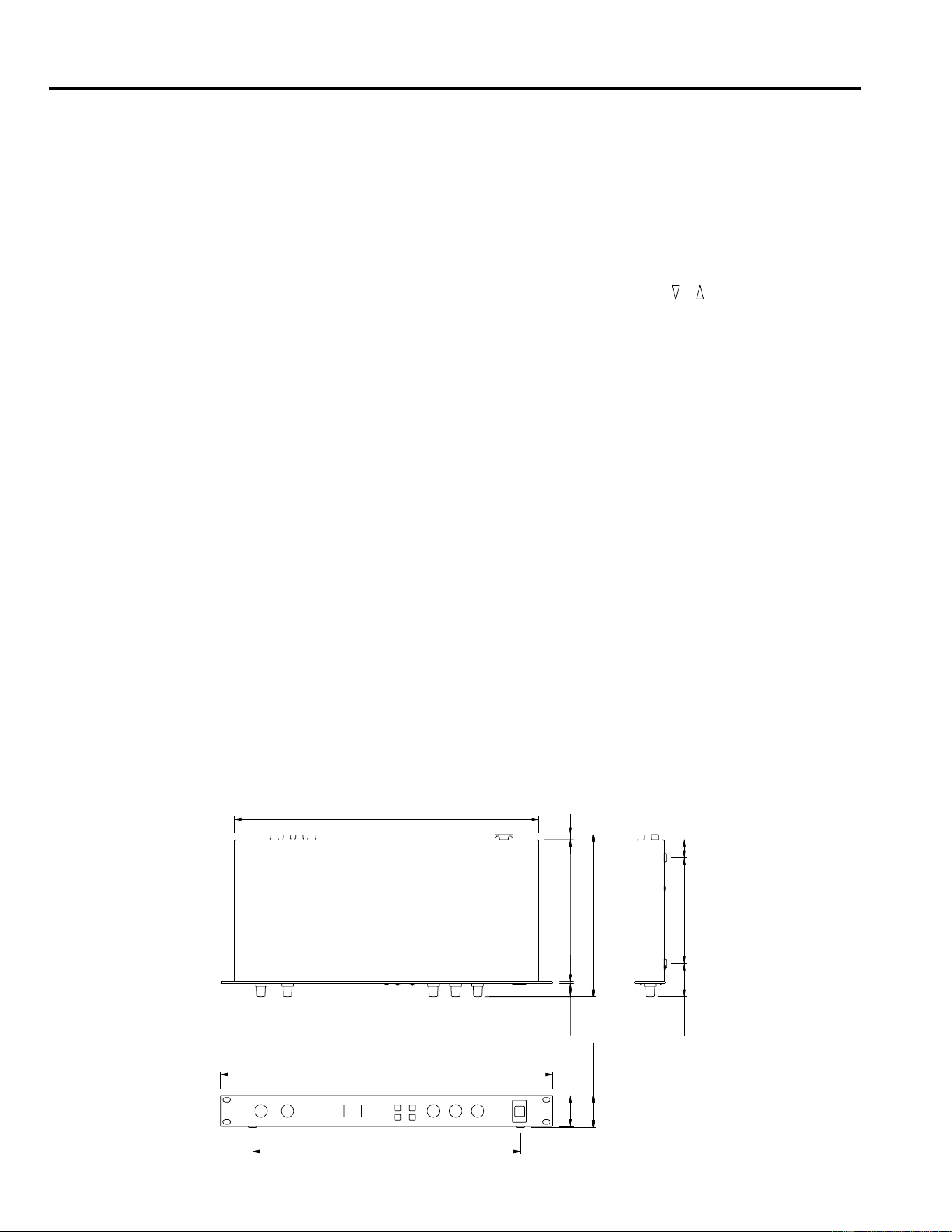
Spezifikationen
10
5. Spezifikationen
Allgemeine Spezifikationen
* Die Dynamik wurde mit einem 6 dB/Oktave-Tiefpaßfilter bei 12.7 kHz gemessen – entspricht einem 20 kHz-Tiefpaßfilter
mit unendlicher dB/Oktavabschwächung.
* 0 dB = 0.775V RMS
* Änderungen der technischen Daten ohne Vorankündigung jederzeit vorbehalten.
Abmessungen
ELEKTRISCHE WERTE
Frequenzgang 20 Hz ~ 20 kHz
Dynamik 80 dB (typisch)
Klirrfaktor weniger als 0.1% (1 kHz,
Höchstpegel)
EINGÄNGE
Anzahl Kanäle 2 (Klinkenbuchsen)
Nennpegel –10 dB
Impedanz 20 kΩ (STEREO)
10 kΩ (L-MONO)
AUSGÄNGE
Anzahl Kanäle 2 (Klinkenbuchsen)
Nennpegel –10 dB
Impedanz 2 kΩ (STEREO)
1 kΩ (L-MONO)
AD/DA-WANDLUNG
A/D-Wandlung 16 bit
D/A-Wandlung 16 bit
Sampling Frequenz 44.1 kHz
PROGRAMME
Anzahl Speicher 99
FRONTPLATTE
Taster , , MIDI, STORE,
POWER
Regler INPUT LEVEL,
MIX BALANCE, DELAY,
DECAY, LEVEL
Display 7segmentigees LED × 2
PEAK L R
DELAY, DECAY, LEVEL
RÜCKSEITE
Buchsen INPUT L (MONO), R
OUTPUT L (MONO), R
MIDI IN (DIN 5P), DC 12V IN
STROMSPEISUNG DC 12V
ABMESSUNGEN (B×H×T) 480 mm × 45 mm × 232 mm
GEWICHT 2.5 kg
ZUBEHÖR Netzteil
19.4 2.6 203
T: 232
7
440
26151.547.5
H:45
44
388
B:480

REVERBERADOR DIGITAL
MANUAL DE OPERACIÓN
Español

Introducción
El REV100 es un Reverberador Digital estereofónico de alta calidad, económico y fácil de utilizar. Se puede utilizar para hacer
grabaciones en casa o para aplicaciones de refuerzo de sonido de menor importancia. Se trata de un auténtico procesador ester-
ofónico con dos entradas y dos salidas.
Junto con una reverberación estereofónica de alta calidad, el REV100 ofrece efectos de retraso más reverberación y de modulación
más reverberación. Los conversores A/D (analógico-digital) y D/A (digital-analógico) proporcionan una excelente calidad de
sonido y una amplia respuesta en frecuencia debido a la tasa de muestreo de 44,1 kHz.
El REV100 es fácil de utilizar, tiene controles giratorios para ajustar los niveles y para editar los parámetros de los efectos. Se facil-
ita una conexión de entrada MIDI (MIDI IN) para que también se puedan seleccionar los programas de efectos utilizando mensajes
MIDI.
Para aprovechar plenamente las posibilidades del REV100, lea detenidamente este manual y guárdelo para consultarlo en el futuro
cuando lo necesite.
PRECAUCIONES
1. Ubicación
Mantenga el aparato alejado de lugares donde pueda que-
dar expuesto a elevadas temperaturas o grados de
humedad, como por ejemplo cerca de radiadores, estufas,
etc. Evite también los lugares que estén sometidos a una
excesiva acumulación de polvo o existencia de vibraciones
que puedan causar desperfectos mecánicos y los lugares
sometidos a campos electromagnéticos fuertes, tal como
un lugar cerca de un equipo de difusión.
2. Evite las sacudidas
Si el aparato se ve sometido a fuertes sacudidas se puede
ver dañado. Manéjelo con cuidado.
3. No abra la cubierta ni intente personalmente hacer
reparaciones ni modificaciones
Este producto no contiene piezas que puedan ser reparadas
por el usuario. Cuando necesite labores de reparación o
mantenimiento avise a personal cualificado de Yamaha. Si
abre la cubierta y/o intenta forzar los circuitos internos la
garantía quedará anulada.
4. Apague siempre el aparato antes de hacer las conex-
iones
Apague siempre el aparato (OFF) antes de ponerse a
conectar o desconectar los cables. Acuérdese siempre de
hacerlo para evitar dañar el aparato u otros equipos que
puedan estar conectados a él.
5. Maneje los cables con cuidado
Al enchufar y desenchufar los cables - incluyendo el cable
de alimentación de CA - tire del conector, no del cable.
6. Limpie el aparato con un trapo suave y seco
No utilice nunca disolventes, tales como la bencina ni
diluyentes para limpiar el aparato. Para limpiar o secar el
aparato utilice un trapo seco y suave.
7. Emplee siempre la alimentación correcta
Para poner en marcha el aparato no es conveniente utilizar
otro adaptador de CA que no sea el que suministra Yamaha.
Si se utilizan otros adaptadores se pueden causar daños
graves al aparato. No utilice nunca un acoplamiento en
serie para la conexión del suministro energético prove-
niente de otro equipo.
Introducción
1. Controles . . . . . . . . . . . . . . . . . . . . . 1
Panel frontal . . . . . . . . . . . . . . . . . . . . . . . . . . 1
Panel trasero . . . . . . . . . . . . . . . . . . . . . . . . . . 1
2. Funcionamiento . . . . . . . . . . . . . . . 2
Instalación y conexiones . . . . . . . . . . . . . . . . . 2
Cambio de Programas . . . . . . . . . . . . . . . . . . . 2
3. Modo Editar . . . . . . . . . . . . . . . . . . 6
Almacenar un Programa . . . . . . . . . . . . . . . . . 6
Inicialización del REV100 . . . . . . . . . . . . . . . 6
4. Modo MIDI . . . . . . . . . . . . . . . . . . 7
Tabla de Cambio de Programa MIDI . . . . . . . 7
Ajuste de la Tabla de Cambio de Programa MIDI 7
Ajuste del Canal de Recepción MIDI . . . . . . . 8
Cambio de Parámetros ‘Real-time’ . . . . . . . . . 8
MIDI Data Format . . . . . . . . . . . . . . . . . . . . . . 9
5. Especificaciones . . . . . . . . . . . . . . 10
Especificaciones generales . . . . . . . . . . . . . . 10
Dimensiones . . . . . . . . . . . . . . . . . . . . . . . . . 10
MIDI Implementation Chart
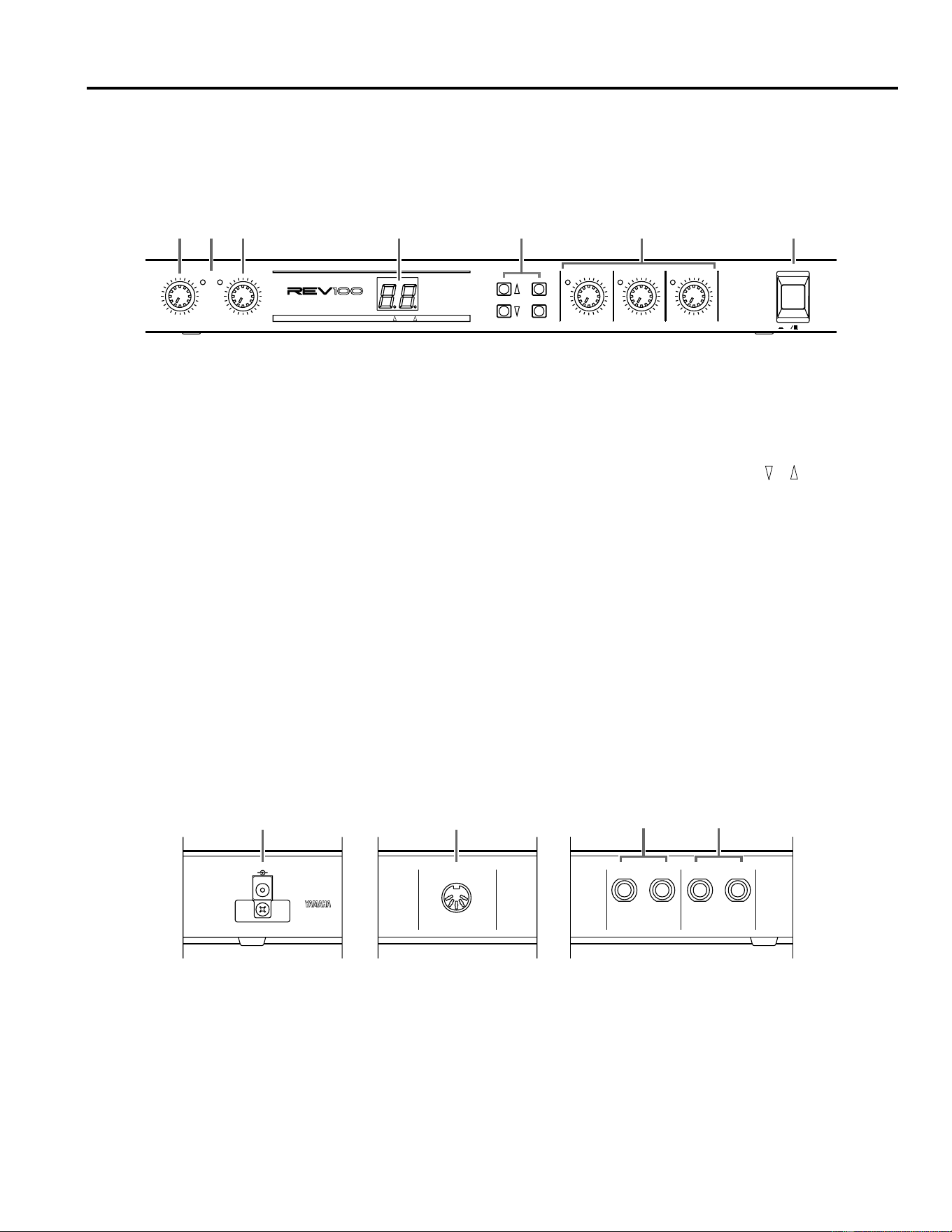
1
Controles
1. Controles
Panel frontal
DIGITAL REVERBERATOR
PEAK
LR
INPUT LEVEL
010
MIX BALANCE
DRY WET
DELAY
MIN MAX
DECAY
MIN MAX
LEVEL
MIN MAX
POWER
ON OFF
PROGRAM
MIDI
STORE
MIDI INT PGM CHANGE
1
21
41
51
61
71
-20
-40
-50
-60
-70
-99
REVERB
STEREO REV
GATE REV
DELAY
DLY/REV
MOD/REV
123 756
4
1
Control de Nivel de Entrada (INPUT LEVEL)
Este control giratorio es el que ajusta el nivel de entrada. El
nivel se debería ajustar de manera que los indicadores de
Máximo (Izquierdo/Derecho) (PEAK (L/R)) destelleen
solo de vez en cuando.
2
Indicadores de Máximo (Izquierdo/Derecho) (PEAK
(L/R))
Estos diodos fotoemisores se iluminarán cuando el REV100
esté recibiendo una señal de nivel máximo.
3
Control Balance de Mezcla (Seco/Húmedo) MIX BAL-
ANCE (DRY/WET)
Este control giratorio ajusta el balance de los sonidos húme-
dos (con efectos) y secos (sin efectos).
4
Visualizador de LEDs (diodos fotoemisores) (LED de 7
segmentos, indicador MIDI, indicador INT)
Este visualizador de 7 segmentos indica cuál es el programa
que está funcionando en el Modo Programa. Muestra los
valores de los parámetros cuando el REV100 se encuentra
en Modo Editar y muestra los números de los programas
MIDI. Cuando se selecciona la tabla de Cambio de Pro-
grama MIDI, el indicador MIDI se ilumina, y cuando se
seleccionan los programas internos, el indicador INT se ilu-
minará. Consultar “Ajustes de la Tabla de Cambio de Pro-
grama MIDI” en la página 7.
5
Teclas de Programa (PROGRAM) ( , , MIDI,
Almacenar (STORE))
Estas teclas le permitirán seleccionar los diferentes progra-
mas, editar la tabla de Cambio de Programa MIDI y almace-
nar los programas modificados.
6
Controles Editar (Retraso (DELAY), Disminución
(DECAY), Nivel (LEVEL))
Estos controles giratorios editan la cantidad de parámetros
del efecto que está teniendo lugar. Cuando el valor editado
de un parámetro es el mismo que el valor que ha sido sal-
vado, se iluminará el diodo fotoemisor de la izquierda del
control. Consultar “Edición de un Programa” en la página 6.
7
Interruptor de Alimentación (POWER)
Presione este interruptor para activar el aparato (ON).
Panel trasero
MIDI INDC 12V IN
R L(MONO)
OUTPUT
R L(MONO)
INPUT
2
1
34
1
Entrada CC 12V IN
El adaptador de CA suministrado está enchufado en este
conector.
2
Conector de entrada MIDI (MIDI IN)
El REV100 recibe los datos MIDI a través de esta conexión.
3
Conectores de Salida (OUTPUT)
Estos conectores de auriculares de 1/4" se utilizan para dejar
salir el sonido procesado desde el REV100. Si usted está
utilizándolo de forma monofónica, será suficiente con
conectar una toma en la conexión L-MONO.
4
Conectores de Entrada (INPUT)
Estos conectores de auriculares de 1/4" se utilizan para
conectar una fuente de sonido al REV100. Cuando la fuente
es monofónica, será suficiente con conectar la toma en la
conexión L-MONO.
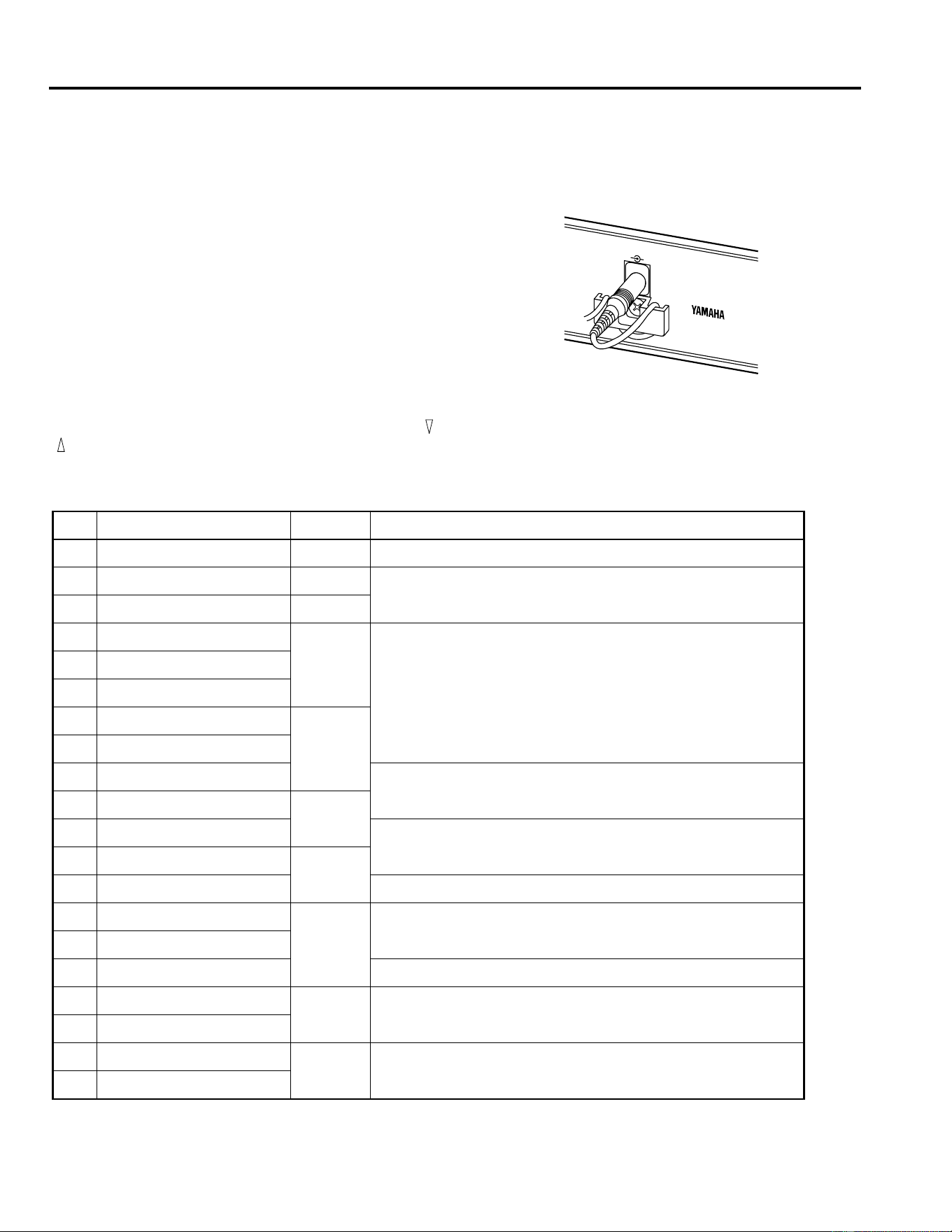
Funcionamiento
2
2. Funcionamiento
Instalación y conexiones
Instale el REV100 en una estantería o colóquelo en un lugar donde
se encuentre en posición estable y a salvo de posibles daños.
Conecte el adaptador de CA a la entrada de CC 12V IN, después
enchufe el adaptador en una toma de la red eléctrica. Para evitar
que la alimentación se desconecte accidentalmente, enganche el
cable alrededor de la armadura de sujeción.
Presione el interruptor de Alimentación (POWER) para encender
el REV100.
Cambio de Programas
Seleccione los diferentes programas presionando las teclas y
. El REV100 tiene 99 programas entre los cuales usted podrá
elegir.
REVERB
No. Nombre Tipo Descripción
1 Vocal Rev 1 Vocal Reverberación adecuada para la parte vocal.
2 Vocal Rev 2 Hall
La No. 3 tiene un tiempo de pre-retraso más prolongado y un tiempo
de reverberación más corto.
3 Vocal Rev 3 Vocal
4 Room Ambience 1
Plate
Estos tipos se dedican principalmente a la batería y la percusión. Se
pueden utilizar para todo el kit de batería o para un solo sonido de la
batería como por ejemplo un tambor, un bombo, etc.
5 Room Ambience 2
6 Room Ambience 3
7 Wood Booth 1
Vocal8 Wood Booth 2
9 Acoustic Piano Plate
Reverberación para el piano acústico.
10 Club Piano
Hall
11 Booming Kick 1
Reverberación para el bombo, con una gama baja reforzada.
12 Booming Kick 2
Room
13 Loud Snare Reverberación para un tambor ruidoso.
14 Acoustic Steel Guitar 1
Plate
Reverberación para una guitarra acústica de cuerdas de acero.
15 Acoustic Steel Guitar 2
16 String Plate Reverberación utilizada principalmente para las cuerdas.
17 Acoustic Gut Guitar 1
Vocal Reverberación para una guitarra acústica de cuerdas de nylon.
18 Acoustic Gut Guitar 2
19 Brass Room 1
Room Reverberación más viva y más corta para la sección de cobres.
20 Brass Room 2
DIGITAL
MODEL REV100
MADE IN JAPAN
DC 12V IN
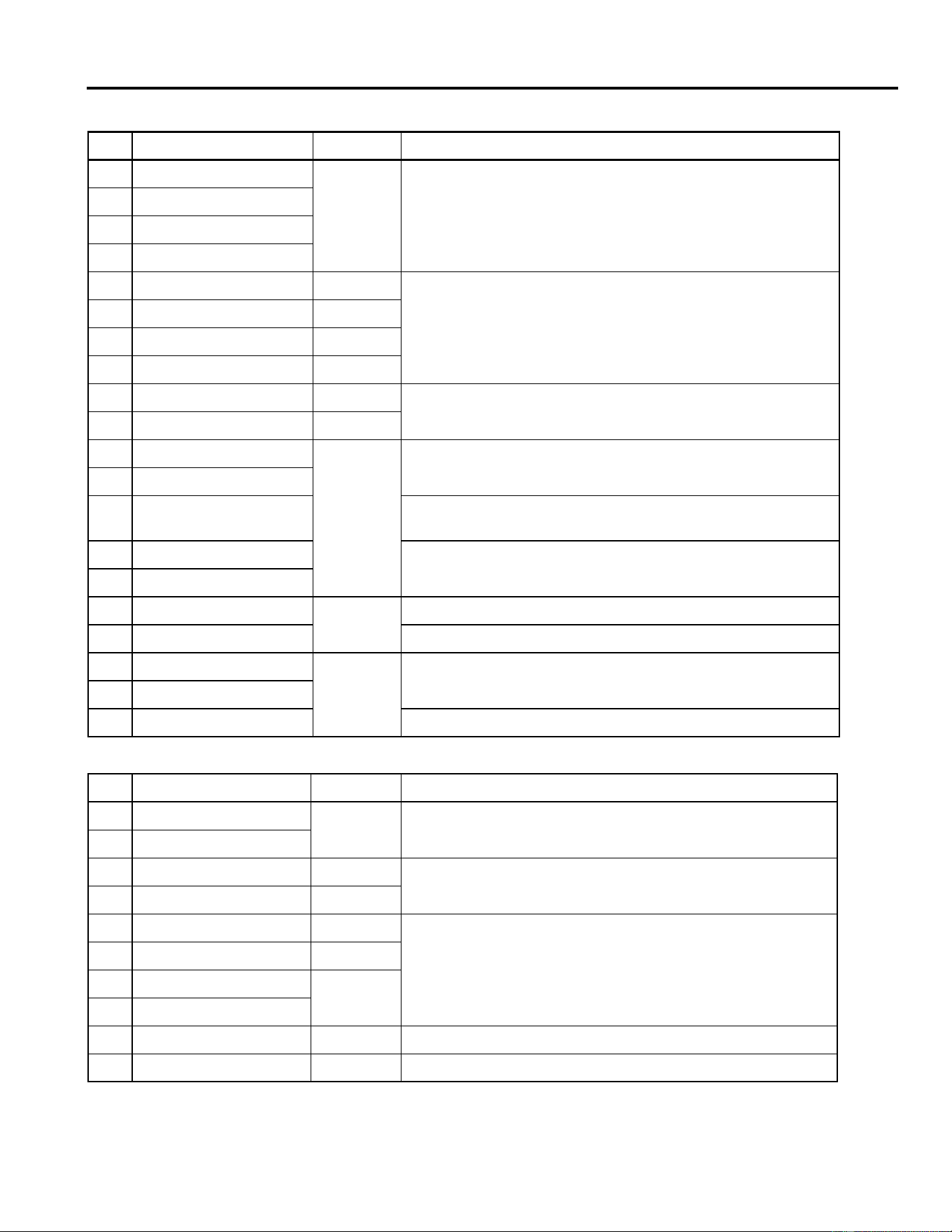
Funcionamiento
3
STEREO REVERB
No. Nombre Tipo Descripción
21 Large Hall 1
Hall
Hay variaciones de la reverberación tipo sala de conciertos. Las re-
verberaciones de “Escenario” son más vivas que las reverberaciones
de “Sala de Conciertos”.
22 Large Hall 2
23 Stage 1
24 Stage 2
25 Chamber 1 Vocal
Imagen de una gran sala con un techo muy alto.
26 Chamber 2 Hall
27 Church 1 Room
28 Church 2 Hall
29 Old Tunnel Hall
Simula el sonido en el interior de un largo túnel. El “Antiguo” es oscuro
y el “Nuevo” es luminoso.
30 New Tunnel Vocal
31 Large Room 1
Room
Simulación tipo habitación. La No. 32 contiene más de la gama baja
que la No. 31.
32 Large Room 2
33 Slide Reverb
El sonido de la reverberación es dirigido (control PAN) hacia la dere-
cha.
34 Huge Room 1
Una reverberación más dinámica que la de tipo habitación.
35 Huge Room 2
36 Bathroom
Plate
Reverberación estereofónica muy corta.
37 String Ensemble Reverberación espaciosa adecuada para las cuerdas.
38 Rude Reverb 1
Vocal
Reverberación tosca.
39 Rude Reverb 2
40 Concert Grand Piano Adecuada para un piano acústico.
GATE REVERB
No. Nombre Tipo Descripción
41 Small Ambience 1
Hall
Simula una habitación con reflexiones más pequeñas. La No. 42 ha
sido elaborada poniendo la gama baja de la No. 41.
42 Small Ambience 2
43 Tight Room 1 Room
Simula una habitación más pequeña que la que simulan las rever-
beraciones “Pequeño Ambiente”.
44 Tight Room 2 Hall
45 Gate Reverb 1 Plate
Variaciones de las reverberaciones puerta.
46 Gate Reverb 2 Vocal
47 Gate Reverb 3
Hall
48 Gate Reverb 4
49 Stone Room Room Simula una habitación construida con piedra.
50 Big Curve Vocal Es la reverberación más larga de las reverberaciones puerta.
Funcionamiento
4
DELAY
No. Nombre Tipo
51 Analog Delay 1 Sonido retrasado suave.
52 Ping Pong Delay El sonido retrasado es colocado (control PAN) entre la derecha y la izquierda.
53 Eighth Note Triplet Retraso Ping-Pong que suena como ocho tríos de notas.
54 Karaoke Eco utilizado para el Karaoke.
55 Short Delay Doubler Retraso muy corto, de una sola vez.
56 Stereo Long Delay Retraso estereofónico con la misma longitud para los canales izquierdo y derecho.
57 Stereo Medium Delay Retraso estereofónico con canales de diferentes longitudes.
58 Stereo Short Delay Retraso estereofónico con canales de la misma longitud.
59 Mono Long Delay
Retraso repetido con salida monoaural.
60 Mono Short Delay
DELAY/REVERB
No. Nombre Tipo Descripción
61 Electric Piano DLY+Hall Utilizado principalmente para pianos eléctricos.
62 String Pad DLY
→
Hall Adecuado para sonido tipo atenuado.
63 Synth
DLY
→
Vocal
Adecuado para cuerdas atenuadas.
64 Vocal 1
Las reverberaciones prefijadas No. 64 y No. 65 son reverberaciones
más largas que tienen un ligero retraso, adecuadas para partes vo-
cales. La reverberación prefijada No. 66 es una reverberación corta,
cuyo retraso está enfatizado.
65 Vocal 2 DLY
→
Hall
66 Vocal 3 DLY
+
Room
67 Bright Vocal DLY
→
Plate Reverberación viva, con un retraso muy sutil.
68 Chorus DLY+Plate 50% de retraso y 50% de reverberación combinados.
69 Drum Kit 1 DLY+Room
Efectos ambiente para batería y percusión.
70 Drum Kit 2 DLY
→
Plate
REVERB/MODULATION
No. Nombre Tipo Descripción
71 Soft Flange 1
Hall+
FLG
Este efecto combina un fino efecto reborde con una pequeña vari-
ación de tono junto con reverberación, que es adecuado para sonidos
sintetizados tipo atenuado.
72 Soft Flange 2
73 Ambience Flange 1
Room
→
FLG
El efecto reborde ha sido añadido a una corta reverberación.
74 Ambience Flange 2
75 Short Reverb Flange
Se ha añadido una reverberación muy corta al efecto reborde con
una variación de tono más grande.
76 Organ Cabinet 1 Plate
→
FLG
Efecto reborde adecuado para sonidos de órgano.
77 Organ Cabinet 2 Room
→
SYM
78 Symphonic Reverb 1 Hall+SYM
Efecto elegante basado principalmente en la reverberación.
79 Symphonic Reverb 2 Vocal+SYM
Funcionamiento
5
80 Flange Room 1 Vocal
→
FLG
Utilice estos efectos para que su batería o su percusión suenen de
forma especial o extraña.
81 Flange Room 2 Room+FLG
82 Rolling Flange 1
Plate+FLG
Utilice estos efectos para conseguir que su batería o su percusión
suenen de forma extraña.
83 Rolling Flange 2
84 Big Flange Vocal
→
FLG Efectos de máquinas de chorro (Jet)
85 Chorus Reverb 1 Hall+CHO
Las prefijadas No. 85 y No. 86 son reverberaciones/coros normales,
y se pueden utilizar en muchas aplicaciones como por ejemplo el pi-
ano eléctrico.
86 Chorus Reverb 2 Plate+CHO
87 Chorus Reverb 3 Hall+CHO
88 Chorus Reverb 4 Vocal+CHO
89 Tremolo Reverb 1 Hall+TRM
Variación del trémolo y la reverberación que produce un efecto tré-
molo de direccionamiento del sonido (control PAN).
90 Tremolo Reverb 2 Room
→
TRM
91 Tremolo Reverb 3 Plate+TRM
92 Tremolo Reverb 4
Vocal+TRM
93 Tremolo Reverb 5
94 Tremolo Reverb 6
Hall+TRM95 Tremolo Reverb 7
96 Ambient Slow Pan 1
El sonido que tiene una pequeña reverberación es colocado (control
PAN) entre la izquierda y la derecha.
97 Ambient Slow Pan 2
Room+TRM
98 Sequence Pan 1 Usted podrá añadir efectos de direccionamiento del sonido (control
PAN) a una canción que tenga un tempo de alrededor de 120. Ajuste
la velocidad de acuerdo con el tempo (ritmo).
99 Sequence Pan 2
REVERB/MODULATION
No. Nombre Tipo Descripción
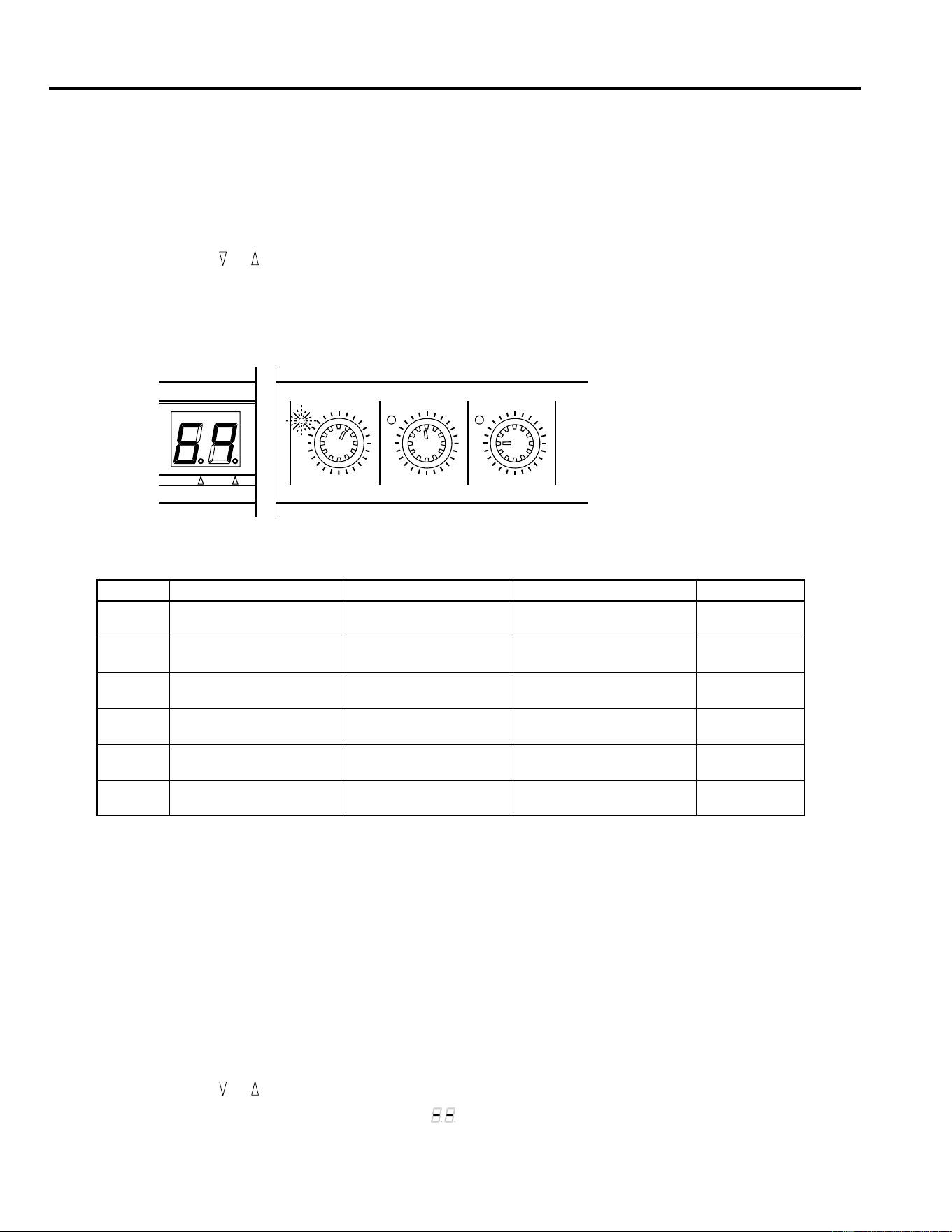
Modo Editar
6
3. Modo Editar
Cada uno de los efectos del REV100 tiene varios parámetros. Tres de los parámetros más efectivos se pueden editar utilizando los
controles giratorios que permiten un funcionamiento rápido, versátil y sencillo.
Edición de un Programa
1.
Presione las teclas y hasta que se exhiba en el diodo fotoemisor de 7 segmentos el número de programa deseado.
2.
Seleccione uno de los controles de Edición, por ejemplo, el control giratorio Retraso (DELAY).
3.
Gire el control. El valor del diodo fotoemisor de 7 segmentos cambiará para reflejar el ajuste que se está haciendo en el
parámetro. Cuando el valor del parámetro que usted está editando corresponda al valor prefijado, el diodo fotoemisor que
hay al lado del control se iluminará:
4.
Escuche el efecto modificado.
En la tabla siguiente aparece una lista de los valores que se pueden editar con los controles del panel frontal:
Almacenar un Programa
1.
Presione la tecla Almacenar (STORE). El número del programa destelleará en el diodo fotoemisor de 7 segmentos.
2.
Presione la tecla Almacenar (STORE) otra vez para confirmar la operación.
Observe que no se puede seleccionar un número diferente de programa para almacenar en él los cambios.
Inicialización del REV100
Se utiliza el siguiente procedimiento para inicializar los programas del 1 al 99 (un programa seleccionado o todos los programas),
tal como se envían por defecto de fábrica.
1.
Encienda el REV100 mientras mantiene presionada la tecla Almacenar (STORE).
2.
Presione las teclas y para seleccionar el número de programa que desea inicializar.
Cuando el diodo fotoemisor de 7 segmentos exhiba “ ”, todos los programas del 1 al 99 serán inicializados.
3.
Presione la tecla Almacenar (STORE) para ejecutar la inicialización.
No. Efectos Retraso Disminución Nivel
1 - 20 REVERB Pre-Retraso (mseg.)
Tiempo de reverberación
(
×
0,1 seg.)
Nivel de los
efectos
21 - 40 STEREO REVERB Pre-Retraso (mseg.)
Tiempo de reverberación
(
×
0,1 seg.)
Nivel de los
efectos
41 - 50 GATE REVERB Pre-Retraso (mseg.) Nivel de Puerta de Ruido
Nivel de los
efectos
51 - 60 DELAY
Tiempo de retraso
(
×
10 mseg.)
Nivel de Retroalimentación
Nivel de los
efectos
61 - 70 DELAY/REVERB
Tiempo de retraso
(
×
10 mseg.)
Nivel de Retroalimentación
Nivel de
reverberación
71 - 99 REVERB/MODULATION
Profundidad de
Modulación
Velocidad de modulación
Nivel de
reverberación
DELAY
MIN MAX
DECAY
MIN MAX
LEVEL
MIN MAX
MIDI INT
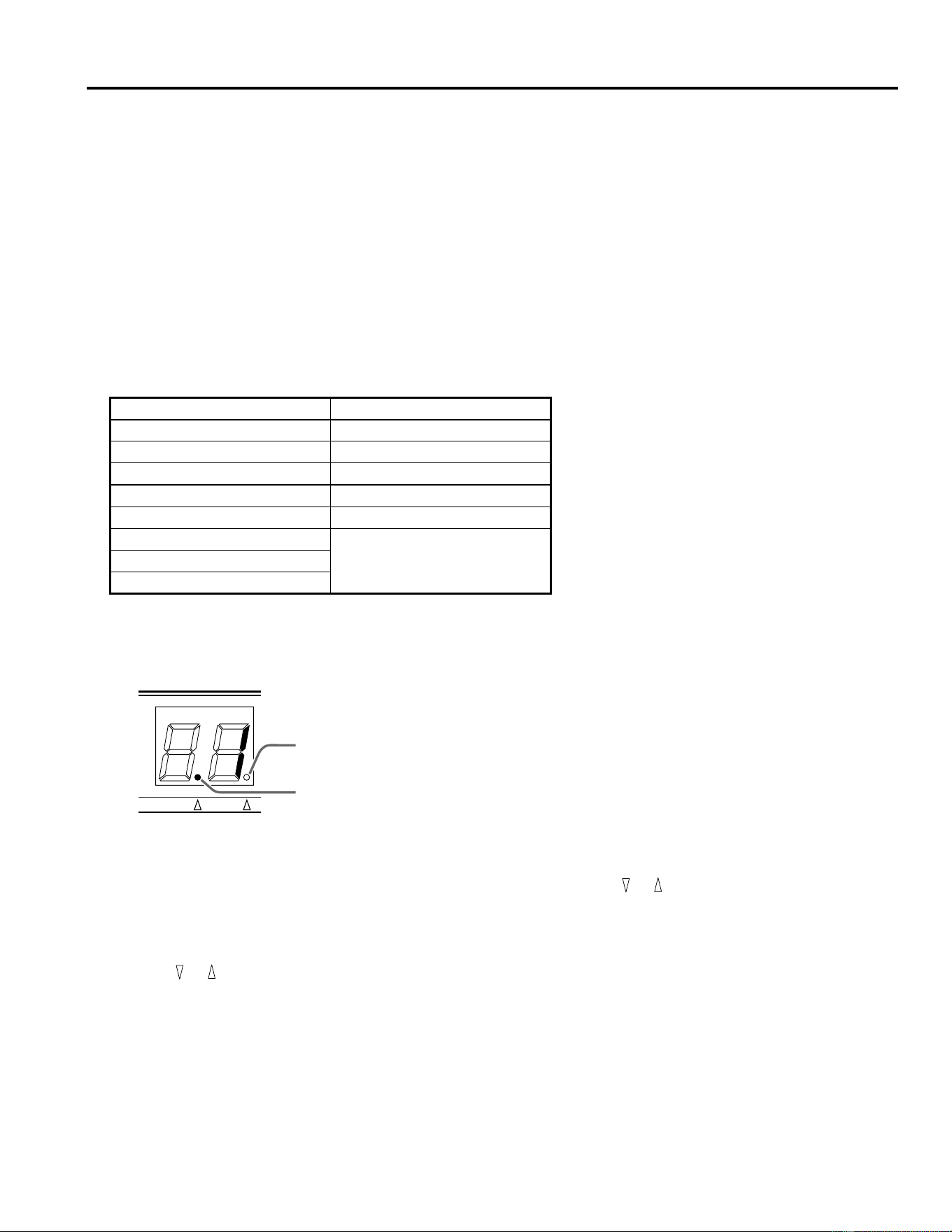
Modo MIDI
7
4. Modo MIDI
Se facilita una conexión de entrada MIDI (MIDI IN) para que se puedan seleccionar los programas de efectos del REV100 y se
puedan modificar utilizando mensajes MIDI.
Tabla de Cambio de Programa MIDI
El REV100 tiene en la memoria una tabla de Cambio de Programa MIDI que usted puede editar para reordenar los programas
de efectos. Usted puede crear una tabla de números de programas que se corresponda con los números 1 al 99 de Cambio de
Programas MIDI. Cuando el REV100 recibe un mensaje de Cambio de Programa MIDI, seleccionará el número de programa
interno que corresponda al número MIDI del mensaje. El REV100 ignorará los números 100 o superiores a 100 de Cambio de
Programa MIDI.
En la siguiente tabla se ilustra la correspondencia que hay entre los números de Cambio de Programa MIDI y los números de
programas internos:
Ajuste de la Tabla de Cambio de Programa MIDI
1.
Presione la tecla MIDI. El punto del indicador MIDI se iluminará en el diodo fotoemisor de 7 segmentos:
Cuando se enciende el indicador MIDI, el diodo fotoemisor de 7 segmentos exhibe el número de Cambio de Programa MIDI
que existe en ese momento.
2.
Seleccione otro número de Cambio de Programa MIDI presionando las teclas y .
3.
Para seleccionar los números de programas internos, presione la tecla MIDI otra vez. El punto del indicador MIDI se apagará
y el punto del indicador INT se iluminará.
4.
Modifique los números de programas internos para el número de Cambio de Programa MIDI seleccionado presionando las
teclas y .
5.
Para salir de este modo, presione y mantenga presionada la tecla MIDI durante aproximadamente un segundo. El indicador
que esté funcionando, sea el indicador MIDI o el indicador INT, se apagará y el diodo fotoemisor de 7 segmentos exhibirá
el número del programa seleccionado en ese momento.
Número de Programa MIDI Número de Programa REV100
110
25
322
... ...
99 1
100
ignorado...
128
MIDI INT
Punto indicador MIDI
Punto indicador INT
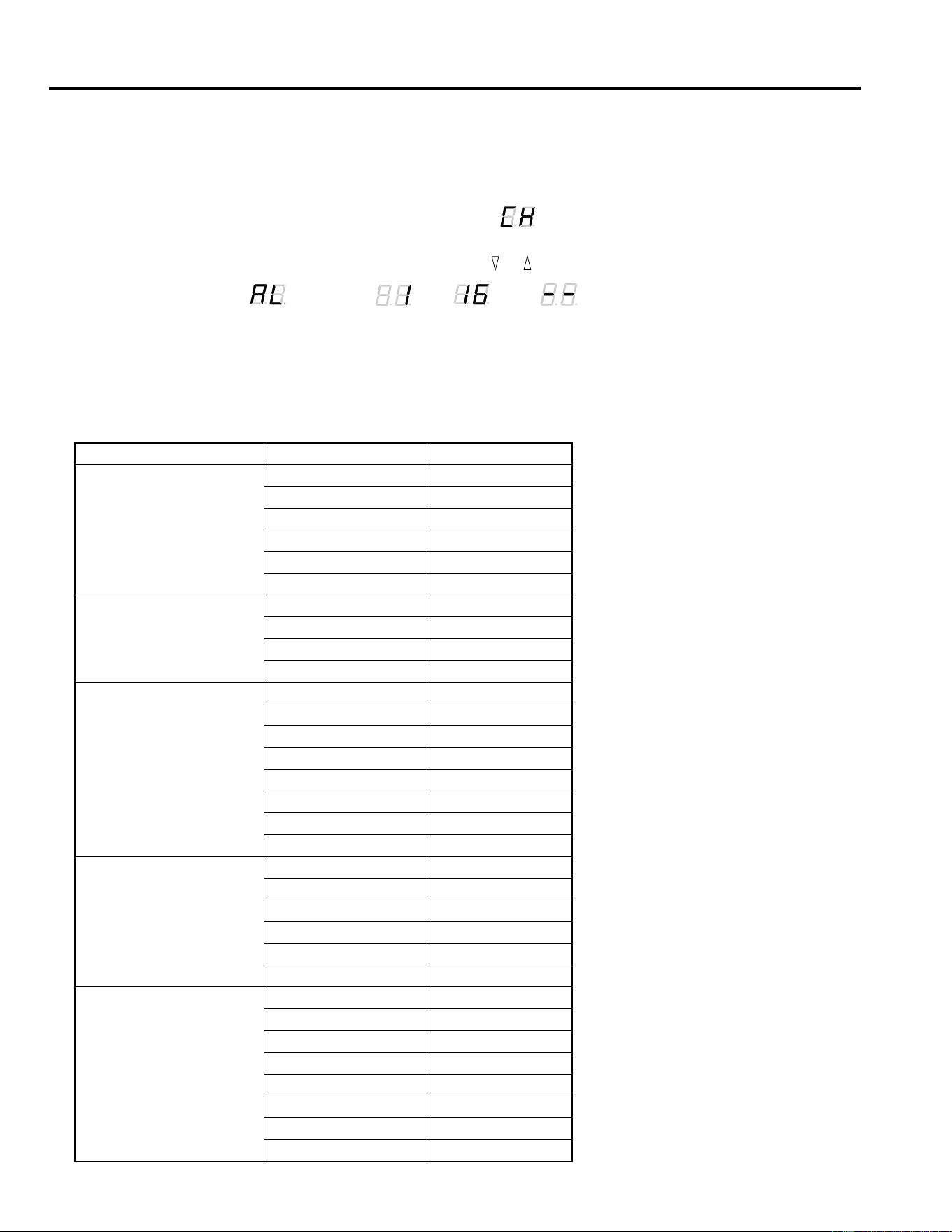
Modo MIDI
8
Ajuste del Canal de Recepción MIDI
Por defecto, el REV100 está ajustado para recibir MIDI en todos los canales (modo OMNI). Esta especificación por defecto se
puede cambiar mediante el siguiente procedimiento:
1.
Presione y mantenga presionada la tecla MIDI al encender el REV100.
El diodo fotoemisor de 7 segmentos exhibirá alternativamente “ ” y el número del canal MIDI en que el aparato se
encuentre en ese momento.
2.
Seleccione otro número de canal MIDI presionando las teclas y .
Se puede seleccionar “ “ (OMNI), “ ” a “ ” , o “ ” (OFF).
3.
Vuelva a presionar la tecla MIDI para volver al modo normal de funcionamiento.
Cambio de Parámetros ‘Real-time’
Se pueden enviar mensajes de Cambio de Control MIDI al REV100. Algunos de estos mensajes efectúan las mismas funciones
que los controles de Edición del panel frontal, otros le permitirán acceder a parámetros adicionales:
Tipo de efecto Nombre del parámetro Número de control
REVERB
Pre Delay 20
Reverb Time 21
Effect Level 22
High Damp 23
Filter Type (LPF/HPF) 24
Cut-off Frequency 25
STEREO REVERB
Pre Delay 20
Reverb Time 21
Effect Level 22
High Damp 23
GATE REVERB
Pre Delay 20
Gate Level 21
Effect Level 22
Reverb Time 23
High Damp 24
Release Time 25
Filter Type (LPF/HPF) 26
Cut-off Frequency 27
DELAY
Delay Time 20
Feedback Level 21
Effect Level 22
High Damp 23
Filter Type (LPF/HPF) 24
Cut-off Frequency 25
DELAY/REVERB
Delay Time 20
Feedback Level 21
Reverb Level 22
Reverb Time 23
Reverb High Damp 24
Delay High Damp 25
Filter Type (LPF/HPF) 26
Cut-off Frequency 27
Modo MIDI
9
Valor del Cambio de Control 00H = Valor del Parámetro MIN.
Valor del Cambio de Control 7FH = Valor del Parámetro MAX.
Si usted necesita para el REV100 el formato del mensaje exclusivo del sistema, póngase en contacto con su Centro de Ventas Yamaha
más cercano.
REVERB/
MODULATION
Flanger
Modulation Depth 20
Modulation Speed 21
Reverb Level 22
Reverb Time 23
Reverb High Damp 24
Resonance 25
Filter Type (LPF/HPF) 26
Cut-off Frequency 27
Chorus
and
Symphonic
Modulation Depth 20
Modulation Speed 21
Reverb Level 22
Reverb Time 23
Reverb High Damp 24
Filter Type (LPF/HPF) 25
Cut-off Frequency 26
Tremolo
Modulation Depth 20
Modulation Speed 21
Reverb Level 22
Reverb Time 23
Reverb High Damp 24
Phase 25
Filter Type (LPF/HPF) 26
Cut-off Frequency 27
Tipo de efecto Nombre del parámetro Número de control
MIDI Data Format
Reception format
Progaram Change
status 1100 nnnn(CnH)nnnn = channel No. *1
1st data 0ppp pppp ppppppp = program No. *2
Control Change
You can control the parameters using Control Change mes-
sages. Refer to page 8 “Real time parameter change” for the
Control numbers.
status 1011 nnnn(BnH) nnnn = channel No. *1
1st data 000c cccc ccccc = control No. *3
2nd data 0vvv vvvv vvvvvvv = control Value
*4
Parameter Change
status 1111 0000(Foh) System exclusive
ID No. 0100 0011(43h) YAMAHA
substatus 0001 nnnn nnnn = channel No.
*1
group No. 0001 1110(1Eh) PA group
device code 0000 0004(04h) REV100
parameter No. 0000 pppp parameter No. *5
0000 pppp
data 0000 aaaa 1st byte *6
0000 bbbb 2nd byte
EOX 1111 0111(F7h) End of exclusive
*1 nnnn = 0 (channel 1) –15 (channel 16)
*2 ppppppp = 0 (program 1) – 98 (program 99)
Program numbers after 99 will be ignored.
*3 ccccc = 20 – 27 Depends on the effect type. (See page 8)
*4 vvvvvvv = 0 – 127
*5, *6 Depends on the effect type and parameter.
(Please consult your local Yamaha Sales Centre.)
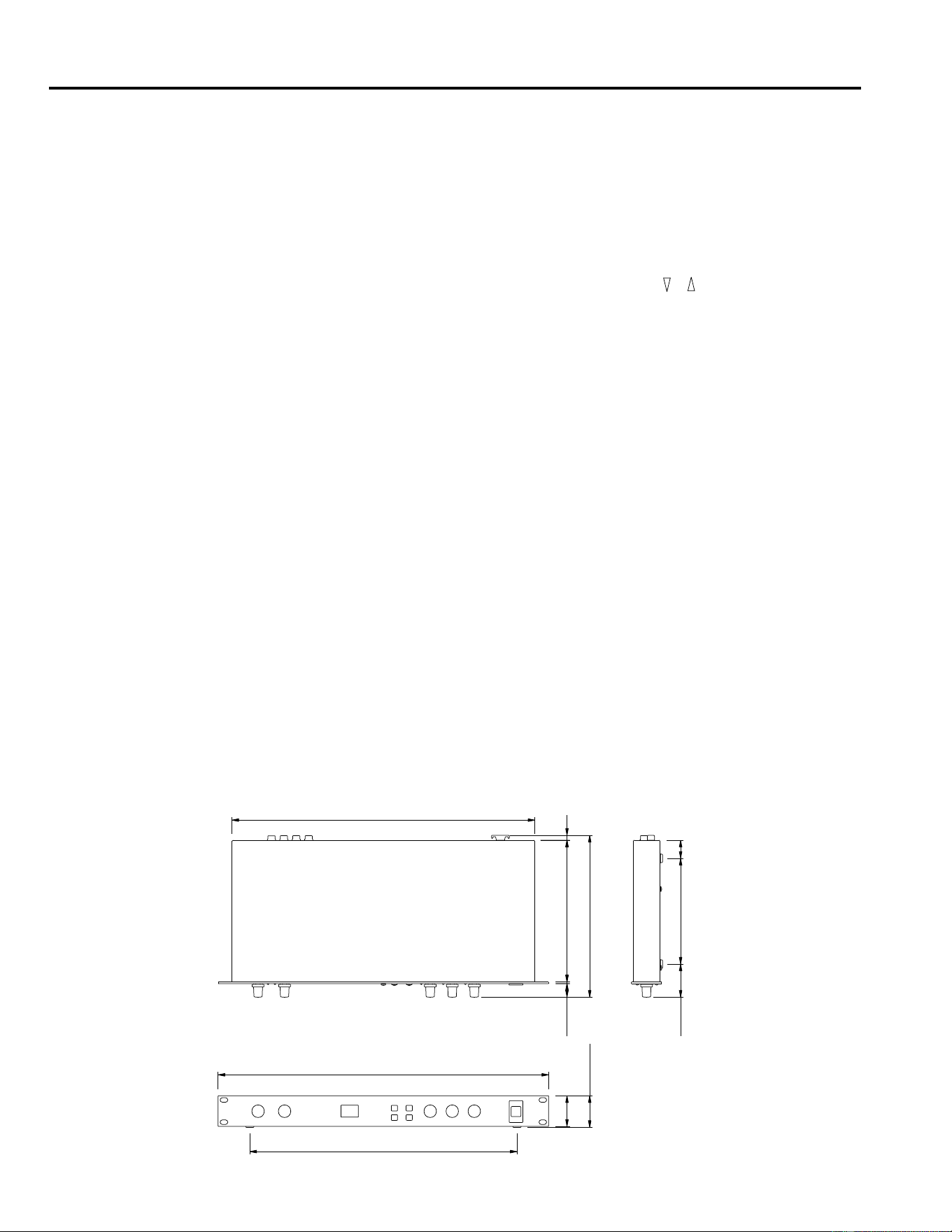
10
Especificaciones
5. Especificaciones
Especificaciones generales
CARACTERÍSTICAS ELÉCTRICAS
Respuesta en frecuencia 20 Hz ~ 20 kHz
Gama dinámica 80 dB (típica)
Distorsión menos de 0,1% (1 kHz, nivel
máx.)
ENTRADA
Número de canales 2 (toma de auriculares)
Nivel nominal –10 dB
Impedancia 20 kΩ (STEREO)
10 kΩ (IZQUIERDO-MONO)
SALIDA
Número de canales 2 (toma de auriculares)
Nivel nominal –10 dB
Impedancia 2 kΩ (STEREO)
1 kΩ (IZQUIERDO-MONO)
CONVERSIÓN AD/DA
Conversión Analógico-Digital 16 bits
Conversión Digital-Analógico 16 bits
Frecuencia de muestreo 44,1 kHz
PROGRAMA
Número de programa 99
PANEL FRONTAL
Interruptores , , MIDI, STORE, POWER
Controles giratorios INPUT LEVEL, MIX BALANCE,
DELAY, DECAY, LEVEL
Visualizador Diodo fotoemisor de 7 segmen-
tos × 2
PEAK L R
DELAY, DECAY, LEVEL
PANEL TRASERO
Tomas INPUT L (MONO), R
OUTPUT L (MONO), R
MIDI IN (DIN 5P), DC 12V IN
ALIMENTACIÓN CC 12 V
DIMENSIONES
(An × Al × Fd) 480 mm × 45 mm × 232 mm
PESO 2,5 kg
ACCESORIOS Adaptador de CA
* La gama dinámica se mide con un LPF de 6 dB/octava a 12,7 kHz — equivalente a un LPF de 20 kHz con atenuación
infinita dB/octava.
* 0 dB = 0,775 V RMS
* Las especificaciones y el aspecto están sujetos a cambio sin previo aviso.
Dimensiones
19.4 2.6 203
Fd: 232
7
440
26151.547.5
Al:45
44
388
An:480
YAMAHA [DIGITAL REVERBERATOR] Date:12 Oct. 1994
Model: REV100 MIDI Implementation Chart Version: 1.0
Function... Transmitted Recognized Remarks
Basic
Channel
Default
Changed
X
X
1 – 16, off
1 – 16, off
Memorized
Mode
Default
Messages
Altered
X
X
****************
OMNI off / OMNI on
X
X
Memorized
Note
Number True Voice
X
****************
X
X
Velocity
Note ON
Note OFF
X
X
X
X
After Touch
Keys
Ch’s
X
X
X
X
Pitch Bender X X
Control
Change
20 – 27 X O *1
Prog
Change :True#
X
****************
O 0 – 127
*2
System Exclusive X O *3
System
Common
:Song Pos
:Song Sel
:Tune
X
X
X
X
X
X
System
Real Time
:Clock
:Commands
X
X
X
X
Aux
Messages
:Local ON/OFF
:All Notes OFF
:Active Sense
:Reset
X
X
X
X
X
X
X
X
Notes
Notes
Notes
*1: Depend on effect type.
*2: For program 1–99, memory number of REV100 is selected.
*3: Parameter change only.
Mode 1: OMNI ON, POLY
Mode 3: OMNI OFF, POLY
Mode 2: OMNI ON, MONO
Mode 4: OMNI OFF, MONO
O: Yes
X: No

YAMAHA CORPORATION
VS72110 R1 1 IP 94 12 5000 CR Printed in Japan P.O.Box 1, Hamamatsu, Japan
