QUICK
CHARGER
Model BQ-CC55A
• Thank you for purchasing the
Panasonic Charger, MODEL BQ-CC55A.
●
IMPORTANT SAFETY
INSTRUCTIONS
–SAVE THESE
INSTRUCTIONS.
●
DANGER–TO
REDUCE THE
RISK OF FIRE
OR ELECTRIC
SHOCK,
CAREFULLY
FOLLOW THESE
INSTRUCTIONS.
ENGLISH
Please read these instructions and warnings before
using this product, and save this manual for future
use. In addition, be sure to read the warnings on the
batteries.
CAUTION
1. To reduce the risk of injury, we recommend that
Panasonic Ni-MH rechargeable batteries are used.
2. Do not use non-rechargeable batteries.
3. Do not open or disassemble the charger.
4. Do not get the charger wet or allow water or
other liquids to enter the charger.
5. Only use the charger indoors, in a dry location.
6. Do not use the charger if its plug or the
batteries are damaged.
7. Do not use the charger in direct sunlight.
8. For connection to a power supply located outside
the U.S or Canada, use the proper plug adapter.
9. This charger is intended for use in a vertical,
upright position.
Read and follow all instructions. Children should
not use this charger without adult supervision.
OPERATING INSTRUCTIONS
FOR U.S.A. ONLY
This device complies with Part 15 of the FCC Rules.
Operation is subject to the following two conditions:
(1) this device may not cause harmful interference,
and (2) this device must accept any interference
received, including interference that may cause
undesired operation.
Warning: Any changes or modifications not
expressly approved by the party responsible
for compliance could void the user’s authority
to operate this equipment.
FCC Note: This equipment has been tested and
found to comply with the limits for a Class B digital
device, pursuant to Part 15 of the FCC Rules. These
limits are designed to provide reasonable protection
against harmful interference in a residential
installation. This equipment generates, uses and can
radiate radio frequency energy and, if not installed
and used in accordance with the instructions, may
cause harmful interference to radio communications.
However, there is no guarantee that interference will
not occur in a particular installation. If this equipment
does cause harmful interference to radio or television
reception, which can be determined by turning the
equipment off and on, the user is encouraged to try
to correct the interference by one of the following
measures:
• Reorient or relocate the receiving antenna.
• Increase the separation between the equipment
and the receiver.
• Connect the equipment into an outlet on a
circuit different from that to which the receiver
is connected.
• Consult the dealer or an experienced radio/ TV
technician for help.
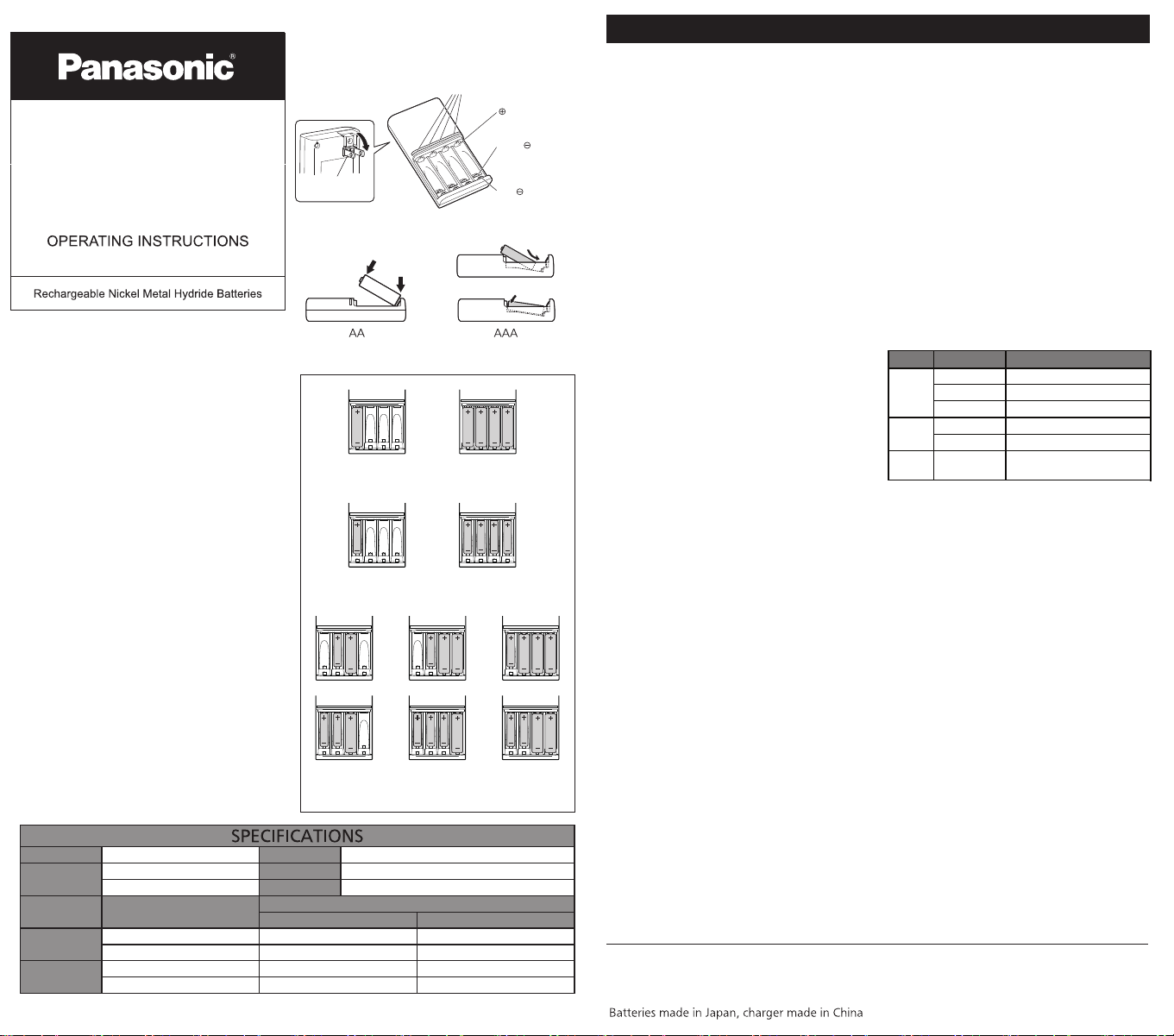
This charger allows AA and AAA Ni-MH rechargeable
batteries to be charged in multiple combinations;
from one to four batteries at a time. (fig 3)
1) Observe the correct polarity by matching the
positive (+) and negative (-) terminals on the
batteries to the positive (+) and negative (-) on the
charger. Insert the batteries from the negative (-)
end first. (fig 2) If a AAA battery is inserted from the
positive (+) end first, the negative (-) terminal on the
charger may be damaged.
2) Plug the charger into a standard 100-240V AC
outlet.
* The green LED light moves from left to right for about 3
seconds before charging starts. Battery cell charge capacity
is being performed during this time.
3) The charger LED lights will become solid indicating
charging has begun.
The LED lights will change color according to
the charging progress.
* The remaining charge indication should only be used as a
rough estimate. Charging durations will vary depending on
the state of the batteries and the charging environment.
Therefore, be sure to charge the batteries until the LEDs
are completely turned off.
If the indicator does not light or blinks:
a) Make sure that the batteries are inserted
correctly and that proper contact is made with
each terminal.
b) Check that the power plug is correctly inserted.
c) Check that the batteries are not damaged and
are rechargeable.
4) Charging is complete when the LED turns off
after lighting green. Disconnect the charger from
the AC outlet, and remove the charged batteries.
MAINTENANCE, CARE AND CLEANING
• Care and cleaning is essential.
• Unplug charger from AC outlet.
• If necessary clean with a dry cloth to remove
dirt and grime.
• Never immerse the charger in water or in any
other liquid.
Parts location
Fig. 1
terminal
AAAterminal
AAterminal
Charging indicator lights
(Located in the battery charger)
Combinations of up to four
AA or AAA batteries
AA size 1 - 4 pcs
AAA size 1 - 4 pcs
AC plug
Fig. 2
1
2
1
2
Panasonic Energy Corporation of America
Columbus, GA 31907 800-211-PANA
www.panasonic.com/support
panasonicbatteryproducts.com
Panasonic Canada Inc.
Mississauga, ON L4A2T3
panasonic.ca/english/support
panasonic.ca/french/support
panasonic.ca/battery
"Charge Time" is the amount of time it takes to charge a fully discharged battery.
Actual charge time will depend on the remaining charge in the battery cell and the ambient temperature.
Table 1
Output
AA size DC 1.5 V - 750 mA x 4
Batteriy Size
1-2 battery cells
2450 - 2550 mAh
AA
AAA
Capacity
3-4 battery cells
2 hours
1.5 hours
1900 - 2000 mAh
900 - 950 mAh
750 - 800 mAh
Weight
Input
Size AC100-240 V ~ 50/60 Hz 0.3 A
117 g
121 x 68 x 29 mm
0°C - 35°CTemp RangeAAA size DC 1.5 V - 275 mA x 4
Approximately Charge Time
2 hours
1.5 hours
4 hours
4 hours
3 hours
3 hours
LED status
Remaining charge / battery status
Red LED light 20% or less
Charging Yellow LED light 20% to 80%
Green LED light 80% or more
Charging
Off 100%
complete
Blinking yellow Battery replacement recommended
Error Blinking red
Invalid batteries (i.e.,
non-rechargeable) inserted
HR33417-1
