User Guide for BX27 True Wireless Stereo Earphones
Table of Product Contents
Charging Case*1
Wireless Earbud*2
TypeC Charging Cable*1
Instruction Book
Earbud Tip*4
Product Specification
Bluetooth Version: 5.3
Support: HSP/HFP/A2DP/AVRCP
Charging Port: Type-C
Battery Life: 15 hours of use per full charge of both earbuds (actual battery life varies with song type and volume requirements)
Charging time: 1.5 hour for earbuds / 2 hours for charging case
Transmission range: 15 meters (without obstacles)
Introduction
How do I pair two headphones with my phone?
Please make sure both the earbuds and the charging case are fully charged before first use.
Step 1
Take both earbuds out of the charging case and both earbuds will power on and start pairing automatically.
The blue light flashes when connected, and when the light goes out, the pairing of the wireless headset is complete.
Step 2
Enable the Bluetooth pairing mode on your phone device, search and select "BX27" to connect. (You should hear a voice prompt "connected" when wearing earbuds).
If indicator light of earbud is off, it means the phone is connected.
Automatic connection
By default, the earbuds will connect the last paired mobile automatically when power on.
Prompt
If you have any problem pairing the two earbuds with your phone, put the earbuds back in the charging case and repeat the above steps.
These earbuds can be used not only together, but also individually.
If you want to use single earbud
Just take one earbud out of the case and connect it to your phone. or when using two earbuds, manually turn off one earbud or put one back in the charging case and you'll be able to use the other one earbud alone.
Functions
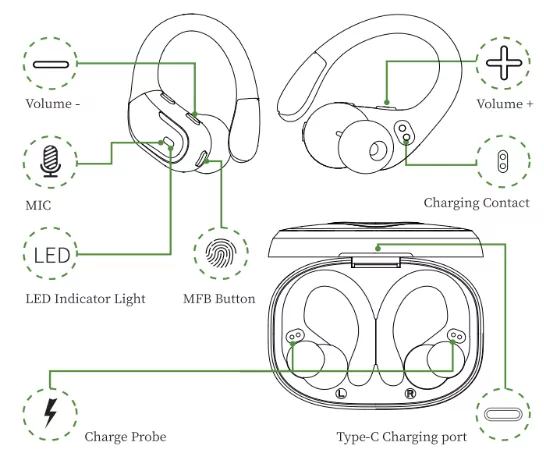
X1: Click Once
X2: Click 2 times
2S: Press and hold for 2 seconds
Charging
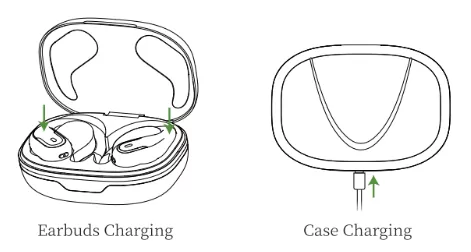
Earbuds Charging
The earbuds will only be charged when you place them in the charging slots correctly. (You can charge the charging case and the earbuds at the same time, or you can charge the charging case first and then the earbuds.)
The indicator light will show blue while charging.
The charging case will stop charging automatically and the indicator light on earbuds will go out when fully charged.
When the earbuds are charging in the charging case, the digital display bar of the case will keep blink and turn off after 30 seconds.
Case Charging
There is a Type-C usb charging cable in the package, please use it to charge the case directly.
During charging, the digital display will flash and display the battery level in real time. When fully charged, the number shows 100.
Charging Alerts
After using it for a long period of time, due to the oxidation of the magnet connector, the earbuds might not be charged or even turned on.
You can fix this problem by cleaning the magnet connectors on the earbuds and changing case with an alcohol wipe.
Put the earbuds in the charging case, the earbuds will turn off immediately and the charging case will start to charging automatically.
The earbuds will connect the last paired mobile automatically.
Storage and Maintenance
If the earbuds have not been used for more than 3 months, we recommend that you change it.
Please use an charger approved by FCC (Federal Communications Commission).
Do not dismember the earbuds.
Children aged 12 and under require adult supervision.
Do not expose the earbuds to high or low temperatures, and do not use the earbuds during a thunderstorm.
Avoid free fall or violent shock to the device. Keep the device away from sources of fire and do not place the device in water.
Frequently Asked Questions
Why don't these earbuds pair with my phone?
Make sure the earbuds are fully charged and powered on.
Make sure your phone's Bluetooth is enabled.
If there is no problem with the two points stated above, turn off the powered-on earbuds after 5 continuous and quick clicks.
Put them back into the charging case and close the lip, wait for 1 minute, then open the charging case and reconnect the earbuds to the phone.
Why does the music cut in or out?
First, keep the earbuds no more than 15m away from your phone (no obstacles).
If the distance is less than 15m, follow these steps:
Put the earbuds back into the case and close the lid, manually click "forget the BX27" on your phone.
After 10 seconds, open the charging case and reconnect these earbuds with your phone.
Why the earbuds still won't be charged or disconnect from the phone after I put them in the case and close the lid?
Make sure the charging case is not in a low battery state.
If the charging case is in a low battery state, the earbuds will neither be charged nor disconnected.
In this case, please use a type-c charging cable to fully charge the case.
Are these earbuds sweat- and water-resistant?
These earbuds are sweatproof and slightly waterproof.
For electronic devices, we do not recommend that you submerge the earbuds in water.
For more detailed product FAQs, please contact our customer service.
Activation & Warranty
Permanent replacement of damaged, defective, upgraded or missing items (no need to return the original)
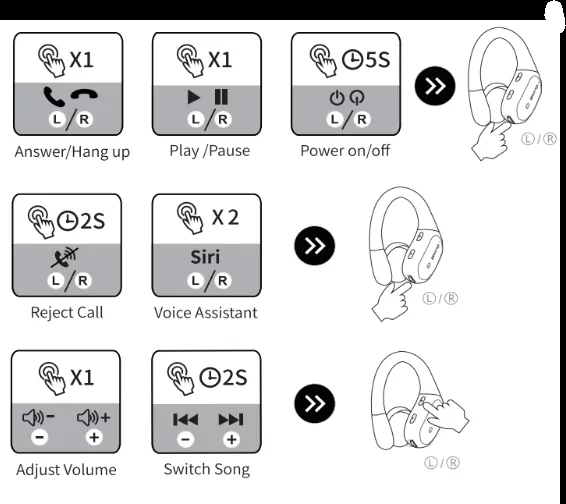
 2S: Press and hold for 2 seconds