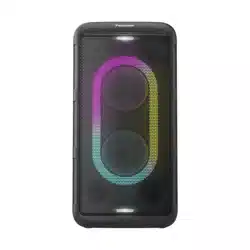

Owner’s manual
Instrucciones de funcionamiento
Wireless Speaker System
Sistema de altavoces
Model No. SC-BMAX10
SC-BMAX5
TQBM2030
Thank you for purchasing this product.
For optimum performance and safety, please read these instructions carefully.
Please keep this manual for future reference.
Muchísimas gracias por haber adquirido este aparato.
Para un desempeño y seguridad óptimos, por favor lea estas instrucciones cuidadosamente.
Guarde este manual para su consulta en el futuro.
-For
U.S.A
If you have any questions, visit:
https://help.na.panasonic.com/
Register online at https://help.na.panasonic.com/
(U.S. customers only)
WW
[SC-BMAX10]
[SC-BMAX5]
BMAX10_5WW_TQBM2030.book Page 1 Monday, July 22, 2024 3:15 PM
2
TQBM2030
2
These operating instructions are applicable for model
SC-BMAX10 and SC-BMAX5.
Unless otherwise indicated, illustrations in these operating
instructions are of SC-BMAX10. Your system and the
illustrations can look differently.
Table of contents
Supplied accessories . . . . . . . . . . . . . . . . . . . . . . . . . . . 2
IMPORTANT SAFETY INSTRUCTIONS . . . . . . . . . . . . 2
Safety precautions . . . . . . . . . . . . . . . . . . . . . . . . . . . . . 3
Transporting the unit . . . . . . . . . . . . . . . . . . . . . . . . . . . . 4
Power sources . . . . . . . . . . . . . . . . . . . . . . . . . . . . . . . . 5
Overview of unit . . . . . . . . . . . . . . . . . . . . . . . . . . . . . . . 6
Bluetooth
®
operation . . . . . . . . . . . . . . . . . . . . . . . . . . . . 7
Using a USB device . . . . . . . . . . . . . . . . . . . . . . . . . . . . 8
External equipment . . . . . . . . . . . . . . . . . . . . . . . . . . . . . 9
Using a microphone or guitar . . . . . . . . . . . . . . . . . . . . 10
Illumination effects . . . . . . . . . . . . . . . . . . . . . . . . . . . . 10
Others . . . . . . . . . . . . . . . . . . . . . . . . . . . . . . . . . . . . . . 10
Troubleshooting . . . . . . . . . . . . . . . . . . . . . . . . . . . . . . 11
Maintenance . . . . . . . . . . . . . . . . . . . . . . . . . . . . . . . . . 11
References . . . . . . . . . . . . . . . . . . . . . . . . . . . . . . . . . . 12
Specifications . . . . . . . . . . . . . . . . . . . . . . . . . . . . . . . . 13
To remove the battery when disposing of this unit . . . . 14
Limited Warranty (ONLY FOR U.S.A.) . . . . . . . . . . . . . 16
Supplied accessories
Check and identify the supplied accessories.
Note:
• Product numbers correct as of July 2024. These may be
subject to change.
• Do not use any other optical cable except the supplied one.
IMPORTANT
SAFETY
INSTRUCTIONS
Read these operating instructions carefully before using
the unit. Follow the safety instructions on the unit and the
applicable safety instructions listed below. Keep these
operating instructions handy for future reference.
1. Read these instructions.
2. Keep these instructions.
3. Heed all warnings.
4. Follow all instructions.
5. Do not use this apparatus near water.
6. Clean only with dry cloth.
7. Do not block any ventilation openings. Install in
accordance with the manufacturer’s instructions.
8. Do not install near any heat sources such as
radiators, heat registers, stoves, or other apparatus
(including amplifiers) that produce heat.
9. Do not defeat the safety purpose of the polarized or
grounding-type plug. A polarized plug has two blades
with one wider than the other. A grounding-type plug
has two blades and a third grounding prong. The wide
blade or the third prong are provided for your safety. If
the provided plug does not fit into your outlet, consult
an electrician for replacement of the obsolete outlet.
10. Protect the power cord from being walked on or
pinched particularly at plugs, convenience
receptacles, and the point where they exit from the
apparatus.
11. Only use attachments/accessories specified by the
manufacturer.
12. Use only with the cart, stand, tripod,
bracket, or table specified by the
manufacturer, or sold with the
apparatus. When a cart is used, use
caution when moving the
cart/apparatus combination to avoid
injury from tip-over.
13. Unplug this apparatus during lightning storms or when
unused for long periods of time.
14. Refer all servicing to qualified service personnel.
Servicing is required when the apparatus has been
damaged in any way, such as power-supply cord or
plug is damaged, liquid has been spilled or objects
have fallen into the apparatus, the apparatus has
been exposed to rain or moisture, does not operate
normally, or has been dropped.
[SC-BMAX10] [SC-BMAX5]
5 AC power supply
cord
For the United States
(TSXA232)
For India
(TSXA231)
For Thailand
(TSXA229)
For others
(TSXA226)
(TSXA227)
1 Optical cable
(TSXF231)
4 AC power supply
cord
For the United States
(TSXA232)
For Thailand
(TSXA229)
For others
(TSXA226)
(TSXA227)
1 Optical cable
(TSXF231)
BMAX10_5WW_TQBM2030.book Page 2 Monday, July 22, 2024 3:15 PM
3
TQBM2030
3
Safety precautions
WARNING
Unit
• To reduce the risk of fire, electric shock or product
damage,
– Do not expose this unit to rain, moisture, dripping or
splashing.
– Do not place objects filled with liquids, such as vases,
on this unit.
– Use the recommended accessories.
– Do not remove covers.
– Do not repair this unit by yourself. Refer servicing to
qualified service personnel.
Battery pack (Lithium ion battery pack)
• Risk of fire, explosion and burns. Do not disassemble,
heat above 60°C (140°F) or incinerate.
CAUTION
Unit
• To reduce the risk of fire, electric shock or product
damage,
– Do not install or place this unit in a bookcase, built-in
cabinet or in another confined space. Ensure this unit
is well ventilated.
– Do not obstruct this unit’s ventilation openings with
newspapers, tablecloths, curtains, and similar items.
– Do not place sources of naked flames, such as lighted
candles, on this unit.
• This unit is intended for use in moderate and tropical
climates.
• This unit may receive radio interference caused by
mobile telephones during use. If such interference
occurs, please increase separation between this unit
and the mobile telephone.
• Set the unit up on an even surface away from direct
sunlight, high temperatures, high humidity, and
excessive vibration.
• This system might get warm after prolonged usage. This
is normal. Do not be alarmed.
AC power supply cord
• The power plug is the disconnecting device. Install this
unit so that the power plug can be unplugged from the
socket outlet immediately.
Battery
• Danger of explosion if battery is incorrectly replaced.
Replace only with the type recommended by the
manufacturer.
• When disposing of the batteries, please contact your
local authorities or dealer and ask for the correct
method of disposal.
• Do not heat or expose to flame.
• Do not leave the battery(ies) in a car exposed to direct
sunlight for a long period of time with doors and
windows closed.
• Do not expose to low air pressure at high altitudes.
• Do not expose to extremely low air pressure, as this
may result in explosions or leakage of flammable liquids
and gases.
• Avoid the use in the following conditions
– High or low extreme temperatures during use, storage
or transportation.
– Disposal of a battery into fire or a hot oven, or
mechanically crushing or cutting of a battery, that can
result in an explosion.
– Extremely high temperature and/or extremely low air
pressure that can result in an explosion or the
leakage of flammable liquid or gas.
The symbols on this product (including the accessories)
represent the following:
For
U.S.A
THE FOLLOWING APPLIES ONLY IN THE U.S.A
AC
DC
Class II equipment (The construction of the
product is double-insulated.)
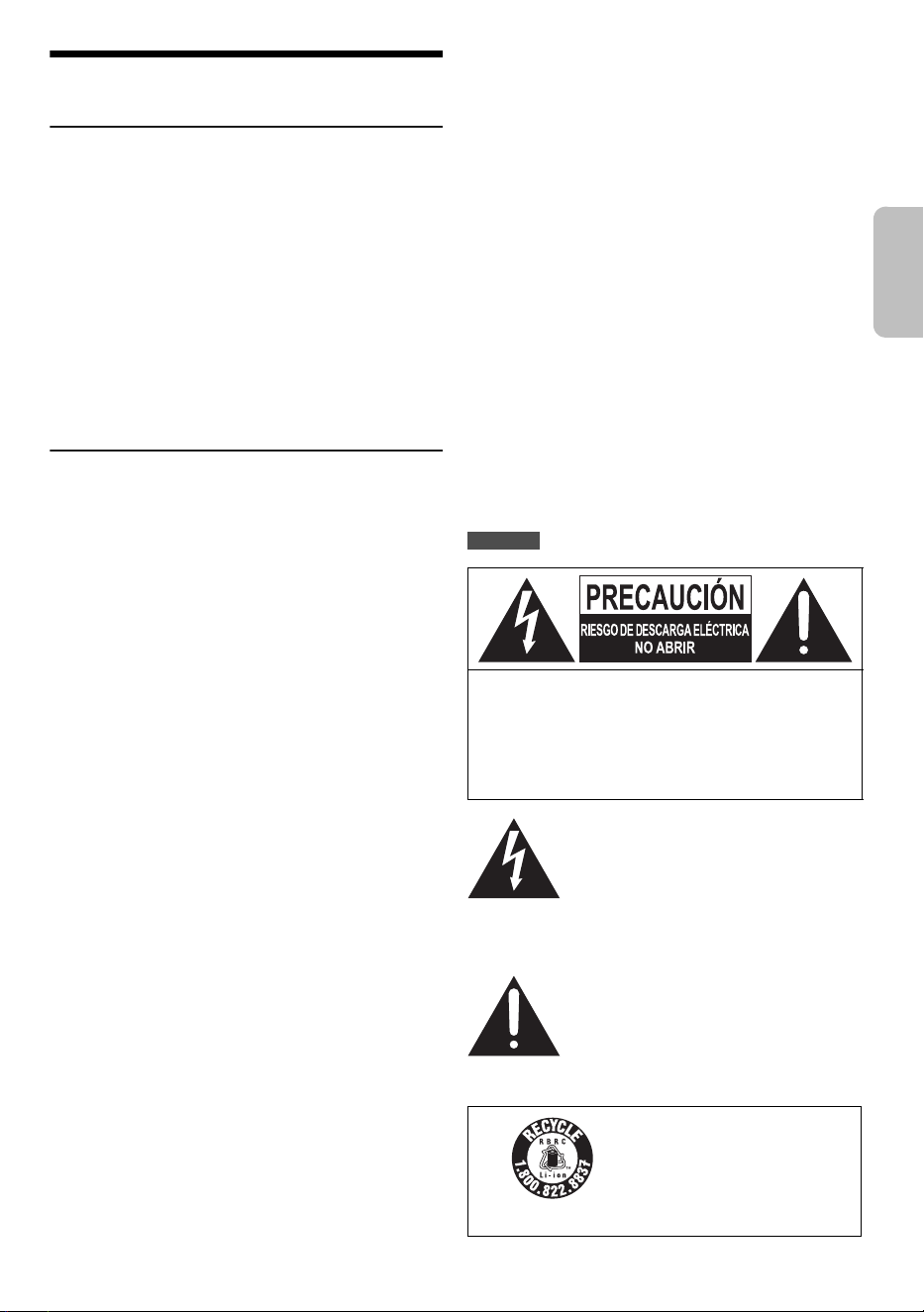
CAUTION: TO REDUCE THE RISK OF ELECTRIC
SHOCK, DO NOT REMOVE SCREWS.
NO USER-SERVICEABLE PARTS
INSIDE.
REFER SERVICING TO QUALIFIED
SERVICE PERSONNEL.
The lightning flash with arrowhead
symbol, within an equilateral triangle, is
intended to alert the user to the presence
of uninsulated “dangerous voltage” within
the product’s enclosure that may be of
sufficient magnitude to constitute a risk of
electric shock to persons.
The exclamation point within an
equilateral triangle is intended to alert the
user to the presence of important
operating and maintenance (servicing)
instructions in the literature accompanying
the appliance.
A lithium ion battery that is
recyclable powers the product
you have purchased.
Please call 1-800-8-BATTERY
for information on how to
recycle this battery.
This device complies with Part 15 of the FCC Rules.
Operation is subject to the following two conditions:
(1) This device may not cause harmful interference, and
(2) this device must accept any interference received,
including interference that may cause undesired
operation.
FCC ID: ESX-BMAX10 (for SC-BMAX10)
ESX-BMAX5 (for SC-BMAX5)
For US and Canada only
ENGLISH
BMAX10_5WW_TQBM2030.book Page 3 Monday, July 22, 2024 3:15 PM
4
TQBM2030
4
FCC Radiation Exposure Statement
For Thailand
Transporting the unit
Preparation
Disconnect all connected devices and cables from the
unit.
1 Hold the handle of the unit firmly when
transporting the unit.
2 Place the unit on a flat, stable surface with the
rubber feet facing down.
Placement
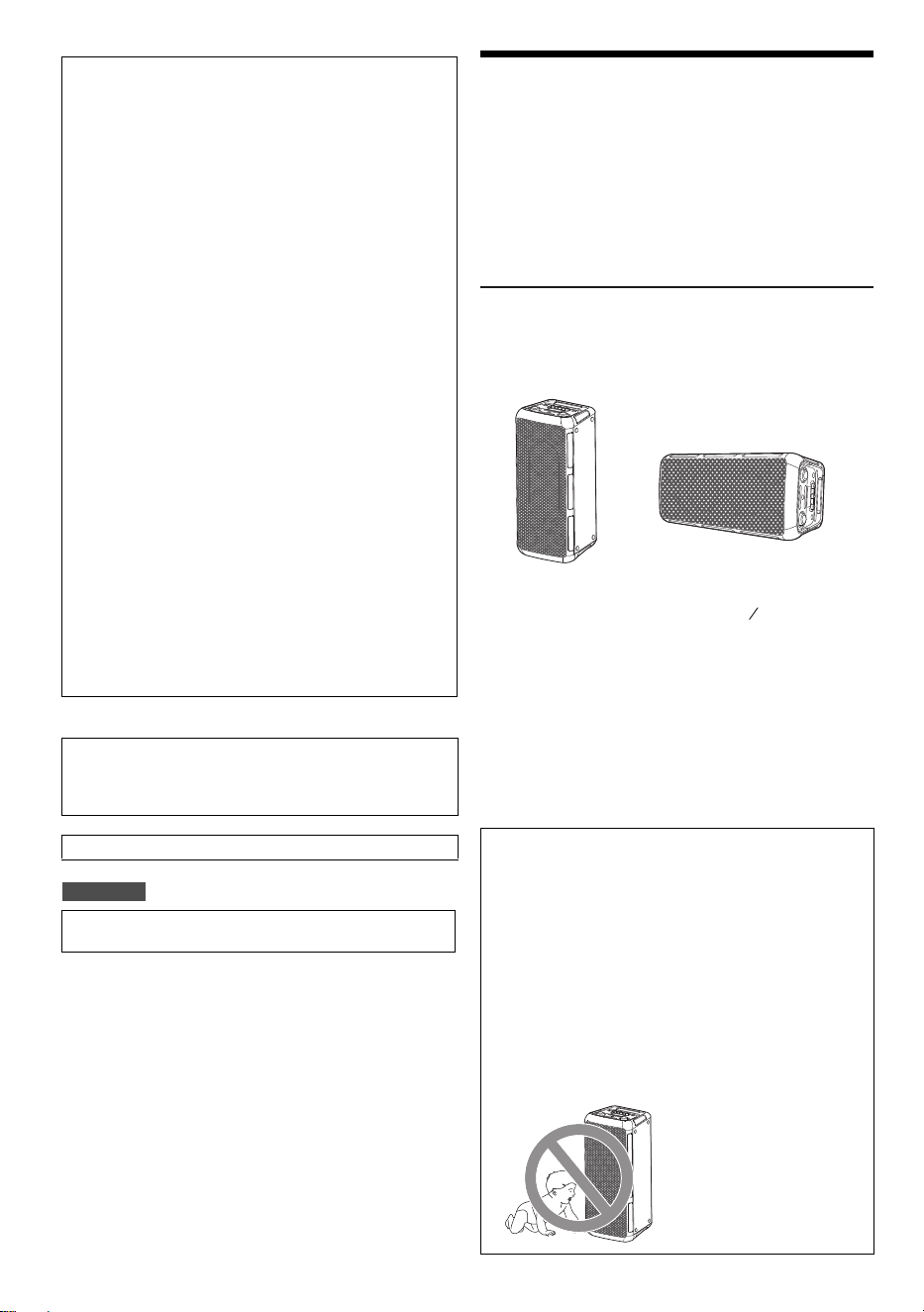
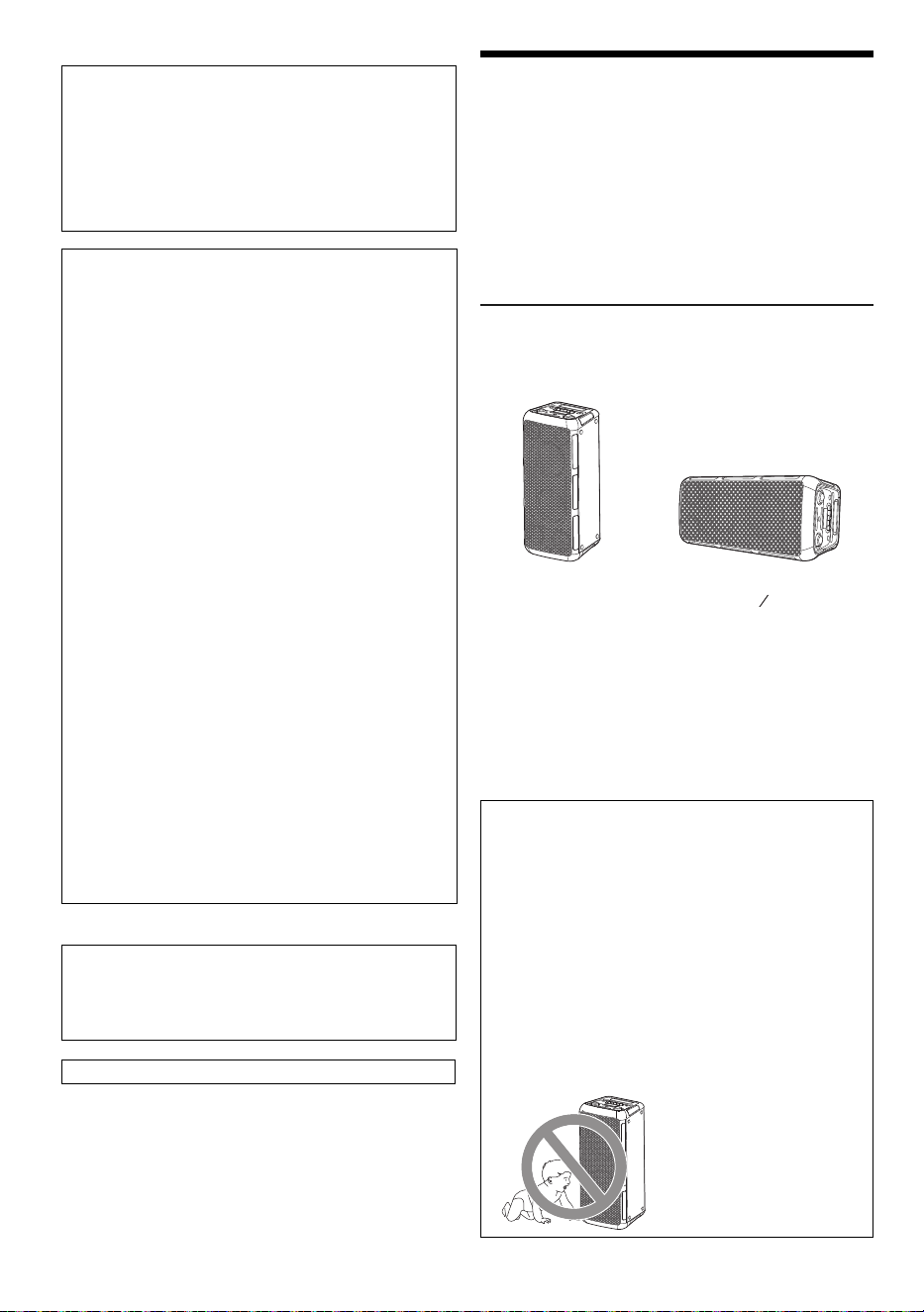
You can place this system vertically or horizontally.
Note:
• Keep your speakers more than 10 mm ( ″) from other
objects for proper ventilation.
• These speakers do not have magnetic shielding. Do not put
them near TVs, PCs or other equipment easily influenced by
magnetism.
• When you play at high levels for a long period, it can cause
damage to the speakers and decrease the life of the
speakers.
• Decrease the volume in these conditions to prevent
damage:
– When the sound is distorted.
– When you adjust the sound quality.
FCC Note:
This equipment has been tested and found to comply
with the limits for a Class B digital device, pursuant to
Part 15 of the FCC Rules.
These limits are designed to provide reasonable
protection against harmful interference in a residential
installation. This equipment generates, uses, and can
radiate radio frequency energy and, if not installed and
used in accordance with the instructions, may cause
harmful interference to radio communications. However,
there is no guarantee that interference will not occur in a
particular installation. If this equipment does cause
harmful interference to radio or television reception,
which can be determined by turning the equipment off
and on, the user is encouraged to try to correct the
interference by one or more of the following measures:
• Reorient or relocate the receiving antenna.
• Increase the separation between the equipment and
receiver.
• Connect the equipment into an outlet on a circuit
different from that to which the receiver is connected.
• Consult the dealer or an experienced radio/TV
technician for help.
FCC Caution:
Any unauthorized changes or modifications to this
equipment would void the user’s authority to operate this
device.
Supplier's Declaration of Conformity
Trade Name: Panasonic
Model No.: SC-BMAX10 / SC-BMAX5
Responsible Party: Panasonic Corporation of North
America
Two Riverfront Plaza, Newark,
NJ 07102-5490
Support Contact: https://help.na.panasonic.com/
This equipment complies with FCC radiation exposure
limits set forth for an uncontrolled environment.
This transmitter must not be co-located or operating in
conjunction with any other antenna or transmitter.
Conforms to UL STD 62368-1.
This telecommunication equipment conforms to
NTC/NBTC technical requirement.
Vertical placement Horizontal placement
CAUTION!
• Improper handling or transportation manner may
cause the unit to fall, etc., resulting in damage
and/or personal injury.
• Do not place the unit on a sloping or unstable
surface.
• Do not place your feet under the unit.
• Do not touch the speaker cone’s reverberating
surfaces:
– This may damage the speaker cone.
– The speaker cone may be hot.
• Do not put the unit on a table or any elevated
surface.
• Do not allow children to climb on the unit.
• Be careful when babies or children are near.
(Place the side with the
rubber feet facing down.)
32
13
BMAX10_5WW_TQBM2030.book Page 4 Monday, July 22, 2024 3:15 PM
5
TQBM2030
5
Power sources
The unit can be turned on by using AC power supply
source. If AC power supply source is not available, you
can use the built-in battery.
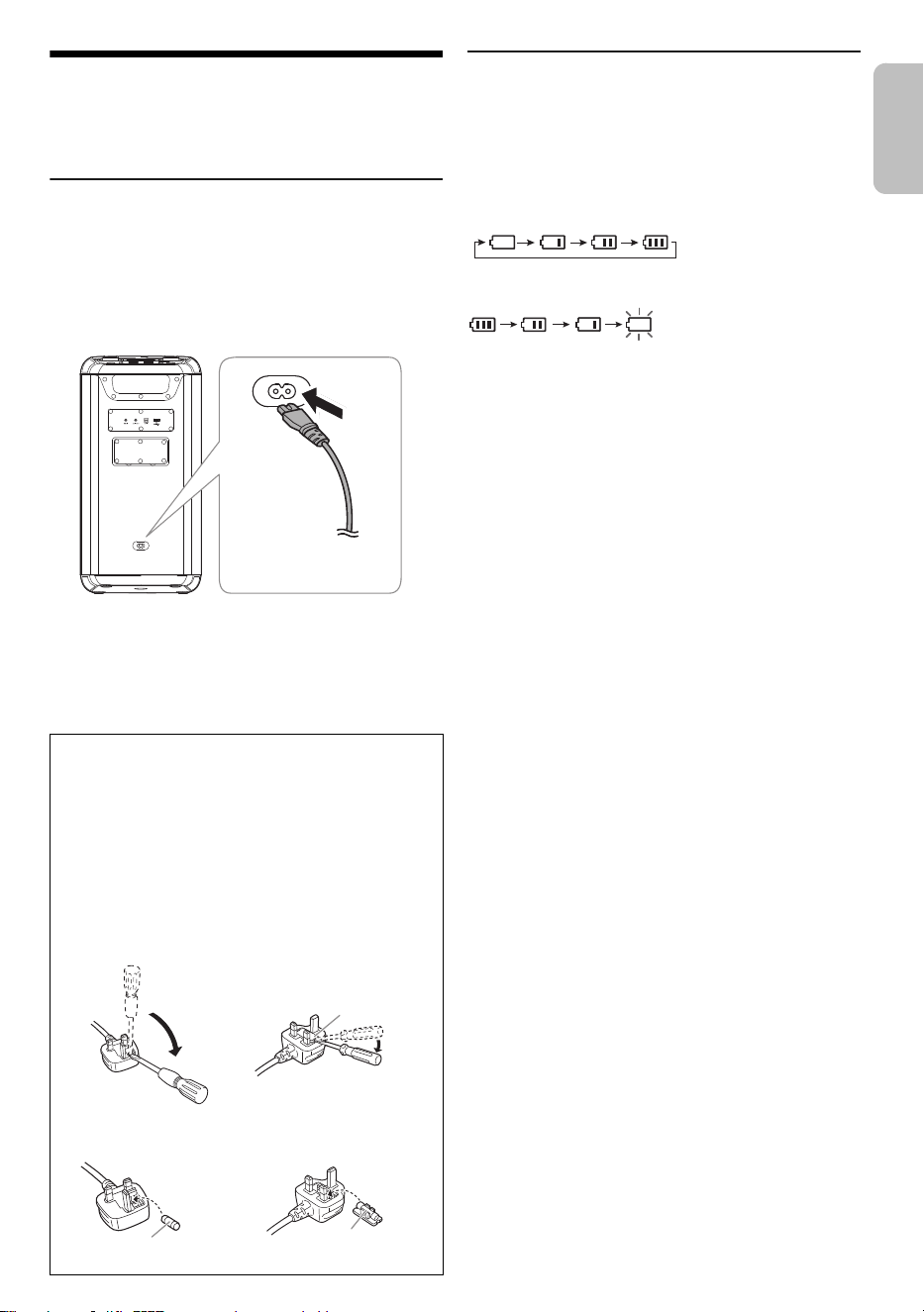
Using the AC power source
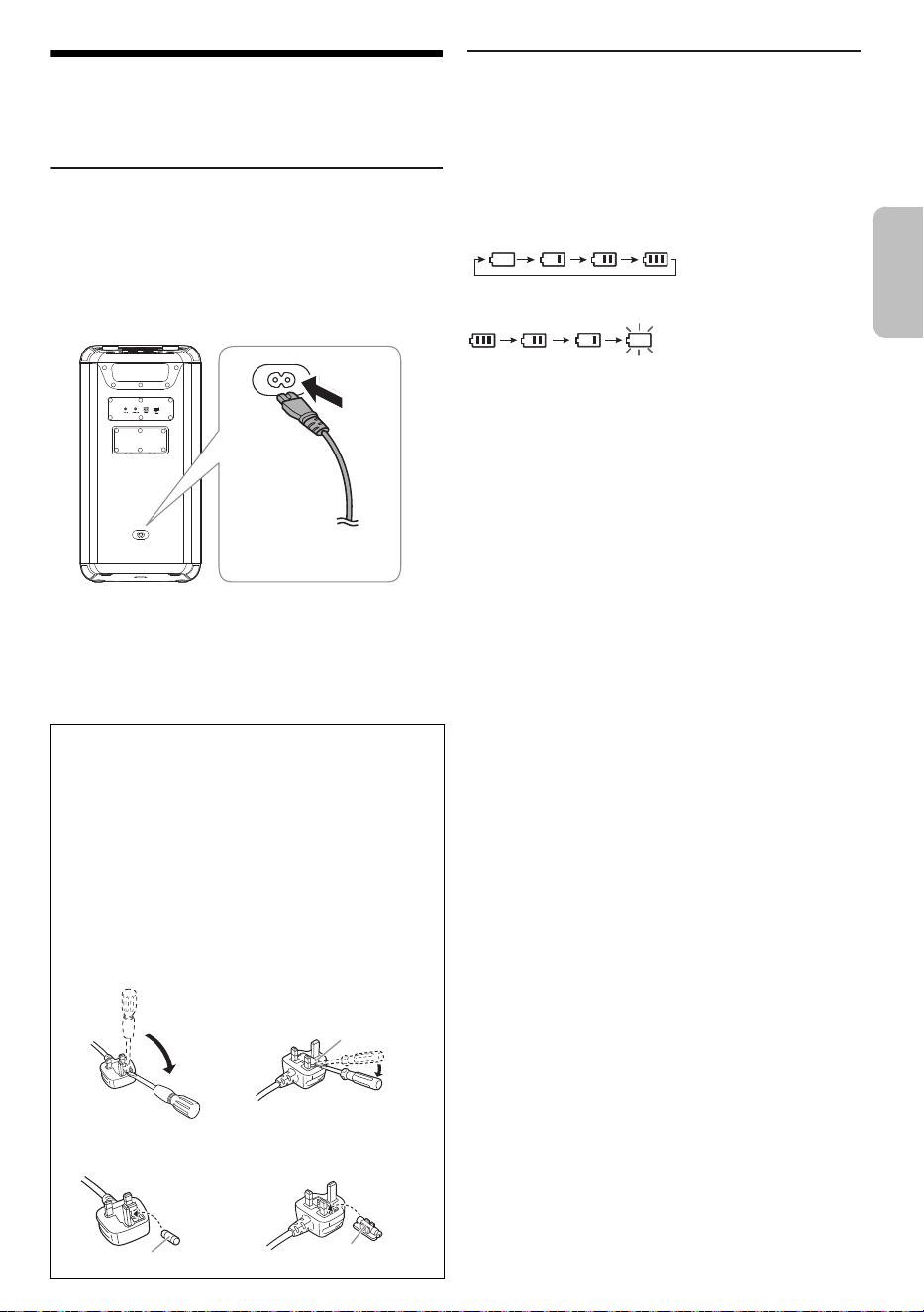
Connect the AC power supply cord only after all the other
connections have been made.
Connect the AC power supply cord.
Do not use any other AC power supply cord except the
supplied one.
Conserving power
The system consumes a small amount of power when it is
in low power mode. Disconnect the power supply if you do
not use the system.
Some settings will be lost after you disconnect the
system. You have to set them again.
Using the built-in battery
This unit contains lithium-ion rechargeable battery. Do not
remove it except for when disposing of the product.
Charge the battery before use.
The battery is charged automatically when AC power
supply cord is connected.
While the battery is being charged, the battery indicator
bars scroll, and once fully charged, all the bars light up.
The battery indicator shows the battery levels.
Note:
• Connect to the AC power supply cord for first time use to
wake up the battery.
• Connect AC power supply cord for charging before battery is
flat.
• The unit will automatically shut down when the battery is flat.
• When this unit is not used over a long period of time, charge
the built-in battery at least once every 1-2 months to prevent
it from deteriorating.
• It is recommended to charge the battery in the temperature
of between 10°C (50°F) and 35°C (95°F). The battery
indicators may flash even though AC power supply cord is
connected and charging may not be possible when it is out
of recommended temperature range.
• The battery may not charge when the temperature
surrounding the battery is high during the operation or right
after the operation even when it is within the recommended
temperature range. In such case, stop the usage and let it
cool down.
• If the battery life is significantly reduced after a full charge, it
may indicate that the battery needs replacement. Consult
the store where you purchased the unit for a battery
replacement. Alternatively, you can still use the unit by
connecting it to an AC power source.
Note on AC power supply cord
(For the AC power plug of three pins with fuse)
Before use
Remove the connector cover.
How to replace the fuse
The location of the fuse differ according to the type of
AC power plug (figures A and B). Confirm the AC power
plug fitted and follow the instructions below.
Illustrations may differ from actual AC power plug.
1. Open the fuse cover with a screwdriver.
2. Replace the fuse and close or attach the fuse cover.
To household
AC outlet
Rear view
Fuse cover
Figure A Figure B
Fuse (3 ampere)
Fuse (3 ampere)
Figure BFigure A
ENGLISH
BMAX10_5WW_TQBM2030.book Page 5 Monday, July 22, 2024 3:15 PM
6
TQBM2030
6
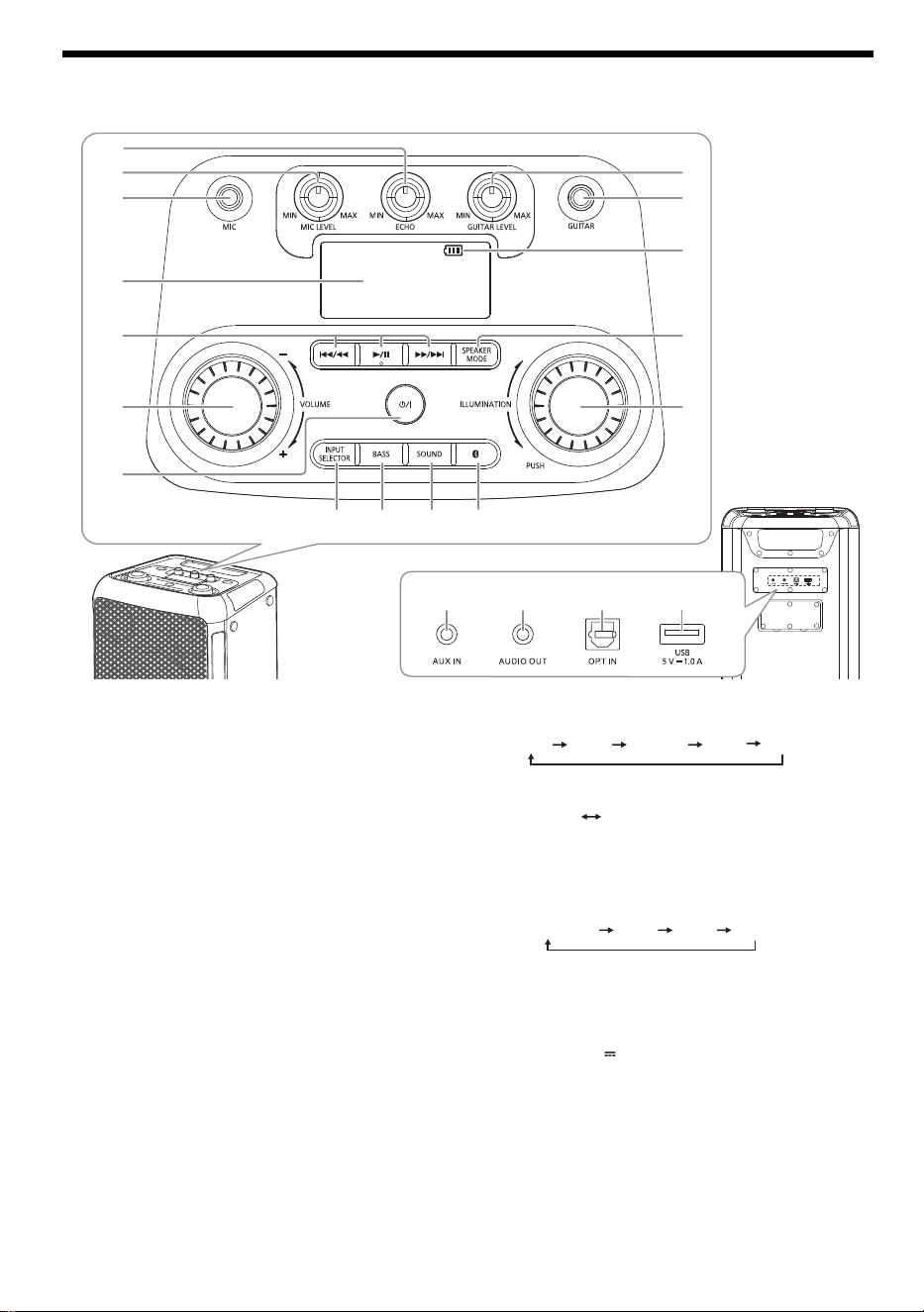
Overview of unit
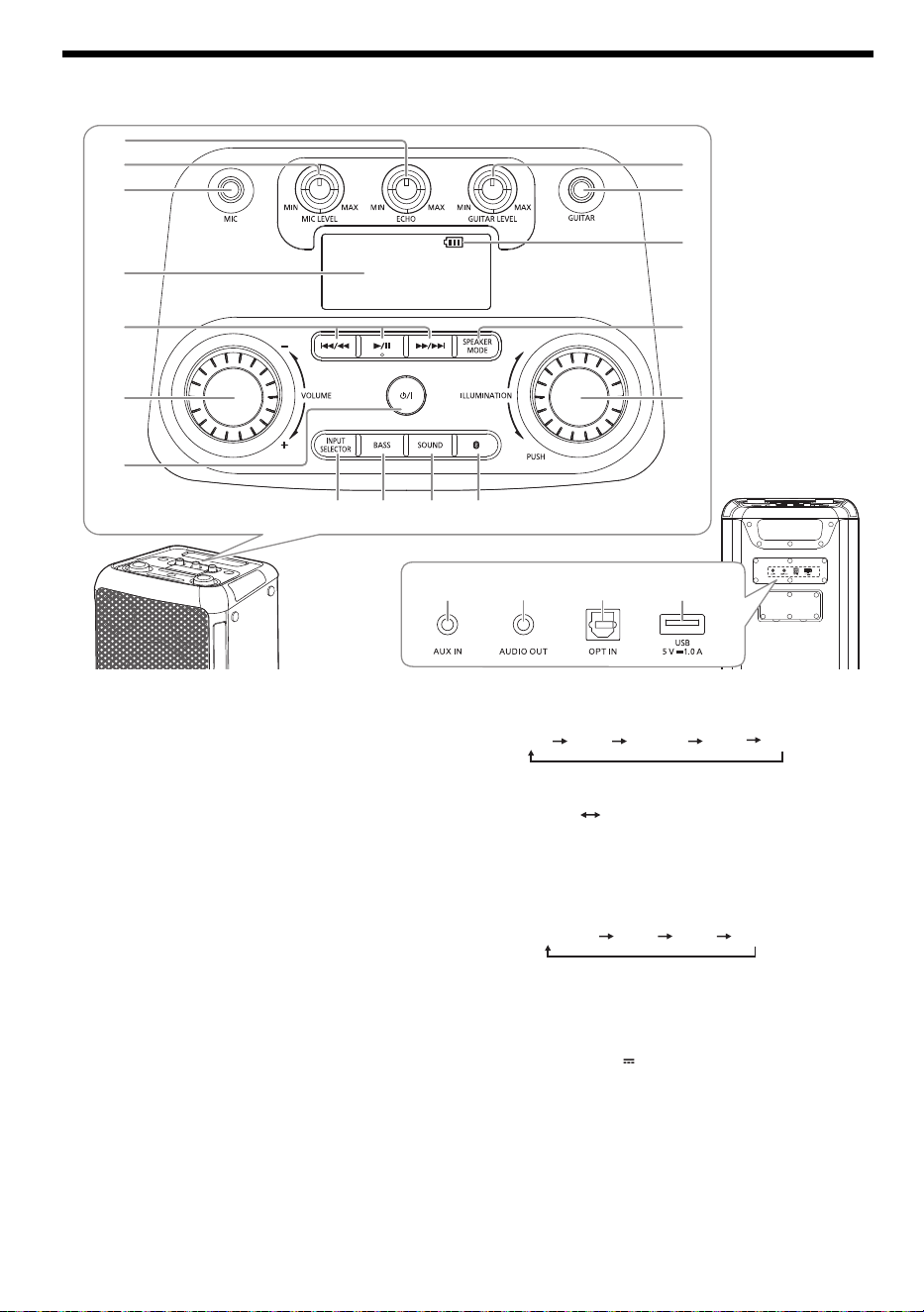
A Low power mode/on switch [1]
Press to turn the unit from on to low power mode or
vice versa. In low power mode, the unit is still
consuming a small amount of power.
B Adjust the volume level
C Basic playback control
D Display panel
E Microphone jack
F Adjust the microphone volume level
G Adjust the microphone echo level
H Adjust the guitar volume level
I Guitar jack
J Battery indicator
K Select the speaker mode
L Select the illumination effects and colours
M Select Bluetooth
®
as the source
N Select the sound effect
O Turn on or turn off the bass effect
Note:
When you turn on the bass effect, the sound effect will turn
off, and vice versa.
P Select the audio source
Q AUX IN jack
R AUDIO OUT jack
S Optical In jack
T USB port (5 V 1.0 A)
2
3
H
I
J
K
P
R
S
T
Q
MN
L
1
4
6
5
O
7
Rear view
POP
ROCK
JAZZ
FLAT
SAMBA
ON BASS OFF BASS
USB AUX
BLUETOOTH
OPT
BMAX10_5WW_TQBM2030.book Page 6 Monday, July 22, 2024 3:15 PM
7
TQBM2030
7
Bluetooth
®
operation
You can connect and play an audio device wirelessly
through Bluetooth
®
.
Preparation
• Turn on the unit.
• Turn on the Bluetooth
®
feature of the device and put the
device near the system.
• Read the operating instructions of the device for details.
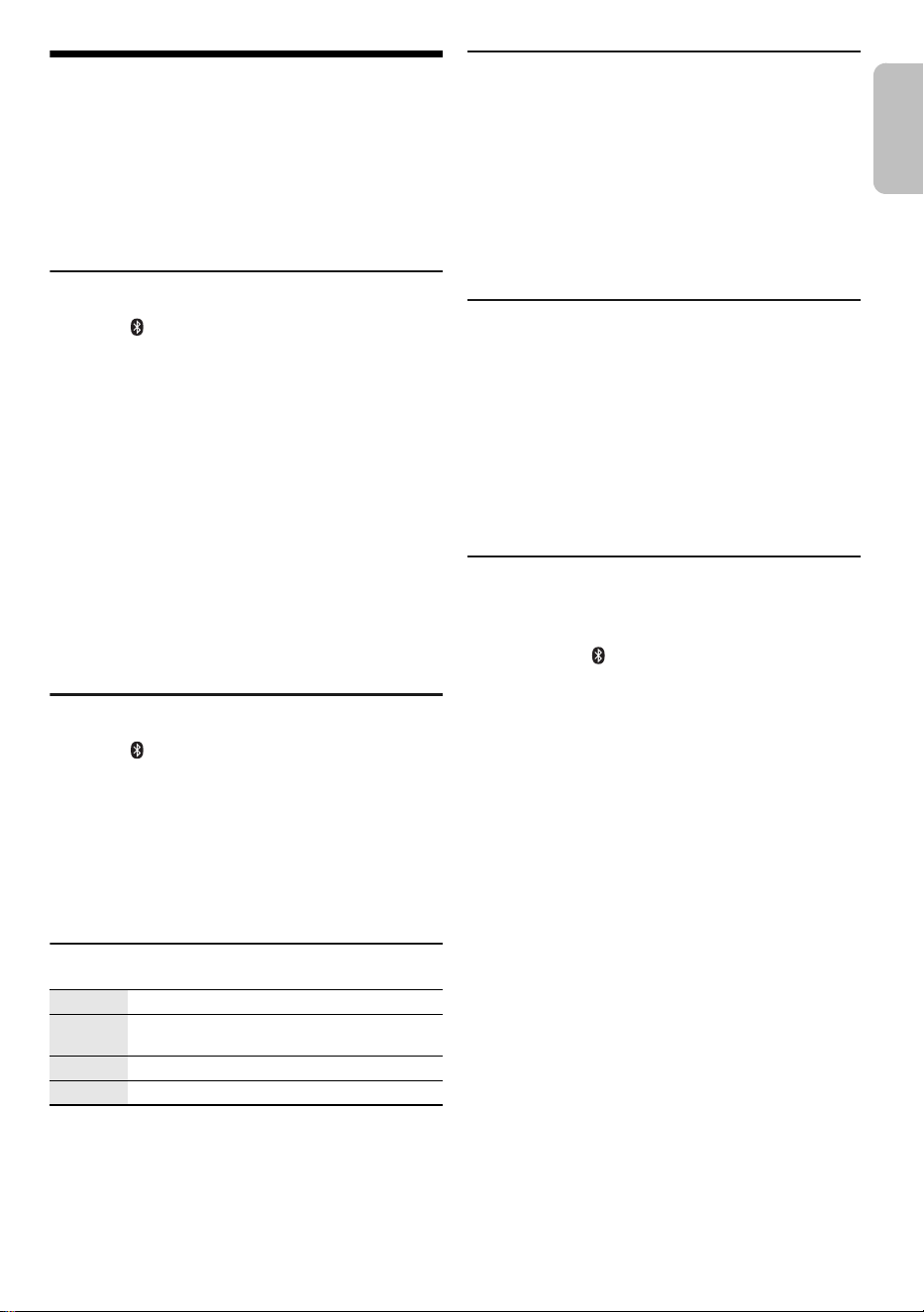
Pairing a device
1 Press [ ].
“PAIRING” is shown.
2 Select “SC-BMAX10” or “SC-BMAX5” from the
Bluetooth
®
menu of the device.
If prompted for a passkey, input “0000”.
The device connects with this system automatically
after pairing is complete.
Note:
• If a Bluetooth
®
device is connected, you need to disconnect
the device before pairing a new device (~“Disconnecting a
device”).
• You can pair up to 8 devices with this system. If a 9th device
is paired, the device that has been paired for the longest
time will be replaced.
• Depending on the searching functionality of the Bluetooth
®
device and the surrounding environment, if the product
name is not shown on the Bluetooth
®
menu of the device,
turn off and then turn on the Bluetooth
®
feature of the device
repeatedly during the pairing process.
Connecting a device
1 Press [ ].
2 Select “SC-BMAX10” or “SC-BMAX5” from the
Bluetooth
®
menu of the device.
3 Start playback on the device.
Note:
• A device must be paired to connect.
• When “BLUETOOTH” is selected as the source, this system
will automatically try to connect to the last connected device.
Bluetooth
®
playback
Note:
Depending on the Bluetooth
®
device, some operations may not
work.
Multi Connect
This system supports Multi Connect, which can connect
up to 2 devices simultaneously.
To switch between the connected devices
When one of the connected devices is playing, you can
easily switch control to another connected device simply
by starting a playback on that device. The previous
playback will be paused automatically.
Note:
This function may not work for some apps or devices
(depending on app or device specifications).
Disconnecting a device
While a Bluetooth
®
device is connected
Press and hold [4/9].
“PAIRING” is shown.
Note:
• This function disconnects all connected devices.
• A device is disconnected when you:
– Select a different source.
– Move the device out of the maximum range.
– Disable the Bluetooth
®
transmission of the device.
– Turn off the unit or the device.
Bluetooth
®
standby
This function automatically turns on the system when you
establish a Bluetooth
®
connection from a paired device.
Press and hold [ ] to turn on this function.
“ON BLUETOOTH STANDBY” is shown.
To cancel, press and hold the button again until “OFF
BLUETOOTH STANDBY” is shown.
Note:
• Some devices may take longer to respond. If you are
connected to a Bluetooth
®
device before turning off the
system, wait for a minimum of 5 seconds before connecting
to this system from your Bluetooth
®
device again.
• When you disconnect and connect the AC power supply
cord, the Bluetooth
®
standby function may not work even
though the setting is on. In this case, turn on the unit and
check the Bluetooth
®
standby setting.
Play Press [4/9].
Pause Press [4/9].
Press again to continue playback.
Skip Press [2/3] or [5/6] to skip track.
Search Press and hold [2/3] or [5/6].
ENGLISH
BMAX10_5WW_TQBM2030.book Page 7 Monday, July 22, 2024 3:15 PM
8
TQBM2030
8
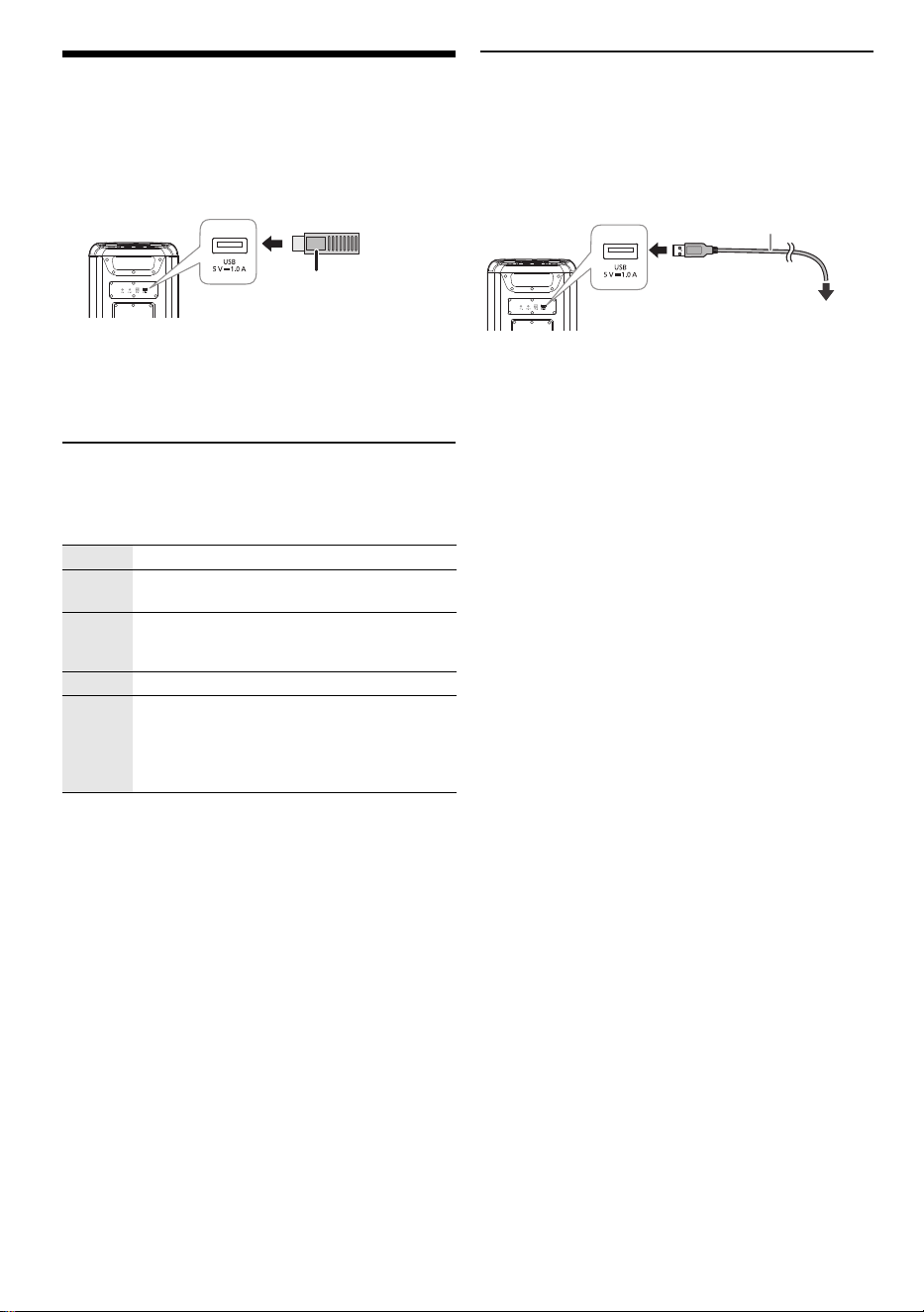
Using a USB device
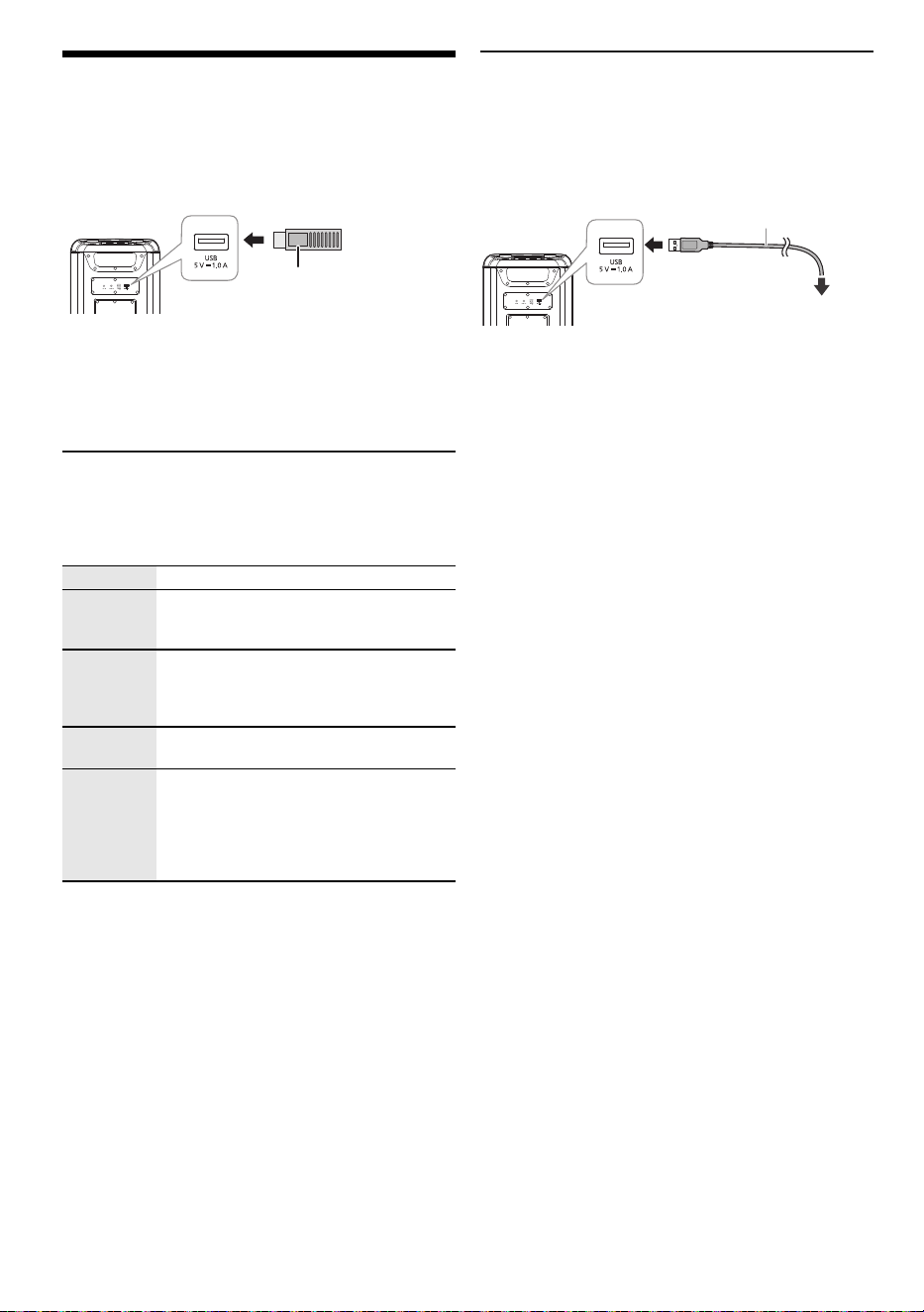
Preparation
Before you connect a USB device to the system, make
sure you do a backup of the data.
Decrease the volume and connect the USB device to
the USB port.
Hold the unit when connecting or disconnecting the USB
device.
Note:
Do not use a USB extension cable. The system cannot
recognise USB device connected through a cable.
USB playback
You can playback MP3 files in the USB device.
Press [INPUT SELECTOR] repeatedly to select “USB”.
Note:
• Files are defined as tracks and folders are defined as
albums.
• Tracks must have the extension “.mp3” or “.MP3”.
• Tracks will not necessarily be played in the order you
recorded them.
• Some files can fail to work because of the sector size.
Charging a device
Charging starts when a device (rated value: 5 V/1 A) is
connected to the USB port of this unit.
Preparation
Turn on the unit.
Connect a device.
Confirm from the screen of the connected device, etc. to
make sure charging has started.
Note:
• A cable compatible with your device is required. Use the
cable that comes with your device.
• Even if you connect a cable compatible with the USB port of
this unit, your device may not be charged. In that case, use
the charger that comes with the device.
• Do not connect a device with a rated value higher than
5 V/1 A to this unit.
• To check if charging is complete, look at the screen of the
connected device, etc.
• Once fully charged, remove the USB cable from the USB
port.
• When the unit is powered on using the built-in battery,
charging stops when the unit is turned off.
Play Press [4/9].
Pause Press [4/9].
Press again to continue playback.
Skip Press [2/3] or [5/6] to skip track.
During pause, press and hold [4/9] to skip
album.
Search Press and hold [2/3] or [5/6].
Repeat During playback, press and hold [4/9]
repeatedly to select a repeat mode.
ONE REPEAT: Repeat a single track.
ALL REPEAT: Repeat all tracks.
OFF REPEAT: Cancel repeat.
USB device
(not supplied)
Rear view
Rear view
To the compatible device
USB cable (not supplied)
BMAX10_5WW_TQBM2030.book Page 8 Monday, July 22, 2024 3:15 PM
9
TQBM2030
9
External equipment
Preparation
• Disconnect the AC power supply cord.
• Turn off all equipment and read the appropriate
operating instructions.
Note:
• Do not bend cables at sharp angles.
• Components and cables are sold separately.
• Turn off the equaliser or reduce the volume of the external
device. High level of input signal can distort the sound.
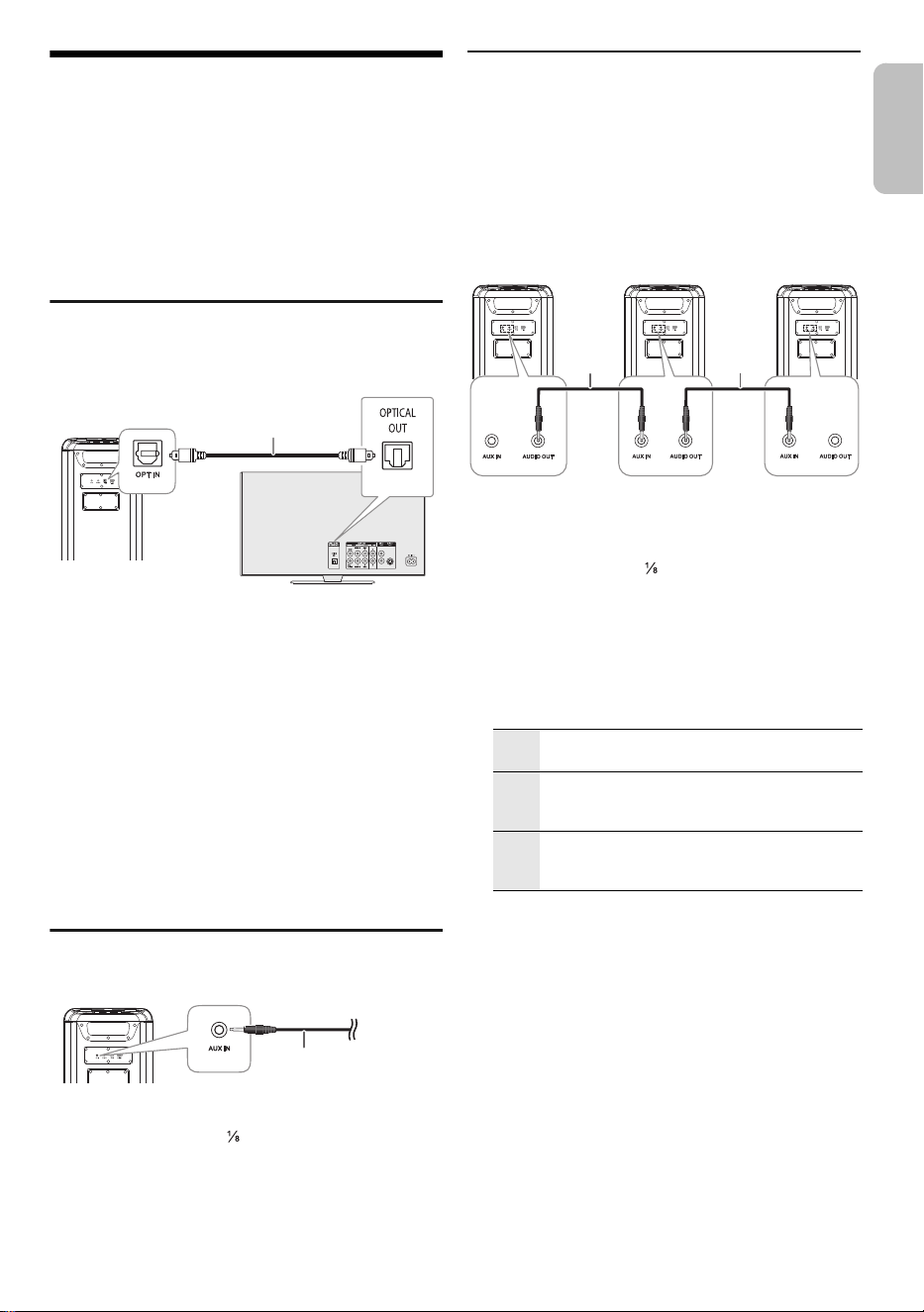
Using the optical input
You can connect a TV, VCR, DVD player etc., and listen to
the audio through this unit.
1 Connect an external device.
2 Turn on the unit.
3 Press [INPUT SELECTOR] repeatedly to select
“OPT”.
4 Play the external device.
Note:
• This system supports linear PCM signal.
• Supported Sampling frequency: 32 kHz, 44.1 kHz, 48 kHz,
88.2 kHz, up to 96 kHz
• The sound is muted or noise could occur if the signal format
or frequency is not supported.
• If there are sounds coming from the TV’s speakers,
decrease the volume of the TV to its minimum.
Using the auxiliary input
1 Connect an external device.
Plug type: Ø 3.5 mm ( ″) stereo
2 Turn on the unit.
3 Press [INPUT SELECTOR] repeatedly to select
“AUX”.
4 Play the external device.
Connecting additional units
You can connect to additional units to enjoy sound output
from these units.
It is recommended to place all units vertically.
Preparation
Turn off all the units and turn [VOLUME] of each unit to
reduce the volume level.
1 Connect main unit and all the additional units
(SC-BMAX10 or SC-BMAX5) with audio cables (not
supplied).
Plug type: Ø 3.5 mm ( ″) stereo
2 Turn on all the units.
3 On the additional units:
Press [INPUT SELECTOR] repeatedly to select
“AUX”.
4 Press [SPEAKER MODE] repeatedly to select the
desired speaker channels.
5 On main unit:
Start your desired playback.
Note:
• You can connect this unit and up to two additional units.
• The sound effect will be controlled separately by each unit.
Make the same sound settings on the additional units if
necessary.
• The illumination and strobe lights effects on the additional
units may differ from the main unit even when same
illumination pattern is selected.
Optical digital audio
cable (supplied)
Rear view
TV (not supplied)
Rear view
Audio cable
(not supplied)
L+R Left and right channels
When all the units are to play simultaneously.
L Left channel
To achieve stereo sound effect, setting for unit
place on the left side.
R Right channel
To achieve stereo sound effect, setting for unit
place on the right side.
Audio
cable
(not
supplied)
Audio
cable
(not
supplied)
Main unit
(rear)
Additional
unit (rear)
Additional
unit (rear)
ENGLISH
BMAX10_5WW_TQBM2030.book Page 9 Monday, July 22, 2024 3:15 PM
10
TQBM2030
10
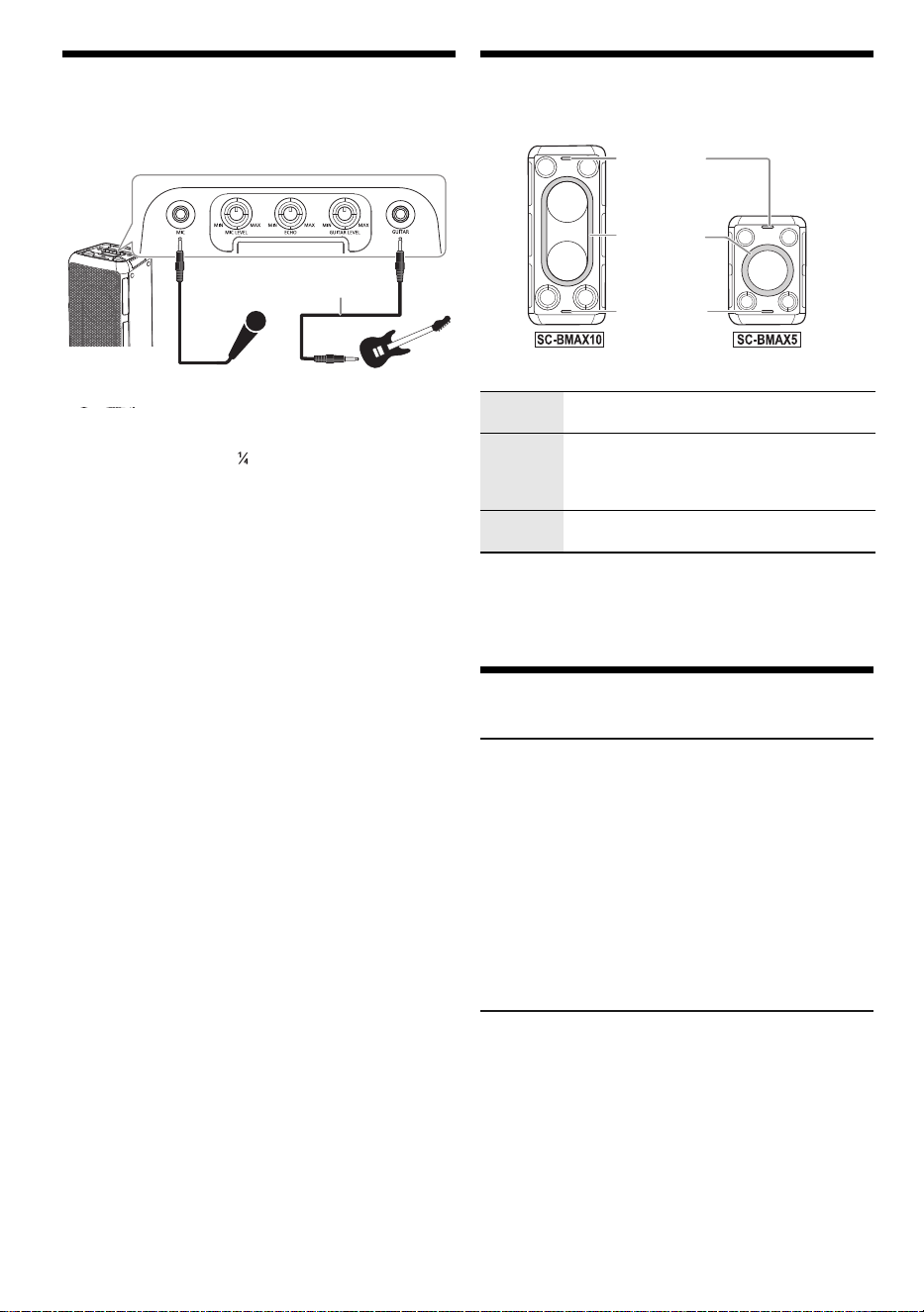
Using a microphone or guitar
Preparation
Turn [MIC LEVEL] and [GUITAR LEVEL] to their minimum
before you connect or disconnect a microphone/guitar.
1 Connect a microphone or guitar.
Plug type: Ø 6.3 mm ( ″) monaural
2 If you want to sing or play guitar along with
background music, play the music source and
adjust the volume of the system
3 Adjust the volume of microphone or guitar.
For microphone: Turn [MIC LEVEL].
For guitar: Turn [GUITAR LEVEL].
Adjust echo level
Turn [ECHO] to adjust the echo level of the
microphone.
Note:
• If a strange noise (howling) is emitted, move the
microphone/guitar away from the speakers, or decrease the
volume of the microphone/guitar.
• When you do not use the microphone/guitar, disconnect it
from the microphone/guitar jack, and decrease the volume
of the microphone/guitar to its minimum.
Illumination effects
You can change the illumination effect on the unit.
Turn [ILLUMINATION] to select the effect.
Using strobe lights
Press and hold [ILLUMINATION] to turn on or turn off
the strobe lights.
Others
Auto off
When the equipment turns on “Bluetooth
®
standby
function”, if it has no audio playback, in Aux in, Optical,
USB and Bluetooth
®
mode will enter networked standby
mode within 20 minutes.
When the equipment turns off “Bluetooth
®
standby
function”, if it has no audio playback, in Aux in, Optical,
USB and Bluetooth
®
mode will enter another condition
(low power mode) within 20 minutes.
Note:
This function may not work when a microphone/guitar is
connected.
Software update
Occasionally, Panasonic may release updated software
for this unit that may add or improve the way a feature
operates. These updates are available free of charge. For
more details, refer to the following website.
https://panasonic.jp/support/global/cs/audio/
(This site is in English only.)
Guitar
(not supplied)
Microphone
(not supplied)
Audio cable
(not supplied)
M-1 to M-9 Selection of 9 illumination patterns in
multiple colours.
S-1 to S-3 Selection of 3 illumination patterns in single
colour.
Press [ILLUMINATION] repeatedly to select
a colour.
OFF Turn off illumination and strobe lights, also
decrease the brightness of the display panel.
Strobe light
Illumination
light
Strobe light
BMAX10_5WW_TQBM2030.book Page 10 Monday, July 22, 2024 3:15 PM

11
TQBM2030
11
Troubleshooting
Before requesting service, make the following checks. If
you are in doubt about some of the check points, or if the
solutions indicated do not solve the problem, consult your
dealer for instructions.
█
Common problems
The unit does not work.
• The safety device has been activated. Do the following:
1. Press and hold [1] to turn the unit to power off and the
display turns off.
2. Press [1] again to turn on the unit. If the problem
persists, consult your dealer.
Sound is distorted or no sound.
• Adjust the volume of the system.
• Turn off the system, determine and correct the cause, and
then turn on again. It can be caused by straining of the
speakers through excessive volume or power, and when
using the system in a hot environment.
A humming sound can be heard during playback.
• An AC power supply cord or fluorescent light is near the
cables. Keep other appliances and cords away from the
cables of this system.
The sound level reduces.
• The protection circuit has been activated due to the
continuous use at high volume output. This is to protect the
system and maintain the sound quality.
█
USB
The USB device or the contents in it cannot be read.
• The format of the USB device or the contents in it are not
compatible with the system.
• USB devices with storage capacity of more than 32 GB
cannot work.
• USB devices may not be recognised when connected to this
system with a USB extension cable or USB hub.
Slow operation of the USB device.
• Large content size or large memory USB device takes
longer time to read.
█
Bluetooth
®
Pairing cannot be done.
• Check the Bluetooth
®
device condition.
• The device is out of the 10 m communication range. Move
the device nearer to the system.
The device cannot be connected.
• The pairing of the device was unsuccessful. Do pairing
again. (~7)
• The pairing of the device has been replaced. Do pairing
again. (~7)
• This system might be connected to a different device.
Disconnect the other device and try connecting the device
again.
• The system may have a problem. Turn off the system and
then turn on again.
The device is connected but audio cannot be heard
through the system.
• For some built-in Bluetooth
®
devices, you have to set the
audio output to “SC-BMAX10” or “SC-BMAX5” manually.
Read the operating instructions of the device for details.
Playback during Multi Connect is not working or no sound.
• Restart the app of the device.
• The control of the device was not turned successfully.
Disconnect the existing connected devices and try again.
Sound from the device is interrupted.
• The device is out of the 10 m (33 ft) communication range.
Move the device nearer to the system.
• Remove any obstacle between the system and the device.
• Other devices that use the 2.4 GHz frequency band
(wireless router, microwaves, cordless phones, etc.) are
interfering. Move the device nearer to the system and
distance it from the other devices.
█
Battery
The battery indicator blinks while connected to the AC
power supply cord.
• The battery temperature is either too low or too high. Adjust
the room temperature accordingly, and wait for a while to
confirm that the blinking stops.
If the problem persist, the battery might be deteriorated,
consult your dealer.
• If the battery life is significantly reduced after a full charge, it
may indicate that the battery needs replacement. Consult
your dealer for a battery replacement. Alternatively, you can
still use the unit by connecting it to an AC power source.
Factory reset
Reset the memory when the following situations occur:
• There is no response when buttons are pressed.
• You want to clear and reset the memory contents.
1 Turn [VOLUME] to set the volume to “0”.
2 Press and hold [INPUT SELECTOR] and [BASS].
Continue to press and hold the buttons until
“RESET” is shown.
All the settings are set back to the factory preset.
Note:
You cannot perform factory reset when Bluetooth
®
standby
function is turned on.
Maintenance
Disconnect the AC power supply cord before
maintenance. Clean this system with a soft, dry cloth.
• Never use alcohol, paint thinner or benzine to clean this
system.
• Before using chemically treated cloth, read the
instructions that came with the cloth carefully.
ENGLISH
BMAX10_5WW_TQBM2030.book Page 11 Monday, July 22, 2024 3:15 PM
12
TQBM2030
12
References
About Bluetooth
®
Frequency band
• This system uses the 2.4 GHz frequency band.
Certification
• This system conforms to the frequency restrictions and
has received certification based on frequency laws.
Thus, a wireless permit is not necessary.
• The actions below are punishable by law in some
countries:
– Taking apart or modifying the unit.
– Removing specification indications.
Restrictions of use
• Wireless transmission and/or usage with all Bluetooth
®
equipped devices is not guaranteed.
• All devices must conform to standards set by the
Bluetooth SIG, Inc.
• Depending on the specifications and settings of a
device, it can fail to connect or some operations can be
different.
• This system supports Bluetooth
®
security features. But
depending on the operating environment and/or
settings, this security is possibly not sufficient. Transmit
data wirelessly to this system with caution.
• This system cannot transmit data to a Bluetooth
®
device.
Range of use
• Use this device at a maximum range of 10 m (33 ft).
• The range can decrease depending on the environment,
obstacles or interference.
Interference from other devices
• This system may not function properly and troubles
such as noise and sound jumps may arise due to radio
wave interference if this unit is located too close to other
Bluetooth
®
devices or the devices that use the 2.4 GHz
band.
• This system may not function properly if radio waves
from a nearby broadcasting station, etc. is too strong.
Intended usage
• This system is for normal, general use only.
• Do not use this system near an equipment or in an
environment that is sensitive to radio frequency
interference (example: airports, hospitals, laboratories,
etc.).
Licenses
Panasonic bears no responsibility for data and/or
information that is compromised during a wireless
transmission.
The Bluetooth
®
word mark and logos are registered
trademarks owned by Bluetooth SIG, Inc. and any use of
such marks by Panasonic Holdings Corporation is under
license. Other trademarks and trade names are those of
their respective owners.
BMAX10_5WW_TQBM2030.book Page 12 Monday, July 22, 2024 3:15 PM
13
TQBM2030
13
Specifications
█
General
Dimensions (W x H x D)
[SC-BMAX10] 280 mm × 550 mm × 310 mm
(11 ″ × 21 ″ × 12 ″)
[SC-BMAX5] 280 mm × 397 mm × 293 mm
(11 ″ × 15 ″ × 11 ″)
Mass
[SC-BMAX10] 9.3 kg (20.5 lbs)
[SC-BMAX5] 6.5 kg (14.3 lbs)
Operating temperature range 0°C to +40°C
(+32°F to +104°F)
Battery charging temperature range +10°C to +35°C
(+50°F to +95°F)
Operating humidity range
35% to 80% RH (no condensation)
█
Amplifier section
RMS output power
[SC-BMAX10]
L Ch (Woofer, Tweeter)
75 W (4 Ω), 1 kHz, 30% THD
R Ch (Woofer, Tweeter)
75 W (4 Ω), 1 kHz, 30% THD
Total RMS power 150 W
[SC-BMAX5]
Woofer (mono) 45 W (4 Ω), 1 kHz, 30% THD
Tweeter (L/R Ch)
15 W per channel (6 Ω), 1 kHz, 30% THD
Total RMS power 75 W
█
Bluetooth
®
section
Version Bluetooth
®
Ver. 5.0
Class Class 1
Supported profiles AVRCP, A2DP
Frequency band 2.4 GHz band FH-SS
Operating frequency 2402 MHz to 2480 MHz
Operation distance 10 m (33 ft) line of sight
Supported codec SBC
█
Terminals section
USB port
USB standard USB 2.0 full-speed
Media file format support MP3 (*.mp3)
Sampling frequency 32 kHz, 44.1 kHz, 48 kHz
Audio word size 16 bits
Channel count 2 ch
USB device file system FAT16, FAT32, exFAT
OPT IN
Optical digital input Optical terminal
Sampling frequency
32 kHz, 44.1 kHz, 48 kHz, 88.2 kHz, 96 kHz
Supported bit depth 16 bits, 24 bits
Audio format PCM (2 ch)
Microphone
Terminal Mono, 6.3 mm ( ″) jack (1 system)
Guitar
Terminal Mono, 6.3 mm ( ″) jack (1 system)
AUX IN
Terminal Stereo, 3.5 mm ( ″) jack (1 system)
AUDIO OUT
Terminal Stereo, 3.5 mm ( ″) jack (1 system)
█
Speaker section
Speaker unit(s)
[SC-BMAX10]
Tweeter 5.7 cm (2 ″) cone type x 2
Woofer 14 cm (5 ″) cone type x 2
[SC-BMAX5]
Tweeter 5.7 cm (2 ″) cone type x 2
Woofer 14 cm (5 ″) cone type x 1
█
Battery section
[SC-BMAX10]
Built-in battery 7.2 V (Li-ion 4950 mAh)
Battery life in use
Playback time Approx. 15 hours*
Battery charging time (25°C (77°F))
Unit is OFF Approx. 4 hours
[SC-BMAX5]
Built-in battery 7.2 V (Li-ion 2475 mAh)
Battery life in use
Playback time Approx. 9 hours*
Battery charging time (25°C (77°F))
Unit is OFF Approx. 3 hours
* This battery playtime is only a reference and may vary depending
on music content and battery aging after numerous charging and
discharging cycles.
It’s achievable with a predefined music source, illumination light
turned off, FLAT EQ mode, volume level at [SC-BMAX5] 28 or
[SC-BMAX10] 29, and Bluetooth
®
streaming source.
Note:
• Specifications are subject to change without notice.
Mass and dimensions are approximate.
• Total harmonic distortion is measured by the digital spectrum
analyser.
Power supply AC 110 V to 240 V, 50/60 Hz
Power consumption
[SC-BMAX10] 65 W
[SC-BMAX5] 40 W
Power consumption in low power mode and
networked standby
With “OFF BLUETOOTH STANDBY” setting
(low power mode) 0.5 W
With “ON BLUETOOTH STANDBY” setting
(networked standby) 2.0 W
Power consumption in low power mode during
charging (maximum)
[SC-BMAX10] 17 W
[SC-BMAX5] 11 W
ENGLISH
BMAX10_5WW_TQBM2030.book Page 13 Monday, July 22, 2024 3:15 PM
14
TQBM2030
14
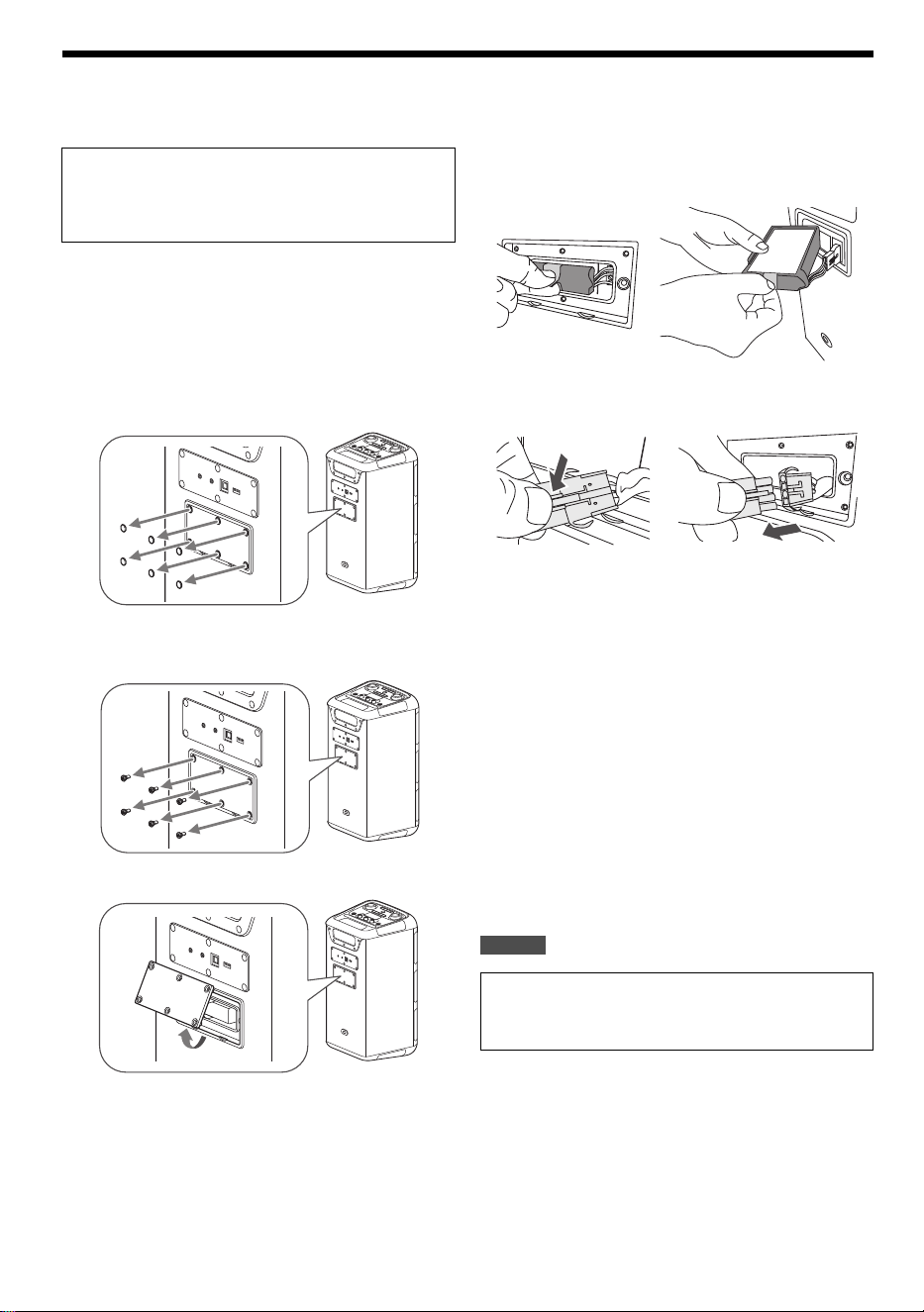
To remove the battery when disposing of this unit
Remove the built-in battery before disposing of this unit.
Note:
• Before disassembling this unit, disconnect the AC power
supply cord and discharge the battery completely.
• If you have trouble removing the battery, consult your dealer
or nearest service center.
1 Remove the battery cover.
Remove the screw covers (x6) from the battery cover.
Use an object with sharp end (e.g. tip of a thumbtack) to lift
the screw covers.
Remove the screws (x6) that secure the battery cover.
Use a commercially available Phillips head screwdriver
(size: No. 2) to remove the screws.
Lift up and remove the battery cover.
2 Remove the battery.
Pinch on to the tab and pull the battery out from the
battery compartment.
Disconnect and remove the battery from the unit.
█
Handling of the used rechargeable battery
• Insulate the terminals with cellophane tape or similar
material.
• Do not disassemble.
• When the battery becomes unusable, bring it to a facility that
accepts used rechargeable batteries instead of disposing of
it.
█
To dispose of or transfer this unit
The unit may keep the user settings information in the unit. If
you discard this unit either by disposal or transfer, then follow
the procedure to return all the settings to the factory defaults to
delete the user settings (~
11).
• The operation history may be recorded in the memory of this
unit.
For
U.S.A
Never disassemble this product, except for when
disposing of it.
The illustrations below are not intended for repair of
this unit, but for its disposal. Once you disassemble
this unit, it can never be reassembled.
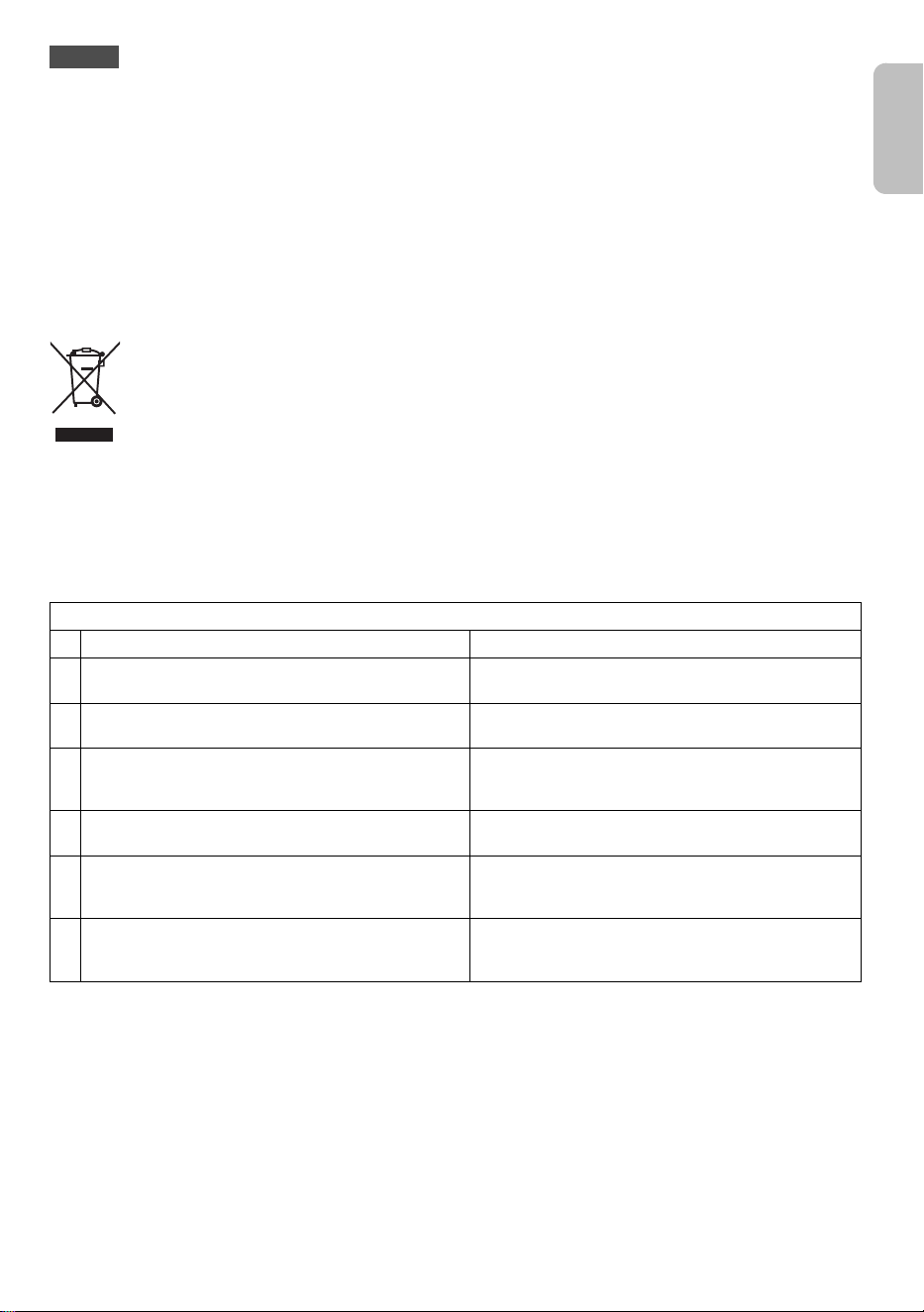
To dispose of your product, please recycle in
accordance with local environmental regulations. For
further recycling please visit
https://shop.panasonic.com/recycle
BMAX10_5WW_TQBM2030.book Page 14 Monday, July 22, 2024 3:15 PM
15
TQBM2030
15
For India
Information on hazardous constituents as specified in sub-rule1 of rule16 in electrical and electronic equipment.
Declaration of Conformity with the requirements of the E-Waste (Management) Amendment Rules, 2023 with the
sub-rule1 of rule16 limits with respect to Lead, Mercury, Cadmium, Hexavalent chromium, Polybrominated biphenyls,
Polybrominated diphenyl ethers.
The content of hazardous substance with the exemption of the applications listed in SCHEDULE II of the E-Waste
(Management) Amendment Rules, 2023:
1. Lead (Pb) – not over 0.1% by weight.
2. Cadmium (Cd) – not over 0.01% by weight.
3. Mercury (Hg) – not over 0.1% by weight.
4. Hexavalent chromium (Cr6+) – not over 0.1% by weight.
5. Polybrominated biphenyls (PBBs) – not over 0.1% by weight.
6. Polybrominated diphenyl ethers (PBDEs) – not over 0.1% by weight.
For the purpose of recycling to facilitate effective utilization of resources, please return this product to a nearby
authorized collection center, registered dismantler of recycler, or Panasonic service center when disposing of this
product.
Customer care number (Toll free): 080-6984-1333
Please see the Panasonic website for further information on collection centers, etc. or call the customer care toll-free
number
https://www.panasonic.com/in/corporate/e-waste-management.html
Do's & Don'ts
No Do's Don'ts
1
All electrical and electronic products are required to be
handed over only to the Authorized recycler.
The product should not be opened by the user himself
/herself, but only by authorized service personnel.
2
The product should be handed over only to authorized
recycler for disposal.
The product is not meant for re-sale to any unauthorized
agencies / scrap dealers / kabariwalas.
3
Keep the product in an isolated area, after it becomes
non-functional / unrepairable so as to prevent its
accidental breakage.
The product is not meant for mixing into household
waste stream.
4
Refer to Operating Instructions for handling of end of
life products.
Do not keep any replaced spare part(s) from the product
in an exposed area.
5
Always dispose of products that have reached end of
life at Panasonic Life Solutions India Authorized Service
Centre.
Do not donate old electronic items to anybody. Do not
dispose of your product in garbage bins along with
municipal waste that ultimately reaches landfill.
6
Wherever possible or as instructed, separate the
packaging material according to responsible waste
disposal options and sorting for recycling.
Do not give e-waste to informal and unorganized
sectors like Local Scrap Dealers / Rag Pickers.
ENGLISH
BMAX10_5WW_TQBM2030.book Page 15 Monday, July 22, 2024 3:15 PM
16
TQBM2030
16
Limited Warranty
(ONLY FOR U.S.A.)
Panasonic Products Limited Warranty
Limited Warranty Coverage (For USA Only)
If your product does not work properly because of a defect in
materials or workmanship, Panasonic Corporation of North America
(referred to as “the warrantor”) will, for the length of the period
indicated on the chart below, which starts with the date of original
purchase (“warranty period”), at its option either (a) repair your
product with new or refurbished parts, (b) replace it with a new or a
refurbished equivalent value product, or (c) refund your purchase
price. The decision to repair, replace or refund will be made by the
warrantor.
During the “Labor” warranty period there will be no charge for labor.
During the “Parts” warranty period, there will be no charge for parts.
This Limited Warranty excludes both parts and labor for
non-rechargeable batteries, antennas, and cosmetic parts
(cabinet). This warranty only applies to products purchased and
serviced in the United States. This warranty is extended only to the
original purchaser of a new product which was not sold “as is”.
Mail-In Service -- Online Repair Request
Online Repair Request
To submit a new repair request and for quick repair status visit our
Web Site at https://help.na.panasonic.com/
When shipping the unit, carefully pack, include all supplied
accessories listed in the Owner’s Manual, and send it prepaid,
adequately insured and packed well in a carton box. When shipping
Lithium Ion batteries please visit our Web Site at
https://help.na.panasonic.com/ as Panasonic is committed to
providing the most up to date information. Include a letter detailing
the complaint, a return address and provide a daytime phone
number where you can be reached. A valid registered receipt is
required under the Limited Warranty.
IF REPAIR IS NEEDED DURING THE WARRANTY PERIOD, THE
PURCHASER WILL BE REQUIRED TO FURNISH A SALES
RECEIPT/PROOF OF PURCHASE INDICATING DATE OF
PURCHASE, AMOUNT PAID AND PLACE OF PURCHASE.
CUSTOMER WILL BE CHARGED FOR THE REPAIR OF ANY
UNIT RECEIVED WITHOUT SUCH PROOF OF PURCHASE.
Limited Warranty Limits and Exclusions
This warranty ONLY COVERS failures due to defects in materials or
workmanship, and DOES NOT COVER normal wear and tear or
cosmetic damage. The warranty ALSO DOES NOT COVER
damages which occurred in shipment, or failures which are caused
by products not supplied by the warrantor, or failures which result
from accidents, misuse, abuse, neglect, mishandling,
misapplication, alteration, faulty installation, set-up adjustments,
misadjustment of consumer controls, improper maintenance, power
line surge, lightning damage, modification, introduction of sand,
humidity or liquids, commercial use such as hotel, office, restaurant,
or other business or rental use of the product, or service by anyone
other than a Factory Service Center or other Authorized Servicer, or
damage that is attributable to acts of God.
THERE ARE NO EXPRESS WARRANTIES EXCEPT AS LISTED
UNDER “LIMITED WARRANTY COVERAGE”.
THE WARRANTOR IS NOT LIABLE FOR INCIDENTAL OR
CONSEQUENTIAL DAMAGES RESULTING FROM THE USE OF
THIS PRODUCT, OR ARISING OUT OF ANY BREACH OF THIS
WARRANTY.
(As examples, this excludes damages for lost time, travel to and
from the servicer, loss of or damage to media or images, data or
other memory or recorded content. The items listed are not
exclusive, but for illustration only.)
ALL EXPRESS AND IMPLIED WARRANTIES, INCLUDING THE
WARRANTY OF MERCHANTABILITY, ARE LIMITED TO THE
PERIOD OF THE LIMITED WARRANTY.
Some states do not allow the exclusion or limitation of incidental or
consequential damages, or limitations on how long an implied
warranty lasts, so the exclusions may not apply to you.
This warranty gives you specific legal rights and you may also have
other rights which vary from state to state. If a problem with this
product develops during or after the warranty period, you may
contact your dealer or Service Center. If the problem is not handled
to your satisfaction, then write to:
Panasonic Corporation of North America
Consumer Affairs Department
Two Riverfront Plaza
Newark NJ 07102-5490
PARTS AND SERVICE, WHICH ARE NOT COVERED BY THIS
LIMITED WARRANTY, ARE YOUR RESPONSIBILITY.
Product registration is not mandatory. Failure to complete the
form does not affect the consumer's warranty rights.
As of July 2024
User memo:
Product or Part Name Parts Labor
Wireless Speaker System 1 Year 1 Year
All included Accessories 90 Days Not
Applicable
Get everything you need to get the most out of
your Panasonic products
Accessories & Parts for your Camera, Phone,
A/V products, TV, Computers & Networking,
Personal Care, Home Appliances, Headphones,
Batteries, Backup Chargers & more…
Customer Services Directory
For the hearing or speech impaired TTY: 1-877-833-8855
for all your Panasonic gear
Go to
https://help.na.panasonic.com/
For Product Information, Operating Assistance,
Parts, Owner’s Manuals, Dealer and Service info
go to https://help.na.panasonic.com/
The model number and serial number of this product can be
found on either the back or the bottom of the unit. Please
note them in the space provided below and keep for future
reference.
MODEL NUMBER
SERIAL NUMBER
DATE OF PURCHASE
DEALER NAME
DEALER ADDRESS
TELEPHONE NUMBER
BMAX10_5WW_TQBM2030.book Page 16 Monday, July 22, 2024 3:15 PM

17
TQBM2030
17
BMAX10_5WW_TQBM2030.book Page 17 Monday, July 22, 2024 3:15 PM
2
TQBM2030
18
D:\A_Job\PEAC\_Jobs\BMAX10_5\Source\BMAX10_5WW_TQBM2030_le.fm
Estas instrucciones de funcionamiento son para los
modelos SC-BMAX10 y SC-BMAX5.
Si no se indica lo contrario, las ilustraciones de estas
instrucciones de funcionamiento son de SC-BMAX10. Su
sistema y las ilustraciones pueden diferir.
Los símbolos de este producto (incluidos los accesorios)
representan lo siguiente:
Índice
Accesorios suministrados . . . . . . . . . . . . . . . . . . . . . . . . 2
INSTRUCCIONES IMPORTANTES DE SEGURIDAD . . 2
Medidas de seguridad. . . . . . . . . . . . . . . . . . . . . . . . . . . 3
Transporte de la unidad . . . . . . . . . . . . . . . . . . . . . . . . . 4
Fuentes de alimentación. . . . . . . . . . . . . . . . . . . . . . . . . 5
Resumen de la unidad . . . . . . . . . . . . . . . . . . . . . . . . . . 6
Funcionamiento Bluetooth
®
. . . . . . . . . . . . . . . . . . . . . . . 7
Utilizar un dispositivo USB . . . . . . . . . . . . . . . . . . . . . . . 8
Equipo externo . . . . . . . . . . . . . . . . . . . . . . . . . . . . . . . . 9
Utilizar un micrófono o una guitarra . . . . . . . . . . . . . . . 10
Efectos de la iluminación . . . . . . . . . . . . . . . . . . . . . . . 10
Otros . . . . . . . . . . . . . . . . . . . . . . . . . . . . . . . . . . . . . . . 10
Solución de problemas . . . . . . . . . . . . . . . . . . . . . . . . . 11
Mantenimiento . . . . . . . . . . . . . . . . . . . . . . . . . . . . . . . 12
Referencias. . . . . . . . . . . . . . . . . . . . . . . . . . . . . . . . . . 12
Especificaciones . . . . . . . . . . . . . . . . . . . . . . . . . . . . . . 13
Retirar la batería cuando se desecha esta unidad . . . . 14
Accesorios suministrados
Verifique e identifique los accesorios suministrados.
Nota:
• Números de productos correctos para julio de 2024. Estos
podrían cambiar.
• No utilice otro cable óptico que no sea el suministrado.
INSTRUCCIONES
IMPORTANTES DE
SEGURIDAD
Lea estas instrucciones de funcionamiento
minuciosamente antes de usar la unidad. Siga las
instrucciones de seguridad en la unidad y las
instrucciones de seguridad aplicables enumeradas abajo.
Mantenga estas instrucciones de funcionamiento a mano
para consultas futuras.
1. Lea estas instrucciones.
2. Guarde estas instrucciones.
3. Ponga atención a todas las advertencias.
4. Siga todas las instrucciones.
5. No use este aparato cerca del agua.
6. Límpielo solamente con un paño seco.
7. No bloquee las aberturas de ventilación. Instale en
conformidad con las instrucciones del fabricante.
8. No instale cerca de fuentes de calor, como es el caso
de radiadores, calefacciones, estufas u otros
aparatos (incluyendo amplificadores) que producen
calor.
9. No viole el dispositivo de seguridad del enchufe
polarizado o del tipo de conexión a tierra. Un enchufe
polarizado tiene dos cuchillas, una es más ancha que
la otra. Un enchufe del tipo de conexión a tierra tiene
dos cuchillas y una tercera clavija para conexión a
tierra. La cuchilla ancha o la tercera cuchilla se
suministran para su seguridad. Si el enchufe
suministrado no encaja en su tomacorriente, consulte
a un electricista para el reemplazo del tomacorriente
obsoleto.
10. Proteja el cable de alimentación para evitar que lo
pisen o pinchen, especialmente en el área del
enchufe, tomacorriente, o en el punto en el que sale
del aparato.
11. Use sólo los aditamentos/accesorios especificados
por el fabricante.
12. Use solo con el carrito, base, trípode,
soporte o mesa especificados por el
fabricante, o vendido con el aparato.
Cuando se usa un carrito, tenga
cuidado al mover la combinación
carrito/aparto para evitar daños
físicos al voltearse la misma.
13. Desconecte este aparato durante tormentas
eléctricas o cuando no se vaya a usar durante
períodos prolongados.
14. Refiera todo el servicio a un personal de servicio
calificado. Se necesita suministrar servicio cuando el
aparato se ha dañado de cualquier forma, como por
ejemplo, si se daña el cable de alimentación o el
enchufe; si se derrama líquido o caen objetos en el
interior del aparato; si el aparato se ha expuesto a la
lluvia o a la humedad; si no opera normalmente; o, si
se ha dejado caer.
CA
CC
Equipo Clase II (La construcción del producto
posee doble aislante.)
[SC-BMAX10] [SC-BMAX5]
5 Cable de
alimentación de CA
Para Estados Unidos
(TSXA232)
Para India
(TSXA231)
Para Tailandia
(TSXA229)
Para otros países
(TSXA226)
(TSXA227)
1 Cable óptico
(TSXF231)
4 Cable de
alimentación de CA
Para Estados Unidos
(TSXA232)
Para Tailandia
(TSXA229)
Para otros países
(TSXA226)
(TSXA227)
1 Cable óptico
(TSXF231)
BMAX10_5WW_TQBM2030.book Page 2 Monday, July 22, 2024 3:15 PM
3
TQBM2030
19
D:\A_Job\PEAC\_Jobs\BMAX10_5\Source\BMAX10_5WW_TQBM2030_le.fm
Medidas de seguridad
ADVERTENCIA
Unidad
• Para reducir el riesgo de incendios, descargas
eléctricas o daños en el producto,
– No exponga esta unidad a la lluvia, humedad, goteo o
salpicaduras.
– No coloque objetos con líquidos, como por ejemplo
floreros, encima de esta unidad.
– Utilice los accesorios recomendados.
– No retire las tapas.
– No repare esta unidad usted mismo. Refiera el
servicio al personal calificado.
Paquete de pilas (paquete de pilas de ion litio)
• Riesgo de incendio, explosión o quemaduras. No
desarme, caliente sobre los 60°C (140°F) ni incinere.
PRECAUCIÓN
Unidad
• Para reducir el riesgo de incendios, descargas
eléctricas o daños en el producto,
– Para mantener bien ventilada esta unidad, no la
instale ni ponga en un estante de libros, mueble
empotrado u otro espacio de dimensiones reducidas.
– No obstruya las aberturas de ventilación de la unidad
con periódicos, manteles, cortinas u objetos similares.
– No coloque objetos con llama descubierta, una vela
por ejemplo, encima de esta unidad.
• Esta unidad ha sido diseñada para ser utilizada en
climas moderados y tropicales.
• Esta unidad puede tener interferencias causadas por
teléfonos móviles durante su utilización. Si ocurren tales
interferencias, aumente la separación entre esta unidad
y el teléfono móvil.
• Coloque la unidad en una superficie plana lejos de la luz
directa del sol, altas temperaturas, mucha humedad, y
vibración excesiva.
• Este sistema puede calentarse si se usa de forma
prolongada. Esto es normal. No se alarme.
Cable de alimentación de CA
• El enchufe del equipo es el acceso principal a la
corriente eléctrica o al corte de energía. Instale esta
unidad de manera que el cable de alimentación se
pueda desenchufar desde el tomacorriente
inmediatamente si ocurre un problema.
Pila
• Hay peligro de explosión si se sustituye
incorrectamente la pila. Sólo sustituya con el tipo
recomendado por el fabricante.
• Al desechar las pilas, comuníquese con sus
autoridades locales o con su distribuidor y pregunte
sobre el método correcto de eliminación.
• No caliente o exponga a las llamas.
• No deje la(s) pila(s) en un automóvil expuesto a luz
solar directa durante un largo período de tiempo con las
puertas y ventanas cerradas.
• No lo exponga a baja presión de aire a grandes
altitudes.
• No lo exponga a presiones de aire extremadamente
bajas, ya que podrían producirse explosiones o fugas
de líquidos y gases inflamables.
• Evite el uso en las siguientes condiciones
– Temperaturas extremadamente altas o bajas durante
el uso, almacenamiento o transporte.
– Eliminación de una batería en el fuego o en un horno
caliente, o aplastándola o cortándola mecánicamente,
lo que podría provocar una explosión.
– Temperatura extremadamente alta o presión del aire
extremadamente baja que pueda provocar una
explosión o la fuga de líquido o gas inflamable.
Para EE. UU.
PRECAUCIÓN:
PARA REDUCIR EL RIESGO DE
SACUDIDA ELÉCTRICA, NO QUITE
LOS TORNILLOS.
NO EXISTEN EN EL INTERIOR PIEZAS
REPARABLES POR EL USUARIO.
REFIERA EL SERVICIO AL
PERSONAL CALIFICADO.
El símbolo del rayo con punta de flecha
dentro de un triángulo equilátero pretende
alertar al usuario de la presencia de
“voltaje peligroso” no aislado dentro del
mueble del producto, que puede ser de
magnitud suficiente como para constituir
riesgo de sacudida eléctrica a las
personas.
El signo de admiración dentro de un
triángulo equilátero pretende alertar al
usuario de la existencia de importantes
instrucciones de operación y
mantenimiento (servicio) en el material
impreso adjunto al aparato.
Una batería de iones de litio
reciclable alimenta el producto
que adquirió.
Por favor, marque el
1-800-8-BATTERY para
obtener información sobre
cómo reciclar esta batería.
Solo para EE. UU. y Canadá
ESPAÑOL
BMAX10_5WW_TQBM2030.book Page 3 Monday, July 22, 2024 3:15 PM
4
TQBM2030
20
D:\A_Job\PEAC\_Jobs\BMAX10_5\Source\BMAX10_5WW_TQBM2030_le.fm
Declaración de exposición a la radiación de la FCC
Transporte de la unidad
Preparación
Desconecte de la unidad todos los dispositivos y cables
conectados.
1 Sujete firmemente el asa de la unidad al
transportarla.
2 Coloque la unidad sobre una superficie plana y
estable con las patas de goma mirando hacia
abajo.
Colocación
Puede colocar este sistema de forma vertical u horizontal.
Nota:
• Mantenga sus bocinas a más de 10 mm
( ″) de otros
objetos para que se ventilen de forma adecuada.
• Estas bocinas no disponen de blindaje magnético. No las
ponga cerca de televisores, computadoras personales y
otros equipos a los que afecte fácilmente el magnetismo.
• Realizar la reproducción a altos niveles durante un período
prolongado puede provocar daños en las bocinas y reducir
la vida útil de ellas.
• Baje el volumen en las siguientes condiciones para evitar
daños:
– Cuando se distorsiona el sonido.
– Cuando ajuste la calidad del sonido.
Este dispositivo cumple con la sección 15 de las normas
de la FCC. Su funcionamiento está sujeto a las dos
condiciones siguientes:
(1) este dispositivo no puede producir interferencias y
(2) este dispositivo debe aceptar cualquier interferencia,
incluidas las interferencias que puedan dar lugar a un
funcionamiento no deseado.
FCC ID: ESX-BMAX10 (para SC-BMAX10)
ESX-BMAX5 (para SC-BMAX5)
Nota de la FCC:
Este equipo ha sido probado y se ha observado que
cumple con los límites para un dispositivo digital de
Clase B, de conformidad con la Parte 15 de las Reglas
de la FCC.
Estos límites se diseñaron para brindar protección
razonable contra la interferencia dañina en una
instalación residencial. Este equipo genera, usa y puede
irradiar energía de radiofrecuencias y, si no se instala y
usa de conformidad con las instrucciones,
podría causar
interferencia dañina en las comunicaciones
por radio. Sin
embargo, no existe garantía de que la interferencia no
ocurrirá en una instalación específica. Si este equipo
llega a causar interferencia dañina en la recepción de
emisiones de radio o televisión, lo cual se puede
determinar al apagar y encender el equipo, se
recomienda al usuario que trate de corregir la
interferencia con una o más de las medidas siguientes:
• Reorientar o reubicar la antena receptora.
• Aumentar la separación entre el equipo y el receptor.
• Conectar el equipo a un tomacorriente de un circuito
distinto al circuito en el que está conectado el
receptor.
• Consultar al distribuidor o a un técnico de radio/TV
experimentado para que le brinden ayuda.
Advertencia de FCC:
Todo cambio o modificación no autorizados de este
equipo anularía la autoridad del usuario para operar
este dispositivo.
Declaración de conformidad del proveedor
Nombre comercial: Panasonic
Número de modelo: SC-BMAX10 / SC-BMAX5
Parte responsable: Panasonic Corporation of North
America
Two Riverfront Plaza, Newark,
NJ 07102-5490
Contacto de Soporte: https://help.na.panasonic.com/
Este equipo cumple con los límites de exposición a la
radiación FCC establecidos para un entorno no
controlado.
Este transmisor no debe colocarse o hacerse funcionar
junto con otra antena o transmisor.
Conforme a UL STD 62368-1.
Colocación vertical Colocación horizontal
¡PRECAUCIÓN!
• La manipulación o transporte incorrectos puede
causar que la unidad se caiga, lo que puede
generar daño o lesiones personales.
• No coloque la unidad sobre una superficie
inclinada o inestable.
• No coloque sus pies debajo de la unidad.
• No toque las superficies resonantes del cono de la
bocina:
– Esto podría dañar el cono de la bocina.
– El cono de la bocina podría calentarse.
• No ponga la unidad sobre una mesa o sobre
cualquier superficie elevada.
• No permita que los niños trepen sobre la unidad.
• Tenga cuidado cuando los niños o bebés están
cerca.
(Coloque el lado con
las patas de goma
mirando hacia abajo.)
32
13
BMAX10_5WW_TQBM2030.book Page 4 Monday, July 22, 2024 3:15 PM
5
TQBM2030
21
D:\A_Job\PEAC\_Jobs\BMAX10_5\Source\BMAX10_5WW_TQBM2030_le.fm
Fuentes de alimentación
La unidad puede ser encendida utilizando una fuente de
alimentación de CA. Si la fuente de alimentación de CA
no está disponible, puede usar la batería incorporada.
Cómo usar la fuente de alimentación de CA
Conecte el cable de alimentación de CA sólo después de
haber hecho todas las demás conexiones.
Conecte el cable de alimentación de CA.
No utilice otro cable de alimentación de CA que no sea el
suministrado.
Cómo ahorrar energía
El sistema consume una pequeña cantidad de corriente
alterna cuando está en modo de bajo consumo. Desconecte
la fuente de alimentación cuando no use el sistema.
Se perderán algunas configuraciones cuando desconecte
el sistema. Tendrá que configurarlas nuevamente.
Uso de la batería integrada
Esta unidad contiene batería recargable de ion litio. No la
retire a menos que vaya a desechar el producto.
Cargue la batería antes de usarla.
La batería se carga automáticamente cuando cable de
alimentación de CA esté conectado.
Mientras se carga la batería, las barras indicadoras de la
batería se desplazan y, una vez cargada por completo, se
encienden todas las barras.
El indicador de la batería muestra los niveles de batería.
Nota:
• Conecte el cable de alimentación de CA para el primer uso
para arrancar la batería.
• Conecte el cable de alimentación de CA, para cargar antes
de que la batería se descargue.
• La unidad se apagará automáticamente cuando la batería
esté descargada.
• Cuando esta unidad no se use por un período de tiempo
prolongado, cargue la batería integrada al menos una vez
cada 1- 2 meses para evitar que se deteriore.
• Se recomienda cargar la batería a una temperatura entre
10°C (50°F) y 35°C (95°F). Los indicadores de la batería
pueden parpadear aunque el cable de alimentación de CA
esté conectado y la carga no puede ser posible cuando esté
fuera del rango de temperatura recomendado.
• La batería puede no cargarse cuando la temperatura que
rodea a la batería es alta durante el funcionamiento o justo
después del funcionamiento cuando se encuentra dentro del
rango de temperatura recomendado. En tal caso, detenga el
uso y deje que se enfríe.
• Si la duración de la batería se reduce significativamente
después de una carga completa, puede indicar que es
necesario sustituir la batería. Consulte en la tienda donde
adquirió la unidad para que le cambien la batería. Como
alternativa, puede seguir utilizando la unidad conectándola a
una fuente de alimentación de CA.
Nota sobre el cable de alimentación de CA
(Para el enchufe de alimentación de CA de tres clavijas
con fusible)
Antes de usar
Retire la cubierta del conector.
Cómo sustituir el fusible
La ubicación del fusible difiere según el tipo de enchufe de
alimentación de CA (figuras A y B). Confirme que el enchufe
de alimentación de CA está colocado y siga las instrucciones
que se indican a continuación.
Las ilustraciones pueden diferir del enchufe de alimentación
de CA real.
1. Abra la cubierta del fusible con un destornillador.
2. Sustituya el fusible y cierre o fije la cubierta del fusible.
Vista posterior
Al enchufe de conexión
a la red de CA
Cubierta del
fusible
Figura A Figura B
Fusible (3 amperios)
Figura BFigura A
Fusible (3 amperios)
ESPAÑOL
BMAX10_5WW_TQBM2030.book Page 5 Monday, July 22, 2024 3:15 PM
6
TQBM2030
22
D:\A_Job\PEAC\_Jobs\BMAX10_5\Source\BMAX10_5WW_TQBM2030_le.fm
Resumen de la unidad
A Interruptor de modo de bajo consumo/
alimentación conectada [1]
Pulse este interruptor para cambiar del modo de
alimentación conectada al modo de bajo consumo o
viceversa. En el modo de bajo consumo, la unidad
consume una pequeña cantidad de corriente.
B Ajusta el nivel de volumen
C Control de reproducción básica
D Panel de visualización
E Entrada del micrófono
F Ajusta el nivel de volumen del micrófono
G Ajuste el nivel de eco del micrófono
H Ajusta el nivel de volumen de la guitarra
I Conector de la guitarra
J Indicador de la batería
K Seleccione el modo de bocinas
L Seleccione los efectos de iluminación y los colores
M Seleccione Bluetooth
®
como la fuente
N Selecciona los efectos de sonido
O Active o desactive el efecto de graves
Nota:
Cuando active el efecto de graves, el efecto de sonido
se desactivará, y viceversa.
P Selecciona la fuente de audio
Q Entrada AUX IN
R Entrada AUDIO OUT
S Conector de entrada óptica
T Puerto USB (5 V 1.0 A)
2
3
H
I
J
K
P
R
S
T
Q
MN
L
1
4
6
5
O
7
Vista posterior
POP
ROCK
JAZZ
FLA
T
SAMBA
ON BASS OFF BASS
USB AUX
BLUETOOTH
OPT
BMAX10_5WW_TQBM2030.book Page 6 Monday, July 22, 2024 3:15 PM
7
TQBM2030
23
D:\A_Job\PEAC\_Jobs\BMAX10_5\Source\BMAX10_5WW_TQBM2030_le.fm
Funcionamiento Bluetooth
®
Puede conectar y reproducir un dispositivo de audio de
manera inalámbrica a través de Bluetooth
®
.
Preparación
• Encienda la unidad.
• Encienda la opción de Bluetooth
®
en el dispositivo y
ponga el dispositivo cerca del sistema.
• Lea las instrucciones de operación del dispositivo para
obtener más detalles.
Emparejar un dispositivo
1 Pulse [ ].
Se visualiza “PAIRING”.
2 Seleccionar “SC-BMAX10” o “SC-BMAX5” desde
el menú Bluetooth
®
del dispositivo.
Si le pide clave de acceso, ingrese “0000”.
El dispositivo se conecta con el sistema
automáticamente, después que se hubiera
completado el emparejamiento.
Nota:
• Si hay un dispositivo Bluetooth
®
conectado, debe
desconectarlo antes de emparejar un nuevo dispositivo
(~“Desconexión del dispositivo”).
• Se pueden parear hasta 8 dispositivos con este sistema. Si
se empareja un 9º dispositivo, se sustituirá el que lleve más
tiempo emparejado.
• Dependiendo de la funcionalidad de búsqueda del
dispositivo Bluetooth
®
y del entorno, si el nombre del equipo
de audio no se muestra en el menú Bluetooth
®
del
dispositivo, apague y vuelva a encender el Bluetooth
®
del
dispositivo varias veces durante el proceso de
emparejamiento.
Cómo conectar un dispositivo
1 Pulse [ ].
2 Seleccionar “SC-BMAX10” o “SC-BMAX5” desde
el menú Bluetooth
®
del dispositivo.
3 Inicie la reproducción en el dispositivo.
Nota:
• Para conectarse, un dispositivo debe estar pareado.
• Cuando seleccione “BLUETOOTH” como la fuente, este
sistema tratara de conectarse automáticamente al último
dispositivo conectado.
Reproducción Bluetooth
®
Nota:
Según el dispositivo Bluetooth
®
, algunas operaciones pueden
no funcionar.
Conexión múltiple
Este sistema admite la conexión múltiple, que puede
conectar hasta 2 dispositivos simultáneamente.
Para cambiar entre los dispositivos conectados
Cuando uno de los dispositivos conectados se está
reproduciendo, puede cambiar fácilmente el control a otro
dispositivo conectado al comenzar a reproducir en ese
dispositivo. La reproducción anterior se pausará
automáticamente.
Nota:
Esta función puede no funcionar para algunos dispositivos o
aplicaciones (según las especificaciones del dispositivo o la
aplicación).
Desconexión del dispositivo
Mientras un dispositivo Bluetooth
®
está conectado
Pulse y mantenga pulsado [4/9].
Se visualiza “PAIRING”.
Nota:
• Esta función desconecta todos los dispositivos conectados.
• Un dispositivo se desconecta cuando:
– Selecciona una fuente diferente.
– Mueva el dispositivo fuera del alcance máximo.
– Desactiva la transmisión Bluetooth
®
del dispositivo.
– Apaga el sistema o el dispositivo.
Modo de espera de Bluetooth
®
Esta función enciende automáticamente el sistema
cuando establece una conexión Bluetooth
®
desde un
dispositivo emparejado.
Mantenga presionado [ ] para activar esta función.
Se visualiza “ON BLUETOOTH STANDBY”.
Para cancelar, pulse y mantenga pulsado el botón
nuevamente hasta que se visualice “OFF BLUETOOTH
STANDBY”.
Nota:
• Algunos dispositivos podrían tardar más tiempo en
responder. Si está conectado a un dispositivo Bluetooth
®
antes de apagar el sistema, espere un mínimo de 5
segundos antes de conectar este sistema de nuevo a su
dispositivo Bluetooth
®
.
• Cuando desconecta y conecta el cable de alimentación de
CA, la función de espera de Bluetooth
®
puede no funcionar
incluso si está activada. En este caso, encienda la unida y
revise el ajuste de la función de espera de Bluetooth
®
.
Reproducir Pulse [4/9].
Pausar Pulse [4/9].
Pulse nuevamente para reanudar la
reproducción.
Saltar Pulse [2/3] o [5/6] para saltar
la pista.
Buscar Pulse y mantenga pulsado [2/3] o
[5/6].
ESPAÑOL
BMAX10_5WW_TQBM2030.book Page 7 Monday, July 22, 2024 3:15 PM
8
TQBM2030
24
D:\A_Job\PEAC\_Jobs\BMAX10_5\Source\BMAX10_5WW_TQBM2030_le.fm
Utilizar un dispositivo USB
Preparación
Antes de conectar su dispositivo USB al sistema,
asegúrese de realizar una copia de respaldo de los datos.
Reduzca el volumen y conecte el dispositivo USB al
puerto USB.
Sujete la unidad al conectar o desconectar el dispositivo
USB.
Nota:
No use un cable de extensión USB. El sistema no puede
reconocer el dispositivo USB conectado a través de un cable.
Reproducción USB
Puede reproducir archivos MP3 en el dispositivo USB.
Pulse [INPUT SELECTOR] repetidas veces para
seleccionar “USB”.
Nota:
• Los archivos se definen como pistas y las carpetas como
álbumes.
• Las pistas debe tener la extensión “.mp3” o “.MP3”.
• Las pistas no se reproducirán necesariamente en el orden
de grabación.
• Algunos archivos pueden fallar debido al tamaño del sector.
Carga de un dispositivo
La carga se inicia al conectar un dispositivo (valor
nominal: 5 V/1 A) al puerto USB de esta unidad.
Preparación
Encienda la unidad.
Conecte un dispositivo.
Confirme en la pantalla del dispositivo conectado, etc.
para asegurarse de que se ha iniciado la carga.
Nota:
• Se necesita un cable compatible con el dispositivo. Utilice el
cable que viene con su dispositivo.
• Aunque conecte un cable compatible con el puerto USB de
esta unidad, es posible que el dispositivo no se cargue. En
ese caso, utilice el cargador que viene con el aparato.
• No conecte un dispositivo con un valor nominal superior a
5 V/1 A a esta unidad.
• Para revisar si la carga se ha completado, mire la pantalla
del dispositivo conectado, etc.
• Una vez que el dispositivo este cargado por completo, retire
el cable USB del puerto USB.
• Cuando la unidad se enciende utilizando la batería
incorporada, la carga se detiene al apagar la unidad.
Reproducir Pulse [4/9].
Pausar Pulse [4/9].
Pulse nuevamente para reanudar la
reproducción.
Saltar Pulse [2/3] o [5/6] para saltar
la pista.
Durante la pausa, mantenga presionado
[4/9] para saltar de álbum.
Buscar Pulse y mantenga pulsado [2/3] o
[5/6].
Repetir Durante la reproducción, mantenga
presionado [4/9] repetidamente para
seleccionar un modo de repetición.
ONE REPEAT: Repita solo una pista.
ALL REPEAT: Repetir todas las pistas.
OFF REPEAT: Cancele la repetición.
Dispositivo USB
(no suministrado)
Vista posterior
Vista
posterior
Al dispositivo compatible
Cable USB (no suministrado)
BMAX10_5WW_TQBM2030.book Page 8 Monday, July 22, 2024 3:15 PM
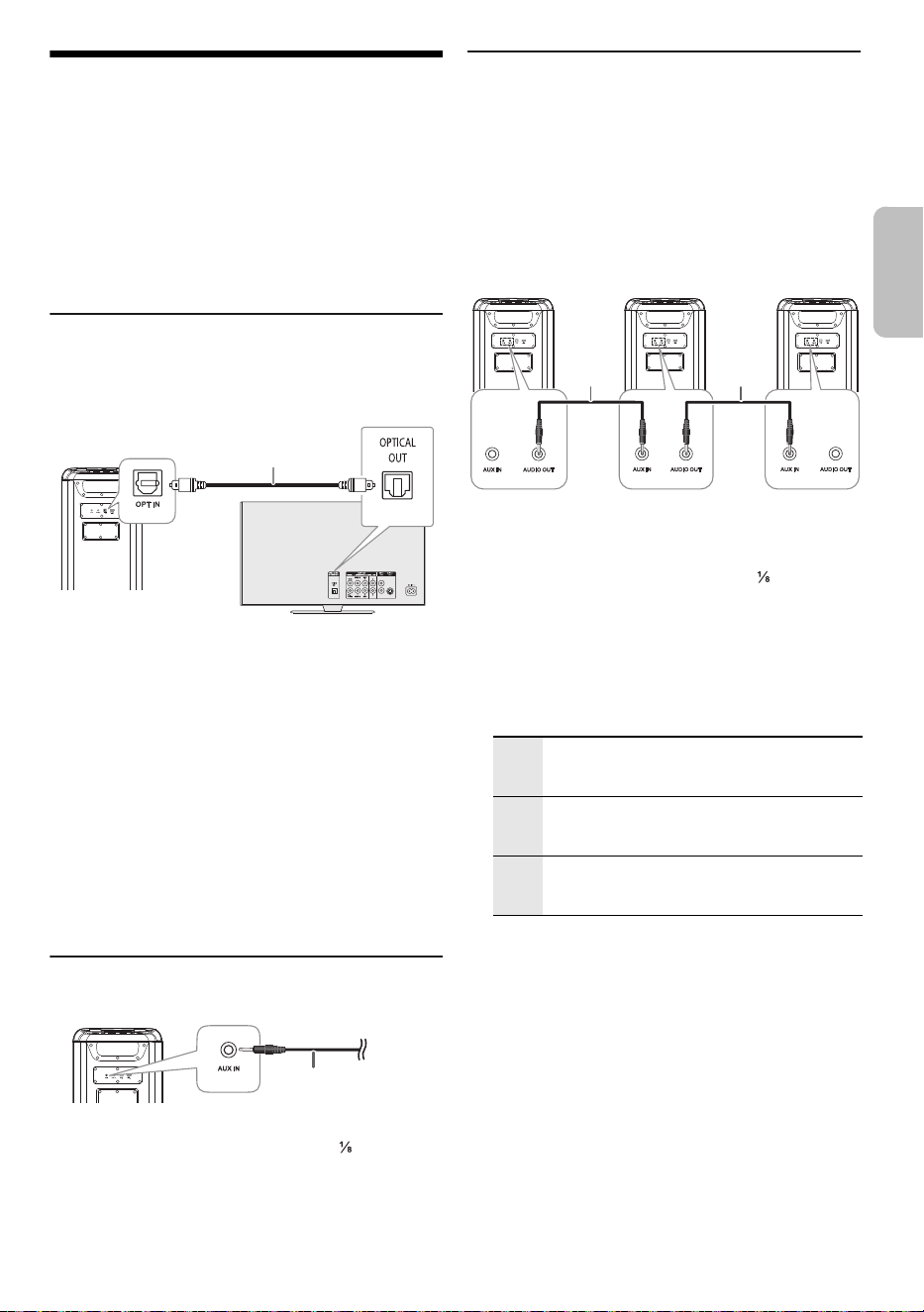
9
TQBM2030
25
D:\A_Job\PEAC\_Jobs\BMAX10_5\Source\BMAX10_5WW_TQBM2030_le.fm
Equipo externo
Preparación
• Desconecte el cable de alimentación de CA.
• Apague todos los equipos y lea las instrucciones
operativas adecuadas.
Nota:
• No doble los cables en los ángulos agudos.
• Los componentes y los cables se venden por separado.
• Desactive el ecualizador o reduzca el volumen del
dispositivo externo. Los niveles altos de señal de entrada
pueden distorsionar el sonido.
Cómo usar la entrada óptica
Puede conectar un televisor, reproductor de video,
reproductor de DVD, etc., y escuchar el audio a través de
esta unidad.
1 Conecte un dispositivo externo.
2 Encienda la unidad.
3 Pulse [INPUT SELECTOR] repetidas veces para
seleccionar “OPT”.
4 Reproduzca el dispositivo externo.
Nota:
• Este sistema admite las señales PCM lineales.
• Frecuencia de muestreo admitida: 32 kHz, 44.1 kHz,
48 kHz, 88.2 kHz, hasta 96 kHz
• El sonido se silencia o puede producirse ruido si no se
admite el formato o frecuencia de señal.
• Si vienen sonidos de las bocinas del TV, baje el volumen del
TV al mínimo.
Cómo usar la entrada auxiliar
1 Conecte un dispositivo externo.
Tipo de clavija: Estéreo de Ø 3.5 mm ( ″)
2 Encienda la unidad.
3 Pulse [INPUT SELECTOR] repetidas veces para
seleccionar “AUX”.
4 Reproduzca el dispositivo externo.
Conexión de unidades adicionales
Puede conectarse a unidades adicionales para disfrutar
de la salida de sonido de estas unidades.
Se recomienda colocar todas las unidades en posición
vertical.
Preparación
Apague todas las unidades y gire [VOLUME] de cada
unidad para reducir el nivel de volumen.
1 Conecte la unidad principal y todas las unidades
adicionales (SC-BMAX10 o SC-BMAX5) con cables
de audio (no suministrados).
Tipo de clavija: Estéreo de Ø 3.5 mm ( ″)
2 Encienda todas las unidades.
3 En las unidades adicionales:
Pulse [INPUT SELECTOR] repetidas veces para
seleccionar “AUX”.
4 Pulse [SPEAKER MODE] repetidas veces para
seleccionar los canales de bocina deseados.
5 En la unidad principal:
Inicie la reproducción deseada.
Nota:
• Puede conectar esta unidad y hasta dos unidades
adicionales.
• El efecto de sonido se controlará por separado en cada
unidad. Realice los mismos ajustes de sonido en las
unidades adicionales en caso necesario.
• La iluminación y los efectos de las luces estroboscópicas en
las unidades adicionales pueden ser diferentes de la unidad
principal, incluso cuando se seleccione el mismo patrón de
iluminación.
Cable de audio digital
óptico (suministrado)
Vista posterior
Televisor (no suministrado)
Vista posterior
Cable de audio
(no suministrado)
L+R Canales izquierdo y derecho
Cuando todas las unidades deben reproducir
simultáneamente.
L Canal izquierdo
Para conseguir un efecto de sonido estéreo,
coloque la unidad en el lado izquierdo.
R Canal derecho
Para conseguir un efecto de sonido estéreo,
coloque la unidad en el lado derecho.
Cable de
audio (no
suminis-
trado)
Cable de
audio (no
suminis-
trado)
Unidad
principal
(trasera)
Unidad
adicional
(trasera)
Unidad
adicional
(trasera)
ESPAÑOL
BMAX10_5WW_TQBM2030.book Page 9 Monday, July 22, 2024 3:15 PM
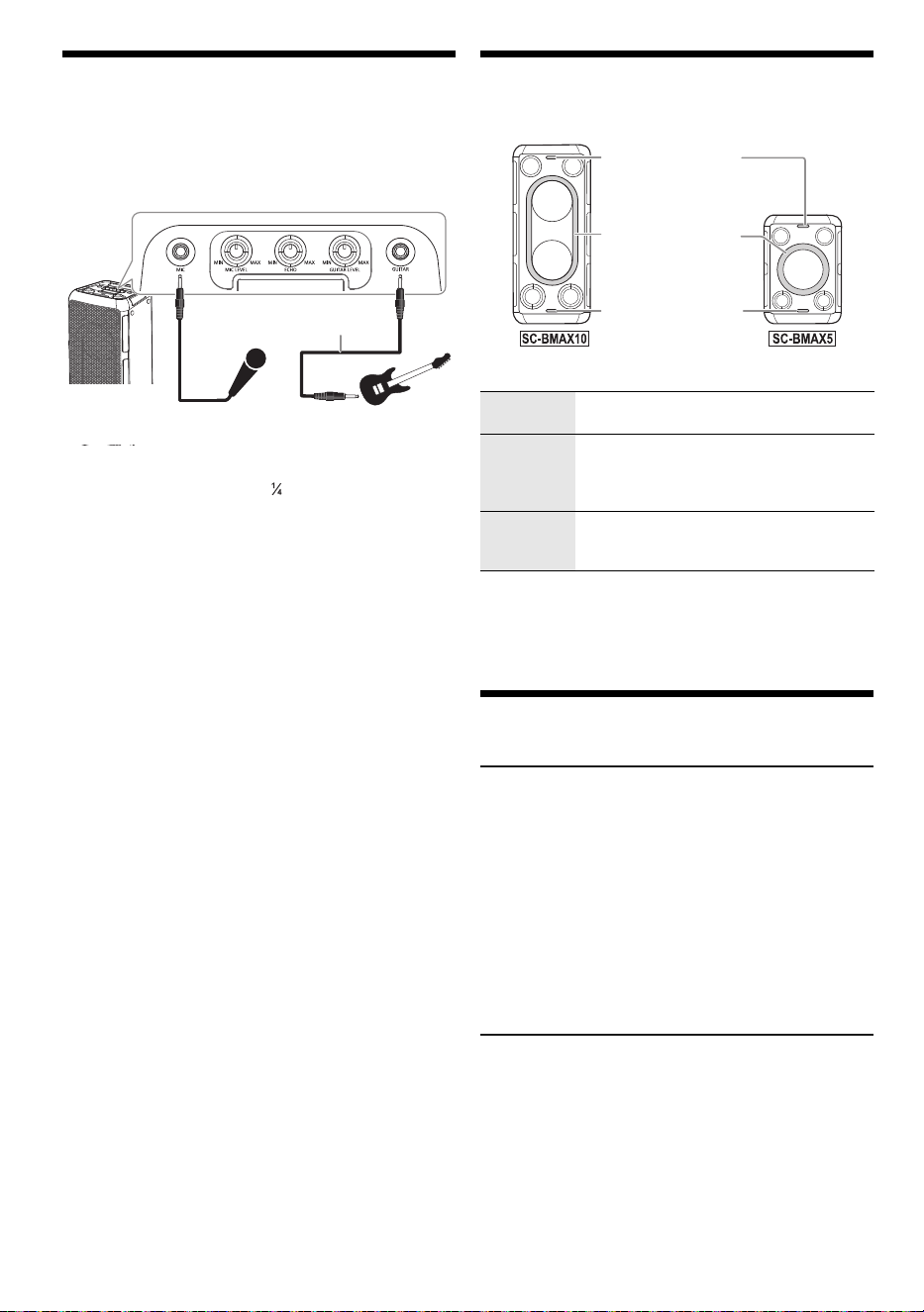
10
TQBM2030
26
D:\A_Job\PEAC\_Jobs\BMAX10_5\Source\BMAX10_5WW_TQBM2030_le.fm
Utilizar un micrófono o una
guitarra
Preparación
Gire [MIC LEVEL] y [GUITAR LEVEL] al mínimo antes de
conectar o desconectar un micrófono/guitarra.
1 Conecte un micrófono o una guitarra.
Tipo de clavija: Ø 6.3 mm ( ″) monofónico
2 Si desea cantar o tocar la guitarra con música de
fondo, reproduzca la fuente musical y ajuste el
volumen del sistema.
3 Ajuste el volumen del micrófono o la guitarra.
Para micrófono: Gire [MIC LEVEL].
Para guitarra: Gire [GUITAR LEVEL].
Ajustar el nivel de eco
Gire [ECHO] para ajustar el nivel de eco del
micrófono.
Nota:
• Si se emite un ruido extraño (aullido), aleje el
micrófono/guitarra de las bocinas o baje el volumen del
micrófono/guitarra.
• Cuando no esté usando el micrófono/guitarra, desconecte
del conector del micrófono/guitarra, y baje el volumen del
micrófono/guitarra hasta el nivel mínimo.
Efectos de la iluminación
Puede cambiar el efecto de iluminación de la unidad.
Gire [ILLUMINATION] para seleccionar el efecto.
Uso de luces estroboscópicas
Mantenga presionado [ILLUMINATION] para encender
o apagar las luces estroboscópicas.
Otros
Apagado automático
Cuando el equipo activa la “función de espera
Bluetooth
®
”, si no tiene reproducción de audio, en los
modos Aux in, Óptico, USB y Bluetooth
®
entrará en modo
de espera en red en 20 minutos.
Cuando el equipo desactiva la “función de espera
Bluetooth
®
”, si no tiene reproducción de audio, en los
modos Aux in, Óptico, USB y Bluetooth
®
entrará en otro
estado (modo de bajo consumo) en 20 minutos.
Nota:
Esta función podría no funcionar cuando un micrófono/guitarra
esté conectado.
Actualización de software
En ocasiones, Panasonic puede lanzar actualizaciones
del software para esta unidad que pueden optimizar el
desempeño de ciertas funciones. Estas actualizaciones
se encuentran disponibles en forma gratuita. Para
obtener más detalles, consulte el siguiente sitio web.
https://panasonic.jp/support/global/cs/audio/
(Este sitio está en inglés solamente.)
Guitarra (no
suministrado)
Micrófono (no
suministrado)
Cable de audio
(no suministrado)
M-1 a M-9 Selección de 9 patrones de iluminación en
varios colores.
S-1 a S-3 Selección de 3 patrones de iluminación en
un solo color.
Pulse [ILLUMINATION] repetidas veces
para seleccionar un color.
OFF Apague la iluminación y las luces
estroboscópicas, también disminuya el
brillo del panel de visualización.
Luz estroboscópica
Luz de iluminación
Luz estroboscópica
BMAX10_5WW_TQBM2030.book Page 10 Monday, July 22, 2024 3:15 PM

11
TQBM2030
27
D:\A_Job\PEAC\_Jobs\BMAX10_5\Source\BMAX10_5WW_TQBM2030_le.fm
Solución de problemas
Antes de solicitar el servicio de reparaciones haga las
comprobaciones indicadas a continuación. Si tiene
alguna duda acerca de algunos de los puntos de
comprobación, o si los indicados no resuelven el
problema, consulte a su distribuidor para obtener
instrucciones.
█
Problemas comunes
La unidad no funciona.
• El dispositivo de seguridad se ha activado. Realice lo
siguiente:
1. Pulse y mantenga pulsado [1] para apagar la unidad
y la pantalla se apagará.
2. Pulse [1] nuevamente para encender la unidad. Si
el problema persiste, consulte a su distribuidor.
El sonido está distorsionado o no hay sonido.
• Ajustar el volumen del sistema.
• Apague el sistema, determine y corrija la causa, y a
continuación encienda el sistema nuevamente. La
causa puede ser el esfuerzo de las bocinas debido a
una potencia o a un volumen excesivo, y la utilización
del sistema en un ambiente donde hace calor.
Se oye ruido de zumbido durante la reproducción.
• Un cable de alimentación de CA o luz fluorescente está
cerca de los cables. Mantenga otros aparatos y cables
alejados de este sistema.
El nivel de sonido se reduce.
• El circuito de protección se ha activado debido al uso
continuo a un volumen alto. Esto sirve para proteger el
sistema y mantener la calidad del sonido.
█
USB
No es posible leer el dispositivo USB o el contenido
del mismo.
• El formato del dispositivo USB o el contenido del mismo
no es compatible con el sistema.
• Los dispositivos USB con una capacidad superior a los
32 GB no funcionan.
• Los dispositivos USB posiblemente no se reconozcan
cuando están conectados a este sistema con un cable
de extensión USB o hub USB.
Funcionamiento lento del dispositivo USB.
• El tamaño del contenido es muy grande o el dispositivo
USB tarda más en leer.
█
Bluetooth
®
No se puede emparejar.
• Revise la condición del dispositivo Bluetooth
®
.
• El dispositivo está fuera del rango de comunicación de
10 m. Mueva el dispositivo más cerca del sistema.
No se puede conectar el dispositivo.
• El emparejado del dispositivo no fue exitoso. Realice el
emparejamiento nuevamente. (~7)
• El emparejamiento del dispositivo a sido reemplazado.
Realice el emparejamiento nuevamente. (~7)
• Este sistema puede estar conectado a un dispositivo
diferente. Desconecte el otro dispositivo e intente volver
a conectar el dispositivo.
• El sistema puede tener un problema. Apague el sistema
y después vuelva a encenderlo.
El dispositivo está conectado pero el audio no se
puede escuchar en el sistema.
• Para algunos dispositivos con Bluetooth
®
incorporado,
tiene que fijar manualmente la salida de audio a
“SC-BMAX10” o “SC-BMAX5”. Lea las instrucciones de
operación del dispositivo para obtener más detalles.
La reproducción durante la conexión múltiple no
funciona o no hay sonido.
• Reinicie la aplicación del dispositivo.
• El control del dispositivo no se cambió correctamente.
Desconecte los dispositivos conectados existentes e
intente de nuevo.
Se interrumpe el sonido del dispositivo.
• El dispositivo está fuera del rango de comunicación de
10 m (33 pies). Mueva el dispositivo más cerca del
sistema.
• Retire cualquier obstáculo entre el sistema y el
dispositivo.
• Otros dispositivos que usan la banda de frecuencia de
2.4 GHz (router inalámbrico, microondas, teléfonos
inalámbricos, etc.) están haciendo interferencia. Mueva
el dispositivo más cerca del sistema y aléjelo de otros
dispositivos.
█
Pila
El indicador de batería parpadea mientras está
conectado al cable de alimentación de CA.
• La temperatura de la batería es demasiado baja o
demasiado alta. Ajuste la temperatura ambiente en
consecuencia y espere un poco para confirmar que el
parpadeo se detiene.
Si el problema persiste, la batería podría estar
deteriorada; consulte a su distribuidor.
• Si la duración de la batería se reduce significativamente
después de una carga completa, puede indicar que es
necesario sustituir la batería. Consulte a su distribuidor
para cambiar la batería. Como alternativa, puede seguir
utilizando la unidad conectándola a una fuente de
alimentación de CA.
ESPAÑOL
BMAX10_5WW_TQBM2030.book Page 11 Monday, July 22, 2024 3:15 PM
12
TQBM2030
28
D:\A_Job\PEAC\_Jobs\BMAX10_5\Source\BMAX10_5WW_TQBM2030_le.fm
Restablecer valores de fábrica
Restablezca la memoria cuando ocurren las siguientes
situaciones:
• Los botones no funcionan.
• Usted desea borrar y restablecer el contenido de la
memoria.
1 Gire [VOLUME] para poner el volumen a “0”.
2 Pulse y mantenga pulsado [INPUT SELECTOR] y
[BASS].
Continúe pulsando y mantenga pulsado los botones
hasta que se visualice “RESET”.
Todas las configuraciones se reponen a los valores
predeterminados.
Nota:
No se pueden restablecer los valores de fábrica cuando la
función de espera Bluetooth
®
está activa.
Mantenimiento
Desconecte el cable de alimentación de CA antes de
realizar el mantenimiento. Limpie este sistema con un
paño suave y seco.
• Nunca utilice alcohol, diluyente de pintura ni gasolina
para limpiar este sistema.
• Antes de utilizar un paño impregnado químicamente,
lea con atención las instrucciones suministradas con el
mismo.
Referencias
Acerca de Bluetooth
®
Banda de frecuencia
• Este sistema utiliza la banda de frecuencia de 2.4 GHz.
Certificación
• Este sistema cumple con las restricciones de frecuencia
y tiene una certificación recibida basada en las leyes de
frecuencia. Por lo tanto, no se necesita un permiso de
conexión inalámbrica.
• Las siguientes acciones son castigadas por la ley en
algunos países:
– Separar o modificar la unidad.
– Retirar las indicaciones de la especificación.
Restricciones de uso
• No se garantiza la transmisión inalámbrica o el uso con
todos los dispositivos equipados con Bluetooth
®
.
• Todos los dispositivos deben cumplir con las normas
establecidas por Bluetooth SIG, Inc.
• Según las especificaciones y los ajustes de un
dispositivo, es posible que no se pueda conectar o
algunas operaciones pueden ser diferentes.
• Este sistema admite las funciones de seguridad de
Bluetooth
®
. Según los ajustes o el ambiente de
operación, es posible que esta seguridad no sea
suficiente. Transmita, con cuidado, los datos de forma
inalámbrica a este sistema.
• Este sistema no puede transmitir los datos a un
dispositivo Bluetooth
®
.
Rango de uso
• Use este dispositivo en un rango máximo de 10 m
(33 pies).
• El rango se puede disminuir según el ambiente, los
obstáculos o la interferencia.
Interferencia de otros dispositivos
• Este sistema puede no funcionar correctamente y los
problemas como ruido y saltos de sonido pueden surgir
debido a la interferencia de ondas de radio, si esta
unidad está ubicada demasiado cerca de otros
dispositivos Bluetooth
®
o de dispositivos que usan la
banda 2.4 GHz.
• Este sistema puede no funcionar correctamente si las
ondas de radio de una estación de emisión cercana,
etc. son demasiado fuertes.
Uso previsto
• Este sistema es para el uso general normal solamente.
• No use este sistema cerca de un equipo o en un
ambiente sensible a la interferencia de la frecuencia de
radio (ejemplo: aeropuertos, hospitales, laboratorios,
etc.).
Licencias
Panasonic no se responsabiliza por datos y/o
información que se vean comprometidos durante la
transmisión inalámbrica.
La marca denominativa Bluetooth
®
y sus logos son
marcas comerciales registradas propiedad de Bluetooth
SIG, Inc. y cualquier uso de dichas marcas por parte de
Panasonic Holdings Corporation se realiza bajo licencia.
Otros nombres de marcas y marcas comerciales son
propiedad de sus respectivos propietarios.
BMAX10_5WW_TQBM2030.book Page 12 Monday, July 22, 2024 3:15 PM
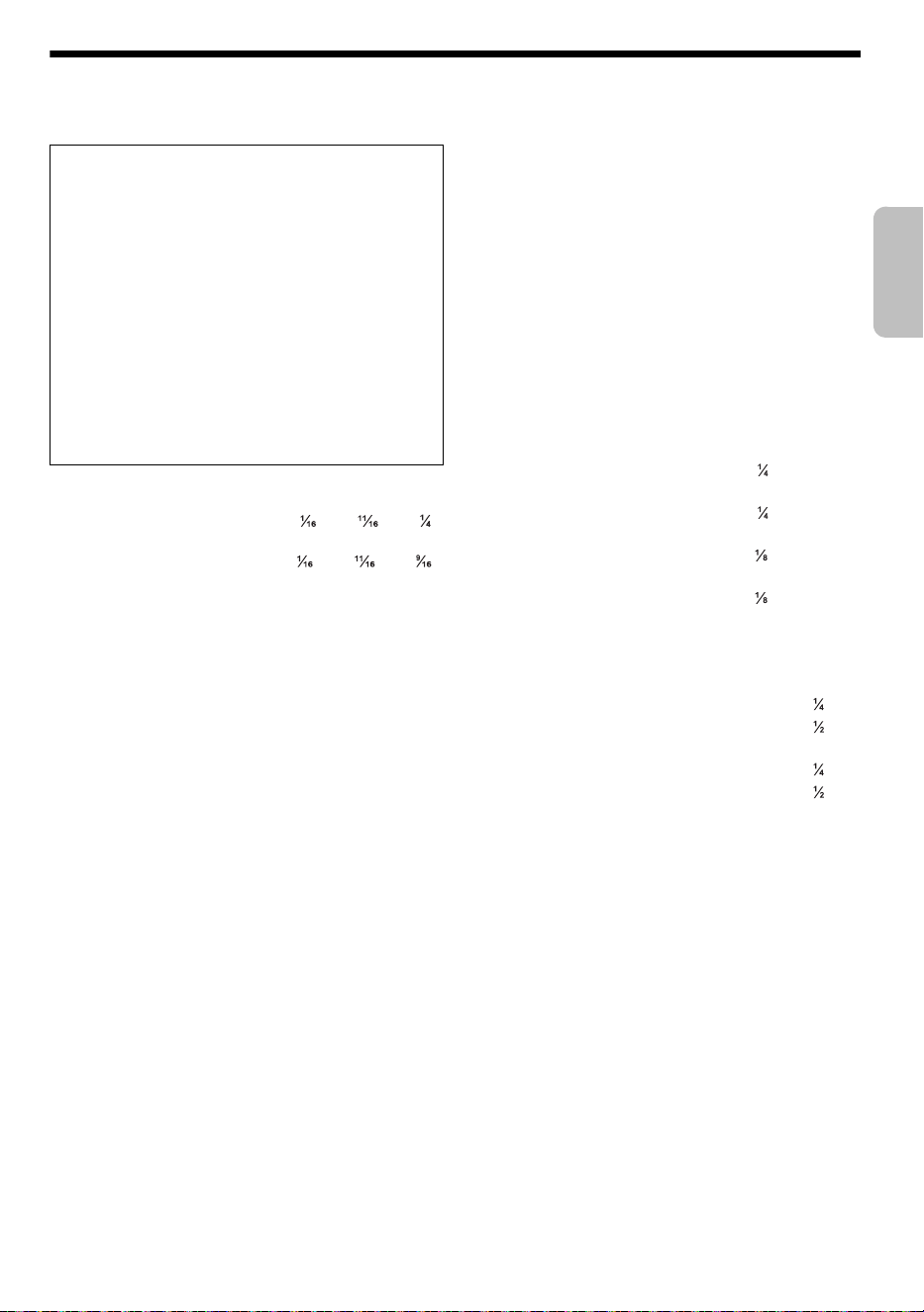
13
TQBM2030
29
D:\A_Job\PEAC\_Jobs\BMAX10_5\Source\BMAX10_5WW_TQBM2030_le.fm
Especificaciones
█
Generalidades
Dimensiones (An x Al x Prf)
[SC-BMAX10] 280 mm × 550 mm × 310 mm
(11 ″ × 21 ″ × 12 ″)
[SC-BMAX5] 280 mm × 397 mm × 293 mm
(11 ″ × 15 ″ × 11 ″)
Peso
[SC-BMAX10] 9.3 kg (20.5 lbs)
[SC-BMAX5] 6.5 kg (14.3 lbs)
Gama de temperaturas de funcionamiento
0°C a +40°C (+32°F a +104°F)
Gama de temperaturas de carga de la batería
+10°C a +35°C (+50°F a +95°F)
Gama de humedades de funcionamiento
35% a 80% humedad relativa (sin condensación)
█
Sección del amplificador
Potencia de salida RMS
[SC-BMAX10]
Canal Izq. (Bocina para graves, Bocina para agudos)
75 W (4 Ω), 1 kHz, 30% THD
Canal Der. (Bocina para graves, Bocina para agudos)
75 W (4 Ω), 1 kHz, 30% THD
Potencia RMS total 150 W
[SC-BMAX5]
Bocina para graves (mono)
45 W (4 Ω), 1 kHz, 30% THD
Bocina para agudos (Canal Izq./Der.)
15 W por canal (6 Ω), 1 kHz, 30% THD
Potencia RMS total 75 W
█
Sección de Bluetooth
®
Versión Bluetooth
®
Versión 5.0
Clase Clase 1
Perfiles admitidos AVRCP, A2DP
Banda de frecuencia Banda de 2.4 GHz FH-SS
Frecuencia operativa 2402 MHz a 2480 MHz
Distancia de funcionamiento
10 m (33 pies) de la línea de visión
Códec compatible SBC
█
Sección de terminales
Puerto USB
USB estándar USB 2.0 velocidad total
Compatibilidad con formato de archivos de medios
MP3 (*.mp3)
Frecuencia de muestreo 32 kHz, 44.1 kHz, 48 kHz
Longitud de palabra de audio 16 bits
Conteo de canales 2 canales
Sistema de archivo de dispositivo USB
FAT16, FAT32, exFAT
OPT IN
Entrada digital óptica Terminal óptica
Frecuencia de muestreo
32 kHz, 44.1 kHz, 48 kHz, 88.2 kHz, 96 Hz
Profundidad de bit admitida 16 bits, 24 bits
Formato de audio PCM (2 canales)
Micrófono
Terminal Mono, toma de 6.3 mm ( ″) (1 sistema)
Guitarra
Terminal Mono, toma de 6.3 mm ( ″) (1 sistema)
AUX IN
Terminal Estéreo, toma de 3.5 mm ( ″) (1 sistema)
AUDIO OUT
Terminal Estéreo, toma de 3.5 mm ( ″) (1 sistema)
█
Sección de bocinas
Bocina(s)
[SC-BMAX10]
Bocina para agudos Tipo cónico de 5.7 cm (2 ″) x 2
Bocina para graves Tipo cónico de 14 cm (5 ″) x 2
[SC-BMAX5]
Bocina para agudos Tipo cónico de 5.7 cm (2 ″) x 2
Bocina para graves Tipo cónico de 14 cm (5 ″) x 1
█
Sección de la batería
[SC-BMAX10]
Batería integrada 7.2 V (iones de litio 4950 mAh)
Duración de la batería en uso
Tiempo de reproducción Aproximadamente: 15 horas*
Tiempo de carga de la batería (25°C (77°F))
La unidad está apagada Aproximadamente: 4 horas
[SC-BMAX5]
Batería integrada 7.2 V (iones de litio 2475 mAh)
Duración de la batería en uso
Tiempo de reproducción Aproximadamente: 9 horas*
Tiempo de carga de la batería (25°C (77°F))
La unidad está apagada Aproximadamente: 3 horas
* Este tiempo de reproducción de la batería es solo una referencia y
puede variar en función del contenido musical y del envejecimiento
de la batería tras numerosos ciclos de carga y descarga.
Se puede conseguir con una fuente de música predefinida, la luz
de iluminación apagada, el modo FLAT EQ, el nivel de volumen en
[SC-BMAX5] 28 o [SC-BMAX10] 29 y la fuente de transmisión Bluetooth
®
.
Nota:
•
Las especificaciones están sujetas a cambios sin previo aviso.
El peso y las dimensiones son aproximados.
• La distorsión armónica total se mide con el analizador de
espectro digital.
Fuente de alimentación
CA 110 V a 240 V, 50/60 Hz
Consumo de energía
[SC-BMAX10] 65 W
[SC-BMAX5] 40 W
Consumo de energía en modo de bajo consumo y
en espera en red
Con la configuración “OFF BLUETOOTH STANDBY”
(modo de bajo consumo) 0.5 W
Con la configuración “ON BLUETOOTH STANDBY”
(en espera en red) 2.0 W
Consumo de energía en modo de bajo consumo
durante la carga (máximo)
[SC-BMAX10] 17 W
[SC-BMAX5] 11 W
ESPAÑOL
BMAX10_5WW_TQBM2030.book Page 13 Monday, July 22, 2024 3:15 PM
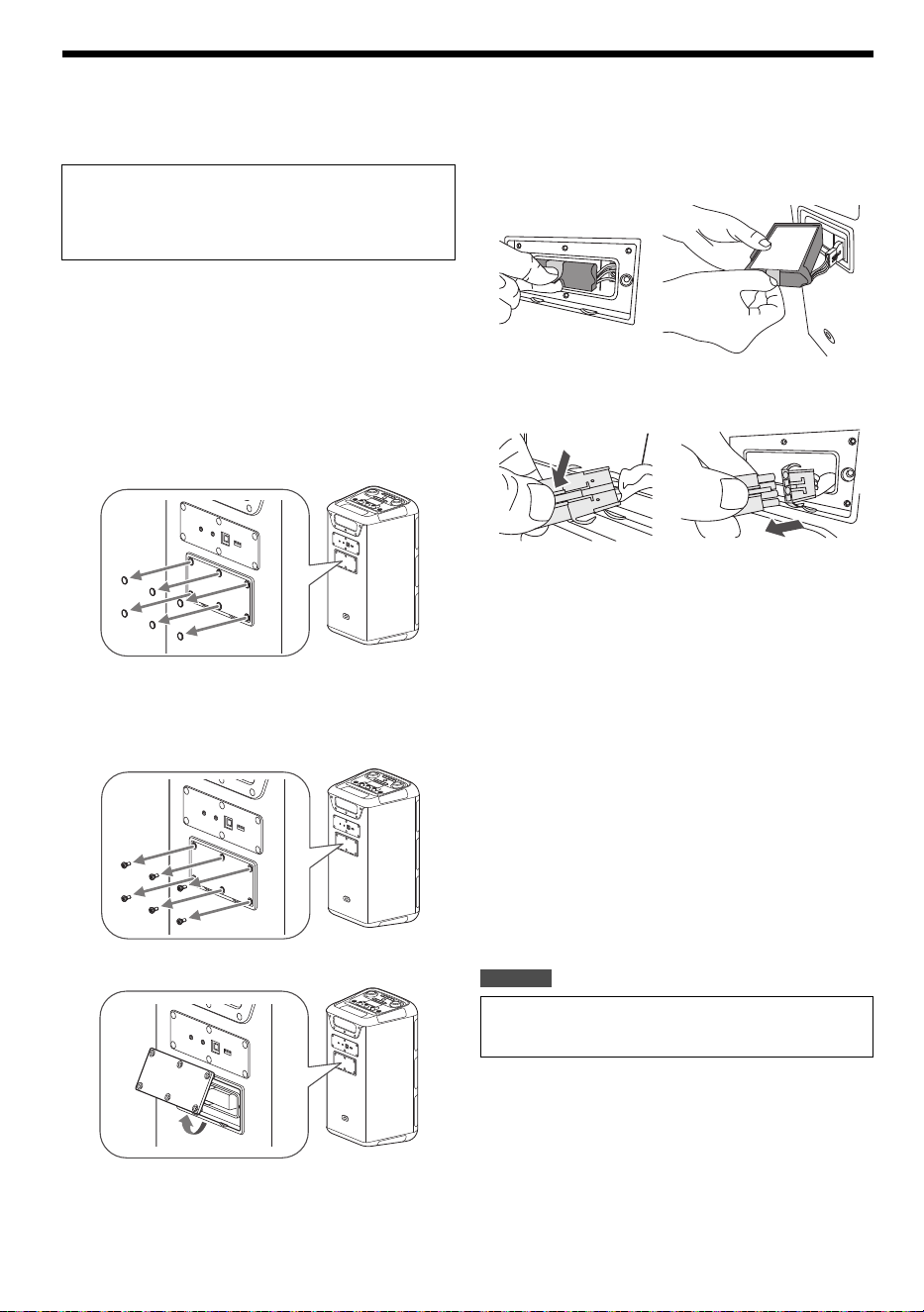
14
TQBM2030
30
D:\A_Job\PEAC\_Jobs\BMAX10_5\Source\BMAX10_5WW_TQBM2030_le.fm
Retirar la batería cuando se desecha esta unidad
Retire la batería integrada antes de desechar esta
unidad.
Nota:
• Antes de desarmar esta unidad, desconecte el cable de
alimentación de CA. Y descargue por completo la batería.
• Si tiene problemas para retirar la batería, consulte a su
distribuidor o al centro de servicio más cercano.
1 Retire la cubierta de la batería.
Retire las cubiertas de tornillo (x6) de la cubierta de la
batería.
Utilice un objeto con la punta afilada (por ejemplo, la
punta de una chincheta) para levantar las cubiertas de
tornillo.
Retire los tornillos (x6) que fijan la cubierta de la
batería.
Use un destornillador Phillips disponible
comercialmente (tamaño: N.º 2) para retirar los
tornillos.
Levante y retire la cubierta de la batería.
2 Retire la batería.
Apriete la lengüeta y saque la batería del
compartimento.
Desconecte y retire la batería de la unidad.
█
Manipulación de la batería recargable usada
• Aísle los terminales con cinta de celofán o un material
similar.
• No desarme.
• Cuando no se puede usar más la batería, llévela a una
instalación que acepta baterías recargables usadas en
lugar de desecharla.
█
Desechar o transferir esta unidad
La unidad puede conservar la información sobre la
configuración del usuario en la unidad. Si elimina esta
unidad desechándola o transfiriéndola, entonces siga el
procedimiento para restablecer toda la configuración a los
valores predeterminados de fábrica a fin de borrar la
configuración del usuario
(~12).
• El historial de funcionamiento se puede grabar en la
memoria de esta unidad.
Para EE. UU.
Nunca desarme este producto, excepto cuando lo
va a desechar.
Las siguientes ilustraciones no son para reparar
esta unidad sino para desecharla. Cuando desarme
esta unidad, nunca se puede volver a armar.
Para desechar su producto, recicle de acuerdo con la
normativa ambiental local. Para más información sobre
reciclaje, visite https://shop.panasonic.com/recycle
BMAX10_5WW_TQBM2030.book Page 14 Monday, July 22, 2024 3:15 PM

15
TQBM2030
31
D:\A_Job\PEAC\_Jobs\BMAX10_5\Source\BMAX10_5WW_TQBM2030_le.fm
BMAX10_5WW_TQBM2030.book Page 15 Monday, July 22, 2024 3:15 PM

D:\A_Job\PEAC\_Jobs\BMAX10_5\Source\BMAX10_5WW_TQBM2030_le.fm
-For U.S.A / Para EE. UU. S.A
Panasonic Corporation of North America
Two Riverfront Plaza, Newark, NJ 07102-5490
https://help.na.panasonic.com/
-For others / Para otros países S
Panasonic Entertainment & Co mmunication Co., Ltd.
Web Site: https://www.panasonic.com
© Panasonic Entertainment & Communication Co., Ltd. 2024
Printed in China / Impreso en China
TQBM2030
L0724CH0
en
es
BMAX10_5WW_TQBM2030.book Page 16 Monday, July 22, 2024 3:15 PM

