MFS4022WARB
USER MANUAL
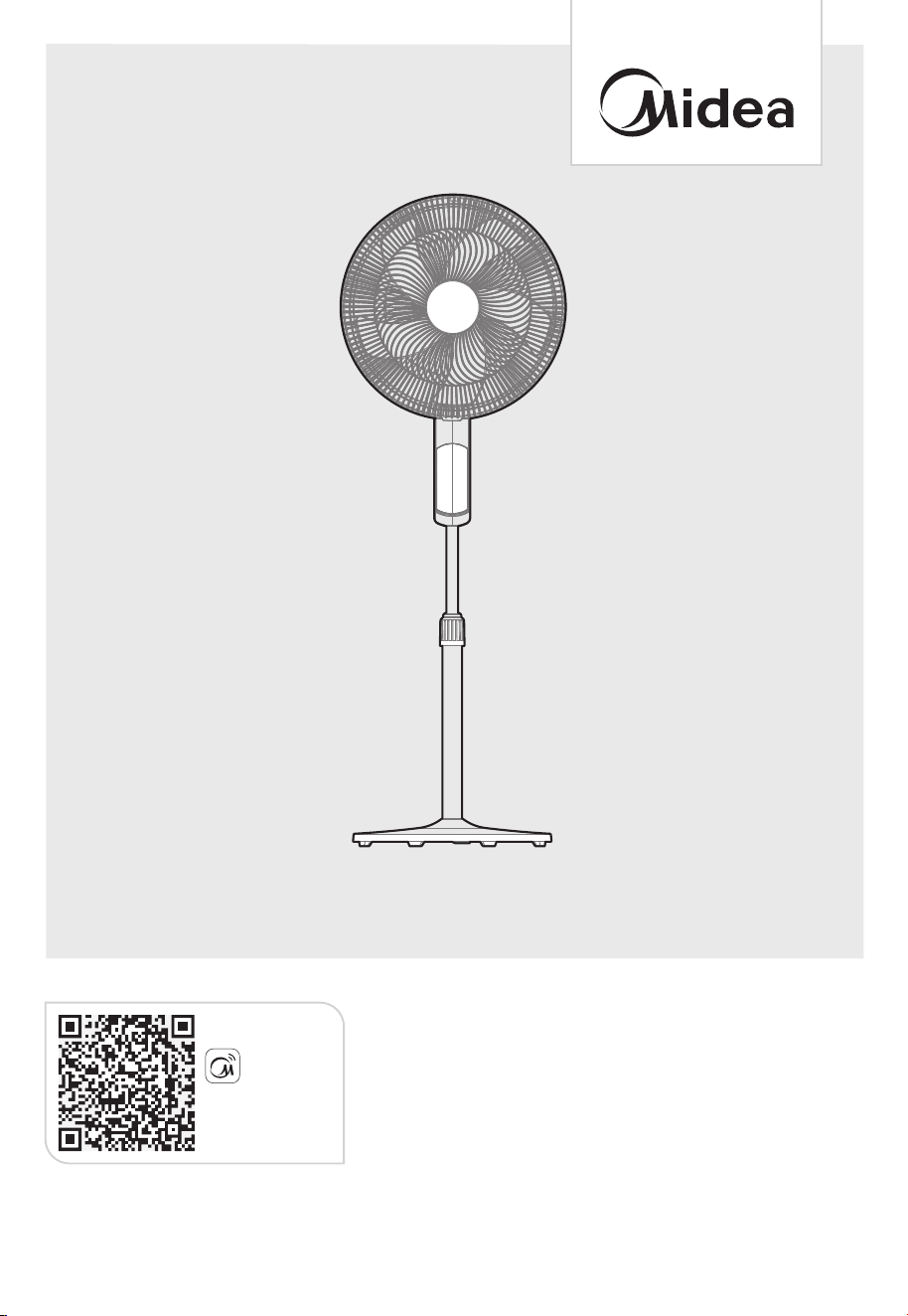
16 inch SMART STAND FAN
Download the app
& activate product
MSmartHome
Warning notices: Before using this product, please read this manual carefully and keep it for future reference.
The design and specifications are subject to change without prior notice for product improvement.
Consult with your dealer or manufacturer for details.
The diagram above is just for reference. Please take the appearance of the actual product as the standard.
CONTENTS
0 1
0 2
06
1
07
THANK YOU LETTER
SAFETY INSTRUCTIONS
SPECIFICATIONS
PRODUCT OVERVIEW
08
PRODUCT INSTALLATION
OPERATION INSTRUCTIONS
1
CLEANING AND MAINTENANCE
THANK YOU LETTER
Thank you for choosing Midea! Before using your new Midea product, please read
this manual thoroughly to ensure that you know how to operate the features and
functions that your new appliance offers in a safe way.
01
1
5
1
APP SETUP AND OPERATION
3
EN
1
USER SERVICING INSTRUCTIONS
6
1
TROUBLESHOOTING
1
TRADEMARKS, COPYRIGHTS AND LEGAL STATEMENT
7
8
DATA PROTECTION NOTICE
1 9
02
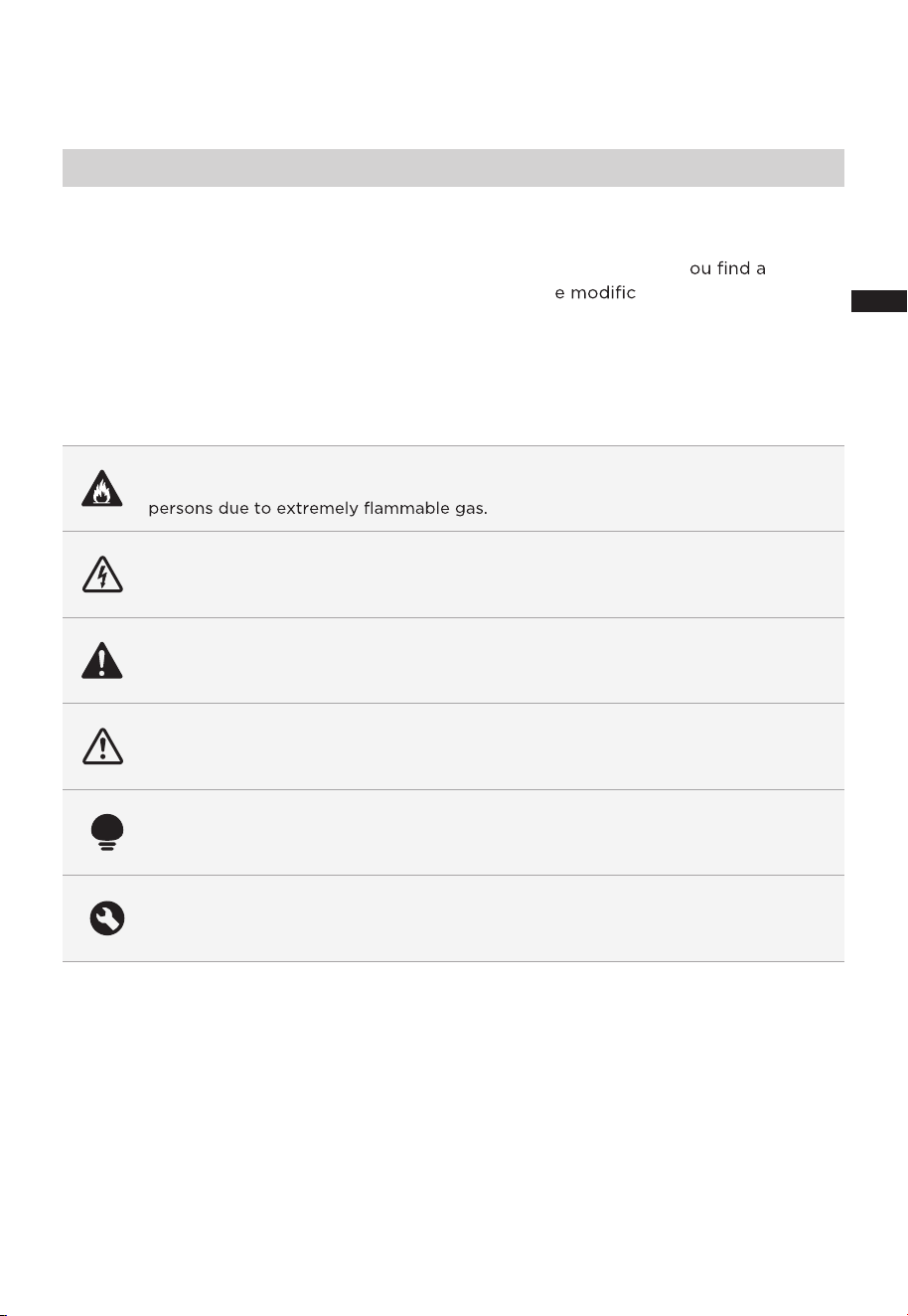
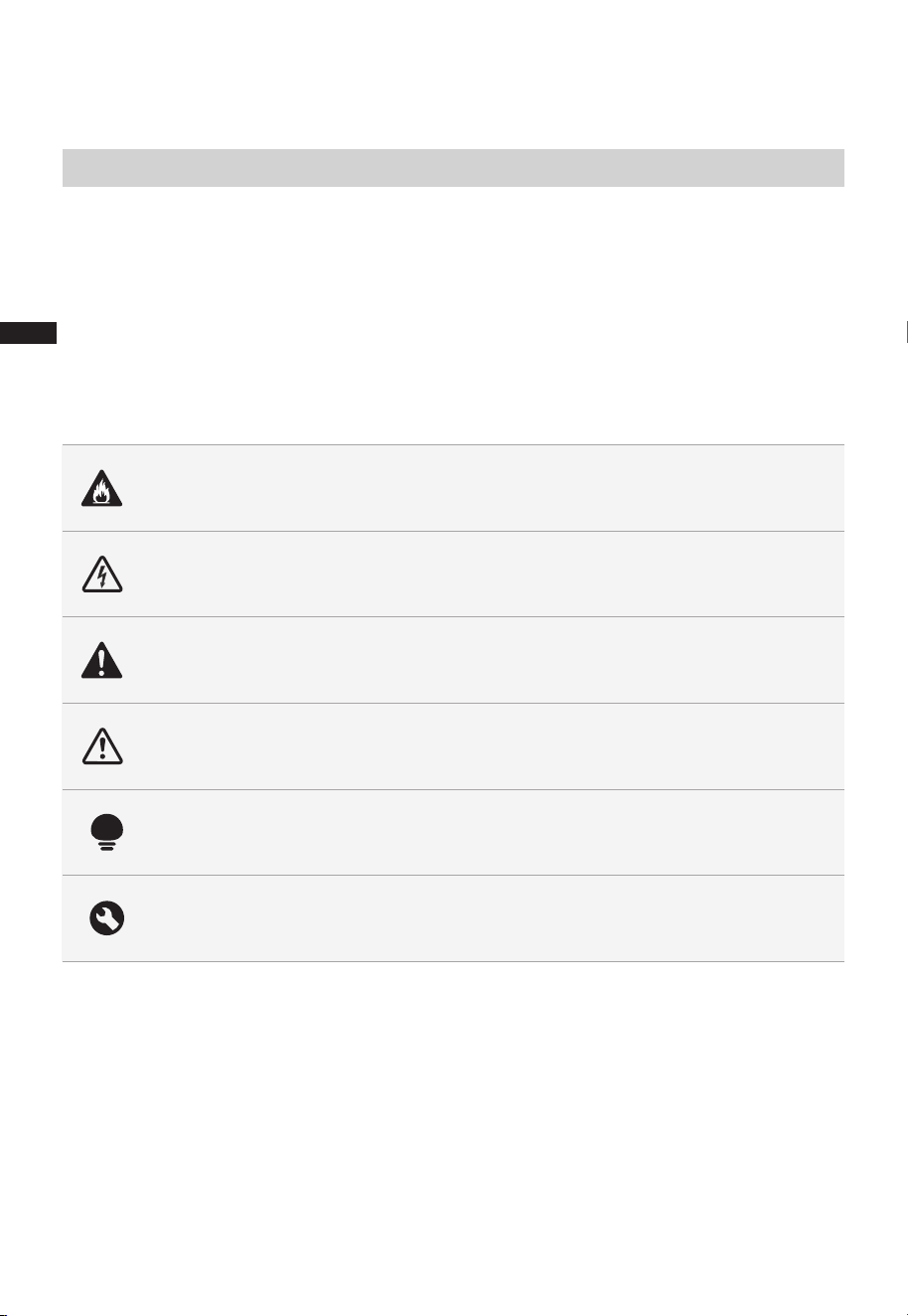
Danger
This symbol indicates that there are dangers to the life and health of
Warning of electrical voltage
This symbol indicates that there is a danger to life and health of
persons due to voltage.
Warning
The signal word indicates a hazard with a medium level of risk which, if
not avoided, may result in death or serious injury.
Caution
The signal word indicates a hazard with a low degree of risk which, if
not avoided, may result in minor or moderate injury.
Attention
The signal word indicates important information (e.g. damage to
property), but not danger.
Observe instructions
This symbol indicates that a service technician should only operate and
maintain this appliance in accordance with the operating instructions.
The following safety guidelines are intended to prevent unforeseen risks or damage from
unsafe or incorrect operation of the appliance. Please check the packaging and appliance
on arrival to make sure everything is intact to ensure safe operation. If y ny
damage, please contact the retailer or dealer. Please not ations or alterations to
the appliance are not allowed for your safety concern. Unintended use may cause
hazards and loss of warranty claims.
Read these operating instructions carefully and attentively before using/commissioning the
unit and keep them in the immediate vicinity of the installation site or unit for later use!
Intended Use
Explanation of Symbols
SAFETY INSTRUCTIONS
EN
0303
Warning
Caution
●
●
●
●
●
●
●
Read Rules for Safe Operation and Instructions Carefully.
This appliance is not intended for use by persons
(including children) with reduced physical, sensory or
mental capabilities, or lack of experience and knowledge,
unless they have been given supervision or instruction
concerning use of the appliance by a person responsible
for their safety. Children should be supervised to ensure
that they do not play with the appliance.
Keep electrical appliances out of reach from children or
individuals with certain disabilities. Do not let them use
the appliance without supervision.
Never insert fingers, pencils, or any other object through
the grille when fan is running.
Disconnect fan when moving from one location to another.
Be sure fan is on a stable surface when operating to
avoid overturning.
Household use only.
●
●
●
●
If the supply cord is damaged, it must be replaced by
manufacturer or its service agent or a similarly qualified
person in order to avoid a hazard.
To protect against the risk of electrical shock, do not
immerse the unit, cord or plug in water or other liquid.
When the appliance is not in use and before cleaning,
unplug the appliance from the outlet.
Do not leave the fan running unattended.
READ AND SAVE THESE INSTRUCTIONS
EN

04
●
●
●
●
●
This appliance has a polarized plug (one blade is wider
than the other). To reduce the risk of electric shock, this
plug is intended to fit in a polarized outlet only one way.
If plug does not fit fully in the outlet, reverse the plug. If it
still does not fit, contact a qualified electrician. Do not
attempt to defeat this safely feature.
Warning: To reduce the risk of fire or electric shock, do
not use this fan with any solid-state speed control device.
This product employs overload protection (fuse). A
blown fuse indicates an overload or short-circuit
situation. If the fuse blows, unplug the product from the
outlet. Replace the fuse as per the user servicing
instructions (follow product marking for proper fuse
rating) and check the products. If the replacement fuse
blows, a short-circuit may be present and the product
should be discarded or returned to an authorized service
facility for examination and/or repair.
(a). Do not operate any fan with a damaged cord or plug.
If cord or plug is damaged, discard fan or return to an
authorized service facility for examination and/or repair.
(b). Do not run cord under carpeting. Do not cover cord
with throw rugs, runners, or similar coverings. Do not
route cord under furniture or appliances. Arrange
cord away from traffic area and where it will not be
tripped over.
Once the fan is assembled, do not remove the rotor
blade guard.
- Unplug the fan before cleaning.
- The rotor guard shall not be dissembled/opened to
clean the rotor blades.
- Wipe the fan enclosure and rotor blade guard with a
slightly damp cloth.
WARNING: To Reduce The Risk Of Fire, Electric Shock Or
Injury To Persons, Do Not Use Replacement Parts That
Have Not Been Recommended By The Manufacturer (e.g.
Parts Made At Home Using A 3D Printer).
EN

05
●
This device complies with Part 15 of the FCC Rules.
Operation is subject to the following two conditions:
(1) this device may not cause harmful interference, and
(2) this device must accept any interference received,
including interference that may cause undesired operation.
1) NOTE: This equipment has been tested and found to
comply with the limits for a Class B digital device, pursuant
to Part 15 of the FCC Rules. These limits are designed to
provide reasonable protection against harmful interference
in a residential installation. This equipment generates uses
and can radiate radio frequency energy and, if not
installed and used in accordance with the instructions,
may cause harmful interference to radio communications.
However, there is no guarantee that interference will not
occur in a particular installation.
2) Please note that any changes or modifications of this
product not expressly approved by the party responsible
for compliance could void the user's authority to operate
the equipment.
3) If this equipment does cause harmful interference to
radio or television reception, which can be determined by
turning the equipment off and on, the user is encouraged
to try to correct the interference by one or more of the
following measures:
--Reorient or relocate the receiving antenna.
--Increase the separation between the equipment and
receiver.
--Connect the equipment into an outlet on a circuit
different from that to which the receiver is connected.
--Consult the dealer or an experienced radio/TV
technician for help.
Midea America Corp.
Parsippany, NJ 07054
TEL : 1-866-646-4332
EN

SPECIFICATIONS
MFS4022WARBProduct Model
Voltage
Current
Frequency
120V~
0.5A
60Hz
06
EN
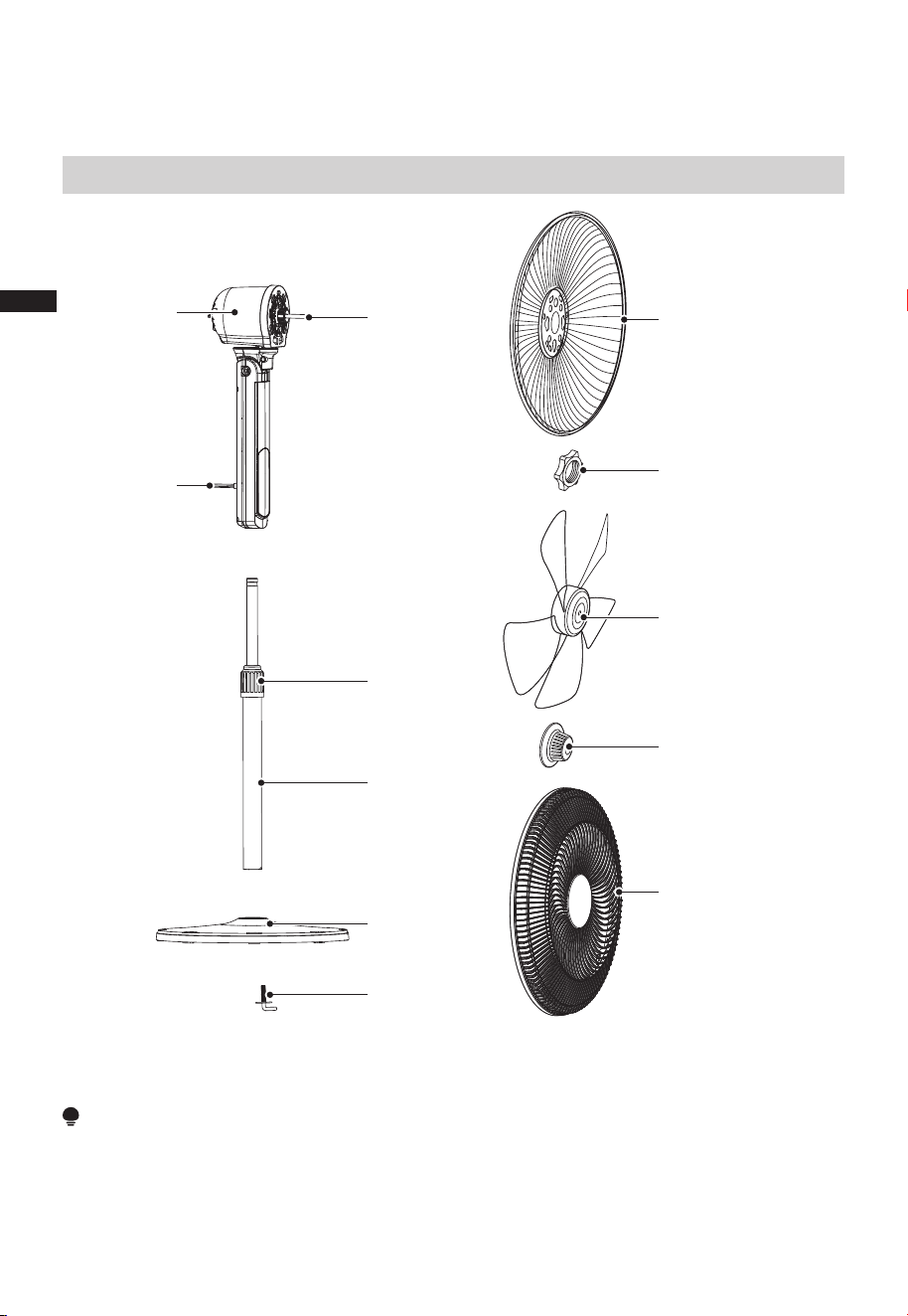
PRODUCT OVERVIEW
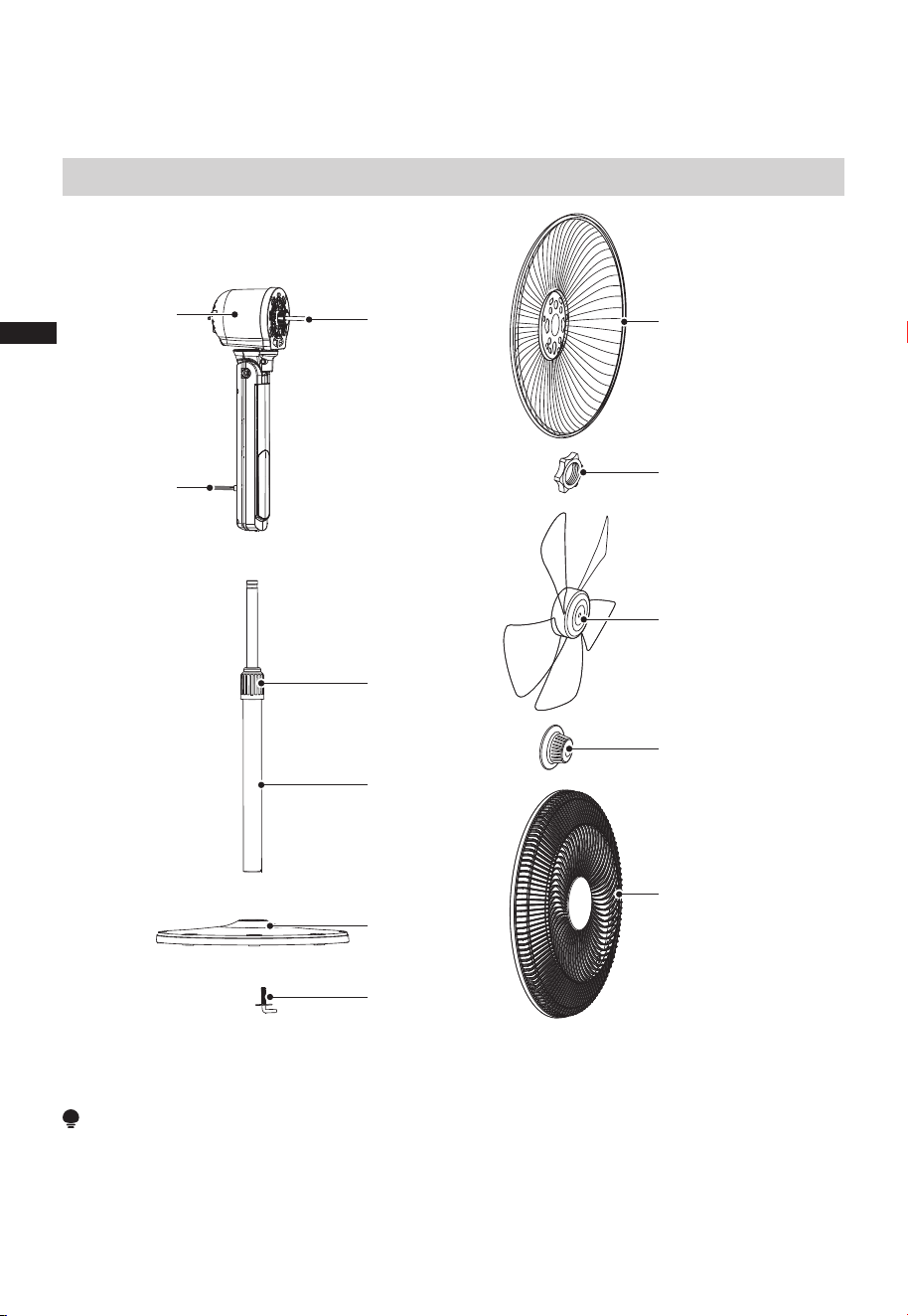
Part Name
07
Motor
Tighten
screw
Blade
Rear guard
Guard lock nut
Blade nut
Front guard
Motor shaft
Tighten
knob
Pole
7-shape bolt
Base
NOTE
All the pictures in this manual are for explanation purpose only. Remove parts from the
component before performing installation.
EN
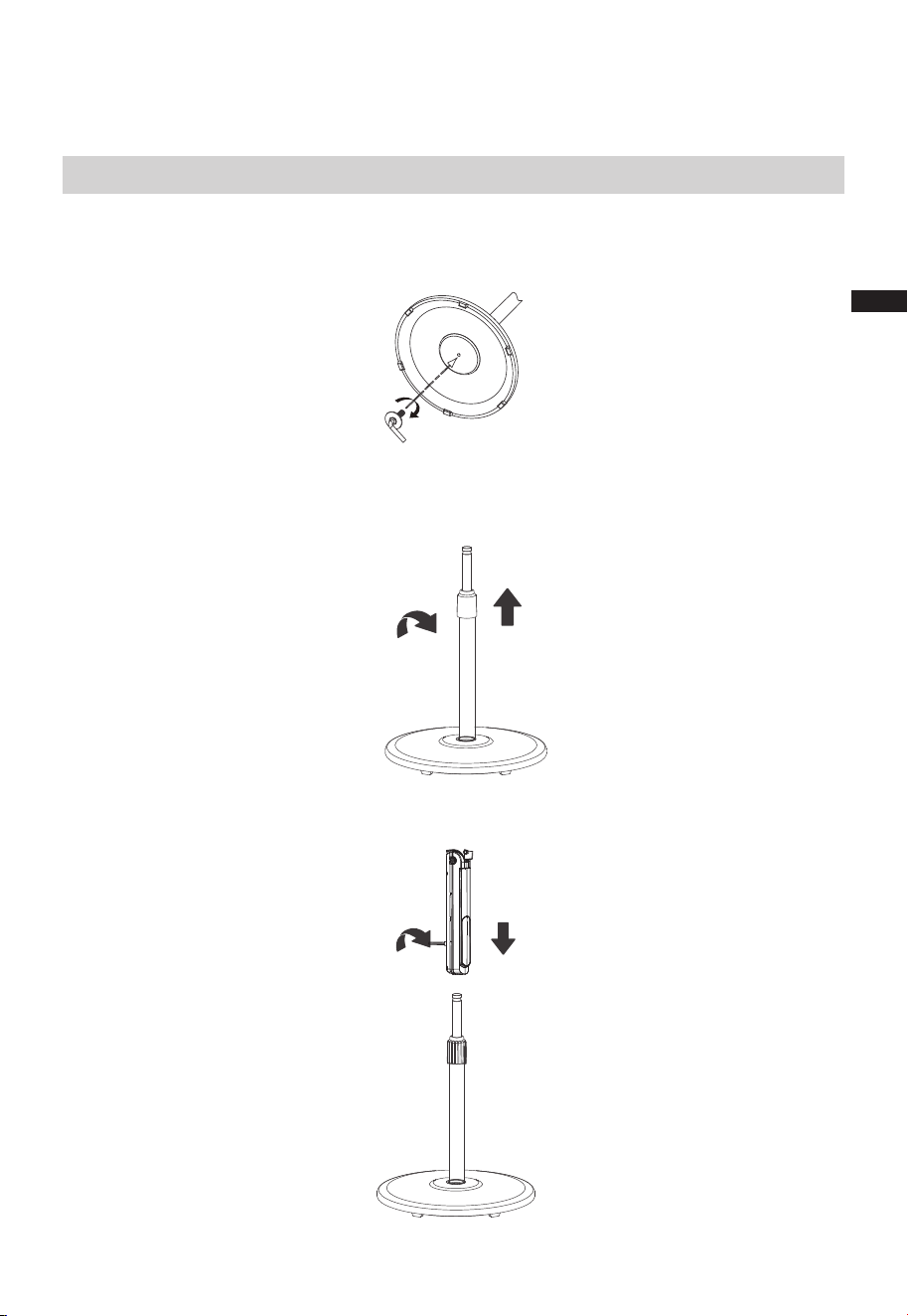
PRODUCT INSTALLATION
08
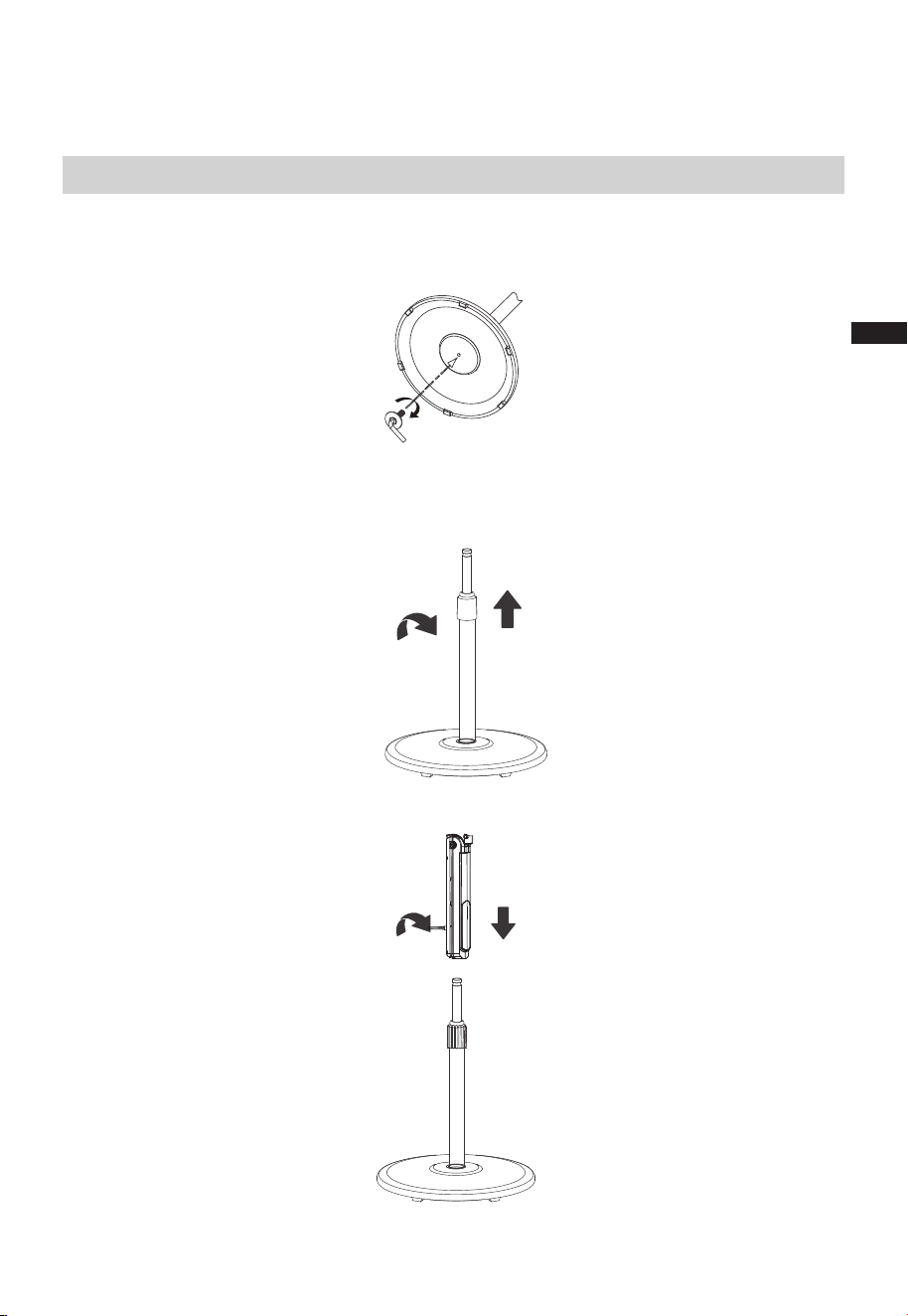
Installation procedures
1 Install the base
2 Column installation
Align the column with the groove on the base and fix them together using a 7-shape
bolt.
2.1 Pull out and fix the inner column tube by rotating the height adjustment knob
(height can be adjusted as required).
2.2 Install and adjust the device by rotating the tightening screw.
For height adjustment, rotate
knob clockwise to tighten
and counterclockwise to
loosen
Rotate screw clockwise to
tighten and counterclockwise
to loosen
EN
09
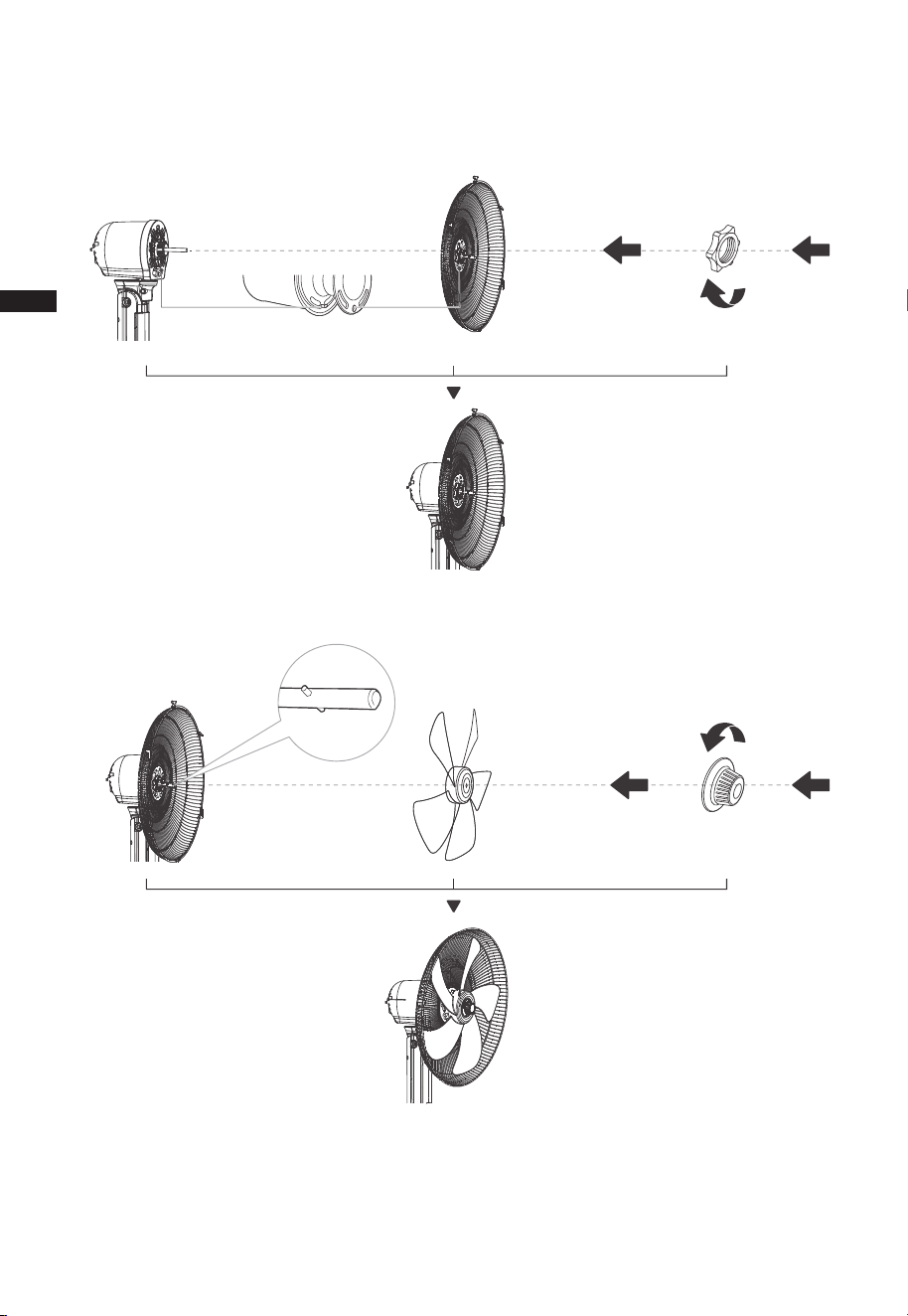
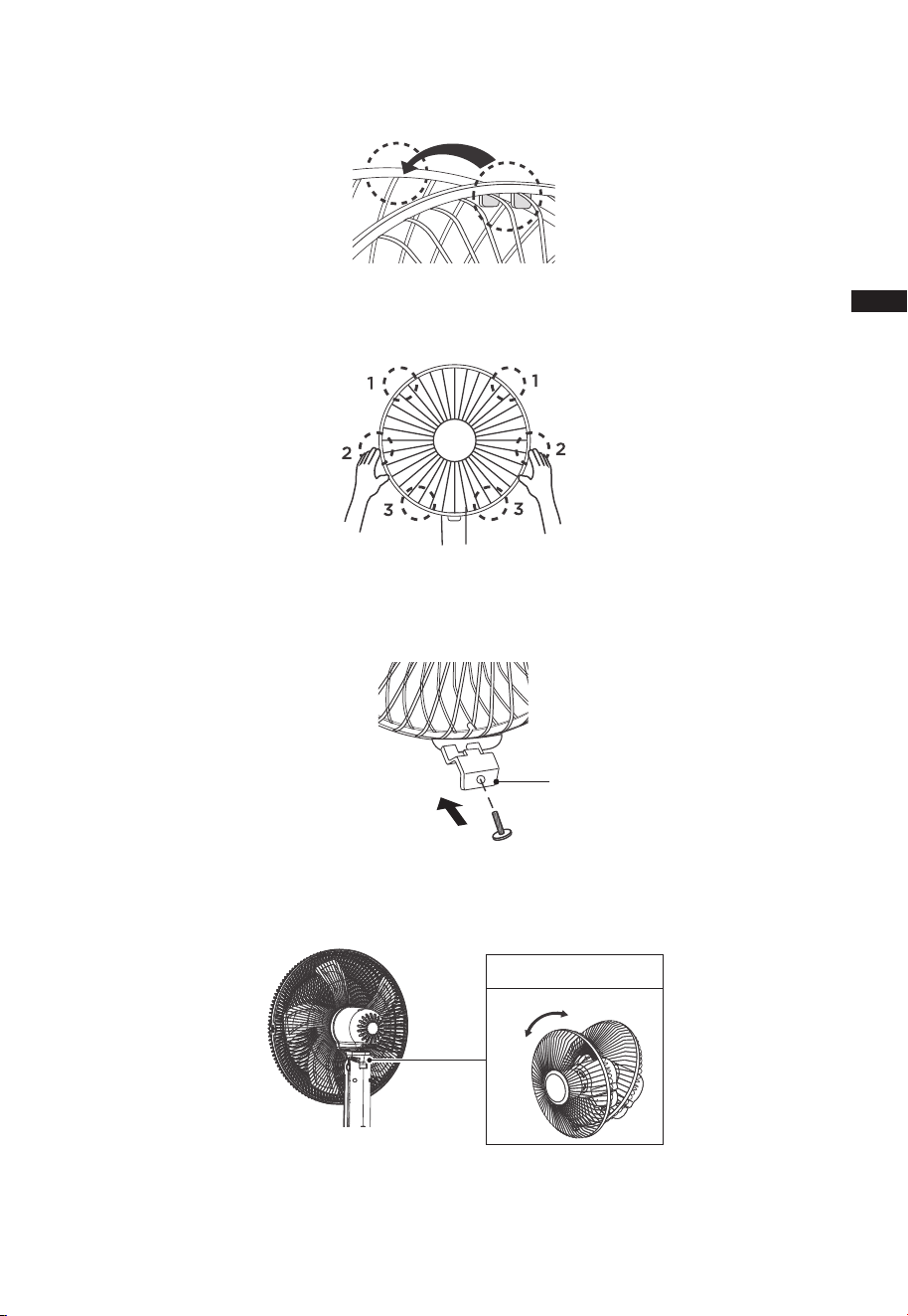
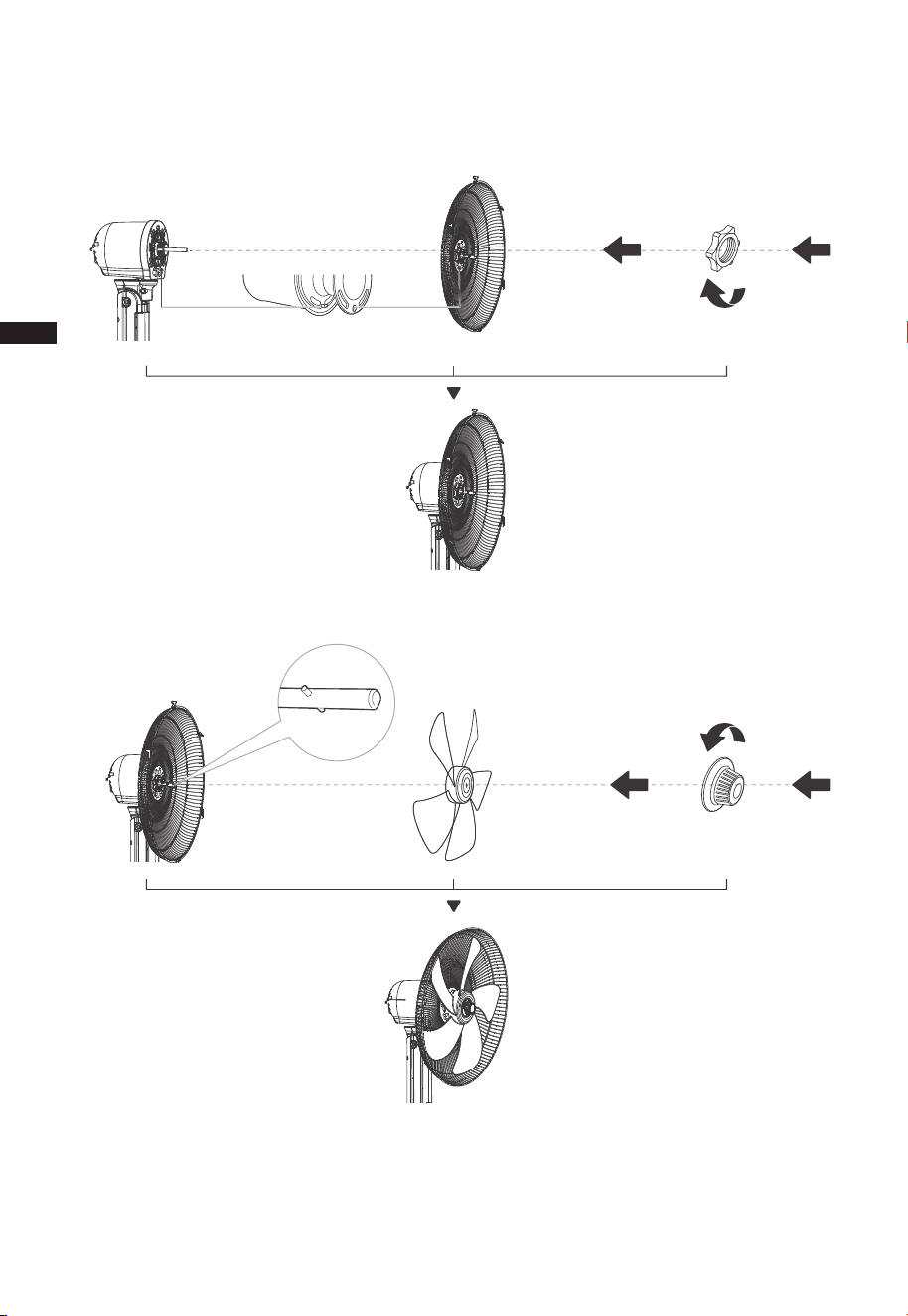
3 Rear guard installation
3.1 Please unscrew the guard lock nut counterclockwise first.
3.2 Align the front cover of the motor and the rear grille, hang them and lock with the
guard lock nut.
4 Blade installation
Tighten counterclockwise
lock the blade
Fix rear guardConvex point aligned
with round hole
EN
10
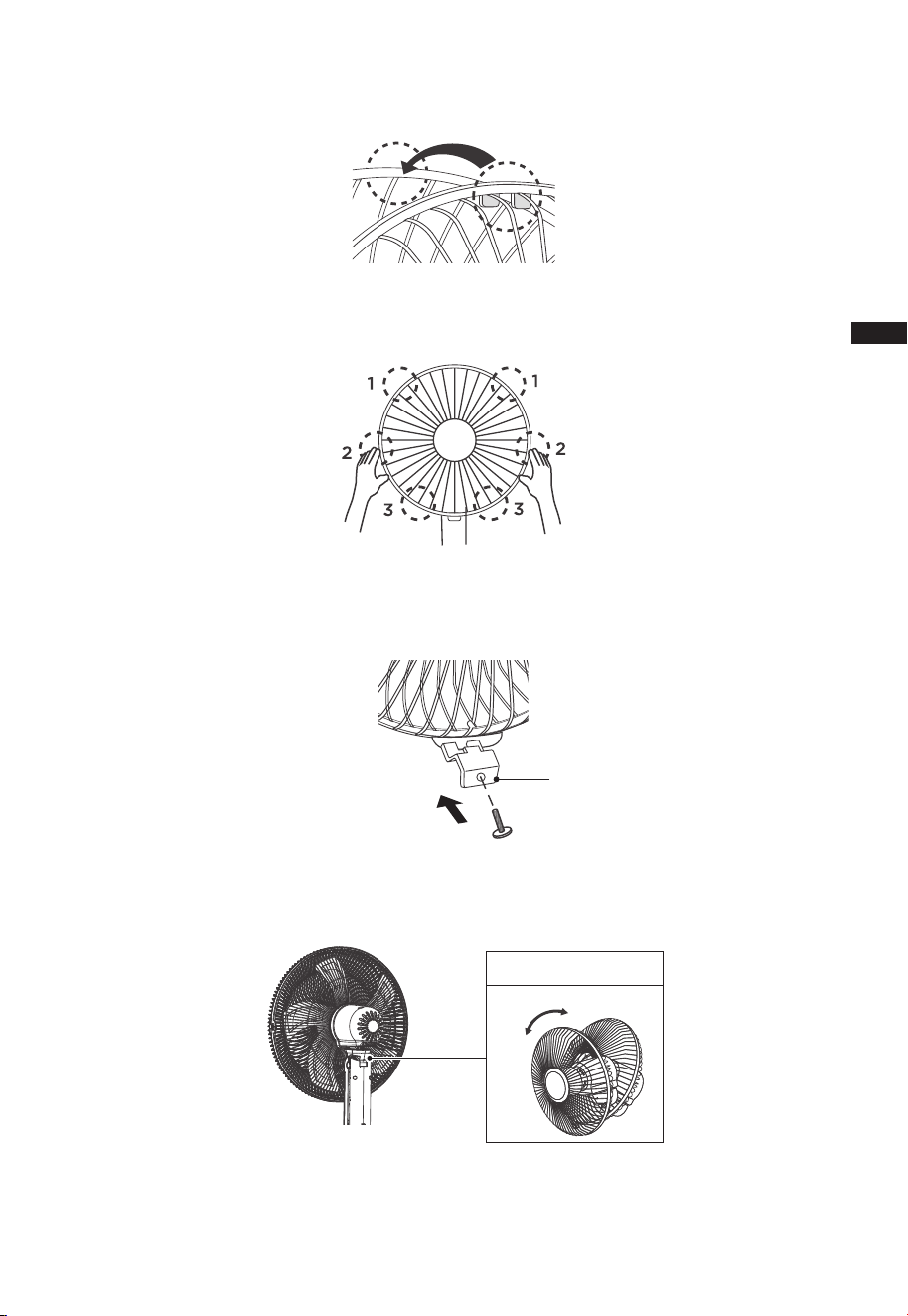
5 Front Guard Installation
5.1 Align catch of the front guard with the illustrated position of the rear guard.
5.2 Press guards at the same time with both hands.
5.3 Connect guard catch onto fan grill using the bolt.
Notice: Cross screwdriver is required for mounting screws.
(prefered: head type PH2)
Guard Catch
6 Tilt angle adjustment
Manually adjust the back cover of the motor up and down to adjust the pitch angle of
the fan.
Tilt Adjustment
EN
OPERATION INSTRUCTIONS
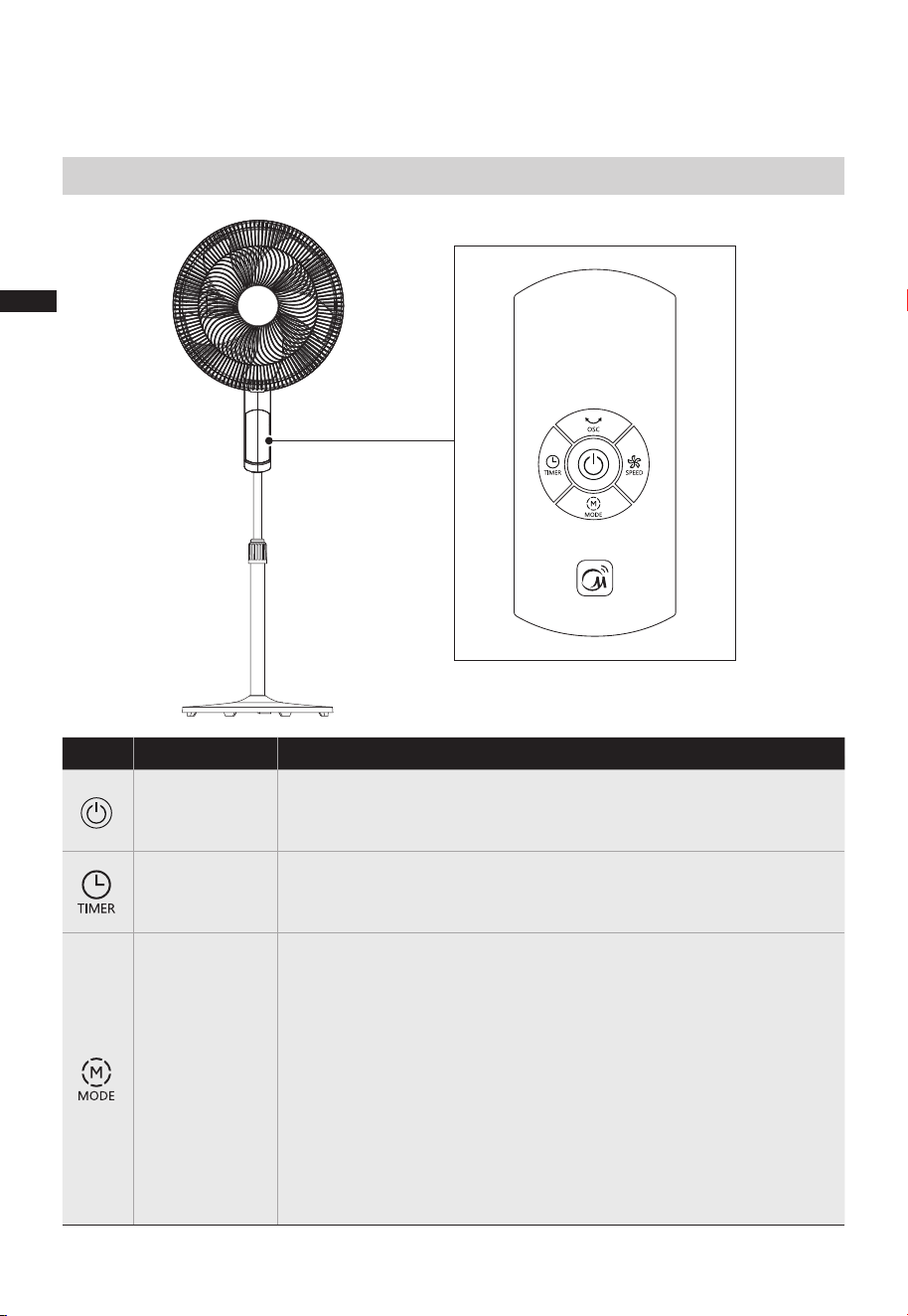
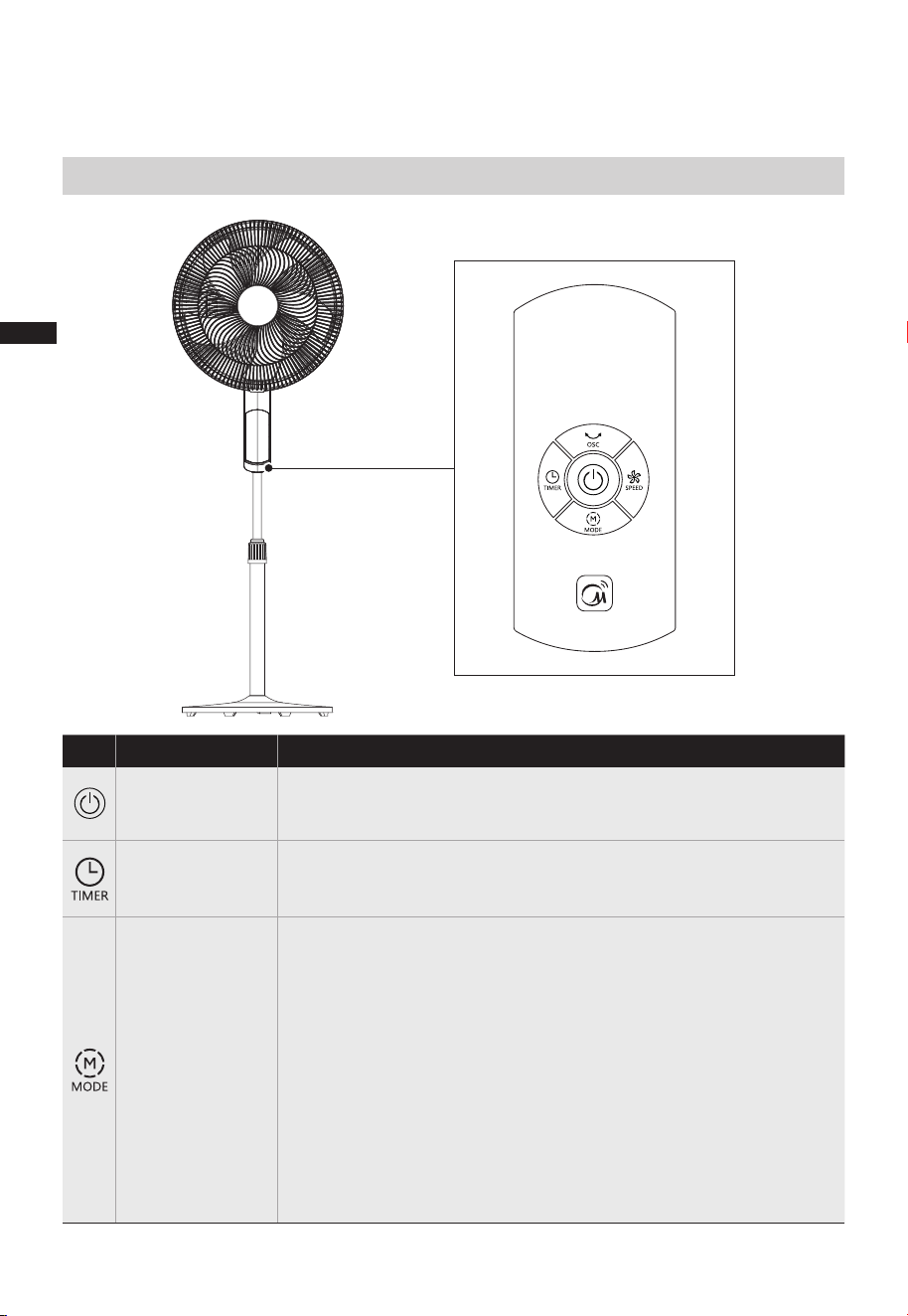
Function description
●
Instructions For Operation Of Body
11
The key is for switching on /off the fan.
●
Touch this button to set the timer (the display cycles among
1-2-...12h).
●
●
●
●
●
●
Touch this button alternate between the mode settings.
Long press this button for 3 seconds to start matching or
disconnect APP CONTROL.
Normal Mode: 12-speed setting, fan runs ata constant speed
in each level.
Natural Mode: 3-speed setting,fan runs at an alternating
speed in each level
Sleep Mode: 3-speed setting, fan speed decreases every
30 minutes and remains at constant speed setting at
corresponding level.
Level 3:7-5-3 Level 2:5-4-2 Level 1:4-3-1
Auto Mode:Fan speed adapts to the ambient temperature.
ON/OFF KEY
TIME KEY
MODE KEY
EN
12
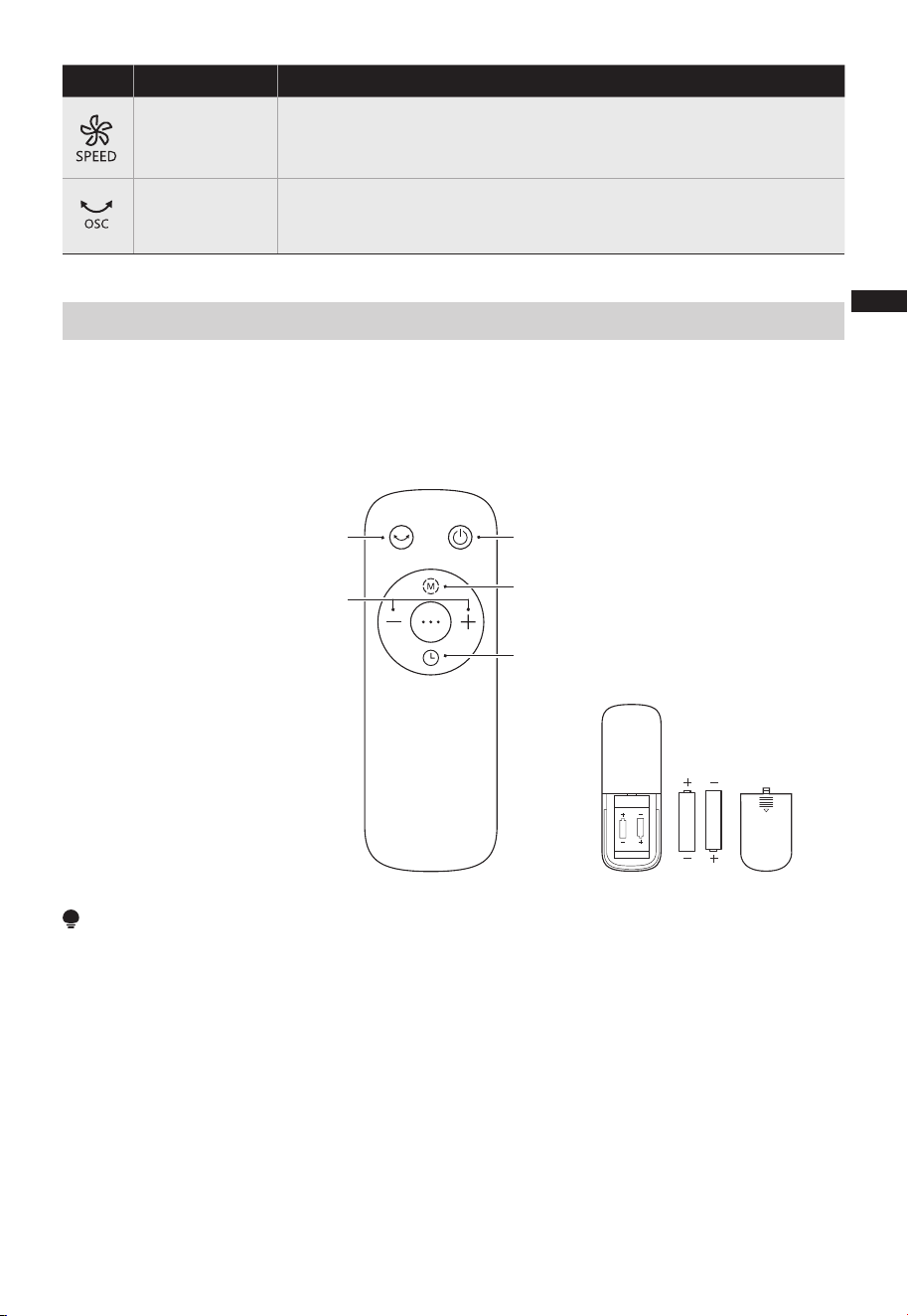
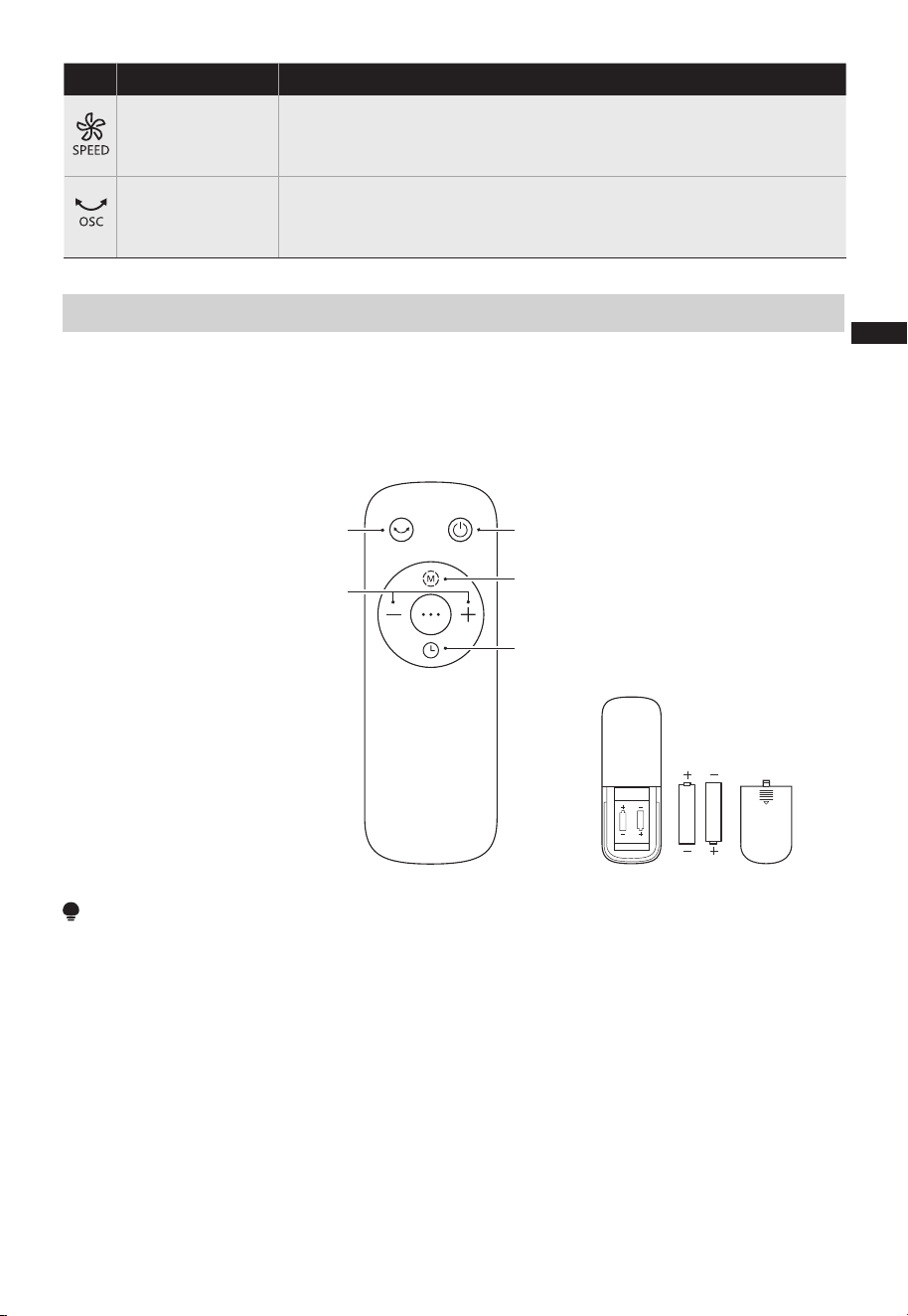
Function description
●
Touch this button to rotate between speed settings. (12
Speed Options)
●
Touch this button to turn oscillation feature on or off.
SPEED KEY
OSC KEY
AAA Battery. 1.5V
Battery
Startup/Standby
Program the timer
Turn oscillation on/off
Press “+, -” to increase or
decrease wind speed or timer
Alternate between modes
Use manganese or alkaline batteries of type "AAA". DO NOT use rechargeable batteries.
Do not mix old and new batteries and Do not mix alkaline, standard (carbon-zinc) or
rechargeable(ni-cad, ni-mh, etc.) batteries.
NOTE
●
●
The remote control should be normally used within 16ft of the front of the
product and 30 degrees of the deviation angle.
●
The battery contains many heavy metals, acids and bases, etc., which may threaten
human's health. Waste batteries should be recycled separately. The product does not
contain batteries.
Remote Control
EN
13
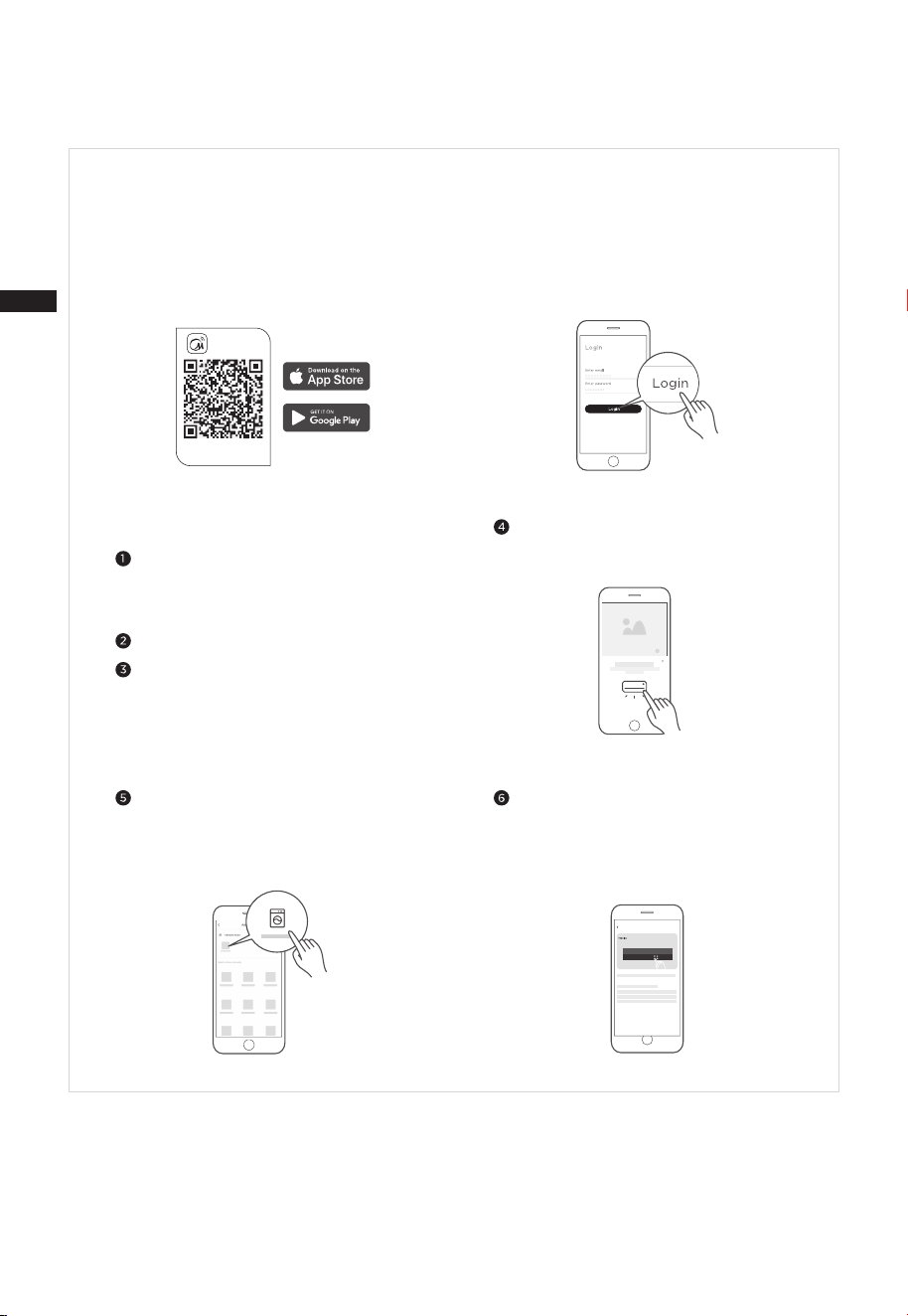
APP SETUP AND OPERATION
Connect your devices to MSmartHome
Add device
8:88
...
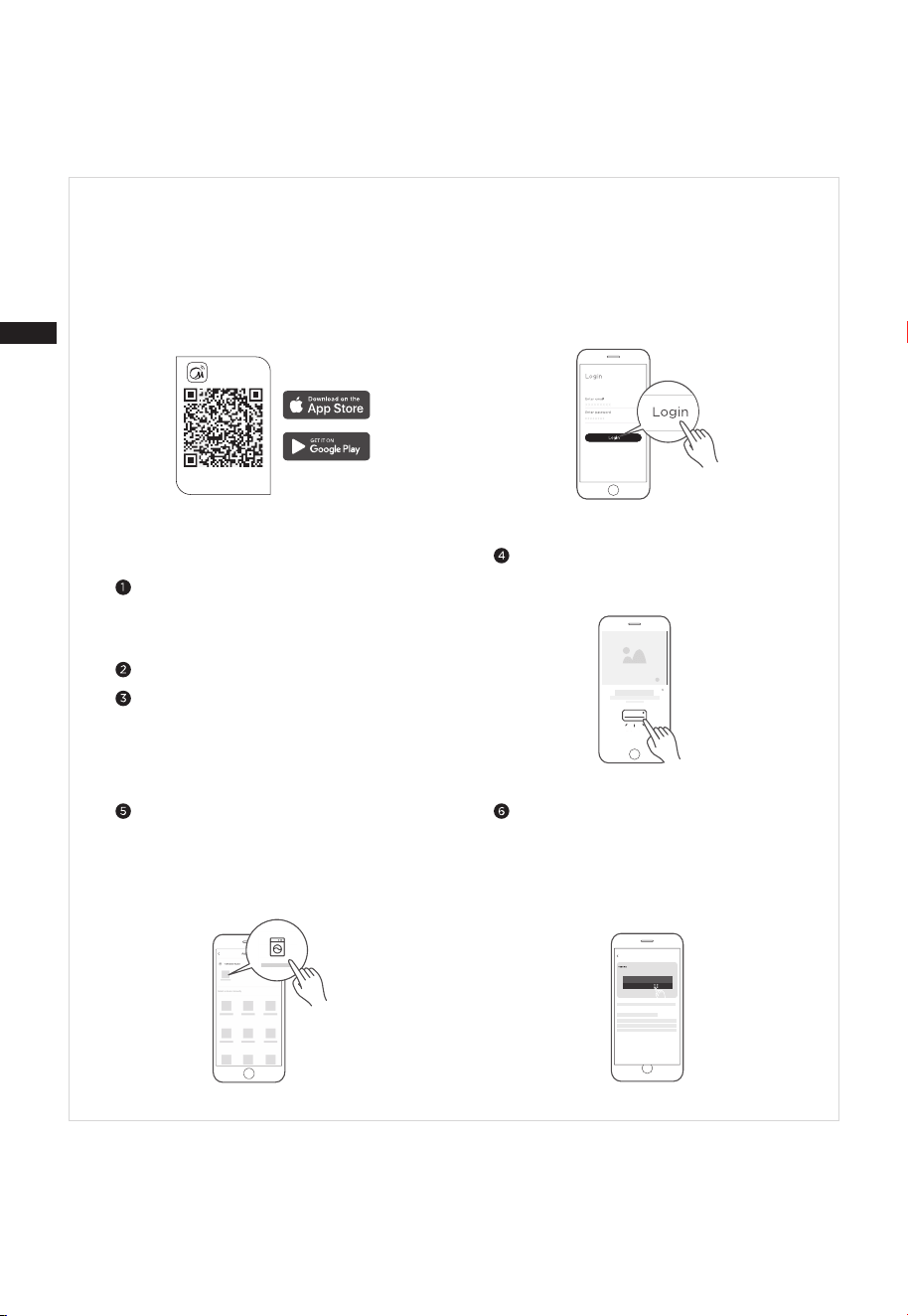
Download the app
& activate product
MSmartHome
Register and log inDownload the MSmartHome app
Connect your device to the wireless
network according to instructions on app.
If the connection fails, please follow the
instructions provided by the app to
continue with the operation.
On an app market (Google Play Store, Apple
App Store), search for “MSmartHome” and find
the MSmartHome app. Download and install it
on your phone. You can also download the app
by scanning the QR code below.
Open the MSmartHome app, and create a new
account to start (you can also register through
a third-party account). If you already have an
existing account, use the account to log in.
Please power on your devices.
Open MSmartHome app on your phone.
Please make sure your mobile phone is
connected to a wireless network. If it is
not, go to Settings and enable wireless
networks and Bluetooth.
If a message of “Smart devices discovered
nearby” appears, click to add.
If no message appears, select “+” on the
page and select your device in the list of
nearby devices available. If your device is
not listed, please add your device manually
by the device category and device model.
EN

14
NOTE
• Make sure your devices are powered on.
• Keep your mobile phone close enough to your device when you are connecting your device to the network.
• Connect your mobile phone to the wireless network at home, and make sure you know the password of the
wireless network.
• Check if your wireless router supports 2.4 GHz band and turn it on. If you are not sure whether the router
supports 2.4 GHz band, please contact the router manufacturer.
• The device cannot connect to the wireless network that requires authentication, and it usually appears in public
areas such as hotels, restaurants, etc. Please connect to a wireless network that does not require authentication.
• Turn off the WLAN+ (Android) or WLAN Assistant (iOS) function of your mobile phone when connecting your
device to the network.
• In the case that your device connected to a wireless network before but it needs to reconnect, please click “+” on
the app Home page, and add your device again by the device category and model according to the instructions
on app.
EN

15
CLEANING AND MAINTENANCE
The fan requires minimal maintenance. Do not try to fix it by yourself. Refer it to
qualified service personnel if service is needed.
1. Before assembling and cleaning the fan, ensure the fan is unplugged.
2. To ensure adequate air circulation to the motor, keep vents at the rear of the motor
free of dust. Do not disassemble the fan to remove dust.
Please wipe the exterior parts with a soft cloth soaking a mild detergent.
3. Do not use any abrasive detergent or solvents to avoid scratching the surface.
4. Do not allow water or any other liquid to enter into the motor housing or interior parts.
5. Be sure to unplug from the electrical supply source before cleaning.
6. Plastic parts should be cleaned with a soft cloth moisten with mild soap. Thoroughly
remove soapsuds with dry cloth.
EN
16
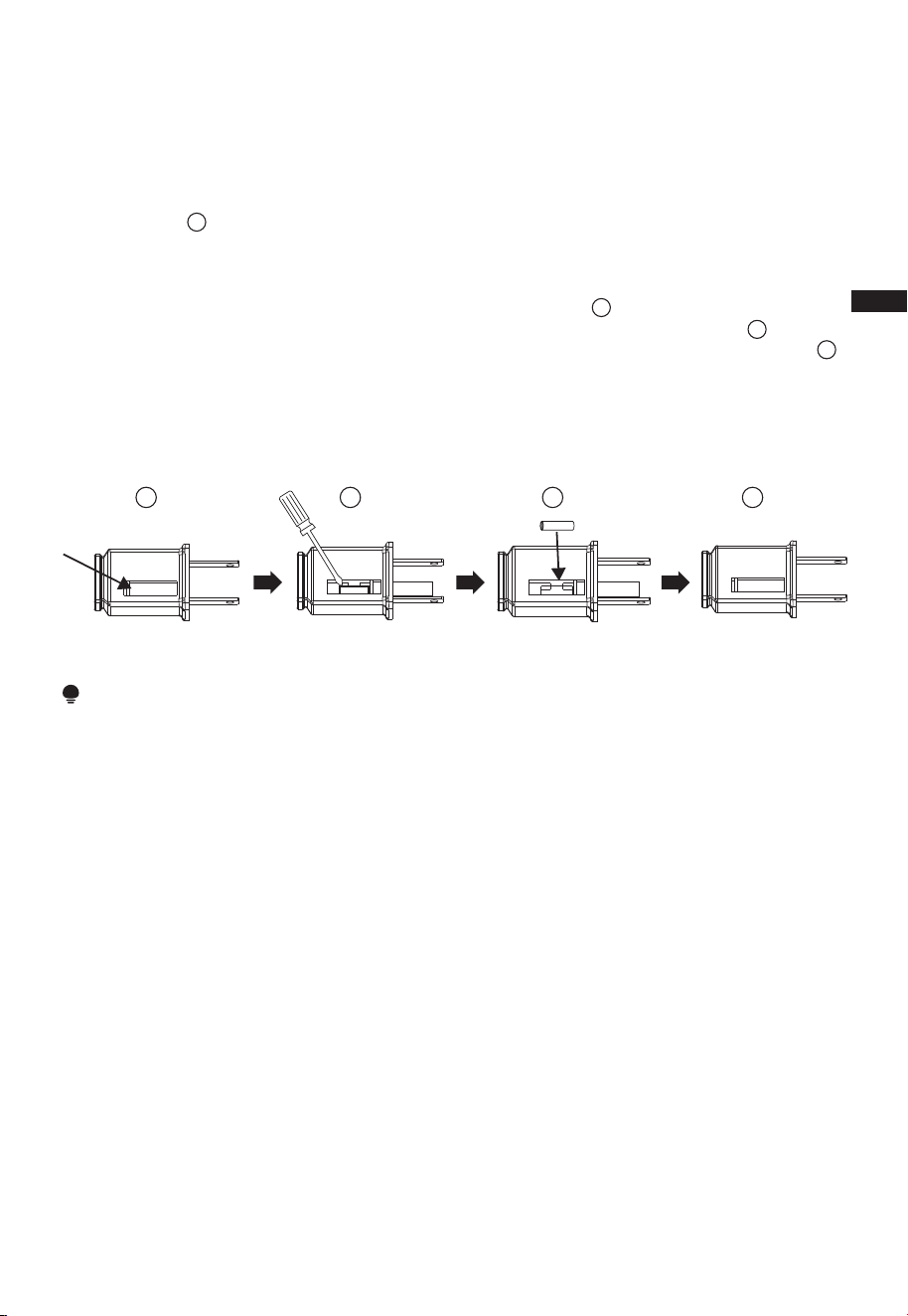
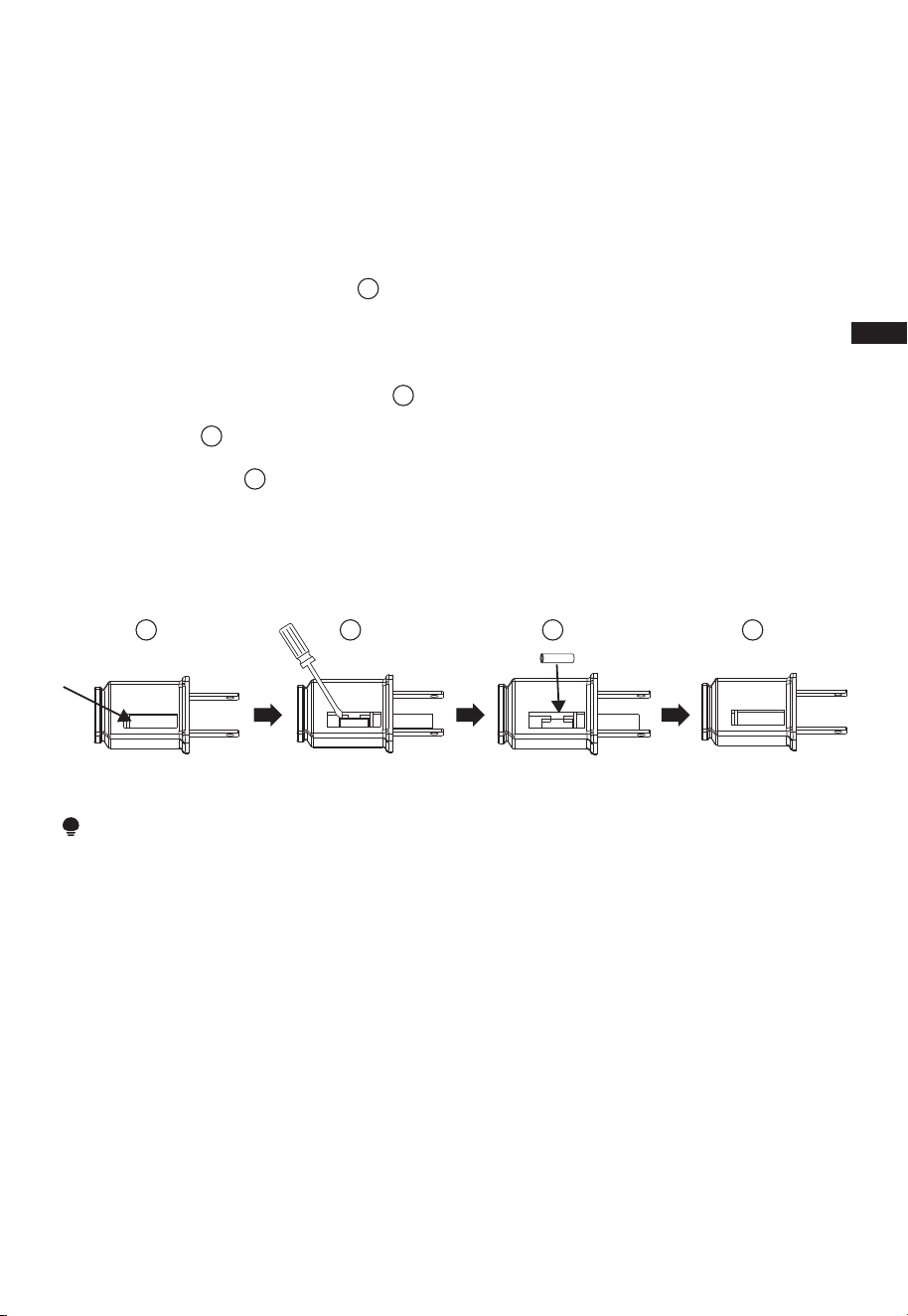
a)Grasp plug and remove from the receptacle or other outlet device. Do not unplug by
pulling on cord.
b)Open fuse cover. Slide open fuse access cover on top of attachment plug towards
blades.(Fig. )
c)Remove fuse carefully. Insert the tip of your tool into fuse slot(close with the terminal),
then pry the fuse gradually and slowly, but do not overexert. If you feel resistance, you
can try it at several times and pry the fuse little by little. When one side of the fuse has
been released, then you can get the fuse out entirely.(Fig. )
d)Risk of fire (fix spacing). Replace fuse only with 2.5 Amp, 125 Volt fuse.(Fig. )
e)Close fuse cover. Slide closed the fuse access cover on top of attachment plug.(Fig. )
f )Risk of fire (fix spacing). Do not replace attachment plug. Contains a safety device
(fuse)that should not be removed. Discard product if the attachment plug is damaged.
g)If the fan suddenly does not work during normal operation, please check whether it is
a problem with the fuse.
USER SERVICING INSTRUCTIONS
NOTE
2
3
41
1
2
3
4
• When you replace the fuse, please do not operate suddenly or overexert, or else the product may
become damaged.
ENEN
17
Solution
TROUBLESHOOTING
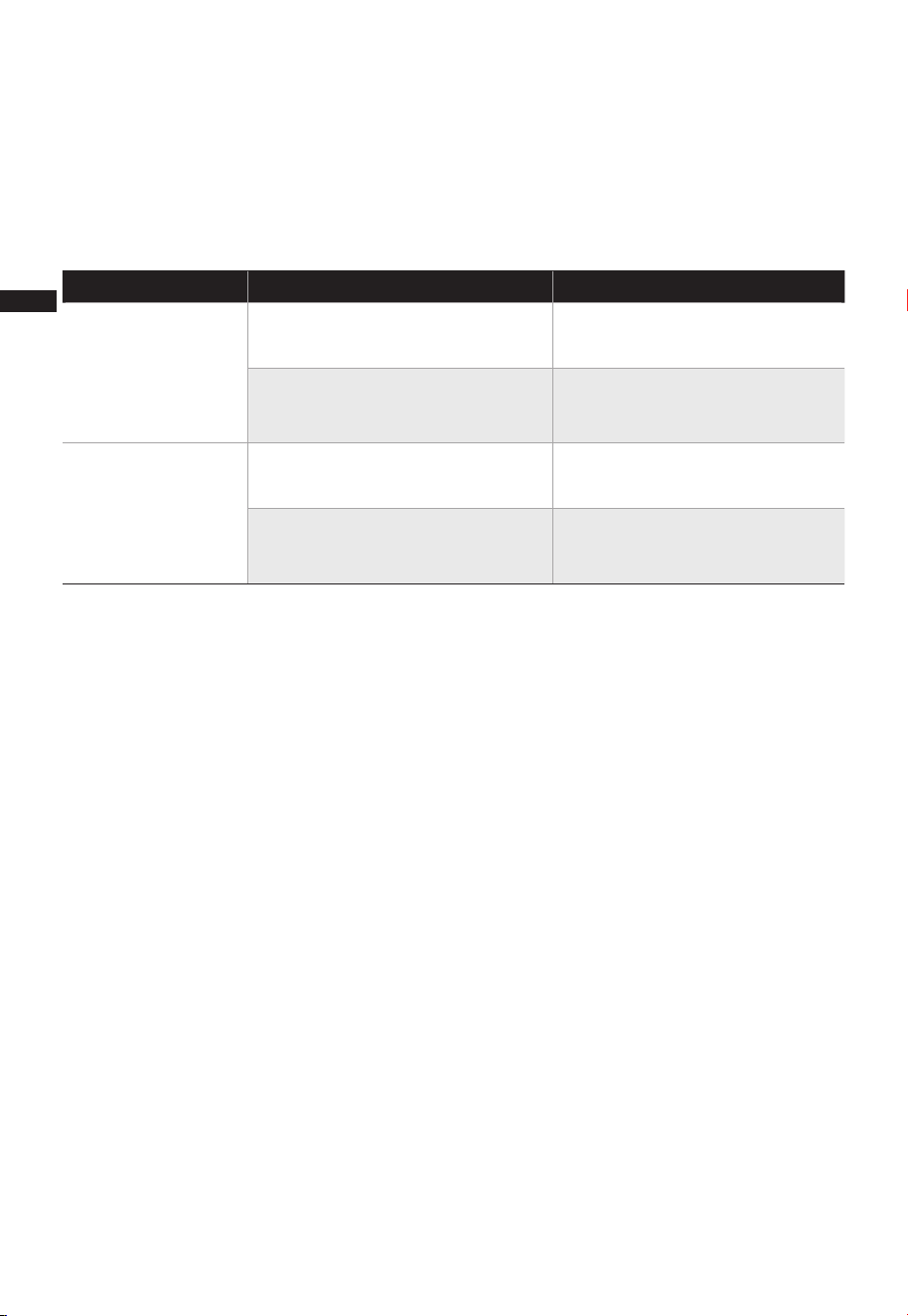
Cause SolutionProblem
The power cable is not
plugged in or has poor contact.
Make sure the plug is properly
inserted into the socket.
The switch on the body is
not turned on.
Turn on the switch on the
body.
The battery needs replacing. Replace the battery.
The remote is being used more
than 5m away from the fan.
●
●
●
●
The machine does
not work properly
after installed
The remote does
not work
Use the remote closer to the
fan and make sure it is pointing
directly at the display panel.
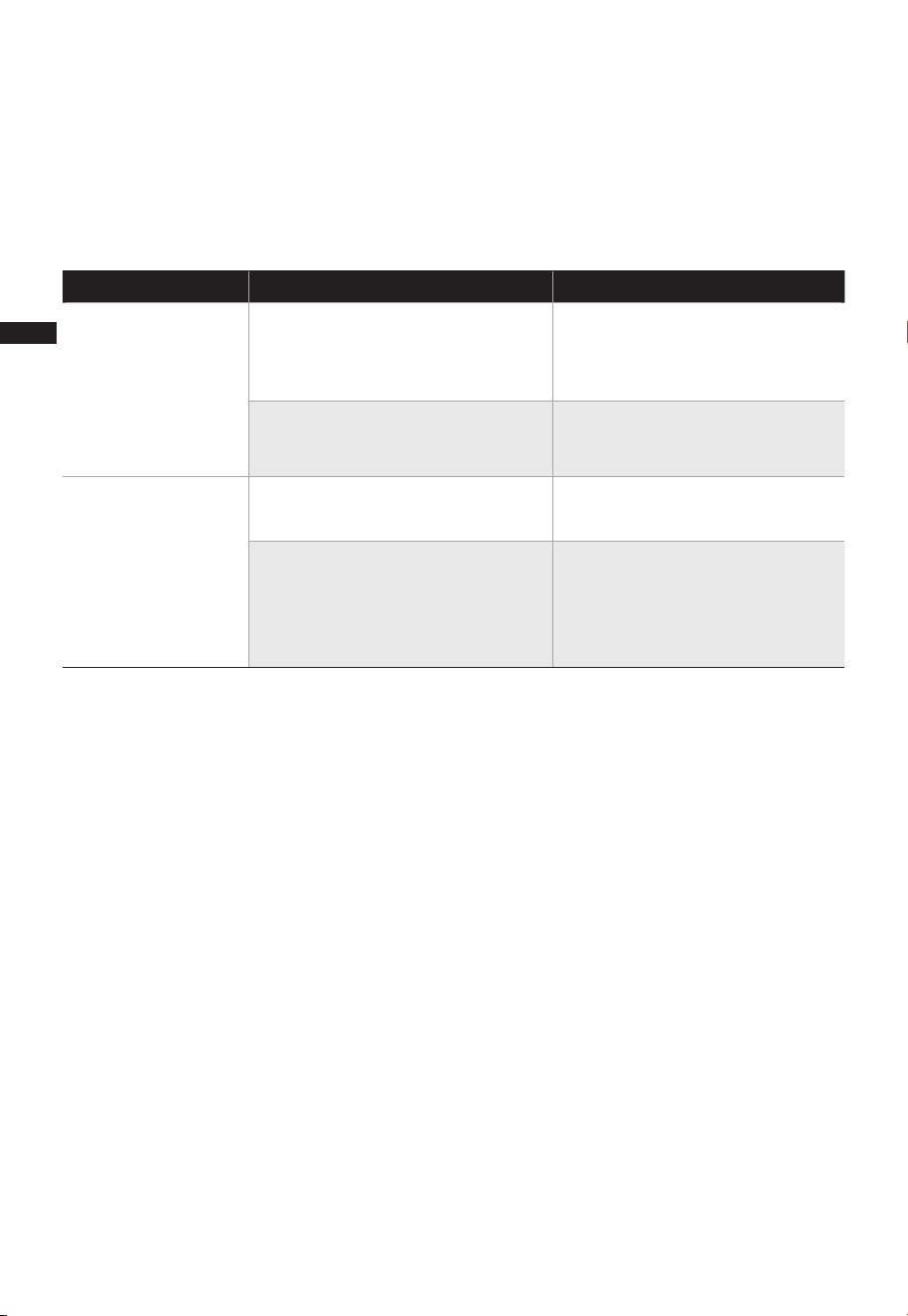
Incorrect operation of your appliance can lead to errors and malfunctions. The following
tables contain possible causes and notes for resolving an error message or malfunction.
It is recommended to read the table below carefully in order to save your time and
money that may cost for calling to the service center.
EN
18
logo, word marks, trade name, trade dress and all versions there of are
trademarks, copyrights and other intellectual property rights, and all goodwill derived
valuable assets of Midea Group and/or its affiliates (“Midea”), to which Midea owns
from using any part of an Midea trademark. Use of Midea trademark for commercial
purposes without the prior written consent of Midea may constitute trademark
infringement or unfair competition in violation of relevant laws.
This manual is created by Midea and Midea reserves all copyrights thereof. No entity or
individual may use, duplicate, modify, distribute in whole or in part this manual, or
bundle or sell with other products without the prior written consent of Midea.
All the described functions and instructions were up to date at the time of printing this
manual. However, the actual product may vary due to improved functions and designs.
TRADEMARKS, COPYRIGHTS
AND LEGAL STATEMENT
EN

19
DATA PROTECTION NOTICE
For the provision of the services agreed with the customer,
we agree to comply without restriction with all stipulations of applicable data protection
law, in line with agreed countries within which services to the customer will be delivered,
as well as, where applicable, the EU General Data Protection Regulation (GDPR).
Generally, our data processing is to fulfil our obligation under contract with you and for
product safety reasons, to safeguard your rights in connection with warranty and
product registration questions. In some cases, but only if appropriate data protection is
ensured, personal data might be transferred to recipients located outside of the
European Economic Area.
Further information can be provided on request. You can contact our Data Protection
Officer via [email protected]. To exercise your rights such as right to object your
personal data being processed for direct marketing purposes, please contact us via
[email protected]. To find further information, please follow the QR Code.
EN
01
CONTENIDO
0 1
0 2
07
1
08
AGRADECIMIENTOS
INSTRUCCIONES DE SEGURIDAD
ESPECIFICACIONES
DESCRIPCIÓN DEL PRODUCTO
09
INSTALACIÓN DEL PRODUCTO
INSTRUCCIONES DE OPERACIÓN
1
LIMPIEZA Y MANTENIMIENTO
AGRADECIMIENTOS
2
6
1
CONFIGURACIÓN Y FUNCIONAMIENTO DE LA
APLICACIÓN
4
¡Gracias por elegir Midea! Antes de utilizar su nuevo dispositivo Midea, lea
atentamente este manual para asegurarse de que sabe cómo manejar las
características y funciones que le ofrece su nuevo electrodoméstico de forma
segura.
ES
1
SOLUCIÓN DE PROBLEMAS
8
1
MARCAS, DERECHOS DE AUTOR Y DECLARACIÓN LEGAL
9
AVISO SOBRE LA PROTECCIÓNA DE DATOS
20
1
7
INSTRUCCIONES DE MANTENIMIENTO
PARA EL USUARIO
02
Peligro
Advertencia de tensión eléctrica
Advertencia
Precaución
Atención
Respetar las instrucciones
Uso adecuado
Simbología
INSTRUCCIONES DE SEGURIDAD
Las siguientes directrices de seguridad tienen por objeto evitar riesgos imprevistos o
daños derivados de un funcionamiento inseguro o incorrecto del dispositivo.
Compruebe el embalaje y el aparato a su llegada para asegurarse de que todo está
intacto para garantizar un funcionamiento seguro. Si encuentra algún daño, póngase
en contacto con el vendedor o distribuidor. Por favor, tenga en cuenta que las
modificaciones o alteraciones en el aparato no están permitidas por su seguridad. El
uso inadecuado puede causar peligros y la pérdida de los derechos de garantía.
This symbol indicates that there are dangers to the life and health of persons due
to extremely flammable gas.
Este símbolo indica que existe un peligro para la vida y la salud de las personas
debido a la tensión
Este símbolo representa un peligro con un nivel de riesgo medio que, si no se evita,
puede provocar la muerte o lesiones graves.
Este símbolo indica un peligro con un grado de riesgo bajo que, si no se evita,
puede provocar lesiones leves o moderadas.
Este símbolo indica información importante (por ejemplo, daños materiales), pero
no peligro.
Este símbolo indica que un técnico de servicio sólo debe operar y mantener este
aparato de acuerdo con las instrucciones de funcionamiento.
Lea atentamente este manual de instrucciones antes de utilizar/poner en marcha el
dispositivo y guárdelo en las inmediaciones del lugar de instalación o del dispositivo
para su uso posterior.
ES
0303
Advertencia
Precaución
LEA Y CONSERVE ESTAS INSTRUCCIONES
• Lea atentamente las normas de funcionamiento seguro y
las instrucciones.
• Este aparato no está diseñado para ser utilizado por
personas (incluyendo niños) con capacidades físicas,
sensoriales o mentales reducidas, o con falta de
experiencia y conocimientos, a menos que hayan
recibido supervisión o instrucciones sobre el uso del
mismo por parte de una persona responsable de su
seguridad. Los niños deben ser supervisados para
garantizar que no jueguen con el dispositivo.
• Mantenga los aparatos eléctricos fuera del alcance de los
niños o de las personas personas con problemas de salud.
No permita que utilicen los aparatos sin supervisión.
• No introduzca nunca dedos, lápices o cualquier otro
objeto a través de la rejilla cuando el ventilador esté en
funcionamiento.
•
Desconecte el ventilador cuando se traslade de un lugar a otro.
• Asegúrese de que el ventilador esté sobre una superficie
estable cuando esté en funcionamiento para evitar que
se vuelque.
• Sólo para uso doméstico.
• Si el cable de alimentación está dañado, debe ser
sustituido por el fabricante o su representante de
servicio técnico o una persona con calificación similar a
fin de evitar un peligro.
• Para evitar el riesgo de descarga eléctrica, no sumerja la
unidad, el cable o el enchufe en agua u otro líquido.
• Cuando el aparato no esté en uso y antes de limpiarlo,
desenchúfelo de la toma de corriente.
ES

04
• No deje el ventilador en funcionamiento sin vigilancia.
• Este aparato tiene un enchufe polarizado (una clavija es
más ancha que la otra). Para reducir el riesgo de
descarga eléctrica, este enchufe está pensado para
encajar en una toma de corriente polarizada sólo en un
sentido. Si el enchufe no encaja completamente en la
toma de corriente, invierta el enchufe. Si sigue sin
encajar, póngase en contacto con un electricista
especializado. No intente anular esta característica de
seguridad.
• Advertencia: Para reducir el riesgo de incendio o
descarga eléctrica, no utilice este ventilador con ningún
dispositivo de control de velocidad de estado sólido.
• Este producto dispone de una protección contra
sobrecargas (fusible). Un fusible fundido es señal de una
situación de sobrecarga o cortocircuito. Si el fusible se
funde, desenchufe el producto de la toma de corriente.
Sustituya el fusible de acuerdo con las instrucciones de
mantenimiento del usuario (siga las indicaciones del
producto para conocer la capacidad del fusible) y
compruebe los productos. Si el fusible de repuesto se
funde, puede haber un cortocircuito y el producto debe
ser desechado o devuelto a un servicio técnico
autorizado para su examen y/o reparación.
(a). No haga funcionar ningún ventilador con un cable o
enchufe dañado. Deseche el ventilador o llévelo a un
servicio técnico autorizado para que lo examinen
y/o lo reparen.
(b). No pase el cable por debajo de la alfombra. No
cubra el cable con alfombras, correderas o
revestimientos similares. No pase el cable por
debajo de los muebles o electrodomésticos.
ES

Coloque el cable lejos del área de tráfico y de los lugares
donde se pueda tropezar con él.
• Una vez que el ventilador esté ensamblado, la
protección de las aspas del rotor no debe quitarse más.
- Antes de la limpieza, desenchufe el ventilador.
- El protector del rotor no debe ser desmontado/abierto
para limpiar las palas del rotor.
- Limpie la carcasa del ventilador y el protector de las
palas del rotor con un paño ligeramente húmedo.
• ADVERTENCIA: Para reducir el riesgo de incendio,
electrocución o lesiones personales, no utilice piezas de
repuesto que no hayan sido recomendadas por el
fabricante (por ejemplo, piezas fabricadas en casa con
una impresora 3D).
• Este dispositivo cumple con la Parte 15 de las Normas de
la FCC.
El funcionamiento está sujeto a las dos condiciones
siguientes:
(1) este dispositivo puede no causar interferencias
perjudiciales, y
(2) este dispositivo debe aceptar cualquier interferencia
recibida, incluidas las interferencias que puedan causar
un funcionamiento no deseado.
1) NOTA: Este equipo ha sido probado y se encontró
que cumple con los límites para un dispositivo digital
clase B, de conformidad con la Parte 15 de las Normas
de la FCC. Estos límites están diseñados para
proporcionar una protección razonable contra
interferencias perjudiciales en una instalación residencial.
Este equipo genera, utiliza y puede irradiar energía de
radiofrecuencia y, si no se instala y utiliza de acuerdo
con las instrucciones, puede causar interferencias
perjudiciales en las comunicaciones de radio. Sin
embargo, no hay garantía de que no se produzcan
interferencias en una instalación en particular.
05
ES

06
2) Tenga en cuenta que cualquier cambio o modificación
de este producto que no haya sido expresamente
aprobado por la parte responsable del cumplimiento
podría anular la autoridad del usuario para operar el
equipo.
3) Si este equipo causa interferencias dañinas en la
recepción de radio o televisión, lo que se puede
determinar apagando y encendiendo el equipo, se
recomienda al usuario que intente corregir la
interferencia mediante una o más de las siguientes
medidas:
--Reorientar o reubicar la antena receptora.
--Aumentar la separación entre el equipo y el receptor.
--Conectar el equipo a una toma de un circuito diferente
al que está conectado el receptor.
--Consultar al distribuidor o a un técnico experimentado
en radio/TV para obtener ayuda.
Midea America Corp.
Parsippany, NJ 07054
Número de teléfono : 1-866-646-4332
ES

ESPECIFICACIONES
MFS4022WARBModelo del producto
Voltaje
Corriente
Frecuencia
120V~
0.5A
60Hz
07
ES
DESCRIPCIÓN DEL PRODUCTO
Nombre de las piezas
08
Motor
Tornillo
de ajuste
Aspa
Protección trasera
Tuerca de bloqueo
de la protección
Tuerca del aspa
Protección frontal
Eje del motor
Apretar el
pomo
Tubo
Perno en forma
de 7
Base
NOTA
Todas las imágenes que aparecen en este manual tienen un carácter meramente
explicativo. Retire las piezas del componente antes de realizar la instalación.
ES
INSTALACIÓN DEL PRODUCTO
09
Procedimientos de instalación
1 Instalación de la base
2 Instalación de la columna
Alinee la columna con la ranura de la base y fíjela con un tornillo en forma de 7.
2.1 Extraiga y fije el tubo interior de la columna ajustando el pomo de regulación de la
altura (la altura puede ajustarse según las necesidades).
2.2 Instale y fije el dispositivo ajustando el pomo de sujeción.
Pomo de ajuste de altura:
apretar en el sentido de las
agujas del reloj, aflojar en
sentido contrario a las agujas
del reloj
Pomo de fijación: apretar en
el sentido de las agujas del
reloj, aflojar en el sentido
contrario.
ES
10
3 Instalación de la protección trasera
4 Instalación de las aspas
Apretar en sentido contrario a las
agujas del reloj para fijar el aspa.
Fijar la protección trasera
Punto convexo alineado con
el agujero redondo.
3.1 Por favor, desenrosque primero la tuerca de bloqueo en sentido contrario a las
agujas del reloj.
3.2 Alinee la cubierta frontal del motor y la rejilla trasera, sujételas y asegúrelas con
la tuerca de bloqueo.
ES
11
5 Instalación de la protección delantera
5.2 Presione las protecciones al mismo tiempo con ambas manos.
5.3 Conecte el seguro de protección a la rejilla del ventilador utilizando el perno.
Nota: Se necesita un destornillador en cruz para los tornillos de montaje
(recomendado: tipo PH2)
Seguro de la protección
6 Ajuste del ángulo de inclinación
Ajuste manualmente la cubierta trasera del motor hacia arriba y hacia abajo para
ajustar el ángulo de inclinación del ventilador.
Ajuste del ángulo
de inclinación
5.1 Alinee el enganche de la protección delantera con la posición ilustrada de la
protección trasera.
ES
INSTRUCCIONES DE OPERACIÓN
Funcionamiento del panel de control
12
Descripción de la función
●
Pulse este botón para ajustar el temporizador (la pantalla
muestra ciclos de 1-2-...12h).
BOTÓN
TEMPORIZADOR
●
●
●
●
●
●
Pulse este botón para alternar entre los ajustes de modalidad.
Mantenga pulsada esta tecla durante 3 segundos para iniciar
el emparejamiento o desconectar APP CONTROL.
Modalidad Normal: ajuste de 12 velocidades, el ventilador
funciona a una velocidad constante en cada nivel.
Modalidad Natural: Ajuste de 3 velocidades, el ventilador
funciona a una velocidad alterna en cada nivel.
Modalidad de Reposo: Ajuste de 3 velocidades, la velocidad
del ventilador disminuye cada 30 minutos y permanece en
el ajuste de velocidad constante en el nivel correspondiente.
Nivel 3:7-5-3 Nivel 2:5-4-2 Nivel 1:4-3-1
Modo Auto:La velocidad del ventilador se adapta a la
temperatura ambiente.
BOTÓN
MODALIDAD
●
Este botón sirve para encender y apagar el ventilador.
BOTÓN
ON/OFF
ES
13
Batería AAA 1,5V
Batería
Encendido/espera
Programar el temporizador
Activar/desactivar la oscilación
Alternar entre modalidades
Utilice baterías de manganeso o alcalinas del tipo "AAA". NO utilice baterías recargables.
No mezcle baterías viejas y nuevas y No mezcle baterías alcalinas, estándar (carbon-zinc)
o recargables (ni-cad, ni-mh, etc.).
NOTA
●
●
●
Control remote
El control remoto debe utilizarse normalmente a menos de 16ft de la parte frontal del
producto y a 30 grados del ángulo de desviación.
La batería contiene muchos metales pesados, ácidos y bases, etc., que pueden poner
en peligro la salud humana. Las baterías usadas deben reciclarse por separado. El
producto no incluye baterías.
Pulse "+, -" para aumentar o
disminuir la velocidad del
viento o el temporizador
Descripción de la función
●
Pulse este botón para alternar entre los ajustes de velocidad.
(12 opciones de velocidad)
●
Pulse este botón para activar o desactivar la función de
oscilación.
BOTÓN
VELOCIDAD
BOTÓN OSC
ES
14
CONFIGURACIÓN Y FUNCIONA-
MIENTO DE LA APLICACIÓN
Conecte sus dispositivos a MSmartHome
Add device
8:88
...
Download the app
& activate product
MSmartHome
Registrarse y conectarseDescargar la aplicación MSmartHome
En una tienda de aplicaciones (Google Play
Store, Apple App Store), busque y encuentre
la aplicación MSmartHome. Descárguela e
instálela en su teléfono. También puede
descargar la aplicación escaneando el
siguiente código QR.
Abra la aplicación MSmartHome y cree una
nueva cuenta para empezar (también puede
registrarse a través de una cuenta de
terceros). Si ya tiene una cuenta, utilícela
para iniciar sesión.
Asegúrese de que su teléfono móvil esté
conectado a una red inalámbrica. Si no lo
está, vaya a Ajustes y active las redes
inalámbricas y Bluetooth.
Encienda los dispositivos.
Abra la aplicación MSmartHome en su
teléfono.
Si no aparece ningún mensaje, seleccione
"+" en la página y seleccione su
dispositivo en la lista de dispositivos
cercanos disponibles. Si su dispositivo no
aparece en la lista, añádalo manualmente
por la categoría y el modelo de
dispositivo.
Si aparece un mensaje de "Dispositivos
inteligentes descubiertos cerca", pulse para
añadir.
Conecte su dispositivo a la red inalámbrica
siguiendo las instrucciones de la aplicación.
Si la conexión falla, siga las instrucciones de
la aplicación para continuar con la
operación.
ES

15
NOTA
• Asegúrese de que sus dispositivos están encendidos.
• Mantenga el teléfono móvil lo suficientemente cerca del dispositivo cuando lo conectes a la red.
• Conecte su teléfono móvil a la red inalámbrica de su casa y asegúrese de conocer la contraseña de la red
inalámbrica.
• Compruebe si el enrutador inalámbrico admite la banda de 2,4 GHz y enciéndalo. Si no está seguro de si el
enrutador admite la banda de 2,4 GHz, póngase en contacto con el fabricante del enrutador.
• El dispositivo no puede conectarse a la red inalámbrica que requiere autenticación, y suele aparecer en zonas
públicas como hoteles, restaurantes, etc. Por favor, conéctese a una red inalámbrica que no requiera
autenticación.
• Desactive la función WLAN+ (Android) o WLAN Assistant (iOS) de su teléfono móvil cuando conecte su
dispositivo a la red.
• En caso de que su dispositivo se haya conectado a una red inalámbrica anteriormente pero necesite volver a
conectarse, haga clic en "+" en la página de inicio de la aplicación y añada de nuevo su dispositivo por categoría y
modelo siguiendo las instrucciones de la aplicación.
ES

16
LIMPIEZA Y MANTENIMIENTO
El ventilador requiere un mantenimiento mínimo. No intente repararlo usted mismo.
En caso de necesitarlo, consulte con personal técnico calificado.
1. Antes de la limpieza y el montaje, desenchufe la alimentación del ventilador.
2. Para garantizar una adecuada circulación de aire hacia el motor, mantenga libres de
polvo las rejillas de ventilación situadas en la parte posterior del mismo.
No desmonte el ventilador para eliminar el polvo. Limpie las partes exteriores con
un paño suave empapado en un detergente suave.
3. No utilice ningún detergente abrasivo o disolvente para evitar rayar la superficie.
4. No permita que entre agua o cualquier otro líquido en la carcasa del motor o en las
partes interiores.
5. Asegúrese de desenchufar de la fuente de alimentación eléctrica antes de limpiar.
6. Las piezas de plástico deben limpiarse con un paño suave humedecido con jabón
neutro.
ES
17
INSTRUCCIONES DE MANTENI-
MIENTO PARA EL USUARIO
NOTA
2
3
41
• Cuando cambie el fusible, por favor, no lo accione de forma repentina ni haga un esfuerzo excesivo,
o de lo contrario el producto se dañará o causará un accidente.
a) Sujete el enchufe y retírelo del receptáculo o de otro dispositivo de salida. No
desenchufe tirando del cable.
b) Abra la tapa del fusible. Deslice la tapa de acceso a los fusibles en la parte superior del
enchufe hacia las clavijas. (Fig. )
c) Retire el fusible con cuidado. Inserte la punta de su herramienta en la ranura del fusible
(cierre con el terminal), y luego apriete el fusible de forma gradual y lenta, pero sin
excederse. Si siente que está apretado, puede intentarlo varias veces y premiar el
fusible poco a poco. Cuando un lado del fusible haya sido premiado, entonces podrá
sacar el fusible por completo. (Fig. )
d) Riesgo de incendio. Sustituya el fusible sólo por un fusible de 2,5 amperios y 125
voltios. (Fig. )
e) Cierre la tapa del fusible. Deslice la tapa de acceso a los fusibles en la parte superior
del enchufe. (Fig. )
f ) Riesgo de incendio. No sustituya el enchufe del accesorio. Contiene un dispositivo de
seguridad (fusible) que no debe retirarse. Deseche el producto si el enchufe está
dañado.
g) Si el ventilador no funciona repentinamente durante el funcionamiento normal,
compruebe si se trata de un problema con el fusible.
1
2
3
4
ES
18
Solution
SOLUCIÓN DE PROBLEMAS
Causa SoluciónProblema
●
●
●
●
El funcionamiento de su dispositivo puede dar lugar a errores y fallos de
funcionamiento. Las siguientes tablas contienen las posibles causas y notas para
resolver un mensaje de error o mal funcionamiento. Se recomienda leer atentamente la
tabla siguiente para ahorrar el tiempo y el dinero que puede costar la llamada al centro
de servicio.
La máquina no
funciona
correctamente
después de haber
sido instalada.
El control remoto
no funciona
El cable de poder no ha sido
conectado o el contacto con
el tomacorriente no es
adecuado.
El interruptor no ha sido
accionado a su posición de
encendido.
Las baterías necesitan ser
remplazadas.
El control remoto está siendo
utilizado a más de 5 metros
de distancia del ventilador.
Asegúrese de que el conector
esté bien insertado en el
tomacorriente.
Active el interruptor de la
unidad.
Remplace las baterías.
Use el control remoto más
cerca del ventilador y
asegúrese de apuntar
directamente al panel de la
pantalla.
ES
19
MARCAS, DERECHOS DE AUTOR
Y DECLARACIÓN LEGAL
El logotipo de , las marcas denominativas, el nombre comercial, la imagen
comercial y todas las versiones de los mismos son activos valiosos del Grupo Midea y/o
sus asociados ("Midea"), de los que Midea es titular de marcas comerciales, derechos de
autor y otros derechos de propiedad intelectual, así como de todo el fondo de comercio
derivado del uso de cualquier parte de una marca comercial de Midea. El uso de la
marca Midea con fines comerciales sin el consentimiento previo por escrito de Midea
puede constituir una infracción de la marca o de la competencia desleal en violación de
las leyes pertinentes.
Este manual ha sido creado por Midea y Midea se reserva todos los derechos de autor
del mismo. Ninguna entidad o individuo puede utilizar, duplicar, modificar, distribuir en
todo o en parte este manual, ni agrupar o vender con otros productos sin el
consentimiento previo por escrito de Midea.
Todas las funciones e instrucciones descritas estaban actualizadas en el momento de
imprimir este manual. Sin embargo, el producto real puede variar debido a la mejora de
sus funciones y diseños.
ES

20
Para la prestación de los servicios acordados con el cliente, nos comprometemos a
cumplir sin restricciones todas las estipulaciones de la legislación aplicable en materia
de protección de datos, en consonancia con los países acordados en los que se
prestarán los servicios al cliente, así como, en su caso, el Reglamento General de
Protección de Datos de la UE (GDPR).
Por lo general, nuestro tratamiento de datos tiene por objeto cumplir nuestra
obligación contractual con usted y, por razones de seguridad del producto,
salvaguardar sus derechos en relación con la garantía y las cuestiones de registro del
producto. En algunos casos, pero sólo si se garantiza una protección adecuada de los
datos, los datos personales podrían transferirse a destinatarios situados fuera del
Espacio Económico Europeo.
Puede solicitar más información al respecto. Puede ponerse en contacto con nuestro
encargado de la protección de datos a través de [email protected]. Para ejercer
sus derechos, como el de oponerse al tratamiento de sus datos personales con fines de
marketing directo, póngase en contacto con nosotros a través de
[email protected]. Para obtener más información, siga el código QR.
AVISO SOBRE LA PROTECCIÓN
DE DATOS
ES