Automatic electric washing
machine
Simple User Manual
• For detailed instructions on installation and cleaning of the washing machine, visit the
Samsung website (http://www.samsung.com), go to Support > Support home, and then enter
the model name.
• Open a QR code scanner app and scan the QR code image attached to the product. You
can access ‘Product registration’, ‘Manual’, and ‘Customer support’ through SmartThings
connection.
• You can check the user manual on your product by tapping ‘Settings ( ) > Support >
User manual’.
• For model names and product specifications, see the label attached on the back of the
product.
Safety information
Congratulations on your new Samsung washing machine. This manual contains important information on the
installation, use, and care of your appliance. Read this manual thoroughly before using the washing machine
to ensure that you know how to safely and efficiently operate the features and functions that your new
washing machine offers.
Important safety symbols
What the icons and signs in this user manual mean:
WARNING
Hazards or unsafe practices that may result in severe personal injury, death and/or property damage.
CAUTION
Hazards or unsafe practices that may result in personal injury and/or property damage.
Read the instructions
After reading this manual, store it in a safe place for future reference.
Read all instructions before using the appliance.
NOTE
Indicates that a risk of personal injury or material damage exists.
DC68-04355K-00
DC68-04355K-00_IB_T-PJT_WD8000D_EN.indd 1DC68-04355K-00_IB_T-PJT_WD8000D_EN.indd 1 2024-07-31 11:27:482024-07-31 11:27:48
English2
These warning signs are here to prevent injury to yourself and others.
Please follow them explicitly.
As with any equipment that uses electricity and moving parts, potential hazards exist. To safely operate this
appliance, familiarize yourself with its operation and exercise care when using it.
Important safety precautions
To reduce the risk of fire, electric shock, or injury to persons when using your appliance, follow basic
precautions, including the following:
1. This appliance is not intended for use by persons (including children) with reduced physical, sensory or
mental capabilities, or lack of experience and knowledge, unless they have been given supervision or
instruction concerning use of the appliance by a person responsible for their safety.
2. For use in Europe: This appliance can be used by children aged from 8 years and above and persons with
reduced physical, sensory or mental capabilities or lack of experience and knowledge if they have been
given supervision or instruction concerning use of the appliance in a safe way and understand the hazards
involved. Children shall not play with the appliance. Cleaning and user maintenance shall not be made by
children without supervision.
3. Children should be supervised to ensure that they do not play with the appliance.
4. If the supply cord is damaged, it must be replaced by the manufacturer, its service agent or similarly
qualified persons in order to avoid a hazard.
5. CAUTION: In order to avoid a hazard due to inadvertent resetting of the thermal cut-out, this
appliance must not be supplied through an external switching device, such as a timer, or connected to a
circuit that is regularly switched on and off by the utility.
6. The new hose-sets supplied with the appliance are to be used and that old hose-sets should not be reused.
7. This appliance is intended to be used in household only and it is not intended to be used such as:
- staff kitchen areas in shops, offices and other working environments;
- farm houses;
- by clients in hotels, motels and other residential type environments;
- bed and breakfast type environments;
- areas for communal use in blocks of flats or in launderettes.
8. For appliances with ventilation openings in the base, that a carpet must not obstruct the openings;
9. For use in Europe: Children of less than 3 years should be kept away unless continuously supervised.
NOTE
From the number 10 through the end of the list are only applicable for models with a drying function.
10. The tumble dryer is not to be used if industrial chemicals have been used for cleaning.
11. The lint trap has to be cleaned frequently, if applicable.
12. Lint must not to be allowed to accumulate around the tumble dryer. (not applicable for appliances
intended to be vented to the exterior of the building)
13. Adequate ventilation has to be provided to avoid the back flow of gases into the room from appliances
burning other fuels, including open fires.
14. Do not dry unwashed items in the tumble dryer.
15. Items that have been soiled with substances such as cooking oil, acetone, alcohol, petrol, kerosene, spot
removers, turpentine, waxes and wax removers should be washed in hot water with an extra amount of
detergent before being dried in the tumble dryer.
16. Items such as foam rubber (latex foam), shower caps, waterproof textiles, rubber backed articles and
clothes or pillows fitted with foam rubber pads should not be dried in the tumble dryer.
DC68-04355K-00_IB_T-PJT_WD8000D_EN.indd 2DC68-04355K-00_IB_T-PJT_WD8000D_EN.indd 2 2024-07-31 11:27:482024-07-31 11:27:48
English 3
17. Fabric softeners, or similar products, should be used as specified by the fabric softener instructions.
18. The final part of a tumble dryer cycle occurs without heat (cool down cycle) to ensure that the items are
left at a temperature that ensures that the items will not be damaged.
19. Remove all objects from pockets such as lighters and matches.
20. WARNING: Never stop a tumble dryer before the end of the drying cycle unless all items are
quickly removed and spread out so that the heat is dissipated.
21. WARNING: The appliance must not be supplied through an external switching device, such as a
timer, or connected to a circuit that is regularly switched on and off by a utility.
22. Exhaust air must not be discharged into a flue which is used for exhausting fumes from appliances burning
gas or other fuels.
23. The appliance must not be installed behind a lockable door, a sliding door or a door with a hinge on the
opposite side to that of the tumble dryer, in such a way that a full opening of the tumble dryer door is
restricted.
Critical installation warnings
WARNING
The installation of this appliance must be performed by a qualified technician or service company.
• Failure to do so may result in electric shock, fire, an explosion, problems with the appliance, or injury.
The appliance is heavy, therefore take care when lifting it.
Plug the power cord firmly into a wall socket that meets local electrical specifications. Use the socket for this
appliance only, and do not use an extension cord.
• Sharing a wall socket with other appliances using a power strip or extending the power cord may result in
electric shock or fire.
• Ensure that the power voltage, frequency, and current are the same as those of the product specifications.
Failure to do so may result in electric shock or fire.
Remove all foreign substances such as dust or water from the power plug terminals and contact points using a
dry cloth on a regular basis.
• Unplug the power plug and clean it with a dry cloth.
• Failure to do so may result in electric shock or fire.
Plug the power plug into the wall socket so that the cord is running towards the floor.
• If you plug the power plug into the socket in the opposite direction, the electric wires within the cable may
be damaged and this may result in electric shock or fire.
Keep all packaging materials out of the reach of children as these may be dangerous.
• If a child places a bag over its head, it may suffocate.
When the appliance, power plug or power cord is damaged, contact your nearest service center.
This appliance must be properly grounded.
Do not ground the appliance to a gas pipe, plastic water pipe, or telephone line.
• This may result in electric shock, fire, an explosion, or problems with the appliance.
• Never plug the power cord into a socket that is not grounded correctly and make sure that it is in
accordance with local and national regulations.
Do not install this appliance near a heater or any inflammable material.
DC68-04355K-00_IB_T-PJT_WD8000D_EN.indd 3DC68-04355K-00_IB_T-PJT_WD8000D_EN.indd 3 2024-07-31 11:27:482024-07-31 11:27:48
English4
Do not install this appliance in a humid, oily or dusty location, or in a location exposed to direct sunlight or
water (raindrops).
Do not install this appliance in a location exposed to low temperatures.
• Frost may cause the tubes to burst.
Do not install this appliance in a location where gas may leak.
• This may result in electric shock or fire.
Do not install or keep the product exposed to the outdoor elements.
Do not use an electric transformer.
• This may result in electric shock or fire.
Do not use a damaged power plug, damaged power cord or loose wall socket.
• This may result in electric shock or fire.
Do not pull or excessively bend the power cord.
Do not twist or tie the power cord.
Do not hook the power cord over a metal object, place a heavy object on the power cord, insert the power cord
between objects, or push the power cord into the space behind the appliance.
• This may result in electric shock or fire.
Do not unplug the appliance by pulling the power cord.
• Unplug the power plug by holding the plug.
• Failure to do so may result in electric shock or fire.
This appliance should be positioned so that the power plug, the water supply taps, and the drain pipes are
accessible.
Following the repair by a non-authorized service provider, self-repair or non-professional repair of the product,
Samsung is not liable for any damage to the product, any injury or any other product safety issue caused by
any attempt to repair the product which does not carefully follow these repair and maintenance instructions.
Any damage to the product caused by an attempt to repair the product by any person other than a Samsung
certified service provider will not be covered by the warranty.
Installation cautions
CAUTION
Install your appliance on a solid, level floor that can support its weight.
• Failure to do so may result in abnormal vibrations, movement, noise, or problems with the appliance.
Critical usage warnings
WARNING
If the appliance is flooded, turn off the water and power supplies immediately and contact your nearest service
center.
• Do not touch the power plug with wet hands.
• Failure to do so may result in electric shock.
If the appliance generates a strange noise, a burning smell, or smoke, unplug the power cord immediately and
contact your nearest service center.
• Failure to do so may result in electric shock or fire.
DC68-04355K-00_IB_T-PJT_WD8000D_EN.indd 4DC68-04355K-00_IB_T-PJT_WD8000D_EN.indd 4 2024-07-31 11:27:492024-07-31 11:27:49
English 5
In the event of a gas leak (such as propane gas, LP gas, etc.), ventilate immediately without touching the power
plug. Do not touch the appliance or power cord.
• Do not use a ventilating fan.
• A spark may result in an explosion or fire.
Remove all door levers before disposing of the appliance.
• If trapped inside the appliance, children may suffocate to death.
Make sure to remove the packaging (sponge, styrofoam) attached to the bottom of the Laundry Combo before
using it.
Do not wash items contaminated with gasoline, kerosene, benzene, paint thinner, alcohol or other inflammable
or explosive substances.
• This may result in electric shock, fire, or explosion.
Do not open the door by force while operating.
• Water flowing out of the Laundry Combo may result in burns or cause the floor to be slippery. This may
result in injury.
• Opening the door by force may result in damage to the appliance or injury.
Do not sit on the appliance or lean against the doors.
• The appliance may fall over causing a serious injury.
Dry the laundry only after it was spun by an appropriate washing machine.
Do not dry laundry contaminated by inflammable materials such as gasoline, kerosene, benzene, thinner,
alcohol, etc.
• This may result in electric shock, fire or explosion.
Do not touch the power plug with wet hands.
• This may result in electric shock.
Do not turn the appliance off by unplugging the power cord while an operation is in progress.
• Plugging the power cord into the wall socket again may cause a spark and result in electric shock or fire.
Do not let children climb in or onto the appliance.
• This may result in electric shock, burns or injury.
Do not insert your hand or a metal object under the Laundry Combo while it is operating.
• This may result in injury.
Do not unplug the appliance by pulling the power cord. Always grip the plug firmly and pull it straight out of
the outlet.
• Damage to the power cord may cause a short-circuit, fire and/or electric shock.
Do not attempt to repair, disassemble, or modify the appliance yourself.
• Do not use a fuse (such as copper, steel wire, etc.) other than a standard fuse.
• When the appliance needs to be repaired or reinstalled, contact your nearest service center.
• Failure to do so may result in electric shock, fire, problems with the appliance, or injury.
If the water supply hose comes loose from the water tap and floods the appliance, unplug the power cord.
• Failure to do so may result in electric shock or fire.
Unplug the power cord when the appliance is not being used for long periods of time or during a thunder or
lightning storm.
• Failure to do so may result in electric shock or fire.
DC68-04355K-00_IB_T-PJT_WD8000D_EN.indd 5DC68-04355K-00_IB_T-PJT_WD8000D_EN.indd 5 2024-07-31 11:27:492024-07-31 11:27:49
English6
If any foreign substance enters into the appliance, unplug the power cord and contact your nearest Samsung
Customer Service.
• This may result in electric shock or fire.
Keep your pets away from the appliance to prevent them from chewing any parts of the Laundry Combo, which
may result in electric shock, fire, or injury.
Usage cautions
CAUTION
When the Laundry Combo is contaminated by a foreign substance such as detergent, dirt, food waste, etc.,
unplug the power cord and clean the Laundry Combo using a damp, soft cloth.
• Failure to do so may result in discoloration, deformation, damage, or rust.
The glass parts may break by a strong impact. Take care when using the Laundry Combo.
• If the glass is broken, it may result in injury.
Open the water tap slowly after a long period of non-use, water supply failure, or when reconnecting the water
supply hose.
• The air pressure in the water supply hose or the water pipe may damage a part of the appliance or result in
a water leak.
If a draining error occurs during an operation, check if there is a draining problem.
• If the Laundry Combo is used when it is flooded because of a draining problem, it may result in electric
shock or fire.
Insert the laundry into the Laundry Combo completely so that the laundry does not get caught in the door.
• If laundry gets caught in the door, it may result in damage to the laundry or the appliance, or result in a
water leak.
Turn the water supply off when the Laundry Combo is not being used.
• Ensure that the screws on the water supply hose connector are properly tightened.
Ensure that the rubber seal and front door glass are not contaminated by a foreign substance (such as waste,
thread, hair, etc.).
• If a foreign substance is caught in the door or the door is not completely closed, it may cause a water leak.
Open the water tap and check if the water supply hose connector is firmly tightened and that there is no water
leak before using the appliance.
• If the screws on the water supply hose connector are loose, it may result in a water leak.
The appliance you have purchased is designed for domestic use only.
Using the appliance for business purposes qualifies as an appliance misuse. In this case, the appliance will not
be covered by the standard warranty provided by Samsung and no responsibility can be attributed to Samsung
for malfunctions or damages resulting from such misuse.
Do not stand on the appliance or place objects (such as laundry, lighted candles, lighted cigarettes, dishes,
chemicals, metal objects, etc.) on the appliance.
• This may result in electric shock, fire, problems with the appliance, or injury.
Do not spray volatile material such as insecticide onto the surface of the appliance.
• As well as being harmful to humans, this may result in electric shock, fire or problems with the appliance.
Do not place objects that generate electromagnetic fields near the Laundry Combo.
• This may result in injury due to a malfunction.
DC68-04355K-00_IB_T-PJT_WD8000D_EN.indd 6DC68-04355K-00_IB_T-PJT_WD8000D_EN.indd 6 2024-07-31 11:27:492024-07-31 11:27:49
English 7
Water drained during a high-temperature wash or drying cycle is hot. Do not touch the water.
• This may result in burns or injury.
Draining time may vary depending on the water temperature. If the water temperature is too high, the draining
process starts after the water cools down.
Do not wash, spin, or dry water-proof seats, mats, or clothing (*) unless your model has a special cycle for these
items.
(*): Woollen bedding, rain covers, fishing vests, ski pants, sleeping bags, diaper covers, sweat suits, and bicycle,
motor cycle and car covers, etc.
• Do not wash thick or hard mats even if the washing machine mark is on the care label. This may result in
injury or damage to the Laundry Combo, walls, floor, or clothing due to abnormal vibrations.
• Do not wash throw rugs or doormats with rubber backing. The rubber backing may come off and stick to
inside the drum, and this may result in malfunction such as a drainage error.
Do not operate the Laundry Combo when the detergent drawer is removed.
• This may result in electric shock or injury due to a water leak.
Do not touch the insides of the drum during or just after drying as it is hot.
• This may result in burns.
Do not touch the inside of the glass door and the drum after washing and drying as those parts may become
hot and could cause burns.
Do not insert your hand into the detergent drawer.
• This may result in injury as your hand may be caught by the detergent input device.
Remove the liquid detergent guide (applicable models only) when using powdered detergent.
• If not, water may leak through the front of the detergent drawer.
Do not place any objects (such as shoes, food waste, or animals) other than laundry into the Laundry Combo.
• This may result in damage to the Laundry Combo, or injury and death in the case of pets because of the
abnormal vibrations.
Do not press the buttons using sharp objects such as pins, knives, fingernails, etc.
• This may result in electric shock or injury.
Do not wash or dry laundry contaminated by oils, creams or lotions usually found in skincare shops or massage
clinics.
• This may cause the rubber seal to become deformed and result in a water leak.
Do not leave metal objects such as safety pins or hairpins in the drum for long periods of time.
• This may cause the drum to rust.
• If rust starts appearing on the surface of the drum, apply a (neutral) cleansing agent to the surface and use
a sponge to clean it. Never use a metal brush.
Do not use dry cleaning detergent directly and do not wash, rinse, or spin laundry contaminated by dry
cleaning detergent.
• This may result in spontaneous combustion or ignition due to the heat from the oxidation of the oil.
Do not use water from water cooling/heating devices.
• This may result in problems with the Laundry Combo.
Do not use natural hand-washing soap for the Laundry Combo.
• If it hardens and accumulates inside the Laundry Combo, it may result in problems with the appliance,
discoloration, rust, or bad odors.
Place socks and brassieres in a washing net and wash them with the other laundry.
DC68-04355K-00_IB_T-PJT_WD8000D_EN.indd 7DC68-04355K-00_IB_T-PJT_WD8000D_EN.indd 7 2024-07-31 11:27:492024-07-31 11:27:49
English8
Do not wash large laundry items such as bedding in the washing net.
• Failure to do so may result in injury due to abnormal vibrations.
Do not use hardened detergent.
• If it accumulates inside the Laundry Combo, it may result in a water leak.
Make sure that the pockets of all the clothing items are empty.
• Hard, sharp objects such as coins, safety pins, nails, screws, or stones can cause extensive damage to the
appliance.
Do not wash or dry clothing with large buckles, buttons, or other heavy metal objects.
Sort the laundry by color on the basis of its colorfastness and select the recommended cycle, water
temperature and additional functions.
• This may result in discoloration or fabric damage.
Take care that children’s fingers are not caught in the door when closing it.
• Failure to do so may result in injury.
To prevent odors and mold, leave the door open after completing a cycle to allow the drum to dry.
To prevent limescale build-up, leave the detergent drawer open after a wash cycle and dry inside it.
Do not dry laundry containing forming rubber (latex) or similar rubber textures.
• If forming rubber is heated, it may start a fire.
If necessary, use the laundry net for small and lightweight laundry such as fabric tie belts, apron strings, and
underwire bras which can break during a cycle.
Dryer sheets are compatible with this model, and are recommended for better drying performance.
Dryer sheets are also beneficial in reducing the static electricity generated during a drying cycle. Static
electricity could lead to damaging laundry items and potentially the appliance.
Do not use the Laundry Combo near dangerous powders such as coal dust, wheat flour, etc.
• This may result in electric shock, fire or an explosion.
Do not touch the rear side of the appliance during or immediately after drying is complete.
• The appliance remains hot and may cause burns.
Critical cleaning warnings
WARNING
Do not clean the appliance by spraying water directly onto it.
Do not use a strong acidic cleaning agent.
Do not use benzene, thinner or alcohol to clean the appliance.
• This may result in discoloration, deformation, damage, electric shock or fire.
Before cleaning or performing maintenance, unplug the appliance from the wall socket.
• Failure to do so may result in electric shock or fire.
Clean the filter case before and after using the Laundry Combo.
Clean the inside of the product on a regular basis by asking an authorized service engineer.
DC68-04355K-00_IB_T-PJT_WD8000D_EN.indd 8DC68-04355K-00_IB_T-PJT_WD8000D_EN.indd 8 2024-07-31 11:27:492024-07-31 11:27:49
English 9
Declaration of conformity (for network models only)
• You may find the Open Source Announce information in the User Manual registered in the Samsung
website.
Standby power consumption
Power consumption
Off mode 0.50 W
Network standby mode 2.00 W
Time in networked standby mode (WI-FI) 10 min
To turn on the Wi-Fi connection for your washing machine
The Wi-Fi network is automatically connected when the washing machine starts operation. To manually
control the Wi-Fi connection, General > Connections > Wi-Fi tap to turn on or off the Wi-Fi.
Instructions about the WEEE (Only for Saudi Arabia Models)
Correct Disposal of This Product (Waste Electrical & Electronic Equipment)
(Applicable in countries with separate collection systems)
This marking on the product, accessories or literature indicates that the product and its
electronic accessories (e.g. charger, headset, USB cable) should not be disposed of with
other household waste at the end of their working life. To prevent possible harm to the
environment or human health from uncontrolled waste disposal, please separate these
items from other types of waste and recycle them responsibly to promote the sustainable
reuse of material resources.
Household users should contact either the retailer where they purchased this product, or
their local government office, for details of where and how they can take these items for
environmentally safe recycling.
Business users should contact their supplier and check the terms and conditions of the
purchase contract. This product and its electronic accessories should not be mixed with
other commercial wastes for disposal.
DC68-04355K-00_IB_T-PJT_WD8000D_EN.indd 9DC68-04355K-00_IB_T-PJT_WD8000D_EN.indd 9 2024-07-31 11:27:492024-07-31 11:27:49
English10
Installation
Installation requirements
Electrical supply and grounding
• Use an individual branch circuit specific to the washing machine.
• To ensure proper grounding, the washing machine comes with a power cord featuring a three-prong
grounding plug for use in a properly installed and grounded outlet.
• Check with a qualified electrician or service person if you are not sure about the grounding.
• Do not modify the provided plug. If it does not fit the outlet, call a qualified electrician to install a suitable
outlet.
WARNING
• Do NOT use an extension cord.
• Use only the power cord that comes with the washing machine.
• Do NOT connect the ground wire to plastic plumbing, gas lines, or hot water pipes.
• Improperly connected grounding conductors may cause electric shock.
• Do not remove or modify the grounding pin of power cord to reduce the risk of electric hazard.
• Please use the additional grounding wire provided with this appliance if there is no hole for earth pin in
power inlet socket.
Flooring
To prevent tumbling or noise, install the washing machine on a solid, flat floor without a platform or bricks.
CAUTION
Do NOT install the washing machine on a platform or a poorly supported structure.
Water supply
• Make sure water taps are easily accessible.
• Turn off the taps when the washing machine is not in use.
• Check for any leaks at the water hose fittings on a regular basis.
• Water pressure: 50-800 kPa
CAUTION
Before using the washing machine for the first time, check all connections at the water valve and taps for any
leaks.
Drain
• Make sure the drain hose is not clogged.
• We recommend a standpipe in height of 60-90 cm. The drain hose must be connected through the hose
clip to the standpipe, and the standpipe must fully cover the drain hose. The standpipe specifications
mentioned here are only applicable to pump-type models.
Alcove installation
Minimum clearance for stable operation:
• Sides: 25 mm, Top: 25 mm, Rear: 50 mm, Front: 550 mm
If both the washing machine and a dryer are installed in the same location, the front of the alcove must have at
least a 550 mm unobstructed air opening. Your washing machine alone does not require a specific air opening.
DC68-04355K-00_IB_T-PJT_WD8000D_EN.indd 10DC68-04355K-00_IB_T-PJT_WD8000D_EN.indd 10 2024-07-31 11:27:492024-07-31 11:27:49
English 11
Select a location
Location requirements:
• Solid, level surface without carpeting or flooring that may obstruct ventilation
• Away from direct sunlight
• Adequate room for ventilation and wiring
• The ambient temperature is always higher than the freezing point (0 ˚C)
• Away from a heat source
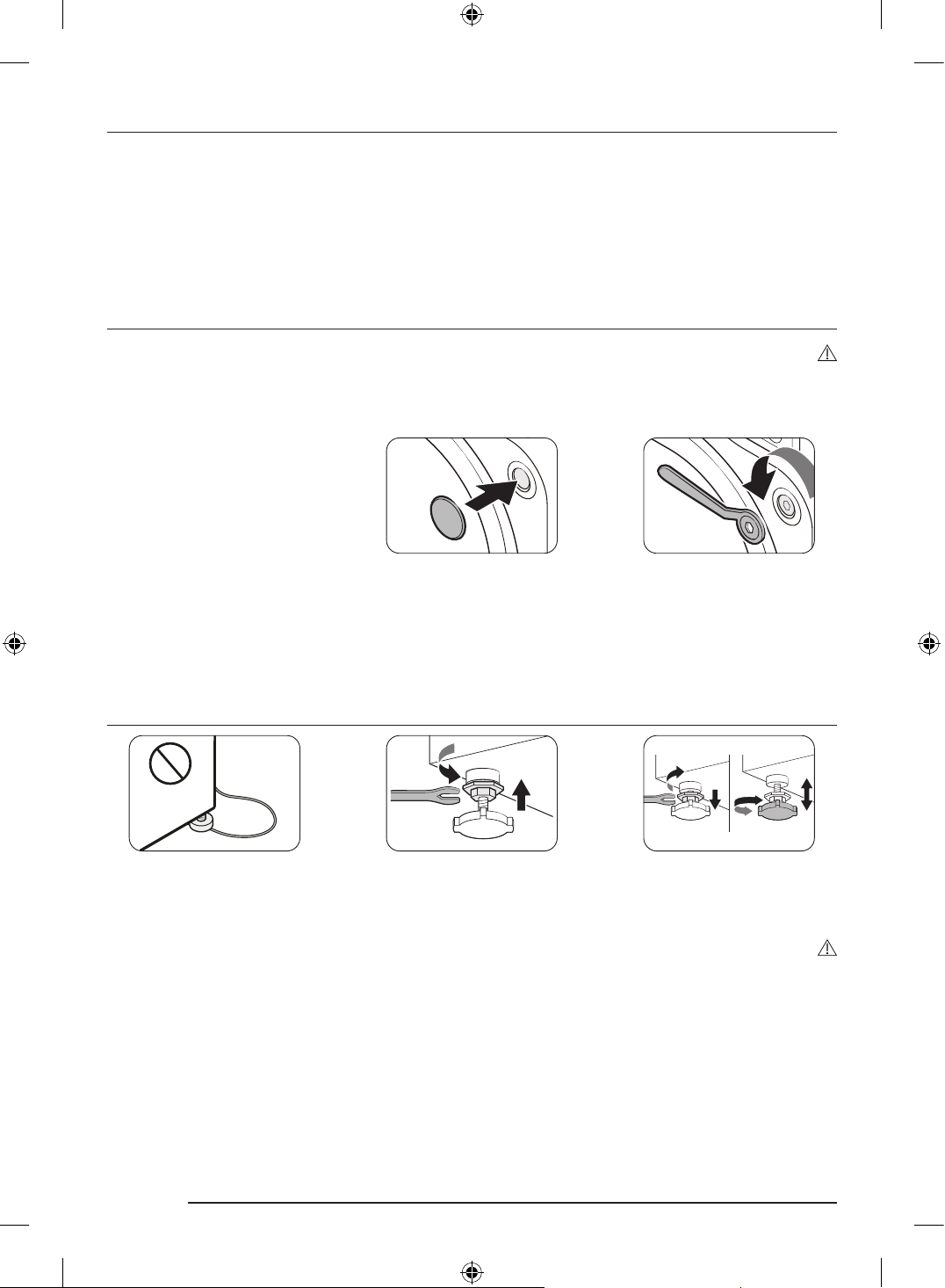
Remove the shipping bolts
WARNING
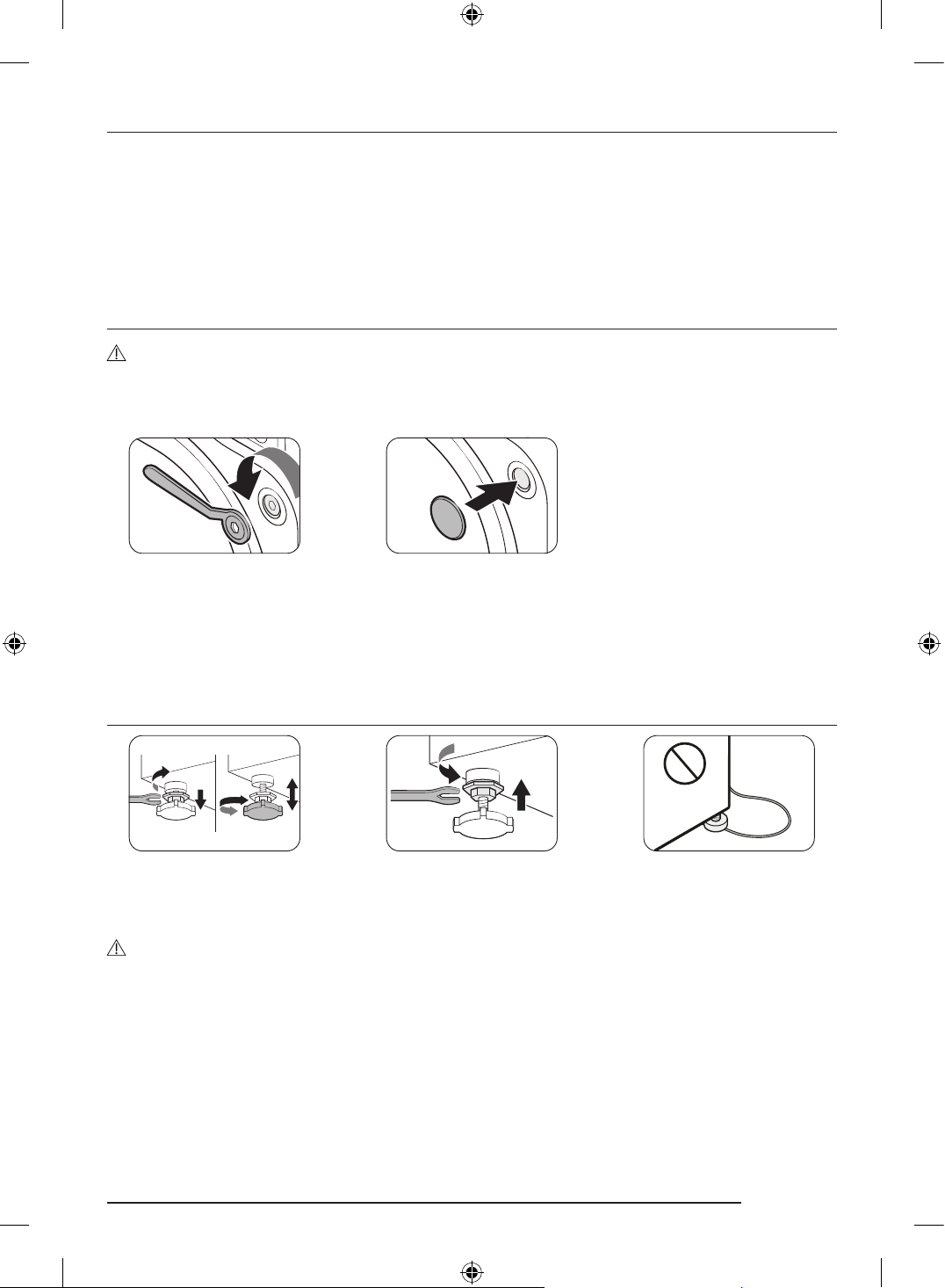
To avoid injury, cover the holes with bolt caps after removing the shipping bolts. Do not move the washing
machine without the shipping bolts in place. Assemble the shipping bolts before moving the washing machine
to another location. Keep the shipping bolts in a safe place for future use.
1. After unpacking the product, remove all shipping bolts.
- Use the enclosed end of the supplied spanner to remove the shipping bolts.
2. Fill the holes with the supplied plastic bolt caps.
Keep the shipping bolts for future use.
3. Close all plastic bolt caps on the rear of the washing machine.
Adjust the levelling feet
1. Gently slide the washing machine into position. Excessive force may damage the levelling feet.
2. Level the washing machine by manually adjusting the levelling feet.
3. When levelling is complete, tighten the nuts using the spanner.
CAUTION
• When installing the product make sure the levelling feet is not pressing the power cord.
• Make sure all the levelling feet are seating on the floor surface to avoid the washing machine from moving
or generating noise due to vibration. Then, check if the washing machine is rocking. If the washing machine
is not rocking, tighten the nuts.
DC68-04355K-00_IB_T-PJT_WD8000D_EN.indd 11DC68-04355K-00_IB_T-PJT_WD8000D_EN.indd 11 2024-07-31 11:27:502024-07-31 11:27:50
English12
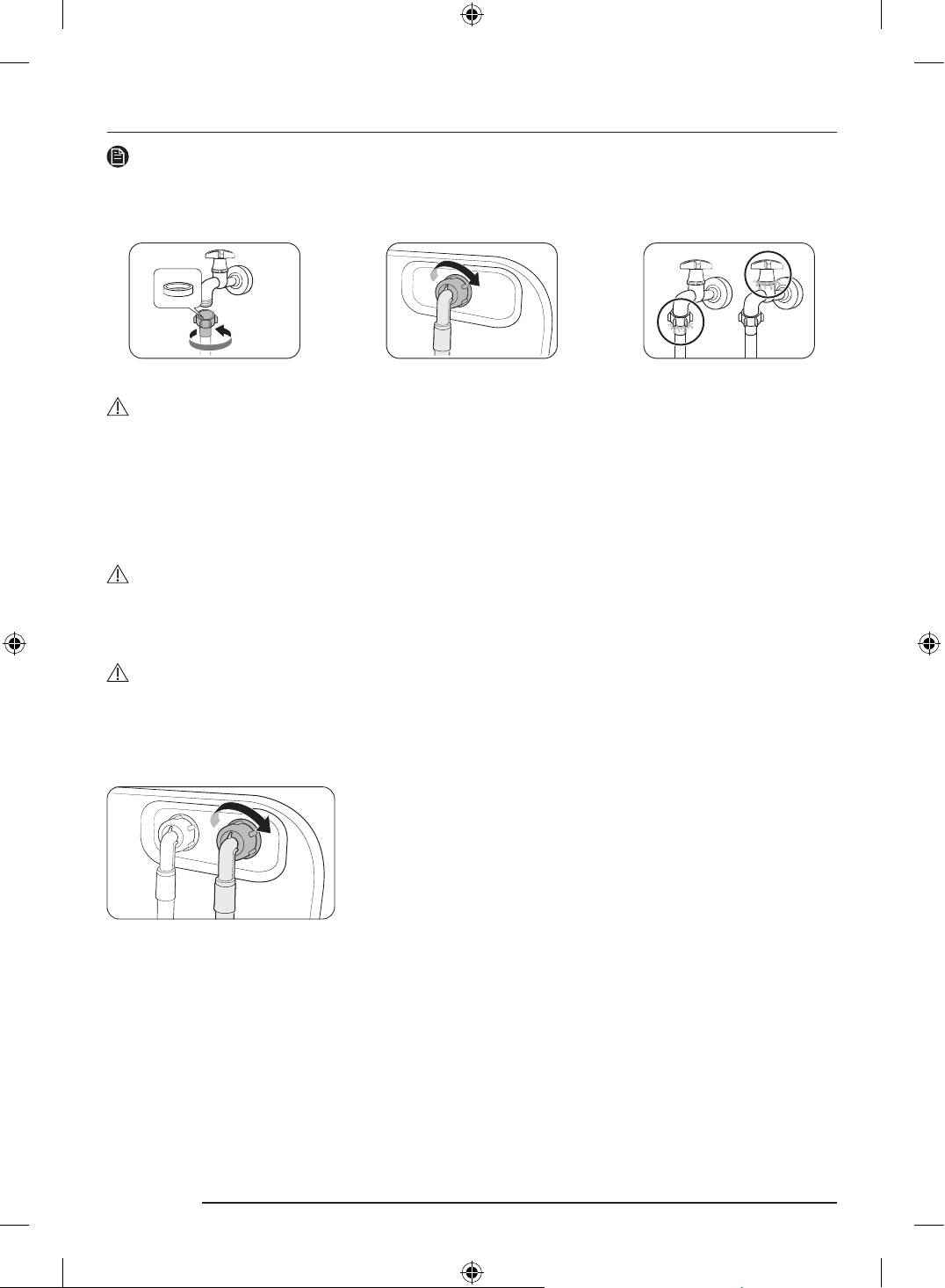
Connect the water hose
NOTE
These instructions are for the threaded water tap. For more detailed instructions or instructions for connecting
the water hose to a non-threaded water tap, please visit the website on the cover of this manual and check the
web manual.
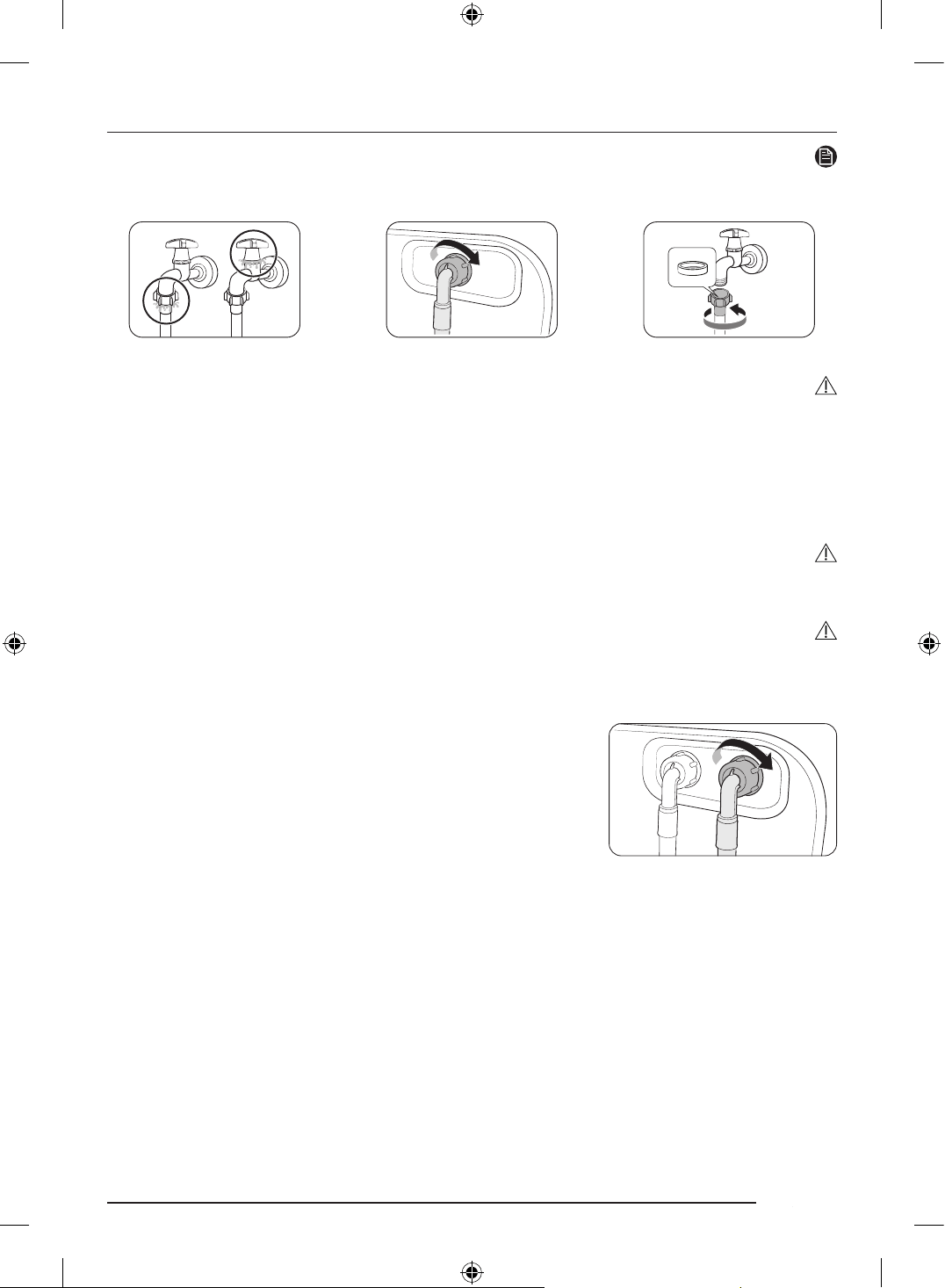
1. Connect the water hose to the water tap, and then turn it to the right to tighten.
CAUTION
Before connecting the water hose, make sure there is a rubber washer in the hose connectors. Do not use the
hose if the washer is damaged or missing.
2. Connect the other end of the water hose to the inlet valve on the back of the washing machine, and then
turn it to the right to tighten.
3. Slowly open the water tap and check if there are any leaks around the connection areas. If there are water
leaks, repeat step 1 and 2.
WARNING
If there is a water leak, stop operating the washing machine and disconnect it from the electrical supply.
Contact a local Samsung service centre in case of a leak from the water hose, or contact a plumbing technician
in case of a leak from the water tap. Otherwise, this may cause electric shock.
CAUTION
Do not stretch the water hose by force. If the hose is too short, replace the hose with a longer, high-pressure
hose.
For models with an additional hot water inlet:
1. Connect the red end of the hot water hose to the hot water inlet on
the back of the machine.
2. Connect the other end of the hot water hose to the hot water tap.
DC68-04355K-00_IB_T-PJT_WD8000D_EN.indd 12DC68-04355K-00_IB_T-PJT_WD8000D_EN.indd 12 2024-07-31 11:27:522024-07-31 11:27:52
English 13
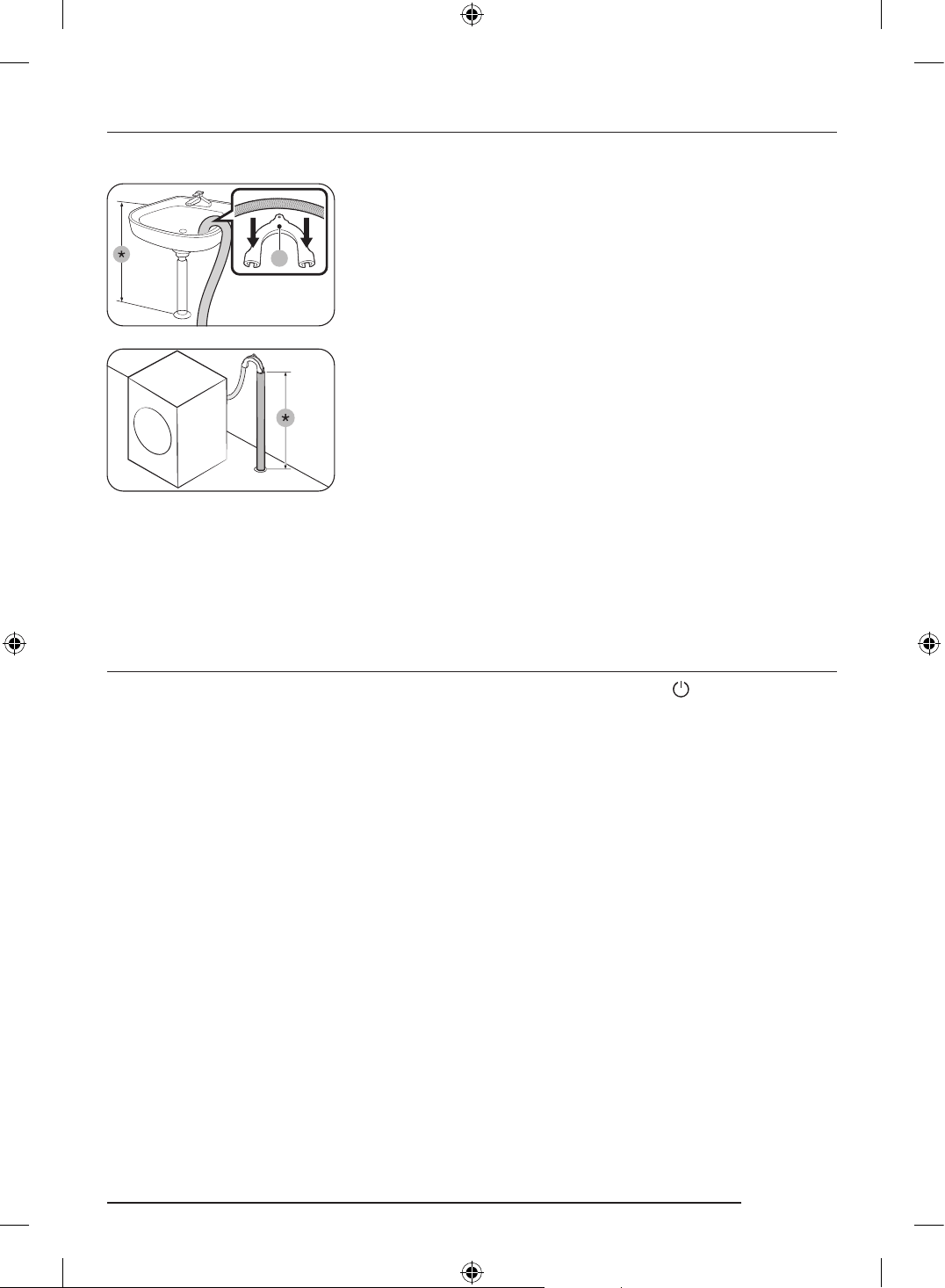
Position the drain hose
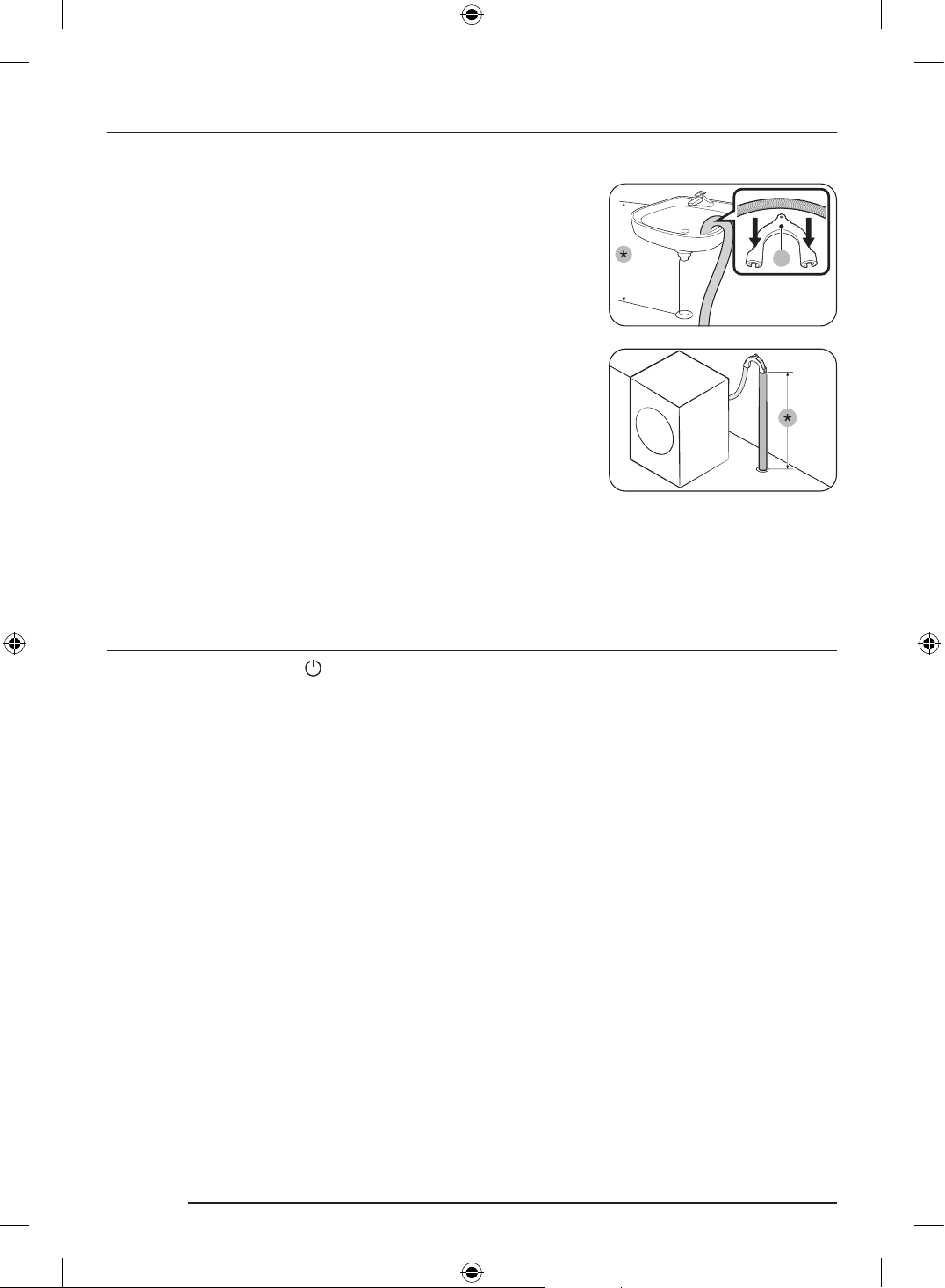
The drain hose can be positioned in three ways:
A
Over the edge of a wash basin
The drain hose must be placed between 60 cm and 90 cm (*) above
from the floor. To keep the spout of the drain hose bent, use the
supplied plastic hose guide (A). Secure the guide to the wall using a
hook to ensure stable drainage.
In a drain pipe
The drain pipe should be between 60 cm and 90 cm high (*). It is
advisable to use a 65 cm high vertical pipe.
• To ensure the drain hose stays in position, use the plastic hose
guide provided (see the figure).
• To prevent the siphoning of water flow during drainage, make sure
to insert the drain hose 15 cm in the drain pipe.
• To prevent the drain hose from moving around, secure the hose
guide to the wall.
Drain standpipe requirements:
• Minimum diameter of 5 cm
• Minimum carry-away capacity of 60 litres per minute
Power on
Plug the power cord into a wall socket protected by a fuse or circuit breaker. Then, tap to turn on the
washing machine.
DC68-04355K-00_IB_T-PJT_WD8000D_EN.indd 13DC68-04355K-00_IB_T-PJT_WD8000D_EN.indd 13 2024-07-31 11:27:522024-07-31 11:27:52
English14
Before you start
Detergent guidelines
To apply washing agents to the Auto dispensers
Auto dispensers make laundry easier by dispensing the preset amount of washing agents without you having
to pour it in every time, and it could be more economical because the exact amount will be dispensed each
time of use, allowing less waste of washing agents.
• The detection time may vary depending on the type of the detergent/softener.
NOTE
You may find the detailed detergent guidelines instructions in the User Manual registered in the Samsung
website.
1. Press the Compartment cover to open it.
2. Pull out the Auto dispensers
3. Turn the Auto dispenser cap counterclockwise to open.
4. Apply an appropriate amount of detergent to the Auto dispenser.
- After you finish, put the cap back and turn it clockwise to close.
5. Turn the Flex auto dispenser cap counterclockwise to open.
6. Apply an appropriate amount of detergent or softener to the Flex auto dispenser.
- After you finish, put the cap back and turn it clockwise to close.
7. Push the Auto dispensers back into their positions.
8. Close the Compartment cover.
NOTE
• Manual softener compartment : Apply additives such as fabric softener. Do not exceed the max line.
• Aqua Pebble : To use the Aqua Pebble, set the Amount option for Auto dispenser and Flex auto dispenser to
Off.
- Do not use the Aqua Pebble for bleach or fabric softener.
Laundry guidelines
1. Sort
- Make sure to check the care label on the clothing, and sort them accordingly before starting the wash.
2. Empty pockets
- Empty all the pockets of your laundry items
- Turn clothing with buttons and embroideries inside out
3. Use a laundry net
- Brassieres (machine washable) must be placed in a laundry net. Metal parts of the brassieres may break
through and tear other laundry items.
4. Determine the load capacity
- Do not overload the washing machine. Overloading may cause the washing machine to not wash
properly.
5. Apply a proper detergent type
- The type of detergent depends on the type of fabric (cotton, synthetic, delicate items, wool), colour,
wash temperature, and degree of soiling. Make sure to use the laundry detergent that is designed for
automatic washing machines.
DC68-04355K-00_IB_T-PJT_WD8000D_EN.indd 14DC68-04355K-00_IB_T-PJT_WD8000D_EN.indd 14 2024-07-31 11:27:522024-07-31 11:27:52
English 15
Operations
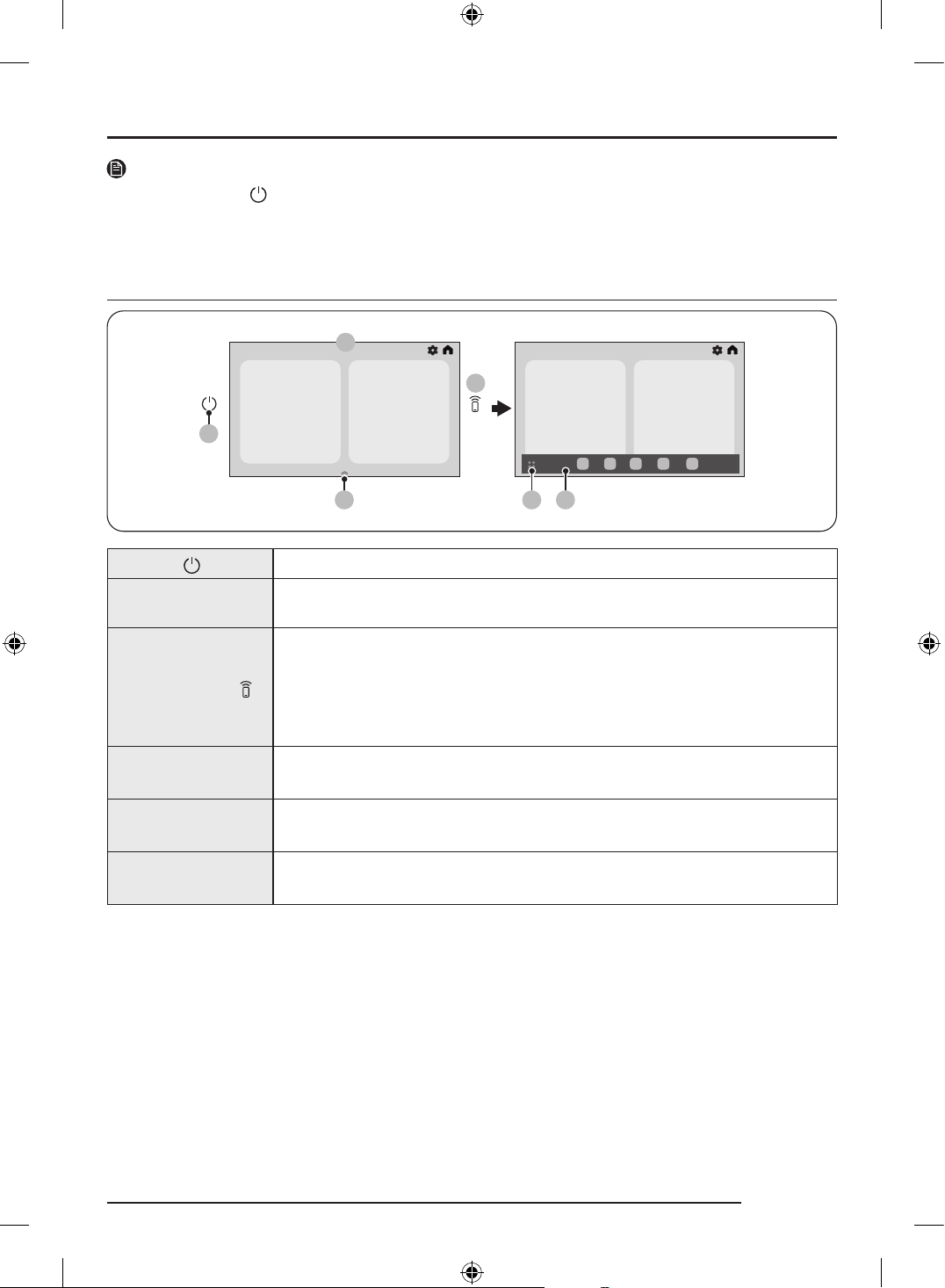
NOTE
There is only a Power button next to the LCD panel that turns on or off the product. Once you turn on the
product, you can manipulate the product directly on the touch screen and able to check different information
such as brief descriptions of the product’s feature.
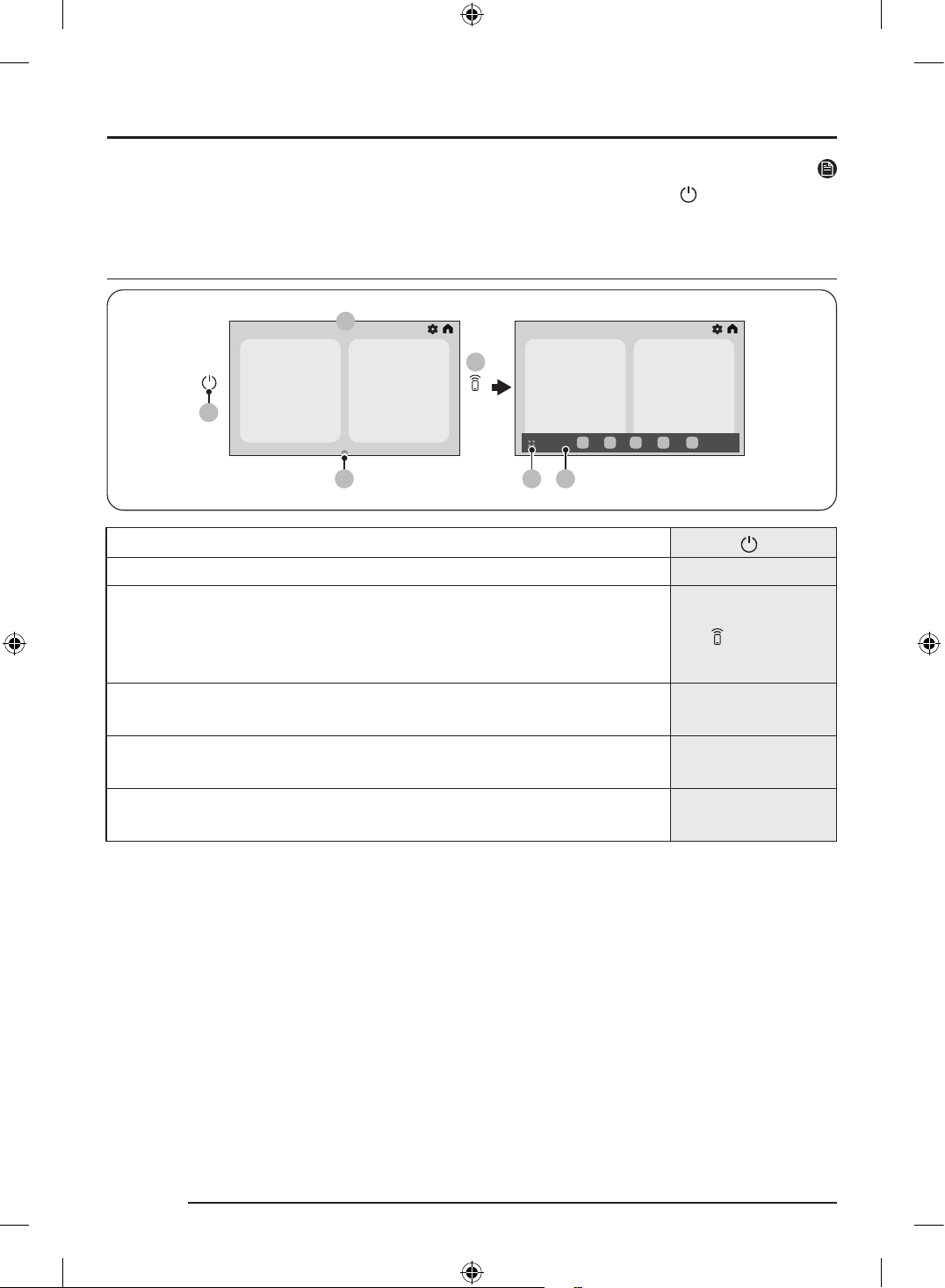
LCD panel
02
03
0504
01
06
01 Power
Tap to turn the Laundry Combo on or off.
02 Display
The display shows current cycle information and estimated time remaining, or an
information message when a problem occurs.
03 Smart Control
Tap to activate or deactivate the Smart Control function.
Touch and hold to enter pairing mode to connect to the SmartThings app.
• When the Smart Control function is activated, you can control your Laundry
Combo remotely using the SmartThings app on your smartphone or tablet
(Android or iOS).
04 App dock handler
Drag the App dock handler upward to open the App dock.
• The App dock handler only appears on the Home screen.
05 App tray button
Tap to view all available apps.
• App drawer: Tap App tray to open App drawer.
06 App dock
App dock displays the icons to allow easier access to the frequently used apps.
• Maximum five icons are displayed in the App dock and they are editable.
DC68-04355K-00_IB_T-PJT_WD8000D_EN.indd 15DC68-04355K-00_IB_T-PJT_WD8000D_EN.indd 15 2024-07-31 11:27:532024-07-31 11:27:53
English16
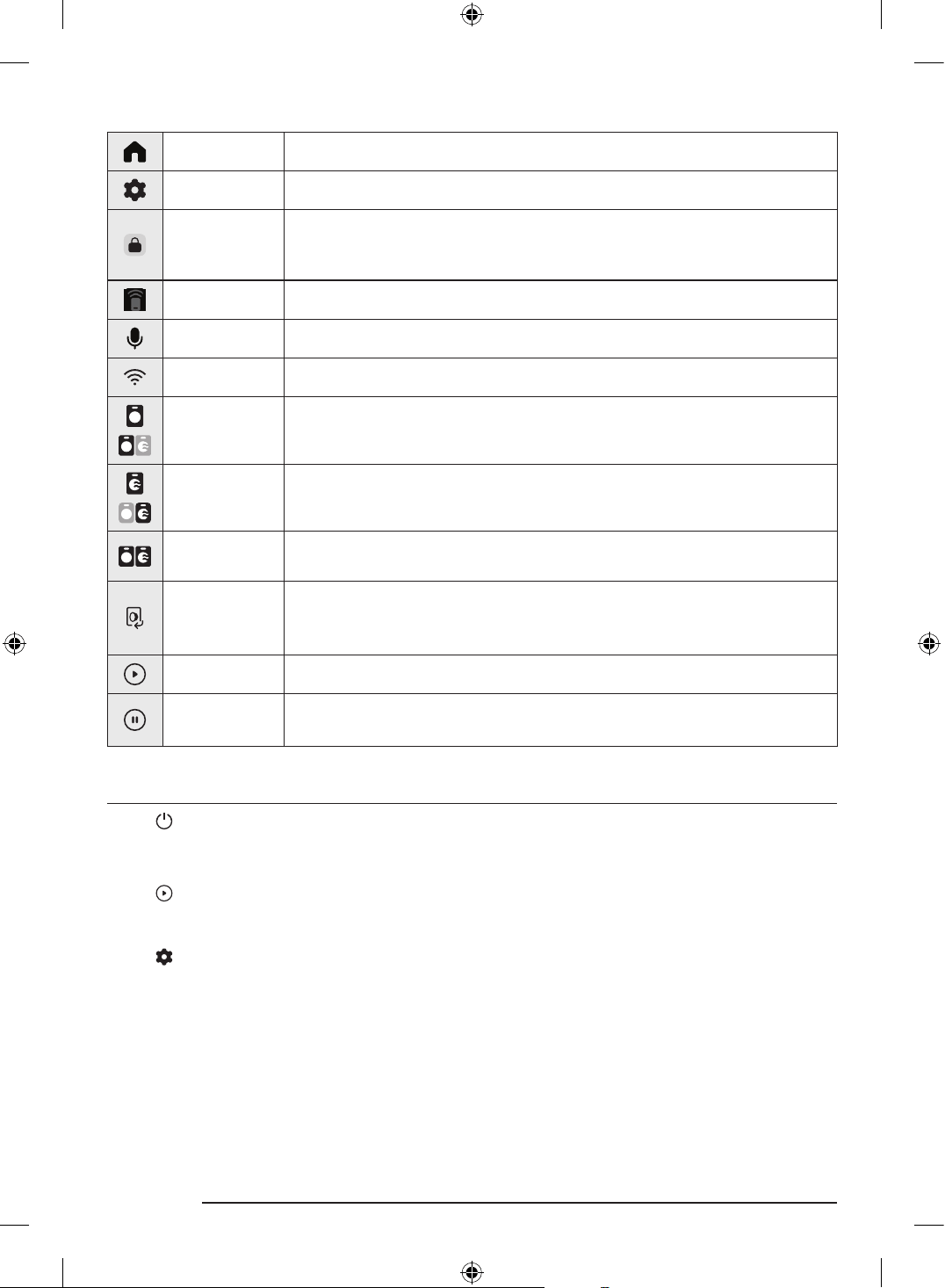
Display icon descriptions
Home Tap to go to the Home screen.
Settings Tap to enter the Settings menu.
Door Lock
• This icon indicates the door is locked and cannot be opened.
• The door locks automatically during a cycle and this icon turns on.
• You can open the door when this icon disappears.
Smart Control • This icon indicates that the Smart Control is on.
Microphone • This icon indicates that the microphone is on.
Wi-Fi • This icon indicates the signal strength when the Internet connection is active.
Washer
(Wash Options)
This icon appears during a wash-only cycle or a washing process. You can tap this
icon to change the cycle settings.
Dryer
(Dry Options)
This icon appears during a dry-only cycle or a drying process. You can tap this
icon to change the cycle settings.
Washer and
Dryer
This set of icons appears to show that you can set or have already set the wash
and dry cycle settings.
Open Door
Tap this button to open the door.
• The button deactivates when the door is open and reactivates when the door
is closed.
Start You can start the operation.
Pause
You can pause the operation.
• During the operation, tap the button to pause.
Simple steps to start
1. Tap to turn the power on.
2. Select the desired cycle.
3. Change the default cycle options.
4. Tap to start the operation.
Using Settings
1. Tap .
2. Tap General or Washer.
3. Scroll through the screen to select the desired menu.
4. Change the settings or start the function.
DC68-04355K-00_IB_T-PJT_WD8000D_EN.indd 16DC68-04355K-00_IB_T-PJT_WD8000D_EN.indd 16 2024-07-31 11:27:562024-07-31 11:27:56
English 17
Maintenance
Cleaning
Keep the washing machine clean to prevent deteriorated performance and to preserve its life cycle.
You may find the detailed cleaning instructions in the User Manual registered in the Samsung website.
Exterior
• Use a soft cloth to wipe up all detergent, bleach, or other spills as they occur.
• Clean the control panel with a soft, damp cloth. Do not use abrasive powders or cleaning pads. Do not spray
cleaners directly on the panels.
Interior
Clean the interior of your washing machine periodically to remove any dirt, soil, odor, mold, mildew, or
bacterial residue that may remain in your washing machine as a result of washing clothes.
Troubleshooting
• If there is any problem, check the information message on the LCD screen and follow the on-screen
instructions.
• If a problem persists, contact a local Samsung service center.
Care for preventing freezing
WARNING
Install the Laundry Combo in an area where the temperature does not drop below a water-freezing
temperature.
If draining directly using a long drain hose, water remaining inside the hose can freeze in winter. Make sure
there is no water left inside the hose after use.
If the drain hose has frozen, wrap the hose with a towel soaked in warm water for approximately ten minutes
to thaw it.
DC68-04355K-00_IB_T-PJT_WD8000D_EN.indd 17DC68-04355K-00_IB_T-PJT_WD8000D_EN.indd 17 2024-07-31 11:27:562024-07-31 11:27:56
English18
Packing & unpacking
Packing
1. Put the washing machine on the bottom cushion.
2. Put the packing box over the machine.
3. Insert the 4 side cushions in the packing box, one for each corner.
4. Insert the top cushion on the top of the machine.
5. Close the top cover of the box.
6. Wrap up the box with straps.
Unpacking
1. Cut the straps to untie.
2. Hold the packing box with both hands, and raise the box to remove.
3. Remove the washing machine from the bottom cushion.
NOTE
The number of cushions and straps may vary depending on the model.
DC68-04355K-00_IB_T-PJT_WD8000D_EN.indd 18DC68-04355K-00_IB_T-PJT_WD8000D_EN.indd 18 2024-07-31 11:27:562024-07-31 11:27:56
Memo
DC68-04355K-00_IB_T-PJT_WD8000D_EN.indd 19DC68-04355K-00_IB_T-PJT_WD8000D_EN.indd 19 2024-07-31 11:27:562024-07-31 11:27:56
DC68-04355K-00_IB_T-PJT_WD8000D_EN.indd 20DC68-04355K-00_IB_T-PJT_WD8000D_EN.indd 20 2024-07-31 11:27:562024-07-31 11:27:56
ةيكيتاموتوأ ةيئابرهك ةلاسغ
طيسبلا مدختسا ليلد
• Samsung ةكل وكلا عقوا ةرايزب لضفت ،اهفيظنتو ةلاسغلا بيكرت لوح ةلصفم تاداشرإ ع لوصحلل
.زارطلا مسا لخدأ مث ،معدلل ةيسيئرلا ةحفصلا > معدلا إ لقتناو ،)http://www.samsung.com(
• كنكمي .جتناب ةقفرا ةعيلا ةباجتسا زمر ةروص حسماو ةعيلا ةباجتسا زمرل وضلا حساا قيبطت حتفا
.SmartThings لاصتا لخ نم "ءمعلا معد"و "ليلدلا"و "جتنا ليجست" إ لوصولا
•ع طغضلا قيرط نع كجتنم ع دوجوا مدختسا ليلد نم ققحتلا كنكمي
.")مدختسا ليلد( User manual > )معدلا( Support > ) ( )تادادعإ( Settings"
•.جتنا رهظ ع قفرا قصلا رظنا ،جتنا تافصاومو ز
ُ
ر
ُ
طلا ءامسأ ةفرع
ةمسلا تامولعم
ةيانعلاو همادختساو زاهجلا بيكرت ةيلمع لوح ةمهم تامولعم ع ليلدلا اذه ىوتحي .ةديدجلا Samsung ةلاسغ كئا ع انيناهت
ةمسب ةديدجلا كتلاسغ اهمدقت لا فئاظولاو تاا ليغشت ةيفيك ةفرعم نامضل ةلاسغلا مادختسا لبق ةيانعب ليلدلا اذه أرقا .هب
.ةيلعافو
ةمها ةمسلا زومر
:ي ام إ اذه مدختسا ليلد ةدوجوا تامعلاو زومرلا شت
ريذحت
.تاكلتماب فلت وأ/و ةافولا وأ/و ةطخ ةيصخش ةباص ضرعتلا اهنع جتني دق لا ةنما غ تاسراما وأ رطاخا
هيبنت
.تاكلتماب فلت وأ/و ةيصخش ةباص ضرعتلا اهنع جتني دق لا ةنما غ تاسراما وأ رطاخا
تاداشرا ةءارق
.لبقتسا هيلإ عوجرلل نمآ ناكم هب ظفتحا ،ليلدلا اذه ةءارق دعب
.زاهجلا مادختسا لبق
ً
وأ تاداشرا عيمج أرقا
ةظوحلم
.يدام ر وأ ةيصخش ةباص ضرعتلا رطخ دوجو إ شت
.نيرخلو كل تاباصإ ثودح عنم إ هذه ريذحتلا تامع فدهت
.ةيانعب اهعابتا ىجر
ُ
ي ،اذل
بجي ،نامأب زاهجلا اذه ليغشتلو .اهكيرحت نكمي ءازجأ هبو ءابرهكلاب لمعي زاهج يأ عم لاحلا وه امك ،رطاخملل ضرعتلا لامتحا دجوي
.همادختسا دنع رذحلا يخوتو هليغشت ةقيرط ع فرعتلا كيلع
DC68-04355K-00
DC68-04355K-00_IB_T-PJT_WD8000D_AR.indd 1DC68-04355K-00_IB_T-PJT_WD8000D_AR.indd 1 2024-07-31 11:27:262024-07-31 11:27:26
ةيبرعلا2
ةمها ةمسلا تاطايتحا
ةمسلا تاطايتحا عبتا ،زاهجلا يمدختس ةيدسج ةباصإ ثودح وأ ةيئابرهك ةمدصل ض
ّ
رعتلا وأ قيرح بوشن تامتحا ليلقتل
:ي ام كلذ امب ،ةيساسا
. امب( ةخلاو ةفرعا مهصقنت نم وأ ةدودحم ةيلقع وأ ةيسح وأ ةيلضع تاردقب نومستي صاخشأ همدختسيل زاهجلا اذه م
مصي مل
.زاهجلا مادختساب قلعتي اميف مهتمس نع لوؤسم صخش هيجوت وأ فاإ تحت اوناك اذإ إ ،)لافطا كلذ
. صاخشا إ ةفاضاب ،كأ اميف تاونس 8 نم مهرامعأ أدبت نيذلا لافطا زاهجلا اذه مدختسي نأ نكمي :ابوروأ مادختسل
ملع عو فاا تحت اوناك اذإ ةخلاو ةفرعا مهصقنت نيذلا كئلوأ وأ ةليلق ةيلقع وأ ةيسح وأ ةيلضع تاردقب نومستي نيذلا
لافطل حامسلا متي أ بجيو .مادختسا ةيلمع ةنمضتا رطاخا مهفو ةنمآ ةقيرطب زاهجلا مادختساب قلعتت لا تاداشراب
.فاإ نود مدختسا اهب موقي لا ةنايصلاو فيظنتلا لامعأب مايقلاب لافطل حامسلا مدع بجيو .زاهجلاب ثبعلاب
..زاهجلاب مهثبع مدع نامضل لافطا ةبقارم بجي
. بنجتل لهؤم ف يأ وأ اهب صاخلا ةنايصلا ليكو وأ ةعنصا ةكلا لبِق نم هلادبتسا عتي ،ابرهكلا رايتلا كلس فلت ةلاح
.رطخ ي ضرعتلا
. لخ نم ةقاطلاب زاهجلا اذه ديوزت متي أ بجي ،يرارحلا عطاقلل ةدوصقا غ طبضلا ةداعإ ببسب رطخ دوجو بنجتل :هيبنت
قفرم لبق نم ةمظتنم ةروصب اهليغشت فاقيإو اهليغشت متي ةيبرهك ةرئادب هليصوت وأ -تقؤا لثم- يجراخ لصوو لصف زاهج
.ةماعلا ةمدخلا
..ىرخأ ةرم ةميدقلا ميطارخلا تاعومجم مادختسا مدعو ةلاسغلاب ةقفرا ةديدجلا ميطارخلا تاعومجم مادختسا بجي
.:ي اميف مادختسل هميمصت متي ملو طقف ا مادختسل زاهجلا اذه مم
ُ
ص
- ؛ىرخا لمعلا تائيبو بتاكاو رجاتا فظوا خباطم قطانم
- ؛عراز
َ
ا
- ؛ةينكسلا تائيبلا نم اهغو تيتواو قدانفلا ءمعلا لبِق نم
- ؛راطفاو تيبملل صصخا عونلا نم تائيبلا
- .لساغا وأ ةينكسلا تاعمجا يعامجلا مادختسا قطانم
..تاحتفلا هذهل داجسلا دس بنجت بجي ،اهتدعاق ةيوهت تاحتف ع يوتحت لا ةزهجا إ ةبسنلاب
..ةرمتسا ةبقارملل اوعضخي مل ام ةلاسغلا نع تاونس 3 نم لقأ لافطا دعتبي نأ بجي :ابوروأ مادختسل
ةظوحلم
.فيفجتلا ةفيظو ع يوتحت لا زرطلا ع إ اهتياهن ح 10 مقرلا نم ةمئاقلا قبطنت
..فيظنتلل ةيعانص ةيئايميك داوم مادختسا ةلاح راودلا ففجا مدختست
..نكمأ نإ ،ماظتناب تاسنلا ةافصم فيظنت بجي
.)با جراخ اهتيوهت نوكتل ةممصا ةزهجا ع كلذ قبطني ( .راودلا ففجا لوح تاسن مكاب حمست
. نانلا كلذ امب ،دوقولا نم ىرخأ ا
ً
عاونأ مدختست لا ةزهجا نم ةفرغلا إ تازاغلا بت بنجتل ةيفاك ةيوهت فوت بجي
.ةابا
..راودلا ففجا لخاد ةلوسغا غ سبا فيفجت بنجت
. تنبلا تيزو عقبلا تيزمو سوكلاو نيبلاو لوحكلاو نوتيساو يهطلا تيز لثم داومب ةخستا سبا لسغ بجي
.راودلا ففجا اهفيفجت لبق فظنا نم ةيفاضإ ةيمك ةفاضإ عم نخاس ءامب كلذ لك لسغ بجي ،عمشلا تيزمو عمشلاو
. ةمواقا سباو ةشمقا وأ مامحلاب ةصاخلا سأرلا ةيطغأ وأ )سكت طاطم( يجنفسا طاطا لثم ءايشأ فيفجت مدع بجي
.راودلا ففجا مادختساب يجنفسا طاطاب ةوشحا دئاسولا وأ طاطاب ةموعدا ءايشا وأ ءاملل
..ةشمقا تامعنم مادختسا تاداشر ا
ً
قفو ةهباشا تاجتنا وأ ةشمقا تامعنم مادختسا بجيو
. مدع نمضت ةرارح ةجردب سبا كرت نامضل )درابلا فيفجتلا ةرود( خست نود راودلا ففجا ةرود نم ةيئاهنلا ةلحرا متت
.فلتلل اهضرعت
..باقثلا داوعأو تاعولا لثم اهب ةدوجوم نوكت دق لا ءايشا عيمج نم بويجلا غيرفتب مق
. ددبتت ح ةعب اهعيزوتو لماكلاب سبا جارخإ متي مل ام فيفجتلا ةرود ءاهتنا لبق راودلا ففجا فاقيإب ا
ً
دبأ مقت :ريذحت
.ةرارحلا
. متي ةيبرهك ةرئادب هليصوت وأ -تقؤا لثم- يجراخ لصوو لصف زاهج لخ نم ةقاطلاب زاهجلا اذه ديوزت متي أ بجي :ريذحت
.ةماع ةمدخ قفرم ةمظتنم ةروصب اهليغشت فاقيإو اهليغشت
DC68-04355K-00_IB_T-PJT_WD8000D_AR.indd 2DC68-04355K-00_IB_T-PJT_WD8000D_AR.indd 2 2024-07-31 11:27:262024-07-31 11:27:26
ةيبرعلا3
. ا
ً
عاونأ وأ زاغلا مدختست لا ةزهجا نم مداعلا جورخل همادختسا متي يذلا ءاوهلا فم لخ نم مداعلا ءاوه غيرفت مدع بجي
.دوقولا نم ىرخأ
. ثيح ؛راودلا ففجا ةهجل ةلباقا ةهجلا ع دجوت ةلصفمب باب وأ قلم باب وأ قلغلل لباق باب فلخ زاهجلا بيكرت مدع بجي
.لماك لكشب راودلا ففجا باب حتف كلذ قوعي
ةمها بيكلا تاريذحت
ريذحت
.ةصصختم ةنايص ةك وأ لهؤم ف ةطساوب زاهجلا اذه بيكرت بجي
•.ةباصل ضرعتلا وأ جتناب لكاشم وأ راجفنا وأ قيرح بوشن وأ ةيبرهك ةمدص ثودح إ تاميلعتلا هذهب مالا مدع يدؤي دق
.ليقث اهنزو ن ةلاسغلا عفر دنع رذحلا يخوت بجي
،زاهجلا اذه ليغشتل إ سبقا مدختست .ةيلحا ةيبرهكلا تافصاوا وتسي طئاح سبقمب ماكحإب رهكلا رايتلا كلس ليصوتب مق
.ديدمت كلس مدختست و
• وأ ةيئابرهك ةمدص ثودح إ ابرهكلا رايتلا كلس ديدمت وأ ءابرهك كشم مادختساب ىرخأ ةزهجأ عم طئاحلا ذخأم ةكراشم يدؤت دق
.قيرح بوشن
• إ كلذب مالا مدع يدؤي دق .جتنا تافصاومب ةصاخلا تاسايقلا عم رايتلاو ددلاو ابرهكلا دهجلا نم لك قباطت نم دكأت
.قيرح بوشن وأ ةيبرهك ةمدصل ضرعتلا
.ماظتناب ةفاج شامق ةعطق مادختساب لاصتا طاقنو رهكلا رايتلا سباق فارطأ نم ءاا وأ ةبرتا لثم ،ةبيرغ داوم يأ ةلازإب مق
•.ةفاج شامق ةعطق مادختساب هفظنو رهكلا رايتلا سباق لصفا
•.قيرح بوشن وأ ةيبرهك ةمدصل ضرعتلا إ كلذب مالا مدع يدؤي دق
.ضرا ةيحان كلسلا هاجتا نوكي ثيحب طئاحلا سبقم ابرهكلا رايتلا سباق لخدأ
• رما اذه يدؤي دقو لبكلا لخاد ةدوجوا ةيئابرهكلا كسا فلتت دقف ،سكاعا هاجتا سبقا ةقاطلا سباق تلخدأ اذإ
.قيرح بوشن وأ ةيئابرهك ةمدص ثودح إ
.مهيلع ا
ً
رطخ لثمت دق اهن ا
ً
رظن ،لافطا يديأ لوانتم نع ا
ً
مامت ةديعب فيلغتلاو ةئبعتلا داوم عيمجب ظفتحا
•.قانتخاب هتباصإ إ هسأر قوف فيلغتلا سايكأ نم سيكل لفطلا عضو يدؤي دق
.ةمدخ زكرم برقأب لصتاف ،ابرهكلا رايتلا كلس وأ ابرهكلا رايتلا سباق وأ زاهجلا فلت ةلاح
.ميلس لكشب رأ فرطب زاهجلا ليصوت عتي
.فتاه كلس وأ يتسب ءام بوبنأ وأ زاغ بوبنأب زاهجلا ضيرأتب مقت
•.زاهجلا تكشم وأ راجفنا ثودح وأ قيرح بوشن وأ ةيبرهك ةمدصل ض
ّ
رعتلا إ كلذ يدؤي دق
• ناوقلل ا
ً
قفو متي كلذ نأ نم دكأتو ،حيحص لكشب رأ فرطب هليصوت متي مل سبقمب رهكلا رايتلا كلس ليصوت مدع بجي
.ةيلودلاو ةيلحا
.ةبهتلم داوم يأ وأ ناخس نم برقلاب زاهجلا اذه بيكرت مدع بجي
.)رطا تارطق( ءاا وأ ابا سمشلا ءوضل ةضرع ناكم وأ رابغ هب ناكم يأ وأ تيز هب وأ بطر ناكم زاهجلا اذه عضت
.ةضفخنم ةرارح تاجردل ض
ّ
رعم ناكم زاهجلا اذه عضت
•.بيبانا راجفنا إ ديلجلا يدؤي دق
.زاغلل بت هب نوكي عقوم زاهجلا اذه بيكب مقت
•.قيرح بوشن وأ ةيبرهك ةمدص ثودح رما اذه نع جتني دق
.ةيجراخلا لماوعلل هضرعت ةقيرطب هظفح وأ زاهجلا بيكب مقت
.ا
ً
يئابرهك
ً
وحم مدختست
•.قيرح بوشن وأ ةيبرهك ةمدص ثودح رما اذه نع جتني دق
.مكح
ُ
م غ طئاح سبقم وأ ا
ً
فلات رهك رايت كلس وأ رهك رايت سباق مدختست
•.قيرح بوشن وأ ةيبرهك ةمدص ثودح رما اذه نع جتني دق
.ةدشب هينثت وأ ابرهكلا رايتلا كلس بحست
DC68-04355K-00_IB_T-PJT_WD8000D_AR.indd 3DC68-04355K-00_IB_T-PJT_WD8000D_AR.indd 3 2024-07-31 11:27:262024-07-31 11:27:26
ةيبرعلا4
.هطبر وأ ابرهكلا رايتلا كلس فلب مقت و
ةحاسا هعفدت وأ ءايشأ ب ابرهكلا رايتلا كلس ررمت وأ هقوف
ً
يقث ا
ً
ئيش عضت وأ دعم ء قوف ابرهكلا رايتلا كلس قلعت
.زاهجلا فلخ ةدوجوا
•.قيرح بوشن وأ ةيبرهك ةمدص ثودح رما اذه نع جتني دق
.رهكلا رايتلا كلس بحس قيرط نع زاهجلا لصفت
•.سباقلا بحس قيرط نع ابرهكلا رايتلا سباق لصفا
•.قيرح بوشن وأ ةيبرهك ةمدصل ضرعتلا إ كلذب مالا مدع يدؤي دق
.ءاا فيت بيبانأو ءاا دادمإ بانصو ابرهكلا رايتلا سباق إ لوصولا لهسي ثيحب زاهجلا عضو بجي
ةك لمحتت ،فحم فب ةناعتسا نود هحصإ وأ كسفنب هحصإ وأ دمتعم غ ةمدخ دوزم لخ نم جتنا حصإ ةلاح
جتنا حصإ ةلواحم ببسب جتنا ةمسب قلعتت ىرخأ ةلكشم يأ وأ ةباصإ يأ ثودح وأ جتنا فلت هاجت ةيلوؤسم يأ Samsung
يأ ةطساوب هحصإ ةلواحم ببسب جتنملل ثدحي فلت يأ نامضلا يطغي .ةيانعب كيدي ب لا ةنايصلاو حصا تاداشرإ عابتا مدعو
.Samsung ةك نم دمتعا ةمدخلا دوزم غ صخش
بيكلا تاهيبنت
هيبنت
.هنزو لمحتت ةبلصو ةيوتسم ةيضرأ ع زاهجلا بيكرت بجي
•.زاهجلاب لكاشم وأ ءاضوض وأ ةكرح وأ تازاها ثودح تاميلعتلا هذهب مالا مدع نع جتني دق
ةمها مادختسا تاريذحت
ريذحت
.ةمدخ زكرم برقأب لصتاو ،لاحلا رهكلا رايتلاو هايا دادمإ فقوأ ،هاياب زاهجلا رمغ ةلاح
•.تللبم نيديب ابرهكلا رايتلا سباق سملت
•.ةيبرهك ةمدص ثودح إ كلذب مالا مدع يدؤي دق
.ةمدخ زكرم برقأب لصتاو ،روفلا ع ابرهكلا رايتلا سباق لصفاف ،ناخد وأ قيرح ةحئار وأ ةبيرغ ءاضوض تاوصأ زاهجلا نم ثعبنا اذإ
•.قيرح بوشن وأ ةيبرهك ةمدصل ضرعتلا إ كلذب مالا مدع يدؤي دق
رايتلا سباق س نود ا
ً
روف ناكا ةيوهت بجي ،)كلذ إ امو ،لاس
ُ
ا يطفنلا زاغلا وأ نابولا زاغ لثم( زاغلل بيت دوجو ةلاح
.رهكلا رايتلا كلس وأ زاهجلا سملب مقت .رهكلا
•.ةيوهت ةحورم مدختست
•.قيرح بوشن وأ ةيبرهك ةمدص ثودح إ يدؤتو ةرا ثدحت دق
.زاهجلا نم صلختلا لبق بابلا ضباقم عيمج ةلازإب مق
•.توا ح قانتخل نوضرعتيو ةلاسغلا لخاد لافطا سبح
ُ
ي دقف
.مادختسا لبق Laundry Combo لفسأ دوجوا )موفلا / جنفسا( فغلا ةلازإ نم دكأت
وأ لاعتشل ةلباق ىرخأ داوم يأ وأ لوحكلا وأ ناهدلا ففخم وأ نيبلا وأ سوكلا وأ لوزاجلاب ةثولا انعلا لسغ مدع بجي
.راجفنا
•.راجفنا وأ قيرح بوشن وأ ةيبرهك ةمدص ثودح رما اذه نع جتني دق
.ليغشتلا ءانثأ ةوقلاب بابلا حتفت
• ثودح كلذ نع جتني دق .ةقلم ضرا نأ حبصت ببستلا وأ قورحب ةباصا Laundry Combo جراخ ءاا عافدنا نع جتني دق
.تاباصإ
•.ةباصإ ثودح وأ زاهجلا فلت إ ةوقلاب بابلا حتف يدؤي دق
.بابلا ع تت وأ زاهجلا قوف سلجت
•.ةطخ ةباصإ ا
ً
ببسم زاهجلا طقسي دق
.ةبسانم ةلاسغ هريودت دعب إ ليسغلا ففجت
DC68-04355K-00_IB_T-PJT_WD8000D_AR.indd 4DC68-04355K-00_IB_T-PJT_WD8000D_AR.indd 4 2024-07-31 11:27:262024-07-31 11:27:26
ةيبرعلا5
.كلذ إ ام وأ لوحكلا وأ ناهدلا ففخم وأ نيبلا وأ سوكلا وأ زاجلا لثم لاعتشل ةلباق داومب ثولا ليسغلا فيفجت مدع بجي
•.راجفنا وأ قيرح بوشن وأ ةيبرهك ةمدص ثودح رما اذه نع جتني دق
.تللبم نيديب ابرهكلا رايتلا سباق سملت
•.ةيبرهك ةمدصل ضرعتلا رما اذه نع جتني دق
.اهليغشت ءانثأ رهكلا رايتلا كلس لصفب ةلاسغلا ليغشت فاقيإب مقت
•.قيرح بوشن وأ ةيبرهك ةمدص اهنع جتني ةرا ثودح إ طئاحلا سبقم ىرخأ ةرم رهكلا رايتلا كلس لاخدإ يدؤي دق
.ةلاسغلا قوف وأ لخاد قلستلاب لافطل حامسلا مدع بجي امك
•.ةباصإ وأ قورح وأ ةيبرهك ةمدص ثودح كلذ نع جتني دق
.ليغشتلا ءانثأ Laundry Combo لفسأ ةيندعم ةادأ يأ وأ كدي عضت
•.تاباصإ ثودح كلذ نع جتني دق
نم ميقتسم لكشب هبحسو ماكحإب رهكلا رايتلا سباق كسم ا
ً
مئاد بجي لب .رهكلا رايتلا كلس بحس قيرط نع زاهجلا لصفت
.جراخلا إ رايتلا جرخم
•.ةيبرهك ةمدصل ض
ّ
رعتلا وأ/و قيرح وأ/و ةيبرهكلا ةرئادلا ق ثودح إ رهكلا رايتلا كلس فلت يدؤي دق
.كسفنب هليدعت وأ ه
كف وأ زاهجلا حصإ لواحت
•.ايقلا رهصنا فخب )كلذ إ امو ،دعم كلس وأ ساحنلا لثم( رهصنم يأ مدختست
•.هبيكرت ةداعإ وأ زاهجلا حصإ إ ةجاحلا دنع ةمدخ زكرم برقأب لصتا
•.ةباصل ضرعتلا وأ زاهجلاب لكاشم وأ قيرح بوشن وأ ةيبرهك ةمدص ثودح إ تاميلعتلا هذهب مالا مدع يدؤي دق
.رهكلا سبقا نم رهكلا رايتلا كلس لصف بجي ،زاهجلا ءاملل بيت هنع جتنيو مكحم غ ءاا دادمإ موطرخ حبصي امدنع
•.قيرح بوشن وأ ةيبرهك ةمدصل ضرعتلا إ كلذب مالا مدع يدؤي دق
.قلا وأ ةيدعرلا فصاوعلا ءانثأ وأ ةليوط تافل زاهجلا مادختسا مدع ةلاح رهكلا رايتلا كلس لصف بجي
•.قيرح بوشن وأ ةيبرهك ةمدصل ضرعتلا إ كلذب مالا مدع يدؤي دق
.Samsung ةكل ةمدخ زكرم برقأب لصتاو رهكلا رايتلا كلس لصفب مق ،زاهجلا إ ةبيرغ ةدام يأ لوخد ةلاح
•.قيرح بوشن وأ ةيبرهك ةمدص ثودح رما اذه نع جتني دق
بوشن وأ ةيئابرهك ةمدصل ضرعتلا إ يدؤي دق امم ،Laundry Combo نم ءازجأ يأ غضم نم اهعن زاهجلا نع ةفيلا كتاناويح دعبا
.ةباصإ ثودح وأ قيرح
مادختسا تاهيبنت
هيبنت
رهكلا رايتلا كلس لصفا ،كلذ إ امو ماعطلا تافلخم وأ ةبرتا وأ تافظنا لثم ،Laundry Combo لخاد ةبيرغ ةدام دوجو دنع
.ةمعانو ةبطر شامق ةعطق مادختساب Laundry Combo ف
ّ
ظنو
•.أدصلا وأ فلتلا وأ هيوشتلل ضرعتلا وأ ،نوللا يغت إ رما اذهب مالا مدع يدؤي دق
.Laundry Combo مادختسا دنع صرحلا بجي ،اذل .يوق مادطصا ثودحل ةجيتن ةيجاجزلا ءازجا كنت دق
•.جاجزلا راسكنا ةلاح ةباصإ ثدحت دق
ليصوت ةداعإ دنع وأ ءاا دادمإ نم نكمتلا مدع ةلاح وأ مادختسا مدع نم ةليوط ةف دعب مادختسا دنع ءطبب روبنصلا حتفا
.ءاا دادمإ موطرخ
•.ءاملل بت ثودح وأ ةلاسغلا نم ءزج فلت إ ءاا بوبنأ وأ ءاا دادمإ موطرخ ءاوهلا طغض يدؤي دق
.فيتلاب قلعتت ةلكشم دوجو مدع نم ققحت ،ليغشتلا ءانثأ فيتلا ةيلمع أطخ ثودح ةلاح
• بوشن وأ ةيبرهك ةمدصب ةباصا إ فيتلا ةلكشم دوجو ةجيتن اهنم هايا بت ءانثأ Laundry Combo مادختسا يدؤي دق
.قيرح
.بابلاب قلعت ثيحب Laundry Combo لماكلاب سبا لاخدإ بجي
•.ءاملل بيت هنع جتني دق وأ ،زاهجلا وأ سبا فلت إ كلذ يدؤي دقف
DC68-04355K-00_IB_T-PJT_WD8000D_AR.indd 5DC68-04355K-00_IB_T-PJT_WD8000D_AR.indd 5 2024-07-31 11:27:262024-07-31 11:27:26
ةيبرعلا6
.Laundry Combo مادختسا مدع ةلاح ءاا دادمإ ردصم قلغأ
•.ماكحإب ءاا دادمإ موطرخ ةلصو ماسم طبر نم دكأت
إ امو ،رعش وأ طويخ وأ تافلخم ،لاثا ليبس ع( بابلل يماما جاجزلاو يطاطا زجاحلا ةبيرغ داوم يأ قاصتلا مدع نم دكأت
.)كلذ
•.ءاملل بت ثودح كلذ ببستي دقف ،ا
ً
ديج هقغإ مدع وأ بابلا ةبيرغ ةدام يأ قاصتلا ةلاح
.زاهجلا مادختسا لبق ءاملل بيت دوجو مدعو ءاا دادمإ موطرخ ةلصو ماكحإ نم ققحتلاو روبنصلا حتف بجي
•.ءاملل بيت ثدحي دق ،ءاا دادمإ موطرخ ةلصو وأ ماسا طبر ماكحإ مدع ةلاح
.طقف ا مادختسل هئاب تمق يذلا زاهجلا ميمصت مت
ةك همدقت يذلا ايقلا نامضلا لخ نم زاهجلا ةيطغت متت ،ةلاحلا هذه و .هل مادختسا ءوس ةيراجت ضارغ زاهجلا مادختسا دع
ُ
ي
.مادختسا ءوس نع مجنت لا رئاسخلا وأ لاطعا نع ةيلوئسم يأ لمحتت Samsung ةك نأ امك ،Samsung
امو ،ةيندعم ءايشأ وأ ةيواميك داوم وأ قابطأ وأ ةلعتشم رئاجس وأ ةءاض
ُ
م عومش وأ ليسغ لثم( هقوف
ً
ءايشأ عضت وأ زاهجلا قوف فقت
.)كلذ إ
•.تاباصإ عوقو وأ زاهجلاب لكاشم ثودح وأ قيرح بوشن وأ ةيبرهك ةمدصب ةباصا رما اذه نع جتني دق
.زاهجلا حطس قوف ،ةيحلا تاديبا لثم ،ةرياطتم داوم شر مدع بجي
•.زاهجلاب لكاشم ثودح وأ قيرح بوشن وأ ةيبرهك ةمدصب ةباصا ا
ً
ضيأ هنع جتني دقف ،ناسناب ي رما اذه نأ إ ةفاضاب
.Laundry Combo نم برقلاب ةيسيطانغمورهك تاجم اهنع جتني تاودأ عضت
•.للخ دوجو ةجيتن تاباصإ ثودح اذه نع جتني دق
.هسملت ف ،اًنخاس نوكي فيفجتلا ةرود ءانثأ وأ ةيلاع ةرارح تاجردب لسغلا ءانثأ هفيت متي يذلا ءاا
•.تاباصإ وأ قورح ثودح رما اذه نع جتني دق
.ءاا دي نأ دعب فيتلا ةيلمع أدبتسف ،ا
ً
دج ةعفترم ءاا ةرارح ةجرد تناك اذإ .ءاا ةرارح ةجرد بسح فيتلا تقو فلتخي دق
ةرود اًنمضتم كيدل زارطلا نكي مل ام اهفيفجت وأ اهع وأ ءاملل ةمواقا )*( ةشمقا وأ داجسلا وأ دعاقا تاشورفم لسغ مدع بجي
.اهلسغل ةصاخ
وأ تاضافحلا ةيطغأ وأ مونلا بئاقح وأ جللا تانولطنب وأ ديصلا تاس وأ راطمل ةمواقا ةيطغا وأ ةيفوصلا تاشورفا :)*(
.كلذ إ امو ،تارايسلاو ةيراخبلا تاجاردلاو تاجاردلا ةيطغأ وأ ةيضايرلا سبا
• إ رما اذه يدؤي دق .جتناب ةيانعلا ةقاطب ع ةلاسغلا ةمع دوجو ةلاح ح ليقثلا وأ كيمسلا داجسلا لسغ مدع بجي
.ةيعيبطلا غ تازاهل ةجيتن سبا وأ ةيضرا وأ طئاوحلا وأ Laundry Combo فلت وأ ةباصإ ثودح
• إ يدؤي امم ،لخادلا نم ضوحلاب قلعيو طاطا خلسني دقف .طاطا ع يوتحت لا لجرا ةحسمم وأ ربولا داجسلا لسغت
.فيتلا ةلكشم ثدحت نأك جتنا ءادأ روصق ثودح
.فظنا جرد دوجو مدع ةلاح Laundry Combo ليغشت مدع بجي
•.ءاا بتل ةجيتن ةيدسج ةباصإ وأ ةيبرهك ةمدص ثودح رما اذه نع جتني دق
.اًنخاس نوكي ثيح ؛
ً
ةابم اهدعب وأ فيفجتلا ةيلمع ءانثأ لخادلا نم ضوحلا س مدع بجي
•.قورحب ةباصا رما اذه نع جتني دق
ببست نأ نكميو ةنخاس ءازجا هذه حبصت ثيح ،فيفجتلاو لسغلا ةيلمع دعب لخادلا نم ضوحلاو يجاجزلا بابلا س مدع بجي
.قورحب ةباصا
.فظنا جرد كدي عضت
•.فظنا ةفاضإ زاهج قيرط نع كادي باصت نأ نكمي ثيح ،تاباصإ ثودح رما اذه نع جتني دق
.ليسغ قوحسم مادختسا دنع )طقف ةمئا زر
ُ
طلا( لئاسلا ف
ّ
ظنا ةيواح ةلازإب مق
•.فظنا جرد نم ةيماما ةهجلا نم ءاا بتي دق ،كلذ لعفت مل اذإ
.Laundry Combo لخاد سبا غ )تاناويحلا وأ ماعطلا اياقب وأ ةيذحا لثم( تاودأ يأ عضو بنجت
•.ةيعيبطلا غ تازاهل ةجيتن ةفيلأ تاناويح دوجو ةلاح ةافوو ةباصإ ثودح وأ Laundry Combo فلت إ رما اذه يدؤي دق
.اهغ وأ رفاظا وأ كاكسلا وأ ماسا لثم ،ةداح تاودأ مادختساب رارزا ع طغضت
•.ةباصإ وأ ةيبرهك ةمدص ثودح كلذ نع جتني دق
DC68-04355K-00_IB_T-PJT_WD8000D_AR.indd 6DC68-04355K-00_IB_T-PJT_WD8000D_AR.indd 6 2024-07-31 11:27:262024-07-31 11:27:26
ةيبرعلا7
وأ ةيدلجلا تاحتسا رجاتم دجوت لاو ،ةلئاس تاحتسم وأ تاميرك وأ تويز ع يوتحت لا سبا فيفجت وأ لسغ رظح
ُ
ي
.
ً
ةداع كيلدتلا تادايع
•.ءاا بت إ يدؤيو يطاطا زجاحلا فلت رما اذه نع جتني دق
.تقولا نم ةليوط تافل ضوحلا رعشلا سيبابد وأ ناما سيبابد لثم ،ةيندعم تاودأ يأ كت
•.ضوحلا أدص إ رما اذه يدؤي دق
• ةاشرف مدختست و .جنفسإو )لداعتم( فيظنت لئاس مادختساب اهحطس فيظنتب مق ،ضوحلا حطس ع أدصلا روهظ ءدب ةلاح و
.ا
ً
قلطم ةيندعم
.اهيلإ فاج فيظنت قوحسم ةفاضإ ةلاح اهففجت وأ اهفطشت وأ سبا لسغت و ،ابم لكشب فاج فيظنت لئاس مدختست
•.تيزلا دسكأت نع ةجتانلا ةرارحلل ةجيتن يروف راجفنا وأ لاعتشا ثودح إ رما اذه يدؤي دق
.ءاا خست/ديت ةزهجأ نم مداقلا ءاا مدختست
•.Laundry Combo تكشم ثودح رما اذه نع جتني دق
.Laundry Combo يعيبطلا نيديلا لسغ نوباص مدختست
•.ةهيرك حئاور ثاعبنا وأ أدصلا وأ نوللا غت وأ زاهجلاب تكشم ثدحت دق ،Laundry Combo لخاد سبيتو مكارت ثودح ةلاح
.سبا ةيقب عم اهلسغو ليسغلا ةكبش لخاد ردصلا تامحو براوجلا عضو كنكمي
.ليسغلا ةكبش ،تاشورفا لثم ،مجحلا ةبك ليسغلا انع لسغت
•.ةيعيبطلا غ تازاهل ةجيتن ةباصإ ثودح إ رما اذهب مالا مدع يدؤي
.ا
ً
سبيتم ا
ً
فظنم مدختست
•.Laundry Combo لخاد سبيتا فظنا مكارت ةلاح ءاملل ب
ّ
ت ثدحي دق
.اهلسغ متيس لا سبا عطق بويج عيمج غارفإ نم دكأت
• راجحا وأ ظووقلا ماسا وأ ماسا وأ ناما سيبابد وأ ةيندعا تمعلا لثم ،ةداحلاو ةبلصلا تاودا ببستت دق
.زاهجلاب ةغلاب راأ ثادحإ
.نزولا ةليقث ىرخا ةيندعا تاودا وأ مجحلا ةبك رارزأ وأ تاميزبإب ةد
ّ
وزا سبا فيفجت وأ لسغب مقت
.ةيفاضا فئاظولاو ةبسانا هايا ةرارح ةجردو ةبسانا ةرودلا ددح مث ،هتابثل ا
ً
قفو نوللا بسح ليسغلا زرفا
•.جيسنلا فلت وأ نوللا يغت رما اذه نع جتني دق
.بابلاب لافطا عباصأ حنت ح بابلا قغإ دنع رذحلا خوت
•.ةباصإ ثودح إ رذحلا يخوت مدع يدؤي دق
.ضوحلا فجي ح ةرودلا لامكإ دعب ا
ً
حوتفم بابلا كرتا ،نفعلاو حئاورلا عن
.لخادلا نم هففجو لسغلا ةرود دعب ا
ً
حوتفم فظنا جرد كرتا ،ةيسلكلا تابسلا مكارت عن
.طاطملل ةهباشم ةشمقأ وأ )سكت طاطم( ةيطاطم داوم ع يوتحي يذلا ليسغلا فيفجت رظحي
•.لاعتشا أدبت دقف ،ةيطاطا داوا ةرارح ةجرد عافترا دنع
ةليرا لسسو ةطبار لكش ع نوكت لا ةشمقا ةمزحأ لثم ،ةفيفخلاو ةغصلا سبملل ليسغلا ةكبش مدختسا ،رما مزل اذإ
.تارودلا ىدحإ ءانثأ كنت نأ نكمي لا ردصلا تامحو
.لضفأ فيفجت ءادأ ىوتسم ع لوصحلل اهمادختساب و
ُ
يو ،زارطلا اذه ةففجا قاروا مئت
عطق فلت إ ةنكاسلا ءابرهكلا يدؤت دق .فيفجتلا ةرود ءانثأ ةدلوتا ةنكاسلا ءابرهكلا نم دحلا ا
ً
ضيأ ةديفم ةففجا قارواو
.زاهجلا كلذكو سبا
.كلذ إ ام وأ حمقلا قيقد وأ محفلا رابغ لثم ،ةطخلا قيحاسا نم برقلاب Laundry Combo مدختست
•.راجفنا وأ قيرح بوشن وأ ةيبرهك ةمدص ثودح رما اذه نع جتني دق
.فيفجتلا لامتكا روف وأ فيفجتلا ءانثأ زاهجلا نم يفلخلا بناجلا سملت
•.قورحب ةباصا إ يدؤي دق امم ،اًنخاس زاهجلا لظي
DC68-04355K-00_IB_T-PJT_WD8000D_AR.indd 7DC68-04355K-00_IB_T-PJT_WD8000D_AR.indd 7 2024-07-31 11:27:262024-07-31 11:27:26
ةيبرعلا8
ةمها فيظنتلا تاريذحت
ريذحت
.ةابم ءاا شرب زاهجلا فظنت
.ا
ً
يوق ا
ً
يضمح ا
ً
فظنم مدختست
.زاهجلا فيظنتل لوحكلا وأ ءطلا ففخم وأ نيبلا مدختست
•.قيرح بوشن وأ ةيبرهك ةمدص ثودح وأ فلت وأ هيوشت وأ ناولا غت ثودح رما اذه نع جتني دق
.هتنايص وأ هفيظنت لبق طئاحلا سبقم نم زاهجلا سباق لصفا
•.قيرح بوشن وأ ةيبرهك ةمدصل ضرعتلا إ كلذب مالا مدع يدؤي دق
.اهمادختسا دعبو Laundry Combo مادختسا لبق ةافصا ةيواح ف
ّ
ظن
.دمتعم ةنايص سدنهم نم ةدعاسا بلط قيرط نع ماظتناب جتنملل ةيلخادلا ءازجا فظن
DC68-04355K-00_IB_T-PJT_WD8000D_AR.indd 8DC68-04355K-00_IB_T-PJT_WD8000D_AR.indd 8 2024-07-31 11:27:262024-07-31 11:27:26
ةيبرعلا9
)طقف ةكبشلا زر
ُ
طل( قفاوتلا نايب
• ع Samsung عقوم لجسا مدختسا ليلد ردصا ةحوتفم جمالا نأشب حيت لوح تامولعم ع روثعلا كنكمي
.بيولا
دادعتسا عضو ءانثأ ةقاطلا كهتسا
ةقاطلا كهتسا
ليغشتلا فاقيإ عضوطاو 0.50
ةكبشلا دادعتسا عضوطاو 2.00
)WI-FI( ةكبشلا دادعتسا عضو قرغتسا تقولاقئاقد 10
كتلاسغ Wi-Fi ةكبشب لاصتا ليغشتل
فاقيإ وأ Wi-Fi ةكبش ليغشتل طغضا ،Wi-Fi لاصتا يوديلا مكحتلل .ةلاسغلا ليغشت ءدب دنع ا
ً
يئاقلت Wi-Fi ةكبشب لاصتا متي
.Wi-Fi > تاصتا > ماع لخ نم اهليغشت
)طقف ةيدوعسلا ةيبرعلا ةكلما زر
ُ
طل( WEEE ةمعب ةقلعتا تاداشرا
)ةينوكلاو ةيئابرهكلا ةزهجا تافلخم( ميلس لكشب جتنا اذه نم صلختلا
)تافلخملل ةلصفنم عيمجت ةمظنأ اهب لا لودلا قبط
ُ
ي(
ةينوكلا هتاقحلمو جتنا نأ إ ةبوتكا داوا وأ تاقحلا وأ جتنا ع ةدوجوا ةمعلا شت
دنع ىرخا ةيلا تافلخا عم اهنم صلختلا متي أ بجي )USB لبكو سأرلا ةعامسو نحاشلا ؛لثم(
تافلخا نم صلختلل ةجيتن ةلمتحا رال ناسنا ةحص وأ ةئيبلا ضرعت عن .افا اهرمع ءاهتنا
ع عيجشتلل ةيانعب اهريودت ةداعإب مق مث ،تافلخا نم ىرخا عاونا نع انعلا هذه لزع ىجر
ُ
ي ،ا
ً
يئاوشع
.مئاد لكشب داوا دراوم مادختسا ةداعإ
ةيموكحلا ةهجلا وأ جتنا هنم اوشا يذلا ةئزجتلا عئابب لاصتاب لزاناب جتنا ومدختسم موقي نأ يغبنيو
.اهتيفيكو ا
ً
يئيب نمآ لكشب انعلا هذه ريودت ةداعإ ناكم ليصافت ع لوصحلل اهل عباتلا ةصتخا ةيلحا
جتنا اذه طلخ متي أ بجيو .ءالا دقع طو ةعجارمو نيد
رواب لاصتا تاكلا يمدختسم ع يغبني
.مهنم صلختلا دنع ىرخا ةيراجتلا تافلخا عم ةينوكلا هتاقحلمو
DC68-04355K-00_IB_T-PJT_WD8000D_AR.indd 9DC68-04355K-00_IB_T-PJT_WD8000D_AR.indd 9 2024-07-31 11:27:262024-07-31 11:27:26
ةيبرعلا10
بيكلا
بيكلا تابلطتم
ضيرأتلاو ةيئابرهكلا ةقاطلا ردصم
• .ةلاسغلل ةصصخم ةلصفنم ةيعرف ةيئابرهك ةرئاد مدختسا
• هضيرأتو هبيكرت مت ذخأم عم همادختس نونس ةثثب ضيرأت سباق هب ابرهك رايت كلسب ةلاسغلا ديوزت متي ،بسانم ضيرأت نامضل
.ميلس لكشب
• .ضيرأتلا ةمس نم
ً
ادكأتم نكت مل اذإ
ً
هؤم ءابرهك ف وأ ةنايص ف تسا
•.مئم ذخأم بيكل لهؤم ءابرهك فب لصتا ،ابرهكلا رايتلا ذخأم عم هقفاوت مدع ةلاح و .قفرا سباقلا ليدعتب مقت
ريذحت
•.ديدمت كلس مادختسا رظحي
•.ةلاسغلا عم رفوتا ابرهكلا رايتلا كلس طقف مدختسا
•.نخاس ءام ساوم وأ زاغ طوطخ وأ ةيكيتسب ساومب را كلسلا لصوت
• .ةيبرهك ةمدص ثودح ميلس غ لكشب اهليصوت متي لا رأ فرطب ليصوتلا ت
ّ
صوم ببستت دق
• .ةيبرهك ةمدصل ضرعتلا ةروطخ ليلقتل ةقاطلا كلس ضيرأتلا سباق ليدعت وأ ةلازإب مقت
•.ةقاطلا لخدم سبقم ضرا سباقل ةحتف كانه نكت مل اذإ ةلاسغلا هذه عم رفوتا اضا ضيرأتلا كلس مادختسا ىجري
را تيبثتلا
.بوط وأ دعاوق نودب ةبلصو ةحطسم ضرأ ع ةلاسغلا بيكب مق ،ءاضوضلا وأ عتلا عن
هيبنت
.ديج لكشب ةموعدم غ ةينب وأ ةدعاق ع ةلاسغلا بيكب مقت
ءاا دادمإ
•.ءاا بانص إ لوصولا ةلوهس نم دكأت
•.ةلاسغلا مادختسا مدع ةلاح ءاا بانص قلغأ
•.ءاا ميطارخ تصو تابيت يأ دوجو مدع نم مظتنم لكشب ققحت
•لاكساب وليك 800 إ 50 نم :ءاا طغض
هيبنت
.ةرم لو ةلاسغلا مادختسا لبق بت يأ دوجو مدع نم ققحتلل بانصلاو ءاا مامص تيصوت عيمج صحفا
فيتلا
•.فيتلا موطرخ دادسنا مدع نم دكأت
• ةروسااب موطرخلا كبشم لخ نم فيتلا موطرخ ليصوت بجيو .مس 90 إ 60 نم ةيسأرلا ةروساا عافترا نوكي نأب ون
لا زر
ُ
طلا ع طقف انه ةروكذا ةيسأرلا ةروساا تافصاوم قبطنتو .لماكلاب اذه فيتلا موطرخلا يطغت نأ بجي لا ةيسأرلا
.تاخضم اهب
ةرطنقلا بيكرت
:رقتسم ليغشت ع لوصحلل ةمزلا ةلاسغلا لوح ةيلاخلا ةحاسملل دا دحلا
• مم 550 :يماما ،مم 50 :يفلخلا ،مم 25 :يولعلا ،مم 25 :بناوجلا
550 رطقب ةدودسم غ ءاوه ةحتف ع ةرطنقلل ةيماما ةهجلا يوتحت نأ بجي ،هسفن ناكا ا
ً
عم ففجاو ةلاسغلا بيكرت ةلاح
.ةصاخ ءاوه ةحتف بلطتت ةلاسغلا نأب ا
ً
ملع .لقا ع مم
DC68-04355K-00_IB_T-PJT_WD8000D_AR.indd 10DC68-04355K-00_IB_T-PJT_WD8000D_AR.indd 10 2024-07-31 11:27:262024-07-31 11:27:26
ةيبرعلا11
ةلاسغلا ناكم رايتخا
:ناكا تابلطتم
•ةيوهتلا ةقاعإ لمتحت ةيضرأ وأ داجس نودب بلصو وتسم حطس
•ابا سمشلا ءوض نع ديعب
•تيصوتلاو ةيوهتلل ةيفاك ةحاسم دوجو
•)ةيوئم 0( دمجتلا ةجرد نم عأ ا
ً
مئاد ةطيحا ةرارحلا ةجرد
•ةرارح ردصم يأ نع ديعب
نحشلا ماسم كف
ريذحت
ماسم نوكت نأ نود ةلاسغلا لقنب مقت .نحشلا ماسم كف دعب ماسا ةيطغأب تاحتفلا ةيطغتب مق ،تاباصإ ثودح بنجتل
اهمادختس نمآ ناكم نحشلا ماسمب ظفتحا .رخآ ناكم إ ةلاسغلا لقن لبق نحشلا ماسم بيكب مق .اهناكم نحشلا
.لبقتسا
..نحشلا ماسم عيمج كف كيلع ،ةئبعتلا قودنص نم جتنا جارخإ دعب
- .نحشلا ماسم كفل قفرا طبرلا حاتفم نم قلغا فرطلا مدختسا
..ةقفرا ةيكيتسبلا ماسا ةيطغأ مادختساب تاحتفلا
ّ
دس
.لبقتسا اهمادختس نحشلا ماسمب ظفتحا
..ةلاسغلا نم يفلخلا ءزجلا ماسملل ةيكيتسبلا ةيطغا عيمج قلغأ
ةلاسغلا ءاوتسا لجرأ طبض
..ءاوتسا لجرأ فلت إ ةطرفا ةوقلا لامعتسا يدؤي دق .قفرب اهعضوم إ ةلاسغلا لقنا
..ا
ً
يودي ءاوتسا لجرأ مادختساب ةلاسغلا ءاوتسا طبضا
..طبرلا حاتفم مادختساب ليماوصلا طبر مكحأ ،ءاوتسا طبض نم ءاهتنا دنع
هيبنت
•.ابرهكلا رايتلا كلس ع طغضت ءاوتسا لجرأ نأ نم دكأت ،جتنا بيكرت دنع
• ،كلذ دعبو .زاها ببسب ءاضوض رادصإ وأ ةلاسغلا كرحت بنجتل ضرا حطس ع ةتباث ةلاسغلا ءاوتسا لجرأ عيمج نأ نم دكأت
.ليماوصلا طبرب مق ،اهحجرأت مدعو ةلاسغلا ءاوتسا دنع .ةلاسغلا حجرأت مدع نم ققحت
DC68-04355K-00_IB_T-PJT_WD8000D_AR.indd 11DC68-04355K-00_IB_T-PJT_WD8000D_AR.indd 11 2024-07-31 11:27:282024-07-31 11:27:28
ةيبرعلا12
ءاا موطرخ ليصوت
ةظوحلم
غ ءام روبنصب ءاا موطرخ ليصوتب ةصاخ تاداشرإ وأ ةلصفم تاداشرإ ع لوصحلل .بلولا ءاا روبنصب ةصاخ تاميلعتلا هذه
.بيولا ع مدختسا ليلد نم ققحتلاو ليلدلا اذه فغ ع بوتكا وكلا عقوا ةرايز ىجري ،بلولم
..هطبرل ميلا ةهج هريودتب مق مث ،ءاا روبنصب ءاا موطرخ ليصوتب مق
هيبنت
وأ ةفلات ةلاسغلا تناك اذإ موطرخلا مدختست .موطرخلا ت
صوم طاطا نم ةكلف دوجو نم دكأت ،ءاا موطرخ ليصوت لبق
.ةدوقفم
. ميلا ةهج هريودتب مقو ،ةلاسغلا نم يفلخلا ءزجلاب دوجوا هايا دادمإ مامصب ءاا موطرخ نم رخا فرطلا ليصوتب مق
.هطبرل
. 1 توطخلا رركف ،ءاملل تابيت كانه تناك اذإ .ليصوتلا قطانم لوح تابيت يأ دوجو مدع نم ققحتو ،ءطبب ءاا روبنص حتفا
.2و
ريذحت
دوجو ةلاح حا Samsung ةمدخ زكرمب لصتا ؛ءابرهكلا ردصم نع اهلصفاو ةلاسغلا ليغشت فاقيإب مق ،هايا بت ةلاح
.ةيئابرهك ةمدص ثدحت دق ،كلذ فخب .ءاا روبنص نم بت دوجو ةلاح ةكابس فب لصتا وأ ،ءاا موطرخ نم بت
هيبنت
.لوطأ
ٍ
لاع طغض موطرخب هلدبتساف ،ا
ً
دج ا
ً
صق موطرخلا ناك اذإ .ةوقلاب ءاا موطرخ ددمت
:نخاسلا ءاا ديروتل ةيفاضإ ةحتفب ةد
ّ
وزا زر
ُ
طلا إ ةبسنلاب
. نخاسلا ءاا دادمإ ةحتفب نخاسلا ءاا موطرخ نم رمحا نوللا اذ فرطلا ل
ص
.ةلاسغلل ةيفلخلا ةهجلاب ةدوجوا
..نخاسلا ءاا روبنصب نخاسلا ءاا موطرخ نم رخا فرطلا ل
ص
DC68-04355K-00_IB_T-PJT_WD8000D_AR.indd 12DC68-04355K-00_IB_T-PJT_WD8000D_AR.indd 12 2024-07-31 11:27:292024-07-31 11:27:29
ةيبرعلا13
ءاا فيت موطرخ عضو
:قرط ثثب فيتلا موطرخ عضو كنكمي
A
ليسغلا ةيواح ةفاح قوف
.ضرا نع )*( مس 90و 60 ب حواي عافترا ع فيتلا موطرخ عضوي نأ بجي
.)A( يتسبلا موطرخلا لماح مدختسا ،فيتلا موطرخ ةهوف ءانثنا ع ظافحللو
.تباث فيت ىوتسم نامضل كلذو ،فاطخ مادختساب طئاحلاب لماحلا ت
ّ
بث
فيت بوبنأ
حصن
ُ
ي .)*( مس 90و مس 60 ب حواي عافترا ع فيتلا بوبنأ نوكي نأ بجي
.مس 65 اهعافترا غلبي ةيسأر ةروسام مادختساب
• يتسبلا موطرخلا لماح مدختسا ،هناكم فيتلا موطرخ ءاقب نم دكأتلل
.)لكشلا عجار( جتنا عم رفوتا
• مس 15 فيتلا موطرخ لاخدإ نم دكأت ،فيتلا ءانثأ ءاا قفدت نايرج عن
.فيتلا بوبنأ
•.طئاحلاب موطرخلا لماح ت
ّ
بث ،ةكرحلا نم فيتلا موطرخ عن
:فيتلل ةيسأرلا ةروساا تابلطتم
•دأ دحب مس 5 غلبي رطق
•دأ دحب ةقيقدلا ا
ً
ل 60 غلبت فرج ةعس
ليغشت
.ةلاسغلا ليغشتل ع طغضا مث .ةيئابرهك ةرئاد عطاق وأ رهصنمب يمحم طئاح سبقمب ابرهكلا رايتلا كلس ل
ّ
صو
DC68-04355K-00_IB_T-PJT_WD8000D_AR.indd 13DC68-04355K-00_IB_T-PJT_WD8000D_AR.indd 13 2024-07-31 11:27:292024-07-31 11:27:29
ةيبرعلا14
ليغشتلا ءدب لبق
قوحسا تاداشرإ
ةيكيتاموتوا تادوزا تافظنم عضول
،ةرم لك اهعضو إ ةجاحلا نود تافظنا نم ا
ً
قبسم ةددحا ةيمكلا عيزوت قيرط نع ليسغلا ةيلمع ةيكيتاموتوا تادوزا لهس
ُ
ت
.تافظنملل لقأ رادهإ إ يدؤي كلذو ،مادختسا دنع ةرم لك عزوُتس ةددحا ةيمكلا ن كأ ةيداصتقا ةقيرط نوكت دقو
•.م
عنا/فظنا عون بسح فشكلا تقو فلتخي دق
ةظوحلم
.وكلا Samsung عقوم لجسا مدختسا ليلد ةل
ّ
صفا فظنا تاداشرإ تاميلعت ع روثعلا كنكمي
..هحتفل ةجحلا ءاطغ ع طغضا
.جراخلا إ ةيكيتاموتوا تادوزا بحسا
..هحتفل ةعاسلا براقع هاجتا سكع يتاموتوا دوزا ءاطغ ردأ
..يتاموتوا دوزا فظنا نم ةبسانم ةيمك عض
- .هقلغتل ةعاسلا براقع ةكرح هاجتا هرِدأ مث ،هناكم إ ءاطغلا ع
ِ
جرأ ،ةوطخلا هذه نم ءاهتنا دعب
..هحتفل ةعاسلا براقع هاجتا سكع Flex ماظنب يتاموتوا دوزا ءاطغ ردأ
..Flex ماظنب يتاموتوا دوزا م
عنا وأ فظنا نم ةبسانم ةيمك عض
- .هقلغتل ةعاسلا براقع ةكرح هاجتا هرِدأ مث ،هناكم إ ءاطغلا ع
ِ
جرأ ،ةوطخلا هذه نم ءاهتنا دعب
..اهناكم إ اهتداع ةيكيتاموتوا تادوزا ع طغضا
..ةجحلا ءاطغ قلغأ
ةظوحلم
•.قا دحلا طخ زواجتت .ةشمقا م
ّ
عنم لثم ،ةيفاضا داوا عض :ةيوديلا م
ّ
عن
ُ
ا ةجح
• ماظنب يتاموتوا دوزا ليغشت فقوأو يتاموتوا دوزا ع ةيمكلا رايخ طبضا ،ليسغلا تارك مادختس : ليسغلا تارك
.Flex
- .ةشمقا م
عنم وأ ض
يبملل ليسغلا تارك مدختست
لسغلا تاداشرإ
.زرفلا
- .لسغلا ءدب لبق اهل ا
ً
قفو سبا عطق زرفاو ،سبا ع ةدوجوا ةيانعلا تاقصلم ةعجارم نم دكأت
.بويجلا غارفإ
- اهلسغ بولطا سبا بويج ةفاك غارفإب مق
- اهرهظ ع ةز
ّ
رطا سباو رارزا تاذ سبا بلقا
.ليسغلا ةكبش مادختسا
- ةدوجوا ةيندعا ءازجا كنت دق ثيح .ليسغلا ةكبش )ةلاسغ اهلسغ نكمي لا( ردصلا تامح عضو بجي
.ليسغلا نم ىرخأ عطق قيزمت إ يدؤي امم ردصلا تامح
.سبا ليمحت ةعس ديدحت
- .ةلاسغلا ءادأ ىوتسم ضافخنا دئازلا ليمحتلا ببستي دق .ةلاسغلل ددحا نزولا زواجتت
.بسانا قوحسا عون مادختسا
- ءاا ةرارح ةجردو ناولاو )فاوصا وأ ةقيقرلا ةجسنا وأ ةيعانطصا ةشمقا وأ نطقلا( شامقلا عون ع فظنا عون دمتعي
.ةيكيتاموتوا تاسغلل ا
ً
صيصخ ممص
ُ
ا ليسغلا فظنم مادختسا نم دكأت .خاستا ةجردو
DC68-04355K-00_IB_T-PJT_WD8000D_AR.indd 14DC68-04355K-00_IB_T-PJT_WD8000D_AR.indd 14 2024-07-31 11:27:292024-07-31 11:27:29
ةيبرعلا15
تايلمعلا
ةظوحلم
كنكمي ،جتنا ليغشت درجمب .هليغشت فاقيإ وأ جتنا ليغشت ع لمعي وهو ،LCD ةحول بناجب ليغشتلا رز ىوس دجوي
.جتنا تا ةزجوا فاصوا لثم ،ةفلتخا تامولعا نم ققحتلاو سمللا ةشاش ع
ً
ةابم جتنا عم لماعتلا
LCD ةحول
٠٢
٠٣
٠٥٠٤
٠١
٠٦
ليغشت
.اهليغشت فاقيإ وأ Laundry Combo ليغشتل طغضا
ةشاشلا.ةلكشم ثودح دنع معإ ةلاسر وأ ،ر
ّ
دقا يقبتا تقولاو ةيلاحلا ةرودلا تامولعم ةشاشلا ضرعت
ذلا مكحتلا
.اهطيشنت ءاغلإ وأ ذلا مكحتلا ةفيظو طيشنتل طغضا
.SmartThings قيبطتب لاصتل نارقا عضو لوخدلل رارمتسا عم سا
• مادختساب دعب نع Laundry Combo مكحتلا كنكمي ،ذلا مكحتلا ةفيظو طيشنت ةلاح
.)iOS وأ Android( يحوللا كزاهج وأ ذلا كفتاه ع SmartThings قيبطت
طي ضبقم
تاقيبطتلا
.هحتفل عا إ تاقيبطتلا طي ضبقم بحسا
•.ةيسيئرلا ةشاشلا ع ىوس تاقيبطتلا طي ضبقم رهظي
تاودأ رز
تاقيبطتلا
.ةحاتا تاقيبطتلا عيمج ضرعل طغضا
•.تاقيبطتلا جرد حتفل تاقيبطتلا تاودأ ع طغضا :تاقيبطتلا جرد
تاقيبطتلا طي
.ماظتناب ةمدختسا تاقيبطتلا إ لوصولا ةلوهس ةحات تانوقيا تاقيبطتلا طي ضرعي
•.ليدعتلل ةلباق يهو تاقيبطتلا طي قأ دحك تانوقيأ سمخ رهظت
DC68-04355K-00_IB_T-PJT_WD8000D_AR.indd 15DC68-04355K-00_IB_T-PJT_WD8000D_AR.indd 15 2024-07-31 11:27:302024-07-31 11:27:30
ةيبرعلا16
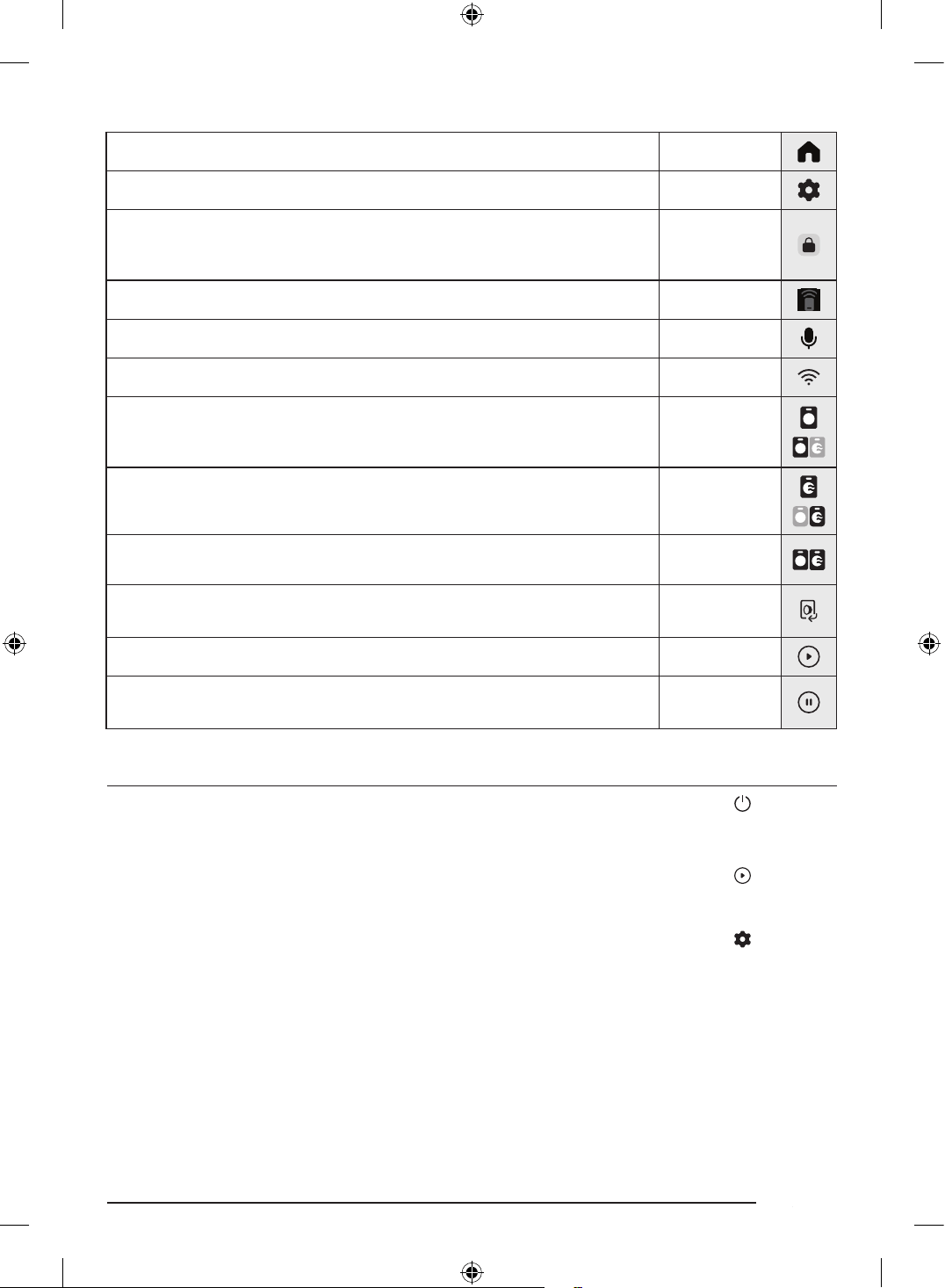
زومرلا فاصوأ ضرع
ةيسيئرلا ةشاشلا.ةيسيئرلا ةشاشلا إ لاقتنل طغضا
تادادعا.تادادعا ةمئاق إ لوخدلل طغضا
بابلا لفق
•.هحتف نكمي و لفقم بابلا نأ إ زمرلا اذه شي
•.زمرلا اذه ليغشت متيو ةرودلا ءانثأ ا
ً
يئاقلت بابلا لفقي
•.زمرلا اذه ءافتخا دنع بابلا حتف كنكمي
ذلا مكحتلا •.ليغشتلا ديق ذلا مكحتلا ةفيظو نأ إ زمرلا اذه شي
نوفوركيا •.ليغشتلا ديق نوفوركيا نأ إ زمرلا اذه شي
Wi-Fi •.ا
ً
طشن تنناب لاصتا نوكي امدنع ةراشا ةوق إ زمرلا اذه شي
Washer
)ةلاسغلا(
)لسغلا تارايخ(
يغتل زمرلا اذه ع طغضلا كنكمي .لسغلا ةيلمع ءانثأ وأ طقف لسغلا ةرود ءانثأ زمرلا اذه رهظي
.ةرودلا تادادعإ
)ففجا( Dryer
)فيفجتلا تارايخ(
زمرلا اذه ع طغضلا كنكمي .فيفجتلا ةيلمع ءانثأ وأ طقف فيفجتلا ةرود ءانثأ زمرلا اذه رهظي
.ةرودلا تادادعإ يغتل
ففجاو ةلاسغلا
اهتطبض كنأ وأ فيفجتلاو لسغلا ةرود تادادعإ طبض كنكمي هنأ حضوتل هذه زومرلا ةعومجم رهظت
.لعفلاب
بابلا حتف
.بابلا حتفل رزلا اذه ع طغضا
•.بابلا قغإ دنع هطيشنت داع
ُ
يو ا
ً
حوتفم بابلا نوكي امدنع رزلا طيشنت ىغل
ُ
ي
ءدبلا.
ً
ةيلمعلا ليغشت ءدب كنكمي
تقؤم فاقيإ
.اًتقؤم ةيلمعلا ليغشت فاقيإ كنكمي
•.اًتقؤم ليغشتلا فاقي زرلا ع طغضا ،ليغشتلا ءانثأ
ليغشتلا ءدبل ةطيسب تاوطخ
..ةلاسغلا ليغشتل ع طغضا
..ةبولطا ةرودلا ددح
..ةيضافا ةرودلا تارايخ يغت
..ةيلمعلا ليغشت ءدبل ع طغضا
تادادعا مادختسا
.. ع طغضا
..)ةلاسغلا( Washer وأ )ماع( General ع طغضا
..ةبولطا ةمئاقلا ديدحتل ةشاشلا ع ررم
..ةفيظولا ليغشت أدبا وأ تادادعا
ّ
غ
DC68-04355K-00_IB_T-PJT_WD8000D_AR.indd 16DC68-04355K-00_IB_T-PJT_WD8000D_AR.indd 16 2024-07-31 11:27:332024-07-31 11:27:33
ةيبرعلا17
ةنايصلا
فيظنتلا
.افا اهرمع ةلاطو ءادا ىوتسم روهدت عن ةفيظن ةلاسغلا ع ظفاح
.بيولا ع Samsung عقوم لجسا مدختسا ليلد ةل
ّ
صفم فيظنت تاداشرإ ع روثعلا كنكمي
يجراخلا حطسلا
• .ثدحت دق ىرخأ تاباكسناو ،تاضيباو ،تافظنا عيمج ةلاز ةمعان شامق ةعطق مدختسا
• تافظنا شرت .فيظنتلا قرو وأ ةطشاكلا قيحاسا مدختست .ةبطرو ةمعان شامق ةعطق مادختساب مكحتلا ةحول فيظنتب مق
.ةابم تاحوللا ع
خادلا ميمصتلا
دق لا ةيتكبلا تضفلا وأ تايرطفلا وأ نفعلا وأ ةهيركلا حئاورلا وأ خاسوا وأ ةبرتا ةلاز يرود لكشب لخادلا نم كتلاسغ ف
ّ
ظن
.سبا لسغل ةجيتن ةلاسغلا لخاد بست
اهلحو تكشا فاشكتسا
•.ةشاشلا ع رهظت لا تاميلعتلا عبتاو LCD ةشاش ع ةدوجوا تامولعا ةلاسر عجارف ،ةلكشم يأ كانه تناك اذإ
•.حا Samsung ةمدخ زكرمب لصتا ،ةلكشا رارمتسا ةلاح
دمجتلا عن ةيانعلا تاءارجإ
ريذحت
.هايا دمجت ةرارح ةجرد نع هيف ةرارحلا تاجرد ضفخنت ناكم Laundry Combo ب
ّ
كر
مدع نم دكأت .ءاتشلا موطرخلا لخاد يقبتا ءاا دمجتي دقف ،ليوط فيت موطرخ مادختساب
ً
ةابم ءاا فيت متي ناك اذإ
.مادختسا دعب موطرخلا لخاد يقبتم ءام دوجو
.ديلجلا ةباذ ا
ً
بيرقت قئاقد ع ةد اد ءام ةعوقنم ةفشنم ا
ً
مدختسم موطرخلا فِل ،فيتلا موطرخ دمجت اذإ
DC68-04355K-00_IB_T-PJT_WD8000D_AR.indd 17DC68-04355K-00_IB_T-PJT_WD8000D_AR.indd 17 2024-07-31 11:27:332024-07-31 11:27:33
ةيبرعلا18
غيرفتلاو ةئبعتلا
ةئبعتلا
..ةيلفسلا ةداسولا ع ةلاسغلا عض
..ةلاسغلا ع ةئبعتلا قودنص عض
..نكر لكل ةدحاو ،ةئبعتلا قودنص ةيبناجلا دئاسو ةعبرا لخدأ
..ةلاسغلا قوف ةيولعلا ةداسولا لخدأ
..قودنصلل يولعلا ءاطغلا قلغأ
..ةطاب قودنصلا فيلغتب مق
غيرفتلا
..طبرلا كفل ةطا عطقأ
..هتلاز قودنصلا عفراو ،كيدي اتلكب ةئبعتلا قودنص كسمأ
..ةيلفسلا ةداسولا ع نم ةلاسغلا ةلازإب مق
ةظوحلم
.زارطلا فتخاب تاداسولاو ةطا ددع فلتخي دق
DC68-04355K-00_IB_T-PJT_WD8000D_AR.indd 18DC68-04355K-00_IB_T-PJT_WD8000D_AR.indd 18 2024-07-31 11:27:332024-07-31 11:27:33
ةركذم
DC68-04355K-00_IB_T-PJT_WD8000D_AR.indd 19DC68-04355K-00_IB_T-PJT_WD8000D_AR.indd 19 2024-07-31 11:27:332024-07-31 11:27:33
DC68-04355K-00_IB_T-PJT_WD8000D_AR.indd 20DC68-04355K-00_IB_T-PJT_WD8000D_AR.indd 20 2024-07-31 11:27:332024-07-31 11:27:33
