BATTERY MONITOR SENSOR & VEHICLE
FINDER
MODEL NO: BT2020.V2
Thank you for purchasing a Sealey product. Manufactured to a high standard, this product will, if used according to these
instructions, and properly maintained, give you years of trouble free performance.
IMPORTANT: PLEASE READ THESE INSTRUCTIONS CAREFULLY. NOTE THE SAFE OPERATIONAL REQUIREMENTS, WARNINGS & CAUTIONS. USE
THE PRODUCT CORRECTLY AND WITH CARE FOR THE PURPOSE FOR WHICH IT IS INTENDED. FAILURE TO DO SO MAY CAUSE DAMAGE AND/OR
PERSONAL INJURY AND WILL INVALIDATE THE WARRANTY. KEEP THESE INSTRUCTIONS SAFE FOR FUTURE USE.
1. SAFETY
▲ DANGER! BE AWARE , LEAD-ACID BATTERIES GENERATE EXPLOSIVE GASES DURING NORMAL BATTERY OPERATION .
FOR THIS REASON, IT VERY IMPORTANT TO READ AND FOLLOW THESE INSTRUCTIONS CAREFULLY, WHILST
CONNECTING THIS PRODUCT TO A VEHICLE’S BATTERY.
9 Follow these instructions and those published by the battery and vehicle manufacturers, and the maker of any equipment you intend
to use in the vicinity of the battery. Remember to review warning marks on all products and on engines.
WARNING ! Modern vehicles contain extensive electronic systems.
9 Youarerequiredtocheckwiththevehiclemanufacturer,foranyspecicinstructionsregardingtheuseofthistypeofequipmenton
each vehicle.
NOTE: No liability will be accepted for damage / injury, where this product is not used in accordance with all instructions.
2. INTRODUCTION
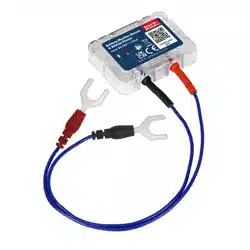
Displays real time battery power, voltage and temperature. Wireless connection with dedicated app which supports up to four
devices (iOS and Android compatible). Guide user back to the vehicle by automatically recording the last parking location. Record
the route, cost and driving habits of each trip, which can be exported to Excel. Automatically monitor the starting and charging
system of the vehicle and notify if abnormal. Compatible with most vehicle batteries, including sealed lead, AGM, Gel and 12V
lithium. Store historical data in the device for up to 30 days.
3. SPECIFICATION
MODEL NO.: ...............................................BT2020.V2
Voltage Range: .................................................... 6-20V
Average Current: ................................................ 1.5mA
Input Voltage: ...................................................... 6-20V
Voltage Accuracy: ..................................(9-16V) ±0.03V
Operating Temperature: ............................ -20°C - 40°C
Waterproof: ............................................................ IP67
Short Circuit Protection: .....................................Built In
Reverse Connection Protection: ........................Built In
Physical Dimensions: ........................ 55 x 41 x 12.5mm
4. OPERATION
NOTE: The input voltage range of the device is 6V-20V, which is suitable for 12V lead-acid batteries. Too high input voltage will
cause equipment damage.
NOTE: In order to obtain accurate battery temperature, please stick the device on the battery case.
NOTE: When installing the app, all permissions to be obtained must be accessed. If a permission fails to be obtained, some
functions cannot operate.
NOTE: Some functions need to allow the app to self-start and run in the background. The app has been optimized for this and will
not consume more power. To allow the app to start automatically and run in the background, Allow Background, Allow Self Starting
and Auto-Launch needs to be set in the phone. Consult your phone’s instructions for guidance.
4.1. INSTALLING THE DEVICE
4.1.1. Connect the positive tab (red lead) to the positive terminal on the battery. Connect the negative tab (black lead) to the negative
terminal on the battery. When removing the device, disconnect the negative terminal before the positive.
4.1.2. Fix the device to the battery case with the supplied double-sided tape.
The device must be attached to the battery case, otherwise the accurate battery temperature will not be obtained. Be careful not to
chooseaventilatedlocation,whichwillaectthebatterytemperaturereading.
4.2. INSTALLING THE APP
4.2.1. Scan the QR code of the product and download the app to your device.
4.2.2. Whenrunningtheapplicationforthersttime,theappwillaskforrequiredpermissions,allthesearenecessary(seenoteabove).
NOTE: The Android app obtains the location permission for the wireless scanning function, which is regulated by the Android system.
Refer to
instructions
* Electrical
shock hazard
* Wear eye
protection
* Wear
protective gloves
* Wear safety
footwear
* Wear
protective
clothing
* ONLY FOR WORKING
NEAR BATTERY
Original Language Version
© Jack Sealey Limited
BT2020.V2 Issue 3 (2) 18/03/24
Disabling this permission will cause the device not to be scanned or wireless scanning is slow. In addition, the track function also
needs to obtain the location permission.
NOTE: To run the application, it is necessary to register a login account. Android phones support Google, Facebook or Skype quick
registration and login, and iPhones support Apple ID, Facebook or Skype quick registration and login.
4.2.3. Toaddadevice,itisnecessarytollinthedeviceserialnumber,whichcanbescannedbybarcodeormanuallylledin.Theserial
number can be found on the package or shell.
4.2.4. Thedefaulteddevicenameistheserialnumber,anditcanalsobemodiedmanually.
4.2.5. Fill in the fuel consumption according to the average fuel consumption. Incorrect fuel consumption or incorrect fuel price will result
in inaccurate calculation of fuel costs.
5. MAINTENANCE
5.1. Regularly check that the unit is still attached to the battery or an accurate battery temperature will not be recorded.
6. TROUBLESHOOTING
SYMPTOM SOLUTION
Wireless connection fails Ensure that the wireless switch of the mobile phone is turned on, and there are no other phones
nearby to connect the device. Restart the wireless or restart the mobile phone. In addition, if the
phone wireless is connected with too many wireless devices, it may also cause the wireless not to
connect properly.
There is no tracking or
parking data.
ConrmthattheGPSswitchofthephoneisturnedon.
Conrmthattheapphasobtainedthepermissionofthelocationservice.
Conrmthattheappisrunningandthedeviceisconnected.
Conrmthatthe“GPSTrackServer”intheSettingsoftheappisturnedon.
Conrmthattheappcanbestartedbyitselfandcanruninthebackground.
NoAlarmnotication Usesettingsonthemobilephoneandturnontheapplicationnoticationpermission.
Battery power display is
inaccurate or no vehicle
starting system data?
Suitable for 12V lead-acid and LiFePO4 batteries. If there is no in-vehicle usage data, such as no
engine start behaviour, the power may be inaccurate and there is no start data.
The vehicle charging
system cannot be tested?
The test needs to be performed while engine running. It supports all ordinary alternators, and
does not support smart alternators. If the test still does not work, please check with the vehicle
manufacturer whether it is a smart alternator.
The fuel cost statistics are
inaccurate?
Checkwhetherthefuelconsumptionper100KMandthefuelpricearecorrectlylledin.
The location or journey
data is inconsistent.
If the app can’t be self-started and run in the background, the location data cannot be obtained.
Modify phone settings to enable self-start/auto-launch.
Need to enter a PIN code
for wireless connection?
When wireless turned on, some mobile phones system will automatically list all nearby wireless
devices. The wireless connection needs no PIN code. Re-running the app will automatically
connect to the device.
Original Language Version
© Jack Sealey Limited
WEEE REGULATIONS
Dispose of this product at the end of its working life in compliance with the EU Directive on Waste Electrical and Electronic Equipment
(WEEE). When the product is no longer required, it must be disposed of in an environmentally protective way. Contact your local solid
waste authority for recycling information.
BT2020.V2 Issue 3 (2) 18/03/24
Sealey Group, Kempson Way, Suffolk Business Park, Bury St Edmunds, Suffolk. IP32 7AR
01284 757500 sales@sealey.co.uk www.sealey.co.uk
ENVIRONMENT PROTECTION
Recycle unwanted materials instead of disposing of them as waste. All tools, accessories and packaging should be
sorted, taken to a recycling centre and disposed of in a manner which is compatible with the environment. When
theproductbecomescompletelyunserviceableandrequiresdisposal,drainanyuids(ifapplicable)intoapproved
containersanddisposeoftheproductanduidsaccordingtolocalregulations.
REGISTER YOUR
PURCHASE HERE
Note:Itisourpolicytocontinuallyimproveproductsandassuchwereservetherighttoalterdata,specicationsandcomponentparts
without prior notice. Please note that other versions of this product are available. If you require documentation for alternative versions, please
email or call our technical team on technical@sealey.co.uk or 01284 757505.
Important: No Liability is accepted for incorrect use of this product.
Warranty: Guarantee is 12 months from purchase date, proof of which is required for any claim.
